<?xml version="1.0" encoding="utf-8"?>
<feed xmlns="http://www.w3.org/2005/Atom">

  <title><![CDATA[Aidan Ryan]]></title>
  <link href="http://www.aidanjryan.com/atom.xml" rel="self"/>
  <link href="http://www.aidanjryan.com/"/>
  <updated>2017-01-20T05:47:24-08:00</updated>
  <id>http://www.aidanjryan.com/</id>
  <author>
    <name><![CDATA[Aidan Ryan]]></name>
    
  </author>
  <generator uri="http://octopress.org/">Octopress</generator>

  
  <entry>
    <title type="html"><![CDATA[Exist-Spoon - AbstractSpoon ToDoList connection for exist.io]]></title>
    <link href="http://www.aidanjryan.com/blog/2017/01/19/new-post/"/>
    <updated>2017-01-19T16:41:00-08:00</updated>
    <id>http://www.aidanjryan.com/blog/2017/01/19/new-post</id>
    <content type="html"><![CDATA[<p>I use the fantastic <a href="http://abstractspoon.weebly.com/">AbstractSpoon ToDoList</a> for task tracking. I recently discovered the <a href="http://exist.io">exist.io</a> personal metrics app and wanted to track my daily completed tasks.</p>

<p>I created an integration to do just that, and used it as an opportuniy to do a little development in .NET Core. You can find <a href="http://github.com/ajryan/exist-spoon">exist-spoon</a> on my <a href="http://github.com/ajryan">GitHub page</a>.<!--more--></p>

<p>The exist.io API is simple to work with. The only tricky part was implementing the OAuth authenticaiton flow on a console app. OAuth requires you to serve a page where the user&#8217;s browser will be redirected after completing the authorization. This page accepts the token provided by the parter (exist.io in this case).</p>

<p>There is no <code>HttpListener</code> in .NET Core, so I started from the web application skeleton and stripped everything down as much as possible. As usually happens with async work, I wrote way too many <code>Task&lt;T&gt;</code> and <code>await</code>s before arriving at the final, simpler structure. I punted on the TDL file format and used a simple regex to parse out when a task has <code>DONEDATE</code> equal to today.</p>

<p>The tool isn&#8217;t too complicated, but it&#8217;s gotten my juices flowing after a while without working on personal projects. It was cool to get a shoutout from one of exist.io&#8217;s creators (Hi <a href="https://twitter.com/joshsharp">Josh</a>!) too.</p>
]]></content>
  </entry>
  
  <entry>
    <title type="html"><![CDATA[Authenticating ASP.NET Web API with Azure Mobile Services]]></title>
    <link href="http://www.aidanjryan.com/blog/2014/03/05/authenticating-asp-dot-net-web-api-with-azure-mobile-services/"/>
    <updated>2014-03-05T09:56:00-08:00</updated>
    <id>http://www.aidanjryan.com/blog/2014/03/05/authenticating-asp-dot-net-web-api-with-azure-mobile-services</id>
    <content type="html"><![CDATA[<p>Azure Mobile Services provides a really easy way to integrate social login into web, mobile, and desktop applications. At Magenic, we&#8217;re using it in our client apps for the <a href="http://modernappslive.com/Events/Las-Vegas-2014/Home.aspx">Modern Apps Live!</a> conference demo application called <a href="http://myvotelive.com">MyVote</a>. The web application and the native mobile clients share a common Web API backend deployed to a Web Role on Azure Cloud Services. For most of the Web API methods, we only want to allow calls from users who have successfully authenticated with Azure Mobile Services. Let&#8217;s dig into what it takes to develop a Web API authentication handler that verifies claims issued by Azure Mobile Services.<!--more--></p>

<h2>Scenario</h2>

<p>This authentication method applies to the following scenario:</p>

<ul>
<li>Azure Mobile Services is set up for Social Authentication. See <a href="http://azure.microsoft.com/en-us/documentation/articles/mobile-services-html-get-started-users/">here</a> for instructions.</li>
<li>Users authenticate on the client (browser) side using the Azure Mobile Services JavaScript SDK. The latest SDK at the time of this writing is version 1.1.3, and can be found <a href="http://ajax.aspnetcdn.com/ajax/mobileservices/MobileServices.Web-1.1.3.min.js">here</a>.</li>
<li>You have ASP.NET Web API services that you want to expose only to users who have authenticated with Azure Mobile Services.</li>
</ul>


<p>Normally we are authenticating users on the same system that issues credentials - think standard ASP.NET membership stuff. In this case, our Web API system needs to trust credentials issued by a third party.</p>

<h2>Method</h2>

<p>Here is a quick refresher on login with Azure Mobile Services:</p>

<figure class='code'><figcaption><span>ZuMo Authentication  </span></figcaption>
 <div class="highlight"><table><tr><td class="gutter"><pre class="line-numbers"><span class='line-number'>1</span>
<span class='line-number'>2</span>
<span class='line-number'>3</span>
<span class='line-number'>4</span>
<span class='line-number'>5</span>
<span class='line-number'>6</span>
<span class='line-number'>7</span>
<span class='line-number'>8</span>
<span class='line-number'>9</span>
<span class='line-number'>10</span>
<span class='line-number'>11</span>
</pre></td><td class='code'><pre><code class='javascript'><span class='line'><span class="kd">var</span> <span class="nx">zumoUrl</span> <span class="o">=</span> <span class="s2">&quot;https://your-zumo-service.azure-mobile.net&quot;</span><span class="p">;</span>
</span><span class='line'><span class="kd">var</span> <span class="nx">zumoKey</span> <span class="o">=</span> <span class="s2">&quot;your-zumo-application-key&quot;</span><span class="p">;</span>
</span><span class='line'><span class="kd">var</span> <span class="nx">client</span> <span class="o">=</span> <span class="k">new</span> <span class="nx">WindowsAzure</span><span class="p">.</span><span class="nx">MobileServiceClient</span><span class="p">(</span><span class="nx">zumoUrl</span><span class="p">,</span> <span class="nx">zumoKey</span><span class="p">);</span>
</span><span class='line'>
</span><span class='line'><span class="c1">// options are facebook, twitter, microsoft, or google.</span>
</span><span class='line'><span class="c1">// you must set up each provider in the azure management portal.</span>
</span><span class='line'><span class="nx">client</span><span class="p">.</span><span class="nx">login</span><span class="p">(</span><span class="s2">&quot;facebook&quot;</span><span class="p">).</span><span class="nx">then</span><span class="p">(</span><span class="kd">function</span><span class="p">()</span> <span class="p">{</span>
</span><span class='line'>  <span class="nx">alert</span><span class="p">(</span><span class="s1">&#39;login succeeded&#39;</span><span class="p">);</span>
</span><span class='line'><span class="p">},</span> <span class="kd">function</span><span class="p">(</span><span class="nx">error</span><span class="p">)</span> <span class="p">{</span>
</span><span class='line'>  <span class="nx">alert</span><span class="p">(</span><span class="nx">error</span><span class="p">);</span>
</span><span class='line'><span class="p">});</span>
</span></code></pre></td></tr></table></div></figure>


<p>When a user successfully logs in with Azure Mobile Services, the <code>client.currentUser</code> field is set. This in turn exposes a <code>mobileServiceAuthenticationToken</code> field, which is a JSON Web Token (JWT). JWT is an <a href="http://tools.ietf.org/html/draft-ietf-oauth-json-web-token-07">emerging standard</a> for representing authentication information. It is used by many OAuth implementations, including Azure Mobile Services.</p>

<p>In order to verify that users have truly authenticated with Azure Mobile Services, we will rely on a &#8221;<a href="http://en.wikipedia.org/wiki/Shared_secret">shared secret</a>&#8221; known only to Azure Mobile Services and to us. The JWT issued to the user is cryptographically signed by Azure Mobile Services using the Master Key unique to our service instance. We have access to this key via the management portal, and we can use it in our Web API code to verify that a JWT was truly issued and signed by our Azure Mobile Services instance.</p>

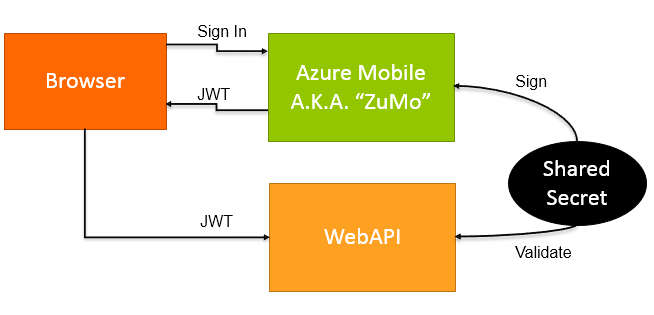
<p>Here&#8217;s a quick diagram that sums it up:</p>

<p> <img src="http://www.aidanjryan.com/images/zumo_auth.PNG" title="Zumo Auth" alt="Zumo Auth"></p>

<p>The standard for a client to present a JWT for authentication to a server is to set the request&#8217;s Authorization header to &#8220;Bearer <JWT>&#8221; where <JWT> is the actual Base64-encoded JSON Web Token. MyVote is using AngularJS, so I set up an HTTP interceptor to set the header on every request:</p>

<figure class='code'><figcaption><span>AngularJS Authorization Header Interceptor  </span></figcaption>
 <div class="highlight"><table><tr><td class="gutter"><pre class="line-numbers"><span class='line-number'>1</span>
<span class='line-number'>2</span>
<span class='line-number'>3</span>
<span class='line-number'>4</span>
<span class='line-number'>5</span>
<span class='line-number'>6</span>
<span class='line-number'>7</span>
<span class='line-number'>8</span>
<span class='line-number'>9</span>
<span class='line-number'>10</span>
<span class='line-number'>11</span>
<span class='line-number'>12</span>
<span class='line-number'>13</span>
<span class='line-number'>14</span>
<span class='line-number'>15</span>
<span class='line-number'>16</span>
<span class='line-number'>17</span>
<span class='line-number'>18</span>
<span class='line-number'>19</span>
<span class='line-number'>20</span>
</pre></td><td class='code'><pre><code class='javascript'><span class='line'><span class="nx">MyVote</span><span class="p">.</span><span class="nx">App</span> <span class="o">=</span> <span class="nx">angular</span><span class="p">.</span><span class="nx">module</span><span class="p">(</span><span class="s1">&#39;MyVoteApp&#39;</span><span class="p">,</span> <span class="p">[</span><span class="s1">&#39;ngRoute&#39;</span><span class="p">,</span> <span class="s1">&#39;ngResource&#39;</span><span class="p">]);</span>
</span><span class='line'>
</span><span class='line'><span class="nx">MyVote</span><span class="p">.</span><span class="nx">App</span><span class="p">.</span><span class="nx">factory</span><span class="p">(</span><span class="s1">&#39;zumoAuthInterceptor&#39;</span><span class="p">,</span> <span class="kd">function</span> <span class="p">()</span> <span class="p">{</span>
</span><span class='line'>    <span class="k">return</span> <span class="p">{</span>
</span><span class='line'>        <span class="nx">request</span><span class="o">:</span> <span class="kd">function</span> <span class="p">(</span><span class="nx">config</span><span class="p">)</span> <span class="p">{</span>
</span><span class='line'>            <span class="k">if</span> <span class="p">(</span><span class="nx">Globals</span><span class="p">.</span><span class="nx">zumoUserKey</span><span class="p">)</span> <span class="p">{</span>
</span><span class='line'>                <span class="nx">config</span><span class="p">.</span><span class="nx">headers</span><span class="p">[</span><span class="s1">&#39;Authorization&#39;</span><span class="p">]</span> <span class="o">=</span> <span class="s1">&#39;Bearer &#39;</span> <span class="o">+</span> <span class="nx">MyVote</span><span class="p">.</span><span class="nx">Services</span><span class="p">.</span><span class="nx">AuthService</span><span class="p">.</span><span class="nx">zumoUserKey</span><span class="p">;</span>
</span><span class='line'>            <span class="p">}</span>
</span><span class='line'>            <span class="k">return</span> <span class="nx">config</span><span class="p">;</span>
</span><span class='line'>        <span class="p">}</span>
</span><span class='line'>    <span class="p">};</span>
</span><span class='line'><span class="p">});</span>
</span><span class='line'>
</span><span class='line'><span class="nx">MyVote</span><span class="p">.</span><span class="nx">App</span><span class="p">.</span><span class="nx">config</span><span class="p">([</span>
</span><span class='line'>    <span class="s1">&#39;$routeProvider&#39;</span><span class="p">,</span> <span class="s1">&#39;$httpProvider&#39;</span><span class="p">,</span>
</span><span class='line'>    <span class="kd">function</span> <span class="p">(</span><span class="nx">$routeProvider</span><span class="p">,</span> <span class="nx">$httpProvider</span><span class="p">)</span> <span class="p">{</span>
</span><span class='line'>        <span class="nx">$httpProvider</span><span class="p">.</span><span class="nx">interceptors</span><span class="p">.</span><span class="nx">push</span><span class="p">(</span><span class="s1">&#39;zumoAuthInterceptor&#39;</span><span class="p">);</span>
</span><span class='line'>        <span class="c1">// -- snip -- other config stuff here -- //</span>
</span><span class='line'>    <span class="p">}</span>
</span><span class='line'><span class="p">]);</span>
</span></code></pre></td></tr></table></div></figure>


<p>On the server side, authentication is implemented in Web API via a delegating handler. The process begins here:</p>

<figure class='code'><figcaption><span>JWT Handler  </span></figcaption>
 <div class="highlight"><table><tr><td class="gutter"><pre class="line-numbers"><span class='line-number'>1</span>
<span class='line-number'>2</span>
<span class='line-number'>3</span>
<span class='line-number'>4</span>
<span class='line-number'>5</span>
<span class='line-number'>6</span>
<span class='line-number'>7</span>
<span class='line-number'>8</span>
<span class='line-number'>9</span>
<span class='line-number'>10</span>
<span class='line-number'>11</span>
<span class='line-number'>12</span>
<span class='line-number'>13</span>
<span class='line-number'>14</span>
<span class='line-number'>15</span>
<span class='line-number'>16</span>
<span class='line-number'>17</span>
<span class='line-number'>18</span>
<span class='line-number'>19</span>
<span class='line-number'>20</span>
<span class='line-number'>21</span>
<span class='line-number'>22</span>
<span class='line-number'>23</span>
</pre></td><td class='code'><pre><code class='csharp'><span class='line'><span class="k">protected</span> <span class="k">override</span> <span class="n">Task</span><span class="p">&lt;</span><span class="n">HttpResponseMessage</span><span class="p">&gt;</span> <span class="n">SendAsync</span><span class="p">(</span><span class="n">HttpRequestMessage</span> <span class="n">request</span><span class="p">,</span> <span class="n">CancellationToken</span> <span class="n">cancellationToken</span><span class="p">)</span>
</span><span class='line'><span class="p">{</span>
</span><span class='line'>    <span class="c1">// browser sends OPTIONS requests to check CORS and will not include Authorization header</span>
</span><span class='line'>    <span class="c1">// allow these requests to flow through with the response from the CORS handler</span>
</span><span class='line'>    <span class="k">if</span> <span class="p">(</span><span class="n">request</span><span class="p">.</span><span class="n">Method</span> <span class="p">!=</span> <span class="n">HttpMethod</span><span class="p">.</span><span class="n">Options</span><span class="p">)</span>
</span><span class='line'>    <span class="p">{</span>
</span><span class='line'>        <span class="kt">string</span> <span class="n">token</span><span class="p">;</span>
</span><span class='line'>        <span class="k">if</span> <span class="p">(</span><span class="n">TryRetrieveToken</span><span class="p">(</span><span class="n">request</span><span class="p">,</span> <span class="k">out</span> <span class="n">token</span><span class="p">))</span>
</span><span class='line'>        <span class="p">{</span>
</span><span class='line'>            <span class="k">try</span>
</span><span class='line'>            <span class="p">{</span>
</span><span class='line'>                <span class="kt">var</span> <span class="n">jwt</span> <span class="p">=</span> <span class="k">new</span> <span class="n">JsonWebToken</span><span class="p">(</span><span class="n">token</span><span class="p">,</span> <span class="k">new</span> <span class="n">Dictionary</span><span class="p">&lt;</span><span class="kt">int</span><span class="p">,</span> <span class="kt">string</span><span class="p">&gt;</span> <span class="m">0</span><span class="p">);</span>
</span><span class='line'>                <span class="n">jwt</span><span class="p">.</span><span class="n">Validate</span><span class="p">(</span><span class="n">validateExpiration</span><span class="p">:</span> <span class="k">true</span><span class="p">);</span>
</span><span class='line'>
</span><span class='line'>                <span class="n">MyVoteAuthentication</span><span class="p">.</span><span class="n">SetCurrentPrincipal</span><span class="p">(</span><span class="k">new</span> <span class="n">MyVotePrincipal</span><span class="p">(</span><span class="n">jwt</span><span class="p">.</span><span class="n">Claims</span><span class="p">.</span><span class="n">UserId</span><span class="p">));</span>
</span><span class='line'>            <span class="p">}</span>
</span><span class='line'>            <span class="k">catch</span> <span class="p">(</span><span class="n">JsonWebTokenException</span><span class="p">)</span>
</span><span class='line'>            <span class="p">{</span>
</span><span class='line'>            <span class="p">}</span>
</span><span class='line'>        <span class="p">}</span>
</span><span class='line'>    <span class="p">}</span>
</span><span class='line'>    <span class="k">return</span> <span class="k">base</span><span class="p">.</span><span class="n">SendAsync</span><span class="p">(</span><span class="n">request</span><span class="p">,</span> <span class="n">cancellationToken</span><span class="p">);</span>
</span><span class='line'><span class="p">}</span>
</span></code></pre></td></tr></table></div></figure>


<p>In the <code>SendAsync</code> override, we attempt to validate the JWT. If it is valid, we call <code>MyVoteAuthentication.SetCurrentPrincipal</code> which sets <code>HttpContext.Current.User</code>. This allows us to simply add the <code>[Authorize]</code> attribute to Web API controllers or actions where we want to require Azure Mobile authentication. Note the <code>_masterKey</code> field that is included in the <code>JsonWebToken</code> contructor call. This is the Azure Mobile Services Master Key (shared secret) that we trust as the cryptographic signer of valid JWTs.</p>

<p>The relevant bit inside <code>JsonWebToken</code> that validates the signature follows:</p>

<figure class='code'><figcaption><span>JsonWebToken.ValidateSignature  </span></figcaption>
 <div class="highlight"><table><tr><td class="gutter"><pre class="line-numbers"><span class='line-number'>1</span>
<span class='line-number'>2</span>
<span class='line-number'>3</span>
<span class='line-number'>4</span>
<span class='line-number'>5</span>
<span class='line-number'>6</span>
<span class='line-number'>7</span>
<span class='line-number'>8</span>
<span class='line-number'>9</span>
<span class='line-number'>10</span>
<span class='line-number'>11</span>
<span class='line-number'>12</span>
<span class='line-number'>13</span>
<span class='line-number'>14</span>
<span class='line-number'>15</span>
<span class='line-number'>16</span>
<span class='line-number'>17</span>
<span class='line-number'>18</span>
</pre></td><td class='code'><pre><code class='csharp'><span class='line'><span class="k">private</span> <span class="k">void</span> <span class="nf">ValidateSignature</span><span class="p">()</span>
</span><span class='line'><span class="p">{</span>
</span><span class='line'>    <span class="c1">// Derive signing key, Signing key = SHA256(secret + &quot;JWTSig&quot;)</span>
</span><span class='line'>    <span class="kt">byte</span><span class="p">[]</span> <span class="n">bytes</span> <span class="p">=</span> <span class="n">_UTF8Encoder</span><span class="p">.</span><span class="n">GetBytes</span><span class="p">(</span><span class="n">_signatureKey</span> <span class="p">+</span> <span class="s">&quot;JWTSig&quot;</span><span class="p">);</span>
</span><span class='line'>    <span class="kt">byte</span><span class="p">[]</span> <span class="n">signingKey</span> <span class="p">=</span> <span class="n">_Sha256Provider</span><span class="p">.</span><span class="n">ComputeHash</span><span class="p">(</span><span class="n">bytes</span><span class="p">);</span>
</span><span class='line'>
</span><span class='line'>    <span class="c1">// UFT-8 representation of the JWT envelope.claim segment</span>
</span><span class='line'>    <span class="kt">byte</span><span class="p">[]</span> <span class="n">input</span> <span class="p">=</span> <span class="n">_UTF8Encoder</span><span class="p">.</span><span class="n">GetBytes</span><span class="p">(</span><span class="n">_envelopeTokenSegment</span> <span class="p">+</span> <span class="s">&quot;.&quot;</span> <span class="p">+</span> <span class="n">_claimsTokenSegment</span><span class="p">);</span>
</span><span class='line'>
</span><span class='line'>    <span class="c1">// calculate an HMAC SHA-256 MAC</span>
</span><span class='line'>    <span class="k">using</span> <span class="p">(</span><span class="kt">var</span> <span class="n">hashProvider</span> <span class="p">=</span> <span class="k">new</span> <span class="n">HMACSHA256</span><span class="p">(</span><span class="n">signingKey</span><span class="p">))</span>
</span><span class='line'>    <span class="p">{</span>
</span><span class='line'>        <span class="kt">byte</span><span class="p">[]</span> <span class="n">myHashValue</span> <span class="p">=</span> <span class="n">hashProvider</span><span class="p">.</span><span class="n">ComputeHash</span><span class="p">(</span><span class="n">input</span><span class="p">);</span>
</span><span class='line'>        <span class="kt">string</span> <span class="n">base64UrlEncodedHash</span> <span class="p">=</span> <span class="n">Base64UrlEncode</span><span class="p">(</span><span class="n">myHashValue</span><span class="p">);</span>
</span><span class='line'>        <span class="k">if</span> <span class="p">(</span><span class="n">base64UrlEncodedHash</span> <span class="p">!=</span> <span class="n">Signature</span><span class="p">)</span>
</span><span class='line'>            <span class="k">throw</span> <span class="k">new</span> <span class="nf">JsonWebTokenException</span><span class="p">(</span><span class="s">&quot;Signature does not match.&quot;</span><span class="p">);</span>
</span><span class='line'>    <span class="p">}</span>
</span><span class='line'><span class="p">}</span>
</span></code></pre></td></tr></table></div></figure>


<p>I borrowed liberally from the <a href="https://github.com/liveservices/LiveSDK/blob/master/Samples/Asp.net/AuthenticationTokenSample/JsonWebToken.cs">Windows Live SDK sample</a> for this. There is one gotcha - the JWT spec indicates that a claims &#8220;exp&#8221; member should be expressed as a double, but Azure Mobile Services uses an integer.</p>

<p>You can find all of the JWT authentication-related code in the MyVote GitHub repository, in the <a href="https://github.com/Magenic/MyVote/tree/master/src/MyVote.AppServer/Auth">MyVote.AppServer.Auth</a> namespace.</p>

<p><strong>WARNING</strong>: Do not expose your Azure Mobile Services Master Key! For example, DON&#8217;T put the key in <code>appSettings</code> in your Web.config and then host your code on GitHub. You should rely on the secure configuration facility supplied by your hosting environment. If your Web API is hosted in Azure via Web Sites or Cloud Services, you can securely set <code>appSettings</code> values from within the management portal.</p>
]]></content>
  </entry>
  
  <entry>
    <title type="html"><![CDATA[Modern Apps Live! Looking back, looking forward]]></title>
    <link href="http://www.aidanjryan.com/blog/2014/02/05/modern-apps-live-orlando-2013/"/>
    <updated>2014-02-05T15:34:00-08:00</updated>
    <id>http://www.aidanjryan.com/blog/2014/02/05/modern-apps-live-orlando-2013</id>
    <content type="html"><![CDATA[<p>I presented at the <a href="http://modernappslive.com">Modern Apps Live!</a> conference in Orlando this past November. The whole show was a smashing success. It was an incredible opportunity to connect with peers and colleages, taking a step back to think about the &#8220;big picture&#8221; of where application development is headed. The next show will be in Las Vegas on March 10-14. I&#8217;ll be presenting on building a Modern HTML5 &#8220;smart client&#8221; application. Use my <a href="http://bit.ly/LSPK38Reg">registration link</a> for a $500 savings!<!--more--></p>

<h2>From backend to user experience</h2>

<p><a href="http://www.magenic.com">Magenic</a> has created a unique conference experience where the sessions build on one another to tell the whole story of building a modern application from start to finish. The common thread that ties the sessions together is the creation of a single application platform (a polling app called &#8220;MyVote&#8221;) delivered on diverse clients: Web, iOS, Android, Windows 8 (WinRT), and Windows Phone. The backend is all Azure - SQL and a Web API Cloud Service. The entire development effort was distributed, using Git on Visual Studio Online.</p>

<p>The Magenic team who delivers the conference talks are the same folks who developed the apps. All of the talks emphasize the architecture/design perspective: choosing the right components and patterns for reliable, predictable, successful dlivery. The conference program begins with sessions focused on solution architecture and the backend, follows with development of the various clients, user experience design, and touches on process and tooling around distributed development. We also do a deep-dive workshop on the last day where we dig into the actual nuts and bolts of implementation.</p>

<h2>My talk: HTML5/JavaScript application development</h2>

<p>My talk is about the development of an HTML5 &#8220;smart client&#8221; app. It is a Single Page App (SPA) developed with AngularJS, TypeScript, and Razor. I describe the benefits of taking an app the web, selection of a JavaScript application framework, architecture of the app components, testing, and cross-cutting concerns. I am really excited about this combination of technologies: AngularJS provides an &#8220;opinionated&#8221; framework that is very discoverable, and the combination of TypeScript and Razor templating allows us to extend the type-safety of .NET out into the client.</p>

<h2>Next time&#8230;</h2>

<p>We&#8217;re bringing the show to Vegas on March 10-14. We&#8217;ve added some features to the apps, and updated them to keep pace with advancements in their various platforms. Hope to see you <a href="http://modernappslive.com">there</a>!</p>
]]></content>
  </entry>
  
  <entry>
    <title type="html"><![CDATA[Silicon Valley Code Camp 2013 - Responsive Re-Engineering]]></title>
    <link href="http://www.aidanjryan.com/blog/2013/10/12/silicon-valley-code-camp-2013-responsive-re-engineering/"/>
    <updated>2013-10-12T10:34:00-07:00</updated>
    <id>http://www.aidanjryan.com/blog/2013/10/12/silicon-valley-code-camp-2013-responsive-re-engineering</id>
    <content type="html"><![CDATA[<p>I spoke at <a href="http://www.siliconvalley-codecamp.com/">Silicon Valley Code Camp</a> on October 5th. The title of my talk was &#8220;Responsive Re-Engineering,&#8221; and it focused on adapting desktop-only web sites to be mobile friendly. I want to thank the organizers and all of the folks who attended the talk. If any of you are reading this and you&#8217;d like to talk more about Responsive Web Design, <a href="http://twitter.com/ajryan">get in touch</a>! It was a great experience: lots of great questions and an awesome venue. The <a href="https://github.com/ajryan/CodeCamp2013">code samples</a> and <a href="https://www.slideshare.net/AidanRyan2/responsive-reengineering">slides</a> are online.<!--more--></p>

<p>If your company does ASP.NET development and you are interested in learning how to leverage Responsive Web Design, I would be happy to bring my show on the road. Email me: aidanr (at) magenic.com.</p>
]]></content>
  </entry>
  
  <entry>
    <title type="html"><![CDATA[TFS Test Steps Editor 2.1.0]]></title>
    <link href="http://www.aidanjryan.com/blog/2013/09/04/tfs-test-steps-editor-2-dot-1-0/"/>
    <updated>2013-09-04T07:15:00-07:00</updated>
    <id>http://www.aidanjryan.com/blog/2013/09/04/tfs-test-steps-editor-2-dot-1-0</id>
    <content type="html"><![CDATA[<p>I just published a new release of my <a href="http://teststepseditor.codeplex.com">TFS Test Steps Editor</a>. I&#8217;m pretty excited about this one, as it includes the first community contribution to the project!<!--more--> GitHub user <a href="https://github.com/mikepoz59">mikepoz59</a> built an awesome work item query / test case picker UI.</p>

<p>For this release, I have created two binary packages - one targeted at the TFS2010 API and another for the TFS2012 API. My error tracking system has been regularly emailing me reports from users who do not have the TFS2010 client assemblies installed, and a few discussions have cropped up in CodePlex reporting some TFS2012 formatting issues. I&#8217;m hoping this resolves both problems.</p>

<p>Visit the <a href="http://teststepseditor.codeplex.com">project</a> at CodePlex and pick up either the <a href="https://teststepseditor.codeplex.com/downloads/get/724002">TFS2010</a> or <a href="https://teststepseditor.codeplex.com/releases/view/111691">TFS2012</a> release.</p>
]]></content>
  </entry>
  
  <entry>
    <title type="html"><![CDATA[Hide the &quot;send feedback&quot; smile in VS2013]]></title>
    <link href="http://www.aidanjryan.com/blog/2013/07/01/hide-the-send-feedback-smile-in-vs2013/"/>
    <updated>2013-07-01T14:39:00-07:00</updated>
    <id>http://www.aidanjryan.com/blog/2013/07/01/hide-the-send-feedback-smile-in-vs2013</id>
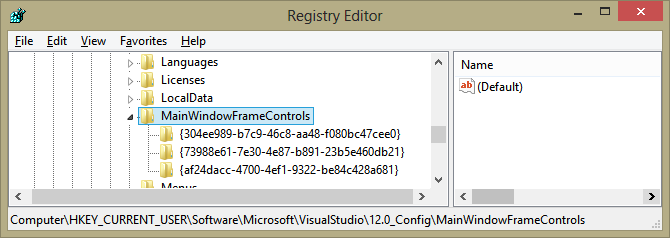
    <content type="html"><![CDATA[<p>Here&#8217;s a quick tip for those of you who&#8217;ve jumped into the Visual Studio 2013 Preview: hiding the &#8220;send feedback&#8221; smiley-face button in the upper-right of the window. I find it very distracting, and I know how to find the Connect site if I need to file a bug report. I searched the <code>HKEY_CURRENT_USER</code> Registry hive under <code>Software\Microsoft\VisualStudio\12.0_Config</code> for &#8220;feedback&#8221; and found a key named <code>{F66FBC48-9AE4-41DC-B1AF-0D64F0F54A07}</code> under <code>MainWindowFrameControls</code>. Its default value was &#8220;Feedback Button,&#8221; which sounded like what I was looking for. After backing up the key to disk, I deleted the key and re-started Visual Studio. No more smiley!</p>

<p>Delete <code>HKEY_CURRENT_USER\Software\Microsoft\VisualStudio\12.0_Config\MainWindowFrameControls\{F66FBC48-9AE4-41DC-B1AF-0D64F0F54A07}</code>.<!--more--></p>

<p><img src="http://www.aidanjryan.com/images/vs2013_smiley_reg.png" title="VS2013 Feedback registry location" alt="VS2013 Feedback registry location"></p>
]]></content>
  </entry>
  
  <entry>
    <title type="html"><![CDATA[Responsive Web Design - Introduction for ASP.NET MVC Developers]]></title>
    <link href="http://www.aidanjryan.com/blog/2013/05/29/responsive-design-introduction-for-asp-dot-net-mvc-developers/"/>
    <updated>2013-05-29T12:53:00-07:00</updated>
    <id>http://www.aidanjryan.com/blog/2013/05/29/responsive-design-introduction-for-asp-dot-net-mvc-developers</id>
    <content type="html"><![CDATA[<p>The term &#8220;Responsive Web Design&#8221; was coined in 2010 by Ethan Marcotte in his <a href="http://alistapart.com/article/responsive-web-design">canonical article</a> defining the technique. Recently, I spent some time researching the history and modern state of the art of Response Web Design (RWD). This article presents a survey of my findings, and provides examples of specific techniques. We&#8217;ll focus on Visual Studio / ASP.NET MVC tools and techniques for getting the job done.<!--more--></p>

<h2>Defining Responsive</h2>

<p>In the context of Responsive Web Design, the term &#8220;responsive&#8221; is the opposite of &#8220;prescriptive.&#8221; You&#8217;ve probably heard arguments against prescriptive approaches to language and grammar. Language and meaning are organic, evolving things that are constantly being re-created by their users. Prescriptivism in language does not account for its evolution, and can ignore the context and needs of its users. We have experienced &#8220;Prescriptive Web Design&#8221; from the dawn of the web, in the form of &#8220;best viewed in Netscape 4.0.3 on a 800 x 600 monitor at 16-bit color depth.&#8221; The modern variation is a placeholder page replacing desired content with &#8220;sorry, this page not formatted for mobile devices&#8221; How short-sighted, to actually hide content from valuable eyeballs? Responsive Web Design is decidedly <em>not</em> prescriptive.</p>

<p>Responsive Web Design is a set of techniques that allow our pages to adapt to the capabilities of the client. Client, in this case, being both the electronic and human consumer of our content. The goal is to ensure that our content can be comfortably and accessibly consumed by as many devices and people, of varying capabilities, as possible.</p>

<p>These techniques respond to</p>

<ul>
<li><p>Browser capabilities (HTML5, native audio/video, CSS3, plugins)</p></li>
<li><p>Device capabilities (geolocation, resolution, input methods)</p></li>
<li><p>User capabilities (vision, hearing)</p></li>
<li><p>Viewport (media type, resolution, density, orientation)</p></li>
</ul>


<p>Prescriptive designs enforce requirements on the client: they require certain screen sizes, input devices, or plugin support to fully render content. Responsive designs inquire about the capabilities of the client and put forth the best possible experience given those capabilities. They are as functional as possible in limited scenarios and enhance the experience as capabilities increase.</p>

<h2>Why?</h2>

<p>Why use responsive techniques? The sweet spot for RWD is a balance of development effort and reach: responsive design techniques will get your content in front of the most eyeballs, in a usable form, the the least effort. This form may not be optimal for every client scenario, but the aim is to find an appropriate compromise where required, and to take advantage of advanced capabilities where possible.</p>

<p>Consider the polar approaches:</p>

<ul>
<li><p>The cheapest option is to design only for desktop and cross your fingers for mobile users. Desktop clients less restrictive and therefore simpler to target.</p></li>
<li><p>The most expensive option is to implement separate designs for phone, tablet and desktop (potentially even developing native mobile clients.) You will deliver the most optimal experience for each device, at greatly increased cost of development <em>and maintenance.</em></p></li>
</ul>


<p>Beyond the cost-reach compromise, RWD provides several other benefits:</p>

<ul>
<li><p><strong>Consistency</strong>: Delivery of a consistent experience across devices. Styling, navigation, and user experience will be familiar and aid users who arrive at your site using different clients at different times. There is a single set of markup and CSS to maintain, reducing the chance of styles &#8220;evolving apart&#8221; over time.</p></li>
<li><p><strong>Value First</strong>: RWD forces you to first examine the value of the content being delivered, then decide how to present it. The tendancy when designing for a single platform can be to dive into <em>Lorem Ipsum</em> wireframes before content is fully realized. A content-first approach results in a design that exists purely to support the maximum transmission of the value of content; wireframe-first approaches can result in designs with vestigial features that distract from content value.</p></li>
</ul>


<p>Responsive design is about delivering the greatest possible user joy regardless of the access method. It is not a dogma or a recipe, it&#8217;s more of a mindset that is focused on experience first.</p>

<h2>Why Not?</h2>

<p>Responsive techniques are not useful or cost-effective for all applications. When the client capabilities are fully controlled, it is not necessary to design for multiple clients. Enterprise applications being deployed across known devices are the most common scenario here. Solutions that require specific interaction modes may not benefit from RWD, for example, interactions that are simply not possible on a touch device.</p>

<h2>History</h2>

<p>Here is a brief timeline of some influential articles that have led to the current state of thinking on Responsive Web Design:</p>

<ul>
<li><p><a href="http://alistapart.com/article/dao">John Allsopp - A Dao of Web Design</a>: Letting go of control in favor of accepting and adapting to client differences.</p></li>
<li><p><a href="http://alistapart.com/article/responsive-web-design">Ethan Marcotte - Responsive Web Design</a>: Original articulation of the principles.</p></li>
<li><p><a href="http://blog.cloudfour.com/css-media-query-for-mobile-is-fools-gold/">Jason Grigsby - CSS Media Query for Mobile is Fool&#8217;s Gold</a>: First major rebuttal, warning that bandwidth suffers - additional HTML, CSS, and (potentially) JavaScript to render on a smaller screen with <em>more</em> code. Important for pivoting the discussion toward general adaptability away from a mobile &#8220;silver bullet.&#8221;</p></li>
<li><p><a href="http://alistapart.com/article/organizing-mobile">Luke Wroblewski - Mobile First</a>: Refinement of responsive design approach working from most-constrained to least.</p></li>
</ul>


<h2>Core Techniques</h2>

<p>The original <strong>Responsive Web Design</strong> article defined the approach as being composed of three techniques: a Fluid Grid, Media Queries, and Flexible Images. Thinking in these areas has evolved a bit since the original article &#8211; here are some thoughts on each of the original techniques:</p>

<ul>
<li><p><strong>Fluid Grid (Adaptive Grid)</strong> The original article names it &#8220;fluid,&#8221; but this has come to mean proportional, which is not strictly required. An adaptive grid (and an adaptive layout in general) provides a framework for adjusting presentation to window sizes, resolutions, and screen densities. The earliest fluid layouts were focused on achieving proportional columns using CSS (a technique that was trivial using the common table-based layouts at the time). Further developments of adaptive layout are more focused on typography, especially given the emergence of high-density displays that make pixel- and point-sizing less reliable. A fully-fledged adaptive grid framework (potentially combined with a pre-defined base style set) can be a nice productivity boost.</p></li>
<li><p><strong>Media Queries</strong> The media query is a CSS3 feature that allows you to target CSS rules at specific ranges of window or screen size. The most common application of media queries in RWD is for adjusting the layout by repositioning or hiding certain elements as the available space is reduced.</p></li>
<li><p><strong>Flexible Images (Adaptive Media)</strong> The original article focuses on flexibly sizing and positioning images for smaller screen dimensions and lower bandwidth. Further thinking in this area has included selectively loading smaller image files in lower-bandwidth scenarios. With the addition of HTML5 Video and Audio capabilities, these media types should be considered as well.</p></li>
</ul>


<p>It is absolutely not essential to use all of these techniques in every web design effort. These primary techniques form the foundation of RWD thinking, and many additional techniques have been developed along the way. There is a toolbox available, and you can choose the appropriate tools for each job.</p>

<h2>Grid Systems</h2>

<h3>Grid System Rationale</h3>

<p>Many responsive sites rely on a grid system for layout. Abstracting the foundation of the layout provides a clean, consistent framework for positioning site components. A grid can be defined as a horizontal sectioning of the canvas in to columns and gutters. Content lives in columns, and gutters provide whitespace between them. Grids help us think about design, and they help users engage with your content. You can compare a CSS grid to the &#8220;snap to grid&#8221; function provided in form designer and presentation software: it provides convenient, consistent alignment and spacing for the elements on a page.</p>

<p>Several frameworks and generators exist that provide grid systems. They fall into four basic categories:</p>

<p>• <strong>Fixed</strong>: the container width is set to a fixed width, and the column count, column width, and gutter width are set to fixed fractions of the container. Column spanning is possible, but the container will never resize with the window.</p>

<p>• <strong>Responsive</strong>: a set of media queries provides a progressive step-down of container width, column count, column width, and gutter width.</p>

<p>• <strong>Fluid</strong>: the column count is fixed; container width, column width, and gutter width are percentages of the canvas.</p>

<p>• <strong>Fluid + Responsive</strong>: media queries set the container width and column count; within each breakpoint, column and gutter widths are proportional.</p>

<h3>Grid System Framework Comparison</h3>

<p>There are dozens of CSS grid frameworks available, at varying degrees of complexity, maturity, and compatibility. This list selects some notable popular frameworks that focus on different use cases, roughly ordered from simplest to more fully-featured. New ones are constantly being released that build on principles developed in those that came before.</p>

<table class="content-table">
    <tr>
        <th>Framework</th><th>Classification</th><th>Max size</th><th>Columns</th><th>Notes</th>
    </tr>
    <tr>
        <td><a href="http://960.gs">960gs</a></td><td>Static</td><td>960px</td><td>12 / 16</td><td>Grid only<br/>IE7+<br/>CSS</td>
    </tr>
    <tr>
        <td><a href="http://www.getskeleton.com/">Skeleton</a></td>
        <td>Responsive</td>
        <td>960px (desktop/tablet-landscape)<br/>768px (tablet-portrait)<br/>420px (mobile-landscape)<br/>300px (mobile-portrait)</td>
        <td>16</td>
        <td>Lightweight CSS framework<br/>IE7+<br/>CSS</td>
    </tr>
    <tr>
        <td><a href="http://responsive.gs/">responsive.gs</a></td>
        <td>Fluid + Responsive</td>
        <td>Any<br/>Columns stack below 768px</td>
        <td>12/16/2024</td>
        <td>Grid only<br/>IE7+<br/>CSS</td>
    </tr>
    <tr>
        <td><a href="http://neat.bourbon.io/">Bourbon Neat</a></td><td>Fluid + Responsive</td><td>Any</td><td>12<br/>(or custom)</td><td>Grid addon to Bourbon<br/>IE9+<br/>Sass</td>
    </tr>
    <tr>
        <td><a href="http://twitter.github.io/bootstrap/">Bootstrap</a></td>
        <td>Static OR<br/>Fluid OR<br/>Fluid + Responsive</td>
        <td>Static: 940px<br/>Others: Any (nestable)</td>
        <td>16</td>
        <td>Full client-side framework<br/>IE6+<br/>LESS</td>
    </tr>
</table>


<p>Some additional notes on the grid frameworks:</p>

<ul>
<li><p><strong>960gs</strong> The granddaddy. A good starting point to understand the concepts to launch you toward rolling your own. Viable for sites that are likely to have only desktop traffic. Consider 1140 grid given rise of wider screens.</p></li>
<li><p><strong>Skeleton</strong> Relatively minimal and easily customizable. Provides a layout skeleton (output) and CSS skeleton (source) with reset/sane defaults /media-query breakpoints for you to customize. Has not been maintained in a while (lots of open Github issues) - the dmur fork is more active.</p></li>
<li><p><strong>Bourbon Neat</strong> Relies exclusively on Sass mixins - no classes applied to markup. Extremely customizable.</p></li>
<li><p><strong>Responsive.gs</strong> Enforces border-box box-sizing model on all elements.</p></li>
<li><p><strong>Bootstrap</strong> Probably the best-known (or at least most buzzed-about) client-side framework available. A complete suite of layout, styling, and input/interactivity tools. Tends to leave a recognizable stamp on the appearance of the site.</p></li>
</ul>


<p>Note that responsive features rely on media queries - grids with responsive features will serve either the desktop or mobile view to &lt;= IE8 depending on whether they are &#8220;mobile first&#8221; or &#8220;desktop first.&#8221; JavaScript polyfills may be leveraged to extend back-compatibility to earlier browsers than those targeted by the framework.</p>

<p>It can be difficult to adapt an existing project to use a CSS framework - the framework may rely on certain style reset features, typographic assumptions, box-model settings, or other styling techniques that are not compatible with the existing codebase. Even for new work, adoption of a framework can assert a certain identifiable look and feel (for example, the Bootstrap buttons and navbar). It is worth spending time customizing the base style to ensure unique branding. This will often require you to learn at least the basics of a CSS preprocessor tool like LESS or Sass.</p>

<h3>Grid System Demo</h3>

<p>A page demonstrating the <a href="http://responsive.gs">responsive.gs</a> grid system can be found here: <a href="http://codecampresponsive.apphb.com/Home/ResponsiveGs">DEMO</a>. View the page on a mobile device and/or experiment with resizing the browser window.</p>

<p>Responsive.gs provides a very lightweight framework purely focused on grid layout; it does not enforce any look-and-feel on the site. The framework applies the <code>box-sizing: border-box</code> CSS rule to all elements, enabling a simpler sizing model. This rule makes it easier to calculate sizing in layouts: it changes the box size calculation to include padding and border in the overall height and width of a box. Due to this low-level rule, adoption of responsive.gs into an existing layout could result in some painful size adjustments. However, you&#8217;ll find that starting fresh with this rule applied can make layout size calculations much more intuitive.</p>

<p>The framework is proportionally fluid at widths above 768px, while all columns stack vertically at 100% width on smaller screens. It&#8217;s very simple to lay out columns with responsive.gs: apply the <code>row</code> class to define a full-width row, then use the <code>col</code> and <code>span_*</code> classes to set proportional column widths within the row.</p>

<figure class='code'><figcaption><span>responsive.gs  </span></figcaption>
 <div class="highlight"><table><tr><td class="gutter"><pre class="line-numbers"><span class='line-number'>1</span>
<span class='line-number'>2</span>
<span class='line-number'>3</span>
<span class='line-number'>4</span>
<span class='line-number'>5</span>
</pre></td><td class='code'><pre><code class='html'><span class='line'><span class="nt">&lt;section</span> <span class="na">class=</span><span class="s">&quot;row&quot;</span><span class="nt">&gt;</span>
</span><span class='line'>  <span class="nt">&lt;article</span> <span class="na">class=</span><span class="s">&quot;col span_6 bg4&quot;</span><span class="nt">&gt;&lt;h3&gt;</span>col span_6<span class="nt">&lt;/h3&gt;&lt;img</span> <span class="na">class=</span><span class="s">&quot;left-quarter&quot;</span> <span class="na">src=</span><span class="s">&quot;http://fillmurray.com/200/300&quot;</span><span class="nt">&gt;&lt;p&gt;</span>Column 1.<span class="nt">&lt;/p&gt;&lt;/article&gt;</span>
</span><span class='line'>  <span class="nt">&lt;article</span> <span class="na">class=</span><span class="s">&quot;col span_6 bg3&quot;</span><span class="nt">&gt;&lt;h3&gt;</span>col span_6<span class="nt">&lt;/h3&gt;&lt;p&gt;</span>Column 2.<span class="nt">&lt;/p&gt;&lt;/article&gt;</span>
</span><span class='line'>  <span class="nt">&lt;article</span> <span class="na">class=</span><span class="s">&quot;col span_4 bg2&quot;</span><span class="nt">&gt;&lt;h3&gt;</span>col span_4<span class="nt">&lt;/h3&gt;&lt;p&gt;</span>Column 3.<span class="nt">&lt;/p&gt;&lt;/article&gt;</span>
</span><span class='line'><span class="nt">&lt;/section&gt;</span>
</span></code></pre></td></tr></table></div></figure>


<p>Compatibility notes: Because the <code>box-sizing</code> rule is not supported on IE7 or lower, a polyfill (for inclusion using conditional comments) is provided. The framework is &#8220;mobile first&#8221;, in that all columns are laid out to 100% width in the base style, then set to proportional widths within a media query. This means that users of IE8 and below will receive the mobile experience.</p>

<h2>Media Queries</h2>

<p>Media queries are mostly about width, width, width. We generally assume that our layouts are equal to the width of the browser window and that they can be infinitely long. Thank goodness we aren&#8217;t working with fixed-height pages! Everyone expects to scroll vertically when viewing a page, and the mouse wheel convention is to scroll the page vertically. There are some clever / artistic layouts that scroll horizontally, but these can be difficult for users to &#8220;grok&#8221; initially, and should only be used for specialized content and audiences. (A media query can reference height, and there are some interesting cases where that can be useful described <a href="http://trentwalton.com/2012/01/11/vertical-media-queries-wide-sites/">here</a>.)</p>

<p>Given that the primary constraint on our designs is the width of the page, it&#8217;s very useful to be able to write width-aware CSS rules. When there is room, allow elements to be positioned next to one another horizontally. When there isn&#8217;t, reposition elements into a vertical flow, remove non-essential elements, and/or provide methods for the user to toggle the visibility of lower-priority elements.</p>

<h3>Selecting Breakpoints</h3>

<p>The horizontal width where a media query changes the layout is referred to as a &#8220;breakpoint.&#8221; There are many references that attempt to provide the screen dimensions of popular devices, which one could adopt for layout breakpoints. This approach is <em>not</em> workable, because the device landscape is constantly changing - it would result in an explosion of difficult-to-maintain rules, and bloat the size of the CSS transmitted to the browser.</p>

<p>Here is an overview of a workflow that can help identify the most appropriate breakpoints for an application:</p>

<ul>
<li><p>CONTENT is king. It&#8217;s not possible to select and design around a set of device-based breakpoints. CSS will be heavy and under-performing, and compromises will be made to &#8220;fit in the box.&#8221; It&#8217;s better to evaluate your content and think in general terms about presenting it in &#8220;big,&#8221; &#8220;middle,&#8221; and &#8220;small&#8221; contexts.</p></li>
<li><p>Start at a size near your initial wireframe target, and start resizing until things start looking &#8220;wrong&#8221;</p></li>
<li><p>Set a breakpoint with some breathing room before things go haywire, then apply rules to fix the layout in the &#8220;wrong side&#8221;</p></li>
<li><p>Repeat this exercise moving inward and outward until unreasonably small and large</p></li>
<li><p>Three sizes, small /medium / large, represent a maintainable sweet-spot</p></li>
</ul>


<p>Additional considerations for media query breakpoints:</p>

<ul>
<li><p>Line length is important. On wider layouts, it may be useful to set max-width to a comfortable reading length and allow margins to increase as the viewport grows wider. In browsers that support it, CSS3 multi-column can allow content to flow to multiple columns and avoid whitespace in wider scenarios.</p></li>
<li><p>Scaling widths out in ems proportionally to a base-font em ensure your design renders consistently across operating systems with missing fonts, user-selected fonts, zooms, and display densities.</p></li>
<li><p>Knowledge of common device widths is useful (along with testing the site on biggest-marketshare devices), but creating a layout appropriate to the content is most important of all.</p></li>
<li><p>iOS reports <em>portrait</em> <code>device-width</code> and <code>device-height</code> regardless of orientation (use <code>orientation</code> in query to differentiate)</p></li>
</ul>


<h3>Size, Move, Hide, Replace, or Transform?</h3>

<p>There are many options available for style specializations inside a media query. This list defines the most common techniques:</p>

<ul>
<li><p><strong>Size</strong>: Shrink box and / or font</p></li>
<li><p><strong>Move</strong>: Reposition an element (most commonly moving horizontally laid out columns to vertically stacked)</p></li>
<li><p><strong>Hide</strong>: Remove entirely</p></li>
<li><p><strong>Replace</strong>: Provide the same function in a smaller package (common example – list of navigation links collapsed to navigation menu menu)</p></li>
<li><p><strong>Transform</strong>: Maintain the same markup, but change its initial presentation (e.g. collapsing a context box into an accordion)</p></li>
</ul>


<p>Selection of the most appropriate technique depends on several factors:</p>

<ul>
<li><p>Semantics of the element / component</p></li>
<li><p>May descend from size > move > hide at cascading breakpoints</p></li>
<li><p>Remember that the most-important content should come first in markup for accessibility and SEO (see grid system push / pull classes)</p></li>
</ul>


<h3>The Mobile Viewport</h3>

<p>In order to effectively leverage media queries for mobile devices, it is necessary to include the <code>viewport</code> meta tag in the <code>head</code> of the page, like so:</p>

<pre><code>&lt;meta name="viewport" content="width=device-width" /&gt;
</code></pre>

<p>This instructs the mobile browser to treat device pixels as CSS pixels, that is, for the physical and virtual dimensions of the screen to be the same. (This is a bit of an oversimplification, since multiple high-density display pixels are sometimes treated as a single virtual device pixel. See <a href="http://www.quirksmode.org/mobile/viewports.html">A Tale of Two Viewports</a> for an excellent explanation.) When the <code>viewport</code> tag is not present, most mobile browsers will effectively &#8220;zoom&#8221; a larger virtual viewport into the smaller physical device viewport, by treating a device pixel as multiple CSS pixels. When mobile devices first became capable of browsing the web, this behavior was necessary to provide enough space to lay out pages designed exclusively for the desktop. Users employ the &#8220;double-tap zoom&#8221; gesture to focus on portions of the page.</p>

<p>The <code>viewport</code> meta tag allows us to instruct the browser how to treat the Layout Viewport relative to the Visual Viewport. Let&#8217;s examine the differences between the Layout Viewport and the Visual Viewport.</p>

<p><strong>Layout Viewport</strong></p>

<ul>
<li><p>CSS pixels available to layout</p></li>
<li><p>Resize of a Desktop browser window resizes the Layout Viewport and causes a reflow</p>

<ul>
<li><p>The Mobile Layout Viewport is set at the initial load and does not change</p></li>
<li><p>Mobile devices play some extra tricks with text wrapping - divs will lay out correctly, but the wrap point may be adjusted based on double-tap zoom size; text may re-wrap on zoom as well.</p></li>
</ul>
</li>
</ul>


<p><strong>Visual Viewport</strong></p>

<ul>
<li><p>The Visual Viewport is the CSS pixel dimension of the visible area of the page</p></li>
<li><p>Resize of a Desktop browser window resizes the Visual Viewport</p></li>
<li><p>Mobile zoom resizes the Visual Viewport</p></li>
</ul>


<p>Additional notes on the <code>viewport</code> meta-tag:</p>

<ul>
<li><p>Controls the layout viewport</p></li>
<li><p>Determines the number of device pixels per CSS pixel at zoom = 1</p></li>
<li><p>99% of the time, use the <meta name=“viewport” content=“width=device-width”> tag</p></li>
<li><p>For most modern devices, the default iOS and Android layout viewport width is 980 CSS pixels, with initial scale set to match the visual viewport</p></li>
<li><p>The content attribute is comma-separated</p>

<ul>
<li><p>Width = [px|device-width]. Device width is “screen width in CSS pixels at 100% zoom”</p></li>
<li><p>Height – little-used</p></li>
<li><p>Initial-scale = device pixel multiplier</p></li>
<li><p>Maximum-scale = device pixel multiplier</p></li>
<li><p>User-scalable = [true|false]. Whether to allow the user to scale. Think very carefully before limiting this.</p></li>
<li><p>CSS 2.1 recommends that CSS pixels correlate to one 96dpi pixel at arms’ length; initial-scale=1 requests this</p></li>
</ul>
</li>
<li><p>IE10 on Windows 8 ignores the viewport meta tag in snapped view. You need the following CSS declaration:</p></li>
</ul>


<figure class='code'> <div class="highlight"><table><tr><td class="gutter"><pre class="line-numbers"><span class='line-number'>1</span>
<span class='line-number'>2</span>
<span class='line-number'>3</span>
</pre></td><td class='code'><pre><code class='css'><span class='line'><span class="k">@-ms-viewport</span> <span class="p">{</span>
</span><span class='line'>    <span class="nt">width</span><span class="o">:</span> <span class="nt">device-width</span><span class="o">;</span>
</span><span class='line'><span class="p">}</span>
</span></code></pre></td></tr></table></div></figure>


<h3>Tangent: ASP.NET MVC Technique - Server-side mobile refinement</h3>

<p>This topic is not directly related to media queries, but can be used in conjunction with them to achieve comfortable layout <em>and</em> bandwidth reduction while maintaining a single page of markup. It is important to remember that content hidden with <code>display: none</code> is still downloaded. The idea behind the following technique is to remove a component from the layout flow using a media query, and apply server-side processing to entirely eliminate its content from the payload.</p>

<p>Here is an overview of the steps involved:</p>

<ul>
<li><p>Add the <a href="http://nuget.org/packages/51Degrees.mobi">NuGet package</a> from <a href="http://51degrees.mobi">51Degrees.mobi</a> for better device detection. Inclusion of this package causes the <code>Request.Browser.IsMobileDevice</code> property to be set for each request, detecting a much broader range of devices than the out-of-box behavior.</p></li>
<li><p>An alternative is the <a href="http://DetectMobileBrowsers.com">DetectMobileBrowsers.com</a> regex for simple useragent-based detection.</p></li>
<li><p>In your server-side markup (.aspx or .cshtml), wrap the component you wish to hide from mobile devices as follows:</p></li>
</ul>


<figure class='code'> <div class="highlight"><table><tr><td class="gutter"><pre class="line-numbers"><span class='line-number'>1</span>
<span class='line-number'>2</span>
<span class='line-number'>3</span>
<span class='line-number'>4</span>
<span class='line-number'>5</span>
<span class='line-number'>6</span>
<span class='line-number'>7</span>
<span class='line-number'>8</span>
<span class='line-number'>9</span>
<span class='line-number'>10</span>
</pre></td><td class='code'><pre><code class='html'><span class='line'>@if (!Request.Browser.IsMobileDevice) {
</span><span class='line'>  <span class="nt">&lt;section</span> <span class="na">class=</span><span class="s">&quot;sidebar&quot;</span><span class="nt">&gt;</span>
</span><span class='line'>      <span class="nt">&lt;p&gt;</span>Check out my twitter feed:<span class="nt">&lt;/p&gt;</span>
</span><span class='line'>      <span class="nt">&lt;ul&gt;</span>
</span><span class='line'>          <span class="nt">&lt;li&gt;</span>Post 1<span class="nt">&lt;/li&gt;</span>
</span><span class='line'>          <span class="nt">&lt;li&gt;</span>Post 2<span class="nt">&lt;/li&gt;</span>
</span><span class='line'>          <span class="nt">&lt;li&gt;</span>Post 3<span class="nt">&lt;/li&gt;</span>
</span><span class='line'>      <span class="nt">&lt;/ul&gt;</span>
</span><span class='line'>  <span class="nt">&lt;/section&gt;</span>
</span><span class='line'>}
</span></code></pre></td></tr></table></div></figure>


<ul>
<li><p>Implement a media query to flow the remainder of the layout into the previously-occupied space.</p></li>
<li><p>When Output Caching is in use, ensure the mobile and non-mobile variations of the page are cached separately. Include the attribute <code>[OutputCache(Duration = 60, VaryByCustom = "Mobile")]</code> on each controller action that relies on this technique. Provide the custom cache key by overriding <code>GetVaryByCustomString</code> in <code>Global.asax.cs</code>:</p></li>
</ul>


<figure class='code'> <div class="highlight"><table><tr><td class="gutter"><pre class="line-numbers"><span class='line-number'>1</span>
<span class='line-number'>2</span>
<span class='line-number'>3</span>
<span class='line-number'>4</span>
<span class='line-number'>5</span>
<span class='line-number'>6</span>
<span class='line-number'>7</span>
</pre></td><td class='code'><pre><code class='csharp'><span class='line'><span class="k">public</span> <span class="k">override</span> <span class="kt">string</span> <span class="nf">GetVaryByCustomString</span><span class="p">(</span><span class="n">System</span><span class="p">.</span><span class="n">Web</span><span class="p">.</span><span class="n">HttpContext</span> <span class="n">context</span><span class="p">,</span> <span class="kt">string</span> <span class="n">custom</span><span class="p">)</span>
</span><span class='line'><span class="p">{</span>
</span><span class='line'>    <span class="k">if</span> <span class="p">(</span><span class="n">custom</span> <span class="p">!=</span> <span class="s">&quot;Mobile&quot;</span><span class="p">)</span>
</span><span class='line'>        <span class="k">return</span> <span class="k">null</span><span class="p">;</span>
</span><span class='line'>
</span><span class='line'>    <span class="k">return</span> <span class="n">context</span><span class="p">.</span><span class="n">Request</span><span class="p">.</span><span class="n">Browser</span><span class="p">.</span><span class="n">IsMobileDevice</span><span class="p">.</span><span class="n">ToString</span><span class="p">();</span>
</span><span class='line'><span class="p">}</span>
</span></code></pre></td></tr></table></div></figure>


<ul>
<li>Depending on the nature of the content, you may wish to provide a way for the user to asynchronously request it after the initial page load.</li>
</ul>


<p>You can see this technique in action here: <a href="http://codecampresponsive.apphb.com/Home/OutputCacheMobileHiding">DEMO</a>. View the source of the page from a mobile device (or with a mobile user agent string) to verify that the sidebar is not transmitted. On desktop devices, the sidebar is included and hidden/shown as the page width changes.</p>

<h2>Adaptive Media</h2>

<p>In Marcotte&#8217;s original article, the only medium considered for adaptability was the image. Modern sites deliver images, video, and audio to devices of varying capabilities. The following sections describe responsive techniques for dealing with all three.</p>

<p>A page demonstrating many of the following techniques is available here: <a href="http://codecampresponsive.apphb.com/Home/ResponsiveMedia">DEMO</a>.</p>

<h3>Responsive Images</h3>

<p>We must consider layout and bandwidth when planning a responsive approach for images. Here are some notes on responsive image techniques:</p>

<ul>
<li><p><strong>Scaling</strong>: Basic image scaling can be accomplished with <code>width: 100%</code> and <code>max-width</code> CSS properties. IE7 may require a polyfill depending on other CSS properties in use.</p></li>
<li><p><strong>Cropping</strong>: At media query breakpoints, set negative margins with overflow: hidden to avoid shrinking the image and</p></li>
<li><p><strong>Swap/Omit</strong>: On the server side, alternative image href may be set in markup, or images may be omitted when a mobile browser is detected. An HTTP handler may be employed to dynamically scale images according to user agent. Client-side techniques for selecting images according to page size exist, but there is no silver bullet - most of these techniques will result in multiple image downloads or suffer from very un-semantic (and potentially non-accessible) markup.</p></li>
<li><p><strong>SVG</strong>: Scalable Vector Graphics images have the benefit of full-fidelity scaling with a single file. Internet Explorer introduced SVG support in IE9, so a fallback is required for earlier IE versions. As with most &#8220;swap&#8221; techniques, it&#8217;s important to monitor network traffic and avoid transmission of both files, when possible, or to employ a server-side approach.</p></li>
</ul>


<p>Be sure to choose the correct image format. PNG works best for logos and vectors, JPEG for photos and other realistic images. GIF should rarely be used, though can be effective for &lt;= IE6 as a work around for PNG transparency. Losslessly optimize your PNG images - this can reduce size by a surprising amount (see <a href="http://http://pnggauntlet.com/">PngGauntlet</a> for example).</p>

<h3>Responsive Video</h3>

<p>HTML5 introduced full video support, which modern browsers all handle. HTML5 video is generally more performant and less buggy than relying on plugin-based approaches. It is necessary, though, to provide a fallback for older browsers - the goal with video is a balance of performance and compatibility.</p>

<ul>
<li><p>Supply VP8- and H.264-encoded files and you will cover nearly all user agents</p></li>
<li><p>Omitting the type from the final source will cause most browsers to check the metadata to determine if it can be played. Bandwidth / accessibility tradeoff.</p></li>
<li><p>One <em>could</em> use the little-known <code>media</code> attribute to serve smaller files to smaller devices, although at the time of this writing it appears this attribute may be dropped.</p></li>
<li><p>IIS NOTE: need to add mime types for video, or IIS will return a 404.3. See <code>Web.config</code> section <code>system.webserver\staticContent\mimeMap</code>.</p></li>
<li><p>Within the video tag, below the sources, include a flash fallback and video download link (for users without flash).</p></li>
<li><p>Use JavaScript and/or HTTP module and user agent detection to serve appropriate codec and filesize</p></li>
<li><p>Good resources:</p>

<ul>
<li><p>Mark Pilgrim’s excellent, very in-depth (though getting out-of-date) guide: http://diveintohtml5.info/video.html</p></li>
<li><p>Concise, easy to read guide from JWPlayer: http://www.longtailvideo.com/support/jw-player/jw-player-for-flash-v5/22644/using-the-html5-video-tag/</p></li>
<li><p><a href="http://flowplayer.org/">FlowPlayer</a> is a pre-packaged, responsive, broadly compatible option.</p></li>
<li><p>Nice tool for generating markup: <a href="http://camendesign.co.uk/code/video_for_everybody">Video for Everybody</a></p></li>
</ul>
</li>
</ul>


<p>Don&#8217;t discount the option of hosting the video externally (Vimeo, Youtube) and IFRAMEing in a player – they’ve solved the cross-browser issues and will take bandwidth &amp; connection pressure off your server.</p>

<p><strong>Flexible video sizing:</strong></p>

<ul>
<li><p>For the <code>&lt;video&gt;</code> tag, you can rely on <code>width: 100%</code> and <code>max-width</code> with <code>height: auto</code> to flexibly resize video while maintaining aspect ratio.</p></li>
<li><p>Flash and IFRAMEs have issues – can’t automatically set height to preserve the aspect ratio. Thierry Koblentz “Creating Intrinsic Ratios for Video” to the rescue - <a href="http://www.alistapart.com/articles/creating-intrinsic-ratios-for-video/">post</a>.</p>

<ul>
<li><p>Set a wrapper DIV with relative position, zero height, and bottom-padding representing the aspect radio (e.g. 56.25% == 16:9)</p></li>
<li><p>Set an inner div absolutely positioned with 100% width and height</p></li>
<li><p>This technique has issues in IE7 and below – use a conditional style sheet</p></li>
</ul>
</li>
</ul>


<h3>Responsive Audio</h3>

<p>Techniques for audio largely follow those for video, except that layout adjustment is not really a concern. Rely on the HTML5 <code>audio</code> tag with fallbacks, and provide download links for users without plugin support. On the server side, consider serving files encoded to lower bit rates when mobile devices are detected.</p>

<h2>Other Considerations</h2>

<p>Now that we have covered the the three primary categories of responsive web design techniques, let&#8217;s briefly visit some related considerations.</p>

<h3>Forms</h3>

<p>Forms must provide a usable mobile layout and be touch-friendly. The following are important points to consider for responsive forms:</p>

<ul>
<li><p>Note the “field zoom” feature of many mobile browsers. When an input field is focused, the browser will zoom the viewport to the width of the field.</p>

<ul>
<li><p>This makes top-aligned labels better, otherwise the label or field may be cut off.</p></li>
<li><p>Set <code>input, textarea { font-size: 1em }</code> to avoid extra zoom on iDevices – lower font sizes will introduce additional zoom</p></li>
</ul>
</li>
<li><p>Touch-friendly</p>

<ul>
<li><p>Sizing (finger targets): extra padding on inputs, and larger label targets for radio and checkbox controls.</p></li>
<li><p>Click versus Touch events: there is a delay between the initial touch event and final click event, during which the browser is waiting for a potential gesture. If you know that a given control has no gesture interaction, you can trigger interactions from the touch event, resulting in faster response. This can be difficult to implement reliably - see <a href="http://labs.ft.com/articles/ft-fastclick/">FT Fastclick</a> for a solid implementation.</p></li>
</ul>
</li>
<li><p>Input Types</p>

<ul>
<li><p>HTML5 introduces new values for the <code>input</code> element&#8217;s <code>type</code> attribute. Mobile browsers key off this attribute to provide the most appropriate keyboard layout for the type (e.g. email type results in keyboard with @ symbol).</p></li>
<li><p>Some desktop browsers implement some native validation and specialized input controls for certain input types. This may not be desired - the <code>form</code> element&#8217;s <code>novalidate</code> attribute can prevent native validation, and CSS can be used to prevent browser-substituted controls.</p></li>
</ul>
</li>
</ul>


<h3>Typography</h3>

<p>The trend is toward more minimal interfaces that place typography in the forefront. The increased prevalence of high-density displays makes the display of beautiful type accessible to a greater number of users. Consider the following points related to typography:</p>

<ul>
<li><p>The user (or at least platform developer) has already specified his / her preferred default font size. Rather than overriding this, we should respect it as a base and scale from there.</p></li>
<li><p>New “retina”-class devices and high density displays can make pixel sizing unreliable. The future of the “pixel” is uncertain - <code>em</code> should be the default sizing unit, unless you have a really good reason to use pixels.</p></li>
<li><p>On higher-density displays, you may wish to increase font weight to achieve a uniform result across displays. Antialiasing on lower-density displays results in greater perceived weight given the same font on a higher-density display.</p></li>
<li><p>On standard-density displays, serif fonts below 12px are not sharp enough. But you should be over 12px anyway.</p></li>
<li><p>Good Metrics</p>

<ul>
<li><p>Font size: bigger than you think. Hold a book or magazine at a comfortable distance and compare.</p></li>
<li><p>Contrast: ratio font color to background brightness. Steer clear of full black (looks like a “hole”) and full white.</p></li>
<li><p>Line Height: for text, 140% of font size is a good general rule, but depends on face (ascender/descender ratio to x-height and “blackness”). In CSS, use proportional line-height notation (e.g. <code>font: Arial 1em/1.44</code>) with no units.</p></li>
<li><p>Line Length (measure): From 45 to 75 characters is good balance of ease in tracking to next line versus not having to do it too often. When browsers support it, you can use CSS3 column count when the view gets very wide. You can leave width “on the table” and set a <code>max-width</code>. Ensure text blocks have good height in proportion to width.</p></li>
<li><p>Spacing: Headings can often use more vertical padding to breathe</p></li>
</ul>
</li>
<li><p>Gotchas</p>

<ul>
<li><p>Note that when using fluid (proportional) layout techniques, you give up some control over line length</p></li>
<li><p>Web Font browser quirks and format support (use <a href="http://www.fontsquirrel.com/">Font Squirrel</a>)</p></li>
<li><p>When serving locally, apply correct mimetype to web fonts</p></li>
</ul>
</li>
</ul>


<h2>Conclusion</h2>

<p>Responsive Web Design has been around for several years, and has been gathering steam since its introduction. There is no &#8220;one size fits all&#8221; approach for cross-device sites - careful evaluation and application of the available techniques is required. Good luck on your projects!</p>
]]></content>
  </entry>
  
  <entry>
    <title type="html"><![CDATA[HTML and jQuery: Displaying and Positioning Custom Tooltips]]></title>
    <link href="http://www.aidanjryan.com/blog/2013/04/25/html-and-javascript-positioning-a-custom-tooltip/"/>
    <updated>2013-04-25T11:15:00-07:00</updated>
    <id>http://www.aidanjryan.com/blog/2013/04/25/html-and-javascript-positioning-a-custom-tooltip</id>
    <content type="html"><![CDATA[<p>At a client I was recently tasked with implementing a site that presents tooltips with a custom appearance. I thought I&#8217;d share some lessons learned about consistently displaying the tooltips and working around positioning problems.<!--more--></p>

<h2>Removing existing tooltips</h2>

<p>In the site I am working with, the custom tooltips must be displayed for an ASP.NET control that has its own tooltip implementation. This means that when the page is initially rendered, the <code>title</code> attribute is already set on the items where I need custom tooltips. This means I need to remove the title attribute but preserve its text for displaying later in my custom tooltip. There is an other wrinkle, in that the site is displayed in Internet Explorer&#8217;s quirks mode, which means the <code>alt</code> attribute will also display a browser tooltip on hover. I needed to remove the <code>alt</code> attribute as well, to avoid &#8220;double tooltips&#8221; with my custom tooltip and the browser tooltip being displayed simultaneously.</p>

<p>Here&#8217;s a snippet illustrating the technique:</p>

<figure class='code'> <div class="highlight"><table><tr><td class="gutter"><pre class="line-numbers"><span class='line-number'>1</span>
<span class='line-number'>2</span>
<span class='line-number'>3</span>
<span class='line-number'>4</span>
<span class='line-number'>5</span>
</pre></td><td class='code'><pre><code class='javascript'><span class='line'><span class="nx">$map</span><span class="p">.</span><span class="nx">children</span><span class="p">(</span><span class="s1">&#39;area&#39;</span><span class="p">).</span><span class="nx">each</span><span class="p">(</span><span class="kd">function</span><span class="p">()</span> <span class="p">{</span>
</span><span class='line'>  <span class="kd">var</span> <span class="nx">$area</span> <span class="o">=</span> <span class="nx">$</span><span class="p">(</span><span class="k">this</span><span class="p">);</span>
</span><span class='line'>  <span class="nx">$area</span><span class="p">.</span><span class="nx">attr</span><span class="p">(</span><span class="s1">&#39;data-customtooltip&#39;</span><span class="p">,</span> <span class="nx">$area</span><span class="p">.</span><span class="nx">attr</span><span class="p">(</span><span class="s1">&#39;title&#39;</span><span class="p">));</span>
</span><span class='line'>  <span class="nx">$area</span><span class="p">.</span><span class="nx">removeAttr</span><span class="p">(</span><span class="s1">&#39;alt title&#39;</span><span class="p">);</span>
</span><span class='line'><span class="p">})</span>
</span></code></pre></td></tr></table></div></figure>


<p>The control uses an image map to provide tooltip and interactive functions. I get a jQuery object for the <code>map</code>, then iterate is children. The <code>title</code> attribute is copied to a <code>data-customtooltip</code> attribute, and the <code>alt</code> and <code>title</code> attributes are removed to prevent display of the native browser tooltip.</p>

<h2>Displaying and positioning the custom tooltip</h2>

<p>The next piece of the puzzle is displaying a custom tooltip when the mouse is over an <code>area</code>. I include the following HTML in the master layout page:</p>

<figure class='code'> <div class="highlight"><table><tr><td class="gutter"><pre class="line-numbers"><span class='line-number'>1</span>
<span class='line-number'>2</span>
<span class='line-number'>3</span>
<span class='line-number'>4</span>
<span class='line-number'>5</span>
<span class='line-number'>6</span>
<span class='line-number'>7</span>
</pre></td><td class='code'><pre><code class='html'><span class='line'><span class="nt">&lt;div</span>
</span><span class='line'>  <span class="na">id=</span><span class="s">&quot;tooltip&quot;</span>
</span><span class='line'>  <span class="na">style=</span><span class="s">&quot;</span>
</span><span class='line'><span class="s">    position: fixed;</span>
</span><span class='line'><span class="s">    z-index: 999;</span>
</span><span class='line'><span class="s">    display: none;&quot;</span><span class="nt">&gt;</span>
</span><span class='line'><span class="nt">&lt;/div&gt;</span>
</span></code></pre></td></tr></table></div></figure>


<p>This creates a <code>div</code> that is initially invisible and detached from the overall page layout. Of course, the <code>div</code> is also styled to fit with the site&#8217;s overall theme.</p>

<p>Back in the JavaScript, I hooked the <code>mouseenter</code> event to set the tooltip text and then display the hidden <code>div</code>. Initially, I simply positioned the <code>div</code> below and to the left of the mouse pointer. Unfortunately, this naive positioning technique falls down when the mouse is near the lower-right corner of a page or frame: the tooltip is cut off at the page/frame edge. Native browser tooltips &#8220;float&#8221; above the page surface and can even extend beyond the edges of the browser window, but this is not possible with an HTML element. To work around this issue, I detect the &#8220;quadrant&#8221; of the page that the mouse cursor occupies, and position the tooltip away from the page corner. For example, if the mouse cursor is nearest the lower-right corner, I position the tooltip above and to the left of the cursor.</p>

<figure class='code'> <div class="highlight"><table><tr><td class="gutter"><pre class="line-numbers"><span class='line-number'>1</span>
<span class='line-number'>2</span>
<span class='line-number'>3</span>
<span class='line-number'>4</span>
<span class='line-number'>5</span>
<span class='line-number'>6</span>
<span class='line-number'>7</span>
<span class='line-number'>8</span>
<span class='line-number'>9</span>
<span class='line-number'>10</span>
<span class='line-number'>11</span>
<span class='line-number'>12</span>
<span class='line-number'>13</span>
<span class='line-number'>14</span>
<span class='line-number'>15</span>
<span class='line-number'>16</span>
<span class='line-number'>17</span>
<span class='line-number'>18</span>
<span class='line-number'>19</span>
<span class='line-number'>20</span>
<span class='line-number'>21</span>
<span class='line-number'>22</span>
<span class='line-number'>23</span>
<span class='line-number'>24</span>
<span class='line-number'>25</span>
<span class='line-number'>26</span>
<span class='line-number'>27</span>
<span class='line-number'>28</span>
<span class='line-number'>29</span>
<span class='line-number'>30</span>
</pre></td><td class='code'><pre><code class='javascript'><span class='line'><span class="nx">$tooltipDiv</span> <span class="o">=</span> <span class="nx">$</span><span class="p">(</span><span class="s1">&#39;#tooltip&#39;</span><span class="p">);</span>
</span><span class='line'><span class="nx">$map</span>
</span><span class='line'>  <span class="p">.</span><span class="nx">on</span><span class="p">(</span><span class="s1">&#39;mouseenter&#39;</span><span class="p">,</span> <span class="s1">&#39;area&#39;</span><span class="p">,</span> <span class="kd">function</span><span class="p">(</span><span class="nx">e</span><span class="p">)</span> <span class="p">{</span>
</span><span class='line'>      <span class="kd">var</span> <span class="nx">$this</span> <span class="o">=</span> <span class="nx">$</span><span class="p">(</span><span class="k">this</span><span class="p">);</span>
</span><span class='line'>      
</span><span class='line'>      <span class="c1">// set the tooltip text from our custom attribute</span>
</span><span class='line'>      <span class="kd">var</span> <span class="nx">customTitle</span> <span class="o">=</span> <span class="nx">$this</span><span class="p">.</span><span class="nx">attr</span><span class="p">(</span><span class="s1">&#39;data-customtooltip&#39;</span><span class="p">);</span>
</span><span class='line'>      <span class="nx">$tooltipDiv</span><span class="p">.</span><span class="nx">html</span><span class="p">(</span><span class="nx">customTitle</span><span class="p">);</span>
</span><span class='line'>
</span><span class='line'>      <span class="c1">// determine if the mouse is in the left / top &quot;halves&quot; of the document</span>
</span><span class='line'>      <span class="kd">var</span> <span class="nx">mouseLeft</span> <span class="o">=</span> <span class="nx">e</span><span class="p">.</span><span class="nx">pageX</span> <span class="o">&lt;</span> <span class="p">(</span><span class="nb">document</span><span class="p">.</span><span class="nx">body</span><span class="p">.</span><span class="nx">clientWidth</span> <span class="o">/</span> <span class="mi">2</span><span class="p">);</span>
</span><span class='line'>      <span class="kd">var</span> <span class="nx">mouseTop</span> <span class="o">=</span> <span class="nx">e</span><span class="p">.</span><span class="nx">pageY</span> <span class="o">&lt;</span> <span class="p">(</span><span class="nb">document</span><span class="p">.</span><span class="nx">body</span><span class="p">.</span><span class="nx">clientHeight</span> <span class="o">/</span> <span class="mi">2</span><span class="p">);</span>
</span><span class='line'>
</span><span class='line'>      <span class="c1">// position the tooltip away from the mouse quadrant</span>
</span><span class='line'>      <span class="kd">var</span> <span class="nx">css</span> <span class="o">=</span> <span class="p">{};</span>
</span><span class='line'>      <span class="k">if</span> <span class="p">(</span><span class="nx">mouseLeft</span><span class="p">)</span>
</span><span class='line'>          <span class="nx">css</span><span class="p">.</span><span class="nx">left</span> <span class="o">=</span> <span class="nx">e</span><span class="p">.</span><span class="nx">pageX</span> <span class="o">+</span> <span class="mi">10</span> <span class="o">+</span> <span class="s1">&#39;px&#39;</span><span class="p">;</span>
</span><span class='line'>      <span class="k">else</span>
</span><span class='line'>          <span class="nx">css</span><span class="p">.</span><span class="nx">left</span> <span class="o">=</span> <span class="nx">e</span><span class="p">.</span><span class="nx">pageX</span> <span class="o">-</span> <span class="p">(</span><span class="mi">7</span> <span class="o">+</span> <span class="nx">$tooltipDiv</span><span class="p">.</span><span class="nx">width</span><span class="p">())</span> <span class="o">+</span> <span class="s1">&#39;px&#39;</span><span class="p">;</span>
</span><span class='line'>      <span class="k">if</span> <span class="p">(</span><span class="nx">mouseTop</span><span class="p">)</span>
</span><span class='line'>          <span class="nx">css</span><span class="p">.</span><span class="nx">top</span> <span class="o">=</span> <span class="nx">e</span><span class="p">.</span><span class="nx">pageY</span> <span class="o">+</span> <span class="mi">10</span> <span class="o">+</span> <span class="s1">&#39;px&#39;</span><span class="p">;</span>
</span><span class='line'>      <span class="k">else</span>
</span><span class='line'>          <span class="nx">css</span><span class="p">.</span><span class="nx">top</span> <span class="o">=</span> <span class="nx">e</span><span class="p">.</span><span class="nx">pageY</span> <span class="o">-</span> <span class="p">(</span><span class="mi">7</span> <span class="o">+</span> <span class="nx">$tooltipDiv</span><span class="p">.</span><span class="nx">height</span><span class="p">())</span> <span class="o">+</span> <span class="s1">&#39;px&#39;</span><span class="p">;</span>
</span><span class='line'>
</span><span class='line'>      <span class="nx">$tooltipDiv</span><span class="p">.</span><span class="nx">css</span><span class="p">(</span><span class="nx">css</span><span class="p">);</span>
</span><span class='line'>      <span class="nx">$tooltipDiv</span><span class="p">.</span><span class="nx">show</span><span class="p">();</span>
</span><span class='line'>  <span class="p">})</span>
</span><span class='line'>  <span class="p">.</span><span class="nx">mouseleave</span><span class="p">(</span>
</span><span class='line'>      <span class="kd">function</span><span class="p">()</span> <span class="p">{</span> <span class="nx">$tooltipDiv</span><span class="p">.</span><span class="nx">hide</span><span class="p">();</span> <span class="p">}</span>
</span><span class='line'>  <span class="p">);</span>
</span></code></pre></td></tr></table></div></figure>


<p>Note that I am always using the <code>left</code> and <code>top</code> CSS attributes to position the <code>div</code>. I ran into strange issues when I attempted to set the left/top to auto and position using right/bottom. I don&#8217;t think Internet Explorer supports positioning in this manner.</p>

<p>Also note that I don&#8217;t attach the <code>mouseenter</code> handler to each <code>area</code> directly. There can be dozens of areas on the page that require a tooltip - hooking up that many event handlers would not perform as well. It&#8217;s better to attach a single handler for when the event bubbles to the <code>map</code>, then let jQuery filter for the child elements that we want to deal with.</p>
]]></content>
  </entry>
  
  <entry>
    <title type="html"><![CDATA[Updated WinHaste hastebin client]]></title>
    <link href="http://www.aidanjryan.com/blog/2013/02/08/updated-winhaste-hastebin-client/"/>
    <updated>2013-02-08T13:17:00-08:00</updated>
    <id>http://www.aidanjryan.com/blog/2013/02/08/updated-winhaste-hastebin-client</id>
    <content type="html"><![CDATA[<p>I just pushed a small update to my <a href="https://github.com/ajryan/WinHaste">WinHaste</a> hastebin client (<a href="http://ajryan-github-downloads.s3.amazonaws.com/WinHaste.exe">binary</a>). <a href="http://hastebin.com/">Hastebin</a> is a cool, minimal, login-free alternative to Pastebin. Now, when a command&#8217;s output is being piped to WinHaste, the output will be echoed to the console. This is especially handy if you are running an interactive command, so you aren&#8217;t entering values &#8220;blind.&#8221;<!--more--></p>

<p>WinHaste supports piped or interactive entry - if you enter <code>WinHaste.exe</code> with no arguments, it will read user input from the console until an end-of-file <code>^Z</code> character is entered. In this mode, Windows already writes user input to the console, so echoing within WinHaste would result in doubling every character typed. I ran across a nice technique in <a href="http://stackoverflow.com/a/9712392/1042">this StackOverflow answer</a> for checking whether the current input stream is piped or interactive:</p>

<figure class='code'> <div class="highlight"><table><tr><td class="gutter"><pre class="line-numbers"><span class='line-number'>1</span>
<span class='line-number'>2</span>
<span class='line-number'>3</span>
<span class='line-number'>4</span>
<span class='line-number'>5</span>
<span class='line-number'>6</span>
<span class='line-number'>7</span>
<span class='line-number'>8</span>
<span class='line-number'>9</span>
<span class='line-number'>10</span>
<span class='line-number'>11</span>
<span class='line-number'>12</span>
</pre></td><td class='code'><pre><code class='csharp'><span class='line'><span class="k">private</span> <span class="k">static</span> <span class="kt">bool</span> <span class="nf">IsInputPiped</span><span class="p">()</span>
</span><span class='line'><span class="p">{</span>
</span><span class='line'>    <span class="k">try</span>
</span><span class='line'>    <span class="p">{</span>
</span><span class='line'>        <span class="kt">var</span> <span class="n">tmp</span> <span class="p">=</span> <span class="n">Console</span><span class="p">.</span><span class="n">KeyAvailable</span><span class="p">;</span>
</span><span class='line'>        <span class="k">return</span> <span class="k">false</span><span class="p">;</span>
</span><span class='line'>    <span class="p">}</span>
</span><span class='line'>    <span class="k">catch</span> <span class="p">(</span><span class="n">InvalidOperationException</span><span class="p">)</span>
</span><span class='line'>    <span class="p">{</span>
</span><span class='line'>        <span class="k">return</span> <span class="k">true</span><span class="p">;</span>
</span><span class='line'>    <span class="p">}</span>
</span><span class='line'><span class="p">}</span>
</span></code></pre></td></tr></table></div></figure>


<p>I navigated into the disassembly of the <code>Console.KeyAvailable</code> (thanks, ReSharper!) found found the following:</p>

<figure class='code'> <div class="highlight"><table><tr><td class="gutter"><pre class="line-numbers"><span class='line-number'>1</span>
<span class='line-number'>2</span>
<span class='line-number'>3</span>
<span class='line-number'>4</span>
<span class='line-number'>5</span>
<span class='line-number'>6</span>
<span class='line-number'>7</span>
</pre></td><td class='code'><pre><code class='csharp'><span class='line'><span class="kt">bool</span> <span class="n">r</span> <span class="p">=</span> <span class="n">Win32Native</span><span class="p">.</span><span class="n">PeekConsoleInput</span><span class="p">(</span><span class="n">ConsoleInputHandle</span><span class="p">,</span> <span class="k">out</span> <span class="n">ir</span><span class="p">,</span> <span class="m">1</span><span class="p">,</span> <span class="k">out</span> <span class="n">numEventsRead</span><span class="p">);</span>
</span><span class='line'><span class="k">if</span> <span class="p">(!</span><span class="n">r</span><span class="p">)</span> <span class="p">{</span>
</span><span class='line'>    <span class="kt">int</span> <span class="n">errorCode</span> <span class="p">=</span> <span class="n">Marshal</span><span class="p">.</span><span class="n">GetLastWin32Error</span><span class="p">();</span>
</span><span class='line'>    <span class="k">if</span> <span class="p">(</span><span class="n">errorCode</span> <span class="p">==</span> <span class="n">Win32Native</span><span class="p">.</span><span class="n">ERROR_INVALID_HANDLE</span><span class="p">)</span>
</span><span class='line'>        <span class="k">throw</span> <span class="k">new</span> <span class="nf">InvalidOperationException</span><span class="p">(</span><span class="n">Environment</span><span class="p">.</span><span class="n">GetResourceString</span><span class="p">(</span><span class="s">&quot;InvalidOperation_ConsoleKeyAvailableOnFile&quot;</span><span class="p">));</span>
</span><span class='line'>    <span class="n">__Error</span><span class="p">.</span><span class="n">WinIOError</span><span class="p">(</span><span class="n">errorCode</span><span class="p">,</span> <span class="s">&quot;stdin&quot;</span><span class="p">);</span>
</span><span class='line'><span class="p">}</span>
</span></code></pre></td></tr></table></div></figure>


<p>So, I could P/Invoke PeekConsoleInput myself, but this works fine for me!</p>
]]></content>
  </entry>
  
  <entry>
    <title type="html"><![CDATA[A Windows Store (WinRT) TFS Work Item Browser]]></title>
    <link href="http://www.aidanjryan.com/blog/2013/02/04/a-windows-store-winrt-tfs-work-item-browser/"/>
    <updated>2013-02-04T13:55:00-08:00</updated>
    <id>http://www.aidanjryan.com/blog/2013/02/04/a-windows-store-winrt-tfs-work-item-browser</id>
    <content type="html"><![CDATA[<p>It&#8217;s time to dive into Windows Store application development. I&#8217;ve developed several tools for the Team Foundation Server (TFS) ecosystem, so I think an appropriate first project that will intersect my existing skill set would be a TFS Work Item browser.<!--more--></p>

<h2>The Plan</h2>

<p><img class="right" src="http://www.aidanjryan.com/images/tfsworkitems_start_icon.png" title="TFS Work Items start screen icon" alt="TFS Work Items start screen icon"></p>

<p>The app will be a simple work item browser. After entering your TFS server connection information, you&#8217;ll be presented with a list of Team Projects. Select a Team Project and browse through Work Items. This will allow me to explore navigation, paging, presentation, and other new idioms in the WinRT platform.</p>

<p>There is an interesting wrinkle here: the TFS API client assemblies are not usable from WinRT. A brief attempt at hitting the TFS ASMX services directly proved too frustrating to waste time on - after all, the goal is to push my Windows Store app skills. This led me to the decision to host a TFS proxy on <a href="http://appharbor.com">AppHarbor</a> that would provide a simple ASP.NET Web API endpoint for retrieving Work Items, which should be simple to access from WinRT. Another option for proxying to TFS could have been the <a href="http://blogs.msdn.com/b/briankel/archive/2013/01/07/odata-service-for-team-foundation-server-v2.aspx">OData Service for Team Foundation Server</a>, except that it is configured to connect only to a single server. I want my app&#8217;s users to be able to connect an arbitrary TFS server, which would require them to set up the OData service themselves. I opted instead to stand up a small service that allows connection to any TFS server and provides just enough functions for my app.</p>

<p>You can find the source for the <a href="http://github.com/ajryan/TfsWorkItems">TfsWorkItems</a> work item browser and <a href="http://github.com/ajryan/TfsProxy">TfsProxy</a> API proxy at my <a href="http://github.com/ajryan">Github profile</a>.</p>

<p>The app itself is available for testing in this <a href="http://www.aidanjryan.com/assets/TfsWorkItems_1.0.0.0_AnyCPU_Test.zip">ZIP archive</a>. Extract, and then run the <code>Add-AppDevPackage.ps1</code> PowerShell script to install the app.</p>

<h2>Web API Proxy</h2>

<p>As described above, in order to get to the TFS data from WinRT, I will stand up a simple Web API service with methods for retrieving Team Projects and Work Items. I created a Web API project and added controllers named <code>ProjectsController</code> and <code>WorkItemsController</code>. Along the way, I am using the handy <a href="https://chrome.google.com/webstore/detail/postman-rest-client/fdmmgilgnpjigdojojpjoooidkmcomcm">Postman</a> REST Client extension for Chrome to hit my service methods as I build them out. Fiddler or curl would be just as effective.</p>

<h3>TFS Connection</h3>

<p>The first thing I need is a connection to TFS - this requires a TFS URI, username, and password. Both of my controllers will require a connection, so I will compose this dependency to avoid cluttering all of the API calls with the TFS connection information. This will be implemented via an action filter that provides a TFS Connection in the current HttpContext.</p>

<p>My <code>TfsBasicAuthenticationAttribute</code> action filter passes the request headers to a <code>UserDataPrincipal</code> (<code>IPrincipal</code>) that provides a factory method named <code>InitFromHeaders</code>. This method handles the parsing of the connection information from the request headers. If no principal is returned, or if connecting to TFS with the given connection information fails, an HTTP 401 Unauthorized response is returned. When a connection issue occurs, the specific reason for failure is provided in the response content.</p>

<figure class='code'><figcaption><span>TfsBasicAuthenticationAttribute  </span></figcaption>
 <div class="highlight"><table><tr><td class="gutter"><pre class="line-numbers"><span class='line-number'>1</span>
<span class='line-number'>2</span>
<span class='line-number'>3</span>
<span class='line-number'>4</span>
<span class='line-number'>5</span>
<span class='line-number'>6</span>
<span class='line-number'>7</span>
<span class='line-number'>8</span>
<span class='line-number'>9</span>
<span class='line-number'>10</span>
<span class='line-number'>11</span>
<span class='line-number'>12</span>
<span class='line-number'>13</span>
<span class='line-number'>14</span>
<span class='line-number'>15</span>
<span class='line-number'>16</span>
<span class='line-number'>17</span>
<span class='line-number'>18</span>
<span class='line-number'>19</span>
<span class='line-number'>20</span>
<span class='line-number'>21</span>
<span class='line-number'>22</span>
<span class='line-number'>23</span>
<span class='line-number'>24</span>
<span class='line-number'>25</span>
<span class='line-number'>26</span>
<span class='line-number'>27</span>
<span class='line-number'>28</span>
<span class='line-number'>29</span>
<span class='line-number'>30</span>
<span class='line-number'>31</span>
<span class='line-number'>32</span>
<span class='line-number'>33</span>
<span class='line-number'>34</span>
<span class='line-number'>35</span>
<span class='line-number'>36</span>
<span class='line-number'>37</span>
<span class='line-number'>38</span>
<span class='line-number'>39</span>
<span class='line-number'>40</span>
<span class='line-number'>41</span>
<span class='line-number'>42</span>
<span class='line-number'>43</span>
<span class='line-number'>44</span>
<span class='line-number'>45</span>
<span class='line-number'>46</span>
<span class='line-number'>47</span>
<span class='line-number'>48</span>
<span class='line-number'>49</span>
<span class='line-number'>50</span>
<span class='line-number'>51</span>
<span class='line-number'>52</span>
</pre></td><td class='code'><pre><code class='csharp'><span class='line'><span class="k">public</span> <span class="k">class</span> <span class="nc">TfsBasicAuthenticationAttribute</span> <span class="p">:</span> <span class="n">ActionFilterAttribute</span>
</span><span class='line'><span class="p">{</span>
</span><span class='line'>    <span class="k">public</span> <span class="k">override</span> <span class="k">void</span> <span class="nf">OnActionExecuting</span><span class="p">(</span><span class="n">HttpActionContext</span> <span class="n">actionContext</span><span class="p">)</span>
</span><span class='line'>    <span class="p">{</span>
</span><span class='line'>        <span class="kt">var</span> <span class="n">userDataPrincipal</span> <span class="p">=</span> <span class="n">HttpContext</span><span class="p">.</span><span class="n">Current</span><span class="p">.</span><span class="n">User</span> <span class="k">as</span> <span class="n">UserDataPrincipal</span><span class="p">;</span>
</span><span class='line'>        <span class="k">if</span> <span class="p">(</span><span class="n">userDataPrincipal</span> <span class="p">==</span> <span class="k">null</span><span class="p">)</span>
</span><span class='line'>        <span class="p">{</span>
</span><span class='line'>            <span class="n">userDataPrincipal</span> <span class="p">=</span> <span class="n">UserDataPrincipal</span><span class="p">.</span><span class="n">InitFromHeaders</span><span class="p">(</span><span class="n">actionContext</span><span class="p">.</span><span class="n">Request</span><span class="p">.</span><span class="n">Headers</span><span class="p">);</span>
</span><span class='line'>        <span class="p">}</span>
</span><span class='line'>
</span><span class='line'>        <span class="k">if</span> <span class="p">(</span><span class="n">userDataPrincipal</span> <span class="p">==</span> <span class="k">null</span><span class="p">)</span>
</span><span class='line'>        <span class="p">{</span>
</span><span class='line'>            <span class="n">SetUnauthorizedResponse</span><span class="p">(</span><span class="n">actionContext</span><span class="p">);</span>
</span><span class='line'>            <span class="k">return</span><span class="p">;</span>
</span><span class='line'>        <span class="p">}</span>
</span><span class='line'>
</span><span class='line'>        <span class="k">try</span>
</span><span class='line'>        <span class="p">{</span>
</span><span class='line'>            <span class="kt">var</span> <span class="n">configUri</span> <span class="p">=</span> <span class="k">new</span> <span class="n">Uri</span><span class="p">(</span><span class="n">userDataPrincipal</span><span class="p">.</span><span class="n">TfsUrl</span><span class="p">);</span>
</span><span class='line'>
</span><span class='line'>            <span class="kt">var</span> <span class="n">provider</span> <span class="p">=</span> <span class="n">userDataPrincipal</span><span class="p">.</span><span class="n">GetCredentialsProvider</span><span class="p">();</span>
</span><span class='line'>            <span class="kt">var</span> <span class="n">tfsConfigServer</span> <span class="p">=</span> <span class="k">new</span> <span class="n">TfsConfigurationServer</span><span class="p">(</span><span class="n">configUri</span><span class="p">,</span> <span class="n">provider</span><span class="p">.</span><span class="n">GetCredentials</span><span class="p">(</span><span class="k">null</span><span class="p">,</span> <span class="k">null</span><span class="p">),</span> <span class="n">provider</span><span class="p">);</span>
</span><span class='line'>
</span><span class='line'>            <span class="n">tfsConfigServer</span><span class="p">.</span><span class="n">EnsureAuthenticated</span><span class="p">();</span>
</span><span class='line'>
</span><span class='line'>            <span class="n">HttpContext</span><span class="p">.</span><span class="n">Current</span><span class="p">.</span><span class="n">Items</span><span class="p">[</span><span class="s">&quot;TFS_CONFIG_SERVER&quot;</span><span class="p">]</span> <span class="p">=</span> <span class="n">tfsConfigServer</span><span class="p">;</span>
</span><span class='line'>        <span class="p">}</span>
</span><span class='line'>        <span class="k">catch</span> <span class="p">(</span><span class="n">TeamFoundationServerUnauthorizedException</span> <span class="n">ex</span><span class="p">)</span>
</span><span class='line'>        <span class="p">{</span>
</span><span class='line'>            <span class="n">SetUnauthorizedResponse</span><span class="p">(</span><span class="n">actionContext</span><span class="p">,</span> <span class="n">ex</span><span class="p">.</span><span class="n">Message</span><span class="p">);</span>
</span><span class='line'>            <span class="k">return</span><span class="p">;</span>
</span><span class='line'>        <span class="p">}</span>
</span><span class='line'>
</span><span class='line'>        <span class="n">HttpContext</span><span class="p">.</span><span class="n">Current</span><span class="p">.</span><span class="n">User</span> <span class="p">=</span> <span class="n">userDataPrincipal</span><span class="p">;</span>
</span><span class='line'>
</span><span class='line'>        <span class="k">base</span><span class="p">.</span><span class="n">OnActionExecuting</span><span class="p">(</span><span class="n">actionContext</span><span class="p">);</span>
</span><span class='line'>    <span class="p">}</span>
</span><span class='line'>
</span><span class='line'>    <span class="k">private</span> <span class="k">void</span> <span class="nf">SetUnauthorizedResponse</span><span class="p">(</span><span class="n">HttpActionContext</span> <span class="n">actionContext</span><span class="p">,</span> <span class="kt">string</span> <span class="n">message</span> <span class="p">=</span> <span class="k">null</span><span class="p">)</span>
</span><span class='line'>    <span class="p">{</span>
</span><span class='line'>        <span class="kt">string</span> <span class="n">messageValue</span> <span class="p">=</span> <span class="n">message</span> <span class="p">??</span> <span class="s">&quot;Authorization (Basic) and TfsUrl headers are required.&quot;</span><span class="p">;</span>
</span><span class='line'>        <span class="n">actionContext</span><span class="p">.</span><span class="n">Response</span> <span class="p">=</span> <span class="n">actionContext</span><span class="p">.</span><span class="n">Request</span><span class="p">.</span><span class="n">CreateResponse</span><span class="p">(</span><span class="n">HttpStatusCode</span><span class="p">.</span><span class="n">Unauthorized</span><span class="p">,</span> <span class="k">new</span> <span class="p">{</span> <span class="n">Message</span> <span class="p">=</span> <span class="n">messageValue</span> <span class="p">});</span>
</span><span class='line'>
</span><span class='line'>        <span class="kt">string</span> <span class="n">tfsUrl</span> <span class="p">=</span> <span class="n">actionContext</span><span class="p">.</span><span class="n">Request</span><span class="p">.</span><span class="n">Headers</span><span class="p">.</span><span class="n">GetTfsUrl</span><span class="p">();</span>
</span><span class='line'>        <span class="k">if</span> <span class="p">(!</span><span class="n">String</span><span class="p">.</span><span class="n">IsNullOrWhiteSpace</span><span class="p">(</span><span class="n">tfsUrl</span><span class="p">))</span>
</span><span class='line'>        <span class="p">{</span>
</span><span class='line'>            <span class="n">actionContext</span><span class="p">.</span><span class="n">Response</span><span class="p">.</span><span class="n">Headers</span><span class="p">.</span><span class="n">Add</span><span class="p">(</span>
</span><span class='line'>                <span class="s">&quot;WWW-Authenticate&quot;</span><span class="p">,</span>
</span><span class='line'>                <span class="n">String</span><span class="p">.</span><span class="n">Format</span><span class="p">(</span><span class="s">&quot;Basic realm=\&quot;{0}\&quot;&quot;</span><span class="p">,</span> <span class="n">tfsUrl</span><span class="p">));</span>
</span><span class='line'>        <span class="p">}</span>
</span><span class='line'>    <span class="p">}</span>
</span><span class='line'><span class="p">}</span>
</span></code></pre></td></tr></table></div></figure>


<blockquote><p>Note that in the SetUnauthorizedResponse method, I am adding the WWW-Authenticate header with the realm set to the TFS URL. Responding with a combination of HTTP 401 and this header is the standard for negotiating Basic Authentication. The WinJS.xhr wrapper for XMLHttpRequest handles this negotiation by automatically prompting for username and password in a modal popup, and then re-issuing the request with the Authorization header correctly encoded for Basic Authentication.</p></blockquote>


<p>The <code>UserDataPrincipal</code> class used here implements <code>IPrincipal</code> and in its <code>InitFromHeaders</code> method, extracts the username, password, and TFS URL from the HTTP headers. The username and password are retrieved from the HTTP Authorization header using the Basic Authentication standard, and the TFS URL is expected in a separate HTTP header named TfsUrl. Upon authenticating with the TFS Configuration Server, its instance is stored in the current HTTP context. The <code>UserDataPrincipal</code> class also supplies an <code>ICredentialsProvider</code> to the <code>TfsConfigurationServer</code> constructor, which is the interface for providing the domain credentials.</p>

<h3>Retrieving the Team Projects list</h3>

<p>After applying the <code>TfsBasicAuthorization</code> attribute to the <code>ProjectsController</code>, I have access to the <code>TfsConfigurationServer</code> for retrieving information about Team Projects on the server. The highest level of organization within Team Foundation Server is a &#8220;Project Collection&#8221; that contains one or more Team Projects. Project Collections are accessed by by querying the configuration server&#8217;s <code>CatalogNode</code> for children with resource type <code>ProjectCollection</code>. For each Team Project Collection node, I get its <code>WorkItemStore</code> service and iterate its <code>Projects</code> collection looking for Team Projects where the authorized user has Work Item read rights. This method returns a list of <code>TeamProjectInfo</code> data transfer objects. Note that for each Team Project, I am including a list of the available Work Item Types. This will be leveraged for filtering in the app.</p>

<figure class='code'><figcaption><span>ProjectsController  </span></figcaption>
 <div class="highlight"><table><tr><td class="gutter"><pre class="line-numbers"><span class='line-number'>1</span>
<span class='line-number'>2</span>
<span class='line-number'>3</span>
<span class='line-number'>4</span>
<span class='line-number'>5</span>
<span class='line-number'>6</span>
<span class='line-number'>7</span>
<span class='line-number'>8</span>
<span class='line-number'>9</span>
<span class='line-number'>10</span>
<span class='line-number'>11</span>
<span class='line-number'>12</span>
<span class='line-number'>13</span>
<span class='line-number'>14</span>
<span class='line-number'>15</span>
<span class='line-number'>16</span>
<span class='line-number'>17</span>
<span class='line-number'>18</span>
<span class='line-number'>19</span>
<span class='line-number'>20</span>
<span class='line-number'>21</span>
<span class='line-number'>22</span>
<span class='line-number'>23</span>
<span class='line-number'>24</span>
<span class='line-number'>25</span>
<span class='line-number'>26</span>
<span class='line-number'>27</span>
<span class='line-number'>28</span>
<span class='line-number'>29</span>
<span class='line-number'>30</span>
<span class='line-number'>31</span>
<span class='line-number'>32</span>
<span class='line-number'>33</span>
<span class='line-number'>34</span>
<span class='line-number'>35</span>
<span class='line-number'>36</span>
<span class='line-number'>37</span>
<span class='line-number'>38</span>
<span class='line-number'>39</span>
<span class='line-number'>40</span>
</pre></td><td class='code'><pre><code class='csharp'><span class='line'><span class="na">[TfsBasicAuthentication]</span>
</span><span class='line'><span class="k">public</span> <span class="k">class</span> <span class="nc">ProjectsController</span> <span class="p">:</span> <span class="n">ApiController</span>
</span><span class='line'><span class="p">{</span>
</span><span class='line'>    <span class="c1">// GET api/projects</span>
</span><span class='line'>    <span class="k">public</span> <span class="n">IEnumerable</span><span class="p">&lt;</span><span class="n">TeamProjectInfo</span><span class="p">&gt;</span> <span class="n">Get</span><span class="p">()</span>
</span><span class='line'>    <span class="p">{</span>
</span><span class='line'>        <span class="kt">var</span> <span class="n">configServer</span> <span class="p">=</span> <span class="p">(</span><span class="n">TfsConfigurationServer</span><span class="p">)</span> <span class="n">HttpContext</span><span class="p">.</span><span class="n">Current</span><span class="p">.</span><span class="n">Items</span><span class="p">[</span><span class="s">&quot;TFS_CONFIG_SERVER&quot;</span><span class="p">];</span>
</span><span class='line'>        <span class="kt">var</span> <span class="n">collections</span> <span class="p">=</span> <span class="n">configServer</span><span class="p">.</span><span class="n">CatalogNode</span><span class="p">.</span><span class="n">QueryChildren</span><span class="p">(</span>
</span><span class='line'>            <span class="k">new</span> <span class="n">Guid</span><span class="p">[]</span> <span class="p">{</span> <span class="n">CatalogResourceTypes</span><span class="p">.</span><span class="n">ProjectCollection</span> <span class="p">},</span> <span class="k">false</span><span class="p">,</span> <span class="n">CatalogQueryOptions</span><span class="p">.</span><span class="n">None</span><span class="p">);</span>
</span><span class='line'>
</span><span class='line'>        <span class="kt">var</span> <span class="n">projects</span> <span class="p">=</span> <span class="k">new</span> <span class="n">List</span><span class="p">&lt;</span><span class="n">TeamProjectInfo</span><span class="p">&gt;();</span>
</span><span class='line'>        <span class="k">foreach</span> <span class="p">(</span><span class="kt">var</span> <span class="n">collectionNode</span> <span class="k">in</span> <span class="n">collections</span><span class="p">)</span>
</span><span class='line'>        <span class="p">{</span>
</span><span class='line'>            <span class="kt">var</span> <span class="n">collectionId</span> <span class="p">=</span> <span class="k">new</span> <span class="n">Guid</span><span class="p">(</span><span class="n">collectionNode</span><span class="p">.</span><span class="n">Resource</span><span class="p">.</span><span class="n">Properties</span><span class="p">[</span><span class="s">&quot;InstanceId&quot;</span><span class="p">]);</span>
</span><span class='line'>            <span class="kt">var</span> <span class="n">collection</span> <span class="p">=</span> <span class="n">configServer</span><span class="p">.</span><span class="n">GetTeamProjectCollection</span><span class="p">(</span><span class="n">collectionId</span><span class="p">);</span>
</span><span class='line'>            <span class="kt">var</span> <span class="n">workItemStore</span> <span class="p">=</span> <span class="n">collection</span><span class="p">.</span><span class="n">GetService</span><span class="p">&lt;</span><span class="n">WorkItemStore</span><span class="p">&gt;();</span>
</span><span class='line'>            <span class="k">foreach</span> <span class="p">(</span><span class="n">Project</span> <span class="n">project</span> <span class="k">in</span> <span class="n">workItemStore</span><span class="p">.</span><span class="n">Projects</span><span class="p">)</span>
</span><span class='line'>            <span class="p">{</span>
</span><span class='line'>                <span class="k">if</span> <span class="p">(</span><span class="n">project</span><span class="p">.</span><span class="n">HasWorkItemReadRights</span><span class="p">)</span>
</span><span class='line'>                <span class="p">{</span>
</span><span class='line'>                    <span class="kt">var</span> <span class="n">projectInfo</span> <span class="p">=</span> <span class="k">new</span> <span class="n">TeamProjectInfo</span>
</span><span class='line'>                    <span class="p">{</span>
</span><span class='line'>                        <span class="n">CollectionName</span> <span class="p">=</span> <span class="n">collectionName</span><span class="p">,</span>
</span><span class='line'>                        <span class="n">CollectionId</span> <span class="p">=</span> <span class="n">collectionId</span><span class="p">.</span><span class="n">ToString</span><span class="p">(),</span>
</span><span class='line'>                        <span class="n">ProjectName</span> <span class="p">=</span> <span class="n">project</span><span class="p">.</span><span class="n">Name</span><span class="p">,</span>
</span><span class='line'>                        <span class="n">ProjectUri</span> <span class="p">=</span> <span class="n">project</span><span class="p">.</span><span class="n">Uri</span><span class="p">.</span><span class="n">ToString</span><span class="p">(),</span>
</span><span class='line'>                        <span class="n">WorkItemTypes</span> <span class="p">=</span> <span class="n">project</span><span class="p">.</span><span class="n">WorkItemTypes</span>
</span><span class='line'>                            <span class="p">.</span><span class="n">Cast</span><span class="p">&lt;</span><span class="n">WorkItemType</span><span class="p">&gt;()</span>
</span><span class='line'>                            <span class="p">.</span><span class="n">Select</span><span class="p">(</span><span class="n">wit</span> <span class="p">=&gt;</span> <span class="n">wit</span><span class="p">.</span><span class="n">Name</span><span class="p">)</span>
</span><span class='line'>                            <span class="p">.</span><span class="n">OrderBy</span><span class="p">(</span><span class="n">name</span> <span class="p">=&gt;</span> <span class="n">name</span><span class="p">)</span>
</span><span class='line'>                            <span class="p">.</span><span class="n">ToList</span><span class="p">()</span>
</span><span class='line'>                    <span class="p">};</span>
</span><span class='line'>                    <span class="n">projects</span><span class="p">.</span><span class="n">Add</span><span class="p">(</span><span class="n">projectInfo</span><span class="p">);</span>
</span><span class='line'>                <span class="p">}</span>
</span><span class='line'>            <span class="p">}</span>
</span><span class='line'>        <span class="p">}</span>
</span><span class='line'>
</span><span class='line'>        <span class="k">return</span> <span class="n">projects</span><span class="p">;</span>
</span><span class='line'>    <span class="p">}</span>
</span><span class='line'><span class="p">}</span>
</span></code></pre></td></tr></table></div></figure>


<h3>Retrieving a Work Items list</h3>

<p>When the app user selects a Team Project, we want to display a list of Work Items in the project. This is implemented in the <code>WorkItemsController</code> on the Web API proxy service. The <code>Get</code> method requires the <code>collectionId</code> and <code>projectName</code> parameters, and returns a page of 10 work items, in the form of a <code>WorkItemInfo</code> data transfer object. The optional <code>page</code> parameter allows retrieving a particular page of work items, and the optional <code>workItemType</code> parameter allows filtering by work item type (e.g. Bug, Requirement, Task, etc).</p>

<figure class='code'><figcaption><span>WorkItemsController  </span></figcaption>
 <div class="highlight"><table><tr><td class="gutter"><pre class="line-numbers"><span class='line-number'>1</span>
<span class='line-number'>2</span>
<span class='line-number'>3</span>
<span class='line-number'>4</span>
<span class='line-number'>5</span>
<span class='line-number'>6</span>
<span class='line-number'>7</span>
<span class='line-number'>8</span>
<span class='line-number'>9</span>
<span class='line-number'>10</span>
<span class='line-number'>11</span>
<span class='line-number'>12</span>
<span class='line-number'>13</span>
<span class='line-number'>14</span>
<span class='line-number'>15</span>
<span class='line-number'>16</span>
<span class='line-number'>17</span>
<span class='line-number'>18</span>
<span class='line-number'>19</span>
<span class='line-number'>20</span>
<span class='line-number'>21</span>
<span class='line-number'>22</span>
<span class='line-number'>23</span>
<span class='line-number'>24</span>
<span class='line-number'>25</span>
<span class='line-number'>26</span>
<span class='line-number'>27</span>
<span class='line-number'>28</span>
<span class='line-number'>29</span>
<span class='line-number'>30</span>
<span class='line-number'>31</span>
<span class='line-number'>32</span>
</pre></td><td class='code'><pre><code class='csharp'><span class='line'><span class="na">[TfsBasicAuthentication]</span>
</span><span class='line'><span class="k">public</span> <span class="k">class</span> <span class="nc">WorkItemsController</span> <span class="p">:</span> <span class="n">ApiController</span>
</span><span class='line'><span class="p">{</span>
</span><span class='line'>    <span class="c1">// GET api/workitems</span>
</span><span class='line'>    <span class="k">public</span> <span class="n">IEnumerable</span><span class="p">&lt;</span><span class="n">WorkItemInfo</span><span class="p">&gt;</span> <span class="n">Get</span><span class="p">(</span><span class="kt">string</span> <span class="n">collectionId</span><span class="p">,</span> <span class="kt">string</span> <span class="n">projectName</span><span class="p">,</span> <span class="kt">int</span> <span class="n">page</span> <span class="p">=</span> <span class="m">0</span><span class="p">,</span> <span class="kt">string</span> <span class="n">workItemType</span> <span class="p">=</span> <span class="s">&quot;All&quot;</span><span class="p">)</span>
</span><span class='line'>    <span class="p">{</span>
</span><span class='line'>        <span class="k">if</span> <span class="p">(</span><span class="n">String</span><span class="p">.</span><span class="n">IsNullOrWhiteSpace</span><span class="p">(</span><span class="n">collectionId</span><span class="p">)</span> <span class="p">||</span> <span class="n">String</span><span class="p">.</span><span class="n">IsNullOrWhiteSpace</span><span class="p">(</span><span class="n">projectName</span><span class="p">))</span>
</span><span class='line'>        <span class="p">{</span>
</span><span class='line'>            <span class="k">throw</span> <span class="k">new</span> <span class="nf">HttpResponseException</span><span class="p">(</span>
</span><span class='line'>                <span class="k">new</span> <span class="nf">HttpResponseMessage</span><span class="p">(</span><span class="n">HttpStatusCode</span><span class="p">.</span><span class="n">NotFound</span><span class="p">)</span> <span class="p">{</span> <span class="n">Content</span> <span class="p">=</span> <span class="k">new</span> <span class="n">StringContent</span><span class="p">(</span><span class="s">&quot;collectionUri and projectName are required&quot;</span><span class="p">)</span> <span class="p">});</span>
</span><span class='line'>        <span class="p">}</span>
</span><span class='line'>
</span><span class='line'>        <span class="kt">var</span> <span class="n">configServer</span> <span class="p">=</span> <span class="p">(</span><span class="n">TfsConfigurationServer</span><span class="p">)</span><span class="n">HttpContext</span><span class="p">.</span><span class="n">Current</span><span class="p">.</span><span class="n">Items</span><span class="p">[</span><span class="s">&quot;TFS_CONFIG_SERVER&quot;</span><span class="p">];</span>
</span><span class='line'>        <span class="kt">var</span> <span class="n">collection</span> <span class="p">=</span> <span class="n">configServer</span><span class="p">.</span><span class="n">GetTeamProjectCollection</span><span class="p">(</span><span class="k">new</span> <span class="n">Guid</span><span class="p">(</span><span class="n">collectionId</span><span class="p">));</span>
</span><span class='line'>
</span><span class='line'>        <span class="kt">var</span> <span class="n">workItemStore</span> <span class="p">=</span> <span class="n">collection</span><span class="p">.</span><span class="n">GetService</span><span class="p">&lt;</span><span class="n">WorkItemStore</span><span class="p">&gt;();</span>
</span><span class='line'>        <span class="kt">var</span> <span class="n">wiql</span> <span class="p">=</span> <span class="n">String</span><span class="p">.</span><span class="n">Format</span><span class="p">(</span><span class="s">&quot;Select * From WorkItems Where [System.TeamProject] = &#39;{0}&#39;&quot;</span><span class="p">,</span> <span class="n">projectName</span><span class="p">);</span>
</span><span class='line'>        <span class="k">if</span> <span class="p">(!</span><span class="n">String</span><span class="p">.</span><span class="n">IsNullOrWhiteSpace</span><span class="p">(</span><span class="n">workItemType</span><span class="p">)</span> <span class="p">&amp;&amp;</span>
</span><span class='line'>            <span class="p">!</span><span class="n">workItemType</span><span class="p">.</span><span class="n">Equals</span><span class="p">(</span><span class="s">&quot;All&quot;</span><span class="p">,</span> <span class="n">StringComparison</span><span class="p">.</span><span class="n">OrdinalIgnoreCase</span><span class="p">))</span>
</span><span class='line'>        <span class="p">{</span>
</span><span class='line'>            <span class="n">wiql</span> <span class="p">+=</span> <span class="n">String</span><span class="p">.</span><span class="n">Format</span><span class="p">(</span><span class="s">&quot; AND [System.WorkItemType] = &#39;{0}&#39;&quot;</span><span class="p">,</span> <span class="n">workItemType</span><span class="p">);</span>
</span><span class='line'>        <span class="p">}</span>
</span><span class='line'>        <span class="kt">var</span> <span class="n">query</span> <span class="p">=</span> <span class="n">workItemStore</span><span class="p">.</span><span class="n">Query</span><span class="p">(</span><span class="n">wiql</span><span class="p">);</span>
</span><span class='line'>
</span><span class='line'>        <span class="k">return</span> <span class="n">query</span>
</span><span class='line'>            <span class="p">.</span><span class="n">Cast</span><span class="p">&lt;</span><span class="n">WorkItem</span><span class="p">&gt;()</span>
</span><span class='line'>            <span class="p">.</span><span class="n">Skip</span><span class="p">(</span><span class="m">10</span> <span class="p">*</span> <span class="n">page</span><span class="p">)</span>
</span><span class='line'>            <span class="p">.</span><span class="n">Take</span><span class="p">(</span><span class="m">10</span><span class="p">)</span>
</span><span class='line'>            <span class="p">.</span><span class="n">Select</span><span class="p">(</span><span class="n">WorkItemInfoBuilder</span><span class="p">.</span><span class="n">Build</span><span class="p">)</span>
</span><span class='line'>            <span class="p">.</span><span class="n">ToArray</span><span class="p">();</span>
</span><span class='line'>    <span class="p">}</span>
</span><span class='line'><span class="p">}</span>
</span></code></pre></td></tr></table></div></figure>


<p>The <code>WorkItemStore.Query</code> method returns a late-bound <code>IEnumerable</code> that allows the use of <code>Skip</code> and <code>Take</code> for efficient paging. The <code>WorkItemInfoBuilder</code> helper class takes care of mapping the TFS <code>WorkItem</code> class to the <code>WorkItemInfo</code> data transfer object.</p>

<h2>The Windows Store App</h2>

<p><img class="left" src="http://www.aidanjryan.com/images/split_app.png" title="Split App template" alt="Split App template"></p>

<p>Now that we have a proxy that makes the TFS API accessible from WinRT, it&#8217;s time to get started on the Windows Store app. I began with the JavaScript Split App project template. This template provides a basic app frame and bootstrapper (default.html / default.js), navigation handler (navigator.js), data provider (data.js), and provides two screens for interaction: an &#8220;items&#8221; screen and a &#8220;split&#8221; screen. The data provider is set up to return static, hard-coded sample data.</p>

<p>The home screen of the app is the &#8220;items&#8221; screen, which would be more appropriately named &#8220;groups.&#8221; The items screen presents a list of top-level item groups as horizontally-scrolling tiles. Selecting an item group tile navigates to the &#8220;split&#8221; screen that presents a list-detail view of the individual items within the selected group. The overall shape of this data and navigation scheme (groups containing items) meshes well with Team Projects containing lists of Work Items. I plan to break one more level out of the hierarchy: Team Projects are found within Team Project Collections (as seen above), so rather than the simple grid view on the main screen, I will use a grouped grid view with the team projects grouped by collection.</p>

<h3>Connection Preferences</h3>

<p>Before I can replace the sample data with live TFS data, I need to be able to provide the proxy with the URL of the TFS server. This is going to be a per-user setting, so I will add a settings command for displaying a flyout where the user can set the TFS URL. The user will invoke the Charms sidebar, and then click Settings to see my app&#8217;s settings, which will include this custom command. Adding a settings command is accomplished by handling the <code>WinJS.Application.onsettings</code> event as seen here:</p>

<figure class='code'><figcaption><span>Settings command  </span></figcaption>
 <div class="highlight"><table><tr><td class="gutter"><pre class="line-numbers"><span class='line-number'>1</span>
<span class='line-number'>2</span>
<span class='line-number'>3</span>
<span class='line-number'>4</span>
</pre></td><td class='code'><pre><code class='csharp'><span class='line'><span class="n">WinJS</span><span class="p">.</span><span class="n">Application</span><span class="p">.</span><span class="n">onsettings</span> <span class="p">=</span> <span class="n">function</span> <span class="p">(</span><span class="n">e</span><span class="p">)</span> <span class="p">{</span>
</span><span class='line'>    <span class="n">e</span><span class="p">.</span><span class="n">detail</span><span class="p">.</span><span class="n">applicationcommands</span> <span class="p">=</span> <span class="p">{</span> <span class="s">&quot;connection&quot;</span><span class="p">:</span> <span class="p">{</span> <span class="n">title</span><span class="p">:</span> <span class="s">&quot;Connection&quot;</span><span class="p">,</span> <span class="n">href</span><span class="p">:</span> <span class="s">&quot;/pages/preferences/preferences.html&quot;</span> <span class="p">}</span> <span class="p">};</span>
</span><span class='line'>    <span class="n">WinJS</span><span class="p">.</span><span class="n">UI</span><span class="p">.</span><span class="n">SettingsFlyout</span><span class="p">.</span><span class="n">populateSettings</span><span class="p">(</span><span class="n">e</span><span class="p">);</span>
</span><span class='line'><span class="p">};</span>
</span></code></pre></td></tr></table></div></figure>


<p>This adds a command to the settings flyout labeled &#8220;Connection&#8221; which will navigate to a flyout with the provided href. The markup for a flyout is simple - a top-level <code>div</code> inside the body for the flyout itself, with a back button and a label/input for the TFS URL.</p>

<figure class='code'><figcaption><span>Preferences.html  </span></figcaption>
 <div class="highlight"><table><tr><td class="gutter"><pre class="line-numbers"><span class='line-number'>1</span>
<span class='line-number'>2</span>
<span class='line-number'>3</span>
<span class='line-number'>4</span>
<span class='line-number'>5</span>
<span class='line-number'>6</span>
<span class='line-number'>7</span>
<span class='line-number'>8</span>
<span class='line-number'>9</span>
<span class='line-number'>10</span>
<span class='line-number'>11</span>
<span class='line-number'>12</span>
<span class='line-number'>13</span>
<span class='line-number'>14</span>
<span class='line-number'>15</span>
<span class='line-number'>16</span>
<span class='line-number'>17</span>
<span class='line-number'>18</span>
</pre></td><td class='code'><pre><code class='html'><span class='line'><span class="nt">&lt;div</span> <span class="na">data-win-control=</span><span class="s">&quot;WinJS.UI.SettingsFlyout&quot;</span>
</span><span class='line'>     <span class="na">id=</span><span class="s">&quot;programmaticInvocationSettingsFlyout&quot;</span>
</span><span class='line'>     <span class="na">aria-label=</span><span class="s">&quot;App Settings Flyout&quot;</span>
</span><span class='line'>     <span class="na">data-win-options=</span><span class="s">&quot;{settingsCommandId:&#39;connection&#39;,width:&#39;narrow&#39;}&quot;</span><span class="nt">&gt;</span>
</span><span class='line'>
</span><span class='line'>    <span class="nt">&lt;div</span> <span class="na">class=</span><span class="s">&quot;win-ui-dark win-header&quot;</span><span class="nt">&gt;</span>
</span><span class='line'>        <span class="nt">&lt;button</span> <span class="na">type=</span><span class="s">&quot;button&quot;</span> <span class="na">onclick=</span><span class="s">&quot;WinJS.UI.SettingsFlyout.show()&quot;</span> <span class="na">class=</span><span class="s">&quot;win-backbutton&quot;</span><span class="nt">&gt;&lt;/button&gt;</span>
</span><span class='line'>        <span class="nt">&lt;div</span> <span class="na">class=</span><span class="s">&quot;win-label&quot;</span><span class="nt">&gt;</span>Preferences<span class="nt">&lt;/div&gt;</span>
</span><span class='line'>    <span class="nt">&lt;/div&gt;</span>
</span><span class='line'>    <span class="nt">&lt;div</span> <span class="na">class=</span><span class="s">&quot;win-content&quot;</span><span class="nt">&gt;</span>
</span><span class='line'>        <span class="nt">&lt;div</span> <span class="na">class=</span><span class="s">&quot;win-settings-section&quot;</span><span class="nt">&gt;</span>
</span><span class='line'>            <span class="nt">&lt;h3&gt;</span>TFS Connection<span class="nt">&lt;/h3&gt;</span>
</span><span class='line'>            <span class="nt">&lt;p&gt;</span>Enter the address of your TFS Server. It must be publicly accessible on the internet for the TFS Work Items proxy service to access it. Usually this URL will end in /tfs.<span class="nt">&lt;/p&gt;</span>
</span><span class='line'>            <span class="nt">&lt;label&gt;</span>TFS URL<span class="nt">&lt;/label&gt;</span>
</span><span class='line'>            <span class="nt">&lt;input</span> <span class="na">type=</span><span class="s">&quot;url&quot;</span> <span class="na">id=</span><span class="s">&quot;tfsUrl&quot;</span> <span class="na">aria-label=</span><span class="s">&quot;Enter TFS URL&quot;</span> <span class="na">placeholder=</span><span class="s">&quot;https://account.visualstudio.com/tfs&quot;</span> <span class="nt">/&gt;</span>
</span><span class='line'>        <span class="nt">&lt;/div&gt;</span>
</span><span class='line'>    <span class="nt">&lt;/div&gt;</span>
</span><span class='line'><span class="nt">&lt;/div&gt;</span>
</span></code></pre></td></tr></table></div></figure>


<p>In the JavaScript code-behind for the flyout, I added event listeners for <code>blur</code> and <code>keyup</code> on the <code>tfsUrl</code> input. The standard for Windows Store apps is for settings to take effect immediately, so when the user focuses away from the input or presses the Enter key, I will immediately store and react to the change.</p>

<h3>Getting the Team Projects list</h3>

<p>Now that the user has a way to specify the TFS URL, I can finally go fetch some live data. Windows Store apps are expected to launch as instantly as possible, so blocking while loading data at startup is not an option &mdash; control needs to be returned to the UI thread right away. In the <code>data.js</code> data provider, I will set up the <code>Data</code> namespace with an empty Team Projects list, then make an asynchronous call to fetch the Team Projects list from the proxy. The UI will bind to the team projects list so that once the asynchronous call returns and the list is filled, the UI binding will trigger it to be updated with the populated list.</p>

<p>Here you can see the definition of the Data namespace. Note that the <code>Windows.ApplicationModel.DesignMode.designModeEnabled</code> property is checked to determine if the code is being invoked in design mode. This is to allow the use of sample data when editing the views in Blend, but to fetch real data from the network when the app is actually running. When in design mode, <code>Data.dataService</code> is set to the static <code>SampleDataService</code> class; when not in design mode, <code>Data.dataService</code> is set to an instance of the <code>WebDataService</code> class. The call to <code>Data.loadProjects()</code> will return immediately to avoid blocking app startup, as you will see in the next code sample.</p>

<p><a id="data"></a></p>

<figure class='code'><figcaption><span>Data.js initialization  </span></figcaption>
 <div class="highlight"><table><tr><td class="gutter"><pre class="line-numbers"><span class='line-number'>1</span>
<span class='line-number'>2</span>
<span class='line-number'>3</span>
<span class='line-number'>4</span>
<span class='line-number'>5</span>
<span class='line-number'>6</span>
<span class='line-number'>7</span>
<span class='line-number'>8</span>
<span class='line-number'>9</span>
<span class='line-number'>10</span>
<span class='line-number'>11</span>
<span class='line-number'>12</span>
<span class='line-number'>13</span>
<span class='line-number'>14</span>
<span class='line-number'>15</span>
<span class='line-number'>16</span>
<span class='line-number'>17</span>
<span class='line-number'>18</span>
<span class='line-number'>19</span>
<span class='line-number'>20</span>
<span class='line-number'>21</span>
<span class='line-number'>22</span>
<span class='line-number'>23</span>
</pre></td><td class='code'><pre><code class='js'><span class='line'><span class="kd">var</span>
</span><span class='line'>        <span class="nx">projectList</span> <span class="o">=</span> <span class="k">new</span> <span class="nx">WinJS</span><span class="p">.</span><span class="nx">Binding</span><span class="p">.</span><span class="nx">List</span><span class="p">(),</span>
</span><span class='line'>        <span class="nx">designMode</span> <span class="o">=</span> <span class="nx">Windows</span><span class="p">.</span><span class="nx">ApplicationModel</span><span class="p">.</span><span class="nx">DesignMode</span><span class="p">.</span><span class="nx">designModeEnabled</span><span class="p">,</span>
</span><span class='line'>        <span class="nx">webDataService</span> <span class="o">=</span> <span class="k">new</span> <span class="nx">WebDataService</span><span class="p">(</span><span class="s2">&quot;https://tfsproxy.apphb.com&quot;</span><span class="p">);</span>
</span><span class='line'>
</span><span class='line'>    <span class="nx">WinJS</span><span class="p">.</span><span class="nx">Namespace</span><span class="p">.</span><span class="nx">define</span><span class="p">(</span><span class="s2">&quot;Data&quot;</span><span class="p">,</span> <span class="p">{</span>
</span><span class='line'>        <span class="nx">projects</span><span class="o">:</span> <span class="nx">projectList</span><span class="p">,</span>
</span><span class='line'>        <span class="nx">groupedProjects</span><span class="o">:</span> <span class="nx">projectList</span><span class="p">.</span><span class="nx">createGrouped</span><span class="p">(</span><span class="nx">WebDataService</span><span class="p">.</span><span class="nx">getProjectGroupKey</span><span class="p">,</span> <span class="nx">WebDataService</span><span class="p">.</span><span class="nx">getProjectGroupData</span><span class="p">,</span> <span class="nx">WebDataService</span><span class="p">.</span><span class="nx">compareProjectGroups</span><span class="p">),</span>
</span><span class='line'>        <span class="nx">dataService</span><span class="o">:</span> <span class="nx">designMode</span><span class="o">?</span> <span class="nx">SampleDataService</span> <span class="o">:</span> <span class="nx">webDataService</span><span class="p">,</span>
</span><span class='line'>        <span class="nx">processingEvent</span><span class="o">:</span> <span class="s2">&quot;processingEvent&quot;</span><span class="p">,</span>
</span><span class='line'>        <span class="nx">processingStatus</span><span class="o">:</span> <span class="kc">false</span><span class="p">,</span>
</span><span class='line'>        <span class="nx">processingMessage</span><span class="o">:</span> <span class="s2">&quot;&quot;</span><span class="p">,</span>
</span><span class='line'>        <span class="nx">loadProjects</span><span class="o">:</span> <span class="kd">function</span> <span class="p">()</span> <span class="p">{</span>
</span><span class='line'>            <span class="k">this</span><span class="p">.</span><span class="nx">dataService</span><span class="p">.</span><span class="nx">getTeamProjects</span><span class="p">(</span><span class="k">this</span><span class="p">.</span><span class="nx">projects</span><span class="p">);</span>
</span><span class='line'>        <span class="p">},</span>
</span><span class='line'>        <span class="nx">raiseProcessing</span><span class="o">:</span> <span class="kd">function</span> <span class="p">(</span><span class="nx">value</span><span class="p">,</span> <span class="nx">message</span><span class="p">)</span> <span class="p">{</span>
</span><span class='line'>            <span class="k">this</span><span class="p">.</span><span class="nx">processingStatus</span> <span class="o">=</span> <span class="nx">value</span><span class="p">;</span>
</span><span class='line'>            <span class="k">this</span><span class="p">.</span><span class="nx">processingMessage</span> <span class="o">=</span> <span class="nx">message</span> <span class="o">||</span> <span class="s2">&quot;&quot;</span><span class="p">;</span>
</span><span class='line'>            <span class="nx">WinJS</span><span class="p">.</span><span class="nx">Application</span><span class="p">.</span><span class="nx">queueEvent</span><span class="p">({</span> <span class="nx">type</span><span class="o">:</span> <span class="nx">Data</span><span class="p">.</span><span class="nx">processingEvent</span><span class="p">,</span> <span class="nx">processing</span><span class="o">:</span> <span class="nx">value</span> <span class="p">});</span>
</span><span class='line'>        <span class="p">}</span>
</span><span class='line'>    <span class="p">});</span>
</span><span class='line'>
</span><span class='line'>    <span class="nx">Data</span><span class="p">.</span><span class="nx">loadProjects</span><span class="p">();</span>
</span></code></pre></td></tr></table></div></figure>


<p>The <code>WebDataService</code> class provides access to the proxy for retrieving Team Projects and Work Items. It leverages the <code>WinJS.xhr</code> method to make asynchronous HTTP requests to the proxy. Note that if the <code>Settings.tfsUrl</code> property is not set, no call to the service is made and the list remains empty.</p>

<figure class='code'><figcaption><span>WebDataService.getTeamProjects  </span></figcaption>
 <div class="highlight"><table><tr><td class="gutter"><pre class="line-numbers"><span class='line-number'>1</span>
<span class='line-number'>2</span>
<span class='line-number'>3</span>
<span class='line-number'>4</span>
<span class='line-number'>5</span>
<span class='line-number'>6</span>
<span class='line-number'>7</span>
<span class='line-number'>8</span>
<span class='line-number'>9</span>
<span class='line-number'>10</span>
<span class='line-number'>11</span>
<span class='line-number'>12</span>
<span class='line-number'>13</span>
<span class='line-number'>14</span>
<span class='line-number'>15</span>
<span class='line-number'>16</span>
<span class='line-number'>17</span>
<span class='line-number'>18</span>
<span class='line-number'>19</span>
<span class='line-number'>20</span>
<span class='line-number'>21</span>
<span class='line-number'>22</span>
<span class='line-number'>23</span>
<span class='line-number'>24</span>
<span class='line-number'>25</span>
<span class='line-number'>26</span>
<span class='line-number'>27</span>
</pre></td><td class='code'><pre><code class='js'><span class='line'><span class="nx">getTeamProjects</span><span class="o">:</span> <span class="kd">function</span> <span class="p">(</span><span class="nx">list</span><span class="p">)</span> <span class="p">{</span>
</span><span class='line'>    <span class="nx">list</span><span class="p">.</span><span class="nx">dataSource</span><span class="p">.</span><span class="nx">beginEdits</span><span class="p">();</span>
</span><span class='line'>    <span class="k">while</span> <span class="p">(</span><span class="nx">list</span><span class="p">.</span><span class="nx">length</span> <span class="o">&gt;</span> <span class="mi">0</span><span class="p">)</span> <span class="nx">list</span><span class="p">.</span><span class="nx">pop</span><span class="p">();</span>
</span><span class='line'>
</span><span class='line'>    <span class="k">if</span> <span class="p">(</span><span class="o">!</span><span class="nx">Settings</span><span class="p">.</span><span class="nx">tfsUrl</span><span class="p">)</span> <span class="p">{</span>
</span><span class='line'>        <span class="nx">Data</span><span class="p">.</span><span class="nx">processingMessage</span> <span class="o">=</span> <span class="s2">&quot;Please open the Settings charm, select Connection, and enter your TFS server URL.&quot;</span><span class="p">;</span>
</span><span class='line'>        <span class="k">return</span><span class="p">;</span>
</span><span class='line'>    <span class="p">}</span>
</span><span class='line'>
</span><span class='line'>    <span class="nx">Data</span><span class="p">.</span><span class="nx">raiseProcessing</span><span class="p">(</span><span class="kc">true</span><span class="p">,</span> <span class="s2">&quot;Retrieving Team Projects list...&quot;</span><span class="p">);</span>
</span><span class='line'>
</span><span class='line'>    <span class="nx">WinJS</span><span class="p">.</span><span class="nx">xhr</span><span class="p">({</span>
</span><span class='line'>        <span class="nx">type</span><span class="o">:</span> <span class="s2">&quot;GET&quot;</span><span class="p">,</span>
</span><span class='line'>        <span class="nx">url</span><span class="o">:</span> <span class="k">this</span><span class="p">.</span><span class="nx">apiBaseUrl</span> <span class="o">+</span> <span class="s2">&quot;/api/projects&quot;</span><span class="p">,</span>
</span><span class='line'>        <span class="nx">headers</span><span class="o">:</span> <span class="p">{</span> <span class="nx">TfsUrl</span><span class="o">:</span> <span class="nx">Settings</span><span class="p">.</span><span class="nx">tfsUrl</span> <span class="p">}</span>
</span><span class='line'>    <span class="p">})</span>
</span><span class='line'>    <span class="p">.</span><span class="nx">done</span><span class="p">(</span>
</span><span class='line'>        <span class="kd">function</span> <span class="p">(</span><span class="nx">result</span><span class="p">)</span> <span class="p">{</span>
</span><span class='line'>            <span class="nx">Data</span><span class="p">.</span><span class="nx">raiseProcessing</span><span class="p">(</span><span class="kc">false</span><span class="p">);</span>
</span><span class='line'>                <span class="kd">var</span> <span class="nx">responseJson</span> <span class="o">=</span> <span class="nx">JSON</span><span class="p">.</span><span class="nx">parse</span><span class="p">(</span><span class="nx">result</span><span class="p">.</span><span class="nx">responseText</span><span class="p">);</span>
</span><span class='line'>                <span class="nx">responseJson</span><span class="p">.</span><span class="nx">forEach</span><span class="p">(</span><span class="kd">function</span> <span class="p">(</span><span class="nx">project</span><span class="p">)</span> <span class="p">{</span>
</span><span class='line'>                    <span class="nx">list</span><span class="p">.</span><span class="nx">push</span><span class="p">(</span><span class="nx">project</span><span class="p">);</span>
</span><span class='line'>                <span class="p">});</span>
</span><span class='line'>                <span class="nx">list</span><span class="p">.</span><span class="nx">dataSource</span><span class="p">.</span><span class="nx">endEdits</span><span class="p">();</span>
</span><span class='line'>        <span class="p">}</span>
</span><span class='line'>    <span class="p">);</span>
</span><span class='line'><span class="p">}</span>
</span></code></pre></td></tr></table></div></figure>


<p><img class="right" src="http://www.aidanjryan.com/images/xhr_auth.png" title="WinJS.xhr authentication" alt="WinJS.xhr authentication"></p>

<p>The following sequence occurs when making the request to the proxy:</p>

<ul>
<li>WinJS.xhr makes the initial GET request to /api/projects with no authentication information</li>
<li>The custom Web API ActionFilter responds with HTTP 401 and the WWW-Authenticate header</li>
<li>WinRT recognizes the Basic auth negotiation, prompts for credentials, and retries the request</li>
<li>For the remainder of the app session, WinRT remembers the entered credentials and includes them in future requests to the same domain</li>
</ul>


<p>Once the request is successfully completed, the JSON response is parsed and the <code>TeamProjectInfo</code> records are pushed into the list, triggering a data-binding refresh.</p>

<h3>Displaying the Team Projects list</h3>

<p>Note in the <a href="#data">Data namespace</a> above, the <code>groupedProjects</code> property is provided. This is a grouped view of the Team Projects, with the Team Project Collection name used as the group key. In the items page, I made some modifications so that Team Projects would be displayed in groups by their collection. I also simplified the item template markup to simply display the Team Project name.</p>

<figure class='code'><figcaption><span>items.html </span></figcaption>
 <div class="highlight"><table><tr><td class="gutter"><pre class="line-numbers"><span class='line-number'>1</span>
<span class='line-number'>2</span>
<span class='line-number'>3</span>
<span class='line-number'>4</span>
<span class='line-number'>5</span>
<span class='line-number'>6</span>
<span class='line-number'>7</span>
<span class='line-number'>8</span>
<span class='line-number'>9</span>
<span class='line-number'>10</span>
<span class='line-number'>11</span>
<span class='line-number'>12</span>
<span class='line-number'>13</span>
<span class='line-number'>14</span>
<span class='line-number'>15</span>
<span class='line-number'>16</span>
<span class='line-number'>17</span>
<span class='line-number'>18</span>
<span class='line-number'>19</span>
<span class='line-number'>20</span>
<span class='line-number'>21</span>
<span class='line-number'>22</span>
</pre></td><td class='code'><pre><code class='html'><span class='line'><span class="nt">&lt;div</span> <span class="na">class=</span><span class="s">&quot;itemtemplate&quot;</span> <span class="na">data-win-control=</span><span class="s">&quot;WinJS.Binding.Template&quot;</span><span class="nt">&gt;</span>
</span><span class='line'>    <span class="nt">&lt;div</span> <span class="na">class=</span><span class="s">&quot;item&quot;</span><span class="nt">&gt;</span>
</span><span class='line'>        <span class="nt">&lt;h4</span> <span class="na">class=</span><span class="s">&quot;workitem-title&quot;</span> <span class="na">data-win-bind=</span><span class="s">&quot;textContent: ProjectName&quot;</span><span class="nt">&gt;&lt;/h4&gt;</span>
</span><span class='line'>    <span class="nt">&lt;/div&gt;</span>
</span><span class='line'><span class="nt">&lt;/div&gt;</span>
</span><span class='line'>
</span><span class='line'><span class="nt">&lt;div</span> <span class="na">class=</span><span class="s">&quot;itemspage fragment&quot;</span><span class="nt">&gt;</span>
</span><span class='line'>    <span class="nt">&lt;header</span> <span class="na">aria-label=</span><span class="s">&quot;Header content&quot;</span> <span class="na">role=</span><span class="s">&quot;banner&quot;</span><span class="nt">&gt;</span>
</span><span class='line'>        <span class="nt">&lt;button</span> <span class="na">class=</span><span class="s">&quot;win-backbutton&quot;</span> <span class="na">aria-label=</span><span class="s">&quot;Back&quot;</span> <span class="na">disabled</span> <span class="na">type=</span><span class="s">&quot;button&quot;</span><span class="nt">&gt;&lt;/button&gt;</span>
</span><span class='line'>        <span class="nt">&lt;h1</span> <span class="na">class=</span><span class="s">&quot;titlearea win-type-ellipsis&quot;</span><span class="nt">&gt;</span>
</span><span class='line'>            <span class="nt">&lt;span</span> <span class="na">class=</span><span class="s">&quot;pagetitle&quot;</span><span class="nt">&gt;</span>TFS Work Items<span class="nt">&lt;/span&gt;</span>
</span><span class='line'>        <span class="nt">&lt;/h1&gt;</span>
</span><span class='line'>    <span class="nt">&lt;/header&gt;</span>
</span><span class='line'>    <span class="nt">&lt;section</span> <span class="na">aria-label=</span><span class="s">&quot;Main content&quot;</span> <span class="na">role=</span><span class="s">&quot;main&quot;</span><span class="nt">&gt;</span>
</span><span class='line'>        <span class="nt">&lt;div</span>
</span><span class='line'>            <span class="na">class=</span><span class="s">&quot;itemslist win-selectionstylefilled&quot;</span>
</span><span class='line'>            <span class="na">aria-label=</span><span class="s">&quot;List of groups&quot;</span>
</span><span class='line'>            <span class="na">data-win-control=</span><span class="s">&quot;WinJS.UI.ListView&quot;</span>
</span><span class='line'>            <span class="na">data-win-options=</span><span class="s">&quot;{ selectionMode: &#39;none&#39;, layout: {type: WinJS.UI.GridLayout} }&quot;</span><span class="nt">&gt;</span>
</span><span class='line'>        <span class="nt">&lt;/div&gt;</span>
</span><span class='line'>    <span class="nt">&lt;/section&gt;</span>
</span><span class='line'><span class="nt">&lt;/div&gt;</span>
</span></code></pre></td></tr></table></div></figure>


<p>There is not much code at all in the codebehind for this page, simply setting up the data binding and hooking the <code>oniteminvoked</code> event to trigger navigation to the Work Item list for the selected item. Because the ListView layout type has been set to <code>WinJS.UI.GridLayout</code> in the markup, the items in the list are automatically displayed in groups when the <code>groupDataSource</code> of the ListView is set.</p>

<figure class='code'><figcaption><span>items.js </span></figcaption>
 <div class="highlight"><table><tr><td class="gutter"><pre class="line-numbers"><span class='line-number'>1</span>
<span class='line-number'>2</span>
<span class='line-number'>3</span>
<span class='line-number'>4</span>
<span class='line-number'>5</span>
<span class='line-number'>6</span>
<span class='line-number'>7</span>
<span class='line-number'>8</span>
<span class='line-number'>9</span>
<span class='line-number'>10</span>
<span class='line-number'>11</span>
<span class='line-number'>12</span>
<span class='line-number'>13</span>
<span class='line-number'>14</span>
<span class='line-number'>15</span>
<span class='line-number'>16</span>
<span class='line-number'>17</span>
</pre></td><td class='code'><pre><code class='js'><span class='line'><span class="nx">ui</span><span class="p">.</span><span class="nx">Pages</span><span class="p">.</span><span class="nx">define</span><span class="p">(</span><span class="s2">&quot;/pages/items/items.html&quot;</span><span class="p">,</span> <span class="p">{</span>
</span><span class='line'>
</span><span class='line'>    <span class="nx">ready</span><span class="o">:</span> <span class="kd">function</span> <span class="p">(</span><span class="nx">element</span><span class="p">,</span> <span class="nx">options</span><span class="p">)</span> <span class="p">{</span>
</span><span class='line'>
</span><span class='line'>        <span class="kd">var</span> <span class="nx">listView</span> <span class="o">=</span> <span class="nx">element</span><span class="p">.</span><span class="nx">querySelector</span><span class="p">(</span><span class="s2">&quot;.itemslist&quot;</span><span class="p">).</span><span class="nx">winControl</span><span class="p">;</span>
</span><span class='line'>        <span class="nx">listView</span><span class="p">.</span><span class="nx">itemDataSource</span> <span class="o">=</span> <span class="nx">Data</span><span class="p">.</span><span class="nx">groupedProjects</span><span class="p">.</span><span class="nx">dataSource</span><span class="p">;</span>
</span><span class='line'>        <span class="nx">listView</span><span class="p">.</span><span class="nx">groupDataSource</span> <span class="o">=</span> <span class="nx">Data</span><span class="p">.</span><span class="nx">groupedProjects</span><span class="p">.</span><span class="nx">groups</span><span class="p">.</span><span class="nx">dataSource</span><span class="p">;</span>
</span><span class='line'>        <span class="nx">listView</span><span class="p">.</span><span class="nx">itemTemplate</span> <span class="o">=</span> <span class="nx">element</span><span class="p">.</span><span class="nx">querySelector</span><span class="p">(</span><span class="s2">&quot;.itemtemplate&quot;</span><span class="p">);</span>
</span><span class='line'>        <span class="nx">listView</span><span class="p">.</span><span class="nx">oniteminvoked</span> <span class="o">=</span> <span class="kd">function</span> <span class="p">(</span><span class="nx">args</span><span class="p">)</span> <span class="p">{</span>
</span><span class='line'>            <span class="kd">var</span> <span class="nx">project</span> <span class="o">=</span> <span class="nx">Data</span><span class="p">.</span><span class="nx">projects</span><span class="p">.</span><span class="nx">getAt</span><span class="p">(</span><span class="nx">args</span><span class="p">.</span><span class="nx">detail</span><span class="p">.</span><span class="nx">itemIndex</span><span class="p">);</span>
</span><span class='line'>            <span class="nx">WinJS</span><span class="p">.</span><span class="nx">Navigation</span><span class="p">.</span><span class="nx">navigate</span><span class="p">(</span><span class="s2">&quot;/pages/split/split.html&quot;</span><span class="p">,</span> <span class="p">{</span> <span class="nx">project</span><span class="o">:</span> <span class="nx">project</span> <span class="p">});</span>
</span><span class='line'>        <span class="p">};</span>
</span><span class='line'>
</span><span class='line'>        <span class="k">this</span><span class="p">.</span><span class="nx">_initializeLayout</span><span class="p">(</span><span class="nx">listView</span><span class="p">,</span> <span class="nx">Windows</span><span class="p">.</span><span class="nx">UI</span><span class="p">.</span><span class="nx">ViewManagement</span><span class="p">.</span><span class="nx">ApplicationView</span><span class="p">.</span><span class="nx">value</span><span class="p">);</span>
</span><span class='line'>        <span class="nx">listView</span><span class="p">.</span><span class="nx">element</span><span class="p">.</span><span class="nx">focus</span><span class="p">();</span>
</span><span class='line'>    <span class="p">},</span>
</span><span class='line'>    <span class="c1">// ...</span>
</span></code></pre></td></tr></table></div></figure>


<p>So, putting it all together, here&#8217;s what the app&#8217;s home screen looks like:</p>

<p><img src="http://www.aidanjryan.com/images/items.png" title="Team Projects grouped display" alt="Team Projects grouped display"></p>

<h3>Getting and Displaying Work Items</h3>

<p>Selecting a Team Project on the items screen navigates to the split screen, with the <code>project</code> property of the options parameter set to the selected project. This is transformed by the framework into the arguments to the <code>ready</code> function of the split page. The split page has a lot more functionality than the items page &#8211; it needs to support:</p>

<ul>
<li>Selection of a work item to display its details</li>
<li>Browsing to the next page of work items (a page of 10 at a time is returned by the proxy)</li>
<li>Browsing to the preview page of work items</li>
<li>Filtering the list of work items by type (e.g. Bug, Requirement, Task, etc.)</li>
</ul>


<p>The <code>ready</code> function takes care of binding the App Bar commands, filling the filtering select control with work item types, and initiating the fetch of Work Items from the proxy.</p>

<figure class='code'><figcaption><span>ready in split.js  </span></figcaption>
 <div class="highlight"><table><tr><td class="gutter"><pre class="line-numbers"><span class='line-number'>1</span>
<span class='line-number'>2</span>
<span class='line-number'>3</span>
<span class='line-number'>4</span>
<span class='line-number'>5</span>
<span class='line-number'>6</span>
<span class='line-number'>7</span>
<span class='line-number'>8</span>
<span class='line-number'>9</span>
<span class='line-number'>10</span>
<span class='line-number'>11</span>
<span class='line-number'>12</span>
<span class='line-number'>13</span>
<span class='line-number'>14</span>
<span class='line-number'>15</span>
<span class='line-number'>16</span>
<span class='line-number'>17</span>
<span class='line-number'>18</span>
<span class='line-number'>19</span>
<span class='line-number'>20</span>
<span class='line-number'>21</span>
<span class='line-number'>22</span>
<span class='line-number'>23</span>
<span class='line-number'>24</span>
<span class='line-number'>25</span>
<span class='line-number'>26</span>
<span class='line-number'>27</span>
<span class='line-number'>28</span>
<span class='line-number'>29</span>
<span class='line-number'>30</span>
<span class='line-number'>31</span>
<span class='line-number'>32</span>
<span class='line-number'>33</span>
<span class='line-number'>34</span>
</pre></td><td class='code'><pre><code class='js'><span class='line'><span class="nx">ready</span><span class="o">:</span> <span class="kd">function</span> <span class="p">(</span><span class="nx">element</span><span class="p">,</span> <span class="nx">options</span><span class="p">)</span> <span class="p">{</span>
</span><span class='line'>    <span class="kd">var</span> <span class="nx">self</span> <span class="o">=</span> <span class="k">this</span><span class="p">;</span>
</span><span class='line'>
</span><span class='line'>    <span class="nx">self</span><span class="p">.</span><span class="nx">_project</span> <span class="o">=</span> <span class="nx">options</span> <span class="o">?</span> <span class="nx">options</span><span class="p">.</span><span class="nx">project</span><span class="p">;</span>
</span><span class='line'>    <span class="nx">self</span><span class="p">.</span><span class="nx">_itemSelectionIndex</span> <span class="o">=</span> <span class="p">(</span><span class="nx">options</span> <span class="o">&amp;&amp;</span> <span class="s2">&quot;selectedIndex&quot;</span> <span class="k">in</span> <span class="nx">options</span><span class="p">)</span> <span class="o">?</span> <span class="nx">options</span><span class="p">.</span><span class="nx">selectedIndex</span> <span class="o">:</span> <span class="o">-</span><span class="mi">1</span><span class="p">;</span>
</span><span class='line'>
</span><span class='line'>    <span class="nx">element</span><span class="p">.</span><span class="nx">querySelector</span><span class="p">(</span><span class="s2">&quot;header[role=banner] .pagetitle&quot;</span><span class="p">).</span><span class="nx">textContent</span> <span class="o">=</span> <span class="nx">self</span><span class="p">.</span><span class="nx">_project</span><span class="p">.</span><span class="nx">ProjectName</span><span class="p">;</span>
</span><span class='line'>
</span><span class='line'>    <span class="nb">document</span><span class="p">.</span><span class="nx">getElementById</span><span class="p">(</span><span class="s2">&quot;cmdPrev&quot;</span><span class="p">).</span><span class="nx">addEventListener</span><span class="p">(</span><span class="s2">&quot;click&quot;</span><span class="p">,</span> <span class="nx">self</span><span class="p">.</span><span class="nx">_prevWorkItemPage</span><span class="p">.</span><span class="nx">bind</span><span class="p">(</span><span class="k">this</span><span class="p">),</span> <span class="kc">false</span><span class="p">);</span>
</span><span class='line'>    <span class="nb">document</span><span class="p">.</span><span class="nx">getElementById</span><span class="p">(</span><span class="s2">&quot;cmdNext&quot;</span><span class="p">).</span><span class="nx">addEventListener</span><span class="p">(</span><span class="s2">&quot;click&quot;</span><span class="p">,</span> <span class="nx">self</span><span class="p">.</span><span class="nx">_nextWorkItemPage</span><span class="p">.</span><span class="nx">bind</span><span class="p">(</span><span class="k">this</span><span class="p">),</span> <span class="kc">false</span><span class="p">);</span>
</span><span class='line'>    <span class="nb">document</span><span class="p">.</span><span class="nx">getElementById</span><span class="p">(</span><span class="s2">&quot;cmdFilter&quot;</span><span class="p">).</span><span class="nx">addEventListener</span><span class="p">(</span><span class="s2">&quot;click&quot;</span><span class="p">,</span> <span class="kd">function</span><span class="p">()</span> <span class="p">{</span>
</span><span class='line'>        <span class="kd">var</span> <span class="nx">flyOut</span> <span class="o">=</span> <span class="nb">document</span><span class="p">.</span><span class="nx">getElementById</span><span class="p">(</span><span class="s2">&quot;filterFlyout&quot;</span><span class="p">).</span><span class="nx">winControl</span><span class="p">;</span>
</span><span class='line'>        <span class="nx">flyOut</span><span class="p">.</span><span class="nx">show</span><span class="p">(</span><span class="k">this</span><span class="p">,</span> <span class="s2">&quot;top&quot;</span><span class="p">);</span>
</span><span class='line'>    <span class="p">});</span>
</span><span class='line'>
</span><span class='line'>    <span class="c1">// fill the work item type select with the available types and listen for selection</span>
</span><span class='line'>    <span class="kd">var</span> <span class="nx">workItemTypeSelect</span> <span class="o">=</span> <span class="nb">document</span><span class="p">.</span><span class="nx">getElementById</span><span class="p">(</span><span class="s2">&quot;workItemTypeSelect&quot;</span><span class="p">);</span>
</span><span class='line'>    <span class="nx">self</span><span class="p">.</span><span class="nx">_project</span><span class="p">.</span><span class="nx">WorkItemTypes</span><span class="p">.</span><span class="nx">forEach</span><span class="p">(</span><span class="kd">function</span> <span class="p">(</span><span class="nx">workItemType</span><span class="p">)</span> <span class="p">{</span>
</span><span class='line'>        <span class="kd">var</span> <span class="nx">option</span> <span class="o">=</span> <span class="nb">document</span><span class="p">.</span><span class="nx">createElement</span><span class="p">(</span><span class="s2">&quot;option&quot;</span><span class="p">);</span>
</span><span class='line'>        <span class="nx">option</span><span class="p">.</span><span class="nx">textContent</span> <span class="o">=</span> <span class="nx">workItemType</span><span class="p">;</span>
</span><span class='line'>        <span class="nx">option</span><span class="p">.</span><span class="nx">value</span> <span class="o">=</span> <span class="nx">workItemType</span><span class="p">;</span>
</span><span class='line'>        <span class="nx">workItemTypeSelect</span><span class="p">.</span><span class="nx">add</span><span class="p">(</span><span class="nx">option</span><span class="p">);</span>
</span><span class='line'>    <span class="p">});</span>
</span><span class='line'>    <span class="nx">workItemTypeSelect</span><span class="p">.</span><span class="nx">onchange</span> <span class="o">=</span> <span class="kd">function</span> <span class="p">(</span><span class="nx">event</span><span class="p">)</span> <span class="p">{</span>
</span><span class='line'>        <span class="kd">var</span> <span class="nx">currentValue</span> <span class="o">=</span> <span class="k">this</span><span class="p">.</span><span class="nx">value</span><span class="p">;</span>
</span><span class='line'>        <span class="nx">self</span><span class="p">.</span><span class="nx">_pageNumber</span> <span class="o">=</span> <span class="mi">0</span><span class="p">;</span>
</span><span class='line'>        <span class="k">this</span><span class="p">.</span><span class="nx">_itemSelectionIndex</span> <span class="o">=</span> <span class="o">-</span><span class="mi">1</span><span class="p">;</span>
</span><span class='line'>        <span class="nx">self</span><span class="p">.</span><span class="nx">_workItemTypeFilter</span> <span class="o">=</span> <span class="nx">currentValue</span><span class="p">;</span>
</span><span class='line'>        <span class="nb">document</span><span class="p">.</span><span class="nx">getElementById</span><span class="p">(</span><span class="s2">&quot;appbar&quot;</span><span class="p">).</span><span class="nx">winControl</span><span class="p">.</span><span class="nx">hide</span><span class="p">();</span>
</span><span class='line'>        <span class="nx">self</span><span class="p">.</span><span class="nx">_getWorkItems</span><span class="p">();</span>
</span><span class='line'>    <span class="p">};</span>
</span><span class='line'>
</span><span class='line'>    <span class="nx">self</span><span class="p">.</span><span class="nx">_getWorkItems</span><span class="p">();</span>
</span><span class='line'><span class="p">}</span>
</span></code></pre></td></tr></table></div></figure>


<p>The <code>_getWorkItems</code> function is triggered when the view is first loaded, as well as when a different page or filter is requested. It passes the parameters for page number and work item type to the proxy, and then fills the data-bound work item list with the response. The work item list and detail sections are faded out while processing. Code in the <code>default.js</code> bootstrapper hooks to the <code>Data</code> namespace&#8217;s processing event and shows an indeterminate progress bar and status message when the event is raised. By fading out the primary sections, we allow the progress bar to be easily seen.</p>

<figure class='code'><figcaption><span>_getWorkItems in split.js  </span></figcaption>
 <div class="highlight"><table><tr><td class="gutter"><pre class="line-numbers"><span class='line-number'>1</span>
<span class='line-number'>2</span>
<span class='line-number'>3</span>
<span class='line-number'>4</span>
<span class='line-number'>5</span>
<span class='line-number'>6</span>
<span class='line-number'>7</span>
<span class='line-number'>8</span>
<span class='line-number'>9</span>
<span class='line-number'>10</span>
<span class='line-number'>11</span>
<span class='line-number'>12</span>
<span class='line-number'>13</span>
<span class='line-number'>14</span>
<span class='line-number'>15</span>
<span class='line-number'>16</span>
<span class='line-number'>17</span>
<span class='line-number'>18</span>
<span class='line-number'>19</span>
<span class='line-number'>20</span>
<span class='line-number'>21</span>
<span class='line-number'>22</span>
<span class='line-number'>23</span>
<span class='line-number'>24</span>
<span class='line-number'>25</span>
<span class='line-number'>26</span>
<span class='line-number'>27</span>
<span class='line-number'>28</span>
<span class='line-number'>29</span>
<span class='line-number'>30</span>
<span class='line-number'>31</span>
<span class='line-number'>32</span>
</pre></td><td class='code'><pre><code class='js'><span class='line'><span class="nx">_getWorkItems</span><span class="o">:</span> <span class="kd">function</span><span class="p">()</span> <span class="p">{</span>
</span><span class='line'>    <span class="kd">var</span> <span class="nx">self</span> <span class="o">=</span> <span class="k">this</span><span class="p">;</span>
</span><span class='line'>
</span><span class='line'>    <span class="c1">// fade list and workitem while loading</span>
</span><span class='line'>    <span class="nx">WinJS</span><span class="p">.</span><span class="nx">UI</span><span class="p">.</span><span class="nx">Animation</span><span class="p">.</span><span class="nx">fadeOut</span><span class="p">([[</span><span class="nb">document</span><span class="p">.</span><span class="nx">querySelector</span><span class="p">(</span><span class="s2">&quot;.workitem-detail-section&quot;</span><span class="p">)],</span> <span class="p">[</span><span class="nb">document</span><span class="p">.</span><span class="nx">querySelector</span><span class="p">(</span><span class="s2">&quot;.workitem-list-section&quot;</span><span class="p">)]]);</span>
</span><span class='line'>
</span><span class='line'>    <span class="kd">var</span> <span class="nx">listView</span> <span class="o">=</span> <span class="nb">document</span><span class="p">.</span><span class="nx">querySelector</span><span class="p">(</span><span class="s2">&quot;.workitem-list&quot;</span><span class="p">).</span><span class="nx">winControl</span><span class="p">;</span>
</span><span class='line'>
</span><span class='line'>    <span class="nx">Data</span><span class="p">.</span><span class="nx">dataService</span><span class="p">.</span><span class="nx">getWorkItems</span><span class="p">(</span><span class="nx">self</span><span class="p">.</span><span class="nx">_project</span><span class="p">,</span> <span class="nx">self</span><span class="p">.</span><span class="nx">_pageNumber</span><span class="p">,</span> <span class="nx">self</span><span class="p">.</span><span class="nx">_workItemTypeFilter</span><span class="p">).</span><span class="nx">then</span><span class="p">(</span><span class="kd">function</span> <span class="p">(</span><span class="nx">workItems</span><span class="p">)</span> <span class="p">{</span>
</span><span class='line'>        <span class="nx">self</span><span class="p">.</span><span class="nx">_workItems</span> <span class="o">=</span> <span class="nx">workItems</span><span class="p">;</span>
</span><span class='line'>
</span><span class='line'>        <span class="c1">// Set up the work item ListView.</span>
</span><span class='line'>        <span class="nx">listView</span><span class="p">.</span><span class="nx">itemDataSource</span> <span class="o">=</span> <span class="nx">self</span><span class="p">.</span><span class="nx">_workItems</span><span class="p">.</span><span class="nx">dataSource</span><span class="p">;</span>
</span><span class='line'>        <span class="nx">listView</span><span class="p">.</span><span class="nx">itemTemplate</span> <span class="o">=</span> <span class="nb">document</span><span class="p">.</span><span class="nx">querySelector</span><span class="p">(</span><span class="s2">&quot;.workitem-template&quot;</span><span class="p">);</span>
</span><span class='line'>        <span class="nx">listView</span><span class="p">.</span><span class="nx">onselectionchanged</span> <span class="o">=</span> <span class="nx">self</span><span class="p">.</span><span class="nx">_selectionChanged</span><span class="p">.</span><span class="nx">bind</span><span class="p">(</span><span class="nx">self</span><span class="p">);</span>
</span><span class='line'>        <span class="nx">listView</span><span class="p">.</span><span class="nx">layout</span> <span class="o">=</span> <span class="k">new</span> <span class="nx">ui</span><span class="p">.</span><span class="nx">ListLayout</span><span class="p">();</span>
</span><span class='line'>
</span><span class='line'>        <span class="nx">self</span><span class="p">.</span><span class="nx">_updateVisibility</span><span class="p">();</span>
</span><span class='line'>
</span><span class='line'>        <span class="k">if</span> <span class="p">(</span><span class="nx">self</span><span class="p">.</span><span class="nx">_isSingleColumn</span><span class="p">())</span> <span class="p">{</span>
</span><span class='line'>            <span class="k">if</span> <span class="p">(</span><span class="nx">self</span><span class="p">.</span><span class="nx">_itemSelectionIndex</span> <span class="o">&gt;=</span> <span class="mi">0</span><span class="p">)</span> <span class="p">{</span>
</span><span class='line'>                <span class="c1">// for single-column detail view, load the article and change page title to Work Item title</span>
</span><span class='line'>                <span class="nx">self</span><span class="p">.</span><span class="nx">_loadArticleDetails</span><span class="p">();</span>
</span><span class='line'>                <span class="nx">WinJS</span><span class="p">.</span><span class="nx">UI</span><span class="p">.</span><span class="nx">Animation</span><span class="p">.</span><span class="nx">fadeIn</span><span class="p">([[</span><span class="nb">document</span><span class="p">.</span><span class="nx">querySelector</span><span class="p">(</span><span class="s2">&quot;.workitem-detail-section&quot;</span><span class="p">)],</span> <span class="p">[</span><span class="nb">document</span><span class="p">.</span><span class="nx">querySelector</span><span class="p">(</span><span class="s2">&quot;.workitem-list-section&quot;</span><span class="p">)]]);</span>
</span><span class='line'>            <span class="p">}</span>
</span><span class='line'>        <span class="p">}</span> <span class="k">else</span> <span class="p">{</span>
</span><span class='line'>            <span class="nx">listView</span><span class="p">.</span><span class="nx">selection</span><span class="p">.</span><span class="nx">set</span><span class="p">(</span><span class="nb">Math</span><span class="p">.</span><span class="nx">max</span><span class="p">(</span><span class="nx">self</span><span class="p">.</span><span class="nx">_itemSelectionIndex</span><span class="p">,</span> <span class="mi">0</span><span class="p">));</span>
</span><span class='line'>            <span class="nx">WinJS</span><span class="p">.</span><span class="nx">UI</span><span class="p">.</span><span class="nx">Animation</span><span class="p">.</span><span class="nx">fadeIn</span><span class="p">(</span><span class="nb">document</span><span class="p">.</span><span class="nx">querySelector</span><span class="p">(</span><span class="s2">&quot;.workitem-list-section&quot;</span><span class="p">));</span>
</span><span class='line'>        <span class="p">}</span>
</span><span class='line'>    <span class="p">});</span>
</span><span class='line'>
</span><span class='line'><span class="p">}</span>
</span></code></pre></td></tr></table></div></figure>


<p>Note the use of the <code>_isSingleColumn</code> utility function - depending on the orientation or snapped state of the app, the view may be filled with the article details - in that case, we immediately load the current article details after the work items are retrieved; when in full landscape view, we set the selection in the list view knowing that our <code>_selectionChanged</code> handler will be triggered for loading the article.</p>

<p><img src="http://www.aidanjryan.com/images/split.png" title="Work Items display" alt="Work Items display"></p>

<p>The markup for the split page provides formatting for the work item list and detail view. It is not heavily modified from the Split App template, although the item images have been removed and additional binding fields have been added for the most important Work Item properties. At the bottom of the display area, a ListView is used to display a generic list of field name-value pairs - this is because work item templates can be heavily customized, and it is not possible to anticipate the names of the fields a user could define.</p>

<figure class='code'><figcaption><span>split.html </span></figcaption>
 <div class="highlight"><table><tr><td class="gutter"><pre class="line-numbers"><span class='line-number'>1</span>
<span class='line-number'>2</span>
<span class='line-number'>3</span>
<span class='line-number'>4</span>
<span class='line-number'>5</span>
<span class='line-number'>6</span>
<span class='line-number'>7</span>
<span class='line-number'>8</span>
<span class='line-number'>9</span>
<span class='line-number'>10</span>
<span class='line-number'>11</span>
<span class='line-number'>12</span>
<span class='line-number'>13</span>
<span class='line-number'>14</span>
<span class='line-number'>15</span>
<span class='line-number'>16</span>
<span class='line-number'>17</span>
<span class='line-number'>18</span>
<span class='line-number'>19</span>
<span class='line-number'>20</span>
<span class='line-number'>21</span>
<span class='line-number'>22</span>
<span class='line-number'>23</span>
<span class='line-number'>24</span>
<span class='line-number'>25</span>
<span class='line-number'>26</span>
<span class='line-number'>27</span>
<span class='line-number'>28</span>
<span class='line-number'>29</span>
<span class='line-number'>30</span>
<span class='line-number'>31</span>
<span class='line-number'>32</span>
<span class='line-number'>33</span>
<span class='line-number'>34</span>
<span class='line-number'>35</span>
<span class='line-number'>36</span>
<span class='line-number'>37</span>
<span class='line-number'>38</span>
<span class='line-number'>39</span>
<span class='line-number'>40</span>
<span class='line-number'>41</span>
<span class='line-number'>42</span>
<span class='line-number'>43</span>
<span class='line-number'>44</span>
<span class='line-number'>45</span>
<span class='line-number'>46</span>
<span class='line-number'>47</span>
<span class='line-number'>48</span>
<span class='line-number'>49</span>
<span class='line-number'>50</span>
<span class='line-number'>51</span>
<span class='line-number'>52</span>
<span class='line-number'>53</span>
<span class='line-number'>54</span>
<span class='line-number'>55</span>
<span class='line-number'>56</span>
<span class='line-number'>57</span>
<span class='line-number'>58</span>
<span class='line-number'>59</span>
<span class='line-number'>60</span>
<span class='line-number'>61</span>
<span class='line-number'>62</span>
<span class='line-number'>63</span>
<span class='line-number'>64</span>
<span class='line-number'>65</span>
<span class='line-number'>66</span>
</pre></td><td class='code'><pre><code class='html'><span class='line'><span class="c">&lt;!-- Template for Work Item nav list --&gt;</span>
</span><span class='line'><span class="nt">&lt;div</span> <span class="na">class=</span><span class="s">&quot;workitem-template&quot;</span> <span class="na">data-win-control=</span><span class="s">&quot;WinJS.Binding.Template&quot;</span><span class="nt">&gt;</span>
</span><span class='line'>    <span class="nt">&lt;div</span> <span class="na">class=</span><span class="s">&quot;workitem&quot;</span><span class="nt">&gt;</span>
</span><span class='line'>        <span class="nt">&lt;div</span> <span class="na">class=</span><span class="s">&quot;workitem-id&quot;</span><span class="nt">&gt;&lt;h2</span> <span class="na">data-win-bind=</span><span class="s">&quot;textContent: Id&quot;</span><span class="nt">&gt;&lt;/h2&gt;&lt;/div&gt;</span>
</span><span class='line'>        <span class="nt">&lt;div</span> <span class="na">class=</span><span class="s">&quot;workitem-info&quot;</span><span class="nt">&gt;</span>
</span><span class='line'>            <span class="nt">&lt;h3</span> <span class="na">class=</span><span class="s">&quot;workitem-title win-type-ellipsis&quot;</span><span class="nt">&gt;&lt;span</span> <span class="na">data-win-bind=</span><span class="s">&quot;textContent: WorkItemType&quot;</span><span class="nt">&gt;&lt;/span&gt;</span>: <span class="nt">&lt;span</span> <span class="na">data-win-bind=</span><span class="s">&quot;textContent: Title&quot;</span><span class="nt">&gt;&lt;/span&gt;&lt;/h3&gt;</span>
</span><span class='line'>            <span class="nt">&lt;h4</span> <span class="na">class=</span><span class="s">&quot;workitem-state win-type-ellipsis&quot;</span> <span class="na">data-win-bind=</span><span class="s">&quot;textContent: State&quot;</span><span class="nt">&gt;&lt;/h4&gt;</span>
</span><span class='line'>            <span class="nt">&lt;h6</span> <span class="na">class=</span><span class="s">&quot;workitem-assignedto win-type-ellipsis&quot;</span> <span class="na">data-win-bind=</span><span class="s">&quot;textContent: AssignedTo&quot;</span><span class="nt">&gt;&lt;/h6&gt;</span>
</span><span class='line'>        <span class="nt">&lt;/div&gt;</span>
</span><span class='line'>    <span class="nt">&lt;/div&gt;</span>
</span><span class='line'><span class="nt">&lt;/div&gt;</span>
</span><span class='line'>
</span><span class='line'><span class="c">&lt;!-- Template for individual work item fields list --&gt;</span>
</span><span class='line'><span class="nt">&lt;div</span> <span class="na">class=</span><span class="s">&quot;field-template&quot;</span> <span class="na">data-win-control=</span><span class="s">&quot;WinJS.Binding.Template&quot;</span><span class="nt">&gt;</span>
</span><span class='line'>    <span class="nt">&lt;div</span> <span class="na">class=</span><span class="s">&quot;field-pair&quot;</span><span class="nt">&gt;</span>
</span><span class='line'>        <span class="nt">&lt;div</span> <span class="na">class=</span><span class="s">&quot;field-name win-type-ellipsis&quot;</span> <span class="na">data-win-bind=</span><span class="s">&quot;textContent: Name&quot;</span><span class="nt">&gt;&lt;/div&gt;</span>
</span><span class='line'>        <span class="nt">&lt;div</span> <span class="na">class=</span><span class="s">&quot;field-value win-type-ellipsis&quot;</span> <span class="na">data-win-bind=</span><span class="s">&quot;textContent: Value&quot;</span><span class="nt">&gt;&lt;/div&gt;</span>
</span><span class='line'>    <span class="nt">&lt;/div&gt;</span>
</span><span class='line'><span class="nt">&lt;/div&gt;</span>
</span><span class='line'>
</span><span class='line'><span class="c">&lt;!-- The content that will be loaded and displayed. --&gt;</span>
</span><span class='line'><span class="nt">&lt;div</span> <span class="na">class=</span><span class="s">&quot;splitpage fragment&quot;</span><span class="nt">&gt;</span>
</span><span class='line'>    <span class="nt">&lt;header</span> <span class="na">aria-label=</span><span class="s">&quot;Header content&quot;</span> <span class="na">role=</span><span class="s">&quot;banner&quot;</span><span class="nt">&gt;</span>
</span><span class='line'>        <span class="nt">&lt;button</span> <span class="na">class=</span><span class="s">&quot;win-backbutton&quot;</span> <span class="na">aria-label=</span><span class="s">&quot;Back&quot;</span> <span class="na">disabled</span> <span class="na">type=</span><span class="s">&quot;button&quot;</span><span class="nt">&gt;&lt;/button&gt;</span>
</span><span class='line'>        <span class="nt">&lt;h1</span> <span class="na">class=</span><span class="s">&quot;titlearea win-type-ellipsis&quot;</span><span class="nt">&gt;</span>
</span><span class='line'>            <span class="nt">&lt;span</span> <span class="na">class=</span><span class="s">&quot;pagetitle&quot;</span><span class="nt">&gt;</span>Temp title<span class="nt">&lt;/span&gt;</span>
</span><span class='line'>        <span class="nt">&lt;/h1&gt;</span>
</span><span class='line'>    <span class="nt">&lt;/header&gt;</span>
</span><span class='line'>    <span class="nt">&lt;div</span> <span class="na">class=</span><span class="s">&quot;workitem-list-section&quot;</span> <span class="na">aria-label=</span><span class="s">&quot;List column&quot;</span><span class="nt">&gt;</span>
</span><span class='line'>        <span class="nt">&lt;div</span> <span class="na">class=</span><span class="s">&quot;workitem-list win-selectionstylefilled&quot;</span>
</span><span class='line'>             <span class="na">aria-label=</span><span class="s">&quot;List of this Team Project&#39;s Work Items&quot;</span>
</span><span class='line'>             <span class="na">data-win-control=</span><span class="s">&quot;WinJS.UI.ListView&quot;</span>
</span><span class='line'>             <span class="na">data-win-options=</span><span class="s">&quot;{itemTemplate:select(&#39;.workitem-template&#39;), selectionMode:&#39;single&#39;, swipeBehavior:&#39;none&#39;, tapBehavior:&#39;toggleSelect&#39;}&quot;</span><span class="nt">&gt;</span>
</span><span class='line'>        <span class="nt">&lt;/div&gt;</span>
</span><span class='line'>    <span class="nt">&lt;/div&gt;</span>
</span><span class='line'>    <span class="nt">&lt;article</span> <span class="na">class=</span><span class="s">&quot;workitem-detail-section&quot;</span> <span class="na">aria-atomic=</span><span class="s">&quot;true&quot;</span> <span class="na">aria-label=</span><span class="s">&quot;Work Item detail column&quot;</span> <span class="na">aria-live=</span><span class="s">&quot;assertive&quot;</span><span class="nt">&gt;</span>
</span><span class='line'>        <span class="nt">&lt;header&gt;</span>
</span><span class='line'>            <span class="nt">&lt;div</span> <span class="na">class=</span><span class="s">&quot;workitem-id&quot;</span><span class="nt">&gt;&lt;h2</span> <span class="na">data-win-bind=</span><span class="s">&quot;textContent: Id&quot;</span><span class="nt">&gt;&lt;/h2&gt;&lt;/div&gt;</span>
</span><span class='line'>            <span class="nt">&lt;div</span> <span class="na">class=</span><span class="s">&quot;workitem-title&quot;</span><span class="nt">&gt;&lt;h2</span> <span class="na">class=</span><span class="s">&quot;win-type-ellipsis&quot;</span><span class="nt">&gt;&lt;span</span> <span class="na">data-win-bind=</span><span class="s">&quot;textContent: WorkItemType&quot;</span><span class="nt">&gt;&lt;/span&gt;</span>: <span class="nt">&lt;span</span> <span class="na">data-win-bind=</span><span class="s">&quot;textContent: Title&quot;</span><span class="nt">&gt;&lt;/span&gt;&lt;/h2&gt;&lt;/div&gt;</span>
</span><span class='line'>            <span class="nt">&lt;div</span> <span class="na">class=</span><span class="s">&quot;header-left&quot;</span><span class="nt">&gt;</span>
</span><span class='line'>                <span class="nt">&lt;h4</span> <span class="na">class=</span><span class="s">&quot;workitem-subtitle&quot;</span><span class="nt">&gt;&lt;span</span> <span class="na">data-win-bind=</span><span class="s">&quot;textContent: State&quot;</span><span class="nt">&gt;&lt;/span&gt;</span> (<span class="nt">&lt;span</span> <span class="na">data-win-bind=</span><span class="s">&quot;textContent: Reason&quot;</span><span class="nt">&gt;&lt;/span&gt;</span>)<span class="nt">&lt;/h4&gt;</span>
</span><span class='line'>                <span class="nt">&lt;h6</span> <span class="na">class=</span><span class="s">&quot;workitem-subtitle&quot;</span> <span class="na">data-win-bind=</span><span class="s">&quot;textContent: AssignedTo&quot;</span><span class="nt">&gt;&lt;/h6&gt;</span>
</span><span class='line'>            <span class="nt">&lt;/div&gt;</span>
</span><span class='line'>            <span class="nt">&lt;div</span> <span class="na">class=</span><span class="s">&quot;header-right&quot;</span><span class="nt">&gt;</span>
</span><span class='line'>                <span class="nt">&lt;h4</span> <span class="na">class=</span><span class="s">&quot;workitem-subtitle&quot;</span> <span class="na">data-win-bind=</span><span class="s">&quot;textContent: Area&quot;</span><span class="nt">&gt;&lt;/h4&gt;</span>
</span><span class='line'>                <span class="nt">&lt;h6</span> <span class="na">class=</span><span class="s">&quot;workitem-subtitle&quot;</span> <span class="na">data-win-bind=</span><span class="s">&quot;textContent: Iteration&quot;</span><span class="nt">&gt;&lt;/h6&gt;</span>
</span><span class='line'>            <span class="nt">&lt;/div&gt;</span>
</span><span class='line'>        <span class="nt">&lt;/header&gt;</span>
</span><span class='line'>        <span class="nt">&lt;div</span> <span class="na">class=</span><span class="s">&quot;workitem-description&quot;</span><span class="nt">&gt;&lt;/div&gt;</span> <span class="c">&lt;!-- content is set in code due to need to convert to static HTML --&gt;</span>
</span><span class='line'>        <span class="nt">&lt;div</span> <span class="na">class=</span><span class="s">&quot;workitem-history&quot;</span><span class="nt">&gt;&lt;/div&gt;</span>
</span><span class='line'>        <span class="nt">&lt;div</span> <span class="na">class=</span><span class="s">&quot;workitem-otherfields&quot;</span><span class="nt">&gt;</span>
</span><span class='line'>            <span class="nt">&lt;div</span> <span class="na">class=</span><span class="s">&quot;workitem-field-list&quot;</span> <span class="na">data-win-control=</span><span class="s">&quot;WinJS.UI.ListView&quot;</span> <span class="na">data-win-options=</span><span class="s">&quot;{selectionMode:&#39;none&#39;, swipeBehavior:&#39;none&#39;, tapBehavior:&#39;none&#39;}&quot;</span><span class="nt">&gt;&lt;/div&gt;</span>
</span><span class='line'>        <span class="nt">&lt;/div&gt;</span>
</span><span class='line'>    <span class="nt">&lt;/article&gt;</span>
</span><span class='line'><span class="nt">&lt;/div&gt;</span>
</span><span class='line'><span class="nt">&lt;div</span> <span class="na">id=</span><span class="s">&quot;appbar&quot;</span> <span class="na">data-win-control=</span><span class="s">&quot;WinJS.UI.AppBar&quot;</span><span class="nt">&gt;</span>
</span><span class='line'>    <span class="nt">&lt;button</span> <span class="na">data-win-control=</span><span class="s">&quot;WinJS.UI.AppBarCommand&quot;</span> <span class="na">data-win-options=</span><span class="s">&quot;{id:&#39;cmdPrev&#39;, label:&#39;Previous Page&#39;, icon:&#39;previous&#39;, section:&#39;selection&#39;}&quot;</span> <span class="na">type=</span><span class="s">&quot;button&quot;</span><span class="nt">&gt;&lt;/button&gt;</span>
</span><span class='line'>    <span class="nt">&lt;button</span> <span class="na">data-win-control=</span><span class="s">&quot;WinJS.UI.AppBarCommand&quot;</span> <span class="na">data-win-options=</span><span class="s">&quot;{id:&#39;cmdNext&#39;, label:&#39;Next Page&#39;, icon:&#39;next&#39;, section:&#39;selection&#39;}&quot;</span> <span class="na">type=</span><span class="s">&quot;button&quot;</span><span class="nt">&gt;&lt;/button&gt;</span>
</span><span class='line'>    <span class="nt">&lt;button</span> <span class="na">data-win-control=</span><span class="s">&quot;WinJS.UI.AppBarCommand&quot;</span> <span class="na">data-win-options=</span><span class="s">&quot;{id:&#39;cmdFilter&#39;, label:&#39;Filter&#39;, icon:&#39;filter&#39;, section:&#39;selection&#39;}&quot;</span> <span class="na">type=</span><span class="s">&quot;button&quot;</span><span class="nt">&gt;&lt;/button&gt;</span>
</span><span class='line'><span class="nt">&lt;/div&gt;</span>
</span><span class='line'><span class="nt">&lt;div</span> <span class="na">id=</span><span class="s">&quot;filterFlyout&quot;</span> <span class="na">data-win-control=</span><span class="s">&quot;WinJS.UI.Flyout&quot;</span> <span class="na">data-win-options=</span><span class="s">&quot;{anchor:&#39;cmdFilterButton&#39;}&quot;</span><span class="nt">&gt;</span>
</span><span class='line'>    <span class="nt">&lt;label</span> <span class="na">for=</span><span class="s">&quot;workItemTypeSelect&quot;</span><span class="nt">&gt;</span>Work Item Type<span class="nt">&lt;/label&gt;</span>
</span><span class='line'>    <span class="nt">&lt;select</span> <span class="na">id=</span><span class="s">&quot;workItemTypeSelect&quot;</span><span class="nt">&gt;</span>
</span><span class='line'>        <span class="nt">&lt;option</span> <span class="na">value=</span><span class="s">&quot;All&quot;</span><span class="nt">&gt;</span>All<span class="nt">&lt;/option&gt;</span>
</span><span class='line'>    <span class="nt">&lt;/select&gt;</span>
</span><span class='line'><span class="nt">&lt;/div&gt;</span>
</span></code></pre></td></tr></table></div></figure>


<p>The <code>split.html</code> markup also provides the App Bar for the page (defining the page and filter commands) as well as the flyout that is displayed when the filter command is invoked. The flyout simply contains a <code>label</code> and <code>select</code> list that is populated (as seen above) with the work item types available in the current project.</p>

<h2>Wrapping Up</h2>

<p>So, there you have it - a (very simple) TFS Work Item browser. This was a great learning exercise: it pushed my JavaScript skills and was a nice tour of some of the common features of the platform. While I&#8217;m happy with the insights I&#8217;ve gained into WinRT and with this app as a sample, I think it could take a more dynamic approach to browsing and viewing work items. The work item detail display does not seem to me to conform to the Windows Store design guidelines. I would like to consult with some of my UX colleagues for ideas about how to present the work item details in a way that is natural to the platform.</p>

<h3>Future Plans</h3>

<p>Here are some other potential ways to extend the app in the future</p>

<ul>
<li>Work Item Queries: returning a list of work items sorted ascending by ID is not very useful - most TFS users access work items using pre-defined work item queries.</li>
<li>Content URIs: handle the vsts content URI for loading an individual work item.</li>
<li>Leverage the Work Item Type definition to determine (and possibly reflect the layout definition of) the important custom work item fields.</li>
<li>Display the Work Item details in a format more appropriate to a Windows Store app.</li>
<li>Search, Sharing, and Print contracts.</li>
<li>Allow simple modification actions, like assignment and state change; or, allow full editing.</li>
</ul>


<h3>Miscellaneous Tips</h3>

<p>I ran into some issues along the way that don&#8217;t fit right in with the narrative above, but are worth sharing.</p>

<h4>Tip 1: Secure XHR against IIS</h4>

<p>Windows Store apps require all HTTPS server certificates to be trusted. I hit this message when attempting to use <code>WinJS.xhr</code> against my local IIS Express-hosted service:</p>

<p><code>SCRIPT7002: XMLHttpRequest: Network Error 0x800c0019, Security certificate required to access this resource is invalid.</code></p>

<p>I found a helpful <a href="http://robrich.org/archive/2012/06/04/Moving-to-IIS-Express-and-https.aspx">blog post</a> (see Step 7) that described how to install the IIS Express certificate in the local store so that it is trusted by the Windows Store app. In the deployed environment, this won&#8217;t be an issue, since AppHarbor supplies an HTTPS certificate from an already-trusted authority.</p>

<h4>Tip 2: Fiddler with WinRT apps</h4>

<p>By default, WinRT security prevents Fiddler from intercepting network traffic from Windows Store apps. This <a href="http://blogs.msdn.com/b/fiddler/archive/2011/12/10/fiddler-windows-8-apps-enable-loopback-network-isolation-exemption.aspx">post</a> explained how to work around the issue.</p>

<h4>Tip 3: Dynamic content in InnerHTML</h4>

<p>The Description and History work item fields will often contain HTML content. WinRT will throw a security error if you attempt to set the <code>innerHTML</code> property of an element to a string with certain attributes set. This <a href="http://msdn.microsoft.com/en-us/library/windows/apps/hh849625.aspx">article</a> explains techniques for dealing with potentially dangerous content. The particular technique that I used was the <code>window.toStaticHTML</code> method for cleaning text before assigning it to an <code>innerHTML</code> property.</p>

<h4>Tip 4: Deploying to and Debugging on Surface</h4>

<p>To auto-deploy and test the app on my Microsoft Surface, directly from Visual Studio 2012, I followed the steps provided in this <a href="http://elybob.wordpress.com/2012/12/19/step-by-step-to-deploying-app-to-surface/">article</a>. My colleague Rocky Lhotka also has a good <a href="http://www.lhotka.net/weblog/TestingAWinRTAppOnASurfaceRT.aspx">article</a> about packaging an app with a PowerShell script to allow distributing an app package for short-term side-loaded testing.</p>
]]></content>
  </entry>
  
  <entry>
    <title type="html"><![CDATA[Microsoft Exam 70-480 Study Guide: Implement Program Flow]]></title>
    <link href="http://www.aidanjryan.com/blog/2013/01/24/microsoft-exam-70-480-study-guide-implement-program-flow/"/>
    <updated>2013-01-24T15:43:00-08:00</updated>
    <id>http://www.aidanjryan.com/blog/2013/01/24/microsoft-exam-70-480-study-guide-implement-program-flow</id>
    <content type="html"><![CDATA[<p>Let&#8217;s pick up the 70-480 study guide with the second objective: Implement Program Flow.<!--more--></p>

<h2>Implement program flow</h2>

<blockquote><p>Iterate across collections and array items; manage program decisions by using switch statements, if/then, and operators; evaluate expressions.</p></blockquote>


<ul>
<li>Iterating a collection or array:</li>
</ul>


<figure class='code'><div class="highlight"><table><tr><td class="gutter"><pre class="line-numbers"><span class='line-number'>1</span>
<span class='line-number'>2</span>
<span class='line-number'>3</span>
<span class='line-number'>4</span>
<span class='line-number'>5</span>
<span class='line-number'>6</span>
<span class='line-number'>7</span>
<span class='line-number'>8</span>
<span class='line-number'>9</span>
<span class='line-number'>10</span>
<span class='line-number'>11</span>
<span class='line-number'>12</span>
<span class='line-number'>13</span>
<span class='line-number'>14</span>
<span class='line-number'>15</span>
<span class='line-number'>16</span>
<span class='line-number'>17</span>
</pre></td><td class='code'><pre><code class=''><span class='line'>for (item in collection) {
</span><span class='line'>  console.log(item);
</span><span class='line'>}
</span><span class='line'>
</span><span class='line'>for (var i = 0; i &lt; collection.length; i++) {
</span><span class='line'>  var item = collection[i];
</span><span class='line'>  console.log(item);
</span><span class='line'>}
</span><span class='line'>
</span><span class='line'>// NOT SUPPOTED IN IE
</span><span class='line'>collection.forEach(item, index) {
</span><span class='line'>  console.log(item + " at " + index);
</span><span class='line'>}
</span><span class='line'>
</span><span class='line'>$.each(collection, function(index, item) {
</span><span class='line'>  console.log(item + " at " + index);
</span><span class='line'>});</span></code></pre></td></tr></table></div></figure>


<ul>
<li>Switch statement</li>
</ul>


<figure class='code'><div class="highlight"><table><tr><td class="gutter"><pre class="line-numbers"><span class='line-number'>1</span>
<span class='line-number'>2</span>
<span class='line-number'>3</span>
<span class='line-number'>4</span>
<span class='line-number'>5</span>
<span class='line-number'>6</span>
<span class='line-number'>7</span>
<span class='line-number'>8</span>
<span class='line-number'>9</span>
<span class='line-number'>10</span>
<span class='line-number'>11</span>
<span class='line-number'>12</span>
</pre></td><td class='code'><pre><code class=''><span class='line'>function(stringVar) {
</span><span class='line'>  switch (stringVar) {
</span><span class='line'>      case "one":
</span><span class='line'>          console.log(1);
</span><span class='line'>          break;
</span><span class='line'>      case "two":
</span><span class='line'>          console.log(2);
</span><span class='line'>          break;
</span><span class='line'>      default:
</span><span class='line'>          console.log(999);
</span><span class='line'>  }
</span><span class='line'>}</span></code></pre></td></tr></table></div></figure>


<ul>
<li>If/then/else</li>
</ul>


<figure class='code'><div class="highlight"><table><tr><td class="gutter"><pre class="line-numbers"><span class='line-number'>1</span>
<span class='line-number'>2</span>
<span class='line-number'>3</span>
<span class='line-number'>4</span>
<span class='line-number'>5</span>
<span class='line-number'>6</span>
<span class='line-number'>7</span>
<span class='line-number'>8</span>
<span class='line-number'>9</span>
</pre></td><td class='code'><pre><code class=''><span class='line'>if (condition) {
</span><span class='line'>  // do a thing
</span><span class='line'>}
</span><span class='line'>else if (differentCondition) {
</span><span class='line'>  // do another thing
</span><span class='line'>}
</span><span class='line'>else {
</span><span class='line'>  // nothing at all
</span><span class='line'>}</span></code></pre></td></tr></table></div></figure>


<ul>
<li>JavaScript supports a similar set of comparison and assignment operators as other modern languages. Some special ones to watch for:</li>
</ul>


<figure class='code'><div class="highlight"><table><tr><td class="gutter"><pre class="line-numbers"><span class='line-number'>1</span>
<span class='line-number'>2</span>
<span class='line-number'>3</span>
<span class='line-number'>4</span>
<span class='line-number'>5</span>
<span class='line-number'>6</span>
<span class='line-number'>7</span>
<span class='line-number'>8</span>
<span class='line-number'>9</span>
<span class='line-number'>10</span>
<span class='line-number'>11</span>
<span class='line-number'>12</span>
<span class='line-number'>13</span>
<span class='line-number'>14</span>
</pre></td><td class='code'><pre><code class=''><span class='line'>var x = condition? "yes" : no;
</span><span class='line'>
</span><span class='line'>function returnsUndefined {
</span><span class='line'>  return void(5+5);
</span><span class='line'>}
</span><span class='line'>
</span><span class='line'>var y = (5, 6); // y = 6;
</span><span class='line'>
</span><span class='line'>delete collection[4]; // collection[4] returns undefined
</span><span class='line'>
</span><span class='line'>var x = new Date();
</span><span class='line'>x instanceof Date; // true
</span><span class='line'>
</span><span class='line'>typeof variable; // returns function, string, number, boolean, object, or undefined</span></code></pre></td></tr></table></div></figure>


<ul>
<li>Evaluate expressions</li>
</ul>


<figure class='code'><div class="highlight"><table><tr><td class="gutter"><pre class="line-numbers"><span class='line-number'>1</span>
</pre></td><td class='code'><pre><code class=''><span class='line'>eval("console.log('evaluated');");</span></code></pre></td></tr></table></div></figure>


<ul>
<li></li>
</ul>


<h2>Raise and handle an event</h2>

<blockquote><p>Handle common events exposed by DOM (OnBlur, OnFocus, OnClick); declare and handle bubbled events; handle an event by using an anonymous function</p></blockquote>


<ul>
<li>Handling events</li>
</ul>


<figure class='code'><div class="highlight"><table><tr><td class="gutter"><pre class="line-numbers"><span class='line-number'>1</span>
<span class='line-number'>2</span>
<span class='line-number'>3</span>
<span class='line-number'>4</span>
<span class='line-number'>5</span>
<span class='line-number'>6</span>
<span class='line-number'>7</span>
<span class='line-number'>8</span>
<span class='line-number'>9</span>
<span class='line-number'>10</span>
<span class='line-number'>11</span>
<span class='line-number'>12</span>
<span class='line-number'>13</span>
<span class='line-number'>14</span>
<span class='line-number'>15</span>
<span class='line-number'>16</span>
</pre></td><td class='code'><pre><code class=''><span class='line'>window.onload = (function(){
</span><span class='line'>  alert('window load');
</span><span class='line'>});
</span><span class='line'>
</span><span class='line'>window.addEventListener('load', function(event) {
</span><span class='line'>  alert('window load');
</span><span class='line'>}, false);
</span><span class='line'>
</span><span class='line'>var myButton = document.getElementById('button1');
</span><span class='line'>myButton.addEventListener('click', function (event) {
</span><span class='line'>  alert('clicked');
</span><span class='line'>}, false);
</span><span class='line'>
</span><span class='line'>$(window).on('click', 'div', function(event) {
</span><span class='line'>  $(this).text = "changed text at " + new Date();
</span><span class='line'>})
</span></code></pre></td></tr></table></div></figure>


<p>The third argument to addEventListener indicates whether you want to get the event in the <em>capture</em> stage. The capture stage begins at the HTML element and progresses through to the target, then the bubble stage flows from the target back to the HTML element. Using a combination of capture and <code>Event.stopPropagation</code> will allow you to grab an event before it reaches its actual target.</p>

<p>Event.preventDefault can be used to stop the default action from being invoked.</p>

<h2>Implement exception handling</h2>

<blockquote><p>Set and respond to error codes; throw an exception; request for null checks; implement try-catch-finally blocks</p></blockquote>


<p>To set an error:</p>

<p><code>throw new Error(100, "Yes sir");</code></p>

<p>Internet Explorer will treat the first argument as error number and second as description. Other browsers may support only a message.</p>

<p>You can get global errors</p>

<figure class='code'><div class="highlight"><table><tr><td class="gutter"><pre class="line-numbers"><span class='line-number'>1</span>
<span class='line-number'>2</span>
<span class='line-number'>3</span>
</pre></td><td class='code'><pre><code class=''><span class='line'>window.addEventListener('error', function(e) {
</span><span class='line'>  console.log(e);
</span><span class='line'>}, false);</span></code></pre></td></tr></table></div></figure>


<p>Try/catch:</p>

<figure class='code'><div class="highlight"><table><tr><td class="gutter"><pre class="line-numbers"><span class='line-number'>1</span>
<span class='line-number'>2</span>
<span class='line-number'>3</span>
<span class='line-number'>4</span>
<span class='line-number'>5</span>
<span class='line-number'>6</span>
<span class='line-number'>7</span>
<span class='line-number'>8</span>
<span class='line-number'>9</span>
<span class='line-number'>10</span>
<span class='line-number'>11</span>
<span class='line-number'>12</span>
<span class='line-number'>13</span>
<span class='line-number'>14</span>
</pre></td><td class='code'><pre><code class=''><span class='line'>try {
</span><span class='line'>  // do stuff
</span><span class='line'>}
</span><span class='line'>catch (e) {
</span><span class='line'>  console.log(e.name);
</span><span class='line'>  console.log(e.number);
</span><span class='line'>  console.log(e.message);
</span><span class='line'>  console.log(e.description);
</span><span class='line'>
</span><span class='line'>  // can check (e instanceof TypeError) etc
</span><span class='line'>}
</span><span class='line'>finally {
</span><span class='line'>  // all done
</span><span class='line'>}
</span></code></pre></td></tr></table></div></figure>


<h2>Implement a callback</h2>

<blockquote><p>Receive messages from the HTML5 WebSocket API; use jQuery to make an AJAX call; wire up an event; implement a callback by using anonymous functions; handle the “this” pointer</p></blockquote>


<p>To receive messages from the WebSocket API, first create a new WebSocket object using the ws protocol. Attach event handlers</p>

<figure class='code'><div class="highlight"><table><tr><td class="gutter"><pre class="line-numbers"><span class='line-number'>1</span>
<span class='line-number'>2</span>
<span class='line-number'>3</span>
<span class='line-number'>4</span>
<span class='line-number'>5</span>
<span class='line-number'>6</span>
<span class='line-number'>7</span>
<span class='line-number'>8</span>
<span class='line-number'>9</span>
<span class='line-number'>10</span>
<span class='line-number'>11</span>
<span class='line-number'>12</span>
<span class='line-number'>13</span>
<span class='line-number'>14</span>
</pre></td><td class='code'><pre><code class=''><span class='line'>var socket = new WebSocket("ws://my-host.com"); // optional protocols param 2
</span><span class='line'>socket.onopen = function (openEvent) {
</span><span class='line'>  console.log('opened');
</span><span class='line'>};
</span><span class='line'>socket.onmessage = function (messageEvent) {
</span><span class='line'>  console.log(messageEvent.data); // this can be Blob, String (included serialized JSON), or ArrayBuffer
</span><span class='line'>};
</span><span class='line'>// similar callbacks for onerror and onclose
</span><span class='line'>
</span><span class='line'>// events will fire after something is sent
</span><span class='line'>socket.send("let's get started");
</span><span class='line'>
</span><span class='line'>// in some event handler:
</span><span class='line'>socket.close();</span></code></pre></td></tr></table></div></figure>


<p>Making an AJAX call with jQuery is done as follows:</p>

<figure class='code'><div class="highlight"><table><tr><td class="gutter"><pre class="line-numbers"><span class='line-number'>1</span>
<span class='line-number'>2</span>
<span class='line-number'>3</span>
<span class='line-number'>4</span>
<span class='line-number'>5</span>
<span class='line-number'>6</span>
<span class='line-number'>7</span>
<span class='line-number'>8</span>
<span class='line-number'>9</span>
<span class='line-number'>10</span>
<span class='line-number'>11</span>
<span class='line-number'>12</span>
<span class='line-number'>13</span>
<span class='line-number'>14</span>
<span class='line-number'>15</span>
</pre></td><td class='code'><pre><code class=''><span class='line'>$.ajax(
</span><span class='line'>  'http://my-host.com/rest-endpoint',
</span><span class='line'>  {
</span><span class='line'>      type: 'POST',
</span><span class='line'>      data: {
</span><span class='line'>          val1: 2,    // this will become a query string
</span><span class='line'>          val2: 3     // for POST, should probably JSON.stringify
</span><span class='line'>      },
</span><span class='line'>      success: function (data) {
</span><span class='line'>          // do something with it
</span><span class='line'>      },
</span><span class='line'>      error: function (e) { 
</span><span class='line'>          // error
</span><span class='line'>      }
</span><span class='line'>  });</span></code></pre></td></tr></table></div></figure>


<p>The ajax method returns a Promise interface (jqXhr in this case), so the event handlers can also be hooked up as:</p>

<figure class='code'><div class="highlight"><table><tr><td class="gutter"><pre class="line-numbers"><span class='line-number'>1</span>
<span class='line-number'>2</span>
<span class='line-number'>3</span>
</pre></td><td class='code'><pre><code class=''><span class='line'>$.ajax(...)
</span><span class='line'>  .done(function(data){})
</span><span class='line'>  .fail(function(error){});</span></code></pre></td></tr></table></div></figure>


<p>The <code>this</code> pointer was addressed in other study guide posts.</p>

<h2>Create a web worker process</h2>

<blockquote><p>Start and stop a web worker; pass data to a web worker; configure timeouts and intervals on the web worker; register an event listener for the web worker; limitations of a web worker</p></blockquote>


<p>Here is a web worker sample:</p>

<figure class='code'><div class="highlight"><table><tr><td class="gutter"><pre class="line-numbers"><span class='line-number'>1</span>
<span class='line-number'>2</span>
<span class='line-number'>3</span>
<span class='line-number'>4</span>
<span class='line-number'>5</span>
<span class='line-number'>6</span>
<span class='line-number'>7</span>
<span class='line-number'>8</span>
<span class='line-number'>9</span>
<span class='line-number'>10</span>
<span class='line-number'>11</span>
<span class='line-number'>12</span>
<span class='line-number'>13</span>
</pre></td><td class='code'><pre><code class=''><span class='line'>// in the page HTML
</span><span class='line'>
</span><span class='line'>var worker = new Worker('worker.js');
</span><span class='line'>worker.onmessage = function(event) {
</span><span class='line'>  console.log(event.data);
</span><span class='line'>}
</span><span class='line'>worker.postMessage('Hello.');
</span><span class='line'>
</span><span class='line'>// and in the worker.js file
</span><span class='line'>
</span><span class='line'>self.addEventListener('message', function(event) {
</span><span class='line'>  self.postMessage('post back to the window's listener);
</span><span class='line'>}, false);</span></code></pre></td></tr></table></div></figure>


<p>Other web worker notes:</p>

<ul>
<li>Event data can be an object and is sent a serialized copy - modifying the object in one context will not change it in the other</li>
<li>The <code>self</code> keyword is the global context in the worker js file</li>
<li>There is no DOM, window, or document in the worker script</li>
<li>The nav, location, XMLHttpRequest, and cache APIs can be accessed</li>
</ul>

]]></content>
  </entry>
  
  <entry>
    <title type="html"><![CDATA[Microsoft Exam 70-480 study guide continued: Objective 1 remainder]]></title>
    <link href="http://www.aidanjryan.com/blog/2013/01/23/microsoft-exam-70-480-study-guide-continued-objective-1-remainder/"/>
    <updated>2013-01-23T10:43:00-08:00</updated>
    <id>http://www.aidanjryan.com/blog/2013/01/23/microsoft-exam-70-480-study-guide-continued-objective-1-remainder</id>
    <content type="html"><![CDATA[<p>Continuing the study guide for Microsoft Exam 70-480. My test date is coming up fast so I need to pick up the pace. I spent a long time on the new HTML5 features, because I have not delved into them in much detail on a project. Most of the remainder of this objective is familiar territory and will have cursory notes.<!--more--></p>

<h2>Implement and Manipulate Document Structures and Objects (24%)</h2>

<h3>Apply styling to HTML elements programmatically</h3>

<p>Much of this material was covered in my <a href="http://ajryan.github.com/blog/2013/01/22/microsoft-exam-70-480-study-guide-continued/">earlier study guide post</a>.</p>

<p>More specifically, after getting a node, you can <code>setAttribute('style', 'value')</code> or access the <code>.style</code> property directly and set specific CSS attributes on it. For example, <code>document.getElementById("container").style.color = "red"</code>. When applying hyphenated properties, drop hyphens as use lowerCamelCase (e.g. backgroundColor). Vendor-prefixed styles are accessed via <code>ms</code>, <code>Moz</code>, <code>O</code>, and <code>webkit</code> OR <code>Webkit</code> followed by the UpperCamelCase property.</p>

<p>With jQuery, it&#8217;s a matter of using the <code>css</code> method to set a CSS property.</p>

<h4>Change the location of an element</h4>

<p>The same prior post gives information about moving an element within the DOM (insertBefore and *Child methods) or with jQuery (after/before/append/prepend).</p>

<p>Position can also be changed by modifying the CSS <code>position</code> and <code>top/right/bottom/left</code> properties (node.style.*).</p>

<h4>Apply a transform</h4>

<p>CSS3 transformations allow translation (lateral movement), rotation, scaling, and skew, in both 2D (broad support) and 3D (much less support). Due to the immaturity of browser support, vendor-specific CSS attributes are required. The relevant 2D transform function values are:</p>

<p><code>matrix, translate[|X|Y], scale[|X|Y], rotate, skew[|X|Y]</code></p>

<p>Transforms are defined in CSS with the <code>transform</code>, <code>transform-origin',</code>transform-style<code>,</code>perspective<code>,</code>perspective-origin<code>, and</code>backface-visibility` attributes.</p>

<p>Internet Explorer 10 supports 3D transforms:</p>

<p><code>matrix3d, translate3d, translateZ, scale3d, scaleZ, rotate[3d|X|Y</code></p>

<p>Other important considerations:</p>

<ul>
<li><p>Betas of IE10 required the <code>-ms-</code> prefix, but the current release does not.</p></li>
<li><p>Multiple functions can be chained together in a single transform attribute and are cumulative.</p></li>
<li><p>The box model and flow of a transformed element are calculated and applied <em>before</em> the transformation is applied - the element occupies its original position in the flow.</p></li>
<li><p>Transforms can be combined with transitions for interesting animations. The <code>transition</code> attribute should be applied to the element&#8217;s original style. When a new style is applied, either programmatically or via JavaScript, the transition occurs. You can specify <code>all</code> or a particular CSS property to transition. The syntax is <code>transition: property duration timing-function delay, ...</code>. Browser prefixes should be used.</p></li>
<li><p>Remember this overall objective is about applying styling programmatically: in this case, the vendor-specific properties must be accessed, e.g. <code>div.style.WebkitTransformOrigin = "2px 5px"</code>.</p></li>
</ul>


<h4>Show and hide elements</h4>

<p>Elements can be shown and hidden via the <code>display: none</code> and <code>visibility: hidden</code> CSS properties. The primary difference is that <code>display</code> removes the element from the document flow while <code>visibility</code> makes the element invisible but keeps its space in the flow.</p>

<p>Via native API, use <code>.style.display</code> or <code>.style.visibility</code>. Via jQuery, the <code>.hide()</code> API can be used, which allows the setting of a duration and/or a more complex easing function. Under the covers, jQuery affects the <code>display</code> CSS attribute. When animating, the size of the object is gradually reduced to zero before display is set to none.</p>

<h3>Implement HTML5 APIs.</h3>

<h4>Storage APIs</h4>

<p>Cookies are traditionally used to associate values with a user and retrieve them at a later time, potentially across sessions. When the limitations of cookies are encountered, the storage API is useful.</p>

<ul>
<li>Cookies are limited by most browsers to 4KB and 300 max count within a domain.</li>
<li>They must be included in all HTTP requests and responses to the domain; they are stored locally in plain text</li>
<li>They are domain-wide and do not support multiple application sessions within a browser session.</li>
</ul>


<p>HTML5 Web Storage offers many improvements over cookies:</p>

<ul>
<li>Purely client side - the data does not need to round-trip, so there is no download time or bandwidth usage.</li>
<li>No 4KB limitation - IE provides around 10 MB of local and 10 MB of session storage.</li>
<li>Multi-session - if you use session storage, you can have two separate state storage areas within a single browser session.</li>
</ul>


<p>Working with the Storage API:</p>

<ul>
<li><p>Check for browser support by checking <code>'localStorage' in window &amp;&amp; window['localStorage'] !=== null</code> (similar for sessionStorage). In the following samples, sessionStorage can be substituted for localStorage.</p></li>
<li><p>The lifetime of localStorage is persistent across browser sessions; sessionStorage persists only as long as a page/tab is open.</p></li>
<li><p>The scope of localStorage is within the same linear domain hierarchy (e.g. domain.com, bob.domain.com, and alice.bob.domain.com can access one-another&#8217;s localStorage, but john.domain.com cannot access bob.domain.com localStorage). The scope of sessionStorage is within the current page/tab.</p></li>
<li><p>There are three ways to store a key/value pair:</p></li>
</ul>


<figure class='code'><div class="highlight"><table><tr><td class="gutter"><pre class="line-numbers"><span class='line-number'>1</span>
<span class='line-number'>2</span>
<span class='line-number'>3</span>
</pre></td><td class='code'><pre><code class=''><span class='line'>localStorage.myKey = 'myValue';
</span><span class='line'>localStorage.setItem('myKey', 'myValue');
</span><span class='line'>localStorage['myKey'] = 'myValue';</span></code></pre></td></tr></table></div></figure>


<ul>
<li>To get the value of a key:</li>
</ul>


<figure class='code'><div class="highlight"><table><tr><td class="gutter"><pre class="line-numbers"><span class='line-number'>1</span>
<span class='line-number'>2</span>
<span class='line-number'>3</span>
</pre></td><td class='code'><pre><code class=''><span class='line'>var value = localStorage.myKey;
</span><span class='line'>value = localStorage['myKey'];
</span><span class='line'>value = localStorage.getItem('myKey');</span></code></pre></td></tr></table></div></figure>


<ul>
<li>To remove an item from storage:</li>
</ul>


<figure class='code'><div class="highlight"><table><tr><td class="gutter"><pre class="line-numbers"><span class='line-number'>1</span>
</pre></td><td class='code'><pre><code class=''><span class='line'>localStorage.removeItem('myKey');</span></code></pre></td></tr></table></div></figure>


<ul>
<li>To clear all items from storage:</li>
</ul>


<figure class='code'><div class="highlight"><table><tr><td class="gutter"><pre class="line-numbers"><span class='line-number'>1</span>
</pre></td><td class='code'><pre><code class=''><span class='line'>localStorage.clear();</span></code></pre></td></tr></table></div></figure>


<ul>
<li><p>Note that only string data may be stored as a value. Any non-string will be stored as a string using standard JavaScript conversion. If you want to preserve an object, <code>JSON.stringify</code> should be used to store and <code>JSON.parse</code> should be used to retrieve.</p></li>
<li><p>Supported in IE 8, Firefox 3.5, Chrome 4, Safari 4, Opera 10.5, iOS Safari 3.2, Android 2.1.</p></li>
</ul>


<h4>AppCache API</h4>

<p>The AppCache API allows the creation of offline web applications. Its primary functions are:</p>

<ul>
<li>Client-side cache of pages, images, scripts, style sheets, etc.</li>
<li>Accessing cached content via standard URIs</li>
</ul>


<p>In order to cache something you need to create a manifest. Following is a sample manifest:</p>

<figure class='code'><div class="highlight"><table><tr><td class="gutter"><pre class="line-numbers"><span class='line-number'>1</span>
<span class='line-number'>2</span>
<span class='line-number'>3</span>
<span class='line-number'>4</span>
<span class='line-number'>5</span>
<span class='line-number'>6</span>
<span class='line-number'>7</span>
<span class='line-number'>8</span>
<span class='line-number'>9</span>
<span class='line-number'>10</span>
<span class='line-number'>11</span>
<span class='line-number'>12</span>
<span class='line-number'>13</span>
<span class='line-number'>14</span>
<span class='line-number'>15</span>
<span class='line-number'>16</span>
<span class='line-number'>17</span>
<span class='line-number'>18</span>
<span class='line-number'>19</span>
<span class='line-number'>20</span>
<span class='line-number'>21</span>
</pre></td><td class='code'><pre><code class=''><span class='line'>CACHE MANIFEST
</span><span class='line'># 2013-24-01:v3
</span><span class='line'>
</span><span class='line'>CACHE:
</span><span class='line'># Defines resources to be cached after they are downloaded for the first time
</span><span class='line'>script/app.js
</span><span class='line'>css/styles.css
</span><span class='line'>images/pic1.png
</span><span class='line'>
</span><span class='line'>FALLBACK:
</span><span class='line'># Resources to use when online resources not available, in the form onlineURL cacheURL
</span><span class='line'># File-for-file
</span><span class='line'>images/big_pic2.png images/pic2.png
</span><span class='line'># File-for-path
</span><span class='line'>images/ images/offline.png
</span><span class='line'># File-for-wildcard
</span><span class='line'>*.jpg offline.jpg
</span><span class='line'>
</span><span class='line'>NETWORK:
</span><span class='line'># resources that will never be cached - user must be online
</span><span class='line'>images/pic3.png</span></code></pre></td></tr></table></div></figure>


<p>Manifest files must be served with the MIME type <code>text/cache-manifest</code>, have CACHE MANIFEST as the very first line, and be UTF-8 encoded.</p>

<p>The manifest is referenced in the <code>html</code> tag.</p>

<figure class='code'><div class="highlight"><table><tr><td class="gutter"><pre class="line-numbers"><span class='line-number'>1</span>
<span class='line-number'>2</span>
<span class='line-number'>3</span>
</pre></td><td class='code'><pre><code class=''><span class='line'>&lt;html manifest="appcache.manifest"&gt;
</span><span class='line'>...
</span><span class='line'>&lt;/html&gt;</span></code></pre></td></tr></table></div></figure>


<p>Other AppCache notes:</p>

<ul>
<li><p>Any page that references a manifest is implicitly cached and does not need to be included in the manifest file itself.</p></li>
<li><p>There are three ways to trigger a client-side cache update:</p>

<ul>
<li><p>The cache automatically updated when the manifest file changes, so a version comment can be used to trigger an update.</p></li>
<li><p>The cache is updated programmatically with <code>applicationCache.update()</code> - this still requires that the manifest have changed from the last-downloaded version.</p></li>
<li><p>The user can manually clear the browser&#8217;s cache of your site.</p></li>
</ul>
</li>
<li><p>Pages served over HTTPS can work offline.</p></li>
<li><p>The <code>window.applicationCache</code> object provides access to the cache. It has the following useful properties and events:</p>

<ul>
<li><code>status</code> field: Indicates the current cache status, returned as one of the following appCache members: <code>UNCACHED, IDLE, CHECKING, DOWNLOADING, UPDATEREADY, OBSOLETE</code>\</li>
<li><code>update</code> function: Trigger an async check of the manifest. Will throw an exception of the page is not cached.</li>
<li><code>swapCache</code> function: Swap currently ready cache update into the current storage. After swapping in the cache, the page must be reloaded to reflect the changes.</li>
<li><code>updateReady</code> event: fires when a cache update has been downloaded. In the handler, you can swap the cache and prompt the user to reload if they choose.</li>
<li><code>error</code> event: fires when the manifest cannot download, changes during its download, returns 404, manifest is OK but page itself fails to download.</li>
<li><code>progress</code> event: fires as each resource listed in the manifest is fetched</li>
<li>Several other events: <code>cached</code> (first cache of manifest), <code>checking</code> (manifest update check began), <code>downloading</code> (update was found and resources are being downloaded), <code>noupdate</code> (first manifest download done or checking done and manifest not changed), <code>obsolete</code> (manifest response is 404 or 410)</li>
</ul>
</li>
<li><p>Supported in IE 10, Firefox 16, Chrome 23, Safari 5.1, Opera 12.1, iOS Safari 3.2, Android 2.1.</p></li>
</ul>


<h4>Geolocation API</h4>

<p>The Geolocation API allows you to access geographical location information via JavaScript. It is exposed via the <code>window.navigator.geolocation</code> object.</p>

<p>The following <code>geolocation</code> members are useful:</p>

<ul>
<li><code>getCurrentPosition(successCallback, errorCallback, options)</code>: Async call to get the current position. The successCallback is called with a <code>Geoposition</code> object, or the errorCallback is called with an <code>error</code> object providing a code like <code>error.PERMISSION_DENIED</code>, <code>error.POSITION_UNAVAILABLE</code>, or <code>error.TIMEOUT</code>. The position object&#8217;s <code>coords</code> member gives latitude, longitude, altitude, heading, speed, and accuracy (in meters) information.  Options can be provided for maximumAge (milliseconds) and enableHighAccuracy (can be affected by permissions).</li>
<li><code>watchPosition(...)</code>: has the same signature as getCurrentPosition but returns an integer of the <code>watchId</code> which can be used to cancel the watch activity. The successCallback will be called whenever the position changes.</li>
<li><code>clearWatch(watchId)</code>: stops watching position and will no longer call the callback for the watch set up with the <code>watchPosition</code> that returned <code>watchId</code>.</li>
</ul>


<h3>Establish the scope of objects and variables.</h3>

<h4>Define the lifetime of variables</h4>

<p>All JavaScript objects and variables have scope and lifetime. Some that are provided by the browser have global scope and infinite lifetime, like <code>document</code> and <code>window</code>; other variables have local scope and limited lifetimes.</p>

<p>More lifetime notes:</p>

<ul>
<li><p>Locally-scoped objects are created and destroyed each time their functions execute.</p></li>
<li><p>Globally-scoped objects live forever.</p></li>
<li><p>A function executed in an asynchronous context still has access to the variables from its scope, even if the function that defines its scope has finished executing. This is called a closure.</p></li>
</ul>


<h4>Keep objects out of the global namespace</h4>

<p>Techniques are available to keep variables and functions out of the global namespace:</p>

<ul>
<li>Always declare variables and functions (hereafter &#8220;objects&#8221;) with the <code>var</code> keyword.</li>
<li>Always declare objects within the context of a function.</li>
<li>The above principal is expanded in what is generally referred to as the &#8220;module pattern&#8221;. This refers to the use of an anonymous (key to avoid adding an identifier to the global namespace) Immediately-Invoked Function Expression (IIFE) to define a closure for the scope of the module. All of the following structures work to accomplish this goal.</li>
</ul>


<figure class='code'><div class="highlight"><table><tr><td class="gutter"><pre class="line-numbers"><span class='line-number'>1</span>
<span class='line-number'>2</span>
<span class='line-number'>3</span>
<span class='line-number'>4</span>
<span class='line-number'>5</span>
<span class='line-number'>6</span>
<span class='line-number'>7</span>
<span class='line-number'>8</span>
<span class='line-number'>9</span>
<span class='line-number'>10</span>
<span class='line-number'>11</span>
<span class='line-number'>12</span>
<span class='line-number'>13</span>
<span class='line-number'>14</span>
<span class='line-number'>15</span>
<span class='line-number'>16</span>
</pre></td><td class='code'><pre><code class=''><span class='line'>var x = 5;
</span><span class='line'>
</span><span class='line'>(function(){
</span><span class='line'>  var x = 10;
</span><span class='line'>}());
</span><span class='line'>
</span><span class='line'>(function(){
</span><span class='line'>  var x = 20;
</span><span class='line'>})();
</span><span class='line'>
</span><span class='line'>(function($){
</span><span class='line'>  $('#container').text('hi');
</span><span class='line'>  var x = 30;
</span><span class='line'>}(jQuery));   // assumes jQuery script already included.
</span><span class='line'>
</span><span class='line'>console.log(x); // "5"</span></code></pre></td></tr></table></div></figure>


<h4>Use the “this” keyword to reference an object that fired an event</h4>

<p>The <code>this</code> keyword has some wrinkles in JavaScript. In the classic Object-Oriented model, <code>this</code> always refers to the current object instance. This is not so simple in JavaScript:</p>

<ul>
<li>In the global scope (outside any function) or when invoked within a globally-scoped function, <code>this</code> refers to the &#8220;global object&#8221;, usually the same as <code>window</code>.</li>
<li>In the context of a method (function member of an object), <code>this</code> refers to the object.</li>
<li>In the context of a constructor, <code>this</code> refers to the function object being created.</li>
<li>In the context of an event handler attached via jQuery&#8217;s <code>on</code>, <code>this</code> refers to the DOM object that triggered the event.</li>
<li><strong>Key for this objective</strong>: In the context of an event handler attached via <code>addEventListener</code>, <code>attachEvent</code> (IE) - <code>this</code> refers to the object that fired the event.</li>
</ul>


<h4>Scope variables locally and globally</h4>

<p>More scope notes:</p>

<ul>
<li><p>There are two scopes, global and local. Variables and functions with local scope are declared within a function and are accessible only within the body of that function (this includes nested functions); globally-scoped objects are declared outside a function and are accessible everywhere. There is no such thing as block scope.</p></li>
<li><p>JavaScript performs variable hoisting - this means that variables are treated as having been declared at the top of the function, regardless of the line where they are actually declared.</p></li>
<li><p>Special case: a variable named inside a function without the <code>var</code> keyword has global scope, but does not exist until that function is invoked.</p></li>
</ul>


<h3>Create and implement objects and methods</h3>

<h4>Implement native objects</h4>

<p>A native JavaScript object is created as follows:</p>

<figure class='code'><div class="highlight"><table><tr><td class="gutter"><pre class="line-numbers"><span class='line-number'>1</span>
<span class='line-number'>2</span>
<span class='line-number'>3</span>
<span class='line-number'>4</span>
<span class='line-number'>5</span>
<span class='line-number'>6</span>
<span class='line-number'>7</span>
</pre></td><td class='code'><pre><code class=''><span class='line'>var myObject = {
</span><span class='line'>  stringMember: "xyz",
</span><span class='line'>  intMember: 1,
</span><span class='line'>  functionMember: function(thing) {
</span><span class='line'>      console.log(thing);
</span><span class='line'>  }
</span><span class='line'>};</span></code></pre></td></tr></table></div></figure>


<p>You can also create a new Object instance and then add members to it:</p>

<figure class='code'><div class="highlight"><table><tr><td class="gutter"><pre class="line-numbers"><span class='line-number'>1</span>
<span class='line-number'>2</span>
</pre></td><td class='code'><pre><code class=''><span class='line'>var myObject = new Object();
</span><span class='line'>myObject.stringMember = "xyz";</span></code></pre></td></tr></table></div></figure>


<p>More complex objects can be implemented using function constructors. This allows more control over the accessibility of the members of the object.</p>

<figure class='code'><div class="highlight"><table><tr><td class="gutter"><pre class="line-numbers"><span class='line-number'>1</span>
<span class='line-number'>2</span>
<span class='line-number'>3</span>
<span class='line-number'>4</span>
<span class='line-number'>5</span>
<span class='line-number'>6</span>
<span class='line-number'>7</span>
<span class='line-number'>8</span>
<span class='line-number'>9</span>
<span class='line-number'>10</span>
</pre></td><td class='code'><pre><code class=''><span class='line'>var Person = function(firstName, lastName) {
</span><span class='line'>  var _privateInt = 5;
</span><span class='line'>  var exports = {
</span><span class='line'>      firstName: firstName,
</span><span class='line'>      lastName: lastName
</span><span class='line'>  }
</span><span class='line'>  return exports;
</span><span class='line'>};
</span><span class='line'>
</span><span class='line'>var alice = new Person("alice", "jones");</span></code></pre></td></tr></table></div></figure>


<p>Members of the object can then be accessed, e.g. <code>myObject.intMember = 2</code>.</p>

<h4>Create custom objects and custom properties for native objects using prototypes and functions</h4>

<p>There are several native objects, including:</p>

<p><code>Number, Boolean, String, Array, Date, Math, RegExp</code></p>

<p>A function can be added to an individual instance variable:</p>

<figure class='code'><div class="highlight"><table><tr><td class="gutter"><pre class="line-numbers"><span class='line-number'>1</span>
<span class='line-number'>2</span>
</pre></td><td class='code'><pre><code class=''><span class='line'>var d = new Date();
</span><span class='line'>d.logIt = function() { console.log(this); };</span></code></pre></td></tr></table></div></figure>


<p>A function can be added to the <strong>prototype</strong> of all objects created from the base function. These functions will be accessible on all objects created from that function, even those created before the function was added to the prototype.</p>

<figure class='code'><div class="highlight"><table><tr><td class="gutter"><pre class="line-numbers"><span class='line-number'>1</span>
<span class='line-number'>2</span>
<span class='line-number'>3</span>
<span class='line-number'>4</span>
</pre></td><td class='code'><pre><code class=''><span class='line'>var d = new Date();
</span><span class='line'>if (!Date.prototype.logId) {
</span><span class='line'>  Date.prototype.logIt = function() { console.log(this); };
</span><span class='line'>}</span></code></pre></td></tr></table></div></figure>


<h4>Inherit from an object</h4>

<p>Traditionally, inheritance has been accomplished as follows:</p>

<figure class='code'><div class="highlight"><table><tr><td class="gutter"><pre class="line-numbers"><span class='line-number'>1</span>
<span class='line-number'>2</span>
<span class='line-number'>3</span>
<span class='line-number'>4</span>
<span class='line-number'>5</span>
<span class='line-number'>6</span>
<span class='line-number'>7</span>
<span class='line-number'>8</span>
<span class='line-number'>9</span>
<span class='line-number'>10</span>
<span class='line-number'>11</span>
<span class='line-number'>12</span>
<span class='line-number'>13</span>
<span class='line-number'>14</span>
<span class='line-number'>15</span>
<span class='line-number'>16</span>
<span class='line-number'>17</span>
</pre></td><td class='code'><pre><code class=''><span class='line'>var Building = function(stories) {
</span><span class='line'>  this.stories = stories;
</span><span class='line'>  return this;
</span><span class='line'>};
</span><span class='line'>Building.prototype.writeStories = function() {console.log(this.stories); };
</span><span class='line'>
</span><span class='line'>var House = function(stories, squareFeet) {
</span><span class='line'>  Building.call(this, stories);
</span><span class='line'>  this.squareFeet = squareFeet;
</span><span class='line'>  return this;
</span><span class='line'>}
</span><span class='line'>House.prototype = new Building();
</span><span class='line'>House.prototype.constructor = House;
</span><span class='line'>House.prototype.dump = function() { console.log(this.stories + " " + this.squareFeet);};
</span><span class='line'>
</span><span class='line'>var h = new House(2, 2500);
</span><span class='line'>h.dump();</span></code></pre></td></tr></table></div></figure>


<p>Inheriting from an object can be accomplished in modern browsers via <code>Object.create(proto)</code>.</p>

<figure class='code'><div class="highlight"><table><tr><td class="gutter"><pre class="line-numbers"><span class='line-number'>1</span>
<span class='line-number'>2</span>
<span class='line-number'>3</span>
<span class='line-number'>4</span>
<span class='line-number'>5</span>
<span class='line-number'>6</span>
<span class='line-number'>7</span>
<span class='line-number'>8</span>
<span class='line-number'>9</span>
<span class='line-number'>10</span>
<span class='line-number'>11</span>
<span class='line-number'>12</span>
<span class='line-number'>13</span>
<span class='line-number'>14</span>
<span class='line-number'>15</span>
<span class='line-number'>16</span>
</pre></td><td class='code'><pre><code class=''><span class='line'>var Building = function(stories) {
</span><span class='line'>  this.stories = stories;
</span><span class='line'>  return this;
</span><span class='line'>};
</span><span class='line'>Building.prototype.writeStories = function() {console.log(this.stories); };
</span><span class='line'>
</span><span class='line'>var House = function(stories, squareFeet) {
</span><span class='line'>  Building.call(this, stories);
</span><span class='line'>  this.squareFeet = squareFeet;
</span><span class='line'>  return this;
</span><span class='line'>}
</span><span class='line'>House.prototype = Object.create(Building.prototype);
</span><span class='line'>House.prototype.dump = function() { console.log(this.stories + " " + this.squareFeet);};
</span><span class='line'>
</span><span class='line'>var h = new House(3, 3300);
</span><span class='line'>h.dump();
</span></code></pre></td></tr></table></div></figure>


<h1>Fin.</h1>

<p>This concludes the first of the four objectives - &#8220;Implement and Manipulate Document Structures and Objects&#8221;</p>
]]></content>
  </entry>
  
  <entry>
    <title type="html"><![CDATA[Microsoft Exam 70-480 study guide continued: Media and Graphics]]></title>
    <link href="http://www.aidanjryan.com/blog/2013/01/23/microsoft-exam-70-480-study-guide-continued-media-and-graphics/"/>
    <updated>2013-01-23T10:43:00-08:00</updated>
    <id>http://www.aidanjryan.com/blog/2013/01/23/microsoft-exam-70-480-study-guide-continued-media-and-graphics</id>
    <content type="html"><![CDATA[<p>Continuing the study guide for Microsoft Exam 70-480, we are addressing the media and graphics goals within the <strong>Write code that interacts with UI controls</strong> objective.<!--more--></p>

<h2>Implement and Manipulate Document Structures and Objects (24%)</h2>

<h3>Write code that interacts with UI controls</h3>

<h4>Implement media controls</h4>

<p>HTML5 has two new tags, <code>video</code> and <code>audio</code>, which allow direct embedding of these sources. Prior to HTML5, this was accomplished via the <code>embed</code> and <code>object</code> tags, and relied on plugins for playing the source. Modern browsers provide native implementations for playing audio and video, in support of the new tags.</p>

<h5>Tag attributes</h5>

<p>The <code>audio</code> and <code>video</code> tags supports the following custom attributes:</p>

<ul>
<li><code>src</code>: URL for the source file</li>
<li><code>autoplay</code>: boolean - should the file play immediately?</li>
<li><code>loop</code>: boolean - should the file loop upon completion?</li>
<li><code>controls</code>: boolean - should the browser show its own controls?</li>
<li><code>preload</code>: value can be <code>none</code>, <code>metadata</code>, or <code>auto</code>. Indicates whether none of the file, only its metadata, or a browser-determined amount of the file should be pre-loaded before beginning playback.</li>
</ul>


<p>The <code>video</code> tag supports the additional attribute:</p>

<ul>
<li><code>poster</code>: URL for an image to display while the video is loading</li>
</ul>


<p>Note that in HTML5 boolean attributes can be included without a value (<code>&lt;audio src='file.mp3' controls /&gt;</code>), or self-value (, as )<code>&lt;audio src='file.mp3' controls="controls"/&gt;</code>).</p>

<p>Earlier HTML5 drafts had an <code>autobuffer</code> atrribute that is superseded by <code>preload</code>. Both attribute can be used while browsers transition.</p>

<p>These are block content tags, and so they support all of the attributes common to block content.</p>

<h5>Source formats</h5>

<p>Different browsers support different file formats, and there is no single format supported by all major browsers.</p>

<ul>
<li><p>For audio, WAV garners the most support, with only Chrome excluded. Firefox, Chrome, and Opera support Ogg; Safari, Chrome, and IE support MP3; Firefox, Safari, Opera, and IE support WAV.</p></li>
<li><p>For video, webm has been agreed upon as the standard format for video, with some caveats. Safari does not currently support webm, and Internet Explorer will play webm video <em>if</em> the codec is installed separately. Within the type attribute, the codecs can be specified, video and then audio, e.g. <code>&lt;source src="movie.webm" type='video/webm; codecs="vp8, vorbis"'/&gt;</code>. Note the double quotes embedded within single quotes. The other major video types are mp4 and ogv
.
Because there is not a single source format supported by all major browsers, <code>source</code> elements can be nested inside the <code>audio</code> and <code>video</code> elements to provide multiple sources. The order of the sources is important: certain versions of Firefox had issues if the MP3 source was included first, so it&#8217;s recommended to provide an OGG source followed by an MP3 source to cover all browsers. For video, mp4 should be included first to avoid an iOS Safari issue.</p></li>
</ul>


<p>MIME type should be specified on the source tags - this allows the browser to pre-determine which file to download.</p>

<h5>Examples</h5>

<p>Given the above information, here is an HTML5 <code>audio</code> control with all possible attributes set:</p>

<figure class='code'><div class="highlight"><table><tr><td class="gutter"><pre class="line-numbers"><span class='line-number'>1</span>
<span class='line-number'>2</span>
<span class='line-number'>3</span>
<span class='line-number'>4</span>
<span class='line-number'>5</span>
</pre></td><td class='code'><pre><code class=''><span class='line'>&lt;audio controls autoplay loop preload="auto" autobuffer&gt;
</span><span class='line'>  &lt;source src="file.ogg" type="audio/ogg"&gt;
</span><span class='line'>  &lt;source src="file.mp3" type="audio/mp3"&gt;
</span><span class='line'>  &lt;p&gt;We could supply a Flash fallback or &lt;a href=""&gt;link to the file for download&lt;/a&gt; here.&lt;/p&gt;
</span><span class='line'>&lt;/audio&gt;</span></code></pre></td></tr></table></div></figure>


<p>And video:</p>

<figure class='code'><div class="highlight"><table><tr><td class="gutter"><pre class="line-numbers"><span class='line-number'>1</span>
<span class='line-number'>2</span>
<span class='line-number'>3</span>
<span class='line-number'>4</span>
<span class='line-number'>5</span>
</pre></td><td class='code'><pre><code class=''><span class='line'>&lt;video controls autoplay loop preload="auto" autobuffer&gt;
</span><span class='line'>  &lt;source src="movie.webm" type='video/webm; codecs="vp8, vorbis"' /&gt;
</span><span class='line'>  &lt;source src="movie.ogv" type='video/ogg; codecs="theora, vorbis"' /&gt;
</span><span class='line'>  &lt;p&gt;We could supply a Flash fallback or &lt;a href=""&gt;link to the file for download&lt;/a&gt; here.&lt;/p&gt;
</span><span class='line'>&lt;/audio&gt;</span></code></pre></td></tr></table></div></figure>


<h5>Browser compatibility</h5>

<p>Create an <code>audio</code> or <code>video</code> element and check for the existence of the <code>canPlayType</code> function on it to determine if the HTML5 audio tag is implemented in the current browser. The <code>canPlayType</code> function can then be used to check what file types are supported: empty string, &#8220;maybe&#8221;, or &#8220;probably&#8221; will be returned. When the tag is not supported, or the browser does not support your available sources, you can fall back to Flash.</p>

<p>Currently only IE10 and Chrome support the <code>&lt;track&gt;</code> element within a media control. The purpose of tracks is to add parallel timed features such as navigation points, subtitles, or alternate audio streams.</p>

<h5>Methods and Properties</h5>

<p>If the <code>controls</code> attribute is not set, custom controls can be implemented by accessing the following methods and properties. You may wish to implement your own controls to achieve a more consistent appearance across browsers.</p>

<p>Important properties:</p>

<p><code>error, src, readyState, seeking, currentTime, duration, paused, playbackRate, played, seekable, ended, autoplay, loop, volume, muted</code></p>

<p>Important methods:</p>

<p><code>canPlayType, load, play, pause</code></p>

<h5>Events</h5>

<p>The media controls provide the following commonly-used events:</p>

<ul>
<li><code>canplay</code>: Fires when the control determines whether it can play the video source.</li>
<li><code>playing</code>: Fires when playback is ready to start after having been paused or media not yet downloaded.</li>
<li><code>ended</code>: Fires when playback stops at the end of the file.</li>
<li><code>timeupdate</code>: Fires when the playback position changes during playback. Firefox fires once per frame, Webkit fires every 250ms.</li>
<li><code>play</code>: Fires when no longer paused, either after the play function is called or autoplay causes playback to begin.</li>
<li><code>pause</code>: Fires when paused after the pause function is called.</li>
<li><code>volumechange</code>: Fires after the volume or muted attribute value changes.</li>
</ul>


<p>Note that the playing and play events seem very similar: play will fire as soon as the play command is issued, and then the playing event will fire once playback actually begins.</p>

<h4>Implement HTML5 canvas and SVG graphics</h4>

<p>Both the Canvas and SVG APIs are available to developers for creating graphics. Both are vector graphics technologies but are better suited for different tasks. The primary difference is that SVG can be expressed in markup and styled with CSS, while Canvas drawing is performed through scripting. Another difference is that SVG is a &#8220;retained mode&#8221; model in which the graphic definition remains in memory and can be modified and re-rendered, while Canvas is an &#8220;immediate&#8221; or &#8220;fire and forget&#8221; model that renders directly to the screen when its API is called.</p>

<p>The choice of which technology to use comes down to several factors:</p>

<ul>
<li>Developer familiarity: graphics APIs - Canvas versus markup - SVG</li>
<li>Performance: size of screen has a large effect on Canvas, number of objects has a large effect on SVG</li>
<li>Fidelity: SVG is scalable and stays crisp at any magnification</li>
<li>High performance filtering: Canvas is better suited to pixel-based render, e.g. filters, ray tracers, pixel replacement/green screen</li>
<li>Real-time data: Canvas is much better suited for images that require rendering real-time changes in many small objects, e.g. weather animations</li>
</ul>


<h5>Canvas</h5>

<p>The <code>canvas</code> element enables rendering of resolution-independent graphics. A context is used for drawing, the most commonly implemented being Canvas 2D. Most browsers have implemented hardware-accelerated canvas rendering.</p>

<p>Canvas allows you to draw rectangles, lines, fills, arcs, shadows, Bezier curves, quadratic curves, images, and video.</p>

<p>Check for canvas support by creating a canvas element, verifying that it possesses the get <code>getContext</code> function, and that <code>getContext('2d')</code> is truthy. Canvas is supported on IE 7 / Firefox 3 / Safari 3 / Chrome 3 / Opera 10 / Android 1; basically, wide support on current browsers. Warning: IE 8 and below do not support the full API - the Explorercanvas library an be used in this case.</p>

<p>With a <code>canvas</code> element on the page, you can call its <code>getContext('2d')</code> method to get a Canvas 2D context and begin drawing.</p>

<p>The following are some interesting canvas APIs, assuming <code>ctx</code> is a Canvas 2D context:</p>

<ul>
<li><code>ctx.fillStyle = "style"</code>: sets the current fill style, may be a color, pattern, or gradient</li>
<li><code>ctx.strokeStyle = "style"</code>: similar to fillStyle, but for outlines.</li>
<li><code>ctx.drawImage(img, x, y)</code>: draw an HTML Image element into the context. Using an img on the page, it can be drawn during window.onLoad. For an Image created in JavaScript, the image.onLoad event should be used.</li>
<li><code>ctx.fillRect(x, y, width, height)</code>: draw the fill of a rectangle in the current fillStyle</li>
<li><code>ctx.strokeRect(x, y, width, height)</code>: draw the stroke of a rectangle in the current strokeStyle</li>
<li><code>ctx.clearRect(x, y, width, height)</code>: clears the target rectangle</li>
<li><code>ctx.beginPath()</code>: begins a new path for the next stroke</li>
<li><code>ctx.moveTo(x,y)</code>: moves the pen position without drawing</li>
<li><code>ctx.lineTo(x,y)</code>: defines a path with the pen from the current position</li>
<li><code>ctx.strokeStyle = "style"</code>: sets the stroke style</li>
<li><code>ctx.stroke()</code>: draws the current path with the current stroke style</li>
<li><code>ctx.font</code>, <code>ctx.textAlign</code>, and <code>ctx.textBaseline</code>: set the current text drawing properties</li>
<li><code>ctx.fillText("text", x, y)</code>: write text at the given position (x at left edge, y relative to textBasline).</li>
<li><code>var grad = ctx.createLinearGradient(x0, y0, x1, y1)</code>: create a linear gradient with the given angle</li>
<li><code>grad.addColorStop(position, "color")</code>: add a color stop to the gradient, at a position between 0.0 and 1.0.</li>
</ul>


<p>Canvas coordinates originate in the upper left, with the X axis horizontal.</p>

<p>You can listen to the <code>click</code> event, which provides cursor position, to interact with the canvas.</p>

<h5>SVG</h5>

<p>SVG graphics can be displayed by including an <code>&lt;svg&gt;</code> tag with SVG markup inside. SVG graphic elements can be styled with their own attributes, or with CSS. SVG elements can be modified via the DOM API, but CSS styling takes precedence for rendering. CSS pseudo-classes (like :hover) can be used to trigger style changes. SVG has its own CSS namespace with attributes like fill, stroke, stroke-width, stop-color, etc.</p>

<p>The <code>defs</code> tag within the SVG tag allows the definition of gradients and filters, which can be combined for interesting fill effects, blurs, and shadows.</p>

<p><strong>Example</strong></p>

<p>The following example illustrates the primary primitives and styles possible</p>

<figure class='code'><div class="highlight"><table><tr><td class="gutter"><pre class="line-numbers"><span class='line-number'>1</span>
<span class='line-number'>2</span>
<span class='line-number'>3</span>
<span class='line-number'>4</span>
<span class='line-number'>5</span>
<span class='line-number'>6</span>
<span class='line-number'>7</span>
<span class='line-number'>8</span>
<span class='line-number'>9</span>
<span class='line-number'>10</span>
<span class='line-number'>11</span>
<span class='line-number'>12</span>
<span class='line-number'>13</span>
<span class='line-number'>14</span>
<span class='line-number'>15</span>
<span class='line-number'>16</span>
<span class='line-number'>17</span>
<span class='line-number'>18</span>
<span class='line-number'>19</span>
<span class='line-number'>20</span>
<span class='line-number'>21</span>
<span class='line-number'>22</span>
<span class='line-number'>23</span>
<span class='line-number'>24</span>
<span class='line-number'>25</span>
<span class='line-number'>26</span>
<span class='line-number'>27</span>
<span class='line-number'>28</span>
<span class='line-number'>29</span>
<span class='line-number'>30</span>
<span class='line-number'>31</span>
<span class='line-number'>32</span>
</pre></td><td class='code'><pre><code class=''><span class='line'>&lt;style type="text/css"&gt;
</span><span class='line'>  svg.draw {
</span><span class='line'>      width: 300px;
</span><span class='line'>      height: 300px;
</span><span class='line'>      border: #666 1px solid;
</span><span class='line'>  }
</span><span class='line'>  .black-stroke {
</span><span class='line'>      stroke: black;
</span><span class='line'>      stroke-width: 2;
</span><span class='line'>  }
</span><span class='line'>  .red-fill {
</span><span class='line'>      fill: red;
</span><span class='line'>  }
</span><span class='line'>  .blue-fill {
</span><span class='line'>      fill: blue;
</span><span class='line'>  }
</span><span class='line'>&lt;/style&gt;
</span><span class='line'>
</span><span class='line'>&lt;svg class="draw" xmlns="http://www.w3.org/2000/svg"&gt;
</span><span class='line'>  &lt;defs&gt;
</span><span class='line'>      &lt;radialGradient id="gradient" cx="50%" cy="50%" r="50%" fx="50%" fy="50%"&gt;
</span><span class='line'>          &lt;stop offset="0%" style="stop-color:rgb(200,200,200); stop-opacity:0"/&gt;
</span><span class='line'>          &lt;stop offset="100%" style="stop-color:rgb(0,0,255); stop-opacity:1"/&gt;
</span><span class='line'>      &lt;/radialGradient&gt;
</span><span class='line'>  &lt;/defs&gt;
</span><span class='line'>  &lt;circle class="red-fill black-stroke" cx="50" cy="50" r="25" /&gt;
</span><span class='line'>  &lt;rect class="blue-fill black-stroke" x="5" y="5" width="30" height="40"/&gt;
</span><span class='line'>  &lt;line class="black-stroke" x1="0" y1="0" x2="200" y2="200" /&gt;
</span><span class='line'>  &lt;ellipse cx="150" cy="150" rx="30" ry="50" fill="url(#gradient)" /&gt;
</span><span class='line'>  &lt;polygon  points="20,10 300,20, 170,50" fill="green" /&gt;
</span><span class='line'>  &lt;polyline points="0,0 0,20 20,20 20,40 40,40 40,60" fill="yellow" /&gt;
</span><span class='line'>&lt;/svg&gt;</span></code></pre></td></tr></table></div></figure>

]]></content>
  </entry>
  
  <entry>
    <title type="html"><![CDATA[Microsoft Exam 70-480 study guide continued: DOM manipulation]]></title>
    <link href="http://www.aidanjryan.com/blog/2013/01/22/microsoft-exam-70-480-study-guide-continued/"/>
    <updated>2013-01-22T15:39:00-08:00</updated>
    <id>http://www.aidanjryan.com/blog/2013/01/22/microsoft-exam-70-480-study-guide-continued</id>
    <content type="html"><![CDATA[<p>This is a continuation of my study guide for Microsoft Exam 70-480, working toward the Microsoft Certified Solutions Developer (MCSD): Web Applications certification. We are now tackling the <strong>Write code that interacts with UI controls</strong> objective, specifically DOM modification.<!--more--></p>

<h2>Implement and Manipulate Document Structures and Objects (24%)</h2>

<h3>Write code that interacts with UI controls</h3>

<h4>Programmatically add and modify HTML elements</h4>

<p>In general, the HTML DOM API or jQuery will be used to manipulate the page structure. It is important to understand the underlying native APIs - jQuery makes our code concise and cross-browser compatible, but a knowledge of what is happening under the covers will help you write more efficient jQuery. Moreover, there are times when you can accomplish something simple with the native API without the need to pull down jQuery.</p>

<p>In the following samples, I will give the native implementation, followed by its jQuery equivalent.</p>

<ul>
<li><p>The <code>document</code> object is a node that represents the entire HTML document (including the head). Everything in the DOM is a node. It&#8217;s important to differentiate between nodes and elements: all elements are nodes, but not all nodes are elements. For example, a <code>div</code> element may have an <code>id</code> attribute - the attribute is a node, but not an element.</p></li>
<li><p>To get a single element by its ID:</p></li>
</ul>


<figure class='code'><div class="highlight"><table><tr><td class="gutter"><pre class="line-numbers"><span class='line-number'>1</span>
<span class='line-number'>2</span>
</pre></td><td class='code'><pre><code class=''><span class='line'>document.getElementById('elementId') ==&gt; HTMLElement
</span><span class='line'>$('#elementId') ==&gt; object ==&gt; jQuery object</span></code></pre></td></tr></table></div></figure>


<ul>
<li>To get an array of elements by tag name:</li>
</ul>


<figure class='code'><div class="highlight"><table><tr><td class="gutter"><pre class="line-numbers"><span class='line-number'>1</span>
<span class='line-number'>2</span>
</pre></td><td class='code'><pre><code class=''><span class='line'>document.getElementsByTagName('div') ==&gt; HTMLCollection / NodeList
</span><span class='line'>$('div') ==&gt; jQuery[]</span></code></pre></td></tr></table></div></figure>


<ul>
<li>To get an array of elements by name (most useful for inputs):</li>
</ul>


<figure class='code'><div class="highlight"><table><tr><td class="gutter"><pre class="line-numbers"><span class='line-number'>1</span>
<span class='line-number'>2</span>
</pre></td><td class='code'><pre><code class=''><span class='line'>document.getElementsByName('myInput') ==&gt; HTMLCollection / NodeList
</span><span class='line'>$('[name="myInput"]') ==&gt; jQuery[]</span></code></pre></td></tr></table></div></figure>


<ul>
<li>To get an array of elements by CSS class:</li>
</ul>


<figure class='code'><div class="highlight"><table><tr><td class="gutter"><pre class="line-numbers"><span class='line-number'>1</span>
<span class='line-number'>2</span>
</pre></td><td class='code'><pre><code class=''><span class='line'>document.getElementsByClassName('cool-class') ==&gt; HTMLCollection / NodeList
</span><span class='line'>$('.cool-class') ==&gt; jQuery[]</span></code></pre></td></tr></table></div></figure>


<ul>
<li>To traverse between nodes, once you have a node reference:</li>
</ul>


<figure class='code'><div class="highlight"><table><tr><td class="gutter"><pre class="line-numbers"><span class='line-number'>1</span>
<span class='line-number'>2</span>
<span class='line-number'>3</span>
<span class='line-number'>4</span>
<span class='line-number'>5</span>
<span class='line-number'>6</span>
<span class='line-number'>7</span>
<span class='line-number'>8</span>
<span class='line-number'>9</span>
<span class='line-number'>10</span>
</pre></td><td class='code'><pre><code class=''><span class='line'>var domNode = document.getElementById('elementId');
</span><span class='line'>// note parentElement can be used but not *all* nodes are elements
</span><span class='line'>var domParent = domNode.parentNode;
</span><span class='line'>// note that childNodes may include inter-tag text, children returns only elements
</span><span class='line'>var domFirstChild = domNode.childNodes[0];
</span><span class='line'>var domFirstElement = domNode.children[0];
</span><span class='line'>
</span><span class='line'>var jqNode = $('#elementId');
</span><span class='line'>var jqParent = jqNode.parent();
</span><span class='line'>var jqFirstChild = jqNode.children()[0];</span></code></pre></td></tr></table></div></figure>


<ul>
<li><p>Important properties of a DOM node:</p>

<ul>
<li><code>nodeType</code>: Integer (enum) representing the type of node. 1 = Element, 2 = Attribute, 3 = Text, 8 = Comment, 9 = Document</li>
<li><code>nodeName</code>: Name of the node. For tag elements, the tag name. For text content, #text.</li>
<li><code>nodeValue</code>: Value of the node. For elements, null. For text, the text itself, and for attributes, the attribute value.</li>
<li><code>childNodes</code>: Collection of children</li>
<li><code>parentNode</code>: Parent</li>
<li><code>firstChild</code>, <code>lastChild</code>, <code>nextSibling</code>, <code>previousSibling</code>: self-explanatory</li>
<li>jQuery equivalents:</li>
</ul>
</li>
</ul>


<figure class='code'><div class="highlight"><table><tr><td class="gutter"><pre class="line-numbers"><span class='line-number'>1</span>
<span class='line-number'>2</span>
<span class='line-number'>3</span>
<span class='line-number'>4</span>
<span class='line-number'>5</span>
</pre></td><td class='code'><pre><code class=''><span class='line'>var element = $('#container');
</span><span class='line'>var firstChild = element.children(':first');
</span><span class='line'>var lastChild = element.children(':last');
</span><span class='line'>var nextSibling = element.next();
</span><span class='line'>var previousSibling = element.prev();</span></code></pre></td></tr></table></div></figure>


<ul>
<li><p>Element nodes may have one or more attributes. To access them, the <code>attributes</code> member is used. Attributes are not considered children of a node.</p></li>
<li><p>Access all attributes of an element:</p></li>
</ul>


<figure class='code'><div class="highlight"><table><tr><td class="gutter"><pre class="line-numbers"><span class='line-number'>1</span>
<span class='line-number'>2</span>
<span class='line-number'>3</span>
<span class='line-number'>4</span>
</pre></td><td class='code'><pre><code class=''><span class='line'>var div = document.getElementById('container');
</span><span class='line'>var attribs = div.attributes;
</span><span class='line'>
</span><span class='line'>// no jQuery equivalent</span></code></pre></td></tr></table></div></figure>


<ul>
<li>Get and set the value of a particular attribute:</li>
</ul>


<figure class='code'><div class="highlight"><table><tr><td class="gutter"><pre class="line-numbers"><span class='line-number'>1</span>
<span class='line-number'>2</span>
<span class='line-number'>3</span>
<span class='line-number'>4</span>
<span class='line-number'>5</span>
<span class='line-number'>6</span>
<span class='line-number'>7</span>
<span class='line-number'>8</span>
<span class='line-number'>9</span>
<span class='line-number'>10</span>
</pre></td><td class='code'><pre><code class=''><span class='line'>var div = document.getElementById('container');
</span><span class='line'>var val = div.attributes['id'].value;
</span><span class='line'>val = div.getAttribute('id');
</span><span class='line'>var valNode = div.getAttributeNode('id');
</span><span class='line'>div.attributes['id'].value = 'newValue';
</span><span class='line'>div.setAttribute('id', 'newValue');
</span><span class='line'>
</span><span class='line'>var jqDiv = $('#container');
</span><span class='line'>var jqVal = jqDiv.attr('id');
</span><span class='line'>jqdiv.attr('id', 'newValue');</span></code></pre></td></tr></table></div></figure>


<ul>
<li>Check if an attribute exists:</li>
</ul>


<figure class='code'><div class="highlight"><table><tr><td class="gutter"><pre class="line-numbers"><span class='line-number'>1</span>
<span class='line-number'>2</span>
</pre></td><td class='code'><pre><code class=''><span class='line'>var hasId = element.hasAttribute('id');
</span><span class='line'>var jqHasId = (element.attr('id') !== undefined);</span></code></pre></td></tr></table></div></figure>


<ul>
<li>Remove attribute:</li>
</ul>


<figure class='code'><div class="highlight"><table><tr><td class="gutter"><pre class="line-numbers"><span class='line-number'>1</span>
<span class='line-number'>2</span>
<span class='line-number'>3</span>
<span class='line-number'>4</span>
</pre></td><td class='code'><pre><code class=''><span class='line'>element.removeAttribute('id');
</span><span class='line'>element.removeAttributeNode(element.getAttributeNode('id'));
</span><span class='line'>
</span><span class='line'>jqElement.removeAttr('id');</span></code></pre></td></tr></table></div></figure>


<p>Now we have covered accessing and inspecting page elements via the DOM API and jQuery - it&#8217;s time to delve into modifying the structure of the page: adding, removing, and changing the contents of elements.</p>

<ul>
<li><p>Once you have a node reference, you can change its value. Tag nodes do not usually have values, but their first child will usually be a text node with value equal to the text content.</p></li>
<li><p>To change a tag&#8217;s inner text:</p></li>
</ul>


<figure class='code'><div class="highlight"><table><tr><td class="gutter"><pre class="line-numbers"><span class='line-number'>1</span>
<span class='line-number'>2</span>
<span class='line-number'>3</span>
<span class='line-number'>4</span>
<span class='line-number'>5</span>
</pre></td><td class='code'><pre><code class=''><span class='line'>var par = document.getElementById('paragraph1');
</span><span class='line'>par.firstChild.nodeValue = 'Changed text';
</span><span class='line'>
</span><span class='line'>var jqPar = $('#paragraph1');
</span><span class='line'>jqPar.text('Changed text');</span></code></pre></td></tr></table></div></figure>


<ul>
<li>To add an element to the DOM tree, you need to create an element, set any required attributes, and then append it to as the last child of an existing node:</li>
</ul>


<figure class='code'><div class="highlight"><table><tr><td class="gutter"><pre class="line-numbers"><span class='line-number'>1</span>
<span class='line-number'>2</span>
<span class='line-number'>3</span>
<span class='line-number'>4</span>
<span class='line-number'>5</span>
<span class='line-number'>6</span>
</pre></td><td class='code'><pre><code class=''><span class='line'>var newNode = document.createElement('img');
</span><span class='line'>newNode.setAttribute('src', 'https://www.google.com/images/srpr/logo3w.png');
</span><span class='line'>var body = document.getElementsByTagName('body')[0];
</span><span class='line'>body.appendChild(newNode);
</span><span class='line'>
</span><span class='line'>$('body').append('&lt;img src="https://www.google.com/images/srpr/logo3w.png"/&gt;');</span></code></pre></td></tr></table></div></figure>


<ul>
<li>Adding additional inner text to a span, div, or p tag is accomplished as follows. Note that jQuery <code>append</code> is equally effective for HTML or text:</li>
</ul>


<figure class='code'><div class="highlight"><table><tr><td class="gutter"><pre class="line-numbers"><span class='line-number'>1</span>
<span class='line-number'>2</span>
<span class='line-number'>3</span>
<span class='line-number'>4</span>
</pre></td><td class='code'><pre><code class=''><span class='line'>var par = document.getElementById('paragraph1');
</span><span class='line'>par.appendChild(document.createTextNode('Additional paragraph text here'));
</span><span class='line'>
</span><span class='line'>$('#paragraph1').append('Additional paragraph text here')</span></code></pre></td></tr></table></div></figure>


<ul>
<li>You can also insert an element as a sibling before an existing node:</li>
</ul>


<figure class='code'><div class="highlight"><table><tr><td class="gutter"><pre class="line-numbers"><span class='line-number'>1</span>
<span class='line-number'>2</span>
<span class='line-number'>3</span>
<span class='line-number'>4</span>
<span class='line-number'>5</span>
<span class='line-number'>6</span>
<span class='line-number'>7</span>
</pre></td><td class='code'><pre><code class=''><span class='line'>var newNode = document.createElement('img');
</span><span class='line'>newNode.setAttribute('src', 'https://www.google.com/images/srpr/logo3w.png');
</span><span class='line'>var body = document.getElementsByTagName('body')[0];
</span><span class='line'>body.insertBefore(newNode, document.getElementById('container'));
</span><span class='line'>
</span><span class='line'>$('container').before('&lt;img src="https://www.google.com/images/srpr/logo3w.png"/&gt;');
</span><span class='line'>$('body').prepend('img src="https://www.google.com/images/srpr/logo3w.png"/');</span></code></pre></td></tr></table></div></figure>


<ul>
<li><p>Take care to note the differences between <code>appendChild</code> and <code>insertBefore</code>. A node added with <code>appendChild</code> will be the last node contained by the target. Calling <code>insertBefore</code> has the signature container.insertBefore(nodeToInsert, nodeThatWillBeAfter) - in this case as well, nodeToInsert will be a child of the target, but it will be the prior sibling to nodeThatWillBeAfter.</p></li>
<li><p>To remove an element from the DOM:</p></li>
</ul>


<figure class='code'><div class="highlight"><table><tr><td class="gutter"><pre class="line-numbers"><span class='line-number'>1</span>
<span class='line-number'>2</span>
<span class='line-number'>3</span>
<span class='line-number'>4</span>
</pre></td><td class='code'><pre><code class=''><span class='line'>var body = document.getElementsByTagName('body')[0];
</span><span class='line'>var removedElement = body.removeChild(document.getElementById('container'));
</span><span class='line'>
</span><span class='line'>$('#container').remove();</span></code></pre></td></tr></table></div></figure>


<ul>
<li>To replace an existing element:</li>
</ul>


<figure class='code'><div class="highlight"><table><tr><td class="gutter"><pre class="line-numbers"><span class='line-number'>1</span>
<span class='line-number'>2</span>
<span class='line-number'>3</span>
<span class='line-number'>4</span>
<span class='line-number'>5</span>
<span class='line-number'>6</span>
<span class='line-number'>7</span>
</pre></td><td class='code'><pre><code class=''><span class='line'>var body = document.getElementsByTagName('body')[0];
</span><span class='line'>var newNode = document.createElement('img');
</span><span class='line'>newNode.setAttribute('src', 'https://www.google.com/images/srpr/logo3w.png');
</span><span class='line'>var oldNode = document.getElementById('container');
</span><span class='line'>body.replaceChild(oldNode, newNode);
</span><span class='line'>
</span><span class='line'>$('#container').replaceWith('&lt;img src="https://www.google.com/images/srpr/logo3w.png"/&gt;');</span></code></pre></td></tr></table></div></figure>


<ul>
<li><p>In both the DOM and jQuery, you can move an element by getting a reference to it and then calling one of the above insertion/replacement methods. A node cannot exist at two places in the DOM, so it will automatically be removed from its previous location.</p></li>
<li><p>jQuery in total provides <code>after</code>, <code>before</code>, <code>append</code>, <code>prepend</code>, <code>replaceWith</code>, <code>wrap</code>, <code>wrapInner</code>, and <code>wrapAll</code> for DOM manipulation - these methods are called on the selector for the existing element(s) with the new content as an argument. Companion methods <code>insertAfter</code>, <code>insertBefore</code>, <code>appendTo</code>, <code>prependTo</code>, and <code>replaceAll</code> are targeted to the new content with the target selector as an argument. The odd man out is <code>remove</code>, which is targeted to a selector for content to be removed.</p></li>
</ul>


<h2>&#8216;Til Next Time</h2>

<p>That will conclude DOM manipulation. We&#8217;ll pick up next time with media, canvas, and SVG.</p>
]]></content>
  </entry>
  
  <entry>
    <title type="html"><![CDATA[Microsoft Exam 70-480: Programming in HTML5 with JavaScript and CSS3]]></title>
    <link href="http://www.aidanjryan.com/blog/2013/01/18/microsoft-exam-70-480-programming-in-html5-with-javascript-and-css3/"/>
    <updated>2013-01-18T09:11:00-08:00</updated>
    <id>http://www.aidanjryan.com/blog/2013/01/18/microsoft-exam-70-480-programming-in-html5-with-javascript-and-css3</id>
    <content type="html"><![CDATA[<p>I am planning to earn the Microsoft Certified Solutions Developer (MCSD): Web Applications certification. The first exam on this track is 70-480: Programming in HTML5 with JavaScript and CSS3. My study notes follow.<!--more--></p>

<h2>Implement and Manipulate Document Structures and Objects (24%)</h2>

<h3>Create the document structure</h3>

<h4>Structure the UI using semantic markup, including for search engines and screen readers</h4>

<ul>
<li><p>HTML5 introduces several new tags, and does not support some others that were deprecated in HTML 4.0.1.</p></li>
<li><p>The new tags are:</p></li>
</ul>


<p><code>article, aside, audio,
bdi,
canvas, command,
datalist, details,
embed,
figure, figcaption, footer, header, hgroup,
keygen, mark, meter, nav, output, progress,
rp, rt, ruby,
section, source, summary,
time, track,
video,
wbr</code></p>

<ul>
<li><p>In total there are 30 new tags.</p></li>
<li><p>The following 12 tags are no longer supported in HTML5. Most of these were deprecated in HTML 4.0.1, with the exception of acronym, big, frame, frameset, noframes, and tt.</p></li>
</ul>


<p><code>acroynm, applet, basefont, big, center, dir, font, frame, frameset, noframes, strike, tt</code></p>

<ul>
<li><p>The objectives make special mention of the new semantic tags for structure.</p>

<ul>
<li><p><code>section</code> (block): Grouping of content. Typically will include a heading. W3C: &#8220;A generic section of a document. A thematic grouping of content, typically with a heading.&#8221; Sections usually will appear inside articles, but can be used independently.</p></li>
<li><p><code>article</code> (block): Individual/independent block of content, such as a blog post or news article. Articles should be able to stand alone, whereas sections may be part of a larger whole. Usually contain sections. May be sub-articles (e.g. comments on blog entry). Should be independently re-distributable, e.g. in syndication.</p></li>
<li><p><code>nav</code> (block): Navigational feature, usually site-level. Section of a page that links to other pages or parts within the page - a section with navigation links. W3C: &#8220;Not all groups of links need to be in a nav - intended for sections that consist of <em>major</em> navigation blocks. Common for footers to have list of links to policies etc, nav is not appropriate here.&#8221;</p></li>
<li><p><code>header</code>: Will contain heading content, often will contain nav. Usually site/page-level header. Will include introductory and/or navigational aids. Usually will contain sections H? / HGROUP. Can wrap TOC, search form, logos, etc.</p></li>
<li><p>footer (block): Will contain foot-note content, like attributions, copyright, etc. Typically site/page-level footer.</p></li>
<li>aside (block): Content tangentially related to primary content.</li>
</ul>
</li>
<li><p>Some of the new semantic structuring tags have the property of being &#8220;sectioning content,&#8221;&#8221; or being a &#8220;sectioning root.&#8221; This means that the HTML outlining engine will give these nodes special treatment. Sectioning content defines the scope of headings and footers - within an <code>article, aside, nav, section</code> tag, headers are nested within the outline of their parents, regardless of header level. So, <code>&lt;body&gt;&lt;h2&gt;Top&lt;/h2&gt;&lt;section&gt;&lt;h1&gt;Inner&lt;/h1&gt;&lt;/section&gt;&lt;/body&gt;</code> results in the H1 being outlined within the H2.</p></li>
<li><p>Other new semantic tags not directly related to structure:</p>

<ul>
<li><p><code>figure</code> (block) / <code>figcaption</code> (text): The figure tag provides stand-alone, illustrative content, like a plot, image, or video; its first child figcaption tag provides a related caption.</p></li>
<li><p><code>hgroup</code> (block): A group of headings. Should contain &lt;h[1-6]> tags only. Provides a hint to the HTML outlining engine that only the first header in the group should be included in the outline, and that the following headings within the group are not additional outline-able sections but are instead subheadings of the first.</p></li>
<li><p><code>mark</code> (text): Highlighted text, or text referred to elsewhere.</p></li>
<li><p><code>time</code> (text): A date and/or time representation.</p></li>
</ul>
</li>
<li><p>The key to remember about the new &#8220;semantic&#8221; tags is that they allow one to express the meaning of a block in the tag itself, rather than via a CSS class or ID. This brings some standardization to naming (should I call it my class &#8220;article&#8221; or &#8220;feature&#8221;?), and promotes block roles to more prominence than other CSS attributes. They also aid in accessibility; for example, users of screen readers can indicate the order in which NAV sections should be read.</p></li>
<li><p>It is important to frame the overall context for structuring a document as well. HTML documents always begin with a DOCTYPE declaration, and should include a HEAD and BODY, as well as charset declaration within the head.</p>

<ul>
<li>The HTML5 doctype is simply <code>&lt;!doctype html&gt;</code>, without a URL or version number.</li>
<li>Inside the HEAD (and within the first 512 bytes of the document), a META tag indicating the charset should be included, e.g. <code>&lt;meta charset=utf-8&gt;</code>. Note META tags are not required to be closed, and the charset value does not need to be quoted. Specifying the charset is essential for avoiding potential security issues in which a URL could be crafted to inject arbitrary script into the page body.</li>
</ul>
</li>
<li><p>The new HTML5 tags are supported in IE 9, Firefox 16, Chrome 23, Safari 5.1, iOS Safari 4.0, Android Browser 2.2, and Blackberry 7.0. To ensure support in older browsers, an HTML5 shim can be employed, or the JavaScript <code>document.createElement</code> API can be used to create elements that do not exist.</p></li>
</ul>


<h4>Create a layout container in HTML</h4>

<ul>
<li><p>Creating a layout container involves defining the elements that provide the overall structure to a page - positioning of the header/nav, footer, potential sidebar, and primary content.</p></li>
<li><p>The primary CSS attribute that affects the layout of block display elements is <code>position</code>. It can have the following values:</p>

<ul>
<li><code>absolute</code>: An element positioned absolutely is offset (trbl) from its first parent with non-static position. Absolutely-positioned elements do <em>not</em> participate in normal layout flow.</li>
<li><code>relative</code>: An element with relative position can be offset from its original/inherited position (trbl). Content moves, but originally reserved space is still preserved in flow.</li>
<li><code>static</code>: Static position is the default, items are flowed normally and (trbl) has no effect.</li>
<li><code>fixed</code>: Fixed position is (trbl) relative to the browser window and will not move when scrolled.</li>
</ul>
</li>
<li><p>When elements overlap, <code>z-index</code> must be considered. Higher z-index results in an element being positioned on top. Equal z-index results in the last item in the document being positioned on top.</p></li>
<li><p>Modern layouts are most commonly achieved by <code>float</code>ing various elements around each other. Floating allows sibling content to flow around an element, if there is room  next to it. If not, the floated element will wrap to the next line. Floated elements should be inserted <em>before</em> float:none elements.</p></li>
</ul>


<h2>To Be Continued&#8230;</h2>

<p>I think that&#8217;s a good introductory post and plenty of basic material to chew on. In my next post we&#8217;ll pick up with the next objective: &#8220;Write code that interacts with UI controls.&#8221;</p>
]]></content>
  </entry>
  
  <entry>
    <title type="html"><![CDATA[Get peer reviews for your website with Criticue]]></title>
    <link href="http://www.aidanjryan.com/blog/2013/01/07/get-peer-reviews-for-your-website-with-criticue/"/>
    <updated>2013-01-07T11:27:00-08:00</updated>
    <id>http://www.aidanjryan.com/blog/2013/01/07/get-peer-reviews-for-your-website-with-criticue</id>
    <content type="html"><![CDATA[<p>I encountered a very useful new website called <a href="http://criticue.com"><strong>Criticue</strong></a>. It&#8217;s a way to get quick, unbiased feedback of your website. It is dead simple to get started, just enter your URL - no signup required.<!--more--> After that, provide at least one review of another site, and you&#8217;ll shortly get a review of your own. I&#8217;ve submitted two sites and have gotten feedback within 12 hours each time. At any point, you can create a username and password and return later to re-read reviews you&#8217;ve received. You can also submit additional reviews of others&#8217; sites and get more feedback on your own site.</p>

<p>It&#8217;s much easier to turn a critical eye on someone else&#8217;s work. Looking at your own stuff, you&#8217;ll always have the reasoning that led you to the current state in the back of your mind. You&#8217;re seeing what you have imagined and envisioned, not only what actually exists. Web design is about communication - with your own stuff, you already know the information that the site attempts to communicate. Reviewing someone else&#8217;s work is a great way to exercise critical muscles that you can then use on your own material.</p>

<p>So check out <a href="http://criticue.com">Criticue</a> &#8211; it&#8217;s win-win: get timely, unbiased feedback on your stuff and practice your own critical eye.</p>
]]></content>
  </entry>
  
  <entry>
    <title type="html"><![CDATA[Error Reporting Service in the Cloud]]></title>
    <link href="http://www.aidanjryan.com/blog/2012/11/19/error-reporting-service-in-the-cloud/"/>
    <updated>2012-11-19T09:45:00-08:00</updated>
    <id>http://www.aidanjryan.com/blog/2012/11/19/error-reporting-service-in-the-cloud</id>
    <content type="html"><![CDATA[<p>I just published a release of my open source <a href="http://teststepseditor.codeplex.com">TFS Test Steps Editor</a> project that can now report application errors to me. To accomplish this, I developed a very simple error reporting service hosted at <a href="http://appharbor.com/">AppHarbor</a>. When an unhandled exception occurs, a dialog appears offering to report the error. When the user confirms, the exception dump is posted to my cloud service which saves it to a database and emails it to me. Below is a rundown of the steps I took to quickly get it up and running.<!--more--></p>

<h2>Overview</h2>

<p>The service is hosted in an ASP.NET MVC 4 application. It has a single <code>ErrorReportingController</code> with a a single POST endpoint <code>Report</code> that accepts only a string for the error report body. When the API is called, the error report is stored in RavenDB via the RavenHQ cloud service and emailed to me via SendGrid. The great thing is that the only thing deployed with my app is logic - storage and email are all handled by services.</p>

<p>The following sections provide a rough outline of the steps required to get it all working. I consider this spike a &#8220;proof of concept,&#8221; as it has plenty of hard-coded constants and no unit tests (which I would accomplish via injection of the SendGrid dependency and use of the in-memory RavenDB server).</p>

<h3>Set up the required services</h3>

<ol>
<li>Sign up for an AppHarbor account and create an application.</li>
<li>Set up AppHarbor to build and deploy the solution when it is pushed to GitHub. Note that AppHarbor will automatically detect which project should be deployed, as long as the solution contains only a single Web Application.</li>
<li>Add the RavenHQ (for storing error reports) and SendGrid (for emailing error reports) add-ons. Note that this adds entries in the <em>Configuration variables</em> section for the RavenDB connection string and SendGrid username and password.</li>
</ol>


<h3>API Logic</h3>

<p>The <code>ErrorReportingController.Report</code> method looks like this:</p>

<figure class='code'><div class="highlight"><table><tr><td class="gutter"><pre class="line-numbers"><span class='line-number'>1</span>
<span class='line-number'>2</span>
<span class='line-number'>3</span>
<span class='line-number'>4</span>
<span class='line-number'>5</span>
<span class='line-number'>6</span>
<span class='line-number'>7</span>
<span class='line-number'>8</span>
</pre></td><td class='code'><pre><code class=''><span class='line'>[HttpPost]
</span><span class='line'>public ActionResult Report(string errorReport)
</span><span class='line'>{
</span><span class='line'>    SendEmail(errorReport);
</span><span class='line'>    StoreInRaven(errorReport);
</span><span class='line'>
</span><span class='line'>    return Json("Successful email.");
</span><span class='line'>}</span></code></pre></td></tr></table></div></figure>


<p>The code for sending an email creates a SendGrid email message and delivers it using the <code>SendGridMail.Transport.REST</code> API. The API requires a username and password, which I load from Web.config. AppHarbor automatically pushes these values into Web.config when you deploy, so these values are only stored securely with your AppHarbor account and live as dummy values in source control:</p>

<figure class='code'><div class="highlight"><table><tr><td class="gutter"><pre class="line-numbers"><span class='line-number'>1</span>
<span class='line-number'>2</span>
<span class='line-number'>3</span>
<span class='line-number'>4</span>
<span class='line-number'>5</span>
<span class='line-number'>6</span>
<span class='line-number'>7</span>
<span class='line-number'>8</span>
<span class='line-number'>9</span>
<span class='line-number'>10</span>
<span class='line-number'>11</span>
<span class='line-number'>12</span>
<span class='line-number'>13</span>
<span class='line-number'>14</span>
</pre></td><td class='code'><pre><code class=''><span class='line'>private static void SendEmail(string errorReport)
</span><span class='line'>{
</span><span class='line'>    var message = SendGrid.GenerateInstance();
</span><span class='line'>    message.From = new MailAddress("my@email.com");
</span><span class='line'>    message.AddTo("my@email.com");
</span><span class='line'>    message.Subject = "TFS Test Steps Editor Error";
</span><span class='line'>    message.Text = errorReport;
</span><span class='line'>
</span><span class='line'>    var username = ConfigurationManager.AppSettings["SENDGRID_USERNAME"];
</span><span class='line'>    var password = ConfigurationManager.AppSettings["SENDGRID_PASSWORD"];
</span><span class='line'>    var restTransport = REST.GetInstance(new NetworkCredential(username, password));
</span><span class='line'>
</span><span class='line'>    restTransport.Deliver(message);
</span><span class='line'>}</span></code></pre></td></tr></table></div></figure>


<p>The code for persisting the error report creates an <code>ErrorReport</code> instance, opens a RavenDB session, and stores the error report:</p>

<figure class='code'><div class="highlight"><table><tr><td class="gutter"><pre class="line-numbers"><span class='line-number'>1</span>
<span class='line-number'>2</span>
<span class='line-number'>3</span>
<span class='line-number'>4</span>
<span class='line-number'>5</span>
<span class='line-number'>6</span>
<span class='line-number'>7</span>
<span class='line-number'>8</span>
<span class='line-number'>9</span>
<span class='line-number'>10</span>
<span class='line-number'>11</span>
<span class='line-number'>12</span>
<span class='line-number'>13</span>
<span class='line-number'>14</span>
<span class='line-number'>15</span>
</pre></td><td class='code'><pre><code class=''><span class='line'>private static void StoreInRaven(string errorReportText)
</span><span class='line'>{
</span><span class='line'>    var errorReport = new ErrorReport
</span><span class='line'>    {
</span><span class='line'>        ReportedDateTime = DateTime.UtcNow,
</span><span class='line'>        Source = "HTTP Post",
</span><span class='line'>        Text = errorReportText
</span><span class='line'>    };
</span><span class='line'>
</span><span class='line'>    using (var session = MvcApplication.Store.OpenSession())
</span><span class='line'>    {
</span><span class='line'>        session.Store(errorReport);
</span><span class='line'>        session.SaveChanges();
</span><span class='line'>    }
</span><span class='line'>}</span></code></pre></td></tr></table></div></figure>


<p>Note the use of <code>MvcApplication.Store</code>. This is simply a static property defined on the <code>MvcApplication</code> class in <code>Global.asax.cs</code> and initialized in <code>Application_Start</code>using the Web.config appSettings value automatically set by AppHarbor.</p>

<h3>Hooking unhandled exceptions and sending error reports</h3>

<p>The final piece is the actual sending of error reports. TFS Test Steps Editor is a Windows Forms application, so I use the following code in the <code>Program.Main</code> method to get access to unhandled exceptions:</p>

<figure class='code'><div class="highlight"><table><tr><td class="gutter"><pre class="line-numbers"><span class='line-number'>1</span>
<span class='line-number'>2</span>
<span class='line-number'>3</span>
<span class='line-number'>4</span>
<span class='line-number'>5</span>
<span class='line-number'>6</span>
<span class='line-number'>7</span>
<span class='line-number'>8</span>
<span class='line-number'>9</span>
<span class='line-number'>10</span>
<span class='line-number'>11</span>
<span class='line-number'>12</span>
<span class='line-number'>13</span>
<span class='line-number'>14</span>
</pre></td><td class='code'><pre><code class=''><span class='line'>Application.SetUnhandledExceptionMode(UnhandledExceptionMode.ThrowException);
</span><span class='line'>AppDomain.CurrentDomain.UnhandledException += (sender, unhandledExceptionEventArgs) =&gt;
</span><span class='line'>{
</span><span class='line'>    if (_HandlingThreadEx) return;
</span><span class='line'>
</span><span class='line'>    lock (_ExLock)
</span><span class='line'>    {
</span><span class='line'>        if (_HandlingThreadEx) return;
</span><span class='line'>        _HandlingThreadEx = true;
</span><span class='line'>
</span><span class='line'>        var reporter = new ExceptionReporter(unhandledExceptionEventArgs.ExceptionObject);
</span><span class='line'>        reporter.ReportException();
</span><span class='line'>    }
</span><span class='line'>};</span></code></pre></td></tr></table></div></figure>


<p>The lock and guard ensures that we don&#8217;t enter an infinite loop if an exception occurs while sending the error report.</p>

<p>The ExceptionReporter class logs the exception and presents a dialog asking whether the user wants to email an exception report. If the user confirms, my Error Reporting service is called. Here is the relevant snippet. The logBody variable is a string set by flushing the current NLog file and then reading its text:</p>

<figure class='code'><div class="highlight"><table><tr><td class="gutter"><pre class="line-numbers"><span class='line-number'>1</span>
<span class='line-number'>2</span>
<span class='line-number'>3</span>
<span class='line-number'>4</span>
<span class='line-number'>5</span>
<span class='line-number'>6</span>
<span class='line-number'>7</span>
<span class='line-number'>8</span>
<span class='line-number'>9</span>
<span class='line-number'>10</span>
<span class='line-number'>11</span>
<span class='line-number'>12</span>
<span class='line-number'>13</span>
<span class='line-number'>14</span>
<span class='line-number'>15</span>
<span class='line-number'>16</span>
<span class='line-number'>17</span>
<span class='line-number'>18</span>
<span class='line-number'>19</span>
<span class='line-number'>20</span>
<span class='line-number'>21</span>
<span class='line-number'>22</span>
<span class='line-number'>23</span>
<span class='line-number'>24</span>
<span class='line-number'>25</span>
<span class='line-number'>26</span>
<span class='line-number'>27</span>
<span class='line-number'>28</span>
<span class='line-number'>29</span>
<span class='line-number'>30</span>
<span class='line-number'>31</span>
<span class='line-number'>32</span>
<span class='line-number'>33</span>
<span class='line-number'>34</span>
<span class='line-number'>35</span>
<span class='line-number'>36</span>
<span class='line-number'>37</span>
<span class='line-number'>38</span>
<span class='line-number'>39</span>
<span class='line-number'>40</span>
<span class='line-number'>41</span>
<span class='line-number'>42</span>
<span class='line-number'>43</span>
<span class='line-number'>44</span>
</pre></td><td class='code'><pre><code class=''><span class='line'>var wrapper = (AsyncTargetWrapper) LogManager.Configuration.FindTargetByName("logFile");
</span><span class='line'>wrapper.Flush(x =&gt; { });
</span><span class='line'>
</span><span class='line'>var fileTarget = (FileTarget) wrapper.WrappedTarget;
</span><span class='line'>fileTarget.Flush(x =&gt; { });
</span><span class='line'>var fileNameLayout = (SimpleLayout) fileTarget.FileName;
</span><span class='line'>var fileName = fileNameLayout.Render(new LogEventInfo()).Replace(@"/", @"\");
</span><span class='line'>string logBody = File.ReadAllText(fileName);
</span><span class='line'>
</span><span class='line'>string body = String.Format(
</span><span class='line'>    "Message: {0}\r\n\r\nDump: {1}\r\n\r\nLog Body:\r\n{2}",
</span><span class='line'>    _messageTextBox.Text,
</span><span class='line'>    _detailTextBox.Text,
</span><span class='line'>    logBody);
</span><span class='line'>
</span><span class='line'>string bodyEncoded = "errorReport=" + HttpUtility.UrlEncode(body);
</span><span class='line'>var bodyBytes = Encoding.UTF8.GetBytes(bodyEncoded);
</span><span class='line'>
</span><span class='line'>var request = WebRequest.Create("http://myservice.apphb.com/ErrorReporting/Report");
</span><span class='line'>request.Method = "POST";
</span><span class='line'>request.ContentType = "application/x-www-form-urlencoded";
</span><span class='line'>request.ContentLength = bodyBytes.Length;
</span><span class='line'>
</span><span class='line'>var requestStream = request.GetRequestStream();
</span><span class='line'>requestStream.Write(bodyBytes, 0, bodyBytes.Length);
</span><span class='line'>requestStream.Close();
</span><span class='line'>
</span><span class='line'>string responseBody = "";
</span><span class='line'>var response = (HttpWebResponse) request.GetResponse();
</span><span class='line'>using (var responseStream = response.GetResponseStream())
</span><span class='line'>{
</span><span class='line'>
</span><span class='line'>    using (var reader = new StreamReader(responseStream, Encoding.UTF8))
</span><span class='line'>    {
</span><span class='line'>        string line;
</span><span class='line'>        while ((line = reader.ReadLine()) != null)
</span><span class='line'>            responseBody += line;
</span><span class='line'>    }
</span><span class='line'>}
</span><span class='line'>
</span><span class='line'>if (String.IsNullOrWhiteSpace(responseBody))
</span><span class='line'>    responseBody = "&lt;no response from server&gt;";
</span><span class='line'>
</span><span class='line'>MessageBox.Show("Send error report: " + responseBody.Replace("\"", String.Empty));</span></code></pre></td></tr></table></div></figure>


<h2>Conclusion</h2>

<p>This was a fun exercise that let me explore the integration of several cloud services while providing some value to my end users. I&#8217;ve already received several error reports that I can turn into tangible improvements in the TFS Test Steps Editor. Making it easy for your users to report errors lets them help each other. There is a class of &#8220;annoying but I can get around it&#8221; error that often goes unreported, but in aggregate causes a lot of pain.</p>

<p>AppHarbor makes things really easy. While its UI is not as slick or modern as Azure&#8217;s, I find it more intuitive to use than the Azure Web Sites featured, mostly because there are fewer knobs to twiddle. Obviously Azure provides a lot more out of the box, but for these simple purposes, AppHarbor is a perfect fit. And if you need some of the features that Azure has out-of-box, the AppHarbor add-on ecosystem is quite rich, not to mention the bevy of other cloud services that are easily integrated even without a native add-on.</p>

<p>After implementing this minimal, non-configurable service, I have been inspired to develop a generic, open service that could be used by other developers. Development of that service has begun in <a href="http://github.com/ajryan/ErrorGun">my GitHub repo</a> and is being tested at <a href="http://errorgun.apphb.com">http://errorgun.apphb.com</a>.</p>
]]></content>
  </entry>
  
  <entry>
    <title type="html"><![CDATA[Quick Tip: Code Samples In Microsoft Word]]></title>
    <link href="http://www.aidanjryan.com/blog/2012/10/29/quick-tip-code-samples-in-microsoft-word/"/>
    <updated>2012-10-29T10:54:00-07:00</updated>
    <id>http://www.aidanjryan.com/blog/2012/10/29/quick-tip-code-samples-in-microsoft-word</id>
    <content type="html"><![CDATA[<p>Code samples in Microsoft Word tend to get inflamed with the &#8220;red squiggle&#8221; disease. To keep your sanity while editing code samples, and to present them a bit more nicely to your users, create a style and apply it to all code samples.<!--more--></p>

<ul>
<li>Choose a monospace font.</li>
<li>In the style editor Format dropdown, choose Language, and then check the box labeled &#8220;Do not check spelling or grammar.&#8221;</li>
<li>Ensure no specific color is selected so that colors pasted from your code editor appear correctly (if they look good on a white background).</li>
</ul>


<p>If you use a Character style (as opposed to a Paragraph style), you can even apply the style to text inline within a paragraph. This can be a good way to set apart &#8220;input&#8221; text from explanatory text.</p>
]]></content>
  </entry>
  
  <entry>
    <title type="html"><![CDATA[Red-Gate SQL In The City SF 2012]]></title>
    <link href="http://www.aidanjryan.com/blog/2012/10/03/red-gate-sql-in-the-city-sf-2012/"/>
    <updated>2012-10-03T10:10:00-07:00</updated>
    <id>http://www.aidanjryan.com/blog/2012/10/03/red-gate-sql-in-the-city-sf-2012</id>
    <content type="html"><![CDATA[<p>I attended the Red-Gate <a href="http://sqlinthecity.red-gate.com/">SQL In the City</a> training event yesterday. It was a great opportunity to set the daily grind aside and focus on learning. It&#8217;s always inspiring to watch a demo that shows a less painful way to accomplish something I&#8217;m struggling with. The challenge is to turn that inspiration into something productive and valuable. My notes follow.<!--more--></p>

<h2>Keynote</h2>

<p>John Theron (Red-Gate&#8217;s chief marketing officer) set the stage for the day with some audience participation. We were asked to pass untied balloons back through the audience, with our eyes closed, without losing any air. It was an analogy to the difficulty of pushing database and application changes from dev into production, without losing any important changes. The keynote transitioned into highlighting all of the ways Red-Gate has been helping users manage and deploy database (and now application) changes for the past several years. One of the primary themes of the day was employing automation for more reliable and controlled releases, including the use of continuous integration, automated testing, and automated deployments.</p>

<p>One point that hit home for me was about the value of frequent releases: the sooner your new stuff gets in front of actual customers, the more quickly you get their feedback; and customer feedback is the most valuable of all. There is also less time for a mess to accumulate: the larger the delta of a release, the longer it will take to deploy, and the greater the chance of an issue.</p>

<h2>Monitoring</h2>

<p>Robin Anderson delivered a session demoing the SQL Monitor tool. The tool provides the ability to remotely gain insight into the state of your SQL server. Many of us employ a bag of monitor queries to check on the health of our SQL servers. The Red-Gate tool bundles up many best-practice health checks (not only DMV queries, but PerfMon, WMI, and file watching) into a convenient and attractive package, and adds alerting on top of it.</p>

<p>A very nice feature is the ability to create custom metrics driven by an arbitrary SQL query. The demo showed monitoring of a particular DMV query. I can imagine this being very useful for creating application behavior-specific metrics. For example, we have a consolidated logging system that pushes all of our server text logs to a central database. One could create a custom metric that triggers an alert when the rate of exceptions per hour exceeds a threshold.</p>

<p>Red-Gate is planning <a href="http://sqlmonitor.red-gate.com">a cloud-hosted monitoring service</a> that is fed by a relay service installed inside the customer&#8217;s firewall. This is a nice compromise that should make it easier for DBAs to convince their IT departments to deploy the tool.</p>

<h2>Source Control for SQL Databases</h2>

<p>I attended two sessions that covered similar ground: source-controlling your database (schema and reference data). Ernest Hwang and <a href="http://www.scarydba.com/">Grant Fritchey</a> presented about the use of SQL Source Control to automatically push changes made to the database in SSMS into corresponding source-controlled SQL files.</p>

<p>In &#8220;Case Study: Why You Should Source Control Your Database,&#8221; Ernest focused more on the deployment side, demoing the use of Jenkins to automatically build and deploy database changes when they are checked in. I was surprised that the build configuration required a good bit of hand-crafted MSBuild XML that used the Exec task to shell out to SQL Compare to deploy the database and run tests. I have found Exec to be pretty brittle for this kind of thing, because it introduces install and path dependencies on the build server. I found some <a href="http://weblogs.asp.net/plip/archive/2006/10/04/Red-Gate-MSBuild-Tasks.aspx">MSBuild Tasks</a>, posted by Phil Winstanley, that use the SQL Compare API - this could be a more reliable solution.</p>

<p>Grant Frichey&#8217;s talk was titled &#8220;A Sandbox Development Process.&#8221; He focused on the change-management side of database source control, presenting the use of SQL Virtual Restore to start from a (possibly scrubbed) production database, mapping it to a source-controlled schema, and then making &#8220;sandboxed&#8221; changes in a local development environment. SQL Virtual Restore looks like an awesome solution for working with real data while avoiding copying massive data files. A single full backup can exist in a shared location and be restored into a local database backed by small &#8220;virtual&#8221; vmdf and vldf files. Grant was my favorite speaker of the day - his style is humorous and engaging, and he&#8217;s obviously got a ton of experience to back up his advice.</p>

<h2>Business Intelligence</h2>

<p>The duo of Noemi Moreno and Tom Austin presented &#8220;Social Media, Business Intelligence, and Bridging the SSMS-VS Divide.&#8221; The talk used an interesting BI example to demonstrate the use of SQL Source Control (in Management Studio) and SQL Connect (in Visual Studio) by different developers to both evolve the same database schema. The integration looked pretty smooth, although the Visual Studio scenario seemed to involve a fair bit of magic behind the scenes that could be difficult to troubleshoot if things go south.</p>

<p>The application itself was cool, it involved an SSIS package that integrated data from an OLTP database and the Twitter API into a single SSAS cube which was then exported to Google Fusion Tables for a map visualization. I really like composing together several small implementations into a single solution, using the right tool for each part of the job. SSIS makes me queasy though.</p>

<h2>T-SQL Unit Testing</h2>

<p>The final session that I attended was &#8220;Thwarting Database Defects&#8221; (notice the play on &#8220;TDD?&#8221;). <a href="http://www.sqlity.net/">Sebastian Meine</a> and <a href="http://www.curiouslycorrect.com/">Dennis Lloyd Jr</a> presented about <a href="http://tsqlt.org">tSQLt</a>, a T-SQL unit testing framework. Unit testing of the database is not something that I have ever done directly - usually the closest we get is testing against our repositories.</p>

<p>The capabilities of the framework are very impressive. Every unit test runs in a transaction that is rolled back after the test executes, forcing you to completely isolate your tests (no &#8220;this one has to run before that one&#8221;), and guaranteeing a consistent state before each test run. It&#8217;s driven by a set of stored procedures in a &#8220;tSQLt&#8221; schema that you create in your database itself, and provides the ability to mock out stored procs and even tables, and to assert about the expected results. Your tests themselves are a set of stored procedures under test-unit-specific schemas. The only drawback, in my opinion, is that the framework and unit tests must be created in the database that is being tested. Given the day&#8217;s theme of source-controlling your database, this creates the need to ensure the unit tests don&#8217;t make their way into production.</p>

<h2>Conclusion</h2>

<p>This was a worthwhile event, the pacing and organization were perfectly executed, the food was good, and plenty of Red-Gaters were available to talk between the sessions. I&#8217;ve got lots of inspiration to take back to work and turn into better-quality databases!</p>
]]></content>
  </entry>
  
  <entry>
    <title type="html"><![CDATA[Sublime TFS plugin]]></title>
    <link href="http://www.aidanjryan.com/blog/2012/09/24/sublime-tfs-plugin/"/>
    <updated>2012-09-24T09:38:00-07:00</updated>
    <id>http://www.aidanjryan.com/blog/2012/09/24/sublime-tfs-plugin</id>
    <content type="html"><![CDATA[<p>Here&#8217;s a nice plugin for Sublime Text: <a href="https://bitbucket.org/CDuke/sublime-tfs/wiki/Home">Sublime TFS</a>, by Denis Kulikov. It provides TFS integration right in the editor.<!--more--></p>

<p>Sublime TFS will auto-check-out modified files (a must since files in TFS are readonly until checked out), and provides commands for Add, Delete, History, Check in, Check out, Undo, Get latest, and Compare with latest, available when the current file is under version control (except Add, obviously).</p>

<p>I made a small contribution to the project, adding support for the TFS Power Tools &#8220;Annotate&#8221; feature (commonly known as &#8220;blame&#8221;). I have one major complaint about the Annotate output from TFPT, though: you can&#8217;t open a changeset view by clicking a changeset number. I&#8217;m considering using the <code>/noprompt</code> option and dumping the Annotate output into a Sublime Text buffer, then providing the ability to open a changeset view from the buffer. Sounds like fun!</p>
]]></content>
  </entry>
  
</feed>