<?xml version="1.0" encoding="utf-8"?>
<feed xmlns="http://www.w3.org/2005/Atom">

  <title><![CDATA[all things craig]]></title>
  <link href="http://allthingscraig.com/atom.xml" rel="self"/>
  <link href="http://allthingscraig.com/"/>
  <updated>2018-03-15T15:03:28-04:00</updated>
  <id>http://allthingscraig.com/</id>
  <author>
    <name><![CDATA[Craig MacGregor]]></name>
    <email><![CDATA[craigerm@gmail.com]]></email>
  </author>
  <generator uri="http://octopress.org/">Octopress</generator>

  
  <entry>
    <title type="html"><![CDATA[My new favourite underscore method - .result()]]></title>
    <link href="http://allthingscraig.com/blog/2013/08/02/my-new-favourite-underscore-method-result/"/>
    <updated>2013-08-02T18:02:00-04:00</updated>
    <id>http://allthingscraig.com/blog/2013/08/02/my-new-favourite-underscore-method-result</id>
    <content type="html"><![CDATA[<p>In javascript often you create a class or widget that can take a parameter as a literal
value (string, number, etc.) or as a function that returns a string.</p>

<p>For example if you are creating a widget that can take a url parameter it would
look like:</p>

<figure class='code'><figcaption><span></span></figcaption><div class="highlight"><table><tr><td class="gutter"><pre class="line-numbers"><span class='line-number'>1</span>
<span class='line-number'>2</span>
<span class='line-number'>3</span>
<span class='line-number'>4</span>
<span class='line-number'>5</span>
<span class='line-number'>6</span>
<span class='line-number'>7</span>
<span class='line-number'>8</span>
<span class='line-number'>9</span>
<span class='line-number'>10</span>
<span class='line-number'>11</span>
<span class='line-number'>12</span>
<span class='line-number'>13</span>
<span class='line-number'>14</span>
</pre></td><td class='code'><pre><code class='javascript'><span class='line'>  <span class="c1">// Configuring property with a string</span>
</span><span class='line'>  <span class="nx">$</span><span class="p">(</span><span class="s1">&#39;#myid&#39;</span><span class="p">).</span><span class="nx">magicwidget</span><span class="p">({</span>
</span><span class='line'>     <span class="nx">url</span><span class="o">:</span> <span class="s1">&#39;/some-url&#39;</span>
</span><span class='line'>  <span class="p">});</span>
</span><span class='line'>
</span><span class='line'>  <span class="c1">// Configuring property as a function</span>
</span><span class='line'>  <span class="nx">$</span><span class="p">(</span><span class="s1">&#39;#myid&#39;</span><span class="p">).</span><span class="nx">magicwidget</span><span class="p">({</span>
</span><span class='line'>     <span class="nx">url</span><span class="o">:</span> <span class="kd">function</span><span class="p">()</span> <span class="p">{</span>
</span><span class='line'>        <span class="k">if</span> <span class="p">(</span><span class="k">this</span><span class="p">.</span><span class="nx">isNew</span><span class="p">()</span> <span class="o">==</span> <span class="kc">true</span><span class="p">)</span> <span class="p">{</span>
</span><span class='line'>          <span class="k">return</span> <span class="s1">&#39;/special-url&#39;</span><span class="p">;</span>
</span><span class='line'>        <span class="p">}</span>
</span><span class='line'>        <span class="k">return</span> <span class="s1">&#39;/normal-url&#39;</span>
</span><span class='line'>     <span class="p">}</span>
</span><span class='line'>  <span class="p">});</span>
</span></code></pre></td></tr></table></div></figure>


<p>This is a pretty common behaviour and many Backbone properties can be
configured this way.</p>

<p>Now, to retreive the value you can check if it&#8217;s a function or a string and handle it
manually but this is such a common thing there&#8217;s an underscore method for that.</p>

<p>Inside the widget code whenever we need the url value we can call <code>_.result</code>
to return it:</p>

<figure class='code'><figcaption><span></span></figcaption><div class="highlight"><table><tr><td class="gutter"><pre class="line-numbers"><span class='line-number'>1</span>
<span class='line-number'>2</span>
<span class='line-number'>3</span>
</pre></td><td class='code'><pre><code class='javascript'><span class='line'>  <span class="c1">// The first argument is the context object and the second is the name of the</span>
</span><span class='line'>  <span class="c1">// property. </span>
</span><span class='line'>  <span class="nx">url</span> <span class="o">=</span> <span class="nx">_</span><span class="p">.</span><span class="nx">result</span><span class="p">(</span><span class="k">this</span><span class="p">,</span> <span class="s1">&#39;url&#39;</span><span class="p">)</span>
</span></code></pre></td></tr></table></div></figure>


<p>This means we don&#8217;t have to check ourselves if the url was a
function or a string - we let underscore do that.</p>

<p>This little utility method is awesome
and Backbone uses it all over the place (a quick search of the codebase shows that
it&#8217;s used 12 times). It&#8217;s also a great way to make your
client-side framework APIs flexible.</p>

<p><code>_.result()</code> is now my new favourite underscore method.</p>

<p>Enjoy!</p>
]]></content>
  </entry>
  
  <entry>
    <title type="html"><![CDATA[A Handlebars JSON helper]]></title>
    <link href="http://allthingscraig.com/blog/2013/07/29/a-handlebars-json-helper/"/>
    <updated>2013-07-29T12:17:00-04:00</updated>
    <id>http://allthingscraig.com/blog/2013/07/29/a-handlebars-json-helper</id>
    <content type="html"><![CDATA[<p>I&#8217;ve been working with Backbone pretty heavily over the last year with
<a href="http://handlebarsjs.com">Handlebars</a> being used as the templating
engine.</p>

<p>For every project I usually end up adding a few helpers to Handlebars
to aid in debugging. One of my favourites, and yet the simplest, is a helper to output
an object (usually the model) to json inside the template.</p>

<p>The helper itself is super simple but very useful for debugging:</p>

<figure class='code'><figcaption><span></span></figcaption><div class="highlight"><table><tr><td class="gutter"><pre class="line-numbers"><span class='line-number'>1</span>
<span class='line-number'>2</span>
<span class='line-number'>3</span>
</pre></td><td class='code'><pre><code class='coffeescript'><span class='line'>  <span class="c1"># Coffeescript</span>
</span><span class='line'>  <span class="nx">Handlebars</span><span class="p">.</span><span class="nx">registerHelper</span> <span class="s">&#39;json&#39;</span><span class="p">,</span> <span class="nf">(obj) -&gt;</span>
</span><span class='line'>    <span class="nx">JSON</span><span class="p">.</span><span class="nx">stringify</span><span class="p">(</span><span class="nx">obj</span><span class="p">)</span>
</span></code></pre></td></tr></table></div></figure>


<figure class='code'><figcaption><span></span></figcaption><div class="highlight"><table><tr><td class="gutter"><pre class="line-numbers"><span class='line-number'>1</span>
<span class='line-number'>2</span>
<span class='line-number'>3</span>
<span class='line-number'>4</span>
</pre></td><td class='code'><pre><code class='javascript'><span class='line'>  <span class="c1">// Javascript</span>
</span><span class='line'>  <span class="nx">Handlebars</span><span class="p">.</span><span class="nx">registerHelper</span><span class="p">(</span><span class="s1">&#39;json&#39;</span><span class="p">,</span> <span class="kd">function</span><span class="p">(</span><span class="nx">obj</span><span class="p">)</span> <span class="p">{</span>
</span><span class='line'>    <span class="k">return</span> <span class="nx">JSON</span><span class="p">.</span><span class="nx">stringify</span><span class="p">(</span><span class="nx">obj</span><span class="p">);</span>
</span><span class='line'>  <span class="p">});</span>
</span></code></pre></td></tr></table></div></figure>


<p>You would use this in any Handlebars view like so:</p>

<figure class='code'><figcaption><span></span></figcaption><div class="highlight"><table><tr><td class="gutter"><pre class="line-numbers"><span class='line-number'>1</span>
<span class='line-number'>2</span>
<span class='line-number'>3</span>
<span class='line-number'>4</span>
<span class='line-number'>5</span>
<span class='line-number'>6</span>
<span class='line-number'>7</span>
<span class='line-number'>8</span>
<span class='line-number'>9</span>
</pre></td><td class='code'><pre><code class='html'><span class='line'>
</span><span class='line'>  <span class="nt">&lt;div&gt;</span>
</span><span class='line'>    <span class="c">&lt;!-- This will output the model to JSON --&gt;</span>
</span><span class='line'>    <span class="nt">&lt;div&gt;</span>{{json this}}<span class="nt">&lt;/div&gt;</span>
</span><span class='line'>
</span><span class='line'>    <span class="c">&lt;!-- This will output the json further down the object graph --&gt;</span>
</span><span class='line'>    <span class="nt">&lt;div&gt;</span>{{json owner.followers}}<span class="nt">&lt;/div&gt;</span>
</span><span class='line'>  <span class="nt">&lt;/div&gt;</span>
</span><span class='line'>
</span></code></pre></td></tr></table></div></figure>


<p>This is not something new.
<a href="https://github.com/airbnb/rendr-handlebars/blob/master/shared/helpers.js#L53">Rendr</a> (from Airbnb)
has this helper baked right in (although they escape the string, which is a
good idea) - and I&#8217;m sure other frameworks have it or
something similar.</p>

<p>Anyway, I hope this helps someone starting out a new backbone/handlebars
project or even for debugging an existing one!</p>
]]></content>
  </entry>
  
  <entry>
    <title type="html"><![CDATA[Easily disable caps lock in Ubuntu 13.04]]></title>
    <link href="http://allthingscraig.com/blog/2013/07/12/easily-disable-ubuntu-caps-lock/"/>
    <updated>2013-07-12T17:15:00-04:00</updated>
    <id>http://allthingscraig.com/blog/2013/07/12/easily-disable-ubuntu-caps-lock</id>
    <content type="html"><![CDATA[<blockquote><p>With Vim I program<br/>
When caps lock is I am lost<br/>
Anger key must go<br/></p></blockquote>

<p>I hate the caps lock button.</p>

<p>It does have its uses, and no, not only for
YELLING IN EMAILS, but also for accessibility.</p>

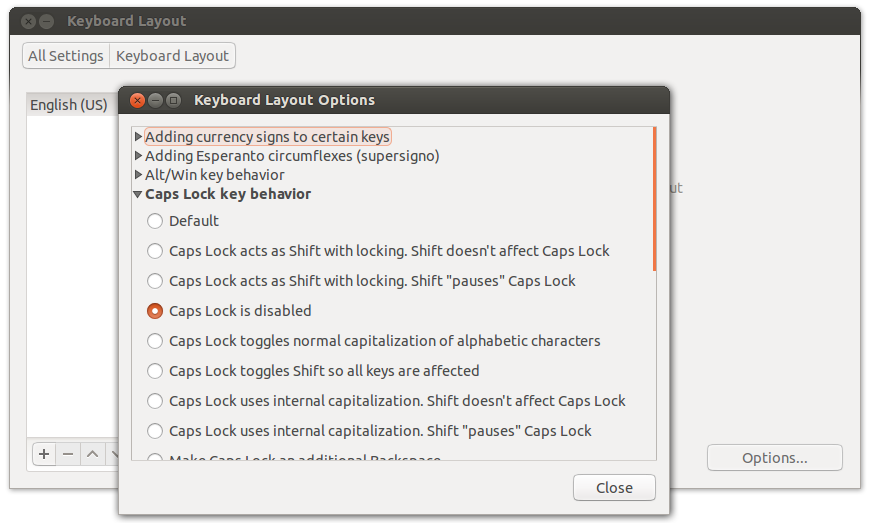
<p>Today I just had enough with pressing it by accident in Vim, so I decided to disable
it at the OS level. It turns out it&#8217;s super easy in Ubuntu 13.04:</p>

<p><strong> All Settings > Keyboard Layout > Options > And choose caps lock is disabled </strong></p>

<p><img src="http://allthingscraig.com/images/posts/capslock.png"></p>

<p>Alternatively you could map the caps lock to the escape key for Vim only. I
prefer getting rid of it completely though. Happy coding!</p>
]]></content>
  </entry>
  
  <entry>
    <title type="html"><![CDATA[Chrome console and iFrames]]></title>
    <link href="http://allthingscraig.com/blog/2013/03/13/chrome-console-and-iframes/"/>
    <updated>2013-03-13T17:51:00-04:00</updated>
    <id>http://allthingscraig.com/blog/2013/03/13/chrome-console-and-iframes</id>
    <content type="html"><![CDATA[<p>Sometimes you are debugging an issue using the Chrome developer tools and you are
happily executing some statements in the console to make sure everything is
where it should be.</p>

<p>Once in a while you might try to get an element that you know is being
rendered but the selector returns nothing:</p>

<figure class='code'><figcaption><span></span></figcaption><div class="highlight"><table><tr><td class="gutter"><pre class="line-numbers"><span class='line-number'>1</span>
</pre></td><td class='code'><pre><code class='javascript'><span class='line'><span class="kd">var</span> <span class="nx">el</span> <span class="o">=</span> <span class="nx">$</span><span class="p">(</span><span class="s1">&#39;#name&#39;</span><span class="p">);</span> <span class="c1">// Returns []</span>
</span></code></pre></td></tr></table></div></figure>


<p>However you can see that the element exists on the page and inspecting via the elements tab
(CTRL+SHIFT+C) shows that it does in fact have the expected id. Strange.</p>

<p>Scratching your head you notice that this element belongs to an iFrame.
Luckily Chrome always seems to have our back in situations like this.</p>

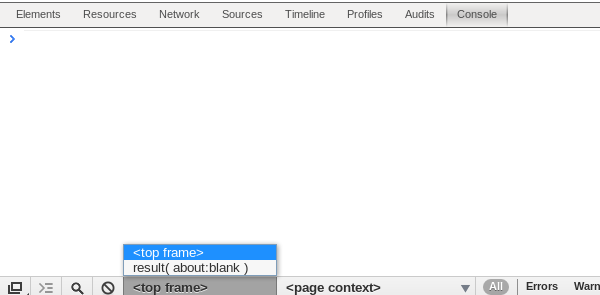
<p>Chrome actually has an option to set which iFrame the console is currently
evaluated against. If you go to the console tab at the bottom you&#8217;ll
see a dropdown named <strong>top frame</strong>:</p>

<p><img src="http://allthingscraig.com/images/posts/dev-iframe.png"></p>

<p>Changing it to the iFrame you want to debug against will allow you to access all the
dom elements in the console as needed!</p>

<h2>Bonus</h2>

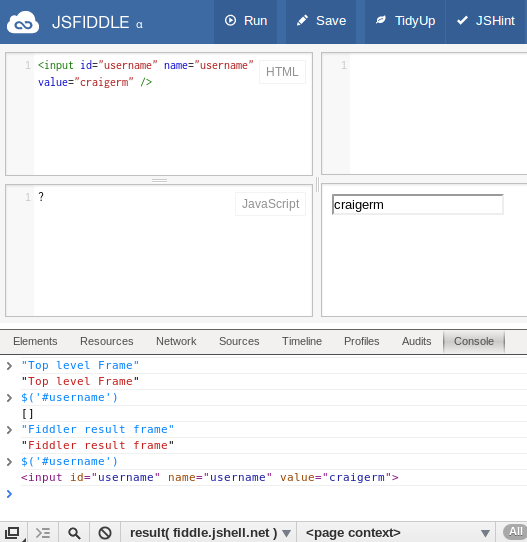
<p>Sometimes someone will send you a code sample via jsFiddle (or maybe you are
investigating a stack overflow question). Since the code is run in an iFrame
you&#8217;ll need to change the console&#8217;s frame in order to interact with the
elements that were rendered via the fiddle.</p>

<p>You can see in this trivial example that I can&#8217;t get the <code>username</code> element
unless I switch the frame:</p>

<p><img src="http://allthingscraig.com/images/posts/fiddle-iframe.png"></p>

<p>There are so many awesome options buried in the Chrome developer tools. Some of them
you will rarely use, but when you need them you&#8217;ll be glad they&#8217;re there!</p>
]]></content>
  </entry>
  
  <entry>
    <title type="html"><![CDATA[Hire problem solvers not programmers]]></title>
    <link href="http://allthingscraig.com/blog/2013/03/12/hire-problem-solvers-not-programmers/"/>
    <updated>2013-03-12T10:27:00-04:00</updated>
    <id>http://allthingscraig.com/blog/2013/03/12/hire-problem-solvers-not-programmers</id>
    <content type="html"><![CDATA[<p>One of my first jobs in software was building an enterprisey <a href="http://en.wikipedia.org/wiki/Software_as_a_service">SaaS</a> product.
I joined a team of about 10 people that was pretty evenly distributed between
Junior and Senior developers.</p>

<p>One of the first bugs I got assigned was to update the copyright year in the
footer of the application. Easy enough. I got familiar with the file structure (it
was a pretty hefty app!) and found the footer ASP page that I needed to change.</p>

<p>I noticed that the copyright was using a static year like so:</p>

<figure class='code'><figcaption><span></span></figcaption><div class="highlight"><table><tr><td class="gutter"><pre class="line-numbers"><span class='line-number'>1</span>
</pre></td><td class='code'><pre><code class='html'><span class='line'>  <span class="nt">&lt;strong&gt;</span>Copyright 2005<span class="nt">&lt;/strong&gt;</span>
</span></code></pre></td></tr></table></div></figure>


<p>I found that strange since if I
just simply replaced the year we would have to go through this again next year.
Thus creating the dreadful, <strong>perpetual bug</strong>.</p>

<p>(<em>Maybe there could be some value in having this recurring bug for new developers to get familiar
with the code base or see if they really fix the issue, but this was definitely not the case here.</em>)</p>

<p>I decided to check out the logs in <a href="http://en.wikipedia.org/wiki/Microsoft_Visual_SourceSafe">Visual Source Safe</a>
to see what was going on (which was the worst!).</p>

<p><img src="http://allthingscraig.com/images/posts/vss.jpg"></p>

<p>photo credit: <a href="http://www.flickr.com/photos/ern/471587728/">ern</a> via
<a href="http://photopin.com">photopin</a> <a
href="http://creativecommons.org/licenses/by-nc-sa/2.0/">cc</a></p>

<p>I found out that every year someone manually updated the copyright date! This
was going on for over 5 years. This meant someone (QA, client, etc.) reported
and filed the bug, someone else prioritized it, a developer &#8220;fixed&#8221; it, and it
was tested and released.
I use the term <strong>fixed</strong> lightly here. For a company that was limited on
resources there sure was a lot of waste.</p>

<p>So I changed the footer to show the date based on the current year and this bug never
came back.</p>

<p>This is a simple example but these are the decisions that are made by
software(web) developers (programmers/engineers/etc.) on a daily basis.</p>

<p>Of course you don&#8217;t want to to over engineer something as we all know. But in some cases
it&#8217;s more time consuming to not use the best approach available.</p>

<p>This is one of the differences between a problem solver and a programmer.
Looking beyond the code to the see what effects flipping of a bit will have over time.</p>

<p>I would hire a Junior problem-solver over a Senior programmer any day of the
week.</p>
]]></content>
  </entry>
  
  <entry>
    <title type="html"><![CDATA[User experience is attention to detail]]></title>
    <link href="http://allthingscraig.com/blog/2013/03/10/user-experience-is-attention-to-detail/"/>
    <updated>2013-03-10T18:34:00-04:00</updated>
    <id>http://allthingscraig.com/blog/2013/03/10/user-experience-is-attention-to-detail</id>
    <content type="html"><![CDATA[<p>As developers we are constantly throwing together forms so user&#8217;s can enter
data. It&#8217;s a fairly common task but because of this frequency we can forget to
ask ourselves <strong>why</strong> when it comes to the decisions we have to make.
Something as simple as which fields are mandatory can impact the user experience in a negative way
if the different options are not considered.</p>

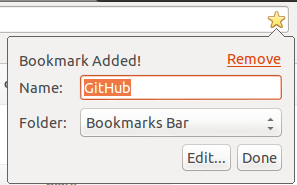
<p>Take Chrome&#8217;s <em>add bookmark</em> form for example.</p>

<p>When you click the star in the address bar to bring up the dialog you are
presented a form with two inputs: name and folder.</p>

<p><img src="http://allthingscraig.com/images/posts/bookmark-added.png"></p>

<p>All too often a developer would decide that both inputs should be mandatory.
Usually this would be fine since &#8220;Name&#8221; is probably mandatory 90% of the time.</p>

<p>Blindly making something mandatory can have negative effects on the user
experience. If this field was mandatory it would limit the real estate space on the Chrome
bookmark bar - thus limiting it&#8217;s usefulness.</p>

<p>Since Google is great at building awesome user first interfaces (UFIs?) they took the
time to make the decision that name can be optional.
As a result you can have icons without names on your bookmark bar.
Since most websites have favicons we can get more bookmarks on our toolbar than
we could of with names beside the icons:</p>

<p><img src="http://allthingscraig.com/images/posts/bookmarks-bar.png"></p>

<p>Since most users are familiar with app icons (via smartphones or whatever) our
bookmark bar now looks like an app bar. Which is both intuitive and easy on the
eyes.</p>

<p>So remember this rule:</p>

<p><em>If you are forcing a user to take an action you should
first ask yourself why and consider what impact this will have on the overall user experience.</em></p>
]]></content>
  </entry>
  
  <entry>
    <title type="html"><![CDATA[Using HTML5 local storage to store objects]]></title>
    <link href="http://allthingscraig.com/blog/2013/01/07/using-html5-local-storage-to-store-objects/"/>
    <updated>2013-01-07T08:55:00-05:00</updated>
    <id>http://allthingscraig.com/blog/2013/01/07/using-html5-local-storage-to-store-objects</id>
    <content type="html"><![CDATA[<p>I&#8217;ve been experimenting with a few HTML5 features lately including localStorage in a backbone app.
While localStorage is not technically part of HTML5 usually people group it
together with HTML5 so I&#8217;ll do the same here.
If you&#8217;re not familiar with localStorage there&#8217;s a good introductory post
<a href="http://tutorials.jenkov.com/html5/local-storage.html">here</a> (also discusses
sessionStorage).</p>

<h2>Limitation</h2>

<p>One small limitation of using local storage is that it can only store strings.
So if you want to store objects or arrays you will need to do some extra work.</p>

<p>For example storing the following object won&#8217;t work as expected:</p>

<figure class='code'><figcaption><span></span></figcaption><div class="highlight"><table><tr><td class="gutter"><pre class="line-numbers"><span class='line-number'>1</span>
</pre></td><td class='code'><pre><code class='javascript'><span class='line'><span class="nx">localStorage</span><span class="p">.</span><span class="nx">setItem</span><span class="p">(</span><span class="s1">&#39;obj&#39;</span><span class="p">,</span> <span class="p">{</span> <span class="nx">name</span><span class="o">:</span> <span class="s1">&#39;John Smith&#39;</span><span class="p">,</span> <span class="nx">id</span><span class="o">:</span> <span class="mi">500</span> <span class="p">});</span>
</span></code></pre></td></tr></table></div></figure>


<p>This will actually convert the object to a string which results in the
following test to be true:</p>

<figure class='code'><figcaption><span></span></figcaption><div class="highlight"><table><tr><td class="gutter"><pre class="line-numbers"><span class='line-number'>1</span>
<span class='line-number'>2</span>
</pre></td><td class='code'><pre><code class='javascript'><span class='line'><span class="kd">var</span> <span class="nx">item</span> <span class="o">=</span> <span class="nx">localStorage</span><span class="p">.</span><span class="nx">getItem</span><span class="p">(</span><span class="s1">&#39;obj&#39;</span><span class="p">);</span>
</span><span class='line'><span class="nx">expect</span><span class="p">(</span><span class="nx">item</span><span class="p">).</span><span class="nx">toBe</span><span class="p">(</span><span class="s1">&#39;[object Object]&#39;</span><span class="p">);</span>
</span></code></pre></td></tr></table></div></figure>


<p>So what do we have to do to get this working as expected?</p>

<h2>JSON.parse and JSON.stringify to the rescue</h2>

<p>To get around you&#8217;ll have to convert the object to a JSON
string before adding it:</p>

<figure class='code'><figcaption><span></span></figcaption><div class="highlight"><table><tr><td class="gutter"><pre class="line-numbers"><span class='line-number'>1</span>
<span class='line-number'>2</span>
</pre></td><td class='code'><pre><code class='javascript'><span class='line'><span class="kd">var</span> <span class="nx">json</span> <span class="o">=</span> <span class="nx">JSON</span><span class="p">.</span><span class="nx">stringify</span><span class="p">({</span> <span class="nx">name</span><span class="o">:</span> <span class="s1">&#39;John Smith&#39;</span><span class="p">,</span> <span class="nx">id</span><span class="o">:</span> <span class="mi">500</span> <span class="p">});</span>
</span><span class='line'><span class="nx">localStorage</span><span class="p">.</span><span class="nx">setItem</span><span class="p">(</span><span class="s1">&#39;obj&#39;</span><span class="p">,</span> <span class="nx">json</span><span class="p">);</span>
</span></code></pre></td></tr></table></div></figure>


<p>And to retrieve this you need to then parse the object:</p>

<figure class='code'><figcaption><span></span></figcaption><div class="highlight"><table><tr><td class="gutter"><pre class="line-numbers"><span class='line-number'>1</span>
<span class='line-number'>2</span>
</pre></td><td class='code'><pre><code class='javascript'><span class='line'><span class="kd">var</span> <span class="nx">json</span> <span class="o">=</span> <span class="nx">localStorage</span><span class="p">.</span><span class="nx">getItem</span><span class="p">(</span><span class="s1">&#39;obj&#39;</span><span class="p">);</span>
</span><span class='line'><span class="kd">var</span> <span class="nx">obj</span> <span class="o">=</span> <span class="nx">JSON</span><span class="p">.</span><span class="nx">parse</span><span class="p">(</span><span class="nx">json</span><span class="p">);</span>
</span></code></pre></td></tr></table></div></figure>


<h2>Better Approach</h2>

<p>This can get a little annoying if you are storing several different objects in
your app so I would recommend creating a wrapper class to handle the object
(de)serialization.</p>

<div><script src='https://gist.github.com/4475414.js'></script>
<noscript><pre><code></code></pre></noscript></div>


<p>This allows us to store objects and retrieve them</p>

<figure class='code'><figcaption><span></span></figcaption><div class="highlight"><table><tr><td class="gutter"><pre class="line-numbers"><span class='line-number'>1</span>
<span class='line-number'>2</span>
<span class='line-number'>3</span>
<span class='line-number'>4</span>
<span class='line-number'>5</span>
<span class='line-number'>6</span>
<span class='line-number'>7</span>
<span class='line-number'>8</span>
<span class='line-number'>9</span>
<span class='line-number'>10</span>
<span class='line-number'>11</span>
</pre></td><td class='code'><pre><code class='javascript'><span class='line'><span class="c1">// Create an instance of our storage wrapper</span>
</span><span class='line'><span class="kd">var</span> <span class="nx">storage</span> <span class="o">=</span> <span class="k">new</span> <span class="nx">StorageWrapper</span><span class="p">();</span>
</span><span class='line'>
</span><span class='line'><span class="c1">// Add the object to our storage</span>
</span><span class='line'><span class="nx">storage</span><span class="p">.</span><span class="nx">set</span><span class="p">(</span><span class="s1">&#39;item&#39;</span><span class="p">,</span> <span class="p">{</span> <span class="nx">price</span><span class="o">:</span> <span class="mi">500</span><span class="p">,</span> <span class="nx">quantity</span><span class="o">:</span> <span class="mi">3</span> <span class="p">});</span>
</span><span class='line'>
</span><span class='line'><span class="c1">// Retrieve the object from our storage</span>
</span><span class='line'><span class="kd">var</span> <span class="nx">obj</span> <span class="o">=</span> <span class="nx">storage</span><span class="p">.</span><span class="nx">get</span><span class="p">(</span><span class="s1">&#39;item&#39;</span><span class="p">);</span>
</span><span class='line'>
</span><span class='line'><span class="c1">// We can now work with the JSON object </span>
</span><span class='line'><span class="nx">expect</span><span class="p">(</span><span class="nx">obj</span><span class="p">.</span><span class="nx">price</span> <span class="o">*</span> <span class="nx">obj</span><span class="p">.</span><span class="nx">quantity</span><span class="p">).</span><span class="nx">toBe</span><span class="p">(</span><span class="mi">1500</span><span class="p">);</span>
</span></code></pre></td></tr></table></div></figure>


<h2>But what about older browsers?</h2>

<p>Of course not all browsers support localStorage.
To see if it is supported in your browser (You are using a modern browser
right?) check out <a href="http://html5test.com">html5test.com</a>.</p>

<p>Instead of changing the wrapper class to check if local storage exists (since
that&#8217;s not the responsibility of the wrapper) it would
be better to use an HTML5 polyfill for this.
I would recommend using a <a href="http://modernizr.com">Modernizr</a> polyfill
to add this feature to older browsers.</p>

<h2>Final Thoughts</h2>

<p>Local storage is extremely useful for maintaining the state of dynamic web
applications like single page applications or other backbone apps. It&#8217;s usually
a good idea to keep things <a href="http://en.wikipedia.org/wiki/Don't_repeat_yourself">DRY</a>
by adding wrapper classes to any HTML5 feature that
requires you to write extra code when using its API - like storing and
retrieving objects via local storage.</p>

<h2>Resources</h2>

<ul>
<li><a href="http://modernizr.com">List of Mozernizr polyfills</a></li>
<li><a href="https://github.com/douglascrockford/JSON-js">JSON parser/stringify for older browsers</a></li>
</ul>

]]></content>
  </entry>
  
  <entry>
    <title type="html"><![CDATA[Email Obfuscator for Octopress]]></title>
    <link href="http://allthingscraig.com/blog/2013/01/02/email-obfuscator-for-octopress/"/>
    <updated>2013-01-02T12:53:00-05:00</updated>
    <id>http://allthingscraig.com/blog/2013/01/02/email-obfuscator-for-octopress</id>
    <content type="html"><![CDATA[<p>I want to include my email on my blog but I don&#8217;t want to store it in plain text - for obvious reasons.
Originally I was going to use a third party script to do this since I couldn&#8217;t find an Octopress
plugin that did what I was looking for.</p>

<p>Instead I decided to write my first Octopress plugin.</p>

<p>The plugin allows the following tag in markdown for obfuscating emails:</p>

<figure class='code'><div class="highlight"><table><tr><td class="gutter"><pre class="line-numbers"><span class='line-number'>1</span>
</pre></td><td class='code'><pre><code class=''><span class='line'>{% email test@example.com %}</span></code></pre></td></tr></table></div></figure>


<p>This will render a script block that does the following:</p>

<ul>
<li>Encodes the <code>@</code> and <code>.</code> characters</li>
<li>Encodes the <code>mailto:</code> prefix</li>
<li>Reverses the email and uses CSS to display it to the user</li>
</ul>


<p>The output from the plugin looks something like:</p>

<figure class='code'><figcaption><span></span></figcaption><div class="highlight"><table><tr><td class="gutter"><pre class="line-numbers"><span class='line-number'>1</span>
<span class='line-number'>2</span>
<span class='line-number'>3</span>
</pre></td><td class='code'><pre><code class='html'><span class='line'><span class="nt">&lt;script </span><span class="na">type=</span><span class="s">&quot;text/javascript&quot;</span><span class="nt">&gt;</span>
</span><span class='line'><span class="nb">document</span><span class="p">.</span><span class="nx">write</span><span class="p">(</span><span class="s1">&#39;&lt;a style=&quot;unicode-bidi:bidi-override; direction: rtl;&quot;href=&quot;&amp;#109;&amp;#97;&amp;#105;&amp;#108;&amp;#116;&amp;#111;&amp;#58;test&amp;#64;example&amp;#46;com&quot;&gt;moc&amp;#46;elpmaxe&amp;#64;tset&lt;/a&gt;&#39;</span><span class="p">);</span>
</span><span class='line'><span class="nt">&lt;/script&gt;</span>
</span></code></pre></td></tr></table></div></figure>


<p>I&#8217;m currently using the plugin on this blog as of today. Hopefully this is of use to someone else too!</p>

<h2>Resources</h2>

<ul>
<li><a href="https://github.com/craigerm/email-obfuscate-octopress">Source code on GitHub</a></li>
<li><a href="http://techblog.tilllate.com/2008/07/20/ten-methods-to-obfuscate-e-mail-addresses-compared/">Nine ways to obfuscate an email</a></li>
<li><a href="http://superuser.com/questions/235937/does-e-mail-address-obfuscation-actually-work">Superuser discussion on email obfuscation</a></li>
</ul>

]]></content>
  </entry>
  
  <entry>
    <title type="html"><![CDATA[Creating Javascript Arrays: new vs []]]></title>
    <link href="http://allthingscraig.com/blog/2013/01/02/creating-javascript-arrays/"/>
    <updated>2013-01-02T08:52:00-05:00</updated>
    <id>http://allthingscraig.com/blog/2013/01/02/creating-javascript-arrays</id>
    <content type="html"><![CDATA[<p>My last <a href="http://allthingscraig.com/blog/2013/01/02/creating-javascript-objects/">post</a> quickly compared the performance
of creating javsacript objects via <code>new object()</code> and <code>{}</code>.</p>

<p>So for curiousity&#8217;s sake let&#8217;s do the same for arrays.</p>

<p>We&#8217;ll compare these two methods for instantiating arrays:</p>

<figure class='code'><figcaption><span></span></figcaption><div class="highlight"><table><tr><td class="gutter"><pre class="line-numbers"><span class='line-number'>1</span>
<span class='line-number'>2</span>
<span class='line-number'>3</span>
<span class='line-number'>4</span>
<span class='line-number'>5</span>
</pre></td><td class='code'><pre><code class='javascript'><span class='line'>  <span class="c1">// Method 1: Using new operator</span>
</span><span class='line'>  <span class="kd">var</span> <span class="nx">arr1</span> <span class="o">=</span> <span class="k">new</span> <span class="nb">Array</span><span class="p">();</span>
</span><span class='line'>
</span><span class='line'>  <span class="c1">// Method 2: Using literal syntax</span>
</span><span class='line'>  <span class="kd">var</span> <span class="nx">arr2</span> <span class="o">=</span> <span class="p">[];</span>
</span></code></pre></td></tr></table></div></figure>


<p><img src="http://allthingscraig.com/images/posts/array-results1.png">
<img src="http://allthingscraig.com/images/posts/array-results2.png"></p>

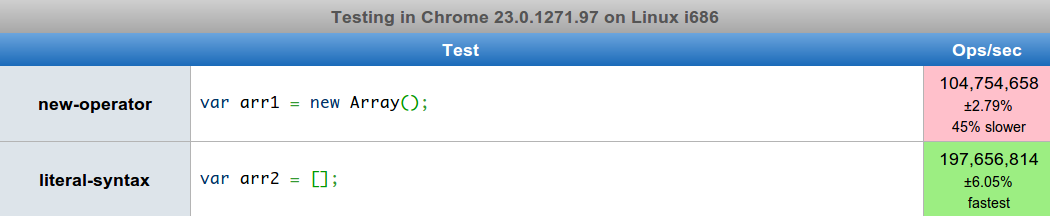
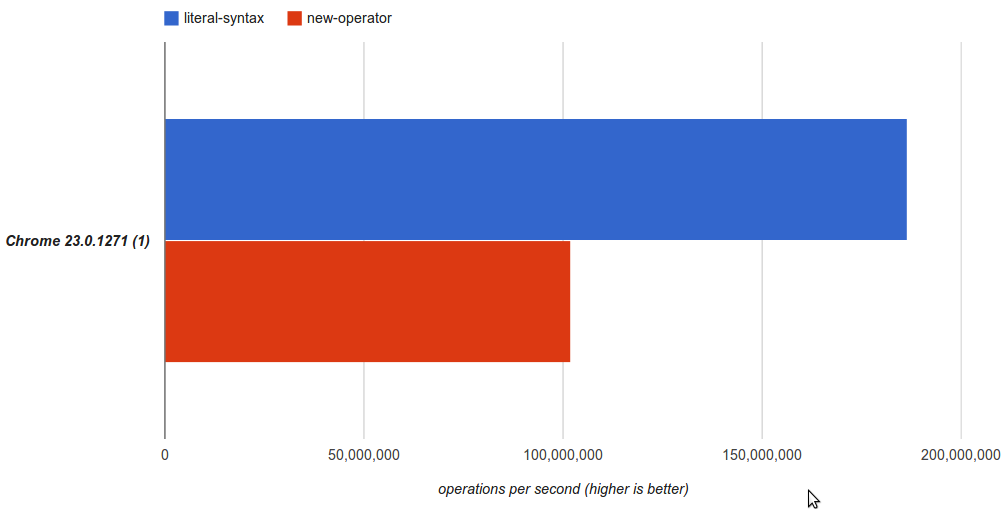
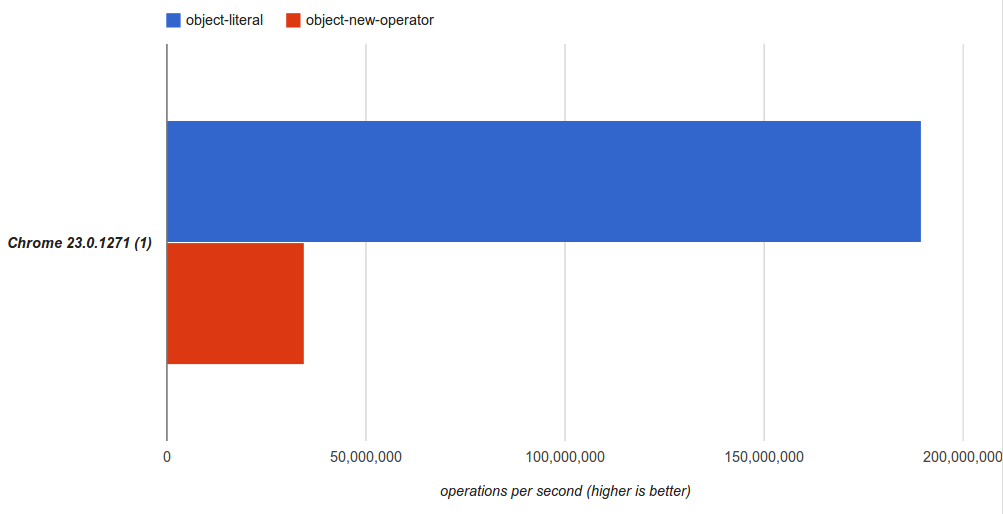
<p>To no suprise the literal syntax is almost twice as fast.</p>

<p>Unless you need to set the length when creating the array we should favour
the the literal syntax of <code>var a = []</code> instead of the verbose <code>var a = new Array()</code>
syntax for performance and readability.</p>
]]></content>
  </entry>
  
  <entry>
    <title type="html"><![CDATA[Creating Javascript Objects: new vs {}]]></title>
    <link href="http://allthingscraig.com/blog/2013/01/02/creating-javascript-objects/"/>
    <updated>2013-01-02T08:15:00-05:00</updated>
    <id>http://allthingscraig.com/blog/2013/01/02/creating-javascript-objects</id>
    <content type="html"><![CDATA[<p>Recently I had a discussion with someone about creating javascript objects.</p>

<p>There are two main ways of doing this:</p>

<figure class='code'><figcaption><span></span></figcaption><div class="highlight"><table><tr><td class="gutter"><pre class="line-numbers"><span class='line-number'>1</span>
<span class='line-number'>2</span>
<span class='line-number'>3</span>
<span class='line-number'>4</span>
<span class='line-number'>5</span>
</pre></td><td class='code'><pre><code class='javascript'><span class='line'> <span class="c1">// Method 1 - Using the new operator</span>
</span><span class='line'> <span class="kd">var</span> <span class="nx">obj1</span> <span class="o">=</span> <span class="k">new</span> <span class="nb">Object</span><span class="p">();</span>
</span><span class='line'>
</span><span class='line'> <span class="c1">// Method 2 - Using the literal syntax</span>
</span><span class='line'> <span class="kd">var</span> <span class="nx">obj</span> <span class="o">=</span> <span class="p">{};</span>
</span></code></pre></td></tr></table></div></figure>


<p>Now, most likely, you use the literal syntax. It is the standard that you will find
out in the wild most of the time. And this is the method I use.</p>

<p>I started using the literal syntax way-back-when to save keystrokes.
At some point I was told that it was faster so I continued to use it.
But I&#8217;ve never confirmed that it is actually faster.</p>

<p>So is it really faster or is this just one of those old wise tales?</p>

<p>Let&#8217;s ask our dear friend <a href="http://jsperf.com">jsperf</a> and see what we can find.</p>

<p>And I&#8217;m back :)</p>

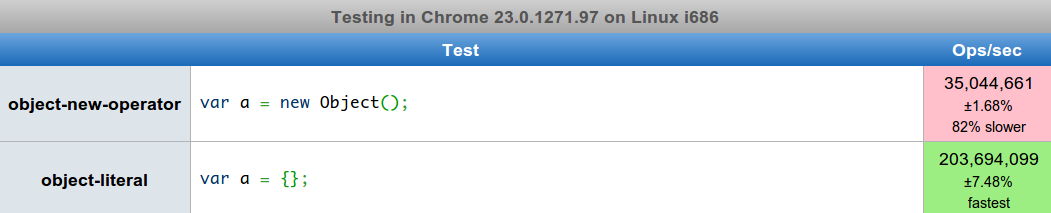
<p>Ok, based on using <code>new object()</code> and <code>{}</code> for object instantiation here are the results:</p>

<p><img src="http://allthingscraig.com/images/posts/object-testcase.png">
<img src="http://allthingscraig.com/images/posts/object-results.png"></p>

<p>Wow I didn&#8217;t think it would be that much of a difference! Clearly the object literal is the way to go
since it&#8217;s significantly faster.</p>

<p>I am only testing on the V8 javascript engine so maybe this won&#8217;t apply to other browsers.
I tried looking at the V8 source to see if I could&#8217;nt quickly find out exactly why this is happening
but with no luck.
My guess is that the constructor call is being executed for <code>new</code> and not for <code>{}</code>
as an optimization trick for V8. When I have a more time I&#8217;d like to venture into the V8 source
and see what&#8217;s going on. So if I find something I&#8217;ll post it here.</p>

<p>From these results we can at least justifiably tell people that <code>{}</code> is not only easier on the eyes
but also easier on the old processor.</p>
]]></content>
  </entry>
  
  <entry>
    <title type="html"><![CDATA[Happy new year Octopress!]]></title>
    <link href="http://allthingscraig.com/blog/2013/01/02/happy-new-year-octopress/"/>
    <updated>2013-01-02T00:27:00-05:00</updated>
    <id>http://allthingscraig.com/blog/2013/01/02/happy-new-year-octopress</id>
    <content type="html"><![CDATA[<p>So it&#8217;s been almost a full year since I started blogging. I only have 6 posts so far which
is a little disappointing. My plan originally was to have a total of 12 by the end of the year.
Oh well <em>c&#39;est la vie</em>. Technically I still have a couple of weeks until it&#8217;s been a full year, so
hopefully I can move closer to that number!</p>

<p>My little hosting plan is almost up so instead of renewing it and continuing with Wordpress I decided
to give <a href="http://octopress.org" title="Octopress">Octopress</a> a try. I really hated battling the Wordpress RTE
and spent way too much time on formatting instead of content. Sometimes I would decided not to write about something just because there&#8217;s so much effort spent on the non &#8220;fun&#8221; stuff.</p>

<p>Since I really, <em>really</em>, love Markdown I decided to move to Octopress mainly because of this and the fact that I can host on github for free! Thank you github!</p>

<p>My wordpress site will still be up until the end of January and I will move my domain
<a href="http://allthingscraig.com" title="all things craig">allthingscraig.com</a> to point to this new octopress blog sometime over the next few weeks.</p>

<p>Moving from Wordpress to Octopress was very quick and painless - granted I did only have 6 posts to migrate.
If you are planning on doing this I recommend this <a href="http://norestfortheweekend.com/blog/2012/05/12/moving-from-wordpress-to-octopress/">blog post</a>.</p>

<p>Special thanks to Thomas Frössman for creating <a href="https://github.com/thomasf/exitwp" title="exitwp">exitwp</a>
which took me all of 5 minutes to install and migrate my posts to Octopress format.</p>

<p>This transition is still a work in progress since there is still lots left to do such as:</p>

<ul>
<li>adding comments</li>
<li>adding a spell checker (Hopefully you didn&#8217;t notice! :P)</li>
<li>changing the theme</li>
<li>whatever I&#8217;m missing</li>
</ul>


<p>I hope I do blog more this year. I enjoy writing down my thoughts and think it&#8217;s a great way to improve
your technical writing skills as well as a great outlet when you don&#8217;t feel like coding.</p>

<p>Anyways <strong>Happy New Year Everyone!</strong> All the best in 2013 and happy coding!</p>
]]></content>
  </entry>
  
  <entry>
    <title type="html"><![CDATA[Unit Testing jQuery Plugin Internals]]></title>
    <link href="http://allthingscraig.com/blog/2012/12/23/unit-testing-jquery-plugin-internals/"/>
    <updated>2012-12-23T09:11:22-05:00</updated>
    <id>http://allthingscraig.com/blog/2012/12/23/unit-testing-jquery-plugin-internals</id>
    <content type="html"><![CDATA[<p>Anyone who has worked with me before knows that I am a big advocate of TDD. I find when I start with TDD it&#8217;s often hard to move away from it and conversely if I don&#8217;t start with it it&#8217;s hard to move towards it later.</p>

<p>Lately I&#8217;ve been writing several jQuery plugins - both simple and complex. One in particular was a calculation plugin that had dozens of complicated calculations and edge cases. So let&#8217;s see how I would go about writing a jQuery plugin using TDD and <a href="http://pivotal.github.com/jasmine/">jasmine</a> as the testing framework for a simplified calculator plugin.</p>

<h2>Writing a test</h2>

<p>Let&#8217;s say we need a function that checks if a number is even. So let&#8217;s write the test:</p>

<figure class='code'><figcaption><span></span></figcaption><div class="highlight"><table><tr><td class="gutter"><pre class="line-numbers"><span class='line-number'>1</span>
<span class='line-number'>2</span>
<span class='line-number'>3</span>
<span class='line-number'>4</span>
<span class='line-number'>5</span>
<span class='line-number'>6</span>
<span class='line-number'>7</span>
<span class='line-number'>8</span>
<span class='line-number'>9</span>
<span class='line-number'>10</span>
<span class='line-number'>11</span>
<span class='line-number'>12</span>
<span class='line-number'>13</span>
<span class='line-number'>14</span>
<span class='line-number'>15</span>
<span class='line-number'>16</span>
<span class='line-number'>17</span>
<span class='line-number'>18</span>
</pre></td><td class='code'><pre><code class='javascript'><span class='line'><span class="nx">describe</span><span class="p">(</span><span class="s1">&#39;calculator&#39;</span><span class="p">,</span> <span class="kd">function</span><span class="p">()</span> <span class="p">{</span>
</span><span class='line'>  <span class="nx">describe</span><span class="p">(</span><span class="s1">&#39;isEven()&#39;</span><span class="p">,</span> <span class="kd">function</span><span class="p">()</span> <span class="p">{</span>
</span><span class='line'>
</span><span class='line'>    <span class="c1">// What should our test look like ?</span>
</span><span class='line'>   <span class="nx">it</span><span class="p">(</span><span class="s1">&#39;should return true for even numbers&#39;</span><span class="p">,</span> <span class="kd">function</span><span class="p">()</span> <span class="p">{</span>
</span><span class='line'>     <span class="c1">// #1 Add to global namespace?</span>
</span><span class='line'>     <span class="nx">expect</span><span class="p">(</span><span class="nb">window</span><span class="p">.</span><span class="nx">isEven</span><span class="p">(</span><span class="mi">2</span><span class="p">)).</span><span class="nx">toBe</span><span class="p">(</span><span class="kc">true</span><span class="p">);</span>
</span><span class='line'>
</span><span class='line'>     <span class="c1">// #2 Add to jQuery namespace?</span>
</span><span class='line'>     <span class="nx">expect</span><span class="p">(</span><span class="nx">$</span><span class="p">.</span><span class="nx">isEven</span><span class="p">(</span><span class="mi">2</span><span class="p">)).</span><span class="nx">toBe</span><span class="p">(</span><span class="kc">true</span><span class="p">);</span>
</span><span class='line'>
</span><span class='line'>     <span class="c1">// #3 Make plugin add a static jQuery object that has the methods we need</span>
</span><span class='line'>     <span class="nx">expect</span><span class="p">(</span><span class="nx">$</span><span class="p">.</span><span class="nx">calculator</span><span class="p">.</span><span class="nx">isEven</span><span class="p">(</span><span class="mi">2</span><span class="p">)).</span><span class="nx">toBe</span><span class="p">(</span><span class="kc">true</span><span class="p">);</span>
</span><span class='line'>
</span><span class='line'>     <span class="c1">// #4 ??</span>
</span><span class='line'>   <span class="p">});</span>
</span><span class='line'>  <span class="p">});</span>
</span><span class='line'><span class="p">});</span>
</span></code></pre></td></tr></table></div></figure>


<h2>Create plugin</h2>

<p>We use this standard format for a jQuery plugin:</p>

<figure class='code'><figcaption><span></span></figcaption><div class="highlight"><table><tr><td class="gutter"><pre class="line-numbers"><span class='line-number'>1</span>
<span class='line-number'>2</span>
<span class='line-number'>3</span>
<span class='line-number'>4</span>
<span class='line-number'>5</span>
<span class='line-number'>6</span>
<span class='line-number'>7</span>
</pre></td><td class='code'><pre><code class='javascript'><span class='line'><span class="p">(</span><span class="kd">function</span><span class="p">(</span><span class="nx">$</span><span class="p">)</span> <span class="p">{</span>
</span><span class='line'>  <span class="nx">$</span><span class="p">.</span><span class="nx">fn</span><span class="p">.</span><span class="nx">calculator</span> <span class="o">=</span> <span class="kd">function</span><span class="p">()</span> <span class="p">{</span>
</span><span class='line'>     <span class="k">return</span> <span class="k">this</span><span class="p">.</span><span class="nx">each</span><span class="p">(</span><span class="kd">function</span><span class="p">()</span> <span class="p">{</span>
</span><span class='line'>       <span class="c1">// code</span>
</span><span class='line'>     <span class="p">});</span>
</span><span class='line'>  <span class="p">};</span>
</span><span class='line'><span class="p">})(</span><span class="nx">jQuery</span><span class="p">);</span>
</span></code></pre></td></tr></table></div></figure>


<h2>Requirements</h2>

<p>So what exactly do we want this to look like? Well there are some simple requirements I like to have.</p>

<ol>
<li>Each plugin should not add anything to the global (window) object (This rules out #1)</li>
<li>Each plugin should only add one object or function to the jQuery namespace (This rules out #2 and #3)</li>
<li>Easily make new functions testable</li>
</ol>


<p>So that just leaves #4. But what could that be.</p>

<h2>Using a global object for tests</h2>

<p>The first approach I tried was creating a global object (I know, I know&#8230;) before the script was included and add the methods to this object. So let&#8217;s write what our test body should look like:</p>

<figure class='code'><figcaption><span></span></figcaption><div class="highlight"><table><tr><td class="gutter"><pre class="line-numbers"><span class='line-number'>1</span>
<span class='line-number'>2</span>
<span class='line-number'>3</span>
</pre></td><td class='code'><pre><code class='javascript'><span class='line'>  <span class="nx">it</span><span class="p">(</span><span class="s1">&#39;should return true for even numbers&#39;</span><span class="p">,</span> <span class="kd">function</span><span class="p">()</span> <span class="p">{</span>
</span><span class='line'>   <span class="nx">expect</span><span class="p">(</span><span class="nx">container</span><span class="p">.</span><span class="nx">isEven</span><span class="p">(</span><span class="mi">2</span><span class="p">)).</span><span class="nx">toBe</span><span class="p">(</span><span class="kc">true</span><span class="p">);</span>
</span><span class='line'>  <span class="p">});</span>
</span></code></pre></td></tr></table></div></figure>


<p>We would change our html test runner to look something like:</p>

<figure class='code'><figcaption><span></span></figcaption><div class="highlight"><table><tr><td class="gutter"><pre class="line-numbers"><span class='line-number'>1</span>
<span class='line-number'>2</span>
<span class='line-number'>3</span>
<span class='line-number'>4</span>
<span class='line-number'>5</span>
</pre></td><td class='code'><pre><code class='html'><span class='line'><span class="nt">&lt;script </span><span class="na">type=</span><span class="s">&quot;text/javascript&quot;</span><span class="nt">&gt;</span>
</span><span class='line'>  <span class="kd">var</span> <span class="nx">container</span> <span class="o">=</span> <span class="p">{};</span> <span class="c1">// adds to global namespace</span>
</span><span class='line'><span class="nt">&lt;/script&gt;</span>
</span><span class='line'>
</span><span class='line'><span class="nt">&lt;script </span><span class="na">type=</span><span class="s">&quot;text/javascript&quot;</span> <span class="na">src=</span><span class="s">&quot;calculator.plugin.js&quot;</span><span class="nt">&gt;&lt;/script&gt;</span>
</span></code></pre></td></tr></table></div></figure>


<p>And our plugin now looks like this:</p>

<figure class='code'><figcaption><span></span></figcaption><div class="highlight"><table><tr><td class="gutter"><pre class="line-numbers"><span class='line-number'>1</span>
<span class='line-number'>2</span>
<span class='line-number'>3</span>
<span class='line-number'>4</span>
<span class='line-number'>5</span>
<span class='line-number'>6</span>
<span class='line-number'>7</span>
<span class='line-number'>8</span>
<span class='line-number'>9</span>
<span class='line-number'>10</span>
<span class='line-number'>11</span>
<span class='line-number'>12</span>
<span class='line-number'>13</span>
</pre></td><td class='code'><pre><code class='javascript'><span class='line'><span class="p">(</span><span class="kd">function</span><span class="p">(</span><span class="nx">$</span><span class="p">,</span> <span class="nx">container</span><span class="p">)</span> <span class="p">{</span>
</span><span class='line'>  <span class="nx">container</span> <span class="o">=</span> <span class="p">{}</span>
</span><span class='line'>
</span><span class='line'>  <span class="kd">var</span> <span class="nx">isEven</span> <span class="o">=</span> <span class="nx">container</span><span class="p">.</span><span class="nx">isEven</span> <span class="o">=</span> <span class="kd">function</span><span class="p">(</span><span class="nx">num</span><span class="p">)</span> <span class="p">{</span>
</span><span class='line'>    <span class="k">return</span> <span class="nx">num</span> <span class="o">%</span> <span class="mi">2</span> <span class="o">==</span> <span class="mi">0</span><span class="p">;</span>
</span><span class='line'>  <span class="p">};</span>
</span><span class='line'>
</span><span class='line'>  <span class="nx">$</span><span class="p">.</span><span class="nx">fn</span><span class="p">.</span><span class="nx">calculator</span> <span class="o">=</span> <span class="kd">function</span><span class="p">()</span> <span class="p">{</span>
</span><span class='line'>    <span class="k">return</span> <span class="k">this</span><span class="p">.</span><span class="nx">each</span><span class="p">(</span><span class="kd">function</span><span class="p">()</span> <span class="p">{</span>
</span><span class='line'>      <span class="c1">// code</span>
</span><span class='line'>    <span class="p">});</span>
</span><span class='line'>  <span class="p">};</span>
</span><span class='line'><span class="p">})(</span><span class="nx">jQuery</span><span class="p">,</span> <span class="nx">container</span><span class="p">);</span>
</span></code></pre></td></tr></table></div></figure>


<p>So what exactly is happening here? Well our unit test is using a global variable to access the internal functions of the jQuery plugin. Next we declare this variable in our test runner so we can access it, but for usage in our application this variable won&#8217;t exist. Finally our plugin assigns whatever functions we need to this object. There&#8217;s still the problem of possibly having a conflict with the global variable - just one reason why global variables are bad and should be avoided.</p>

<h2>Using the plugins jQuery&#8217;s data object to store internal functions</h2>

<p>A second approach is to utilize the jQuery data object:</p>

<figure class='code'><figcaption><span></span></figcaption><div class="highlight"><table><tr><td class="gutter"><pre class="line-numbers"><span class='line-number'>1</span>
<span class='line-number'>2</span>
<span class='line-number'>3</span>
<span class='line-number'>4</span>
<span class='line-number'>5</span>
<span class='line-number'>6</span>
<span class='line-number'>7</span>
<span class='line-number'>8</span>
<span class='line-number'>9</span>
<span class='line-number'>10</span>
<span class='line-number'>11</span>
<span class='line-number'>12</span>
<span class='line-number'>13</span>
<span class='line-number'>14</span>
<span class='line-number'>15</span>
<span class='line-number'>16</span>
</pre></td><td class='code'><pre><code class='javascript'><span class='line'><span class="p">(</span><span class="kd">function</span><span class="p">(</span><span class="nx">$</span><span class="p">)</span> <span class="p">{</span>
</span><span class='line'>  <span class="kd">var</span> <span class="nx">internals</span> <span class="o">=</span> <span class="p">{}</span>
</span><span class='line'>
</span><span class='line'>  <span class="kd">var</span> <span class="nx">isEven</span> <span class="o">=</span> <span class="nx">internals</span><span class="p">.</span><span class="nx">isEven</span> <span class="o">=</span> <span class="kd">function</span><span class="p">(</span><span class="nx">num</span><span class="p">)</span> <span class="p">{</span>
</span><span class='line'>    <span class="k">return</span> <span class="nx">num</span> <span class="o">%</span> <span class="mi">2</span> <span class="o">==</span> <span class="mi">0</span><span class="p">;</span>
</span><span class='line'>  <span class="p">};</span>
</span><span class='line'>
</span><span class='line'>  <span class="nx">$</span><span class="p">.</span><span class="nx">fn</span><span class="p">.</span><span class="nx">calculator</span> <span class="o">=</span> <span class="kd">function</span><span class="p">()</span> <span class="p">{</span>
</span><span class='line'>    <span class="k">return</span> <span class="k">this</span><span class="p">.</span><span class="nx">each</span><span class="p">(</span><span class="kd">function</span><span class="p">()</span> <span class="p">{</span>
</span><span class='line'>      <span class="c1">// code</span>
</span><span class='line'>
</span><span class='line'>      <span class="c1">// Add internal methods to do data</span>
</span><span class='line'>     <span class="nx">$</span><span class="p">(</span><span class="k">this</span><span class="p">).</span><span class="nx">data</span><span class="p">(</span><span class="s1">&#39;internals&#39;</span><span class="p">,</span> <span class="nx">internals</span><span class="p">);</span>
</span><span class='line'>   <span class="p">});</span>
</span><span class='line'>  <span class="p">};</span>
</span><span class='line'><span class="p">})(</span><span class="nx">jQuery</span><span class="p">);</span>
</span></code></pre></td></tr></table></div></figure>


<p>Our test body would now look like:</p>

<figure class='code'><figcaption><span></span></figcaption><div class="highlight"><table><tr><td class="gutter"><pre class="line-numbers"><span class='line-number'>1</span>
<span class='line-number'>2</span>
<span class='line-number'>3</span>
<span class='line-number'>4</span>
<span class='line-number'>5</span>
</pre></td><td class='code'><pre><code class='javascript'><span class='line'>  <span class="kd">var</span> <span class="nx">internals</span> <span class="o">=</span> <span class="nx">$</span><span class="p">(</span><span class="s1">&#39;#fakeId&#39;</span><span class="p">).</span><span class="nx">calculator</span><span class="p">().</span><span class="nx">data</span><span class="p">(</span><span class="s1">&#39;internals&#39;</span><span class="p">);</span>
</span><span class='line'>
</span><span class='line'>  <span class="nx">it</span><span class="p">(</span><span class="s1">&#39;should return true for even numbers&#39;</span><span class="p">,</span> <span class="kd">function</span><span class="p">()</span> <span class="p">{</span>
</span><span class='line'>    <span class="nx">expect</span><span class="p">(</span><span class="nx">internals</span><span class="p">.</span><span class="nx">isEven</span><span class="p">(</span><span class="mi">2</span><span class="p">)).</span><span class="nx">toBe</span><span class="p">(</span><span class="kc">true</span><span class="p">);</span>
</span><span class='line'>  <span class="p">});</span>
</span></code></pre></td></tr></table></div></figure>


<p>This approach meets our requirements and doesn&#8217;t utilize a global variable for testing purposes. You can make the argument that if a plugin doesn&#8217;t expose the method it does not need to be tested. I don&#8217;t fully agree with this because the usage of the plugin API could be considered more of an integration test since we are integrating with our client code (i.e. the HTML page). Sometimes plugins contain logic that should be fully unit testable because there are complicated cases. In this case we are adding an extra step in the plugin but I think the benefits outweigh the overhead.</p>

<h2>Returning internals as an option to the plugin</h2>

<p>Alternatively instead of adding to each object&#8217;s data (not a good idea if plugin is used for several elements on a page) we can do something similar by passing in a string to the plugin that would return the object instead of using the data object. This is the approach I am currently using on a few plugins:</p>

<figure class='code'><figcaption><span></span></figcaption><div class="highlight"><table><tr><td class="gutter"><pre class="line-numbers"><span class='line-number'>1</span>
<span class='line-number'>2</span>
<span class='line-number'>3</span>
<span class='line-number'>4</span>
<span class='line-number'>5</span>
<span class='line-number'>6</span>
<span class='line-number'>7</span>
<span class='line-number'>8</span>
<span class='line-number'>9</span>
<span class='line-number'>10</span>
<span class='line-number'>11</span>
<span class='line-number'>12</span>
<span class='line-number'>13</span>
<span class='line-number'>14</span>
<span class='line-number'>15</span>
<span class='line-number'>16</span>
<span class='line-number'>17</span>
<span class='line-number'>18</span>
<span class='line-number'>19</span>
<span class='line-number'>20</span>
<span class='line-number'>21</span>
<span class='line-number'>22</span>
<span class='line-number'>23</span>
<span class='line-number'>24</span>
<span class='line-number'>25</span>
<span class='line-number'>26</span>
</pre></td><td class='code'><pre><code class='javascript'><span class='line'><span class="p">(</span><span class="kd">function</span><span class="p">(</span><span class="nx">$</span><span class="p">)</span> <span class="p">{</span>
</span><span class='line'>  <span class="kd">var</span> <span class="nx">internals</span> <span class="o">=</span> <span class="p">{}</span>
</span><span class='line'>
</span><span class='line'>  <span class="kd">var</span> <span class="nx">isEven</span> <span class="o">=</span> <span class="nx">internals</span><span class="p">.</span><span class="nx">isEven</span> <span class="o">=</span> <span class="kd">function</span><span class="p">(</span><span class="nx">num</span><span class="p">)</span> <span class="p">{</span>
</span><span class='line'>    <span class="k">return</span> <span class="nx">num</span> <span class="o">%</span> <span class="mi">2</span> <span class="o">==</span> <span class="mi">0</span><span class="p">;</span>
</span><span class='line'>  <span class="p">};</span>
</span><span class='line'>
</span><span class='line'>  <span class="nx">$</span><span class="p">.</span><span class="nx">fn</span><span class="p">.</span><span class="nx">calculator</span> <span class="o">=</span> <span class="kd">function</span><span class="p">(</span><span class="nx">option</span><span class="p">)</span> <span class="p">{</span>
</span><span class='line'>    <span class="k">if</span><span class="p">(</span><span class="nx">option</span> <span class="o">===</span> <span class="s1">&#39;internals&#39;</span><span class="p">)</span> <span class="p">{</span>
</span><span class='line'>       <span class="k">return</span> <span class="nx">internals</span><span class="p">;</span>
</span><span class='line'>    <span class="p">}</span>
</span><span class='line'>    <span class="c1">// you could simplify this and add options for each method if you prefer like this:</span>
</span><span class='line'>    <span class="c1">// if(option === &#39;isEven&#39;) return isEven;</span>
</span><span class='line'>
</span><span class='line'>    <span class="k">return</span> <span class="k">this</span><span class="p">.</span><span class="nx">each</span><span class="p">(</span><span class="kd">function</span><span class="p">()</span> <span class="p">{</span>
</span><span class='line'>      <span class="c1">// code</span>
</span><span class='line'>   <span class="p">});</span>
</span><span class='line'>  <span class="p">};</span>
</span><span class='line'><span class="p">})(</span><span class="nx">jQuery</span><span class="p">);</span>
</span><span class='line'>
</span><span class='line'>  <span class="c1">// Test body would be this:</span>
</span><span class='line'>  <span class="kd">var</span> <span class="nx">internals</span> <span class="o">=</span> <span class="nx">$</span><span class="p">(</span><span class="s1">&#39;#fakeId&#39;</span><span class="p">).</span><span class="nx">calculator</span><span class="p">(</span><span class="s1">&#39;internals&#39;</span><span class="p">);</span>
</span><span class='line'>
</span><span class='line'>  <span class="nx">it</span><span class="p">(</span><span class="s1">&#39;should return true for even numbers&#39;</span><span class="p">,</span> <span class="kd">function</span><span class="p">()</span> <span class="p">{</span>
</span><span class='line'>    <span class="nx">expect</span><span class="p">(</span><span class="nx">internals</span><span class="p">.</span><span class="nx">isEven</span><span class="p">(</span><span class="mi">2</span><span class="p">)).</span><span class="nx">toBe</span><span class="p">(</span><span class="kc">true</span><span class="p">);</span>
</span><span class='line'>  <span class="p">});</span>
</span></code></pre></td></tr></table></div></figure>


<h2>More complicated approach</h2>

<p>In larger plugins it might be better to use a CLI tool to build the plugin so that we don&#8217;t have the anonymous function wrapper included when testing. For example the jQuery source does something like this. The have an intro file, several body files, and an outro file.</p>

<p>The intro.js file looks like:</p>

<figure class='code'><figcaption><span></span></figcaption><div class="highlight"><table><tr><td class="gutter"><pre class="line-numbers"><span class='line-number'>1</span>
<span class='line-number'>2</span>
</pre></td><td class='code'><pre><code class='javascript'><span class='line'><span class="p">(</span><span class="kd">function</span><span class="p">(</span> <span class="nb">window</span><span class="p">,</span> <span class="kc">undefined</span> <span class="p">)</span> <span class="p">{</span>
</span><span class='line'>  <span class="s2">&quot;use strict&quot;</span><span class="p">;</span>
</span></code></pre></td></tr></table></div></figure>


<p>And here&#8217;s the outro.js file:</p>

<figure class='code'><figcaption><span></span></figcaption><div class="highlight"><table><tr><td class="gutter"><pre class="line-numbers"><span class='line-number'>1</span>
</pre></td><td class='code'><pre><code class='javascript'><span class='line'>  <span class="p">})(</span> <span class="nb">window</span> <span class="p">);</span>
</span></code></pre></td></tr></table></div></figure>


<p>They get appended together to build the jQuery source that we know and love. It&#8217;s a very useful technique if you&#8217;re building a larger plugin or framework.</p>

<h2>Conclusion</h2>

<p>As with anything there&#8217;s so silver bullet. I&#8217;m still not completely sure this is the cleanest approach to testing these internal methods, but I&#8217;m liking it so far. Allowing access to the internal functions in my unit tests without cluttering up the global window object gives me the flexibility I need to use a complete TDD approach to building jQuery plugins.</p>

<p>If you have any other ways of doing this I would love to hear about them! Happy Coding!</p>
]]></content>
  </entry>
  
  <entry>
    <title type="html"><![CDATA[Best Practice: Appending items to the DOM using jQuery]]></title>
    <link href="http://allthingscraig.com/blog/2012/09/28/best-practice-appending-items-to-the-dom-using-jquery/"/>
    <updated>2012-09-28T13:55:54-04:00</updated>
    <id>http://allthingscraig.com/blog/2012/09/28/best-practice-appending-items-to-the-dom-using-jquery</id>
    <content type="html"><![CDATA[<p>We&#8217;ve all heard this before:</p>

<blockquote><p>Dom manipulation is expensive!</p></blockquote>

<p>But very often you need to update a list item, select list or some other element with many child items(possibly hundreds&#8230;).</p>

<p>So what&#8217;s the best approach for doing this?</p>

<p>Well first let&#8217;s show the most common approach that we have all see many times and benchmark a few others.</p>

<p><em>(For the sake of these benchmarks I am using Chrome with Ubuntu and testing at <a href="http://jsperf.com">jsperf</a>)</em></p>

<h2>1) Naive Approach: Manually adding to the element directly that is already in the dom</h2>

<figure class='code'><figcaption><span></span></figcaption><div class="highlight"><table><tr><td class="gutter"><pre class="line-numbers"><span class='line-number'>1</span>
<span class='line-number'>2</span>
<span class='line-number'>3</span>
<span class='line-number'>4</span>
<span class='line-number'>5</span>
</pre></td><td class='code'><pre><code class='javascript'><span class='line'><span class="kd">var</span> <span class="nx">element</span> <span class="o">=</span> <span class="nx">$</span><span class="p">(</span><span class="s1">&#39;ul:first&#39;</span><span class="p">);</span>
</span><span class='line'>
</span><span class='line'><span class="k">for</span><span class="p">(</span><span class="kd">var</span> <span class="nx">i</span><span class="o">=</span><span class="mi">0</span><span class="p">;</span> <span class="nx">i</span> <span class="o">&lt;</span> <span class="mi">100</span><span class="p">;</span> <span class="nx">i</span><span class="o">++</span><span class="p">){</span>
</span><span class='line'>  <span class="nx">element</span><span class="p">.</span><span class="nx">append</span><span class="p">(</span><span class="s1">&#39;&lt;li&gt;&#39;</span> <span class="o">+</span> <span class="nx">i</span> <span class="o">+</span> <span class="s1">&#39;&lt;/li&gt;&#39;</span><span class="p">);</span>
</span><span class='line'><span class="p">}</span>
</span></code></pre></td></tr></table></div></figure>


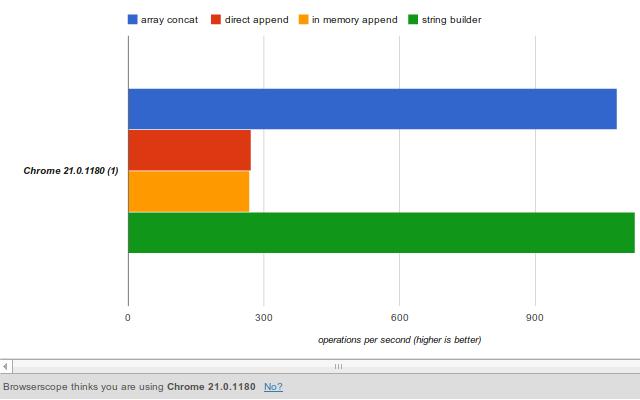
<p><em>Result: 281 operations/second</em></p>

<p>Manually appending lots of items to the DOM is usually a bad idea.
It can cause the browser to repaint the UI which is an expensive operation when the DOM is large.</p>

<h2>2) Better Approach - Make changes in memory</h2>

<p>Instead of adding items directly to the element in the DOM we can create a stub element in memory and append to that instead. After we are done with the appends we just need to make one call to the DOM to perform the update.</p>

<figure class='code'><figcaption><span></span></figcaption><div class="highlight"><table><tr><td class="gutter"><pre class="line-numbers"><span class='line-number'>1</span>
<span class='line-number'>2</span>
<span class='line-number'>3</span>
<span class='line-number'>4</span>
<span class='line-number'>5</span>
<span class='line-number'>6</span>
<span class='line-number'>7</span>
<span class='line-number'>8</span>
</pre></td><td class='code'><pre><code class='javascript'><span class='line'><span class="kd">var</span> <span class="nx">element</span> <span class="o">=</span> <span class="nx">$</span><span class="p">(</span><span class="s1">&#39;ul:first&#39;</span><span class="p">);</span>
</span><span class='line'>
</span><span class='line'><span class="kd">var</span> <span class="nx">stub</span> <span class="o">=</span> <span class="nx">$</span><span class="p">(</span><span class="s1">&#39;&lt;ul&gt;&#39;</span><span class="p">);</span>
</span><span class='line'>
</span><span class='line'><span class="k">for</span><span class="p">(</span><span class="kd">var</span> <span class="nx">i</span><span class="o">=</span><span class="mi">0</span><span class="p">;</span> <span class="nx">i</span> <span class="o">&lt;</span> <span class="mi">100</span><span class="p">;</span> <span class="nx">i</span><span class="o">++</span><span class="p">){</span>
</span><span class='line'>  <span class="nx">stub</span><span class="p">.</span><span class="nx">append</span><span class="p">(</span><span class="s1">&#39;&lt;li&gt;&#39;</span> <span class="o">+</span> <span class="nx">i</span> <span class="o">+</span> <span class="s1">&#39;&lt;/li&gt;&#39;</span><span class="p">);</span>
</span><span class='line'><span class="p">}</span>
</span><span class='line'><span class="nx">element</span><span class="p">.</span><span class="nx">append</span><span class="p">(</span><span class="nx">stub</span><span class="p">.</span><span class="nx">children</span><span class="p">());</span>
</span></code></pre></td></tr></table></div></figure>


<p><em>Result: 276 operations/second</em></p>

<p>I do believe this result is a result is a little skewed. The DOM I was testing with was quite small and not the size that adding items would make a huge difference. This is something worth noting though because an optimization&#8217;s value is highly application specific.</p>

<h2>3) Fastest Approach - Use a string buffer and append html string directly</h2>

<p>Usually I am happy using the in-memory approach because I know that if you have a large DOM loaded it will minimize the direct updates needed
and hopefully result in better performance. And if the dom is small it&#8217;s only marginally slower so I usually caution on the side of err.</p>

<p>But can we make it faster? Well let&#8217;s try.</p>

<p>Instead of creating a stub we will just store the html string for each element in an array. This removes the overhead of string concatenation (which is bad of course :)) and the overhead of creating many temporary jQuery elements. When we are finished we will join the items in the array with an empty string and append it to the list item.</p>

<p>Now, the fun stuff. Let&#8217;s see this in action&#8230;</p>

<figure class='code'><figcaption><span></span></figcaption><div class="highlight"><table><tr><td class="gutter"><pre class="line-numbers"><span class='line-number'>1</span>
<span class='line-number'>2</span>
<span class='line-number'>3</span>
<span class='line-number'>4</span>
<span class='line-number'>5</span>
<span class='line-number'>6</span>
<span class='line-number'>7</span>
<span class='line-number'>8</span>
<span class='line-number'>9</span>
</pre></td><td class='code'><pre><code class='javascript'><span class='line'><span class="kd">var</span> <span class="nx">element</span> <span class="o">=</span> <span class="nx">$</span><span class="p">(</span><span class="s1">&#39;ul:first&#39;</span><span class="p">);</span>
</span><span class='line'><span class="kd">var</span> <span class="nx">arr</span> <span class="o">=</span> <span class="p">[];</span>
</span><span class='line'>
</span><span class='line'><span class="k">for</span><span class="p">(</span><span class="kd">var</span> <span class="nx">i</span><span class="o">=</span><span class="mi">0</span><span class="p">;</span> <span class="nx">i</span> <span class="o">&lt;</span> <span class="mi">100</span><span class="p">;</span> <span class="nx">i</span><span class="o">++</span><span class="p">){</span>
</span><span class='line'>  <span class="nx">arr</span><span class="p">.</span><span class="nx">push</span><span class="p">(</span><span class="s1">&#39;&lt;li&gt;&#39;</span><span class="p">);</span>
</span><span class='line'>  <span class="nx">arr</span><span class="p">.</span><span class="nx">push</span><span class="p">(</span><span class="nx">i</span><span class="p">)</span>
</span><span class='line'>  <span class="nx">arr</span><span class="p">.</span><span class="nx">push</span><span class="p">(</span><span class="s1">&#39;&lt;/li&gt;&#39;</span><span class="p">);</span>
</span><span class='line'><span class="p">}</span>
</span><span class='line'><span class="nx">element</span><span class="p">.</span><span class="nx">append</span><span class="p">(</span><span class="nx">arr</span><span class="p">.</span><span class="nx">join</span><span class="p">(</span><span class="s1">&#39;&#39;</span><span class="p">));</span>
</span></code></pre></td></tr></table></div></figure>


<p><em>Result: 1,150 operations/second</em></p>

<p>Woah! That&#8217;s a huge improvement! Granted some of that improvement is because we removed the string concatenation - but it shows you that a few small changes can make a big difference!</p>

<h2>Final Thoughts</h2>

<p>So there you have it! As a general rule when performing lots of appends to an item it is usually a good idea to not manipulate the DOM directly. And if you want to increase the performance and responsiveness out of you web app  when doing DOM manipulation try using the array string buffer technique.</p>

<p><img src="http://allthingscraig.com/images/posts/append-benchmark.png"></p>

<p>If you have a faster way of doing this, please share! :)</p>
]]></content>
  </entry>
  
  <entry>
    <title type="html"><![CDATA[Dark Octo Themes: Chrome extension for themed  github repositories]]></title>
    <link href="http://allthingscraig.com/blog/2012/04/24/dark-octo-themes-chrome-extension-for-themed-github-repositories/"/>
    <updated>2012-04-24T19:50:51-04:00</updated>
    <id>http://allthingscraig.com/blog/2012/04/24/dark-octo-themes-chrome-extension-for-themed-github-repositories</id>
    <content type="html"><![CDATA[<p>Whenever I code I always prefer to use a dark background theme, like vibrantink or the railscast theme. I just always feel at home with a dark background.</p>

<p>If you&#8217;re like me you probably spend a fair amount of time on github viewing open source projects . It&#8217;s like a geek toy store - information overload!</p>

<p>And if you&#8217;re like me you wish that you could change the source code theme on github to a more familiar theme. Well now you can!</p>

<p>Introducing a little Chrome extension I created called <a href="https://chrome.google.com/webstore/detail/iahjlgmjhgemeebaflejbgfpojahcnng?hl=en-GB">Dark Octo Themes</a>. This extension has one purpose: to show the source code in a modified theme while on github.</p>

<p><img src="http://allthingscraig.com/images/posts/darkoctotheme.png"></p>

<h2>Installation</h2>

<p>Search for <strong>Dark Octo Themes</strong> in the Chrome App store. Or if you want to install from source there are instructions on the github repository page <a href="https://github.com/craigerm/dark-octo-themes">here</a>.</p>

<h2>First Impressions on Developing for Chrome</h2>

<p>This extension was a result of a rainy, bored Sunday and my curiosity to see how simple it would be to implement a chrome extension. The learning curve was fairly low (assuming you are comfortable with javascript) because of how awesome the google docs are.</p>

<p>The docs contain so much useful information and there are several examples of how to use different parts of the API - and they show you exactly which parts of the API are used in the example.</p>

<p>The hardest part (and most time consuming!) was creating the icon and promotional images that are required when you upload to the app store. The experience was very painless though: pay your one time $5 registration fee (I would have paid $20 if I could use a few stock images :P), upload your sources, upload your icon/promotional images, and publish! Done!</p>

<h2>Final Thoughts</h2>

<p>It really wouldn&#8217;t surprise me if github implements the ability to change the source code theme sometime in the not-to-distant future which would render this extension obsolete. Those guys are awesome, and the site just keeps getting better and better by the day it seems. But until then, I&#8217;ll be using this <em>selfishly-created</em> :) extension.</p>

<p>If you like this extension or have an idea for an improvement, feel free to let me know!</p>

<h2>Resources</h2>

<ul>
<li><a href="https://github.com/craigerm/dark-octo-themes">Source code on github</a></li>
<li><a href="https://chrome.google.com/webstore/detail/iahjlgmjhgemeebaflejbgfpojahcnng?hl=en-GB">Dark Octo Themes Chrome Extension</a></li>
<li><a href="http://code.google.com/chrome/extensions/overview.html">Google Chrome Extensions Overview</a></li>
</ul>

]]></content>
  </entry>
  
  <entry>
    <title type="html"><![CDATA[How to achieve rails like resources in node.js express]]></title>
    <link href="http://allthingscraig.com/blog/2012/01/29/how-to-achieve-rails-like-resources-in-node-js-express/"/>
    <updated>2012-01-29T19:59:10-05:00</updated>
    <id>http://allthingscraig.com/blog/2012/01/29/how-to-achieve-rails-like-resources-in-node-js-express</id>
    <content type="html"><![CDATA[<p>I&#8217;ve been playing around with <a href="http://nodejs.org/">Node.js</a> lately by building some prototypes. I&#8217;ve been using <a href="http://expressjs.com/">express</a> as my web framework and have really enjoyed the experience so far.</p>

<p>One thing that I do miss from Rails is to be able to easily map a controller&#8217;s CRUD actions to the conventional matching routes. Learn more about rails routing <a href="http://guides.rubyonrails.org/routing.html">here</a> if you are not familiar.</p>

<p>Let&#8217;s say you have a &#8220;task&#8221; controller with all seven mappable actions defined. In rails you would do something like this:</p>

<figure class='code'><figcaption><span></span></figcaption><div class="highlight"><table><tr><td class="gutter"><pre class="line-numbers"><span class='line-number'>1</span>
</pre></td><td class='code'><pre><code class='ruby'><span class='line'><span class="n">resources</span> <span class="ss">:tasks</span>
</span></code></pre></td></tr></table></div></figure>


<p>In express it appears that you would have to do this manually. Inside your app.js file you would have the following code:</p>

<figure class='code'><figcaption><span></span></figcaption><div class="highlight"><table><tr><td class="gutter"><pre class="line-numbers"><span class='line-number'>1</span>
<span class='line-number'>2</span>
<span class='line-number'>3</span>
<span class='line-number'>4</span>
<span class='line-number'>5</span>
<span class='line-number'>6</span>
<span class='line-number'>7</span>
<span class='line-number'>8</span>
<span class='line-number'>9</span>
</pre></td><td class='code'><pre><code class='javascript'><span class='line'><span class="kd">var</span> <span class="nx">tasks</span> <span class="o">=</span> <span class="nx">require</span><span class="p">(</span><span class="s1">&#39;./routes/tasks.js&#39;</span><span class="p">)</span>
</span><span class='line'>
</span><span class='line'><span class="nx">app</span><span class="p">.</span><span class="nx">get</span><span class="p">(</span><span class="s1">&#39;/tasks&#39;</span><span class="p">,</span> <span class="nx">tasks</span><span class="p">.</span><span class="nx">index</span><span class="p">);</span>
</span><span class='line'><span class="nx">app</span><span class="p">.</span><span class="nx">get</span><span class="p">(</span><span class="s1">&#39;/tasks/new&#39;</span><span class="p">,</span> <span class="nx">tasks</span><span class="p">.</span><span class="k">new</span><span class="p">);</span>
</span><span class='line'><span class="nx">app</span><span class="p">.</span><span class="nx">post</span><span class="p">(</span><span class="s1">&#39;/tasks/create&#39;</span><span class="p">,</span> <span class="nx">tasks</span><span class="p">.</span><span class="nx">create</span><span class="p">)</span>
</span><span class='line'><span class="nx">app</span><span class="p">.</span><span class="nx">get</span><span class="p">(</span><span class="s1">&#39;/tasks/show&#39;</span><span class="p">,</span> <span class="nx">tasks</span><span class="p">.</span><span class="nx">show</span><span class="p">)</span>
</span><span class='line'><span class="nx">app</span><span class="p">.</span><span class="nx">get</span><span class="p">(</span><span class="s1">&#39;/tasks/edit&#39;</span><span class="p">,</span> <span class="nx">tasks</span><span class="p">.</span><span class="nx">edit</span><span class="p">)</span>
</span><span class='line'><span class="nx">app</span><span class="p">.</span><span class="nx">post</span><span class="p">(</span><span class="s1">&#39;/tasks/update&#39;</span><span class="p">,</span> <span class="nx">tasks</span><span class="p">.</span><span class="nx">update</span><span class="p">)</span>
</span><span class='line'><span class="nx">app</span><span class="p">.</span><span class="nx">post</span><span class="p">(</span><span class="s1">&#39;/tasks/destroy&#39;</span><span class="p">,</span> <span class="nx">tasks</span><span class="p">.</span><span class="nx">destroy</span><span class="p">)</span>
</span></code></pre></td></tr></table></div></figure>


<h2>Dry routing in express</h2>

<p>When experimenting with node and express I had to do the following for a couple of different controllers and duplication started to creep into my code. I&#8217;m a strong believer in the <a href="http://en.wikipedia.org/wiki/Don%27t_repeat_yourself">DRY</a> principle and I even apply that when learning a new language or framework. Even when experimenting with new technology applying the DRY pinciple allows you to solve an actual problem and look into the language/framework instead of working at a &#8220;hello world&#8221; level. I find solving an actual problem speeds up the learning curve and in the end is also more fun. Maybe that&#8217;s a post for a future date :).</p>

<p>Anyways to emulate the rails routing behavior in express I&#8217;ve created a quick helper that can be used. It is called &#8220;autoresources&#8221; and can map a controller&#8217;s actions just like rails does.</p>

<figure class='code'><figcaption><span></span></figcaption><div class="highlight"><table><tr><td class="gutter"><pre class="line-numbers"><span class='line-number'>1</span>
<span class='line-number'>2</span>
<span class='line-number'>3</span>
</pre></td><td class='code'><pre><code class='javascript'><span class='line'><span class="kd">var</span> <span class="nx">app</span> <span class="o">=</span> <span class="nx">module</span><span class="p">.</span><span class="nx">exports</span> <span class="o">=</span> <span class="nx">express</span><span class="p">.</span><span class="nx">createServer</span><span class="p">();</span>
</span><span class='line'><span class="kd">var</span> <span class="nx">resources</span> <span class="o">=</span> <span class="nx">require</span><span class="p">(</span><span class="s1">&#39;./utils/autoresources.js&#39;</span><span class="p">)</span>
</span><span class='line'><span class="nx">resources</span><span class="p">.</span><span class="nx">map</span><span class="p">(</span><span class="nx">app</span><span class="p">,</span> <span class="s1">&#39;tasks&#39;</span><span class="p">)</span>
</span></code></pre></td></tr></table></div></figure>


<p>Side note: I&#8217;m hesitant to call the express &#8220;routing handlers&#8221; controllers in the way that rails calls their controllers controllers, but for this post we&#8217;ll treat them as the same. And actions and functions will be interchangeable.</p>

<p>The call to resources.map() will look for the file &#8220;APP_HOME/routes/tasks.js&#8221; and then check for functions that can be auto mapped to routes. Only functions that exist in your controller will be auto mapped. For example if you don&#8217;t have a destroy function in your controller then no route will be added for destroy.</p>

<p>Your route handler should look something like this:</p>

<figure class='code'><figcaption><span></span></figcaption><div class="highlight"><table><tr><td class="gutter"><pre class="line-numbers"><span class='line-number'>1</span>
<span class='line-number'>2</span>
<span class='line-number'>3</span>
<span class='line-number'>4</span>
<span class='line-number'>5</span>
<span class='line-number'>6</span>
<span class='line-number'>7</span>
<span class='line-number'>8</span>
<span class='line-number'>9</span>
<span class='line-number'>10</span>
<span class='line-number'>11</span>
<span class='line-number'>12</span>
<span class='line-number'>13</span>
<span class='line-number'>14</span>
<span class='line-number'>15</span>
<span class='line-number'>16</span>
</pre></td><td class='code'><pre><code class='javascript'><span class='line'><span class="c1">// Actions supported mapped to GET:</span>
</span><span class='line'><span class="c1">//   =&gt; index, new, show, edit</span>
</span><span class='line'><span class="c1">// Actions supported mapped to POST</span>
</span><span class='line'><span class="c1">//   =&gt; create, update, destroy</span>
</span><span class='line'>
</span><span class='line'><span class="nx">exports</span><span class="p">.</span><span class="nx">index</span> <span class="o">=</span> <span class="kd">function</span><span class="p">(</span><span class="nx">req</span><span class="p">,</span> <span class="nx">res</span><span class="p">){</span>
</span><span class='line'>  <span class="nx">res</span><span class="p">.</span><span class="nx">send</span><span class="p">(</span><span class="s1">&#39;Index action called&#39;</span><span class="p">)</span>
</span><span class='line'><span class="p">}</span>
</span><span class='line'>
</span><span class='line'><span class="nx">exports</span><span class="p">.</span><span class="k">new</span> <span class="o">=</span> <span class="kd">function</span><span class="p">(</span><span class="nx">req</span><span class="p">,</span> <span class="nx">res</span><span class="p">){</span>
</span><span class='line'>   <span class="nx">res</span><span class="p">.</span><span class="nx">send</span><span class="p">(</span><span class="s1">&#39;New action called&#39;</span><span class="p">);</span>
</span><span class='line'><span class="p">}</span>
</span><span class='line'>
</span><span class='line'><span class="nx">exports</span><span class="p">.</span><span class="nx">create</span> <span class="o">=</span> <span class="kd">function</span><span class="p">(</span><span class="nx">req</span><span class="p">,</span><span class="nx">res</span><span class="p">){</span>
</span><span class='line'>  <span class="nx">res</span><span class="p">.</span><span class="nx">send</span><span class="p">(</span><span class="s1">&#39;Create action called&#39;</span><span class="p">);</span>
</span><span class='line'><span class="p">}</span>
</span></code></pre></td></tr></table></div></figure>


<h2>Adding routes to other controller actions</h2>

<p>The map function also returns the javascript exports for that file. The exports can be used the same way just as if you did a &#8220;require&#8221; on the file yourself.
For example, let&#8217;s say our tasks.js file had another function called &#8220;recent&#8221; to show the recent tasks that need to be completed. In our app.js file we would then do the following:</p>

<figure class='code'><figcaption><span></span></figcaption><div class="highlight"><table><tr><td class="gutter"><pre class="line-numbers"><span class='line-number'>1</span>
<span class='line-number'>2</span>
</pre></td><td class='code'><pre><code class='javascript'><span class='line'><span class="kd">var</span> <span class="nx">tasks</span> <span class="o">=</span> <span class="nx">resources</span><span class="p">.</span><span class="nx">map</span><span class="p">(</span><span class="nx">app</span><span class="p">,</span> <span class="s1">&#39;tasks&#39;</span><span class="p">)</span>
</span><span class='line'><span class="nx">app</span><span class="p">.</span><span class="nx">get</span><span class="p">(</span><span class="s1">&#39;/recent&#39;</span><span class="p">,</span> <span class="nx">tasks</span><span class="p">.</span><span class="nx">recent</span><span class="p">)</span>
</span></code></pre></td></tr></table></div></figure>


<h2>Installation</h2>

<p>I might add this as a node package in the next few days but for now you can grab the source code for this at <a href="https://github.com/craigerm/autoresources">my github page</a>. To use this code just copy it (it&#8217;s just one file) to your project directly. Then just require it from your app.js file</p>

<figure class='code'><figcaption><span></span></figcaption><div class="highlight"><table><tr><td class="gutter"><pre class="line-numbers"><span class='line-number'>1</span>
<span class='line-number'>2</span>
</pre></td><td class='code'><pre><code class='javascript'><span class='line'><span class="c1">// Change the path to wherever you copied your file</span>
</span><span class='line'><span class="kd">var</span> <span class="nx">resources</span> <span class="o">=</span> <span class="nx">require</span><span class="p">(</span><span class="s1">&#39;./utils/autoresources.js&#39;</span><span class="p">)</span>
</span></code></pre></td></tr></table></div></figure>


<p>Hopefully this will be useful for some people out there. I will probably have more to talk about with node in the next few months since I am finding it to very interesting and fun to work with. Remember how much fun you had when you first discovered rails?</p>
]]></content>
  </entry>
  
  <entry>
    <title type="html"><![CDATA[Share your .bashrc and .vimrc across multiple machines]]></title>
    <link href="http://allthingscraig.com/blog/2012/01/29/share-your-bashrc-and-vimrc-across-multiple-machines/"/>
    <updated>2012-01-29T15:32:40-05:00</updated>
    <id>http://allthingscraig.com/blog/2012/01/29/share-your-bashrc-and-vimrc-across-multiple-machines</id>
    <content type="html"><![CDATA[<p>Recently I decided to cross to the dark side (or see the light, depending on whom you ask!) and start using vim. I&#8217;m just finishing up a month long challenge using vim for any file editing outside of Visual Studio - so far it&#8217;s working out extremely well and I am going to continue using all the almighty one that is vim!</p>

<p>One problem I had during this learning experience is that my .vimrc file was starting to grow and I had  to maintain different versions across different boxes - especially since every day I was (and am) changing something in my .vimrc file. I have a .vimrc file for my work PC, my home PC (Windows + Linux), and my home laptop (Linux). I also had the same problem  sharing my .bashrc files across these machines. On windows I use <a href="http://www.cygwin.com/">cygwin</a> as my command line shell. I will talk about how to set this up on a Linux environment, not on plain windows.</p>

<p>The first thing I would recommend is storing your configuration files on <a href="http://github.com">github</a>. This way you can clone these files from any computer you like. And <del>if</del> when your  amazingly fast SSD crashes or your computer just blows up you don&#8217;t have to start from scratch.</p>

<p>Once you have a folder (I keep them in ~/configs) for your configurations you can use<a href="http://en.wikipedia.org/wiki/Symbolic_link"> symbolic links </a>to easily link the location of the files inside your repository. Go to your home folder and type the following commands:</p>

<figure class='code'><div class="highlight"><table><tr><td class="gutter"><pre class="line-numbers"><span class='line-number'>1</span>
</pre></td><td class='code'><pre><code class=''><span class='line'>ln -s ~/configs/.bashrc .bashrc</span></code></pre></td></tr></table></div></figure>


<figure class='code'><div class="highlight"><table><tr><td class="gutter"><pre class="line-numbers"><span class='line-number'>1</span>
</pre></td><td class='code'><pre><code class=''><span class='line'>ln -s ~/configs/.vimrc .vimrc</span></code></pre></td></tr></table></div></figure>


<p>Change &#8220;~/configs&#8221; to wherever your local git repository is located. This will link the files needed by bash and vim to load the config files from your repository. Running bash or vim should have the correct configurations as you expect. You might need to delete the original .bashrc and .vimrc inside your home folder. By careful that you don&#8217;t have anything in these files that you haven&#8217;t added to git.</p>

<p>When you change your .bashrc or .vimrc file on one machine you can commit and push them to github and just pull them from your other boxes. Easy peasy!  This also allows you to add comments to your commit so you can easily remember what and why you have made the change. And next  year when you buy a new laptop getting back to speed with your command line and vim configurations is as easy as checking out your repository and creating the symbolic links again. You could always create a new computer script that does all this for you and store that in github. But I&#8217;ll leave that as an exercise for the reader :).</p>

<p>Since lots of vim plugins use github you could experiment using git submodules (if you dare!) to maintain the plugins you use for vim. This way when you update your sources on one machine it will grab any third party vim plugins that you use - instead of installing those manually. Hopefully everyone is using <a href="https://github.com/tpope/vim-pathogen">pathogen</a> to maintain vim plugins? :) If you have an awesome&#8217;er way of maintaining your config files or vim plugins please let me know!</p>
]]></content>
  </entry>
  
  <entry>
    <title type="html"><![CDATA[Remove your leftover git tracking branches ]]></title>
    <link href="http://allthingscraig.com/blog/2012/01/25/remove-your-leftover-git-tracking-branches/"/>
    <updated>2012-01-25T20:25:59-05:00</updated>
    <id>http://allthingscraig.com/blog/2012/01/25/remove-your-leftover-git-tracking-branches</id>
    <content type="html"><![CDATA[<p>Today I was helping out a co-worker with a git problem and when I looked at the branches in his repository (using &#8220;git status -a&#8221;) I didn&#8217;t see what I expected.  There were dozens and dozens of remote tracking branches in his repository that shouldn&#8217;t have been there. All the branches that the team had developed in the last year still existed locally (as tracking branches) even though they had been deleted remotely by another developer. So I showed him the following git command:</p>

<figure class='code'><div class="highlight"><table><tr><td class="gutter"><pre class="line-numbers"><span class='line-number'>1</span>
</pre></td><td class='code'><pre><code class=''><span class='line'>git remote prune origin</span></code></pre></td></tr></table></div></figure>


<p>This will delete any remote tracking branches that have been deleted in the remote repository (if your remote name is different replace &#8220;origin&#8221; with your remote name).</p>

<p>As a result &#8220;git status -a&#8221; now shows what I expect on my co-worker&#8217;s machine. This is a great little command when you work with a repository that has many remote feature branches created and deleted on a regular basis. I usually run the command every few weeks but it really only needs to be run when you think you think your git closet needs a little _declutter_ing .  The syntax is a little cryptic, so it&#8217;s a good idea to <a href="http://davidwalsh.name/git-aliases">alias</a> it!</p>
]]></content>
  </entry>
  
</feed>