<!DOCTYPE html>
<html lang="en">
<head>
<meta charset="UTF-8" />
<meta http-equiv="X-UA-Compatible" content="IE=edge" />
<meta name="viewport" content="width=device-width, initial-scale=1.0" />
<title>&#127909; YouTube Studio Tour - Behind The Scenes </title>
<script defer="defer" src="https://www.stevencarlson.show/SNA_common/alpine.min_D56DCE83CDF7B14A4CB79283DABFFD30.js"></script>
<script src="https://www.stevencarlson.show/SNA_common/SNA-IP_email_subscribe.min_D0E6AB57B8245786014122A5B55AA21F.js"></script>
<link href="https://www.stevencarlson.show/css/SNA_main.min_A3F8BD7EB6A0BE50772FE189852B7295.css" rel="stylesheet">
<link rel="canonical" href="https://www.stevencarlson.show/blog/youtube_studio_tour_camera_gear" />
<meta property="og:url" content="https://www.stevencarlson.show/blog/youtube_studio_tour_camera_gear">
<meta property="og:title" content="&#127909; YouTube Studio Tour - Behind The Scenes ">
<meta property="og:image" content="https://i.ytimg.com/vi/qxRCQABuTfc/maxresdefault.jpg">
<meta property="twitter:image" content="https://i.ytimg.com/vi/qxRCQABuTfc/maxresdefault.jpg">
<meta property="og:image:alt" content="&#127909; YouTube Studio Tour - Behind The Scenes ">
<meta property="og:description" content="YouTube is fantastic because anyone can start a channel with nothing more than a cell phone. However&#44; if you want your videos to be remarkable and grab attention&#44; you will have to put in the extra effort to produce high-quality content. This ...">
<meta name="description" content="YouTube is fantastic because anyone can start a channel with nothing more than a cell phone. However&#44; if you want your videos to be remarkable and grab attention&#44; you will have to put in the extra effort to produce high-quality content. This ...">
<meta name="keywords" content="'Behind-the-Scenes'">
<script>!function(f,b,e,v,n,t,s){if(f.fbq)return;n=f.fbq=function(){n.callMethod?n.callMethod.apply(n,arguments):n.queue.push(arguments)};if(!f._fbq)f._fbq=n;n.push=n;n.loaded=!0;n.version='2.0';n.queue=[];t=b.createElement(e);t.async=!0;t.src=v;s=b.getElementsByTagName(e)[0];s.parentNode.insertBefore(t,s)}(window, document,'script','https://connect.facebook.net/en_US/fbevents.js');fbq('init', '858087805150113');fbq('track', 'PageView');</script><noscript><img height="1" width="1" style="display:none"src="https://www.facebook.com/tr?id=858087805150113AMP_HEREev=PageViewAMP_HEREnoscript=1"/></noscript> <script async src="https://www.googletagmanager.com/gtag/js?id=G-B73HP68E05"></script><script>  window.dataLayer = window.dataLayer || [];  function gtag(){dataLayer.push(arguments);}  gtag('js', new Date());  gtag('config', 'G-B73HP68E05');</script>
<script>
		const tags = Array('Behind-the-Scenes');
		const videos = [];
	</script>
</head>
<body class x-data="{ openMenu : false, page: 'youtube_studio_tour_camera_gear',  }" :class="openMenu ? 'overflow-hidden' : 'overflow-visible' ">
<style>
		[x-cloak]
		{
			display: none !important;
		}
	</style>
<div id="hiddenPhotoBox" class="hidden" style="position:fixed;z-index:999999; height:100vh; width:100%;background-color:black;">
<div class="flex items-center justify-center h-screen">
<div id="hiddenFullSizeImageHolder" class="grid h-screen place-items-center"> <span class="hidden text-2xl lg:text-3xl xl:text-4xl text-slate-300 cursor-zoom-in">Comments</span><img src="https://www.stevencarlson.show/images/spinner.gif" style="height:100%; width:100%; object-fit:contain; margin:auto;" class="cursor-zoom-out"></div>
</div>
</div>

<div class="bg-[url('https://www.stevencarlson.show/graphics/gray-background.png')]">
<img src="https://www.stevencarlson.show/graphics/transparent-logobar.png" alt="The Steven Carlson Show Logo" class="w-[20rem] md:w-[40rem] xl:w-full max-w-[100rem] mx-auto" />
</div>

<header class="flex items-center justify-between px-8 py-4 bg-white shadow-xl ">

<button class="flex flex-col items-center align-middle md:hidden" @click="openMenu = !openMenu" :aria-expanded="openMenu" aria-controls="mobile-navigation" aria-label="Navigation Menu">
<svg xmlns="http://www.w3.org/2000/svg" class="w-6 h-6" fill="none" viewBox="0 0 24 24" stroke="currentColor">
<path stroke-linecap="round" stroke-linejoin="round" stroke-width="2" d="M4 6h16M4 12h16M4 18h16" />
</svg>
<span class="text-xs">Menu</span>
</button>

<nav class="hidden md:flex ">
<ul class="flex flex-row gap-2">
<li>
<a href="/" class="inline-flex px-3 py-2 rounded" :class="page === 'index' && 'bg-slate-200'">The Steven Carlson Show</a>
</li>
<li>
<a href="https://www.stevencarlson.show/tags/ALL_POSTS" class="inline-flex px-3 py-2 hover:text-blue-800 hover:underline" :class="page === 'ALL_POSTS' && 'bg-slate-200'">Video Archive</a>
</li>
<li>
<a href="https://www.stevencarlson.show/tags/Veteran" class="inline-flex px-3 py-2 hover:text-blue-800 hover:underline" :class="page === 'Veteran' && 'bg-slate-200'">Veterans</a>
</li>
<li>
<a href="https://www.stevencarlson.show/tags/Interviews" class="inline-flex px-3 py-2 hover:text-blue-800 hover:underline" :class="page === 'Interviews' && 'bg-slate-200'">Success Stories</a>
</li>
<li>
<a href="https://www.stevencarlson.show/tags/Small-Business" class="inline-flex px-3 py-2 hover:text-blue-800 hover:underline" :class="page === 'Small-Business' && 'bg-slate-200'">Small Business Topics</a>
</li>
<li>
<a href="https://www.stevencarlson.show/docs/bookshelf.html" class="inline-flex px-3 py-2 hover:text-blue-800 hover:underline" :class="page === 'bookshelf' && 'bg-slate-200'">Business Books</a>
</li>
<li>
<a href="https://www.stevencarlson.show/blog/youtube_studio_tour_camera_gear" class="inline-flex px-3 py-2 hover:text-blue-800 hover:underline" :class="page === 'youtube_studio_tour_camera_gear' && 'bg-slate-200'">Camera Gear</a>
</li>
<li>

</li>
</ul>
</nav>
</header>

<nav id="mobile-navigation" class="fixed top-0 bottom-0 left-0 right-0 z-10 backdrop-blur-sm" :class="openMenu ? 'visible' : 'invisible' " x-cloak>

<ul class="absolute top-0 bottom-0 right-0 z-10 w-10/12 py-4 transition-all bg-white drop-shadow-2xl" :class="openMenu ? 'translate-x-0' : 'translate-x-full'">
<li class="border-b border-inherit">
<a href="/" class="block p-4" aria-current="true">The Steven Carlson Show</a>
</li>
<li class="border-b border-inherit">
<a href="https://www.stevencarlson.show/tags/ALL_POSTS" class="block p-4">Video Archive</a>
</li>
<li class="border-b border-inherit">
<a href="https://www.stevencarlson.show/tags/Veteran" class="block p-4">Veterans</a>
</li>
<li class="border-b border-inherit">
<a href="https://www.stevencarlson.show/tags/Interviews" class="block p-4">Success Stories</a>
</li>
<li class="border-b border-inherit">
<a href="https://www.stevencarlson.show/tags/Small-Business" class="block p-4">Small Business Topics</a>
</li>
<li class="border-b border-inherit">
<a href="https://www.stevencarlson.show/docs/bookshelf.html" class="block p-4">Business Books</a>
</li>
<li class="border-b border-inherit">
<a href="https://www.stevencarlson.show/blog/youtube_studio_tour_camera_gear" class="block p-4">Camera Gear</a>
</li>
<li class="border-b border-inherit">

</li>
</ul>

<button class="absolute top-0 bottom-0 left-0 right-0" @click="openMenu = !openMenu" :aria-expanded="openMenu" aria-controls="mobile-navigation" aria-label="Close Navigation Menu">
<svg xmlns="http://www.w3.org/2000/svg" class="absolute w-6 h-6 top-2 left-2" fill="none" viewBox="0 0 24 24" stroke="currentColor">
<path stroke-linecap="round" stroke-linejoin="round" stroke-width="2" d="M6 18L18 6M6 6l12 12" />
</svg>
</button>
</nav>

<div class="mainDiv">
<div class="w-full cont-top">

<div class="mx-auto -mt-5 shadow-md md:pt-10 bg-slate-50">
<div class="w-full px-4 mx-auto mt-8 md:mt-0">
<div class="w-full pb-4 mx-auto text-2xl font-bold tracking-tight text-center lg:text-4xl text-zinc-800"><a href="/" class="text-blue-600 underline hover:text-blue-800 visited:text-purple-600">Home</a> / <a href="/tags/ALL_POSTS" class="text-blue-600 underline hover:text-blue-800 visited:text-purple-600">Video Blogs</a> / &#127909; YouTube Studio Tour - Behind The Scenes </div>
</div>
<div class="flex justify-center w-full py-3 b-4 ">
<iframe id="youtube_player" name="youtube_player" src="https://www.youtube.com/embed/qxRCQABuTfc?controls=0&rel=0&modestbranding=1" allow="accelerometer; autoplay; encrypted-media; gyroscope; picture-in-picture; modestbranding" allowfullscreen frameborder="0" class=" justify-center aspect-video md:w-1/2"></iframe>
</div>
<div class="col-lg-12">
<a href="https://www.stevencarlson.show/r75bc4" target="_blank" class="youbtn"><img src="https://www.stevencarlson.show/images/play.png" alt="view on YouTube"> subscribe</a>
</div>
</div>

<div class="flex flex-col justify-center w-full">

<div class="flex bg-[#D0E7F4] bg-opacity-90 mx-auto mt-4 px-4 w-full lg:w-1/2 text-center text-lg font-semibold text-black rounded-lg gap-2 items-center" x-data="{}">
<div class="flex flex-wrap items-center w-1/2 pt-2 pb-2 pl-2 pr-0 overflow">
<img src="data:image/svg+xml,%3Csvg xmlns='http://www.w3.org/2000/svg' viewBox='0 0 28.84 26.6'%3E%3Cpath fill='%23111827' class='cls-1' d='M12.78 22.74l1.35 1.35a2.09 2.09 0 003 0l8.12-8.15a2.09 2.09 0 000-3l-1.34-1.33zM14.71 2.51a2.09 2.09 0 00-1.52-.61l-10 .22L3 12.1a2.09 2.09 0 00.61 1.52l7.14 7.12L21.87 9.65zm-4.64 9.88a3.17 3.17 0 113.44-2.86 3.17 3.17 0 01-3.44 2.86z'/%3E%3C/svg%3E" class="pr-2 w-[30px]">
<template x-for="tag in tags">
<a x-bind:href="'/tags/' + tag" class="block p-1">
<span class="text-indigo-800 truncate hover:underline hover:text-blue-700" x-html="'#' + tag" x-bind:alt="tag"></span>
</a>&nbsp;
</template>
</div>
<div class="items-center justify-end hidden w-1/2 pt-2 pb-2 pl-0 pr-0 md:flex">
<p class="text-indigo-800">Share on:&nbsp;</p>
<a href="https://twitter.com/intent/tweet?text=&#127909; YouTube Studio Tour - Behind The Scenes &url=https://www.stevencarlson.show/blog/youtube_studio_tour_camera_gear" target="_blank" class="pl-4 text-indigo-800 truncate hover:underline hover:text-blue-700">Twitter</a>
<a href="https://www.facebook.com/sharer/sharer.php?u=https://www.stevencarlson.show/blog/youtube_studio_tour_camera_gear" target="_blank" class="pl-4 text-indigo-800 truncate hover:underline hover:text-blue-700">Facebook</a>
</div>
</div>

<div class="flex flex-col justify-center w-full gap-10 px-8 mx-auto md:flex-row">

<div id="blogPost" class="px-4 space-y-4 prose text-justify md:px-8 max-w-none lg:prose-xl"><p>YouTube is fantastic because anyone can start a channel with nothing more than a cell phone. However&#44; if you want your videos to be remarkable and grab attention&#44; you will have to put in the extra effort to produce high-quality content. This goes beyond simply pressing record. You&#39;ll need the appropriate tools and know-how to be a successful YouTube production studio. It will not come without a price&#44; but it will pay for itself with increased viewership.</p><p>Here is a behind-the-scenes tour of my YouTube production studio set&#44; showing what equipment I use and how it all works together.</p><h2>&nbsp;</h2><h2>&#127909; Camera</h2><p><img style="float: right;" src="https://imagedelivery.net/4DPBTKu4T6GVUA5BQomL1Q/16035ffc-e04d-40c9-9201-d1d74f48ed00/blogStandard"></p><p>I use a <a href="https://www.amazon.com/dp/B08Y5RL5Y3/?tag=sns0c-20" target="_blank" rel="noopener">Blackmagic Design Pocket Cinema Camera 6K </a>with a <a href="https://www.amazon.com/dp/B000EW8074/?tag=sns0c-20" target="_blank" rel="noopener">Canon EFS 17-55mm f/2.8 lens</a> for my primary studio camera. The studio microphone &#40;below&#41; that comes from the audio pre-amp feeds directly into this camera using a <a href="https://www.amazon.com/dp/B07ZVXGDS7/?tag=sns0c-20" target="_blank" rel="noopener">Mini XLR Male to XLR Female Adapter Cable&#44; 3-pin Mini XLR Male to XLR Female Adapter Cable&#44; for BMPCC</a>. This was done for an essential reason that is not obvious if you are not a video geek&#44; and until I figured it out was a real pain.&nbsp;</p><p style="padding-left: 40px;">Let&#39;s step back for a second and explain the setup. The video feed comes from the camera through an HDMI cable into my ATEM Switcher &#40;below&#41;. This switcher records all my video sources directly to an attached SSH drive. It <em><strong>IS POSSIBLE</strong></em> to plug the audio from my microphone directly into the ATEM Switcher; however&#44; here is the rub. HDMI has a slight delay of a few milliseconds; this will cause your audio from the microphone to be a few milliseconds ahead of the video. There are software fixes for this&#44; but they are not worth explaining now. In short&#44; if you put the microphone into the Blackmagic camera&#44; it will combine the audio &amp; the video in real-time and send it out without any mismatch. Trust me; life is much easier this way&#33;</p><p>In front of this camera is my teleprompter setup. I use one from <a href="https://www.amazon.com/dp/B019AJOLEM/?tag=sns0c-20" target="_blank" rel="noopener">Glide Gear</a>&#44; the model I have is the older style&#44; and Amazon lists a newer and slightly improved version. Either way&#44; it functions the same. There is a holder in the front where you place an iPad &#40;any iPad will do&#44; I used an old one lying around&#41;. Any text on the iPad&#39;s screen will relect onto the included mirror&#44; directly in front of your camera lens.</p><p>You can also use &#40;gulp . . why would you?&#33;?&#33; but whatever&#41; an Android tablet. The teleprompter kit doesn&#39;t care. No matter your OS&#44; you will need to find teleprompter software. I use <a href="https://teleprompterpremium.com/" target="_blank" rel="noopener">Teleprompter Premium</a> for iOS from Teleprompter Apps Ltd.</p><p>&nbsp;</p><h2 data-text="copy">&nbsp;</h2><h2 id="emoji" data-text="copy">&#128161;Lights</h2><p><img style="float: right;" src="https://imagedelivery.net/4DPBTKu4T6GVUA5BQomL1Q/fc5b2c30-ef73-4c5e-9387-33fb7b2d3a00/blogStandard"></p><p>The lights I use in the studio are split into two groups: the Hue lights used to add color to the set and LED stage lights.</p><p>Let&#39;s start with the Hue Lights&#44; and I&#39;ll presume you already have a <a href="https://www.amazon.com/dp/B016H0QZ7I/?tag=sns0c-20" target="_blank" rel="noopener">Hue Smart Bridge</a> setup; if not&#44; you will need this. In my case&#44; I already have Hue lights throughout my house&#44; and the studio is just another room with scenes created specifically for shooting video.</p><p>First&#44; on the wall&#44; I have a <a href="https://www.amazon.com/dp/B076MGKTGS/?tag=sns0c-20" target="_blank" rel="noopener">Philips Hue Smart Dimmer Switch Remote</a> with the on/off button configured to control my scene "Studio" in the Hue app. I do not use the dim buttons at all in this setup.</p><p>The purple light on top of the PC tower and the yellow light behind the computer tower are now discontinued&#44; however&#44; there is a replacement model for it called the <a href="https://www.amazon.com/dp/B00UVHAC1O/?tag=sns0c-20" target="_blank" rel="noopener">Hue Go White and Color Portable Dimmable LED Smart Light Table Lamp</a>.</p><p>The antique light bulbs visible in the shot are <a href="https://www.amazon.com/dp/B07VP6V113/?tag=sns0c-20" target="_blank" rel="noopener">Philips Hue White Dimmable Filament A19 Smart Edison Vintage LED bulbs</a>. In the video&#44; I mentioned the lamp was from Target&#44; but I was mistaken; the fake potted plant was from Target. The lamps are from Amazon called the <a href="https://www.amazon.com/dp/B083LQC871/?tag=sns0c-20" target="_blank" rel="noopener">Edison Desk Lamp&#44; Industrial Bedside Lamp Set</a>. Just note that I didn&#39;t use the light bulbs that came with the lamp; instead&#44; opting for the Hue Smart Edison bulbs.</p><p>Finally&#44; the purple lights behind the computer motors illuminating behind and above the monitors are the <a href="https://www.amazon.com/dp/B07GXB3S7Z/?tag=sns0c-20" target="_blank" rel="noopener">Hue Play White &amp; Color Smart Light</a>.</p><p>One thing to note&#44; all of the Hue lights that I refer to as "purple" are multi-color LED bulbs; you can set them to whatever color you want in the Hue app. You are not limited to the colors I chose.</p><p>Now let&#39;s move on to the studio lights. The big bright white LED studio lights you see in the shot are <a href="https://www.amazon.com/dp/B06XW3B81V/?tag=sns0c-20" target="_blank" rel="noopener">Neewer Professional Metal Bi-Color LED Video Lights</a>; they can be adjusted to match the color temperature you need in your studio. These LED panels are placed into a <a href="https://www.amazon.com/dp/B01GQOO068/?tag=sns0c-20" target="_blank" rel="noopener">Kamerar Dfuse Collapsible Softbox for Aputure Amaran 528/672 LED Light Panels</a> to help defuse and soften the light. The kits I purchased came with floor stand tripods&#44; and I opted to add the <a href="https://www.amazon.com/dp/B07Z4VLXSP/?tag=sns0c-20" target="_blank" rel="noopener">WELLMAKING U-Shape Camera Flash 180&deg;Swivel Mount Bracket</a> so I could aim the light in any direction.</p><p>The hair &#40;rear&#41; light behind me is plugged into a <a href="https://www.amazon.com/dp/B07XD578LD/?tag=sns0c-20" target="_blank" rel="noopener">Philips Hue 552349 Smart Plug</a>&#44; so it turns on when I turn on the other Hue lights. The three LEDs in the front of the set are plugged into a standard wall switch-activated receptacle.&nbsp;</p><div data-text="copy">&nbsp;</div><h2 id="emoji" data-text="copy">&#127908; Microphone/Audio</h2><p><img style="float: right;" src="https://imagedelivery.net/4DPBTKu4T6GVUA5BQomL1Q/565ae78c-f191-436d-1284-85c46c0bcd00/blogStandard"></p><p>My audio recording starts with a <a href="https://www.amazon.com/dp/B00093ESSI/?tag=sns0c-20" target="_blank" rel="noopener">Rode NTG-2 Multi-Powered Shotgun Microphone</a> mounted into an <a href="https://www.amazon.com/dp/B00KXQIU5S/?tag=sns0c-20" target="_blank" rel="noopener">Eggsnow Microphone Shock Mount Clip Universal Mic Holder</a>. A shock mount like this helps dampen vibrations from being picked up by the microphone.&nbsp;</p><p>The microphone and shock mount are suspended directly overhead and outside the camera shot using a <a href="https://www.amazon.com/dp/B07DCFGK6M/?tag=sns0c-20" target="_blank" rel="noopener">LyxPro Professional Microphone Stand Heavy Duty 90" Studio Overhead Boom Stand</a>.</p><p>The microphone is connected via a standard XLR cable&#44; nothing fancy&#44; and is plugged into the input jack of the <a href="https://www.amazon.com/dp/B004LWH79A/?tag=sns0c-20" target="_blank" rel="noopener">dbx 286s Microphone Preamp &amp; Channel Strip Processor</a>. The purpose of the dbx is to provide phantom power to the microphone&#44; amplify the incoming audio&#44; and apply some basic gates/filters to reduce background noise&#44; breath sounds&#44; and "P pops" in voice recordings. Further audio processing during post-production in Final Cut Pro.</p><p>The audio output from the dbx is connected directly to the Blackmagic camera &#40;see above&#41;.</p><p>The dbx receives its power through a <a href="https://www.amazon.com/dp/B00006B83A/?tag=sns0c-20" target="_blank" rel="noopener">Tripp Lite 14 Outlet Network-Grade Rackmount PDU&#44; 15A Surge Protected Power Strip</a>. This isolates and protects the dbx and Rode microphone from power surges. It does not provide battery backup; see the section below for that topic.</p><p>The Tripp Lite and dbx are mounted into a <a href="https://www.amazon.com/dp/B08YX23PGB/?tag=sns0c-20" target="_blank" rel="noopener">Sound Town 4U Angled Desktop Turret Studio Rack with Birch Plywood</a>. Sadly it looks like the exact color I have is out of stock&#44; but they have similar. I chose the 4U size to provide additional airflow between the devices and allow for expansion if needed in the future. Technically you would only need a 2U for these two devices. I added foam pads to the bottom of the rack so it wouldn&#39;t slide around on the table.</p><p>&nbsp;</p><p>&nbsp;</p><h2 id="emoji" data-text="copy">&#128483;&#65039; Wall Sound Treatment and Backdrop</h2><p><img style="float: right;" src="https://imagedelivery.net/4DPBTKu4T6GVUA5BQomL1Q/a9868c91-d438-4cf4-b240-a7cbbdfd0a00/blogStandard" alt="Camera focus set to blur background" width="1366" height="763"></p><p><img style="float: right;" src="https://imagedelivery.net/4DPBTKu4T6GVUA5BQomL1Q/1589e6b0-7d6f-4ade-03de-50b6917ded00/blogStandard" alt="Camera focus on talent" width="1366" height="765"></p><p>The backdrop behind the computer motors is an <a href="https://www.amazon.com/dp/B07DL7K1TC/?tag=sns0c-20" target="_blank" rel="noopener">LFEEY 10x8ft Vintage Red Brick Wall Photo Backdrop</a>. The kit comes with a stand to hang it from&#44; which is pretty flimsy&#44; but works. I purchased a few extra plastic clips &#40;<a href="https://www.amazon.com/dp/B004AZ38Z0/?tag=sns0c-20" target="_blank" rel="noopener">Heavy Duty Muslin Clamps 4 1/2 inch 6 Pack</a>&#41;&#44; so I could apply better stretch to the backdrop. The biggest aggravation I had was lining it up so the bricks were "close to level" and didn&#39;t look too horrible in the video. I noticed playing with how light &#40;especially the Hue lights&#41; bounce off the brick can help cover up the "fake" look of the backdrop.<br><br>On multiple occasions when people have come and seen my studio in person&#44; they were genuinely surprised the bricks are a fake backdrop. I was shocked as it is obviously fake to me when I look at it&#44; but maybe that is because I know the truth. Someone looking at it from a carefully framed camera shot doesn&#39;t always notice.</p><p>If you look closely&#44; there is a bit of a sag in the backdrop in the center. If I were to rebuild the studio&#44; I would put a more robust rail to hang the backdrop from. Either way&#44; your camera&#39;s focal point also helps with your backdrop&#39;s believability. In this case&#44; I am focused&#44; and the background is slightly blurred. This takes some trial and error to get the depth of what you want.</p><p>Also&#44; the monitors refuse to stay level with each other. That is just my OCD kicking in&#44; it is more noticeable without me in the shot&#44; but when I sit there&#44; it is partially obscured. There are plenty of dual-monitor VESA mounts available on the market&#44; and I would recommend going that route if you are going to place two monitors behind you.</p><p>I used a combination of foam panels and thick moving blankets on the acoustic treatment for the walls. For the foam panels&#44; I used <a href="https://www.amazon.com/dp/B08C7ZWR1M/?tag=sns0c-20" target="_blank" rel="noopener">Fstop Labs Acoustic Panels&#44; 2" X 12" X 12"</a> on the walls&#44; and <a href="https://www.amazon.com/dp/B07PC3HTM9/?tag=sns0c-20" target="_blank" rel="noopener">JBER Column Acoustic Wedge Studio Foam Corner Block</a> in the corners.</p><p>When the foam panels come in the mail&#44; they are vacuum sealed and squished in an unimaginably small package. You will need to open them and let them sit for at least a full day&#44; preferably a few days&#44; to expand to their full size before mounting them onto the wall. Also&#44; THEY SMELL HORRIBLE in the beginning; you might want to let them sit in the garage or a well-ventilated room for a few days to air out. Yum . . . the smell of carcinogens.</p><p>For the moving blankets on the wall&#44; I used <a href="https://www.amazon.com/dp/B007PBK6A6/?tag=sns0c-20" target="_blank" rel="noopener">Uboxes Moving Blankets - Textile Skins 54x72"</a>&nbsp;they worked very well. But honestly&#44; any thick blanket will do. I had these laying around after moving.<br><br></p><h2 id="emoji" data-text="copy">&#127899;&#65039; Controls</h2><p><span data-preserver-spaces="true">The main switcher I use is a&nbsp;</span><a href="https://www.amazon.com/Blackmagic-Design-Livestream-Switcher-High-Speed/dp/B08WWF1MJG/?tag=sns0c-20" target="_blank" rel="noopener">Blackmagic Design ATEM Mini Extreme ISO Switcher</a><span data-preserver-spaces="true">&#44; which provides 8 HDMI inputs&#44; two separate HDMI outputs&#44; 2 USB ports&#44; and a headphone connection. There are also four chroma keyers&#44; six picture-in-picture DVEs&#44; two media players&#44; and a multiview with up to 16 views. This provides me with all of the input sources I need to record my videos&#44; and technically far more than I need. The only downside is the video recorded to SSD is 1080p HD only&#44; so even with my 6k camera&#44; I am only recording in HD. This really sucks&#33; In Final Cut Pro I render my videos out in 4k&#44; but you never truly regain the beauty of what my camera can produce. Blackmagic does have a 4k option in their higher-end line&#44; but that starts at almost &#36;3&#44;000 for the switcher&#44; and looses some of the features in the ATEM mini . . . so . . . it is what it is.</span></p><p><span data-preserver-spaces="true">In addition to providing me with my multi-view preview monitor and direct-to SSD recording&#44; one nice feature is that it can feed your output through USB directly into a computer and function as a webcam. This feature is HUGE&#33; It allows me to conduct Skype or Zoom interviews with my studio cameras&#44; mics&#44; and other video sources.</span></p><blockquote><p><span data-preserver-spaces="true">To ensure maximum compatibility&#44; all ATEM Mini models feature USB that operates as a&nbsp;simple webcam source. That means you can plug into a&nbsp;computer and get working with any video software&#33; The software is tricked into thinking the ATEM Mini is a&nbsp;common webcam&#44; but it&#39;s really a&nbsp;live production switcher. That guarantees full compatibility with any video software and in full resolution 1080HD quality. Choose any software you like&#44; such as Zoom&#44; Microsoft Teams or Skype for a&nbsp;new way to do presentations with a&nbsp;professional multi camera broadcast quality style&#33; The ATEM Mini webcam output also works with streaming software such as Open Broadcaster&#44; XSplit Broadcaster and&nbsp;more&#33;</span></p></blockquote><p>I control focus and color profiles of my Blackmagic camera using an iPad sitting on a <a href="https://www.amazon.com/dp/B072F3DL6P/?tag=sns0c-20" target="_blank" rel="noopener">KABCON Quality Tablet Stand</a>. The video shows me using these controls.</p><p>&nbsp;</p><p>&nbsp;</p><h2>&#128421;&#65039; Preview Monitors</h2><p><img style="float: right;" src="https://imagedelivery.net/4DPBTKu4T6GVUA5BQomL1Q/4ae055f3-fbfe-4341-dd88-d36c5c565700/blogStandard"></p><p>Directly in front of me&#44; outside of the view of the camera angle&#44; are two <a href="https://www.amazon.com/dp/B072F3DL6P/?tag=sns0c-20" target="_blank" rel="noopener">22-inch ViewSonic VA2246MH monitors</a>. As you saw in the video&#44; the one to the right is plugged into the PC behind me and runs the ATEM desktop software. The second one&#44; on the left side&#44; is plugged into the ATEM itself via HDMI and functions as a multi-view setup.</p><p>Honestly&#44; any cheap&#44; small monitors will work as long as you have an HDMI input.</p><p>The monitors are mounted on <a href="https://www.amazon.com/dp/B01CR4Y0XO/?tag=sns0c-20" target="_blank" rel="noopener">VIVO TV Floor Stands</a>. The key is a short and sturdy stand to hold your monitors. Also&#44; very important to have adjustability both up and down&#44; but also tilt so you can have the monitors lower than your desk&#44; slightly aimed up.</p><p>With this setup&#44; I can see my video sources&#44; audio levels&#44; and a preview of what I am currently recording.</p><p>I have considered adding a third monitor to my left to show a secondary teleprompter for when I am looking at my MacBook Pro &#40;not shown in my video or photos&#44; but when used&#44; it sits directly in front of the iPad to my left&#41;.</p><p>&nbsp;</p><h2 id="emoji" data-text="copy">&#9889;Battery Backup</h2><p>Because I live in the lightning capital of the world &#9928;&#65039;&#44; aka the land of excessive humidity&#44; aka Florida&#44; power outages from storms and massive power surges are a daily occurrence in the summer.</p><p>With this in mind&#44; I have four <a href="https://www.amazon.com/dp/B06VY6FXMM/?tag=sns0c-20" target="_blank" rel="noopener">APC UPS 1500VA UPS Battery Backup and Surge Protector&#44; BX1500M&#44; with AVR</a> units in this room. In fact&#44; everything &#40;including the audio equipment&#44; even with its own surge protector&#41; is plugged into an APC unit.&nbsp;</p><p>VERY IMPORTANT&#33; If you get a different battery backup&#44; MAKE SURE it has Automatic Voltage Regulation &#40;AVR&#41;. In simple terms&#44; it means the battery in the backup device continuously powers your devices. This provides clean and continuous power from the battery&#44; free of any voltage spikes or dips. This also means any massive power surge that comes in will fry the APC unit and NOT pass into your sensitive electronics. Most &#40;cheap&#41; battery backups work on a "switch" basis&#44; where your devices receive pass-through power directly from the receptacle; if power stops &#40;power outage&#41;&#44; the battery backup "switches" you to battery power. This usually is only a few milliseconds&#44; but these few ms of time will result in reduced power sent to your electronics&#44; and some are very sensitive to voltage dips or spikes.</p></div>
</div>

<div class="col-lg-12">
<a href="https://www.stevencarlson.show/r75bc4" target="_blank" class="youbtn"><img src="https://www.stevencarlson.show/images/play.png" alt="view on YouTube"> view on YouTube</a>
</div>
</div>

<div class="h-[52rem] lg:h-[40rem] w-full bg-cover bg-no-repeat object-fill text-center drop-shadow-lg" style="background-image: linear-gradient(rgba(0, 0, 0, 0.527),rgba(0, 0, 0, 0.5)), url(/graphics/StevenProfileBanner.jpg);">
<h1 class="border-none pt-40 text-3xl font-bold text-white lg:text-5xl" style="font-family: 'Bungee', cursive;">Follow Me On...</h1>
<div class="mx-auto mt-8 py-4 text-center sm:max-w-lg lg:max-w-2xl lg:text-left">
<center>
<button type="button" onClick="window.open('https://www.stevencarlson.show/rf09df');" class="mt-3 w-full rounded-lg bg-[#015CF0] px-6 py-3 text-base font-medium text-white shadow-sm hover:bg-[#3465F0] focus:outline-none focus:ring-2 focus:ring-indigo-500 focus:ring-offset-2 sm:mt-0 sm:ml-3 sm:inline-flex sm:w-auto sm:flex-shrink-0 sm:items-center">
<svg class="h-6 w-6 fill-current text-white" xmlns="http://www.w3.org/2000/svg" viewBox="0 0 24 24">
<path d="M24 12.073c0-6.627-5.373-12-12-12s-12 5.373-12 12c0 5.99 4.388 10.954 10.125 11.854v-8.385H7.078v-3.47h3.047V9.43c0-3.007 1.792-4.669 4.533-4.669 1.312 0 2.686.235 2.686.235v2.953H15.83c-1.491 0-1.956.925-1.956 1.874v2.25h3.328l-.532 3.47h-2.796v8.385C19.612 23.027 24 18.062 24 12.073z" />
</svg>
<span class="mp-4">&nbsp;&nbsp;Facebook</span>
</button>
<button type="button" onClick="window.open('https://www.stevencarlson.show/r75bc4');" class="mt-3 w-full rounded-lg bg-[#C80303] px-6 py-3 text-base font-medium text-white shadow-sm hover:bg-[#E0244C] focus:outline-none focus:ring-2 focus:ring-indigo-500 focus:ring-offset-2 sm:mt-0 sm:ml-3 sm:inline-flex sm:w-auto sm:flex-shrink-0 sm:items-center">
<svg class="h-6 w-6 fill-current text-white" xmlns="http://www.w3.org/2000/svg" viewBox="0 0 16 16">
<path d="M8.051 1.999h.089c.822.003 4.987.033 6.11.335a2.01 2.01 0 0 1 1.415 1.42c.101.38.172.883.22 1.402l.01.104.022.26.008.104c.065.914.073 1.77.074 1.957v.075c-.001.194-.01 1.108-.082 2.06l-.008.105-.009.104c-.05.572-.124 1.14-.235 1.558a2.007 2.007 0 0 1-1.415 1.42c-1.16.312-5.569.334-6.18.335h-.142c-.309 0-1.587-.006-2.927-.052l-.17-.006-.087-.004-.171-.007-.171-.007c-1.11-.049-2.167-.128-2.654-.26a2.007 2.007 0 0 1-1.415-1.419c-.111-.417-.185-.986-.235-1.558L.09 9.82l-.008-.104A31.4 31.4 0 0 1 0 7.68v-.123c.002-.215.01-.958.064-1.778l.007-.103.003-.052.008-.104.022-.26.01-.104c.048-.519.119-1.023.22-1.402a2.007 2.007 0 0 1 1.415-1.42c.487-.13 1.544-.21 2.654-.26l.17-.007.172-.006.086-.003.171-.007A99.788 99.788 0 0 1 7.858 2h.193zM6.4 5.209v4.818l4.157-2.408L6.4 5.209z" />
</svg>
<span class="mp-4">&nbsp;&nbsp;YouTube</span>
</button>
<button type="button" onClick="window.open('https://www.stevencarlson.show/rl5j3b');" class="mt-3 w-full rounded-lg bg-gradient-to-r from-[#FE9F1A] via-[#C65662] to-[#8601B6] px-6 py-3 text-base font-medium text-white shadow-sm hover:bg-[#0193F0] focus:outline-none focus:ring-2 focus:ring-indigo-500 focus:ring-offset-2 sm:mt-0 sm:ml-3 sm:inline-flex sm:w-auto sm:flex-shrink-0 sm:items-center">
<svg class="h-6 w-6 fill-current text-white" xmlns="http://www.w3.org/2000/svg" viewBox="0 50 450 450">
<g>
<path d="M256 109.3c47.8 0 53.4 0.2 72.3 1 17.4 0.8 26.9 3.7 33.2 6.2 8.4 3.2 14.3 7.1 20.6 13.4 6.3 6.3 10.1 12.2 13.4 20.6 2.5 6.3 5.4 15.8 6.2 33.2 0.9 18.9 1 24.5 1 72.3s-0.2 53.4-1 72.3c-0.8 17.4-3.7 26.9-6.2 33.2 -3.2 8.4-7.1 14.3-13.4 20.6 -6.3 6.3-12.2 10.1-20.6 13.4 -6.3 2.5-15.8 5.4-33.2 6.2 -18.9 0.9-24.5 1-72.3 1s-53.4-0.2-72.3-1c-17.4-0.8-26.9-3.7-33.2-6.2 -8.4-3.2-14.3-7.1-20.6-13.4 -6.3-6.3-10.1-12.2-13.4-20.6 -2.5-6.3-5.4-15.8-6.2-33.2 -0.9-18.9-1-24.5-1-72.3s0.2-53.4 1-72.3c0.8-17.4 3.7-26.9 6.2-33.2 3.2-8.4 7.1-14.3 13.4-20.6 6.3-6.3 12.2-10.1 20.6-13.4 6.3-2.5 15.8-5.4 33.2-6.2C202.6 109.5 208.2 109.3 256 109.3M256 77.1c-48.6 0-54.7 0.2-73.8 1.1 -19 0.9-32.1 3.9-43.4 8.3 -11.8 4.6-21.7 10.7-31.7 20.6 -9.9 9.9-16.1 19.9-20.6 31.7 -4.4 11.4-7.4 24.4-8.3 43.4 -0.9 19.1-1.1 25.2-1.1 73.8 0 48.6 0.2 54.7 1.1 73.8 0.9 19 3.9 32.1 8.3 43.4 4.6 11.8 10.7 21.7 20.6 31.7 9.9 9.9 19.9 16.1 31.7 20.6 11.4 4.4 24.4 7.4 43.4 8.3 19.1 0.9 25.2 1.1 73.8 1.1s54.7-0.2 73.8-1.1c19-0.9 32.1-3.9 43.4-8.3 11.8-4.6 21.7-10.7 31.7-20.6 9.9-9.9 16.1-19.9 20.6-31.7 4.4-11.4 7.4-24.4 8.3-43.4 0.9-19.1 1.1-25.2 1.1-73.8s-0.2-54.7-1.1-73.8c-0.9-19-3.9-32.1-8.3-43.4 -4.6-11.8-10.7-21.7-20.6-31.7 -9.9-9.9-19.9-16.1-31.7-20.6 -11.4-4.4-24.4-7.4-43.4-8.3C310.7 77.3 304.6 77.1 256 77.1L256 77.1z" />
<path d="M256 164.1c-50.7 0-91.9 41.1-91.9 91.9s41.1 91.9 91.9 91.9 91.9-41.1 91.9-91.9S306.7 164.1 256 164.1zM256 315.6c-32.9 0-59.6-26.7-59.6-59.6s26.7-59.6 59.6-59.6 59.6 26.7 59.6 59.6S288.9 315.6 256 315.6z" />
<circle cx="351.5" cy="160.5" r="21.5" />
</g>
</svg>
<span class="mp-4">&nbsp;&nbsp;Instagram</span>
</button>
</center>
<p class="mt-11 text-justify text-lg text-white">
Steven creates video interviews with interesting people with extraordinary stories from various walks of life, sharing their successes and failures.
<br><br>
Full-length interviews and shorts are available on YouTube, with behind-the-scenes content and photos on Instagram and Facebook.
</p>
</div>
</div>

<div class="py-16 bg-white sm:py-24">
<div class="relative sm:py-16">
<div aria-hidden="true" class="hidden sm:block">
<div class="absolute inset-y-0 left-0 w-1/2 rounded-r-3xl bg-[#E8F8E8]"></div>
<svg class="absolute -ml-3 top-8 left-1/2" width="404" height="392" fill="none" viewBox="0 0 404 392">
<defs>
<pattern id="8228f071-bcee-4ec8-905a-2a059a2cc4fb" x="0" y="0" width="20" height="20" patternUnits="userSpaceOnUse">
<rect x="0" y="0" width="4" height="4" class="text-gray-200" fill="currentColor" />
</pattern>
</defs>
<rect width="404" height="392" fill="url(#8228f071-bcee-4ec8-905a-2a059a2cc4fb)" />
</svg>
</div>
<div class="max-w-md px-4 mx-auto sm:max-w-3xl sm:px-6 lg:max-w-7xl lg:px-8">
<div class="relative px-6 py-10 overflow-hidden bg-green-600 shadow-xl rounded-2xl sm:px-12 sm:py-20">
<div aria-hidden="true" class="absolute inset-0 -mt-72 sm:-mt-32 md:mt-0">
<svg class="absolute inset-0 w-full h-full" preserveAspectRatio="xMidYMid slice" xmlns="http://www.w3.org/2000/svg" fill="none" viewBox="0 0 1463 360">
<path class="text-green-500 text-opacity-40" fill="currentColor" d="M-82.673 72l1761.849 472.086-134.327 501.315-1761.85-472.086z" />
<path class="text-green-700 text-opacity-40" fill="currentColor" d="M-217.088 544.086L1544.761 72l134.327 501.316-1761.849 472.086z" />
</svg>
</div>
<div x-data="handleSubscribeSubmit()" class="relative" :class="loadingStatus === 'loading' && 'blur'">
<div class="sm:text-center">
<h2 class="text-3xl font-bold tracking-tight text-white sm:text-4xl">Keep Up to Date!</h2>
<p class="max-w-2xl mx-auto mt-6 text-lg text-green-200">Subscribe to Steven's email list to be notified when new content is released!</p>
</div>

<form action="/subscribe.robot" method="POST" id="newsletter" class="mt-12 sm:mx-auto sm:flex sm:max-w-lg">
<div class="flex-1 min-w-0">
<label for="cta-email" class="sr-only">Email address</label>
<input id="cta-email" type="email" name="email" required class="block w-full px-5 py-3 text-base text-gray-900 placeholder-gray-500 border border-transparent rounded-md shadow-sm focus:border-transparent focus:outline-none focus:ring-2 focus:ring-white focus:ring-offset-2 focus:ring-offset-indigo-600" placeholder="Enter your email">
</div>
<div class="mt-4 sm:mt-0 sm:ml-3">
<button x-show="loadingStatus ==='default'" type="submit" class="block w-full px-5 py-3 text-base font-medium text-white bg-green-500 border border-transparent rounded-md shadow hover:bg-green-400 focus:outline-none focus:ring-2 focus:ring-white focus:ring-offset-2 focus:ring-offset-green-600 sm:px-10" @click.prevent="handleSubmit">Subscribe</button>
<button x-show="loadingStatus ==='submitted'" class="block w-full px-5 py-3 text-base font-medium text-white bg-green-500 border border-transparent rounded-md shadow hover:bg-green-400 focus:outline-none focus:ring-2 focus:ring-white focus:ring-offset-2 focus:ring-offset-green-600 sm:px-10" @click.prevent="submittedFunction"><svg xmlns="http://www.w3.org/2000/svg" fill="none" viewBox="0 0 24 24" stroke-width="1.5" stroke="currentColor" class="w-6 h-6">
<path stroke-linecap="round" stroke-linejoin="round" d="M4.5 12.75l6 6 9-13.5" />
</svg>
</button>
</div>
</form>
</div>
</div>
</div>
</div>
</div>

<div class="w-full getfree">
<div class="w-full mx-auto mt-8 text-2xl font-bold tracking-tight text-center text-zinc-800 lg:text-4xl">&#128641;&#128641; Helicopters &#128641;&#128641;</div>
<div class="w-full mx-auto text-xl font-bold tracking-tight text-center text-zinc-800 lg:text-2xlpb-4 mb-4 px-4">Depending on logistics, I usually fly one of these helicopters while filming content.</div>
<div class="container px-4 mx-auto lg:px-32">
<div class="grid items-center justify-center grid-cols-2 gap-x-4">
<div class="col-span-2 md:col-span-1">
<div class="getdiv">
<h2>Bell 206L4</h2>
<p>
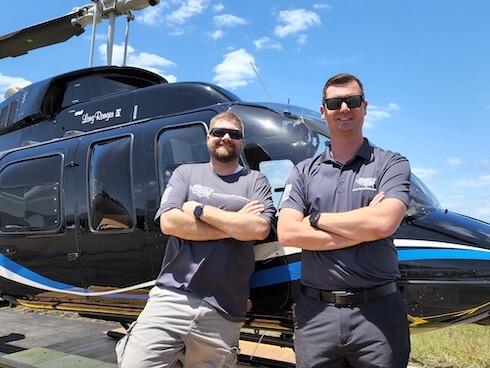
For longer, multi-day, or multi-state trips, I usually fly a Bell 206L4 helicopter which seats two pilots in front and five passengers in the back.
</p>
</div>
</div>
<div class="col-span-2 md:col-span-1"><img src="https://www.stevencarlson.show/graphics/Bell206L4-steven-dennis.jpg" alt="Bell 206L4" class="box-border block h-auto max-w-full leading-5 text-black align-middle border-0 border-solid border-zinc-300 rounded-lg" /></div>
<div class="col-span-2 md:col-span-1"><a href="https://www.stevenflies.com/tags/Bell206" class="joinbtn mb-4 pb-4" target="_blank">Bell 206L4 Videos</a></div>
<div class="col-span-2 py-2 md:py-8"></div>
<div class="hidden md:block col-span-2 md:col-span-1"><img src="https://www.stevencarlson.show/graphics/R44RII.jpg" alt="R44 Raven II" class="box-border block h-auto max-w-full leading-5 text-black align-middle border-0 border-solid border-zinc-300 rounded-lg" /></div>
<div class="col-span-2 md:col-span-1">
<div class="getdiv">
<h2>R44 Raven II</h2>
<p>
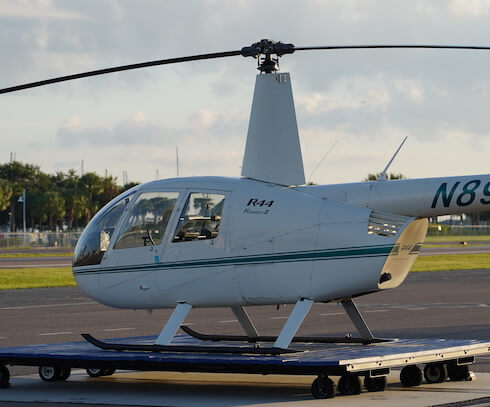
For shorter, single-day, local 'Tampa Bay Area' videos, I usually fly a smaller R44 Raven II helicopter, which seats two pilots in the front, and two passengers in the back.
</p>
</div>
</div>
<div class="md:hidden col-span-2 md:col-span-1"><img src="https://www.stevencarlson.show/graphics/R44RII.jpg" alt="R44 Raven II" class="box-border block h-auto max-w-full leading-5 text-black align-middle border-0 border-solid border-zinc-300 rounded-lg" /></div>
<div class="col-span-2 md:col-span-1"><a href="https://www.stevenflies.com/tags/R44" target="_blank" class="joinbtn mb-4 pb-4">R44 Raven II Videos</a></div>
</div>
</div>
</div>

<div class="w-full mx-auto bg-[#F8FFF8] rounded-lg">
<div class="relative mx-auto max-w-7xl lg:grid lg:grid-cols-5">
<div class="bg-[#E8F8E8] py-16 px-4 sm:px-6 lg:col-span-2 lg:px-8 lg:py-24 xl:pr-12 rounded-lg">
<div class="mx-auto max-w-lg">
<h2 class="text-2xl font-bold tracking-tight text-gray-900 sm:text-3xl">Get in touch</h2>
<p class="mt-3 text-lg leading-6 text-gray-500">Have a suggestion for an interview or video?</p>
<dl class="mt-8 text-base text-gray-500">
<div>
<dt class="sr-only">Corporate address</dt>
<dd>
<p>The Carlson Organization, Inc.</p>
<p>18 2nd Street<br>Luray, VA 22835</p>
</dd>
</div>
<div class="mt-6">
<dt class="sr-only">Phone number</dt>
<dd class="flex">

<svg class="h-6 w-6 flex-shrink-0 text-gray-400" xmlns="http://www.w3.org/2000/svg" fill="none" viewBox="0 0 24 24" stroke-width="1.5" stroke="currentColor" aria-hidden="true">
<path stroke-linecap="round" stroke-linejoin="round" d="M2.25 6.75c0 8.284 6.716 15 15 15h2.25a2.25 2.25 0 002.25-2.25v-1.372c0-.516-.351-.966-.852-1.091l-4.423-1.106c-.44-.11-.902.055-1.173.417l-.97 1.293c-.282.376-.769.542-1.21.38a12.035 12.035 0 01-7.143-7.143c-.162-.441.004-.928.38-1.21l1.293-.97c.363-.271.527-.734.417-1.173L6.963 3.102a1.125 1.125 0 00-1.091-.852H4.5A2.25 2.25 0 002.25 4.5v2.25z" />
</svg>
<span class="ml-3">+1 (540) 742-7001</span>
</dd>
</div>
</dl>
</div>
</div>
<div class="bg-white py-16 px-4 sm:px-6 lg:col-span-3 lg:py-24 lg:px-8 xl:pl-12 rounded-lg">
<div class="mx-auto max-w-lg lg:max-w-none">
<form action="/contact.robot" method="POST" class="grid grid-cols-1 gap-y-6" id="contact-form">
<input type="hidden" name="subscribe" value="true">
<input type="hidden" name="url" :value="document.URL">
<div class="flex flex-row gap-2">
<label for="firstName" class="sr-only">First name</label>
<input type="text" name="firstName" id="first-name" autocomplete="given-name" class="block w-full rounded-md border-gray-300 py-3 px-4 placeholder-gray-500 shadow-sm focus:border-indigo-500 focus:ring-indigo-500" placeholder="First name">
<label for="lastName" class="sr-only">Last name</label>
<input type="text" name="lastName" id="last-name" autocomplete="family-name" class="block w-full rounded-md border-gray-300 py-3 px-4 placeholder-gray-500 shadow-sm focus:border-indigo-500 focus:ring-indigo-500" placeholder="Last name">
</div>
<div>
<label for="email" class="sr-only">Email - Required</label>
<input id="email" name="email" type="email" required autocomplete="email" class="block w-full rounded-md border-gray-300 py-3 px-4 placeholder-gray-500 shadow-sm focus:border-indigo-500 focus:ring-indigo-500" placeholder="Email - Required">
</div>
<div>
<label for="phone" class="sr-only">Phone</label>
<input type="text" name="phone" id="phone" autocomplete="tel" class="block w-full rounded-md border-gray-300 py-3 px-4 placeholder-gray-500 shadow-sm focus:border-indigo-500 focus:ring-indigo-500" placeholder="Phone">
</div>
<div>
<label for="message" class="sr-only">Message</label>
<textarea id="message" name="message" rows="4" class="block w-full rounded-md border-gray-300 py-3 px-4 placeholder-gray-500 shadow-sm focus:border-indigo-500 focus:ring-indigo-500" placeholder="Who should I interview? Or a business I should visit?"></textarea>
</div>
<div>
<textarea id="comments_box" name="comments_box" rows="4" class="block w-full rounded-md border-gray-300 py-3 px-4 placeholder-gray-500 shadow-sm focus:border-indigo-500 focus:ring-indigo-500 hidden" autocomplete="off" placeholder=" it should be hidden and not used"></textarea>
<button type="submit" @click="handleSubmit()" class="mt-2 inline-flex w-full items-center justify-center rounded-md border border-transparent bg-[#009ED7] px-6 py-3 text-base font-medium text-white shadow-sm hover:bg-[#003ED7]/75 focus:outline-none sm:w-auto">Submit</button>
</div>
</form>
</div>
</div>
</div>
</div>

<div class="w-full join-dis">
<div class="container px-4 mx-auto sm:px-16">
<div class="grid items-center justify-center grid-cols-2 gap-x-4">
<div class="col-span-2 lg:col-span-1">
<div class="getdiv">
<h2>Join our community on <span>Discord</span></h2>

<p>Join in the discussion and share your insights with the community.</p>
<a href="https://www.stevencarlson.show/r28zsc" class="joinbtn" target="_blank">Join Now it's free</a>
</div>
</div>
<div class="col-span-2 lg:col-span-1"><img src="https://www.stevencarlson.show/images/join-img.png" alt="Join Discord and chat with the community" class="join-img" /></div>
</div>
</div>
</div>
<script defer="defer" src="https://www.stevencarlson.show/SNA_common/SNA-IP_blog.min_C002C257A70F2EB4B6D8E3F0F35C6AB1.js"></script>
<footer class="w-full">
<div class="container mx-auto">
<p>The Steven Carlson Show<br/></p>
<span>Copyright &copy; The Carlson Organization, Inc. All Rights Reserved.</span>
<br><span><a href="https://www.influencerpro.app">Social Influencer CMS content managed by InfluencerPro.app</a> - Part of the <a href="https://www.stocknum.app">stockNum.App</a> Suite</span>
</div>
</footer>
<script>(function(){function c(){var b=a.contentDocument||a.contentWindow.document;if(b){var d=b.createElement('script');d.innerHTML="window.__CF$cv$params={r:'8cc87631db3c791e',t:'MTcyNzkxMTYzMi4wMDAwMDA='};var a=document.createElement('script');a.nonce='';a.src='/cdn-cgi/challenge-platform/scripts/jsd/main.js';document.getElementsByTagName('head')[0].appendChild(a);";b.getElementsByTagName('head')[0].appendChild(d)}}if(document.body){var a=document.createElement('iframe');a.height=1;a.width=1;a.style.position='absolute';a.style.top=0;a.style.left=0;a.style.border='none';a.style.visibility='hidden';document.body.appendChild(a);if('loading'!==document.readyState)c();else if(window.addEventListener)document.addEventListener('DOMContentLoaded',c);else{var e=document.onreadystatechange||function(){};document.onreadystatechange=function(b){e(b);'loading'!==document.readyState&&(document.onreadystatechange=e,c())}}}})();</script></body>
</html>