enbrettterpstrahttps://static.feedpress.com/logo/brettterpstra-5d7926fa5332c.pngWelcome to The Lab, detailing the coding and automation exploits of Brett Terpstra.BrettTerpstra.com - The Mad Science of Brett Terpstra2024-04-22T11:01:22-05:00https://brettterpstra.com/BrettTerpstra<![CDATA[Web Excursions for April 22, 2024]]>2024-04-22T11:00:00-05:002024-04-22T11:00:00-05:00https://brettterpstra.com//2024/04/22/web-excursions-for-april-22-2024
Killed by Google is the Google Graveyard. A full list of dead products killed by Google in the Google Cemetery. Up-to-date and shocking in scope. I bet there are a few on here you’d never even realized were a thing.
I made a Marked plugin for Obsidian. It’s my first try and I really don’t know what I’m doing, but it seems to work perfectly. Waiting for it to be included in the Community Plugins for easy install (which could have happened by the time this goes live), but you can install from the source if you’re anxious.
NordVPN secures your internet browsing, plus it can make it look to services like you’re coming from any country. Check it out today.
I’m excited to offer the next giveaway, 3 1-year subscriptions to Bear Pro ($29.99 value each) for Bear. Bear is a great app for note taking, journaling, and organizing information with Markdown support. It’s gorgeous to work with, elegant in its functionality, and works great with Marked for all of your export needs.
From the developer:
Powerful tools to take notes, plan your week, write a book, or even build a wiki, fast, native apps that keep pace with your imagination, online and off, and send notes to others, export to many formats, and share ideas with the world–if you want.
Sign up below to enter. Winners will be randomly drawn on Friday, April 26, at 12pm Central. The drawing is for 3 1-year subscriptions to Bear Pro ($29.99 value each) for Bear, one per winner. Note that if you’re reading this via RSS, you’ll need to visit this post on brettterpstra.com to enter!
New rule: All signups must have a first and last name in order to be eligible. Entries with only a first name will be skipped by the giveaway robot. A lot of the vendors in this series require first and last names for generating license codes, and your cooperation is appreciated!
Giveaway ends in...
You need to view this post on brettterpstra.com to enter.
]]><![CDATA[A plea to nvALT users]]>2024-04-20T09:44:00-05:002024-04-20T09:44:00-05:00https://brettterpstra.com//2024/04/20/a-plea-to-nvalt-usersI’ve said this before, but I need to keep repeating it based on the number of queries I get. nvALT is at end of life, unless someone picks up the reigns and modernizes the (open source) code base. As it stands now, nvALT barely functions on modern OSs.
Fletcher Penney and I have designed nvALT’s successor, nvUltra, to work only with a folder full of Markdown files, which is the only way I recommend using nvALT. If your nvALT files are stored as individual Markdown files, switching to nvUltra is no problem, nor is switching to any other Notational-Velocity-like system. It will even work in Obsidian. But if you store your notes as a database only, you’re screwed when nvALT stops working for you.
So please, if nvALT is still running for you, go into Preferences->Notes->Storage and change “Store and read notes on disk as” to “Plain Text Files.” If your previous storage method was database, all of your notes will be immediately written out as plain text files, safe and secure and easy to port to a new (working) notes system. The files will now be in the same folder nvALT shows in the folder selector at the top of the Notes preference pane.
nvALT is not even working well enough for me to get a full screenshot. But here is my best attempt.
If your notes are stored as Rich Text Files (RTF), you’ll need to convert them to Markdown to make use of other apps like nvUltra, The Archive, or Obsidian. If you don’t know Markdown, don’t sweat it. It’s very easy to learn and it’s really just plain text, so as long as you know how to write, you’re already kind of writing Markdown. It’s only necessary to learn any syntax if you need to do things like create bulleted/numbered lists, add bold or italics, or create links.
So, again, please immediately switch your storage method to plain text files. The nvALT database format has no easy out for people ready to switch. I may try to write an importer for nvUltra (or generally to output Markdown), but I have not done so yet.
If you want on the nvUltra beta, email me through the contact link on nvultra.com.
]]><![CDATA[The Unite 5 giveaway winners!]]>2024-04-19T13:00:00-05:002024-04-19T13:00:00-05:00https://brettterpstra.com//2024/04/19/the-unite-5-giveaway-winners
The Unite 5 giveaway has ended, and I have winners to announce!
The winners!
Congratulations to:
Robert Williger
Angelo Machils
Mike Shaffer
Jim Dye
Denton C Jacobs
You should have received an email with details, please let me know if you didn’t hear anything!
But I didn’t win!
If you didn’t win, sorry, but Unite 5 is still worth checking out. If you want to turn your most-used websites into powerful standalone apps, Unite is the best way to do it. You can use the link www.bzgapps.com/pstra for 20% off Unite 5 for a limited time.
By the way, Unite 5 is also available on Setapp, along with hundreds of other amazing apps. You should probably get a subscription.
Next up is Bear. Check back every Monday through September, 2024 for more giveaways.
The next giveaways include:
I’m excited to offer the next giveaway, 5 licenses ($49.99 value each) for Unite 5. Unite creates Single Site Browsers, self-contained apps designed to work with a specific website. You can create an SSB for Facebook, one for Slack, one for any tool you use that has a website. Keep your data separate, customize behaviors, and see the interface the way you want to.
From the developer:
Getting started with Unite is simple. Just input a URL, or choose a site from our extensive app library. In just a few clicks, you’ll have your very own macOS app, designed by you, for you.
Sign up below to enter. Winners will be randomly drawn on Friday, April 19, at 12pm Central. The drawing is for 5 licenses ($49.99 value each) for Unite 5, one per winner. Note that if you’re reading this via RSS, you’ll need to visit this post on brettterpstra.com to enter!
New rule: All signups must have a first and last name in order to be eligible. Entries with only a first name will be skipped by the giveaway robot. A lot of the vendors in this series require first and last names for generating license codes, and your cooperation is appreciated!
The Photos Workbench giveaway has ended, and I have winners to announce!
The winners!
Congratulations to:
Stuart Marshall
Thijs Hagen
Christopher Dahrén
Yinan Chen
Robert Gilmore
You should have received an email with details, please let me know if you didn’t hear anything!
But I didn’t win!
If you didn’t win, sorry, but Photos Workbench is still worth checking out. Make your photo management and organization life easier. Photos Workbench is a complete set of tools to that you’ll really appreciate if you have a sizeable photo collection (and who doesn’t these days?). You can still save 20% using this link or entering code PWTERPSTRA24 at checkout.
Next up is Unite 5. Check back every Monday through September, 2024 for more giveaways.
The next giveaways include:
I’m excited to offer the next giveaway, 5 licenses ($29 value each) for Photos Workbench. If you’ve had an iPhone or any digital camera for a while, Apple Photos is probably chock full of pictures. And you probably haven’t named, tagged, geocoded, or rated most of them. Photos Workbench works with Apple Photos to make all of these operations as simple as possible. Take the pain out of organizing your photos!
From the developer:
Photos Workbench works with Apple Photos to help you organize, name, and compare your photos. Batch change titles. Drag and drop photos onto a large map to add locations. One-click apply keywords using keyword palettes. Use ★★★★★ ratings to mark and find your best shots. Compare photos and find the images worth editing, printing, or sharing.
Sign up below to enter. Winners will be randomly drawn on Friday, April 12, at 12pm Central. The drawing is for 5 licenses ($29 value each) for Photos Workbench, one per winner. Note that if you’re reading this via RSS, you’ll need to visit this post on brettterpstra.com to enter!
New rule: All signups must have a first and last name in order to be eligible. Entries with only a first name will be skipped by the giveaway robot. A lot of the vendors in this series require first and last names for generating license codes, and your cooperation is appreciated!
]]><![CDATA[Back in my day... some thoughts on blogging then and now]]>2024-04-05T15:46:00-05:002024-04-05T15:46:00-05:00https://brettterpstra.com//2024/04/05/back-in-my-day-dot-dot-dot-some-thoughts-on-blogging-then-and-now
I’ve been blogging for over 20 years now, making websites for 28 years, and before all of that I was running a BBS that had users from all over the U.S. (but only one phone line/modem, so it was slow communication). And I’ve seen an unsettling shift over the last 10 years that I feel like writing about.
It used to be (10, 20 years ago) that birds of a feather in the blogging world would share each other’s work and sustainably build audiences together. I was part of an informal “network” of blogs that frequently shared each other’s posts, when they were noteworthy, and getting “seen” was as easy as making good content. Getting mentioned on a larger site meant measurable traffic and often new subscribers to your work, and it was a meaningful way of building an audience. The audience I currently have is largely a product of those days.
My larger projects brought in new readers. 20 years ago MoodBlast was my starting point, then the Blogsmith Bundle got attention from Merlin Man, Marked got attention from Daring Fireball, and all of that netted new traffic and more followers. These days, it’s a lot harder, and the attention of major players has much less impact. Bunch got a fair amount of press. Write-ups in major online media outlets, features from creators like David Sparks, and even some print publications worldwide. And I saw a swell in the number of downloads every time, but none of it filtered back to building my readership. Not the way MoodBlast or Marked did a decade ago.
I think I’m doing better work than ever, and it is getting noticed, it just doesn’t tip the needle anymore. I’m not suffering for traffic, but “new” traffic is definitely coming from unusual and unpredictable places that are nearly impossible to capitalize on. Even getting linked on Hacker News doesn’t tip the needle the way it used to (or the way getting Dugg used to. IYKYN.). Gone are the days, seemingly, when I could make something new and have “major” bloggers notice my work, and thus increase readership. I don’t even know how to scratch the surface of the largest blogs anymore, and many of the independent blogs that I could count on have gone the way of the Dodo. And I, at the age of 45, do not have the energy and “hustle” required to make it on new platforms. I will continue doing what I’m doing, and will probably eventually follow my peers into digital obscurity. It’s not that I steadfastly refuse to adapt to new things, I try new things all the time, it’s that these platforms have come to reward behavior I don’t think is beneficial to the end user, and I tend to opt out. I’m not going to “hustle” to make more money for someone else, which is the way we’ve allowed everything to become structured.
These days, we all share our links into the morass of social media, where even our own followers have a hit-or-miss chance of seeing them, thanks to The Algorithm. We “like” creators’ work, but it just becomes a little tick in a metric that’s really only useful to advertising companies whose money is primarily going to the platform provider, not the creators that provide its content. Social media sites are invested in keeping you, the viewer, on their platform, and sending you to a third-party site is detrimental to their ad sales and attention metrics. This doesn’t, in general, benefit the creators. It benefits the platform. Medium and Substack are truly profitable for a select few, with an intense amount of attention and energy (i.e. hustle) involved in getting there. Creation of original content is not, by and large, rewarded by any of these platforms, and you’re ultimately creating content for a corporation to use as they like. Fewer and fewer creators are actually owning the content they create, and it’s disheartening.
Side note: I’ve been reticent to take on new sponsors lately. The returns just aren’t there for the sponsor anymore. I don’t know why, honestly, but my readership is happy to click on links but hesitant to actually spend money. The economy? I don’t know. I just know that I charge a reasonable rate for sponsored posts, but the feedback I’ve gotten from sponsors over the last couple of years is that it didn’t pay off. Which sucks for all of us. So if you like my work and would like to fund me regardless of sponsors, please become a subscriber!
Search Engine traffic is down for many of us because the major engines’ output is flooded with ads and content that is, at best, knock-off content designed to spam the results. I think Google and Microsoft have given up on trying to quell the “SEO” hackers, or even keep up with them. And now they want to spew AI-generated detritus all over the place. Original content is dying, if not dead.
This is all to say that I recognize that things have changed. I just don’t think it’s for the better. Gone are the halcyon days of independent bloggers sharing original work, and the knowledge networks that cropped up between them. Gone are the days of a rising tide that lifts all boats. The tide is just Social Media, and it is, at my most generous, not concerned with the boats. I think, in fact, it’s actively hostile toward them.
I will continue to share noteworthy things I find via Web Excursions and reviews. If you have an article or project you’d like to show my audience, contact me one of the many ways I’m available. And again, if you want to support my work, it’s just a click away.
]]><![CDATA[The The Archive giveaway winners!]]>2024-04-05T12:25:00-05:002024-04-05T12:25:00-05:00https://brettterpstra.com//2024/04/05/the-the-archive-giveaway-winners
The The Archive giveaway has ended, and I have winners to announce!
The winners!
Congratulations to:
Devon Greene
Justin Tomich
Michalis Litke
You should have received an email with details, please let me know if you didn’t hear anything!
But I didn’t win!
If you didn’t win, sorry, but The Archive is still worth checking out. If you loved nvALT, The Archive is a great notetaking app that shines in its place. You can still save 33% on your purchase using the code DONTBESAD when purchasing.
Next up is Photos Workbench. Check back every Monday through September, 2024 for more giveaways.
The next giveaways include:
]]><![CDATA[CurlyQ and automated JavaScript execution]]>2024-04-04T13:24:00-05:002024-04-04T13:24:00-05:00https://brettterpstra.com//2024/04/04/curlyq-and-automated-javascript-executionI’ve been wanting to add JavaScript execution to CurlyQ for a while and finally got around to it.
In case you’ve missed it, CurlyQ is my command-line web automation tool for fetching, parsing, and responding to web page content, designed to be used as part of a *NIX pipeline. It can grab titles, links, metadata, and more from any web page. As part of its functionality, it can also use Firefox or Chrome to save screenshots, and that’s part of what I’ve improved.
The screenshot command now accepts a --script parameter. This can be a JavaScript string, or - to read from STDIN, or a path to a file which will be read and executed before taking a screenshot. You can also now define an element ID to wait for before taking the screenshot (or executing the script) using --id ELEMENT_ID. As long as the ID is a valid element on the page, the screenshot will trigger once that element is loaded (via HTML or dynamically), with a timeout of 10 seconds. You can also define a --wait X flag in the command to wait for a specified number of seconds after executing a script before the screenshot is taken.
Further, I’ve added a new subcommand, execute, that has the same parameters as above and simply allows you to load a page in the browser and execute a script on it. I really wanted this because it’s the easiest way to automate NiftyMenu:
That command will save a screenshot of the File->Save menu item for me, allowing me to fully automate menu screenshots for any of my apps. I can have NiftyMenu generate an up-to-date view of the app’s menu bar, with styling for the current OS, and output detailed screenshots with callouts automatically. This will be a huge timesaver when it comes to documentation.
You can update/install the latest version of CurlyQ with gem install curlyq. The improvements in this post are available as of version 0.0.12. Enjoy!
]]><![CDATA[On using a CDN]]>2024-04-02T16:03:00-05:002024-04-02T16:03:00-05:00https://brettterpstra.com//2024/04/02/on-using-a-cdn
If you run a website and aren’t serving your assets from a CDN, I want to highly recommend that you do so. I’ve seen significant performance improvements simply by redirecting my image, CSS, and JS requests to a CDN instead of serving them from a server like DreamHost. I like DreamHost just fine, but the time it takes to serve a file and the download speeds it offers are not… optimal.
The idea behind a CDN is that your assets are served from a speed-tuned network of servers that can deliver the fastest speeds using servers located as close as possible to the end user. I can serve up a 1MB image file in about 1/2 the time using a CDN versus serving directly from DreamHost.
CloudFront
I’ve found CloudFront (Amazon Web Services) to be the easiest to set up and the most affordable option. There are a few good options to explore, though. I haven’t done head-to-head testing of all available options, I just know that CloudFront offers some of the highest speeds and one of the most generous free-tier options.
I can serve all of my sites’ assets (Bunch, Marked 2, Dimspire.me, BrettTerpstra.com, and sundry others), including DMGs, zips, images, CSS/JS files, and more, from AWS for about $2/mo. My total AWS bill is $13/mo, and that includes my Glacier backups and S3 storage. Compared to $20/mo for CloudFlare, it’s a pretty easy decision for me. Some of the “fancier” CDNs can do things like serving different image formats and sizes based on path/query strings, but I haven’t been willing to shell out the cash for those.
I’m not going to do a full tutorial on setting up a CloudFront deployment for a website, but the basic steps are:
Create an AWS account (if needed)
Navigate to CloudFront
Create a new distribution
Set the origin to the url of your website
Add a CNAME for your distribution
Generate an SSL certificate (free through Amazon) for the distribution (requires DNS verification of ownership)
Most of the other options can be left to their defaults. Here’s a more in-depth tutorial. Total setup time is about 30 minutes, including waiting for DNS verification and spin-up time. Of course, then you have to modify your site to make use of the CDN. I have solutions for Jekyll and other SSG generators, if you care to ask. There are multiple WordPress plugins for handling this kind of thing as well.
Versioning
Files served from the CDN are heavily cached, meaning if you want to serve up a new version of a file, updated CSS for example, you need to “bust” the cache. This can be done by adding a query string, e.g. ?v=123 to the file url, but it’s preferable to use filename versioning. If you’re using Apache, you can just include this in your .htaccess:
That will allow you to request image.123.jpg and it will serve up image.jpg, but the CDN will see that as a new file request and pull an up-to-date version of the file from the server.
In my Jekyll setup, I have a single version number for the whole site defined in _config.yml under a cachebuster key. In my templates I have some logic that determines when the site is rendering in production mode (JEKYLL_ENV=production), and when it is, it substitutes the CDN path and the version number into the URL. For example, if I’m in production mode, https://dimspire.me/assets/css/main.css will be written as https://cdn.dimspire.me/assets/css/main.123.css. As long as the 123 doesn’t change, the CDN will continue serving the same file, but if I bump it to 124, it will sync the latest version of the file from the server and cache it upon the first request.
Priming the CDN
If you want to avoid anybody having to wait for the CDN to ingest a file, cache it, and serve it on the first load, you can make a headers-only curl call to the asset. This is kind of silly, as once any one user in a region has loaded the new asset, it will be served instantly for subsequent loads. But just for fun, I’ll share my Rakefile task for syncing the CDN after a version bump:
classString# Outputs a string in a formatted color.# @param [<Integer, String>] color_code The code to use# @return [void]defcolorize(color_code)"\033[#{color_code}m#{self}\033[0m"enddefgreencolorize(32)enddefredcolorize(31)endenddefchdir_baseDir.chdir(File.dirname(File.expand_path(__FILE__)))enddefok_failed(condition,sender=nil)res=condition?"OK":"FAILED"msg=sender?sender+": "+res:reswarnmsgenddesc'Sync CDN images'task:sync_cdndo# Make sure we're in the base directorychdir_base# Use rsync to upload files to the server that pushes to CloudFrontok_failedsystem('rsync -criz assets/* dh:~/dimspire.me/assets/ &> /dev/null'),'CDN Sync'# Read the current version (cachebuster) from the config filebuster=YAML.load(IO.read('_config.yml'))['cachebuster'].sub(/^\./,'')# Iterate through all files in assets directory and its subdirectoriesDir.glob('assets/**/*')do|f|# Only prime images and CSS/JS assetsnextunlessFile.extname(f)=~/\.(webp|avif|gif|jpe?g|png|css|js|mp4|ogg)$/# Generate the CDN filename with the cachebuster inserted (e.g. image.123.jpg)asset=%(cdn.dimspire.me/#{f.strip.sub(/\.(\w{2,4})$/, ".#{buster}.\\1")})# Use curl to request headers for the image, and grep out whether it was a hit or missres=`curl -Is #{asset}|grep --color=never X-Cache|sed 's/X-Cache: //'|sed 's/from cloudfront//'`.strip.upcase# Provide feedback in Terminal$stdout.printres=~/HIT/?"\033[0KHIT #{asset}\r".green:"Priming #{asset}\n".redendend
The only important part of that is curl -Is [ASSET], which does a headers-only request for the file, which will cause the CDN to ingest it if it isn’t already cached, without actually downloading it. Currently Dimspire.me has about 225 “Dimspirations,” each with 9 image versions (wallpapers, jpeg, webp and avif versions), and running this after a version bump (meaning none of the assets are cached) takes about five minutes for 2000+ assets. If I’m only adding new images and not bumping the version, this task takes under two minutes. Doing the simple curl call above on all of the assets that got “revved” (bumped) will mean that nobody has to wait for files to be initially cached, but again, this is pretty silly.
TLDR
If you run a website that serves a lot of images, CSS, or JavaScript, you can see significant performance improvements by using a CDN. CloudFront is, in my experience, the best combination of fast and affordable. If you want to see more of my Jekyll setup (Rakefile, templates, etc.), just ask. I’m always happy to share.
]]><![CDATA[Automating the Dimspirations workflow]]>2024-04-01T14:53:00-05:002024-04-01T14:53:00-05:00https://brettterpstra.com//2024/04/01/automating-the-dimspirations-workflow
First, there seems to be a misconception that Dimspirations are generated with AI or some other such trickery. I want to assure you that, while the entire process of posting them is automated, each Dimspiration is lovingly crafted by me in Affinity Photo1.
I wanted to detail the automation though, partially for my own reference, and partially just because I’m pretty proud of the system.
The Template
First, I have a template I load up in Affinity Photo. It has guides for all of the various formats that will be produced from the single output file. All I have to do is make sure that the text and necessary parts of background images fit into the smallest guide rectangle, and that the rest of the space is filled with a reasonable amount of background image or matching color. The tallest output is the iPhone version, which on occasion just gets filled with a background color, but I can usually make a background pattern or image fit nicely for iPhone and still look good for all of the other formats.
Affinity Photo template
I have a Dimspirations Bunch that opens the template in Affinity Photo, loads up the Desktop and Dimspirations folder in Finder tabs (for keeping track of the rest of the process below), and opens up Adobe Stock in my browser for grabbing those sweet, sweet background images. So to get started on a Dimspiration, I just hit Hyper-D, Shift-D (my assigned shortcuts in Bunch).
The new Dimspiration gets saved-as with a slugified version of the title I want it to have on the site, e.g. “The end of the world” gets saved as the-end-of-the-world.afphoto. Then I output a JPEG of the whole image with the same slug (populated by default), tag it with .dim in the save panel, and save it to the Desktop.
Hazel and RetroBatch
Hazel watches the Desktop for .dim JPEGS, removes the .dim tag, and automatically opens the image in a RetroBatch applet called “Dimspiration.”
RetroBatch applet
The RetroBatch applet saves various formats with -rb suffix (3 desktop wallpapers, 1 iPhone wallpaper, Twitter and Facebook preview images, an Instagram-ready version, and the 1x and 2x versions of the square image for the website). Upon writing the files, they then get sent to ImageOptim for optimization. The optimized files get saved to a new “Dimspirations” folder.
Hazel watches the “Dimspirations” folder and copies wallpaper formats to an upload folder, where Hazel (again) uploads those images to Flickr as screenshots in a DimPapers album, then deletes the copied files.
Hazel then moves all of the image files to the Dimspire.me website assets folder.
Rake and Howzit
I then open up iTerm (visor mode because I’m not an animal), switch to the dimspire.me directory, and run rake. The wallpaper download zips, WEBP and AVIF versions, and Markdown post are created. The Rake task looks for new JPEGs, extracts their base name, and generates Markdown files for any new ones. It automatically adds YAML frontmatter to each post:
A title extrapolated from the image slug, where end-of-the-world becomes “End of the world”
the base image slug, which is used to extrapolate the square and @2x versions for display
a “manifest” section with a list of files in the zip download
An ALT tag auto-generated with textra, which runs Apple’s built-in OCR on the image to extract its text
The Rake task outputs the Markdown file’s filename, which I can just ⌘-Click (iTerm) to open in MultiMarkdown Composer, where I double check the ALT tag and add a snarky caption as the body content.
In my Howzitbuildnotes file I have sections for previewing and deploying, so I can just run howzit -r deploy to deploy the site, which calls the necessary Rake tasks and uses rsync to copy the entire rendered site to the server. CSS and JS (and all images) are served from a CDN which uses versioning like filename.1234.css, and if I want to upload changes to any of these files, I need to bump the version number before rendering, so the Howzit task will ask me upon deploy if it should bump the version. If I haven’t made any changes and have only added a new Dimspiration, I can just hit n and it will avoid clearing the CDN cache.
buildnotes.md for dimspire.me
The site runs on Jekyll, so mass updating the posts can be done just by searching and replacing in Markdown files. The Rakefile has tasks for updating all of the zip downloads with any new versions of the images that have been added (and updating the manifest data in every post with any changes), batch adding any missing ALT tags, and creating all missing WEBP and AVIF versions at once. Whenever I just run rake, all of these tasks execute in sequence, so every time I publish it’s filling in any missing pieces, not just the latest post. It takes about 20 seconds to run all of the tasks on all of the posts at this point, though the zip creation (which rebuilds all zips on every update) will take increasingly longer as the number of posts grows. I’ll deal with making it more incremental when that actually becomes a burden.
So my (manual) part of the process is:
Lovingly craft a Dimspiration in Affinity Photo and save it to the Desktop
Wait a minute for Hazel/RetroBatch/ImageOption to do their things
cd to the Dimspire.me website directory and run rake
Open the created post and edit two lines
Run howzit -r deploy (which with my aliases and fuzzy completion is just bld dep, and thanks to Fish’s directory-sensitive history, is just a matter of typing B⌃F)
As always, if you have any questions about any part of this that you’d be interested in implementing on your own, please join us in the forum and ask away! And as always, I’d love it if you checked out Dimspirations and the Dimspirations Store.
Affinity was recently acquired by Canva. How much are we betting that it switches from the sweet $50/version pricing to unaffordable subscription pricing within a year? They’ve promised to always keep it “reasonable,” but that’s a very subjective term. ↩
I’m excited to offer the next giveaway, 3 licenses ($19.99 value each) for The Archive. While everyone is waiting for nvUltra to finally be released, The Archive stepped in quite a while ago to fill the gap left as nvALT (and Notational Velocity) get long in the tooth. If you’re a fan of the modal note taking of NV, you’ll love The Archive.
This is not an April Fools joke!
From the developer:
A tool should serve you, not the other way around. Use The Archive your own way and don’t be forced into unnatural habits. Note-taking, Getting Things Done, a thinking environment, or even as a database for entomology (scientific study of insects) – The Archive will do the job.
Sign up below to enter. Winners will be randomly drawn on Friday, April 05, at 12pm Central. The drawing is for 3 licenses ($19.99 value each) for The Archive, one per winner. Note that if you’re reading this via RSS, you’ll need to visit this post on brettterpstra.com to enter!
New rule: All signups must have a first and last name in order to be eligible. Entries with only a first name will be skipped by the giveaway robot. A lot of the vendors in this series require first and last names for generating license codes, and your cooperation is appreciated!
The EagleFiler giveaway has ended, and I have winners to announce!
The winners!
Congratulations to:
Olivia S Hanley
Ashley Stewart
You should have received an email with details, please let me know if you didn’t hear anything!
But I didn’t win!
If you didn’t win, sorry, but EagleFiler is still worth checking out. Capture web pages, emails, Evernote items, or any file on your Mac and make them easily searchable and trackable. You can still save 20% on your purchase with the code TERPSTRA2023 at the C-Command store.
Next up is The Archive. Check back every Monday through September, 2024 for more giveaways.
The next giveaways include:
]]><![CDATA[Web Excursions for March 29, 2024]]>2024-03-29T12:10:00-05:002024-03-29T12:10:00-05:00https://brettterpstra.com//2024/03/29/web-excursions-for-march-29-2024
Web excursions brought to you in partnership with CleanMyMac X, all the tools to speed up your Mac, in one app.
A simple, elegant Mac app that allows you to set an intention, define how much time you plan to put into it, and then just sit, quietly reminding you of what you want to be working on with subtle but all-encompassing animations. Perfect for those of us who say “OK, now I’m really going to work on this” and then find ourselves doing something entirely different within five minutes H/T Jason Rhemus and props to props to developer Sam Stephenson.
Really nice trick for Terminal junkies who use BBEdit. I have a similar trick for sublime, and one that opens man pages in Preview, but this one provides additional navigation that none of mine have.
“A native macOS email client for Gmail.” This looks so good, especially considering MailPlane is dead. If only I didn’t have iCloud and Exchange email accounts I need to deal with, too.
I ordered this keycap to replace my custom rocket keycap that I use for my hyper key. Available in 2.25u (Enter) size. It should arrive today and I’m very excited. I’ll post pictures once I’ve installed it!
I’m excited to offer the next giveaway, 2 licenses ($59.99 value each) for EagleFiler. EagleFiler is an amazing tool for cataloging and searching all of your information, from web pages to emails and every kind of file you need to keep track of. It gives you a Mail-like interface for viewing all of your data, supports tagging and notes, and offers AES encryption.
From the developer:
Organize files, archive e-mails, save Web pages and notes, search everything. The live search is faster than Spotlight, and you can also set up smart folders and smart folder actions. Search all your files and e-mail attachments, and see the matches highlighted.
Sign up below to enter. Winners will be randomly drawn on Friday, March 29, at 12pm Central. The drawing is for 2 licenses ($59.99 value each) for EagleFiler, one per winner. Note that if you’re reading this via RSS, you’ll need to visit this post on brettterpstra.com to enter!
New rule: All signups must have a first and last name in order to be eligible. Entries with only a first name will be skipped by the giveaway robot. A lot of the vendors in this series require first and last names for generating license codes, and your cooperation is appreciated!
The Flexibits Premium giveaway has ended, and I have winners to announce!
The winners!
Congratulations to:
Simon Clemmensen
Derek Lucas
Knut Focke
Norman Hawker
Will Goring
Ashish Bhateja
Johan Romin
Pedro Silva
Joško Oršulić
Alex Lubberts
You should have received an email with details, please let me know if you didn’t hear anything!
But I didn’t win!
If you didn’t win, sorry, but Flexibits Premium is still worth checking out. Get all of Flexibits apps for one low monthly fee. That’s the excellent Fantastical calendar, the uber-handy Scheduling, and the indispensable Cardhop. Check it out!
Next up is EagleFiler. Check back every Monday through September, 2024 for more giveaways.
The next giveaways include:
]]><![CDATA[Revisiting TagFiler and Vitag]]>2024-03-22T11:39:00-05:002024-03-22T11:39:00-05:00https://brettterpstra.com//2024/03/22/revisiting-tagfiler-and-vitagI haven’t mentioned this setup for a while and thought I’d remind everyone, especially newer readers, about a rabbit hole they might choose to go down. I haven’t updated or changed any of these scripts since posting, and they’re all still working well.
Part 1: TagFiler
Hazel screenshot
First up, I’ll mention TagFiler. This is a single script that runs via Hazel, sorting files into a shallow filesystem using Finder tags. You set up “context” folders which are tagged with =Context, e.g. =Work or =Personal. Then you create a shallow system of subfolders tagged with relevant keywords, preceded with @, e.g. @nvultra or @dimspirations. You can nest those @ folders as deep as you like, but the idea is to make it easy to target them. Then you tag individual files with #Context :subtopic, and subtopics can be nested like #Projects :nvultra:marketing:source to file in ~/Projects/nvultra/marketing/source files.
Finder window showing tags
The nice thing about these tags with punctuation is they create something like nested tagging, which Finder lacks. When searching with Spotlight (or HoudahSpot), you can search any part of a colon-separated tag (this works for any punctuation, TagFiler just uses colons). So with the above example, I can search for tag:nvultra tag:source and get the tagged file as a result. Then, when tagging files in Finder (or, again, HoudahSpot as it has great autocompletion for tagging), the tags will autocomplete as if they were nested, and just typing nvultra will bring up all of the colon-separated versions of the tag.
This tagging system has been working perfectly for me for years now. I collect all my files throughout the day on my Desktop and in my Downloads folder. Hazel tags new files with Purple, and then at the end of the day (or the beginning of the next one) I open up a saved search in HoudahSpot that shows me all Purple files in my main “inbox” folders. I can then use HoudahSpot’s autocompletion to tag the files appropriately, and Hazel just whisks them off to their target folder. This saved search could also just be a Smart Folder in Finder, but Smart Folders can’t narrow down to multiple specific directories. In HoudahSpot this can be accomplished using saved searches and filtering.
The nice thing about this system is that I can also find any TagFiler-tagged file using Spotlight without digging through the folders. But if anything ever happened to my tags (a metadata disaster…), I’d still have a reasonable folder structure for finding all of my files. It’s also nice when archiving projects to a NAS or other storage system that doesn’t have Spotlight searching.
Side Note: cdt
I have a little Bash function called cdt (with a fish companion function) for navigating TagFiler-tagged directories from Terminal. I don’t actually use it much as I have fuzzy_cd in my Fish setup and it’s a bit smarter in general. I can’t vouch that it still works as is, but if you wanted to dig in, let me know if you find issues.
Part 2: Vitag
So I do a majority of my tagging in Finder or HoudahSpot. But when I’m faced with a large number of files and want to tag them quickly and easily, I use vitag.
By the way, if you do your tagging in Finder, you can add a keyboard shortcut to make popping up the tag dialog keyboard-accessible.
Vitag loads up a list of files for the current directory (and optionally subdirectories) with bracketed tags after each filename in your editor of choice. I usually use Sublime Text with -e 'subl -w', but you can use Vim, NeoVim, BBEdit, VS Code, or any editor that has a CLI tool and the ability to wait on the command for the window to close (usually -w, but see the --help for your tool). You just edit the tags as plain text and when you save and close the file, all of the tags are changed on the files.
Vitag screenshot
There’s no autocomplete by default, although I have written a Sublime package (which I haven’t shared because it’s very custom) which helps me out with syntax highlighting, snippets, and autocomplete. For the most part, though, I rely on TextExpander snippets for contexts and common sub-tags.
Then I can just copy/paste as needed to fill out the whole batch, along with the search tools in the editor (at the end of a day most of my files in my inboxes will relate to just a couple of projects, so I can copy and paste many of the tags, sometimes modifying just the last element of a colon-separated tag).
For example, the first thing I do on a batch of “inbox” files is search for Purple and ⌘G through the results to add my tags. You could also remove any line that didn’t contain a tag like Purple — as long as the filename remains unchanged, deleting a line will have no effect in Vitag. Unlike tools like Vidir, Vitag only deals with tags.
You’ll notice a couple of files tagged with #x#. This is a special tag that I search for with Hazel, which deletes any file containing it. It’s my solution for deleting unneeded files when doing my cleanup. It actually moves to Trash rather than outright deleting as you’d get in Vidir, which provides the option for undoing.
So, to wrap up, there’s nothing new here. I’ve been using these tools for years. I just thought I’d share them again in case I first talked about them before you started reading. Let me know what innovations you have with your own tagging systems!
]]><![CDATA[Web Excursions for March 19, 2024]]>2024-03-19T10:33:00-05:002024-03-19T10:33:00-05:00https://brettterpstra.com//2024/03/19/web-excursions-for-march-19-2024
A newer option for Markdown-based presentations (from the creators of iA Writer and based on the same engine) that I think this might be even better than Deckset. Going to give it a test run for a while, but off the bat it looks really slick.
macOS 13+ only, a simple command line interface to the OS’s built-in OCR and transcription frameworks. The OCR works really well. Really, really well (I’m using it to add automatic ALT tags to Dimspirations and it deals with text in crazy fonts on crazy backgrounds). I haven’t gone far with testing the audio transcription, but I have high expectations.
This is advertised on almost every YouTube channel I subscribe to, so I decided to check it out. It’s really good. If you want to break out of your news bubble and understand what the other side is hearing and thinking, Ground News provides all kinds of tools for doing so. Highly recommended. I’m trying to get my parents to use it, but even if they don’t, it helps me see the headlines that are going to affect them in their bubble so I’m not shocked when topics come up that I’ve seen no trace of previously.
I do all of my screenshots and screen recordings with CleanShot X. I love it to pieces. You should get it.
I’m excited to offer the next giveaway, 10 1-year subscriptions ($57 value each) for Flexibits Premium from Flexibits. Flexibits makes some incredibly useful apps. Fantastical is an awesome Calendar replacement, Scheduling makes organizing calls and meetings a breeze, and Cardhop is the perfect way to manage and access your contacts. The Flexibits Premium subscription gets you access to all three, on all your devices.
From the developer:
A single subscription unlocks all premium features in Fantastical and Cardhop across all your devices. Your calendars, tasks, and contacts will be more powerful, more productive, and more fun.
Sign up below to enter. Winners will be randomly drawn on Friday, March 22, at 12pm Central. The drawing is for 10 1-year subscriptions ($57 value each) for Flexibits Premium, one per winner. Note that if you’re reading this via RSS, you’ll need to visit this post on brettterpstra.com to enter!
New rule: All signups must have a first and last name in order to be eligible. Entries with only a first name will be skipped by the giveaway robot. A lot of the vendors in this series require first and last names for generating license codes, and your cooperation is appreciated!
]]><![CDATA[Build a custom URL shortener]]>2024-03-16T13:00:00-05:002024-03-16T13:00:00-05:00https://brettterpstra.com//2024/03/16/build-a-custom-url-shortener
I wanted short urls for Dimspirations, and I wanted a custom domain name (dim.moi), but didn’t want to pay the somewhat exorbitant prices to do so with something like Bit.ly. So I set out to build my own URL shortener.
PHP/mySQL seemed like the path of least resistance on my current server setup, so I went looking for existing tools that met my needs without too much complication. I found Shorty by Mike Cao, a decade-old project that still worked just fine. I forked it and built a tool called Shortly on top of it. It uses all of the base code of Shorty with my own additions, so full credit for this goes to Mike, but it has enough changes specific to my needs that I’m not pushing my fork upstream.
Shortly is a basic URL shortener. You just have to register your short domain, set up basic PHP/mySQL hosting for it, and then install the files. So the total cost is one domain registration, plus whatever hosting you use for it. It requires very few resources, so a simple $5 shared hosting plan will work fine. I have multiple servers where adding new domains doesn’t cost me anything, so I went with a Dreamhost server for this and built it for just the cost of a .moi TLD ($30/yr, if I recall correctly).
The install instructions are detailed in the README and on the project page. It’s pretty simple, just creating a mySQL database and importing an SQL file to set up the simple database. In about 15 minutes you can have a custom URL shortener that outputs urls like dim.moi/eQ and passes them through to the full url on the target site. All of my Dimspirations now have short urls, and I can generate new ones with a simple curl call from my build system.
Here’s what I added to the script:
Allow limiting shortening to one domain
Allow forwarding of paths containing hyphens or which are not found in the database to be forwarded to a root url
Allow appending query strings to urls before shortening or forwarding
Accept format=qr and size=XXX to create QR codes for shortened urls
Add longURL keys to JSON and XML output
Default to plain text output format, perfect for curl calls
All of these settings are detailed in the README and commented in the config file.
For my particular needs, my shortener will only shorten URLs from dimspire.me, will forward unknown urls like dim.moi/ether-bunny to https://dimspire.me/dimspiration/ether-bunny/, and will append some UTM parameters to any url it shortens so I can track usage.
Part of the impetus for this was I wanted to include UTM parameters in the links I offered for sharing, but didn’t want to make ungainly URLs. With Shortly, I can add any query parameters I like to a url and end up with a simple https://dim.moi/fR url to share. And I can shorten https://dimspire.me/dimspiration/optimal-anxiety-level/ to https://dim.moi/optimal-anxiety-level/ without even using the API (as the unrecognized slug automatically gets forwarded to the base url dimspire.me/dimspiration/SLUG).
Hopefully this inspires some fun projects of your own, and revives a great little project that Mike Cao started. It’s such a simple concept that I’m sure there are dozens, if not hundreds, of permutations of it. This is just the one I found the easiest to hack away at and get running with minimal fuss. Check out the project page or the GitHub repo to get started.
As an aside that’s not worth it’s own post, I also set up a CloudFront instance that forwards from.ttscoff.me/(filename) from an S3 bucket, and added a Dropzone destination so I can just drag any file to Dropzone and get back a from.ttscoff.me URL with which I can share any file. It lacks all of the niceties of other file-sharing tools, but I’m running it for less than a dollar a month. Subdomain was free, and it doesn’t use enough bandwidth to really register as an expense in my Amazon plan. If you want any details on how to do this, just let me know.
]]><![CDATA[The Bike giveaway winners!]]>2024-03-15T13:00:00-05:002024-03-15T13:00:00-05:00https://brettterpstra.com//2024/03/15/the-bike-giveaway-winners
The Bike giveaway has ended, and I have winners to announce!
The winners!
Congratulations to:
Christoph Schneider
Albert Willis
Nicholas Foley
You should have received an email with details, please let me know if you didn’t hear anything!
I’m excited to offer the next giveaway, 3 licenses ($29.99 value each) for Bike. Bike is a deceptively simple outliner. It uses plain text files (HTML, but also supports OPML and text) to store structured data that maintain simplicity while offering a ton of functionality. Add row types like headings, ordered lists, task lists, and more. Create deep-links into your outline (works great with Hookmark).
From the developer:
Bike’s nimble. Use it as the main app for a big project or as a supporting app for notes and ideas. Standard file formats, shortcuts support, and scripting allow Bike to integrate with your existing workflows.
Sign up below to enter. Winners will be randomly drawn on Friday, March 15, at 12pm Central. The drawing is for 3 licenses ($29.99 value each) for Bike, one per winner. Note that if you’re reading this via RSS, you’ll need to visit this post on brettterpstra.com to enter!
New rule: All signups must have a first and last name in order to be eligible. Entries with only a first name will be skipped by the giveaway robot. A lot of the vendors in this series require first and last names for generating license codes, and your cooperation is appreciated!
]]><![CDATA[The Things for Mac and iOS giveaway winners!]]>2024-03-08T13:00:00-06:002024-03-08T13:00:00-06:00https://brettterpstra.com//2024/03/08/the-things-for-mac-and-ios-giveaway-winners
The Things for Mac and iOS giveaway has ended, and I have winners to announce!
The winners!
Congratulations to:
Ada Panzier
Aaron Ferkenstad
Bart van der Pot
Daniel Doron
Nathan D Myers
You should have received an email with details, please let me know if you didn’t hear anything!
]]><![CDATA[Things for Mac and iOS giveaway!]]>2024-03-04T08:00:00-06:002024-03-04T08:00:00-06:00https://brettterpstra.com//2024/03/04/things-for-mac-and-ios-giveaway
I’m excited to offer the next giveaway, 5 (sets of) licenses for Mac, iPhone, and iPad ($80 combined values) for Things. Things is a task management solution that I love for its elegance. Display your todos alongside calendar events, see exactly what you have to do today, see upcoming tasks, and break large projects down into manageable pieces.
From the developer:
Things makes it easy. Within the hour, you’ll have everything off your mind and neatly organized – from routine tasks to your biggest life goals – and you can start focusing on what matters today.
Sign up below to enter. Winners will be randomly drawn on Friday, March 08, at 12pm Central. The drawing is for 5 licenses for Mac and iOS ($80 value each). for Things for Mac and iOS, one per winner. Note that if you’re reading this via RSS, you’ll need to visit this post on brettterpstra.com to enter!
New rule: All signups must have a first and last name in order to be eligible. Entries with only a first name will be skipped by the giveaway robot. A lot of the vendors in this series require first and last names for generating license codes, and your cooperation is appreciated!
I’ve created the initial round of merchandise for the Dimspirations Store. I know my sense of humor isn’t for everyone, which is why this whole project is on a different site.
I’ve started with some of my personal favorites as tees, mugs, and a 2024 calendar. The collection will grow over time (it’s print-on-demand, no cost to me to expand the selection). I’ll also adjust pricing based on feedback. I think the prices are pretty competitive based on what I’ve spent on merch myself.
I’m using Sellfy for the printing and delivery. I’ve used Spring in the past and checked out Printful and Cotton Bureau, but Sellfy seemed like the best solution with the most competitive pricing. I already paid for a 1-year package, so let’s hope it works out. If it does, I’ll probably relaunch the BrettTerpstra.com (Lab) merchandise there as well.
Please do check out the store, and if you like what you see, toss a couple bucks my way. And if you don’t see what you want, be sure to upvote your favorites Dimspirations by clicking the devil below each one. If you have special requests, of courselet me know.
]]><![CDATA[The Black Ink giveaway winner!]]>2024-03-01T12:10:00-06:002024-03-01T12:10:00-06:00https://brettterpstra.com//2024/03/01/the-black-ink-giveaway-winner
The Black Ink giveaway has ended, and I have a winner to announce!
The winners!
Congratulations to:
Wil Chow
You should have received an email with details, please let me know if you didn’t hear anything!
]]><![CDATA[Web Excursions for February 29, 2024]]>2024-02-29T15:04:00-06:002024-02-29T15:04:00-06:00https://brettterpstra.com//2024/02/29/web-excursions-for-february-29-2024
Web excursions brought to you in partnership with Backblaze. Back up everything.
Cluster is an Alfred workflow for use with Bunch, written by Stephen Millard. Closely integrates Bunch functionality with Alfred to make life even easier. I’m not an Alfred user myself, so I haven’t stress tested it, but if you are, please do and let Stephen and I know how it goes!
Simple and powerful keyboard enhancement on macOS. Want to add the Hyper Key with no fuss? Want to navigate your screen without touching your trackpad/mouse? This app looks really great at $16. h/t Mike Harahan on the forum.
This post from Matt Webb speaks to me. Yes, tech has gone into a wobbly place better envisioned by Douglas Adams than by Gene Roddenberry, but maybe that’s an ok thing.
Backblaze securely backs up your entire computer to the cloud, affordably and reliably. I trust it with all my data. Check it out today.
]]><![CDATA[How to Compose Reminder Emails [Sponsor]]]>2024-02-29T08:55:00-06:002024-02-29T08:55:00-06:00https://brettterpstra.com//2024/02/29/how-to-compose-reminder-emails-sponsorThanks to Sanebox for sponsoring BrettTerpstra.com again this week! This one is longer than the usual sponsored post, but full of great tips whether you use SaneBox or not (but you should!).
Effective communication is key in the workplace. With it, we can complete tasks on time and meet sales goals. Yet, essential messages can sometimes get lost in our busy inboxes.
This is where reminder emails come into play—they serve as gentle nudges to keep tasks on track without being overly intrusive. Crafting a reminder email that is polite, clear, and actionable requires finesse. Luckily, these best practices and examples can help you write an effective reminder email that helps you achieve your goals without sounding rude.
1. Begin with a Polite Greeting
Start your reminder email with a courteous greeting to set a positive tone. Whether you’re addressing a colleague, client, or team member, a friendly salutation can go a long way in fostering goodwill.
Example
Subject: Friendly Reminder: Upcoming Team Meeting
Dear [Recipient’s Name],
I hope this email finds you well. I wanted to gently remind you about our upcoming team meeting scheduled for [date and time]. Your presence and input are highly valued, so we look forward to you joining us.
2. Provide Context
Clearly state the purpose of your email and provide relevant context to jog the recipient’s memory. Be concise yet comprehensive, ensuring that the recipient understands why the reminder is necessary and what action is expected from them.
Example
As our project deadline is approaching, it’s crucial that we finalize the presentation slides by [deadline date]. Your expertise in [specific area] will be invaluable in ensuring the success of this project. Please review the attached draft and provide your feedback at your earliest convenience.
3. Be Specific
Specify the task or event that requires attention, including any pertinent details such as deadlines, locations, or action items. Avoid vague language that could lead to confusion or misunderstanding.
Example
Please submit the quarterly sales report by [deadline date]. This report is essential for our planning and decision-making processes. Please don’t hesitate to reach out if you require any assistance or additional information.
4. Include a Call to Action
Clearly outline the steps the recipient needs to take and any deadlines associated with those actions. A call to action provides clarity and encourages prompt response or action.
Example
To confirm your attendance, please RSVP by clicking on the following link: [RSVP link]. If you cannot attend, kindly let us know so we can make the necessary arrangements.
If you are concerned your call to action may not be strong enough or elicit a timely response, you can always use the SaneReminders feature from SaneBox to help you follow up later on. Think of it like a timer: you specify the information with an @sanebox.com email in the To or CC line, and SaneBox takes care of the rest.
5. Express Appreciation
Express gratitude for the recipient’s cooperation and assistance. Acknowledging their efforts reinforces positive behavior and encourages continued collaboration.
Example
Thank you for your attention to this matter and for your continued dedication to our team’s success. Your contributions are truly valued and appreciated.
6. Use a Polite Closing
End your email with a polite closing that leaves a positive impression. A courteous farewell demonstrates professionalism and respect for the recipient’s time.
Example
Once again, thank you for your cooperation. We look forward to your prompt response. Please don’t hesitate to contact me with any questions or concerns.
Avoid Email Reminders Altogether With SaneBox
Writing an effective reminder email requires a balance of politeness, clarity, and specificity. However, your workplace can avoid lost messages and overloaded inboxes altogether by utilizing a mailbox management app like SaneBox.
SaneBox is an incredible inbox management tool that can save you hours per week thanks to seamlessly organizing and filtering emails. Once you set up SaneBox, the email management tool will classify incoming messages into folders based on their importance. This way, you can quickly view essential messages that require a response and leave the rest for later.
Effective communication is the cornerstone of productivity and success in any endeavor. Don’t be the reason someone needs to send you reminder emails: gain control over your email with SaneBox. Check out SaneBox today and save $25!
]]><![CDATA[Dimspire.me on Product Hunt]]>2024-02-29T08:52:00-06:002024-02-29T08:52:00-06:00https://brettterpstra.com//2024/02/29/dimspire-dot-me-on-product-hunt
On a whim I’ve put the new Dimspire.me site up on Product Hunt. I’ve been putting a lot of love into it and even if I were to stop now, I think it’s a great collection of nihilist inspirations (and wallpapers), enough to last quite a while. I’d love it if you’d take a second and leave a review.
I’m excited to offer the next giveaway, a license ($29.95 value) for Black Ink. Red Sweater software is back again with Black Ink, Daniel’s app for crossword puzzle lovers. It can load any puzzle file designed for the Across Lite puzzle format, and offers a beautiful way to solve them on your Mac, with the option to print them out and solve them old-school with a pen(cil). I can solve the NYT Crossword more than twice as fast using Black Ink vs. the NYT Games app!
From the developer:
Puzzles have never looked so good. Finally, an app that cares as much about crosswords as you do. Live resizing, beautiful status markers, and a streamlined puzzle chooser make your puzzle solving experience a joy.
Sign up below to enter. A winner will be randomly drawn on Friday, March 01, at 12pm Central. The drawing is for a license ($29.95 value) for Black Ink. Note that if you’re reading this via RSS, you’ll need to visit this post on brettterpstra.com to enter!
New rule: All signups must have a first and last name in order to be eligible. Entries with only a first name will be skipped by the giveaway robot. A lot of the vendors in this series require first and last names for generating license codes, and your cooperation is appreciated!
]]><![CDATA[Dimspirations in your feed]]>2024-02-24T11:08:00-06:002024-02-24T11:08:00-06:00https://brettterpstra.com//2024/02/24/dimspirations-in-your-feed
I’ve added (well, fixed) the RSS feed for Dimspire.me. You can now subscribe via your favorite feed reader at Dimspirations RSS (or just enter https://dimspire.me in your subscribe field, the feeds are discoverable). The feed is available in XML and JSON flavors, and each entry just contains a pithy description and one image.
You can also sign up to receive Dimspirations in your email, max one email per day, and only when there’s new stuff:
Thanks for supporting this little project. I’ve decided if I ever monetize it, it will be through merch (posters, calendars, coffee mugs, etc.). So the wallpapers and dismal inspirations will continue to be free online.
P.S. I’ve received some flack for occasionally going “political” with the Dimspirations. I don’t think things like being disgusted by a lack of gun control, being anti-genocide, or laughing at manufactured outrage are extreme political views, but I promise to keep those to a minimum. Sometimes I get a little fired up — don’t let it scare you away.
The TaskPaper giveaway has ended, and I have winners to announce! Sorry for the delay in getting the announcement out, I had a rough day yesterday. Thanks for your patience!
The winners!
Congratulations to:
Mark Horlbeck
Arktika Damon
Albert Street
You should have received an email with details, please let me know if you didn’t hear anything!
But I didn’t win!
If you didn’t win, sorry, but TaskPaper is still worth checking out. TaskPaper is the most flexible todo list format you can have, being based on plain text. You can still save 20% on your purchase with the coupon BRETT. Use the Buy Now button on the TaskPaper site to grab your copy!
By the way, TaskPaper is also available on Setapp, along with hundreds of other amazing apps. You should probably get a subscription.
Next up is Black Ink. Check back every Monday through September, 2024 for more giveaways.
The next giveaways include:
I couldn’t sleep last night. I’m not manic, I’m just going through this months-long bout of insomnia. At least I don’t think I’m manic. It doesn’t have any of the characteristics of my usual mania. And up until last night I wasn’t even getting out of bed when I couldn’t sleep. But last night I did, and I made you a website.
Introducing Dimspire.me. It’s built on Jekyll and has a bunch of automations. I can essentially create a “dimspiration” using an Affinity Photo template, and then RetroBatch will output wallpaper sizes (including iPhone) and square versions for posting and populating the gallery. Just running rake will find new photos added to the assets folder and generate posts for them, which will then populate the index pages. It should be pretty simple to maintain. All documented in a Howzit notes file, of course.
The site is pretty simple: a homepage with description and the latest few posts, a “Dimspirations” page that’s essentially a blog post index but done in gallery fashion, and a random dimspiration page that will just throw single random dimspirations at you. Fun stuff.
When viewing a single Dimspiration (by clicking on any thumbnail), you get some cool UI showing edges of the previous and next Dimspiration. I like it, anyway. There’s still some work to do on certain breakpoints, but overall the styling should work on any device. And every Dimspiration page has a download button, where you can download all available versions of the current Dimspiration. This is accomplished by a Rake task that parses every post, extracts the YAML key that defines the image for the page, then zips up every file in the assets directory that matches it. It creates a manifest table that shows what’s in the zip file, with each individual file linked. So when there are wallpaper versions of a Dimspiration, you can download the set or follow a link to a specific version. Took a little thinking and tweaking, but I think it’s a good solution.
I hope you enjoy it. It’s cathartic for me to create these, and they’re getting better with time. I’m not going to try to monetize any of this at this point, but I’ve watermarked all the images so if you share them, they should trace back to me. Speaking of, I do still need to consider adding share buttons to these… but it always freaks me out how much data social sites collect when you include their button, so I’ll need to figure out ways around that. We’ll call that “next step.”
]]><![CDATA[Keep It — Write notes, keep things, and find them again [Sponsor]]]>2024-02-22T08:00:00-06:002024-02-22T08:00:00-06:00https://brettterpstra.com//2024/02/22/keep-it-write-notes-keep-things-and-find-them-again-sponsorThanks to Keep It for sponsoring BrettTerpstra.com this week! If you’re looking for a way to keep all of your information at your fingertips, readily findable, without locking yourself into a database-based system like Evernote, Keep It is a great solution.
Keep It is a notebook and organizer, ideal for writing notes, keeping web links, storing documents, images or any kind of file, and finding them again. Available on Mac, iPhone and iPad, Keep It is the destination for all those things you need to put somewhere, confident you will find them again later.
Create notes with built-in styles that look good and read well on all your devices. Notes can contain checklists, bulleted and numbered lists, links, dividers, images and other attachments.
Or if you prefer writing in Markdown, Keep It includes an editor with syntax highlighting, word count, tools for formatting text, inserting links and images, and a customizable preview.
Keep It can edit its own notes, rich text, plain text and Markdown files, add highlights and notes to PDFs, and show previews for images, web pages and most other documents. Any kind of file can be added to Keep It and opened in its original app for editing.
Keep It integrates well with macOS and iOS. On Mac, you can save files to one of Keep It’s folders in the Finder or standard Open and Save panels. On iPad and iPhone, see Keep It’s files in the Files app, and the standard document browser used by most apps.
Save web links to Keep It in any app via its Share extension. Choose to save them as PDFs or web archives for offline reading, or convert them to editable notes.
Keep It has a number of ways to organize your files – tags hierarchical folders, mirrored in the Finder and Files app, color-coded labels, and bundles, where items can be in more than one bundle at a time. Other lists include the Recents list to see things you’ve added or viewed lately, with the latest shown at the top. Favorites provide quick access. Quick File lets you file things without taking your hands off the keyboard.
Keep It can search the content of most files, recognize text in scanned PDFs and images, and prominent features in images. While searching, suggestions appear as you type, allowing you to narrow down results to exactly what you need, and build complex searches with ease. Searches can be saved for later reuse. Quick Open lets you open anything just by typing its name.
Keep It’s Tag Filter makes finding things by tags easy, and works with search and the selected list. Choose a tag to see all the tagged items and any other relevant tags; choose another tag to drill down further.
Keep It can store everything in iCloud, so your notes and files will be available across all your Macs, and iOS devices. Keep It can also share top-level folders and individual items with other Keep It users via iCloud.
I’m excited to offer the next giveaway, 3 licenses ($24.99 value) for TaskPaper. TaskPaper is a task management solution based entirely on plain text. It offers a familiar interface to work with files in the TaskPaper format, with tagging, projects, due dates, and all the things you need for task management. Did I mention the files are still plain text, and are portable anywhere?
From the developer:
Text editor with outlining power. TaskPaper feels like a plain text editor, but it is backed by a powerful outliner.
Sign up below to enter. Winners will be randomly drawn on Friday, February 23, at 12pm Central. The drawing is for 3 licenses ($24.99 value) for TaskPaper, one per winner. Note that if you’re reading this via RSS, you’ll need to visit this post on brettterpstra.com to enter!
New rule: All signups must have a first and last name in order to be eligible. Entries with only a first name will be skipped by the giveaway robot. A lot of the vendors in this series require first and last names for generating license codes, and your cooperation is appreciated!
]]><![CDATA[A Cerakey ceramic keycap review]]>2024-02-17T14:52:00-06:002024-02-17T14:52:00-06:00https://brettterpstra.com//2024/02/17/a-cerakey-ceramic-keycap-reviewI recently purchased some Cerakey ceramic keycaps for my Ultimate Hacking Keyboard. When I mentioned the purchase on Mastodon, I got a few replies asking for a review, as multiple people had been considering the purchase. Here’s my review of the Cerakey ceramic keycaps.
Note: I have 3 cats. I tried to clean the keyboard up as much as possible before I took photos, but if you have cats, you know how that can go. I did my best.
I originally ordered the “Crazed” keycaps (pictured below), but after paying for them I was notified that there was an error between actual stock and what Shopify listed, so instead they sent me two sets, in Canal Blue and Water Blue. So I combined them, as seen above. The Q–R keys of the left half are Canal Blue, the right half is Water Blue.
I really like the crackled look of the Crazed keys, so I might order those in the future when they’re back in stock:
Crazed Cerakeys
One nice thing about ceramic keycaps isthe way they glow when backlit. If you don’t have a backlit keyboard, you’ll only be concerned with the sound and weight, which I’ll detail below. But if you have backlighting:
Keyboard halves connected, backlitSide view of the Cerakeys litComparison of shine-through PBTs and Cerakey legends
Unlike shine-through keycaps, the legends are actually harder to read when backlit. I’m a touch typist and never look at my keys, so it’s kind of a moot point for me. The only time I need to look at the keyboard is when I’m typing a number without my fingers on the home row (e.g. 2FA auth code when I’m also holding my phone). If you hunt and peck and have a backlit keyboard, you might want to think twice.
Seriously, the overall aesthetic of backlit ceramics is (to me) the coolest I’ve seen. This will depend on personal preference, and there are plenty of backlighting setups I’ve never tried, but:
Keyboard split, backlit
The keys have a shine to them. They look like a polished plastic. I guess they look like what you’d expect a laquered ceramic surface to look like. I find it pleasing, but again, it’s going to depend on personal preference.
If you like multi-colored keyboards, you’re going to drop some cash as Cerakey only sells full sets in one color. I would love it if you could combine colors to create a custom layout. I would also appreciate being able to get single custom keys, as the UHK has a very unique layout that no standard keycap set will cover. While I was customizing, I went ahead and ordered the 1.75U space bars that the UHK uses from Asymplex (h/t @BrokenFlows).
The Sound
My box white switches with ceramic keys have less click. At first blush, this is a con to me. I picked the box white switches for my UHK because they had what I found to be the perfect amount of clickiness with PBT keycaps. The ceramic keys remove most of the click, and replace it with a pretty bassy thock. I’m currently deciding whether that’s a compromise I’m willing to make, or whether I’m going to swap them out for blue switches (or go back to PBT keycaps).
To be fair, hit softly and one-at-a-time, they still click just fine. It’s just the thunder of rapid-fire typing that lacks the click I find so satisfying on my mechanical keyboards.
Here’s how the ceramic keycaps sound on my UHK with Box White switches:
"Cerakey on Box White"
Here’s how the original PBT keycaps sound:
"PBT on Box White"
Next to each other for comparison:
"Comparison on Box White"
And just for reference, here’s the Cerakey on a Cherry Blue switch:
"Cerakey on Cherry Blue"
And for comparison, PBT on Cherry Blue:
"PBT on Cherry Blue"
Cons
I would consider the loss of click a con, but that’s an entirely personal opinion. As described above, Cherry Blue switches actually sound pretty good. Basically like Box White switches with PBT keycaps.
The one thing that does bug me is there’s no discernible bump on the F and J keys, so I do have to look down to find the home row. I’m going to fix this with a home brew solution, eventually. Maybe a little epoxy and some Sugru. Most glues and resins won’t stick to the ceramic surface, so this is going to take a little work. I don’t have feeling in the tips of my fingers on my right hand (I don’t know why, this only happened in the last 10 years), so I need a big bump to be able to feel it. This is probably less of a problem for others, but in recent years it’s taken a little customization for me, even when there are ridges on the F and J.
The harder-to-read legends on backlit ceramic keys is a little bit of a bummer. As I said above, it doesn’t really affect me, but it might be something to note.
Neither Pro Nor Con
The keys are slippery. This is kind of a non-issue, it turns out. I thought the slick surface of the keys would affect my typing speed and error rate, but it really doesn’t. If anything I actually type a little faster on these, but it’s a negligible difference.
In Summary
I’m going to use these for a couple months and see if I miss the PBT keys at all. So far I don’t, and I love the look. I would like to get the Crazed version eventually, but I’ve spent enough money on keycaps for a while. I’ll eventually want to replace the modifier keys, but will have to find a custom solution for those.
I have to decide how important the click I was used to is. I’m finding the overall sound of these pretty pleasing after a few days with them. But my modifier keys and space bars are still PBT, so I hear the click after every word. This makes the difference obvious, but also gives me a certain amount of satisfaction that might tide me over.
I hope this helps answer some questions. I take no responsibility for your purchase, but now you have the benefit of my experience.
The FastScripts giveaway has ended, and I have a winner to announce!
The winners!
Congratulations to:
Juan Alejandre
You should have received an email with details, please let me know if you didn’t hear anything!
But I didn’t win!
If you didn’t win, sorry, but FastScripts is still worth checking out. Nobody who uses scripting on their Mac should be without this. You can still save 20% on your purchase with the coupon IndieTerpstra. Visit the Red Sweater store to grab your copy!
Next up is TaskPaper. Check back every Monday through September, 2024 for more giveaways.
The next giveaways include:
]]><![CDATA[#dimspirations are back]]>2024-02-12T12:02:00-06:002024-02-12T12:02:00-06:00https://brettterpstra.com//2024/02/12/dimspirations-are-back
I’ve started creating Dimspirations again, my depressing-but-actually-realistic collection of “inspirational” posters. You can follow the hashtag #dimspirations on Twitter, Facebook, Mastodon, or Instagram for new posts. I’ve also automated the process of creating wallpaper-formatted version of them which get uploaded to Flickr and are also available as a zip (containing 5120x3200 and 2048x1366 versions). I should probably add an iPhone ratio to the automation, but they get harder to resize vertically from one image. Anyway, if you’re in the mood to be “dimspired,” check them out.
By the way, if you’ve never checked it out, the “Other Stuff” section (where my wallpapers are located) has some fun projects in it. Fun for me, anyway.
Side tangent: I own the domain dimspire.me, and have always meant to find a way to make an easy-to-maintain gallery out of these. Probably a blog-style thing with daily or weekly dimspirations, with basic comments functionality and links to download the square or wallpaper versions. The index page would just be a thumbnail gallery with the main image from each post. It might actually be nice to do a paywall and have the wallpaper versions supported by Patreon or something. I don’t know if anyone would actually pay for these. I’ve seen similar projects sold as books, and I feel like the designs are actually pretty good for print, so maybe someday. Anyway, my inclination is to do this site in Jekyll (which I’m very adept at), but would be open to any suggestions as to what the best way to accomplish this would be. I’m not even opposed to WordPress with some custom plugins (which I’m also surprisingly adept at), which would be pretty easy to automate and then I could use MarsEdit to maintain it. Still pondering.
In the meantime, please share your feedback (and any suggestions, should the dimspiration strike)!
]]><![CDATA[Web Excursions for February 12, 2024]]>2024-02-12T09:57:00-06:002024-02-12T09:57:00-06:00https://brettterpstra.com//2024/02/12/web-excursions-for-february-12-2024
Web excursions brought to you in partnership with MindMeister, the best collaborative mind mapping software out there.
I’ve mentioned HoudahSpot plenty of times, but there’s an app that’s been around since about 2005 that has been continually updated and only costs $6-10 that’s worth checking out if you constantly run into hard-to-find files. One major benefit of Find Any File is that it can search your NAS and doesn’t rely on Spotlight for indexing. Searches can be a little slow but they are VERY accurate. Allows saving searches and search templates, and can export found files as a list for use in scripting app… uses a pay-what-you-can shareware model (oh, the old days!). Here’s a great review from Allison Sheridan with much more detail.
If you’ve followed me for the last few years, you know I swear by iThoughts for my mind mapping needs (of which I have a lot). I’m pretty devastated to see that the developer has moved on and there will be no future releases of the app on any platform. I checked in with him, he says he’s fine, he just moved on. Fair enough. Now I have to pick a new favorite mind mapping tool. Open to your thoughts!
From the same developer who makes Find Any File, a very handy GUI for directly editing any Mac app’s preferences. Especially great for apps that have “esoteric” or hidden preferences that require using defaults commands in Terminal. Free!

 ]]>
]]>
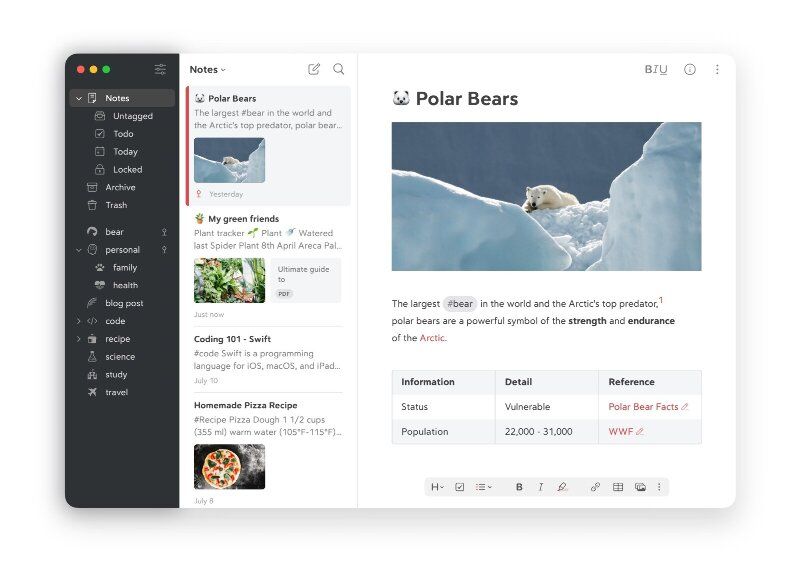
 ]]>
]]>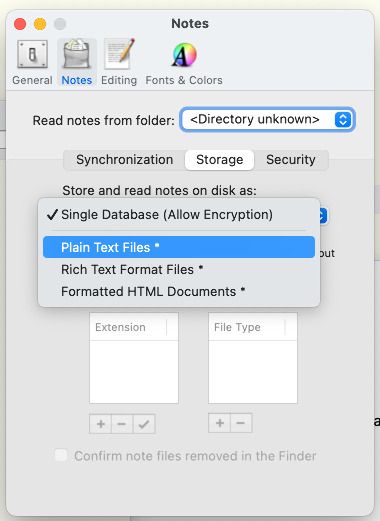
 ]]>
]]>
 ]]>
]]>
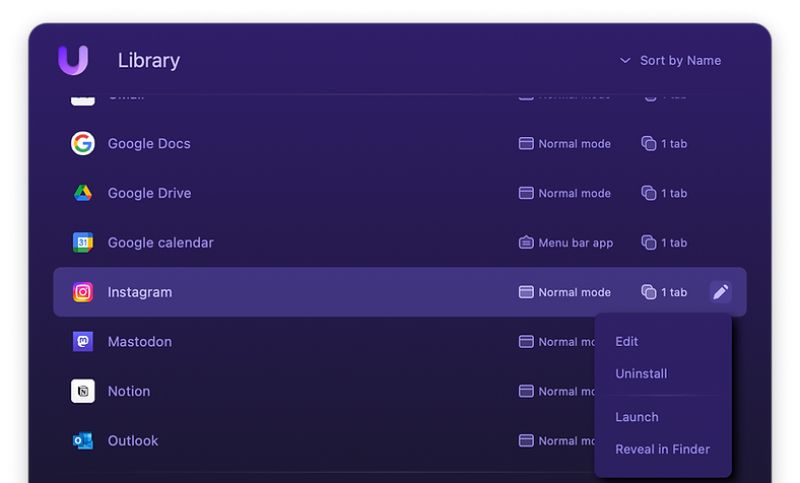
 ]]>
]]>
 ]]>
]]>
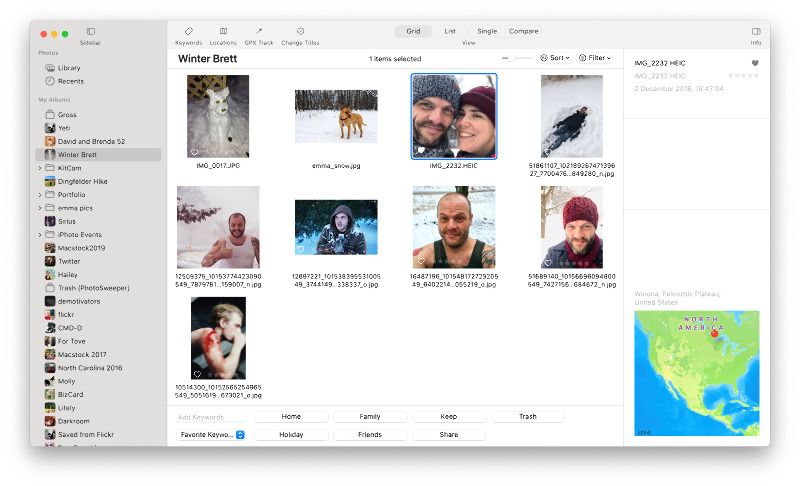
 ]]>
]]>
 ]]>
]]>
 ]]>
]]> ]]>
]]>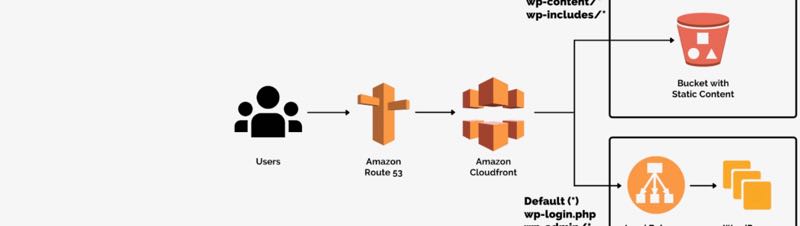
 ]]>
]]>
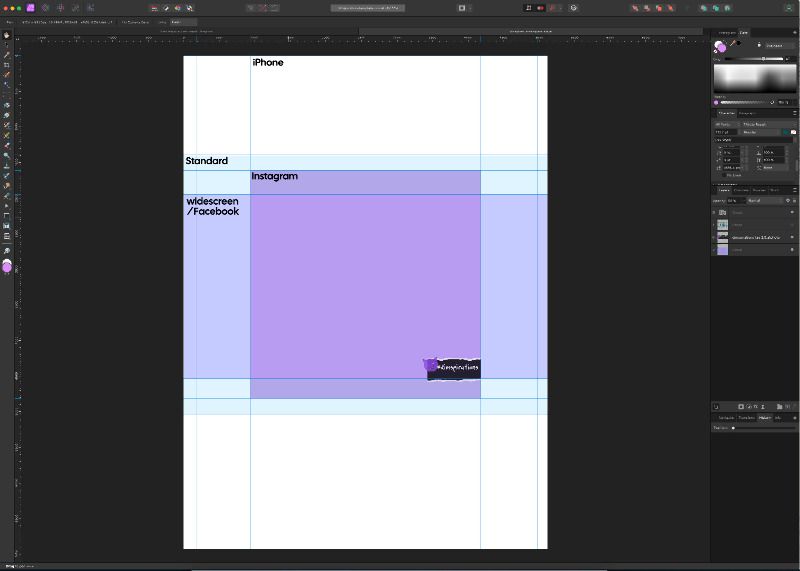
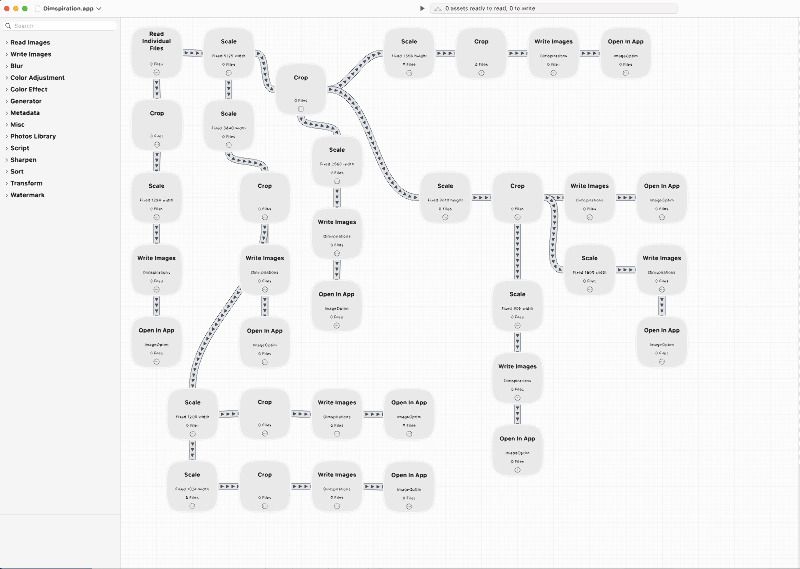
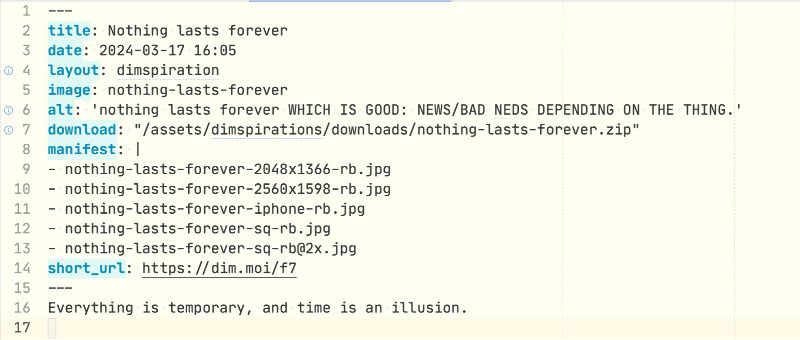
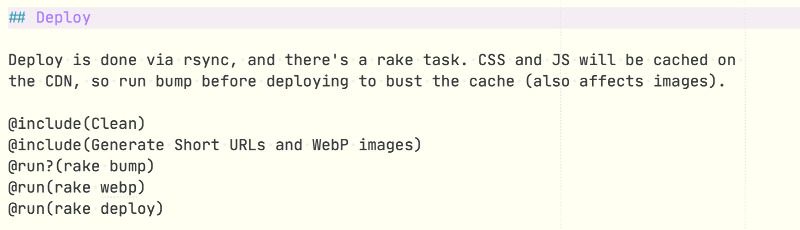
 ]]>
]]>
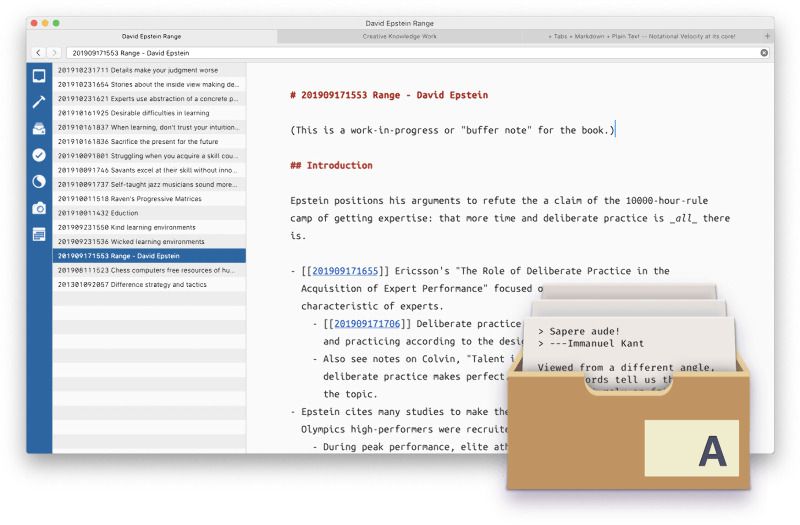
 ]]>
]]>
 ]]>
]]> ]]>
]]>
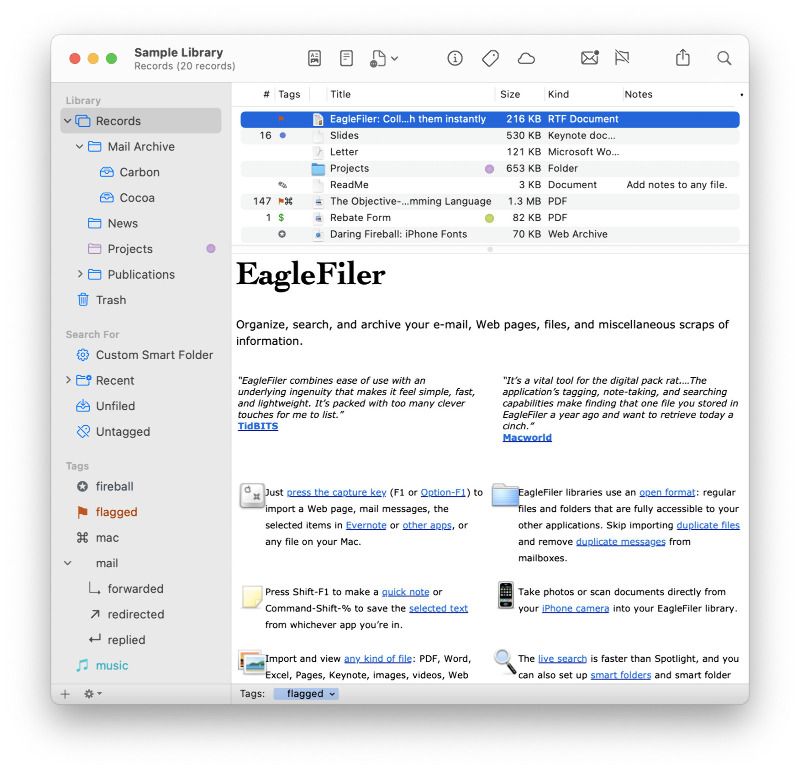
 ]]>
]]>
 ]]>
]]>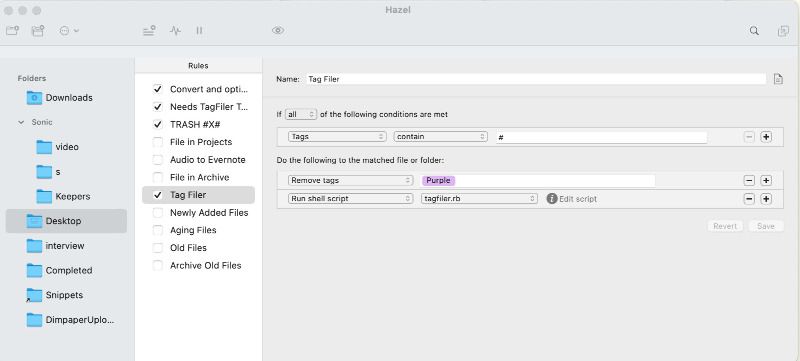
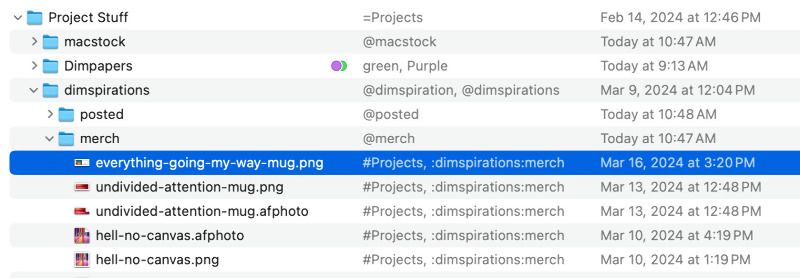
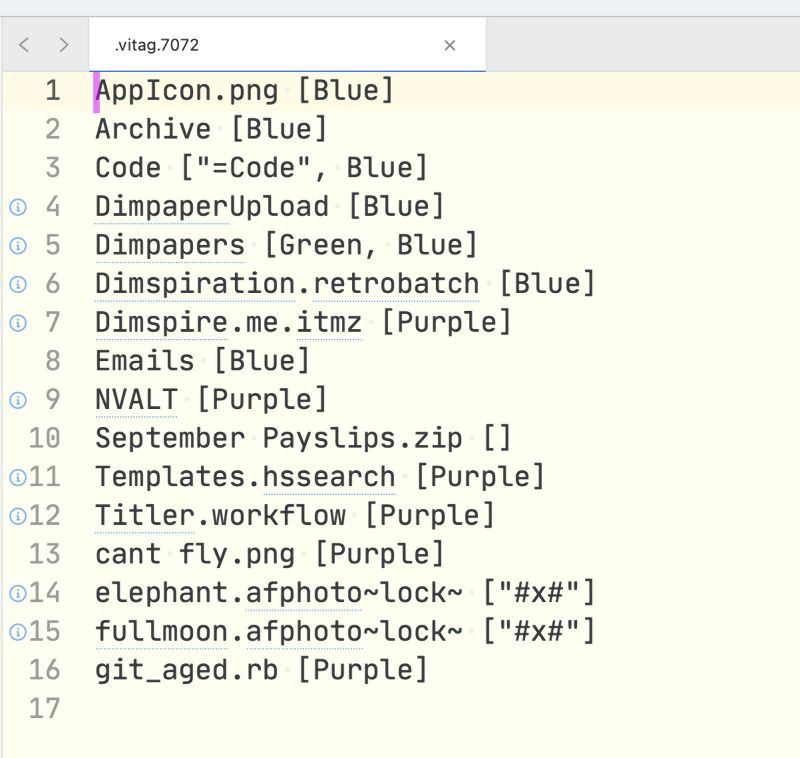
 ]]>
]]> ]]>
]]>
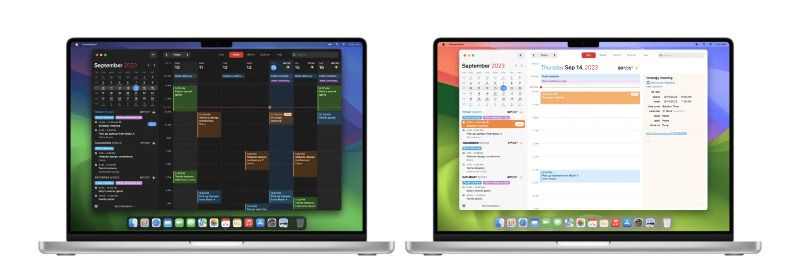
 ]]>
]]>
 ]]>
]]>
 ]]>
]]>
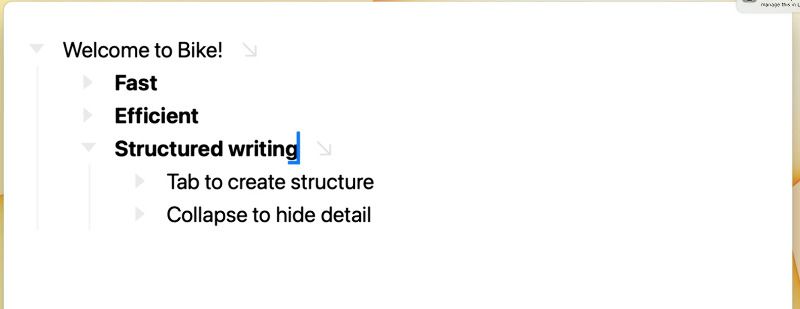
 ]]>
]]>
 ]]>
]]>
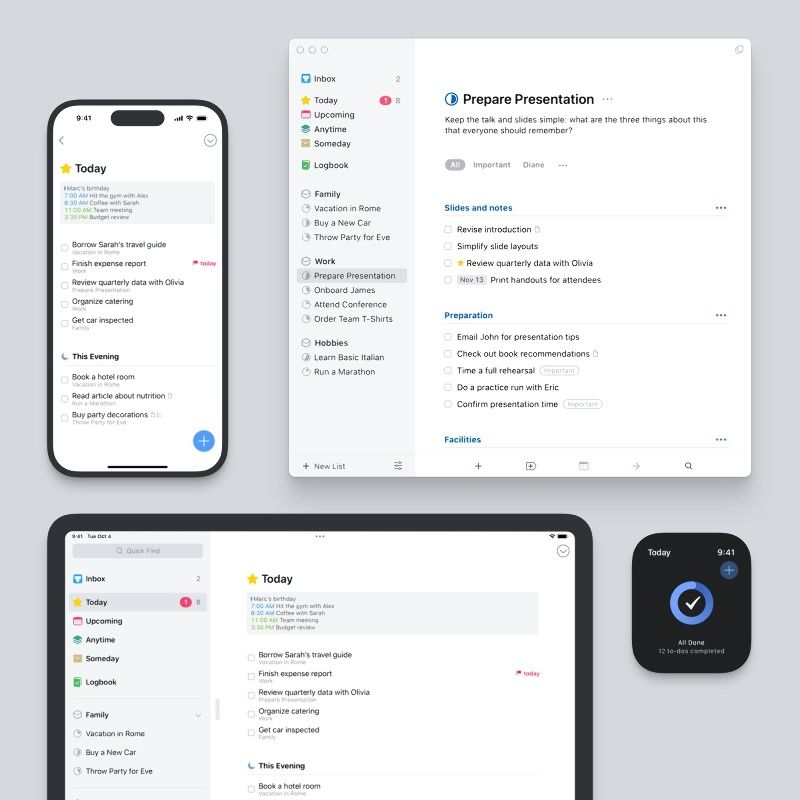
 ]]>
]]>
 ]]>
]]>
 ]]>
]]> ]]>
]]>
 ]]>
]]>
 ]]>
]]>
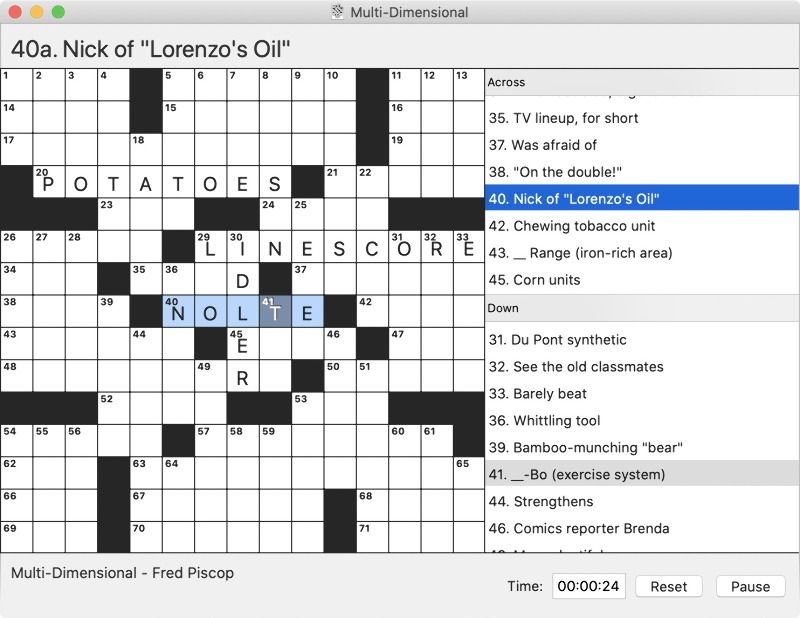
 ]]>
]]>
 ]]>
]]>
 ]]>
]]>
 ]]>
]]>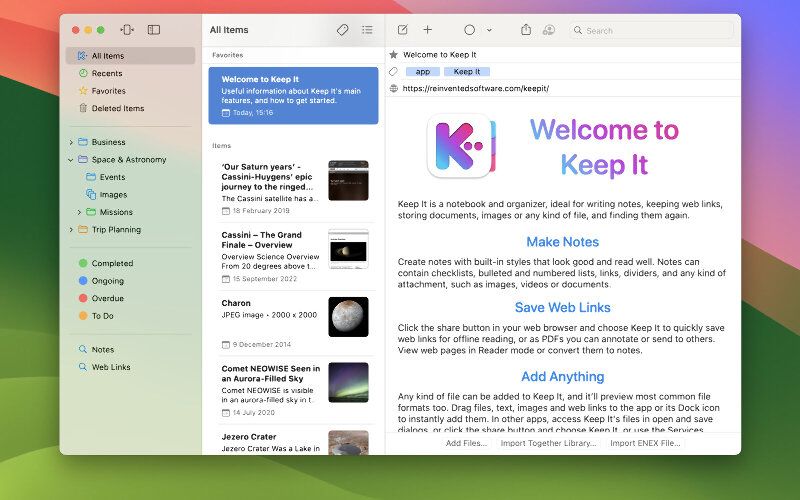
 ]]>
]]>
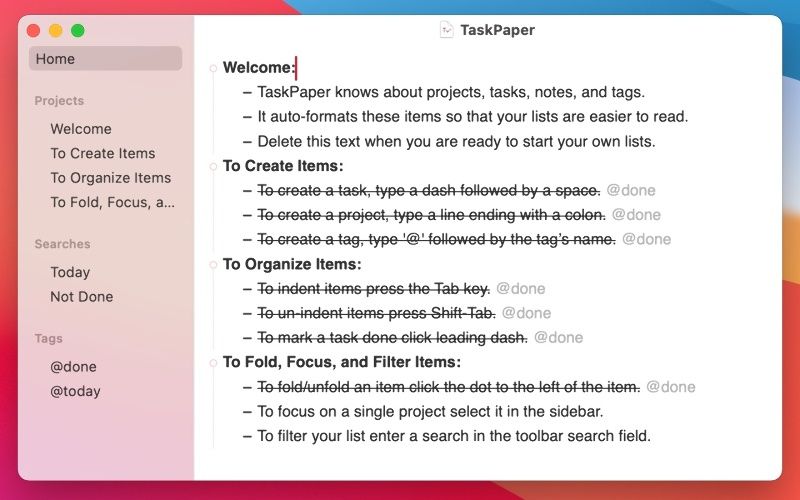
 ]]>
]]>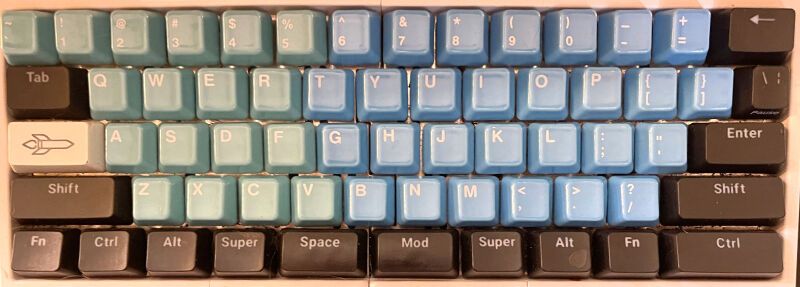
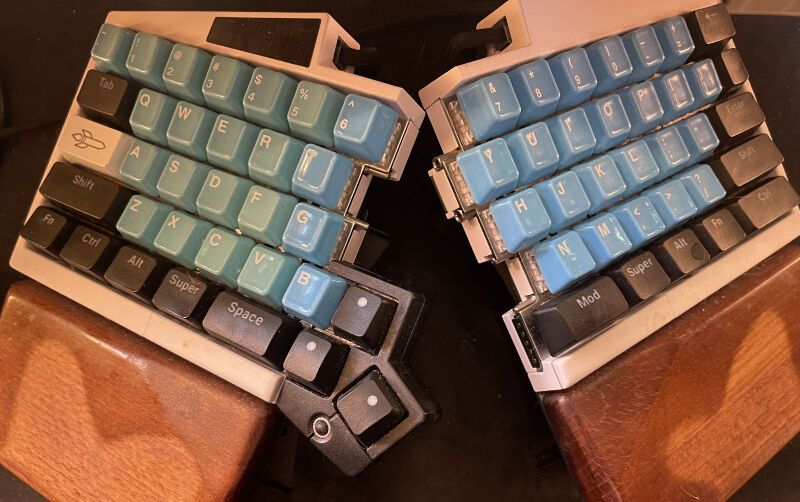
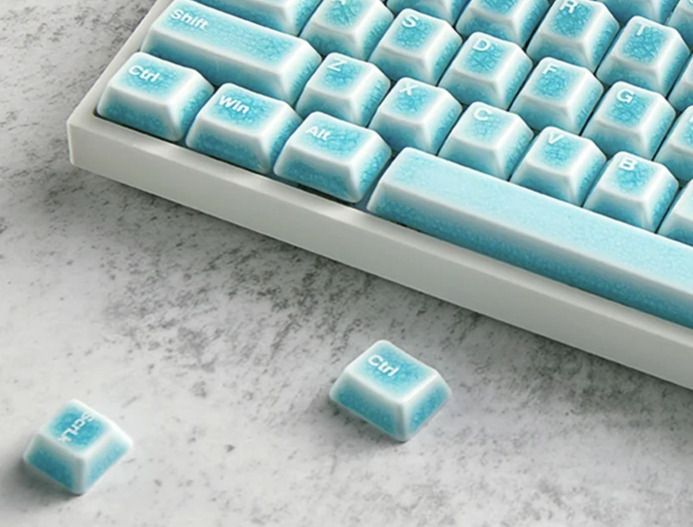
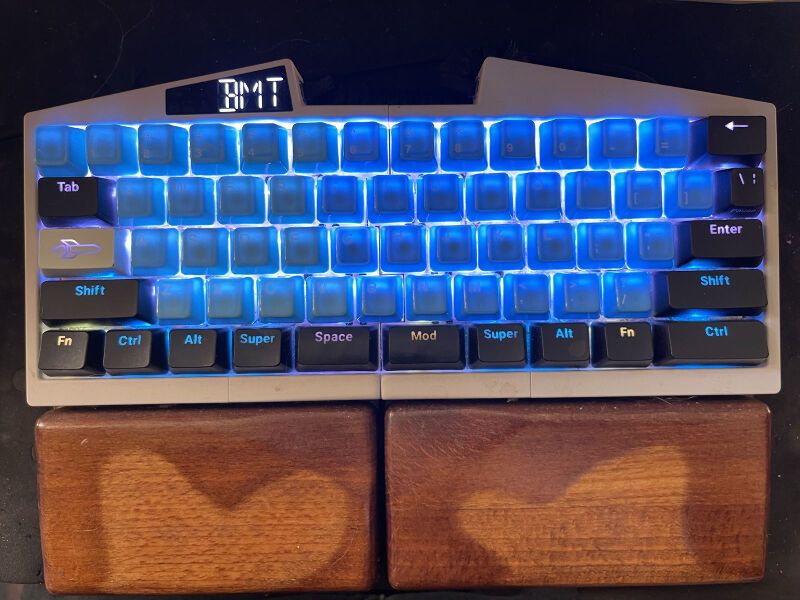
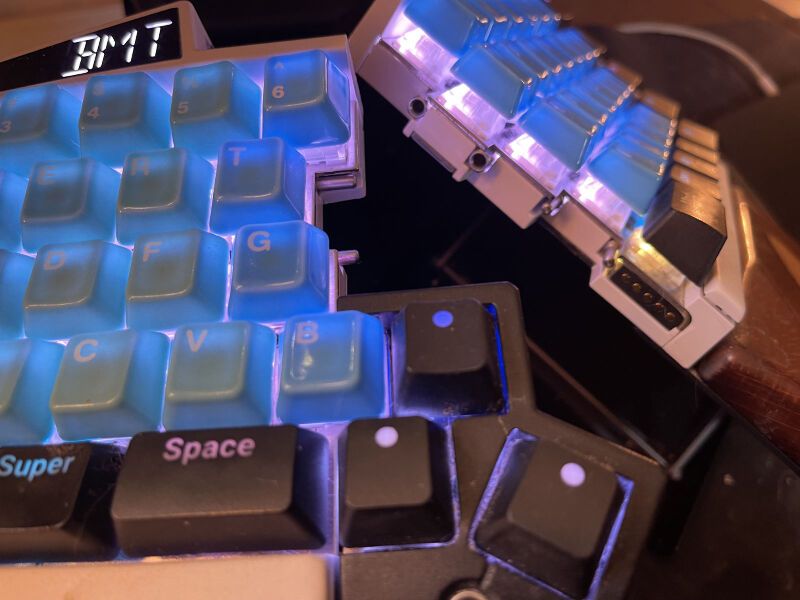
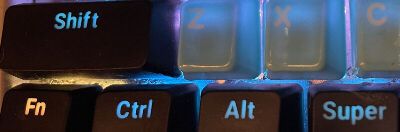
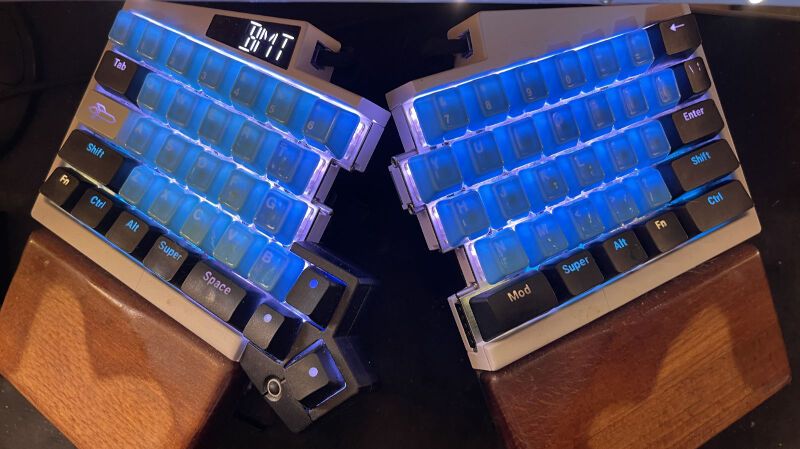
 ]]>
]]>
 ]]>
]]>
 ]]>
]]> ]]>
]]>