<?xml version="1.0" encoding="utf-8"?>
<feed xmlns="http://www.w3.org/2005/Atom">

  <title><![CDATA[Crazy Little Hacks]]></title>
  <link href="http://zamith.github.io/atom.xml" rel="self"/>
  <link href="http://zamith.github.io/"/>
  <updated>2014-11-26T12:49:59+00:00</updated>
  <id>http://zamith.github.io/</id>
  <author>
    <name><![CDATA[Zamith]]></name>
    
  </author>
  <generator uri="http://octopress.org/">Octopress</generator>

  
  <entry>
    <title type="html"><![CDATA[Thoughts on trying new things]]></title>
    <link href="http://zamith.github.io/blog/2014/11/26/thoughts-on-experiments/"/>
    <updated>2014-11-26T12:12:00+00:00</updated>
    <id>http://zamith.github.io/blog/2014/11/26/thoughts-on-experiments</id>
    <content type="html"><![CDATA[<p>TL;DR Trying new things is fun. Do it more often.</p>

<p>Everyone has a lot of ideas for new stuff, as developers we are blessed to be
able to bring some of these ideas to life. More often than not, though, we aim
too high and quit before we even get started because of how daunting a task it
might be. Other times we are doing so much at work already, that we just want a
break.</p>

<p>In any of the cases trying new things will do you good. Try a new language or
technology that excites you. You&#8217;ll learn new things that can be used in your
daily job, or at least have fun. If teaching is your thing, there&#8217;s also the
benefit of learning how to be a newbie again, which gives you perspective.</p>

<h2>Starting something</h2>

<p>Starting something is the hardest part, I always fear that I get too invested in
a project that ends up to be a piece of crap. Turns out that a lot of times it&#8217;s
when you don&#8217;t care if it is crap or not that the best things come into
existence. There&#8217;s is an entire conference dedicated to instigate the Ruby
community to build more strange things, because some of them will be great. It&#8217;s
called <a href="http://keeprubyweird.com/">Keep Ruby Weird</a>, check it out.</p>

<p>A good way to start creating things is to think of what you do all day and try
to automate (partly or completely) a small part of it. It&#8217;s likely that your
problems will be shared by other people around the world, or at least your
coworkers.</p>

<p>I did that and created something called <a href="https://github.com/zamith/github-nice-guy"><strong>Github Nice Guy</strong></a>.</p>

<h2>Github Nice Guy</h2>

<p>The problem I decided to tackle was the fact that pull requests are forgotten.
This can happen because you lost interest in the project, the project is
deprecated or relocated, etc&#8230;</p>

<p>My idea to solve this is described in the README as:</p>

<blockquote><p>Github Nice Guy is a small Ruby script that fetches the open pull requests for
a given user (or organization) and sends a weekly friendly reminder with links
to them to whoever you think should know about it.</p></blockquote>

<p>The coolest thing about this project, in my opinion, is that it took less than
30 minutes to get done (the first version at least). This is not because I&#8217;m an
awesome developer or have mad typing skills, it&#8217;s mostly because it was just a
couple of gems put together in a very shady way that kind of worked most of the
times. But I learnt new things about the Github API (and how awesome it is),
sending mails from a ruby script and integrating ruby scripts with <a href="https://github.com/javan/whenever">whenever</a>.</p>

<p>There&#8217;s nothing really fancy about it, but I got to try new things without a lot
of commitment, and as a bonus got a small service that is now running in my
company.</p>

<h2>Conclusion and stuff</h2>

<p>The main thing to get from this post (if there is one) is that you should see
the resulting &#8220;product&#8221; as a bonus, the path to get there is what really counts.</p>

<p>This path can be miles long or inches short, that&#8217;s up to you, but building
something that helps you out on what you do everyday is a good way to start
gaining momentum.</p>
]]></content>
  </entry>
  
  <entry>
    <title type="html"><![CDATA[Supercharging your git]]></title>
    <link href="http://zamith.github.io/blog/2014/11/05/supercharging-your-git/"/>
    <updated>2014-11-05T10:37:00+00:00</updated>
    <id>http://zamith.github.io/blog/2014/11/05/supercharging-your-git</id>
    <content type="html"><![CDATA[<p>Git is so awesome and packs so much power that I could hardly fit it all in a
blog post (or 100 for that matter). What this post will talk about though, are a
couple of ways to extend your git for it to better serve you on your everyday
tasks.</p>

<h2>ZSH</h2>

<p>This is post is <strong>not</strong> about ZSH, but it is awesome and you should install it. All
the configs will assume you are using it, but surely there are ways of doing the
same for your shell of choice.</p>

<h2>Hub</h2>

<blockquote><p>hub is a command line tool that wraps <code>git</code> in order to extend it with extra
features and commands that make working with GitHub easier.</p></blockquote>

<p>This is the description taken straight out of the project&#8217;s README. Hub is
written by the guys at Github, so it is very much compliant with everything on
the site. As of recently you can install it with Homebrew (non-mac users will
have to compile it manuallly, I believe).</p>

<figure class='code'><div class="highlight"><table><tr><td class="gutter"><pre class="line-numbers"><span class='line-number'>1</span>
</pre></td><td class='code'><pre><code class=''><span class='line'>brew install --HEAD hub  # For the 2.x version</span></code></pre></td></tr></table></div></figure>


<p>Now you can use <code>hub</code> and all it&#8217;s powers. The sane thing to do though, is to
alias <code>git</code> to <code>hub</code>, which works perfectly as <code>hub</code> will delegate all non-hub
commands to <code>git</code>.</p>

<p>Just open your <code>.zshrc</code> and add the alias:</p>

<figure class='code'><div class="highlight"><table><tr><td class="gutter"><pre class="line-numbers"><span class='line-number'>1</span>
</pre></td><td class='code'><pre><code class=''><span class='line'>alias git='hub'</span></code></pre></td></tr></table></div></figure>


<p>When you brew install <code>hub</code> you will see that it installs completion files to
you system.</p>

<figure class='code'><div class="highlight"><table><tr><td class="gutter"><pre class="line-numbers"><span class='line-number'>1</span>
<span class='line-number'>2</span>
</pre></td><td class='code'><pre><code class=''><span class='line'>zsh completion has been installed to:
</span><span class='line'>  /usr/local/share/zsh/site-functions</span></code></pre></td></tr></table></div></figure>


<p>If you run <code>echo $fpath</code> on your terminal that path should be there. <code>fpath</code>
stands for functions path and you can store you functions in any directory
listed in <code>fpath</code>. Read more about zsh functions
<a href="http://zsh.sourceforge.net/Doc/Release/Functions.html">here</a>.</p>

<p>This will provide auto-complete functionality for all your <code>git</code> needs.</p>

<p>If you are like me, though, and <code>git</code> is the command you use more often (about
30% of the time in my case), you will probably want to alias it to something
shorter, such as <code>g</code>.</p>

<figure class='code'><div class="highlight"><table><tr><td class="gutter"><pre class="line-numbers"><span class='line-number'>1</span>
</pre></td><td class='code'><pre><code class=''><span class='line'>alias g='git'</span></code></pre></td></tr></table></div></figure>


<p>So now <code>g</code> maps to <code>git</code> which maps to <code>hub</code>. Great! We have, however,
introduced an issue. Auto-complete is broken. That is because the git auto
completion function is only expecting <code>git</code> or <code>gitk</code> as commands to auto
complete.</p>

<p>You can add <code>g</code> to that set easily enough. Again, open your <code>.zshrc</code> and add
<code>compdef g=git</code>.</p>

<p>You should have everything ready to go.</p>

<h2>Git commands</h2>

<p>Hub adds some really nice things, but what about those specific commands you
love to use? At some point all of us have added commands as aliases in
<code>gitconfig</code>.</p>

<figure class='code'><div class="highlight"><table><tr><td class="gutter"><pre class="line-numbers"><span class='line-number'>1</span>
<span class='line-number'>2</span>
</pre></td><td class='code'><pre><code class=''><span class='line'>[alias]
</span><span class='line'>    ia = add --intent-to-add -A</span></code></pre></td></tr></table></div></figure>


<p>This is not inherently bad, but it can go out of hand pretty quickly. Moreover,
you don&#8217;t really have a lot of scripting power with these aliases. As you might
have guessed by now, there is a better way of doing this and it is so cool that
even some of the <a href="https://github.com/git/git/blob/master/git-bisect.sh">builtin commands use this strategy</a>.</p>

<p>The basic idea is that any executable script on you <code>PATH</code> that is named
<code>git-some-name</code> will be available as a git subcommand, which means you could do
<code>git some-name</code> to run the script.</p>

<p>Git is so awesome that it even adds them to <code>git help -a</code> under the title &#8220;git
commands available from elsewhere on your $PATH&#8221;, which will then power the auto
completion, so that will also work for any command you add.</p>

<p>Going back to our example, there&#8217;s a couple of things to do to remove it from an
alias into a command, add a directory to the <code>PATH</code> and create a script on that
directory.</p>

<figure class='code'><div class="highlight"><table><tr><td class="gutter"><pre class="line-numbers"><span class='line-number'>1</span>
<span class='line-number'>2</span>
<span class='line-number'>3</span>
</pre></td><td class='code'><pre><code class=''><span class='line'>mkdir -p ~/dotfiles/git_commands
</span><span class='line'>export PATH="$HOME/dotfiles/git_commands"  # Also add this to you zshrc, to persist it
</span><span class='line'>echo "git add --intent-to-add -A" &gt; ~/dotfiles/git_commands/git-ia</span></code></pre></td></tr></table></div></figure>


<p>You should now be able to remove the alias from the <code>gitconfig</code> and still be able
to run <code>git ia</code>.</p>

<h3>Bonus round</h3>

<p>Git will just grab the scripts that follow the aforementioned convention and run
them. That means that as long as the shebang is correctly set, you can write a
script in any scripting language.</p>

<p>Here&#8217;s one in ruby:</p>

<figure class='code'><div class="highlight"><table><tr><td class="gutter"><pre class="line-numbers"><span class='line-number'>1</span>
<span class='line-number'>2</span>
<span class='line-number'>3</span>
</pre></td><td class='code'><pre><code class=''><span class='line'>#!/usr/bin/env ruby
</span><span class='line'>
</span><span class='line'>puts "Hello"</span></code></pre></td></tr></table></div></figure>


<p>Just name it <code>git-hello</code>, put it in your <code>git_commands</code> directory and you should
be able to type <code>g hello</code> and have git say &#8220;Hello&#8221; back.</p>

<h3>Further reading</h3>

<p>If you want to check some actual examples you can do it in <a href="https://github.com/zamith/dotfiles/tree/master/git_plugins">my dotfiles</a>
or in <a href="https://github.com/pengwynn/dotfiles/tree/master/bin">Wynn Netherland&#8217;s dotfiles</a>.
This post was inspired by a talk given by Wynn at the <a href="http://www.dallasrb.org/">DallasRB meetup</a>,
so do check his stuff.</p>
]]></content>
  </entry>
  
  <entry>
    <title type="html"><![CDATA[Vim project specific configs]]></title>
    <link href="http://zamith.github.io/blog/2014/09/22/vim-project-specific-config/"/>
    <updated>2014-09-22T11:17:00+01:00</updated>
    <id>http://zamith.github.io/blog/2014/09/22/vim-project-specific-config</id>
    <content type="html"><![CDATA[<p>Adding specific configs for a specific project in vim is actually quite easy.
The first thing you need to realize is that vim doesn&#8217;t really have the notion
of a project, so we&#8217;ll rely on folder structures and paths.</p>

<h2>Setting up the environment</h2>

<p>The first thing to do is to call a function to set up our environment whenever
we open vim, open a file on a new buffer or open a new file.</p>

<figure class='code'><figcaption><span></span></figcaption><div class="highlight"><table><tr><td class="gutter"><pre class="line-numbers"><span class='line-number'>1</span>
</pre></td><td class='code'><pre><code class='vim'><span class='line'>autocmd<span class="p">!</span> vimenter<span class="p">,</span><span class="nb">BufReadPost</span><span class="p">,</span><span class="nb">BufNewFile</span> * <span class="k">call</span> SetupEnv<span class="p">()</span>
</span></code></pre></td></tr></table></div></figure>


<p>That function will then check the current path and conditionally load config
files.</p>

<figure class='code'><figcaption><span></span></figcaption><div class="highlight"><table><tr><td class="gutter"><pre class="line-numbers"><span class='line-number'>1</span>
<span class='line-number'>2</span>
<span class='line-number'>3</span>
<span class='line-number'>4</span>
<span class='line-number'>5</span>
<span class='line-number'>6</span>
</pre></td><td class='code'><pre><code class='vim'><span class='line'><span class="k">function</span><span class="p">!</span> SetupEnv<span class="p">()</span>
</span><span class='line'>  <span class="k">let</span> <span class="k">l</span>:<span class="nb">path</span> <span class="p">=</span> expand<span class="p">(</span><span class="s1">&#39;%:p&#39;</span><span class="p">)</span>
</span><span class='line'>  <span class="k">if</span> <span class="k">l</span>:<span class="nb">path</span> <span class="p">=~</span> <span class="s1">&#39;project-name&#39;</span>
</span><span class='line'>    source <span class="p">~</span><span class="sr">/.vim/</span>project<span class="p">-</span>configs/project<span class="p">-</span>name.<span class="k">vim</span>
</span><span class='line'>  <span class="k">endif</span>
</span><span class='line'><span class="k">endfunction</span>
</span></code></pre></td></tr></table></div></figure>


<p>The <code>project-name</code>s don&#8217;t have to be the same, but I find it makes sense if they
do. And they usually refer to the root directory of the project.</p>

<h2>The specific configs</h2>

<p>We can the add regular vim configs the <code>project-name.vim</code> config file. Something
that I find useful is to map shortcuts to commonly used directories (kind of a
poor man&#8217;s Rails.vim <code>:R</code>).</p>

<figure class='code'><figcaption><span></span></figcaption><div class="highlight"><table><tr><td class="gutter"><pre class="line-numbers"><span class='line-number'>1</span>
</pre></td><td class='code'><pre><code class='vim'><span class='line'>cnoremap %<span class="k">a</span> <span class="p">&lt;</span>C<span class="p">-</span>R<span class="p">&gt;</span>&#39;app<span class="sr">/resources/</span>scripts<span class="sr">/apps/</span>
</span></code></pre></td></tr></table></div></figure>


<p>Now every time you write <code>%a</code> in the command line it will be replaced with
<code>app/resources/scripts/apps/</code>. So you can just <code>:e %a</code> and auto complete your
way into the file you want.</p>

<p>You can also add other settings such as number of spaces per tab, which may vary
from project to project. It&#8217;s as easy as:</p>

<figure class='code'><figcaption><span></span></figcaption><div class="highlight"><table><tr><td class="gutter"><pre class="line-numbers"><span class='line-number'>1</span>
<span class='line-number'>2</span>
</pre></td><td class='code'><pre><code class='vim'><span class='line'><span class="k">set</span> <span class="nb">tabstop</span><span class="p">=</span><span class="m">2</span>
</span><span class='line'><span class="k">set</span> <span class="nb">shiftwidth</span><span class="p">=</span><span class="m">2</span>
</span></code></pre></td></tr></table></div></figure>

]]></content>
  </entry>
  
  <entry>
    <title type="html"><![CDATA[Rust vs Ruby]]></title>
    <link href="http://zamith.github.io/blog/2014/07/10/rust-vs-ruby/"/>
    <updated>2014-07-10T23:05:00+01:00</updated>
    <id>http://zamith.github.io/blog/2014/07/10/rust-vs-ruby</id>
    <content type="html"><![CDATA[<p>If you were expecting a showdown in which I go on to proclaim Ruby (or Rust) to
be the best language ever, you can stop reading now. I have been programming
Ruby for a few years and have only recently picked up Rust. This article serves
to show how much I (do not) know about Rust and how it compares to Ruby in my
point of view.</p>

<p>If you&#8217;ve never heard of it, <a href="http://www.rust-lang.org/">Rust</a> is a language
championed by Mozilla that aims at replacing C++ as the language in which
Firefox in written.</p>

<p>While learning Rust I came across the <a href="http://www.rustforrubyists.com/book/index.html">Rust for Rubyists</a>
book by Steve Klabnik, which I recommend, and on that book there is small
program that shows how to create different kinds of monsters with the same
interface. I tweaked it a bit and implemented it in Ruby as well, so it can be
compared.</p>

<h2>The Ruby version</h2>

<figure class='code'><figcaption><span></span></figcaption><div class="highlight"><table><tr><td class="gutter"><pre class="line-numbers"><span class='line-number'>1</span>
<span class='line-number'>2</span>
<span class='line-number'>3</span>
<span class='line-number'>4</span>
<span class='line-number'>5</span>
<span class='line-number'>6</span>
<span class='line-number'>7</span>
<span class='line-number'>8</span>
<span class='line-number'>9</span>
<span class='line-number'>10</span>
<span class='line-number'>11</span>
<span class='line-number'>12</span>
<span class='line-number'>13</span>
<span class='line-number'>14</span>
<span class='line-number'>15</span>
<span class='line-number'>16</span>
<span class='line-number'>17</span>
<span class='line-number'>18</span>
<span class='line-number'>19</span>
<span class='line-number'>20</span>
<span class='line-number'>21</span>
<span class='line-number'>22</span>
<span class='line-number'>23</span>
<span class='line-number'>24</span>
<span class='line-number'>25</span>
<span class='line-number'>26</span>
<span class='line-number'>27</span>
<span class='line-number'>28</span>
<span class='line-number'>29</span>
<span class='line-number'>30</span>
<span class='line-number'>31</span>
<span class='line-number'>32</span>
<span class='line-number'>33</span>
<span class='line-number'>34</span>
<span class='line-number'>35</span>
</pre></td><td class='code'><pre><code class='ruby'><span class='line'><span class="k">class</span> <span class="nc">IndustrialRaverMonkey</span>
</span><span class='line'>  <span class="k">def</span> <span class="nf">initialize</span>
</span><span class='line'>    <span class="vi">@life</span> <span class="o">=</span> <span class="mi">100</span>
</span><span class='line'>    <span class="vi">@strength</span> <span class="o">=</span> <span class="mi">20</span>
</span><span class='line'>    <span class="vi">@charisma</span> <span class="o">=</span> <span class="mi">10</span>
</span><span class='line'>    <span class="vi">@weapon</span> <span class="o">=</span> <span class="mi">50</span>
</span><span class='line'>  <span class="k">end</span>
</span><span class='line'>
</span><span class='line'>  <span class="k">def</span> <span class="nf">attack</span>
</span><span class='line'>    <span class="nb">puts</span> <span class="s2">&quot;The monkey deals </span><span class="si">#{</span><span class="vi">@strength</span><span class="si">}</span><span class="s2"> of damage&quot;</span>
</span><span class='line'>  <span class="k">end</span>
</span><span class='line'><span class="k">end</span>
</span><span class='line'>
</span><span class='line'><span class="k">class</span> <span class="nc">DwarvenAngel</span>
</span><span class='line'>  <span class="k">def</span> <span class="nf">initialize</span>
</span><span class='line'>    <span class="vi">@life</span> <span class="o">=</span> <span class="mi">100</span>
</span><span class='line'>    <span class="vi">@strength</span> <span class="o">=</span> <span class="mi">50</span>
</span><span class='line'>    <span class="vi">@charisma</span> <span class="o">=</span> <span class="mi">70</span>
</span><span class='line'>    <span class="vi">@weapon</span> <span class="o">=</span> <span class="mi">50</span>
</span><span class='line'>  <span class="k">end</span>
</span><span class='line'>
</span><span class='line'>  <span class="k">def</span> <span class="nf">attack</span>
</span><span class='line'>    <span class="nb">puts</span> <span class="s2">&quot;The angel deals </span><span class="si">#{</span><span class="vi">@strength</span><span class="si">}</span><span class="s2"> of damage&quot;</span>
</span><span class='line'>  <span class="k">end</span>
</span><span class='line'><span class="k">end</span>
</span><span class='line'>
</span><span class='line'><span class="k">def</span> <span class="nf">call_attack</span><span class="p">(</span><span class="n">monsters</span><span class="p">)</span>
</span><span class='line'>  <span class="n">monsters</span><span class="o">.</span><span class="n">each</span><span class="p">(</span><span class="o">&amp;</span><span class="ss">:attack</span><span class="p">)</span>
</span><span class='line'><span class="k">end</span>
</span><span class='line'>
</span><span class='line'><span class="n">monkey</span> <span class="o">=</span> <span class="no">IndustrialRaverMonkey</span><span class="o">.</span><span class="n">new</span>
</span><span class='line'><span class="n">angel</span> <span class="o">=</span> <span class="no">DwarvenAngel</span><span class="o">.</span><span class="n">new</span>
</span><span class='line'>
</span><span class='line'><span class="n">monsters</span> <span class="o">=</span> <span class="o">[</span><span class="n">monkey</span><span class="p">,</span> <span class="n">angel</span><span class="o">]</span>
</span><span class='line'><span class="n">call_attack</span><span class="p">(</span><span class="n">monsters</span><span class="p">)</span>
</span></code></pre></td></tr></table></div></figure>


<p>We have two monsters each with a set of characteristics and an <code>attack</code> method,
an instance of each of them is created, put into an array and finally they are
given order to attack. The <code>call_attack</code> method is there in order to correctly
replicate the Rust version, it is a bit redundant here.</p>

<h2>The Rust version</h2>

<figure class='code'><figcaption><span></span></figcaption><div class="highlight"><table><tr><td class="gutter"><pre class="line-numbers"><span class='line-number'>1</span>
<span class='line-number'>2</span>
<span class='line-number'>3</span>
<span class='line-number'>4</span>
<span class='line-number'>5</span>
<span class='line-number'>6</span>
<span class='line-number'>7</span>
<span class='line-number'>8</span>
<span class='line-number'>9</span>
<span class='line-number'>10</span>
<span class='line-number'>11</span>
<span class='line-number'>12</span>
<span class='line-number'>13</span>
<span class='line-number'>14</span>
<span class='line-number'>15</span>
<span class='line-number'>16</span>
<span class='line-number'>17</span>
<span class='line-number'>18</span>
<span class='line-number'>19</span>
<span class='line-number'>20</span>
<span class='line-number'>21</span>
<span class='line-number'>22</span>
<span class='line-number'>23</span>
<span class='line-number'>24</span>
<span class='line-number'>25</span>
<span class='line-number'>26</span>
<span class='line-number'>27</span>
<span class='line-number'>28</span>
<span class='line-number'>29</span>
<span class='line-number'>30</span>
<span class='line-number'>31</span>
<span class='line-number'>32</span>
<span class='line-number'>33</span>
<span class='line-number'>34</span>
<span class='line-number'>35</span>
<span class='line-number'>36</span>
<span class='line-number'>37</span>
<span class='line-number'>38</span>
<span class='line-number'>39</span>
<span class='line-number'>40</span>
<span class='line-number'>41</span>
<span class='line-number'>42</span>
<span class='line-number'>43</span>
<span class='line-number'>44</span>
<span class='line-number'>45</span>
<span class='line-number'>46</span>
<span class='line-number'>47</span>
<span class='line-number'>48</span>
<span class='line-number'>49</span>
<span class='line-number'>50</span>
<span class='line-number'>51</span>
<span class='line-number'>52</span>
<span class='line-number'>53</span>
<span class='line-number'>54</span>
<span class='line-number'>55</span>
</pre></td><td class='code'><pre><code class='rust'><span class='line'><span class="n">trait</span> <span class="n">Monster</span> <span class="p">{</span>
</span><span class='line'>  <span class="k">fn</span> <span class="n">attack</span><span class="p">(</span><span class="o">&amp;</span><span class="n">self</span><span class="p">);</span>
</span><span class='line'>  <span class="k">fn</span> <span class="n">new</span><span class="p">()</span> <span class="o">-&gt;</span> <span class="n">Self</span><span class="p">;</span>
</span><span class='line'><span class="p">}</span>
</span><span class='line'>
</span><span class='line'><span class="cp">#[allow(dead_code)]</span>
</span><span class='line'><span class="n">struct</span> <span class="n">IndustrialRaverMonkey</span> <span class="p">{</span>
</span><span class='line'>  <span class="n">life</span><span class="o">:</span> <span class="k">int</span><span class="p">,</span>
</span><span class='line'>  <span class="n">strength</span><span class="o">:</span> <span class="k">int</span><span class="p">,</span>
</span><span class='line'>  <span class="n">charisma</span><span class="o">:</span> <span class="k">int</span><span class="p">,</span>
</span><span class='line'>  <span class="n">weapon</span><span class="o">:</span> <span class="k">int</span><span class="p">,</span>
</span><span class='line'><span class="p">}</span>
</span><span class='line'>
</span><span class='line'><span class="k">impl</span> <span class="n">Monster</span> <span class="k">for</span> <span class="n">IndustrialRaverMonkey</span> <span class="p">{</span>
</span><span class='line'>  <span class="k">fn</span> <span class="n">attack</span><span class="p">(</span><span class="o">&amp;</span><span class="n">self</span><span class="p">)</span> <span class="p">{</span>
</span><span class='line'>    <span class="n">println</span><span class="o">!</span><span class="p">(</span><span class="s">&quot;The monkey deals {:d} of damage&quot;</span><span class="p">,</span> <span class="n">self</span><span class="p">.</span><span class="n">strength</span><span class="p">)</span>
</span><span class='line'>  <span class="p">}</span>
</span><span class='line'>
</span><span class='line'>  <span class="k">fn</span> <span class="n">new</span><span class="p">()</span> <span class="o">-&gt;</span> <span class="n">IndustrialRaverMonkey</span> <span class="p">{</span>
</span><span class='line'>    <span class="n">IndustrialRaverMonkey</span> <span class="p">{</span> <span class="n">life</span><span class="o">:</span> <span class="m">100</span><span class="p">,</span> <span class="n">strength</span><span class="o">:</span> <span class="m">20</span><span class="p">,</span> <span class="n">charisma</span><span class="o">:</span> <span class="m">10</span><span class="p">,</span> <span class="n">weapon</span><span class="o">:</span> <span class="m">50</span> <span class="p">}</span>
</span><span class='line'>  <span class="p">}</span>
</span><span class='line'><span class="p">}</span>
</span><span class='line'>
</span><span class='line'><span class="cp">#[allow(dead_code)]</span>
</span><span class='line'><span class="n">struct</span> <span class="n">DwarvenAngel</span> <span class="p">{</span>
</span><span class='line'>  <span class="n">life</span><span class="o">:</span> <span class="k">int</span><span class="p">,</span>
</span><span class='line'>  <span class="n">strength</span><span class="o">:</span> <span class="k">int</span><span class="p">,</span>
</span><span class='line'>  <span class="n">charisma</span><span class="o">:</span> <span class="k">int</span><span class="p">,</span>
</span><span class='line'>  <span class="n">weapon</span><span class="o">:</span> <span class="k">int</span><span class="p">,</span>
</span><span class='line'><span class="p">}</span>
</span><span class='line'>
</span><span class='line'><span class="k">impl</span> <span class="n">Monster</span> <span class="k">for</span> <span class="n">DwarvenAngel</span> <span class="p">{</span>
</span><span class='line'>  <span class="k">fn</span> <span class="n">attack</span><span class="p">(</span><span class="o">&amp;</span><span class="n">self</span><span class="p">)</span> <span class="p">{</span>
</span><span class='line'>    <span class="n">println</span><span class="o">!</span><span class="p">(</span><span class="s">&quot;The angel deals {:d} of damage&quot;</span><span class="p">,</span> <span class="n">self</span><span class="p">.</span><span class="n">strength</span><span class="p">)</span>
</span><span class='line'>  <span class="p">}</span>
</span><span class='line'>
</span><span class='line'>  <span class="k">fn</span> <span class="n">new</span><span class="p">()</span> <span class="o">-&gt;</span> <span class="n">DwarvenAngel</span> <span class="p">{</span>
</span><span class='line'>    <span class="n">DwarvenAngel</span> <span class="p">{</span> <span class="n">life</span><span class="o">:</span> <span class="m">100</span><span class="p">,</span> <span class="n">strength</span><span class="o">:</span> <span class="m">50</span><span class="p">,</span> <span class="n">charisma</span><span class="o">:</span> <span class="m">70</span><span class="p">,</span> <span class="n">weapon</span><span class="o">:</span> <span class="m">50</span> <span class="p">}</span>
</span><span class='line'>  <span class="p">}</span>
</span><span class='line'><span class="p">}</span>
</span><span class='line'>
</span><span class='line'><span class="k">fn</span> <span class="n">call_attack</span><span class="p">(</span><span class="n">monsters</span><span class="o">:</span> <span class="o">&amp;</span><span class="p">[</span><span class="o">&amp;</span><span class="n">Monster</span><span class="p">])</span> <span class="p">{</span>
</span><span class='line'>  <span class="k">for</span> <span class="n">monster</span> <span class="n">in</span> <span class="n">monsters</span><span class="p">.</span><span class="n">iter</span><span class="p">()</span> <span class="p">{</span>
</span><span class='line'>    <span class="n">monster</span><span class="p">.</span><span class="n">attack</span><span class="p">();</span>
</span><span class='line'>  <span class="p">}</span>
</span><span class='line'><span class="p">}</span>
</span><span class='line'>
</span><span class='line'><span class="k">fn</span> <span class="n">main</span><span class="p">()</span> <span class="p">{</span>
</span><span class='line'>  <span class="k">let</span> <span class="n">monkey</span><span class="o">:&amp;</span><span class="n">IndustrialRaverMonkey</span> <span class="o">=</span> <span class="o">&amp;</span><span class="n">Monster</span><span class="o">::</span><span class="n">new</span><span class="p">();</span>
</span><span class='line'>  <span class="k">let</span> <span class="n">angel</span><span class="o">:&amp;</span><span class="n">DwarvenAngel</span> <span class="o">=</span> <span class="o">&amp;</span><span class="n">Monster</span><span class="o">::</span><span class="n">new</span><span class="p">();</span>
</span><span class='line'>
</span><span class='line'>  <span class="k">let</span> <span class="n">monsters</span> <span class="o">=</span> <span class="p">[</span><span class="n">monkey</span> <span class="k">as</span> <span class="o">&amp;</span><span class="n">Monster</span><span class="p">,</span> <span class="n">angel</span> <span class="k">as</span> <span class="o">&amp;</span><span class="n">Monster</span><span class="p">];</span>
</span><span class='line'>
</span><span class='line'>  <span class="n">call_attack</span><span class="p">(</span><span class="n">monsters</span><span class="p">);</span>
</span><span class='line'><span class="p">}</span>
</span></code></pre></td></tr></table></div></figure>


<p>The code is similar, but we have something called a <code>trait</code>, another thing
called <code>struct</code> and yes, a <code>main</code> function. Let&#8217;s look a bit closer at each of
the differences.</p>

<h2>Comparing the implementations</h2>

<p>The first and probably more obvious difference is that Ruby does not need an
interface definition, called a <code>trait</code> in Rust, it relies on duck typing. What
that means is that Ruby trusts you not to use a monsters that does not respond
to <code>attack</code>. On the other hand, Rust&#8217;s compiler ensures that all the monsters
have that function, throwing an error otherwise. Nothing to fancy here, it&#8217;s the
dynamic versus strong typing duality you are probably already aware of.</p>

<p>Even though Rust relies strongly on types, it does have a very good ability to
infer them, as you can see when the <code>monsters</code> variable is assigned on line 52.</p>

<p>Another thing you don&#8217;t have with Rust are classes, the way to get something
close to a class is to have a <code>struct</code>, which defines a set of variables, a
<code>trait</code> which defines a set of functions and mixing then with <code>impl TraitX for
StructY</code>.</p>

<p>Still on the topic of traits, you might have noticed that one of the functions
receives <code>&amp;self</code> as a parameter and the other returns <code>Self</code>. Those are the
equivalent to an instance method and <code>initialize</code> in Ruby.</p>

<p>The last difference I find worthy of note is that in Ruby most variables are
pointers to the actual object and you have no control over that. In Rust you
have <a href="http://doc.rust-lang.org/0.11.0/guide-lifetimes.html">three different</a>
<a href="http://words.steveklabnik.com/pointers-in-rust-a-guide">types of pointers</a>,
<em>owned</em>, <em>managed</em> and <em>borrowed</em>. Having programmed in C a few years ago, I
came to fear and respect pointers as the bringers of pain. Pointers in Rust are
much nicer, mostly because of the language philosophy to put safety first,
making it impossible for memory leaks and overflows to pass through the compile
phase. It is also great with concurrency through a couple of constructs called
<a href="http://doc.rust-lang.org/0.11.0/guide-tasks.html">tasks and channels</a>.</p>

<p>It obvious that the Rust implementation has more code, but it also adds an extra
layer of safety, which you might or might not want.</p>

<h2>Good defaults</h2>

<p>To be fair, Rust adds two &#8220;hidden&#8221; features. First, all variables are immutable
by default and you have to make them explicitly mutable if you want.</p>

<figure class='code'><figcaption><span></span></figcaption><div class="highlight"><table><tr><td class="gutter"><pre class="line-numbers"><span class='line-number'>1</span>
</pre></td><td class='code'><pre><code class='rust'><span class='line'><span class="k">let</span> <span class="k">mut</span> <span class="n">x</span> <span class="o">=</span> <span class="m">1</span><span class="p">;</span>
</span></code></pre></td></tr></table></div></figure>


<p>Secondly, all functions, structs and traits are private by default, so if I was
to try and use them in another file:</p>

<figure class='code'><figcaption><span></span></figcaption><div class="highlight"><table><tr><td class="gutter"><pre class="line-numbers"><span class='line-number'>1</span>
<span class='line-number'>2</span>
<span class='line-number'>3</span>
<span class='line-number'>4</span>
<span class='line-number'>5</span>
<span class='line-number'>6</span>
<span class='line-number'>7</span>
<span class='line-number'>8</span>
<span class='line-number'>9</span>
<span class='line-number'>10</span>
<span class='line-number'>11</span>
<span class='line-number'>12</span>
</pre></td><td class='code'><pre><code class='rust'><span class='line'><span class="err">#</span><span class="o">!</span><span class="p">[</span><span class="n">feature</span><span class="p">(</span><span class="n">globs</span><span class="p">)]</span>
</span><span class='line'><span class="k">use</span> <span class="n">monsters</span><span class="o">::*</span><span class="p">;</span>
</span><span class='line'><span class="k">mod</span> <span class="n">monsters</span><span class="p">;</span>
</span><span class='line'>
</span><span class='line'><span class="k">fn</span> <span class="n">main</span><span class="p">()</span> <span class="p">{</span>
</span><span class='line'>  <span class="k">let</span> <span class="n">monkey</span><span class="o">:&amp;</span><span class="n">IndustrialRaverMonkey</span> <span class="o">=</span> <span class="o">&amp;</span><span class="n">Monster</span><span class="o">::</span><span class="n">new</span><span class="p">();</span>
</span><span class='line'>  <span class="k">let</span> <span class="n">angel</span><span class="o">:&amp;</span><span class="n">DwarvenAngel</span> <span class="o">=</span> <span class="o">&amp;</span><span class="n">Monster</span><span class="o">::</span><span class="n">new</span><span class="p">();</span>
</span><span class='line'>
</span><span class='line'>  <span class="k">let</span> <span class="n">monsters</span> <span class="o">=</span> <span class="p">[</span><span class="n">monkey</span> <span class="k">as</span> <span class="o">&amp;</span><span class="n">Monster</span><span class="p">,</span> <span class="n">angel</span> <span class="k">as</span> <span class="o">&amp;</span><span class="n">Monster</span><span class="p">];</span>
</span><span class='line'>
</span><span class='line'>  <span class="n">call_attack</span><span class="p">(</span><span class="n">monsters</span><span class="p">);</span>
</span><span class='line'><span class="p">}</span>
</span></code></pre></td></tr></table></div></figure>


<p>I would get a bunch of compile time errors such as:</p>

<figure class='code'><figcaption><span></span></figcaption><div class="highlight"><table><tr><td class="gutter"><pre class="line-numbers"><span class='line-number'>1</span>
</pre></td><td class='code'><pre><code class='rust'><span class='line'><span class="n">error</span><span class="o">:</span> <span class="k">use</span> <span class="n">of</span> <span class="n">undeclared</span> <span class="k">type</span> <span class="n">name</span> <span class="err">`</span><span class="n">IndustrialRaverMonkey</span><span class="err">`</span>
</span></code></pre></td></tr></table></div></figure>


<p>Which just to prove the point can be fixed with:</p>

<figure class='code'><figcaption><span></span></figcaption><div class="highlight"><table><tr><td class="gutter"><pre class="line-numbers"><span class='line-number'>1</span>
<span class='line-number'>2</span>
<span class='line-number'>3</span>
<span class='line-number'>4</span>
<span class='line-number'>5</span>
<span class='line-number'>6</span>
</pre></td><td class='code'><pre><code class='rust'><span class='line'><span class="n">pub</span> <span class="n">struct</span> <span class="n">IndustrialRaverMonkey</span> <span class="p">{</span>
</span><span class='line'>  <span class="n">life</span><span class="o">:</span> <span class="k">int</span><span class="p">,</span>
</span><span class='line'>  <span class="n">strength</span><span class="o">:</span> <span class="k">int</span><span class="p">,</span>
</span><span class='line'>  <span class="n">charisma</span><span class="o">:</span> <span class="k">int</span><span class="p">,</span>
</span><span class='line'>  <span class="n">weapon</span><span class="o">:</span> <span class="k">int</span><span class="p">,</span>
</span><span class='line'><span class="p">}</span>
</span></code></pre></td></tr></table></div></figure>


<h2>Conclusion</h2>

<p>I have been fiddling with Rust for a very small amount of time, but I&#8217;m really
liking how conceptually different it is from Ruby. It is a great language to
learn some new ideas, and also to go down a level to where you have to use
pointers.</p>
]]></content>
  </entry>
  
  <entry>
    <title type="html"><![CDATA[Autoreload with Vim]]></title>
    <link href="http://zamith.github.io/blog/2014/06/02/autoreload-with-vim/"/>
    <updated>2014-06-02T23:08:00+01:00</updated>
    <id>http://zamith.github.io/blog/2014/06/02/autoreload-with-vim</id>
    <content type="html"><![CDATA[<p>I made it so that any time I save an html file, chrome will reload. I took the original idea from <a href="https://github.com/jferris/dotfiles/blob/master/vim/plugin/chrome.vim">Joe
Ferris</a>
and then just ran with it.</p>

<h2>Reloading Chrome</h2>

<p>The first step is to be able to reload chrome from the command line, and you can
get whichever script you want that achieves this goal.</p>

<p>I wrote one in bash and apple script.</p>

<figure class='code'><figcaption><span></span></figcaption><div class="highlight"><table><tr><td class="gutter"><pre class="line-numbers"><span class='line-number'>1</span>
</pre></td><td class='code'><pre><code class='bash'><span class='line'>osascript -e <span class="s1">&#39;tell application &quot;Google Chrome&quot; to tell the active tab of its first window to reload&#39;</span>
</span></code></pre></td></tr></table></div></figure>


<h2>Calling it from Vim</h2>

<p>The next step is being able to call it from inside of vim, which can be done by
writing a Vim Script function.</p>

<figure class='code'><figcaption><span></span></figcaption><div class="highlight"><table><tr><td class="gutter"><pre class="line-numbers"><span class='line-number'>1</span>
<span class='line-number'>2</span>
<span class='line-number'>3</span>
<span class='line-number'>4</span>
<span class='line-number'>5</span>
</pre></td><td class='code'><pre><code class='vim'><span class='line'><span class="k">function</span><span class="p">!</span> ReloadChrome<span class="p">()</span>
</span><span class='line'>  <span class="k">wall</span>
</span><span class='line'>  <span class="k">silent</span> :<span class="p">!</span>reload<span class="p">-</span>chrome
</span><span class='line'>  <span class="k">redraw</span><span class="p">!</span>
</span><span class='line'><span class="k">endfunction</span>
</span></code></pre></td></tr></table></div></figure>


<p>The call to <code>redraw</code> is not needed if you use gvim, but in terminal vim your
screen will be all messed up unless you do it.</p>

<p>As a bonus you can also define a mapping to call this function easier.</p>

<figure class='code'><figcaption><span></span></figcaption><div class="highlight"><table><tr><td class="gutter"><pre class="line-numbers"><span class='line-number'>1</span>
</pre></td><td class='code'><pre><code class='vim'><span class='line'>nmap <span class="p">&lt;</span>Leader<span class="p">&gt;</span><span class="nb">rl</span> :<span class="k">call</span> ReloadChrome<span class="p">()&lt;</span>CR<span class="p">&gt;</span>
</span></code></pre></td></tr></table></div></figure>


<p>This is as far as Joe went, but I wanted to take it further.</p>

<h2>FTPlugin</h2>

<p>Vim has an awesome feature called are ftplugins or file type plugins, which are
nothing but config files that are only loaded once you enter a buffer with a
file of a specific type (type <code>:h ftplugins</code> in vim for more info).</p>

<p>I created one for html files, simply by creating a <code>~/.vim/ftplugin/html.vim</code>
file.</p>

<figure class='code'><figcaption><span></span></figcaption><div class="highlight"><table><tr><td class="gutter"><pre class="line-numbers"><span class='line-number'>1</span>
<span class='line-number'>2</span>
<span class='line-number'>3</span>
<span class='line-number'>4</span>
<span class='line-number'>5</span>
<span class='line-number'>6</span>
</pre></td><td class='code'><pre><code class='vim'><span class='line'><span class="k">if</span> exists<span class="p">(</span><span class="s2">&quot;b:did_html_ftplugin&quot;</span><span class="p">)</span>
</span><span class='line'>  <span class="k">finish</span>
</span><span class='line'><span class="k">endif</span>
</span><span class='line'><span class="k">let</span> <span class="k">b</span>:did_html_ftplugin <span class="p">=</span> <span class="m">1</span>
</span><span class='line'>
</span><span class='line'>cabbrev <span class="p">&lt;</span>buffer<span class="p">&gt;</span> <span class="k">w</span> <span class="p">&lt;</span><span class="k">c</span><span class="p">-</span><span class="k">r</span><span class="p">&gt;=(</span>getcmdtype<span class="p">()==</span><span class="s1">&#39;:&#39;</span> &amp;&amp; getcmdpos<span class="p">()==</span><span class="m">1</span> ? <span class="s1">&#39;call ReloadChrome()&#39;</span> : <span class="s1">&#39;w&#39;</span><span class="p">)&lt;</span>CR<span class="p">&gt;</span>
</span></code></pre></td></tr></table></div></figure>


<p>This is just checking if the plugin is already loaded, and if it is not it
defines a command mode abbreviation. In this case I&#8217;m redefining <code>:w</code> to <code>:call
ReloadChrome()</code>.</p>

<p>The <code>getcmdtype()==':' &amp;&amp; getcmdpos()==1</code> bit makes sure we don&#8217;t
substitute any <code>w</code> that we type in a command, just if it the first letter.</p>

<p>A very important part of this code is the <code>&lt;buffer&gt;</code>, which ensures the
abbreviation is only valid for the current buffer.</p>

<p>Now, every time we save an html file, the current tab on chrome will reload.</p>

<h2>The extra mile</h2>

<p>Since I spend a lot of time developing Rails apps, I thought I could go
a step further and do something more clever than reloading the focused chrome
tab.</p>

<p>For that I wrote a script that reloads a specific URL if there is an open tab with it,
or opens a new tab.</p>

<figure class='code'><figcaption><span></span></figcaption><div class="highlight"><table><tr><td class="gutter"><pre class="line-numbers"><span class='line-number'>1</span>
<span class='line-number'>2</span>
<span class='line-number'>3</span>
<span class='line-number'>4</span>
<span class='line-number'>5</span>
<span class='line-number'>6</span>
<span class='line-number'>7</span>
<span class='line-number'>8</span>
<span class='line-number'>9</span>
<span class='line-number'>10</span>
<span class='line-number'>11</span>
<span class='line-number'>12</span>
<span class='line-number'>13</span>
<span class='line-number'>14</span>
<span class='line-number'>15</span>
<span class='line-number'>16</span>
<span class='line-number'>17</span>
<span class='line-number'>18</span>
<span class='line-number'>19</span>
<span class='line-number'>20</span>
<span class='line-number'>21</span>
<span class='line-number'>22</span>
<span class='line-number'>23</span>
<span class='line-number'>24</span>
<span class='line-number'>25</span>
<span class='line-number'>26</span>
<span class='line-number'>27</span>
<span class='line-number'>28</span>
<span class='line-number'>29</span>
<span class='line-number'>30</span>
<span class='line-number'>31</span>
<span class='line-number'>32</span>
<span class='line-number'>33</span>
<span class='line-number'>34</span>
<span class='line-number'>35</span>
<span class='line-number'>36</span>
</pre></td><td class='code'><pre><code class='bash'><span class='line'><span class="nv">REGEX</span><span class="o">=</span><span class="s2">&quot;^$1.*&quot;</span>
</span><span class='line'>
</span><span class='line'>osascript &amp;&gt; /dev/null <span class="s">&lt;&lt;CODE</span>
</span><span class='line'><span class="s">tell application &quot;Google Chrome&quot;</span>
</span><span class='line'><span class="s">  activate</span>
</span><span class='line'>
</span><span class='line'><span class="s">  if (count every window) = 0 then</span>
</span><span class='line'><span class="s">    make new window</span>
</span><span class='line'><span class="s">  end if</span>
</span><span class='line'>
</span><span class='line'><span class="s">  set found to false</span>
</span><span class='line'><span class="s">  set theTabIndex to -1</span>
</span><span class='line'><span class="s">  repeat with theWindow in every window</span>
</span><span class='line'><span class="s">    set theTabIndex to 0</span>
</span><span class='line'><span class="s">    repeat with theTab in every tab of theWindow</span>
</span><span class='line'><span class="s">      set theTabIndex to theTabIndex + 1</span>
</span><span class='line'><span class="s">      if (do shell script &quot;if [[ \&quot;&quot; &amp; theTab&#39;s URL &amp; &quot;\&quot; =~ $REGEX ]]; then echo \&quot;found\&quot;; fi&quot;) as text is equal to &quot;found&quot; then</span>
</span><span class='line'><span class="s">        set found to true</span>
</span><span class='line'><span class="s">        exit</span>
</span><span class='line'><span class="s">      end if</span>
</span><span class='line'><span class="s">    end repeat</span>
</span><span class='line'>
</span><span class='line'><span class="s">    if found then</span>
</span><span class='line'><span class="s">      exit repeat</span>
</span><span class='line'><span class="s">    end if</span>
</span><span class='line'><span class="s">  end repeat</span>
</span><span class='line'>
</span><span class='line'><span class="s">  if found then</span>
</span><span class='line'><span class="s">    tell theTab to reload</span>
</span><span class='line'><span class="s">    set theWindow&#39;s active tab index to theTabIndex</span>
</span><span class='line'><span class="s">    set index of theWindow to 1</span>
</span><span class='line'><span class="s">  else</span>
</span><span class='line'><span class="s">    tell window 1 to make new tab with properties {URL:&quot;$1&quot;}</span>
</span><span class='line'><span class="s">  end if</span>
</span><span class='line'><span class="s">end tell</span>
</span><span class='line'><span class="s">CODE</span>
</span></code></pre></td></tr></table></div></figure>


<p>Notice that I&#8217;m using a regex with the first variable of the script, so that it
works for all paths of a domain, and it can be called from vim like this:</p>

<figure class='code'><figcaption><span></span></figcaption><div class="highlight"><table><tr><td class="gutter"><pre class="line-numbers"><span class='line-number'>1</span>
<span class='line-number'>2</span>
<span class='line-number'>3</span>
<span class='line-number'>4</span>
<span class='line-number'>5</span>
</pre></td><td class='code'><pre><code class='vim'><span class='line'><span class="k">function</span><span class="p">!</span> ReloadChromeRails<span class="p">()</span>
</span><span class='line'>  <span class="k">wall</span>
</span><span class='line'>  <span class="k">silent</span> :<span class="p">!</span>reload<span class="p">-</span>chrome<span class="p">-</span>url http:<span class="sr">//</span>localhost:<span class="m">3000</span>/
</span><span class='line'>  <span class="k">redraw</span><span class="p">!</span>
</span><span class='line'><span class="k">endfunction</span>
</span></code></pre></td></tr></table></div></figure>


<p>And given that I use Slim as an html preprocessor, I can create an <code>slim.vim</code>
ftplugin for this.</p>

<figure class='code'><figcaption><span></span></figcaption><div class="highlight"><table><tr><td class="gutter"><pre class="line-numbers"><span class='line-number'>1</span>
<span class='line-number'>2</span>
<span class='line-number'>3</span>
<span class='line-number'>4</span>
<span class='line-number'>5</span>
<span class='line-number'>6</span>
</pre></td><td class='code'><pre><code class='vim'><span class='line'><span class="k">if</span> exists<span class="p">(</span><span class="s2">&quot;b:did_slim_ftplugin&quot;</span><span class="p">)</span>
</span><span class='line'>  <span class="k">finish</span>
</span><span class='line'><span class="k">endif</span>
</span><span class='line'><span class="k">let</span> <span class="k">b</span>:did_slim_ftplugin <span class="p">=</span> <span class="m">1</span>
</span><span class='line'>
</span><span class='line'>cabbrev <span class="p">&lt;</span>buffer<span class="p">&gt;</span> <span class="k">w</span> <span class="p">&lt;</span><span class="k">c</span><span class="p">-</span><span class="k">r</span><span class="p">&gt;=(</span>getcmdtype<span class="p">()==</span><span class="s1">&#39;:&#39;</span> &amp;&amp; getcmdpos<span class="p">()==</span><span class="m">1</span> ? <span class="s1">&#39;call ReloadChromeRails()&#39;</span> : <span class="s1">&#39;w&#39;</span><span class="p">)&lt;</span>CR<span class="p">&gt;</span>
</span></code></pre></td></tr></table></div></figure>


<p>And that&#8217;s it, everytime I save a view file, chrome reloads. All of this using
(mostly) vim. Neat.</p>

<h2>Pitfalls</h2>

<p>For some reason my vim version was running html ftplugins for markdown files.
You can check this by running <code>:scriptnames</code> which gives you a list of all the
files that were loaded, and if there is something like <code>vim/ftplugin/html.vim</code>
you have the same problem I had.</p>

<p>Look for a <code>vim/7.4.253/share/vim/vim74/ftplugin/markdown.vim</code> (or similar),
open it and remove this line <code>runtime! ftplugin/html.vim
ftplugin/html_*.vim ftplugin/html/*.vim</code>.</p>
]]></content>
  </entry>
  
  <entry>
    <title type="html"><![CDATA[Testing JS with RSpec features]]></title>
    <link href="http://zamith.github.io/blog/2014/02/11/testing-js-with-rspec-features/"/>
    <updated>2014-02-11T17:20:00+00:00</updated>
    <id>http://zamith.github.io/blog/2014/02/11/testing-js-with-rspec-features</id>
    <content type="html"><![CDATA[<p>I&#8217;ve lately moved from Cucumber to <a href="http://robots.thoughtbot.com/rspec-integration-tests-with-capybara">RSpec features</a>,
and have found the need to test some features that rely on javascript in order to function.</p>

<h2>The Basics</h2>

<p>This is very easy to do with <a href="https://github.com/thoughtbot/capybara-webkit">capybara-webkit</a>, you just need to add one line to your <code>spec_helper</code>:</p>

<figure class='code'><figcaption><span></span></figcaption><div class="highlight"><table><tr><td class="gutter"><pre class="line-numbers"><span class='line-number'>1</span>
</pre></td><td class='code'><pre><code class='ruby'><span class='line'><span class="no">Capybara</span><span class="o">.</span><span class="n">javascript_driver</span> <span class="o">=</span> <span class="ss">:webkit</span>
</span></code></pre></td></tr></table></div></figure>


<p>And a little magic flag on your RSpec example:</p>

<figure class='code'><figcaption><span></span></figcaption><div class="highlight"><table><tr><td class="gutter"><pre class="line-numbers"><span class='line-number'>1</span>
<span class='line-number'>2</span>
<span class='line-number'>3</span>
</pre></td><td class='code'><pre><code class='ruby'><span class='line'><span class="n">it</span> <span class="s2">&quot;does something&quot;</span><span class="p">,</span> <span class="ss">js</span><span class="p">:</span> <span class="kp">true</span> <span class="k">do</span>
</span><span class='line'>  <span class="o">.</span><span class="n">.</span><span class="o">.</span>
</span><span class='line'><span class="k">end</span>
</span></code></pre></td></tr></table></div></figure>


<p>However, I have found myself in situations where, for a specific test, I want to
use the selenium driver. The reasons can go from capybara-webkit not behaving
like the real browser to, more commonly, me being on a debug mission and wanting
to see it rendered on the browser.</p>

<h2>Dynamic driver</h2>

<p>To solve this problem I came up a solution that allows me to dynamically choose
the driver I want for a given example.</p>

<p>I just added this snippet of code to my <code>spec_helper</code>:</p>

<figure class='code'><figcaption><span></span></figcaption><div class="highlight"><table><tr><td class="gutter"><pre class="line-numbers"><span class='line-number'>1</span>
<span class='line-number'>2</span>
<span class='line-number'>3</span>
<span class='line-number'>4</span>
<span class='line-number'>5</span>
<span class='line-number'>6</span>
<span class='line-number'>7</span>
<span class='line-number'>8</span>
<span class='line-number'>9</span>
<span class='line-number'>10</span>
<span class='line-number'>11</span>
<span class='line-number'>12</span>
<span class='line-number'>13</span>
<span class='line-number'>14</span>
<span class='line-number'>15</span>
<span class='line-number'>16</span>
<span class='line-number'>17</span>
</pre></td><td class='code'><pre><code class='ruby'><span class='line'><span class="no">RSpec</span><span class="o">.</span><span class="n">configure</span> <span class="k">do</span> <span class="o">|</span><span class="n">config</span><span class="o">|</span>
</span><span class='line'>  <span class="n">config</span><span class="o">.</span><span class="n">before</span><span class="p">(</span><span class="ss">:each</span><span class="p">)</span> <span class="k">do</span>
</span><span class='line'>    <span class="no">Capybara</span><span class="o">.</span><span class="n">current_driver</span> <span class="o">=</span> <span class="n">select_driver</span>
</span><span class='line'>  <span class="k">end</span>
</span><span class='line'><span class="k">end</span>
</span><span class='line'>
</span><span class='line'><span class="k">def</span> <span class="nf">select_driver</span>
</span><span class='line'>  <span class="k">if</span> <span class="n">example</span><span class="o">.</span><span class="n">metadata</span><span class="o">[</span><span class="ss">:js</span><span class="o">]</span>
</span><span class='line'>    <span class="k">if</span> <span class="n">example</span><span class="o">.</span><span class="n">metadata</span><span class="o">[</span><span class="ss">:js</span><span class="o">]</span> <span class="o">==</span> <span class="ss">:selenium</span>
</span><span class='line'>      <span class="ss">:selenium</span>
</span><span class='line'>    <span class="k">else</span>
</span><span class='line'>      <span class="ss">:webkit</span>
</span><span class='line'>    <span class="k">end</span>
</span><span class='line'>  <span class="k">else</span>
</span><span class='line'>    <span class="no">Capybara</span><span class="o">.</span><span class="n">default_driver</span>
</span><span class='line'>  <span class="k">end</span>
</span><span class='line'><span class="k">end</span>
</span></code></pre></td></tr></table></div></figure>


<p>This allows me to use the default syntax:</p>

<figure class='code'><figcaption><span></span></figcaption><div class="highlight"><table><tr><td class="gutter"><pre class="line-numbers"><span class='line-number'>1</span>
<span class='line-number'>2</span>
<span class='line-number'>3</span>
</pre></td><td class='code'><pre><code class='ruby'><span class='line'><span class="n">it</span> <span class="s2">&quot;does something&quot;</span><span class="p">,</span> <span class="ss">js</span><span class="p">:</span> <span class="kp">true</span> <span class="k">do</span>
</span><span class='line'>  <span class="o">.</span><span class="n">.</span><span class="o">.</span>
</span><span class='line'><span class="k">end</span>
</span></code></pre></td></tr></table></div></figure>


<p>or to choose selenium:</p>

<figure class='code'><figcaption><span></span></figcaption><div class="highlight"><table><tr><td class="gutter"><pre class="line-numbers"><span class='line-number'>1</span>
<span class='line-number'>2</span>
<span class='line-number'>3</span>
</pre></td><td class='code'><pre><code class='ruby'><span class='line'><span class="n">it</span> <span class="s2">&quot;does something&quot;</span><span class="p">,</span> <span class="ss">js</span><span class="p">:</span> <span class="ss">:selenium</span> <span class="k">do</span>
</span><span class='line'>  <span class="o">.</span><span class="n">.</span><span class="o">.</span>
</span><span class='line'><span class="k">end</span>
</span></code></pre></td></tr></table></div></figure>

]]></content>
  </entry>
  
  <entry>
    <title type="html"><![CDATA[Clean Architecture]]></title>
    <link href="http://zamith.github.io/blog/2014/02/10/clean-architecture/"/>
    <updated>2014-02-10T16:48:00+00:00</updated>
    <id>http://zamith.github.io/blog/2014/02/10/clean-architecture</id>
    <content type="html"><![CDATA[<p>One of the hottest topics of the moment in the rails community is application
design or architecture. There is an obsession (a good one, I think) with clean,
decoupled code, that is easy to maintain and extend. This has led to things such
as presenters, service objects, to some extent even rails concerns.</p>

<p>This is all fine and dandy, but I believe that in order to get closer to that
utopic dream of the perfect system, more drastic and profound changes must
happen. We need an architectural change, that shakes the foundations how we
approach the writing and thought process of a rails application. To this, Uncle
Bob has called the <strong>Clean Architecture</strong>.</p>

<p>The main igniters of this idea and therefore this article are a
<a href="http://www.youtube.com/watch?v=WpkDN78P884">talk</a> and an
<a href="http://blog.8thlight.com/uncle-bob/2012/08/13/the-clean-architecture.html">article</a>
by Uncle Bob Martin, but a lot has been written and spoken on the subject by a
lot of different people and you can find the links I find more relevant on the
bottom. They provide a good (mostly) theoretical overview of the problem and
solutions, whereas this post aims at proving a very concrete solution with code
samples in Ruby and Ruby on Rails, which is something I could not find anywhere.</p>

<h1>The Basics</h1>

<p>For those of you who don&#8217;t have the time to read the links, just want to brush
off on some of the basic concepts or for the sake of us being able to
communicate in the same vocabulary, let&#8217;s go ahead and define those concepts.</p>

<p>First off here&#8217;s a high level view of the clean architecture according to Uncle Bob:</p>

<p><img src="http://blog.8thlight.com/uncle-bob/images/2012-08-13-the-clean-architecture/CleanArchitecture.jpg" alt="clean arch" /></p>

<p>As you can see there are different layers in the application, going inside out,
the first two are the core of the app, where all the business rules and objects
live. The other two are the &#8220;details&#8221;, the delivery mechanisms (in our case it
will be Ruby on Rails), the databases (in our case postgresql), etc&#8230;</p>

<h3>Entities</h3>

<p>Entities are business objects, functions or data structures, that are
responsible for all the <strong>non</strong> application specific business rules.</p>

<p>This means that if you have multiple applications that share the same domain
(business) objects, the entities should not need to change in order to be usable
by all of them.</p>

<h3>Interactors or Use Cases</h3>

<p>Interactors represent the layer for application specific business rules.</p>

<p>This is where most of the magic happens, they control the entire flow of the
application, using entities, but never changing them.</p>

<p>They should not, however, be affected by changes to the UI, whichever they may be.</p>

<h3>Boundaries or Adapters</h3>

<p>A boundary is the interface that translates information from the outside into
the format the application uses, as well as translating it back when the
information is going out.</p>

<p>These boundaries may not be explicit, so much as they are logical or conceptual.
In any case, they are there and you should be aware of it.</p>

<h3>The Dependency Rule</h3>

<p>This is the single most important concept, and you must  always take it into consideration.</p>

<p>The dependency rule states that <em>source code dependencies can only point inward</em>.</p>

<p>There&#8217;s a generalization of the rule that applies to any application, <em>source
code dependencies can only point in one direction</em>.</p>

<h1>Applying it to the Real World™</h1>

<p>By now you should at least know why such an architecture is important, and the
main characters that come into play.</p>

<p>But, as I&#8217;ve said before, applying all of this into a real case scenario is what
you probably don&#8217;t know and/or are curious about.</p>

<h3>Our approach</h3>

<p>We have to start somewhere, and we want to start on the right path, the best way
I know how to do that is through a use-case &amp; test driven approach.</p>

<p>I like this approach for two reasons:</p>

<ol>
<li>We need tests to guide us and to provide confidence in the code base</li>
<li>Use-cases don’t let us stray from what brings value to the business</li>
</ol>


<p>I&#8217;m not going to digress a lot into why TDD is awesome and you should do it,
since there are a lot of resources out there on the subject. I will say that
we&#8217;ll mostly be following <a href="http://vimeo.com/68375232">Ian Cooper&#8217;s ideas on
testing</a>, for which the gist is <em>the trigger for a
new test should be a new use case, not a new class or method</em>.</p>

<p>As for use cases, you can read <a href="http://www.amazon.com/Writing-Effective-Cases-Alistair-Cockburn/dp/0201702258">Alistair Cockburn&#8217;s lovely
book</a>
on the subject. But they should look something like this:</p>

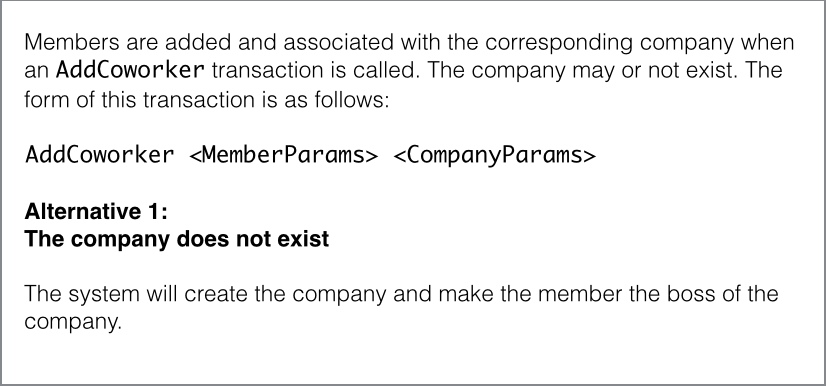
<p><img src="http://zamith.github.io/images/use-case.png" alt="use case" /></p>

<p>Notice that we have a main path and an alternative, which can also represent
what to do in case of error. Also, there is no reference to anything related to
the web, the use case level should be delivery mechanism agnostic. In other
words, it must work the same way regardless of being used on the web, desktop or
CLI.</p>

<h3>The test</h3>

<figure class='code'><figcaption><span></span></figcaption><div class="highlight"><table><tr><td class="gutter"><pre class="line-numbers"><span class='line-number'>1</span>
<span class='line-number'>2</span>
<span class='line-number'>3</span>
<span class='line-number'>4</span>
<span class='line-number'>5</span>
<span class='line-number'>6</span>
<span class='line-number'>7</span>
<span class='line-number'>8</span>
<span class='line-number'>9</span>
<span class='line-number'>10</span>
<span class='line-number'>11</span>
<span class='line-number'>12</span>
</pre></td><td class='code'><pre><code class='ruby'><span class='line'><span class="n">context</span> <span class="s2">&quot;the company does not exist&quot;</span> <span class="k">do</span>
</span><span class='line'>  <span class="n">it</span> <span class="s2">&quot;creates a member&quot;</span> <span class="k">do</span>
</span><span class='line'>    <span class="o">.</span><span class="n">.</span><span class="o">.</span>
</span><span class='line'>    <span class="n">adder</span> <span class="o">=</span> <span class="ss">Coworkers</span><span class="p">:</span><span class="ss">:CoworkerAdder</span><span class="o">.</span><span class="n">new</span>
</span><span class='line'>      <span class="ss">params</span><span class="p">:</span> <span class="n">params</span><span class="p">,</span>
</span><span class='line'>      <span class="ss">space</span><span class="p">:</span> <span class="n">default_space</span>
</span><span class='line'>
</span><span class='line'>    <span class="n">expect</span> <span class="p">{</span>
</span><span class='line'>      <span class="n">adder</span><span class="o">.</span><span class="n">add</span>
</span><span class='line'>    <span class="p">}</span><span class="o">.</span><span class="n">to</span> <span class="n">change</span><span class="p">{</span><span class="n">member_repo</span><span class="o">.</span><span class="n">all</span><span class="o">.</span><span class="n">size</span><span class="p">}</span><span class="o">.</span><span class="n">by</span><span class="p">(</span><span class="mi">1</span><span class="p">)</span>
</span><span class='line'>  <span class="k">end</span>
</span><span class='line'><span class="k">end</span>
</span></code></pre></td></tr></table></div></figure>


<p>Now we have a test for the behaviour we expect, we just need to let it guide us.</p>

<p><em>Side note: This test was not written all at once, I followed the <a href="http://butunclebob.com/ArticleS.UncleBob.TheThreeRulesOfTdd">three rules
of TDD</a> to get
here.</em></p>

<h3>The interactor</h3>

<p>The code to make this test pass (minus the private methods) is as follows:</p>

<figure class='code'><figcaption><span></span></figcaption><div class="highlight"><table><tr><td class="gutter"><pre class="line-numbers"><span class='line-number'>1</span>
<span class='line-number'>2</span>
<span class='line-number'>3</span>
<span class='line-number'>4</span>
<span class='line-number'>5</span>
<span class='line-number'>6</span>
<span class='line-number'>7</span>
<span class='line-number'>8</span>
<span class='line-number'>9</span>
<span class='line-number'>10</span>
<span class='line-number'>11</span>
<span class='line-number'>12</span>
<span class='line-number'>13</span>
<span class='line-number'>14</span>
<span class='line-number'>15</span>
<span class='line-number'>16</span>
<span class='line-number'>17</span>
</pre></td><td class='code'><pre><code class='ruby'><span class='line'><span class="k">class</span> <span class="nc">CoworkerAdder</span>
</span><span class='line'>  <span class="k">def</span> <span class="nf">initialize</span><span class="p">(</span><span class="ss">params</span><span class="p">:</span> <span class="kp">nil</span><span class="p">,</span> <span class="ss">space</span><span class="p">:</span> <span class="kp">nil</span><span class="p">)</span>
</span><span class='line'>    <span class="vi">@member_repo</span> <span class="o">=</span> <span class="no">Repository</span><span class="o">.</span><span class="n">for</span><span class="p">(</span><span class="ss">:member</span><span class="p">)</span>
</span><span class='line'>    <span class="vi">@company_repo</span> <span class="o">=</span> <span class="no">Repository</span><span class="o">.</span><span class="n">for</span><span class="p">(</span><span class="ss">:company</span><span class="p">)</span>
</span><span class='line'>    <span class="vi">@params</span> <span class="o">=</span> <span class="n">params</span>
</span><span class='line'>    <span class="vi">@space</span> <span class="o">=</span> <span class="n">space</span>
</span><span class='line'>    <span class="vi">@member</span> <span class="o">=</span> <span class="no">Member</span><span class="o">.</span><span class="n">new</span> <span class="n">member_params</span>
</span><span class='line'>  <span class="k">end</span>
</span><span class='line'>
</span><span class='line'>  <span class="k">def</span> <span class="nf">add</span>
</span><span class='line'>    <span class="k">if</span> <span class="n">member</span><span class="o">.</span><span class="n">valid?</span>
</span><span class='line'>      <span class="n">member</span><span class="o">.</span><span class="n">company_id</span> <span class="o">=</span> <span class="n">company</span><span class="o">.</span><span class="n">id</span>
</span><span class='line'>      <span class="n">member</span><span class="o">.</span><span class="n">space_id</span> <span class="o">=</span> <span class="n">space</span><span class="o">.</span><span class="n">id</span>
</span><span class='line'>      <span class="n">member_repo</span><span class="o">.</span><span class="n">save</span><span class="p">(</span><span class="n">member</span><span class="p">)</span><span class="o">.</span><span class="n">value</span>
</span><span class='line'>    <span class="k">end</span>
</span><span class='line'>  <span class="k">end</span>
</span><span class='line'><span class="o">.</span><span class="n">.</span><span class="o">.</span>
</span></code></pre></td></tr></table></div></figure>


<h1>The Interactor - step by step</h1>

<p>There are a lot of interesting bits of code in our interactor, and a lot of
decisions that were made. Let&#8217;s take a closer look at each of them.</p>

<h2>Repositories (Gateways)</h2>

<p>In order to abstract the persistence mechanism I decided to use the <a href="http://msdn.microsoft.com/en-us/library/ff649690.aspx">Repository
Pattern</a>, in which we
have repositories for each type of persistence mechanism we want to use and that
can be used interchangeably.</p>

<p>Sounds a lot like an interface? Well, it is, kind of&#8230; In Ruby we don&#8217;t have
interfaces, we just go ahead an use what we call a duck type.</p>

<p>Here&#8217;s an example of an in memory repository:</p>

<figure class='code'><figcaption><span></span></figcaption><div class="highlight"><table><tr><td class="gutter"><pre class="line-numbers"><span class='line-number'>1</span>
<span class='line-number'>2</span>
<span class='line-number'>3</span>
<span class='line-number'>4</span>
<span class='line-number'>5</span>
<span class='line-number'>6</span>
<span class='line-number'>7</span>
<span class='line-number'>8</span>
<span class='line-number'>9</span>
<span class='line-number'>10</span>
<span class='line-number'>11</span>
<span class='line-number'>12</span>
<span class='line-number'>13</span>
<span class='line-number'>14</span>
<span class='line-number'>15</span>
<span class='line-number'>16</span>
<span class='line-number'>17</span>
<span class='line-number'>18</span>
<span class='line-number'>19</span>
<span class='line-number'>20</span>
<span class='line-number'>21</span>
<span class='line-number'>22</span>
<span class='line-number'>23</span>
<span class='line-number'>24</span>
<span class='line-number'>25</span>
<span class='line-number'>26</span>
<span class='line-number'>27</span>
<span class='line-number'>28</span>
<span class='line-number'>29</span>
<span class='line-number'>30</span>
<span class='line-number'>31</span>
<span class='line-number'>32</span>
<span class='line-number'>33</span>
<span class='line-number'>34</span>
</pre></td><td class='code'><pre><code class='ruby'><span class='line'><span class="k">module</span> <span class="nn">Repositories</span>
</span><span class='line'>  <span class="k">module</span> <span class="nn">Members</span>
</span><span class='line'>    <span class="k">class</span> <span class="nc">Memory</span>
</span><span class='line'>      <span class="k">def</span> <span class="nf">initialize</span>
</span><span class='line'>        <span class="vi">@members</span> <span class="o">=</span> <span class="p">{}</span>
</span><span class='line'>        <span class="vi">@next_id</span> <span class="o">=</span> <span class="mi">1</span>
</span><span class='line'>      <span class="k">end</span>
</span><span class='line'>
</span><span class='line'>      <span class="k">def</span> <span class="nf">save</span><span class="p">(</span><span class="n">member</span><span class="p">)</span>
</span><span class='line'>        <span class="n">member</span><span class="o">.</span><span class="n">id</span> <span class="o">=</span> <span class="vi">@next_id</span>
</span><span class='line'>        <span class="vi">@members</span><span class="o">[</span><span class="vi">@next_id</span><span class="o">]</span> <span class="o">=</span> <span class="n">member</span>
</span><span class='line'>        <span class="vi">@next_id</span> <span class="o">+=</span> <span class="mi">1</span>
</span><span class='line'>        <span class="n">member</span>
</span><span class='line'>      <span class="k">end</span>
</span><span class='line'>
</span><span class='line'>      <span class="k">def</span> <span class="nf">all</span>
</span><span class='line'>        <span class="n">members</span>
</span><span class='line'>      <span class="k">end</span>
</span><span class='line'>
</span><span class='line'>      <span class="k">def</span> <span class="nf">first</span>
</span><span class='line'>        <span class="n">first_key</span> <span class="o">=</span> <span class="n">members</span><span class="o">.</span><span class="n">keys</span><span class="o">.</span><span class="n">sort</span><span class="o">.</span><span class="n">first</span>
</span><span class='line'>        <span class="n">members</span><span class="o">[</span><span class="n">first_key</span><span class="o">]</span>
</span><span class='line'>      <span class="k">end</span>
</span><span class='line'>
</span><span class='line'>      <span class="k">def</span> <span class="nf">last</span>
</span><span class='line'>        <span class="n">last_key</span> <span class="o">=</span> <span class="n">members</span><span class="o">.</span><span class="n">keys</span><span class="o">.</span><span class="n">sort</span><span class="o">.</span><span class="n">last</span>
</span><span class='line'>        <span class="n">members</span><span class="o">[</span><span class="n">last_key</span><span class="o">]</span>
</span><span class='line'>      <span class="k">end</span>
</span><span class='line'>
</span><span class='line'>      <span class="kp">private</span>
</span><span class='line'>      <span class="kp">attr_reader</span> <span class="ss">:members</span>
</span><span class='line'>    <span class="k">end</span>
</span><span class='line'>  <span class="k">end</span>
</span><span class='line'><span class="k">end</span>
</span></code></pre></td></tr></table></div></figure>


<p>What&#8217;s really relevant here is the object&#8217;s public API, it&#8217;s interface, the
<code>save(member)</code>, <code>all</code>, <code>first</code> and <code>last</code> methods, since they&#8217;re what defines a
valid repository for a member.</p>

<h3>The Repo Boss</h3>

<p>Someone, somewhere needs to know which repository to use for each entity or use
case (repositories do not need to exists in a 1-1 relation with entities, even
though most of the time they do). That someone is a very simple class I call
<code>Repository</code>, which tracks the registration of repositories:</p>

<figure class='code'><figcaption><span></span></figcaption><div class="highlight"><table><tr><td class="gutter"><pre class="line-numbers"><span class='line-number'>1</span>
<span class='line-number'>2</span>
<span class='line-number'>3</span>
<span class='line-number'>4</span>
<span class='line-number'>5</span>
<span class='line-number'>6</span>
<span class='line-number'>7</span>
<span class='line-number'>8</span>
<span class='line-number'>9</span>
<span class='line-number'>10</span>
<span class='line-number'>11</span>
<span class='line-number'>12</span>
<span class='line-number'>13</span>
</pre></td><td class='code'><pre><code class='ruby'><span class='line'><span class="k">class</span> <span class="nc">Repository</span>
</span><span class='line'>  <span class="k">def</span> <span class="nc">self</span><span class="o">.</span><span class="nf">register</span><span class="p">(</span><span class="n">type</span><span class="p">,</span> <span class="n">repo</span><span class="p">)</span>
</span><span class='line'>    <span class="n">repositories</span><span class="o">[</span><span class="n">type</span><span class="o">]</span> <span class="o">=</span> <span class="n">repo</span>
</span><span class='line'>  <span class="k">end</span>
</span><span class='line'>
</span><span class='line'>  <span class="k">def</span> <span class="nc">self</span><span class="o">.</span><span class="nf">for</span><span class="p">(</span><span class="n">type</span><span class="p">)</span>
</span><span class='line'>    <span class="n">repositories</span><span class="o">[</span><span class="n">type</span><span class="o">]</span>
</span><span class='line'>  <span class="k">end</span>
</span><span class='line'>
</span><span class='line'>  <span class="k">def</span> <span class="nc">self</span><span class="o">.</span><span class="nf">repositories</span>
</span><span class='line'>    <span class="vi">@_repos</span> <span class="o">||=</span> <span class="p">{}</span>
</span><span class='line'>  <span class="k">end</span>
</span><span class='line'><span class="k">end</span>
</span></code></pre></td></tr></table></div></figure>


<p>As you might have guessed, we then need to register the repositories we want.
That is very simple and very easy to hide behind some sort of configuration, but
here&#8217;s how it&#8217;s done:</p>

<figure class='code'><figcaption><span></span></figcaption><div class="highlight"><table><tr><td class="gutter"><pre class="line-numbers"><span class='line-number'>1</span>
<span class='line-number'>2</span>
<span class='line-number'>3</span>
<span class='line-number'>4</span>
<span class='line-number'>5</span>
<span class='line-number'>6</span>
<span class='line-number'>7</span>
</pre></td><td class='code'><pre><code class='ruby'><span class='line'><span class="nb">require</span> <span class="s1">&#39;repository&#39;</span>
</span><span class='line'><span class="nb">require</span> <span class="s1">&#39;repositories/members/memory&#39;</span>
</span><span class='line'><span class="nb">require</span> <span class="s1">&#39;repositories/companies/memory&#39;</span>
</span><span class='line'>
</span><span class='line'><span class="no">Repository</span><span class="o">.</span><span class="n">register</span> <span class="ss">:company</span><span class="p">,</span> <span class="ss">Repositories</span><span class="p">:</span><span class="ss">:Companies</span><span class="o">::</span><span class="no">Memory</span><span class="o">.</span><span class="n">new</span>
</span><span class='line'>
</span><span class='line'><span class="no">Repository</span><span class="o">.</span><span class="n">register</span> <span class="ss">:member</span><span class="p">,</span> <span class="ss">Repositories</span><span class="p">:</span><span class="ss">:Members</span><span class="o">::</span><span class="no">Memory</span><span class="o">.</span><span class="n">new</span>
</span></code></pre></td></tr></table></div></figure>


<p>After all this setup is complete, you can access repositories the way it is
shown in lines 3 and 4 of the interactor.</p>

<h2>Member Entity</h2>

<p>Entities should have a bunch of attributes and some methods that operate on
them, that enforce non app specific business rules.</p>

<p>A simple approach to it could be this:</p>

<figure class='code'><figcaption><span></span></figcaption><div class="highlight"><table><tr><td class="gutter"><pre class="line-numbers"><span class='line-number'>1</span>
<span class='line-number'>2</span>
<span class='line-number'>3</span>
<span class='line-number'>4</span>
<span class='line-number'>5</span>
<span class='line-number'>6</span>
<span class='line-number'>7</span>
<span class='line-number'>8</span>
<span class='line-number'>9</span>
<span class='line-number'>10</span>
<span class='line-number'>11</span>
</pre></td><td class='code'><pre><code class='ruby'><span class='line'><span class="k">class</span> <span class="nc">Member</span>
</span><span class='line'>  <span class="kp">attr_accessor</span> <span class="ss">:id</span><span class="p">,</span> <span class="ss">:company_id</span><span class="p">,</span> <span class="ss">:name</span><span class="p">,</span> <span class="ss">:email</span><span class="p">,</span>
</span><span class='line'>                <span class="ss">:phone_no</span><span class="p">,</span> <span class="ss">:boss</span><span class="p">,</span> <span class="ss">:observations</span><span class="p">,</span>
</span><span class='line'>                <span class="ss">:space_id</span><span class="p">,</span> <span class="ss">:created_at</span><span class="p">,</span> <span class="ss">:updated_at</span>
</span><span class='line'>
</span><span class='line'>  <span class="k">def</span> <span class="nf">initialize</span><span class="p">(</span><span class="n">attrs</span> <span class="o">=</span> <span class="p">{})</span>
</span><span class='line'>    <span class="n">attrs</span><span class="o">.</span><span class="n">each</span> <span class="k">do</span> <span class="o">|</span><span class="n">attr_name</span><span class="p">,</span> <span class="n">attr_value</span><span class="o">|</span>
</span><span class='line'>      <span class="n">public_send</span><span class="p">(</span><span class="s2">&quot;</span><span class="si">#{</span><span class="n">attr_name</span><span class="si">}</span><span class="s2">=&quot;</span><span class="p">,</span> <span class="n">attr_value</span><span class="p">)</span>
</span><span class='line'>    <span class="k">end</span>
</span><span class='line'>  <span class="k">end</span>
</span><span class='line'><span class="o">.</span><span class="n">.</span><span class="o">.</span>
</span></code></pre></td></tr></table></div></figure>


<p>There might be ways of doing this that are more elegant or clever, you could,
for instance, extract common attributes such as <code>id</code>, <code>created_at</code> and
<code>updated_at</code> (or you could not even store them here, if you feel they are to
&#8220;railsy&#8221;). For now this approach will suffice, though.</p>

<h2>Validations</h2>

<p>On line 10 of the interactor you can see the method <code>valid?</code> being called on the
member entity. The easiest way I could think of to implement validations was
this:</p>

<figure class='code'><figcaption><span></span></figcaption><div class="highlight"><table><tr><td class="gutter"><pre class="line-numbers"><span class='line-number'>1</span>
<span class='line-number'>2</span>
<span class='line-number'>3</span>
<span class='line-number'>4</span>
<span class='line-number'>5</span>
<span class='line-number'>6</span>
<span class='line-number'>7</span>
<span class='line-number'>8</span>
<span class='line-number'>9</span>
<span class='line-number'>10</span>
</pre></td><td class='code'><pre><code class='ruby'><span class='line'><span class="k">def</span> <span class="nf">valid?</span>
</span><span class='line'>  <span class="nb">name</span> <span class="o">&amp;&amp;</span> <span class="n">email</span>
</span><span class='line'><span class="k">end</span>
</span><span class='line'>
</span><span class='line'><span class="k">def</span> <span class="nf">errors</span>
</span><span class='line'>  <span class="n">error_messages</span> <span class="o">=</span> <span class="o">[]</span>
</span><span class='line'>  <span class="n">error_messages</span> <span class="o">&lt;&lt;</span> <span class="s2">&quot;missing name&quot;</span> <span class="k">unless</span> <span class="nb">name</span>
</span><span class='line'>  <span class="n">error_messages</span> <span class="o">&lt;&lt;</span> <span class="s2">&quot;missing email&quot;</span> <span class="k">unless</span> <span class="n">email</span>
</span><span class='line'>  <span class="no">ValidationErrors</span><span class="o">.</span><span class="n">new</span><span class="p">(</span><span class="n">error_messages</span><span class="p">)</span>
</span><span class='line'><span class="k">end</span>
</span></code></pre></td></tr></table></div></figure>


<p>That needs a tiny wrapper to be rails compliant, to which I called <code>ValidationErrors</code>.</p>

<figure class='code'><figcaption><span></span></figcaption><div class="highlight"><table><tr><td class="gutter"><pre class="line-numbers"><span class='line-number'>1</span>
<span class='line-number'>2</span>
<span class='line-number'>3</span>
<span class='line-number'>4</span>
<span class='line-number'>5</span>
<span class='line-number'>6</span>
<span class='line-number'>7</span>
<span class='line-number'>8</span>
<span class='line-number'>9</span>
<span class='line-number'>10</span>
<span class='line-number'>11</span>
<span class='line-number'>12</span>
<span class='line-number'>13</span>
</pre></td><td class='code'><pre><code class='ruby'><span class='line'><span class="k">class</span> <span class="nc">ValidationErrors</span>
</span><span class='line'>  <span class="k">def</span> <span class="nf">initialize</span><span class="p">(</span><span class="n">error_messages</span> <span class="o">=</span> <span class="o">[]</span><span class="p">)</span>
</span><span class='line'>    <span class="vi">@error_messages</span> <span class="o">=</span> <span class="n">error_messages</span>
</span><span class='line'>  <span class="k">end</span>
</span><span class='line'>
</span><span class='line'>  <span class="k">def</span> <span class="nf">full_messages</span>
</span><span class='line'>    <span class="vi">@error_messages</span>
</span><span class='line'>  <span class="k">end</span>
</span><span class='line'>
</span><span class='line'>  <span class="k">def</span> <span class="nf">size</span>
</span><span class='line'>    <span class="vi">@error_messages</span><span class="o">.</span><span class="n">size</span>
</span><span class='line'>  <span class="k">end</span>
</span><span class='line'><span class="k">end</span>
</span></code></pre></td></tr></table></div></figure>


<p>If you have no problems with including <code>ActiveModel</code>, you can add it as a gem
and do simply this:</p>

<figure class='code'><figcaption><span></span></figcaption><div class="highlight"><table><tr><td class="gutter"><pre class="line-numbers"><span class='line-number'>1</span>
<span class='line-number'>2</span>
<span class='line-number'>3</span>
<span class='line-number'>4</span>
<span class='line-number'>5</span>
</pre></td><td class='code'><pre><code class='ruby'><span class='line'><span class="k">class</span> <span class="nc">Member</span>
</span><span class='line'>  <span class="kp">include</span> <span class="ss">ActiveModel</span><span class="p">:</span><span class="ss">:Validations</span>
</span><span class='line'>
</span><span class='line'>  <span class="n">validates_presence_of</span> <span class="ss">:name</span><span class="p">,</span> <span class="ss">:email</span>
</span><span class='line'><span class="k">end</span>
</span></code></pre></td></tr></table></div></figure>


<p>As with any good engineering problem, there is no correct answer. There are
trade offs in both solutions, one may take longer to implement, but is small,
the other has everything you need and probably a bunch of other stuff as well.
Pick your poison.</p>

<h3>Database dependent validations</h3>

<p>What about validations that depend on the database, such as validating
uniqueness, you might ask. The easier way would be to add that validation on the
repository, but that would spread business rules for an entity across multiple
files and we don&#8217;t want that.</p>

<p>The solution we came up with is to have a generic <code>unique?</code> method on the
repository and calling in from the entity:</p>

<figure class='code'><figcaption><span></span></figcaption><div class="highlight"><table><tr><td class="gutter"><pre class="line-numbers"><span class='line-number'>1</span>
<span class='line-number'>2</span>
<span class='line-number'>3</span>
<span class='line-number'>4</span>
</pre></td><td class='code'><pre><code class='ruby'><span class='line'><span class="k">def</span> <span class="nf">valid?</span>
</span><span class='line'>  <span class="k">super</span> <span class="o">&amp;&amp;</span>
</span><span class='line'>  <span class="n">repo</span><span class="o">.</span><span class="n">unique?</span><span class="p">(</span><span class="nb">self</span><span class="p">,</span> <span class="ss">:name</span><span class="p">)</span>
</span><span class='line'><span class="k">end</span>
</span></code></pre></td></tr></table></div></figure>


<p>The implementation of the <code>unique?</code> method for the in memory repository is as follows:</p>

<figure class='code'><figcaption><span></span></figcaption><div class="highlight"><table><tr><td class="gutter"><pre class="line-numbers"><span class='line-number'>1</span>
<span class='line-number'>2</span>
<span class='line-number'>3</span>
<span class='line-number'>4</span>
<span class='line-number'>5</span>
<span class='line-number'>6</span>
</pre></td><td class='code'><pre><code class='ruby'><span class='line'><span class="k">def</span> <span class="nf">unique?</span><span class="p">(</span><span class="n">object</span><span class="p">,</span> <span class="n">attr_name</span><span class="p">)</span>
</span><span class='line'>  <span class="vi">@members</span><span class="o">.</span><span class="n">values</span><span class="o">.</span><span class="n">none?</span> <span class="k">do</span> <span class="o">|</span><span class="n">member</span><span class="o">|</span>
</span><span class='line'>    <span class="n">object</span><span class="o">.</span><span class="n">id</span> <span class="o">!=</span> <span class="n">member</span><span class="o">.</span><span class="n">id</span> <span class="o">&amp;&amp;</span>
</span><span class='line'>      <span class="n">member</span><span class="o">.</span><span class="n">public_send</span><span class="p">(</span><span class="n">attr_name</span><span class="p">)</span> <span class="o">==</span> <span class="n">object</span><span class="o">.</span><span class="n">public_send</span><span class="p">(</span><span class="n">attr_name</span><span class="p">)</span>
</span><span class='line'>  <span class="k">end</span>
</span><span class='line'><span class="k">end</span>
</span></code></pre></td></tr></table></div></figure>


<h2>Crossing Boundaries</h2>

<p>A very important part of this whole architecture is crossing layer boundaries,
especially the boundary that separates the application from the delivery
mechanism. You want to make sure not to pass entities around, since they come
with a bunch of business rules attached, instead you should pass value objects,
or plain data structures.</p>

<p>I prefer to pass data structures, but have the serialization from entity to data
abstracted on a method called <code>value</code>, which allows for the interactor to do
what it is doing on line 14:</p>

<figure class='code'><figcaption><span></span></figcaption><div class="highlight"><table><tr><td class="gutter"><pre class="line-numbers"><span class='line-number'>1</span>
</pre></td><td class='code'><pre><code class='ruby'><span class='line'><span class="n">member_repo</span><span class="o">.</span><span class="n">save</span><span class="p">(</span><span class="n">member</span><span class="p">)</span><span class="o">.</span><span class="n">value</span>
</span></code></pre></td></tr></table></div></figure>


<p>What does that <code>value</code> do, you might ask. It simply calls a serializer.</p>

<h2>Serializers</h2>

<p>The value of an entity can be defined as follows:</p>

<figure class='code'><figcaption><span></span></figcaption><div class="highlight"><table><tr><td class="gutter"><pre class="line-numbers"><span class='line-number'>1</span>
<span class='line-number'>2</span>
<span class='line-number'>3</span>
</pre></td><td class='code'><pre><code class='ruby'><span class='line'><span class="k">def</span> <span class="nf">value</span>
</span><span class='line'>  <span class="ss">Serializers</span><span class="p">:</span><span class="ss">:Raw</span><span class="o">.</span><span class="n">new</span><span class="p">(</span><span class="nb">self</span><span class="p">)</span><span class="o">.</span><span class="n">serialize</span>
</span><span class='line'><span class="k">end</span>
</span></code></pre></td></tr></table></div></figure>


<p>It takes an object (in this case an entity), and serializes it&#8217;s attributes,
which, by default, it assumes come from an <code>attributes</code> method. The <code>serialize</code>
method can handle both an hash with all the attributes, in which case it just
returns it, or an array with just their names, from where it can create the hash
with the names pointing to the values.</p>

<figure class='code'><figcaption><span></span></figcaption><div class="highlight"><table><tr><td class="gutter"><pre class="line-numbers"><span class='line-number'>1</span>
<span class='line-number'>2</span>
<span class='line-number'>3</span>
<span class='line-number'>4</span>
</pre></td><td class='code'><pre><code class='ruby'><span class='line'><span class="k">def</span> <span class="nf">serialize</span><span class="p">(</span><span class="n">attrs_method</span><span class="p">:</span> <span class="ss">:attributes</span><span class="p">)</span>
</span><span class='line'>  <span class="n">attributes</span> <span class="o">=</span> <span class="n">object</span><span class="o">.</span><span class="n">public_send</span><span class="p">(</span><span class="n">attrs_method</span><span class="p">)</span>
</span><span class='line'>  <span class="n">get_real_attributes_from</span> <span class="n">attributes</span>
</span><span class='line'><span class="k">end</span>
</span></code></pre></td></tr></table></div></figure>


<h2>ActiveRecord Repository</h2>

<p>We&#8217;ve already talked about repositories and that they are duck types for a
gateway&#8217;s logical interface, you even saw an implementation in memory. But since
a very common pattern is to use Rails with ActiveRecord, I feel like I should
show how an AR implementation looks like.</p>

<figure class='code'><figcaption><span></span></figcaption><div class="highlight"><table><tr><td class="gutter"><pre class="line-numbers"><span class='line-number'>1</span>
<span class='line-number'>2</span>
<span class='line-number'>3</span>
<span class='line-number'>4</span>
<span class='line-number'>5</span>
<span class='line-number'>6</span>
<span class='line-number'>7</span>
<span class='line-number'>8</span>
<span class='line-number'>9</span>
<span class='line-number'>10</span>
<span class='line-number'>11</span>
<span class='line-number'>12</span>
<span class='line-number'>13</span>
<span class='line-number'>14</span>
<span class='line-number'>15</span>
<span class='line-number'>16</span>
<span class='line-number'>17</span>
<span class='line-number'>18</span>
<span class='line-number'>19</span>
</pre></td><td class='code'><pre><code class='ruby'><span class='line'><span class="nb">require</span> <span class="s1">&#39;active_record&#39;</span>
</span><span class='line'>
</span><span class='line'><span class="k">module</span> <span class="nn">Repositories</span>
</span><span class='line'>  <span class="k">module</span> <span class="nn">Members</span>
</span><span class='line'>    <span class="k">class</span> <span class="nc">ActiveRecord</span>
</span><span class='line'>      <span class="o">.</span><span class="n">.</span><span class="o">.</span>
</span><span class='line'>
</span><span class='line'>      <span class="k">def</span> <span class="nf">last</span>
</span><span class='line'>        <span class="o">::</span><span class="no">Member</span><span class="o">.</span><span class="n">new</span><span class="p">(</span><span class="no">Member</span><span class="o">.</span><span class="n">last</span><span class="o">.</span><span class="n">value</span><span class="p">)</span>
</span><span class='line'>      <span class="k">end</span>
</span><span class='line'>
</span><span class='line'>      <span class="k">class</span> <span class="nc">Member</span> <span class="o">&lt;</span> <span class="o">::</span><span class="ss">ActiveRecord</span><span class="p">:</span><span class="ss">:Base</span>
</span><span class='line'>        <span class="k">def</span> <span class="nf">value</span>
</span><span class='line'>          <span class="ss">Serializers</span><span class="p">:</span><span class="ss">:Raw</span><span class="o">.</span><span class="n">new</span><span class="p">(</span><span class="nb">self</span><span class="p">)</span><span class="o">.</span><span class="n">serialize</span>
</span><span class='line'>        <span class="k">end</span>
</span><span class='line'>      <span class="k">end</span>
</span><span class='line'>    <span class="k">end</span>
</span><span class='line'>  <span class="k">end</span>
</span><span class='line'><span class="k">end</span>
</span></code></pre></td></tr></table></div></figure>


<p>There are a few things of note here. One of the most obvious is that we define
the &#8220;model&#8221;, i.e. the class that inherits from AR::Base, as an inner class of
the repository. We do this because we don&#8217;t (and shouldn&#8217;t) need to use it
anywhere else, in fact, all references to AR should be encapsulated by the AR
repository.</p>

<p>This leads us to the next thing of note, the fact that we do not return nor an
AR object, nor an AR relation. The interactor (which will be calling this) only
knows how to deal with entities, so we get the value from the AR object, using a
serializer, and wrap it in an entity. All references to AR are gone.</p>

<h1>Connecting with Rails</h1>

<p>Now we have a working application (hopefully), we just need a way to deliver it
to our clients. We can do that using a CLI, web app, desktop app, REST API, or
any other way we so choose. As an example I chose to deliver it as a Rails app.</p>

<p>There are basically two steps in making this work with a Rails app:</p>

<ol>
<li>Deploy our core application as a gem</li>
<li>Require, configure and use it from the rails app</li>
</ol>


<h2>The gem</h2>

<p>I&#8217;ll not get into details on how to create gem, as that goes way beyond the
scope of this article which is already extensive, there are just a few &#8220;tips&#8221; to
make it easier to use.</p>

<p>A good way to make your gem painless to use is to autoload most of the stuff
when it is required. So your main file should look somewhat like this:</p>

<figure class='code'><figcaption><span></span></figcaption><div class="highlight"><table><tr><td class="gutter"><pre class="line-numbers"><span class='line-number'>1</span>
<span class='line-number'>2</span>
<span class='line-number'>3</span>
<span class='line-number'>4</span>
<span class='line-number'>5</span>
<span class='line-number'>6</span>
<span class='line-number'>7</span>
<span class='line-number'>8</span>
<span class='line-number'>9</span>
<span class='line-number'>10</span>
<span class='line-number'>11</span>
<span class='line-number'>12</span>
<span class='line-number'>13</span>
<span class='line-number'>14</span>
<span class='line-number'>15</span>
<span class='line-number'>16</span>
</pre></td><td class='code'><pre><code class='ruby'><span class='line'><span class="nb">require</span> <span class="s2">&quot;cohive/core/version&quot;</span>
</span><span class='line'>
</span><span class='line'><span class="nb">autoload</span> <span class="ss">:Repository</span><span class="p">,</span> <span class="s2">&quot;repository&quot;</span>
</span><span class='line'>
</span><span class='line'><span class="k">module</span> <span class="nn">Coworkers</span>
</span><span class='line'>  <span class="nb">autoload</span> <span class="ss">:Company</span><span class="p">,</span> <span class="s2">&quot;cohive/core/coworkers/entities/company&quot;</span>
</span><span class='line'>  <span class="nb">autoload</span> <span class="ss">:Member</span><span class="p">,</span> <span class="s2">&quot;cohive/core/coworkers/entities/member&quot;</span>
</span><span class='line'>
</span><span class='line'>  <span class="nb">autoload</span> <span class="ss">:CoworkerAdder</span><span class="p">,</span>
</span><span class='line'>    <span class="s2">&quot;cohive/core/coworkers/interactors/coworker_adder&quot;</span>
</span><span class='line'><span class="k">end</span>
</span><span class='line'>
</span><span class='line'><span class="k">module</span> <span class="nn">Serializers</span>
</span><span class='line'>  <span class="nb">autoload</span> <span class="ss">:Raw</span><span class="p">,</span> <span class="s2">&quot;serializers/raw&quot;</span>
</span><span class='line'><span class="k">end</span>
</span></code></pre></td></tr></table></div></figure>


<p>Another must have for a gem is to be configurable, I do it like this:</p>

<figure class='code'><figcaption><span></span></figcaption><div class="highlight"><table><tr><td class="gutter"><pre class="line-numbers"><span class='line-number'>1</span>
<span class='line-number'>2</span>
<span class='line-number'>3</span>
<span class='line-number'>4</span>
<span class='line-number'>5</span>
<span class='line-number'>6</span>
<span class='line-number'>7</span>
<span class='line-number'>8</span>
<span class='line-number'>9</span>
<span class='line-number'>10</span>
<span class='line-number'>11</span>
<span class='line-number'>12</span>
<span class='line-number'>13</span>
<span class='line-number'>14</span>
<span class='line-number'>15</span>
<span class='line-number'>16</span>
<span class='line-number'>17</span>
<span class='line-number'>18</span>
<span class='line-number'>19</span>
<span class='line-number'>20</span>
<span class='line-number'>21</span>
</pre></td><td class='code'><pre><code class='ruby'><span class='line'><span class="k">module</span> <span class="nn">Cohive</span>
</span><span class='line'>  <span class="k">module</span> <span class="nn">Core</span>
</span><span class='line'>    <span class="k">def</span> <span class="nc">self</span><span class="o">.</span><span class="nf">configure</span>
</span><span class='line'>      <span class="vi">@repository_config</span> <span class="o">=</span> <span class="no">RepositoryConfig</span><span class="o">.</span><span class="n">new</span>
</span><span class='line'>      <span class="k">yield</span> <span class="nb">self</span>
</span><span class='line'>      <span class="n">post_config</span>
</span><span class='line'>    <span class="k">end</span>
</span><span class='line'>
</span><span class='line'>    <span class="k">def</span> <span class="nc">self</span><span class="o">.</span><span class="nf">repository</span><span class="o">=</span><span class="p">(</span><span class="n">repo_type</span><span class="p">)</span>
</span><span class='line'>      <span class="vi">@repository_config</span><span class="o">.</span><span class="n">default_repo_type</span> <span class="o">=</span> <span class="n">repo_type</span>
</span><span class='line'>    <span class="k">end</span>
</span><span class='line'>
</span><span class='line'>    <span class="k">def</span> <span class="nc">self</span><span class="o">.</span><span class="nf">repository</span>
</span><span class='line'>      <span class="vi">@repository_config</span>
</span><span class='line'>    <span class="k">end</span>
</span><span class='line'>
</span><span class='line'>    <span class="k">def</span> <span class="nc">self</span><span class="o">.</span><span class="nf">post_config</span>
</span><span class='line'>      <span class="vi">@repository_config</span><span class="o">.</span><span class="n">load_repos</span>
</span><span class='line'>    <span class="k">end</span>
</span><span class='line'>  <span class="k">end</span>
</span><span class='line'><span class="k">end</span>
</span></code></pre></td></tr></table></div></figure>


<p>With this configuration options I allow the delivery mechanism to choose which
repository to use for each of the repositories that are available.</p>

<h2>The Rails app</h2>

<p>Using the gem in the Rails app is even simpler, you just include it on the Gemfile:</p>

<figure class='code'><figcaption><span></span></figcaption><div class="highlight"><table><tr><td class="gutter"><pre class="line-numbers"><span class='line-number'>1</span>
</pre></td><td class='code'><pre><code class='ruby'><span class='line'><span class="n">gem</span> <span class="s1">&#39;cohive-core&#39;</span><span class="p">,</span> <span class="ss">path</span><span class="p">:</span> <span class="s2">&quot;../cohive-core&quot;</span><span class="p">,</span> <span class="nb">require</span><span class="p">:</span> <span class="kp">false</span>
</span></code></pre></td></tr></table></div></figure>


<p>Require and configure it:</p>

<figure class='code'><figcaption><span></span></figcaption><div class="highlight"><table><tr><td class="gutter"><pre class="line-numbers"><span class='line-number'>1</span>
<span class='line-number'>2</span>
<span class='line-number'>3</span>
<span class='line-number'>4</span>
</pre></td><td class='code'><pre><code class='ruby'><span class='line'><span class="nb">require</span> <span class="s1">&#39;cohive/core&#39;</span>
</span><span class='line'><span class="ss">Cohive</span><span class="p">:</span><span class="ss">:Core</span><span class="o">.</span><span class="n">configure</span> <span class="k">do</span> <span class="o">|</span><span class="n">config</span><span class="o">|</span>
</span><span class='line'>  <span class="n">config</span><span class="o">.</span><span class="n">repository</span> <span class="o">=</span> <span class="ss">:active_record</span>
</span><span class='line'><span class="k">end</span>
</span></code></pre></td></tr></table></div></figure>


<p>And finally, use it:</p>

<figure class='code'><figcaption><span></span></figcaption><div class="highlight"><table><tr><td class="gutter"><pre class="line-numbers"><span class='line-number'>1</span>
<span class='line-number'>2</span>
<span class='line-number'>3</span>
<span class='line-number'>4</span>
<span class='line-number'>5</span>
<span class='line-number'>6</span>
<span class='line-number'>7</span>
</pre></td><td class='code'><pre><code class='ruby'><span class='line'><span class="k">def</span> <span class="nf">create</span>
</span><span class='line'>  <span class="n">adder</span> <span class="o">=</span> <span class="ss">Coworkers</span><span class="p">:</span><span class="ss">:CoworkerAdder</span><span class="o">.</span><span class="n">new</span> <span class="ss">params</span><span class="p">:</span> <span class="n">member_params</span><span class="p">,</span>
</span><span class='line'>                                       <span class="ss">space</span><span class="p">:</span> <span class="n">current_space</span>
</span><span class='line'>  <span class="k">if</span> <span class="n">adder</span><span class="o">.</span><span class="n">add</span>
</span><span class='line'>    <span class="n">flash</span><span class="o">[</span><span class="ss">:notice</span><span class="o">]</span> <span class="o">=</span> <span class="n">t</span><span class="p">(</span><span class="s1">&#39;coworkers.member.flash.added_success&#39;</span><span class="p">)</span>
</span><span class='line'>  <span class="o">.</span><span class="n">.</span><span class="o">.</span>
</span><span class='line'><span class="k">end</span>
</span></code></pre></td></tr></table></div></figure>


<p>As simple as that.</p>

<h1>Conclusion</h1>

<p>I truly believe this is a great way to build applications, and even though some
of my solutions might have room for improvement, the overall architecture and
underlying ideas are very mature and should definitely be taken into
consideration.</p>

<p>Here&#8217;s a recap of the main ideas covered in this article:</p>

<ul>
<li>The application should not depend on the delivery mechanism or database, those are details</li>
<li>The application&#8217;s functionality should be driven by use cases</li>
<li>The application&#8217;s design should be driven by tests</li>
</ul>


<p>Everything that follows is a consequence of this.</p>

<p>A nice side effect of using this architecture is that there is no need to load
entire frameworks such as rails, or using a real database to run your unit tests
(you might want to do integration and system tests, but that&#8217;s for another day)
which means they are fast.</p>

<p>Here&#8217;s the tests for the service that does the same as the interactor, but from the rails app:</p>

<p><img src="http://zamith.github.io/images/rails-tests.png" alt="rails tests" /></p>

<p>Notice that it takes 3.96s to run the tests. Now for the interactor with the clean architecture:</p>

<p><img src="http://zamith.github.io/images/clean-tests.png" alt="clean tests" /></p>

<p>Notice that I&#8217;ve added more tests and yet it takes only 0.54s to run them all.
It&#8217;s an 86.4% improvement in testing time! When doing TDD you should be running
your test every 30s or so, that&#8217;s a gain of approximately 54 minutes per work
day.</p>

<h2>Relevant Links</h2>

<ul>
<li><a href="http://cleancoders.com/codecast/clean-code-episode-7/show">Architecture, Use Cases and High Level Design</a> by Uncle Bob Martin</li>
<li><a href="http://www.youtube.com/watch?v=yTkzNHF6rMs">Boudaries</a> by Gary Bernhardt</li>
<li><a href="https://groups.google.com/forum/#!forum/clean-code-discussion">Clean Coders Discussion Board</a></li>
<li><a href="http://alistair.cockburn.us/Hexagonal+architecture">Ports and Adapters</a> by Alistair Cockburn</li>
<li><a href="http://victorsavkin.com/post/42542190528/hexagonal-architecture-for-rails-developers">Hexagonal Architecture for Rails Developers</a> by Victor Savkin</li>
<li><a href="http://www.youtube.com/watch?v=CGN4RFkhH2M">Hexagonal Rails</a> by Matt Wynne</li>
</ul>

]]></content>
  </entry>
  
  <entry>
    <title type="html"><![CDATA[Random Tip: Diffing like a pro]]></title>
    <link href="http://zamith.github.io/blog/2013/12/02/random-tip-1/"/>
    <updated>2013-12-02T00:25:00+00:00</updated>
    <id>http://zamith.github.io/blog/2013/12/02/random-tip-1</id>
    <content type="html"><![CDATA[<p>Have you ever wanted to diff the HTML generated by your local server and the one
you have on production? Probably not. But here’s how to do it.</p>

<pre><code>diff -u &lt;(curl http://example.com/xpto) &lt;(curl localhost:3000/xpto)
</code></pre>
]]></content>
  </entry>
  
  <entry>
    <title type="html"><![CDATA[How, what and when to test]]></title>
    <link href="http://zamith.github.io/blog/2013/11/17/how-what-and-when-to-test/"/>
    <updated>2013-11-17T19:59:00+00:00</updated>
    <id>http://zamith.github.io/blog/2013/11/17/how-what-and-when-to-test</id>
    <content type="html"><![CDATA[<p>Testing is hard.</p>

<p>It&#8217;s not that it&#8217;s hard to write tests, but they&#8217;re hard to get right. It all
starts with a little bit of tight coupling and a mock or two in the wrong place,
but it quickly scales to a huge and brittle test suite.</p>

<p>At this point your tests fail with every little change to the code base, they
take forever to run and the whole development team feels bad about them, blaming
them for every problem.</p>

<p>The first time you try to add TDD to your team&#8217;s process it is very easy to dig
yourself into this kind of hole, where your test suite adds no confidence,
design feedback nor team velocity. This will usually happen due to a lack of
understanding of the TDD philosophy and lack of experience writing tests.
Believe me, I&#8217;ve been there.</p>

<p>The worst thing you can do when facing such a situation is to blame it on TDD
and discard it completely. It is great and it definitely works, but if you have
no experience with it, you might want to ease your way into it.</p>

<p>So, let&#8217;s break TDD down into three major goals</p>

<ol>
<li>Confidence in your system</li>
<li>Design feedback</li>
<li>Team velocity</li>
</ol>


<p>The first we&#8217;ll try to get is confidence, then feedback and velocity will
hopefully take care of itself. In order to do that, I came up with this chart:</p>

<p><img src="http://zamith.github.io/images/test-quadrants.png" alt="test-quadrants" /></p>

<p>The <strong>top left quadrant</strong> is the simplest to implement on a team, you do high level
acceptance or integration tests on the critical paths of your app, after the
features are written. The goal is that if any of these tests fails, you&#8217;re app is
not usable. This is a good way to start adding tests to an existing code base.</p>

<p>The <strong>bottom left quadrant</strong> builds on top of the first, but adds confidence by
adding some unit tests to critical algorithms in your app. The confidence you gain
is that if a big feature fails, you have a finer grained knowledge of where the
error might come from.</p>

<p>On the <strong>top right quadrant</strong> we start writing tests first, which will (if done
correctly) provide bigger design feedback and ultimately generate an overall
better code base. However, this is the time it starts to get harder, so your team will
really have to be on board with this, or else it just won&#8217;t work.</p>

<p>On the <strong>bottom right quadrant</strong> we are writing both acceptance/integration and
unit tests for the critical paths of our app before the code that makes them
pass (one test at the time, obviously), we are on a good way to having TDD at
it&#8217;s finest.</p>

<p>After you&#8217;ve nailed all of these quadrants, it&#8217;s time to go full blown TDD.</p>

<h3>Takeaways</h3>

<p>One thing to keep in mind though is that there is <strong>no silver bullet</strong> and this is
<strong>not</strong> a religion.</p>

<p>TDD works great in a lot of situations, but it may not be fit for others, just
give it a fair chance and weight the pros and cons on each situation. If after
that you feel TDD is slowing you down, consider dropping it.</p>
]]></content>
  </entry>
  
  <entry>
    <title type="html"><![CDATA[Observer pattern]]></title>
    <link href="http://zamith.github.io/blog/2013/10/06/observer-pattern/"/>
    <updated>2013-10-06T20:48:00+01:00</updated>
    <id>http://zamith.github.io/blog/2013/10/06/observer-pattern</id>
    <content type="html"><![CDATA[<p>I like to think of the observer pattern as <a href="http://zamith.github.io/blog/2013/10/06/dependency-injection/">dependency injection</a> on steroids, the difference being that with
the latter (taking off from the example on the linked article) you need to call
the <code>store</code> method on the database, and therefore you must know there is one.
As with observers you don&#8217;t care if there is a database or not.</p>

<p>The parser example would be something like:</p>

<figure class='code'><figcaption><span></span></figcaption><div class="highlight"><table><tr><td class="gutter"><pre class="line-numbers"><span class='line-number'>1</span>
<span class='line-number'>2</span>
<span class='line-number'>3</span>
<span class='line-number'>4</span>
<span class='line-number'>5</span>
<span class='line-number'>6</span>
<span class='line-number'>7</span>
<span class='line-number'>8</span>
<span class='line-number'>9</span>
<span class='line-number'>10</span>
<span class='line-number'>11</span>
<span class='line-number'>12</span>
<span class='line-number'>13</span>
<span class='line-number'>14</span>
<span class='line-number'>15</span>
<span class='line-number'>16</span>
<span class='line-number'>17</span>
<span class='line-number'>18</span>
<span class='line-number'>19</span>
<span class='line-number'>20</span>
<span class='line-number'>21</span>
<span class='line-number'>22</span>
<span class='line-number'>23</span>
<span class='line-number'>24</span>
<span class='line-number'>25</span>
<span class='line-number'>26</span>
<span class='line-number'>27</span>
<span class='line-number'>28</span>
</pre></td><td class='code'><pre><code class='ruby'><span class='line'><span class="nb">require</span> <span class="s1">&#39;observer&#39;</span>
</span><span class='line'>
</span><span class='line'><span class="k">class</span> <span class="nc">DB</span>
</span><span class='line'>  <span class="k">def</span> <span class="nf">initialize</span><span class="p">(</span><span class="n">consumer</span><span class="p">)</span>
</span><span class='line'>    <span class="n">consumer</span><span class="o">.</span><span class="n">add_observer</span><span class="p">(</span><span class="nb">self</span><span class="p">)</span>
</span><span class='line'>  <span class="k">end</span>
</span><span class='line'>
</span><span class='line'>  <span class="k">def</span> <span class="nf">update</span><span class="p">(</span><span class="n">data</span><span class="p">)</span>
</span><span class='line'>    <span class="nb">self</span><span class="o">.</span><span class="n">store</span><span class="p">(</span><span class="n">data</span><span class="p">)</span>
</span><span class='line'>  <span class="k">end</span>
</span><span class='line'>
</span><span class='line'>  <span class="o">.</span><span class="n">.</span><span class="o">.</span>
</span><span class='line'><span class="k">end</span>
</span><span class='line'>
</span><span class='line'><span class="k">class</span> <span class="nc">Consumer</span>
</span><span class='line'>  <span class="kp">include</span> <span class="no">Observable</span>
</span><span class='line'>  <span class="kp">attr_accessor</span> <span class="ss">:parser</span>
</span><span class='line'>
</span><span class='line'>  <span class="k">def</span> <span class="nf">initialize</span><span class="p">(</span><span class="ss">parser</span><span class="p">:</span> <span class="no">XMLParser</span><span class="p">)</span>
</span><span class='line'>    <span class="vi">@parser</span> <span class="o">=</span> <span class="n">parser</span>
</span><span class='line'>  <span class="k">end</span>
</span><span class='line'>
</span><span class='line'>  <span class="k">def</span> <span class="nf">consume</span><span class="p">(</span><span class="n">data</span><span class="p">)</span>
</span><span class='line'>    <span class="n">parsed_data</span> <span class="o">=</span> <span class="n">parser</span><span class="o">.</span><span class="n">parse</span><span class="p">(</span><span class="n">data</span><span class="p">)</span>
</span><span class='line'>    <span class="n">changed</span>
</span><span class='line'>    <span class="n">notify_observers</span><span class="p">(</span><span class="n">parsed_data</span><span class="p">)</span>
</span><span class='line'>  <span class="k">end</span>
</span><span class='line'><span class="k">end</span>
</span></code></pre></td></tr></table></div></figure>


<p>Here the database is observing the consumer, and when it has any new parsed
data, the DB gets notified and acts accordingly. If there is no database, the
consumer goes on with it&#8217;s business and nothing else happens, but there can be
one, two or more databases, loggers, etc, listening and performing actions when the
data is parsed.</p>

<p>Observer is a library that comes bundled with ruby, but there are others you can
use, such as:</p>

<ul>
<li><a href="https://github.com/krisleech/wisper-async">wisper-async</a></li>
<li><a href="https://github.com/atomicobject/publisher">publisher</a></li>
</ul>


<p>Rails had it&#8217;s own observers you could use, they were removed from the core in
version 4.0, but you can still use them as a gem.</p>

<ul>
<li><a href="https://github.com/rails/rails-observers">rails-observers</a></li>
</ul>


<p>The observer pattern is to a certain extent similar to javascript&#8217;s events and as
them, it can make your code really hard to understand and even debug, but used at
the correct time and place is a very powerful tool. Use it wisely.</p>
]]></content>
  </entry>
  
  <entry>
    <title type="html"><![CDATA[Dependency Injection]]></title>
    <link href="http://zamith.github.io/blog/2013/10/06/dependency-injection/"/>
    <updated>2013-10-06T00:18:00+01:00</updated>
    <id>http://zamith.github.io/blog/2013/10/06/dependency-injection</id>
    <content type="html"><![CDATA[<p>Imagine you have a class which gets XML data, parses it and then stores the
parsed data on a database. You could very well write it like this:</p>

<figure class='code'><figcaption><span></span></figcaption><div class="highlight"><table><tr><td class="gutter"><pre class="line-numbers"><span class='line-number'>1</span>
<span class='line-number'>2</span>
<span class='line-number'>3</span>
<span class='line-number'>4</span>
<span class='line-number'>5</span>
<span class='line-number'>6</span>
</pre></td><td class='code'><pre><code class='ruby'><span class='line'><span class="k">class</span> <span class="nc">Consumer</span>
</span><span class='line'>  <span class="k">def</span> <span class="nf">consume</span><span class="p">(</span><span class="n">data</span><span class="p">)</span>
</span><span class='line'>    <span class="n">parsed_data</span> <span class="o">=</span> <span class="no">XMLParser</span><span class="o">.</span><span class="n">parse</span><span class="p">(</span><span class="n">data</span><span class="p">)</span>
</span><span class='line'>    <span class="no">DB</span><span class="o">.</span><span class="n">store</span><span class="p">(</span><span class="n">parsed_data</span><span class="p">)</span>
</span><span class='line'>  <span class="k">end</span>
</span><span class='line'><span class="k">end</span>
</span></code></pre></td></tr></table></div></figure>


<p>There is (at least) one big problem with this approach, and it will manifest
itself when you want to support another data format, such as JSON. The Consumer
class is tightly coupled with the XMLParser, and therefore it&#8217;s hard to add
other parsers, so we need to decouple them. We&#8217;re
going to do that using a technique called Dependency Injection, like so:</p>

<figure class='code'><figcaption><span></span></figcaption><div class="highlight"><table><tr><td class="gutter"><pre class="line-numbers"><span class='line-number'>1</span>
<span class='line-number'>2</span>
<span class='line-number'>3</span>
<span class='line-number'>4</span>
<span class='line-number'>5</span>
<span class='line-number'>6</span>
<span class='line-number'>7</span>
<span class='line-number'>8</span>
<span class='line-number'>9</span>
<span class='line-number'>10</span>
<span class='line-number'>11</span>
<span class='line-number'>12</span>
</pre></td><td class='code'><pre><code class='ruby'><span class='line'><span class="k">class</span> <span class="nc">Consumer</span>
</span><span class='line'>  <span class="kp">attr_accessor</span> <span class="ss">:parser</span>
</span><span class='line'>
</span><span class='line'>  <span class="k">def</span> <span class="nf">initialize</span><span class="p">(</span><span class="ss">parser</span><span class="p">:</span> <span class="no">XMLParser</span><span class="p">)</span>
</span><span class='line'>    <span class="vi">@parser</span> <span class="o">=</span> <span class="n">parser</span>
</span><span class='line'>  <span class="k">end</span>
</span><span class='line'>
</span><span class='line'>  <span class="k">def</span> <span class="nf">consume</span><span class="p">(</span><span class="n">data</span><span class="p">)</span>
</span><span class='line'>    <span class="n">parsed_data</span> <span class="o">=</span> <span class="n">parser</span><span class="o">.</span><span class="n">parse</span><span class="p">(</span><span class="n">data</span><span class="p">)</span>
</span><span class='line'>    <span class="no">DB</span><span class="o">.</span><span class="n">store</span><span class="p">(</span><span class="n">parsed_data</span><span class="p">)</span>
</span><span class='line'>  <span class="k">end</span>
</span><span class='line'><span class="k">end</span>
</span></code></pre></td></tr></table></div></figure>


<p>This way we can inject the parser on initialization, or even after that. Note
that we have a default which is the XMLParser, but it is not mandatory to have a
default value.</p>

<p>So, after the refactoring, adding a JSONParser is easy.</p>

<figure class='code'><figcaption><span></span></figcaption><div class="highlight"><table><tr><td class="gutter"><pre class="line-numbers"><span class='line-number'>1</span>
<span class='line-number'>2</span>
</pre></td><td class='code'><pre><code class='ruby'><span class='line'><span class="n">consumer</span> <span class="o">=</span> <span class="no">Consumer</span><span class="o">.</span><span class="n">new</span><span class="p">(</span><span class="ss">parser</span><span class="p">:</span> <span class="no">JSONParser</span><span class="p">)</span>
</span><span class='line'><span class="n">consumer</span><span class="o">.</span><span class="n">consume</span><span class="p">(</span><span class="n">data</span><span class="p">)</span>
</span></code></pre></td></tr></table></div></figure>


<p>This technique can be used in many scenarios, in this example we used it as part
of a pattern that&#8217;s called <a href="http://en.wikipedia.org/wiki/Strategy_pattern">strategy pattern</a>.</p>
]]></content>
  </entry>
  
  <entry>
    <title type="html"><![CDATA[JOIN 2013]]></title>
    <link href="http://zamith.github.io/blog/2013/06/27/join-2013/"/>
    <updated>2013-06-27T15:35:00+01:00</updated>
    <id>http://zamith.github.io/blog/2013/06/27/join-2013</id>
    <content type="html"><![CDATA[<p>Here are the slides of the presentation I gave at <a href="http://join.di.uminho.pt">JOIN&#8217;13</a> about the basics of ruby.</p>

<script async class="speakerdeck-embed" data-id="843f42e0c164013084f052870c8106fa" data-ratio="1.33333333333333" src="http://zamith.github.io//speakerdeck.com/assets/embed.js"></script>


<h3>Special Thanks</h3>

<p>I would like to thank Gonçalo Silva for the help with the examples and also <a href="http://zachholman.com/">Zach Holman</a> for the inspiration for the talk design from his awesome blog post called <a href="http://zachholman.com/posts/slide-design-for-developers/">Slide Design for Developers</a> and for the <a href="http://zachholman.com/talk/product-is-the-byproduct/">talk that inpired it</a>.</p>

<p>You can check more of his talks <a href="http://zachholman.com/talks">here</a>, if you ever need inspiration.</p>
]]></content>
  </entry>
  
  <entry>
    <title type="html"><![CDATA[Testing Magic]]></title>
    <link href="http://zamith.github.io/blog/2013/06/02/testing-magic/"/>
    <updated>2013-06-02T11:45:00+01:00</updated>
    <id>http://zamith.github.io/blog/2013/06/02/testing-magic</id>
    <content type="html"><![CDATA[<p>These are the slides of the presentation I gave at <a href="http://www.facebook.com/events/335214813245111/permalink/335216136578312/?notif_t=like">MinhoRB</a> about test driven development.</p>

<script async class="speakerdeck-embed" data-id="d9325770ad9e01308a815ef916064fe5" data-ratio="1.33333333333333" src="http://zamith.github.io//speakerdeck.com/assets/embed.js"></script>


<h3>Resources</h3>

<p>There are a bunch of links to resources on this topic in one of the last slides.</p>

<p>You can also check the code samples from the talk on <a href="https://github.com/minhorb/testing-magic">github</a>.</p>

<h3>Special Thanks</h3>

<p>I would like to thank <a href="http://zachholman.com/">Zach Holman</a> for the inspiration for the talk design from his awesome blog post called <a href="http://zachholman.com/posts/slide-design-for-developers/">Slide Design for Developers</a> and for the <a href="http://zachholman.com/talk/ruby-patterns/">talk that inpired it</a>.</p>

<p>You can check more of his talks <a href="http://zachholman.com/talks">here</a>, if you ever need inspiration.</p>
]]></content>
  </entry>
  
  <entry>
    <title type="html"><![CDATA[A good commit message]]></title>
    <link href="http://zamith.github.io/blog/2013/05/18/a-good-merge-commit/"/>
    <updated>2013-05-18T18:05:00+01:00</updated>
    <id>http://zamith.github.io/blog/2013/05/18/a-good-merge-commit</id>
    <content type="html"><![CDATA[<p>Lately I came to realise that one of the most important things in a team&#8217;s
development process is good documentation of what everyone&#8217;s been doing.</p>

<p>If you know me well enough you&#8217;ll know that I hate documentation, which seems
rather contradictory, but I think it all boils down to what good documentation
means.</p>

<p>Good documentation, in my opinion, are not wikis, a bunch of shared documents,
progress reports, etc&#8230; That&#8217;s management crap. All a development team needs is
a commit history with good commit messages.</p>

<p>Note: I&#8217;m using git and git nomenclature as an example, but this applies to any
versioning system.</p>

<h2>Commit Message Example</h2>

<p><img src="http://zamith.github.io/images/commit_message.png" alt="commit-msg" /></p>

<p>Here&#8217;s an example of what I consider a good enough commit message. It is
composed of three parts:</p>

<ol>
<li>A first line of no more than 80 characters that sums up the purpose of the
commit</li>
<li>One or two paragraphs to explain the changes from a user point of view (user
story if available)</li>
<li>A bullet list of technical modifications of note</li>
</ol>


<h2>Integration into the flow</h2>

<p>If you follow a flow that&#8217;s similar to
<a href="http://blog.zamith.pt/blog/2013/01/30/developing-quality-code/">mine</a>, you
don&#8217;t need to worry about writing this messages in every commit, since that
would be tedious.</p>

<p>What I do is, when on a topic/feature branch I commit at will, with any message
I see fit at the moment. This well written message comes only when creating a
pull-request, so that someone doing a code review can better understand the
changes.</p>

<h2>Conclusion</h2>

<p>This way of doing commits, in my opinion, make it really nice to read through
the git log of summaries, and when in doubt of what a commit does, it&#8217;s easy to
get more info, providing a nice way of developing as a team. Although it&#8217;s also
a reminder of why something was done that way, for when you&#8217;re looking at the
code some time later.</p>
]]></content>
  </entry>
  
  <entry>
    <title type="html"><![CDATA[Understanding the heart to become a better doctor]]></title>
    <link href="http://zamith.github.io/blog/2013/04/10/understanding-the-heart-to-become-a-better-doctor/"/>
    <updated>2013-04-10T00:55:00+01:00</updated>
    <id>http://zamith.github.io/blog/2013/04/10/understanding-the-heart-to-become-a-better-doctor</id>
    <content type="html"><![CDATA[<p>Yes, you read the title correctly, this is indeed a article about better
understanding the heart in order to become a better doctor. Of course that by
heart I mean testing and by doctor I mean developer.</p>

<p>The analogy is not that absurd, as matter of fact it is not absurd at all in my
opinion, as tests are the core of any application, especially one for the web.
Without tests an application won&#8217;t live long, it will probably be able to stay
alive for a while, but at the first need for change or growth, it will fester
and die. As a developer I much prefer not being around when such things happen,
and most of all I believe it is my duty to impede this from happening, it&#8217;s the
developer&#8217;s code of honour, it&#8217;s the reason I call myself a professional
developer.</p>

<p>As you can see I do have a very strong opinion on this subject, and I really am
suggesting that if your writing a web application without tests (preferably TDD
but not necessarily) you&#8217;re not only doing it wrong, but you&#8217;re being
unprofessional and utterly irresponsible. Plainly put, you should not be writing
code!</p>

<p>A little side note here to all of those starting in this business or that just
now have been introduced to testing, this article should be a good starting
point on your quest to a brighter future where tests lead the way. Moreover, you
should not include yourself in the group of irresponsible developers out there,
if you actually start testing, obviously. Testing is something that is rarely
introduced in CS majors and most starting developers don&#8217;t get to have an older
and more experienced mentor to teach them this stuff, so it&#8217;s really not your
fault and you have all my respect and appreciation for trying to learn this.
Also, not everyone has to be a professional developer, and that&#8217;s fine. Just
don&#8217;t try to impersonate one, that&#8217;s all I&#8217;m asking.</p>

<p>Now that we&#8217;re done with the contextualization let&#8217;s get to the juicy part of
the article, where I&#8217;ll introduce some basic concepts and keywords of testing (some
of which you might have already heard of) and slowly progress into more advanced
and &#8220;philosophical&#8221; ones.</p>

<h2>The religions</h2>

<p>TDD, BDD and traditional testing. This are the most adopted religions in the
testing community.</p>

<p>You&#8217;ll often see them referred to as methodologies, processes or even
philosophies, but I believe they&#8217;re more than that. As a developer this will
drive not only your code but also the way you think and solve problems. It&#8217;s a
way of life, so choose carefully and embrace it (well, maybe I&#8217;m being a bit
dramatic here, you can change your mind afterwards, trying to mix them too much
is ill advised, though).</p>

<h3>TDD</h3>

<p>Test driven development, as the name states, is when you let your tests drive
your application&#8217;s code. It is often coupled with an agile software development
process, as it too work in very short cycles composed of three phases:</p>

<ol>
<li><span class="red">Red</span> - You make a test for a feature you wish you had (usually it will test a
very specific part of that feature)</li>
<li><span class="green">Green</span> - You write only enough code to make the test pass, not more, not less
(at this point you should commit your work)</li>
<li><span class="refactor">Refactor</span> - You are now in a green field, where you have a solution that may
not be optimal but it works and a test to make sure that it ever stops
working you&#8217;ll know about it. This is the perfect time to think of a better
way of solving the problem</li>
</ol>


<p>This is the core of TDD, it states that if you repeat this cycle over and over
again you&#8217;ll have smaller and more focused classes, looser
<a href="http://robots.thoughtbot.com/post/23112388518/types-of-coupling">coupling</a> and
cleaner interfaces.</p>

<p>There is, AFAIK, no real proof of this, but TDD does provide you a great test
suite, which combined with a control version system gives you much more
confidence in your code, as well as more freedom to change things and  an easier
way to debug regressions also, (and some might argue this is the greatest
benefit of TDD) if done right, you get documentation for free.</p>

<p>TDD can actually be divided into two subgroups, according to Martin Fowler, the
classical and the mockists, but we&#8217;ll get to that later on.</p>

<p>Right about now you should be wondering, &#8220;if TDD is so great, why even bother
having other ways of testing?&#8221;. It turns out that TDD is not perfect, mostly due
to our own faults as developers, such as the tests failing to cover an important
edge case or the tests being badly written leaving us a bigger code base to
maintain. Another problem might be that we as overzealous as we are, try to test
every possible scenario for every little bit of code, this is counter productive
and to know what and how much to test is a kind of art that will come with
experience (we&#8217;ll cover some ground rules that make this an easier task,
though).</p>

<p>When doing TDD (or any kind of tests) there is one thing you should be
constantly aware of, &#8220;your code is NOT bug free!&#8221;. Rest assured, bugs will
appear, but they will probably not be on your main flow of things, and when
they&#8217;re fixed, they&#8217;ll stay fixed.</p>

<p>Uncle Bob Martin describes TDD in <a href="http://butunclebob.com/ArticleS.UncleBob.TheThreeRulesOfTdd">three basic rules/laws</a>:</p>

<ol>
<li>You are not allowed to write any production code unless it is to make a
failing unit test pass.</li>
<li>You are not allowed to write any more of a unit test than is sufficient to
fail; and compilation failures are failures.</li>
<li>You are not allowed to write any more production code than is sufficient to
pass the one failing unit test.</li>
</ol>


<p>One of, if not the most important thing in TDD is that you write your own tests.
I like to go a bit further and say that the tests are part of the code.</p>

<h2>BDD</h2>

<p>Behaviour Driven Development is largely based on TDD, it differs mainly in the
fact that it focus in the behaviour of things instead of how they work, which is
why BDD always starts by defining a scenario. Plainly put, you focus primarily
on the user interaction and the user&#8217;s point of view.</p>

<p>For instance, imagine you would like to implement and ATM, with TDD you would
probably start by testing if the withdrawal and card validation mechanisms,
whereas with BDD you would write a scenario such as this:</p>

<figure class='code'><figcaption><span>Scenario 1: Account is in credit</span></figcaption><div class="highlight"><table><tr><td class="gutter"><pre class="line-numbers"><span class='line-number'>1</span>
<span class='line-number'>2</span>
<span class='line-number'>3</span>
<span class='line-number'>4</span>
<span class='line-number'>5</span>
<span class='line-number'>6</span>
<span class='line-number'>7</span>
</pre></td><td class='code'><pre><code class='cucumber'><span class='line'><span class="k">Given </span><span class="nf">the account is in credit</span>
</span><span class='line'><span class="k">And </span><span class="nf">the card is valid</span>
</span><span class='line'><span class="k">And </span><span class="nf">the dispenser contains cash</span>
</span><span class='line'><span class="k">When </span><span class="nf">the customer requests cash</span>
</span><span class='line'><span class="k">Then </span><span class="nf">ensure the account is debited</span>
</span><span class='line'><span class="k">And </span><span class="nf">ensure cash is dispensed</span>
</span><span class='line'><span class="k">And </span><span class="nf">ensure the card is returned</span>
</span></code></pre></td></tr></table></div></figure>


<p>Almost everything else in TDD will also apply here, but this small change in
perspective will have a deep impact in the resulting solution.</p>

<p>This type of scenarios have some rules, though, they have a special syntax so
that they can be understood by the non-technical people of the team or company,
but also so that they can be automated. As a matter of fact, doing this you have
not only a test suite, but also a pretty good documentation and feature
specification.</p>

<p>When writing scenarios I tend to prefer to write them declarative as opposed to
imperative, as I feel that otherwise it would pretty much defeat the whole
purpose of writing them. Here&#8217;s a <a href="http://benmabey.com/2008/05/19/imperative-vs-declarative-scenarios-in-user-stories.html">pretty good take on the differences</a></p>

<p>If you ever tried TDD you probably have faced the &#8220;what do I test first&#8221;
situation, BDD sets to solve that as you always start with the scenario and let
it drive you. In the example above you would first write a failing test that
would check that the account has credit, and then make pass, then you would
write a failing test for the card validation and make it pass, and so on. Bare
in mind though that making these tests pass may require going to different
layers of the application and further testing, but you&#8217;ll always know what to
test first.</p>

<p>BDD is more elegantly described by it&#8217;s creator Dan North from whom I took the
ATM example in <a href="http://dannorth.net/introducing-bdd/">this article</a>.</p>

<h2>Traditional Testing</h2>

<p>I call this traditional testing for the lack of a better term, but this is the
model you&#8217;ll see in companies that adopt very strict development methodologies
such as <a href="http://en.wikipedia.org/wiki/Waterfall_model">waterfall</a> or
<a href="http://en.wikipedia.org/wiki/IBM_Rational_Unified_Process">RUP</a>, and it happens
when there is an entire team whose only purpose in life is to do write tests.</p>

<p>In this model the tests start to be written after the development is complete,
IMHO it some serious drawbacks (even though I&#8217;ve never personally used it, I
must admit):</p>

<ol>
<li>The tests and it&#8217;s expectations don&#8217;t drive the code and the probability of
having poorly written, extremely coupled code is much higher</li>
<li>Management is always pushing for deliverables and/or deploys, in the event of
delays the test phase will be the first to suffer the consequences</li>
</ol>


<p>Even if the test process starts in sync with development process it is harder
and less productive to have someone else write the tests for your code as you&#8217;re
writing it.</p>

<p>In case you haven&#8217;t yet figured out, I&#8217;m nor a big fan, nor a big connoisseur of
this type of testing, still I did not want to go by without mentioning the ways
of the past.</p>

<h2>Going a bit further into TDD</h2>

<p>The main focus of the rest of this article is going to be TDD with Rails, but as
I&#8217;ve said earlier TDD has two subgroups, from which I&#8217;ll choose one (not 100%,
but almost) and even borrow a few high level concepts from BDD.</p>

<h3>Classical TDD</h3>

<p>When writing tests, classical TDDers will not use mocks and use stubs as little
as possible, mostly to fake web services and the such. They focus entirely on
the final state of the system, in the ATM example, they would test that the machine
has given money to the user, for example.</p>

<p>In this approach the tests for an object will test it&#8217;s functionality as well
as it&#8217;s neighbours&#8217;.</p>

<h3>Mockist TDD</h3>

<p>Mockist TDDers will use mocks to filters everything that is not the SUT (System
Under Test). Taking the ATM example one more time and imagining the SUT is the
card validator, they would test that if the card is valid, the
<code>give_money_to_user</code> method was called on the money dispenser. The focus here is
on behaviour instead of state.</p>

<p>In this approach the tests for an object will test it&#8217;s functionality as well
as it&#8217;s communication with it&#8217;s neighbours.</p>

<p>Check out Martin Fowler&#8217;s
<a href="http://martinfowler.com/articles/mocksArentStubs.html">article</a> on this for a
much more in depth analysis of the difference between classical and mockists
TDDers, as well as the difference between mocks and stubs.</p>

<h2>Outside-in testing</h2>

<p>Outside-in testing is a process that goes pretty much hand in hand with BDD in
terms of where it begins. When doing this we start by writing an integration or
acceptance test (this could be a BDD scenario), and go from there.</p>

<p>The main purpose here is to let the code be driven by the feature the clients
actually want, so you don&#8217;t start coding away before having a good grasp on how
the user experience is going to be.</p>

<p>This process plays well with both BDD and TDD, it&#8217;s really up to you which
religion to live by. I tend to prefer the mockist TDD approach, which is kind of
a hybrid, and I&#8217;ll explain in full detail how to do it in a Rails app.</p>

<p>For a thorough example of outside-in testing, please refer to <a href="http://rubylearning.com/blog/2010/10/05/outside-in-development/">Harold Gimenez article</a>.</p>

<h3>Middle-out testing</h3>

<p>Another way of doing tests would be to start by the core classes of your system,
and work your way to the layers, such as UI and database. In Rails this would
translate to first write tests and respective code for the most important models
and controllers, and they work your way to migration, validations, etc, as well
as the views.</p>

<p>I&#8217;ve taken this approach several times and discourage you from doing so, because
this will probably lead to adding too much features to your system, and make the
final system to not accurately represent the clients wishes.</p>

<h2>Final Notes</h2>

<p>I believe we covered a lot of ground here, there is however, a lot more you can
do to become a more proficient tester and therefore a better developer.</p>

<p>In my opinion you should really focus on two things if you indeed intend to
improve your code&#8217;s quality through testing, write and read, simple as that.</p>

<p>You should definitely write a lot of tests so you can face the problems, and
have your own doubts. That&#8217;s how you learn any programming language, principle
or methodology, by hitting your head on the wall until you realize there&#8217;s a
door right beside you.</p>

<p>You should also read a lot, so that that door becomes easier to find and open.
Throughout the article I&#8217;ve provide some links you should really go ahead and
read if you haven&#8217;t done so already, but I&#8217;ll leave some more extensive reading
material (and some screencasts) I recommend.</p>

<ul>
<li><a href="http://www.amazon.com/Clean-Code-Handbook-Software-Craftsmanship/dp/0132350882">Clean Code</a></li>
<li><a href="http://www.cleancoders.com">Clean Coders</a></li>
<li><a href="https://learn.thoughtbot.com/purchases/d27fb3e007037d4ef543caf84d87ecc7">Test-Driven Rails</a></li>
<li><a href="http://www.amazon.com/RSpec-Book-Behaviour-Development-Cucumber/dp/1934356379">The Rspec Book</a></li>
<li><a href="http://blog.carbonfive.com/2012/02/14/beginning-outside-in-rails-development-with-cucumber-and-rspec/">Beginning Outside-In Rails Development with Cucumber and RSpec</a></li>
<li><a href="http://www.amazon.com/Test-Driven-Development-By-Example/dp/0321146530?tag=giantrobotssm-20">Test Driven Development: By Example</a></li>
<li><a href="https://peepcode.com/products/rspec-i">RSpec 2: The Basics</a></li>
<li><a href="https://peepcode.com/products/rspec-ii">RSpec 2: Tools</a></li>
</ul>


<p>Now go and TDD away. And most of all try to have fun doing it (pairing is a nice
way of achieving this).</p>
]]></content>
  </entry>
  
  <entry>
    <title type="html"><![CDATA[Faster Controller Tests]]></title>
    <link href="http://zamith.github.io/blog/2013/04/01/faster-controller-tests/"/>
    <updated>2013-04-01T14:20:00+01:00</updated>
    <id>http://zamith.github.io/blog/2013/04/01/faster-controller-tests</id>
    <content type="html"><![CDATA[<p>A big issue with doing TDD is having fast test, or else running your tests will slow down your development cycle. One thing I always try to do is hit the database as less as possible, since what your testing is almost never directly related to the database itself.</p>

<p>This is easy enough to do by stubbing out the calls to model or <code>ActiveRecord</code> code. On a real application though, you&#8217;ll usually have to authenticate users and/or do some kind of authorization. This too should not have to go through the database.</p>

<p>For authentication I&#8217;m using Devise and for authorization CanCan, and setting up a controller test on RSpec goes somewhat like this:</p>

<figure class='code'><figcaption><span>support file</span></figcaption><div class="highlight"><table><tr><td class="gutter"><pre class="line-numbers"><span class='line-number'>1</span>
<span class='line-number'>2</span>
<span class='line-number'>3</span>
<span class='line-number'>4</span>
<span class='line-number'>5</span>
<span class='line-number'>6</span>
<span class='line-number'>7</span>
<span class='line-number'>8</span>
<span class='line-number'>9</span>
<span class='line-number'>10</span>
<span class='line-number'>11</span>
<span class='line-number'>12</span>
<span class='line-number'>13</span>
<span class='line-number'>14</span>
<span class='line-number'>15</span>
<span class='line-number'>16</span>
<span class='line-number'>17</span>
<span class='line-number'>18</span>
<span class='line-number'>19</span>
<span class='line-number'>20</span>
</pre></td><td class='code'><pre><code class='ruby'><span class='line'><span class="k">def</span> <span class="nf">controller_full_setup</span>
</span><span class='line'>  <span class="n">setup_devise</span>
</span><span class='line'>  <span class="n">setup_ability</span>
</span><span class='line'>  <span class="n">setup_host</span>
</span><span class='line'><span class="k">end</span>
</span><span class='line'>
</span><span class='line'><span class="k">def</span> <span class="nf">setup_ability</span>
</span><span class='line'>  <span class="vi">@ability</span> <span class="o">=</span> <span class="no">Object</span><span class="o">.</span><span class="n">new</span>
</span><span class='line'>  <span class="vi">@ability</span><span class="o">.</span><span class="n">extend</span><span class="p">(</span><span class="ss">CanCan</span><span class="p">:</span><span class="ss">:Ability</span><span class="p">)</span>
</span><span class='line'>  <span class="vi">@controller</span><span class="o">.</span><span class="n">stub</span><span class="p">(</span><span class="ss">:current_ability</span><span class="p">)</span><span class="o">.</span><span class="n">and_return</span><span class="p">(</span><span class="vi">@ability</span><span class="p">)</span>
</span><span class='line'><span class="k">end</span>
</span><span class='line'>
</span><span class='line'><span class="k">def</span> <span class="nf">setup_host</span>
</span><span class='line'>  <span class="vi">@request</span><span class="o">.</span><span class="n">host</span> <span class="o">=</span> <span class="s1">&#39;test.example.com&#39;</span>
</span><span class='line'>  <span class="n">default_url_options</span><span class="o">[</span><span class="ss">:host</span><span class="o">]</span> <span class="o">=</span> <span class="vi">@request</span><span class="o">.</span><span class="n">host</span>
</span><span class='line'><span class="k">end</span>
</span><span class='line'>
</span><span class='line'><span class="k">def</span> <span class="nf">setup_devise</span>
</span><span class='line'>  <span class="vi">@request</span><span class="o">.</span><span class="n">env</span><span class="o">[</span><span class="s2">&quot;devise.mapping&quot;</span><span class="o">]</span> <span class="o">=</span> <span class="no">Devise</span><span class="o">.</span><span class="n">mappings</span><span class="o">[</span><span class="ss">:user</span><span class="o">]</span>
</span><span class='line'><span class="k">end</span>
</span></code></pre></td></tr></table></div></figure>


<figure class='code'><figcaption><span>spec file</span></figcaption><div class="highlight"><table><tr><td class="gutter"><pre class="line-numbers"><span class='line-number'>1</span>
<span class='line-number'>2</span>
<span class='line-number'>3</span>
<span class='line-number'>4</span>
<span class='line-number'>5</span>
<span class='line-number'>6</span>
</pre></td><td class='code'><pre><code class='ruby'><span class='line'><span class="n">it</span> <span class="s2">&quot;does something&quot;</span> <span class="k">do</span>
</span><span class='line'>  <span class="n">controller_full_setup</span>
</span><span class='line'>  <span class="vi">@ability</span><span class="o">.</span><span class="n">can</span> <span class="ss">:do</span><span class="p">,</span> <span class="ss">:action</span>
</span><span class='line'>
</span><span class='line'>  <span class="c1"># rest of the test</span>
</span><span class='line'><span class="k">end</span>
</span></code></pre></td></tr></table></div></figure>


<p>With this setup you are logged in to devise as a user, and have a blank cancan ability object in which you can define the abilities needed for the purpose of the test.</p>
]]></content>
  </entry>
  
  <entry>
    <title type="html"><![CDATA[jQuery, Turbolinks and Asset Pipeline]]></title>
    <link href="http://zamith.github.io/blog/2013/03/09/jquery-turbolinks-and-asset-pipeline/"/>
    <updated>2013-03-09T21:19:00+00:00</updated>
    <id>http://zamith.github.io/blog/2013/03/09/jquery-turbolinks-and-asset-pipeline</id>
    <content type="html"><![CDATA[<p>I&#8217;ve talked about turbolinks <a href="http://blog.zamith.pt/blog/2012/09/28/turbolinks/">before</a>, and it is awesome. Integrating it with jquery plugins or legacy code could be quite a <a href="http://reed.github.com/turbolinks-compatibility/">pain</a>, so jquery.turbolinks came to be.</p>

<p>It&#8217;s a pretty simple plugin that stores each callback you had on <code>DOM ready</code> and runs it on <code>page:change</code>, the turbolinks event.</p>

<p>So, you might think all your problems are solved, but it is not quite so. What if you want to run some code just for a specific page? Or include a file for a specific page?</p>

<p>Using turbolinks render the usage of stuff like <code>content_for :head</code> impossible, as the head will already be on cache, and the code you added to it will not run.</p>

<p>And if you try to add the code in the body, jquery.turbolinks will add the callback each time you go to the page, which means that if you visit the same page twice before a full page refresh, your code will also run twice. Not very good&#8230;</p>

<h3>Rails 3.1 asset pipeline</h3>

<p>The asset pipeline has three goals, precompile, concatenate and minify.</p>

<p>So, even though the rails generators create a .coffee file for each controller, the normal usage would be to have all of them concatenated into one, when in production. This file will be loaded on the home page and can be cached the rest of the way.</p>

<p>There are obviously some times when we might want to add some files in other places than the home page. For that we&#8217;ll have to create a new manifest files and explicitly tell rails to add it to the precompile path. A common usage for this is to have a <code>footer.js</code> manifest for files that are loaded after the rest of the body.</p>

<p>If we want to add such manifests to the body, using turbolinks and jquery.turbolinks, we&#8217;ll have the same problems if the code is actually trying to run code, and not just defining functions and variables.</p>

<h3>The pipeline trap</h3>

<p>A problem with having all you&#8217;re files concatenated is that you have to be extra careful with when and where you attach event listeners. For instance, if you attach an event to an li in the <code>posts.coffee</code> file, and it is then included in the <code>application.js</code> manifest, all the <code>li</code>&#8217;s in your application will have that listener.</p>

<p>There are two ways (that I know of) of solving this problem.</p>

<p>You can either add a class or id to the <code>body</code> element of each page, such as <code>posts_index</code> and then attach the listeners to the <code>li</code>&#8217;s only when the <code>body</code> has that attribute.</p>

<figure class='code'><figcaption><span>app/assets/javascripts/controller_name.coffee</span></figcaption><div class="highlight"><table><tr><td class="gutter"><pre class="line-numbers"><span class='line-number'>1</span>
<span class='line-number'>2</span>
<span class='line-number'>3</span>
</pre></td><td class='code'><pre><code class='coffeescript'><span class='line'><span class="nx">$</span> <span class="nf">-&gt;</span>
</span><span class='line'>  <span class="k">if</span> <span class="nx">$</span><span class="p">(</span><span class="s">&#39;body.controller_name_action_name&#39;</span><span class="p">).</span><span class="nx">length</span> <span class="o">&gt;</span> <span class="mi">0</span>
</span><span class='line'>    <span class="o">//</span> <span class="nx">Do</span> <span class="nx">some</span> <span class="nx">stuff</span> <span class="nx">here</span>
</span></code></pre></td></tr></table></div></figure>


<figure class='code'><figcaption><span>app/views/layouts/application.html.erb</span></figcaption><div class="highlight"><table><tr><td class="gutter"><pre class="line-numbers"><span class='line-number'>1</span>
<span class='line-number'>2</span>
<span class='line-number'>3</span>
<span class='line-number'>4</span>
<span class='line-number'>5</span>
<span class='line-number'>6</span>
<span class='line-number'>7</span>
<span class='line-number'>8</span>
<span class='line-number'>9</span>
<span class='line-number'>10</span>
<span class='line-number'>11</span>
<span class='line-number'>12</span>
<span class='line-number'>13</span>
<span class='line-number'>14</span>
</pre></td><td class='code'><pre><code class='erb'><span class='line'><span class="x">&lt;!DOCTYPE html&gt;</span>
</span><span class='line'><span class="x">&lt;html&gt;</span>
</span><span class='line'><span class="x">&lt;head&gt;</span>
</span><span class='line'><span class="x">  &lt;title&gt;AppName&lt;/title&gt;</span>
</span><span class='line'><span class="x">  </span><span class="cp">&lt;%=</span> <span class="n">stylesheet_link_tag</span>    <span class="s2">&quot;application&quot;</span> <span class="cp">%&gt;</span><span class="x"></span>
</span><span class='line'><span class="x">  </span><span class="cp">&lt;%=</span> <span class="n">javascript_include_tag</span> <span class="s2">&quot;application&quot;</span> <span class="cp">%&gt;</span><span class="x"></span>
</span><span class='line'><span class="x">  </span><span class="cp">&lt;%=</span> <span class="n">csrf_meta_tags</span> <span class="cp">%&gt;</span><span class="x"></span>
</span><span class='line'><span class="x">&lt;/head&gt;</span>
</span><span class='line'><span class="x">&lt;body class=&quot;</span><span class="cp">&lt;%=</span> <span class="s2">&quot;</span><span class="si">#{</span><span class="n">params</span><span class="o">[</span><span class="ss">:controller</span><span class="o">]</span><span class="si">}</span><span class="s2">_</span><span class="si">#{</span><span class="n">params</span><span class="o">[</span><span class="ss">:action</span><span class="o">]</span><span class="si">}</span><span class="s2">&quot;</span> <span class="cp">%&gt;</span><span class="x">&quot;&gt;</span>
</span><span class='line'>
</span><span class='line'><span class="cp">&lt;%=</span> <span class="k">yield</span> <span class="cp">%&gt;</span><span class="x"></span>
</span><span class='line'>
</span><span class='line'><span class="x">&lt;/body&gt;</span>
</span><span class='line'><span class="x">&lt;/html&gt;</span>
</span></code></pre></td></tr></table></div></figure>


<p>Or you can encapsulate all your code into functions, and then make them visible in the page you want to call them on.</p>

<figure class='code'><figcaption><span>app/assets/javascripts/controller_name.coffee</span></figcaption><div class="highlight"><table><tr><td class="gutter"><pre class="line-numbers"><span class='line-number'>1</span>
<span class='line-number'>2</span>
<span class='line-number'>3</span>
<span class='line-number'>4</span>
<span class='line-number'>5</span>
<span class='line-number'>6</span>
</pre></td><td class='code'><pre><code class='coffeescript'><span class='line'><span class="nx">$</span> <span class="nf">-&gt;</span>
</span><span class='line'>  <span class="nv">random_function = </span><span class="nf">-&gt;</span>
</span><span class='line'>    <span class="nx">console</span><span class="p">.</span><span class="nx">log</span> <span class="s">&quot;Hello World&quot;</span>
</span><span class='line'>
</span><span class='line'>  <span class="nb">window</span><span class="p">.</span><span class="nx">exports</span> <span class="o">||=</span> <span class="p">{}</span>
</span><span class='line'>  <span class="nb">window</span><span class="p">.</span><span class="nv">exports.another_random_name = </span><span class="nx">random_function</span>
</span></code></pre></td></tr></table></div></figure>


<p>You need to export the functions because coffeescript will not let functions and variables defined in a file pollute the global scope, and the easiest way to do it a browser is to attach them to the <code>window</code> object which is always present. We add an <code>exports</code> namespace so that the <code>window</code> namespace will not be polluted with all our functions, but it would work even without it.</p>

<p>I tend to prefer the second approach for two reasons. First, and even though it adds JavaScript to the body, it is less obtrusive. And second, because it integrates with turbolinks, as it does not assume the code in the head is run every time.</p>

<h3>The Turbolinks Problem</h3>

<p>We still have a problem, though. Code that&#8217;s in the body running more than once.</p>

<p>The easier way I found of solve this was to use the once function from the <code>underscore</code> library. Obviously I was already using <code>underscore</code> for other stuff, or else it would be a complete overkill. If you just need this one function, define it somewhere that gets concatenated into your <code>application.js</code> file.</p>

<p>So, calling the function I defined above would look like this:</p>

<figure class='code'><figcaption><span>app/views/controller_name/action_name.html.erb</span></figcaption><div class="highlight"><table><tr><td class="gutter"><pre class="line-numbers"><span class='line-number'>1</span>
<span class='line-number'>2</span>
<span class='line-number'>3</span>
<span class='line-number'>4</span>
<span class='line-number'>5</span>
</pre></td><td class='code'><pre><code class='html'><span class='line'><span class="nt">&lt;script&gt;</span>
</span><span class='line'>  <span class="nx">jQuery</span><span class="p">(</span><span class="nx">_</span><span class="p">.</span><span class="nx">once</span><span class="p">(</span><span class="kd">function</span><span class="p">(</span><span class="nx">$</span><span class="p">){</span>
</span><span class='line'>    <span class="nb">window</span><span class="p">.</span><span class="nx">exports</span><span class="p">.</span><span class="nx">another_random_name</span><span class="p">();</span>
</span><span class='line'>  <span class="p">}));</span>
</span><span class='line'><span class="nt">&lt;/script&gt;</span>
</span></code></pre></td></tr></table></div></figure>


<p>And if you want to use the once function, give credit to Jeremy Ashkenas, Brad Dunbar and <a href="https://github.com/documentcloud/underscore/graphs/contributors">many others</a>, and go ahead and copy paste.</p>

<figure class='code'><figcaption><span>_.once function</span></figcaption><div class="highlight"><table><tr><td class="gutter"><pre class="line-numbers"><span class='line-number'>1</span>
<span class='line-number'>2</span>
<span class='line-number'>3</span>
<span class='line-number'>4</span>
<span class='line-number'>5</span>
<span class='line-number'>6</span>
<span class='line-number'>7</span>
<span class='line-number'>8</span>
<span class='line-number'>9</span>
<span class='line-number'>10</span>
</pre></td><td class='code'><pre><code class='javascript'><span class='line'><span class="nx">_</span><span class="p">.</span><span class="nx">once</span> <span class="o">=</span> <span class="kd">function</span><span class="p">(</span><span class="nx">func</span><span class="p">)</span> <span class="p">{</span>
</span><span class='line'>  <span class="kd">var</span> <span class="nx">ran</span> <span class="o">=</span> <span class="kc">false</span><span class="p">,</span> <span class="nx">memo</span><span class="p">;</span>
</span><span class='line'>  <span class="k">return</span> <span class="kd">function</span><span class="p">()</span> <span class="p">{</span>
</span><span class='line'>    <span class="k">if</span> <span class="p">(</span><span class="nx">ran</span><span class="p">)</span> <span class="k">return</span> <span class="nx">memo</span><span class="p">;</span>
</span><span class='line'>    <span class="nx">ran</span> <span class="o">=</span> <span class="kc">true</span><span class="p">;</span>
</span><span class='line'>    <span class="nx">memo</span> <span class="o">=</span> <span class="nx">func</span><span class="p">.</span><span class="nx">apply</span><span class="p">(</span><span class="k">this</span><span class="p">,</span> <span class="nx">arguments</span><span class="p">);</span>
</span><span class='line'>    <span class="nx">func</span> <span class="o">=</span> <span class="kc">null</span><span class="p">;</span>
</span><span class='line'>    <span class="k">return</span> <span class="nx">memo</span><span class="p">;</span>
</span><span class='line'>  <span class="p">};</span>
</span><span class='line'><span class="p">};</span>
</span></code></pre></td></tr></table></div></figure>


]]></content>
  </entry>
  
  <entry>
    <title type="html"><![CDATA[Clean Code]]></title>
    <link href="http://zamith.github.io/blog/2013/03/01/clean-code/"/>
    <updated>2013-03-01T00:10:00+00:00</updated>
    <id>http://zamith.github.io/blog/2013/03/01/clean-code</id>
    <content type="html"><![CDATA[<p>These are the slides of the presentation I gave at <a href="http://www.facebook.com/events/335214813245111/permalink/335216136578312/?notif_t=like">MinhoRB</a> about clean code.</p>

<script async class="speakerdeck-embed" data-id="109dc5a0643301301b1e12313b100525" data-ratio="1.33333333333333" src="http://zamith.github.io//speakerdeck.com/assets/embed.js"></script>


<h3>Resources</h3>

<ul>
<li><a href="http://butunclebob.com/ArticleS.UncleBob.PrinciplesOfOod">Principles of OOD</a></li>
<li><a href="http://blog.codeclimate.com/blog/2012/10/17/7-ways-to-decompose-fat-activerecord-models/">Decompose fat Active Record models</a></li>
<li><a href="https://learn.thoughtbot.com/products/13-ruby-science">Ruby Science</a></li>
<li><a href="http://www.amazon.com/Clean-Code-Handbook-Software-Craftsmanship/dp/0132350882">Clean Code</a></li>
<li><a href="http://www.amazon.com/Design-Patterns-Ruby-Russ-Olsen/dp/0321490452">Design Patterns in Ruby</a></li>
<li><a href="http://www.amazon.com/Rails-AntiPatterns-Refactoring-Addison-Wesley-Professional/dp/0321604814/ref=sr_1_1?s=books&amp;ie=UTF8&amp;qid=1362097264&amp;sr=1-1&amp;keywords=rails+antipatterns">Rails Anti Patterns</a></li>
<li><a href="http://robots.thoughtbot.com/">Thoughbot&#8217;s blog</a></li>
<li><a href="http://www.youtube.com/watch?v=L1G--mPscQM">Refactoring from Good to Great by Ben Orenstein</a></li>
</ul>


<h3>Special Thanks</h3>

<p>I would like to thank <a href="http://zachholman.com/">Zach Holman</a> for the inspiration for the talk design from his awesome blog post called <a href="http://zachholman.com/posts/slide-design-for-developers/">Slide Design for Developers</a> and for the <a href="http://zachholman.com/talk/how-github-uses-github-to-build-github/">talk that inpired it</a>.</p>

<p>You can check more of his talks <a href="http://zachholman.com/talks">here</a>, if you ever need inspiration.</p>
]]></content>
  </entry>
  
  <entry>
    <title type="html"><![CDATA[Nested Eager Loading with Active Record]]></title>
    <link href="http://zamith.github.io/blog/2013/02/20/nested-eager-loading-with-active-record/"/>
    <updated>2013-02-20T22:50:00+00:00</updated>
    <id>http://zamith.github.io/blog/2013/02/20/nested-eager-loading-with-active-record</id>
    <content type="html"><![CDATA[<p>Given that you have used Rails for a medium sized project, or that you are zealous with your queries to the database, you&#8217;ve probably heard of <code>activerecord</code>&#8217;s <code>includes</code> method to eager load relations in order to prevent the N+1 query problem.</p>

<p>Don&#8217;t fret if you haven&#8217;t, I&#8217;ll break it down for you. Imagine you have a <code>Post</code> model which may have one or more <code>Comment</code>, and that in your view you do something of the sort (assuming <code>@posts = Post.all</code>):</p>

<figure class='code'><figcaption><span></span></figcaption><div class="highlight"><table><tr><td class="gutter"><pre class="line-numbers"><span class='line-number'>1</span>
<span class='line-number'>2</span>
<span class='line-number'>3</span>
<span class='line-number'>4</span>
<span class='line-number'>5</span>
<span class='line-number'>6</span>
<span class='line-number'>7</span>
<span class='line-number'>8</span>
<span class='line-number'>9</span>
<span class='line-number'>10</span>
<span class='line-number'>11</span>
<span class='line-number'>12</span>
<span class='line-number'>13</span>
</pre></td><td class='code'><pre><code class='erb'><span class='line'><span class="x">...</span>
</span><span class='line'><span class="cp">&lt;%</span> <span class="vi">@posts</span><span class="o">.</span><span class="n">each</span> <span class="k">do</span> <span class="o">|</span><span class="n">post</span><span class="o">|</span> <span class="cp">%&gt;</span><span class="x"></span>
</span><span class='line'><span class="x">  &lt;article&gt;</span>
</span><span class='line'><span class="x">    &lt;p&gt;</span><span class="cp">&lt;%=</span> <span class="n">post</span><span class="o">.</span><span class="n">body</span> <span class="cp">%&gt;</span><span class="x">&lt;/p&gt;</span>
</span><span class='line'>
</span><span class='line'><span class="x">    &lt;footer&gt;</span>
</span><span class='line'><span class="x">      </span><span class="cp">&lt;%</span> <span class="n">post</span><span class="o">.</span><span class="n">comments</span><span class="o">.</span><span class="n">each</span> <span class="k">do</span> <span class="o">|</span><span class="n">comment</span><span class="o">|</span>
</span><span class='line'>        <span class="o">&lt;</span><span class="nb">p</span><span class="o">&gt;</span><span class="x">&lt;%= comment.body </span><span class="err">%&gt;</span><span class="x">&lt;/p&gt;</span>
</span><span class='line'><span class="x">      </span><span class="cp">&lt;%</span> <span class="k">end</span> <span class="cp">%&gt;</span><span class="x"></span>
</span><span class='line'><span class="x">    &lt;/footer&gt;</span>
</span><span class='line'><span class="x">  &lt;/article&gt;</span>
</span><span class='line'><span class="cp">&lt;%</span> <span class="k">end</span> <span class="cp">%&gt;</span><span class="x"></span>
</span><span class='line'><span class="x">...</span>
</span></code></pre></td></tr></table></div></figure>


<p>In this snippet, a query for fetching the comments is being performed for each post, so it&#8217;s N for N equal to the number of posts plus 1 queries to list the posts. For a big number of posts you&#8217;ll swamp your database.</p>

<p>In order to prevent this you can do <code>@posts = Post.includes(:comments).all</code> that will eager load all the comments of all the posts and store them in memory, so when you try to access them you don&#8217;t hit the database.</p>

<h3>Nested Eager Loading</h3>

<p>A feature that I find rather undocumented is that it is possible to eager load a relation of an object you&#8217;re eager loading, such as the author of a comment if you wanted to access it&#8217;s name or avatar, for example.</p>

<p>That can be achieved by passing an <code>Hash</code> as an argument to the <code>includes</code> method instead of a <code>Symbol</code>, for the example above it would be, <code>@posts = Post.includes(comments: :author).all</code>.</p>

<p>I have tried it to three levels of nesting which is already more than you should ever need, still it can go deeper than that, not sure how much deeper, though.</p>
]]></content>
  </entry>
  
  <entry>
    <title type="html"><![CDATA[Debugging Rails]]></title>
    <link href="http://zamith.github.io/blog/2013/02/09/debugging-rails/"/>
    <updated>2013-02-09T14:45:00+00:00</updated>
    <id>http://zamith.github.io/blog/2013/02/09/debugging-rails</id>
    <content type="html"><![CDATA[<p>There are many ways in which you can debug your Rails applications, I&#8217;m going to show you how to display the errors you get in a nice way, using Better Errors, and what to do when that just isn&#8217;t enough.</p>

<h3>Better Errors</h3>

<p>This was covered in great depth by Ryan Bates in a <a href="http://railscasts.com/episodes/402-better-errors-railspanel">RailsCasts #402</a>. After you install the gem, when you get an application error instead of this:</p>

<p><img src="http://zamith.github.io/images/regular_error.png" alt="reg-error" /></p>

<p>You&#8217;ll be prompted with something like this:</p>

<p><img src="http://zamith.github.io/images/better_errors.png" alt="better-error" /></p>

<p>Note that by adding <code>binding_of_caller</code> gem you&#8217;ll also have a REPL on the point of failure.</p>

<h3>Pry</h3>

<p>Better errors with a REPL is going to take care of most of your problems when doing a full stack request, but if you are developing some model classes or even some libraries in Rails or plain old Ruby, you may want to declare breakpoints so you can do some debugging.</p>

<p>Debbuging with <a href="https://github.com/pry/pry">pry</a> is as easy as droping the <code>binding.pry</code> line wherever you want the breakpoint, like so:</p>

<figure class='code'><figcaption><span></span></figcaption><div class="highlight"><table><tr><td class="gutter"><pre class="line-numbers"><span class='line-number'>1</span>
<span class='line-number'>2</span>
<span class='line-number'>3</span>
<span class='line-number'>4</span>
<span class='line-number'>5</span>
<span class='line-number'>6</span>
</pre></td><td class='code'><pre><code class='ruby'><span class='line'><span class="k">class</span> <span class="nc">PostsController</span> <span class="o">&lt;</span> <span class="no">ApplicationController</span>
</span><span class='line'> <span class="k">def</span> <span class="nf">index</span>
</span><span class='line'>   <span class="vi">@posts</span> <span class="o">=</span> <span class="no">Post</span><span class="o">.</span><span class="n">all</span>
</span><span class='line'>   <span class="nb">binding</span><span class="o">.</span><span class="n">pry</span>
</span><span class='line'> <span class="k">end</span>
</span><span class='line'><span class="k">end</span>
</span></code></pre></td></tr></table></div></figure>


<p>When running this code, your server will stop at the breakpoint and you should see this:</p>

<p><img src="http://zamith.github.io/images/pry.png" alt="better-error" /></p>

<p>This has been covered on <a href="http://railscasts.com/episodes/280-pry-with-rails">RailsCasts #280</a>. One thing Ryan doesn&#8217;t mention though is the <a href="https://github.com/rweng/pry-rails">pry-rails gem</a>, which will sub in as your rails console and give you some nicities as showing routes and the schema for a given model in a good looking way.</p>

<figure class='code'><figcaption><span>Pry-rails usage, from the README</span></figcaption><div class="highlight"><table><tr><td class="gutter"><pre class="line-numbers"><span class='line-number'>1</span>
<span class='line-number'>2</span>
<span class='line-number'>3</span>
<span class='line-number'>4</span>
<span class='line-number'>5</span>
<span class='line-number'>6</span>
<span class='line-number'>7</span>
<span class='line-number'>8</span>
<span class='line-number'>9</span>
<span class='line-number'>10</span>
<span class='line-number'>11</span>
<span class='line-number'>12</span>
<span class='line-number'>13</span>
<span class='line-number'>14</span>
<span class='line-number'>15</span>
<span class='line-number'>16</span>
<span class='line-number'>17</span>
<span class='line-number'>18</span>
<span class='line-number'>19</span>
<span class='line-number'>20</span>
<span class='line-number'>21</span>
<span class='line-number'>22</span>
<span class='line-number'>23</span>
<span class='line-number'>24</span>
<span class='line-number'>25</span>
<span class='line-number'>26</span>
<span class='line-number'>27</span>
<span class='line-number'>28</span>
<span class='line-number'>29</span>
<span class='line-number'>30</span>
<span class='line-number'>31</span>
<span class='line-number'>32</span>
<span class='line-number'>33</span>
<span class='line-number'>34</span>
<span class='line-number'>35</span>
<span class='line-number'>36</span>
<span class='line-number'>37</span>
<span class='line-number'>38</span>
<span class='line-number'>39</span>
<span class='line-number'>40</span>
<span class='line-number'>41</span>
<span class='line-number'>42</span>
<span class='line-number'>43</span>
<span class='line-number'>44</span>
<span class='line-number'>45</span>
<span class='line-number'>46</span>
<span class='line-number'>47</span>
<span class='line-number'>48</span>
<span class='line-number'>49</span>
<span class='line-number'>50</span>
<span class='line-number'>51</span>
<span class='line-number'>52</span>
<span class='line-number'>53</span>
<span class='line-number'>54</span>
<span class='line-number'>55</span>
</pre></td><td class='code'><pre><code class='ruby'><span class='line'><span class="err">$</span> <span class="n">rails</span> <span class="n">console</span>
</span><span class='line'><span class="o">[</span><span class="mi">1</span><span class="o">]</span> <span class="n">pry</span><span class="p">(</span><span class="n">main</span><span class="p">)</span><span class="o">&gt;</span> <span class="n">show</span><span class="o">-</span><span class="n">routes</span>
</span><span class='line'>     <span class="n">pokemon</span> <span class="no">POST</span>   <span class="sr">/pokemon(.:format)      pokemons#create</span>
</span><span class='line'><span class="sr"> new_pokemon GET    /</span><span class="n">pokemon</span><span class="o">/</span><span class="kp">new</span><span class="p">(</span><span class="o">.</span><span class="ss">:format</span><span class="p">)</span>  <span class="n">pokemons</span><span class="c1">#new</span>
</span><span class='line'><span class="n">edit_pokemon</span> <span class="no">GET</span>    <span class="sr">/pokemon/e</span><span class="n">dit</span><span class="p">(</span><span class="o">.</span><span class="ss">:format</span><span class="p">)</span> <span class="n">pokemons</span><span class="c1">#edit</span>
</span><span class='line'>             <span class="no">GET</span>    <span class="sr">/pokemon(.:format)      pokemons#show</span>
</span><span class='line'><span class="sr">             PUT    /</span><span class="n">pokemon</span><span class="p">(</span><span class="o">.</span><span class="ss">:format</span><span class="p">)</span>      <span class="n">pokemons</span><span class="c1">#update</span>
</span><span class='line'>             <span class="no">DELETE</span> <span class="sr">/pokemon(.:format)      pokemons#destroy</span>
</span><span class='line'><span class="sr">        beer POST   /</span><span class="n">beer</span><span class="p">(</span><span class="o">.</span><span class="ss">:format</span><span class="p">)</span>         <span class="n">beers</span><span class="c1">#create</span>
</span><span class='line'>    <span class="n">new_beer</span> <span class="no">GET</span>    <span class="sr">/beer/ne</span><span class="n">w</span><span class="p">(</span><span class="o">.</span><span class="ss">:format</span><span class="p">)</span>     <span class="n">beers</span><span class="c1">#new</span>
</span><span class='line'>   <span class="n">edit_beer</span> <span class="no">GET</span>    <span class="sr">/beer/e</span><span class="n">dit</span><span class="p">(</span><span class="o">.</span><span class="ss">:format</span><span class="p">)</span>    <span class="n">beers</span><span class="c1">#edit</span>
</span><span class='line'>             <span class="no">GET</span>    <span class="sr">/beer(.:format)         beers#show</span>
</span><span class='line'><span class="sr">             PUT    /</span><span class="n">beer</span><span class="p">(</span><span class="o">.</span><span class="ss">:format</span><span class="p">)</span>         <span class="n">beers</span><span class="c1">#update</span>
</span><span class='line'>             <span class="no">DELETE</span> <span class="sr">/beer(.:format)         beers#destroy</span>
</span><span class='line'><span class="sr">[2] pry(main)&gt; show-routes --grep beer</span>
</span><span class='line'><span class="sr">        beer POST   /</span><span class="n">beer</span><span class="p">(</span><span class="o">.</span><span class="ss">:format</span><span class="p">)</span>         <span class="n">beers</span><span class="c1">#create</span>
</span><span class='line'>    <span class="n">new_beer</span> <span class="no">GET</span>    <span class="sr">/beer/ne</span><span class="n">w</span><span class="p">(</span><span class="o">.</span><span class="ss">:format</span><span class="p">)</span>     <span class="n">beers</span><span class="c1">#new</span>
</span><span class='line'>   <span class="n">edit_beer</span> <span class="no">GET</span>    <span class="sr">/beer/e</span><span class="n">dit</span><span class="p">(</span><span class="o">.</span><span class="ss">:format</span><span class="p">)</span>    <span class="n">beers</span><span class="c1">#edit</span>
</span><span class='line'>             <span class="no">GET</span>    <span class="sr">/beer(.:format)         beers#show</span>
</span><span class='line'><span class="sr">             PUT    /</span><span class="n">beer</span><span class="p">(</span><span class="o">.</span><span class="ss">:format</span><span class="p">)</span>         <span class="n">beers</span><span class="c1">#update</span>
</span><span class='line'>             <span class="no">DELETE</span> <span class="sr">/beer(.:format)         beers#destroy</span>
</span><span class='line'><span class="sr">[3] pry(main)&gt; show-routes --grep new</span>
</span><span class='line'><span class="sr"> new_pokemon GET    /</span><span class="n">pokemon</span><span class="o">/</span><span class="kp">new</span><span class="p">(</span><span class="o">.</span><span class="ss">:format</span><span class="p">)</span>  <span class="n">pokemons</span><span class="c1">#new</span>
</span><span class='line'>    <span class="n">new_beer</span> <span class="no">GET</span>    <span class="sr">/beer/ne</span><span class="n">w</span><span class="p">(</span><span class="o">.</span><span class="ss">:format</span><span class="p">)</span>     <span class="n">beers</span><span class="c1">#new</span>
</span><span class='line'><span class="o">[</span><span class="mi">4</span><span class="o">]</span> <span class="n">pry</span><span class="p">(</span><span class="n">main</span><span class="p">)</span><span class="o">&gt;</span> <span class="n">show</span><span class="o">-</span><span class="n">models</span>
</span><span class='line'><span class="no">Beer</span>
</span><span class='line'>  <span class="nb">id</span><span class="p">:</span> <span class="n">integer</span>
</span><span class='line'>  <span class="nb">name</span><span class="p">:</span> <span class="n">string</span>
</span><span class='line'>  <span class="ss">type</span><span class="p">:</span> <span class="n">string</span>
</span><span class='line'>  <span class="ss">rating</span><span class="p">:</span> <span class="n">integer</span>
</span><span class='line'>  <span class="ss">ibu</span><span class="p">:</span> <span class="n">integer</span>
</span><span class='line'>  <span class="ss">abv</span><span class="p">:</span> <span class="n">integer</span>
</span><span class='line'>  <span class="n">created_at</span><span class="p">:</span> <span class="n">datetime</span>
</span><span class='line'>  <span class="n">updated_at</span><span class="p">:</span> <span class="n">datetime</span>
</span><span class='line'>  <span class="n">belongs_to</span> <span class="n">hacker</span>
</span><span class='line'><span class="no">Hacker</span>
</span><span class='line'>  <span class="nb">id</span><span class="p">:</span> <span class="n">integer</span>
</span><span class='line'>  <span class="n">social_ability</span><span class="p">:</span> <span class="n">integer</span>
</span><span class='line'>  <span class="n">created_at</span><span class="p">:</span> <span class="n">datetime</span>
</span><span class='line'>  <span class="n">updated_at</span><span class="p">:</span> <span class="n">datetime</span>
</span><span class='line'>  <span class="n">has_many</span> <span class="n">pokemons</span>
</span><span class='line'>  <span class="n">has_many</span> <span class="n">beers</span>
</span><span class='line'><span class="no">Pokemon</span>
</span><span class='line'>  <span class="nb">id</span><span class="p">:</span> <span class="n">integer</span>
</span><span class='line'>  <span class="nb">name</span><span class="p">:</span> <span class="n">string</span>
</span><span class='line'>  <span class="ss">caught</span><span class="p">:</span> <span class="n">binary</span>
</span><span class='line'>  <span class="ss">species</span><span class="p">:</span> <span class="n">string</span>
</span><span class='line'>  <span class="ss">abilities</span><span class="p">:</span> <span class="n">string</span>
</span><span class='line'>  <span class="n">created_at</span><span class="p">:</span> <span class="n">datetime</span>
</span><span class='line'>  <span class="n">updated_at</span><span class="p">:</span> <span class="n">datetime</span>
</span><span class='line'>  <span class="n">belongs_to</span> <span class="n">hacker</span>
</span><span class='line'>  <span class="n">has_many</span> <span class="n">beers</span> <span class="n">through</span> <span class="n">hacker</span>
</span><span class='line'>
</span><span class='line'><span class="err">$</span> <span class="no">DISABLE_PRY_RAILS</span><span class="o">=</span><span class="mi">1</span> <span class="n">rails</span> <span class="n">console</span>
</span><span class='line'><span class="n">irb</span><span class="p">(</span><span class="n">main</span><span class="p">):</span><span class="mo">001</span><span class="p">:</span><span class="mi">0</span><span class="o">&gt;</span>
</span></code></pre></td></tr></table></div></figure>


]]></content>
  </entry>
  
</feed>