<?xml version="1.0" encoding="utf-8" standalone="no"?><feed xmlns="http://www.w3.org/2005/Atom">
   <title>Emmanuel's Screencasts</title>
   <link href="http://screencasts.ehuna.org/" rel="alternate" type="text/html"/>
   <link href="http://screencasts.ehuna.org/atom.xml" rel="self" type="application/atom+xml"/>
   <id>tag:screencasts.ehuna.org,2010://11</id>
   <updated>2010-07-29T00:07:06Z</updated>
   <subtitle>Tutorials, tips and tricks on the latest applications and technologies.</subtitle>
   <generator uri="http://www.sixapart.com/movabletype/">Movable Type 3.35</generator>

<entry>
   <title>Windows Azure CloudDrive - Creating a Web Role that mounts the CloudDrive from Azure Storage and reads text files (Part 2 of 2, 22 minutes)</title>
   <link href="http://screencasts.ehuna.org/2010/03/windows_azure_clouddrive_creat_1.html" rel="alternate" type="text/html"/>
   <id>tag:screencasts.ehuna.org,2010://11.353</id>
   
   <published>2010-03-13T07:05:00Z</published>
   <updated>2010-07-29T00:07:06Z</updated>
   
   <summary>This is part 2 of 2 screencasts I recorded that helps a Microsoft .NET developer use the new Windows Azure CloudDrive feature - For Part 1, Creating a VHD and Uploading it to Azure Storage (Part 1 of 2, 30...</summary>
   <author>
      <name/>
      <uri>www.ehuna.org</uri>
   </author>
         <category scheme="http://www.sixapart.com/ns/types#category" term="02 - Web Tips"/>
   
   
   <content type="html" xml:base="http://screencasts.ehuna.org/" xml:lang="en">
      <![CDATA[<p>This is part 2 of 2 screencasts I recorded that helps a Microsoft .NET developer use the new Windows Azure CloudDrive feature - </p>  <ul>   <li><strong>For Part 1</strong>, Creating a VHD and Uploading it to Azure Storage (Part 1 of 2, 30 minutes) – <a href="http://screencasts.ehuna.org/2010/03/windows_azure_clouddrive_creat.html" target="_blank">click here</a>. </li>    <li><strong>For the Summary entry</strong> on blog.ehuna.org, <a href="http://blog.ehuna.org/2010/03/how_to_use_the_new_windows_azu.html" target="_blank">click here</a>. </li> </ul>  <p>Once the VHD file has been uploaded to Azure Storage you can use the Azure SDK to cache it in your web role instance and mount it - you then have a NTFS hard-drive in the cloud where you can use the standard System.IO classes to read and write files.&#160; </p> <object width="451" height="338"><param name="allowfullscreen" value="true" /><param name="allowscriptaccess" value="always" /><param name="movie" value="http://vimeo.com/moogaloop.swf?clip_id=10129704&amp;server=vimeo.com&amp;show_title=0&amp;show_byline=1&amp;show_portrait=0&amp;color=00ADEF&amp;fullscreen=1" /><embed src="http://vimeo.com/moogaloop.swf?clip_id=10129704&amp;server=vimeo.com&amp;show_title=0&amp;show_byline=1&amp;show_portrait=0&amp;color=00ADEF&amp;fullscreen=1" type="application/x-shockwave-flash" allowfullscreen="true" allowscriptaccess="always" width="451" height="338"></embed></object>  <p>For more articles, screencasts and tips check out <a href="http://www.ehuna.org" target="_blank">www.ehuna.org</a> - follow me on <a href="http://twitter.com/ehuna" target="_blank">twitter.com/ehuna</a></p>  <p>See below for details on what's covered in the video, and download the Visual Studio 2010 RC VB.NET sample projects used in the videos here:</p>  <p>&#160; <a title="http://blog.ehuna.org/files/Visual-Studio-Solution-AzureSpeed1.zip" href="http://blog.ehuna.org/files/Visual-Studio-Solution-AzureSpeed1.zip">http://blog.ehuna.org/files/Visual-Studio-Solution-AzureSpeed1.zip</a> (134 KB)</p>  
<style type="text/css">
.csharpcode, .csharpcode pre
{
	font-size: small;
	color: black;
	font-family: consolas, "Courier New", courier, monospace;
	background-color: #ffffff;
	/*white-space: pre;*/
}
.csharpcode pre { margin: 0em; }
.csharpcode .rem { color: #008000; }
.csharpcode .kwrd { color: #0000ff; }
.csharpcode .str { color: #006080; }
.csharpcode .op { color: #0000c0; }
.csharpcode .preproc { color: #cc6633; }
.csharpcode .asp { background-color: #ffff00; }
.csharpcode .html { color: #800000; }
.csharpcode .attr { color: #ff0000; }
.csharpcode .alt 
{
	background-color: #f4f4f4;
	width: 100%;
	margin: 0em;
}
.csharpcode .lnum { color: #606060; }</style>]]>
      <![CDATA[<p><strong>Windows Azure CloudDrive - Creating a Web Role that mounts the CloudDrive from Azure Storage and reads text files (Part 2 of 2, 22 minutes)</strong></p><p>Here’s what is covered in the video:</p>  <ul>   <li>00:00 - Introduction / Overview (see notes here).</li>    <ul>     <li>Mounting a VHD in the Azure fabric, reading text files and spitting them out</li>   </ul>    <li>00:50 - New Visual Studio 2010 RC cloud project with one web role</li>    <ul>     <li>MyVHDWebRole - it's a Windows Azure web role but is like a console app - runs and spits out results. </li>   </ul>    <li>01:40 - Settings in ServiceDefinition.csdef with LocalResource &quot;on-disk&quot; cache</li> </ul>  <pre class="csharpcode"><span class="kwrd">&lt;?</span><span class="html">xml</span> <span class="attr">version</span><span class="kwrd">=&quot;1.0&quot;</span> <span class="attr">encoding</span><span class="kwrd">=&quot;utf-8&quot;</span>?<span class="kwrd">&gt;</span>
<span class="kwrd">&lt;</span><span class="html">ServiceDefinition</span> <span class="attr">name</span><span class="kwrd">=&quot;MyVHDWebRole&quot;</span> <br />  <span class="attr">xmlns</span><span class="kwrd">=&quot;http://schemas.microsoft.com/ServiceHosting/2008/10/ServiceDefinition&quot;</span><span class="kwrd">&gt;</span>
  <span class="kwrd">&lt;</span><span class="html">WebRole</span> <span class="attr">name</span><span class="kwrd">=&quot;MyVHD_WebRole&quot;</span><span class="kwrd">&gt;</span>
    <span class="kwrd">&lt;</span><span class="html">InputEndpoints</span><span class="kwrd">&gt;</span>
      <span class="kwrd">&lt;</span><span class="html">InputEndpoint</span> <span class="attr">name</span><span class="kwrd">=&quot;HttpIn&quot;</span> <span class="attr">protocol</span><span class="kwrd">=&quot;http&quot;</span> <span class="attr">port</span><span class="kwrd">=&quot;90&quot;</span> <span class="kwrd">/&gt;</span>
    <span class="kwrd">&lt;/</span><span class="html">InputEndpoints</span><span class="kwrd">&gt;</span>
    <span class="kwrd">&lt;</span><span class="html">ConfigurationSettings</span><span class="kwrd">&gt;</span>
      <span class="kwrd">&lt;</span><span class="html">Setting</span> <span class="attr">name</span><span class="kwrd">=&quot;DiagnosticsConnectionString&quot;</span> <span class="kwrd">/&gt;</span>
            <span class="kwrd">&lt;</span><span class="html">Setting</span> <span class="attr">name</span><span class="kwrd">=&quot;AzureStorageAccount&quot;</span> <span class="kwrd">/&gt;</span>
            <span class="kwrd">&lt;</span><span class="html">Setting</span> <span class="attr">name</span><span class="kwrd">=&quot;AzureStorageKey&quot;</span> <span class="kwrd">/&gt;</span>
            <span class="kwrd">&lt;</span><span class="html">Setting</span> <span class="attr">name</span><span class="kwrd">=&quot;BlobStorageEndpoint&quot;</span> <span class="kwrd">/&gt;</span>
            <span class="kwrd">&lt;</span><span class="html">Setting</span> <span class="attr">name</span><span class="kwrd">=&quot;QueueStorageEndpoint&quot;</span> <span class="kwrd">/&gt;</span>
            <span class="kwrd">&lt;</span><span class="html">Setting</span> <span class="attr">name</span><span class="kwrd">=&quot;TableStorageEndpoint&quot;</span> <span class="kwrd">/&gt;</span>
            <span class="kwrd">&lt;</span><span class="html">Setting</span> <span class="attr">name</span><span class="kwrd">=&quot;BlobContainePCLDrives&quot;</span> <span class="kwrd">/&gt;</span>
            <span class="kwrd">&lt;</span><span class="html">Setting</span> <span class="attr">name</span><span class="kwrd">=&quot;VHDDriveName&quot;</span> <span class="kwrd">/&gt;</span>
        <span class="kwrd">&lt;/</span><span class="html">ConfigurationSettings</span><span class="kwrd">&gt;</span>
        <span class="kwrd">&lt;</span><span class="html">LocalResources</span><span class="kwrd">&gt;</span>
            <span class="kwrd">&lt;</span><span class="html">LocalStorage</span> <span class="attr">name</span><span class="kwrd">=&quot;MyCloudDriveCache&quot;</span>
                    <span class="attr">cleanOnRoleRecycle</span><span class="kwrd">=&quot;true&quot;</span>
                    <span class="attr">sizeInMB</span><span class="kwrd">=&quot;30&quot;</span> <span class="kwrd">/&gt;</span>
        <span class="kwrd">&lt;/</span><span class="html">LocalResources</span><span class="kwrd">&gt;</span>
    <span class="kwrd">&lt;/</span><span class="html">WebRole</span><span class="kwrd">&gt;</span>
<span class="kwrd">&lt;/</span><span class="html">ServiceDefinition</span><span class="kwrd">&gt;</span></pre>

<ul>
  <li>02:40 - Settings in ServiceConfiguration.cscfg with osVersion set to host OS 1.1&#160; </li>
</ul>

<pre class="csharpcode"><span class="kwrd">&lt;?</span><span class="html">xml</span> <span class="attr">version</span><span class="kwrd">=&quot;1.0&quot;</span>?<span class="kwrd">&gt;</span>
<span class="kwrd">&lt;</span><span class="html">ServiceConfiguration</span> 
    <span class="attr">serviceName</span><span class="kwrd">=&quot;MyVHDWebRole&quot;</span> 
    <strong><span class="attr">osVersion</span><span class="kwrd">=&quot;WA-GUEST-OS-1.1_201001-01&quot;</span>
</strong>    <span class="attr">xmlns</span><span class="kwrd">=&quot;http://schemas.microsoft.com/ServiceHosting/2008/10/ServiceConfiguration&quot;</span><span class="kwrd">&gt;</span>
  <span class="kwrd">&lt;</span><span class="html">Role</span> <span class="attr">name</span><span class="kwrd">=&quot;MyVHD_WebRole&quot;</span><span class="kwrd">&gt;</span>
    <span class="kwrd">&lt;</span><span class="html">Instances</span> <span class="attr">count</span><span class="kwrd">=&quot;1&quot;</span> <span class="kwrd">/&gt;</span>
    <span class="kwrd">&lt;</span><span class="html">ConfigurationSettings</span><span class="kwrd">&gt;</span>
      <span class="kwrd">&lt;</span><span class="html">Setting</span> <span class="attr">name</span><span class="kwrd">=&quot;DiagnosticsConnectionString&quot;</span> <span class="attr">value</span><span class="kwrd">=&quot;UseDevelopmentStorage=true&quot;</span> <span class="kwrd">/&gt;</span>
            <span class="kwrd">&lt;</span><span class="html">Setting</span> <span class="attr">name</span><span class="kwrd">=&quot;AzureStorageAccount&quot;</span> <span class="attr">value</span><span class="kwrd">=&quot;devstoreaccount1&quot;</span> <span class="kwrd">/&gt;</span>
            <span class="kwrd">&lt;</span><span class="html">Setting</span> <span class="attr">name</span><span class="kwrd">=&quot;AzureStorageKey&quot;</span> <span class="attr">value</span><span class="kwrd">=&quot;Eby8vdM02xNOcqFlqUwJPLlmEtlCDXJ1OUzFT50uSRZ6IFsuFq2UVErCz4I6tq/K1SZFPTOtr/KBHBeksoGMGw==&quot;</span> <span class="kwrd">/&gt;</span>
            <span class="kwrd">&lt;</span><span class="html">Setting</span> <span class="attr">name</span><span class="kwrd">=&quot;BlobStorageEndpoint&quot;</span> <span class="attr">value</span><span class="kwrd">=&quot;http://127.0.0.1:10000/devstoreaccount1/&quot;</span> <span class="kwrd">/&gt;</span>
            <span class="kwrd">&lt;</span><span class="html">Setting</span> <span class="attr">name</span><span class="kwrd">=&quot;QueueStorageEndpoint&quot;</span> <span class="attr">value</span><span class="kwrd">=&quot;http://127.0.0.1:10001/devstoreaccount1/&quot;</span> <span class="kwrd">/&gt;</span>
            <span class="kwrd">&lt;</span><span class="html">Setting</span> <span class="attr">name</span><span class="kwrd">=&quot;TableStorageEndpoint&quot;</span> <span class="attr">value</span><span class="kwrd">=&quot;http://127.0.0.1:10002/devstoreaccount1/&quot;</span> <span class="kwrd">/&gt;</span>
            <span class="kwrd">&lt;</span><span class="html">Setting</span> <span class="attr">name</span><span class="kwrd">=&quot;BlobContainePCLDrives&quot;</span> <span class="attr">value</span><span class="kwrd">=&quot;vhddrives&quot;</span> <span class="kwrd">/&gt;</span>
            <span class="kwrd">&lt;</span><span class="html">Setting</span> <span class="attr">name</span><span class="kwrd">=&quot;VHDDriveName&quot;</span> <span class="attr">value</span><span class="kwrd">=&quot;myvhddrive.vhd&quot;</span> <span class="kwrd">/&gt;</span>
        <span class="kwrd">&lt;/</span><span class="html">ConfigurationSettings</span><span class="kwrd">&gt;</span>
  <span class="kwrd">&lt;/</span><span class="html">Role</span><span class="kwrd">&gt;</span>
<span class="kwrd">&lt;/</span><span class="html">ServiceConfiguration</span><span class="kwrd">&gt;</span></pre>

<p>Host 1.1 does not yet support .NET Framework 4.0 yet (in the cloud)
  <br />This sample uses the local development storage - not Azure Storage in the cloud</p>

<ul>
  <li>04:55 - Make sure your Page Blob snapshot and CloudDrive instance is public - so you can unmount and delete when the web role shuts down.</li>

  <ul>
    <li>Specially in developmnent, where for a example a 1 GB VHD would be copied to a 1 GB snapshot</li>

    <li>In the cloud, this is not true, a snapshot is very small - one page.</li>
  </ul>

  <li>06:10 - Tip to read templates if running outside of local development fabric (in IIS for faster development)</li>

  <li>06:30 - ASPX file - a button and a label - the label contains the results.</li>

  <ul>
    <li>If an exception occurs, it's easy to see it and follow up in the forums.</li>
  </ul>

  <li>07:45 - We only enable the &quot;Mount VHD&quot; button if we are running in the fabric.</li>

  <li>08:30 - Function BP() - just used to build up a string that is then displayed through the page's label.</li>

  <li>09:20 - We dig into the cache code -</li>
</ul>

<blockquote>
  <pre class="csharpcode">oLocalResource = RoleEnvironment.GetLocalResource(<span class="str">&quot;MyCloudDriveCache&quot;</span>)
sCacheFolder = AddTrailingSlash(oLocalResource.RootPath) + <span class="str">&quot;cache&quot;</span>
<span class="kwrd">If</span> <span class="kwrd">Not</span> (IO.Directory.Exists(sCacheFolder)) <span class="kwrd">Then</span> IO.Directory.CreateDirectory(sCacheFolder)</pre>

  <p>Make sure your cache folder does not have a trailing backslash &quot;\&quot; - the Azure SDK 1.1 has a bug that will throw an exception if it does.</p>
</blockquote>

<ul>
  <li>10:30 - Telling the CloudDrive API to cache the VHD page blob -</li>
</ul>

<blockquote>
  <pre class="csharpcode">CloudDrive.InitializeCache(sCacheFolder, oLocalResource.MaximumSizeInMegabytes)</pre>
</blockquote>

<ul>
  <li>11:00 - Do the Windows Azure dance to get a reference to the VHD stored in Azure Blob Storage</li>
</ul>

<blockquote>
  <pre class="csharpcode">uriBlobStorageEndpoint = <span class="kwrd">New</span> Uri(sBlobStorageEndpoint)
uriQueueStorageEndpoint = <span class="kwrd">New</span> Uri(sQueueStorageEndpoint)
uriTableStorageEndpoint = <span class="kwrd">New</span> Uri(sTableStorageEndpoint)

oStorageCredentialsAccountAndKey = <span class="kwrd">New</span> StorageCredentialsAccountAndKey(sAzureStorageAccount, sAzureStorageKey)
oCloudStorageAccount = <span class="kwrd">New</span> CloudStorageAccount(oStorageCredentialsAccountAndKey, _ <br />                           uriBlobStorageEndpoint, uriQueueStorageEndpoint, uriTableStorageEndpoint)

oCloudBlobClient = oCloudStorageAccount.CreateCloudBlobClient()
oCloudBlobContainer = oCloudBlobClient.GetContainerReference(sBlobContainePCLDrives)
oCloudBlobContainer.CreateIfNotExist()</pre>
</blockquote>

<ul>
  <li>11:35 - Creating an instance of the CloudDrive class - </li>
</ul>

<blockquote>
  <pre class="csharpcode"><span class="rem">' Existing Drive</span>
oCloudPageBlob = oCloudBlobContainer.GetPageBlobReference(sVHDDriveName)
sVHDUri = oCloudPageBlob.Uri.ToString</pre>
</blockquote>
<style type="text/css">
.csharpcode, .csharpcode pre
{
	font-size: small;
	color: black;
	font-family: consolas, "Courier New", courier, monospace;
	background-color: #ffffff;
	/*white-space: pre;*/
}
.csharpcode pre { margin: 0em; }
.csharpcode .rem { color: #008000; }
.csharpcode .kwrd { color: #0000ff; }
.csharpcode .str { color: #006080; }
.csharpcode .op { color: #0000c0; }
.csharpcode .preproc { color: #cc6633; }
.csharpcode .asp { background-color: #ffff00; }
.csharpcode .html { color: #800000; }
.csharpcode .attr { color: #ff0000; }
.csharpcode .alt 
{
	background-color: #f4f4f4;
	width: 100%;
	margin: 0em;
}
.csharpcode .lnum { color: #606060; }</style>

<ul>
  <li>12:00 - Creating a snapshot of the page blob and the read-only CloudDrive - </li>
</ul>

<blockquote>
  <pre class="csharpcode">oCloudDrive = oCloudStorageAccount.CreateCloudDrive(sVHDUri)
uriVHDSnapshot = oCloudDrive.Snapshot
sVHDSnapshotUri = uriVHDSnapshot.ToString 

oCloudDriveReadOnly = <span class="kwrd">New</span> CloudDrive(uriVHDSnapshot, oCloudStorageAccount.Credentials)</pre>
</blockquote>
<style type="text/css">
.csharpcode, .csharpcode pre
{
	font-size: small;
	color: black;
	font-family: consolas, "Courier New", courier, monospace;
	background-color: #ffffff;
	/*white-space: pre;*/
}
.csharpcode pre { margin: 0em; }
.csharpcode .rem { color: #008000; }
.csharpcode .kwrd { color: #0000ff; }
.csharpcode .str { color: #006080; }
.csharpcode .op { color: #0000c0; }
.csharpcode .preproc { color: #cc6633; }
.csharpcode .asp { background-color: #ffff00; }
.csharpcode .html { color: #800000; }
.csharpcode .attr { color: #ff0000; }
.csharpcode .alt 
{
	background-color: #f4f4f4;
	width: 100%;
	margin: 0em;
}
.csharpcode .lnum { color: #606060; }</style>

<ul>
  <li>12:45 - Mount the VHD drive in read-only mode - </li>
</ul>

<blockquote>
  <pre class="csharpcode">sLocalPath = oCloudDriveReadOnly.Mount(oLocalResource.MaximumSizeInMegabytes, _ <br />                                       DriveMountOptions.None)</pre>
</blockquote>
<style type="text/css">
.csharpcode, .csharpcode pre
{
	font-size: small;
	color: black;
	font-family: consolas, "Courier New", courier, monospace;
	background-color: #ffffff;
	/*white-space: pre;*/
}
.csharpcode pre { margin: 0em; }
.csharpcode .rem { color: #008000; }
.csharpcode .kwrd { color: #0000ff; }
.csharpcode .str { color: #006080; }
.csharpcode .op { color: #0000c0; }
.csharpcode .preproc { color: #cc6633; }
.csharpcode .asp { background-color: #ffff00; }
.csharpcode .html { color: #800000; }
.csharpcode .attr { color: #ff0000; }
.csharpcode .alt 
{
	background-color: #f4f4f4;
	width: 100%;
	margin: 0em;
}
.csharpcode .lnum { color: #606060; }</style>

<blockquote>
  <p>Make sure you handle exceptions here!</p>
</blockquote>

<ul>
  <li>13:45 - Use the regular System.IO classes to enumerate files in a folder in the VHD file - </li>
</ul>

<blockquote>
  <pre class="csharpcode"><span class="kwrd">If</span> IO.Directory.Exists(sLocalPath) <span class="kwrd">Then</span>
  …
  sFiles = IO.Directory.GetFiles(sDataFolder, <span class="str">&quot;*.TXT&quot;</span>)
<span class="kwrd">End</span> If</pre>
</blockquote>
<style type="text/css">
.csharpcode, .csharpcode pre
{
	font-size: small;
	color: black;
	font-family: consolas, "Courier New", courier, monospace;
	background-color: #ffffff;
	/*white-space: pre;*/
}
.csharpcode pre { margin: 0em; }
.csharpcode .rem { color: #008000; }
.csharpcode .kwrd { color: #0000ff; }
.csharpcode .str { color: #006080; }
.csharpcode .op { color: #0000c0; }
.csharpcode .preproc { color: #cc6633; }
.csharpcode .asp { background-color: #ffff00; }
.csharpcode .html { color: #800000; }
.csharpcode .attr { color: #ff0000; }
.csharpcode .alt 
{
	background-color: #f4f4f4;
	width: 100%;
	margin: 0em;
}
.csharpcode .lnum { color: #606060; }</style>

<blockquote>
  <p>Mentioned Visual Studio 2010 RC Code Snippets in VB.NET (for the C# developers, <a href="http://www.switchonthecode.com/tutorials/csharp-tutorial-visual-studio-code-snippets" target="_blank">here’s a tutorial on code snippets</a>).&#160; Spent a bit of time to read the text content from each file and displayed it in the results. </p>
</blockquote>

<ul>
  <li>16:50 - Running the web role in the Windows Azure local development fabric</li>

  <ul>
    <li>Showing the deployment in the service details</li>

    <li>Showing the default.aspx page in the browser.</li>

    <li>Clicked on 'Mount VHD' -</li>

    <ul>
      <li>Showed the snapshot directory in C:\Users\emmanuel_huna\AppData\Local\dftmp\wadd\devstoreaccount1\vhddrives\myvhddrive.vhd!2010-03-12T21_52_56.6300000Z</li>

      <li>Got exception on reading the contents since the filename contained the path already; fixed it and ran it again - it worked! </li>
    </ul>
  </ul>

  <li>19:49 - When your web role shuts down: Un-mount your read-only CloudDrive and make sure you delete the Azure Page Blob snapshots.</li>

  <li>21:40 - Conclusion.</li>
</ul>

<p>Good times!</p>]]>
   </content>
</entry>
<entry>
   <title>Windows Azure CloudDrive - Creating a VHD and Uploading it to Azure Storage (Part 1 of 2, 30 minutes)</title>
   <link href="http://screencasts.ehuna.org/2010/03/windows_azure_clouddrive_creat.html" rel="alternate" type="text/html"/>
   <id>tag:screencasts.ehuna.org,2010://11.352</id>
   
   <published>2010-03-13T06:21:00Z</published>
   <updated>2010-07-29T00:09:34Z</updated>
   
   <summary>This is part 1 of 2 screencasts I recorded that shows a Microsoft .NET developer how to use the new Windows Azure CloudDrive feature - For Part 2, Creating a Web Role that mounts the CloudDrive from Azure Storage and...</summary>
   <author>
      <name/>
      <uri>www.ehuna.org</uri>
   </author>
         <category scheme="http://www.sixapart.com/ns/types#category" term="02 - Web Tips"/>
   
   
   <content type="html" xml:base="http://screencasts.ehuna.org/" xml:lang="en">
      <![CDATA[<p>This is part 1 of 2 screencasts I recorded that shows a Microsoft .NET developer how to use the new Windows Azure CloudDrive feature -</p>  <ul>   <li><strong>For Part 2</strong>, Creating a Web Role that mounts the CloudDrive from Azure Storage and reads text files (Part 2 of 2, 22 minutes) – <a href="http://screencasts.ehuna.org/2010/03/windows_azure_clouddrive_creat_1.html" target="_blank">click here</a>. </li>    <li><strong>For the Summary entry</strong> on blog.ehuna.org, <a href="http://blog.ehuna.org/2010/03/how_to_use_the_new_windows_azu.html" target="_blank">click here</a>. </li> </ul>  <p>In this video I go over the details on how to create a VHD file in Windows 7 and the code you need to upload it as a Page Blob in Windows Azure Storage. </p> <object width="451" height="338"><param name="allowfullscreen" value="true" /><param name="allowscriptaccess" value="always" /><param name="movie" value="http://vimeo.com/moogaloop.swf?clip_id=10129661&amp;server=vimeo.com&amp;show_title=0&amp;show_byline=1&amp;show_portrait=0&amp;color=00ADEF&amp;fullscreen=1" /><embed src="http://vimeo.com/moogaloop.swf?clip_id=10129661&amp;server=vimeo.com&amp;show_title=0&amp;show_byline=1&amp;show_portrait=0&amp;color=00ADEF&amp;fullscreen=1" type="application/x-shockwave-flash" allowfullscreen="true" allowscriptaccess="always" width="451" height="338"></embed></object>  <p>I found the code that uploads the VHD to a Page Blob to Azure Storage in the cloud on <a href="http://blogs.msdn.com/tconte/archive/2010/02/26/using-windows-azure-drive-part-1-migrate-your-data-to-the-cloud.aspx" target="_blank">Thomas Conte’s MSDN blog</a> – thanks Thomas!&#160; Also, thanks to <a href="http://social.msdn.microsoft.com/Profile/en-US/?user=Neil%20Mackenzie&amp;referrer=http://social.msdn.microsoft.com/Forums/en/windowsazure/thread/5742e360-6ea9-44b4-bd59-edf4c95d5e2a&amp;rh=5b5H6TFYnPJlJpa1obmrxWVrglxXOOHgH2q6xohW17A%3d&amp;sp=forums" target="_blank">Neil Mackenzie</a> on the Azure forums who helped me out with many issues I ran into.</p>  <p>For more articles, screencasts and tips check out <a href="http://www.ehuna.org" target="_blank">www.ehuna.org</a> – you can also follow me on <a href="http://twitter.com/ehuna" target="_blank">twitter.com/ehuna</a></p>  <p>See below for more details on what's covered in the screencast and download the Visual Studio 2010 VB.NET projects here:</p>  <p>&#160; <a title="http://blog.ehuna.org/files/Visual-Studio-Solution-AzureSpeed1.zip" href="http://blog.ehuna.org/files/Visual-Studio-Solution-AzureSpeed1.zip">http://blog.ehuna.org/files/Visual-Studio-Solution-AzureSpeed1.zip</a> (134 KB)</p>  ]]>
      <![CDATA[<p><strong>Windows Azure CloudDrive - Creating a VHD and Uploading it to Azure Storage (Part 1 of 2, 30 minutes)</strong></p><p>Here’s what is covered in the video:</p>  <ul>   <li>00:00 - Introduction / Overview (see notes here).      <ul>       <li>Development Tip: access files that are normally in CloudDrive - when ASP.NET web site is running in IIS (not in the cloud) </li>     </ul>   </li> </ul>  <p>Creating the VHD Manually</p>  <p>Windows 7 or Windows Server 2008 R2</p>  <ul>   <li>09:25 - Windows 7 &gt; Control Panel &gt; Disk Management </li>    <li>10:05 - Disk Management &gt; Create VHD      <ul>       <li>Folder: C:\Data\Personal\projects\MyVHDDrive\MyVHDDrive\data          <ul>           <li>File: myvhddrive.vhd </li>            <li>Size: 16 MB (fixed size) </li>         </ul>       </li>     </ul>      <ul>       <li>You can also create a VHD through the CloudDrive APIs. </li>     </ul>   </li> </ul>  <ul>   <li>11:38 - Initialize Disk &gt; Format &gt; NTFS &gt; Assign drive letter of &quot;V&quot;      <ul>       <li>NTFS has large overhead for small drives: 16 MB drive only has 3.9 MB of free space. </li>     </ul>   </li> </ul>  <ul>   <li>13:19 - creating a folder and files in the VHD      <ul>       <li>Folder: &quot;datafolder&quot;          <ul>           <li>Files &quot;textfile1.txt&quot; and &quot;textfile2.txt&quot; </li>            <li>Add some content to the text files using Notepad. </li>         </ul>       </li>     </ul>   </li> </ul>  <ul>   <li>14:00 - Disk Management &gt; Detach VHD </li> </ul>  <p><strong>Uploading the VHD to a Page Blob in Azure Storage     <br /></strong>Console Application created using Visual Studio 2010 RC </p>  <ul>   <li>15:09 - Visual Studio 2010 RC test project - console application called &quot;MyVHDDrive&quot;. </li>    <li>15:40 - No reference to &quot;C:\Program Files\Windows Azure SDK\v1.1\ref\Microsoft.WindowsAzure.CloudDrive.dll&quot;      <ul>       <li>This console app does not run in the Azure fabric. </li>     </ul>   </li>    <li>16:00 - Azure Storage parameters in app.config </li> </ul>  <blockquote>   <pre class="csharpcode"><span class="kwrd">&lt;</span><span class="html">add</span> <span class="attr">key</span><span class="kwrd">=&quot;AzureStorageAccount&quot;</span> <span class="attr">value</span><span class="kwrd">=&quot;YOURstorage&quot;</span><span class="kwrd">/&gt;</span> <br /><span class="kwrd">&lt;</span><span class="html">add</span> <span class="attr">key</span><span class="kwrd">=&quot;AzureStorageKey&quot;</span> <span class="attr">value</span><span class="kwrd">=&quot;YOURKEY&quot;</span><span class="kwrd">/&gt;</span> <font color="#008000"><br /></font><span class="kwrd">&lt;</span><span class="html">add</span> <span class="attr">key</span><span class="kwrd">=&quot;BlobStorageEndpoint&quot;</span> <span class="attr">value</span><span class="kwrd">=&quot;http://YOURstorage.blob.core.windows.net/&quot;</span><span class="kwrd">/&gt;</span> <br /><span class="kwrd">&lt;</span><span class="html">add</span> <span class="attr">key</span><span class="kwrd">=&quot;QueueStorageEndpoint&quot;</span> <span class="attr">value</span><span class="kwrd">=&quot;http://YOURstorage.queue.core.windows.net/&quot;</span><span class="kwrd">/&gt;</span> <br /><span class="kwrd">&lt;</span><span class="html">add</span> <span class="attr">key</span><span class="kwrd">=&quot;TableStorageEndpoint&quot;</span> <span class="attr">value</span><span class="kwrd">=&quot;http://YOURstorage.table.core.windows.net/&quot;</span><span class="kwrd">/&gt;</span> <br /><span class="kwrd">&lt;</span><span class="html">add</span> <span class="attr">key</span><span class="kwrd">=&quot;BlobContainer&quot;</span> <span class="attr">value</span><span class="kwrd">=&quot;vhddrives&quot;</span><span class="kwrd">/&gt;</span><style type="text/css">.csharpcode, .csharpcode pre
{
	font-size: small;
	color: black;
	font-family: consolas, "Courier New", courier, monospace;
	background-color: #ffffff;
	/*white-space: pre;*/
}
.csharpcode pre { margin: 0em; }
.csharpcode .rem { color: #008000; }
.csharpcode .kwrd { color: #0000ff; }
.csharpcode .str { color: #006080; }
.csharpcode .op { color: #0000c0; }
.csharpcode .preproc { color: #cc6633; }
.csharpcode .asp { background-color: #ffff00; }
.csharpcode .html { color: #800000; }
.csharpcode .attr { color: #ff0000; }
.csharpcode .alt 
{
	background-color: #f4f4f4;
	width: 100%;
	margin: 0em;
}
.csharpcode .lnum { color: #606060; }
</style></pre>
</blockquote>

<ul>
  <li>17:08 - Folder and File name of VHD </li>
</ul>

<blockquote>
  <pre class="csharpcode"><span class="rem">&lt;!-- The location where the VHD file is located --&gt;</span> 
<span class="kwrd">&lt;</span><span class="html">add</span> <span class="attr">key</span><span class="kwrd">=&quot;VHDDriveName&quot;</span> <span class="attr">value</span><span class="kwrd">=&quot;myvhddrive.vhd&quot;</span><span class="kwrd">/&gt;</span> 
<span class="rem">&lt;!-- The name of the VHD drive to deploy to Azure Storage --&gt;</span>
<span class="kwrd">&lt;</span><span class="html">add</span> <span class="attr">key</span><span class="kwrd">=&quot;VHDDriveNamePageBlob&quot;</span> <span class="attr">value</span><span class="kwrd">=&quot;myvhddrive.vhd&quot;</span><span class="kwrd">/&gt;</span> </pre>
</blockquote>
<style type="text/css">
.csharpcode, .csharpcode pre
{
	font-size: small;
	color: black;
	font-family: consolas, "Courier New", courier, monospace;
	background-color: #ffffff;
	/*white-space: pre;*/
}
.csharpcode pre { margin: 0em; }
.csharpcode .rem { color: #008000; }
.csharpcode .kwrd { color: #0000ff; }
.csharpcode .str { color: #006080; }
.csharpcode .op { color: #0000c0; }
.csharpcode .preproc { color: #cc6633; }
.csharpcode .asp { background-color: #ffff00; }
.csharpcode .html { color: #800000; }
.csharpcode .attr { color: #ff0000; }
.csharpcode .alt 
{
	background-color: #f4f4f4;
	width: 100%;
	margin: 0em;
}
.csharpcode .lnum { color: #606060; }</style>

<ul>
  <li>18:23 - Imports </li>
</ul>

<blockquote>
  <pre class="csharpcode"><span class="kwrd">Imports</span> System.Xml 
<span class="kwrd">Imports</span> System.Xml.Linq 
<span class="kwrd">Imports</span> System.Configuration 
<span class="kwrd">Imports</span> System.IO 
<span class="kwrd">Imports</span> System.Text.RegularExpressions 
<span class="kwrd">Imports</span> System.Collections.Generic 
<span class="kwrd">Imports</span> Microsoft.VisualBasic.FileIO 
<span class="kwrd">Imports</span> Microsoft.WindowsAzure 
<span class="kwrd">Imports</span> Microsoft.WindowsAzure.Diagnostics 
<span class="kwrd">Imports</span> Microsoft.WindowsAzure.Diagnostics.Management 
<span class="kwrd">Imports</span> Microsoft.WindowsAzure.StorageClient 
<span class="kwrd">Imports</span> Microsoft.WindowsAzure.ServiceRuntime</pre>
</blockquote>
<style type="text/css">
.csharpcode, .csharpcode pre
{
	font-size: small;
	color: black;
	font-family: consolas, "Courier New", courier, monospace;
	background-color: #ffffff;
	/*white-space: pre;*/
}
.csharpcode pre { margin: 0em; }
.csharpcode .rem { color: #008000; }
.csharpcode .kwrd { color: #0000ff; }
.csharpcode .str { color: #006080; }
.csharpcode .op { color: #0000c0; }
.csharpcode .preproc { color: #cc6633; }
.csharpcode .asp { background-color: #ffff00; }
.csharpcode .html { color: #800000; }
.csharpcode .attr { color: #ff0000; }
.csharpcode .alt 
{
	background-color: #f4f4f4;
	width: 100%;
	margin: 0em;
}
.csharpcode .lnum { color: #606060; }</style>

<ul>
  <li>18:50 - VB.Net Module: Static Shared classes - much simpler code. </li>

  <li>19:23 - Running and testing that settings are loaded properly. </li>

  <li>20:26 - Running and doing some data validation on the input settings </li>

  <li>21:31 - Checking the code that uploads the VHD to the Page Blob in Azure Storage </li>
</ul>

<blockquote>
  <pre class="csharpcode">oStorageCredentialsAccountAndKey = <span class="kwrd">New</span> StorageCredentialsAccountAndKey(sAzureStorageAccount, sAzureStorageKey)
oCloudStorageAccount = <span class="kwrd">New</span> CloudStorageAccount(oStorageCredentialsAccountAndKey, _ <br />                           uriBlobStorageEndpoint, uriQueueStorageEndpoint, uriTableStorageEndpoint)

oCloudBlobClient = oCloudStorageAccount.CreateCloudBlobClient()
oCloudBlobContainer = oCloudBlobClient.GetContainerReference(sBlobContainer)
oCloudBlobContainer.CreateIfNotExist()

oCloudPageBlob = oCloudBlobContainer.GetPageBlobReference(sVHDDriveNamePageBlob)
sVHDUri = oCloudPageBlob.Uri.ToString

oFileStream = IO.File.OpenRead(sVHDDriveNameFull)
[…]</pre>
</blockquote>
<style type="text/css">
.csharpcode, .csharpcode pre
{
	font-size: small;
	color: black;
	font-family: consolas, "Courier New", courier, monospace;
	background-color: #ffffff;
	/*white-space: pre;*/
}
.csharpcode pre { margin: 0em; }
.csharpcode .rem { color: #008000; }
.csharpcode .kwrd { color: #0000ff; }
.csharpcode .str { color: #006080; }
.csharpcode .op { color: #0000c0; }
.csharpcode .preproc { color: #cc6633; }
.csharpcode .asp { background-color: #ffff00; }
.csharpcode .html { color: #800000; }
.csharpcode .attr { color: #ff0000; }
.csharpcode .alt 
{
	background-color: #f4f4f4;
	width: 100%;
	margin: 0em;
}
.csharpcode .lnum { color: #606060; }</style>

<ul>
  <li>24:15 - Running and debugging the code - placing breakpoints and checking variable values 
    <ul>
      <li>Showing the URI of the Page Blob that hosts the VHD file. </li>

      <li>Using Cloud Storage Studio to download a VHD from an Azure Storage Page Blob and then mounting it. </li>
    </ul>
  </li>
</ul>

<ul>
  <li>27:06 - Windows Azure Local Development Fabric - simulation of Page Blob - where to copy your files to simulate the VHD in local storage 
    <ul>
      <li>The directory is normally: C:\Users\[USERNAME]\AppData\Local\dftmp\wadd\devstoreaccount1\[CONTAINER]\[DRIVE.VHD]\[FOLDER] </li>

      <li>If you ran into the path max length issue, look at _CSRUN_STATE_DIRECTORY: C:\t\wadd\devstoreaccount1\[CONTAINER]\[DRIVE.VHD]\[FOLDER] </li>
    </ul>
  </li>
</ul>

<ul>
  <li>29:30 - Conclusion </li>
</ul>]]>
   </content>
</entry>
<entry>
   <title>How to speed up Windows Azure Development (Part 2 of 2, 9 minutes)</title>
   <link href="http://screencasts.ehuna.org/2010/01/how_to_speed_up_windows_azure_1.html" rel="alternate" type="text/html"/>
   <id>tag:screencasts.ehuna.org,2010://11.349</id>
   
   <published>2010-01-29T05:28:00Z</published>
   <updated>2010-01-29T05:58:36Z</updated>
   
   <summary>This is part 2 of screencasts I recorded that show how to speed up Windows Azure Development (see part 1 here). Specifically, in this screencast I show how we can create a macro in Visual Studio 2008 to attach or...</summary>
   <author>
      <name/>
      <uri>www.ehuna.org</uri>
   </author>
         <category scheme="http://www.sixapart.com/ns/types#category" term="02 - Web Tips"/>
   
   
   <content type="html" xml:base="http://screencasts.ehuna.org/" xml:lang="en">
      <![CDATA[<p>This is part 2 of screencasts I recorded that show how to speed up Windows Azure Development (see <a href="http://screencasts.ehuna.org/2010/01/how_to_speed_up_windows_azure.html" target="_blank">part 1 here</a>). Specifically, in this screencast I show how we can create a macro in Visual Studio 2008 to attach or debugger to an IIS process.     <br />    <br />We can then also create a keyboard shortcut for fast debugging of an Azure web role running in IIS. For more articles, screencasts and tips check out <a href="http://www.ehuna.org" target="_blank">ehuna.org</a> - follow me on <a href="http://twitter.com/ehuna" target="_blank">twitter.com/ehuna</a></p> <object width="400" height="300"><param name="allowfullscreen" value="true" /><param name="allowscriptaccess" value="always" /><param name="movie" value="http://vimeo.com/moogaloop.swf?clip_id=9057520&amp;server=vimeo.com&amp;show_title=1&amp;show_byline=1&amp;show_portrait=0&amp;color=&amp;fullscreen=1" /><embed src="http://vimeo.com/moogaloop.swf?clip_id=9057520&amp;server=vimeo.com&amp;show_title=1&amp;show_byline=1&amp;show_portrait=0&amp;color=&amp;fullscreen=1" type="application/x-shockwave-flash" allowfullscreen="true" allowscriptaccess="always" width="400" height="300"></embed></object>  <p><a href="http://vimeo.com/9057520">How to speed up Windows Azure Development (Part 2 of 2)</a> from <a href="http://vimeo.com/ehuna">Emmanuel Huna</a> on <a href="http://vimeo.com">Vimeo</a>.</p>  <p>Here’s what is covered in the video:</p>  <p>1. The rinetd trick and the RinetdService – accessing your windows azure web roles from the real IP (not 127.0.0.1). See “An easier way to access the Windows Azure local development fabric from another computer” -   <br />&#160; <a title="http://blog.ehuna.org/2009/10/an_easier_way_to_access_the_wi.html" href="http://blog.ehuna.org/2009/10/an_easier_way_to_access_the_wi.html">http://blog.ehuna.org/2009/10/an_easier_way_to_access_the_wi.html</a>    <br />2. Adding a breakpoint in Visual Studio 2008.    <br />3. W3WP.EXE – the IIS host process.    <br />4. Tools &gt; Attach to process – takes forever for the list of processes to come up.    <br />5. Attach to W3WP.exe the IIS host process.    <br />6. Load the ASPX page in the browser and debug your code-behind.    <br />7. Create a Visual Studio macro (Macros &gt; Record Temporary Macro).    <br />8. Rename and save the temporary macro.&#160; Right-click and run.    <br />9. Visual Studio &gt; Options &gt; Keyboard &gt; Create keyboard shortcut.    <br />10.&#160; Change something in your code, right-click web role and build, press “CTRL+SHIFT+ALT+?” and open a browser to access your ASPX page.&#160; Boom!&#160; Debug your code in 1-2 seconds!     <br />11. Attach to process when running a windows service or a worker role.    <br />12. If using the ASP.NET custom session provider that uses Azure storage, don’t use it in development.&#160; Set your web role instance count to 1 and store your ASP.NET sessions in proc.</p>  <p>Good Times!   <br />Below you can find sample code and additional tips related to this screencast.</p> ]]>
      <![CDATA[  <p><strong>How to speed up Windows Azure Development (Part 2 of 2, 9 minutes)      <br />By Emmanuel Huna, <a href="http://www.ehuna.org" target="_blank">http://www.ehuna.org</a>, <a href="http://twitter.com/ehuna" target="_blank">twitter.com/ehuna</a></strong></p>  <p>Download the Visual Studio Solution here:    <br />&#160; <a title="http://blog.ehuna.org/files/Visual-Studio-Solution-AzureSpeed1.zip" href="http://blog.ehuna.org/files/Visual-Studio-Solution-AzureSpeed1.zip" target="_blank">http://blog.ehuna.org/files/Visual-Studio-Solution-AzureSpeed1.zip</a> (26 KB)</p>  <p>&#160; <a href="http://screencasts.ehuna.org/pics/HowtospeedupWindowsAzureDevelopmentPart1_F2F9/image.png"><img style="border-right-width: 0px; display: inline; border-top-width: 0px; border-bottom-width: 0px; border-left-width: 0px" title="image" border="0" alt="image" src="http://screencasts.ehuna.org/pics/HowtospeedupWindowsAzureDevelopmentPart1_F2F9/image_thumb.png" width="460" height="120" /></a> </p>  <p></p>  <p><strong>Record a Macro in Visual Studio 2008     <br /></strong>&#160; Macros &gt; Record Temporary Macro    <br />&#160; Tools &gt; Attach to process    <br />&#160; Select W3WP.exe    <br />&#160; Click ‘Attach’    <br />&#160; Stop recording of macro    <br />&#160; Stop project from running in Visual Studio    <br />&#160; Save temporary macro    <br />&#160; Rename it “IISAttachToProcess”</p>  <p>Right click and “Run” the macro anytime – you’re now attached to the W3WP.exe IIS host process.</p>  <p><strong>Keyboard shortcuts in Visual Studio 2008     <br /></strong>&#160; Options &gt; Keyboard    <br />&#160; Search for “IIS…” – find and select the “IISAttachToProcess” macro    <br />&#160; Set a keyboard shortcut of “CTRL+SHIFT+ALT+?”    <br />    <br />Press “CTRL+SHIFT+ALT+?” and you’re now attached to the W3WP.exe IIS host process.&#160; </p>  <p>Change something in your code, right-click web role and build, press “CTRL+SHIFT+ALT+?” and open a browser to access your ASPX page.&#160; </p>  <p>Boom!&#160; Debug your code in 1-2 seconds!</p>  <p>Good Times!</p>]]>
   </content>
</entry>
<entry>
   <title>How to speed up Windows Azure Development (Part 1 of 2, 18 minutes)</title>
   <link href="http://screencasts.ehuna.org/2010/01/how_to_speed_up_windows_azure.html" rel="alternate" type="text/html"/>
   <id>tag:screencasts.ehuna.org,2010://11.348</id>
   
   <published>2010-01-29T05:16:00Z</published>
   <updated>2010-01-29T05:57:58Z</updated>
   
   <summary>This is part 1 of 2 screencasts I recorded that show how to speed up Windows Azure Development (see part 2 here).&amp;#160;&amp;#160; Specifically, in this screencast I create a sample Windows Azure project with one web role - but the...</summary>
   <author>
      <name/>
      <uri>www.ehuna.org</uri>
   </author>
         <category scheme="http://www.sixapart.com/ns/types#category" term="02 - Web Tips"/>
   
   
   <content type="html" xml:base="http://screencasts.ehuna.org/" xml:lang="en">
      <![CDATA[<p>This is part 1 of 2 screencasts I recorded that show how to speed up Windows Azure Development (see <a href="http://screencasts.ehuna.org/2010/01/how_to_speed_up_windows_azure_1.html" target="_blank">part 2 here</a>).&#160;&#160; Specifically, in this screencast I create a sample Windows Azure project with one web role - but the web role is smart enough to load its settings when running the Azure fabric or not - <strong>allowing it to be hosted in IIS</strong>.     <br />    <br />For more articles, screencasts and tips check out <a href="http://www.ehuna.org" target="_blank">www.ehuna.org</a> – you can also follow me on <a href="http://twitter.com/ehuna" target="_blank">twitter.com/ehuna</a></p> <object width="400" height="300"><param name="allowfullscreen" value="true" /><param name="allowscriptaccess" value="always" /><param name="movie" value="http://vimeo.com/moogaloop.swf?clip_id=9057266&amp;server=vimeo.com&amp;show_title=1&amp;show_byline=1&amp;show_portrait=0&amp;color=&amp;fullscreen=1" /><embed src="http://vimeo.com/moogaloop.swf?clip_id=9057266&amp;server=vimeo.com&amp;show_title=1&amp;show_byline=1&amp;show_portrait=0&amp;color=&amp;fullscreen=1" type="application/x-shockwave-flash" allowfullscreen="true" allowscriptaccess="always" width="400" height="300"></embed></object>  <p>   <br />Here’s what is covered in the video:</p>  <p>1. To get this working you need Microsoft Visual Studio and the Windows Azure SDK (November 2009 CTP) – you can get it here at -    <br />&#160; <a href="http://www.microsoft.com/windowsazure/windowsazure/" target="_blank">http://www.microsoft.com/windowsazure/windowsazure/</a>     <br />2. Create a new CloudService project (VB.Net) called “AzureSpeed1”, with an ASP.NET web role called “AzureSpeed1_WebRole”.&#160; <br />3. Create a setting in the ServiceConfiguration.cscfg file.     <br />4. Running the project in the Windows Azure local development fabric.&#160; Benefits of running in a virtual machine.&#160; A bit slower since we’re running in a virtual machine.&#160; <br />5. Displaying a setting in the default.aspx page – web role still running in the local development fabric.     <br />6. How I’m impatient – I’m used to years of RAD – Rapid Application Development with IIS, ASP.NET, VB.NET and Visual Studio.     <br />7. You can run your web roles in the local development fabric – but you can also run them in IIS!&#160; Make sure handle settings and logging properly.     <br />8. Add new IIS site, match azure local development fabric and IIS ports (change by one number – e.g. 8080 and 9080).&#160; Try loading the page and see the exception.     <br />9. Knowing whether you’re running the Azure fabric or not.     <br />10. Smarter function to read settings – if not running in the cloud from the web.config.     <br />11. We’re back to RAD development!&#160; Build your web role (really just an ASP.NET site) and start testing your ASPX pages – no need to run the local development fabric.     <br />12. Conclusion: whenever you implement a feature in your Windows Azure projects, make sure you add support for running both in the Windows Azure fabric (local development fabric or Staging/Production cloud) or on-premise hosted in IIS.&#160; Settings, logging, and ASP.NET sessions are examples of features that need to support both.     <br />    <br />Below you can find sample code and additional tips related to this screencast.</p> ]]>
      <![CDATA[  <p><strong>How to speed up Windows Azure Development (Part 1 of 2, 18 minutes)      <br />By Emmanuel Huna, <a href="http://www.ehuna.org" target="_blank">http://www.ehuna.org</a>, <a href="http://twitter.com/ehuna" target="_blank">twitter.com/ehuna</a></strong></p>  <p>Download the Visual Studio Solution here:    <br />&#160; <a title="http://blog.ehuna.org/files/Visual-Studio-Solution-AzureSpeed1.zip" href="http://blog.ehuna.org/files/Visual-Studio-Solution-AzureSpeed1.zip" target="_blank">http://blog.ehuna.org/files/Visual-Studio-Solution-AzureSpeed1.zip</a> (26 KB)</p>  <p>&#160; <a href="http://screencasts.ehuna.org/pics/HowtospeedupWindowsAzureDevelopmentPart1_F2F9/image.png"><img style="border-right-width: 0px; display: inline; border-top-width: 0px; border-bottom-width: 0px; border-left-width: 0px" title="image" border="0" alt="image" src="http://screencasts.ehuna.org/pics/HowtospeedupWindowsAzureDevelopmentPart1_F2F9/image_thumb.png" width="460" height="120" /></a> </p>  <p><strong>IIS      <br /></strong>Once you’ve opened the solution and compiled it in Visual Studio 2008, create an IIS web site (watch video if you don’t know how).</p>  <p><strong>Settings      <br /></strong>Settings should be in both ServiceConfiguration.cscfg and Web.Config</p>  <p><strong>Settings &gt; ServiceConfiguration.cscfg</strong></p>  <blockquote>   <pre class="csharpcode"><span class="kwrd">&lt;?</span><span class="html">xml</span> <span class="attr">version</span><span class="kwrd">=&quot;1.0&quot;</span>?<span class="kwrd">&gt;</span>
<span class="kwrd">&lt;</span><span class="html">ServiceConfiguration</span> <br />  <span class="attr">serviceName</span><span class="kwrd">=&quot;AzureSpeed1&quot;</span> <br />  <span class="attr">xmlns</span><span class="kwrd">=&quot;http://schemas.microsoft.com/ServiceHosting/2008/10/ServiceConfiguration&quot;</span><span class="kwrd">&gt;</span>
  <span class="kwrd">&lt;</span><span class="html">Role</span> <span class="attr">name</span><span class="kwrd">=&quot;AzureSpeed1_WebRole&quot;</span><span class="kwrd">&gt;</span>
    <span class="kwrd">&lt;</span><span class="html">Instances</span> <span class="attr">count</span><span class="kwrd">=&quot;1&quot;</span> <span class="kwrd">/&gt;</span>
    <span class="kwrd">&lt;</span><span class="html">ConfigurationSettings</span><span class="kwrd">&gt;</span>
      <span class="kwrd">&lt;</span><span class="html">Setting</span> <span class="attr">name</span><span class="kwrd">=&quot;DiagnosticsConnectionString&quot;</span> <span class="attr">value</span><span class="kwrd">=&quot;UseDevelopmentStorage=true&quot;</span> <span class="kwrd">/&gt;</span>
      <span class="kwrd">&lt;</span><span class="html">Setting</span> <span class="attr">name</span><span class="kwrd">=&quot;MySetting&quot;</span> <span class="attr">value</span><span class="kwrd">=&quot;This is my setting&quot;</span> <span class="kwrd">/&gt;</span>
    <span class="kwrd">&lt;/</span><span class="html">ConfigurationSettings</span><span class="kwrd">&gt;</span>
  <span class="kwrd">&lt;/</span><span class="html">Role</span><span class="kwrd">&gt;</span>
<span class="kwrd">&lt;/</span><span class="html">ServiceConfiguration</span><span class="kwrd">&gt;</span></pre>
  <style type="text/css">

.csharpcode, .csharpcode pre
{
	font-size: small;
	color: black;
	font-family: consolas, "Courier New", courier, monospace;
	background-color: #ffffff;
	/*white-space: pre;*/
}
.csharpcode pre { margin: 0em; }
.csharpcode .rem { color: #008000; }
.csharpcode .kwrd { color: #0000ff; }
.csharpcode .str { color: #006080; }
.csharpcode .op { color: #0000c0; }
.csharpcode .preproc { color: #cc6633; }
.csharpcode .asp { background-color: #ffff00; }
.csharpcode .html { color: #800000; }
.csharpcode .attr { color: #ff0000; }
.csharpcode .alt 
{
	background-color: #f4f4f4;
	width: 100%;
	margin: 0em;
}
.csharpcode .lnum { color: #606060; }</style></blockquote>

<p><strong>Settings &gt; Web.Config</strong></p>

<blockquote>
  <pre class="csharpcode">  <span class="kwrd">&lt;</span><span class="html">appSettings</span><span class="kwrd">&gt;</span>
    <span class="kwrd">&lt;</span><span class="html">add</span> <span class="attr">key</span><span class="kwrd">=&quot;MySetting&quot;</span> <span class="attr">value</span><span class="kwrd">=&quot;This is my setting from web.config&quot;</span> <span class="kwrd">/&gt;</span>
  <span class="kwrd">&lt;/</span><span class="html">appSettings</span><span class="kwrd">&gt;</span></pre>
  <style type="text/css">

.csharpcode, .csharpcode pre
{
	font-size: small;
	color: black;
	font-family: consolas, "Courier New", courier, monospace;
	background-color: #ffffff;
	/*white-space: pre;*/
}
.csharpcode pre { margin: 0em; }
.csharpcode .rem { color: #008000; }
.csharpcode .kwrd { color: #0000ff; }
.csharpcode .str { color: #006080; }
.csharpcode .op { color: #0000c0; }
.csharpcode .preproc { color: #cc6633; }
.csharpcode .asp { background-color: #ffff00; }
.csharpcode .html { color: #800000; }
.csharpcode .attr { color: #ff0000; }
.csharpcode .alt 
{
	background-color: #f4f4f4;
	width: 100%;
	margin: 0em;
}
.csharpcode .lnum { color: #606060; }</style></blockquote>

<p><strong>VB.NET Code Behind</strong></p>

<blockquote>
  <pre class="csharpcode"><span class="kwrd">Imports</span> Microsoft.WindowsAzure.ServiceRuntime
<span class="kwrd">Module</span> modUtils
  <span class="kwrd">Public</span> bIsAzure <span class="kwrd">As</span> <span class="kwrd">Boolean</span> = <span class="kwrd">False</span>
  <span class="kwrd">Public</span> sMySetting <span class="kwrd">As</span> <span class="kwrd">String</span> = <span class="str">&quot;&quot;</span> 

  <span class="kwrd">Public</span> <span class="kwrd">Sub</span> LoadSettings()
    bIsAzure = IIf(RoleEnvironment.IsAvailable, <span class="kwrd">True</span>, <span class="kwrd">False</span>)
    sMySetting = GetSetting(<span class="str">&quot;MySetting&quot;</span>)
  <span class="kwrd">End</span> <span class="kwrd">Sub</span>
  <br />  <span class="kwrd">Function</span> GetSetting(<span class="kwrd">ByVal</span> sSettingName <span class="kwrd">As</span> <span class="kwrd">String</span>) <span class="kwrd">As</span> <span class="kwrd">String</span>
    <span class="kwrd">Dim</span> sReturn <span class="kwrd">As</span> <span class="kwrd">String</span> = <span class="str">&quot;&quot;</span> 

    <span class="kwrd">Try</span>
      <span class="kwrd">If</span> bIsAzure <span class="kwrd">Then</span>
        sReturn = RoleEnvironment.GetConfigurationSettingValue(sSettingName)
      <span class="kwrd">Else</span>
        sReturn = ConfigurationSettings.AppSettings(sSettingName)
      <span class="kwrd">End</span> <span class="kwrd">If</span> 

    <span class="kwrd">Catch</span> ex <span class="kwrd">As</span> Exception
      <span class="rem">'LogMessage(&quot;Error retrieving setting '&quot; + sSettingName + &quot;'; Exception: &quot; + ex.ToString, EventLogEntryType.Information)</span>
      sReturn = <span class="str">&quot;&quot;</span>
    <span class="kwrd">End</span> <span class="kwrd">Try</span> 

    <span class="kwrd">Return</span> sReturn
  <span class="kwrd">End</span> <span class="kwrd">Function</span> 

<span class="kwrd">End</span> <span class="kwrd">Module</span></pre>
  <style type="text/css">

.csharpcode, .csharpcode pre
{
	font-size: small;
	color: black;
	font-family: consolas, "Courier New", courier, monospace;
	background-color: #ffffff;
	/*white-space: pre;*/
}
.csharpcode pre { margin: 0em; }
.csharpcode .rem { color: #008000; }
.csharpcode .kwrd { color: #0000ff; }
.csharpcode .str { color: #006080; }
.csharpcode .op { color: #0000c0; }
.csharpcode .preproc { color: #cc6633; }
.csharpcode .asp { background-color: #ffff00; }
.csharpcode .html { color: #800000; }
.csharpcode .attr { color: #ff0000; }
.csharpcode .alt 
{
	background-color: #f4f4f4;
	width: 100%;
	margin: 0em;
}
.csharpcode .lnum { color: #606060; }</style></blockquote>

<p><strong>Good Times!</strong></p>]]>
   </content>
</entry>
<entry>
   <title>SQL Azure Overview - Part 3 (15 minutes)</title>
   <link href="http://screencasts.ehuna.org/2009/09/sql_azure_overview_part_3_15_m.html" rel="alternate" type="text/html"/>
   <id>tag:screencasts.ehuna.org,2009://11.330</id>
   
   <published>2009-09-26T22:26:00Z</published>
   <updated>2009-10-02T18:45:53Z</updated>
   
   <summary>This is the seventh in a series of videos on Windows Azure and SQL Azure – click here for the summary entry and a list of all 7 videos. SQL Azure Overview - Part 3 from Emmanuel Huna on Vimeo....</summary>
   <author>
      <name/>
      <uri>www.ehuna.org</uri>
   </author>
         <category scheme="http://www.sixapart.com/ns/types#category" term="01 - General"/>
   
   
   <content type="html" xml:base="http://screencasts.ehuna.org/" xml:lang="en">
      <![CDATA[<p>This is the seventh in a series of videos on Windows Azure and SQL Azure – <a href="http://blog.ehuna.org/2009/09/windows_azure_and_sql_azure_vi.html">click here</a> for the summary entry and a list of all 7 videos.</p> <object width="400" height="300"><param name="allowfullscreen" value="true" /><param name="allowscriptaccess" value="always" /><param name="movie" value="http://vimeo.com/moogaloop.swf?clip_id=6870343&amp;server=vimeo.com&amp;show_title=1&amp;show_byline=1&amp;show_portrait=0&amp;color=&amp;fullscreen=1" /><embed src="http://vimeo.com/moogaloop.swf?clip_id=6870343&amp;server=vimeo.com&amp;show_title=1&amp;show_byline=1&amp;show_portrait=0&amp;color=&amp;fullscreen=1" type="application/x-shockwave-flash" allowfullscreen="true" allowscriptaccess="always" width="400" height="300"></embed></object>  <p><a href="http://vimeo.com/6870343">SQL Azure Overview - Part 3</a> from <a href="http://vimeo.com/ehuna">Emmanuel Huna</a> on <a href="http://vimeo.com">Vimeo</a>.</p>  <p>   <br />86. Modifying the .netTiers templates to read the SQL connection string from Windows Azure configuration instead of Web.Config (or app.config).     <br />87. How the code looks in the ASP.NET page - it doesn't change, it's the same &quot;DataRepository.MyTableProvider&quot; code we've used in the past.     <br />88. Changes in the DataRepository.cst template - changing the ConnectionString collection.     <br />89. Making sure all .netTiers templates use &quot;connectionString&quot; from this collection.     <br />90. The process of creating custom features in CodeSmith templates: first make the changes in the code, then make the changes in the templates.     <br />91. Details of what was executed to modify the .netTiers 2.3 templates to support reading the netTiersConnectionString from Windows Azure configuration using the Windows Azure SDK v1.0.&#160; We now have a &quot;IsConnectionStringAzure&quot; property in the main NetTiers.cst templates!</p>  <p>Good times!</p>]]>
      
   </content>
</entry>
<entry>
   <title>SQL Azure Overview - Part 2 (18 minutes)</title>
   <link href="http://screencasts.ehuna.org/2009/09/sql_azure_overview_part_2_18_m.html" rel="alternate" type="text/html"/>
   <id>tag:screencasts.ehuna.org,2009://11.329</id>
   
   <published>2009-09-26T22:22:00Z</published>
   <updated>2009-09-26T22:41:45Z</updated>
   
   <summary>This is the sixth in a series of videos on Windows Azure and SQL Azure – click here for the summary entry and a list of all 7 videos. SQL Azure Overview - Part 2 from Emmanuel Huna on Vimeo....</summary>
   <author>
      <name/>
      <uri>www.ehuna.org</uri>
   </author>
         <category scheme="http://www.sixapart.com/ns/types#category" term="01 - General"/>
   
   
   <content type="html" xml:base="http://screencasts.ehuna.org/" xml:lang="en">
      <![CDATA[<p>This is the sixth in a series of videos on Windows Azure and SQL Azure – <a href="http://blog.ehuna.org/2009/09/windows_azure_and_sql_azure_vi.html">click here</a> for the summary entry and a list of all 7 videos.</p> <object width="400" height="300"><param name="allowfullscreen" value="true" /><param name="allowscriptaccess" value="always" /><param name="movie" value="http://vimeo.com/moogaloop.swf?clip_id=6770598&amp;server=vimeo.com&amp;show_title=1&amp;show_byline=1&amp;show_portrait=0&amp;color=&amp;fullscreen=1" /><embed src="http://vimeo.com/moogaloop.swf?clip_id=6770598&amp;server=vimeo.com&amp;show_title=1&amp;show_byline=1&amp;show_portrait=0&amp;color=&amp;fullscreen=1" type="application/x-shockwave-flash" allowfullscreen="true" allowscriptaccess="always" width="400" height="300"></embed></object>  <p><a href="http://vimeo.com/6770598">SQL Azure Overview - Part 2</a> from <a href="http://vimeo.com/ehuna">Emmanuel Huna</a> on <a href="http://vimeo.com">Vimeo</a>.</p> 72. Overview of CodeSmith (<a href="http://www.codesmithtools.com/">http://www.codesmithtools.com/</a>) and my favorite ORM tool, .netTiers (<a href="http://nettiers.com/">http://nettiers.com/</a>)   <br />73. Important .netTiers configuration settings - source database, output directory, enterprise library version, executing the SQL, SQL Server 2005 database features, layer names, and SignAssembly.   <br />74. Creating the Business Logic Layer (BLL) and Data Access Layer (DAL) for our previously TESTDB1 sample database.   <br />75. The .netTiers report: which C# classes were created - with one table we got 64 objects + all of the Stored Procedures.   <br />76. Compiling the generated business layer.   <br />77. Copying the binaries (compiled DLLs) to a middle tier folder in source control.&#160; Makes it easier for other developers to use our projects.   <br />78. Adding references to the middle tier DLLs to your Windows Azure projects so they are properly deployed to Staging/Production.   <br />79. The .netTiers SQL Client provider and configuration settings in Web.Config (or app.config).   <br />80. Using .netTiers dynamic connections to connect to a SQL Azure database at runtime.   <br />81. Sample ASP.NET page that uses DataRepository to bind records from sample table (TstMessages) in TESTDB1.&#160; Also uses Ajax (update panel and trigger).   <br />82. Idea: sub-classing the System.Web.UI.Page to automatically check if parameters are loaded, check on upgrades and create the .netTiers dynamic connection string.   <br />83. Loading the netTiersConnectionString from Windows Azure configuration.   <br />84. Using a short constant for the dynamic connection string name (to simplify the already elongated code).   <br />85. .netTiers community forums and a <a href="http://community.codesmithtools.com/forums/t/10124.aspx">thread I started on dynamic connection strings</a>.&#160; We get a tip on how to modify the .netTiers templates to add built-in support for Windows Azure and SQL Azure.  ]]>
      
   </content>
</entry>
<entry>
   <title>SQL Azure Overview - Part 1 (48 minutes)</title>
   <link href="http://screencasts.ehuna.org/2009/09/sql_azure_overview_part_1.html" rel="alternate" type="text/html"/>
   <id>tag:screencasts.ehuna.org,2009://11.328</id>
   
   <published>2009-09-26T22:19:00Z</published>
   <updated>2010-01-28T00:31:14Z</updated>
   
   <summary>This is the fifth in a series of videos on Windows Azure and SQL Azure – click here for the summary entry and a list of all 7 videos. SQL Azure Overview - Part 1 from Emmanuel Huna on Vimeo....</summary>
   <author>
      <name/>
      <uri>www.ehuna.org</uri>
   </author>
         <category scheme="http://www.sixapart.com/ns/types#category" term="01 - General"/>
   
   
   <content type="html" xml:base="http://screencasts.ehuna.org/" xml:lang="en">
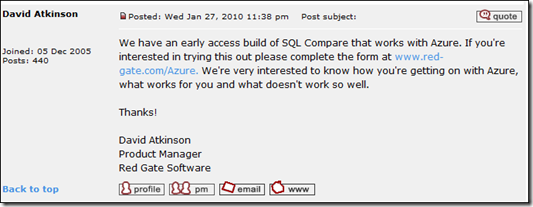
      <![CDATA[<p>This is the fifth in a series of videos on Windows Azure and SQL Azure – <a href="http://blog.ehuna.org/2009/09/windows_azure_and_sql_azure_vi.html">click here</a> for the summary entry and a list of all 7 videos.</p> <object width="400" height="300"><param name="allowfullscreen" value="true" /><param name="allowscriptaccess" value="always" /><param name="movie" value="http://vimeo.com/moogaloop.swf?clip_id=6770073&amp;server=vimeo.com&amp;show_title=1&amp;show_byline=1&amp;show_portrait=0&amp;color=&amp;fullscreen=1" /><embed src="http://vimeo.com/moogaloop.swf?clip_id=6770073&amp;server=vimeo.com&amp;show_title=1&amp;show_byline=1&amp;show_portrait=0&amp;color=&amp;fullscreen=1" type="application/x-shockwave-flash" allowfullscreen="true" allowscriptaccess="always" width="400" height="300"></embed></object>  <p><a href="http://vimeo.com/6770073">SQL Azure Overview - Part 1</a> from <a href="http://vimeo.com/ehuna">Emmanuel Huna</a> on <a href="http://vimeo.com">Vimeo</a>.</p>  <p>52. Overview of SQL Azure.    <br />53. Warning on name changes and confusing documentation (e.g. SQL Azure was previously called &quot;SDS&quot;, SQL Data Services).     <br />54. SQL Azure CTP limits: 5 databases, 10 GB per Windows Live Account.&#160; MyCalyx Windows Live account: <a href="mailto:cloudservice2@calyxsoftware.com">cloudservice2@calyxsoftware.com</a>     <br />55. SQL Azure Connection Strings for ADO.NET, ODBC, and OLE DB.&#160; Our ORM of choice, .netTiers, uses the ADO.NET connection string.     <br />56. The &quot;sa&quot; account in SQL Azure.     <br />57. Using SQL Management Studio to manage SQL Azure databases.&#160; SQL Azure server names, errors and warnings to currently ignore.     <br />58. TDS - Tabular Data Stream protocol on port 1433.     <br />59. Useful &quot;manual&quot; SQL statements.     <br />60. Cleaning up SQL scripts for SQL Azure - including <a href="http://blog.ehuna.org/2009/08/cleaning_up_scripts_for_sql_az.html">link to my blog entry</a>.     <br />61. Another blog entry I wrote with PowerShell scripts to clean up SQL scripts for SQL Azure: <a href="http://blog.ehuna.org/2009/08/windows_powershell_commands_to.html">http://blog.ehuna.org/2009/08/windows_powershell_commands_to.html</a>     <br />62. Creating new databases in SQL Azure - having separate SQL Azure databases for Staging and Production.&#160; Continue using on-premise SQL Server for development.     <br />63. Types of SQL Azure databases when v1.0 rolls out: Web Edition (1 GB max, $9.99/month) and Business Edition (10 GB max, $99.99/month).     <br />64. Creating a specific Login and User for every database (do not use the &quot;sa&quot; account).     <br />65. Creating a sample database (TESTDB1) on an on-premise SQL Server 2008 Standard and deploying it to SQL Azure.     <br />66. Important: you need at least one primary key - clustered index - before you can insert any records in a SQL Azure table (good and also works well with the .netTiers model).     <br />67. Options to change in SQL Server Management Studio &gt; TESTDB1 &gt; Tasks &gt; Generate Scripts (due to currently unsupported features in SQL Azure).     <br />68. Handling SQL Azure timeouts in SQL Server Management Studio.     <br />69. A better way: the new &quot;SQL Azure Migration Wizard&quot; <a href="http://sqlazuremw.codeplex.com/">released on CodePlex</a>.&#160; Installing it, configuring it and using it.&#160; Automatic cleaned up scripts for SQL Azure including tables, stored procedures, primary keys, foreign keys, indexes, etc.     <br />70. RedGate SQL Compare and <a href="http://www.red-gate.com/MessageBoard/viewtopic.php?t=9463">my suggestion</a> for a version that works with SQL Azure.&#160;&#160; </p>  <p><strong>Update 1/27/2010</strong>: David A. from Red Gate has announced that they now have an early access build of SQL Compare that works with Azure!&#160; You can find the announcement at the bottom of <a href="http://www.red-gate.com/MessageBoard/viewtopic.php?t=9463" target="_blank">this thread</a>:</p>  <p><a href="http://www.red-gate.com/Azure"><img style="border-bottom: 0px; border-left: 0px; display: inline; border-top: 0px; border-right: 0px" title="image" border="0" alt="image" src="http://screencasts.ehuna.org/pics/SQLAzureOverviewPart148minutes_E812/image.png" width="533" height="207" /></a> </p>  <p>I highly recommend Red Gate’s <a href="http://www.red-gate.com/products/SQL_Compare/index.htm">SQL Compare</a> – it’s an amazing product that has literally saved me hundreds of hours.&#160; You can download a <a href="http://www.red-gate.com/products/SQL_Compare/index.htm">free trial here</a> and request the SQL Azure early access build here: <a href="http://www.red-gate.com/Azure">http://www.red-gate.com/Azure</a></p>  <p>Good Times!</p>  <p>   <br />71. Strategies for deploying a database on SQL Azure (first time) and options for schema changes and upgrades in future versions. </p>]]>
      
   </content>
</entry>
<entry>
   <title>Windows Azure Overview - Part 4 (55 minutes)</title>
   <link href="http://screencasts.ehuna.org/2009/09/windows_azure_overview_part_4.html" rel="alternate" type="text/html"/>
   <id>tag:screencasts.ehuna.org,2009://11.327</id>
   
   <published>2009-09-26T19:11:00Z</published>
   <updated>2009-09-26T22:39:41Z</updated>
   
   <summary>This is the fourth in a series of videos on Windows Azure and SQL Azure – click here for the summary entry and a list of all 7 videos. Windows Azure Overview - Part 4 from Emmanuel Huna on Vimeo....</summary>
   <author>
      <name/>
      <uri>www.ehuna.org</uri>
   </author>
         <category scheme="http://www.sixapart.com/ns/types#category" term="01 - General"/>
   
   
   <content type="html" xml:base="http://screencasts.ehuna.org/" xml:lang="en">
      <![CDATA[<p>This is the fourth in a series of videos on Windows Azure and SQL Azure – <a href="http://blog.ehuna.org/2009/09/windows_azure_and_sql_azure_vi.html">click here</a> for the summary entry and a list of all 7 videos.</p> <object width="400" height="300"><param name="allowfullscreen" value="true" /><param name="allowscriptaccess" value="always" /><param name="movie" value="http://vimeo.com/moogaloop.swf?clip_id=6769954&amp;server=vimeo.com&amp;show_title=1&amp;show_byline=1&amp;show_portrait=0&amp;color=&amp;fullscreen=1" /><embed src="http://vimeo.com/moogaloop.swf?clip_id=6769954&amp;server=vimeo.com&amp;show_title=1&amp;show_byline=1&amp;show_portrait=0&amp;color=&amp;fullscreen=1" type="application/x-shockwave-flash" allowfullscreen="true" allowscriptaccess="always" width="400" height="300"></embed></object>  <p><a href="http://vimeo.com/6769954">Windows Azure Overview - Part 4</a> from <a href="http://vimeo.com/ehuna">Emmanuel Huna</a> on <a href="http://vimeo.com">Vimeo</a>.</p>  <p>39. Unhandled exceptions and custom errors in Web.Config.    <br />40. Handling Upgrades: making sure the roles properly act when we are upgrading SQL Azure.     <br />41. Loading a Windows Azure Storage Queue endpoint (QueueEndPointURI, AccountName, AccountSharedKey, StorageAccountInfo).     <br />42. Creating a persistent and stateless Azure Storage Queue (QueueStorage and MessageQueue).     <br />43. Adding an event to a queue in a web role.     <br />44. Handling the event from a queue in a worker role.     <br />45. Properly returning RoleStatus.Healthy or RoleStatus.UnHealthy in a worker's role GetHealthStatus() to allow for better monitoring of our role instances.     <br />46. Considerations in removing a message from a queue when an error occurs (examples where message should be deleted and should not be deleted when sending out an email).     <br />47. Logging Levels in the Development Fabric UI (Critical, Error, Warning, Information and Debugging).     <br />48. Windows Azure Storage labs in the Azure training kit (to cover blobs and tables).     <br />49. DNS considerations with Windows Azure URLs (CNAME entries).     <br />50. Self signed SSL certificates for Windows Azure development (see <a href="onenote://ehuna1r2/OneNote/CEP/Misc.one#Azure%20Links&amp;section-id=%7B2BBD417C-9FA3-41F3-A8A3-1179E65E93D8%7D&amp;page-id=%7B56DD9B3B-7C2E-4E63-8E36-F681E377B2C6%7D&amp;end">Azure Links</a>, OneNote required).     <br />51. Adding purchased SSL certificates to your Windows Azure project.</p>]]>
      
   </content>
</entry>
<entry>
   <title>Windows Azure Overview - Part 3 (20 minutes)</title>
   <link href="http://screencasts.ehuna.org/2009/09/windows_azure_overview_part_3.html" rel="alternate" type="text/html"/>
   <id>tag:screencasts.ehuna.org,2009://11.326</id>
   
   <published>2009-09-26T19:10:00Z</published>
   <updated>2009-09-26T22:38:35Z</updated>
   
   <summary>This is the third in a series of videos on Windows Azure and SQL Azure – click here for the summary entry and a list of all 7 videos. Windows Azure Overview - Part 3 from Emmanuel Huna on Vimeo....</summary>
   <author>
      <name/>
      <uri>www.ehuna.org</uri>
   </author>
         <category scheme="http://www.sixapart.com/ns/types#category" term="01 - General"/>
   
   
   <content type="html" xml:base="http://screencasts.ehuna.org/" xml:lang="en">
      <![CDATA[<p>This is the third in a series of videos on Windows Azure and SQL Azure – <a href="http://blog.ehuna.org/2009/09/windows_azure_and_sql_azure_vi.html">click here</a> for the summary entry and a list of all 7 videos.</p> <object width="400" height="300"><param name="allowfullscreen" value="true" /><param name="allowscriptaccess" value="always" /><param name="movie" value="http://vimeo.com/moogaloop.swf?clip_id=6769906&amp;server=vimeo.com&amp;show_title=1&amp;show_byline=1&amp;show_portrait=0&amp;color=&amp;fullscreen=1" /><embed src="http://vimeo.com/moogaloop.swf?clip_id=6769906&amp;server=vimeo.com&amp;show_title=1&amp;show_byline=1&amp;show_portrait=0&amp;color=&amp;fullscreen=1" type="application/x-shockwave-flash" allowfullscreen="true" allowscriptaccess="always" width="400" height="300"></embed></object>  <p><a href="http://vimeo.com/6769906">Windows Azure Overview - Part 3</a> from <a href="http://vimeo.com/ehuna">Emmanuel Huna</a> on <a href="http://vimeo.com">Vimeo</a>.</p>  <p>35. Using the Windows Azure forums and getting feedback from Microsoft employees.    <br />36. Loading parameters when role starts.     <br />37. Using reflection to log the role's version.     <br />38. Page_Init() calls that should always be made.</p>]]>
      
   </content>
</entry>
<entry>
   <title>Windows Azure Overview - Part 2 (63 minutes)</title>
   <link href="http://screencasts.ehuna.org/2009/09/windows_azure_overview_part_2.html" rel="alternate" type="text/html"/>
   <id>tag:screencasts.ehuna.org,2009://11.325</id>
   
   <published>2009-09-26T19:07:00Z</published>
   <updated>2009-09-26T22:37:22Z</updated>
   
   <summary>This is the second in a series of videos on Windows Azure and SQL Azure – click here for the summary entry and a list of all 7 videos. Windows Azure Overview - Part 2 from Emmanuel Huna on Vimeo....</summary>
   <author>
      <name/>
      <uri>www.ehuna.org</uri>
   </author>
         <category scheme="http://www.sixapart.com/ns/types#category" term="01 - General"/>
   
   
   <content type="html" xml:base="http://screencasts.ehuna.org/" xml:lang="en">
      <![CDATA[<p>This is the second in a series of videos on Windows Azure and SQL Azure – <a href="http://blog.ehuna.org/2009/09/windows_azure_and_sql_azure_vi.html" target="_blank">click here</a> for the summary entry and a list of all 7 videos.</p> <object width="400" height="300"><param name="allowfullscreen" value="true" /><param name="allowscriptaccess" value="always" /><param name="movie" value="http://vimeo.com/moogaloop.swf?clip_id=6769610&amp;server=vimeo.com&amp;show_title=1&amp;show_byline=1&amp;show_portrait=0&amp;color=&amp;fullscreen=1" /><embed src="http://vimeo.com/moogaloop.swf?clip_id=6769610&amp;server=vimeo.com&amp;show_title=1&amp;show_byline=1&amp;show_portrait=0&amp;color=&amp;fullscreen=1" type="application/x-shockwave-flash" allowfullscreen="true" allowscriptaccess="always" width="400" height="300"></embed></object>  <p><a href="http://vimeo.com/6769610">Windows Azure Overview - Part 2</a> from <a href="http://vimeo.com/ehuna">Emmanuel Huna</a> on <a href="http://vimeo.com">Vimeo</a>.</p>  <p>Note: we lost sound in the last 25 minutes - you get the Allman brothers instead.    <br />15. Worker Role health status.     <br />16. Custom ASP.NET Session provider that uses Azure storage - configuration in both Azure files and web.config/app.config.     <br />17. Windows Azure portal.     <br />18. Windows Live IDs and Azure CTP.     <br />19. CS (Cloud Service) packages and Azure configuration.     <br />20. Azure Storage Accounts.     <br />21. Azure Staging and Production Environments.     <br />22. Deployment IDs.     <br />23. Staging DNS entries.     <br />24. Upgrade/Run/Suspend/Configure/Delete commands.     <br />25. Initialized/Running/Stopped/Paused role instance states.     <br />26. Billing considerations when instances are deployed.     <br />27. Azure Storage Manager.     <br />28. Custom error pages in ASP.NET.     <br />29. Azure training kit labs.     <br />30. Azure links.     <br />31. Azure Service Management API.     <br />32. Azure SDK Tools documentation and CSPack/CSRun Azure command line tools.     <br />33. Doing a Staging Upgrade.     <br />34. Serving dynamic compressed content in Azure and bug on Microsoft Connect.</p>]]>
      
   </content>
</entry>
<entry>
   <title>Windows Azure Overview - Part 1 (31 minutes)</title>
   <link href="http://screencasts.ehuna.org/2009/09/windows_azure_overview_part_1.html" rel="alternate" type="text/html"/>
   <id>tag:screencasts.ehuna.org,2009://11.324</id>
   
   <published>2009-09-26T18:10:00Z</published>
   <updated>2009-09-26T22:12:27Z</updated>
   
   <summary>This is the first in a series of videos on Windows Azure and SQL Azure – click here for the summary entry and a list of all videos. Windows Azure Overview - Part 1 from Emmanuel Huna on Vimeo. 1....</summary>
   <author>
      <name/>
      <uri>www.ehuna.org</uri>
   </author>
         <category scheme="http://www.sixapart.com/ns/types#category" term="01 - General"/>
   
   
   <content type="html" xml:base="http://screencasts.ehuna.org/" xml:lang="en">
      <![CDATA[<p>This is the first in a series of videos on Windows Azure and SQL Azure – <a href="http://blog.ehuna.org/2009/09/windows_azure_and_sql_azure_vi.html" target="_blank">click here</a> for the summary entry and a list of all videos.</p> <object width="400" height="300"><param name="allowfullscreen" value="true" /><param name="allowscriptaccess" value="always" /><param name="movie" value="http://vimeo.com/moogaloop.swf?clip_id=6768913&amp;server=vimeo.com&amp;show_title=1&amp;show_byline=1&amp;show_portrait=0&amp;color=&amp;fullscreen=1" /><embed src="http://vimeo.com/moogaloop.swf?clip_id=6768913&amp;server=vimeo.com&amp;show_title=1&amp;show_byline=1&amp;show_portrait=0&amp;color=&amp;fullscreen=1" type="application/x-shockwave-flash" allowfullscreen="true" allowscriptaccess="always" width="400" height="300"></embed></object>  <p><a href="http://vimeo.com/6768913">Windows Azure Overview - Part 1</a> from <a href="http://vimeo.com/ehuna">Emmanuel Huna</a> on <a href="http://vimeo.com">Vimeo</a>.</p>  <p>1. Overview of Windows Azure.    <br />2. Using the virtual machine with the Windows Azure SDK.     <br />3. Creating a cloud service project.     <br />4. Adding web roles and worker roles.     <br />5. Azure service definition and service configuration.     <br />6. Input endpoints (HTTP and HTTPS) and multiple role instances.     <br />7. Custom ASP.NET Session provider that uses Azure storage.     <br />8. Azure Storage client library.     <br />9. Azure storage - blobs, queues and messages.     <br />10. Development fabric.     <br />11. Development storage.     <br />12. Writing to the Azure log.     <br />13. Loading parameters when your role starts.     <br />14. Running roles in full trust.</p>]]>
      
   </content>
</entry>
<entry>
   <title>New Technologies and Applications announced at the Microsoft Professional Developers Conference 2008</title>
   <link href="http://screencasts.ehuna.org/2008/11/new_technologies_and_applicati.html" rel="alternate" type="text/html"/>
   <id>tag:screencasts.ehuna.org,2008://11.293</id>
   
   <published>2008-11-08T05:29:14Z</published>
   <updated>2009-02-11T06:43:07Z</updated>
   
   <summary>Last week (10/2008), I attended the Microsoft Professional Developers Conference (PDC) in Los Angeles, California.&amp;#160; Today, I gave an overview of some of the technologies and applications that Microsoft announced at the PDC.&amp;#160; Windows 7, the next version of Windows...</summary>
   <author>
      <name/>
      <uri>www.ehuna.org</uri>
   </author>
         <category scheme="http://www.sixapart.com/ns/types#category" term="01 - General"/>
   
   
   <content type="html" xml:base="http://screencasts.ehuna.org/" xml:lang="en">
      <![CDATA[<p>Last week (10/2008), I attended the Microsoft Professional Developers Conference (PDC) in Los Angeles, California.&#160; Today, I gave an overview of some of the technologies and applications that Microsoft announced at the PDC.&#160; <br /></p>  <blockquote>   <p><a href="http://screencasts.ehuna.org/pics/NewTechnologiesandApplicationsannounceda_128FA/clip_image001.jpg"><img style="border-top-width: 0px; border-left-width: 0px; border-bottom-width: 0px; border-right-width: 0px" height="288" alt="clip_image001" src="http://screencasts.ehuna.org/pics/NewTechnologiesandApplicationsannounceda_128FA/clip_image001_thumb.jpg" width="387" border="0" /></a>       <br /><em>Windows 7, the next version of Windows (after Vista) due in 2009 was        <br />announced at the Microsoft Professional Developers Conference 2008</em></p> </blockquote>  <p>In this screencast you'll learn about Windows Azure, Windows 7 (the version coming up after Windows Vista), Office 14 on the Web, Visual Studio 2010, the .NET Framework 4.0 and more.&#160; </p>  <p>See below for the screencast, links and more information.</p> ]]>
      <![CDATA[  <p><strong>Screencast</strong></p>  <p><embed src="http://vimeo.com/moogaloop.swf?clip_id=2184752&amp;server=vimeo.com&amp;show_title=1&amp;show_byline=1&amp;show_portrait=0&amp;color=&amp;fullscreen=1" width="400" height="300" type="application/x-shockwave-flash" allowfullscreen="true" allowscriptaccess="always" />     <br />    <br /><em>Note: during the screencast I talk about the 160 GB hard drive that Microsoft gave PDC attendees. These PDC 2008 materials are only available to my co-workers; I have not made them available online.</em> </p>  <p><strong>Screencast Notes</strong></p>  <p>Here are the notes I used during the screencast -</p>  <p>&#160;</p>  <blockquote>   <p><a href="http://screencasts.ehuna.org/pics/NewTechnologiesandApplicationsannounceda_128FA/clip_image0013.png"><img style="border-right: 0px; border-top: 0px; border-left: 0px; border-bottom: 0px" height="42" alt="clip_image001[3]" src="http://screencasts.ehuna.org/pics/NewTechnologiesandApplicationsannounceda_128FA/clip_image0013_thumb.png" width="244" border="0" /></a></p>    <p><em>Microsoft Professional Developers Conference 2008       <br />Los Angeles, CA - 10/26/2008 - 10/30/2008</em></p> </blockquote>  <p><strong>High Level Overview</strong></p>  <ul>   <li><strong>Windows Azure</strong>      <ul>       <li>Marketing: a Windows Operating System &quot;in the cloud&quot;.</li>        <li>Really: advanced hosting services for scalable apps written in .NET.</li>        <li>Greatly integrated with Microsoft development tools         <ul>           <li>Run a simulated local &quot;Azure&quot; on your laptop - works in a plane.</li>            <li>Advanced tools to deploy to Staging/Production</li>         </ul>       </li>     </ul>   </li> </ul>  <blockquote>   <p><a href="http://screencasts.ehuna.org/pics/NewTechnologiesandApplicationsannounceda_128FA/clip_image0024.jpg"><img style="border-right: 0px; border-top: 0px; border-left: 0px; border-bottom: 0px" height="270" alt="clip_image002[4]" src="http://screencasts.ehuna.org/pics/NewTechnologiesandApplicationsannounceda_128FA/clip_image0024_thumb.jpg" width="584" border="0" /></a></p> </blockquote>  <ul>   <li><strong>Windows 7</strong></li> </ul>  <blockquote>   <p><a href="http://screencasts.ehuna.org/pics/NewTechnologiesandApplicationsannounceda_128FA/clip_image0034.jpg"><img style="border-right: 0px; border-top: 0px; border-left: 0px; border-bottom: 0px" height="332" alt="clip_image003[4]" src="http://screencasts.ehuna.org/pics/NewTechnologiesandApplicationsannounceda_128FA/clip_image0034_thumb.jpg" width="332" border="0" /></a></p> </blockquote>  <p>Demo: build 6801 from PDC running in Virtual PC 2007</p>  <ul>   <li>Smaller footprint     <ul>       <li>About 500 MB RAM</li>        <li>Hidden Windows do not use video memory.</li>     </ul>   </li> </ul>  <ul>   <li>Better windows management: Superbar</li>    <li>Aero Enhancements     <ul>       <li>Transparent windows on hover</li>     </ul>   </li> </ul>  <ul>   <li>Easy home networking: Homegroup</li>    <li>Easier to find data: Jump Lists and Libraries</li> </ul>  <ul>   <li>Unified search: e.g. search for picture will search across computers in Homegroup/Domain</li> </ul>  <ul>   <li>Better UAC control: less annoying pop-ups</li>    <li>Applications updated (after 15 years)     <ul>       <li>Paint: now with Ribbon.</li>        <li>Wordpad: now with Ribbon</li>        <li>Calculator</li>        <li>Notepad</li>        <li>Etc...</li>     </ul>   </li> </ul>  <ul>   <li>Virtual Disk partitioning: mount virtual machines (VHD) natively</li>    <li>Bitlocker on external drives.</li>    <li>Centralized device manager     <ul>       <li>See battery status for MP3 player or camera directly in device manager</li>     </ul>   </li> </ul>  <ul>   <li>Built-in Multi-Touch, affordable (e.g. HP Touchsmart)</li>    <li>Built-in Sensor APIs - light sensor, accelerometer, and touch sensor      <ul>       <li>Control a game by moving the board</li>        <li>Changethe view in a text reader depending on the brightness of the environment</li>     </ul>   </li> </ul>  <ul>   <li>Windows key + P to change display mode</li>    <li>Improvements in Multimonitor: even via RDP!</li>    <li>Improved Firewall - more options</li>    <li>Media streaming: you can stream any media from/to any computer, including digital picture frames.</li>    <li>Windows Explorer: new navigation page integrated with Libraries and Homegroup</li> </ul>  <ul>   <li>Software + Services     <ul>       <li>Windows Live and IE8</li>        <li>Office 14 now on the web!</li>        <li>Microsoft &quot;eats its own dog food&quot; Office on the Web using Windows Azure and Live Services.</li>     </ul>   </li> </ul>  <ul>   <li>Much more for Developers     <ul>       <li>Visual Studio 2010          <ul>           <li>Now 100% WPF - no more COM.</li>         </ul>       </li>     </ul>      <ul>       <li>.NET Framework 4.0</li>        <li>Advances in VB.NET and C#         <ul>           <li>Parallel/Multi core features - easy to use, but be careful</li>         </ul>       </li>     </ul>      <ul>       <li>Silverlight:         <ul>           <li>New toolkit - datagrid, datepicker, calendar, and ribbon</li>            <li>Will soon work on mobile phones</li>         </ul>       </li>     </ul>      <ul>       <li>WPF: new controls (ribbon, datagrid</li>        <li>ASP.NET MVC Framework</li>        <li>Open XML SDK</li>        <li>Enhancements in XML Paper Specification (XPS) documents.</li>        <li>Live Mesh OS         <ul>           <li>SDK available</li>            <li>-OR- direct REST through WCF helper classes.</li>         </ul>       </li>     </ul>      <ul>       <li>Virtual Earth Web Services</li>     </ul>   </li> </ul>  <blockquote>   <p><a href="http://screencasts.ehuna.org/pics/NewTechnologiesandApplicationsannounceda_128FA/clip_image0044.jpg"><img style="border-right: 0px; border-top: 0px; border-left: 0px; border-bottom: 0px" height="310" alt="clip_image004[4]" src="http://screencasts.ehuna.org/pics/NewTechnologiesandApplicationsannounceda_128FA/clip_image0044_thumb.jpg" width="383" border="0" /></a></p> </blockquote>  <p>A few links mentioned at the beginning of the screencast -</p>  <blockquote>   <p>Microsoft Professional Developers Conference 2008      <br /><a href="http://microsoftpdc.com/">http://microsoftpdc.com/</a></p>    <p>Visual Studio Developer Conference      <br /><a href="http://vslive.com/">http://vslive.com/</a></p>    <p>Windows Azure Services Platform      <br /><a href="http://www.microsoft.com/azure/default.mspx">http://www.microsoft.com/azure/default.mspx</a></p> </blockquote>  <p>A couple of items I mentioned during the screencast -    <br /></p>  <blockquote>   <p><a href="http://screencasts.ehuna.org/pics/NewTechnologiesandApplicationsannounceda_128FA/clip_image001.png"><img style="border-top-width: 0px; border-left-width: 0px; border-bottom-width: 0px; border-right-width: 0px" height="330" alt="clip_image001" src="http://screencasts.ehuna.org/pics/NewTechnologiesandApplicationsannounceda_128FA/clip_image001_thumb.png" width="410" border="0" /></a></p>    <p><em>The government of Ethiopia data center before        <br />the teacher application was deployed on Windows Azure         <br /></em></p> </blockquote>  <blockquote>   <p><a href="http://screencasts.ehuna.org/pics/NewTechnologiesandApplicationsannounceda_128FA/clip_image002.png"><img style="border-top-width: 0px; border-left-width: 0px; border-bottom-width: 0px; border-right-width: 0px" height="331" alt="clip_image002" src="http://screencasts.ehuna.org/pics/NewTechnologiesandApplicationsannounceda_128FA/clip_image002_thumb.png" width="440" border="0" /></a></p>    <p><em>Web and Worker services running on sample application on local        <br />machine (127.0.0.1) - simulating a load balanced Production system</em>       <br /></p> </blockquote>  <p>I took the screenshots above from this session - check it out it's very interesting -</p>  <blockquote>   <p>&quot;ES16 A Lap Around Windows Azure&quot; from day 1      <br /><a href="http://mschnlnine.vo.llnwd.net/d1/pdc08/WMV-HQ/ES16.wmv">http://mschnlnine.vo.llnwd.net/d1/pdc08/WMV-HQ/ES16.wmv</a></p> </blockquote>  <p>I mentioned this application in the screencast -</p>  <blockquote>   <p><em>Taskbar Shuffle (Works on XP and Vista)        <br /></em><a href="http://nerdcave.webs.com/taskbarshuffle.htm"><em>http://nerdcave.webs.com/taskbarshuffle.htm</em></a></p>    <p><em>Taskbar Shuffle is a simple, small, free utility that lets you drag and drop your Windows taskbar buttons to rearrange them. Here&#8217;s a full feature list:</em></p>    <ul>     <li><em>Reorder your taskbar buttons by dragging and dropping them </em></li>      <li><em>Reorder your tray icons in the same way </em></li>      <li><em>Reorder tasks in a grouped button's popup menu in the same way </em></li>      <li><em>Middle-click to close programs on your taskbar </em></li>      <li><em>Works with UltraMon taskbars </em></li>      <li><em>Tweak taskbar button grouping </em></li>   </ul>    <p><em>If you run more than a few applications at a time, you'll definitely find Taskbar Shuffle useful, so give it a try!</em></p> </blockquote>  <p>For a great Windows 7 demo, check out Keynote on day 2, look for the demo from Julie Larson Green</p>  <blockquote>   <p>KYN02 Day Two Keynote - Ray Ozzie,      <br />Steven Sinofsky, Scott Guthrie and David Treadwell       <br /><a href="http://mschnlnine.vo.llnwd.net/d1/pdc08/WMV-HQ/KYN02.wmv">http://mschnlnine.vo.llnwd.net/d1/pdc08/WMV-HQ/KYN02.wmv</a></p> </blockquote>  <p>Another great session I mentioned is the day 2 keynote with Don Box:</p>  <blockquote>   <p>KYN03 Day Two Keynote - Chris Anderson and Don Box      <br /><a href="http://mschnlnine.vo.llnwd.net/d1/pdc08/WMV-HQ/KYN03.wmv">http://mschnlnine.vo.llnwd.net/d1/pdc08/WMV-HQ/KYN03.wmv</a></p> </blockquote>  <p>A good article on why it's exciting that Visual Studio 2010 is written in WPF:</p>  <blockquote>   <p>Writing Visual Studio 2010 Shell In WPF Reflects Confidence      <br /><a href="http://www.onedotnetway.com/writing-visual-studio-2010-shell-in-wpf-reflects-confidence/">http://www.onedotnetway.com/writing-visual-studio-2010-shell-in-wpf-reflects-confidence/</a></p> </blockquote>  <p>I mentioned the Firefox &quot;Download Them All&quot; add-on and how to download all of the PDC 2008 videos:</p>  <blockquote>   <p>How to download PDC Sessions using DownThemAll! Firefox addon      <br /><a href="http://weblogs.asp.net/guerchele/archive/2008/10/29/how-to-download-pdc-sessions-using-downthemall-firefox-addon.aspx">http://weblogs.asp.net/guerchele/archive/2008/10/29/how-to-download-pdc-sessions-using-downthemall-firefox-addon.aspx</a></p>    <p>Firefox 3.0 - free open-source Browser      <br /><a href="http://www.mozilla.com/en-US/firefox/">http://www.mozilla.com/en-US/firefox/</a></p>    <p>Download Them All - free Firefox Add-On      <br /><a href="https://addons.mozilla.org/en-US/firefox/addon/201">https://addons.mozilla.org/en-US/firefox/addon/201</a></p> </blockquote>  <p>At the end of my screencast, my employer Calyx Software (<a href="http://www.CalyxSoftware.com">www.CalyxSoftware.com</a>) was kind enough to pay for lunch (excellent Chinese food from <a href="http://maps.google.com/maps?f=q&amp;hl=en&amp;geocode=&amp;q=mandarin+gourmet,+san+jose,+ca&amp;sll=37.18899,-121.844874&amp;sspn=0.213061,0.276718&amp;g=San+Jose,+CA+95120&amp;ie=UTF8&amp;ll=37.251101,-121.858635&amp;spn=0.212886,0.276718&amp;z=12&amp;iwloc=A" target="_blank">Mandarin Gourmet</a> - the Mongolian beef is very tasty!) and we watched the day 1 keynote:</p>  <blockquote>   <p>KYN01 Day One Keynote - Ray Ozzie,      <br />Amitabh Srivastava, Bob Muglia and David Thompson       <br /><a href="http://mschnlnine.vo.llnwd.net/d1/pdc08/WMV-HQ/KYN01.wmv">http://mschnlnine.vo.llnwd.net/d1/pdc08/WMV-HQ/KYN01.wmv</a></p> </blockquote>  <p>&#160;</p>  <p><strong>Additional Links</strong></p>  <p>I collected these links during the PDC and in the last few weeks as I watched the Twitter stream of PDC tagged tweets (<a href="http://blog.ehuna.org/2008/10/tweets_greatly_improved_my_exp.html" target="_blank">see this article</a> if you don't know what Twitter is).</p>  <p>&#160;&#160;&#160; Sessions - includes description and link to stream    <br />&#160;&#160;&#160; <a href="https://sessions.microsoftpdc.com/public/timeline.aspx">https://sessions.microsoftpdc.com/public/timeline.aspx</a>     <br />    <br />&#160;&#160;&#160; PDC 2008 Session List by Mike Swanson     <br />&#160;&#160;&#160; <a href="http://blogs.msdn.com/mswanson/pages/PDC2008Sessions.aspx">http://blogs.msdn.com/mswanson/pages/PDC2008Sessions.aspx</a>     <br />    <br />&#160;&#160;&#160; Quick Video List, sort by Title     <br />&#160;&#160;&#160; <a href="http://coolthingoftheday.blogspot.com/2008/10/pdc2008-quick-video-link-list.html">http://coolthingoftheday.blogspot.com/2008/10/pdc2008-quick-video-link-list.html</a>     <br />    <br />&#160;&#160;&#160; How to download PDC Sessions using DownThemAll! Firefox addon     <br />&#160;&#160;&#160; <a href="http://weblogs.asp.net/guerchele/archive/2008/10/29/how-to-download-pdc-sessions-using-downthemall-firefox-addon.aspx">http://weblogs.asp.net/guerchele/archive/2008/10/29/how-to-download-pdc-sessions-using-downthemall-firefox-addon.aspx</a>     <br />    <br />&#160;&#160;&#160; Channel 9 RSS feed of all sessions     <br />&#160;&#160;&#160; <a href="http://channel9.msdn.com/posts/pdc2008/RSS/">http://channel9.msdn.com/posts/pdc2008/RSS/</a>     <br />    <br />&#160;&#160;&#160; Windows Azure - Links and Resources     <br />&#160;&#160;&#160; <a href="http://www.sriramkrishnan.com/blog/">http://www.sriramkrishnan.com/blog/</a>     <br />    <br />&#160;&#160;&#160; Azure Coding .NET - Wiki, Forums and shared blogs     <br />&#160;&#160;&#160; <a href="http://azurecoding.net/">http://azurecoding.net/</a>     <br />    <br />&#160;&#160;&#160; Windows Azure overview     <br />&#160;&#160;&#160; <a href="http://blogs.msdn.com/mikeormond/archive/2008/11/01/some-reflections-on-pdc-2008-windows-azure.aspx">http://blogs.msdn.com/mikeormond/archive/2008/11/01/some-reflections-on-pdc-2008-windows-azure.aspx</a>     <br />    <br />&#160;&#160;&#160; Windows Azure from a Developer's Perspective     <br />&#160; <a href="http://www.25hoursaday.com/weblog/2008/11/03/WindowsAzureFromADevelopersPerspective.aspx">http://www.25hoursaday.com/weblog/2008/11/03/WindowsAzureFromADevelopersPerspective.aspx</a>     <br />    <br />&#160;&#160;&#160; Flashy Windows 7 bits protected by elaborate scheme, workaround     <br />(turns on Windows 7 Superbar in PDC bits)     <br />&#160;&#160;&#160; <a href="http://www.withinwindows.com/2008/11/02/flashy-windows-7-bits-protected-by-elaborate-scheme-workaround/">http://www.withinwindows.com/2008/11/02/flashy-windows-7-bits-protected-by-elaborate-scheme-workaround/</a>     <br />    <br />&#160;&#160;&#160; PDC Resources from Scoble     <br />&#160;&#160;&#160; <a href="http://scobleizer.com/2008/11/01/never-underestimate-microsofts-ability-to-turn-a-corner/">http://scobleizer.com/2008/11/01/never-underestimate-microsofts-ability-to-turn-a-corner/</a>     <br />    <br />&#160;&#160;&#160; Exposing Connected Home Services to the Internet via Windows Home Server     <br />&#160;&#160;&#160; <a href="http://channel9.msdn.com/pdc2008/ES12/">http://channel9.msdn.com/pdc2008/ES12/</a>     <br />    <br />&#160;&#160;&#160; Second Light for Surface     <br />&#160;&#160;&#160; <a href="http://www.electronista.com/articles/08/10/30/secondlight.for.ms.surface/">http://www.electronista.com/articles/08/10/30/secondlight.for.ms.surface/</a>     <br />    <br />&#160;&#160;&#160; &quot;Not at PDC&quot; group - all sessions     <br />&#160;&#160;&#160; <a href="http://notatpdc.com/presentations/">http://notatpdc.com/presentations/<strong></strong></a></p>  <p>   <br />It's a great time to be a Microsoft developer - good times!</p>]]>
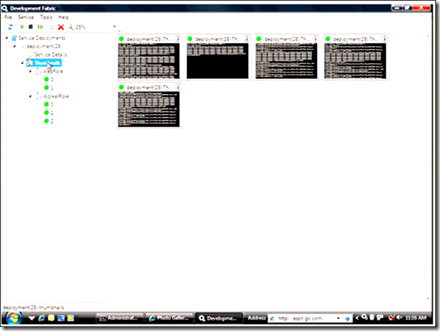
   </content>
</entry>
<entry>
   <title>Cloud computing today, not tomorrow</title>
   <link href="http://screencasts.ehuna.org/2008/09/cloud_computing_today_not_tomo.html" rel="alternate" type="text/html"/>
   <id>tag:screencasts.ehuna.org,2008://11.288</id>
   
   <published>2008-09-20T00:34:41Z</published>
   <updated>2009-09-04T04:23:44Z</updated>
   
   <summary>Lately, there has been a lot of talk in the industry on “cloud computing”, a paradigm in which information is permanently stored in servers on the Internet and cached temporarily on clients that include desktops, entertainment centers, table computers, notebooks,...</summary>
   <author>
      <name/>
      <uri>www.ehuna.org</uri>
   </author>
         <category scheme="http://www.sixapart.com/ns/types#category" term="01 - General"/>
   
   
   <content type="html" xml:base="http://screencasts.ehuna.org/" xml:lang="en">
      <![CDATA[<p>Lately, there has been a lot of talk in the industry on “cloud computing”, a paradigm in which information is permanently stored in servers on the Internet and cached temporarily on clients that include desktops, entertainment centers, table computers, notebooks, wall computers, handhelds, etc…&#160; </p>  <table border="0" cellspacing="2" cellpadding="2" width="520"><tbody>     <tr>       <td valign="top" width="251"><a href="http://screencasts.ehuna.org/2008/09/cloud_computing_today_not_tomo.html#more" target="target"><img style="border-right-width: 0px; border-top-width: 0px; border-bottom-width: 0px; border-left-width: 0px" border="0" alt="image" src="http://screencasts.ehuna.org/pics/Cloudcomputingtodaynottomorrow_F727/image.png" width="244" height="206" /></a>           <br />          <br /><em>Your documents, pictures, music and portable applications on Microsoft Live mesh: that's &quot;Cloud Computing&quot; today, not tomorrow.&#160; <br />            <br />Watch the <a href="http://screencasts.ehuna.org/2008/09/cloud_computing_today_not_tomo.html#more">screencast below</a> to learn how to use these technologies.</em></td>        <td valign="top" width="261"><a href="http://screencasts.ehuna.org/2008/09/cloud_computing_today_not_tomo.html#more" target="target"><img style="border-right-width: 0px; border-top-width: 0px; border-bottom-width: 0px; border-left-width: 0px" border="0" alt="image" src="http://screencasts.ehuna.org/pics/Cloudcomputingtodaynottomorrow_F727/image_3.png" width="229" height="321" /></a> </td>     </tr>   </tbody></table>  <p>   <br />Very recently a few services and applications became available that gave Emmanuel a few ideas.&#160; In this session, Emmanuel will share these ideas with you, showing you how the “Cloud” can be used today&#160; – allowing you to access your data and many applications on any Windows desktop or laptop connected to the Internet.</p> ]]>
      <![CDATA[  <p><strong>Cloud Computing today, not tomorrow (41 minutes)</strong></p> <embed src="http://vimeo.com/moogaloop.swf?clip_id=1769536&amp;server=vimeo.com&amp;show_title=1&amp;show_byline=1&amp;show_portrait=0&amp;color=&amp;fullscreen=1" width="400" height="300" type="application/x-shockwave-flash" allowscriptaccess="always" allowfullscreen="true" />   <br /><a href="http://vimeo.com/1769536?pg=embed&amp;sec=1769536">Cloud Computing today, not tomorrow</a> from <a href="http://vimeo.com/ehuna?pg=embed&amp;sec=1769536">Emmanuel Huna</a> on <a href="http://vimeo.com?pg=embed&amp;sec=1769536">Vimeo</a>.   <p><strong>Update 9/28/2008 - Spore on the cloud</strong></p>  <p>I found a way to use Live Mesh to play a saved Spore game on any device in the Mesh.&#160; See <a href="http://blog.ehuna.org/2008/09/continue_playing_saved_spore_g.html" target="_blank">this post on my blog</a> for more details.</p>  <p><strong>Update 10/30/2008 - Support for Mac and Windows Mobile</strong></p>  <p>I'm at the Professional Developers Conference (PDC, <a href="http://www.microsoftpdc.com">www.microsoftpdc.com</a>) and they just announced support in Live Mesh for the Mac and Windows Mobile:</p>  <ul>   <li>Mac: <a title="https://www.mesh.com/Web/Devices.aspx" href="https://www.mesh.com/Web/Devices.aspx">https://www.mesh.com/Web/Devices.aspx</a></li>    <li>Windows Mobile: <a title="https://www.mesh.com/Web/MobileDownload.aspx" href="https://www.mesh.com/Web/MobileDownload.aspx">https://www.mesh.com/Web/MobileDownload.aspx</a>&#160;</li> </ul>  <p><b>Original 9/19/2008</b>: Here's the idea: use Portable Applications with Microsoft Live Mesh - install rich desktop applications and run them on any of your computers!&#160; In addition, control any of your machines from any computer with Internet Explorer.&#160; Microsoft currently gives you 5 GBs of data per Live Mesh.</p>  <blockquote>   <p><em>Note: during the screencast (after about 10 minutes), I had an error installing Live Mesh on a virtual machine running Vista.&#160; I wanted to make sure I showed how it's installed and how it works on two clean machines, one running Windows XP and one running Windows Vista.</em></p>    <p><em>Instead (on my laptop running Vista), I simply logged out of my real Live Mesh and logged in on the test Live Mesh I created for the screencast.&#160; I learned that I could actually not only have multiple folders in my Live Mesh, shared with different folks, but I can also have multiple, separate, Live Meshes!</em></p> </blockquote>  <p>Applications and Technologies mentioned in this screencast:</p>  <ul>   <li>Cloud Computing      <ul>       <li>Wikipedia entry: <a title="http://en.wikipedia.org/wiki/Cloud_computing" href="http://en.wikipedia.org/wiki/Cloud_computing">http://en.wikipedia.org/wiki/Cloud_computing</a> </li>     </ul>   </li>    <li>Microsoft Live Mesh: <a href="https://www.mesh.com">https://www.mesh.com</a>       <ul>       <li>Forums: <a title="http://social.microsoft.com/forums/en-US/LiveMesh/threads/" href="http://social.microsoft.com/forums/en-US/LiveMesh/threads/">http://social.microsoft.com/forums/en-US/LiveMesh/threads/</a>           <ul>           <li>If you get errors installing or using Live Mesh (like I did during the screencast), check out the forums - you may find the answer to your issue. </li>         </ul>       </li>        <li>Microsoft Live: <a href="http://www.live.com">http://www.live.com</a> (create your live.com here so you can use Microsoft Live Mesh for free!) </li>     </ul>   </li>    <li>SuperGenPass      <ul>       <li>SuperGenPass: <a title="http://supergenpass.com/" href="http://supergenpass.com/">http://supergenpass.com/</a> </li>        <li><a href="http://screencasts.ehuna.org/2008/08/emmanuels_screencasts_managing.html" target="_blank">Emmanuel's Screencast on how to use SuperGenPass</a>. </li>     </ul>   </li>    <li>Portable Applicationss: <a title="http://portableapps.com/" href="http://portableapps.com/">http://portableapps.com/</a>       <ul>       <li>Suites: <a title="http://portableapps.com/suite" href="http://portableapps.com/suite">http://portableapps.com/suite</a> </li>        <li>More Applications: <a title="http://portableapps.com/apps" href="http://portableapps.com/apps">http://portableapps.com/apps</a> </li>        <li>Test Releases: <a title="http://portableapps.com/development/test" href="http://portableapps.com/development/test">http://portableapps.com/development/test</a> </li>     </ul>   </li>    <li>Windows (XP and Vista): <a href="http://www.microsoft.com/windows/">http://www.microsoft.com/windows/</a> </li>    <li>Notepad++      <ul>       <li>Main site: <a title="http://notepad-plus.sourceforge.net/uk/site.htm" href="http://notepad-plus.sourceforge.net/uk/site.htm">http://notepad-plus.sourceforge.net/uk/site.htm</a> </li>        <li>Portable version: <a title="http://portableapps.com/apps/development/notepadpp_portable" href="http://portableapps.com/apps/development/notepadpp_portable">http://portableapps.com/apps/development/notepadpp_portable</a> </li>     </ul>   </li>    <li>SysInternals AutoRuns for Windows      <ul>       <li>Main site: <a title="http://technet.microsoft.com/en-us/sysinternals/bb963902.aspx" href="http://technet.microsoft.com/en-us/sysinternals/bb963902.aspx">http://technet.microsoft.com/en-us/sysinternals/bb963902.aspx</a> </li>        <li>No portable version installer (*.paf.exe) yet available. </li>     </ul>   </li>    <li>SysInternals Process Explorer: <a title="http://technet.microsoft.com/en-us/sysinternals/bb896653.aspx" href="http://technet.microsoft.com/en-us/sysinternals/bb896653.aspx">http://technet.microsoft.com/en-us/sysinternals/bb896653.aspx</a> </li>    <li>Microsoft PDC (Professional Developers Conference)      <ul>       <li>Main site: <a title="http://www.microsoftpdc.com/" href="http://www.microsoftpdc.com/">http://www.microsoftpdc.com/</a> </li>        <li><a href="http://channel9.msdn.com/posts/Dan/Countdown-to-PDC2008-Amitabh-Srivastava-Corporate-Vice-President-of-Cloud-Infrastructure--Services-H/" target="_blank">Channel 9 video</a> from the Vice President of Cloud Computing </li>     </ul>   </li>    <li>TrueCrypt      <ul>       <li>Main site: <a title="http://www.truecrypt.org/" href="http://www.truecrypt.org/">http://www.truecrypt.org/</a> </li>        <li>Instructions for Portable version: <a title="http://portableapps.com/node/4072" href="http://portableapps.com/node/4072">http://portableapps.com/node/4072</a> </li>     </ul>   </li> </ul>  <p>Here are all of the portable apps I currently run from my Live Mesh &quot;CloudDrive&quot; folder:</p>  <p><a href="http://portableapps.com/apps" target="_blank"><img style="border-top-width: 0px; border-left-width: 0px; border-bottom-width: 0px; border-right-width: 0px" height="498" alt="image" src="http://screencasts.ehuna.org/pics/Cloudcomputingtodaynottomorrow_F727/image_thumb.png" width="568" border="0" /></a></p>  <p><a href="http://portableapps.com/" target="_blank"><img style="border-top-width: 0px; border-left-width: 0px; border-bottom-width: 0px; border-right-width: 0px" height="579" alt="image" src="http://screencasts.ehuna.org/pics/Cloudcomputingtodaynottomorrow_F727/image_3.png" width="412" border="0" /></a>&#160; </p>  <p>Here's the picture I dropped on my &quot;Cloud Drive&quot; on my Live Mesh -</p>  <p><a href="http://screencasts.ehuna.org/pics/Cloudcomputingtodaynottomorrow_F727/project.jpg"><img style="border-top-width: 0px; border-left-width: 0px; border-bottom-width: 0px; border-right-width: 0px" height="488" alt="project" src="http://screencasts.ehuna.org/pics/Cloudcomputingtodaynottomorrow_F727/project_thumb.jpg" width="648" border="0" /></a> </p>  <p>I was able to view it from all devices that were part of the Mesh.</p><p></p></embed>]]>
   </content>
</entry>
<entry>
   <title>Managing Web Passwords</title>
   <link href="http://screencasts.ehuna.org/2008/08/emmanuels_screencasts_managing.html" rel="alternate" type="text/html"/>
   <id>tag:screencasts.ehuna.org,2008://11.286</id>
   
   <published>2008-08-17T02:17:27Z</published>
   <updated>2008-09-20T11:38:28Z</updated>
   
   <summary>How do you manage passwords on multiple web sites?&amp;#160; Do you always use the same password?&amp;#160; Or if you have different passwords, how do you make sure they are strong passwords and how do you store them securely?&amp;#160; How many...</summary>
   <author>
      <name/>
      <uri>www.ehuna.org</uri>
   </author>
         <category scheme="http://www.sixapart.com/ns/types#category" term="02 - Web Tips"/>
         <category scheme="http://www.sixapart.com/ns/types#category" term="03 - Security"/>
   
   
   <content type="html" xml:base="http://screencasts.ehuna.org/" xml:lang="en">
      <![CDATA[<p>How do you manage passwords on multiple web sites?&#160; Do you always use the same password?&#160; Or if you have different passwords, how do you make sure they are strong passwords and how do you store them securely?&#160; </p>  <blockquote>   <p><a href="http://screencasts.ehuna.org/2008/08/emmanuels_screencasts_managing.html#more"><img style="border-top-width: 0px; border-left-width: 0px; border-bottom-width: 0px; border-right-width: 0px" height="277" alt="image" src="http://screencasts.ehuna.org/pics/EmmanuelsScreencastsManagingWebPasswords_10F62/image_thumb.png" width="227" border="0" /></a>       <br /><em>How many times in a week do you have to remember web credentials?        <br />Watch the <a href="http://screencasts.ehuna.org/2008/08/emmanuels_screencasts_managing.html#more">screencast below</a> to better manage your Web Passwords</em></p> </blockquote>  <p>In this screencast, Emmanuel shows you a few ways to manage your Web passwords, including a tip on how you can remember just one password (your &#8220;master password&#8221;), which is used to generate unique, complex passwords for the Web sites you visit.&#160; It&#8217;s safe, secure and very easy to use.</p> ]]>
      <![CDATA[  <p><strong>Managing Web Passwords (43 minutes)</strong></p>  <p><embed src="http://www.vimeo.com/moogaloop.swf?clip_id=1541833&amp;server=www.vimeo.com&amp;show_title=1&amp;show_byline=1&amp;show_portrait=0&amp;color=&amp;fullscreen=1" width="400" height="300" type="application/x-shockwave-flash" allowfullscreen="true" allowscriptaccess="always" />     <br /><a href="http://www.vimeo.com/1541833?pg=embed&amp;sec=1541833">Emmanuel's Screencasts: Managing Web Passwords</a> from <a href="http://www.vimeo.com/ehuna?pg=embed&amp;sec=1541833">Emmanuel Huna</a> on <a href="http://vimeo.com?pg=embed&amp;sec=1541833">Vimeo</a>.</p>  <p>Emmanuel suggest you use <a href="http://supergenpass.com/">Supergenpass.com</a> to manage your Web Passwords - it's awesome!</p>  <p><strong>Links mentioned in this screencast</strong></p>  <ul>   <li><strong>Mosaic</strong></li>    <ul>     <li>Wikipedia entry: <a title="http://en.wikipedia.org/wiki/Mosaic_(web_browser)" href="http://en.wikipedia.org/wiki/Mosaic_(web_browser)">http://en.wikipedia.org/wiki/Mosaic_(web_browser)</a></li>      <li><strong>Download </strong>Mosaic: <a title="ftp://ftp.ncsa.uiuc.edu/Mosaic/" href="ftp://ftp.ncsa.uiuc.edu/Mosaic/">ftp://ftp.ncsa.uiuc.edu/Mosaic/</a></li>   </ul>    <li><strong>eWallet / FlexWallet</strong> - <a title="http://www.webis.net/products_info.php?p_id=ewallet" href="http://www.webis.net/products_info.php?p_id=ewallet">http://www.webis.net/products_info.php?p_id=ewallet</a></li>    <li><strong>SupergenPass Bookmarklet</strong></li>    <ul>     <li><strong>Create Bookmarklet:</strong>&#160;<a title="http://supergenpass.com/" href="http://supergenpass.com/">http://supergenpass.com/</a></li>      <li>Mobile Version: <a title="http://supergenpass.com/mobile/" href="http://supergenpass.com/mobile/">http://supergenpass.com/mobile/</a></li>   </ul>    <li><strong>PhotoBucket - <a title="http://photobucket.com/" href="http://photobucket.com/">http://photobucket.com/</a></strong></li>    <li><strong>Firefox Browser - <a title="http://www.mozilla.com/en-US/firefox/" href="http://www.mozilla.com/en-US/firefox/">http://www.mozilla.com/en-US/firefox/</a></strong></li>    <li><strong>Fingerprint Reader</strong></li>    <ul>     <li>Hardware: <a href="http://www.dell.com/content/learnmore/learnmore.aspx?c=us&amp;cs=555&amp;l=en&amp;s=biz&amp;~id=smartcard&amp;~series=latit&amp;~tab=overview">Dell Fingerprint Reader</a></li>      <li>Software: <a href="http://www.wave.com/products/ets.asp">Wave Embassy Trust Suite security software</a></li>   </ul>    <li><strong>Cassini Web Server</strong></li>    <ul>     <li>Not directly mentioned - it's a Web Server, easier to install and use than Microsoft IIS - <a title="http://www.iis.net/" href="http://www.iis.net/">http://www.iis.net/</a> (which was mentioned)</li>      <li>Allows you to cache the Supergenpass Javascript file for IE using <a href="http://localhost">http://localhost</a> </li>      <li>Wikipedia: <a title="http://en.wikipedia.org/wiki/UltiDev_Cassini_Web_Server" href="http://en.wikipedia.org/wiki/UltiDev_Cassini_Web_Server">http://en.wikipedia.org/wiki/UltiDev_Cassini_Web_Server</a></li>      <li>Download: <a title="http://www.asp.net/downloads/archived/cassini/" href="http://www.asp.net/downloads/archived/cassini/">http://www.asp.net/downloads/archived/cassini/</a></li>   </ul>    <li><strong>Calyx Software</strong>, my employer, a great place to work at - <a href="http://www.CalyxSoftware.com">http://www.CalyxSoftware.com</a> </li> </ul>]]>
   </content>
</entry>
<entry>
   <title>Loreto Bay Agua Viva Layer in Google Earth</title>
   <link href="http://screencasts.ehuna.org/2008/06/screencast_loreto_bay_agua_viv.html" rel="alternate" type="text/html"/>
   <id>tag:screencasts.ehuna.org,2008://11.285</id>
   
   <published>2008-06-25T02:02:01Z</published>
   <updated>2008-08-17T04:05:23Z</updated>
   
   <summary>A few days ago I released the Loreto Bay Agua Viva Layer for Google Earth (click here to access it on http://loreto.ehuna.org) &amp;#160; Click on image above for tutorial (13 minutes, 150 MB) In this screencast I explain how you...</summary>
   <author>
      <name/>
      <uri>www.ehuna.org</uri>
   </author>
         <category scheme="http://www.sixapart.com/ns/types#category" term="01 - General"/>
   
   
   <content type="html" xml:base="http://screencasts.ehuna.org/" xml:lang="en">
      <![CDATA[<p>A few days ago I released the Loreto Bay Agua Viva Layer for Google Earth (<a href="http://loreto.ehuna.org/archives/000280.html" target="_blank">click here</a> to access it on <a href="http://loreto.ehuna.org">http://loreto.ehuna.org</a>)</p>  <blockquote>   <p><a href="http://loreto.ehuna.org/archives/000283.html#more"><img style="border-top-width: 0px; border-left-width: 0px; border-bottom-width: 0px; border-right-width: 0px" height="268" alt="image" src="http://loreto.ehuna.org/WindowsLiveWriter/ScreencastLoretoBayAguaVivaLayerinGoogle_13F03/image_thumb.png" width="310" border="0" /></a>&#160; <br />Click on image above for <a href="http://loreto.ehuna.org/archives/000283.html#more">tutorial</a> (13 minutes, 150 MB)</p> </blockquote>  <p>In this screencast I explain how you can easily download and install Google Earth and then check out the Loreto Bay Agua Viva Layer.&#160; </p>  <p>I heard that Loreto Bay has some kind of map application in its web site.&#160; Since that application is only available to LB owners, I decided to create this Agua Viva Layer for Google Earth. I don't know how good the Loreto Bay map is or how it compares to Google Earth - but our Agua Viva layer is free and available to anyone.&#160; </p>  <p>See the tutorial for more details or check <a href="http://loreto.ehuna.org">http://loreto.ehuna.org</a> for more information on Loreto and Loreto Bay.</p> ]]>
      <![CDATA[  <p><strong>Screencast: Loreto Bay Agua Viva Layer in Google Earth</strong></p> <embed pluginspage="http://www.macromedia.com/go/getflashplayer" src="http://static.ning.com/loretobay/widgets/video/flvplayer/flvplayer.swf?v=3.3.6%3A5526" width="448" height="364" type="application/x-shockwave-flash" flashvars="config_url=http%3A%2F%2Floretobay.ning.com%2Fvideo%2Fvideo%2FshowPlayerConfig%3Fid%3D1174461%253AVideo%253A9922%26x%3DynMW81cRJN6RVoVAiiNwFo5dAc74xLQe&amp;video_smoothing=on&amp;autoplay=off&amp;layout=external_site" scale="noscale" wmode="transparent" allowscriptaccess="always" allowfullscreen="true" />   <br /><small><a href="http://loretobay.ning.com/video/video">Find more videos like this on <em>Loreto Bay Community</em></a></small>]]>
   </content>
</entry>

</feed>