<?xml version="1.0" encoding="UTF-8"?><feed
xmlns="http://www.w3.org/2005/Atom"
xmlns:thr="http://purl.org/syndication/thread/1.0"
xml:lang="en-US"
xml:base="http://www.gpsfortoday.com/wp-atom.php"
><title
type="text">GPS For Today</title> <subtitle
type="text">GPS Tracking For Kids, Teens, and Parents</subtitle> <updated>2019-12-11T13:25:58Z</updated><link
rel="alternate" type="text/html" href="http://www.gpsfortoday.com" /> <id>http://www.gpsfortoday.com/feed/atom/</id><link
rel="self" type="application/atom+xml" href="http://www.gpsfortoday.com/feed/atom/" /> <generator
uri="https://wordpress.org/" version="5.0.25">WordPress</generator> <entry> <author> <name>Joe Mueller</name> <uri>http://www.gpsfortoday.com/</uri> </author><title
type="html"><![CDATA[What Social Networks Protect Your EXIF (And GPS Location) Data From Other Users?]]></title><link
rel="alternate" type="text/html" href="http://www.gpsfortoday.com/what-social-networks-protect-your-exif-and-gps-location-data-from-other-users/" /> <id>http://www.gpsfortoday.com/?p=2247</id> <updated>2019-12-11T13:25:41Z</updated> <published>2013-01-30T02:18:51Z</published> <category
scheme="http://www.gpsfortoday.com" term="Saftey" /><category
scheme="http://www.gpsfortoday.com" term="Blogger" /><category
scheme="http://www.gpsfortoday.com" term="exif" /><category
scheme="http://www.gpsfortoday.com" term="Facebook" /><category
scheme="http://www.gpsfortoday.com" term="flickr" /><category
scheme="http://www.gpsfortoday.com" term="geo tagged photos" /><category
scheme="http://www.gpsfortoday.com" term="google" /><category
scheme="http://www.gpsfortoday.com" term="Instagram" /><category
scheme="http://www.gpsfortoday.com" term="LinkedIn" /><category
scheme="http://www.gpsfortoday.com" term="Myspace" /><category
scheme="http://www.gpsfortoday.com" term="photos" /><category
scheme="http://www.gpsfortoday.com" term="Pinterest" /><category
scheme="http://www.gpsfortoday.com" term="tumblr" /><category
scheme="http://www.gpsfortoday.com" term="Twitter" /><category
scheme="http://www.gpsfortoday.com" term="Wordpress" /> <summary
type="html"><![CDATA[Photo metadata has been in the news after the eccentric antivirus tycoon John McAfee inadvertently leaked his position to the world. Apparently, Vice was with the now infamous murder suspect and forgot to scrub his position information before uploading a photo of him to the internet. This fact quickly got picked up by news outlets, &#8230; <a
href="http://www.gpsfortoday.com/what-social-networks-protect-your-exif-and-gps-location-data-from-other-users/" class="more-link">Continue reading <span
class="screen-reader-text">What Social Networks Protect Your EXIF (And GPS Location) Data From Other Users?</span></a>]]></summary> <content
type="html" xml:base="http://www.gpsfortoday.com/what-social-networks-protect-your-exif-and-gps-location-data-from-other-users/"><![CDATA[<p>Photo metadata has been in the news after the eccentric antivirus tycoon John McAfee inadvertently leaked his position to the world. Apparently, <a
href="http://www.vice.com/read/we-are-with-john-mcafee-right-now-suckers">Vice was with the now infamous murder suspect</a> and forgot to scrub his position information before uploading a photo of him to the internet. This fact quickly got picked up by news outlets, like <a
href="http://thenextweb.com/insider/2012/12/03/vice-leaves-metadata-in-photo-of-john-mcafee-pinpointing-him-to-a-location-in-guatemala/2012/">TNW</a> and <a
href="http://www.npr.org/blogs/thetwo-way/2012/12/04/166487197/betrayed-by-metadata-john-mcafee-admits-hes-really-in-guatemala">NPR</a>. Â According toÂ <a
href="http://www.whoismcafee.com/guatemala/">McAfee&#8217;s own website</a>, the slip up was blamed on a &#8220;unseasoned technician at Vice headquarters&#8221;Â who must have forgotten to check the photo for any GPS coordinates recorded in the metadata.Â Oops!</p><p>The fact that photos can contain location-specific metadata should not be news to the world. Â A few years back a website called <a
href="http://icanstalku.com/">I Can Stalk U</a>,Â no longer active but still online, attempted to help educate the masses about just how much data we can post about our lives in the pictures we choose to make public on the Internet. Â They targeted Twitter and some of the various photo sharing services that inhabit that ecosystem, but the problem was generally recognized as being larger than just Twitter. Â The McAfee photo is proof of that.</p><p>But what about us normal folks? Â Do the social networks and internet sites we frequent most scrub our GPS coordinates out of photos we upload? Â Are weÂ accidentally creatingÂ Â a situation where the Internet can know where we are?</p><p><span
id="more-2247"></span></p><h3>Testing How The Internet Handles Exif Metadata</h3><p>In our test we uploaded two different photos with position information in them from two different sources, a cell phone and a laptop computer. Â The cell phone photo was uploaded directly from my phone (Galaxy Nexus running Android 4.1.1) using the most current app for the service at the time of publishing the article. Â The second was uploaded from my computer using the web interface for the site or network.</p><p>The reason we made it a two step process was to determine if EXIF data was scrubbed by a site or service based upon the uploading method.</p><p>We used a web extension for Google Chrome called <a
href="https://chrome.google.com/webstore/detail/nafpfdcmppffipmhcpkbplhkoiekndck">EXIF Viewer</a> to check each photo for Exif data after it was uploaded. If you are interested in learning more about how we found the EXIF data, check out our post on <a
href="#walkthrough">how to check a photo for exif location information</a>.</p><h3>The Photos</h3><div
style="text-align: center;"><div
style="display: inline-block; margin-right: 5px;"><strong>Cell Phone Uploaded Photo</strong><br
/> <a
href="http://www.gpsfortoday.com/wp-content/uploads/2012/12/wpid-IMG_20121206_134513.jpg"><img
class="size-medium wp-image-2290" alt="Cell Phone Uploaded Photo" src="http://www.gpsfortoday.com/wp-content/uploads/2012/12/wpid-IMG_20121206_134513-224x300.jpg" width="224" height="300" srcset="http://www.gpsfortoday.com/wp-content/uploads/2012/12/wpid-IMG_20121206_134513-224x300.jpg 224w, http://www.gpsfortoday.com/wp-content/uploads/2012/12/wpid-IMG_20121206_134513.jpg 500w" sizes="(max-width: 224px) 100vw, 224px" /></a></div><div
style="display: inline-block;"><strong>Comupter Uploaded Photo</strong><br
/> <a
href="http://www.gpsfortoday.com/wp-content/uploads/2012/12/IMG_20121206_134014.jpg"><img
class="wp-image-2293 " alt="Computer Uploaded Photo" src="http://www.gpsfortoday.com/wp-content/uploads/2012/12/IMG_20121206_134014-225x300.jpg" width="225" height="300" srcset="http://www.gpsfortoday.com/wp-content/uploads/2012/12/IMG_20121206_134014-225x300.jpg 225w, http://www.gpsfortoday.com/wp-content/uploads/2012/12/IMG_20121206_134014-590x786.jpg 590w" sizes="(max-width: 225px) 100vw, 225px" /></a></div></div><h3 style="text-align: left;">The Sites</h3><p
class="banner"><img
class="alignbanner size-full wp-image-2329" title="facebook" alt="facebook" src="http://www.gpsfortoday.com/wp-content/uploads/2012/12/facebook-banner.png" width="600" height="30" srcset="http://www.gpsfortoday.com/wp-content/uploads/2012/12/facebook-banner.png 600w, http://www.gpsfortoday.com/wp-content/uploads/2012/12/facebook-banner-300x15.png 300w, http://www.gpsfortoday.com/wp-content/uploads/2012/12/facebook-banner-590x29.png 590w" sizes="(max-width: 600px) 100vw, 600px" /></p><p>Everyone (even your grandmother) has a Facebook account. Â It is so wildly popular, a reported <a
href="http://finance.yahoo.com/news/number-active-users-facebook-over-years-214600186--finance.html">1 Billion people</a>Â (or .67 Chinas) use the service. Â A lot of those users post pictures of their everydayÂ activities, especially the younger ones. Â How does Facebook handle EXIF data? In all cases, whether we uploaded from the cell phone app or from the computer, <strong>Facebook scrubs all EXIF data from a photo</strong>.</p><p>You can check for yourself under my <a
href="https://www.facebook.com/gps.joe.5">example Facebook Profile</a>.</p><p
class="banner"><img
class="alignbanner size-full wp-image-2342" title="twitter" alt="twitter" src="http://www.gpsfortoday.com/wp-content/uploads/2012/12/twitter-banner-black.png" width="600" height="30" srcset="http://www.gpsfortoday.com/wp-content/uploads/2012/12/twitter-banner-black.png 600w, http://www.gpsfortoday.com/wp-content/uploads/2012/12/twitter-banner-black-300x15.png 300w, http://www.gpsfortoday.com/wp-content/uploads/2012/12/twitter-banner-black-590x29.png 590w" sizes="(max-width: 600px) 100vw, 600px" /></p><p>Twitter. The tool that helped <a
href="http://www.thenational.ae/news/uae-news/facebook-and-twitter-key-to-arab-spring-uprisings-report">bring down regimes in the Arab Spring</a>, keeps millions abreast of Â the latest celebrity gossip, and makes banal minutia the topic of constant discussion is wildly popular. Â Sharing pictures on Twitter is easy and ubiquitous. Just count the number of pictures in your Twitter feed each day. How does twitter handle EXIF data? Here is a Storified version:</p><p><noscript>[&amp;amp;amp;amp;amp;amp;amp;amp;amp;amp;amp;amp;amp;lt;a href=&#8221;//storify.com/GPSJoe/twitter-and-exif-location-data&#8221; target=&#8221;_blank&#8221;&amp;amp;amp;amp;amp;amp;amp;amp;amp;amp;amp;amp;amp;gt;View the story &#8220;Twitter and Exif Location Data&#8221; on Storify&amp;amp;amp;amp;amp;amp;amp;amp;amp;amp;amp;amp;amp;lt;/a&amp;amp;amp;amp;amp;amp;amp;amp;amp;amp;amp;amp;amp;gt;]</noscript>But wait, <strong>there is a catch</strong>. Twitter used to maintain EXIF data in the strangest of all places, the profile picture! This is only partly a big deal since it looks like they have recently started removing the extra data when a new profile picture gets uploaded, but older photos still retain the data. Just take a look at this profile&#8217;s picture: <a
href="https://twitter.com/relleumeoj">@relleumeoj</a>. It was uploaded sometime in May 2012, so any profile picture uploaded around that time or earlier could be at risk. If you have recently uploaded profile picture you should have all the location information stripped, but we recommend checking just to make sure.</p><p
class="banner"><img
class="alignbanner size-full wp-image-2352" title="google plus" alt="google plus" src="http://www.gpsfortoday.com/wp-content/uploads/2012/12/google-plus-banner1.png" width="600" height="30" srcset="http://www.gpsfortoday.com/wp-content/uploads/2012/12/google-plus-banner1.png 600w, http://www.gpsfortoday.com/wp-content/uploads/2012/12/google-plus-banner1-300x15.png 300w, http://www.gpsfortoday.com/wp-content/uploads/2012/12/google-plus-banner1-590x29.png 590w" sizes="(max-width: 600px) 100vw, 600px" /></p><p>Google+ is a different kind of social site that comes equipped with powerful photo and video sharing tools. Google has gone out of its way to make sharing cell phone photos easy by integrating <a
href="http://support.google.com/plus/bin/answer.py?hl=en&amp;answer=1304818">Instant Upload</a> into their Google+ app. Users who make use of the feature will have their photos securely and automatically uploaded to Google+, making it super easy to share photos with friends and family.</p><p>When it comes to EXIF data Google+ is a complex beast, but the <strong>tl;dr version is that the GPS coordinates from your photos are safe on Google+</strong>.</p><p>The longer version has a bit of nuance to it. For starters, Google+ does store your photo&#8217;s EXIF data on upload, even your position information. This information is available to anyone who can view the photo. All they need to do is click on the &#8220;Photo Details&#8221; button on the right of the photo viewing screen.</p><p>By default it retains and displays &#8220;generic&#8221; EXIF data, such as the date it was taken, the name of the file, the camera used, etc. Just take a look for yourself:</p><ul><li><a
href="https://plus.google.com/100222907027608556465/posts/geLSMgA7hRk">Computer uploaded image to Google+</a></li><li><a
href="https://plus.google.com/100222907027608556465/posts/K5eEuPxU1dD">Phone uploaded image to Google+</a></li></ul><p>The plot thickens because Google+ does allow you to share your location data from your uploaded photos. I have done so in this<a
href="https://plus.google.com/photos/100222907027608556465/albums/5821504766999646353"> publicly shared photo album</a>. Right now the controls on location sharing are all-or-nothing on a per-album basis, so be sure you are comfortable sharing the location of every photo in an album before you hit the &#8220;Share My Location&#8221; button.</p><p
class="banner"><img
class="alignbanner size-full wp-image-2360" title="linkedin" alt="linkedin" src="http://www.gpsfortoday.com/wp-content/uploads/2012/12/linkedin.png" width="600" height="30" srcset="http://www.gpsfortoday.com/wp-content/uploads/2012/12/linkedin.png 600w, http://www.gpsfortoday.com/wp-content/uploads/2012/12/linkedin-300x15.png 300w, http://www.gpsfortoday.com/wp-content/uploads/2012/12/linkedin-590x29.png 590w" sizes="(max-width: 600px) 100vw, 600px" /></p><p>LinkedIn is the social network for working folk who want to leverage their social web for a job. You can&#8217;t share photos on LinkedIn like you can on other social netwofrks, but you can have a profile picture. Luckily, this network <strong>strips all EXIF data from photos uploaded to the site</strong>. Â Here is my <a
href="http://www.linkedin.com/pub/joe-mueller/50/632/aa4">test LinkedIn profile</a> so you can check yourself.</p><p
class="banner"><img
class="alignbanner size-full wp-image-2367" title="myspace" alt="myspace" src="http://www.gpsfortoday.com/wp-content/uploads/2012/12/myspace-banner.png" width="600" height="30" srcset="http://www.gpsfortoday.com/wp-content/uploads/2012/12/myspace-banner.png 600w, http://www.gpsfortoday.com/wp-content/uploads/2012/12/myspace-banner-300x15.png 300w, http://www.gpsfortoday.com/wp-content/uploads/2012/12/myspace-banner-590x29.png 590w" sizes="(max-width: 600px) 100vw, 600px" /></p><p>Is MySpace still a thing? Certainly the titan of the social networks has been dethroned by the younger gods and doomed to spend an Internet eternity in digital Tartarus. I wasn&#8217;t even sure if it was worth a mention in this list, but according to flawed internet tracking metrics is has <a
href="http://gigaom.com/2012/01/12/bigger-than-google-myspace-isnt-dead-yet/">more unique visits and more time spent on site than Google+ and Tumblr</a>. <a
href="http://www.youtube.com/watch?v=GNkGbTuGHd0">Oh my</a>.</p><p>What about EXIF data? <strong>It strips all of it from cell phone and PC uploaded photos</strong>. You can see our <a
href="http://www.myspace.com/583787458/photos/albums/exif-data/1615614">test album here</a>. This is good news if you use the service for anything more than listening to free music.</p><p
class="banner"><img
class="alignbanner size-full wp-image-2358" title="pinterest" alt="pinterest" src="http://www.gpsfortoday.com/wp-content/uploads/2012/12/pinterest.png" width="600" height="30" srcset="http://www.gpsfortoday.com/wp-content/uploads/2012/12/pinterest.png 600w, http://www.gpsfortoday.com/wp-content/uploads/2012/12/pinterest-300x15.png 300w, http://www.gpsfortoday.com/wp-content/uploads/2012/12/pinterest-590x29.png 590w" sizes="(max-width: 600px) 100vw, 600px" /></p><p>Pinterst is a fun, visual way to share and remember ideas and stories. It is <a
href="http://www.searchenginejournal.com/pinterestingly-enough-interesting-pinterest-stats/45328/">incredibly popular among women</a> and has become the happening place to share everything from cute outfits, to recipes, to funny images. How does it handle EXIF data? If you <strong>upload your own photo directly to Pinterest using the website it will keep all EXIF data</strong> from the photo. If you use the Android app it will strip the exif data. This includes any location information embedded in the photo.</p><p>You can check it out for yourself under my <a
href="http://pinterest.com/gpsjoe/exif-data-tests/">EXIF Data Pinterest Board</a>. It also doesn&#8217;t display EXIF data on photos that are hosted on other sites, as <a
href="http://pinterest.com/pin/81768549456212038/">this pin</a> demonstrates.</p><p
class="banner"><img
class="alignbanner size-full wp-image-2356" title="instagram" alt="instagram" src="http://www.gpsfortoday.com/wp-content/uploads/2012/12/instagram.png" width="600" height="30" srcset="http://www.gpsfortoday.com/wp-content/uploads/2012/12/instagram.png 600w, http://www.gpsfortoday.com/wp-content/uploads/2012/12/instagram-300x15.png 300w, http://www.gpsfortoday.com/wp-content/uploads/2012/12/instagram-590x29.png 590w" sizes="(max-width: 600px) 100vw, 600px" /></p><p>Instagram is kind of a big deal. It sold for, like, <a
href="http://dealbook.nytimes.com/2012/04/09/facebook-buys-instagram-for-1-billion/">a billion dollars</a> and has <a
href="http://www.vanityfair.com/online/daily/2012/12/twitter-instagram-filter-war">recently broken up with Twitter</a>. Then, it wanted to <a
href="http://www.wired.com/gadgetlab/2012/12/how-to-download-your-instagram-photos-and-kill-your-account/">sell your photos to third parties</a>, like a boss, but has since <a
href="http://blog.instagram.com/post/38252135408/thank-you-and-were-listening">backed off because everyone got their panties in a bunch</a>, like a boss. Talk about drama. Its fans are loyal and <a
href="http://www.collegehumor.com/video/6853117/look-at-this-instagram-nickelback-parody">oft parodied</a>. But how does it handle position information stored in EXIF data?</p><p>Our tests showed that Instagram <strong>removes all EXIF data from photos uploaded to their service</strong>, even if you don&#8217;t pass it through any special filters. Â Here is our uploaded pic:Â <a
href="http://instagram.com/p/TEHHJSkaZK/">http://instagram.com/p/TEHHJSkaZK/</a></p><p
class="banner"><img
class="alignbanner size-full wp-image-2370" title="flickr" alt="flickr" src="http://www.gpsfortoday.com/wp-content/uploads/2012/12/flickr-banner.png" width="600" height="30" srcset="http://www.gpsfortoday.com/wp-content/uploads/2012/12/flickr-banner.png 600w, http://www.gpsfortoday.com/wp-content/uploads/2012/12/flickr-banner-300x15.png 300w, http://www.gpsfortoday.com/wp-content/uploads/2012/12/flickr-banner-590x29.png 590w" sizes="(max-width: 600px) 100vw, 600px" /></p><p>Flickr is a fairly popular photo sharing website. It once ruled the roost, and may so once again with all the <a
href="http://www.theverge.com/2012/12/18/3779728/instagram-policy-backlash-flickr-users">Instagram backlash over is ToS changes</a>. It has even updated its iOS app to included Instagram-esque features, which you can check out in a recent series of posts on the <a
href="http://blog.flickr.net/en">Flickr Blog</a>.</p><p>What type of relationship does Flickr have with EXIF metadata? A complex one. Metadata is really important to some photographers, and because of this Flickr wants to keep that data available to its users. By default, most of the metadata is available to anyone who can see the photo &#8211; with the exception of the location information. Location information is saved by Flickr and can be shared on a per-photo basis.</p><p>Here is our <a
href="http://www.flickr.com/photos/gps_joe/sets/72157632214638979/with/8261610899/">test album</a> for you to see for yourself. We share the position on two photos and on two we did not.</p><p
class="banner"><img
class="alignbanner size-full wp-image-2362" title="tumblr" alt="tumblr" src="http://www.gpsfortoday.com/wp-content/uploads/2012/12/tumblr.png" width="600" height="30" srcset="http://www.gpsfortoday.com/wp-content/uploads/2012/12/tumblr.png 600w, http://www.gpsfortoday.com/wp-content/uploads/2012/12/tumblr-300x15.png 300w, http://www.gpsfortoday.com/wp-content/uploads/2012/12/tumblr-590x29.png 590w" sizes="(max-width: 600px) 100vw, 600px" /></p><p>Tumblr is kind of a big deal. People know Tumblr. With <a
href="http://big.onvab.com/2011/11/tumblr-growth-statistics-trends-users.html">20 billion blog posts on 50 million blogs</a> it is a fast growing, vibrant platform where users plug-in and share. Its cool to have Tumblr. But what does Tumblr do with a photo&#8217;s EXIF data?</p><p><strong>It depends on how a user uploads their photos</strong>. Users who upload a photo directly from their cell phone will find that <em>the EXIF data magically transports itself</em>Â into the world of Santa Claus and the Easter Bunny. Photos that are uploaded from a computer, on the other hand, <em>keep their EXIF metadata</em>. Check it out for yourself <a
href="http://exifdata.tumblr.com/">here</a>.</p><p
class="banner"><img
class="alignbanner size-full wp-image-2368" title="blogger" alt="blogger" src="http://www.gpsfortoday.com/wp-content/uploads/2012/12/blogger-banner.png" width="600" height="30" srcset="http://www.gpsfortoday.com/wp-content/uploads/2012/12/blogger-banner.png 600w, http://www.gpsfortoday.com/wp-content/uploads/2012/12/blogger-banner-300x15.png 300w, http://www.gpsfortoday.com/wp-content/uploads/2012/12/blogger-banner-590x29.png 590w" sizes="(max-width: 600px) 100vw, 600px" /></p><p>Blogger is older than the Internet, right? Founded in 1999 by Pyra Labs and taken over by Google in 2003, Blogger is a fast and free way to start a blog for personal or business use. What does it do to location information stored in photos? <strong>It strips it</strong>.</p><p>Here is our <a
href="http://exifdata.blogspot.com/">test blog</a>. What is interest is how this service handles the pictures. When you upload a photo from your phone it transforms it into a *.png. Photos that are uploaded from a computer retain the *.jpg extension (JPEG file type) but get Picasa metadata.</p><p
class="banner"><img
class="alignbanner size-full wp-image-2371" title="wordpress" alt="wordpress" src="http://www.gpsfortoday.com/wp-content/uploads/2012/12/wordpress.png" width="600" height="30" srcset="http://www.gpsfortoday.com/wp-content/uploads/2012/12/wordpress.png 600w, http://www.gpsfortoday.com/wp-content/uploads/2012/12/wordpress-300x15.png 300w, http://www.gpsfortoday.com/wp-content/uploads/2012/12/wordpress-590x29.png 590w" sizes="(max-width: 600px) 100vw, 600px" /></p><p>Many bloggers turn to WordPress. This powerful, flexible, and open CMS has created its own industry of designers, coders, aficionados, and users. The <a
href="http://en.wordpress.com/stats/">stats</a> for this platform are impressive, leaving the folks at Automattic wishing they have a penny for WordPress pageview. How does it handle photos with location data stored in them?</p><p>In our test we found that both self-hosted and WordPress.com sites worked the same way. <strong>Photos uploaded from the computer kept position information</strong>. Just check out our computer uploaded photo hosted on <a
href="http://www.gpsfortoday.com/wp-content/uploads/2012/12/IMG_20121206_134014.jpg">GPSForToday.com</a> and then the one hosted on<a
href="http://exifmetadata.files.wordpress.com/2012/12/img_20121206_134014.jpg">WordPress.com</a>. The files can take some work to get to, but anyone &#8220;in the know&#8221; about WordPress file structure should have no problem finding them.</p><p>Strangely, <strong>photos uploaded directly to a site from a phone have all the EXIF data stripped out</strong>. Again, <a
href="http://www.gpsfortoday.com/wp-content/uploads/2012/12/wpid-IMG_20121206_134513.jpg">GPSForToday.com</a> (self-hosted) and <a
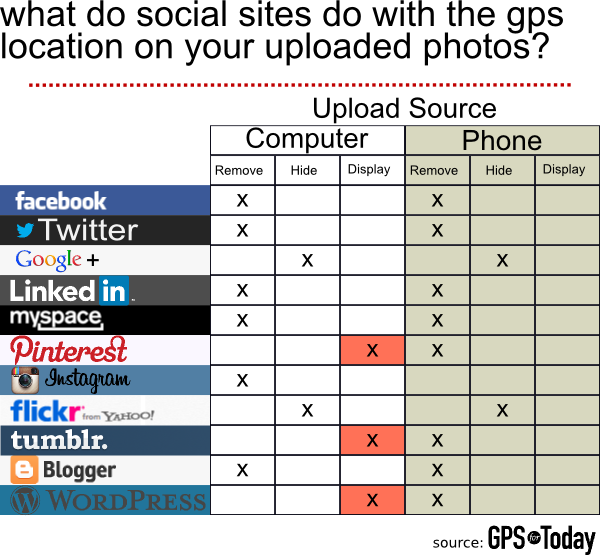
href="http://exifmetadata.files.wordpress.com/2012/12/wpid-img_20121206_134513.jpg">WordPress.com</a> act exactly the same. If you want to strip your EXIF data from cell phone photos posted to a WordPress blog you will want to upload them directly from you phone.</p><h3>Conclusion</h3><p>Most services seem to have a handle on keeping your information safe, even when you don&#8217;t really know what you are doing. This is especially true of photos uploaded directly from a cell phone using the respective app for each of the services. In all cases that we tested, the EXIF data was either completely stripped from the photo or it was hidden from view until a user chose to make it public. Here is a overview, in graphic form, of the data we collected:</p><p><img
class="aligncenter size-full wp-image-2378" title="social site exif data summary" alt="social site exif data summary" src="http://www.gpsfortoday.com/wp-content/uploads/2012/12/social-site-exif-data-summary.png" width="600" height="555" srcset="http://www.gpsfortoday.com/wp-content/uploads/2012/12/social-site-exif-data-summary.png 600w, http://www.gpsfortoday.com/wp-content/uploads/2012/12/social-site-exif-data-summary-300x277.png 300w, http://www.gpsfortoday.com/wp-content/uploads/2012/12/social-site-exif-data-summary-590x545.png 590w" sizes="(max-width: 600px) 100vw, 600px" /></p><p>&nbsp;</p> ]]></content><link
rel="replies" type="text/html" href="http://www.gpsfortoday.com/what-social-networks-protect-your-exif-and-gps-location-data-from-other-users/#comments" thr:count="2"/><link
rel="replies" type="application/atom+xml" href="http://www.gpsfortoday.com/what-social-networks-protect-your-exif-and-gps-location-data-from-other-users/feed/atom/" thr:count="2"/> <thr:total>2</thr:total> </entry> <entry> <author> <name>Joe Mueller</name> <uri>http://www.gpsfortoday.com/</uri> </author><title
type="html"><![CDATA[Buyer Beware: GPS Jammers Are Illegal to Use (And Sell)]]></title><link
rel="alternate" type="text/html" href="http://www.gpsfortoday.com/buyer-beware-gps-jammers-are-illegal-to-use-and-sell/" /> <id>http://www.gpsfortoday.com/?p=2231</id> <updated>2019-12-11T13:25:41Z</updated> <published>2012-04-16T14:40:11Z</published> <category
scheme="http://www.gpsfortoday.com" term="GPS Tracking" /><category
scheme="http://www.gpsfortoday.com" term="gps blocker" /><category
scheme="http://www.gpsfortoday.com" term="gps jammer" /> <summary
type="html"><![CDATA[If you think you are looking to buy a GPS jammer you need to think again. According to the FCC and Federal law it is illegal to use, sell or even market these devices in the United States. For some people who suspect that they are the subject of illegal GPS tracking activity, this leaves &#8230; <a
href="http://www.gpsfortoday.com/buyer-beware-gps-jammers-are-illegal-to-use-and-sell/" class="more-link">Continue reading <span
class="screen-reader-text">Buyer Beware: GPS Jammers Are Illegal to Use (And Sell)</span></a>]]></summary> <content
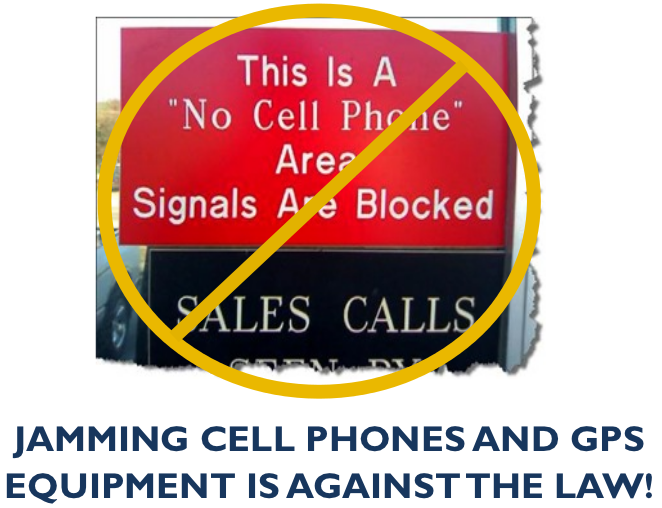
type="html" xml:base="http://www.gpsfortoday.com/buyer-beware-gps-jammers-are-illegal-to-use-and-sell/"><![CDATA[<p>If you think you are looking to buy a GPS jammer you need to think again. According to the FCC and Federal law it is illegal to use, sell or even market these devices in the United States. For some people who suspect that they are the subject of illegal GPS tracking activity, this leaves them with one less option to fight against a stalker or other criminal activity. But in the interest of public safety the complete prohibition of these devices has been deemed necessary by the powers that be. Whether or not you agree with this, it is the law and you should probably look for another solution to take care of your illegal GPS tracking problem.</p><p><a
href="http://www.gpsfortoday.com/wp-content/uploads/2012/04/gps-jammers-illegal.png"><img
class="aligncenter size-large wp-image-2232" title="GPS Jammers ARE Illegal" src="http://www.gpsfortoday.com/wp-content/uploads/2012/04/gps-jammers-illegal-590x452.png" alt="GPS Jammers ARE Illegal" width="590" height="452" srcset="http://www.gpsfortoday.com/wp-content/uploads/2012/04/gps-jammers-illegal-590x452.png 590w, http://www.gpsfortoday.com/wp-content/uploads/2012/04/gps-jammers-illegal-300x230.png 300w, http://www.gpsfortoday.com/wp-content/uploads/2012/04/gps-jammers-illegal.png 662w" sizes="(max-width: 590px) 100vw, 590px" /></a></p><h3>Why Is Owning a GPS Jammer Illegal?</h3><p>A person looking to buy a GPS tracking jammer to help thwart illegal activity by the US government or by a private citizen could feel as though a law preventing them from doing so is stupid.Â  They are just trying to protect themselves; isn&#8217;t that okay?Â  The powers that be, however, have deemed the use, sale and marketing of such jamming devices illegal (except by the US government &#8211; a little ironic, don&#8217;t you think).Â  The Department of Homeland Security is ramping up efforts to identify sources of jamming activity and prosecute those who are using these devices.Â  Just take a look at these statements by government officials and laws:</p><blockquote
cite="http://transition.fcc.gov/eb/jammerenforcement/jamfaq.pdf"><p>Communications Act of 1934, as amended, 47 U.S.C. Â§Â§ 301, 302a(b), 333.</p><ul><li>Section 301 of the Communications Act: â€œNo person shall use or operate any apparatus for the transmission of energy or communications or signals by radio&#8230;except under and in accordance with [the Communications] Act and with a license in that behalf granted under the provisions of this Act.â€ 47 U.S.C. Â§ 301.</li><li>Section 302(b) of the Communications Act: â€œNo person shall manufacture, import, sell, offer for sale, or ship devices or home electronic equipment and systems, or use devices, which fail to comply with regulations promulgated pursuant to this section.â€ 47 U.S.C. Â§ 302a(b).</li><li>Section 333 of the Communications Act: â€œNo person shall willfully or maliciously interfere with or cause interference to any radio communications of any station licensed or authorized by or under [the Communications] Act or operated by the United States Government.â€ 47 U.S.C. Â§ 333.</li></ul></blockquote><blockquote
cite="http://gps.gov/multimedia/presentations/2012/03/WSTS/merrill.pdf"><p>&#8220;Jamming devices create serious safety risks. In the coming weeks and months, we&#8217;ll be intensifying our efforts through partnerships with law enforcement agencies to crack down on those who continue to violate the law. Through education, outreach, and aggressive enforcement, we&#8217;re tackling this problem head on.&#8221;</p><p>&#8212; P. Michele Ellison, Chief, Enforcement Bureau</p></blockquote><p>Jammers are definitely illegal and the government is taking an increasing interest in suppressing their use.</p><p>The main reason cited by the government is that jammers of all kinds pose a risk to public safety. The rational goes something like this:</p><p><strong>Jammers are indiscriminate blockers</strong>. Since jammers are unable to determine if a phone call or GPS device is being used for emergency purpose or for a social one, they pose a risk to all citizens.  The key here is that they are <i>indiscriminate</i>. Just imagine if you have a jammer set up in your store, home or car. You might have the jammer there for perfectly legitimate reasons, like preventing someone from tracking you while at work, at home or on the road. But these jammers have no way of blocking just your device. Someone in the store could have a heart attack, or your next door neighbor might cut themselves with a knife, or your vehicle could get in an accident. If the jammer is powerful enough you run the risk of preventing the legitimate use of  communication signals for emergency purposes. You are now posing a risk to the world around you.</p><p><strong>Jammers can also wreak havoc on important national infrastructure</strong>. The DHS is beginning to take this very seriously. Just take a look at the slides of their <a
href="http://gps.gov/multimedia/presentations/2012/03/WSTS/merrill.pdf">presentation</a> (.pdf) at the 2012 Telcordia-NIST-ATIS Workshop on Synchronization in Telecommunication Systems (WSTS &#8217;12), held March 20-22, 2012, in Broomfield, Colorado. While some of the jamming equipment outline in this presentation offer a significant leap over most GPS jamming equipment found through a simple Google search, the risk to financial, power, telecommunications and transportation infrastructure is significant.</p><p>With that being said, you really should think twice about getting a jammer.</p><p>More Government Resources:</p><ul><li><a
href="http://www.gps.gov/policy/interference/jamming/">GPS.gov Jamming Policy Page</a></li><li><a
href="http://transition.fcc.gov/eb/jammerenforcement/celjampos.pdf">Educational Poster</a></li><li><a
href="http://www.fcc.gov/Daily_Releases/Daily_Business/2011/db0209/DA-11-250A1.pdf">Consumer Advisory Notice</a></li><li><a
href="http://www.fcc.gov/Daily_Releases/Daily_Business/2011/db0209/DA-11-249A1.pdf">Retail Advisory Notice</a></li></ul><h3>Is My GPS Jammer Illegal?</h3><p>What about those who have already bought a device marketed as a GPS jammer? How does a person tell if the jammer is legal or illegal?</p><p>The easiest way to tell is to identify FCC ID label your device. If it does not have the important FCC ID then you should stop using your device because it is probably illegal to use.</p><p>If you need help finding the FCC ID on your device you might find this helpful: <a
href="http://transition.fcc.gov/oet/ea/fccid/help.html">FCC ID Number Help</a></p><h3>What You Can Do to Protect Yourself From Illegal GPS Tracking</h3><p>If you have gotten this far and are wondering what you can do to help protect yourself from unlawful GPS tracking then you might want to consider these tips:</p><ul><ul><li><strong>Check your cell phone periodically from apps or file folders that you don&#8217;t recognize.</strong> If you find something that you didn&#8217;t install then Google the name to find out more about the app or file folder. If the app is malicious, take the necessary steps to remove the app.</li><li><strong>Do a routine inspection of your wheel wells and vehicle under carriage.</strong></li><p> Most GPS trackers will attach to your vehicle via a magnet, so look for anything that appears out of place. Once you find a device contact the police right away so they can take a look. Another option would be to remove the device and attach it to a random car (!), but its probably better just to call the police.</ul></ul><p>If you have any additional questions feel free to leave a comment below.</p> ]]></content> </entry> <entry> <author> <name>Joe Mueller</name> <uri>http://www.gpsfortoday.com/</uri> </author><title
type="html"><![CDATA[How To Use Endomondo]]></title><link
rel="alternate" type="text/html" href="http://www.gpsfortoday.com/how-to-use-endomondo/" /> <id>http://www.gpsfortoday.com/?p=2120</id> <updated>2019-12-11T13:25:41Z</updated> <published>2012-02-22T17:09:35Z</published> <category
scheme="http://www.gpsfortoday.com" term="Apps" /><category
scheme="http://www.gpsfortoday.com" term="For Fitness" /><category
scheme="http://www.gpsfortoday.com" term="GPS Tracking" /><category
scheme="http://www.gpsfortoday.com" term="How To" /><category
scheme="http://www.gpsfortoday.com" term="Reviews" /><category
scheme="http://www.gpsfortoday.com" term="android" /><category
scheme="http://www.gpsfortoday.com" term="Endomondo" /><category
scheme="http://www.gpsfortoday.com" term="fitness cell phone tracking" /><category
scheme="http://www.gpsfortoday.com" term="fitness gps" /><category
scheme="http://www.gpsfortoday.com" term="fitness gps tracking system" /><category
scheme="http://www.gpsfortoday.com" term="fitness tracking" /><category
scheme="http://www.gpsfortoday.com" term="gps tracker test" /><category
scheme="http://www.gpsfortoday.com" term="gps tracking apps" /><category
scheme="http://www.gpsfortoday.com" term="iphone" /><category
scheme="http://www.gpsfortoday.com" term="Nokia" /><category
scheme="http://www.gpsfortoday.com" term="windows phone" /> <summary
type="html"><![CDATA[How To Use Endomondo In this article we are going to cover the basic functionality of Endomondo. To this end we have divided the basics into 4 different sections that take a user from downloading the app all the way through their first run. As you will find out, using Endomondo is a breeze and &#8230; <a
href="http://www.gpsfortoday.com/how-to-use-endomondo/" class="more-link">Continue reading <span
class="screen-reader-text">How To Use Endomondo</span></a>]]></summary> <content
type="html" xml:base="http://www.gpsfortoday.com/how-to-use-endomondo/"><![CDATA[<h3><a
name="#How-To"></a>How To Use Endomondo</h3><p>In this article we are going to cover the basic functionality of Endomondo. To this end we have divided the basics into 4 different sections that take a user from downloading the app all the way through their first run. As you will find out, using Endomondo is a breeze and really fun too. They have made it as simple and as straight forward as they can so that as many people who want to use it can. All walkthroughs below show how to download and use Endomondo on an Android OS (in this case a Galaxy Nexus running ICS (Ice Cream Sandwich) 4.0.2).</p><p
style="text-align: center;"><a
href="#Downloading-App">Downloading App</a> | <a
href="#Configuring-App">Configuring App</a> | <a
href="#Using-App">Using App</a> | <a
href="#Editing-Run-Data">Editing Run Data</a></p><h4><a
name="Downloading-App"></a>Downloading the Endmondo App</h4><p>Downloading the app can either be done through the Android Market app on your phone or through the Market website (<a
href="https://market.android.com/">https://market.android.com/</a>).</p> <a
href='http://www.gpsfortoday.com/endomondo-sport-tracking-app-review/endomondo-download-01-market-opening/'><img
width="150" height="150" src="http://www.gpsfortoday.com/wp-content/uploads/2012/02/Endomondo-Download-01-Market-Opening-150x150.png" class="attachment-thumbnail size-thumbnail" alt="" /></a> <a
href='http://www.gpsfortoday.com/endomondo-sport-tracking-app-review/endomondo-download-02-search/'><img
width="150" height="150" src="http://www.gpsfortoday.com/wp-content/uploads/2012/02/Endomondo-Download-02-Search-150x150.png" class="attachment-thumbnail size-thumbnail" alt="" /></a> <a
href='http://www.gpsfortoday.com/endomondo-sport-tracking-app-review/endomondo-download-03-results/'><img
width="150" height="150" src="http://www.gpsfortoday.com/wp-content/uploads/2012/02/Endomondo-Download-03-Results-150x150.png" class="attachment-thumbnail size-thumbnail" alt="" /></a> <a
href='http://www.gpsfortoday.com/endomondo-sport-tracking-app-review/endomondo-donwload-04-app-page/'><img
width="150" height="150" src="http://www.gpsfortoday.com/wp-content/uploads/2012/02/Endomondo-Donwload-04-App-Page-150x150.png" class="attachment-thumbnail size-thumbnail" alt="" /></a> <a
href='http://www.gpsfortoday.com/endomondo-sport-tracking-app-review/endomondo-download-05-app-permissions/'><img
width="150" height="150" src="http://www.gpsfortoday.com/wp-content/uploads/2012/02/Endomondo-Download-05-App-Permissions-150x150.png" class="attachment-thumbnail size-thumbnail" alt="" /></a> <a
href='http://www.gpsfortoday.com/endomondo-sport-tracking-app-review/endomondo-download-06-finished/'><img
width="150" height="150" src="http://www.gpsfortoday.com/wp-content/uploads/2012/02/Endomondo-Download-06-Finished-150x150.png" class="attachment-thumbnail size-thumbnail" alt="" /></a> <a
href='http://www.gpsfortoday.com/endomondo-sport-tracking-app-review/endomondo-download-07-opening-screen/'><img
width="150" height="150" src="http://www.gpsfortoday.com/wp-content/uploads/2012/02/Endomondo-Download-07-Opening-Screen-150x150.png" class="attachment-thumbnail size-thumbnail" alt="" /></a> <a
href='http://www.gpsfortoday.com/endomondo-sport-tracking-app-review/endomondo-download-08-facebook/'><img
width="150" height="150" src="http://www.gpsfortoday.com/wp-content/uploads/2012/02/Endomondo-Download-08-Facebook-150x150.png" class="attachment-thumbnail size-thumbnail" alt="" /></a> <a
href='http://www.gpsfortoday.com/endomondo-sport-tracking-app-review/endomondo-donwload-09-friend-finder/'><img
width="150" height="150" src="http://www.gpsfortoday.com/wp-content/uploads/2012/02/Endomondo-Donwload-09-Friend-Finder-150x150.png" class="attachment-thumbnail size-thumbnail" alt="" /></a> <a
href='http://www.gpsfortoday.com/endomondo-sport-tracking-app-review/endomondo-download-10-ready-to-use/'><img
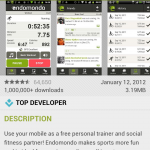
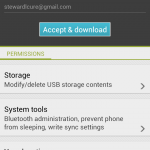
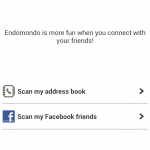
width="150" height="150" src="http://www.gpsfortoday.com/wp-content/uploads/2012/02/Endomondo-Download-10-Ready-To-Use-150x150.png" class="attachment-thumbnail size-thumbnail" alt="" /></a><ol><li>Open Market on your phone</li><li>Search for &#8220;Endomondo&#8221;</li><li>Find Endomondo (Free) or Endomondo Pro ($0.99)</li><li>Click on the &#8220;Download&#8221; button</li><li>Click on the &#8220;Accept &amp; download&#8221; button</li><li>Once the app has downloaded you can click on the &#8220;Open&#8221; button</li><li>Endomondo will ask you to sign in. We chose the Facebook option because its easy.</li><li>You will be prompted to accept connecting Facebook with Endomondo.</li><li>Once the authorization has occurred, you can add friends to Endomondo directly from Facebook. We skipped this step.</li><li>After you&#8217;re done you will be taken to the next screen where you can begin tracking your very first run.</li></ol><h4><a
name="Configuring-App"></a>Configuring Endmondo</h4><p><a
href="http://www.gpsfortoday.com/wp-content/uploads/2012/02/Endmonodo-Comprehensive-Settings.png"><img
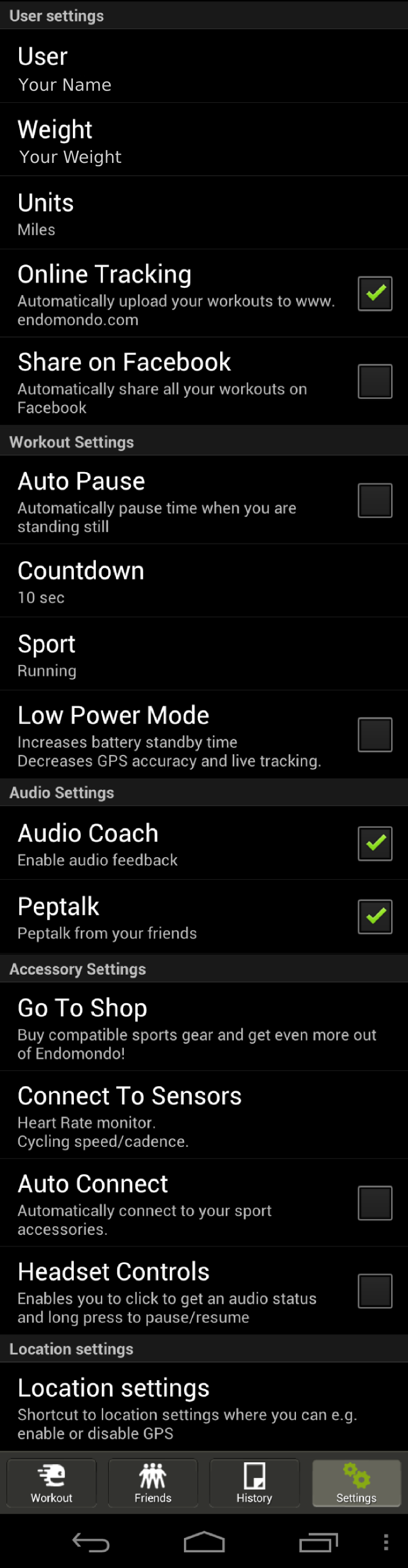
class="alignleft size-thumbnail wp-image-2002" title="Endmonodo Comprehensive Settings" src="http://www.gpsfortoday.com/wp-content/uploads/2012/02/Endmonodo-Comprehensive-Settings-150x150.png" alt="Endmonodo Comprehensive Settings" width="150" height="150" /></a></p><p>Endomondo is fairly simple and only has a few settings you want to make sure that you are going to be using. The first that I recommend using is the Online Tracking option which will automatically upload your workouts to the <a
href="http://www.endomondo.com">Endomondo website</a>. This makes things simple for you and lets you keep all your runs in a single place, even if you use different phones throughout the course of your use of Endomondo.</p><p>I also recommend enabling both of the audio settings. Audio Coach will give you audio cues when you have run each mile and the pace at which you ran that mile (or km based upon user preferences). If you are running a goal run you will also get some info on how much longer you can expect to be running given the pace of your last mile (or km). Pep Talk is a cool feature that allows your friends to send you verbal message to you on your runs as they happen. While the pep talked is delivered in a robotic voice and spoken quickly, each message is personalized with who it is from. This is a really cool and especially helpful if you are using the app while doing a race. Friends and loved ones can give you an encouraging word at just the right moment to give you that mental edge.</p><p>Finally, at the bottom of the Settings screen they have a link to your phone&#8217;s location settings. I recommend selecting them all so that your phone has the best chance of getting a good location fix so that your GPS tracks look the most true to life.</p><h4><a
name="Using-App"></a>Using the Endomondo on a Run</h4><p><a
href="http://www.gpsfortoday.com/wp-content/uploads/2012/02/Endomondo-Opening-Screen.png"><img
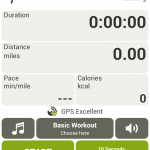
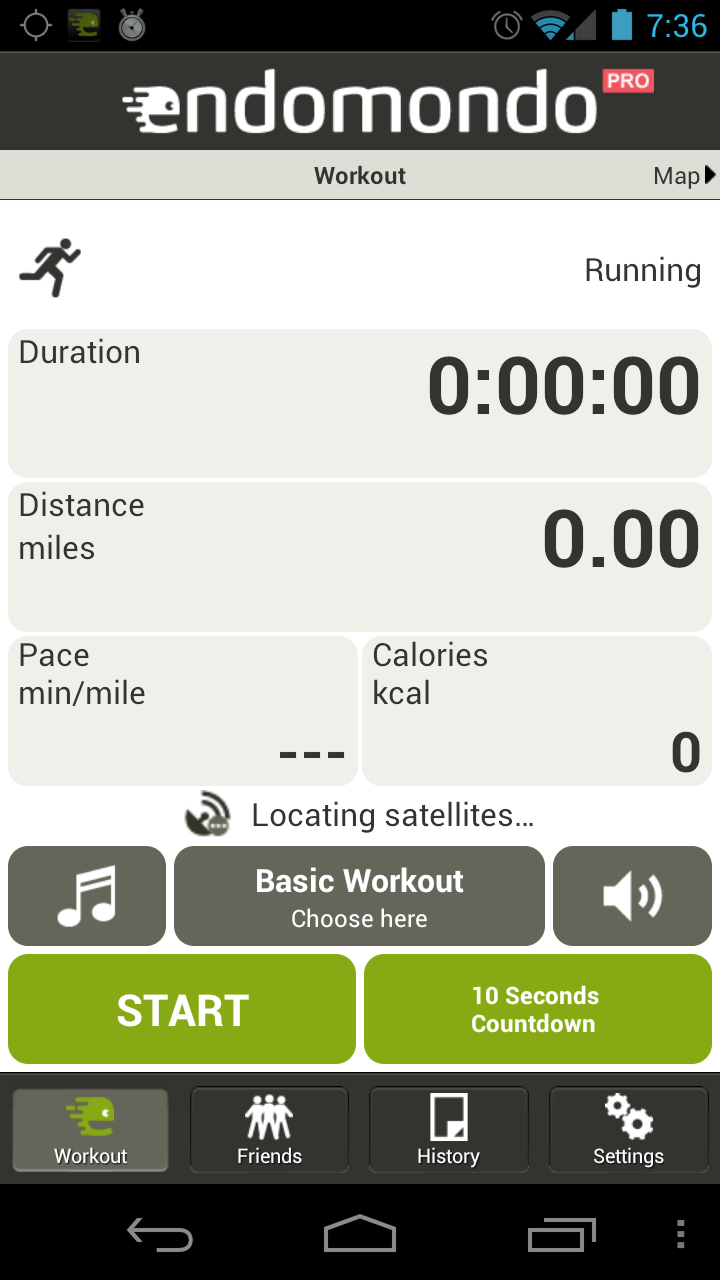
class="alignright size-medium wp-image-2003" title="Endomondo Opening Screen" src="http://www.gpsfortoday.com/wp-content/uploads/2012/02/Endomondo-Opening-Screen-168x300.png" alt="" width="168" height="300" srcset="http://www.gpsfortoday.com/wp-content/uploads/2012/02/Endomondo-Opening-Screen-168x300.png 168w, http://www.gpsfortoday.com/wp-content/uploads/2012/02/Endomondo-Opening-Screen-576x1024.png 576w, http://www.gpsfortoday.com/wp-content/uploads/2012/02/Endomondo-Opening-Screen.png 720w" sizes="(max-width: 168px) 100vw, 168px" /></a></p><p>Endomondo is dead simple to use while on a run. To get started, simply click on the big green Start button at the bottom left of the app screen. Or, as I prefer to do, I click on the 10 second countdown button on the bottom right. The 10 second countdown button ends with an audible countdown and then the electronic encouragement to, &#8220;Free your endorphins.&#8221; Its a little corny, but I like it.</p><p>If you need to pause the run, just click the pause button that replaces the green pause button on the bottom left. To stop the run click the red stop button on the bottom right.</p><p>Easy as pie.</p><h4><a
name="Editing-Run-Data"></a>Editing And Sharing Runs</h4><p><strong>Editing</strong></p><p><a
href="http://www.gpsfortoday.com/wp-content/uploads/2012/02/Endomondo-Edit-Workouts.png"><img
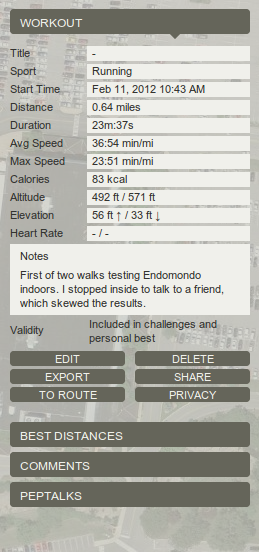
class="alignright size-full wp-image-2029" title="Endomondo Edit Workouts" src="http://www.gpsfortoday.com/wp-content/uploads/2012/02/Endomondo-Edit-Workouts.png" alt="Endomondo Edit Workouts" width="259" height="552" /></a></p><p>Endomondo, like all other GPS tracking apps, is not perfect. But what it lacks in perfect tracking technology it makes up for with editing. Once a run is uploaded to the Endomondo website, which is normally done automatically, you simply go to the website and log in. All your workouts are available for you to see by clicking on the &#8220;Workout&#8221; button at the top of the page. This is going to bring you to calendar that displays all your workouts for the current month.</p><p>To begin editing, click on the workout that you need to fix and it will pull up that workout in the map below the calendar. On the right hand side of the screen next to the map of your workout you will see the image to the left for your particular workout. Not all of the field can be edited, but most can.</p><p>You can edit:</p><ul><li>Workout Title</li><li>Start Time</li><li>Distance</li><li>Duration</li><li>Elevation</li><li>Heart Rate</li><li>Note Field</li></ul><p>All editing is saved once you press the save button and there is no back button to revert changes you made back to the original info.</p><p><strong>Sharing</strong></p><p>Endomondo also lets you share runs on other platforms. Users can post a run to Facebook (or a host of other online communities), send a link to a friend in an email, chat message, or forum link, or post their workout in an iframe on their own website or blog. There are over 320 different ways to share your run on Endomondo &#8211; a number that is nothing to sniff at. If Endomondo gets anything right it is the sharing and social aspect of working out.</p><p>Endomondo also give you access to the raw data from the app.  You can download workouts in <a
href="http://developer.garmin.com/schemas/tcx/v2/">.tcx</a> or as a <a
href="http://www.topografix.com/gpx.asp">.gpx</a> file.  This will allow you to export the data into other fitness or GPS tracking software.</p><p><em>This is part of our in-depth look at Endomondo.  You can check out the <a
href="http://www.gpsfortoday.com/apps/endomondo-fitness-app-review/ " title="Endomondo Review Home">summary of the running tests</a> we performed or read each of results in more detail (<a
title="Endomondo Track Tests" href="http://www.gpsfortoday.com/apps/endomondo-fitness-app-review/track-run-test/">Track Tests</a> | <a
title="Endomondo Suburban Tests" href="http://www.gpsfortoday.com/apps/endomondo-fitness-app-review/testing-runs-in-suburbia/">Suburban Tests</a> | <a
title="Endomondo Nature Tests" href="http://www.gpsfortoday.com/apps/endomondo-fitness-app-review/nature-running-tests/">Nature Tests</a> | <a
title="Endomondo Indoor Tests" href="http://www.gpsfortoday.com/apps/endomondo-fitness-app-review/indoor-running-tests/">Indoor Tests</a>). </em></p> ]]></content><link
rel="replies" type="text/html" href="http://www.gpsfortoday.com/how-to-use-endomondo/#comments" thr:count="1"/><link
rel="replies" type="application/atom+xml" href="http://www.gpsfortoday.com/how-to-use-endomondo/feed/atom/" thr:count="1"/> <thr:total>1</thr:total> </entry> <entry> <author> <name>Joe Mueller</name> <uri>http://www.gpsfortoday.com/</uri> </author><title
type="html"><![CDATA[Endomondo {Sport Tracking App Review}]]></title><link
rel="alternate" type="text/html" href="http://www.gpsfortoday.com/endomondo-sport-tracking-app-review/" /> <id>http://www.gpsfortoday.com/?p=1902</id> <updated>2019-12-11T13:25:41Z</updated> <published>2012-02-21T15:41:55Z</published> <category
scheme="http://www.gpsfortoday.com" term="Apps" /><category
scheme="http://www.gpsfortoday.com" term="For Fitness" /><category
scheme="http://www.gpsfortoday.com" term="GPS Tracking" /><category
scheme="http://www.gpsfortoday.com" term="Reviews" /><category
scheme="http://www.gpsfortoday.com" term="android" /><category
scheme="http://www.gpsfortoday.com" term="Endomondo" /><category
scheme="http://www.gpsfortoday.com" term="fitness cell phone tracking" /><category
scheme="http://www.gpsfortoday.com" term="fitness gps" /><category
scheme="http://www.gpsfortoday.com" term="fitness gps tracking system" /><category
scheme="http://www.gpsfortoday.com" term="fitness tracking" /><category
scheme="http://www.gpsfortoday.com" term="gps tracker test" /><category
scheme="http://www.gpsfortoday.com" term="gps tracking apps" /><category
scheme="http://www.gpsfortoday.com" term="iphone" /><category
scheme="http://www.gpsfortoday.com" term="Nokia" /><category
scheme="http://www.gpsfortoday.com" term="windows phone" /> <summary
type="html"><![CDATA[Looking for a free and social sports tracking app with real-time GPS tracking capabilities? Yes? Endomondo is for you. This app combines powerful and accurate GPS tracking technology with easy-to-use social features. The app works on a huge assortment of cell phones (Android, iPhone, Windows Phone, Nokia) and integrates with other fitness equipment like heart &#8230; <a
href="http://www.gpsfortoday.com/endomondo-sport-tracking-app-review/" class="more-link">Continue reading <span
class="screen-reader-text">Endomondo {Sport Tracking App Review}</span></a>]]></summary> <content
type="html" xml:base="http://www.gpsfortoday.com/endomondo-sport-tracking-app-review/"><![CDATA[<p><a
name="#Home"></a>Looking for a free and social sports tracking app with real-time GPS tracking capabilities? Yes? Endomondo is for you. This app combines powerful and accurate GPS tracking technology with easy-to-use social features. The app works on a huge assortment of cell phones (Android, iPhone, Windows Phone, Nokia) and integrates with other fitness equipment like heart rate monitors and cycling cadence computers. A full featured website and thriving community plugs users in immediately to friends already using the app and makes it a breeze to find more. If you are looking to get off your derriere and onto the road then Endomondo is certainly worth a shot.</p><p
style="text-align: center;"><em><strong>Recommendation</strong>: Get Endomondo and free your endorphins</em>.</p><p><strong>Summary of Results</strong><br
/> For those short on time here is a brief summary of our results. Endomondo was generally very accurate for normal use. Errors in measurement ranged from small (0-5%) on track and suburban running to very large (90%) in indoor tests. Generally speaking, the more exposed to open sky the run, the more accurate the results. Endomondo also did better on there-and-back style runs than on loops where it tended to record workouts as longer or shorter depending on your position on the loop. Using the app to record changes in elevation was essentially a joke, but this surely had more to do with the hardware and software on the phone than with Endomondo itself.</p><p>For more detail on our tests and the results, check out the links below or use the navigation bar at the bottom of the content on each page of this review.</p><p><img
class="alignright size-full wp-image-2058" title="Endomondo Logo" src="http://www.gpsfortoday.com/wp-content/uploads/2012/02/endomondo-logo.png" alt="Endomondo Logo" width="256" height="256" srcset="http://www.gpsfortoday.com/wp-content/uploads/2012/02/endomondo-logo.png 256w, http://www.gpsfortoday.com/wp-content/uploads/2012/02/endomondo-logo-150x150.png 150w" sizes="(max-width: 256px) 100vw, 256px" /></p><p><strong>Table of Contents</strong></p><ul><li>Running Tests With Endomondo</li><ul><li><a
href="http://www.gpsfortoday.com/apps/endomondo-fitness-app-review/track-run-test/">Track Runs</a></li><ul><li><a
href="http://www.gpsfortoday.com/apps/endomondo-fitness-app-review/track-run-test/#Pace-Run">Pace Run</a></li><li><a
href="http://www.gpsfortoday.com/apps/endomondo-fitness-app-review/track-run-test/#Interval-Training">Interval Training</a></li></ul><li><a
href="http://www.gpsfortoday.com/apps/endomondo-fitness-app-review/testing-runs-in-suburbia/">Runs in Suburbs</a></li><ul><li><a
href="http://www.gpsfortoday.com/apps/endomondo-fitness-app-review/testing-runs-in-suburbia/#Suburban-There-And-Back">&#8216;Burban There and Back Run</a></li><li><a
href="http://www.gpsfortoday.com/apps/endomondo-fitness-app-review/testing-runs-in-suburbia/#Suburban-Loop">&#8216;Burban Loop Run</a></li></ul><li><a
href="http://www.gpsfortoday.com/apps/endomondo-fitness-app-review/nature-running-tests/">Nature Runs</a></li><ul><li><a
href="http://www.gpsfortoday.com/apps/endomondo-fitness-app-review/nature-running-tests/#Nature-There-And-Back"> Nature There And Back Run</a></li><li><a
href="http://www.gpsfortoday.com/apps/endomondo-fitness-app-review/nature-running-tests/#Nature-Loop-Run">Nature Loop</a></li></ul><li><a
href="http://www.gpsfortoday.com/apps/endomondo-fitness-app-review/indoor-running-tests/">Indoor Runs</a></li><ul><li><a
href="http://www.gpsfortoday.com/apps/endomondo-fitness-app-review/indoor-running-tests/#Indoor-Track-Run">Indoor Track Run</a></li><li><a
href="http://www.gpsfortoday.com/apps/endomondo-fitness-app-review/indoor-running-tests/#Indoor-Mall-Walk">Indoor Mall Walk</a></li></ul></ul><li><a
href="http://www.gpsfortoday.com/how-to-use-endomondo/">How To Use Endomondo</a></li><ul><li><a
href="http://www.gpsfortoday.com/how-to-use-endomondo/#Downloading-App">Downloading App</a></li><li><a
href="http://www.gpsfortoday.com/how-to-use-endomondo/#Configuring-App">Configuring App</a></li><li><a
href="http://www.gpsfortoday.com/how-to-use-endomondo/#Using-App">Using App</a></li><li><a
href="http://www.gpsfortoday.com/how-to-use-endomondo/#Editing-Run-Data">Editing Run Data</a></li></ul><li><a
href="http://www.gpsfortoday.com/apps/endomondo-fitness-app-review/">Conclusion</a></li></ul><p><strong>A Word On Our Review Method</strong><br
/> We got our base line distances by using published distances from the courses we ran or from measuring the run using Google Maps. In instances where there we neither published course distances or Google Maps to rely on we simply used our best judgment to determine if the route looked like a good approximation of the one we actually took, comparing it to trail maps when available. We understand that neither of these is terribly scientific, but most people are not concerned with getting the accuracy of a sport tracking GPS down to the exact meter. Close enough is often good enough.</p><p>In the tests we used a Galaxy Nexus or a Droid X on the Verizon cell phone network and the phone was inside a Scosche armband, on top of a stroller, or in my hand on the runs.</p><p><strong>Navigation</strong><br
/> <img
class="aligncenter size-full wp-image-1871" title="Review Navigation Sport Home" src="http://www.gpsfortoday.com/wp-content/uploads/2012/02/Review-Navigation-Sport-Home.png" alt="" name="navigation" width="640" height="72" usemap="#navigation" /></p><map
name="navigation"><area
title="Review Home" shape="RECT" coords="0,0,92,72" href="http://www.gpsfortoday.com/endomondo-sport-tracking-app-review/#Home" /><area
title="Track Run" shape="RECT" coords="92,0,184,72" href="http://www.gpsfortoday.com/endomondo-sport-tracking-app-review/2/#Track-Run" /><area
title="Suburban Run" shape="RECT" coords="184,0,276,72" href="http://www.gpsfortoday.com/endomondo-sport-tracking-app-review/3/#Suburban-Run" /><area
title="Wooded Run" shape="RECT" coords="276,0,368,72" href="http://www.gpsfortoday.com/endomondo-sport-tracking-app-review/4/#Nature-Run" /><area
title="Indoor Run" shape="RECT" coords="368,0,460,72" href="http://www.gpsfortoday.com/endomondo-sport-tracking-app-review/5/#Indoor-Run" /><area
title="How To Use" shape="RECT" coords="460,0,552,72" href="http://www.gpsfortoday.com/endomondo-sport-tracking-app-review/6/#How-To" /><area
title="Final Word" shape="RECT" coords="552,0,645,72" href="http://www.gpsfortoday.com/endomondo-sport-tracking-app-review/7/#Conclusion" /></map> ]]></content> </entry> <entry> <author> <name>Joe Mueller</name> <uri>http://www.gpsfortoday.com/</uri> </author><title
type="html"><![CDATA[When Is Finding a Lost Cell Phone Beyond Hope?]]></title><link
rel="alternate" type="text/html" href="http://www.gpsfortoday.com/when-is-finding-a-lost-cell-phone-beyond-hope/" /> <id>http://www.gpsfortoday.com/?p=1903</id> <updated>2019-12-11T13:25:42Z</updated> <published>2012-02-05T15:32:57Z</published> <category
scheme="http://www.gpsfortoday.com" term="Cell Phones" /><category
scheme="http://www.gpsfortoday.com" term="GPS Tracking" /><category
scheme="http://www.gpsfortoday.com" term="Opinion" /><category
scheme="http://www.gpsfortoday.com" term="android" /><category
scheme="http://www.gpsfortoday.com" term="cell phone gps" /><category
scheme="http://www.gpsfortoday.com" term="droid x" /><category
scheme="http://www.gpsfortoday.com" term="gps cell phone tracking" /><category
scheme="http://www.gpsfortoday.com" term="gps tracking application" /><category
scheme="http://www.gpsfortoday.com" term="gps tracking software" /><category
scheme="http://www.gpsfortoday.com" term="lost cell phone" /> <summary
type="html"><![CDATA[This post is brought to you by real life, my life. Its a story about what happens when a blogger who writes about GPS tracking ends up losing his phone, and how sometimes there is nothing you can do about finding it. Recently, my family and I were vacationing in America&#8217;s Finest City. We were &#8230; <a
href="http://www.gpsfortoday.com/when-is-finding-a-lost-cell-phone-beyond-hope/" class="more-link">Continue reading <span
class="screen-reader-text">When Is Finding a Lost Cell Phone Beyond Hope?</span></a>]]></summary> <content
type="html" xml:base="http://www.gpsfortoday.com/when-is-finding-a-lost-cell-phone-beyond-hope/"><![CDATA[<p><em>This post is brought to you by real life, my life.</em> Its a story about what happens when a blogger who writes about GPS tracking ends up losing his phone, and how sometimes there is nothing you can do about finding it.</p><p>Recently, my family and I were vacationing in America&#8217;s Finest City.  We were having a great time enjoying the 70 degree weather, the sunny skies, wonderful food, and sandy beaches.  The weather was fantastic and a nice break from the frigid January we would have had to spend in the Midwest where we live.  We went outside all the time and took several trips to the beach to enjoy the surf, smell the salty air, skip rocks, and get sand everywhere.</p><p><img
src="http://www.gpsfortoday.com/wp-content/uploads/2012/02/Beach-Fun-590x394.jpg" alt="Beach Fun 1" title="Beach-Fun-1" width="590" height="394" class="aligncenter size-large wp-image-1909" srcset="http://www.gpsfortoday.com/wp-content/uploads/2012/02/Beach-Fun-590x394.jpg 590w, http://www.gpsfortoday.com/wp-content/uploads/2012/02/Beach-Fun-300x200.jpg 300w" sizes="(max-width: 590px) 100vw, 590px" /></p><p>We really had a grand ole time.</p><p><img
src="http://www.gpsfortoday.com/wp-content/uploads/2012/02/Beach-Fun-2.jpg" alt="Beach Fun 2" title="Beach-Fun-2" width="590" height="393" class="aligncenter size-full wp-image-1910" srcset="http://www.gpsfortoday.com/wp-content/uploads/2012/02/Beach-Fun-2.jpg 590w, http://www.gpsfortoday.com/wp-content/uploads/2012/02/Beach-Fun-2-300x199.jpg 300w" sizes="(max-width: 590px) 100vw, 590px" /></p><p><img
src="http://www.gpsfortoday.com/wp-content/uploads/2012/02/Beac-Fun-3-590x394.jpg" alt="Beach Fun 3" title="Beach-Fun-3" width="590" height="394" class="aligncenter size-large wp-image-1908" srcset="http://www.gpsfortoday.com/wp-content/uploads/2012/02/Beac-Fun-3-590x394.jpg 590w, http://www.gpsfortoday.com/wp-content/uploads/2012/02/Beac-Fun-3-300x200.jpg 300w" sizes="(max-width: 590px) 100vw, 590px" /></p><p>Then it came time to get back to the car, get the kids clean, and get home.  It was clearly nap time.  We had to walk a good bit to get back to the car and upon arrival we quickly set about getting the kids ready for departure.  While my wife changed one I was cleaning the other &#8211; a task made difficult by tiredness and sand&#8217;s ability to stick to anything.  Frustrated and done it was finally time to get the kids in the car.  As I was taking our youngest to his seat I took out my phone to see if I had any messages from friends who I would hang out with later that night.  I had none and as I was transferring our child to his car seat I placed my phone on the roof of the car.  Big mistake.</p><p>Our other child distracted me by wanting me to get him in buckled in too so I went over to his side of the car, got him in, and then got in the car myself.  My phone, a Droid X, was still sitting on the top of the car.</p><p>We got in the car, popped a U-turn and started heading home.  10 minutes later as the car accelerates up the on ramp to get on the free way we hear a thud and look around the inside of the car to see what had happened.  We think its just my son throwing one of his sticks against the side of the car.  We continue driving and I think little of the thud and what it could mean.</p><p>It wasn&#8217;t until we get home, get inside, and lay the napping kids down that I realize I don&#8217;t have my phone on me.  I panic, but stay calm because I know I have Lookout Mobile Security downloaded to my phone.</p><p>I get on the laptop, log into my account, and do a phone locate through their website.  It was a long three minutes waiting for the app to tell me where my phone is and at the end of three minutes I still had nothing.  So I did it again, hoping that there was just a minor glitch and the phone would figure it out.  It didn&#8217;t.</p><p>Then I downloaded Plan B to my phone, not so much for the location of the phone but to see if it was on and had a network connection.  In a lot of our tests in the <a
href="http://www.gpsfortoday.com/plan-b-gps-tracker-app-review/">review of Plan B</a> the app downloaded within a minute to our phone and our GMail account received a message from Lookout telling us it would have a position on our phone soon.  This didn&#8217;t happen this time.</p><p>I found myself in the worst case scenario for loosing your cell phone.  My phone was either off, out of batteries, destroyed, or taken over by someone else who knew what to do as soon as they found my phone.  At this point there was no technological solution to my problem.  All I could do was go back, retrace my steps, and see if I could find my phone.  GPS tracking would be of no help to me.</p><p>So I got in the car, drove the 20 minutes back to where we parked and surveyed the scene.  After looking for a few minutes I faintly remember placing the phone on the roof and then I hear it, the thud as we accelerated onto the freeway.  Its at that moment that I realize my phone is not stolen, its not off, and its not out of batteries.  My phone is smashed into a confetti of plastic and silicon.</p><p>Here are some of my takeaways from this experience:</p><ol><li><strong>Sometimes being prepared doesn&#8217;t matter</strong>.  I was certainly prepared in the eventuality that my cell phone might become lost or stolen.  I had the necessary apps installed and had done my homework on how to use them.  But there are some things that you just can&#8217;t control.</li><li><strong>GPS tracking apps have their limits.</strong> This is really just a restatement of my first takeaway, but needs to be said.  Tracking apps <strong>ARE NOT</strong> the solution for finding every lost phone.  Good ole fashioned skills such as retracing your steps and remembering cannot be bypassed.</li><li><strong>Don&#8217;t be an idiot.</strong> I was an idiot and did not properly secure my phone.  I should have put it back into my pocket.  Or better yet, gotten a magnetic case so it would have stuck to my car. <img
src="https://s.w.org/images/core/emoji/11/72x72/1f642.png" alt="🙂" class="wp-smiley" style="height: 1em; max-height: 1em;" /></li></ol> ]]></content><link
rel="replies" type="text/html" href="http://www.gpsfortoday.com/when-is-finding-a-lost-cell-phone-beyond-hope/#comments" thr:count="1"/><link
rel="replies" type="application/atom+xml" href="http://www.gpsfortoday.com/when-is-finding-a-lost-cell-phone-beyond-hope/feed/atom/" thr:count="1"/> <thr:total>1</thr:total> </entry> <entry> <author> <name>Joe Mueller</name> <uri>http://www.gpsfortoday.com/</uri> </author><title
type="html"><![CDATA[Plan B {GPS Tracker App Review}]]></title><link
rel="alternate" type="text/html" href="http://www.gpsfortoday.com/plan-b-gps-tracker-app-review/" /> <id>http://www.gpsfortoday.com/?p=1589</id> <updated>2019-12-11T13:25:42Z</updated> <published>2012-02-03T20:00:30Z</published> <category
scheme="http://www.gpsfortoday.com" term="Apps" /><category
scheme="http://www.gpsfortoday.com" term="Cell Phones" /><category
scheme="http://www.gpsfortoday.com" term="GPS Tracking" /><category
scheme="http://www.gpsfortoday.com" term="Reviews" /><category
scheme="http://www.gpsfortoday.com" term="battery drain" /><category
scheme="http://www.gpsfortoday.com" term="gps tracker testing" /><category
scheme="http://www.gpsfortoday.com" term="indoor gps" /><category
scheme="http://www.gpsfortoday.com" term="Lookout Mobile Security" /><category
scheme="http://www.gpsfortoday.com" term="lost cell phone" /><category
scheme="http://www.gpsfortoday.com" term="outdoor gps" /><category
scheme="http://www.gpsfortoday.com" term="Plan B" /><category
scheme="http://www.gpsfortoday.com" term="stolen cell phone" /> <summary
type="html"><![CDATA[Plan B is a cell phone recovery app that is designed to be used after your mobile has already been lost. It is positioned as an &#8220;app of last resort&#8221; and as such it is going to be used by people who didn&#8217;t realize that there are apps out there that can help you track &#8230; <a
href="http://www.gpsfortoday.com/plan-b-gps-tracker-app-review/" class="more-link">Continue reading <span
class="screen-reader-text">Plan B {GPS Tracker App Review}</span></a>]]></summary> <content
type="html" xml:base="http://www.gpsfortoday.com/plan-b-gps-tracker-app-review/"><![CDATA[<p><a
name="review-home"></a>Plan B is a cell phone recovery app that is designed to be used after your mobile has already been lost. It is positioned as an &#8220;app of last resort&#8221; and as such it is going to be used by people who didn&#8217;t realize that there are apps out there that can help you track down your phone in case it gets lost or stolen. As such, it is going to save hundreds of thousands of phones that have been separated from their owners. We put a lot of important, personal information on our phones that we want to keep private and an app like Plan B is exactly what thousands of people need to get reunited with these powerful (and easily lost) bits of technology. Plan B is available exclusively on Android phones, is completely free, and requires Android 2. 0 and up.</p><p
style="text-align: center;"><em><strong>Recommendation: </strong>Yes! Use Plan B if your Android cell is already lost or stolen</em></p><p><img
class="alignright size-full wp-image-1898" title="Plan B Logo" src="http://www.gpsfortoday.com/wp-content/uploads/2011/12/Plan-B-Logo.png" alt="Plan B Logo" width="256" height="256" srcset="http://www.gpsfortoday.com/wp-content/uploads/2011/12/Plan-B-Logo.png 256w, http://www.gpsfortoday.com/wp-content/uploads/2011/12/Plan-B-Logo-150x150.png 150w" sizes="(max-width: 256px) 100vw, 256px" /></p><h4>Review Table of Contents</h4><ul><li><a
href="http://www.gpsfortoday.com/plan-b-gps-tracker-app-review/2/#Outdoor-Tests">App Testing Ground &#8211; Outdoor Tests</a></li><li><a
href="http://www.gpsfortoday.com/plan-b-gps-tracker-app-review/3/#Indoor-Tests">App Testing Ground &#8211; Indoor Tests</a></li><li><a
href="http://www.gpsfortoday.com/plan-b-gps-tracker-app-review/4/#How-To-Use">How To Use Plan B</a></li><li><a
href="http://www.gpsfortoday.com/plan-b-gps-tracker-app-review/5/#Battery-Drain">Plan B Battery Drain</a></li><li><a
href="http://www.gpsfortoday.com/plan-b-gps-tracker-app-review/6/#FAQ">Frequently Answered and Important Questions</a></li><li><a
href="http://www.gpsfortoday.com/plan-b-gps-tracker-app-review/7/#Conclusion">Final Word</a></li></ul><p><strong>A Note On Readers Of This Review</strong><br
/> We tried our best to simulate real world situations when testing Plan B. Due to the nature of the vast variety of real life situations people might face when losing their cell phone we were only able to recreate a handful of them. User experiences may vary given the exact circumstances that your phone is in when lost.</p><p>Also, different hardware may respond differently. In our tests we used a Droid X. Your particular phone may have different hardware than the Droid X and therefore preform differently. Our phone was also on the Verizon network. Mobiles on other networks may perform differently.</p><p>This review is simply for educational purposes only and is meant to allow readers to make informed decisions about what apps like this can do. Please add your own experiences with the app to the comments so everyone can get a better feel for how Plan B works.</p><p><strong>Navigation</strong><br
/> <img
class="aligncenter size-full wp-image-1871" title="Review-Navigation-Image-Home" src="http://www.gpsfortoday.com/wp-content/uploads/2011/12/Review-Navigation-Image-Home.png" alt="" name="navigation" width="640" height="72" usemap="#navigation" srcset="http://www.gpsfortoday.com/wp-content/uploads/2011/12/Review-Navigation-Image-Home.png 640w, http://www.gpsfortoday.com/wp-content/uploads/2011/12/Review-Navigation-Image-Home-300x33.png 300w, http://www.gpsfortoday.com/wp-content/uploads/2011/12/Review-Navigation-Image-Home-590x66.png 590w" sizes="(max-width: 640px) 100vw, 640px" /></p><map
name="navigation"><area
title="Review Home" shape="RECT" coords="0,0,92,72" href="http://www.gpsfortoday.com/plan-b-gps-tracker-app-review/#review-home" /><area
title="Outdoor Tests" shape="RECT" coords="92,0,184,72" href="http://www.gpsfortoday.com/plan-b-gps-tracker-app-review/2/#Outdoor-Tests" /><area
title="Indoor Tests" shape="RECT" coords="184,0,276,72" href="http://www.gpsfortoday.com/plan-b-gps-tracker-app-review/3/#Indoor-Tests" /><area
title="How To Use" shape="RECT" coords="276,0,368,72" href="http://www.gpsfortoday.com/plan-b-gps-tracker-app-review/4/#How-To-Use" /><area
title="Battery Drain" shape="RECT" coords="368,0,460,72" href="http://www.gpsfortoday.com/plan-b-gps-tracker-app-review/5/#Battery-Drain" /><area
title="FAQ" shape="RECT" coords="460,0,552,72" href="http://www.gpsfortoday.com/plan-b-gps-tracker-app-review/6/#FAQ" /><area
title="Final Word" shape="RECT" coords="552,0,645,72" href="http://www.gpsfortoday.com/plan-b-gps-tracker-app-review/7/#Conclusion" /></map> ]]></content><link
rel="replies" type="text/html" href="http://www.gpsfortoday.com/plan-b-gps-tracker-app-review/#comments" thr:count="1"/><link
rel="replies" type="application/atom+xml" href="http://www.gpsfortoday.com/plan-b-gps-tracker-app-review/feed/atom/" thr:count="1"/> <thr:total>1</thr:total> </entry> <entry> <author> <name>Joe Mueller</name> <uri>http://www.gpsfortoday.com/</uri> </author><title
type="html"><![CDATA[How To Install GPS Tracking Apps Remotely To Find A Lost Or Stolen Android Cell Phone]]></title><link
rel="alternate" type="text/html" href="http://www.gpsfortoday.com/how-to-install-gps-tracking-apps-remotely-to-find-a-lost-or-stolen-android-cell-phone/" /> <id>http://www.gpsfortoday.com/?p=1527</id> <updated>2019-12-11T13:25:42Z</updated> <published>2011-12-08T19:11:14Z</published> <category
scheme="http://www.gpsfortoday.com" term="Cell Phones" /><category
scheme="http://www.gpsfortoday.com" term="GPS Tracking" /><category
scheme="http://www.gpsfortoday.com" term="How To" /> <summary
type="html"><![CDATA[Did you know that if you are using an Android cell phone you can download apps to your cell phone from the web? That is right, you do not even have to have your phone in your possession! This is an incredibly important thing for someone who has a lost cell phone because it means &#8230; <a
href="http://www.gpsfortoday.com/how-to-install-gps-tracking-apps-remotely-to-find-a-lost-or-stolen-android-cell-phone/" class="more-link">Continue reading <span
class="screen-reader-text">How To Install GPS Tracking Apps Remotely To Find A Lost Or Stolen Android Cell Phone</span></a>]]></summary> <content
type="html" xml:base="http://www.gpsfortoday.com/how-to-install-gps-tracking-apps-remotely-to-find-a-lost-or-stolen-android-cell-phone/"><![CDATA[<p>Did you know that if you are using an Android cell phone you can download apps to your cell phone from the web? That is right, you do not even have to have your phone in your possession! This is an incredibly important thing for someone who has a <a
href="http://www.gpsfortoday.com/how-to-find-a-lost-cell-phone-with-gps-tracking/">lost cell phone</a> because it means you can download and install a GPS tracking app onto your phone from your home or work computer. What you will find below is how to install Plan B, a free cell phone recovery app from the makers of Lookout Mobile Security, and how to start tracking your phone AFTER you already lost it.</p><h3>How to Do I Install A Cell Phone Tracking App On A Phone I Already Lost?</h3><ol><li>Go to the <a
href="https://market.android.com/">Android Market</a></li><li>Log in using the GMail account that you set up your phone with</li><li>Type &#8220;<a
title="Plan B" href="https://market.android.com/details?id=com.lookout.labs.planb" target="_blank">Plan B</a>&#8221; in the search field and press the &#8220;Enter&#8221; key</li><li>Click on the Install button</li><li>A pop up will ask you to which phone you want to install the tracking app</li><li>Click on another install button on the bottom of the screen</li><li>Get the confirmation message that the app is being downloaded to your phone</li></ol><p>The one thing that you have to keep in mind is that the phone does need to be on. To say the same thing twice, you cannot install an app remotely when the phone is off. You will only be told by the app store that your app will be installed shortly, so if the phone is off the only way that you will be able to tell is because you received no messages from Plan B on your Gmail account.</p><p><img
class="aligncenter size-medium wp-image-1572" title="Installing-Plan-B" src="http://www.gpsfortoday.com/wp-content/uploads/2011/12/Installing-Plan-B-300x176.png" alt="Installing Plan B App Store Affirmative" width="300" height="176" srcset="http://www.gpsfortoday.com/wp-content/uploads/2011/12/Installing-Plan-B-300x176.png 300w, http://www.gpsfortoday.com/wp-content/uploads/2011/12/Installing-Plan-B.png 525w" sizes="(max-width: 300px) 100vw, 300px" /></p><p>Another thing to think about is that when you install the app remotely the phone will receive a notification that the app has been downloaded. The app also sends an email once it has found your location to the GMail address associated with your phone &#8211; which means you will get an email notification on your phone too. Once the Plan B app is installed you will get the following on the screen of your cell phone:</p><p><img
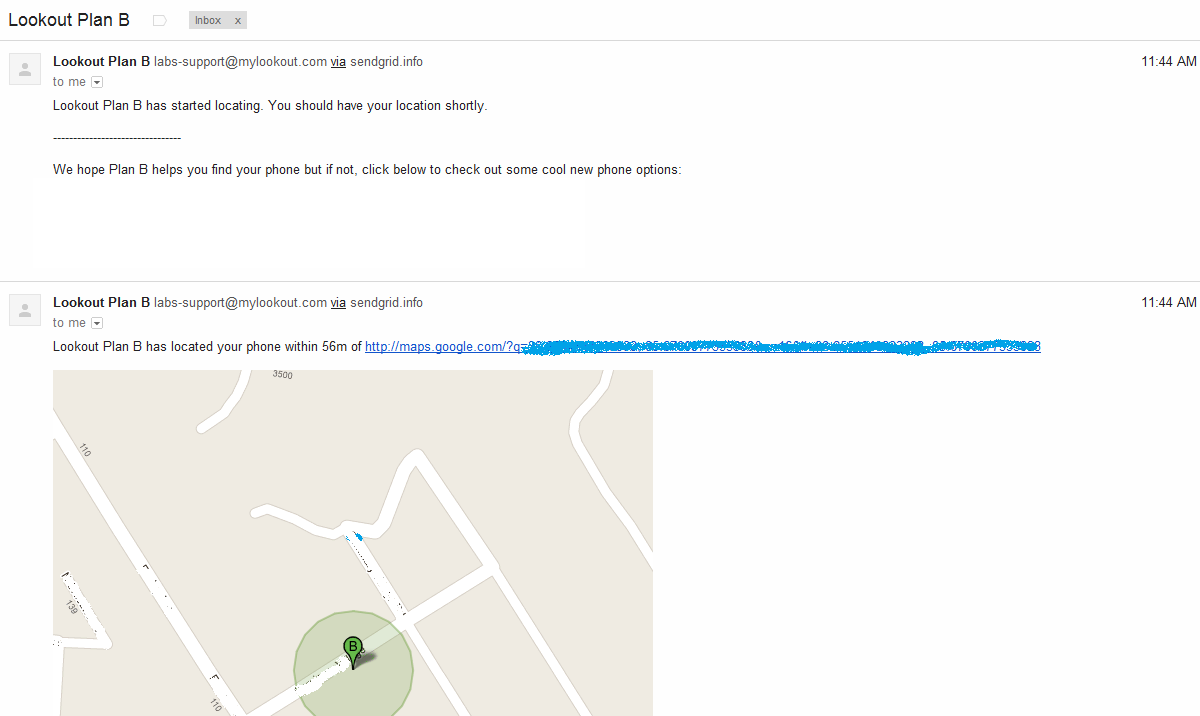
class="aligncenter" title="Plan B Screenshot" src="https://lh6.ggpht.com/YtjGQ-i92BH2VqV_G1iSUpNmKNzSoeiP6FMA9mrRZZNdhDjsBrdJf6g_5aXBweS3NB4" alt="" width="288" height="512" /></p><p>All of these notifications are fine if the phone is simply lost, but it can be a tip off to a theif if the phone was stolen. This is one of the major drawbacks of using something like Plan B.</p><h3>Once Plan B Has Been Installed: How It Works</h3><p>After Plan B is installed it will sent emails to the GMail account associated with your phone. The emails that were sent to me looked like this:</p><p><a
href="http://www.gpsfortoday.com/wp-content/uploads/2011/12/Plan-B-Gmail-Messages.png"><img
class="aligncenter size-medium wp-image-1571" title="Plan-B-Gmail-Messages" src="http://www.gpsfortoday.com/wp-content/uploads/2011/12/Plan-B-Gmail-Messages-300x179.png" alt="Plan B Gmail Messages" width="300" height="179" srcset="http://www.gpsfortoday.com/wp-content/uploads/2011/12/Plan-B-Gmail-Messages-300x179.png 300w, http://www.gpsfortoday.com/wp-content/uploads/2011/12/Plan-B-Gmail-Messages-1024x610.png 1024w, http://www.gpsfortoday.com/wp-content/uploads/2011/12/Plan-B-Gmail-Messages.png 1200w" sizes="(max-width: 300px) 100vw, 300px" /></a></p><p>This app worked even with my GPS turned off. When I checked the phone after the program was installed my GPS was turned back on.</p><h3>Apps The Can Be Remotely Installed Successfully</h3><p>As of right now we have only really tested Plan B as way to track a phone that has already been lost or stolen. Once we do some additional testing we will compile a list of all apps here. If you already know of one, please leave a comment letting us know.</p><p>Here is a list of app that I have tested and found to work with a remote install:</p><ul><li><a
title="Plan B" href="https://market.android.com/details?id=com.lookout.labs.planb" target="_blank">Plan B</a></li></ul> ]]></content><link
rel="replies" type="text/html" href="http://www.gpsfortoday.com/how-to-install-gps-tracking-apps-remotely-to-find-a-lost-or-stolen-android-cell-phone/#comments" thr:count="30"/><link
rel="replies" type="application/atom+xml" href="http://www.gpsfortoday.com/how-to-install-gps-tracking-apps-remotely-to-find-a-lost-or-stolen-android-cell-phone/feed/atom/" thr:count="30"/> <thr:total>30</thr:total> </entry> <entry> <author> <name>Joe Mueller</name> <uri>http://www.gpsfortoday.com/</uri> </author><title
type="html"><![CDATA[How To Stop Verizon From Tracking Your Cell Phone And Selling Your Personal Info]]></title><link
rel="alternate" type="text/html" href="http://www.gpsfortoday.com/how-to-stop-verizon-from-tracking-your-cell-phone-and-selling-your-personal-info/" /> <id>http://www.gpsfortoday.com/?p=1547</id> <updated>2019-12-11T13:25:42Z</updated> <published>2011-10-16T05:28:38Z</published> <category
scheme="http://www.gpsfortoday.com" term="Cell Phones" /><category
scheme="http://www.gpsfortoday.com" term="GPS Tracking" /><category
scheme="http://www.gpsfortoday.com" term="How To" /><category
scheme="http://www.gpsfortoday.com" term="cell phone tracking" /><category
scheme="http://www.gpsfortoday.com" term="cell phones" /><category
scheme="http://www.gpsfortoday.com" term="Verizon" /> <summary
type="html"><![CDATA[Verizon has joined the ranks of several large telecommunications companies who are seeking to make more money off of the information that they serve to you. Information, such as the websites you visit, the places you go, where you live, or what your interests might be, are going to start to be tracked by Verizon &#8230; <a
href="http://www.gpsfortoday.com/how-to-stop-verizon-from-tracking-your-cell-phone-and-selling-your-personal-info/" class="more-link">Continue reading <span
class="screen-reader-text">How To Stop Verizon From Tracking Your Cell Phone And Selling Your Personal Info</span></a>]]></summary> <content
type="html" xml:base="http://www.gpsfortoday.com/how-to-stop-verizon-from-tracking-your-cell-phone-and-selling-your-personal-info/"><![CDATA[<p>Verizon has joined the ranks of several large telecommunications companies who are seeking to make more money off of the information that they serve to you.  Information, such as the websites you visit, the places you go, where you live, or what your interests might be, are going to start to be tracked by Verizon so that they can create &#8220;aggregate&#8221; reports for their own internal use and for sale to third parties.</p><p>Verizon is simply trying to make more money off of you and your family.  If you have no problem with them tailoring advertisements based on your interests and fine GPS location then you have can rest knowing that Verizon has already signed you up for this.  If you DO NOT WANT Verizon to track you in this way they you might want to tell them to stop.  You can do so by calling 1-866-211-0874 or by following these steps on the internet:</p><ol><li>Visit <a
rel="NoFollow" href="http://www.vzw.com/myprivacy">www.vzw.com/myprivacy</a></li><li>Log in to your account using your username and password</li><li>Scroll down to the â€˜Customer Proprietary Network Informationâ€<img
src="https://s.w.org/images/core/emoji/11/72x72/2122.png" alt="™" class="wp-smiley" style="height: 1em; max-height: 1em;" /> heading</li><li>Click The Minus (-) Button [some people will see a Plus (+) button here for some reason]</li><li>Check &#8216;Donâ€<img
src="https://s.w.org/images/core/emoji/11/72x72/2122.png" alt="™" class="wp-smiley" style="height: 1em; max-height: 1em;" />t Share My CPNIâ€<img
src="https://s.w.org/images/core/emoji/11/72x72/2122.png" alt="™" class="wp-smiley" style="height: 1em; max-height: 1em;" /> in the All Cell Phone Numbers row</li><li>Click Save Changes</li><li>Scroll down to the â€˜Business &#038; Marketing Reportsâ€<img
src="https://s.w.org/images/core/emoji/11/72x72/2122.png" alt="™" class="wp-smiley" style="height: 1em; max-height: 1em;" /> heading</li><li>Check â€˜Donâ€<img
src="https://s.w.org/images/core/emoji/11/72x72/2122.png" alt="™" class="wp-smiley" style="height: 1em; max-height: 1em;" />t Use My Information for Aggregate Reportsâ€<img
src="https://s.w.org/images/core/emoji/11/72x72/2122.png" alt="™" class="wp-smiley" style="height: 1em; max-height: 1em;" /> in the All Cell Phone Numbers row</li><li>Click Save Changes</li><li>Scroll Down to â€˜Relevant Mobile Advertisingâ€<img
src="https://s.w.org/images/core/emoji/11/72x72/2122.png" alt="™" class="wp-smiley" style="height: 1em; max-height: 1em;" /></li><li>Click â€˜Donâ€<img
src="https://s.w.org/images/core/emoji/11/72x72/2122.png" alt="™" class="wp-smiley" style="height: 1em; max-height: 1em;" />t Use My Demographic Info for Bannersâ€<img
src="https://s.w.org/images/core/emoji/11/72x72/2122.png" alt="™" class="wp-smiley" style="height: 1em; max-height: 1em;" /> in the All Cell Phone Numbers row</li><li>Click Save Changes</li></ol><p>It was really easy for me to do.  If you know of anyone who might want to opt out you should be a good friend and share it with them.</p><h3>Verizon Response</h3><p>The following was taken from a news article and it represents Verizon&#8217;s response to some of the hubbub about the plan:</p><blockquote><p>Michelle Gilbert, Verizon Public Relations Manger for the Michigan / Indiana / Kentucky region, has released the following statement:</p><blockquote><p>â€œProtecting data and safeguarding privacy are high priorities at Verizon. Verizon Wireless recently introduced a new program that involves the creation of new types of aggregate business and marketing reports.  In addition, Verizon Wireless and Verizon Telecom also introduced new ways to advertise to mobile users and wireline broadband customers.</p><p> â€œFor the business and marketing reports offered by Verizon Wireless, records about websites visited, cell phone locations and other consumer data will be combined (or aggregated) to compile reports that provide businesses with insights about their customers.  For example, these insights may include the demographics (age ranges, gender, etc.) and interests (such as â€œpet loversâ€ or â€œtennis enthusiastsâ€) of visitors to a Web site, or commuters who might pass an outdoor billboard.  These aggregate reports could be used by web publishers to help provide content that is more appealing to users, or to help advertisers better select the ads they will display on outdoor billboards or at other venues.</p><p>â€œThe new advertising initiatives offered by Verizon Wireless and Verizon Online will help brands tailor the type of advertising customers see on their mobile phones and online when using Verizon FiOS Internet, DSL or dial-up services.  The Verizon Wireless relevant ad program will help brands present relevant ads on customersâ€<img
src="https://s.w.org/images/core/emoji/11/72x72/2122.png" alt="™" class="wp-smiley" style="height: 1em; max-height: 1em;" /> mobile devices by using the postal address and other consumer information, such as their device type, demographic and interest information.  For instance, if you live near a restaurant, you may see ads for that restaurant.  The Verizon Online relevant ads program will help brands determine if customers fit within their targeted geography by postal addresses, helping brands better reach their customers online.â€</p></blockquote></blockquote> ]]></content> </entry> <entry> <author> <name>Joe Mueller</name> <uri>http://www.gpsfortoday.com/</uri> </author><title
type="html"><![CDATA[Is Cell Phone Monitoring For Real?]]></title><link
rel="alternate" type="text/html" href="http://www.gpsfortoday.com/is-cell-phone-monitoring-for-real/" /> <id>http://www.gpsfortoday.com/?p=1332</id> <updated>2019-12-11T13:25:42Z</updated> <published>2011-02-10T21:40:08Z</published> <category
scheme="http://www.gpsfortoday.com" term="Cell Phones" /><category
scheme="http://www.gpsfortoday.com" term="GPS Tracking" /><category
scheme="http://www.gpsfortoday.com" term="cell phone app" /><category
scheme="http://www.gpsfortoday.com" term="cell phone monitoring" /><category
scheme="http://www.gpsfortoday.com" term="cell phone monitoring software" /><category
scheme="http://www.gpsfortoday.com" term="cell phone surveillance" /><category
scheme="http://www.gpsfortoday.com" term="cell phone tracking software" /><category
scheme="http://www.gpsfortoday.com" term="cell phones" /><category
scheme="http://www.gpsfortoday.com" term="cheating spouse gps tracking" /><category
scheme="http://www.gpsfortoday.com" term="cyberbullying" /><category
scheme="http://www.gpsfortoday.com" term="spying on cell phones" /> <summary
type="html"><![CDATA[Can I monitor a cell phone&#8217;s calls, texts, and location? Concerned parents and suspicious spouses have been asking this question for almost two decades now. And rightly so. Technology has given us access to a whole new world of communication that people born as late as the mid 80s never experienced growing up. We can &#8230; <a
href="http://www.gpsfortoday.com/is-cell-phone-monitoring-for-real/" class="more-link">Continue reading <span
class="screen-reader-text">Is Cell Phone Monitoring For Real?</span></a>]]></summary> <content
type="html" xml:base="http://www.gpsfortoday.com/is-cell-phone-monitoring-for-real/"><![CDATA[<p><em>Can I monitor a cell phone&#8217;s  calls, texts, and location?</em></p><p>Concerned parents and suspicious spouses have been asking this question for almost two decades now.  And rightly so.  Technology has given us access to a whole new world of communication that people born as late as the mid 80s never experienced growing up.  We can have a whole life that is hidden from those closest to use through our cell phones.  Phone calls, text messages, and cell phone internet activity can all be done on the move, in hidden places, and to the detriment of relationships and psychological development.</p><p>That is where cell phone monitoring comes in.  If this technology is real and really works then it would be ideal for those individuals who have a child or spouse who is engaging in activity that is doing damage to their relationships or hurting them psychologically.  It will give these concerned individuals the data they need to confront their at-risk individual, hopefully sparking a conversation that will turn the situation around for the better.</p><p><em>So first off, is cell phone monitoring for real?  Does it really work?</em></p><p>Yes.  It is for real and it really works.</p><h3>What We Mean By Cell Phone Monitoring</h3><p>I think it might be a good idea to talk about exactly what we mean when we talk about cell phone monitoring.  To be sure, there is an element of GPS tracking in there &#8211; but monitoring usually denotes more than just finding the location of a mobile phone.  It also includes things like seeing all incoming and outgoing text messages, a detailed log of phone calls, and cell internet browsing activities.  In short, all activity that occurs on the cell phone is monitored.</p><p>This level of monitoring is accomplished by installing a piece of software on the cell phone that allows this type of tracking activity.  Not every cell phone is compatible with just any monitoring program.  A lot of cell phone surveillance programs only work on certain operating systems (OS).  Some even work on only certain versions of those operating systems, so making sure that what you are going to buy to do your monitoring is compatible with your particular cell phone is pretty important.  In fact, I would recommend looking at the spy program&#8217;s list of compatible devices before you even read more information about it.  Why know about what you can&#8217;t buy?</p><p>If you don&#8217;t have any experience downloading cell phone software then you might want to check out our guide on <a
href="http://www.gpsfortoday.com/how-to-download-cell-phone-tracking-software/ ">how to download cell phone tracking software</a>.  You will either have to buy your monitoring software from your respective app store (iPhone = App Store; Android = Android Market; BlackBerry = App World; Windows = Marketplace) or purchase it from a 3rd party and download it onto your phone.  Either way, our guide should give you want you need to know.</p><h3>Who Should Monitor A Cell Phone&#8217;s Activity</h3><p>The real question that somebody looking into this should be, <em>why do you want to monitor the cell phone in the first place</em>?</p><p>There seems be two groups of people who can answer this question in a legitimate way.  The first are parents who have a valid reason to be concerned about their children.  The second are a husband or a wife who suspects the other in the relationship of stepping out on them.  There may be other people out there who want to track a boyfriend or a girlfriend, but doing so doesn&#8217;t seem right to me (and is often illegal).</p><p>Let&#8217;s take a look at each of them in turn.</p><h3>Two Reasons To Monitor Your Child&#8217;s Cell Phone</h3><p>Children, even teenagers, need their parents to be just that, parents.  Sometimes this is going to involve getting into the nitty gritty of their daily experience.  Who are they talking to?  What do they think about?  What do they like?  Are they popular?  Who are their friends?  What makes them tick?</p><p>Now these are questions that all parents should have some sort of idea about, even if all the specifics are a little blurry.  If you can&#8217;t honestly answer these question you need to evaluate your parenting and just how involved in the life of your child you really are.  Then you should realize that cell phone surveillance is no substitute for good parenting.</p><p>You see, no amount of technology is going to make up for years of neglect and bad parenting.  The only thing that will make up for that is effort, work, sacrifice, and growing up.  You are the only one who can bring those things to the table with your child.  Getting a cell phone monitor is just going to further alienate your teen because you will just be trying to coax out of them something by force (monitoring their communications) because you haven&#8217;t cared enough about them to actually learn who they are and help them grow.</p><p>That being said, if you have a good, healthy relationship with your child you still might be justified in using some sort of monitoring software on their cell phone.  Here are just two:</p><p><strong>They Are Being Cyberbullied</strong></p><p>Cyberbullying is a real phenomenon and it is only growing in popularity.  Kids are messed up (so are parents) and they do terrible things to each other.  Its human nature!  Some kids will tell their parents that they are being bullied.  Others won&#8217;t. <a
rel="NoFollow" href="http://abcnews.go.com/GMA/Parenting/girls-teen-suicide-calls-attention-cyberbullying/story?id=9685026">Some will even take their silence, and the bullying, to the grave</a>.</p><p><object
width="640" height="510"><param
name="movie" value="http://www.youtube-nocookie.com/v/FKBMn7kFgSg?fs=1&amp;hl=en_US&amp;rel=0"></param><param
name="allowFullScreen" value="true"></param><param
name="allowscriptaccess" value="always"></param><embed
src="http://www.youtube-nocookie.com/v/FKBMn7kFgSg?fs=1&amp;hl=en_US&amp;rel=0" type="application/x-shockwave-flash" allowscriptaccess="always" allowfullscreen="true" width="640" height="510"></embed></object></p><p>If you know a little about your child you are going to be able to tell if something is off with them.  You might not be able to pinpoint what it is, you just know that your teen has something going on.  You probe and question but all your efforts run into a brick wall.  What are you going to do now?  This is where getting a quality cell phone monitoring program is going to be helpful.</p><p>By being able to read the texts they receive as well as the web information on their cell phone and social media sites you can figure out that they are being bullied.  With a little elbow grease you might even be able to figure out who is tormenting your teen on the internet.  With this information in tow you can talk with your teen about what is going on and ways that it can be dealt with.  You might even be able to take matters into your own hands and get those SOBs who are hurting your teen to stop.</p><p>Either way, cell phone surveillance software is what is going to open this door for you.</p><p><strong>They Are A Cyberbully</strong></p><p>Now the shoe is on the other foot.  What would you do if you found out your kid was a cyberbully?  I sure as hell would want to make sure that they stopped tormenting another human being.  This would take a lot of parenting but it would also include some cell phone tracking.  After we talked about why they felt they needed to attack another human being and after I made any changes that I needed to myself and my parenting to ensure that I was creating a home where everyone&#8217;s needs were being met I would install some monitoring software on their cell phone to ensure compliance.</p><p>Even if my teenager doesn&#8217;t make the change on the inside to become a better person it is my responsibility to make sure that the bullying stops.</p><h3>Should You Monitor An Adults Cell Phone?</h3><p>Adults certainly pose a different challenge when compared over and against children.  Most parents are going to understand that to a certain extent they have a right and responsibility to ensure that their children are healthy and safe.  If parents are using cell monitoring technology to reach these goals then it seems like a valid use of the technology.  To be sure, parents can use spy technology in an oppressive way &#8211; but we don&#8217;t think that this would be a valid use of the technology.  We would advise such parents to stop.</p><p>But when it comes to tracking an adult most people will think that being to see their texts, internet activity, call log, and GPS location is overkill.  That is if you ask them if they would want another person doing it to them.  Otherwise most people I think entertain the idea of knowing everything someone else does on their cell phone &#8211; this is particularly true when it comes to romantic relationships.</p><p>If a person thinks that they are being cheated on by a wife, or a husband, or a boyfriend, or a girlfriend then they usually throw out all concern about whether or not it is right to track their cell phone in this way.  While I can understand this I personally only think it is valid for a husband or a wife to track their other in a relationship.  This is primarily because it is the only relationship described above where the individuals have made a covenant with each other in the sight of God and men to be faithful to one another until one of them is dead.</p><p>As is the case in most covenant relationships, both parties have a right to know if the other is breaking covenant.  If you have repeatedly gone to your spouse and asked them if they are cheating and they consistently deny it but your suspicions remain then it is my opinion that you have a right to install a cell phone monitoring system.</p><h3>Cheaters and Cell Phone Monitoring</h3><p>The most important thing that you will be looking for is evidence of the cheating on their cell phone.  Cell phone logs and text messages are probably going to be one of the most important pieces of evidence in your search &#8211; that and the cell phones location.  A lot of monitoring packages will not only let you see the text messages but also let you recover deleted texts, which is really important for the careful cheater.</p><p>Once you have evidence of the cheating you can do what you want with it &#8211; but I recommend some sort of confrontation.  Remember, they are the one who is cheating &#8211; but we all bear the responsibility for failed relationships.  Work on the relationship and heal it.  It will take work, but marriage is an institution that should be saved and protected.</p><h3>Who Should Not Use Cell Phone Spying Software</h3><p>Stalkers.  If you want to use spy software just so you can stalk someone then you should stop.  It is illegal, mean, and stupid.</p><h3>Business Uses of Cell Phone Monitoring Software</h3><p>Finally, there are some business uses for this technology.  They include, but are not limited, to the following:</p><ul><li>Ensure business use of the mobile phones for tax purposes</li><li>Reduce wasted time due to inappropriate use of the phones</li><li>Keep employees honest about activities and whereabouts</li><li>Promote a healthy workforce</li></ul><p
style="text-align: center;">\m/</p><p><em>Can you think of any other legitimate reasons to monitor someone&#8217;s cell phone?  If so, please feel free to leave it in the comments below so I can add it above.</em></p> ]]></content><link
rel="replies" type="text/html" href="http://www.gpsfortoday.com/is-cell-phone-monitoring-for-real/#comments" thr:count="8"/><link
rel="replies" type="application/atom+xml" href="http://www.gpsfortoday.com/is-cell-phone-monitoring-for-real/feed/atom/" thr:count="8"/> <thr:total>8</thr:total> </entry> <entry> <author> <name>Joe Mueller</name> <uri>http://www.gpsfortoday.com/</uri> </author><title
type="html"><![CDATA[GPS Vehicle Tracking Devices Made Simple]]></title><link
rel="alternate" type="text/html" href="http://www.gpsfortoday.com/gps-vehicle-tracking-devices-made-simple/" /> <id>http://www.gpsfortoday.com/?p=1316</id> <updated>2019-12-11T13:25:42Z</updated> <published>2011-02-10T12:20:29Z</published> <category
scheme="http://www.gpsfortoday.com" term="For Vehicles" /><category
scheme="http://www.gpsfortoday.com" term="GPS Tracking" /><category
scheme="http://www.gpsfortoday.com" term="car tracking devices" /><category
scheme="http://www.gpsfortoday.com" term="cell phone vehicle tracker" /><category
scheme="http://www.gpsfortoday.com" term="gps blocker" /><category
scheme="http://www.gpsfortoday.com" term="gps tracking chip" /><category
scheme="http://www.gpsfortoday.com" term="gps vehicle tracking" /><category
scheme="http://www.gpsfortoday.com" term="gps vehicle tracking device" /><category
scheme="http://www.gpsfortoday.com" term="onstar" /><category
scheme="http://www.gpsfortoday.com" term="vehicle tracking device" /><category
scheme="http://www.gpsfortoday.com" term="vehicle tracking system" /> <summary
type="html"><![CDATA[I think we&#8217;ve all been there before. You have this vehicle that you just wish that you could track.Â  You might be a business owner, or a concerned parent, or a victim of grand theft auto.Â  It doesn&#8217;t matter.Â  Whatever your reasoning, GPS vehicle tracking is something that is accessible to individuals at all levels &#8230; <a
href="http://www.gpsfortoday.com/gps-vehicle-tracking-devices-made-simple/" class="more-link">Continue reading <span
class="screen-reader-text">GPS Vehicle Tracking Devices Made Simple</span></a>]]></summary> <content
type="html" xml:base="http://www.gpsfortoday.com/gps-vehicle-tracking-devices-made-simple/"><![CDATA[<p>I think we&#8217;ve all been there before. You have this vehicle that you just wish that you could track.Â  You might be a business owner, or a concerned parent, or a victim of grand theft auto.Â  It doesn&#8217;t matter.Â  Whatever your reasoning, GPS vehicle tracking is something that is accessible to individuals at all levels of technological familiarity. Anyone can track a vehicle if they are equipped with a little understanding and the right hardware for the job.</p><p>What we hope to do here with this post is give anyone all the knowledge they need use a GPS tracking system for their vehicle.  We will go step by step through the whole process and by the end any person should be able to understand what this powerful technology allows them to accomplish as well as some steps for them to take to get their car, van, or truck tracked with GPS.</p><h3>What Is GPS Vehicle Tracking?</h3><p>Its always good to start at the very beginning.  I hear its a very good place to start.  When we begin, we start with GPS.  This acronym stands for the <strong>G</strong>lobal <strong>P</strong>ositioning <strong>S</strong>ystem.  It is a constellation (fancy word for group) of satellites operated by the United States Air Force.  These satellites float around in outer space beaming a special signal down to earth.  These signals are used by a whole bunch of devices and can be heard using a special receiver, or chip.</p><p>This <a
href="http://www.gpsfortoday.com/small-gps-tracking-chips/ ">GPS tracking chip</a> will &#8220;hear&#8221; the signal and learn several different things from it.   The most important things that it is going to learn is the satellite that sent the signal and how long ago it sent the signal.  The GPS chip will then do some fancy math and determine where on earth it could be in relation to that one satellite.</p><p><img
alt="Earth From Space" src="http://upload.wikimedia.org/wikipedia/commons/f/fd/NASA_Earth_America_2010.jpg" title="Earth From Space" class="aligncenter" width="650" height="650" /></p><p>Now I want you to imagine that you are a man floating out in space looking down on the earth.  You have the black expanse of space ominously looming behind you as you gaze at that beautiful blue ball that we call home.  Looking down (you have super eyesight) you notice some interesting things about points on the earth in relation to yourself.  First, there is one point just below that is the closest point on the earth to you.  The second thing is that all the points that are not right below you have other points that share their distance with that point.  All the points that share the same distance from you can be connected together and they will make an &#8220;o&#8221; (circle) shape on the ground.  Having more than one point as the distance from you is the norm when looking down on the earth from space.</p><p>Now back to our GPS vehicle tracking &#8211; specifically our understanding of how many satellites are needed for a tracking chip to know where it is in the world.  Just one satellite message is probably not going to give you your exact location.  Unless you are directly under a satellite (only around 32 points on earth exists just like this) your GPS chip is going to need to get some help from other satellites to determine where it is.  The magic number is 4 total satellites are needed to get a really solid position.</p><p>What has been described above is the standard way all GPS devices work.  They all require access to the signals from these satellites to figure out its position.  If it cannot get these signals (i.e. it is in a cave, an underground parking structure, at the bottom of a lake, river, or ocean, or it is being jammed by a <a
href="http://www.gpsfortoday.com/gps-tracking-blockers/ ">GPS blocker</a>) then it will not be able to be tracked.  This is important for those thinking about how they want to use their vehicle tracking device.</p><p>The next thing that we should understand about any tracking system is that is needs a way to communicate the location information that the tracking chip calculates to you, the person who is using the vehicle tracker.  This is something that standard GPS devices simply do not do.  For example, you cannot take your standard GPS navigation device, say a Garmin nÃ¼vi 265WT, stick it in a car, and expect to be able to track it.  It just doesn&#8217;t work that way because these devices have no way to communicate information to people outside the vehicle they are in.</p><p>Instead, you are going to need a device that is specifically made for tracking purposes. <a
href="http://www.gpsfortoday.com/car-tracking-devices/">Car tracking devices</a> generally have both a GPS chip built into it as well as some sort of communication hardware.  In most cases this is going to be a cell phone modem for communication over the wireless networks that paint themselves across America, but there are a few instances where the tracker could communicate via commercial communication satellites.  Chances are though any tracker you are going to use will use a cell phone network, so we will focus on how that works.</p><p>Your vehicle tracking system will now take the information that the tracking chip has calculated and send this out over the cell phone network much like a person would send a text message (SMS) or email.  This data is sent from the device to the tracking provider.  The tracking provider will make this information available to their users &#8211; in this case you and whomever you decide to share it with &#8211; through a clean web interface that will either be Google Maps or at least closely resemble it.</p><p>That, in a nutshell, is what GPS vehicle tracking is &#8211; it is the seamless combination of GPS location technology and wireless communication technology into one powerful device.</p><h3>GPS Vehicle Tracking Devices</h3><p>There are many different devices out there from a wide range of manufacturers and distributors.  We cannot go through each of them and talk about the different vehicle tracking devices that they offer and how you can use them.  That would take up too much time and would probably be pretty boring to read.  Instead, what we want to do here is briefly describe the two main categories of devices and discuss some of the various pros and cons for each of them.  The two types of GPS vehicle trackers out there are built-in device and standalone device.</p><h4>Built-in GPS Vehicle Tracking Devices</h4><p>These are the most commonly used devices for fleet vehicle tracking.  Being built in to the vehicle gives them extreme flexibility and power, enabling almost constant tracking for vital performance metrics for businesses.  Also, by being well tied into the internal workings of the vehicle also has its advantages.  For example, some GPS vehicle trackers allow remote control of certain functions of the car.</p><p>Is your driver idling the car for too long at a service call?  Simply cut his engine for him!  Did your delivery person accidentally lock the keys in the ignition of the delivery van?  Unlock the doors remotely for her!  You can many of these things with fleet tracking devices built specifically for the purpose.  And these features are not just limited to commercial applications, many consumer oriented trackers also offer these feature to their customers as well.</p><p>Most built in trackers do require a professional install since theses devices do become integral part of the vehicles electrical and computer systems.  Some trackers just plug into a special port under the steering wheel (called an OBD-II port) and don&#8217;t require any special attention from a professional installer, which means that you can install it yourself once you get the piece of equipment in the mail.</p><p>I did want to clear up on point of possible confusion before going on to talk about standalone trackers.  By using the phrasse &#8220;built-in&#8221; I might have given the wrong impression.  I do not necessarily mean something like OnStar.  It does not have to be built into the car when it is made or even shortly after it is made. It just needs to get its power from the vehicle.  Another phrase  I could have used was hard-wired.</p><p>Other possible applications:</p><ul><li>Teen driver tracking</li><li>Theft recovery</li><li>Catching a cheater</li><li>Business mileage calculator</li></ul><h4>Standalone GPS Vehicle Tracking Devices</h4><p>Standalone trackers are usually versatile GPS tracking devices that are not necessarily bound to a single function.  Take the Zoombak line of products.  There are two main trackers that they sell.  The Advanced GPS Car &#038; Family Locator and the Advanced GPS Universal Locator.  These devices are essentially the same, the only difference being the branding that they&#8217;ve done.  This is pretty much going to be the standard for all portable, standalone trackers.</p><p>One thing that you have to be aware of is that standalone trackers cannot really compete with the built-in vehicle tracking systems because they are not set up for <a
href="http://www.gpsfortoday.com/real-time-gps-tracking/">real time GPS tracking</a> in the same way.  While a built in tracker can produce an avalanche of data and never run out of batteries a standalone tracker can only track as long as the battery has a charge.  The Zoombak can give 150 locates before it runs out of battery.  This is a pitiful number when compared with fleet tracking devices.</p><p>But what they lack in longevity these devices make up in versatility.  A built in car tracker isn&#8217;t going to be much good once you take it out of the car.  In fact, you can&#8217;t really take it out of the car to be used on your teenage daughter as she goes through Central Park.  Devices like the Zoombak provide comprehensive tracking support for most personal tracking needs.</p><p>Another feature of the portable trackers is that they are often easily concealable.  If you are trying to track a vehicle incognito then something small is definitely going to be what you want to go with.  While it still isn&#8217;t the very best money can buy for this type of application, you will still get a lot of bang for you buck.</p><p>Other possible applications:</p><ul><li>Most non-vehicle GPS tracking functions, including:</li><ul><li>Sport tracking</li><li>Pet tracking</li><li>Child tracking</li></ul><li>Covert tracking of cars</li></ul><h4>The Cell Phone As Vehicle Tracker</h4><p><img
alt="Sony Ericsson w995 cell phone" src="http://upload.wikimedia.org/wikipedia/commons/5/57/W995boxprogressiveblack-1-.jpg" title="Sony Ericsson w995 cell phone" class="alignright" width="150" height="162" />A word here needs to be said about the ubiquitous cell phone.  Did you know that these devices are the most common GPS trackers on the planet?  They can easily be utilized to become full fledged vehicle trackers.  Even if you don&#8217;t have a cell phone to spare you can install some sweet (and free) <a
href="http://www.gpsfortoday.com/how-to-download-cell-phone-tracking-software/">cell phone tracking software</a> for your phone.  If you are looking for a good program for your phone then you should check our list: <a
href="http://www.gpsfortoday.com/free-gps-cell-phone-tracking/ ">free GPS cell phone trackers</a>.</p><h3>Do I Need A Vehicle Tracking System?</h3><p>Now that you have gotten a little bit more information about the devices that are going to make up your vehicle tracking system you have a decision to make.  Is GPS vehicle tracking something that you actually need?  The costs associated with this type of real time tracking is certainly not cheap.  The cheaper devices start at around $100 and they only go up from there.  Then there is the monthly subscription fee that all tracking providers require to operate correctly.  In the first year alone you can reasonably expect to spend around $500.</p><p>Businesses obviously have the most to gain by implementing these devices as part of a fleet management system. Private individuals may save some money on insurance premiums by having a tracker, but the real offset is the value that you receive from having one of these devices.  Is it enough to justify purchasing a vehicle tracker?</p> ]]></content><link
rel="replies" type="text/html" href="http://www.gpsfortoday.com/gps-vehicle-tracking-devices-made-simple/#comments" thr:count="1"/><link
rel="replies" type="application/atom+xml" href="http://www.gpsfortoday.com/gps-vehicle-tracking-devices-made-simple/feed/atom/" thr:count="1"/> <thr:total>1</thr:total> </entry> </feed>