<?xml version="1.0" encoding="UTF-8"?>
<feed xml:lang="en-gb" xmlns="http://www.w3.org/2005/Atom">
	<title type="text">iaian7 - after effects</title>
	
	<link rel="self" href="https://iaian7.com/atom/?section=aftereffects" />
	<link rel="alternate" type="text/html" href="https://iaian7.com/" />
	<id>tag:iaian7.com,2005:e37391e5d79adf0edb184bbe25ddbb3b/aftereffects</id>
	<generator uri="https://textpattern.com/" version="4.8.8">Textpattern</generator>
	<updated>2023-04-28T22:21:43+00:00</updated>
	<author>
		<name>John Einselen</name>
		
		<uri>https://iaian7.com/</uri>
	</author>
	
	<entry>
		<author>
			<name>John Einselen</name>
		</author>
		<published>2012-07-16T20:03:21+00:00</published>
		<updated>2012-07-16T20:10:42+00:00</updated>
		<title type="html">RGTV: Realistic Dust Hits</title>
		<link rel="alternate" type="text/html" href="https://iaian7.com/aftereffects/RGTVRealisticDustHits" />
		<id>tag:iaian7.com,2012-07-16:e37391e5d79adf0edb184bbe25ddbb3b/1f7c83e0d149b6c5659ed28c21abbef3</id>
		<category term="content" />
		<category term="tutorial" />
		<summary type="html"><![CDATA[<p>Watch my video tutorial <a href="https://vimeo.com/42859813">Red Giant QuickTip #67: Realistic Dust Hits</a> to see how dust effects in After Effects can be seamlessly integrating with rendered footage from any 3D package.</p>

	<p><a href="https://vimeo.com/42859813" rel="lightbox[id393]" title="Red Giant QuickTip #67: Realistic Dust Hits" class="an7_thumb"><img src="https://iaian7.com/images/play.png" style="background-image: url(http://iaian7.com/media/aftereffects/realisticdusthits/realisticdusthits.jpg); background-attachment: initial; background-origin: initial; background-clip: initial; background-color: initial; visibility: visible; zoom: 1; opacity: 0.85; background-position: initial initial; background-repeat: initial initial; " alt="play"></a></p>]]></summary>
	</entry>
	<entry>
		<author>
			<name>John Einselen</name>
		</author>
		<published>2009-09-25T18:34:07+00:00</published>
		<updated>2010-01-13T17:58:11+00:00</updated>
		<title type="html">Dynamic Paper Cutouts</title>
		<link rel="alternate" type="text/html" href="https://iaian7.com/aftereffects/DynamicPaperCutouts" />
		<id>tag:iaian7.com,2009-09-23:e37391e5d79adf0edb184bbe25ddbb3b/fc644eac89b20f8cb54c06421cdf4bda</id>
		<category term="content" />
		<category term="tutorial" />
		<summary type="html"><![CDATA[<p><a href="https://iaian7.com/media/aftereffects/papercutout/powerpivot.mp4" rel="lightbox[id342 640 360]" title="Microsoft PowerPivot::2009 Vectorform LLC">1</a></p>

	<p>While stop motion can be a fantastic medium, the process is too slow for many productions.  Even for simple elements, like wrinkled paper, the time it takes to do things physically is often untenable; for the Microsoft PowerPivot online advertising campaign, <a href="http://www.vectorform.com/">Vectorform</a> required lightening quick turnaround on visual elements and animation revisions, often on an hour by hour basis.  This is how the paper cutout effects were designed and generated dynamically using Adobe After Effects.</p>]]></summary>
	</entry>
	<entry>
		<author>
			<name>John Einselen</name>
		</author>
		<published>2009-09-25T18:27:37+00:00</published>
		<updated>2010-01-13T17:58:12+00:00</updated>
		<title type="html">Lipsyncing with Papagayo</title>
		<link rel="alternate" type="text/html" href="https://iaian7.com/aftereffects/AELipsyncingwithPapagayo" />
		<id>tag:iaian7.com,2009-09-23:e37391e5d79adf0edb184bbe25ddbb3b/990bd12822477d0aeb584115714a6672</id>
		<category term="content" />
		<category term="tutorial" />
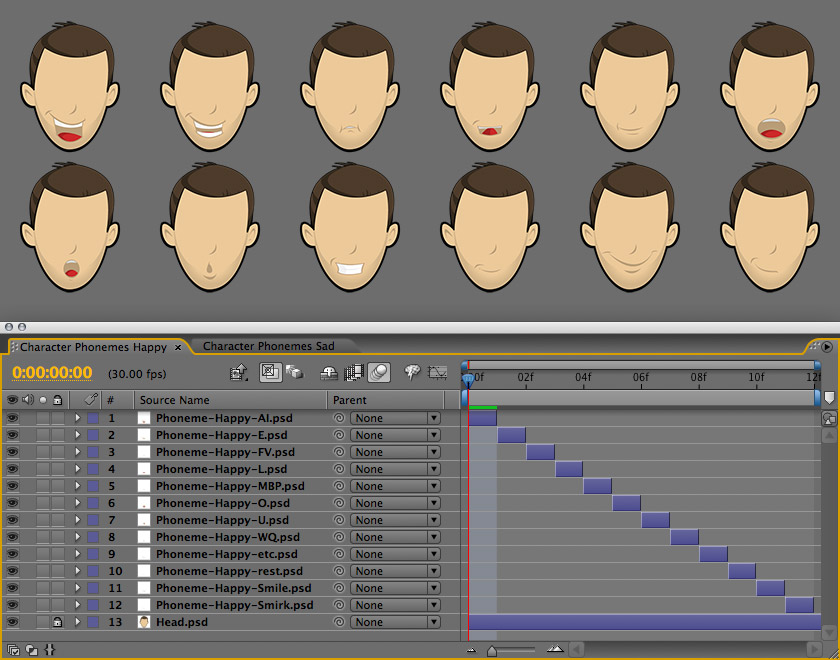
		<summary type="html"><![CDATA[<p><a href="https://iaian7.com/images/aftereffects/lipsync/Phonemes-Happy.jpg" rel="lightbox[id344]" title="" class="an7_thumb_left"><img src="https://iaian7.com/images/aftereffects/lipsync/thumbs/Phonemes-Happy.jpg" width="70" height="70" alt="" /></a>Using freely available tools, lipsyncing a character in Adobe After Effects doesn&#8217;t have to be a pain.  <a href="http://www.lostmarble.com/papagayo/index.shtml">Papagayo</a> is an open source app for breaking a script down into phonemes and syncing the pieces to an audio track, while <a href="http://iaian7.com/dashboard/LipSync">LipSync</a> is an OS X dashboard widget that helps translate the resulting moho switch files into After Effects keyframes.</p>]]></summary>
	</entry>
	<entry>
		<author>
			<name>John Einselen</name>
		</author>
		<published>2009-07-27T23:10:32+00:00</published>
		<updated>2011-04-10T20:50:48+00:00</updated>
		<title type="html">iPhone Render Notifications</title>
		<link rel="alternate" type="text/html" href="https://iaian7.com/aftereffects/iPhoneRenderNotifications" />
		<id>tag:iaian7.com,2009-07-27:e37391e5d79adf0edb184bbe25ddbb3b/6424264028d08f46f01d7d2832f64e58</id>
		<category term="content" />
		<category term="tutorial" />
		<summary type="html"><![CDATA[<p>After Effects script to push render queue completion notifications to an iPhone or iPod Touch, as well as speaking the alert audibly on your computer.  Requires the Prowl app to actually interface with the push service (available from the <a href="http://itunes.apple.com/WebObjects/MZStore.woa/wa/viewSoftware?id=320876271&amp;mt=8">iTunes App Store</a>).</p>]]></summary>
	</entry>
	<entry>
		<author>
			<name>John Einselen</name>
		</author>
		<published>2007-06-16T01:45:32+00:00</published>
		<updated>2009-07-27T22:38:04+00:00</updated>
		<title type="html">Fading on Distance</title>
		<link rel="alternate" type="text/html" href="https://iaian7.com/aftereffects/FadingonDistance" />
		<id>tag:iaian7.com,2007-06-15:e37391e5d79adf0edb184bbe25ddbb3b/28b2122c7b0b18e728bf8c104608bde0</id>
		<category term="content" />
		<category term="tutorial" />
		<summary type="html"><![CDATA[<p>Fades layers based on distance from the camera, allowing you to fly through compositions without layer snapping as the camera passes through.  Especially effective for flying through layers of clouds.</p>]]></summary>
	</entry>
	<entry>
		<author>
			<name>John Einselen</name>
		</author>
		<published>2007-06-15T06:30:20+00:00</published>
		<updated>2009-07-27T22:37:56+00:00</updated>
		<title type="html">Channel Multiply</title>
		<link rel="alternate" type="text/html" href="https://iaian7.com/aftereffects/ChannelMultiply" />
		<id>tag:iaian7.com,2007-06-14:e37391e5d79adf0edb184bbe25ddbb3b/bc2edd8fc98d4d5caa4b5cf6524f6d09</id>
		<category term="content" />
		<category term="tutorial" />
		<summary type="html"><![CDATA[<p>Multiply a layer&#8217;s channels by a specified amount.  It&#8217;s ridiculously simple, but invaluable when dealing with 3D tracking camera data, where scaling the global animation can really help fix After Effects insistence on importing meters as pixels.</p>]]></summary>
	</entry>
	<entry>
		<author>
			<name>John Einselen</name>
		</author>
		<published>2007-06-15T03:39:34+00:00</published>
		<updated>2010-08-12T21:23:56+00:00</updated>
		<title type="html">Null Averaging</title>
		<link rel="alternate" type="text/html" href="https://iaian7.com/aftereffects/NullAveraging" />
		<id>tag:iaian7.com,2007-06-14:e37391e5d79adf0edb184bbe25ddbb3b/19491f926f4488acff40bd6f7aaf9848</id>
		<category term="content" />
		<category term="tutorial" />
		<summary type="html"><![CDATA[<p>Tracking in After Effects can often result in data too jittery to be of any use.  If you&#8217;re able to get multiple tracks, however, it&#8217;s possible to average them into a single, smoother, track.  Even if the single tracks are decent, averaging will help increase the accuracy of the data.</p>]]></summary>
	</entry>
</feed>