<?xml version="1.0" encoding="UTF-8"?>
<feed xml:lang="en" xmlns="http://www.w3.org/2005/Atom" xmlns:opensearch="http://a9.com/-/spec/opensearch/1.1/" xmlns:s="http://jadedpixel.com/-/spec/shopify">
  <id>https://keyshorts.com/blogs/blog.atom</id>
  <link rel="alternate" type="text/html" href="https://keyshorts.com/blogs/blog"/>
  <link rel="self" type="application/atom+xml" href="https://keyshorts.com/blogs/blog.atom"/>
  <title>Keyshorts.com - Keyshorts Blog</title>
  <updated>2025-12-22T15:00:24+01:00</updated>
  <author>
    <name>Keyshorts.com</name>
  </author>
  <entry>
    <id>https://keyshorts.com/blogs/blog/where-to-buy-keyboard-stickers</id>
    <published>2025-12-22T15:00:24+01:00</published>
    <updated>2025-12-25T09:53:00+01:00</updated>
    <link rel="alternate" type="text/html" href="https://keyshorts.com/blogs/blog/where-to-buy-keyboard-stickers"/>
    <title>Where To Buy Keyboard Stickers? A Complete 2026 Guide</title>
    <author>
      <name>Sebastian Kończak</name>
    </author>
    <summary type="html">
      <![CDATA[<div>
<span style="font-family: -apple-system, BlinkMacSystemFont, 'San Francisco', 'Segoe UI', Roboto, 'Helvetica Neue', sans-serif; font-size: 0.875rem;">With hundreds of options across online marketplaces, print-on-demand services, and independent sellers,</span><span style="font-family: -apple-system, BlinkMacSystemFont, 'San Francisco', 'Segoe UI', Roboto, 'Helvetica Neue', sans-serif; font-size: 0.875rem;"> </span><strong style="font-family: -apple-system, BlinkMacSystemFont, 'San Francisco', 'Segoe UI', Roboto, 'Helvetica Neue', sans-serif; font-size: 0.875rem;">finding truly high-quality keyboard stickers</strong><span style="font-family: -apple-system, BlinkMacSystemFont, 'San Francisco', 'Segoe UI', Roboto, 'Helvetica Neue', sans-serif; font-size: 0.875rem;"> </span><span style="font-family: -apple-system, BlinkMacSystemFont, 'San Francisco', 'Segoe UI', Roboto, 'Helvetica Neue', sans-serif; font-size: 0.875rem;">can be harder than it seems.</span>
</div><p><a class="read-more" href="https://keyshorts.com/blogs/blog/where-to-buy-keyboard-stickers">More</a></p>]]>
    </summary>
    <content type="html">
      <![CDATA[<div>Whether you're looking to add a new language, improve visibility with larger letters, hide keyboard wear, or give your setup a bold new look—<strong>keyboard stickers</strong><span> </span>are one of the fastest and most affordable ways to upgrade and extend the life of your laptop or desktop keyboard.<br><br>
</div>
<div>But with hundreds of options across online marketplaces, print-on-demand services, and independent sellers,<span> </span><strong>finding truly high-quality keyboard stickers</strong><span> </span>can be harder than it seems.</div>
<div><br></div>
<div>
<meta charset="utf-8">
<div>This insider’s guide will help you cut through the noise and make an informed choice. Inside, you'll find:</div>
<ul>
<li>
<strong><br>The main places to buy keyboard stickers</strong><span> </span>— and what to expect from each<br><br>
</li>
<li>
<strong><br>Key quality and usability factors</strong><span> </span>to look for before purchasing<br><br>
</li>
<li>
<strong><br>A spotlight on Keyshorts</strong><span> </span>— the brand that has shaped the market since 2013 with deep customization, fit precision, durability, and multilingual options</li>
</ul>
</div>
<div><br></div>
<h3 data-end="914" data-start="862">1. Major Shopping Channels for Keyboard Stickers (In our opinion)</h3>
<div class="_tableContainer_16hzy_1">
<div class="_tableWrapper_16hzy_14 group flex w-fit flex-col-reverse" tabindex="-1">
<table class="w-fit min-w-(--thread-content-width)" data-end="1946" data-start="916">
<thead data-end="957" data-start="916">
<tr data-end="957" data-start="916">
<th data-col-size="md" data-end="926" data-start="916">Channel</th>
<th data-col-size="md" data-end="941" data-start="926">Typical Pros</th>
<th data-col-size="lg" data-end="957" data-start="941">Typical Cons</th>
</tr>
</thead>
<tbody data-end="1946" data-start="1000">
<tr data-end="1245" data-start="1000">
<td data-col-size="md" data-end="1053" data-start="1000"><strong data-end="1025" data-start="1002">Global Marketplaces</strong></td>
<td data-col-size="md" data-end="1118" data-start="1053">Tons of products, usually fast processing (unless ships from China), low or very low prices.</td>
<td data-col-size="lg" data-end="1245" data-start="1118">Low quality; photos often don’t match reality; limited sizing (virtually one-size-fits-all size <meta charset="utf-8">only); generic vinyl that yellows or peels quickly; often lack of laminate to protect fingers; cheap and toxic solvent or offset inks; low product lifespan (few weeks in most extreme cases); no warranty; no customizations.</td>
</tr>
<tr data-end="1469" data-start="1246">
<td data-col-size="md" data-end="1281" data-start="1246"><strong data-end="1280" data-start="1248">Small Craft Boutiques</strong></td>
<td data-col-size="md" data-end="1348" data-start="1281">Unique artisan designs (although frequently mass-manufactured in 2-3 big factories in China); opportunity to support micro‑businesses.</td>
<td data-col-size="lg" data-end="1469" data-start="1348">Production methods vary; limited sizing (few sellers make stickers for select MacBook models, but only in limited keyboard localizations); cheap and toxic solvent inks; no warranty; no customizations.</td>
</tr>
<tr data-end="1683" data-start="1470">
<td data-col-size="md" data-end="1542" data-start="1470"><strong data-end="1513" data-start="1472">Consumer‑Electronics Accessory Brands</strong></td>
<td data-col-size="md" data-end="1593" data-start="1542">Polished retail packaging, big‑box availability.</td>
<td data-col-size="lg" data-end="1683" data-start="1593">Narrow range of layouts and designs; one‑size‑fits‑most approach; basic PVC materials; low quality; cheap and toxic solvent inks; low product lifespan; no warranty unless store-wide warranty or return policy; no customizations.</td>
</tr>
<tr>
<td><strong data-end="1513" data-start="1472">No-Name Stickers Stores</strong></td>
<td>Wide language selection, low prices, relatively fast processing.</td>
<td>One-size-fits-all mini stickers or universal-size stickers only; no-customizations; often no warranty; often limited shipping to select countries.</td>
</tr>
<tr data-end="1946" data-start="1684">
<td data-col-size="md" data-end="1765" data-start="1684">
<strong data-end="1722" data-start="1686">Niche Keyboard‑Specialist Brands</strong> (e.g. Keyshorts)</td>
<td data-col-size="md" data-end="1852" data-start="1765">Quality materials, tailored fit for dozens of laptop/keyboard brands, wide language, color and artwork selection, optional customization, certified inks, protective laminate. 2-year worldwide warranty on top of 2-year legal guarantee for EU citizens.</td>
<td data-col-size="lg" data-end="1946" data-start="1852">Higher initial price point (reflective of quality materials, customizations, precision and frequent designer work), can require more time (order queue, design process).</td>
</tr>
</tbody>
</table>
<div class="sticky end-(--thread-content-margin) h-0 self-end select-none">
<div class="absolute end-0 flex items-end"><span data-state="closed" class=""><button class="bg-token-bg-primary hover:bg-token-bg-tertiary text-token-text-secondary my-1 rounded-sm p-1 transition-opacity group-[:not(:hover):not(:focus-within)]:pointer-events-none group-[:not(:hover):not(:focus-within)]:opacity-0"><svg class="icon" xmlns="http://www.w3.org/2000/svg" fill="currentColor" viewbox="0 0 20 20" height="20" width="20"><path d="M12.668 10.667C12.668 9.95614 12.668 9.46258 12.6367 9.0791C12.6137 8.79732 12.5758 8.60761 12.5244 8.46387L12.4688 8.33399C12.3148 8.03193 12.0803 7.77885 11.793 7.60254L11.666 7.53125C11.508 7.45087 11.2963 7.39395 10.9209 7.36328C10.5374 7.33197 10.0439 7.33203 9.33301 7.33203H6.5C5.78896 7.33203 5.29563 7.33195 4.91211 7.36328C4.63016 7.38632 4.44065 7.42413 4.29688 7.47559L4.16699 7.53125C3.86488 7.68518 3.61186 7.9196 3.43555 8.20703L3.36524 8.33399C3.28478 8.49198 3.22795 8.70352 3.19727 9.0791C3.16595 9.46259 3.16504 9.95611 3.16504 10.667V13.5C3.16504 14.211 3.16593 14.7044 3.19727 15.0879C3.22797 15.4636 3.28473 15.675 3.36524 15.833L3.43555 15.959C3.61186 16.2466 3.86474 16.4807 4.16699 16.6348L4.29688 16.6914C4.44063 16.7428 4.63025 16.7797 4.91211 16.8027C5.29563 16.8341 5.78896 16.835 6.5 16.835H9.33301C10.0439 16.835 10.5374 16.8341 10.9209 16.8027C11.2965 16.772 11.508 16.7152 11.666 16.6348L11.793 16.5645C12.0804 16.3881 12.3148 16.1351 12.4688 15.833L12.5244 15.7031C12.5759 15.5594 12.6137 15.3698 12.6367 15.0879C12.6681 14.7044 12.668 14.211 12.668 13.5V10.667ZM13.998 12.665C14.4528 12.6634 14.8011 12.6602 15.0879 12.6367C15.4635 12.606 15.675 12.5492 15.833 12.4688L15.959 12.3975C16.2466 12.2211 16.4808 11.9682 16.6348 11.666L16.6914 11.5361C16.7428 11.3924 16.7797 11.2026 16.8027 10.9209C16.8341 10.5374 16.835 10.0439 16.835 9.33301V6.5C16.835 5.78896 16.8341 5.29563 16.8027 4.91211C16.7797 4.63025 16.7428 4.44063 16.6914 4.29688L16.6348 4.16699C16.4807 3.86474 16.2466 3.61186 15.959 3.43555L15.833 3.36524C15.675 3.28473 15.4636 3.22797 15.0879 3.19727C14.7044 3.16593 14.211 3.16504 13.5 3.16504H10.667C9.9561 3.16504 9.46259 3.16595 9.0791 3.19727C8.79739 3.22028 8.6076 3.2572 8.46387 3.30859L8.33399 3.36524C8.03176 3.51923 7.77886 3.75343 7.60254 4.04102L7.53125 4.16699C7.4508 4.32498 7.39397 4.53655 7.36328 4.91211C7.33985 5.19893 7.33562 5.54719 7.33399 6.00195H9.33301C10.022 6.00195 10.5791 6.00131 11.0293 6.03809C11.4873 6.07551 11.8937 6.15471 12.2705 6.34668L12.4883 6.46875C12.984 6.7728 13.3878 7.20854 13.6533 7.72949L13.7197 7.87207C13.8642 8.20859 13.9292 8.56974 13.9619 8.9707C13.9987 9.42092 13.998 9.97799 13.998 10.667V12.665ZM18.165 9.33301C18.165 10.022 18.1657 10.5791 18.1289 11.0293C18.0961 11.4302 18.0311 11.7914 17.8867 12.1279L17.8203 12.2705C17.5549 12.7914 17.1509 13.2272 16.6553 13.5313L16.4365 13.6533C16.0599 13.8452 15.6541 13.9245 15.1963 13.9619C14.8593 13.9895 14.4624 13.9935 13.9951 13.9951C13.9935 14.4624 13.9895 14.8593 13.9619 15.1963C13.9292 15.597 13.864 15.9576 13.7197 16.2939L13.6533 16.4365C13.3878 16.9576 12.9841 17.3941 12.4883 17.6982L12.2705 17.8203C11.8937 18.0123 11.4873 18.0915 11.0293 18.1289C10.5791 18.1657 10.022 18.165 9.33301 18.165H6.5C5.81091 18.165 5.25395 18.1657 4.80371 18.1289C4.40306 18.0962 4.04235 18.031 3.70606 17.8867L3.56348 17.8203C3.04244 17.5548 2.60585 17.151 2.30176 16.6553L2.17969 16.4365C1.98788 16.0599 1.90851 15.6541 1.87109 15.1963C1.83431 14.746 1.83496 14.1891 1.83496 13.5V10.667C1.83496 9.978 1.83432 9.42091 1.87109 8.9707C1.90851 8.5127 1.98772 8.10625 2.17969 7.72949L2.30176 7.51172C2.60586 7.0159 3.04236 6.6122 3.56348 6.34668L3.70606 6.28027C4.04237 6.136 4.40303 6.07083 4.80371 6.03809C5.14051 6.01057 5.53708 6.00551 6.00391 6.00391C6.00551 5.53708 6.01057 5.14051 6.03809 4.80371C6.0755 4.34588 6.15483 3.94012 6.34668 3.56348L6.46875 3.34473C6.77282 2.84912 7.20856 2.44514 7.72949 2.17969L7.87207 2.11328C8.20855 1.96886 8.56979 1.90385 8.9707 1.87109C9.42091 1.83432 9.978 1.83496 10.667 1.83496H13.5C14.1891 1.83496 14.746 1.83431 15.1963 1.87109C15.6541 1.90851 16.0599 1.98788 16.4365 2.17969L16.6553 2.30176C17.151 2.60585 17.5548 3.04244 17.8203 3.56348L17.8867 3.70606C18.031 4.04235 18.0962 4.40306 18.1289 4.80371C18.1657 5.25395 18.165 5.81091 18.165 6.5V9.33301Z"></path></svg></button></span></div>
</div>
</div>
</div>
<hr data-end="1951" data-start="1948">
<h3 data-end="2003" data-start="1953">2. How to Judge Quality Before You Click “Buy”</h3>
<ol data-end="3091" data-start="2005">
<li data-end="2173" data-start="2005">
<p data-end="2173" data-start="2008"><strong data-end="2029" data-start="2008">Material &amp; Finish</strong><br data-end="2032" data-start="2029"><em data-end="2121" data-start="2035">Look for premium vinyl and laminate for non-transparent stickers.</em> Cheap PVC feels rubbery and often clouds over time. Not laminated keyboard stickers will wear out quickly, even within few weeks, and all that toxic ink is rubbed by your fingers.</p>
</li>
</ol>
<div style="text-align: left;"><img src="https://cdn.shopify.com/s/files/1/0810/3669/files/Where_to_buy_keyboard_stickers_Material_and_Finish_1024x1024.jpg?v=1750430728" alt="" style="float: none;"></div>
<ol data-end="3091" data-start="2005">
<li data-end="2351" data-start="2175">
<p data-end="2351" data-start="2178"><strong data-end="2198" data-start="2178">Print Technology</strong><br data-end="2201" data-start="2198">UV, solvent‑free inks (like those used by Keyshorts on transparent stickers) stay vibrant and intact for years; dye‑sublimation or basic CMYK toner/offset usually fades within months. Look for eco-solvent print on non-transparent stickers ALWAYS with lamination, or certified UV print for transparent stickers.</p>
</li>
<li data-end="2533" data-start="2353">
<p data-end="2533" data-start="2356"><strong data-end="2380" data-start="2356">Adhesive Performance</strong><br data-end="2383" data-start="2380">A high‑tack adhesive that <em data-end="2443" data-start="2425">releases cleanly</em> is critical. Inferior glues ooze or leave residue that is not convenient to remove.</p>
</li>
<li data-end="2726" data-start="2535">
<p data-end="2726" data-start="2538"><strong data-end="2576" data-start="2538">Precision Fit &amp; Key Shape Matching</strong><br data-end="2579" data-start="2576">Especially important for elegant and sleek look on edge‑to‑edge keyboards (think MacBook Pro 14”/16”). Ill‑fitting stickers just doesn't look good.</p>
</li>
<li data-end="2921" data-start="2728">
<p data-end="2921" data-start="2731"><strong data-end="2757" data-start="2731">Customization Workflow</strong><br data-end="2760" data-start="2757">For logos, language combos, or accessibility features, see whether the seller offers human‑checked proofs. There are sometimes lots of elements on keyboard stickers, and it better be all designed and placed just as you wish.</p>
</li>
</ol>
<div style="text-align: left;"><img src="https://cdn.shopify.com/s/files/1/0810/3669/files/Multilingual_Custom_Keyboard_Stickers_1024x1024.jpg?v=1750430823" alt="" style="float: none;"></div>
<ol data-end="3091" data-start="2005">
<li data-end="3091" data-start="2923">
<p data-end="3091" data-start="2926"><strong data-end="2964" data-start="2926">Environmental &amp; Safety Credentials</strong><br data-end="2967" data-start="2964">Certifications such as Greenguard Gold ensure that using keyboard stickers is safe for you and environment — a must for things your fingers touch for hours daily.</p>
</li>
</ol>
<hr data-end="3096" data-start="3093">
<h3 data-end="3150" data-start="3098">3. Keyshorts: What Makes It the Market Benchmark</h3>
<p data-end="3421" data-start="3152">Keyshorts, founded in Poland in 2013 and shipping to more than 40 countries today, has deliberately positioned itself <strong data-end="3355" data-start="3271">at the intersection of industrial‑grade quality and near‑limitless customization</strong>. Below are the pillars that have earned the brand its reputation:</p>
<h4 data-end="3454" data-start="3423">a. Perfect‑Fit Engineering</h4>
<ul data-end="3679" data-start="3455">
<li data-end="3550" data-start="3455">
<p data-end="3550" data-start="3457"><strong data-end="3477" data-start="3457">Die‑cut accuracy</strong> down to ±0.1 mm, verified on hundreds of Mac, Windows, and desktop keyboards.</p>
</li>
<li data-end="3679" data-start="3551">
<p data-end="3679" data-start="3553">“<strong data-end="3569" data-start="3554">Perfect Fit</strong>” option lets you order stickers designed specifically for your keyboard model. You can upload a quick phone photo, and a designer makes sure the stickers would fit perfectly.</p>
</li>
</ul>
<div style="text-align: left;"><img src="https://cdn.shopify.com/s/files/1/0810/3669/files/Perfect_Fit_Engineering_1024x1024.jpg?v=1750430779" alt="" style="float: none;"></div>
<h4 data-end="3717" data-start="3681">b. Professional‑Grade Materials</h4>
<ul data-end="3930" data-start="3718">
<li data-end="3800" data-start="3718">
<p data-end="3800" data-start="3720">Multi‑layer vinyl with lamination for non-transparent stickers and Greenguard GOLd certified UV inks on transparent stickers.</p>
</li>
<li data-end="3930" data-start="3801">
<p data-end="3930" data-start="3803">Matt satin laminates with <em data-end="3853" data-start="3847">zero</em> texturing interference—letters very often look printed on the keycap, not stuck on top.</p>
</li>
</ul>
<h4 data-end="3969" data-start="3932">c. True End‑to‑End Customization</h4>
<ul data-end="4248" data-start="3970">
<li data-end="4146" data-start="3970">
<p data-end="4146" data-start="3972">Language support (over 80 keyboard layouts out of the box + custom layouts possible).</p>
</li>
<li data-end="4248" data-start="4147">
<p data-end="4248" data-start="4149">On‑demand colorways, logos, symbols placement, made to fit to any keyboard.</p>
</li>
</ul>
<h4 data-end="4282" data-start="4250">d. Accessibility support</h4>
<ul data-end="4490" data-start="4283">
<li data-end="4407" data-start="4283">
<p data-end="4407" data-start="4285">Large‑print, high‑contrast kits for low‑vision users, praised by users all around the world.</p>
</li>
<li data-end="4490" data-start="4408">
<p data-end="4490" data-start="4410">Upcoming braille‑compatible overlays (currently in beta pilot).</p>
</li>
</ul>
<ul data-end="4738" data-start="4524">
<li data-end="4738" data-start="4654">
<p data-end="4738" data-start="4656"> </p>
</li>
</ul>
<h4 data-end="4776" data-start="4740">f. Buyer-friendly policies</h4>
<ul data-end="4962" data-start="4777">
<li data-end="4842" data-start="4777">
<p data-end="4842" data-start="4779">Multilingual (English, French, German, Spanish, Italian, Polish) email and chat support.</p>
</li>
<li data-end="4962" data-start="4843">
<p data-end="4962" data-start="4845">Every order gets access to an <strong data-end="4907" data-start="4884">Order Status Portal</strong> for photo upload revisions, tracking, and management.</p>
</li>
<li data-end="4962" data-start="4843">
<p data-end="4962" data-start="4845">Hassle‑free returns and replacements.</p>
</li>
</ul>
<hr data-end="5097" data-start="5094">
<h3 data-end="5132" data-start="5099">4. So…Where <em data-end="5123" data-start="5115">Should</em> You Buy?</h3>
<p data-end="5268" data-start="5134">If you merely need a dirt‑cheap, one‑off sticker sheet delivered right now and you don't care about durability and esthetics, a marketplace listing may suffice. But if you value:</p>
<ul data-end="5560" data-start="5270">
<li data-end="5318" data-start="5270">
<p data-end="5318" data-start="5272"><strong data-end="5316" data-start="5272">Exactly matching your model’s key shapes</strong></p>
</li>
<li data-end="5380" data-start="5319">
<p data-end="5380" data-start="5321"><strong data-end="5345" data-start="5321">Long‑term durability</strong> (two‑plus years of daily typing)</p>
</li>
<li data-end="5468" data-start="5381">
<p data-end="5468" data-start="5383"><strong data-end="5403" data-start="5383">Creative freedom</strong> to add your own colors, language mix, or shortcuts</p>
</li>
<li data-end="5519" data-start="5469">
<p data-end="5519" data-start="5471"><strong data-end="5517" data-start="5471">Eco‑conscious, safety‑certified production</strong></p>
</li>
<li data-end="5560" data-start="5520">
<p data-end="5560" data-start="5522"><strong data-end="5560" data-start="5522">Responsive, human customer support</strong></p>
</li>
</ul>
<p data-end="5646" data-start="5562">then <strong data-end="5580" data-start="5567">Keyshorts</strong> is unequivocally the best place to buy keyboard stickers in 2025.</p>
<hr data-end="6143" data-start="6140">
<h2 data-end="6162" data-start="6145">Final Thoughts</h2>
<p data-end="6605" data-start="6164">High‑quality keyboard stickers aren’t just decorative — they’re a functional upgrade that can extend keyboard life, boost productivity, and really help you in life and work.</p>
<p data-end="6605" data-start="6164">While plenty of sellers crowd the online space, few match <strong data-end="6492" data-start="6395">Keyshorts’ combination of precision manufacturing, deep customization, and ethical production</strong>. If you’re searching today for <em data-end="6556" data-start="6524">where to buy keyboard stickers</em>, make Keyshorts your first — and likely last — stop.</p>
<p data-is-only-node="" data-is-last-node="" data-end="6733" data-start="6607"><em data-end="6642" data-start="6607">Ready to transform your keyboard?</em><br data-end="6645" data-start="6642">Visit <strong data-end="6693" data-start="6651"><a href="https://keyshorts.com" class="" rel="noopener" data-end="6691" data-start="6653">Keyshorts</a></strong> and design your perfect set in minutes.</p>]]>
    </content>
  </entry>
  <entry>
    <id>https://keyshorts.com/blogs/blog/say-goodbye-to-greasy-macbook-keyboard</id>
    <published>2025-05-17T10:54:37+02:00</published>
    <updated>2025-06-13T16:31:25+02:00</updated>
    <link rel="alternate" type="text/html" href="https://keyshorts.com/blogs/blog/say-goodbye-to-greasy-macbook-keyboard"/>
    <title>Say Goodbye to Greasy MacBook Keyboard</title>
    <author>
      <name>Ania Dominiak</name>
    </author>
    <summary type="html">
      <![CDATA[<p><meta charset="utf-8">Spend enough time on your MacBook, and you’ll notice it—those shiny, worn-down spots on your most-used keys. <meta charset="utf-8">The reality? Cleaning is temporary. Protection is the only lasting solution.</p><p><a class="read-more" href="https://keyshorts.com/blogs/blog/say-goodbye-to-greasy-macbook-keyboard">More</a></p>]]>
    </summary>
    <content type="html">
      <![CDATA[<p data-start="912" data-end="1139" class="">Spend enough time on your MacBook, and you’ll notice it—those shiny, worn-down spots on your most-used keys. They're caused by natural oils from your skin, and even if your hands are clean, it’s nearly impossible to avoid them.</p>
<p data-start="1141" data-end="1462" class="">A recent <a rel="noopener" href="https://www.reddit.com/r/macbook/comments/1ainiix/how_to_prevent_and_get_rid_of_oily_stain/" target="_blank">Reddit discussion</a> captured the collective frustration of MacBook owners who found their keyboards getting shiny just weeks after purchase. Users tried everything: microfiber cloths, diluted alcohol, keyboard covers, and even Q-tip scrubbing. Yet the problem kept coming back.</p>
<p data-start="1464" data-end="1544" class="">The reality? Cleaning is temporary. <strong data-start="1500" data-end="1544">Protection is the only lasting solution.</strong></p>
<p data-start="1546" data-end="1710" class="">That’s where <strong data-start="1559" data-end="1602">Keyshorts </strong><a href="https://keyshorts.com/products/transparent-keyboard-stickers" target="_blank">Transparent Keyboard Stickers</a> come in—a clean, durable way to preserve your keyboard’s original finish without changing the way you type.</p>
<h3>Why Keyshorts Is the Trusted Choice</h3>
<p data-start="1757" data-end="1960" class="">We created these stickers for people who love their MacBooks and want them to stay pristine—no shine, no stickiness, no gimmicks. Just elegant protection that blends in so well, you’ll forget it’s there. Plus, we have 10+ years of experience covering MacBook keyboards.</p>
<h3 data-start="1967" data-end="2025">Top Benefits of Keyshorts Transparent Keyboard Stickers</h3>
<p data-start="2027" data-end="2076"><strong data-start="2034" data-end="2076">So Thin, They're Practically Invisible</strong></p>
<p data-start="2078" data-end="2231" class="">Redditors often note how annoying silicone covers feel under the fingers and how they make the keyboard less “MacBook-like.” Our stickers avoid all that:</p>
<ul>
<li data-start="2235" data-end="2281">Thinner than the bumps on the F and J keys</li>
<li data-start="2284" data-end="2331">Zero impact on lid closure or screen safety</li>
<li data-start="2334" data-end="2376">Safe for long-term use without residue</li>
</ul>
<p data-start="2378" data-end="2425"><strong data-start="2385" data-end="2425">Made for Your Mac, Not a Generic Fit</strong></p>
<p data-start="2427" data-end="2497" class="">Whether you’re typing on a 2024 MacBook Pro or a 2017 Air, you’ll get:</p>
<ul>
<li data-start="2501" data-end="2543">Tailored layout support (ANSI US, ISO, JIS keyboard types)</li>
<li data-start="2546" data-end="2575">Edge-to-edge key coverage</li>
<li data-start="2578" data-end="2622">No peeling, shifting, or misaligned keys</li>
</ul>
<p data-start="2624" data-end="2662"><strong data-start="2631" data-end="2662">Keeps Your Backlight Bright</strong></p>
<p data-start="2664" data-end="2820" class="">Unlike thick covers that dull the light, these transparent stickers allow <em><strong data-start="2738" data-end="2768">uninterrupted backlighting</strong></em>—perfect for dark rooms or late-night work sessions.</p>
<p data-start="2822" data-end="2860"><strong data-start="2829" data-end="2860">No Tools. No Tech. No Fuss.</strong></p>
<p data-start="2862" data-end="2996" class="">Users on Reddit complain about how hard it is to apply screen protectors or get keyboard covers just right. Our approach is different:</p>
<ul>
<li data-start="3000" data-end="3039">Peel and place each sticker by hand</li>
<li data-start="3042" data-end="3103">Tiny air bubbles? They vanish after a few typing sessions</li>
<li data-start="3106" data-end="3140">Removal is clean and glue-free</li>
</ul>
<h3 data-start="3147" data-end="3183">What Typing Feels Like</h3>
<p data-start="3185" data-end="3258" class="">Expect a brief “getting used to it” phase—just like a good pair of shoes:</p>
<ul>
<li data-start="3262" data-end="3296">Slightly different feel on day one</li>
<li data-start="3299" data-end="3340">After a few hours, it’s barely noticeable</li>
<li data-start="3343" data-end="3427">Weeks later, you’ll forget they’re there—but your keyboard will still look brand new</li>
</ul>
<h3 data-start="3434" data-end="3483">Built to Endure + 2-Year Global Warranty</h3>
<p data-start="3485" data-end="3544" class="">Typing daily? No problem. These stickers were made to last:</p>
<ul>
<li data-start="3548" data-end="3592"><strong data-start="3548" data-end="3592">Resistant to wear, peeling, and smudging</strong></li>
<li data-start="3595" data-end="3645">
<strong data-start="3595" data-end="3621">Guaranteed for 2 years</strong>, with worldwide support</li>
<li data-start="3648" data-end="3695">If anything goes wrong, we’re here to help—fast</li>
</ul>
<h3 data-start="3702" data-end="3736">Don’t Just Take Our Word For It</h3>
<div style="text-align: left;"><img src="https://cdn.shopify.com/s/files/1/0810/3669/files/transparent-keyboard-stickers-review-1_600x600.png?v=1747473465" alt="Transparent keyboard stickers customer review 1" style="float: none;"></div>
<div style="text-align: left;"><img src="https://cdn.shopify.com/s/files/1/0810/3669/files/transparent-keyboard-stickers-review-4_600x600.png?v=1747473465" alt="Transparent keyboard stickers customer review 2" style="margin-bottom: 16px; float: none;"></div>
<div style="text-align: left;"><img src="https://cdn.shopify.com/s/files/1/0810/3669/files/transparent-keyboard-stickers-review-5_600x600.png?v=1747473464" alt="Transparent keyboard stickers customer review 3" style="margin-bottom: 16px; float: none;"></div>
<div style="text-align: left;"><img src="https://cdn.shopify.com/s/files/1/0810/3669/files/transparent-keyboard-stickers-review-3_600x600.png?v=1747473465" alt="Transparent keyboard stickers customer review 4" style="margin-bottom: 16px; float: none;"></div>
<div style="text-align: left;"><img src="https://cdn.shopify.com/s/files/1/0810/3669/files/transparent-keyboard-stickers-review-2_600x600.png?v=1747473465" alt="Transparent keyboard stickers customer review 5" style="margin-bottom: 16px; float: none;"></div>
<div style="text-align: left;"></div>
<h3 data-start="4045" data-end="4082">Why Skip Silicone Keyboard Covers?</h3>
<p data-start="4084" data-end="4127" class="">Reddit users are vocal about the downsides:</p>
<ul>
<li data-start="4131" data-end="4166">Change the natural feel of typing</li>
<li data-start="4169" data-end="4202">Trap dust and crumbs underneath</li>
<li data-start="4205" data-end="4238">Risk screen pressure and damage</li>
<li data-start="4241" data-end="4267">Look bulky and unnatural</li>
</ul>
<p data-start="4269" data-end="4374" class="">Keyshorts Transparent Stickers avoid all of this—while preserving that beautiful MacBook design you love.</p>
<h3 data-start="4381" data-end="4429">Bonus: Learn a New Language While You Type</h3>
<p data-start="4431" data-end="4616" class="">Want to boost your language skills without switching layouts?<br data-start="4492" data-end="4495">Try our <strong data-start="4503" data-end="4537">transparent bilingual stickers</strong>—perfect for adding a second language while preserving the original key design.</p>
<p data-start="4618" data-end="4718" class="">👉 <a href="https://keyshorts.com/collections/transparent-keyboard-stickers">Check the full collection here</a></p>
<h3 data-start="4725" data-end="4781">🎁 Limited Offer</h3>
<p data-start="4783" data-end="4884" class="">We’re offering <strong data-start="4798" data-end="4809">10% off</strong> to the <strong data-start="4817" data-end="4841">first 100 Mac lovers</strong> who try our transparent keyboard stickers.</p>
<p data-start="4886" data-end="4951" class="">Use code <strong data-start="4895" data-end="4912">TRANSPARENT10</strong> at checkout—before the offer runs out.</p>
<p data-start="4953" data-end="5038" class="">👉 <a href="https://keyshorts.com/products/transparent-keyboard-stickers">Order Yours Now</a><a data-start="4956" data-end="5038" rel="noopener" class="" href="https://keyshorts.com/collections/transparent-keyboard-stickers"></a></p>]]>
    </content>
  </entry>
  <entry>
    <id>https://keyshorts.com/blogs/blog/how-to-order-keyboard-stickers-for-framework-laptop</id>
    <published>2024-02-02T17:31:21+01:00</published>
    <updated>2025-06-16T17:56:04+02:00</updated>
    <link rel="alternate" type="text/html" href="https://keyshorts.com/blogs/blog/how-to-order-keyboard-stickers-for-framework-laptop"/>
    <title>How to Order Keyboard Stickers for Framework Laptop?</title>
    <author>
      <name>Sebastian Kończak</name>
    </author>
    <summary type="html">
      <![CDATA[A quick guide on how to choose your perfect Framework 13" and 16" keyboard stickers.<p><a class="read-more" href="https://keyshorts.com/blogs/blog/how-to-order-keyboard-stickers-for-framework-laptop">More</a></p>]]>
    </summary>
    <content type="html">
      <![CDATA[<ol>
<li>Start with the <a data-sanitized-data-mce-href="https://keyshorts.com/products/custom-keyboard-stickers-builder" data-mce-href="https://keyshorts.com/products/custom-keyboard-stickers-builder" data-sanitized-target="_blank" href="https://keyshorts.com/products/custom-keyboard-stickers-builder" title="Framework keyboard stickers builder" class="regular-link"><strong>Keyshorts Keyboard Stickers Builder</strong></a>: </li>
<li>Pick <strong>Perfect Fit</strong> from <strong> Fit</strong> section <strong> + Other </strong> from <strong> Your device </strong>section<strong>. </strong>
<div data-sanitized-data-mce-style="text-align: center;" data-mce-style="text-align: center;" style="text-align: center;"><img data-sanitized-data-mce-src="https://cdn.shopify.com/s/files/1/0810/3669/files/Framework---how-to-order-keyboard-stickers.jpg?v=1706881787" data-mce-src="https://cdn.shopify.com/s/files/1/0810/3669/files/Framework---how-to-order-keyboard-stickers.jpg?v=1706881787" data-sanitized-data-mce-style="float: none;" data-mce-style="float: none;" style="float: none;" alt="Ordering Framework Keyboard Stickers" src="https://cdn.shopify.com/s/files/1/0810/3669/files/Framework---how-to-order-keyboard-stickers.jpg?v=1706881787"></div>
</li>
<li>Provide the model number in the field + pick desired <strong>enter bar shape</strong>, or<strong> Send us a photo</strong> of your keyboard later, so we check it for you.
<div data-sanitized-data-mce-style="text-align: center;" data-mce-style="text-align: center;" data-sanitized-data-mce-fragment="1" data-mce-fragment="1" style="text-align: center;"><img data-sanitized-data-mce-style="float: none;" data-mce-style="float: none;" data-sanitized-data-mce-src="https://cdn.shopify.com/s/files/1/0810/3669/files/Frawork-how-to-order-keyboard-stickers-2.jpg?v=1706881924" data-mce-src="https://cdn.shopify.com/s/files/1/0810/3669/files/Frawork-how-to-order-keyboard-stickers-2.jpg?v=1706881924" data-sanitized-data-mce-fragment="1" data-mce-fragment="1" src="https://cdn.shopify.com/s/files/1/0810/3669/files/Frawork-how-to-order-keyboard-stickers-2.jpg?v=1706881924" alt="Ordering keyboard stickers for Framework laptop" style="float: none;"></div>
</li>
<li>Choose the <strong>background </strong>type<strong>, language </strong>and<strong> desired symbols position. </strong>For example, <strong>US English</strong> on <strong>transparent</strong> background with symbols in the <strong>center</strong>.
<div data-sanitized-data-mce-style="text-align: center;" data-mce-style="text-align: center;" data-sanitized-data-mce-fragment="1" data-mce-fragment="1" style="text-align: center;"><img data-sanitized-data-mce-src="https://cdn.shopify.com/s/files/1/0810/3669/files/Framework-ordering-language-keyboard-stickers-on-transparent-background.jpg?v=1706882064" data-mce-src="https://cdn.shopify.com/s/files/1/0810/3669/files/Framework-ordering-language-keyboard-stickers-on-transparent-background.jpg?v=1706882064" data-sanitized-data-mce-style="float: none;" data-mce-style="float: none;" data-sanitized-data-mce-fragment="1" data-mce-fragment="1" style="float: none;" alt="Framework Keyboard Stickers - example of transparent background and US English language" src="https://cdn.shopify.com/s/files/1/0810/3669/files/Framework-ordering-language-keyboard-stickers-on-transparent-background.jpg?v=1706882064"></div>
</li>
<li>
<strong></strong>If you chose <strong>transparent background</strong> because you have clear, blank keyboard already, go ahead and pick <strong>center</strong> position of the symbols for the most intuitive setup. If you need to type in more than one language, click <em><em>+Add another language:</em></em>
<div style="text-align: center;"><img src="https://cdn.shopify.com/s/files/1/0810/3669/files/Adding-another-language-on-Framework-Keyboard-Stickers.jpg?v=1706882399" alt="Adding another language on Framework Keyboard Stickers" style="float: none;"></div>
</li>
<li>Finally, adjust the color of symbols and customizations.
<div data-sanitized-data-mce-style="text-align: center;" data-mce-style="text-align: center;" data-sanitized-data-mce-fragment="1" data-mce-fragment="1" style="text-align: center;"><img data-sanitized-data-mce-src="https://cdn.shopify.com/s/files/1/0810/3669/files/Framework---selecting-color-of-keyboard-stickers.jpg?v=1706882186" data-mce-src="https://cdn.shopify.com/s/files/1/0810/3669/files/Framework---selecting-color-of-keyboard-stickers.jpg?v=1706882186" data-sanitized-data-mce-style="float: none;" data-mce-style="float: none;" data-sanitized-data-mce-fragment="1" data-mce-fragment="1" style="float: none;" alt="Picking the color of Framework Keyboard Stickers" src="https://cdn.shopify.com/s/files/1/0810/3669/files/Framework---selecting-color-of-keyboard-stickers.jpg?v=1706882186"></div>
</li>
<li>If you'd like to see a preview of your project before production choose <strong>Yes</strong> in the <strong>Designer assistance</strong> section. <a data-encoded-tag-name="meta" data-encoded-tag-value="" data-encoded-attr-charset="dXRmLTg="></a> This way you can fine tune project details to make sure it reflects your needs.</li>
<li>That's it!</li>
</ol>
<p> </p>]]>
    </content>
  </entry>
  <entry>
    <id>https://keyshorts.com/blogs/blog/4-real-solutions-to-keyboard-fading-wearing-off-and-greasy-marks-why-this-happens</id>
    <published>2023-08-02T11:32:29+02:00</published>
    <updated>2025-06-13T16:14:33+02:00</updated>
    <link rel="alternate" type="text/html" href="https://keyshorts.com/blogs/blog/4-real-solutions-to-keyboard-fading-wearing-off-and-greasy-marks-why-this-happens"/>
    <title>4 Real Solutions To Keyboard Fading, Wearing Off And Greasy Marks + Why This Happens</title>
    <author>
      <name>Sebastian Kończak</name>
    </author>
    <summary type="html">
      <![CDATA[<meta charset="utf-8"><span data-mce-fragment="1">The more you type, the more your keyboard wears out. It's a reality you may face, especially if you're a gamer, blogger or writer. Also, if you're considering buying a refurbished or second-hand laptop, get prepared for "shiny keys syndrome". Sounds scary? We have remedies.</span><p><a class="read-more" href="https://keyshorts.com/blogs/blog/4-real-solutions-to-keyboard-fading-wearing-off-and-greasy-marks-why-this-happens">More</a></p>]]>
    </summary>
    <content type="html">
      <![CDATA[<div>The more you type, the more your keyboard wears out. Over the last 10 years we saw thousands of keyboards with<span> <strong>damaged</strong></span><strong> surface</strong>,<span> </span><strong>coming off paint </strong>and<strong> faded letters.</strong><span> </span>Even the newest MacBooks, HPs, Dells (and other popular brands) were not saved from experiencing<span> </span><strong>‘shiny keys syndrome’.</strong><span> </span>We literally received tons of photos <meta charset="utf-8"> <span>from our customers</span> that shown worn-off, greasy-like keys, and if we didn’t know that these devices were the latest models, we would have thought that some keyboards used to have a very tough life.</div>
<div><br></div>
<div>Sounds like a drama? We have remedies! Be sure to check these, no matter if you just got a new laptop or consider buying a refurbished one. </div>
<div></div>
<div id="toc"><a class="regular-link" href="#faded-keys">Why do keyboards have faded keys?</a></div>
<div><a class="regular-link" href="#faded-letters-and-keys">Faded letters and keys + REAL SOLUTION</a></div>
<div><a class="regular-link" href="#shiny-key-syndrome">Shiny key syndrome + REAL SOLUTION</a></div>
<div>
<a class="regular-link" href="#mechanical-and-chemical-damage">Mechanical and chemical damage + REAL SOLUTION</a><a class="regular-link" href="#yellow-stains-on-white-keyboards"> </a>
</div>
<div><a class="regular-link" href="#yellow-stains-on-white-keyboards">Yellow stains on white keyboards + REAL SOLUTION</a></div>
<div><a class="regular-link" href="#myths">Myths on preventing keyboard fading</a></div>
<div><a class="regular-link" href="#ultimate-solution">The ultimate solution to prevent the keyboard from any damage</a></div>
<p><a name="faded-keys"></a></p>
<h3>
<meta charset="utf-8">Why do keyboards have faded keys?</h3>
<p><meta charset="utf-8"><span>Before we dive into the solutions, let's see why keyboard letters wear out in the first place. This would also help to understand how can one prevent it from happening. </span></p>
<div style="text-align: start;"><img style="margin-bottom: 16px; float: none;" alt="Example of keyboard wear and tear effects" src="https://cdn.shopify.com/s/files/1/0810/3669/files/How_to_fix_worn_off_letters_on_KeyboardHow_to_fix_worn_off_letters_on_Keyboard_example_Magic_Keyboard_Apple_1_1024x1024.jpg?v=1690970963"></div>
<p><br><em>Example of keyboard wear and tear.</em><br><br><span>The main reason is the friction caused by your fingers typing (moving, hitting, sliding). Moreover, the following reasons make the wearing off process much faster (or visible at all):</span></p>
<ul>
<li><span><strong>Poor quality materials:</strong> Most keyboards are made with low-quality plastic and paints that easily wear off with use. It even doesn't really matter if you buy an expensive laptop or not. It's probably expensive because of the internal stuff or display, but the keyboard will still be most of the time a plastic with a cheap paint on it. It can happen even for Macs or Lenovo ThinkPads (although newer models would have keys that lose their matt-finished surface and start to "shine").</span></li>
<li><span><strong>Constant use:</strong> Over time, the friction from your fingers can wear down the letters and background paint on your keyboard. This can happen especially to heavy keyboard users - gamers (especially on WASD keys), bloggers, researchers, writers.</span></li>
<li><span><strong>UV exposure:</strong> Prolonged exposure to sunlight or artificial light can cause the letters to fade or change in color. This is especially visible on white keyboards (hey, hey Magic Keyboards) which turn yellowish, or dark blue ones turning greenish/grayish.</span></li>
<li><span><strong>Long fingernails:</strong> Uncut fingernails, and especially artificially lengthened fingernails contribute to additional scratches and cracks on keys.</span></li>
<li><span><strong>All of the above together:</strong> You can now clearly see that combining low-quality materials, constant use and light exposure will make your keyboard keys fade, sooner or later, with smaller or greater visible "effect".</span></li>
</ul>
<p><a name="faded-letters-and-keys"></a></p>
<h3>
<meta charset="utf-8">4 types of keyboard wear and tear + REAL SOLUTIONS</h3>
<p><strong><span>1. <meta charset="utf-8">Faded letters and keys</span></strong></p>
<p><span><meta charset="utf-8"> These are the extreme examples of keyboard wear and tear combined with poor quality keyboard materials. Symptoms include worn off paint, paint discoloring and fading in intensity, illegible letters and blobs of gray/white plastic seen underneath, usually with equally-shaped blobs of keyboard backlight.<br><br>Solution: <a href="https://keyshorts.com/products/replacement-keyboard-stickers-for-worn-off-letters" title="Replacement keyboard stickers by Keyshorts" class="inline-block rounded-full bg-indigo-700 text-white hover:bg-black p-2 text-center transition-colors duration-300 dark:bg-cyan-400 dark:text-black dark:hover:bg-white"><strong>replacement keyboard stickers</strong></a><br><br>Our customers invest in these for two reasons: their keys are faded or worn-out, or they're switching the keyboard layout. <br><br>Replacement keyboard stickers perfectly mimic how your keyboard looks brand new. They can have a background color of your choice (most commonly black) and the symbols (letters, digits, icons, arrows etc) are printed. This can be customized too by choosing the symbols color and keyboard layout (maybe you want to type in <a href="https://keyshorts.com/products/colemak-keyboard-stickers">Colemak</a> after all). </span></p>
<div style="text-align: start;"><a href="https://keyshorts.com/products/replacement-keyboard-stickers-for-worn-off-letters"><img style="margin-bottom: 16px; float: none;" src="https://cdn.shopify.com/s/files/1/0810/3669/files/simple-black-macbook-keyboard-stickers-4_22ee56e6-b828-4224-9fb7-d96c79a3a25c_1024x1024.jpg?v=1690971103" alt="Replacement keyboard stickers"></a></div>
<p><span><br><br>These stickers have also a protective clear layer on top (which most cheap stickers online doesn't have), which prevents the stickers from wearing out. It's silly to buy wearing-out stickers to fix the wearing-out keyboard problem, don't you agree?</span></p>
<p><a name="shiny-key-syndrome"></a></p>
<p><strong>2. <meta charset="utf-8">"Shiny Key Syndrome"</strong></p>
<div><span>This is a common syndrome at the beginning of the wear and tear process. On the most durable laptops and keyboards it can be the final stage and never reach the "faded keys" stage. It looks like glossy or shiny spots on the otherwise matt or satin-matt keys in the areas where keyboard is used most. It is very common in newer MacBooks, Lenovo ThinkPads and Dell XPSes.<br><br>Solution I: <a href="https://keyshorts.com/products/transparent-keyboard-stickers" class="inline-block rounded-full bg-indigo-700 text-white hover:bg-black p-2 text-center transition-colors duration-300 dark:bg-cyan-400 dark:text-black dark:hover:bg-white" title="Transparent keyboard stickers (no print)"><strong>transparent keyboard stickers</strong></a><br><br>These serve as a clear, barely visible barrier to your finger oils and frictions from typing. They don't change how your keyboard looks. They don't affect how you type and won't thicken up your keyboard significantly. They don't block the backlight in any way. They can be custom made to perfectly fit any keyboard you have. They are easy to apply and remove (without any goo left). </span></div>
<div>
<span></span><br>
</div>
<div style="text-align: start;"><span><a href="https://keyshorts.com/products/transparent-keyboard-stickers"><img style="float: none;" alt="Transparent keyboard stickers" src="https://cdn.shopify.com/s/files/1/0810/3669/files/transparent-macbook-keyboard-stickers-1_600x600.jpg?v=1690971511"></a><br>We have many repeat customers who purchases another transparent set when they switch a laptop. This is especially true for MacBooks, where spending $35 for stickers to protect a keyboard in a $1500-2500 laptop is a wise investment for many folks.<br><br>Even if somehow these transparent stickers get damaged, you can just replace them with new ones. It's easier and cheaper way than leaving your keyboard unprotected and deal with worn out keys later.</span></div>
<div>
<span></span><br>
</div>
<ul class="mt-4">
<li><span>keeps matt surface and reduces screen glare</span></li>
<li><span>allows 100% backlight</span></li>
<li><span>prevents from getting more keyboard damage</span></li>
<li><span>long-lasting solution, but not permanent</span></li>
<li><span>safe to apply and remove anytime</span></li>
<li><span>thinnest possible, 50 microns only</span></li>
</ul>
<div>Solution II: <a class="inline-block rounded-full bg-indigo-700 text-white hover:bg-black p-2 text-center transition-colors duration-300 dark:bg-cyan-400 dark:text-black dark:hover:bg-white" href="https://keyshorts.com/products/replacement-keyboard-stickers-for-worn-off-letters" title="Replacement stickers"><strong>replacement keyboard stickers</strong></a><span><br><br>These are the same as in point no 1. Replacement stickers bring back the flawless, uniform matt or satin-matt finish to your keyboard. No more shine. You can watch a comparison review of silicone cover and our replacement keyboard stickers done by <a href="https://www.youtube.com/@JerrySchulze" target="_blank">Jerry Schulze</a> below to fix "glossy" keys. </span>
</div>
<div><iframe width="560" height="315" class="w-full my-4" src="https://www.youtube-nocookie.com/embed/yDccCQEYWSQ" title="YouTube video player"></iframe></div>
<ul class="mt-2">
<li><span>replaces the whole key surface, you can barely notice that there's a sticker</span></li>
<li><span>covers and hides the damage with new symbols and color</span></li>
<li><span>prevents from getting more keyboard damage</span></li>
<li><span>long-lasting solution, but not permanent</span></li>
<li><span>safe to apply and remove anytime</span></li>
<li><span>include protective, clear surface: up to 100 microns in total thickness</span></li>
</ul>
<p><a name="mechanical-and-chemical-damage"></a></p>
<div>
<strong>3. </strong><span><strong>Mechanical and chemical damage</strong><br><br>Sometimes bad things happen and that knife falls on the keyboard. Or that soldering iron you're using to wire electric circuits slipped. Or maybe you spilled some acid, which gobbled up the keyboard surface. These damages have one thing in common - an uneven key surface, with dents, holes, or scratches.</span>
</div>
<div>
<span></span><br>
</div>
<div style="text-align: start;">
<span><img style="margin-bottom: 16px; float: none;" alt="Keyboard mechanical and chemical damage" src="https://cdn.shopify.com/s/files/1/0810/3669/files/keyboard-mechanical-damage_1024x1024.jpg?v=1690971390"><br></span>Solution: <strong>keycap or whole keyboard replacement</strong><span><br><br>You can replace the damaged keycaps with new ones. Some laptop/keyboard manufacturers offer replacement keycap sets. This is a great option if only a few keys are affected. <br><br>It can be a problem installing it though, as key mechanisms are tiny, delicate, and can be damaged easily. Probably only a mechanical keyboard with replaceable keycaps is the "easy" option here.<br><br>You can also replace the whole keyboard. There are few problems though: </span>
</div>
<ul>
<li><span>You have to find the keyboard for the right laptop model, in your desired layout. Unfortunately, some manufacturers block the availability of some keyboard layouts in certain countries and regions. You can't easily buy a Japanese keyboard in Europe. This could be a serious problem for expats living in another continent.</span></li>
<li><span>You have to replace the old keyboard. In modern laptops this means disassembling the whole device, which should probably be done by professionals with the right tools and knowledge.</span></li>
<li><span>This is economically sound for a severely damaged keyboard. Most of people would prefer to dump the whole thing.</span></li>
<li><span>It's money intensive and time consuming. You have to buy the new keyboard, wait for the delivery, pay for the repair, wait for it to be repaired and returned to you.</span></li>
</ul>
<p><a name="yellow-stains-on-white-keyboards"></a></p>
<p><span><meta charset="utf-8"> <strong>4. Yellow stains on Magic Keyboard &amp; white ABS keyboards</strong><br><br>White keyboards - especially made with ABS plastic - given the sunlight or artificial light and time, will turn yellowish. It may look like dirt or dust, but it's the dye itself and unfortunately cannot be "cleaned".<br><br>Solution: <a class="inline-block rounded-full bg-indigo-700 text-white hover:bg-black p-2 text-center transition-colors duration-300 dark:bg-cyan-400 dark:text-black dark:hover:bg-white" href="https://keyshorts.com/products/ivory-white-laptop-keyboard-decal" title="White keyboard stickers"><strong>replacement keyboard stickers with white background</strong></a><br><br>These are the same as in points no 1 and 2, but they mimic white keyboards. They have white background and (usually) black symbols printed on them. Again, these stickers have also a protective clear layer on top (which most cheap stickers online doesn't have), which prevents the stickers from wearing out. Even if the white dye in stickers gets yellowish, you can just easily replace them with a new, fresh set.</span></p>
<p> </p>
<div style="text-align: start;"><a href="https://keyshorts.com/products/ivory-white-laptop-keyboard-decal"><img style="margin-bottom: 16px; float: none;" alt="White keyboard stickers" src="https://cdn.shopify.com/s/files/1/0810/3669/files/white-keyboard-stickers_1024x1024.jpg?v=1690971600"></a></div>
<p> </p>
<p><a name="myths"></a></p>
<h3><span><meta charset="utf-8">Myths on preventing keyboard fading</span></h3>
<p><span><meta charset="utf-8"> <span>Now that we know the reasons behind fading keyboard letters and solutions to that, let's explore some common myths related to keeping the keyboard from wearing out and why these advices don't work.</span></span></p>
<p><strong><span>1. <meta charset="utf-8">Cleaning your keyboard regularly will prevent fading</span></strong></p>
<p><span>Regular cleaning will remove the oils and dirt and definitely doing that will make typing more comfortable. But it has almost nothing to do with keys wearing out. Keyboards fade and wear out mainly because of friction caused by your fingers moving, hitting and sliding over keys, over time.</span></p>
<div><strong>2. Avoid eating and drinking near your keyboard<br></strong></div>
<p><br></p>
<div>
<strong></strong><br>
</div>
<div><span>Accidental spills can be disastrous for your keyboard. Preventing any liquid from seeping into the keys and causing damage is advisable. But again, spills and crumbs have nothing to do with wear, they will only cause your keyboard look dirty, and maybe non-working. Very small crumbs, sand, or sharp dust can contribute to keyboard wearing out, because they add friction to your finger movements.<br></span></div>
<div>
<strong></strong><br>
</div>
<p><br></p>
<div><strong>3. Use a keyboard cover<br></strong></div>
<div>
<strong></strong><br>
</div>
<p><br></p>
<div>A keyboard cover acts as a thick protective silicone barrier between your fingers and the keys. It can help reduce the effects of spilling liquids or spreading crumbs. <a href="https://keyshorts.com/blogs/blog/9-reasons-to-get-keyboard-stickers-instead-of-silicone-cover" target="_blank">Keyboard covers have their serious disadvantages</a> though, and they don't prevent keyboard fading. <br><br>You will still need to clean the dust from keyboard under the cover and remove it from time to time. This will expose your keyboard to elements and - again - frictions. Also, silicone covers are flexible, which means that you will still cause frictions - not from your fingers - but from flexing and moving silicone. Add some dust between silicone and keys, and you will have more friction. <br><br>Also, silicone covers thicken up your keyboard and change the way you type - so if you type a lot - this could be frustrating.</div>
<p><a name="ultimate-solution"></a></p>
<h3>
<meta charset="utf-8">The ultimate solution to prevent the keyboard from any damage</h3>
<div>
<meta charset="utf-8">
<div>Got a brand new laptop or keyboard and you're wondering what to do to prevent any wear and tear? Simply <a href="https://keyshorts.com/products/transparent-keyboard-stickers">invest in transparent keyboard stickers</a>. Here's why it's worth spending additional money:</div>
<ul class="mt-4">
<li>Have c<span>lean and aesthetic look for years to come</span>
</li>
<li>Keep the maximum value of your equipment</li>
<li>Brand new look = easy to sell once it's time for a change</li>
<li>Perfect-fit size and full backlight compatibility</li>
</ul>
<div>For a record: transparent keyboard stickers aren't great for preventing yellow stains on white keyboards, because they let all the light through to the keyboard surface. <a href="https://keyshorts.com/products/ivory-white-laptop-keyboard-decal">White replacement keyboard stickers</a> would be the best solution in this case. <br><br>What if you want something more personalized? <a href="https://keyshorts.com/collections/laptop-keyboard-decals">Check out these decorative keyboard stickers</a> or go wild and <a href="https://keyshorts.com/products/custom-keyboard-stickers-builder">create your custom set</a>.</div>
<div><br></div>
<p>By utilizing the solutions mentioned above, you can keep your keyboard keys looking vibrant and legible for a long time. If you find this article useful, please spread the word by using the icons below. Thanks!</p>
</div>]]>
    </content>
  </entry>
  <entry>
    <id>https://keyshorts.com/blogs/blog/us-keyboard-layout-everything-you-need-to-know</id>
    <published>2023-06-07T22:09:57+02:00</published>
    <updated>2025-06-13T12:50:25+02:00</updated>
    <link rel="alternate" type="text/html" href="https://keyshorts.com/blogs/blog/us-keyboard-layout-everything-you-need-to-know"/>
    <title>US Keyboard Layout - Everything You Need to Know</title>
    <author>
      <name>Sebastian Kończak</name>
    </author>
    <summary type="html">
      <![CDATA[<meta charset="utf-8"><span>One of the most widely used keyboard layouts is the US layout, known for its QWERTY arrangement. In this </span><span>article</span><span>, we will explore the US keyboard layout, its differences from the UK layout (another commonly used input method), the significance of QWERTY, and how it differs from European keyboards.</span><p><a class="read-more" href="https://keyshorts.com/blogs/blog/us-keyboard-layout-everything-you-need-to-know">More</a></p>]]>
    </summary>
    <content type="html">
      <![CDATA[<div id="toc"><a class="regular-link" href="#us-vs-uk">US Keyboard Layout vs. UK Keyboard Layout</a></div>
<div><a class="regular-link" href="#identifying-layouts">Identifying the Layouts</a></div>
<div><a class="regular-link" href="#is-qwerty-us-layout">Is QWERTY a US layout?</a></div>
<div><a class="regular-link" href="#need-switch">Need to switch to UK or US keyboard layout?</a></div>
<p> </p>
<p>Keyboard layout can vary depending on geographical region or where you bought your keyboard abroad. If you bought a refurbished laptop, you can also end up with different keyboard layout than your native one.</p>
<p>One of the most widely used keyboard layouts is the US layout, known for its QWERTY arrangement. In this article, we will explore the US keyboard layout, its differences from the UK layout (another commonly used input method), the significance of QWERTY, and how it differs from European keyboards.</p>
<p><a name="us-vs-uk"></a></p>
<h3>US Keyboard Layout vs. UK Keyboard Layout</h3>
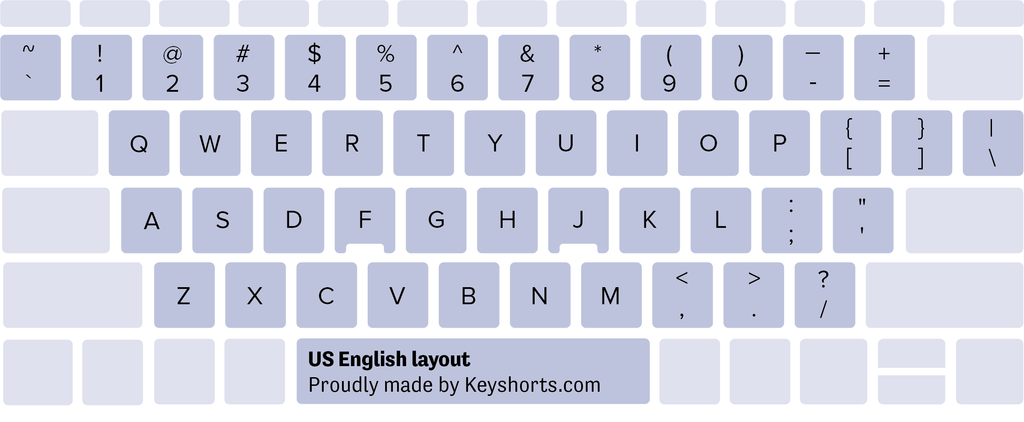
<p>Here's a diagram of US keyboard layout used in Windows operating system. Version used in Mac OS system is virtually the same.</p>
<p><img alt="US English keyboard layout diagram" src="https://cdn.shopify.com/s/files/1/0810/3669/files/english-united-states-us-windows-kblayout-unilingual-2021_4c5e8bbb-3774-48d6-8483-2c910d84e173.png?v=1686168260"></p>
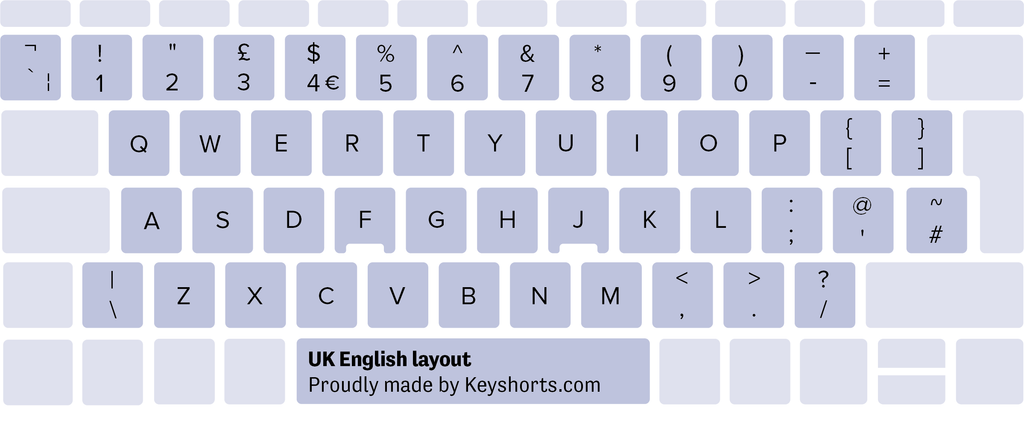
<p>The US and British keyboard layouts share many similarities, but also have significant differences. <strong>One noticeable distinction is the placement of the "£"</strong> (pound) symbol. On the UK layout, it appears above 3 in shifted position.</p>
<p>Here's a diagram of UK keyboard layout used in Windows and another one used in Mac OS system.</p>
<p><img alt="UK British United Kingdom keyboard layout for Windows" src="https://cdn.shopify.com/s/files/1/0810/3669/files/english-united-kingdom-united-kingdom-windows-kblayout-unilingual-2021_d31d0082-4796-48f3-87fd-c9f7a61bfd12.png?v=1686168316"></p>
<p><img alt="UK British United Kingdom keyboard layout for Mac" src="https://cdn.shopify.com/s/files/1/0810/3669/files/english-british-mac-kblayout-unilingual-2021_325de3bc-0285-40ae-8dde-02fa9b8fbaa9.png?v=1686168364"></p>
<p>Additionally, the position and shape of the "Enter" key varies, with the <strong>US layout having a larger, horizontal "Enter" key</strong> (ANSI keyboard type), while the <strong>UK layout features a smaller, 7-shaped vertical one</strong> (ISO keyboard type).</p>
<p><a name="identifying-layouts"></a></p>
<h3>Identifying the Layouts</h3>
<p>Differentiating between US and UK layouts is crucial, especially when purchasing or using keyboards. Look for the aforementioned presence of the "£" symbol and the "Enter" key shape. Additionally, the location of other symbols like "@" and "#" will differ in the two layouts.</p>
<p><a name="is-qwerty-us-layout"></a></p>
<h3>Is QWERTY a US layout?</h3>
<p>The QWERTY layout is the most prevalent keyboard arrangement worldwide, but is not exclusive to the US. The name "QWERTY" is derived from the first six letters on the keyboard's top row. It was initially developed for typewriters in the late 19th century to prevent mechanical jams while typing. While QWERTY is commonly associated with US keyboards, it is also used in other layouts, including in the UK, Canada, Australia, New Zealand, Brazil, Italy, Ireland, Norway, Sweden, Netherlands and many other countries.</p>
<h3>What Is the Difference Between US and European Keyboard?</h3>
<p>European keyboards can vary significantly from the US layout. One notable difference is the inclusion of additional characters specific to European languages, <strong>such as accented letters or  diacritic symbols</strong> used in French, German, Spanish, and other languages. The location of certain keys, such as the "€" (euro currency) symbol, may also differ on European keyboards. Moreover, some European countries don't use QWERTY, with notable examples of QWERTZ (used in Germany, Austria, Switzerland, Czech Republic, Slovakia, Hungary) and AZERTY (used in France and Belgium).</p>
<p><a name="need-switch"></a></p>
<h3>Need to switch to UK or US keyboard layout?</h3>
<p>Such a change is very common these days. The fastest and easiest way to physically change the keyboard layout is to use <a href="https://keyshorts.com/products/qwerty-us-english-keyboard-stickers">QWERTY English keyboard stickers</a>. We offer the best language-changing stickers on the planet, with many layouts, colors, and sizes available. Check them out below:</p>
<div style="text-align: left;"><a href="https://keyshorts.com/products/qwerty-us-english-keyboard-stickers" title="QWERTY US English keyboard stickers" rel="noopener noreferrer" target="_blank"><img style="float: none;" alt="US English QWERTY keyboard stickers from Keyshorts" src="https://cdn.shopify.com/s/files/1/0810/3669/files/qwerty-us-english-keyboard-stickers.jpg?v=1716275267"></a></div>
<div style="text-align: left;"><a href="https://keyshorts.com/products/qwerty-british-english-keyboard-stickers" title="QWERTY British English keyboard stickers" rel="noopener noreferrer" target="_blank"><img alt="UK British English QWERTY keyboard stickers from Keyshorts" src="https://cdn.shopify.com/s/files/1/0810/3669/files/qwerty-british-english-keyboard-stickers_1024x1024.jpg?v=1716275274" style="float: none;"></a></div>]]>
    </content>
  </entry>
  <entry>
    <id>https://keyshorts.com/blogs/blog/how-to-improve-your-business-with-language-keyboard-stickers</id>
    <published>2022-07-27T13:02:28+02:00</published>
    <updated>2025-06-11T14:17:21+02:00</updated>
    <link rel="alternate" type="text/html" href="https://keyshorts.com/blogs/blog/how-to-improve-your-business-with-language-keyboard-stickers"/>
    <title>How To Improve Your Business With Language Keyboard Stickers?</title>
    <author>
      <name>Sebastian Kończak</name>
    </author>
    <summary type="html">
      <![CDATA[<meta charset="utf-8"><span>As workplaces become more multilingual and multicultural, modern businesses need to be more versatile when it comes to accommodating the needs of their workers. While cultural sensitivity is the number one thing to create a comfortable work environment, there’s another thing that’s easy to overlook: the IT equipment, and, especially, keyboards.</span><p><a class="read-more" href="https://keyshorts.com/blogs/blog/how-to-improve-your-business-with-language-keyboard-stickers">More</a></p>]]>
    </summary>
    <content type="html">
      <![CDATA[<div id="toc"><a href="#improve-workplace" class="regular-link">How can keyboard stickers help to improve the workplace?</a></div>
<div><a href="#multi-language-teams" class="regular-link">Supporting multi-language teams</a></div>
<p> </p>
<p><span>As workplaces become more multilingual and multicultural, with employees using more than one language on a daily basis and often working from different corners of the world, modern businesses need to be more versatile when it comes to accommodating the needs of their workers. While cultural sensitivity is the number one thing to create a comfortable work environment, there’s another thing that’s easy to overlook: the IT equipment, and, especially, keyboards.</span></p>
<h3>Did you know that there are over 200 keyboard layouts?</h3>
<p>It may come as a surprise, but keyboard layouts are not one-size-fit-all matters, as 200+ different layouts are used on a daily basis all over the world. Habits are difficult to break, and everyone’s used to the keyboard layout they’ve had for most of their life. This is especially important in case of jobs that require a lot of typing, such as customer service agents, copywriters, content creators, translators, even programmers and data analysts. Let’s face it – a well-matching keyboard makes typing easier and faster.</p>
<p>When it comes to transferring creative thoughts as well as factual data to the computer screen, typos are highly unwelcome, as even the tiniest mistake may cause serious problems. <strong>Yet</strong> <strong>quite often employees may face a computer with a keyboard layout they’re not used to</strong>. In such situations, replacing numerous laptops or keyboards may not fit into the company’s budget. <strong>This is where language keyboard stickers come to the rescue.</strong><br><br></p>
<p><a name="improve-workplace"></a></p>
<h3>How can keyboard stickers help to improve the workplace?</h3>
<h3>No need to replace the equipment</h3>
<p>Imagine a situation: the company purchased 50 laptops for their employees. When the laptops arrived, it turned out they were produced for the German market and the letter Y and Z are switched. <strong>This causes frustration and lowers productivity</strong>, as each employee needs to check the spelling and correct many documents every day. Since replacing the new laptops is out of the question, the company may easily solve the problem by <a href="/collections/language-keyboard-stickers">ordering a set of keyboard stickers</a> with the layout that all employees are used to.</p>
<p><img alt="Replacement Keyboard Stickers for Companies &amp; Precurement" src="https://cdn.shopify.com/s/files/1/0810/3669/files/Three_language_keyboard_stickers_by_KeyshortsHow_to_fix_worn_off_letters_on_Keyboard_example_Magic_Keyboard_Apple_480x480.jpg?v=1659096276"> </p>
<h3>Equipment is not market-specific anymore</h3>
<p>While deciding to purchase new IT equipment such as laptops or computer keyboards, business owners need not limit their choice to products designed specifically for their market. They can find offers from other countries and import cheaper equipment, localizing it later with the <a href="/collections/language-keyboard-stickers">language keyboard stickers</a> of their choice. This can be especially helpful when keyboard layouts that are don’t follow the popular QWERTY standard are needed for specific teams. Since <a href="/blogs/blog/how-to-remove-keyboard-stickers-like-a-pro">stickers can be easily removed</a>, this solution is much safer than replacing the whole keyboard.</p>
<h3>Accommodating personal preferences</h3>
<p>Recently arriving from Paris in his new office in London, the French copywriter Pierre will not enjoy working on a QWERTY keyboard. <em>Merde</em>, he’ll exclaim every time when he types Q instead of A, interrupting his colleagues all the time. Instead of purchasing a new laptop or a keyboard for Pierre, the company may simply invest in <a href="/collections/language-keyboard-stickers/french">French language keyboard stickers</a> that fit perfectly on the old keyboard. Pierre may even choose his favorite background color to make work easier and more comfortable, and solitude can be easily restored in the office.</p>
<p><img alt="Applying Keyboard Stickers in company setup" src="https://cdn.shopify.com/s/files/1/0810/3669/files/Applying_Keyboard_Stickers_480x480.jpg?v=1659095749"></p>
<p><a name="multi-language-teams"></a></p>
<h3>Supporting multi-language teams</h3>
<p>Many workplaces hire individuals from various countries to use their language abilities for communication with customers, content creation, translating skills, and many other purposes. While your Customer Experience Specialist chats with clients in <a href="/collections/language-keyboard-stickers/russian">Russian</a>, your translator might prepare the agenda in <a href="/collections/language-keyboard-stickers/arabic">Arabic</a> for the upcoming business trip to Dubai. <strong>Instead of purchasing dedicated keyboards or laptops that match everyone’s language preferences, the company can order customised language keyboard stickers that fit their needs.</strong></p>
<p>As some employees may work with more than one language on a daily basis, <strong>it’s also possible to order <a href="/products/custom-keyboard-stickers-builder">multi-language stickers</a></strong> with more than one alphabet. Helping to accommodate the employees’ needs in such a way can contribute to increase in productivity as well as a more comfortable work environment.</p>
<p>It’s clear to see how <strong>language keyboard stickers can improve the workplace much more quickly, efficiently, and in a more budget-friendly way than purchasing new IT equipment</strong>. As each sticker set can be customised with a variety of font and background colors, it can also contribute to making a more friendly atmosphere of the office.</p>
<p>It’s worth noting that the stickers can be easily removed when they’re not needed anymore, and they don’t leave any permanent residue on the keys. To learn more about keyboard stickers, read <a title="Keyboard Stickers - most frequently asked questions" href="https://keyshorts.com/blogs/blog/15-questions-about-keyboard-stickers-you-always-wanted-to-ask">17 Questions About Keyboard Stickers You Always Wanted to Ask</a>.<br><br>Want to buy your first keyboard stickers? Check <a title="Language Keyboard Stickers" href="https://keyshorts.com/collections/language-keyboard-stickers">linguistic stickers in Keyshorts online shop</a> or build your <a title="Custom Keyboard Stickers Builder" href="https://keyshorts.com/products/custom-keyboard-stickers-builder">custom keyboard stickers</a>.</p>]]>
    </content>
  </entry>
  <entry>
    <id>https://keyshorts.com/blogs/blog/3-smart-keyboard-stickers-that-make-letters-clear-and-legible-to-see</id>
    <published>2021-05-26T17:32:24+02:00</published>
    <updated>2025-06-16T17:19:58+02:00</updated>
    <link rel="alternate" type="text/html" href="https://keyshorts.com/blogs/blog/3-smart-keyboard-stickers-that-make-letters-clear-and-legible-to-see"/>
    <title>3 Smart Keyboard Stickers That Make Letters Clear &amp; Legible</title>
    <author>
      <name>Ania Dominiak</name>
    </author>
    <summary type="html">
      <![CDATA[<p>Our customers very often reach us for an advise on how to resolve illegible keyboard problem. This issue concerns equally old and brand new devices, but for sure can be fixed by Keyshorts keyboard stickers. If you got a laptop that makes typing experience uncomfortable, don't throw it out of a window. Check our 3 ways how to make you keyboard perfectly legible &amp; save your money on fixing services.</p><p><a class="read-more" href="https://keyshorts.com/blogs/blog/3-smart-keyboard-stickers-that-make-letters-clear-and-legible-to-see">More</a></p>]]>
    </summary>
    <content type="html">
      <![CDATA[<p class="p1"><span class="s1">Low legibility of the letters is actually a very common problem that makes working on computer pretty uncomfortable. It may start after long time when the <strong>symbols get worn-off</strong> so much that you can't read them, or when the surface gets partially glossy. <strong>Greasy marks</strong> are perhaps the biggest nightmare as it's barely possible to prevent the keyboard from getting more damage once they start to show up.</span></p>
<p class="p1"><span class="s1">Troubles with reading the letters on the keyboard are also experienced by users who recently purchased the new laptop. Many of them complain on <strong>too low contrast between the letters and the keyboard background color</strong>. When symbols and what's around them have similar shades, in some light conditions it's hard to read them. Ironically, it is observed mostly during the day.</span></p>
<p class="p1"><span class="s1">Our customers very often reach us for an advice on how to resolve these issues without giving up on the current laptop. Luckily, within the past 10 years, we have found a way to <strong>save many laptops</strong> from being abandoned in the deepest drawers, not to mention how much <strong>money our customers saved when they didn't have to replace the whole laptop because of the wrong keyboard. </strong></span><span><span class="s1">Where to get keyboard stickers that bring your typing experience to the new level, but also protect the keys?</span></span> </p>
<h3 style="text-align: left;" class="p1">
<span style="color: #000000;"><span class="s1">Check our customers’ 3 favourite solutions and pick yours:</span></span> </h3>
<meta charset="utf-8">
<ol>
<li><span><span class="s1"><a href="#black_keyboard_stickers">Keyboard Stickers in contrasting, black &amp; white style</a></span></span></li>
<li><span><span class="s1"><a href="#transparent_keyboard_stickers">Keyboard stickers with transparent background &amp; letters on the side</a></span></span></li>
<li><span><span class="s1"><a href="#keyboard_stickers_transparent_letters">Keyboard stickers with large letters</a></span></span></li>
</ol>
<a name="black_keyboard_stickers"></a>
<h3>1. Keyboard Stickers in contrasting, black &amp; white style.</h3>
<p><img alt="Black french keyboard stickers" src="https://cdn.shopify.com/s/files/1/0810/3669/files/Black_keyboard_stickers_in_French_480x480.jpg?v=1622035909"></p>
<p>Simple black (or any other simple styled) keyboard stickers are perfect to completely transform the layout and hide its original look. On the stickers, we can design anything from the scratch - for example: make the letters bigger, add/reduce particular characters, or apply different colors. It's also a good way to replace the language which we don't use, but our laptop turned out to have one after we bought it.<br><br><span style="color: #000000;"><strong>How it's made (technical specification)?</strong></span></p>
<meta charset="utf-8">
<table class="table" width="100%">
<tbody>
<tr>
<td><strong>Sticker type</strong></td>
<td>
<div><meta charset="utf-8"></div>
<span>opaque vinyl, not backlight-compatible</span>
</td>
</tr>
<tr>
<td>
<div><meta charset="utf-8"></div>
<strong>Finish type</strong>
</td>
<td>
<div><meta charset="utf-8"></div>
<span>matte laminate, full protection against wearing off the print</span>
</td>
</tr>
<tr>
<td>
<div><meta charset="utf-8"></div>
<strong>Thickness</strong>
</td>
<td>
<div><meta charset="utf-8"></div>
<span>standard (less than F &amp; J bumps on your keyboard)</span>
</td>
</tr>
<tr>
<td>
<div><meta charset="utf-8"></div>
<strong><span>Print type</span></strong>
</td>
<td>
<div><meta charset="utf-8"></div>
<span>print under the laminate (flat)</span>
</td>
</tr>
<tr>
<td><strong>Gloss reduction</strong></td>
<td>100% - stickers don't reflect the light from the screen</td>
</tr>
</tbody>
</table>
<p> </p>
<meta charset="utf-8">
<p><strong>Will they fit my keyboard (I have a Mac &amp; Windows laptop)?</strong></p>
<p>Perfect-fit stickers are Keyshorts bestsellers :) Yes, you can order a custom size which is individually adjusted to fit your keyboard. Please provide model name while placing order, there's drop-down menu where you need to pick your brand &amp; write model name (if you know it). Photo will be appreciated, especially if you're not sure about the model name. You can send it in a reply to order confirmation email.</p>
<p><strong>Can I customise it even more?</strong></p>
<p>Yes, besides the size, you can add languages, adjust the colors. Metallic finish is available. We also have wide collection of our <a title="Colorful, designer keyboard stickers made individually for any keyboard" href="https://keyshorts.com/collections/laptop-keyboard-decals">designer keyboard stickers for any device</a>.</p>
<p>Most popular products from this section:</p>
<ul>
<li><a href="https://keyshorts.com/products/simple-black-laptop-keyboard-stickers">Simple Black keyboard stickers</a></li>
<li><a href="https://keyshorts.com/products/custom-keyboard-stickers-builder">Custom made keyboard stickers with designer assistance</a></li>
<li><a href="https://keyshorts.com/collections/language-keyboard-stickers">Language change keyboard stickers</a></li>
</ul>
<a name="transparent_keyboard_stickers"></a>
<h3>2. Keyboard stickers with transparent background &amp; letters on the side.</h3>
<h1>
<img alt="Transparent keyboard stickers with Russian letters in the corner" src="https://cdn.shopify.com/s/files/1/0810/3669/files/Transparent_keyboard_stickers_with_letters_in_the_corner_480x480.gif?v=1622036642"> </h1>
This option allows adding a new layout in any color without covering the characters, which are already on the keyboard. New layout will be applied accordingly to your keyboard specification. Usually, we position the new symbols in right bottom corner, but it’s flexible - we can put them in any place as long as they don’t cover the existing layout.<br><br><meta charset="utf-8">
<p><strong>How it's made (technical specification)?</strong></p>
<meta charset="utf-8">
<table class="table" width="100%">
<tbody>
<tr>
<td><strong>Sticker type</strong></td>
<td>
<div>
<meta charset="utf-8">transparent vinyl, fully backlight-compatible</div>
</td>
</tr>
<tr>
<td>
<div></div>
<strong>Finish type</strong>
</td>
<td>
<div>
<meta charset="utf-8">matte UV print, certified with Greenguard Gold Certification</div>
</td>
</tr>
<tr>
<td>
<div></div>
<strong>Thickness</strong>
</td>
<td>
<div>
<meta charset="utf-8">standard, not thicker than bumps on F and J keys</div>
</td>
</tr>
<tr>
<td>
<div></div>
<strong><span>Print type</span></strong>
</td>
<td>
<p><span>on the sticker, not laminated, full-proof against wear and tear</span></p>
<div><meta charset="utf-8"></div>
<p><span>letters can be felt under the fingers</span></p>
<div><meta charset="utf-8"></div>
<p><span>safe for people &amp; environment, non laminated</span></p>
</td>
</tr>
<tr>
<td><strong>Gloss reduction</strong></td>
<td>100% - stickers don't reflect the light from the screen</td>
</tr>
</tbody>
</table>
<p> </p>
<meta charset="utf-8">
<p><strong>Will they fit my keyboard (I have a Mac &amp; Windows laptop)?</strong></p>
<p>Yes, custom size is available. We will need your device model name or a photo of a keyboard. If you are not sure about the model name or need stickers for multiple laptops, you might prefer a universal size which is versatile.</p>
<p><strong>Can I customise it even more?</strong></p>
<div style="text-align: start;"><img alt="Hiragana keyboard stickers for PC keyboard" src="https://cdn.shopify.com/s/files/1/0810/3669/files/Japanese_transparent_keyboard_stickers_by_Keyshorts.jpg?v=1622033826"></div>
<p>Yes, our designer will be happy to work with you on further adjustments. To order custom project, please visit our <a title="Custom keyboard stickers builder" href="https://keyshorts.com/products/custom-keyboard-stickers-builder">keyboard stickers builder</a></p>
<p>Most popular products from this section: </p>
<ul>
<li><a title="Transparent keyboard stickers with more languages" href="https://keyshorts.com/collections/transparent-keyboard-stickers">Transparent keyboard stickers with additional alphabet</a></li>
<li>
<a title="Protector keyboard stickers with no letters (transparent)" href="https://keyshorts.com/collections/transparent-keyboard-stickers">Protector transparent keyboard stickers without the letters</a> </li>
</ul>
<a name="keyboard_stickers_transparent_letters"></a>
<h3>3. Keyboard stickers with large letters</h3>
<meta charset="utf-8">
<p>This is the solution we recommend if you are not only unhappy with the keyboard color, but also struggle with tiny letters. To have better visibility, you can simply apply <a title="Keyboard Stickers with Large Letters - for vision problems" href="https://keyshorts.com/products/low-vision-keyboard-stickers-with-large-print-type">stickers with large letters</a>. One the product site, there are unlimited color options available to choose, but the best result you will get, if you choose yellow or white letters over black background. Need the background to be white? Pick black letters, like one of our customers has done recently:</p>
<p><img alt="White Keyboard Stickers with Large Letters" src="https://cdn.shopify.com/s/files/1/0810/3669/files/Large_Letters_White_Keyboard_Stickers_e91b6287-35b4-441d-851e-d01dcc2f16d3.jpg?v=1657099082"></p>
<meta charset="utf-8">
<p><strong></strong><span style="color: #000000;"><strong>How it's made (technical specification)?</strong></span></p>
<table class="table" width="100%">
<tbody>
<tr>
<td><strong>Sticker type</strong></td>
<td>
<div></div>
<span>opaque vinyl, not backlight-compatible</span>
</td>
</tr>
<tr>
<td>
<div></div>
<strong>Finish type</strong>
</td>
<td>
<div></div>
<span>matte laminate, full protection against wearing off the print</span>
</td>
</tr>
<tr>
<td>
<div></div>
<strong>Thickness</strong>
</td>
<td>
<div></div>
<span>standard (less than F &amp; J bumps on your keyboard)</span>
</td>
</tr>
<tr>
<td>
<div></div>
<strong><span>Print type</span></strong>
</td>
<td>
<div></div>
<span>print under the laminate (flat)</span>
</td>
</tr>
<tr>
<td><strong>Gloss reduction</strong></td>
<td>100% - stickers don't reflect the light from the screen</td>
</tr>
</tbody>
</table>
<p> </p>
<p><strong>Can I customise it even more?</strong></p>
<p>Yes, beside getting them in particular color, you can customize any other product with larger letters. Make sure to add the <a title="Upgrade your keyboard stickers with larger letters for better visibility" href="https://keyshorts.com/products/larger-letters">Larger Letters</a> upgrade to the cart togerther with a product of your choice.</p>
<p>We hope that you enjoyed the article. Let us know in the comments if you have any questions! Happy typing :)</p>]]>
    </content>
  </entry>
  <entry>
    <id>https://keyshorts.com/blogs/blog/15-questions-about-keyboard-stickers-you-always-wanted-to-ask</id>
    <published>2018-08-13T13:00:00+02:00</published>
    <updated>2025-06-11T12:27:40+02:00</updated>
    <link rel="alternate" type="text/html" href="https://keyshorts.com/blogs/blog/15-questions-about-keyboard-stickers-you-always-wanted-to-ask"/>
    <title>18 Questions About Keyboard Stickers You Always Wanted to Ask and One Extra Surprise at the End</title>
    <author>
      <name>Ania Dominiak</name>
    </author>
    <summary type="html">
      <![CDATA[<meta charset="utf-8"><span>You probably heard of multiple advantages of having your keyboard covered with decorative or specialized keyboard decals. Want to get your first keyboard stickers but still not sure how these work? Then check out these 18 questions (and answers of course) we prepared for you to clear up all doubts!</span><p><a class="read-more" href="https://keyshorts.com/blogs/blog/15-questions-about-keyboard-stickers-you-always-wanted-to-ask">More</a></p>]]>
    </summary>
    <content type="html">
      <![CDATA[<p> </p>
<section>
<div class="formatted_content">
<div>You probably heard of multiple advantages of having your keyboard covered with decorative or specialized keyboard decals. Want to get your first keyboard stickers but still not sure how these work? Then check out these 18 questions and answers (like, <a href="#backlight">keeping the keyboard backlight</a>) we prepared for you to clear up all doubts!</div>
<div></div>
<div></div>
<div id="toc"><a href="#made-of" class="regular-link">What keyboard stickers are made of (perfect product recipe)?</a></div>
<div><a href="#how-to-remove" class="regular-link">How to remove keyboard stickers and do they come off easily if I want to replace them with a different design?</a></div>
<div><a href="#how-long-will-last" class="regular-link">How long will they last?</a></div>
<div><a href="#backlight" class="regular-link">Will backlight remain when I apply keyboard stickers?</a></div>
<div><a href="#safety-residue" class="regular-link">Are they safe, will there be a residue when I take them off?</a></div>
<div><a href="#will-fit" class="regular-link">Will they fit my keyboard?</a></div>
<div><a href="#numeric-section" class="regular-link">And what about keyboards with numeric section?</a></div>
<div><a href="#how-to-apply" class="regular-link">How to apply keyboard stickers?</a></div>
<div><a href="#screen" class="regular-link">Won't they damage the screen when I close the laptop?</a></div>
<div><a href="#wear-off" class="regular-link">I type a lot. Will keyboard stickers wear off?</a></div>
<div><a href="#protection" class="regular-link">Do keyboard stickers protect from spilled water?</a></div>
<div><a href="#repositioning" class="regular-link">Can stickers be repositioned?</a></div>
<div><a href="#typing" class="regular-link">Is there any difference in typing with keyboard stickers?</a></div>
<div><a href="#silicone-cover" class="regular-link">Can I use them together with a silicone cover?</a></div>
<div><a href="#marks-on-screen" class="regular-link">Will the keyboard stickers leave marks on the screen after closing the laptop?</a></div>
<div><a href="#logo" class="regular-link">Is the logo on a spacebar included or it's just on a preview?</a></div>
<div><a href="#shiny-key-syndrome" class="regular-link">Transparent or opaque stickers for shiny key syndrome?</a></div>
<div><a href="#legit" class="regular-link">Is Keyshorts.com legit?</a></div>
<div></div>
<meta charset="utf-8">
</div>
<a name="made-of"></a>
<h3>1. What keyboard stickers are made of (perfect product recipe)?</h3>
<p>Considering that keyboard stickers are applied on the device which is used at least few hours a day, there are certain requirements. Such decals have to be <strong>strong</strong> (so you can type for months, even years), <strong>thin</strong> (so they don't destroy the screen), <strong>durable</strong> and of course they <strong>can't leave any permanent residue</strong>. That's minimum but there's a lot more depending on the desired effect.</p>
<p>For this kind of requirements, the best material is specialised vinyl foil, preferably from an authorised reseller or purchased directly from the manufacturer. It's very important because most foil types have... an expiration date :) If the foil comes from the wrong manufacturer and you can't check the expiration date, there is a risk that the adhesive layer doesn't work well. That's why our products are made to order in short lines (new foil is purchased every 1-2 months) and we don't resell products from stock.</p>
<p>Five must-have things to create a perfect keyboard sticker set:</p>
<div>
<ul>
<li>the base which includes non-permanent, safe for people and pets adhesive layer</li>
<li>the print, it can be solvent or latex</li>
<li>the laminate, it can be matte or glossy </li>
<li>project in high resolution of what has to be printed</li>
<li>cutting pattern, adjusted to the keyboard size</li>
</ul>
The base can't be made of paper! It must be a flexible vinyl foil. And thinnest possible (50 microns max) in order not to damage the laptop's screen while closing it.<br><br>
</div>
<div><img src="https://cdn.shopify.com/s/files/1/0810/3669/files/space_gray_macbook_keyboard_stickers_6_1024x1024.jpg?v=1534158110" alt="What keyboard stickers should be made of?"></div>
<div><br></div>
<div><span style="color: #999999;"><em>On your keyboard stickers, you can have a seamless space gray effect as well :)</em></span></div>
<br>
<div>
<meta charset="utf-8">
<br>
</div>
<div><br></div>
<div><br></div>
<div>The print should be made by a professional company, so it's not toxic. However, no matter how good ink was used, the safest option is to cover it with the extra laminate layer. This way, the print won't wear off and the colors are more bright. And you don't touch the print directly.</div>
<div><br></div>
<div><br></div>
<a name="how-to-remove"></a>
<h3>2. How to remove keyboard stickers and do they come off easily if I want to replace them with a different design?</h3>
<p>Yes, they are pretty easy to take off as long as they are made of a vinyl with non-permanent glue. In the case of Keyshorts keyboard stickers, the whole "taking off" procedure takes few minutes and the laptop is clean and ready to be personalized again. Recently, we created a short video showing <a href="https://keyshorts.com/blogs/blog/how-to-remove-keyboard-stickers-like-a-pro" title="How to remove keyboard stickers like a pro video">how to remove keyboard stickers like a pro</a>.</p>
<div>
<img src="https://cdn.shopify.com/s/files/1/0810/3669/files/transparent-keyboard-stickers_1024x1024.jpg?v=1534151961" alt="Removing keyboard stickers"> <a name="how-long-will-last"></a>
<h3>3. How long will they last?</h3>
<p>It depends if you need them for professional use or not. The longest time they have been in production is 4 years and still counting. If you use your laptop daily in indoor conditions, you can relax - your stickers are more likely to be replaced by you when you're bored with the design :) Only professional gamers have to change them each six months and it's just a few keys - WASD. So if you're a professional gamer - let us know while placing an order so we will print some keys extra in advance. Or, you can reach us later for more.<br><br><em><img src="https://cdn.shopify.com/s/files/1/0810/3669/files/blue003_1024x1024.jpg?v=1534152143" alt="How long keyboard stickers can last?"></em></p>
</div>
<a name="backlight"></a>
<div><br></div>
<span style="color: #999999;"><em>Keyboard stickers after one year. Perfect condition.</em></span>
<div>
<h3>4. Will backlight remain when I apply keyboard stickers?</h3>
<p>Usually, stickers are not advertised as backlight-compatible.</p>
<meta charset="utf-8">
<p>The good news is that you can get <a href="https://keyshorts.com/collections/transparent-keyboard-stickers" title="Transparent keyboard stickers for MacBook or Windows, PC laptops">transparent keyboard stickers</a> with any color of your choice and keep the backlight in 100% no matter which laptop or keyboard model you have.</p>
<p>However, on decorative keyboard decals with printed artwork, the backlight will be visible approximately in 50% of its original brightness, as long as the font color is white or silver (in case of metallic decals). Most customers find it sufficient especially when they add the light from a computer screen. But if the font color is darker, the backlight will not be visible that well. It's because the letters are printed on a white vinyl, there's no option to cut them. </p>
<p>Important tip: It has a chance to work only if the keyboard layout on your laptop is exactly the same as the one on the stickers. If you apply letter Y on letter Z, the "Y" will light up only where it has a common shape with the "Z".</p>
</div>
<div><img src="https://cdn.shopify.com/s/files/1/0810/3669/files/Keyboard-stickers-backlight_1024x1024.jpg?v=1534153670" alt="Keyboard stickers on backlit keyboard"></div>
<div>
<meta charset="utf-8"> <span style="color: #999999;"><em>White (or silver) font color on keyboard stickers, backlight retained at around 50% :)</em></span>
</div>
<div>
<br><strong>Pro tip:</strong> If you're buying in <a href="https://keyshorts.com/">Keyshorts shop</a>, you can always ask in the note to order that you want a white font color. There's no extra fee for that.</div>
<div><br></div>
<a name="safety-residue"></a>
<h3>5. Are they safe, will there be a residue when I take them off?</h3>
<p>Keyboard stickers from Keyshorts are 100% safe for the laptop and don't affect the device in any form (only make it look better :-)). There will be no permanent residue after removal of the decals, no worries :) The vinyl foil type had been matched precisely to work on multiple types of keyboard. To get the best results, just make sure to clean the keyboard with the attached wipe before application.</p>
<a name="will-fit"></a>
<h3>6. Will they fit my keyboard?</h3>
<p>As long as you pick the <a href="/blogs/blog/41961729-how-to-check-what-macbook-i-have" title="How to check what MacBook model I have?" target="_blank">correct MacBook model</a> or - in case of PC laptop - <strong>provide your laptop model</strong> while placing order, the size will be adjusted for you. In some cases, we ask our customers for the <strong>photo of a keyboard</strong> in order to confirm some details. If you send a model name and a photo of your laptop, there's nothing that could go wrong!</p>
<p>The difference between<strong> universal and perfect (custom) size</strong> is illustrated below:</p>
<p><img src="https://cdn.shopify.com/s/files/1/0810/3669/files/Universal-or-Perfect-size.jpg?v=1622213467" alt="Keyboard stickers sizes - what is the difference between custom (perfect) and standard"></p>
<p>And here's an example foto of perfect, custom size made for Dell Latitude E6440:</p>
<div>
<img src="https://cdn.shopify.com/s/files/1/0810/3669/files/Dell_1024x1024.jpg?v=1534153979" alt="Will keyboard stickers fit my laptop - Dell laptop photo"><br><span style="color: #999999;"><em>Dell laptop with Keyshorts stickers</em></span>
</div>
<div>
<a name="numeric-section"></a>
<h3>7. And what about keyboards with numeric section?</h3>
<p>They are the same keyboards but with a Numpad :) If you're buying from Keyshorts - just send a photo of your keyboard so the person who's responsible for your project knows how your keyboard looks like.</p>
</div>
<div>
<a name="how-to-apply"></a>
<h3>8. How to apply keyboard stickers?</h3>
<p>Basically, there're two types of keyboard stickers. The ones with transfer foil and the ones without. This topic is fully described in our <span style="color: #000000;"><a href="https://keyshorts.com/blogs/blog/178615303-how-to-apply-keyboard-stickers-like-a-pro" title="How to apply keyboard stickers like a pro">How to apply keyboard stickers like a pro</a> article.</span></p>
<div><img src="https://cdn.shopify.com/s/files/1/0810/3669/files/greatwave7_1024x1024.jpg?v=1534155761" alt="How to apply keyboard stickers? Picture of freshly applied sickers"></div>
<div><span style="color: #999999;"><em>Freshly applied keyboard stickers with Great Wave of Kanagawa by Hokusai</em></span></div>
<br><strong><strong><strong>Pro tip: </strong></strong></strong>make sure to turn off your computer or at least to log out. You don't want to send any emails by accident :)<strong><strong><strong> </strong></strong></strong> <a name="screen"></a>
<h3>9. Won't they damage the screen when I close the laptop?</h3>
<p>If the stickers are made by Keyshorts - they are 100% safe for the laptops screen, because they are made of thin vinyl and each set is manufactured on different printing settings (depending on the colors). It's company's secret that despite extra laminate on top (for protection so they don't wear off) they are 50 microns thin, which is<strong> less than the bumps on F and J keys</strong> <strong>that all keyboards have installed by hardware company.</strong> You can close the laptop and there's still plenty of space in the gap between the keys and the screen. </p>
</div>
<div>
<img src="https://cdn.shopify.com/s/files/1/0810/3669/files/Millennial_Pink_Marble_Dust_MacBook_Case_Skin_2_1024x1024.jpg?v=1534151526" alt="Are keyboard stickers safe for the laptops screen?"><br><span color="#999999" style="color: #999999;"><i>Keyshorts keyboard stickers with pink marble, 100% safe for your laptop's screen :)</i></span>
</div>
<div>
<a name="wear-off"></a>
<h3>10. I type a lot. Will keyboard stickers wear off?</h3>
<p>In fact, what you should definitely do if you type a lot, is to get keyboard stickers. As long as the keyboard stickers you purchased are covered with a laminate, they won't wear off because the print is protected and doesn't have a direct contact with fingers.</p>
</div>
<div style="text-align: left;"><a href="https://imgur.com/gallery/D2oez" title="Keyboard is wearing off"><img alt="Will keyboard stickers prevent the keys from wearing off?" src="https://cdn.shopify.com/s/files/1/0810/3669/files/Keyboard_wearing_off_1024x1024.jpg?v=1534156475"></a></div>
<div><br></div>
<div>
<img src="https://imgur.com/gallery/D2oez" alt=""> <em>That could have been avoided. But you can also cover it with stickers and still enjoy the keyboard!<br></em>
</div>
<a name="protection"></a>
<h3>11. Do keyboard stickers protect from spilled water?</h3>
<p>Keyboards stickers are water-proof by itself (sweat, stains, oil) as long as they are made of vinyl foil. However, they don't protect when you spill the water, or any liquid as the areas in between the keys shouldn't be too tight. Good news is that they will last for a very long time and you can be relaxed that they won't vanish if your hands are sweaty.</p>
<p>It's also a good moment to mention that nothing protects your keyboard in 100% from the spilled water because even if the water stops on the silicone cover, imagine getting rid of it later. Let's just be careful and keep the drinks away from the keyboard ;)</p>
<a name="repositioning"></a>
<h3>12. Can stickers be repositioned?</h3>
<p>Of course. If they are freshly-applied, you can gently take off the parts which you want to reapply. Just make sure that there's no dust stuck under the stickers. The only thing we don't recommend, it to reposition them after 15 minutes or later from the first application. When the glue is dry, it's harder to work with it.</p>
<div>
<img src="https://cdn.shopify.com/s/files/1/0810/3669/files/Botanica-Punk-MacBook-Around-Keyboard-Skin_1024x1024.jpg?v=1534156889" alt="Can keyboard sticker be repositioned after applied?"><br><em><span style="color: #999999;">Guess how many times these had to be repositioned :)</span> </em>
</div>
<div>
<a name="typing"></a>
<h3>13. Is there any difference in typing with keyboard stickers?</h3>
<p>If they are super thin, like max 50 microns, then you won't feel much difference :) If you choose a matte laminate instead of the glossy one, the stickers will basically blend in.</p>
</div>
<div>
<img src="https://cdn.shopify.com/s/files/1/0810/3669/files/Starry-Night_1024x1024.jpg?v=1534157005" alt="Is there any difference in typing with keyboard stickers?"> <a name="silicone-cover"></a>
<h3>14. Can I use them together with a silicone cover?</h3>
<p>Yes, you can apply a clear (or other) silicone cover on your keyboard stickers. Please just make sure to take off the cover while closing the laptop screen just in case :) </p>
<meta charset="utf-8"> <a name="marks-on-screen"></a>
<h3>15. Will the keyboard stickers leave marks on the screen after closing the laptop?</h3>
<p>No. It's impossible :) Stickers are very thin and each laptop has always some 'air' between the keyboard and its screen. However, if your laptop has a hinge defect (it, unfortunately, happens sometimes), you might notice such damage after a while, even without stickers. To be sure, you can first check your laptop in the nearest service provider. Of course, if you have your device from at least a few months and such damage never occurred, this issue will not concern you.</p>
<a name="logo"></a>
<h3>16. Is the logo on a spacebar included or it's just on a preview?</h3>
<p>Keyshorts keyboard stickers have been produced for a long time with logo on a spacebar version only. Now, the logo can be skipped depending on your needs. This option can be selected while choosing your keyboard stickers and there is no extra fee for that.</p>
<p><br><img src="https://cdn.shopify.com/s/files/1/0810/3669/files/C9136696-E969-4F49-AEE3-C696C96ACA02_1024x1024.JPG?v=1534157308" alt="Purchasing keyboard stickers with or without logo on a spacebar"></p>
<a name="#shiny-key-syndrome"></a>
<h3>17. Transparent or opaque stickers for shiny key syndrome and other damage types?</h3>
<p>That depends :)</p>
<p><strong>Opaque</strong> - only if you want to <strong>cover and replace symbols.</strong> You can use opaque stickers for really damaged keys, where letters are blurred, invisible or there is other mechanical damage. Colorful stickers will work to solve the shiny key syndrom too but as long as you are happy with your keyboard design, you need just transparent ones.</p>
<p><strong>Transparent</strong> - Most customers buy them to <strong>prevent the damage</strong>. There stickers are also the best to <strong>hide shiny spots</strong> as they are matte and reflect the light equally on the etire key. </p>
</div>
<h3>18. Is Keyshorts.com legit?</h3>
<div>
<img src="https://cdn.shopify.com/s/files/1/0810/3669/files/Custom_keyboard_stickers_for_MacBook_choice.gif?v=1622035226" alt="Anna from Keyshorts applying keyboard stickers"><br>It's a family business, created in 2013 (and still operating) by designer Sebastian Konczak and his partner Anna Dominiak. Since then, we served 50,000+ customers worldwide by providing responsibly-manufactured keyboard stickers &amp; laptop skins in individual sizes/specifications. Keyshorts company is officially registered business with VAT ID PL8942690598. Check our customer's photos &amp; feel free to contact us if you have any questions: <a href="https://pl.pinterest.com/keyshorts/keyshortsified-keyshorts-stickers-from-2015/" title="Keyshorts Pinterest account and customer photos">Pinterest</a>, <a href="https://www.instagram.com/keyshorts/" title="Keyshorts customers photos on Instagram">Instagram</a>, <a href="https://www.facebook.com/Keyshorts/" title="Keyshorts Facebook website">Facebook</a> and <a href="https://twitter.com/keyshortshq" title="Keyshorts Twitter account with customers photos">Twitter</a>.</div>
<div>
<br>Hope you found this article helpful and now all your concerns are resolved! If you're not convinced enough to buy your first keyboard stickers, we have something you need :) <strong>Use the KEYBOARDLOVE code at the checkout on <a href="https://keyshorts.com/" title="Keyboard stickers online shop">Keyshorts</a> to get a discount. </strong>
</div>
</section>
<div class="push--top u-hide-on-template"><br></div>]]>
    </content>
  </entry>
  <entry>
    <id>https://keyshorts.com/blogs/blog/9-reasons-to-get-keyboard-stickers-instead-of-silicone-cover</id>
    <published>2018-08-06T16:41:00+02:00</published>
    <updated>2025-06-13T15:44:12+02:00</updated>
    <link rel="alternate" type="text/html" href="https://keyshorts.com/blogs/blog/9-reasons-to-get-keyboard-stickers-instead-of-silicone-cover"/>
    <title>9 Reasons to Get Keyboard Stickers Instead of Silicone Cover</title>
    <author>
      <name>Ania Dominiak</name>
    </author>
    <summary type="html">
      <![CDATA[<meta charset="utf-8"><span>Ahhh... keyboard stickers versus silicone covers - it's like Mac vs Windows, each side has its own believers and haters. By the headline you already know where we stand - and we do it with a reason.</span><p><a class="read-more" href="https://keyshorts.com/blogs/blog/9-reasons-to-get-keyboard-stickers-instead-of-silicone-cover">More</a></p>]]>
    </summary>
    <content type="html">
      <![CDATA[<p class="p1"><span class="s1">Keyboard stickers or silicone covers? That is the question! No matter if you just got your brand new 2024 MacBook Pro or want to upgrade the unbreakable Lenovo ThinkPad, we’ve been there. Want more legible letters? Or better protection against liquids and simple scratches? Or maybe you just got a new laptop with a totally different language layout than you're used to? Be my guest and let me show you all pros and cons of having keyboard stickers and silicone covers.</span></p>
<div id="toc"><a class="regular-link" href="#typing">Typing is waaay better with keyboard stickers</a></div>
<div><a class="regular-link" href="#personalization">Keyboard stickers can be personalized to the extreme</a></div>
<div><a class="regular-link" href="#matched-with-skins">Keyboard stickers can be matched with laptop skins</a></div>
<div><a class="regular-link" href="#accessories">Once you change your laptop, you don't stay with a bunch of accessories when using keyboard stickers</a></div>
<div><a class="regular-link" href="#design">You get what's best from your MacBook or other laptop design</a></div>
<div><a class="regular-link" href="#marks">In our opinion, silicone covers can leave marks or crack your screen</a></div>
<div><a class="regular-link" href="#overheating">In our opinion, silicone covers increase your laptop's temperature and can lead to overheating in conducive environment</a></div>
<div><a class="regular-link" href="#metallic">Keyboard stickers can have metallic finish</a></div>
<div><a class="regular-link" href="#custom">When you can't find silicone cover for your laptop model, custom keyboard stickers can be made for you</a></div>
<p><a name="typing"></a></p>
<h3>1. Typing is waaay better with keyboard stickers</h3>
<p>This is crucial for writers and anyone heavily relying on a typing speed and accuracy. <strong>Keyboard stickers just stick to the key without changing its shape, hardness or range of movement</strong>. Typing will be still an easy job for your fingers, as you won't have to change pressure on the keys. <br><br><strong>Silicone cover makes an unnatural layer that changes the feel of typing</strong> (you feel a soft gel surface instead of hard key), and decreases typing speed and tactile feedback. Many people report they have to use much more force to type with silicone cover on. Many dumps covers because of that.<br><br>Sometimes silicone covers change how the keys are shaped and placed. It happens because manufacturers of these covers made the production cost more economical and put more than one keyboard layout into one product. Your enter key can suddenly change the shape from rectangular or 7-shaped to almost-triangular without a legitimate reason. It may be super rough change if you're used to your keyboard shape.</p>
<p><a name="personalization"></a></p>
<h3>2. <a class="regular-link" href="https://keyshorts.com/">Keyboard stickers</a> can be personalized to the extreme</h3>
<p><img src="https://cdn.shopify.com/s/files/1/0810/3669/files/metallicmandala_1024x1024.jpg?v=1533555542" alt="Turquoise metallic mandala MacBook keyboard stickers"></p>
<p>You can get them with colorful artwork, custom fonts, and colors, bilingual, with keyboard shortcuts. What's more, you'll get them made exactly for your keyboard shape.<br><br>In comparison, silicone covers tend to have simple artworks, washed out colors, with one default letters color and font, without any customization. <br><br>Try to tell silicone cover seller that you'll like to change letters color and have it with a black stroke, with Great Wave of Kanagawa artwork, for a Dell XPS 13 9530 from 2023, with an Icelandic keyboard layout that has to match US English keyboard shape. We have such customers all the time, silicone cover sellers can't even make such a product.</p>
<p><a name="matched-with-skins"></a></p>
<h3>3. Keyboard stickers can be matched with <a class="regular-link" href="https://keyshorts.com/collections/macbook-skins">laptop skins</a>
</h3>
<p><a href="/products/great-wave-of-kanagawa-macbook-skin"><img src="https://cdn.shopify.com/s/files/1/0810/3669/files/great-wave-macbook-skin-live1_1024x1024.jpg?v=1533554545" alt="Great wave of Kanagawa MacBook skin and matching keyboard stickers"></a></p>
<p>They can be matched with desired <a class="regular-link" href="https://keyshorts.com/collections/macbook-trackpad-decals">trackpad sticker</a> or full skin coverage and it will always look good. Silicone covers are totally lonely in that matter, plus they just look like rubber. Try matching them with... what? There's nothing that will look seamless with silicone covers.</p>
<p><a name="accessories"></a></p>
<h3>4. Once you change your laptop, you don't stay with a bunch of accessories when using keyboard stickers</h3>
<p>Keyboard stickers can be simply taken off, squeezed and deposited in any recycle bin (plastic section). Let's face it - we all know that feeling when you change your phone but still have old chargers in a drawer. Keyboard stickers are - in this sense - more minimalistic and environmentally friendly. Silicone covers take much more room when thrown to garbage.</p>
<p><a name="design"></a></p>
<h3>5. You get what's best from your MacBook or other laptop design</h3>
<p><a href="/products/orchid-gray-macbook-keyboard-stickers"><img src="https://cdn.shopify.com/s/files/1/0810/3669/files/IMG_8226_1024x1024.JPG?v=1533554626" alt="Metallic orchid grey MacBook keyboard stickers"></a></p>
<p>The sleek design and elegant lines - this is what you paid for while deciding to go with a particular laptop. And who would like to ruin that? With keyboard stickers, you only highlight the designer look, not hide it under a thick silicone layer.</p>
<p><a name="marks"></a></p>
<h3>6. In our opinion, silicone covers can leave marks or crack your screen</h3>
<p>There have been multiple opinions on the internet about silicone covers leaving greasy marks on the screen, or that silicone covers allegedly crack the screen. This can be true or not, but why take the risk?</p>
<p><a name="overheating"></a></p>
<h3>7. In our opinion, silicone covers increase your laptop's temperature and can lead to overheating in conducive environment</h3>
<p>We had silicone covers years ago on a MacBook, and it keeps getting hot all the time. We dumped it on day two. I really don't like to type on a hot keyboard and hear fans screaming for more air.</p>
<p><a name="metallic"></a></p>
<h3>8. Keyboard stickers can have metallic finish</h3>
<p><img src="https://cdn.shopify.com/s/files/1/0810/3669/files/Metallic_Keyboard_Stickers_Instead_Of_Silicone_Cover_480x480.webp?v=1683191067" alt="Metallic Keyboard Stickers Instead Of Silicone Cover"></p>
<p>We've been making <a href="/collections/gold-and-metallic-collection" title="Gold and metallic keyboard stickers">metallic keyboard stickers</a> for years, but you can't find any such silicone covers. Metallic finish is very elegant and can make stickers virtually disappear or blend in to the metal case of laptop. Silicone covers will always look like rubber. </p>
<p><a name="custom"></a></p>
<h3>9. When you can't find silicone cover for your laptop model, custom keyboard stickers can be made for you</h3>
<p><img src="https://cdn.shopify.com/s/files/1/0810/3669/files/about-keyshorts-13_480x480.jpg?v=1678032267" alt="Perfectly Fitting Keyboard Stickers"></p>
<p><em>source of photo: https://keyshorts.com/pages/reviews</em></p>
<p>Silicone covers can't be made to order and on a per piece basis. You have to make a mold - which costs a lot - that's why you need to produce dozens of covers to make a profit. <a href="/" title="Keyshorts">Keyboard stickers from Keyshorts</a> can be designed and produced to order, exactly for your needs. <br><br>To sum up, a handy table for you with pros and cons of keyboard stickers and silicone covers:<br><br></p>
<table width="100%" class="table">
<tbody>
<tr>
<td></td>
<td><strong>Keyboard stickers</strong></td>
<td><strong>Silicone covers</strong></td>
</tr>
<tr>
<td>Typing</td>
<td>
<div>
<meta charset="utf-8">
<br>
</div>
<span>★</span><span>★</span><span>★</span><span>★</span><span>★</span>
</td>
<td>
<div>
<meta charset="utf-8">
<br>
</div>
<span>★</span>
</td>
</tr>
<tr>
<td>Customizability</td>
<td>
<div>
<meta charset="utf-8">
<br>
</div>
<span>★</span><span><span>★</span></span><span><span>★</span></span><span><span>★</span></span><span>★</span>
</td>
<td>
<div>
<meta charset="utf-8">
<br>
</div>
<span>★</span>
</td>
</tr>
<tr>
<td>Color and artwork quality</td>
<td>
<div>
<meta charset="utf-8">
<br>
</div>
<span>★</span><span>★</span><span>★</span><span>★</span><span>★</span>
</td>
<td>
<div>
<meta charset="utf-8">
<br>
</div>
<span>★</span><span>★</span><span>★</span>
</td>
</tr>
<tr>
<td>Influence on laptop cooling</td>
<td>none</td>
<td>
<div>
<meta charset="utf-8">
<br>
</div>
<span>★</span><span>★</span><i class="fas fa-star"></i><i class="fas fa-star"></i>
</td>
</tr>
<tr>
<td>Influence on laptop screen</td>
<td>none</td>
<td>depends on brand</td>
</tr>
<tr>
<td>Environment</td>
<td>
<div>
<meta charset="utf-8">
<br>
</div>
<span><span>★</span></span><span>★</span>
</td>
<td>
<div>
<meta charset="utf-8">
<br>
</div>
<span><span>★</span></span>
</td>
</tr>
<tr>
<td>Protection against dust</td>
<td>
<div>
<meta charset="utf-8">
<br>
</div>
<span>★</span><span>★</span><span>★</span>
</td>
<td>
<div>
<meta charset="utf-8">
<br>
</div>
<span>★</span><span>★</span><span><span>★</span></span><span>★</span>
</td>
</tr>
<tr>
<td>Protection against scratches</td>
<td>
<div>
<meta charset="utf-8">
<br>
</div>
<span>★</span><span>★</span><span>★</span><span>★</span><span>★</span>
</td>
<td>
<div>
<meta charset="utf-8">
<br>
</div>
<span>★</span><span>★</span><span>★</span><span>★</span><span>★</span>
</td>
</tr>
<tr>
<td>Protection against liquids</td>
<td>none</td>
<td>
<div>
<meta charset="utf-8">
<br>
</div>
<span>★</span><span>★</span><span>★</span><span>★</span>
</td>
</tr>
<tr>
<td>Compatibility with other products</td>
<td>
<div>
<meta charset="utf-8">
<br>
</div>
<span>★</span><span>★</span><span>★</span><span>★</span><span>★</span>
</td>
<td>
<div>
<meta charset="utf-8">
<br>
</div>
<span>★</span>
</td>
</tr>
<tr>
<td>Installation</td>
<td>about 15 minutes</td>
<td>few seconds</td>
</tr>
<tr>
<td>Removal</td>
<td>about 5 minutes</td>
<td>a second</td>
</tr>
</tbody>
</table>
<p><br><strong>Overall, keyboard stickers are more versatile, more minimalistic, more customizable, safer and environmentally friendlier than silicone covers.</strong></p>
<p>Yes, silicone covers offer more protection against dust and spills, but did you hear about medieval knights? They had protective armours so thick and heavy, they could barely move and fight. Same story with silicone covers - you get the protection, but the cost is you can't use your keyboard effectively.</p>
<p>I hope this article was informative and helped you with your decision. If so, or if you have other question/opinion, please leave a comment below :)</p>
<p>If you decide to purchase keyboard stickers, we offer a variety of high-quality keyboard stickers, ranging from <a href="/collections/macbook-keyboard-decals" class="regular-link" title="MacBook keyboard stickers and decals">keyboard decals for MacBooks</a> and <a href="/collections/laptop-keyboard-decals" title="Laptop keyboard decals and stickers" class="regular-link">other laptops</a>, to <a href="/collections/language-keyboard-stickers" title="Language keyboard stickers" class="regular-link">language ones</a> and <a class="regular-link" href="/collections/for-apps" title="Editing keyboard stickers">stickers with keyboard shortcuts</a> to work faster in a software.</p>]]>
    </content>
  </entry>
  <entry>
    <id>https://keyshorts.com/blogs/blog/how-to-remove-keyboard-stickers-like-a-pro</id>
    <published>2018-07-20T12:44:00+02:00</published>
    <updated>2025-06-13T17:42:16+02:00</updated>
    <link rel="alternate" type="text/html" href="https://keyshorts.com/blogs/blog/how-to-remove-keyboard-stickers-like-a-pro"/>
    <title>How to Remove Keyboard Stickers Like a Pro</title>
    <author>
      <name>Sebastian Kończak</name>
    </author>
    <summary type="html">
      <![CDATA[<meta charset="utf-8"><span>So, you </span>properly applied your beloved keyboard stickers<span> to your keyboard. But time passed, months went by, seasons changed… and you want a different design. It’s time to remove your keyboard stickers like a pro!</span><p><a class="read-more" href="https://keyshorts.com/blogs/blog/how-to-remove-keyboard-stickers-like-a-pro">More</a></p>]]>
    </summary>
    <content type="html">
      <![CDATA[<p>So, you <a href="/blogs/blog/178615303-how-to-apply-keyboard-stickers-like-a-pro" target="_blank" title="How to apply keyboard stickers like a pro" rel="noopener noreferrer">properly applied your beloved keyboard stickers</a> on your keyboard. But time passed, months went by, seasons changed… and you want a different design. It’s time to remove your keyboard stickers like a pro!<br><br>It’s not that scary :) If you purchased <a href="/collections/keyboard-stickers" target="_blank" title="Keyshorts keyboard stickers" rel="noopener noreferrer">Keyshorts stickers</a>, removal will be very simple. If you got your stickers from another source, the procedure can be more time consuming depending on what material was used to produce your stickers. <br><br>Fear not. We’ll guide you through the following steps so eventually, you’ll have your stickers removed. As you probably know by now, we are sticker freaks - we applied and removed tons of stickers, and we know what works. Are you ready?</p>
<h3>How to remove specialized keyboard stickers with removable glue (like Keyshorts)?</h3>
Our stickers have fully removable glue and won’t leave any permanent residues. Removal is straightforward:<br><br>
<ol>
<li>Turn off your computer so you avoid writing such email (<em>ertgyhujkjhgfvgbhNONONO</em>) to your boss by accident :)</li>
<li>Lever the corner of the sticker with your fingernail or the edge of a credit card. Slowly unstick the sticker, while holding the key with a second hand, so you avoid removing the key from a keyboard as well. Don't use any sharp tool like the Exacto knife - you'll most likely scratch the keyboard surface.</li>
<li>Repeat it with other keys.</li>
</ol>
<script src="https://fast.wistia.com/embed/medias/ln1lz9n4lw.jsonp" async=""></script><script src="https://fast.wistia.com/assets/external/E-v1.js" async=""></script>
<div class="wistia_responsive_padding" style="padding: 56.25% 0 0 0; position: relative;">
<div class="wistia_responsive_wrapper" style="height: 100%; left: 0; position: absolute; top: 0; width: 100%;">
<div class="wistia_embed wistia_async_ln1lz9n4lw videoFoam=true" style="height: 100%; position: relative; width: 100%;">
<div class="wistia_swatch" style="height: 100%; left: 0; opacity: 0; overflow: hidden; position: absolute; top: 0; transition: opacity 200ms; width: 100%;"><img src="https://fast.wistia.com/embed/medias/ln1lz9n4lw/swatch" style="filter: blur(5px); height: 100%; object-fit: contain; width: 100%;" alt="" onload="this.parentNode.style.opacity=1;"></div>
</div>
</div>
</div>
<br>Under certain circumstances, there can be some glue left on the keyboard. This happens when either or both of these events occur:<br>
<ul>
<li>the keyboard wasn’t cleaned properly before applying stickers. That’s why we always include good, alcohol-based cleaning wipe with our stickers.</li>
<li>you’re in a hurry and removed the stickers too fast.</li>
</ul>
<p><br>So don’t rush, take your time and everything will be fine :)</p>
<h3>How to remove the glue of non-specialized keyboard stickers from your keyboard?</h3>
You can use two methods, depending on what you have in your bathroom :) First method doesn’t always work, but it’s sufficient when there’s only a little glue left. Just wipe/rub the residues with a paper towel (preferably), or with your fingers. Rub it in one direction, until it's removed. It will roll itself off of the key. Make sure to avoid getting the glueballs going in between the keys as it’s really hard to get rid them of such tiny space later.<br><br>If there’s a lot of residues (especially if you got a paper-based or cheap stickers), there’s one method that always works. Get an acetone-free nail polish remover and nail polish remover pads. Remember not to inhale the fumes and continue the procedure in a properly ventilated room or outside. As an alternative, you can also use coconut oil, but in that case, use the paper towel (no pads):<br><br>
<ol>
<li>Damp pad/paper in remover/oil and simply wipe the keys, one at a time. </li>
<li>After it’s done, just let the remover evaporate quickly (if you’ve used that) and polish the keyboard with a soft cloth. </li>
</ol>
<br>Now, your keyboard is ready to get another <a href="/collections/keyboard-stickers" target="_blank" title="Keyboard stickers" rel="noopener noreferrer">set of stickers</a> :) <br><br>]]>
    </content>
  </entry>
  <entry>
    <id>https://keyshorts.com/blogs/blog/laptop-photos</id>
    <published>2017-08-24T09:16:00+02:00</published>
    <updated>2025-06-13T16:43:58+02:00</updated>
    <link rel="alternate" type="text/html" href="https://keyshorts.com/blogs/blog/laptop-photos"/>
    <title>5 Easy Tips to Take Perfect Laptop Keyboard Photo</title>
    <author>
      <name>Sebastian Kończak</name>
    </author>
    <summary type="html">
      <![CDATA[We sometimes ask our customers to send photos of their laptop for identification or reference. This is a guide on how to take these photos so that Keyshorts team is happy and ready to go!<p><a class="read-more" href="https://keyshorts.com/blogs/blog/laptop-photos">More</a></p>]]>
    </summary>
    <content type="html">
      <![CDATA[<p> </p>
<p><span>Sometimes we ask our customers to send photos of their laptop or keyboard for identification/reference. Below you'll find quick tips on how to take these photos so that Keyshorts team is happy and ready to go :^)</span></p>
<p style="text-align: center;"><img src="https://cdn.shopify.com/s/files/1/0810/3669/files/how-to-take-photo_2048x2048.jpg?v=1600431611" alt="How to take a laptop photo"></p>
<ol>
<li>Set up good light conditions - this way we will see your keyboard with all the details.</li>
<li>Position the camera possibly in the above angle. Thanks to that we'll be able to design your stickers perfectly :)</li>
<li>Cover all passwords and things you don't want us to see.</li>
<li>Leave some 'air' around laptop edges.</li>
<li>
<a href="https://www.keyshortsorderstatus.com/en/form" target="_blank" rel="noopener">Upload file/files to Order Status page</a>, after using your email and order number to sign in. If you've ordered a few products, you can upload files to each one separately. Avoid downsizing the files. We need to see all details at full resolution.</li>
</ol>]]>
    </content>
  </entry>
  <entry>
    <id>https://keyshorts.com/blogs/blog/178615303-how-to-apply-keyboard-stickers-like-a-pro</id>
    <published>2016-06-01T17:06:00+02:00</published>
    <updated>2025-06-13T17:47:54+02:00</updated>
    <link rel="alternate" type="text/html" href="https://keyshorts.com/blogs/blog/178615303-how-to-apply-keyboard-stickers-like-a-pro"/>
    <title>How to Apply Keyboard Stickers Like a Pro?</title>
    <author>
      <name>Sebastian Kończak</name>
    </author>
    <summary type="html">
      <![CDATA[Learn how to apply keyboard stickers using one-by-one or transfer film methods. Plus infographic and quick video for people in rush.<p><a class="read-more" href="https://keyshorts.com/blogs/blog/178615303-how-to-apply-keyboard-stickers-like-a-pro">More</a></p>]]>
    </summary>
    <content type="html">
      <![CDATA[<p>Do you struggle with those keyboard stickers, don't know how to apply them? Fearing that you might damage them in the process? Fear no more.</p>
<p>We - at Keyshorts - use one-by-one method, which requires about 15 minutes to complete, but it is the most reliable and precise way we know about. We're not fans of transfer film and we don't use that method - if you have stickers with transfer film attached, <a href="#transfer-film">jump here</a>. If you have <a title="Keyshorts" href="https://keyshorts.com/">Keyshorts stickers</a>, watch the 1-minute video to see how to apply them:</p>
<p> </p>
<script charset="ISO-8859-1" src="//fast.wistia.com/assets/external/E-v1.js" async=""></script>
<div style="padding: 56.25% 0 0 0; position: relative;" class="wistia_responsive_padding">
<div style="height: 100%; left: 0; position: absolute; top: 0; width: 100%;" class="wistia_responsive_wrapper">
<div style="height: 100%; width: 100%;" class="wistia_embed wistia_async_vqar6sp9um videoFoam=true"> </div>
</div>
</div>
<p> </p>
<p>or check out our infographic (always included with the stickers):</p>
<p><img alt="How to apply keyboard stickers" src="//cdn.shopify.com/s/files/1/0810/3669/files/how_to_apply_1024x1024.png?5372827021859690240"></p>
<h3>Transfer Film method with third-party stickers</h3>
<a name="transfer-film"></a>
<p>Keyshorts stickers <strong>don't</strong> support application using transfer film, because this method is troublesome and the result is often far from perfect. Yes, it's quick, but in most cases you'll need to manually reposition off-placed stickers by hand, which takes time.</p>
<p><strong>To apply any third-party stickers to the keyboard using transfer film, do this:</strong></p>
<ol>
<li>Clean your keyboard using wipe with some alcohol (to remove the grease).</li>
<li>Take transfer film and remove it from its backing.</li>
<li>Slowly stick transfer film to the surface of the sticker sheet, smooth it out using credit card or something similar.</li>
<li>Slowly start to peel off transfer film (it should peel off with small stickers on it).</li>
<li>Position the whole set above the keyboard. When you're ready, start to stick transfer film with stickers to the keyboard. Smooth it out and press using credit card or something similar.</li>
<li>Slowly and gently start to peel transfer film from stickers (they should stay on the keys).</li>
<li>Clean the stickers from the transfer film glue (can feel a little sticky).</li>
</ol>
<p>That's it. If you were lucky, everything went perfect. Be careful on steps 3 and 5, as there is high probability that either transfer film won't "lift" all stickers from sheet, or won't leave all stickers on keyboard, or both.</p>
<p>You'll also have to remove the transfer film adhesive from the stickers, because otherwise typing can be frustrating. Before you do that, make sure your third-party stickers have overlaminate that protects the artwork. If not, you could be wiping the ink from the stickers (!).</p>
<p><strong><a href="https://keyshorts.com/" target="_blank" rel="noopener noreferrer">We protect artwork on our keyboard stickers with overlaminate by default</a>. That's why typing with Keyshorts decals feels very natural.</strong></p>
<p>If this article helped you in any way, please spread the guide with the world by using buttons below :^) Thanks!</p>]]>
    </content>
  </entry>
  <entry>
    <id>https://keyshorts.com/blogs/blog/178478151-macbook-keyboard-symbols-chart</id>
    <published>2016-06-01T12:21:00+02:00</published>
    <updated>2024-05-13T16:14:20+02:00</updated>
    <link rel="alternate" type="text/html" href="https://keyshorts.com/blogs/blog/178478151-macbook-keyboard-symbols-chart"/>
    <title>MacBook Keyboard Symbols Chart</title>
    <author>
      <name>Sebastian Kończak</name>
    </author>
    <summary type="html">
      <![CDATA[<meta charset="utf-8"><span>Know the meaning of every MacBook keyboard symbol with this easy to use chart and infographic. Includes old Macbooks and Apple keyboards.</span><p><a class="read-more" href="https://keyshorts.com/blogs/blog/178478151-macbook-keyboard-symbols-chart">More</a></p>]]>
    </summary>
    <content type="html">
      <![CDATA[<div style="text-align: left;"><img src="//cdn.shopify.com/s/files/1/0810/3669/files/mac-symbols-chart_4f6221bb-628c-4129-b499-2a3f9d95b7ea_2048x2048.png?8842251562938184324" alt="MacBook Keyboard Symbols Chart"></div>
<div style="text-align: left;"></div>
<div style="text-align: left;">
<meta charset="utf-8">
<p><br><br>If this guide was helpful or you simply like what we do, please use buttons below to share this article with the world :-) Thanks!</p>
</div>]]>
    </content>
  </entry>
  <entry>
    <id>https://keyshorts.com/blogs/blog/44712961-how-to-identify-laptop-keyboard-localization</id>
    <published>2015-09-16T19:42:00+02:00</published>
    <updated>2025-06-12T11:22:55+02:00</updated>
    <link rel="alternate" type="text/html" href="https://keyshorts.com/blogs/blog/44712961-how-to-identify-laptop-keyboard-localization"/>
    <title>80 Keyboard Layouts for Windows - Identification Guide + Illustrations</title>
    <author>
      <name>Sebastian Kończak</name>
    </author>
    <summary type="html">
      <![CDATA[<meta charset="utf-8"><meta charset="utf-8"><span>The definitive guide to quickly determine which Windows keyboard layout you have with an extensive list of all laptop layouts with detailed illustrations, as well as a way to physically change the layout on your keyboard or to have a multilingual keyboard.</span><p><a class="read-more" href="https://keyshorts.com/blogs/blog/44712961-how-to-identify-laptop-keyboard-localization">More</a></p>]]>
    </summary>
    <content type="html">
      <![CDATA[<p> </p>
<p><em></em><em>Want to match your physical keyboard to the keyboard layout from your input source? <a href="https://keyshorts.com/collections/language-keyboard-stickers" title="Matching keyboard stickers to language input layout">Buy Custom Keyboard Stickers here</a>.</em></p>
<p> </p>
<p>Laptop and desktop keyboards come with various layouts and languages, which are specific to a given country or region. Here you'll find detailed illustrations to quickly determine which Windows keyboard layout you have. These are also the exact layouts we use on our decorative <a href="/collections/laptop-keyboard-decals">laptop keyboard stickers</a> and <a href="https://keyshorts.com/collections/language-keyboard-stickers" target="_blank">language keyboard stickers</a>.</p>
<p>I<strong>f you're looking for Mac layouts, <a href="http://keyshorts.com/blogs/blog/37615873-how-to-identify-macbook-keyboard-localization" title="Guide on Macbook keyboard localizations">click here</a>.</strong></p>
<h3><strong>Table of contents</strong></h3>
<div id="toc">
<a class="regular-link" href="#localizations">What layout is my keyboard</a>?</div>
<div><a class="regular-link" href="#us-english">US English Keyboard Layout</a></div>
<div><a class="regular-link" href="#us-international">US English International Keyboard Layout</a></div>
<div><a class="regular-link" href="#uk-british-english">UK (British) English Keyboard Layout</a></div>
<div><a class="regular-link" href="#arabic">Arabic Keyboard Layout</a></div>
<div><a class="regular-link" href="#armenian">Armenian Keyboard Layout</a></div>
<div><a class="regular-link" href="#azeri-azerbaijani">Azeri/Azerbaijani Keyboard Layout</a></div>
<div><a class="regular-link" href="#belgian">Belgian Keyboard Layout</a></div>
<div><a class="regular-link" href="#bengali">Bengali Keyboard Layout</a></div>
<div><a class="regular-link" href="#bosnian">Bosnian Keyboard Layout</a></div>
<div><a class="regular-link" href="#bulgarian">Bulgarian Keyboard Layout</a></div>
<div><a class="regular-link" href="#burmese">Burmese Keyboard Layout</a></div>
<div><a class="regular-link" href="#cherokee">Cherokee Keyboard Layout</a></div>
<div><a class="regular-link" href="#chinese">Chinese Keyboard Layout</a></div>
<div><a class="regular-link" href="#colemak">Colemak Keyboard Layout</a></div>
<div><a class="regular-link" href="#croatian">Croatian Keyboard Layout</a></div>
<div><a class="regular-link" href="#czech">Czech Keyboard Layout</a></div>
<div><a class="regular-link" href="#danish">Danish Keyboard Layout</a></div>
<div><a class="regular-link" href="#dvorak">Dvorak Keyboard Layout</a></div>
<div><a class="regular-link" href="#dutch">Dutch Keyboard Layout</a></div>
<div><a class="regular-link" href="#estonian">Estonian Keyboard Layout</a></div>
<div><a class="regular-link" href="#finnish">Finnish Keyboard Layout</a></div>
<div><a class="regular-link" href="#french">French Keyboard Layout</a></div>
<div><a class="regular-link" href="#french-bepo">French (BÉPO) Keyboard Layout</a></div>
<div><a class="regular-link" href="#french-canadian">French (Canadian) Keyboard Layout</a></div>
<div><a class="regular-link" href="#german">German Keyboard Layout</a></div>
<div><a class="regular-link" href="#georgian">Georgian Keyboard Layout</a></div>
<div><a class="regular-link" href="#greek">Greek Keyboard Layout</a></div>
<div><a class="regular-link" href="#greek-polytonic">Greek (Polytonic) Keyboard Layout</a></div>
<div><a class="regular-link" href="#gujarati">Gujarati Keyboard Layout</a></div>
<div><a class="regular-link" href="#hebrew">Hebrew Keyboard Layout</a></div>
<div><a class="regular-link" href="#hindi">Hindi Keyboard Layout</a></div>
<div><a class="regular-link" href="#hungarian">Hungarian Keyboard Layout</a></div>
<div><a class="regular-link" href="#icelandic">Icelandic Keyboard Layout</a></div>
<div><a class="regular-link" href="#inuktitut">Inuktitut (Naqittaut) Keyboard Layout</a></div>
<div><a class="regular-link" href="#italian">Italian Keyboard Layout</a></div>
<div><a class="regular-link" href="#japanese">Japanese Keyboard Layout</a></div>
<div><a class="regular-link" href="#kannada">Kannada Keyboard Layout</a></div>
<div><a class="regular-link" href="#kazakh">Kazakh Keyboard Layout</a></div>
<div><a class="regular-link" href="#khmer">Khmer Keyboard Layout</a></div>
<div><a class="regular-link" href="#korean">Korean Keyboard Layout</a></div>
<div><a class="regular-link" href="#kurdish">Kurdish Keyboard Layout</a></div>
<div><a class="regular-link" href="#latvian">Latvian Keyboard Layout</a></div>
<div><a class="regular-link" href="#lithuanian">Lithuanian Keyboard Layout</a></div>
<div><a class="regular-link" href="#macedonian">Macedonian Keyboard Layout</a></div>
<div><a class="regular-link" href="#malayalam">Malayalam Keyboard Layout</a></div>
<div><a class="regular-link" href="#maltese">Maltese Keyboard Layout</a></div>
<div><a class="regular-link" href="#nepali">Nepali Keyboard Layout</a></div>
<div><a class="regular-link" href="#northern-sami">Northern Sami Keyboard Layout</a></div>
<div><a class="regular-link" href="#norwegian">Norwegian Keyboard Layout</a></div>
<div><a class="regular-link" href="#odia-oriya">Odia/Oriya Keyboard Layout</a></div>
<div><a class="regular-link" href="#pashto">Pashto Keyboard Layout</a></div>
<div><a class="regular-link" href="#persian-farsi">Persian/Farsi Keyboard Layout</a></div>
<div><a class="regular-link" href="#polish">Polish Keyboard Layout</a></div>
<div><a class="regular-link" href="#polish-214">Polish (214) Keyboard Layout</a></div>
<div><a class="regular-link" href="#portuguese">Portuguese Keyboard Layout</a></div>
<div><a class="regular-link" href="#portuguese-brazilian">Portuguese (Brazilian) Keyboard Layout</a></div>
<div><a class="regular-link" href="#punjabi-gurmukhi">Punjabi (Gurmukhi) Keyboard Layout</a></div>
<div><a class="regular-link" href="#romanian">Romanian Keyboard Layout</a></div>
<div><a class="regular-link" href="#russian">Russian Keyboard Layout</a></div>
<div><a class="regular-link" href="#russian-phonetic">Russian (Phonetic) Keyboard Layout</a></div>
<div><a class="regular-link" href="#serbian">Serbian Keyboard Layout</a></div>
<div><a class="regular-link" href="#serbian-latin">Serbian (Latin) Keyboard Layout</a></div>
<div><a class="regular-link" href="#sinhala">Sinhala Keyboard Layout</a></div>
<div><a class="regular-link" href="#slovak">Slovak Keyboard Layout</a></div>
<div><a class="regular-link" href="#slovene-slovenian">Slovene/Slovenian Keyboard Layout</a></div>
<div><a class="regular-link" href="#spanish">Spanish Keyboard Layout</a></div>
<div><a class="regular-link" href="#spanish-latin-america">Spanish (Latin America) Keyboard Layout</a></div>
<div><a class="regular-link" href="#swedish">Swedish Keyboard Layout</a></div>
<div><a class="regular-link" href="#swiss">Swiss Keyboard Layout</a></div>
<div><a class="regular-link" href="#tamil">Tamil Keyboard Layout</a></div>
<div><a class="regular-link" href="#telugu">Telugu Keyboard Layout</a></div>
<div><a class="regular-link" href="#thai">Thai (Kedmanee) Keyboard Layout</a></div>
<div><a class="regular-link" href="#tibetan">Tibetan Keyboard Layout</a></div>
<div><a class="regular-link" href="#turkish-f">Turkish F Keyboard Layout</a></div>
<div><a class="regular-link" href="#turkish-q">Turkish Q Keyboard Layout</a></div>
<div><a class="regular-link" href="#ukrainian">Ukrainian Keyboard Layout</a></div>
<div><a class="regular-link" href="#urdu">Urdu Keyboard Layout</a></div>
<div><a class="regular-link" href="#uyghur">Uyghur Keyboard Layout</a></div>
<div><a class="regular-link" href="#uzbek">Uzbek Keyboard Layout</a></div>
<div><a class="regular-link" href="#vietnamese">Vietnamese Keyboard Layout</a></div>
<div>
<a class="regular-link" href="#types">What are 4 keyboard layout types</a>?</div>
<div>
<a class="regular-link" href="#switching">How to physically switch layouts or to have a multilingual keyboard</a>?</div>
<p><a name="localizations"></a> <meta charset="utf-8"></p>
<h3><strong>What Layout Is My Keyboard?</strong></h3>
<p><meta charset="utf-8"><a name="us-english"></a></p>
<h3>US English keyboard layout</h3>
<p> </p>
<p><span>Used in the US, Canada, Australia, Puerto Rico, Guam, Philippines, Malaysia, Singapore, India, Hong Kong, New Zealand, and many other countries. Has horizontal, rectangular enter key. </span>You can buy a laptop/desktop keyboard with this layout. You can also <a href="https://keyshorts.com/products/qwerty-us-english-keyboard-stickers" target="_blank">buy US English keyboard stickers</a>.</p>
<p style="text-align: left;"><a href="https://keyshorts.com/products/qwerty-us-english-keyboard-stickers" target="_blank"><img class="lazy" alt="US English Windows keyboard layout" src="https://cdn.shopify.com/s/files/1/0810/3669/files/usenglish-windows-keyboard-layout-keyshorts_1024x1024.png?3916" style="float: none;"></a></p>
<p><a name="us-international"></a></p>
<h3>US International keyboard layout</h3>
<p> </p>
<p><span>It has an identical symbol set as </span><strong>US<span> </span>English</strong><span> but with additional Euro symbol and Alt Gr key instead of Alt. </span>Has horizontal, rectangular enter key. Can be easily misidentified as US English layout. <span>You can buy a </span><span>laptop/desktop</span><span> keyboard with this layout.</span> You can also <a href="https://keyshorts.com/products/us-international-transparent-keyboard-stickers" target="_blank">buy US International keyboard stickers</a>.</p>
<p style="text-align: left;"><a href="https://keyshorts.com/products/us-international-transparent-keyboard-stickers" target="_blank"><img class="lazy" alt="US International Windows keyboard layout" src="https://cdn.shopify.com/s/files/1/0810/3669/files/usinternational-windows-keyboard-layout-keyshorts_1024x1024.png?3916" style="float: none;"></a></p>
<p><a name="uk-british-english"></a></p>
<h3>UK (British) English keyboard layout</h3>
<p> </p>
<p><span>Used in the England, Ireland, Northern Ireland, Scotland and Wales. Can also be found on Malta, Gibraltar and former British colonies. </span>You can buy a laptop/desktop keyboard with this layout. You can also <a href="https://keyshorts.com/products/qwerty-british-english-keyboard-stickers" target="_blank">buy UK British English keyboard stickers</a>.</p>
<p style="text-align: left;"><a href="https://keyshorts.com/products/qwerty-british-english-keyboard-stickers" target="_blank"><img class="lazy" alt="UK British English Windows keyboard layout" src="https://cdn.shopify.com/s/files/1/0810/3669/files/ukenglish-windows-keyboard-layout-keyshorts_1024x1024.png?3916" style="float: none;"></a></p>
<p><a name="arabic"></a></p>
<h3>Arabic keyboard layout</h3>
<p> </p>
<p><span>Used in Arabic-speaking countries: Egypt, Saudi Arabia, Iraq, Kuwait, Bahrain, United Arab Emirates, Qatar, Oman, Yemen, etc. You can buy a laptop/desktop keyboard with this layout. You can also <a href="https://keyshorts.com/products/arabic-keyboard-stickers" target="_blank">buy Arabic keyboard stickers</a>.</span></p>
<p style="text-align: left;"><a href="https://keyshorts.com/products/arabic-keyboard-stickers" target="_blank"><img class="lazy" alt="Arabic Windows keyboard layout" src="https://cdn.shopify.com/s/files/1/0810/3669/files/arabic-windows-keyboard-layout-keyshorts_1024x1024.png?3916" style="float: none;"></a></p>
<p><a name="armenian"></a></p>
<h3>Armenian keyboard layout</h3>
<p> </p>
<p><span>Used in Armenia. This layout is available through Windows keyboard settings. You most likely can't easily buy a laptop/desktop keyboard with this layout. You can <a href="https://keyshorts.com/products/armenian-keyboard-stickers" target="_blank">buy Armenian keyboard stickers</a> instead.</span></p>
<p style="text-align: left;"><a href="https://keyshorts.com/products/armenian-keyboard-stickers" target="_blank"><img class="lazy" alt="Armenian Windows keyboard layout" src="https://cdn.shopify.com/s/files/1/0810/3669/files/armenian-windows-keyboard-layout-keyshorts_1024x1024.png?3916" style="float: none;"></a></p>
<p><a name="azeri-azerbaijani"></a></p>
<h3>Azeri/Azerbaijani keyboard layout</h3>
<p> </p>
<p><span>Used in Azerbaijan. </span>This layout is available through Windows keyboard settings. You most likely can't easily buy a laptop/desktop keyboard with this layout. You can <a href="https://keyshorts.com/products/azeri-azerbaijani-keyboard-stickers" target="_blank">buy Azeri keyboard stickers</a> instead.</p>
<p style="text-align: left;"><a href="https://keyshorts.com/products/azeri-azerbaijani-keyboard-stickers" target="_blank"><img class="lazy" alt="Azeri/Azerbaijani Windows keyboard layout" src="https://cdn.shopify.com/s/files/1/0810/3669/files/azeri-windows-keyboard-layout-keyshorts_1024x1024.png?3916" style="float: none;"></a></p>
<p><a name="belgian"></a></p>
<h3>Belgian keyboard layout</h3>
<p>Used in Belgium. Frequently misidentified with French layout, which is similar. You can buy a laptop/desktop keyboard with this layout. You can also <a href="https://keyshorts.com/products/belgian-azerty-keyboard-stickers" target="_blank">buy Belgian keyboard stickers</a>.</p>
<p style="text-align: left;"><a href="https://keyshorts.com/products/belgian-azerty-keyboard-stickers" target="_blank"><img class="lazy" alt="Belgian Windows keyboard layout" src="https://cdn.shopify.com/s/files/1/0810/3669/files/belgian-windows-keyboard-layout-keyshorts_1024x1024.png?3916" style="float: none;"></a></p>
<p><a name="bengali"></a></p>
<h3>Bengali keyboard layout</h3>
<p> </p>
<p><span>Used in Bangladesh and India. </span>This layout is available through Windows keyboard settings. You most likely can't easily buy a laptop/desktop keyboard with this layout. You can <a href="https://keyshorts.com/products/bengali-bangla-keyboard-stickers" target="_blank">buy Bengali keyboard stickers</a> instead.</p>
<p style="text-align: left;"><a href="https://keyshorts.com/products/bengali-bangla-keyboard-stickers" target="_blank"><img class="lazy" alt="Bengali Windows keyboard layout" src="https://cdn.shopify.com/s/files/1/0810/3669/files/bengali-windows-keyboard-layout-keyshorts_1024x1024.png?3916" style="float: none;"></a></p>
<p><a name="bosnian"></a></p>
<h3>Bosnian keyboard layout</h3>
<p> </p>
<p><span>Used in Bosnia and Herzegovina. It's identical to Croatian, Slovene/Slovenian, and Serbian (Latin) layouts. </span>You can buy a laptop/desktop keyboard with this layout. You can also <a href="https://keyshorts.com/products/bosnian-keyboard-stickers" target="_blank">buy Bosnian keyboard stickers</a>.</p>
<p style="text-align: left;"><a href="https://keyshorts.com/products/bosnian-keyboard-stickers" target="_blank"><img class="lazy" alt="Bosnian Windows keyboard layout" src="https://cdn.shopify.com/s/files/1/0810/3669/files/bosnian-windows-keyboard-layout-keyshorts_1024x1024.png?3916" style="float: none;"></a></p>
<p><a name="bulgarian"></a></p>
<h3>Bulgarian keyboard layout</h3>
<p> </p>
<p><span>Used in Bulgaria. </span>You can buy a laptop/desktop keyboard with this layout. You can also <a href="https://keyshorts.com/products/bulgarian-cyrillic-keyboard-stickers" target="_blank">buy Bulgarian keyboard stickers</a>.</p>
<p style="text-align: left;"><a href="https://keyshorts.com/products/bulgarian-cyrillic-keyboard-stickers" target="_blank"><img class="lazy" alt="Bulgarian Windows keyboard layout" src="https://cdn.shopify.com/s/files/1/0810/3669/files/bulgarian-windows-keyboard-layout-keyshorts_1024x1024.png?3916" style="float: none;"></a></p>
<p><a name="burmese"></a></p>
<h3>Burmese keyboard layout</h3>
<p> </p>
<p><span>Used in Myanmar. </span>This layout is available through Windows keyboard settings. You most likely can't easily buy a laptop/desktop keyboard with this layout. You can <a href="https://keyshorts.com/products/burmese-myanmar-keyboard-stickers" target="_blank">buy Burmese keyboard stickers</a> instead.</p>
<p style="text-align: left;"><a href="https://keyshorts.com/products/burmese-myanmar-keyboard-stickers" target="_blank"><img class="lazy" alt="Burmese Windows keyboard layout" src="https://cdn.shopify.com/s/files/1/0810/3669/files/burmese-windows-keyboard-layout-keyshorts_1024x1024.png?3916" style="float: none;"></a></p>
<p><a name="cherokee"></a></p>
<h3>Cherokee keyboard layout</h3>
<p> </p>
<p><span>Used by Cherokee people in the United States. </span>This layout is available through Windows keyboard settings. You most likely can't easily buy a laptop/desktop keyboard with this layout. You can <a href="https://keyshorts.com/products/cherokee-keyboard-stickers" target="_blank">buy Cherokee keyboard stickers</a> instead.</p>
<p style="text-align: left;"><a href="https://keyshorts.com/products/cherokee-keyboard-stickers" target="_blank"><img class="lazy" alt="Cherokee Nation Windows keyboard layout" src="https://cdn.shopify.com/s/files/1/0810/3669/files/cherokee-nation-windows-keyboard-layout-keyshorts_1024x1024.png?v=1576073354" style="float: none;"></a></p>
<p><a name="chinese"></a></p>
<h3>Chinese keyboard layout</h3>
<p> </p>
<p><span>Used in China, Taiwan, and Hong Kong. Includes Cangjie, Dayi and Zhuyin symbols. </span>You can buy a laptop/desktop keyboard with this layout. You can also <a href="https://keyshorts.com/products/chinese-bopomofo-zhuyin-keyboard-stickers" target="_blank">buy Chinese Zhuyin keyboard stickers</a> or <a href="https://keyshorts.com/products/chinese-cangjie-keyboard-stickers" target="_blank">Chinese Cangjie keyboard stickers</a>.</p>
<p style="text-align: left;"><a href="https://keyshorts.com/collections/language-keyboard-stickers/chinese" target="_blank"><img class="lazy" alt="Chinese Cangjie, Dayi, Zhuyin Windows keyboard layout" src="https://cdn.shopify.com/s/files/1/0810/3669/files/chinese-windows-keyboard-layout-keyshorts_1024x1024.png?3916" style="float: none;"></a></p>
<p><a name="colemak"></a></p>
<h3>Colemak English keyboard layout</h3>
<p> </p>
<p><span>Used by writers and programmers as a faster alternative to standard QWERTY. </span>This layout is available through Windows keyboard settings. You most likely can't easily buy a laptop/desktop keyboard with this layout. You can <a href="https://keyshorts.com/products/colemak-keyboard-stickers" target="_blank">buy Colemak keyboard stickers</a> instead.</p>
<p style="text-align: left;"><a href="https://keyshorts.com/products/colemak-keyboard-stickers" target="_blank"><img class="lazy" alt="Colemak Windows keyboard layout" src="https://cdn.shopify.com/s/files/1/0810/3669/files/colemak-windows-keyboard-layout-keyshorts_1024x1024.png?3916" style="float: none;"></a></p>
<p><a name="croatian"></a></p>
<h3>Croatian keyboard layout</h3>
<p> </p>
<p><span>Used in Croatia and Montenegro. It is identical to Bosnian, Slovene/Slovenian, and Serbian (Latin) layouts. </span>You can buy a laptop/desktop keyboard with this layout. You can also <a href="https://keyshorts.com/products/croatian-keyboard-stickers" target="_blank">buy Croatian keyboard stickers</a>.</p>
<p style="text-align: left;"><a href="https://keyshorts.com/products/croatian-keyboard-stickers" target="_blank"><img class="lazy" alt="Croatian Windows keyboard layout" src="https://cdn.shopify.com/s/files/1/0810/3669/files/croatian-windows-keyboard-layout-keyshorts_1024x1024.png?3916" style="float: none;"></a></p>
<p><a name="czech"></a></p>
<h3>Czech keyboard layout</h3>
<p> </p>
<p><span>Used in the Czech Republic. </span>You can buy a laptop/desktop keyboard with this layout. You can also <a href="https://keyshorts.com/products/czech-keyboard-stickers" target="_blank">buy Czech keyboard stickers</a>.</p>
<p style="text-align: left;"><a href="https://keyshorts.com/products/czech-keyboard-stickers" target="_blank"><img class="lazy" alt="Czech Windows keyboard layout" src="https://cdn.shopify.com/s/files/1/0810/3669/files/czech-windows-keyboard-layout-keyshorts_1024x1024.png?3916" style="float: none;"></a></p>
<p><a name="danish"></a></p>
<h3>Danish keyboard layout</h3>
<p> </p>
<p><span>Used in Denmark, Greenland and Faroese Islands. It can also be a part of so-called "Nordic" layout, combined with Norwegian and Swedish layouts. </span>You can buy a laptop/desktop keyboard with this layout. You can also <a href="https://keyshorts.com/products/danish-keyboard-stickers" target="_blank">buy Danish keyboard stickers</a>.</p>
<p style="text-align: left;"><a href="https://keyshorts.com/products/danish-keyboard-stickers" target="_blank"><img class="lazy" alt="Danish Windows keyboard layout" src="https://cdn.shopify.com/s/files/1/0810/3669/files/danish-windows-keyboard-layout-keyshorts_1024x1024.png?3916" style="float: none;"></a></p>
<p><a name="dutch"></a></p>
<h3>Dutch keyboard layout</h3>
<p> </p>
<p><span>Used in the Netherlands. </span>You can buy a laptop/desktop keyboard with this layout. You can also <a href="https://keyshorts.com/products/dutch-keyboard-stickers" target="_blank">buy Dutch keyboard stickers</a>.</p>
<p style="text-align: left;"><a href="https://keyshorts.com/products/dutch-keyboard-stickers" target="_blank"><img class="lazy" alt="Dutch Windows keyboard layout" src="https://cdn.shopify.com/s/files/1/0810/3669/files/dutch-windows-keyboard-layout-keyshorts_1024x1024.png?3916" style="float: none;"></a></p>
<p><a name="dvorak"></a></p>
<h3>Dvorak English keyboard layout</h3>
<p> </p>
<p><span>Used by writers and programmers as a faster alternative to standard QWERTY. </span>This layout is available through Windows keyboard settings. You most likely can't easily buy a laptop/desktop keyboard with this layout. You can <a href="https://keyshorts.com/products/dvorak-keyboard-stickers" target="_blank">buy Dvorak keyboard stickers</a> instead.</p>
<p style="text-align: left;"><a href="https://keyshorts.com/products/dvorak-keyboard-stickers" target="_blank"><img class="lazy" alt="Dvorak Windows keyboard layout" src="https://cdn.shopify.com/s/files/1/0810/3669/files/dvorak-windows-keyboard-layout-keyshorts_1024x1024.png?3916" style="float: none;"></a></p>
<p><a name="estonian"></a></p>
<h3>Estonian keyboard layout</h3>
<p> </p>
<p><span>Used in Estonia. </span>This layout is available through Windows keyboard settings. You most likely can't easily buy a laptop/desktop keyboard with this layout. You can <a href="https://keyshorts.com/products/estonian-keyboard-stickers" target="_blank">buy Estonian keyboard stickers</a> instead.</p>
<p style="text-align: left;"><a href="https://keyshorts.com/products/estonian-keyboard-stickers" target="_blank"><img class="lazy" alt="Estonian Windows keyboard layout" src="https://cdn.shopify.com/s/files/1/0810/3669/files/estonian-windows-keyboard-layout-keyshorts_1024x1024.png?3916" style="float: none;"></a></p>
<p><a name="finnish"></a></p>
<h3>Finnish keyboard layout</h3>
<p> </p>
<p><span>Used in Finland. It's identical to the standard Swedish layout. </span>You can buy a laptop/desktop keyboard with this layout. You can also <a href="https://keyshorts.com/products/finnish-keyboard-stickers" target="_blank">buy Finnish keyboard stickers</a>.</p>
<p style="text-align: left;"><a href="https://keyshorts.com/products/finnish-keyboard-stickers" target="_blank"><img class="lazy" alt="Finnish Windows keyboard layout" src="https://cdn.shopify.com/s/files/1/0810/3669/files/finnish-windows-keyboard-layout-keyshorts_1024x1024.png?3916" style="float: none;"></a></p>
<p><a name="french-bepo"></a></p>
<h3>French (BÉPO) keyboard layout</h3>
<p> </p>
<p><span>Used as a faster alternative to standard French AZERTY layout. It'</span><span>s available through Windows keyboard settings. You most likely can't easily buy a laptop/desktop keyboard with this layout. You can <a href="https://keyshorts.com/products/french-bepo-keyboard-stickers" target="_blank">buy French BÉPO keyboard stickers</a> instead.</span></p>
<p style="text-align: left;"><a href="https://keyshorts.com/products/french-bepo-keyboard-stickers" target="_blank"><img class="lazy" alt="French BÉPO Windows keyboard layout" src="https://cdn.shopify.com/s/files/1/0810/3669/files/french_bepo-windows-keyboard-layout-keyshorts_1024x1024.png?3916" style="float: none;"></a></p>
<p><a name="french-canadian"></a></p>
<h3>French (Canadian) keyboard layout</h3>
<p> </p>
<p><span>This is a QWERTY variant of </span>French<span> layout, used by </span>French-speaking<span> citizens of Canada, mainly in the Quebec region. </span>You can buy a laptop/desktop keyboard with this layout. You can also <a href="https://keyshorts.com/products/french-canadian-keyboard-stickers" target="_blank">buy Canadian French keyboard stickers</a>.</p>
<p style="text-align: left;"><a href="https://keyshorts.com/products/french-canadian-keyboard-stickers" target="_blank"><img class="lazy" alt="French Canadian Windows keyboard layout" src="https://cdn.shopify.com/s/files/1/0810/3669/files/french_canadian-windows-keyboard-layout-keyshorts_1024x1024.png?3916" style="float: none;"></a></p>
<p><a name="french"></a></p>
<h3>French keyboard layout</h3>
<p> </p>
<p><span>Used in France, Belgium, Morocco, Algeria, French Guyana, Chad, Cote d'Ivoire. It's also used in parts of Luxembourg and Switzerland. </span>You can buy a laptop/desktop keyboard with this layout. You can also <a href="https://keyshorts.com/products/french-azerty-keyboard-stickers" target="_blank">buy French keyboard stickers</a>.</p>
<p style="text-align: left;"><a href="https://keyshorts.com/products/french-azerty-keyboard-stickers" target="_blank"><img class="lazy" alt="French AZERTY Windows keyboard layout" src="https://cdn.shopify.com/s/files/1/0810/3669/files/french-windows-keyboard-layout-keyshorts_1024x1024.png?3916" style="float: none;"></a></p>
<p><a name="german"></a></p>
<h3>German keyboard layout</h3>
<p> </p>
<p><span>Used in Germany, Austria, Liechtenstein, and can also be found in Switzerland. </span>You can buy a laptop/desktop keyboard with this layout. You can also <a href="https://keyshorts.com/products/german-qwertz-keyboard-stickers" target="_blank">buy German keyboard stickers</a>.</p>
<p style="text-align: left;"><a href="https://keyshorts.com/products/german-qwertz-keyboard-stickers" target="_blank"><img class="lazy" alt="German Windows keyboard layout" src="https://cdn.shopify.com/s/files/1/0810/3669/files/german-windows-keyboard-layout-keyshorts_1024x1024.png?3916" style="float: none;"></a></p>
<p><a name="georgian"></a></p>
<h3>Georgian keyboard layout</h3>
<p> </p>
<p><span>Used in Georgia (country). </span>It's available through Windows keyboard settings. You most likely can't easily buy a laptop/desktop keyboard with this layout. You can <a href="https://keyshorts.com/products/georgian-keyboard-stickers" target="_blank">buy Georgian keyboard stickers</a> instead.</p>
<p style="text-align: left;"><a href="https://keyshorts.com/products/georgian-keyboard-stickers" target="_blank"><img class="lazy" alt="Georgian Windows keyboard layout" src="https://cdn.shopify.com/s/files/1/0810/3669/files/georgian-windows-keyboard-layout-keyshorts_1024x1024.png?v=1576073354" style="float: none;"></a></p>
<p><a name="greek"></a></p>
<h3>Greek keyboard layout</h3>
<p> </p>
<p><span>Used in Greece. </span>You can buy a laptop/desktop keyboard with this layout. You can also <a href="https://keyshorts.com/products/greek-keyboard-stickers" target="_blank">buy Greek keyboard stickers</a>.</p>
<p style="text-align: left;"><a href="https://keyshorts.com/products/greek-keyboard-stickers" target="_blank"><img class="lazy" alt="Greek Windows keyboard layout" src="https://cdn.shopify.com/s/files/1/0810/3669/files/greek-windows-keyboard-layout-keyshorts_1024x1024.png?3916" style="float: none;"></a></p>
<p><a name="greek-polytonic"></a></p>
<h3>Greek Polytonic keyboard layout</h3>
<p> </p>
<p><span>An alternative to the standard layout, with extra diacritics. This layout is</span> available through Windows keyboard settings. You most likely can't easily buy a laptop/desktop keyboard with this layout. You can <a href="https://keyshorts.com/products/greek-polytonic-keyboard-stickers" target="_blank">buy Greek Polytonic keyboard stickers</a> instead.</p>
<p style="text-align: left;"><a href="https://keyshorts.com/products/greek-polytonic-keyboard-stickers" target="_blank"><img class="lazy" alt="Greek Polytonic Windows keyboard layout" src="https://cdn.shopify.com/s/files/1/0810/3669/files/greek_polytonic-windows-keyboard-layout-keyshorts_1024x1024.png?3916" style="float: none;"></a></p>
<p><a name="gujarati"></a></p>
<h3>Gujarati keyboard layout</h3>
<p> </p>
<p><span>Used mainly in the Indian state of Gujarat. </span>This layout is available through Windows keyboard settings. You most likely can't easily buy a laptop/desktop keyboard with this layout. You can <a href="https://keyshorts.com/products/gujarati-keyboard-stickers" target="_blank">buy Gujarati keyboard stickers</a> instead.</p>
<p style="text-align: left;"><a href="https://keyshorts.com/products/gujarati-keyboard-stickers" target="_blank"><img class="lazy" alt="Gujarati Windows keyboard layout" src="https://cdn.shopify.com/s/files/1/0810/3669/files/gujarati-windows-keyboard-layout-keyshorts_1024x1024.png?3916" style="float: none;"></a></p>
<p><a name="hebrew"></a></p>
<h3>Hebrew keyboard layout</h3>
<p> </p>
<p><span>Used in Israel. </span>You can buy a laptop/desktop keyboard with this layout. You can also <a href="https://keyshorts.com/products/hebrew-keyboard-stickers" target="_blank">buy Hebrew keyboard stickers</a>.</p>
<p style="text-align: left;"><a href="https://keyshorts.com/products/hebrew-keyboard-stickers" target="_blank"><img class="lazy" alt="Hebrew Windows keyboard layout" src="https://cdn.shopify.com/s/files/1/0810/3669/files/hebrew-windows-keyboard-layout-keyshorts_1024x1024.png?3916" style="float: none;"></a></p>
<p><a name="hindi"></a></p>
<h3>Hindi (Devanagari InScript) keyboard layout</h3>
<p> </p>
<p><span>Used in India. </span>You can buy a laptop/desktop keyboard with this layout. You can also <a href="https://keyshorts.com/products/hindi-devanagari-keyboard-stickers" target="_blank">buy Hindi Devanagari keyboard stickers</a>.</p>
<p style="text-align: left;"><a href="https://keyshorts.com/products/hindi-devanagari-keyboard-stickers" target="_blank"><img class="lazy" alt="Hindi Devanagari InScript Windows keyboard layout" src="https://cdn.shopify.com/s/files/1/0810/3669/files/hindi-windows-keyboard-layout-keyshorts_1024x1024.png?3916" style="float: none;"></a></p>
<p><a name="hungarian"></a></p>
<h3>Hungarian keyboard layout</h3>
<p> </p>
<p><span>Used in Hungary. </span>You can buy a laptop/desktop keyboard with this layout. You can also <a href="https://keyshorts.com/products/hungarian-keyboard-stickers" target="_blank">buy Hungarian QWERTZ keyboard stickers</a>.</p>
<p style="text-align: left;"><a href="https://keyshorts.com/products/hungarian-keyboard-stickers" target="_blank"><img class="lazy" alt="Hungarian Windows keyboard layout" src="https://cdn.shopify.com/s/files/1/0810/3669/files/hungarian-windows-keyboard-layout-keyshorts_1024x1024.png?3916" style="float: none;"></a></p>
<p><a name="icelandic"></a></p>
<h3>Icelandic keyboard layout</h3>
<p> </p>
<p><span>Used in Iceland. </span>You can buy a laptop/desktop keyboard with this layout. You can also <a href="https://keyshorts.com/products/icelandic-keyboard-stickers" target="_blank">buy Icelandic keyboard stickers</a>.</p>
<p style="text-align: left;"><a href="https://keyshorts.com/products/icelandic-keyboard-stickers" target="_blank"><img class="lazy" alt="Icelandic Windows keyboard layout" src="https://cdn.shopify.com/s/files/1/0810/3669/files/icelandic-windows-keyboard-layout-keyshorts_1024x1024.png?3916" style="float: none;"></a></p>
<p><a name="inuktitut"></a></p>
<h3>Inuktitut (Canadian Aboriginal Syllabary) keyboard layout</h3>
<p> </p>
<p><span>Used by peoples speaking Inuktitut, Cree, Ojibwe, and Blackfoot languages in parts of Canada. </span>This layout is available through Windows keyboard settings. You most likely can't easily buy a laptop/desktop keyboard with this layout. You can <a href="https://keyshorts.com/products/canadian-aboriginal-syllabics-inuktitut-keyboard-stickers" target="_blank">buy Inuktitut (Canadian Aboriginal Syllabary) keyboard stickers</a> instead.</p>
<p style="text-align: left;"><a href="https://keyshorts.com/products/canadian-aboriginal-syllabics-inuktitut-keyboard-stickers" target="_blank"><img class="lazy" alt="Inuktitut Naqittaut Windows keyboard layout" src="https://cdn.shopify.com/s/files/1/0810/3669/files/inuktitut-naqittaut-windows-keyboard-layout-keyshorts_1024x1024.png?v=1576073354" style="float: none;"></a></p>
<p><a name="italian"></a></p>
<h3>Italian layout keyboard</h3>
<p> </p>
<p><span>Used in Italy. Can be also found in Tunisia and Libya. </span>You can buy a laptop/desktop keyboard with this layout. You can also <a href="https://keyshorts.com/products/italian-keyboard-stickers" target="_blank">buy Italian keyboard stickers</a>.</p>
<p style="text-align: left;"><a href="ttps://keyshorts.com/products/italian-keyboard-stickers" target="_blank"><img class="lazy" alt="Italian Windows keyboard layout" src="https://cdn.shopify.com/s/files/1/0810/3669/files/italian-windows-keyboard-layout-keyshorts_1024x1024.png?3916" style="float: none;"></a></p>
<p><a name="japanese"></a></p>
<h3>Japanese layout keyboard</h3>
<p> </p>
<p><span>Used in Japan. It has distinct key shapes, with additional keys next to the spacebar, and changed </span>placement<span> of Caps Lock, </span>Control<span>, and Fn keys. </span>You can buy a laptop/desktop keyboard with this layout. You can also <a href="https://keyshorts.com/products/japanese-keyboard-stickers" target="_blank">buy Japanese keyboard stickers</a>.</p>
<p style="text-align: left;"><a href="https://keyshorts.com/products/japanese-keyboard-stickers" target="_blank"><img class="lazy" alt="Japanese Windows keyboard layout" src="https://cdn.shopify.com/s/files/1/0810/3669/files/japanese-windows-keyboard-layout-keyshorts_1024x1024.png?3916" style="float: none;"></a></p>
<p><a name="kannada"></a></p>
<h3>Kannada layout keyboard</h3>
<p> </p>
<p><span>Used mainly in the Indian state of Karnataka. </span>This layout is available through Windows keyboard settings. You most likely can't easily buy a laptop/desktop keyboard with this layout. You can <a href="https://keyshorts.com/products/kannada-keyboard-stickers" target="_blank">buy Kannada keyboard stickers</a> instead.</p>
<p style="text-align: left;"><a href="https://keyshorts.com/products/kannada-keyboard-stickers" target="_blank"><img class="lazy" alt="Kannada Windows keyboard layout" src="https://cdn.shopify.com/s/files/1/0810/3669/files/kannada-windows-keyboard-layout-keyshorts_1024x1024.png?3916" style="float: none;"></a></p>
<p><a name="kazakh"></a></p>
<h3>Kazakh keyboard layout</h3>
<p> </p>
<p><span>Used in Kazakhstan. </span>This layout is available through Windows keyboard settings. You most likely can't easily buy a laptop/desktop keyboard with this layout. You can <a href="https://keyshorts.com/products/kazakh-keyboard-stickers" target="_blank">buy Kazakh keyboard stickers</a> instead.</p>
<p style="text-align: left;"><a href="https://keyshorts.com/products/kazakh-keyboard-stickers" target="_blank"><img class="lazy" alt="Kazakh Windows keyboard layout" src="https://cdn.shopify.com/s/files/1/0810/3669/files/kazakh-windows-keyboard-layout-keyshorts_1024x1024.png?3916" style="float: none;"></a></p>
<p><a name="khmer"></a></p>
<h3>Khmer keyboard layout</h3>
<p> </p>
<p><span>Used in Cambodia and Vietnam. </span>This layout is available through Windows keyboard settings. You most likely can't easily buy a laptop/desktop keyboard with this layout. You can <a href="https://keyshorts.com/products/khmer-keyboard-stickers" target="_blank">buy Khmer keyboard stickers</a> instead.</p>
<p style="text-align: left;"><a href="https://keyshorts.com/products/khmer-keyboard-stickers" target="_blank"><img class="lazy" alt="Khmer Windows keyboard layout" src="https://cdn.shopify.com/s/files/1/0810/3669/files/khmer-windows-keyboard-layout-keyshorts_1024x1024.png?3916" style="float: none;"></a></p>
<p><a name="korean"></a></p>
<h3>Korean (2-set) Hangul keyboard layout</h3>
<p> </p>
<p><span>Used in South Korea. Basic layout (2-set), much more is available but not so popular as this one. </span>You can buy a laptop/desktop keyboard with this layout. You can also <a href="https://keyshorts.com/products/korean-hangul-keyboard-stickers" target="_blank">buy Korean Hangul keyboard stickers</a>.</p>
<p style="text-align: left;"><a href="https://keyshorts.com/products/korean-hangul-keyboard-stickers" target="_blank"><img class="lazy" alt="Korean 2-set Windows keyboard layout" src="https://cdn.shopify.com/s/files/1/0810/3669/files/korean-windows-keyboard-layout-keyshorts_1024x1024.png?3916" style="float: none;"></a></p>
<p><a name="kurdish"></a></p>
<h3>Kurdish (Central) keyboard layout</h3>
<p> </p>
<p><span>Used in parts of Iraq and Iran. </span>This layout is available through Windows keyboard settings. You most likely can't easily buy a laptop/desktop keyboard with this layout. You can <a href="https://keyshorts.com/products/kurdish-sorani-keyboard-stickers" target="_blank">buy Kurdish keyboard stickers</a> instead.</p>
<p style="text-align: left;"><a href="https://keyshorts.com/products/kurdish-sorani-keyboard-stickers" target="_blank"><img class="lazy" alt="Central Kurdish Windows keyboard layout" src="https://cdn.shopify.com/s/files/1/0810/3669/files/central-kurdish-windows-keyboard-layout-keyshorts_1024x1024.png?v=1576073354" style="float: none;"></a></p>
<p><a name="latvian"></a></p>
<h3>Latvian keyboard layout</h3>
<p> </p>
<p><span>Used in Latvia. </span>This layout is available through Windows keyboard settings. You most likely can't easily buy a laptop/desktop keyboard with this layout. You can <a href="https://keyshorts.com/products/latvian-keyboard-stickers" target="_blank">buy Latvian keyboard stickers</a> instead.</p>
<p style="text-align: left;"><a href="https://keyshorts.com/products/latvian-keyboard-stickers" target="_blank"><img class="lazy" alt="Latvian Windows keyboard layout" src="https://cdn.shopify.com/s/files/1/0810/3669/files/latvian-windows-keyboard-layout-keyshorts_1024x1024.png?v=1576073354" style="float: none;"></a></p>
<p><a name="lithuanian"></a></p>
<h3>Lithuanian keyboard layout</h3>
<p> </p>
<p><span>Used in Lithuania. </span>This layout is available through Windows keyboard settings. You most likely can't easily buy a laptop/desktop keyboard with this layout. You can <a href="https://keyshorts.com/products/lithuanian-keyboard-stickers" target="_blank">buy Lithuanian keyboard stickers</a> instead.</p>
<p style="text-align: left;"><a href="https://keyshorts.com/products/lithuanian-keyboard-stickers" target="_blank"><img class="lazy" alt="Lithuanian Windows keyboard layout" src="https://cdn.shopify.com/s/files/1/0810/3669/files/lithuanian-windows-keyboard-layout-keyshorts_1024x1024.png?3916" style="float: none;"></a></p>
<p><a name="macedonian"></a></p>
<h3>Macedonian keyboard layout</h3>
<p> </p>
<p><span>Used in North Macedonia. </span>This layout is available through Windows keyboard settings. You most likely can't easily buy a laptop/desktop keyboard with this layout. You can <a href="https://keyshorts.com/products/macedonian-keyboard-stickers" target="_blank">buy Macedonian keyboard stickers</a> instead.</p>
<p style="text-align: left;"><a href="https://keyshorts.com/products/macedonian-keyboard-stickers" target="_blank"><img class="lazy" alt="Macedonian Windows keyboard layout" src="https://cdn.shopify.com/s/files/1/0810/3669/files/macedonian-windows-keyboard-layout-keyshorts_1024x1024.png?3916" style="float: none;"></a></p>
<p><a name="malayalam"></a></p>
<h3>Malayalam keyboard layout</h3>
<p> </p>
<p><span>Used mainly in the Indian state of Kerala. </span>This layout is available through Windows keyboard settings. You most likely can't easily buy a laptop/desktop keyboard with this layout. You can <a href="https://keyshorts.com/products/malayalam-keyboard-stickers" target="_blank">buy Malayalam keyboard stickers</a> instead.</p>
<p style="text-align: left;"><a href="https://keyshorts.com/products/malayalam-keyboard-stickers" target="_blank"><img class="lazy" alt="Malayalam Windows keyboard layout" src="https://cdn.shopify.com/s/files/1/0810/3669/files/malayalam-windows-keyboard-layout-keyshorts_1024x1024.png?3916" style="float: none;"></a></p>
<p><a name="maltese"></a></p>
<h3>Maltese keyboard layout</h3>
<p> </p>
<p><span>Used in Malta as an alternative to widely used UK English or Italian layouts. </span>This layout is available through Windows keyboard settings. You most likely can't easily buy a laptop/desktop keyboard with this layout. You can <a href="https://keyshorts.com/products/maltese-keyboard-stickers" target="_blank">buy Maltese keyboard stickers</a> instead.</p>
<p style="text-align: left;"><a href="https://keyshorts.com/products/maltese-keyboard-stickers" target="_blank"><img class="lazy" alt="Maltese Windows keyboard layout" src="https://cdn.shopify.com/s/files/1/0810/3669/files/maltese-windows-keyboard-layout-keyshorts_1024x1024.png?3916" style="float: none;"></a></p>
<p><a name="nepali"></a></p>
<h3>Nepali keyboard layout</h3>
<p> </p>
<p><span>Used in Nepal and northern India. </span>This layout is available through Windows keyboard settings. You most likely can't easily buy a laptop/desktop keyboard with this layout. You can <a href="https://keyshorts.com/products/nepali-keyboard-stickers" target="_blank">buy Nepali keyboard stickers</a> instead.</p>
<p style="text-align: left;"><a href="https://keyshorts.com/products/nepali-keyboard-stickers" target="_blank"><img class="lazy" alt="Nepali Windows keyboard layout" src="https://cdn.shopify.com/s/files/1/0810/3669/files/nepali-windows-keyboard-layout-keyshorts_1024x1024.png?v=1576073354" style="float: none;"></a></p>
<p><a name="northern-sami"></a></p>
<h3>Northern Sami keyboard layout</h3>
<p> </p>
<p><span>Used in northern parts of Norway, Sweden, and Finland. </span>This layout is available through Windows keyboard settings. You most likely can't easily buy a laptop/desktop keyboard with this layout. You can <a href="https://keyshorts.com/products/sami-northern-keyboard-stickers" target="_blank">buy Northern Sami keyboard stickers</a> instead.</p>
<p style="text-align: left;"><a href="https://keyshorts.com/products/sami-northern-keyboard-stickers" target="_blank"><img class="lazy" alt="Northern Sami Windows keyboard layout" src="https://cdn.shopify.com/s/files/1/0810/3669/files/northern_sami-windows-keyboard-layout-keyshorts_1024x1024.png?3916" style="float: none;"></a></p>
<p><a name="norwegian"></a></p>
<h3>Norwegian (Bokmål) keyboard layout</h3>
<p> </p>
<p><span>Used in Norway and Svalbard. </span>It can also be a part of the so-called "Nordic" layout, combined with Danish and Swedish layouts. You can buy a laptop/desktop keyboard with this layout. You can also <a href="https://keyshorts.com/products/norwegian-keyboard-stickers" target="_blank">buy Norwegian keyboard stickers</a>.</p>
<p style="text-align: left;"><a href="https://keyshorts.com/products/norwegian-keyboard-stickers" target="_blank"><img class="lazy" alt="Norwegian Windows keyboard layout" src="https://cdn.shopify.com/s/files/1/0810/3669/files/norwegian-windows-keyboard-layout-keyshorts_1024x1024.png?3916" style="float: none;"></a></p>
<p><a name="odia-oriya"></a></p>
<h3>Odia/Oriya keyboard layout</h3>
<p> </p>
<p><span>Used mainly in the Indian state of Odisha. </span>This layout is available through Windows keyboard settings. You most likely can't easily buy a laptop/desktop keyboard with this layout. You can <a href="https://keyshorts.com/products/odia-oriya-keyboard-stickers" target="_blank">buy Oriya/Odia keyboard stickers</a> instead.</p>
<p style="text-align: left;"><a href="https://keyshorts.com/products/odia-oriya-keyboard-stickers" target="_blank"><img class="lazy" alt="Odia Oriya Windows keyboard layout" src="https://cdn.shopify.com/s/files/1/0810/3669/files/odia_oriya-windows-keyboard-layout-keyshorts_1024x1024.png?3916" style="float: none;"></a></p>
<p><a name="pashto"></a></p>
<h3>Pashto keyboard layout</h3>
<p> </p>
<p><span>Used in Afghanistan and Pakistan. </span>This layout is available through Windows keyboard settings. You most likely can't easily buy a laptop/desktop keyboard with this layout. You can <a href="https://keyshorts.com/products/pashto-keyboard-stickers" target="_blank">buy Pashto keyboard stickers</a> instead.</p>
<p style="text-align: left;"><a href="https://keyshorts.com/products/pashto-keyboard-stickers" target="_blank"><img class="lazy" alt="Pashto Windows keyboard layout" src="https://cdn.shopify.com/s/files/1/0810/3669/files/pashto-windows-keyboard-layout-keyshorts_1024x1024.png?v=1576073354" style="float: none;"></a></p>
<p><a name="persian-farsi"></a></p>
<h3>Persian/Farsi keyboard layout</h3>
<p> </p>
<p><span>Used in Iran. </span>This layout is available through Windows keyboard settings. You most likely can't easily buy a laptop/desktop keyboard with this layout. You can <a href="https://keyshorts.com/products/persian-farsi-keyboard-stickers" target="_blank">buy Persian keyboard stickers</a> instead.</p>
<p style="text-align: left;"><a href="https://keyshorts.com/products/persian-farsi-keyboard-stickers" target="_blank"><img class="lazy" alt="Persian Farsi Windows keyboard layout" src="https://cdn.shopify.com/s/files/1/0810/3669/files/persian_farsi-windows-keyboard-layout-keyshorts_1024x1024.png?3916" style="float: none;"></a></p>
<p><a name="polish"></a></p>
<h3>Polish keyboard layout</h3>
<p>In widespread use in Poland. It's actually identical to the Dutch and US International layouts. You can buy a laptop/desktop keyboard with this layout. You can also <a href="https://keyshorts.com/products/polish-pro-keyboard-stickers" target="_blank">buy Polish Programmers keyboard stickers</a>.</p>
<p style="text-align: left;"><a href="https://keyshorts.com/products/polish-pro-keyboard-stickers" target="_blank"><img class="lazy" alt="Polish Windows keyboard layout" src="https://cdn.shopify.com/s/files/1/0810/3669/files/polish-windows-keyboard-layout-keyshorts_1024x1024.png?3916" style="float: none;"></a></p>
<p><a name="polish-214"></a></p>
<h3>Polish (214) keyboard layout</h3>
<p>Used back in the 80s and 90s, features Polish symbols. This layout is available through Windows keyboard settings. You most likely can't easily buy a laptop/desktop keyboard with this layout. You can <a href="https://keyshorts.com/products/polish-keyboard-stickers" target="_blank">buy Polish 214 keyboard stickers</a> instead.</p>
<p style="text-align: left;"><a href="https://keyshorts.com/products/polish-keyboard-stickers" target="_blank"><img class="lazy" alt="Polish 214 Windows keyboard layout" src="https://cdn.shopify.com/s/files/1/0810/3669/files/polish_typist_214-windows-keyboard-layout-keyshorts_1024x1024.png?3916" style="float: none;"></a></p>
<p><a name="portuguese-brazilian"></a></p>
<h3>Portuguese (Brazilian ABNT) keyboard layout</h3>
<p> </p>
<p><span>The Brazilian version of Portuguese layout. Used in Brazil. </span>This layout is available through Windows keyboard settings. You most likely can't easily buy a laptop/desktop keyboard with this layout. You can <a href="https://keyshorts.com/products/portuguese-brazilian-keyboard-stickers" target="_blank">buy Portuguese Brazilian ABNT keyboard stickers</a> instead.</p>
<p style="text-align: left;"><a href="https://keyshorts.com/products/portuguese-brazilian-keyboard-stickers" target="_blank"><img class="lazy" alt="Portuguese Brazilian ABNT Windows keyboard layout" src="https://cdn.shopify.com/s/files/1/0810/3669/files/portuguese_brazilian-windows-keyboard-layout-keyshorts_1024x1024.png?3916" style="float: none;"></a></p>
<p><a name="portuguese"></a></p>
<h3>Portuguese keyboard layout</h3>
<p>Used in Portugal and its islands. You can buy a laptop/desktop keyboard with this layout. You can also <a href="https://keyshorts.com/products/portuguese-keyboard-stickers" target="_blank">buy Portuguese keyboard stickers</a>.</p>
<p style="text-align: left;"><a href="https://keyshorts.com/products/portuguese-keyboard-stickers" target="_blank"><img class="lazy" alt="Portuguese Windows keyboard layout" src="https://cdn.shopify.com/s/files/1/0810/3669/files/portuguese-windows-keyboard-layout-keyshorts_1024x1024.png?3916" style="float: none;"></a></p>
<p><a name="punjabi-gurmukhi"></a></p>
<h3>Punjabi (Gurmukhi) keyboard layout</h3>
<p> </p>
<p><span>Used mainly in the Indian state of Punjab and Pakistan. </span>This layout is available through Windows keyboard settings. You most likely can't easily buy a laptop/desktop keyboard with this layout. You can <a href="https://keyshorts.com/products/punjabi-gurmukhi-keyboard-stickers" target="_blank">buy Punjabi Gurmukhi keyboard stickers</a> instead.</p>
<p style="text-align: left;"><a href="https://keyshorts.com/products/punjabi-gurmukhi-keyboard-stickers" target="_blank"><img class="lazy" alt="Punjabi (Gurmukhi) Windows keyboard layout" src="https://cdn.shopify.com/s/files/1/0810/3669/files/punjabi-gurmukhi-windows-keyboard-layout-keyshorts_1024x1024.png?v=1576073354" style="float: none;"></a></p>
<p><a name="romanian"></a></p>
<h3>Romanian keyboard layout</h3>
<p> </p>
<p><span>Used in Romania. </span>You can buy a laptop/desktop keyboard with this layout. You can also <a href="https://keyshorts.com/products/romanian-keyboard-stickers" target="_blank">buy Romanian keyboard stickers</a>.</p>
<p style="text-align: left;"><a href="https://keyshorts.com/products/romanian-keyboard-stickers" target="_blank"><img class="lazy" alt="Romanian Standard Windows keyboard layout" src="https://cdn.shopify.com/s/files/1/0810/3669/files/romanian-windows-keyboard-layout-keyshorts_1024x1024.png?3916" style="float: none;"></a></p>
<p><a name="russian"></a></p>
<h3>Russian keyboard layout</h3>
<p> </p>
<p><span>Used in Russia. Also found in Kazakhstan, Uzbekistan, Kirgistan, Tajikistan, Turkmenistan, Ukraine and Belarus. </span>You can buy a laptop/desktop keyboard with this layout. You can also <a href="https://keyshorts.com/products/russian-cyrillic-keyboard-stickers" target="_blank">buy Russian keyboard stickers</a>.</p>
<p style="text-align: left;"><a href="https://keyshorts.com/products/russian-cyrillic-keyboard-stickers" target="_blank"><img class="lazy" alt="Russian Windows keyboard layout" src="https://cdn.shopify.com/s/files/1/0810/3669/files/russian-windows-keyboard-layout-keyshorts_1024x1024.png?3916" style="float: none;"></a></p>
<p><a name="russian-phonetic"></a></p>
<h3>Russian Phonetic/Mnemonic keyboard layout</h3>
<p> </p>
<p><span>Used mainly by foreigners who learn Russian. </span>This layout is available through Windows keyboard settings. You most likely can't easily buy a laptop/desktop keyboard with this layout. You can <a href="https://keyshorts.com/products/russian-phonetic-keyboard-stickers" target="_blank">buy Russian Phonetic/Mnemonic keyboard stickers</a> instead.</p>
<p style="text-align: left;"><a href="https://keyshorts.com/products/russian-phonetic-keyboard-stickers" target="_blank"><img class="lazy" alt="Russian Phonetic Windows keyboard layout" src="https://cdn.shopify.com/s/files/1/0810/3669/files/russian_phonetic-windows-keyboard-layout-keyshorts_1024x1024.png?3916" style="float: none;"></a></p>
<p><a name="serbian"></a></p>
<h3>Serbian keyboard layout</h3>
<p> </p>
<p><span>Used in Serbia. </span>This layout is available through Windows keyboard settings. You most likely can't easily buy a laptop/desktop keyboard with this layout. You can <a href="https://keyshorts.com/products/serbian-cyrillic-keyboard-stickers" target="_blank">buy Serbian keyboard stickers</a> instead.</p>
<p style="text-align: left;"><a href="https://keyshorts.com/products/serbian-cyrillic-keyboard-stickers" target="_blank"><img class="lazy" alt="Serbian Windows keyboard layout" src="https://cdn.shopify.com/s/files/1/0810/3669/files/serbian-windows-keyboard-layout-keyshorts_1024x1024.png?3916" style="float: none;"></a></p>
<p><a name="serbian-latin"></a></p>
<h3>Serbian (Latin) keyboard layout</h3>
<p> </p>
<p><span>Used in Serbia as an alternative to the Cyrillic layout. </span><span>Identical to the Bosnian, Croatian and Slovene/Slovenian layouts. </span>You can buy a laptop/desktop keyboard with this layout. You can also <a href="https://keyshorts.com/products/serbian-qwerty-keyboard-stickers" target="_blank">buy Serbian Latin keyboard stickers</a>.</p>
<p style="text-align: left;"><a href="https://keyshorts.com/products/serbian-qwerty-keyboard-stickers" target="_blank"><img class="lazy" alt="Serbian Latin Windows keyboard layout" src="https://cdn.shopify.com/s/files/1/0810/3669/files/serbian_latin-windows-keyboard-layout-keyshorts_1024x1024.png?3916" style="float: none;"></a></p>
<p><a name="sinhala"></a></p>
<h3>Sinhala keyboard layout</h3>
<p> </p>
<p><span>Used in Sri Lanka. </span>This layout is available through Windows keyboard settings. You most likely can't easily buy a laptop/desktop keyboard with this layout. You can <a href="https://keyshorts.com/products/sinhala-keyboard-stickers" target="_blank">buy Sinhala keyboard stickers</a> instead.</p>
<p style="text-align: left;"><a href="https://keyshorts.com/products/sinhala-keyboard-stickers" target="_blank"><img class="lazy" alt="Sinhala Windows keyboard layout" src="https://cdn.shopify.com/s/files/1/0810/3669/files/sinhala-windows-keyboard-layout-keyshorts_1024x1024.png" style="float: none;"></a></p>
<p><a name="slovak"></a></p>
<h3>Slovak keyboard layout</h3>
<p> </p>
<p><span>Used in Slovakia. </span>You can buy a laptop/desktop keyboard with this layout. You can also <a href="https://keyshorts.com/products/slovak-qwertz-keyboard-stickers" target="_blank">buy Slovak keyboard stickers</a>.</p>
<p style="text-align: left;"><a href="https://keyshorts.com/products/slovak-qwertz-keyboard-stickers" target="_blank"><img class="lazy" alt="Slovak Windows keyboard layout" src="https://cdn.shopify.com/s/files/1/0810/3669/files/slovak-windows-keyboard-layout-keyshorts_1024x1024.png?3916" style="float: none;"></a></p>
<p><a name="slovene-slovenian"></a></p>
<h3>Slovene/Slovenian keyboard layout</h3>
<p> </p>
<p><span>Used in Slovenia. Identical to the Bosnian, Croatian and Serbian Latin layouts. </span>You can buy a laptop/desktop keyboard with this layout. You can also <a href="https://keyshorts.com/products/slovene-slovenian-keyboard-stickers" target="_blank">buy Slovene/Slovenian keyboard stickers</a>.</p>
<p style="text-align: left;"><a href="https://keyshorts.com/products/slovene-slovenian-keyboard-stickers" target="_blank"><img class="lazy" alt="Slovene Slovenian Windows keyboard layout" src="https://cdn.shopify.com/s/files/1/0810/3669/files/slovenian_slovene-windows-keyboard-layout-keyshorts_1024x1024.png?3916" style="float: none;"></a></p>
<p><a name="spanish-latin-america"></a></p>
<h3>Spanish (Latin America) keyboard layout</h3>
<p>The American version of Spanish layout. Used in Mexico, Peru, Venezuela, Colombia, Chile, Argentina, Cuba, Belize, Guatemala, Salvador, Honduras, Panama, Costa Rica, Nicaragua, Surinam, Ecuador, Bolivia, and Paraguay. You can buy a laptop/desktop keyboard with this layout. You can also <a href="https://keyshorts.com/products/spanish-latin-america-keyboard-stickers" target="_blank">buy Spanish (Latin American) keyboard stickers</a>.</p>
<p style="text-align: left;"><a href="https://keyshorts.com/products/spanish-latin-america-keyboard-stickers" target="_blank"><img class="lazy" alt="Spanish LATAM Windows keyboard layout" src="https://cdn.shopify.com/s/files/1/0810/3669/files/spanish_latam-windows-keyboard-layout-keyshorts_1024x1024.png?3916" style="float: none;"></a></p>
<p><a name="spanish"></a></p>
<h3>Spanish keyboard layout</h3>
<p>Used in Spain. You can buy a laptop/desktop keyboard with this layout. You can also <a href="https://keyshorts.com/products/spanish-keyboard-stickers" target="_blank">buy Spanish keyboard stickers</a>.</p>
<p style="text-align: left;"><a href="https://keyshorts.com/products/spanish-keyboard-stickers" target="_blank"><img class="lazy" alt="Spanish Windows keyboard layout" src="https://cdn.shopify.com/s/files/1/0810/3669/files/spanish-windows-keyboard-layout-keyshorts_1024x1024.png?3916" style="float: none;"></a></p>
<p><a name="swedish"></a></p>
<h3>Swedish keyboard layout</h3>
<p>Used in Sweden. It can also be a part of the so-called "Nordic" layout, combined with Norwegian and Danish layouts. You can buy a laptop/desktop keyboard with this layout. You can also <a href="https://keyshorts.com/products/swedish-keyboard-stickers" target="_blank">buy Swedish keyboard stickers</a>.</p>
<p style="text-align: left;"><a href="https://keyshorts.com/products/swedish-keyboard-stickers" target="_blank"><img class="lazy" alt="Swedish Windows keyboard layout" src="https://cdn.shopify.com/s/files/1/0810/3669/files/swedish-windows-keyboard-layout-keyshorts_1024x1024.png?3916" style="float: none;"></a></p>
<p><a name="swiss"></a></p>
<h3>Swiss keyboard layout</h3>
<p> </p>
<p><span>Used in Switzerland. It's a joined layout of Swiss French and Swiss German. </span>You can buy a laptop/desktop keyboard with this layout. You can also <a href="https://keyshorts.com/products/swiss-qwertz-keyboard-stickers" target="_blank">buy Swiss keyboard stickers</a>.</p>
<p style="text-align: left;"><a href="https://keyshorts.com/products/swiss-qwertz-keyboard-stickers" target="_blank"><img class="lazy" alt="Swiss Windows keyboard layout" src="https://cdn.shopify.com/s/files/1/0810/3669/files/swiss-windows-keyboard-layout-keyshorts_1024x1024.png?3916" style="float: none;"></a></p>
<p><a name="tamil"></a></p>
<h3>Tamil keyboard layout</h3>
<p> </p>
<p><span>Used mainly in the Indian state of Tamil Nadu and Sri Lanka. </span>This layout is available through Windows keyboard settings. You most likely can't easily buy a laptop/desktop keyboard with this layout. You can <a href="https://keyshorts.com/products/tamil-keyboard-stickers" target="_blank">buy Tamil keyboard stickers</a> instead.</p>
<p style="text-align: left;"><a href="https://keyshorts.com/products/tamil-keyboard-stickers" target="_blank"><img class="lazy" alt="Tamil Windows keyboard layout" src="https://cdn.shopify.com/s/files/1/0810/3669/files/tamil-windows-keyboard-layout-keyshorts_1024x1024.png?3916" style="float: none;"></a></p>
<p><a name="telugu"></a></p>
<h3>Telugu keyboard layout</h3>
<p> </p>
<p><span>Used mainly in the Indian state of Andhra Pradesh. </span>This layout is available through Windows keyboard settings. You most likely can't easily buy a laptop/desktop keyboard with this layout. You can <a href="https://keyshorts.com/products/telugu-keyboard-stickers" target="_blank">buy Telugu keyboard stickers</a> instead.</p>
<p style="text-align: left;"><a href="https://keyshorts.com/products/telugu-keyboard-stickers" target="_blank"><img class="lazy" alt="Telugu Windows keyboard layout" src="https://cdn.shopify.com/s/files/1/0810/3669/files/telugu-windows-keyboard-layout-keyshorts_1024x1024.png?3916" style="float: none;"></a></p>
<p><a name="thai"></a></p>
<h3>Thai (Kedmanee) keyboard layout</h3>
<p>Used in Thailand. You can buy a laptop/desktop keyboard with this layout. You can also <a href="https://keyshorts.com/products/thai-keyboard-stickers" target="_blank">buy Thai keyboard stickers</a>.</p>
<p style="text-align: left;"><a href="https://keyshorts.com/products/thai-keyboard-stickers" target="_blank"><img class="lazy" alt="Thai Kedmanee Windows keyboard layout" src="https://cdn.shopify.com/s/files/1/0810/3669/files/thai_kedmanee-windows-keyboard-layout-keyshorts_1024x1024.png?3916" style="float: none;"></a></p>
<p><a name="tibetan"></a></p>
<h3>Tibetan keyboard layout</h3>
<p> </p>
<p><span>Used by Tibetan people all around the world. </span>This layout is available through Windows keyboard settings. You most likely can't easily buy a laptop/desktop keyboard with this layout. You can <a href="https://keyshorts.com/products/tibetan-keyboard-stickers" target="_blank">buy Tibetan keyboard stickers</a> instead.</p>
<p style="text-align: left;"><a href="https://keyshorts.com/products/tibetan-keyboard-stickers" target="_blank"><img class="lazy" alt="Tibetan Windows keyboard layout" src="https://cdn.shopify.com/s/files/1/0810/3669/files/tibetan-windows-keyboard-layout-keyshorts_1024x1024.png?3916" style="float: none;"></a></p>
<p><a name="turkish-f"></a></p>
<h3>Turkish F keyboard layout</h3>
<p> </p>
<p><span>Used in Turkey by enthusiasts and fast-typists. </span>This layout is available through Windows keyboard settings. You most likely can't easily buy a laptop/desktop keyboard with this layout. You can <a href="https://keyshorts.com/products/turkish-f-keyboard-stickers" target="_blank">buy Turkish F keyboard stickers</a> instead.</p>
<p style="text-align: left;"><a href="https://keyshorts.com/products/turkish-f-keyboard-stickers" target="_blank"><img class="lazy" alt="Turkish F Windows keyboard layout" src="https://cdn.shopify.com/s/files/1/0810/3669/files/turkishf-windows-keyboard-layout-keyshorts_1024x1024.png?3916" style="float: none;"></a></p>
<p><a name="turkish-q"></a></p>
<h3>Turkish Q keyboard layout</h3>
<p> </p>
<p><span>This is a modern version of Turkish layout which utilizes QWERTY key placement (Turkish-Q). </span>You can buy a laptop/desktop keyboard with this layout. You can also <a href="https://keyshorts.com/products/turkish-q-keyboard-stickers" target="_blank">buy Turkish Q keyboard stickers</a>.</p>
<p style="text-align: left;"><a href="https://keyshorts.com/products/turkish-q-keyboard-stickers" target="_blank"><img class="lazy" alt="Turkish Q Windows keyboard layout" src="https://cdn.shopify.com/s/files/1/0810/3669/files/turkishq-windows-keyboard-layout-keyshorts_1024x1024.png?3916" style="float: none;"></a></p>
<p><a name="ukrainian"></a></p>
<h3 style="text-align: left;">Ukrainian keyboard layout</h3>
<p> </p>
<p><span>Used in Ukraine. </span>You can buy a laptop/desktop keyboard with this layout. You can also <a href="https://keyshorts.com/products/ukrainian-keyboard-stickers" target="_blank">buy Ukrainian keyboard stickers</a>.</p>
<p style="text-align: left;"><a href="https://keyshorts.com/products/ukrainian-keyboard-stickers" target="_blank"><img class="lazy" alt="Ukrainian Windows keyboard layout" src="https://cdn.shopify.com/s/files/1/0810/3669/files/ukrainian-windows-keyboard-layout-keyshorts_1024x1024.png?3916" style="float: none;"></a></p>
<p><a name="urdu"></a></p>
<h3 style="text-align: left;">Urdu keyboard layout</h3>
<p> </p>
<p style="text-align: left;"><span>Used in Pakistan and India. </span>This layout is available through Windows keyboard settings. You most likely can't easily buy a laptop/desktop keyboard with this layout. You can <a href="https://keyshorts.com/products/urdu-keyboard-stickers" target="_blank">buy Urdu keyboard stickers</a> instead.</p>
<p style="text-align: left;"><a href="https://keyshorts.com/products/urdu-keyboard-stickers" target="_blank"><img class="lazy" alt="Urdu Windows keyboard layout" src="https://cdn.shopify.com/s/files/1/0810/3669/files/urdu-windows-keyboard-layout-keyshorts_1024x1024.png?3916" style="float: none;"></a></p>
<p><a name="uyghur"></a></p>
<h3 style="text-align: left;">Uyghur keyboard layout</h3>
<p> </p>
<p><span>Used in western China, Kazakhstan, and Uzbekistan. </span>This layout is available through Windows keyboard settings. You most likely can't easily buy a laptop/desktop keyboard with this layout. You can <a href="https://keyshorts.com/products/uyghur-keyboard-stickers" target="_blank">buy Uyghur keyboard stickers</a> instead.</p>
<p style="text-align: left;"><a href="https://keyshorts.com/products/uyghur-keyboard-stickers" target="_blank"><img class="lazy" alt="Uyghur Windows keyboard layout" src="https://cdn.shopify.com/s/files/1/0810/3669/files/uyghur-windows-keyboard-layout-keyshorts_1024x1024.png?v=1576073353" style="float: none;"></a></p>
<p><a name="uzbek"></a></p>
<h3 style="text-align: left;">Uzbek (Arabic) keyboard layout</h3>
<p> </p>
<p><span>Used in Afghanistan and western parts of China. </span>This layout is available through Windows keyboard settings. You most likely can't easily buy a laptop/desktop keyboard with this layout. You can <a href="https://keyshorts.com/products/uzbek-keyboard-stickers" target="_blank">buy Uzbek keyboard stickers</a> instead.</p>
<p style="text-align: left;"><a href="https://keyshorts.com/products/uzbek-keyboard-stickers" target="_blank"><img class="lazy" alt="Uzbek Arabic Windows keyboard layout" src="https://cdn.shopify.com/s/files/1/0810/3669/files/uzbek-arabic-windows-keyboard-layout-keyshorts_1024x1024.png?v=1576073354" style="float: none;"></a></p>
<p><a name="vietnamese"></a></p>
<h3 style="text-align: left;">Vietnamese keyboard layout</h3>
<p> </p>
<p style="text-align: left;"><span>Used in Vietnam. </span>This layout is available through Windows keyboard settings. You most likely can't easily buy a laptop/desktop keyboard with this layout. You can <a href="https://keyshorts.com/products/vietnamese-keyboard-stickers" target="_blank">buy Vietnamese keyboard stickers</a> instead.</p>
<p style="text-align: left;"><a href="https://keyshorts.com/products/vietnamese-keyboard-stickers" target="_blank"><img class="lazy" alt="Vietnamese Windows keyboard layout" src="https://cdn.shopify.com/s/files/1/0810/3669/files/vietnamese-windows-keyboard-layout-keyshorts_1024x1024.png?3916" style="float: none;"></a></p>
<p><a name="types"></a></p>
<h2><strong>What are 4 types of keyboard layout?</strong></h2>
<p>Different characters, letters and symbols are not the only things that differ from layout to layout. There are also four different key arrangements commonly found in keyboards:</p>
<ul>
<li>ANSI (commonly known as US/American type), featuring horizontal, rectangular enter key and wide left Shift key;</li>
<li>ISO (commonly know as European type), featuring 7-shaped enter key and short left Shift key together with additional regular key on the right of the left Shift key;</li>
<li>JIS (commonly known as Japanese type), featuring multiple additional keys around spacebar, shortened spacebar, and an enter key similar in shape to ISO type, but wider;</li>
<li>ABNT (commonly known as Brazilian type), which is identical to ISO type, but features an additional key to the left of right Shift key.</li>
</ul>
<p><meta charset="utf-8"><meta charset="utf-8"><a name="switching"></a></p>
<h2><strong>How to physically switch/change layouts or to make a multilingual keyboard?</strong></h2>
<p>We run <a href="https://keyshorts.com/" target="_blank">Keyshorts</a> for several years now and we learned that many people need to change their keyboard layout or to have multiple layouts on the same keyboard. Unfortunately, purchasing and replacing the keyboard is expensive and hard, and - in the case of quite a few layouts - impossible.</p>
<p>Keyboard stickers are a great solution for this. They are relatively cheap and easy to apply and come with many different layouts. You can even customize their caption and background colors.</p>
<p>If you simply want to switch your keyboard to another layout, we can suggest choosing our<span> </span><a href="https://keyshorts.com/products/simple-black-laptop-keyboard-stickers" title="Simple Black Laptop keyboard stickers" target="_blank">Simple Black stickers</a><span> </span>or<span> </span><a href="https://keyshorts.com/collections/language-keyboard-stickers" title="Language keyboard stickers" target="_blank">language stickers</a>.</p>
<p>If you want to have two languages on one keyboard, try our<span> </span><a href="https://keyshorts.com/collections/bilingual" title="Bilingual keyboard stickers" target="_blank">bilingual stickers</a>. If you need even more, our<span> </span><a href="https://keyshorts.com/products/three-languages-multilingual-keyboard-stickers" title="Three languages keyboard stickers" target="_blank">trilingual stickers</a> and<span> </span><a href="https://keyshorts.com/products/four-languages-keyboard-stickers-custom-multilingual" target="_blank">quadrilingual stickers</a><span> </span>will be the perfect solution.</p>
<h3>Conclusion</h3>
<p>If this article was helpful or you simply like what we do, please use buttons below to share this guide with the world 😀</p>
<p>Thanks!</p>]]>
    </content>
  </entry>
  <entry>
    <id>https://keyshorts.com/blogs/blog/41999105-the-ultimate-guide-to-macbook-keyboard</id>
    <published>2015-09-09T10:40:00+02:00</published>
    <updated>2025-06-16T16:40:07+02:00</updated>
    <link rel="alternate" type="text/html" href="https://keyshorts.com/blogs/blog/41999105-the-ultimate-guide-to-macbook-keyboard"/>
    <title>MacBook Keyboard Guide, Symbols And Shortcuts</title>
    <author>
      <name>Sebastian Kończak</name>
    </author>
    <summary type="html">
      <![CDATA[<meta charset="utf-8"><span>This is the ultimate guide for working with MacBook keyboards, including accessing special functions, characters, accents, and using keyboard shortcuts in Mac OS X system. </span><p><a class="read-more" href="https://keyshorts.com/blogs/blog/41999105-the-ultimate-guide-to-macbook-keyboard">More</a></p>]]>
    </summary>
    <content type="html">
      <![CDATA[<p>This is the ultimate guide for working with MacBook keyboards, including accessing special functions, characters, accents, and using keyboard shortcuts in Mac OS system. Click on the list below to jump to an appropriate section.</p>
<div id="toc"><a href="#keyboard-diagram" class="regular-link"><span style="line-height: 1.4;">MacBook keyboard diagram/map</span></a></div>
<div><a href="#symbols-chart" class="regular-link"><span style="line-height: 1.4;">MacBook keyboard symbols chart</span></a></div>
<div><a href="#special-characters" class="regular-link"><span style="line-height: 1.4;">MacBook keyboard special characters and accents map</span></a></div>
<div><a href="#print-screen" class="regular-link"><span style="line-height: 1.4;">Where is the Print Screen button?</span></a></div>
<div><a href="#tricks" class="regular-link"><span style="line-height: 21px;">MacBook keyboard tricks</span></a></div>
<p><a name="keyboard-diagram"></a></p>
<h3><span style="line-height: 1.5;">MacBook Keyboard Diagram / Map</span></h3>
<p style="text-align: left;"><img style="float: none;" src="https://cdn.shopify.com/s/files/1/0810/3669/files/macbook-keyboard-diagram-map_1024x1024.png?16289286460756801319" alt="Macbook Keyboard Diagram Map"></p>
<p>MacBook keyboard has few distinctive sections: Function keys (in light blue), which provides access to various functions in MacBook itself or Mac OS system. By combining them with the <strong>FN</strong> key, you'll get access to <strong>F1</strong> -<strong> F12</strong> keys, which can be associated with particular application features (useful in Photoshop for example).</p>
<p>The second section is the modifier keys (in light yellow). <strong>Shift</strong> allows to type uppercase letters and other additional characters. <strong>Command</strong> and <strong>Alt/Option</strong> are used in keyboard shortcuts, as well as the <strong>Control</strong> key, which is used almost exclusively by Mac OS X and Apple programs.</p>
<p><strong>Return</strong> and left <strong>Shift</strong> has two variants, one used in the US and Eastern Asia (horizontal <strong>Return</strong> and long <strong>Shift</strong>), and second, used in Europe, Middle East and Africa (vertical <strong>Return</strong> and short left <strong>Shift</strong>). On the diagram, this is shown by dashed lines. Of course, MacBook keyboards have <a href="http://keyshorts.com/blogs/blog/37615873-how-to-identify-macbook-keyboard-localization" target="_blank">lots of localizations</a>, the most common - <em>US English</em> - is shown above. If you're unsure about the localization you have, go and <a href="http://keyshorts.com/blogs/blog/37615873-how-to-identify-macbook-keyboard-localization" target="_blank">check it with this guide</a>.</p>
<p>MacBook Air 11" has slightly different keyboard, with smaller top and bottom row keys to accommodate smaller laptop size. Newest MacBooks Pros don't have upper F keys row, instead, they have a touchscreen which changes displayed options based on context.</p>
<p><meta charset="utf-8"><a name="symbols-chart"></a></p>
<h3><span style="line-height: 1.4;">MacBook Keyboard Symbols Chart</span></h3>
<table class="table">
<tbody>
<tr>
<td> <strong>Symbol</strong>
</td>
<td><strong>Meaning</strong></td>
<td><strong>Notes</strong></td>
</tr>
<tr>
<td><img src="https://cdn.shopify.com/s/files/1/0810/3669/files/brightness_down_thumb.png?4366699522192149156"></td>
<td>Screen brightness down</td>
<td></td>
</tr>
<tr>
<td><img src="https://cdn.shopify.com/s/files/1/0810/3669/files/brightness_up_thumb.png?4366699522192149156"></td>
<td>Screen brightness up</td>
<td></td>
</tr>
<tr>
<td><img src="https://cdn.shopify.com/s/files/1/0810/3669/files/mission_control_2_thumb.png?4366699522192149156"></td>
<td>Launches Mission Control</td>
<td>Icon available on MacBooks Unibody</td>
</tr>
<tr>
<td><img src="https://cdn.shopify.com/s/files/1/0810/3669/files/mission_control_thumb.png?4366699522192149156"></td>
<td>Launches Mission Control</td>
<td>Icon available on MacBooks pre-unibody</td>
</tr>
<tr>
<td><img src="https://cdn.shopify.com/s/files/1/0810/3669/files/dashboard_2_thumb.png?4366699522192149156"></td>
<td>Launches Dashboard</td>
<td>
<div>
<meta charset="utf-8">
<br>
</div>
<span>Icon available on MacBooks Unibody</span>
</td>
</tr>
<tr>
<td><img src="https://cdn.shopify.com/s/files/1/0810/3669/files/dashboard_thumb.png?4366699522192149156"></td>
<td>Launches Dashboard</td>
<td>
<div>
<meta charset="utf-8">
<br>
</div>
<span>Icon available on MacBooks pre-unibody</span>
</td>
</tr>
<tr>
<td><img src="https://cdn.shopify.com/s/files/1/0810/3669/files/backlight_down_thumb.png?4366699522192149156"></td>
<td>Keyboard backlight down</td>
<td></td>
</tr>
<tr>
<td><img src="https://cdn.shopify.com/s/files/1/0810/3669/files/backlight_up_thumb.png?4366699522192149156"></td>
<td>Keyboard backlight up</td>
<td></td>
</tr>
<tr>
<td><img src="https://cdn.shopify.com/s/files/1/0810/3669/files/rewind_thumb.png?4366699522192149156"></td>
<td>Rewind</td>
<td></td>
</tr>
<tr>
<td><img src="https://cdn.shopify.com/s/files/1/0810/3669/files/play_pause_thumb.png?4366699522192149156"></td>
<td>Play / Pause</td>
<td></td>
</tr>
<tr>
<td><img src="https://cdn.shopify.com/s/files/1/0810/3669/files/fast_forward_thumb.png?4366699522192149156"></td>
<td>Fast Forward</td>
<td></td>
</tr>
<tr>
<td><img src="https://cdn.shopify.com/s/files/1/0810/3669/files/mute_thumb.png?4366699522192149156"></td>
<td>Sound: mute</td>
<td></td>
</tr>
<tr>
<td><img src="https://cdn.shopify.com/s/files/1/0810/3669/files/volume_down_thumb.png?4366699522192149156"></td>
<td>Sound: volume down</td>
<td></td>
</tr>
<tr>
<td><img src="https://cdn.shopify.com/s/files/1/0810/3669/files/volume_up_thumb.png?4366699522192149156"></td>
<td>Sound: volume up</td>
<td></td>
</tr>
<tr>
<td><img src="https://cdn.shopify.com/s/files/1/0810/3669/files/eject_thumb.png?4366699522192149156"></td>
<td>Eject</td>
<td>Available on MacBooks with CD/DVD drive</td>
</tr>
<tr>
<td><img src="https://cdn.shopify.com/s/files/1/0810/3669/files/power_thumb.png?4366699522192149156"></td>
<td>Power</td>
<td>Available on MacBooks without CD/DVD drive</td>
</tr>
<tr>
<td><img src="https://cdn.shopify.com/s/files/1/0810/3669/files/command_thumb.png?4366699522192149156"></td>
<td>Command</td>
<td>On MacBooks 1st generation this is replaced by Apple logo</td>
</tr>
<tr>
<td><img src="https://cdn.shopify.com/s/files/1/0810/3669/files/option_thumb.png?4366699522192149156"></td>
<td>Alt / Option</td>
<td>Available on European/ISO keyboard layouts</td>
</tr>
<tr>
<td><img src="https://cdn.shopify.com/s/files/1/0810/3669/files/tab_thumb.png?4366699522192149156"></td>
<td>Tab</td>
<td>
<div>
<meta charset="utf-8">
<br>
</div>
<span>Available on European/ISO keyboard layouts</span>
</td>
</tr>
<tr>
<td><img src="https://cdn.shopify.com/s/files/1/0810/3669/files/backspace_thumb.png?4366699522192149156"></td>
<td>Backspace</td>
<td>
<div>
<meta charset="utf-8">
<br>
</div>
<span>Available on European/ISO keyboard layouts</span>
</td>
</tr>
<tr>
<td><img src="https://cdn.shopify.com/s/files/1/0810/3669/files/shift_thumb.png?4366699522192149156"></td>
<td>Shift</td>
<td>
<div>
<meta charset="utf-8">
<br>
</div>
<span>Available on European/ISO keyboard layouts</span>
</td>
</tr>
<tr>
<td><img src="https://cdn.shopify.com/s/files/1/0810/3669/files/caps_lock_thumb.png?4366699522192149156"></td>
<td>Caps Lock</td>
<td>
<div>
<meta charset="utf-8">
<br>
</div>
<span>Available on European/ISO keyboard layouts</span>
</td>
</tr>
<tr>
<td><img src="https://cdn.shopify.com/s/files/1/0810/3669/files/return_thumb.png?4366699522192149156"></td>
<td>Return</td>
<td>
<div>
<meta charset="utf-8">
<br>
</div>
<span>Available on European/ISO keyboard layouts</span>
</td>
</tr>
<tr>
<td><img src="https://cdn.shopify.com/s/files/1/0810/3669/files/enter_thumb.png?4366699522192149156"></td>
<td>Enter</td>
<td>
<div>
<meta charset="utf-8">
<br>
</div>
<span>Available on European/ISO keyboard layouts, accessed with FN key</span>
</td>
</tr>
<tr>
<td><img src="https://cdn.shopify.com/s/files/1/0810/3669/files/delete_thumb.png?4366699522192149156"></td>
<td>Delete</td>
<td>Not on MacBooks, but worth knowing</td>
</tr>
<tr>
<td><img src="https://cdn.shopify.com/s/files/1/0810/3669/files/clear_thumb.png?4366699522192149156"></td>
<td>Clear</td>
<td>
<div>
<meta charset="utf-8">
<br>
</div>
<span>Not on MacBooks, but worth knowing</span>
</td>
</tr>
<tr>
<td><img src="https://cdn.shopify.com/s/files/1/0810/3669/files/home_thumb.png?4366699522192149156"></td>
<td>Home</td>
<td>
<div>
<meta charset="utf-8">
<br>
</div>
<span>Not on MacBooks, but worth knowing. Can be substituted by CMD + up arrow shortcut.</span>
</td>
</tr>
<tr>
<td><img src="https://cdn.shopify.com/s/files/1/0810/3669/files/end_thumb.png?4366699522192149156"></td>
<td>End</td>
<td>
<div>
<meta charset="utf-8">
<br>
</div>
<span><span>Not on MacBooks, but worth knowing. </span></span>
<div>
<meta charset="utf-8">
<br>
</div>
<span><span>Can be substituted by CMD + down arrow shortcut.</span></span>
</td>
</tr>
<tr>
<td><img src="https://cdn.shopify.com/s/files/1/0810/3669/files/page_up_thumb.png?4366699522192149156"></td>
<td>Page Up</td>
<td>
<div>
<meta charset="utf-8">
<br>
</div>
<span>Not on MacBooks, but worth knowing</span>
</td>
</tr>
<tr>
<td><img src="https://cdn.shopify.com/s/files/1/0810/3669/files/page_down_thumb.png?4366699522192149156"></td>
<td>Page Down</td>
<td>
<div>
<meta charset="utf-8">
<br>
</div>
<span>Not on MacBooks, but worth knowing</span>
</td>
</tr>
<tr>
<td><img src="https://cdn.shopify.com/s/files/1/0810/3669/files/arrow_thumb.png?4366699522192149156"></td>
<td>Arrows</td>
<td><span>Used to move things or pointer</span></td>
</tr>
</tbody>
</table>
<p> </p>
<h3>
<span style="line-height: 1.4;"></span><br>
</h3>
<p><a name="special-characters"></a></p>
<h3><span style="line-height: 1.4;">MacBook Keyboard Special Characters and Accents Map</span></h3>
<p>If you want to type special characters or accents, <a href="http://keyshorts.com/blogs/blog/40922561-how-to-add-and-switch-languages-in-windows-and-mac-os#mac-os-x" target="_blank">change your keyboard language</a> to <em>US International PC </em>(thanks, Steve!) and use the map below to get them. You can also check out our solution to the <a href="https://keyshorts.com/pages/bilingual-multilingual-keyboard-two-languages">two languages on one keyboard</a> problem.</p>
<p style="text-align: left;"><img style="float: none;" src="https://cdn.shopify.com/s/files/1/0810/3669/files/us-international-pc_1024x1024.png?6574517274645660029" alt="MacBook Keyboard Special Characters and Accents Map"></p>
<p><meta charset="utf-8"><a name="print-screen"></a></p>
<h3><span style="line-height: 1.4;">Where is the Print Screen Button?</span></h3>
<p>Unlike PC keyboard, there is no <strong>Print Screen</strong> key on MacBook keyboard. This functionality is accessed by keyboard shortcuts and - on Mac - you have greater flexibility:</p>
<ul>
<li><span style="line-height: 1.4;"><strong>Command + Shift + 3</strong> - captures entire screen;</span></li>
<li><span style="line-height: 1.4;"><strong>Command + Shift + 4</strong> - captures selected region. Your cursor turns to crosshair and by clicking and dragging you can specify which area you want to capture;</span></li>
<li><span style="line-height: 1.4;"><strong>Command + Shift + 4 + Space</strong> - captures selected window. First press the shortcut from above, then - when you have crosshair - hit <strong>Space</strong>. The cursor will turn to the camera and the active window will have a blue overlay. Click on it to get it captured.</span></li>
</ul>
<p><span style="line-height: 1.4;">In some apps, like Photoshop, you need to add <strong>Control</strong> into the mix, to paste the screenshot into the app.</span></p>
<p><span style="line-height: 1.4;"><img src="https://cdn.shopify.com/s/files/1/0810/3669/files/print-screen-window_grande.jpg?16364163643952628992"></span></p>
<p><meta charset="utf-8"><a name="tricks"></a></p>
<h3>MacBook Keyboard Tricks</h3>
<p>There's a lot you can do in Mac OS by using the keyboard only. Here's a list of highly useful and not-so-useful keyboard shortcuts:</p>
<table class="table">
<tbody>
<tr>
<td> <strong>Shortcut</strong>
</td>
<td><strong>Action</strong></td>
</tr>
<tr>
<td><em>Command + W</em></td>
<td>Quickly <span>closes the active window in Safari or any other browser. Works also with many applications, like Pages, Numbers, Photoshop. Great way to quickly close something when your boss is coming around :)</span>
</td>
</tr>
<tr>
<td><em>Command + H</em></td>
<td>
<div>
<meta charset="utf-8">
<br>
</div>
<span>Hides the active application. Useful for hiding something quickly ;)</span>
</td>
</tr>
<tr>
<td>
<div>
<meta charset="utf-8">
<br>
</div>
<em>Option + Shift + F11/F12</em>
</td>
<td>
<div>
<meta charset="utf-8">
<br>
</div>
<span>Makes tiny changes in volume level instead of </span><span>standard jumps.</span><span></span>
</td>
</tr>
<tr>
<td>
<div>
<meta charset="utf-8">
<br>
</div>
<em>Control + Option + Command + 8</em>
</td>
<td>
<div>
<meta charset="utf-8">
<br>
</div>
<span>Reverses colors on the screen.</span><span></span>
</td>
</tr>
<tr>
<td>
<div>
<meta charset="utf-8">
<br>
</div>
<em>1, 2, 3, 4, 5, 6, 7, 8, 9</em>
</td>
<td>
<div>
<meta charset="utf-8">
<br>
</div>
<span>When watching YouTube video, this will advance you to 10%, 20%, 30%... of movie completion.</span><span></span>
</td>
</tr>
<tr>
<td>
<div>
<meta charset="utf-8">
<br>
</div>
<em>Option + Delete</em>
</td>
<td>
<div>
<meta charset="utf-8">
<br>
</div>
<span>Deletes whole word in text editors</span><span></span>
</td>
</tr>
<tr>
<td>
<div>
<meta charset="utf-8">
<br>
</div>
<em>Control + Command + V</em>
</td>
<td>
<div>
<meta charset="utf-8">
<br>
</div>
<span>Pastes copied text without formatting. Useful when copying something from Pages and pasting into eg. Wordpress :)</span>
</td>
</tr>
<tr>
<td><em>Control + Command + Option + Eject/Shutdown</em></td>
<td>Shuts down the MacBook without the need to provide username and password.</td>
</tr>
<tr>
<td><em>Command + Shift + A</em></td>
<td>Opens the Applications folder in Finder.</td>
</tr>
<tr>
<td><em>Command + Shift + U</em></td>
<td>Opens the Utilities folder in Finder.</td>
</tr>
<tr>
<td><em>Command + Shift + D</em></td>
<td>Opens the Desktop folder in Finder.</td>
</tr>
<tr>
<td><em>Command + Shift + I</em></td>
<td>When in Safari, this shortcut copies the URL, opens Mail app and creates a new email with the copied URL pasted as a link in a message.</td>
</tr>
<tr>
<td><em>Command + Option + M</em></td>
<td>Minimizes all open windows, showing Desktop.</td>
</tr>
<tr>
<td><em>Command + Option + Shift + Esc</em></td>
<td>Hold for 3 seconds to force quit any app.</td>
</tr>
<tr>
<td><em>Command + Tab</em></td>
<td>Cycle through opened apps from left to right.</td>
</tr>
<tr>
<td><em>Command + Shift + Tab</em></td>
<td>
<div>
<meta charset="utf-8">
<br>
</div>
<span>Cycle through opened</span><span> apps from right to left.</span>
</td>
</tr>
<tr>
<td><em>Command + `</em></td>
<td>Cycles through active app windows.</td>
</tr>
<tr>
<td><em>Command + Q</em></td>
<td>Quit active app.</td>
</tr>
<tr>
<td><em>Command + T</em></td>
<td>Opens a new tab in Finder. Opens a new tab in a web browser.</td>
</tr>
<tr>
<td><em>Command + N</em></td>
<td>Creates new Finder window.</td>
</tr>
<tr>
<td><em>Command + Shift + N</em></td>
<td>Creates new folder in Finder.</td>
</tr>
<tr>
<td><em>Command + Space</em></td>
<td>Launches Spotlight.</td>
</tr>
<tr>
<td><em>Command + Option + Space</em></td>
<td>Switches to next keyboard language (if you have more than one).</td>
</tr>
<tr>
<td><em>Command + Control + Space</em></td>
<td>In some websites and apps this will give you the emoji keyboard.</td>
</tr>
<tr>
<td><em>Command + Delete</em></td>
<td>Sends selected files/folders to trash.</td>
</tr>
<tr>
<td><em>Fn + Delete</em></td>
<td>Deletes text from left to right.</td>
</tr>
<tr>
<td><em>F10 + Shutdown</em></td>
<td>Hold while launching MacBook to get a silent start.</td>
</tr>
<tr>
<td><em>Command + up arrow/down arrow</em></td>
<td>Jump to the beginning or end of a page. This is equivalent to PC's Home and End keys.</td>
</tr>
<tr>
<td><em>Command + up arrow + L</em></td>
<td>Highlights the address bar in a web browser.</td>
</tr>
</tbody>
</table>
<p> </p>
<p> </p>
<p><span>If this article was helpful or you simply like what we do, please use buttons below to share this article with the world :-) Thanks!</span></p>]]>
    </content>
  </entry>
  <entry>
    <id>https://keyshorts.com/blogs/blog/41961729-how-to-check-what-macbook-i-have</id>
    <published>2015-08-27T22:00:00+02:00</published>
    <updated>2025-06-16T17:44:33+02:00</updated>
    <link rel="alternate" type="text/html" href="https://keyshorts.com/blogs/blog/41961729-how-to-check-what-macbook-i-have"/>
    <title>How to Check What MacBook Do I Have?</title>
    <author>
      <name>Sebastian Kończak</name>
    </author>
    <summary type="html">
      <![CDATA[Quick tutorial on how to find your MacBook model name.<p><a class="read-more" href="https://keyshorts.com/blogs/blog/41961729-how-to-check-what-macbook-i-have">More</a></p>]]>
    </summary>
    <content type="html">
      <![CDATA[<p><em></em>Finding your MacBook model name could be crucial for many things, for example ordering our <a href="https://keyshorts.com/collections/macbook-keyboard-decals" class="regular-link">MacBook keyboard stickers</a>. So how to check it? There are two ways...</p>
<h3>1. Check MacBook model name in Mac OS</h3>
<p>1. Go to the system bar on top of the screen and click on . From the menu choose <em>About This Mac</em>.</p>
<p>2. In the window that showed up you can find your Mac model, it will start with <em>MacBook</em>. In my case, it says <em>iMac (27-inch, Late 2013)</em>. Use name shown here and type it into the <em>Model name</em> field when adding our stickers to the shopping cart. </p>
<p style="text-align: center;"><img style="float: none;" src="//cdn.shopify.com/s/files/1/0810/3669/files/mac-os-about-this-mac_grande.png?542183264304572754" alt="Mac OS X About this Mac window"></p>
<p>3. That's all :-)</p>
<h3>2. Check MacBook model name on the laptop itself</h3>
<p>Turn your Mac upside down and locate small captions at the top. Look for a model number starting with <strong>A</strong>. Review the table below to match the model number to plain-English model name:</p>
<table class="table">
<thead>
<tr>
<th scope="col">Model number</th>
<th scope="col">Model name</th>
</tr>
</thead>
<tbody>
<tr>
<td>A3114</td>
<td>MacBook Air (15-inch, M3, 2024)</td>
</tr>
<tr>
<td>A3113</td>
<td>MacBook Air (13-inch, M3, 2024)</td>
</tr>
<tr>
<td>A2992, A2918</td>
<td>MacBook Pro (14-inch, M3, 2023)</td>
</tr>
<tr>
<td>A2991</td>
<td>MacBook Pro (16-inch, M3, 2023)</td>
</tr>
<tr>
<td>A2491</td>
<td>MacBook Air (15-inch, M2, 2023)</td>
</tr>
<tr>
<td>
<div>
<div>
<meta charset="utf-8">
<div>
<div><span>A2780</span></div>
</div>
</div>
</div>
</td>
<td>
<div><meta charset="utf-8"></div>
<div>
<div><span>MacBook Pro (16-inch, M2, 2023)</span></div>
</div>
</td>
</tr>
<tr>
<td>
<div><meta charset="utf-8"></div>
<div>
<div><span>A2779</span></div>
</div>
</td>
<td>
<div><meta charset="utf-8"></div>
<div>
<div><span>MacBook Pro (14-inch, M2, 2023)</span></div>
</div>
</td>
</tr>
<tr>
<td>A2681</td>
<td>MacBook Air (M2, 2022)</td>
</tr>
<tr>
<td>A2520</td>
<td>Apple Magic Keyboard with Touch ID and Numpad (2021+) </td>
</tr>
<tr>
<td>A2485</td>
<td>
<div><meta charset="utf-8"></div>
<span>MacBook Pro 16" (M1, 2021)</span>
</td>
</tr>
<tr>
<td>A2450</td>
<td>Apple Magic Keyboard (2021+)</td>
</tr>
<tr>
<td>A2449</td>
<td>Apple Magic Keyboard with Touch ID (2021+)</td>
</tr>
<tr>
<td>A2442</td>
<td>MacBook Pro 14" (M1, 2021)</td>
</tr>
<tr>
<td>A2338</td>
<td>MacBook Pro (13-inch, M1, 2020), 
<div><meta charset="utf-8"></div>
<span>MacBook Pro (13-inch, M2, 2022)</span>
</td>
</tr>
<tr>
<td>
<div><meta charset="utf-8"></div>
<span>A2337</span>
</td>
<td>MacBook Air (M1, 2020)</td>
</tr>
<tr>
<td>A2289, A2251</td>
<td>MacBook Pro 13" (2020)</td>
</tr>
<tr>
<td>A2179</td>
<td>MacBook Air 13" (early 2020)</td>
</tr>
<tr>
<td>A2141</td>
<td>MacBook Pro 16" (late 2019+ with TouchBar)</td>
</tr>
<tr>
<td>
<div><meta charset="utf-8"></div>
<span>A1932</span>
</td>
<td>
<div><meta charset="utf-8"></div>
<span>MacBook Air 13" (late 2018 - late 2019)</span>
</td>
</tr>
<tr>
<td>A1843</td>
<td>Apple Magic Keyboard with Numpad (late 2015+)</td>
</tr>
<tr>
<td>A1708</td>
<td>MacBook Pro 13" (late 2016 - 2019 without TouchBar)</td>
</tr>
<tr>
<td>A1707, A1990</td>
<td>MacBook Pro 15" (late 2016 - 2019 with TouchBar)</td>
</tr>
<tr>
<td>A1706, A1989, 
<div><meta charset="utf-8"></div>
<span>A2159</span>
</td>
<td>MacBook Pro 13" (late 2016 - 2019 with TouchBar)</td>
</tr>
<tr>
<td>A1644</td>
<td>Apple Magic Keyboard (late 2015+)</td>
</tr>
<tr>
<td>A1534</td>
<td>MacBook 12" Retina (early 2015+)</td>
</tr>
<tr>
<td>A1502</td>
<td>MacBook Pro Retina 13" (late 2012 - mid 2015)</td>
</tr>
<tr>
<td>A1466</td>
<td>MacBook Air 13" (late 2010 - mid 2018)</td>
</tr>
<tr>
<td>A1465</td>
<td>MacBook Air 11" (late 2010+)</td>
</tr>
<tr>
<td>A1425</td>
<td>MacBook Pro Retina 13" (late 2012 - mid 2015)</td>
</tr>
<tr>
<td>A1398</td>
<td>MacBook Pro Retina 15" (late 2012 - mid 2015)</td>
</tr>
<tr>
<td>A1370</td>
<td>MacBook Air 11" (late 2010+)</td>
</tr>
<tr>
<td>A1369</td>
<td>MacBook Air 13" (late 2010 - mid 2018)</td>
</tr>
<tr>
<td>A1286</td>
<td>MacBook Pro 15" (late 2008 - mid 2012)</td>
</tr>
<tr>
<td>A1278</td>
<td>MacBook Pro 13" (late 2008 - mid 2012)</td>
</tr>
<tr>
<td>A1255, A1314</td>
<td>Apple Keyboard (2007 - 2015)</td>
</tr>
<tr>
<td>A1243</td>
<td>Apple Keyboard with Numpad (2007 - 2015)</td>
</tr>
<tr>
<td>MB-, MC-</td>
<td>MacBook 13" Black/White (late 2007 - mid 2010)</td>
</tr>
</tbody>
</table>]]>
    </content>
  </entry>
  <entry>
    <id>https://keyshorts.com/blogs/blog/41838657-31-weird-fun-facts-about-computer-keyboards-you-didnt-know-about</id>
    <published>2015-08-27T13:31:00+02:00</published>
    <updated>2025-06-13T17:15:13+02:00</updated>
    <link rel="alternate" type="text/html" href="https://keyshorts.com/blogs/blog/41838657-31-weird-fun-facts-about-computer-keyboards-you-didnt-know-about"/>
    <title>31 Weird &amp; Fun Facts About Computer Keyboards You Didn&apos;t Know About</title>
    <author>
      <name>Sebastian Kończak</name>
    </author>
    <summary type="html">
      <![CDATA[<meta charset="utf-8">The ultimate list of 31 (plus bonus) fun and weird facts about computer keyboards. From QWERTY monument in Russia to Japanese spaces and Canadian snow mode.<p><a class="read-more" href="https://keyshorts.com/blogs/blog/41838657-31-weird-fun-facts-about-computer-keyboards-you-didnt-know-about">More</a></p>]]>
    </summary>
    <content type="html">
      <![CDATA[<p>We look at keyboard many times in a day and usually we don't think about how they work and why they look like they look. If you live in the United States, UK or - for example - Poland, your keyboard is most likely an ordinary QWERTY with nothing weird on it. But some keyboards in the world are really strange and look very different from what we are accustomed to ...</p>
<h3>1. The Canadian "snow mode" key</h3>
<p>The french canadian keyboard layout is used in french-speaking parts of Canada, mainly the Quebec region. It features the "snow mode" key, with snowflake icon next to Ctrl caption. It looks funny, because we usually tend to associate Canada with winter time (although it's the same stereotype that all Italians eat pasta only). The truth is, the icon graphically represent the Ctrl (Control) key and nothing more. It was established by <a title="ACNOR" href="https://en.m.wikipedia.org/wiki/ACNOR" target="_blank">ACNOR</a> in the first canadian keyboard layout, which was later copied by computer manufacturers, including Apple for its French Canadian layout.</p>
<p style="text-align: center;"><img style="float: none;" src="https://cdn.shopify.com/s/files/1/0810/3669/files/snow-mode_grande.jpg?14662284362706885071" alt="Canadian ACNOR keyboard"></p>
<p style="text-align: center;"><em>The ACNOR keyboard. Photo from Wikipedia.org</em></p>
<h3>2. The shortest space keys are found in... Japan</h3>
<p>Space is the longest key on every keyboard, but in Japan the statistical Spacebar is much shorter than in any other place on Earth. Why? Because japanese keyboards require switching between latin/roman letters (called rōmaji) and japanese characters (called hiragana and kana). To do that switching, <a href="https://en.wikipedia.org/wiki/Japanese_input_methods#Japanese_keyboards" target="_blank">additional keys are required</a>. They are placed next to Space. In the result, japanese keyboards look like this:</p>
<p style="text-align: center;"><img style="float: none;" src="https://cdn.shopify.com/s/files/1/0810/3669/files/640px-MacBookProJISKeyboard-1_grande.jpg?3613155300590859847" alt="Japanese Macbook keyboard"></p>
<p style="text-align: center;"><em>Japanese MacBook keyboard. Photo (c) Hosikawafuzi @ Wikipedia.org</em></p>
<h3>3. When you hit spacebar, 600000 people in the world did just the same</h3>
<p>Talking about the space, it's not only the longest key, but also the most used one. Without the space, it would be hardtoreadthisarticle, don't you think? According to <a title="Vsauce video about keyboards" href="https://www.youtube.com/watch?v=pPXxhgdtcXs&amp;ab_channel=Vsauce" target="_blank">this YouTube video by Vsauce</a>, when you type, 18% of all keyboard hits goes to spacebar. You also don't type alone, ever. From doing math, it turns out that in every 1/10th of a second on Earth, spacebar is hit 600,000 times. So when you hit the space, you're doing it at the exact time as 600,000 other people. Wow :)</p>
<p style="text-align: center;"><img style="float: none;" src="https://cdn.shopify.com/s/files/1/0810/3669/files/keyboard_grande.jpeg?9902760925598959161" alt="Keyboard typing"></p>
<p style="text-align: center;"><em>Photo (c) William Iven @ Unsplash.com</em></p>
<h3>4. QWERTY is not the most efficient keyboard layout</h3>
<p>We tend to think that QWERTY keyboard layout is the most efficient because it's so widespreadly used. Nothing can be more wrong. So why keyboard starts with QWERTY and not, for example, ABCDE? QWERTY layout was invented by <a href="https://en.wikipedia.org/wiki/Christopher_Latham_Sholes" target="_blank">Christopher Sholes</a> in 1872 for his new typewriter design (of course there was no computers these days). It turns out that when you would place keys in alphabetical order, people would type so fast, that the mechanical parts (so called hammers) would jam. Sholes came with the idea that in order to <strong>slow people down</strong>, you need to mess with the layout. QWERTY is also constructed that way to minimize the neighbouring keystrokes - which too - jammed the hammers. As the computers took place of typewriters, the QWERTY was already a legacy that was <a href="https://en.wikipedia.org/wiki/QWERTY#Alternatives_to_QWERTY" target="_blank">uncritically adopted</a>.</p>
<p style="text-align: center;"><img style="float: none;" src="https://cdn.shopify.com/s/files/1/0810/3669/files/typewriter_grande.jpg?11401893271159615436" alt="Typewriter"></p>
<p style="text-align: center;"><em>Photo (c) Dustin Lee @ Unsplash.com</em></p>
<h3>5. Mini-keyboards</h3>
<p> </p>
<p>These keyboards use only few keys to type full range of possible characters. But how is that possible? Instead of typing one character with one key (like on the normal keyboard), in chorded keyboard you're using chords (like on the piano). This way you can type much more characters than there's physical keys. Chorded keyboards are used mainly by visually impaired (Braille versions) and in situations where normal keyboard is useless.</p>
<p style="text-align: center;"><img style="float: none;" src="https://cdn.shopify.com/s/files/1/0810/3669/files/Frogpad_keyboard_grande.jpg?2282259168603256005" alt="Frogpad chorded keyboard"></p>
<p style="text-align: center;"><em>FrogPad chorded keyboard. Photo by Hustvedt @ Wikipedia.ord</em></p>
<h3>6. Dirty keyboards</h3>
<p> </p>
<p>Do you know that your keyboard may contain more germs than toilet seat? <a href="http://www.medicalnewstoday.com/articles/106805.php" target="_blank">A study conducted by UK scientists</a> found out that four out of 33 keyboards tested were potential health hazards, and one had levels of germs five times higher than that found on the toilet seat. Some keyboards in office buildings even had mice droppings in them! How to prevent this situation? Wash your hands and <a href="http://www.wikihow.com/Clean-a-Keyboard" target="_blank">clean keyboard the right way</a>.</p>
<h3>7. Keyboard from space</h3>
<p> </p>
<p>Space Cadet keyboard was designed by Tom Knight for the MIT Lisp machines back in the 70's. It looks like taken straight from Star Trek. The keyboard is known for it's elongated look and abundance of modifier keys, with names such as Super, Meta, Terminal, Status and Hyper. Name "Space Cadet" came from a title of 1948 <a href="https://en.wikipedia.org/wiki/Space_Cadet" target="_blank">science-fiction novel</a> by Robert A. Heinlein. Now you can have stylized version of this keyboard on your MacBook, using <a href="https://keyshorts.com/products/space-cadet-macbook-keyboard-decal" title="Space Cadet Macbook keyboard stickers">these keyboard decals</a>.</p>
<p style="text-align: center;"><img style="float: none;" src="https://cdn.shopify.com/s/files/1/0810/3669/files/800px-Space-cadet_grande.jpg?1693713542443706826" alt="Space Cadet Keyboard"></p>
<p style="text-align: center;"><em>Space Cadet keyboard. Photo by Dave Fischer @ Wikipedia.org</em></p>
<h3>8. Fashion for keyboards</h3>
<p> </p>
<p>There is an ongoing trend for the last couple of years, especially among young people, to decorate their laptop keyboards (and whole laptops) with vinyl stickers. These stickers are subject to fashion, have trending colors or patterns, like Stardust or Washi tape. There are few global brands that specializes in such products, among them <a href="https://keyshorts.com">Keyshorts</a>, of which I am the co-founder. You can see some of the <a title="MacBook keyboard decals" href="https://keyshorts.com/collections/macbook-keyboard-decals">MacBook keyboard decals</a> on our website.</p>
<p style="text-align: center;"><a href="/collections/macbook-keyboard-decals"><img style="float: none;" src="https://cdn.shopify.com/s/files/1/0810/3669/files/van3_1024x1024.jpg?3019381347244704644" alt="Van Gogh Starry Night keyboard decal"></a></p>
<h3>9. Keys that are (rather) useless but still on keyboards today</h3>
<p> </p>
<p>There are four keys on majority of modern keyboards that are legacy from the ancient times of computers. Here we'll focus on three of them:</p>
<p> </p>
<ul>
<li>
<strong style="line-height: 1.4;">System Request</strong><span style="line-height: 1.4;"> is often abbreviated SysRq or Sys Req. The origin of this key dates back to 1980, when IBM computers typically ran few operating systems. System Request was designed to switch between them. Since then, the key has no purpose. Today it is rarely used in software testing and programming on Windows system.</span>
</li>
<li>
<strong style="line-height: 1.4;">Print Screen</strong><span style="line-height: 1.4;"> (usually placed in conjunction with System Request), often abbreviated PrtScr or PrntScrn. It's original purpose was to capture the screen and print it on paper. Today it's used to capture the screen and save it to clipboard.</span>
</li>
<li>
<strong style="line-height: 1.4;">Pause/Break</strong><span style="line-height: 1.4;"> key have it's predecessor in 19th century telegraph, where electrical circuit had to break in certain moment. Today, the key has no real meaning and it's used in keyboard shortcuts and few games. Pause functionality works in terminal environments to pause the execution of command or program, but is rarely used almost exclusively by programmers.</span>
</li>
</ul>
<p> </p>
<h3>10. Bilingual keyboards</h3>
<p> </p>
<p>Many people and businesses communicate in two or more languages. Translators need bilingual keyboards to easily type in one of selected keyboard layout. People who have families in two different countries often need bilingual keyboards to write emails or chat on Facebook in two languages. Businesses (especially in customer service departments) must communicate with customers who speak foreign languages.</p>
<p>All those people need special keyboards. Of course keyboards are simply produced this way, many layouts are bilingual by default (eg. korean, arabic, japanese), but still, the possibilities are limited and the cost is higher than normal keyboard. That's why people use <a href="https://keyshorts.com/collections/bilingual">bilingual stickers for keyboards</a>, which simply expand the functionality for a reasonable price. Plus, you can change them over time to something different.</p>
<p style="text-align: center;"><a href="https://keyshorts.com/products/arabic-keyboard-sticker"><img style="float: none;" src="https://cdn.shopify.com/s/files/1/0810/3669/files/arabic_mac_grande.jpg?10698526095942298502" alt="Arabic bilingual keyboard"></a></p>
<p style="text-align: center;"><em>English - Arabic bilingual stickers for Mac</em></p>
<h3>11. The mysterious Scroll Lock</h3>
<p> </p>
<p><strong>Scroll Lock</strong> (abbreviated ScrLk) is the fourth of rather useless keys on modern keyboards, but it deserves it's own place on the list. Why? Because it never really had any particular function (!). It supposed to lock page scrolling with arrow keys, but since its introduction it never worked that way. Today it is very rarely used, mainly as a part of keyboard shortcuts. </p>
<h3>12. The father of all modern keyboards</h3>
<p> </p>
<p>The model M, produced by IBM and Lexmark starting in 1984, is the father of modern day keyboard. It introduced separated numeric section, separated arrow keys, and the separate row of function keys. It is considered the most universal computer keyboard design and is still in use today.</p>
<p style="text-align: center;"><img style="float: none;" src="https://cdn.shopify.com/s/files/1/0810/3669/files/IBM_Model_M_grande.png?10444105260411367362" alt="IBM model M keyboard"></p>
<p style="text-align: center;"><em>IBM model M keyboard. Photo by Raymangold22 @ Wikipedia.org</em></p>
<h3>13. Editing keyboards</h3>
<p> </p>
<p>There are special keyboards for professional use in movie studios, design agencies and music studios. These are called editing keyboards. Keys in such keyboards contain additional information and icons which refer to app or environment the keyboard is used in. For example, there are keyboards for movie editing software, such as Final Cut Pro or Adobe Premiere Pro. Cheaper and more versatile option is <a href="https://keyshorts.com/collections/for-apps">keyboard stickers for apps</a>, which are installed on regular keyboards.</p>
<p style="text-align: center;"><a href="https://keyshorts.com/products/adobe-premiere-pro-keyboard-shortcuts-sticker" title="Premiere Pro keyboard stickers"><img alt="Adobe Premiere Pro Shortcuts on Keyboard Stickers - easy to type and quick video editing" src="https://cdn.shopify.com/s/files/1/0810/3669/products/Video_Editing_Shortcuts_Stickers_for_Adobe_Premiere_Pro_CC_480x480.jpg?v=1561214619"></a></p>
<p style="text-align: center;"><em>Keyboard stickers for Adobe Premiere Pro software</em></p>
<h3>14. Dvorak keyboard layout</h3>
<p> </p>
<p>The first man to question the QWERTY layout was August Dvorak, who created and patented his layout in 1936. Dvorak layout allegedly incorporate less finger movement which lead to faster typing speed and reduced repetitive strain injuries. There is an ongoing debate whether these claims are true or not. While Dvorak layout is still a niche, most of operating systems (including Windows, Mac OS X and Linux) give user the ability to change keyboard layout to Dvorak. <a href="https://keyshorts.com/products/dvorak-keyboard-stickers" title="Dvorak keyboard stickers">Some keyboard decals we talked about earlier can be designed in Dvorak layout</a>. Today, Dvorak is used mainly by geeks, programmers, and typists.</p>
<p style="text-align: center;"><img style="float: none;" src="https://cdn.shopify.com/s/files/1/0810/3669/files/dvorak_grande.png?996770244450256014" alt="Dvorak layout for MacBook"></p>
<p style="text-align: center;"><em>Dvorak layout (US English variant) for MacBook</em></p>
<h3>15. Keyboard computers</h3>
<p> </p>
<p>You don't see them now, but in the 80's and early 90's keyboard computers (computers that fit inside bulky keyboard) was common in people's homes. <a href="https://en.wikipedia.org/wiki/Commodore_64" target="_blank">Commodore 64</a> and <a href="https://en.wikipedia.org/wiki/Amiga_500" target="_blank">Amiga 500</a> was notable examples, although they were popular mostly in Europe. In the mid 90's they were dethroned by the PCs.</p>
<p style="text-align: center;"><img style="float: none;" src="https://cdn.shopify.com/s/files/1/0810/3669/files/amiga_600_grande.jpg?10813768765201069229" alt="Amiga 600"></p>
<p style="text-align: center;"><em>Amiga 600 keyboard computer. Photo by Alex Jones @ Wikipedia.org</em></p>
<h3>16. The fastest typist on Earth</h3>
<p> </p>
<p>Is statistically a woman (typist was and is a strongly feminine occupation). Currently, the official world record is held by Barbara Blackburn (typing in english). Unofficially, <a href="http://seanwrona.com/" target="_blank">Sean Wrona</a> set the world record for typing over a minute and 50 minutes intervals. You can see him <a href="https://www.youtube.com/watch?v=tssh_aKxc5g&amp;ab_channel=SeanWrona" target="_blank">typing for the record on YouTube</a>. There is an ongoing debate as to how to measure typing speed, because it depends on language, keyboard layout and the keyboard itself. Many of the fastest typist on earth use Dvorak layout.</p>
<h3>17. Typewriter</h3>
<p> </p>
<p>The word <em>Typewriter</em> can be typed using only top row on QWERTY keyboards. Some speculate that QWERTY inventor - Christopher Sholes - did that on purpose as a kind of demo back in the 19th century.</p>
<h3>18. Typewriter and keyboard early adopters</h3>
<p> </p>
<p>Today we have early adopters in technology gadgets - people that are ahead of rest of us in using a cool, new stuff. But early adopters were always there. Most notable early adopter of typewriter was Mark Twain, who wrote his <em>Life on the Mississippi</em> in 1883 (although probably he just dictated to the typist). One of the early adopter of using computer to write his books was Douglas Adams (<em>Dirk Gently's Holistic Detective Agency</em> written on Macintosh in 1987). In contrast, one of the most praised sci-fi writer of all time - Stanislaw Lem, never learned how to use computer.</p>
<h3>19. Ergonomic keyboards</h3>
<p> </p>
<p>Because long periods of typing on regular keyboard can lead to strains and is generally detrimental to your health, ergonomic keyboards were discovered. Usually they feature split-keyboard layout with slightly tilted surfaces to accommodate hand anatomy.</p>
<p style="text-align: center;"><img style="float: none;" src="https://cdn.shopify.com/s/files/1/0810/3669/files/Truly_Egronomic_Keyboard_grande.jpg?15176648985451120341" alt="Ergonomic keyboard"></p>
<p style="text-align: center;"><em>Example of ergonomic keyboard. Photo by Hustvedt @ Wikipedia.org</em></p>
<h3>20. Gaming keyboards</h3>
<p> </p>
<p>Another type of ergonomic keyboards are these used by gamers. They can feature additional keys and gizmos that relate to particular game or common games activities.</p>
<p style="text-align: center;"><img style="float: none;" src="https://cdn.shopify.com/s/files/1/0810/3669/files/640px-PlayStation_3_Wireless_Keypad_-_Close_Up_grande.jpg?13544261676811460309" alt="Playstation 3 keypad"></p>
<p style="text-align: center;"><em>PlayStation 3 gaming keypad. Photo by William Hook @ Wikipedia.org via Flickr</em></p>
<h3>21. CTRL ALT DEL</h3>
<p> </p>
<p>Is a famous keyboard shortcut to soft reboot or bring a Close Program dialog on Windows. The idea for soft rebooting via keyboard came from David Bradley (IBM). This shortcut was chosen for safety reasons, to avoid accidental trigger. <strong>Ctrl Alt Del</strong> was chosen because it was impossible to hold this combination with one hand on the IBM PC 5150 keyboard.</p>
<h3>22. More than one national layout</h3>
<p> </p>
<p>Many countries have more than one national keyboard layout. In most of these countries one layout is overwhelmingly more common than the other (Turkey, Poland). In other countries, there are few equivalent layouts: in South Korea there are few Hangul layouts. Chinese use Traditional, Simplified, Cantonese and Taiwanese variants. India has one layout (called InScript) for all its official languages: hindi, bengali, gujarati, gurmukhi, kannada, malayalam, oriya, tamil and telugu.</p>
<h3>23. The longest words to type with one hand</h3>
<p> </p>
<p>On QWERTY keyboard, these are <em>stewardesses</em> (among other 12-letter words) for left hand, and <em>polyphony</em> for the right hand. According to <a href="https://slowchop.com/2009/03/19/typing-with-one-hand/" target="_blank">this research</a>, Dvorak layout can produce 14-letter words with only left hand used, for example <em>overemphasized</em>.</p>
<h3>24. All hail the QWERTY</h3>
<p> </p>
<p>First email ever sent contained the <em>qwertyuiop</em>, all letters from the top row of QWERTY keyboard. As Ryan Tomlinson (the man who did it) explained, he just needed something to put in the email to test if it's working.</p>
<p>There is a planetoid called <strong>(6600) Qwerty</strong>, which was discovered in 1988.</p>
<p>The <em>qwerty</em> is also one of the most commonly used passwords on earth. Don't use it.</p>
<h3>25. The only keyboard where to type period, you need to ...</h3>
<p> </p>
<p>Press <strong>Shift + ;</strong></p>
<p>No, really. In French keyboards to type . you have to hit <strong>Shift + semicolon</strong>. I can't imagine the reasoning behind placing such commonly used character in shift position, but that's not the only thing that makes french keyboards so unique - you'll learn some of the quirks later.</p>
<h3>26. Italian brackets</h3>
<p> </p>
<p>Another strange way to get common character is to type brackets on italian keyboards. To type <strong>{</strong> or <strong>}</strong>, you have to use <strong>Shift + Alt + è</strong> and <strong>Shift + Alt + plus sign </strong>respectively. Crazy. Probably that's why Italian coders use US english layout for their keyboards (they use brackets a lot).</p>
<h3>27. Upside down numeric section</h3>
<p> </p>
<p>There are 3 keyboard layouts in the world, where numeric keys contain digits in shift position. These layouts are used in France, Belgium and Czech Republic. "Normal" QWERTY layout have digits in lower position, so hitting 1 key gives 1. In these special layouts to type 1, you must hit Shift + 1. Imagine quick calculations on computer... mission impossible.</p>
<p style="text-align: center;"><img style="float: none;" src="https://cdn.shopify.com/s/files/1/0810/3669/files/czech_mac_grande.jpg?11096914540494930520" alt="Macbook czech keyboard layout"></p>
<p style="text-align: center;"><em>Czech layout (in blue and yellow) in comparison with standard QWERTY (white).</em></p>
<h3>28. The only keyboard monument in the world</h3>
<p> </p>
<p>Yes, someone actually made a monument for QWERTY keyboard. To be specific, it is located in the city of Yekaterinburg, Russia. It's called "Pamyatnik Klaviature" and made of stone, with grass growing between the keys. Local people make wishes by jumping from key to key. When they want to reset their lives, they jump CTRL ALT DEL.</p>
<p><iframe style="border: 0;" height="450" width="600" src="https://www.google.com/maps/embed?pb=!1m18!1m12!1m3!1d1806.1633498388567!2d60.60656551490379!3d56.83239999485643!2m3!1f0!2f0!3f0!3m2!1i1024!2i768!4f13.1!3m3!1m2!1s0x43c16e8d07a24b1d%3A0x58c18705d249a708!2sPamyatnik+Klaviature%2C+ul.+Gorkogo%2C+Yekaterinburg%2C+Sverdlovskaya+oblast%27%2C+Rosja%2C+620075!5e1!3m2!1spl!2spl!4v1456438218214"></iframe></p>
<h3>29. The most efficient keyboard layout in the world ...</h3>
<p> </p>
<p>is called <strong>Turkish F</strong>. It was designed by İhsan Sıtkı Yener in 1955. He used scientific methods to measure letter frequencies in turkish language to compose a keyboard layout that would be fast to use. Also, this layout provides almost ideal balance between two hands when typing. With Turkish F this country has broken 14 world records in typewriting championships between 1957 and 1995. Strangely, Turkish F is not the most commonly used layout in Turkey. The Turkish Q (adaptation of standard QWERTY layout) won because of ubiquity. MacBook turkish layout is also Turkish Q, not F.</p>
<h3>30. The most complicated keyboards in the world</h3>
<p> </p>
<p>East Asian countries has by far the most complicated keyboards in the world. Because there are so many languages, dialects and alphabets that span sometimes hundreds of characters, most of Chinese, Indian, Thai or Japanese keyboards have 3 or 4 letters on each key. These letters are then accessed by using modifier keys, where the Japanese keyboards are the most complex example. </p>
<h3>31. The most difficult typing in the world</h3>
<p>That title belongs to japanese and chinese keyboards. In QWERTY keyboard when you hit keys, you get letters on screen. Things are not so simple in China and Japan. You need to use special input methods, where you type simplified characters or latinized version of the word you like to type, and then the language driver shows you the proper words you can use. Besides, japanese layout on Mac OS X has the most options to set up from the whole list of 50+ layouts available in that system.</p>
<p> </p>
<h3>
<span>Bonus: </span><span>T</span><span>he most strange (for some people) keyboard layout</span>
</h3>
<p>That's French. Not only you have to hit <strong>Shift + ;</strong> to get a period, but there are more unbelievable quirks. Digits are accessed with <strong>Shift</strong> pressed down. Layout isn't even compatible with the officially recognized french standards. A single key was designated for letter <strong>ù</strong>, which occurs in only <strong>one</strong> french word - <em>où</em> (where). At the same time, the <strong>œ</strong> is missing, despite being in common use in french language. The guillemets (french quotation marks) are missing. When you want to get <strong>¦</strong>, you'll get <strong>| </strong>instead. That's why French Culture Ministry started work on new national layout in 2016.</p>
<p>That's it, thirty one (plus one) weird and fun facts about computer keyboards you didn't know about, but now you do. If you enjoyed this article, share it with the world - look right :-}</p>
<h3><br></h3>]]>
    </content>
  </entry>
  <entry>
    <id>https://keyshorts.com/blogs/blog/41054529-behind-the-scenes-adobe-illustrator-automations-we-use</id>
    <published>2015-08-18T10:20:00+02:00</published>
    <updated>2025-06-16T16:49:04+02:00</updated>
    <link rel="alternate" type="text/html" href="https://keyshorts.com/blogs/blog/41054529-behind-the-scenes-adobe-illustrator-automations-we-use"/>
    <title>Behind the Scenes: Adobe Illustrator Automations we Use</title>
    <author>
      <name>Sebastian Kończak</name>
    </author>
    <summary type="html">
      <![CDATA[<meta charset="utf-8"><span>In the first episode of "Behind the Scenes" I will show you what automations we at Keyshorts use in Adobe Illustrator to prepare 100 stickers each week.</span><p><a class="read-more" href="https://keyshorts.com/blogs/blog/41054529-behind-the-scenes-adobe-illustrator-automations-we-use">More</a></p>]]>
    </summary>
    <content type="html">
      <![CDATA[<p>In the first installment of "Behind the Scenes" series I will show you what automations we - at <a href="/">Keyshorts.com</a> - use in Adobe Illustrator to prepare our products for print. Currently (as of march 2024) we have more than one hundred stickers to prepare in a typical week. That's a serious reason to automate the production workflow.</p>
<p>Everybody should work smart, not hard. There's no dumber way to waste your time, than repeating common tasks. So what do we automate? Pretty much everything.</p>
<h2>Get the basics right</h2>
<p>My production workflow is as follows:</p>
<p>1. I'm opening a template with layout for customer's keyboard. Each template is a combination of laptop model and keyboard localization (<a href="https://keyshorts.com/blogs/blog/37615873-how-to-identify-macbook-keyboard-localization" target="_blank">more on them here</a>). There are tons of different keyboard shapes, so unfortunately there's no one-size-fit-all solution. We tried it a long time ago and it didn't work.</p>
<p>Template is created from scratch only when we encounter particular laptop model for the first time. Sometimes only a small part of keyboard is different from what we have in our database. This way, the longer we run this business, the less tedious work we have to make.</p>
<p><img src="//cdn.shopify.com/s/files/1/0810/3669/files/illustrator-layout_1024x1024.jpg?5024545300323893328"></p>
<p>2. I'm importing and positioning the background artwork. In fact, I have actions for this. Each artwork importing and placement is saved as a separate action. Some actions include also some rotations and resizing to fit the template. That's the <strong>automation #1</strong>.</p>
<p>3. Then I have to put our logo on spacebar. There are two versions of it - for dark and bright background. In the beginning, I had them placed in template file sitting outside of the artboard, ready for use. Now I use two separate actions - one to include white logo, second to include the black one. That's the <strong>automation #2</strong>.</p>
<p>4. Then I'm changing the name of the sticker, so customer can check if he/she got the right design. I didn't find any way to automate this, but <em>variables</em> is a promising feature to try in the future.</p>
<h2>Type automations</h2>
<p>5. I almost always have to change the <span>color of</span> keyboard letters and icons. There's no one-click way to do this. My solution is to select all content of the layer with keyboard text (called "<em>litery_cyfry</em>" - I'm Polish by the way) and then click in <em>Actions</em> panel on <em>BIALE LITERY</em> action (it's <em>WHITE LETTERS</em> in english).</p>
<p style="text-align: center;"><img style="float: none;" src="//cdn.shopify.com/s/files/1/0810/3669/files/illustrator-selecting_grande.jpg?1158038191042232775" alt=""></p>
<p> </p>
<p>I use - and totally love - <em>Button Mode</em> in <em>Actions</em> panel. This way I get <span>quickly</span> what I want. This is a better way than using default view mode, because with buttons you only need to click on them to run actions. To switch <em>Actions</em> panel to this mode, click on options icon in top right corner and choose <em>Button Mode</em>.</p>
<p>The action converts all text objects to outlines (shortcut: <strong>cmd+shift+O</strong>) and converts all strokes to fills. I made my own shortcut for this: <strong>cmd+opt+O</strong>,<strong> </strong>because there wasn't one by default. Why this is needed? Because when you select fills, strokes and text objects, you can't change their color - you will get question marks in the <em>Stroke</em> panel, both on fill and stroke thumbnails.</p>
<p>After converting everything to fills I can change the color easily by clicking on fill and change it to white (or other tone). Of course, in case of white, it is done in action already to minimize manual steps. This is <strong>automation #3</strong>.</p>
<p><img src="//cdn.shopify.com/s/files/1/0810/3669/files/illustrator-fills_large.jpg?2780008493538287119"></p>
<p>6. In some stickers the text must be stroked to increase readability. For example - you can't put either white or black text over a photo with small flowers (or any other complex texture). There will be areas where the text is not visible enough in both cases. You also can't do this by simply adding a stroke to the text. Such stroke will be added both on the inside and outside of each letter, and believe me, it doesn't look good. You could use stroke placement feature in <em>Stroke</em> panel, but sometimes it produce unnatural effects. Besides, my solution turns all text and stroke into two objects, which make selecting and changing them easy.</p>
<p>The way I figured out how to do this, is to transform all text into single object, then offset the path of such object, and then change the color of expanded object. Here's how it works in details:</p>
<p>6a. Select all text (I do this by selecting all contents of layer), ungroup it by using <strong>cmd+shift+G</strong> shortcut (in your case that might not be necessary, in my case it is as I have icons created from groups of objects), and then create compound path (<em>psst... that's the secret</em>). Shortcut for this is <strong>cmd+8</strong>. Now you have one object.</p>
<p>6b. Now go to menu <em>Object &gt; Path &gt; Offset Path</em> (I assigned <strong>cmd+shift+opt+O</strong> shortcut for convenience). I usually use 0,25 mm offset.</p>
<p>6c. Select the outer edge of text object - you should be selecting the offset version - and change its color to something contrasting with the inner text color. I have this whole sixth step process saved as action. On the illustration below you can see how good the effect is (bottom letters) in comparison with just stroking text (upper letters). That's the <strong>automation #4</strong>.</p>
<p><img src="//cdn.shopify.com/s/files/1/0810/3669/files/illustrator-stroking-letters_grande.jpg?14023650848502789334"></p>
<h2>Prepress and PDF cooking</h2>
<p>7. The next automation comes from the fact that in order to properly print something in external printing house, you need to convert all texts to outlines and all strokes to fills. This is because printing house may not have the fonts you used in your project, and some printing machines don't support stroke thickness and other properties. Yes, you can embed fonts in PDFs but I had issues with this feature and I don't want to waste my time in the future.</p>
<p>To do all this I hit <strong>cmd+A</strong> to select all objects, then I convert them to outlines, and then I convert them to fills. Negative side to this is minimal editability of final PDF, but I'm not worried about that. It has to be just printed, not messed around in printing house.</p>
<p>Now it's time to save the project to PDF. My PDF settings are based on <em>High Quality Print</em> default preset. I changed the following options: from <em>General</em> tab I turned off <em>Preserve Illustrator Editing Capabilities</em> (since my printing house works in Corel Draw that's not needed), I also turned off <em>Optimize for Fast Web View</em>. From <em>Marks and Bleeds</em> tab I have <em>Trim Marks</em> checked on (needed by printing house to cut vinyl roll into pieces) and I use 2 mm bleed. In <em>Output</em> tab I have <em>Color Conversion</em> set to <em>Convert to Destination (Preserve Numbers)</em> and <em>Destination</em> set to <em>Coated FOGRA39</em>, since I'm in Europe. If you are in America you would probably use <em>US Web Coated</em>.</p>
<p>I have saved these settings in custom preset. In the top right corner of <em>Save Adobe PDF</em> window click on disk icon. Type a name for your preset and click <em>OK</em>. Now you can access your settings by choosing your preset from <em>Adobe PDF Preset</em> list. That's the <strong>automation #6</strong>.</p>
<p><img src="//cdn.shopify.com/s/files/1/0810/3669/files/illustrator-pdf_large.jpg?9902577038802863082"></p>
<meta charset="utf-8">
<p><span>8. This step is optional. When I'm preparing sticker with existing template, I can skip it. When I'm designing a new template, I must also export PDF with outlines for cutting plotter. Plotter needs to know when and how to kiss-cut the vinyl, and that file serves this purpose. </span></p>
<p><span>I turn off and delete all layers except one with key outlines. My printing house requires these outlines to be 0.25 mm thick and have C0 M100 Y0 K0 color. All these steps is saved in yet another action. That's the final <strong>automation #7</strong>.</span></p>
<p>That's all folks :-) Hope you enjoyed this article and learned something new. If you have any questions or thoughts on Illustrator automation, or business automation in general, don't hesitate to use comments below. Also don't forget to share this article :-)</p>]]>
    </content>
  </entry>
  <entry>
    <id>https://keyshorts.com/blogs/blog/40922561-how-to-add-and-switch-languages-in-windows-and-mac-os</id>
    <published>2015-08-16T21:25:00+02:00</published>
    <updated>2025-06-11T15:25:25+02:00</updated>
    <link rel="alternate" type="text/html" href="https://keyshorts.com/blogs/blog/40922561-how-to-add-and-switch-languages-in-windows-and-mac-os"/>
    <title>How to Add and Change Keyboard Language in Windows and Mac OS</title>
    <author>
      <name>Sebastian Kończak</name>
    </author>
    <summary type="html">
      <![CDATA[Comprehensive tutorial on how to add and change keyboard languages in Windows and Mac OS X system.<p><a class="read-more" href="https://keyshorts.com/blogs/blog/40922561-how-to-add-and-switch-languages-in-windows-and-mac-os">More</a></p>]]>
    </summary>
    <content type="html">
      <![CDATA[<p>If you are a person who need to write in more than one language, or you live in foreign country, or you are simply a translator, you'll need multiple keyboard languages in your operating system. To use them, first you need to know how to add them, and then, how to change/switch them efficiently.</p>
<p>Great addition to such setup are our <a title="Bilingual keyboard stickers" href="/collections/bilingual">bilingual keyboard stickers</a> with two languages printed on them. You can then <a title="Bilingual Multilingual Keyboard Two languages on keyboard" href="https://keyshorts.com/pages/bilingual-multilingual-keyboard-two-languages">easily write in two languages</a> without the need to learn letters placement in mind.</p>
<p>So, how to add and change languages?</p>
<div id="toc"><a href="#mac-os-x" class="regular-link">Mac OS X</a></div>
<div><a href="#windows-vista" class="regular-link">Windows Vista</a></div>
<div><a href="#windows-7" class="regular-link">Windows 7</a></div>
<div><a href="#windows-8" class="regular-link">Windows 8</a></div>
<div><a href="#windows-10" class="regular-link">Windows 10/11</a></div>
<p><a name="mac-os-x"></a></p>
<h3>Mac OS X</h3>
<p><strong>Adding keyboard language</strong></p>
<p><span style="line-height: 1.5;">1. Open Spotlight (Cmd + space) and type "system", then click on System Preferences, or click on Apple in top left corner of the screen and choose System Preferences from menu.</span></p>
<p><span style="line-height: 1.5;">2. Click on Keyboard.</span></p>
<p><span style="line-height: 1.5;"> </span><img style="float: none; line-height: 1.5px;" src="https://cdn.shopify.com/s/files/1/0810/3669/files/language-mac-1_grande.png?5569364185631677304" alt=""></p>
<p>3. Switch from Keyboard to Input Sources tab, and then click on <em>+</em> (plus) button in bottom left corner of the window.</p>
<p><img src="https://cdn.shopify.com/s/files/1/0810/3669/files/language-mac-2_grande.png?1276356396552997650"><br><span style="line-height: 1.5;">4. From popup choose desired language from left list, and then choose particular layout for this language from right list. Finally, click on Add button to add this language to your system.</span></p>
<p><span style="line-height: 1.5;"><img src="https://cdn.shopify.com/s/files/1/0810/3669/files/language-mac-3_grande.png?10815848840625780021"></span></p>
<p><span style="line-height: 1.5;">5. You're done :)</span></p>
<p><strong>Switching keyboard language</strong></p>
<p>There is no quick method of doing this out of the box in Mac OS X. You need to manually assign keyboard shortcut to the "switching" action.</p>
<p>1. Go to Keyboard in System Preferences.</p>
<p>2. From Keyboard switch to Shortcuts tab.</p>
<p>3. Click on Input Sources on the left list and check Select next source in Input menu. You'll see a little warning, because this keyboard shortcut is already used by Spotlight.</p>
<p><img src="https://cdn.shopify.com/s/files/1/0810/3669/files/language-mac-4_grande.png?734211609845920348"></p>
<p>4. Click on Spotlight on the left list and uncheck Show Finder search window. Now the warning is gone.</p>
<p><img src="https://cdn.shopify.com/s/files/1/0810/3669/files/language-mac-5_grande.png?5329965707413250998"></p>
<p>5. That's it. Now you can switch languages by using <strong>Cmd + Opt + Space</strong> shortcut :)</p>
<p><meta charset="utf-8"><a name="windows-vista"></a></p>
<h3>Windows Vista</h3>
<p><strong>Adding keyboard language</strong></p>
<p>1. Click on Start menu and choose Control Panel.</p>
<p>2. Click on Clock, Language and Region.</p>
<p><img src="https://cdn.shopify.com/s/files/1/0810/3669/files/language-windows-vista-1_grande.jpg?10169319658326379533"></p>
<p>3. Switch to Keyboards and languages tab and click on Change keyboards button.</p>
<p><img src="https://cdn.shopify.com/s/files/1/0810/3669/files/language-windows-vista-2_grande.png?3530455615183626425"></p>
<p>4. Under Installed services, click Add button.</p>
<p><img src="https://cdn.shopify.com/s/files/1/0810/3669/files/language-windows-vista-3_grande.png?5923435725468236810"></p>
<p>5. Double-click on language you want to add, then double-click on text services you want to add, and - finally - select the text services options you want to add. Click OK button.</p>
<p>6. That's it :)</p>
<p><strong>Switching keyboard language</strong></p>
<p>To set this up, right-click on the taskbar (the gray bar at the bottom on screen) and from menu choose Toolbars, and then click Language Bar. Language Bar will show up on the taskbar. Now, to switch language click on language name next to little keyboard icon and from list, select desired language.</p>
<h3>Windows 7</h3>
<p><strong>Adding keyboard language</strong></p>
<p> </p>
<p>1. Click on Start menu and choose Control Panel.</p>
<p>2. Click on Clock, Language and Region.</p>
<p><img src="https://cdn.shopify.com/s/files/1/0810/3669/files/language-windows-vista-1_grande.jpg?10169319658326379533"></p>
<p>3. Switch to Keyboards and languages tab and click on Change keyboards button.</p>
<p><img src="https://cdn.shopify.com/s/files/1/0810/3669/files/language-windows-vista-2_grande.png?3530455615183626425"></p>
<p>4. Under Installed services, click Add button.</p>
<p><img src="https://cdn.shopify.com/s/files/1/0810/3669/files/language-windows-vista-3_grande.png?5923435725468236810"></p>
<p>5. Double-click on language you want to add, double-click the keyboard you want to add, and select text services options you want to add. Click OK button.</p>
<p>6. That's it :)</p>
<p><strong>Switching keyboard language</strong></p>
<p> </p>
<p><span>To set this up, right-click on the taskbar (the gray bar at the bottom on screen) and from menu choose </span>Toolbars<span>, and then click </span>Language Bar. Language Bar<span> will show up on the taskbar. Now, to switch language click on language name next to little keyboard icon and from list, select desired language.</span></p>
<p><meta charset="utf-8"><a name="windows-8"></a></p>
<h3>Windows 8</h3>
<p><strong>Adding keyboard language</strong></p>
<p>1. Use <strong>Windows + W</strong> keyboard shortcut to bring Search. In the search field type "language", then from the search results, on the left, click on Language.</p>
<p>2. In the Language window, click on Add a language link.</p>
<p><img src="https://cdn.shopify.com/s/files/1/0810/3669/files/language-windows-8-1_grande.png?9951878137793140932"></p>
<p>3. In the Add languages window find desired language from the list, select it, and click Add button. Some languages are expandable, so select particular language layout you want to use.</p>
<p>4. You're done :)</p>
<p><strong>Switching keyboard language</strong></p>
<p>To switch keyboard languages simply use <strong>Windows + Space</strong> shortcut.</p>
<p><meta charset="utf-8"><a name="windows-10"></a></p>
<h3>Windows 10/11</h3>
<p><strong>Adding keyboard language</strong></p>
<p> </p>
<p>1. Use <strong>Windows + W</strong> keyboard shortcut to bring Search. In the search field type "language", then from the search results, on the left, click on Language.</p>
<p>2. In the Language window, click on Add a language link.</p>
<p><img src="https://cdn.shopify.com/s/files/1/0810/3669/files/language-windows-8-1_grande.png?9951878137793140932"></p>
<p>3. In the Add languages window find desired language from the list, select it, and click Add button. Some languages are expandable, so select particular language layout you want to use.</p>
<p>4. You're done :)</p>
<p><strong>Switching keyboard language</strong></p>
<p> </p>
<p><span>To switch keyboard languages simply use </span><strong>Windows + Space</strong><span> shortcut.</span></p>
<p> </p>
<p><span><span>That's it! If this article was helpful or you simply like what we do, please use buttons on the right to share this article with the world :-) Thanks!</span></span></p>]]>
    </content>
  </entry>
  <entry>
    <id>https://keyshorts.com/blogs/blog/37615873-how-to-identify-macbook-keyboard-localization</id>
    <published>2015-07-17T10:22:00+02:00</published>
    <updated>2025-06-13T13:55:35+02:00</updated>
    <link rel="alternate" type="text/html" href="https://keyshorts.com/blogs/blog/37615873-how-to-identify-macbook-keyboard-localization"/>
    <title>80 Mac Keyboard Layouts - Identification Guide + Illustrations</title>
    <author>
      <name>Sebastian Kończak</name>
    </author>
    <summary type="html">
      <![CDATA[<meta charset="utf-8"><span>The definitive guide to quickly determine which MacBook/Apple keyboard layout you have. Below the infographic, you'll find also a list of all Mac localizations with detailed illustrations, as well as a way to physically change the layout on your keyboard or to have a multilingual keyboard.</span><p><a class="read-more" href="https://keyshorts.com/blogs/blog/37615873-how-to-identify-macbook-keyboard-localization">More</a></p>]]>
    </summary>
    <content type="html">
      <![CDATA[<p><em></em>Mac keyboards come with various layouts and localizations, which are specific to a given country or region. Here you'll find an infographic to quickly determine which localization you have. Below the infographic, we have listed all Mac layouts with detailed illustrations. These are also the exact layouts we use on our <a title="MacBook Keyboard Decal Stickers" href="https://keyshorts.com/collections/macbook-keyboard-decals">MacBook keyboard stickers</a>.</p>
<p>If you don't have a Mac, please <a href="https://keyshorts.com/blogs/blog/44712961-how-to-identify-laptop-keyboard-localization">click here</a>.</p>
<div id="toc"><a href="#localizations" class="regular-link">MacBook keyboard localizations</a></div>
<div><a href="#us-english" class="regular-link">US English</a></div>
<div><a href="#us-international" class="regular-link">US English International</a></div>
<div><a href="#uk-british-english" class="regular-link">UK (British) English</a></div>
<div><a href="#arabic" class="regular-link">Arabic</a></div>
<div><a href="#armenian" class="regular-link">Armenian</a></div>
<div><a href="#azeri-azerbaijani" class="regular-link">Azeri/Azerbaijani</a></div>
<div><a href="#belgian" class="regular-link">Belgian</a></div>
<div><a href="#bengali" class="regular-link">Bengali</a></div>
<div><a href="#bosnian" class="regular-link">Bosnian</a></div>
<div><a href="#bulgarian" class="regular-link">Bulgarian</a></div>
<div><a href="#burmese" class="regular-link">Burmese</a></div>
<div><a href="#cherokee" class="regular-link">Cherokee</a></div>
<div><a href="#chinese" class="regular-link">Chinese</a></div>
<div><a href="#colemak" class="regular-link">Colemak</a></div>
<div><a href="#croatian" class="regular-link">Croatian</a></div>
<div><a href="#czech" class="regular-link">Czech</a></div>
<div><a href="#danish" class="regular-link">Danish</a></div>
<div><a href="#dvorak" class="regular-link">Dvorak</a></div>
<div><a href="#dutch" class="regular-link">Dutch</a></div>
<div><a href="#estonian" class="regular-link">Estonian</a></div>
<div><a href="#finnish" class="regular-link">Finnish</a></div>
<div><a href="#french" class="regular-link">French</a></div>
<div><a href="#french-canadian" class="regular-link">French (Canadian)</a></div>
<div><a href="#georgian" class="regular-link">Georgian</a></div>
<div><a href="#german" class="regular-link">German</a></div>
<div><a href="#greek" class="regular-link">Greek</a></div>
<div><a href="#greek-polytonic" class="regular-link">Greek (Polytonic)</a></div>
<div><a href="#gujarati" class="regular-link">Gujarati</a></div>
<div><a href="#hebrew" class="regular-link">Hebrew</a></div>
<div><a href="#hindi" class="regular-link">Hindi</a></div>
<div><a href="#hungarian" class="regular-link">Hungarian</a></div>
<div><a href="#icelandic" class="regular-link">Icelandic</a></div>
<div><a href="#inuktitut" class="regular-link">Inuktitut</a></div>
<div><a href="#italian" class="regular-link">Italian</a></div>
<div><a href="#japanese" class="regular-link">Japanese</a></div>
<div><a href="#kannada" class="regular-link">Kannada</a></div>
<div><a href="#kazakh" class="regular-link">Kazakh</a></div>
<div><a href="#khmer" class="regular-link">Khmer</a></div>
<div><a href="#korean" class="regular-link">Korean</a></div>
<div><a href="#kurdish-sorani" class="regular-link">Kurdish (Sorani)</a></div>
<div><a href="#latvian" class="regular-link">Latvian</a></div>
<div><a href="#lithuanian" class="regular-link">Lithuanian</a></div>
<div><a href="#macedonian" class="regular-link">Macedonian</a></div>
<div><a href="#malay-jawi" class="regular-link">Malay (Jawi)</a></div>
<div><a href="#malayalam" class="regular-link">Malayalam</a></div>
<div><a href="#maltese" class="regular-link">Maltese</a></div>
<div><a href="#nepali" class="regular-link">Nepali</a></div>
<div><a href="#northern-sami" class="regular-link">Northern Sami</a></div>
<div><a href="#norwegian" class="regular-link">Norwegian</a></div>
<div><a href="#odia-oriya" class="regular-link">Odia/Oriya</a></div>
<div><a href="#pashto" class="regular-link">Pashto</a></div>
<div><a href="#persian-farsi" class="regular-link">Persian/Farsi</a></div>
<div><a href="#polish" class="regular-link">Polish</a></div>
<div><a href="#polish-pro" class="regular-link">Polish Pro</a></div>
<div><a href="#portuguese" class="regular-link">Portuguese</a></div>
<div><a href="#portuguese-brazilian" class="regular-link">Portuguese (Brazilian)</a></div>
<div><a href="#punjabi-gurmukhi" class="regular-link">Punjabi (Gurmukhi)</a></div>
<div><a href="#romanian" class="regular-link">Romanian</a></div>
<div><a href="#russian" class="regular-link">Russian</a></div>
<div><a href="#russian-phonetic" class="regular-link">Russian (Phonetic)</a></div>
<div><a href="#serbian" class="regular-link">Serbian</a></div>
<div><a href="#serbian-latin" class="regular-link">Serbian (Latin)</a></div>
<div><a href="#sinhala" class="regular-link">Sinhala</a></div>
<div><a href="#slovak" class="regular-link">Slovak</a></div>
<div><a href="#slovene-slovenian" class="regular-link">Slovene/Slovenian</a></div>
<div><a href="#spanish" class="regular-link">Spanish</a></div>
<div><a href="#spanish-latin-america" class="regular-link">Spanish (Latin America)</a></div>
<div><a href="#swedish" class="regular-link">Swedish</a></div>
<div><a href="#swiss" class="regular-link">Swiss</a></div>
<div><a href="#tamil" class="regular-link">Tamil</a></div>
<div><a href="#telugu" class="regular-link">Telugu</a></div>
<div><a href="#thai" class="regular-link">Thai</a></div>
<div><a href="#tibetan" class="regular-link">Tibetan</a></div>
<div><a href="#turkish-f" class="regular-link">Turkish F</a></div>
<div><a href="#turkish-q" class="regular-link">Turkish Q</a></div>
<div><a href="#ukrainian" class="regular-link">Ukrainian</a></div>
<div><a href="#urdu" class="regular-link">Urdu</a></div>
<div><a href="#uyghur" class="regular-link">Uyghur</a></div>
<div><a href="#uzbek" class="regular-link">Uzbek</a></div>
<div><a href="#vietnamese" class="regular-link">Vietnamese</a></div>
<div>
<a href="#switching" class="regular-link">How to physically switch layouts or to have a multilingual keyboard</a>?</div>
<p><a name="guide"></a></p>
<h2><strong>MacBook Keyboard Localizations Throughout the World</strong></h2>
<div role="alert" class="alert alert-info">These are <strong>example layouts</strong> using a standardized MacBook keyboard. By clicking on each layout you will be redirected to our keyboard stickers with this layout.</div>
<p><a name="us-english"></a></p>
<h3>US English Layout</h3>
<p>Used in the US, Canada, Australia, Puerto Rico, Guam, Philippines, Malaysia, Singapore, India, Hong Kong, New Zealand, and many other countries. You can buy a MacBook or Apple keyboard with this layout.</p>
<p style="text-align: center;"><a href="https://keyshorts.com/collections/language-keyboard-stickers/english" target="_blank"><img style="float: none;" src="https://cdn.shopify.com/s/files/1/0810/3669/files/us-english-mac-keyboard-layout-keyshorts_1024x1024.png?79" alt="US English Mac keyboard layout" class="lazy"></a></p>
<p><a name="us-international"></a></p>
<h3>(US) English International Layout</h3>
<p>It has identical characters layout as <strong>US English</strong> but uses ISO (European) key shapes. This is the most common layout in Poland. We also advise our customers to choose this layout, if they want to switch from any European language to English keyboard. You can buy a MacBook or Apple keyboard with this layout.</p>
<p style="text-align: left;"><a href="https://keyshorts.com/collections/language-keyboard-stickers/english" target="_blank"><img alt="US International Mac keyboard layout" src="https://cdn.shopify.com/s/files/1/0810/3669/files/us-international-mac-keyboard-layout-keyshorts_18e8f3fb-f149-4e83-8a95-a94a15d80ba1_1024x1024.png?v=1553693092" class="lazy"></a></p>
<p><a name="uk-british-english"></a></p>
<h3>UK (British) English Layout</h3>
<p>Used in the United Kingdom and Ireland. You can buy a MacBook or Apple keyboard with this layout.</p>
<p style="text-align: left;"><a href="https://keyshorts.com/collections/language-keyboard-stickers/english" target="_blank"><img alt="UK English Mac keyboard layout" src="https://cdn.shopify.com/s/files/1/0810/3669/files/uk-english-mac-keyboard-layout-keyshorts_f3d85bf5-3fd2-4987-aaff-8d67ca79ee02_1024x1024.png?v=1553693207" class="lazy"></a></p>
<p><a name="arabic"></a></p>
<h3>Arabic Layout</h3>
<p>Used in Arabic-speaking countries: Egypt, Saudi Arabia, Iraq, Kuwait, Bahrain, United Arab Emirates, Qatar, Oman, Yemen, etc. You can buy a MacBook or Apple keyboard with this layout.</p>
<p style="text-align: left;"><a href="https://keyshorts.com/collections/language-keyboard-stickers/arabic" target="_blank"><img alt="Arabic Mac keyboard layout" src="https://cdn.shopify.com/s/files/1/0810/3669/files/arabic-mac-keyboard-layout-keyshorts_162c1bb2-26bf-4851-8924-0de4803355d8_1024x1024.png?v=1553693249" class="lazy"></a></p>
<p><a name="armenian"></a></p>
<h3>Armenian (Western) Layout</h3>
<p>Used in Armenia. This layout is available through Mac OS keyboard settings. You can't buy a Mac with this layout.</p>
<p><a href="https://keyshorts.com/collections/language-keyboard-stickers/armenian" target="_blank"><img alt="Armenian Mac keyboard layout" src="https://cdn.shopify.com/s/files/1/0810/3669/files/armenian-mac-keyboard-layout-keyshorts_6d5bc15c-3f54-426c-9bdd-5a7c8ac71b0c_1024x1024.png?v=1553693300" class="lazy"></a></p>
<p><a name="azeri-azerbaijani"></a></p>
<h3>Azeri/Azerbaijani Layout</h3>
<p>Used in Azerbaijan. This layout is available through Mac OS keyboard settings. You can't buy a Mac with this layout.</p>
<p><a href="https://keyshorts.com/collections/language-keyboard-stickers/azeri" target="_blank"><img alt="Azeri Mac keyboard layout" src="https://cdn.shopify.com/s/files/1/0810/3669/files/azeri-mac-keyboard-layout-keyshorts_78b120e9-368d-476f-8ad6-8e7a02c726f1_1024x1024.png?v=1553693507" class="lazy"></a></p>
<p><a name="belgian"></a></p>
<h3>Belgian Layout</h3>
<p>Used in Belgium. It's identical to the French layout on a Mac. You can buy a MacBook or Apple keyboard with this layout.</p>
<p><a href="https://keyshorts.com/collections/language-keyboard-stickers/belgian"><img alt="Belgian Mac keyboard layout" src="https://cdn.shopify.com/s/files/1/0810/3669/files/belgian-mac-keyboard-layout-keyshorts_a342cef1-341f-4907-af05-b24d73dd005b_1024x1024.png?v=1553693644" class="lazy"></a></p>
<p><a name="bengali"></a></p>
<h3>Bengali Layout</h3>
<p>Used in Bangladesh and India. This layout is available through Mac OS keyboard settings. You can't buy a Mac with this layout.</p>
<p><a href="https://keyshorts.com/collections/language-keyboard-stickers/bengali" target="_blank"><img alt="Bengali Mac keyboard layout" src="https://cdn.shopify.com/s/files/1/0810/3669/files/bengali-mac-keyboard-layout-keyshorts_12dbef78-9219-486d-9d43-bb6722591fad_1024x1024.png?v=1553693716" class="lazy"></a></p>
<p><a name="bosnian"></a></p>
<h3>Bosnian Layout</h3>
<p>Used in Bosnia and Herzegovina. It's identical to Croatian, Slovene, and Serbian Latin layouts. You can buy a MacBook or Apple keyboard with this layout.</p>
<p><a href="https://keyshorts.com/collections/language-keyboard-stickers/bosnian" target="_blank"><img alt="Bosnian Mac keyboard layout" src="https://cdn.shopify.com/s/files/1/0810/3669/files/bosnian-mac-keyboard-layout-keyshorts_199f3849-5ab5-4e78-a75f-25d2ff918dcb_1024x1024.png?v=1553693806" class="lazy"></a></p>
<p><a name="bulgarian"></a></p>
<h3>Bulgarian Layout</h3>
<p>Used in Bulgaria. You can buy a MacBook or Apple keyboard with this layout.</p>
<p style="text-align: left;"><a href="https://keyshorts.com/collections/language-keyboard-stickers/bulgarian" target="_blank"><img alt="Bulgarian Mac keyboard layout" src="https://cdn.shopify.com/s/files/1/0810/3669/files/bulgarian-mac-keyboard-layout-keyshorts_e192a0ec-adba-4801-8039-e9264f1d472f_1024x1024.png?v=1553693878" class="lazy"></a></p>
<p><a name="burmese"></a></p>
<h3>Burmese Layout</h3>
<p>Used in Myanmar. This layout is available through Mac OS keyboard settings. You can't buy a Mac with this layout.</p>
<p><a href="https://keyshorts.com/collections/language-keyboard-stickers/burmese" target="_blank"><img alt="Burmese Mac keyboard layout" src="https://cdn.shopify.com/s/files/1/0810/3669/files/burmese-mac-keyboard-layout-keyshorts_81e89f7d-374b-44b7-b994-98dc0ffc4bec_1024x1024.png?v=1553693923" class="lazy"></a></p>
<p><a name="cherokee"></a></p>
<h3>Cherokee Layout</h3>
<p>Used by Cherokee people in the United States. This layout is available through Mac OS keyboard settings. You can't buy a Mac with this layout.</p>
<p style="text-align: left;"><a href="https://keyshorts.com/collections/language-keyboard-stickers/cherokee" target="_blank"><img style="float: none;" src="https://cdn.shopify.com/s/files/1/0810/3669/files/cherokee_1024x1024.png?4662" alt="Cherokee Nation Mac keyboard layout" class="lazy"></a></p>
<p><a name="chinese"></a></p>
<h3>Chinese (Taiwanese) Layout</h3>
<p>Used in Taiwan and Hong Kong. You can buy a MacBook or Apple keyboard with this layout.</p>
<p style="text-align: left;"><a href="https://keyshorts.com/collections/language-keyboard-stickers/chinese" target="_blank"><img alt="Chinese Mac keyboard layout" src="https://cdn.shopify.com/s/files/1/0810/3669/files/chinese-taiwanese-mac-keyboard-layout-keyshorts_6d9b1767-e127-4978-a92b-3723620d45f1_1024x1024.png?v=1553693980" class="lazy"></a></p>
<p><a name="colemak"></a></p>
<h3>Colemak Layout</h3>
<p>Used by writers and programmers as a faster alternative to standard QWERTY. This layout is available through Mac OS keyboard settings. You can't buy a Mac with this layout.</p>
<p><a href="https://keyshorts.com/products/colemak-keyboard-stickers" target="_blank"><img alt="Colemak Mac keyboard layout" src="https://cdn.shopify.com/s/files/1/0810/3669/files/colemak-mac-keyboard-layout-keyshorts_c7f45f24-b3f1-44ea-a5fc-35437146cb04_1024x1024.png?v=1553694042" class="lazy"></a></p>
<p><a name="croatian"></a></p>
<h3>Croatian Layout</h3>
<p>Used in Croatia and Montenegro. It is identical to Bosnian, Slovene and Serbian Latin layouts. You can buy a MacBook or Apple keyboard with this layout.</p>
<p style="text-align: left;"><a href="https://keyshorts.com/collections/language-keyboard-stickers/croatian" target="_blank"><img alt="Croatian Mac keyboard layout" src="https://cdn.shopify.com/s/files/1/0810/3669/files/croatian-mac-keyboard-layout-keyshorts_f9136e0a-0d5d-4067-ad75-20d678212adb_1024x1024.png?v=1553694243" class="lazy"></a></p>
<p><a name="czech"></a></p>
<h3>Czech Layout</h3>
<p>Used in the Czech Republic. You can buy a MacBook or Apple keyboard with this layout.</p>
<p style="text-align: left;"><a href="https://keyshorts.com/collections/language-keyboard-stickers/czech" target="_blank"><img alt="Czech Mac keyboard layout" src="https://cdn.shopify.com/s/files/1/0810/3669/files/czech-mac-keyboard-layout-keyshorts_61c5fd34-aed8-49d5-93ba-f5a9a3cf9fca_1024x1024.png?v=1553694283" class="lazy"></a></p>
<p><a name="danish"></a></p>
<h3>Danish Layout</h3>
<p>Used in Denmark, Greenland and Faroese Islands. You can buy a MacBook or Apple keyboard with this layout.</p>
<p style="text-align: left;"><a href="https://keyshorts.com/collections/language-keyboard-stickers/danish" target="_blank"><img alt="Danish Mac keyboard layout" src="https://cdn.shopify.com/s/files/1/0810/3669/files/danish-mac-keyboard-layout-keyshorts_a5617fe0-2785-4d4f-a872-da3d851fec38_1024x1024.png?v=1553694366" class="lazy"></a></p>
<p><a name="dvorak"></a></p>
<h3>Dvorak Layout</h3>
<p> </p>
<p><span>Used by writers and programmers as a faster alternative to standard QWERTY. This layout is available through Mac OS keyboard settings. You can't buy a Mac with this layout.</span></p>
<p><a href="https://keyshorts.com/products/dvorak-keyboard-stickers" target="_blank"><span><img alt="Dvorak Mac keyboard layout" src="https://cdn.shopify.com/s/files/1/0810/3669/files/dvorak-mac-keyboard-layout-keyshorts_99fca4df-79ca-46d5-b917-9d55c3aa3f1c_1024x1024.png?v=1553694427" class="lazy"></span></a></p>
<p><a name="dutch"></a></p>
<h3>Dutch Layout</h3>
<p>Dutch layout is a modified <strong>English International</strong> with euro sign added. It is used in the Netherlands. You can buy a MacBook or Apple keyboard with this layout.</p>
<p style="text-align: left;"><a href="https://keyshorts.com/collections/language-keyboard-stickers/dutch" target="_blank"><img alt="Dutch Mac keyboard layout" src="https://cdn.shopify.com/s/files/1/0810/3669/files/dutch-mac-keyboard-layout-keyshorts_1024x1024.png?v=1553694793" class="lazy"></a></p>
<p><a name="estonian"></a></p>
<h3>Estonian Layout</h3>
<p>Used in Estonia. This layout is available through Mac OS keyboard settings. You can't buy a Mac with this layout.</p>
<p><a href="https://keyshorts.com/collections/language-keyboard-stickers/estonian" target="_blank"><img alt="Estonian Mac keyboard layout" src="https://cdn.shopify.com/s/files/1/0810/3669/files/estonian-mac-keyboard-layout-keyshorts_746c5191-de81-465a-b12d-37fb865f9927_1024x1024.png?v=1553694474" class="lazy"></a></p>
<p><a name="finnish"></a></p>
<h3>Finnish Layout</h3>
<p>Used in Finland. It's identical to the Swedish layout. You can buy a MacBook or Apple keyboard with this layout.</p>
<p><a href="https://keyshorts.com/collections/language-keyboard-stickers/finnish" target="_blank"><img alt="Finnish Mac keyboard layout" src="https://cdn.shopify.com/s/files/1/0810/3669/files/finnish-mac-keyboard-layout-keyshorts_bf32e7db-ab40-4c82-a2f3-46051443e475_1024x1024.png?v=1553694527" class="lazy"></a></p>
<p><a name="french"></a></p>
<h3>French Layout</h3>
<p>Used in France, Belgium, Morocco, Algeria, French Guyana, Chad, Cote d'Ivoire. It's also used in parts of Luxembourg and Switzerland. You can buy a MacBook or Apple keyboard with this layout.</p>
<p style="text-align: left;"><a href="https://keyshorts.com/collections/language-keyboard-stickers/french" target="_blank"><img alt="French Mac keyboard layout" src="https://cdn.shopify.com/s/files/1/0810/3669/files/french-mac-keyboard-layout-keyshorts_1fb60b79-9eec-44c5-95b2-8a265174c630_1024x1024.png?v=1553694582" class="lazy"></a></p>
<p><a name="french-canadian"></a></p>
<h3>French Canadian Layout</h3>
<p>This is a QWERTY variant of <strong>French</strong> layout, used by French-speaking citizens of Canada, mainly in the Quebec region. You can buy a MacBook or Apple keyboard with this layout.</p>
<p style="text-align: left;"><a href="https://keyshorts.com/collections/language-keyboard-stickers/french" target="_blank"><img alt="French Canadian Mac keyboard layout" src="https://cdn.shopify.com/s/files/1/0810/3669/files/french-canadian-mac-keyboard-layout-keyshorts_204f3028-82f6-4d56-85f3-c6c50344177d_1024x1024.png?v=1553694614" class="lazy"></a></p>
<p><a name="georgian"></a></p>
<h3>Georgian Layout</h3>
<p>Used in Georgia (country). This layout is available through Mac OS keyboard settings. You can't buy a Mac with this layout.</p>
<p style="text-align: left;"><a href="https://keyshorts.com/collections/language-keyboard-stickers/georgian" target="_blank"><img style="float: none;" src="https://cdn.shopify.com/s/files/1/0810/3669/files/georgian_1024x1024.png?4662" alt="Georgian Mac keyboard layout" class="lazy"></a></p>
<p><a name="german"></a></p>
<h3>German Layout</h3>
<p>Used in Germany, Austria, Liechtenstein, and can also be found in Switzerland. You can buy a MacBook or Apple keyboard with this layout.</p>
<p style="text-align: left;"><a href="https://keyshorts.com/collections/language-keyboard-stickers/german" target="_blank"><img alt="German Mac keyboard layout" src="https://cdn.shopify.com/s/files/1/0810/3669/files/german-mac-keyboard-layout-keyshorts_b0c47719-3cd8-4e00-835c-a87876e7bdc1_1024x1024.png?v=1553694832" class="lazy"></a></p>
<p><a name="greek"></a></p>
<h3>Greek Layout</h3>
<p>Used in Greece. You can buy a MacBook or Apple keyboard with this layout.</p>
<p style="text-align: left;"><a href="https://keyshorts.com/collections/language-keyboard-stickers/greek" target="_blank"><img alt="Greek Mac keyboard layout" src="https://cdn.shopify.com/s/files/1/0810/3669/files/greek-mac-keyboard-layout-keyshorts_a444a1b1-6190-4a5b-8f1a-fb03fb866fe1_1024x1024.png?v=1553694864" class="lazy"></a></p>
<p><a name="greek-polytonic"></a></p>
<h3>Greek Polytonic Layout</h3>
<p>An alternative to standard Greek layout, with more language-specific symbols. This layout is available through Mac OS keyboard settings. You can't buy a Mac with this layout.</p>
<p><a href="https://keyshorts.com/collections/language-keyboard-stickers/greek" target="_blank"><img alt="Greek Polytonic Mac keyboard layout" src="https://cdn.shopify.com/s/files/1/0810/3669/files/greek-polytonic-mac-keyboard-layout-keyshorts_22f5a231-9b23-49a0-aa57-e0a1b57a6ad9_1024x1024.png?v=1553694932" class="lazy"></a></p>
<p><a name="gujarati"></a></p>
<h3>Gujarati Layout</h3>
<p>Used mainly in the Indian state of Gujarat. This layout is available through Mac OS keyboard settings. You can't buy a Mac with this layout.</p>
<p><a href="https://keyshorts.com/collections/language-keyboard-stickers/gujarati" target="_blank"><img alt="Gujarati Mac keyboard layout" src="https://cdn.shopify.com/s/files/1/0810/3669/files/gujarati-mac-keyboard-layout-keyshorts_efe12cad-71e0-4273-8190-c2c071d3d200_1024x1024.png?v=1553695014" class="lazy"></a></p>
<p><a name="hebrew"></a></p>
<h3>Hebrew Layout</h3>
<p> </p>
<p><span>Used in Israel. </span>You can buy a MacBook or Apple keyboard with this layout. <span>Kudos to Hila M. for corrections :-) </span></p>
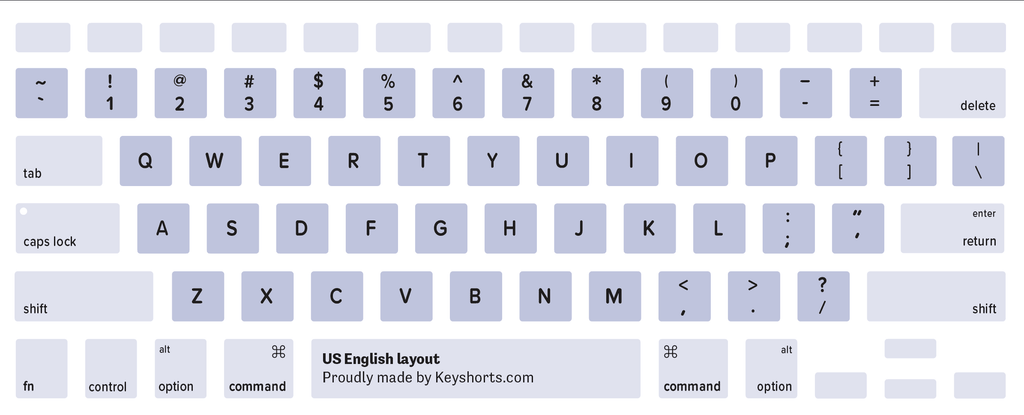
<p style="text-align: left;"><a href="https://keyshorts.com/collections/language-keyboard-stickers/hebrew" target="_blank"><img alt="Israeli Hebrew Mac keyboard layout" src="https://cdn.shopify.com/s/files/1/0810/3669/files/israeli-hebrew-mac-keyboard-layout-keyshorts_c5d6d27d-d336-4696-b8db-d875000a8b4c_1024x1024.png?v=1553695072" class="lazy"></a></p>
<p><a name="hindi"></a></p>
<h3><span>Hindi (Devanagari) Layout</span></h3>
<p><span>Used in India. </span>This layout is available through Mac OS keyboard settings. You can't buy a Mac with this layout.</p>
<p><a href="https://keyshorts.com/collections/language-keyboard-stickers/hindi" target="_blank"><img alt="Hindi Devanagari Mac keyboard layout" src="https://cdn.shopify.com/s/files/1/0810/3669/files/hindi-devanagari-mac-keyboard-layout-keyshorts_9cbbf528-384f-458c-a97b-724287840bd9_1024x1024.png?v=1553695121" class="lazy"></a></p>
<p><a name="hungarian"></a></p>
<h3><span>Hungarian Layout</span></h3>
<p><span>Used in Hungary. </span>You can buy a MacBook or Apple keyboard with this layout.</p>
<p style="text-align: left;"><a href="https://keyshorts.com/collections/language-keyboard-stickers/hungarian" target="_blank"><img alt="Hungarian Mac keyboard layout" src="https://cdn.shopify.com/s/files/1/0810/3669/files/hungarian-mac-keyboard-layout-keyshorts_3420611c-94dd-4372-b9ab-ebb6b2ec11c8_1024x1024.png?v=1553695158" class="lazy"></a></p>
<p><a name="icelandic"></a></p>
<h3><span>Icelandic Layout</span></h3>
<p><span>Used in Iceland. </span>You can buy a MacBook or Apple keyboard with this layout.</p>
<p style="text-align: left;"><a href="https://keyshorts.com/collections/language-keyboard-stickers/icelandic" target="_blank"><img alt="Icelandic Mac keyboard layout" src="https://cdn.shopify.com/s/files/1/0810/3669/files/icelandic-mac-keyboard-layout-keyshorts_238e053e-96e4-4495-81f8-fd51c51b95c8_1024x1024.png?v=1553695194" class="lazy"></a></p>
<p><a name="inuktitut"></a></p>
<h3><span>Inuktitut (Nunavut) Layout</span></h3>
<p><span>Used by peoples speaking Inuktitut, Cree, Ojibwe, and Blackfoot languages in parts of Canada. </span>This layout is available through Mac OS keyboard settings. You can't buy a Mac with this layout.</p>
<p style="text-align: left;"><a href="https://keyshorts.com/collections/language-keyboard-stickers/inuktitut" target="_blank"><img style="float: none;" src="https://cdn.shopify.com/s/files/1/0810/3669/files/inuktitut-nunavut_1024x1024.png?4662" alt="Inuktitut (Nunavut) Mac keyboard layout" class="lazy"></a></p>
<p><a name="italian"></a></p>
<h3><span>Italian Layout</span></h3>
<p><span>Used in Italy. </span>You can buy a MacBook or Apple keyboard with this layout.</p>
<p style="text-align: left;"><a href="https://keyshorts.com/collections/language-keyboard-stickers/italian" target="_blank"><img alt="Italian Mac keyboard layout" src="https://cdn.shopify.com/s/files/1/0810/3669/files/italian-mac-keyboard-layout-keyshorts_38d41a8d-1e4c-4545-b00a-31f82b5f6cb6_1024x1024.png?v=1553695235" class="lazy"></a></p>
<p><a name="japanese"></a></p>
<h3><span>Japanese Layout</span></h3>
<p><span>Used in Japan. It has distinct key shapes, with additional keys next to space, and changed placement of Caps Lock, Control, and Fn keys. </span>You can buy a MacBook or Apple keyboard with this layout.</p>
<p style="text-align: left;"><a href="https://keyshorts.com/collections/language-keyboard-stickers/japanese" target="_blank"><img alt="Japanese Mac keyboard layout" src="https://cdn.shopify.com/s/files/1/0810/3669/files/japanese-mac-keyboard-layout-keyshorts_6ac4e0ee-a9d4-4718-82c3-f8309ac4e0ae_1024x1024.png?v=1553695266" class="lazy"></a></p>
<p><a name="kannada"></a></p>
<h3><span>Kannada Layout</span></h3>
<p><span>Used mainly in the Indian state of Karnataka. </span>This layout is available through Mac OS keyboard settings. You can't buy a Mac with this layout.</p>
<p><a href="https://keyshorts.com/collections/language-keyboard-stickers/kannada" target="_blank"><img alt="Kannada Mac keyboard layout" src="https://cdn.shopify.com/s/files/1/0810/3669/files/kannada-mac-keyboard-layout-keyshorts_5b034e49-5e12-4b78-baa1-d85043caca51_1024x1024.png?v=1553695476" class="lazy"></a></p>
<p><a name="kazakh"></a></p>
<h3><span>Kazakh Layout</span></h3>
<p><span>Used in Kazakhstan. </span>This layout is available through Mac OS keyboard settings. You can't buy a Mac with this layout.</p>
<p><a href="https://keyshorts.com/collections/language-keyboard-stickers/kazakh" target="_blank"><img alt="Kazakh Mac keyboard layout" src="https://cdn.shopify.com/s/files/1/0810/3669/files/kazakh-mac-keyboard-layout-keyshorts_b9a31306-6202-4690-a8e5-589fa459692e_1024x1024.png?v=1553695518" class="lazy"></a></p>
<p><a name="khmer"></a></p>
<h3><span>Khmer Layout</span></h3>
<p><span>Used in Cambodia and Vietnam. </span>This layout is available through Mac OS keyboard settings. You can't buy a Mac with this layout.</p>
<p><a href="https://keyshorts.com/collections/language-keyboard-stickers/khmer" target="_blank"><img alt="Khmer Mac keyboard layout" src="https://cdn.shopify.com/s/files/1/0810/3669/files/khmer-mac-keyboard-layout-keyshorts_e5539eb8-d39c-46d2-b526-697fdccf4c29_1024x1024.png?v=1553695577" class="lazy"></a></p>
<p><a name="korean"></a></p>
<h3><span>Korean (2-Set) Layout</span></h3>
<p><span>Used in South Korea. </span>You can buy a MacBook or Apple keyboard with this layout.</p>
<p style="text-align: left;"><a href="https://keyshorts.com/collections/language-keyboard-stickers/korean" target="_blank"><img alt="Korean Mac keyboard layout" src="https://cdn.shopify.com/s/files/1/0810/3669/files/korean-mac-keyboard-layout-keyshorts_eb359d67-86fc-4420-aa07-a3ea03445601_1024x1024.png?v=1553695617" class="lazy"></a></p>
<p><a name="kurdish-sorani"></a></p>
<h3><span>Kurdish (Sorani) Layout</span></h3>
<p><span>Used in parts of Iraq and Iran. </span>This layout is available through Mac OS keyboard settings. You can't buy a Mac with this layout.</p>
<p style="text-align: left;"><a href="https://keyshorts.com/collections/language-keyboard-stickers/kurdish" target="_blank"><img style="float: none;" src="https://cdn.shopify.com/s/files/1/0810/3669/files/kurdish-sorani_1024x1024.png?4662" alt="Kurdish (Sorani) Mac keyboard layout" class="lazy"></a></p>
<p><a name="latvian"></a></p>
<h3><span>Latvian Layout</span></h3>
<p><span>Used in Latvia. </span>This layout is available through Mac OS keyboard settings. You can't buy a Mac with this layout.</p>
<p style="text-align: left;"><a href="https://keyshorts.com/collections/language-keyboard-stickers/latvian" target="_blank"><img style="float: none;" src="https://cdn.shopify.com/s/files/1/0810/3669/files/latvian_1024x1024.png?4662" alt="Latvian Mac keyboard layout" class="lazy"></a></p>
<p><a name="lithuanian"></a></p>
<h3><span>Lithuanian Layout</span></h3>
<p><span>Used in Lithuania. </span>This layout is available through Mac OS keyboard settings. You can't buy a Mac with this layout.</p>
<p><a href="https://keyshorts.com/collections/language-keyboard-stickers/lithuanian" target="_blank"><img alt="Lithuanian Mac keyboard layout" src="https://cdn.shopify.com/s/files/1/0810/3669/files/lithuanian-mac-keyboard-layout-keyshorts_43e531fa-6909-4dfa-8834-2d1969a7224b_1024x1024.png?v=1553695668" class="lazy"></a></p>
<p><a name="macedonian"></a></p>
<h3><span>Macedonian Layout</span></h3>
<p><span>Used in Macedonia. </span>This layout is available through Mac OS keyboard settings. You can't buy a Mac with this layout.</p>
<p><a href="https://keyshorts.com/collections/language-keyboard-stickers/macedonian" target="_blank"><img alt="Macedonian Mac keyboard layout" src="https://cdn.shopify.com/s/files/1/0810/3669/files/macedonian-mac-keyboard-layout-keyshorts_75a81966-d60a-4976-b391-3a3499255ce2_1024x1024.png?v=1553695710" class="lazy"></a></p>
<p><a name="malay-jawi"></a></p>
<h3><span>Malay (Jawi) Layout</span></h3>
<p><span>Used in Malaysia. </span>This layout is available through Mac OS keyboard settings. You can't buy a Mac with this layout.</p>
<p><a href="https://keyshorts.com/collections/language-keyboard-stickers/malay" target="_blank"><img alt="Malay Jawi Mac keyboard layout" src="https://cdn.shopify.com/s/files/1/0810/3669/files/malay-jawi-mac-keyboard-layout-keyshorts_e718a5cb-7573-4051-b86d-af98c1914725_1024x1024.png?v=1553695773" class="lazy"></a></p>
<p><a name="malayalam"></a></p>
<h3><span>Malayalam Layout</span></h3>
<p><span>Used mainly in the Indian state of Kerala. </span>This layout is available through Mac OS keyboard settings. You can't buy a Mac with this layout.</p>
<p><a href="https://keyshorts.com/collections/language-keyboard-stickers/malayalam" target="_blank"><img alt="Malayalam Mac keyboard layout" src="https://cdn.shopify.com/s/files/1/0810/3669/files/malayalam-mac-keyboard-layout-keyshorts_e872468c-143d-415a-97ea-52a9a941de7d_1024x1024.png?v=1553695837" class="lazy"></a></p>
<p><a name="maltese"></a></p>
<h3><span>Maltese Layout</span></h3>
<p><span>Used in Malta as an alternative to widely used UK English or Italian layouts. This layout features symbols specific to the Maltese language. </span>This layout is available through Mac OS keyboard settings. You can't buy a Mac with this layout.</p>
<p><a href="https://keyshorts.com/collections/language-keyboard-stickers/maltese" target="_blank"><img alt="Maltese Mac keyboard layout" src="https://cdn.shopify.com/s/files/1/0810/3669/files/maltese-mac-keyboard-layout-keyshorts_3ce7a9bf-36f4-4c5c-9d69-e505e76f5826_1024x1024.png?v=1553696002" class="lazy"></a></p>
<p><a name="nepali"></a></p>
<h3><span>Nepali Layout</span></h3>
<p><span>Used in Nepal and northern India. </span>This layout is available through Mac OS keyboard settings. You can't buy a Mac with this layout.</p>
<p style="text-align: left;"><a href="https://keyshorts.com/collections/language-keyboard-stickers/nepali" target="_blank"><img style="float: none;" src="https://cdn.shopify.com/s/files/1/0810/3669/files/nepali_1024x1024.png?4662" alt="Nepali Mac keyboard layout" class="lazy"></a></p>
<p><a name="northern-sami"></a></p>
<h3><span>Northern Sami Layout</span></h3>
<p><span>Used in northern parts of Norway, Sweden, and Finland. </span>This layout is available through Mac OS keyboard settings. You can't buy a Mac with this layout.</p>
<p><a href="https://keyshorts.com/collections/language-keyboard-stickers/sami" target="_blank"><img alt="Northern Sami Mac keyboard layout" src="https://cdn.shopify.com/s/files/1/0810/3669/files/northern-sami-mac-keyboard-layout-keyshorts_b6f72c31-0406-480f-9151-5188e3c8a9e3_1024x1024.png?v=1553696096" class="lazy"></a></p>
<p><a name="norwegian"></a></p>
<h3><span>Norwegian Layout</span></h3>
<p><span>Used in Norway and Svalbard. </span>You can buy a MacBook or Apple keyboard with this layout.</p>
<p style="text-align: left;"><a href="https://keyshorts.com/collections/language-keyboard-stickers/norwegian" target="_blank"><img alt="Norwegian Mac keyboard layout" src="https://cdn.shopify.com/s/files/1/0810/3669/files/norwegian-mac-keyboard-layout-keyshorts_1b093dc3-4095-4462-8fff-89a61c8a3736_1024x1024.png?v=1553696037" class="lazy"></a></p>
<p><a name="odia-oriya"></a></p>
<h3><span>Oriya (Odia) Layout</span></h3>
<p><span>Used mainly in the Indian state of Odisha. </span>This layout is available through Mac OS keyboard settings. You can't buy a Mac with this layout.</p>
<p><a href="https://keyshorts.com/collections/language-keyboard-stickers/oriya" target="_blank"><img alt="Oriya Mac keyboard layout" src="https://cdn.shopify.com/s/files/1/0810/3669/files/oriya-mac-keyboard-layout-keyshorts_b21dfeef-ddba-4a7f-9404-06b9b1bc7ff4_1024x1024.png?v=1553696172" class="lazy"></a></p>
<p><a name="pashto"></a></p>
<h3><span>Pashto Layout</span></h3>
<p><span>Used in Afghanistan and Pakistan. </span>This layout is available through Mac OS keyboard settings. You can't buy a Mac with this layout.</p>
<p style="text-align: left;"><a href="https://keyshorts.com/collections/language-keyboard-stickers/pashto" target="_blank"><img style="float: none;" src="https://cdn.shopify.com/s/files/1/0810/3669/files/pashto_1024x1024.png?4662" alt="Pashto Mac keyboard layout" class="lazy"></a></p>
<p><a name="persian-farsi"></a></p>
<h3><span>Persian (Farsi) Layout</span></h3>
<p><span>Used in Iran. </span>This layout is available through Mac OS keyboard settings. You can't buy a Mac with this layout.</p>
<p><a href="https://keyshorts.com/collections/language-keyboard-stickers/persian" target="_blank"><img alt="Persian Farsi Mac keyboard layout" src="https://cdn.shopify.com/s/files/1/0810/3669/files/persian-mac-keyboard-layout-keyshorts_15953636-38cc-45ab-b0e7-d4bcc6ddbfe3_1024x1024.png?v=1553696216" class="lazy"></a></p>
<p><a name="polish"></a></p>
<h3><span>Polish Layout</span></h3>
<p><span>Used in Poland, although the newer Polish Pro layout is much more popular. </span>This layout is available through Mac OS keyboard settings. You can't buy a Mac with this layout.</p>
<p style="text-align: left;"><a href="https://keyshorts.com/collections/language-keyboard-stickers/polish" target="_blank"><img style="float: none;" src="https://cdn.shopify.com/s/files/1/0810/3669/files/polish_b2fa1b4b-981d-4f17-b528-b62b98026fcd_1024x1024.png?4662" alt="Polish Mac keyboard layout" class="lazy"></a></p>
<p><a name="polish-pro"></a></p>
<h3><span>Polish Pro Layout</span></h3>
<p><span>A modern version of Polish layout that is used in Poland almost exclusively. </span>This layout is available through Mac OS keyboard settings. You can't buy a Mac with this layout (Apple sells Macs with US International layout in Poland).</p>
<p style="text-align: left;"><a href="https://keyshorts.com/collections/language-keyboard-stickers/polish" target="_blank"><img style="float: none;" src="https://cdn.shopify.com/s/files/1/0810/3669/files/polish-pro_1024x1024.png?4662" alt="Polish Pro Mac keyboard layout" class="lazy"></a></p>
<p><a name="portuguese"></a></p>
<h3><span>Portuguese Layout</span></h3>
<p>Used in Portugal and Brazil. You can buy a MacBook or Apple keyboard with this layout.</p>
<p style="text-align: left;"><a href="https://keyshorts.com/collections/language-keyboard-stickers/portuguese" target="_blank"><img alt="Portuguese Mac keyboard layout" src="https://cdn.shopify.com/s/files/1/0810/3669/files/portuguese-mac-keyboard-layout-keyshorts_36c4f18d-6bcd-4a1b-95ee-227a362182b5_1024x1024.png?v=1553696258" class="lazy"></a></p>
<p><a name="portuguese-brazilian"></a></p>
<h3><span>Portuguese (Brazilian ABNT2) Layout</span></h3>
<p><span>Used in Brazil. </span>This layout is available through Mac OS keyboard settings. You can't buy a Mac with this layout.</p>
<p><a href="https://keyshorts.com/collections/language-keyboard-stickers/portuguese" target="_blank"><img alt="Portuguese Brazilian ABNT2 Mac keyboard layout" src="https://cdn.shopify.com/s/files/1/0810/3669/files/portuguese-brazilian-mac-keyboard-layout-keyshorts_326f9a15-213f-44a6-8511-2f1acf75d0bf_1024x1024.png?v=1553696313" class="lazy"></a></p>
<p><a name="punjabi-gurmukhi"></a></p>
<h3><span>Punjabi (Gurmukhi) Layout</span></h3>
<p><span>Used mainly in the Indian state of Punjab and Pakistan. </span>This layout is available through Mac OS keyboard settings. You can't buy a Mac with this layout.</p>
<p style="text-align: left;"><a href="https://keyshorts.com/collections/language-keyboard-stickers/punjabi" target="_blank"><img style="float: none;" src="https://cdn.shopify.com/s/files/1/0810/3669/files/punjabi-gurmukhi-mac-keyboard-layout-keyshorts_1024x1024.png?4666" alt="Punjabi (Gurmukhi) Mac keyboard layout" class="lazy"></a></p>
<p><a name="romanian"></a></p>
<h3><span>Romanian Layout</span></h3>
<p><span>Used in Romania, although <strong>Romanian - Standard</strong>, <strong>US English</strong>, and <strong>English International</strong> layouts are more popular.</span></p>
<p style="text-align: left;"><a href="https://keyshorts.com/collections/language-keyboard-stickers/romanian" target="_blank"><img alt="Romanian Mac keyboard layout" src="https://cdn.shopify.com/s/files/1/0810/3669/files/romanian-mac-keyboard-layout-keyshorts.png?4666" class="lazy"></a></p>
<p><a name="russian"></a></p>
<h3><span>Russian Layout</span></h3>
<p><span>Used in Russia, Kazakhstan, Uzbekistan, Kyrgyzstan, Tajikistan, Turkmenistan, Ukraine, and Belarus. </span>You can buy a MacBook or Apple keyboard with this layout.</p>
<p style="text-align: left;"><a href="https://keyshorts.com/collections/language-keyboard-stickers/russian" target="_blank"><img alt="Russian Mac keyboard layout" src="https://cdn.shopify.com/s/files/1/0810/3669/files/russian-mac-keyboard-layout-keyshorts.png?4666" class="lazy"></a></p>
<p><a name="russian-phonetic"></a></p>
<h3><span>Russian Phonetic Layout</span></h3>
<p><span>Used mainly by foreigners who learn Russian. </span>This layout is available through Mac OS keyboard settings. You can't buy a Mac with this layout.</p>
<p><a href="https://keyshorts.com/collections/language-keyboard-stickers/russian" target="_blank"><img alt="Russian phonetic Mac keyboard layout" src="https://cdn.shopify.com/s/files/1/0810/3669/files/russian-phonetic-mac-keyboard-layout-keyshorts.png?4666" class="lazy"></a></p>
<p><a name="serbian"></a></p>
<h3><span>Serbian Layout</span></h3>
<p><span>Used in Serbia. </span>This layout is available through Mac OS keyboard settings. You can't buy a Mac with this layout.</p>
<p><a href="https://keyshorts.com/collections/language-keyboard-stickers/serbian" target="_blank"><img alt="Serbian Mac keyboard layout" src="https://cdn.shopify.com/s/files/1/0810/3669/files/serbian-mac-keyboard-layout-keyshorts.png?4666" class="lazy"></a></p>
<p><a name="serbian-latin"></a></p>
<h3><span>Serbian (Latin QWERTY) Layout</span></h3>
<p><span>Used in Serbia. Identical to the Croatian, Bosnian, and Slovene layouts. </span>You can buy a MacBook or Apple keyboard with this layout.</p>
<p style="text-align: left;"><a href="https://keyshorts.com/collections/language-keyboard-stickers/serbian" target="_blank"><img style="float: none;" src="https://cdn.shopify.com/s/files/1/0810/3669/files/serbian-latin-mac-keyboard-layout-keyshorts_1024x1024.png?3866" alt="Serbian Latin Mac keyboard layout" class="lazy"></a></p>
<p> </p>
<p><a name="sinhala"></a></p>
<h3><span>Sinhala (QWERTY) Layout</span></h3>
<p><span>Used in Sri Lanka. </span>This layout is available through Mac OS keyboard settings. You can't buy a Mac with this layout.</p>
<p><a href="https://keyshorts.com/collections/language-keyboard-stickers/sinhala" target="_blank"><img alt="Sinhala QWERTY Mac keyboard layout" src="https://cdn.shopify.com/s/files/1/0810/3669/files/sinhala-mac-keyboard-layout-keyshorts_352d43e5-9775-4fa9-9f7c-221c5c843089_1024x1024.png" class="lazy"></a></p>
<p><a name="slovak"></a></p>
<h3><span>Slovak Layout</span></h3>
<p><span>Used in Slovakia. </span>You can buy a MacBook or Apple keyboard with this layout.</p>
<p style="text-align: left;"><a href="https://keyshorts.com/collections/language-keyboard-stickers/slovak" target="_blank"><img style="float: none;" src="https://cdn.shopify.com/s/files/1/0810/3669/files/slovak-mac-keyboard-layout-keyshorts_1024x1024.png?4666" alt="Slovak Mac keyboard layout" class="lazy"></a></p>
<p style="text-align: left;"> </p>
<p><a name="slovene-slovenian"></a></p>
<h3><span>Slovene/Slovenian Layout</span></h3>
<p><span>Used in Slovenia. Identical to the Bosnian, Croatian and Serbian Latin layouts. </span>You can buy a MacBook or Apple keyboard with this layout.</p>
<p style="text-align: left;"><a href="https://keyshorts.com/collections/language-keyboard-stickers/slovenian" target="_blank"><img style="float: none;" src="https://cdn.shopify.com/s/files/1/0810/3669/files/slovene-mac-keyboard-layout-keyshorts_1024x1024.png?3866" alt="Slovene/Slovenian Mac keyboard layout" class="lazy"></a></p>
<p> </p>
<p><a name="spanish"></a></p>
<h3><span>Spanish ISO (Spain) Layout</span></h3>
<p><span>Used in Spain and Latin American countries: Mexico, Peru, Venezuela, Colombia, Chile, Argentina, Cuba, Belize, Guatemala, Salvador, Honduras, Panama, Costa Rica, Nicaragua, Surinam, Ecuador, Bolivia, and Paraguay. </span>You can buy a MacBook or Apple keyboard with this layout.</p>
<p style="text-align: left;"><a href="https://keyshorts.com/collections/language-keyboard-stickers/spanish" target="_blank"><img alt="Spanish Mac keyboard layout" src="https://cdn.shopify.com/s/files/1/0810/3669/files/spanish-mac-keyboard-layout-keyshorts.png?4666" class="lazy"></a></p>
<p><a name="spanish-latin-america"></a></p>
<h3><span>Spanish (Latin America) Layout</span></h3>
<p> </p>
<p><span>Used in the US, Mexico, Peru, Venezuela, Colombia, Chile, Argentina, Cuba, Belize, Guatemala, Salvador, Honduras, Panama, Costa Rica, Nicaragua, Surinam, Ecuador, Bolivia, and Paraguay. </span>This layout is available through Mac OS keyboard settings. You can't buy a Mac with this layout.</p>
<p><a href="https://keyshorts.com/collections/language-keyboard-stickers/spanish" target="_blank"><img alt="Spanish Latin America Mac keyboard layout" src="https://cdn.shopify.com/s/files/1/0810/3669/files/spanish-latam-mac-keyboard-layout-keyshorts.png?4666" class="lazy"></a></p>
<p><a name="swedish"></a></p>
<h3><span>Swedish Layout</span></h3>
<p><span>Used in Sweden and Finland. </span>You can buy a MacBook or Apple keyboard with this layout.</p>
<p style="text-align: left;"><a href="https://keyshorts.com/collections/language-keyboard-stickers/swedish" target="_blank"><img alt="Swedish Mac keyboard layout" src="https://cdn.shopify.com/s/files/1/0810/3669/files/swedish-mac-keyboard-layout-keyshorts.png?4666" class="lazy"></a></p>
<p><a name="swiss"></a></p>
<h3><span>Swiss Layout</span></h3>
<p><span>Used in Switzerland. Matches both Swiss German and Swiss French layouts. </span>You can buy a MacBook or Apple keyboard with this layout.</p>
<p style="text-align: left;"><a href="https://keyshorts.com/collections/language-keyboard-stickers/swiss" target="_blank"><img alt="Swiss Mac keyboard layout" src="https://cdn.shopify.com/s/files/1/0810/3669/files/swiss-mac-keyboard-layout-keyshorts_1024x1024.png" class="lazy"></a></p>
<p><a name="tamil"></a></p>
<h3><span>Tamil Layout</span></h3>
<p><span>Used mainly in the Indian state of Tamil Nadu and Sri Lanka. </span>This layout is available through Mac OS keyboard settings. You can't buy a Mac with this layout.</p>
<p><a href="https://keyshorts.com/collections/language-keyboard-stickers/tamil" target="_blank"><img alt="Tamil Mac keyboard layout" src="https://cdn.shopify.com/s/files/1/0810/3669/files/tamil-mac-keyboard-layout-keyshorts.png?4666" class="lazy"></a></p>
<p><a name="telugu"></a></p>
<h3><span>Telugu Layout</span></h3>
<p><span>Used mainly in the Indian state of Andhra Pradesh. </span>This layout is available through Mac OS keyboard settings. You can't buy a Mac with this layout.</p>
<p><a href="https://keyshorts.com/collections/language-keyboard-stickers/telugu" target="_blank"><img alt="Telugu Mac keyboard layout" src="https://cdn.shopify.com/s/files/1/0810/3669/files/telugu-mac-keyboard-layout-keyshorts.png?4666" class="lazy"></a></p>
<p><a name="thai"></a></p>
<h3><span>Thai Layout</span></h3>
<p><span>Used in Thailand. </span>You can buy a MacBook or Apple keyboard with this layout.</p>
<p style="text-align: left;"><a href="https://keyshorts.com/collections/language-keyboard-stickers/thai" target="_blank"><img style="float: none;" src="https://cdn.shopify.com/s/files/1/0810/3669/files/thai-mac-keyboard-layout-keyshorts_1024x1024.png?3866" alt="Thai Mac keyboard layout" class="lazy"></a></p>
<p style="text-align: left;"> </p>
<p><a name="tibetan"></a></p>
<h3><span>Tibetan (QWERTY) Layout</span></h3>
<p><span>Used by Tibetan people all around the world. </span>This layout is available through Mac OS keyboard settings. You can't buy a Mac with this layout.</p>
<p><a href="https://keyshorts.com/collections/language-keyboard-stickers/tibetan" target="_blank"><img alt="Tibetan QWERTY Mac keyboard layout" src="https://cdn.shopify.com/s/files/1/0810/3669/files/tibetan-mac-keyboard-layout-keyshorts_daf3035e-fb75-4f97-b5ed-e74651d8f1c9_1024x1024.png?v=1553697609" class="lazy"></a></p>
<p><a name="turkish-f"></a></p>
<h3><span>Turkish F Layout</span></h3>
<p><span>Used in Turkey by enthusiasts and fast-typists. </span>This layout is available through Mac OS keyboard settings. You can't buy a Mac with this layout.</p>
<p><a href="https://keyshorts.com/collections/language-keyboard-stickers/turkish" target="_blank"><img alt="Turkish F Mac keyboard layout" src="https://cdn.shopify.com/s/files/1/0810/3669/files/turkish-f-mac-keyboard-layout-keyshorts_1024x1024.png" class="lazy"></a></p>
<p><a name="turkish-q"></a></p>
<h3><span>Turkish Q Layout</span></h3>
<p><span>This is a modern, widely used version of Turkish layout which utilizes QWERTY key placement (Turkish-Q). </span>You can buy a MacBook or Apple keyboard with this layout.</p>
<p style="text-align: left;"><a href="https://keyshorts.com/collections/language-keyboard-stickers/turkish" target="_blank"><img alt="Turkish Q Mac keyboard layout" src="https://cdn.shopify.com/s/files/1/0810/3669/files/turkish-q-mac-keyboard-layout-keyshorts.png?4666" class="lazy"></a></p>
<p><a name="switching"></a> <meta charset="utf-8"><a name="ukrainian"></a></p>
<h3><span>Ukrainian Layout</span></h3>
<p><span>Used in Ukraine. </span>This layout is available through Mac OS keyboard settings. You can't buy a Mac with this layout.</p>
<p style="text-align: left;"><a href="https://keyshorts.com/collections/language-keyboard-stickers/ukrainian" target="_blank"><img style="float: none;" src="https://cdn.shopify.com/s/files/1/0810/3669/files/ukrainian-mac-keyboard-layout-keyshorts_1024x1024.png?3866" alt="Ukrainian Mac keyboard layout" class="lazy"></a></p>
<p style="text-align: left;"> </p>
<p><meta charset="utf-8"><a name="urdu"></a></p>
<h3><span>Urdu Layout</span></h3>
<p><span>Used in Pakistan and India. </span>This layout is available through Mac OS keyboard settings. You can't buy a Mac with this layout.</p>
<p><a href="https://keyshorts.com/collections/language-keyboard-stickers/urdu" target="_blank"><img alt="Urdu Mac keyboard layout" src="https://cdn.shopify.com/s/files/1/0810/3669/files/urdu-mac-keyboard-layout-keyshorts.png?4666" class="lazy"></a></p>
<p><meta charset="utf-8"><a name="uyghur"></a></p>
<h3><span>Uyghur Layout</span></h3>
<p><span>Used in western China, Kazakhstan, and Uzbekistan. </span>This layout is available through Mac OS keyboard settings. You can't buy a Mac with this layout.</p>
<p style="text-align: left;"><a href="https://keyshorts.com/collections/language-keyboard-stickers/uyghur" target="_blank"><img style="float: none;" src="https://cdn.shopify.com/s/files/1/0810/3669/files/uyghur.png?4666" alt="Uyghur Mac keyboard layout" class="lazy"></a></p>
<p><a name="uzbek"></a></p>
<h3><span>Uzbek Layout</span></h3>
<p><span>Used in Afghanistan and western parts of China. </span>This layout is available through Mac OS keyboard settings. You can't buy a Mac with this layout.</p>
<p style="text-align: left;"><a href="https://keyshorts.com/collections/language-keyboard-stickers/uzbek" target="_blank"><img style="float: none;" src="https://cdn.shopify.com/s/files/1/0810/3669/files/uzbek.png?4666" alt="Uzbek Mac keyboard layout" class="lazy"></a></p>
<p><a name="vietnamese"></a></p>
<h3><span>Vietnamese Layout</span></h3>
<p><span>Used in Vietnam. </span>This layout is available through Mac OS keyboard settings. You can't buy a Mac with this layout.</p>
<p><a href="https://keyshorts.com/collections/language-keyboard-stickers/vietnamese" target="_blank"><img alt="Vietnamese Mac keyboard layout" src="https://cdn.shopify.com/s/files/1/0810/3669/files/vietnamese-mac-keyboard-layout-keyshorts.png?4666" class="lazy"></a></p>
<h2 style="text-align: left;">
<strong></strong><strong>How to physically switch layouts or to have a multilingual keyboard</strong>
</h2>
<p style="text-align: left;">During the years we run Keyshorts we learned how many people need to change their keyboard layout or to have multiple layouts on the same keyboard. Unfortunately, purchasing and replacing the keyboard is expensive and hard, and - in the case of quite a few layouts - impossible.</p>
<p style="text-align: left;"><a class="regular-link" href="https://keyshorts.com/">Keyboard stickers</a> are a great solution for this. They are relatively cheap and easy to apply and come with many different layouts. You can even customize their caption and background colors.</p>
<p style="text-align: left;">If you simply want to switch your keyboard to another layout, we can suggest choosing our <a class="regular-link" title="Simple Black MacBook keyboard stickers" href="https://keyshorts.com/products/simple-black-decal-keyboard-sticker-replacement" target="_blank">Simple Black stickers</a> or <a title="Language keyboard stickers" class="regular-link" href="https://keyshorts.com/collections/language-keyboard-stickers" target="_blank">language stickers</a>.</p>
<p style="text-align: left;">If you want to have two languages on one keyboard, try our <a class="regular-link" title="Bilingual keyboard stickers" href="https://keyshorts.com/collections/bilingual" target="_blank">bilingual stickers</a>. If you need even more, our <a class="regular-link" title="Three languages keyboard stickers" href="https://keyshorts.com/products/three-languages-multilingual-keyboard-stickers" target="_blank">trilingual stickers</a> and <a class="regular-link" href="https://keyshorts.com/products/four-languages-keyboard-stickers-custom-multilingual" target="_blank">quadrilingual stickers</a> will be the perfect solution.</p>
<h3 style="text-align: left;">Conclusion</h3>
<p style="text-align: left;">If this article was helpful or you simply like what we do, please use buttons below to share this guide with the world 😀</p>
<p style="text-align: left;">Thanks!</p>]]>
    </content>
  </entry>
</feed>