<?xml version="1.0" encoding="UTF-8"?>
<feed xml:lang="en" xmlns="http://www.w3.org/2005/Atom" xmlns:opensearch="http://a9.com/-/spec/opensearch/1.1/" xmlns:s="http://jadedpixel.com/-/spec/shopify">
  <id>https://www.leafletfrog.co.uk/blogs/news.atom</id>
  <link rel="alternate" type="text/html" href="https://www.leafletfrog.co.uk/blogs/news"/>
  <link rel="self" type="application/atom+xml" href="https://www.leafletfrog.co.uk/blogs/news.atom"/>
  <title>leafletfrog - The Frog Blog</title>
  <updated>2016-02-26T12:59:00+00:00</updated>
  <author>
    <name>leafletfrog</name>
  </author>
  <entry>
    <id>https://www.leafletfrog.co.uk/blogs/news/89851649-roddy-explains-folding</id>
    <published>2016-02-26T12:59:00+00:00</published>
    <updated>2016-02-26T13:25:44+00:00</updated>
    <link rel="alternate" type="text/html" href="https://www.leafletfrog.co.uk/blogs/news/89851649-roddy-explains-folding"/>
    <title>Roddy Explains Folding....</title>
    <author>
      <name>Martin Cropper</name>
    </author>
    <content type="html">
      <![CDATA[<p style="text-align: left;"><img alt="" src="//cdn.shopify.com/s/files/1/0084/3512/files/Untitled-24.jpg?16935763534404056644" style="float: none; margin: 5px 5px 5px 0px;" height="120" width="120"><img alt="" src="//cdn.shopify.com/s/files/1/0084/3512/files/Untitled-2.jpg?16935763534404056644" style="float: none; margin: 5px;" height="120" width="120"><img alt="" src="//cdn.shopify.com/s/files/1/0084/3512/files/Untitled-23.jpg?16935763534404056644" style="float: none; margin: 5px;" height="120" width="120"><img alt="" src="//cdn.shopify.com/s/files/1/0084/3512/files/Untitled-22.jpg?16935763534404056644" style="float: none; margin: 5px 0px 5px 5px;" height="120" width="120"></p>
<p>Do you remember making paper fortune tellers in primary school, to find out who you fancied or who fancied you? <br><br>Chances are you have wrestled with trying to fold an ordnance survey map, only to realise with increasing frustration that with every failed attempt, you have moved a little further away from the neatly folded map that you bought in the shop.<br><br>Without paper folding, we would have enormous, unwieldy maps and newspapers, restaurant menus as big as the table in front of us, and the postal service would be very different indeed if letters and cards could not be folded. Just how would we cope if hotel toilet rolls were not folded into points at the start the roll?<br><br>But without paper folding, there would be no origami. So no paper fortune tellers in primary school to get the inside track on who you will marry, but – possibly more importantly – no thousand year old tradition of creating beautiful art from paper. <br><br>And talking of folding maps, next time you’re wrestling with a troublesome map during a walk, why not airily inform any friends or family members who think they could do it better that you’re just a bit busy with ‘combinatorial mathematics’, thank you very much. And that far from struggling, you are folding the map into a Turkish fold, one of the many map folding techniques in the digital age.<br><br>But for now, if you have a piece of A4 paper and 10 minutes to spare, <a href="https://www.youtube.com/watch?v=pqeI94Jri1M">make an origami crane</a>, considered to be the most classic of all Japanese origami designs?</p>
<p><img src="//cdn.shopify.com/s/files/1/0084/3512/files/happyfolding_214140d5-545c-4484-9452-eb2e6f3ff99a.jpg?3799297928224701915" alt=""></p>]]>
    </content>
  </entry>
  <entry>
    <id>https://www.leafletfrog.co.uk/blogs/news/85020481-what-makes-a-successful-brochure</id>
    <published>2016-01-26T13:19:00+00:00</published>
    <updated>2016-01-26T13:20:15+00:00</updated>
    <link rel="alternate" type="text/html" href="https://www.leafletfrog.co.uk/blogs/news/85020481-what-makes-a-successful-brochure"/>
    <title>What Makes a Successful Brochure</title>
    <author>
      <name>Martin Cropper</name>
    </author>
    <content type="html">
      <![CDATA[<p>Continuing this series of helpful blogs, we tell you the secrets of successful brochures. </p>
<p>Top tips for successful brochures</p>
<ol>
<li><strong>Stand out for the right reasons</strong></li>
</ol>
<p>Have your brochure professionally printed. Of course we’re going to say that, you might say, but think about it. You want your brochure to tell people about your business or service. What qualities do you want people to think of when they think of your business – professional, hard-working, competent, expert, quality, accurate, good value for money? Or flimsy, sloppy, cost-cutting and corner-cutting, done on the cheap? A professionally printed brochure doesn’t need to be expensive, but it will make you look professional – with accurate colours, bright inks, high-quality paper and a professional finish.</p>
<ol start="2">
<li>
<strong> </strong><strong>Think about your audience</strong>
</li>
</ol>
<p>Don’t think about <strong>what you want</strong> to tell people, think about <strong>what they need</strong> to know. People won’t be interested in your company’s background or what your offices look like. They need to know what your company can do for them and what benefits they can get if they choose you (for example, quality, expertise, professionalism, customer service). So use your brochure to create desire – to tell people about your products and services, what you can do for them and why they should choose you.</p>
<p style="text-align: center;"><img src="//cdn.shopify.com/s/files/1/0084/3512/files/P1v2.jpg?7299053451006961958" alt=""></p>
<ol start="3">
<li>
<strong> </strong><strong>Think about your content</strong>
</li>
</ol>
<p>People are busy, so make your brochure easy for people to find the information they need. Don’t be tempted to cram as much information, images and graphics as you can onto each page. You may end up with a brochure that could win a design award (which is fine if your business is about winning design awards), but if people can’t easily find the information they need on the page, they will give up.</p>
<p><img style="display: block; margin-left: auto; margin-right: auto;" src="//cdn.shopify.com/s/files/1/0084/3512/files/Pic2v2.jpg?13888851279137332856" alt="" height="150" width="228"></p>
<ol start="4">
<li>
<strong> </strong><strong>Don’t stand out for the wrong reasons </strong>
</li>
</ol>
<p>Mistakes can make you look incompetent and sloppy and reflect badly on your business. Proofread your content carefully – not just for typos, but to check that the wording makes sense, is easy to read, and is accurate. Check names, address details, phone numbers and page numbers. Check that the wording makes sense and is easy to understand. Check your spelling and grammar, and don’t rely on your computer’s spell check function. It’s a really good idea to get someone outside your business to read it through to check that it’s clear, easy to read and free from mistakes – before you get it printed.</p>
<p><img style="display: block; margin-left: auto; margin-right: auto;" src="//cdn.shopify.com/s/files/1/0084/3512/files/Pic3v2.jpg?5693846925323021809" alt="" height="150" width="228"></p>
<ol start="5">
<li>
<strong> </strong><strong>Think about circulation</strong>
</li>
</ol>
<p>Your brochures need to work for you, and they can’t do this if they’re in a box on your desk, so circulate your brochures as widely as you can. Give them to existing customers, send them out with letters and quotations, use them to publicise a special offer, give them to people visiting your business, run a direct mail campaign, leave them where potential customers can pick them up, take them to exhibitions, get them put into seminar packs, use them at networking meetings and talk with your local Chamber of Commerce.</p>
<p>Think about your existing customers and, perhaps more importantly, potential customers. Think about where they are likely to see and use your brochure. Use your brochures to remind existing customers about your business, and to drive potential customers to your business.</p>
<p><strong>Make your brochures work for you!</strong></p>
<p> </p>]]>
    </content>
  </entry>
  <entry>
    <id>https://www.leafletfrog.co.uk/blogs/news/84866113-key-elements-of-good-brochure-design</id>
    <published>2016-01-25T11:13:00+00:00</published>
    <updated>2016-01-25T11:13:39+00:00</updated>
    <link rel="alternate" type="text/html" href="https://www.leafletfrog.co.uk/blogs/news/84866113-key-elements-of-good-brochure-design"/>
    <title>Key Elements of Good Brochure Design</title>
    <author>
      <name>Martin Cropper</name>
    </author>
    <content type="html">
      <![CDATA[<p><strong>Key Elements of Good Brochure Design</strong></p>
<p>Continuing our series of brochure blogs, we explain some key elements to bear in mind when it comes to writing and designing your brochure.</p>
<p>For more information on our A5 and A4 brochures, click <span><a href="http://www.leafletfrog.co.uk/">here</a></span>.</p>
<p><strong>Think about your reader and what they need to know, not what you want to tell them.</strong></p>
<p><strong>Think about what you want your brochure to look like.</strong> Gather some samples of brochures and decide what you like about them and what works well. Think about your layout. It might help to get some sheets of paper, fold them to make a mock up, and draw out what you want to go on each page.</p>
<p><img style="display: block; margin-left: auto; margin-right: auto;" src="//cdn.shopify.com/s/files/1/0084/3512/files/ThinkstockPhotos-56970456.jpg?2159617388417263310" alt="" height="176" width="252"></p>
<p><strong>Use the layout of each page to help people find what they need.</strong> Use headings and subheadings to separate text into easy-to-read blocks. Use short paragraphs, bullet lists and questions and answers to help people read your text easily. Get people’s attention by using pictures. Use clear fonts that are big enough to read, and don’t put pale text on a dark background. Have a good balance of pictures and text, with plenty of white space.</p>
<p><img style="display: block; margin-left: auto; margin-right: auto;" src="//cdn.shopify.com/s/files/1/0084/3512/files/bloke3.jpg?3082689082007330245" alt="" height="346" width="252"></p>
<p><strong>Don’t use long, complicated words, management jargon or technical terminology.</strong> Keep your sentences clear and short. Keep your paragraphs short. A 2012 study by Christopher Trudeau about language in legal documents showed two surprising facts. Firstly, 80% of people preferred sentences written in clear English. Secondly, the greater the person’s educational level, the greater their preference for clear English. People are busy and don’t have time to wade through lots of dry, complicated text. Even if people can understand complex and wordy writing, it doesn’t mean that they want to read it.</p>
<p><strong>Avoid the passive voice.</strong> The active voice is more direct and easier to understand than the passive, for example, ‘Place your artwork here’ is much easier to read than ‘Your artwork should be placed here’.</p>
<p><img style="display: block; margin-left: auto; margin-right: auto;" src="//cdn.shopify.com/s/files/1/0084/3512/files/person-editing.jpg?5947550249768290920" alt="" height="168" width="252"></p>
<p><strong>Check and check again!</strong> Check your spelling and grammar, and don’t rely on your computer’s spell check function. Check whether all the wording is clear to read and understand. It can help to print your text off at a different size, or to read it aloud. Ask someone else to check your text for spelling, grammar and sense.</p>]]>
    </content>
  </entry>
  <entry>
    <id>https://www.leafletfrog.co.uk/blogs/news/83444481-what-a-brochure-can-do-for-your-business</id>
    <published>2016-01-18T20:09:00+00:00</published>
    <updated>2016-01-18T20:09:43+00:00</updated>
    <link rel="alternate" type="text/html" href="https://www.leafletfrog.co.uk/blogs/news/83444481-what-a-brochure-can-do-for-your-business"/>
    <title>What a brochure can do for your business</title>
    <author>
      <name>Martin Cropper</name>
    </author>
    <content type="html">
      <![CDATA[<p><span><a href="http://www.leafletfrog.co.uk/products/business-cards"><img src="//cdn.shopify.com/s/files/1/0084/3512/files/20160115_134840_resized_copy_45707643-09dd-4703-b274-fbc4100b94d7.jpg?15127522987193836537" alt="" height="458" width="815">Business cards</a></span> are an essential tool for every business. You can – and should – distribute your business cards everywhere to keep your business’s details in front of potential and existing customers. Business cards are great, but they only include essential contact information. This is where leaflets and brochures come in.</p>
<p>Leaflets and brochures in all their many sizes and forms work brilliantly to promote your business and drive potential and existing customers to get in contact.</p>
<p>In this series of helpful blogs, we’ll explain about how to make brochures work for you, discuss the pitfalls to watch out for, and show you how to design a well-constructed brochure. For more information on our A5 and A4 leaflets, click <span><a href="http://www.leafletfrog.co.uk/">here</a></span>.</p>
<p>What can a brochure do for you?</p>
<ul>
<li>Advertise and market your company, explaining your company’s ethos, mission and services.</li>
<li>Make your company more visible by creating and maintaining awareness of who you are, what you do and why you’re fantastic at it.</li>
<li>Motivate potential customers to come to you and keep existing customers loyal to you.</li>
<li>Showcase your products and services.</li>
<li>Give people information that they can keep and refer to.</li>
<li>Answer frequently asked questions about your business.</li>
<li>Tell people about how they can get in contact with you.</li>
<li>Communicate why people should use your company.</li>
<li>Tell people about special offers, new offers or services.</li>
</ul>
<p>How can you use a brochure?</p>
<ul>
<li>Send it to new and existing customers (using a mailing list, customer database, and whenever you send a letter or quotation out).</li>
<li>Give it to people you meet to introduce your company to them.</li>
<li>Insert it in presentation materials.</li>
<li>Leave it with customers after a visit.</li>
<li>Use it in stands and take-home bags in exhibitions, seminars and trade fairs.</li>
</ul>
<p>Brochures can include a large amount of information about your products and services. Because you can only be in one place at once, use your brochure to market your company to people when you’re not there.</p>
<p>A brochure isn’t just a resource to leave with existing customers – used properly, it’s a vital sales tool to drive new customers to you.</p>
<p>For more information, click <a href="http://www.leafletfrog.co.uk/">here</a> or email <a href="mailto:roddy@leafletfrog.co.uk">roddy@leafletfrog.co.uk</a></p>]]>
    </content>
  </entry>
  <entry>
    <id>https://www.leafletfrog.co.uk/blogs/news/80458433-what-your-stationery-says-about-you</id>
    <published>2015-12-16T15:41:00+00:00</published>
    <updated>2015-12-16T15:42:27+00:00</updated>
    <link rel="alternate" type="text/html" href="https://www.leafletfrog.co.uk/blogs/news/80458433-what-your-stationery-says-about-you"/>
    <title>What Your Stationery Says About You</title>
    <author>
      <name>Martin Cropper</name>
    </author>
    <content type="html">
      <![CDATA[<p><img src="//cdn.shopify.com/s/files/1/0084/3512/files/stat.png?10922526965554184650" alt="" height="451" width="801"></p>
<p>Don’t underestimate the power of business stationery as a marketing tool. Your business stationery reflects both you and your company, so it needs to be as professional as you are.</p>
<p>In this blog, we look at some top tips for business stationery. To find out more, give us a ring on 01204 328273, email <span><a href="mailto:roddy@leafletfrog.co.uk">roddy@leafletfrog.co.uk</a></span> or see the links for our <span><a href="http://www.leafletfrog.co.uk/products/business-starter-pack">business starter pack</a></span> and our <span><a href="http://www.leafletfrog.co.uk/products/artwork-design">bespoke design service</a></span>.</p>
<p><strong>Tips for creating a good first impression</strong></p>
<ul>
<li>Don’t be tempted to do your business cards and letterheads on the cheap. Think about what you want your business stationery to say about you.</li>
<li>Getting your stationery professionally printed, using a quality card for business cards (a good weight is 300 gsm) and a quality paper for your letterheads (a good weight is 120 gsm), will give people the right impression about the level of quality they can expect from your business.</li>
<li>Use fonts and font sizes that are easy to read.</li>
<li>Proofread your artwork so there are no mistakes.</li>
</ul>
<p><strong>Tips for business cards – keep it simple, keep it clean</strong></p>
<ul>
<li>Keep to the standard business card size of 85 x 55 mm. Don’t be tempted to go for an unusual size or shape, because people won’t be able to store them with other cards.</li>
<li>You only have a small space. A simple and clean layout is better than a cramped and cluttered one.</li>
<li>Landscape layouts are most common, but think about what will work best.</li>
<li>Include what’s important:</li>
<li>Your name.</li>
<li>Your business name.</li>
<li>Your business logo.</li>
<li>Your contact details: phone number, email address, company website address and your business address.</li>
<li>Put your name and your business name in a larger font size in the middle of the card. Put your address, email and website in a smaller font size, but don’t go any smaller than 9 pt as it will be too small to read easily.</li>
<li>Is it obvious what your business is? If not, think about adding a few words to explain your business.</li>
</ul>
<p><strong>Tips for letterheads</strong></p>
<p>There are some legal requirements to bear in mind for letterheads, compliments slips and invoices. Depending on how your business is set up, this is a guide to what you need to include:</p>
<p><strong><em>Sole trader   </em></strong></p>
<p>Your name and the business address.</p>
<p>If you’re using a different name for your business (even if this includes your own name e.g. John Smith Accountancy Services), you also need include your own name as the proprietor/business owner and the business address.</p>
<p><strong><em>Partnership</em></strong></p>
<p>The names of the partners and the business address</p>
<p><strong><em>Limited company</em></strong></p>
<p>Your full registered company name and registered office address.</p>
<p>If the company is using a trading name (different to the registered company name) then the full registered company name and registered office address should be included in addition to this name</p>
<p>The fact that the company is limited (by using Ltd or Limited)</p>
<p>The company’s registered number.</p>
<p>The part of the UK where the company is registered (i.e. England and Wales, or Wales, or Scotland, or Northern Ireland).</p>
<p>If you want to include directors’ names, you need to list all of them.</p>
<p><strong><em>VAT</em></strong></p>
<p>Also if you are registered for VAT you should include your VAT registration number on letterheads</p>
<p>Some people put the Company registration number, registered office and VAT registration (if applicable) on the footer which is fine as long as it appears and is clear and legible.</p>
<p>Invoices are slightly different, and there’s certain <span><a href="https://www.gov.uk/invoicing-and-taking-payment-from-customers/invoices-what-they-must-include">information you need to include on invoices</a></span>.</p>
<p> </p>]]>
    </content>
  </entry>
  <entry>
    <id>https://www.leafletfrog.co.uk/blogs/news/78760513-how-to-get-started-in-business</id>
    <published>2015-12-04T11:30:00+00:00</published>
    <updated>2015-12-04T11:30:34+00:00</updated>
    <link rel="alternate" type="text/html" href="https://www.leafletfrog.co.uk/blogs/news/78760513-how-to-get-started-in-business"/>
    <title>How to get started in business</title>
    <author>
      <name>Martin Cropper</name>
    </author>
    <content type="html">
      <![CDATA[<p>Back in the 1970s, we could rely on business advice from CJ in The Fall and Rise of Reginald Perrin, who gave us such words of entrepreneurial wisdom as "I didn't get where I am today without knowing a shrewd idea when I hear one", "I didn't get where I am today without spending lolly to earn even more lolly", and, perhaps rather less reliably, "I didn't get where I am today by taking a gift-horse to water, after the stable door was opened".</p>
<p><img src="//cdn.shopify.com/s/files/1/0084/3512/files/800_1PP_L.jpg?435797072776786790" alt="" height="152" width="802"></p>
<p>In this blog, we’ll look at some top tips for getting started in business:</p>
<p><strong>Tip 1: Have a clear vision</strong></p>
<p>Have a clear vision of what your business idea is and what you want to achieve. Write a <a target="_blank" href="https://www.gov.uk/write-business-plan">business plan</a>. Think about what money you have and what you need, what your income might be and what your business running costs are likely to be. Know your figures, and don’t be like the people who go on Dragon’s Den and ruin their pitch because they don’t know their numbers.</p>
<p><strong>Tip 2:      Reach out for help <span> </span></strong></p>
<p>Find out what you need to do to <span><a target="_blank" href="https://www.gov.uk/starting-up-a-business">set up your own business</a></span> and what <span><a target="_blank" href="https://www.gov.uk/business-finance-support-finder">help you can get</a></span>. Surround yourself with a team of good advisers and mentors. Get support from an experienced business adviser if you can. Some business support services are available free of charge, so investigate what is available.</p>
<p><strong>Tip 3:     <span> </span>Do your homework</strong></p>
<p>Is there a demand for your product or service? Identify your customers and get feedback from them. Find out what your customers want, not what you want to sell them!</p>
<p>Also identify your competitors and analyse what they do well, what you could do better and how you can get customers to choose you instead.</p>
<p><strong>Tip 4: Be a SWOT</strong></p>
<p>How strong is your business idea? Is it strong enough to stand up to scrutiny? What are your opportunities and threats? A SWOT (Strengths, Weaknesses, Opportunities, Threats) analysis will help you strengthen your business case and focus your plans. There are lots of free templates you can use on the internet.</p>
<p><strong>Tip 5: What’s your USP?</strong></p>
<p>Know your <a target="_blank" href="http://lexicon.ft.com/Term?term=unique-selling-point">unique selling point (USP)</a> and have a great <a target="_blank" href="http://lexicon.ft.com/Term?term=elevator-pitch">elevator pitch</a> so you can quickly describe your business and what is special about it when asked.</p>
<p><strong>Tip 6: Think about the small print</strong></p>
<p>Get advice on <a target="_blank" href="https://www.gov.uk/set-up-business-uk/overview">legal issues to do with setting up your business</a>, and having solid contract terms to protect your position and help ensure you <a target="_blank" href="http://payontime.co.uk/">get paid on time</a>.</p>
<p><strong>Tip 7: Keep on track</strong></p>
<p>Your business plan is also a tool for you, so you should review and update it regularly so you can monitor your performance to make sure you are on track to meet your goals and deadlines.</p>
<p><strong>Tip 8: The customer is king</strong></p>
<p>Value your customers because without them you will have no business. Thank your customers and show appreciation for their loyalty. Concentrate on excellent customer service, and get feedback to make sure you keep improving your business.</p>
<p>Starting a small business? Need to get all your stationery together? We’ve put together a Business Starter Pack, so <span><a href="http://www.leafletfrog.co.uk/products/business-starter-pack">click here</a></span> to find out more or to order.</p>]]>
    </content>
  </entry>
  <entry>
    <id>https://www.leafletfrog.co.uk/blogs/news/77038017-digital-versus-litho-printing</id>
    <published>2015-11-18T00:00:43+00:00</published>
    <updated>2015-11-18T00:00:43+00:00</updated>
    <link rel="alternate" type="text/html" href="https://www.leafletfrog.co.uk/blogs/news/77038017-digital-versus-litho-printing"/>
    <title>Digital versus litho printing</title>
    <author>
      <name>Martin Cropper</name>
    </author>
    <content type="html">
      <![CDATA[<p><img src="//cdn.shopify.com/s/files/1/0084/3512/files/litho_press.jpg?15341320213247832303" alt="" height="353" width="575"></p>
<p>For customers today, there are 2 main kinds of printing: litho printing and digital printing. Both have their advantages and disadvantages and, if you’re new to printing, it can all be a bit confusing.</p>
<p>Here’s the science bit (!) In litho printing, a set of printing plates is made to transfer (or 'offset') the image onto paper. There are usually 4 printing plates because each plate prints a different primary colour: Cyan (blue), Magenta (red), Yellow and Key colour black (CMYK), and these combine to make 4 colour process print.</p>
<p>The printing plates are inserted into the printing press, and as the paper moves through the press the colours mix to make the coloured image on the paper. There are usually some test pages printed first, so the printer can check that the colours are all in register with each other.</p>
<p>You're not limited to printing out of CMYK with litho. You can use special inks, for example fluorescent or metallic ink. If you need to match a colour precisely, you can use a special spot (Pantone) colour. Spot colours are used when it's important to have a particular colour, for example if you need to match a company logo. You don't need to use 4 colours if you don’t need to, so if you only want to print in 2 colours you’ll only need 2 printing plates. </p>
<p>One key difference with digital printing is that there are no printing plates. The artwork is printed digitally on a printer that uses the same technology as a colour inkjet or laserjet printer – ie dots of colour, but on a much, much bigger scale, and using much more sophisticated technology.</p>
<p><strong>Advantages of litho</strong></p>
<ul>
<li>Cost effective on large print runs (over 500) – the higher the print run, the lower the unit cost.</li>
<li>Printing isn’t limited to CMYK - you can use special finishes such as metallic inks and spot colours.</li>
<li>You can print on a wide variety of materials - paper, card or plastic.</li>
</ul>
<p><strong>Advantages of digital</strong></p>
<ul>
<li>Cost effective on short print runs (under 250).</li>
<li>You can print from a database or list, so it’s easy to create customised marketing materials.</li>
</ul>
<p>If you’ve got any questions or aren’t sure what would work best for you, get in <span><a href="http://www.leafletfrog.co.uk/pages/contact-us">contact</a></span>.</p>]]>
    </content>
  </entry>
  <entry>
    <id>https://www.leafletfrog.co.uk/blogs/news/48111297-sustainability-how-green-is-green</id>
    <published>2015-10-12T15:24:00+01:00</published>
    <updated>2015-11-10T14:05:54+00:00</updated>
    <link rel="alternate" type="text/html" href="https://www.leafletfrog.co.uk/blogs/news/48111297-sustainability-how-green-is-green"/>
    <title>Sustainability. How green is green?</title>
    <author>
      <name>Martin Cropper</name>
    </author>
    <content type="html">
      <![CDATA[<p><img src="//cdn.shopify.com/s/files/1/0084/3512/files/trees_pic.jpg?16432840461539264099" alt="" height="392" width="636"></p>
<p>In the previous ‘Roddy explains….’ <span><a href="http://www.leafletfrog.co.uk/blogs/news/45911745-roddy-explains-part-1-pulp-fiction-a-short-story-about-paper">blog</a></span>, I explained about paper and how it’s made, so I wanted to use today’s blog to explain sustainability.</p>
<p><strong>sustainable </strong><em>adjective</em></p>
<ol>
<li>involving the use of natural products and energy in a way that does not harm the environment</li>
<li>that can continue or be continued for a long time</li>
</ol>
<p>At Leafletfrog, green isn’t just our favourite colour, it’s our way of life. We’re passionate about sustainable forestry, clean pulp and paper manufacturing, and responsible paper consumption.</p>
<p>According to the World Wildlife Fund, the US, China, Japan and Canada produce over half the world’s paper, which equates to 400 million tonnes a year – or the weight of 80 million elephants. We know that unsustainable logging degrades forests, accelerates climate change, and affects wildlife and the people who depend on the forests.</p>
<p>When you think about sustainability, there’s a lot more to it than simply planting some trees every time you cut one down. The <span><a href="http://www.fsc-uk.org/our-mission-and-vision.8.htm">Forest Stewardship Council (FSC) has 10 principles</a></span> to make sure that new paper stocks support environmentally sustainable plantations while looking after the people and animals who live nearby.</p>
<p style="padding-left: 30px;"><span style="color: #000000;"><strong>Here’s an interesting fact:</strong> In the UK, 81% of paper is recycled.</span></p>
<p>At Leafletfrog, we are an eco-friendly business, buying FSC-certified new paper and recycled paper. And all our waste paper products are recycled too. If you want to find out more, just drop me an email.</p>
<p style="padding-left: 30px;"><span style="color: #000000;"><strong>Here’s another interesting fact:</strong> US telecom giant Sprint is currently piloting a project to use only paper made mainly from wheat straw - agricultural waste that is usually burned. This might be the next big thing in sustainable paper production, and you can say you heard about it first from Roddy!</span></p>]]>
    </content>
  </entry>
  <entry>
    <id>https://www.leafletfrog.co.uk/blogs/news/45911745-pulp-fiction-a-short-story-about-paper</id>
    <published>2015-09-30T15:09:00+01:00</published>
    <updated>2015-11-11T13:39:43+00:00</updated>
    <link rel="alternate" type="text/html" href="https://www.leafletfrog.co.uk/blogs/news/45911745-pulp-fiction-a-short-story-about-paper"/>
    <title>Pulp fiction – a short story about paper</title>
    <author>
      <name>Martin Cropper</name>
    </author>
    <content type="html">
      <![CDATA[<p><img src="//cdn.shopify.com/s/files/1/0084/3512/files/paper_rolls_pic.jpg?10580690696259341804" alt="" height="355" width="576"></p>
<p>If I was invited to go on Mastermind, I’m sure you could guess what my specialist subject would be. Of course, it would be the collected works of Shakespeare. Sorry – couldn’t resist that – it would be paper!</p>
<p>As paper is definitely my specialist subject, I thought I’d write a blog explaining a bit more about how it’s made – I hope you find it interesting! Paper is the oldest and most versatile natural material in the world, and even in this digital age we all use A LOT of paper. Books, birthday cards, newspapers, magazines, leaflets, letters, cash, cheques, stamps, tissues, kitchen rolls, toilet rolls, wrapping, packaging, teabags… the list is endless.</p>
<p style="padding-left: 30px;"><span style="color: #000000;"><strong>Here’s an interesting fact:</strong> You might think that nowadays all paper is made from wood, but in fact paper bank notes are made from cotton, because it’s more hard-wearing and durable than paper. However very soon paper bank notes will be a thing of the past, as the Bank of England is planning to bring in plastic bank notes from Spring 2016. So no more worrying if you leave a tenner in your jeans pocket come wash day!</span></p>
<h4>A brief history of paper</h4>
<p>I’m sure you’ve heard of papyrus, the earliest paper made from reeds by the ancient Egyptians. Papyrus, and the word ‘paper’, come from the name of the reed they used, Cyperus papyrus. Over the centuries, people have made paper from a wide variety of fibres – reeds, rice, wood, cotton and plants. Today, paper comes mainly from two sources – wood fibres from trees and recycled paper.</p>
<h4>How do they do that?</h4>
<p>It’s actually quite easy to make paper. The process is pretty similar whether you fancy having a go one rainy afternoon with the kids, or whether you happen to own a paper manufacturing plant. You mix up fibres into a pulp, cook them in hot water until they become soft, lay the soupy mixture on a mesh, dry off the excess water, and voila, you’ve got paper!</p>
<p style="padding-left: 30px;"><span style="color: #000000;"><strong>Here’s another interesting fact:</strong> Recycled paper needs to have some new wood pulp in it. This is because every time paper is recycled the fibres get shorter in the pulping process – and if the fibres are too short they won’t hold together. So recycled paper will always have some new fibres mixed in.</span></p>
<p>Bye for now! Roddy</p>]]>
    </content>
  </entry>
  <entry>
    <id>https://www.leafletfrog.co.uk/blogs/news/36166465-hot-dog-jumping-frog-albuquerque</id>
    <published>2015-07-01T17:07:00+01:00</published>
    <updated>2015-07-01T17:11:12+01:00</updated>
    <link rel="alternate" type="text/html" href="https://www.leafletfrog.co.uk/blogs/news/36166465-hot-dog-jumping-frog-albuquerque"/>
    <title>Hot dog, jumping frog, Albuquerque</title>
    <author>
      <name>Martin Cropper</name>
    </author>
    <content type="html">
      <![CDATA[<p><img src="//cdn.shopify.com/s/files/1/0084/3512/files/hotdog.png?15626904582549067192" height="317" width="634"></p>
<p>Now, some eagle-eyed masterminds among you will no doubt have spotted that the heading of today’s blog is very similar indeed to Monday’s. Are you thinking:</p>
<ul>
<li>Has Roddy lost his mind?</li>
<li>Has that frog given up writing anything even remotely original?</li>
<li>Have laziness and complacency kicked in already?</li>
<li>Woss gaahhn on ere? (for those of you who watch Eastenders).</li>
</ul>
<p>No, dear reader, I can assure you that there is a very good reason for using a similar heading, and that’s because this coming Saturday is the fourth of July. To most of us, that date is very like the third of July but a day later, but to some people it’s <a href="http://www.history.com/topics/holidays/july-4th">The Fourth of July</a> – aka <a href="https://en.wikipedia.org/wiki/Independence_Day_(1996_film)">Independence Day</a>. Don’t panic, I’m not talking about the Will Smith 1996 vision of apocalyptic alien invasion (so there’s no need to worry about having new UFO overlords), but the day when the American people of the world, some of whom live in <a href="https://en.wikipedia.org/wiki/Albuquerque,_New_Mexico">Albuquerque</a>, will eat hot dogs and rejoice in their independence from us (and undoubtedly, from hostile extraterrestrials).</p>
<p>One thing that we share with Albuquerque this week is sweltering heat. As I reported on Monday, I don’t like it too hot – unless, of course, it’s another <strong>‘red hot Leafletfrog deal’</strong>, like <a href="http://www.leafletfrog.co.uk/collections/products">5000 A5 leaflets for only £52</a> ’ (sorry, I couldn’t resist mentioning that – blame the heat!).</p>
<p>The <a href="http://www.bbc.co.uk/news/uk-england-33324881">BBC</a> has reported that thousands of people will be flocking to the coast to enjoy the weather. I’ll be following their advice to stay out of the sun, which suits me as I’ve got a bumper number of orders to print this week. But if you’re not a frog and you like the sun, check out these <a href="http://www.nhs.uk/Livewell/Summerhealth/Pages/Heatwave.aspx">top heatwave tips</a>. If you’ve got any tips about how you stay chilled during this heatwave, drop me a line at <a href="mailto:roddy@leafletfrog.co.uk">roddy@leafletfrog.co.uk</a> or add a comment – I’d love to hear your ideas.</p>
<p>So while it’s hot, why not take a trip back in time to when <a href="https://www.youtube.com/watch?v=4T6e3GJCjow">Prefab Sprout</a> sang about hot dogs and jumping frogs (and Albuquerque). I wonder - did anyone else think the words were ‘hot dog, jumping frog, Albert Turkey’, or was that just me?</p>]]>
    </content>
  </entry>
  <entry>
    <id>https://www.leafletfrog.co.uk/blogs/news/35862465-hot-dog-jumping-frog-glastonbury</id>
    <published>2015-06-29T12:30:00+01:00</published>
    <updated>2015-06-29T13:07:42+01:00</updated>
    <link rel="alternate" type="text/html" href="https://www.leafletfrog.co.uk/blogs/news/35862465-hot-dog-jumping-frog-glastonbury"/>
    <title>Hot dog, jumping frog, Glastonbury</title>
    <author>
      <name>Martin Cropper</name>
    </author>
    <content type="html">
      <![CDATA[<h1><img src="//cdn.shopify.com/s/files/1/0084/3512/files/83908934_lionelafp.jpg?12199250849883208061" height="177" width="315"></h1>
<p>I’m sure it will come as no shock to many of you to learn that I am not particularly partial to summer. I much prefer – as the great influential leader, <a href="https://en.wikipedia.org/wiki/Morrissey">Moz</a>, once sang – <a href="https://www.youtube.com/watch?v=YyaSQLlS5e8">spending warm summer days indoors</a>. However, this is not because I enjoy composing rhyming couplets for the orthodontically challenged maidens of the Benelux. Being an amphibian sort of chap, the dry heat plays havoc with my skin, so I find it’s a great opportunity to spend some time thinking of great new offers for customers, like this week’s fantastic deal of <a href="http://www.leafletfrog.co.uk/collections/frontpage/products/a5-leaflets">2500 x A5 full colour leaflets for only £44</a>.</p>
<p>As you can imagine, being a frog, I much prefer a good downpour to anything too <a href="https://www.youtube.com/watch?v=MuSPdsPWit0">scorchio</a>, so I’ve been catching up with the comings and goings at Glastonbury over the weekend. Glastonbury is fantastic if you’re a frog because it’s pretty much guaranteed that you’ll see rain. What isn’t usually guaranteed is that you’ll see a great influential leader. Not Morrissey this time, but the <a href="http://www.bbc.co.uk/news/entertainment-arts-33303900">Dalai Lama, who visited Glastonbury on Sunday</a>, to talk about the importance of happiness (rather than the <a href="http://www.thedailymash.co.uk/news/arts-entertainment/dalai-lama-cant-wait-to-pay-12-for-glastonbury-cheeseburger-2015062699611">cost of the cheeseburgers</a>) and introduce the great and influential Lionel Richie, who stole the show with hit after sing-a-long hit. It struck me that Lionel and Leafletfrog have something in common. Yes, Leafletfrog and Lionel both begin with the same letter so we have alliteration in common, but we both work <a href="https://www.youtube.com/watch?v=0u92ieFEMpY">all night long</a>. So if you order 1 or 2 sided leaflets by 12 noon and approve your PDF proof by 5pm, our 24-hour printing means that your order will be despatched next day. Now that’s worth singing about! Just email <a href="mailto:roddy@leafletfrog.co.uk">roddy@leafletfrog.co.uk</a> for more details, and to tell me your favourite Lionel – or Morrissey – song (I don’t think the Dalai Lama sings but if he did …….).</p>
<p>So, whatever makes you happy, make sure you do more of it this week. I’ll be busy being a great influential leader here at Leafletfrog - printing orders, checking quality, and sending out orders, as well as keeping out of the sun and thinking of more <a href="http://www.leafletfrog.co.uk/collections/products">top offers</a>. That what makes me happy. Happy Monday everyone!</p>]]>
    </content>
  </entry>
  <entry>
    <id>https://www.leafletfrog.co.uk/blogs/news/18219497-technical-tuesday-no-5-the-paper-plight</id>
    <published>2015-04-08T21:26:00+01:00</published>
    <updated>2015-04-12T20:06:41+01:00</updated>
    <link rel="alternate" type="text/html" href="https://www.leafletfrog.co.uk/blogs/news/18219497-technical-tuesday-no-5-the-paper-plight"/>
    <title>Technical Tuesday No.5: The Paper Plight</title>
    <author>
      <name>Jenny Bailey</name>
    </author>
    <content type="html">
      <![CDATA[<p class="p1"><span class="s1"><img src="//cdn.shopify.com/s/files/1/0084/3512/files/TT_5_paperplight2.jpg?8164192132251357240" width="586" height="299"></span></p>
<p class="p1"> </p>
<h3 class="p1"><em><span class="s1">We are often asked about paper, so we’ve put together a blog post to answer some of your most commonly asked questions…</span></em></h3>
<p class="p1"><span class="s1"> </span></p>
<h3 class="p1"><span class="s1">What is FSC?</span></h3>
<p class="p1"><span class="s1">FSC stands for the Forest Stewardship Council. The paper we use as our house sheet is certified by FSC as being responsibly sourced. You can find out more about Leafletfrog’s pledge to be green <a href="http://www.leafletfrog.co.uk/pages/the-frog-is-green-in-every-way">here</a> </span></p>
<p class="p2"> </p>
<h3 class="p1"><span class="s1">What is silk paper?</span></h3>
<p class="p1"><span class="s1">Silk paper has a smooth coating which has an attractive, upmarket sheen that gives vibrancy to your print. Examples where silk paper is used are leaflets, flyers, posters, newsletters, programmes, reports, folders and brochures.</span></p>
<p class="p2"> </p>
<h3 class="p1"><span class="s1">Why choose silk paper over gloss paper?</span></h3>
<p class="p1"><span class="s1">Gloss paper can mark easily as it tends to shows up fingerprints and dust. It is very shiny and reflective, which can make it hard to view printed contents in strong light. It is also difficult to write on with a biro pen. Gloss paper is commonly used for low quality leaflets, flyers and brochures.</span></p>
<p class="p2"> </p>
<h3 class="p1"><span class="s1">135gsm or 300gsm?</span></h3>
<p class="p1"><span class="s1">Our website offers leaflet printing in a choice of two different paper ‘weights’. The heavier the weight of paper, the thicker and more durable it is. If you are ordering print for a leaflet drop or to hand out at a trade show, you would most likely be happy with 135gsm (please note that our 135gsm is a bulky paper and similar in feel to most 150gsm paper). This is the most commonly ordered paper weight. If you are printing postcards or require your leaflet to feel sturdier or have a longer shelf life, 300gsm is probably the one for you. The 135gsm can be described as paper and the 300gsm is a lightweight card.</span></p>
<p class="p2"> </p>
<h3 class="p1"><span class="s1">Still not sure?</span></h3>
<p class="p1"><span class="s1">You can request a sample pack by emailing roddy@leafletfrog.co.uk so you can see and feel the difference for yourself.</span></p>
<p class="p1"><span class="s1"> </span></p>
<h3 class="p1"><span class="s1">Why don’t your offer a wider range of paper stocks?</span></h3>
<p class="p1"><span class="s1">By limiting our stock we can offer the most competitive pricing as we can buy it in bulk and pass on our savings to you.</span></p>
<p class="p1"><span class="s1"> </span></p>
<h3 class="p1"><span class="s1">What if I want to use a different sheet to the ones you are offering?</span></h3>
<p class="p1"><span class="s1">We are happy to provide you with a bespoke quote on the paper stock you require. Please email us at roddy@leafletfrog.co.uk</span></p>
<p class="p2"> </p>
<p class="p2"> </p>]]>
    </content>
  </entry>
  <entry>
    <id>https://www.leafletfrog.co.uk/blogs/news/15985829-technical-tuesday-no-4-the-deal-with-seal</id>
    <published>2014-12-23T00:30:00+00:00</published>
    <updated>2014-12-23T00:30:00+00:00</updated>
    <link rel="alternate" type="text/html" href="https://www.leafletfrog.co.uk/blogs/news/15985829-technical-tuesday-no-4-the-deal-with-seal"/>
    <title>Technical Tuesday No.4: The Deal with Seal</title>
    <author>
      <name>Jenny Bailey</name>
    </author>
    <content type="html">
      <![CDATA[<p><em><img src="//cdn.shopify.com/s/files/1/0084/3512/files/TT_4_FB_SEAL2_medium.jpg?2494"></em></p>
<p><strong><em>How do you send my leaflets out so quickly? Don't they need time to dry?!</em></strong></p>
<p>Seal is especially important to our print due to our fast turnaround times...</p>
<p>Our presses are sheet fed presses, meaning our paper is supplied as single sheets in large stacks. There are other similar machines which are web-fed, rather than sheet-fed, which have their paper supplied on large rolls.</p>
<p>As the paper feeds through each unit of the press, the ink for each of the 4 colours is applied to form the complete printed side, so the first 4 units apply the ink, whilst the fifth unit applies a <strong>seal</strong> over the print so that the ink doesn't smudge as it comes off the press. Once the paper has passed through the fifth unit the paper is flipped so that the other sides is printed with 4 colours and then a seal is applied to that side too. </p>
<p>As you can see below, the paper starts from the right, and by the time each sheet has passed through once it has been fully printed both sides, with a seal applied.</p>
<p>The max speed of this Heidelberg SM72 is about 12,000 sheets per hour. Wow!</p>
<p><img src="//cdn.shopify.com/s/files/1/0084/3512/files/10col1_4679a337-bd55-4c2c-b579-1e6942f1e450.jpg?2488"></p>
<meta charset="utf-8">
<p>The sheets exit the press at high speed and form another stack at the end of the press with all the printed sheets lying on top of one another.</p>
<p>Once your proof is approved by 5.30pm all that day’s normal print jobs (A5’s, A4’s etc.) are plated and are printed overnight. We need to send these (flat) leaflets out to you the next day so they need to be trimmed and boxed straight away. If we didn’t seal the print then we’d be trimming with wet ink, and the force of the guillotine would transfer ink from one side of one sheet to the back of the next all down the stack. </p>
<p>And <em>that</em> is the deal with seal!</p>
<p>Roddy x</p>]]>
    </content>
  </entry>
  <entry>
    <id>https://www.leafletfrog.co.uk/blogs/news/16192629-roddy-s-quick-guide-to-litho-vs-digital-printing</id>
    <published>2014-12-15T17:19:00+00:00</published>
    <updated>2014-12-22T20:22:46+00:00</updated>
    <link rel="alternate" type="text/html" href="https://www.leafletfrog.co.uk/blogs/news/16192629-roddy-s-quick-guide-to-litho-vs-digital-printing"/>
    <title>Roddy’s quick guide to Litho vs. Digital Printing</title>
    <author>
      <name>Jenny Bailey</name>
    </author>
    <content type="html">
      <![CDATA[<p>The majority of the jobs we print are printed on our Heidelberg Litho presses, but there are some occasions where they are better suited to our digital presses.</p>
<p>Here's a breakdown of the main benefits of each...</p>
<h2>Why print litho (offset)?</h2>
<ul>
<li><span style="line-height: 1.2;">Suitable for long run high volume as out presses are capable of printing up to 15,000 sheets per hour</span></li>
<li><span style="line-height: 1.2;">Can print a large range of paper weights from 0.03mm - 0.6mm thick</span></li>
<li><span style="line-height: 1.2;">Produces very high quality printing from very high resolution artwork</span></li>
<li><span style="line-height: 1.2;">Can produce graduated tints and solid blocks of colour effectively</span></li>
<li><span style="line-height: 1.2;">Ink suitable for overprinting at a later date on a laser printer</span></li>
<li><span style="line-height: 1.2;">Suitable for special inks and finishes, such as spot colours (highly vivid, solid colours which can be unachievable out of 4 colour process), fluorescents or metallics</span></li>
<li><span style="line-height: 1.2;">Accurate colour reproduction as uses actual Pantone® inks</span></li>
</ul>
<p><em>Examples of jobs we would print litho: A5 leaflets, A6 leaflets, Stationery, Brochures (large quantities)</em></p>
<p> </p>
<h2>Why print digital?</h2>
<ul>
<li><span style="line-height: 1.2; font-size: 14px;">Cost effective for short runs due to minimal set up</span></li>
<li><span style="line-height: 1.2; font-size: 14px;">Accurate proof - identical to finished print</span></li>
<li><span style="line-height: 1.2; font-size: 14px;">Very little wastage as we can print the exact number of sheets needed rather than having to run the press to ensure the water and ink balance is correct beforehand</span></li>
<li>
<span style="line-height: 1.2; font-size: 14px;">Uses less materials than litho printing - water, dyes and solutions and the i</span>mage is printed directly to the paper without the need for printing plates</li>
<li><span style="line-height: 1.2; font-size: 14px;">High quality printing</span></li>
<li><span style="line-height: 1.2; font-size: 14px;">Can print from slightly lower resolution (quality) artwork</span></li>
<li><span style="line-height: 1.2; font-size: 14px;">Suitable for personalised jobs (variable data printing)</span></li>
<li><span style="line-height: 1.2; font-size: 14px;">Can colour match to Pantone® colours (industry standard colours)</span></li>
<li><span style="line-height: 1.2; font-size: 14px;">Every print is identical - due to not having to balance ink and water</span></li>
</ul>
<p><em>Examples of jobs we might print digitally: Business cards, Greetings cards, Brochures (small quantities), Banners, Large format posters</em></p>
<p> </p>
<p> </p>
<p> </p>]]>
    </content>
  </entry>
  <entry>
    <id>https://www.leafletfrog.co.uk/blogs/news/16230317-roddys-friends-fujifilm</id>
    <published>2014-12-01T11:13:00+00:00</published>
    <updated>2014-12-18T13:06:05+00:00</updated>
    <link rel="alternate" type="text/html" href="https://www.leafletfrog.co.uk/blogs/news/16230317-roddys-friends-fujifilm"/>
    <title>Roddy&apos;s Friends: FujiFilm</title>
    <author>
      <name>Jenny Bailey</name>
    </author>
    <content type="html">
      <![CDATA[<img src="//cdn.shopify.com/s/files/1/0084/3512/files/imgres_cbd70786-3a45-4c00-94c9-b27dc2f6952f_medium.png?2493"><br>
<h2 class="p1"></h2>
<h2 class="p1"><span class="s1"></span></h2>
<h2 class="p1"></h2>
<h2>Leafletfrog use Fuji Film printing plates, a product first developed by Fuji Film in 1996, however the company produced it first plate making film long before this in 1934.</h2>
<p class="p1"><span class="s1">Perhaps best known to the general population for photography products, did you know that Fuji Film have produced a whole range of innovations such as...<br></span></p>
<p class="p1"><br><span class="s1">• </span>Motion picture film (1934)<br><span class="s1"><span>• </span></span>X-ray film (1936)<br><span>• </span><span>Colour negative film</span><span> (1958</span>)<br><span>• </span><span>Non-carbon paper</span><span> (</span><span>1963</span><span>)<br></span><span>• </span><span>Videotapes for broadcasting</span><span> (</span><span>1963</span><span>)<br></span><span>• </span><span><span>PS plates (for offset printing)</span></span><span> (1965</span><span>)<br></span><span>• </span><span>Tapes for computers</span><span> (1965</span><span>)<br></span><span>• </span><span><span>High-speed colour negative film</span></span><span> (1976</span><span>)<br></span><span>• </span><span><span>Digital diagnostic X-ray imaging system</span></span><span> (1983</span><span>)<br></span><span>• </span><span><span>Floppy disks</span></span><span> (1984</span><span>)<br></span><span>• </span><span><span>QuickSnap, the world's first one-time-use recyclable camera</span></span><span> (1986</span><span>)<br></span><span><span>• D</span></span><span><span>igital endoscope system</span></span><span> (1999</span><span>)<br></span>• Skin care cosmetics (2006)<br><span>• </span><span><span>Antibacterial, antivirus, multi-function biofilter</span></span><span> (2008</span><span>)</span></p>
<p class="p1"><span class="s1"><a href="http://www.fujifilm.eu/uk/about-us/history/innovation-history/#See_All" target="_blank">Find out more here!</a> </span></p>]]>
    </content>
  </entry>
  <entry>
    <id>https://www.leafletfrog.co.uk/blogs/news/15641861-technical-tuesday-no-3-offset-printing</id>
    <published>2014-11-11T09:26:00+00:00</published>
    <updated>2014-11-12T16:35:49+00:00</updated>
    <link rel="alternate" type="text/html" href="https://www.leafletfrog.co.uk/blogs/news/15641861-technical-tuesday-no-3-offset-printing"/>
    <title>Technical Tuesday No.3: Offset Printing</title>
    <author>
      <name>Martin Cropper</name>
    </author>
    <content type="html">
      <![CDATA[<p><img src="//cdn.shopify.com/s/files/1/0084/3512/files/TT_3_offset.jpg?2234" width="252" height="128"></p>
<p><strong><em>What is offset printing and how does the ink get on the paper?</em></strong></p>
<p>Once the printing plates have been processed (Technical Tuesday No.2), they are attached to the plate cylinders on the printing press. There is one of these in each single unit of the press as shown in the photograph below. Each of our Heidelberg printing presses has 10 units.</p>
<p>8 plates are required for double sided printing and it is essential that they are correctly positioned on the cylinder so that the final print is accurate and 'in register'. Tabs are punched out of one edge of the plates so that they can be inserted and slowly wound into the correct position on the cylinders.</p>
<p>Once the plates have been added onto the cylinders, it’s time to ink up! Ink is fed into reservoirs by overhead pipes to provide a consistent level of ink to the press.</p>
<p><img src="//cdn.shopify.com/s/files/1/0084/3512/files/10col1.jpg?2208"></p>
<p>The diagram below shows a (very) basic layout of a single unit on one of our offset litho press. </p>
<p style="padding-left: 150px;"><img src="//cdn.shopify.com/s/files/1/0084/3512/files/rollers.jpg?2220" height="425" width="302"></p>
<p>Ink is stored in the ink train where it is transferred to the printing plate by a series of rollers. Once on the metal printing plate, the image is transferred onto a rubber blanket on the offset cylinder. The ink is pressed onto the paper as it passes between the blanket on the offset cylinder and the impression cylinder. This is where the name 'offset printing (lithography)' comes from, as the metal plate doesn't actually touch the paper. </p>
<p>After the image is transferred onto the offset cylinder from the plate cylinder, the plate cylinder continues it's rotation and is cleaned by the water rollers, before more ink is applied and the process is repeated.</p>
<p>Each units adds a single colour (Cyan, Magenta, Yellow or Black), so a 10 colour press can print both sides of the paper in a single pass (called perfecting) and add a coating to both sides (on the other 2 units) that means the ink is dry by the time the paper reaches the end of the press.</p>
<p> </p>]]>
    </content>
  </entry>
  <entry>
    <id>https://www.leafletfrog.co.uk/blogs/news/15563977-technical-tuesday-no-2-from-plate-to-print</id>
    <published>2014-10-21T14:46:00+01:00</published>
    <updated>2014-10-21T18:20:50+01:00</updated>
    <link rel="alternate" type="text/html" href="https://www.leafletfrog.co.uk/blogs/news/15563977-technical-tuesday-no-2-from-plate-to-print"/>
    <title>Technical Tuesday No.2: From Plate to Print</title>
    <author>
      <name>Martin Cropper</name>
    </author>
    <content type="html">
      <![CDATA[<p>
  <img src="//cdn.shopify.com/s/files/1/0084/3512/files/TT_FB_2_plate2print_medium.jpg?2125" />
</p>&#13;
<p>
  <em> <b>Following on from 'Why CMYK?', here's how your artwork continues it's journey from plate to print!</b> </em>
</p>&#13;
<p>Our RIP (Raster Image Processor) splits your artwork into its component colour parts Cyan, Magenta, Yellow and Black (CMYK), the 4 inks used by offset litho presses.</p>&#13;
<meta charset="utf-8" />&#13;
<p>The images below show how the full colour example is split into the four component images ready to be transferred to printing plates.</p>&#13;
<p>We need 4 plates to produce single sided leaflets and 8 plates to produce double sided leaflets.</p>&#13;
<p>
  <img src="//cdn.shopify.com/s/files/1/0084/3512/files/CMYK2.jpg?2107" height="392" width="714" />
</p>&#13;
<p>
  <strong>How are printing plates produced?</strong>
</p>&#13;
<meta charset="utf-8" />&#13;
<p>We use Kodak Sonora XP process free plates. They component images are created using our Kodak Magnus Q400 platesetters. These use a laser to create an image on each of the 4 aluminium plates, (one each for Cyan, Magenta, Yellow and Black) by using heat to create microscopic pits in the plate which the ink can adhere to.</p>&#13;
<p>Prior to this, plates would have been produced using photographic film and chemicals to expose a light sensitive coated plate, in a similar way to a traditional camera and film exposure. Our chemical free platesetters are far more environmentally friendly and create less waste.</p>&#13;
<p>
  <strong>How do the plates create the printed image?</strong>
</p>&#13;
<meta charset="utf-8" />&#13;
<p>The plates are attached to the plate cylinders on our litho printing presses. Printing ink is transferred from the printing plates onto rubber blanket cylinders, which in turn transfer the ink to the paper, the four colours being printed on top of one another to create your full colour leaflets.</p>&#13;
<p>
  <strong>Can the plates be used again?</strong>
</p>&#13;
<p>No. Once we have completed the print run the plates are taken off the press and sent for recycling so they can be made into new plates, or something completely different!</p>&#13;
<p>If you want to see one of our Magnus platesetters in action, there is a short video below (unfortunately you can't see any lasers!)</p>&#13;
<p>
  <iframe src="//www.youtube.com/embed/KzEIljo8YqY" allowfullscreen="" height="315" width="420" frameborder="0"></iframe>
</p>]]>
    </content>
  </entry>
  <entry>
    <id>https://www.leafletfrog.co.uk/blogs/news/15570473-who-s-roddy</id>
    <published>2014-10-20T17:39:00+01:00</published>
    <updated>2014-11-06T10:28:23+00:00</updated>
    <link rel="alternate" type="text/html" href="https://www.leafletfrog.co.uk/blogs/news/15570473-who-s-roddy"/>
    <title>Who’s Roddy?</title>
    <author>
      <name>Jenny Bailey</name>
    </author>
    <content type="html">
      <![CDATA[<p class="p1">We often get asked 'who is Roddy'? <img style="float: right;" src="//cdn.shopify.com/s/files/1/0084/3512/files/RODDY_FACE_lg_compact.jpg?2124"></p>
<p class="p1">Roddy is the ethos behind Leafletfrog. He makes sure that Leafletfrog delivers on its values of quality printing at low affordable prices. </p>
<p class="p1">Roddy ensures that every leaflet we print meets his high standards and his influence can be seen throughout the processes we use to print your leaflets. </p>
<p class="p1">He makes sure that our Customer Service Team have the knowledge and skills to answer your questions efficiently. He makes sure our litho printing presses are printing up to half a million leaflets on environmentally friendly paper with vegetable based inks every night. He makes sure that we accurately trim up to half a million leaflets every day so they are ready for DPD courier collection at 5pm. </p>
<p class="p1">And when (very occasionally) we fail to deliver on his quality standards, Roddy makes sure that we resolve the issues quickly and effectively because we value each and every customer.</p>
<p class="p1">So no matter what you may be told – Roddy is not '<em>just the frog on the website'</em>!</p>]]>
    </content>
  </entry>
  <entry>
    <id>https://www.leafletfrog.co.uk/blogs/news/15556537-technical-tuesday-no-1-why-cmyk</id>
    <published>2014-10-14T15:39:00+01:00</published>
    <updated>2014-10-14T15:19:37+01:00</updated>
    <link rel="alternate" type="text/html" href="https://www.leafletfrog.co.uk/blogs/news/15556537-technical-tuesday-no-1-why-cmyk"/>
    <title>Technical Tuesday No. 1 - Why CMYK?</title>
    <author>
      <name>Jenny Bailey</name>
    </author>
    <content type="html">
      <![CDATA[<p>
  <img src="//cdn.shopify.com/s/files/1/0084/3512/files/TechTues1_CMYK_RGB_LOGO.jpg?2078" width="404" height="194" />
</p>&#13;
<p>
  <strong>Are you fed up with the colours of your finished print looking different to how it looks on screen when you design it? Do you know the difference between CMYK and RGB?<br /></strong>
</p>&#13;
<h3>
  <strong>TRY THIS!</strong>
</h3>&#13;
<p>Download and print this PDF on your colour printer</p>&#13;
<p>
  <a href="https://cdn.shopify.com/s/files/1/0084/3512/files/TechTues1_CMYK_RGB.pdf" target="_blank"> <img src="//cdn.shopify.com/s/files/1/0084/3512/files/pdf.jpg?2084" height="62" width="62" /> </a>
</p>&#13;
<p>and compare the printed colours on paper to the colours you see on your screen.</p>&#13;
<p>Notice how the RGB (Red, Green &amp; Blue) colours in the top row are luminous and vibrant on screen but less vibrant when printed.</p>&#13;
<p>
  <img src="//cdn.shopify.com/s/files/1/0084/3512/files/TechTues1_CMYK_RGB-1.jpg?2082" />
</p>&#13;
<p>This is because standard screens and monitors produce colours in RGB and are not colour callibrated, but all printers print in industry standard CMYK, Cyan, Magenta, Yellow<br />&amp; Key (Black).</p>&#13;
<p>For us to print your RGB artwork we will have to convert it to CMYK for you, the effect of this you can see here. The colours have changed, but now look similar on screen to on paper.</p>&#13;
<p>
  <img src="//cdn.shopify.com/s/files/1/0084/3512/files/TechTues1_CMYK_RGB-2.jpg?2082" />
</p>&#13;
<p>The colour blocks in the bottom row are originally created in CMYK. You should find that the printed colours are a close match to those on screen.</p>&#13;
<p>
  <img src="//cdn.shopify.com/s/files/1/0084/3512/files/TechTues1_CMYK_RGB-3.jpg?2082" />
</p>&#13;
<p>
  <strong> <span style="color: #ff0000;">To avoid a colour shift make sure you create your artwork in CMYK.</span></strong>
</p>&#13;
<p>
  <span style="line-height: 1.5;">Read on for the detailed guide, how to create your artwork in CMYK and for reasons why your colours may still not look quite as bright as on screen.</span>
</p>&#13;
<p> </p>&#13;
<p><strong>What is CMYK?</strong><br />CMYK stands for Cyan, Magenta, Yellow and Key (Black), the 4 different inks used by print suppliers to print your artwork and most desktop colour printers.</p>&#13;
<p>You can make up the standard colour spectrum or ‘gamut’ available to printers using these 4 colours, similar to the way your computer monitor or TV makes up the colour on your screen using the RGB (Red Green and Blue) pixel mix to make all the colours you see.</p>&#13;
<p><strong>Do RGB and CMYK colours look the same?</strong><br />No. Although you would imagine that the same colour range can be produced, these two colour spectrums can look very different when viewed on a computer screen when you are checking your proofs. The diagram below shows the differerences in the range of colours available in the visible, RGB &amp; CMYK spectrums. There are far fewer colours availabe for reproduction by the CMYK printing process.</p>&#13;
<p>
  <img src="//cdn.shopify.com/s/files/1/0084/3512/files/rgb_colour_gamut_large.jpg?2082" />
</p>&#13;
<p> </p>&#13;
<p>Diagram: myworldofcolour</p>&#13;
<p>Although basic desktop publishing software (such as Word and Publisher) will allow the use of luminous shades of green, pink, cyan and blue, it is IMPOSSIBLE to reproduce these colours in the 4 colour printing process.</p>&#13;
<p><strong>How can colour issues be avoided?</strong><br />The best way is to use a commercial design program like Adobe InDesign, Photoshop, Quark etc. or a good free program such as Scribus, which allow the creation of print-ready artwork in CMYK.</p>&#13;
<p><strong>I don’t have access to those, programmes I only have Word. How will you help me see what my printed leaflet will look like?</strong><br />If you supply artwork to us in RGB format, we will convert it to CMYK so that the proof we send you is as closely matched to your finished print as possible. This way there will be no surprises for you or us!</p>&#13;
<p><strong>Why do the colours still look ‘wrong’ when I check my proof on my mobile device?</strong><br />Unexpected colour effects can occur when your CMYK proof is viewed on a non-calibrated RGB screen, particularly when viewed on iPhones, iPads and tablets. <br /><span style="color: #ff0000;">For peace of mind, check your proof on a desktop computer for the greatest level of accuracy.</span></p>&#13;
<p>It is also worth bearing in mind that every monitor views colours differently. This can simply be down to the brightness setting of your monitor, or the calibration of your monitor, plus a back-lit screen will always look more vibrant than CMYK print on paper.</p>&#13;
<p> </p>&#13;
<p>Thanks for reading!</p>&#13;
<p>Roddy x</p>&#13;
<p> </p>]]>
    </content>
  </entry>
  <entry>
    <id>https://www.leafletfrog.co.uk/blogs/news/15458137-half-term-holidays-are-coming-get-ahead-with-your-printing</id>
    <published>2014-09-22T16:36:00+01:00</published>
    <updated>2014-09-22T16:36:30+01:00</updated>
    <link rel="alternate" type="text/html" href="https://www.leafletfrog.co.uk/blogs/news/15458137-half-term-holidays-are-coming-get-ahead-with-your-printing"/>
    <title>Half Term holidays are coming... get ahead with your printing</title>
    <author>
      <name>Jenny Bailey</name>
    </author>
    <content type="html">
      <![CDATA[<p class="p1"><img src="//cdn.shopify.com/s/files/1/0084/3512/files/HALF_TERM_grande.jpg?1701" /></p>
<p class="p1">It may seem like the kids have only just gone back to school, but at here at Leafletfrog we’re already thinking ahead to holiday time again. </p>
<p class="p1">Are you running a Half Term club? Do you need to spread the word about any activities that you are putting on during the school holidays?</p>
<p class="p1">Our A5 leaflet printing costs remain low and our best prices are on 5000 single or double sided leaflets. Why not hop over to this link and check them out for yourselves?</p>
<p class="p3"><span class="s1"><a href="http://www.leafletfrog.co.uk/collections/frontpage/products/a5-leaflets">http://www.leafletfrog.co.uk/collections/frontpage/products/a5-leaflets</a></span></p>]]>
    </content>
  </entry>
  <entry>
    <id>https://www.leafletfrog.co.uk/blogs/news/15296865-complete-control-over-your-leafletfrog-delivery</id>
    <published>2014-09-04T10:53:00+01:00</published>
    <updated>2014-09-04T11:14:52+01:00</updated>
    <link rel="alternate" type="text/html" href="https://www.leafletfrog.co.uk/blogs/news/15296865-complete-control-over-your-leafletfrog-delivery"/>
    <title>Complete control over your Leafletfrog delivery</title>
    <author>
      <name>Jenny Bailey</name>
    </author>
    <content type="html">
      <![CDATA[<table width="100%">
<tbody>
<tr>
<td>
<p>We understand that you need your print to be delivered at a time <br />that is convenient to YOU. We use DPD for our free delivery* service <br />as we believe they are the very best courier!</p>
</td>
<td style="text-align: right;"><img src="//cdn.shopify.com/s/files/1/0084/3512/files/dpd-logo_2_large.png?1608" /></td>
</tr>
</tbody>
</table>
<meta charset="utf-8" />
<p class="p1">On the day of delivery you will receive a one hour delivery slot of which you will be <br />notified of by text/email. You can track your delivery at any point.</p>
<p class="p1">If the allocated slot is not convenient you can respond to the text/email to tailor <br />your delivery by:</p>
<p><span style="line-height: 1.5;">• Selecting an alternative delivery date</span><br /><span style="line-height: 1.5;">• Opting for delivery to a nominated neighbour</span><br /><span style="line-height: 1.5;">• Having the delivery left in a specified safe place</span><br /><span style="line-height: 1.5;">• Collecting the delivery from your local DPD depot</span><br /><span style="line-height: 1.5;">• Upgrading delivery to before 10, before 12, afternoon or a Saturday</span></p>
<p class="p1">We hope this means that you will never have to wait around for your Leafletfrog delivery.</p>]]>
    </content>
  </entry>
  <entry>
    <id>https://www.leafletfrog.co.uk/blogs/news/10908349-plain-packaging</id>
    <published>2013-12-16T13:54:26+00:00</published>
    <updated>2013-12-16T13:57:40+00:00</updated>
    <link rel="alternate" type="text/html" href="https://www.leafletfrog.co.uk/blogs/news/10908349-plain-packaging"/>
    <title>Plain Packaging</title>
    <author>
      <name>Martin Cropper</name>
    </author>
    <content type="html">
      <![CDATA[<p>You can now select plain packaging as the packaging instructions on the cart page when you are checking out.</p>
<p><img src="http://cdn.shopify.com/s/files/1/0084/3512/files/cart.png?483" /></p>
<p> </p>]]>
    </content>
  </entry>
  <entry>
    <id>https://www.leafletfrog.co.uk/blogs/news/4331732-even-more-products</id>
    <published>2011-10-14T13:19:11+01:00</published>
    <updated>2011-10-14T13:19:11+01:00</updated>
    <link rel="alternate" type="text/html" href="https://www.leafletfrog.co.uk/blogs/news/4331732-even-more-products"/>
    <title>Even more products!</title>
    <author>
      <name>Martin Cropper</name>
    </author>
    <content type="html">
      <![CDATA[<p>Yes, it's true, we've added even more products available now to all our lovely customers.</p>
<p> <br />
We've added all your stationery needs - <a href="http://www.leafletfrog.co.uk/collections/types?q=stationery">business cards, comp slips and letterheads. </a><br />
</p>
<p>Also, we're now doing <a href="http://www.leafletfrog.co.uk/collections/types?q=Brochure">brochures</a> too, <a href="http://www.leafletfrog.co.uk/collections/products/products/a5-brochure">A5 Brochures</a> and <a href="http://www.leafletfrog.co.uk/collections/products/products/a4-brochure">A4 Brochures</a>.</p>
<p>And to go along with the Xmas Cards, we now do <a href="http://www.leafletfrog.co.uk/collections/products/products/greetings-cards">greetings cards</a> too.<br />
</p>
]]>
    </content>
  </entry>
  <entry>
    <id>https://www.leafletfrog.co.uk/blogs/news/4078932-supplying-artwork-from-word-excel-publisher</id>
    <published>2011-09-20T14:34:47+01:00</published>
    <updated>2011-09-20T14:34:47+01:00</updated>
    <link rel="alternate" type="text/html" href="https://www.leafletfrog.co.uk/blogs/news/4078932-supplying-artwork-from-word-excel-publisher"/>
    <title>Supplying Artwork from Word/Excel/Publisher</title>
    <author>
      <name>Martin Cropper</name>
    </author>
    <content type="html">
      <![CDATA[<p>So, I thought I'd write a bit today about supplying your artwork to us in Word for printing your leaflets, flyers, posters, postcards, whatever!</p>
<p>If you are creating your artwork in Microsoft Word please, <b>please</b>, save your document as a PDF.&nbsp; As all our design and repro team use Apple Macs and .doc and .docx files are of little use to them.&nbsp; This applies to Office 2007 and Office2010.&nbsp; <a href="#oldoffice">For Office 2003 (and I think 2000), follow the instructions a bit further down this article.</a></p>
<p><b>Saving as a PDF in Word/Excel/Publisher 2007/2010</b></p>
<p>All you have to do to save your document as a PDF, is go to Save As... and click on *.pdf (as shown below)</p>
<p><img src="http://cdn.shopify.com/s/files/1/0084/3512/files/doc8_large.jpg?1548" /></p>
<p><br />
</p>
<p><a name="oldoffice"><b>Saving as a TIFF in Word/Excel/Publisher 2003 (and I think 2000)</b></a></p>
<p>The process is a little more involved for saving as a usable file format in these older versions of Word, as there is no option to save as .pdf, so we have to save as a TIFF (Tagged Image File Format), which is the best option after PDF.</p>
<ol>
  <li>Once you've created your document (please include <a href="http://www.leafletfrog.co.uk/blogs/news/3727542-what-is-print-bleed">bleed.</a>), on the <b>File</b> menu, click <b>Print</b>.
</li>
  <li>In the <b>Name</b> list in the print dialog box, click <b>Microsoft Office Document Image Writer. &nbsp;</b>
    <p><b><img src="http://cdn.shopify.com/s/files/1/0084/3512/files/tiff1_large.jpg?1552" />&nbsp;</b> &nbsp;&nbsp; </p>
</li>
  <li><b></b>Click <b>Properties</b>.<br />
</li>
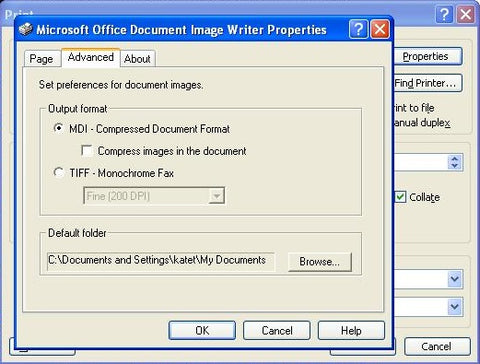
  <li>In the <b>Microsoft Office Document Image Writer Properties</b> dialog box click on the <b>Advanced</b> tab, under <b>Output Format</b>, click <b>MIDI - Compressed Document Format</b> and untick <b>Compress Images</b>, then click on <b>OK</b> as shown here<br />
    <p><img src="http://cdn.shopify.com/s/files/1/0084/3512/files/tiff2_large.jpg?1554" /><br />
    </p>
</li>
  <li>In the <b>Print</b> dialogue box, click <b>OK</b>.</li>
  <li>In the <b>Save as</b> dialogue box, select the <b>View Document Image</b> check box, and then click <b>Save</b>, as below
    <p><img src="http://cdn.shopify.com/s/files/1/0084/3512/files/tiff3_large.jpg?1556" /></p>
  </li>
  <p>The document you've just saved as a MIDI image should open in <b>Microsoft Document Imaging</b>.
  </p>
  <li>In<b> Document Imaging</b>, click <b>Save As</b> on the file menu, in the <b>Save as file type</b> list select <b>Tagged Image File Format&nbsp; </b>and then click <b>Options</b>, and slide the bar to the right for <b>Better Image Quality</b>, as below.</li>
  <p><img src="http://cdn.shopify.com/s/files/1/0084/3512/files/tiff4_grande.jpg?1558" /></p>
  <li>Then just click on<b> OK</b> and then <b>Save</b>.&nbsp; Your file will be saved as default into <b>My Documents</b> unless you've changed the default folder.<br />
  </li>
</ol>
]]>
    </content>
  </entry>
  <entry>
    <id>https://www.leafletfrog.co.uk/blogs/news/4020762-live-chat-now-available-just-click-on-the-tab</id>
    <published>2011-09-09T10:21:54+01:00</published>
    <updated>2011-10-18T10:20:14+01:00</updated>
    <link rel="alternate" type="text/html" href="https://www.leafletfrog.co.uk/blogs/news/4020762-live-chat-now-available-just-click-on-the-tab"/>
    <title>Live chat now available - Just click on the tab...</title>
    <author>
      <name>Martin Cropper</name>
    </author>
    <content type="html">
      <![CDATA[<p>In our continuing drive for better, and more comprehensive, customer service we have just introduced the new Live Chat facility.</p>
<p>Located in a tab on the right hand side, and showing on every page, it gives customers the opportunity to chat to a real person (during office hours), and ask any questions or queries they may have.</p>
<p>You just have to click on this tab <img src="http://cdn.shopify.com/s/files/1/0084/3512/files/Chat_TAB_ON.gif?1752" height="99" width="24" /> on the right hand side of your screen to start chatting to a member of staff (when it's orange).<br />
</p>
<p>I'm sure everyone will like it!</p>
<p>&nbsp;<br />
</p>
<p><br />
</p>
]]>
    </content>
  </entry>
  <entry>
    <id>https://www.leafletfrog.co.uk/blogs/news/3938572-struggling-with-your-leaflet-design</id>
    <published>2011-08-31T17:34:22+01:00</published>
    <updated>2011-08-31T17:42:35+01:00</updated>
    <link rel="alternate" type="text/html" href="https://www.leafletfrog.co.uk/blogs/news/3938572-struggling-with-your-leaflet-design"/>
    <title>Struggling with your leaflet design?</title>
    <author>
      <name>Martin Cropper</name>
    </author>
    <content type="html">
      <![CDATA[<p>Let the BBC help!</p>
<p> This is from the BBC bitesize education section for kids.&nbsp; It has a VERY simplified message, but true none the less.</p>
<p>It amused this frog.</p>
<p> <object type="application/x-shockwave-flash" data="http://www.bbc.co.uk/schools/ks2bitesize/english/activities/bbcbitesize.swf?xmlPath=http://www.bbc.co.uk/schools/ks2bitesize/english/activities/xml/w04.xml" height="369" width="576">
	<param name="movie" value="http://www.bbc.co.uk/schools/ks2bitesize/english/activities/bbcbitesize.swf?xmlPath=http://www.bbc.co.uk/schools/ks2bitesize/english/activities/xml/w04.xml">
	<param name="allowFullScreen" value="true">
	<param name="allowScriptAccess" value="always">
	</object></p>
<p>This is a link to the text version of what the little game above is saying <a href="http://www.bbc.co.uk/schools/ks2bitesize/english/writing/leaflets/read1.shtml">BBC Bitesize Leaflets</a><br />
</p>
<p>It also has one of my pals on page 2!<br />
</p>
<p><br />
</p>
]]>
    </content>
  </entry>
  <entry>
    <id>https://www.leafletfrog.co.uk/blogs/news/3866822-leafletfrog-army</id>
    <published>2011-08-23T14:40:00+01:00</published>
    <updated>2014-10-21T16:25:41+01:00</updated>
    <link rel="alternate" type="text/html" href="https://www.leafletfrog.co.uk/blogs/news/3866822-leafletfrog-army"/>
    <title>Leafletfrog Army!</title>
    <author>
      <name>Martin Cropper</name>
    </author>
    <content type="html">
      <![CDATA[<p>Some of the Leafletfrog Army at work, printing your leaflets, flyers and posters, with the machines buzzing in the background!</p>&#13;
<iframe src="//www.youtube.com/embed/L-WveC007uk" allowfullscreen="" height="315" width="420" frameborder="0"></iframe>&#13;
<p>(The collective noun for frogs is "An Army")</p>]]>
    </content>
  </entry>
  <entry>
    <id>https://www.leafletfrog.co.uk/blogs/news/3795542-roddy-s-thoughts</id>
    <published>2011-08-12T09:06:05+01:00</published>
    <updated>2011-08-12T09:06:05+01:00</updated>
    <link rel="alternate" type="text/html" href="https://www.leafletfrog.co.uk/blogs/news/3795542-roddy-s-thoughts"/>
    <title>Roddy’s thoughts</title>
    <author>
      <name>Howard Pearson</name>
    </author>
    <content type="html">
      <![CDATA[<p><span>Been a fab two weeks for
Leafletfrog.<span>&nbsp; </span>Been working like a mad dog
frog to make sure I get all your print orders out quickly.<span>&nbsp; </span>Thanks for all your support.<span>&nbsp; </span>Looking forward to putting my webbed feet up for the weekend and enjoying a few Midori Sours!</span></p>
<p>Roddyx</p>
]]>
    </content>
  </entry>
  <entry>
    <id>https://www.leafletfrog.co.uk/blogs/news/3795512-roddy-loves</id>
    <published>2011-08-12T09:02:09+01:00</published>
    <updated>2011-08-12T10:40:28+01:00</updated>
    <link rel="alternate" type="text/html" href="https://www.leafletfrog.co.uk/blogs/news/3795512-roddy-loves"/>
    <title>Roddy loves</title>
    <author>
      <name>Howard Pearson</name>
    </author>
    <content type="html">
      <![CDATA[<p><span>Prefab Sprout / Spinach / Plymouth Argyle / Mexico
/ Caterham Seven / Midori</span><span> </span><span>Sour</span><span> / Popeye
/ Jump by VanHalen or Girls Aloud / www.leafletfrog.co.uk</span></p>
<p><span>Roddy x <br />
</span></p>
]]>
    </content>
  </entry>
  <entry>
    <id>https://www.leafletfrog.co.uk/blogs/news/3727542-what-is-print-bleed</id>
    <published>2011-08-01T10:33:40+01:00</published>
    <updated>2011-12-19T13:57:59+00:00</updated>
    <link rel="alternate" type="text/html" href="https://www.leafletfrog.co.uk/blogs/news/3727542-what-is-print-bleed"/>
    <title>What is &apos;print bleed&apos;?</title>
    <author>
      <name>Martin Cropper</name>
    </author>
    <content type="html">
      <![CDATA[<p>When producing a document which is to be trimmed with a colour, text or graphic right up to the final edge it is important to add 'bleed' to the outer edges.&nbsp; We normally work to a 3mm bleed around each edge, as shown below..</p>
<p><img src="http://cdn.shopify.com/s/files/1/0084/3512/files/3mm_bleed_medium.png?1341" /></p>
<p>As you can see the graphic is overrunning the page 3mm from the edge. </p>
<p>The reasons for this are to do with small movements of the paper, mainly from the final cutting on the guillotine after it has already been printed, and ensures that your final print is exactly how you want it and doesn't have a tiny white border round the edge.</p>
<p>Update - 19/12/2011</p>
<p>As an update, i've done a new graphic explaining the bleed, trim lines and safe areas as well, which is below -</p>
<p>Example - Your leaflet is to be A5, which has a finished size of 148mm x 210mm, the supplied artwork should be 154mm x 216mm.&nbsp; So, the final size plus 3mm all the way round.<br />
</p>
<p><img src="//cdn.shopify.com/s/files/1/0084/3512/files/Bleed.jpg?1866" height="412" width="699" /><br />
</p>
]]>
    </content>
  </entry>
</feed>