<?xml version="1.0" encoding="UTF-8"?>
<?xml-stylesheet type="text/xsl" media="screen" href="/~d/styles/rss2full.xsl"?><?xml-stylesheet type="text/css" media="screen" href="http://feeds.feedburner.com/~d/styles/itemcontent.css"?><rss xmlns:content="http://purl.org/rss/1.0/modules/content/" xmlns:wfw="http://wellformedweb.org/CommentAPI/" xmlns:dc="http://purl.org/dc/elements/1.1/" xmlns:atom="http://www.w3.org/2005/Atom" xmlns:sy="http://purl.org/rss/1.0/modules/syndication/" xmlns:slash="http://purl.org/rss/1.0/modules/slash/" xmlns:feedburner="http://rssnamespace.org/feedburner/ext/1.0" version="2.0">

<channel>
	<title>Magicard</title>
	
	<link>http://www.ultramagicard.com</link>
	<description>Just another WordPress weblog</description>
	<lastBuildDate>Fri, 03 Feb 2012 10:52:06 +0000</lastBuildDate>
	<generator>http://wordpress.org/?v=2.8</generator>
	<language>en</language>
	<sy:updatePeriod>hourly</sy:updatePeriod>
	<sy:updateFrequency>1</sy:updateFrequency>
			<atom10:link xmlns:atom10="http://www.w3.org/2005/Atom" rel="self" type="application/rss+xml" href="http://feeds.feedburner.com/Magicard" /><feedburner:info uri="magicard" /><atom10:link xmlns:atom10="http://www.w3.org/2005/Atom" rel="hub" href="http://pubsubhubbub.appspot.com/" /><item>
		<title>Extend your capabilities</title>
		<link>http://feedproxy.google.com/~r/Magicard/~3/284QUVcKWWo/</link>
		<comments>http://www.ultramagicard.com/2011/12/extend-your-capabilities/#comments</comments>
		<pubDate>Thu, 22 Dec 2011 10:18:45 +0000</pubDate>
		<dc:creator>David Worsdell</dc:creator>
				<category><![CDATA[News]]></category>
		<category><![CDATA[Custom HoloKote]]></category>
		<category><![CDATA[holokote FLEX]]></category>
		<category><![CDATA[id card printers]]></category>
		<category><![CDATA[loyalty cards]]></category>
		<category><![CDATA[membership cards]]></category>
		<category><![CDATA[Rio Pro]]></category>
		<category><![CDATA[rio warranty]]></category>
		<category><![CDATA[Ultra Cover Plus]]></category>
		<category><![CDATA[UltraCoverPlus]]></category>

		<guid isPermaLink="false">http://www.ultramagicard.com/?p=761</guid>
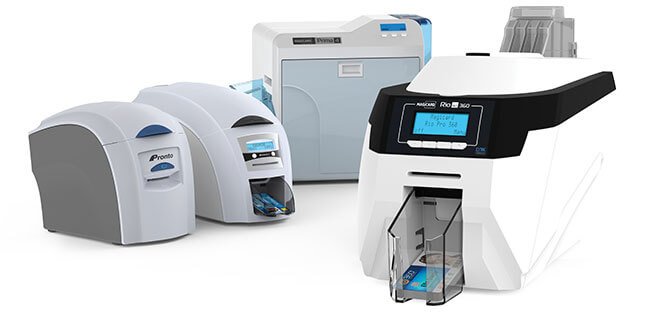
		<description><![CDATA[The new Magicard Rio Pro Xtended personalises extra-long plastic cards for ticketing, accreditation and product labeling. Long format cards provide more design options, superior visibility and are widely used for security badges at sports and music events.
Cards up to 110mm long can be printed entirely in full colour using the double-printing mode. The printer can [...]]]></description>
			<content:encoded><![CDATA[<p>The new Magicard Rio Pro Xtended personalises extra-long plastic cards for ticketing, accreditation and product labeling. Long format cards provide more design options, superior visibility and are widely used for security badges at sports and music events.<br />
<span id="more-761"></span>Cards up to 110mm long can be printed entirely in full colour using the double-printing mode. The printer can also handle pre-printed cards up to 140mm long, printing a CR80-sized (86 x 54mm) area in full colour in a single pass. In monochrome mode, the entire length of a 140 x 54mm card can be printed. Also available is a variant for 50mm wide cards, typically used for product labeling.</p>
<img src="http://feeds.feedburner.com/~r/Magicard/~4/284QUVcKWWo" height="1" width="1"/>]]></content:encoded>
			<wfw:commentRss>http://www.ultramagicard.com/2011/12/extend-your-capabilities/feed/</wfw:commentRss>
		<slash:comments>0</slash:comments>
		<feedburner:origLink>http://www.ultramagicard.com/2011/12/extend-your-capabilities/</feedburner:origLink></item>
		<item>
		<title>Perfect colour fidelity for Pro users</title>
		<link>http://feedproxy.google.com/~r/Magicard/~3/TOs1_dBrZhg/</link>
		<comments>http://www.ultramagicard.com/2011/12/perfect-colour-fidelity-for-pro-users/#comments</comments>
		<pubDate>Thu, 22 Dec 2011 10:11:59 +0000</pubDate>
		<dc:creator>David Worsdell</dc:creator>
				<category><![CDATA[Products]]></category>
		<category><![CDATA[id card printers]]></category>
		<category><![CDATA[loyalty cards]]></category>
		<category><![CDATA[membership cards]]></category>
		<category><![CDATA[Rio Pro]]></category>
		<category><![CDATA[rio warranty]]></category>

		<guid isPermaLink="false">http://www.ultramagicard.com/?p=747</guid>
		<description><![CDATA[You can now reproduce colour images better than ever before thanks to a new embedded ICC profile for the Magicard Rio Pro.Brian Meyrick, Magicard Senior Software Engineer, explains: &#8220;Images can originate from many sources such as digital or mobile phone cameras, scans, image libraries or other online resources and as such can exist in many [...]]]></description>
			<content:encoded><![CDATA[<p>You can now reproduce colour images better than ever before thanks to a new embedded ICC profile for the Magicard Rio Pro.<span id="more-747"></span>Brian Meyrick, Magicard Senior Software Engineer, explains: &#8220;Images can originate from many sources such as digital or mobile phone cameras, scans, image libraries or other online resources and as such can exist in many different colour formats. Our challenge was to ensure that whatever the image source, format or software used along the workflow, the Rio Pro would produce an accurate result, faithful to the original image when printing on to a PVC card. The new ICC embedded profile provides an excellent solution.&#8221;</p>
<p>The profile is available in the newly-released Rio Pro driver &#8211; version 1.6.1, which can be downloaded from <a href="http://m.magicard.com/_act/link.php?mId=B916983149174074856421276423412&amp;tId=81849642" target="_blank">here</a>. <em>Note that the driver default setting is Gamma 1 &#8211; to select the ICC profile you will need to click on the advanced tab and change &#8216;colour correction&#8217; to &#8216;colour management (built in to driver)&#8217;</em></p>
<img src="http://feeds.feedburner.com/~r/Magicard/~4/TOs1_dBrZhg" height="1" width="1"/>]]></content:encoded>
			<wfw:commentRss>http://www.ultramagicard.com/2011/12/perfect-colour-fidelity-for-pro-users/feed/</wfw:commentRss>
		<slash:comments>0</slash:comments>
		<feedburner:origLink>http://www.ultramagicard.com/2011/12/perfect-colour-fidelity-for-pro-users/</feedburner:origLink></item>
		<item>
		<title>3 steps to printing better cards</title>
		<link>http://feedproxy.google.com/~r/Magicard/~3/Rw4bDnVjaXw/</link>
		<comments>http://www.ultramagicard.com/2011/12/3-steps-to-printing-better-cards/#comments</comments>
		<pubDate>Thu, 22 Dec 2011 10:00:35 +0000</pubDate>
		<dc:creator>David Worsdell</dc:creator>
				<category><![CDATA[Support]]></category>
		<category><![CDATA[id card printers]]></category>
		<category><![CDATA[loyalty cards]]></category>
		<category><![CDATA[membership cards]]></category>
		<category><![CDATA[rewritable cards]]></category>

		<guid isPermaLink="false">http://www.ultramagicard.com/?p=774</guid>
		<description><![CDATA[While the requirements for designing and printing cards can be daunting, by following simple maxims, you will be able to easily design and print cards for any project.
1. Start with Quality.
Obtain a quality ID card printer and badging system from your dealer or integrator. Don’t skimp and purchase a cheap off-brand for your project.
Use high [...]]]></description>
			<content:encoded><![CDATA[<p>While the requirements for designing and printing cards can be daunting, by following simple maxims, you will be able to easily design and print cards for any project.<span id="more-774"></span></p>
<p><strong>1. Start with Quality.</strong></p>
<p>Obtain a quality ID card printer and badging system from your dealer or integrator. Don’t skimp and purchase a cheap off-brand for your project.</p>
<p>Use high quality blank cards. While they may all look the same, there are actually several types of blank PVC cards available. The quality of the blank card directly affects the quality of the finished item and the quantity of waste in time and materials.</p>
<p>Things to check for when purchasing blank cardstock:</p>
<ul>
<li>Cards are the correct size (CR80 is the standard credit card size) and thickness (30-40 mm is recommended for long term card use)</li>
<li>The cards have clean edges, flat surfaces, no surface contamination, and are opaque to light.</li>
<li>If the cards have electronic components inside (proximity/contact chip), these must not create any unevenness in the card surface.</li>
</ul>
<p>You may have to obtain several batches of cardstock from different manufacturers before finding cards with the right build and quality to fulfill your project’s needs.</p>
<p><strong>2. Design your card with the end in mind</strong></p>
<p>Simplicity always works best. Include a name, identification number, scannable barcode, picture, and other essential elements but leave out specific identity information that is subject to change such as an address or phone number.</p>
<p>Think about the card’s use. Do not print important information in places where the card will come into contact with readers (such as the area around a magnetic stripe), as the card print in this area may be scratched off with use.</p>
<p>Don’t ignore the printing process when you design your cards. With a dye-sublimation printer, you can achieve a very high-quality product by designing your cards with lighter colors and avoiding large plain-color areas.</p>
<p>No printer can improve bad images and graphics, so it is important to ensure that all photos are properly lit and any graphics are sourced from high-resolution files so they do not pixelate or distort. </p>
<p><strong>3. Know your printer’s process</strong></p>
<p>There are three main types of card printing: dye-sublimation, reverse-transfer, and offset. Offset printing is done on large machines and cannot be done on-location. Most desktop printers use dye-sublimation while higher end models may use the reverse-transfer printing process.</p>
<p>The biggest difference between dye-sublimation and reverse-transfer is speed and cost. Reverse-transfer <em>does </em>give higher quality cards, but with a good dye-sublimation printer, the difference is often negligible.</p>
<p>As you print, the print head will get progressively hotter; this is compensated for in the printer firmware, but it may affect how some card designs print. </p>
<p>Dust and debris on the card surface will cause small white blemishes to appear in the image so keeping the cards and tacky rollers clean is imperative. Using gloves to handle and load blank cards is always recommended.</p>
<p>Just like an inkjet printer, colors appearing on the monitor will not always be exactly the same as those that are printed. To get the best looking cards, print some samples, then adjust the <em>gamma</em> and <em>print head power</em><strong> </strong>within the printer driver. This may take some trial and error, so allocating time for sample printing and driver adjustment is an essential part of any printing process.</p>
<p>In general, printing quality cards is not difficult. By starting with good materials and keeping the abilities and limitations of your Magicard printer in mind, you will end up with identification cards that work well, last long, and look great.</p>
<img src="http://feeds.feedburner.com/~r/Magicard/~4/Rw4bDnVjaXw" height="1" width="1"/>]]></content:encoded>
			<wfw:commentRss>http://www.ultramagicard.com/2011/12/3-steps-to-printing-better-cards/feed/</wfw:commentRss>
		<slash:comments>0</slash:comments>
		<feedburner:origLink>http://www.ultramagicard.com/2011/12/3-steps-to-printing-better-cards/</feedburner:origLink></item>
		<item>
		<title>Enhance visual security with HoloPatch cards</title>
		<link>http://feedproxy.google.com/~r/Magicard/~3/JDl6f6claxw/</link>
		<comments>http://www.ultramagicard.com/2011/12/enhance-visual-security-with-holopatch-cards/#comments</comments>
		<pubDate>Wed, 21 Dec 2011 10:32:49 +0000</pubDate>
		<dc:creator>David Worsdell</dc:creator>
				<category><![CDATA[Products]]></category>
		<category><![CDATA[anticounterfeiting]]></category>
		<category><![CDATA[Card security]]></category>
		<category><![CDATA[card visual security]]></category>
		<category><![CDATA[holokote]]></category>
		<category><![CDATA[holokote FLEX]]></category>
		<category><![CDATA[HoloKote tool]]></category>
		<category><![CDATA[id card printers]]></category>

		<guid isPermaLink="false">http://www.ultramagicard.com/?p=769</guid>
		<description><![CDATA[Magicard&#8217;s patented HoloKote system, available on all direct-to-card printers, offers you extra visual security at no extra cost by adding a watermark to each card that you print.For even more effective visual authentication, combining a standard or customised watermark with Magicard&#8217;s HoloPatch cards provides a distance-visible mark enabling a security guard or colleague to easily [...]]]></description>
			<content:encoded><![CDATA[<p>Magicard&#8217;s patented HoloKote system, available on all direct-to-card printers, offers you extra visual security at no extra cost by adding a watermark to each card that you print.<span id="more-769"></span>For even more effective visual authentication, combining a standard or customised watermark with Magicard&#8217;s HoloPatch cards provides a distance-visible mark enabling a security guard or colleague to easily verify badge authenticity from a distance of six feet or more. It&#8217;s the ultimate in card security simplicity.</p>
<img src="http://feeds.feedburner.com/~r/Magicard/~4/JDl6f6claxw" height="1" width="1"/>]]></content:encoded>
			<wfw:commentRss>http://www.ultramagicard.com/2011/12/enhance-visual-security-with-holopatch-cards/feed/</wfw:commentRss>
		<slash:comments>0</slash:comments>
		<feedburner:origLink>http://www.ultramagicard.com/2011/12/enhance-visual-security-with-holopatch-cards/</feedburner:origLink></item>
		<item>
		<title>Get social with us…and get information first</title>
		<link>http://feedproxy.google.com/~r/Magicard/~3/QN2kGrXZleo/</link>
		<comments>http://www.ultramagicard.com/2011/12/get-social-with-us%e2%80%a6and-get-information-first/#comments</comments>
		<pubDate>Mon, 12 Dec 2011 10:51:01 +0000</pubDate>
		<dc:creator>David Worsdell</dc:creator>
				<category><![CDATA[News]]></category>

		<guid isPermaLink="false">http://www.ultramagicard.com/?p=783</guid>
		<description><![CDATA[Connect with Magicard across a number of social media platforms:
To be the first to hear about exclusive promotions and updates &#8216;LIKE&#8217; us on Facebook here.
For up-to-the-minute insights from the Magicard team follow us on Twitter here.
To view our product videos, find our You Tube channel here.
]]></description>
			<content:encoded><![CDATA[<p>Connect with Magicard across a number of social media platforms:</p>
<p>To be the first to hear about exclusive promotions and updates &#8216;LIKE&#8217; us on Facebook <a href="http://m.magicard.com/_act/link.php?mId=B916983149174074856421276423412&amp;tId=81849646" target="_blank">here</a>.</p>
<p>For up-to-the-minute insights from the Magicard team follow us on Twitter <a href="http://m.magicard.com/_act/link.php?mId=B916983149174074856421276423412&amp;tId=81849647" target="_blank">here</a>.</p>
<p>To view our product videos, find our You Tube channel <a href="http://m.magicard.com/_act/link.php?mId=B916983149174074856421276423412&amp;tId=81849648" target="_blank">here</a>.</p>
<img src="http://feeds.feedburner.com/~r/Magicard/~4/QN2kGrXZleo" height="1" width="1"/>]]></content:encoded>
			<wfw:commentRss>http://www.ultramagicard.com/2011/12/get-social-with-us%e2%80%a6and-get-information-first/feed/</wfw:commentRss>
		<slash:comments>0</slash:comments>
		<feedburner:origLink>http://www.ultramagicard.com/2011/12/get-social-with-us%e2%80%a6and-get-information-first/</feedburner:origLink></item>
		<item>
		<title>A Message To Our Business Partners</title>
		<link>http://feedproxy.google.com/~r/Magicard/~3/cGUjFz_MLF8/</link>
		<comments>http://www.ultramagicard.com/2011/10/a-message-to-our-business-partners/#comments</comments>
		<pubDate>Fri, 14 Oct 2011 08:12:23 +0000</pubDate>
		<dc:creator>David Worsdell</dc:creator>
				<category><![CDATA[News]]></category>
		<category><![CDATA[Card security]]></category>
		<category><![CDATA[card visual security]]></category>
		<category><![CDATA[id card printers]]></category>
		<category><![CDATA[magicard]]></category>
		<category><![CDATA[magicard warranty]]></category>

		<guid isPermaLink="false">http://www.ultramagicard.com/?p=714</guid>
		<description><![CDATA[“Differentiated Products, Better Support, Working With Our Partners To Develop The Market”.]]></description>
			<content:encoded><![CDATA[<p>We operate in the security industry, where trust is not an option, it is what our industry is built on.  The Magicard business has always been built on gaining and securing your trust.   Our business culture comes from our parent company, Ultra Electronics.  With a majority of Ultra business in Defence, Security and Aerospace markets, we know what it means to support our customers for 5 years, 10 years, 25 years.<span id="more-714"></span></p>
<p>After the boom-times fuelled by cheap credit, we saw reality bite, and business uncertainty continues to present times.   The cranes stopped, capital equipment budgets were cut, and inventory was squeezed.  But the Magicard R&amp;D and Marketing investments never wavered. We supported our channel partners and our end users through the hard times.  We kept launching new products.  No radical organisation or route to market changes, no short term deals, just a focus on what really counts.</p>
<p>Our business values are :</p>
<ul>
<li>We aim to be approachable and available to discuss business with you.</li>
<li>We will never sell around our distribution channel partners.</li>
<li>Our goal is to provide a superior level of support to both channel partners and to end users, in all aspects, before, during and long after a sale is made.</li>
</ul>
<p>We describe these values to our team through our mission, which is:</p>
<blockquote><p><strong><span style="color: #3366ff;"><em>“Differentiated Products, Better Support, Working With Our Partners To Develop The Market”.</em></span></strong></p></blockquote>
<p>Every couple of years we test ourselves by means of a customer survey, and many of our partners took the time to respond to our 2011 survey – thank you. I am confident from the results that we are on the right track, but we have taken actions to add some extra people into operations, engineering, quality and customer support roles in order to serve you better.</p>
<p>I and the Ultra Electronics Card Systems team thank you for your business and your continued support of the Magicard difference.</p>
<p>Andy Matko<br />
Director<br />
Ultra Electronics Card Systems</p>
<img src="http://feeds.feedburner.com/~r/Magicard/~4/cGUjFz_MLF8" height="1" width="1"/>]]></content:encoded>
			<wfw:commentRss>http://www.ultramagicard.com/2011/10/a-message-to-our-business-partners/feed/</wfw:commentRss>
		<slash:comments>0</slash:comments>
		<feedburner:origLink>http://www.ultramagicard.com/2011/10/a-message-to-our-business-partners/</feedburner:origLink></item>
		<item>
		<title>The Magicard Vision</title>
		<link>http://feedproxy.google.com/~r/Magicard/~3/iQS2Wq5cu7I/</link>
		<comments>http://www.ultramagicard.com/2011/10/the-magicard-vision/#comments</comments>
		<pubDate>Wed, 12 Oct 2011 16:17:11 +0000</pubDate>
		<dc:creator>David Worsdell</dc:creator>
				<category><![CDATA[News]]></category>
		<category><![CDATA[anticounterfeiting]]></category>
		<category><![CDATA[ASIS]]></category>
		<category><![CDATA[Card security]]></category>
		<category><![CDATA[card visual security]]></category>
		<category><![CDATA[Custom HoloKote]]></category>
		<category><![CDATA[id card printers]]></category>
		<category><![CDATA[magicard]]></category>
		<category><![CDATA[Magicard holokote security]]></category>
		<category><![CDATA[magicard warranty]]></category>
		<category><![CDATA[UltraCoverPlus]]></category>

		<guid isPermaLink="false">http://www.ultramagicard.com/?p=703</guid>
		<description><![CDATA[Magicard Director, Andy Matko, recently handed the reins of the business from the retiring Ray Coles, talked about his passion for the ID card industry and his vision for Magicard at the recent ASIS exhibition in Orlando.
]]></description>
			<content:encoded><![CDATA[<p><span style="font-weight: normal;">Magicard Director, Andy Matko, recently handed the reins of the business from the retiring Ray Coles, talked about his passion for the ID card industry and his vision for Magicard at the recent ASIS exhibition in Orlando.</span></p>
<p><a href="http://www.ultramagicard.com/2011/10/the-magicard-vision/"><em>Click here to view the embedded video.</em></a></p>
<img src="http://feeds.feedburner.com/~r/Magicard/~4/iQS2Wq5cu7I" height="1" width="1"/>]]></content:encoded>
			<wfw:commentRss>http://www.ultramagicard.com/2011/10/the-magicard-vision/feed/</wfw:commentRss>
		<slash:comments>2</slash:comments>
		<feedburner:origLink>http://www.ultramagicard.com/2011/10/the-magicard-vision/</feedburner:origLink></item>
		<item>
		<title>Double up, double quick with the simplest upgrade in the industry</title>
		<link>http://feedproxy.google.com/~r/Magicard/~3/lOznnYH7794/</link>
		<comments>http://www.ultramagicard.com/2011/09/double-up-double-quick-with-the-simplest-upgrade-in-the-industry/#comments</comments>
		<pubDate>Fri, 30 Sep 2011 13:06:51 +0000</pubDate>
		<dc:creator>David Worsdell</dc:creator>
				<category><![CDATA[Products]]></category>
		<category><![CDATA[Enduro]]></category>
		<category><![CDATA[Enduro card printer]]></category>
		<category><![CDATA[Enduro Duo]]></category>
		<category><![CDATA[magicard]]></category>
		<category><![CDATA[Rio Pro]]></category>

		<guid isPermaLink="false">http://www.ultramagicard.com/?p=694</guid>
		<description><![CDATA[In ID card production double-sided printing is an important, convenient and time-saving feature. With the Magicard Enduro and the Magicard Rio Pro, you can buy double-sided off-the-shelf or you can instantly transform your single-sided printer to double-sided with a simple field upgrade. 
You don&#8217;t need a toolkit or any technical knowledge &#8211; just drop in [...]]]></description>
			<content:encoded><![CDATA[<p>In ID card production double-sided printing is an important, convenient and time-saving feature. With the Magicard Enduro and the Magicard Rio Pro, you can buy double-sided off-the-shelf or you can instantly transform your single-sided printer to double-sided with a simple field upgrade. <span id="more-694"></span></p>
<p>You don&#8217;t need a toolkit or any technical knowledge &#8211; just drop in the special ribbon from the upgrade kit, and what&#8217;s more, benefit from 250 free double-sided prints to get you started.</p>
<img src="http://feeds.feedburner.com/~r/Magicard/~4/lOznnYH7794" height="1" width="1"/>]]></content:encoded>
			<wfw:commentRss>http://www.ultramagicard.com/2011/09/double-up-double-quick-with-the-simplest-upgrade-in-the-industry/feed/</wfw:commentRss>
		<slash:comments>0</slash:comments>
		<feedburner:origLink>http://www.ultramagicard.com/2011/09/double-up-double-quick-with-the-simplest-upgrade-in-the-industry/</feedburner:origLink></item>
		<item>
		<title>Cleaning your printer for quality cards</title>
		<link>http://feedproxy.google.com/~r/Magicard/~3/elTYk0sIgvw/</link>
		<comments>http://www.ultramagicard.com/2011/09/printer-cleaning/#comments</comments>
		<pubDate>Thu, 29 Sep 2011 10:02:46 +0000</pubDate>
		<dc:creator>Nathan</dc:creator>
				<category><![CDATA[Support]]></category>

		<guid isPermaLink="false">http://www.ultramagicard.com/?p=736</guid>
		<description><![CDATA[Learn how to clean your Magicard printer after every roll of film to ensure clean, great looking cards!]]></description>
			<content:encoded><![CDATA[<p>It is essential to clean your printer every time that you put in a new roll of film. Without regular cleaning, you run the risk of dirty cards that will make you crazier than a child that eats an entire bag of candy on Halloween.<span id="more-736"></span></p>
<p>Luckily, cleaning your Magicard printer is much easier than scrubbing chocolate off the walls. All you need is your printer plugged in and powered up and a Magicard cleaning kit. If you don’t have a cleaning kit, contact your dealer or call Magicard directly.</p>
<p>To start cleaning, remove the hopper with blank cards from the back of the unit.</p>
<p>Next, pop open the printer’s lid and remove the dye film and small blue roller that is located underneath the big blue film spool.</p>
<p>Remove a cleaning card from the protective pouch and keep it at the ready. On the printer, select “Menu” than “Clean Rollers”. Follow the instructions and insert the <strong>small </strong>end of the card into the slot on the front of the printer.</p>
<p>Watch your printer go to work! This cleaning process removes dust and other buildup from your printer’s rollers. After it has finished, you may want to flip the card and send it through for another cycle to get everything extra clean.</p>
<p>When the second cleaning cycle is finished, put a <strong>new</strong> small blue roller (included in the cleaning kit) onto the metal rod and insert it over the orange roller in the open printer. Be sure to remove the sticky cover from the roller before you place it into the printer.</p>
<p>Replace the film, close the lid, put the card hopper onto the back, and you are ready to print clean and shiny cards!</p>
<img src="http://feeds.feedburner.com/~r/Magicard/~4/elTYk0sIgvw" height="1" width="1"/>]]></content:encoded>
			<wfw:commentRss>http://www.ultramagicard.com/2011/09/printer-cleaning/feed/</wfw:commentRss>
		<slash:comments>0</slash:comments>
		<feedburner:origLink>http://www.ultramagicard.com/2011/09/printer-cleaning/</feedburner:origLink></item>
		<item>
		<title>Ray Coles Statement</title>
		<link>http://feedproxy.google.com/~r/Magicard/~3/SY_X6sE-g9s/</link>
		<comments>http://www.ultramagicard.com/2011/09/ray-coles-statement/#comments</comments>
		<pubDate>Fri, 09 Sep 2011 10:32:18 +0000</pubDate>
		<dc:creator>David Worsdell</dc:creator>
				<category><![CDATA[News]]></category>

		<guid isPermaLink="false">http://www.ultramagicard.com/?p=688</guid>
		<description><![CDATA[I am writing to thank you for your friendship and custom during my time as the Managing Director of Ultra Electronics Manufacturing and Card Systems which of course, is the home of the Magicard ID card printer.
My early team took our monochrome thermal printing technology used for Navy sonar applications and adapted it for colour [...]]]></description>
			<content:encoded><![CDATA[<p>I am writing to thank you for your friendship and custom during my time as the Managing Director of Ultra Electronics Manufacturing and Card Systems which of course, is the home of the <strong>Magicard</strong> ID card printer.<span id="more-688"></span></p>
<p>My early team took our monochrome thermal printing technology used for Navy sonar applications and adapted it for colour ID card printing. That was back in 1993, and since then the business has grown dramatically and we have won two Queen’s Awards for Enterprise; A most enjoyable 18 years for me!</p>
<p>All good things come to an end however, and now it is my turn to leave the business and retire. Over the last few years I have been handing over the Magicard reins to Andy Matko, and in fact many of you may have forgotten I exist, which of course is how it should be!</p>
<p>I have the greatest faith in Andy and the team and I really do mean it when I say that he is already doing a much better job than I ever did.</p>
<p>So goodbye and thank you: for your advice, forbearance, and for your company at those fun packed trade-show get-togethers that I will miss so much.</p>
<p>Ultra and Magicard have been very successful, and we couldn’t have done it without you: our colleagues, customers and friends.</p>
<p>Warmest regards,</p>
<p>Ray Coles</p>
<p>.</p>
<img src="http://feeds.feedburner.com/~r/Magicard/~4/SY_X6sE-g9s" height="1" width="1"/>]]></content:encoded>
			<wfw:commentRss>http://www.ultramagicard.com/2011/09/ray-coles-statement/feed/</wfw:commentRss>
		<slash:comments>5</slash:comments>
		<feedburner:origLink>http://www.ultramagicard.com/2011/09/ray-coles-statement/</feedburner:origLink></item>
	</channel>
</rss>