<?xml version="1.0" encoding="utf-8"?>
<feed xmlns="http://www.w3.org/2005/Atom">

  <title><![CDATA[Magnus Skjegstad]]></title>
  <link href="http://www.skjegstad.com/atom.xml" rel="self"/>
  <link href="http://www.skjegstad.com/"/>
  <updated>2012-09-27T14:07:01+01:00</updated>
  <id>http://www.skjegstad.com/</id>
  <author>
    <name><![CDATA[Magnus Skjegstad]]></name>
    <email><![CDATA[magnus@skjegstad.com]]></email>
  </author>
  <generator uri="http://octopress.org/">Octopress</generator>

  
  <entry>
    <title type="html"><![CDATA[AR.Drone test flight #1]]></title>
    <link href="http://www.skjegstad.com/blog/2012/01/12/ardrone-test-flight-1/"/>
    <updated>2012-01-12T11:46:00+00:00</updated>
    <id>http://www.skjegstad.com/blog/2012/01/12/ardrone-test-flight-1</id>
    <content type="html"><![CDATA[<p>I bought an AR.Drone some time ago, but I haven&#8217;t been able to do any testing with it until now. Yesterday we did a short experiment to see if it could lift the mobile phones we used for the <a href="http://www.skjegstad.com/blog/2011/12/02/experimenting-with-distributed-chat/">chat experiment</a>.</p>

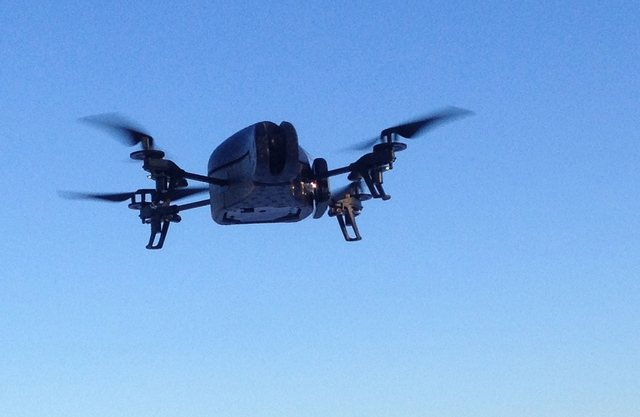
<p><img class="center" src="http://www.skjegstad.com/images/blog/ardrone_experiment_1/ardrone1.jpg"></p>

<p>In this picture the phone is taped to the side of the AR.Drone. The phone was running an Android app which took pictures at regular intervals and sent its current GPS position. The GPS coordinates and the images were then sent to a laptop. Here are two of the pictures taken by the phone.</p>

<p><img class="center" src="http://www.skjegstad.com/images/blog/ardrone_experiment_1/camera_28.jpg">
<img class="center" src="http://www.skjegstad.com/images/blog/ardrone_experiment_1/camera_33.jpg"></p>

<p>We also recorded a video of the experiment. The AR.Drone did not seem to have any problems stabilizing itself with a mobile phone taped to its side.</p>

<p><video width='480' height='360' preload='none' controls poster=' /images/blog/ardrone_experiment_1/ardrone-test.png'><source src='http://www.skjegstad.com/images/blog/ardrone_experiment_1/ardrone-test.m4v' type='video/mp4; codecs="avc1.42E01E, mp4a.40.2"'/></video></p>

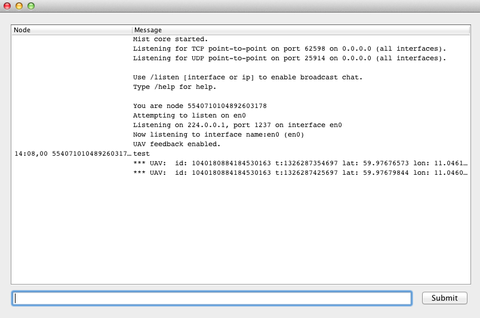
<p>Here&#8217;s some of the output from the test program on the laptop. It only shows the GPS coordinates in this screenshot.</p>

<p><img class="center" src="http://www.skjegstad.com/images/blog/ardrone_experiment_1/screenshot1.png"></p>

<p>(Video and images by <a href="https://plus.google.com/103407634074542782203">Ketil Lund</a>)</p>
]]></content>
  </entry>
  
  <entry>
    <title type="html"><![CDATA[Getting funnel.pl to work in OS X]]></title>
    <link href="http://www.skjegstad.com/blog/2012/01/05/macvim-and-funnel-pl/"/>
    <updated>2012-01-05T00:00:00+00:00</updated>
    <id>http://www.skjegstad.com/blog/2012/01/05/macvim-and-funnel-pl</id>
    <content type="html"><![CDATA[<p>There are several plugins for Vim and MacVim that require a connection to an external program such as R, Lisp or Octave. Some of them rely on a Perl-script written by Larry Clapp called funnel.pl to communicate with the external program. Unfortunately, this script can be difficult to get to work in OS X as it depends on the GNU Readline library.</p>

<!-- more -->


<p>Before you use this guide you should follow the instructions for the plugin you want to configure (e.g. for <a href="http://www.uft.uni-bremen.de/chemie/ranke/?page=vim_R_linux">R</a>, <a href="http://www.vim.org/scripts/script.php?script_id=221">Lisp</a> or <a href="http://www.vim.org/scripts/script.php?script_id=1049">Octave</a>).  At some point the instructions will tell you to start funnel.pl and it will fail with an error message like</p>

<pre><code>Can't locate object method "initialize" via package 
"Term::ReadLine::Stub" at ./funnel.pl line 404.
</code></pre>

<p>To fix this, first make sure you have IO::Pty installed from CPAN:</p>

<pre><code>sudo cpan install IO::Pty
</code></pre>

<p>Next, we need to install GNU Readline. If you use <a href="http://mxcl.github.com/homebrew">Homebrew</a> it can be installed with</p>

<pre><code>brew install readline
</code></pre>

<p>Homebrew does not install the library system wide, as that would be in potential conflict with libedit, the library normally used in OS X. Instead, it places it in a subdirectory in your Homebrew directory structure. On my machine, this was /usr/local/homebrew/Cellar/readline/6.2.2. If you are unsure you can use the command</p>

<pre><code>brew info readline
</code></pre>

<p>to see where it was installed.</p>

<p>Finally, we need to install Term::ReadLine::Gnu and link it to the GNU Readline library. You should be able to find the latest version <a href="http://search.cpan.org/dist/Term-ReadLine-Gnu/">here</a>. I used version 1.20.</p>

<p>Extract the source code and run</p>

<pre><code>perl Makefile.PL \
    --includedir=/usr/local/homebrew/Cellar/readline/6.2.2/include/ \
    --libdir=/usr/local/homebrew/Cellar/readline/6.2.2/lib/
</code></pre>

<p>Change the libdir and includedir options so that they reflect the location of the readline-library installed by Homebrew.</p>

<p>You should now be able to compile and install the Term::ReadLine::Gnu module using</p>

<pre><code>make &amp;&amp; \
sudo make install
</code></pre>

<p>After compilation succeeds and the module is installed you should be able to run funnel.pl.</p>
]]></content>
  </entry>
  
  <entry>
    <title type="html"><![CDATA[Experimenting with distributed chat]]></title>
    <link href="http://www.skjegstad.com/blog/2011/12/02/experimenting-with-distributed-chat/"/>
    <updated>2011-12-02T00:46:00+00:00</updated>
    <id>http://www.skjegstad.com/blog/2011/12/02/experimenting-with-distributed-chat</id>
    <content type="html"><![CDATA[<p><img class="left" src="http://www.skjegstad.com/images/blog/uavexperiment/image5.jpg"></p>

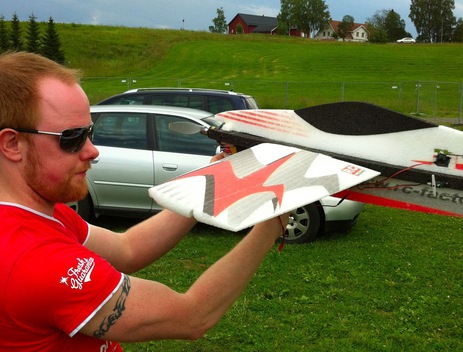
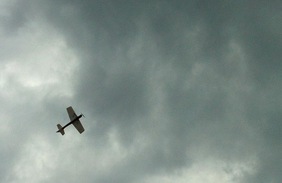
<p>In this experiment we use a remote controlled airplane and an Android phone to carry data between two computers. The idea is that in environments where
you are without a network connection you could still get a working network environment with the help of mobile nodes picking up messages in one area and delivering them in another. A typical
scenario is for example rescue operations, where people may move in and out of a difficult to access rescue area and carry messages with them on their mobile phones.
Although we focus on chat in this experiment, the real data carried could be anything you could store in a file, e.g. medical data from patients, information gathered from sensors in the
environment, images etc.</p>

<p><img class="center" src="http://www.skjegstad.com/images/blog/uavexperiment/MobileNode.png"></p>

<p>The image above illustrates the scenario we use in the experiment. Bob and Alice are two users who are unable to communicate directly. Another user,
Charlie, has been visiting Bob and is about to go over to Alice. As Bob is unable to reach Alice he delivers his
messages to Charlie, who then proceeds to carry them over to Alice.  This is the basic principle we evaluate in the experiment.
Except Bob and Alice are laptops and Charlie is a cell phone attached to an airplane.</p>

<p><img class="left" src="http://www.skjegstad.com/images/blog/uavexperiment/image1.jpg" width="300" height="300" title="Espen Skjervold holding the airplane" ></p>

<p>The client we use on the laptops is the same as I wrote for a <a href="http://www.skjegstad.com/papers/milcom11_distributed_chat.pdf">paper</a> I presented at MILCOM in November. It runs on top of a generic protocol and middleware for
distributing content reliably in dynamic network environments, called Mist. In the paper we only evaluated its performance in a virtual environment, so after we finished the paper we
thought it would be interesting to see if we could do a real experiment with the same software.</p>

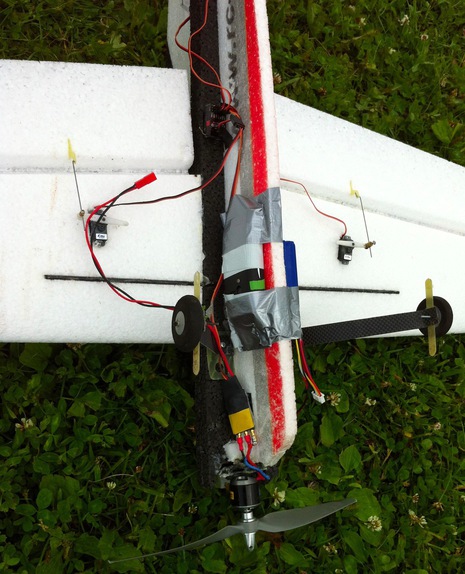
<p><img class="right" src="http://www.skjegstad.com/images/blog/uavexperiment/image2.jpg" width="200" height="300" title="Mobile phone attached to the plane with electrical tape" ></p>

<p>One of my co-authors on the paper, Espen Skjervold, had a remote controlled airplane we used to carry the mobile node. As the plane was small and light we had to find an Android phone that it was
able to lift for longer time periods. The phone we ended up using was the <a href="http://www.sonyericsson.com/cws/corporate/products/phoneportfolio/specification/xperiax10mini">Sony Ericsson Xperia x10 mini</a>.
According to the specifications it only weighs 88 grams. With the help of high quality electrical tape we taped the phone to the plane, as seen in the picture to the right.</p>

<p>On the Android phone we installed a very basic application which just starts the Mist middleware. It also regularly transmits the GPS coordinates of the phone. For the
clients we used two Macbooks running the chat client I wrote for the paper. The clients generate random text strings from <a href="http://en.wikipedia.org/wiki/Lorem_ipsum">Lorem Ipsum</a> every 10 seconds.
The phone and the laptops were all configured to join the same ad-hoc wireless network.</p>

<p><img class="center" src="http://www.skjegstad.com/images/blog/uavexperiment/image3.jpg" title="Node 1" >
<img class="right" src="http://www.skjegstad.com/images/blog/uavexperiment/image4.jpg" title="Node 2" ></p>

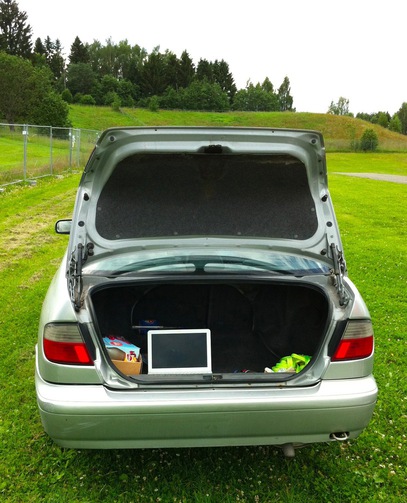
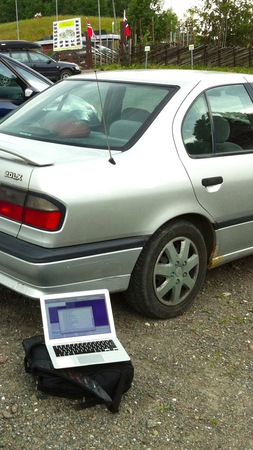
<p>The radio range of the laptops and the phone turned out to be much longer than we had anticipated. To reduce the radio range, we placed one of the nodes in the trunk of the car. We placed the other node behind a car at the
other end of the parking lot. After some trial and error we managed to find a placement of the nodes which allowed the airplane to only be within the radio range of one laptop at the time.</p>

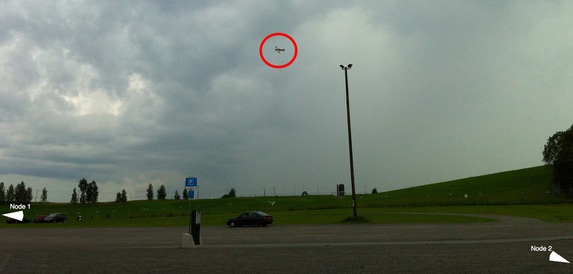
<p>The image below shows the airplane carrying messages between the two nodes. The nodes are never in contact with the airplane at the same time, so the messages have to be physically carried between the nodes by the Android-phone/airplane.</p>

<p>When the plane comes in contact with one of the nodes the Android-phone picks up any new messages and delivers old ones. The plane then moves out of radio range for while, before it comes in contact with the other node and repeats the process.</p>

<p><img class="center" src="http://www.skjegstad.com/images/blog/uavexperiment/image6.jpg" title="Carrying chat messages from node 2 to node 1." ></p>

<p>The plane we used was not very fast, so we weren&#8217;t able to reach the same speeds as we tested in the paper. But this small scale demonstration shows that the Mist middleware also works in real world experiments.</p>

<p>The Mist middleware will soon be released as open source.</p>
]]></content>
  </entry>
  
  <entry>
    <title type="html"><![CDATA[A stand-alone Java Bloom filter]]></title>
    <link href="http://www.skjegstad.com/blog/2011/10/20/a-stand-alone-java-bloom-filter/"/>
    <updated>2011-10-20T10:17:00+01:00</updated>
    <id>http://www.skjegstad.com/blog/2011/10/20/a-stand-alone-java-bloom-filter</id>
    <content type="html"><![CDATA[<p>Some years ago I needed a Bloom filter implementation in Java. At the time, most implementations where either written for a special purpose or relied on other libraries. I decided to write my own Bloomfilter-class which did not depend on anything outside the standard JDK.</p>

<p>This post gives some examples of how the implementation can be used. If you want to go straight to the source code, it is available <a href="https://github.com/magnuss/java-bloomfilter">here</a>. You can also download <a href="https://github.com/MagnusS/Java-BloomFilter/blob/master/src/com/skjegstad/utils/BloomFilter.java">BloomFilter.java</a> directly if you don&#8217;t need the whole project.</p>

<p>To create an empty Bloom filter, call the constructor with the required false positive probability and the number of elements you expect to add to the Bloom filter.</p>

<figure class='code'><figcaption><span></span></figcaption><div class="highlight"><table><tr><td class="gutter"><pre class="line-numbers"><span class='line-number'>1</span>
<span class='line-number'>2</span>
<span class='line-number'>3</span>
<span class='line-number'>4</span>
</pre></td><td class='code'><pre><code class='java'><span class='line'><span class="kt">double</span> <span class="n">p_fp</span> <span class="o">=</span> <span class="mf">0.1</span><span class="o">;</span> <span class="c1">// False positive probability</span>
</span><span class='line'><span class="kt">int</span> <span class="n">n</span> <span class="o">=</span> <span class="mi">100</span><span class="o">;</span> <span class="c1">// Expected number of elements</span>
</span><span class='line'>
</span><span class='line'><span class="n">BloomFilter</span><span class="o">&lt;</span><span class="n">String</span><span class="o">&gt;</span> <span class="n">bf</span> <span class="o">=</span> <span class="k">new</span> <span class="n">BloomFilter</span><span class="o">&lt;</span><span class="n">String</span><span class="o">&gt;(</span><span class="n">p_fp</span><span class="o">,</span> <span class="n">n</span><span class="o">);</span>
</span></code></pre></td></tr></table></div></figure>


<p>The constructor chooses a length and number of hash functions which will provide the given false positive probability (approximately). Note that if you insert more elements than the number of expected elements you specify, the actual false positive probability will rapidly increase.</p>

<p>There are several other constructors available which provide different levels of control of how the Bloom filter is initialized. You can also specify the Bloom filter parameters directly (bits per element, number of hash functions and number of elements).</p>

<p>After the Bloom filter has been created, new elements may be added using the add()-method.</p>

<figure class='code'><figcaption><span></span></figcaption><div class="highlight"><table><tr><td class="gutter"><pre class="line-numbers"><span class='line-number'>1</span>
</pre></td><td class='code'><pre><code class='java'><span class='line'><span class="n">bf</span><span class="o">.</span><span class="na">add</span><span class="o">(</span><span class="s">&quot;foo&quot;</span><span class="o">);</span>
</span></code></pre></td></tr></table></div></figure>


<p>To check whether an element has been stored in the Bloom filter, use the contains()-method.</p>

<figure class='code'><figcaption><span></span></figcaption><div class="highlight"><table><tr><td class="gutter"><pre class="line-numbers"><span class='line-number'>1</span>
</pre></td><td class='code'><pre><code class='java'><span class='line'><span class="n">bf</span><span class="o">.</span><span class="na">contains</span><span class="o">(</span><span class="s">&quot;foo&quot;</span><span class="o">);</span> <span class="c1">// returns true</span>
</span></code></pre></td></tr></table></div></figure>


<p>Keep in mind that the accuracy of this method depends on the false positive probability. It will always return true for elements which have been added to the Bloom filter, but it may also return true for elements which have not been added. The accuracy can be estimated using the expectedFalsePositiveProbability()-method.</p>

<p>Put together, here is the full example.</p>

<figure class='code'><figcaption><span></span></figcaption><div class="highlight"><table><tr><td class="gutter"><pre class="line-numbers"><span class='line-number'>1</span>
<span class='line-number'>2</span>
<span class='line-number'>3</span>
<span class='line-number'>4</span>
<span class='line-number'>5</span>
<span class='line-number'>6</span>
<span class='line-number'>7</span>
<span class='line-number'>8</span>
<span class='line-number'>9</span>
<span class='line-number'>10</span>
<span class='line-number'>11</span>
<span class='line-number'>12</span>
<span class='line-number'>13</span>
<span class='line-number'>14</span>
<span class='line-number'>15</span>
<span class='line-number'>16</span>
</pre></td><td class='code'><pre><code class='java'><span class='line'><span class="kt">double</span> <span class="n">p_fp</span> <span class="o">=</span> <span class="mf">0.1</span><span class="o">;</span> <span class="c1">// False positive probability</span>
</span><span class='line'><span class="kt">int</span> <span class="n">n</span> <span class="o">=</span> <span class="mi">100</span><span class="o">;</span> <span class="c1">// Expected number of elements</span>
</span><span class='line'>
</span><span class='line'><span class="n">BloomFilter</span><span class="o">&lt;</span><span class="n">String</span><span class="o">&gt;</span> <span class="n">bf</span> <span class="o">=</span> <span class="k">new</span> <span class="n">BloomFilter</span><span class="o">&lt;</span><span class="n">String</span><span class="o">&gt;(</span><span class="n">p_fp</span><span class="o">,</span> <span class="n">n</span><span class="o">);</span>
</span><span class='line'>
</span><span class='line'><span class="n">bf</span><span class="o">.</span><span class="na">add</span><span class="o">(</span><span class="s">&quot;foo&quot;</span><span class="o">);</span>
</span><span class='line'>
</span><span class='line'><span class="k">if</span> <span class="o">(</span><span class="n">bf</span><span class="o">.</span><span class="na">contains</span><span class="o">(</span><span class="s">&quot;foo&quot;</span><span class="o">))</span> <span class="o">{</span> <span class="c1">// Always returns true</span>
</span><span class='line'>    <span class="n">System</span><span class="o">.</span><span class="na">out</span><span class="o">.</span><span class="na">println</span><span class="o">(</span><span class="s">&quot;Bloom filter contains foo!&quot;</span><span class="o">);</span>
</span><span class='line'>    <span class="n">System</span><span class="o">.</span><span class="na">out</span><span class="o">.</span><span class="na">println</span><span class="o">(</span><span class="s">&quot;Probability of a false positive: &quot;</span> <span class="o">+</span>
</span><span class='line'>         <span class="n">bf</span><span class="o">.</span><span class="na">expectedFalsePositiveProbability</span><span class="o">());</span>
</span><span class='line'><span class="o">}</span>
</span><span class='line'>
</span><span class='line'><span class="k">if</span> <span class="o">(</span><span class="n">bf</span><span class="o">.</span><span class="na">contains</span><span class="o">(</span><span class="s">&quot;bar&quot;</span><span class="o">))</span> <span class="o">{</span> <span class="c1">// Should return false, but could return true</span>
</span><span class='line'>    <span class="n">System</span><span class="o">.</span><span class="na">out</span><span class="o">.</span><span class="na">println</span><span class="o">(</span><span class="s">&quot;There was a false positive.&quot;</span><span class="o">);</span>
</span><span class='line'><span class="o">}</span>
</span></code></pre></td></tr></table></div></figure>


<p>The source code is currently hosted at <a href="https://github.com/magnuss/java-bloomfilter">GitHub</a>.</p>
]]></content>
  </entry>
  
</feed>