<?xml version="1.0" encoding="utf-8"?>
<feed xmlns="http://www.w3.org/2005/Atom">

  <title><![CDATA[Marcus Rehm]]></title>
  <link href="http://marcusrehm.github.io/atom.xml" rel="self"/>
  <link href="http://marcusrehm.github.io/"/>
  <updated>2015-02-28T23:33:23-03:00</updated>
  <id>http://marcusrehm.github.io/</id>
  <author>
    <name><![CDATA[Marcus Rehm]]></name>
    
  </author>
  <generator uri="http://octopress.org/">Octopress</generator>

  
  <entry>
    <title type="html"><![CDATA[Integrating Oracle Data Integrator and Analysis Services]]></title>
    <link href="http://marcusrehm.github.io/blog/2015/02/01/integrating-oracle-data-integrator-and-analysis-services/"/>
    <updated>2015-02-01T17:05:17-02:00</updated>
    <id>http://marcusrehm.github.io/blog/2015/02/01/integrating-oracle-data-integrator-and-analysis-services</id>
    <content type="html"><![CDATA[<p>In this post I&rsquo;d like to show a simple integration between <a href="http://www.oracle.com/technetwork/middleware/data-integrator/overview/index.html">Oracle Data Integrator</a> and <a href="http://www.microsoft.com/en-us/server-cloud/solutions/business-intelligence/analysis.aspx">SQL Server Analysis Services</a> that enables a SSAS cube or dimension to be processed from inside ODI packages.<!-- more --></p>

<p></br></p>

<h4>Motivation</h4>

<p>In medium and large environments, companies tend to use tools from one vendor only. This approach have its benefits as built-in integration &ndash; mostly of the time &ndash; between tools and a single point of support. Moreover, find skilled workers that can handle with tools from same vendor stack is easier.</p>

<p>Although the scenario described above is probably the best case, sometimes companies choose to use solutions from others vendors to deal with specific issues. Therefore, in these situations some questions like lack of integration and tools that overlap some of its features may arise.</p>

<p></br></p>

<h4>The Solution</h4>

<p>Though some configurations in ODI and SSAS must be done in order to get the integration, it basically consists in a ODI procedure coded in Jython that does a http request to SSAS passing a xmla script.</p>

<p>First we need to enable SSAS to accept xmla request over http. I won&rsquo;t show how to to this, but you can get more information <a href="http://msdn.microsoft.com/en-us/library/gg492140.aspx">at MSDN</a> or just google <a href="http://www.google.com.br/webhp?#q=configure+http+access+to+analysis+services">&ldquo;configure http access to analysis services&rdquo;</a>.</p>

<p>Note that when configuring authentication type for the IIS application, it must be set to anonymous and a user account should be used to impersonate the connection. This account will be used later to set up processing-cubes permissions in SSAS databases.</p>

<p>For security reasons, the account used to configure IIS application must have only process permissions, so we need to create a role in SSAS database and allow it to process all cubes and dimensions. Leave the <code>Access</code> and <code>Local Cube / Drillthrough</code> both set to <code>None</code> and check <code>Process</code> for all cubes in database. After that, just add the user account used earlier as a member of this role.

<img src="http://marcusrehm.github.io/assets/images_posts/integrating-oracle-data-integrator-and-analysis-services/creating-ssas-role.png" alt="Creating SSAS Role" /></p>

<p>If you plan to use more the one environment you will need to configure one web application for each of them.</p>

<p>Second step is to configure ODI. This is not mandatory, but if you have more than one environment, like QA and Production, it will help you coping deployment questions when migrating from one environment to another.</p>

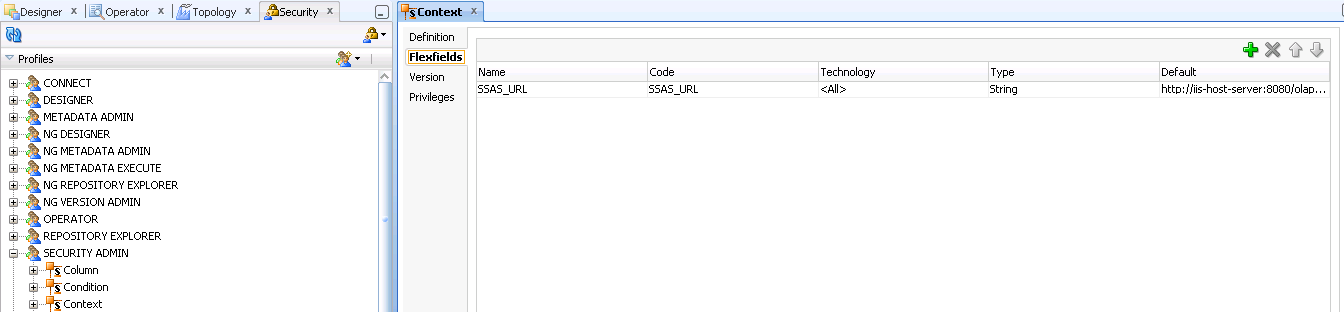
<p>The ODI configuration lies just in creating a flexfield for contexts where we should place the url where the SSAS responds to http requests. Therefore, in an ODI QA environment you can set the url to call a SSAS instance used only for test or QA purpouses. When the package is deployed at production level, the flexfield context in this environment should be configured with the url pointing to the production instance of SSAS.</p>

<p><img src="http://marcusrehm.github.io/assets/images_posts/integrating-oracle-data-integrator-and-analysis-services/configuring-flexfield-in-odi-context.png" alt="Creating Flexfield in ODI Context" /></p>

<p>After create the flexfield you can configure it with the SSAS url:

<img src="http://marcusrehm.github.io/assets/images_posts/integrating-oracle-data-integrator-and-analysis-services/configuring-ssas-url-in-context.png" alt="Configuring SSAS URL in ODI Context" /></p>

<p>The procedure code is simple. It just wraps a xmla script and completes it with the database and cube names and the processing option.</p>

<div><script src='https://gist.github.com/7a310c8794ad7306f119.js'></script>
<noscript><pre><code>import urllib
import urllib2

url = '&lt;%=odiRef.getContext(&quot;SSAS_URL&quot;)%&gt;'
data = '&lt;?xml version=&quot;1.0&quot;?&gt;&lt;Envelope xmlns=&quot;http://schemas.xmlsoap.org/soap/envelope/&quot;&gt;' +
        '&lt;Body&gt;' +
        '&lt;Execute xmlns=&quot;urn:schemas-microsoft-com:xml-analysis&quot;&gt;&lt;Command&gt;' +
        '&lt;Batch xmlns=&quot;http://schemas.microsoft.com/analysisservices/2003/engine&quot;&gt;' +
        '&lt;Parallel&gt;' +
        '&lt;Process xmlns:xsd=&quot;http://www.w3.org/2001/XMLSchema&quot; xmlns:xsi=&quot;http://www.w3.org/2001/XMLSchema-instance&quot; xmlns:ddl2=&quot;http://schemas.microsoft.com/analysisservices/2003/engine/2&quot; xmlns:ddl2_2=&quot;http://schemas.microsoft.com/analysisservices/2003/engine/2/2&quot; xmlns:ddl100_100=&quot;http://schemas.microsoft.com/analysisservices/2008/engine/100/100&quot; xmlns:ddl200=&quot;http://schemas.microsoft.com/analysisservices/2010/engine/200&quot; xmlns:ddl200_200=&quot;http://schemas.microsoft.com/analysisservices/2010/engine/200/200&quot; xmlns:ddl300=&quot;http://schemas.microsoft.com/analysisservices/2011/engine/300&quot; xmlns:ddl300_300=&quot;http://schemas.microsoft.com/analysisservices/2011/engine/300/300&quot; xmlns:ddl400=&quot;http://schemas.microsoft.com/analysisservices/2012/engine/400&quot; xmlns:ddl400_400=&quot;http://schemas.microsoft.com/analysisservices/2012/engine/400/400&quot;&gt;' +
        '&lt;Object&gt;         &lt;DatabaseID&gt;&lt;%=snpRef.getOption(&quot;SSAS Database&quot;)%&gt;&lt;/DatabaseID&gt;' +
        '&lt;CubeID&gt;&lt;%=snpRef.getOption(&quot;Cube&quot;)%&gt;&lt;/CubeID&gt;' +
        '&lt;/Object&gt;' +
        '&lt;Type&gt;&lt;%=snpRef.getOption(&quot;Processing Option&quot;)%&gt;&lt;/Type&gt;' +
        '&lt;WriteBackTableCreation&gt;UseExisting&lt;/WriteBackTableCreation&gt;' +     
        '&lt;/Process&gt;' +
        '&lt;/Parallel&gt;' +
        '&lt;/Batch&gt;' +
        '&lt;/Command&gt;' +
        '&lt;Properties&gt;&lt;PropertyList&gt;&lt;/PropertyList&gt;    &lt;/Properties&gt;' +
        '&lt;/Execute&gt;' +
        '&lt;/Body&gt;&lt;/Envelope&gt;'
http_headers = {&quot;Content-Type&quot;:'text/xml; charset=&quot;UTF-8&quot;; application/xml', 'SOAPAction':'urn:schemas-microsoft-com:xml-analysis:Execute'}
request_object = urllib2.Request(url, data, http_headers)
response = urllib2.urlopen(request_object)
html_string = response.read()
if len(html_string) != 367 :
   raise html_string
</code></pre></noscript></div>


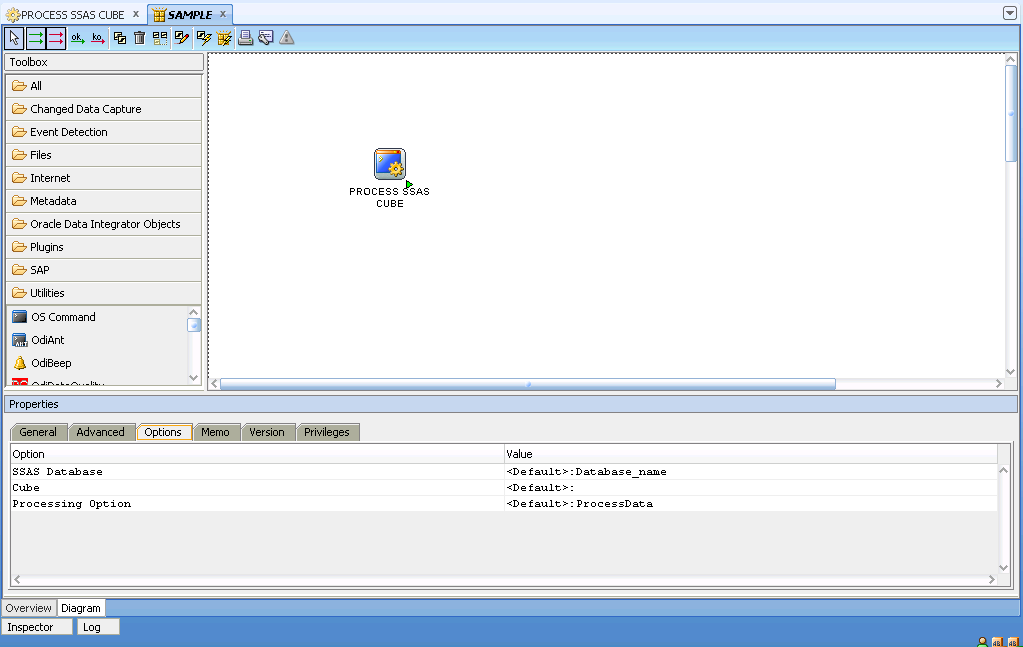
<p>Now just drop the procedure into a ODI scenario and configure the Options with your own information:
<img src="http://marcusrehm.github.io/assets/images_posts/integrating-oracle-data-integrator-and-analysis-services/using-procedure.png" alt="Configuring SSAS URL in ODI Context" /></p>

<p>That&rsquo;s it! Now you can use ODI to process SSAS objects. Below you can download the procedures to process both Cubes and Dimensions.
<a href="http://marcusrehm.github.io/assets/images_posts/integrating-oracle-data-integrator-and-analysis-services/ODI%20Procedures.zip">Download ODI Procedures</a></p>

<p>I would like to thanks my colleague <a href="https://github.com/GuthierryMarques">Guthierry Marques</a> who helped us develop these procedures. Thanks buddy!</p>
]]></content>
  </entry>
  
  <entry>
    <title type="html"><![CDATA[Restoring SQL Server databases from Pending State]]></title>
    <link href="http://marcusrehm.github.io/blog/2014/02/25/restoring-sql-server-databases-from-pending-state/"/>
    <updated>2014-02-25T22:12:58-03:00</updated>
    <id>http://marcusrehm.github.io/blog/2014/02/25/restoring-sql-server-databases-from-pending-state</id>
    <content type="html"><![CDATA[<p>Today, after migrate a SQL Server 2012 server we faced a situation where all databases were in <code>Pending State</code>.</p>

<p>Browsing the web we found the commands needed to put databases back to online state again<!-- more -->, the only issue was that this server has about sixteen databases and execute the script sixteen times, changing variables would be time consuming and we could type something wrong. So I wrote this very simple script that iterates over a cursor returning  databases name which is in <code>Pending State</code>, <code>Suspect</code> and <code>Single User</code> mode.</p>

<p>Hope that it saves you some work hours as it saved me. :)</p>

<div><script src='https://gist.github.com/9144921.js'></script>
<noscript><pre><code>declare @dbname varchar(255);
DECLARE dbname_cursor CURSOR FOR 
    SELECT name--, database_id, create_date, STATE_DESC
    FROM sys.databases
    WHERE STATE_DESC in ('SINGLE_USER', 'SUSPECT', 'RECOVERY_PENDING');

OPEN dbname_cursor
FETCH NEXT FROM dbname_cursor
INTO @dbname

WHILE @@FETCH_STATUS = 0
BEGIN
    PRINT 'Recovering &quot;' + @dbname + '&quot;...'
    
    exec sp_resetstatus @dbname;
    exec('alter database [' + @dbname + '] set emergency');
    dbcc checkdb(@dbname)
    dbcc checkdb(@dbname)
    exec('alter database [' + @dbname + '] set single_user with rollback immediate');
    dbcc checkdb (@dbname, repair_allow_data_loss)
    exec('alter database [' + @dbname + '] set multi_user');
    dbcc checkdb (@dbname)

    FETCH NEXT FROM dbname_cursor 
    INTO @dbname
END 
CLOSE dbname_cursor;
DEALLOCATE dbname_cursor;</code></pre></noscript></div>

]]></content>
  </entry>
  
  <entry>
    <title type="html"><![CDATA[Analysis Services projects and Team Foudantion Services]]></title>
    <link href="http://marcusrehm.github.io/blog/2013/12/18/analysis-services-projects-and-team-foudantion-services/"/>
    <updated>2013-12-18T23:49:08-02:00</updated>
    <id>http://marcusrehm.github.io/blog/2013/12/18/analysis-services-projects-and-team-foudantion-services</id>
    <content type="html"><![CDATA[<p>Working primarily with software development, this is the second time I am working in a Business Intelligence project and since the first time I missed some techniques and processes that I was used to.</p>

<p>Things like source control/revision, automated deployment and tests aren&rsquo;t common in a BI project. Most of the testing is done by hand, so imagine a bunch of records, thousands to millions and all the validation using excel or another manual approach to compare tables status.<!-- more --> Hopefully in another post I&rsquo;ll talk about automating tools for testing in a BI enviroment.</p>

<p>In my first BI project, I had used another BI solution and code control wasn&rsquo;t able and migration/deployment was basically copy and paste the xml content from one enviroment to another. Now working in a Analysis Service project I decided to give a try to Team Foudation Service (The TFS online version) to see if we could bring to the project some of these techniques used in software development. Team Foudantion Service can be used free of charge with a team up to 5 members and you can create as many projects you like.</p>

<p></br></p>

<h4>Setting up Tools</h4>

<p>First you need an <a href="http://www.outlook.com">Outlook</a> account to create a TFS workspace at <a href="http://www.visualstudio.com/products/visual-studio-online-overview-vs">Team Foundation Service</a>, after that you can start creating projects.</p>

<p>Now you need to download and install (if you didn&rsquo;t have done it yet) <a href="http://www.microsoft.com/en-us/download/details.aspx?id=36843">SQL Server Data Tools 2012</a> and <a href="http://www.microsoft.com/en-us/download/details.aspx?id=30656">Team Explorer for Visual Studio 2012</a>.</p>

<p></br></p>

<h4>Creating Project</h4>

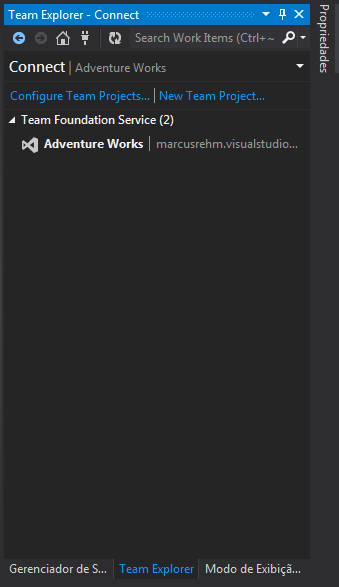
<p>After installing the tools Team Explorer Tab is avaiable inside Data Tools. Click on &ldquo;New Team Project&rdquo; to create a project on Team Foudation Service.
</br>
<img src="http://marcusrehm.github.io/assets/images_posts/analysis-services-projects-and-team-foudantion-services/VSTeamExplorerTab.PNG" alt="Team Explorer Tab" /></p>

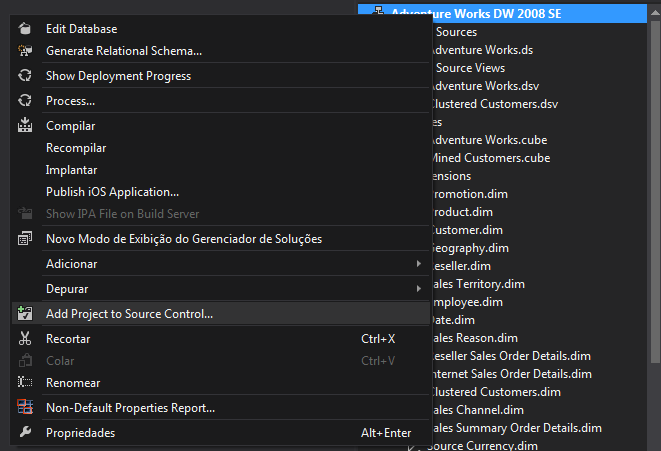
<p>With the project created you can go to Solution Tab, right click on solution file and click &ldquo;Add Project to Source Control&rdquo; and then do the first Check In.
</br>
<img src="http://marcusrehm.github.io/assets/images_posts/analysis-services-projects-and-team-foudantion-services/AddingSolution2SourceControl.png" alt="Team Explorer Tab" /></p>

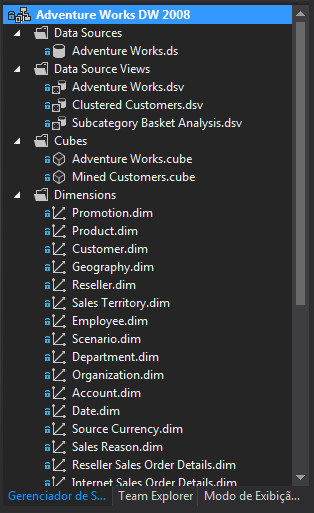
<p>When the proccess finish you&rsquo;ll have your project controlled by TFS with all the goodies of a source control system.
</br>
<img src="http://marcusrehm.github.io/assets/images_posts/analysis-services-projects-and-team-foudantion-services/SolutionAdded2SourceControl.png" alt="files with lock icon" /></p>

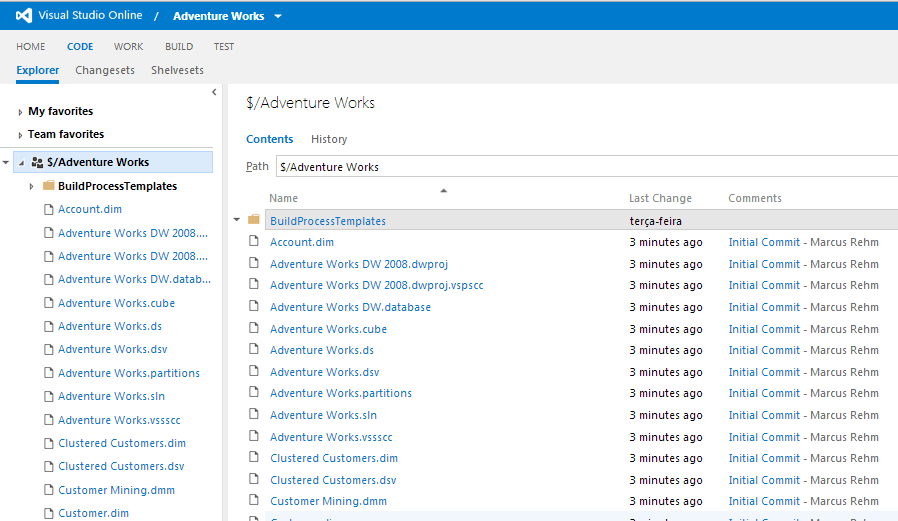
<p>Navigating to the Project TFS site, clicking on the CODE tab you can see all project files just commited.
</br>
<img src="http://marcusrehm.github.io/assets/images_posts/analysis-services-projects-and-team-foudantion-services/TFSCodeScreen.png" alt="TFS Project Code Tab" /></p>

<p></br></p>

<h4>More on Team Foundation Service</h4>

<p>Source Control is just one thing you can use to support team development, TFS comes with three kinds of project management methodologies templates ready to use with your new source versioned project. Work Items (Project Tasks) can be associated with source code at Check In providing trace information about which changes in source code are related to each task.</p>
]]></content>
  </entry>
  
</feed>