<!DOCTYPE html>
<html lang="en-US" class="no-js">
<head>
	<meta charset="UTF-8">
	<meta name="viewport" content="width=device-width, initial-scale=1.0">
	<link rel="profile" href="https://gmpg.org/xfn/11">
	<link rel="pingback" href="https://my.diary.in.th/xmlrpc.php">
	<script>
(function(html){html.className = html.className.replace(/\bno-js\b/,'js')})(document.documentElement);
//# sourceURL=twentyfifteen_javascript_detection
</script>
<title>My.diary.in.th</title>
<meta name='robots' content='max-image-preview:large' />
<link rel='dns-prefetch' href='//secure.gravatar.com' />
<link rel='dns-prefetch' href='//stats.wp.com' />
<link rel='dns-prefetch' href='//v0.wordpress.com' />
<link rel="alternate" type="application/rss+xml" title="My.diary.in.th &raquo; Feed" href="https://my.diary.in.th/feed" />
<link rel="alternate" type="application/rss+xml" title="My.diary.in.th &raquo; Comments Feed" href="https://my.diary.in.th/comments/feed" />
<style id='wp-img-auto-sizes-contain-inline-css'>
img:is([sizes=auto i],[sizes^="auto," i]){contain-intrinsic-size:3000px 1500px}
/*# sourceURL=wp-img-auto-sizes-contain-inline-css */
</style>
<link rel='stylesheet' id='twentyfifteen-jetpack-css' href='https://my.diary.in.th/wp-content/plugins/jetpack/modules/theme-tools/compat/twentyfifteen.css?ver=15.8' media='all' />
<style id='wp-emoji-styles-inline-css'>

	img.wp-smiley, img.emoji {
		display: inline !important;
		border: none !important;
		box-shadow: none !important;
		height: 1em !important;
		width: 1em !important;
		margin: 0 0.07em !important;
		vertical-align: -0.1em !important;
		background: none !important;
		padding: 0 !important;
	}
/*# sourceURL=wp-emoji-styles-inline-css */
</style>
<style id='wp-block-library-inline-css'>
:root{--wp-block-synced-color:#7a00df;--wp-block-synced-color--rgb:122,0,223;--wp-bound-block-color:var(--wp-block-synced-color);--wp-editor-canvas-background:#ddd;--wp-admin-theme-color:#007cba;--wp-admin-theme-color--rgb:0,124,186;--wp-admin-theme-color-darker-10:#006ba1;--wp-admin-theme-color-darker-10--rgb:0,107,160.5;--wp-admin-theme-color-darker-20:#005a87;--wp-admin-theme-color-darker-20--rgb:0,90,135;--wp-admin-border-width-focus:2px}@media (min-resolution:192dpi){:root{--wp-admin-border-width-focus:1.5px}}.wp-element-button{cursor:pointer}:root .has-very-light-gray-background-color{background-color:#eee}:root .has-very-dark-gray-background-color{background-color:#313131}:root .has-very-light-gray-color{color:#eee}:root .has-very-dark-gray-color{color:#313131}:root .has-vivid-green-cyan-to-vivid-cyan-blue-gradient-background{background:linear-gradient(135deg,#00d084,#0693e3)}:root .has-purple-crush-gradient-background{background:linear-gradient(135deg,#34e2e4,#4721fb 50%,#ab1dfe)}:root .has-hazy-dawn-gradient-background{background:linear-gradient(135deg,#faaca8,#dad0ec)}:root .has-subdued-olive-gradient-background{background:linear-gradient(135deg,#fafae1,#67a671)}:root .has-atomic-cream-gradient-background{background:linear-gradient(135deg,#fdd79a,#004a59)}:root .has-nightshade-gradient-background{background:linear-gradient(135deg,#330968,#31cdcf)}:root .has-midnight-gradient-background{background:linear-gradient(135deg,#020381,#2874fc)}:root{--wp--preset--font-size--normal:16px;--wp--preset--font-size--huge:42px}.has-regular-font-size{font-size:1em}.has-larger-font-size{font-size:2.625em}.has-normal-font-size{font-size:var(--wp--preset--font-size--normal)}.has-huge-font-size{font-size:var(--wp--preset--font-size--huge)}.has-text-align-center{text-align:center}.has-text-align-left{text-align:left}.has-text-align-right{text-align:right}.has-fit-text{white-space:nowrap!important}#end-resizable-editor-section{display:none}.aligncenter{clear:both}.items-justified-left{justify-content:flex-start}.items-justified-center{justify-content:center}.items-justified-right{justify-content:flex-end}.items-justified-space-between{justify-content:space-between}.screen-reader-text{border:0;clip-path:inset(50%);height:1px;margin:-1px;overflow:hidden;padding:0;position:absolute;width:1px;word-wrap:normal!important}.screen-reader-text:focus{background-color:#ddd;clip-path:none;color:#444;display:block;font-size:1em;height:auto;left:5px;line-height:normal;padding:15px 23px 14px;text-decoration:none;top:5px;width:auto;z-index:100000}html :where(.has-border-color){border-style:solid}html :where([style*=border-top-color]){border-top-style:solid}html :where([style*=border-right-color]){border-right-style:solid}html :where([style*=border-bottom-color]){border-bottom-style:solid}html :where([style*=border-left-color]){border-left-style:solid}html :where([style*=border-width]){border-style:solid}html :where([style*=border-top-width]){border-top-style:solid}html :where([style*=border-right-width]){border-right-style:solid}html :where([style*=border-bottom-width]){border-bottom-style:solid}html :where([style*=border-left-width]){border-left-style:solid}html :where(img[class*=wp-image-]){height:auto;max-width:100%}:where(figure){margin:0 0 1em}html :where(.is-position-sticky){--wp-admin--admin-bar--position-offset:var(--wp-admin--admin-bar--height,0px)}@media screen and (max-width:600px){html :where(.is-position-sticky){--wp-admin--admin-bar--position-offset:0px}}

/*# sourceURL=wp-block-library-inline-css */
</style>
<style id='classic-theme-styles-inline-css'>
/*! This file is auto-generated */
.wp-block-button__link{color:#fff;background-color:#32373c;border-radius:9999px;box-shadow:none;text-decoration:none;padding:calc(.667em + 2px) calc(1.333em + 2px);font-size:1.125em}.wp-block-file__button{background:#32373c;color:#fff;text-decoration:none}
/*# sourceURL=/wp-includes/css/classic-themes.min.css */
</style>
<link rel='stylesheet' id='dashicons-css' href='https://my.diary.in.th/wp-includes/css/dashicons.min.css?ver=6.9.4' media='all' />
<link rel='stylesheet' id='thickbox-css' href='https://my.diary.in.th/wp-includes/js/thickbox/thickbox.css?ver=6.9.4' media='all' />
<link rel='stylesheet' id='wp-components-css' href='https://my.diary.in.th/wp-includes/css/dist/components/style.min.css?ver=6.9.4' media='all' />
<link rel='stylesheet' id='wp-preferences-css' href='https://my.diary.in.th/wp-includes/css/dist/preferences/style.min.css?ver=6.9.4' media='all' />
<link rel='stylesheet' id='wp-block-editor-css' href='https://my.diary.in.th/wp-includes/css/dist/block-editor/style.min.css?ver=6.9.4' media='all' />
<link rel='stylesheet' id='wp-reusable-blocks-css' href='https://my.diary.in.th/wp-includes/css/dist/reusable-blocks/style.min.css?ver=6.9.4' media='all' />
<link rel='stylesheet' id='wp-patterns-css' href='https://my.diary.in.th/wp-includes/css/dist/patterns/style.min.css?ver=6.9.4' media='all' />
<link rel='stylesheet' id='wp-editor-css' href='https://my.diary.in.th/wp-includes/css/dist/editor/style.min.css?ver=6.9.4' media='all' />
<link rel='stylesheet' id='publitio-block-style-css-css' href='https://my.diary.in.th/wp-content/plugins/publitio/block/dist/blocks.style.build.css?ver=6.9.4' media='all' />
<style id='global-styles-inline-css'>
:root{--wp--preset--aspect-ratio--square: 1;--wp--preset--aspect-ratio--4-3: 4/3;--wp--preset--aspect-ratio--3-4: 3/4;--wp--preset--aspect-ratio--3-2: 3/2;--wp--preset--aspect-ratio--2-3: 2/3;--wp--preset--aspect-ratio--16-9: 16/9;--wp--preset--aspect-ratio--9-16: 9/16;--wp--preset--color--black: #000000;--wp--preset--color--cyan-bluish-gray: #abb8c3;--wp--preset--color--white: #fff;--wp--preset--color--pale-pink: #f78da7;--wp--preset--color--vivid-red: #cf2e2e;--wp--preset--color--luminous-vivid-orange: #ff6900;--wp--preset--color--luminous-vivid-amber: #fcb900;--wp--preset--color--light-green-cyan: #7bdcb5;--wp--preset--color--vivid-green-cyan: #00d084;--wp--preset--color--pale-cyan-blue: #8ed1fc;--wp--preset--color--vivid-cyan-blue: #0693e3;--wp--preset--color--vivid-purple: #9b51e0;--wp--preset--color--dark-gray: #111;--wp--preset--color--light-gray: #f1f1f1;--wp--preset--color--yellow: #f4ca16;--wp--preset--color--dark-brown: #352712;--wp--preset--color--medium-pink: #e53b51;--wp--preset--color--light-pink: #ffe5d1;--wp--preset--color--dark-purple: #2e2256;--wp--preset--color--purple: #674970;--wp--preset--color--blue-gray: #22313f;--wp--preset--color--bright-blue: #55c3dc;--wp--preset--color--light-blue: #e9f2f9;--wp--preset--gradient--vivid-cyan-blue-to-vivid-purple: linear-gradient(135deg,rgb(6,147,227) 0%,rgb(155,81,224) 100%);--wp--preset--gradient--light-green-cyan-to-vivid-green-cyan: linear-gradient(135deg,rgb(122,220,180) 0%,rgb(0,208,130) 100%);--wp--preset--gradient--luminous-vivid-amber-to-luminous-vivid-orange: linear-gradient(135deg,rgb(252,185,0) 0%,rgb(255,105,0) 100%);--wp--preset--gradient--luminous-vivid-orange-to-vivid-red: linear-gradient(135deg,rgb(255,105,0) 0%,rgb(207,46,46) 100%);--wp--preset--gradient--very-light-gray-to-cyan-bluish-gray: linear-gradient(135deg,rgb(238,238,238) 0%,rgb(169,184,195) 100%);--wp--preset--gradient--cool-to-warm-spectrum: linear-gradient(135deg,rgb(74,234,220) 0%,rgb(151,120,209) 20%,rgb(207,42,186) 40%,rgb(238,44,130) 60%,rgb(251,105,98) 80%,rgb(254,248,76) 100%);--wp--preset--gradient--blush-light-purple: linear-gradient(135deg,rgb(255,206,236) 0%,rgb(152,150,240) 100%);--wp--preset--gradient--blush-bordeaux: linear-gradient(135deg,rgb(254,205,165) 0%,rgb(254,45,45) 50%,rgb(107,0,62) 100%);--wp--preset--gradient--luminous-dusk: linear-gradient(135deg,rgb(255,203,112) 0%,rgb(199,81,192) 50%,rgb(65,88,208) 100%);--wp--preset--gradient--pale-ocean: linear-gradient(135deg,rgb(255,245,203) 0%,rgb(182,227,212) 50%,rgb(51,167,181) 100%);--wp--preset--gradient--electric-grass: linear-gradient(135deg,rgb(202,248,128) 0%,rgb(113,206,126) 100%);--wp--preset--gradient--midnight: linear-gradient(135deg,rgb(2,3,129) 0%,rgb(40,116,252) 100%);--wp--preset--gradient--dark-gray-gradient-gradient: linear-gradient(90deg, rgba(17,17,17,1) 0%, rgba(42,42,42,1) 100%);--wp--preset--gradient--light-gray-gradient: linear-gradient(90deg, rgba(241,241,241,1) 0%, rgba(215,215,215,1) 100%);--wp--preset--gradient--white-gradient: linear-gradient(90deg, rgba(255,255,255,1) 0%, rgba(230,230,230,1) 100%);--wp--preset--gradient--yellow-gradient: linear-gradient(90deg, rgba(244,202,22,1) 0%, rgba(205,168,10,1) 100%);--wp--preset--gradient--dark-brown-gradient: linear-gradient(90deg, rgba(53,39,18,1) 0%, rgba(91,67,31,1) 100%);--wp--preset--gradient--medium-pink-gradient: linear-gradient(90deg, rgba(229,59,81,1) 0%, rgba(209,28,51,1) 100%);--wp--preset--gradient--light-pink-gradient: linear-gradient(90deg, rgba(255,229,209,1) 0%, rgba(255,200,158,1) 100%);--wp--preset--gradient--dark-purple-gradient: linear-gradient(90deg, rgba(46,34,86,1) 0%, rgba(66,48,123,1) 100%);--wp--preset--gradient--purple-gradient: linear-gradient(90deg, rgba(103,73,112,1) 0%, rgba(131,93,143,1) 100%);--wp--preset--gradient--blue-gray-gradient: linear-gradient(90deg, rgba(34,49,63,1) 0%, rgba(52,75,96,1) 100%);--wp--preset--gradient--bright-blue-gradient: linear-gradient(90deg, rgba(85,195,220,1) 0%, rgba(43,180,211,1) 100%);--wp--preset--gradient--light-blue-gradient: linear-gradient(90deg, rgba(233,242,249,1) 0%, rgba(193,218,238,1) 100%);--wp--preset--font-size--small: 13px;--wp--preset--font-size--medium: 20px;--wp--preset--font-size--large: 36px;--wp--preset--font-size--x-large: 42px;--wp--preset--spacing--20: 0.44rem;--wp--preset--spacing--30: 0.67rem;--wp--preset--spacing--40: 1rem;--wp--preset--spacing--50: 1.5rem;--wp--preset--spacing--60: 2.25rem;--wp--preset--spacing--70: 3.38rem;--wp--preset--spacing--80: 5.06rem;--wp--preset--shadow--natural: 6px 6px 9px rgba(0, 0, 0, 0.2);--wp--preset--shadow--deep: 12px 12px 50px rgba(0, 0, 0, 0.4);--wp--preset--shadow--sharp: 6px 6px 0px rgba(0, 0, 0, 0.2);--wp--preset--shadow--outlined: 6px 6px 0px -3px rgb(255, 255, 255), 6px 6px rgb(0, 0, 0);--wp--preset--shadow--crisp: 6px 6px 0px rgb(0, 0, 0);}:where(.is-layout-flex){gap: 0.5em;}:where(.is-layout-grid){gap: 0.5em;}body .is-layout-flex{display: flex;}.is-layout-flex{flex-wrap: wrap;align-items: center;}.is-layout-flex > :is(*, div){margin: 0;}body .is-layout-grid{display: grid;}.is-layout-grid > :is(*, div){margin: 0;}:where(.wp-block-columns.is-layout-flex){gap: 2em;}:where(.wp-block-columns.is-layout-grid){gap: 2em;}:where(.wp-block-post-template.is-layout-flex){gap: 1.25em;}:where(.wp-block-post-template.is-layout-grid){gap: 1.25em;}.has-black-color{color: var(--wp--preset--color--black) !important;}.has-cyan-bluish-gray-color{color: var(--wp--preset--color--cyan-bluish-gray) !important;}.has-white-color{color: var(--wp--preset--color--white) !important;}.has-pale-pink-color{color: var(--wp--preset--color--pale-pink) !important;}.has-vivid-red-color{color: var(--wp--preset--color--vivid-red) !important;}.has-luminous-vivid-orange-color{color: var(--wp--preset--color--luminous-vivid-orange) !important;}.has-luminous-vivid-amber-color{color: var(--wp--preset--color--luminous-vivid-amber) !important;}.has-light-green-cyan-color{color: var(--wp--preset--color--light-green-cyan) !important;}.has-vivid-green-cyan-color{color: var(--wp--preset--color--vivid-green-cyan) !important;}.has-pale-cyan-blue-color{color: var(--wp--preset--color--pale-cyan-blue) !important;}.has-vivid-cyan-blue-color{color: var(--wp--preset--color--vivid-cyan-blue) !important;}.has-vivid-purple-color{color: var(--wp--preset--color--vivid-purple) !important;}.has-black-background-color{background-color: var(--wp--preset--color--black) !important;}.has-cyan-bluish-gray-background-color{background-color: var(--wp--preset--color--cyan-bluish-gray) !important;}.has-white-background-color{background-color: var(--wp--preset--color--white) !important;}.has-pale-pink-background-color{background-color: var(--wp--preset--color--pale-pink) !important;}.has-vivid-red-background-color{background-color: var(--wp--preset--color--vivid-red) !important;}.has-luminous-vivid-orange-background-color{background-color: var(--wp--preset--color--luminous-vivid-orange) !important;}.has-luminous-vivid-amber-background-color{background-color: var(--wp--preset--color--luminous-vivid-amber) !important;}.has-light-green-cyan-background-color{background-color: var(--wp--preset--color--light-green-cyan) !important;}.has-vivid-green-cyan-background-color{background-color: var(--wp--preset--color--vivid-green-cyan) !important;}.has-pale-cyan-blue-background-color{background-color: var(--wp--preset--color--pale-cyan-blue) !important;}.has-vivid-cyan-blue-background-color{background-color: var(--wp--preset--color--vivid-cyan-blue) !important;}.has-vivid-purple-background-color{background-color: var(--wp--preset--color--vivid-purple) !important;}.has-black-border-color{border-color: var(--wp--preset--color--black) !important;}.has-cyan-bluish-gray-border-color{border-color: var(--wp--preset--color--cyan-bluish-gray) !important;}.has-white-border-color{border-color: var(--wp--preset--color--white) !important;}.has-pale-pink-border-color{border-color: var(--wp--preset--color--pale-pink) !important;}.has-vivid-red-border-color{border-color: var(--wp--preset--color--vivid-red) !important;}.has-luminous-vivid-orange-border-color{border-color: var(--wp--preset--color--luminous-vivid-orange) !important;}.has-luminous-vivid-amber-border-color{border-color: var(--wp--preset--color--luminous-vivid-amber) !important;}.has-light-green-cyan-border-color{border-color: var(--wp--preset--color--light-green-cyan) !important;}.has-vivid-green-cyan-border-color{border-color: var(--wp--preset--color--vivid-green-cyan) !important;}.has-pale-cyan-blue-border-color{border-color: var(--wp--preset--color--pale-cyan-blue) !important;}.has-vivid-cyan-blue-border-color{border-color: var(--wp--preset--color--vivid-cyan-blue) !important;}.has-vivid-purple-border-color{border-color: var(--wp--preset--color--vivid-purple) !important;}.has-vivid-cyan-blue-to-vivid-purple-gradient-background{background: var(--wp--preset--gradient--vivid-cyan-blue-to-vivid-purple) !important;}.has-light-green-cyan-to-vivid-green-cyan-gradient-background{background: var(--wp--preset--gradient--light-green-cyan-to-vivid-green-cyan) !important;}.has-luminous-vivid-amber-to-luminous-vivid-orange-gradient-background{background: var(--wp--preset--gradient--luminous-vivid-amber-to-luminous-vivid-orange) !important;}.has-luminous-vivid-orange-to-vivid-red-gradient-background{background: var(--wp--preset--gradient--luminous-vivid-orange-to-vivid-red) !important;}.has-very-light-gray-to-cyan-bluish-gray-gradient-background{background: var(--wp--preset--gradient--very-light-gray-to-cyan-bluish-gray) !important;}.has-cool-to-warm-spectrum-gradient-background{background: var(--wp--preset--gradient--cool-to-warm-spectrum) !important;}.has-blush-light-purple-gradient-background{background: var(--wp--preset--gradient--blush-light-purple) !important;}.has-blush-bordeaux-gradient-background{background: var(--wp--preset--gradient--blush-bordeaux) !important;}.has-luminous-dusk-gradient-background{background: var(--wp--preset--gradient--luminous-dusk) !important;}.has-pale-ocean-gradient-background{background: var(--wp--preset--gradient--pale-ocean) !important;}.has-electric-grass-gradient-background{background: var(--wp--preset--gradient--electric-grass) !important;}.has-midnight-gradient-background{background: var(--wp--preset--gradient--midnight) !important;}.has-small-font-size{font-size: var(--wp--preset--font-size--small) !important;}.has-medium-font-size{font-size: var(--wp--preset--font-size--medium) !important;}.has-large-font-size{font-size: var(--wp--preset--font-size--large) !important;}.has-x-large-font-size{font-size: var(--wp--preset--font-size--x-large) !important;}
/*# sourceURL=global-styles-inline-css */
</style>

<link rel='stylesheet' id='cptch_stylesheet-css' href='https://my.diary.in.th/wp-content/plugins/captcha/css/front_end_style.css?ver=4.4.5' media='all' />
<link rel='stylesheet' id='cptch_desktop_style-css' href='https://my.diary.in.th/wp-content/plugins/captcha/css/desktop_style.css?ver=4.4.5' media='all' />
<link rel='stylesheet' id='publitio-css' href='https://my.diary.in.th/wp-content/plugins/publitio/public/css/publitio-public.css?ver=2.2.6' media='all' />
<link rel='stylesheet' id='tag-groups-css-frontend-structure-css' href='https://my.diary.in.th/wp-content/plugins/tag-groups/assets/css/jquery-ui.structure.min.css?ver=2.1.2' media='all' />
<link rel='stylesheet' id='tag-groups-css-frontend-theme-css' href='https://my.diary.in.th/wp-content/plugins/tag-groups/assets/css/delta/jquery-ui.theme.min.css?ver=2.1.2' media='all' />
<link rel='stylesheet' id='tag-groups-css-frontend-css' href='https://my.diary.in.th/wp-content/plugins/tag-groups/assets/css/frontend.min.css?ver=2.1.2' media='all' />
<link rel='stylesheet' id='twentyfifteen-fonts-css' href='https://my.diary.in.th/wp-content/themes/twentyfifteen/assets/fonts/noto-sans-plus-noto-serif-plus-inconsolata.css?ver=20230328' media='all' />
<link rel='stylesheet' id='genericons-css' href='https://my.diary.in.th/wp-content/plugins/jetpack/_inc/genericons/genericons/genericons.css?ver=3.1' media='all' />
<link rel='stylesheet' id='twentyfifteen-style-css' href='https://my.diary.in.th/wp-content/themes/twentyfifteen/style.css?ver=20251202' media='all' />
<link rel='stylesheet' id='twentyfifteen-block-style-css' href='https://my.diary.in.th/wp-content/themes/twentyfifteen/css/blocks.css?ver=20240715' media='all' />
<link rel='stylesheet' id='wp_review-style-css' href='https://my.diary.in.th/wp-content/plugins/wp-review/public/css/wp-review.css?ver=5.3.5' media='all' />
<link rel='stylesheet' id='enlighterjs-css' href='https://my.diary.in.th/wp-content/plugins/enlighter/cache/enlighterjs.min.css?ver=1He/lFyBgLyzk9M' media='all' />
<script src="https://my.diary.in.th/wp-includes/js/jquery/jquery.min.js?ver=3.7.1" id="jquery-core-js"></script>
<script src="https://my.diary.in.th/wp-includes/js/jquery/jquery-migrate.min.js?ver=3.4.1" id="jquery-migrate-js"></script>
<script src="https://my.diary.in.th/wp-content/plugins/publitio/public/js/publitio-public.js?ver=2.2.6" id="publitio-js"></script>
<script src="https://my.diary.in.th/wp-content/plugins/tag-groups/assets/js/frontend.min.js?ver=2.1.2" id="tag-groups-js-frontend-js"></script>
<script id="twentyfifteen-script-js-extra">
var screenReaderText = {"expand":"\u003Cspan class=\"screen-reader-text\"\u003Eexpand child menu\u003C/span\u003E","collapse":"\u003Cspan class=\"screen-reader-text\"\u003Ecollapse child menu\u003C/span\u003E"};
//# sourceURL=twentyfifteen-script-js-extra
</script>
<script src="https://my.diary.in.th/wp-content/themes/twentyfifteen/js/functions.js?ver=20250729" id="twentyfifteen-script-js" defer data-wp-strategy="defer"></script>
<link rel="https://api.w.org/" href="https://my.diary.in.th/wp-json/" /><link rel="EditURI" type="application/rsd+xml" title="RSD" href="https://my.diary.in.th/xmlrpc.php?rsd" />
<meta name="generator" content="WordPress 6.9.4" />
<link rel='shortlink' href='https://wp.me/4vI3' />
	<style>img#wpstats{display:none}</style>
		
<!-- Jetpack Open Graph Tags -->
<meta property="og:type" content="website" />
<meta property="og:title" content="My.diary.in.th" />
<meta property="og:url" content="https://my.diary.in.th/" />
<meta property="og:site_name" content="My.diary.in.th" />
<meta property="og:locale" content="en_US" />

<!-- End Jetpack Open Graph Tags -->
<link rel='stylesheet' id='jetpack-swiper-library-css' href='https://my.diary.in.th/wp-content/plugins/jetpack/_inc/blocks/swiper.css?ver=15.8' media='all' />
<link rel='stylesheet' id='jetpack-carousel-css' href='https://my.diary.in.th/wp-content/plugins/jetpack/modules/carousel/jetpack-carousel.css?ver=15.8' media='all' />

</head>

<body class="home blog wp-embed-responsive wp-theme-twentyfifteen">
<div id="page" class="hfeed site">
	<a class="skip-link screen-reader-text" href="#content">
		Skip to content	</a>

	<div id="sidebar" class="sidebar">
		<header id="masthead" class="site-header">
			<div class="site-branding">
									<h1 class="site-title"><a href="https://my.diary.in.th/" rel="home" aria-current="page">My.diary.in.th</a></h1>
				
				<button class="secondary-toggle">Menu and widgets</button>
			</div><!-- .site-branding -->
		</header><!-- .site-header -->

			<div id="secondary" class="secondary">

					<nav id="site-navigation" class="main-navigation">
				<div class="menu-main-container"><ul id="menu-main" class="nav-menu"><li id="menu-item-1472" class="menu-item menu-item-type-custom menu-item-object-custom current-menu-item current_page_item menu-item-home menu-item-1472"><a href="http://my.diary.in.th/" aria-current="page">Home</a></li>
<li id="menu-item-1555" class="menu-item menu-item-type-post_type menu-item-object-page menu-item-1555"><a href="https://my.diary.in.th/post-list">Post List</a></li>
</ul></div>			</nav><!-- .main-navigation -->


	</div><!-- .secondary -->

	</div><!-- .sidebar -->

	<div id="content" class="site-content">

	<div id="primary" class="content-area">
		<main id="main" class="site-main">


<article id="post-1740" class="post-1740 post type-post status-publish format-standard post-password-required hentry category-2">
	
	<header class="entry-header">
		<h2 class="entry-title"><a href="https://my.diary.in.th/archives/1740" rel="bookmark">Protected: Test</a></h2>	</header><!-- .entry-header -->

	<div class="entry-content">
		<form action="https://my.diary.in.th/wp-login.php?action=postpass" class="post-password-form" method="post"><input type="hidden" name="redirect_to" value="https://my.diary.in.th/archives/1740" /></p>
<p>This content is password-protected. To view it, please enter the password below.</p>
<p><label for="pwbox-1740">Password: <input name="post_password" id="pwbox-1740" type="password" spellcheck="false" required size="20" /></label> <input type="submit" name="Submit" value="Enter" /></p>
</form>
	</div><!-- .entry-content -->

	
	<footer class="entry-footer">
		<span class="posted-on"><span class="screen-reader-text">Posted on </span><a href="https://my.diary.in.th/archives/1740" rel="bookmark"><time class="entry-date published" datetime="2019-10-25T15:25:25+07:00">25 October 2562</time><time class="updated" datetime="2019-10-25T15:25:27+07:00">25 October 2019</time></a></span><span class="cat-links"><span class="screen-reader-text">Categories </span><a href="https://my.diary.in.th/archives/category/%e0%b8%82%e0%b9%88%e0%b8%b2%e0%b8%a7%e0%b8%99%e0%b9%88%e0%b8%b2%e0%b8%aa%e0%b8%99%e0%b9%83%e0%b8%88" rel="category tag">เรื่องน่าสนใจ</a></span>			</footer><!-- .entry-footer -->

</article><!-- #post-1740 -->

<article id="post-1715" class="post-1715 post type-post status-publish format-standard hentry category-codeigniter category-php tag-codeigniter">
	
	<header class="entry-header">
		<h2 class="entry-title"><a href="https://my.diary.in.th/archives/1715" rel="bookmark">CodeIgniter 3 + Tank Auth</a></h2>	</header><!-- .entry-header -->

	<div class="entry-content">
		<p>Tank Auth is an authentication library for PHP-framework CodeIgniter. It&#8217;s based on DX Auth, althouth the code was seriously reworked.</p>
<p><a href="https://github.com/mmraja83/codeigniter3-tankauth">https://github.com/mmraja83/codeigniter3-tankauth</a></p>
	</div><!-- .entry-content -->

	
	<footer class="entry-footer">
		<span class="posted-on"><span class="screen-reader-text">Posted on </span><a href="https://my.diary.in.th/archives/1715" rel="bookmark"><time class="entry-date published" datetime="2018-04-16T15:26:24+07:00">16 April 2561</time><time class="updated" datetime="2018-04-16T15:27:32+07:00">16 April 2018</time></a></span><span class="cat-links"><span class="screen-reader-text">Categories </span><a href="https://my.diary.in.th/archives/category/php/codeigniter" rel="category tag">CodeIgniter</a>, <a href="https://my.diary.in.th/archives/category/php" rel="category tag">PHP</a></span><span class="tags-links"><span class="screen-reader-text">Tags </span><a href="https://my.diary.in.th/archives/tag/codeigniter" rel="tag">codeigniter</a></span>			</footer><!-- .entry-footer -->

</article><!-- #post-1715 -->

<article id="post-1713" class="post-1713 post type-post status-publish format-standard hentry category-codeigniter category-php tag-codeigniter tag-smarty">
	
	<header class="entry-header">
		<h2 class="entry-title"><a href="https://my.diary.in.th/archives/1713" rel="bookmark">Smarty templating engine integration for CodeIgniter 3.0+</a></h2>	</header><!-- .entry-header -->

	<div class="entry-content">
		<p>Smarty templating engine integration for Codeigniter 3.0+ with inbuilt theming and asset management.</p>
<p><a href="https://github.com/Vheissu/Ci-Smarty">https://github.com/Vheissu/Ci-Smarty</a></p>
	</div><!-- .entry-content -->

	
	<footer class="entry-footer">
		<span class="posted-on"><span class="screen-reader-text">Posted on </span><a href="https://my.diary.in.th/archives/1713" rel="bookmark"><time class="entry-date published" datetime="2018-04-16T10:02:41+07:00">16 April 2561</time><time class="updated" datetime="2018-04-16T10:34:36+07:00">16 April 2018</time></a></span><span class="cat-links"><span class="screen-reader-text">Categories </span><a href="https://my.diary.in.th/archives/category/php/codeigniter" rel="category tag">CodeIgniter</a>, <a href="https://my.diary.in.th/archives/category/php" rel="category tag">PHP</a></span><span class="tags-links"><span class="screen-reader-text">Tags </span><a href="https://my.diary.in.th/archives/tag/codeigniter" rel="tag">codeigniter</a>, <a href="https://my.diary.in.th/archives/tag/smarty" rel="tag">Smarty</a></span>			</footer><!-- .entry-footer -->

</article><!-- #post-1713 -->

<article id="post-1705" class="post-1705 post type-post status-publish format-standard hentry category-2 tag-centos tag-linux">
	
	<header class="entry-header">
		<h2 class="entry-title"><a href="https://my.diary.in.th/archives/1705" rel="bookmark">Linux: Centos Kernel panic – not syncing: VFS: Unable to mount root fs on unknown-block(0,0)</a></h2>	</header><!-- .entry-header -->

	<div class="entry-content">
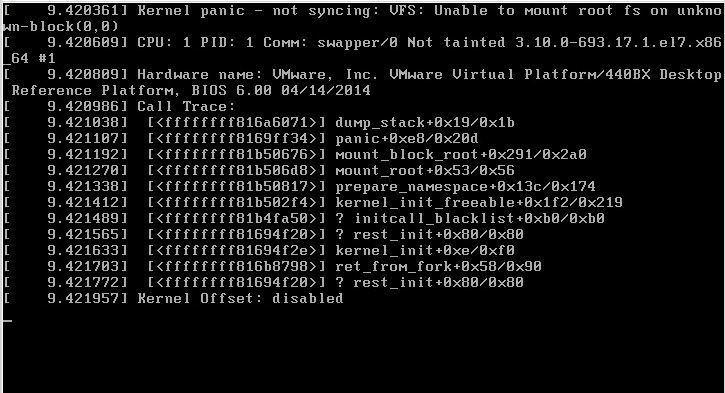
		<p>สั่ง reboot แล้วเครื่องเงียบหายไป  พอไปดูที่ console พบข้อความแจ้ง Kernel panic – not syncing: VFS: Unable to mount root fs on unknown-block(0,0)</p>
<p><img fetchpriority="high" decoding="async" data-attachment-id="1706" data-permalink="https://my.diary.in.th/archives/1705/31-4" data-orig-file="https://cdn.diary.in.th/file/w_725,h_393,c_fit,q_80/diary/31-4.jpg" data-orig-size="725,393" data-comments-opened="0" data-image-meta="{&quot;aperture&quot;:&quot;0&quot;,&quot;credit&quot;:&quot;&quot;,&quot;camera&quot;:&quot;&quot;,&quot;caption&quot;:&quot;&quot;,&quot;created_timestamp&quot;:&quot;0&quot;,&quot;copyright&quot;:&quot;&quot;,&quot;focal_length&quot;:&quot;0&quot;,&quot;iso&quot;:&quot;0&quot;,&quot;shutter_speed&quot;:&quot;0&quot;,&quot;title&quot;:&quot;&quot;,&quot;orientation&quot;:&quot;0&quot;}" data-image-title="31.4" data-image-description="" data-image-caption="" data-large-file="https://cdn.diary.in.th/file/q_80/diary/31-4.jpg" class="aligncenter size-full wp-image-1706" src="https://cdn.diary.in.th/file/w_725,h_393,c_fit,q_80/diary/31-4.jpg" alt="" width="725" height="393" srcset="https://cdn.diary.in.th/file/w_725,c_fit,q_80/diary/31-4.jpg 725w, https://cdn.diary.in.th/file/w_300,h_163,c_fit,q_80/diary/31-4.jpg 300w" sizes="(max-width: 725px) 100vw, 725px" /></p>
<p>วิธีแก้ขั้นต้นก็ต้องหาทางบูทเครื่องให้ได้ก่อน โดยเลือก kernel เวอร์ชันเก่า ๆ ในระหว่างขั้นตอนการบูทเครื่อง</p>
<p>เมื่อลองค้นดูในอินเทอร์เน็ตก็มีหลายคนบอกว่าเป็นปัญหาที่ไฟล์ initramfs ใน /boot ที่มีปัญหาระหว่างการ upgrade kernel</p>
<p>วิธีแก้ที่ผมลองทำแล้วสำเร็จเลยคือสั่ง</p>
<pre class="EnlighterJSRAW" data-enlighter-language="shell"># yum reinstall kernel</pre>
<p>ตัวอย่างผลลัพธ์</p>
<pre class="EnlighterJSRAW" data-enlighter-language="no-highlight">Loaded plugins: fastestmirror, replace
Skipping the running kernel: kernel-3.10.0-514.26.2.el7.x86_64
Loading mirror speeds from cached hostfile
* base: mirror2.totbb.net
* epel: mirror2.totbb.net
* extras: mirror2.totbb.net
* ius: mirrors.tongji.edu.cn
* updates: mirror2.totbb.net
Resolving Dependencies
--&gt; Running transaction check
---&gt; Package kernel.x86_64 0:3.10.0-693.2.2.el7 will be installed
---&gt; Package kernel.x86_64 0:3.10.0-693.5.2.el7 will be installed
---&gt; Package kernel.x86_64 0:3.10.0-693.11.1.el7 will be installed
---&gt; Package kernel.x86_64 0:3.10.0-693.11.6.el7 will be installed
---&gt; Package kernel.x86_64 0:3.10.0-693.17.1.el7 will be installed
--&gt; Finished Dependency Resolution

Dependencies Resolved

===========================================================================================================================
Package Arch Version Repository Size
===========================================================================================================================
Reinstalling:
kernel x86_64 3.10.0-693.2.2.el7 updates 43 M
kernel x86_64 3.10.0-693.5.2.el7 updates 43 M
kernel x86_64 3.10.0-693.11.1.el7 updates 43 M
kernel x86_64 3.10.0-693.11.6.el7 updates 43 M
kernel x86_64 3.10.0-693.17.1.el7 updates 43 M

Transaction Summary
===========================================================================================================================
Reinstall 5 Packages

Total size: 215 M
Total download size: 172 M
Installed size: 297 M
Is this ok [y/d/N]: y
Downloading packages:
Delta RPMs disabled because /usr/bin/applydeltarpm not installed.
(1/4): kernel-3.10.0-693.5.2.el7.x86_64.rpm | 43 MB 00:00:01
(2/4): kernel-3.10.0-693.2.2.el7.x86_64.rpm | 43 MB 00:00:01
(3/4): kernel-3.10.0-693.11.1.el7.x86_64.rpm | 43 MB 00:00:01
(4/4): kernel-3.10.0-693.11.6.el7.x86_64.rpm | 43 MB 00:00:01
---------------------------------------------------------------------------------------------------------------------------
Total 63 MB/s | 172 MB 00:00:02
Running transaction check
Running transaction test
Transaction test succeeded
Running transaction
Installing : kernel-3.10.0-693.2.2.el7.x86_64 1/5
Installing : kernel-3.10.0-693.11.6.el7.x86_64 2/5
Installing : kernel-3.10.0-693.11.1.el7.x86_64 3/5
Installing : kernel-3.10.0-693.17.1.el7.x86_64 4/5
Installing : kernel-3.10.0-693.5.2.el7.x86_64 5/5

Verifying : kernel-3.10.0-693.5.2.el7.x86_64 1/5
Verifying : kernel-3.10.0-693.17.1.el7.x86_64 2/5
Verifying : kernel-3.10.0-693.11.1.el7.x86_64 3/5
Verifying : kernel-3.10.0-693.11.6.el7.x86_64 4/5
Verifying : kernel-3.10.0-693.2.2.el7.x86_64 5/5

Installed:
kernel.x86_64 0:3.10.0-693.2.2.el7 kernel.x86_64 0:3.10.0-693.5.2.el7 kernel.x86_64 0:3.10.0-693.11.1.el7
kernel.x86_64 0:3.10.0-693.11.6.el7 kernel.x86_64 0:3.10.0-693.17.1.el7

Complete!</pre>
<p>หายใจลึก ๆ แล้ว สั่ง reboot  ถ้าบูทสำเร็จก็ยินดีด้วย 🙂</p>
<p>แต่ถ้าไม่สำเร็จ ลองทำตามขั้นตอนต่อไปนี้</p>
<p>1.  Boot into a live same version of Centos. Choose the recovery options.<br />
2. Go through all of the default prompts, then drop down to shell.<br />
3. Type: chroot /mnt/sysimage<br />
4. Type: cd /boot<br />
5. Type: ls -l initramfs*<br />
6. Look at the version numbers and determine the last version that was installed.  Eg. initramfs-2.6.32-358.el6.x86_64.img<br />
7. Type: dracut -f /boot/initramfs-2.6.32-358.el6.x86_64.img 2.6.32-358.el6.x86_64</p>
<p>This will rebuild the initramfs.  On reboot your system should come back up.</p>
<p>Source: <a href="http://www.techpository.com/linux-centos-6redhat-kernel-panic-not-syncing-vfs-unable-to-mount-root-fs-on-unknown-block00/">http://www.techpository.com/linux-centos-6redhat-kernel-panic-not-syncing-vfs-unable-to-mount-root-fs-on-unknown-block00/</a></p>
	</div><!-- .entry-content -->

	
	<footer class="entry-footer">
		<span class="posted-on"><span class="screen-reader-text">Posted on </span><a href="https://my.diary.in.th/archives/1705" rel="bookmark"><time class="entry-date published" datetime="2018-03-01T20:58:56+07:00">1 March 2561</time><time class="updated" datetime="2018-03-01T21:21:08+07:00">1 March 2018</time></a></span><span class="cat-links"><span class="screen-reader-text">Categories </span><a href="https://my.diary.in.th/archives/category/%e0%b8%82%e0%b9%88%e0%b8%b2%e0%b8%a7%e0%b8%99%e0%b9%88%e0%b8%b2%e0%b8%aa%e0%b8%99%e0%b9%83%e0%b8%88" rel="category tag">เรื่องน่าสนใจ</a></span><span class="tags-links"><span class="screen-reader-text">Tags </span><a href="https://my.diary.in.th/archives/tag/centos" rel="tag">CentOS</a>, <a href="https://my.diary.in.th/archives/tag/linux" rel="tag">linux</a></span>			</footer><!-- .entry-footer -->

</article><!-- #post-1705 -->

<article id="post-1671" class="post-1671 post type-post status-publish format-standard hentry category-domain tag-dns">
	
	<header class="entry-header">
		<h2 class="entry-title"><a href="https://my.diary.in.th/archives/1671" rel="bookmark">DNS Zone file &#8211; TTL Value recommendations</a></h2>	</header><!-- .entry-header -->

	<div class="entry-content">
		<h4>TTL</h4>
<ul>
<li>Infrastructure records (NS related): 1 &#8211; 2 days (86400 &#8211; 172800 seconds)</li>
<li>Default $TTL: 1 hour &#8211; 1 day</li>
<li>Minimum Zone TTL: 5 &#8211; 10 minutes</li>
<li>Maximum Zone TTL: 1 &#8211; 2 days</li>
</ul>
<h4>SOA Refresh and Retry</h4>
<p><img decoding="async" data-attachment-id="1682" data-permalink="https://my.diary.in.th/archives/1671/2018-01-31_17-29-11-3" data-orig-file="https://cdn.diary.in.th/file/w_517,h_333,c_fit,q_80/diary/2018-01-31_17-29-11-3.png" data-orig-size="517,333" data-comments-opened="0" data-image-meta="{&quot;aperture&quot;:&quot;0&quot;,&quot;credit&quot;:&quot;&quot;,&quot;camera&quot;:&quot;&quot;,&quot;caption&quot;:&quot;&quot;,&quot;created_timestamp&quot;:&quot;0&quot;,&quot;copyright&quot;:&quot;&quot;,&quot;focal_length&quot;:&quot;0&quot;,&quot;iso&quot;:&quot;0&quot;,&quot;shutter_speed&quot;:&quot;0&quot;,&quot;title&quot;:&quot;&quot;,&quot;orientation&quot;:&quot;0&quot;}" data-image-title="2018-01-31_17-29-11" data-image-description="" data-image-caption="" data-large-file="https://cdn.diary.in.th/file/q_80/diary/2018-01-31_17-29-11-3.png" class="aligncenter size-full wp-image-1682" src="https://cdn.diary.in.th/file/w_517,h_333,c_fit,q_80/diary/2018-01-31_17-29-11-3.png" alt="" width="517" height="333" srcset="https://cdn.diary.in.th/file/w_517,c_fit,q_80/diary/2018-01-31_17-29-11-3.png 517w, https://cdn.diary.in.th/file/w_300,h_193,c_fit,q_80/diary/2018-01-31_17-29-11-3.png 300w" sizes="(max-width: 517px) 100vw, 517px" /></p>
<ul>
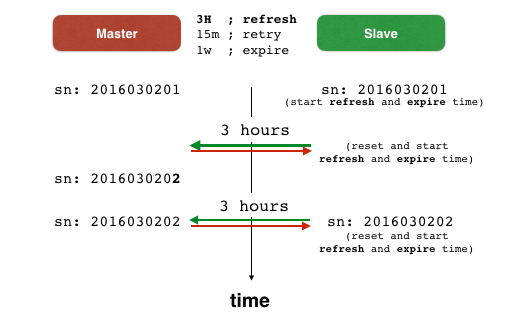
<li>SOA Refresh: 1 &#8211; 4 hours<br />
<img decoding="async" data-attachment-id="1684" data-permalink="https://my.diary.in.th/archives/1671/2018-01-31_19-01-09" data-orig-file="https://cdn.diary.in.th/file/w_503,h_330,c_fit,q_80/diary/2018-01-31_19-01-09.png" data-orig-size="503,330" data-comments-opened="0" data-image-meta="{&quot;aperture&quot;:&quot;0&quot;,&quot;credit&quot;:&quot;&quot;,&quot;camera&quot;:&quot;&quot;,&quot;caption&quot;:&quot;&quot;,&quot;created_timestamp&quot;:&quot;0&quot;,&quot;copyright&quot;:&quot;&quot;,&quot;focal_length&quot;:&quot;0&quot;,&quot;iso&quot;:&quot;0&quot;,&quot;shutter_speed&quot;:&quot;0&quot;,&quot;title&quot;:&quot;&quot;,&quot;orientation&quot;:&quot;0&quot;}" data-image-title="2018-01-31_19-01-09" data-image-description="" data-image-caption="" data-large-file="https://cdn.diary.in.th/file/q_80/diary/2018-01-31_19-01-09.png" class="aligncenter size-full wp-image-1684" src="https://cdn.diary.in.th/file/w_503,h_330,c_fit,q_80/diary/2018-01-31_19-01-09.png" alt="" width="503" height="330" srcset="https://cdn.diary.in.th/file/w_503,c_fit,q_80/diary/2018-01-31_19-01-09.png 503w, https://cdn.diary.in.th/file/w_300,h_197,c_fit,q_80/diary/2018-01-31_19-01-09.png 300w" sizes="(max-width: 503px) 100vw, 503px" /></li>
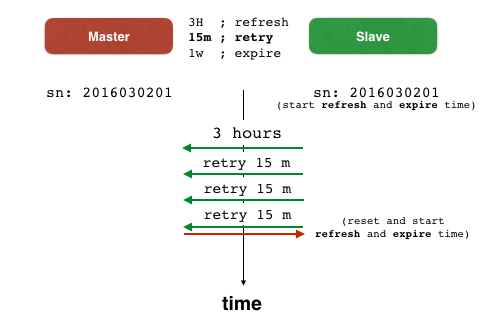
<li>SOA Retry: 15 &#8211; 60 minutes</li>
</ul>
<h4>SOA Expire</h4>
<ul>
<li>SOA Expire: 1 – 3 weeks</li>
</ul>
<h4>SOA minimum</h4>
<ul>
<li>SOA Minimum: 15 &#8211; 60 minutes</li>
</ul>
<p>Source: <a href="https://securityblog.switch.ch/2014/02/06/zone-file-recommendations/">https://securityblog.switch.ch/2014/02/06/zone-file-recommendations/</a></p>
	</div><!-- .entry-content -->

	
	<footer class="entry-footer">
		<span class="posted-on"><span class="screen-reader-text">Posted on </span><a href="https://my.diary.in.th/archives/1671" rel="bookmark"><time class="entry-date published" datetime="2018-01-31T17:04:10+07:00">31 January 2561</time><time class="updated" datetime="2018-01-31T19:40:06+07:00">31 January 2018</time></a></span><span class="cat-links"><span class="screen-reader-text">Categories </span><a href="https://my.diary.in.th/archives/category/domain" rel="category tag">Domain</a></span><span class="tags-links"><span class="screen-reader-text">Tags </span><a href="https://my.diary.in.th/archives/tag/dns" rel="tag">DNS</a></span>			</footer><!-- .entry-footer -->

</article><!-- #post-1671 -->

<article id="post-1620" class="post-1620 post type-post status-publish format-standard hentry category-2 category-postfix tag-email tag-postfix">
	
	<header class="entry-header">
		<h2 class="entry-title"><a href="https://my.diary.in.th/archives/1620" rel="bookmark">วิธีการตั้งค่าให้ Postfix เป็น mail server สำรอง</a></h2>	</header><!-- .entry-header -->

	<div class="entry-content">
		<p>เราสามารถตั้งค่า Postfix  ให้เป็น mail server สำรอง เพื่อรับอีเมลแทนในกรณีที่ mail server  หลักเกิดปัญหา และเมื่อ mail server หลักสามารถใช้งานได้  mail server สำรองก็จะส่งอีเมลไปที่ mail server  หลัก</p>
<p><span style="font-family: -apple-system, BlinkMacSystemFont, 'Segoe UI', Roboto, Oxygen-Sans, Ubuntu, Cantarell, 'Helvetica Neue', sans-serif;">สมมติว่าเรามี mail server  หลักชื่อ mail.diary.in.th แล้วเราต้องการเพิ่ม mail server สำรองชื่อ mail2.diary.in.th เพื่อให้รับอีเมลชั่วคราวในระหว่างที่ mail.diary.in.th มีปัญหา</span></p>
<p>ขั้นแรกต้องเพิ่มค่า MX record ที่ zone file ให้มีค่า mail2.diary.in.th เป็น mail server ที่มีค่า priority มากกว่า mail.diary.in.th</p>
<pre class="EnlighterJSRAW" data-enlighter-language="raw">diary.in.th    86400 IN MX 10 mail.diary.in.th.
diary.in.th    86400 IN MX 20 mail2.diary.in.th.</pre>
<p>ก่อนบันทึกไฟล์ต้องเพิ่มค่า serial แล้วทำการ reload zone file</p>
<p>ขั้นตอนต่อไปต้องแก้ไขไฟล์ /etc/postfix/main.cf ที่เครื่อง mail server สำรอง (mail2.diary.in.th)</p>
<p>แก้ไขค่า smtpd_recipient_restrictions ให้มีค่า permit_mynetworks และ reject_unauth_destination  เช่น</p>
<pre class="EnlighterJSRAW" data-enlighter-language="null">smtpd_recipient_restrictions = permit_sasl_authenticated, permit_mynetworks, reject_unauth_destination</pre>
<p>แก้ไขค่า relay_domains โดยเพิ่มชื่อโดเมนของเรา เช่น</p>
<pre class="EnlighterJSRAW" data-enlighter-language="null">relay_domains = $mydestination, diary.in.th</pre>
<p>แก้ไขค่า relay_recipient_maps ให้เป็นค่าว่าง ๆ เช่น</p>
<pre class="EnlighterJSRAW" data-enlighter-language="null">relay_recipient_maps =</pre>
<p>การแก้ไขให้เป็นค่าว่าง ๆ ก็เพื่อความสะดวก ที่เราไม่ต้องเพิ่มอีเมลทุกอีเมลแต่ละอีเมลด้วยตัวเอง  แต่หากต้องการเพิ่มอีเมลแต่ละอีเมลก็สามารถทำได้ เช่น</p>
<pre class="EnlighterJSRAW" data-enlighter-language="null">relay_recipient_maps = hash:/etc/postfix/relay_recipients</pre>
<p>โดยในไฟล์ relay_recipients มีรายชื่ออีเมลเช่น</p>
<pre class="EnlighterJSRAW" data-enlighter-language="null">user1@diary.in.th    OK
user2@diary.in.th    OK</pre>
<p>หลังจากนั้นใช้คำสั่ง</p>
<pre class="EnlighterJSRAW" data-enlighter-language="null">postmap /etc/postfix/relay_recipients</pre>
<p>สิ่งที่ต้องระวังคือค่าเหล่านี้ต้องไม่มีชื่อโดเมน diary.in.th อยู่ด้วย</p>
<pre class="EnlighterJSRAW" data-enlighter-language="null">mydestination
virtual_alias_domains
virtual_mailbox_domains</pre>
<p>หลังจากแก้ไขค่าต่าง ๆ แล้วให้ restart posfix โดยใช้คำสั่ง</p>
<pre class="EnlighterJSRAW"># systemctl restart postfix</pre>
<p>เราสามารถปรับแต่งค่าเพิ่มเติมเพื่อให้ mail server สำรองเก็บอีเมลไว้นานขึ้น โดยตั้งค่า maximal_queue_lifetime ให้นานขึ้น (ค่า default คือ 5 วัน)</p>
<pre class="EnlighterJSRAW" data-enlighter-language="null">maximal_queue_lifetime = 10d</pre>
<p>อ่านข้อมูลเพิ่มเติมเกี่ยวกับ maximal_queue_lifetime ได้ที่ http://www.postfix.org/TUNING_README.html#hammer</p>
<p>อ้างอิงและข้อมูลเพิ่มเติมอื่น ๆ :<br />
<a href="https://www.howtoforge.com/postfix_backup_mx">https://www.howtoforge.com/postfix_backup_mx</a><br />
<a href="https://samhobbs.co.uk/2016/01/mx-backup-postfix-email-server">https://samhobbs.co.uk/2016/01/mx-backup-postfix-email-server</a><br />
<a href="https://www.cyberciti.biz/faq/postfix-backup-mx-server-anti-spam/">https://www.cyberciti.biz/faq/postfix-backup-mx-server-anti-spam/</a></p>
	</div><!-- .entry-content -->

	
	<footer class="entry-footer">
		<span class="posted-on"><span class="screen-reader-text">Posted on </span><a href="https://my.diary.in.th/archives/1620" rel="bookmark"><time class="entry-date published" datetime="2018-01-29T14:33:23+07:00">29 January 2561</time><time class="updated" datetime="2018-01-29T15:04:35+07:00">29 January 2018</time></a></span><span class="cat-links"><span class="screen-reader-text">Categories </span><a href="https://my.diary.in.th/archives/category/%e0%b8%82%e0%b9%88%e0%b8%b2%e0%b8%a7%e0%b8%99%e0%b9%88%e0%b8%b2%e0%b8%aa%e0%b8%99%e0%b9%83%e0%b8%88" rel="category tag">เรื่องน่าสนใจ</a>, <a href="https://my.diary.in.th/archives/category/postfix" rel="category tag">Postfix</a></span><span class="tags-links"><span class="screen-reader-text">Tags </span><a href="https://my.diary.in.th/archives/tag/email" rel="tag">email</a>, <a href="https://my.diary.in.th/archives/tag/postfix" rel="tag">Postfix</a></span>			</footer><!-- .entry-footer -->

</article><!-- #post-1620 -->

<article id="post-1458" class="post-1458 post type-post status-publish format-standard hentry category-2 tag-codeigniter">
	
	<header class="entry-header">
		<h2 class="entry-title"><a href="https://my.diary.in.th/archives/1458" rel="bookmark">CI Notice: Only variable references should be returned by reference</a></h2>	</header><!-- .entry-header -->

	<div class="entry-content">
		<p><a href="https://cdn.diary.in.th/file/q_80/diary/screen-shot-2557-11-18-at-20-27-23.png"><img loading="lazy" decoding="async" data-attachment-id="1459" data-permalink="https://my.diary.in.th/archives/1458/screen-shot-2557-11-18-at-20-27-23" data-orig-file="https://cdn.diary.in.th/file/w_450,h_184,c_fit,q_80/diary/screen-shot-2557-11-18-at-20-27-23.png" data-orig-size="450,184" data-comments-opened="1" data-image-meta="{&quot;aperture&quot;:&quot;0&quot;,&quot;credit&quot;:&quot;&quot;,&quot;camera&quot;:&quot;&quot;,&quot;caption&quot;:&quot;&quot;,&quot;created_timestamp&quot;:&quot;0&quot;,&quot;copyright&quot;:&quot;&quot;,&quot;focal_length&quot;:&quot;0&quot;,&quot;iso&quot;:&quot;0&quot;,&quot;shutter_speed&quot;:&quot;0&quot;,&quot;title&quot;:&quot;&quot;,&quot;orientation&quot;:&quot;0&quot;}" data-image-title="Screen Shot 2557-11-18 at 20.27.23" data-image-description="" data-image-caption="" data-large-file="https://cdn.diary.in.th/file/q_80/diary/screen-shot-2557-11-18-at-20-27-23.png" class="aligncenter size-full wp-image-1459" src="https://cdn.diary.in.th/file/w_450,h_184,c_fit,q_80/diary/screen-shot-2557-11-18-at-20-27-23.png" alt="Screen Shot 2557-11-18 at 20.27.23" width="450" height="184" srcset="https://cdn.diary.in.th/file/w_450,c_fit,q_80/diary/screen-shot-2557-11-18-at-20-27-23.png 450w, https://cdn.diary.in.th/file/w_300,h_122,c_fit,q_80/diary/screen-shot-2557-11-18-at-20-27-23.png 300w" sizes="auto, (max-width: 450px) 100vw, 450px" /></a></p>
<p>ให้แก้ไขไฟล์ Common.phop ในไดเรกทอรี system/core/ บรรทัดที่ 257 จาก</p>
<pre class="start-line:257 lang:php decode:true">return $_config[0] =&amp; $config;</pre>
<p>ให้เป็น</p>
<pre class="start-line:257 lang:php decode:true ">$_config[0] =&amp; $config;
return $_config[0];</pre>
<p>อ้างอิง: https://ellislab.com/forums/viewthread/244510/#1066558</p>
	</div><!-- .entry-content -->

	
	<footer class="entry-footer">
		<span class="posted-on"><span class="screen-reader-text">Posted on </span><a href="https://my.diary.in.th/archives/1458" rel="bookmark"><time class="entry-date published" datetime="2014-11-18T20:31:48+07:00">18 November 2557</time><time class="updated" datetime="2017-10-08T14:58:02+07:00">8 October 2017</time></a></span><span class="cat-links"><span class="screen-reader-text">Categories </span><a href="https://my.diary.in.th/archives/category/%e0%b8%82%e0%b9%88%e0%b8%b2%e0%b8%a7%e0%b8%99%e0%b9%88%e0%b8%b2%e0%b8%aa%e0%b8%99%e0%b9%83%e0%b8%88" rel="category tag">เรื่องน่าสนใจ</a></span><span class="tags-links"><span class="screen-reader-text">Tags </span><a href="https://my.diary.in.th/archives/tag/codeigniter" rel="tag">codeigniter</a></span><span class="comments-link"><a href="https://my.diary.in.th/archives/1458#respond">Leave a comment<span class="screen-reader-text"> on CI Notice: Only variable references should be returned by reference</span></a></span>			</footer><!-- .entry-footer -->

</article><!-- #post-1458 -->

<article id="post-1454" class="post-1454 post type-post status-publish format-standard hentry category-apache tag-apache tag-mac-os-x tag-yosemite">
	
	<header class="entry-header">
		<h2 class="entry-title"><a href="https://my.diary.in.th/archives/1454" rel="bookmark">OSX 10.10 Yosemite + Apache 2.4 + AH01630: client denied by server configuration</a></h2>	</header><!-- .entry-header -->

	<div class="entry-content">
		<p>แก้ไขค่า httpd.conf or httpd-vhosts.conf ด้วย &#8220;Require all denied&#8221;</p>
<pre class="EnlighterJSRAW" data-enlighter-language="null">&lt;Directory /&gt;
AllowOverride none
Require all denied
&lt;/Directory&gt;

&lt;Directory /Volumes/Data/Data/USER/Sites/&gt;
AllowOverride none
Require all granted
&lt;/Directory&gt;</pre>
<p>ที่มา: http://httpd.apache.org/docs/2.4/upgrading.html</p>
	</div><!-- .entry-content -->

	
	<footer class="entry-footer">
		<span class="posted-on"><span class="screen-reader-text">Posted on </span><a href="https://my.diary.in.th/archives/1454" rel="bookmark"><time class="entry-date published" datetime="2014-11-03T13:15:56+07:00">3 November 2557</time><time class="updated" datetime="2018-01-29T20:23:06+07:00">29 January 2018</time></a></span><span class="cat-links"><span class="screen-reader-text">Categories </span><a href="https://my.diary.in.th/archives/category/apache" rel="category tag">Apache</a></span><span class="tags-links"><span class="screen-reader-text">Tags </span><a href="https://my.diary.in.th/archives/tag/apache" rel="tag">Apache</a>, <a href="https://my.diary.in.th/archives/tag/mac-os-x" rel="tag">Mac OS X</a>, <a href="https://my.diary.in.th/archives/tag/yosemite" rel="tag">Yosemite</a></span><span class="comments-link"><a href="https://my.diary.in.th/archives/1454#respond">Leave a comment<span class="screen-reader-text"> on OSX 10.10 Yosemite + Apache 2.4 + AH01630: client denied by server configuration</span></a></span>			</footer><!-- .entry-footer -->

</article><!-- #post-1454 -->

<article id="post-1446" class="post-1446 post type-post status-publish format-standard hentry category-apache category-php">
	
	<header class="entry-header">
		<h2 class="entry-title"><a href="https://my.diary.in.th/archives/1446" rel="bookmark">Setting up PHP &#038; MySQL on OS X Mavericks</a></h2>	</header><!-- .entry-header -->

	<div class="entry-content">
		<blockquote><p>With OS X 10.9 Mavericks, Apple chose to ship PHP 5.4.17. This is how to set it up from a clean install of Mavericks.</p>
<p>Note: If you don’t want to use the built-in PHP or want to use version 5.5, then these are some alternatives:</p>
<ul>
<li><a href="http://php-osx.liip.ch/">PHP 5.3/5.4/5.5 for OS X 10.6/10.7/10.8/10.9 as binary package</a> by Liip</li>
<li><a href="http://www.zend.com/en/products/server/downloads">Zend Server</a> (Free Edition)</li>
<li><a href="http://brew.sh/">Homebrew</a> has <a href="https://github.com/josegonzalez/homebrew-php#installation">PHP</a>.</li>
</ul>
<p>Let’s go!</p></blockquote>
<p>Read more: <a href="http://akrabat.com/computing/setting-up-php-mysql-on-os-x-mavericks/" target="_blank">http://akrabat.com/computing/setting-up-php-mysql-on-os-x-mavericks/</a></p>
	</div><!-- .entry-content -->

	
	<footer class="entry-footer">
		<span class="posted-on"><span class="screen-reader-text">Posted on </span><a href="https://my.diary.in.th/archives/1446" rel="bookmark"><time class="entry-date published updated" datetime="2014-04-16T21:27:39+07:00">16 April 2557</time></a></span><span class="cat-links"><span class="screen-reader-text">Categories </span><a href="https://my.diary.in.th/archives/category/apache" rel="category tag">Apache</a>, <a href="https://my.diary.in.th/archives/category/php" rel="category tag">PHP</a></span><span class="comments-link"><a href="https://my.diary.in.th/archives/1446#respond">Leave a comment<span class="screen-reader-text"> on Setting up PHP &#038; MySQL on OS X Mavericks</span></a></span>			</footer><!-- .entry-footer -->

</article><!-- #post-1446 -->

<article id="post-1439" class="post-1439 post type-post status-publish format-standard hentry category-2 tag-mac-os-x">
	
	<header class="entry-header">
		<h2 class="entry-title"><a href="https://my.diary.in.th/archives/1439" rel="bookmark">Remove Duplicates from the “Open With” Right-Click Menu in Mac OS X</a></h2>	</header><!-- .entry-header -->

	<div class="entry-content">
		<p><img decoding="async" src="http://cdn.osxdaily.com/wp-content/uploads/2013/01/fix-open-with-menu-mac.jpg" alt="Fix the Open WIth menu and remove duplicate app entries" title="fix-open-with-menu-mac" align="middle" class="aligncenter"/></p>
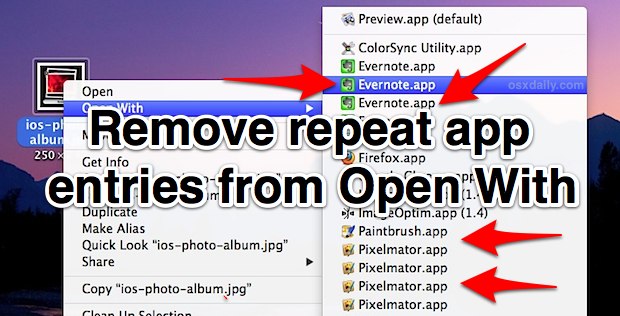
<p>The “Open With” menu appears when any file in the Mac Finder is right-clicked (or control-clicked), and it is intended to provide a list of alternate apps that selected file can be opened with other than what is currently set <a href="http://osxdaily.com/2011/02/01/change-default-app-file-opens-with-mac/">as the default application</a>.&#8221;</p>
<blockquote class="wp-embedded-content" data-secret="KDOgYqIGDU"><p><a href="https://osxdaily.com/2013/01/22/fix-open-with-menu-mac-os-x/">Remove Duplicates from the &#8220;Open With&#8221; Right-Click Menu in Mac OS X</a></p></blockquote>
<p><iframe loading="lazy" class="wp-embedded-content" sandbox="allow-scripts" security="restricted" style="position: absolute; clip: rect(1px, 1px, 1px, 1px);" title="&#8220;Remove Duplicates from the &#8220;Open With&#8221; Right-Click Menu in Mac OS X&#8221; &#8212; OS X Daily" src="https://osxdaily.com/2013/01/22/fix-open-with-menu-mac-os-x/embed/#?secret=agEjWOHzij#?secret=KDOgYqIGDU" data-secret="KDOgYqIGDU" width="600" height="338" frameborder="0" marginwidth="0" marginheight="0" scrolling="no"></iframe></p>
	</div><!-- .entry-content -->

	
	<footer class="entry-footer">
		<span class="posted-on"><span class="screen-reader-text">Posted on </span><a href="https://my.diary.in.th/archives/1439" rel="bookmark"><time class="entry-date published" datetime="2014-02-01T15:11:00+07:00">1 February 2557</time><time class="updated" datetime="2015-10-04T11:11:40+07:00">4 October 2015</time></a></span><span class="cat-links"><span class="screen-reader-text">Categories </span><a href="https://my.diary.in.th/archives/category/%e0%b8%82%e0%b9%88%e0%b8%b2%e0%b8%a7%e0%b8%99%e0%b9%88%e0%b8%b2%e0%b8%aa%e0%b8%99%e0%b9%83%e0%b8%88" rel="category tag">เรื่องน่าสนใจ</a></span><span class="tags-links"><span class="screen-reader-text">Tags </span><a href="https://my.diary.in.th/archives/tag/mac-os-x" rel="tag">Mac OS X</a></span><span class="comments-link"><a href="https://my.diary.in.th/archives/1439#respond">Leave a comment<span class="screen-reader-text"> on Remove Duplicates from the “Open With” Right-Click Menu in Mac OS X</span></a></span>			</footer><!-- .entry-footer -->

</article><!-- #post-1439 -->

	<nav class="navigation pagination" aria-label="Posts pagination">
		<h2 class="screen-reader-text">Posts pagination</h2>
		<div class="nav-links"><span aria-current="page" class="page-numbers current"><span class="meta-nav screen-reader-text">Page </span>1</span>
<a class="page-numbers" href="https://my.diary.in.th/page/2"><span class="meta-nav screen-reader-text">Page </span>2</a>
<span class="page-numbers dots">&hellip;</span>
<a class="page-numbers" href="https://my.diary.in.th/page/25"><span class="meta-nav screen-reader-text">Page </span>25</a>
<a class="next page-numbers" href="https://my.diary.in.th/page/2">Next page</a></div>
	</nav>
		</main><!-- .site-main -->
	</div><!-- .content-area -->


	</div><!-- .site-content -->

	<footer id="colophon" class="site-footer">
		<div class="site-info">
									<a href="https://wordpress.org/" class="imprint">
				Proudly powered by WordPress			</a>
		</div><!-- .site-info -->
	</footer><!-- .site-footer -->

</div><!-- .site -->

<script type="speculationrules">
{"prefetch":[{"source":"document","where":{"and":[{"href_matches":"/*"},{"not":{"href_matches":["/wp-*.php","/wp-admin/*","/wp-content/uploads/*","/wp-content/*","/wp-content/plugins/*","/wp-content/themes/twentyfifteen/*","/*\\?(.+)"]}},{"not":{"selector_matches":"a[rel~=\"nofollow\"]"}},{"not":{"selector_matches":".no-prefetch, .no-prefetch a"}}]},"eagerness":"conservative"}]}
</script>
		<div id="jp-carousel-loading-overlay">
			<div id="jp-carousel-loading-wrapper">
				<span id="jp-carousel-library-loading"><svg class="jetpack-spinner" width="40" height="40" viewBox="0 0 100 100" xmlns="http://www.w3.org/2000/svg" aria-hidden="true" focusable="false"><circle cx="50" cy="50" r="46" fill="none" stroke="#ddd" stroke-width="8"/><path d="M 50 4 A 46 46 0 0 1 96 50" fill="none" stroke="currentColor" stroke-width="8" stroke-linecap="round"><animateTransform attributeName="transform" type="rotate" dur="1.4s" from="0 50 50" to="360 50 50" repeatCount="indefinite"/></path></svg></span>
			</div>
		</div>
		<div class="jp-carousel-overlay" style="display: none;">

		<div class="jp-carousel-container">
			<!-- The Carousel Swiper -->
			<div
				class="jp-carousel-wrap swiper jp-carousel-swiper-container jp-carousel-transitions"
				itemscope
				itemtype="https://schema.org/ImageGallery">
				<div class="jp-carousel swiper-wrapper"></div>
				<div class="jp-swiper-button-prev swiper-button-prev">
					<svg width="25" height="24" viewBox="0 0 25 24" fill="none" xmlns="http://www.w3.org/2000/svg">
						<mask id="maskPrev" mask-type="alpha" maskUnits="userSpaceOnUse" x="8" y="6" width="9" height="12">
							<path d="M16.2072 16.59L11.6496 12L16.2072 7.41L14.8041 6L8.8335 12L14.8041 18L16.2072 16.59Z" fill="white"/>
						</mask>
						<g mask="url(#maskPrev)">
							<rect x="0.579102" width="23.8823" height="24" fill="#FFFFFF"/>
						</g>
					</svg>
				</div>
				<div class="jp-swiper-button-next swiper-button-next">
					<svg width="25" height="24" viewBox="0 0 25 24" fill="none" xmlns="http://www.w3.org/2000/svg">
						<mask id="maskNext" mask-type="alpha" maskUnits="userSpaceOnUse" x="8" y="6" width="8" height="12">
							<path d="M8.59814 16.59L13.1557 12L8.59814 7.41L10.0012 6L15.9718 12L10.0012 18L8.59814 16.59Z" fill="white"/>
						</mask>
						<g mask="url(#maskNext)">
							<rect x="0.34375" width="23.8822" height="24" fill="#FFFFFF"/>
						</g>
					</svg>
				</div>
			</div>
			<!-- The main close buton -->
			<div class="jp-carousel-close-hint">
				<svg width="25" height="24" viewBox="0 0 25 24" fill="none" xmlns="http://www.w3.org/2000/svg">
					<mask id="maskClose" mask-type="alpha" maskUnits="userSpaceOnUse" x="5" y="5" width="15" height="14">
						<path d="M19.3166 6.41L17.9135 5L12.3509 10.59L6.78834 5L5.38525 6.41L10.9478 12L5.38525 17.59L6.78834 19L12.3509 13.41L17.9135 19L19.3166 17.59L13.754 12L19.3166 6.41Z" fill="white"/>
					</mask>
					<g mask="url(#maskClose)">
						<rect x="0.409668" width="23.8823" height="24" fill="#FFFFFF"/>
					</g>
				</svg>
			</div>
			<!-- Image info, comments and meta -->
			<div class="jp-carousel-info">
				<div class="jp-carousel-info-footer">
					<div class="jp-carousel-pagination-container">
						<div class="jp-swiper-pagination swiper-pagination"></div>
						<div class="jp-carousel-pagination"></div>
					</div>
					<div class="jp-carousel-photo-title-container">
						<h2 class="jp-carousel-photo-caption"></h2>
					</div>
					<div class="jp-carousel-photo-icons-container">
						<a href="#" class="jp-carousel-icon-btn jp-carousel-icon-info" aria-label="Toggle photo metadata visibility">
							<span class="jp-carousel-icon">
								<svg width="25" height="24" viewBox="0 0 25 24" fill="none" xmlns="http://www.w3.org/2000/svg">
									<mask id="maskInfo" mask-type="alpha" maskUnits="userSpaceOnUse" x="2" y="2" width="21" height="20">
										<path fill-rule="evenodd" clip-rule="evenodd" d="M12.7537 2C7.26076 2 2.80273 6.48 2.80273 12C2.80273 17.52 7.26076 22 12.7537 22C18.2466 22 22.7046 17.52 22.7046 12C22.7046 6.48 18.2466 2 12.7537 2ZM11.7586 7V9H13.7488V7H11.7586ZM11.7586 11V17H13.7488V11H11.7586ZM4.79292 12C4.79292 16.41 8.36531 20 12.7537 20C17.142 20 20.7144 16.41 20.7144 12C20.7144 7.59 17.142 4 12.7537 4C8.36531 4 4.79292 7.59 4.79292 12Z" fill="white"/>
									</mask>
									<g mask="url(#maskInfo)">
										<rect x="0.8125" width="23.8823" height="24" fill="#FFFFFF"/>
									</g>
								</svg>
							</span>
						</a>
												<a href="#" class="jp-carousel-icon-btn jp-carousel-icon-comments" aria-label="Toggle photo comments visibility">
							<span class="jp-carousel-icon">
								<svg width="25" height="24" viewBox="0 0 25 24" fill="none" xmlns="http://www.w3.org/2000/svg">
									<mask id="maskComments" mask-type="alpha" maskUnits="userSpaceOnUse" x="2" y="2" width="21" height="20">
										<path fill-rule="evenodd" clip-rule="evenodd" d="M4.3271 2H20.2486C21.3432 2 22.2388 2.9 22.2388 4V16C22.2388 17.1 21.3432 18 20.2486 18H6.31729L2.33691 22V4C2.33691 2.9 3.2325 2 4.3271 2ZM6.31729 16H20.2486V4H4.3271V18L6.31729 16Z" fill="white"/>
									</mask>
									<g mask="url(#maskComments)">
										<rect x="0.34668" width="23.8823" height="24" fill="#FFFFFF"/>
									</g>
								</svg>

								<span class="jp-carousel-has-comments-indicator" aria-label="This image has comments."></span>
							</span>
						</a>
											</div>
				</div>
				<div class="jp-carousel-info-extra">
					<div class="jp-carousel-info-content-wrapper">
						<div class="jp-carousel-photo-title-container">
							<h2 class="jp-carousel-photo-title"></h2>
						</div>
						<div class="jp-carousel-comments-wrapper">
															<div id="jp-carousel-comments-loading">
									<span>Loading Comments...</span>
								</div>
								<div class="jp-carousel-comments"></div>
								<div id="jp-carousel-comment-form-container">
									<span id="jp-carousel-comment-form-spinner"><svg class="jetpack-spinner" width="20" height="20" viewBox="0 0 100 100" xmlns="http://www.w3.org/2000/svg" aria-hidden="true" focusable="false"><circle cx="50" cy="50" r="46" fill="none" stroke="#ddd" stroke-width="8"/><path d="M 50 4 A 46 46 0 0 1 96 50" fill="none" stroke="currentColor" stroke-width="8" stroke-linecap="round"><animateTransform attributeName="transform" type="rotate" dur="1.4s" from="0 50 50" to="360 50 50" repeatCount="indefinite"/></path></svg></span>
									<div id="jp-carousel-comment-post-results"></div>
																														<form id="jp-carousel-comment-form">
												<label for="jp-carousel-comment-form-comment-field" class="screen-reader-text">Write a Comment...</label>
												<textarea
													name="comment"
													class="jp-carousel-comment-form-field jp-carousel-comment-form-textarea"
													id="jp-carousel-comment-form-comment-field"
													placeholder="Write a Comment..."
												></textarea>
												<div id="jp-carousel-comment-form-submit-and-info-wrapper">
													<div id="jp-carousel-comment-form-commenting-as">
																													<fieldset>
																<label for="jp-carousel-comment-form-email-field">Email (Required)</label>
																<input type="text" name="email" class="jp-carousel-comment-form-field jp-carousel-comment-form-text-field" id="jp-carousel-comment-form-email-field" />
															</fieldset>
															<fieldset>
																<label for="jp-carousel-comment-form-author-field">Name (Required)</label>
																<input type="text" name="author" class="jp-carousel-comment-form-field jp-carousel-comment-form-text-field" id="jp-carousel-comment-form-author-field" />
															</fieldset>
															<fieldset>
																<label for="jp-carousel-comment-form-url-field">Website</label>
																<input type="text" name="url" class="jp-carousel-comment-form-field jp-carousel-comment-form-text-field" id="jp-carousel-comment-form-url-field" />
															</fieldset>
																											</div>
													<input
														type="submit"
														name="submit"
														class="jp-carousel-comment-form-button"
														id="jp-carousel-comment-form-button-submit"
														value="Post Comment" />
												</div>
											</form>
																											</div>
													</div>
						<div class="jp-carousel-image-meta">
							<div class="jp-carousel-title-and-caption">
								<div class="jp-carousel-photo-info">
									<h3 class="jp-carousel-caption" itemprop="caption description"></h3>
								</div>

								<div class="jp-carousel-photo-description"></div>
							</div>
							<ul class="jp-carousel-image-exif" style="display: none;"></ul>
							<a class="jp-carousel-image-download" href="#" target="_blank" style="display: none;">
								<svg width="25" height="24" viewBox="0 0 25 24" fill="none" xmlns="http://www.w3.org/2000/svg">
									<mask id="mask0" mask-type="alpha" maskUnits="userSpaceOnUse" x="3" y="3" width="19" height="18">
										<path fill-rule="evenodd" clip-rule="evenodd" d="M5.84615 5V19H19.7775V12H21.7677V19C21.7677 20.1 20.8721 21 19.7775 21H5.84615C4.74159 21 3.85596 20.1 3.85596 19V5C3.85596 3.9 4.74159 3 5.84615 3H12.8118V5H5.84615ZM14.802 5V3H21.7677V10H19.7775V6.41L9.99569 16.24L8.59261 14.83L18.3744 5H14.802Z" fill="white"/>
									</mask>
									<g mask="url(#mask0)">
										<rect x="0.870605" width="23.8823" height="24" fill="#FFFFFF"/>
									</g>
								</svg>
								<span class="jp-carousel-download-text"></span>
							</a>
							<div class="jp-carousel-image-map" style="display: none;"></div>
						</div>
					</div>
				</div>
			</div>
		</div>

		</div>
		<script id="thickbox-js-extra">
var thickboxL10n = {"next":"Next \u003E","prev":"\u003C Prev","image":"Image","of":"of","close":"Close","noiframes":"This feature requires inline frames. You have iframes disabled or your browser does not support them.","loadingAnimation":"https://my.diary.in.th/wp-includes/js/thickbox/loadingAnimation.gif"};
//# sourceURL=thickbox-js-extra
</script>
<script src="https://my.diary.in.th/wp-includes/js/thickbox/thickbox.js?ver=3.1-20121105" id="thickbox-js"></script>
<script src="https://my.diary.in.th/wp-includes/js/jquery/ui/core.min.js?ver=1.13.3" id="jquery-ui-core-js"></script>
<script src="https://my.diary.in.th/wp-includes/js/jquery/ui/tabs.min.js?ver=1.13.3" id="jquery-ui-tabs-js"></script>
<script src="https://my.diary.in.th/wp-includes/js/jquery/ui/accordion.min.js?ver=1.13.3" id="jquery-ui-accordion-js"></script>
<script src="https://my.diary.in.th/wp-content/plugins/wp-review/public/js/js.cookie.min.js?ver=2.1.4" id="js-cookie-js"></script>
<script src="https://my.diary.in.th/wp-includes/js/underscore.min.js?ver=1.13.7" id="underscore-js"></script>
<script id="wp-util-js-extra">
var _wpUtilSettings = {"ajax":{"url":"/wp-admin/admin-ajax.php"}};
//# sourceURL=wp-util-js-extra
</script>
<script src="https://my.diary.in.th/wp-includes/js/wp-util.min.js?ver=6.9.4" id="wp-util-js"></script>
<script id="wp_review-js-js-extra">
var wpreview = {"ajaxurl":"https://my.diary.in.th/wp-admin/admin-ajax.php","loginRequiredMessage":"You must log in to add your review"};
//# sourceURL=wp_review-js-js-extra
</script>
<script src="https://my.diary.in.th/wp-content/plugins/wp-review/public/js/main.js?ver=5.3.5" id="wp_review-js-js"></script>
<script src="https://my.diary.in.th/wp-content/plugins/enlighter/cache/enlighterjs.min.js?ver=1He/lFyBgLyzk9M" id="enlighterjs-js"></script>
<script id="enlighterjs-js-after">
!function(e,n){if("undefined"!=typeof EnlighterJS){var o={"selectors":{"block":"pre.EnlighterJSRAW","inline":"code.EnlighterJSRAW"},"options":{"indent":2,"ampersandCleanup":true,"linehover":true,"rawcodeDbclick":false,"textOverflow":"break","linenumbers":true,"theme":"enlighter","language":"generic","retainCssClasses":false,"collapse":false,"toolbarOuter":"","toolbarTop":"{BTN_RAW}{BTN_COPY}{BTN_WINDOW}{BTN_WEBSITE}","toolbarBottom":""}};(e.EnlighterJSINIT=function(){EnlighterJS.init(o.selectors.block,o.selectors.inline,o.options)})()}else{(n&&(n.error||n.log)||function(){})("Error: EnlighterJS resources not loaded yet!")}}(window,console);
//# sourceURL=enlighterjs-js-after
</script>
<script id="jetpack-stats-js-before">
_stq = window._stq || [];
_stq.push([ "view", {"v":"ext","blog":"1075207","post":"0","tz":"7","srv":"my.diary.in.th","arch_home":"1","j":"1:15.8"} ]);
_stq.push([ "clickTrackerInit", "1075207", "0" ]);
//# sourceURL=jetpack-stats-js-before
</script>
<script src="https://stats.wp.com/e-202624.js" id="jetpack-stats-js" defer data-wp-strategy="defer"></script>
<script id="jetpack-carousel-js-extra">
var jetpackSwiperLibraryPath = {"url":"https://my.diary.in.th/wp-content/plugins/jetpack/_inc/blocks/swiper.js"};
var jetpackCarouselStrings = {"widths":[370,700,1000,1200,1400,2000],"is_logged_in":"","lang":"en","ajaxurl":"https://my.diary.in.th/wp-admin/admin-ajax.php","nonce":"16dd283209","display_exif":"1","display_comments":"1","single_image_gallery":"1","single_image_gallery_media_file":"","background_color":"black","comment":"Comment","post_comment":"Post Comment","write_comment":"Write a Comment...","loading_comments":"Loading Comments...","image_label":"Open image in full-screen.","download_original":"View full size \u003Cspan class=\"photo-size\"\u003E{0}\u003Cspan class=\"photo-size-times\"\u003E\u00d7\u003C/span\u003E{1}\u003C/span\u003E","no_comment_text":"Please be sure to submit some text with your comment.","no_comment_email":"Please provide an email address to comment.","no_comment_author":"Please provide your name to comment.","comment_post_error":"Sorry, but there was an error posting your comment. Please try again later.","comment_approved":"Your comment was approved.","comment_unapproved":"Your comment is in moderation.","camera":"Camera","aperture":"Aperture","shutter_speed":"Shutter Speed","focal_length":"Focal Length","copyright":"Copyright","comment_registration":"0","require_name_email":"1","login_url":"https://my.diary.in.th/wp-login.php?redirect_to=https%3A%2F%2Fmy.diary.in.th%2Farchives%2F1705","blog_id":"1","meta_data":["camera","aperture","shutter_speed","focal_length","copyright"]};
//# sourceURL=jetpack-carousel-js-extra
</script>
<script src="https://my.diary.in.th/wp-content/plugins/jetpack/_inc/build/carousel/jetpack-carousel.min.js?ver=15.8" id="jetpack-carousel-js"></script>
<script src="https://my.diary.in.th/wp-includes/js/wp-embed.min.js?ver=6.9.4" id="wp-embed-js" defer data-wp-strategy="defer"></script>
<script id="wp-emoji-settings" type="application/json">
{"baseUrl":"https://s.w.org/images/core/emoji/17.0.2/72x72/","ext":".png","svgUrl":"https://s.w.org/images/core/emoji/17.0.2/svg/","svgExt":".svg","source":{"concatemoji":"https://my.diary.in.th/wp-includes/js/wp-emoji-release.min.js?ver=6.9.4"}}
</script>
<script type="module">
/*! This file is auto-generated */
const a=JSON.parse(document.getElementById("wp-emoji-settings").textContent),o=(window._wpemojiSettings=a,"wpEmojiSettingsSupports"),s=["flag","emoji"];function i(e){try{var t={supportTests:e,timestamp:(new Date).valueOf()};sessionStorage.setItem(o,JSON.stringify(t))}catch(e){}}function c(e,t,n){e.clearRect(0,0,e.canvas.width,e.canvas.height),e.fillText(t,0,0);t=new Uint32Array(e.getImageData(0,0,e.canvas.width,e.canvas.height).data);e.clearRect(0,0,e.canvas.width,e.canvas.height),e.fillText(n,0,0);const a=new Uint32Array(e.getImageData(0,0,e.canvas.width,e.canvas.height).data);return t.every((e,t)=>e===a[t])}function p(e,t){e.clearRect(0,0,e.canvas.width,e.canvas.height),e.fillText(t,0,0);var n=e.getImageData(16,16,1,1);for(let e=0;e<n.data.length;e++)if(0!==n.data[e])return!1;return!0}function u(e,t,n,a){switch(t){case"flag":return n(e,"\ud83c\udff3\ufe0f\u200d\u26a7\ufe0f","\ud83c\udff3\ufe0f\u200b\u26a7\ufe0f")?!1:!n(e,"\ud83c\udde8\ud83c\uddf6","\ud83c\udde8\u200b\ud83c\uddf6")&&!n(e,"\ud83c\udff4\udb40\udc67\udb40\udc62\udb40\udc65\udb40\udc6e\udb40\udc67\udb40\udc7f","\ud83c\udff4\u200b\udb40\udc67\u200b\udb40\udc62\u200b\udb40\udc65\u200b\udb40\udc6e\u200b\udb40\udc67\u200b\udb40\udc7f");case"emoji":return!a(e,"\ud83e\u1fac8")}return!1}function f(e,t,n,a){let r;const o=(r="undefined"!=typeof WorkerGlobalScope&&self instanceof WorkerGlobalScope?new OffscreenCanvas(300,150):document.createElement("canvas")).getContext("2d",{willReadFrequently:!0}),s=(o.textBaseline="top",o.font="600 32px Arial",{});return e.forEach(e=>{s[e]=t(o,e,n,a)}),s}function r(e){var t=document.createElement("script");t.src=e,t.defer=!0,document.head.appendChild(t)}a.supports={everything:!0,everythingExceptFlag:!0},new Promise(t=>{let n=function(){try{var e=JSON.parse(sessionStorage.getItem(o));if("object"==typeof e&&"number"==typeof e.timestamp&&(new Date).valueOf()<e.timestamp+604800&&"object"==typeof e.supportTests)return e.supportTests}catch(e){}return null}();if(!n){if("undefined"!=typeof Worker&&"undefined"!=typeof OffscreenCanvas&&"undefined"!=typeof URL&&URL.createObjectURL&&"undefined"!=typeof Blob)try{var e="postMessage("+f.toString()+"("+[JSON.stringify(s),u.toString(),c.toString(),p.toString()].join(",")+"));",a=new Blob([e],{type:"text/javascript"});const r=new Worker(URL.createObjectURL(a),{name:"wpTestEmojiSupports"});return void(r.onmessage=e=>{i(n=e.data),r.terminate(),t(n)})}catch(e){}i(n=f(s,u,c,p))}t(n)}).then(e=>{for(const n in e)a.supports[n]=e[n],a.supports.everything=a.supports.everything&&a.supports[n],"flag"!==n&&(a.supports.everythingExceptFlag=a.supports.everythingExceptFlag&&a.supports[n]);var t;a.supports.everythingExceptFlag=a.supports.everythingExceptFlag&&!a.supports.flag,a.supports.everything||((t=a.source||{}).concatemoji?r(t.concatemoji):t.wpemoji&&t.twemoji&&(r(t.twemoji),r(t.wpemoji)))});
//# sourceURL=https://my.diary.in.th/wp-includes/js/wp-emoji-loader.min.js
</script>

</body>
</html>
<!--
Performance optimized by Redis Object Cache. Learn more: https://wprediscache.com

Retrieved 2718 objects (481 KB) from Redis using PhpRedis (v6.3.0).
-->