<?xml version="1.0" encoding="utf-8"?>
<feed xmlns="http://www.w3.org/2005/Atom">
    <title>An Island for Blogging Tips Tricks</title>
    <link href="https://www.tipstricksisland.com/feed.xml" rel="self" />
    <link href="https://www.tipstricksisland.com" />
    <updated>2019-04-10T19:32:22+05:00</updated>
    <author>
        <name>M Ehsan Qureshi</name>
    </author>
    <id>https://www.tipstricksisland.com</id>

    <entry>
        <title>Why Should You Host Your Blogs on WordPress?</title>
        <author>
            <name>M Ehsan Qureshi</name>
        </author>
        <link href="https://www.tipstricksisland.com/why-should-you-host-your-blogs-on-wordpress.html"/>
        <id>https://www.tipstricksisland.com/why-should-you-host-your-blogs-on-wordpress.html</id>

        <updated>2019-04-10T19:31:59+05:00</updated>
            <summary>
                <![CDATA[
                        <img src="https://www.tipstricksisland.com/media/posts/278/why-host-blog-on-wordpress.png" alt="Why Should You Host Your Blogs on WordPress?" />
                    Do you know that more than 74 million websites host their site and blogs on WordPress? Well, that’s quite a number and there is a reason behind that. WordPress offers an array of benefits to its users. It comes with a lot of themes, plugins,&hellip;
                ]]>
            </summary>
        <content type="html">
            <![CDATA[
                    <img src="https://www.tipstricksisland.com/media/posts/278/why-host-blog-on-wordpress.png" alt="Why Should You Host Your Blogs on WordPress?" />
                <p>Do you know that more than 74 million websites host their site and blogs on WordPress? Well, that’s quite a number and there is a reason behind that. WordPress offers an array of benefits to its users. It comes with a lot of themes, plugins, reduced site loading time, it regularly updates the plugins and the site for better performance, and it’s one of the most secure platforms. These are good enough reason why people prefer WordPress over any other platform to host their blogs and sites. </p>
<h2 id="mcetoc_1d83p8hr29">Host Your Blogs on WordPress, Why?</h2>
<p>In simple terms, WordPress is a platform which allows you to blog easily even without technical knowledge. It doesn’t ask for a lot of investment, in fact, you can always choose to pick the free domain.</p>
<p><em><strong>Let’s see why you should too host your site and blogs on WordPress.</strong></em></p>
<ol>
<li>
<h3 id="mcetoc_1d83p2i130">WordPress offers the best plugins</h3>
</li>
</ol>
<p>WordPress comes with some of the best plugins. These plugins not just help you to have a user-friendly experience while blogging but they also make the platform easier for the first time users too. WordPress plugins are flexible and you can customize them the way you want it. You can browse through the list of plugins and choose the right one for your site. Download it and start using it.</p>
<p>Read:- <strong><a href="#INTERNAL_LINK#/post/251">WordPress SEO Plugins</a></strong></p>
<h3 id="mcetoc_1d83p2ktc1">Here’s how to go about it.</h3>
<p>Let’s say you have an active site or a blog on WordPress. Now, you might want to add another section to it, like e-commerce. All you need to do is integrate another plugin like an eCommerce plugin and that’s it, you are all set.</p>
<ol start="2">
<li>
<h3 id="mcetoc_1d83p2n6q2">WordPress is SEO friendly</h3>
</li>
</ol>
<p>Once you set up your personal or professional blog on WordPress, the next thing that you would like to draw your attention to is towards attracting the target audience. You would want your blog to be seen and that’s what WordPress is good at. It SEO friendly and all its plugins and formats are made in a way to make your blog rank in Google and other search engines.</p>
<p><img class="post__image align-center" src="https://www.tipstricksisland.com/media/posts/278/wodpress-is-seo-freindly-plateform.webp" alt="wordpress is seo friendly " width="399" height="219"></p>
<ol start="3">
<li>
<h3 id="mcetoc_1d83p2pqi3">WordPress is your self-hosted platform</h3>
</li>
</ol>
<p>While most of the blogging platform says that they will host your blog, but however structure wise it only creates a platform or rather space which you will take on rent. Otherwise, nothing much is done about it. Meanwhile, WordPress is more about owning your own space. It’s a self-hosted platform and ensures that you get a space for your blog where you can store your documents or any files related to your blogs. This way it becomes easier for you to operate on the platform too. All you will be needing a domain name for your site, you can get it easily by using hostgator coupons at <a href="https://www.couponscurry.com/">CouponsCurry</a>. Once you get the domain name for your site, you will be able to integrate it with WordPress as it is, for example, www.xyz.com or whatever domain you want to have for your blog or site.</p>
<ol start="4">
<li>
<h3 id="mcetoc_1d83p31uj4">WordPress works on its updates on a regular basis</h3>
</li>
</ol>
<p>WordPress is a free platform and an open source. Millions of people are happily using WordPress to host their site and blogs. Since WordPress is an open source they take feedback very seriously. They are constantly working on this platform to improve its interface, process, the designs, templates and the other operations too. That’s why they regularly update their plugins and the site. They want to make sure that WordPress remains friendly to all the users and introduce more user-friendly functions and features. </p>
<p>Read:- <strong><a href="#INTERNAL_LINK#/post/147">Best WordPress Photo Themes</a></strong></p>
<ol start="5">
<li>
<h3 id="mcetoc_1d83p35ca5">WordPress is quick</h3>
</li>
</ol>
<p>When you open a site, what is the first thing that hits your mind? You wouldn’t like to invest your time on a site which loads very slowly. That’s what makes WordPress so popular. It never disappoints the users. It loads the site and the blogs very quickly ensuring that you get to read it the moment you see it.</p>
<p>You can also try using <a href="https://www.couponscurry.com/bigrock/">bigrock coupon codes</a> at CouponsCurry to buy a domain name for your platform.</p>
<p><img class="post__image align-center" src="https://www.tipstricksisland.com/media/posts/278/wordpress-is-quick-and-fast.webp" alt="wordpress is fast quick" width="417" height="256"></p>
<ol start="6">
<li>
<h3 id="mcetoc_1d83p383p6">Huge WordPress community</h3>
</li>
</ol>
<p>WordPress as we already said is an open source and about 27% of websites use WordPress to host their site or blog. That’s the reason why they have a huge community. A community which has developers, internet forums, and QA engineers as well. They are always working on trying to make WordPress the best hosting website for everyone.</p>
<p>Whatever questions you have in your mind, you can easily join one of the forums on WordPress and express it there, be rest assured that your query will be answered soon.</p>
<p>Read :- <strong><a href="#INTERNAL_LINK#/post/204">Best Social Media Plugins for WordPress Blogs</a></strong></p>
<ol start="7">
<li>
<h3 id="mcetoc_1d83p3arq7">Earn through WordPress</h3>
</li>
</ol>
<p>Another good thing about WordPress is that you can start earning through your blogs too. Once you feel that your site is generating a good amount of traffic, you can immediately get in touch with some private advertisers. Plus, Google Adsense and ProperllerAds have their own plugins for WordPress too. If you can build your site and keep the contents of your blogs attracting you can definitely monetize it.</p>
<p><img class="post__image align-center" src="https://www.tipstricksisland.com/media/posts/278/make-money-with-wordpress.webp" alt="make money with wordpress plateform" width="594" height="292"></p>
<p>This finally brings us to the conclusion and we know you must have understood the advantages of hosting your blogs on WordPress. If you are thinking of considering WordPress as your hosting domain then be rest assured that this is the right platform.</p>
            ]]>
        </content>
    </entry>
    <entry>
        <title>Tips for Social Media Marketing to Boost SEO</title>
        <author>
            <name>M Ehsan Qureshi</name>
        </author>
        <link href="https://www.tipstricksisland.com/tips-for-social-media-marketing-to-boost-seo.html"/>
        <id>https://www.tipstricksisland.com/tips-for-social-media-marketing-to-boost-seo.html</id>

        <updated>2019-03-28T10:48:53+05:00</updated>
            <summary>
                <![CDATA[
                        <img src="https://www.tipstricksisland.com/media/posts/277/Tips-for-Social-Media-Marketing-to-Boost-SEO.jpg" alt="Social Media Marketing to Boost SEO" />
                    The digital marketing world walk can be a confusing one, and you may keep losing exactly how the organization should end the power of the Internet to make sales and higher profits. It also considers the use of the social media because everyone seems to&hellip;
                ]]>
            </summary>
        <content type="html">
            <![CDATA[
                    <img src="https://www.tipstricksisland.com/media/posts/277/Tips-for-Social-Media-Marketing-to-Boost-SEO.jpg" alt="Social Media Marketing to Boost SEO" />
                <p>The digital marketing world walk can be a confusing one, and you may keep losing exactly how the organization  should end the power of the Internet to make sales and higher profits. It also considers the use of the social media because everyone seems to be online every day.</p>
<p>But how can you use the <strong><a href="#INTERNAL_LINK#/post/244">social media to boost SEO</a></strong> of your company at the same time? Read our tips in which I will share something to help you for boost SEO for social media marketing.</p>
<p>Read : - <strong><a href="#INTERNAL_LINK#/post/213">How to Create Attactive Social Media Profiles</a></strong></p>
<h2 id="mcetoc_1d71d8ifm0">Tips for Social Media Marketing to Boost SEO</h2>
<p>Hope you wil most out from it. So lets start reading our tips.</p>
<h3 id="mcetoc_1d71d8ifm1">URL setup</h3>
<p>Each social media sites that are used should be allowed to create a vanity URL and it will optimize your page or site or for organic search. Use your name and keep each URL in any social media in the same place or similar. And if your wanted a link is already taken or not available, you should add your city at the end of the URL it will also diversify your page. Thus, for example, it may be something like www.facebook.com/tipstricksislandcom instead of <a href="http://www.facebook.com/pages/123245658/8756521">www.facebook.com/pages/123245658/8756521</a></p>
<p>Read:- <strong><a href="#INTERNAL_LINK#/post/63">Social Media Benefits for Website Traffic</a></strong></p>
<h3 id="mcetoc_1d71d8ifm2">About Section should be Completed in All respects</h3>
<p>All the social media site About  section  in which you must fill all the information in all respects. Write all the information which describe your business in all concerned fields. Do insert two or three keywords to your business to target audience looking for the types of services and products you offer through your blog.</p>
<p>Use the keyword planner tools to determine what type of keywords you are using on your blog or site and on social media  pages. Find the competition and use the keywords with low low competition which have high search volume.</p>
<h2 id="mcetoc_1d71d8ifm3">Organic Followers</h2>
<p>While it may be tempting to buy social media followers, Google will actually be able to tell that you did this based upon the quality of your followers. Therefore, even though it’s important to have a large enough following on social media to really get your name out there, you want to be patient and build your following naturally and slowly over time.</p>
<p>Its not bad technique to buy social followers,. So, although it is important to have big and enough follower on the social media page to make your name out there, you want to be patient and build your pages naturally and slowly to get organic followers.</p>
<p>Read :-  <strong><a href="#INTERNAL_LINK#/post/204">Best Social Media Plugins for WordPress Bloggers</a></strong></p>
<p>You can get the organic and genuine followers by posting discussion threads, questions answers, <strong>sharing helpful and valuable tips and tricks</strong> etc. to engage your followers and build relationships. It will help you to drive traffic to your site.</p>
<h3 id="mcetoc_1d71d8ifm4">Bottom Lines</h3>
<p>If you find that digital and social media marketing, especially advertising is too much for you to take care of yourself, you can certainly ask for help from employees to start the conversion as it can help you optimize your pages and you site easily.</p>
            ]]>
        </content>
    </entry>
    <entry>
        <title>Best Features and Tricks You Should Know About Blogger.com</title>
        <author>
            <name>M Ehsan Qureshi</name>
        </author>
        <link href="https://www.tipstricksisland.com/best-features-and-tricks-you-should-know-about-bloggercom.html"/>
        <id>https://www.tipstricksisland.com/best-features-and-tricks-you-should-know-about-bloggercom.html</id>

        <updated>2019-03-27T15:25:31+05:00</updated>
            <summary>
                <![CDATA[
                        <img src="https://www.tipstricksisland.com/media/posts/276/best-tricks-and-features-blogger.PNG" alt="tricks for blogger" />
                    One of the most valuable and popular platform for every Blogger to start their Blogging career, what I am talking about is Blogger.com. This one is also for my previous series for Blogging from the beginning which is mentioned below after this para so if you are new on this Blog&hellip;
                ]]>
            </summary>
        <content type="html">
            <![CDATA[
                    <img src="https://www.tipstricksisland.com/media/posts/276/best-tricks-and-features-blogger.PNG" alt="tricks for blogger" />
                <p>One of the most valuable and <a href="#INTERNAL_LINK#/post/106">popular platform for every Blogger </a>to start their <a href="#INTERNAL_LINK#/post/103">Blogging career</a>, what I am talking about is Blogger.com. This one is also for my previous series for Blogging from the beginning which is mentioned below after this para so if you are new on this Blog you must check and read below <a href="#INTERNAL_LINK#/tag/1">tips for Blogging</a>. I have decided to write about this topic because every new day we found so many updates on every growing platform and that updates and changes give it new layout, functions, themes, way of work a new look so these all make little confuse for beginners. May be all this already shared over the internet and other blogs but due to new updates and changes in their layouts and functions its very difficult to find and follow the instruction already shared on the other blogs. Therefore, I have decided to share a little guide for same tricks and features which is converted and merged in new layout of Blogger.com.</p>
<p>Check Blogging Series :-</p>
<ul>
<li><a href="#INTERNAL_LINK#/post/258">What is Blog, Blogger, Blogging??</a></li>
<li><a href="#INTERNAL_LINK#/post/259">How to Create a Blog and Become Blogger</a>?</li>
<li><a href="#INTERNAL_LINK#/post/260">Best SEO Friendly Blogger Templates</a></li>
<li><a href="#INTERNAL_LINK#/post/261">Inspiratoinal Blogger Designs and Layout</a></li>
<li><a href="#INTERNAL_LINK#/post/264">How to Write a SEO Friendly Blog Post.</a></li>
</ul>
<h2 id="mcetoc_1d6ob03afe">Best Features and Tricks You Should Know About Blogger.com</h2>
<p>Here I going to tell you some important tricks in arranging your Blog perfectly. Already some where they have been provided by authors but unfortunately some users do not concentrate on such important issues and then it becomes the cause of their various problems. </p>
<p>These important tricks are given below: </p>
<h2 id="mcetoc_1d6ob07c5f">Change Layout and Hide Pages Widget </h2>
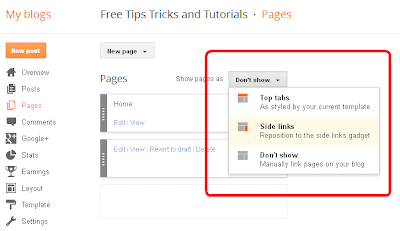
<p>Initially I would like to suggest you that the theme of PAGES should be create with the option of ‘don’t show’. This means that if any one does not like to show this option, he can choose another one simply. And the method to do possible it as: </p>
<p>Just go dashboard of Blogger and then click on ‘pages’. There u will see an option exist up wards of the pages as ‘show pages as’. So rapidly click on it. You will see here some options like top tabs, side links, and don’t show, and which will u choose that is ‘don’t show’ option accordingly. </p>
<p>That is clear! </p>
<p><img class="align-center" src="https://1.bp.blogspot.com/-rUFDicFuS8Q/UqSJrmFCQFI/AAAAAAAAAdw/W0K2W1mxc1M/s400/tricks+for+blogger+img-1.PNG" border="0"></p>
<p class="align-center"><strong><a href="http://www.tipstricksisland.com/top-10-social-media-widget-for-blogger.html"></a><a href="#INTERNAL_LINK#/post/94">Top 10 Social Media Widget for Blogger</a></strong></p>
<h2 id="mcetoc_1d6ob0ecdg">How to Add or Change Blog Description </h2>
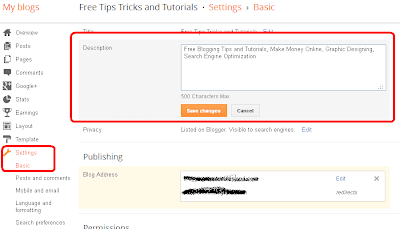
<p>Your Blog description should be brief as well neat and tidy. Therefore any visitor can understand the main idea/concept of entire Blog. In fact Blog description plays an important role in SEO. And it’s obvious that if you are providing better description to your Blog, the best result u will get certainly. </p>
<p>Dear readers! Remember that the description should be consisting of 500 words maximally. </p>
<p>The method is given as; </p>
<p>1st go to Blogger and then click on to dashboard and then click to option of setting. There you will the option of description on the basic part, so just click on ‘edit’ and just write your description according to your idea. </p>
<p>And every where, there you are doing any thing new in written scripts, so just do it and at last save all changes. </p>
<p id="mcetoc_1d6ob0l15h"><img class="align-center" src="https://2.bp.blogspot.com/-CwpRIkAKhDk/UqSJr5um4LI/AAAAAAAAAd8/vnJgoA-jbbQ/s400/tricks+for+blogger+img-2.PNG" border="0"></p>
<p class="align-center"><strong><a href="#INTERNAL_LINK#/post/41">Fix Duplicate Meta Description Tag</a></strong></p>
<h2 id="mcetoc_1d6ob1265i">Hide Your Blog from Search Engines </h2>
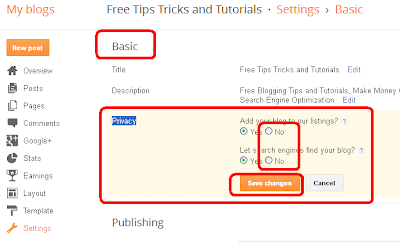
<p>If you have something you want to hide from search engines i.e. Google, yahoo or bing etc. so there is also option in the Blogger.com to hide you Blog from search engines or stop spiders to crawl your Blog and stop indexing you Blog or any post in search engines. </p>
<p>Check this method to hide your Blogger Blog from search engines. </p>
<p>Go to Blogger Dashboard and then Setting Tab, after that Basic Section and find there is Option for Privacy and follow the image shown below. </p>
<p><img class="align-center" src="https://3.bp.blogspot.com/-mh_k3EcJtL0/UqSJsQsnC6I/AAAAAAAAAd0/OhuhKqBQZlQ/s400/tricks+for+blogger+img-3.PNG" border="0"></p>
<p class="align-center"><strong><a href="#INTERNAL_LINK#/post/124">Get Your Blog Faster Indexed in Search Engines</a></strong></p>
<h2 id="mcetoc_1d6ob1cgdj">How to Make Blogger Blog Private </h2>
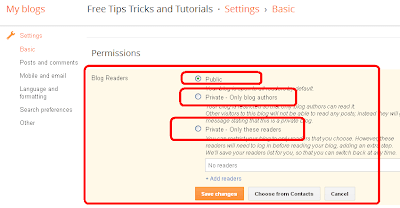
<p>As we have discussed above for stop indexing you Blog also there is another option for making it private from every one or only visible to readers or selected readers. There is three different option for you Blog privacy, check below method for how to make you Blogger Blog Private from every one. </p>
<p>Go to Blogger Dashboard and then Setting Tab, in the same basic setting section there is another option for permissions. </p>
<p><img class="align-center" src="https://2.bp.blogspot.com/-mpyX76CCiDc/UqSJsiqUbbI/AAAAAAAAAeE/vzdsX7_Pdsc/s400/tricks+for+blogger+img-4.PNG" border="0"></p>
<h2 id="mcetoc_1d6ob1k15k">How to Add Multiple Admin or Authors for Blogger Blog. </h2>
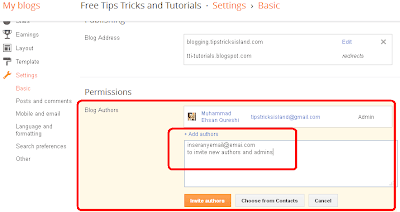
<p>Sometimes, you being tired from working lonely on your Blog and want to invite your friends to help you and join your Blog as Admin or a Co-Author of your Blog. So its not very big to deal, you don’t have to show your email id or password to them because there is an option to in Blogger Blog from which you can invite and ad multiple authors or admins for you Blogger Blog. Check the following steps :- </p>
<p>Go to Blogger Dashboard and Setting Tab, same as above, go check basic for add authors where you can invite more admins and authors by adding email address. </p>
<p><img class="align-center" src="https://1.bp.blogspot.com/-M3BpO_1YJS0/UqSJs-cnMsI/AAAAAAAAAeA/UqKjM5A4fME/s400/tricks+for+blogger+img-5.PNG" border="0"></p>
<h3 id="mcetoc_1d6ob1sunl">Bottom Lines:- </h3>
<p>All the above tricks and features will help you to manage you Blogger Blog easily and experiencing better Blogging with this valuable platform. For any further assistance or query you can ask by reply in this post.</p>
            ]]>
        </content>
    </entry>
    <entry>
        <title>Best Websites to Download Free Blogger Templates</title>
        <author>
            <name>M Ehsan Qureshi</name>
        </author>
        <link href="https://www.tipstricksisland.com/best-websites-to-download-free-blogger-templates.html"/>
        <id>https://www.tipstricksisland.com/best-websites-to-download-free-blogger-templates.html</id>

        <updated>2019-03-24T22:09:16+05:00</updated>
            <summary>
                <![CDATA[
                        <img src="https://www.tipstricksisland.com/media/posts/275/best-websites-to-download-free-blogger-templates.png" alt="Best Websites to Download Free Blogger Templates" />
                    A neat, clean and attractive template is very important for a Blog. For a developed Blog, you will have to provide uptodate contents as well an attractive and responsive template to your Blog. The main beauty of your Blog is depending upon a unique Blog having totally unique and most&hellip;
                ]]>
            </summary>
        <content type="html">
            <![CDATA[
                    <img src="https://www.tipstricksisland.com/media/posts/275/best-websites-to-download-free-blogger-templates.png" alt="Best Websites to Download Free Blogger Templates" />
                <p>A neat, clean and attractive template is <a href="#INTERNAL_LINK#/post/158" target="_blank" rel="noopener noreferrer">very important for a Blog</a>. For a developed Blog, you will have to provide uptodate contents as well an attractive and responsive template to your Blog. The main beauty of your Blog is depending upon a unique Blog having totally unique and most valuable data. So it’s up to you that how you arrange a best template for your Blog.</p>
<p>Read :- <a href="#INTERNAL_LINK#/post/264" target="_blank" rel="noopener noreferrer">How to Write Blog Post Creating Writing Techniques</a></p>
<h2 id="mcetoc_1d6oaniuk0">Best Websites to Download Free Blogger Templates</h2>
<p>Remember that a Blog is incomplete unless an attractive template and now I’m going to tell you three best free Blogger template sites, which will assist you in every step while creating Blogger template.</p>
<h3 id="mcetoc_1d6oaniuk1"><a  href="http://www.deluxetemplates.net/" rel="nofollow">DELUXE TEMPLATES</a>.</h3>
<p>Deluxe template is the 1st site where you can get free Blogger templates. There you can also get many other categories of Blogger templates as well.</p>
<p>There are a huge number of Blogger templates about more than 1300 + great themes. Certainly you will find indeed what you want.</p>
<p>Also Read :- <a  href="http://www.tipstricksisland.com/things-to-know-before-choose-a-blogger-template.html">Things to Know Before Choosing a Blogger Template</a></p>
<h3 id="mcetoc_1d6oaniuk2"><a  href="https://btemplates.com/" rel="nofollow">BTEMPLATES</a>:</h3>
<p>B template is the 2nd site where you can get free Blogger templates.</p>
<p>B Templates site enrich with 1 to 4 columns Blogger templates. Majority of Blogger use this site. Here you can get different styles of template with various colors. It’s obvious that you can get your desired template from this site simply.</p>
<h3 id="mcetoc_1d6oaniuk3"><a  href="http://www.blogcrowds.com/resources/blogger-templates/" rel="nofollow">BLOGCROWDS</a>:</h3>
<p>And now here is the 3rd one site, similarly it will also prove to be a good site for free Blogger templates. This site has also lots of categories of Blogger templates including two, three columns and Wordpress themes. Just get entry and receive what you want.</p>
<p>Check :- <a href="#INTERNAL_LINK#/post/94" target="_blank" rel="noopener noreferrer">Top Ten Social Media Gadget for Your Blogger Blog</a></p>
<p>So, these are three Blogger sites and surely they will assist you in finding a unique template for Blog. I hope that you will follow instruction as I mentioned above for your better guidance.</p>
<p>So read carefully, (Thanks)</p>
            ]]>
        </content>
    </entry>
    <entry>
        <title>15 Attractive Back to Top Button for Blogger </title>
        <author>
            <name>M Ehsan Qureshi</name>
        </author>
        <link href="https://www.tipstricksisland.com/15-attractive-back-to-top-button-for-blogger.html"/>
        <id>https://www.tipstricksisland.com/15-attractive-back-to-top-button-for-blogger.html</id>

        <updated>2019-03-24T21:29:33+05:00</updated>
            <summary>
                <![CDATA[
                        <img src="https://www.tipstricksisland.com/media/posts/274/15-Back-To-top-buttons-for-blogger-blog.PNG" alt="15 Attractive Back to Top Button for Blogger " />
                    Its so many days, I have not shared any article for this Blog, because I was busy to collect some useful information for its parent Blog. Today I have decided to share a very useful plugin for Blogger Blog. In this article you will find 15 attractive Back&hellip;
                ]]>
            </summary>
        <content type="html">
            <![CDATA[
                    <img src="https://www.tipstricksisland.com/media/posts/274/15-Back-To-top-buttons-for-blogger-blog.PNG" alt="15 Attractive Back to Top Button for Blogger " />
                <div >
<p>Its so many days, I have not shared any article for this Blog, because I was busy to collect some <a href="#INTERNAL_LINK#/post/253" target="_blank" rel="nofollow noopener noreferrer">useful information for its parent Blog</a>. Today I have decided to share a very <a href="#INTERNAL_LINK#/tag/14" target="_blank" rel="nofollow noopener noreferrer">useful plugin for Blogger Blog</a>. In this article you will find <strong>15 attractive Back to Top Button for your Blogger Blog </strong>to give it professional Bloggers Blog look. It is the dream of every Blogger to <a href="#INTERNAL_LINK#/post/158" target="_blank" rel="noopener noreferrer">become most popular </a>so we have work hard and <a href="#INTERNAL_LINK#/post/261" target="_blank" rel="nofollow noopener noreferrer">give it natural and beautiful look</a>. Check below guide to install this plugin in your Blogger Blog.</p>
</div>
<div >
<p>Recent Stories:-</p>
<ol>
<li><a href="#INTERNAL_LINK#/post/268">3 in 1 Attractive Social Media Profile Widget</a> - <strong><i><span style="color: #ff0000;" >New !!</span></i></strong></li>
<li class="data-list list-genap"><a href="#INTERNAL_LINK#/post/272">New Attractive Floating Social Media Profile Widget </a>- <strong><i><span style="color: #ff0000;" >New !!</span></i></strong></li>
<li class="data-list list-ganjil"><a href="#INTERNAL_LINK#/post/266">New Beautiful Blogger Stats Counter with Hover Effect</a> - <strong><i><span style="color: #ff0000;" >New !!</span></i></strong></li>
<li class="data-list list-genap"><a href="#INTERNAL_LINK#/post/273">Social Media Sharing Plugin for Every Blogger Post </a>- <strong><i><span style="color: #ff0000;" >New !!</span></i></strong></li>
<li><a href="#INTERNAL_LINK#/post/262">Striking Mouse Hover Social Media Subscription Widget</a></li>
</ol>
</div>
<h2 id="mcetoc_1d6o87pm40">15 Attractive Back to Top Button for Blogger </h2>
<p>For saving the precious time of my visitors to I have Create a Widget Generator for this Blogger Plugin you just select any one of the mentioned button and click on the Generate Button. </p>
<div class="tipstricksisland_iframe align-center"><iframe width="680" height="400" style="background: url('//codegena.com/wp-content/uploads/2015/09/loading.gif') white center center no-repeat; border: 0px;" src="https://blogger-widgets-generator.github.io/tipstricksislandcom/15-back-to-top-button-blogger.html"></iframe></div>
<p><br>Copy the Above Back to Top Button Code and Follow the Instructions shared below. <br>Go to Your Blogger Dash Board &gt;&gt; Layout Section &gt;&gt; Add a Gadget <br>Select HTML/JavaScript from the popup window and Paste the above Generated code. <br>Save Your Template and Check out Your Blog with New Attract Back to Top Button. <br><br>Read :- <strong><a href="#INTERNAL_LINK#/post/56">Add Scroll to Top Button for Your Blog.</a></strong></p>
<h2 id="mcetoc_1d6o87pm41">Bottom Lines:-</h2>
<p>It looks like you have enjoyed the above article. For more professional plugin and widget for your Blog don’t forget to follow our <strong>social media pages </strong>and <strong>Email Subscription </strong>to get next update infront of you. Regards</p>
            ]]>
        </content>
    </entry>
    <entry>
        <title>Social Media Sharing Plugin for Every Blogger Post </title>
        <author>
            <name>M Ehsan Qureshi</name>
        </author>
        <link href="https://www.tipstricksisland.com/social-media-sharing-plugin-for-every-blogger-post.html"/>
        <id>https://www.tipstricksisland.com/social-media-sharing-plugin-for-every-blogger-post.html</id>

        <updated>2019-03-26T22:36:47+05:00</updated>
            <summary>
                <![CDATA[
                        <img src="https://www.tipstricksisland.com/media/posts/273/social-media-sharing-plugin-for-every-blog-post.PNG" alt="Social Media Sharing Plugin for Every Blogger Post " />
                    Today’s post also related to Search Engine Optimization and in this post I will share plugin which help you to engage your Blog with top rated Social Media networks. Right after installation, below your Blogger post you will see there social media sharing plugin i.e Facebook, Twitter, Pinterest etc.
                ]]>
            </summary>
        <content type="html">
            <![CDATA[
                    <img src="https://www.tipstricksisland.com/media/posts/273/social-media-sharing-plugin-for-every-blog-post.PNG" alt="Social Media Sharing Plugin for Every Blogger Post " />
                <div >
<p>Today’s post also related to <a href="#INTERNAL_LINK#/tag/3" target="_blank" rel="noopener noreferrer">Search Engine Optimization </a>and in this post I will share plugin which help you to engage your Blog with top rated Social Media networks. Right after installation, below your Blogger post you will see there <strong>social media sharing plugin</strong> i.e Facebook, Twitter, Pinterest etc. to share your contents across the top rated social media platforms. This plugin also help you to know better result to find how much coming visitors love and share your shared contents.</p>
</div>
<p><strong>Most Recenet Shared Articles</strong>:-</p>
<ul>
<li><a href="#INTERNAL_LINK#/post/272" target="_blank" rel="nofollow noopener noreferrer">New Attractive Floating Social Media Profiles Widget</a></li>
<li><a href="#INTERNAL_LINK#/post/271" target="_blank" rel="noopener noreferrer">SEO Keyword Optimization</a></li>
</ul>
<h2 id="mcetoc_1d6o80rf90">Social Media Sharing Plugin for Every Blogger Post</h2>
<div >
<p>Here below you will find the code for this useful plugin to share your Blogging experience amongst <strong>social media platforms</strong>. Follow the given below instructions.</p>
</div>
<p>Go to Blogger Dashboard &gt;&gt; Layout &gt;&gt;</p>
<p>Add a Gadget and Select the HTML/JavaScript Gadget</p>
<p>Now copy the given below code and paste in the HTML/JavaScript Gadget</p>
<code>&lt;script type="text/javascript" src="//s7.addthis.com/js/300/addthis_widget.js#pubid=xa-523e83c314ba1932"&gt;&lt;/script&gt;</code><br><code>&lt;script type='text/javascript'&gt;</code><br><code>var addthis_product = "blg";</code><br><code>document.doAT = function(cl)</code><br><code>{</code><br><code>        var myclass = new RegExp('hentry');</code><br><code>        var myTitleContainer = new RegExp('post-title');</code><br><code>        var myPostContent = new RegExp('post-footer');</code><br><code>        var elem = this.getElementsByTagName('div');</code><br><code>        var url;</code><br><code>        var title = "";</code><br><code>        for (var i = 0; i &lt; elem.length; i++)</code><br><code>        {</code><br><code>            var classes = elem[i].className;</code><br><code>            if (myclass.test(classes))</code><br><code>            {  </code><br><code>                var container = elem[i];</code><br><code>                url = window.location.href;</code><br><code>                for (var b = 0; b &lt; container.childNodes.length; b++)</code><br><code>                {</code><br><code>                    var item = container.childNodes[b].className;</code><br><code>                    if (myTitleContainer.test(item))</code><br><code>                    {</code><br><code>                        var link = container.childNodes[b].getElementsByTagName('a');</code><br><code>                        if (typeof(link[0]) != 'undefined')</code><br><code>                        {</code><br><code>                            var url = link[0].href;</code><br><code>                            var title = link[0].innerHTML;</code><br><code>                        }</code><br><code>                    var singleq = new RegExp("'", 'g');</code><br><code>                    var doubleq = new RegExp('"', 'g');                                                                                                                                                                                                                       </code><br><code>                    title = title.replace(singleq, '&amp;#39;', 'gi');</code><br><code>                    title = title.replace(doubleq, '&amp;#34;', 'gi');</code><br><code>                    }</code><br><code>                    if (myPostContent.test(item))</code><br><code>                    {</code><br><code>                        var footer = container.childNodes[b];</code><br><code>                    }</code><br><code>                }</code><br><code>                    var n = document.createElement('div');</code><br><code>                    var at = "&lt;div class='addthis_toolbox addthis_default_style ' addthis:title='"+title+"' addthis:url='"+encodeURI(url)+"'   &gt; &lt;a class='addthis_button_facebook_like' fb:like:layout='button_count'&gt;&lt;/a&gt; &lt;a class='addthis_button_tweet'&gt;&lt;/a&gt; &lt;a class='addthis_button_pinterest_pinit'&gt;&lt;/a&gt; &lt;a class='addthis_counter addthis_pill_style'&gt;&lt;/a&gt; &lt;/div&gt; ";</code><br><code>                    n.innerHTML = at;</code><br><code>                    container.insertBefore(n , footer);  </code><br><code>            }</code><br><code>        }</code><br><code>    return true;</code><br><code>};</code><br><code>document.doAT('hentry');</code><br><code>&lt;/script&gt;</code>
<p>Save your template and checkout your Blogger post.</p>
<p>Read :- <strong><a href="#INTERNAL_LINK#/post/270" target="_blank" rel="noopener noreferrer">Best Ways to Drive More Traffic to Your Blog</a></strong></p>
<h2 id="mcetoc_1d6o80rf91">Bottom Lines:-</h2>
<div >
<p>Its very <a href="#INTERNAL_LINK#/post/63" target="_blank" rel="noopener noreferrer">necessary to share your contents </a>and engage to social media networks always. Its help you to drive more traffic to your Blog and increase <strong><a href="#INTERNAL_LINK#/post/114" target="_blank" rel="noopener noreferrer">ways to earn more money from your Blogging niche</a></strong>.</p>
</div>
            ]]>
        </content>
    </entry>
    <entry>
        <title>New Attractive Floating Social Media Profile Widget </title>
        <author>
            <name>M Ehsan Qureshi</name>
        </author>
        <link href="https://www.tipstricksisland.com/new-attractive-floating-social-media-profile-widget.html"/>
        <id>https://www.tipstricksisland.com/new-attractive-floating-social-media-profile-widget.html</id>

        <updated>2019-03-24T20:40:55+05:00</updated>
            <summary>
                <![CDATA[
                        <img src="https://www.tipstricksisland.com/media/posts/272/social-media-icons-for-blogger.png" alt="New Attractive Floating Social Media Profile Widget " />
                    Presenting a brand new floating social media subscription icons widget for Blogger and Wordpress to make you website and Blog layout look more beautiful. Its so many days I have not posted any update in this Blog, last you have been updated with a SEO related article named How to Use Keywords in Article. This one&hellip;
                ]]>
            </summary>
        <content type="html">
            <![CDATA[
                    <img src="https://www.tipstricksisland.com/media/posts/272/social-media-icons-for-blogger.png" alt="New Attractive Floating Social Media Profile Widget " />
                <div >
<p>Presenting a brand new <strong>floating social media subscription </strong>icons <strong>widget for Blogger </strong>and Wordpress to make you website and Blog layout look more beautiful. Its so many days I have not posted any update in this Blog, last you have been updated with a SEO related article named <a href="#INTERNAL_LINK#/post/271" target="_blank" rel="noopener noreferrer">How to Use Keywords in Article</a>. This one is also related to SEO because all you will get is about Social Media and I have already discussed the <a href="#INTERNAL_LINK#/post/63" target="_blank" rel="noopener noreferrer">benefits of Social Media </a>for website and Blog. In this widget you can add best and top 6 different social media profile ids in the sidebar with scroll floating and Mouse Hover features. Check Below add this widget in your Blog or website.</p>
</div>
<p>Related:-</p>
<div class="judul-list">
<ol>
<li class="data-list list-ganjil"><i><strong><a href="#INTERNAL_LINK#/post/268">3 in 1 Attractive Social Media Profile Widget</a> - <span style="color: #ff0000;" >New !!</span></strong></i></li>
<li class="data-list list-genap"><i><strong><a href="#INTERNAL_LINK#/post/266">New Beautiful Blogger Stats Counter with Hover Effect</a> - <span style="color: #ff0000;" >New !!</span></strong></i></li>
<li class="data-list list-ganjil"><strong><i><a href="#INTERNAL_LINK#/post/262">Striking Mouse Hover Social Media Subscription Widget</a> - <span style="color: #ff0000;" >New !!</span></i></strong></li>
</ol>
</div>
<h2 id="mcetoc_1d6o50rvg0">Attractive Floating Social Media Profile Widget</h2>
<div >
<p>For saving your time to replace highlighting links I have create a Widget Generater just insert your social media ids as per fields given in the below generator and click on the Generate Button and follow the Given instruction right below the Generator.</p>
<div class="tipstricksisland_iframe align-center"><iframe width="680" height="400" style="background: url('//codegena.com/wp-content/uploads/2015/09/loading.gif') white center center no-repeat; border: 0px;" src="https://blogger-widgets-generator.github.io/tipstricksislandcom/attractive-floating-social-media-widget-blogger.html"></iframe></div>
</div>
<h3 id="mcetoc_1d6o50rvg1">Blogger</h3>
<p>Go to Blogger DashBoard &gt;&gt; Layout &gt;&gt; Add a Gadget&gt;</p>
<p>Now Select HTML/JavaScript and Insert the Generated Code</p>
<p>Save you template and check out you Blog pages.</p>
<p>Check:-<strong><a href="#INTERNAL_LINK#/post/35">Publish Your Blog Post Automatically on Facebook, Twitter &amp; Other Social Media Sites</a></strong></p>
<h3 id="mcetoc_1d6o50rvg2">Wordpress</h3>
<p>Go to Wordpress Blog Dashboard &gt;&gt; Appearance &gt;&gt; Widgets &gt;&gt;</p>
<p>Move Text Widget to Your Sidebar anywhere and paste the Generated code.</p>
<h3 id="mcetoc_1d6o50rvg3">Custom Website</h3>
<p>Copy the above generated code paste in notepad &gt;&gt;</p>
<p>Then get <strong>&lt;style&gt;…… &lt;/style&gt;</strong> and paste it between the <strong>&lt;head&gt;….&lt;/head&gt;</strong> tag</p>
<p>and the remaining code paste between <strong>&lt;body&gt;….&lt;/body&gt; </strong>tag</p>
<p><strong> </strong>Save you work and check your website.</p>
<p>Read:- <strong><a href="#INTERNAL_LINK#/post/126">Social Media Tricks to Promote Business</a></strong></p>
<h2 id="mcetoc_1d6o50rvg4">Bottom Lines.</h2>
<div >
<p>Waiting for you feedback for the above useful and attractive social media social profile widgets with hover effect. For any further assistance you can ask by replying in this post. Also Follow us on our Social Media Profile and Subscribe Our Rss feeds. Regards</p>
</div>
            ]]>
        </content>
    </entry>
    <entry>
        <title>SEO Keyword Optimization: Tips for How to Use Keywords</title>
        <author>
            <name>M Ehsan Qureshi</name>
        </author>
        <link href="https://www.tipstricksisland.com/seo-keyword-optimization-tips-for-how-to-use-keywords.html"/>
        <id>https://www.tipstricksisland.com/seo-keyword-optimization-tips-for-how-to-use-keywords.html</id>

        <updated>2019-03-24T20:26:19+05:00</updated>
            <summary>
                <![CDATA[
                        <img src="https://www.tipstricksisland.com/media/posts/271/keywords-optimizaiton-tools.PNG" alt="" />
                    For the Bloggers this is not a new strategy but the main purpose of sharing this article is only for novice bloggers. May be they have heard about Keywords Optimization but only hearing is not enough but we have to find some great methods to Optimize keywords for better&hellip;
                ]]>
            </summary>
        <content type="html">
            <![CDATA[
                    <img src="https://www.tipstricksisland.com/media/posts/271/keywords-optimizaiton-tools.PNG" alt="" />
                <div >
<p>For the Bloggers this is not a new strategy but the main purpose of sharing this article is only for novice bloggers. May be they have heard about <strong>Keywords Optimization</strong> but only hearing is not enough but we have to find some <strong>great methods to Optimize keywords for better SEO</strong> and <a href="#INTERNAL_LINK#/post/66" title="GENERATE TRAFFIC FROM OTHER BLOGS" target="_blank" rel="noopener noreferrer">get organic traffic to our Blog </a>and at the end all your efforts you use to <strong>optimize search keywords</strong> will bring for <strong>you huge and valuable traffic</strong> which will help you to <a href="#INTERNAL_LINK#/post/2" title="Best Ways to Make Money from Free Blogging Platforms" target="_blank" rel="noopener noreferrer">make money from blogging</a>. Just before I have shared an SEO article for <a href="#INTERNAL_LINK#/post/270" target="_blank" rel="noopener noreferrer">Drive More Visitors and for increasing website traffic </a>and that one is also the parts of SEO chain. So, this <strong>article is very useful</strong> in that case when you use it for your every new post such as giving right way to <strong>search engines crawlers</strong> to send searchers right on your Blog for what they are looking for.</p>
</div>
<p>Related :-</p>
<ol>
<li><i><strong><a href="#INTERNAL_LINK#/post/115">What is On-Page Off-Page SEO and How to Optimize</a></strong></i></li>
<li><i><strong><a href="#INTERNAL_LINK#/post/92">Internal Linking Benefits for SEO</a></strong></i></li>
<li><i><strong><a href="#INTERNAL_LINK#/post/65">SEO Tips to Improve Your Blog</a></strong></i></li>
</ol>
<h2 id="mcetoc_1d6o4m1me0">SEO Keyword Optimization: Tips for How to Use Keywords</h2>
<div >
<p>After using the right and correct methods of applying SEO keywords in your article, search engines automatically take your Blog in the search results on top. As I have mentioned above all this techniques will help and assist search engines crawlers to what you have actually written on your article. So lets start the topic for using of Keywords in your article.</p>
</div>
<h2 id="mcetoc_1d6o4m1me1">Keywords Density</h2>
<div >
<p>What is Keyword Density? I have already discussed it in my <a href="#INTERNAL_LINK#/tag/3" target="_blank" rel="noopener noreferrer">previous fewer SEO Posts </a>but here I will also consider this because this post is almost I have to write for Keywords Optimization. The Keywords Density is actual usage of your targeted keyword inside the article for which you writing. Suppose, if your article having 500 words and you have used the targeted keyword five time then keyword density comes 1%. What I have learned for keywords density, it should be 3% to 4% per article means if you have written 500 words post, the targeted keywords is must be not more than 20 times.</p>
</div>
<p>Check:-<strong><a href="#INTERNAL_LINK#/post/11">SOME VERY IMPORTANT SEO TIPS</a></strong>  </p>
<h2 id="mcetoc_1d6o4m1me2">How to Use Keywords in Article</h2>
<div >
<p>Hope you have collected the actual keywords which you have to use in your article. Now its time to tell you how to use those keywords in your article.</p>
</div>
<ul>
<li>Your Targeted Keywords Must be in Beginning of Title</li>
<li>Use it in your first Paragraph and must be in first line.</li>
<li>Extend it by applying in article body but don’t exceed keyword density</li>
<li>Give the best wishes to your visitors by applying your targeted keyword in the last paragraph.</li>
<li>By Optimizing Article URL</li>
<li>http://www.yoursitename.com/<span style="color: #0000ff;" ><strong>p=123456</strong></span>/ = wrong format</li>
<li>http://www.yoursitename.com/<span style="color: #0000ff;" ><strong>how-to-use-keywords</strong></span>/ = <strong>use this correct format</strong>.</li>
</ul>
<h2 id="mcetoc_1d6o4m1me3">Give it Natural Look</h2>
<div >
<p>We almost talked for the usage, but it is not enough, because I have also seen some newbie who just use keywords by search some keywords research tools but forget to how to apply and use. Always use keywords on the right path where it furnish the actual meaning of the sentence and give sounds like natural for inspiring your visitors and providing such a great post.</p>
</div>
<p>Also Check this :- <strong><a href="#INTERNAL_LINK#/post/113">Best SEO Extensions for Google Chrome</a></strong></p>
<h2 id="mcetoc_1d6o4m1me4">Bottom Lines</h2>
<div >
<p>Something I have to write here and its is overuse of keywords. Don’t ever cross the keywords density it must be not more than 5%. Collect your keywords which you have to use in the article and target you post length then start writing by applying the above mentioned method for using search keywords. Hope you will get results in few days. Don’t forget to Join Our Social Media Community and Follow over RSS Feeds. Regards.</p>
</div>
            ]]>
        </content>
    </entry>
    <entry>
        <title>Best Ways to Drive More Visitors and Increase Your Blog Traffic </title>
        <author>
            <name>M Ehsan Qureshi</name>
        </author>
        <link href="https://www.tipstricksisland.com/best-ways-to-drive-more-visitors-and-increase-your-blog-traffic.html"/>
        <id>https://www.tipstricksisland.com/best-ways-to-drive-more-visitors-and-increase-your-blog-traffic.html</id>

        <updated>2019-03-24T20:17:12+05:00</updated>
            <summary>
                <![CDATA[
                        <img src="https://www.tipstricksisland.com/media/posts/270/best-ways-to-drive-more-visitors-and-increase-traffic.PNG" alt="Best Ways to Drive More Visitors and Increase Your Blog Traffic " />
                    The main strategy or plan for increasing the popularity of any Blog or website is completely depend on the its traffic and every Blogger has dream to become more popular on the Blogging network that is why always try to find such killer and organic ways for driving more&hellip;
                ]]>
            </summary>
        <content type="html">
            <![CDATA[
                    <img src="https://www.tipstricksisland.com/media/posts/270/best-ways-to-drive-more-visitors-and-increase-traffic.PNG" alt="Best Ways to Drive More Visitors and Increase Your Blog Traffic " />
                <div >
<p>The main strategy or plan for <a href="#INTERNAL_LINK#/post/199" target="_blank" rel="noopener noreferrer">increasing the popularity of any Blog </a>or website is completely depend on the its traffic and every Blogger has dream to become more popular on the Blogging network that is why always try to find such <strong>killer and organic ways for driving more visitors </strong>to our website and Blog. I have choose this topic for same series which I have started for beginners to teach and guide them about Blogging and give them some <strong>great techniques </strong>so today I have decided to leave a small article for increase Blog website traffic. The main factor and the <strong>importance of good website traffic </strong>are gaining good rank in search engines and also help us <a href="#INTERNAL_LINK#/post/114" target="_blank" rel="noopener noreferrer">make money from the Blogging platforms</a>. The <strong>tips for increasing Blog traffic </strong>are personally experienced and used by me and also I have observed that tips are very valuable to drive targeted traffic to your Blog.</p>
<p><strong>Blogging Series:-</strong></p>
<div class="judul-list">
<ol>
<li class="data-list list-ganjil"><a href="#INTERNAL_LINK#/post/258">What is Blog, Blogger and Blogging? Let’s Start</a></li>
<li class="data-list list-genap"><a href="#INTERNAL_LINK#/post/260">Best SEO Friendly Blogger Templates </a></li>
<li class="data-list list-ganjil"><a href="#INTERNAL_LINK#/post/259">How to Create a Blog and Become a Blogger?</a></li>
<li class="data-list list-genap"><a href="#INTERNAL_LINK#/post/264">How to Write a Good Blog Post - Creative Writing Techniques</a></li>
<li class="data-list list-ganjil"><a href="#INTERNAL_LINK#/post/261">Inspirational Blog Designs and Layouts for Beginners</a></li>
<li class="data-list list-genap"><a href="#INTERNAL_LINK#/post/267">Top Blogging Mistakes Should Avoid by Beginners</a></li>
</ol>
</div>
<h2 id="mcetoc_1d6o425jd0">What are the Best Ways to Drive More Visitors?</h2>
<p>May be you have already leaned about these below mentioned techniques. As always I have to mention here that every <a href="#INTERNAL_LINK#/tag/3" target="_blank" rel="nofollow noopener noreferrer">SEO technique </a>guided by the SEO Experts or Blogger not only for one post but every guide for Search Engine Optimization is for every new post so same here all the tips for driving visitors and increasing traffic are depend on the exercise by applying every new post.</p>
<h2 id="mcetoc_1d6o425jd1">Search Engine Optimization</h2>
<p>First of all before writing any post we must know what is search engine optimization and how to optimize? We have already share so many article in the directory for <strong>optimization Blog and website</strong>. For making some awesome money and drive more visitors you have to focus on the SEO score check the Following list for Search Engine Optimization.</p>
</div>
<div >
<ol>
<li><a href="#INTERNAL_LINK#/post/92">Internal Linking Benefits for SEO</a></li>
<li><a href="#INTERNAL_LINK#/post/65">SEO Tips to Improve Your Blog</a> </li>
<li><a href="#INTERNAL_LINK#/post/57">Make Free High Quality Backlinks For Better SEO</a> </li>
<li><a href="#INTERNAL_LINK#/post/27">Complete SEO for Your Blog/Blogspot</a> </li>
<li><a href="#INTERNAL_LINK#/post/11">SOME VERY IMPORTANT SEO TIPS</a> </li>
<li><a href="#INTERNAL_LINK#/post/115">What is On-Page Off-Page SEO and How to Optimize</a></li>
</ol>
<h2 id="mcetoc_1d6o425jd2">Signup at Discussion Forums</h2>
<p>There are bundles of forums on all over the internet for discussing the matters for Blog, website, tips and tricks, software etc. signup for top ranked forum and share your experience in the shape of sharing your quality contents there and drive visitors from the discussion forums.</p>
<h2 id="mcetoc_1d6o425jd3">Leaving Comments</h2>
<p>I have also posted a complete article for drive and <a href="#INTERNAL_LINK#/post/66" target="_blank" rel="nofollow noopener noreferrer">increase traffic from other Blogs </a>by commenting and leaving your Blog link.</p>
<h2 id="mcetoc_1d6o425jd4">Yahoo Answers</h2>
<p>The most questioning and answering platforms where people leave their question for getting such good response. You must check this platform for getting ideas what peoples are looking for and share you Blog and experience with Yahoo answer to drive visitors from Yahoo.</p>
<p>Read :- <strong><a href="#INTERNAL_LINK#/post/42">Optimize images with alt tag to increase Traffic</a></strong></p>
<h2 id="mcetoc_1d6o425jd5">Social Media Platforms</h2>
<p>This is the best method for subjected matter. Always but I think every Blogger will suggest you for join the social media website and create profession Blog pages and profiles then inspire the world by sharing your Blog contents to make them follow your Blog profiles on the social media website such as Facebook, twitter, Google Plus, Pinterest etc. Check the follow topics for driving traffic from Social Media Platform</p>
<ol>
<li><a href="#INTERNAL_LINK#/post/126">Social Media Tricks to Promote Business</a> </li>
<li><a href="#INTERNAL_LINK#/post/73">Analyzing Tools to Become Social Media Expert</a> </li>
<li><a href="#INTERNAL_LINK#/post/63">Social Media Benefits for Traffic</a> </li>
<li><a href="#INTERNAL_LINK#/post/35">Publish Your Blog Post Automatically on Facebook, Twitter &amp; Other Social Media Sites</a></li>
</ol>
<h2 id="mcetoc_1d6o425jd6">Traffic from Ebay</h2>
<p>May be you are thinking about the ebay that this is the website for buying and selling what does means here for traffic. You should sign up for ebay and leave your Blog link there and you will see how many visitors you received through ebay.</p>
<h2 id="mcetoc_1d6o425jd7">Update Your Blog</h2>
<p>For keep and increasing rank and visitors you must always share your experience in the shape of you a Blog article on daily basis and update your Blog. So visitors come to check what recipe has been shared by you for them.</p>
<p>Also Read :- <strong><a href="#INTERNAL_LINK#/post/3">How to Get More Website Traffic (Free Traffic Booster on Your Website/Blog)</a></strong></p>
<h2 id="mcetoc_1d6o425jd8">Bottom Lines</h2>
<p>The bottom lines are the strictly recommended you to do above practice for you every new Blog post for increasing you Blog traffic. In case of any enquiry for the above mentioned matter you can also ask by reply in this post. Be connected us via Social Media profiles and also subscribe our RSS Feeds to get next update directly in your inbox. Regards</p>
</div>
            ]]>
        </content>
    </entry>
    <entry>
        <title>Auto Read More Button with Thumbnail for Every Blogger Post</title>
        <author>
            <name>M Ehsan Qureshi</name>
        </author>
        <link href="https://www.tipstricksisland.com/auto-read-more-button-with-thumbnail-for-every-blogger-post.html"/>
        <id>https://www.tipstricksisland.com/auto-read-more-button-with-thumbnail-for-every-blogger-post.html</id>

        <updated>2019-03-26T22:32:27+05:00</updated>
            <summary>
                <![CDATA[
                        <img src="https://www.tipstricksisland.com/media/posts/269/auto-read-more-button-for-blogger-blogspot-blog.png" alt="Auto Read More Button with Thumbnail for Every Blogger Post" />
                    Another new topic for beginners may they have seen and visited hundreds of Blog on every single day and finding such a solution to add Auto Read More Button with Image Thumbnail for all the Blogger posts. Giving such a beautiful and responsive look to your Blog is very important to&hellip;
                ]]>
            </summary>
        <content type="html">
            <![CDATA[
                    <img src="https://www.tipstricksisland.com/media/posts/269/auto-read-more-button-for-blogger-blogspot-blog.png" alt="Auto Read More Button with Thumbnail for Every Blogger Post" />
                <div >
<p>Another new topic for beginners may they have seen and visited hundreds of Blog on every single day and finding such a solution to <strong>add Auto Read More Button with Image Thumbnail </strong>for all the Blogger posts. Giving such a <a href="#INTERNAL_LINK#/post/261" target="_blank" rel="noopener noreferrer">beautiful and responsive look to your Blog </a>is very important to attract your visitors make them to serve more time on your Blog it will help you to reduce bounce rate and give your more pageviews from each visitors. So we were talking about the <strong>Auto Read More Button </strong>if you are not familiar more with this function I have already posted an article for <a href="#INTERNAL_LINK#/post/40" target="_blank" rel="noopener noreferrer">Add Custom Read More Button </a>in my previews series and write all about this function you can check there complete details. This is the function for add jump break to your Blog post for the main homepage index page and <strong>add a read more button </strong>for reading the complete post but this all we have to manually. In today article I will give you a plugin for the same function which will create <strong>Auto Read More Button with Image Thumbnail </strong>for all your Blogger post for your Blog index page. Below the Complete Guide for <i><u><strong>How to Add Auto Read More button for every Blogger Post.</strong></u></i></p>
</div>
<p><i><strong>Related:-</strong></i></p>
<ol>
<li class="data-list list-genap"><strong><a href="#INTERNAL_LINK#/post/262">Striking Mouse Hover Social Media Subscription Widget</a> - <em><span style="color: #ff0000;" >New !!</span></em></strong></li>
<li class="data-list list-ganjil"><strong><a href="#INTERNAL_LINK#/post/266">New Beautiful Blogger Stats Counter with Hover Effect</a> - <em><span style="color: #ff0000;" >New !!</span></em></strong></li>
</ol>
<h2 id="mcetoc_1d6o3iass0">Why I Should Use Auto Read More Button Every Blogger Post</h2>
<div >
<p>There are also such benefits or using this useful Blogger template hack that is Auto Read More Button such as you can place more Blog post on your main index page or label index page, Help you to make your visitors spend more time on your Blog and give you more clicks, its give your profession look as you have always seen on other blogs etc. check the guide below to add this hack into your Blogger template and add auto read more button in your Blogger template.</p>
</div>
<p>Check:-<strong><a href="#INTERNAL_LINK#/post/268"> 3 in 1 Attractive Social Media Profile Widget</a></strong> - <strong><em><span style="color: #ff0000;" >New !!</span></em></strong></p>
<h2 id="mcetoc_1d6o3iass1">How to Add Auto Read More Button Every Blogger Post</h2>
<div >
<p>I think I have write more about it, now I should give you this plugin to add in your Blogger template. Follow the given below steps.</p>
</div>
<p>Go to Blogger Dashboard &gt;&gt;</p>
<p><strong><a href="#INTERNAL_LINK#/post/45" target="_blank" rel="noopener noreferrer">Backup Your Blogger Template By Read This Article</a></strong></p>
<div >
<p>Go to Template &gt;&gt; Edit HTML &gt;&gt; Click on the <button>Format Template Button</button> now find the <strong><span >&lt;/head&gt; </span></strong>tag and paste the following given below script.</p>
</div>
<code>&lt;script type='text/javascript'&gt;</code><br><code>var summaryConf = {</code><br><code>showImage: true,</code><br><code>imgFloat: 'left',</code><br><code>imgWidth: 120,</code><br><code>imgHeight: 120,</code><br><code>defaultThumb: 'http://2.bp.blogspot.com/--PZwQrOO_0s/Uht4h0kK3TI/AAAAAAAAATY/c-RSbz6butw/s1600/no+thumbnail+img.png'</code><br><code>words: 100,</code><br><code>wordsNoImg: 120,</code><br><code>skip: 0,</code><br><code>showHome: true,</code><br><code>showLabel: true</code><br><code>};</code><br><code>&lt;/script&gt;</code><br><code>&lt;script src='<a href="https://blogger-widgets-generator.github.io/tipstricksislandcom/auto-readmore-button-blogger.js">https://blogger-widgets-generator.github.io/tipstricksislandcom/auto-readmore-button-blogger.js</a>' type='text/javascript'/&gt;</code>
<h4 id="mcetoc_1d6o3iass2">Script Control Features:-</h4>
<ul>
<li><strong>showimage:true </strong>:- for controlling the thumbnail image “true” or “false”</li>
<li><strong>imgfloat:’left</strong>’ :- For Thumbnail image alignment you can change it right or left</li>
<li><strong>imgwidth &amp; imgheight </strong>:- you can change the thumbnail size by replacing 120 into as per your requirement</li>
<li><strong>words</strong>:- you may also change the number of words shown on the index page from 100 into your requirement.</li>
<li><strong>Wordsnoimg</strong>: if you have not set image thumbnail for home index page the words count will be 120 you can change it from here.</li>
<li><strong>Skip</strong>:- if this function =0 then you all images will have auto read more button or you may change it by increasing the numbers as 1=for one post only or 2=for 2 posts only.</li>
<li><strong>Showhome</strong>:true :- the auto read more function is enable for Home Index Page</li>
<li><strong>Showlabel</strong>:true :- the auto read more function is enable for Label Index Pages</li>
</ul>
<p>Read:- <strong><a href="#INTERNAL_LINK#/post/265">Customizable CSS for Label Cloud with Hover Effect for Blogger</a></strong></p>
<div >
<p>Hope you have understand all the function and controllers of the above script now check the below guide to add more codes.</p>
</div>
<p>Now again find this code</p>
<blockquote class="tr_bq">
<p>&lt;div class='post-body entry-content</p>
</blockquote>
<div >
<p>Not complete yet but below this find <span ><strong>&lt;data:post.body/&gt;</strong></span> and replace the <span ><strong>&lt;data:post.body/&gt;</strong></span> with the following code</p>
</div>
<blockquote class="tr_bq">
<p> </p>
<p>&lt;span expr:id='data:post.id'&gt;&lt;data:post.body/&gt;&lt;/span&gt;</p>
<p>&lt;b:if cond='data:blog.pageType == &amp;quot;index&amp;quot;'&gt;</p>
<p>&lt;script type='text/javascript'&gt;summary(&amp;quot;&lt;data:post.id/&gt;&amp;quot;)&lt;/script&gt;</p>
<p>&lt;span style='float:right;padding-top:12px;'&gt;&lt;a expr:href='data:post.url'&gt;Read More&lt;/a&gt;&lt;/span&gt;</p>
<p>&lt;b:else/&gt;</p>
<p>&lt;b:if cond='data:blog.pageType == &amp;quot;archive&amp;quot;'&gt;</p>
<p>&lt;script type='text/javascript'&gt;summary(&amp;quot;&lt;data:post.id/&gt;&amp;quot;)&lt;/script&gt;</p>
<p>&lt;span style='float:right;padding-top:12px;'&gt;&lt;a expr:href='data:post.url'&gt;Read More&lt;/a&gt;&lt;/span&gt;</p>
<p>&lt;/b:if&gt;</p>
</blockquote>
<div >
<p>Now Save your template and check out your Blog with new Auto Read More Button With Image Thumbnail</p>
</div>
<p>Related:- <strong><a href="#INTERNAL_LINK#/post/123">CSS Scroll Bar for Blogger</a></strong></p>
<h2 id="mcetoc_1d6o3iass3">Bottom Lines</h2>
<div >
<p>If you have install the above script and hack for the auto read more button the submit you feedback in case of any error or any help regarding the above guide you can ask by replying in this post as soon as possible you will be guided to install the Auto Read More Button easily.. Follow Our Social Profiles or Subscribe our RSS Feeds to Get every new update infront of you.. Regards.</p>
</div>
            ]]>
        </content>
    </entry>
</feed>