<?xml version="1.0" encoding="UTF-8"?>
<feed xml:lang="en" xmlns="http://www.w3.org/2005/Atom" xmlns:opensearch="http://a9.com/-/spec/opensearch/1.1/" xmlns:s="http://jadedpixel.com/-/spec/shopify">
  <id>https://sofontsy.com/blogs/tutorials.atom</id>
  <link rel="alternate" type="text/html" href="https://sofontsy.com/blogs/tutorials"/>
  <link rel="self" type="application/atom+xml" href="https://sofontsy.com/blogs/tutorials.atom"/>
  <title>So Fontsy - So Fontsy Tutorials</title>
  <updated>2026-03-16T22:25:27-04:00</updated>
  <author>
    <name>So Fontsy</name>
  </author>
  <entry>
    <id>https://sofontsy.com/blogs/tutorials/best-groovy-fonts-for-crafting-projects</id>
    <published>2026-03-16T22:25:27-04:00</published>
    <updated>2026-03-17T03:48:16-04:00</updated>
    <link rel="alternate" type="text/html" href="https://sofontsy.com/blogs/tutorials/best-groovy-fonts-for-crafting-projects"/>
    <title>Best Groovy Fonts for Crafting Projects — Plus Pairing Tips</title>
    <author>
      <name>Melissa Viscount</name>
    </author>
    <summary type="html">
      <![CDATA[Discover the best groovy and retro fonts for your next crafting project. From bold 70s-style display fonts to ready-made font duos, plus tips on how to pair them for maximum impact.<p><a class="read-more" href="https://sofontsy.com/blogs/tutorials/best-groovy-fonts-for-crafting-projects">More</a></p>]]>
    </summary>
    <content type="html">
      <![CDATA[<p>Groovy fonts are everywhere right now — from t-shirts and tumblers to signs, stickers, and social media graphics. The bold, bubbly lettering of the 70s is back in a big way, and it's perfect for crafters who want to add personality and retro flair to their projects.</p>
<p>Whether you're designing with your cutting machine, creating sublimation prints, or putting together a fun vinyl decal, a groovy font instantly sets the mood. But picking the right one (and knowing what to pair it with) can make the difference between a project that pops and one that falls flat.</p>
<p>Here are some of our favorite groovy and retro fonts — plus tips on how to use them.</p>
<h2>Best Groovy Fonts for Crafting Projects</h2>
<h3>1. <a href="https://sofontsy.com/products/reasonably" target="_blank" title="Groovy and Retro Font Duos - Reasonablity" rel="noopener">Reasonably</a>
</h3>
<p>This one tops our best-seller list for a reason. Reasonably has that classic retro script look with just enough bounce to feel fun without being hard to read. It works beautifully on its own for short phrases and sayings — think tumbler quotes, t-shirt designs, and sign lettering. Pair it with a clean sans serif for longer text underneath.</p>
<p><a href="https://sofontsy.com/products/reasonably" title="Reasonably Font - Groovy Style font"><img src="https://cdn.shopify.com/s/files/1/0210/2853/6384/files/reasonably-font-jh-creativefont-128502_640x_0e0e46b8-624c-4a45-b4c0-1db19af0069a.jpg?v=1773713225" alt=""></a></p>
<h3>2. <a href="https://sofontsy.com/products/the-most-beautiful-cute-duo-font" target="_blank" title="Retro Fonts - Cute Font Duo" rel="noopener">The Most Beautiful - Cute Duo Font</a>
</h3>
<p>This font duo comes with a groovy display font and a complementary handwritten style already matched for you — no guesswork needed. The display font brings the retro energy while the companion font handles your supporting text. Perfect for projects where you need a headline and a subtitle to work together.</p>
<p><a href="https://sofontsy.com/products/the-most-beautiful-cute-duo-font" title="Cut Font Duo"><img src="https://cdn.shopify.com/s/files/1/0210/2853/6384/files/the-most-beautiful-cute-duo-font-font-masyafi-studio-524265_640x_e0f8a16a-09d5-421c-9b39-e40b8eee0cf5.jpg?v=1773713344" alt=""></a></p>
<h3>3. <a href="https://sofontsy.com/products/the-boldstyle-retro-script" target="_blank" title="Bold Style Retro Font" rel="noopener">The Boldstyle | Retro Script</a>
</h3>
<p>If you want maximum impact, The Boldstyle delivers. The thick, extruded lettering gives your designs a vintage poster feel. This one shines on signs, posters, and any project where you need your text to be the star. Pair it with a simple block font for supporting details like dates or locations.<a href="https://sofontsy.com/products/the-boldstyle-retro-script" title="Bold Retro Script Font"><img src="https://cdn.shopify.com/s/files/1/0210/2853/6384/files/the-boldstyle-retro-script-font-studioalmeera-546571_640x_dcc0987a-a9bd-4395-8134-1fc1848751a1.jpg?v=1773713425" alt=""></a></p>
<h3>4. <a href="https://sofontsy.com/products/hailyland-fun-children-typeface" target="_blank">Hailyland Fun Children Typeface</a>
</h3>
<p>Playful and whimsical with a groovy twist, Hailyland is ideal for kids' projects, party decorations, birthday shirts, and anything that needs to feel cheerful. The bouncy baseline keeps things lively. This font pairs well with a rounded sans serif to keep the youthful vibe going.</p>
<p><a href="https://sofontsy.com/products/hailyland-fun-children-typeface" title="Cute Kids Font"><img src="https://cdn.shopify.com/s/files/1/0210/2853/6384/files/hailyland-fun-children-typeface-font-creatype-studio-765188_640x_1d28e28b-611a-4b88-b77b-122f9617deab.jpg?v=1773713509" alt=""></a></p>
<h3>5. <a href="https://sofontsy.com/products/old-school-80s-font" target="_blank" title="80's retro font" rel="noopener">Old School 80s Font</a>
</h3>
<p>Old School bridges the gap between groovy 70s and bold 80s style. It's chunky, confident, and reads well even at smaller sizes. Great for retro-themed events, throwback designs, and vintage-inspired merchandise. A thin condensed font makes a nice contrast underneath.</p>
<p><a href="https://sofontsy.com/products/old-school-80s-font" title="Old School 80's Font"><img src="https://cdn.shopify.com/s/files/1/0210/2853/6384/files/old-school-80s-font-font-ampersand-320763_640x_f6335859-ed7e-4300-8979-6a267260e090.jpg?v=1773713580" alt=""></a></p>
<h3>6. <a href="https://sofontsy.com/products/thick-honey-playful-quirky-duo" target="_blank" title="Cute Font Duo Pair" rel="noopener">Thick Honey - Playful Quirky Duo</a>
</h3>
<p>Another ready-made duo that takes the pairing work off your plate. Thick Honey combines a bold groovy display style with a quirky companion font. The playful personality makes it a natural fit for stickers, packaging, social posts, and fun craft projects.</p>
<p><a href="https://sofontsy.com/products/thick-honey-playful-quirky-duo" title="Groovy Font Duo"><img src="https://cdn.shopify.com/s/files/1/0210/2853/6384/files/thick-honey-playful-quirky-duo-font-masyafi-studio-182822_640x_6edaa3ec-3478-49e1-ad61-10f5a2477d86.jpg?v=1773713648" alt=""></a></p>
<h3>7. <a href="https://sofontsy.com/products/menlawai-retro-bold-handwritten" target="_blank" title="Retro Handwritten Font " rel="noopener">Menlawai - Retro Bold Handwritten</a>
</h3>
<p>Menlawai has that hand-lettered quality that feels authentic and warm. The extruded effect adds depth and dimension, making it a standout choice for designs that need to feel handcrafted. Works especially well on wood signs, canvas projects, and home decor.</p>
<p><a href="https://sofontsy.com/collections/groovy-fonts/products/menlawai-retro-bold-handwritten" title="Bold Retro Handwriting Font"><img src="https://cdn.shopify.com/s/files/1/0210/2853/6384/files/menlawai-retro-bold-handwritten-font-ahweproject-293359_640x_70603eb1-5856-4153-be91-2c19fc53cc10.jpg?v=1773713717" alt=""></a></p>
<h3>8. <a href="https://sofontsy.com/products/hellobello" target="_blank" title="Cute retro font" rel="noopener">Hellobello</a>
</h3>
<p>Clean, modern, and still unmistakably groovy — Hellobello strikes a nice balance between retro style and readability. It's versatile enough for both crafting projects and digital designs like social media graphics or printables. Pair it with literally any simple sans serif and you're good to go.</p>
<p><a href="https://sofontsy.com/products/hellobello" title="Groovy Font"><img src="https://cdn.shopify.com/s/files/1/0210/2853/6384/files/hellobello-font-fargun-studio-854607_640x_ab82c218-63f5-4951-94a3-3761f620c37a.jpg?v=1773713771" alt=""></a></p>
<h2>Tips for Pairing Groovy Fonts</h2>
<p>The golden rule with groovy fonts: <strong>only use one groovy or display font per project</strong>. These fonts have big personalities, and two of them competing for attention creates visual chaos. Here's what works:</p>
<p><strong>Groovy display + clean sans serif</strong> — This is the safest and most effective combo. Use the groovy font for your headline or main phrase, and a clean font like Arial, Montserrat, or any simple sans serif for supporting text.</p>
<p><strong>Groovy display + simple handwritten</strong> — For a more casual, crafty feel, pair your groovy headline with a simple handwritten font for the secondary text. This keeps things playful without fighting for attention.</p>
<p><strong>Use a font duo</strong> — If pairing fonts feels overwhelming, grab a font duo that comes pre-matched. Several of the fonts above (like The Most Beautiful and Thick Honey) include complementary fonts designed to work together.</p>
<h2>Project Ideas for Groovy Fonts</h2>
<p>Not sure where to start? Here are some popular projects that look amazing with groovy lettering:</p>
<p><strong>T-shirts and sweatshirts</strong> — Retro sayings in groovy fonts are always a hit, especially for small business sellers at markets and on Etsy.</p>
<p><strong>Tumblers and mugs</strong> — Short, punchy quotes in a bold groovy font make great gifts and impulse buys.</p>
<p><strong>Stickers and decals</strong> — The bold outlines of groovy fonts hold up well at smaller sizes, making them perfect for print and cut sticker projects.</p>
<p><strong>Signs and home decor</strong> — Wood rounds, canvas prints, and wall signs all get a fun personality boost from retro-style lettering.</p>
<p><strong>Party and event decor</strong> — Birthday banners, cake toppers, and invitations with groovy fonts instantly set a fun, festive tone.<a href="https://sofontsy.com/collections/groovy-fonts" title="Popular Groovy Fonts"></a></p>
<h3><a href="https://sofontsy.com/collections/groovy-fonts" title="Best Groovy Fonts"><strong>Browse all 1,900+ groovy and retro fonts on So Fontsy →</strong></a></h3>
<p><img src="https://cdn.shopify.com/s/files/1/0210/2853/6384/files/Groovy_Fonts.jpg?v=1773709358" alt=""><strong></strong></p>]]>
    </content>
  </entry>
  <entry>
    <id>https://sofontsy.com/blogs/tutorials/you-dont-need-laser-files-your-svgs-already-work</id>
    <published>2026-03-06T13:14:03-05:00</published>
    <updated>2026-03-17T03:51:13-04:00</updated>
    <link rel="alternate" type="text/html" href="https://sofontsy.com/blogs/tutorials/you-dont-need-laser-files-your-svgs-already-work"/>
    <title>You Don&apos;t Need &quot;Laser Files&quot; - Your SVGs Already Work</title>
    <author>
      <name>Melissa Viscount</name>
    </author>
    <summary type="html">
      <![CDATA[<p><meta charset="utf-8">You don't need special laser files - your SVGs already work with Glowforge, xTool &amp; other laser cutters. Learn what file types lasers actually need.</p><p><a class="read-more" href="https://sofontsy.com/blogs/tutorials/you-dont-need-laser-files-your-svgs-already-work">More</a></p>]]>
    </summary>
    <content type="html">
      <![CDATA[<h2>You Don't Need "Laser Files" - Your SVGs Already Work</h2>
<h3>The Misconception</h3>
<p>We hear it all the time: "Do you have laser files?" or "I need files specifically for my Glowforge/xTool/Flux"</p>
<p>Here's the thing - if you've been buying <a href="https://sofontsy.com/pages/explore/svg-cut-files-personal-and-commercial-use-and-instant-digital-downloads">SVGs for your Cricut or Silhouette or other cutting machine</a>, you already own laser files. That same SVG you used to cut vinyl works perfectly in your laser cutter. No special format required.</p>
<h3>What Laser Cutters Actually Need</h3>
<p>Most laser cutting software accepts standard vector formats:</p>
<ul>
<li>
<strong>SVG</strong> - The same files you use for Cricut and Silhouette</li>
<li>
<strong>DXF</strong> - Common for CNC and some laser software</li>
<li>
<strong>PDF</strong> - Vector PDFs work in most laser programs</li>
<li>
<strong>AI</strong> - Adobe Illustrator files</li>
</ul>
<p>Your Glowforge, xTool, <a href="https://sofontsy.com/collections/laser-tools-equipment-and-blanks-for-makers?sort_by=price-descending" title="Flux Beamo Laser Engraving Machine Bundles">Flux Beamo</a>, OMTech, or other laser reads these files the same way your cutting machine does. The laser follows the vector paths to cut or engrave - exactly like your blade follows them to cut vinyl.</p>
<p>Here's a <a href="https://sofontsy.com/products/baby-milestones-svg-baby-monthly-milestone-svg-1?_pos=1&amp;_sid=f886b8926&amp;_ss=r" title="Baby first year milestone designs laser">pack of baby milestone designs</a> formatted as SVG / PNG / EPS files that don't even mention working with lasers...</p>
<p><a href="https://sofontsy.com/products/baby-milestones-svg-baby-monthly-milestone-svg-1?_pos=1&amp;_sid=f886b8926&amp;_ss=r" title="Baby milestone pack"><img src="https://cdn.shopify.com/s/files/1/0210/2853/6384/files/baby-milestones-svg-baby-monthly-milestone-svg-svg-petunia-digital-design-874185_1024x_dd3d3977-0f9e-4dfd-aa08-4b212742b065.webp?v=1772821362" alt=""></a></p>
<p>But a simple download and upload into the laser software and they work perfectly for laser cutting and engraving.</p>
<p><img src="https://cdn.shopify.com/s/files/1/0210/2853/6384/files/Screenshot_2026-03-06_at_10.27.28_AM_copy.jpg?v=1773072473" alt=""></p>
<p>We just added a circle and in three minutes our wood baby milestone was laser cut and engraved.</p>
<p><img src="https://cdn.shopify.com/s/files/1/0210/2853/6384/files/baby_milestone_laser_files_copy_b775dc1a-bfb5-4a3a-877e-d620932dabe0.jpg?v=1773072375" alt=""></p>
<h3>But Wait - xTool Takes PNGs Too</h3>
<p>Here's a bonus: xTool's software can actually import PNG files directly for engraving. Upload a PNG graphic and xTool Creative Space converts it for you with a simple trace. So those sublimation files or clipart images? They work too.</p>
<p>This doesn't mean PNGs are ideal for everything - you'll still want vectors for clean cuts - but for engraving images or photos onto wood or acrylic, PNGs get the job done.</p>
<h3>What About "Laser Optimized" Files?</h3>
<p>Some<a href="https://sofontsy.com/collections/all-laser-cut-file-design-bundle-packs" title="Laser and CNC Files and bundle packs"> files are designed with laser projects</a> in mind - scored fold lines, layered pieces sized for specific projects, or designs meant for thick materials. These can save you setup time if you're making something specific like a 3D wooden box, a layered sign or these <a href="https://sofontsy.com/collections/all-laser-cut-file-design-bundle-packs/products/swing-planter-laser-cut-bundle-wooden-animal-planter-holders-plant-pot-hanging-planter" title="3d laser designs for wood">wooden swing planters</a>.<a href="https://sofontsy.com/collections/all-laser-cut-file-design-bundle-packs/products/swing-planter-laser-cut-bundle-wooden-animal-planter-holders-plant-pot-hanging-planter" title="diy planters laser cut files"><img src="https://cdn.shopify.com/s/files/1/0210/2853/6384/files/swing-planter-laser-cut-bundle-wooden-animal-planter-holders-plant-pot-hanging-planter-svg-the-t-store-design-361840_640x_f587b801-69a7-4873-8e58-20013d6235bd.webp?v=1772822238" alt=""></a></p>
<p>But for general designs - quotes, shapes, monograms, seasonal graphics - your regular SVG library is ready to laser right now. Even your <a href="https://sofontsy.com/pages/explore/paper-craft-designs-digital-downloads">paper craft files</a> work great for cutting thin wood and acrylic.</p>
<h3>The Bottom Line</h3>
<p>Stop searching for "laser files" and start using what you already have. Your SVG collection is a laser library waiting to happen.</p>
<hr>
<h3>Ready to Start Laser Engraving and Cutting?</h3>
<p><strong>Browse Laser-Ready Designs:</strong></p>
<ul>
<li><a href="https://sofontsy.com/collections/laser-cut-files">All Laser Cut Files</a></li>
<li>
<a href="https://sofontsy.com/collections/all-laser-cut-file-design-bundle-packs">Laser Design Bundle Packs</a> - Stock up and save</li>
<li><a href="https://sofontsy.com/collections/craft-svg-font-bundles">Limited Time Design &amp; Font Bundles</a></li>
</ul>
<p><strong>Shop Laser Supplies:</strong></p>
<ul>
<li>
<a href="https://sofontsy.com/collections/laser-tools-equipment-and-blanks-for-makers?sort_by=price-descending">Laser Tools &amp; Equipment</a> - Including Flux Beamo laser engravers</li>
<li><a href="https://sofontsy.com/collections/acrylic-for-laser-engraving">Acrylic Sheets</a></li>
<li><a href="https://sofontsy.com/collections/leather-sheets-for-laser-cutting-and-engraving">Leather Sheets</a></li>
<li><a href="https://sofontsy.com/collections/wood-sheets-for-laser-cutting-and-engraving">Wood Sheets</a></li>
</ul>]]>
    </content>
  </entry>
  <entry>
    <id>https://sofontsy.com/blogs/tutorials/dtf-uv-dtf-and-sublimation-gang-sheet-builders-whats-the-difference-and-which-one-do-you-need</id>
    <published>2026-02-18T20:57:45-05:00</published>
    <updated>2026-02-19T02:09:06-05:00</updated>
    <link rel="alternate" type="text/html" href="https://sofontsy.com/blogs/tutorials/dtf-uv-dtf-and-sublimation-gang-sheet-builders-whats-the-difference-and-which-one-do-you-need"/>
    <title>DTF, UV DTF, and Sublimation Gang Sheet Builders — What&apos;s the Difference and Which One Do You Need?</title>
    <author>
      <name>Melissa Viscount</name>
    </author>
    <summary type="html">
      <![CDATA[<p><meta charset="utf-8">Not sure which gang sheet builder is right for your project? We break down the differences between DTF transfers, UV DTF stickers, and sublimation prints — so you can order the right custom transfer for fabric, tumblers, or polyester blanks with confidence.</p><p><a class="read-more" href="https://sofontsy.com/blogs/tutorials/dtf-uv-dtf-and-sublimation-gang-sheet-builders-whats-the-difference-and-which-one-do-you-need">More</a></p>]]>
    </summary>
    <content type="html">
      <![CDATA[<style>
  .sf-product-card {
    border: 1px solid #e8e8e8;
    border-radius: 8px;
    overflow: hidden;
    max-width: 400px;
    margin: 24px auto;
    text-align: center;
    font-family: inherit;
  }
  .sf-product-card img {
    width: 100%;
    height: 240px;
    object-fit: cover;
    display: block;
  }
  .sf-product-card-body {
    padding: 16px;
  }
  .sf-product-card h3 {
    font-size: 16px;
    margin: 0 0 6px 0;
    line-height: 1.3;
  }
  .sf-product-card p {
    font-size: 13px;
    color: #666;
    margin: 0 0 10px 0;
  }
  .sf-product-card .sf-price {
    font-size: 17px;
    font-weight: bold;
    margin: 0 0 12px 0;
    color: #222;
  }
  .sf-btn {
    display: inline-block;
    background-color: #e06167;
    color: #fff !important;
    padding: 10px 24px;
    border-radius: 4px;
    text-decoration: none;
    font-size: 14px;
    font-weight: bold;
  }
  .sf-btn:hover {
    background-color: #c94f55;
  }
</style>
<h1>DTF, UV DTF, and Sublimation Gang Sheet Builders — What's the Difference and Which One Do You Need?</h1>
<p>If you've been looking for an easy way to order custom transfers without the minimums, waste, or overhead of running your own printer, you're in the right place. So Fontsy now offers three online gang sheet builders — DTF transfers, UV DTF stickers, and sublimation transfers — so you can upload your designs, choose your size, and get professional-quality prints shipped directly to your door.</p>
<p>But which builder is right for your project? Here's everything you need to know.</p>
<p><a href="https://sofontsy.com/collections/all-gang-sheet-builders" title="gag sheet builders for uv dtf stickers, sublimation, and heat transfers"><img src="https://cdn.shopify.com/s/files/1/0210/2853/6384/files/GANG_SHEET_BUILDERS.png?v=1771447067" alt=""></a></p>
<hr>
<h2>What Is a Gang Sheet Builder?</h2>
<p>A gang sheet is a single printed sheet that contains multiple designs arranged together to maximize space and minimize cost. Instead of ordering each design separately, you fill one sheet with everything you need — different graphics, sizes, and quantities — and pay for the sheet rather than per design.</p>
<p>Our online gang sheet builders make this process simple. Upload your own artwork or browse our free design library, arrange your images on the sheet, choose your size, and check out. We handle the printing and ship your finished transfers ready to press or apply.</p>
<hr>
<h2>DTF Gang Sheet Builder — Best for Fabric and Apparel</h2>
<p>DTF (direct-to-film) transfers are heat-pressed onto fabric, making them the go-to choice for custom apparel, totes, hats, and accessories. If you're running a custom t-shirt business or creating personalized garments, DTF is your builder.</p>
<p><strong>Why crafters love it:</strong></p>
<ul>
<li>Works on cotton, polyester, blends, and most fabrics</li>
<li>No weeding required — full color, full detail</li>
<li>Soft hand feel once pressed</li>
<li>Available in six sizes from 8.5x11 up to 22x60</li>
</ul>
<div class="sf-product-card">
<a href="https://sofontsy.com/collections/all-gang-sheet-builders/products/custom-dtf-gang-sheet-builder"> <img alt="Custom DTF Gang Sheet Builder for fabric and apparel" src="https://sofontsy.com/cdn/shop/files/custom-iron-on-dtf-transfer-gang-sheet-builder-physical-so-fontsy-t-shirt-iron-on-transfer-shop-905727_large.jpg?v=1717096511"> </a>
<div class="sf-product-card-body">
<h3>Custom DTF Gang Sheet Builder</h3>
<p>For fabric &amp; apparel — cotton, polyester, blends. Six sizes from 8.5x11 to 22x60.</p>
<p class="sf-price">From $6.50</p>
<a href="https://sofontsy.com/collections/all-gang-sheet-builders/products/custom-dtf-gang-sheet-builder" class="sf-btn">Build Your DTF Sheet</a>
</div>
</div>
<hr>
<h2>UV DTF Sticker Gang Sheet Builder — Best for Hard Surfaces</h2>
<p>UV DTF stickers are a completely different product from DTF transfers — and one of the most exciting options for small business owners and gift makers. These peel-and-stick stickers require no heat press at all. Just peel and apply directly to hard surfaces like tumblers, mugs, water bottles, phone cases, acrylic, and more.</p>
<p><strong>Why crafters love it:</strong></p>
<ul>
<li>No heat press needed — peel and stick application</li>
<li>Waterproof and durable once applied</li>
<li>Perfect for tumblers, mugs, glass cans, and hard goods</li>
<li>Great for business logos, custom client orders, and personalized gifts</li>
</ul>
<p>UV DTF stickers do not work on fabric or garments — they're designed specifically for hard, non-porous surfaces.</p>
<div class="sf-product-card">
<a href="https://sofontsy.com/collections/all-gang-sheet-builders/products/uv-dtf-sticker-gang-sheet-online-builder"> <img alt="UV DTF Sticker Gang Sheet Builder for tumblers and hard surfaces" src="https://sofontsy.com/cdn/shop/files/uv-dtf-sticker-gang-sheet-builder-custom-stickers-for-tumblers-mugs-more-various-sizes-physical-atlanta-vinyl-429777_large.jpg?v=1771462398"> </a>
<div class="sf-product-card-body">
<h3>UV DTF Sticker Gang Sheet Builder</h3>
<p>For tumblers, mugs &amp; hard surfaces — no heat press needed. Waterproof and durable.</p>
<p class="sf-price">From $16.00</p>
<a href="https://sofontsy.com/collections/all-gang-sheet-builders/products/uv-dtf-sticker-gang-sheet-online-builder" class="sf-btn">Build Your UV DTF Sheet</a>
</div>
</div>
<hr>
<h2>Sublimation Gang Sheet Builder — Best for Polyester and Coated Blanks</h2>
<p>Sublimation transfers produce the most vibrant, photo-quality prints available — but they require the right substrates to work properly. Our custom sublimation gang sheet builder is printed on 24" wide Epson DS sublimation transfer paper for an exceptionally wide color gamut and flawless, ghost-free results.</p>
<p><strong>Why crafters love it:</strong></p>
<ul>
<li>Stunning full-color vibrancy on white and light polyester</li>
<li>Works on polyester garments, coated mugs, mousepads, coasters, and more</li>
<li>Low cockling paper prevents ghosting</li>
<li>24-hour turnaround (excluding weekends and holidays)</li>
</ul>
<p>Keep in mind: sublimation works best on 100% polyester or polyester-coated hard goods. It won't show up on dark fabrics or non-coated surfaces.</p>
<div class="sf-product-card">
<a href="https://sofontsy.com/collections/all-gang-sheet-builders/products/custom-sublimation-gang-sheet-builder"> <img alt="Custom Sublimation Gang Sheet Builder for polyester and coated blanks" src="https://sofontsy.com/cdn/shop/files/custom-sublimation-gang-sheet-builder-full-color-ready-to-press-transfers-physical-atlanta-vinyl-555113_large.jpg?v=1771462270"> </a>
<div class="sf-product-card-body">
<h3>Custom Sublimation Gang Sheet Builder</h3>
<p>For polyester garments &amp; coated blanks — full-color vibrancy, 24-hour turnaround.</p>
<p class="sf-price">From $4.00</p>
<a href="https://sofontsy.com/collections/all-gang-sheet-builders/products/custom-sublimation-gang-sheet-builder" class="sf-btn">Build Your Sublimation Sheet</a>
</div>
</div>
<hr>
<h2>Quick Comparison</h2>
<table>
<thead>
<tr>
<th></th>
<th>DTF</th>
<th>UV DTF</th>
<th>Sublimation</th>
</tr>
</thead>
<tbody>
<tr>
<td><strong>Best for</strong></td>
<td>Fabric &amp; apparel</td>
<td>Hard surfaces</td>
<td>Polyester &amp; coated blanks</td>
</tr>
<tr>
<td><strong>Heat press needed</strong></td>
<td>Yes</td>
<td>No</td>
<td>Yes</td>
</tr>
<tr>
<td><strong>Works on cotton</strong></td>
<td>Yes</td>
<td>No</td>
<td>No</td>
</tr>
<tr>
<td><strong>Works on tumblers</strong></td>
<td>No</td>
<td>Yes</td>
<td>With coating</td>
</tr>
<tr>
<td><strong>Starting price</strong></td>
<td>$6.50</td>
<td>$16.00</td>
<td>$4.00</td>
</tr>
</tbody>
</table>
<hr>
<h2>Which Builder Should You Choose?</h2>
<ul>
<li>Making custom shirts, hoodies, or tote bags? → <a href="https://sofontsy.com/collections/all-gang-sheet-builders/products/custom-dtf-gang-sheet-builder"><strong>DTF Builder</strong></a>
</li>
<li>Personalizing tumblers, mugs, or hard goods? → <a href="https://sofontsy.com/collections/all-gang-sheet-builders/products/uv-dtf-sticker-gang-sheet-online-builder"><strong>UV DTF Sticker Builder</strong></a>
</li>
<li>Working with polyester blanks or coated substrates? → <a href="https://sofontsy.com/collections/all-gang-sheet-builders/products/custom-sublimation-gang-sheet-builder"><strong>Sublimation Builder</strong></a>
</li>
</ul>
<p>Not sure? You can always order from more than one builder — many of our customers use all three depending on the project.</p>
<p><a href="https://sofontsy.com/collections/all-gang-sheet-builders"><strong>Browse all three gang sheet builders at So Fontsy →</strong></a></p>
<p> </p>
<p> </p>]]>
    </content>
  </entry>
  <entry>
    <id>https://sofontsy.com/blogs/tutorials/using-your-so-fontsy-downloads</id>
    <published>2024-12-17T16:40:11-05:00</published>
    <updated>2024-12-17T17:07:14-05:00</updated>
    <link rel="alternate" type="text/html" href="https://sofontsy.com/blogs/tutorials/using-your-so-fontsy-downloads"/>
    <title>How To Use Your So Fontsy Downloads</title>
    <author>
      <name>Kaysha Kitten</name>
    </author>
    <content type="html">
      <![CDATA[<div class="help-sections">
<!-- Unzip Files Section -->
<div class="collapsible-item">
<button class="collapsible-header"> How To Unzip Your Files <span class="icon">+</span> </button>
<div class="collapsible-content">
<ul>
<li><a href="https://sofontsy.com/blogs/tutorials/how-to-unzip-svg-files-on-a-pc-windows">Unzip On A Windows PC</a></li>
<li><a href="https://sofontsy.com/blogs/tutorials/how-to-unzip-svg-files-on-a-mac">Unzip On A Mac Computer</a></li>
</ul>
</div>
</div>
<!-- Open SVG Files Section -->
<div class="collapsible-item">
<button class="collapsible-header"> How To Open SVG Files <span class="icon">+</span> </button>
<div class="collapsible-content">
<ul>
<li><a href="https://sofontsy.com/blogs/tutorials/opening-designs-from-so-fontsy-in-silhouette-studio">Open In Silhouette Studio</a></li>
<li><a href="https://sofontsy.com/blogs/tutorials/how-to-use-svg-files-with-cricut-design-space">Open In Cricut Design Space</a></li>
</ul>
</div>
</div>
<!-- Install Fonts Section -->
<div class="collapsible-item">
<button class="collapsible-header"> How To Install Fonts <span class="icon">+</span> </button>
<div class="collapsible-content">
<ul>
<li><a href="https://sofontsy.com/blogs/tutorials/how-to-download-and-install-fonts-from-so-fontsy-onto-your-computer">Download &amp; Install Fonts</a></li>
<li><a href="https://sofontsy.com/blogs/tutorials/how-do-i-load-new-fonts-into-silhouette-studio">+ Use Font In Silhouette Studio</a></li>
<li><a href="https://sofontsy.com/blogs/tutorials/how-to-install-new-fonts-in-cricut-design-space">+ Use Font In Cricut Design Space</a></li>
</ul>
</div>
</div>
</div>
<style><!--
.help-sections {
  max-width: 800px;
  margin: 20px auto;
}
.collapsible-item {
  margin-bottom: 15px;
  border: 1px solid #e06167;
  border-radius: 4px;
}
.collapsible-header {
  width: 100%;
  padding: 15px;
  background: #e06167;
  border: none;
  text-align: left;
  font-size: 16px;
  font-weight: bold;
  cursor: pointer;
  display: flex;
  justify-content: space-between;
  align-items: center;
  color: #fbf1f1;
}
.collapsible-header:hover {
  background: #d55960;
}
.collapsible-content {
  display: none;
  padding: 15px;
}
.collapsible-content.active {
  display: block;
}
.collapsible-content ul {
  list-style: none;
  padding: 0;
  margin: 0;
}
.collapsible-content li {
  margin-bottom: 10px;
}
.collapsible-content a {
  color: #e06167;
  text-decoration: none;
  font-weight: bold;
}
.collapsible-content a:hover {
  text-decoration: underline;
}
.icon {
  font-size: 18px;
  font-weight: bold;
  color: #fbf1f1;
}
--></style>
<a data-encoded-tag-name="script" data-encoded-tag-value="JTBBZG9jdW1lbnQuYWRkRXZlbnRMaXN0ZW5lcignRE9NQ29udGVudExvYWRlZCclMkMlMjBmdW5jdGlvbigpJTIwJTdCJTBBJTIwJTIwY29uc3QlMjBoZWFkZXJzJTIwJTNEJTIwZG9jdW1lbnQucXVlcnlTZWxlY3RvckFsbCgnLmNvbGxhcHNpYmxlLWhlYWRlcicpJTNCJTBBJTIwJTIwJTBBJTIwJTIwaGVhZGVycy5mb3JFYWNoKGhlYWRlciUyMCUzRCUzRSUyMCU3QiUwQSUyMCUyMCUyMCUyMGhlYWRlci5hZGRFdmVudExpc3RlbmVyKCdjbGljayclMkMlMjBmdW5jdGlvbigpJTIwJTdCJTBBJTIwJTIwJTIwJTIwJTIwJTIwY29uc3QlMjBjb250ZW50JTIwJTNEJTIwdGhpcy5uZXh0RWxlbWVudFNpYmxpbmclM0IlMEElMjAlMjAlMjAlMjAlMjAlMjBjb25zdCUyMGljb24lMjAlM0QlMjB0aGlzLnF1ZXJ5U2VsZWN0b3IoJy5pY29uJyklM0IlMEElMjAlMjAlMjAlMjAlMjAlMjAlMEElMjAlMjAlMjAlMjAlMjAlMjBjb250ZW50LmNsYXNzTGlzdC50b2dnbGUoJ2FjdGl2ZScpJTNCJTBBJTIwJTIwJTIwJTIwJTIwJTIwaWNvbi50ZXh0Q29udGVudCUyMCUzRCUyMGNvbnRlbnQuY2xhc3NMaXN0LmNvbnRhaW5zKCdhY3RpdmUnKSUyMCUzRiUyMCctJyUyMCUzQSUyMCclMkInJTNCJTBBJTIwJTIwJTIwJTIwJTdEKSUzQiUwQSUyMCUyMCU3RCklM0IlMEElN0QpJTNCJTBB"></a>]]>
    </content>
  </entry>
  <entry>
    <id>https://sofontsy.com/blogs/tutorials/font-pairing-guide-for-beginners</id>
    <published>2024-12-04T11:20:41-05:00</published>
    <updated>2024-12-04T14:24:59-05:00</updated>
    <link rel="alternate" type="text/html" href="https://sofontsy.com/blogs/tutorials/font-pairing-guide-for-beginners"/>
    <title>Font Pairing Guide for Beginners</title>
    <author>
      <name>Melissa Viscount</name>
    </author>
    <content type="html">
      <![CDATA[<meta charset="utf-8">
<p class="cvGsUA direction-ltr align-start para-style-body" data-mce-fragment="1"><span class="OYPEnA font-feature-liga-off font-feature-clig-off font-feature-calt-off text-decoration-none text-strikethrough-none" data-mce-fragment="1">If you're new to pairing fonts, follow these 10 tips to create the best font combination</span></p>
<p class="cvGsUA direction-ltr align-start para-style-body" data-mce-fragment="1"><span class="OYPEnA font-feature-liga-off font-feature-clig-off font-feature-calt-off text-decoration-none text-strikethrough-none" data-mce-fragment="1"><meta charset="utf-8">
<img src="https://cdn.shopify.com/s/files/1/0210/2853/6384/files/tips_for_pairing_fonts.png?v=1732996889" alt=""></span></p>
<div style="text-align: center;"></div>
<h3 class="cvGsUA direction-ltr align-start para-style-body" data-mce-fragment="1"><span class="OYPEnA font-feature-liga-off font-feature-clig-off font-feature-calt-off text-decoration-none text-strikethrough-none" data-mce-fragment="1">1. Start with Contrast</span></h3>
<p class="cvGsUA direction-ltr align-start para-style-body" data-mce-fragment="1"><span class="OYPEnA font-feature-liga-off font-feature-clig-off font-feature-calt-off text-decoration-none text-strikethrough-none" data-mce-fragment="1">Combine fonts with distinct differences, such as a bold sans-serif with a delicate script, or a modern serif with a geometric sans-serif. This creates a visually interesting dynamic.</span></p>
<div style="text-align: center;"><a href="https://sofontsy.com/products/fonts-with-connectors-bundle" title="https://sofontsy.com/products/fonts-with-connectors-bundle"><img src="https://cdn.shopify.com/s/files/1/0210/2853/6384/files/Fonts_with_connectors_bundle_Dear_Mother_IRFL-111139_7.jpg?v=1732995163" alt="" style="margin-right: 41.377px; margin-left: 41.377px; float: none;"></a></div>
<h3 class="cvGsUA direction-ltr align-start para-style-body" data-mce-fragment="1"><span class="OYPEnA font-feature-liga-off font-feature-clig-off font-feature-calt-off text-decoration-none text-strikethrough-none" data-mce-fragment="1">2. Establish a Hierarchy</span></h3>
<p class="cvGsUA direction-ltr align-start para-style-body" data-mce-fragment="1"><span class="OYPEnA font-feature-liga-off font-feature-clig-off font-feature-calt-off text-decoration-none text-strikethrough-none" data-mce-fragment="1">Use different font sizes, weights, or styles to clearly define headings, subheadings, and body text. This improves readability and draws attention to key elements.</span></p>
<div style="text-align: center;"><a href="https://sofontsy.com/products/fonts-with-connectors-bundle"><img src="https://cdn.shopify.com/s/files/1/0210/2853/6384/files/Fonts_with_connectors_bundle_hello_mangolin_IRFL-111112_5.jpg?v=1732995163" alt="" style="margin-right: 41.377px; margin-left: 41.377px; float: none;"></a></div>
<h3 class="cvGsUA direction-ltr align-start para-style-body" data-mce-fragment="1"><span class="OYPEnA font-feature-liga-off font-feature-clig-off font-feature-calt-off text-decoration-none text-strikethrough-none" data-mce-fragment="1">3. Pair Fonts with Similar Moods</span></h3>
<p class="cvGsUA direction-ltr align-start para-style-body" data-mce-fragment="1"><span class="OYPEnA font-feature-liga-off font-feature-clig-off font-feature-calt-off text-decoration-none text-strikethrough-none" data-mce-fragment="1">Ensure that the fonts share a similar emotional tone. For example, don’t mix a whimsical font with a formal one unless you’re intentionally going for contrast.</span></p>
<div style="text-align: center;"><a href="https://sofontsy.com/products/fonts-with-connectors-bundle"><img src="https://cdn.shopify.com/s/files/1/0210/2853/6384/files/Fonts_with_connectors_bundle_Hello_September_Font_Duo_TINA-111208_3.jpg?v=1732995162" alt="" style="margin-right: 41.377px; margin-left: 41.377px; float: none;"></a></div>
<h3 class="cvGsUA direction-ltr align-start para-style-body" data-mce-fragment="1"><span class="OYPEnA font-feature-liga-off font-feature-clig-off font-feature-calt-off text-decoration-none text-strikethrough-none" data-mce-fragment="1">4. Limit to Two or Three Fonts</span></h3>
<p class="cvGsUA direction-ltr align-start para-style-body" data-mce-fragment="1"><span class="OYPEnA font-feature-liga-off font-feature-clig-off font-feature-calt-off text-decoration-none text-strikethrough-none" data-mce-fragment="1">Stick to a maximum of two or three fonts to keep the design clean and cohesive. Too many fonts can overwhelm the design.</span></p>
<div style="text-align: center;"><a href="https://sofontsy.com/products/fonts-with-connectors-bundle"><img src="https://cdn.shopify.com/s/files/1/0210/2853/6384/files/Fonts_with_connectors_bundle_Bestie_Lovely_-_Handwritten_Script_Font_with_Swash_BALE-111215_4.jpg?v=1732995165" alt="" style="margin-right: 41.377px; margin-left: 41.377px; float: none;"></a></div>
<h3 class="cvGsUA direction-ltr align-start para-style-body" data-mce-fragment="1"><span class="OYPEnA font-feature-liga-off font-feature-clig-off font-feature-calt-off text-decoration-none text-strikethrough-none" data-mce-fragment="1">5. Use a Superfamily</span></h3>
<p class="cvGsUA direction-ltr align-start para-style-body" data-mce-fragment="1"><span class="OYPEnA font-feature-liga-off font-feature-clig-off font-feature-calt-off text-decoration-none text-strikethrough-none" data-mce-fragment="1">Choose fonts from the same typeface family, which often includes variations like sans-serif, serif, and script styles. This ensures built-in harmony.</span></p>
<div style="text-align: center;"><a href="https://sofontsy.com/products/fonts-with-connectors-bundle"><img src="https://cdn.shopify.com/s/files/1/0210/2853/6384/files/Fonts_with_connectors_bundle_Holiday_Light_Duo_-_A_Christmas_Light_Font_with_two_styles_SDDS-001113_7.jpg?v=1732995164" alt="" style="margin-right: 41.377px; margin-left: 41.377px; float: none;"></a></div>
<h3 class="cvGsUA direction-ltr align-start para-style-body" data-mce-fragment="1"><span class="OYPEnA font-feature-liga-off font-feature-clig-off font-feature-calt-off text-decoration-none text-strikethrough-none" data-mce-fragment="1">6. Check for Readability</span></h3>
<p class="cvGsUA direction-ltr align-start para-style-body" data-mce-fragment="1"><span class="OYPEnA font-feature-liga-off font-feature-clig-off font-feature-calt-off text-decoration-none text-strikethrough-none" data-mce-fragment="1">Avoid pairing fonts that are too decorative or intricate for body text. Ensure all fonts are legible at various sizes, especially for key text.</span></p>
<div style="text-align: center;"><a href="https://sofontsy.com/products/fonts-with-connectors-bundle"><img src="https://cdn.shopify.com/s/files/1/0210/2853/6384/files/lighting-start-font-sulthan-studio-803784_1024x_dcf1be23-e3bb-4892-b010-65458d78382d.webp?v=1732995163" alt="" style="margin-right: 41.377px; margin-left: 41.377px; float: none;"></a></div>
<h3 class="cvGsUA direction-ltr align-start para-style-body" data-mce-fragment="1"><span class="OYPEnA font-feature-liga-off font-feature-clig-off font-feature-calt-off text-decoration-none text-strikethrough-none" data-mce-fragment="1">7. Mix Weights and Styles</span></h3>
<p class="cvGsUA direction-ltr align-start para-style-body" data-mce-fragment="1"><span class="OYPEnA font-feature-liga-off font-feature-clig-off font-feature-calt-off text-decoration-none text-strikethrough-none" data-mce-fragment="1">Combine different font weights (e.g., light and bold) or styles (italic, condensed) within the same font family for subtle variation.</span></p>
<div style="text-align: center;"><a href="https://sofontsy.com/products/fonts-with-connectors-bundle"><img src="https://cdn.shopify.com/s/files/1/0210/2853/6384/files/Fonts_with_connectors_bundle_Homestone_-_Heart_Swash_Script_Font_BALE-111219_5.jpg?v=1732995162" alt="" style="margin-right: 41.377px; margin-left: 41.377px; float: none;"></a></div>
<h3 class="cvGsUA direction-ltr align-start para-style-body" data-mce-fragment="1"><span class="OYPEnA font-feature-liga-off font-feature-clig-off font-feature-calt-off text-decoration-none text-strikethrough-none" data-mce-fragment="1">8. Test Different Proportions</span></h3>
<p class="cvGsUA direction-ltr align-start para-style-body" data-mce-fragment="1"><span class="OYPEnA font-feature-liga-off font-feature-clig-off font-feature-calt-off text-decoration-none text-strikethrough-none" data-mce-fragment="1">Pair fonts with contrasting letterforms, such as a tall, narrow font with a short, wide one. This contrast adds visual interest.</span></p>
<div style="text-align: center;"><a href="https://sofontsy.com/products/fonts-with-connectors-bundle"><img src="https://cdn.shopify.com/s/files/1/0210/2853/6384/files/Fonts_with_connectors_bundle_My_Love_Font_Duo_MDJK-111217_9.jpg?v=1732995163" alt="" style="margin-right: 41.377px; margin-left: 41.377px; float: none;"></a></div>
<h3 class="cvGsUA direction-ltr align-start para-style-body" data-mce-fragment="1"><span class="OYPEnA font-feature-liga-off font-feature-clig-off font-feature-calt-off text-decoration-none text-strikethrough-none" data-mce-fragment="1">9. Balance Serif and Sans-Serif</span></h3>
<p class="cvGsUA direction-ltr align-start para-style-body" data-mce-fragment="1"><span class="OYPEnA font-feature-liga-off font-feature-clig-off font-feature-calt-off text-decoration-none text-strikethrough-none" data-mce-fragment="1">Pairing a serif font with a sans-serif font is a classic approach that often works well because of the contrast between their structures.</span></p>
<h3 class="cvGsUA direction-ltr align-start para-style-body" data-mce-fragment="1"><span class="OYPEnA font-feature-liga-off font-feature-clig-off font-feature-calt-off text-decoration-none text-strikethrough-none" data-mce-fragment="1">10. Look for Inspiration</span></h3>
<p class="cvGsUA direction-ltr align-start para-style-body" data-mce-fragment="1"><span class="OYPEnA font-feature-liga-off font-feature-clig-off font-feature-calt-off text-decoration-none text-strikethrough-none" data-mce-fragment="1">Study successful font pairings in design templates, magazines, or websites. Use tools like Google Fonts or font pairing guides to find combinations that work well together.</span></p>
<div style="text-align: center;"><a href="https://sofontsy.com/products/fonts-with-connectors-bundle"><img style="float: none;" alt="" src="https://cdn.shopify.com/s/files/1/0210/2853/6384/files/real-one-specific-font-sulthan-studio-961778_1024x_882e4999-161b-4bef-a73d-4c4182a2f459.webp?v=1732995644"></a></div>
<p class="cvGsUA direction-ltr align-start para-style-body" data-mce-fragment="1"><span class="OYPEnA font-feature-liga-off font-feature-clig-off font-feature-calt-off text-decoration-none text-strikethrough-none" data-mce-fragment="1">Experiment and trust your instincts—successful font pairing often comes down to practice and refinement!</span></p>
<p class="cvGsUA direction-ltr align-start para-style-body" data-mce-fragment="1">All fonts shown here are part of the Big Fonts with Connector Bundle available for a limited time. </p>
<div style="text-align: center;"><a href="https://sofontsy.com/products/fonts-with-connectors-bundle"><img style="float: none;" alt="" src="https://cdn.shopify.com/s/files/1/0210/2853/6384/files/Big_Fonts_with_Connectors_Bundle-thumbnail_graphic_1.jpg?v=1732996129"></a></div>]]>
    </content>
  </entry>
  <entry>
    <id>https://sofontsy.com/blogs/tutorials/free-printable-christmas-package-labels-for-small-businesses</id>
    <published>2024-11-16T09:42:28-05:00</published>
    <updated>2024-11-21T14:12:02-05:00</updated>
    <link rel="alternate" type="text/html" href="https://sofontsy.com/blogs/tutorials/free-printable-christmas-package-labels-for-small-businesses"/>
    <title>Free Printable Christmas Package Labels for Small Businesses</title>
    <author>
      <name>Melissa Viscount</name>
    </author>
    <content type="html">
      <![CDATA[<p>Small shops that sell handmade are always looking for ways to save time - especially during the busy holiday seasons! </p>
<p>This set of holiday shipping stickers can be downloaded and printed quickly and easily on a thermal printer. Or arrange the holiday package labels on a full size A4 sheet and print and cut  </p>
<div style="text-align: center;"><a href="https://cdn.shopify.com/s/files/1/0210/2853/6384/files/Small_Business_Holiday_Labels.zip?v=1731768044" title="Free Small Business Christmas Shipping Stickers"><img src="https://cdn.shopify.com/s/files/1/0210/2853/6384/files/Free_Holiday_Small_Business_Package_Stickers.png?v=1731767942" alt="" style="float: none;"></a></div>
<p> </p>
<p>As I mentioned the Christmas Package Labels are is usually only available for members of <a title="So Fontsy VIP membership" href="https://sofontsy.com/pages/so-fontsy-membership">So Fontsy's VIP program</a> - along with our growing library of other valuable resources for crafters and small business. Here's a sneak peek of just a few others available for <a title="So Fontsy VIP reviews" href="https://sofontsy.com/pages/so-fontsy-membership">VIP members on the Creative Pro and Enterprise Plans. </a></p>
<table width="100%">
<tbody>
<tr>
<td style="width: 49.569%;"> <a href="https://sofontsy.com/pages/so-fontsy-membership"><img alt="" src="https://cdn.shopify.com/s/files/1/0210/2853/6384/files/Cricut_Blade_Guide_Printable_So_Fontsy_VIP_Resource_480x480.png?v=1664393396"> </a>
</td>
<td style="width: 47.5272%;">
<div><meta charset="utf-8"></div>
<p> </p>
<p><a href="https://sofontsy.com/pages/so-fontsy-membership"><img alt="" src="https://cdn.shopify.com/s/files/1/0210/2853/6384/files/VIP_Silhouette_Cut_Settings_Thumbnail_1_480x480.png?v=1665688628"></a></p>
</td>
</tr>
<tr>
<td style="width: 49.569%;"><a href="https://sofontsy.com/pages/so-fontsy-membership"><img alt="" src="https://cdn.shopify.com/s/files/1/0210/2853/6384/files/Copy_of_Copy_of_Copy_of_VIP_Templates_Thumbnails_1_480x480.png?v=1665688705"></a></td>
<td style="width: 47.5272%;"><a href="https://sofontsy.com/pages/so-fontsy-membership"><img alt="" src="https://cdn.shopify.com/s/files/1/0210/2853/6384/files/VIP_Cost_Calculator_Thumbnail_480x480.png?v=1665688580"></a></td>
</tr>
</tbody>
</table>
<div style="text-align: center;"><a href="https://sofontsy.com/pages/so-fontsy-membership"><img style="margin-right: 35.752px; margin-left: 35.752px; float: none;" src="https://cdn.shopify.com/s/files/1/0210/2853/6384/files/VIP_Banners_1.png?v=1665688942"></a></div>
<p> </p>]]>
    </content>
  </entry>
  <entry>
    <id>https://sofontsy.com/blogs/tutorials/cricut-design-space-tools-cheat-sheet-printable-download</id>
    <published>2024-11-07T10:57:06-05:00</published>
    <updated>2024-11-07T10:57:06-05:00</updated>
    <link rel="alternate" type="text/html" href="https://sofontsy.com/blogs/tutorials/cricut-design-space-tools-cheat-sheet-printable-download"/>
    <title>Cricut Design Space Tools Cheat Sheet | Printable Download</title>
    <author>
      <name>Melissa Viscount</name>
    </author>
    <summary type="html">
      <![CDATA[Learn what all those tools in Cricut Design Space do with our free Cricut Design Guide Download cheat sheet.<p><a class="read-more" href="https://sofontsy.com/blogs/tutorials/cricut-design-space-tools-cheat-sheet-printable-download">More</a></p>]]>
    </summary>
    <content type="html">
      <![CDATA[<meta charset="utf-8">
<p>Cricut Design Space is getting more and more features and tools all the time.  It can be overwhelming for Cricut beginners to understand what all the tools do and how they work together! </p>
<p>For example what does the Slice Tool in Cricut Design Space do? Or how does Arrange work? </p>
<p>We've put together a quick Cricut Design Space Printable for VIP club members but <em><strong>for a limited time, you can get it for free! </strong></em></p>
<p>This cheat sheet provides an overview of the essential tools and features that users need to know to create their projects in Cricut Design Space. It includes shortcuts, tips, and tricks that will help you save time and learn the software!</p>
<div style="text-align: center;" data-mce-style="text-align: center;"><a href="https://cdn.shopify.com/s/files/1/0210/2853/6384/files/Cricut_Design_Space_Tools_Cheat_Sheet_VIP.png?v=1683724434"><img style="float: none;" alt="" src="https://cdn.shopify.com/s/files/1/0210/2853/6384/files/Free_Cricut_Design_Space_Tools_Cheat_Sheet_So_Fontsy_VIP.png?v=1730994595" data-mce-src="https://cdn.shopify.com/s/files/1/0210/2853/6384/files/Free_Cricut_Design_Space_Tools_Cheat_Sheet_So_Fontsy_VIP.png?v=1730994595" data-mce-style="float: none;"></a></div>
<p>Whether you're a Cricut beginner or a more experienced user looking for easy Cricut reference guides, unlock access to this and other Cricut Design Space printables today!! </p>
<p>As I mentioned the Cricut Design Space Tools Cheat Sheet is usually only available for members of <a href="https://sofontsy.com/pages/so-fontsy-membership" title="So Fontsy VIP membership">So Fontsy's VIP program</a> - along with our growing library of other valuable resources for crafters and small business. Here's a sneak peek of just a few others available for <a href="https://sofontsy.com/pages/so-fontsy-membership" title="So Fontsy VIP reviews">VIP members on the Creative Pro and Enterprise Plans. </a></p>
<table width="100%">
<tbody>
<tr>
<td style="width: 49.569%;"> <a href="https://sofontsy.com/pages/so-fontsy-membership"><img src="https://cdn.shopify.com/s/files/1/0210/2853/6384/files/Cricut_Blade_Guide_Printable_So_Fontsy_VIP_Resource_480x480.png?v=1664393396" alt=""> </a>
</td>
<td style="width: 47.5272%;">
<div><meta charset="utf-8"></div>
<p> <a href="https://sofontsy.com/pages/so-fontsy-membership"><img src="https://cdn.shopify.com/s/files/1/0210/2853/6384/files/Feb_24_Resource_Thumbnails_1_480x480.webp?v=1730994837" alt="" data-mce-fragment="1" data-mce-src="https://cdn.shopify.com/s/files/1/0210/2853/6384/files/Feb_24_Resource_Thumbnails_1_480x480.webp?v=1730994837"></a></p>
</td>
</tr>
<tr>
<td style="width: 49.569%;"><a href="https://sofontsy.com/pages/so-fontsy-membership"><img src="https://cdn.shopify.com/s/files/1/0210/2853/6384/files/Copy_of_Copy_of_Copy_of_VIP_Templates_Thumbnails_1_480x480.png?v=1665688705" alt=""></a></td>
<td style="width: 47.5272%;"><a href="https://sofontsy.com/pages/so-fontsy-membership"><img src="https://cdn.shopify.com/s/files/1/0210/2853/6384/files/VIP_Cost_Calculator_Thumbnail_480x480.png?v=1665688580" alt=""></a></td>
</tr>
</tbody>
</table>
<div style="text-align: center;"><a href="https://sofontsy.com/pages/so-fontsy-membership"><img src="https://cdn.shopify.com/s/files/1/0210/2853/6384/files/VIP_Banners_1.png?v=1665688942" style="margin-right: 35.752px; margin-left: 35.752px; float: none;"></a></div>
<p> </p>]]>
    </content>
  </entry>
  <entry>
    <id>https://sofontsy.com/blogs/tutorials/12-1-hour-christmas-crafts-to-make-or-sell-in-2024</id>
    <published>2024-11-06T14:28:28-05:00</published>
    <updated>2024-11-21T05:30:49-05:00</updated>
    <link rel="alternate" type="text/html" href="https://sofontsy.com/blogs/tutorials/12-1-hour-christmas-crafts-to-make-or-sell-in-2024"/>
    <title>12 1 Hour Christmas Crafts to DIY in 2024</title>
    <author>
      <name>Melissa Viscount</name>
    </author>
    <summary type="html">
      <![CDATA[Looking for Christmas crafts you can make in under an hour? You found it! All of these quick DIY Christmas projects can be done in no time at all!<p><a class="read-more" href="https://sofontsy.com/blogs/tutorials/12-1-hour-christmas-crafts-to-make-or-sell-in-2024">More</a></p>]]>
    </summary>
    <content type="html">
      <![CDATA[<div data-mce-fragment="1" style="text-align: center;" data-mce-style="text-align: center;"><a href="https://sofontsy.com/blogs/tutorials/diy-farmhouse-tiered-tray-decor" target="_blank" title="Tiered Christmas Tray" rel="noopener noreferrer"><img data-mce-fragment="1" style="float: none;" alt="" src="https://cdn.shopify.com/s/files/1/0210/2853/6384/files/blog_graphic_diy_farmhouse_tiered_tray_mini_sign_decor.png?v=1661437761" data-mce-src="https://cdn.shopify.com/s/files/1/0210/2853/6384/files/blog_graphic_diy_farmhouse_tiered_tray_mini_sign_decor.png?v=1661437761" data-mce-style="float: none;"></a></div>
<div style="position: relative; width: 100%; height: 0; padding-top: 177.7778%; padding-bottom: 0; margin-top: 1.6em; margin-bottom: 0.9em; overflow: hidden; border-radius: 8px; will-change: transform;"><iframe src="https://www.canva.com/design/DAGVVdhYVss/fjQ0J7HAB0LjUvG9LliM1g/view?embed" style="position: absolute; width: 100%; height: 100%; top: 0; left: 0; border: none; padding: 0; margin: 0;" loading="lazy" allow="fullscreen" allowfullscreen="allowfullscreen">
  </iframe></div>
<div>
<h1 style="font-size: 60%; color: #black;">Don't question what Christmas Crafts you make this holiday season, grab these designs and more in the <a title="Cozy Christmas Design Bundle" href="https://sofontsy.com/products/cozy-christmas-farmhouse">Cozy Farmhouse Christmas Design Bundle</a> to start now! </h1>
</div>
<div style="text-align: left;" data-mce-fragment="1" data-mce-style="text-align: left;"><img src="https://cdn.shopify.com/s/files/1/0210/2853/6384/files/cozy-christmas-farmhouse-bundle-so-fontsy-design-shop-598993_600x600.jpg?v=1726210224" alt="Cozy Christmas Farmhouse Bundle So Fontsy Design Shop" style="float: none;" data-mce-fragment="1" data-mce-style="float: none;" data-mce-src="https://cdn.shopify.com/s/files/1/0210/2853/6384/files/cozy-christmas-farmhouse-bundle-so-fontsy-design-shop-598993_600x600.jpg?v=1726210224"></div>
<p> </p>
<h1></h1>]]>
    </content>
  </entry>
  <entry>
    <id>https://sofontsy.com/blogs/tutorials/12-christmas-crafts-you-can-sell</id>
    <published>2024-11-04T09:46:13-05:00</published>
    <updated>2024-11-04T20:54:45-05:00</updated>
    <link rel="alternate" type="text/html" href="https://sofontsy.com/blogs/tutorials/12-christmas-crafts-you-can-sell"/>
    <title>12 Christmas Projects That Sell!</title>
    <author>
      <name>Kaysha Kitten</name>
    </author>
    <content type="html">
      <![CDATA[<div style="position: relative; width: 100%; height: 0; padding-top: 177.7778%; padding-bottom: 0; box-shadow: 0 0px 0px 0 rgba(63,69,81,0.16); margin-top: 1.6em; margin-bottom: 0.9em; overflow: hidden; border-radius: 8px; will-change: transform;"><iframe src="https://www.canva.com/design/DAGVQ7IMpD8/APMyQaJ483WKaid2z60bHg/view?embed" style="position: absolute; width: 100%; height: 100%; top: 0; left: 0; border: none; padding: 0; margin: 0;" loading="lazy" allow="fullscreen" allowfullscreen="allowfullscreen">
  </iframe></div>
<div>
<h1 style="font-size: 60%; color: #black;">Don't question what you're going to sell this holiday season!</h1>
<h2 style="font-size: 60%; color: #black;">Grab these designs and more in the <a href="https://sofontsy.com/products/cozy-christmas-farmhouse" title="Cozy Christmas Design Bundle">Cozy Farmhouse Christmas Design Bundle</a> to start now! </h2>
</div>
<div data-mce-fragment="1" style="text-align: left;" data-mce-style="text-align: left;"><img data-mce-fragment="1" style="float: none;" alt="Cozy Christmas Farmhouse Bundle So Fontsy Design Shop" src="https://cdn.shopify.com/s/files/1/0210/2853/6384/files/cozy-christmas-farmhouse-bundle-so-fontsy-design-shop-598993_600x600.jpg?v=1726210224" data-mce-src="https://cdn.shopify.com/s/files/1/0210/2853/6384/files/cozy-christmas-farmhouse-bundle-so-fontsy-design-shop-598993_600x600.jpg?v=1726210224" data-mce-style="float: none;"></div>
<p> </p>
<h1></h1>]]>
    </content>
  </entry>
  <entry>
    <id>https://sofontsy.com/blogs/tutorials/using-dtf-transfers-on-painted-wood-for-a-custom-sign</id>
    <published>2024-06-23T00:38:24-04:00</published>
    <updated>2024-06-23T00:38:24-04:00</updated>
    <link rel="alternate" type="text/html" href="https://sofontsy.com/blogs/tutorials/using-dtf-transfers-on-painted-wood-for-a-custom-sign"/>
    <title>Using DTF Transfers on Painted Wood For a Custom Sign</title>
    <author>
      <name>Nikita Grimes</name>
    </author>
    <content type="html">
      <![CDATA[<p>This is probably the easiest sign I have ever created and that is all thanks to <em><strong>DTF transfers</strong></em>! Just head on over to the <a title="Gang Sheet Builder" href="https://sofontsy.com/products/custom-dtf-gang-sheet-builder" target="_blank">gang sheet builder</a> and create your own custom sign. In a few days it will be delivered. Once it is in your hands, grab a wooden blank (add paint if you would like) and heat press the transfer right on top at 329 for 20 seconds. Once completely cool peel it!</p>
<div style="position: relative; width: 100%; height: 0; padding-top: 56.2500%; padding-bottom: 0; box-shadow: 0 2px 8px 0 rgba(63,69,81,0.16); margin-top: 1.6em; margin-bottom: 0.9em; overflow: hidden; border-radius: 8px; will-change: transform;"><iframe loading="lazy" style="position: absolute; width: 100%; height: 100%; top: 0; left: 0; border: none; padding: 0; margin: 0;" src="https://www.canva.com/design/DAGB9YE5KbA/CEh_dq9ZLLoRhtxC1h4vug/watch?embed" allowfullscreen="allowfullscreen" allow="fullscreen">
  </iframe></div>
<p> </p>
<p>This design is available for FREE in the <a title="Gang Sheet Builder" href="https://sofontsy.com/products/custom-dtf-gang-sheet-builder">Gang Sheet Builder</a> under 'Our Designs' in the category 'Round Sign Designs'. I cannot wait to see what you create!</p>]]>
    </content>
  </entry>
  <entry>
    <id>https://sofontsy.com/blogs/tutorials/how-to-stencil-on-burlap-using-freezer-paper</id>
    <published>2024-06-10T07:00:11-04:00</published>
    <updated>2024-06-10T07:00:11-04:00</updated>
    <link rel="alternate" type="text/html" href="https://sofontsy.com/blogs/tutorials/how-to-stencil-on-burlap-using-freezer-paper"/>
    <title>How to Stencil on Burlap using Freezer Paper</title>
    <author>
      <name>Nikita Grimes</name>
    </author>
    <content type="html">
      <![CDATA[<p>Want to know how you can add texture to your next sign?… the answer… stenciled burlap!<br data-mce-fragment="1"><br data-mce-fragment="1">First up, I cut the design out of freezer paper using my silhouette. The key to this is shiny side down using the medium copy paper setting. Then for the sign part. I grabbed a scrap piece of plywood and gave it a coat of paint. in order to add more texture so I cut to size some burlap and glued it down using some Mod-podge. Once that was good and dry, the time had come for me to grab the freezer paper stencil. Laying the shiny side down first and then slowly using my cricut mini press to where the stencil to burlap. Then it was time to paint the stencil, I used screen print ink and carefully painted in the stencil, making sure to not add to much paint at a time because I didn’t want any bleeding. Once the paint was dry it was time for me to reveal the final look.<br><br><meta charset="UTF-8"></p>
<p> </p>
<div style="position: relative; width: 100%; height: 0; padding-top: 56.2500%; padding-bottom: 0; box-shadow: 0 2px 8px 0 rgba(63,69,81,0.16); margin-top: 1.6em; margin-bottom: 0.9em; overflow: hidden; border-radius: 8px; will-change: transform;"><iframe src="https://www.canva.com/design/DAGCzcrxGMM/rPwvxG84bBgkLZJdU_D4wQ/watch?embed" style="position: absolute; width: 100%; height: 100%; top: 0; left: 0; border: none; padding: 0; margin: 0;" loading="lazy" allow="fullscreen" allowfullscreen="allowfullscreen">
  </iframe></div>
<br>
<p> </p>
<p> </p>
<div style="text-align: start;"><a title="Gigantic Funny Bundle" href="https://sofontsy.com/products/gigantic-funny-svg-bundle"><img src="https://cdn.shopify.com/s/files/1/0210/2853/6384/files/Gigantic_Funny_SVG_Bundle-thumbnail_graphic.jpg?v=1713472352" alt="" style="float: none;"></a></div>
<p data-mce-fragment="1">Looking for the design I used in this project? Well, you're in luck! It's part of the <a title="The Gigantic Funny Bundle" href="https://sofontsy.com/products/gigantic-funny-svg-bundle">Gigantic Funny Bundle</a>, where you can snag a whopping 224 designs for just $13.99! Yep, you heard that right – that's a steal at 94% off its original value of $258.49.</p>
<p data-mce-fragment="1">So, why wait? Grab the bundle now and unlock a world of creativity and humor for your projects. Trust me, you won't regret it!</p>]]>
    </content>
  </entry>
  <entry>
    <id>https://sofontsy.com/blogs/tutorials/dtf-transfer-instructions</id>
    <published>2024-05-22T13:31:43-04:00</published>
    <updated>2024-05-22T21:42:27-04:00</updated>
    <link rel="alternate" type="text/html" href="https://sofontsy.com/blogs/tutorials/dtf-transfer-instructions"/>
    <title>DTF Transfer Instructions</title>
    <author>
      <name>Kaysha Kitten</name>
    </author>
    <content type="html">
      <![CDATA[<h3 data-mce-fragment="1" style="text-align: center;" data-mce-style="text-align: left;"><em>How To Apply DTF Transfers &amp; Laundering Instructions</em></h3>
<div data-mce-fragment="1" style="text-align: left;" data-mce-style="text-align: left;"><em></em></div>
<div style="text-align: center;"><strong><br> Get long-lasting results with our professional quality, no-weed heat transfers. </strong></div>
<div data-mce-fragment="1" style="text-align: left;" data-mce-style="text-align: left;"><a title="DTF Tshirt Transfer Instructions" href="https://cdn.shopify.com/s/files/1/0210/2853/6384/files/DTF_Transfer_application_instructions.pdf?v=1700195693" target="_blank"><img data-mce-fragment="1" style="float: none;" alt="" src="https://cdn.shopify.com/s/files/1/0210/2853/6384/files/DTF_Transfer_application_instructions_1.png?v=1716398621" data-mce-src="https://cdn.shopify.com/s/files/1/0210/2853/6384/files/DTF_Transfer_application_instructions_1.png?v=1716398621" data-mce-style="float: none;"></a></div>
<div data-mce-fragment="1" style="text-align: left;" data-mce-style="text-align: left;"></div>
<h2 style="text-align: left;" data-mce-fragment="1" data-mce-style="text-align: left;"></h2>
<h3 data-mce-fragment="1" style="text-align: left;" data-mce-style="text-align: left;">
<br> Thanks for your DTF Transfer order from So Fontsy! <a title="DTF Transfer Instructions" href="https://cdn.shopify.com/s/files/1/0210/2853/6384/files/DTF_Transfer_application_instructions.pdf?v=1700195693">Click</a> to download the printable instruction page.<br><br>Need a custom heat transfer? Use our <a title="Gang Sheet Builder for DTF" href="https://sofontsy.com/products/custom-dtf-gang-sheet-builder">Gang Sheet Builder</a> here!  <br>Explore our full collection of easy to use <a title="Pre-Designed Stock Transfers" href="https://sofontsy.com/collections/so-fontsy-direct-to-film-transfer-shop?sort_by=manual">pre-designed stock transfers</a>! </h3>]]>
    </content>
  </entry>
  <entry>
    <id>https://sofontsy.com/blogs/tutorials/using-infusible-ink-on-a-garden-flag</id>
    <published>2024-05-13T07:30:01-04:00</published>
    <updated>2024-05-13T07:30:01-04:00</updated>
    <link rel="alternate" type="text/html" href="https://sofontsy.com/blogs/tutorials/using-infusible-ink-on-a-garden-flag"/>
    <title>Using Infusible Ink on a Garden Flag</title>
    <author>
      <name>Nikita Grimes</name>
    </author>
    <content type="html">
      <![CDATA[If you haven't tried infusible ink yet, here is your sign to do so! If you love sublimation like I do this is an awesome alternative for those bigger projects! First, grab some infusible ink sheets, find a cuttable design you love, cut it out of the sheets and press for 40 seconds at 385 degrees. The result a crisp vibrant print-like project!<br><br>
<div style="position: relative; width: 100%; height: 0; padding-top: 56.2500%; padding-bottom: 0; box-shadow: 0 2px 8px 0 rgba(63,69,81,0.16); margin-top: 1.6em; margin-bottom: 0.9em; overflow: hidden; border-radius: 8px; will-change: transform;"><iframe src="https://www.canva.com/design/DAGB9aR83Rw/0zl078S44Bzigos3nNge-Q/watch?embed" style="position: absolute; width: 100%; height: 100%; top: 0; left: 0; border: none; padding: 0; margin: 0;" loading="lazy" allow="fullscreen" allowfullscreen="allowfullscreen">
  </iframe></div>
<p><br><br>Grab the design I used for this project in the <a href="https://sofontsy.com/products/summer-vibes-design-bundle">Summer Vibes SVG and Font Bundle</a>. This bundle is <span data-mce-fragment="1">valued at $170.33, now available for just $14.99! Enjoy a staggering discount of 91% on a collection comprising 211 designs and 5 unique fonts. Don't miss out on this incredible offer!<br><br><br></span></p>
<div style="text-align: start;"><a href="https://sofontsy.com/products/summer-vibes-design-bundle"><img style="float: none;" alt="" src="https://cdn.shopify.com/s/files/1/0210/2853/6384/files/Summer_Vibes_SVG_Font_Bundle-thumbnail_graphic.jpg?v=1712700439"></a></div>]]>
    </content>
  </entry>
  <entry>
    <id>https://sofontsy.com/blogs/tutorials/how-to-use-dtf-transfers-on-canvas-shoes</id>
    <published>2024-05-07T16:22:27-04:00</published>
    <updated>2024-05-07T16:22:27-04:00</updated>
    <link rel="alternate" type="text/html" href="https://sofontsy.com/blogs/tutorials/how-to-use-dtf-transfers-on-canvas-shoes"/>
    <title>How to Use DTF Transfers on Canvas Shoes</title>
    <author>
      <name>Nikita Grimes</name>
    </author>
    <content type="html">
      <![CDATA[<p>Want to know the perfect way personalize canvas shoes?<br><br>I used a fun Checkered Valentine Can Wrap design from the So Fontsy Design shop, you can find it <a href="https://sofontsy.com/products/valentines-day-glass-can-wrap-svg-can-glass-wrap">here</a> and uploaded it to the <a href="https://sofontsy.com/products/custom-dtf-gang-sheet-builder">gang sheet builder</a>.<br><br>In the gang sheet builder I sized the design to be slightly bigger than the part of the canvas shoe I wanted to adhere it to. Once the DTFs were in my hand, I stuffed the shoes with some socks to make them a bit more stiff for the next steps. Then, I placed, marked and cut the transfer to fit the shoe. After that I used some heat resistant tape and my Cricut mini press at full heat to press the transfer onto the shoe. This was such an easy and fun project!<br><br></p>
<div style="position: relative; width: 100%; height: 0; padding-top: 56.2500%; padding-bottom: 0; box-shadow: 0 2px 8px 0 rgba(63,69,81,0.16); margin-top: 1.6em; margin-bottom: 0.9em; overflow: hidden; border-radius: 8px; will-change: transform;"><iframe loading="lazy" style="position: absolute; width: 100%; height: 100%; top: 0; left: 0; border: none; padding: 0; margin: 0;" src="https://www.canva.com/design/DAGEeaVckOI/di9aidGgFDCLP7GloRQi-Q/watch?embed" allowfullscreen="allowfullscreen" allow="fullscreen">
  </iframe></div>
<p> </p>
<p><meta charset="utf-8"><span data-mce-fragment="1">Use the </span><a data-mce-fragment="1" href="https://sofontsy.com/pages/tshirt-iron-on-printing" title="DTF Gang Sheet Builder" data-mce-href="https://sofontsy.com/pages/tshirt-iron-on-printing">gang sheet builder</a> to upload your SVGs and personalize anything!</p>
<p> </p>]]>
    </content>
  </entry>
  <entry>
    <id>https://sofontsy.com/blogs/tutorials/how-to-use-png-files-for-cutting-vinyl</id>
    <published>2024-05-06T07:00:00-04:00</published>
    <updated>2024-05-06T07:00:00-04:00</updated>
    <link rel="alternate" type="text/html" href="https://sofontsy.com/blogs/tutorials/how-to-use-png-files-for-cutting-vinyl"/>
    <title>How to Use PNG Files for Cutting Vinyl</title>
    <author>
      <name>Nikita Grimes</name>
    </author>
    <content type="html">
      <![CDATA[<p>Have you ever found yourself with a PNG file of a design you're eager to cut out of vinyl, only to feel like you can’t because you don’t have the SVG version of the design? Well I have an awesome trick for you. Silhouette Studio automatically creates cut lines for those PNG files. Just drag and drop them into silhouette studio and watch the magic happen. Then send the designs to cut on the silhouette and finish off by weeding and applying the vinyl to you blanks!<br><br></p>
<p> </p>
<div style="position: relative; width: 100%; height: 0; padding-top: 56.2500%; padding-bottom: 0; box-shadow: 0 2px 8px 0 rgba(63,69,81,0.16); margin-top: 1.6em; margin-bottom: 0.9em; overflow: hidden; border-radius: 8px; will-change: transform;"><iframe loading="lazy" style="position: absolute; width: 100%; height: 100%; top: 0; left: 0; border: none; padding: 0; margin: 0;" src="https://www.canva.com/design/DAF_lk8KzYc/A2QxmdIJisAqcqYxU5CcmQ/watch?embed" allowfullscreen="allowfullscreen" allow="fullscreen">
  </iframe></div>
<p> </p>
<p>Try out this trick by grabbing the <span data-mce-fragment="1"><a title="Dreamy Pastels Bundle" href="https://sofontsy.com/products/dreamy-pastels-design-bundle">Dreamy Pastels Bundle</a>. </span>Get your hands on this incredible bundle of 254 designs, originally valued at $142.47, for just $10.99! That's a whopping 92% off, making it an unbeatable deal.</p>
<p> </p>
<div style="text-align: left;"><a href="https://sofontsy.com/products/dreamy-pastels-design-bundle" title="Dreamy Pastels Design Bundle"><img style="float: none;" alt="" src="https://cdn.shopify.com/s/files/1/0210/2853/6384/files/Dreamy_Pastels-thumbnail_graphic.jpg?v=1710512384"></a></div>
<p> </p>]]>
    </content>
  </entry>
  <entry>
    <id>https://sofontsy.com/blogs/tutorials/dont-guess-what-size-your-t-shirt-designs-should-be-get-our-free-sizing-guide</id>
    <published>2024-04-29T13:59:34-04:00</published>
    <updated>2024-04-29T13:59:34-04:00</updated>
    <link rel="alternate" type="text/html" href="https://sofontsy.com/blogs/tutorials/dont-guess-what-size-your-t-shirt-designs-should-be-get-our-free-sizing-guide"/>
    <title>Don&apos;t Guess What Size Your T-Shirt Designs Should Be - Get Our Free Sizing Guide</title>
    <author>
      <name>Melissa Viscount</name>
    </author>
    <content type="html">
      <![CDATA[<meta charset="utf-8">
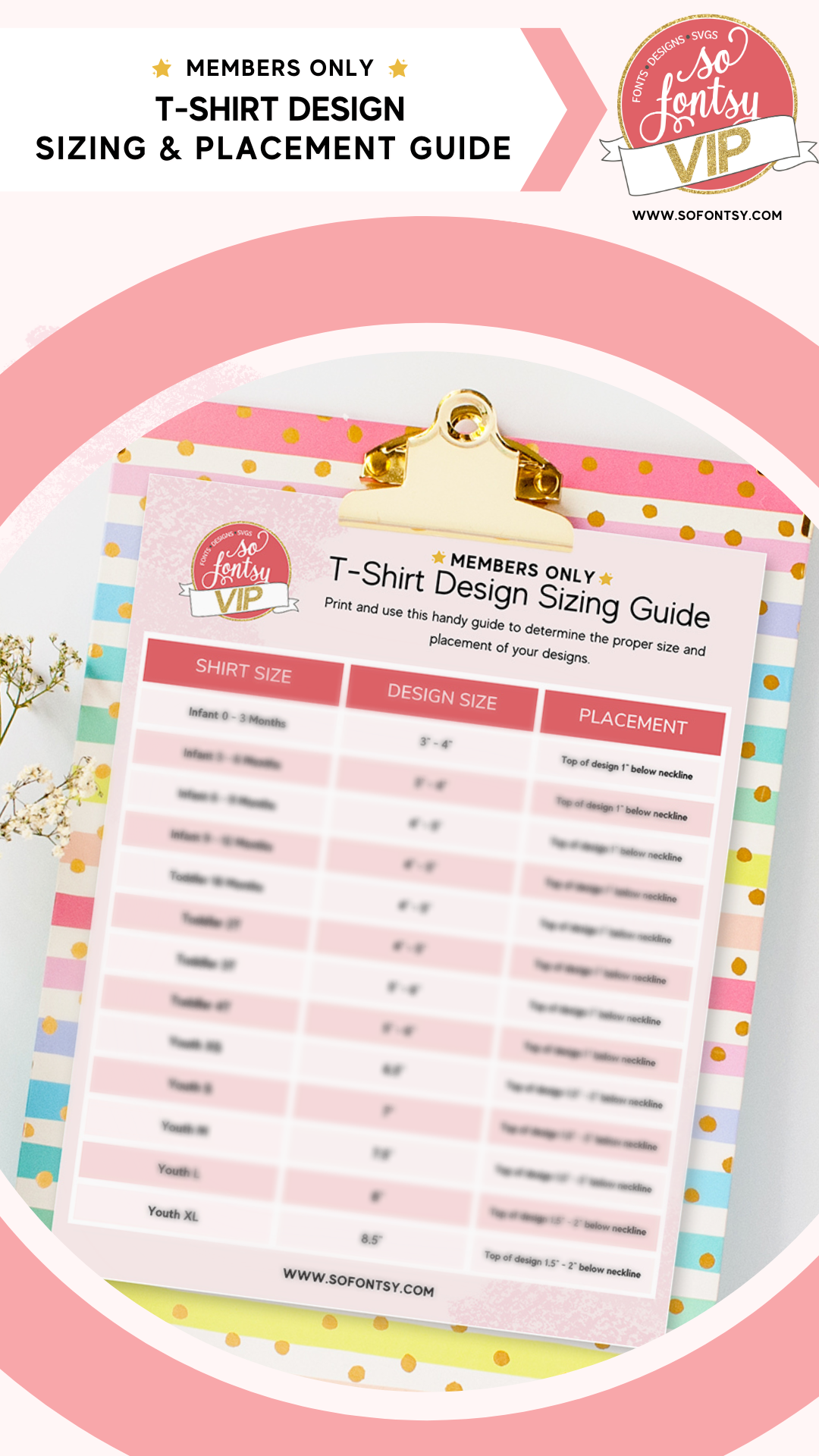
<p>Tired of guessing what size your t-shirt designs should be? Look no further! We've put together a quick and easy T Shirt Sizing Guide to help you out.</p>
<p><img src="https://cdn.shopify.com/s/files/1/0210/2853/6384/files/VIP_Member_Resources_Story_Reel_Feb_23.png?v=1675040623" alt="T Shirt sizing and placement guide"></p>
<div style="text-align: left;">This free guide is usually only available to So Fontsy VIP members, but for a limited time, it's available everyone. Stop guessing and download our free sizing guide now to get the perfect fit for your t-shirt designs whether that's HTV, sublimation or even DTV transfers. <br><br><strong>The Problem With Guessing T-Shirt Sizes</strong>
</div>
<p><br>When it comes to creating the perfect t-shirt design, size matters. It’s not enough to just create a design you think looks great; it needs to fit on the shirt in the right way. Unfortunately, guessing sizes can lead to some major problems.</p>
<p>The most obvious issue is wasted materials. When you guess the wrong size, your design may end up being too large or small for the shirt...and then it can't be used resulting in wasted material.</p>
<p>Guessing design sizes can also lead to a design being placed in the wrong position on the shirt.</p>
<p>These issues can be avoided by using an accurate t-shirt size chart. With the right size chart, you can be sure that your designs will fit perfectly on any size shirt whether a baby outfit or a double XL.<br><br>An accurate t-shirt sizing and placement chart can help you get the right sizing each time. This will save you time and material by making sure that you cut or print the size design that fits perfectly every time. </p>
<p>You won’t have to guess or waste time trying to figure out which size fits them best.</p>
<p>So Fontsy offers a free t-shirt sizing guide for small businesses and crafters who need to get accurate measurements for their HTV designs and transfers. Get your free sizing guide now by adding your email in the field below the image and stop guessing what size your designs should be!</p>
<p> </p>
<div class="klaviyo-form-XTinFT"></div>
<br><br><strong>How to Use the So Fontsy T-Shirt Size Chart</strong>
<p> </p>
<p>Using the So Fontsy T-Shirt Size Chart is easy! All you need to do is download and print it out so you have a reference the next time you cut HTV or print a sublimation transfer. Here are the steps to follow: <br>1. Download the free So Fontsy T-Shirt Size Chart from your email and print it out at actual size.<br>2. Measure your shirt, following the instructions on the chart. Make sure to measure in inches and take into account the fabric's stretch factor.<br>3. Refer to the chart to find the corresponding size of your shirt. Note that sizes may vary from brand to brand, so make sure you double-check the chart for accuracy.<br>4. Now you know what size your t-shirt is and can use this information when cutting HTV or printing a sublimation transfer.</p>
<p>As I mentioned the <span>T-Shirt Sizing</span> Printable Chart is usually only available for members of <a href="https://sofontsy.com/pages/so-fontsy-membership" title="So Fontsy VIP membership">So Fontsy's VIP program</a> - along with our growing library of other valuable resources for crafters and small business. Here's a sneak peek of just a few others available for <a href="https://sofontsy.com/pages/so-fontsy-membership" title="So Fontsy VIP reviews">VIP members on the Creative Pro and Enterprise Plans. </a></p>
<table width="100%">
<tbody>
<tr>
<td style="width: 49.569%;"> <a href="https://sofontsy.com/pages/so-fontsy-membership"><img src="https://cdn.shopify.com/s/files/1/0210/2853/6384/files/Cricut_Blade_Guide_Printable_So_Fontsy_VIP_Resource_480x480.png?v=1664393396" alt=""> </a>
</td>
<td style="width: 47.5272%;">
<div><meta charset="utf-8"></div>
<p> </p>
<p><a href="https://sofontsy.com/pages/so-fontsy-membership"><img src="https://cdn.shopify.com/s/files/1/0210/2853/6384/files/VIP_Silhouette_Cut_Settings_Thumbnail_1_480x480.png?v=1665688628" alt=""></a></p>
</td>
</tr>
<tr>
<td style="width: 49.569%;"><a href="https://sofontsy.com/pages/so-fontsy-membership"><img src="https://cdn.shopify.com/s/files/1/0210/2853/6384/files/Copy_of_Copy_of_Copy_of_VIP_Templates_Thumbnails_1_480x480.png?v=1665688705" alt=""></a></td>
<td style="width: 47.5272%;"><a href="https://sofontsy.com/pages/so-fontsy-membership"><img src="https://cdn.shopify.com/s/files/1/0210/2853/6384/files/VIP_Cost_Calculator_Thumbnail_480x480.png?v=1665688580" alt=""></a></td>
</tr>
</tbody>
</table>
<div style="text-align: center;"><a href="https://sofontsy.com/pages/so-fontsy-membership"><img src="https://cdn.shopify.com/s/files/1/0210/2853/6384/files/VIP_Banners_1.png?v=1665688942" style="margin-right: 35.752px; margin-left: 35.752px; float: none;"></a></div>
<p> </p>]]>
    </content>
  </entry>
  <entry>
    <id>https://sofontsy.com/blogs/tutorials/how-to-use-vinyl-as-a-stencil-for-a-geometric-nursery-sign</id>
    <published>2024-04-22T07:00:06-04:00</published>
    <updated>2024-04-22T07:00:06-04:00</updated>
    <link rel="alternate" type="text/html" href="https://sofontsy.com/blogs/tutorials/how-to-use-vinyl-as-a-stencil-for-a-geometric-nursery-sign"/>
    <title>How to use Vinyl as a Stencil for a Geometric Nursery Sign</title>
    <author>
      <name>Nikita Grimes</name>
    </author>
    <content type="html">
      <![CDATA[<p>You won't believe how much fun I had with this project! I started by grabbing some plywood cut to size and adding a coat of paint. Then, I grabbed my silhouette, cutting out a design that matched the board's dimensions perfectly out of vinyl. After I placed the vinyl down I added another layer of the base coat to help with those sharp lines, and once it dried, I went in with a gorgeous contrasting color. Peeled off the vinyl, and voila – a seriously crisp design! Wrapped it all up by framing it with some extra boards. Easy peasy, and the result is seriously stunning!</p>
<p> </p>
<div style="position: relative; width: 100%; height: 0; padding-top: 56.2500%; padding-bottom: 0; box-shadow: 0 2px 8px 0 rgba(63,69,81,0.16); margin-top: 1.6em; margin-bottom: 0.9em; overflow: hidden; border-radius: 8px; will-change: transform;"><iframe src="https://www.canva.com/design/DAF_O1wg66M/DP7WvbKbNirIAnVgQQ2CoA/watch?embed" style="position: absolute; width: 100%; height: 100%; top: 0; left: 0; border: none; padding: 0; margin: 0;" loading="lazy" allow="fullscreen" allowfullscreen="allowfullscreen">
  </iframe></div>
<p> </p>
<p><meta charset="UTF-8">Grab the design I used from the <a href="https://sofontsy.com/products/nursery-and-baby-svg-bundle" title="Nursery and Baby SVG Bundle">Nursery and Baby Bundle</a> – originally priced at $89.96, now a steal at $10.99, a whopping 87% off! This bundle includes a total of 147 incredible designs.</p>
<p><a href="https://sofontsy.com/products/nursery-and-baby-svg-bundle" title="Nursery and Baby SVG Bundle"><img alt="" src="https://cdn.shopify.com/s/files/1/0210/2853/6384/files/Nursery_and_Baby_SVG_Bundle-thumbnail_graphic.jpg?v=1710107669"></a></p>]]>
    </content>
  </entry>
  <entry>
    <id>https://sofontsy.com/blogs/tutorials/diy-junk-drawer-organization-labels</id>
    <published>2024-04-15T07:00:03-04:00</published>
    <updated>2024-04-15T07:00:03-04:00</updated>
    <link rel="alternate" type="text/html" href="https://sofontsy.com/blogs/tutorials/diy-junk-drawer-organization-labels"/>
    <title>DIY Junk Drawer Organization Labels</title>
    <author>
      <name>Nikita Grimes</name>
    </author>
    <content type="html">
      <![CDATA[<div class="flex-shrink-0 flex flex-col relative items-end">
<div class="pt-0.5">
<div class="gizmo-shadow-stroke flex h-6 w-6 items-center justify-center overflow-hidden rounded-full">
<div class="relative p-1 rounded-sm h-9 w-9 text-white flex items-center justify-center">Hey, who else can relate to having that one chaotic drawer that's just a hot mess? Well, I certainly did, and I decided it was high time to bring some order to the chaos. I swung by Target, picked up some nifty small storage trays, and got creative with some regular vinyl to make labels for each tray. Now, thanks to my genius labeling system, everyone in the fam knows exactly where things belong. No more drawer disaster for us!  </div>
</div>
</div>
</div>
<div style="position: relative; width: 100%; height: 0; padding-top: 56.2500%; padding-bottom: 0; box-shadow: 0 2px 8px 0 rgba(63,69,81,0.16); margin-top: 1.6em; margin-bottom: 0.9em; overflow: hidden; border-radius: 8px; will-change: transform;"><iframe src="https://www.canva.com/design/DAF9WyG1Ozs/swtUNQTGrL8tAvGCMDssRw/watch?embed" style="position: absolute; width: 100%; height: 100%; top: 0; left: 0; border: none; padding: 0; margin: 0;" loading="lazy" allow="fullscreen" allowfullscreen="allowfullscreen">
  </iframe></div>
<p> You can find the font I used for this project inside the incredible <a title="Huge Handwritten Font Bundle" href="https://sofontsy.com/products/huge-handwritten-font-bundle">Huge Handwritten Font Bundle</a>! Originally valued at $157.00, you can buy it for just $17.99 at an amazing 89% off, a steal for <strong>61 fabulous fonts</strong>! Don't miss out on this font-tastic deal.</p>
<p><a title="Huge Handwritten Font Bundle" href="https://sofontsy.com/products/huge-handwritten-font-bundle"><img src="https://cdn.shopify.com/s/files/1/0210/2853/6384/files/Huge_Handwritten_Font_Bundle-thumbnail_graphic.jpg?v=1708459052" alt=""></a></p>]]>
    </content>
  </entry>
  <entry>
    <id>https://sofontsy.com/blogs/tutorials/how-to-add-htv-to-stuffed-animals</id>
    <published>2024-04-10T15:30:42-04:00</published>
    <updated>2024-04-10T15:30:42-04:00</updated>
    <link rel="alternate" type="text/html" href="https://sofontsy.com/blogs/tutorials/how-to-add-htv-to-stuffed-animals"/>
    <title>How to add HTV to Stuffed Animals</title>
    <author>
      <name>Nikita Grimes</name>
    </author>
    <content type="html">
      <![CDATA[<div style="text-align: center;"></div>
<div style="text-align: left;">Add HTV to stuffed animals! My favorite type of vinyl to use is Flocked. I find it is super forgiving and a bit thicker and heavier than regular HTV. All you have to do is cut the vinyl and add it to a stuffed animal of your choice. I used a Cricut mini press at heat setting 3 with a teflon sheet. I used good amount of pressure moving it around often with a teflon sheet in between. The key is to peel the transfer backing off very slowly to make sure if it needs a bit more pressing time/pressure you can do it without ruining the final result. </div>
<div style="position: relative; width: 100%; height: 0; padding-top: 56.2500%; padding-bottom: 0; box-shadow: 0 2px 8px 0 rgba(63,69,81,0.16); margin-top: 1.6em; margin-bottom: 0.9em; overflow: hidden; border-radius: 8px; will-change: transform;"><iframe loading="lazy" style="position: absolute; width: 100%; height: 100%; top: 0; left: 0; border: none; padding: 0; margin: 0;" src="https://www.canva.com/design/DAF971TVYQU/F9aUfzWUhViVyl2kdmL0kA/watch?embed" allowfullscreen="allowfullscreen" allow="fullscreen">
  </iframe></div>
<h2 style="text-align: center;">The adorable font I used for this project, <strong data-mce-fragment="1">Fruity Breath, </strong>can be found <a href="https://sofontsy.com/products/fruity-breath-a-fresh-font" title="Dino Nugget Pillow Font" data-mce-fragment="1" data-mce-href="https://sofontsy.com/products/fruity-breath-a-fresh-font">here!</a>
</h2>
<p> </p>]]>
    </content>
  </entry>
  <entry>
    <id>https://sofontsy.com/blogs/tutorials/how-to-use-social-media-logos-for-a-scannable-craft-fair-sign</id>
    <published>2024-04-10T15:23:50-04:00</published>
    <updated>2024-04-10T15:23:50-04:00</updated>
    <link rel="alternate" type="text/html" href="https://sofontsy.com/blogs/tutorials/how-to-use-social-media-logos-for-a-scannable-craft-fair-sign"/>
    <title>How to use Social Media Logos for a Scannable Craft Fair Sign</title>
    <author>
      <name>Nikita Grimes</name>
    </author>
    <content type="html">
      <![CDATA[<p>Do you want to stand out at your next craft fair? If so I have the perfect project for you, a Social Media Sign. <span data-mce-fragment="1">I used an arched 8x10 acrylic sign blank from </span><span data-mce-fragment="1">Hobby Lobby</span><span data-mce-fragment="1">.</span><br data-mce-fragment="1"><br data-mce-fragment="1">I like to make my scannable QR code in Canva, export it and trace in Silhouette Studio.<br data-mce-fragment="1"><br>So Fontsy Enterprise and Creative Pro VIP Members gain exclusive access to a comprehensive PDF providing guidance on the branding guidelines of various social media platforms! This resource equips you with all the essential information you need, along with links to the downloadable icons, to ensure seamless integration of social media logo icons into your projects.</p>
<div style="position: relative; width: 100%; height: 0; padding-top: 56.2500%; padding-bottom: 0; box-shadow: 0 2px 8px 0 rgba(63,69,81,0.16); margin-top: 1.6em; margin-bottom: 0.9em; overflow: hidden; border-radius: 8px; will-change: transform;"><iframe loading="lazy" style="position: absolute; width: 100%; height: 100%; top: 0; left: 0; border: none; padding: 0; margin: 0;" src="https://www.canva.com/design/DAGA1zG8rs4/mviGVC2LhwuRq0KbsnXTeA/watch?embed" allowfullscreen="allowfullscreen" allow="fullscreen">
  </iframe></div>
<br><span data-mce-fragment="1">Join <a data-mce-fragment="1" href="https://sofontsy.com/pages/so-fontsy-membership" data-mce-href="https://sofontsy.com/pages/so-fontsy-membership">So Fontsy's VIP Membership</a> today to gain access to this PDF and tons more resources! Whether you're a seasoned professional or a hobbyist, So Fontsy's VIP program provides tons of goodies each month including daily freebies, downloadable resources, free files and more! <br><br></span>]]>
    </content>
  </entry>
  <entry>
    <id>https://sofontsy.com/blogs/tutorials/where-to-find-so-fontsy-on-social-media</id>
    <published>2024-04-10T15:15:06-04:00</published>
    <updated>2024-04-11T00:06:35-04:00</updated>
    <link rel="alternate" type="text/html" href="https://sofontsy.com/blogs/tutorials/where-to-find-so-fontsy-on-social-media"/>
    <title>Where to Find So Fontsy on Social Media</title>
    <author>
      <name>Kaysha Kitten</name>
    </author>
    <content type="html">
      <![CDATA[<p>With craft fair season coming up, it's a great time to get your social media in order to direct customers from craft shows to your online platforms.</p>
<p>For guidance, take a look at So Fontsy on our social media platforms.  Add links to the logos to automatically redirect customers when they click on the icon.</p>
<div style="text-align: center;"><a href="https://sofontsy.com/" title="So Fontsy Landing Page"><img style="margin-top: 10px; margin-bottom: 10px; float: none;" alt="So Fontsy Logo" src="https://cdn.shopify.com/s/files/1/0210/2853/6384/files/so_fontsy_logo-pink-large_480x480.png?v=1710790074"></a></div>
<div style="text-align: center;"></div>
<div style="text-align: center;"><a title="So Fontsy Instagram Link" href="https://www.instagram.com/sofontsy/"><img style="margin-top: 10px; margin-bottom: 10px; float: none;" src="https://cdn.shopify.com/s/files/1/0210/2853/6384/files/Instagram_Glyph_Black_480x480.jpg?v=1710876260" alt="Instagram Logo"></a></div>
<div style="text-align: center;"></div>
<div style="text-align: center;"><a title="So Fontsy Facebook Page Link" href="https://www.facebook.com/SoFontsy/"><img style="margin-top: 10px; margin-bottom: 10px; float: none;" src="https://cdn.shopify.com/s/files/1/0210/2853/6384/files/Facebook_Logo_Primary_480x480.png?v=1710876373" alt="Facebook Logo"></a></div>
<div style="text-align: center;">        </div>
<div style="text-align: center;"></div>
<div style="text-align: center;"><a title="So Fontsy X Twitter Home Page" href="https://twitter.com/SoFontsy"><img style="margin-top: 10px; margin-bottom: 10px; float: none;" src="https://cdn.shopify.com/s/files/1/0210/2853/6384/files/logo-black_480x480.png?v=1710876537" alt="X Logo"></a></div>
<div style="text-align: center;"></div>
<div style="text-align: center;">                     </div>
<div style="text-align: center;"></div>
<div style="text-align: center;"><a title="So Fontsy Pinterest Landing Page" href="https://www.pinterest.com/sofontsy/"><img style="margin-top: 10px; margin-bottom: 10px; float: none;" src="https://cdn.shopify.com/s/files/1/0210/2853/6384/files/P-Badge-Flaminglow-Pink-450_480x480.png?v=1710876986" alt="Pinterest Logo"></a></div>
<div style="text-align: start;"></div>
<div style="text-align: center;"></div>
<div style="text-align: center;"><a title="You Tube So Fontsy Page" href="https://www.youtube.com/c/SoFontsy"><img style="margin-top: 10px; margin-bottom: 10px; float: none;" src="https://cdn.shopify.com/s/files/1/0210/2853/6384/files/yt_logo_mono_light_480x480.png?v=1710877143" alt="You Tube Logo"></a></div>]]>
    </content>
  </entry>
  <entry>
    <id>https://sofontsy.com/blogs/tutorials/three-projects-you-can-make-with-dtf-transfers</id>
    <published>2024-04-10T12:48:31-04:00</published>
    <updated>2024-05-07T09:24:12-04:00</updated>
    <link rel="alternate" type="text/html" href="https://sofontsy.com/blogs/tutorials/three-projects-you-can-make-with-dtf-transfers"/>
    <title>Three Projects you can make with DTF Transfers</title>
    <author>
      <name>Nikita Grimes</name>
    </author>
    <content type="html">
      <![CDATA[<p><meta charset="UTF-8"><span data-mce-fragment="1">Did you know that the versatility of DTF transfers goes beyond just t-shirts? I began by using the gang sheet builder on So Fontsy, which allowed me to order a sheet of multiple matching teacher designs. With that I decided to craft a set of personalized goodies for my child's teacher, adding a special touch by including her name in one of the designs for a custom clipboard. To complete the ensemble, I also fashioned a matching hat and t-shirt. I am excited to gift this unique set for teacher appreciation week!</span></p>
<p> </p>
<div style="position: relative; width: 100%; height: 0; padding-top: 56.2500%; padding-bottom: 0; box-shadow: 0 2px 8px 0 rgba(63,69,81,0.16); margin-top: 1.6em; margin-bottom: 0.9em; overflow: hidden; border-radius: 8px; will-change: transform;"><iframe loading="lazy" style="position: absolute; width: 100%; height: 100%; top: 0; left: 0; border: none; padding: 0; margin: 0;" src="https://www.canva.com/design/DAF-faZqSNU/w4VBlGjqCbDq3gc_gm8rGw/watch?embed" allowfullscreen="allowfullscreen" allow="fullscreen">
  </iframe></div>
<p> </p>
<p><span data-mce-fragment="1">Want to make a set for a teacher in your life too? Just head on over to the </span><a data-mce-fragment="1" href="https://sofontsy.com/pages/tshirt-iron-on-printing" title="DTF Gang Sheet Builder" data-mce-href="https://sofontsy.com/pages/tshirt-iron-on-printing">gang sheet builder</a><span data-mce-fragment="1">, where the possibilities are endless. Snag an awesome design for free (like the one I used) or upload your own. The creative power is in your hands – go on, give it a shot!</span></p>]]>
    </content>
  </entry>
  <entry>
    <id>https://sofontsy.com/blogs/tutorials/diy-htv-decorative-dish-dish-towel</id>
    <published>2024-04-01T07:00:11-04:00</published>
    <updated>2024-04-01T07:00:11-04:00</updated>
    <link rel="alternate" type="text/html" href="https://sofontsy.com/blogs/tutorials/diy-htv-decorative-dish-dish-towel"/>
    <title>DIY HTV Decorative Dish Dish Towel</title>
    <author>
      <name>Nikita Grimes</name>
    </author>
    <content type="html">
      <![CDATA[<meta charset="UTF-8">
<div class="flex-shrink-0 flex flex-col relative items-end" data-mce-fragment="1">
<div data-mce-fragment="1">
<div class="pt-0.5" data-mce-fragment="1">
<div class="gizmo-shadow-stroke flex h-6 w-6 items-center justify-center overflow-hidden rounded-full" data-mce-fragment="1">
<div class="relative p-1 rounded-sm h-9 w-9 text-white flex items-center justify-center" data-mce-fragment="1">
<span data-mce-fragment="1">I just spiced up my kitchen by adding a super fun twist to a plain ol' kitchen towel! </span> I now have this kitchen towel that reads "Blessed are those who wash the dishes." I cut out the sassy quote from heat transfer vinyl, gave it a good press, and bam! Now, my kitchen has a towel that's basically a stand-up comedian for dishes. Who knew chores could be this entertaining?</div>
<div class="relative p-1 rounded-sm h-9 w-9 text-white flex items-center justify-center" data-mce-fragment="1"></div>
<div class="relative p-1 rounded-sm h-9 w-9 text-white flex items-center justify-center" data-mce-fragment="1">
<div style="position: relative; width: 100%; height: 0; padding-top: 56.2500%; padding-bottom: 0; box-shadow: 0 2px 8px 0 rgba(63,69,81,0.16); margin-top: 1.6em; margin-bottom: 0.9em; overflow: hidden; border-radius: 8px; will-change: transform;"><iframe src="https://www.canva.com/design/DAF8hYOzGhY/rofktM7ukOPRhcR393oeug/watch?embed" style="position: absolute; width: 100%; height: 100%; top: 0; left: 0; border: none; padding: 0; margin: 0;" loading="lazy" allow="fullscreen" allowfullscreen="allowfullscreen">
  </iframe></div>
</div>
<div class="relative p-1 rounded-sm h-9 w-9 text-white flex items-center justify-center" data-mce-fragment="1"></div>
<div class="relative p-1 rounded-sm h-9 w-9 text-white flex items-center justify-center" data-mce-fragment="1">
<meta charset="UTF-8"> Grab the exact design that spruced up my kitchen towel from the fantastic <a href="https://sofontsy.com/products/kitchen-towel-and-sign-bundle" title="Kitchen Towel and Sign Bundle">Kitchen Towel and Design Bundle</a>! The bundle is a steal at just $9.99, and the total value is  a remarkable $87.48. Plus, you'll score a collection of 130 fabulous kitchen designs. Don't let this incredible bundle slip through your fingers!</div>
<div class="relative p-1 rounded-sm h-9 w-9 text-white flex items-center justify-center" data-mce-fragment="1"></div>
<div class="relative p-1 rounded-sm h-9 w-9 text-white flex items-center justify-center" data-mce-fragment="1"><a href="https://sofontsy.com/products/kitchen-towel-and-sign-bundle" title="Kitchen Towel and Sign Bundle"><img alt="" src="https://cdn.shopify.com/s/files/1/0210/2853/6384/files/Kitchen_Towel_and_Sign_Bundle-thumbnail_graphic.jpg?v=1707686649"></a></div>
<div class="relative p-1 rounded-sm h-9 w-9 text-white flex items-center justify-center" data-mce-fragment="1"></div>
</div>
</div>
</div>
</div>
<div class="relative flex w-full flex-col lg:w-[calc(100%-115px)] agent-turn" data-mce-fragment="1">
<div class="flex-col gap-1 md:gap-3" data-mce-fragment="1">
<div class="flex flex-grow flex-col max-w-full" data-mce-fragment="1">
<div class="min-h-[20px] text-message flex flex-col items-start gap-3 whitespace-pre-wrap break-words [.text-message+&amp;]:mt-5 overflow-x-auto" data-message-id="c551f0a1-191e-4dfc-9e8b-6666babb20c7" data-message-author-role="assistant" data-mce-fragment="1">
<div class="markdown prose w-full break-words dark:prose-invert light" data-mce-fragment="1"></div>
</div>
</div>
</div>
</div>]]>
    </content>
  </entry>
  <entry>
    <id>https://sofontsy.com/blogs/tutorials/diy-cat-food-jar-with-vinyl</id>
    <published>2024-03-18T06:00:02-04:00</published>
    <updated>2024-03-18T06:00:02-04:00</updated>
    <link rel="alternate" type="text/html" href="https://sofontsy.com/blogs/tutorials/diy-cat-food-jar-with-vinyl"/>
    <title>DIY Cat Food Jar with Vinyl</title>
    <author>
      <name>Nikita Grimes</name>
    </author>
    <content type="html">
      <![CDATA[<p><meta charset="utf-8"><span>My cat holds a special place in my heart, and creating personalized items for her brings me so much joy. Crafting this cat food jar was a breeze – all it required was a jar, a design, and a bit of vinyl. Using my silhouette, I carefully cut out the design in vinyl, weeded it, and applied it to the jar. The end result is simply purrfect!</span></p>
<div style="position: relative; width: 100%; height: 0; padding-top: 56.2500%; padding-bottom: 0; box-shadow: 0 2px 8px 0 rgba(63,69,81,0.16); margin-top: 1.6em; margin-bottom: 0.9em; overflow: hidden; border-radius: 8px; will-change: transform;"><iframe loading="lazy" style="position: absolute; width: 100%; height: 100%; top: 0; left: 0; border: none; padding: 0; margin: 0;" src="https://www.canva.com/design/DAF6kQadGZk/watch?embed" allowfullscreen="allowfullscreen" allow="fullscreen">
  </iframe></div>
<p> S<meta charset="UTF-8">nag the awesome design I used for this project from the incredible <a href="https://sofontsy.com/products/big-cats-dogs-bundle" title="Big Cats and Dog Bundle">Big Cats and Dog Bundle</a>! Guess what? It's only $8.99 right now, marked down a whopping 89% from $80.74. You get a bunch of 89 SVGs that'll seriously up your creative game. Trust me, it's a steal!</p>
<p><a href="https://sofontsy.com/products/big-cats-dogs-bundle" title="Big Cats and Dog Bundle"><img alt="" src="https://cdn.shopify.com/s/files/1/0210/2853/6384/files/Big_Cats___Dogs_Bundle-thumbnail_graphic.jpg?v=1705883796"></a></p>]]>
    </content>
  </entry>
  <entry>
    <id>https://sofontsy.com/blogs/tutorials/dtf-can-cooler-anti-social-moms-club</id>
    <published>2024-03-04T16:05:40-05:00</published>
    <updated>2024-03-21T14:19:05-04:00</updated>
    <link rel="alternate" type="text/html" href="https://sofontsy.com/blogs/tutorials/dtf-can-cooler-anti-social-moms-club"/>
    <title>Turn SVGs Into THE EASIEST Transfers</title>
    <author>
      <name>Nikita Grimes</name>
    </author>
    <content type="html">
      <![CDATA[<p><meta charset="UTF-8"><span data-mce-fragment="1">Guess what's rocking my world these days? DTF transfers! It's so easy, you press those bold, multi-colored designs in just 15 seconds – no fuss, no vinyl weeding hassle! So, I got this groovy transfer in my hands, cranked up my press to a toasty 310 degrees, gave it a 12-second hug onto the blank, and peeled off the transfer backing once it cooled down – like, 20 seconds tops. Can you believe it? I whipped up a snazzy can cooler in under 30 seconds. It's like pure magic!</span></p>
<div style="position: relative; width: 100%; height: 0; padding-top: 56.2500%; padding-bottom: 0; box-shadow: 0 2px 8px 0 rgba(63,69,81,0.16); margin-top: 1.6em; margin-bottom: 0.9em; overflow: hidden; border-radius: 8px; will-change: transform;"><iframe src="https://www.canva.com/design/DAF7qTEZ1jM/watch?embed" style="position: absolute; width: 100%; height: 100%; top: 0; left: 0; border: none; padding: 0; margin: 0;" loading="lazy" allow="fullscreen" allowfullscreen="allowfullscreen">
  </iframe></div>
<h3>Want in on this action too? Just head on over to the <a href="https://sofontsy.com/pages/tshirt-iron-on-printing" title="DTF Gang Sheet Builder">gang sheet builder</a>, where the possibilities are endless.</h3>
<p><span data-mce-fragment="1"></span><span data-mce-fragment="1">Snag an awesome design for free (like the one I used) or upload your own. The creative power is in your hands – go on, give it a shot!</span></p>]]>
    </content>
  </entry>
  <entry>
    <id>https://sofontsy.com/blogs/tutorials/how-to-sublimate-in-a-cricut-mug-press</id>
    <published>2024-02-26T06:00:00-05:00</published>
    <updated>2024-04-16T11:12:26-04:00</updated>
    <link rel="alternate" type="text/html" href="https://sofontsy.com/blogs/tutorials/how-to-sublimate-in-a-cricut-mug-press"/>
    <title>How to Sublimate in a Cricut Mug Press</title>
    <author>
      <name>Nikita Grimes</name>
    </author>
    <content type="html">
      <![CDATA[<meta charset="UTF-8">
<div class="flex-shrink-0 flex flex-col relative items-end">
<div>
<div class="pt-0.5">
<div class="gizmo-shadow-stroke flex h-6 w-6 items-center justify-center overflow-hidden rounded-full">
<div class="relative p-1 rounded-sm h-9 w-9 text-white flex items-center justify-center">
<h2 data-pm-slice="1 1 []">Bundle Promotion in this blog post is expired, you can find the Christian Floral Mug Wrap <a href="https://sofontsy.com/products/christian-floral-mug-wrap-sublimation-png-bundle" target="_blank" title="Christian Floral Mug Wrap" rel="noopener noreferrer">here</a>!</h2>
</div>
<div class="relative p-1 rounded-sm h-9 w-9 text-white flex items-center justify-center"></div>
<div class="relative p-1 rounded-sm h-9 w-9 text-white flex items-center justify-center">I love transforming a mundane white mug into something amazing through the  process of sublimation. This quick and straightforward method takes no more than 15 minutes from start to finish. I simply print my chosen design, carefully affix it to the mug with tape, and then press with my Cricut mug press. As soon as the press beeps I immediately remove the mug, unwrap it, and submerge it into a bucket of water. This not only halts the sublimation process but also aids in preventing any ghosting effects. It's truly an effortless and enjoyable project!</div>
<div class="relative p-1 rounded-sm h-9 w-9 text-white flex items-center justify-center"></div>
<div class="relative p-1 rounded-sm h-9 w-9 text-white flex items-center justify-center">
<div style="position: relative; width: 100%; height: 0; padding-top: 56.2500%; padding-bottom: 0; box-shadow: 0 2px 8px 0 rgba(63,69,81,0.16); margin-top: 1.6em; margin-bottom: 0.9em; overflow: hidden; border-radius: 8px; will-change: transform;"><iframe loading="lazy" style="position: absolute; width: 100%; height: 100%; top: 0; left: 0; border: none; padding: 0; margin: 0;" src="https://www.canva.com/design/DAF5Pf98q-Q/watch?embed" allowfullscreen="allowfullscreen" allow="fullscreen">
  </iframe></div>
</div>
<div class="relative p-1 rounded-sm h-9 w-9 text-white flex items-center justify-center">
<br><meta charset="UTF-8"> <span data-mce-fragment="1">Snag the exact design I used in this project in the <a href="https://sofontsy.com/products/sublimation-tumbler-wrap-bundle" title="Sublimation Tumbler and Wrap Bundle">Sublimation Tumbler and Wrap Bundle</a>. This sweet bundle is valued at $117.48, but you can score it for just $12.99 – that's a jaw-dropping 89% off! And the cherry on top? You're getting a whopping 106 designs to use for mugs, tumblers and cups. Talk about a steal!</span>
</div>
<div class="relative p-1 rounded-sm h-9 w-9 text-white flex items-center justify-center"></div>
<div class="relative p-1 rounded-sm h-9 w-9 text-white flex items-center justify-center"><a href="https://sofontsy.com/products/sublimation-tumbler-wrap-bundle" title="Sublimation Tumbler and Wrap Bundle"><img alt="" src="https://cdn.shopify.com/s/files/1/0210/2853/6384/files/Sublimation_Tumbler_Wrap_Bundle-thumbnail_graphic.jpg?v=1704661040"></a></div>
</div>
</div>
</div>
</div>]]>
    </content>
  </entry>
  <entry>
    <id>https://sofontsy.com/blogs/tutorials/diy-spring-seed-storage-faux-book-storage-box</id>
    <published>2024-02-12T05:00:03-05:00</published>
    <updated>2024-04-16T11:14:06-04:00</updated>
    <link rel="alternate" type="text/html" href="https://sofontsy.com/blogs/tutorials/diy-spring-seed-storage-faux-book-storage-box"/>
    <title>DIY Spring Seed Storage Faux Book Storage Box</title>
    <author>
      <name>Nikita Grimes</name>
    </author>
    <content type="html">
      <![CDATA[<h2 data-pm-slice="1 1 []">Bundle Promotion in this blog post is expired, you can find the Plant SVG File <a href="https://sofontsy.com/products/plants-svg-file-plant-cut-files-potted-plants-cut-file-plant-lover-svg-gardening-svg-garden-svg-flower-pot-svg-houseplant-svg-file-cactus-svg" target="_blank" title="Succulent SVG File" rel="noopener noreferrer">here</a>!</h2>
<p><meta charset="UTF-8"><span data-mce-fragment="1">Oh my goodness, you know what's just the absolute cutest? Those faux book storage boxes! I got all crafty and made this adorable seed book. I started with a plain book box, gave it a fresh coat of white paint, and spruced up the front cover and spine with a sweet design using matte vinyl. Can you believe it? Now I've got the perfect spot to stash my seeds for the upcoming spring – talk about excitement!</span> </p>
<div style="position: relative; width: 100%; height: 0; padding-top: 56.2500%; padding-bottom: 0; box-shadow: 0 2px 8px 0 rgba(63,69,81,0.16); margin-top: 1.6em; margin-bottom: 0.9em; overflow: hidden; border-radius: 8px; will-change: transform;"><iframe src="https://www.canva.com/design/DAF4gx9bw5o/watch?embed" style="position: absolute; width: 100%; height: 100%; top: 0; left: 0; border: none; padding: 0; margin: 0;" loading="lazy" allow="fullscreen" allowfullscreen="allowfullscreen">
  </iframe></div>
<p> </p>
<p><span data-mce-fragment="1"><meta charset="UTF-8">Guess what? You can grab the exact designs and fonts I used in the project in the <a title="Spring SVG + Font Bundle" href="https://sofontsy.com/products/spring-svg-font-bundle" target="_blank">Spring SVG and Font Bundle</a>. It's like a creative jackpot—originally priced at a whopping $162.24, but you can grab it for just $14.99. Inside, there are 115 SVGs and 13 fonts waiting to spice up your projects. It's a steal of a deal, seriously!</span></p>
<p><a title="Spring Font and SVG Bundle" href="https://sofontsy.com/products/spring-svg-font-bundle" target="_blank"><span data-mce-fragment="1"><img src="https://cdn.shopify.com/s/files/1/0210/2853/6384/files/Spring_SVG_font_Bundle-thumbnail_graphic.jpg?v=1703992738" alt="" data-mce-src="https://cdn.shopify.com/s/files/1/0210/2853/6384/files/Spring_SVG_font_Bundle-thumbnail_graphic.jpg?v=1703992738" data-mce-fragment="1"> </span></a></p>]]>
    </content>
  </entry>
  <entry>
    <id>https://sofontsy.com/blogs/tutorials/diy-lemon-lazy-susan-with-handles</id>
    <published>2024-01-24T06:00:01-05:00</published>
    <updated>2024-04-16T11:10:48-04:00</updated>
    <link rel="alternate" type="text/html" href="https://sofontsy.com/blogs/tutorials/diy-lemon-lazy-susan-with-handles"/>
    <title>DIY Lemon Lazy Susan with Handles</title>
    <author>
      <name>Nikita Grimes</name>
    </author>
    <content type="html">
      <![CDATA[<meta charset="UTF-8">
<h2 data-pm-slice="1 1 []">Bundle Promotion in this blog post is expired, you can find the Lemons SVG Cut File <a href="https://sofontsy.com/products/lemons-border-bundle-svg-cut-file" target="_blank" title="Lemon SVG Cut File" rel="noopener noreferrer">here</a>!</h2>
<p data-mce-fragment="1">I just can't get enough of crafting with my Silhouette—it's my absolute favorite! The latest gem I whipped up: a super cute lazy Susan. I started with a solid wooden round base, gave it a beautiful rich stain to make it pop. Then, I cut out these adorable lemon designs from regular white matte vinyl. Added them on top, and oh boy, was it starting to transform into something magical!</p>
<p data-mce-fragment="1">To add to the charm, I added some wooden handles. You know, the kind that just makes you want to grab it and spin it around. And speaking of spinning, I made sure to glue on some lazy Susan hardware. Now, it's not just a pretty piece; it's a functional, twirl-worthy masterpiece! This project totally captures why I love infusing my creations with a personal touch—it's like bringing a bit of my own sunshine into everything I make.</p>
<p data-mce-fragment="1"> </p>
<div style="position: relative; width: 100%; height: 0; padding-top: 56.2500%; padding-bottom: 0; box-shadow: 0 2px 8px 0 rgba(63,69,81,0.16); margin-top: 1.6em; margin-bottom: 0.9em; overflow: hidden; border-radius: 8px; will-change: transform;"><iframe loading="lazy" style="position: absolute; width: 100%; height: 100%; top: 0; left: 0; border: none; padding: 0; margin: 0;" src="https://www.canva.com/design/DAF4MwtBOZM/watch?embed" allowfullscreen="allowfullscreen" allow="fullscreen">
  </iframe></div>
<p> </p>
<p data-mce-fragment="1"> </p>
<p data-mce-fragment="1"><meta charset="UTF-8">Grab the exact design I used from the awesome <a title="Big Craft Design Bundle" href="https://sofontsy.com/collections/so-fontsy-design-shop/products/big-craft-design-bundle" target="_blank">Big Craft Design Bundle</a>! This bundle is valued at $195.15, but you can snag it for just $19.99! That's a jaw-dropping 90% off. Inside, there's a whole bunch of creative goodies waiting for you – 342 designs and 12 fonts to be exact. Trust me, it's a steal you don't want to miss!</p>
<p data-mce-fragment="1"><a title="Big Craft Design Bundle" href="https://sofontsy.com/collections/so-fontsy-design-shop/products/big-craft-design-bundle" target="_blank"><span><img alt="" src="https://cdn.shopify.com/s/files/1/0210/2853/6384/files/Big_Craft_Design_Bundle-thumbnail_graphic.jpg?v=1703706379"></span></a></p>]]>
    </content>
  </entry>
  <entry>
    <id>https://sofontsy.com/blogs/tutorials/diy-funny-farmhouse-htv-hand-towel</id>
    <published>2024-01-22T06:00:01-05:00</published>
    <updated>2024-03-06T12:25:18-05:00</updated>
    <link rel="alternate" type="text/html" href="https://sofontsy.com/blogs/tutorials/diy-funny-farmhouse-htv-hand-towel"/>
    <title>DIY Funny Farmhouse HTV Hand Towel</title>
    <author>
      <name>Nikita Grimes</name>
    </author>
    <content type="html">
      <![CDATA[<h3>The bundle promotion in this post has expired but you can find the <a href="https://sofontsy.com/products/water-tracker-svg-bundle-5">design</a> and the <a href="https://sofontsy.com/collections/sports" target="_blank">sports SVG collection</a> here! </h3>
<p> </p>
<span data-mce-fragment="1">Update your house with some farmhouse decor, but make it sarcastic! Crafting this hand towel is a breeze – simply cut out the design in Heat Transfer Vinyl and press it onto the towel. Then hang it up for everyone to enjoy the lighthearted touch it adds to your space!</span> 
<div style="position: relative; width: 100%; height: 0; padding-top: 56.2500%; padding-bottom: 0; box-shadow: 0 2px 8px 0 rgba(63,69,81,0.16); margin-top: 1.6em; margin-bottom: 0.9em; overflow: hidden; border-radius: 8px; will-change: transform;"><iframe loading="lazy" style="position: absolute; width: 100%; height: 100%; top: 0; left: 0; border: none; padding: 0; margin: 0;" src="https://www.canva.com/design/DAF3SivY-qc/watch?embed" allowfullscreen="allowfullscreen" allow="fullscreen">
  </iframe></div>
<p>This hilarious and adorable <a href="https://sofontsy.com/products/funny-farmhouse-svg-bundle-2-0" title="Funny Farmhouse SVG Bundle" target="_blank">Funny Farmhouse</a> bundle, a $95.46 value, is now available at an incredible 88% off for just $10.99! Inside, you'll discover 120 charming farmhouse SVGs, including the perfect design for your hand towel project. Don't miss this opportunity to elevate your crafting game and bring joy to your space!</p>
<p><a href="https://sofontsy.com/products/funny-farmhouse-svg-bundle-2-0" title="Funny Farmhouse SVG Bundle" target="_blank"><span data-mce-fragment="1"><img alt="" src="https://cdn.shopify.com/s/files/1/0210/2853/6384/files/Funny_Farmhouse_SVG_Bundle_2.0-thumbnail_graphic.jpg?v=1702864456"></span></a></p>]]>
    </content>
  </entry>
  <entry>
    <id>https://sofontsy.com/blogs/tutorials/plant-stake-filling-an-acrylic-engrave-with-a-paint-stick</id>
    <published>2024-01-01T06:00:00-05:00</published>
    <updated>2024-01-02T11:50:34-05:00</updated>
    <link rel="alternate" type="text/html" href="https://sofontsy.com/blogs/tutorials/plant-stake-filling-an-acrylic-engrave-with-a-paint-stick"/>
    <title>Plant Stake- Filling an Acrylic Engrave with a Paint Stick</title>
    <author>
      <name>Nikita Grimes</name>
    </author>
    <content type="html">
      <![CDATA[<p><meta charset="UTF-8"><span data-mce-fragment="1">I absolutely love experimenting with new ways to bring my engravings to life, and guess what? I've just found a total game-changer! I used my Glowforge to engrave and cut this cute plant stake design. After unmasking, I grabbed some paint sticks and began filling the engraving. Once I filled it up with color, I used a damp paper towel (or a baby wipe works, too) to wipe away the extra paint. Seriously, it's that easy and quick, but the results are just so satisfying!</span> </p>
<div style="position: relative; width: 100%; height: 0; padding-top: 56.2500%; padding-bottom: 0; box-shadow: 0 2px 8px 0 rgba(63,69,81,0.16); margin-top: 1.6em; margin-bottom: 0.9em; overflow: hidden; border-radius: 8px; will-change: transform;"><iframe loading="lazy" style="position: absolute; width: 100%; height: 100%; top: 0; left: 0; border: none; padding: 0; margin: 0;" src="https://www.canva.com/design/DAF2hcfYrYA/watch?embed" allowfullscreen="allowfullscreen" allow="fullscreen">
  </iframe></div>
<br><meta charset="UTF-8">Unlock the design that brought this project to life by snagging it from the incredible <a href="https://sofontsy.com/products/lovely-laser-svg-bundle" title="Laser SVG Bundle ">Lovely Laser Bundle</a>. Packed with an astounding $140.46 value, you can get 170 laser SVGs for just $12.99. So warm up that laser and don't miss out on this unbeatable offer! <br>
<p> </p>
<p><a href="https://sofontsy.com/products/lovely-laser-svg-bundle" target="_blank" title="Lovely Laser SVG Bundle " rel="noopener noreferrer"><span data-mce-fragment="1"><img src="https://cdn.shopify.com/s/files/1/0210/2853/6384/files/Lovely_Laser_SVG_Bundle-thumbnail_graphic.jpg?v=1702149173" alt=""></span></a></p>]]>
    </content>
  </entry>
</feed>