<html>
<head>
<meta http-equiv="Content-Type" content="text/html; charset=utf-8" />
<meta name="apple-mobile-web-app-capable" content="yes" />
<meta content="yes" name="apple-touch-fullscreen" />
<meta name="apple-mobile-web-app-status-bar-style" content="black" />
<meta name="format-detection" content="telephone=no">
<meta name="viewport" content="initial-scale=1, maximum-scale=1" />
<title>Figma Image Filters plugin</title>
<!--[if IE]><link rel='shortcut icon' type='image/vnd.microsoft.icon' href='https://stylecampaign.com/blog/favicon.ico'><![endif]--><!-- Internet Explorer-->
<!-- Favicon - Generic -->
<link rel="icon" href="https://stylecampaign.com/blog/icons/favicon.svg" type="image/svg+xml" sizes="any">
<!-- Favicon - Android -->
<link rel="shortcut icon" href="https://stylecampaign.com/blog/icons/favicon-196.png" sizes="196x196">
<!-- Favicon - iOS -->
<!-- 
<link rel="apple-touch-icon" href="https://stylecampaign.com/blog/icons/favicon-114.png" sizes="114x114">
<link rel="apple-touch-icon" href="https://stylecampaign.com/blog/icons/favicon-120.png" sizes="120x120">
<link rel="apple-touch-icon" href="https://stylecampaign.com/blog/icons/favicon-144.png" sizes="144x144">
<link rel="apple-touch-icon" href="https://stylecampaign.com/blog/icons/favicon-152.png" sizes="152x152">
<link rel="apple-touch-icon" href="https://stylecampaign.com/blog/icons/favicon-180.png" sizes="180x180">
--> 
<!-- Favicon - Generic -->
<link rel="icon" href="https://stylecampaign.com/blog/icons/favicon-32.png" sizes="32x32">
<link rel="icon" href="https://stylecampaign.com/blog/icons/favicon-57.png" sizes="57x57">
<link rel="icon" href="https://stylecampaign.com/blog/icons/favicon-64.png" sizes="64x64">
<link rel="icon" href="https://stylecampaign.com/blog/icons/25521593525e57dc8fb3b80e6b701352" sizes="64x64">
<link rel="icon" href="https://stylecampaign.com/blog/icons/favicon-76.png" sizes="76x76">
<link rel="icon" href="https://stylecampaign.com/blog/icons/favicon-96.png" sizes="96x96">
<link rel="icon" href="https://stylecampaign.com/blog/icons/favicon-128.png" sizes="128x128">
<link rel="icon" href="https://stylecampaign.com/blog/icons/favicon-192.png" sizes="192x192">
<link rel="icon" href="https://stylecampaign.com/blog/icons/favicon-228.png" sizes="228x228">

<!-- put Favicon.ico in root -->     
<!-- <link rel="Shortcut Icon" href="https://stylecampaign.com/blog/favicon.ico" type="image/x-icon" /> --> 


<link rel="stylesheet" href="https://stylecampaign.com/blog/style.css" type="text/css" media="screen" />
<script type="text/javascript" src="https://stylecampaign.com/blog/stylemenu.js"></script>
<script language="javascript"><!--
function archive(){
	document.navform.submit();
}
//--></script>
</head>
<body>
<div id="mainwrapper" width="100%" align="center" style="padding:20px 32px 22px 22px;">
<table width="100%" align="center" style="font-family:'ToolkitFont', Helvetica, Arial, sans-serif; font-size:17px; line-height:28px; color:#333333; font-weight:normal;" class="to100pc"><tr><td width="100%" align="center" >
<div id="page">
	<div id="header">
	    <div id="logo-space">
		<a href="https://stylecampaign.com" class="logo">Stylecampaign</a>
     	    </div><div id="topmenu">
			<ul id="stylemenu">
			  <li class="first"><a href="https://stylecampaign.com/systems.html">Systems</a></li>
			  <li><span onclick="javascript:archive()" style="cursor:pointer">Archive</span></li>
			  <li class="last"><a href="https://stylecampaign.com/contact.html">Contact</a></li></ul>

	    </div>
	</div>
	<div id="headspace">&nbsp;</div>

	<div id="genspace">&nbsp;</div>				
    
	<div id="content" align=="center" style="max-width:710px;margin-left: auto; margin-right: auto;">
	
	        
                <div class="post" id="post-281">
        	<h1>
		<a href="http://stylecampaign.com/?p=281" rel="bookmark" title="Permanent Link to Figma Image Filters plugin">Figma Image Filters plugin</a>
		</h1>
		<div class="entry"><p>In the last few years we've seen more demand for animation and short-form video. After a stint with After Effects templates we decided to work on a purpose built motion tool that we can use internally.
For now we've called it "Drift", anyway Drift has a color panel which supports LUTs and comes with a collection of pre-made image filters. </p>
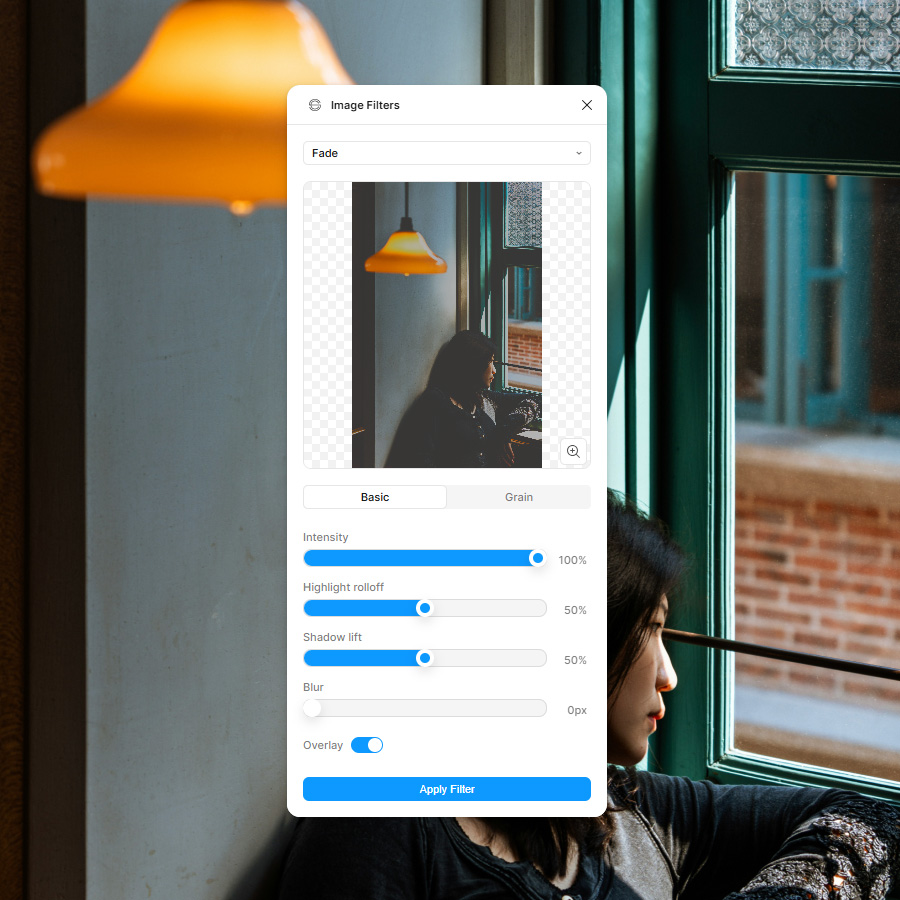

<a href="https://stylecampaign.com/blog/blogimages/figma-image-filters/figma-plugin-dark-mode-023.jpg" target="_blank" title="Figma Image Filters plugin.">
<img src="https://stylecampaign.com/blog/blogimages/figma-image-filters/figma-plugin-dark-mode-023.jpg" alt="Image filters Figma plugin." border="0" width="710" height="710" /></a>
<p style="font-size: 14px; color: #222222; text-align: center">Figma Image Filters plugin</p>

<br>
<h2>A bit of Photoshop in Figma</h2>
Which led to the thought that I'd like to be able to use those filters in Figma. Email designers have typically worked in Photoshop, though more of us are moving to Figma or using both. At first I thought I could take the LUTs I'd created for Drift and import them into Figma, but we went the WebGL shader route instead. Check it out on the <a href="https://www.figma.com/community/plugin/1538952600697366758/image-filters" title="Try out the Image Filters plugin on the Figma community" target="_blank">Figma community</a>. </p>

<h2>What's in the plugin</h2>

<ul>
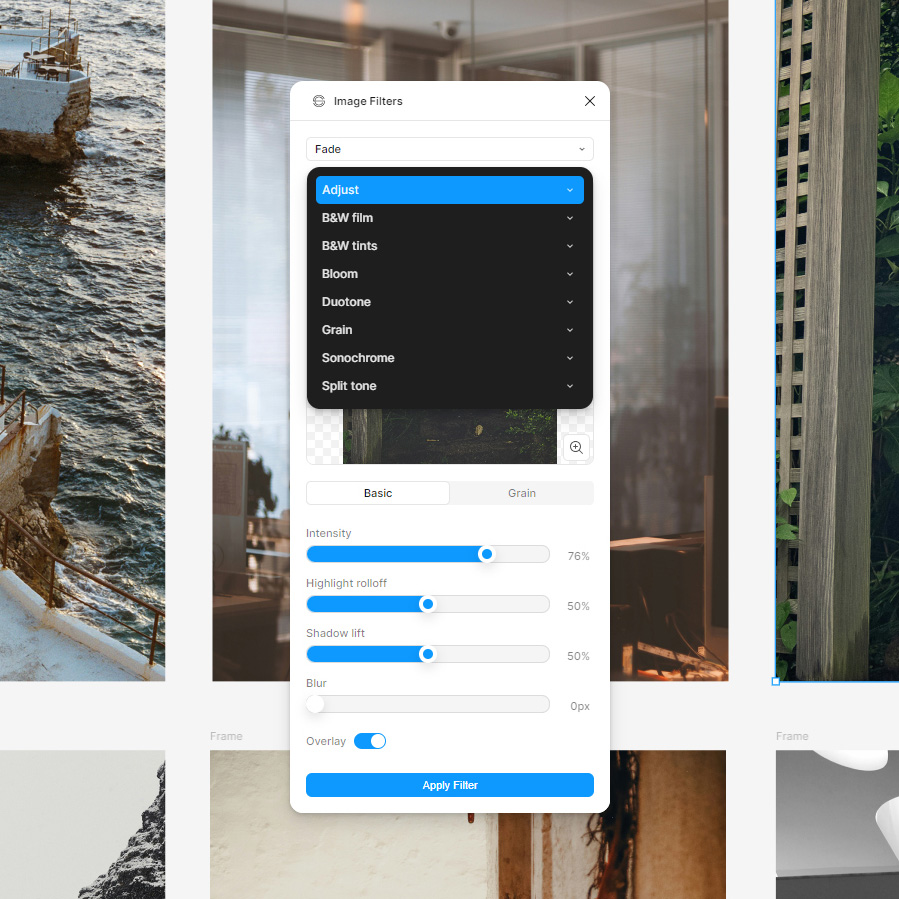
 <li>Adjust (17)</li>
<li>B&W film  (13)</li>
 <li>B&W tints (14)</li>
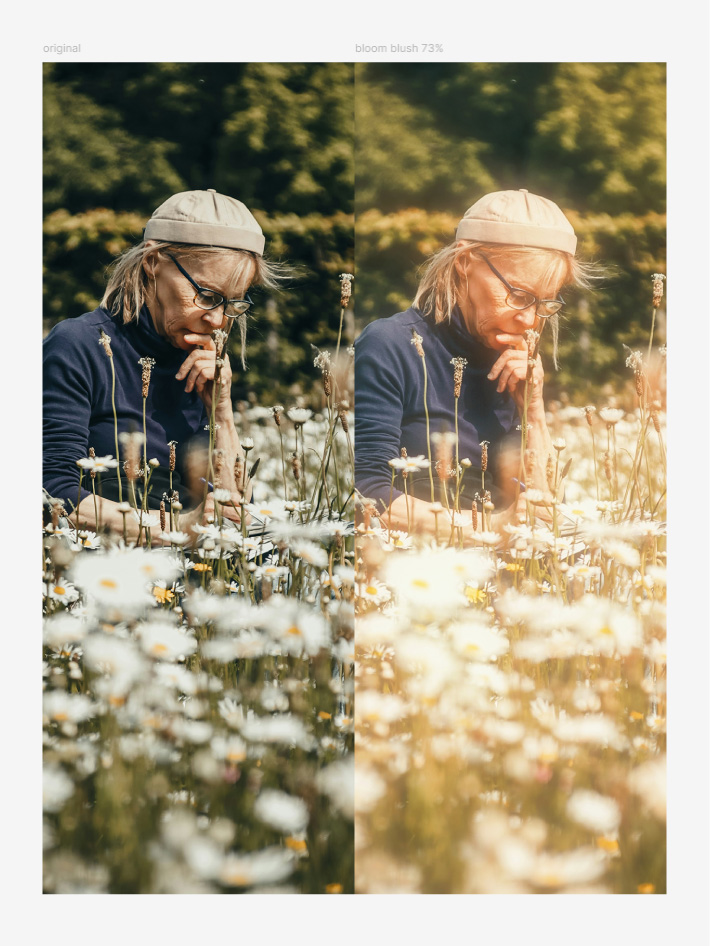
 <li>Bloom  (14)</li>
 <li>Duotone  (10)</li>
 <li>Grain  (3)</li>
 <li>Sonochrome  (17)</li>
<li>Split tone  (15)</li>

<h2>Customize</h2>

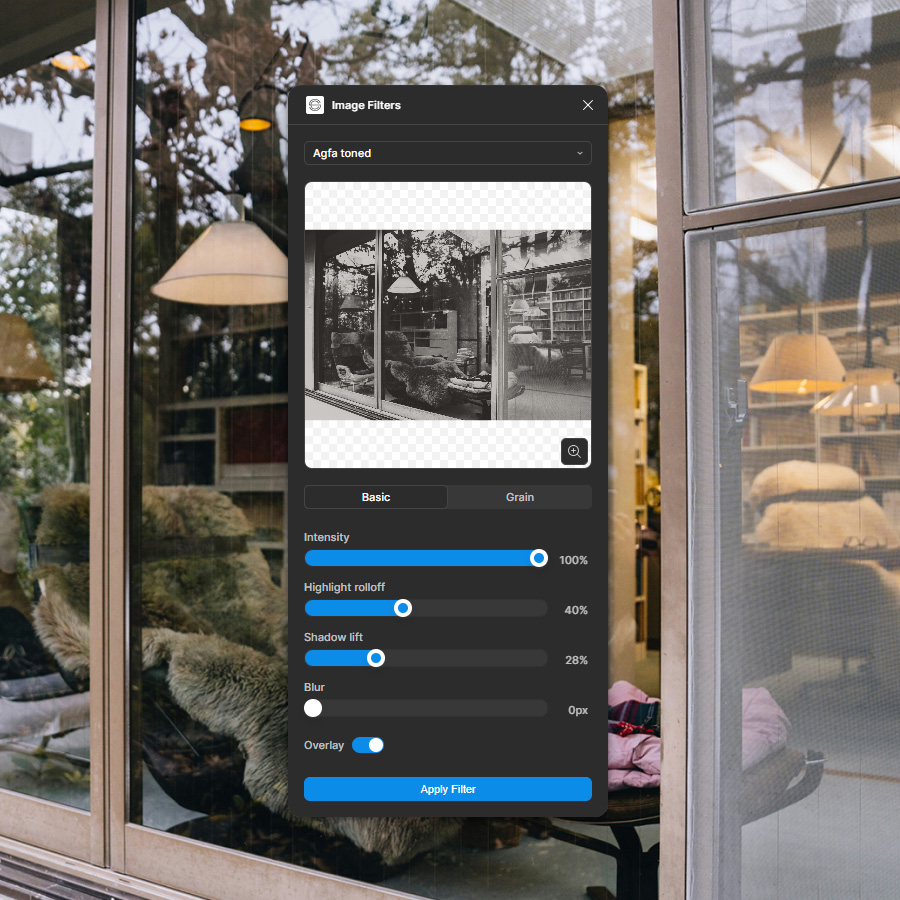
 <li>Intensity</li>
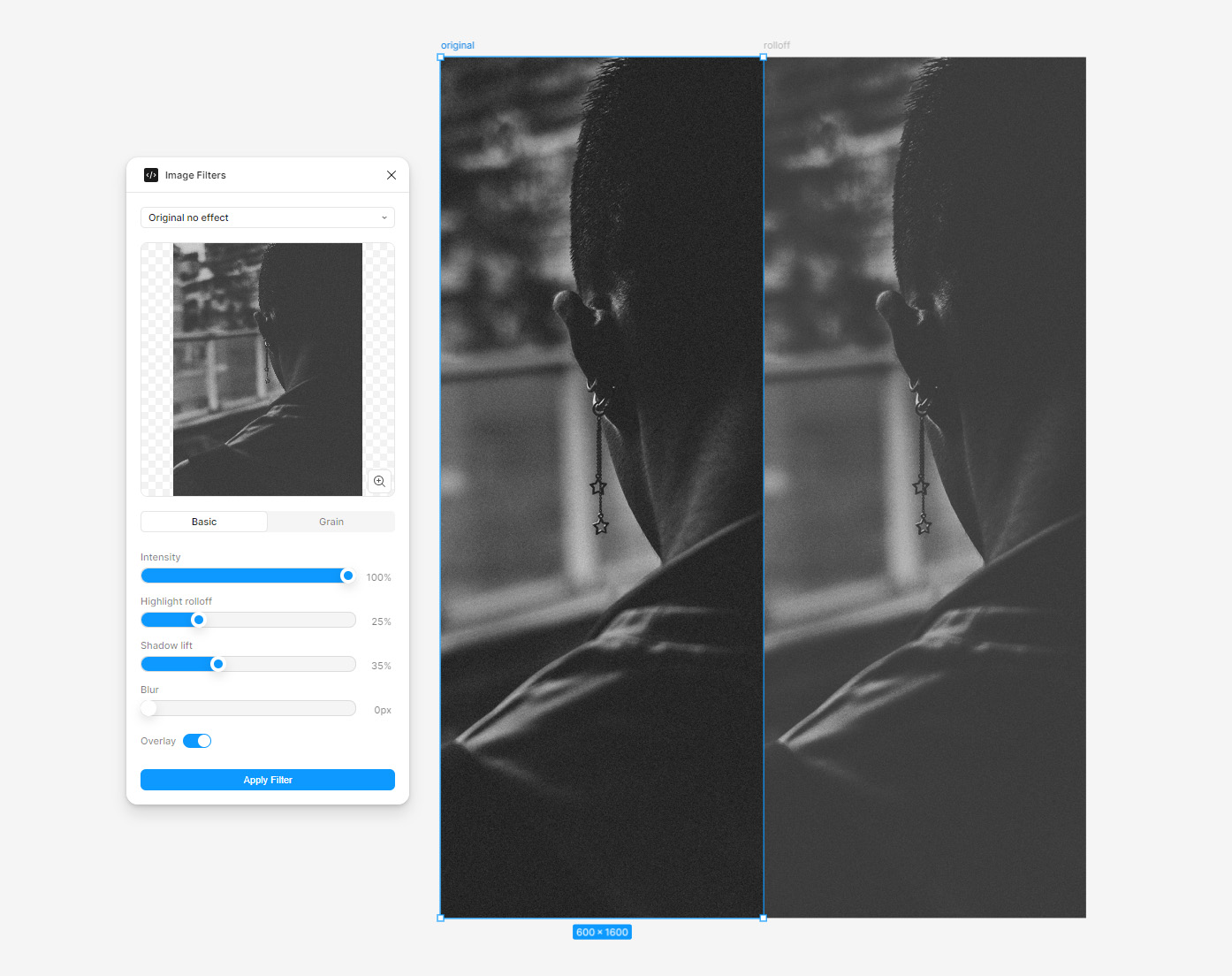
 <li>Highlight rolloff</li>
<li>Shadow lift</li>
<li>Blur</li>
<li>Overlay on/off</li>
<li>Grain on/off</li>
<li>Grain intensity</li>
<li>Grain size</li>
<li>Grain color</li>
</ul>


<br>

<table border="0" width="710" height="399" class="to100pc"><tr><td align="left">
<table id="videotable" border="0" cellspacing="0" cellpadding="0" style="position:relative;width:100% !important;padding-bottom:56.25%;height:0 !important;"><tr><td align="left" valign="middle">
<iframe src="https://www.youtube.com/embed/0HYnApIfhfk?si=QTPj1yzRZA6V532c"  width="710" height="399" title="something" frameborder="0" allow="accelerometer; autoplay; controls=0; clipboard-write; encrypted-media; gyroscope; picture-in-picture; web-share" style="position:absolute; top:0; left:0; width:100% !important; height:100% !important;"></iframe>
</td></tr></table>
</td></tr></table>
<p style="font-size: 14px; color: #222222; text-align: center">B&W film presets, grain, and bloom.</p>

<br>
<a href="https://stylecampaign.com/blog/blogimages/figma-image-filters/figma-plugin-dark-mode-026.jpg" target="_blank" title="8 preset collections with a total of 103 presets.">
<img src="https://stylecampaign.com/blog/blogimages/figma-image-filters/figma-plugin-dark-mode-026.jpg" alt="8 preset collections with a total of 103 presets." border="0" width="710" height="710" />
</a>
<p style="font-size: 14px; color: #222222; text-align: center">8 preset collections with a total of 103 image presets.</p>
<br>

<a href="https://stylecampaign.com/blog/blogimages/figma-image-filters/figma-plugin-dark-mode-024.jpg" target="_blank" title="Select your image to load it into the plugin, choose a preset, hit apply filter.">
<img src="https://stylecampaign.com/blog/blogimages/figma-image-filters/figma-plugin-dark-mode-024.jpg" alt="Select your image to load it into the plugin, choose a preset, hit apply filter." border="0" width="710" height="710" />
</a>
<p style="font-size: 14px; color: #222222; text-align: center">Select your image, choose a preset, hit apply filter.</p>
<br>

<a href="https://stylecampaign.com/blog/blogimages/figma-image-filters/figma-image-filters-004.jpg" target="_blank" title="Highlight rolloff & shadow lift are in the UI and can be adjusted separately. They help to create a more film-like look, and when combined create a fade effect.">
<img src="https://stylecampaign.com/blog/blogimages/figma-image-filters/figma-image-filters-004.jpg" alt="Highlight rolloff & shadow lift are in the UI and can be adjusted separately. They help to create a more film-like look" border="0" width="710" height="562" />
</a>
<p style="font-size: 14px; color: #222222; text-align: center">Highlight rolloff & shadow lift.</p>

<a href="https://stylecampaign.com/blog/blogimages/figma-image-filters/figma-image-filters-013.jpg" target="_blank" title="Blush preset 73% intensity, one of 14 bloom presets. Others include candlelight, ghostbusters, red mist and neon pink. Pick a bloom preset and adjust the Intensity slider.">
<img src="https://stylecampaign.com/blog/blogimages/figma-image-filters/figma-image-filters-013.jpg" alt="Blush preset 73% intensity, one of 14 bloom presets. Others include candlelight, ghostbusters, red mist and neon pink. I want to add more bloom parameters to the UI on the next update, for now pick a bloom preset and adjust the Intensity" border="0" width="710" height="946" />
</a>
<p style="font-size: 14px; color: #222222; text-align: center">Blush preset, one of 14 bloom presets.</p>

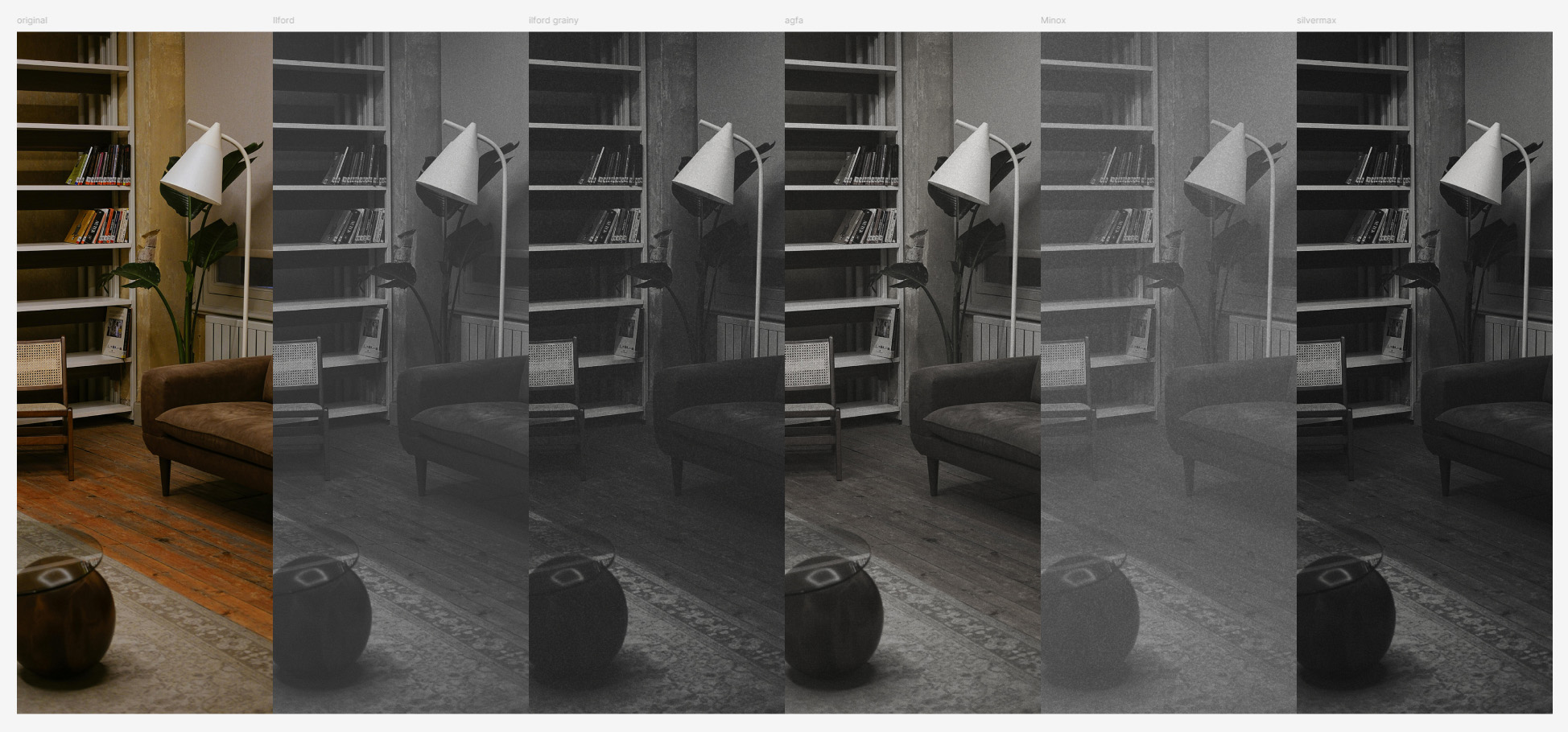
<a href="https://stylecampaign.com/blog/blogimages/figma-image-filters/figma-image-filters-009.jpg" target="_blank" title="Some of the 13 B&W film presets, these are loosely based on real film stocks. For instance Minox is based on this cool little grainy vintage spy camera.">
<img src="https://stylecampaign.com/blog/blogimages/figma-image-filters/figma-image-filters-009.jpg" alt="Some of the 13 B&W film presets, these are loosely based on real film stocks. Though I'm more interested in certain looks, than true film emulation like Dehancer or Filmbox." border="0" width="710" height="332" />
</a>
<p style="font-size: 14px; color: #222222; text-align: center">B&W film presets, more "loosely based on".</p>


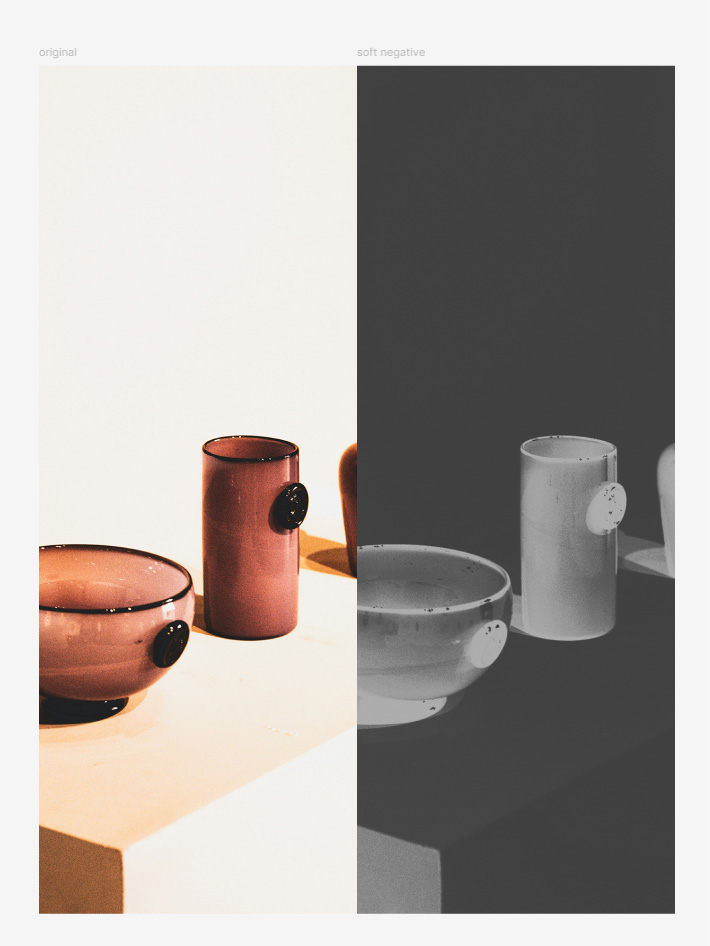
<a href="https://stylecampaign.com/blog/blogimages/figma-image-filters/figma-image-filters-022.jpg" target="_blank" title="Soft negative preset, there's also partial negative (just shadows) and solarization presets inspired by Man Ray & Lee Miller.">
<img src="https://stylecampaign.com/blog/blogimages/figma-image-filters/figma-image-filters-022.jpg" alt="Soft negative preset, there's also partial negative (just shadows) and solarization presets inspired by Lee Miller and Man Ray found in the B&W film and tints collections." border="0" width="710" height="946" />
</a>
<p style="font-size: 14px; color: #222222; text-align: center">Soft negative preset.</p>

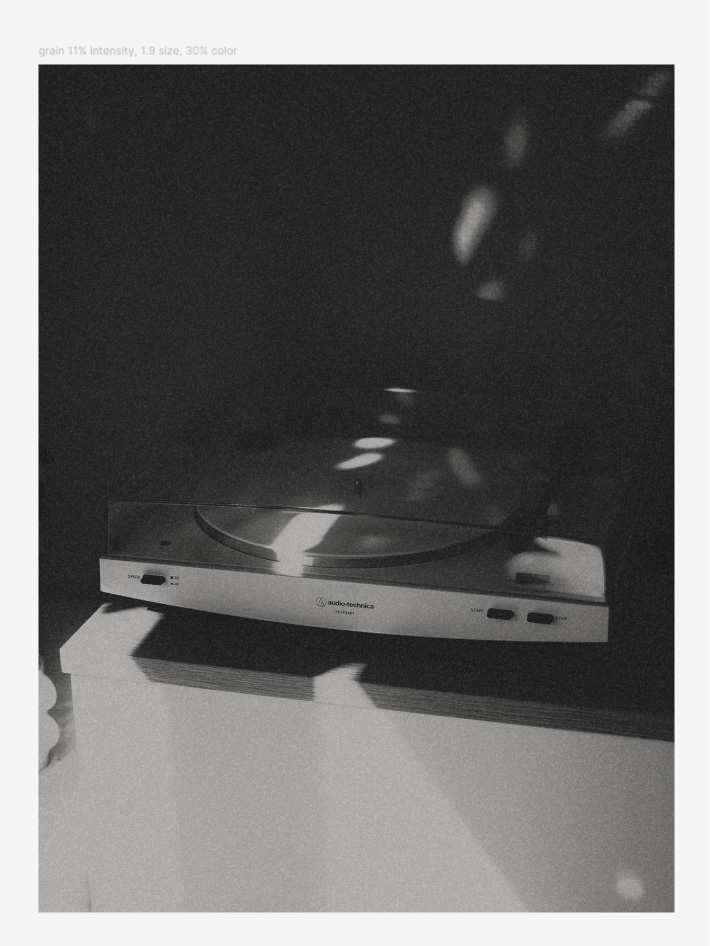
<a href="https://stylecampaign.com/blog/blogimages/figma-image-filters/figma-image-filters-017.jpg" target="_blank" title="Grain has on/off, intensity, size and color parameters. There are also three grain presets: fine grain, medium grain and high grain.">
<img src="https://stylecampaign.com/blog/blogimages/figma-image-filters/figma-image-filters-017.jpg" alt="A B&W image with a lot of grain applied. Grain parameters are in the UI under their own tab. You can add grain to any image, or edit the grain that comes with any preset (B&W film presets all have some grain by default and a few of the bloom presets). Grain has on/off, intensity, size and color parameters for now. I plan to add sliders to adjust the amount of grain in the shadows, midtones and highlights." border="0" width="710" height="946" />
</a>
<p style="font-size: 14px; color: #222222; text-align: center">Grain has on/off, intensity, size and color parameters.</p>


<table border="0" width="710" height="399" class="to100pc"><tr><td align="left">
<table id="videotable" border="0" cellspacing="0" cellpadding="0" style="position:relative;width:100% !important;padding-bottom:56.25%;height:0 !important;"><tr><td align="left" valign="middle">
<iframe src="https://www.youtube.com/embed/HIFBkUNQPJw?si=fqTjUOtnX_CkZm-r" width="710" height="399" title="something" frameborder="0" allow="accelerometer; autoplay; controls=0; clipboard-write; encrypted-media; gyroscope; picture-in-picture; web-share" style="position:absolute; top:0; left:0; width:100% !important; height:100% !important;"></iframe>
</td></tr></table>
</td></tr></table>
<p style="font-size: 14px; color: #222222; text-align: center">Adjust is a collection of 17 presets.</p>

<br>
<h2>Limitations</h2>
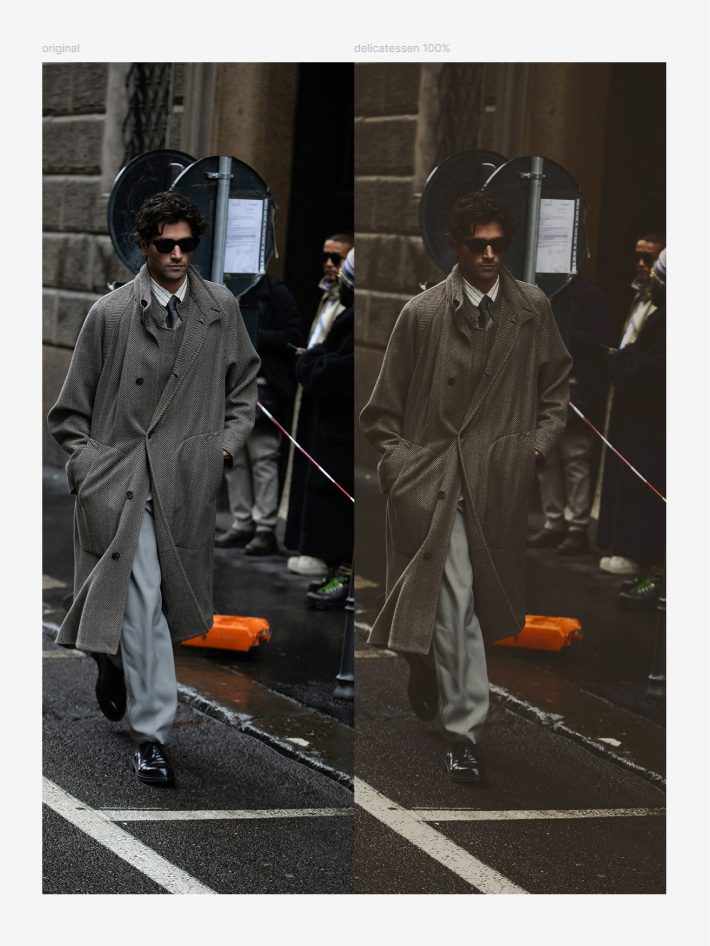
You don't have access to all the preset parameters, there's 30+ so it's a lot to put in the UI.
You can currently customize intensity, highlight rolloff, shadow lift, blur, overlay on/off, grain on/off and grain intensity, size and color.

<br><br>

<a href="https://stylecampaign.com/blog/blogimages/figma-image-filters/figma-image-filters-014.jpg" target="_blank" title="Split tone adds color to the shadows, midtones and highlights at a certain strength. So add a bit of blue to my shadows at 14%. Often it's just the shadows and highlights. There are 15 split tone presets, such as Canyon, Golden hour and Spearmint. Use the intensity slider to dial them in. I hope to add these controls to the UI so you can make your own.">
<img src="https://stylecampaign.com/blog/blogimages/figma-image-filters/figma-image-filters-014.jpg" alt="Delicatessen split tone preset 100%" border="0" width="710" height="946" />
</a>
<p style="font-size: 14px; color: #222222; text-align: center">Delicatessen split tone preset.</p>


<br>
<h2>Payment & privacy</h2>
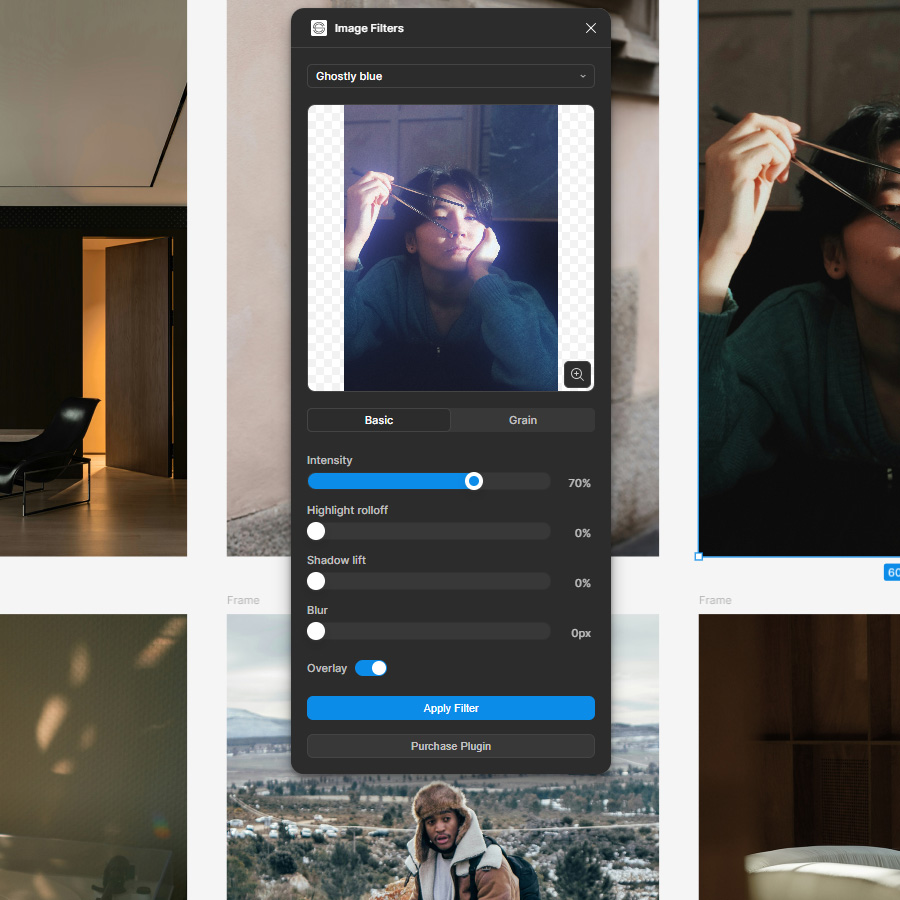
 It's a $10 one-time payment, with a 3-day free trial. You can purchase a license via a link within the plugin.
It automatically gets flagged as paid, no license keys required.
The plugin and your image assets are private to you, and you can use it for commercial projects.
<br><br>

<ul>
 <li><a href="https://stylecampaign.com/privacy.html" title="Stylecampaign Privacy Policy" target="_blank">Stylecampaign Privacy Policy</a></li>
</ul>

<br>
<a href="https://stylecampaign.com/blog/blogimages/figma-image-filters/figma-image-filters-024.jpg" target="_blank" title="There's a 3-day free trial, use the Purchase Plugin button seen at the bottom of the plugin, it should disappear once purchased. This is the Ghostly Blue bloom preset.">
<img src="https://stylecampaign.com/blog/blogimages/figma-image-filters/figma-image-filters-024.jpg" alt="There's a 3-day free trial, use the Purchase Plugin button seen at the bottom of the plugin, it should disappear once purchased" border="0" width="710" height="710" />
</a>
<p style="font-size: 14px; color: #222222; text-align: center">'Purchase Plugin' button should disappear once purchased.</p>
<br>

<h2>Processed through Stripe</h2>
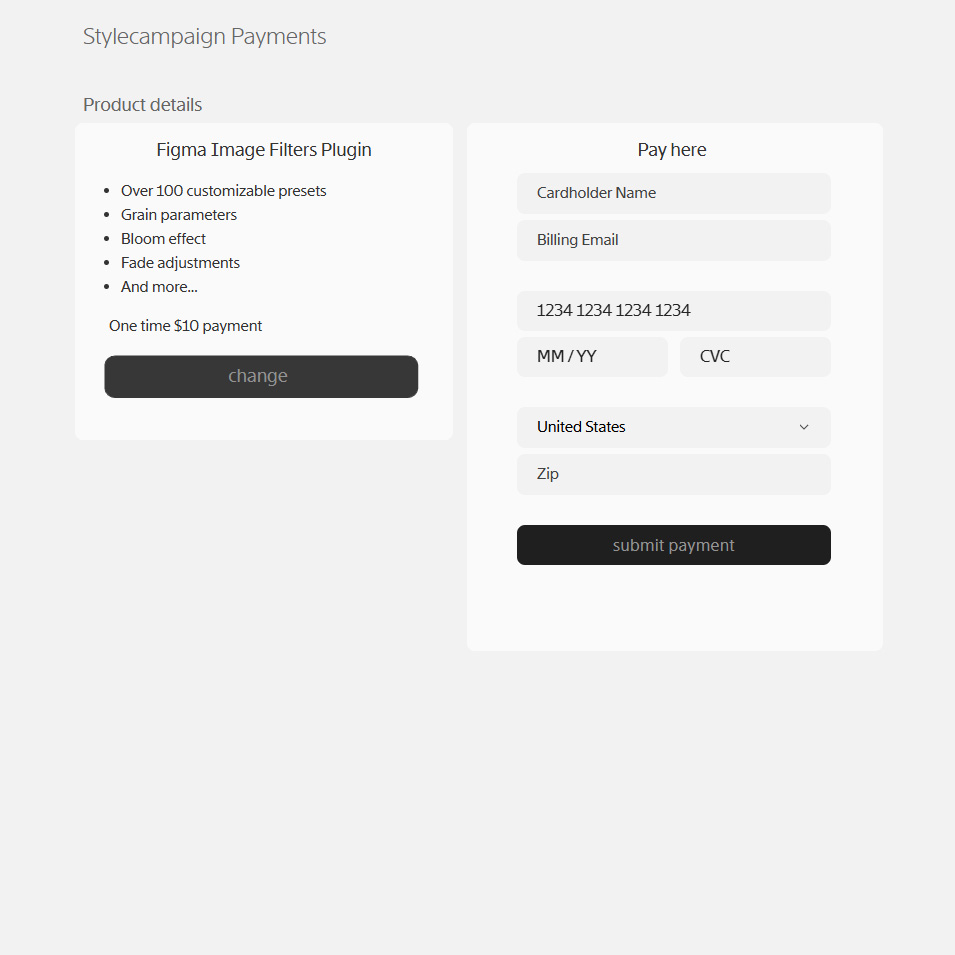
The 'Purchase Plugin' button takes you to our website.
If you're on Safari on mac you might need to <a href="https://www.youtube.com/watch?v=6pwpmk3lUSc" title="How to allow or block pop ups in Safari" target="_blank">allow pop-ups</a> in your settings/preferences.
We're using Stripe to process payments, you'll receive a confirmation email after your purchase.

<br><br>

<a href="https://stylecampaign.com/blog/blogimages/figma-image-filters/figma-image-filters-031.jpg" target="_blank" title="Landing page looks like this, payments processed through Stripe.">
<img src="https://stylecampaign.com/blog/blogimages/figma-image-filters/figma-image-filters-031.jpg" alt="After the 3-day free trial the 'Landing page looks like this, payments processed through Stripe." border="0" width="710" height="710" />
</a>
<p style="font-size: 14px; color: #222222; text-align: center">Payments processed through Stripe.</p>
<br>


<h2>Support</h2>
Any questions best to email us support@stylecampaign.com. I'm also on X <a href="https://x.com/stylecampaign" title="@stylecampaign on Twitter (Anna)" target="_blank"> @stylecampaign</a>, and emailgeeks slack as Anna Yeaman.

<br><br>

<h2>Cool stuff I found along the way</h2>
<ul>
 <li><a href="https://www.reddit.com/r/colorists/" title="r/colorists (this was a hobby project, still a lot to learn)" target="_blank">Colorists reddit</a></li>
 <li><a href="https://youtu.be/ezCRBUioz68?si=85StGuGHS1mcFxYH&t=252" title="Him to thank for rolloff" target="_blank">Cullen Kelly DaVinci channel</a></li>
 <li><a href="https://www.yedlin.net/NerdyFilmTechStuff/OnFilmGrainEmulation.html" title="On film grain emulation (enjoyed this read)" target="_blank">Steve Yedlin</a></li>
 <li><a href="https://yurikotakagi.com/works/" title="Lovely photography which inspired the Moss tint" target="_blank">Yuriko Takagi</a></li>
 <li><a href="https://www.georgehoyningenhuene.org/" title="More lovely B&W photography" target="_blank">George Hoyningen Huene</a></li>
 <li><a href="https://www.getty.edu/art/collection/person/103KHB" title="These are beautiful, Graeme has owned some large format cameras" target="_blank">William Henry Jackson</a></li>
 <li><a href="https://www.youtube.com/watch?v=QITcY3W0mto&t=16s" title="Made some solarization presets inspired by their work" target="_blank">Lee Miller & Man Ray</a></li>
 <li><a href="https://youtu.be/6JDfdHWBVG4?si=mq9btZ793T_367ks" title="Albumen (eggy) print explained on YouTube " target="_blank">Albumen Print</a></li>
 <li><a href="https://en.wikipedia.org/wiki/Pictorialism" title="Pictorialism wiki (inspired some B&W tints) " target="_blank">Pictorialism</a></li>
 <li><a href="https://archive.org/details/alexis-van-hurkman-2014-color-correction-look-book/page/187/mode/2up" title="Where I got the idea for Sonochrome tints" target="_blank">Color correction look book</a></li>
 <li><a href="https://noamkroll.com/how-to-color-grade-a-perfectly-cinematic-black-and-white-look/" title="How to color grade a perfectly cinematic black and white look (see crush & lift preset in adjust)" target="_blank">Color grading B&W</a></li>
 <li><a href="https://www.figma.com/community/file/1486123838948777078/ui3-figmas-ui-kit" title="Helped me design the plugin" target="_blank">Figma UI3 community file</a></li>
<li><a href="https://leemunroe.medium.com/how-to-develop-your-first-figma-plugin-for-designers-7d01fe4ec894" title="Shout out to Lee Munroe, this post helped get me started" target="_blank">First Figma plugin for designers</a></li>
<li><a href="https://www.figma.com/plugin-docs/plugin-quickstart-guide/" title="Help get you set up and make a sample plugin" target="_blank">Figma's plugin quickstart guide</a></li>
 <li><a href="https://www.youtube.com/watch?v=SW6L_lTrIFg" title="Listening to C. Tangana: Tiny Desk (Home) Concert on YouTube while making presets" target="_blank">Making presets music</a></li>
</ul>			<p class="postmetadata alt">
				<small>
					Posted 2025-09-24 20:50:32<br> 
					
				</small>
			</p> 

		</div>
	</div>
        
	
	<div id="genspace">&nbsp;</div>	
	
	<div id="headspace">&nbsp;</div>
	
    </div>


      <div id="headspace">&nbsp;</div>
      <div id="headspace">&nbsp;</div>

      <div id="footer">
          <div id="footspace">&nbsp;</div> 
          <div id="footmenu">
			<ul id="stylemenu" class="smbase">
			  <li><a href="https://stylecampaign.com/systems.html">Systems</a></li>
			  <li><span onclick="javascript:archive()" style="cursor:pointer">Archive</span></li>
			  <li><a href="https://stylecampaign.com/contact.html">Contact</a></li>
			  <li class="last"><a href="https://stylecampaign.com/newsletter.html">Newsletter</a></li></ul>
	  </div>
	  <div id="footcopy">
		&copy; 2025 Stylecampaign
	  </div>
      </div>
</td></tr></table>
</div>
<div style="display:none">
<form name="navform" class="navform" method="post" autocomplete="off" action="https://stylecampaign.com/blog/">
<input type="text" id="p" name="p" value="1" style="width: 56px;">
</form>
</div> 
</body>
</html>