<?xml version="1.0" encoding="utf-8"?>
		<feed xmlns="http://www.w3.org/2005/Atom">
			<title>Tai Shimizu</title>
			<subtitle>Photography, Gadgetry, and Life on the ➍➎➏.</subtitle>
			<id>http://taishimizu.com/rss.tai</id>
			<link rel="alternate" type="text/html" href="http://taishimizu.com/" />
			<link rel="self" type="application/atom+xml" href="http://taishimizu.com/rss.tai" />
		<updated>2013-10-21T20:19:33Z</updated>
		<rights>Copyright 2009, Tai Shimizu</rights>
		<entry>
			<title type="html" ><![CDATA[Everything Old is Neue Again]]></title>
			<id>http://taishimizu.com/428/Everything-Old-is-Neue-Again</id>
			<link rel="alternate" href="http://taishimizu.com/428/Everything-Old-is-Neue-Again"/>
			<published>2013-10-21T20:19:33Z</published>
			<updated>2013-10-21T20:19:33Z</updated>
			<author>
				<name>Tai Shimizu</name>
				<uri>http://taishimizu.com/</uri>
			</author>
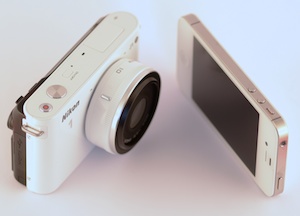
			<content type="html" xml:base="http://taishimizu.com/" xml:lang="en"><![CDATA[Filterstorm is the first iOS app I wrote, and by far the most successful. I still think that its editing capabilities are unmatched on mobile, but it’s never been the fastest or the prettiest photo app on the app store. The Achilles’ heel has always been reliance on the CPU; lots of time and memory is wasted copying the image from CPU to GPU memory. Because of this, Filterstorm has long relied on a reprocessing step, remembering all the editing steps you do on a preview image, then applying them to the full image later on. </p><p></p><p><a href="http://taishimizu.com/pictures/Filterstorm-Neue/filterstorm-neue-ipad.png" style="background-color:inherit;border:none;"><img src="http://taishimizu.com/pictures/Filterstorm-Neue/filterstorm-neue-ipad-sm.png" class="img-thumb" alt="http:  taishimizu.com pictures Filterstorm Neue filterstorm neue ipad sm.png"/></a></p><p></p><p>I waited (too long) for Apple to let developers write custom Core Image filters on iOS as we can on the Mac, but to no avail. Several months ago I decided to go ahead without this capability and rewrite Filterstorm on OpenGL rather than Core Image. With some help from Brad Larson’s <a href="https://github.com/BradLarson/GPUImage">GPUImage</a> project, I was able to build a much faster and more stable foundation for my new flagship app: <a href="http://filterstormneue.com">Filterstorm Neue</a>. </p><p></p><p>The new interface was all about simplicity. I spent less time trying to create icons for concepts like “effects” that have no readily understood pictorial representation, and instead used more text. Since text takes up more space than icons, I put the buttons on semi-transparent rectangles that wouldn’t fully obscure the image. To tie the interface to the image, I created an algorithm to create a color scheme based off whatever image was being edited*. The very initial result of the new interface concept is shown in this video I tweeted about 5 months ago.</p><p></p><p>
<iframe src="//player.vimeo.com/video/65161002" width="600" height="337" frameborder="0" webkitallowfullscreen mozallowfullscreen allowfullscreen></iframe>
</p><p></p><p>Compared to the final version, the animation is atrocious and the spacing is poor, but it was immediately clear that the idea was a winner. From that point I made the buttons smaller and closer together to save screen space, and changed the animations to swipe in from the right when going into a menu, and push out to the right when backing out, to give a clearer sense of place. I also added overlay sheets that would attach to buttons to provide information and options in the same manner I used popovers for in previous versions. The results can be seen in my demo video here:</p><p></p><p>
<iframe src="//player.vimeo.com/video/77298191" width="600" height="450" frameborder="0" webkitallowfullscreen mozallowfullscreen allowfullscreen></iframe>
<h5>Please note that the poor frame rate is due to recording via airplay.</h5></p><p></p><p>One of the most requested features I’ve received is for a way to use a mask brush without covering the area you’re brushing with your finger. The two suggested solutions were either to offset the brush from the finger, or to show the area obscured by your finger somewhere else on the screen that was visible. Filterstorm Neue solves this issue in a manner similar to the first recommendation. If you simply place your finger down and move it, the brush will follow your finger just as in older versions of Filterstorm. However, if you tap your finger, the brushing indicator will be moved without brushing. You can then grab the indicator by any edge, and drag it to move the brush which is now offset from your finger. If this description is confusing, please watch the above video as I demonstrate both methods.</p><p></p><p>Another feature I’ve long wanted to implement (also shown in that video) is the ability to go back and forth between masking and editing. Filterstorm has always had you set the filter first, then mask on the change. I’ve always thought this is better than masking before editing. However, when setting the filter for the whole image sometimes your initial perception is a little off, and once you’ve set the mask you want to increase the contrast effect, for example. In Filterstorm Neue, accepting the mask will bring you back to the contrast controls, and you can re-adjust before applying the filter. You can switch back and forth between masking and contrast as much as you like before applying. Unfortunately, there are a few features that rely on the CPU for now for which this isn’t possible, but it is for most.</p><p></p><p>Filterstorm’s been on the market for well over three years now, and I’ve learned a lot in that time. With all that extra experience, I’ve been able to build a much better engineered app that should stay fast and stable for years to come. The feature set is not yet as large as that of classic Filterstorm, but it is far faster and has a number of advantages like the ones I’ve discussed here. Future development should also bring back most of the missing features quickly. I plan to release Filterstorm Neue in early November as a new app, so please pick it up!</p><p></p><p>For more information, you can visit the website at <a href="http://filterstormneue.com">http://filterstormneue.com</a></p><p></p><p><h5>*I know some people won't want to have color in their interface, so rest assured that there is a grayscale setting.</h5>]]>
			</content>
		  </entry>
	
		<entry>
			<title type="html" ><![CDATA[Inkist iPad]]></title>
			<id>http://taishimizu.com/420/Inkist-iPad</id>
			<link rel="alternate" href="http://taishimizu.com/420/Inkist-iPad"/>
			<published>2013-02-16T19:36:24Z</published>
			<updated>2013-02-16T19:36:24Z</updated>
			<author>
				<name>Tai Shimizu</name>
				<uri>http://taishimizu.com/</uri>
			</author>
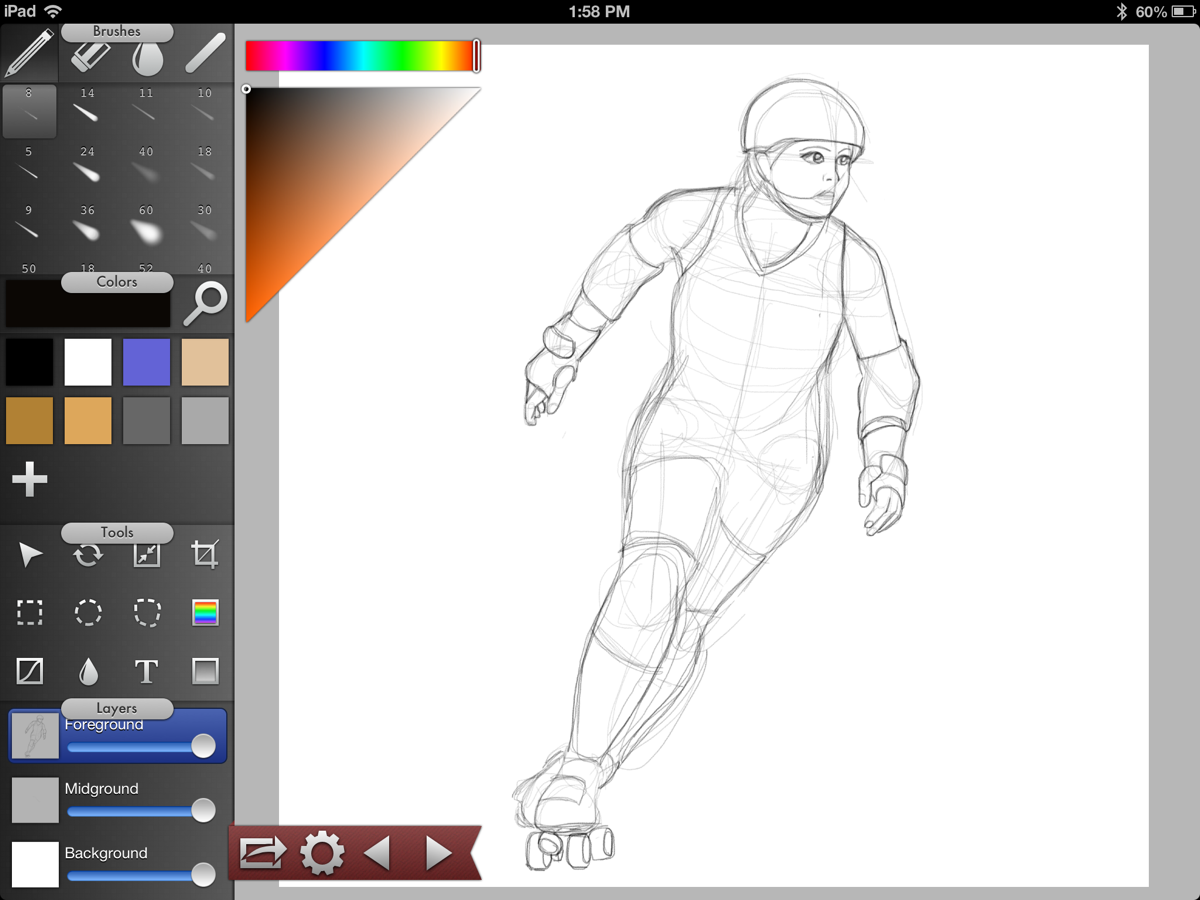
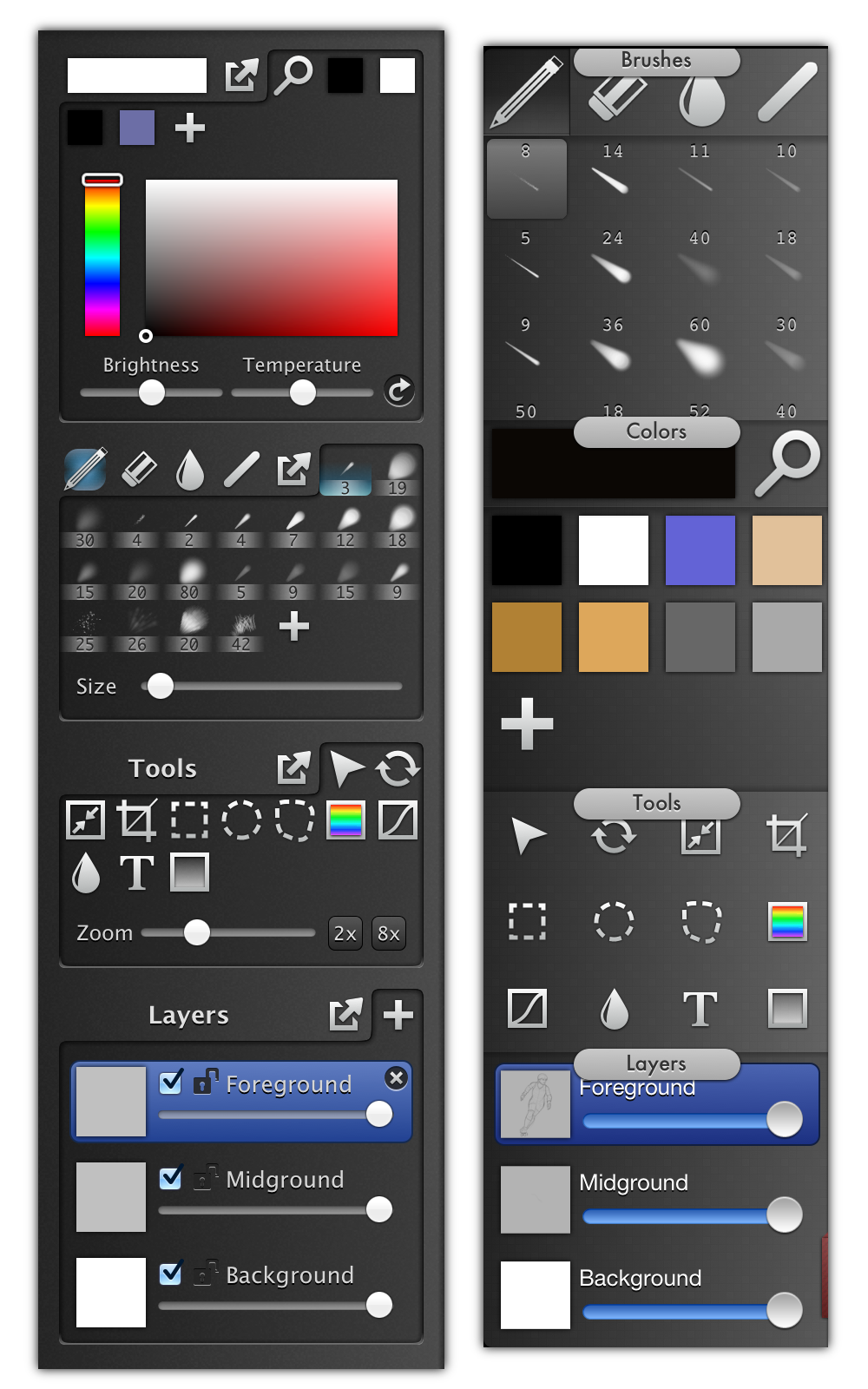
			<content type="html" xml:base="http://taishimizu.com/" xml:lang="en"><![CDATA[<a href="http://taishimizu.com/pictures/inkist-ipad/inkist-ipad-roller-derby-sketch.png" style="background-color:inherit;border:none;"><img src="http://taishimizu.com/pictures/inkist-ipad/inkist-ipad-roller-derby-sketch-thumb.png" class="img-thumb" alt="http:  taishimizu.com pictures inkist ipad inkist ipad roller derby sketch thumb.png"/></a></p><p></p><p>When <a href="http://inki.st">Inkist</a> was released last May, I wrote <a href="http://taishimizu.com/379/Introducing-Inkist">this blog post</a> about its creation which may be worth revisiting. In short, Inkist is how I envisioned drawing on a Cintiq (or other drawing tablet) should be. Of course, there are many people like me who enjoy drawing, but don’t have the money to buy an expensive specialized piece of equipment like that. iPads, however, are commonplace, general purpose devices that are ideal for both amateurs and travelling professionals.</p><p><a href="http://taishimizu.com/pictures/inkist-ipad/toolbars.png"><img src="http://taishimizu.com/pictures/inkist-ipad/toolbars-thumb.png" alt="inkist and inkist ipad toolbars" style="max-width:400px;display:block;margin:0px auto"/></a></p><p></p><p>Though it’s usually a terrible idea for a Mac and iPad app to share an interface, the iPad (right) tools are little changed from the original. Since the Mac app was meant for use with pen input, it was already well suited to an iPad stylus. The buttons are based off a larger 50 point grid rather than a 30 point grid due to the fact that fingers and iPad styluses aren’t as accurate devices as Wacom digitizes, but the overall organization is unchanged.</p><p></p><p>The toolbar is a bit unusual for an iPad app. Drawing apps currently on the App Store try to minimize the screen real estate taken up by the tools in order to dedicate as much space as possible to the drawing itself. As understandable as this is, switching brushes, colors, and layers while drawing is common and needs to be easily accessible. Rather than tapping a button to reach those controls, Inkist keeps them on screen making the process faster. There is some tradeoff with drawing space, but it’s a tradeoff I wish more apps would make. iPhone’s small screen necessitates hiding features behind taps and iPad apps seem to follow suit either without enough consideration as to how much can be displayed, or in attempt to create an uncluttered look without regard to functionality.</p><p></p><p>As mentioned in my <a href="http://taishimizu.com/379/Introducing-Inkist">previous blog post</a>, brush feel is of top priority for Inkist. For the most part I’ve been successful in transitioning this to iPad. With standard styluses and finger strokes, brush strokes will have a slight fading in and fading out, using the light and strong brush pressure parameters as guides. Thankfully, several third party manufacturers have begun releasing styluses using bluetooth which can report pressure information. At launch time, Inkist will support the <a href="http://www.tenonedesign.com/connect.php">Pogo Connect</a> stylus with support for other pressure sensitive styluses being planned. The feel still isn’t quite as good as a Cintiq, but it’s a pretty good approximation. </p><p></p><p><a href="http://inki.st">Inkist</a> for iPad is nearly ready for release on the App Store. More information on both the Mac and iOS version can be found at <a href="http://inki.st">http://inki.st/</a>]]>
			</content>
		  </entry>
	
		<entry>
			<title type="html" ><![CDATA[Gridditor Sales]]></title>
			<id>http://taishimizu.com/411/Gridditor-Sales</id>
			<link rel="alternate" href="http://taishimizu.com/411/Gridditor-Sales"/>
			<published>2012-11-05T10:12:52Z</published>
			<updated>2012-11-05T10:12:52Z</updated>
			<author>
				<name>Tai Shimizu</name>
				<uri>http://taishimizu.com/</uri>
			</author>
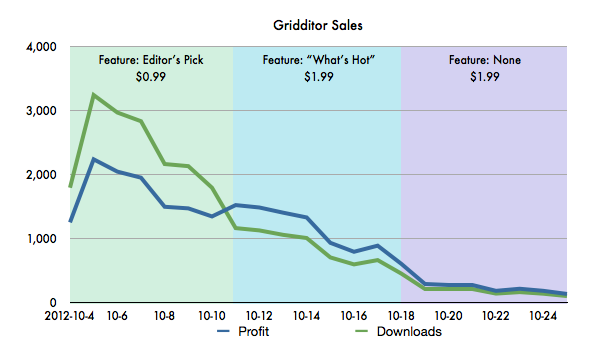
			<content type="html" xml:base="http://taishimizu.com/" xml:lang="en"><![CDATA[No matter how good your app is, you need exposure. Reviews in prominent publications and popular blogs mean a lot, some exposure can be bought through advertisements, but nothing kickstarts app sales like some promotion from the App Store itself. </p><p></p><p>How does one get this promotion? The process is opaque, but since I had no communication with Apple about <a href="http://gridditor.com">Gridditor</a> whatsoever before receiving the email requesting art assets, I can only assume that someone checks over new apps for promising candidates. Editor’s Choice/App of the week promotion requires you to send Apple some artwork given their specifications for the banner, usually with a very fast turnaround time. Getting it done in time can be trying, but the excitement of a big feature is more than worth it.  “New and Noteworthy” and “What’s Hot” placements on the other hand occur without any communication whatsoever, and are always a pleasant surprise.</p><p></p><p><a href="http://taishimizu.com/pictures/gridditor-launch/gridditor-launch-sales-chart.png" style="background-color:inherit;border:none;"><img src="http://taishimizu.com/pictures/gridditor-launch/gridditor-launch-sales-chart.png" class="img-thumb" alt="http:  taishimizu.com pictures gridditor launch gridditor launch sales chart.png"/></a></p><p><h5><em>Apple updates the App Store features at approximately 3pm (New York) on Thurdays, so the the banner isn't visible for the full day. This is why sales rise on the second day.</em></h5></p><p></p><p>My strategy, which I used before with <a href="http://inki.st">Inkist</a>, was to release at a discount ($0.99) during the feature to prioritize downloads over profits and hopefully get some word out, then to increase the price to the final $1.99 the following week. Does this strategy work? Unfortunately, there are far too many variables for me to know how much of a difference this makes. It’s possible that the vast majority who purchased in the first week at $0.99 would have still purchased at $1.99 and I’ve simply missed out on a large amount of profit. It’s also possible that the best way to launch an app is free, as Filterstorm was, in order to get that critical mass of initial users with which to spread the word. </p><p></p><p>In fact, launching as free was my initial plan, but Apple advised me to not change the price during the feature. I was too worried about missing out on profit from a full week of banner promotion to go through with it.</p><p></p><p>Regardless as to which strategy for launch is best, the power of promotion is clear. With the banner promotion I was averaging 2,400 sales a day, in “What’s Hot” that number dropped to 900 (though there was also a price increase), and the week after that went down to 215, a number that would surely be much lower without the reviews and buzz prompted by the initial feature.</p><p></p><p>Though it sold better than Filterstorm at launch, Gridditor’s sales have since slipped below those of Filterstorm. Several localizations were added to Gridditor (on 2012-10-26), which should provide some help, and I’m planning some advertising, too. It’s still unclear how Gridditor will perform in the long term, but I think there’s a large market for this type of image editor and will keep pushing.]]>
			</content>
		  </entry>
	
		<entry>
			<title type="html" ><![CDATA[Gridditor Featured!]]></title>
			<id>http://taishimizu.com/404/Gridditor-Featured-</id>
			<link rel="alternate" href="http://taishimizu.com/404/Gridditor-Featured-"/>
			<published>2012-10-04T21:36:28Z</published>
			<updated>2012-10-04T21:36:28Z</updated>
			<author>
				<name>Tai Shimizu</name>
				<uri>http://taishimizu.com/</uri>
			</author>
			<content type="html" xml:base="http://taishimizu.com/" xml:lang="en"><![CDATA[<a href="http://taishimizu.com/pictures/gridditor-editors-choice-app-store/gridditor-editors-choice.png" style="background-color:inherit;border:none;"><img src="http://taishimizu.com/pictures/gridditor-editors-choice-app-store/gridditor-editors-choice-thumb.png" class="img-thumb" alt="http:  taishimizu.com pictures gridditor editors choice app store gridditor editors choice thumb.png"/></a></p><p>Gridditor’s promotion marks the second app launch in a row for me to get a big banner on the App Store! Thanks Apple! I hope everyone likes Gridditor. If you haven’t purchased it yet, you can <a href="http://itunes.apple.com/app/filterstorm/id562936058?mt=8">buy it here [App Store Link]</a>.]]>
			</content>
		  </entry>
	
		<entry>
			<title type="html" ><![CDATA[Gridditor]]></title>
			<id>http://taishimizu.com/397/Gridditor</id>
			<link rel="alternate" href="http://taishimizu.com/397/Gridditor"/>
			<published>2012-09-20T15:09:48Z</published>
			<updated>2012-09-20T15:09:48Z</updated>
			<author>
				<name>Tai Shimizu</name>
				<uri>http://taishimizu.com/</uri>
			</author>
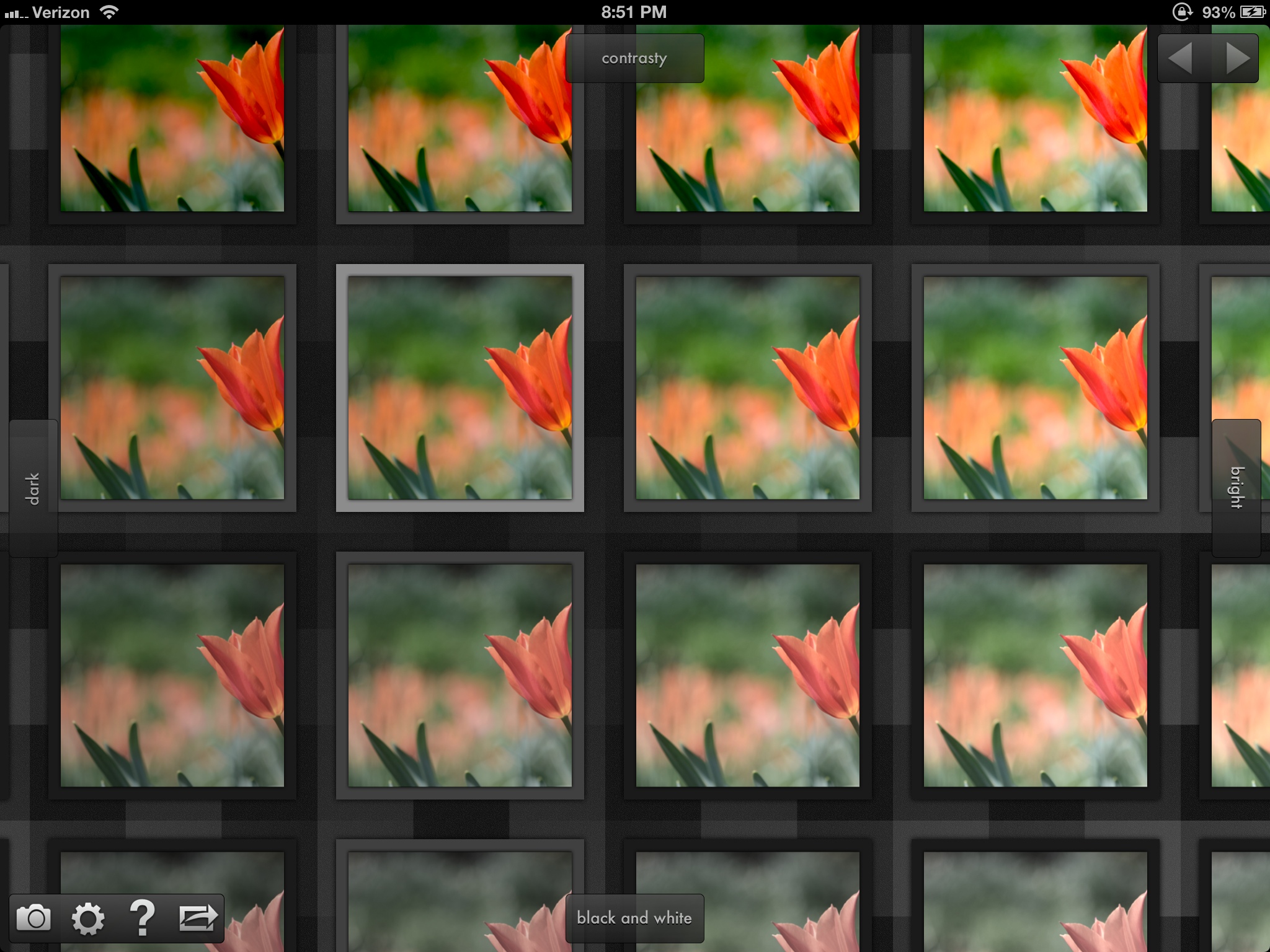
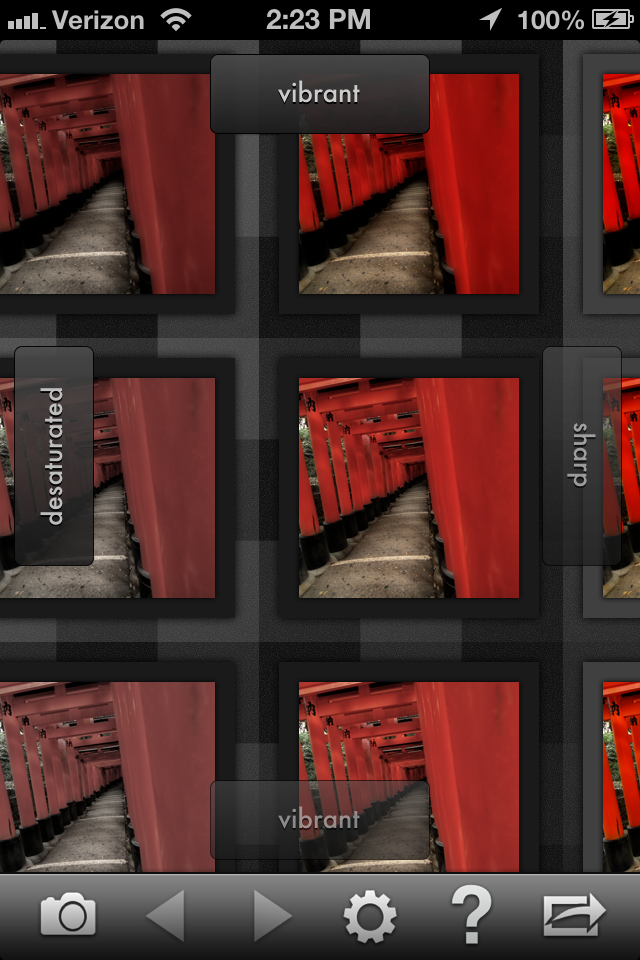
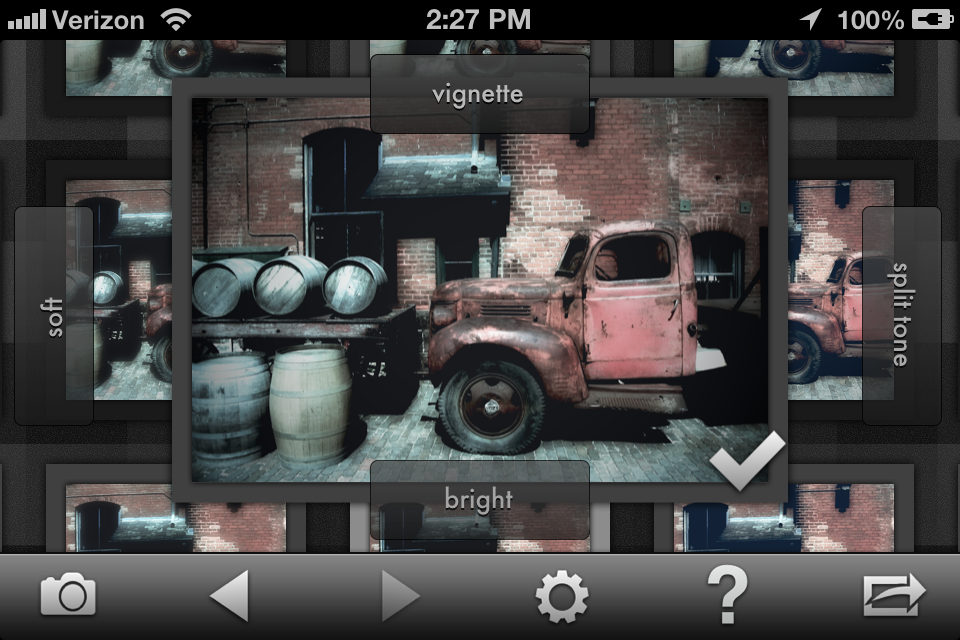
			<content type="html" xml:base="http://taishimizu.com/" xml:lang="en"><![CDATA[Filterstorm is overkill for most people&acirc;&euro;&rdquo;and it should be. It was meant to be powerful, and though I try to make it as easy to use as I can, power necessitates complexity. Gridditor is the opposite. It’s the app I can tell all my friends to use regardless as to whether or not they know the first thing about photography. It is meant to be fast, easy to understand, and in some respect to teach by forcing people to look at how each filter behaves and interacts with others.</p><p></p><p><a href="http://taishimizu.com/pictures/gridditor-the-anti-filterstorm/gridditor-flower-screenshot.png" style="background-color:inherit;border:none;"><img src="http://taishimizu.com/pictures/gridditor-the-anti-filterstorm/gridditor-flower-screenshot-thumb.png" class="img-thumb" alt="http:  taishimizu.com pictures gridditor the anti filterstorm gridditor flower screenshot thumb.png"/></a></p><p>The basic premise is simple: arrange thumbnail previews in a grid, and let the user choose which one looks best (tapping on any thumbnail will bring up a larger preview). Lather, rinse, and repeat until satisfied. To generate the grid of thumbnails, I assign one filter to each cardinal direction. By default, up is contrast, down is vibrance, left is darkening, and right is brightening. If you choose a thumbnail directly to the right from the center you get that one filter, in this case brightness. If you go in two directions&acirc;&euro;&rdquo;say, up and to the right&acirc;&euro;&rdquo;then you’ll get both the brightening and the contrast filters. After a choice has been made, four new filters are pulled in at random. If the user doesn’t like the filters chosen, they can be specified manually, or a new group of random filters can be pulled in by selecting the center/unmodified image.</p><p></p><p><a href="http://taishimizu.com/pictures/gridditor-the-anti-filterstorm/gridditor-torii-screenshot.png" style="background-color:inherit;border:none;"><img src="http://taishimizu.com/pictures/gridditor-the-anti-filterstorm/gridditor-torii-screenshot-thumb.png" class="img-thumb" alt="http:  taishimizu.com pictures gridditor the anti filterstorm gridditor torii screenshot thumb.png"/></a></p><p>By showing a big grid of choices rather than having the user select a filter and control its strength, more options are shown at once, unexpected possibilities can arise. It also allows for very quick choice and is great for making some minor adjustments to an image before uploading it to wherever it’s headed.</p><p></p><p><a href="http://taishimizu.com/pictures/gridditor-the-anti-filterstorm/gridditor-truck-screenshot.png" style="background-color:inherit;border:none;"><img src="http://taishimizu.com/pictures/gridditor-the-anti-filterstorm/gridditor-truck-screenshot-thumb.png" class="img-thumb" alt="http:  taishimizu.com pictures gridditor the anti filterstorm gridditor truck screenshot thumb.png"/></a></p><p>I’m very excited to get Gridditor out onto the app store, and it should be available in the next couple weeks or so. In the mean time you can see the website, including a video of Gridditor in action on iPad at <a href="http://gridditor.com">http://gridditor.com</a> </p><p> ]]>
			</content>
		  </entry>
	
		<entry>
			<title type="html" ><![CDATA[Inkist Lite]]></title>
			<id>http://taishimizu.com/392/Inkist-Lite</id>
			<link rel="alternate" href="http://taishimizu.com/392/Inkist-Lite"/>
			<published>2012-07-23T18:53:07Z</published>
			<updated>2012-07-23T18:53:07Z</updated>
			<author>
				<name>Tai Shimizu</name>
				<uri>http://taishimizu.com/</uri>
			</author>
			<content type="html" xml:base="http://taishimizu.com/" xml:lang="en"><![CDATA[Filterstorm started big. It was a free app at the time of iPad launch, and thanks to an early staff favorites feature, it hit number 11 on the free apps sales chart. The reason I launched it as a free app wasn’t business savvy (though in hindsight I’m glad I did), it was simply that I had developed Filterstorm without access to an iPad and I didn’t trust it to run properly &acirc;&euro;&rdquo; and at first it didn’t.</p><p></p><p><a href="http://inkist-app.com">Inkist</a>’s launch was a very different story. I set the price where I wanted it to stay, and simply released it hoping again that word of mouth would spread it. Of course, it turns out there are fewer mouths to spread the word when people have to pay $9.99 to get the app. I did have a big banner feature which helped, but not enough.</p><p></p><p><a href="http://taishimizu.com/pictures/inkist-lite/inkist-lite-roller-derby-screenshot.png" style="background-color:inherit;border:none;"><img src="http://taishimizu.com/pictures/inkist-lite/inkist-lite-roller-derby-screenshot-thumb.png" class="img-thumb" alt="http:  taishimizu.com pictures inkist lite inkist lite roller derby screenshot thumb.png"/></a></p><p>It seemed I needed something more. My first thought was a demo version, something that expired after 30 days you could get from the Inkist website. I like going through the app store, though, and demo versions don’t work for that. So I decided to go in a different route, by which I mean “shamelessly copy from Autodesk’s strategy with Sketchbook”.</p><p></p><p>Sketchbook Express is a free version of Sketchbook which flattens the images when they’re saved (there are probably other limitations, but that’s the only one I’m aware of). That seems to me to be a good way to do things, give people a good taste of the abilities of the program but with enough limitation that people will want to upgrade.</p><p></p><p>I thought about doing the same limitation as Sketchbook Express, but having a flattened image on save would hurt people who start working on an image in Inkist Lite and want to finish it when they upgrade to Inkist. Instead I simply set a limit of 3 layers available to the user. This makes it a powerful enough app that people can get real use from it, and many may want to stick with the lite version, but limited enough that more serious users will all want to upgrade to the full version.</p><p></p><p>I think there is a danger that I’ve made the limitations too loose and most people will be happy with Inkist Lite, but as Filterstorm is the vast majority of my income, this is a risk I can afford to take. If I’ve played it right, hopefully I’ll see the word spread and sales of the full version will go up, too.</p><p>]]>
			</content>
		  </entry>
	
		<entry>
			<title type="html" ><![CDATA[WWDC Keynote 2012 ]]></title>
			<id>http://taishimizu.com/389/WWDC-Keynote-2012-</id>
			<link rel="alternate" href="http://taishimizu.com/389/WWDC-Keynote-2012-"/>
			<published>2012-06-12T10:08:07Z</published>
			<updated>2012-06-12T10:08:07Z</updated>
			<author>
				<name>Tai Shimizu</name>
				<uri>http://taishimizu.com/</uri>
			</author>
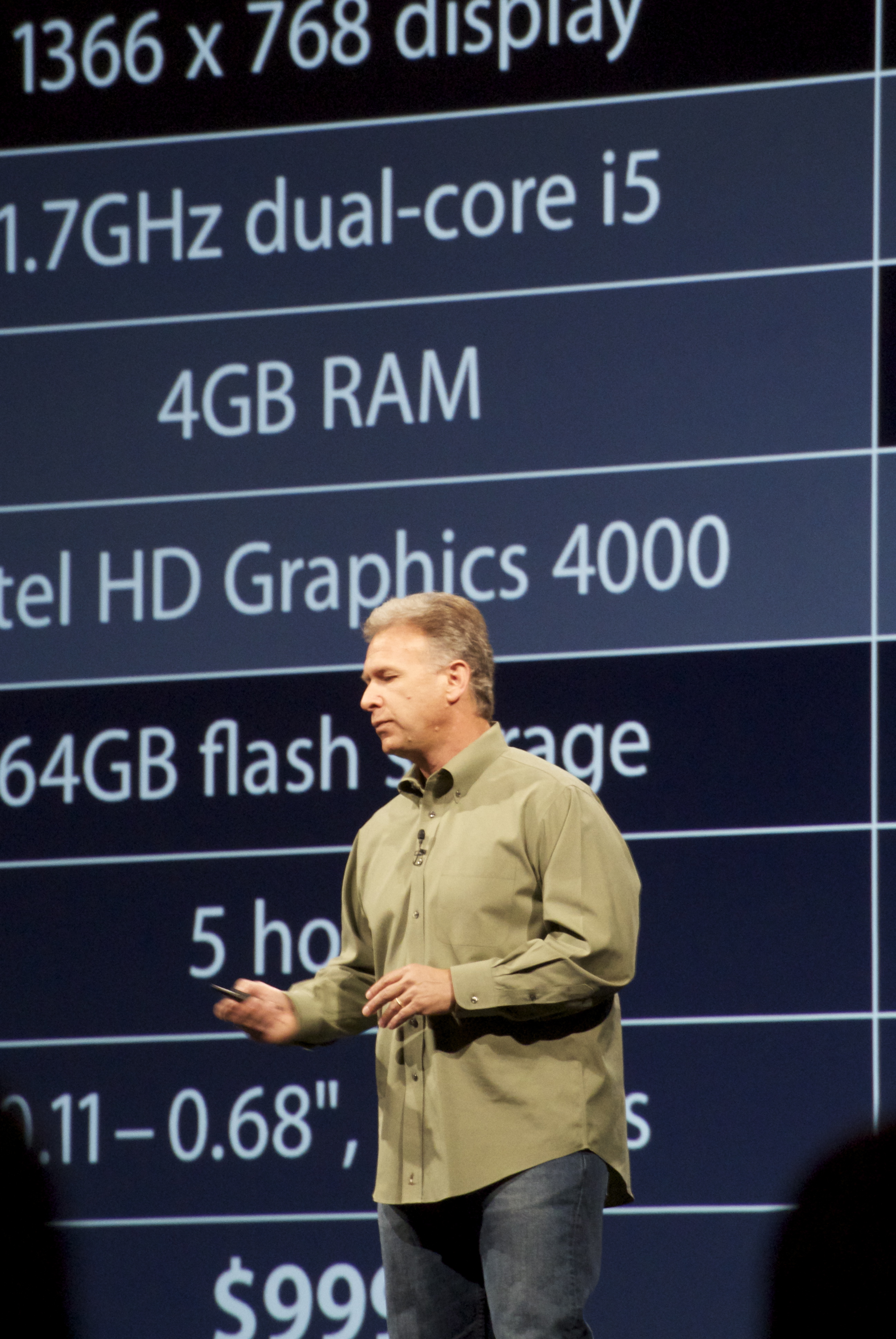
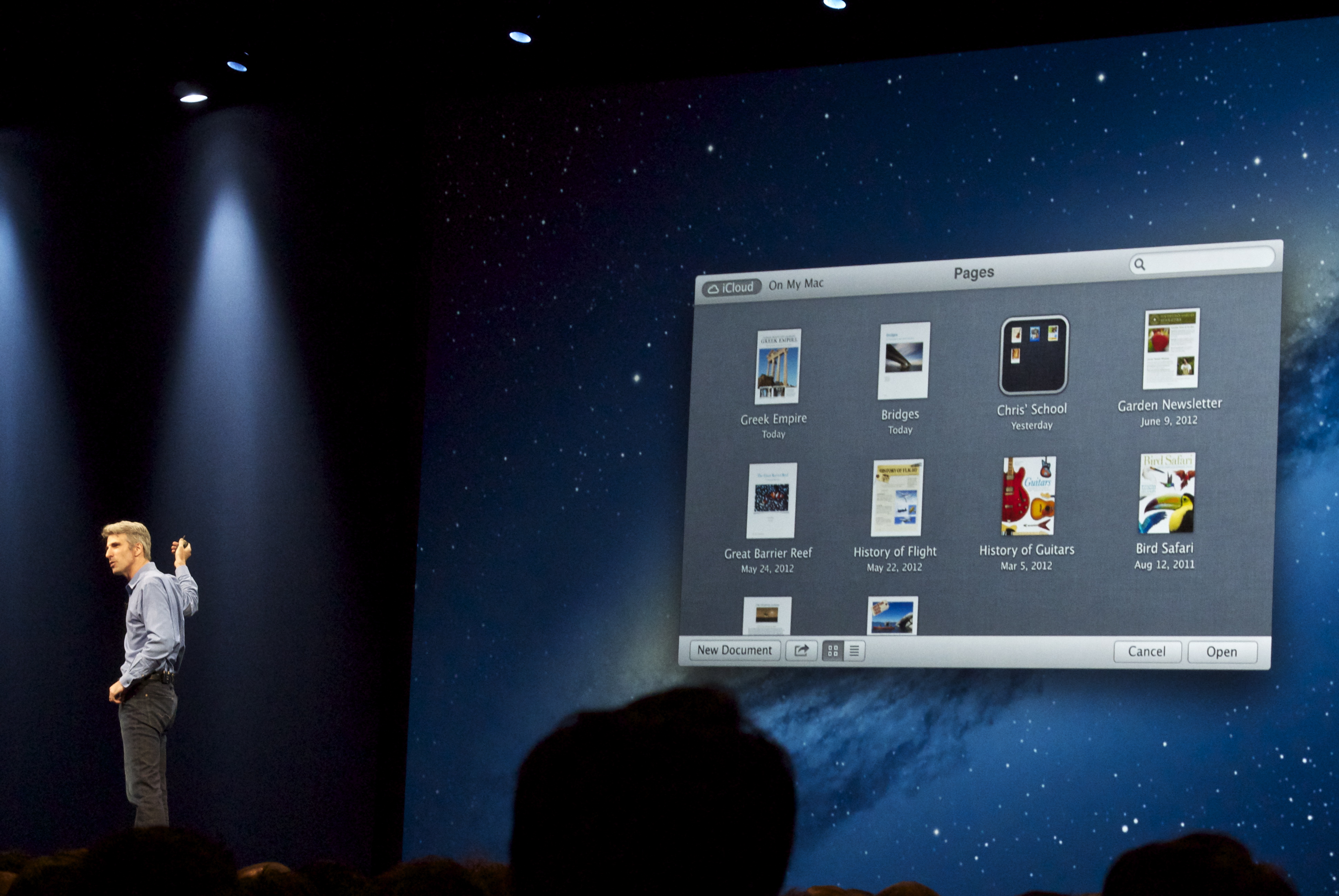
			<content type="html" xml:base="http://taishimizu.com/" xml:lang="en"><![CDATA[Despite the fact that there was no Apple TV Announcement, the keynote was far bigger than I expected. Simply put, I didn&acirc;&euro;&trade;t think iOS 6 and Mountain Lion would be as big as they were, and the new Macbook Pro is gorgeous.</p><p></p><p>I had my Nikon V1 and 30&acirc;&euro;&ldquo;110mm along, though I think next time I&acirc;&euro;&trade;ll bring along a DSLR. The light simply wasn’t good enough for the slow lens/small sensor combination.</p><p></p><p><a href="http://taishimizu.com/pictures/wwdc-keynote-2012/DSC_0177.jpg" style="background-color:inherit;border:none;"><img src="http://taishimizu.com/pictures/wwdc-keynote-2012/thumbs/DSC_0177.jpg" class="img-thumb" alt="http:  taishimizu.com pictures wwdc keynote 2012 thumbs DSC_0177.jpg"/></a></p><p></p><p><a href="http://taishimizu.com/pictures/wwdc-keynote-2012/DSC_0180.jpg" style="background-color:inherit;border:none;"><img src="http://taishimizu.com/pictures/wwdc-keynote-2012/thumbs/DSC_0180.jpg" class="img-thumb" alt="http:  taishimizu.com pictures wwdc keynote 2012 thumbs DSC_0180.jpg"/></a></p><p></p><p><a href="http://taishimizu.com/pictures/wwdc-keynote-2012/DSC_0186.jpg" style="background-color:inherit;border:none;"><img src="http://taishimizu.com/pictures/wwdc-keynote-2012/thumbs/DSC_0186.jpg" class="img-thumb" alt="http:  taishimizu.com pictures wwdc keynote 2012 thumbs DSC_0186.jpg"/></a></p><p></p><p><a href="http://taishimizu.com/pictures/wwdc-keynote-2012/DSC_0192.jpg" style="background-color:inherit;border:none;"><img src="http://taishimizu.com/pictures/wwdc-keynote-2012/thumbs/DSC_0192.jpg" class="img-thumb" alt="http:  taishimizu.com pictures wwdc keynote 2012 thumbs DSC_0192.jpg"/></a></p><p></p><p><a href="http://taishimizu.com/pictures/wwdc-keynote-2012/DSC_0215.jpg" style="background-color:inherit;border:none;"><img src="http://taishimizu.com/pictures/wwdc-keynote-2012/thumbs/DSC_0215.jpg" class="img-thumb" alt="http:  taishimizu.com pictures wwdc keynote 2012 thumbs DSC_0215.jpg"/></a></p><p></p><p><a href="http://taishimizu.com/pictures/wwdc-keynote-2012/DSC_0217_2.jpg" style="background-color:inherit;border:none;"><img src="http://taishimizu.com/pictures/wwdc-keynote-2012/thumbs/DSC_0217_2.jpg" class="img-thumb" alt="http:  taishimizu.com pictures wwdc keynote 2012 thumbs DSC_0217_2.jpg"/></a></p><p></p><p><a href="http://taishimizu.com/pictures/wwdc-keynote-2012/DSC_0229.jpg" style="background-color:inherit;border:none;"><img src="http://taishimizu.com/pictures/wwdc-keynote-2012/thumbs/DSC_0229.jpg" class="img-thumb" alt="http:  taishimizu.com pictures wwdc keynote 2012 thumbs DSC_0229.jpg"/></a></p><p></p><p><a href="http://taishimizu.com/pictures/wwdc-keynote-2012/DSC_0233.jpg" style="background-color:inherit;border:none;"><img src="http://taishimizu.com/pictures/wwdc-keynote-2012/thumbs/DSC_0233.jpg" class="img-thumb" alt="http:  taishimizu.com pictures wwdc keynote 2012 thumbs DSC_0233.jpg"/></a></p><p></p><p><a href="http://taishimizu.com/pictures/wwdc-keynote-2012/DSC_0235.jpg" style="background-color:inherit;border:none;"><img src="http://taishimizu.com/pictures/wwdc-keynote-2012/thumbs/DSC_0235.jpg" class="img-thumb" alt="http:  taishimizu.com pictures wwdc keynote 2012 thumbs DSC_0235.jpg"/></a></p><p></p><p><a href="http://taishimizu.com/pictures/wwdc-keynote-2012/DSC_0240_2.jpg" style="background-color:inherit;border:none;"><img src="http://taishimizu.com/pictures/wwdc-keynote-2012/thumbs/DSC_0240_2.jpg" class="img-thumb" alt="http:  taishimizu.com pictures wwdc keynote 2012 thumbs DSC_0240_2.jpg"/></a></p><p></p><p><a href="http://taishimizu.com/pictures/wwdc-keynote-2012/DSC_0246_2.jpg" style="background-color:inherit;border:none;"><img src="http://taishimizu.com/pictures/wwdc-keynote-2012/thumbs/DSC_0246_2.jpg" class="img-thumb" alt="http:  taishimizu.com pictures wwdc keynote 2012 thumbs DSC_0246_2.jpg"/></a></p><p></p><p><a href="http://taishimizu.com/pictures/wwdc-keynote-2012/DSC_0248.jpg" style="background-color:inherit;border:none;"><img src="http://taishimizu.com/pictures/wwdc-keynote-2012/thumbs/DSC_0248.jpg" class="img-thumb" alt="http:  taishimizu.com pictures wwdc keynote 2012 thumbs DSC_0248.jpg"/></a></p><p></p><p><a href="http://taishimizu.com/pictures/wwdc-keynote-2012/DSC_0249.jpg" style="background-color:inherit;border:none;"><img src="http://taishimizu.com/pictures/wwdc-keynote-2012/thumbs/DSC_0249.jpg" class="img-thumb" alt="http:  taishimizu.com pictures wwdc keynote 2012 thumbs DSC_0249.jpg"/></a></p><p></p><p><a href="http://taishimizu.com/pictures/wwdc-keynote-2012/DSC_0263.jpg" style="background-color:inherit;border:none;"><img src="http://taishimizu.com/pictures/wwdc-keynote-2012/thumbs/DSC_0263.jpg" class="img-thumb" alt="http:  taishimizu.com pictures wwdc keynote 2012 thumbs DSC_0263.jpg"/></a></p><p></p><p><a href="http://taishimizu.com/pictures/wwdc-keynote-2012/DSC_0278.jpg" style="background-color:inherit;border:none;"><img src="http://taishimizu.com/pictures/wwdc-keynote-2012/thumbs/DSC_0278.jpg" class="img-thumb" alt="http:  taishimizu.com pictures wwdc keynote 2012 thumbs DSC_0278.jpg"/></a></p><p></p><p><a href="http://taishimizu.com/pictures/wwdc-keynote-2012/DSC_0280.jpg" style="background-color:inherit;border:none;"><img src="http://taishimizu.com/pictures/wwdc-keynote-2012/thumbs/DSC_0280.jpg" class="img-thumb" alt="http:  taishimizu.com pictures wwdc keynote 2012 thumbs DSC_0280.jpg"/></a></p><p></p><p><a href="http://taishimizu.com/pictures/wwdc-keynote-2012/DSC_0287.jpg" style="background-color:inherit;border:none;"><img src="http://taishimizu.com/pictures/wwdc-keynote-2012/thumbs/DSC_0287.jpg" class="img-thumb" alt="http:  taishimizu.com pictures wwdc keynote 2012 thumbs DSC_0287.jpg"/></a></p><p></p><p><a href="http://taishimizu.com/pictures/wwdc-keynote-2012/DSC_0296.jpg" style="background-color:inherit;border:none;"><img src="http://taishimizu.com/pictures/wwdc-keynote-2012/thumbs/DSC_0296.jpg" class="img-thumb" alt="http:  taishimizu.com pictures wwdc keynote 2012 thumbs DSC_0296.jpg"/></a></p><p></p><p><a href="http://taishimizu.com/pictures/wwdc-keynote-2012/DSC_0310.jpg" style="background-color:inherit;border:none;"><img src="http://taishimizu.com/pictures/wwdc-keynote-2012/thumbs/DSC_0310.jpg" class="img-thumb" alt="http:  taishimizu.com pictures wwdc keynote 2012 thumbs DSC_0310.jpg"/></a></p><p>]]>
			</content>
		  </entry>
	
		<entry>
			<title type="html" ><![CDATA[WWDC 2012 Thoughts From The Plane To SF]]></title>
			<id>http://taishimizu.com/388/WWDC-2012-Thoughts-From-The-Plane-To-SF</id>
			<link rel="alternate" href="http://taishimizu.com/388/WWDC-2012-Thoughts-From-The-Plane-To-SF"/>
			<published>2012-06-10T14:08:13Z</published>
			<updated>2012-06-10T14:08:13Z</updated>
			<author>
				<name>Tai Shimizu</name>
				<uri>http://taishimizu.com/</uri>
			</author>
			<content type="html" xml:base="http://taishimizu.com/" xml:lang="en"><![CDATA[<h3>The One Thing I Want From iOS 6. </h3>There has been a lot of talk and speculation over what Apple will announce tomorrow at the WWDC keynote, but the one thing I’ve been waiting for for the last couple years has barely been mentioned, if at all. Yes, mapping could be improved (and it will be) and yes, iOS could support better communication between apps, but there’s something else that is missing that hurts both consumers and developers. </p><p></p><p>Paid updates. </p><p></p><p>When I first released Filterstorm back in 2010, my plan was to charge money for the update that added layers to the app. Well, that came in 2011 and I didn’t end up charging. So far, the consumer has won if they’re purchasing from me. However, a number of other developers have gone the route of releasing a new app for their major update. PhotoForge 2  is a good example. In this (entirely understandable) case, existing customers lose, as they have to pay full price a second time for the app. </p><p></p><p>I want to charge $0.99 to existing customers for a major update, rather than having them pay the full $3.99 for the new functionality as if I were to release a separate app. I also want to be able to use the update screen to let customers know the new version exists rather than having to search for it on the app store.</p><p></p><p>On the other side of the coin, in app purchases would allow me to charge for new features, but this sort of nickel-and-dime charging per feature is antithetical to my ideals of simply charging a fair price for a quality product, and what I think a good user experience is. </p><p></p><p><h3>What Apple TV Apps Could Mean</h3>This is entirely speculation, and partially a list wish, but I do think the addition of apps to Apple TV could&acirc;&euro;&rdquo;by itself&acirc;&euro;&rdquo;be the game changer people have been expecting Apple to eventually produce.</p><p></p><p>I like TV shows, but I hate TV. It’s a common sentiment in my generation. The linear nature of preprogrammed material is contrary to what we’ve come to expect thanks to the magic of the Internet. The fact that we all pay subscriptions for packages of channels, most of which we’ll never watch, is almost insulting. An HBO app, with a paid subscription (as Apple already supports in the app store) that gives access to current HBO programming would by itself sell millions of Apple TVs.</p><p></p><p>I don’t think HBO will be there from the beginning, but I do think a number of other networks would be willing to test the waters in this way, and sports franchises already offer similar apps. An even simpler app could provide a real time stream of a network’s cable feed (though local ad sales issues might be prohibitive.) Once a critical mass of networks start offering apps, a people would cancel their cable subscriptions en masse. An &Atilde;&nbsp; la carte revolution with no new hardware needed, just the app store.  Everyone is excited to see what independent developers like me do on the Apple TV, but I’m excited about the big players. ]]>
			</content>
		  </entry>
	
		<entry>
			<title type="html" ><![CDATA[Success!]]></title>
			<id>http://taishimizu.com/381/Success-</id>
			<link rel="alternate" href="http://taishimizu.com/381/Success-"/>
			<published>2012-05-17T16:46:04Z</published>
			<updated>2012-05-17T16:46:04Z</updated>
			<author>
				<name>Tai Shimizu</name>
				<uri>http://taishimizu.com/</uri>
			</author>
			<content type="html" xml:base="http://taishimizu.com/" xml:lang="en"><![CDATA[<a href="http://taishimizu.com/pictures/inkist-feature/inkist-app-store-feature.png" style="background-color:inherit;border:none;"><img src="http://taishimizu.com/pictures/inkist-feature/inkist-app-store-feature-thumb.png" class="img-thumb" alt="http:  taishimizu.com pictures inkist feature inkist app store feature thumb.png"/></a></p><p></p><p>Apple gave <a href="http://inkist-app.com">Inkist</a> a big banner feature! Thank you, App Store!]]>
			</content>
		  </entry>
	
		<entry>
			<title type="html" ><![CDATA[Introducing Inkist]]></title>
			<id>http://taishimizu.com/379/Introducing-Inkist</id>
			<link rel="alternate" href="http://taishimizu.com/379/Introducing-Inkist"/>
			<published>2012-05-07T16:45:08Z</published>
			<updated>2012-05-07T16:45:08Z</updated>
			<author>
				<name>Tai Shimizu</name>
				<uri>http://taishimizu.com/</uri>
			</author>
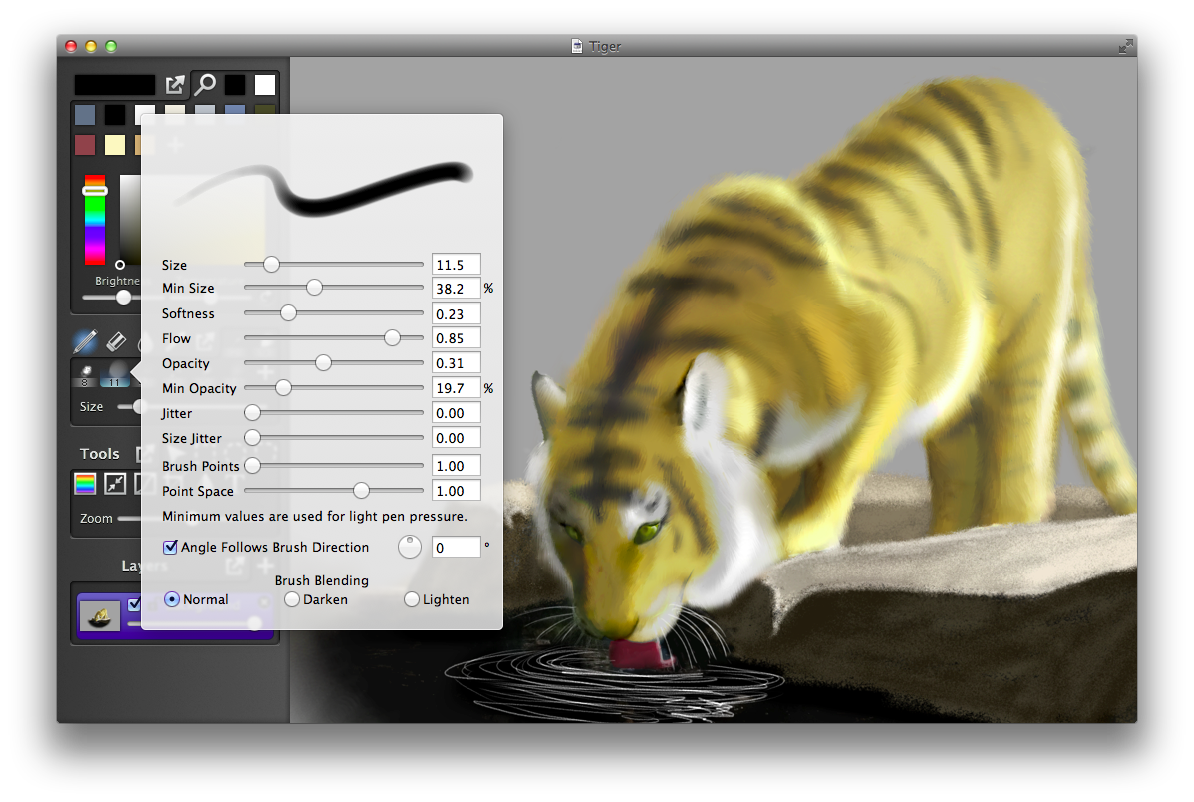
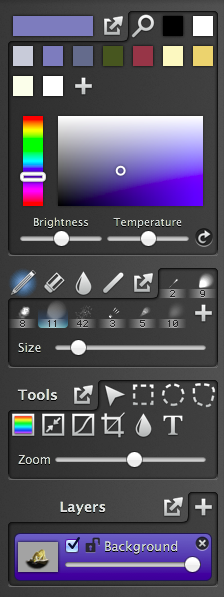
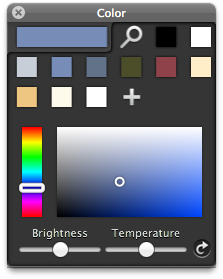
			<content type="html" xml:base="http://taishimizu.com/" xml:lang="en"><![CDATA[A bit over 2 years ago I wrote Filterstorm to be the photo editing app I wanted to use on iPad. I wrote <a href="http://inkist-app.com">Inkist</a> for similar reasons. I own Photoshop, Painter, and SketchBookPro, have used all of them with my drawing tablet (a <a href="http://www.wacom.com/en/products/cintiq/cintiq12wx.aspx">Wacom Cintiq 12WX</a>), and to some extent I like each of them, but each also has its annoyances, and they aren’t cheap. Since fixing them isn’t something in my power, I of course went out to create my own app to satisfy my needs.</p><p></p><p><a href="http://taishimizu.com/pictures/introducing-inkist/brush-preview.png" style="background-color:inherit;border:none;"><img src="http://taishimizu.com/pictures/introducing-inkist/brush-preview-thumb.png" class="img-thumb" alt="http:  taishimizu.com pictures introducing inkist brush preview thumb.png"/></a></p><p>My top priority with Inkist was brushing. Brushes had to be responsive, easily configurable, and respond well to pen pressure. I spent a lot of time going back and forth between <a href="http://inkist-app.com">Inkist</a>  and SketchBookPro to make sure brushing compared favorably as the whole endeavor would have been useless if it didn’t. Since the back end of <a href="http://inkist-app.com">Inkist</a>  is shared with Filterstorm, this was the majority of the work outside of the interface.</p><p></p><p><a href="http://taishimizu.com/pictures/introducing-inkist/inkist-tools.png" style="background-color:inherit;border:none;"><img src="http://taishimizu.com/pictures/introducing-inkist/inkist-tools.png" class="img-thumb" alt="http:  taishimizu.com pictures introducing inkist inkist tools.png"/></a></p><p></p><p>I hate it when apps have too many floating windows. I don’t mind having one, it can often be very useful, but I tend to like most tools to stay within the primary window. All of <a href="http://inkist-app.com">Inkist's</a> tools are contained on the left side of the window, grouped into four palettes. Colors, Brushes, Other Tools, and Layers. Any of the palettes can be popped out into a HUD style panel, I tend to pop out either the color palette or the layers (or sometimes neither if I’m working on a flat image like the tiger image above). </p><p></p><p>I spent some time experimenting with different sizes for the buttons within the palettes trying to find the right balance between a button large enough to be easily clickable using a pen (it’s easier to hit small targets with a mouse), yet small enough so that the palettes don’t get too big when they hold lots buttons. I ended up settling on 30x30 buttons, which I believe is slightly larger than Photoshop uses, but similar to Pixelmator.</p><p></p><p><a href="http://taishimizu.com/pictures/introducing-inkist/brush-palette.png" style="background-color:inherit;border:none;"><img src="http://taishimizu.com/pictures/introducing-inkist/brush-palette.png" class="img-thumb" alt="http:  taishimizu.com pictures introducing inkist brush palette.png"/></a></p><p>Like Photoshop but unlike SketchBookPro, the four brushing modes (brush, erase, blend, line) all share the same set of brushes to choose from, though each may have a different brush selected at any given time. I chose a different route with the blend tool than SketchBookPro, too. I believe SketchBookPro creates a blurred copy of the entire layer, then uses masking to reveal the blurring, similar to how Filterstorm works.  <a href="http://inkist-app.com">Inkist's</a>  blend tool calculates the average color under the the brush and sets that to the brush color. The advantage of this is that if you go over something many times with the blend tool, it’ll get more blended each time, it’s also possible to use it to create less smooth blending when stylistically appropriate. That’s what I did to create the fur of the tiger in the picture above. Smooth blending can still be accomplished by using a brush with low opacity/flow.</p><p></p><p><a href="http://taishimizu.com/pictures/introducing-inkist/color-palette.png" style="background-color:inherit;border:none;"><img src="http://taishimizu.com/pictures/introducing-inkist/color-palette.png" class="img-thumb" alt="http:  taishimizu.com pictures introducing inkist color palette.png"/></a></p><p>The color palette was actually the catalyst that got me to start writing  <a href="http://inkist-app.com">Inkist</a> . I used to have a tendency to put several shades of the same color into my color palette, switching between them in order to do shading. One day I thought “Wouldn’t it be nice if I could just keep the mid-tone in the palette and use a slider to get different shades?” A few days later I started programming. The brightness and temperature sliders will change the brightness/temp of every color in the palette including the currently selected one, and it does so non-destructively so you can just hit the reset button on the side to get back to normal. It was a simple feature, but one I find fantastically useful.</p><p></p><p> <a href="http://inkist-app.com">Inkist</a> was submitted to the Mac App Store on Saturday, May 5, and will sell for $9.99. It’s a 1.0 release&acirc;&euro;&rdquo;there are certainly areas that need improvement, and features that need to be added&acirc;&euro;&rdquo;but I think anyone who enjoys digital art will enjoy it.]]>
			</content>
		  </entry>
	
		<entry>
			<title type="html" ><![CDATA[Space Shuttle Enterprise]]></title>
			<id>http://taishimizu.com/378/Space-Shuttle-Enterprise</id>
			<link rel="alternate" href="http://taishimizu.com/378/Space-Shuttle-Enterprise"/>
			<published>2012-04-27T10:49:01Z</published>
			<updated>2012-04-27T10:49:01Z</updated>
			<author>
				<name>Tai Shimizu</name>
				<uri>http://taishimizu.com/</uri>
			</author>
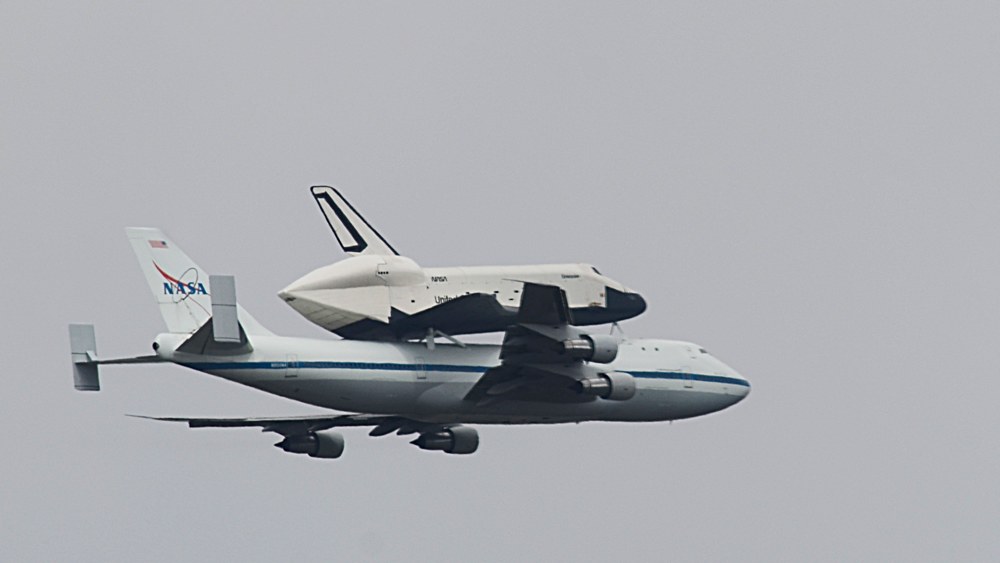
			<content type="html" xml:base="http://taishimizu.com/" xml:lang="en"><![CDATA[The Enterprise just passed by my apartment on its journey to the USS Intrepid, though it was only visible to me for a few seconds, I was sure to get some pictures. Unfortunately I didn’t have time to head out to get a better view.</p><p></p><p><a href="http://taishimizu.com/pictures/space-shuttle-enterprise/space-shuttle-enterprise_sm.jpg" style="background-color:inherit;border:none;"><img src="http://taishimizu.com/pictures/space-shuttle-enterprise/space-shuttle-enterprise_sm-thumb.jpg" class="img-thumb" alt="http:  taishimizu.com pictures space shuttle enterprise space shuttle enterprise_sm thumb.jpg"/></a>]]>
			</content>
		  </entry>
	
		<entry>
			<title type="html" ><![CDATA[Retina iPad Backgrounds]]></title>
			<id>http://taishimizu.com/376/Retina-iPad-Backgrounds</id>
			<link rel="alternate" href="http://taishimizu.com/376/Retina-iPad-Backgrounds"/>
			<published>2012-04-15T19:39:53Z</published>
			<updated>2012-04-15T19:39:53Z</updated>
			<author>
				<name>Tai Shimizu</name>
				<uri>http://taishimizu.com/</uri>
			</author>
			<content type="html" xml:base="http://taishimizu.com/" xml:lang="en"><![CDATA[Today was a perfect day for a trip to the New York Botanical Garden, and since I felt I needed a new iPad background, I decided to shoot with that in mind. All images were taken on a Nikon D7000 using the fantastic <a href="http://taishimizu.com/101/Micro-Nikkor-105mm-f-4-AIS-Review">Micro-Nikkor 105mm f/4 AIS</a> and edited on my favorite photo editing software, <a href="http://filterstorm.com">Filterstorm Pro</a>. I cropped/scaled to 2048x2048 for retina display iPad goodness.</p><p></p><p><a href="http://taishimizu.com/pictures/retina-ipad-backgrounds/DSC_5276.jpg" style="background-color:inherit;border:none;"><img src="http://taishimizu.com/pictures/retina-ipad-backgrounds/DSC_5276-thumb.jpg" class="img-thumb" alt="http:  taishimizu.com pictures retina ipad backgrounds DSC_5276 thumb.jpg"/></a></p><p></p><p><a href="http://taishimizu.com/pictures/retina-ipad-backgrounds/DSC_5219.jpg" style="background-color:inherit;border:none;"><img src="http://taishimizu.com/pictures/retina-ipad-backgrounds/DSC_5219-thumb.jpg" class="img-thumb" alt="http:  taishimizu.com pictures retina ipad backgrounds DSC_5219 thumb.jpg"/></a></p><p></p><p><a href="http://taishimizu.com/pictures/retina-ipad-backgrounds/DSC_5228.jpg" style="background-color:inherit;border:none;"><img src="http://taishimizu.com/pictures/retina-ipad-backgrounds/DSC_5228-thumb.jpg" class="img-thumb" alt="http:  taishimizu.com pictures retina ipad backgrounds DSC_5228 thumb.jpg"/></a></p><p></p><p><a href="http://taishimizu.com/pictures/retina-ipad-backgrounds/DSC_5229.jpg" style="background-color:inherit;border:none;"><img src="http://taishimizu.com/pictures/retina-ipad-backgrounds/DSC_5229-thumb.jpg" class="img-thumb" alt="http:  taishimizu.com pictures retina ipad backgrounds DSC_5229 thumb.jpg"/></a></p><p></p><p><a href="http://taishimizu.com/pictures/retina-ipad-backgrounds/DSC_5231.jpg" style="background-color:inherit;border:none;"><img src="http://taishimizu.com/pictures/retina-ipad-backgrounds/DSC_5231-thumb.jpg" class="img-thumb" alt="http:  taishimizu.com pictures retina ipad backgrounds DSC_5231 thumb.jpg"/></a></p><p></p><p><a href="http://taishimizu.com/pictures/retina-ipad-backgrounds/DSC_5254.jpg" style="background-color:inherit;border:none;"><img src="http://taishimizu.com/pictures/retina-ipad-backgrounds/DSC_5254-thumb.jpg" class="img-thumb" alt="http:  taishimizu.com pictures retina ipad backgrounds DSC_5254 thumb.jpg"/></a></p><p></p><p><a href="http://taishimizu.com/pictures/retina-ipad-backgrounds/DSC_5256.jpg" style="background-color:inherit;border:none;"><img src="http://taishimizu.com/pictures/retina-ipad-backgrounds/DSC_5256-thumb.jpg" class="img-thumb" alt="http:  taishimizu.com pictures retina ipad backgrounds DSC_5256 thumb.jpg"/></a></p><p></p><p><a href="http://taishimizu.com/pictures/retina-ipad-backgrounds/DSC_5267.jpg" style="background-color:inherit;border:none;"><img src="http://taishimizu.com/pictures/retina-ipad-backgrounds/DSC_5267-thumb.jpg" class="img-thumb" alt="http:  taishimizu.com pictures retina ipad backgrounds DSC_5267 thumb.jpg"/></a></p><p></p><p><a href="http://taishimizu.com/pictures/retina-ipad-backgrounds/DSC_5272.jpg" style="background-color:inherit;border:none;"><img src="http://taishimizu.com/pictures/retina-ipad-backgrounds/DSC_5272-thumb.jpg" class="img-thumb" alt="http:  taishimizu.com pictures retina ipad backgrounds DSC_5272 thumb.jpg"/></a></p><p></p><p><a href="http://taishimizu.com/pictures/retina-ipad-backgrounds/DSC_5281.jpg" style="background-color:inherit;border:none;"><img src="http://taishimizu.com/pictures/retina-ipad-backgrounds/DSC_5281-thumb.jpg" class="img-thumb" alt="http:  taishimizu.com pictures retina ipad backgrounds DSC_5281 thumb.jpg"/></a></p><p></p><p><a href="http://taishimizu.com/pictures/retina-ipad-backgrounds/DSC_5283.jpg" style="background-color:inherit;border:none;"><img src="http://taishimizu.com/pictures/retina-ipad-backgrounds/DSC_5283-thumb.jpg" class="img-thumb" alt="http:  taishimizu.com pictures retina ipad backgrounds DSC_5283 thumb.jpg"/></a></p><p></p><p><a href="http://taishimizu.com/pictures/retina-ipad-backgrounds/DSC_5284.jpg" style="background-color:inherit;border:none;"><img src="http://taishimizu.com/pictures/retina-ipad-backgrounds/DSC_5284-thumb.jpg" class="img-thumb" alt="http:  taishimizu.com pictures retina ipad backgrounds DSC_5284 thumb.jpg"/></a></p><p></p><p><a href="http://taishimizu.com/pictures/retina-ipad-backgrounds/DSC_5300.jpg" style="background-color:inherit;border:none;"><img src="http://taishimizu.com/pictures/retina-ipad-backgrounds/DSC_5300-thumb.jpg" class="img-thumb" alt="http:  taishimizu.com pictures retina ipad backgrounds DSC_5300 thumb.jpg"/></a></p><p></p><p><a href="http://taishimizu.com/pictures/retina-ipad-backgrounds/DSC_5222.jpg" style="background-color:inherit;border:none;"><img src="http://taishimizu.com/pictures/retina-ipad-backgrounds/DSC_5222-thumb.jpg" class="img-thumb" alt="http:  taishimizu.com pictures retina ipad backgrounds DSC_5222 thumb.jpg"/></a></p><p></p><p><a href="http://taishimizu.com/pictures/retina-ipad-backgrounds/DSC_5243.jpg" style="background-color:inherit;border:none;"><img src="http://taishimizu.com/pictures/retina-ipad-backgrounds/DSC_5243-thumb.jpg" class="img-thumb" alt="http:  taishimizu.com pictures retina ipad backgrounds DSC_5243 thumb.jpg"/></a></p><p>]]>
			</content>
		  </entry>
	
		<entry>
			<title type="html" ><![CDATA[Nikon J1 Review]]></title>
			<id>http://taishimizu.com/364/Nikon-J1-Review</id>
			<link rel="alternate" href="http://taishimizu.com/364/Nikon-J1-Review"/>
			<published>2012-01-02T12:50:46Z</published>
			<updated>2012-01-02T12:50:46Z</updated>
			<author>
				<name>Tai Shimizu</name>
				<uri>http://taishimizu.com/</uri>
			</author>
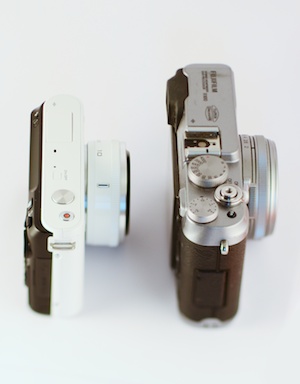
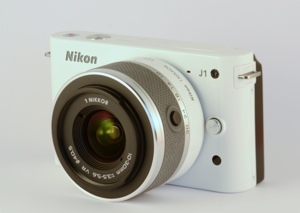
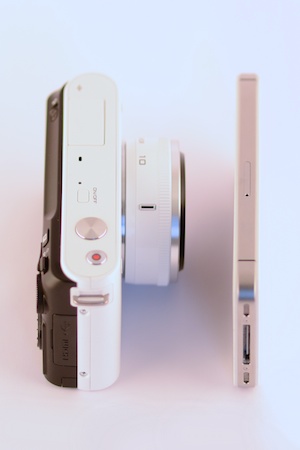
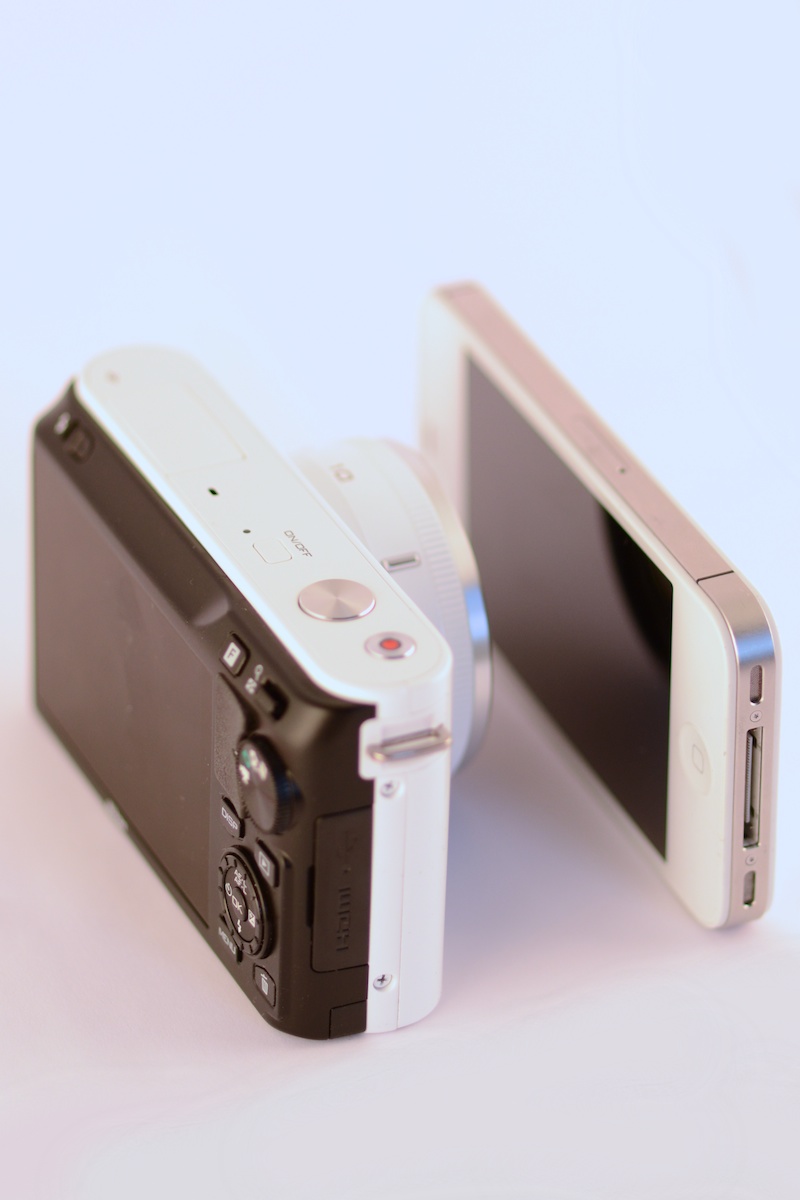
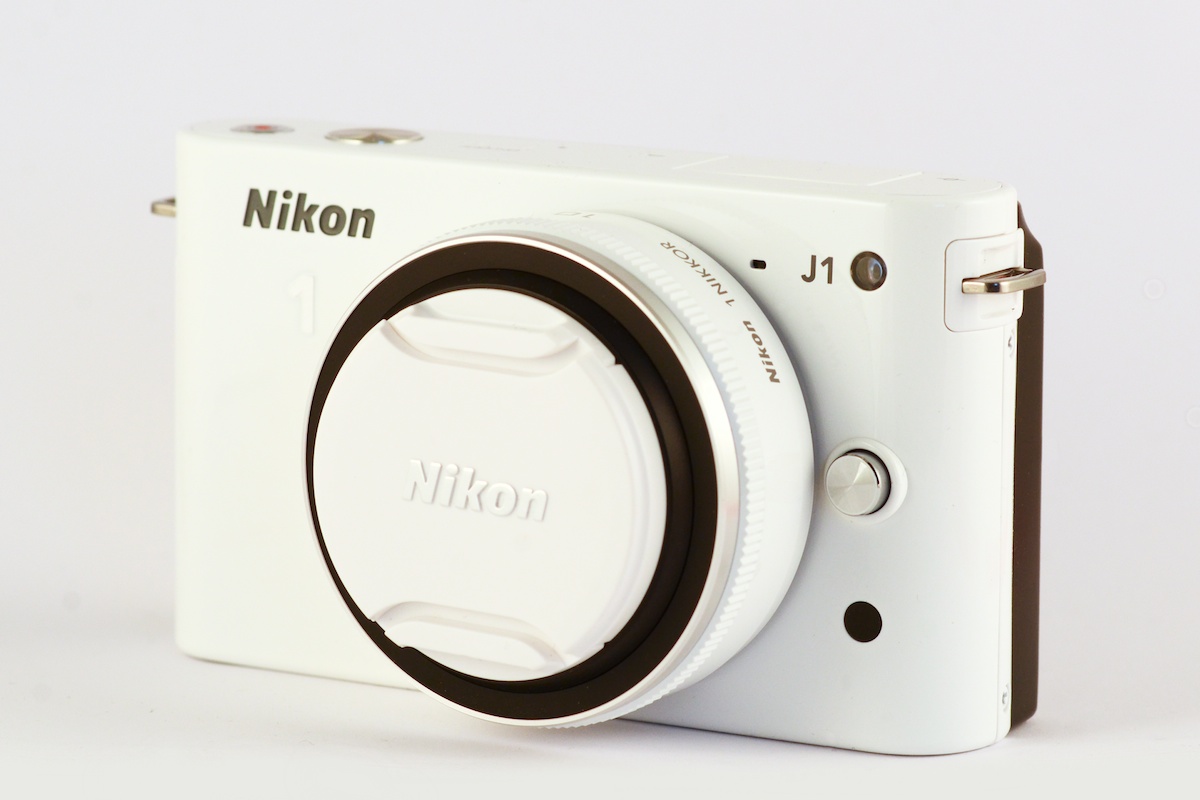
			<content type="html" xml:base="http://taishimizu.com/" xml:lang="en"><![CDATA[<em>Note: this review is a work in progress and will be updated over the next few days with more images and details.</em></p><p></p><p>Battle lines have been drawn across the camera industry. Micro 4/3 cameras have been resounding successes, Sony is betting on tiny bodies with big sensors (and equally big lenses), and Pentax has its miniature Q. Canon and Fuji still have surprises in store, but with the J1 and V1, Nikon has finally shown its hand. </p><p></p><p><em>Nikon J1 with 10mm pancake and iPhone 4S</em></p><p><a href="http://taishimizu.com/pictures/nikon-j1-review/nikon-j1-and-white-iPhone-4s-angled.jpg" style="background-color:inherit;border:none;"><img src="http://taishimizu.com/pictures/nikon-j1-review/nikon-j1-and-white-iPhone-4s-angled-thumb.jpg" class="img-thumb" alt="http:  taishimizu.com pictures nikon j1 review nikon j1 and white iPhone 4s angled thumb.jpg"/></a></p><p>The J1 is tiny. By itself, the body is close in size to an iPhone 4/4S, but 3 times thicker. It feels significantly smaller than the Micro 4/3s cameras I&acirc;&euro;&trade;ve used, especially when taking the size of lenses into account. Even the Canon G12 is bigger than the J1 despite the Canon&acirc;&euro;&trade;s much smaller sensor.  Nikon found a hole in the market, planted a flag, and claimed this newfound territory in their own name.</p><p> </p><p><em>Nikon J1 with 10mm f/2.8 pancake</em></p><p><a href="http://taishimizu.com/pictures/nikon-j1-review/nikon-j1-and-10mm-f2-8-pancake-side.jpg" style="background-color:inherit;border:none;"><img src="http://taishimizu.com/pictures/nikon-j1-review/nikon-j1-and-10mm-f2-8-pancake-side-thumb.jpg" class="img-thumb" alt="http:  taishimizu.com pictures nikon j1 review nikon j1 and 10mm f2 8 pancake side thumb.jpg"/></a></p><p><h3>Specifications</h3>
Nikon's official specs can be found <a href="http://imaging.nikon.com/lineup/acil/bodies/j1/spec.htm">here</a>. I've highlighted a subset below.
<table class="specstable">
	<tr>
		<th>
			Sensor Size
		</th>
		<td>
			13.2 x 8.8mm <br/> 0.52 x 0.35"
		</td>
	</tr>
	<tr>
		<th>
			Sensor Diagonal
		</th>
		<td>
			15.9mm / 0.624"
		</td>
	</tr>
	<tr>
		<th>
			Crop Ratio
		</th>
		<td>
			2.7
		</td>
	</tr>
	<tr>
		<th>
			Resolution
		</th>
		<td>
			3872x2592, 10.1MP
		</td>
	</tr>
	<tr>
		<th>
			RAW File
		</th>
		<td>
			12-bit NEF
		</td>
	</tr>
	<tr>
		<th>
			Shutter Speed
		</th>
		<td>
			1/16,000â€“30s
		</td>
	</tr>
	<tr>
		<th>
			Frame Advance Rate
		</th>
		<td>
		        5fps (manual exposure), up to 60fps (auto)
		</td>
	</tr>
	<tr>
		<th>
			ISO Sensitivity
		</th>
		<td>
			100â€“3200 (6400 extended)
		</td>
	</tr>
	<tr>
		<th>
			Autofocus
		</th>
		<td>
			Phase Detect and Contrast Detect
		</td>
	</tr>
	<tr>
		<th>
			Built-in Flash
		</th>
		<td>
			YES
		</td>
	</tr>
	<tr>
		<th>
			Hot Shoe
		</th>
		<td>
			NO
		</td>
	</tr>
	<tr>
		<th>
			1 System Multi Accessory Port	
		</th>
		<td>
			NO
		</td>
	</tr>
	<tr>
		<th>
			Battery
		</th>
		<td>
			EN-EL15, rated 230 shots
		</td>
	</tr>
	<tr>
		<th>
			Tripod Mount
		</th>
		<td>
			1/4" Aligned to lens center
		</td>
	</tr>
	<tr>
		<th>
			Dimensions
		</th>
		<td>
			106 x 61 x 30mm <br/>4.2 x 2.4 x 1.2"
		</td>
	</tr>
	<tr>
		<th>
			Weight
		</th>
		<td>
			383g / 13.5oz with battery/memory card
		</td>
	</tr>
</table>
<a href="http://taishimizu.com/et-cetera/lenscalculator">Sensor size comparison.</a>
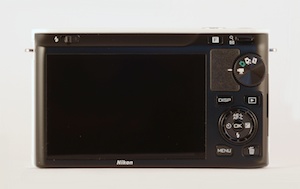
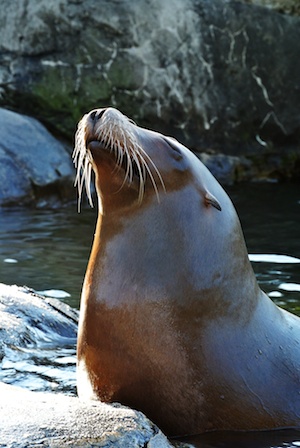
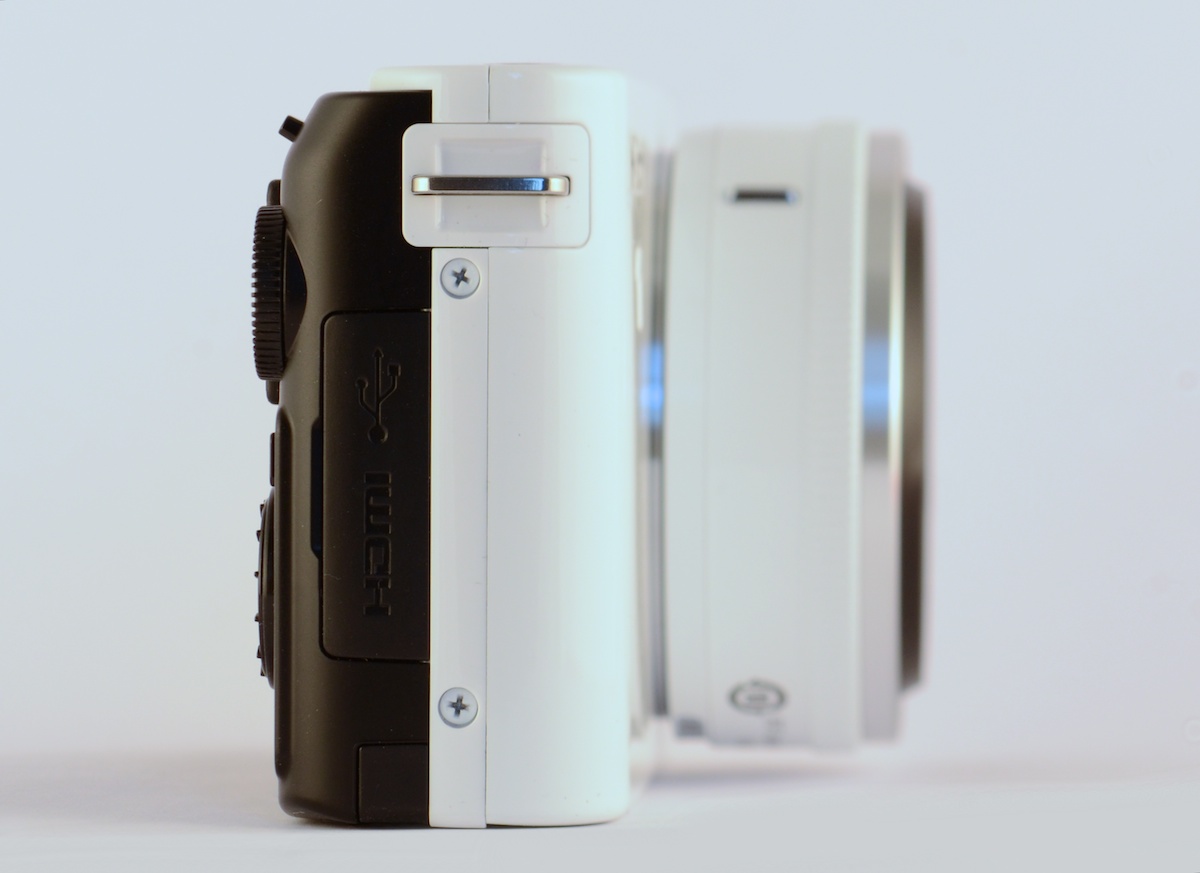
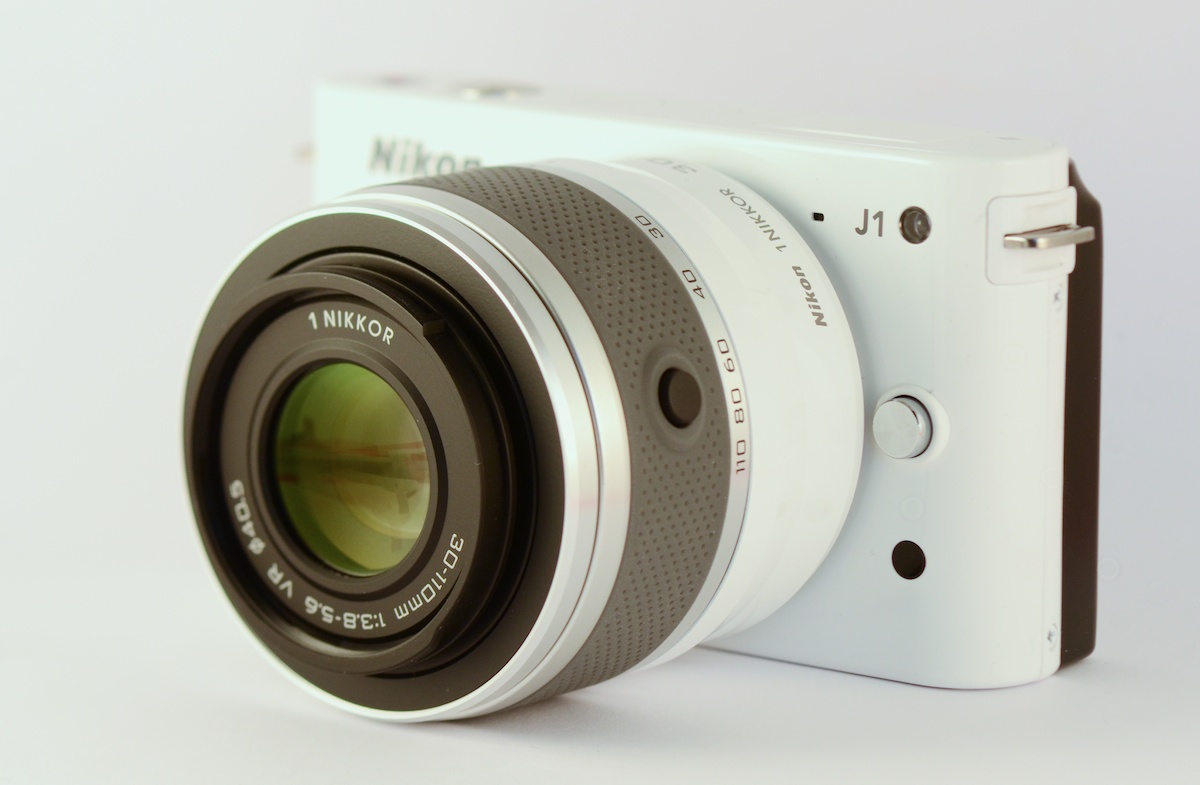
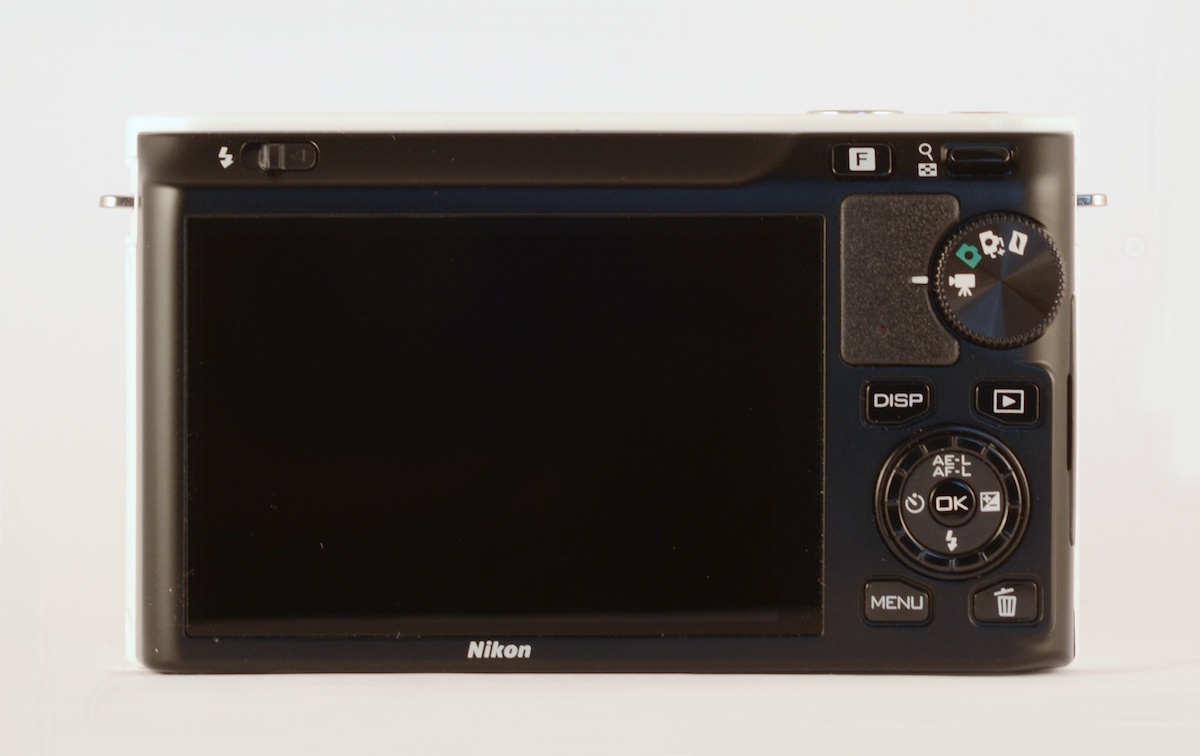
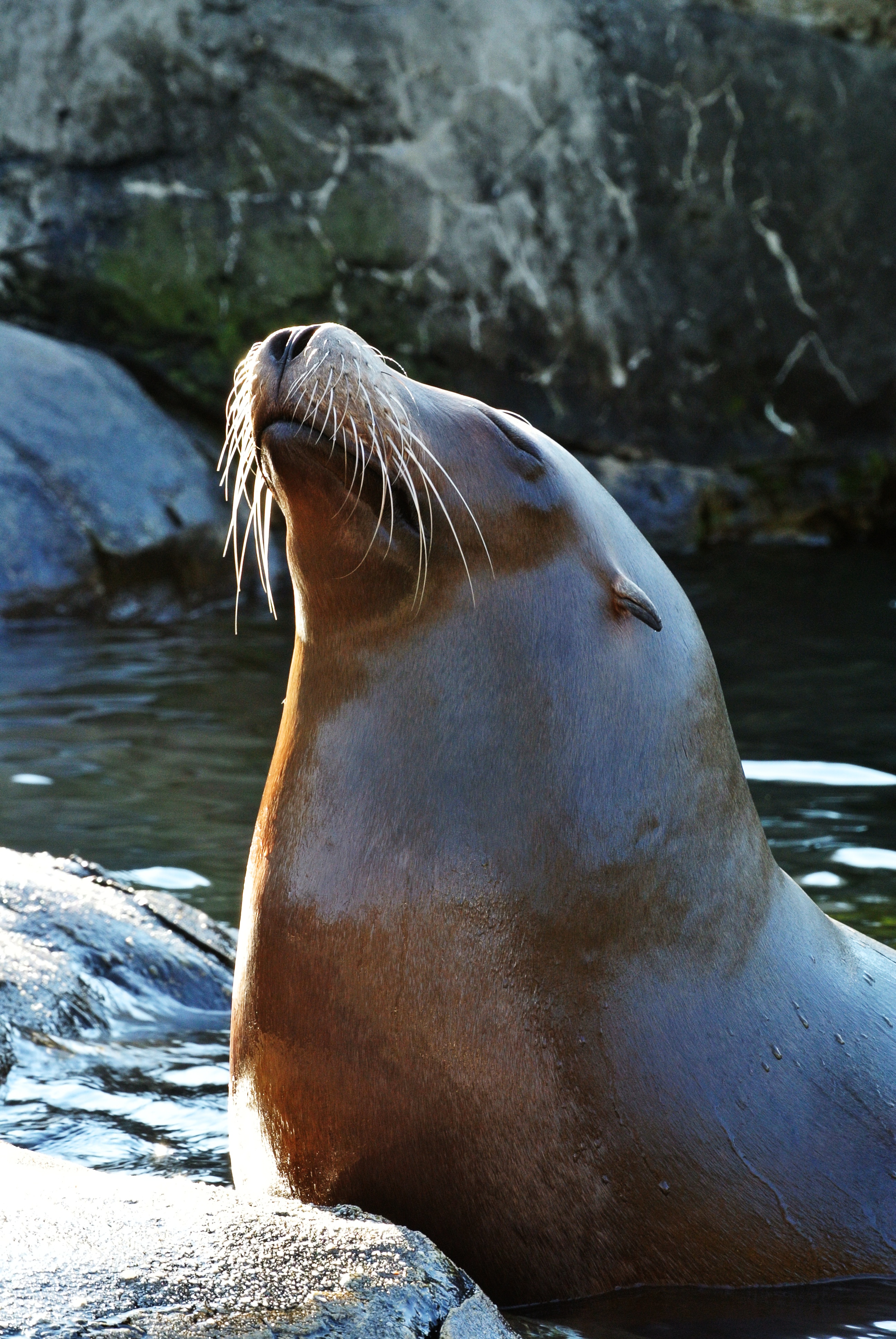
</p><p></p><p><em>Nikon J1 with 30â€“110mm f/3.8-5.6</em></p><p><a href="http://taishimizu.com/pictures/nikon-j1-review/nikon-j1-with-30-110mm.jpg" style="background-color:inherit;border:none;"><img src="http://taishimizu.com/pictures/nikon-j1-review/nikon-j1-with-30-110mm-thumb.jpg" class="img-thumb" alt="http:  taishimizu.com pictures nikon j1 review nikon j1 with 30 110mm thumb.jpg"/></a></p><p></p><p><h3>Design</h3>While Fuji looked to classic rangefinders when designing the X100, Nikon seems to have been eyeing the iPhone with envy when designing the J1. The J1 can’t hope to match the pure functional simplicity Jony Ive et al. have created, but cameras are a different beast than phones. The best iPhone camera interface couldn’t hope to compete with an array of buttons and knobs for controlling a camera, just as no amount of buttons and knobs could match a touchscreen for creating masks in Filterstorm. </p><p></p><p><em>Nikon J1 with iPhone 4S</em></p><p><a href="http://taishimizu.com/pictures/nikon-j1-review/nikon-j1-and-white-iPhone-4s-angled-2.jpg" style="background-color:inherit;border:none;"><img src="http://taishimizu.com/pictures/nikon-j1-review/nikon-j1-and-white-iPhone-4s-angled-2-thumb.jpg" class="img-thumb" alt="http:  taishimizu.com pictures nikon j1 review nikon j1 and white iPhone 4s angled 2 thumb.jpg"/></a></p><p></p><p>The white (it also comes in silver, red, pink, and black) part of the camera is metal, whereas the black on the back is plastic. The metal has a higher quality feeling to it than does the plastic, but in overall it doesn’t feel at all cheap.</p><p></p><p>The front of the J1 is simplicity itself, with just a single button to release the lens. The front also contains other necessary bits, the lens mount, an autofocus assist lamp, remote trigger IR receiver, and two microphones. The top has three buttons: power, shutter, and a video record button &acirc;&euro;&rdquo; which oddly only works if you’re in video mode (more on that later). The tripod mount on the bottom is properly aligned with the lens, but the battery cover is a bit flimsy. On one side, you’ll find HDMI and a USB port. I think audio-in as the V1 has would be more useful than HDMI.</p><p></p><p>The rear buttons in general are comfortably placed for my small hands, so long as the camera is being supported on the bottom by the left hand (which you should be doing anyway). If you hold it with only the right hand, you can shoot fine, but probably won’t be able to change settings.</p><p></p><p><em>Nikon J1 with Fuji X100</em></p><p><a href="http://taishimizu.com/pictures/nikon-j1-review/nikon-j1-and-fuji-x100-top.jpg" style="background-color:inherit;border:none;"><img src="http://taishimizu.com/pictures/nikon-j1-review/nikon-j1-and-fuji-x100-top-thumb.jpg" class="img-thumb" alt="http:  taishimizu.com pictures nikon j1 review nikon j1 and fuji x100 top thumb.jpg"/></a></p><p></p><p><h3>Performance and Controls</h3>The J1 feels eager to please. It starts up quickly, in approximately the time it takes to move your finger from the power button to the shutter. If you’re using a zoom lens, unlocking and extending the lens will automatically turn the camera on, a nice touch. Unfortunately, locking the lens will not turn the camera back off. It shoots at a fast 5 fps under manual settings and can go up to an amazing 60fps in auto exposure, though the buffer will understandably run out very quickly at that speed. There’s no appreciable shutter lag, everything feels very snappy with one caveat. You cannot turn off image review, which means when you’re not shooting continuously, there’s approximately a 2 second shot-to-shot delay. I hope that will be fixed in a firmware update.</p><p></p><p><em>Nikon J1 with 10â€“30mm f/3.5â€“5.6</em></p><p><a href="http://taishimizu.com/pictures/nikon-j1-review/nikon-j1-10-30-butterfly.jpg" style="background-color:inherit;border:none;"><img src="http://taishimizu.com/pictures/nikon-j1-review/nikon-j1-10-30-butterfly-thumb.jpg" class="img-thumb" alt="http:  taishimizu.com pictures nikon j1 review nikon j1 10 30 butterfly thumb.jpg"/></a> <a href="http://taishimizu.com/pictures/nikon-j1-review/nikon-j1-10-30-butterfly.NEF">RAW file</a></p><p></p><p>Autofocus is fantastic. In decent light when using phase detect, it’s as fast as a good SLR. Things slow down when it has to fall back to contrast detection, but it’s still best in class in terms of speed and accuracy.</p><p></p><p>Manual focus is okay. It’s controlled by a rotating dial on the back of the camera. It’s probably the best manual focus I’ve used that’s not a focus ring on a lens, but it’s still not as good as having a the real thing. Hopefully Nikon will release some lenses  with focus rings, but I’m not holding my breath.</p><p></p><p><em>Nikon J1 Back</em></p><p><a href="http://taishimizu.com/pictures/nikon-j1-review/nikon-j1-rear.jpg" style="background-color:inherit;border:none;"><img src="http://taishimizu.com/pictures/nikon-j1-review/nikon-j1-rear-thumb.jpg" class="img-thumb" alt="http:  taishimizu.com pictures nikon j1 review nikon j1 rear thumb.jpg"/></a></p><p>The back of the camera has a nearly useless mode switch with 4 options: video, still image, best shot selector, and the baffling motion snapshot. For some inexplicable reason, Nikon’s marketing department seems to be in love with the motion snapshot, but it just seems bizarre to me. The video mode option on the dial seems odd to me, too. There is a dedicated video recording button on the top of the camera, but it only works in video mode. It seems to me that the video button on top should simply take a movie with the current still image settings so that no special video mode is necessary. Please write in the comments if you can think of a good reason for Nikon to have done this. You can also take full resolution still images while recording a movie, which unlike the dedicated motion snapshot feature, I could see being useful.</p><p></p><p><em>Nikon J1 with 10â€“30mm f/3.5â€“5.6</em></p><p><a href="http://taishimizu.com/pictures/nikon-j1-review/nikon-j1-with-10-30mm.jpg" style="background-color:inherit;border:none;"><img src="http://taishimizu.com/pictures/nikon-j1-review/nikon-j1-with-10-30mm-thumb.jpg" class="img-thumb" alt="http:  taishimizu.com pictures nikon j1 review nikon j1 with 10 30mm thumb.jpg"/></a></p><p>If you want to switch between PSAM modes, you must do so through the fast and well laid out menu system. It’s still not as good as having the dedicated knob, but not terrible, either. The PSAM controls are analogous to those on Nikon’s DSLRs. Instead of having a primary and secondary rotating ring for changing shutter speed and aperture, the two-way switch on the top right acts as the primary control, and the spinning ring on the back acts as the secondary. In Aperture priority, you can press the switch on the top up to increase aperture/down to decrease, while in shutter priority and manual it works to control shutter speed, with the aperture controlled by the rotating ring in manual mode. Exposure compensation is easy to access as well. Since the exposure compensation button is part of a 4-way dial under the ring, you can press it and rotate the ring to change exposure compensation in one quick motion. </p><p></p><p>My one complaint with is with ISO controls; you have to go through the cameras menus in order to change ISO. The exposure compensation button does nothing in manual mode, and could have potentially been mapped to bring up the ISO menu. It would be a huge help and even makes logical sense as the use can be analogous. The function button on the top currently currently brings up continuous/single shutter controls, an option in the menu to change it to control ISO would also be fantastic. I doubt Nikon will change any of this in a firmware update, but they could.</p><p></p><p><h3>Image Quality</h3>Image quality reminds me of the D60, but with more noise at low ISOs. It’s an impressive feat for a camera with a sensor a bit under 1/3 the area, even if it does come a generation or two later. Color reproduction and dynamic range are both good. The lenses remind me of Nikon’s DSLR kit lenses, but perhaps a bit better. They’re plenty sharp, but are slow and with a decent amount of distortion. They also focus faster than cheap DSLR kit lenses. I will have more information in coming lens reviews. If you have a program that can read the J1 RAW files, you should look at the difference between some of the RAWs and JPEGs posted. You can get some more detail out of the RAW files than the out of camera JPEGs are producing.</p><p></p><p><em>30â€“110mm @f/5.6, 110mm, 1/80s, ISO560</em></p><p><a href="http://taishimizu.com/pictures/nikon-j1-review/Nikon-J1-30-110-red-panda-firefox.jpg" style="background-color:inherit;border:none;"><img src="http://taishimizu.com/pictures/nikon-j1-review/Nikon-J1-30-110-red-panda-firefox-thumb.jpg" class="img-thumb" alt="http:  taishimizu.com pictures nikon j1 review Nikon J1 30 110 red panda firefox thumb.jpg"/></a> <a href="http://taishimizu.com/pictures/nikon-j1-review/Nikon-J1-30-110-red-panda-firefox.NEF">RAW file</a></p><p></p><p>Low light performance is worlds better than point and shoots, probably close to micro 4/3 despite the difference in sensor size, and bad compared to modern DSLRs, as is to be expected. Fast primes would be nice.</p><p></p><p><em>30â€“110mm @f/8, 66.4mm, 1/60s, ISO360</em></p><p><a href="http://taishimizu.com/pictures/nikon-j1-review/Nikon-J1-30-110-seal.jpg" style="background-color:inherit;border:none;"><img src="http://taishimizu.com/pictures/nikon-j1-review/Nikon-J1-30-110-seal-thumb.jpg" class="img-thumb" alt="http:  taishimizu.com pictures nikon j1 review Nikon J1 30 110 seal thumb.jpg"/></a> <a href="http://taishimizu.com/pictures/nikon-j1-review/Nikon-J1-30-110-seal.NEF">RAW file</a></p><p></p><p><h3>Things I Love</h3>
	<ul>
		<li><strong>Size</strong> â€” It's really tiny, especially when taking lenses into consideration</li>
		<li><strong>Performance</strong> â€” It starts up quickly, focuses quickly, has little shutter lag, and has high frame rates with a decent buffer.</li>
		<li><strong>Autofocus</strong> â€” Much better than anything I've seen in the class.</li>
		<li><strong>Display responsiveness</strong> â€” The LCD has very little lag.</li>
		<li><strong>Video</strong> â€” Very little rolling shutter, and video looks good.</li>
		<li><strong>Build</strong> â€” It's a great looking and feeling camera.</li>
		<li><strong>Unlocking Lens Turns on Camera</strong> â€” As soon as a zoom lens is extended, you're ready to shoot. Nice.</li>
		<li><strong>Image Quality</strong> â€” Similar to DSLRs of just a few years ago. Images are a bit noisy at low ISO, but there's a lot of detail and dynamic range captured.</li>
		<li><strong>Sound</strong> â€” Or more accurately, lack of sound. It's very quiet once the beeps are disabled through a simple menu setting</li>
	</ul>
</p><p></p><p><h3>Things I Think are Just Okay</h3>
	<ul>
		<li><strong>Manual Focus</strong> â€” It's much better than I expected it to be without focus rings on the lenses, but focus rings on the lenses would be still be better. Thankfully, I don't think there's anything design flaw preventing Nikon from releasing lenses with focus rings in the future.</li>
		<li><strong>Price</strong> â€” It sets you back about the same as an entry level DSLR. You pay for the size.</li>
		<li><strong>Display Quality</strong> â€” It's not bad, the V1's is better.</li>
	</ul>
</p><p></p><p><h3>Things I Hate</h3>
	<ul>
		<li><strong>Mode Selector Dial</strong> â€” It could have been useful, it is not. PSAM should be there.</li>
		<li><strong>No dedicated control for ISO</strong> â€” Aperture and Shutter Speed both get dedicated controls in Manual, but ISO must be handled through the menus.</li>
		<li><strong>Locking lens does not turn off camera</strong> â€” Not a huge problem, but it would be nice. The camera can detect when the lens has been locked, so this could be fixed in a firmware update.</li>
		<li><strong>No Bracketing</strong> â€” I don't bracket too often, but it's good to have. This could potentially be fixed in a firmware update.</li>
	</ul>
</p><p></p><p><h3>Who It's For</h3>
	<ul>
		<li><strong>Photographer's Camera</strong> â€” If you want a small but capable camera to always have by your side, The J1 can fill that niche well. <a href="http://bythom.com">Thom Hogan</a> and <a href="http://www.robgalbraith.com">Rob Galbraith</a> both prefer the V1 which I haven't used. It certainly has its advantages but is bigger and lacks built-in flash. </li>
		<li><strong>Parents</strong> â€” Lots of parents buy entry level DSLRs because they want high quality pictures of their kids. The J1 is a great camera for that market, likely better than a DSLR in most cases.</li>
		<li><strong>For Anyone Else</strong> â€” Similar to above. It's probably a great camera for a member of the point & shoot crowd who wants something nicer, but doesn't necessarily want to get into photography as a serious hobby.</li>
		<li><strong><a href="http://greatdivideride.com">Mountain Unicycling from Canada to Mexico to Fight Human Trafficking</a></strong> â€” If you want to minimize size and weight and maximize quality, it's about the best out there.</li>
	</ul>
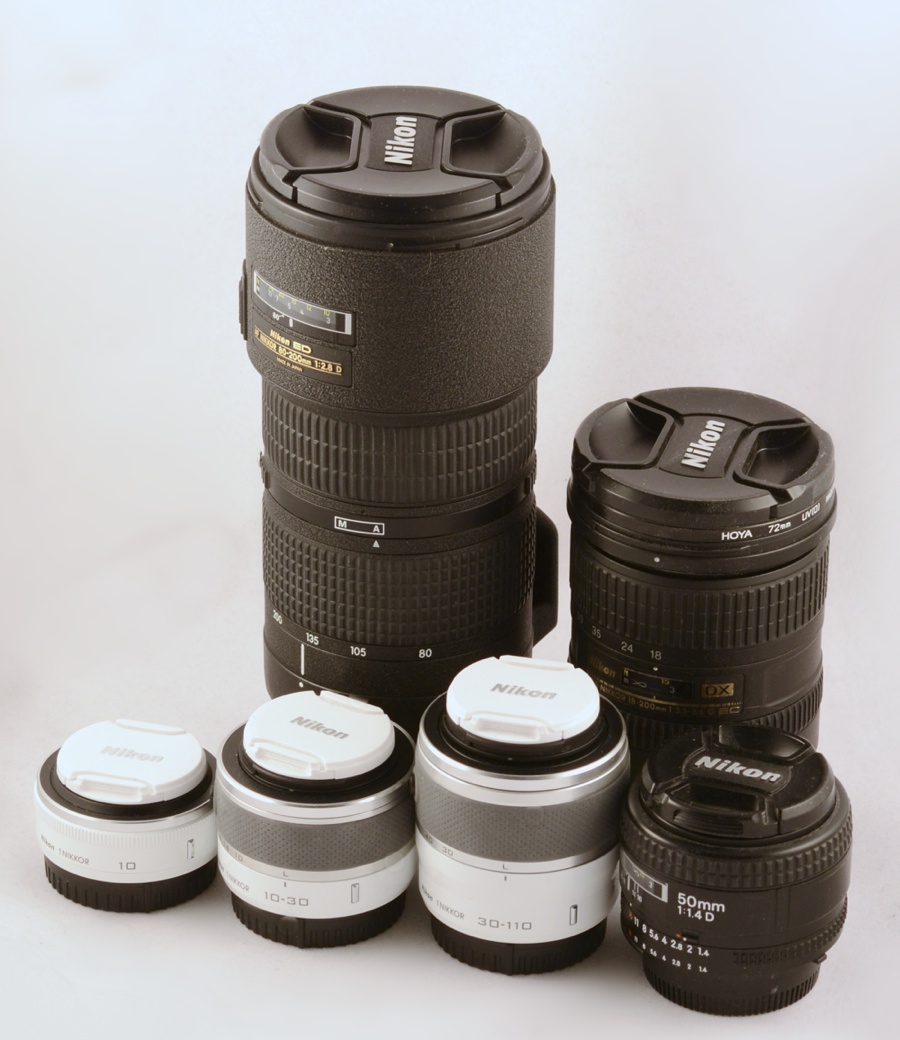
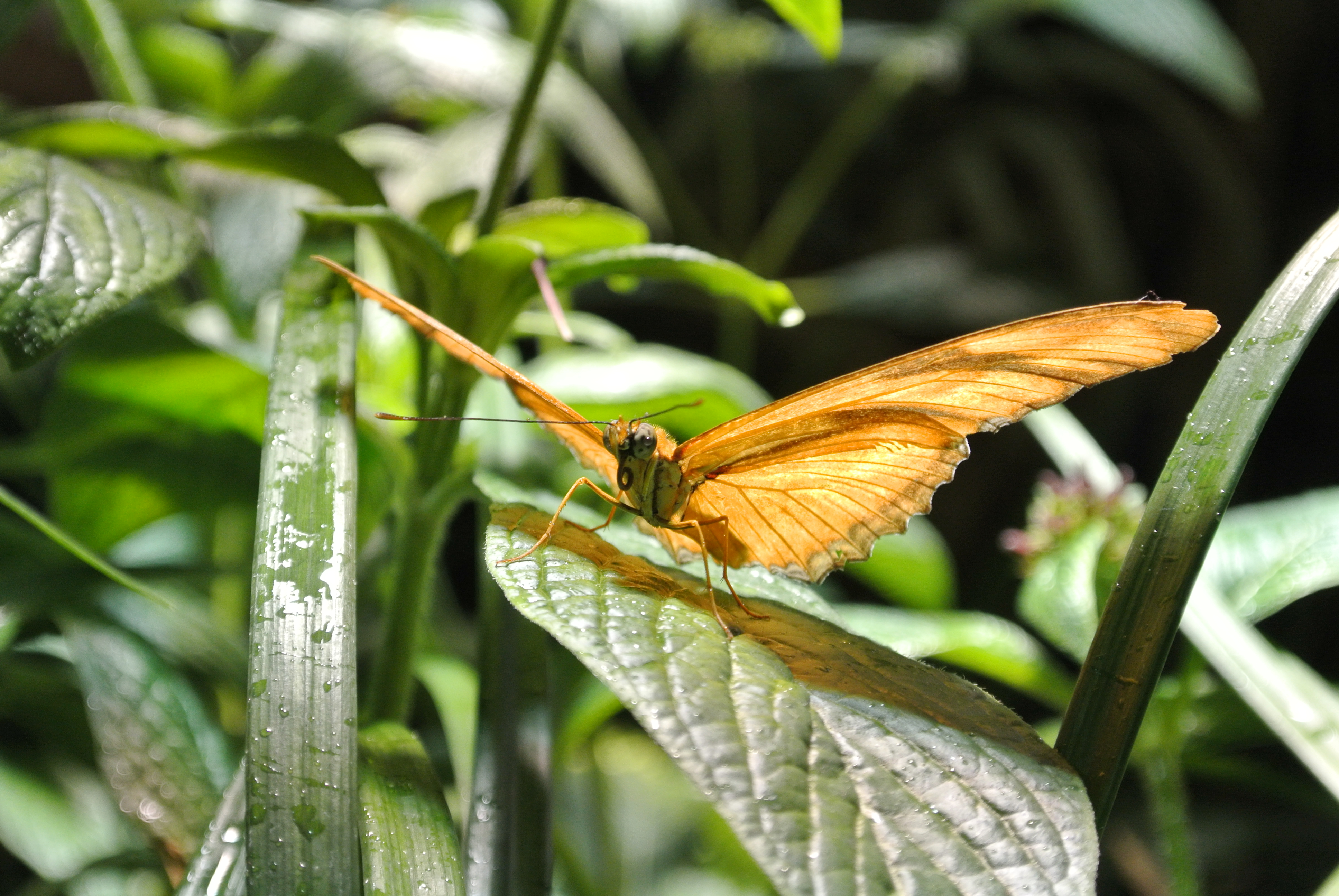
</p><p></p><p><em>Nikon J1 with 10mm f/2.8 pancake</em></p><p><a href="http://taishimizu.com/pictures/nikon-j1-review/nikon-j1-f2-8-pancake-planetarium.jpg" style="background-color:inherit;border:none;"><img src="http://taishimizu.com/pictures/nikon-j1-review/nikon-j1-f2-8-pancake-planetarium-thumb.jpg" class="img-thumb" alt="http:  taishimizu.com pictures nikon j1 review nikon j1 f2 8 pancake planetarium thumb.jpg"/></a> <a href="http://taishimizu.com/pictures/nikon-j1-review/nikon-j1-f2-8-pancake-planetarium.NEF">RAW file</a></p><p></p><p><h3>Conclusion</h3>I’ve quite enjoyed shooting with the J1 so far, and will be sad to give it up. Alas, it was purchased for my brother to take with him on his aforementioned <a href="http://greatdivideride.com">unicycling trip</a>. He needs something light with good image (and video) quality for the trail, and I can’t think of a better option, though the Fuji X10 and X100 might both be decent choices, too. Most of my complaints are about the fact that I’m not the target consumer for the J1&acirc;&euro;&rdquo;I want easier access to manual options and the J1 wasn’t built for that. However, the V1 was supposed to be, and all my complaints about controls are identical for that camera.  </p><p></p><p>Despite the complaints given, the J1 is a fantastic camera. The general responsiveness, especially of autofocus makes it feel closer to a DSLR than other mirrorless cameras. I don’t believe there is anything of comparable size that can match the image quality and performance. Certainly Micro 4/3 cameras can match or best the IQ, but when lenses are taken into account they’re not too different from a small DSLR in size. It has rough edges, but is a great little camera.</p><p></p><p><h3>Arbitrary Numerical Rating: 4.5 of 5</h3></p><p></p><p><h3>More Photos</h3></p><p><em>CX Lenses vs. <a href="http://www.taishimizu.com/236/Nikon-50mm-f-1-4-AF-D-Review">50mm (FX)</a>, 18â€“200mm (DX), & <a href="http://taishimizu.com/188/Nikkor-80-ndash-200mm-AF-f-2-8D-ED-Review">80â€“200mm (FX)</a></em></p><p><a href="http://taishimizu.com/pictures/nikon-j1-review/1-system-lens-size-comparison.jpg" style="background-color:inherit;border:none;"><img src="http://taishimizu.com/pictures/nikon-j1-review/1-system-lens-size-comparison-thumb.jpg" class="img-thumb" alt="http:  taishimizu.com pictures nikon j1 review 1 system lens size comparison thumb.jpg"/></a></p><p></p><p><em>Butterfly, 10â€“30mm f/3.5â€“5.6 @f/5.6, 30mm, 2/333s, ISO400</em></p><p><a href="http://taishimizu.com/pictures/nikon-j1-review/nikon-j1-butterfly.jpg" style="background-color:inherit;border:none;"><img src="http://taishimizu.com/pictures/nikon-j1-review/nikon-j1-butterfly-thumb.jpg" class="img-thumb" alt="http:  taishimizu.com pictures nikon j1 review nikon j1 butterfly thumb.jpg"/></a><a href="http://taishimizu.com/pictures/nikon-j1-review/nikon-j1-butterfly.NEF">RAW file</a></p><p></p><p><em>Nikon J1 iPhone 4S</em></p><p><a href="http://taishimizu.com/pictures/nikon-j1-review/nikon-j1-and-white-iPhone-4s-side-thumb.jpg" style="background-color:inherit;border:none;"><img src="http://taishimizu.com/pictures/nikon-j1-review/nikon-j1-and-white-iPhone-4s-side-thumb.jpg" class="img-thumb" alt="http:  taishimizu.com pictures nikon j1 review nikon j1 and white iPhone 4s side thumb.jpg"/></a></p><p></p><p><em>Nikon J1 with 10mm f/2.8 pancake</em></p><p><a href="http://taishimizu.com/pictures/nikon-j1-review/nikon-j1-with-10mm-f2-8-pancake.jpg" style="background-color:inherit;border:none;"><img src="http://taishimizu.com/pictures/nikon-j1-review/nikon-j1-with-10mm-f2-8-pancake-thumb.jpg" class="img-thumb" alt="http:  taishimizu.com pictures nikon j1 review nikon j1 with 10mm f2 8 pancake thumb.jpg"/></a></p><p></p><p><em>Nikon J1 iPhone 4S</em></p><p><a href="http://taishimizu.com/pictures/nikon-j1-review/nikon-j1-and-white-iPhone-4s-front.jpg" style="background-color:inherit;border:none;"><img src="http://taishimizu.com/pictures/nikon-j1-review/nikon-j1-and-white-iPhone-4s-front-thumb.jpg" class="img-thumb" alt="http:  taishimizu.com pictures nikon j1 review nikon j1 and white iPhone 4s front thumb.jpg"/></a></p><p></p><p><em>Nikon J1 with 10mm f/2.8 pancake</em></p><p><a href="http://taishimizu.com/pictures/nikon-j1-review/nikon-j1-f2-8-pancake-planetarium-2.jpg" style="background-color:inherit;border:none;"><img src="http://taishimizu.com/pictures/nikon-j1-review/nikon-j1-f2-8-pancake-planetarium-2-thumb.jpg" class="img-thumb" alt="http:  taishimizu.com pictures nikon j1 review nikon j1 f2 8 pancake planetarium 2 thumb.jpg"/></a> <a href="http://taishimizu.com/pictures/nikon-j1-review/nikon-j1-f2-8-pancake-planetarium-2.NEF">RAW file</a></p><p></p><p></p><p><em>30â€“110mm @f/5.6, 110mm, 1/30s, ISO2000</em></p><p><a href="http://taishimizu.com/pictures/nikon-j1-review/Nikon-J1-30-110-bird.jpg" style="background-color:inherit;border:none;"><img src="http://taishimizu.com/pictures/nikon-j1-review/Nikon-J1-30-110-bird-thumb.jpg" class="img-thumb" alt="http:  taishimizu.com pictures nikon j1 review Nikon J1 30 110 bird thumb.jpg"/></a> <a href="http://taishimizu.com/pictures/nikon-j1-review/Nikon-J1-30-110-bird.NEF">RAW file</a></p><p></p><p><em>Hayden Planetarium 10mm f/2.8 pancake, @f/2.8, iso 100, 1/160s</em></p><p><a href="http://taishimizu.com/pictures/nikon-j1-review/nikon-j1-hayden-planetarium.jpg" style="background-color:inherit;border:none;"><img src="http://taishimizu.com/pictures/nikon-j1-review/nikon-j1-hayden-planetarium-thumb.jpg" class="img-thumb" alt="http:  taishimizu.com pictures nikon j1 review nikon j1 hayden planetarium thumb.jpg"/></a> <a href="http://taishimizu.com/pictures/nikon-j1-review/nikon-j1-hayden-planetarium.NEF">RAW file</a></p><p></p><p><em>30â€“110mm @f/5.6, 110mm, 1/60s, ISO1600</em></p><p><a href="http://taishimizu.com/pictures/nikon-j1-review/Nikon-J1-30-110-bird2.jpg" style="background-color:inherit;border:none;"><img src="http://taishimizu.com/pictures/nikon-j1-review/Nikon-J1-30-110-bird2-thumb.jpg" class="img-thumb" alt="http:  taishimizu.com pictures nikon j1 review Nikon J1 30 110 bird2 thumb.jpg"/></a> <a href="http://taishimizu.com/pictures/nikon-j1-review/Nikon-J1-30-110-bird2.NEF">RAW file</a></p><p></p><p><em>30â€“110mm @f/6.3, 110mm, 1/250s, ISO125</em></p><p><a href="http://taishimizu.com/pictures/nikon-j1-review/Nikon-J1-30-110-monkeys.jpg" style="background-color:inherit;border:none;"><img src="http://taishimizu.com/pictures/nikon-j1-review/Nikon-J1-30-110-monkeys-thumb.jpg" class="img-thumb" alt="http:  taishimizu.com pictures nikon j1 review Nikon J1 30 110 monkeys thumb.jpg"/></a> <a href="http://taishimizu.com/pictures/nikon-j1-review/Nikon-J1-30-110-monkeys.NEF">RAW file</a></p><p>]]>
			</content>
		  </entry>
	
		<entry>
			<title type="html" ><![CDATA[Nikon 1 System Impressions]]></title>
			<id>http://taishimizu.com/359/Nikon-1-System-Impressions</id>
			<link rel="alternate" href="http://taishimizu.com/359/Nikon-1-System-Impressions"/>
			<published>2011-12-30T17:44:24Z</published>
			<updated>2011-12-30T17:44:24Z</updated>
			<author>
				<name>Tai Shimizu</name>
				<uri>http://taishimizu.com/</uri>
			</author>
			<content type="html" xml:base="http://taishimizu.com/" xml:lang="en"><![CDATA[<em>Update: My J1 review is available <a href="http://taishimizu.com/364/Nikon-J1-Review">here</a></em></p><p></p><p>It’s been a long time since I’ve reviewed anything on my blog, but I’ve been playing with a Nikon J1 and am going to try to get reviews up for the J1 and 3 lenses: the 1 Nikkor 10mm f/2.8 pancake, the 10&acirc;&euro;&ldquo;30mm f/3.5&acirc;&euro;&ldquo;5.6 VR, and the 30&acirc;&euro;&ldquo;110mm f/3.8&acirc;&euro;&ldquo;5.6 VR. </p><p></p><p><em>Nikon J1 with 10mm pancake and iPhone 4S</em></p><p><a href="http://taishimizu.com/pictures/nikon-j1-review/nikon-j1-and-white-iPhone-4s-angled.jpg" style="background-color:inherit;border:none;"><img src="http://taishimizu.com/pictures/nikon-j1-review/nikon-j1-and-white-iPhone-4s-angled-thumb.jpg" class="img-thumb" alt="http:  taishimizu.com pictures nikon j1 review nikon j1 and white iPhone 4s angled thumb.jpg"/></a></p><p>The J1 is a tiny camera, perfect for when you need to save space while <a href="http://greatdivideride.com">mountain unicycling from Canada to Mexico</a>. By itself, the body is close in size to an iPhone 4/4S, but 3 times thicker. It feels significantly smaller than the Micro 4/3s cameras I’ve used, especially when taking the size of lenses into account. Even the Canon G12 is bigger than the J1 despite the Canon’s much smaller sensor. </p><p></p><p><em>Nikon J1 with 30-110mm f/3.8-5.6</em></p><p><a href="http://taishimizu.com/pictures/nikon-j1-review/nikon-j1-with-30-110mm.jpg" style="background-color:inherit;border:none;"><img src="http://taishimizu.com/pictures/nikon-j1-review/nikon-j1-with-30-110mm-thumb.jpg" class="img-thumb" alt="http:  taishimizu.com pictures nikon j1 review nikon j1 with 30 110mm thumb.jpg"/></a></p><p>What I’m trying to get at here, is that Nikon found a hole in the market, planted a flag, and claimed this newfound territory in their own name. There has been a large gap in sensor size between the very high end point and shoots, and the existing mirrorless market which has quickly become incredibly competitive. Excepting Canon, most of the industry has weighed in, from Micro 4/3, Sony NEX, and Pentax’s tiny Q, to Fuji’s runaway success with the X100 foreshadowing their future interchangeable lens system. Unlike the X100 and some Micro 4/3 cameras, though, Nikon has gone with a very modern design, eschewing classic styling. It looks sleek, is extremely responsive, and has one of the best menu systems I’ve seen on a camera, but some old-style dials would certainly help.</p><p></p><p><em>Nikon J1 Back</em></p><p><a href="http://taishimizu.com/pictures/nikon-j1-review/nikon-j1-rear.jpg" style="background-color:inherit;border:none;"><img src="http://taishimizu.com/pictures/nikon-j1-review/nikon-j1-rear-thumb.jpg" class="img-thumb" alt="http:  taishimizu.com pictures nikon j1 review nikon j1 rear thumb.jpg"/></a></p><p>The mode selection dial on the back is basically useless. All it’s good for is changing from still images to video, and that could have been done by using the video button on top. To me, it seems like engineering wanted to put PSAM there, but marketing wouldn’t have it as it might displace the prominence of their baffling motion snapshot mode.</p><p></p><p>It isn’t as bad as that sounds, though. The menus make changing PSAM modes only slightly more annoying than if they were on that dial, and manual is surprisingly easy to control. The switch on top controls shutter speed, and the spinning dial on the back controls aperture. A third control for ISO would make me incredibly happy.</p><p></p><p><em>Hayden Planetarium 10mm f/2.8 pancake, @f/2.8, iso 100, 1/160s</em></p><p><a href="http://taishimizu.com/pictures/nikon-j1-review/nikon-j1-hayden-planetarium.jpg" style="background-color:inherit;border:none;"><img src="http://taishimizu.com/pictures/nikon-j1-review/nikon-j1-hayden-planetarium-thumb.jpg" class="img-thumb" alt="http:  taishimizu.com pictures nikon j1 review nikon j1 hayden planetarium thumb.jpg"/></a> <a href="http://taishimizu.com/pictures/nikon-j1-review/nikon-j1-hayden-planetarium.NEF">RAW file</a></p><p></p><p>I think Nikon has a winner in the 1 system, especially if future versions put more focus on manual control. I’ll have more details on controls and image quality in my J1 review, so stay tuned!</p><p></p><p><h3>35mm Equivalencies for Lens Focal Lengths</h3>The CX sensor format used by the 1 system has a 2.7x crop ratio. Below are some conversions to 35mm focal lengths:</p><p>10mm -&gt;  27mm</p><p>30mm -&gt; 81mm</p><p>110mm -&gt; 297mm</p><p></p><p>I’ve updated my <a href="http://taishimizu.com/et-cetera/lenscalculator">Focal Length Calculator</a> to show the Nikon 1 crop.]]>
			</content>
		  </entry>
	
		<entry>
			<title type="html" ><![CDATA[Thank You, Steve Jobs]]></title>
			<id>http://taishimizu.com/347/Thank-You--Steve-Jobs</id>
			<link rel="alternate" href="http://taishimizu.com/347/Thank-You--Steve-Jobs"/>
			<published>2011-10-05T23:37:43Z</published>
			<updated>2011-10-05T23:37:43Z</updated>
			<author>
				<name>Tai Shimizu</name>
				<uri>http://taishimizu.com/</uri>
			</author>
			<content type="html" xml:base="http://taishimizu.com/" xml:lang="en"><![CDATA[Among my earliest memories is buying a Mac Plus with my parents, which served faithfully along with the many Macs I’ve owned and relied upon throughout my life. It may or may not be that my Macs were responsible for my choice to pursue an education in Computer Science, I cannot say; regardless, the state of the entire computer industry at the time of my education was largely of his influence. </p><p></p><p>Not long after college, the radical shift in software distribution created by iPhone and the App Store allowed me to become independent&acirc;&euro;&rdquo;to start a life writing software for myself, to be successful. </p><p></p><p>His impact has been immeasurable, and he will be missed. </p><p></p><p>Tai Shimizu]]>
			</content>
		  </entry>
	
</feed>