<?xml version="1.0" encoding="UTF-8"?>
<?xml-stylesheet type="text/xsl" media="screen" href="/~d/styles/rss2full.xsl"?><?xml-stylesheet type="text/css" media="screen" href="http://feeds.feedburner.com/~d/styles/itemcontent.css"?><rss xmlns:content="http://purl.org/rss/1.0/modules/content/" xmlns:wfw="http://wellformedweb.org/CommentAPI/" xmlns:dc="http://purl.org/dc/elements/1.1/" xmlns:atom="http://www.w3.org/2005/Atom" xmlns:sy="http://purl.org/rss/1.0/modules/syndication/" xmlns:slash="http://purl.org/rss/1.0/modules/slash/" xmlns:feedburner="http://rssnamespace.org/feedburner/ext/1.0" version="2.0">

<channel>
	<title>Tapity</title>
	
	<link>http://tapity.com</link>
	<description>Tap into the possibility</description>
	<lastBuildDate>Fri, 04 May 2012 00:56:04 +0000</lastBuildDate>
	<generator>http://wordpress.org/?v=2.8.4</generator>
	<language>en</language>
	<sy:updatePeriod>hourly</sy:updatePeriod>
	<sy:updateFrequency>1</sy:updateFrequency>
			<atom10:link xmlns:atom10="http://www.w3.org/2005/Atom" rel="self" type="application/rss+xml" href="http://feeds.feedburner.com/Tapity" /><feedburner:info uri="tapity" /><atom10:link xmlns:atom10="http://www.w3.org/2005/Atom" rel="hub" href="http://pubsubhubbub.appspot.com/" /><item>
		<title>The Art of iBook Creation</title>
		<link>http://feedproxy.google.com/~r/Tapity/~3/e2FQegjyYGU/</link>
		<comments>http://tapity.com/uncategorized/the-art-of-ibook-creation/#comments</comments>
		<pubDate>Wed, 02 May 2012 23:07:13 +0000</pubDate>
		<dc:creator>Todd</dc:creator>
				<category><![CDATA[Uncategorized]]></category>

		<guid isPermaLink="false">http://tapity.com/?p=2072</guid>
		<description><![CDATA[
We are quickly learning that creating an iBook involves a new way of thinking. An iBook is really a hybrid between an eBook and an app—it includes text and images like an eBook, but it also allows for all kinds of extra user interactions like an app.
Panoply of skills
What skills are required to create a [...]]]></description>
			<content:encoded><![CDATA[<p><img class="alignright size-medium wp-image-2078" title="Mona Smile" src="http://tapity.com/wp-content/uploads/2012/05/Mona-Smile-300x244.jpg" alt="Mona Smile" width="300" height="244" /></p>
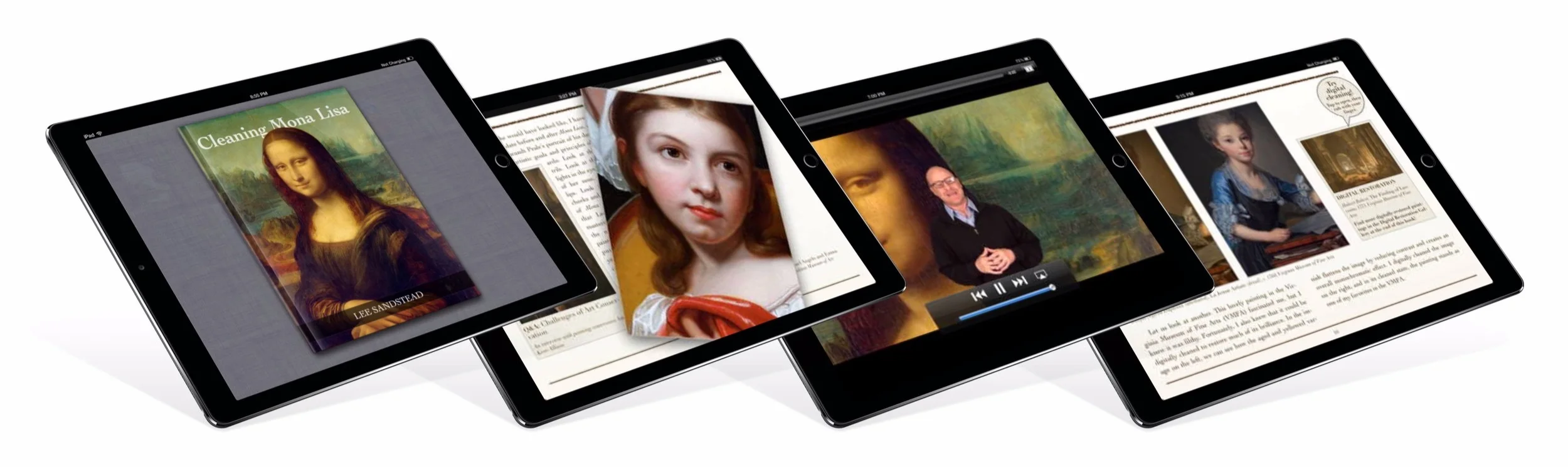
<p>We are quickly learning that creating an iBook involves a new way of thinking. An iBook is really a hybrid between an eBook and an app—it includes text and images like an eBook, but it also allows for all kinds of extra user interactions like an app.</p>
<h4>Panoply of skills</h4>
<p>What skills are required to create a great iBook? At least these:</p>
<ul>
<li>Layout/typography</li>
<li>Interaction design</li>
<li>Visual design</li>
<li>Copy editing</li>
<li>Image editing</li>
<li>Videography</li>
<li>HTML5/Javascript programming (to create widgets)</li>
</ul>
<p>So although iBooks Author makes it possible for <em>anyone</em> to publish an iBook, to make something exceptional requires multiple skills that generally do not all reside in one human being. In fact, the range of skills necessary to create a compelling iBook is arguably broader than that required to create a great iOS app.</p>
<h4>iBook UX</h4>
<p>And what&#8217;s more, the first two skills listed up there—layout and interaction design—actually meld together to be a new category of user experience design here-to-fore unknown—&#8221;iBook UX&#8221; anyone? One designer must consider how the text, images, video clips, and interactive widgets can work together to create one meaningful, coherent, and delightful experience. Creating this experience involves both specifying interactive widgets and video content that will work well with the other content and placing all of these diverse pieces together to form a superb whole.</p>
<h4>How to read an iBook</h4>
<p>A big x-factor with this iBook UX business is that we do not yet have much understanding of how most readers/users will interact with a rich, multi-media iBook. We can safely guess that different users will interact differently. Some will likely treat it like a traditional book, reading the text and viewing the images without interruption, then going back and checking out videos and widgets as icing on the cake. Others are likely to do just the &#8220;fun stuff&#8221;—look at the picture, watch the videos, and try out the widgets—and maybe never read much of the text. Some may actually interact with an iBook &#8220;as intended,&#8221; reading the text and interacting with each image, video, and widget as encountered. So should an iBook be designed to flow properly in each of these three different interactive modes? Whew! This stuff ain&#8217;t easy!</p>
<h4>Giving it a go</h4>
<p>Anyway, what better way to figure out how to design an iBook than to get some relatively talented folks together with the general skill range mentioned above and give it a go? That is what we are doing with <em>Cleaning Mona Lisa.</em> We have connected with a great author, Lee Sandstead—&#8221;the world&#8217;s most fired up art historian&#8221;—who has a great concept with well-written text and fantastic images. We are adding some Tapity design finesse from our team of in-house designers and interns. And we are hoping for an engaging result that reaches toward the kind of compelling iBook experience that we think iBooks are all about. Watch this space for more specifics on our experience as we lead up to the launch of <em>Mona Lisa</em>.</p>
<img src="http://feeds.feedburner.com/~r/Tapity/~4/e2FQegjyYGU" height="1" width="1"/>]]></content:encoded>
			<wfw:commentRss>http://tapity.com/uncategorized/the-art-of-ibook-creation/feed/</wfw:commentRss>
		<slash:comments>0</slash:comments>
		<feedburner:origLink>http://tapity.com/uncategorized/the-art-of-ibook-creation/</feedburner:origLink></item>
		<item>
		<title>Another Big Announcement: Hours</title>
		<link>http://feedproxy.google.com/~r/Tapity/~3/Nohf6zGOfOM/</link>
		<comments>http://tapity.com/iphone-app-design/another-big-announcement-hours/#comments</comments>
		<pubDate>Wed, 25 Apr 2012 13:29:13 +0000</pubDate>
		<dc:creator>Josh Olson</dc:creator>
				<category><![CDATA[Announcements]]></category>
		<category><![CDATA[Hours]]></category>
		<category><![CDATA[Tapity]]></category>
		<category><![CDATA[iPhone App Design]]></category>
		<category><![CDATA[iPhone App News]]></category>

		<guid isPermaLink="false">http://tapity.com/?p=1952</guid>
		<description><![CDATA[Since our next app, Languages, is more or less designed and is now in the programming stage, we&#8217;re hungry for yet another adventure.  And we&#8217;ve already decided what we&#8217;re going to do.  In addition to Languages and Cleaning Mona Lisa, we&#8217;re taking on two new in-house projects. One is Grades 3.0.  Stay tuned for more [...]]]></description>
			<content:encoded><![CDATA[<div id="attachment_2048" class="wp-caption aligncenter" style="width: 610px"><a href="http://tapity.com/wp-content/uploads/2012/04/hours-preview4.png"><img src="http://tapity.com/wp-content/uploads/2012/04/hours-preview4.png" alt="Hours — an early mockup" title="hours-preview4" width="600" height="450" class="size-full wp-image-2048" /></a><p class="wp-caption-text">Hours — an early mockup</p></div>
<p>Since our next app, Languages, is more or less designed and is now in the programming stage, we&#8217;re hungry for yet another adventure.  And we&#8217;ve already decided what we&#8217;re going to do.  In addition to <a href="http://tapity.com/iphone-app-design/buttons-are-not-our-enemy/">Languages</a> and <a href="http://tapity.com/announcements/our-first-ibook/">Cleaning Mona Lisa</a>, we&#8217;re taking on two new in-house projects. One is Grades 3.0.  Stay tuned for more information on that in the coming weeks.  But right now I will be telling you about our other new in-house app.  We&#8217;re really excited about it.  And, like all great apps, it begins with a problem.</p>
<h4>It&#8217;s all a matter of time</h4>
<div id="attachment_2001" class="wp-caption alignright" style="width: 310px"><img class="size-medium wp-image-2001" title="3537150230_dabc84ba37_z" src="http://tapity.com/wp-content/uploads/2012/04/3537150230_dabc84ba37_z2-300x225.jpg" alt="3537150230_dabc84ba37_z" width="300" height="225" /><p class="wp-caption-text">Keeping track of your hours can be frustrating and sometimes infuriating.</p></div>
<p>Every week day we go to <a href="http://www.dilbert.com/strips/">work</a>.  Most of us are obliged to keep track of our hours. Innumerable small headaches, pains, and inconveniences accompany this. Some find logging hours tedious because they are constantly switching tasks (lawyers, for example).  Other find it tricky because they opt to fudge it and may not record their hours until the end of the day or the end of the end of the week; they often cannot remember exactly what they did and when. Everybody does it differently and everybody has their unique woes.</p>
<p>Bosses, employees, and self-employed entrepreneurs all wrestle with this issue: how to reduce the tedium and trickiness of time-tracking to an absolute minimum.</p>
<h4>Is there an app for that?</h4>
<p>Yes—sort of.  There is a throng of time-tracker apps.  But in our experience none of them are satisfactory.  We have tried to use a number of them, only to abandon them in favor of timesheet and pencil.  We find that generally the cure kills more than the disease and the side-effects are worse than the sickness.  There is no alpha dog in this space.</p>
<p>We have identified three areas that none of our competitors deals with successfully:</p>
<p>1. Starting, stopping, switching between tasks and remembering to do so—all via a simple and coherent interface.</p>
<p>2. Identifying errors and fixing them.  All the apps now make it extremely difficult to edit your time once you record it.</p>
<p>3. Back-end integration with billing and invoicing systems such as FreshBooks.</p>
<h4>Where we come in</h4>
<p>We believe that it must be possible to create an hours-tracker app that is simple, intuitive, and simultaneously powerful.  Having failed to find any such app available today, we have decided to make it ourselves.  We want to create an app that will cover as many use-cases as possible—from the programmer who switches tasks twice a day to the lawyer who switches clients continually.  We want to serve the meticulous time-tracker as well as the guy who fudges it.  And we want to do all of this via a UI that is clear, crisp, and delightful.</p>
<p>That is the vision.</p>
<p>And we&#8217;ve decided on a name.  In keeping with our other product names inspired by Apple&#8217;s Pages—Grades and Languages—we are calling our time-tracker &#8220;Hours.&#8221;</p>
<p>We are already deep into interaction design and are laboring on it furiously in the hopes of launching it ASAP.  Now back to work!</p>
<img src="http://feeds.feedburner.com/~r/Tapity/~4/Nohf6zGOfOM" height="1" width="1"/>]]></content:encoded>
			<wfw:commentRss>http://tapity.com/iphone-app-design/another-big-announcement-hours/feed/</wfw:commentRss>
		<slash:comments>0</slash:comments>
		<feedburner:origLink>http://tapity.com/iphone-app-design/another-big-announcement-hours/</feedburner:origLink></item>
		<item>
		<title>Our First iBook</title>
		<link>http://feedproxy.google.com/~r/Tapity/~3/rF7jVkZR2Cs/</link>
		<comments>http://tapity.com/announcements/our-first-ibook/#comments</comments>
		<pubDate>Wed, 18 Apr 2012 12:48:29 +0000</pubDate>
		<dc:creator>Josh Olson</dc:creator>
				<category><![CDATA[Announcements]]></category>
		<category><![CDATA[The Tablet]]></category>
		<category><![CDATA[iBooks]]></category>

		<guid isPermaLink="false">http://tapity.com/?p=1901</guid>
		<description><![CDATA[

We like to try stuff out. For example, three years ago Jeremy felt like trying out app development; and the rest is history. You never know what will happen when you try stuff out, but it can open up whole universes of possibility that you had never seen or known before.
So it is in the [...]]]></description>
			<content:encoded><![CDATA[<p style="text-align: center;">
<p style="text-align: center;"><img class="aligncenter size-large wp-image-1921" title="Screen Shot 2012-04-17 at 2.36.12 PM" src="http://tapity.com/wp-content/uploads/2012/04/Screen-Shot-2012-04-17-at-2.36.12-PM1-1024x604.png" alt="Screen Shot 2012-04-17 at 2.36.12 PM" width="663" height="392" /></p>
<p>We like to try stuff out. For example, three years ago Jeremy felt like trying out app development; and the rest is history. You never know what will happen when you try stuff out, but it can open up whole universes of possibility that you had never seen or known before.</p>
<p>So it is in the spirit of trying stuff out that we are creating our first iBook. Yes, we do not know what will come of Apple&#8217;s newly opened up iBook platform. We think, but are not sure, that the iBookstore may soon become analogous to the Music Store or App Store—both in terms of volume and profit. Others disagree. The waters <a href="http://www.washingtonpost.com/business/economy/justice-department-files-suit-against-apple-publishers-report-says/2012/04/11/gIQAzyXSAT_story.html">churn</a> uncertainly. But we figure that if we can build up iBook-creation capacity now, when the platform is young, we may be able to profit substantially when it is mature. We want to offer our services to many creative people who can write and want widgets and professionally-edited video to enhance their work.</p>
<p>A digital publishing revolution may be on the horizon. And, to quote Steve, &#8220;I skate to where the puck is going to be.&#8221;</p>
<div class="wp-caption alignright" style="width: 210px"><img class=" " style="padding: 0px; margin: 0px; border: 0px none initial;" title="20091116132218794sandstead hdshot bw" src="http://tapity.com/wp-content/uploads/2012/04/20091116132218794sandstead-hdshot-bw-848x1024.jpg" alt="Lee Sandstead" width="200" height="241" /><p class="wp-caption-text">Lee Sandstead</p></div>
<p>So, our first book. Actually, it&#8217;s not really our iBook—it&#8217;s a piece by the world&#8217;s most fired-up art historian, <a href="http://www.sandstead.com/">Lee Sandstead</a>. Lee is a professor, speaker, photographer of art, and was the host of the Emmy-nominated Travel Channel show <em><a href="http://blogs.smithsonianmag.com/aroundthemall/2009/07/lee-sandstead-gives-audiences-an-art-attack/">Art Attack</a></em>. The piece we are working with him on is called Cleaning Mona Lisa. As the title suggests, it&#8217;s about cleaning the Mona Lisa; and it&#8217;s also about all the things that hinder most ordinary people from really appreciating and enjoying fine art.</p>
<p>So where do we come in? We take Lee&#8217;s text and images and weave them together in <a href="http://www.apple.com/ibooks-author/">iBooks Author</a>. For this, we had to spend some time trying our hand at its levers and dials. But we&#8217;re getting the hang of it. We&#8217;re also creating widgets, standard and custom. You&#8217;re going to get to do your own digital restorations and clean varnished paintings with the swipe of a finger; so make sure and buy the book when it comes out!</p>
<p>Cleaning Mona Lisa is sixty to seventy percent completed right now. The text is in place. The layout has congealed. Now it&#8217;s primarily a matter of editing Lee&#8217;s video and completing work on the widgets.</p>
<p>So stay tuned!</p>
<img src="http://feeds.feedburner.com/~r/Tapity/~4/rF7jVkZR2Cs" height="1" width="1"/>]]></content:encoded>
			<wfw:commentRss>http://tapity.com/announcements/our-first-ibook/feed/</wfw:commentRss>
		<slash:comments>1</slash:comments>
		<feedburner:origLink>http://tapity.com/announcements/our-first-ibook/</feedburner:origLink></item>
		<item>
		<title>Buttons are not the enemy</title>
		<link>http://feedproxy.google.com/~r/Tapity/~3/4PkW_2tAY7A/</link>
		<comments>http://tapity.com/iphone-app-design/buttons-are-not-our-enemy/#comments</comments>
		<pubDate>Mon, 09 Apr 2012 18:52:18 +0000</pubDate>
		<dc:creator>Jeremy</dc:creator>
				<category><![CDATA[Languages]]></category>
		<category><![CDATA[iPhone App Design]]></category>

		<guid isPermaLink="false">http://tapity.com/?p=1884</guid>
		<description><![CDATA[
I recently called 2012 the year the interface disappeared, voicing my excitement and concerns with gesture-based interfaces. Apps like Clear and Paper challenge us to rethink what is possible with touch. We got pretty excited and designed a completely gesture-based Languages prototype to show people at SXSW. I had the privilege to show the prototype [...]]]></description>
			<content:encoded><![CDATA[<p><a href="http://www.languagesapp.com"><img src="http://tapity.com/wp-content/uploads/2012/04/preview6big.png" alt="We can&#039;t wait to show you what we&#039;ve been working on..." title="We can&#039;t wait to show you what we&#039;ve been working on..." width="600" height="245" class="aligncenter size-full wp-image-1887" /></a><br />
I recently called 2012 <a href="http://tapity.com/iphone-app-design/gestures/">the year the interface disappeared</a>, voicing my excitement and concerns with gesture-based interfaces. Apps like <a href="http://www.realmacsoftware.com/clear/">Clear</a> and <a href="http://www.fiftythree.com/paper">Paper</a> challenge us to rethink what is possible with touch. We got pretty excited and designed a completely gesture-based Languages prototype to show people at SXSW. I had the privilege to show the prototype to some folks I really respect — Steve Krug (<a href="http://www.amazon.com/Dont-Make-Me-Think-Usability/dp/0321344758">Don&#8217;t Make Me Think</a>), Evan Doll (<a href="http://flipboard.com/">Flipboard</a>), Jared Spool (<a href="http://www.uie.com/about/consultants/">UIE</a>), David Barnard (<a href="http://appcubby.com/launch-center/">App Cubby</a>), Josh Clark (<a href="http://globalmoxie.com/index.shtml">Tapworthy</a>), and Whitney Hess, to name a few — and the feedback was overwhelmingly positive and very helpful (thanks guys!)</p>
<p>After mulling over the feedback with the team, we&#8217;ve redesigned the prototype to include some buttons. Here is why.</p>
<h4>Buttonless only works for extremely simple apps</h4>
<p>Virtually buttonless experiences can delight but that only works when you eliminate not just the buttons but the functions as well. Imagine if Clear attempted to include even half of the functionality of power-user apps like <a href="http://www.omnigroup.com/products/omnifocus-iphone/">OmniFocus</a> and maintain a relatively buttonless interface; it&#8217;s impossible. Why?</p>
<ul>
<li><strong>Number of gestures:</strong> Tap once, tap twice, tap and hold, swipe left, swipe right, swipe up, swipe down, pinch out, pinch in, twist, drag a part of the screen&#8230; Without buttons, there are only so many different functions you can allow with these interactions.</li>
<li><strong>Memory:</strong> we can only use a small number of gestures without making user&#8217;s brains explode.</li>
<li><strong>Mental model:</strong> using gestures for certain functions will feel extremely forced. Gestures only work for functions where the user&#8217;s mental model matches how the gesture works. You can help form the user&#8217;s mental model using metaphor. If it&#8217;s a book, the user expects to drag the page to flip it. Users can easily grasp gestures where they are directly manipulating objects like that but many functions are so abstract that you will be hard-pressed to find gestures that feel natural for them.</li>
</ul>
<p>So part of the genius behind Clear wasn&#8217;t just the gestures but the minimalism, without which the app would break down. There is obviously a market for these kind of minimal apps but that route generally excludes power-users who will complain of the lack of functionality. That&#8217;s fine for cases like Clear where a large enough percentage of the population doesn&#8217;t need power features but you need to question whether that&#8217;s the case for your own app before making the decision to go the minimalist route.</p>
<p><strong>Buttons are not our enemy</strong>. They are not as satisfying as directly manipulating objects with gestures but in interfaces that accommodate more than a few simple functions, they are often very necessary in order for the interface to make sense. </p>
<p>I&#8217;ve also come to the conclusion that buttons may be the best way to teach gestures, especially when considering making our apps accessible (which, I know from first-hand experience, Apple&#8217;s App Store managers pay attention to *very* much). More on that later.</p>
<p>That said, our new Languages design is very much gesture-driven but includes buttons where gestures don&#8217;t make sense or to supplement less-obvious gestures.</p>
<p>My mind is exploding with thoughts on gestures and I plan to write a lengthy article that covers gestures in depth, with some ideas on how to best teach gestures as well. In the mean time, check out Josh Clark&#8217;s great talk, entitled <a href="http://vimeo.com/36014698">Buttons are a Hack</a>.</p>
<img src="http://feeds.feedburner.com/~r/Tapity/~4/4PkW_2tAY7A" height="1" width="1"/>]]></content:encoded>
			<wfw:commentRss>http://tapity.com/iphone-app-design/buttons-are-not-our-enemy/feed/</wfw:commentRss>
		<slash:comments>4</slash:comments>
		<feedburner:origLink>http://tapity.com/iphone-app-design/buttons-are-not-our-enemy/</feedburner:origLink></item>
		<item>
		<title>iBooks 2—much more than meets the eye?</title>
		<link>http://feedproxy.google.com/~r/Tapity/~3/IkG6lKmD18k/</link>
		<comments>http://tapity.com/ibooks/ibooks-2-much-more-than-meets-the-eye/#comments</comments>
		<pubDate>Mon, 19 Mar 2012 20:56:26 +0000</pubDate>
		<dc:creator>Todd</dc:creator>
				<category><![CDATA[iBooks]]></category>

		<guid isPermaLink="false">http://tapity.com/?p=1871</guid>
		<description><![CDATA[On January 19, Apple held a media event in New York City to announce iBooks 2, iBooks Author, and the new iTunes U. Apple billed the event as being all about replacing physical textbooks and announced that most of the major textbook publishers were on board. Apple showed off rich interactions that would put traditional physical [...]]]></description>
			<content:encoded><![CDATA[<p><img class="alignright size-medium wp-image-1870" title="iBooks Author Icon" src="http://tapity.com/wp-content/uploads/2012/03/iBooks-Author-Icon-277x300.jpg" alt="iBooks Author Icon" width="194" height="210" />On January 19, Apple held a <a href="http://news.cnet.com/8301-13579_3-57360688-37/apple-unveils-ibooks-2-for-digital-textbooks-self-pub-app-live-blog/">media event in New York City</a> to announce <a href="http://www.apple.com/education/ibooks-textbooks/">iBooks 2</a>, <a href="http://www.apple.com/ibooks-author/">iBooks Author</a>, and the <a href="http://www.apple.com/education/itunes-u/">new iTunes U</a>. Apple billed the event as being all about replacing physical textbooks and announced that most of the major textbook publishers were on board. Apple showed off rich interactions that would put traditional physical textbooks to shame, and priced at $14.99 <em>or less</em>. Apple&#8217;s spin was that this was the beginning of the end of traditional textbooks. Perhaps.</p>
<p>But we at Tapity were all atwitter (though we didn&#8217;t tweet much) for a different set of reasons:</p>
<ul>
<li>There is nothing limiting iBooks to textbook publishing.</li>
<li>iBooks Author would be free, allowing anyone to create iBooks (well, anyone with a Mac and a little word processor experience).</li>
<li>iBooks Author makes is relatively easy to create relatively good iBooks with relatively little effort.</li>
<li>The iBookstore would accept all kinds of books from all kinds of people, allowing anyone to <em>publish</em> iBooks.</li>
</ul>
<p>So—<a href="http://en.wiktionary.org/wiki/Talk:hold_the_phone">hold the phone</a>—iBooks can compete with <em>all</em> published books, and <em>anyone</em> can be an author and a publisher at virtually no cost. Whoah. No publisher in between author and customer. Whoah. Did you get that?</p>
<p>In our view, iBooks 2 + iBooks Author + iBookstore = a new <a href="http://www.thewildwest.org/">Wild West</a> of publishing. And not only that, with interactive widgets, iBooks can also be a much less expensive way to create certain kinds of iPad applications, particularly ones that are primarily about presenting content. And not only that, iBooks could become a platform for publishing all kinds of other highly-interactive crazy stuff, from fancy ads to annual reports to <a href="http://mashable.com/2012/03/14/shinedown-amaryllis-ibook/">digital album extras</a> to college course catalogs to user&#8217;s manuals to movie promos to…you get the idea.</p>
<p>But Apple is not promoting iBooks the way we are talking about it. Curious. Consequently, the explosion of iBook publishing that we are anticipating is happening in slow motion. We believe it is happening, and we want to be part of it (more on that later), but there is still time to get in on it. We plan to be talking about iBooks a lot more. Stay tuned.</p>
<img src="http://feeds.feedburner.com/~r/Tapity/~4/IkG6lKmD18k" height="1" width="1"/>]]></content:encoded>
			<wfw:commentRss>http://tapity.com/ibooks/ibooks-2-much-more-than-meets-the-eye/feed/</wfw:commentRss>
		<slash:comments>3</slash:comments>
		<feedburner:origLink>http://tapity.com/ibooks/ibooks-2-much-more-than-meets-the-eye/</feedburner:origLink></item>
		<item>
		<title>2012: the year the interface disappeared</title>
		<link>http://feedproxy.google.com/~r/Tapity/~3/_QDr_hxWR9U/</link>
		<comments>http://tapity.com/iphone-app-design/gestures/#comments</comments>
		<pubDate>Thu, 08 Mar 2012 19:05:06 +0000</pubDate>
		<dc:creator>Jeremy</dc:creator>
				<category><![CDATA[Languages]]></category>
		<category><![CDATA[iPhone App Design]]></category>

		<guid isPermaLink="false">http://tapity.com/?p=1806</guid>
		<description><![CDATA[First, doh! The New iPad looks amazing and iPhoto for iOS is ridiculously inspiring for app designers. It reminds us that touch presents us with new ways to manipulate software, which is what this article is all about.
Second, it&#8217;s been way too long since I&#8217;ve blogged.
Third, wow, we&#8217;ve got a new Tapity.com redesign. What do [...]]]></description>
			<content:encoded><![CDATA[<p>First, doh! The New iPad looks amazing and iPhoto for iOS is ridiculously inspiring for app designers. It reminds us that touch presents us with new ways to manipulate software, which is what this article is all about.</p>
<p>Second, it&#8217;s been way too long since I&#8217;ve blogged.</p>
<p>Third, wow, we&#8217;ve got a new Tapity.com redesign. What do you think?</p>
<p>Fourth, innovation is in the air and it all started with a to-do app of all things. You&#8217;ve heard of it; it&#8217;s called <a href="http://www.realmacsoftware.com/clear/">Clear</a> by <a href="http://www.realmacsoftware.com/clear/">Realmac Software</a>, <a href="http://milen.me/">Milen</a> and my friend Phill Ryu&#8217;s new studio <a href="http://impending.com/">Impending</a>.</p>
<p><a href="http://tapity.com/wp-content/uploads/2012/03/simplified3.jpg"><img class="aligncenter size-full wp-image-1809" title="simplified3" src="http://tapity.com/wp-content/uploads/2012/03/simplified3.jpg" alt="simplified3" width="600" /></a></p>
<p>Phill questioned everything: the need for a navigation bar at the top, chrome, inessential features, and even buttons. Phill <a href="http://thenextweb.com/apple/2012/02/15/impendings-phill-ryu-on-its-first-app-clear-natural-ui-and-turning-passion-into-product/">hates buttons</a>:</p>
<blockquote><p>&#8220;Buttons are about the most unsatisfying interaction you can have in a touchscreen device. Just think about it. At least when you’re using a mouse, you click a button, and you’re clicking a button. When you’re using a phone you are smudging glass, and there is absolutely zero feedback.&#8221;</p></blockquote>
<p>I think that&#8217;s awesome. A huge part of great design is figuring out what we can obliterate and Phill did an amazing job at that: it&#8217;s demolition design! No buttons, just gestures. It&#8217;s a very satisfying and fun experience and one that I&#8217;ve integrated into my daily life.</p>
<p>I like to think that I question inessential elements and features but Phill&#8217;s demolition design put me to shame. It&#8217;s downright inspiring.</p>
<h4>This is scary</h4>
<p>Clear is controversial, dangerous, and inspiring. Chrome disappears and gestures are the interface. Starting with Clear, apps won&#8217;t be cool just because they look pretty. There are lot&#8217;s of pretty apps. I think to make a cool app in 2012, we need to pay heavy attention to the interactions &#8211; each interaction needs to be delightful. Now the danger is that people are going to see Clear and mimic it; they&#8217;re going to <a href="http://www.jnd.org/dn.mss/gestural_interfaces_a_step_backwards_in_usability_6.html">throw</a> usability out the window and build super unintuitive gesture-based apps.  We don&#8217;t want to go to that extreme — as David Barnard rightly points out, <a href="http://davidbarnard.com/post/10281946560/on-user-interface-chrome">user interface chrome definitely has it&#8217;s place</a> — but we shouldn&#8217;t throw the baby out with the bath water. I think we need to find ways to use gestures to <em>improve</em> the user experience. David has some <a href="http://appcubby.com/blog/please-steal-my-ideas/">good ideas</a> here too.</p>
<h4>Designing gesture-based interfaces</h4>
<p>When we are designing gesture based interfaces, I think we need to keep in mind at least four points:</p>
<ul>
<li><strong>Gestures can make interactions faster and easier</strong>. It&#8217;s easier to swipe the whole screen than tap on a target on the screen.</li>
<li><strong>Directly manipulating objects is so much more satisfying</strong> than pressing a button and getting a result.</li>
<li><strong>Gestures can remove the need for buttons and chrome</strong>, as Clear has done. This can make the app really clean. The problem then is that users might not know how navigate the app if they don&#8217;t know the gestures. They aren&#8217;t as discoverable as buttons so we may need to play some usability tricks to make sure our users can easily figure them out and remember them.</li>
<li><strong>Gestures are cool</strong>. That shouldn&#8217;t be underestimated.</li>
<li>Update: I can&#8217;t believe I completely forgot to mention one of the most important. <strong>Gestures are terribly undiscoverable</strong>. While Clear&#8217;s gestures look extremely intuitive, they are actually not. They are only intuitive if you watch a video or tutorial illustrating them being used. Without such help, we would be clueless on how to use Clear and would easily get stuck. This means that with gesture-based interfaces we need to always be thinking about how to teach users our gestures or provide alternatives to them.</li>
<li><strong>Gestures sometimes require two hands</strong>. Make sure that there is some kind of alternative to a two handed gesture. Pinching is often cooler than tapping but make sure you don&#8217;t require users to pinch to use your interface.</li>
</ul>
<h4>Rethinking Languages</h4>
<p><img class="aligncenter size-large wp-image-1815" title="photo" src="http://tapity.com/wp-content/uploads/2012/03/photo-1024x768.jpg" alt="photo" width="600" /><br />
That said, we have been completely re-imagining the Languages design. We&#8217;ve questioned features and unessential UI, taken a chrome-less, very much buttonless gesture-based approach, and think we&#8217;ve added a few of our own innovations along the way. To see if a gesture-based interface *really* works, you really have to use it so we conducted several hackathon sessions with our Sonico buddies over in Austria and prototyped all the major gesture interactions.</p>
<p>Let me tell you, it rocks and I can&#8217;t wait to show you what we&#8217;ve come up with.</p>
<h4>SXSW</h4>
<p>Speaking of which, I&#8217;ll be at the South by South West conference in Austin for the next week and would love to get input on the gestures we&#8217;ve been working on in Languages so please ping me if you would like to meet up and get a demo.</p>
<h4>Marketing</h4>
<div id="attachment_1824" class="wp-caption aligncenter" style="width: 610px"><a href="http://www.languagesapp.com"><img class="size-large wp-image-1824 " title="Languages Website" src="http://tapity.com/wp-content/uploads/2012/03/Screen-Shot-2012-03-08-at-11.51.34-AM-1024x685.png" alt="Screen Shot 2012-03-08 at 11.51.34 AM" width="600" /></a><p class="wp-caption-text">Christain Billings and Matthew Miller did some amazing work on the icon and teaser website!</p></div>
<p>We&#8217;re starting our marketing initial marketing push for Languages. I&#8217;ll be at SXSW giving out previews to the press, I created a <a href="http://www.twitter.com/languagesapp">@languagesapp</a> Twitter account and <a href="https://www.facebook.com/pages/Languages-for-iOS/405844942765838">Facebook page</a>. Last, but certainly not least, we just launched a <a href="http://www.languagesapp.com">pretty incredible teaser website</a> that you really have to check out. </p>
<p>Let me know what you think&#8230; Exciting times!</p>
<img src="http://feeds.feedburner.com/~r/Tapity/~4/_QDr_hxWR9U" height="1" width="1"/>]]></content:encoded>
			<wfw:commentRss>http://tapity.com/iphone-app-design/gestures/feed/</wfw:commentRss>
		<slash:comments>3</slash:comments>
		<feedburner:origLink>http://tapity.com/iphone-app-design/gestures/</feedburner:origLink></item>
		<item>
		<title>Where We Are with Languages</title>
		<link>http://feedproxy.google.com/~r/Tapity/~3/RbxbLnwKZ3E/</link>
		<comments>http://tapity.com/iphone-app-design/where-we-are-with-languages/#comments</comments>
		<pubDate>Wed, 07 Mar 2012 15:38:56 +0000</pubDate>
		<dc:creator>Josh Olson</dc:creator>
				<category><![CDATA[Design Process]]></category>
		<category><![CDATA[Languages]]></category>
		<category><![CDATA[iPhone App Design]]></category>
		<category><![CDATA[iPhone App Development]]></category>

		<guid isPermaLink="false">http://tapity.com/?p=1712</guid>
		<description><![CDATA[We&#8217;ve been getting a bit behind with our coverages of the development of Languages, alas! So let&#8217;s do a bit of catch up to bring our coverage back into real-time.
Last time we talked about how to build a fantasy app by using magic. That led us to a list of features to put in version [...]]]></description>
			<content:encoded><![CDATA[<p>We&#8217;ve been getting a bit behind with our coverages of the development of Languages, alas! So let&#8217;s do a bit of catch up to bring our coverage back into real-time.</p>
<p>Last time we talked about how to build a fantasy app by using magic. That led us to a list of features to put in version 1.0 and wrapped up strategic design. Now we can rocket on to the second stage of our process: interaction design.</p>
<h3>Interaction Design</h3>
<p style="text-align: center;"><img class="aligncenter size-full wp-image-1745" title="Screen Shot 2012-03-07 at 9.43.52 AM" src="http://tapity.com/wp-content/uploads/2012/03/Screen-Shot-2012-03-07-at-9.43.52-AM.png" alt="Screen Shot 2012-03-07 at 9.43.52 AM" width="376" height="713" /></p>
<p>The purpose of interaction design is to design the app&#8217;s interface while focusing on the ways in which the user interacts with it. Thus it&#8217;s not simply spatial—figuring out what buttons go where; but it is also temporal—related to the user&#8217;s experience over time. Interaction design demands an empathetic imagination, because the interaction designer must always bear in mind, as they are putting down buttons, the ways in which the user will interact with the buttons. Interaction designers must be able to look at what they are designing from the user&#8217;s perspective.</p>
<p>The way we did the interaction design for Languages was typical for us. First, I did a first draft of the interaction design in <a href="http://www.omnigroup.com/products/omnigraffle/">OmniGraffle</a> (which is an excellent tool for designers). Then I presented the draft to the team. We then went into a cycle of design and iteration that is still ongoing. Generally I make a first pass at a design and then Jeremy refines and massages it to perfection—all amidst a vigorous feedback loop.</p>
<div id="attachment_1751" class="wp-caption aligncenter" style="width: 402px"><img class="size-full wp-image-1751" title="Screen Shot 2012-03-07 at 9.44.24 AM" src="http://tapity.com/wp-content/uploads/2012/03/Screen-Shot-2012-03-07-at-9.44.24-AM.png" alt="Screen Shot 2012-03-07 at 9.44.24 AM" width="392" height="716" /><p class="wp-caption-text">Here is one of our early wireframes of the primary dictionary interface. Things have changed a lot since this iteration.</p></div>
<p>We decided to start the app off with a home-screen that would be a bookshelf containing all of the language dictionaries. The idea was that users would tap one of the dictionaries to access it (<em>a la</em> iBooks).</p>
<h3>Visual Design</h3>
<p>Although we are still wrangling with interaction issues, we have also begun the third and final stage of design: visual design. This is the part where we make the app real <a href="http://static.pplaylist.com/uimg/l/0/r/i16048972289p.jpg">pretty</a>. This is also the part where we make the app delightful and add those little touches of fun and humor.</p>
<p>We do visual design in the following steps. First, we decide on a visual theme; in the case of Languages, we decided on a physical dictionary metaphor. Second, we decide on a color scheme; in this case we decided to go with earth tones with a brown emphasis. Third, we decide on fonts. And finally we roll up our sleeves and begin thrashing away. We decided to have Jeremy take the lead on the graphics for the dictionary, while I got to design the shelf (Christain, one of our interns, has been designing the icon).</p>
<div id="attachment_1756" class="wp-caption aligncenter" style="width: 412px"><img class="size-full wp-image-1756 " title="Screen Shot 2012-03-07 at 9.50.10 AM" src="http://tapity.com/wp-content/uploads/2012/03/Screen-Shot-2012-03-07-at-9.50.10-AM.png" alt="Screen Shot 2012-03-07 at 9.50.10 AM" width="402" height="554" /><p class="wp-caption-text">Behold, the shelf!</p></div>
<p>As things stand now, the shelf is basically completed, with only a few minor refinements left to do; meanwhile the dictionary interface is in a state of flux due to some revolutionary and very exciting insights that Jeremy recently had. He&#8217;s going to talk about all of that in an up-coming post.</p>
<img src="http://feeds.feedburner.com/~r/Tapity/~4/RbxbLnwKZ3E" height="1" width="1"/>]]></content:encoded>
			<wfw:commentRss>http://tapity.com/iphone-app-design/where-we-are-with-languages/feed/</wfw:commentRss>
		<slash:comments>0</slash:comments>
		<feedburner:origLink>http://tapity.com/iphone-app-design/where-we-are-with-languages/</feedburner:origLink></item>
		<item>
		<title>How to Build a Fantasy App by Using Magic (Strategic Design 4)</title>
		<link>http://feedproxy.google.com/~r/Tapity/~3/Tt9xiGh-lh4/</link>
		<comments>http://tapity.com/iphone-app-design/how-to-build-a-fantasy-app-by-using-magic-strategic-design-part-4/#comments</comments>
		<pubDate>Wed, 25 Jan 2012 16:03:51 +0000</pubDate>
		<dc:creator>Josh Olson</dc:creator>
				<category><![CDATA[Design Process]]></category>
		<category><![CDATA[Languages]]></category>
		<category><![CDATA[iPhone App Design]]></category>

		<guid isPermaLink="false">http://tapity.com/?p=1652</guid>
		<description><![CDATA[The strategic design of our next app, Languages, continues apace.
In the last post we gained an understanding of our personas&#8217; experience without an app. We now need to imagine how an ideal app could make this experience 100% better, without worrying about bothersome constraints such as money, technology, time, or reality. It&#8217;s time to build [...]]]></description>
			<content:encoded><![CDATA[<div id="attachment_1693" class="wp-caption alignright" style="width: 246px"><img class="size-full wp-image-1693  " title="plato-bust.jpg-tm" src="http://tapity.com/wp-content/uploads/2012/01/plato-bust.jpg-tm2.jpeg" alt="plato-bust.jpg-tm" width="236" height="315" /><p class="wp-caption-text">&quot;I endorse this message&quot; — Plato</p></div>
<p>The strategic design of our next app, Languages, continues apace.</p>
<p>In the last post we gained an understanding of our personas&#8217; experience without an app. We now need to imagine how an ideal app could make this experience 100% better, without worrying about bothersome constraints such as money, technology, time, or reality. It&#8217;s time to build a <a href="http://www.gradesapp.com/">Platonic app</a> (Plato, as you&#8217;ll recall, thought that all physical things are fail and that their is an ideal, perfect form of all things floating in heaven). Construction materials include aether, fluffy-golden clouds, and joyful thoughts.</p>
<p>It is essential to have a vision of an ideal app so that we know to what our imperfect app should aspire. You have to have a clear understanding of the <a href="http://7te.org/x1184175795_937_1152_864/Golden-gate-bridge-from-above--san-francisco--california-wallpaper_1152x864.jpg">ideal</a> if the <a href="http://failblog.files.wordpress.com/2008/01/failbridge.jpg">real</a> is going to approximate it.</p>
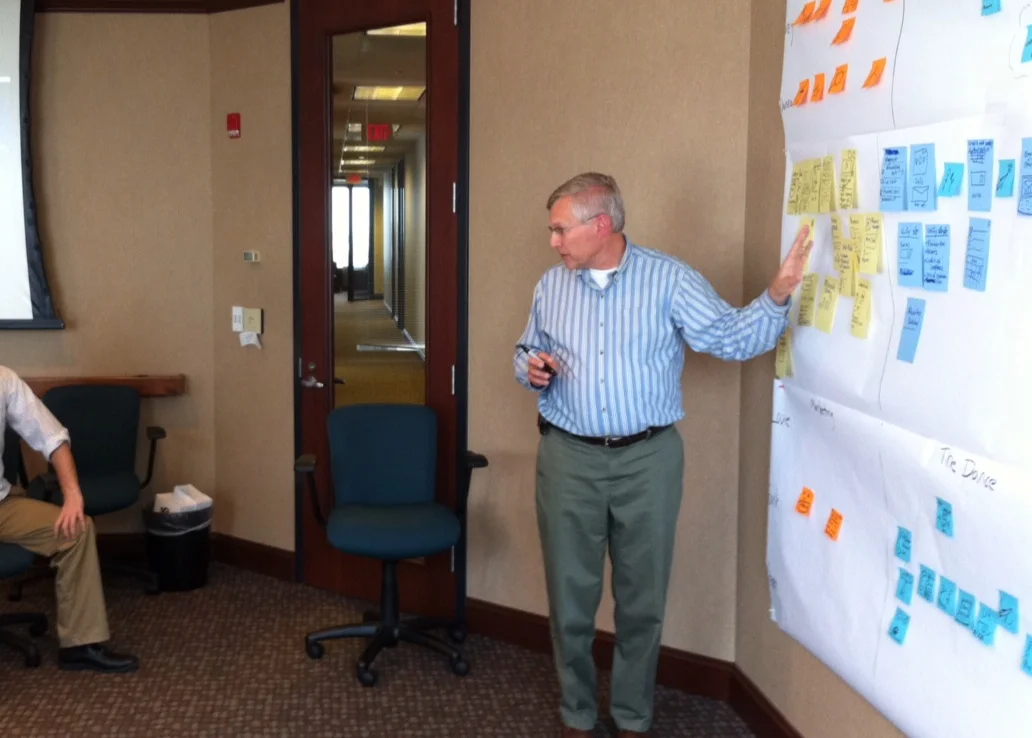
<p>Here&#8217;s how it works. We look at our three experience domains (solo, social, and travel), look at all of the experience nodes in those domains, and then yell out ideas for how an app could improve those nodes 100%. Jeremy then writes these ideas on a sticky and posts them in our &#8220;ideal assistance&#8221; section beneath each experience node. The aggregate of all these ideas is our fantasy app.</p>
<div id="attachment_1665" class="wp-caption aligncenter" style="width: 591px"><img class="size-large wp-image-1665" title="Right" src="http://tapity.com/wp-content/uploads/2012/01/Right-1024x648.jpg" alt="Right" width="581" height="368" /><p class="wp-caption-text">Please pardon the calligraphy and the shaky-cam.</p></div>
<p>For example, when we examined the &#8220;social&#8221; domain, we determined that when you&#8217;re in a business meeting in Milan and an Italian colleague says <em><a href="http://en.wikisource.org/wiki/Italian_Without_a_Master">&#8220;sono molto dispiacentissimo&#8221;</a></em> you want to be able to nod your head and find out what that means without him knowing that you have no idea what he said. You don&#8217;t want to look like a fool. So we wrote down &#8220;incognito,&#8221; indicating that the ideal app could feed you definitions on the sly (of course this sounds impossible; but stick around). We also determined that an ideal app would feed you definitions extremely quickly, because you don&#8217;t want to spend five minutes in the street figuring out what <em><a href="http://blog.timesunion.com/kristi/files/2011/02/Car-hit.jpg">&#8220;Achtung! Achtung! Ein Auto kommt!&#8221;</a></em> means.</p>
<p>Once we have posted all of the characteristics of our Platonic app on the wall, we go through and draw a big, red x over all features that (1) are beyond our means or (2) would bloat 1.0. We call this step &#8220;killing the baby.&#8221;</p>
<div id="attachment_1656" class="wp-caption aligncenter" style="width: 600px"><img class="size-large wp-image-1656" title="Finallynow1" src="http://tapity.com/wp-content/uploads/2012/01/Finallynow1-1024x648.jpg" alt="Finallynow1" width="590" height="373" /><p class="wp-caption-text">Killing the baby is a traumatic experience for some.</p></div>
<p>So, of the two feature examples above, we put a big, fat, red x on &#8220;incognito&#8221; due to technical constraints. But we kept the idea of quick definitions because we felt that it was doable and essential.</p>
<p>What we&#8217;re left with is the list of features that will appear in Languages 1.0.</p>
<img src="http://feeds.feedburner.com/~r/Tapity/~4/Tt9xiGh-lh4" height="1" width="1"/>]]></content:encoded>
			<wfw:commentRss>http://tapity.com/iphone-app-design/how-to-build-a-fantasy-app-by-using-magic-strategic-design-part-4/feed/</wfw:commentRss>
		<slash:comments>0</slash:comments>
		<feedburner:origLink>http://tapity.com/iphone-app-design/how-to-build-a-fantasy-app-by-using-magic-strategic-design-part-4/</feedburner:origLink></item>
		<item>
		<title>Mapping out the User Experience (Strategic Design Part 3)</title>
		<link>http://feedproxy.google.com/~r/Tapity/~3/1cY7r65cP6Y/</link>
		<comments>http://tapity.com/iphone-app-design/user-experience-mapping-strategic-design-part-3/#comments</comments>
		<pubDate>Thu, 19 Jan 2012 17:18:04 +0000</pubDate>
		<dc:creator>Josh Olson</dc:creator>
				<category><![CDATA[Design Process]]></category>
		<category><![CDATA[Languages]]></category>
		<category><![CDATA[iPhone App Design]]></category>
		<category><![CDATA[iPhone App Development]]></category>

		<guid isPermaLink="false">http://tapity.com/?p=1597</guid>
		<description><![CDATA[
Back to Languages.
So we are describing the process of strategic design, in which we figure out the company&#8217;s goals, the user&#8217;s goals, and the intersection of the two. The purpose of this is to create an app that exists at that point of intersection. First, we established Tapity&#8217;s goals for the Languages app. Then we [...]]]></description>
			<content:encoded><![CDATA[<p><img class="aligncenter size-full wp-image-1639" title="early_map" src="http://tapity.com/wp-content/uploads/2012/01/early_map.jpg" alt="early_map" width="583" height="421" /></p>
<p>Back to <a href="http://tapity.com/announcements/languages-next-product/">Languages</a>.</p>
<p>So we are describing the process of strategic design, in which we figure out the company&#8217;s goals, the user&#8217;s goals, and the intersection of the two. The purpose of this is to create an app that exists at that point of intersection. First, we <a href="http://tapity.com/iphone-app-design/the-preliminary-investigation-strategic-design-1/">established</a> Tapity&#8217;s goals for the Languages app. Then we <a href="http://tapity.com/iphone-app-design/our-personas-some-assembly-required-strategic-design-2/">developed</a> user &#8220;personas&#8221;—fictional users with concrete characteristics. Now we can move on to the next step of strategic design: user experience mapping.</p>
<p>Now that we have our personas, we need to map out their current experience without an app. This helps us create an app that is tailored to the user&#8217;s <em>actual</em> experience. <a href="http://robertrosenthal.typepad.com/photos/uncategorized/2007/12/03/google_guys.jpg">Those</a> who skip this step risk creating a list of features that sound helpful in the <a href="http://www.abstractartimages.com/wp-content/uploads/2011/06/abstract-arts.jpg">abstract</a>, but are not helpful to users in their actual <em>experience</em>.</p>
<p>First, we need to decide what the major experience domains are. An experience domain is simply an area or realm of experience. In the case of Languages, we decided that they were (1) &#8220;solo,&#8221; (2) social, and (3) travel. Solo involves any linguistic situation in which it is just you and the language; reading a foreign book, for example. Social encompasses any situation involving discourse between you and someone else. And travel explains itself.</p>
<p>We put a big sheet of paper up on our Tapity-blue wall and then demarcate the three domains. We then place our personas on the far left of the paper. Now we&#8217;re all ready to map our our personas&#8217; experiences across the three domains.</p>
<p style="text-align: center;"><img class="aligncenter size-large wp-image-1604" title="Finally1" src="http://tapity.com/wp-content/uploads/2012/01/Finally1-1024x633.jpg" alt="Finally1" width="581" height="359" /></p>
<p>We first turn to Emily, our student, and analyze her solo experience. She studies French. So we decide that she (1) looks up French words for her workbook exercises, (2) looks up words for writing essays in French, (3) looks up words while reading <em>Les Misrables</em>, and (4) uses a physical French-English dictionary. We put up stickies with drawings to represent all of this.</p>
<p style="text-align: center;"><img class="aligncenter size-large wp-image-1612" title="Finally-2" src="http://tapity.com/wp-content/uploads/2012/01/Finally-2-1024x633.jpg" alt="Finally-2" width="590" height="365" /></p>
<p>We then repeat this process for all of our personas across every domain. We try to cover all possible experiences in order to get the fullest possible picture of what we&#8217;re dealing with. The wall gradually fills with stickies.</p>
<p style="text-align: center;"><img class="aligncenter size-large wp-image-1618" title="Finally3" src="http://tapity.com/wp-content/uploads/2012/01/Finally3-1024x633.jpg" alt="Finally3" width="590" height="365" /></p>
<p>Now the appless user experience is storyboarded.</p>
<p>Next time, if our app could do anything, how could it produce an ideal user experience?</p>
<img src="http://feeds.feedburner.com/~r/Tapity/~4/1cY7r65cP6Y" height="1" width="1"/>]]></content:encoded>
			<wfw:commentRss>http://tapity.com/iphone-app-design/user-experience-mapping-strategic-design-part-3/feed/</wfw:commentRss>
		<slash:comments>1</slash:comments>
		<feedburner:origLink>http://tapity.com/iphone-app-design/user-experience-mapping-strategic-design-part-3/</feedburner:origLink></item>
		<item>
		<title>Startup Plays: How to market an iOS app</title>
		<link>http://feedproxy.google.com/~r/Tapity/~3/m8UnboATj80/</link>
		<comments>http://tapity.com/iphone-app-marketing/startup-plays-how-to-market-an-ios-app/#comments</comments>
		<pubDate>Tue, 10 Jan 2012 16:04:40 +0000</pubDate>
		<dc:creator>Jeremy</dc:creator>
				<category><![CDATA[iPhone App Marketing]]></category>

		<guid isPermaLink="false">http://tapity.com/?p=1593</guid>
		<description><![CDATA[Startup Plays is a really cool concept: break down the information and processes it takes to run a successful startup into actionable &#8220;plays&#8221;, templates to success in a particular aspect of the business such as getting your company incorporated or pitching a VC.
I was a bit skeptical when Scott Annan first asked if I could [...]]]></description>
			<content:encoded><![CDATA[<div id="attachment_1594" class="wp-caption aligncenter" style="width: 550px"><img src="http://tapity.com/wp-content/uploads/2012/01/startup-play-tapity.jpg" alt="Woah, way too much me in that picture" title="startup-play-tapity" width="540" height="540" class="size-full wp-image-1594" /><p class="wp-caption-text">Woah, way too much me in that picture</p></div>
<p>Startup Plays is a really cool concept: break down the information and processes it takes to run a successful startup into actionable &#8220;plays&#8221;, templates to success in a particular aspect of the business such as getting your company incorporated or pitching a VC.</p>
<p>I was a bit skeptical when Scott Annan first asked if I could help build a play on iOS app marketing but, after looking through a sample play, I found that the format is really unique and valuable. It is essentially a down-to-earth to-do list your team can run through from start to finish with detailed information and expert advice on each step. You can also collaborate with your team by commenting on the different steps and adding additional steps to the play. The plays will really help you hit the ground running and the company has had a tremendous response so far.</p>
<p>Working with Scott was amazing and I think the play turned out really well. The steps in there are based on my experience in marketing my apps and what I&#8217;ve seen work in the industry. Some advice will be familiar, some won&#8217;t, but it&#8217;s really the format that goes beyond what you&#8217;ll get on the Tapity blog.</p>
<p>So there you have it, check out <a href="http://startupplays.com/plays/market_and_launch_your_iphone_application_like_a_pro">Market and Launch your iPhone Application like a Pro</a>, by yours truly. I hope you find it helpful.</p>
<p>Full disclosure: I am definitely getting a very fair cut so you can feel free to take what I say with a grain of salt. We&#8217;re in luck, though, since it looks like <a href="http://www.macgasm.net/2012/01/10/stepbystep-tapity-team-launching-app-startupplay/">Macgasm</a> recommended it this morning too.</p>
<img src="http://feeds.feedburner.com/~r/Tapity/~4/m8UnboATj80" height="1" width="1"/>]]></content:encoded>
			<wfw:commentRss>http://tapity.com/iphone-app-marketing/startup-plays-how-to-market-an-ios-app/feed/</wfw:commentRss>
		<slash:comments>1</slash:comments>
		<feedburner:origLink>http://tapity.com/iphone-app-marketing/startup-plays-how-to-market-an-ios-app/</feedburner:origLink></item>
	</channel>
</rss>