<?xml version="1.0" encoding="utf-8"?><feed xmlns="http://www.w3.org/2005/Atom" ><generator uri="https://jekyllrb.com/" version="4.3.2">Jekyll</generator><link href="https://jon.netdork.net/feed.xml" rel="self" type="application/atom+xml" /><link href="https://jon.netdork.net/" rel="alternate" type="text/html" /><updated>2023-10-20T20:30:44-07:00</updated><id>https://jon.netdork.net/feed.xml</id><title type="html">TheGeekery</title><subtitle></subtitle><author><name>Jonathan Angliss</name></author><entry><title type="html">1Password and Broken Certificate Chains</title><link href="https://jon.netdork.net/2023/10/20/1password-and-broken-certificate-chains/" rel="alternate" type="text/html" title="1Password and Broken Certificate Chains" /><published>2023-10-20T20:17:00-07:00</published><updated>2023-10-20T20:17:00-07:00</updated><id>https://jon.netdork.net/2023/10/20/1password-and-broken-certificate-chains</id><content type="html" xml:base="https://jon.netdork.net/2023/10/20/1password-and-broken-certificate-chains/"><![CDATA[<p>A while back I switched to a Linux based desktop for my work machine as I’d been doing a lot of work in ansible, and having to keep messing with VMs, SSH, and various other hoops was just getting annoying. I’d wanted to experiement for a while anyway.  That’s another set of posts.  This one is about the 1Password client, and certificate chains.</p>

<!--more-->

<p>I’d like to say most folks have a general grasp of browser certificates, the thing that gives a website the little lock icon, but that’d be a lie. A lot of highly technical folks don’t have a general grasp of it, and that’s not to knock anybody. It can get complicated quickly.  That’s what I found out this week when the 1Password desktop client refrused to go online. It was essentially stuck in offline mode. Doing all the basic troubleshooting, verified internet connectivity, verified I could get to the 1Password site, checked status websites, etc etc.  All seemed good, just not the desktop client.</p>

<p>A little further snooping, and I discovered it was logging the failures to <code class="language-plaintext highlighter-rouge">~/.config/1Password/logs/</code>, with the following entry:</p>

<div class="language-plaintext highlighter-rouge"><div class="highlight"><pre class="highlight"><code>IoError(IoError(error sending request for url (&lt;redacted URL&gt;): error trying to connect: unexpected error: failed to load system root certificates: Could not load PEM file "/usr/lib/ssl/cert.pem"))))
</code></pre></div></div>

<p>Okay, this was helpful. It was telling us the client couldn’t open the machine’s trusted root authorities list. Checking the file, I found it was actually a symlink to /etc/ssl/certs/ca-certificates.crt (I’m running Ubuntu). Permissions on that file, and the symlink all looked good, I could open the file using vim, head, cat, and any other tool I could use to validate access. Nothing was immediately obvious, even some of the searches across the internet didn’t help much. There was some mentions that on earlier Ubuntu machines, the file didn’t exist, others said they had to create symlinks themselves. But these were all 2017 and earlier posts, and the fact that various tools opened that path suggested those were not related.</p>

<p>So maybe it wasn’t about reading the file, it was about the contents of the file. On looking at the contents of the file, I skimmed over a bunch of certificates, they all looked good, until I got to the very bottom. There was a bunch of random characters, and what looks to be parts of a certificate, but in binary type format.  Bits of it looked familiar, they were the root CA for our Windows Certificate Authority.  I realized exactly what was going on. I’d copied the DER formatted certificate from our Root CA, not the PEM formatted certificate. When I ran the <code class="language-plaintext highlighter-rouge">update-ca-certificates</code>, the script dutifully copied the contents of all the files into /etc/ssl/certs/ca-certificates.crt and created an invalid file, and 1Password couldn’t read it.</p>

<p>The solution in this case was to convert the DER to PEM formatted files using the following:</p>

<div class="language-plaintext highlighter-rouge"><div class="highlight"><pre class="highlight"><code>openssl x509 -inform DER -outform PEM -text -in MyROOT.crt -out MyROOT.cer
</code></pre></div></div>

<p>Then I removed the crt files, and re-ran the <code class="language-plaintext highlighter-rouge">update-ca-certificates</code> command.  As soon as this was executed, I clicked the “connect” button in 1Password and it immediately connected.</p>]]></content><author><name>Jonathan Angliss</name></author><summary type="html"><![CDATA[A while back I switched to a Linux based desktop for my work machine as I’d been doing a lot of work in ansible, and having to keep messing with VMs, SSH, and various other hoops was just getting annoying. I’d wanted to experiement for a while anyway. That’s another set of posts. This one is about the 1Password client, and certificate chains.]]></summary></entry><entry><title type="html">Changing certbot validation plugin</title><link href="https://jon.netdork.net/2023/09/28/changing-certbot-plugin/" rel="alternate" type="text/html" title="Changing certbot validation plugin" /><published>2023-09-28T09:00:00-07:00</published><updated>2023-09-28T09:00:00-07:00</updated><id>https://jon.netdork.net/2023/09/28/changing-certbot-plugin</id><content type="html" xml:base="https://jon.netdork.net/2023/09/28/changing-certbot-plugin/"><![CDATA[<p>I use <a href="https://letsencrypt.org/">letsencrypt</a> for a number of SSL certificates, from websites to mail services. The easiest, and documented, way of requesting certificates is via <code class="language-plaintext highlighter-rouge">certbot</code>.  This is a utility that makes requesting certificates easy.  I won’t go into the details on how to do that, there’s plenty of guides, and even the documentation gives you some straight forward steps.</p>

<!--more-->

<p>Part of the request process involves validation, just like the traditional SSL providers, which prompts for some method of validating you own the domain you’re attempting to request a certificate for. The most obvious way is a text file on a web server, another is DNS. In my case, I use DNS validation for my mail servers as they don’t run web servers.  There are a number of plugins for DNS validation that will automatically push the required DNS records for you, so you don’t have to do them manually.  For example, Route53 (Amazon Web Services’s DNS service) you’d do something like:</p>

<div class="language-plaintext highlighter-rouge"><div class="highlight"><pre class="highlight"><code>certbot certonly --dns-route53 -d example.com
</code></pre></div></div>

<p>Works great, until you decide you are moving DNS providers and find the automatic updates in the background stop working.  So you need to update the information. There’s 2 ways to do this; The first way is to edit the renewal configuration file in <code class="language-plaintext highlighter-rouge">/etc/letsencrypt/renewal/example.com.conf</code>.  The other is via <code class="language-plaintext highlighter-rouge">certbot</code> itself, which validates the actual renewal is going to work.  We’ll go with the latter. In my case, I moved from Route53 to Cloudflare, so the change would look like this:</p>

<div class="language-plaintext highlighter-rouge"><div class="highlight"><pre class="highlight"><code>certbot reconfigure --cert-name example.com --dns-cloudflare --dns-cloudflare-credentials /path/to/credentials.ini
</code></pre></div></div>

<p>This runs the command as if it was the initial configuration using <code class="language-plaintext highlighter-rouge">--dry-run</code> and validates a successful update of DNS records.  If it’s successful, you’ll get a notice that the command was successful, and the next renewal will use the new validation plugin. Now you’re all done, and using a new plugin.</p>]]></content><author><name>Jonathan Angliss</name></author><summary type="html"><![CDATA[I use letsencrypt for a number of SSL certificates, from websites to mail services. The easiest, and documented, way of requesting certificates is via certbot. This is a utility that makes requesting certificates easy. I won’t go into the details on how to do that, there’s plenty of guides, and even the documentation gives you some straight forward steps.]]></summary></entry><entry><title type="html">Stop The Bleed</title><link href="https://jon.netdork.net/2019/05/19/stop-the-bleed/" rel="alternate" type="text/html" title="Stop The Bleed" /><published>2019-05-19T09:00:00-07:00</published><updated>2019-05-19T09:00:00-07:00</updated><id>https://jon.netdork.net/2019/05/19/stop-the-bleed</id><content type="html" xml:base="https://jon.netdork.net/2019/05/19/stop-the-bleed/"><![CDATA[<p>May has been announced as the first “National Stop the Bleed” month. The “<a href="https://www.bleedingcontrol.org/" title="Stop The Bleed">Stop the Bleed</a>” campaign is trying to empower the general public to know how to deal with life-threatening emergencies usually involving rapid blood loss.  There are many situations that this could be useful for a bystander, from car accidents to gardening disasters to gun shot injuries.</p>

<!--more-->

<p>Last week, <a href="https://twitter.com/bfgreen" title="Twitter; Brian Green">Brian Green</a> posted about it, and I responded with a quick shot of my side bag.</p>

<div class="jekyll-twitter-plugin"><blockquote class="twitter-tweet"><p lang="en" dir="ltr">May is National <a href="https://twitter.com/hashtag/StopTheBleed?src=hash&amp;ref_src=twsrc%5Etfw">#StopTheBleed</a> Month, raising awareness of the importance of being ready to treat traumatic injuries. Here are a few items that could save someone&#39;s life. Tourniquet, pressure bandage, clotting sponge, and nitrile gloves ➝ <a href="https://t.co/YluPFoeux1">https://t.co/YluPFoeux1</a> <a href="https://twitter.com/hashtag/NSTBM19?src=hash&amp;ref_src=twsrc%5Etfw">#NSTBM19</a> <a href="https://t.co/UVflTajQSW">pic.twitter.com/UVflTajQSW</a></p>&mdash; Brian Green (@bfgreen) <a href="https://twitter.com/bfgreen/status/1127917459028303872?ref_src=twsrc%5Etfw">May 13, 2019</a></blockquote>
<script async="" src="https://platform.twitter.com/widgets.js" charset="utf-8"></script>
</div>

<blockquote>
  <p>May is National #StopTheBleed Month, raising awareness of the importance of being ready to treat traumatic injuries. Here are a few items that could save someone’s life. Tourniquet, pressure bandage, clotting sponge, and nitrile gloves ➝ http://bit.ly/2xaJ1o7  #NSTBM19</p>
</blockquote>

<p>I meant to follow up with some additional details about the gear, but it was a busy week, and I didn’t get a chance. I figured it’d probably be a little easier in post format than tweets anyway.  I built my kit myself, but mostly because I have a lot of stuff for other reasons. The kit is attached to my laptop bag, contained inside a VANQUEST FATPack 4x6.</p>

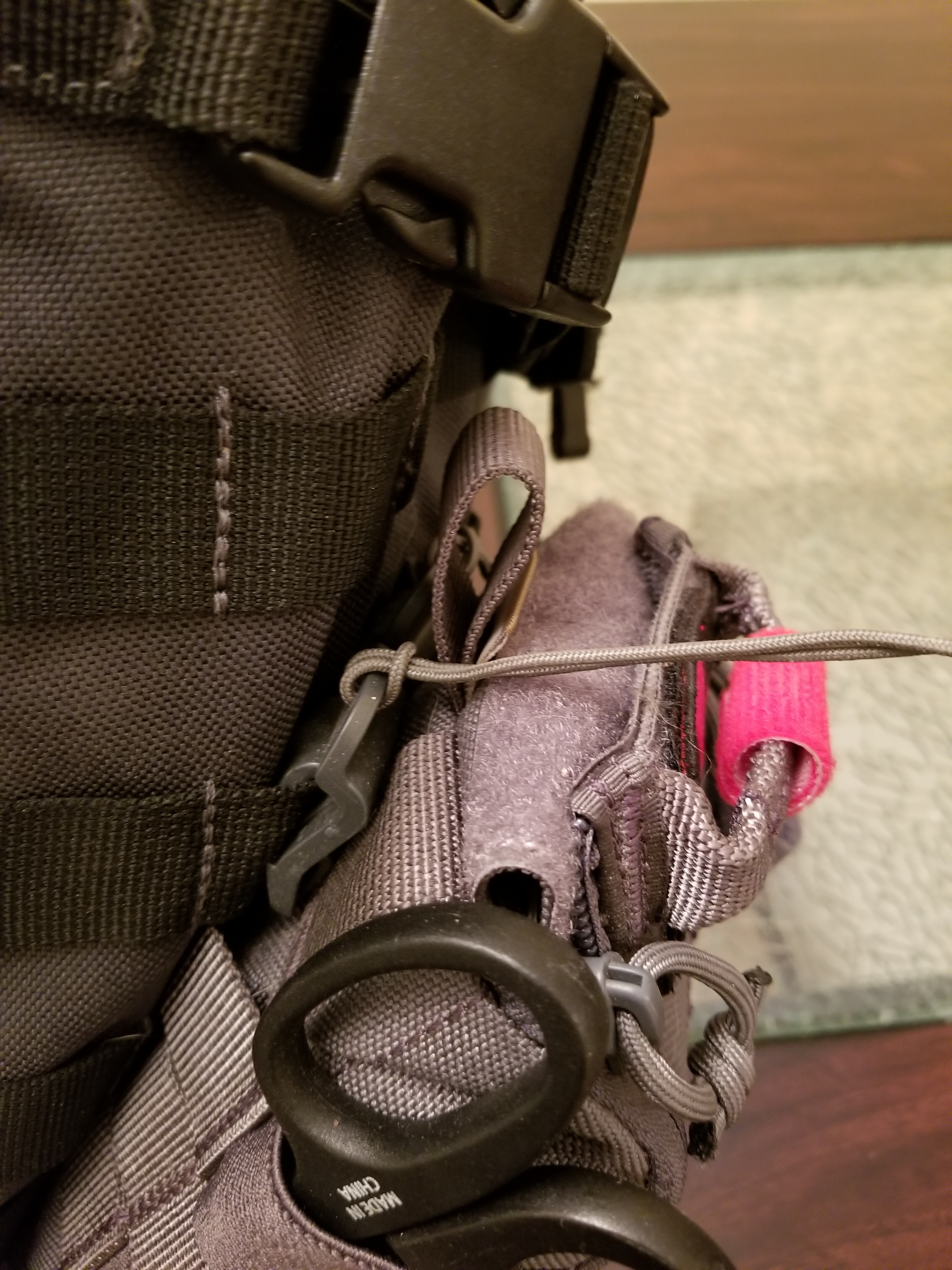
<p><a href="//img.netdork.net/blog_imgs/2019/05/19/vanquest_fatpack.jpg" title="VANQUEST FATPack"><img src="//img.netdork.net/blog_imgs/2019/05/19/vanquest_fatpack.small.jpg" alt="VANQUEST FATPack Pouch" title="VANQuest FATPack Pouch" /></a></p>

<p>It’s held onto my bag using some Molle Sticks, which have quick release pull strings making it easier to separate from my laptop bag if needed.</p>

<p><a href="//img.netdork.net/blog_imgs/2019/05/19/vanquest_sticks.jpg" title="VANQUEST Molle Sticks"><img src="//img.netdork.net/blog_imgs/2019/05/19/vanquest_sticks.small.jpg" alt="VANQUEST Molle Sitcks" title="VANQUEST Molle Sticks" /></a></p>

<p>On one side of the pack is a pair of medical shears, and on the other is a CAT Tourniquet, both for quick access.</p>

<p>Once removed and opened up, I have some more stuff on the inside for trauma type situations.</p>

<p><a href="//img.netdork.net/blog_imgs/2019/05/19/vanquest_pouch_open.jpg" title="Opened Pouch"><img src="//img.netdork.net/blog_imgs/2019/05/19/vanquest_pouch_open.small.jpg" alt="Opened Pouch showing content" title="Opened Pouch" /></a></p>

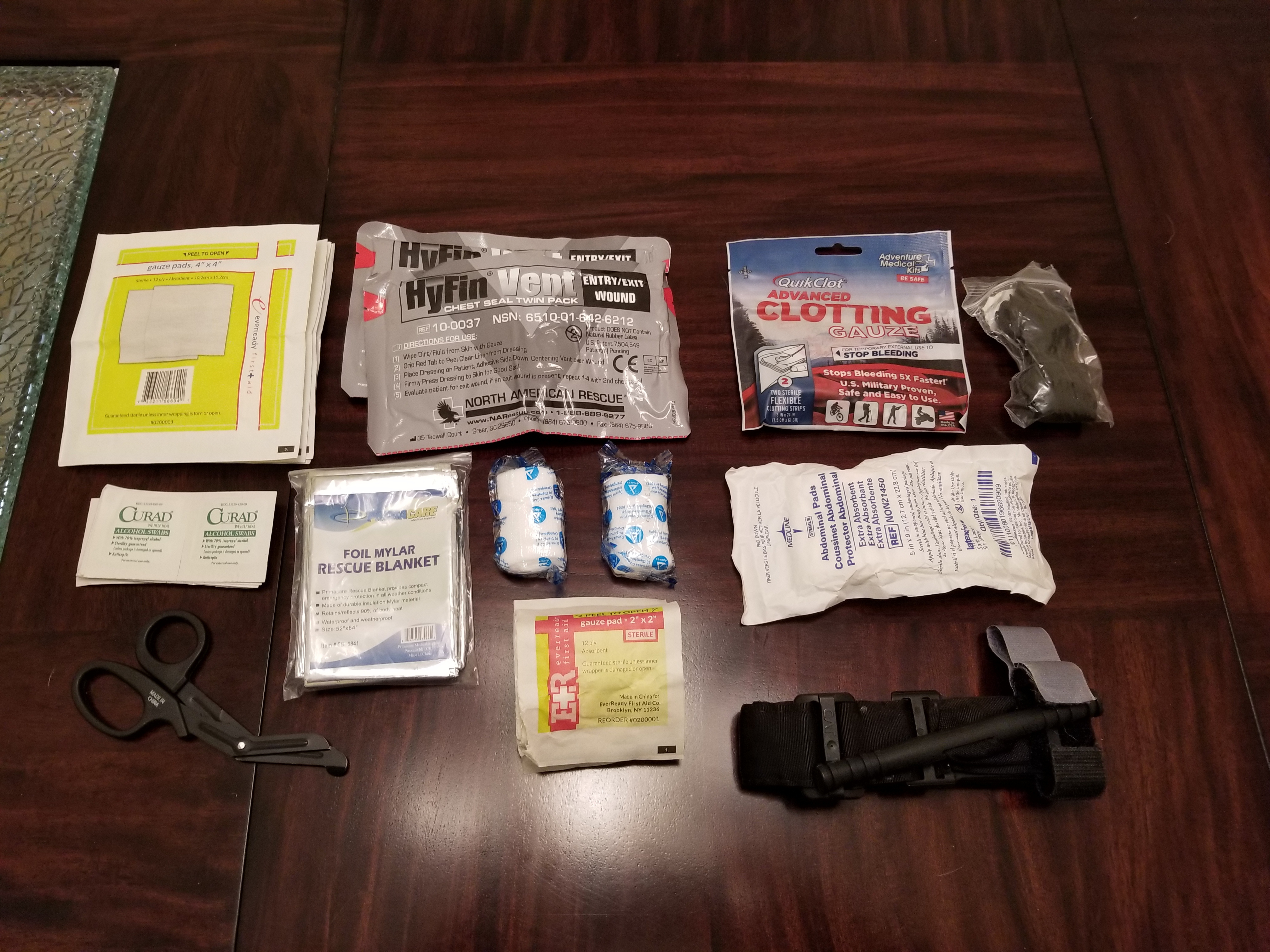
<p>Inside the pouch in the various pockets and loops I have quick clotting gauze, chest seals, Nitrile gloves, abdominal pad, couple of sizes of gauze pads, gauze bandage, and a Mylar blanket.</p>

<p><a href="//img.netdork.net/blog_imgs/2019/05/19/pouch_contents.jpg" title="Pouch Contents"><img src="//img.netdork.net/blog_imgs/2019/05/19/pouch_contents.small.jpg" alt="Contents of Pouch" title="Pouch Contents" /></a></p>

<h2 id="gear-list">Gear List</h2>
<ul>
  <li><a href="https://smile.amazon.com/gp/product/B01FIS6QO2/" title="Amazon; VANQUEST FATPack 4x6">VANQUEST FATPack 4x6</a></li>
  <li><a href="https://smile.amazon.com/gp/product/B00GS78GGO/" title="Amazon; VANQUEST Molle Sticks">VANQUEST Molle Sticks</a></li>
  <li><a href="https://smile.amazon.com/gp/product/B00H8ALNDI/" title="Amazon; Ronson Medical Shears">Medical Shears</a></li>
  <li><a href="https://smile.amazon.com/dp/product/B01ITAKG6A/" title="Amazon; C-A-T">C-A-T</a></li>
  <li><a href="https://smile.amazon.com/gp/product/B01M9C9BSX/" title="Amazon; NAR Hyfin Vent Chest Seal">NAR Hyfin Vent Chest Seal</a></li>
  <li><a href="https://smile.amazon.com/gp/product/B00HJTH5L2/" title="Amazon; QuikClot Advanced Clotting Gauze">QuikClot Clotting Gauze</a></li>
  <li><a href="https://smile.amazon.com/gp/product/B002XXO60M/" title="Amazon; SAS Safety Nitrile Gloves">Nitrile Gloves</a></li>
  <li><a href="https://smile.amazon.com/gp/product/B00F42S5UQ/" title="Amazon; Gauze Pads (4x4)">Gauze Pads (4”)</a></li>
  <li><a href="https://smile.amazon.com/gp/product/B00F42S5G0/" title="Amazon; Gauze Pads (2x2)">Gauze Pads (2”)</a></li>
  <li><a href="https://smile.amazon.com/gp/product/B00E8JTW8U/" title="Amazon; Gauze Bandage">Gauze Bandage</a></li>
</ul>

<p>The total kit cost is about $190, but I already had a number of these items because of other things I’m involved in.  There are a number of websites that sell prebuilt kits similar to this if you don’t want to go through the trouble of building them out yourself. This gives you an idea of what is in the kits, and what I carry every day.</p>

<p>All of these links are non-affiliate, but they do point to Amazon Smile. If you use Amazon, sign up to use Smile and your chosen charity gets money, and it costs you nothing when you buy stuff.</p>

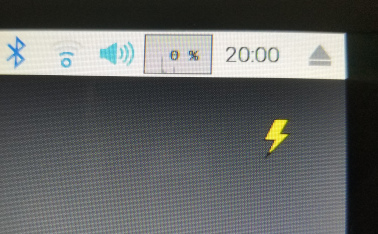
<p>I would strongly suggest <a href="https://cms.bleedingcontrol.org/class/search" title="Stop The Bleed; Find a Class">finding a class</a> in your area, or if you can find an instructor to come to your place of work, school, community or worship, that would be even better as many people can learn at the same time. The classes are often free.</p>]]></content><author><name>Jonathan Angliss</name></author><summary type="html"><![CDATA[May has been announced as the first “National Stop the Bleed” month. The “Stop the Bleed” campaign is trying to empower the general public to know how to deal with life-threatening emergencies usually involving rapid blood loss. There are many situations that this could be useful for a bystander, from car accidents to gardening disasters to gun shot injuries.]]></summary></entry><entry><title type="html">Raspberry Pi and the dreaded undervoltage notifications</title><link href="https://jon.netdork.net/2019/02/08/raspberry-pi-and-the-dreaded-undervoltage-notifications/" rel="alternate" type="text/html" title="Raspberry Pi and the dreaded undervoltage notifications" /><published>2019-02-08T16:00:00-08:00</published><updated>2019-02-08T16:00:00-08:00</updated><id>https://jon.netdork.net/2019/02/08/raspberry-pi-and-the-dreaded-undervoltage-notifications</id><content type="html" xml:base="https://jon.netdork.net/2019/02/08/raspberry-pi-and-the-dreaded-undervoltage-notifications/"><![CDATA[<p>I’ve been tinkering around a bit with some Raspberry Pi devices for a number of little projects.  Most have been related to home automation type stuffs, but I built one with a 7” screen that I was going to be using for radio related things.  Originally I had tossed together a small kit with an SDR for use on a camp because I knew we’d be out of range of cell phone service, but knew I could still take advantage of radio frequencies from satellites to get data, specifically weather images.</p>

<p>All seemed to go quite nicely, however I’d sporadically get a lightening bolt in the top right corner of the screen. I later learned that was a sign that the Pi wasn’t getting enough voltage.  This baffled me, I was using a decent 5v power source, why would I get a low voltage issue? So I decided to do some research.</p>

<!--more-->

<p>For the uninitated, a Raspberry Pi is a single board personal computer. The best place to get a lot more information on the Pi is the <a href="https://www.raspberrypi.org/" title="Raspberry Pi">official website</a>.  For this post, the bits we’re most interested in is the power requirements. All models of the Pi use a 5V (5 volts) input via a USB-B Micro connector, the ones used on most cell phones.  The bit that varies from model to model, and attached peripherals, is the amount of power required to drive them (see <a href="https://www.raspberrypi.org/documentation/faqs/#pi-power" title="Raspberry Pi; FAQ - What are the power requirements?">here</a> for a breakdown).  For example, a Pi 3 Model B+ can draw as little as 500mA (500 milliamps) or up to 1.2A (1.2 Amps or Amperes).  Most cell phone chargers can supply that kind of power fairly easily now.  If you look at your Samsung charger that comes with an Samsung Galaxy S8+ for example, it has an output capacity of 2A.  So, this would make one think you could just grab your cell phone charger and use it to power a Raspberry Pi, right?</p>

<p>Absolutely! So why am I writing this blog post? And why does the Pi report “Under-voltage” if a cell phone charger can deliver the required power?  First let us take a look at what the issue looks like.  When you have a screen attached to your Pi, you’ll see something that looks like this</p>

<p><img src="//img.netdork.net/blog_imgs/2019/20190126_200002.jpg" alt="Raspberry Pi Under-voltage lightening bolt" /></p>

<p>If you run <code class="language-plaintext highlighter-rouge">dmesg</code> or if you look in <code class="language-plaintext highlighter-rouge">/var/log/syslog</code> you may see something that looks like this:</p>

<div class="language-plaintext highlighter-rouge"><div class="highlight"><pre class="highlight"><code>[    2.071618] Under-voltage detected! (0x00050005)
</code></pre></div></div>

<p>I usually see this appear after I start the Pi up, or if I’m doing a lot of processing on it.</p>

<p>So what causes the suitably powered cell phone charger to not be able to deliver the required juice to the Raspberry Pi? It’s actually not the charger itself, but how you connect to the charger. This is where a little high school physics / electronics comes into play.</p>

<p>If you’re tinkering with the Raspberry Pi, I’m going to assume you’re probably familiar with at least some basic contepts of eletronics, but the Law we’re going to talk about is Ohm’s Law.  Ohm’s Law states that the current through a conductor between two points is directly proportional to the voltage across those same two points. The ratio of voltage to current is called resistance.  This is where we get into material sciences, wire gauges, and specifications.</p>

<p>To save reading through all the specifications, I’m going to tell you that a USB cable is supposed to use 28 to 20 AWG (gauge) for the power lines<sup id="fnref:1" role="doc-noteref"><a href="#fn:1" class="footnote" rel="footnote">1</a></sup>.  If I grab one of my USB cables, the total diameter is 0.120” or 3.05mm.  In that space, you have to fit 2 28-20 AWG lines for power, and 2 28 AWG for data/signal. They also have to be covered so they don’t short each other, and then all covered completely to stop the 4 wires just hanging out everywhere.  Keep these numbers in mind.</p>

<p>Now we’ve talked about the size of the cables, let’s talk about the materials. Copper is expensive, so if a company can reduce costs slightly, you’re likely to find those power lines are on the smaller side such as 28AWG.  All materials have a resistivity, even if it’s some crazy high number.  In terms of Copper it is about 1.72x10<sup>-8</sup> Ωm. You can see more examples on Wikipedia <a href="https://en.wikipedia.org/wiki/Electrical_resistivity_and_conductivity" title="Wikipedia; Electrical resistivity and conductivity">here</a>.  If you don’t recall what x10<sup>-8</sup> or e<sup>-8</sup> means, it is a fancy way to say “move the decimal place 8 spots to the left and saves you writing a lot of zeros.  This is a tiny number, but it does have an impact. This is where Voltage Drop comes in.  Voltage drop says that the voltage is reduced as current moves through an electrical circuit.  Voltage drop is calculated, in DC circuits, using a similar formula to Ohm’s Law, except we’re calculating over the length of the entire wire <sup id="fnref:2" role="doc-noteref"><a href="#fn:2" class="footnote" rel="footnote">2</a></sup>.</p>

\[V_{drop(V)} = I_{wire(A)} * R_{wire(\Omega)}\]

<p>So we need to know the resistance of the whole wire, which is calculated using:</p>

\[R_{total} = 2 * R_{wire} * L_m / A_{wire}\]

<p>So resistance of the total wire is 2 times the resistance times the length divided by the area.</p>

\[A_{wire} = \frac{\pi}{4} \times d^2 \\
d_{wire} = (0.127e^{-3})_m \times 92^\frac{36-n_{gauge}}{39} \\
d_{wire} = 0.000127 \times 92^\frac{36-28}{39} \\
d_{wire} = 0.000321m \\
A_{wire} = \frac{\pi}{4} \times 0.000321^2 \\
A_{wire} = 8.097e^{-8} m^2\]

<p>Now to drop it all together.</p>

\[R_{total} = 2 \times 1.72e^{-8} \times 1.8288 / 8.097e^{-8} \\
R_{total} = 0.77\]

<p>So the total resistance for 6’ (or 1.8288m) of copper is 0.77 Ohms. We have the current draw from the Pi, which is 1.2A. So what’s the voltage:</p>

\[V = I R \\
V = 1.2 \times 0.77 \\
V = 0.932V\]

<p>So for the total length of the wire, there is a drop in voltage of 0.77v, or about 15.4%.  So a 5v input on 6’ cable becomes 4.23v at the end, and this is in the danger zone for the Pi to be operating.</p>

<p>So how do they (Pi Foundation) get around this? Well their suggested power supply uses 20AWG wire, and it’s about 1.5m long, and doesn’t deal with the signal wires.  So lets do using the above formulas again, it only has a voltage drop of 0.16v, or about 3.19%, keeping the power at the Pi above the threshold to generate errors. There are other similar power supplies by other vendors that also use the same setup, like <a href="https://www.canakit.com/raspberry-pi-adapter-power-supply-2-5a.html" title="Cana Kit; Raspberry Pi 3 Adapter">Cana Kit</a>, or the <a href="https://www.raspberrypi.org/products/raspberry-pi-universal-power-supply/" title="Raspberry Pi; Universal Power Supply">official one</a>.  It’s worth noting some kits ship with regular USB cables, which might work for some of the Raspberry Pi line, but you have to be aware of the limitations of the cables.</p>

<p>The TLDR<sup id="fnref:3" role="doc-noteref"><a href="#fn:3" class="footnote" rel="footnote">3</a></sup> of this is that voltage drop across small gauge wires is killing your voltage at the Pi.</p>

<p>Quick thanks to <a href="https://twitter.com/press5" title="Twitter; 'Jessica Litwin' - press5">@press5</a> for a review of the post before I posted it.</p>

<div class="footnotes" role="doc-endnotes">
  <ol>
    <li id="fn:1" role="doc-endnote">
      <p>This is important to remember. The smaller the number, the larger the diameter of the wire.  So a 28 AWG wire is 0.0126” or 0.321mm, while a 20 AWG is 0.0320” or 0.812mm. <a href="#fnref:1" class="reversefootnote" role="doc-backlink">&#8617;</a></p>
    </li>
    <li id="fn:2" role="doc-endnote">
      <p>If you don’t want to read all the formulas and math, there are voltage drop calculators such as <a href="https://www.rapidtables.com/calc/wire/voltage-drop-calculator.html" title="Voltage Drop Calculator">this</a> that work nicely. <a href="#fnref:2" class="reversefootnote" role="doc-backlink">&#8617;</a></p>
    </li>
    <li id="fn:3" role="doc-endnote">
      <p>Too Long, Didn’t Read <a href="#fnref:3" class="reversefootnote" role="doc-backlink">&#8617;</a></p>
    </li>
  </ol>
</div>]]></content><author><name>Jonathan Angliss</name></author><category term="rpi" /><summary type="html"><![CDATA[I’ve been tinkering around a bit with some Raspberry Pi devices for a number of little projects. Most have been related to home automation type stuffs, but I built one with a 7” screen that I was going to be using for radio related things. Originally I had tossed together a small kit with an SDR for use on a camp because I knew we’d be out of range of cell phone service, but knew I could still take advantage of radio frequencies from satellites to get data, specifically weather images. All seemed to go quite nicely, however I’d sporadically get a lightening bolt in the top right corner of the screen. I later learned that was a sign that the Pi wasn’t getting enough voltage. This baffled me, I was using a decent 5v power source, why would I get a low voltage issue? So I decided to do some research.]]></summary></entry><entry><title type="html">Set-DnsServerResourceRecord and OldInputObject not found</title><link href="https://jon.netdork.net/2015/10/23/set-dnsserverresourcerecord-and-oldinputobject-not-found/" rel="alternate" type="text/html" title="Set-DnsServerResourceRecord and OldInputObject not found" /><published>2015-10-23T10:56:54-07:00</published><updated>2015-10-23T10:56:54-07:00</updated><id>https://jon.netdork.net/2015/10/23/set-dnsserverresourcerecord-and-oldinputobject-not-found</id><content type="html" xml:base="https://jon.netdork.net/2015/10/23/set-dnsserverresourcerecord-and-oldinputobject-not-found/"><![CDATA[<p>While trying to help a co-worker today, I stumbled across a documentation error on Microsoft’s TechNet in relation to <a href="https://technet.microsoft.com/en-us/library/jj649911.aspx" title="TechNet: Set-DnsServerResourceRecord"><code class="language-plaintext highlighter-rouge">Set-DnsServerResourceRecord</code></a>.  The example uses multiple variable initialization, which unfortunately ends up making pointers.</p>

<!--more-->

<p>Here is what we get from <code class="language-plaintext highlighter-rouge">get-help</code>.</p>

<div class="language-powershell highlighter-rouge"><div class="highlight"><pre class="highlight"><code><span class="n">PS</span><span class="w"> </span><span class="nx">C:\</span><span class="err">&gt;</span><span class="w"> </span><span class="nx">get-help</span><span class="w"> </span><span class="nt">-examples</span><span class="w"> </span><span class="nx">set-dnsserverresourcerecord</span><span class="w">

</span><span class="n">NAME</span><span class="w">
    </span><span class="nx">Set-DnsServerResourceRecord</span><span class="w">

</span><span class="n">SYNOPSIS</span><span class="w">
    </span><span class="nx">Changes</span><span class="w"> </span><span class="nx">a</span><span class="w"> </span><span class="nx">resource</span><span class="w"> </span><span class="nx">record</span><span class="w"> </span><span class="nx">in</span><span class="w"> </span><span class="nx">a</span><span class="w"> </span><span class="nx">DNS</span><span class="w"> </span><span class="nx">zone.</span><span class="w">

    </span><span class="n">Example</span><span class="w"> </span><span class="nx">1:</span><span class="w"> </span><span class="nx">Change</span><span class="w"> </span><span class="nx">the</span><span class="w"> </span><span class="nx">settings</span><span class="w"> </span><span class="nx">of</span><span class="w"> </span><span class="nx">a</span><span class="w"> </span><span class="nx">resource</span><span class="w"> </span><span class="nx">record</span><span class="w">

    </span><span class="n">PS</span><span class="w"> </span><span class="nx">C:\</span><span class="err">&gt;</span><span class="w"> </span><span class="nv">$NewObj</span><span class="w"> </span><span class="o">=</span><span class="w"> </span><span class="nv">$OldObj</span><span class="w"> </span><span class="o">=</span><span class="w"> </span><span class="n">Get-DnsServerResourceRecord</span><span class="w"> </span><span class="nt">-Name</span><span class="w"> </span><span class="s2">"Host01"</span><span class="w"> </span><span class="nt">-ZoneName</span><span class="w"> </span><span class="s2">"contoso.com"</span><span class="w"> </span><span class="nt">-RRType</span><span class="w"> </span><span class="s2">"A"</span><span class="w">
    </span><span class="n">PS</span><span class="w"> </span><span class="nx">C:\</span><span class="err">&gt;</span><span class="w"> </span><span class="nv">$NewObj</span><span class="o">.</span><span class="nf">TimeToLive</span><span class="w"> </span><span class="o">=</span><span class="w"> </span><span class="p">[</span><span class="n">System.TimeSpan</span><span class="p">]::</span><span class="n">FromHours</span><span class="p">(</span><span class="mi">2</span><span class="p">)</span><span class="w">
    </span><span class="n">PS</span><span class="w"> </span><span class="nx">C:\</span><span class="err">&gt;</span><span class="w"> </span><span class="nx">Set-DnsServerResourceRecord</span><span class="w"> </span><span class="nt">-NewInputObject</span><span class="w"> </span><span class="nv">$NewObj</span><span class="w"> </span><span class="nt">-OldInputObject</span><span class="w"> </span><span class="nv">$OldObj</span><span class="w"> </span><span class="nt">-ZoneName</span><span class="w"> </span><span class="s2">"contoso.com"</span><span class="w">
    </span><span class="nt">-PassThru</span><span class="w">
    </span><span class="n">HostName</span><span class="w">                  </span><span class="nx">RecordType</span><span class="w"> </span><span class="nx">Timestamp</span><span class="w">            </span><span class="nx">TimeToLive</span><span class="w">      </span><span class="nx">RecordData</span><span class="w">

    </span><span class="o">--------</span><span class="w">                  </span><span class="o">----------</span><span class="w"> </span><span class="o">---------</span><span class="w">            </span><span class="o">----------</span><span class="w">      </span><span class="o">----------</span><span class="w">

    </span><span class="n">Host01</span><span class="w">                       </span><span class="nx">A</span><span class="w">          </span><span class="nx">0</span><span class="w">                    </span><span class="nx">02:00:00</span><span class="w">        </span><span class="nx">2.2.2.2</span><span class="w">


    </span><span class="kr">In</span><span class="w"> </span><span class="n">this</span><span class="w"> </span><span class="nx">example</span><span class="p">,</span><span class="w"> </span><span class="nx">the</span><span class="w"> </span><span class="nx">time</span><span class="w"> </span><span class="nx">to</span><span class="w"> </span><span class="nx">live</span><span class="w"> </span><span class="p">(</span><span class="n">TTL</span><span class="p">)</span><span class="w"> </span><span class="nx">value</span><span class="w"> </span><span class="nx">of</span><span class="w"> </span><span class="nx">the</span><span class="w"> </span><span class="nx">resource</span><span class="w"> </span><span class="nx">record</span><span class="w"> </span><span class="nx">named</span><span class="w"> </span><span class="nx">Host01</span><span class="w"> </span><span class="nx">in</span><span class="w"> </span><span class="nx">the</span><span class="w"> </span><span class="nx">zone</span><span class="w"> </span><span class="nx">named</span><span class="w"> </span><span class="nx">contoso.com</span><span class="w"> </span><span class="nx">is</span><span class="w">
    </span><span class="n">changed</span><span class="w"> </span><span class="nx">to</span><span class="w"> </span><span class="nx">2</span><span class="w"> </span><span class="nx">hours.</span><span class="w">

    </span><span class="n">The</span><span class="w"> </span><span class="nx">first</span><span class="w"> </span><span class="nx">command</span><span class="w"> </span><span class="nx">assigns</span><span class="w"> </span><span class="nx">a</span><span class="w"> </span><span class="nx">resource</span><span class="w"> </span><span class="nx">record</span><span class="w"> </span><span class="nx">named</span><span class="w"> </span><span class="nx">Host01</span><span class="w"> </span><span class="nx">in</span><span class="w"> </span><span class="nx">the</span><span class="w"> </span><span class="nx">zone</span><span class="w"> </span><span class="nx">named</span><span class="w"> </span><span class="nx">contoso.com</span><span class="w"> </span><span class="nx">to</span><span class="w"> </span><span class="nx">the</span><span class="w"> </span><span class="nx">variables</span><span class="w"> </span><span class="nv">$NewObj</span><span class="w">
    </span><span class="n">and</span><span class="w"> </span><span class="nv">$OldObj</span><span class="o">.</span><span class="w">

    </span><span class="n">The</span><span class="w"> </span><span class="nx">second</span><span class="w"> </span><span class="nx">command</span><span class="w"> </span><span class="nx">sets</span><span class="w"> </span><span class="nx">the</span><span class="w"> </span><span class="nx">TTL</span><span class="w"> </span><span class="nx">time</span><span class="w"> </span><span class="nx">span</span><span class="w"> </span><span class="nx">for</span><span class="w"> </span><span class="nv">$NewObj</span><span class="w"> </span><span class="nx">to</span><span class="w"> </span><span class="nx">2</span><span class="w"> </span><span class="nx">hours.</span><span class="w">

    </span><span class="n">The</span><span class="w"> </span><span class="nx">third</span><span class="w"> </span><span class="nx">command</span><span class="w"> </span><span class="nx">changes</span><span class="w"> </span><span class="nx">the</span><span class="w"> </span><span class="nx">properties</span><span class="w"> </span><span class="nx">of</span><span class="w"> </span><span class="nv">$OldObj</span><span class="w"> </span><span class="nx">to</span><span class="w"> </span><span class="nx">the</span><span class="w"> </span><span class="nx">settings</span><span class="w"> </span><span class="nx">specified</span><span class="w"> </span><span class="nx">for</span><span class="w"> </span><span class="nv">$NewObj</span><span class="w"> </span><span class="nx">in</span><span class="w"> </span><span class="nx">the</span><span class="w"> </span><span class="nx">previous</span><span class="w"> </span><span class="nx">command.</span><span class="w">
</span></code></pre></div></div>

<p>Okay, so the example seems pretty simple.  They use the variable pass through to assign the return of <a href="https://technet.microsoft.com/en-us/library/jj649863.aspx" title="TechNet: Get-DnsServerResourceRecord"><code class="language-plaintext highlighter-rouge">Get-DnsServerResourceRecord</code></a> to 2 variables at the same time.  This should save some time, and avoid executing the same command twice.  However, this actually causes an issue in this case, and here’s why.</p>

<div class="language-powershell highlighter-rouge"><div class="highlight"><pre class="highlight"><code><span class="n">PS</span><span class="w"> </span><span class="nx">C:\</span><span class="err">&gt;</span><span class="w"> </span><span class="nv">$newobj</span><span class="w"> </span><span class="o">=</span><span class="w"> </span><span class="nv">$oldobj</span><span class="w"> </span><span class="o">=</span><span class="w"> </span><span class="n">Get-DnsServerResourceRecord</span><span class="w"> </span><span class="nt">-ZoneName</span><span class="w"> </span><span class="s1">'myzone.com'</span><span class="w"> </span><span class="nt">-name</span><span class="w"> </span><span class="s1">'jatest'</span><span class="w"> </span><span class="nt">-RRType</span><span class="w"> </span><span class="s1">'A'</span><span class="w">
</span><span class="n">PS</span><span class="w"> </span><span class="nx">C:\</span><span class="err">&gt;</span><span class="w"> </span><span class="nv">$newobj</span><span class="w">

</span><span class="n">HostName</span><span class="w">                  </span><span class="nx">RecordType</span><span class="w"> </span><span class="nx">Timestamp</span><span class="w">            </span><span class="nx">TimeToLive</span><span class="w">      </span><span class="nx">RecordData</span><span class="w">
</span><span class="o">--------</span><span class="w">                  </span><span class="o">----------</span><span class="w"> </span><span class="o">---------</span><span class="w">            </span><span class="o">----------</span><span class="w">      </span><span class="o">----------</span><span class="w">
</span><span class="n">jatest</span><span class="w">                    </span><span class="nx">A</span><span class="w">          </span><span class="nx">0</span><span class="w">                    </span><span class="nx">01:00:00</span><span class="w">        </span><span class="nx">2.2.2.2</span><span class="w">

</span><span class="n">PS</span><span class="w"> </span><span class="nx">C:\</span><span class="err">&gt;</span><span class="w"> </span><span class="nv">$oldobj</span><span class="w">

</span><span class="n">HostName</span><span class="w">                  </span><span class="nx">RecordType</span><span class="w"> </span><span class="nx">Timestamp</span><span class="w">            </span><span class="nx">TimeToLive</span><span class="w">      </span><span class="nx">RecordData</span><span class="w">
</span><span class="o">--------</span><span class="w">                  </span><span class="o">----------</span><span class="w"> </span><span class="o">---------</span><span class="w">            </span><span class="o">----------</span><span class="w">      </span><span class="o">----------</span><span class="w">
</span><span class="n">jatest</span><span class="w">                    </span><span class="nx">A</span><span class="w">          </span><span class="nx">0</span><span class="w">                    </span><span class="nx">01:00:00</span><span class="w">        </span><span class="nx">2.2.2.2</span><span class="w">

</span><span class="n">PS</span><span class="w"> </span><span class="nx">C:\</span><span class="err">&gt;</span><span class="w"> </span><span class="nv">$newObj</span><span class="o">.</span><span class="nf">RecordData</span><span class="o">.</span><span class="nf">IPv4Address</span><span class="w"> </span><span class="o">=</span><span class="w"> </span><span class="p">[</span><span class="n">ipaddress</span><span class="p">]</span><span class="s1">'8.8.8.8'</span><span class="w">
</span><span class="n">PS</span><span class="w"> </span><span class="nx">C:\</span><span class="err">&gt;</span><span class="w"> </span><span class="nv">$newObj</span><span class="w">

</span><span class="n">HostName</span><span class="w">                  </span><span class="nx">RecordType</span><span class="w"> </span><span class="nx">Timestamp</span><span class="w">            </span><span class="nx">TimeToLive</span><span class="w">      </span><span class="nx">RecordData</span><span class="w">
</span><span class="o">--------</span><span class="w">                  </span><span class="o">----------</span><span class="w"> </span><span class="o">---------</span><span class="w">            </span><span class="o">----------</span><span class="w">      </span><span class="o">----------</span><span class="w">
</span><span class="n">jatest</span><span class="w">                    </span><span class="nx">A</span><span class="w">          </span><span class="nx">0</span><span class="w">                    </span><span class="nx">01:00:00</span><span class="w">        </span><span class="nx">8.8.8.8</span><span class="w">

</span><span class="n">PS</span><span class="w"> </span><span class="nx">C:\</span><span class="err">&gt;</span><span class="w"> </span><span class="nv">$oldObj</span><span class="w">

</span><span class="n">HostName</span><span class="w">                  </span><span class="nx">RecordType</span><span class="w"> </span><span class="nx">Timestamp</span><span class="w">            </span><span class="nx">TimeToLive</span><span class="w">      </span><span class="nx">RecordData</span><span class="w">
</span><span class="o">--------</span><span class="w">                  </span><span class="o">----------</span><span class="w"> </span><span class="o">---------</span><span class="w">            </span><span class="o">----------</span><span class="w">      </span><span class="o">----------</span><span class="w">
</span><span class="n">jatest</span><span class="w">                    </span><span class="nx">A</span><span class="w">          </span><span class="nx">0</span><span class="w">                    </span><span class="nx">01:00:00</span><span class="w">        </span><span class="nx">8.8.8.8</span><span class="w">
</span></code></pre></div></div>

<p>What I’ve done here is grab the ‘jatest’ host record, outputted the two values, then updated the <code class="language-plaintext highlighter-rouge">$newobj</code> to have a new IP address of 8.8.8.8.  However, as you can see here, there is an issue, the <code class="language-plaintext highlighter-rouge">$oldObj</code> value also updated the IP address. This has happened because <code class="language-plaintext highlighter-rouge">$newObj</code> is a pointer to <code class="language-plaintext highlighter-rouge">$oldObj</code>, meaning changes to one will apply to the other. Why does this matter?  Well, the <code class="language-plaintext highlighter-rouge">Set-DnsServerResourceRecord</code> uses the old record information to find the record to update, and then updates it.  This is important to understand because you could potentially have multiple IP records for ‘A’ records, or multiple NS records, or multiple MX records, etc.  This means the data you are using to find the update <em>must</em> match the record you want to update, otherwise you could update a lot of records incorrectly.  If it doesn’t, this happens instead:</p>

<div class="language-powershell highlighter-rouge"><div class="highlight"><pre class="highlight"><code><span class="n">PS</span><span class="w"> </span><span class="nx">C:\</span><span class="err">&gt;</span><span class="w"> </span><span class="nx">Set-DnsServerResourceRecord</span><span class="w"> </span><span class="nt">-ZoneName</span><span class="w"> </span><span class="s1">'myzone.com'</span><span class="w"> </span><span class="nt">-OldInputObject</span><span class="w"> </span><span class="nv">$oldObj</span><span class="w"> </span><span class="nt">-NewInputObject</span><span class="w"> </span><span class="nv">$newObj</span><span class="w">
</span><span class="n">Set-DnsServerResourceRecord</span><span class="w"> </span><span class="p">:</span><span class="w"> </span><span class="nx">Resource</span><span class="w"> </span><span class="nx">record</span><span class="w"> </span><span class="nx">in</span><span class="w"> </span><span class="nx">OldInputObject</span><span class="w"> </span><span class="nx">not</span><span class="w"> </span><span class="nx">found</span><span class="w"> </span><span class="nx">in</span><span class="w"> </span><span class="nx">myzone.com</span><span class="w"> </span><span class="nx">zone</span><span class="w"> </span><span class="nx">on</span><span class="w"> </span><span class="nx">DNS01</span><span class="w"> </span><span class="nx">server.</span><span class="w">
</span><span class="n">At</span><span class="w"> </span><span class="nx">line:1</span><span class="w"> </span><span class="nx">char:1</span><span class="w">
</span><span class="o">+</span><span class="w"> </span><span class="n">Set-DnsServerResourceRecord</span><span class="w"> </span><span class="nt">-ZoneName</span><span class="w"> </span><span class="s1">'myzone.com'</span><span class="w"> </span><span class="nt">-OldInputObject</span><span class="w"> </span><span class="nv">$oldObj</span><span class="w"> </span><span class="o">-Ne</span><span class="w"> </span><span class="o">...</span><span class="w">
</span><span class="o">+</span><span class="w"> </span><span class="n">~~~~~~~~~~~~~~~~~~~~~~~~~~~~~~~~~~~~~~~~~~~~~~~~~~~~~~~~~~~~~~~~~~~~~~~~~~~~~~~~</span><span class="w">
    </span><span class="o">+</span><span class="w"> </span><span class="nx">CategoryInfo</span><span class="w">          </span><span class="p">:</span><span class="w"> </span><span class="nx">ObjectNotFound:</span><span class="w"> </span><span class="p">(</span><span class="n">DNS01:root/Microsoft/...rResourceRecord</span><span class="p">)</span><span class="w"> </span><span class="p">[</span><span class="n">Set</span><span class="nt">-DnsServerResourceRec</span><span class="w">
   </span><span class="n">ord</span><span class="p">],</span><span class="w"> </span><span class="nx">CimException</span><span class="w">
    </span><span class="o">+</span><span class="w"> </span><span class="n">FullyQualifiedErrorId</span><span class="w"> </span><span class="p">:</span><span class="w"> </span><span class="nx">WIN32</span><span class="w"> </span><span class="nx">9714</span><span class="p">,</span><span class="nx">Set-DnsServerResourceRecord</span><span class="w">
</span></code></pre></div></div>

<p>The solution is either to call <code class="language-plaintext highlighter-rouge">Get-DnsServerResourceRecord</code> twice, or use the <code class="language-plaintext highlighter-rouge">clone()</code> function that is part of the returned operation.  Such as this:</p>

<div class="language-powershell highlighter-rouge"><div class="highlight"><pre class="highlight"><code><span class="n">PS</span><span class="w"> </span><span class="nx">C:\</span><span class="err">&gt;</span><span class="w"> </span><span class="nv">$oldobj</span><span class="w"> </span><span class="o">=</span><span class="w"> </span><span class="n">Get-DnsServerResourceRecord</span><span class="w"> </span><span class="nt">-ZoneName</span><span class="w"> </span><span class="s1">'myzone.com'</span><span class="w"> </span><span class="nt">-name</span><span class="w"> </span><span class="s1">'jatest'</span><span class="w"> </span><span class="nt">-RRType</span><span class="w"> </span><span class="s1">'A'</span><span class="w">
</span><span class="n">PS</span><span class="w"> </span><span class="nx">C:\</span><span class="err">&gt;</span><span class="w"> </span><span class="nv">$newObj</span><span class="w"> </span><span class="o">=</span><span class="w"> </span><span class="nv">$oldObj</span><span class="o">.</span><span class="nf">Clone</span><span class="p">()</span><span class="w">
</span><span class="n">PS</span><span class="w"> </span><span class="nx">C:\</span><span class="err">&gt;</span><span class="w"> </span><span class="nv">$newObj</span><span class="o">.</span><span class="nf">RecordData</span><span class="o">.</span><span class="nf">IPv4Address</span><span class="w"> </span><span class="o">=</span><span class="w"> </span><span class="p">[</span><span class="n">ipaddress</span><span class="p">]</span><span class="s1">'8.8.8.8'</span><span class="w">
</span><span class="n">PS</span><span class="w"> </span><span class="nx">C:\</span><span class="err">&gt;</span><span class="w"> </span><span class="nv">$newObj</span><span class="w">

</span><span class="n">HostName</span><span class="w">                  </span><span class="nx">RecordType</span><span class="w"> </span><span class="nx">Timestamp</span><span class="w">            </span><span class="nx">TimeToLive</span><span class="w">      </span><span class="nx">RecordData</span><span class="w">
</span><span class="o">--------</span><span class="w">                  </span><span class="o">----------</span><span class="w"> </span><span class="o">---------</span><span class="w">            </span><span class="o">----------</span><span class="w">      </span><span class="o">----------</span><span class="w">
</span><span class="n">jatest</span><span class="w">                    </span><span class="nx">A</span><span class="w">          </span><span class="nx">0</span><span class="w">                    </span><span class="nx">01:00:00</span><span class="w">        </span><span class="nx">8.8.8.8</span><span class="w">


</span><span class="n">PS</span><span class="w"> </span><span class="nx">C:\</span><span class="err">&gt;</span><span class="w"> </span><span class="nv">$oldObj</span><span class="w">

</span><span class="n">HostName</span><span class="w">                  </span><span class="nx">RecordType</span><span class="w"> </span><span class="nx">Timestamp</span><span class="w">            </span><span class="nx">TimeToLive</span><span class="w">      </span><span class="nx">RecordData</span><span class="w">
</span><span class="o">--------</span><span class="w">                  </span><span class="o">----------</span><span class="w"> </span><span class="o">---------</span><span class="w">            </span><span class="o">----------</span><span class="w">      </span><span class="o">----------</span><span class="w">
</span><span class="n">jatest</span><span class="w">                    </span><span class="nx">A</span><span class="w">          </span><span class="nx">0</span><span class="w">                    </span><span class="nx">01:00:00</span><span class="w">        </span><span class="nx">2.2.2.2</span><span class="w">
</span></code></pre></div></div>

<p>With this done, you can now use the <code class="language-plaintext highlighter-rouge">Set-DnsServerResourceRecord</code> with the right old and new values, and it will work successfully.</p>

<p><strong>Edit</strong>:
This is an old blog post, but it still stands true, if using PowerShell 5. However, in PowerShell 7 some things have changed.  There is no <code class="language-plaintext highlighter-rouge">Clone()</code> operation available on <code class="language-plaintext highlighter-rouge">[ciminstance]</code>, so you will get a failure with the error:</p>

<div class="language-powershell highlighter-rouge"><div class="highlight"><pre class="highlight"><code><span class="n">Method</span><span class="w"> </span><span class="nx">invocation</span><span class="w"> </span><span class="nx">failed</span><span class="w"> </span><span class="nx">because</span><span class="w"> </span><span class="p">[</span><span class="n">Microsoft.Management.Infrastructure.CimInstance</span><span class="p">]</span><span class="w"> </span><span class="nx">does</span><span class="w"> </span><span class="nx">not</span><span class="w"> </span><span class="nx">contain</span><span class="w"> </span><span class="nx">a</span><span class="w"> </span><span class="nx">method</span><span class="w"> </span><span class="nx">named</span><span class="w"> </span><span class="s1">'Clone'</span><span class="o">.</span><span class="w">
</span></code></pre></div></div>

<p>This obviously complicates updating the DNS records.  There’s a couple of ways that this can be handled.  You can use a generic function to serialize and deserialize the object into a new variable, which looks something like this:</p>

<div class="language-powershell highlighter-rouge"><div class="highlight"><pre class="highlight"><code><span class="kr">function</span><span class="w"> </span><span class="nf">Clone-Object</span><span class="w"> </span><span class="p">{</span><span class="w">
    </span><span class="kr">param</span><span class="p">(</span><span class="nv">$InputObject</span><span class="p">)</span><span class="w">
    </span><span class="p">[</span><span class="n">System.Management.Automation.PSSerializer</span><span class="p">]::</span><span class="n">Deserialize</span><span class="p">(</span><span class="w">
        </span><span class="p">[</span><span class="n">System.Management.Automation.PSSerializer</span><span class="p">]::</span><span class="n">Serialize</span><span class="p">(</span><span class="w"> </span><span class="nv">$InputObject</span><span class="w"> </span><span class="p">)</span><span class="w">
    </span><span class="p">)</span><span class="w">
</span><span class="p">}</span><span class="w">
</span></code></pre></div></div>
<p>This would then be used as such:</p>
<div class="language-powershell highlighter-rouge"><div class="highlight"><pre class="highlight"><code><span class="n">PS</span><span class="w"> </span><span class="nx">C:\</span><span class="err">&gt;</span><span class="w"> </span><span class="nv">$oldObj</span><span class="w"> </span><span class="o">=</span><span class="w"> </span><span class="n">Get-DnsServerResourceRecord</span><span class="w"> </span><span class="nt">-ZoneName</span><span class="w"> </span><span class="s1">'myzone.com'</span><span class="w"> </span><span class="nt">-name</span><span class="w"> </span><span class="s1">'jatest'</span><span class="w"> </span><span class="nt">-RRType</span><span class="w"> </span><span class="s1">'A'</span><span class="w">
</span><span class="n">PS</span><span class="w"> </span><span class="nx">C:\</span><span class="err">&gt;</span><span class="w"> </span><span class="nv">$newObj</span><span class="w"> </span><span class="o">=</span><span class="w"> </span><span class="n">Clone-Object</span><span class="w"> </span><span class="nv">$oldObj</span><span class="w">
</span></code></pre></div></div>

<p>The alternative, and specific for this operation (though applicable for many objects) is to call <code class="language-plaintext highlighter-rouge">::new</code> and pass in the old object, so the code would look something like this instead:</p>
<div class="language-powershell highlighter-rouge"><div class="highlight"><pre class="highlight"><code><span class="n">PS</span><span class="w"> </span><span class="nx">C:\</span><span class="err">&gt;</span><span class="w"> </span><span class="nv">$oldObj</span><span class="w"> </span><span class="o">=</span><span class="w"> </span><span class="n">Get-DnsServerResourceRecord</span><span class="w"> </span><span class="nt">-ZoneName</span><span class="w"> </span><span class="s1">'myzone.com'</span><span class="w"> </span><span class="nt">-name</span><span class="w"> </span><span class="s1">'jatest'</span><span class="w"> </span><span class="nt">-RRType</span><span class="w"> </span><span class="s1">'A'</span><span class="w">
</span><span class="n">PS</span><span class="w"> </span><span class="nx">C:\</span><span class="err">&gt;</span><span class="w"> </span><span class="nv">$newObj</span><span class="w"> </span><span class="o">=</span><span class="w"> </span><span class="p">[</span><span class="n">CIMInstance</span><span class="p">]::</span><span class="n">new</span><span class="p">(</span><span class="nv">$oldObj</span><span class="p">)</span><span class="w">
</span></code></pre></div></div>

<p>I updated this post as I saw it pop up as a question on <a href="https://www.reddit.com/r/PowerShell/comments/p6wy6a/object_cloning_powershell_72/" title="Reddit: /r/PowerShell Object Cloning in PowerShell 7.2">Reddit</a> and figured I’d update in case somebody stumbles on the post again. Thanks to the posters there, and on <a href="https://stackoverflow.com/questions/9204829/deep-copying-a-psobject/62559171#62559171" title="Stack Overflow: Deep copying a PSObject">Stack Overflow</a> for the updated solutions.</p>]]></content><author><name>Jonathan Angliss</name></author><category term="PowerShell" /><category term="dns" /><category term="dnsserver" /><summary type="html"><![CDATA[While trying to help a co-worker today, I stumbled across a documentation error on Microsoft’s TechNet in relation to Set-DnsServerResourceRecord. The example uses multiple variable initialization, which unfortunately ends up making pointers.]]></summary></entry><entry><title type="html">Powershell and Single vs Double Quotes</title><link href="https://jon.netdork.net/2015/09/08/powershell-and-single-vs-double-quotes/" rel="alternate" type="text/html" title="Powershell and Single vs Double Quotes" /><published>2015-09-08T10:00:00-07:00</published><updated>2015-09-08T10:00:00-07:00</updated><id>https://jon.netdork.net/2015/09/08/powershell-and-single-vs-double-quotes</id><content type="html" xml:base="https://jon.netdork.net/2015/09/08/powershell-and-single-vs-double-quotes/"><![CDATA[<p>There can be a lot of confusion over when to use single and double quotes in PowerShell.  Not to worry, this confusion carries over in a lot of programming and scripting languages, such as Perl.  I figured, after seeing this tweet, to give a quick run down of when to use which one.</p>

<!--more-->

<div class="jekyll-twitter-plugin"><blockquote class="twitter-tweet"><p lang="en" dir="ltr"><a href="https://twitter.com/hashtag/PowerShell?src=hash&amp;ref_src=twsrc%5Etfw">#PowerShell</a> single vs. double quoted strings. Understanding quoting rules is imperative. <a href="http://t.co/ZewAVCrb5N">pic.twitter.com/ZewAVCrb5N</a></p>&mdash; Trevor Sullivan 🚀 (@pcgeek86) <a href="https://twitter.com/pcgeek86/status/635836588006576129?ref_src=twsrc%5Etfw">August 24, 2015</a></blockquote>
<script async="" src="https://platform.twitter.com/widgets.js" charset="utf-8"></script>
</div>

<p>This tweet is an example of what to do, and what not to do, but is missing an explanation as to why.  So I figured I’d try and explain it, and why there are differences.</p>

<p>Both style quotes delimit a string, however the behavior of them are different<sup id="fnref:1" role="doc-noteref"><a href="#fn:1" class="footnote" rel="footnote">1</a></sup>.  Generally speaking you want to use single quotes for all strings as this makes the PowerShell processor treat it as a string and that is it.  If you use a double quote however, PowerShell reads every character in the string, and looks for characters that can be substituted for a variable defined outside the string, or are actually evaluated as powershell operations.  Lets take a look at an example</p>

<div class="language-powershell highlighter-rouge"><div class="highlight"><pre class="highlight"><code><span class="n">PS</span><span class="w"> </span><span class="nx">C:\</span><span class="err">&gt;</span><span class="w"> </span><span class="nx">write-host</span><span class="w"> </span><span class="s1">'Single quote example'</span><span class="w">
</span><span class="n">Single</span><span class="w"> </span><span class="nx">quote</span><span class="w"> </span><span class="nx">example</span><span class="w">
</span><span class="n">PS</span><span class="w"> </span><span class="nx">C:\</span><span class="err">&gt;</span><span class="w"> </span><span class="nx">write-host</span><span class="w"> </span><span class="s2">"double quote example"</span><span class="w">
</span><span class="n">double</span><span class="w"> </span><span class="nx">quote</span><span class="w"> </span><span class="nx">example</span><span class="w">
</span></code></pre></div></div>

<p>In these 2 lines, the execution is essentially the same, nothing special happens.  Now lets see what PowerShell does when we throw in a variable:</p>

<div class="language-powershell highlighter-rouge"><div class="highlight"><pre class="highlight"><code><span class="n">PS</span><span class="w"> </span><span class="nx">C:\</span><span class="err">&gt;</span><span class="w"> </span><span class="nv">$var</span><span class="w"> </span><span class="o">=</span><span class="w"> </span><span class="s1">'Some Variable'</span><span class="w">
</span><span class="n">PS</span><span class="w"> </span><span class="nx">C:\</span><span class="err">&gt;</span><span class="w"> </span><span class="nx">write-host</span><span class="w"> </span><span class="s1">'single quote with $var'</span><span class="w">
</span><span class="n">single</span><span class="w"> </span><span class="nx">quote</span><span class="w"> </span><span class="nx">with</span><span class="w"> </span><span class="nv">$var</span><span class="w">
</span><span class="n">PS</span><span class="w"> </span><span class="nx">C:\</span><span class="err">&gt;</span><span class="w"> </span><span class="nx">write-host</span><span class="w"> </span><span class="s2">"double quote with </span><span class="nv">$var</span><span class="s2">"</span><span class="w">
</span><span class="n">double</span><span class="w"> </span><span class="nx">quote</span><span class="w"> </span><span class="nx">with</span><span class="w"> </span><span class="nx">Some</span><span class="w"> </span><span class="nx">Variable</span><span class="w">
</span></code></pre></div></div>

<p>I also mentioned that with double quotes, using <code class="language-plaintext highlighter-rouge">$</code> will cause PowerShell to evaluate functions as well.  A simple example would be something like this:</p>

<div class="language-powershell highlighter-rouge"><div class="highlight"><pre class="highlight"><code><span class="n">PS</span><span class="w"> </span><span class="nx">C:\</span><span class="err">&gt;</span><span class="w"> </span><span class="nx">Write-Host</span><span class="w"> </span><span class="s1">'This is a sum $(7*6)'</span><span class="w">
</span><span class="n">This</span><span class="w"> </span><span class="nx">is</span><span class="w"> </span><span class="nx">a</span><span class="w"> </span><span class="nx">sum</span><span class="w"> </span><span class="err">$</span><span class="p">(</span><span class="mi">7</span><span class="o">*</span><span class="mi">6</span><span class="p">)</span><span class="w">
</span><span class="n">PS</span><span class="w"> </span><span class="nx">C:\</span><span class="err">&gt;</span><span class="w"> </span><span class="nx">Write-Host</span><span class="w"> </span><span class="s2">"This is a sum </span><span class="si">$(</span><span class="mi">7</span><span class="o">*</span><span class="mi">6</span><span class="si">)</span><span class="s2">"</span><span class="w">
</span><span class="n">This</span><span class="w"> </span><span class="nx">is</span><span class="w"> </span><span class="nx">a</span><span class="w"> </span><span class="nx">sum</span><span class="w"> </span><span class="nx">42</span><span class="w">
</span></code></pre></div></div>

<p>Now, if we go back and look at Trevor’s tweet, what we can see is the top “don’t” example has two paths to copy files.  Notice something special about the paths, they have spaces in.  If you ever work with file paths that have spaces in, you have to quote the entire path.  Quoting the string is not the same as quoting the path, and what we can see in this example is that double quotes are used in passing the two paths to the <code class="language-plaintext highlighter-rouge">Start-Process</code> command.  What doesn’t happen is the double quotes from the variable definition on line 2 and 3 are not carried over into the string as well.  So what should be 2 arguments actually becomes 4.  Lets see that at work:</p>

<div class="language-powershell highlighter-rouge"><div class="highlight"><pre class="highlight"><code><span class="n">PS</span><span class="w"> </span><span class="nx">C:\</span><span class="err">&gt;</span><span class="w"> </span><span class="nv">$source</span><span class="w"> </span><span class="o">=</span><span class="w"> </span><span class="s2">"C:\Departments\Marketing Group\"</span><span class="w">
</span><span class="n">PS</span><span class="w"> </span><span class="nx">C:\</span><span class="err">&gt;</span><span class="w"> </span><span class="nv">$Destination</span><span class="w"> </span><span class="o">=</span><span class="w"> </span><span class="s2">"D:\Departments\Marketing Group\"</span><span class="w">
</span><span class="n">PS</span><span class="w"> </span><span class="nx">C:\</span><span class="err">&gt;</span><span class="w"> </span><span class="nx">write-host</span><span class="w"> </span><span class="s2">"</span><span class="nv">$source</span><span class="s2"> </span><span class="nv">$destination</span><span class="s2">"</span><span class="w">
</span><span class="n">C:\Departments\Marketing</span><span class="w"> </span><span class="nx">Group\</span><span class="w"> </span><span class="nx">D:\Departments\Marketing</span><span class="w"> </span><span class="nx">Group\</span><span class="w">
</span></code></pre></div></div>

<p>In arguments, every space is a delimiter for the next argument, so “C:\Departments\Marketing” is one, then “Group" is another, and so on.  So what’s going on in the second example?  Well, both single and double quotes are being used, and string.format replacements are being introduced<sup id="fnref:2" role="doc-noteref"><a href="#fn:2" class="footnote" rel="footnote">2</a></sup>.  This allows us to still put variables into single quoted strings, <em>and</em> have double quotes to escape the path.</p>

<div class="language-powershell highlighter-rouge"><div class="highlight"><pre class="highlight"><code><span class="n">PS</span><span class="w"> </span><span class="nx">C:\</span><span class="err">&gt;</span><span class="w"> </span><span class="nv">$source</span><span class="w"> </span><span class="o">=</span><span class="w"> </span><span class="s2">"C:\Departments\Marketing Group\"</span><span class="w">
</span><span class="n">PS</span><span class="w"> </span><span class="nx">C:\</span><span class="err">&gt;</span><span class="w"> </span><span class="nv">$Destination</span><span class="w"> </span><span class="o">=</span><span class="w"> </span><span class="s2">"D:\Departments\Marketing Group\"</span><span class="w">
</span><span class="n">PS</span><span class="w"> </span><span class="nx">C:\</span><span class="err">&gt;</span><span class="w"> </span><span class="nv">$ArgumentList</span><span class="w"> </span><span class="o">=</span><span class="w"> </span><span class="s1">'"{0}" "{1}"'</span><span class="w"> </span><span class="nt">-f</span><span class="w"> </span><span class="nv">$Source</span><span class="p">,</span><span class="w"> </span><span class="nv">$Destination</span><span class="w">
</span><span class="n">PS</span><span class="w"> </span><span class="nx">C:\</span><span class="err">&gt;</span><span class="w"> </span><span class="nx">write-host</span><span class="w"> </span><span class="nv">$ArgumentList</span><span class="w">
</span><span class="s2">"C:\Departments\Marketing Group\"</span><span class="w"> </span><span class="s2">"D:\Departments\Marketing Group\"</span><span class="w">
</span></code></pre></div></div>

<p>So now our argument list has quoted paths as required.</p>

<p>There are other ways to use quotes<sup id="fnref:3" role="doc-noteref"><a href="#fn:3" class="footnote" rel="footnote">3</a></sup> that allows you to put double quotes inside a double quoted string. You basically do the quotes twice.  So to put a single double quote in string you do them twice.  An example would be:</p>

<div class="language-powershell highlighter-rouge"><div class="highlight"><pre class="highlight"><code><span class="nv">$var</span><span class="w"> </span><span class="o">=</span><span class="w"> </span><span class="s2">"This is a ""double quote"""</span><span class="w">
</span></code></pre></div></div>

<p>I have an issue doing this because it very quickly and easily becomes confusing trying to keep a track of the number of quotes you have used, and reading the code becomes that much harder.</p>

<p>I made a footnote comment about performance difference as well.  In terms of single strings, you don’t really notice a performance difference, but when it comes to itterating over several strings, it starts to build up.  Here is a simple test.</p>

<div class="language-powershell highlighter-rouge"><div class="highlight"><pre class="highlight"><code><span class="nv">$cmd1</span><span class="w"> </span><span class="o">=</span><span class="w"> </span><span class="n">Measure-Command</span><span class="w"> </span><span class="p">{</span><span class="w">
	</span><span class="kr">for</span><span class="w"> </span><span class="p">(</span><span class="nv">$i</span><span class="w"> </span><span class="o">=</span><span class="w"> </span><span class="mi">0</span><span class="p">;</span><span class="w"> </span><span class="nv">$i</span><span class="w"> </span><span class="o">-lt</span><span class="w"> </span><span class="mi">100</span><span class="p">;</span><span class="w"> </span><span class="nv">$i</span><span class="o">++</span><span class="p">)</span><span class="w"> </span><span class="p">{</span><span class="w">
		</span><span class="n">write-host</span><span class="w"> </span><span class="s1">'Test'</span><span class="w">
	</span><span class="p">}</span><span class="w">
</span><span class="p">}</span><span class="w">

</span><span class="nv">$cmd2</span><span class="w"> </span><span class="o">=</span><span class="w"> </span><span class="n">Measure-Command</span><span class="w"> </span><span class="p">{</span><span class="w">
	</span><span class="kr">for</span><span class="w"> </span><span class="p">(</span><span class="nv">$i</span><span class="w"> </span><span class="o">=</span><span class="w"> </span><span class="mi">0</span><span class="p">;</span><span class="w"> </span><span class="nv">$i</span><span class="w"> </span><span class="o">-lt</span><span class="w"> </span><span class="mi">100</span><span class="p">;</span><span class="w"> </span><span class="nv">$i</span><span class="o">++</span><span class="p">)</span><span class="w"> </span><span class="p">{</span><span class="w">
		</span><span class="n">write-host</span><span class="w"> </span><span class="s2">"Test"</span><span class="w">
	</span><span class="p">}</span><span class="w">
</span><span class="p">}</span><span class="w">

</span><span class="nv">$cmd1</span><span class="w">
</span><span class="nv">$cmd2</span><span class="w">
</span></code></pre></div></div>

<p>Basically just writing out the word test using single and double quotes.  Here’s the output:</p>

<div class="language-plaintext highlighter-rouge"><div class="highlight"><pre class="highlight"><code>Days              : 0
Hours             : 0
Minutes           : 0
Seconds           : 0
Milliseconds      : 18
Ticks             : 180830
TotalDays         : 2.09293981481481E-07
TotalHours        : 5.02305555555556E-06
TotalMinutes      : 0.000301383333333333
TotalSeconds      : 0.018083
TotalMilliseconds : 18.083

Days              : 0
Hours             : 0
Minutes           : 0
Seconds           : 0
Milliseconds      : 37
Ticks             : 370316
TotalDays         : 4.28606481481481E-07
TotalHours        : 1.02865555555556E-05
TotalMinutes      : 0.000617193333333333
TotalSeconds      : 0.0370316
TotalMilliseconds : 37.0316
</code></pre></div></div>

<p>In this simple example over 100 string itterations, and no variable inclusions, you can see that double quotes is just over double the execution time of single quotes.  To give some perspective, the average time for a blink is 300-400 milliseconds, so the difference is neglegable, but I’m also running on a fairly powerful machine, and the performance scales with the system being executed on. Give it a shot.</p>

<p>So my general rule of thumb? I try to use single quotes everywhere, and if I have to put variables in the string I tend to use the <code class="language-plaintext highlighter-rouge">-f</code> operator.  As a side note, I just skimmed a bunch of my older posts and can see where I’ve gone from using double quotes to single quotes as I’ve been going. At some points using <code class="language-plaintext highlighter-rouge">-f</code> operator with double quoted strings as well.  We all learn new stuffs.</p>

<p>If you want to learn more about quoting strings, you can see <code class="language-plaintext highlighter-rouge">get-help about_Quoting_Rules</code>.</p>

<div class="footnotes" role="doc-endnotes">
  <ol>
    <li id="fn:1" role="doc-endnote">
      <p>And in larger executions impacts run times, but by very small amounts. <a href="#fnref:1" class="reversefootnote" role="doc-backlink">&#8617;</a></p>
    </li>
    <li id="fn:2" role="doc-endnote">
      <p>string.format will probably be a whole post all on its own, as it’s an incredibly powerful feature. <a href="#fnref:2" class="reversefootnote" role="doc-backlink">&#8617;</a></p>
    </li>
    <li id="fn:3" role="doc-endnote">
      <p>This rule works for single quotes as well. <a href="#fnref:3" class="reversefootnote" role="doc-backlink">&#8617;</a></p>
    </li>
  </ol>
</div>]]></content><author><name>Jonathan Angliss</name></author><category term="PowerShell" /><summary type="html"><![CDATA[There can be a lot of confusion over when to use single and double quotes in PowerShell. Not to worry, this confusion carries over in a lot of programming and scripting languages, such as Perl. I figured, after seeing this tweet, to give a quick run down of when to use which one.]]></summary></entry><entry><title type="html">Replace SSL on Office Web Apps Farm and certificate not found</title><link href="https://jon.netdork.net/2015/09/03/replace-ssl-on-office-web-apps-farm-and-certificate-not-found/" rel="alternate" type="text/html" title="Replace SSL on Office Web Apps Farm and certificate not found" /><published>2015-09-03T12:13:37-07:00</published><updated>2015-09-03T12:13:37-07:00</updated><id>https://jon.netdork.net/2015/09/03/replace-ssl-on-office-web-apps-farm-and-certificate-not-found</id><content type="html" xml:base="https://jon.netdork.net/2015/09/03/replace-ssl-on-office-web-apps-farm-and-certificate-not-found/"><![CDATA[<p>The steps to replace the SSL certificate in your Microsoft Office Web Apps farm seem to be fairly simply, but we stumbled on an odd issue where it was complaining on some of the farm’s member servers that the certificate couldn’t be found.</p>

<!--more-->

<p>The basic steps are as follows<sup id="fnref:1" role="doc-noteref"><a href="#fn:1" class="footnote" rel="footnote">1</a></sup>:</p>

<ol>
  <li>Generate your CSR on one of the farm members</li>
  <li>Work with your <a href="abbr:Certificate Authority">CA</a> to get a signed certificate</li>
  <li>Complete the certificate import</li>
  <li>Export the certificate and private key</li>
  <li>Import the certificate and private key onto all the farm members</li>
  <li>Run the <code class="language-plaintext highlighter-rouge">Set-OfficeWebAppsFarm</code> command to set the new certificate</li>
</ol>

<p>There are some tricks to some of these steps.  For example, if you’re using wildcard certificates, you should apply a friendly name to the certificate<sup id="fnref:2" role="doc-noteref"><a href="#fn:2" class="footnote" rel="footnote">2</a></sup>, and use that in your <code class="language-plaintext highlighter-rouge">Set-OfficeWebAppsFarm</code> command.</p>

<p>So with the basic steps covered, you’d think that the changes were pretty obvious.  We make sure that all servers have the key imported, and then run the command on the farm, and we might need to restart the services.  This is the bit we hit the snag on.  After running the command on the node that is reported as the “master”, we thought that the configuration would be pushed to all the nodes.  Afterall, it does pop up a nice warning telling you that the cert <em>must</em> be available on all the servers, otherwise the services won’t work.</p>

<div class="language-powershell highlighter-rouge"><div class="highlight"><pre class="highlight"><code><span class="n">PS</span><span class="w"> </span><span class="nx">C:</span><span class="err">&gt;</span><span class="w"> </span><span class="nx">Set-OfficeWebAppsFarm</span><span class="w"> </span><span class="nt">-CertificateName</span><span class="w"> </span><span class="s1">'star_mydomain_com-2017'</span><span class="w">
</span><span class="n">Changing</span><span class="w"> </span><span class="nx">the</span><span class="w"> </span><span class="nx">certificate</span><span class="w"> </span><span class="nx">that</span><span class="w"> </span><span class="nx">is</span><span class="w"> </span><span class="nx">specified</span><span class="w"> </span><span class="nx">via</span><span class="w"> </span><span class="nx">CertificateName</span><span class="w"> </span><span class="nx">while</span><span class="w"> </span><span class="nx">the</span><span class="w"> </span><span class="nx">farm</span><span class="w"> </span><span class="nx">is</span><span class="w"> </span><span class="nx">in</span><span class="w"> </span><span class="nx">operation</span><span class="w"> </span><span class="nx">will</span><span class="w"> </span><span class="nx">lead</span><span class="w"> </span><span class="nx">to</span><span class="w"> </span><span class="nx">failed</span><span class="w"> </span><span class="nx">requests</span><span class="w"> </span><span class="nx">if</span><span class="w"> </span><span class="nx">the</span><span class="w"> </span><span class="nx">certificate</span><span class="w"> </span><span class="nx">is</span><span class="w"> </span><span class="nx">not</span><span class="w"> </span><span class="nx">found</span><span class="w"> </span><span class="nx">on</span><span class="w"> </span><span class="nx">every</span><span class="w"> </span><span class="nx">machine</span><span class="w"> </span><span class="nx">in</span><span class="w"> </span><span class="nx">the</span><span class="w"> </span><span class="nx">farm.</span><span class="w">
</span><span class="kr">Continue</span><span class="w"> </span><span class="n">with</span><span class="w"> </span><span class="nx">this</span><span class="w"> </span><span class="nx">operation</span><span class="nf">?</span><span class="w">
</span><span class="p">[</span><span class="n">Y</span><span class="p">]</span><span class="w"> </span><span class="n">Yes</span><span class="w">  </span><span class="p">[</span><span class="n">N</span><span class="p">]</span><span class="w"> </span><span class="n">No</span><span class="w">  </span><span class="p">[</span><span class="n">S</span><span class="p">]</span><span class="w"> </span><span class="n">Suspend</span><span class="w">  </span><span class="p">[</span><span class="nf">?</span><span class="p">]</span><span class="w"> </span><span class="n">Help</span><span class="w"> </span><span class="p">(</span><span class="n">default</span><span class="w"> </span><span class="n">is</span><span class="w"> </span><span class="s2">"Y"</span><span class="p">):</span><span class="w"> </span><span class="n">y</span><span class="w">
</span><span class="nx">WARNING:</span><span class="w"> </span><span class="nx">The</span><span class="w"> </span><span class="nx">following</span><span class="w"> </span><span class="nx">settings</span><span class="w"> </span><span class="nx">have</span><span class="w"> </span><span class="nx">been</span><span class="w"> </span><span class="nx">changed:</span><span class="w"> </span><span class="nx">star_crossmarkconnect_com_2017.</span><span class="w"> </span><span class="nx">For</span><span class="w"> </span><span class="nx">this</span><span class="w"> </span><span class="nx">to</span><span class="w"> </span><span class="nx">take</span><span class="w"> </span><span class="nx">effect</span><span class="p">,</span><span class="w"> </span><span class="nx">every</span><span class="w"> </span><span class="nx">machine</span><span class="w"> </span><span class="nx">in</span><span class="w"> </span><span class="nx">the</span><span class="w"> </span><span class="nx">farm</span><span class="w"> </span><span class="nx">must</span><span class="w"> </span><span class="nx">be</span><span class="w"> </span><span class="nx">restarted.</span><span class="w">
</span></code></pre></div></div>

<p>Seems pretty self explanatory right? Seems like the configurations being changed are being pushed out to all the servers, and that you need to restart the services once you’re done to make the changes kick in.</p>

<p>This is where the problems started.  When we attempted to restart the services on the other nodes, the service manager failed to start the service, and tossed out some generic error about the service not starting because the files might be in use:</p>

<div class="language-plaintext highlighter-rouge"><div class="highlight"><pre class="highlight"><code>The Office Web Apps service on Local Computer started and then stopped. Some services stop automatically if they are not in use by other services or programs.
</code></pre></div></div>

<p>This error won’t help you much for searching, but the real error message in the application log gives us a hint as to what the problem is.</p>

<div class="language-plaintext highlighter-rouge"><div class="highlight"><pre class="highlight"><code>Service cannot be started. System.InvalidOperationException: The certificate has not been specified.
</code></pre></div></div>

<p>But, I know the certificate is on the server, I verified multiple times.  I attempted to revert the certificate back to the old certificate (which had now expired) on the farm master, and was presented a similar message:</p>

<div class="language-powershell highlighter-rouge"><div class="highlight"><pre class="highlight"><code><span class="n">PS</span><span class="w"> </span><span class="nx">C:</span><span class="err">&gt;</span><span class="w"> </span><span class="nx">PS</span><span class="w"> </span><span class="nx">C:\Windows\system32</span><span class="err">&gt;</span><span class="w"> </span><span class="nx">Set-OfficeWebAppsFarm</span><span class="w"> </span><span class="nt">-CertificateName</span><span class="w"> </span><span class="s1">'star_domain_2015'</span><span class="w">
</span><span class="n">Set-OfficeWebAppsFarm</span><span class="w"> </span><span class="p">:</span><span class="w"> </span><span class="nx">Office</span><span class="w"> </span><span class="nx">Web</span><span class="w"> </span><span class="nx">Apps</span><span class="w"> </span><span class="nx">was</span><span class="w"> </span><span class="nx">unable</span><span class="w"> </span><span class="nx">to</span><span class="w"> </span><span class="nx">find</span><span class="w"> </span><span class="nx">the</span><span class="w"> </span><span class="nx">specified</span><span class="w"> </span><span class="nx">certificate.</span><span class="w">
</span><span class="n">At</span><span class="w"> </span><span class="nx">line:1</span><span class="w"> </span><span class="nx">char:1</span><span class="w">
</span><span class="o">+</span><span class="w"> </span><span class="n">Set-OfficeWebAppsFarm</span><span class="w"> </span><span class="nt">-CertificateName</span><span class="w"> </span><span class="s1">'star_domain_2015'</span><span class="w">
</span><span class="o">+</span><span class="w"> </span><span class="n">~~~~~~~~~~~~~~~~~~~~~~~~~~~~~~~~~~~~~~~~~~~~~~~~~~~~~~~~~~~~~~~~~~~</span><span class="w">
    </span><span class="o">+</span><span class="w"> </span><span class="nx">CategoryInfo</span><span class="w">          </span><span class="p">:</span><span class="w"> </span><span class="nx">ObjectNotFound:</span><span class="w"> </span><span class="p">(:)</span><span class="w"> </span><span class="p">[</span><span class="n">Set</span><span class="nt">-OfficeWebAppsFarm</span><span class="p">],</span><span class="w"> </span><span class="n">ArgumentException</span><span class="w">
    </span><span class="o">+</span><span class="w"> </span><span class="nx">FullyQualifiedErrorId</span><span class="w"> </span><span class="p">:</span><span class="w"> </span><span class="nx">CertificateNotFound</span><span class="p">,</span><span class="nx">Microsoft.Office.Web.Apps.Administration.SetFarmCommand</span><span class="w">
</span></code></pre></div></div>

<p>So, now we can tell that the error messages are pretty useless, because this was the value it was before, but it’s complaining the certificate cannot be found.  What the error really should be is that the certificate was expired, or no longer valid.  So I changed the certificate on the farm master back to the new certificate and got that server working while troubleshooting the rest.</p>

<p>I then had one of those epiphany moments, lets verify the configuration on the other nodes, see if there is some discrepency, which I tried to do using the <code class="language-plaintext highlighter-rouge">Get-OfficeWebAppsFarm</code> command.</p>

<div class="language-powershell highlighter-rouge"><div class="highlight"><pre class="highlight"><code><span class="n">PS</span><span class="w"> </span><span class="nx">C:</span><span class="err">&gt;</span><span class="w"> </span><span class="nx">Get-OfficeWebAppsFarm</span><span class="w">
</span><span class="n">Get-OfficeWebAppsFarm</span><span class="w"> </span><span class="p">:</span><span class="w"> </span><span class="nx">It</span><span class="w"> </span><span class="nx">does</span><span class="w"> </span><span class="nx">not</span><span class="w"> </span><span class="nx">appear</span><span class="w"> </span><span class="nx">that</span><span class="w"> </span><span class="nx">this</span><span class="w"> </span><span class="nx">machine</span><span class="w"> </span><span class="nx">is</span><span class="w"> </span><span class="nx">part</span><span class="w"> </span><span class="nx">of</span><span class="w"> </span><span class="nx">an</span><span class="w"> </span><span class="nx">Office</span><span class="w"> </span><span class="nx">Web</span><span class="w"> </span><span class="nx">Apps</span><span class="w"> </span><span class="nx">Server</span><span class="w"> </span><span class="nx">farm.</span><span class="w">
</span><span class="n">At</span><span class="w"> </span><span class="nx">line:1</span><span class="w"> </span><span class="nx">char:1</span><span class="w">
</span><span class="o">+</span><span class="w"> </span><span class="n">Get-OfficeWebAppsFarm</span><span class="w">
</span><span class="o">+</span><span class="w"> </span><span class="nx">~~~~~~~~~~~~~~~~~~~~~</span><span class="w">
    </span><span class="o">+</span><span class="w"> </span><span class="n">CategoryInfo</span><span class="w">          </span><span class="p">:</span><span class="w"> </span><span class="nx">InvalidOperation:</span><span class="w"> </span><span class="p">(:)</span><span class="w"> </span><span class="p">[</span><span class="n">Get</span><span class="nt">-OfficeWebAppsFarm</span><span class="p">],</span><span class="w"> </span><span class="n">InvalidOperationException</span><span class="w">
    </span><span class="o">+</span><span class="w"> </span><span class="nx">FullyQualifiedErrorId</span><span class="w"> </span><span class="p">:</span><span class="w"> </span><span class="nx">NotJoinedToFarm.AgentManagerNotRunning</span><span class="p">,</span><span class="nx">Microsoft.Office.Web.Apps.Administration.GetFarmCommand</span><span class="w">
</span></code></pre></div></div>

<p>Oh, that’s odd. So, with the service not running, the PowerShell commands report that it’s not a member of a farm, and we cannot start the service because it can’t find the certificate.  The <code class="language-plaintext highlighter-rouge">Get</code> command on the farm master gave us a log path, so I decided to check that out, and see what information I could get.</p>

<p>One line jumped out:</p>

<div class="language-plaintext highlighter-rouge"><div class="highlight"><pre class="highlight"><code>08/19/2015 08:34:03.92      FarmStateReplicator.exe (0x0B64)             0x0E00     Office Web Apps                    Farm State                         agf1k     Medium       ReadStructuredDataFromXml: [C:\ProgramData\Microsoft\OfficeWebApps\Data\FarmState\settings.xml]    
</code></pre></div></div>

<p><code class="language-plaintext highlighter-rouge">settings.xml</code> seems like promising file name, so I went over to check it out.  Opening in NotePad, I did a quick skim of the contents and found the following line:</p>

<div class="language-xml highlighter-rouge"><div class="highlight"><pre class="highlight"><code><span class="nt">&lt;Setting</span> <span class="na">Name=</span><span class="s">"CertificateName"</span> <span class="na">DataType=</span><span class="s">"System.String"</span><span class="nt">&gt;</span>star_domain_2015<span class="nt">&lt;/Setting&gt;</span>
</code></pre></div></div>

<p>It’d appear that executing the command on the farm master hadn’t replicated out to the other farm members, and by restarting it was not picking up the certificate.  A quick change of this value to the new value, and the services restarted correctly.</p>

<p>This goes to show that making the assumption that executing commands on a “farm” doesn’t always apply to all the nodes in the farm.  Or this is a fun little bug.  While trying to track down the cause of this, I found some fun interesting stuff about Office Web App farms, such as patching is a pain, and there are other quirks with it too, but those are all for future discoveries.</p>

<div class="footnotes" role="doc-endnotes">
  <ol>
    <li id="fn:1" role="doc-endnote">
      <p>Assuming you’re not using SSL offloading with a load balancer <a href="#fnref:1" class="reversefootnote" role="doc-backlink">&#8617;</a></p>
    </li>
    <li id="fn:2" role="doc-endnote">
      <p>We usually use friendly names on our certificates anyway, because nothing is more annoying than trying to figure out which www.domain.com certificate to apply in the IIS bindings dialog, so we usually tack the year on the end, such as www_domain_com-2017. <a href="#fnref:2" class="reversefootnote" role="doc-backlink">&#8617;</a></p>
    </li>
  </ol>
</div>]]></content><author><name>Jonathan Angliss</name></author><category term="Microsoft" /><summary type="html"><![CDATA[The steps to replace the SSL certificate in your Microsoft Office Web Apps farm seem to be fairly simply, but we stumbled on an odd issue where it was complaining on some of the farm’s member servers that the certificate couldn’t be found.]]></summary></entry><entry><title type="html">Powershell and Progress Feedback</title><link href="https://jon.netdork.net/2015/06/25/powershell-and-progress-feedback/" rel="alternate" type="text/html" title="Powershell and Progress Feedback" /><published>2015-06-25T09:38:22-07:00</published><updated>2015-06-25T09:38:22-07:00</updated><id>https://jon.netdork.net/2015/06/25/powershell-and-progress-feedback</id><content type="html" xml:base="https://jon.netdork.net/2015/06/25/powershell-and-progress-feedback/"><![CDATA[<p>We’re in the process of enabling a new password reset portal, which requires additional licensing features in Office 365.  There is no “apply all” button in Office 365, so we have to do this via script to tens of thousands of user accounts.  The problem with this is some form of feedback to the user running the script.  PowerShell has some really handy built in features, such as a progress bar.  It’s amazing how something so simple can make you feel a little better, and actively see how things are moving along.  Progress bars in PowerShell are incredibly simple.</p>

<!--more-->

<div class="language-powershell highlighter-rouge"><div class="highlight"><pre class="highlight"><code><span class="nv">$count</span><span class="w"> </span><span class="o">=</span><span class="w"> </span><span class="mi">100</span><span class="w">

</span><span class="kr">for</span><span class="p">(</span><span class="nv">$i</span><span class="w"> </span><span class="o">=</span><span class="w"> </span><span class="mi">1</span><span class="p">;</span><span class="w"> </span><span class="nv">$i</span><span class="w"> </span><span class="o">-lt</span><span class="w"> </span><span class="nv">$count</span><span class="p">;</span><span class="w"> </span><span class="nv">$i</span><span class="o">++</span><span class="p">)</span><span class="w"> </span><span class="p">{</span><span class="w">
       </span><span class="nv">$pctComp</span><span class="w"> </span><span class="o">=</span><span class="w"> </span><span class="p">(</span><span class="nv">$i</span><span class="w"> </span><span class="n">/</span><span class="nv">$count</span><span class="p">)</span><span class="w"> </span><span class="o">*</span><span class="w"> </span><span class="nx">100</span><span class="w">
       </span><span class="n">Write-Progress</span><span class="w"> </span><span class="nt">-Activity</span><span class="w"> </span><span class="s1">'License assignment...'</span><span class="w"> </span><span class="nt">-Status</span><span class="w"> </span><span class="err">$</span><span class="p">(</span><span class="s1">'{0}% complete'</span><span class="w"> </span><span class="nt">-f</span><span class="w"> </span><span class="nv">$pctComp</span><span class="p">)</span><span class="w"> </span><span class="nt">-PercentComplete</span><span class="w"> </span><span class="nv">$pctComp</span><span class="w">
       </span><span class="n">sleep</span><span class="w"> </span><span class="nx">5</span><span class="w">
</span><span class="p">}</span><span class="w">
</span></code></pre></div></div>

<p>So this is very basic, all I’m doing is setting a counter to 100, and using a variable <code class="language-plaintext highlighter-rouge">$i</code> and incrementing the number.  Then figuring out the percentage and using it to set the value in the progress bar.  The <code class="language-plaintext highlighter-rouge">sleep 5</code> is so we can actually see the progress bar in action.  In our real world example, the count is based on the number of user objects, and no <code class="language-plaintext highlighter-rouge">sleep</code> was needed because it was actually doing work, unlike our sample code above.</p>

<p><img src="//img.netdork.net/blog_imgs/2015/06/25/powershell_progressbar01.png" alt="Progress Bar" /></p>

<p>You can even get fancy with your progress bars, and actually have multiple progress bars. A use case example for this would be if you have a lot of operations on a single object, you might want to report the progress of that object.  I’m just going to use a loop inside a loop for my example.</p>

<div class="language-powershell highlighter-rouge"><div class="highlight"><pre class="highlight"><code><span class="nv">$count</span><span class="w"> </span><span class="o">=</span><span class="w"> </span><span class="mi">100</span><span class="w">

</span><span class="kr">for</span><span class="p">(</span><span class="nv">$i</span><span class="w"> </span><span class="o">=</span><span class="w"> </span><span class="mi">1</span><span class="p">;</span><span class="w"> </span><span class="nv">$i</span><span class="w"> </span><span class="o">-lt</span><span class="w"> </span><span class="nv">$count</span><span class="p">;</span><span class="w"> </span><span class="nv">$i</span><span class="o">++</span><span class="p">)</span><span class="w"> </span><span class="p">{</span><span class="w">
       </span><span class="nv">$pctComp</span><span class="w"> </span><span class="o">=</span><span class="w"> </span><span class="p">(</span><span class="nv">$i</span><span class="w"> </span><span class="n">/</span><span class="nv">$count</span><span class="p">)</span><span class="w"> </span><span class="o">*</span><span class="w"> </span><span class="nx">100</span><span class="w">
       </span><span class="n">Write-Progress</span><span class="w"> </span><span class="nt">-Activity</span><span class="w"> </span><span class="s1">'License assignment...'</span><span class="w"> </span><span class="nt">-Status</span><span class="w"> </span><span class="err">$</span><span class="p">(</span><span class="s1">'{0}% complete'</span><span class="w"> </span><span class="nt">-f</span><span class="w"> </span><span class="nv">$pctComp</span><span class="p">)</span><span class="w"> </span><span class="nt">-PercentComplete</span><span class="w"> </span><span class="nv">$pctComp</span><span class="w"> </span><span class="nt">-Id</span><span class="w"> </span><span class="mi">1</span><span class="w">
      
       </span><span class="nv">$innerCount</span><span class="w"> </span><span class="o">=</span><span class="w"> </span><span class="mi">50</span><span class="w">
       </span><span class="kr">for</span><span class="w"> </span><span class="p">(</span><span class="nv">$m</span><span class="w"> </span><span class="o">=</span><span class="w"> </span><span class="mi">1</span><span class="p">;</span><span class="w"> </span><span class="nv">$m</span><span class="w"> </span><span class="o">-lt</span><span class="w"> </span><span class="nv">$innerCount</span><span class="p">;</span><span class="w"> </span><span class="nv">$m</span><span class="o">++</span><span class="p">)</span><span class="w"> </span><span class="p">{</span><span class="w">
             </span><span class="nv">$innerPcgComp</span><span class="w"> </span><span class="o">=</span><span class="w"> </span><span class="p">(</span><span class="nv">$m</span><span class="w"> </span><span class="n">/</span><span class="nv">$innerCount</span><span class="p">)</span><span class="w"> </span><span class="o">*</span><span class="w"> </span><span class="nx">100</span><span class="w">
             </span><span class="n">Write-Progress</span><span class="w"> </span><span class="nt">-Activity</span><span class="w"> </span><span class="s1">'Inner loop'</span><span class="w"> </span><span class="nt">-Status</span><span class="w"> </span><span class="err">$</span><span class="p">(</span><span class="s1">'{0}% complete'</span><span class="w"> </span><span class="nt">-f</span><span class="w"> </span><span class="nv">$innerPcgComp</span><span class="p">)</span><span class="w"> </span><span class="nt">-PercentComplete</span><span class="w"> </span><span class="nv">$innerPcgComp</span><span class="w"> </span><span class="nt">-ParentId</span><span class="w"> </span><span class="mi">1</span><span class="w">
             </span><span class="n">sleep</span><span class="w"> </span><span class="nx">1</span><span class="w">
      </span><span class="p">}</span><span class="w">
      
       </span><span class="n">sleep</span><span class="w"> </span><span class="nx">2</span><span class="w">
</span><span class="p">}</span><span class="w">
</span></code></pre></div></div>

<p>In this example, notice how I use a <code class="language-plaintext highlighter-rouge">-id</code> and on the inner loop use <code class="language-plaintext highlighter-rouge">-parentid</code>.  With these, the second progress bar becomes indented as a child of the first progress bar.  You can keep going through multiple layers if you feel you want to, or you can have multiple parent loops and multiple child loops.</p>

<p><img src="//img.netdork.net/blog_imgs/2015/06/25/powershell_progressbar02.png" alt="Progress Bar2" /></p>

<p>Your status messages don’t have to show the percentage either, they can be messages relating to the location in code.  Here is another example.</p>

<div class="language-powershell highlighter-rouge"><div class="highlight"><pre class="highlight"><code><span class="nv">$count</span><span class="w"> </span><span class="o">=</span><span class="w"> </span><span class="mi">100</span><span class="w">

</span><span class="kr">for</span><span class="p">(</span><span class="nv">$i</span><span class="w"> </span><span class="o">=</span><span class="w"> </span><span class="mi">1</span><span class="p">;</span><span class="w"> </span><span class="nv">$i</span><span class="w"> </span><span class="o">-lt</span><span class="w"> </span><span class="nv">$count</span><span class="p">;</span><span class="w"> </span><span class="nv">$i</span><span class="o">++</span><span class="p">)</span><span class="w"> </span><span class="p">{</span><span class="w">
       </span><span class="nv">$pctComp</span><span class="w"> </span><span class="o">=</span><span class="w"> </span><span class="p">(</span><span class="nv">$i</span><span class="w"> </span><span class="n">/</span><span class="nv">$count</span><span class="p">)</span><span class="w"> </span><span class="o">*</span><span class="w"> </span><span class="nx">100</span><span class="w">
       </span><span class="n">Write-Progress</span><span class="w"> </span><span class="nt">-Activity</span><span class="w"> </span><span class="s1">'License assignment...'</span><span class="w"> </span><span class="nt">-Status</span><span class="w"> </span><span class="err">$</span><span class="p">(</span><span class="s1">'{0}% complete'</span><span class="w"> </span><span class="nt">-f</span><span class="w"> </span><span class="nv">$pctComp</span><span class="p">)</span><span class="w"> </span><span class="nt">-PercentComplete</span><span class="w"> </span><span class="nv">$pctComp</span><span class="w"> </span><span class="nt">-Id</span><span class="w"> </span><span class="mi">1</span><span class="w">
      
       </span><span class="n">Write-Progress</span><span class="w"> </span><span class="nt">-Activity</span><span class="w"> </span><span class="s1">'Inner Loop'</span><span class="w"> </span><span class="nt">-Status</span><span class="w"> </span><span class="s1">'Starting Inner Loop'</span><span class="w"> </span><span class="nt">-PercentComplete</span><span class="w"> </span><span class="nx">1</span><span class="w"> </span><span class="nt">-ParentId</span><span class="w"> </span><span class="nx">1</span><span class="w"> </span><span class="nt">-Id</span><span class="w"> </span><span class="nx">2</span><span class="w">
      
       </span><span class="n">sleep</span><span class="w"> </span><span class="nx">2</span><span class="w">
      
       </span><span class="n">Write-Progress</span><span class="w"> </span><span class="nt">-Activity</span><span class="w"> </span><span class="s1">'Inner Loop'</span><span class="w"> </span><span class="nt">-Status</span><span class="w"> </span><span class="s1">'Doing some other action'</span><span class="w"> </span><span class="nt">-PercentComplete</span><span class="w"> </span><span class="nx">5</span><span class="w"> </span><span class="nt">-ParentId</span><span class="w"> </span><span class="nx">1</span><span class="w"> </span><span class="nt">-Id</span><span class="w"> </span><span class="nx">2</span><span class="w">
      
       </span><span class="n">sleep</span><span class="w"> </span><span class="nx">2</span><span class="w">
      
       </span><span class="n">Write-Progress</span><span class="w"> </span><span class="nt">-Activity</span><span class="w"> </span><span class="s1">'Inner Loop'</span><span class="w"> </span><span class="nt">-Status</span><span class="w"> </span><span class="s1">'Doing something else'</span><span class="w"> </span><span class="nt">-PercentComplete</span><span class="w"> </span><span class="nx">15</span><span class="w"> </span><span class="nt">-ParentId</span><span class="w"> </span><span class="nx">1</span><span class="w"> </span><span class="nt">-Id</span><span class="w"> </span><span class="nx">2</span><span class="w">
      
       </span><span class="n">sleep</span><span class="w"> </span><span class="nx">2</span><span class="w">
      
       </span><span class="n">Write-Progress</span><span class="w"> </span><span class="nt">-Activity</span><span class="w"> </span><span class="s1">'Inner Loop'</span><span class="w"> </span><span class="nt">-Status</span><span class="w"> </span><span class="s1">'jumping waaaay up there'</span><span class="w"> </span><span class="nt">-PercentComplete</span><span class="w"> </span><span class="nx">95</span><span class="w"> </span><span class="nt">-ParentId</span><span class="w"> </span><span class="nx">1</span><span class="w"> </span><span class="nt">-Id</span><span class="w"> </span><span class="nx">2</span><span class="w">
      
       </span><span class="n">sleep</span><span class="w"> </span><span class="nx">2</span><span class="w">
      
       </span><span class="n">Write-Progress</span><span class="w"> </span><span class="nt">-Activity</span><span class="w"> </span><span class="s1">'Inner Loop'</span><span class="w"> </span><span class="nt">-Status</span><span class="w"> </span><span class="s1">'Finishing'</span><span class="w"> </span><span class="nt">-PercentComplete</span><span class="w"> </span><span class="nx">100</span><span class="w"> </span><span class="nt">-ParentId</span><span class="w"> </span><span class="nx">1</span><span class="w"> </span><span class="nt">-Id</span><span class="w"> </span><span class="nx">2</span><span class="w">
      
       </span><span class="n">sleep</span><span class="w"> </span><span class="nx">2</span><span class="w">
</span><span class="p">}</span><span class="w">
</span></code></pre></div></div>

<p><img src="//img.netdork.net/blog_imgs/2015/06/25/powershell_progressbar03.png" alt="Progress Bar3" /></p>

<p><img src="//img.netdork.net/blog_imgs/2015/06/25/powershell_progressbar04.png" alt="Progress Bar4" /></p>

<p>Sometimes it’s the simple things that we can add to a script that gives a whole lot of feedback to the user running it.  If I’d not done a simple progress bar, we’d be clueless as to the progress of the script running against 45,000 users, and as the script took hours to run, some form of feedback is critical.</p>

<p>What other methods of feedback do you guys use? Have you used progress bars in a different fashion? Let me know.</p>]]></content><author><name>Jonathan Angliss</name></author><category term="PowerShell" /><summary type="html"><![CDATA[We’re in the process of enabling a new password reset portal, which requires additional licensing features in Office 365. There is no “apply all” button in Office 365, so we have to do this via script to tens of thousands of user accounts. The problem with this is some form of feedback to the user running the script. PowerShell has some really handy built in features, such as a progress bar. It’s amazing how something so simple can make you feel a little better, and actively see how things are moving along. Progress bars in PowerShell are incredibly simple.]]></summary></entry><entry><title type="html">Custom Windows installs, injecting drivers and features</title><link href="https://jon.netdork.net/2015/04/24/custom-windows-installs/" rel="alternate" type="text/html" title="Custom Windows installs, injecting drivers and features" /><published>2015-04-24T08:35:29-07:00</published><updated>2015-04-24T08:35:29-07:00</updated><id>https://jon.netdork.net/2015/04/24/custom-windows-installs</id><content type="html" xml:base="https://jon.netdork.net/2015/04/24/custom-windows-installs/"><![CDATA[<p>One of the things about new platforms is you get to learn new technology. One of the bad things about new technology is that a lot of your old methods might not apply anymore, need to be revamped, or redesigned completely.  Over the last few months I’ve been working on a Cisco UCS platform deployment for work.  This has been quite exciting as it’s all new gear, and it’s implementing stuff that we should have been able to implement with our HP BladeSystem C7000 gear.</p>

<!--more-->

<p>One of the biggest gotchas so far is that the build image we have for our machines no longer works.  The Cisco UCS B200 servers have hardware that isn’t detected out of the box with Windows 2012R2.  This means we have to inject drivers into the boot image, and the install image, to make the install work when using Boot From SAN (BFS).</p>

<p>This post is a reflective for myself, and others that might find it handy, because I’m constantly forgetting how to update the drivers in boot images.  One thing I’m very thankful for, the new ImageX format that Microsoft started using with Windows Vista.  This makes image management so very much easier.</p>

<h2 id="preparing-your-build-environment">Preparing your build environment</h2>

<p>First step is to install <a href="http://www.microsoft.com/en-us/download/details.aspx?id=30652" title="Microsoft Download; Windows Assessment and Deployment Kit">Microsoft ADK</a> (Assessment and Deployment Kit).  When you run the install, you only need to install the 2 deployment and build packages.</p>

<p>The next step is to prepare the build environment.  I have a secondary drive in my desktop, so I built the following structure:</p>

<div class="language-plaintext highlighter-rouge"><div class="highlight"><pre class="highlight"><code>F:\
|-Build
  |-ISO
  |-Windows
  |-Drivers
    |-Network
    |-Storage
    |-Chipset
</code></pre></div></div>

<p>You’ll need a valid copy of Windows 2012R2<sup id="fnref:1" role="doc-noteref"><a href="#fn:1" class="footnote" rel="footnote">1</a></sup>.  If you have it on DVD, simply copy the contents of the DVD into your <code class="language-plaintext highlighter-rouge">Windows</code> folder as I have documented above.  You’ll also need a copy of the driver CD from the vendor.  As this is for the Cisco UCS B200, you need a login, and you can find them tucked <a href="https://software.cisco.com/download/release.html?mdfid=283853163&amp;catid=282558030&amp;softwareid=283853158&amp;release=3.0(2)&amp;relind=AVAILABLE&amp;rellifecycle=&amp;reltype=latest" title="Cisco Support; UCS B-Series Blade Server Software">here</a>.</p>

<p>Find the drivers you need on the DVD, in my case the Network and Storage drivers were easy as there were only one in the named folders.  The chipset was a little difficult because a clean install of Windows didn’t detect the chipset, but pointing the Windows at the driver DVD found all the drivers, and then the device said no special drivers were needed so refused to list any.  After some fudging around, I managed to identify these as Intel’s Ivytown drivers, so dropped those in the <code class="language-plaintext highlighter-rouge">Chipset</code> folder.</p>

<h2 id="identifying-install-image-and-injecting-drivers">Identifying Install Image and Injecting Drivers</h2>
<p>This is where all the magic happens.  We’re going to inject the drivers into the image, or slipstream them as it’s called in some places.  This is done with just a handful of commands.  The first thing we need to do is identify which install image we want to work with.  A standard Volume License Windows 2012R2 DVD has 4 install images, standard core, standard with GUI, datacenter core, and datacenter with GUI.  As we usually build GUI based boxes, we’re only interested in editing those images for now.  Launching a PowerShell prompt with elevated access, we need to list the contents of the install iamge:</p>

<div class="language-plaintext highlighter-rouge"><div class="highlight"><pre class="highlight"><code>F:\Build&gt;dism /Get-ImageInfo /ImageFile:.\Windows\Sources\install.wim

Deployment Image Servicing and Management tool
Version: 6.3.9600.16384

Details for image : .\Windows\Sources\install.wim

Index : 1
Name : Windows Server 2012 R2 SERVERSTANDARDCORE
Description : Windows Server 2012 R2 SERVERSTANDARDCORE
Size : 6,674,506,847 bytes

Index : 2
Name : Windows Server 2012 R2 SERVERSTANDARD
Description : Windows Server 2012 R2 SERVERSTANDARD
Size : 11,831,211,505 bytes

Index : 3
Name : Windows Server 2012 R2 SERVERDATACENTERCORE
Description : Windows Server 2012 R2 SERVERDATACENTERCORE
Size : 6,673,026,597 bytes

Index : 4
Name : Windows Server 2012 R2 SERVERDATACENTER
Description : Windows Server 2012 R2 SERVERDATACENTER
Size : 11,820,847,585 bytes

The operation completed successfully.
</code></pre></div></div>

<p>As you can see, we have 4 images here, 2 are core (1 and 3) so we’ll ignore those and just work on editing the images we need.</p>

<div class="language-plaintext highlighter-rouge"><div class="highlight"><pre class="highlight"><code>F:\Build&gt;dism /Mount-Image /ImageFile:.\Windows\Sources\install.wim /MountDir:.\ISO /Index:2

Deployment Image Service and Management Tool
Version: 6.3.9600.16384

Mounting Image
[==================52.0%               ]
</code></pre></div></div>

<p>This bit can take a few minutes.  Once mounted, if you open Windows explorer to F:\Build\ISO you’ll see a full drive map of an installed Windows machine.  This is where we’re going to inject drivers.</p>

<div class="language-plaintext highlighter-rouge"><div class="highlight"><pre class="highlight"><code>F:\Build&gt;dism /Image:.\ISO /Add-Driver:.\Drivers /recurse
</code></pre></div></div>

<p>After a few minutes, you’ll get a nice report of the drivers being added.  If you have any unsigned drivers, you can add <code class="language-plaintext highlighter-rouge">/ForceUnsigned</code> to the end to make it skip signature validation<sup id="fnref:2" role="doc-noteref"><a href="#fn:2" class="footnote" rel="footnote">2</a></sup>.</p>

<p>Now we save the updated image, and close it out.</p>

<div class="language-plaintext highlighter-rouge"><div class="highlight"><pre class="highlight"><code>F:\Build&gt;dism /Unmount-Image /MountDir:.\ISO /commit
</code></pre></div></div>

<p>The <code class="language-plaintext highlighter-rouge">/commit</code> forces it to save the changes.  If you don’t want to save, use <code class="language-plaintext highlighter-rouge">/discard</code>.</p>

<p>We repeated the same steps above, but changed <code class="language-plaintext highlighter-rouge">/Index:2</code> to <code class="language-plaintext highlighter-rouge">/Index:4</code> to mount the datacenter edition of Windows.</p>

<h2 id="adding-features-to-the-install-image">Adding Features to the Install Image</h2>
<p>One of the other things that we needed to do so we could save a step later was enable features in the new build.  Again, <code class="language-plaintext highlighter-rouge">dism</code> can handle this by toggling the flag and enabling the features.  We wanted MPIO enabled because the B200 has 2 paths due to the chassis they are connected in.</p>

<div class="language-plaintext highlighter-rouge"><div class="highlight"><pre class="highlight"><code>F:\Build&gt;dism /Mount-Image /ImageFile:.\Windows\Sources\install.wim /MountDir:.\ISO /Index:2
F:\Build&gt;dism /Image:.\ISO /Enable-Feature /FeatureName:MultipathIo
F:\Build&gt;dism /Unmount-Image /MountDir:.\ISO /commit
</code></pre></div></div>

<p>Technically you can save some time by enabling the features at the same time you are injecting the drivers.  I’ve just got them separated here.</p>

<h2 id="adding-drivers-to-setup-and-winpe-images">Adding drivers to Setup and WinPE Images</h2>
<p>Adding the drivers to the install image isn’t the end of it.  If you’re working with hardware that’s not supported out the box (like the Cisco VICs), then you need to add the drivers to the Setup and WinPE images to make sure they can both see the drives that may be presented from another source (SAN for example).  The steps are identical to above, except the image we’re targetting:</p>

<div class="language-plaintext highlighter-rouge"><div class="highlight"><pre class="highlight"><code>F:\Build&gt;dism /Get-ImageInfo /ImageFile:.\Windows\Sources\boot.wim

Deployment Image Servicing and Management tool
Version: 6.3.9600.16384

Details for image : .\Windows\Sources\boot.wim

Index : 1
Name : Microsoft Windows PE (x64)
Description : Microsoft Windows PE (x64)
Size : 1,321,549,982 bytes

Index : 2
Name : Microsoft Windows Setup (x64)
Description : Microsoft Windows Setup (x64)
Size : 1,417,514,940 bytes

The operation completed successfully.

F:\Build&gt;dism /Mount-Image /ImageFile:.\Windows\Sources\boot.wim /MountDir:.\ISO /Index:1
F:\Build&gt;dism /Image:.\ISO /Add-Driver:.\Drivers /recurse
F:\Build&gt;dism /Unmount-Image /MountDir:.\ISO /commit
F:\Build&gt;dism /Mount-Image /ImageFile:.\Windows\Sources\boot.wim /MountDir:.\ISO /Index:2
F:\Build&gt;dism /Image:.\ISO /Add-Driver:.\Drivers /recurse
F:\Build&gt;dism /Unmount-Image /MountDir:.\ISO /commit

</code></pre></div></div>

<p>Now our setup image can see the devices that may be required for disk access.</p>

<h2 id="building-the-iso-image">Building the ISO Image</h2>
<p>The final step is to turn all this hardwork into a useable ISO/DVD.  This is where the ADK comes into play.  You’ll need to launch an elevated command prompt using the “Deployment and Imaging Tools Environment” prompt. This sets the %PATH% variables to include some additional tools.  We then navigate back to our build directory and start the build process.</p>

<div class="language-plaintext highlighter-rouge"><div class="highlight"><pre class="highlight"><code>C:\&gt;F:
F:\&gt;cd Build
F:\Build&gt;oscdimg -u2 -bf:\build\windows\boot\etfsboot.com f:\build\windows f:\build\win2012r2_b200_20150312.iso
</code></pre></div></div>

<p>This take a few minutes as it’s making a new ISO.  The <code class="language-plaintext highlighter-rouge">-u2</code> argument is used to force UDF file system.  This is needed otherwise the install.wim and some other items get trashed by sizing limitations.</p>

<p>Once you have an ISO file, you can either use your favourite ISO burning utility to put it on DVD, or use your servers KVM/ILO/DRAC to remotely mount it to do the install.</p>

<p>All in all, the process takes about 30 minutes depending on the speed of your machine, disks, and drivers/features being enabled.  Sadly it took me nearly 2 days to actually build the final image because I had issues identying and including the right chipset drivers.</p>

<div class="footnotes" role="doc-endnotes">
  <ol>
    <li id="fn:1" role="doc-endnote">
      <p>These instructions work for Vista or higher, so if you’re a 2008 shop, it should work there too. <a href="#fnref:1" class="reversefootnote" role="doc-backlink">&#8617;</a></p>
    </li>
    <li id="fn:2" role="doc-endnote">
      <p>We found there were several drivers on the Cisco B200 DVD that were unsigned, but they were not needed for our install, so we could skip this. <a href="#fnref:2" class="reversefootnote" role="doc-backlink">&#8617;</a></p>
    </li>
  </ol>
</div>]]></content><author><name>Jonathan Angliss</name></author><summary type="html"><![CDATA[One of the things about new platforms is you get to learn new technology. One of the bad things about new technology is that a lot of your old methods might not apply anymore, need to be revamped, or redesigned completely. Over the last few months I’ve been working on a Cisco UCS platform deployment for work. This has been quite exciting as it’s all new gear, and it’s implementing stuff that we should have been able to implement with our HP BladeSystem C7000 gear.]]></summary></entry><entry><title type="html">vSphere Storage vMotion times out at 32% when crossing SANs</title><link href="https://jon.netdork.net/2015/02/17/vsphere-storage-vmotion-times-out-at-32-percent-when-crossing-sans/" rel="alternate" type="text/html" title="vSphere Storage vMotion times out at 32% when crossing SANs" /><published>2015-02-17T00:00:00-08:00</published><updated>2015-02-17T00:00:00-08:00</updated><id>https://jon.netdork.net/2015/02/17/vsphere-storage-vmotion-times-out-at-32-percent-when-crossing-sans</id><content type="html" xml:base="https://jon.netdork.net/2015/02/17/vsphere-storage-vmotion-times-out-at-32-percent-when-crossing-sans/"><![CDATA[<p>A year or so ago we’d upgraded our vCenter from 4.1 to 5.1, and with this upgrade, and some features built into our SAN, we got access <a href="abbr:vStorage API for Array Integration">VAAI</a>. For example, removing a VM guest would tell the SAN that the guest had been removed, and if the data store had been thinly provisioned from the SAN, it’d clean up and shrink down the space used (in theory).</p>

<p>Another feature we discovered was something called “fast copy”.  In layman’s understanding of this feature, when a storage vMotion request was created, the SAN was notified of the request, and the SAN would process the copying of the bits in the background.  This is handy because it stops the data from being sent from SAN to host to SAN again.  This causes a good speed up with regards to moving machines around.</p>

<!--more-->

<p>There was a caveat to the “fast copy” feature that we stumbled across last year. Well, what we stumbled upon was an issue when using vMotion to move machines between SANs.  What we didn’t clue in on was that this was because of VAAI and “fast copy”. When we first observed this issue, we didn’t realize the issue was between SANs, we just thought the issue was random.  Our VM hosts had storage allocated from 2 different SANs at the time, and our naming convention was a little <em>off</em>, so identifying quickly that the data store was on a different SAN wasn’t entirely obvious at first.</p>

<p>Ultimately the issue presents itself as a vMotion timeout.  When you start the vMotion, it zips along until it hits 32%. It then sits there for a few minutes, sometimes up to 5 or 10, then the guest becomes unresponsive.  At this point VMware decides the migration has timed out, and rolls back.  Sometimes it can take several minutes for the failed guest to start responding again. If the guest is shut down, it usually hangs around 36% for a few minutes, but eventually processes.  The error usually looks like this:</p>

<p><img src="//img.netdork.net/blog_imgs/2014/12/29/san_vmotion_fail_timeout.png" alt="SAN vMotion Timeout" /></p>

<p>The error generally presented is “Timed out waiting for migration data.”  It always happened at 32%.  A bit of searching around, and I didn’t really uncover the cause of it.  At the time we originally spotted this issue, we decided to take an outage and shut the guests down and vMotion them.  This killed 2 stones at once, freed memory on the hosts, and gave the guests a reboot to clear memory and such.</p>

<p>Fast forward to nine months ago, and we had an issue where we discovered one of our SANs had become over saturated, and needed space and load removed from it.  At this point, we now had a third SAN added to the mix, so we presented new data stores, and went through the process of trying to vMotion quite a lot of VM guests off of one set of data stores (actually 10) to another set.  We hit the same wall as before, time outs at 32%.  We put it down to the load and space issues on the SAN and went with the outage. This was our dev environment anyway, so it was less of an issue.  We didn’t really look into it any further.</p>

<p>Jump forward to this past Tuesday.  A sudden alert that multiple VMs had gone offline left us puzzled until we realized that one of the data stores had been way overprovisioned, and the backup software kicked off and with guest snapshots had filled the drive.  With a quick bit of work, we moved some guests around, and bumped into the same 32% issue again.  Shutting down some guests and shuffling them around got us through the pinch, but left me wondering.</p>

<p>After some experimentation, I was able to narrow down the cause of the issue on a single action. Storage vMotion between SANs.  Inner SAN vMotion was snappy, 100GB in less than 2 minutes. Intra-SAN migrations would hit 32% and time out.  That’s it, I had the cause of my problem.  It had to be a fiber or switch issue… Right?</p>

<p>Not so much.  While doing some digging on performance, our fiber switches, and SAN ports, I wasn’t spotting any obvious issues. Doing some searching again on our favourite web search engine, I stumbled across an HP document tucked away in the 3Par area (document was named <a href="http://h20564.www2.hp.com/hpsc/doc/public/display?docId=mmr_kc-0107991" title="HP 3Par StoreServ 7000 Storage - vMotion between Storage Systems Stalls or Freezes">mmr_kc-0107991</a>, nice name). Bingo!  Okay, the details don’t exactly match, for example the document mentions that it freezes at 10%, but it had all the hallmarks of what we were seeing.  IntraSAN vMotion, timeouts, and VAAI.</p>

<p>So the solution was to disable VAAI on the host, do the vMotion, and then re-enable it if you still want to use it.  VMware has a nice document on how to do that here in <a href="http://kb.vmware.com/kb/1033665" title="VMware KB: Disabling the VAAI functionality in ESXi">KB1033665</a>.  With a little PowerCLI<sup id="fnref:1" role="doc-noteref"><a href="#fn:1" class="footnote" rel="footnote">1</a></sup> we quickly disable VAAI and tested a vMotion on a live machine, and it worked.  As we were working on a single cluster at the time, this is what we ended up with:</p>

<div class="language-powershell highlighter-rouge"><div class="highlight"><pre class="highlight"><code><span class="n">Get-VMHost</span><span class="w"> </span><span class="nt">-Location</span><span class="w"> </span><span class="p">(</span><span class="n">Get-Cluster</span><span class="w"> </span><span class="s1">'CVHPVMH003'</span><span class="p">)</span><span class="w"> </span><span class="o">|</span><span class="w"> </span><span class="o">%</span><span class="p">{</span><span class="w">
	</span><span class="n">Set-VMHostAdvancedConfiguration</span><span class="w"> </span><span class="nt">-VMHost</span><span class="w"> </span><span class="bp">$_</span><span class="w"> </span><span class="nt">-Name</span><span class="w"> </span><span class="nx">DataMover.HardwareAcceleratedMove</span><span class="w"> </span><span class="nt">-Value</span><span class="w"> </span><span class="nx">0</span><span class="w">
	</span><span class="n">Set-VMHostAdvancedConfiguration</span><span class="w"> </span><span class="nt">-VMHost</span><span class="w"> </span><span class="bp">$_</span><span class="w"> </span><span class="nt">-Name</span><span class="w"> </span><span class="nx">DataMover.HardwareAcceleratedInit</span><span class="w"> </span><span class="nt">-Value</span><span class="w"> </span><span class="nx">0</span><span class="w">
	</span><span class="n">Set-VMHostAdvancedConfiguration</span><span class="w"> </span><span class="nt">-VMHost</span><span class="w"> </span><span class="bp">$_</span><span class="w"> </span><span class="nt">-Name</span><span class="w"> </span><span class="nx">VMFS3.HardwareAcceleratedLocking</span><span class="w"> </span><span class="nt">-Value</span><span class="w"> </span><span class="nx">0</span><span class="w">
</span><span class="p">}</span><span class="w">
</span></code></pre></div></div>

<p>Once done, flip the 0s to 1s, and re-enable as needed.</p>

<div class="footnotes" role="doc-endnotes">
  <ol>
    <li id="fn:1" role="doc-endnote">
      <p>This is something they actually give you in the KB article as well. <a href="#fnref:1" class="reversefootnote" role="doc-backlink">&#8617;</a></p>
    </li>
  </ol>
</div>]]></content><author><name>Jonathan Angliss</name></author><category term="VMware" /><category term="SAN" /><category term="3Par" /><category term="Storage" /><summary type="html"><![CDATA[A year or so ago we’d upgraded our vCenter from 4.1 to 5.1, and with this upgrade, and some features built into our SAN, we got access VAAI. For example, removing a VM guest would tell the SAN that the guest had been removed, and if the data store had been thinly provisioned from the SAN, it’d clean up and shrink down the space used (in theory). Another feature we discovered was something called “fast copy”. In layman’s understanding of this feature, when a storage vMotion request was created, the SAN was notified of the request, and the SAN would process the copying of the bits in the background. This is handy because it stops the data from being sent from SAN to host to SAN again. This causes a good speed up with regards to moving machines around.]]></summary></entry></feed>