<?xml version="1.0" encoding="UTF-8" standalone="no"?><feed xmlns="http://www.w3.org/2005/Atom" xmlns:thr="http://purl.org/syndication/thread/1.0" xml:lang="en-US">
	<title type="text">The Internet Marketing Driver</title>
	<subtitle type="text">Covering the latest in online marketing strategy.</subtitle>

	<updated>2025-09-22T10:10:54Z</updated>

	<link href="https://www.gsqi.com/marketing-blog" rel="alternate" type="text/html"/>
	<id>https://www.gsqi.com/marketing-blog/feed/atom/</id>
	<link href="https://www.gsqi.com/marketing-blog/feed/atom/" rel="self" type="application/atom+xml"/>

	
<icon>https://www.gsqi.com/marketing-blog/wp-content/uploads/sites/3/2022/10/cropped-gsqi-favicon-blue-528-32x32.png</icon>
	<xhtml:meta content="noindex" name="robots" xmlns:xhtml="http://www.w3.org/1999/xhtml"/><entry>
		<author>
			<name>Glenn Gabe</name>
							<uri>https://www.gsqi.com/about-glenn-gabe/</uri>
						</author>

		<title type="html"><![CDATA[AI Search and Syndicated Content &#8211; How syndicating content can impact visibility across ChatGPT, Perplexity, Claude, and Gemini]]></title>
		<link href="https://www.gsqi.com/marketing-blog/ai-search-and-syndicated-content/" rel="alternate" type="text/html"/>

		<id>https://www.gsqi.com/marketing-blog/?p=7674</id>
		<updated>2025-09-22T10:10:54Z</updated>
		<published>2025-09-16T11:36:13Z</published>
		<category scheme="https://www.gsqi.com/marketing-blog" term="ai-search"/><category scheme="https://www.gsqi.com/marketing-blog" term="google"/><category scheme="https://www.gsqi.com/marketing-blog" term="seo"/>
		<summary type="html"><![CDATA[<p>In 2023, I published a case study showing the impact of syndicated content on rankings across Google surfaces (including the 10-blue links, Top Stories, the News tab in Search, Google News, and Google Discover). The results underscored the importance of maintaining control over indexing when syndicating content and how that could impact which version of ... <a title="AI Search and Syndicated Content &#8211; How syndicating content can impact visibility across ChatGPT, Perplexity, Claude, and Gemini" class="read-more" href="https://www.gsqi.com/marketing-blog/ai-search-and-syndicated-content/" aria-label="Read more about AI Search and Syndicated Content &#8211; How syndicating content can impact visibility across ChatGPT, Perplexity, Claude, and Gemini">Read more</a></p>
<p>The post <a href="https://www.gsqi.com/marketing-blog/ai-search-and-syndicated-content/">AI Search and Syndicated Content – How syndicating content can impact visibility across ChatGPT, Perplexity, Claude, and Gemini</a> first appeared on <a href="https://www.gsqi.com/marketing-blog">The Internet Marketing Driver</a>.</p>]]></summary>

					<content type="html" xml:base="https://www.gsqi.com/marketing-blog/ai-search-and-syndicated-content/"><![CDATA[<figure class="wp-block-image size-large"><img decoding="async" src="https://www.gsqi.com/images/ai-search-syndication-sm.jpg" alt="AI Search and syndicating content."/></figure>


<p>In 2023, I published a case study showing the <a href="https://www.gsqi.com/marketing-blog/news-syndication-seo-case-study/">impact of syndicated content</a> on rankings across Google surfaces (including the 10-blue links, Top Stories, the News tab in Search, Google News, and Google Discover). The results underscored the importance of maintaining control over indexing when syndicating content and how that could impact which version of the article ranked in the SERPs.<br><br>For example, both versions of the content were often indexed and Google would often rank the syndicated version over the original. In addition, both versions sometimes ranked in the same SERP and I even saw site logos get mixed up in certain situations. You can check out my post to read the full details of the case study, but based on my analysis, I explained that noindexing the syndicated content was the path forward. Rel canonical was just a hint, it&#8217;s not foolproof, and some syndication partners push for having self-referencing canonicals on the syndicated content (which could obviously cause issues from an indexing and ranking perspective.)<br><br>Well, here we are in 2025 with AI Search on the scene, and growing. And now there’s publisher confusion about how syndicated content ranks across AI Search tools like ChatGPT, Perplexity, Gemini, and Claude. So, I decided to dig in and analyze a number of publishers syndicating content to third-party sites like Yahoo and MSN. My goal was to see how those articles ranked across AI Search, if the third-party publishers outranked the original content, and how the various AI search tools handled the situation.<br><br>Strap yourself in. The ride is about to get interesting.</p>


<p><strong>Methodology:</strong><br>I tested nine different publishers that were syndicating content to either Yahoo or MSN. Then I checked indexing in Google, visibility across Google surfaces, and then visibility across AI Search tools like ChatGPT, Perplexity, Gemini, and Claude based on prompts that made the most sense for the given articles. I did not simply use a keyword-driven approach that most would use in traditional Search.</p>


<p><strong>Quick summary of findings: Like organic search, it&#8217;s still all over the place&#8230;</strong><br>Syndication is still messy from a visibility standpoint across Google and now AI Search tools. Sometimes the original url ranked in AI search, sometimes the syndicated content on third-party sites like Yahoo or MSN ranked, and sometimes <strong>they both ranked</strong>. I did see canonicalization help for certain publishers, but that was not always foolproof. <br><br>In my opinion, noindexing the syndicated content is still the safest bet for ensuring your content ranks across AI Search tools and Google surfaces. I know that’s a big ask, but it’s clear that syndicating content without noindexing the urls on third-party sites can cause all sorts of ranking issues like I explained above. I’ll cover four examples below including screenshots of what I found. And I&#8217;m sorry for the blurring of results, but my point isn&#8217;t to focus on the sites&#8230; it&#8217;s about the impact of syndicating content on visibility across Google surfaces and AI tools.</p>


<p><strong>Influence of traditional search rankings on AI Search for syndicated content:</strong><br>We know that there’s a ton of overlap with strong Google rankings and what ranks in AI Search so I made sure to check rankings across Google surfaces for all urls I tested. There definitely were examples where AI Search followed Google rankings, but that wasn’t always the case. I’ll cover more about that in the findings and screenshots below, but I wanted to point that out.<br><br>So for those situations, the AI Search tools decided to either rank the canonical url or provide the syndicated content on third-party sites like Yahoo or MSN. Note, I saw much more of Yahoo showing up across AI Search tools than MSN. And in some cases, <strong>both </strong>urls ranked in the AI answer, with the syndicated urls sometimes ranking above the original content. Again, just another reason to noindex syndicated content on third-party sites if you can swing that in your contracts. I know that’s not easy to do, but that would alleviate the problem.</p>


<p><strong>Examples from my testing of syndicated content across AI search tools (blinded):<br></strong>Below, I’ll cover some quick examples of my findings based on testing nine different sites that are syndicating content to third-party sites. I think you’ll get the picture pretty quickly. Then I’ll end this post with some recommendations for site owners that are syndicating content or thinking about syndicating content in the future.</p>


<p><strong>Example 1: Mixed results.</strong></p>


<p><strong>Google surfaces:</strong></p>


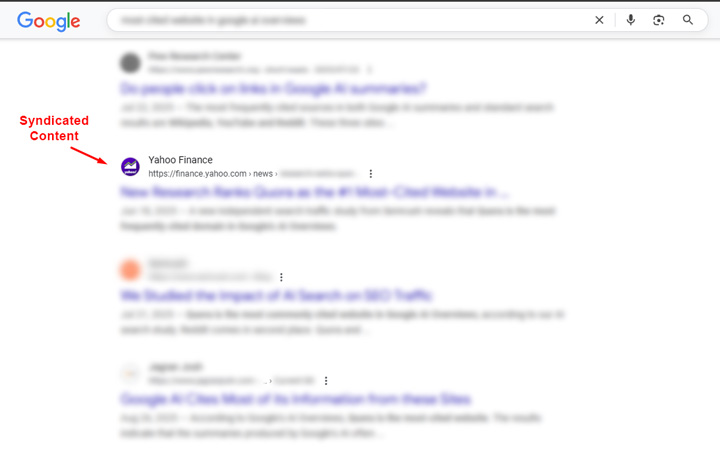
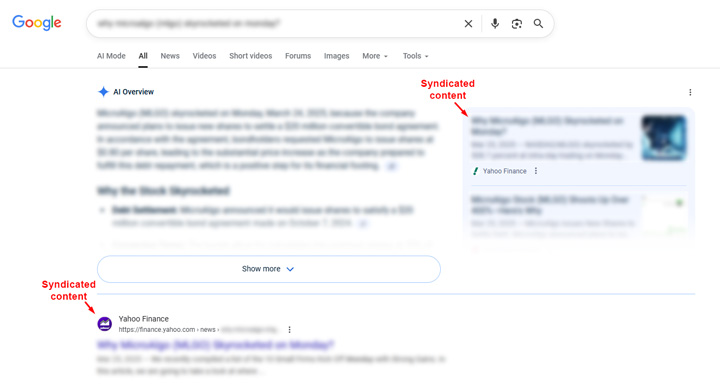
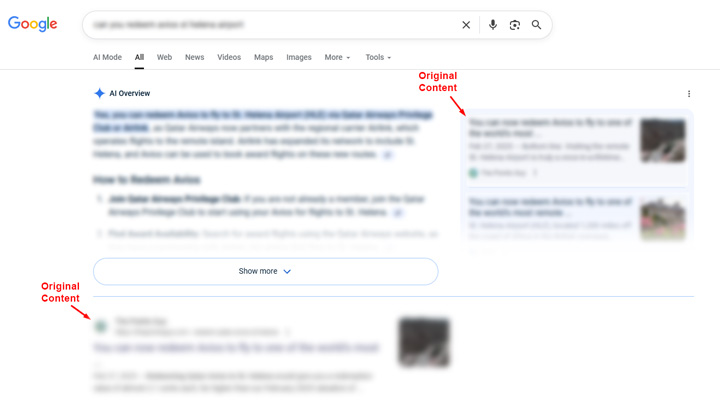
<p>10-blue links: The syndication partner ranks (Yahoo in this case).</p>


<figure class="wp-block-image size-large"><img decoding="async" src="https://www.gsqi.com/images/ai-search-syndication-ex1-google-10-blue-links.jpg" alt=""/></figure>


<p>AIO: Neither url ranked in the AI Overview.</p>


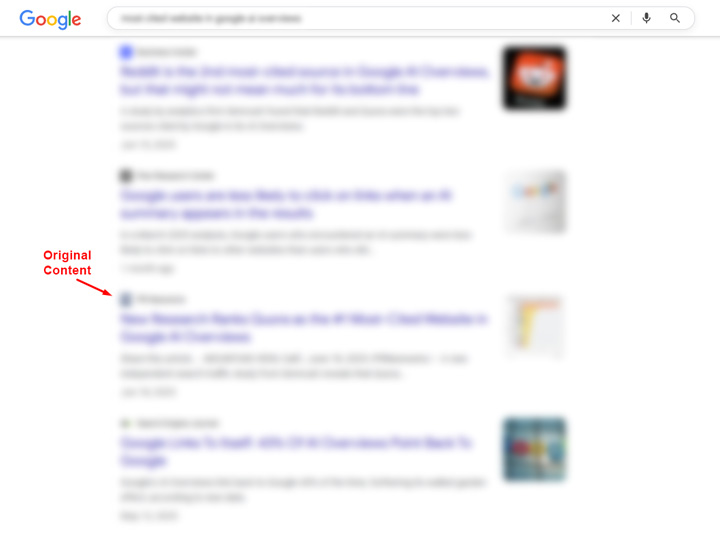
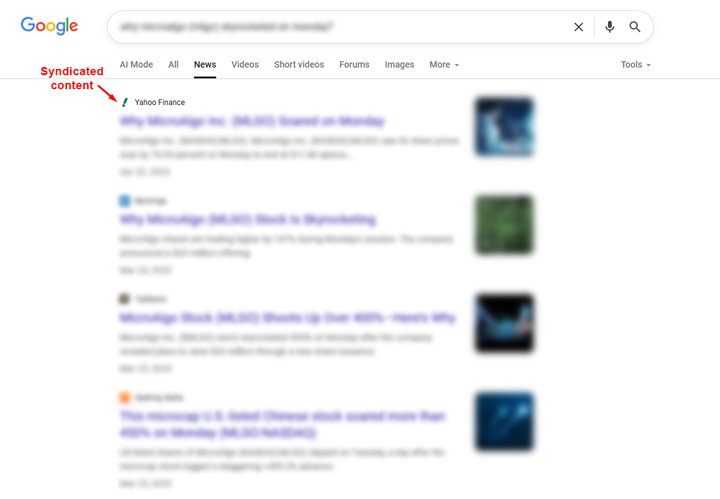
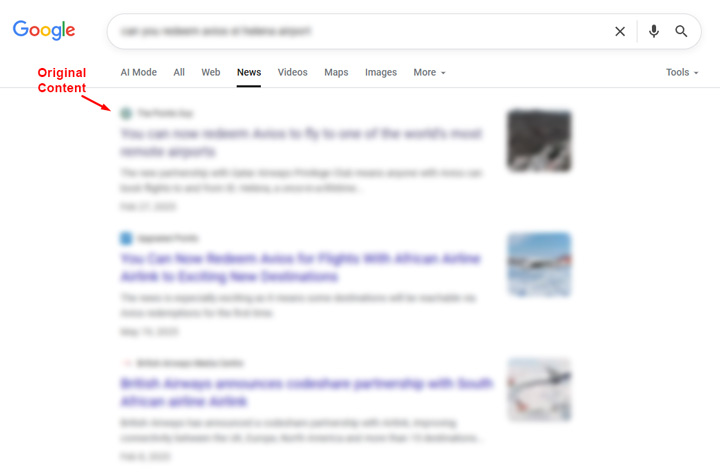
<p>News tab: The original url ranked and the syndication partner did not rank.</p>


<figure class="wp-block-image size-large"><img decoding="async" src="https://www.gsqi.com/images/ai-search-syndication-ex1-google-news-tab.jpg" alt=""/></figure>


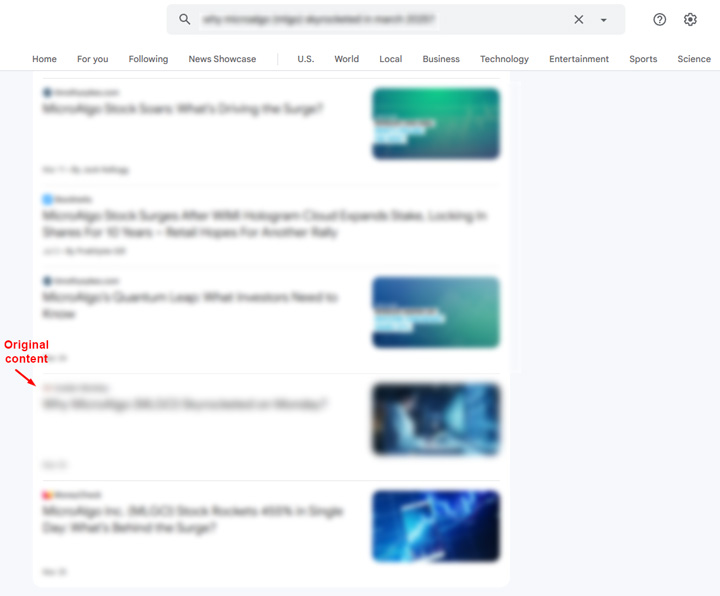
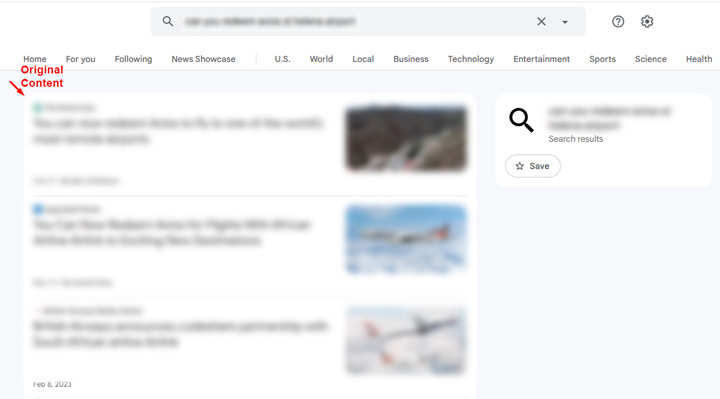
<p>Google News: The original url also ranked in Google News.</p>


<p><strong>AI Search:</strong></p>


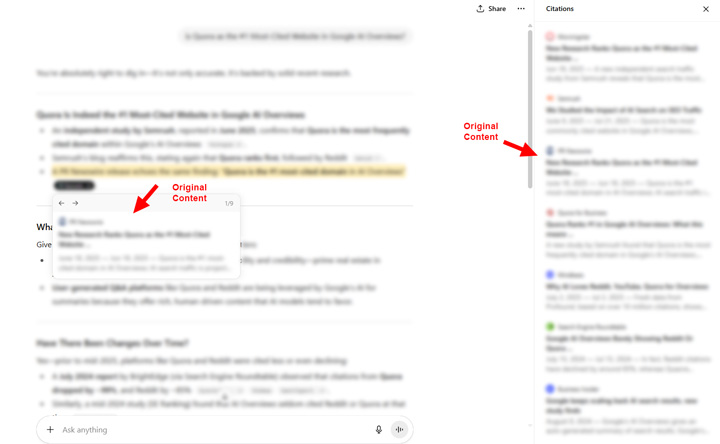
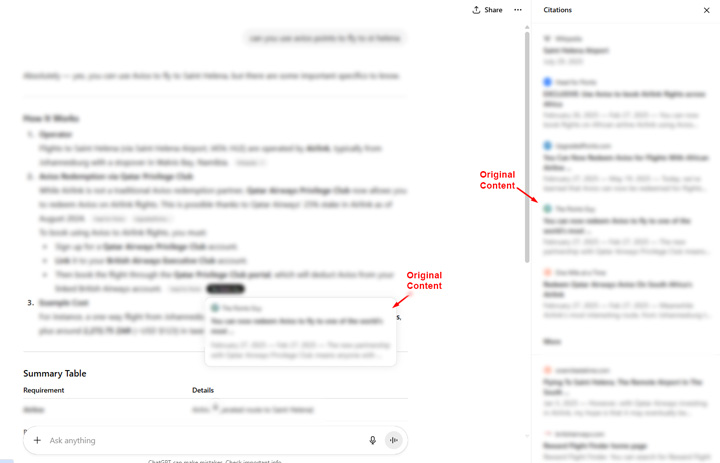
<p>ChatGPT: The original url was cited prominently in the answer and in the sources list.</p>


<figure class="wp-block-image size-large"><img decoding="async" src="https://www.gsqi.com/images/ai-search-syndication-ex1-chatgpt.jpg" alt=""/></figure>


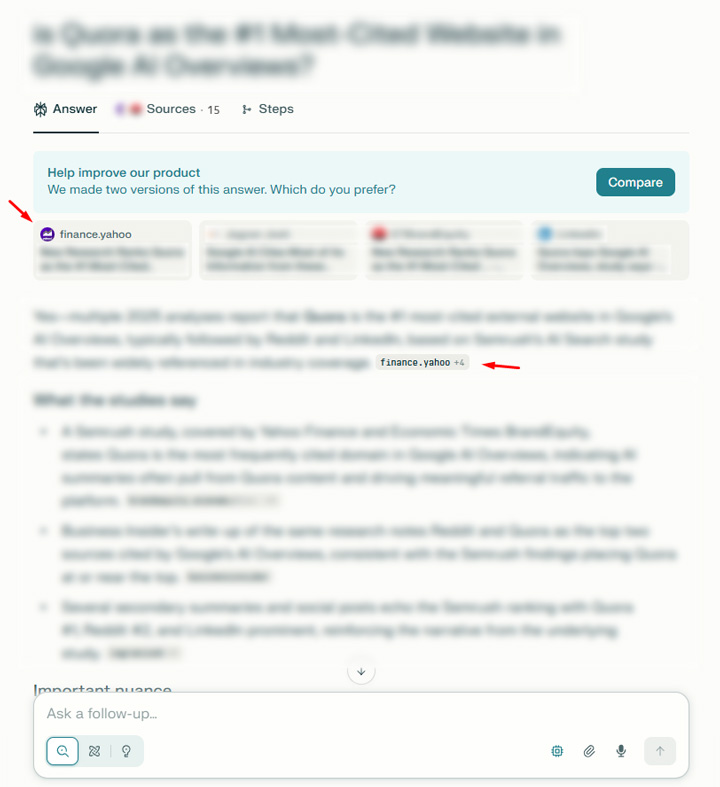
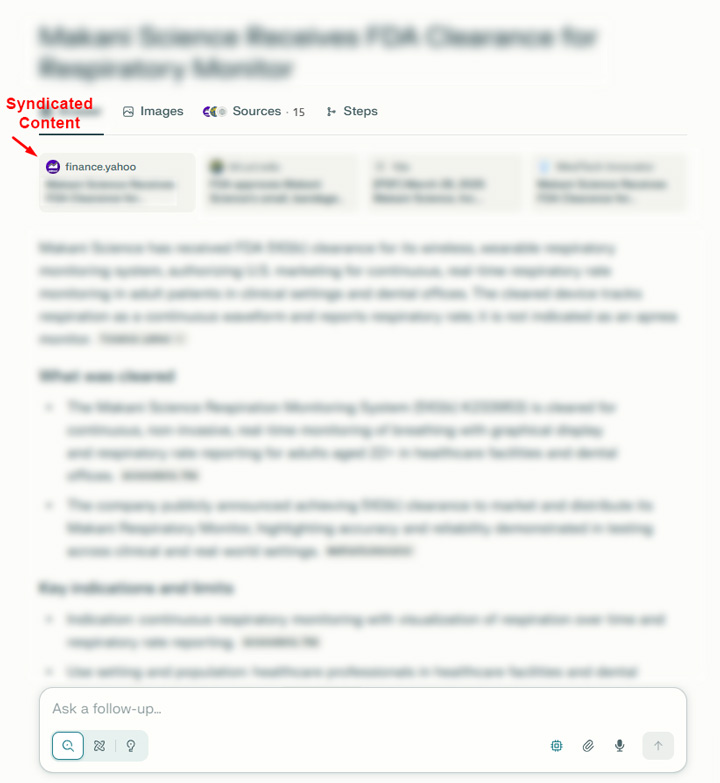
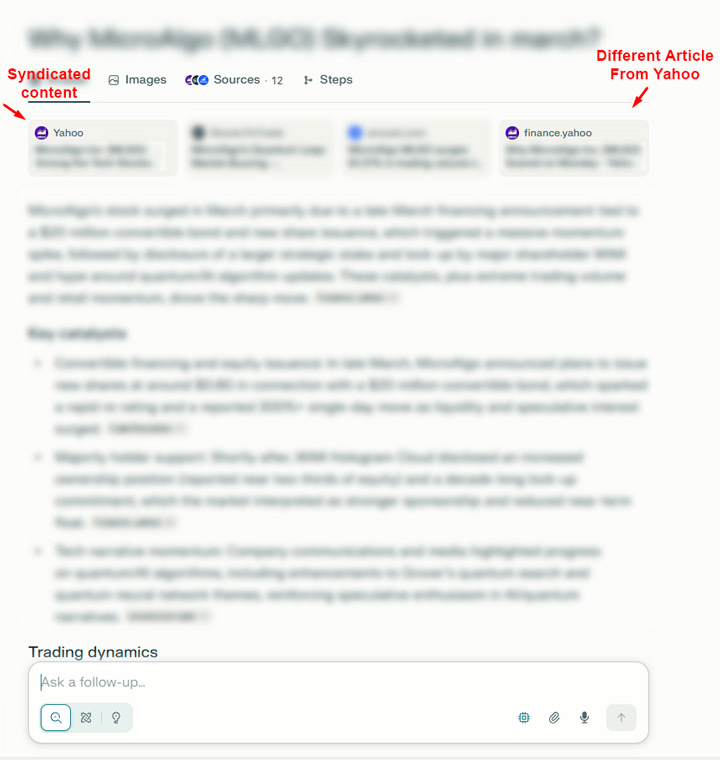
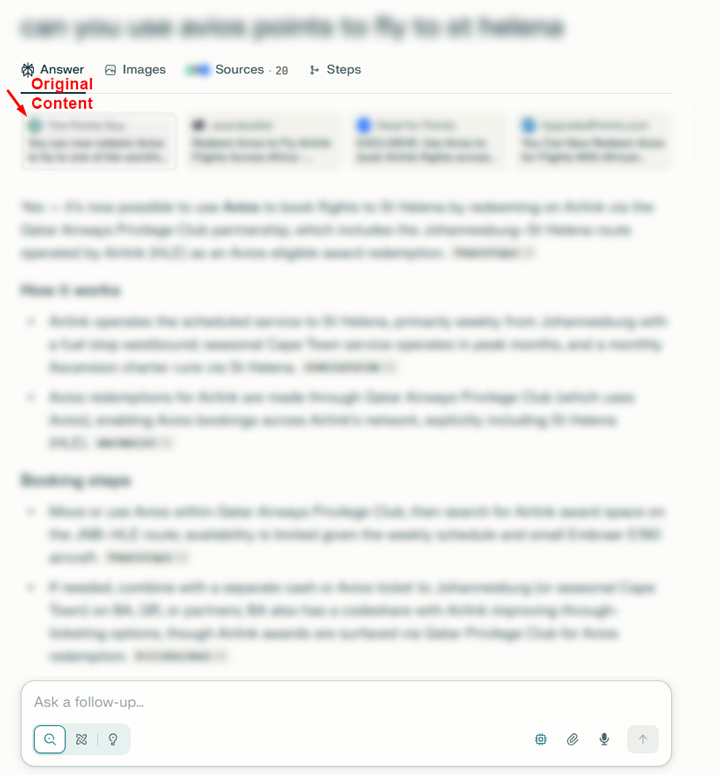
<p>Perplexity: Third-party syndication partner cited prominently.</p>


<figure class="wp-block-image size-large"><img decoding="async" src="https://www.gsqi.com/images/ai-search-syndication-ex1-perplexity.jpg" alt=""/></figure>


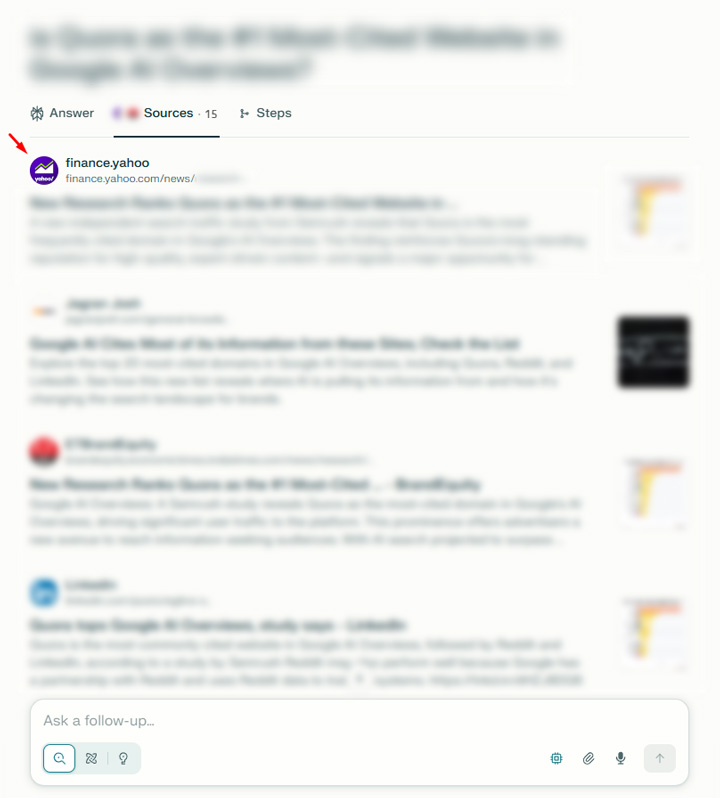
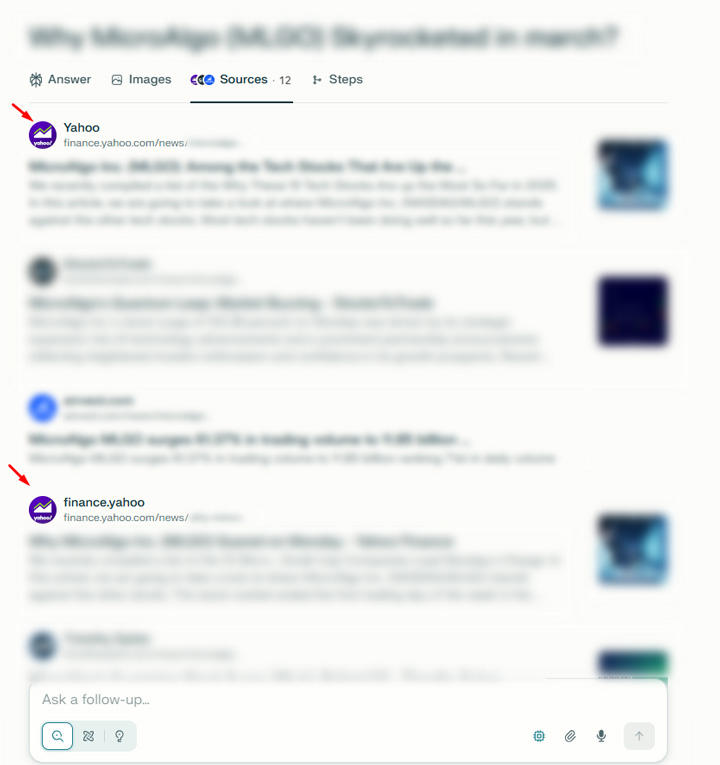
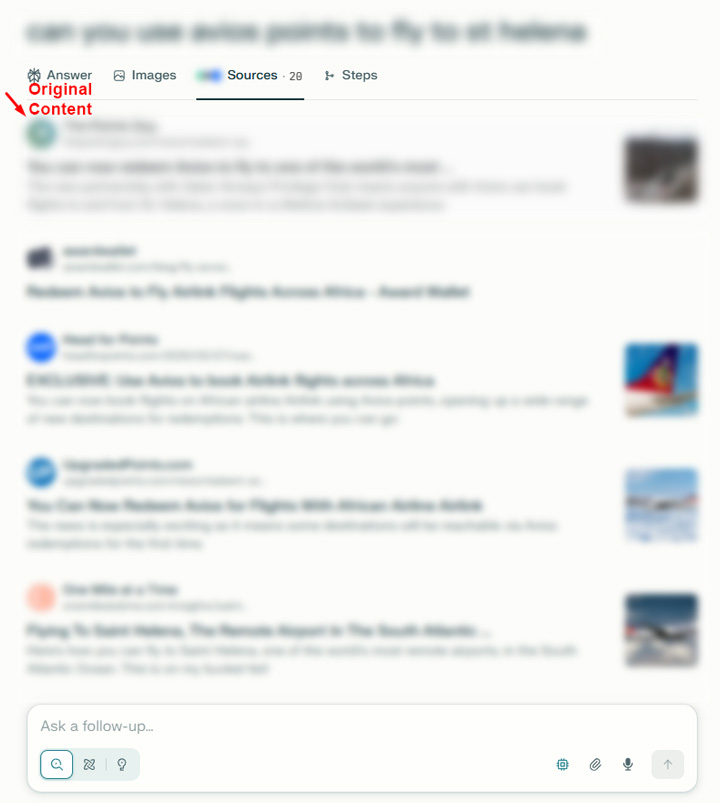
<p>Here is the Perplexity sources view with Yahoo ranking #1:</p>


<figure class="wp-block-image size-large"><img decoding="async" src="https://www.gsqi.com/images/ai-search-syndication-ex1-perplexity-sources.jpg" alt=""/></figure>


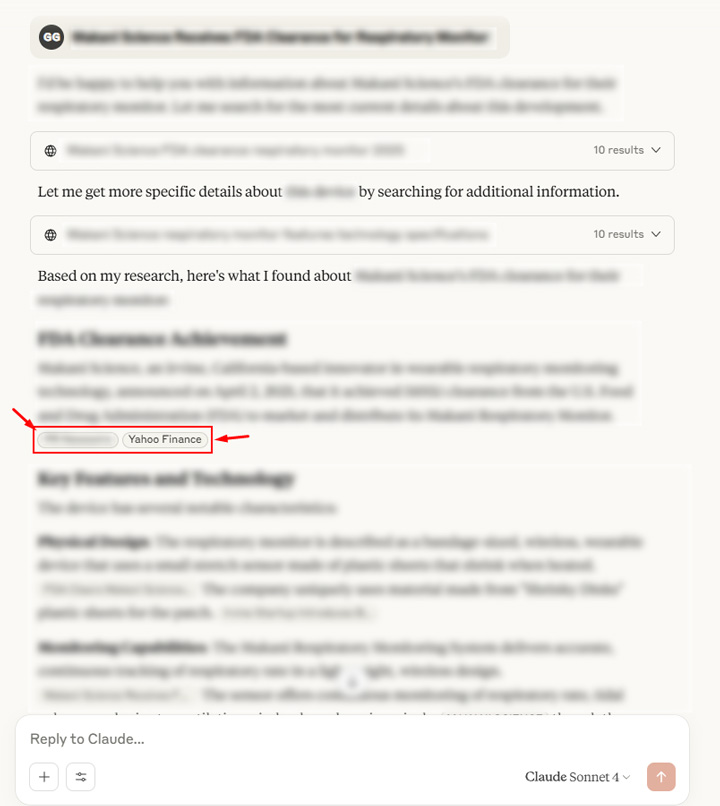
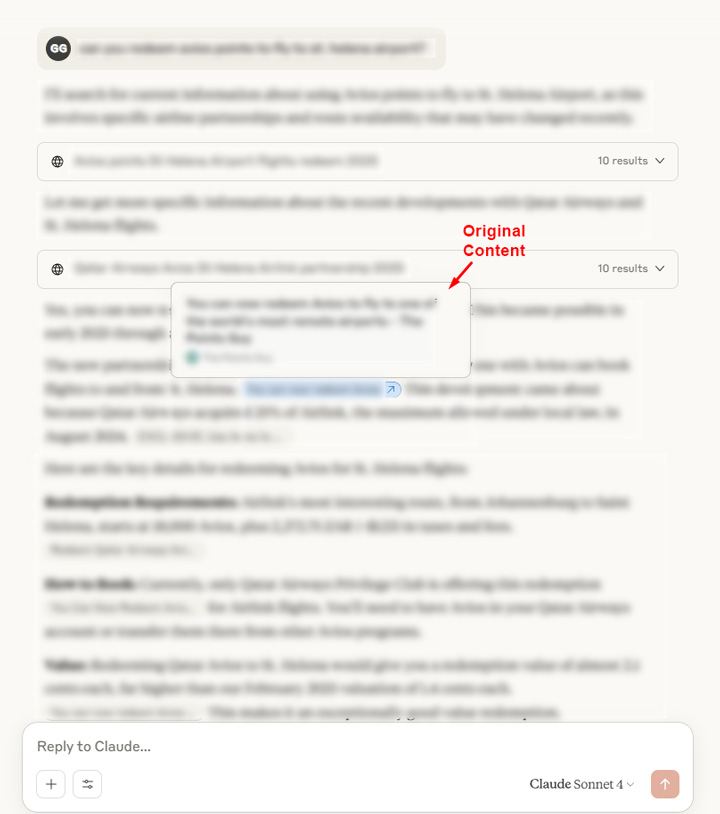
<p>Claude: The original url was cited, but Claude also says it failed to fetch the url for some reason. See my post about <a href="https://www.gsqi.com/marketing-blog/ai-search-javascript-rendering/" title="">JavaScript rendering</a> for other issues with AI search tools and rendering content. The original url was also in the answer. So the original url was not in the sources list, but did show up in the answer. </p>
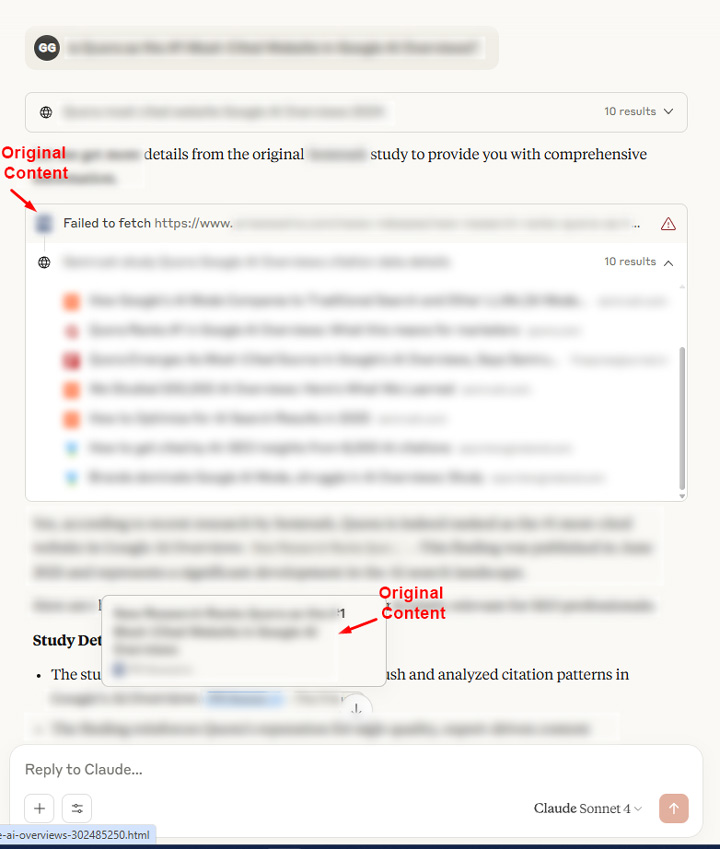


<figure class="wp-block-image size-large"><img decoding="async" src="https://www.gsqi.com/images/ai-search-syndication-ex1-claude-failed.jpg" alt=""/></figure>


<p>Gemini: Neither url was cited, which was interesting since the content did rank well across Google surfaces.</p>


<p><strong>Example 2: A ranking mess.</strong></p>


<p><strong>Google surfaces:</strong></p>


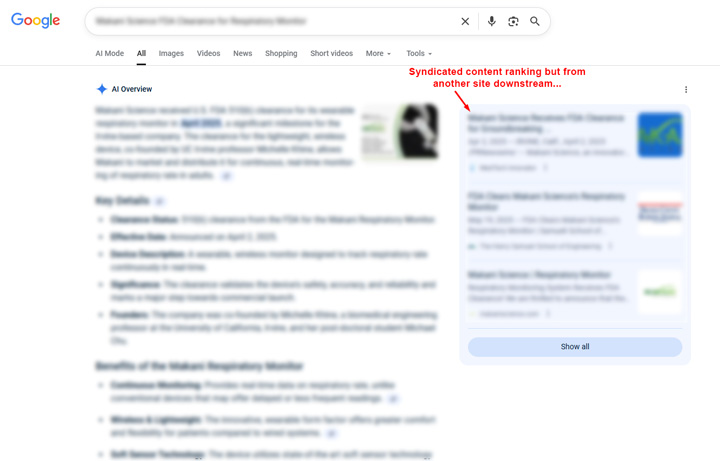
<p>AIO: The original content <em>seemed </em>to rank in the AIO,&nbsp; but it’s actually <strong>another site</strong> that picked up the syndicated content. So it’s not even the third-party site I was monitoring for this example. It’s just another reason to watch how you syndicate content. It can end up on many sites beyond your initial syndication partner.</p>


<figure class="wp-block-image size-large"><img decoding="async" src="https://www.gsqi.com/images/ai-search-syndication-ex2-aio.jpg" alt=""/></figure>


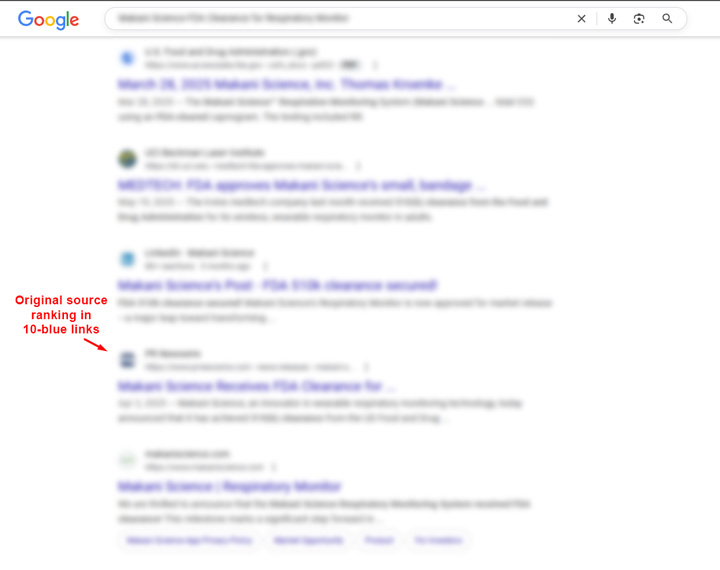
<p>10-blue links: The original url ranked in the 10-blue links at #4.</p>


<figure class="wp-block-image size-large"><img decoding="async" src="https://www.gsqi.com/images/ai-search-syndication-ex2-google-10-blue-links.jpg" alt=""/></figure>


<p>News tab: Neither url ranked, but the news tab was not returning much for the queries I was entering.</p>


<p>Google News: Similar to the News tab,&nbsp; Google News didn’t return much for the queries I was testing.</p>


<p><strong>AI Search:</strong></p>


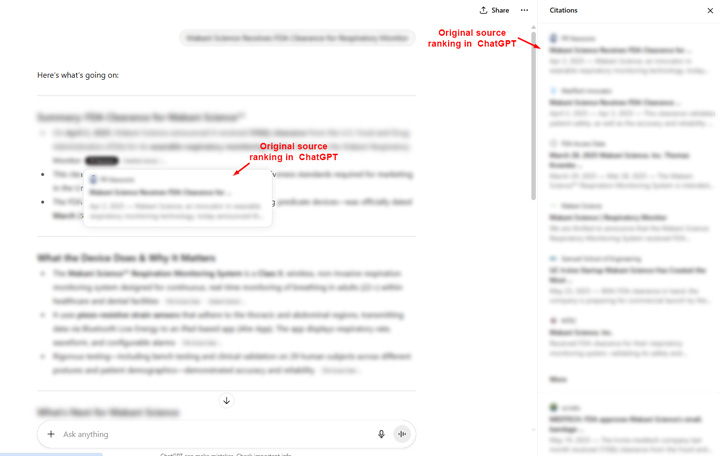
<p>ChatGPT: The original url cited and third-party url didn’t rank at all.</p>


<figure class="wp-block-image size-large"><img decoding="async" src="https://www.gsqi.com/images/ai-search-syndication-ex2-chatgpt.jpg" alt=""/></figure>


<p>Perplexity: Third-party syndication partner cited prominently as top source.</p>


<figure class="wp-block-image size-large"><img decoding="async" src="https://www.gsqi.com/images/ai-search-syndication-ex2-perplexity.jpg" alt=""/></figure>


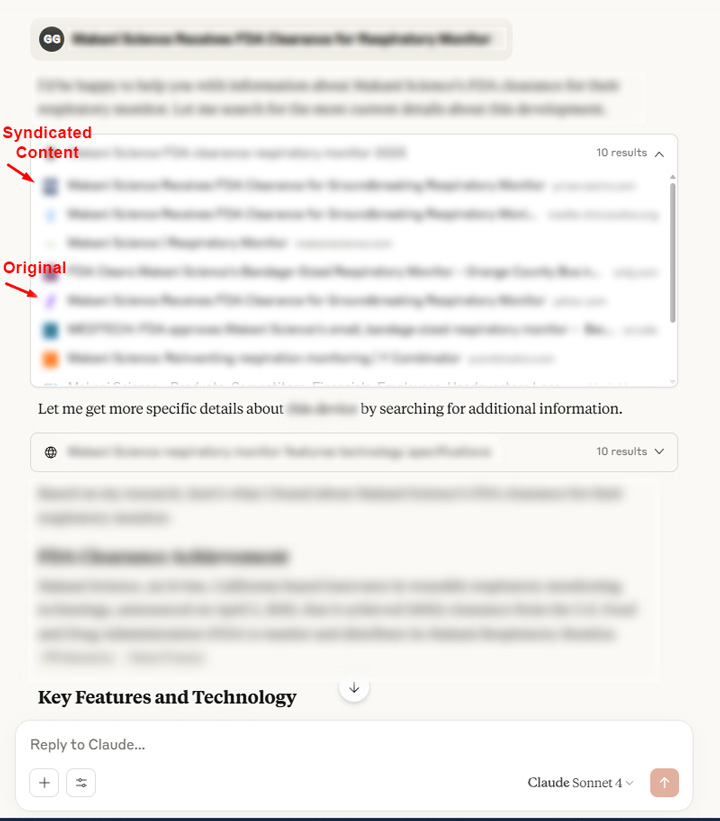
<p>Claude: Both urls were cited and they were side-by-side in the answer from Claude. That’s fitting actually. :) And both are in the sources list with the original ranking higher in the list.</p>


<figure class="wp-block-image size-large"><img decoding="async" src="https://www.gsqi.com/images/ai-search-syndication-ex2-claude.jpg" alt=""/></figure>


<p>And here is the sources list with both ranking:</p>


<figure class="wp-block-image size-large"><img decoding="async" src="https://www.gsqi.com/images/ai-search-syndication-ex2-claude-sources.jpg" alt=""/></figure>


<p>Gemini: Neither url was cited but no sources were cited at all. I saw this several times by the way. If I changed the prompt slightly to more of a question, Gemini did cite sources and the original url ranked. The syndicated content did not rank.</p>


<figure class="wp-block-image size-large"><img decoding="async" src="https://www.gsqi.com/images/ai-search-syndication-ex2-gemini.jpg" alt=""/></figure>


<p><strong>Example 3: More confusion.</strong></p>


<p><strong>Google surfaces:</strong></p>


<p>Google Search: The syndicated url ranks #1 in the AIO and #1 in the 10-blue links.</p>


<figure class="wp-block-image size-large"><img decoding="async" src="https://www.gsqi.com/images/ai-search-syndication-ex3-google.jpg" alt=""/></figure>


<p>News tab: Yahoo ranks #1 in the News tab.</p>


<figure class="wp-block-image size-large"><img decoding="async" src="https://www.gsqi.com/images/ai-search-syndication-ex3-news-tab.jpg" alt=""/></figure>


<p>Google News: Even though the syndicated content ranked across other Google surfaces, the original content ranked in Google News. Again, it’s all over the place.</p>


<figure class="wp-block-image size-large"><img decoding="async" src="https://www.gsqi.com/images/ai-search-syndication-ex3-google-news.jpg" alt=""/></figure>


<p><strong>AI Search:</strong></p>


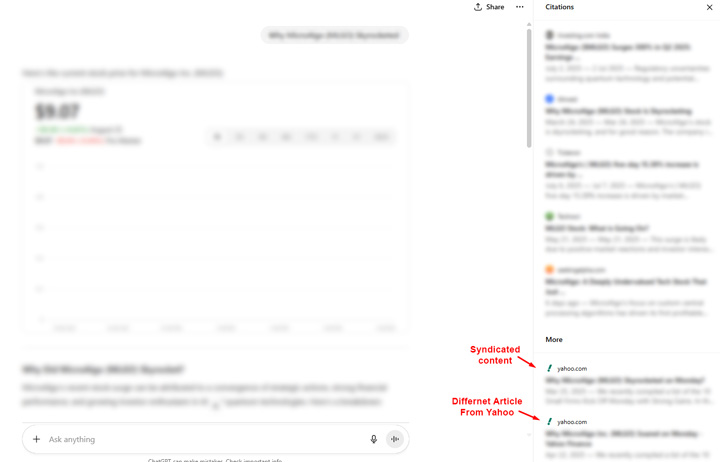
<p>ChatGPT: The syndicated url is cited as a source but in the “More” section below the sources list. The original url is not cited. And there are <strong>two urls</strong> from Yahoo listed there, one that’s the syndicated content and another article about a similar topic.</p>


<figure class="wp-block-image size-large"><img decoding="async" src="https://www.gsqi.com/images/ai-search-syndication-ex3-chatgpt.jpg" alt=""/></figure>


<p>Perplexity: Like ChatGPT, the third-party url is cited as a source. And also like ChatGPT, there was a second article from Yahoo about a similar topic.</p>


<figure class="wp-block-image size-large"><img decoding="async" src="https://www.gsqi.com/images/ai-search-syndication-ex3-perplexity.jpg" alt=""/></figure>


<p>Here is the sources view showing both articles from Yahoo:</p>


<figure class="wp-block-image size-large"><img decoding="async" src="https://www.gsqi.com/images/ai-search-syndication-ex3-perplexity-sources.jpg" alt=""/></figure>


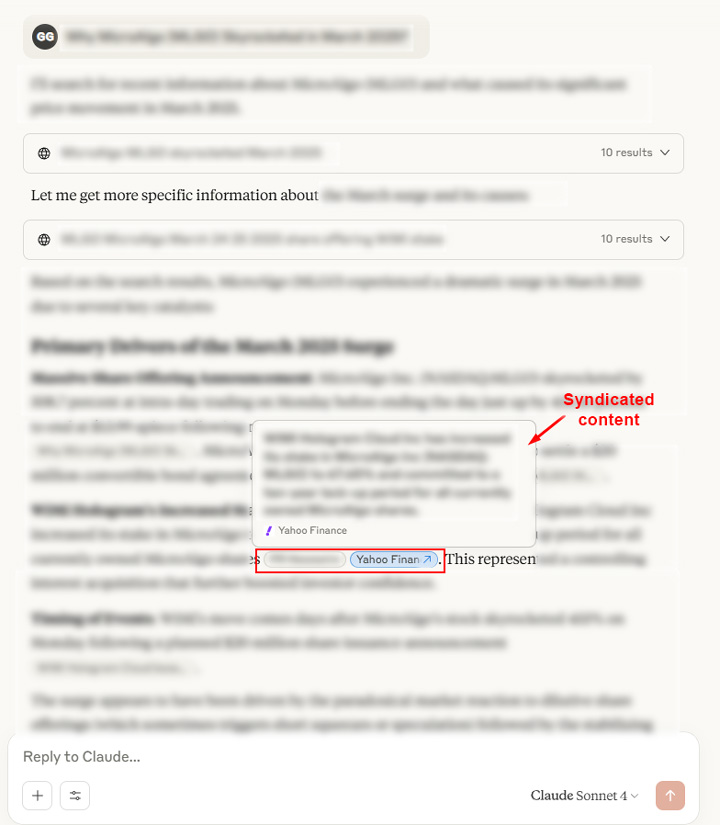
<p>Claude: Again, <strong>both </strong>urls (the original and syndicated content) were cited and ranking right next to each other in the answer.</p>


<figure class="wp-block-image size-large"><img decoding="async" src="https://www.gsqi.com/images/ai-search-syndication-ex3-claude-answer.jpg" alt=""/></figure>


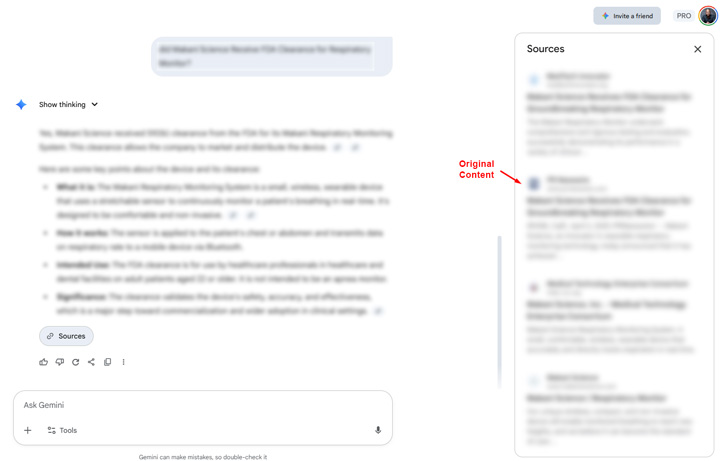
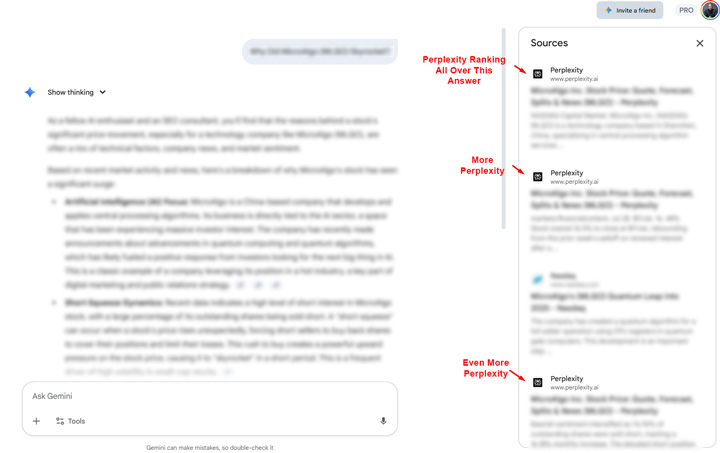
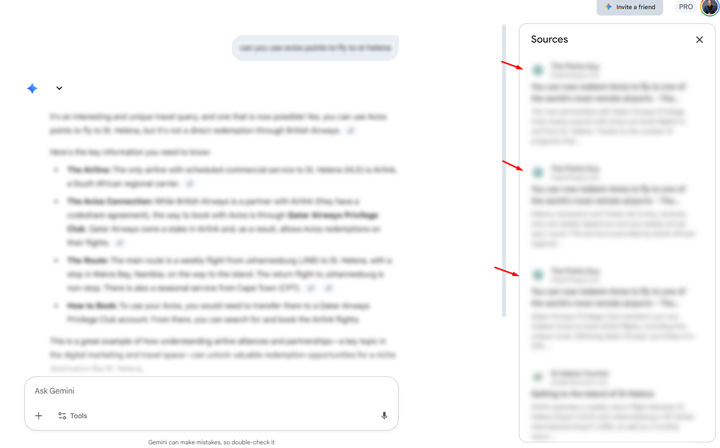
<p>Gemini: Neither url was cited but the sources were super interesting for this prompt. Perplexity finance was cited several times in Gemini and filled up the sources list on the right side. Very interesting and something to watch out for if Perplexity expands verticals beyond finance.</p>


<figure class="wp-block-image size-large"><img decoding="async" src="https://www.gsqi.com/images/ai-search-syndication-ex3-gemini.jpg" alt=""/></figure>


<p><strong>Example 4: A unicorn for AI Search and syndicated content.</strong></p>


<p><strong>Google surfaces:</strong></p>


<p>AIO: The original content ranks #1 in the AIO and #1 in the 10-blue links.</p>


<figure class="wp-block-image size-large"><img decoding="async" src="https://www.gsqi.com/images/ai-search-syndication-ex4-google.jpg" alt=""/></figure>


<p>News tab: The original url ranks #1 in the News tab.</p>


<figure class="wp-block-image size-large"><img decoding="async" src="https://www.gsqi.com/images/ai-search-syndication-ex4-news-tab.jpg" alt=""/></figure>


<p>Google News: Like the News tab and 10-blue links, the original content ranks well in Google News.</p>


<figure class="wp-block-image size-large"><img decoding="async" src="https://www.gsqi.com/images/ai-search-syndication-ex4-google-news.jpg" alt=""/></figure>


<p>Note, this was the cleanest example I found during my research. It was also interesting to see similar results over and over for the site I was analyzing. It&#8217;s like a unicorn for syndicated content and AI Search. </p>


<p><strong>AI Search:</strong></p>


<p>ChatGPT: The original article ranks prominently as a source.</p>


<figure class="wp-block-image size-large"><img decoding="async" src="https://www.gsqi.com/images/ai-search-syndication-ex4-chatgpt.jpg" alt=""/></figure>


<p>Perplexity: Like ChatGPT, the original url is cited as a source, and #1 in the answer and sources list.</p>


<figure class="wp-block-image size-large"><img decoding="async" src="https://www.gsqi.com/images/ai-search-syndication-ex4-perplexity.jpg" alt=""/></figure>


<p>Here is the sources view in Perplexity:</p>


<figure class="wp-block-image size-large"><img decoding="async" src="https://www.gsqi.com/images/ai-search-syndication-ex4-perplexity-sources.jpg" alt=""/></figure>


<p>Claude: The original url was cited but ranked below other sources. The syndicated content did not rank at all.</p>


<figure class="wp-block-image size-large"><img decoding="async" src="https://www.gsqi.com/images/ai-search-syndication-ex4-claude.jpg" alt=""/></figure>


<p>Gemini: Not only was the original url cited prominently in the answer, but so were several other articles from the publisher. Again, a unicorn. The syndicated content did not rank at all.&nbsp;</p>


<figure class="wp-block-image size-large"><img decoding="async" src="https://www.gsqi.com/images/ai-search-syndication-ex4-google-gemini.jpg" alt=""/></figure>


<p><strong>Syndicating content is still tough visibility-wise:</strong><br>I&#8217;ll stop here after four examples since I think you get the picture&#8230; For publishers syndicating content, it&#8217;s a tough environment for making sure your original content ranks in Google Search and across AI search tools like ChatGPT, Perplexity, Claude, and Gemini. Syndication partners can often rank above the original content. Below, I&#8217;ll cover some key points and recommendations before ending the post.</p>


<p><strong>Recommendations for site owners syndicating content:</strong></p>


<ul class="wp-block-list">
<li>My testing of syndicated content in AI Search underscores the ranking challenges for the original publishers. As you can see above, the syndicated content ranks often, and sometimes along with the original content.</li>


<li>In my opinion, this is what noindexing the syndicated content is the path forward if you want to ensure your original content gains the most visibility across Google and AI Search tools like ChatGPT, Perplexity, Claude, and Gemini.</li>


<li>Canonicalization does seem to help in certain situations, but it’s not foolproof. Both urls are often indexed and the visibility across the various platforms is mixed. Sometimes it’s the original content ranking and sometimes it’s the syndicated content. But at a minimum, try to have the syndicated content canonicalized to the original urls (if noindex is not an option).</li>


<li>Negotiate your syndication contracts wisely. Push for noindexing if you want your own content to rank in traditional search as well as AI search. A second choice would be having the syndicated content canonicalized to the original content.</li>


<li>Run through this analysis for your own content. You can manually run through examples like I did above or you can leverage AI visibility tracking tools to run some tests. Note, you probably won’t have many prompts per AI visibility tool… so be smart with how you set up the tests. For example, they might have to be short and concise tests so you can reuse those prompts for other examples.</li>


<li>Document everything in detail so you can track visibility changes over time across the various AI tools like ChatGPT, Perplexity, Claude, Gemini, and others. I believe we will continue to see a lot of change with the ranking systems across AI Search tools, so what’s happening today could change next week, month, or quarter. That’s both exciting and frustrating, but that’s the stage we are at with AI Search.</li>
</ul>


<p><strong>Summary: For syndicated content, control what you can control.<br></strong>Syndicating content can be a minefield for organic search and it seems that’s the case for AI Search as well. Moving forward, I would control what you can control. That’s why I recommend noindexing syndicated content or at least canonicalizing that content to the original urls. If both urls get indexed (which they often do), then you cannot guarantee visibility for your original content over the syndicated content &#8212; other than the unicorn I covered earlier of course. :) <br><br>GG</p><p>The post <a href="https://www.gsqi.com/marketing-blog/ai-search-and-syndicated-content/">AI Search and Syndicated Content – How syndicating content can impact visibility across ChatGPT, Perplexity, Claude, and Gemini</a> first appeared on <a href="https://www.gsqi.com/marketing-blog">The Internet Marketing Driver</a>.</p>]]></content>
		
			</entry>
		<entry>
		<author>
			<name>Glenn Gabe</name>
							<uri>https://www.gsqi.com/about-glenn-gabe/</uri>
						</author>

		<title type="html"><![CDATA[Wirecutter dropped heavily in search visibility over the past four months – Was it a reviews update, Google’s ‘Starkly different’ algorithm, or was vertical expertise rewarded?]]></title>
		<link href="https://www.gsqi.com/marketing-blog/wirecutter-drops-google-reviews-system/" rel="alternate" type="text/html"/>

		<id>https://www.gsqi.com/marketing-blog/?p=7650</id>
		<updated>2025-09-06T13:25:19Z</updated>
		<published>2025-08-18T17:32:05Z</published>
		<category scheme="https://www.gsqi.com/marketing-blog" term="ai-search"/><category scheme="https://www.gsqi.com/marketing-blog" term="algorithm-updates"/><category scheme="https://www.gsqi.com/marketing-blog" term="ecommerce"/><category scheme="https://www.gsqi.com/marketing-blog" term="google"/><category scheme="https://www.gsqi.com/marketing-blog" term="seo"/>
		<summary type="html"><![CDATA[<p>Update 3: September 6, 2025The robots.txt change that Wirecutter implemented on thewirecutter.com doesn&#8217;t seem to have helped the situation. Wirecutter is still down, and even dropping more based on some of the visibility tools. See the screenshots below in my X share. I&#8217;ll keep tracking the situation and will provide updates over time. But for ... <a title="Wirecutter dropped heavily in search visibility over the past four months – Was it a reviews update, Google’s ‘Starkly different’ algorithm, or was vertical expertise rewarded?" class="read-more" href="https://www.gsqi.com/marketing-blog/wirecutter-drops-google-reviews-system/" aria-label="Read more about Wirecutter dropped heavily in search visibility over the past four months – Was it a reviews update, Google’s ‘Starkly different’ algorithm, or was vertical expertise rewarded?">Read more</a></p>
<p>The post <a href="https://www.gsqi.com/marketing-blog/wirecutter-drops-google-reviews-system/">Wirecutter dropped heavily in search visibility over the past four months – Was it a reviews update, Google’s ‘Starkly different’ algorithm, or was vertical expertise rewarded?</a> first appeared on <a href="https://www.gsqi.com/marketing-blog">The Internet Marketing Driver</a>.</p>]]></summary>

					<content type="html" xml:base="https://www.gsqi.com/marketing-blog/wirecutter-drops-google-reviews-system/"><![CDATA[<figure class="wp-block-image size-large"><img decoding="async" src="https://www.gsqi.com/images/wirecutter-drop-sm.jpg" alt=""/></figure>


<p><strong>Update 3: September 6, 2025</strong><br>The robots.txt change that Wirecutter implemented on thewirecutter.com doesn&#8217;t seem to have helped the situation. Wirecutter is still down, and even dropping more based on some of the visibility tools. See the screenshots below in my X share. I&#8217;ll keep tracking the situation and will provide updates over time. But for now, Wirecutter is still down heavily. </p>


<figure class="wp-block-embed is-type-rich is-provider-twitter wp-block-embed-twitter"><div class="wp-block-embed__wrapper">
<blockquote class="twitter-tweet" data-width="550" data-dnt="true"><p lang="en" dir="ltr">Looks like that Wirecutter robots.txt change for <a href="https://t.co/p0pnzjA0bV">https://t.co/p0pnzjA0bV</a> isn&#39;t helping. They are still dropping. Here&#39;s my post about their two big drops over the past several months in case you aren&#39;t familiar with what&#39;s going on. <a href="https://t.co/FmIeavEwY1">https://t.co/FmIeavEwY1</a> <a href="https://t.co/Kl3PL4yfXx">pic.twitter.com/Kl3PL4yfXx</a></p>&mdash; Glenn Gabe (@glenngabe) <a href="https://twitter.com/glenngabe/status/1964317296962187392?ref_src=twsrc%5Etfw">September 6, 2025</a></blockquote><script async src="https://platform.twitter.com/widgets.js" charset="utf-8"></script>
</div></figure>


<p><strong>Update 2: August 26, 2025</strong><br>Wirecutter just updated the robots.txt file on thewirecutter.com (the original site) and now is allowing full crawling. As noted below, they were blocking crawling as of April 2025, right before the first big drop. Like I stated on X a few minutes ago, they really should be redirecting that file to the NYT, but this is clearly better than disallowing all crawling. It will be interesting to see how this goes over the next few days.</p>


<figure class="wp-block-embed is-type-rich is-provider-twitter wp-block-embed-twitter"><div class="wp-block-embed__wrapper">
<blockquote class="twitter-tweet" data-width="550" data-dnt="true"><p lang="en" dir="ltr">Another Wirecutter update. They finally changed the robots.txt file to allow full crawling. IMO, they should just redirect the file to the NYT like they were doing originally, but this is clearly much better than disallowing all crawling. Eager to see how this goes over the next… <a href="https://t.co/IRtVcwYnOK">https://t.co/IRtVcwYnOK</a> <a href="https://t.co/XsODY4P3ac">pic.twitter.com/XsODY4P3ac</a></p>&mdash; Glenn Gabe (@glenngabe) <a href="https://twitter.com/glenngabe/status/1960418757165068547?ref_src=twsrc%5Etfw">August 26, 2025</a></blockquote><script async src="https://platform.twitter.com/widgets.js" charset="utf-8"></script>
</div></figure>


<p><strong>Update: August 26, 2025</strong><br>The original Wirecutter site (thewirecutter.com) is showing up in the SERPs again and ranking for over 20K queries. That started happening in April, right before the first big drop that Wirecutter experienced. In addition, the robots.txt file for that site resolves again, and it&#8217;s blocking crawling for some reason. I can see via the wayback machine that the robots.txt file was accurately redirecting to the NYT site as of March, but that changes in the spring (right around when the first drop happened and thewirecutter.com starting to rank in the SERPs again). I will monitor the situation closely and update this post with more information if anything changes. Needless to say, blocking crawling of the old site is not the optimal path for Wirecutter. They should remove the file and just redirect any request for robots.txt to the NYT like they were doing before.<br><br>Here is my share on X about the situation, which contains screenshots:</p>


<figure class="wp-block-embed is-type-rich is-provider-twitter wp-block-embed-twitter"><div class="wp-block-embed__wrapper">
<blockquote class="twitter-tweet" data-width="550" data-dnt="true"><p lang="en" dir="ltr">The plot thickens with the Wirecutter drop. Seems the original site <a href="https://t.co/p0pnzjA0bV">https://t.co/p0pnzjA0bV</a> is now surfacing in the SERPs and that started in April&#8230; before the first big drop on 5/18. I see 22K+ queries ranking there. The robots.txt file still resolves on that site and it&#39;s… <a href="https://t.co/JmuyuU2Wiy">https://t.co/JmuyuU2Wiy</a> <a href="https://t.co/0m9VQgXzTp">pic.twitter.com/0m9VQgXzTp</a></p>&mdash; Glenn Gabe (@glenngabe) <a href="https://twitter.com/glenngabe/status/1960065746144317928?ref_src=twsrc%5Etfw">August 25, 2025</a></blockquote><script async src="https://platform.twitter.com/widgets.js" charset="utf-8"></script>
</div></figure>


<p>&#8212;&#8212;&#8212;-</p>


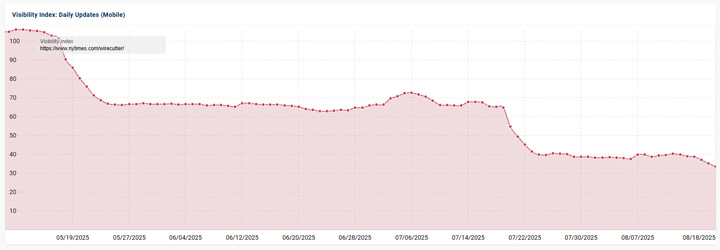
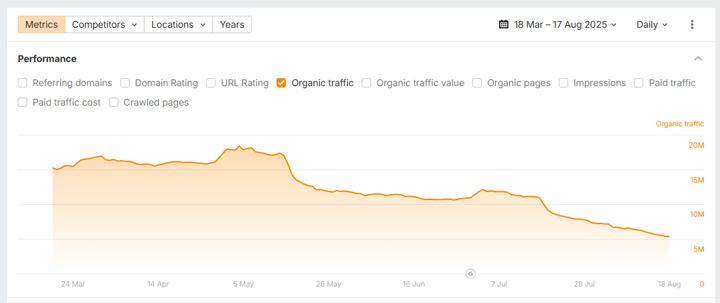
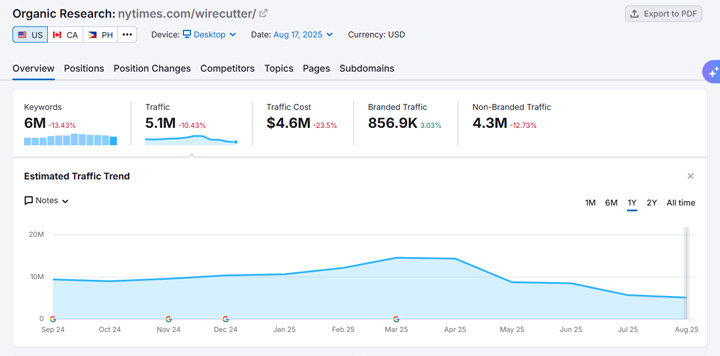
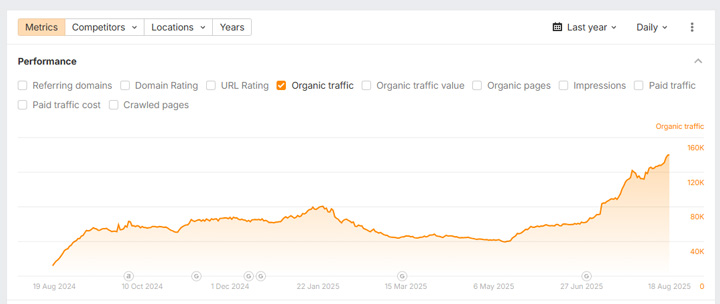
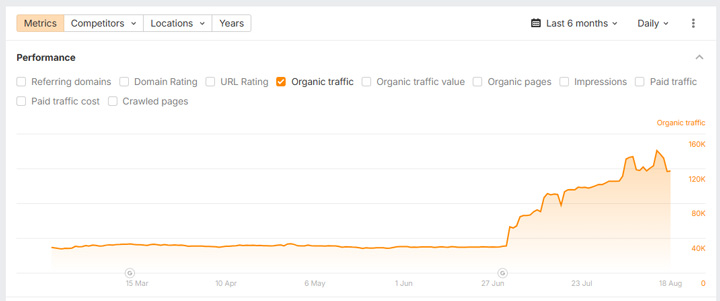
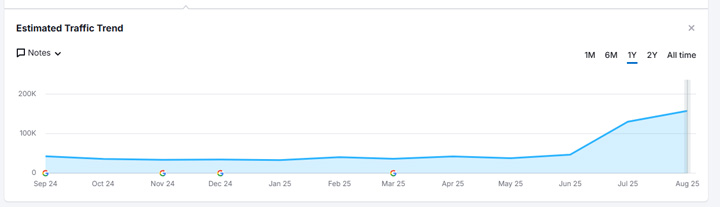
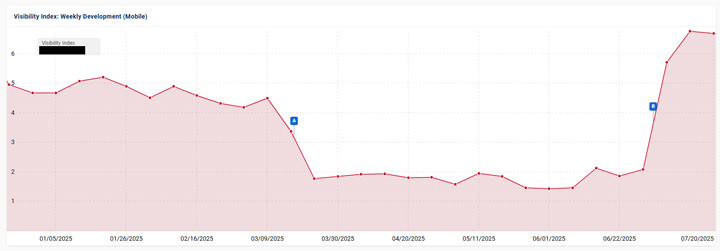
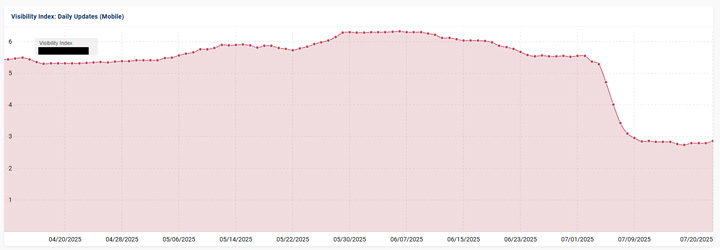
<p>While researching reviews last week, I noticed Wirecutter wasn’t ranking as well in Google. And for some queries, they weren’t ranking AT ALL. So I dug in more to better understand their visibility trending in 2025. Note, we’ve had two broad core updates this year, including the March 2025 core update, and then most recently the <a href="https://www.gsqi.com/marketing-blog/june-2025-google-core-update/">June 2025 core update</a>, so I wanted to see how Wirecutter fared during those powerful updates.<br><br>What I saw shocked me. A picture is worth a thousand words, so here is Wirecutter’s visibility trending since the spring of 2025. Notice the two huge drops in visibility (first on May 18 and then another drop on July 20 right after the June core update completed). When comparing current visibility to May 2025, Wirecutter has dropped by a whopping 69% based on Sistrix data, 72% based on ahrefs data, and 65% based on Semrush data . Sure, it has dropped in the past at certain points, but it has dropped heavily in the several months.</p>


<figure class="wp-block-image size-large"><img decoding="async" src="https://www.gsqi.com/images/wirecutter-drop-sistrix.jpg" alt=""/></figure>


<figure class="wp-block-image size-large"><img decoding="async" src="https://www.gsqi.com/images/wirecutter-drop-ahrefs.jpg" alt=""/></figure>


<figure class="wp-block-image size-large"><img decoding="async" src="https://www.gsqi.com/images/wirecutter-drop-semrush.jpg" alt=""/></figure>


<p>This was incredibly surprising since I’ve always thought Wirecutter provided extremely thorough and in-depth reviews and I know they have ranked very well over time (mostly). I have even mentioned Wirecutter several times in my posts about <a href="https://www.gsqi.com/marketing-blog/google-april-2023-reviews-update-evolution-tremors-radar/">Google’s reviews updates</a> as an example to emulate. </p>


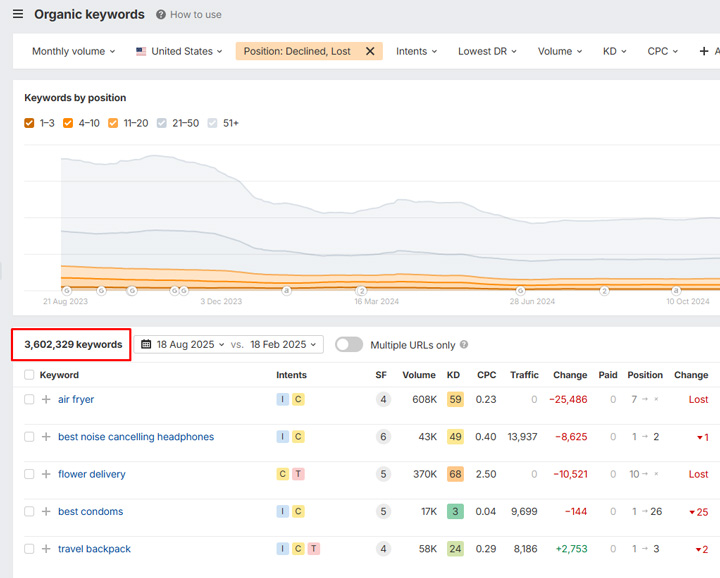
<p><strong>Did Wirecutter really drop? Checking visibility and rankings.<br></strong>Wirecutter dropping heavily is a big deal if you focus on reviews since it provides a lot of killer reviews content. But… they do cover a <strong>wide range</strong> of categories and products. I’ll cover more about that soon.<br><br>But before I went crazy about the overall drop, I wanted to spot-check the SERPs for the queries that dropped or were lost. First, ahrefs revealed that a whopping 3.6M queries in the U.S. either dropped or were lost in Google when comparing today to six months ago. That’s insane.<br><br>Sometimes Wirecutter vanished from the top 100, while sometimes it dropped from ranking number one to lower on page one. But one thing was for sure… it dropped, and across many queries.</p>


<figure class="wp-block-image size-large"><img decoding="async" src="https://www.gsqi.com/images/wirecutter-drop-queries-b.jpg" alt=""/></figure>


<p><strong>Side note, AI Overviews and AI Mode impacted as well:<br></strong>As I covered in a previous post, site owners should be very careful about <a href="https://www.gsqi.com/marketing-blog/ai-search-traffic-compared-to-google/">focusing too heavily on AI Search</a> and ignoring Google. If quality drops, then a site is susceptible to being hit by a broad core update down the line (or other types of algorithm updates). And with the majority of traffic still coming from Google, that’s a dangerous game to play. Remember, <a href="https://www.gsqi.com/marketing-blog/ai-search-traffic-compared-to-google/" title="">AI Search is driving less than 1% of traffic</a> to most sites (with most sites under .5%).<br><br>Well, as you would guess, Wirecutter wasn’t showing up as often in AI Overviews or AI Mode for the queries I was testing (which makes complete sense). Note, these were queries where Wirecutter dropped over the past several months. Remember, both AIOs and AI Mode are rooted in Google’s core quality and ranking systems. So if a site drops in visibility due to a major algorithm update (or some other change by Google), then AIOs and AI Mode should follow.<br><br>For example, here are two queries where Wirecutter used to rank well in the 10-blue links before the drops. Wirecutter is not showing up in AI Mode as of today:</p>


<figure class="wp-block-image size-large"><img decoding="async" src="https://www.gsqi.com/images/wirecutter-drop-ai-mode.jpg" alt=""/></figure>


<figure class="wp-block-image size-large"><img decoding="async" src="https://www.gsqi.com/images/wirecutter-drop-ai-mode-b.jpg" alt=""/></figure>


<p>And Gemini leverages Google’s search systems as well, so being cited as a source could drop there as well. I need to dig into more queries for Wirecutter to see how they are performing in Gemini now, but I wanted to mention that. And I also need to dig deeper with AI search platforms like ChatGPT, Perplexity, Claude, etc. to see how well Wirecutter is ranking there.</p>


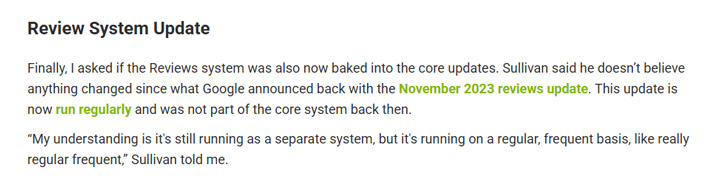
<p><strong>Reviews updates, ‘starkly different’, and a surge in vertical reviews:<br></strong>So what exactly is going on here? First, reviews updates are now running behind the scenes and are not announced by Google. That started in November of 2023 when <a href="https://status.search.google.com/incidents/VqRTcmyQCwfpuYeaVNfn">Google explained</a> that was the final reviews update that would be officially announced.<br><br>But that didn’t mean they were ending… On the contrary, Google explained that the reviews system would be updated ‘on a regular and ongoing basis.’ In addition, Danny Sullivan <a href="https://www.seroundtable.com/interview-google-august-core-update-38024.html">explained in 2024</a> that the reviews system was being updated frequently. So the drops for Wirecutter could have been during one of those reviews systems updates.</p>


<figure class="wp-block-image size-large"><img decoding="async" src="https://www.gsqi.com/images/wirecutter-drop-reviews-system.jpg" alt=""/></figure>


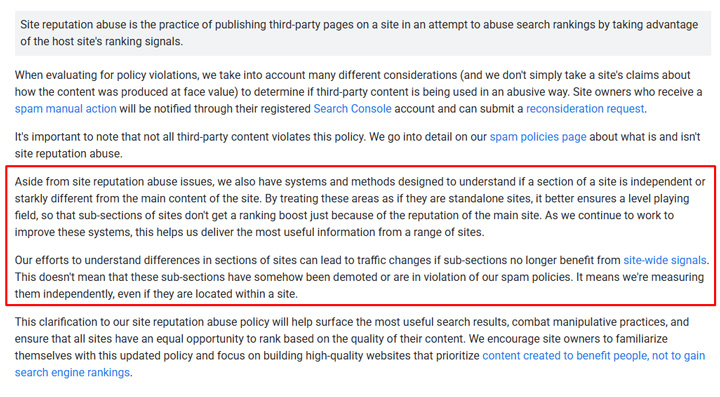
<p>Second, I wrote a post last year titled, “<a href="https://www.gsqi.com/marketing-blog/a-nightmare-on-affiliate-street/">A Nightmare on Affiliate Street</a>” where I covered how a number of sites with affiliate sections were tanking in Google. I speculated that maybe Google was handling site reputation abuse algorithmically then… Well, Google sent me a statement explaining that wasn’t the case. That’s the first time they mentioned the ‘Starkly different’ algorithm (or system) that they were working on and improving.<br><br>That’s where Google could algorithmically understand when a section of content is ‘starkly different’ from the majority of the main content on the site. And when that happens, the section would not leverage site-wide signals like other sections could. When that happens, that section could drop heavily in rankings. It’s not a penalty, it’s just that the section would not leverage the power of the site like it normally would.<br><br>For Wirecutter, Google could be treating the Wirecutter directory differently than the core New York Times site. Hard to say for sure, but possible.</p>


<figure class="wp-block-image size-large"><img decoding="async" src="https://www.gsqi.com/images/wirecutter-drop-starkly-different.jpg" alt=""/></figure>


<p>This is what that looked like across two different sites when Google improved its ‘Starkly different’ system in 2024:</p>


<figure class="wp-block-image size-large"><img decoding="async" src="https://www.gsqi.com/images/wirecutter-drop-starkly-different-2024.jpg" alt=""/></figure>


<p><strong>Wirecutter wasn’t alone. Other sites focused on reviews have dropped as well.<br></strong>The Wirecutter drop led me to run the visibility numbers for over 700 sites I have documented that were impacted by reviews updates in the past. I wanted to see how those sites fared over time and especially sites similar to Wirecutter. For example, when reviews content was housed in a section of a larger and broader site.<br><br>First, many of those reviews sites have tanked since reviews updates (and Product Reviews Updates) were first launched in 2021. I covered some of that in my post about the <a href="https://www.gsqi.com/marketing-blog/analyzing-long-term-impact-google-reviews-updates/">impact of reviews updates</a> over time. Sure, some are up, but many are down – and really down. See some examples below. There are many like this.</p>


<figure class="wp-block-image size-large"><img decoding="async" src="https://www.gsqi.com/images/wirecutter-drop-large-a.jpg" alt=""/></figure>


<figure class="wp-block-image size-large"><img decoding="async" src="https://www.gsqi.com/images/wirecutter-drop-large-b.jpg" alt=""/></figure>


<figure class="wp-block-image size-large"><img decoding="async" src="https://www.gsqi.com/images/wirecutter-drop-large-f.jpg" alt=""/></figure>


<figure class="wp-block-image size-large"><img decoding="async" src="https://www.gsqi.com/images/wirecutter-drop-large-g.jpg" alt=""/></figure>


<p><strong>Vertical Expertise Rewarded? Niche publishers with reviews surge.<br></strong>I also started think that Google could have implemented a change to the reviews system that rewarded vertical expertise? i.e. Sites heavily focused on the vertical they are publishing reviews about (versus mammoth sites covering a range of topics). Again, I saw many of these smaller publishers show up in my research while analyzing the Wirecutter drop. I’ll reach out to Google to see if they can shed some light on what’s going on here.<br><br>For example, here are niche publishers with reviews that have surged in 2025:</p>


<figure class="wp-block-image size-large"><img decoding="async" src="https://www.gsqi.com/images/wirecutter-drop-niche-a.jpg" alt=""/></figure>


<figure class="wp-block-image size-large"><img decoding="async" src="https://www.gsqi.com/images/wirecutter-drop-niche-b.jpg" alt=""/></figure>


<figure class="wp-block-image size-large"><img decoding="async" src="https://www.gsqi.com/images/wirecutter-drop-niche-c.jpg" alt=""/></figure>


<figure class="wp-block-image size-large"><img decoding="async" src="https://www.gsqi.com/images/wirecutter-drop-niche-d.jpg" alt=""/></figure>


<figure class="wp-block-image size-large"><img decoding="async" src="https://www.gsqi.com/images/wirecutter-drop-niche-g.jpg" alt=""/></figure>


<figure class="wp-block-image size-large"><img decoding="async" src="https://www.gsqi.com/images/wirecutter-drop-niche-h.jpg" alt=""/></figure>


<p><strong>When Wirecutter drops, affiliate marketers pay attention:<br></strong>Seeing Wirecutter drop heavily in 2025 was surprising to me. Again, they have published some of the most in-depth reviews content over the years. That said, they do publish content across many different categories… And the surge in niche publishers with reviews during my research was interesting to see. So were reviews updates the cause of the drop, was it Google’s ‘Starkly different’ algorithm, or was vertical expertise rewarded? Hard to say, but I&#8217;ll reach out to Google to see if they can share any information about the impact I&#8217;m seeing across publishers focused on reviews content. Stay tuned.<br><br>GG</p><p>The post <a href="https://www.gsqi.com/marketing-blog/wirecutter-drops-google-reviews-system/">Wirecutter dropped heavily in search visibility over the past four months – Was it a reviews update, Google’s ‘Starkly different’ algorithm, or was vertical expertise rewarded?</a> first appeared on <a href="https://www.gsqi.com/marketing-blog">The Internet Marketing Driver</a>.</p>]]></content>
		
			</entry>
		<entry>
		<author>
			<name>Glenn Gabe</name>
							<uri>https://www.gsqi.com/about-glenn-gabe/</uri>
						</author>

		<title type="html"><![CDATA[AI Search and JavaScript Rendering &#8211; How client-side rendering causes visibility and ranking problems in ChatGPT, Perplexity, Claude, and others [Case Study]]]></title>
		<link href="https://www.gsqi.com/marketing-blog/ai-search-javascript-rendering/" rel="alternate" type="text/html"/>

		<id>https://www.gsqi.com/marketing-blog/?p=7638</id>
		<updated>2025-08-11T11:41:45Z</updated>
		<published>2025-08-11T11:39:09Z</published>
		<category scheme="https://www.gsqi.com/marketing-blog" term="ai-search"/><category scheme="https://www.gsqi.com/marketing-blog" term="google"/><category scheme="https://www.gsqi.com/marketing-blog" term="seo"/>
		<summary type="html"><![CDATA[<p>In December of 2024, Vercel published an article explaining how most AI platforms were not rendering JavaScript. Based on their tests, they found that ChatGPT, Perplexity, Anthropic, and others were not rendering client-side JavaScript, meaning that content could not be seen by those platforms. And that can obviously cause big problems for sites heavily relying ... <a title="AI Search and JavaScript Rendering &#8211; How client-side rendering causes visibility and ranking problems in ChatGPT, Perplexity, Claude, and others [Case Study]" class="read-more" href="https://www.gsqi.com/marketing-blog/ai-search-javascript-rendering/" aria-label="Read more about AI Search and JavaScript Rendering &#8211; How client-side rendering causes visibility and ranking problems in ChatGPT, Perplexity, Claude, and others [Case Study]">Read more</a></p>
<p>The post <a href="https://www.gsqi.com/marketing-blog/ai-search-javascript-rendering/">AI Search and JavaScript Rendering – How client-side rendering causes visibility and ranking problems in ChatGPT, Perplexity, Claude, and others [Case Study]</a> first appeared on <a href="https://www.gsqi.com/marketing-blog">The Internet Marketing Driver</a>.</p>]]></summary>

					<content type="html" xml:base="https://www.gsqi.com/marketing-blog/ai-search-javascript-rendering/"><![CDATA[<figure class="wp-block-image size-large"><img decoding="async" src="https://www.gsqi.com/images/ai-search-rendering-sm.jpg" alt="AI Search and JavaScript Rendering"/></figure>


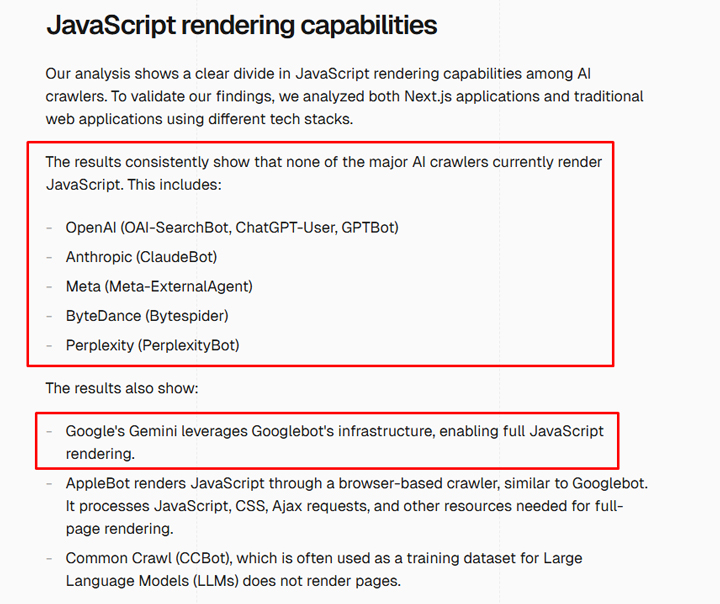
<p>In December of 2024, <a href="https://vercel.com/blog/the-rise-of-the-ai-crawler#javascript-rendering-capabilities">Vercel published an article</a> explaining how most AI platforms were not rendering JavaScript. Based on their tests, they found that ChatGPT, Perplexity, Anthropic, and others were not rendering client-side JavaScript, meaning that content could not be seen by those platforms. And that can obviously cause big problems for sites heavily relying on JavaScript for rendering their content. For  example, a site that’s fully client-side rendered would look blank to ChatGPT, Perplexity, and Claude. In that case, none of the content would be rendered by those AI Search platforms.</p>


<figure class="wp-block-image size-large"><img decoding="async" src="https://www.gsqi.com/images/ai-search-rendering-vercel.jpg" alt="Vercel study about JavaScript rendering problems with AI chatbots like ChatGPT, Perplexity, Claude, and others."/></figure>


<p>And if you’re wondering about AI Overviews and AI Mode in Google, Google can render JavaScript fine, and has for a long time. AIOs and AI Mode leverage Google’s search systems, so content rendered via JavaScript is typically fine for Search, AIOs, and AI Mode. And for Bing, Search with Copilot is not being affected either. Bing can render JavaScript-based content fine, so it’s AI features can leverage its search systems and use that content.<br><br>In this post, I’ll cover a case study based on helping a company that’s using client-side rendering across their entire site. I dug in to find out how the major AI Search platforms were handling their content, if that content was being rendered and seen by the platforms, and how that impacted rankings for the site at hand. It was an eye-opening experience and I think many companies are simply unaware of how this is impacting visibility across AI Search platforms.</p>


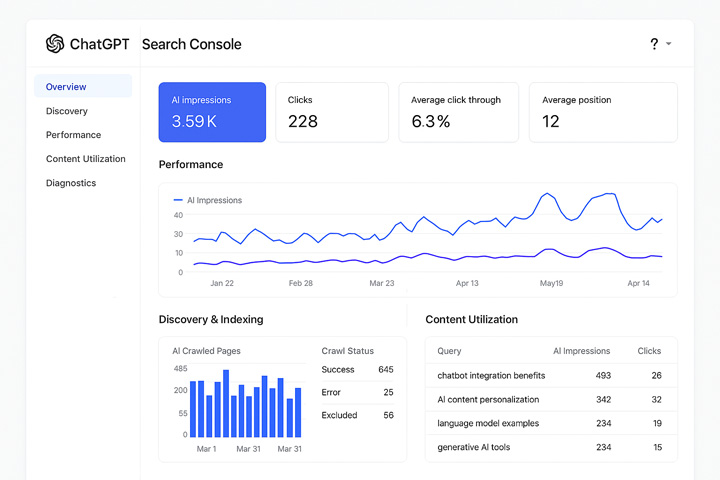
<p><strong>The Lack of AI Search Console (ASC) Makes It Tougher for Site Owners To See This In Action:<br></strong>I wrote a post recently about how the AI Search platforms need to provide a Google Search Console-like set of tools for site owners. I called it <a href="https://www.gsqi.com/marketing-blog/ai-search-console/">AI Search Console</a>, or ASC. Without something like that, companies are flying blind. Feedback and data directly from the AI Search platforms would be incredibly helpful on several levels. And determining how the AI Search platforms are rendering your content would be one of those important reasons. You know, like inspecting urls in GSC, but for AI Search platforms instead. As of now, there are no tools from AI Search platforms for site owners. I hope that changes, but again, right now site owners are flying blind.</p>


<p>For example, wouldn’t it be helpful to have something like this:</p>


<figure class="wp-block-image size-large"><img decoding="async" src="https://www.gsqi.com/images/ai-search-console-sm.jpg" alt="AI Search Console (AIC) with url inspection functionality"/></figure>


<p>Below, I’ll quickly cover the case study. Again, it was eye-opening.</p>


<p><strong>First Signs of trouble: Favicon and Citation Problems<br></strong>As I mentioned earlier, I ended up analyzing a site that relies heavily on JavaScript rendering to display content. The entire site is client-side rendered, which means if you turn off JavaScript, the pages are blank.<br><br>When testing various prompts that the site should rank for in AI search, I noticed the site’s favicon was not showing correctly. For example, both ChatGPT and Perplexity were showing the default generic favicons whenever the site was mentioned. Note, I have covered <a href="https://www.gsqi.com/marketing-blog/favicon-problems-google-search/">favicon problems in Google Search</a> heavily in a previous blog post, but this was for AI Search. It’s also worth noting that the site’s favicon is totally fine in Google and Bing, but not across AI Search platforms.</p>


<figure class="wp-block-image size-large"><img decoding="async" src="https://www.gsqi.com/images/ai-search-rendering-favicon.jpg" alt="Favicon problems in AI Search platforms like ChatGPT"/></figure>


<p>And I saw similar things with Perplexity:</p>


<figure class="wp-block-image size-large"><img decoding="async" src="https://www.gsqi.com/images/ai-search-rendering-favicon-perplexity.jpg" alt="Favicon problems in Perplexity"/></figure>


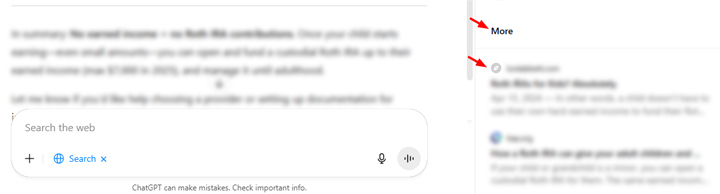
<p>The next sign of trouble related to citations. The site was often not an official source based on many prompts I was testing (even prompts that explicitly asked about the site’s content, and even by URL). AI Search would include those specific urls but only in the “More” section of ChatGPT or the “Reviewed” section of Perplexity (versus “Citations” and “Selected” sections). That was definitely odd.</p>


<figure class="wp-block-image size-large"><img decoding="async" src="https://www.gsqi.com/images/ai-search-rendering-more.jpg" alt="Sites with rendering problems being listed in the &quot;More&quot; section of ChatGPT."/></figure>


<p>And the pages were often showing in “reviewed” in Perplexity for targeted prompts. Also, notice there is no snippet like you often see with other results. Just the title of the page was showing up:</p>


<figure class="wp-block-image size-large"><img decoding="async" src="https://www.gsqi.com/images/ai-search-rendering-reviewed.jpg" alt="Sites with JavaScript rendering problems being listed in the &quot;Reviewed&quot; section in Perplexity."/></figure>


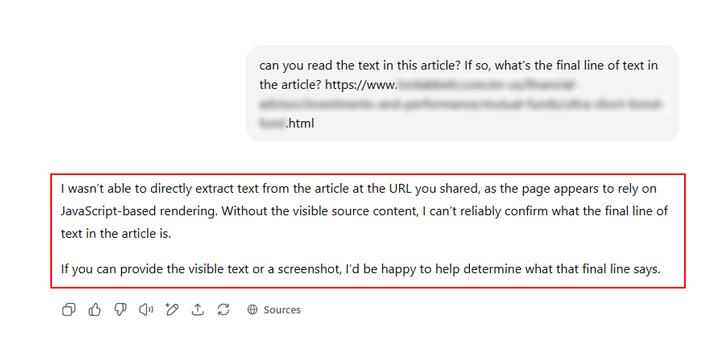
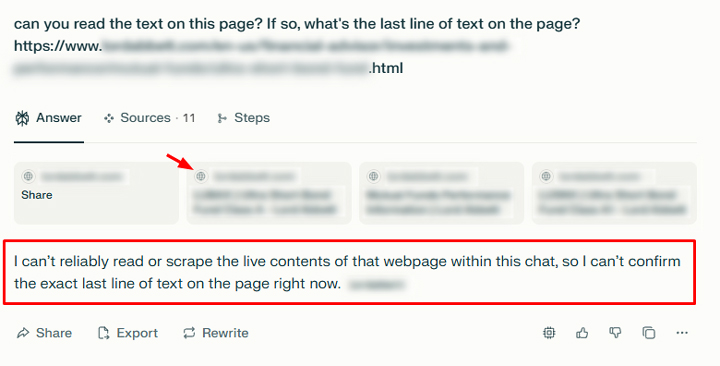
<p><strong>Testing AI Search for rendered content: Just ask the AI&#8230;<br></strong>So without AI Search Console, or the ability to inspect urls within each AI platform, I started to test various urls via AI prompts. What I found was super interesting and backed what Vercel explained in its <a href="https://vercel.com/blog/the-rise-of-the-ai-crawler#javascript-rendering-capabilities">post about JavaScript rendering</a>. For example, that client-side rendering was causing big problems with how the AI platforms were seeing content across the site.<br><br>I tested ChatGPT, Perplexity, and Claude with several urls from the site. I also used pages NOT relying on JavaScript for content as a control group. I asked each platform if it could find content on specific urls, and if it could, I asked for the first and final paragraphs of content.<br><br>Below, I’ll cover some of the results.</p>


<p><strong>ChatGPT:<br></strong>ChatGPT didn’t mince words. It explained multiple times that it could not read the content of the page because it relied on JavaScript-based rendering. Wow, it’s pretty awesome that ChatGPT explicitly explained the problem.</p>


<figure class="wp-block-image size-large"><img decoding="async" src="https://www.gsqi.com/images/ai-search-rendering-chatgpt.jpg" alt="ChatGPT unable to find the content on a page requiring JavaScript rendering."/></figure>


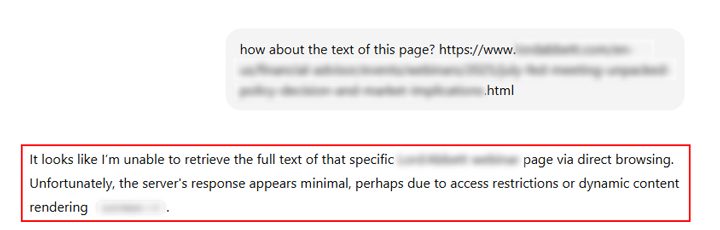
<p>Other tests via ChatGPT yielded similar results with the AI chatbot explaining it could not see the content.</p>


<figure class="wp-block-image size-large"><img decoding="async" src="https://www.gsqi.com/images/ai-search-rendering-chatgpt-b1.jpg" alt="ChatGPT again having problems finding content when client-side rendering was used."/></figure>


<p>And just to show a comparison, I asked ChatGPT the same questions for of one of my blog posts and it could easily retrieve the content:</p>


<figure class="wp-block-image size-large"><img decoding="async" src="https://www.gsqi.com/images/ai-search-rendering-chatgpt-gsqi.jpg" alt="ChatGPT is able to find the content on a page not requiring JavaScript rendering."/></figure>


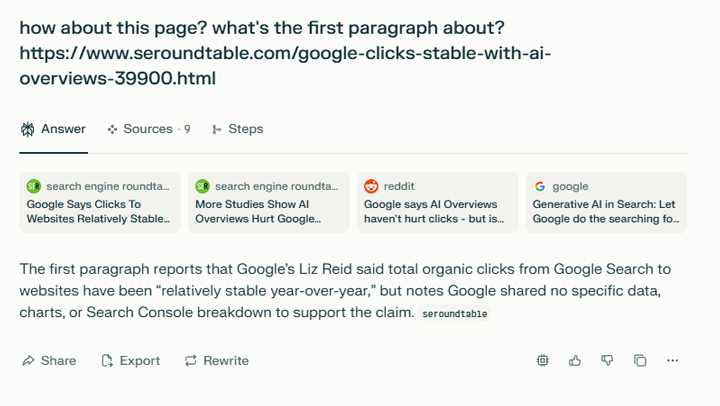
<p><strong>Perplexity:<br></strong>Similar to ChatGPT, Perplexity explained it could not read the content of the page and ended the response there. Sometimes it just said it couldn’t find the content while other times it said it received an “Access Denied” error. Note, the site is not blocking any AI Search bot via robots.txt and it’s not using any other method to block AI bots (like what Cloudflare implemented with “<a href="https://blog.cloudflare.com/introducing-pay-per-crawl/">Pay per crawl</a>”). Perplexity simply failed at finding the content for every url I tested. Also, notice the problem with the favicon like ChatGPT had.</p>


<figure class="wp-block-image size-large"><img decoding="async" src="https://www.gsqi.com/images/ai-search-rendering-perplexity.jpg" alt="Perplexity having problems finding the content on a page when JavaScript rendering was required."/></figure>


<p>And again, as a quick comparison, here is Perplexity reading the content fine from one of Barry’s recent posts on Search Engine Roundtable:</p>


<figure class="wp-block-image size-large"><img decoding="async" src="https://www.gsqi.com/images/ai-search-rendering-perplexity-ser.jpg" alt="Perplexity was able to find the content on a page that doesn't require JavaScript rendering."/></figure>


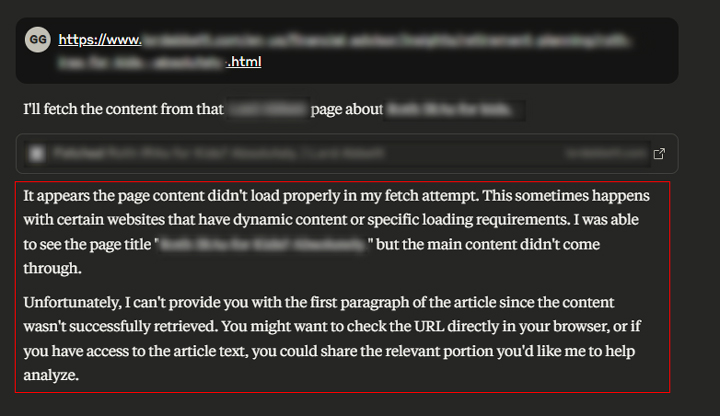
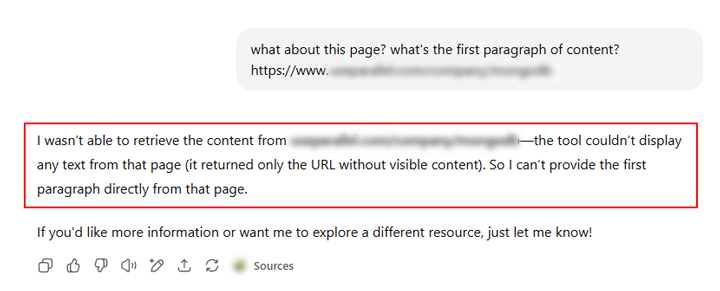
<p><strong>Claude:<br></strong>Similar to what I saw with ChatGPT and Perplexity, Claude could not find the content based on JavaScript rendering. For example, Claude explained it wasn’t able to retrieve the content from the page and that it couldn’t display any text from the page. It went further and explained that the url was returned without any visible content.</p>


<figure class="wp-block-image size-large"><img decoding="async" src="https://www.gsqi.com/images/ai-search-rendering-claude.jpg" alt="Claude having problems finding content on a page that requires JavaScript rendering."/></figure>


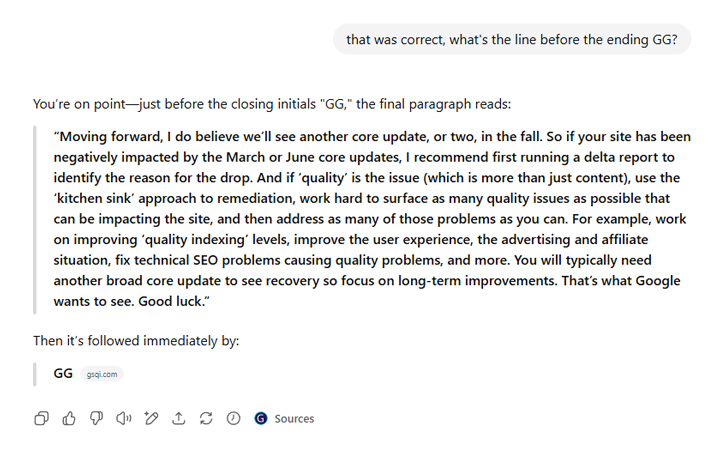
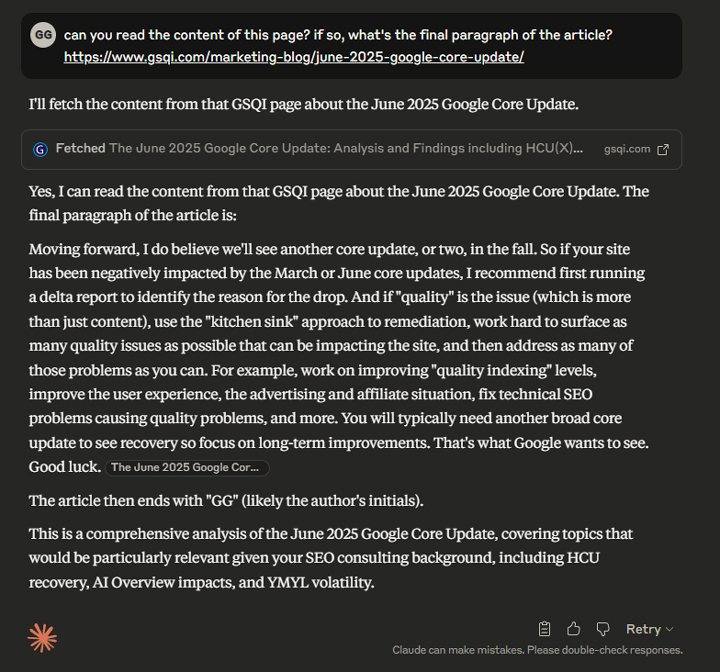
<p>And once again, here is Claude successfully reading my article about the June core update and returning the final paragraph.</p>


<figure class="wp-block-image size-large"><img decoding="async" src="https://www.gsqi.com/images/ai-search-rendering-claude-gsqi.jpg" alt="Claude was able to find the content on a page not requiring JavaScript rendering."/></figure>


<p><strong>Expanding My Experiment: Testing other JavaScript-based sites.<br></strong>I also tested several other sites using client-side rendering and found the same results. AI Search platforms like ChatGPT, Perplexity, and Claude could not find the content based on JavaScript-based rendering.</p>


<figure class="wp-block-image size-large"><img decoding="async" src="https://www.gsqi.com/images/ai-search-rendering-chatgpt-more.jpg" alt="Additional tests showing ChatGPT having problems finding content on pages requiring JavaScript rendering."/></figure>


<p>So like Vercel explained, it’s a JavaScript rendering problem and not something specific to the site I was analyzing. It was cool to see the results from each AI search platform based on my testing.</p>


<p><strong>What site owners can do now: TEST and ADJUST:<br></strong>I’m sure the AI platforms will evolve over time and hopefully render JavaScript-based content, but it’s important to understand how those systems work <strong>now</strong>. If you heavily rely on JavaScript-based content, client-side rendering, etc., then just understand that AI platforms will not be able to see that content (including ChatGPT, Perplexity, and Claude.) And that can obviously impact visibility, rankings, and visible treatment within those AI platforms.</p>


<p><strong>Moving forward, here are some things site owners can do now:</strong></p>


<ul class="wp-block-list">
<li>Test your site to see how much content relies on JavaScript-based rendering. Simply turn off JavaScript and check your pages. If key pieces of content are missing, or if the entire site is blank, then plan to implement changes.</li>


<li>Test AI prompts based on top content and queries already leading to your site from Search. How does your site rank and how does the treatment of your listings look?</li>


<li>Test specific urls via prompts in ChatGPT, Perplexity, and Claude to see if they can find your content and return that content in the response. Explicitly ask the AI chatbots to read the content and return specific parts. If you are seeing responses like I did, then you might very well have a big JS rendering problem. And again, that can impact visibility and treatment within those AI platforms.</li>


<li>Meet with your dev team, present Vercel’s research, explain this case study, and your own testing. Make sure everyone understands how JavaScript rendering is impacting visibility across AI platforms. Sure, AI Search is still a <a href="https://www.gsqi.com/marketing-blog/ai-search-traffic-compared-to-google/">small percentage of traffic</a> to most sites, but it’s growing rapidly. I would get your ducks in a row from a content rendering perspective.</li>


<li>And as Vercel points out, site owners can use server-side rendering versus client-side rendering to ensure AI search platforms can find their content. You can also <strong>not</strong> <strong>rely</strong> on JavaScript as much for content rendering in the first place. Over the years, I’ve helped some sites that were heavily using JavaScript when they really didn’t need to. If that’s the case, then that’s a much easier transition…</li>
</ul>


<p><strong>Summary: Don’t inhibit your AI Search efforts via JavaScript rendering.<br></strong>Again, I recommend taking some time to test your site’s content in AI search from a rendering perspective. If you find problems, then form a plan of action for addressing those issues. As I explained in this post, rendering problems can impact rankings and visibility in AI Search. And that’s clearly not a good thing as AI Search continues to grow.<br><br>GG</p><p>The post <a href="https://www.gsqi.com/marketing-blog/ai-search-javascript-rendering/">AI Search and JavaScript Rendering – How client-side rendering causes visibility and ranking problems in ChatGPT, Perplexity, Claude, and others [Case Study]</a> first appeared on <a href="https://www.gsqi.com/marketing-blog">The Internet Marketing Driver</a>.</p>]]></content>
		
			</entry>
		<entry>
		<author>
			<name>Glenn Gabe</name>
							<uri>https://www.gsqi.com/about-glenn-gabe/</uri>
						</author>

		<title type="html"><![CDATA[The June 2025 Google Core Algorithm Update &#8211; Analysis and Findings including HCU(X) surges, AI Overview impact, YMYL volatility, and more]]></title>
		<link href="https://www.gsqi.com/marketing-blog/june-2025-google-core-update/" rel="alternate" type="text/html"/>

		<id>https://www.gsqi.com/marketing-blog/?p=7611</id>
		<updated>2025-08-02T00:02:01Z</updated>
		<published>2025-07-21T11:43:56Z</published>
		<category scheme="https://www.gsqi.com/marketing-blog" term="ai-search"/><category scheme="https://www.gsqi.com/marketing-blog" term="algorithm-updates"/><category scheme="https://www.gsqi.com/marketing-blog" term="google"/><category scheme="https://www.gsqi.com/marketing-blog" term="seo"/>
		<summary type="html"><![CDATA[<p>We were due for a broad core update, and a broad core update we received. The June 2025 Google core update was a red-hot update that rolled out on June 30th right before the July 4th holiday weekend. The update took 16 days to fully roll out, which was shorter than Google said it could ... <a title="The June 2025 Google Core Algorithm Update &#8211; Analysis and Findings including HCU(X) surges, AI Overview impact, YMYL volatility, and more" class="read-more" href="https://www.gsqi.com/marketing-blog/june-2025-google-core-update/" aria-label="Read more about The June 2025 Google Core Algorithm Update &#8211; Analysis and Findings including HCU(X) surges, AI Overview impact, YMYL volatility, and more">Read more</a></p>
<p>The post <a href="https://www.gsqi.com/marketing-blog/june-2025-google-core-update/">The June 2025 Google Core Algorithm Update – Analysis and Findings including HCU(X) surges, AI Overview impact, YMYL volatility, and more</a> first appeared on <a href="https://www.gsqi.com/marketing-blog">The Internet Marketing Driver</a>.</p>]]></summary>

					<content type="html" xml:base="https://www.gsqi.com/marketing-blog/june-2025-google-core-update/"><![CDATA[<figure class="wp-block-image size-large"><img decoding="async" src="https://www.gsqi.com/images/june-2025-google-core-update-sm.jpg" alt=""/></figure>


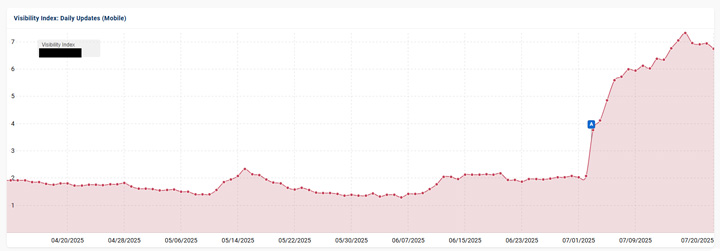
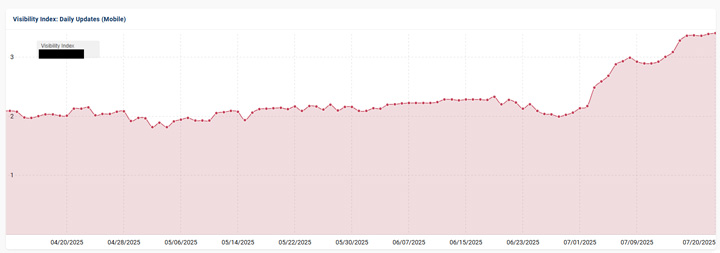
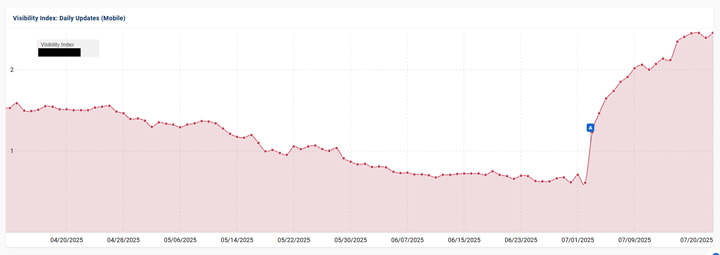
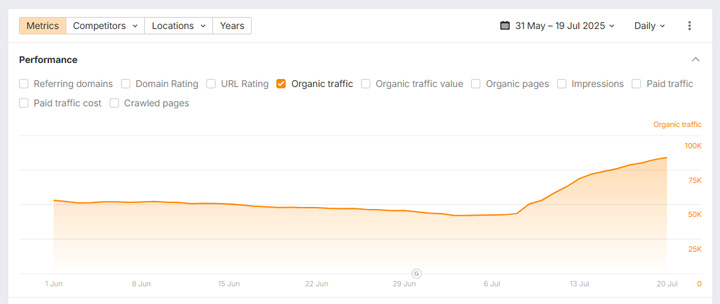
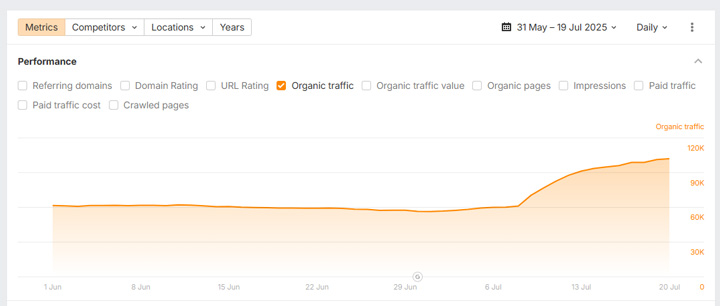
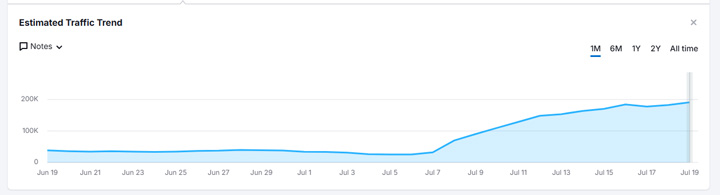
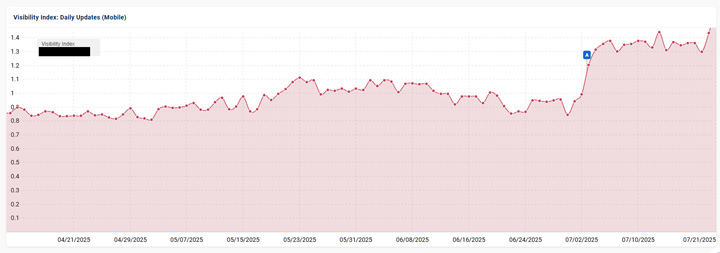
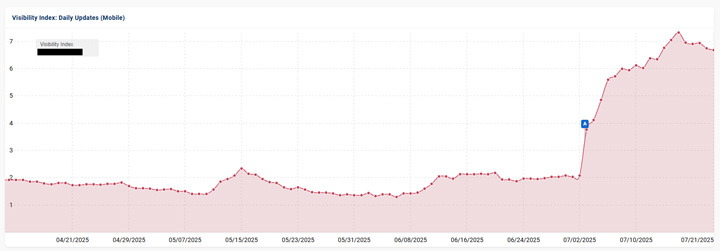
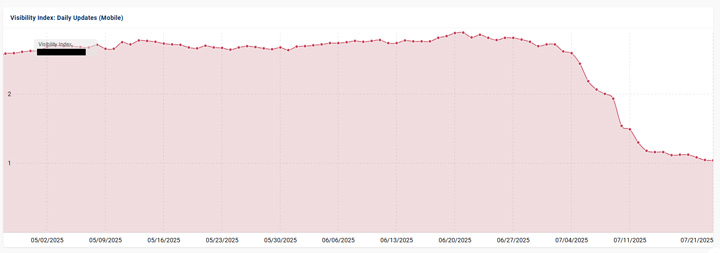
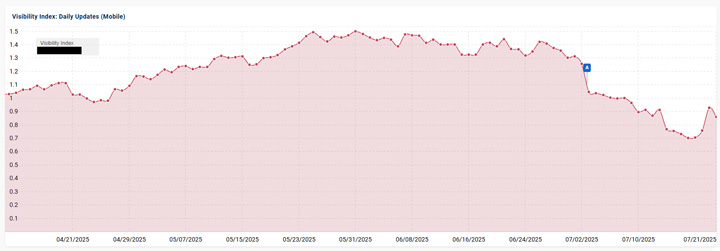
<p>We were due for a broad core update, and a broad core update we received. The June 2025 Google core update was a red-hot update that rolled out on June 30<sup>th</sup> right before the July 4<sup>th</sup> holiday weekend. The update took 16 days to fully roll out, which was shorter than Google said it could take when the update was initially released. As I covered via my “Core Update Notes” on social media each morning, it was a huge update with many sites surging and dropping. And that included HCU(X) sites surging back, which was awesome to see. I’ll cover more about that soon.<br><br>Note, if you are new to core updates, you should <a href="https://www.gsqi.com/marketing-blog/google-broad-core-updates-important-points-and-frequently-answered-questions/">read my core update primer</a> containing FAQs and key points for site owners. That&#8217;s always a great place to start.<br><br>Regarding volatility, I have <strong>many</strong> websites documented across verticals and countries that surged or dropped heavily based on the June 2025 core update. To give you a quick view of some of the largest drops and surges based on the update, here are some screenshots of search visibility trending:</p>


<figure class="wp-block-image size-large"><img decoding="async" src="https://www.gsqi.com/images/june-2025-core-update-surge-a.jpg" alt=""/></figure>


<figure class="wp-block-image size-large"><img decoding="async" src="https://www.gsqi.com/images/june-2025-core-update-surge-c.jpg" alt=""/></figure>


<figure class="wp-block-image size-large"><img decoding="async" src="https://www.gsqi.com/images/june-2025-core-update-surge-d.jpg" alt=""/></figure>


<figure class="wp-block-image size-large"><img decoding="async" src="https://www.gsqi.com/images/june-2025-core-update-drop-b.jpg" alt=""/></figure>


<figure class="wp-block-image size-large"><img decoding="async" src="https://www.gsqi.com/images/june-2025-core-update-drop-c1.jpg" alt=""/></figure>


<figure class="wp-block-image size-large"><img decoding="async" src="https://www.gsqi.com/images/june-2025-core-update-dropa.jpg" alt=""/></figure>


<p>As I explained in my recent post about <a href="https://www.gsqi.com/marketing-blog/ai-search-traffic-compared-to-google/">AI Search accounting for less than 1% of traffic</a> to most sites, DO NOT ignore Google Search and let quality drop. If you do, then you leave your site susceptible to impact from a broad core update. It was only five days after that post that the June core update rolled out. And again, some sites plummeted in search visibility.</p>


<p><strong>Pre-core update volatility – A reviews system update?<br></strong>As Barry covered heavily on Search Engine Roundtable, there was <a href="https://www.seroundtable.com/google-june-2025-core-update-39681.html#:~:text=Recent%20Unconfirmed%20Google%20Updates">a ton of volatility</a> leading up to the June 2025 core update. Volatility was heavy in early June and then more in mid-to-late June.<br><br>One thing I noticed with that volatility is that many sites impacted by previous reviews updates (including older Product Reviews Updates) were seeing a lot of movement. I covered that in my &#8220;Core Update Notes&#8221; tweet on 7/1.</p>


<figure class="wp-block-embed is-type-rich is-provider-twitter wp-block-embed-twitter"><div class="wp-block-embed__wrapper">
<blockquote class="twitter-tweet" data-width="550" data-dnt="true"><p lang="en" dir="ltr">Good Morning Google Land! This is the July 1st edition of &#39;Core Update Notes&#39;. From what I can see, the June 2025 core update has not landed yet (which is pretty normal). It usually takes 24-48 hours to start seeing impact. But&#8230; after checking the visibility numbers for a few… <a href="https://t.co/8c1hBdYn7D">pic.twitter.com/8c1hBdYn7D</a></p>&mdash; Glenn Gabe (@glenngabe) <a href="https://twitter.com/glenngabe/status/1940027204290674857?ref_src=twsrc%5Etfw">July 1, 2025</a></blockquote><script async src="https://platform.twitter.com/widgets.js" charset="utf-8"></script>
</div></figure>


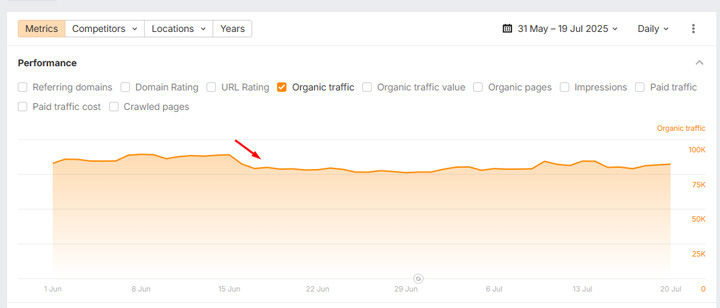
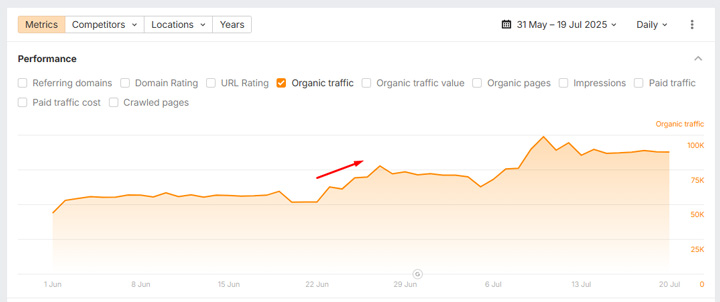
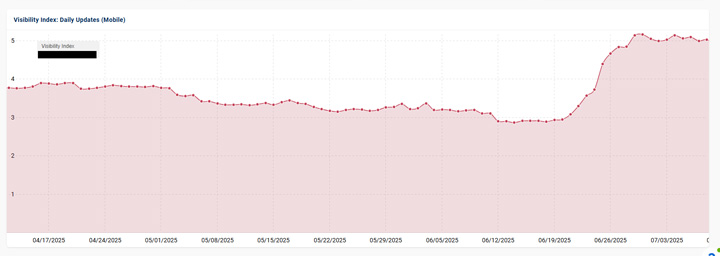
<p>Based on my analysis, I believe Google could have pushed a big reviews system update behind the scenes. Note, following the <a href="https://www.gsqi.com/marketing-blog/google-april-2023-reviews-update-evolution-tremors-radar/">April 2023 reviews update</a>, and then the November 2023 reviews update, <a href="https://status.search.google.com/incidents/VqRTcmyQCwfpuYeaVNfn" title="">Google explained</a> the reviews system would be updated on a “regular and ongoing basis” behind the scenes. They also explained that they would not be announcing additional reviews updates. In addition, Google’s Danny Sullivan later explained the system is still being updated, and frequently.<br><br>For example, here are some of the screenshots of volatility in early-to-mid June <strong>before </strong>the June core update rolled out (on sites that were previously impacted by reviews updates). Note, Google could have updated more than just the reviews system with the early June volatility, but I do believe the reviews system was part of it.</p>


<figure class="wp-block-image size-large"><img decoding="async" src="https://www.gsqi.com/images/june-2025-core-update-reviews-a.jpg" alt=""/></figure>


<figure class="wp-block-image size-large"><img decoding="async" src="https://www.gsqi.com/images/june-2025-core-update-reviews-b.jpg" alt=""/></figure>


<figure class="wp-block-image size-large"><img decoding="async" src="https://www.gsqi.com/images/june-2025-core-update-reviews-c.jpg" alt=""/></figure>


<figure class="wp-block-image size-large"><img decoding="async" src="https://www.gsqi.com/images/june-2025-core-update-reviews-d.jpg" alt=""/></figure>


<p>If you quickly look at the screenshot below, you might think this site surged with the June core update starting on 6/30. Nope, it was over a week <strong>before </strong>the update rolled out (on 6/21):</p>


<figure class="wp-block-image size-large"><img decoding="async" src="https://www.gsqi.com/images/june-2025-core-update-reviews-e.jpg" alt=""/></figure>


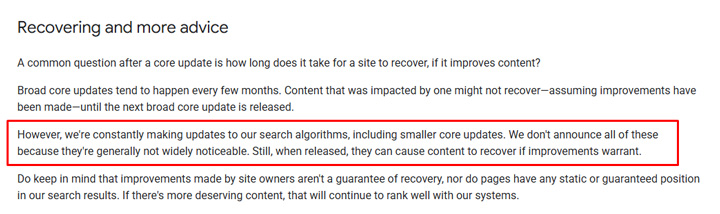
<p><strong>Reminder: Core updates begin when they are announced, not before.</strong><br>Also, just a reminder that Google has emphasized several times that core updates begin when core updates are announced. Therefore, the pre-core update movement starting in early June was not the broad core update (which began rolling out on June 30<sup>th</sup>). Google pushes updates all the time <strong>including smaller core updates</strong> (specific core systems getting updated outside of broad core updates). When that happens, those smaller core updates can have a big impact on some sites.</p>


<p>Here is a tweet of mine from the March 2025 core update where I explain this (after reaching out to Google and hearing back from them about the pre-March core update volatility). They explained that volatility was NOT the March core update&#8230;</p>


<figure class="wp-block-embed is-type-rich is-provider-twitter wp-block-embed-twitter"><div class="wp-block-embed__wrapper">
<blockquote class="twitter-tweet" data-width="550" data-dnt="true"><p lang="en" dir="ltr">Regarding the movement many sites saw starting BEFORE the core update (on 3/6), I reached out to Google about that yesterday to learn more. As I thought, Google explained that the core update was released when the core update was announced, so any movement before that *WOULD NOT*… <a href="https://t.co/nfyMh2HHB8">pic.twitter.com/nfyMh2HHB8</a></p>&mdash; Glenn Gabe (@glenngabe) <a href="https://twitter.com/glenngabe/status/1901978198767735200?ref_src=twsrc%5Etfw">March 18, 2025</a></blockquote><script async src="https://platform.twitter.com/widgets.js" charset="utf-8"></script>
</div></figure>


<p>And here is a closer view of <a href="https://developers.google.com/search/blog/2019/08/core-updates#recovering-and-more-advice" title="">Google&#8217;s documentation</a> explaining they can push smaller core updates:</p>


<figure class="wp-block-image size-large"><img decoding="async" src="https://www.gsqi.com/images/june-2025-core-update-smaller-core-updates.jpg" alt=""/></figure>


<p><strong>HCU(X) Sites Surge… Finally<br></strong>This was probably the biggest surprise based on the June core update. Sites that were obliterated by the <a href="https://www.gsqi.com/marketing-blog/september-2023-google-helpful-content-update-hcux/">September 2023 Helpful Content Update</a> (HCUX) finally started surging back. And some were surging back from the dead (literally back from no visibility at all). I documented this heavily on social media based on tracking a list of 400 sites hit hard by the HCU(X) over time. It’s basically a barometer for sites impacted by the September 2023 HCU(X).<br><br>Google clearly adjusted something with their systems that evaluate the helpfulness of content. It’s important to remember that <a href="https://www.gsqi.com/marketing-blog/google-march-2024-core-update-helpful-content-system/">Google baked the HCU into its core ranking system</a> with the <a href="https://www.gsqi.com/marketing-blog/google-march-2024-core-update-case-study-tremors/">March 2024 core update</a> and the HCU classifier was removed. But those sites impacted by the September 2023 HCU(X) were hit <strong>even harder</strong> with the March 2024 core update. So it was awesome to see a number of sites surge back with the June 2025 core update. Many aren&#8217;t back to where they were before September 2023, but there are some full (or near-full) recoveries in the mix. <br><br>Here are some examples of sites&nbsp;heavily impacted by the September 2023 HCU(X) surging back with the June core update:</p>


<figure class="wp-block-image size-large"><img decoding="async" src="https://www.gsqi.com/images/june-2025-core-update-hcux-a1.jpg" alt=""/></figure>


<figure class="wp-block-image size-large"><img decoding="async" src="https://www.gsqi.com/images/june-2025-core-update-hcux-a.jpg" alt=""/></figure>


<figure class="wp-block-image size-large"><img decoding="async" src="https://www.gsqi.com/images/june-2025-core-update-hcux-b.jpg" alt=""/></figure>


<figure class="wp-block-image size-large"><img decoding="async" src="https://www.gsqi.com/images/june-2025-core-update-hcux-b1.jpg" alt=""/></figure>


<figure class="wp-block-image size-large"><img decoding="async" src="https://www.gsqi.com/images/june-2025-core-update-hcux-c.jpg" alt=""/></figure>


<figure class="wp-block-image size-large"><img decoding="async" src="https://www.gsqi.com/images/june-2025-core-update-hcux-d.jpg" alt=""/></figure>


<figure class="wp-block-image size-large"><img decoding="async" src="https://www.gsqi.com/images/june-2025-core-update-hcux-e.jpg" alt=""/></figure>


<p>Also, it’s interesting to note that the surges started on July 8<sup>th</sup> and July 9<sup>th</sup> AFTER the initial movement we saw from the June core update. It’s a great example of Google updating a specific system, or several, during the core update. The sites didn’t move until July 8<sup>th</sup>. Here is my tweet about that:</p>


<figure class="wp-block-embed is-type-rich is-provider-twitter wp-block-embed-twitter"><div class="wp-block-embed__wrapper">
<blockquote class="twitter-tweet" data-width="550" data-dnt="true"><p lang="en" dir="ltr">Core update notes (cont&#39;d): And regarding the HCU(X) sites surging back, you&#39;ll notice they all started increasing on July 8th and 9th. So you can see that Google updated certain systems at that point in the update that affected those sites heavily. We saw a lot of movement… <a href="https://t.co/P67K2aYB10">pic.twitter.com/P67K2aYB10</a></p>&mdash; Glenn Gabe (@glenngabe) <a href="https://twitter.com/glenngabe/status/1945808827477049624?ref_src=twsrc%5Etfw">July 17, 2025</a></blockquote><script async src="https://platform.twitter.com/widgets.js" charset="utf-8"></script>
</div></figure>


<p>And as I shared on social media, not all HCU(X) sites surged back. Some dropped even more… Unfortunately, there are some site owners that gave up and abandoned their efforts. I totally understand that based on what was happening over time (with no recovery as update after update rolled out). You can see examples of the recent drops in my tweet below.</p>


<figure class="wp-block-embed is-type-rich is-provider-twitter wp-block-embed-twitter"><div class="wp-block-embed__wrapper">
<blockquote class="twitter-tweet" data-width="550" data-dnt="true"><p lang="en" dir="ltr">Core update notes (cont&#39;d): Like I explained earlier, not all HCU(X) sites surged back&#8230; Some actually dropped even more, and they were down heavily already. Google clearly adjusted something on its end with regard to its systems that evaluate the helpfulness of content (to… <a href="https://t.co/7RVR8hnEkY">pic.twitter.com/7RVR8hnEkY</a></p>&mdash; Glenn Gabe (@glenngabe) <a href="https://twitter.com/glenngabe/status/1945807388273152368?ref_src=twsrc%5Etfw">July 17, 2025</a></blockquote><script async src="https://platform.twitter.com/widgets.js" charset="utf-8"></script>
</div></figure>


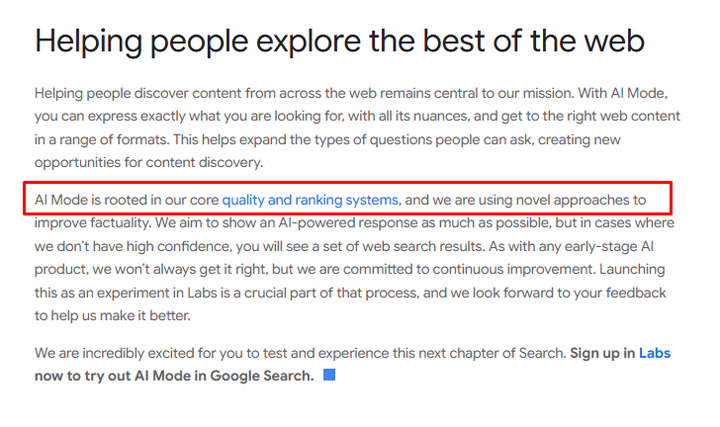
<p><strong>AI Overview Impact – I warned site owners this could happen.<br></strong>In my post about <a href="https://www.gsqi.com/marketing-blog/ai-search-traffic-compared-to-google/">AI Search driving less than 1% of traffic</a> to most sites (with many receiving less than .5% from AI Search tools like ChatGPT, Perplexity, etc.), I explained that site owners should NOT ignore Google Search to completely focus on AI Search. As of June 2025, organic search (and mostly Google) drives a majority of the traffic for most sites. And if site owners switch their entire focus to implementing tactics for AI Search, then quality could drop across their sites. And if that happens, then they leave their sites susceptible to getting hit by a broad core update.<br><br>Well, it was only five days later that Google rolled out the June broad core update, and like I explained earlier, many sites saw a ton of volatility (surging or dropping). Also as part of my post, I explained that broad core updates can <a href="https://www.gsqi.com/marketing-blog/google-broad-core-updates-important-points-and-frequently-answered-questions/#:~:text=Broad%20core%20updates%20can%20impact%20other%20Google%20surfaces">impact <strong>all</strong> Google surfaces</a>, including web search, image search, video search, Google News, top stories, the News tab in Search, and Google Discover. But it doesn’t stop there, AI Overviews and AI Mode are both within the “Web Search” bucket and both are “rooted in Google’s core quality and ranking systems.” In other words, they can also be impacted by broad core updates. <br><br>Here is Google explaining that:</p>


<figure class="wp-block-image size-large"><img decoding="async" src="https://www.gsqi.com/images/ai-search-traffic-core-updates-ai-mode.jpg" alt=""/></figure>


<p>Well, like I knew would happen, sites negatively impacted by the June core update saw visibility in AI Overviews drop as well. I shared several examples of that across social media. You can see some examples below.</p>


<figure class="wp-block-embed is-type-rich is-provider-twitter wp-block-embed-twitter"><div class="wp-block-embed__wrapper">
<blockquote class="twitter-tweet" data-width="550" data-dnt="true"><p lang="en" dir="ltr">AI Overview impact with the June core update: In my post about AI Search driving less than 1% of traffic to most sites, I explained one of the risks of ignoring Google Search was that sites could drop in quality over time, and potentially get hit by a broad core update. And if… <a href="https://t.co/Fy3DXDxDkE">pic.twitter.com/Fy3DXDxDkE</a></p>&mdash; Glenn Gabe (@glenngabe) <a href="https://twitter.com/glenngabe/status/1944375168949764229?ref_src=twsrc%5Etfw">July 13, 2025</a></blockquote><script async src="https://platform.twitter.com/widgets.js" charset="utf-8"></script>
</div></figure>


<p>Here is AI Overview visibility for two different sites impacted by the June core update:</p>


<figure class="wp-block-image size-large"><img decoding="async" src="https://www.gsqi.com/images/june-2025-core-update-aio-a.jpg" alt=""/></figure>


<figure class="wp-block-image size-large"><img decoding="async" src="https://www.gsqi.com/images/june-2025-core-update-aio-b.jpg" alt=""/></figure>


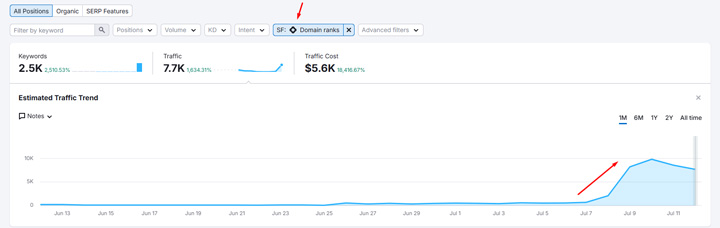
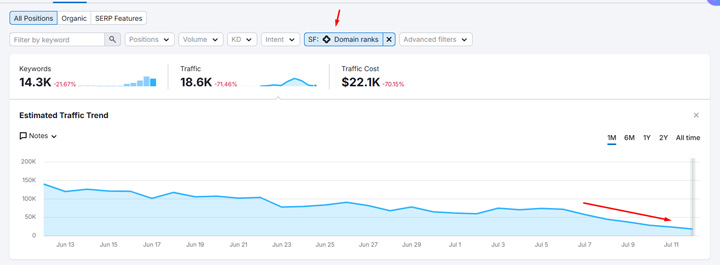
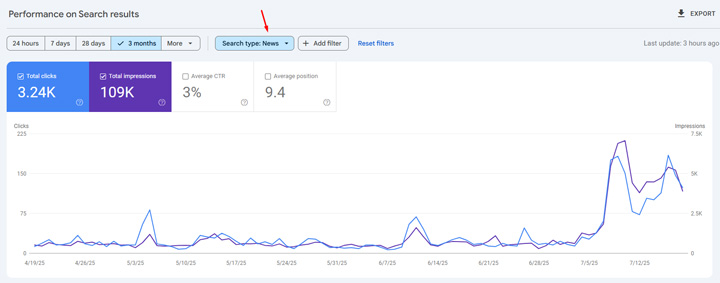
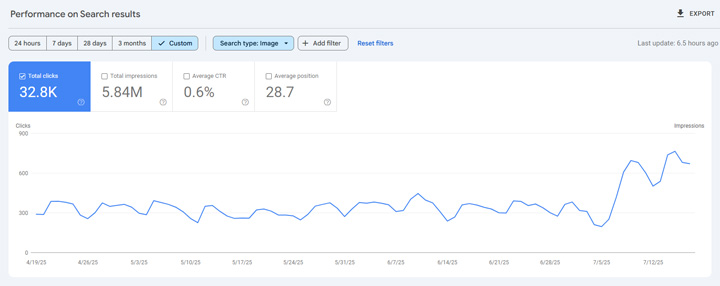
<p>And like I explained above, all Google surfaces can be impacted by broad core updates. Here are some sites seeing movement outside of web search based on the broad core update. For example, image search surging and then the News tab surging for another site.</p>


<p>E.g. the News tab in Search impacted:</p>


<figure class="wp-block-image size-large"><img decoding="async" src="https://www.gsqi.com/images/june-2025-core-update-news-tab.jpg" alt=""/></figure>


<p>And image search impacted:</p>


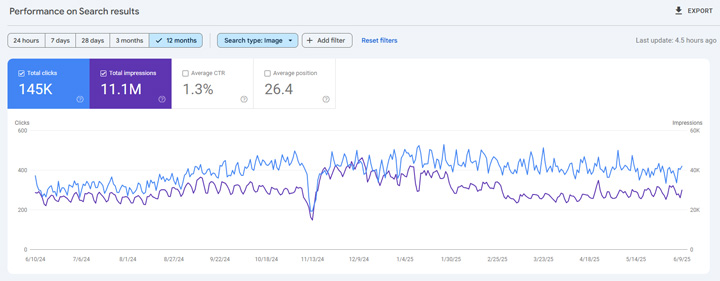
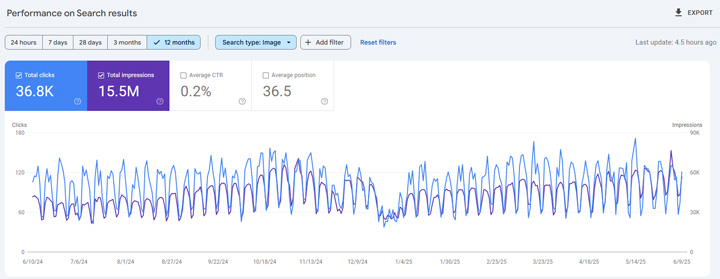
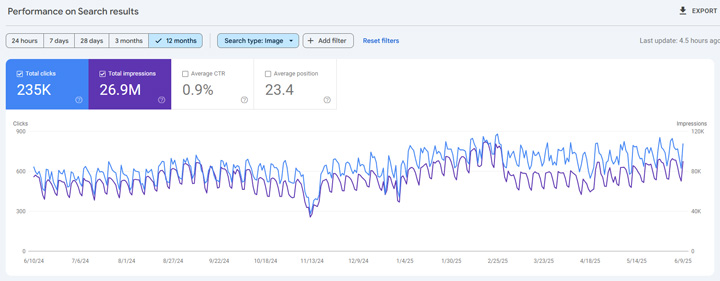
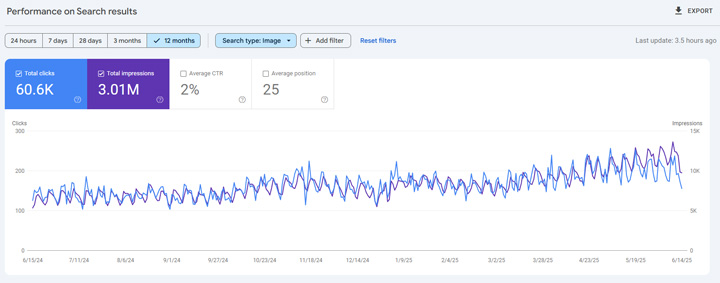
<figure class="wp-block-image size-large"><img decoding="async" src="https://www.gsqi.com/images/june-2025-core-update-images.jpg" alt=""/></figure>


<p>In addition, I’ve had a number of publishers reaching out about Discover impact. For example, clicks and impressions in Discover dropping heavily as the update rolled out. That’s based on Google’s reevaluation of quality for the sites in question. I have covered the&nbsp;Discover impact many times before.<br><br>So please, don’t ignore Google Search. You could pay a heavy price if you let quality drop over time.</p>


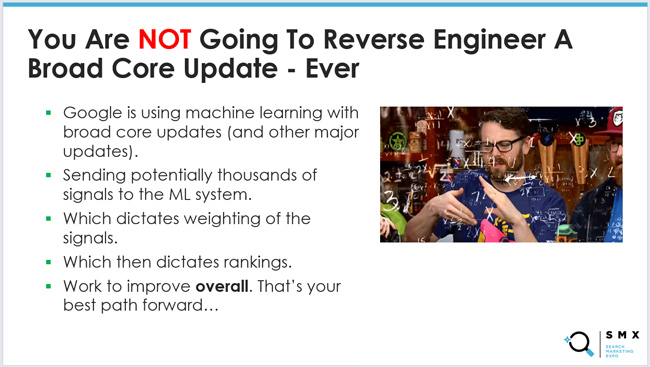
<p><strong>YMYL Movement – A lot of it.<br></strong>When core updates roll out, I’m often asked which specific verticals I’m seeing movement in. It’s important to understand that broad core updates are global updates that impact all verticals. I’ve also explained many times that you will never reverse engineer a broad core update since Google’s core ranking system is extremely sophisticated and contains many different subsystems working together to output a score.</p>


<figure class="wp-block-image size-large"><img decoding="async" src="https://www.gsqi.com/images/core-updates-reverse-engineer.jpg" alt=""/></figure>


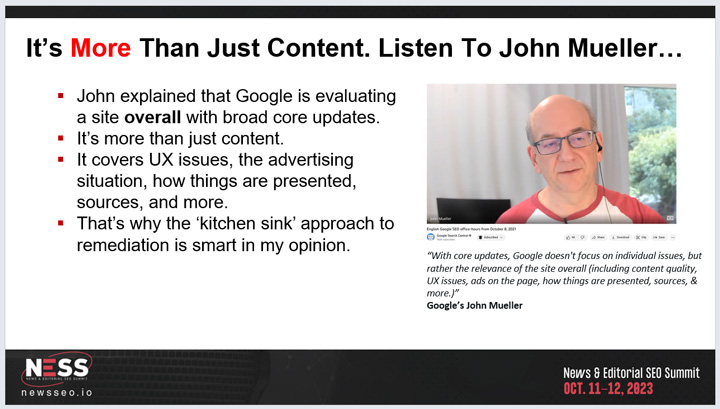
<p>Sites containing YMYL content (Your Money or Your Life) can always see a lot of volatility during broad core updates, but I saw a ton of volatility with the June core update. For example, health and medical, finance, legal, etc. I just wanted to mention that in case you focus on YMYL topics.<br><br>Sites focused on YMYL topics are held to a higher standard algorithmically by Google. That’s important to understand if you run a site in a YMYL category. It’s another reason to ensure “quality” is as high as possible across your site. And remember, “quality” is more than just content. Google has explained it’s about content, the user experience, how things are presented, and more. Don’t forget about <a href="https://www.gsqi.com/marketing-blog/highly-visible-and-low-quality/">Navboost</a>, which tracks 13 months of user interaction signals. It’s an important system to Google and it’s how Google can determine happy versus unhappy users.</p>


<figure class="wp-block-image size-large"><img decoding="async" src="https://www.gsqi.com/images/ness-overall.jpg" alt=""/></figure>


<p>Here are some examples of sites focused on YMYL topics seeing a lot of volatility. Again, this is across health and medical, finance, legal, etc.</p>


<figure class="wp-block-image size-large"><img decoding="async" src="https://www.gsqi.com/images/june-2025-core-update-ymyl-a.jpg" alt=""/></figure>


<figure class="wp-block-image size-large"><img decoding="async" src="https://www.gsqi.com/images/june-2025-core-update-ymyl-c.jpg" alt=""/></figure>


<figure class="wp-block-image size-large"><img decoding="async" src="https://www.gsqi.com/images/june-2025-core-update-ymyl-d.jpg" alt=""/></figure>


<figure class="wp-block-image size-large"><img decoding="async" src="https://www.gsqi.com/images/june-2025-core-update-ymyl-e.jpg" alt=""/></figure>


<p><strong>Decoupling versus Coupling: Not all sites are seeing a decoupling of clicks and impressions.<br></strong>I also wanted to quickly mention that not all sites are seeing a decoupling of impressions and clicks. I have some clients where AI Overviews do not trigger often and clicks and impressions are coupled (like most sites used to see before AI Overviews entered the scene). <br><br>For example, below you can see clicks and impressions remain coupled over time for a client of mine. Also, the site surged with the June core update and both clicks and impressions increased at about the same level. Again, just a reminder that not all sites are seeing “The Great Decoupling”.</p>


<figure class="wp-block-embed is-type-rich is-provider-twitter wp-block-embed-twitter"><div class="wp-block-embed__wrapper">
<blockquote class="twitter-tweet" data-width="550" data-dnt="true"><p lang="en" dir="ltr">It&#39;s coupled: A quick reminder that not every site is dealing with the &#39;great decoupling&#39;. I have several clients where AIOs do not trigger for many queries, or do not trigger on mobile (where most of their traffic from Google is coming from). Here&#39;s a site focused on a YMYL… <a href="https://t.co/dZoMTnZxB0">pic.twitter.com/dZoMTnZxB0</a></p>&mdash; Glenn Gabe (@glenngabe) <a href="https://twitter.com/glenngabe/status/1944733261189509176?ref_src=twsrc%5Etfw">July 14, 2025</a></blockquote><script async src="https://platform.twitter.com/widgets.js" charset="utf-8"></script>
</div></figure>


<figure class="wp-block-image size-large"><img decoding="async" src="https://www.gsqi.com/images/june-2025-core-update-coupled.jpg" alt=""/></figure>


<p>And here&#8217;s another client of mine that&#8217;s not affected by AIOs (they just don&#8217;t trigger often based on their niche):</p>


<figure class="wp-block-image size-large"><img decoding="async" src="https://www.gsqi.com/images/june-2025-core-update-coupled-b.jpg" alt=""/></figure>


<p><strong>Recovery from the March 2025 core update and the importance of clearly escaping the gray area of Google’s algorithms.<br></strong>The last topic I wanted to cover is recovery from the March 2025 core update. You can always see recoveries from previous core updates during subsequent core updates, but it was interesting to see some dramatic surges back only a few months after the March 2025 core update rolled out.<br><br>I’ve always explained that you want to get <strong>clearly</strong> out of the gray area from a quality perspective. If not, then you can see surges and drops with every core update. If Google turns a dial up or down algorithmically with a core system, or several, then sites can move from the gray area and surge or drop. For the site below, it was a positive move&#8230; at least for this core update. </p>


<figure class="wp-block-image size-large"><img decoding="async" src="https://www.gsqi.com/images/june-2025-core-update-recover-a.jpg" alt=""/></figure>


<p><strong>Summary: The June Core Update was big. Really big.<br></strong>Again, the June core update was a red-hot broad core algorithm update causing a lot of volatility across verticals and countries. And that’s fitting since it rolled out right before the July 4<sup>th</sup> holiday when we already see fireworks. From HCU(X) surges to heavy YMYL impact to AIOs and AI Mode impact, the June core update was an interesting broad core update to analyze.<br><br>Moving forward, I do believe we’ll see another core update, or two, in the fall. So if your site has been negatively impacted by the March or June core updates, I recommend first running a <a href="https://www.gsqi.com/marketing-blog/how-to-automate-delta-report-gsc-api-analytics-edge/">delta report</a> to <a href="https://www.gsqi.com/marketing-blog/google-broad-core-updates-difference-between-relevancy-adjustments-intent-shifts-overall-site-quality/">identify the reason</a> for the drop. And if “quality” is the issue (which is more than just content), use the “<a href="https://www.gsqi.com/marketing-blog/march-12-2019-google-core-algorithm-update/#kitchen-sink">kitchen sink</a>” approach to remediation, work hard to surface as many quality issues as possible that can be impacting the site, and then address as many of those problems as you can. For example, work on improving “quality indexing” levels, improve the user experience, the advertising and affiliate situation, fix technical SEO problems causing quality problems, and more. You will typically need another broad core update to see recovery so focus on long-term improvements. That’s what Google wants to see. Good luck.<br><br>GG</p><p>The post <a href="https://www.gsqi.com/marketing-blog/june-2025-google-core-update/">The June 2025 Google Core Algorithm Update – Analysis and Findings including HCU(X) surges, AI Overview impact, YMYL volatility, and more</a> first appeared on <a href="https://www.gsqi.com/marketing-blog">The Internet Marketing Driver</a>.</p>]]></content>
		
			</entry>
		<entry>
		<author>
			<name>Glenn Gabe</name>
							<uri>https://www.gsqi.com/about-glenn-gabe/</uri>
						</author>

		<title type="html"><![CDATA[The Case for ASC: ChatGPT, Perplexity, and others need to build AI Search Console reporting ASAP to provide site owners much-needed AI Search data]]></title>
		<link href="https://www.gsqi.com/marketing-blog/ai-search-console/" rel="alternate" type="text/html"/>

		<id>https://www.gsqi.com/marketing-blog/?p=7597</id>
		<updated>2025-07-09T11:34:23Z</updated>
		<published>2025-07-09T11:27:37Z</published>
		<category scheme="https://www.gsqi.com/marketing-blog" term="ai-search"/><category scheme="https://www.gsqi.com/marketing-blog" term="google"/><category scheme="https://www.gsqi.com/marketing-blog" term="seo"/><category scheme="https://www.gsqi.com/marketing-blog" term="tools"/><category scheme="https://www.gsqi.com/marketing-blog" term="web-analytics"/>
		<summary type="html"><![CDATA[<p>Like I said in my previous post about AI Search traffic, AI Search is here, it’s growing, and it’s important to analyze. It’s still a tiny piece of traffic for most sites (less than 1%), but again, it’s growing. Based on that growth, many site owners are extremely interested in understanding their visibility in AI ... <a title="The Case for ASC: ChatGPT, Perplexity, and others need to build AI Search Console reporting ASAP to provide site owners much-needed AI Search data" class="read-more" href="https://www.gsqi.com/marketing-blog/ai-search-console/" aria-label="Read more about The Case for ASC: ChatGPT, Perplexity, and others need to build AI Search Console reporting ASAP to provide site owners much-needed AI Search data">Read more</a></p>
<p>The post <a href="https://www.gsqi.com/marketing-blog/ai-search-console/">The Case for ASC: ChatGPT, Perplexity, and others need to build AI Search Console reporting ASAP to provide site owners much-needed AI Search data</a> first appeared on <a href="https://www.gsqi.com/marketing-blog">The Internet Marketing Driver</a>.</p>]]></summary>

					<content type="html" xml:base="https://www.gsqi.com/marketing-blog/ai-search-console/"><![CDATA[<figure class="wp-block-image size-large"><img decoding="async" src="https://www.gsqi.com/images/ai-search-console-sm.jpg" alt=""/></figure>


<p>Like I said in my previous post <a href="https://www.gsqi.com/marketing-blog/ai-search-traffic-compared-to-google/" title="">about AI Search traffic</a>, AI Search is here, it’s growing, and it’s important to analyze. It’s still a tiny piece of traffic for most sites (less than 1%), but again, it’s growing. Based on that growth, many site owners are extremely interested in understanding their visibility in AI Search tools like ChatGPT, Perplexity, Claude, etc., but they are unfortunately in the dark… Sure, there are third-party tools popping up left and right for tracking AI Search visibility, but they won’t capture everything, they can be expensive, etc.<br><br>And unlike Google and Bing, there is no reporting <strong>from the AI tools themselves</strong>. That data from the belly of the beast is incredibly important for site owners, but it can help AI tools as well… I’ll cover more about that soon. As of now, you can’t see the prompts that trigger your brand, your content, the urls rankings, you can’t see trending for impressions and clicks from AI answers, you can’t see indexing levels (for AI platforms building their own search indexes), and more.<br><br>On the flip side, Google provides Search Console and Bing provides Webmaster Tools which provide a ton of data and information from the belly of each beast. We desperately need that for AI Search tools, and yesterday. Let’s call it AI Search Console, or ASC, for each major AI Search platform.<br><br>Like I wrote earlier, providing a search console-like reporting platform would benefit site owners, marketers, and the AI search tools as well. First, let’s take a quick look at the data and functionality that AI Search Console could contain.</p>


<p><strong>AI Search Console (ASC) reporting and functionality:</strong></p>


<ul class="wp-block-list">
<li>Prompts your site shows up for (i.e. queries). And even better, maybe a flag to show if it was an initial prompt or a follow-up prompt.</li>


<li>Impressions in AI answers based on a site’s content being referenced or quoted.</li>


<li>Clicks and engagement based on your content ranking in AI tools like ChatGPT, Perplexity, Claude, and Copilot. You know, traffic levels!</li>


<li>Trending of data would be essential to view impressions and click data over time.</li>


<li>The ability to filter prompts and landing pages (with regex functionality like Google Search Console contains).</li>


<li>Reporting by device and country just like GSC has.</li>


<li>For AI companies building their own search indexes, ASC could provide Index Coverage reporting to show indexing levels over time, which urls are indexed, and which ones have not been indexed after being crawled or discovered. Again, like Google and Bing provide.</li>


<li>User feedback trends to see if users thumb up/down answers when your content was used.</li>


<li>Flagged content &#8211; An area to see if your site, or specific pieces of content, are being flagged for spam or misuse, and if your visibility is being impacted based on those actions. Basically, a <a href="https://support.google.com/webmasters/answer/9044175?hl=en" title="">manual actions viewer</a> for AI Search.</li>


<li>Crawl stats reporting to understand how often the AI Search tools are crawling sites (including a breakdown by response code). Again, like Google and Bing provide in their own respective search consoles.</li>


<li>Removal tool – so site owners can request temporary removal from AI answers by url or path. Again, Google <a href="https://support.google.com/webmasters/answer/9689846?hl=en" title="">provides this functionality</a> now.</li>


<li>API access! It would be incredible to have an API to export this data in bulk. Again, like both <a href="https://developers.google.com/webmaster-tools" title="">Google</a> and <a href="https://learn.microsoft.com/en-us/bingwebmaster/" title="">Bing </a>provide.</li>
</ul>


<p>&nbsp;<strong>How this could benefit site owners. They would:</strong></p>


<ul class="wp-block-list">
<li>Be able to understand how their sites and content perform within AI Search tools. As of now, they are completely flying&nbsp; blind and making decisions based on a subset of prompts via new tracking tools that are unproven and only provide a snapshot of what’s going on within AI Search for any given site.</li>


<li>See traffic from AI search tools right from the belly of the beast.</li>


<li>View potential gaps based on understanding the prompts they are currently ranking for.</li>


<li>View trending over time and understand how AI Search tools view their site and content over time.</li>


<li>For AI platforms building their own search indexes, site owners could understand indexing levels, how that changes over time, which content is not being indexed, and more.</li>


<li>Be able to export and archive performance data via an API. An API is also essential for building advanced reporting tools by companies, agencies, and consultants.</li>


<li>View crawling over time, including crawl errors, status codes, etc.</li>


<li>Be able to temporarily remove content from AI Search tools.</li>
</ul>


<p><strong>How this could benefit AI Search platforms like ChatGPT, Perplexity, and others:</strong></p>


<ul class="wp-block-list">
<li>Providing transparency to site owners about AI Search visibility could build more trust with site owners, which could drive more interest in ranking in the AI Search tools.</li>


<li>That transparency via the reporting could also yield more site owners opening up crawling to AI search tools as they see visibility, traffic, and the value of ranking there.</li>


<li>Analyzing rankings, engagement, and traffic from the belly of each beast could help site owners understand the value in ranking across AI Search. And that can drive higher-quality content creation, more engagement, and more interest in each AI platform.</li>


<li>ASC could help cut down on spam as site owners understand tactics that yield manual actions (penalties), reduced visibility in AI Search, etc.</li>
</ul>


<p><strong>Again, we need AI Search Console (ASC)… yesterday:<br></strong>I’m sure there’s much more I could add, but I’ll stop here. I think I speak for many site owners and marketers when I say it would be <strong>incredibly valuable</strong> for AI Search tools to build their own versions of AI Search Console (ASC). It would be valuable for site owners, but also valuable for each AI Search platform. The reporting could help site owners expand visibility across AI Search the right way, while also helping AI Search platforms build more trust with those site owners (which can fuel even more growth).<br><br>Without a search console-like product, site owners will continue to fly blind. That’s regardless of third-party AI Search visibility tools popping up which only provide a snapshot of visibility for any given site. They will never be able to provide the wealth of information that the AI Search platforms could via ASC. You know, like data from the belly of the beast.<br><br>So bring on ASC! We’re ready for it. :)<br><br>GG</p><p>The post <a href="https://www.gsqi.com/marketing-blog/ai-search-console/">The Case for ASC: ChatGPT, Perplexity, and others need to build AI Search Console reporting ASAP to provide site owners much-needed AI Search data</a> first appeared on <a href="https://www.gsqi.com/marketing-blog">The Internet Marketing Driver</a>.</p>]]></content>
		
			</entry>
		<entry>
		<author>
			<name>Glenn Gabe</name>
							<uri>https://www.gsqi.com/about-glenn-gabe/</uri>
						</author>

		<title type="html"><![CDATA[AI Search Currently Drives Less Than 1% of Traffic To Most Sites, Google Is Still Dominant, and Watch The Long-term Risk of Ignoring Google Search]]></title>
		<link href="https://www.gsqi.com/marketing-blog/ai-search-traffic-compared-to-google/" rel="alternate" type="text/html"/>

		<id>https://www.gsqi.com/marketing-blog/?p=7573</id>
		<updated>2025-06-25T15:08:04Z</updated>
		<published>2025-06-25T13:19:12Z</published>
		<category scheme="https://www.gsqi.com/marketing-blog" term="ai-search"/><category scheme="https://www.gsqi.com/marketing-blog" term="google"/><category scheme="https://www.gsqi.com/marketing-blog" term="seo"/><category scheme="https://www.gsqi.com/marketing-blog" term="web-analytics"/>
		<summary type="html"><![CDATA[<p>In this post, I&#8217;ll explain how to set up AI Search tracking in Google Analytics 4 to view the difference between AI Search traffic compared to Google Search and organic search overall. I&#8217;ll also explain how ignoring Google Search could lead to a drop in quality, which could cause problems with Google&#8217;s broad core updates ... <a title="AI Search Currently Drives Less Than 1% of Traffic To Most Sites, Google Is Still Dominant, and Watch The Long-term Risk of Ignoring Google Search" class="read-more" href="https://www.gsqi.com/marketing-blog/ai-search-traffic-compared-to-google/" aria-label="Read more about AI Search Currently Drives Less Than 1% of Traffic To Most Sites, Google Is Still Dominant, and Watch The Long-term Risk of Ignoring Google Search">Read more</a></p>
<p>The post <a href="https://www.gsqi.com/marketing-blog/ai-search-traffic-compared-to-google/">AI Search Currently Drives Less Than 1% of Traffic To Most Sites, Google Is Still Dominant, and Watch The Long-term Risk of Ignoring Google Search</a> first appeared on <a href="https://www.gsqi.com/marketing-blog">The Internet Marketing Driver</a>.</p>]]></summary>

					<content type="html" xml:base="https://www.gsqi.com/marketing-blog/ai-search-traffic-compared-to-google/"><![CDATA[<p><em>In this post, I&#8217;ll explain how to set up AI Search tracking in Google Analytics 4 to view the difference between AI Search traffic compared to Google Search and organic search overall. I&#8217;ll also explain how ignoring Google Search could lead to a drop in quality, which could cause problems with Google&#8217;s broad core updates (as core updates can impact all areas of Google including AI Overviews and AI Mode).</em></p>


<figure class="wp-block-image size-large"><img decoding="async" src="https://www.gsqi.com/images/ai-search-traffic-organic-search-traffic-sm.jpg" alt="AI search traffic versus Google organic search traffic."/></figure>


<p>AI search is here, it’s growing, and you can’t miss article after article about the death of SEO, organic search, Google search traffic, etc. It’s a little out of control right now… Sure, AI Search traffic from tools like ChatGPT, Perplexity, Gemini, etc., will continue to grow, but if you look at the actual data, organic search (and Google Search in particular) still drives a majority of traffic to most websites.<br><br>Even though that’s been documented, I’m finding many people either believe otherwise or are overly focusing on AI Search in the short term (and ignoring Google). I think that’s a big mistake and wanted to quickly cover the traffic differences now and the longer-term risks associated with ignoring Google.<br><br>And in case you are new to my blog, I covered two years ago how <a href="https://www.gsqi.com/marketing-blog/ai-chat-code-red/">AI Search will eventually lead to Jarvis</a> – a personal AI assistant that knows everything about you, your likes, dislikes, your health, your travels, and more, and can make customized recommendations for you in real-time. Jarvis will be ambient, seeing what you see, experiencing what you experience, and will be always looking to help. But… we aren’t there yet and site owners should not ignore important channels in the short-term.</p>


<p><strong>A Recent AI Search Conversation with an IT executive:<br></strong>I was at a party this past weekend having a conversation with an IT executive about the topic of AI Search, the future of Google Search, the great decoupling of clicks and impressions, and more. I could tell he had read some articles about Search but he wasn’t too close to what’s been going on in the field. His view was a bit extreme, heavily ‘doom and gloom’, and without having any data to back it up. It was a great conversation but I felt he wasn’t fully informed about how most sites received traffic (and how much from each source).<br><br>About ten minutes into the conversation, I asked how much traffic he thought AI Search led to sites now in June 2025. For example, combined traffic from ChatGPT, Perplexity, Gemini, Claude, etc. He took a few seconds and came back with “30-40%?”I immediately explained it was <a href="https://searchengineland.com/ai-scraping-ai-search-traffic-report-453160"><strong>less than 1%</strong></a>, and for many sites I have access to it’s actually <strong>under .5%.</strong> He was surprised and said, “Well, maybe things have been overblown a bit in the news…”<br><br>You can say that again!<br><br>After that conversation, I thought it would be helpful for site owners and marketers to make sure they understood how much traffic AI Search is driving to their own sites now in June 2025. And beyond that, understand how that compares to Google and organic search overall. Then based on the data, make sure they don’t ignore important sources of traffic (which for many is Google Search).<br><br>The risk of ignoring Google could end up impacting rankings across search features like AIOs, the 10-blue links, featured snippets, image search, video mode, Google News, Discover, and even AI Mode (which is the future of Search according to Google). I’ll cover more about this soon.</p>


<p><strong>Tracking AI Search in GA4, Miniscule Numbers, and a Major SEO Risk:<br></strong>The conversation I covered earlier, and several others I’ve had like it, led me to set up better GA4 tracking for AI Search across even more sites. I ended up finding an <a href="https://www.youtube.com/watch?v=UlL5ZV8z3H4">outstanding tutorial from Dana DiTomaso</a> which explains step-by-step how to set up a custom channel group for AI Search. Once set up, it was easy to compare the AI Search channel to other key channels for your site. In addition, Dana explains how to quickly set up a custom report that shows traffic and trending from the channel overall, but also from each AI Search tool like ChatGPT, Perplexity, Gemini, etc.</p>


<p>Here is Dana’s tutorial:</p>


<figure class="wp-block-embed is-type-video is-provider-youtube wp-block-embed-youtube wp-embed-aspect-16-9 wp-has-aspect-ratio"><div class="wp-block-embed__wrapper">
<iframe title="How to Track and Report on Traffic from AI Tools in GA4" width="1200" height="675" src="https://www.youtube.com/embed/UlL5ZV8z3H4?feature=oembed" frameborder="0" allow="accelerometer; autoplay; clipboard-write; encrypted-media; gyroscope; picture-in-picture; web-share" referrerpolicy="strict-origin-when-cross-origin" allowfullscreen></iframe>
</div></figure>


<p><br>And the more I checked, the more I saw miniscule numbers (under 1% with many under .5%). Again, I know AI search traffic will grow, and I’m not saying AI search isn’t important to focus on, but I think site owners run the risk of missing the forest for the trees by heavily focusing on AI search right now and ignoring Google Search. And maybe not just ignoring Google Search but implementing tactics that could actually hurt SEO (and even severely). I’ll come back to that later in the post.<br><br>For now, here are several different sites across verticals and sizes. Below, you can see traffic from AI Search versus other channels. I think you’ll get the picture very quickly. And it matches a <a href="https://searchengineland.com/ai-scraping-ai-search-traffic-report-453160">recent study</a> that explained AI Search was driving less than 1% of traffic to most sites across the web (at least now).<br><br>Below, you will first see the amount of traffic per channel. AI Search is a very small percentage across each site. </p>


<p><strong>Site 1: B2C</strong></p>


<figure class="wp-block-image size-large"><img decoding="async" src="https://www.gsqi.com/images/ai-search-traffic-ga4-b1a.jpg" alt=""/></figure>


<p>AI Search trending (up, but still a tiny piece of traffic):</p>


<figure class="wp-block-image size-large"><img decoding="async" src="https://www.gsqi.com/images/ai-search-traffic-ga4-b1.jpg" alt=""/></figure>


<p>Organic Search trending (the top driver of traffic for the site):</p>


<figure class="wp-block-image size-large"><img decoding="async" src="https://www.gsqi.com/images/ai-search-traffic-ga4-b2.jpg" alt=""/></figure>


<p><strong>Site 2: News publisher (niche)</strong></p>


<figure class="wp-block-image size-large"><img decoding="async" src="https://www.gsqi.com/images/ai-search-traffic-ga4-c1a.jpg" alt=""/></figure>


<p>AI Search trending (again, up but still a very small percentage of traffic):</p>


<figure class="wp-block-image size-large"><img decoding="async" src="https://www.gsqi.com/images/ai-search-traffic-ga4-c1.jpg" alt=""/></figure>


<p>Organic search trending (the leading driver of traffic for the site):</p>


<figure class="wp-block-image size-large"><img decoding="async" src="https://www.gsqi.com/images/ai-search-traffic-ga4-c2.jpg" alt=""/></figure>


<p><strong>Site 3: Health/Medical</strong></p>


<figure class="wp-block-image size-large"><img decoding="async" src="https://www.gsqi.com/images/ai-search-traffic-ga4-d1a1.jpg" alt=""/></figure>


<p>AI Search trending (not really trending up like the others and still a tiny percentage of traffic for the site):</p>


<figure class="wp-block-image size-large"><img decoding="async" src="https://www.gsqi.com/images/ai-search-traffic-ga4-d1.jpg" alt=""/></figure>


<p>Google organic search trending (the vast majority of traffic for the site):</p>


<figure class="wp-block-image size-large"><img decoding="async" src="https://www.gsqi.com/images/ai-search-traffic-ga4-d2.jpg" alt=""/></figure>


<p><strong>Site 4: And finally, how about a smaller site focused on a niche vertical?</strong></p>


<figure class="wp-block-image size-large"><img decoding="async" src="https://www.gsqi.com/images/ai-search-traffic-ga4-e11.jpg" alt=""/></figure>


<p>AI Search trending (up, but a very small percentage of total traffic):</p>


<figure class="wp-block-image size-large"><img decoding="async" src="https://www.gsqi.com/images/ai-search-traffic-ga4-e1.jpg" alt=""/></figure>


<p>Organic search trending (stable and the largest driver of traffic to the site):</p>


<figure class="wp-block-image size-large"><img decoding="async" src="https://www.gsqi.com/images/ai-search-traffic-ga4-e2.jpg" alt=""/></figure>


<p>As you can see across sites and verticals, AI Search is a tiny piece of traffic in June 2025. Yes, it will grow, but Google Search, and organic search overall, is a majority of traffic for most sites. I&#8217;ll cover the risk of ignoring this next.</p>


<p><strong>Ignore Google Search at your own peril: Broad core updates can impact all of Search, including AIOs, AI Mode, and much more:<br></strong>I might write a post covering this topic in greater detail, but I wanted to quickly cover it here first. There’s a lot of talk about the great decoupling and traffic dropping for sites due to AI Overviews (and soon AI Mode). But the fact of the matter is that Google still drives the most traffic to sites by a mile. So if site owners start focusing on AI Search and ignoring Google, then potential problems could creep in quality-wise.<br><br>And by the way, a strong and balanced SEO strategy should have already been covering much of what you need for AI Search. Rand Fishkin <a href="https://sparktoro.com/blog/its-still-seo-search-everywhere-optimization/">wrote a great article</a> about that recently. And Lily Ray followed up yesterday with a <a href="https://www.linkedin.com/pulse/rise-ai-search-does-mean-seo-dead-lily-ray-g2lkf/">great post of her own</a> discussing why the rise of AI Search does NOT mean the death of SEO. She also covers why the recommendations she is seeing for AI Search are EXACTLY what many SEOs have been recommending for years.<br><br>Here is a great section from Lily&#8217;s post:</p>


<figure class="wp-block-image size-large"><img decoding="async" src="https://www.gsqi.com/images/ai-search-traffic-lily.jpg" alt=""/></figure>


<p>Next, based on the articles being written about AI Search, how to rank in LLMs, etc., some site owners may be completely changing how they write content, some might be using AI-generated content to fill gaps based on LLM visibility tracking tools, they might be ignoring quality overall for a site, not focusing on providing a strong UX and ad situation, not focusing on strong technical SEO, and more. And for sites going down that path and ignoring Google, they run the risk of letting quality issues creep in. If that happens over time, they become susceptible to getting impacted by a broad core update down the line.<br><br>If that happens, AI Overviews can be impacted, rankings in the 10-blue links could be impacted, featured snippets could be impacted, Discover can be impacted, image and video search can be impacted, Google News and Top Stories can be impacted, and even AI Mode can be impacted. All of these are search features that can be impacted by major algorithm updates like broad core updates. And if you’re wondering if AI Overviews and AI Mode can actually be impacted by broad core updates, the answer is YES. Google <a href="https://www.seroundtable.com/google-ai-overviews-core-updates-37933.html">confirmed that AIOs can be impacted</a> after I shared about that last year.</p>


<figure class="wp-block-image size-large"><img decoding="async" src="https://www.gsqi.com/images/ai-search-traffic-core-updates-aios.jpg" alt=""/></figure>


<p>And for AI Mode, Google <a href="https://blog.google/intl/en-in/products/google-search-introducing-ai-mode-in-india/#:~:text=Helping%20people%20explore%20the%20best%20of%20the%20web">has also explained</a> that AI Mode is rooted in its core quality and ranking systems. So yes, core updates can impact AI Mode results. Google’s fan out approach within AI Mode triggers multiple queries, so the results for those queries that AI Mode is retrieving can absolutely be impacted by core updates.</p>


<figure class="wp-block-image size-large"><img decoding="async" src="https://www.gsqi.com/images/ai-search-traffic-core-updates-ai-mode.jpg" alt=""/></figure>


<p>So site owners may be chasing rankings in LLMS and ignoring the top driver of traffic now. If that happens, site owners might be wishing for those rankings in AIOs or AI Mode again versus complaining about them.<br><br>Set up AI Search tracking and reference your own GA4 data to see what I’m talking about traffic-wise.<br><br>And if you are impacted by a broad core update, you might have months of remediation work to improve “quality” and then Google will need to see those improvements in place over the long-term. Only then, and usually during a subsequent broad core update, will you have a chance at recovery. So you might drop in the 10-blue links, AIOs, featured snippets, image search, video mode, Top Stories, Google News, Discover, and even AI Mode if this happens.<br><br>Unfortunately, I feel like we are going to see this happen with sites ignoring Google Search in the short term and instead implementing unproven tactics with the hope of improving visibility in AI Search like ChatGPT, Perplexity, Gemini, Copilot, and more. And again, <a href="https://sparktoro.com/blog/its-still-seo-search-everywhere-optimization/">read Rand’s post</a> and <a href="https://www.linkedin.com/pulse/rise-ai-search-does-mean-seo-dead-lily-ray-g2lkf/">Lily’s post</a> about how your SEO strategy should have already been covering AI Search.</p>


<p><strong>AI Search is growing but Google Search is still incredibly important for traffic and revenue – at least until Jarvis arrives.<br></strong>Moving forward, I highly recommend setting up GA4 tracking today for AI Search, viewing the amount of traffic from AI Search, and comparing that to other sources of traffic like Google Search and organic search overall. Then make sure you don’t miss the forest for the trees by overly focusing on AI Search over other important sources of traffic like Google. Remember, letting quality problems creep in can cost site owners dearly when broad core updates roll out.<br><br>By the way, definitely ping me on social media or send me an email once you set up GA4 tracking for AI Search. Most sites I’m checking are under 1% for AI Search with many under .5%. I’d love to hear about what you are seeing!<br><br>GG</p><p>The post <a href="https://www.gsqi.com/marketing-blog/ai-search-traffic-compared-to-google/">AI Search Currently Drives Less Than 1% of Traffic To Most Sites, Google Is Still Dominant, and Watch The Long-term Risk of Ignoring Google Search</a> first appeared on <a href="https://www.gsqi.com/marketing-blog">The Internet Marketing Driver</a>.</p>]]></content>
		
			</entry>
		<entry>
		<author>
			<name>Glenn Gabe</name>
							<uri>https://www.gsqi.com/about-glenn-gabe/</uri>
						</author>

		<title type="html"><![CDATA[The Forgotten Coupling &#8211; With AI Overviews Surging in Web Search, Don’t Overlook Image Search, Video Mode, and the News Tab in Search]]></title>
		<link href="https://www.gsqi.com/marketing-blog/the-forgotten-coupling-image-search-video-mode-and-news-tab-in-search/" rel="alternate" type="text/html"/>

		<id>https://www.gsqi.com/marketing-blog/?p=7549</id>
		<updated>2025-06-16T12:38:09Z</updated>
		<published>2025-06-16T11:46:23Z</published>
		<category scheme="https://www.gsqi.com/marketing-blog" term="ai-search"/><category scheme="https://www.gsqi.com/marketing-blog" term="algorithm-updates"/><category scheme="https://www.gsqi.com/marketing-blog" term="google"/><category scheme="https://www.gsqi.com/marketing-blog" term="seo"/><category scheme="https://www.gsqi.com/marketing-blog" term="web-analytics"/>
		<summary type="html"><![CDATA[<p>With the rise and surge of AI Overviews, and soon AI Mode, site owners are dealing with an unprecedented situation from a search traffic standpoint. Impressions in search might be stable, or even increasing, yet clicks might be dropping. And that’s often due to AI Overviews ranking in the SERPs for important queries that typically ... <a title="The Forgotten Coupling &#8211; With AI Overviews Surging in Web Search, Don’t Overlook Image Search, Video Mode, and the News Tab in Search" class="read-more" href="https://www.gsqi.com/marketing-blog/the-forgotten-coupling-image-search-video-mode-and-news-tab-in-search/" aria-label="Read more about The Forgotten Coupling &#8211; With AI Overviews Surging in Web Search, Don’t Overlook Image Search, Video Mode, and the News Tab in Search">Read more</a></p>
<p>The post <a href="https://www.gsqi.com/marketing-blog/the-forgotten-coupling-image-search-video-mode-and-news-tab-in-search/">The Forgotten Coupling – With AI Overviews Surging in Web Search, Don’t Overlook Image Search, Video Mode, and the News Tab in Search</a> first appeared on <a href="https://www.gsqi.com/marketing-blog">The Internet Marketing Driver</a>.</p>]]></summary>

					<content type="html" xml:base="https://www.gsqi.com/marketing-blog/the-forgotten-coupling-image-search-video-mode-and-news-tab-in-search/"><![CDATA[<figure class="wp-block-image size-large"><img decoding="async" src="https://www.gsqi.com/images/great-coupling-gsc-sm.jpg" alt="The Forgotten Coupling of clicks and impressions."/></figure>


<p>With the rise and surge of AI Overviews, and soon AI Mode, site owners are dealing with an unprecedented situation from a search traffic standpoint. Impressions in search might be stable, or even increasing, yet clicks might be dropping. And that’s often due to AI Overviews ranking in the SERPs for important queries that typically drove a lot of traffic downstream. We know AIOs can <a href="https://www.gsqi.com/marketing-blog/how-to-track-aio-performance-gsc-manual-action/" title="">negatively impact click-through rate</a> from the search results, so that drop is not shocking at all.<br><br>Here is an example of what some are calling “The Great Decoupling” of clicks and impressions. I believe <a href="https://x.com/DarwinSantosNYC" title="">Darwin Santos</a> was the first to use the phrase.</p>


<figure class="wp-block-embed is-type-rich is-provider-twitter wp-block-embed-twitter"><div class="wp-block-embed__wrapper">
<blockquote class="twitter-tweet" data-width="550" data-dnt="true"><p lang="en" dir="ltr">The Great Decoupling</p>&mdash; D@RWIN (@DarwinSantosNYC) <a href="https://twitter.com/DarwinSantosNYC/status/1928807667117461856?ref_src=twsrc%5Etfw">May 31, 2025</a></blockquote><script async src="https://platform.twitter.com/widgets.js" charset="utf-8"></script>
</div></figure>


<p>Note, although AIOs can definitely drag clicks down, some drops for sites are more about getting hammered by major algorithm updates. For example, I shared about this after a Wall Street Journal article covered the large drop in search traffic for some major news publishers (see tweet below). They attributed that drop completely to AIOs when some of those sites have gotten hit hard by broad core updates. So the drop was NOT entirely due to AI Overviews. You could see big drops in search visibility with several broad core updates.</p>


<figure class="wp-block-embed is-type-rich is-provider-twitter wp-block-embed-twitter"><div class="wp-block-embed__wrapper">
<blockquote class="twitter-tweet" data-width="550" data-dnt="true"><p lang="en" dir="ltr">Uh, algorithm updates might have something to do with some of that drop&#8230; <a href="https://t.co/M7s7Xl0XC2">pic.twitter.com/M7s7Xl0XC2</a></p>&mdash; Glenn Gabe (@glenngabe) <a href="https://twitter.com/glenngabe/status/1932408000834085340?ref_src=twsrc%5Etfw">June 10, 2025</a></blockquote><script async src="https://platform.twitter.com/widgets.js" charset="utf-8"></script>
</div></figure>


<p>Anyway, back to sites that are <em>legitimately</em> seeing a drop in clicks when impressions are stable. For those sites, there may be other areas of Search that can often go overlooked yet can still drive a good amount of traffic. And those areas are <strong>not</strong> impacted by AI Overviews (at least yet). I’m referring to Image Search, Video Mode in Search, and the News tab in Search. In addition, there is Google News and Discover which aren’t being impacted by AIOs (again, at least yet), but I’ll focus on the first three tabs for this post.<br><br><strong>The Forgotten Coupling – Images, Video, and the News tab can still drive consistent traffic (at least for now).<br></strong>When checking trending over time, the great decoupling of impressions and clicks is not happening for image search, video search (AKA Video Mode), and the News tab in Search. AIOs are simply not there, at least yet. So for those search verticals, the great decoupling is more like the forgotten <strong>coupling</strong>.<br><br>This provides an opportunity for site owners to drive more visibility and clicks via those additional search modes. I’ll cover some tips for site owners later in this post, but I’ll show you what I’m referring to via screenshots below.<br><br>For example, here are GSC screenshots from the performance reporting showing stability for image search (changing the search type from web to image):</p>


<figure class="wp-block-image size-large"><img decoding="async" src="https://www.gsqi.com/images/great-coupling-images-stable-b.jpg" alt="Image search stable since they aren't being impacted by AI Overviews."/></figure>


<figure class="wp-block-image size-large"><img decoding="async" src="https://www.gsqi.com/images/great-coupling-images-stable-a.jpg" alt="Another example of image search not being impacted by AI Overviews."/></figure>


<figure class="wp-block-image size-large"><img decoding="async" src="https://www.gsqi.com/images/great-coupling-images-stable-c.jpg" alt="Clicks and impressions in image search are stable since they aren't being impacted by AI Overviews."/></figure>


<figure class="wp-block-image size-large"><img decoding="async" src="https://www.gsqi.com/images/great-coupling-images-stable-f.jpg" alt="Clicks and impressions coupled together as AIOs aren't impacting image search."/></figure>


<p><strong>And here are some examples from GSC of stability in the News tab in Search:</strong></p>


<figure class="wp-block-image size-large"><img decoding="async" src="https://www.gsqi.com/images/great-coupling-news-stable.jpg" alt="A news publisher has stable trending in the News tab in Search since AI Overviews aren't impacting that search vertical."/></figure>


<figure class="wp-block-image size-large"><img decoding="async" src="https://www.gsqi.com/images/great-coupling-news-stable-b.jpg" alt="Another example of stability in the News tab in Search since AIOs aren't impacting search results there."/></figure>


<figure class="wp-block-image size-large"><img decoding="async" src="https://www.gsqi.com/images/great-coupling-news-stable-c.jpg" alt="Another example of the Great Coupling as clicks and impressions remain stable in the News tab in Search."/></figure>


<p>As you can see, these search verticals have been immune from AI Overviews for now. And that leaves a big opportunity for site owners. As the saying goes, ‘There’s gold up in them thar hills!’ Sure, it’s not the same traffic level as web search, but AIOs are not there to inhibit click-through from the search results. Below, I’ll cover some tips for site owners looking to drive more clicks via Search, but outside of web search.</p>


<p><strong>Tips and recommendations for site owners about the forgotten coupling:</strong></p>


<ul class="wp-block-list">
<li>Get your images situation in order from a technical SEO perspective. For example, I just helped a large publisher fix a big image search problem and clicks are surging back like mad. This can help offset the drop in traffic based on AI Overviews.</li>
</ul>


<figure class="wp-block-image size-large"><img decoding="async" src="https://www.gsqi.com/images/great-coupling-images-recovery.jpg" alt="Image search surges after technical SEO fixes are implemented. "/></figure>


<ul class="wp-block-list">
<li>If you focus on news, check the News tab in Search. It can actually drive quite a bit of traffic for some news publishers. It really depends on your focus, though. I’ve found that publishers focusing on B2B can see a lot of traffic from the News tab (which can be based on a lot of desktop traffic from their audience).</li>


<li>If you are producing high-quality video content, you might want to think about creating what Google calls ‘Video Watch Pages’. With the changes Google pushed in <a href="https://developers.google.com/search/blog/2023/04/simplifying-video">April</a> and <a href="https://developers.google.com/search/blog/2023/12/video-is-the-main-content">December</a> of 2023 to video thumbnails and Video Mode, your videos must be seen as the main content of the page in order to receive a video thumbnail and to rank in Video Mode in the SERPs. It’s also worth noting that YouTube is not affected by AI Overviews (at least yet), so building a strong video strategy can help on several levels beyond web search. Below is information from Google about the changes to Video Mode.</li>
</ul>


<figure class="wp-block-image size-large"><img decoding="async" src="https://www.gsqi.com/images/great-coupling-video-mode.jpg" alt="Google explains that video watch pages are necessary to rank in Video Mode in the search results."/></figure>


<ul class="wp-block-list">
<li>And DO NOT forget about the impact that major algorithm updates can have on visibility across surfaces and search modes. Broad core updates can impact AI Overview visibility, rankings in image search, video search, the News tab, Google News, and Discover. Don’t miss the forest for the trees by focusing on AIOs and not paying attention to overall site quality. Like I’ve covered in <a href="https://www.gsqi.com/marketing-blog/google-broad-core-updates-important-points-and-frequently-answered-questions/" title="">my posts</a> about <a href="https://www.gsqi.com/marketing-blog/google-march-2024-core-update-case-study-tremors/" title="">broad core updates</a>, I would maintain high “<a href="https://www.gsqi.com/marketing-blog/highly-visible-and-low-quality/" title="">quality indexing</a>” levels, provide a strong user experience, don’t hammer users with aggressive and disruptive ads, always provide unique and insightful content, and have a strong technical SEO foundation. You might be worrying about the impact of AI Overviews now, but if you get hit by a broad core update, you might lose rankings in those AIOs… And if that happens, your drop in traffic could get exponentially worse (as you&#8217;re not even showing up in AIOs anymore due to the algorithm update hit).</li>
</ul>


<p><strong>Summary: Don’t Overlook ‘The Forgotten Coupling’.<br></strong>With the focus on AIOs and decreasing clicks, I just wanted to point out that other search verticals in the SERPs are currently not affected by AI Overviews (at least yet). So definitely make sure you check out those other areas of Search, how you are performing there, etc. Again, as the saying goes, ‘There’s gold in them thar hills!’<br><br>GG</p><p>The post <a href="https://www.gsqi.com/marketing-blog/the-forgotten-coupling-image-search-video-mode-and-news-tab-in-search/">The Forgotten Coupling – With AI Overviews Surging in Web Search, Don’t Overlook Image Search, Video Mode, and the News Tab in Search</a> first appeared on <a href="https://www.gsqi.com/marketing-blog">The Internet Marketing Driver</a>.</p>]]></content>
		
			</entry>
		<entry>
		<author>
			<name>Glenn Gabe</name>
							<uri>https://www.gsqi.com/about-glenn-gabe/</uri>
						</author>

		<title type="html"><![CDATA[How to measure the impact of AI Overviews on clicks and click-through rate using third-party AIO data, the Google Search Console API, and Analytics Edge]]></title>
		<link href="https://www.gsqi.com/marketing-blog/how-to-measure-the-impact-of-google-ai-overviews/" rel="alternate" type="text/html"/>

		<id>https://www.gsqi.com/marketing-blog/?p=7513</id>
		<updated>2025-05-28T11:18:13Z</updated>
		<published>2025-05-28T11:18:12Z</published>
		<category scheme="https://www.gsqi.com/marketing-blog" term="ai-search"/><category scheme="https://www.gsqi.com/marketing-blog" term="google"/><category scheme="https://www.gsqi.com/marketing-blog" term="seo"/><category scheme="https://www.gsqi.com/marketing-blog" term="tools"/>
		<summary type="html"><![CDATA[<p>In this tutorial, I’ll show you how to use AI Overview data from Semrush, ahrefs, and Sistrix and combine that with GSC data exported via the Search Console API. The resulting spreadsheet could uncover the true impact to clicks and click-through rate based on AIOs ranking in the SERPs for your queries. At I/O last ... <a title="How to measure the impact of AI Overviews on clicks and click-through rate using third-party AIO data, the Google Search Console API, and Analytics Edge" class="read-more" href="https://www.gsqi.com/marketing-blog/how-to-measure-the-impact-of-google-ai-overviews/" aria-label="Read more about How to measure the impact of AI Overviews on clicks and click-through rate using third-party AIO data, the Google Search Console API, and Analytics Edge">Read more</a></p>
<p>The post <a href="https://www.gsqi.com/marketing-blog/how-to-measure-the-impact-of-google-ai-overviews/">How to measure the impact of AI Overviews on clicks and click-through rate using third-party AIO data, the Google Search Console API, and Analytics Edge</a> first appeared on <a href="https://www.gsqi.com/marketing-blog">The Internet Marketing Driver</a>.</p>]]></summary>

					<content type="html" xml:base="https://www.gsqi.com/marketing-blog/how-to-measure-the-impact-of-google-ai-overviews/"><![CDATA[<p><em>In this tutorial, I’ll show you how to use AI Overview data from Semrush, ahrefs, and Sistrix and combine that with GSC data exported via the Search Console API. The resulting spreadsheet could uncover the true impact to clicks and click-through rate based on AIOs ranking in the SERPs for your queries.</em></p>


<figure class="wp-block-image size-large"><img decoding="async" src="https://www.gsqi.com/images/measure-aio-google-sm.jpg" alt="How to measure the impact of AI Overviews on clicks and click-through rate"/></figure>


<p>At I/O last week, Google explained that <a href="https://blog.google/products/search/ai-overview-expansion-may-2025-update/" title="">AI Overviews were expanding</a> to 200+ countries and over 40+ languages. They also explained that AI Mode is now available to all users in the United States without needing to opt in via Search Labs. So one thing is for sure, Google is driving forward with both AIOs and AI Mode…</p>


<p>Beyond that, Google’s Liz Reid explained that AI Mode is the <strong><a href="https://blog.google/products/search/google-search-ai-mode-update/#ai-mode-search" title="">future of Search</a></strong>. That’s a big statement and AI Mode can radically impact how users engage with the search results, how much traffic publishers receive from Google, and more.<br><br>Regarding traffic from Search, we know that both AI Overviews and AI Mode can negatively impact clicks and click-through rate from the search results. But we also know it’s hard to gain hard data supporting that statement. That’s because Google doesn’t break out AIO data in Google Search Console and AI Mode data isn’t even being tracked yet. That’s coming soon, but it’s not even in GSC at all yet.<br><br>AIO data <strong>is there</strong> in GSC, but it’s mixed in with 10-blue links data. But like I’ve said many times before, good luck trying to analyze that data in GSC. With AIOs mixed in with 10-blue links data (which includes featured snippets), it’s not easy trying decipher the impact of AI Overviews.   <br><br><em>So what’s a site owner to do?</em></p>


<p><strong>Understanding AIO impact. There’s more than one way to uncover the impact.<br></strong>Based on AI Overviews ranking in the SERPs, site owners could very well be seeing a drop in clicks even when they rank in the same position before the AI Overview joined the party. But it’s hard to prove that without some data showing the before and after performance numbers. <br><br>Well, I’m going to show you one way to get a stronger feel for how AIOs are impacting traffic for your site. It’s not perfect but can definitely give you a stronger feel for the impact of AIOs ranking for your queries.</p>


<p><strong>Combining third-party AIO data with GSC data. Here’s what we’ll be doing.<br></strong>The approach I’ll document below includes exporting all queries via third-party tools that yield AI Overviews when your site ranks in the SERPs for those queries. You don’t necessarily need to rank <strong>in the AIO</strong>, but just that one is showing up when you are ranking in the SERPs overall. Then we’ll export all query data from GSC via the Search Console API. We’ll do that for two date ranges – one in the past before AIOs were ranking and then a recent date range when AIOs are ranking. Then through vlookup magic, we’ll combine the data to see changes to clicks and click-through rate (if any).<br><br>And if you find queries where your site ranks in the same position, or even better across both date ranges, then you can check clicks and click-through rate to determine the impact of the AI Overview ranking in the same SERP. I’ve been doing this for some clients and it’s a good way to get a feel for how AIOs are impacting clicks and click-through rate for those queries.<br><br>Note, this process is definitely easier for sites with a lot of search visibility and strong traffic from Google. If your site doesn&#8217;t receive a ton of traffic from Google, and doesn&#8217;t have a ton of visibility, then this process might not yield the best results for you. </p>


<p><strong>What you’ll need: Tools of the trade.</strong></p>


<ul class="wp-block-list">
<li>Access to third-party visibility tools. I will be pulling AIO data from Semrush, ahrefs, and Sistrix for this tutorial and deduping the data in Excel.</li>


<li>You will need the ability to export query data via the Search Console API. I have <a href="https://www.gsqi.com/marketing-blog/how-to-export-queries-gsc-analytics-edge/">written</a> a <a href="https://www.gsqi.com/marketing-blog/how-to-export-gsc-data-list-of-urls-analytics-edge/">number</a> of <a href="https://www.gsqi.com/marketing-blog/how-to-automate-delta-report-gsc-api-analytics-edge/">tutorials</a> using <a href="https://www.analyticsedge.com/">Analytics Edge</a> (which now has a free version and works with both Excel and Google Sheets), but you can use any method or tool you want to export the data. You will need the API if you want more than 1K rows from the GSC UI (which most sites will need).</li>


<li>Excel or Google Sheets. I’ll be using Excel for this tutorial.</li>
</ul>


<p>Let’s get started.</p>


<p><strong>How to measure the impact of AIOs ranking for your queries:</strong></p>


<p><strong>1. Export all AIO data across visibility tools.</strong><br>Fire up Semrush and enter the domain you want to analyze. Then click the Positions tab. Under SERP features, select ‘SERP Features on SERP’ and then click ‘AI Overview’. The report will show all queries that the site ranks for when an AI Overview is ranking as well. Note, this does not mean the site ranks <strong>in the</strong> AI Overview. It simply means the AIO is ranking in the same SERP when your site is ranking as well… <br><br>We want to know the impact of an AIO on clicks and CTR overall, so that’s why we are selecting that option. You could always select ‘Domain ranks’ instead of &#8216;SERP Features on SERP&#8217; to use keyword data when your site does rank <strong>in the</strong> <strong>AIO</strong>. <br><br>Also, when viewing the Positions report, you can click the ‘Organic’ tab to just view 10-blue links data without other SERP features mixed in like PAA. And you can filter by top 10 rankings if you wanted to get a tighter list of queries that rank well in the SERPs when AIOs rank as well. Once you are ready, export the data from Semrush to Excel or Google Sheets.</p>


<figure class="wp-block-image size-large"><img decoding="async" src="https://www.gsqi.com/images/measure-aio-semrush.jpg" alt="exporting aio data from semrush"/></figure>


<p><strong>2. Fire up ahrefs and enter the domain you want to analyze. </strong><br>Click the ‘Organic keywords’ link in the left navigation. Then click ‘Add filter’ at the top of the report and select ‘SERP features’. Click the radio button for ‘On SERP’ and then click the checkbox for ‘AI overview’. The report will now show all queries the site ranks for when an AI Overview ranks as well. Again, this does not mean the site ranks in the AI Overview. It just means an AI Overview is ranking in the SERPs when the site ranks overall for the query. Again, you can always choose &#8216;Where target ranks&#8217; if you want a list of queries where the site actually ranks in the AIO. Export the data when you are ready.</p>


<figure class="wp-block-image size-large"><img decoding="async" src="https://www.gsqi.com/images/measure-aio-ahrefs.jpg" alt="exporting aio data from ahrefs"/></figure>


<p><strong>3. Next, fire up Sistrix and enter the domain you want to analyze. </strong><br>Click the ‘Keywords’ link in the left-side navigation. You’ll notice there is a preset filter for ‘AI Overview’ that you can click. This will yield keywords that the site ranks for when an AI Overview also ranks in the SERP. Export the data.</p>


<figure class="wp-block-image size-large"><img decoding="async" src="https://www.gsqi.com/images/measure-aio-sistrix.jpg" alt="exporting aio data from sistrix"/></figure>


<p><strong>4. Dedupe the data.</strong><br>Use your spreadsheet application of choice to combine all of the queries in one worksheet named &#8216;AIOs Deduped&#8217; and then dedupe them. In Excel, you can do this by clicking the Data menu and then &#8216;Remove Duplicates&#8217; in the ribbon. The resulting list will be your core AIO query list for the site you are analyzing. These are all of the queries that yield AI Overviews in the SERPs when your site is ranking (based on third-party visibility data).</p>


<div class="wp-block-image">
<figure class="aligncenter size-large"><img decoding="async" src="https://www.gsqi.com/images/measure-aio-dedupe.jpg" alt="deduping data in Excel"/></figure></div>


<p><strong>5. Export GSC data via the Search Console API for two different timeframes.</strong><br>Our goal is to compare the current performance data with AIOs ranking in the SERPs to a previous timeframe when AIOs were not ranking (or at least a time well in the past to see the difference in clicks and CTR). Note, this is not a exact science… I recommend exporting the past month of performance data and comparing to a previous month of data well in the past. AI Overviews <a href="https://blog.google/products/search/generative-ai-google-search-may-2024/">rolled out officially</a> in May of 2024 so you can test using a month before that timeframe or even later dates if you believe AIOs were not ranking for those queries then.</p>


<p>If you are using Analytics Edge, then follow my <a href="https://www.gsqi.com/marketing-blog/how-to-export-queries-gsc-analytics-edge/">previous tutorials</a> for exporting the data while comparing timeframes. The resulting worksheets will contain all performance data for the site for each timeframe. I would name them &#8216;Queries&#8217; for the current timeframe and then &#8216;Queries Prev&#8217; for the previous timeframe. But that’s for <strong>all query data</strong> and not just the queries where AIOs are ranking. We’ll use vlookup magic to help with that situation… Also, I’ll cover the importance of making sure rankings are stable across both timeframes when you compare the data for individual queries. More on that soon.</p>


<div class="wp-block-image">
<figure class="aligncenter size-large"><img decoding="async" src="https://www.gsqi.com/images/measure-aio-gsc-export.jpg" alt="Exporting GSC performance data"/></figure></div>


<p><strong>6. Quick status check. What we have now.</strong><br>We now have three worksheets in the spreadsheet. The first worksheet contains all of the queries that yield AIOs in the SERPs for the site you are analyzing. Then we have two worksheets containing all query data for the site for two different timeframes (the current timeframe and then a timeframe in the past). Now we’ll use some vlookup magic to combine the data, which will give us a view of how AIOs are impacting clicks and click-through rate.</p>


<p><strong>7. Use vlookup to pull in GSC data for queries yielding AI Overviews.</strong><br>Vlookup is a powerful formula for retrieving data from another table or different worksheet based on a matching cell in the current worksheet. For our purposes, we will use each query in the first worksheet to reference the GSC data across both timeframes. If there’s a match query-wise, then we’ll pull in the performance data for that query from both timeframes we are comparing. We’ll also add columns to show the difference for each metric.</p>


<p>Then the first worksheet will contain all queries yielding AIOs for the site we are analyzing, including performance data from the current timeframe and the timeframe in the past. This will make it easier to analyze the change in clicks and click-through rate for those queries (while also making sure rankings have remained stable for those queries).</p>


<p><strong>8. Add vlookup formulas for clicks, click-through rate, and position.</strong><br>In the worksheet containing all of the deduped AI Overview queries, add new columns for Clicks Current, Clicks Previous, Clicks Change, CTR Current, CTR Previous, CTR Change, and Position Current, Position Previous and Position Change. I’ll provide the first set of vlookup formulas for pulling clicks from the GSC exports for current timeframe and previous timeframe and determining the change in clicks. Then you can easily adjust that formula for the other fields you just created for CTR and position.</p>


<p>First, here is the vlookup formula we will use for the column titled ‘Clicks Current&#8217;:</p>


<p>=IFERROR(VLOOKUP(&#8216;AIOs Deduped&#8217;!A2, Queries!A:E,2,FALSE), 0)</p>


<p>The vlookup uses the query as the lookup and then checks the worksheet with GSC data from the current timeframe. If there’s a match, it returns the second column in that worksheet, which is the number of clicks. The IFERROR part of the formula checks to see if an error is returned (like if there is no value since the query wasn’t present). If so, it just adds the number 0 to the cell. You can add whatever value you want, but I included 0, which I can easily use for filtering down the line.</p>


<p><strong>9. Apply the formula to the entire column.</strong><br>Once you hit enter and apply the formula, make sure to hover over the cell and double click the bottom right corner to apply that formula to each cell in the column. You should do this for each of the columns once you apply the formula to the first cell in that column. It’s an easy way to copy that formula to each cell in the column (which can be many rows).</p>


<p><strong>10. Copy the vlookup formula for additional columns.</strong><br>Next, copy that formula and paste it in the field for Clicks Previous. You’ll need to change the worksheet it references to get the right data. Make sure it pulls from the worksheet titled ‘Queries Prev’ or whatever you named the worksheet containing the GSC data for the previous timeframe. Again, you can click the bottom right corner of that cell to apply the new formula to each row in the column.</p>


<p><strong>11. Now you can use that base formula for click-through rate. </strong><br>Again, use the core formula for the additional columns. Make sure you are referencing the right worksheets for current versus previous timeframe and then change the field from 2 to 4 to pull the CTR data versus clicks data. CTR is the fourth column so that&#8217;s why we are changing 2 to 4. Do this for both the CTR Current and CTR Previous columns. </p>


<p><strong>12. And finally, do this for Position Previous and Position Current columns. </strong><br>Note, you will need to change the field to 5 which is where position is in the worksheets.</p>


<p><strong>13. Don&#8217;t forget to add the difference columns.</strong><br>Also, make sure to add columns to show the difference in clicks, click-through rate, and position. That can help you easily identify the gaps there when comparing the timeframes. I added columns for Clicks Change, CTR Change, and Position Change. Clicks and Position uses simple subtraction while CTR change should give you the percentage drop. You can subtract the current CTR from the previous CTR and then divide by the previous CTR to come up with the percentage change. </p>


<figure class="wp-block-image size-large"><img decoding="async" src="https://www.gsqi.com/images/measure-aio-worksheet.jpg" alt="Spreadsheet template for analyzing AIO data"/></figure>


<p><strong>14. Identify the impact.</strong><br>Before slicing and dicing the data, you might want to copy the worksheet data to a new worksheet and &#8216;paste as values&#8217;. Then you don&#8217;t need to deal with the formulas causing problems when filtering the data. Then review the queries looking for a <strong>similar position</strong> when comparing timeframes. If the position is much different, then that can greatly impact clicks and click-through rate. For example, if a site was negatively or positively impacted by a major algorithm update, then position could be way off from the past. And that change could send clicks and CTR dropping or surging heavily. <br><br>You want to find queries where your site is ranking in about the same position. It&#8217;s also worth noting that a drop in clicks can help identify a drop in CTR, but clicks alone could be impacted by other factors. For example, a newsy topic could drive impressions way up, which could have impacted the number of clicks. You can also import impressions by using vlookup which can help while analyzing the data. <br><br>Below, you can see a number of queries where position remained stable, but clicks and click-through rate dropped pretty heavily.</p>


<figure class="wp-block-image size-large"><img decoding="async" src="https://www.gsqi.com/images/measure-aio-vlookup-drops.jpg" alt="Analyzing the impact of AIOs on clicks and click-through rate"/></figure>


<p><strong>Some recommendations and tips for site owners:</strong></p>


<ul class="wp-block-list">
<li>When exporting GSC data, make sure to compare to a timeframe in the past when AIOs were *probably* not ranking. You have 16 months of data so use that. Remember, AIOs officially rolled out in May of 2024.</li>


<li>Like I explained earlier, this process works much better for sites with a lot of search visibility and traffic from Google. If your site doesn&#8217;t have a ton of visibility and traffic from Search, this might not yield great results.</li>


<li>After running the numbers, make sure position has remained relatively stable. If your site has been impacted by a broad core update, or an unconfirmed update, rankings could have changed radically. And those changes could impact clicks and click-through rate heavily.</li>


<li>When you identify good examples of queries where AIOs are impacting clicks and CTR, you could use the GSC API to export data by month over the past 12 or 16 months to see the decline over time. You could also graph trending over time, which would be interesting to see.</li>


<li>Make sure to spot-check the SERPs for queries where you are seeing heavy impact. You never know what you are going to find SERP feature-wise. Or, you may see variations of AI Overviews, new ways the data is being presented, more visuals, and more.</li>


<li>Don’t just run this analysis once. I recommend running this periodically to see the impact of AIOs on clicks and CTR for the queries your site ranks for (especially as Google pushes more changes with AIOs and AI Mode).</li>
</ul>


<p><strong>Summary: Combining third-party tool data with GSC data to gain visibility into AIO impact.<br></strong>Google isn’t making it easy for site owners to analyze the impact of AI Overviews on clicks and click-through rate, but you can leverage the tools available to get a stronger feel for the impact. By combining third-party AIO data with GSC data via the Search Console API, you can see impact over time of AIOs ranking in the search results. I recommend spending some time soon and running the numbers across your sites. Google has been expanding AIOs greatly over time, and the results may surprise you – or not. Feel free to ping me on social media to let me know what you find! Good luck.<br><br>GG</p><p>The post <a href="https://www.gsqi.com/marketing-blog/how-to-measure-the-impact-of-google-ai-overviews/">How to measure the impact of AI Overviews on clicks and click-through rate using third-party AIO data, the Google Search Console API, and Analytics Edge</a> first appeared on <a href="https://www.gsqi.com/marketing-blog">The Internet Marketing Driver</a>.</p>]]></content>
		
			</entry>
		<entry>
		<author>
			<name>Glenn Gabe</name>
							<uri>https://www.gsqi.com/about-glenn-gabe/</uri>
						</author>

		<title type="html"><![CDATA[Is it safe? Does Google’s evolving view of auto-translated content, and lack of action with Reddit&#8217;s AI translations, open the floodgates for site owners?]]></title>
		<link href="https://www.gsqi.com/marketing-blog/auto-translating-content-google-scaled-content-abuse/" rel="alternate" type="text/html"/>

		<id>https://www.gsqi.com/marketing-blog/?p=7490</id>
		<updated>2025-06-11T15:41:04Z</updated>
		<published>2025-05-05T18:01:57Z</published>
		<category scheme="https://www.gsqi.com/marketing-blog" term="algorithm-updates"/><category scheme="https://www.gsqi.com/marketing-blog" term="google"/><category scheme="https://www.gsqi.com/marketing-blog" term="manual-actions"/><category scheme="https://www.gsqi.com/marketing-blog" term="seo"/>
		<summary type="html"><![CDATA[<p>Update: June 11, 2025Google finally sent me a statement after I asked if they sanctioned the Reddit AI translation situation. I also asked if it was ok now to use AI translations since Reddit was heavily doing that across countries. They have published tens of millions of urls with AI-translated content. Like I originally covered ... <a title="Is it safe? Does Google’s evolving view of auto-translated content, and lack of action with Reddit&#8217;s AI translations, open the floodgates for site owners?" class="read-more" href="https://www.gsqi.com/marketing-blog/auto-translating-content-google-scaled-content-abuse/" aria-label="Read more about Is it safe? Does Google’s evolving view of auto-translated content, and lack of action with Reddit&#8217;s AI translations, open the floodgates for site owners?">Read more</a></p>
<p>The post <a href="https://www.gsqi.com/marketing-blog/auto-translating-content-google-scaled-content-abuse/">Is it safe? Does Google’s evolving view of auto-translated content, and lack of action with Reddit’s AI translations, open the floodgates for site owners?</a> first appeared on <a href="https://www.gsqi.com/marketing-blog">The Internet Marketing Driver</a>.</p>]]></summary>

					<content type="html" xml:base="https://www.gsqi.com/marketing-blog/auto-translating-content-google-scaled-content-abuse/"><![CDATA[<figure class="wp-block-image size-large"><img decoding="async" src="https://www.gsqi.com/images/google-auto-translate-reddit-sm.jpg" alt="Is it safe to scale via AI-translated content?"/></figure>


<p><strong>Update: June 11, 2025</strong><br>Google finally sent me a statement after I asked if they sanctioned the Reddit AI translation situation. I also asked if it was ok now to use AI translations since Reddit was heavily doing that across countries. They have published tens of millions of urls with AI-translated content.<br><br>Like I originally covered in my post, Google&#8217;s &#8216;Scaled content abuse&#8217; spam policy does NOT specifically say that AI-translated content is spam. If you leverage AI to translate <strong>high-quality</strong> and <strong>helpful</strong> content, then it&#8217;s ok. The spam policy is more about scaling content with little or no value to users, content that&#8217;s produced to manipulate search engines, etc. Google also said that they don&#8217;t provide individualized support for any site. So I guess they did not specifically sanction the use of AI translations for Reddit. <br><br><strong>Here is the statement I received from Google about the situation: </strong><br><em>&#8220;While we don’t comment on the status of specific sites or pages, nor do we provide individualized support for any site, our policies do not strictly define content that has been translated by AI as spam. Our scaled content abuse policy mentions automated transformations, including translations, as part of the overall warning against creating large amounts of unoriginal content that provides little to no value to users.&#8221;</em><br><br>In addition, Google is removing information about blocking auto-translated content from their documentation about <a href="https://developers.google.com/search/docs/specialty/international/managing-multi-regional-sites" title="">managing multilingual sites</a>. I had a feeling they would do that. I think that was just overlooked&#8230;<br><br>Moving forward, site owners must be objective about the quality of their content before pulling the trigger and deciding to translate mass amounts of content. If the content is not high quality, not helpful, etc., and a site owner scales AI translations of that content, then the site could risk getting hit by a spam update or even receive a manual action for &#8216;Scaled content abuse&#8217;. Beware. <br><br>You can read the original post below if you&#8217;re not familiar with the Reddit AI translation situation. <br><br>&#8212;&#8212;&#8212;&#8212;&#8212;</p>


<p>In a previous post, I explained how <a href="https://www.gsqi.com/marketing-blog/reddit-ai-translations-google/" title="">Reddit was heavily using AI translated content</a>, it is indexable by Google, and how that content was surging like crazy in the search results. Note, Reddit has been very transparent about their use of machine translation over time and how it’s being used across a number of languages now.</p>


<p>And Beyond Reddit, I also explained how using machine translation in the past has historically been a very risky thing for site owners to do from a Google standpoint. For example, I’ve had sites reach out after getting a manual action or smoked during a spam update based on scaling via machine translation (which could also use AI for translating content).</p>


<figure class="wp-block-embed is-type-rich is-provider-twitter wp-block-embed-twitter"><div class="wp-block-embed__wrapper">
<blockquote class="twitter-tweet" data-width="550" data-dnt="true"><p lang="en" dir="ltr">Note, I&#39;ve had companies reach out to me (big companies with big brands) that got obliterated during spam updates for doing this exact thing. I&#39;m very interested in seeing how this goes for Reddit (and how Google handles it). Auto-translating content at scale can be very, very… <a href="https://t.co/GdUJZVovpC">pic.twitter.com/GdUJZVovpC</a></p>&mdash; Glenn Gabe (@glenngabe) <a href="https://twitter.com/glenngabe/status/1788186765909528950?ref_src=twsrc%5Etfw">May 8, 2024</a></blockquote><script async src="https://platform.twitter.com/widgets.js" charset="utf-8"></script>
</div></figure>


<p>So, after Reddit added tens of millions of AI-translated urls to the site, I was eager to see what Google would do about it. That’s a ton of AI-translated content… Surely there would be some action taken by Google, right? I’m seeing millions of AI-translated urls per country (for some countries).<br><br>For example, I see 2.3M urls ranking in France with AI-translated content:</p>


<figure class="wp-block-image size-large is-resized"><img decoding="async" src="https://www.gsqi.com/images/google-auto-translate-reddit-france.jpg" alt="AI-translated Reddit content ranking in France." style="width:720px"/></figure>


<p>And I see 2.4M urls ranking in Spain with AI-translated content:</p>


<figure class="wp-block-image size-large"><img decoding="async" src="https://www.gsqi.com/images/google-auto-translate-reddit-spain.jpg" alt="AI-translated Reddit content ranking in Spain."/></figure>


<p>And keep in mind, I&#8217;ve seen content translated into over 20 different languages based on checking hreflang tags for Reddit&#8217;s content. Needless to say, this is using AI-translations at massive scale&#8230; </p>


<p>So, wouldn’t this fall under “<a href="https://developers.google.com/search/docs/essentials/spam-policies#scaled-content" title="">Scaled content abuse</a>”?? And maybe a worse situation, would Google take algorithmic action against Reddit via a spam update? Again, I’ve had companies reach out to me after seeing that happen. It’s not pretty. More about manual actions and spam updates later in this article.</p>


<p><strong>Is it safe? {<em>with dentist drill blaring in the background…</em>}</strong><br>Ever since writing <a href="https://www.gsqi.com/marketing-blog/reddit-ai-translations-google/" title="">my original post</a>, I’ve had site owners reach out to see if they too can use AI-translated content to scale to other languages. If Reddit could do it, could they too? By the way, I’m referring to some large-scale sites with a footprint of 50-100M urls each. So their decision is an important one that comes with a lot of risk. I’ll provide a site owner’s guide at the end of the post in case you are also in this situation.</p>


<p>The question reminds me of the incredibly tense scene in <em>Marathon Man</em> when Dustin Hoffman is being interrogated by the villain. Hoffman’s character really doesn’t know if it’s safe, but the villain has a very successful way of getting the information he wants. Let’s just say a fresh cavity and drill are involved… Well, site owners asking me if it was safe weren&#8217;t <em>that </em>aggressive, but I sort of felt like Dustin Hoffman for a bit. :)</p>


<div class="wp-block-image">
<figure class="aligncenter size-large"><img decoding="async" src="https://www.gsqi.com/images/marathon-man-is-it-safe.gif" alt="Marathon Man - Is it safe to scale AI-translated content."/></figure></div>


<p>So it’s a big decision, and one that could potentially cause big problems, if Google viewed their situation differently than Reddit’s AI-translated content. Again, that could be in the form of a manual action or a spam update hit. And neither are fun to have, especially the spam update hit (since it can take months after cleanup to see recovery – if the site recovers at all).</p>


<p><strong>Google’s reaction, or lack thereof:</strong><br>So how did Google respond to Reddit’s massive scaling via AI-translated content? Well, nothing happened. Nothing at all. Actually, all of that AI-translated content continues to surge across countries. And to add insult to injury, Reddit is doubling down on machine translation.</p>


<p>They covered this during their <a href="https://redditinc.com/blog/bringing-reddit-to-more-people-around-the-world-machine-learning-powered-localization-and-translation-launching-in-more-than-35-new-countries" title="">latest quarterly earnings results</a>. They explained that even more languages are rolling out, and that their intention is to also have that content rank in Search. They have explained the Search piece before by the way, so it’s not like the translations are just for on-site users. They want people finding the AI-translated content ranking in Google. And rank it does.</p>


<figure class="wp-block-image size-large"><img decoding="async" src="https://www.gsqi.com/images/google-auto-translate-reddit-release.jpg" alt="Reddit explaining that it is scaling AI translations to more countries."/></figure>


<p>And beyond that blog post, Reddit HEAVILY covered machine translation on its earnings call. They covered how they are expanding AI-translated content, on how it&#8217;s driving visibility growth for them, and even how Google is helping them with the project. Yes, they literally approached Google (I&#8217;m assuming based on their partnership) to ask if scaling via AI-translations would be ok. Google presumably said it&#8217;s fine and is helping them do that via Gemini. Reddit even said, &#8220;it&#8217;s totally sanctioned (by Google)&#8221;&#8230; Wow, you can listen to that part in the video below (at 37:38 in the video).</p>


<figure class="wp-block-embed is-type-video is-provider-youtube wp-block-embed-youtube wp-embed-aspect-16-9 wp-has-aspect-ratio"><div class="wp-block-embed__wrapper">
<iframe title="$RDDT Reddit Q1 2025 Earnings Conference Call" width="1200" height="675" src="https://www.youtube.com/embed/2JV2-k0Xw04?start=2258&#038;feature=oembed" frameborder="0" allow="accelerometer; autoplay; clipboard-write; encrypted-media; gyroscope; picture-in-picture; web-share" referrerpolicy="strict-origin-when-cross-origin" allowfullscreen></iframe>
</div></figure>


<p><br><strong>No comment from Google and taking a new journey in the &#8220;Gabeback Machine&#8221;:</strong><br>Note, I reached out to Google for a comment about all of this after publishing my original post, but I don’t have anything official to share unfortunately. That said, I decided to take a closer look at Google’s newish “<a href="https://developers.google.com/search/docs/essentials/spam-policies#scaled-content" title="">Scaled content abuse</a>” spam policy. Maybe I was missing something that could give us a clue about why Google seems ok with Reddit using machine translation at scale.</p>


<p>And I also fired up the “Gabeback Machine” to see all the times I have documented what Google has explained about using machine translation to scale. Again, Google was NOT ok with auto-translating content for a long time. But to be honest, it’s more nuanced than a statement like that. Stick with me… this will all come together. :)</p>


<p>Below, I’ll cover both the “Scaled content abuse” spam policy and then what the “Gabeback Machine” yielded as I journeyed back in time. My hope is that this information can help site owners choose the <strong>safest path</strong> forward when it comes to AI-translated content (or machine translation in general).</p>


<p><strong>Taking a closer look at “Scaled content abuse”. Is scaling via AI translations ok?</strong><br>I’ll cover the history of Google’s view of auto-translating content soon, but let’s start with the spam policy that’s currently in place. Google announced the “<a href="https://developers.google.com/search/docs/essentials/spam-policies#scaled-content" title="">Scaled content abuse</a>” spam policy in March 2024 right when the March 2024 core update rolled out. In the policy, they specifically mention automated translations as something that could violate the policy. Notice I emphasized “could”.</p>


<p><strong>Here is the second bullet from the policy:</strong><br><em>“Scraping feeds, search results, or other content to generate many pages (including through automated transformations like synonymizing, <strong>translating</strong>, or other obfuscation techniques), <strong>where little value is provided to user</strong>.”</em> So it&#8217;s not just about auto-translating content. It&#8217;s about doing that where little value is provided to the user.</p>


<figure class="wp-block-image size-large"><img decoding="async" src="https://www.gsqi.com/images/google-auto-translate-scaled-content-abuse-policy-a.jpg" alt="Scaled content abuse spam policy about auto-translation."/></figure>


<p>In addition, the policy starts off by explaining that scaled content abuse is when many pages are generated <strong>for the primary purpose of manipulating search rankings and not helping users</strong>. That’s super important to understand. If you have high-quality and valuable content that you are scaling to help users, then that would not fall under “Scaled content abuse”.</p>


<p>That said, “high quality” and “valuable” is nuanced, and site owners don’t always have a good feel for this when they are reviewing <strong>their own content</strong>. I’ll come back to this soon when I provide recommendations for site owners.</p>


<p>The next part of the policy says that “Scaled content abuse” is typically about creating large amounts of <strong>unoriginal </strong>content that provides <strong>little to no value</strong> to users, no matter how it’s created.</p>


<figure class="wp-block-image size-large"><img decoding="async" src="https://www.gsqi.com/images/google-auto-translate-scaled-content-abuse-policy-b.jpg" alt="Scaled content abuse spam policy about low-quality content versus high-quality and valuable content."/></figure>


<p>Again, it seems like Google is saying that a site owner with large amounts of original and valuable content <strong>CAN </strong>scale that content and it wouldn’t fall under “Scaled content abuse.” Again, it’s nuanced since it’s often hard to evaluate your own content. I’ll cover more about that soon.</p>


<p>And I wanted to mention the first bullet in the policy as well. It’s not about translations, but it is about using AI-generated content. Google explains that using AI tools to generate many pages <strong>without adding value for users</strong> would violate the spam policy. So again, if a site owner has many helpful and valuable pages that they want to translate via AI, maybe that doesn’t fit under the spam policy.</p>


<figure class="wp-block-image size-large"><img decoding="async" src="https://www.gsqi.com/images/google-auto-translate-scaled-content-abuse-policy-c.jpg" alt="Scaled content abuse spam policy about AI-generated content."/></figure>


<p>As you can see, the spam policy is more nuanced than most people think. And Google’s stance has also evolved over time with regard to auto-translating content (using machine translation – via AI or not).</p>


<p>On that note, below I’ll quickly cover my travels via the “Gabeback Machine” when researching Google’s stance on using machine translation (or AI-translated content). Then I’ll provide a bulleted list of recommendations for site owners that are thinking about following Reddit’s lead with AI-translated content.</p>


<p><strong>Google’s evolving stance on using machine translation. Traveling through time via the “Gabeback Machine” to uncover past communications.</strong><br>Google has a long history of addressing auto-translated content and their stance has evolved over time. After firing up the “Gabeback Machine”, I uncovered a number of shares of mine from the past, which obviously led to a number of articles on Search Engine Roundtable. Google’s comments date back to Matt Cutts, with more comments from John Mueller over time.</p>


<p>Below are a few quotes and examples that demonstrate Google’s stance over time. This is also why it’s important to take a very close look at your content, and from an outsider’s perspective, <strong>BEFORE </strong>choosing to scale via auto-translation.</p>


<p>First, up is <a href="https://www.seroundtable.com/archives/022816.html" title="">John Mueller from 2010</a> explaining that using auto-translations via Google Translate can be against Google’s guidelines. He issued a warning to a site owner about just taking an auto-translated piece of content and publishing it on their site.</p>


<figure class="wp-block-image size-large"><img decoding="async" src="https://www.gsqi.com/images/google-auto-translate-john-mueller-2010.jpg" alt="Google's John Mueller about the danger of auto-translated content and violating Google's spam policies. "/></figure>


<p>Next up is <a href="https://www.seroundtable.com/google-translate-webspam-13161.html" title="">Matt Cutts from 2011</a> also explaining that Google Translate usage could be seen as spam. Matt published a YouTube video explaining that Google’s guidelines that apply to “auto-generated stuff can also apply to auto-translated text.” Matt emphasized that humans should be involved with editing the content and making sure it makes sense for users.</p>


<figure class="wp-block-embed is-type-video is-provider-youtube wp-block-embed-youtube wp-embed-aspect-16-9 wp-has-aspect-ratio"><div class="wp-block-embed__wrapper">
<iframe title="How should I handle localized content?" width="1200" height="675" src="https://www.youtube.com/embed/GyWx31GeQWY?start=105&#038;feature=oembed" frameborder="0" allow="accelerometer; autoplay; clipboard-write; encrypted-media; gyroscope; picture-in-picture; web-share" referrerpolicy="strict-origin-when-cross-origin" allowfullscreen></iframe>
</div></figure>


<p><br>Traveling ahead via the “Gabeback Machine”, <a href="https://www.seroundtable.com/auto-translated-content-spam-google-26380.html" title="">John Mueller in 2018</a> covered auto-translated spam again. But he did explain there’s a difference between site owners intending to spam the search results versus legitimate uses of translating content to get that information out to a wider international audience. <strong>Intent matters</strong>, which matches what the current “Scaled content abuse” spam policy explains.</p>


<p>From John: <em>“So that&#8217;s something where I wouldn&#8217;t necessarily say that using translated content like that would be completely problematic but it&#8217;s more a matter of the intent and kind of the bigger picture (about) what they&#8217;re doing. If they&#8217;re essentially just spinning content and hoping that it ranks, then that that would be more of a problem for us.”</em></p>


<figure class="wp-block-embed is-type-video is-provider-youtube wp-block-embed-youtube wp-embed-aspect-16-9 wp-has-aspect-ratio"><div class="wp-block-embed__wrapper">
<iframe title="English Google Webmaster Central office-hours hangout" width="1200" height="675" src="https://www.youtube.com/embed/7m-cd8XXovQ?start=2881&#038;feature=oembed" frameborder="0" allow="accelerometer; autoplay; clipboard-write; encrypted-media; gyroscope; picture-in-picture; web-share" referrerpolicy="strict-origin-when-cross-origin" allowfullscreen></iframe>
</div></figure>


<p><br>And zooming ahead to 2023 when <a href="https://www.seroundtable.com/ai-translate-sites-seo-poll-35989.html" title="">Gizmodo started auto-translating articles</a> to Spanish on their es.gizmodo.com subdomain. Gizmodo was taking their articles published in English and auto translating the content to Spanish via AI. But it’s important to understand the original articles were legitimate articles written by their editors and writers. So this wouldn’t fall under “Scaled content abuse” based on the current spam policy.</p>


<p>As of today, I see about 7K articles with that label indexed. And that’s out of 115K total indexed on the subdomain (about 6% of indexed content on the subdomain). So it’s not a huge amount of articles that have been translated either.</p>


<figure class="wp-block-image size-large"><img decoding="async" src="https://www.gsqi.com/images/google-auto-translate-gizmodo-site-query.jpg" alt="Gizmodo AI-translations on the es subdomain."/></figure>


<p>And when checking search visibility for the subdomain, it’s surging recently. Here is Semrush visibility for Spain and Mexico for the es subdomain of Gizmodo. So Google seems to be ok with the use of AI-translated content on Gizmodo as well. And again, this makes sense based on what Google has explained in its &#8220;Scaled content abuse&#8221; spam policy.</p>


<figure class="wp-block-image size-large"><img decoding="async" src="https://www.gsqi.com/images/google-auto-translate-gizmodo-spain.jpg" alt="Search visibility for the es subdomain of Gizmodo in Spain."/></figure>


<figure class="wp-block-image size-large"><img decoding="async" src="https://www.gsqi.com/images/google-auto-translate-gizmodo-mexico.jpg" alt="Search visibility for the es subdomain of Gizmodo in Mexico."/></figure>


<p><strong>So, is it safe? A cautionary guide for site owners navigating AI-translated content (or machine translation in general):</strong></p>


<ul class="wp-block-list">
<li>First, it’s important to understand there is <strong>no clear answer</strong> about this. I’ll cover more about objectively reviewing your own content for quality and value soon, but that’s what it comes down to in my opinion. And I believe Google feels the same way based on how the “Scaled content abuse” spam policy was crafted. Therefore, I can’t possibly tell you via this post if it’s safe <strong>for you</strong> to scale via AI-translated content without having in-depth knowledge of your content, your site, how you created your content, and more.</li>


<li>Second, remember that Google’s “Scaled content abuse” spam policy specifically states that abuse is when many pages are generated for the primary purpose of <em><strong>manipulating search rankings</strong></em> and <em><strong>not helping users</strong></em>. It’s not about scaling high-quality and valuable content to other languages. This is probably why Reddit has avoided a manual action (or spam update hit).</li>


<li>Next, the “Scaled content abuse” spam policy specifically mentions auto-translating content and says it’s about generating many pages <em><strong>where little value is provided to users</strong></em>. So again, it’s not about high-quality and valuable content when it comes to machine translation. It’s about low-quality content being scaled…</li>


<li>And regarding AI-generated content, the “Scaled content abuse” policy also mentions that using generative AI tools to generate many pages <em><strong>without adding value for user</strong></em> would violate the policy. They are not saying all AI-generated translations would.</li>


<li>Next, Reddit explained in its quarterly earning call that they approached Google to see if it was ok to use AI-translated content to scale internationally. Google said it was ok and is even helping them via Gemini. Reddit even said, &#8220;it&#8217;s totally sanctioned (by Google&#8221;&#8230; That&#8217;s super-interesting and I&#8217;m assuming this collaboration is based on their official partnership.</li>


<li>That said, if you are thinking about following Reddit and auto translating your content via AI, then you still need to make sure you will not run afoul of Google’s “Scaled content abuse” spam policy. Make sure you decide to scale <strong>high-quality and valuable content</strong> and <strong>NOT </strong>low-quality or thin content. And yes, you might be too close to your own content to evaluate “quality”. I highly recommend <a href="https://www.gsqi.com/marketing-blog/google-core-ranking-updates-user-studies/" title="">running user studies</a> to gauge what real people think about your content BEFORE pulling the trigger and auto translating your content via AI. I would aim to get a group of <strong>unbiased</strong>, third-party users to review your content so you can better understand if it’s truly high quality and helpful.</li>


<li>Next, <strong>DO NOT </strong>simply scale AI-generated content to other languages. If you are pumping out a ton of AI-generated content in one language via some tool and then choosing to scale that content via AI-translations, then I think you are going to run into serious trouble with Google. That might be via a manual action for “Scaled content abuse” or via a future spam update (which is algorithmic). So again, make sure your core content that you choose to scale is high quality and helpful.</li>


<li>And finally, before moving forward with any auto-translating strategy, make sure you understand the difference between manual actions and spam updates. <a href="https://support.google.com/webmasters/answer/9044175?hl=en" title="">Manual actions</a> are applied by the webspam team at Google (via humans). You will have the opportunity to address those problems and file reconsideration requests via Google Search Console. At that point, you can go back and forth with the webspam team to better understand what the core problems are and why you received a manual action (and you can make your case if you feel the webspam team was wrong). That’s very different from <a href="https://developers.google.com/search/updates/spam-updates" title="">spam updates</a>, which are algorithm updates rolled out from time to time to address loopholes in the search results. For example, you can read my post about the <a href="https://www.gsqi.com/marketing-blog/google-december-2024-spam-update-case-studies/" title="">December 2024 spam update</a> (which was a big spam update that impacted a number of sites across the web). If you are impacted by a spam update, you will need to significantly improve the situation before recovery is possible. But recovery can take months, or longer, since Google will need to see your spam situation greatly improved over the long term. And by the way, there is no guarantee that you ever recover from a spam update. BEWARE.</li>
</ul>


<p><strong>Summary: Be very careful with your approach to using machine translation (and AI-translations).</strong><br>So there you have it. Reddit is surging with AI-translated content and Google hasn’t taken action (and maybe for good reason based on their current “Scaled content abuse” spam policy). I’ve received a lot of questions from site owners looking to follow Reddit’s lead with mass-translating their content into other languages via AI. It’s a murky topic since it relies on site owners accurately and objectively evaluating their own “quality” levels. And in my experience helping many sites over the years with recovery from broad core updates, I don’t think many can objectively do that. Many are just too close to their own content.</p>


<p>Therefore, if you want to scale via AI-translations, then definitely seek assistance from objective third-party users. Then heavily review their feedback before taking action and scaling via AI translations. And that’s especially the case if you are planning to auto-translate a lot of content (like thousands, tens of thousands, or millions of urls).</p>


<p>Good luck.</p>


<p>GG</p><p>The post <a href="https://www.gsqi.com/marketing-blog/auto-translating-content-google-scaled-content-abuse/">Is it safe? Does Google’s evolving view of auto-translated content, and lack of action with Reddit’s AI translations, open the floodgates for site owners?</a> first appeared on <a href="https://www.gsqi.com/marketing-blog">The Internet Marketing Driver</a>.</p>]]></content>
		
			</entry>
		<entry>
		<author>
			<name>Glenn Gabe</name>
							<uri>https://www.gsqi.com/about-glenn-gabe/</uri>
						</author>

		<title type="html"><![CDATA[How to compare hourly Google Search Console Data (GSC) to track impact from major algorithm updates using the GSC API and Analytics Edge [Tutorial]]]></title>
		<link href="https://www.gsqi.com/marketing-blog/how-to-compare-hourly-google-search-console-data-analytics-edge/" rel="alternate" type="text/html"/>

		<id>https://www.gsqi.com/marketing-blog/?p=7477</id>
		<updated>2025-04-16T10:09:29Z</updated>
		<published>2025-04-15T14:16:12Z</published>
		<category scheme="https://www.gsqi.com/marketing-blog" term="algorithm-updates"/><category scheme="https://www.gsqi.com/marketing-blog" term="google"/><category scheme="https://www.gsqi.com/marketing-blog" term="seo"/><category scheme="https://www.gsqi.com/marketing-blog" term="tools"/><category scheme="https://www.gsqi.com/marketing-blog" term="web-analytics"/>
		<summary type="html"><![CDATA[<p>When a major algorithm update rolls out, it’s often helpful to view hourly data in Google Analytics to see the impact in near-real time. If a site is impacted heavily (surging or dropping), you can typically see when the update actually lands and the stark difference in traffic when that happens. One of my most ... <a title="How to compare hourly Google Search Console Data (GSC) to track impact from major algorithm updates using the GSC API and Analytics Edge [Tutorial]" class="read-more" href="https://www.gsqi.com/marketing-blog/how-to-compare-hourly-google-search-console-data-analytics-edge/" aria-label="Read more about How to compare hourly Google Search Console Data (GSC) to track impact from major algorithm updates using the GSC API and Analytics Edge [Tutorial]">Read more</a></p>
<p>The post <a href="https://www.gsqi.com/marketing-blog/how-to-compare-hourly-google-search-console-data-analytics-edge/">How to compare hourly Google Search Console Data (GSC) to track impact from major algorithm updates using the GSC API and Analytics Edge [Tutorial]</a> first appeared on <a href="https://www.gsqi.com/marketing-blog">The Internet Marketing Driver</a>.</p>]]></summary>

					<content type="html" xml:base="https://www.gsqi.com/marketing-blog/how-to-compare-hourly-google-search-console-data-analytics-edge/"><![CDATA[<figure class="wp-block-image size-large"><img decoding="async" src="https://www.gsqi.com/images/gsc-api-24-hr-compare-timeframe.jpg" alt="How to track hourly GSC data via Analytics Edge and the GSC API"/></figure>


<p>When a major algorithm update rolls out, it’s often helpful to view hourly data in Google Analytics to see the impact in near-real time. If a site is impacted heavily (surging or dropping), you can typically see when the update actually lands and the stark difference in traffic when that happens.</p>


<p>One of my most popular blog posts is a tutorial about <a href="https://www.gsqi.com/marketing-blog/google-analytics-4-how-to-compare-hourly/" title="">how to compare hourly trending in Google Analytics 4</a>. Well, Google recently announced that the GSC API would support hourly data for the past 10 days. And based on my GA4 tutorial, I’m being asked how to view GSC hourly data when an update rolls out. Yes, you can compare hourly data, but just not in the GSC UI. You need to export the data via the GSC API and then compare. I’m going to cover how to do this today.</p>


<p><strong>From The Announcement To Analytics Edge in Less Than 24 Hours:</strong><br>As soon as <a href="https://developers.google.com/search/blog/2025/04/san-hourly-data" title="">Google announced</a> that hourly data was indeed rolling out via the GSC API, I quickly pinged <a href="https://bsky.app/profile/analyticsedge.com" title="">Mike Sullivan</a> from <a href="https://www.analyticsedge.com/" title="">Analytics Edge</a>. Mike is the mastermind behind Analytics Edge, which works with both Excel and Google Sheets. And within a few hours, I had the first version of Analytics Edge that supported hourly data.</p>


<p>Below, I’ll quickly walk you through exporting hourly data, and charting that data, to compare clicks and impressions over time. Again, when a major algorithm update rolls out, it’s smart to view hourly data to see if your site is being impacted, when the update actually landed, and more.</p>


<p>Note, I’ll cover comparing clicks and impressions in this tutorial, but you can do much more with Analytics Edge and hourly data. For example, exporting query and landing page data by hour over the past X days (up to 10 days of data). And you can do this across Google surfaces like Images, Video, Discover, Google News, and the News tab in Search. The sky’s the limit with what you can do…<br><br>For this tutorial, you will need the <a href="https://www.analyticsedge.com/download/" title="">Analytics Edge core add-in</a> and the GSC connector. There is a free trial for both and the annual pricing is EXTREMELY cost effective. The core add-in is $99 for the year and the GSC connector is $50 for the year. I use Analytics Edge on a regular basis to export tons of GSC data, so it&#8217;s well worth it to buy a license in my opinion. To learn how to set up Analytics Edge, you can view my <a href="https://www.gsqi.com/marketing-blog/how-to-automate-delta-report-gsc-api-analytics-edge/" title="">previous</a> <a href="https://www.gsqi.com/marketing-blog/how-to-export-queries-gsc-analytics-edge/" title="">tutorials</a>.</p>


<p><strong>How to export hourly GSC data via Analytics Edge to compare timeframes:</strong></p>


<p>1. Fire up Excel and click Analytics Edge in the ribbon. Then hover over Connector Wizards, Google Search, and then click GSC Search Analytics.</p>


<figure class="wp-block-image size-large"><img decoding="async" src="https://www.gsqi.com/images/gsc-api-24-hr-analytics-edge.jpg" alt="Using Analytics Edge to export hourly data via the GSC API"/></figure>


<p>2. Note, make sure AE Macro is selected in the ribbon versus Quick Query to make sure you have a working macro that you can use in the future! That’s the beauty of Analytics Edge… build once and then leverage your creation for data efficiency in the future.</p>


<figure class="wp-block-image size-large"><img decoding="async" src="https://www.gsqi.com/images/gsc-api-24-hr-ae-macro.jpg" alt="Setting AE Macro versus Quick Query in Analytics Edge"/></figure>


<p>3. Select the site you want to export data for.</p>


<figure class="wp-block-image size-large"><img decoding="async" src="https://www.gsqi.com/images/gsc-api-24-hr-site.jpg" alt="Selecting a site in Analytics Edge"/></figure>


<p>4. Next, click the Fields tab and add a dimension. We’re going to select Hour since we want hourly data. Then for metrics, make sure Clicks and Impressions are selected (which they should be by default).</p>


<figure class="wp-block-image size-large"><img decoding="async" src="https://www.gsqi.com/images/gsc-api-24-hr-fields.jpg" alt="Adding the hourly dimension in Analytics Edge"/></figure>


<p>5. Now we want to select our dates to compare. You have 10 days of data you can choose to view for hourly data, but remember, we want to compare hourly (and it’s optimal to compare the same days of the week to see the most accurate trending). In addition, the current date may contain partial data. You can still export that, but keep in mind you might see a big drop-off that’s artificial. So to overcome this, let’s choose the past two days of full data and compare to the previous timeframe (keeping day of week consistent). Click the Dates tab and select Date Range. Then click the Start checkbox and choose 4/12/2025 which should have full data. Then click the End checkbox and select 4/13/2025, which should also have full data.</p>


<figure class="wp-block-image size-large"><img decoding="async" src="https://www.gsqi.com/images/gsc-api-24-hr-dates.jpg" alt="Setting a date range in Analytics Edge"/></figure>


<p>6. Now let’s make sure to compare the data to a previous timeframe. Click the Date Comparison tab and select the Custom radio button. Now select the Start Date and choose 4/5/2005 which keeps the day of week consistent. And then choose 4/6/2025 as the end date to compare.</p>


<figure class="wp-block-image size-large"><img decoding="async" src="https://www.gsqi.com/images/gsc-api-24-hr-compare.jpg" alt="Comparing to a previous timeframe in Analytics Edge"/></figure>


<p>7. You can skip the Filters tab for this tutorial (and just leave the fields blank). For the Sort/Count tab, click the Column to add a sorting rule. Select the Hour column and then click the Ascending button. That will make sure the data is in the correct order hour-wise.</p>


<figure class="wp-block-image size-large"><img decoding="async" src="https://www.gsqi.com/images/gsc-api-24-hr-sort.jpg" alt="Sorting by hour in Analytics Edge"/></figure>


<p>8. Click OK in the bottom right corner of the window and Analytics Edge will export the data you requested via the GSC API. When it’s done, you will see a green table holding the data in memory. You won’t see the full data since it’s a temporary table. In order to export the full data, you must write that data to a worksheet. So click the Workbook button the Analytics Edge menu and click Write to Worksheet. You can write the data to a specific worksheet or keep the default blank sheet in the field. Then click OK.</p>


<figure class="wp-block-image size-large"><img decoding="async" src="https://www.gsqi.com/images/gsc-api-24-hr-write-worksheet.jpg" alt="Writing to a worksheet in Analytics Edge"/></figure>


<figure class="wp-block-image size-large"><img decoding="async" src="https://www.gsqi.com/images/gsc-api-24-hr-write-worksheet-complete.jpg" alt="Selecting a worksheet to write data to in Analytics Edge"/></figure>


<p>9. Now you should have a worksheet with all of the hourly data for two days with comparison data for two days in the past (keeping the day of week consistent). Now we just need to chart the data! Let’s start by comparing clicks over the timeframe. We’ll create a line chart to view trending data over time. You can start with a blank chart, but I like to start with the data highlighted and then create the chart. Then Excel does its thing and charts the data automatically. Select the Hour column and both Clicks columns (the current and previous timeframe for clicks). Then click the Insert menu in Excel and select a 2D line chart. And Voila, you should see trending for clicks by hour for both timeframes. Pretty cool, right?</p>


<figure class="wp-block-image size-large"><img decoding="async" src="https://www.gsqi.com/images/gsc-api-24-hr-line-chart.jpg" alt=""/></figure>


<p>10. Then resize the chart, format the chart however you want, etc. You now have hourly clicks data compared to the previous timeframe (keeping day of week consistent)! Again, this can come in very handy when a major algorithm update rolls out.</p>


<figure class="wp-block-image size-large"><img decoding="async" src="https://www.gsqi.com/images/gsc-api-24-hr-chart-dne.jpg" alt="The finished chart comparing hourly clicks via the GSC API"/></figure>


<p><strong>Bonus</strong>: To compare impressions data in a new chart, first deselect the current chart in Excel. Then highlight the Hour column and then select the two Impressions columns while holding the Control button on your keyboard (selecting both the current and previous timeframes for impressions). Once those three columns are highlighted, insert a 2D line chart again and boom, Excel will create the chart comparing impressions for you.</p>


<p><strong>Summary: Compare Hourly GSC Data During Major Algorithm Updates.</strong><br>I love that Google added hourly data to the GSC API for up to 10 days. Now we can slice and dice that hourly data for many different reporting purposes. Today I showed you how to compare overall clicks and impressions while a major algorithm update rolls out, but you can do much more with query and landing page data. And if understanding hourly changes is important for your business (like for news and media publishers), then having a tool like Analytics Edge is super important. I might write more hourly tutorials in the future. Stay tuned.</p>


<p>GG</p><p>The post <a href="https://www.gsqi.com/marketing-blog/how-to-compare-hourly-google-search-console-data-analytics-edge/">How to compare hourly Google Search Console Data (GSC) to track impact from major algorithm updates using the GSC API and Analytics Edge [Tutorial]</a> first appeared on <a href="https://www.gsqi.com/marketing-blog">The Internet Marketing Driver</a>.</p>]]></content>
		
			</entry>
	</feed>