<?xml version="1.0" encoding="UTF-8"?>
<feed xml:lang="en" xmlns="http://www.w3.org/2005/Atom" xmlns:opensearch="http://a9.com/-/spec/opensearch/1.1/" xmlns:s="http://jadedpixel.com/-/spec/shopify">
  <id>https://wirelesstags.myshopify.com/blogs/news.atom</id>
  <link rel="alternate" type="text/html" href="https://wirelesstags.myshopify.com/blogs/news"/>
  <link rel="self" type="application/atom+xml" href="https://wirelesstags.myshopify.com/blogs/news.atom"/>
  <title>Wireless Sensor Tags - News</title>
  <updated>2023-04-04T08:01:25-07:00</updated>
  <author>
    <name>Wireless Sensor Tags</name>
  </author>
  <entry>
    <id>https://wirelesstags.myshopify.com/blogs/news/outdoor-probe-thermocouple-2-0-is-now-available</id>
    <published>2023-04-04T08:01:25-07:00</published>
    <updated>2023-04-04T08:03:31-07:00</updated>
    <link rel="alternate" type="text/html" href="https://wirelesstags.myshopify.com/blogs/news/outdoor-probe-thermocouple-2-0-is-now-available"/>
    <title>Outdoor Probe Thermocouple 2.0 is Now Available!</title>
    <author>
      <name>Mike Cao</name>
    </author>
    <content type="html">
      <![CDATA[<p>We are pleased to announce that we are fully restocked of the <a href="https://store.wirelesstag.net/products/outdoor-probe-thermocouple" target="_blank" rel="noopener noreferrer">Outdoor Probe Thermocouple</a>.  In this year's new production batch, we updated the local memory hardware to the same non-volatile memory already production proven in our <a href="https://store.wirelesstag.net/products/ext-power" target="_blank" rel="noopener noreferrer">External Power Sensor</a>.  This prevents loss of recorded temperature data when battery is removed during local recording or even during data upload. </p>
<p>Unlike Outdoor Probe Basic, the thermocouple version contains high quality 16-bit internal temperature sensor from Texas Instruments, which not only provides "cold junction compensation" needed to read K-type thermocouple, but also an ambient temperature data stream when either the DS18B20 probe or k-type is attached, or when no probe is attached at all. </p>
<p>K-type thermocouples allow logging and monitoring of -70°C and colder freezer, oven or dishwasher (e.g. 250°F and up) whose temperature would exceed the lower (-55°C) or upper (125°C) end of a regular DS18B20 probe. We have linked available low and high temperature K-type thermocouples in the <a href="https://store.wirelesstag.net/products/outdoor-probe-thermocouple">product page</a>. </p>]]>
    </content>
  </entry>
  <entry>
    <id>https://wirelesstags.myshopify.com/blogs/news/external-power-sensor-basic-back-in-stock-new-ifttt-feature</id>
    <published>2023-02-26T19:02:37-08:00</published>
    <updated>2023-04-04T08:03:51-07:00</updated>
    <link rel="alternate" type="text/html" href="https://wirelesstags.myshopify.com/blogs/news/external-power-sensor-basic-back-in-stock-new-ifttt-feature"/>
    <title>External Power Sensor Basic Back in Stock, New IFTTT Features</title>
    <author>
      <name>Mike Cao</name>
    </author>
    <content type="html">
      <![CDATA[<p>We are pleased to announce that <a href="https://store.wirelesstag.net/products/ext-power">External Power Sensor Basic</a> is now fully restocked and ready for immediate shipment.  The currently out of stock Outdoor Probe Thermocouple which we get a lot of inquiry about, is also expected to be back in stock in about 1 month; we have secured a key TI chip for reading thermocouple that has been out of stock since the pandemic.</p>
<p>We have also expanded IFTTT Wireless Tag service.  An important new feature is the addition of "<strong>All</strong> of applicable tags" (in addition to "<strong>Any</strong> of my tags") from tag choices for a number of triggers such as "moved", "opened", "too hot/cold", "temperature back to normal", "too wet/dry", "humidity back to normal", "back in range", "water no longer detected", "water detected".  </p>
<p style="text-align: center;"><img style="border-radius: 16px;" width="400" src="https://cdn.shopify.com/s/files/1/0172/1692/files/ifttt_all2.png?v=1677466797" alt=""></p>
<p style="text-align: left;">With "<strong>Any</strong> of my tags" chosen, the trigger fires when any of the tags produces the event.  But with <span>"</span><strong>All</strong><span> of applicable tags", the trigger fires when all other tags under the tag manager a tag (that will be in the ingredient of the trigger) belongs to, are also in the specified state. For example with "<em>Temperature returns to normal</em>" trigger, <em>all tags that have temperature monitoring enabled</em> must be in "normal temperature" state for the trigger to fire.   For example with "<em>water no longer detected</em>" trigger, <em>all water/leak sensors</em> under your tag manager must be in "no water detected" state for the trigger to fire.  This allows implementing some automations in IFTTT with a few clicks that would have required complicated coding using KumoApp scripts.  </span></p>
<p style="text-align: left;"><span>We also expanded IFTTT query "current tag state" to include "IsTooCold", "IsTooHot", "IsTempNormal" along with other new ingredients to allow complete access of all tag properties in your IFTTT filter code.  </span></p>
<p style="text-align: center;"> </p>]]>
    </content>
  </entry>
  <entry>
    <id>https://wirelesstags.myshopify.com/blogs/news/url-calling-now-supports-http-headers</id>
    <published>2022-09-21T12:43:09-07:00</published>
    <updated>2023-04-04T08:04:03-07:00</updated>
    <link rel="alternate" type="text/html" href="https://wirelesstags.myshopify.com/blogs/news/url-calling-now-supports-http-headers"/>
    <title>URL Calling Now Supports HTTP Headers</title>
    <author>
      <name>Mike Cao</name>
    </author>
    <content type="html">
      <![CDATA[<p>URL calling has been essential for integrating Wireless Tags with all kinds of things. While other companies increasingly make it harder for you to build integration with 3rd party products (everything from Nest discontinuing their "Works with Nest" API, Wemo dropping their UPnP API, to IFTTT limiting the number of free applet per user to 3), with our URL calling and open and straightforward <a href="https://wirelesstag.net/apidoc.html" target="_blank" rel="noopener noreferrer">web API</a>, we are cutting out the middle man (like IFTTT, Alexa, Google Home) and putting complete control into your hands when it comes to integration. </p>
<p>Since almost all 3rd party web services use OAuth2 with their API, it is important that URL calling supports HTTP Authorization header for the access token.  Until now, you could already put the access token in front of the URL like</p>
<pre>https://[access_token]@www.api_end_point.com/some_api  </pre>
<p><br>for the system to send Authorization: Bearer [access_token], or</p>
<pre>https://[login_name]:[password]@www.api_end_point.com/some_api  
</pre>
<p><br>for HTTP Basic authentication. Also, the <a href="https://wirelesstag.net/kumoapp/33/httpcallexternal" target="_blank" rel="noopener noreferrer">KumoApp.httpCallExternal</a> has been supporting adding arbitrary HTTP request headers through the 4th argument.  However, these features were not very visible, most people probably did not know it. </p>
<p>Today, the URL calling feature was extended to allow users to easily add a number of common HTTP request headers:</p>
<p><img style="border-radius: 16px;" src="https://cdn.shopify.com/s/files/1/0172/1692/files/url_calling_header.png?v=1663789126" alt=""></p>
<p>The Web API <a href="https://mytaglist.com/ethClient.asmx?op=LoadEventURLConfig" target="_blank" rel="noopener noreferrer">LoadEventURLConfig</a> and <a href="https://mytaglist.com/ethClient.asmx?op=SaveEventURLConfig" target="_blank" rel="noopener noreferrer">SaveEventURLConfig</a> were also updated to add the field "headers_json" to allow using scripts and other automated ways to configure these headers. </p>
<p> </p>]]>
    </content>
  </entry>
  <entry>
    <id>https://wirelesstags.myshopify.com/blogs/news/we-recommend-firefox-browser</id>
    <published>2022-06-13T14:38:49-07:00</published>
    <updated>2022-06-13T14:44:40-07:00</updated>
    <link rel="alternate" type="text/html" href="https://wirelesstags.myshopify.com/blogs/news/we-recommend-firefox-browser"/>
    <title>We Recommend Firefox Browser</title>
    <author>
      <name>Mike Cao</name>
    </author>
    <content type="html">
      <![CDATA[<p>If you open more than 3~4 tabs of Wireless Tag Web interface (my.wirelesstag.net or mytaglist.com/eth depending on your tag manager) using Google Chrome or MS Edge (Chromium based) you may experience unusual slow loading.  This is due to Google Chrome limiting the number of "socket" to six per web site. There is no error message or status (the status message "waiting for available socket" is often times not displayed or visible), so you may have an impression our web site is very slow, while in reality it is not, as the slowness is not experienced on mobile apps or other non-Chromium based web browsers like Firefox and Safari on Macs. </p>
<p>In order to provide the real time user experience of push notification and automatic update to the screen without relying on Google proprietary technologies such as Firebase, our web interface uses plain vanilla pending HTTP request (also known as "comet"), so it can work anywhere. There is no evidence that more than six pending HTTP requests would cause any adverse effect on your PC. In fact, until sometimes around 2020, Chrome did not impose this limitation. It sounds more like Google trying to force developers to use Firebase. </p>
<p>To avoid above problems when using our Web interface, we recommend <a href="https://www.mozilla.org/en-US/firefox/new/" target="_blank" rel="noopener noreferrer">Firefox web browser</a>, from Mozilla foundation, an independent organization not affiliated with "Big Tech", who has no hidden agenda except to keep the Internet free and open. </p>]]>
    </content>
  </entry>
  <entry>
    <id>https://wirelesstags.myshopify.com/blogs/news/no-motion-version-available-for-wireless-tag-pro-13-bit-temp-humidity</id>
    <published>2022-05-30T17:18:20-07:00</published>
    <updated>2022-05-30T17:18:20-07:00</updated>
    <link rel="alternate" type="text/html" href="https://wirelesstags.myshopify.com/blogs/news/no-motion-version-available-for-wireless-tag-pro-13-bit-temp-humidity"/>
    <title>No Motion Version Available for Wireless Tag Pro, 13-bit Temp/Humidity</title>
    <author>
      <name>Mike Cao</name>
    </author>
    <content type="html">
      <![CDATA[<p>We are currently offering limited quantities of "no motion" version of Wireless Tag Pro and Wireless Sensor Tag with 13-bit Temperature/Humidity at a discounted price.</p>
<p>During final assembly or each tag, we test functionality of the 3D compass based motion sensor one by one. These are the tags that failed the test; we load special firmware on them that disables the motion sensor. The app recognizes the special version and will not display buttons/options related to the disabled motion sensor. </p>
<p>These are perfect fit if you do not need to use the motion / door open/close sensing functionality and are only looking to use it for temperature / humidity monitoring. These will be covered by our standard 1 year warranty for new tags. </p>]]>
    </content>
  </entry>
  <entry>
    <id>https://wirelesstags.myshopify.com/blogs/news/automated-temperature-reporting-simplifies-compliance-for-australian-pharmacies</id>
    <published>2022-05-26T13:17:54-07:00</published>
    <updated>2022-05-26T13:22:41-07:00</updated>
    <link rel="alternate" type="text/html" href="https://wirelesstags.myshopify.com/blogs/news/automated-temperature-reporting-simplifies-compliance-for-australian-pharmacies"/>
    <title>Automated Temperature Reporting Simplifies Compliance for Australian Pharmacies</title>
    <author>
      <name>Mike Cao</name>
    </author>
    <content type="html">
      <![CDATA[<p>Australian Quality Care Pharmacy Program ("QCPP", standard AS 85000.2017) and "<a href="https://www.health.gov.au/sites/default/files/documents/2020/04/national-vaccine-storage-guidelines-strive-for-5.pdf" target="_blank" rel="noopener noreferrer">Strive for 5</a>" mandate manual checking and record keeping of refrigerator temperature twice daily, once in the morning before business opens and once in the evening. </p>
<center><img width="550" src="https://cdn.shopify.com/s/files/1/0172/1692/files/Screenshot_2022-05-26_125847.png?v=1653595374" alt=""></center>
<p><br>Wireless Sensor Tags and Outdoor Probes provide automated email reporting of max, min, and average temperature, humidity, or ambient light which can be configured twice-daily (sent at 8AM and 8PM by default), daily, weekly, or monthly to satisfy this requirement with a simple click (acknowledgement by forwarding the email, for example). </p>
<center><img width="550" src="https://cdn.shopify.com/s/files/1/0172/1692/files/twice_daily_reports.png?v=1653595611" alt=""></center>
<p><br>The email will contain all necessary information as well as direct link to view the temperature graph of the specific sensor for the specific date range of the report. </p>
<center><img width="550" src="https://cdn.shopify.com/s/files/1/0172/1692/files/Screenshot_2022-05-26_131002.png?v=1653595944" alt=""></center>
<p><br>We did not know anything about QCPP and only learned about this from our customers in Australia.  As we strive to make life easier for our customers we implemented the feature as soon as learning about it.  If you have any feature request like this please do not hesitate to leave a comment.  </p>]]>
    </content>
  </entry>
  <entry>
    <id>https://wirelesstags.myshopify.com/blogs/news/outdoor-probe-basic-ds18b20-performance-fix-for-freezer-20c-0f</id>
    <published>2022-05-05T14:31:16-07:00</published>
    <updated>2023-04-04T08:04:28-07:00</updated>
    <link rel="alternate" type="text/html" href="https://wirelesstags.myshopify.com/blogs/news/outdoor-probe-basic-ds18b20-performance-fix-for-freezer-20c-0f"/>
    <title>Outdoor Probe (DS18B20) Performance Fix for Freezer (-20C/0F)</title>
    <author>
      <name>Mike Cao</name>
    </author>
    <content type="html">
      <![CDATA[<p>We are shipping Outdoor Probes with updated firmware that fixes an issue that affects some units when used with DS18B20 probes inside freezer environment (-20°C/0°F). This environment causes battery internal resistance to increase which causes 1) false triggering of brown-out reset circuit intended to prevent flash memory/firmware corruption, this causes battery to die prematurely, 2) marginal timing in Maxim 1-wire communication with DS18B20 probe, causing glitches in reported temperature. </p>
<p>To valid this fix, we have been running eight Outdoor Probes with DS18B20, some of which are customer returns that experienced these problems,  inside a <span>-20°C freezer at ~1 min record interval. Click <a target="_blank" href="https://my.wirelesstag.net/eth/tempStatsMulti.html?981ab86f-8b8e-44a9-9cf6-cf7c9d65819b:70d6aa64-17cb-4cc1-9c0d-4b81836c056e:2fb2ece7-85b6-434f-bc67-300c67fbbea1:5cf15e43-385e-43d9-97ac-dfc6d6ccbc02:ebb0aeb2-b980-4354-9b5a-f56c21e14406:9a86637d-d5ba-472c-aa59-441e25aaf640:93c43085-e538-42d6-8a10-1f2a704f0289:a24ef675-c27d-42d7-bd31-baca3bf3135c&amp;temperature&amp;C" rel="noopener noreferrer">here</a> to view the live temperature data from these 8 probes. You should not see any glitch or missing data from around May 4.  </span></p>
<p>If you have received Outdoor Probe and are experiencing these problems when used inside freezer, please <a href="https://my.wirelesstag.net/eth/tickets.html" target="_blank" rel="noopener noreferrer">create a support ticket</a> to request firmware update (the board needs to be sent back, we will email you a prepaid return shipping label). </p>]]>
    </content>
  </entry>
  <entry>
    <id>https://wirelesstags.myshopify.com/blogs/news/us-postal-office-resumes-shipment-to-australia</id>
    <published>2022-04-29T09:21:53-07:00</published>
    <updated>2022-05-27T15:23:23-07:00</updated>
    <link rel="alternate" type="text/html" href="https://wirelesstags.myshopify.com/blogs/news/us-postal-office-resumes-shipment-to-australia"/>
    <title>US Postal Office Resumes Shipment to Australia</title>
    <author>
      <name>Mike Cao</name>
    </author>
    <content type="html">
      <![CDATA[<p>Australia has been our second largest International customer base (second to Canada), however during the pandemic US post office (USPS) suspended all service to Australia, and people had to pay the more expensive shipment option offered by UPS and DHL.</p>
<p>We recently learned that USPS has resumed service (First Class International is resumed) to Australia, and we have re-enabled this cheaper and what used to be the most popular shipment method to Australia. </p>
<p>Check out https://about.usps.com/newsroom/service-alerts/international/welcome.htm  for more details. </p>]]>
    </content>
  </entry>
  <entry>
    <id>https://wirelesstags.myshopify.com/blogs/news/now-graph-loads-2x-faster-on-all-devices</id>
    <published>2022-03-31T20:58:17-07:00</published>
    <updated>2022-04-13T18:01:12-07:00</updated>
    <link rel="alternate" type="text/html" href="https://wirelesstags.myshopify.com/blogs/news/now-graph-loads-2x-faster-on-all-devices"/>
    <title>Now Graph Loads 2x Faster on All Devices!</title>
    <author>
      <name>Mike Cao</name>
    </author>
    <content type="html">
      <![CDATA[<p>Today we have rolled out a significant database optimization to all of our servers, which in our tests, improves graph loading time by as much as 2x on Web, iOS and Android apps. You do NOT need to install any app update for this to take effect. Enjoy! </p>
<p>We have been offering free unlimited cloud storage for logged temperature, humidity, lux, and motion data since we first introduced Wireless Sensor Tags in 2012.  As data gets older they are moved from faster SSD storage to slower / cheaper HDD storage. We have noticed, as the data we store gets larger and larger, the graph loading time is not as fast as it used to be. Part of the optimization involves eliminating accessing the HDD when the tag is newer and do not contain old data. After this optimization, the graph loading speed feels as fast as it has ever been. Let us know what you think by adding comment to this post.  </p>
<p>In addition, we have improved user experience when accessing graph from web browsers on mobile devices. You should notice some buttons that were used to be hidden by overlapped texts are now accessible. A series of bugs were fixed:  panning by finger now actually works like panning by shift + mouse drag on desktop PCs: it will load new data as you pan outside of already loaded data. The "View Daily graph" button now works. Vertical scroll now works (while horizontal scrolls pans the graph) to allow accessing buttons below the graph such as "Download CSV", "Zoom To" by entering start/end date. </p>]]>
    </content>
  </entry>
  <entry>
    <id>https://wirelesstags.myshopify.com/blogs/news/13-bit-tag-back-in-stock</id>
    <published>2022-03-25T14:51:56-07:00</published>
    <updated>2022-03-25T15:04:53-07:00</updated>
    <link rel="alternate" type="text/html" href="https://wirelesstags.myshopify.com/blogs/news/13-bit-tag-back-in-stock"/>
    <title>13-bit Tags Back In Stock!</title>
    <author>
      <name>Mike Cao</name>
    </author>
    <content type="html">
      <![CDATA[<p>Last month, surprisingly to us, we were able to source 8000pcs of LIS3MDL 3D compass IC from AVNET.com (although at $1.96/ea, vs. $0.637/ea we paid last time for the exact same chip).  This allowed us to resume production of our most popular product <a href="https://store.wirelesstag.net/products/wireless-tag-13-bit-temperature-and-humidity">13 bit temperature / humidity sensor tag</a>. </p>
<p>Since this product was first released in 2013, it has gone through many improvements in underlying design (new radio IC for longer range, new 3D compass IC, more fault tolerant firmware to keep connected, and to eliminate false motion alarm, false temperature reading / too hot/too cold alarms, and so on). The temperature resolution now is actually 14-bit, but we kept the original product name.</p>
<p>Meanwhile the customer-facing feature set remained the same, which kept providing value to so many people.  To show our commitment to lasting value in our products,  we have reduced the price (which was raised in response to the shortages of LIS3MDL in 2021) back to the same price it has been since 2013.</p>]]>
    </content>
  </entry>
  <entry>
    <id>https://wirelesstags.myshopify.com/blogs/news/introducing-3rd-generation-water-sensor-the-quad-water-leak-sensor</id>
    <published>2021-09-26T21:26:04-07:00</published>
    <updated>2021-09-26T21:28:18-07:00</updated>
    <link rel="alternate" type="text/html" href="https://wirelesstags.myshopify.com/blogs/news/introducing-3rd-generation-water-sensor-the-quad-water-leak-sensor"/>
    <title>Introducing 3rd Generation Water Sensor: the Quad Water Leak Sensor</title>
    <author>
      <name>Mike Cao</name>
    </author>
    <content type="html">
      <![CDATA[<p>Despite its many short-comings, our 2nd gen Water/Soil-Moisture sensor has been a solid seller for many years. Yesterday we have sold the very last one of it. We realize that water leak detection is an important application for many of our customers. </p>
<p>We are pleased to announce that <a href="https://wirelesstag.net/quad.html">Quad Water Leak Sensor</a> is now available for immediate shipment this week (order it <a href="https://store.wirelesstag.net/products/quad-water-leak-sensor">here</a>).  We got the idea after talking with a customer who has bought tons of the 2nd gen Water sensor, and have been working on the product for over a year now. After many prototype iterations and a new clamshell (that itself went through 3~4 prototypes) to fit both this product and regular tags, everything is now finally ready. </p>
<p>Application of this new product will not be limited to water leak detection. If you use tags to monitor fridge temperature and has encountered short battery life and other issues related to condensation damaging the tags, this product should also provide a big improvement for you. Because it uses a larger battery, CR2450 (620mAh vs. 225mAh of CR2032 used in regular tags), the battery change interval will be longer. Because it has high quality water and scratch resistant coating over the entire circuit board, condensation damage will completely be a thing of the past.  It is much smaller and less expensive than the Outdoor Probe which some of our customers were forced to choose to monitor fridge temperature to get longer battery life and resolve the condensation problem. </p>
<p>If you have any feedback about this product please leave in the comment section. </p>]]>
    </content>
  </entry>
  <entry>
    <id>https://wirelesstags.myshopify.com/blogs/news/recent-price-increase</id>
    <published>2021-08-31T14:11:05-07:00</published>
    <updated>2021-08-31T14:50:20-07:00</updated>
    <link rel="alternate" type="text/html" href="https://wirelesstags.myshopify.com/blogs/news/recent-price-increase"/>
    <title>Recent Price Increase</title>
    <author>
      <name>Mike Cao</name>
    </author>
    <content type="html">
      <![CDATA[<p>The global chip shortage is here to stay, and it is hitting us particularly hard. It has been challenge to source parts, many of them are out of stock until middle of 2022, and some do not even have availability forecast. For example, the 3D compass part from ST microelectronics (LIS3MDL) which a couple years ago we purchased at under $0.7/ea, now sells at <span>whopping </span><a href="https://octopart.com/search?q=lis3mdl&amp;currency=USD" target="_blank" rel="noopener noreferrer">$26.6/ea</a> (volume price) at the only distributor who currently has stock. We would place a backorder at another distributors and they would just cancel our order, citing no expected availability date from manufacturer. </p>
<p>If you do not need the 3D compass angle based motion sensor capability, we suggest you choose the <a href="https://store.wirelesstag.net/products/wireless-tag-als">Wireless Tag Pro ALS</a> or <a href="https://store.wirelesstag.net/products/wireless-sensor-tag-accelerometer-based">Accelerometer based regular tag</a> which from our experience generally have more a consistent, longer battery life, due to the fact the 3D compass (LIS3MDL) has been hit-and-miss on its leakage current and quality coming out of ST's factory. This is probably also because it requires stringent special baking process before PCB assembly. </p>
<p>Meanwhile, to keep existing stock of products who use this part for people who really need it, we have decided to implement a 7-10% increase on the price we have maintained since 2013, until the chip shortage situation is improved, hopefully in late 2022. </p>]]>
    </content>
  </entry>
  <entry>
    <id>https://wirelesstags.myshopify.com/blogs/news/web-interface-on-pc-now-displays-push-notifications</id>
    <published>2021-07-26T21:46:11-07:00</published>
    <updated>2021-09-26T21:29:11-07:00</updated>
    <link rel="alternate" type="text/html" href="https://wirelesstags.myshopify.com/blogs/news/web-interface-on-pc-now-displays-push-notifications"/>
    <title>Web Interface on PC now Displays Push Notifications</title>
    <author>
      <name>Mike Cao</name>
    </author>
    <content type="html">
      <![CDATA[<p><span>Heavy users of Wireless Tag must have already noticed that since about a week ago the Web Interface on laptops have been receiving push notifications that are normally only delivered to Android and iOS app.</span></p>
<p><span>We do not use those annoying notification popup on task bar. It is simply the yellow bar displayed on the top of the web page. If the tag that generated the push is not visible the window will automatically scroll to it. </span></p>
<center><img src="https://cdn.shopify.com/s/files/1/0172/1692/files/flat.gif?v=1627359938" alt="" width="360"></center>
<p><span><br>If you leave the web browser window open, more and more yellow bars will be displayed one after another as push notifications come in. After you click on the bar to dismiss a notification, the next notification underneath it will be visible. Tag events / notification from ALL tag managers owned by the user will be queued and displayed here, even if the tag that generated the notification is not under the currently selected tag manager. In that case, a link "View" will be on a corner of the yellow bar, click on the link to switch to the tag manager and focus on the tag, without losing the stack of the unread notifications.</span></p>
<p> </p>]]>
    </content>
  </entry>
  <entry>
    <id>https://wirelesstags.myshopify.com/blogs/news/new-product-low-cost-accelerometer-based-wireless-tag</id>
    <published>2021-05-12T17:12:15-07:00</published>
    <updated>2021-09-26T21:29:27-07:00</updated>
    <link rel="alternate" type="text/html" href="https://wirelesstags.myshopify.com/blogs/news/new-product-low-cost-accelerometer-based-wireless-tag"/>
    <title>New Product: Low-Cost Accelerometer-Based Wireless Tag</title>
    <author>
      <name>Mike Cao</name>
    </author>
    <content type="html">
      <![CDATA[<p>Today we are pleased to announce availability of a low-cost version of <a href="https://store.wirelesstag.net/search?q=accelerometer+based+pro" target="_blank" rel="noopener noreferrer">accelerometer-based tag</a>, which has been out of stock for some time. Our customer has been saying it is perfect for detecting mail arriving at the mail box. </p>
<p>It uses 3D accelerometer instead of 3D compass to sense motion and door open-close (works only on vertical door like garage door and mailbox lids). The benefits are</p>
<ul>
<li>
<strong>Immediate notification</strong>: The accelerometer measures acceleration many times a second resulting in virtually immediate notification.</li>
<li>
<strong>Less false alarms</strong>: The accelerometer is not susceptible to electro-magnetic interference from nearby appliances turning on/off. This allows you to increase the sensitivity to detect small vibration, such as dryer running/not running, not possible with regular 3D compass based motion sensor tags. </li>
<li>
<strong>Two types of motion event: "Moved" and "Carried away"</strong>: The tag can distinguish short vibration that lasts less than a second from longer movement lasting more than 2 seconds. </li>
<li>The app now supports configuring measurement frequency from 1Hz to 400Hz to balance between detecting fast movement and battery life. </li>
</ul>
<p>This new product is based on the temperature-only <a href="https://store.wirelesstag.net/products/wireless-tag" target="_blank" rel="noopener noreferrer">standard Wireless Tag</a> instead of <a href="https://store.wirelesstag.net/products/wireless-tag-pro" target="_blank" rel="noopener noreferrer">Wireless Tag Pro</a> like before. It focuses on detecting motion, and does not integrate high resolution temperature / humidity sensor nor on-board memory like the Pro. In return you get lower price and longer battery life due to the removal of components that are not core to your use-scenario: detecting mail arrival, washer/dryer done running, any kind of lid open/close, garage doors, and more! </p>
<p>Available <a href="https://store.wirelesstag.net/products/wireless-sensor-tag-accelerometer-based">here</a> for immediate shipment!</p>
<p> </p>]]>
    </content>
  </entry>
  <entry>
    <id>https://wirelesstags.myshopify.com/blogs/news/winter-is-here-control-any-kind-of-honeywell-wifi-thermostat-with-tags</id>
    <published>2020-11-01T07:55:17-08:00</published>
    <updated>2021-09-26T21:30:07-07:00</updated>
    <link rel="alternate" type="text/html" href="https://wirelesstags.myshopify.com/blogs/news/winter-is-here-control-any-kind-of-honeywell-wifi-thermostat-with-tags"/>
    <title>Winter is Here: Control Honeywell Thermostats with Tags!</title>
    <author>
      <name>Mike Cao</name>
    </author>
    <content type="html">
      <![CDATA[<p>Wireless Tags now support both Honeywell Home (such as <a href="https://amzn.to/3kofiwy" target="_blank" rel="noopener noreferrer">T9</a>) and Total Connect Comfort (commonly known as Honeywell WiFi, such as <a href="https://amzn.to/2HXVCB6" target="_blank" rel="noopener noreferrer">this</a>) thermostats! Just add them like a regular Wireless Tag from the Wireless Tag web interface or mobile app, like below.</p>
<center><a href="https://my.wirelesstag.net/eth/index.html#addnewPage"><img src="https://cdn.shopify.com/s/files/1/0172/1692/files/honeywell_buttons.png?v=1604245576" alt="" width="443"></a></center>
<p>Now you can use the "Set At" option as below to enable temperature monitoring on a Wireless Tag. Automatically, when that tag is reporting temperature too low, heat will be turned on, and if the tag is reporting normal temperature, heat will be turned off.</p>
<p><img src="https://cdn.shopify.com/s/files/1/0172/1692/files/honeywell_buttons2_55347f64-b065-4454-adb7-3b6fb8b1df51.png?v=1604246230" alt="" width="650"></p>]]>
    </content>
  </entry>
  <entry>
    <id>https://wirelesstags.myshopify.com/blogs/news/integration-with-honeywell-home-thermostats</id>
    <published>2020-10-25T20:41:23-07:00</published>
    <updated>2020-11-01T07:59:19-08:00</updated>
    <link rel="alternate" type="text/html" href="https://wirelesstags.myshopify.com/blogs/news/integration-with-honeywell-home-thermostats"/>
    <title>Integration with Honeywell Home Thermostats</title>
    <author>
      <name>Mike Cao</name>
    </author>
    <content type="html">
      <![CDATA[<p>Wireless Tags now provides integration with Honeywell Home thermostats (T1 to T9 series, Lyric, Round thermostats) using their official API. Using the same steps to add/associate a sensor tag, these thermostats can be added to your "tag list", allowing you to</p>
<ul>
<li>Check temperature, humidity and change heat/cool setpoint from an web browser <strong>without</strong> using the Honeywell Home iOS/Android app. </li>
<li>Turn fan to circulate or auto mode (except thermostats without user controllable fan mode like T6)</li>
<li>The Honeywell API provides live streaming of temperature/humidity/setpoint data through Microsoft Azure EventHub. This allows us to display and record temperature and humidity data from the thermostat the same way as tags (except resolution is limited to 1°F probably intentionally, by Honeywell), allowing you to view the historical temperature graph, and a number of other ways to access them like through our Wireless Tag Alexa skill. </li>
<li>Using the "Set At" option, you can apply the heat/cool setpoint to any tag of yours, and if the temperature at the chosen tag becomes lower than the heat setpoint, or higher than the cool setpoint, the system automatically adjusts the thermostat such that it turns the heat or AC on (unless the thermostat is set by you to off mode).  This essentially makes a Wireless Tag work as an external room sensor of your thermostat.</li>
<li>You can also run a number of KumoApp scripts designed to work with a thermostat, like "<a href="https://my.wirelesstag.net/eth/app.html?c94c8c56-efc5-4d81-9c31-ceefbf652c69#addnewApp" target="_blank" rel="noopener noreferrer">When any of the window or door is opened, turn off AC/heat.</a>" and "<a href="https://my.wirelesstag.net/eth/app.html?c981c626-3c90-45f6-8f8c-6ef94c3e41cb#addnewApp" target="_blank" rel="noopener noreferrer">When all of the window or door is closed, automatically resume AC/heat.</a>"</li>
</ul>
<center>
<img src="https://cdn.shopify.com/s/files/1/0172/1692/files/honeywellhome1.png?v=1603682967" title="Honeywell thermostats controlled from Wireless Tag web interface" height="395"><img src="https://cdn.shopify.com/s/files/1/0172/1692/files/honeywellhome2.png?v=1603683004" title="Automatically logged Honeywell thermostats temperature history" height="395">
</center>
<p> </p>]]>
    </content>
  </entry>
  <entry>
    <id>https://wirelesstags.myshopify.com/blogs/news/new-feature-shareable-graph-markers-with-comment</id>
    <published>2020-08-28T12:14:00-07:00</published>
    <updated>2021-09-26T21:30:34-07:00</updated>
    <link rel="alternate" type="text/html" href="https://wirelesstags.myshopify.com/blogs/news/new-feature-shareable-graph-markers-with-comment"/>
    <title>New Feature: Shareable Graph Markers with Comment</title>
    <author>
      <name>Acarbone Walmart</name>
    </author>
    <content type="html">
      <![CDATA[<p>Thanks to our long range low power wireless technology, many of our customers install Wireless Tags inside medical and industrial fridges in hospitals and restaurants, ensuring food quality and safe-guarding valuable merchandise from spoilage. Temperature and humidity data are automatically logged centrally in cloud, satisfying HACCP reporting requirements. </p>
<p>You can pull up the temperature, humidity, ambient light live reports from any web browser anywhere without installing any app. You can also add markers by pressing "M" key. You can click on the marker to assign/edit comments. </p>
<p><img src="//cdn.shopify.com/s/files/1/0172/1692/files/marker_share2.gif?v=1598640531" alt=""></p>
<p>Because the markers and comments are now stored in cloud along with the temperature data, they automatically appear on other computers, when you open the data using the shareable link you generate.  Anyone with the link can export it into a PDF or image, or download the raw data in CSV format to create a report to satisfy your country's regulatory requirements.  But only the logged in user with access to the tag can edit or delete the marker/comments by clicking on comment or the "X" circle. </p>
<p> </p>]]>
    </content>
  </entry>
  <entry>
    <id>https://wirelesstags.myshopify.com/blogs/news/ios-app-dark-mode-reduced-international-shipping-rate-by-ups</id>
    <published>2020-07-27T16:07:00-07:00</published>
    <updated>2021-09-26T21:31:10-07:00</updated>
    <link rel="alternate" type="text/html" href="https://wirelesstags.myshopify.com/blogs/news/ios-app-dark-mode-reduced-international-shipping-rate-by-ups"/>
    <title>iOS app dark mode, reduced international shipping rate by UPS</title>
    <author>
      <name>Acarbone Walmart</name>
    </author>
    <content type="html">
      <![CDATA[<p>Today we are happy to announce that the Wireless Tag iOS app since version 4.2 now fully supports dark mode in iOS 13.  </p>
<p>Also, for International customers, you should see UPS shipping rate to Canada, Australia/NZ, and European countries has dropped significantly thanks to a recent agreement we've reached with UPS. For example it should now cost less than $28 for 1lb UPS Worldwide Expedited to Australia, which used to cost about $45. Due to COVID-19, we have noticed longer than usual USPS (post office) International shipping delay to most countries except Canada, so we encourage you to choose UPS if you can shipping to AU/NZ/GB. </p>]]>
    </content>
  </entry>
  <entry>
    <id>https://wirelesstags.myshopify.com/blogs/news/major-update-to-wireless-tag-android-app</id>
    <published>2020-07-21T02:50:00-07:00</published>
    <updated>2021-09-26T21:31:31-07:00</updated>
    <link rel="alternate" type="text/html" href="https://wirelesstags.myshopify.com/blogs/news/major-update-to-wireless-tag-android-app"/>
    <title>Major Update to Wireless Tag Android App</title>
    <author>
      <name>Acarbone Walmart</name>
    </author>
    <content type="html">
      <![CDATA[<p>The last couple months we have been working hard updating both our <a href="https://itunes.apple.com/us/app/wirelesstag/id508973799" target="_blank" rel="noopener noreferrer">iOS</a> and <a href="https://play.google.com/store/apps/details?id=com.wirelesstag.android3" target="_blank" rel="noopener noreferrer">Android</a> app. A main reason is to use the hardware accelerated (OpenGL on Android and Metal on iOS) charting library <a href="http://scichart.com/" target="_blank" rel="noopener noreferrer">SciChart</a> which is super fast even when plotting huge amounts of data (10+ tags on the same screen for example). Its recent release in April 2020 features spline to connect data points for aesthetically pleasing presentation. We have finished this for Wireless Tag iOS app at version 4.x which was released about a month ago. </p>
<p>While our iOS app has always had solid reputation being functional and smooth (not surprising considering the thousands of man-hour we have put into its development since 2012) and it is written in Objective C which is a low level programming language / native code, we did not put too much resources into developing "native" Android app until now.</p>
<p>Today we are pleased to announce our first major Android app update (stable at version 3.1.14) since mid 2019.  The assumptions we made when designing this update are:</p>
<ul>
<li>You would do the work setting up the tags typically on a PC (associate, configuring arm/diarm schedule, temperature logging interval, monitoring thresholds, setting up notifications, etc)</li>
<li>You mostly use mobile apps to check recent event history and  temperature/humidity, and occasionally sending temperature report or graph to other people. Some limited amount of setup fine tuning. </li>
</ul>
<p><iframe style="float: right; margin-left: 22px;" src="https://player.vimeo.com/video/440224895" width="320" height="600" frameborder="0" allow="autoplay; fullscreen" allowfullscreen=""></iframe> The app now has 3 pages switched by swiping, the 3rd page is still a wrapper of the HTML web interface like the old 2.x version, therefore you can do all the setup you do on an PC/web browser with the app if you want.</p>
<p>Pressing back button takes you to 2nd page, which is completely written in native code. It gives you a glance of all the important information, except motion events, which is on the 1st page, along with temperature events.  The app will only load data from the cloud when you try to view it.  As soon as you view the 1st page and scroll down to load enough data into the past, when you go back to the 2nd page they will appear also on the graphs, helping you identifying reason behind temperature/humidity changes (such as door open/close). These should be familiar if you have used iOS version of our app. </p>
<p>If you press on the graph in 2nd page you can access all of the stats / graph features without going to the web user interface. On the other hand, if you like to setup a tag, just tap on the current temperature display (left of the graph) on 2nd page, it will take you directly to the section for that tag in the web interface. If you tap on the icon it will allow you to assign a picture directly. </p>
<p>If you quit the app (e.g. by keep pressing back button) when the chosen page is not the web (3rd page), next time the app is launched, the web interface will not be loaded at app launch, and only loaded when you swiped into it, so you should notice the app launches much faster than old version of the app which required loading the HTML interface to do anything.  </p>
<p><span>If you have many tags, you can enter search term in the search box, then keep the search box open and swipe left/right and the event &amp; web interface will automatically only show the tags matching the search. Some people mentioned they wanted to have a per tag motion event history display. For this, just enter the name of tag in search box (the autocomplete will help you enter the full name with a few key strokes) then swipe to the event history if you are not already on it. </span></p>
<p>If you have any suggestions, comments, or like to correct our "assumptions" above on how the app is used, please leave a comment. </p>]]>
    </content>
  </entry>
  <entry>
    <id>https://wirelesstags.myshopify.com/blogs/news/new-feature-periodic-email-report</id>
    <published>2020-03-06T13:18:00-08:00</published>
    <updated>2020-03-06T13:23:44-08:00</updated>
    <link rel="alternate" type="text/html" href="https://wirelesstags.myshopify.com/blogs/news/new-feature-periodic-email-report"/>
    <title>New Feature: Temperature/Humidity/Lux Email Report</title>
    <author>
      <name>Acarbone Walmart</name>
    </author>
    <content type="html">
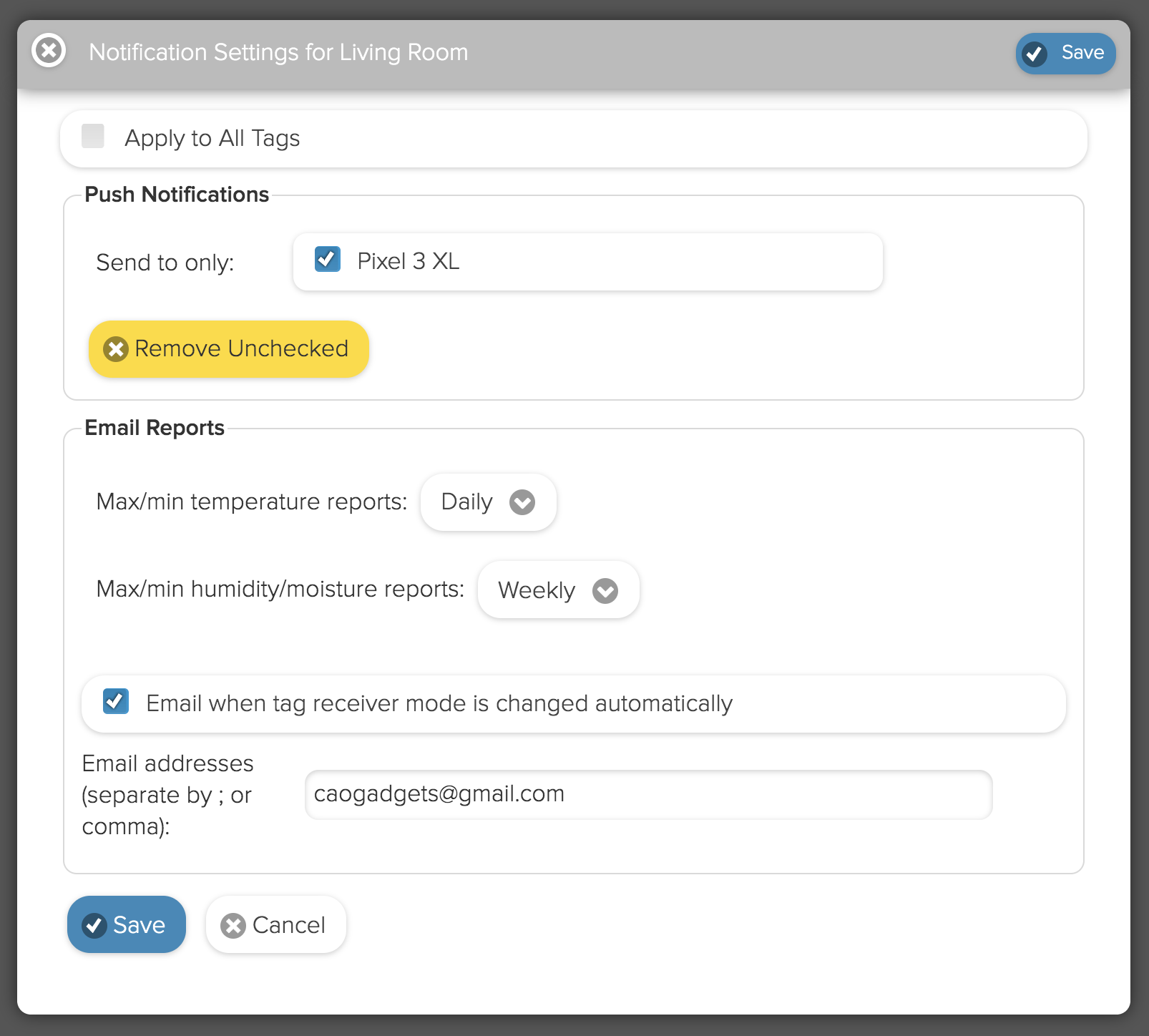
      <![CDATA[<p>Per requests from multiple customers, we have implemented daily/weekly/bi-weekly/monthly temperature/humidity/ambient light email report feature. It is disabled by default, and must be enabled from "<strong>Notification and Reports</strong>" menu in iOS app and under the chevron(<strong>&gt;</strong>) button from Web/Android interface as below:</p>
<div>
<img height="300" src="//cdn.shopify.com/s/files/1/0172/1692/files/web_config.png?v=1583528939" alt="">   <img height="300" src="//cdn.shopify.com/s/files/1/0172/1692/files/ios_config.png?v=1583528925" alt="">
</div>
<br>
<div></div>
<div>Once enabled, daily reports will be sent midnight of your local time everyday, weekly emails will be sent midnight of every Sunday, and monthly emails will be sent on the 1st of each month. We hope you will find this feature useful.</div>
<br>
<div>
<img height="300" src="//cdn.shopify.com/s/files/1/0172/1692/files/email_list.png?v=1583529186" alt="">  <img height="300" src="//cdn.shopify.com/s/files/1/0172/1692/files/email_opened.png?v=1583529327" alt=""> </div>]]>
    </content>
  </entry>
  <entry>
    <id>https://wirelesstags.myshopify.com/blogs/news/trend-sharing-and-range-delete</id>
    <published>2020-01-17T17:33:00-08:00</published>
    <updated>2021-09-26T21:31:57-07:00</updated>
    <link rel="alternate" type="text/html" href="https://wirelesstags.myshopify.com/blogs/news/trend-sharing-and-range-delete"/>
    <title>Trend Sharing and Range Delete</title>
    <author>
      <name>Mike Cao</name>
    </author>
    <content type="html">
      <![CDATA[<p>We have some small updates to share today. </p>
<p>Now in addition to sharing graphs of selected tags, you can share the entire "Recent Trend" screen or only data from selected tags. </p>
<p><img width="600" src="//cdn.shopify.com/s/files/1/0172/1692/files/trend_sharing.gif?v=1579310148" alt=""></p>
<p>You can share tags/sensors from multiple tag managers on one URL and one screen. And you can control the order each tag appears by arranging the orders of the IDs appearing on the URL. Because this "shared" version of trend screen actually loads a bit faster than the general version, and is very flexible, we suggest also to bookmark it for your own use. </p>
<p>Another small feature we added today is "range delete":</p>
<p><img width="600" src="//cdn.shopify.com/s/files/1/0172/1692/files/range_delete.gif?v=1579310584" alt=""></p>
<p>Before, you were only able to delete all data of the tag, or use the <a href="https://store.wirelesstag.net/blogs/news/83320516-new-option-to-enable-extra-error-checking">click to remove point feature</a>. Now you are able to bulk delete points from selected date range. This feature will be useful when deleting temperature/RH data from testing periods, so one will only see the data when the tag/sensor is put into actual use. </p>
<p>These features were added based on request from our customers we received just a couple days ago. Listening to customers like you and adding useful features like these is one of our top priority. If you want something and it makes sense, we will implement it right away! Please request in comment section below. </p>]]>
    </content>
  </entry>
  <entry>
    <id>https://wirelesstags.myshopify.com/blogs/news/external-power-usb-sensor-with-ambient-light-sensor-available</id>
    <published>2019-10-31T21:20:00-07:00</published>
    <updated>2021-09-26T21:32:37-07:00</updated>
    <link rel="alternate" type="text/html" href="https://wirelesstags.myshopify.com/blogs/news/external-power-usb-sensor-with-ambient-light-sensor-available"/>
    <title>External Power (USB) Sensor with Ambient Light Sensor Available</title>
    <author>
      <name>Acarbone Walmart</name>
    </author>
    <content type="html">
      <![CDATA[<p>Today we have released External Power Sensor Ambient Light (ALS). Building on the solid foundation of the Wireless Tag Pro ALS, the sensor supports all existing integration including IFTTT, KumoApps, Alexa, etc, while providing larger and non-volatile local memory for more reliable offline logging, as well as option for different types of batteries or wall plug.</p>
<p>Because the sensor is not intended to be carried around like tags, unlike <span>Wireless Tag Pro ALS, it does not have beep to locate feature, or motion notification based on sudden change of light (i.e. you can beep it and beep will stop if you pick it up). The lower price point reflects this. </span></p>
<p><span>Compared with current stock of regular External Power Sensor, hardware revision allows reading the voltage of the connected external battery up to 4.096V instead of reading only 3.3V or lower, for monitoring of wider range of batteries when there is still much life left. </span></p>
<p><span>We are in the final stage of internal beta testing of <span>External Power Sensor </span>Indoor Air Quality (VOC). Integrated MOX (metal-oxide) based volatile organic compound (VOC, or any kind of smell) sensors are relatively new technology that allows indoor air quality to be measured with a much smaller physical size and cost than possible before. Inside the sensor there is a tiny metal-oxide element that is periodically heated to several hundreds of degrees Celsius by micro-heater, which allows its electrical resistance to vary with VOC, or smell in the air. Cooking, cigarette smoking, or human activity in general in a closed environment increases VOC while fresh outdoor air lowers it. </span></p>
<p><span>Compared with temperature, humidity or ambient light sensing, because of the requirement to keep the MOX element at high temperature, the power consumption is larger as the sensor must be turned on at a fixed interval (every 6 second in our case). External Power Sensor is therefore an ideal vehicle for these sensors. Plugging into wall is the ideal way to use it, but since we are using a latest generation VOC sensor IC with industry leading low power consumption, one can expect to get several months of battery life with the available 1000mAh battery. </span></p>
<p><span>We are excited of the kind of new application this new product might enable. Imagine installing the sensor in your rental properties or hotel room to monitor if tenant is smoking cigarette. Or cooking something when not supposed to. Combine with IFTTT to turn on a wemo switch that turns on your attic fan only when needed to keep air in your house always fresh. </span></p>
<p><span>We expect to release it around the end of the year. Stay tuned! </span></p>]]>
    </content>
  </entry>
  <entry>
    <id>https://wirelesstags.myshopify.com/blogs/news/external-power-sensor-available-now</id>
    <published>2019-08-12T13:54:00-07:00</published>
    <updated>2019-08-26T13:54:37-07:00</updated>
    <link rel="alternate" type="text/html" href="https://wirelesstags.myshopify.com/blogs/news/external-power-sensor-available-now"/>
    <title>External Power Sensor</title>
    <author>
      <name>Acarbone Walmart</name>
    </author>
    <content type="html">
      <![CDATA[<table class="layer_1" align="center" border="0" cellpadding="0" cellspacing="0" style="max-width: 649px; box-sizing: border-box; width: 100%; margin: 0px auto;">
<tbody>
<tr>
<td class="drow" valign="top" align="center" style="background-color: #ffffff; box-sizing: border-box; font-size: 0px; text-align: center;">
<!-- [if (gte mso 9)|(IE)]><table width="100%" align="center" cellpadding="0" cellspacing="0" border="0"><tr><td valign="top"></td></tr></table><![endif]-->
<div class="layer_2" style="max-width: 649px; display: inline-block; vertical-align: top; width: 100%;">
<table class="edcontent" style="border-collapse: collapse; width: 100%;" border="0" cellpadding="0" cellspacing="0">
<tbody>
<tr>
<td class="edimg" valign="top" style="padding: 0px; box-sizing: border-box; text-align: center;"><a href="http://wirelesstag.net/specs.html#usb"><img style="border-width: 0px; border-style: none; max-width: 649px; width: 100%;" width="600" alt="Click for product specifications" src="//cdn.shopify.com/s/files/1/0172/1692/files/top_usb_1040h.jpg?v=1566851604"></a></td>
</tr>
</tbody>
</table>
</div>
<!-- [if (gte mso 9)|(IE)]><![endif]-->
</td>
</tr>
<tr>
<td class="drow" valign="top" align="center" style="background-color: #ffffff; box-sizing: border-box; font-size: 0px; text-align: center;">
<!-- [if (gte mso 9)|(IE)]><table width="100%" align="center" cellpadding="0" cellspacing="0" border="0"><tr><td valign="top"></td></tr></table><![endif]-->
<div class="layer_2" style="max-width: 649px; display: inline-block; vertical-align: top; width: 100%;">
<table border="0" cellspacing="0" cellpadding="0" class="edcontent" style="border-collapse: collapse; width: 100%;">
<tbody>
<tr>
<td valign="top" class="emptycell" style="padding: 10px;"></td>
</tr>
</tbody>
</table>
</div>
<!-- [if (gte mso 9)|(IE)]><![endif]-->
</td>
</tr>
<tr>
<td class="drow" valign="top" align="center" style="background-color: #ffffff; box-sizing: border-box; font-size: 0px; text-align: center;">
<!-- [if (gte mso 9)|(IE)]><table width="100%" align="center" cellpadding="0" cellspacing="0" border="0"><tr><td valign="top"></td></tr></table><![endif]-->
<div class="layer_2" style="max-width: 649px; display: inline-block; vertical-align: top; width: 100%;">
<table border="0" cellspacing="0" class="edcontent" style="border-collapse: collapse; width: 100%;">
<tbody>
<tr>
<td valign="top" class="edtext" style="padding: 32px; text-align: left; color: #5f5f5f; font-size: 12px; font-family: 'Open Sans', 'Helvetica Neue', Helvetica, Arial, sans-serif; word-break: break-word; direction: ltr; box-sizing: border-box;">
<p style="margin: 0px; padding: 0px;">We ourselves use Wireless Tags to monitor vacation rentals, warehouse and hangars. We always wanted the tags to be there <em>whenever </em>we needed them, even after forgetting about them for months. But we are often disappointed to find out they have been unavailable with dead battery.</p>
<p style="margin: 0px; padding: 0px;"> </p>
<p style="margin: 0px; padding: 0px;">All lithium batteries die much more quickly in freezing temperature. Because of this, customers who use the tags to monitor inside of freezer are often disappointed that battery lasts only weeks, not months as they would outside freezer. </p>
</td>
</tr>
</tbody>
</table>
</div>
<!-- [if (gte mso 9)|(IE)]><![endif]-->
</td>
</tr>
<tr>
<td class="drow" valign="top" align="center" style="background-color: #f4f4f3; box-sizing: border-box; font-size: 0px; text-align: center;">
<!-- [if (gte mso 9)|(IE)]><table width="100%" align="center" cellpadding="0" cellspacing="0" border="0"><tr><td valign="top"></td></tr></table><![endif]-->
<div class="layer_2" style="max-width: 649px; display: inline-block; vertical-align: top; width: 100%;">
<table border="0" cellspacing="0" class="edcontent" style="border-collapse: collapse; width: 100%;">
<tbody>
<tr>
<td valign="top" class="edtext" style="padding: 32px; text-align: left; color: #5f5f5f; font-size: 12px; font-family: 'Open Sans', 'Helvetica Neue', Helvetica, Arial, sans-serif; word-break: break-word; direction: ltr; box-sizing: border-box;">
<p class="style2" style="color: #000000; margin: 0px; padding: 0px; font-size: 22px; font-family: 'Open Sans', 'Helvetica Neue', Helvetica, Arial, sans-serif;">External Power Sensor is the Answer. </p>
<p style="margin: 0px; padding: 0px;"> </p>
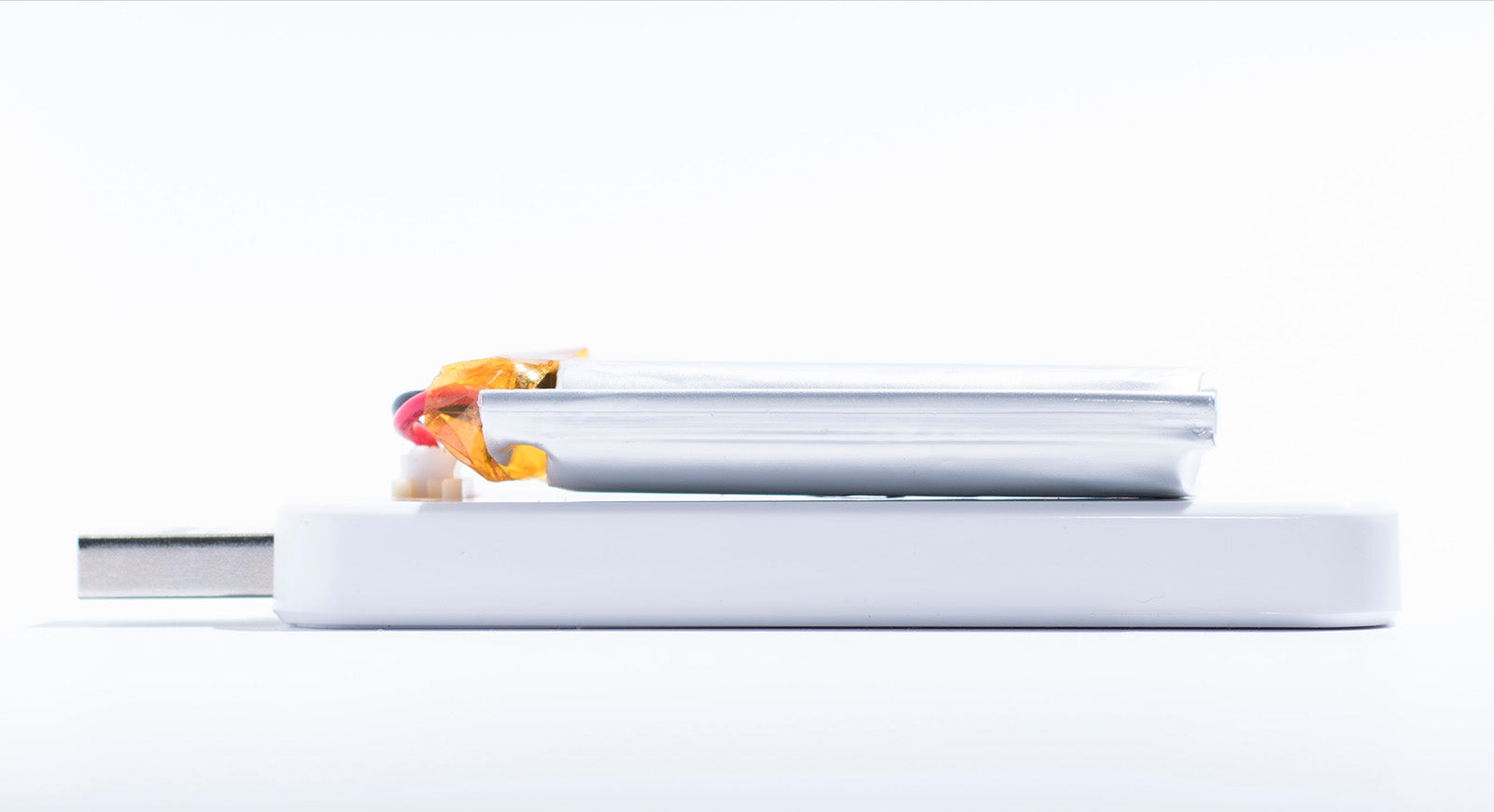
<p style="margin: 0px; padding: 0px;">With flexible power source, you can connect much larger capacity, rechargeable batteries vs. the 225mAh CR2032 non-rechargeable battery used in regular Wireless Tags. For example, use the 1000mAh rechargeable battery bundle for 4x longer battery life than regular tags.  You can connect <a href="https://www.adafruit.com/product/1781" target="_blank" style="text-decoration: none;" rel="noopener noreferrer">even larger battery</a> or <a href="https://www.adafruit.com/product/727" target="_blank" style="text-decoration: none;" rel="noopener noreferrer">battery holder</a> for inexpensive AAA batteries. </p>
<p style="margin: 0px; padding: 0px;"> </p>
<p style="margin: 0px; padding: 0px;">Or, just plug the USB into wall of your building, or available USB slot on a server machine* to monitor server rooms for "zero maintenance".</p>
<p style="margin: 0px; padding: 0px;"> </p>
<p style="margin: 0px; padding: 0px;">If you also connect the rechargeable battery at the same time, built-in battery charger will keep the battery charged, which will immediately work as back up power when the building power fails. </p>
<p style="margin: 0px; padding: 0px;"> </p>
<p style="margin: 0px; padding: 0px;">When tag manager is not available (because of building power failure, Internet outage, etc), logged data are stored in non-volatile memory (NVM) unlike regular Wireless Tag Pro which uses SRAM (data is lost when battery is removed).  Because of the NVM, data will not be lost when USB or battery is unplugged.  Only after the cloud confirms complete and successful data upload and storage, that the logged data in the NVM is erased. Since tag configuration ​(e.g. logging interval) are also stored in the NVM, upon reconnecting power, logging resumes automatically without configuration from the Tag Manager (which is currently done behind the scene from the cloud for regular tags). </p>
<p style="margin: 0px; padding: 0px;"> </p>
<p style="margin: 0px; padding: 0px;">  </p>
<p style="margin: 0px; padding: 0px;"> </p>
<p class="text-center" style="text-align: center; margin: 0px; padding: 0px;"><a target="_blank" style="text-decoration: none;" rel="noopener noreferrer"></a><a href="http://wirelesstag.net/specs.html#usb" style="text-decoration: none;">Click here for more details.</a></p>
<p style="margin: 0px; padding: 0px;"> </p>
</td>
</tr>
</tbody>
</table>
</div>
<!-- [if (gte mso 9)|(IE)]><![endif]-->
</td>
</tr>
<tr>
<td class="drow" valign="top" align="center" style="background-color: #ffffff; box-sizing: border-box; font-size: 0px; text-align: center;">
<!-- [if (gte mso 9)|(IE)]><table width="100%" align="center" cellpadding="0" cellspacing="0" border="0"><tr><td valign="top"></td></tr></table><![endif]-->
<div class="layer_2" style="max-width: 649px; display: inline-block; vertical-align: top; width: 100%;">
<table border="0" cellspacing="0" cellpadding="0" class="edcontent" style="border-collapse: collapse; width: 100%;">
<tbody>
<tr>
<td valign="top" class="emptycell" style="padding: 10px;"></td>
</tr>
</tbody>
</table>
</div>
<!-- [if (gte mso 9)|(IE)]><![endif]-->
</td>
</tr>
<tr>
<td class="drow" valign="top" align="center" style="background-color: #ffffff; box-sizing: border-box; font-size: 0px; text-align: center;">
<!-- [if (gte mso 9)|(IE)]><table width="100%" align="center" cellpadding="0" cellspacing="0" border="0"><tr><td valign="top"></td></tr></table><![endif]-->
<div class="layer_2" style="max-width: 300px; display: inline-block; vertical-align: top; width: 100%;">
<table border="0" cellspacing="0" class="edcontent" style="border-collapse: collapse; width: 100%;">
<tbody>
<tr>
<td valign="top" class="edimg" style="padding: 20px; box-sizing: border-box; text-align: center;"><img src="//cdn.shopify.com/s/files/1/0172/1692/files/spec_lipo_side_1600.jpg" alt="Image" width="260" style="border-width: 0px; border-style: none; max-width: 260px; width: 100%;"></td>
</tr>
<tr>
<td valign="top" class="edtext" style="padding: 20px; text-align: left; color: #5f5f5f; font-size: 12px; font-family: 'Open Sans', 'Helvetica Neue', Helvetica, Arial, sans-serif; word-break: break-word; direction: ltr; box-sizing: border-box;">
<p style="margin: 0px; padding: 0px;"> </p>
<p class="style3 text-center" style="color: #000000; text-align: center; margin: 0px; padding: 0px; font-size: 16px; font-family: 'Open Sans', 'Helvetica Neue', Helvetica, Arial, sans-serif;"><strong>  With 1000mAh rechargeable battery bundle</strong></p>
<p style="margin: 0px; padding: 0px;"> </p>
<p class="text-center" style="text-align: center; margin: 0px; padding: 0px;"> </p>
<p class="text-center" style="text-align: center; margin: 0px; padding: 0px;">4x the battery life of regular Wireless Tag.</p>
</td>
</tr>
<tr>
<td valign="top" class="edbutton text-center" style="padding: 20px; text-align: center;">
<table cellspacing="0" cellpadding="0" style="text-align: center; margin: 0 auto;" align="center">
<tbody>
<tr>
<td align="center" class="text-center" style="border-radius: 8px; padding: 14px; background: #4b62a3; text-align: center;"><a target="_blank" style="font-size: 14px; font-family: 'Open Sans', 'Helvetica Neue', Helvetica, Arial, sans-serif; color: #ffffff; font-weight: normal; text-decoration: none; display: inline-block;" href="https://store.wirelesstag.net/products/ext-power?variant=29466936672358" rel="noopener noreferrer"><span style="color: #ffffff;">Buy Now</span></a></td>
</tr>
</tbody>
</table>
</td>
</tr>
</tbody>
</table>
</div>
<!-- [if (gte mso 9)|(IE)]><td valign="top"></td><![endif]-->
<div class="layer_2" style="max-width: 300px; display: inline-block; vertical-align: top; width: 100%;">
<table border="0" cellspacing="0" class="edcontent" style="border-collapse: collapse; width: 100%;">
<tbody>
<tr>
<td valign="top" class="edimg" style="padding: 20px; box-sizing: border-box; text-align: center;"><img src="//cdn.shopify.com/s/files/1/0172/1692/files/plugged_in_1600.jpg" alt="Image" width="260" style="border-width: 0px; border-style: none; max-width: 260px; width: 100%;"></td>
</tr>
<tr>
<td valign="top" class="edtext" style="padding: 20px; text-align: left; color: #5f5f5f; font-size: 12px; font-family: 'Open Sans', 'Helvetica Neue', Helvetica, Arial, sans-serif; word-break: break-word; direction: ltr; box-sizing: border-box;">
<p class="style3 text-center" style="color: #000000; text-align: center; margin: 0px; padding: 0px; font-size: 16px; font-family: 'Open Sans', 'Helvetica Neue', Helvetica, Arial, sans-serif;"><strong>Plugged into wall</strong></p>
<p style="margin: 0px; padding: 0px;"> </p>
<p class="text-center" style="text-align: center; margin: 0px; padding: 0px;"> </p>
<p class="text-center" style="text-align: center; margin: 0px; padding: 0px;">Zero maintenance. </p>
</td>
</tr>
<tr>
<td valign="top" class="edbutton text-center" style="padding: 20px; text-align: center;">
<table cellspacing="0" cellpadding="0" style="text-align: center; margin: 0 auto;" align="center">
<tbody>
<tr>
<td align="center" class="text-center" style="border-radius: 8px; padding: 14px; background: #4b62a3; text-align: center;"><a target="_blank" style="font-size: 14px; font-family: 'Open Sans', 'Helvetica Neue', Helvetica, Arial, sans-serif; color: #ffffff; font-weight: normal; text-decoration: none; display: inline-block;" href="https://store.wirelesstag.net/products/ext-power?variant=29466936639590" rel="noopener noreferrer"><span style="color: #ffffff;">Buy Now</span></a></td>
</tr>
</tbody>
</table>
</td>
</tr>
</tbody>
</table>
</div>
<!-- [if (gte mso 9)|(IE)]><![endif]-->
</td>
</tr>
<tr>
<td class="drow" valign="top" align="center" style="background-color: #ffffff; box-sizing: border-box; font-size: 0px; text-align: center;">
<!-- [if (gte mso 9)|(IE)]><table width="100%" align="center" cellpadding="0" cellspacing="0" border="0"><tr><td valign="top"></td></tr></table><![endif]-->
<div class="layer_2" style="max-width: 649px; display: inline-block; vertical-align: top; width: 100%;">
<table border="0" cellspacing="0" cellpadding="0" class="edcontent" style="border-collapse: collapse; width: 100%;">
<tbody>
<tr>
<td valign="top" class="emptycell" style="padding: 10px;"></td>
</tr>
</tbody>
</table>
</div>
<!-- [if (gte mso 9)|(IE)]><![endif]-->
</td>
</tr>
<tr>
<td class="drow text-center" valign="top" align="center" style="text-align: center; box-sizing: border-box; font-size: 0px;">
<!-- [if (gte mso 9)|(IE)]><table width="100%" align="center" cellpadding="0" cellspacing="0" border="0"><tr><td valign="top"></td></tr></table><![endif]-->
<div class="layer_2 text-center" style="max-width: 649px; text-align: center; display: inline-block; vertical-align: top; width: 100%;">
<table class="edcontent" style="border-collapse: collapse; width: 100%;" border="0" cellpadding="0" cellspacing="0">
<tbody>
<tr>
<td class="edtext text-center" valign="top" style="padding: 10px; text-align: center; color: #5f5f5f; font-size: 12px; font-family: 'Open Sans', 'Helvetica Neue', Helvetica, Arial, sans-serif; word-break: break-word; direction: ltr; box-sizing: border-box;">
<p style="font-size: 11px; margin: 0px; padding: 0px;"><em>* This product uses USB only for power, and physically has no capability to communicate via USB like USB memory sticks, so there is no concerns about compromising security when plugging into computers. </em></p>
</td>
</tr>
</tbody>
</table>
</div>
<!-- [if (gte mso 9)|(IE)]><![endif]-->
</td>
</tr>
</tbody>
</table>]]>
    </content>
  </entry>
  <entry>
    <id>https://wirelesstags.myshopify.com/blogs/news/wireless-tag-pro-als-ambient-light-sensor-firmware-update</id>
    <published>2019-06-10T20:09:00-07:00</published>
    <updated>2019-06-12T00:42:48-07:00</updated>
    <link rel="alternate" type="text/html" href="https://wirelesstags.myshopify.com/blogs/news/wireless-tag-pro-als-ambient-light-sensor-firmware-update"/>
    <title>Wireless Tag Pro ALS (Ambient Light Sensor) Firmware Update</title>
    <author>
      <name>Acarbone Walmart</name>
    </author>
    <content type="html">
      <![CDATA[<p>We are now shipping ALS tags with new firmware (version 2.7) with below improvements:</p>
<ul>
<li>When "buffer (transmit) multiple data point at a time" option is enabled, there can be corruption of locally stored data points (data are locally stored while tag is out of range or tag manager is offline.) This bug has been fixed. Because of this bug, for ALS tags shipped on or before June 10, 2019, please do not enable the option. The option has been automatically turned off on most of affected ALS tags that are currently online. </li>
<li>Data upload speed is increased, to facilitate the use case when many tags need to upload. </li>
</ul>
<p>Unfortunately the firmware cannot be delivered remotely. If you need to receive these update, please mail the tags back, we will update them and ship to you free of charge. Please ship to</p>
<pre>Cao Gadgets
Attn: ALS update for #[the 5 digit order number]
50 Tesla
Irvine, CA 92618 USA<br><br>
</pre>]]>
    </content>
  </entry>
  <entry>
    <id>https://wirelesstags.myshopify.com/blogs/news/google-home-and-alexa-smart-home-skill</id>
    <published>2019-05-22T07:54:00-07:00</published>
    <updated>2021-09-26T21:33:09-07:00</updated>
    <link rel="alternate" type="text/html" href="https://wirelesstags.myshopify.com/blogs/news/google-home-and-alexa-smart-home-skill"/>
    <title>Google Home and Alexa Smart Home Skill</title>
    <author>
      <name>Acarbone Walmart</name>
    </author>
    <content type="html">
      <![CDATA[<center>
<img src="//cdn.shopify.com/s/files/1/0172/1692/files/smarthome.jpg?v=1558536285" width="300"> </center>
<br>
<p>Good news for you Smart Home fanboys, both <a href="https://assistant.google.com/services/a/uid/000000b605b6b55a?hl=en_us" target="_blank" rel="noopener noreferrer">Google Home</a> and <a href="https://alexa.amazon.com/spa/index.html#skills/search/wireless%20tag/?&amp;ref-suffix=iss_gw" target="_blank" rel="noopener noreferrer">Alexa</a> Smart Home skill for Wireless Sensor Tags are released today.</p>
<p>For <a href="https://assistant.google.com/services/a/uid/000000b605b6b55a" target="_blank" rel="noopener noreferrer">Google Home</a>, <span>all of your tags will be recognized as "Thermostat" which can report current temperature and humidity as well as setting temperature monitoring thresholds. Setting the temperature will move the center point of the "comfort zone" i.e. average of the too hot/too cold threshold. Turning it on/off is equivalent to enable/disable temperature monitoring. The tags also support the "Locator" device type which will allow you beep the tag. The integration reports all real-time data to "Google Home Graph" so in near future you should be able to check your live temperature and humidity graph from Google products. </span></p>
<p>For Alexa, there have been "<a href="https://store.wirelesstag.net/blogs/news/wireless-tag-skill-now-supports-actions">Informational</a>" skill that will require pronouncing "ask Wireless Tag" to open it, but allows more <a href="https://alexa.amazon.com/spa/index.html#skills/dp/B01MYZTQ15/?ref=skill_dsk_skb_sr_0&amp;qid=1558535049" target="_blank" rel="noopener noreferrer">features</a> (including getting humidity, high/low and average temperature during specified period, arming/disarm motion sensor, setting temperature monitoring thresholds), on the other hand the newly released Smart Home version uses "v3" of Alexa smart home API (which included support for temperature sensor) to support the most commonly used feature of getting temperature and motion state <em>without</em> pronouncing "Wireless Tag" to trigger it. </p>
<p> Enjoy!</p>]]>
    </content>
  </entry>
  <entry>
    <id>https://wirelesstags.myshopify.com/blogs/news/wine-cellar-humidity-and-temperature-control</id>
    <published>2019-03-09T18:57:00-08:00</published>
    <updated>2019-03-30T21:31:11-07:00</updated>
    <link rel="alternate" type="text/html" href="https://wirelesstags.myshopify.com/blogs/news/wine-cellar-humidity-and-temperature-control"/>
    <title>Wine Cellar Humidity and Temperature Control</title>
    <author>
      <name>Acarbone Walmart</name>
    </author>
    <content type="html">
      <![CDATA[<p>If you have a wine cellar in your house, you probably know that keeping it at constant temperature is important.</p>
<img width="200" src="//cdn.shopify.com/s/files/1/0172/1692/products/8780de98-79e5-4756-8be4-1c5c034ab885.jpg?v=1549214318" alt="" style="float: left; margin-right: 2em;">
<p>If it is cold at night but hot during the day, the air inside each bottle contracts and expands, gradually loosen the cork, spoiling the wine inside. Temperature variation as little as 3°C can be bad for your wine. </p>
<p>If air humidity is too low, the cork can dry up, if too high, mold can grow. While human prefers dryer climate, the optimum humidity for wine storage is between 60% and 80%. </p>
<p>How do you check that your wine cellar temperature is stable enough, and humidity is always optimal, without staring at the thermometer 24/7? And what can do you if it is not? </p>
<p>You will need:</p>
<ul>
<li>
<a href="https://store.wirelesstag.net/products/wireless-tag-13-bit-temperature-and-humidity" target="_blank" rel="noopener noreferrer">Wireless Sensor Tags (with temperature &amp; humidity)</a> </li>
<li><a href="https://www.amazon.com/gp/product/B01NBI0A6R/ref=as_li_tl?ie=UTF8&amp;camp=1789&amp;creative=9325&amp;creativeASIN=B01NBI0A6R&amp;linkCode=as2&amp;tag=caga02-20&amp;linkId=e18063aba4ac0b88c36940ff599a082c" target="_blank" rel="noopener noreferrer">WeMo smart plugs</a></li>
<li>Simple <a href="https://jet.com/product/Comfort-Zone-Ceiling-Mount-Heater/d80fb79d95924c5b96299b0f1487e606?beaconId=90dd3704-c151-4387-86a2-06904673d71e%2F8%2Fx~d80fb79d95924c5b96299b0f1487e606%3BexpId~21%3Bst~heater&amp;experienceId=21" target="_blank" rel="noopener noreferrer">electric heater</a> (optional)</li>
<li>Simple <a href="https://jet.com/product/Perfect-Aire-PAU1-Micro-Mist-Ultrasonic-Humidifier-PersonalTravel-White/1a26038e9ac84a85a78baa6be83de210?beaconId=79f2ec00-94e2-4dd4-b756-75bda96ccdbe%2F12%2Fx~1a26038e9ac84a85a78baa6be83de210%3BexpId~25&amp;experienceId=25" target="_blank" rel="noopener noreferrer">humidifier</a> (optional)</li>
</ul>
<p>Needless to say, you will get super easy to use temperature/humidity graphs (Example from actual wine cellar <a href="https://cdn.shopify.com/s/files/1/0172/1692/files/Temperature_Charts.png" target="_blank" rel="noopener noreferrer">#1</a>, <a href="https://cdn.shopify.com/s/files/1/0172/1692/files/Temperature_Charts-2.png" target="_blank" rel="noopener noreferrer">#2</a>, <a href="https://cdn.shopify.com/s/files/1/0172/1692/files/Temperature_Charts-3.png" target="_blank" rel="noopener noreferrer">#3</a>, <a href="https://cdn.shopify.com/s/files/1/0172/1692/files/RH_Charts.png" target="_blank" rel="noopener noreferrer">#4</a>, <a href="https://cdn.shopify.com/s/files/1/0172/1692/files/RH_Charts-2.png" target="_blank" rel="noopener noreferrer">#5</a>) by just placing the Wireless Tag inside the cellar, from which you can check daily temperature and humidity variations. </p>
<p>First enable temperature and humidity monitoring from the Wireless Tag main interface (from clicking on the temperature and humidity buttons). </p>
<p>Now you can use these IFTTT applets: <a href="https://ifttt.com/applets/ipFhkaXc-when-too-cold-turn-on-heater-connected-to-a-wemo-plug" target="_blank" rel="noopener noreferrer">turn on heat</a>, <a href="https://ifttt.com/applets/evNut5kx-when-temperature-has-risen-back-to-normal-turn-off-heater-connected-to-a-wemo-plug" target="_blank" rel="noopener noreferrer">turn off heat</a>, <a href="https://ifttt.com/applets/NSHF8TVK-when-too-dry-turn-on-humidifier-connected-to-a-wemo-plug" target="_blank" rel="noopener noreferrer">turn on humidifier</a>, <a href="https://ifttt.com/applets/Xu2Sn7bM-when-humidity-has-risen-back-to-normal-turn-off-humidifier-connected-to-a-wemo-plug" target="_blank" rel="noopener noreferrer">turn off humidifier</a>.  KumoApp, however, will provide more flexibility.  </p>
<table style="float: left; margin-right: 2em;">
<tbody>
<tr>
<td><img width="195" src="//cdn.shopify.com/s/files/1/0172/1692/files/1552174698792.png?v=1552182025" alt=""></td>
<td><b> &gt;</b></td>
<td>  <img width="201" src="//cdn.shopify.com/s/files/1/0172/1692/files/1552174744516_d030e259-23cc-4793-8fa5-d3fe7029c85f.png?v=1552185024" alt="">
</td>
</tr>
</tbody>
</table>
<p>After setup, you launch either iPhone or Android app for Wireless Tag while connected to the same WiFi as your WeMo plug. It should find the WeMo, and allows you to link the WeMo (from "+Associate" screen) so that it can be used by <a href="http://mytaglist.com/kumoapp" target="_blank" rel="noopener noreferrer">KumoApps</a>.</p>
<p>Click the green KumoApp button. You will see these screens. Pick an app (rules) that allows you turn on a Wemo switch when it is too cold, and off when back to normal. There is also apps to turn on a Wemo switch when it is too dry, and turn it off when back to normal. Some KumoApps allows you to delay the turning on. You can also fine adjust the temperature monitoring in main interface to only trigger the KumoApp when N successive too cold/too dry readings are obtained.</p>
<p>When KumoApp was first released 5 years ago, it had been much less reliable. Since then, we have been continuously improving its reliability, and now KumoApp is entirely different from that time. We are confident to recommend using it this way. </p>]]>
    </content>
  </entry>
  <entry>
    <id>https://wirelesstags.myshopify.com/blogs/news/new-recent-trends-app-mode</id>
    <published>2019-03-07T10:45:00-08:00</published>
    <updated>2019-04-24T22:44:52-07:00</updated>
    <link rel="alternate" type="text/html" href="https://wirelesstags.myshopify.com/blogs/news/new-recent-trends-app-mode"/>
    <title>New &quot;Trends&quot; App Mode</title>
    <author>
      <name>Acarbone Walmart</name>
    </author>
    <content type="html">
      <![CDATA[<p> We have worked very hard past few weeks to bring you a new app mode called "Trends": </p>
<p><a href="//cdn.shopify.com/s/files/1/0172/1692/files/new_ui2.png" target="_blank" rel="noopener noreferrer"><img style="width: 100%; cursor: zoom-in;" src="//cdn.shopify.com/s/files/1/0172/1692/files/new_ui2.png?v=1553535390" alt=""></a></p>
<p>It is available in web and Android interface right now by clicking the "Temperatures" button on the upper right corner, and on iPhone/iPad app (version 3.0.0, expected to appear in App Store sometime later today), by swiping to the left, or pressing the "Trends" button on the tag list screen. </p>
<p>The mode summarizes each sensor's temperature, humidity and ambient light, along with recent trend in a carefully designed layout. If monitoring is enabled, the too hot/cold regions are displayed on graph with red shadows, too wet/dry region by green shadows and too bright/dark region by blue shadows to show how much margin there is to abnormal conditions.</p>
<p>If event history was viewed (loaded), motion events such as "opened", "detected" are overlaid on the recent temperature graph, to help visualize possible causes of temperature spikes (iOS only).</p>
<p>Special server side data structure was designed such that recent data points used for this screen is always readily available, to ensure very fast screen load speed. </p>
<p>We have overhauled much of our iOS app, so that it loads faster and supports iOS 12. On iPads, the split screen width now automatically adjusts to an optimal value, depending on what is displayed. App will automatically resume updating screen as sensor data comes in, when network connectivity is interrupted and later restored (the Web/Android version was already behaving this way). </p>
<p>We are all ears for your feedback, and any ideas to make the app work even better for you. </p>]]>
    </content>
  </entry>
  <entry>
    <id>https://wirelesstags.myshopify.com/blogs/news/check-out-the-new-event-history-screen</id>
    <published>2018-09-14T01:10:00-07:00</published>
    <updated>2018-09-14T14:43:34-07:00</updated>
    <link rel="alternate" type="text/html" href="https://wirelesstags.myshopify.com/blogs/news/check-out-the-new-event-history-screen"/>
    <title>Check Out The New Event History Screen!</title>
    <author>
      <name>Acarbone Walmart</name>
    </author>
    <content type="html">
      <![CDATA[<p>Today we have significantly improved the search/filter box in your <a href="https://mytaglist.com/eth/events.html" target="_blank" rel="noopener noreferrer">Event History</a> screen. </p>
<p>The Event History puts all events in one screen in timeline format, but often we are only interested in one type of event or one particular tag. Until now, the search/filter box only applied filter (on the client side) to the events already downloaded from cloud so far, it looked ugly, and once you entered the search no new events could be downloaded from server as you scroll down. </p>
<p>Now finally we have a "<strong>proper</strong>" filter box that allows you to filter with event type or tag name directly in the cloud. After you entered keyword, you will no longer see partially filled screen but enough relevant information will be pulled from the cloud and fill the screen. As you scroll down, only those events matching your keyword (of even type or tag name) will be downloaded. Also, when you press the "Update" button on the upper right corner, only those latest events matching your filter will be downloaded and added to the top of the list. </p>
<p>Per suggestions from multiple customers, all manual temperature, humidity or soil moisture calibration are now recorded in the Event History. Just enter "cal" in the filter box to only see this type of event in a timeline. The date&amp;time of the calibration, the raw temperature reading from sensor and the reading it was calibrated to, are now recorded and displayed. </p>
<p>An existing feature that might be useful also, is the ability to add comments to each event in the "Event History".  From the web/Android interface, just press on the event, it will expand to reveal a text box to enter custom comments. </p>
<p>If these new improvements are useful to you, please provide us with feedback by a comment.</p>]]>
    </content>
  </entry>
  <entry>
    <id>https://wirelesstags.myshopify.com/blogs/news/outdoor-probe-basic-now-supports-humidity-temperature-probe</id>
    <published>2018-07-15T23:54:00-07:00</published>
    <updated>2018-09-05T10:21:03-07:00</updated>
    <link rel="alternate" type="text/html" href="https://wirelesstags.myshopify.com/blogs/news/outdoor-probe-basic-now-supports-humidity-temperature-probe"/>
    <title>Outdoor Probe Basic Now Supports Humidity/Temperature Probe</title>
    <author>
      <name>Acarbone Walmart</name>
    </author>
    <content type="html">
      <![CDATA[<p><a href="https://store.wirelesstag.net/products/outdoor-probe-basic">Outdoor Probes Basic</a> that ship after today (July 16) now support the <a href="https://www.dfrobot.com/wiki/index.php/SHT20_I2C_Temperature_%26_Humidity_Sensor_(Waterproof_Probe)_SKU:_SEN0227" target="_blank" rel="noopener noreferrer">SHT20 waterproof air humidity/temperature probe</a> (SEN0227) in addition to the DS18B20 waterproof temperature probe. Simply connect either (not both) probe and select from the app the type of probe you have connected. </p>
<p>The <a href="https://www.mouser.com/ds/2/682/Sensirion_Humidity_Sensors_SHT20_Datasheet-1274196.pdf" target="_blank" rel="noopener noreferrer">SHT20</a> air humidity/temperature sensor has 14-bit (0.01°C) temperature resolution and 12-bit (0.04%) humidity resolution,  the accuracy performance is equivalent to <a href="http://wirelesstag.net/specs.html#temp_feature_comparison" target="_blank" rel="noopener noreferrer">that</a> of popular Wireless Sensor Tags Pro.  When selected, humidity monitoring (too wet/too dry notification) identical to that of Wireless Tag Pro becomes available from the app. The SHT20 based water proof probe is a great new-release product, which is also available from <a href="https://www.digikey.com/product-detail/en/dfrobot/SEN0227/1738-1353-ND/7897986" target="_blank" rel="noopener noreferrer">DigiKey</a> and <a href="https://www.mouser.com/ProductDetail/DFRobot/SEN0227?qs=0lQeLiL1qyZifO4OhDexgw%3D%3D" target="_blank" rel="noopener noreferrer">Mouser</a> in addition to the manufacturer's website. </p>]]>
    </content>
  </entry>
  <entry>
    <id>https://wirelesstags.myshopify.com/blogs/news/voice-notification-under-android</id>
    <published>2018-06-09T21:46:00-07:00</published>
    <updated>2018-06-09T22:18:18-07:00</updated>
    <link rel="alternate" type="text/html" href="https://wirelesstags.myshopify.com/blogs/news/voice-notification-under-android"/>
    <title>Voice Notification under Android</title>
    <author>
      <name>Acarbone Walmart</name>
    </author>
    <content type="html">
      <![CDATA[<p>Tag notifications like "moved" "opened" or "too hot" on the Android app are configured by default to use "speech", which makes the phone announce the event by human voice even when the app is not open or running. Some users absolutely loved it, while others really hated it when it fires off unexpectedly during meeting or in the middle of night.</p>
<p>There are three different volumes in Android namely "Music", "Alarm" and "Notification". You have to mute the "notification" volume to mute this announcement, which was not immediately obvious to many people. Besides, this also turns off other important audible notifications. Another way was to check off the "Use speech" box inside the app interface for each tag / type of monitoring individually, but you had to remember which tag had which monitoring enabled that may produce the sound, and check off one by one.</p>
<p>Now with Android 8, the <a href="https://play.google.com/store/apps/details?id=com.wirelesstag.android3" target="_blank" rel="noopener noreferrer">Android app</a> version 2.17.5 and above allows you to turn on/off any sound for each category of events like below (open Android system Settings -&gt; Apps &amp; notifications -&gt; Notifications -&gt; App notifications -&gt; WirelessTag) </p>
 
<p><img width="200" src="//cdn.shopify.com/s/files/1/0172/1692/files/Screenshot_1528603730.png?10379809819836427835" alt=""> <img width="200" src="//cdn.shopify.com/s/files/1/0172/1692/files/Screenshot_1528603240.png?10379809819836427835" alt=""> <img width="200" src="//cdn.shopify.com/s/files/1/0172/1692/files/Screenshot_1528603232.png?10379809819836427835" alt=""></p>
<p>Configuration for the category of events you have never received before will not be displayed, so on your device the screen may have fewer lines than the above. </p>
<p>This must have been a much awaited feature for all Android users, and should have been implemented a long time ago. Please share your feedback using the comment button.</p>]]>
    </content>
  </entry>
</feed>