They can cause layout shifts, on mobile the banner is sometimes the element for Largest Contentful Paint (LCP), they visually obscure other parts of the page, and if implemented correctly only some of the page's resources will be fetched.
When analysing sites one of my first steps is to work out how to bypass any consent banners so I can get a more complete view of page performance.
This post covers some of the performance issues related to consent banners, how I bypass the banners, and my approach to working out which cookies or localStorage items I need to set to bypass them.
Simon Hearne wrote about Measuring Performance behind Content Popups in May 2020, and while there's some overlap I'd recommend you read Simon's post too.
Challenges that Banners Bring
Layout Shifts
Some banners are displayed at the top of the page before other content and there's a danger that if the banner is inserted after rendering starts, the content below them will shift downwards.
In a filmstrip of gov.uk there's layout shift at 0.7s when the consent banner is displayed (they have plans to address the issue in the future)
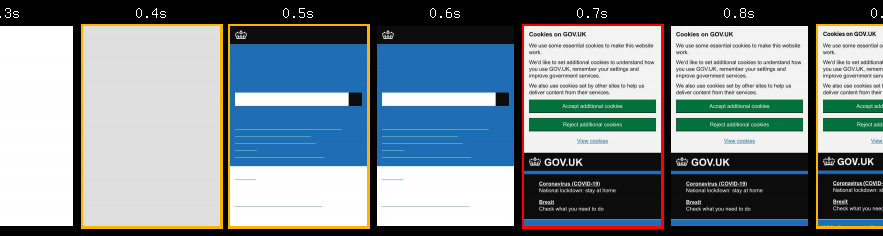 gov.uk – London, Chrome, Cable
One way of eliminating this shift would be to adopt the approach Zach Leatherman took with a banner on Netlify and include them directly in page but hide then when they're not required.
Another is to use a pop-over approach where the consent banner is positioned over the page content.
Largest Contentful Paint
On some pages, and particularly on mobile, parts of the consent banner get detected as the Largest Content Paint.
Currys PC World have this issue on their category pages, but not on their product pages, so removing the banner is important if we want get comparable measurements between the different page types.
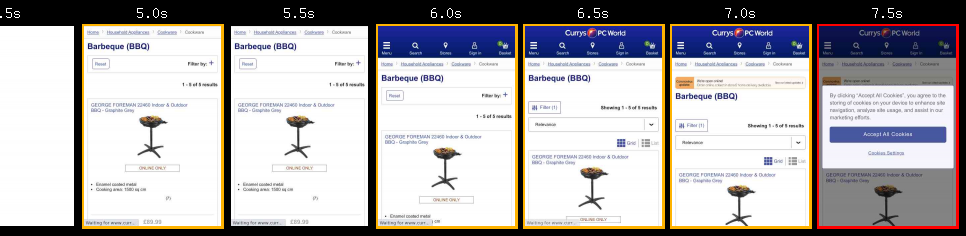 Currys PC World – London, Chrome, Cable
There are other sites with very similar banners but yet another element is counted as the Largest Contentful Paint, so checking which element is being used is important.
Obscure Key Content
Filmstrips are a powerful way to convey performance to anyone regardless of their web performance knowledge and I rely on them to help clients understand what the current experience and to demonstrate how it improves as optimisations are implemented.
And as consent banners can cover up the key content, they just get in the way!
Partial Measurement
In countries where opt-in consent is required for 3rd-party data collection, the banner should delay the load of such scripts until consent is given.
These extra scripts influence performance – at the very least they'll increase the total bytes downloaded but often they'll also introduce long tasks, layout shifts and other behaviour that affects performance metrics too.
Bypassing Cookie Consent
Some sites add a 'developer option' to their consent banners, for example a query string parameter that prevents the banner from being displayed.
This makes testing with and without consent banners much easier but often this option doesn't exist, and sometimes banners are provided by a third-party services so typically in these cases cookies need to be set to avoid them.
Lighthouse
By default, Lighthouse doesn't support cookies, so web.dev/measure, Page Speed Insights etc. will test the site with the consent banner shown.
And if the consent banner is configured correctly then in opt-in e.g. GDPR, regions the Lighthouse score will be based on a partial page load i.e. without any 3rd-party tags.
But Publisher Ad Audits for Lighthouse does allow cookies to be set – click on the Advanced Settings button, and paste cookie in the relevant field.
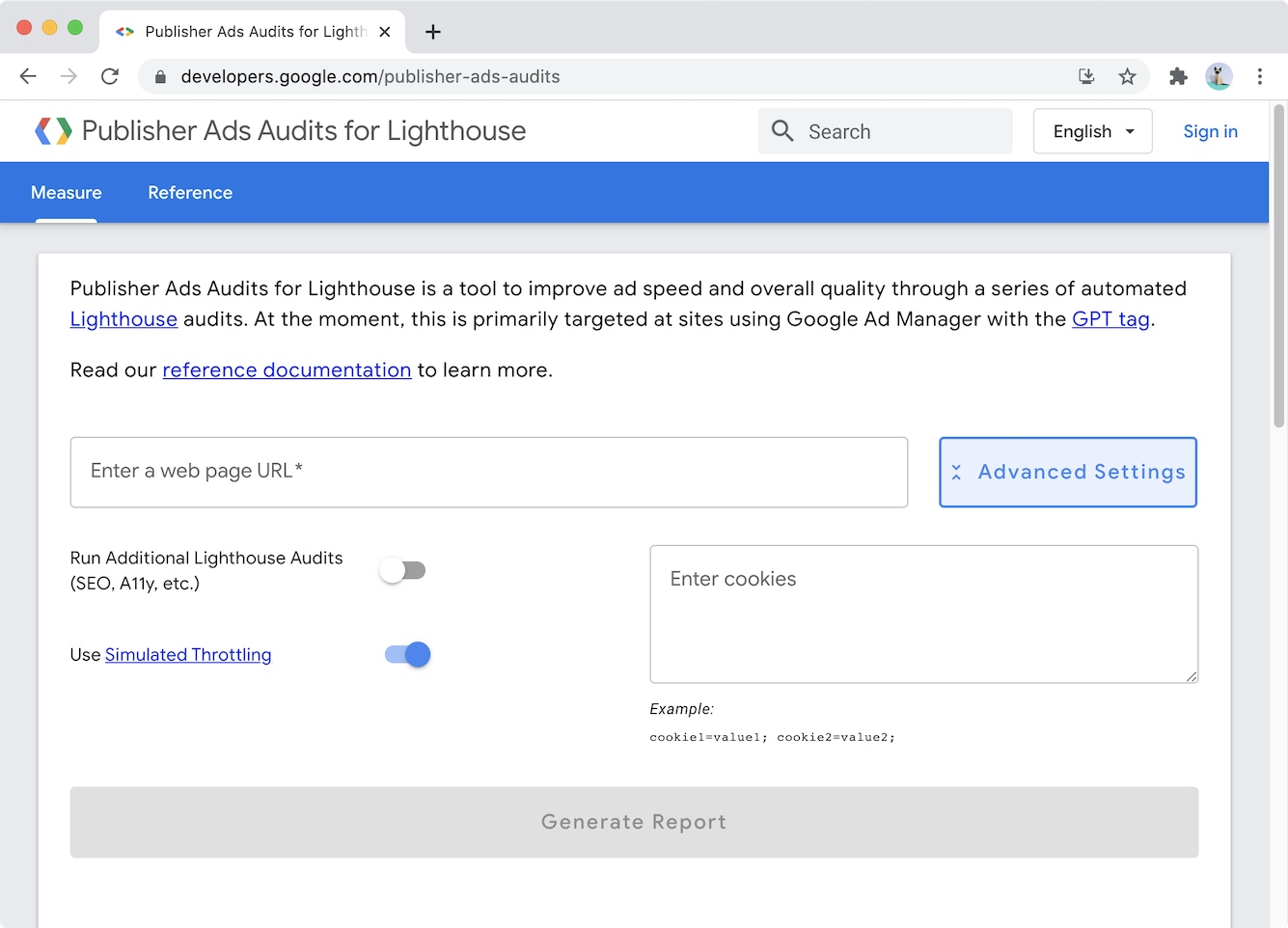
If you need a score or advice on how to improve using this version of Lighthouse is a quick way to get that.
Cookies can also be set in Lighthouse CLI and CI
WebPageTest
Often I want more than Lighthouse provides…
I want waterfalls so I can dig into network performance, filmstrips to demonstrate the benefits of optimisations, and Request Maps help understand the 3rd-parties on a page.
And most of the time I use WebPageTest to generate this data with one of these two approaches for bypassing consent banners.
I either set cookies via the setCookie script command:
setCookie https://%HOST% cookie_name=...
navigate %URL%
Note: %URL% and %HOST% are WebPageTest script variables that will be replaced with the relevant part of the URL being tested. One day I'll submit a PR to add %ORIGIN% so https://%HOST% can be replaced with something more friendly.
Or via an injected script:
document.cookie='cookie_name=...';
Something to consider is there's a slight timing difference as to when the cookie is set between the two WebPageTest approaches.
In the first approach, the cookie is set before navigation, so the cookie is available to any inline scripts that are early in the page, or any server-side processes that might generate an inline cookie banner.
Whereas the second approach sets the cookie after the browser starts to receive the HTML content, which might be too late for some cookie banners but allows extra commands such as setting localStorage items to be added.
Another advantage of the injected script approach is the script can also be tested in the DevTools console – clear storage, execute the script in the console, then reload the page and if the script's correct the consent banner shouldn't appear.
Sometimes Cookies aren't Enough
Some consent banners – IAB EU Consent Management Providers (CMPs) such as Quantcast Choice – also use local storage so just setting cookies isn't enough to bypass them.
To bypass these types of consent banners, I rely on injecting a custom script in WebPageTest.
For Quantcast Choice, the injected script looks like this (values omitted):
localStorage.setItem('CMPList', '...');
localStorage.setItem('noniabvendorconsent', '...');
localStorage.setItem('_cmpRepromptHash', '...');
document.cookie = 'euconsent-v2=...;'
document.cookie = 'addtl_consent=...;'
Creating these scripts for each site that uses Quantcast got pretty boring pretty quickly, so I've started using a DevTools snippet to generate the script.
Running the snippet in DevTools produces a script ready to paste into WebPageTest's Inject Script field (which is at the bottom of the Advanced tab)
I'll probably add snippets for other common CMPs as I come across them at clients and prospects, but Pull Requests are also very welcome!
Determining the Combination of Cookies and localStorage Items
One remaining challenge is determining which cookies, and localStorage items need to be set.
Originally I relied on a combination of trial and error – inspecting storage, debugging minified scripts in DevTools and then testing in DevTools and WebPageTest – to work this out.
But one day, while lying awake in the early hours, I realised there might be an easier way to determine what's needed, and so now my process starts like this:
- Open a guest mode window in Chrome
- Open DevTools
- Load the site so the cookie banner is visible
- In DevTools Network panel, switch to _Offline
- In the Application panel, Clear site data (it's under the Storage section), and remember to check including third-party cookies
- Consent to the cookies via the cookie banner
- Inspect Local Storage, and Cookies to see what items have been set
- Take an informed guess at which of the cookies and localStorage entries set are for the consent banner
- Write a script and test it
It's not a foolproof method, but it's certainly helped me get a head start with many sites I analyse.
Some sites make a network request as part of the consent process, and this fails in offline mode so not all the cookies and localStorage items get set – The Guardian is one site that throws up this issue.
Wrapping Up
Although I've concentrated on bypassing consent banners, testing with them in place is still important as it helps to understand our visitors' initial experience.
After all, if our visitors have a bad initial experience they may abandon without even interacting with the consent banner.
One thing I've noticed across multiple sites is how late many consent banners load – sometimes banner's are delayed because they depend on an external script loading, other times they wait for events such as DOMContentLoaded before being shown.
I'm not sure whether the aim should be to display the consent banner as soon as possible, or whether displaying content and then covering it with a banner is OK, and I couldn't find any research that helped clarify the issue.
Tests that display a consent banner only provide a partial view – particularly when testing is done from countries that require opt-in – so bypassing the banner helps us to build a more complete view of performance within testing and monitoring processes.
Revisiting the page from Currys when consent has been given; the Largest Contentful Paint gets faster, there's not much difference in Total Blocking Time, but the tags that execute introduce several Layout Shifts.

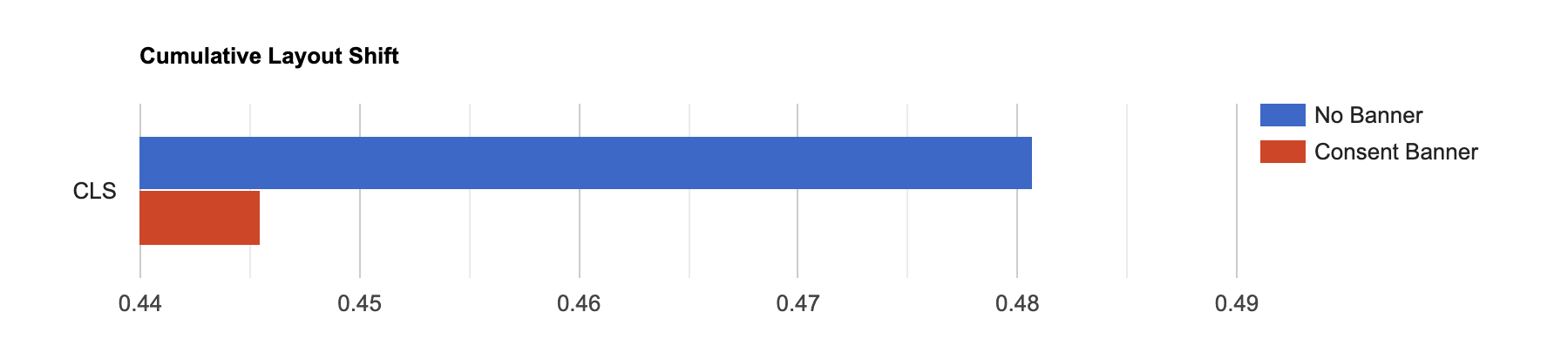
The full comparison of the Currys page with and without the Consent Banner is available on WebPageTest.
Although I've focused on Lighthouse and WebPageTest, the techniques for determining what cookies (and localStorage items) are needed to bypass consent banners should also work with other tools – many support setting headers and some, DebugBear for example, support injecting scripts.
Further Reading
Measuring Performance behind consent popups, Simon Hearne, May 2020
Publisher Ad Audits for Lighthouse
Ruthlessly Eliminating Layout Shift on netlify.com, Zach Leatherman, Nov 2020
WebPageTest Cookie Consent Scripts
]]>A client had asked me to look at the speed of their sites for countries in South East Asia, and South America.
The sites weren’t as fast as I thought they should be but then they weren’t horrendously slow either but, something that troubled me was how long they took to start displaying content.
I was puzzled…
When I examined the waterfall in WebPageTest I could see the hero image being downloaded at around 1 second but yet nothing appeared on the screen for 3.5 seconds!
I switched to DevTools and sure enough saw the same behaviour.
Profiling the page showed that even though multiple images were being downloaded quickly, the browser wasn’t even attempting to render them for several seconds.
Hunting through the source I found this snippet (I’ve unminified it to make it easier to read)
<script>

   // pre-hiding snippet for Adobe Target with asynchronous Launch deployment

   (function(g,b,d,f) {
       (function(a,c,d) {
           if(a) {
               var e = b.createElement("style");
               e.id = c;
               e.innerHTML = d;
               a.appendChild(e)
           }
       })(b.getElementsByTagName("head")[0], "at-body-style", d);

       setTimeout(function() {
           var a=b.getElementsByTagName("head")[0];
           if(a) {
               var c = b.getElementById("at-body-style");
               c && a.removeChild(c)
           }
       },f)
   })(window, document, "body {opacity: 0 !important}", 3E3);

</script>
The snippet does two things:
- Injects a style element that hides the
bodyof the document by setting it’sopacityto0 - Adds a function that gets called after 3 seconds to remove to the style element. This is a fallback in incase the Adobe Target script fails or takes a longer than 3 seconds to reach the point where it would remove the style element.
Google Optimize, Visual Web Optimizer (VWO) and probably others adopt a similar approach.
Urgh…
Impact of Anti-Flicker Snippets
Proponents argue that we need anti-flicker snippets because the potential of visitors seeing the page change as experiments are executed is a poor experience and visitors knowing they are part of an experiment can influence the results a.k.a The Hawthorne Effect.
I’ve not found any studies that validate this argument, but it may have merit as one of the Core Web Vitals, Cumulative Layout Shift, aims to measure how much elements move around during a page’s lifetime. And the more they move the worse the visitor’s experience is presumed to be.
As a counterpoint lets examine the experience that anti-flicker snippets deliver.
Here’s a filmstrip from WebPageTest that simulates a visitor navigating from Gymshark’s home page to a category page.
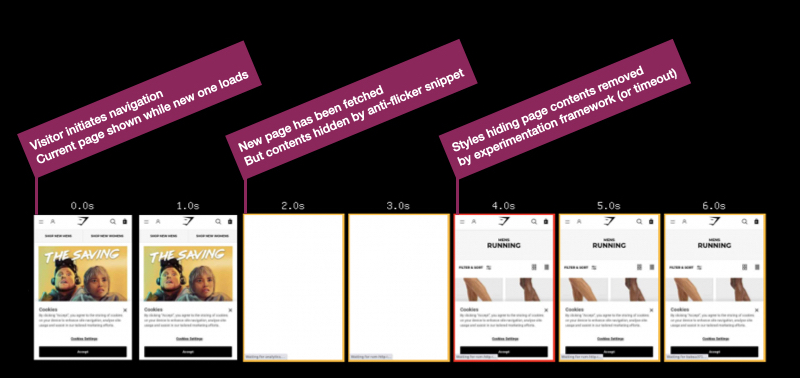
Gymshark – navigating from home to category page – London, Chrome, Cable
There are some blank frames in the middle of the filmstrip where the anti-flicker snippet hides the page for a few seconds (it’s actually 1.7s if you use the link above to view the test result)
By default Google Optimize uses a timeout of 4 seconds so in this case we can determine that the experimentation script completed before the timeout.
Compare this to a test where the anti-flicker snippet has been removed (using a Cloudflare Worker) and we can see the page renders progressively so at least in this case hiding the page doesn’t add to the visitors experience.
The blank frames also indicate to visitors that they may be part of an experiment, whether they realise this or not they may be aware the experience is different compared to other sites.
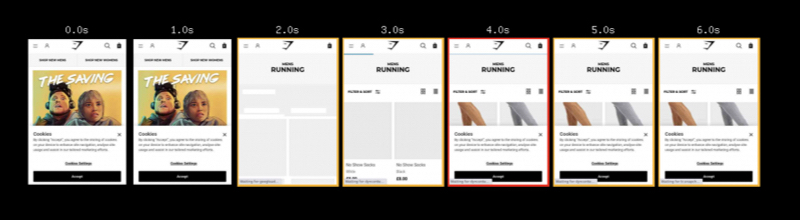
When the experimentation script doesn’t finish execution before the timeout expires then the visitor will get the ‘worst of both worlds’ – they’ll see a blank screen for a long time and then potentially see the effect of the experiment as it executes.
This might be because a visitor has a slower device or network connection, or the experimentation script being large and so taking too long to fetch and execute, or because other scripts in the page are delaying the experimentation scripts.
What we don’t know is how long visitors are staring at a blank screen!
Measuring the Anti-Flicker Snippet
Ideally, the experimentation frameworks would communicate when key events occur perhaps by firing events, posting messages or creating User Timing marks and measures.
But in common with many other 3rd-party tags they seem reluctant to do this, so we have to create our own methods for measuring them.
All three examples below use the MutationObserver API to track when either the class that hides the document, or the style element with the relevant styles in is removed (different products adopt slightly different approaches to hiding the page).
Each example sets a User Timing mark, named anti-flicker-end, when the anti-flicker styles are removed.
How long the page is hidden could be measured by adding a start mark to the snippet that hides the page and then using performance.measure to calculate the elapsed duration.
Some RUM products can be configured to collect the marks and measures created, others rely on explicitly calling their API (as do analytics products).
In my testing so far I’ve found the measurement scripts almost match the blank periods in WebPageTest filmstrips but they often measure a couple hundred milliseconds before the blank period actually ends. This isn’t surprising as once the styles have been updated, the browser still has to layout and render the page. In the future perhaps in the Element Timing might provide a more accurate measurement.
Although I’m working towards deploying these with a client, we’ve not deployed it yet, so treat them as prototypes and test them in your own environment!
Also I spend more time reading other people’s code than writing my own, so feel free to suggest ways to improve the measurement snippets, checks for Mutation Observer support could be added for example.
I’ve created a GitHub repository to track the scripts (I plan on adding more for other 3rd-parties) and pull requests are very welcome!
- Google Optimize
Google Optimize adds an async-hide class to the html element so the script detects when this class is removed.
const callback = function(mutationsList, observer) {
   // Use traditional 'for loops' for IE 11
   for(const mutation of mutationsList) {
       if(!mutation.target.classList.contains('async-hide') && mutation.attributeName === 'class' && mutation.oldValue.includes('async-hide')) {
           performance.mark('anti-flicker-end');

           observer.remove();

           break;
       }
   }
};

const observer = new MutationObserver(callback);

const node = document.getElementsByTagName('html')[0];

observer.observe(node, { attributes: true, attributeOldValue: true });
- Adobe Target
Adobe Target adds a style element with an id of at-body-style and the script below detects when this element is removed
const callback = function(mutationsList, observer) {
   // Use traditional 'for loops' for IE 11
   for(const mutation of mutationsList) {
       for(const node of mutation.removedNodes) {
           if(node.nodeName === 'STYLE' && node.id === 'at-body-style') {
               performance.mark('anti-flicker-end');

               observer.disconnect();

               break;
           }
       }
   }
};

const observer = new MutationObserver(callback);

const node = document.getElementsByTagName('head')[0];

observer.observe(node, { childList: true });
- Visual Web Optimizer
VWO adds a style element with an id of _vis_opt_path_hides and as with Adobe Target the script detects when this element is removed.
During testing I also observed VWO add other temporary styles to hide other page elements too.
const callback = function(mutationsList, observer) {
   // Use traditional 'for loops' for IE 11
   for(const mutation of mutationsList) {
       for(const node of mutation.removedNodes) {
           if(node.nodeName === 'STYLE' && node.id === '_vis_opt_path_hides') {
               performance.mark('anti-flicker-end');

               observer.disconnect();

               break;
           }
       }
   }
};

const observer = new MutationObserver(callback);

const node = document.getElementsByTagName('head')[0];

observer.observe(node, { childList: true });
Anti-Flicker Snippets are a Symptom of a Larger Issue
Once we’ve started collecting data on how long the page is hidden for, we can experiment with reducing the timeout, or even removing the anti-flicker snippet completely.
After all, these are experimentation tools so we should experiment with how their implementation affects visitors’ experience and behaviour!
But, fundamentally, the anti-flicker snippet is a symptom of a larger issue, and that issue is that testing tools finish their execution too late.
Revisiting the first Gymshark test and zooming into the filmstrip at 100ms frame interval we can see the page was revealed at 3.2s.
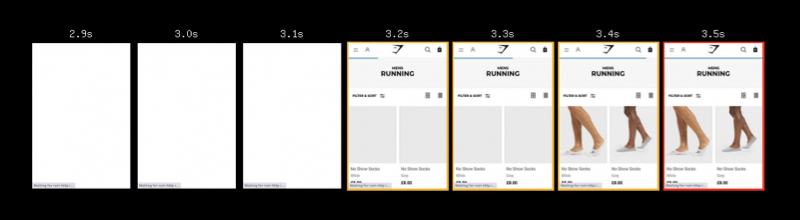
Gymshark – navigating from home to category page – London, Chrome, Cable
Or to view it another way… Google Optimize finishes execution at around 3.2s… and as Largest Contentful Paint needs to happen within 2.5s to be considered ‘good’, this suggests the delays caused by experimentation tools may be testing our visitors’ patience.
(In Gymshark’s case there are some other factors that further contribute to the delay too)
Shrinking the size of the testing script will help to reduce how long it takes to fetch and execute, and I mentioned some factors that can help with this in Reducing the Site-Speed Impact of Third-Party Tags.
The size of tags for testing services often depends on the number of experiments included, number of visitor cohorts, page URLs, sites etc. and reducing these can reduce both the download size and the time it takes to execute the script in the browser.
Out of data experiments or A/A tests that are being used as workarounds for CMS issues or development backlogs, and experiments for different sites (staging and live etc.) in the same tag are some of the aspects I look for first.
Recently I came across an example where base64 encoded images were being included in the testing scripts, making them huge, so avoid that too!
But there’s also another challenge…
Vendors recommend anti-flicker snippets because their testing scripts are loaded asynchronously – so the browser can continue building the page while the script is being fetched – and browsers, particularly Chrome, deprioritise async scripts.
In Chrome, this deprioritisation means the fetch (even from cache) of asynchronous scripts in the head is delayed into the second-phase of the page load.
An example of this can be seen in the waterfall below, where request 14 has been deprioritised because it’s async.
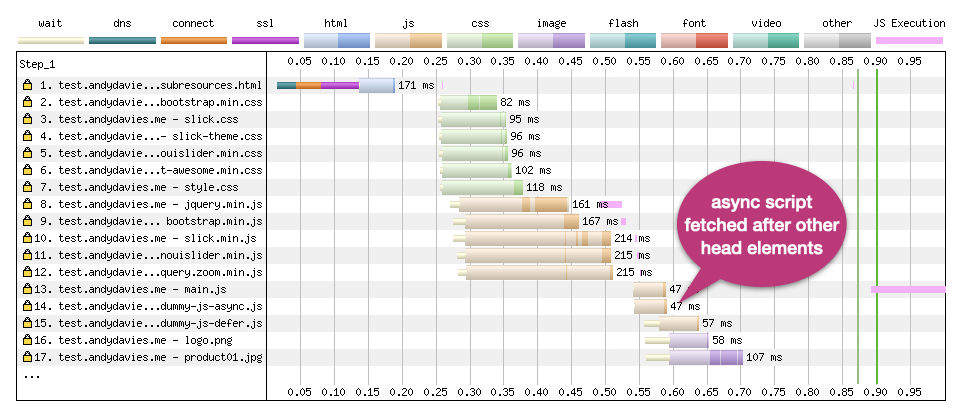
Prioritisation Test Page – Dulles, Chrome, Cable
So not only are the scripts finishing too late they’re also starting too late!
To compound the delay some testing scripts are loaded via a Tag Manager, and as Simo Ahava demonstrated with Google Optimize this increases the delay even further.
The alternative, at least for client-side testing, is to adopt a blocking script approach that products like Optimizely, and Maxymiser use.
But then we face the issue that the browser must wait for the testing script to be fetched and executed before it can continue building the page, and if the script host is inaccessible that can be a long wait.
We’re stuck between ‘a rock and a hard place’!
There is a third option… and that’s to create the page variants server-side before the HTML is even received by the browser.
Unfortunately too few publishing and ecommerce platforms have built-in support for experimentation so implementing this isn’t as easy as the current client-side options.
Some Content Delivery Networks (CDNs) already have the capability to provide test variants from their nodes, and as Edge Computing offerings from Akamai, Cloudflare and Fastly et al. mature I expect to see AB / MV Testing vendors offer ‘experimentation at the edge’ as a capability.
Several of the testing vendors currently support server-side testing but they still depend on sites to do the heavy lifting of implementing variants themselves.
Closing Thoughts
The default timeout values on anti-flicker snippets are set way too high (3 seconds plus) especially when we consider the limits that are placed on metrics like Largest Contentful Paint.
If you’re using anti-flicker snippets as part of your experimentation toolset, you should measure how long visitors are being shown a blank screen, with the aim of reducing the timeout values or even removing the anti-flicker snippet completely.
In his post on measuring the impact of Google Optimize’s anti-flicker snippet, Simo highlights some of the events that Google Optimize exposes during its lifecycle and these can be used as hooks for getting a more complete picture of when tests are running and their impact on your visitors experience.
If your vendor doesn’t expose timings or events for key milestones, point them at Google Optimize as a competitor and ask them to. It really is unacceptable that 3rd-parties tags don't already expose this data.
As ever with client-side scripts reducing their size will reduce their impact on site speed so monitor their size, and clean them up regularly.
Fundamentally we need to move this work out of the browser so track what your vendors are doing to support server-side experiments, particularly when it comes to integration with the CDNs Edge Compute platforms as this is going to be the most practical way for many sites to implement this.
Further Reading
Exploring Site Speed Optimisations With WebPageTest and Cloudflare Workers, Andy Davies, Sep 2020
Google Optimize Anti-flicker Snippet Delay Test, Simo Ahava, May 2020
JavaScript Loading Priorities in Chrome, Addy Osmani, Feb 2019
Reducing the Site-Speed Impact of Third-Party Tags, Andy Davies, Oct 2020
Simple Way To Measure A/B Test Flicker Impact, Simo Ahava, May 2020
Timing Snippets for 3rd-Party Tags
]]>As performance advocates we’d champion the idea that improving performance adds value, sometimes the value is tangible – increased revenue for a retailer, or increased page views for a publisher – other times it may be less tangible – improvements in brand perception, or visitor satisfaction for example.
But as important and valuable we might believe speed to be, we need to persuade other stakeholders to prioritise and invest in performance, and for that we need to be able to demonstrate the benefit of speed improvements versus their cost, or at least how slow speeds have a detrimental effect on the factors people care about – visitor behaviour, revenue etc.
“Isn’t that case already made” you might ask?
What about all the case studies that Tammy Everts and Tim Kadlec curate on WPOStats?
Case studies are a great source of inspiration, but it’s not unusual to hear objections of "our proposition is different, our site is different, or our visitors are different" and often there’s truth to these objections.
The chart below shows how conversion rates vary by average load time across a session for three UK retailers.
(Ideally I’d like a chart that doesn’t rely on averages of page load times but sometimes you’ve got to work with the data you have)
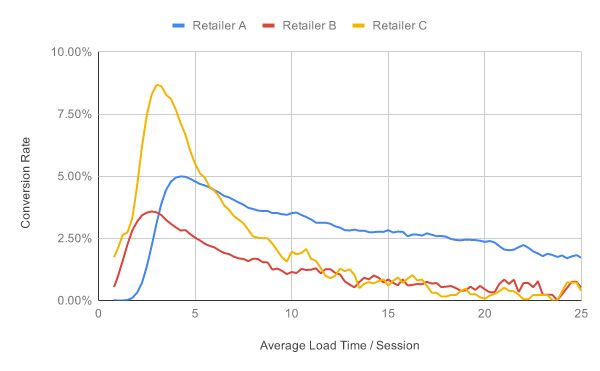
Although the trend for all three retailers is similar – visitors with faster experience are more likely to convert – the rate of change is different for each retailer, and so the value of improved performance will also vary.
As examples of how this value varies, one retailer I worked with saw a 5% increase in revenue from a 150ms improvement in iOS start render times, another increased Android revenue by 26% when they cut 4 seconds from Android load times and a third saw conversion rates improve for visitors using slower devices when they stopped lazy-loading above the fold images.
Other clients have had visitors that seemed very tolerant of slower experiences calling into the question the principle that being faster makes a difference for all sites, and what value investing in performance would deliver.
If case studies aren’t persuasive enough or maybe not even applicable for some sites, how do we help to establish the value of speed?
Identifying the Impact of Performance Improvements
Determining what impact a performance improvement had on business metrics can be challenging as the data is often split across different products, and a change in behaviour may only be visible for a subset of visitors, perhaps those on slower devices, or with less reliable connections.
This difficulty can lead us to depend on what Sophie Alpert describes as ‘Proxy Metrics’ such as file size, number of requests, or scores from tools like Lighthouse – if our page size or number of requests decreases, or our Lighthouse score increases then we’ve probably made a positive difference.
Haven’t we?
Relying on proxy metrics brings a danger that we celebrate improvements without knowing whether we actually made a difference to our business outcomes, and the risk that changes in business metrics are credited to other sources, or worse still, we remove something that actually delivers more value than it costs.
In Designing for Performance, Lara Hogan advocates the need for organisational cultures that value site speed at the highest levels rather than relying on Performance Cops and Janitors.
Linking site speed to the metrics that matter to senior stakeholders is a key part of that but as a performance industry / community I think we probably rely on an ad-hoc approach to making that link.
Relationship Between Site Speed and Business Outcomes
In June 2017, I had a bit of a realisation…
At the time I was employed by a web performance monitoring company, and one of our ongoing debates was about what data our Real User Monitoring (RUM) product should collect.
Simon Hearne and I worked with clients to identify and implement performance improvements, and then post implementation we were trying to quantify the value of those improvements.
As we identified gaps between the data our RUM product collected and the data we wanted, we would ask for new data points to be added but kept running into resistance from our engineering team who were often skeptical about the value of the new data.
We were in a ‘chicken and egg’ situation – our engineering team didn’t want to collect the data unless we could prove it had value, but Simon and I couldn’t establish whether it had value until we started collecting it.
We were missing a framework that might help us make these decisions, one that could help everyone understand what data we could collect, and what questions that data might help answer.
At some point while I was thinking about our challenge, I created a deck with a slide similar to this one:
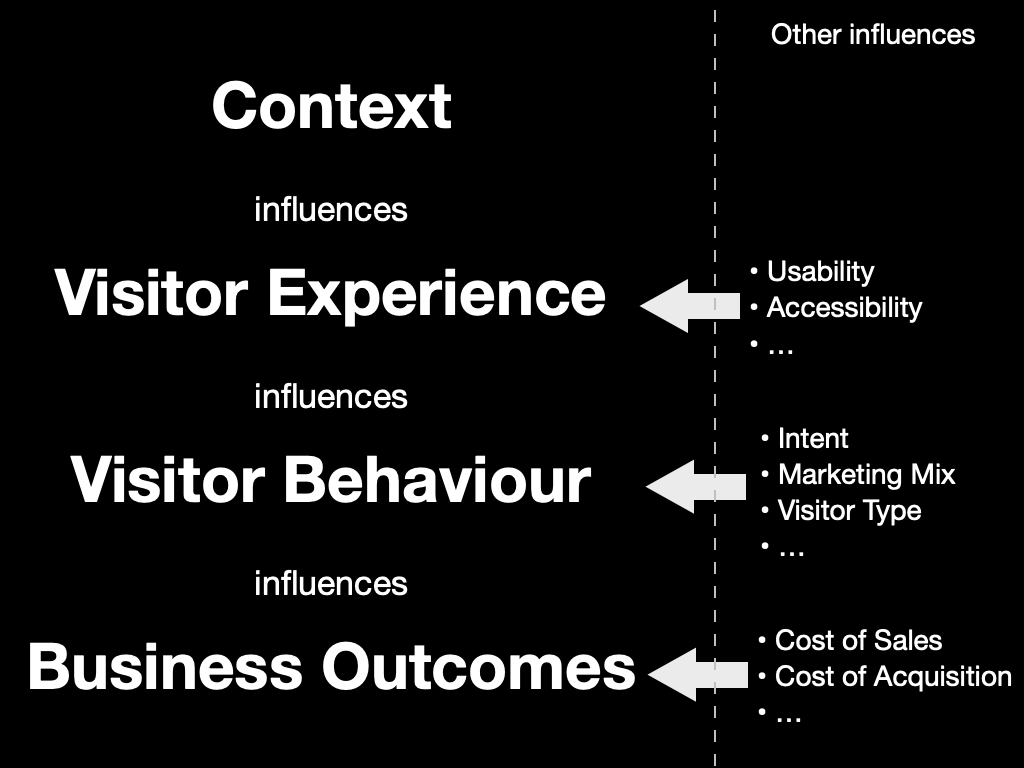
Concepts such as “how we build pages influence our visitors’ experience”, “the experience visitors get influences how they behave”, and “how visitors behave influences our sites’ success” are commonplace in web performance.
After all, these are concepts that underpin many of the case studies on WPOStats.
But… I’m not sure I’d ever seen them written down as an end-to-end model before.
And writing them down on one slide helped me realise what my mental model of web performance actually looked like.
It’s also become a lens through which I view one of Tammy’s questions in Time is Money – “How Can We Better Understand the Intersection Between Performance, User Experience, and Business Metrics?”
Other slides in the deck explained those categories, and what metrics might be included within them:
- Context
What a page is made from, how those resources are delivered, the device it’s viewed on and the networks it was transmitted over are all fundamental to how fast and smooth a visitor’s experience is.
Some of those factors – browser, device, and network etc. – have a crucial impact on how long our scripts take to execute, how soon our resources load etc., but as they are all outside our control, they’re really constraints we need to design for.
Other factors such as the resources we use, whether they’re optimised, how they’re delivered and composed into a page also have a huge effect on a visitor’s experience and this second set of factors is largely within our control, after all these are the things we change when we’re improving site speed.
- Visitor Experience
From a performance perspective visitor experience is synonymous with speed – when did a page start to load, when did content start to become visible, how long did key images take to appear, when could someone interact with the page, were their interactions responsive and smooth etc.
We’ve plenty of metrics to choose from, some frustrating gaps and the ability to synthesise our own via APIs such as User Timing too.
There are other factors we might want to consider under the experience banner too – are images appropriately sized, does the product image fit within the viewport or does the visitor need to scroll to see it, what script errors occur etc.
- Visitor Behaviour
How visitors behave provides signals as to whether a site is delivering a good or bad experience.
At a macro level, a visitor buying the contents of their shopping basket is seen as a positive signal, whereas someone navigating away, or closing the tab before the page has even loaded would be a negative one.
Then at the micro level there are behaviours such as whether a visitor reloads the page, rotates their device, or perhaps zooms in, how long they wait before interacting, how much they interact etc.
There are also other, non-performance factors that influence visitors behaviour – their intent, the marketing mix, social demographics factors – that we may or may not want to include when we’re considering behaviour.
- Business Outcomes
Individual user behaviour can be aggregated into metrics we use to run our businesses – conversion rates, bounce rates, average order values, customer lifetime value, cost of acquisition etc. – and ultimately revenue, costs and profit.
Limitations of the Model
“All models are wrong; some models are useful”, George E. P. Box
Every model has limitations, and while site speed might be our focus, it isn’t the only driver of a site's success.
- A visitor’s experience is much more than just how fast it is – content, visual design, usability, accessibility, privacy and more all contribute to the experience.
- The type of visitor, their intent, the marketing mix (product, price, promotion etc.) and more influence how people behave.
- Factors such as cost of acquisition, product margin, returns etc. affect the success of our business
Our challenge is identifying what role site speed played in influencing the outcomes.
I’ve also got outstanding questions about how design techniques that improve perception of performance, such as those Stephanie Walter covers in Mind over Matter: Optimize Performance Without Code fit into the model too.
There are also questions about whether it’s possible, desirable, and even acceptable to gather some of the data points we might want.
But…
Even with its limitations, I still find the model very useful as a tool to help communication and build understanding.
It helps facilitate discussions around the metrics we’re capturing (or could start capturing) and what those metrics actually represent.
It’s handy when making changes as we can discuss what effect we expect to see from a change – which metrics should move, in what direction, and how that might affect visitor behaviour.
I’ve also had some success tracking changes in how pages were constructed all the way to changes in business outcomes, particularly revenue but often the data on speed, visitor behaviour and business performance is stored in separate products and the gap between them can make analysis hard.
Bridging the Gap
If our thesis is that the speed of a visitor’s experience influences their behaviour then we need tools that allow us to capture, and analyse data on both visitors’ experience and their behaviour in the same place.
This is where the gaps in analytics and performance tools start to show:
- Analytics products tend to focus on visitor acquisition and behaviour but generally don’t capture speed data. Those that do collect speed data, only support limited metrics, have low sample rates and expose the data as averages.
- Real-User Monitoring (RUM) products tend to focus on speed, some capture a wider range of metrics and a few capture some data on visitor behaviour such as conversion, bounce and session length.
- Some Digital Experience Analytics products (Session Replay, Form Analytics etc) collect speed data alongside visitor behaviour but only one product exposes the cost of speed in their product.
- Performance Analysis tools such as WebPageTest and Lighthouse give us a deeper view into page performance including construction and delivery but can’t capture data on either real-visitors’ experience or their behaviour.
There are limits to what data it’s possible, practical or acceptable to collect and store but ideally I’d also like data on how a page is constructed and delivered, along with some business data to be stored in the same place too.
Although it’s easy to think of all RUM products as comparable, some are more capable than others and a few RUM products have tried to close some of the gaps but there is still much to be done.
I track the features and capabilities of over thirty RUM products and too many of them focus on just monitoring how fast a site is, often only using a few aggregated metrics (DOMContentLoaded / Load).
Other products support perceived performance metrics such as paint and custom timings, and some include data on page composition too – number of DOM nodes, scripts etc.
Very few products capture data on visitor behaviour, some plot conversion or bounce rates alongside speed metrics, others build predictive models showing the value speed improvements could bring – reduced bounce rates, higher conversion rates, increased session lengths etc.
For filtering and segmentation products tend to focus on contextual dimensions such as browser make and version, operating system, ISP, device type, country etc., rather than behavioural dimensions such as whether a visitor converts or bounces etc.
This focus on technical dimensions and metrics rather than visitor behaviour means it can often be hard to answer the questions I often want to ask.
Questions such as, how does performance differ between visitors who convert, and those that don’t?
Or which visitors have slow experiences and why?
Or what areas of a site should we focus first on when improving performance?
And much more…
Ultimately I want to be able to segment based on a variety of factors including how visitors behave, the experience they have and how the pages they view are constructed.
I want to be able to highlight not just how speed impacts visitors’ behaviour and what it costs, but why some visitors have slower experiences and perhaps even what changes can be made to improve them.
And once we’ve made improvements I want to be able to link changes in behaviour, and gains in business metrics back to those performance improvements.
Closing Thoughts
It’s easy to get excited about new techniques for measuring and improving site speed but this focus on the technical side of performance can lead us to think of speed as a technical issue, rather than a business issue with technical roots.
As Harry Roberts said in his 2019 Performance.Now talk – “Our job isn’t to make the fastest site possible, it’s to help make the most effective site possible”
But to help make more effective sites we need tools that make it easier to understand how speed is influencing visitors' behaviour, easier to identify key areas where performance needs to improve and perhaps even recommend actions they can take to improve it.
We also need models that help link the way sites are constructed and delivered to the business outcomes, so that we understand how the changes affect visitors and allow for features that might make pages a bit larger, a little slower but improve engagement and deliver higher revenues.
My mental model is still a work in progress and I’m not wedded to it, so feel free to suggest alternatives, poke at its gaps or better still, suggest ways we can fill the gaps.
Ultimately, there are too many RUM products that just measure how fast or slow a visitors experience is, and are unable to link that experience to a site's success.
If we want to make the web faster we've got to close that gap.
Thanks
I started this post a couple of years ago while I was taking some time off after helping sell NCC Group's web performance business.
Since then I've talked to quite a few people about the ideas in it and I'm grateful to them for sharing their challenges and experience or giving me feedback.
Finally, Colin, Dave, Jeremy, Simon and Tim were kind enough to my read my draft post, spot my typos and poke at its weak points.
Further Reading
Designing for Performance, Lara Hogan
From Milliseconds to Millions: A Look at the Numbers Powering Web Performance, Harry Roberts
Metrics by Proxy, Sophie Alpert
Mind over Matter: Optimize Performance Without Code, Stephanie Walter
]]>As it’s hard to fit everything into a twenty minute talk, this post expands on the talk and includes some of the points I didn’t have time to cover.
From Analytics to Advertising, Reviews to Recommendations, and more, it’s common for sites to rely on Third-Party tags to provide some of their key features.
But there’s also a tension between the value tags bring and the privacy, security and speed costs they impose.
I’m focusing on speed but if you want to learn more about the other aspects, Laura Kalbag and Wolfe Christl often cover the privacy concerns, and Scott Helme sometimes covers the security issues.
What does a Tag Cost?
When I’m helping clients to improve the speed of their sites one of my first steps is to test the site with and without tags using WebPageTest (you can also use this approach to test the impact of individual tags).
This gives me an indication of what gains might be made by optimising the implementation of tags.
Using OPI, the nail varnish company as an example… when third-party tags are removed their pages get faster – on product pages the key image appears about a second sooner, and other content such as the heading text, and brand logo also appear sooner.
 OPI with 3rd-Party Tags blocked (top), and as loaded normally (bottom)
How Tags Impact Site-Speed
There are two ways tags impact site-speed – they compete for network bandwidth and processing time on visitors’ devices, and depending on how they’re implemented they can delay HTML parsing
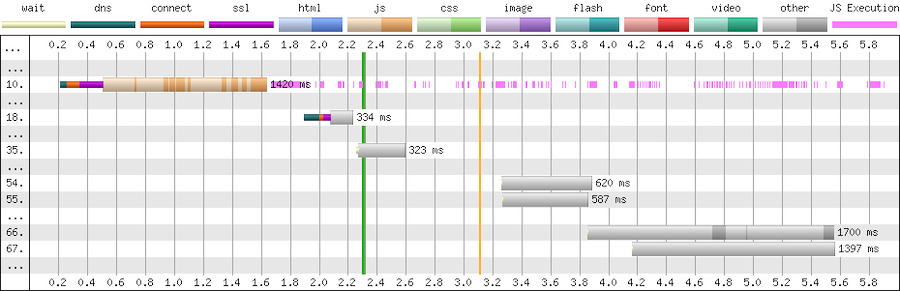
This partial waterfall from WebPageTest illustrates the costs for fetching and executing the script.

First there’s a 300ms delay while the browser connects to the third-party (cyan, orange and magenta segments), then the download of the script takes a further 1,100ms (beige segment), and then the script execution takes a further ~200ms (pink segments on the right)
The dark sections of the beige line are where data is being received, and the light section where there’s no data – these extended light sections are an indication that this tag is competing for the network or the server it’s hosted on is slow.
If the script is cacheable then the cost of the network connection and download should only affect the first time it’s loaded in a session but the cost of the execution time will apply to all pages that include it.
Tags can also trigger further downloads, sometimes these may be calls to an API, other times they may be adding extra scripts, stylesheets etc to the page.
Expanding the above example we can see it makes many further calls (the chart only shows a few) to an API (grey bars). These API calls are likely to be made on every page, and again the light areas in the grey bars indicate either network contention or a slow server.So
Tags are generally implemented as scripts, and a second aspect to consider is what effect they have on blocking HTML parsing.
By default script elements (such as the one below) stop the browser from parsing HTML until the script has been fetched and has finished running.
<script src="https://cdn.example.com/third-party-tag.js"></script>
We want to avoid implementations that use blocking tags as much as possible due to the delay they cause, which if the third-party isn’t reachable for some reason can be over 30 seconds.
There are a few ways to make scripts non-blocking.
Adding the async attribute tells the browser to not to wait while the script is fetched but will block the browser when the script executes.
<script src="https://cdn.example.com/third-party-tag.js" async></script>
Non-blocking scripts can also be added via a small inline script snippet that inserts another script into the page. This example is for Google Tag Manager, but it’s a very common pattern.
<script>
    (function(w, d, s, l, i) {
        w[l] = w[l] || [];
        w[l].push({
            'gtm.start': new Date().getTime(),
            event: 'gtm.js'
        });
        var f = d.getElementsByTagName(s)[0],
            j = d.createElement(s),
            dl = l != 'dataLayer' ? '&l=' + l : '';
        j.async = true;
        j.src = 'https://www.googletagmanager.com/gtm.js?id=' + i + dl;
        f.parentNode.insertBefore(j, f);
    })(window, document, 'script', 'dataLayer', 'GTM-XXXX');
</script>
Another form of non-blocking scripts use the defer attribute to instruct the browser that it doesn’t need to wait for the script to download but that it should only execute the script when all the HTML has been parsed.
<script src="https://cdn.example.com/third-party-tag.js" defer></script>
Avoid document.write as it stalls the browser – the browser can’t discover the external script until document.write executes, and then the browser must wait for the script to be downloaded and run before it can carry on parsing the HTML.
document.write(‘<script src="https://cdn.example.com/third-party-tag.js"></script>’);
Tag Managers generally inject tags using a non-blocking approach but occasionally I come across one that still uses document.write.
Reducing the Impact of Tags
Our goal is to minimise the impact tags have on visitors’ experience, while still retaining the value those tags provide.
Catalogue the Tags that are Currently Deployed
There are a few ways to catalogue the tags on a page… from inspecting the contents of a tag manager container, through free tools like WebPageTest to commercial tools such as Ghostery and ObservePoint.
One of my favourite places to start is Simon Hearne’s Request Map – it’s built on top of WebPageTest and visualises the third-parties on a page along with details on their size, type and what triggered their load.
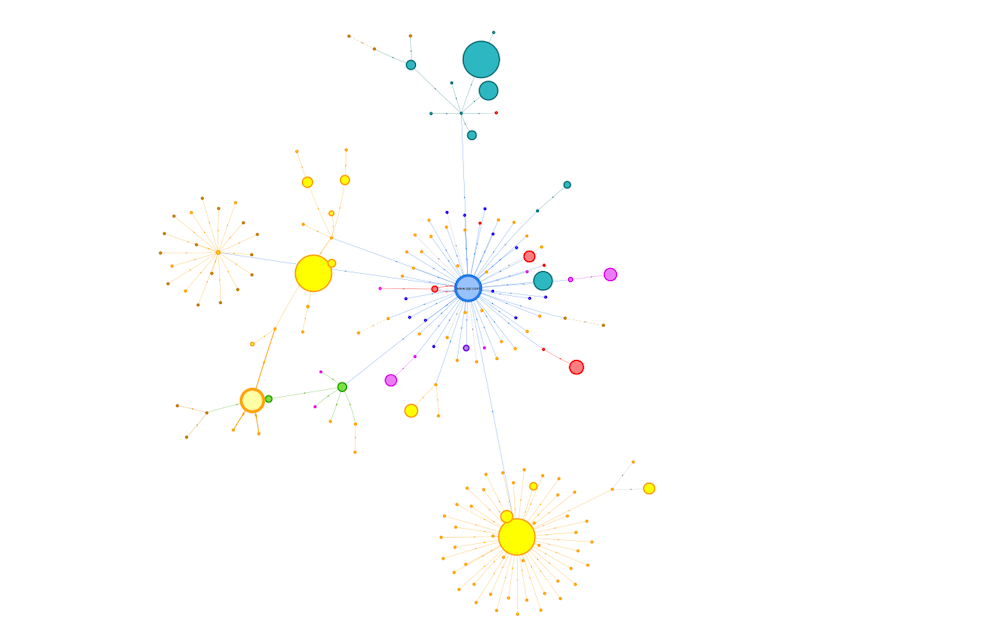 Request Map for OPI Product Page
I often create these for different types of pages across a site and also combine the WebPageTest data to build a cross site view.
Consolidate by Identifying Tags that can be Removed
Once I’ve got an idea of what’s on the page I start analysing and asking questions.
Initially, I aim to identify services where the subscription has lapsed, no-one is using it, or where there’s more than one product providing similar features.
When a subscription expires, some providers helpfully return an error e.g. HTTP 403, others serve an empty script but many carry on serving their full script, so sometimes it can take a bit of digging to identify them.
A few years ago (pre-GDPR) one of the European airlines audited their tags and found that subscriptions had expired for around a third of the tags on their pages, and they couldn’t find anyone who used some of the others.
So immediately with a bit of tidying up they were able to reduce the impact.
Occasionally I come across tags from different vendors that provide similar features, for example session replay services like Mouseflow and HotJar, or analytics services such as Google and Adobe.
Reducing this duplication and consolidating on a single choice is better than having multiple solutions (for both cost and visitor experience) but sometimes there can be good reasons to keep more than one analytics service but try to deduplicate where possible,
Another question to ask at this point is whether the tag is actually needed on the current page, for example I’ve seen the Google Maps script included in every page across a site when there was only a map on one or two pages.
Reduce the Cost of Remaining Tags
When the unused tags have been removed and the duplicates consolidated I start exploring ways to reduce the impact of the remaining tags.
Initially I’ll identify which tags might be replaced with smaller, faster alternatives, and then how we can reduce the cost of the remaining ones.
Lighter Weight Alternatives
Typical wins are replacing the standard embedded YouTube player with a version that delays loading the player script until a visitor interacts with the video.
Or replacing social sharing buttons with lightweight JavaScript free versions or even removing them entirely and just relying on visitors using the sharing features built into their browser.
Switching providers in another option worth considering – one of my clients switched their chat provider from ZenDesk to Olark as it was half the size!
Experimentation Frameworks and Tag Managers
The impact of AB / MV Testing services and Tag Managers can often be reduced by simplifying their work.
The size of tags for testing services often depends on the number of experiments included, number of visitor cohorts, page URLs, sites etc. and reducing these can reduce both the download size and the time it takes to execute the script in the browser.
Out of data experiments or A/A tests that are being used as workarounds for CMS issues or development backlogs, and experiments for different sites (staging and live etc.) in the same tag are some of the aspects I look for first.
Similarly the more tags and rules there are in a tag container the larger it’s going to be, and so the greater its impact on the visitors experience.
A client I worked with last year was using a single container for each geographical region and it contained the tags for every brand site in that region. All these tags were being shipped to every visitor even when most of them wouldn’t be used and the size of the container had a noticeable impact on visitors' experience.
I encouraged the client to switch to one container per brand to reduce its size and improve visitor experience. The challenge for them was that this increased the number of tag containers they needed to manage – there’s always a complexity tradeoff somewhere!
Tracking Pixel and Server-Side Tag Management
Barry Pollard’s approach of replacing some tags with their fallback tracking pixel instead of using the full tag, is an interesting idea that I’ve not tried with any clients yet.
Server-side tag management helps in a similar way, as the tag manager collates the events and distributes them to other services without including the scripts from those services directly in the page.
Libraries from Public CDNs
And although they’re not tags I also examine what 3rd-party resources – scripts, stylesheets and fonts such as jQuery, FontAwesome etc. – are being loaded from public CDNs such as jsdelivr or ajax.googleapis.com etc., with the aim of self-hosting them.
Self-hosting allows for more efficient use of network connections, especially if a site is already using a CDN and HTTP/2.
Choreograph when Tags Load
In the performance world we often refer to page load as a journey with milestones along the way… is anything happening, when does a page become useful or usable?
Third-party tags should fit into that journey…
Which ones must be loaded before the page can start displaying content to a visitor, which ones can be delayed until later, and what about the ‘bit in the middle’?
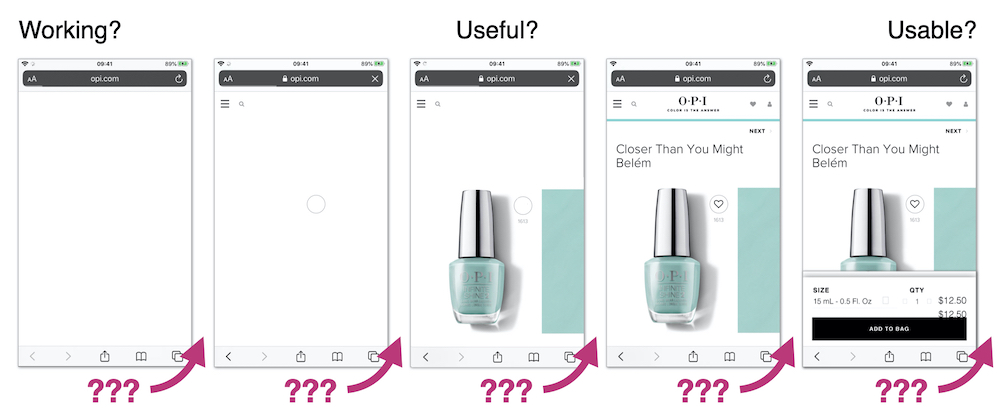
The point at which a tag needs to be loaded depends on what features it provides and when that feature is required.
But too often I see tag managers injecting tags as soon as possible.
Generally I try to delay the load of tags for as long as practical but it depends on the tag’s purpose – is it just collecting data for business use, does it affect or provide content and features that the visitor sees and when does the visitor need to see them?
Before Useful
Tags that are loaded early in the page have an outsized impact on visitor experience, often they’re included in the <head>, and browsers tend to prioritise resources included there.
The key question to answer is “does this tag need to be loaded before the visitor can see content, and what’s the impact if it’s loaded later?”
AB / MV Testing, Tag Managers, Personalisation tools and Analytics are some of the tags that are often loaded in this phase – I tend to leave them embedded in the page, but aim to have as few as possible and slim them down to minimise their impact.
Testing / experimentation tools often have a large impact in this phase.
They tend to take one of two approaches – block the page from rendering until the tag has loaded, or load non-blocking and hide the page using an anti-flicker snippet – and both of these have challenges.
Choosing a blocking approach stops the parsing of HTML until the script has downloaded and been executed.
With the non-blocking approach, anti-flicker scripts hide the page until either the testing framework has executed or a timeout value is exceeded (3 seconds in the case of this example for Adobe Target):
<script>
    //prehiding snippet for Adobe Target with asynchronous Launch deployment
    (function(g, b, d, f) {
        (function(a, c, d) {
            if(a) {
                var e = b.createElement("style");
                e.id = c;
                e.innerHTML = d;a.appendChild(e)
            }
        })(b.getElementsByTagName("head")[0], "at-body-style", d);
        setTimeout(function() {
            var a=b.getElementsByTagName("head")[0];
            if(a) {
                var c = b.getElementById("at-body-style");
                c && a.removeChild(c)
            }
        }, f)
    })(window, document, "body {opacity: 0 !important}", 3E3);
</script>
I’m not a fan of snippets that hide the page – visitors are familiar with pages loading incrementally, and hiding the page interferes with their perception of speed.
Some will argue anti-flicker snippets avoid a poor visitor experience, and that if visitors see experiments making significant changes to the page it may alter their behaviour.
In the example above, even if the experimentation framework hasn’t finished its work the page is going to be revealed after 3 seconds, so visitors having slow experiences will potentially still see changes as they’re applied anyway.
I’d advise experimenting with whether you really need an anti-flicker snippet, reducing the timeout values, and also measuring the delay the anti-flicker snippet introduces (Simo Ahava has a post on how to do measure it for Google Optimize)
There are methods to reduce the impact of blocking testing frameworks too.
Casper removed the network connection time by self-hosted their Optimizely script and reduced the delay before content appeared by 1.7s
As an alternative to self-hosting, Optimizely provides instructions on how to proxy their tag through your own CDN, but proxying can bring security concerns, and you will need additional CDN configuration such as stripping the cookies you don’t want to forward to a third-party.
Testing frameworks are big bundles of JavaScript that need to be downloaded and executed so simplifying them will reduce their impact.
But ideally the work of large or blocking tags should be completed before the page reaches the visitor so explore how you can implement experiments server-side or CDN-side so they execute before the page is delivered.
Analytics / Attribution Fallbacks
One last thing to watch out for is fallbacks for visitors who have JavaScript disabled – many attribution tags use an image or iframe fallback wrapped in a noscript element.
The fallback for Bing Ads for attribution is one example:
<noscript>
    <img src="https://bat.bing.com/action/0?ti=xxxxxxx&Ver=2" height="0" width="0" style="display:none; visibility: hidden;"/>
</noscript>
These fallbacks should be placed in the body of the page as img and iframe aren’t valid elements in the head.
After Usable
Some tags provide features that aren’t much use until a visitor can interact with the page – chat and feedback widgets, session replay services etc. – so I tend to delay their load.
Often these tags are loaded much earlier than needed and their download competes for the network often delaying far more important resources such as product images.
I’ll delay the addition of these types of tags using the Window Loaded Adobe Launch event / GTM trigger. Delaying them reduces competition for the network and allows the more important resources to complete sooner.
Between Useful and Usable
It’s often clear which tags need to be loaded early and which can be delayed but there’s a grey area between the page starting to render and the page becoming usable.
And as yet, I’ve not developed a clear approach on how to handle the tags that fit into this section.
Often I’m guided by whether the tag provides content the visitor sees, for example I’ll include the tag for a reviews service just before the point in the page where the reviews appear. Inserting it earlier than that may delay more important content, but adding it later can result in the page reflowing once that tag has loaded.
Tags that don’t provide content – analytics, attribution, remarketing etc. – are a bit more tricky.
A TagMan study from several years ago demonstrated that the later a tag was fired, the greater the risk of data loss as visitors abandoned the page before the tag had fired.
These types of tag are ideal candidates for server-side tag management where only one tag needs to be fired, and the server-side code can distribute out the data further (clean up PII etc on the way).
But overall, the faster a page is, the less data loss there’s going to be.
Cut Connection Delays
The last area I explore is whether some of the delays caused by creating new network connections can be reduced.
Preconnect Resource Hints are commonly added via a HTTP headers, or the directly in the page using link element:
<link rel=”preconnect” href=”https://www.example.com”>
By default browsers wait until they’re about to request a resource before they make a connection to a server (assuming one doesn’t already exist) and making this connection ahead of time can bring forward the download of a resource.
 Without preconnect – image download starts at ~1.55s
 With preconnect – image download starts at ~0.95s
Preconnects are cheap but they’re not free (creating a HTTPS connection consumes bandwidth in the certificate exchange) so don’t overuse them.
For tags later in the page, you can use a tag manager to inject preconnect directives at an appropriate point – for example if a tag is being injected using the Window Loaded trigger, I’ll experiment with injecting the preconnect using DOM Ready trigger.
Not every domain needs a preconnect and if you find the need to preconnect to many domains then you’re probably using too many tags.
Taming Tags Delivers Wins
When he was at The Daily Telegraph, Gareth Clubb wrote about the approach they adopted and the experience they had reducing the impact of third-party tags.
Several years ago I was working with a UK fashion retailer, and we found that one of their 3rd-party tags was slowing down visitors who used Android phones by around four seconds. The retailer decided to disable this tag for those visitors and saw a 26% increase in revenue from them.
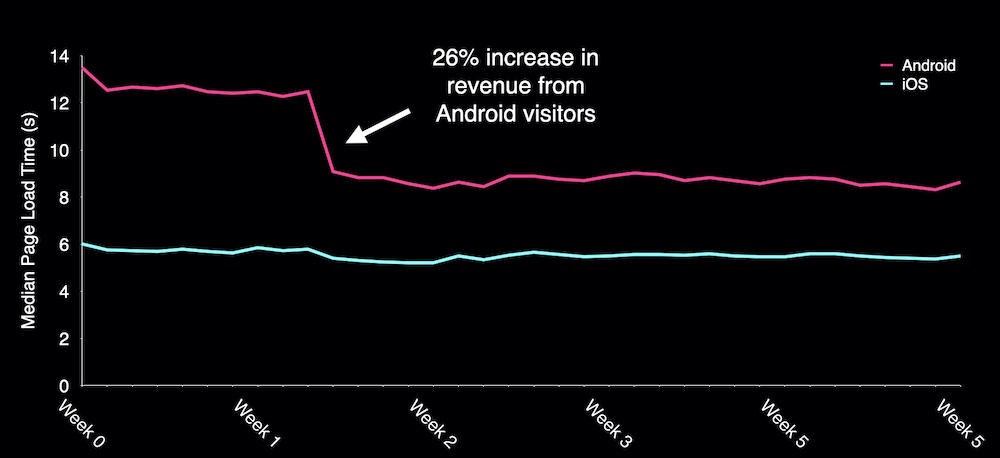
Encouraged by this early gain the retailer went on to make improvements right across their site and reduced the median load time for Android visitors from over 14 seconds to under 6.
What about OPI?
To see what gains OPI could make if they improved the implementation of their third-party tags I used a Cloudflare Worker as proxy to rewrite the page and tested the changes with WebPageTest.
Consolidating and choreographing just a few 3rd-party tags reduced the delay before the product image appeared by one second, and there’s still plenty of opportunity for further improvements to both the base page, and their tag implementation.

Summary
Although I’ve described a sequential process, in reality I adopt a ‘pick and mix’ approach.
Persuading clients to implement ‘quick wins’ such as replacing the YouTube player, or delaying the load of chat and feedback widgets early on in an engagement is a great way of kickstarting an overall performance improvement process.
And like many things performance related, even small incremental improvements soon add up to make a larger difference.
Next time you’re thinking about the impact third-party tags are having on site-speed keep these five principles in mind:
- Catalogue the tags that are being served to your visitors
- Consolidate to remove expired and unused tags, reduce duplication and ensure tags are only included on the pages they are used on
- Reduce the cost of tags by adopting lightweight alternatives, slimming down testing frameworks and Tag Managers. Self-host libraries instead of fetching them from public CDNs.
- Choreograph when tags are loaded so that the most important content gets shown to your visitors sooner
- Cut delays caused by connecting to tag domains
They’re not an exhaustive list of all the things you should consider when managing tags but they’ll help you move in the right direction.
And if you’d like help taming your third-party tags, or generally improving the speed of your site feel free to Get In Touch.
Further Reading
Reducing the Speed Impact of Third-Party Tags (slides)
Measuring the Impact of 3rd-Party Tags With WebPageTest
Adding controls to Google Tag Manager, Barry Pollard
Exploring Site Speed Optimisations With WebPageTest and Cloudflare Workers
Fast Fashion… How Missguided revolutionised their approach to site performance
Google Optimize Anti-flicker Snippet Delay Test, Simo Ahava
How we shaved 1.7 seconds off casper.com by self-hosting Optimizely
Content Delivery Networks (CDNs) and Optimizely
Self-hosting third-party resources: the good, the bad and the ugly
Improving third-party web performance at The Telegraph
]]>And too often that can be a hard question to answer…
I can be pretty sure of the 'direction of travel' – shrinking resources should make them download faster, delaying 3rd-parties should make content appear sooner – but page load can be non-deterministic and un-sharding domains, re-ordering resources or other changes sometimes leads to unexpected results.
Knowledge, experience and lots of testing can help us to prioritise what we think are the appropriate optimisations but often we have to wait until those changes make it to staging (or even live) before we can check the results.
WebPageTest and DevTools can give us clues that we're heading in the right direction but there's a gap that neither of them quite fill – a reliable testing environment that allows us to experiment and make changes to the page being tested.
When we worked together, Simon Hearne prototyped a proxy using mod_pagespeed that optimised pages and illustrated potential performance gains to customers (and accidentally siphoned away a UK airline's search traffic) but it's optimisations were limited and it wasn't easy to use.
So, last year when Pat Meenan, and Andrew Galloni started demonstrating what was possible using Cloudflare Workers as a proxy I guessed it might be a solution to fill the gap.
But it's taken me a little while to get around to experimenting with them...
Cloudflare Workers
Service Workers are often described as a programmable proxy in the browser – they can intercept and rewrite requests and responses, cache and synthesise responses, and much more.
Cloudflare Workers are a similar concept but instead of running in the browser they run on CDN edge nodes.
In addition to intercepting network requests, there's a HTMLRewriter class that targets DOM nodes using CSS selectors and triggers a handler when there's a match. The handlers can alter the matched elements, for example changing attributes, or even replacing an elements contents.
Andrew Galloni's post – Prototyping optimizations with Cloudflare Workers and WebPageTest – for the 2019 Performance Advent Calendar gives a good overview and guide to get started with them.
How I'm Using Them
Key to the approach I'm using is WebPageTest's overrideHost script command. It allows requests to one domain to be rewritten to another, and sets an x-host HTTP header on the revised request.
In the example script below any requests to example.com are rewritten to demo-proxy.asteno.workers.dev and the x-Host header set to example.com for those requests.
overrideHost www.example.com demo-proxy.asteno.workers.dev
navigate https://example.com/test-page.html
I start with a simple boilerplate worker and as the transforms tend to be bespoke for each site, I create a separate worker for each site I'm testing.
The boilerplate script for the worker follows this pattern:
- serves a robots.txt that disallows crawlers
- returns an error if the
x-hostheader is missing - if the request is for a predefined site, the browser is expecting a HTML response and the
x-bypass-transformheader isn't set totruethe proxy uses a HTMLRewriter to modify the response - Otherwise just proxy the request
/* Started from Pat's example in https://www.slideshare.net/patrickmeenan/getting-the-most-out-of-webpagetest */

/*
 * TODO
 * Add mimetype to robots.txt
 * Add a better doc check, perhaps use a header instead?
 */

const site = 'www.example.com';

addEventListener('fetch', event => {
 event.respondWith(handleRequest(event.request))
});

async function handleRequest(request) {

 const url = new URL(request.url);

 // Disallow crawlers

 if(url.pathname === "/robots.txt") {
   return new Response('User-agent: *\nDisallow: /', {status: 200});
 }

 // When overrideHost is used in a script, WPT sets x-host to original host i.e. site we want to proxy

 const host = request.headers.get('x-host');

   // Error if x-host header missing

 if(!host) {
   return new Response('x-host header missing', {status: 403});
 }

 url.hostname = host;

 const bypassTransform = request.headers.get('x-bypass-transform');

 const acceptHeader = request.headers.get('accept');

 // If it's the original document, and we don't want to bypass the rewrite of HTML
 // TODO will also select sub-documents e.g. iframes, from the same site :-(

 if(host === site &&
   (acceptHeader && acceptHeader.indexOf('text/html') >= 0) &&
   (!bypassTransform || (bypassTransform && bypassTransform.indexOf('true') === -1))) {

   const response = await fetch(url.toString(), request)

   return new HTMLRewriter()
     .on('selector', new exampleElementHandler())
     .transform(response)
   }

 // Otherwise just proxy the request

 return fetch(url.toString(), request)
}

/*
 *
 */

class exampleElementHandler {
 element(element) {
   // Do something
 }
}
Example Transforms
The transforms I'm using are fairly straightforward and mainly consist of unsharding domains, changing the order of the page, or delaying when a resource loads.
Sometimes it's possible to manipulate an existing element in the page, sometimes an element has to be deleted and a replacement inserted elsewhere in the page.
- Unsharding Domains
Requesting frameworks, libraries etc from 3rd-party CDNs such as cdnjs, jsdelivr etc. is still very common across many of the customers I work with.
Requesting these from another origin involves creating a new connection, and then as HTTP/2 prioritisation only works across a single connection they may compete for the network with other resources.
One of the first tests I try is directing these requests through the proxy, so they're on the same origin as the page too:
overrideHost www.example.com demo-proxy.asteno.workers.dev
overrideHost ajax.googleapis.com demo-proxy.asteno.workers.dev
navigate https://example.com/test-page.html)
The proxy could be improved to cache these libraries on Cloudflare to remove the request origin for them – one of Pat Meenan's workers has an example of how to do this.
- Deferring inline scripts
Clients often use 3rd-party services that don't need to be loaded until the visitor has a usable page – sometimes these provide outward facing features such as chat or feedback widgets, other times they may be internal facing, session replay for example.
I'll often defer the load for these types of services by moving them into a Tag Manager, and initiating their insertion using the Window.Loaded trigger in Google Tag Manager (GTM).
In one recent example, HotJar was loaded via an async snippet at the start of the head:
(function(h,o,t,j,a,r){
  h.hj=h.hj||function(){(h.hj.q=h.hj.q||[]).push(arguments)};
  h._hjSettings={hjid:xxxxxx,hjsv:x};
  a=o.getElementsByTagName('head')[0];
  r=o.createElement('script');r.async=1;
  r.src=t+h._hjSettings.hjid+j+h._hjSettings.hjsv;
  a.appendChild(r);
 })(window,document,'https://static.hotjar.com/c/hotjar-','.js?sv=');
To delay HotJar loading and simulate it being implemented via GTM I wrapped the HotJar snippet with a native event handler for window onload.
class deferInlineScript {
  element(element) {

    const wrapperStart = "window.addEventListener('load', function() {";
    const wrapperEnd ="});";

    element.prepend(wrapperStart, {html: true});
    element.append(wrapperEnd,  {html: true});
  }
}
- Moving Third-Party Tags
Qubit's SmartServe is quite a large tag and even when loaded async competes for network bandwidth and CPU time in ways that impact performance.
One site I tested implemented the SmartServe tag near the top of the <head>, before any stylesheets.
<script src='//static.goqubit.com/smartserve-xxxx.js' async defer></script>
Its fetch was initiated soon after the page started loading and was competing with higher priority render blocking resources so I wanted to move the element to much later in the <head>.
This type of change becomes a two stage process where one handler removes the script element and then a second reinserts it (just before the end of the head).
.on('script[src="//static.goqubit.com/smartserve-xxxx.js"]', new removeSmartServe())
.on('head', new reinsertSmartServe())
class removeSmartServe {
  element(element) {
    element.remove();
  }
}

class reinsertSmartServe {
  element(element) {
    var text = '<script src="//static.goqubit.com/smartserve-xxxx.js" async defer></script>';

    element.append(text, {html: true});
  }
}
Testing
In initial testing I tend to start with host overrides in WebPageTest, then switch to curl or a browser when developing the HTML rewriting script, and finally switching back to WebPageTest to check before and after comparisons.
It's also an iterative process where I'll make a some initial changes, test and refine until I'm happy with their impact and then start around the loop again.
- curl
To test the HTML rewriting using curl both the x-host, and accept headers need to be set appropriately.
curl -H "x-host: www.example.com" -H "accept: text/html" https://demo-proxy.asteno.workers.dev/test-page.html
Piping curl's output to a file or util like less makes it easier to read.
- Browser
For in-browser testing of HTML rewriting I've been using Chrome, setting the x-host header with the ModHeader Extension and then loading the page via the proxy i.e. https://demo-proxy.asteno.workers.dev/test-page.html
This approach only allows the initial host to be overridden, so can't be used to unshard domains.
- WebPageTest
Finally when I'm happy with the host overrides and HTML rewrites I switch back to WebPageTest and generate before (baseline) and after tests.
I've found that some sites get faster when proxied through Cloudflare's network, so I still used the proxy when I'm generating a baseline for comparison but set the x-bypass-transform header to true so the HTML transforms aren't applied.
setHeader x-bypass-transform: true
Gotchas
A few issues have tripped me up while I was writing and testing proxies:
- overrideHost and Service Workers
WebPageTest's overrideHost command doesn't seem to work with requests dispatched from a Service Worker and the request always seems to default back to the original host.
Reading the code and talking to Pat, it appears it should but I've not had time to debug this issue further yet.
- overrideHost and non-Chromium browsers
I could only get overrideHost to work in Chromium based browsers – Chrome, Mobile Chrome and Edge.
- Fragile Selectors
When rewriting the HTML, I sometimes have to rely on fragile DOM queries, for example this selector to target the first script element in the head: head > script:nth-of-type(1).
And as there's currently no way to extract the contents of an element I can't test that the element that's been passed to the handler is the one I wanted to target.
Specific selectors for example, that use an id, or src attribute etc., are more robust.
- Differing DOMs
The DOM that HTMLRewriter is operating on is not the same DOM as viewed in the Elements tab in DevTools as the rewriter doesn't execute scripts, so by default the DOM queries can't be tested in the browser.
Using DevTools to block all requests except the one for the source HTML document and then checking the queries from the console is one way around this.
Closing Thoughts
Even though I've only used the combination WebPageTest and Cloudflare Workers with a few sites, it's clear that it's a powerful combination and it's likely to become a regular part of my client workflow.
At BrightonSEO I'm talking about Reducing the Speed Impact of Third-Party Tags and as much as I can talk about the theory, nothing beats a good demo.
For my demo I used a worker to re-write parts of the page and choreograph how 3rd-party tags were loaded. The changes improved Largest Contentful Paint by a second for OPI's product page (top row).

The filmstrip is for an uncached view of the page, and although there's still plenty of room for improvement in the initial render time, it illustrates how a proxy can be used to quickly evaluate changes before committing them to the development lifecycle.
There's plenty of other optimisations to try… from replacing an embedded YouTube player with a lazy-loaded version or adding the lazy-loading attribute to out of viewport images, through to using Cloudflare's image optimisation, and text compression features to reduce payload sizes.
A few clients ask me to evaluate the performance impact of 3rd-party tags before they implement them. As part of this process I typically query the HTTP Archive to find another site that uses the same tag and then test that site with and without the tag. Using a proxy I could inject the tag into the client's site and see what impact it has.
As yet, I've not got as far as rewriting or replacing external scripts and stylesheets, or exploring how Cloudflare's cache and key-value store can be used in the testing process.
But if you'd like some more sophisticated examples of the types of optimisations that can be implemented using Cloudflare's Workers, Pat Meenan has a collection of examples on GitHub.
Further Reading
Prototyping optimizations with Cloudflare Workers and WebPageTest, Andrew Galloni, Dec 2019
Pat Meenan's collection of Cloudflare Workers
Cloudflare Workers documentation
]]>The Prefetch Resource Hint allows us to tell the browser about resources we expect to be used in the near future, so they can be fetched ready for the next navigation.
Several of my clients have implemented Prefetch – some are inserting the markup server-side when the page is generated, and others injecting it dynamically in the browser using Instant Page or similar.
A while back I noticed Chrome was making requests for prefetched resources much earlier than I expected and in some cases the prefetched resources were competing with other more important resources for the network.
As the specification makes clear this is something we want to avoid:
Resource fetches required for the next navigation SHOULD have lower relative priority and SHOULD NOT block or interfere with resource fetches required by the current navigation context.
So how do browsers behave and what are the implications of which server is in use?
Test Case
The tests in this post are based on a modified version of the Electro ecommerce template from ColorLib with the following prefetch declarations added in the <head> of the document:
<link rel="prefetch" href="https://www.wikipedia.org/img/Wikipedia-logo-v2.png" as="image" />
<link rel="prefetch" href="dummy-subresources/styles.css" as="style" />
<link rel="prefetch" href="dummy-subresources/scripts.js" as="script" />
<link rel="prefetch" href="dummy-subresources/image.jpg" as="image" />
The collection of test pages I used is available on Github.
All the browsers tested – Firefox, Chrome, new Edge and Safari – issue prefetch requests with a low priority, but when the requests are dispatched varies between browsers.
Chrome, new Edge and Safari dispatch the prefetch requests sooner than Firefox and rely on HTTP/2 prioritisation to schedule the requests appropriately against other resources.
As support for HTTP/2 prioritisation varies from very good to non-existent depending on the server, this approach can lead to prefetched resources competing for network capacity.
Servers with Good HTTP/2 Prioritisation
The first set of examples are served using h2o, a server that’s known to support effective HTTP/2 prioritisation, running on a $5/month Digital Ocean droplet.
- Firefox
Firefox delays issuing the prefetch requests (37, 38, 39, 40) until the network is quiet. In the example below they’re actually dispatched after the load event but I’ve also seen them dispatched in the middle of page load when the network was quiet.
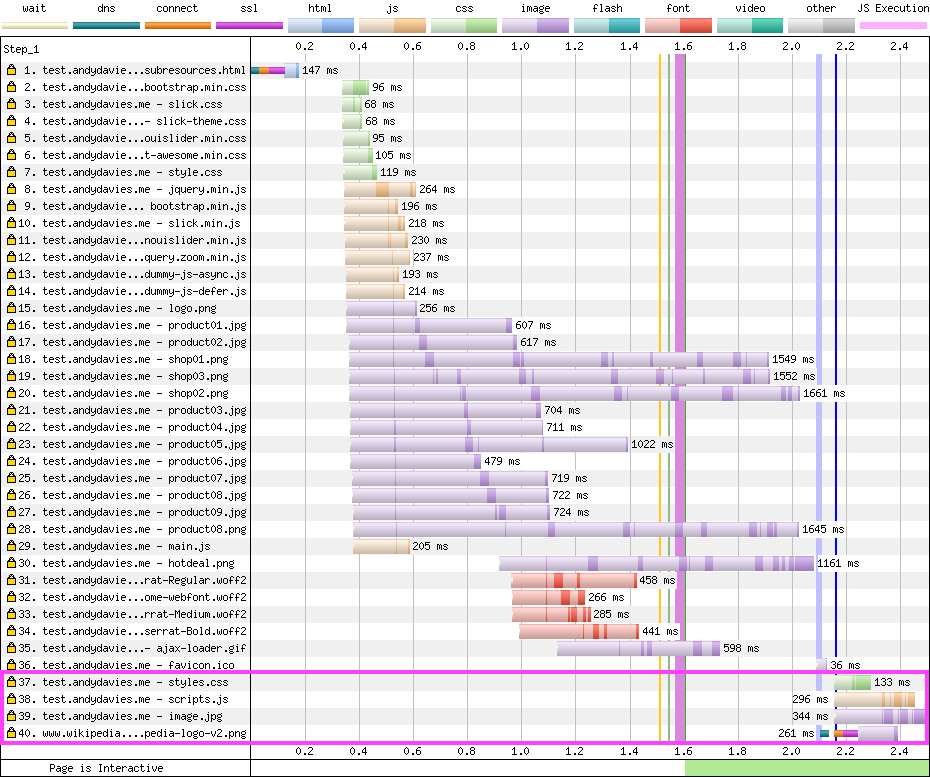 Resource Hints in head of Page - h2o tested with Firefox / Dulles / Cable
- Chrome and Edge
Chrome schedules the requests for prefetched resources alongside the those referenced in the body of the document, as part of it’s ‘second stage load’.
It delays dispatching the prefetch requests (30, 31, 32, 34) until after the other resources referenced in markup but the prefetch requests are still made before those for ‘late-discovered’ resources discovered, such as background images, and fonts.
The server correctly delays the responses for resources prefetched from the test page origin until the other higher priority resources have been served.
As HTTP/2 prioritisation only works across the same connection, if a resource is prefetched from another origin it can’t be prioritised against requests from other origins. And so the request to prefetch an image from Wikipedia (34) gets dispatched, and completes before other content that’s needed to render the page.
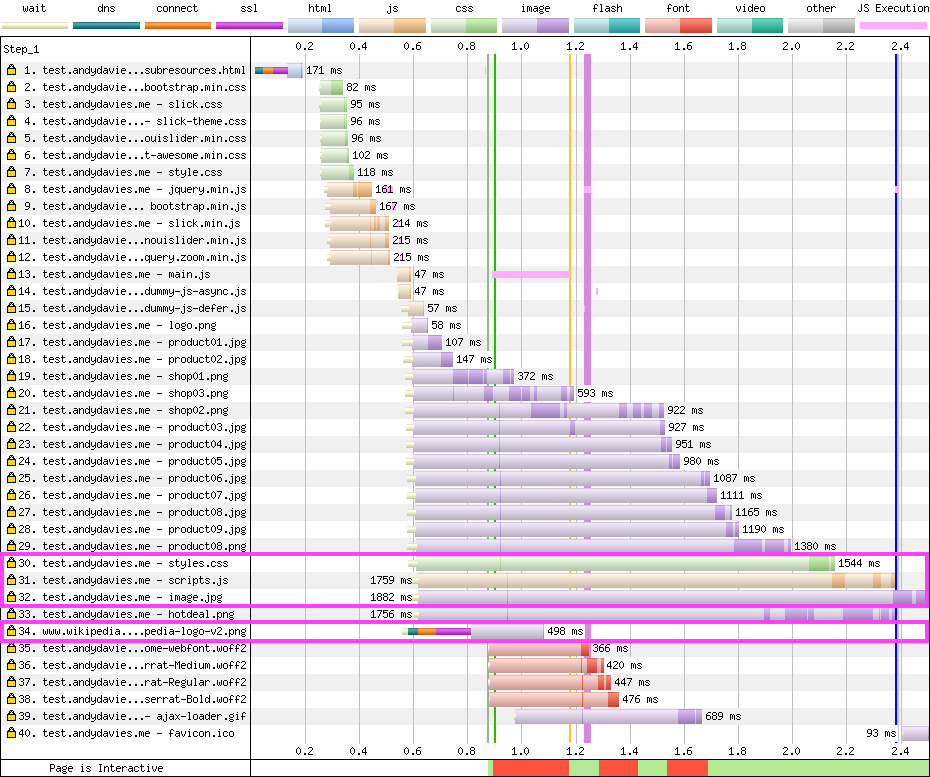 Resource Hints in head of Page - h2o tested with Chrome / Dulles / Cable
- Safari
Prefetch is disabled by default in Safari 13 but can be enabled via Experimental Features.
Safari dispatches the requests as soon as the prefetch directives are discovered.
Resources prefetched from the same origin as the page (3, 4, 5) are correctly delayed by the server’s prioritisation, but as the request to Wikipedia (2) is on a separate connection it may contend with other more important resources (in this case Wikipedia's CDN actually responds before h2o so no contention occurs).
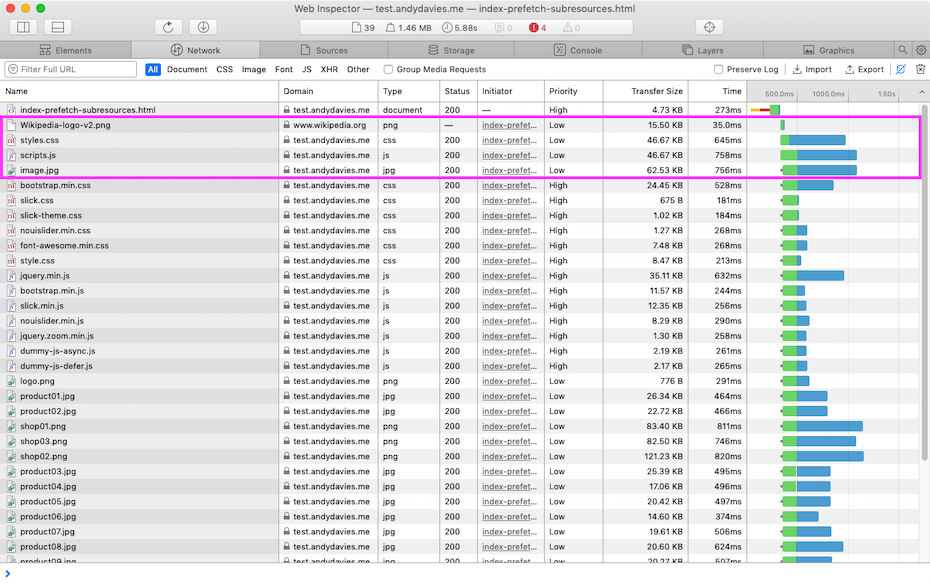 Resource Hints in head of Page - h2o tested with Safari / UK / Broadband
Servers with Poor HTTP/2 Prioritisation
Pat Meenan and I have been tracking how well HTTP/2 servers support prioritisation for a while, and the sad truth is that only a few servers and services prioritise effectively.
To test what happens with servers that have poor (or missing) HTTP/2 prioritisation, I hosted the page on both Netlify and Amazon Cloudfront.
The examples below use Netlify but Cloudfront showed similar behaviour.
- Chrome and Edge
Chrome's delay in dispatching the prefetch requests means the prefetched resources don’t contend with the other resources referenced in the page markup.
But as the server doesn’t respect the client-provided priorities, the low priority prefetched resources (30, 31, 32) delay higher priority background images and fonts (33, 34, 34, 36, 37), and the larger the prefetched resources are the longer this delay will be.
In this test only some of the contents of the prefetched resources are recieved before the fonts but in other tests I've seen whole resources download before the fonts.
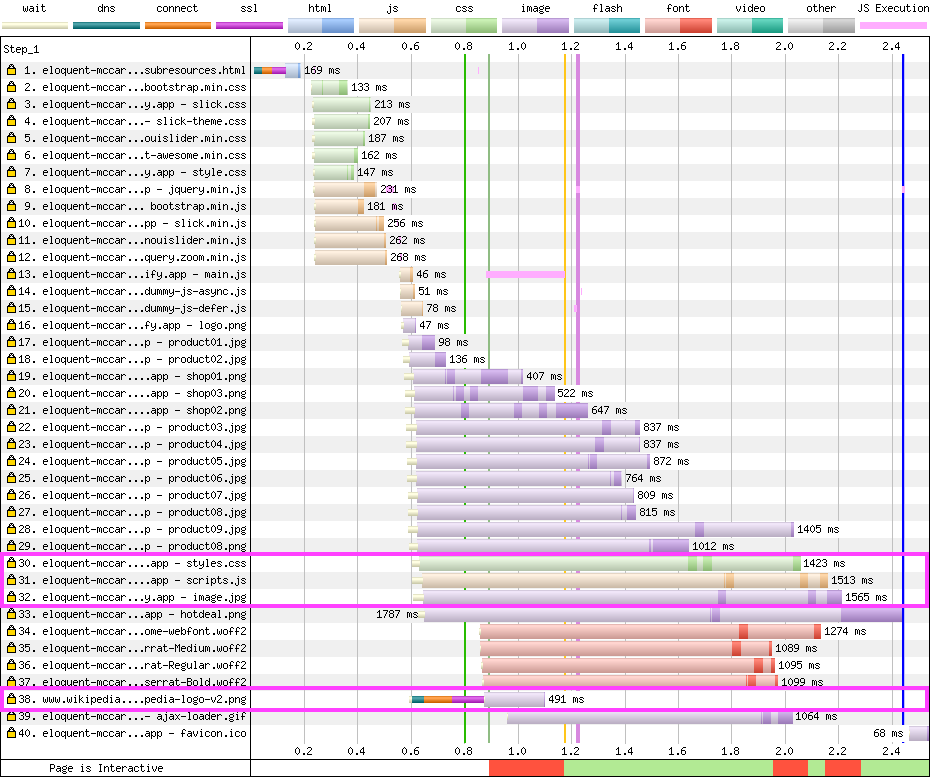 Resource Hints in head of Page - Netlify tested with Chrome / Dulles / Cable
- Safari
Unfortunately the outcome in Safari is even worse than Chrome and Edge.
Safari’s choice to dispatch the prefetch requests as soon as they’re discovered, coupled with the poor server prioritisation, leads to the prefetched resources (2, 3, 4, 5) being fetched far too early and delaying critical content such as stylesheets.
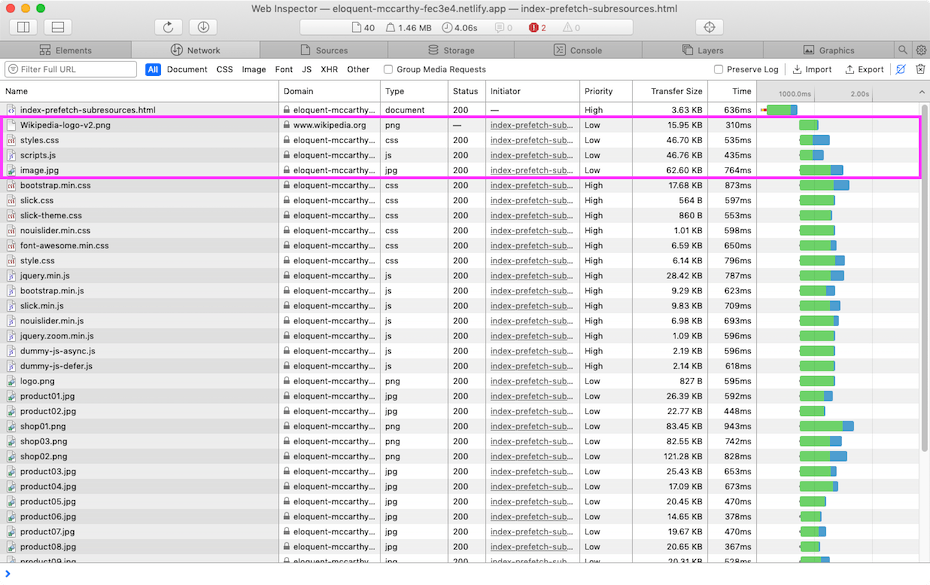 Resource Hints in head of Page - Netlify tested with Safari / UK / Broadband
Summary of Behaviour
Firefox is the only browser that seems to have good behaviour regardless of server support for prioritisation.
When the server used supports effective prioritisation, then resources prefetched from the same origin are scheduled appropriately in Chrome, Edge and Safari and they don’t contend with other higher priority resources.
If the server doesn’t support effective prioritisation then the prefetched resources can have a negative impact on performance, particularly in Safari, but also in Chrome and Edge.
Chrome, Edge and Safari all dispatch prefetch requests to third-party origins too soon and these requests contend for network bandwidth.
Now we have an understanding of how browsers behave with both ‘good’ and ‘bad’ HTTP/2 servers, how we should implement prefetch in our pages?
Delaying Prefetch Hints
If you use a server or CDN that has effective HTTP/2 prioritisation (essentially Akamai, Cloudflare or Fastly) then you can rely on the prefetch resources being prioritised correctly and so it doesn’t really matter where you place the prefetch hints for resources from the same origin.
If you use another server or CDN, or you have cross-origin prefetches then you may need to delay when the browser discovers the prefetch hints.
Placing the prefetch hints at the end of the document appears to be one way of achieving this for same origin resources.
In the example below the prefetched resources (36, 37, 38, 39) are dispatched after the late discovered resources and so don't contend for the network with them.
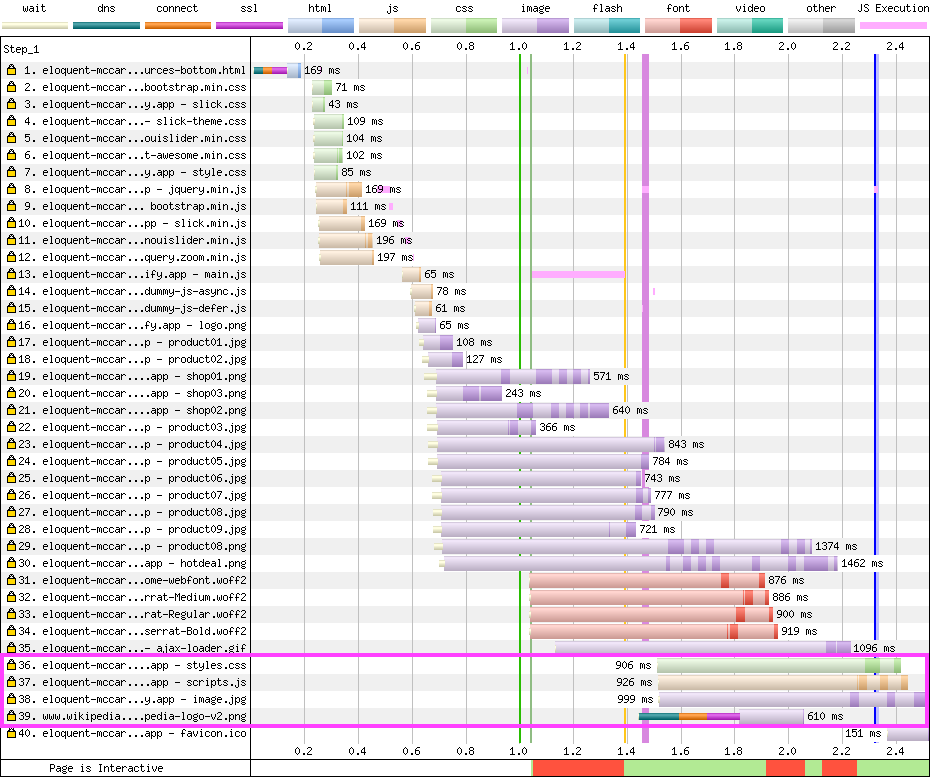 Resource Hints at Bottom of Page - Netlify tested with Chrome / Dulles / Cable
Another option is to inject the prefetch hints after the page has rendered, perhaps when the load event fires, or in response to user interaction (as instant.page does).
Closing Thoughts
Writing this post made me a little bit sad...
Prefetch is a feature that’s supposed to help make our visitor’s experiences faster but with the wrong combination of browser and CDN / server it can actually make experiences slower!
If Chromium and WebKit followed Firefox’s lead and dispatched prefetches later then the issue of CDNs and servers with ‘flawed’ HTTP/2 prioritisation would have a reduced impact on these test cases as much (there would still be issues with fonts and background images being delayed though).
The relevant browser bugs for Chrome and WebKit are linked in Further Reading below.
If you're using a CDN or server that has ‘flawed’ HTTP/2 prioritisation, then you should consider how to mitigate the issues shown above as, for a variety of reasons, I’m not sure the prioritisation issues are going to be fixed any time soon.
Further Reading
W3C Resource Hints Specification
Prioritisation Tests for rel=prefetch
Safari Bug 49238 - Link prefetch launches subresource requests too aggressively
]]>Sometimes I can use the tools built into browsers, other times proxies, but when I want to take a deeper look and particularly if I’m looking at how a browser is using HTTP/2, I rely on packet captures.
One challenge with analysing HTTP/2 traffic is that it’s encrypted and while Chrome and Firefox support logging TLS keys and tools like Wireshark can then decrypt the traffic.
Safari and iOS doesn’t have this feature natively, and proxies like Charles only communicate to the browser via HTTP/1.x so I needed to find another solution.
In this post I walk through how I capture iOS apptraffic using tcpdump, and how I use a Frida script to extract the TLS keys during the capture so that I can decrypt the traffic too.
Capturing iOS network traffic
Apple support capturing iOS device network traffic via a Remote Virtual Interface (RVI). This mirrors the network traffic from the device to a virtual interface in MacOS and from there the traffic can be captured using tools like tcpdump and Wireshark.
You can find more details in this article from Apple but the basic process is:
- If they’re not already installed, install xcode’s command line tools:
xcode-select --install
If you’re unsure whether you have the command line tools installed, run the above command anyway and it will display an error message if they are already installed.
- Attach an iOS device, and grab it’s UDID
I can’t remember where I got the command line below from but it extracts the device’s UDID from the system_profiler output
system_profiler SPUSBDataType | sed -n -e '/iPad/,/Serial/p;/iPhone/,/Serial/p;/iPod/,/Serial/p' | grep "Serial Number:" | awk -F ": " '{print $2}'

b0e8fe73db17d4993bd549418bfbdba70a4af2b1
- Start the Remote Virtual Interface
rvictl -s b0e8fe73db17d4993bd549418bfbdba70a4af2b1

Starting device b0e8fe73db17d4993bd549418bfbdba70a4af2b1 [SUCCEEDED] with interface rvi0
- Capture traffic using tcpdump (or Wireshark)
tcpdump -i rvi0 -w capture.pcap -P
The -P option is an Apple extension that captures the traffic in pcap-ng format, and includes metadata such as process name, pid etc. against each packet.
Unfortunately Wireshark can’t display or filter by this data yet but I’m hoping someone might implement support for it soon. Apple’s tcpdump can display it, see the -k option in man pages for more details.
- Generate some network traffic
Open an app on the device e.g. Safari, and generate some network traffic to a site that uses HTTPS e.g. https://www.bbc.co.uk/news
When your done hit Ctrl-C in the terminal to stop tcpdump capturing.
- Open the packet dump in Wireshark
If you don’t already have Wireshark installed, download and install it from https://www.wireshark.org, and then open the pcap:
open capture.pcap
You should see a screen something like this:
I’ve filtered the capture to just display the traffic to and from www.bbc.co.uk. But as the traffic is encrypted using TLS 1.2 we can’t see the contents of the packets.
To decrypt the packets we need the matching TLS keys, Chrome and Firefox will provide these when the SSLKEYLOGFILE environment variable is set but unfortunately there seems to be no equivalent for Safari.
Fortunately thanks to tools like Frida, we have the ability to implement it ourselves.
Extracting TLS Keys and Decrypting iOS Traffic
Frida describes itself as a “dynamic instrumentation toolkit”, it injects a JavaScript VM into applications and we can write JS code that runs in that VM and can inspect memory and processes, intercept functions, create our own native functions etc.
I’m testing with a Jailbroken iPhone 5S running iOS12.4.3, with Frida installed from Cydia. It's possible to use a non-jailbroken device if you can include Frida’s libraries in the app - either via debugging an app you own, or repackaging someone else’s app and injecting the dylib.
As I want to decrypt Safari’s traffic I’m sticking with the Jailbroken phone.
- Follow the Frida installation instructions for MacOS and iOS
MacOS CLI - https://frida.re/docs/installation/
iOS Device - https://frida.re/docs/ios
- Check Frida is installed and working by listing the currently running apps
frida-ps -Ua
-U option instructs Frida to attach to a USB device
- In one terminal window start the frida script:
The script for extracting the keys is hosted on Frida Code Share, I’ll walk through the process of how it works later in the post.
frida -U -n com.apple.WebKit.Networking --codeshare andydavies/ios-tls-keylogger -o bbc-news.keylog
The -o option writes the output of the script to a file, but it's also mirrored to the console too so you can see the output as it happens too.
Safari’s networking happens in a separate process so the command above connects to that process rather than Safari itself.
Also the first time you use a script from codeshare you'll be prompted whether to trust it.
If you want to inspect a different app frida-ps -Uai will list many of the apps available, and you can also select the app via Process ID too.
- In a second window start the TCP capture
tcpdump -i rvi0 -w bbc-news.pcap -P
- Open the app you want to decrypt the traffic from and generate some traffic
In this example I’m using Safari and https://www.bbc.co.uk/news
- Terminate the tcpdump, and frida commands, and then use
exitto quit the Frida REPL
You should have two files, in this example they will be bbc-news.pcap and bbc-news.keylog
- Open the packet capture and provide the keylog as an option
wireshark -r bbc-news.pcap -o tls:keylog_file:bbc-news.keylog
You can also launch Wireshark, open the packet capture, and then specify the keylog in Preferences > Protocols > TLS > (Pre)-Master-Secret log filename
You should see a screen something like this:
I’ve filtered the capture to just display HTTP and HTTPS traffic and highlighted the start of one of the decrypted HTTP/2 connections.
How the Frida Script Works
I first came across Frida a few years when someone shared Tom Curran and Marat Nigmatullin's paper on TLS Session Key Extraction from Memory on iOS Devices.
Tom and Marat used Frida to hook the CoreTLS function (tls_handshake_internal_prf) that generated key material and dump the relevant TLS keys.
Although I got a modified version of their code working well enough to inspect some apps, and talk about it at JSOxford I never quite managed to address extracting keys for resumed TLS sessions and some other cases where it didn’t work.
In iOS11, Apple migrated from OpenSSL to Google’s BoringSSL so Tom and Marat’s code stopped working but the ideas it introduced remained valid and compared to OpenSSL the BoringSSL code easier to understand.
And as Chrome supports TLS key logging so BoringSSL already contains code to log TLS keys.
Searching the code for the labels that are defined in key log format finds examples like this one in handshake.cc where the CLIENT_RANDOM values are being logged:
  // Log the master secret, if logging is enabled.
  if (!ssl_log_secret(ssl, "CLIENT_RANDOM", session->master_key,
                      session->master_key_length)) {
    return 0;
  }
ssl_log_secret is defined in ssl_lib.c – it checks whether a callback function for logging is defined and if it is, builds the log line and calls the callback with log line.
int ssl_log_secret(const SSL *ssl, const char *label, const uint8_t *secret,
                   size_t secret_len) {

  if (ssl->ctx->keylog_callback == NULL) {
    return 1;
  }

  ScopedCBB cbb;
  uint8_t *out;
  size_t out_len;
  if (!CBB_init(cbb.get(), strlen(label) + 1 + SSL3_RANDOM_SIZE * 2 + 1 +
                          secret_len * 2 + 1) ||
      !CBB_add_bytes(cbb.get(), (const uint8_t *)label, strlen(label)) ||
      !CBB_add_bytes(cbb.get(), (const uint8_t *)" ", 1) ||
      !cbb_add_hex(cbb.get(), ssl->s3->client_random, SSL3_RANDOM_SIZE) ||
      !CBB_add_bytes(cbb.get(), (const uint8_t *)" ", 1) ||
      !cbb_add_hex(cbb.get(), secret, secret_len) ||
      !CBB_add_u8(cbb.get(), 0 /* NUL */) ||
      !CBB_finish(cbb.get(), &out, &out_len)) {

    return 0;
  }

  ssl->ctx->keylog_callback(ssl, (const char *)out);

  OPENSSL_free(out);

  return 1;
}
To enable TLS key logging, it appears we just need to be able to set a logging callback function.
The logging callback is set via SSL_CTX_set_keylog_callback but unfortunately this doesn’t seem to be included in Apple’s version of BoringSSL – to check, I extracted libboringssl.dylib from the shared dylib cache and disassembled it using Hopper but couldn’t find the function.
void SSL_CTX_set_keylog_callback(SSL_CTX *ctx,
                                 void (*cb)(const SSL *ssl, const char *line)) {
  ctx->keylog_callback = cb;
}
Reading the source code and tracing the execution of com.apple.WebKit.Networking using frida-trace, I came across SSL_CTX_set_info_callback
frida-trace -U com.apple.WebKit.Networking -I 'libboringssl.dylib'
SSL_CTX_set_info_callback appears to be called once per task and gets passed the address of the struct containing the pointer to logging callback function:
void SSL_CTX_set_info_callback(
    SSL_CTX *ctx, void (*cb)(const SSL *ssl, int type, int value)) {
  ctx->info_callback = cb;
}
If we create our own logging function, and wrap it in a native callback
// Logging function, reads null terminated string from address in line
function key_logger(ssl, line) {
   console.log(new NativePointer(line).readCString());
}

// Wrap key_logger JS function in NativeCallback
var key_log_callback = new NativeCallback(key_logger, 'void', ['pointer', 'pointer']);
We can then intercept calls to ‘SSL_CTX_set_info_callback` and write the address of the native callback created above into the relevant entry in the SSL struct:
var CALLBACK_OFFSET = 0x2A8;

var SSL_CTX_set_info_callback = Module.findExportByName("libboringssl.dylib", "SSL_CTX_set_info_callback");

Interceptor.attach(SSL_CTX_set_info_callback, {
   onEnter: function (args) {
       var ssl = new NativePointer(args[0]);
       var callback = new NativePointer(ssl).add(CALLBACK_OFFSET);

       callback.writePointer(key_log_callback);
   }
});
CALLBACK_OFFSET was determined by disassembling libboringssl.dylib, and like all magic numbers is fragile as it may change if the struct changes in future versions, or on different CPU architectures.
The completed code (TBH it’s more comments than code) is available from https://codeshare.frida.re/@andydavies/ios-tls-keylogger/ under an MIT License so feel free to build on it, incorporate it into other utilities etc.
Further Reading
The First Few Milliseconds of an HTTPS Connection
Technical Q&A QA1176 Getting a Packet Trace
TLS Session Key Extraction from Memory on iOS Devices
Inspecting iOS App Traffic with JavaScript - JSOxford - Jan 2018
]]>Sometimes it produces small improvements, and sometimes more dramatic ones!
Browsers typically only make a connection to an origin just before they request a resource from it, so when resources are discovered late such as CSS background images, fonts, or script injected resources, or resources are considered a low priority, as Chrome does with images, the delay in making the connection becomes part of the critical path for that resource.
Preconnect enables us to create the connection in advance – removing it from the critical path for a resource, allowing the resource to be loaded sooner and hopefully improving the overall performance of a page too.
Implementing preconnect is often one of the first improvements I get clients to action but I’ve never been completely happy with my process…
Lighthouse offers some recommendations on which origins to preconnect to, but I tend to use a combination of WebPageTest and DevTools to identify candidates.
I make recommendations to the client I’m working with, their development team implement the preconnect directives and then we typically check the effect in a pre-production environment and adjust as necessary.
If I’m sat with the development team these cycles can be quick, but if the client’s using an external development team, or the team’s offshore they can be long.
What I wanted was a way to experiment, evaluate the options and demonstrate the gains before a client commits my recommendations to code.
Then I remembered WebPageTest has the ability to inject a custom script into the page being tested… I could create a script that adds preconnect directives and see what effect different options have on page speed.
Injecting the Script
At the bottom of the Advanced Tab there’s a text box labelled Inject Script, any script placed in here will be injected into the page shortly after it starts loading.
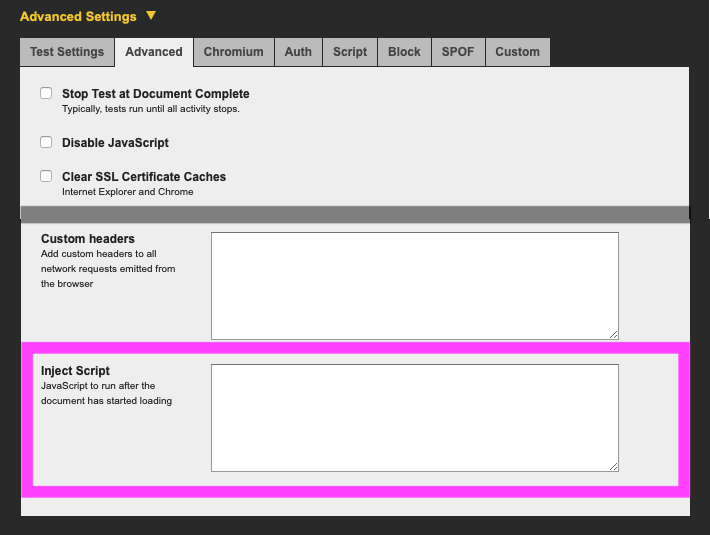
The script I use to create the <link rel=preconnect elements loops around an array of origins, adds a link element for each to a document fragment, and then adds the fragment to the DOM.
(function () {
   var entries = [
       {'href': 'https://res.cloudinary.com'}
   ];

   var fragment = document.createDocumentFragment();
   for(entry of entries) {
       var link = document.createElement('link');
       link.rel = 'preconnect';
       link.href = entry.href;
       if(entry.hasOwnProperty('crossOrigin')) {
               link.crossOrigin = entry.crossOrigin;
       }
       fragment.appendChild(link);
   }
   document.head.appendChild(fragment);
   performance.mark('wpt.injectEnd'); // Not essential
})();
More origins can be added to the entries array as needed, and if an origin serves fonts the crossOrigin: 'anonymous' property should be added too.
For example, if both your images and fonts were hosted on Cloudinary, the first entry creates a connection for the images, and the second entry a connection for the fonts.
   var entries = [
       {'href': 'https://res.cloudinary.com'},
       {'href': 'https://res.cloudinary.com', 'crossOrigin': 'anonymous'}
   ];
I’ve wrapped the script in an IIFE to limit the scope of its variables, and avoid clashes with any existing ones in the page.
When Pat introduced script injection he described it as ‘a bit racey’ i.e. you can’t exactly be sure when it’s going to execute, so I include a performance mark to record when the script finishes execution.
Also when there’s no evidence of preconnects improving performance, the mark is a good sanity check that I actually remembered to include the custom script!
Putting it into Action!
So what difference can preconnect make?
I used the HTTP Archive to find a couple of sites that use Cloudinary for their images, and tested them unchanged, and then with the preconnect script injected.
Each test consisted of nine runs, using Chrome emulating a mobile device, and the Cable network profile.
There’s a noticeable visual improvement in the first site (https://www.digitaladventures.com/), with the main background image loading over half a second sooner (top) than on the unchanged site (bottom).
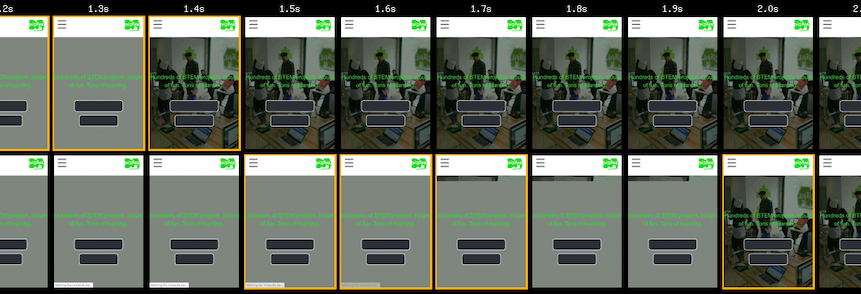 Top row site with preconnect, bottom row site without
Comparing the waterfalls, the gap between the end of the creating the network connection and the start of request for the image shows the preconnect has encouraged Chrome to connect sooner than it would have by default.
And by removing the network connection setup from the critical path Chrome can start to fetch the images sooner too.
 With Preconnect to Cloudinary
 Without Preconnect to Cloudinary
You may also notice the connection setup is faster in the test with the preconnect, this is something I often see and suspect it’s due to network contention being lower at the start of the page load.
If you’d like to examine the results yourself, here’s a link to the comparison view, clicking on the labels to the left of the filmstrip will take you to the median run for each test:
For the second site (https://hydeparkpicturehouse.co.uk/), there’s very little difference between the two tests – there's a small difference near the start of the filmstrip due to the server responding faster in the preconnect test (the menu bar at the bottom of the page appears sooner).
 Top row site with preconnect, bottom row site without
But the overall preconnect isn’t having any effect as once Chrome has discovered the image it’s immediately prioritising the request for it.
In the preconnect waterfall (top) you’ll see the Chrome starts creating the connection before the script to inject the preconnect has even finished executing – the purple vertical bar for the timing mark is after the DNS lookup for Cloudinary.
 With Preconnect to Cloudinary
 Without Preconnect to Cloudinary
Again, here’s the comparison between the two tests if you want to explore further: https://www.webpagetest.org/video/compare.php?tests=190807_CP_c4385658104d23097b2084d15f7b3903,190807_0N_6d3eed6797303b7a4243e00335159125
There other options to improve the performance of both the sites tested and if these were implemented the preconnect may become more or less important – testing is the key thing!
Use Preconnect Selectively
Given the half a second improvement in the first test, you might be tempted to "preconnect all the things!", but I’d encourage you not to – well at least without testing thoroughly.
Browsers have limits on the number of concurrent DNS requests they can make, and creating a new HTTP connection may require certificates to be fetched, and these certificates will compete with other perhaps more critical resources for the network connection
Even without the TLS certificate overhead, adding extra preconnects may actually make things slower as it can change the order in which resources are retrieved, which can increase competition for the network or the browser’s main thread.
I re-ran the test for https://www.digitaladventures.com/ with a few more preconnects added:
   var entries = [
       {'href': 'https://res.cloudinary.com'},
       {'href': 'https://connect.facebook.net'},
       {'href': 'https://www.google-analytics.com'},
       {'href': 'https://cdnjs.cloudflare.com'},
       {'href': 'https://client.crisp.chat'},
       {'href': 'https://www.googleadservices.com'},
       {'href': 'https://www.gstatic.com'}
   ];
And the resulting test (top) was marginally slower than the test with a single preconnect (bottom) – in this case across multiple tests the background image was about 100ms slower rendering but I’ve seen worse examples.
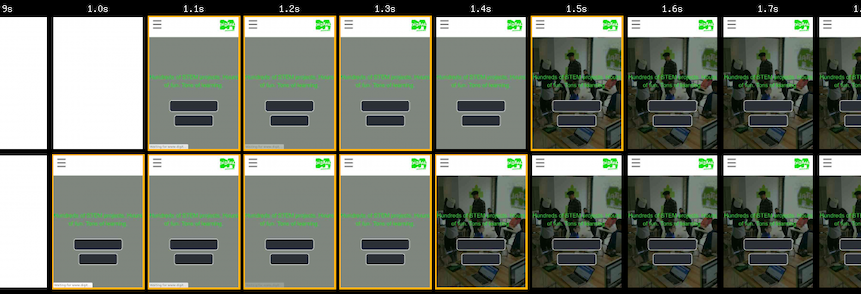 Top row site with many preconnects, bottom row site with only one
Again, here’s the comparison between the two tests if you want to explore further: https://www.webpagetest.org/video/compare.php?tests=190807_2B_7f2d2f22147f6207e64bf04ce7e06f1a,190807_MR_41322698cc9e8666e96fe0a856204dbe
We could refine the preconnect list to identify which one actually make the page faster, and which make it slower but I’ll leave that as an exercise if you want to have a play.
Closing Thoughts
In this post I’ve focused on two sites that use Cloudinary but I’d expect to see similar results with any site that hosts their images using a third-party such as Imigix, Kraken.io, Cloudfront etc.
And from what I’ve seen so far, I think many sites that host their images on third-party services would see improved performance if browsers automatically connected earlier but I’ve got to finish analysing the data from the 2,000 tests I ran over the weekend before I can put more detail on that.
The case for automatically pre-connecting for non-image resources is probably a little more fuzzy – render blocking resources tend to be requested at high priority so there’s no delay in creating the connection, and even for lower priority resources such as async scripts, downloading them sooner means the browser will try to execute them sooner which may or may not be a good thing.
Preconnect is a great feature but due to the complexities of how browsers prioritise resources, and our habit of building pages where resources are split across origins it’s not always easy to get right.
Using script injection in WebPageTest enables me to experiment, to explore the complexities of which origins to preconnect too and which ones to avoid, and evaluate the results before I get clients to start changing their code.
And that’s a good thing!
Further Reading
Improving Perceived Performance With the Link Rel=preconnect HTTP Header
Issue 317774: Chrome should pre-connect for resources discovered by the preload scanner
]]>Here's a few ways of checking:
Safari Inspector
Safari’s Inspector displays a console message when it successfully preconnects to another origin. I find this the fastest and simplest way of checking whether preconnects are working:
Navigate to a page that uses preconnect e.g. https://andydavies.github.io/test-rel-preconnect/tests/preconnect.html
Open Safari Inspector
Switch to Console Tab, ensure the option for All messages is selected (top right)
If the preconnect worked then there should be a message, in this case Successfully connected to "https://www.wikipedia.org/"
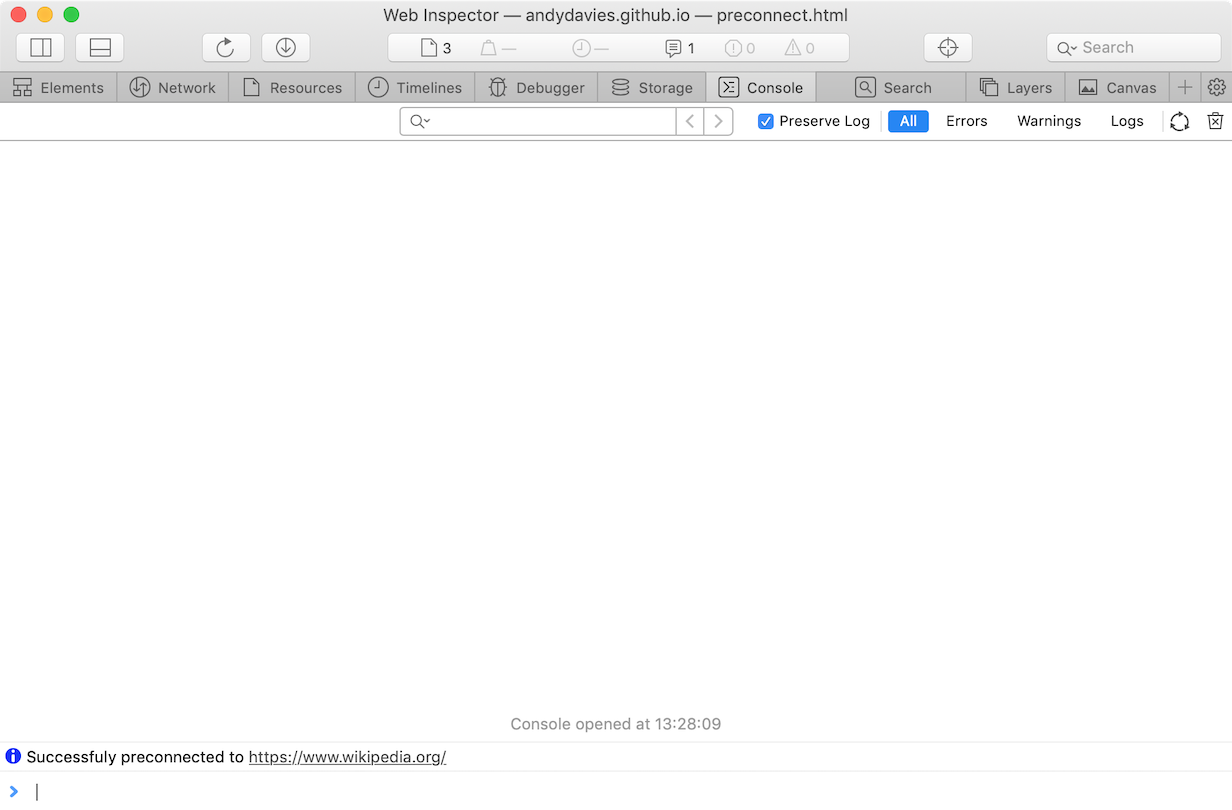
WebPageTest
For other browsers WebPageTest is next on my list of choices:
Enter the page to be tested as the URL e.g. https://andydavies.github.io/test-rel-preconnect/tests/preconnect.html
Select the location / browser you want use for the test
Hit Submit (and wait for the result)
Chrome
In the waterfall below, request #3 has two distinct parts – the section with DNS resolution, TCP connection and TLS negotiation, and the section with the request and response.
This is preconnect at work, Chrome has made the connection to Wikipedia before it's discovered it needs to fetch the image from Wikipedia.

iOS Safari
The iOS Safari waterfall is slightly different as WebPageTest can't gather the same level of detail from iOS Safari as it can from Chrome.
In this waterfall the whole DNS resolution, TCP connection and TLS negotiation segment are missing from request #3, and that's our clue that preconnect worked in this case.

Chrome's NetLog
If you’re not on a Mac and the pages you want to check aren’t publicly accessible (or the WebPageTest wait is too long) then Chrome’s netlog is the third option - it's slightly more involved and so I tend to use this option the least.
Open a new Chrome Window (I tend to use Canary for this)
Enter chrome://net-export in the URL bar, Click Start Logging to Disk, and select the name / location for the netlog to be saved (mine defaults to chrome-net-export-log.json in Downloads)
Open a new Tab, and load the page you're interested in e.g. https://andydavies.github.io/test-rel-preconnect/tests/preconnect.html
Switch back to the chrome://net-export tab, and click Stop Logging
Navigate to https://netlog-viewer.appspot.com/
Choose Import, and select the file you specified above. Once the netlog has loaded and you'll see a page with a some metadata describing the capture
Switch to the Events view and you should see a list of events similar to the one below
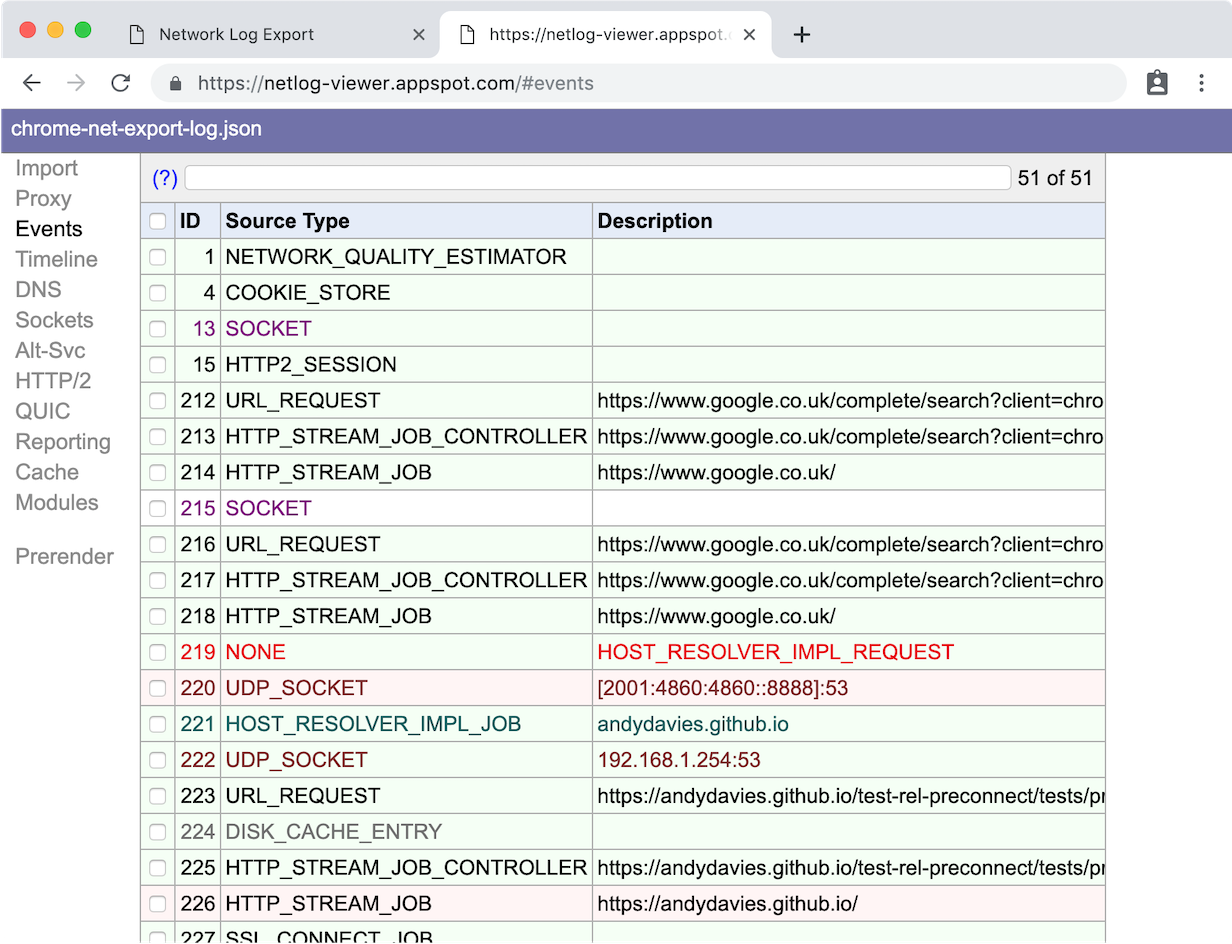
- Scroll down, until you'll see a Source Type of HTTP_STREAM_JOB_CONTROLLER for the origin you were expecting the Chrome to preconnect to.
In my experience there's often a block of four events with the source types HTTP_STREAM_JOB_CONTROLLER, HTTP_STREAM_JOB, SSL_CONNECT_JOB (if HTTPS), and SOCKET.
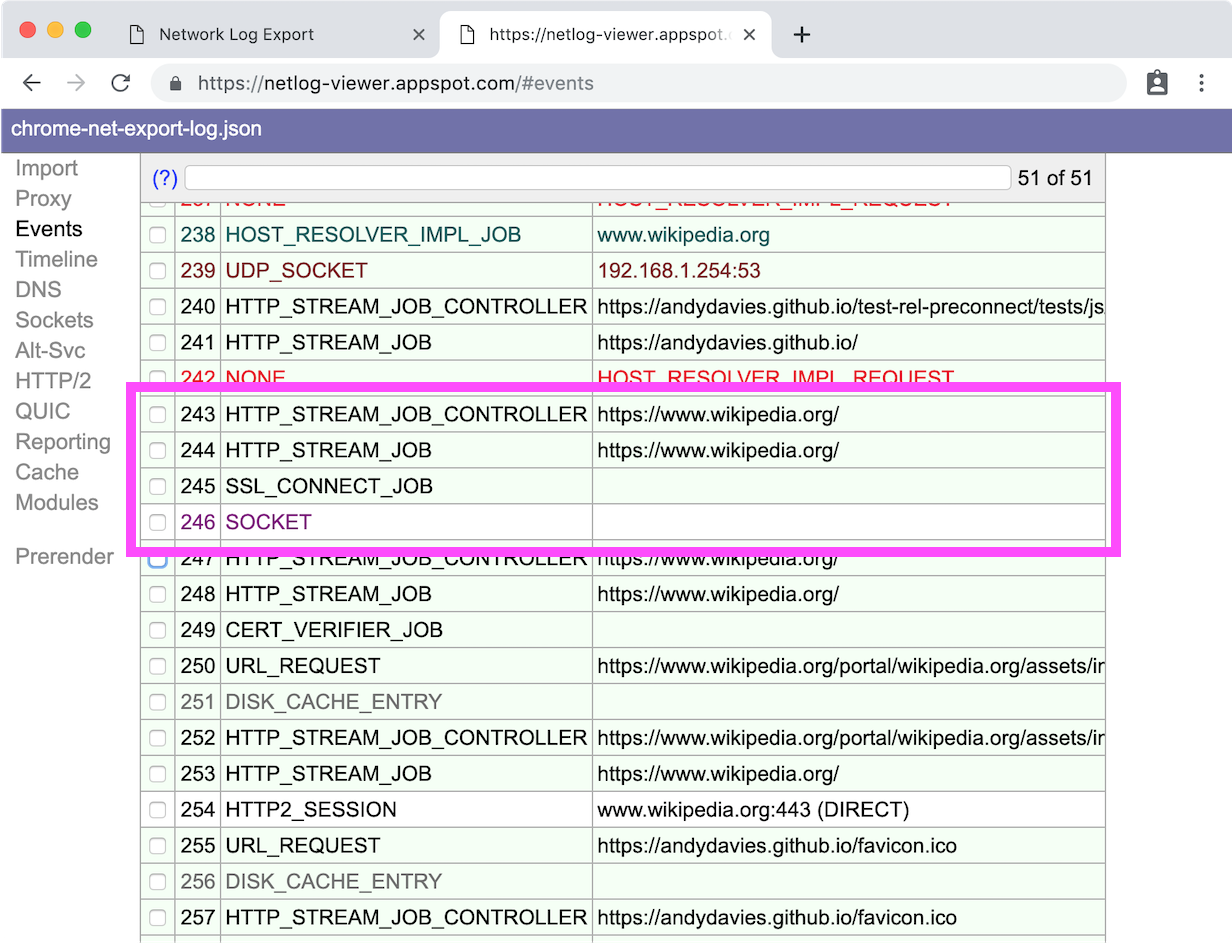
- Selecting the event with source type of HTTP_STREAM_JOB_CONTROLLER brings up a longer description in the right hand panel, it should be similar to the one below
Line #5 is the signal that it was the preconnect
243: HTTP_STREAM_JOB_CONTROLLER
https://www.wikipedia.org/
Start Time: 2019-04-17 14:59:20.511
t=3523 [st=0] +HTTP_STREAM_JOB_CONTROLLER  [dt=1]
               --> is_preconnect = true
               --> url = "https://www.wikipedia.org/"
t=3523 [st=0]   +PROXY_RESOLUTION_SERVICE  [dt=0]
t=3523 [st=0]      PROXY_RESOLUTION_SERVICE_RESOLVED_PROXY_LIST
                   --> pac_string = "DIRECT"
t=3523 [st=0]   -PROXY_RESOLUTION_SERVICE
t=3523 [st=0]    HTTP_STREAM_JOB_CONTROLLER_PROXY_SERVER_RESOLVED
                 --> proxy_server = "DIRECT"
t=3523 [st=0]    HTTP_STREAM_REQUEST_STARTED_JOB
                --> source_dependency = 244 (HTTP_STREAM_JOB)
t=3524 [st=1] -HTTP_STREAM_JOB_CONTROLLER
And examining the HTTP_STREAM_JOB below it we can see it had an IDLE priority meaning there wasn't a request waiting for that connection.
244: HTTP_STREAM_JOB
https://www.wikipedia.org/
Start Time: 2019-04-17 14:59:20.511
t=3523 [st=0] +HTTP_STREAM_JOB  [dt=1]
               --> expect_spdy = false
               --> original_url = "https://www.wikipedia.org/"
               --> priority = "IDLE"
              --> source_dependency = 243 (HTTP_STREAM_JOB_CONTROLLER)
               --> url = "https://www.wikipedia.org/"
               --> using_quic = false
t=3523 [st=0]    HTTP_STREAM_JOB_WAITING  [dt=1]
                 --> should_wait = false
t=3524 [st=1]   +HTTP_STREAM_JOB_INIT_CONNECTION  [dt=0]
t=3524 [st=1]     +HOST_RESOLVER_IMPL_REQUEST  [dt=0]
                   --> address_family = 0
                   --> allow_cached_response = true
                   --> host = "www.wikipedia.org:443"
                   --> is_speculative = false
t=3524 [st=1]        HOST_RESOLVER_IMPL_IPV6_REACHABILITY_CHECK
                     --> cached = true
                     --> ipv6_available = false
t=3524 [st=1]        HOST_RESOLVER_IMPL_CACHE_HIT
                     --> addresses = ["91.198.174.192"]
                     --> expiration = "13199983755512496"
t=3524 [st=1]     -HOST_RESOLVER_IMPL_REQUEST
t=3524 [st=1]      TCP_CLIENT_SOCKET_POOL_REQUESTED_SOCKETS
                   --> group_id = "ssl/www.wikipedia.org:443"
t=3524 [st=1]      SOCKET_POOL_CONNECTING_N_SOCKETS  [dt=0]
                   --> num_sockets = 1
t=3524 [st=1]   -HTTP_STREAM_JOB_INIT_CONNECTION
t=3524 [st=1] -HTTP_STREAM_JOB
Using netlog requires a bit of practice, it exposes what's happening in Chrome's network layer so there's a lot of information and often seemingly duplicate entries where Chrome is racing connections.
Closing Thoughts
Using Safari is by far the simplest way to check preconnect is working and it would be great if other browser makers made it as easy!
I also came across a few bumps in my tests…
It appears that preconnect doesn't currently work in Firefox even though it's supposed to
I like to use a
rel="preconnect dns-prefetch"pattern so there's a fallback for browsers that don't support preconnect. Unfortunately it appears this breaks preconnect in Safari, so I either need to drop the dns-prefetch fallback or switch to two separate statements.
Further Reading
Safari failing to preconnect when preconnect and dns-prefetch specified in same rel attribute
My collection of rel="preload" test pages
]]>Recently, a client switched from serving their product images through AWS S3 and Cloudfront to Cloudinary.
Although Cloudinary was delivering optimally sized and better compressed images, there was a noticeable delay before the images arrived, and some of this delay was due to the overhead of creating a connection to another origin (the delay existed with the S3 / Cloudfront combination too).
This excerpt from a WebPageTest waterfall illustrates the problem – Chrome starts to request the product image at 900ms into the page load, and there's a further wait of 600ms for DNS to be resolved, a TCP connection to be setup and TLS to be negotiated before the HTTP GET request for the image is actually sent.
 (WebPageTest: Chrome, Cable, London)
I'm not quite sure why Chrome waits so long before initiating the request – it's a normal image element so easily discoverable by the preloader – but from memory, Chrome throttles requests for resources in the body until the those in the head have been completed so perhaps that's the case here.
Waiting 1.7s for the main product image to appear is far from ideal so how can make the image display sooner?
Preload?
The rel=preload Resource Hint is the first option that might spring to mind, but as Chrome prioritises preloads above all other content, and we didn't want to delay the stylesheets and scripts in the head it was discounted. (As an aside, Harry and I eventually decided to remove the font preloads on this site too).
Another challenge with rel=preload is that the exact resource has to be specified. For resources that are common across multiple pages (stylesheets, scripts etc) that's fairly easy to implement, but where the content changes by page, and may not be consistent e.g. search results, landing pages etc., it's a bit more involved.
As we didn't want the overhead of rel=preload we looked at how the rel=preconnect hint might help instead.
Preconnect?
rel=preconnect is often recommended for origins that have important resources but can't be discovered by the browser's preloader e.g. third-party tags that get injected via scripts, fonts from other origins etc., but as we'd already implemented preconnects for the six most important origins using the link element in the page I wasn't keen to add more.
(Generally I don't use more than six rel='preconnect dns-prefetch' declarations as Chrome has a limit on parallel DNS lookups – the limit was six, but might be slightly different now)
Most examples of Resource Hints show the markup based syntax but Resource Hints can also be specified via the link HTTP header (Edge actually only supports rel=preconnect as an HTTP header)
Implementing the hint as a header allows it to be applied across the whole site with a single configuration change, and as the hint is received in the headers the browser doesn't even need to start parsing the HTML to discover it.
So that's how we chose to implement preconnect:
link: <https://res.cloudinary.com>; rel=preconnect
The impact on the waterfall is pretty dramatic – Chrome starts establishing the connection as soon as it receives the initial chunk of the response for the page. This removes the connection overhead from the critical path for the image, and even though the request for the image still isn't made until 900ms has elapsed, it completes at 1.2s, a whole 500ms improvement!
 (WebPageTest: Chrome, Cable, London)
The visual improvement is just as dramatic (and we've since improved the rendering of the product images by another 300ms)
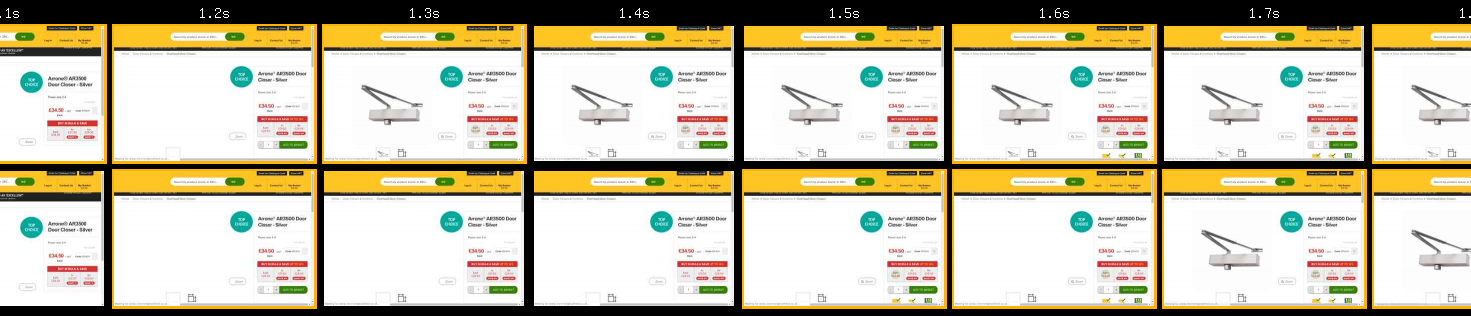
Real-World Performance
WebPageTest is of course a stable test environment and it might not represent what happens in the complexity of the real-world where there are different browsers, fast and slow devices, and varying levels of network quality.
Fortunately this client uses SpeedCurve LUX, and we'd already implemented a User Timing mark to track when the first product image loaded. The real-world metrics showed a 400ms improvement at the median and greater than 1s improvement at the 95th percentile.
All-in-all a substantial improvement!
Closing Thoughts
There's no doubt that rel=preconnect makes a huge difference to how soon the product images are being displayed, and I suspect (though didn't test) similar gains could be made using its markup based variant too.
Looking at the complete waterfall (not included it here) it looks like there's scope for further gains if the browser had a better understanding of which images to prioritise and perhaps in the future when Priority Hints have wider support we'll experiment with an importance="high" hint.
Using rel=preconnect as a HTTP header offers some other interesting opportunities for improving performance – as it doesn't rely on markup being parsed preconnect can be triggered by requests for stylesheets, scripts and more.
Google Fonts sometimes (but not always) preconnects to fonts.gstatic.com by including link: <https://fonts.gstatic.com>; rel=preconnect; crossorigin in the stylesheet response.
 Stylesheet from fonts.googleapis.com preconnecting to fonts.gstatic.com
As many third-parties tags connect to other domains there are opportunities for this technique to be more widely used (though reducing the number of domains by fronting them with a single CDN domain is probably the more preferable option)
If you've got important content coming from another domain I'd certainly recommend experimenting with preconnect to see what benefits you can gain.
References / Further Reading
Limits on number of parallel DNS requests in Chrome - Yoav, Ilya, Addy
User Timing and Custom Metrics
How the Browser Pre-loader Makes Pages Load Faster
Preloading Fonts and the Puzzle of Priorities
Thanks
Finally I'd like to thank Charlie who encouraged me to share what we learned.
And if you'd like some help improving the performance of your site feel free to get in-touch
]]><link rel=preload> to prioritize fetching resources that are currently requested later in page load" is the seemingly simple advice Lighthouse gives.
Preload is a trade-off – when we explicitly increase the priority of one resource we implicitly decrease the priority of others – and so to work effectively preload requires authors to identify the optimal resources to preload, browsers to request them with optimal priorities and servers to deliver them in optimal order.
Some resources are discovered later than others, for example resources injected by a script, or background images and fonts that are only discovered when the render tree is built.
Preload instructs the browser to download a resource even before it discovers it but so there may be performance gains by using <link rel=preload to download resources earlier than normal.
Preload also allows us to decouple download and execution, for example the Filament Group suggest using it to load CSS asynchronously
I’ve being using preload with clients over the last few years but I have never been completely satisfied with the results. I’ve also seen some things I hadn’t quite expected in page load waterfalls so decided to dig deeper.
When Should Fonts be Loaded?
As most browsers delay rendering text until the relevant font is available, loading fonts sooner has become one of commonly suggested use cases for preload.
And based on my exploration of the HTTP Archive data it's the most frequently used case too.
By default fonts are loaded late as the browser only discovers them when it's building the render tree i.e. after the styles have been downloaded and any blocking scripts in the head have been downloaded and executed too.
The waterfall below shows the default behaviour with fonts discovered late and then having to compete with the images.
Ideally we want the fonts downloaded much sooner, most likely after the render blocking elements in the head – this is the point where the browser starts adding the body contents to the DOM and where the fonts will be needed.
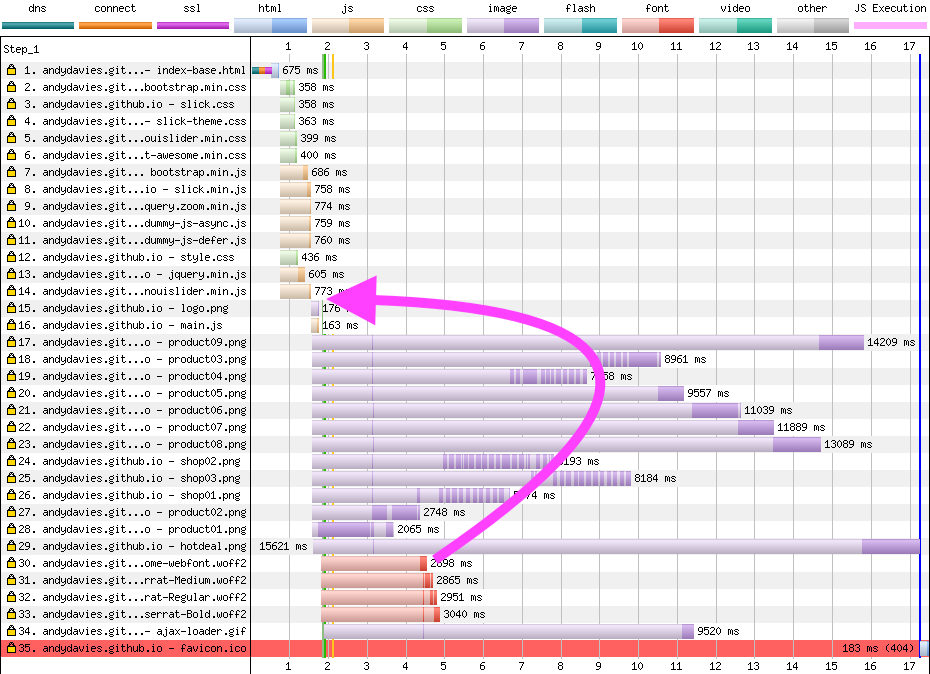
Default font loading behaviour - WebPageTest, Dulles, Chrome, 3G Fast
Preloading fonts isn't the only option when it comes to reducing the 'Flash of Invisible Text', the CSS font-display property can be used to change the blocking behaviour but reducing the time it takes for the web fonts to replace the fallback font should still improve visual performance.
Although I'm focusing on fonts, many of the observations apply to the preload of other resource types too.
Creating a Test Page
To explore further I need a test case, something that approximates some of the pages retailers and other sites might have.
Rather than start from scratch I based the test case on the Electro ecommerce template from ColorLib with a few changes:
- switched from Google Fonts to self-hosted ones (containing just Latin glyphs).
- removed unused glyphs to reduce fontawesome’s size
added a performance mark to record when the fonts were loaded (using
document.fonts.ready). - moved some blocking scripts from the foot of the page into the
headelement and added a script loaded with async, and another with defer attributes.
The page has (at least) a few shortcomings when compared to some of the real world pages I see:
- only makes 35 requests:
- is only around 1,500 lines long - which is pretty short compared to most retailers sites
- doesn’t contain any third-party content
- there are no long running scripts that affect interactivity
The test case has four fonts – three weights of Montserrat, and an icon font – all weighing in at just under 100kB, which is in-line with the median size and number of requests for fonts based on HTTP Archive data
I created several variants of the test page, and if you want to take a deeper look they’re all on GitHub complete with descriptions – https://github.com/andydavies/test-rel-preload
The test pages were hosted on Github, Cloudfront, and AWS (using h2o as a server), and tested in Chrome and Canary, using WebPageTest in Dulles on both 3G Fast and Cable connections.
There are links to all the results on GitHub too.
Default Behaviour vs Preloaded Fonts
For the first test I compared fonts loaded using the default browser behaviour with a variant that uses <link rel=preload… at the top of the head to preload each font.
As the filmstrip below shows, the page with default behaviour (top) starts rendering first but suffers from text that doesn’t become visible until 4.9s.
The page that preloads the fonts (bottom) starts rendering 0.4s later, but text is visible as soon as it starts rendering
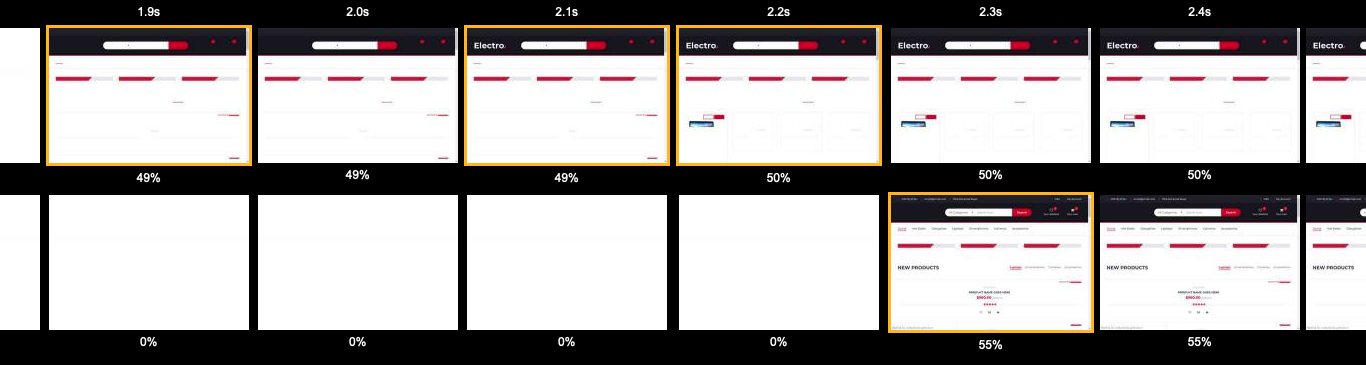
Comparison with and without preloaded fonts, WebPageTest, Dulles, Chrome, 3G Fast
The waterfall for the page with preloaded fonts illustrates why it’s slower to start rendering – although the fonts are given a medium priority, the requests for them are dispatched immediately, before the requests for the higher priority stylesheets and then the responses for the fonts delay the stylesheets.
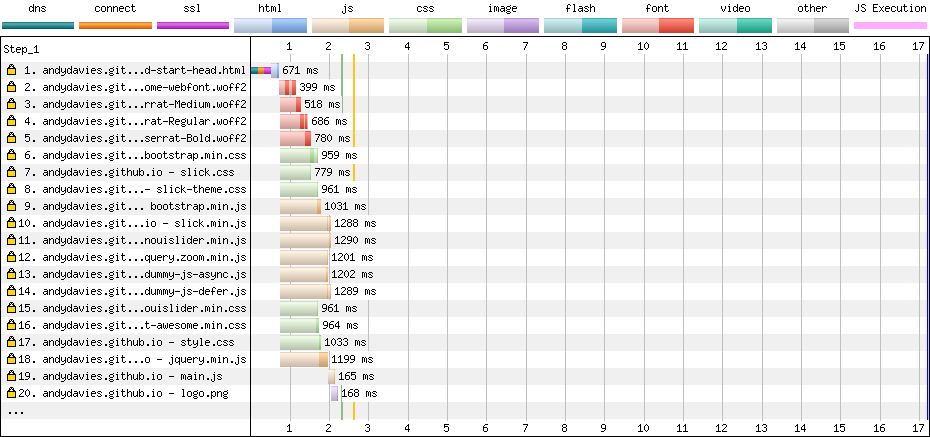
WebPageTest's connection view condenses all the waterfall rows to give a simpler picture showing the fonts (red) are received before the styles (green).

As the browser can’t do anything with the fonts until it has the stylesheets this really isn’t the behaviour we want, so why is it happening?
Firstly, Chrome sends the requests for the resource to be preload immediately, while the requests for the other resources wait for AppCache to be initialised – https://bugs.chromium.org/p/chromium/issues/detail?id=788757 – so even moving the preload directives to the bottom of the header or into the body don’t help.
Then GitHub’s servers don’t reprioritise the higher priority requests above the medium priority ones and so carry on serving the fonts even when the requests for the stylesheets are received.
To be fair to GitHub, prioritising early requests is hard – if the connection is idle a server is going to start responding as soon as it receives a request, and it may not need interrupt that response until a request with a higher priority is received.
Hopefully the Chrome team will fix the AppCache delay soon but in the meantime there are some other things we can try.
Switching HTTP/2 Servers
Recently Pat Meenan and I started tracking how well servers, CDNs etc., support HTTP/2 priorisation (https://github.com/andydavies/http2-prioritization-issues) so what if we switched to a server (h2o) that’s known to prioritise well?
I installed h2o 2.3.0-beta1 on a t2.micro instance in AWS US-East running Ubuntu 18.04 using BBR for congestion control and qdisc set to fq.
Although the improvement in prioritisation now results in the stylesheets being sent before the fonts, both fonts and render blocking scripts are requested with a medium priority so the scripts still get stuck behind the fonts.
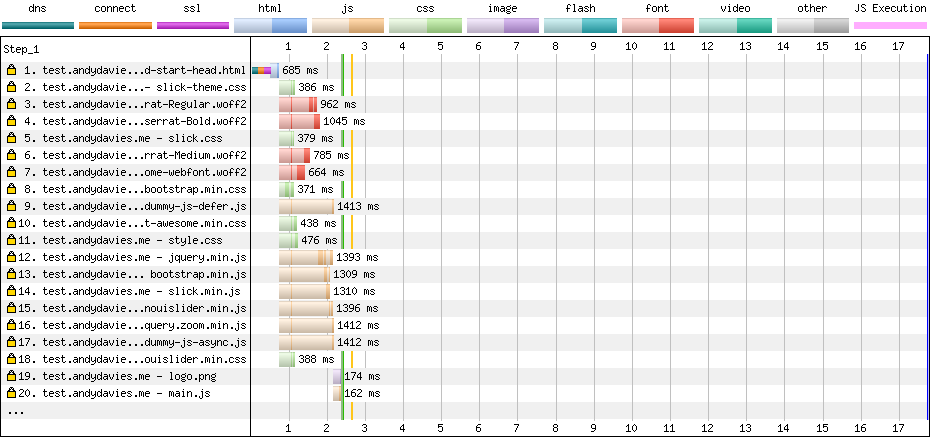
The connection view shows the fonts (red) being loaded after styles (green) but before scripts (orange)

And a visual comparison shows no improvement, as rendering won't begin until the render blocking scripts in the head have executed.
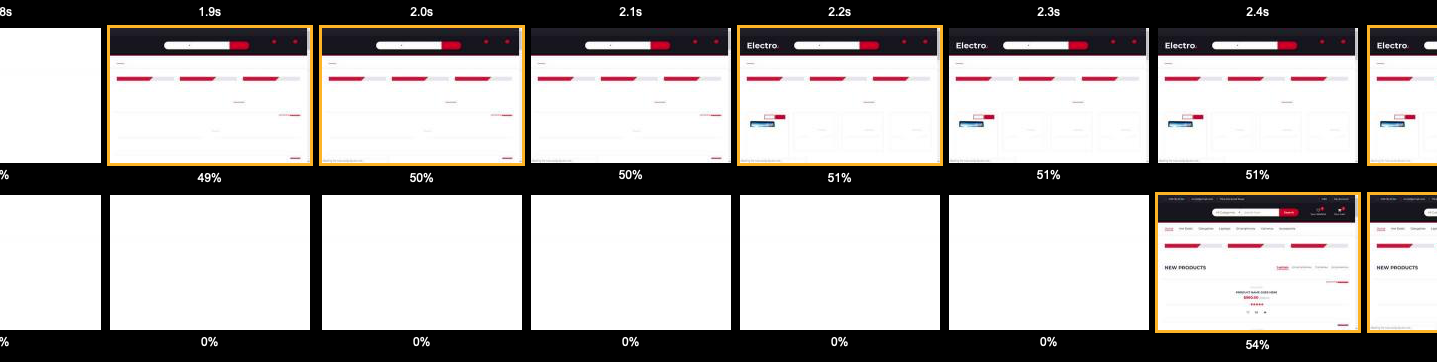
NOTE: In general, the delay to rendering was smaller with a faster network connection – 100ms on Cable for the pages hosted on GitHub. But using h2o, even on a cable connection, the page with preloaded fonts was noticeably slower (0.3s) to start rendering – the bandwidth chart showed throughput stalling after the resources in the head have been delivered and at the moment I'm unsure whether this is a Chrome issue, a h2o issue, or a combination of both.
Priority Hints to the Rescue?
Priority Hints is recent proposal that allows authors to hint how important a resource is and it’s available behind a flag in Chrome Canary.
If we added importance=”low” to the preload elements, would it encourage Canary to prioritise the fonts at a lower priority than the blocking scripts?
<link rel="preload" importance="low" href="fonts/Montserrat-Regular.woff2" as="font" crossorigin/>So close… and yet so far…
Interestingly the two earlier fonts are given a priority of lowest, and the later ones a priority of highest – maybe the browser has built enough of the DOM to discover it needs them and elevates their priority?
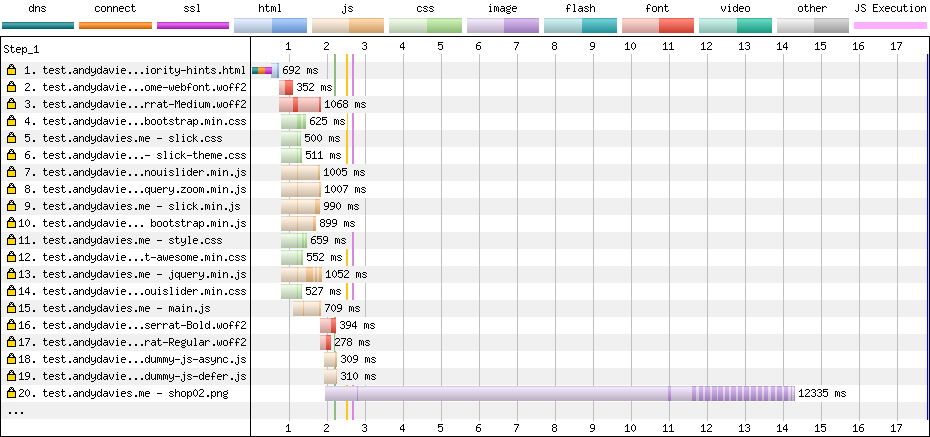
The connection view re-enforces the importance of sending high priority requests first so they don't get stuck behind lower priority ones.

But as priority hints are still an experiment it's behind a flag, so even though it shows promise most visitors won't be able to take advantage of it yet.
Delaying the Preload Hint
As mentioned earlier, resources injected using a script are hidden from the browser until the script executes, and we can use this behaviour to delay when the browser discovers the preload hint.
Using the snippet below I injected the rel=preload elements into the DOM and tested with the snippet positioned both before, and after the external scripts.
<script>
  (function () {
      var fontsToPreload = [
          {"href": "fonts/fontawesome-webfont.woff2?v=4.7.0", "type": "font/woff2"},
          {"href": "fonts/Montserrat-Medium.woff2", "type": "font/woff2"},
          {"href": "fonts/Montserrat-Regular.woff2", "type": "font/woff2"},
          {"href": "fonts/Montserrat-Bold.woff2", "type": "font/woff2"}
      ];

      var fragment = document.createDocumentFragment();
      for(font of fontsToPreload) {
          var preload = document.createElement('link');
          preload.rel = "preload";
          preload.href = font.href;
          preload.type = font.type;
          preload.as = "font";
          preload.crossOrigin = "anonymous";
          fragment.appendChild(preload)
      }
      document.head.appendChild(fragment);
  })();
</script>
(Yes… perhaps the script could do with a bit of a tidy up)
And finally, we have a filmstrip that hints at preload's promise!
The page in the bottom row has the above snippet just before the external blocking scripts, it starts rendering at the same time the default page (top), and renders text 0.3s sooner than the page the uses declarative preload statements (middle).
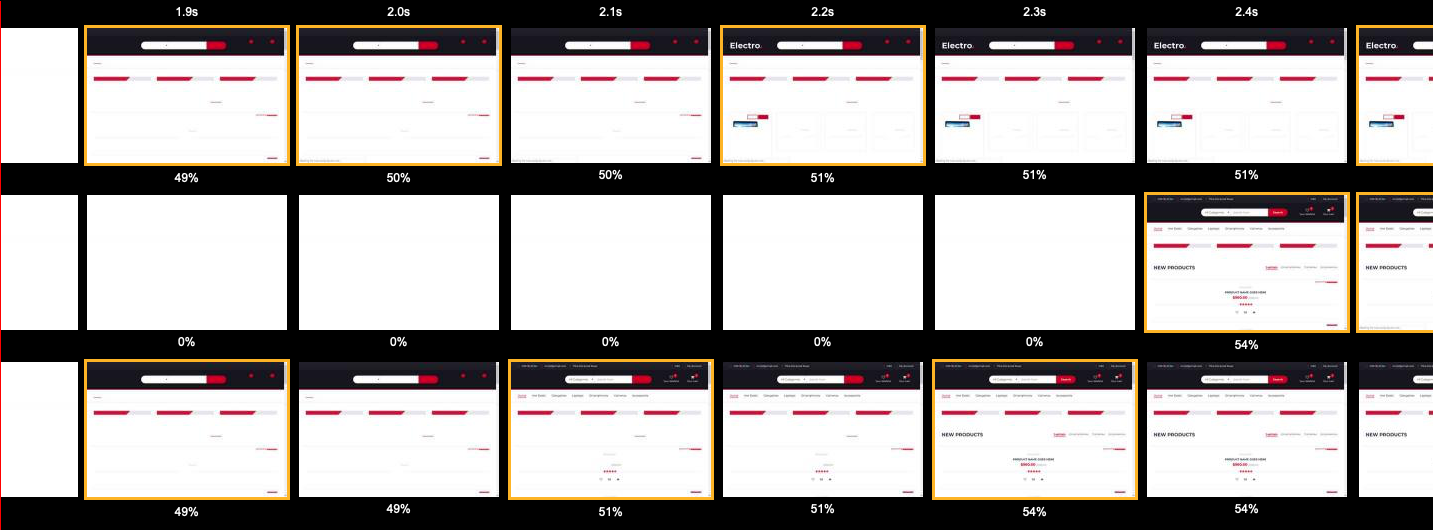
The waterfall shows the fonts being loaded later.
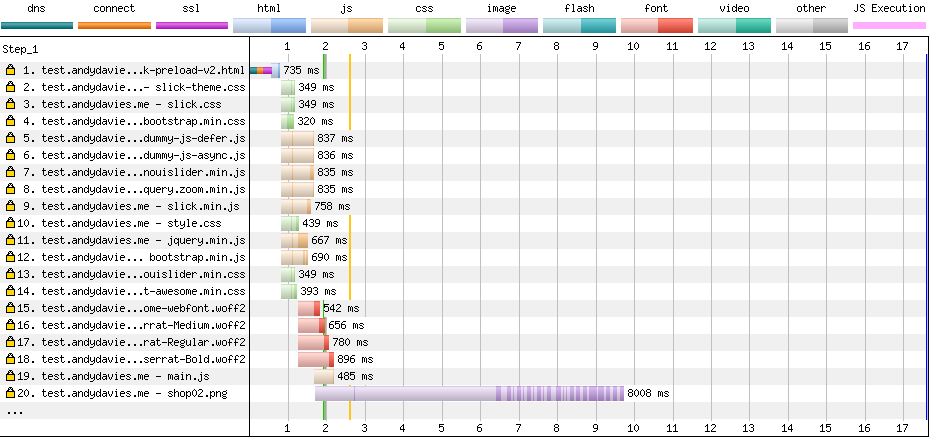
And the connection view confirms the styles and scripts are downloaded before the fonts.

It's not a perfect result, ideally I'd like to see the fonts retrieved before scripts that are async, or deferred but perhaps we have a winner?
What About Other Browsers?
Only Chrome and Safari currently support <link rel=preload… and so far, all my examples have used Chrome (or Chrome Canary), so what about Safari?
As Inspector shows, it appears Safari prioritises the declaratively preloaded fonts appropriately – they are loaded after the stylesheets and scripts in the <head> so they’re not delaying these critical resources.
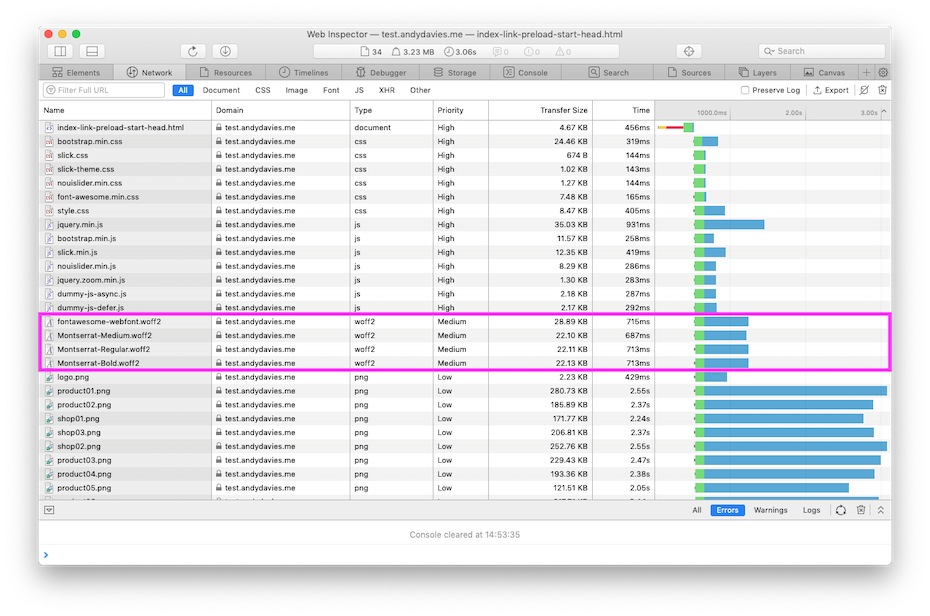
(I checked the behaviour separately using WebPageTest, Resource Timing, and server logs too.)
But if as highlighted earlier, Chrome's behaviour leads to declarative preloads being downloaded too early, what about the scripted approach that worked so well in Chrome?
Unfortunately, inserting the preload elements using a script frequently leads to Safari 'double downloading' the specified resources.
The requests also get dispatched after the lower priority images so we are reliant on the server to prioritise them effectively too.
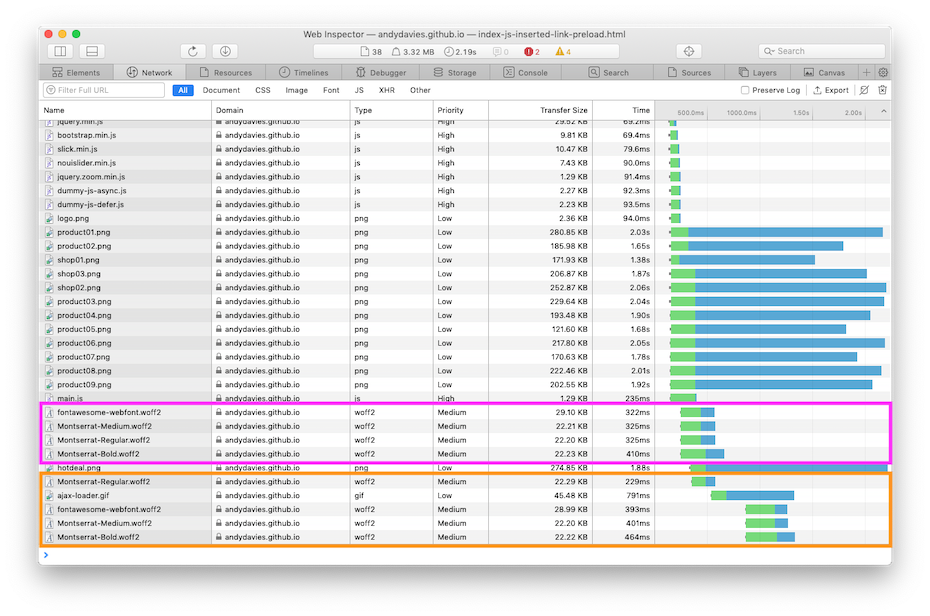
When it comes to examining network traffic, Safari isn’t as helpful as Chrome – there’s no equivalent of Chrome’s netlog, and we can’t capture TLS keys and then use Wireshark or Dan DeMeyer’s h2vis to explore the traffic – and I really miss these options.
Theses options really are useful to independently check what's happening at the network layer, for example, in this case even though Inspector shows a double download, Resource Timing data doesn't and I eventually resorted to server logs to verify the double downloads.
If declarative preloading is 'broken' in Chrome, and inserting the preload elements via a script results in double downloads in Safari, what approach should we take?
Closing Thoughts
It will be interesting to revisit these tests once hopefully both Chrome fixes the AppCache delay, and Safari fixes the double download issue.
I'm particularly interested in whether the fixes will change the importance of HTTP/2 prioritisation for these use-cases.
There's no doubt preload has the danger to be a 'foot gun' and Chrome's AppCache issue combined with HTTP/2 servers priority challenges really don't help.
But does that mean we should avoid it?
Fonts
Before considering preload for fonts we should go back to basics, if you can't (or don't want to) switch to system fonts there are often opportunities to reduce the size of self-hosted fonts:
- reduce the number of web fonts in use.
- remove glyphs that aren't going to be needed via subsetting
- subsetting is really important if you're using an icon font, you probably don't need to ship all 75kB of fontawesome to your visitors
- encode fonts as woff2, woff for older browsers (and maybe ttf or eot for really old browsers if you can't just rely on a default font for them)
Everything Fonts Subsetter is handy for manipulating text fonts (I also use Glyphs Mini), and I tend to use the font tools that Bram Stein curates for encoding.
- use the CSS
font-displayproperty with a value ofswapto enable the browser to start rendering text sooner - include a unicode range in the @font-face declaration
Zach Leatherman's written more on font optimisation than I probably ever will, so I'd suggest reading his Comprehensive Guide to Font Loading too.
Preloading Fonts
Given the issues I outlined earlier, should we even consider preloading fonts?
I suspect even with Chrome's current sub-optimal behaviour there's a case for preloading one or maybe two critical fonts.
But don't take my word for it, test it for yourself as your traffic mix e.g. Safari vs Chrome, the choice of server and your page make up will influence the outcome:
- if you've got a high proportion of Safari visitors, then perhaps Chrome's behaviour isn't important
- if you're using servers with poor support for HTTP/2 optimisation such as CloudFront or IIS then the outcome might be very different to using Akamai or Cloudflare.
- my test pages had multiple external styles, and blocking scripts – pages with more or less render blocking resources may behave differently.
I skipped some optimisation opportunities in my tests, for example what if I'd just preloaded Montserrat Regular, and left the other fonts to load as normal?
What if I had fewer stylesheets or blocking scripts in the head how would these have affected the outcomes?
Preloading is also a first impression optimisation – it should only apply to the first hit in a visitor's session, after that the fonts should come from the local browser cache.
Given first impressions tend to be uncached (and so slower) perhaps there's an opportunity to avoid preload and speed up the first view using font-display:optional or 'font-display: fallback`.
Preloading Other Resource Types
Querying the HTTP Archive data shows varied use cases for preload including font loading, asynchronous CSS loading, scripts, images, right though to a site that seemed to preload every resource (40ish!!!)
As I stated at the start preload is a trade off and given the high priority (at least in Chrome) preloaded resources are implicitly given I worry about what other high priority resources are being delayed.
I think the worst case I've seen is a site where stylesheets were blocked for EIGHT seconds while a video was being preloaded (the video took 20 seconds to load)
Although there's some interesting differences between Chrome and Safari's prioritisation of async, deferred, and foot of the page scripts, browsers are pretty good at prioritising resources they can easily discover.
I doubt there's any benefit to preloading the easily discoverable resources but wonder if some scripts inserted using a tag manager might benefit from it.
Given the issues I've seen with fonts, and some of the tests based on HTTP Archive data I'm pretty cautious about using preload, I think there's a danger it does more harm that good.
Further Research
I've only scratched the surface, there's further opportunities to understand how the number of number of preloaded fonts (and the order they're loaded in) affects the visitor experience.
Other questions include when should we (if at all) preload images, stylesheets scripts etc., and how will priority hints interact with them.
Preload as a HTTP header is often mentioned but doesn't seem to be greatly used, I've concerns that it's an even bigger foot gun than the link element but I can still see use cases e.g. bootstrapping an SPA, or third-parties using a scout script might benefit from the scout script using preload headers to load other resources early (as Google Fonts does with a preconnect hint for example)
Chrome and Safari's prioritisation of async, deferred and foot of the page scripts varies but which one is best and when?
These are some of the research cases I thought of while writing this but I'm sure there's more out there!
References / Further Reading
Test pages and results used in this post
Chrome AppCache / Prioritisation issue
Median size and number of requests for fonts based on HTTP Archive data
Zach Leatherman's A Comprehensive Guide to Font Loading
(EDIT: 13th Feb 2019 - Fixed typos, and added point on page construction to conclusions)
]]>Seems a pretty innocuous note but…
What this means is Safari caches content from third-party origins separately for each document origin, so for example if two sites, say a.com and b.com both use a common library, third-party.com/script.js, then script.js will be cached separately for both sites.
And if someone has an 'empty' cache and visits the first site and then the other, script.js will be downloaded twice.
Malte Ubl was the first person I saw mention this back in April 2017 but it appears this has been Safari's behaviour since 2013
So how much should we worry about Safari's behaviour from a performance perspective?
Checking Safari's Behaviour
Apart from the note in the WebKit post there's little documented detail on Safari's behaviour.
So I decided to check it for myself…
Using the HTTP Archive I found two sites that included the same resource from one of the public JavaScript Content Deliver Networks (CDN).
In this case I chose Cornell University and Walgreens Boots Alliance as they both include jQuery 1.10.2 over HTTP from ajax.googleapis.com
Then I visited the sites one after the other using Safari on iOS 11.4.1 and captured the network traffic with tcpdump
Sure enough when the packet capture is viewed in Wireshark it's clear that even though the pages were loaded immediately after each other, jQuery is requested over the network for each page load.
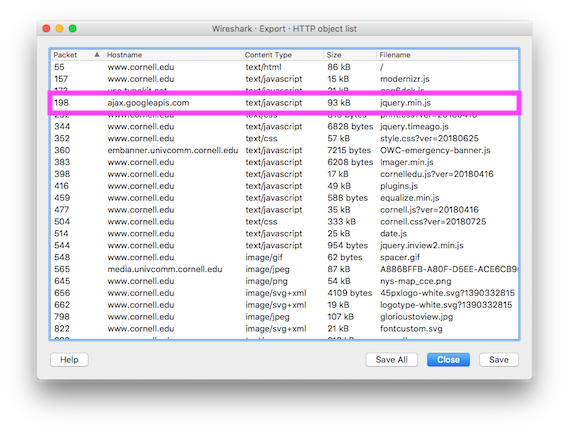
www.cornell.edu loading jQuery from ajax.googleapis.com
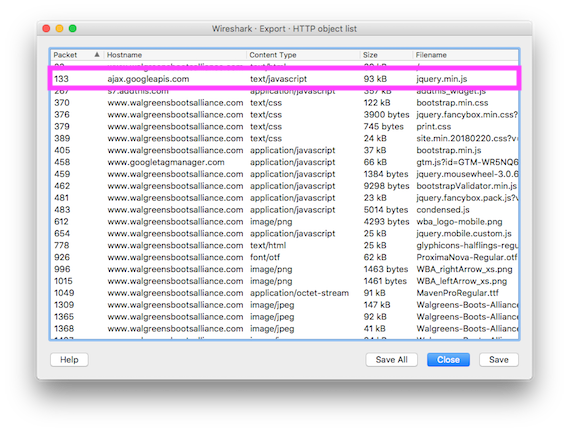
www.walgreensbootsalliance.com loading jQuery from ajax.googleapis.com
Repeating the tests with two sites that used HTTPS – https://www.feelcycle.com/ and https://www.mazda.no/ produced similar results.
Cache partitioning is aimed at defending against third-parties tracking visitors across multiple sites e.g. via cookies, another mechanism that can also be used to track visitors is TLS Session resumption – see Tracking Users across the Web via TLS Session Resumption for more detail.
And it appears when loading the second site (Mazda) the TLS connection to ajax.googleapis.com was resumed using information from the first so perhaps there are limits to Intelligent Tracking Protection's current capabilities and further enhancements to come.
(I used Wireshark as I wanted to see the raw network traffic but you can repeat my tests in Safari DevTools)
What's the Performance Impact?
In theory using common libraries, fonts etc. from a public CDN provides several benefits:
reduced hosting costs for sites on a tight budget – Troy Hunt highlights how it reduces the cost of running ';--have i been pwned? in 10 things I learned about rapidly scaling websites with Azure.
improved performance as the resource is hosted on a CDN (closer to the visitor), and in theory there's the possibility the resource may already be cached from an earlier visit to another site that used the same resource.
For a while I've been skeptical about shared caching (in the browser) and particularly whether it occurs often enough to deliver benefits.
Shared Caching
In 2011, Steve Webster questioned whether enough sites shared the same libraries for the caching benefits to exist and current HTTP Archive data shows sites are still using diverse versions of common libraries.
The March 2018 HTTP Archive (desktop) run has data for approximately 466,000 pages and the most popular public library, jQuery 1.11.3 from ajax.googleapis.com (served over HTTPS), is used by just over 1% of them.
I'm not sure what level adoption needs to reach for shared caching to achieve critical mass but 1% certainly seems unlikely to be high enough and even Google's most popular font – OpenSans – is only requested by around 9% of pages in the HTTP Archive.
Of course if more sites use the same version of a library, from the same public CDN and over the same scheme then the probability of the library being in cache increases.
But even if the third-party resource is used across a critical mass of sites it still has to stay in the cache long enough for it to be there when the next site requests it.
And research by both Yahoo and Facebook demonstrated that resources don't live for as long as we might expect in the browser’s cache.
So if content from some of the most popular sites only lives in the browser cache for a short time what hope do the rest of us have?
Benefits of Content Delivery Networks (CDNs)
The other performance aspect a public CDN brings is the reduction in latency – by moving the resource closer to the visitor there should be less time spent waiting for it to download.
Of course the overhead of creating a connection to a new origin (TCP connection / TLS negotiation etc.) needs to be balanced against the potentially faster download times due to reduced latency.
Most of the clients I deal with already use a CDN so they're already gaining the benefits of the reduced latency.
Self-hosting a library has some other advantages too – it removes the dependency on someone else's infrastructure from both reliablity and security perspectives, if your site is using HTTP/2 then the request can be prioritised against the other resources from the origin, or if your site is still using HTTP/1.x then the TCP connection can reused for other requests (reducing the overall connection overhead, and taking advantage of a growing congestion window).
Overall I'm still skeptical that the shared caching delivers a meaningful benefit for sites already using a CDN and encourage clients to host libraries themselves rather than use a public CDN.
Test it for Yourself
As ever with performance related changes it's worth testing the difference between self-hosting a library vs using it from a public CDN, and there are several approaches for this.
Page Level
A combination of split testing – serving a portion of visitors the library from a public CDN, and others the self-host version – is perhaps the simplest method for determining which approach is faster.
Coupled with Real User Monitoring (RUM) to measure page performance, we can explore how the two different approaches affects the key milestones – FirstMeaningfulPaint, DOMContentLoaded, onLoad, or a custom milestone (using User Timing API) as appropriate – across a whole visitor base.
Resource Level
To explore performance in more depth we can use the Resource Timing API to measure the actual times of the third-party library across all visitors and then beacon the timings to RUM or another service for analysis.
Cached or Not?
For browsers that support the Resource Timing (Level 2) API i.e. Chrome & Firefox, it's possible to determine whether a resource was requested over the network or whether a cached copy was used.
Resource Timing (Level 2) includes three attributes describing the size of a resource – transferSize, encodedBodySize and decodedBodySize and Ben Maurer's post to Chromium net-dev illustrates how these attributes can be used to understand whether a resource is cached (or not).
if (transferSize == 0)
  retrieved from cached
else if (transferSize < encodedBodySize)
  cached but revalidated
else
  uncached
By default Resource Timing has restrictions on the attributes that are populated when the resource is retrieved from a third-party origin, and the size attributes will only be available if the third-party grants access via the Timing-Allow-Origin header.
So the example above needs updating to account for third-parties that don't allow access to the size information and luckily Nic Jansma has already suggested some approaches for tackling this.
First Page in a Session vs Later Ones
Shared caching should have the most impact on the first page in a session (with subsequent pages benefiting from the first page retrieving and caching common resources) so ideally we want to be able to differentiate data for the initial page from the later pages in a session.
One way of doing this might be store a timestamp in local storage, or a session cookie, updating the timestamp on each page view - when the cookie doesn't exist, or the timestamp is too old consider the session to be new, otherwise consider it to be the continuation of an existing session.
This isn't a perfect approach for separating identifying the first page in a session but it's probably close enough.
Final Thoughts
Given the growth in 3rd parties tracking us across the web, mechanisms that improve our privacy are to be applauded even if they lead to a theoretical decrease in performance.
It's unclear how real the decrease in performance is - I'm pretty skeptical that any common library from one of the public CDNs is used widely enough for the shared caching benefits to be seen, but as with all things performance we should 'measure it, not guess it'.
(Thanks to Doug and Yoav for reviewing drafts of this post and suggesting improvements)
Further Reading
Intelligent Tracking Prevention, WebKit, 2017
Optionally partition cache to prevent using cache for tracking, WebKit, 2013
Getting a Packet Trace, Apple, 2016
Tracking Users across the Web via TLS Session Resumption, Erik Sy, Christian Burkert, Hannes Federrath, Mathias Fischer, 2018
Caching and the Google AJAX Libraries, Steve Webster, 2011
Web performance: Cache efficiency exercise, Facebook, 2015
Performance Research, Part 2: Browser Cache Usage - Exposed!, Yahoo, 2007
User Timing API, W3C, 2013
Resource Timing Level 2 API, W3C, 2018 (Working Draft)
Local cache performance, Ben Maurer - Facebook, 2016
ResourceTiming in Practice, Nic Jansma, 2015 updated 2018
]]>And as Tim Kadlec once said "Everything should have a value, because everything has a cost".
So how do we measure the performance cost of all the 3rd-party tags we keep adding to our sites?
Although Chrome supports blocking individual requests, my favourite approach still uses WebPageTest.
If you're interested in the Chrome approach Umar covered how to use DevTools to block a network request just after it was released in Chrome Canary – it still works the same way today and now you can even block whole domains too.
One of the reasons I prefer WebPageTest is its side-by-side comparison of the filmstrip is a really powerful way to communicate the impact of tags to co-workers, bosses and clients.

Creating the Comparison
The first step is to test a page with nothing blocked i.e. in it's default state.
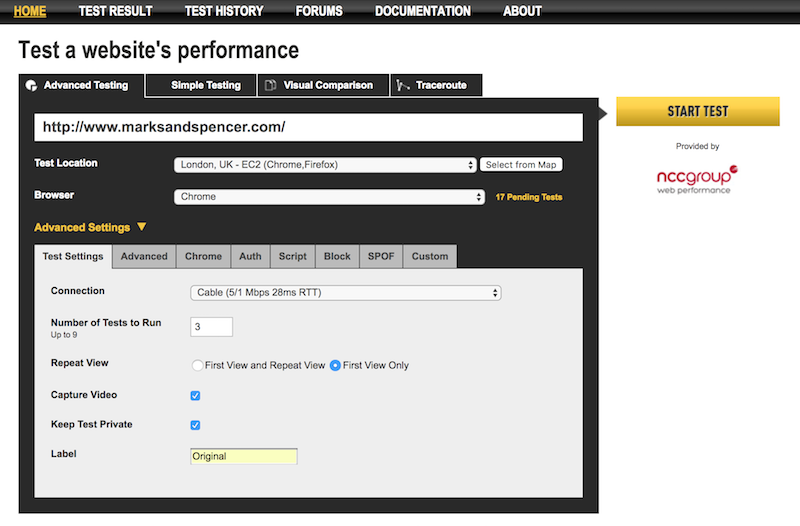
Remember to enable video capture, and labelling the tests will make it easier to differentiate them when viewing the filmstrip. In the spirit of being obvious I often label this step 'Original' or 'Default'!
Blocking Requests
Next we need to create a test with some requests blocked – I tend to label this one '3rd-Parties Blocked' or similar depending on what's actually blocked
There are a few ways to block requests:
Using the Block Field
The easiest way to block requests is to add entries to the block field:
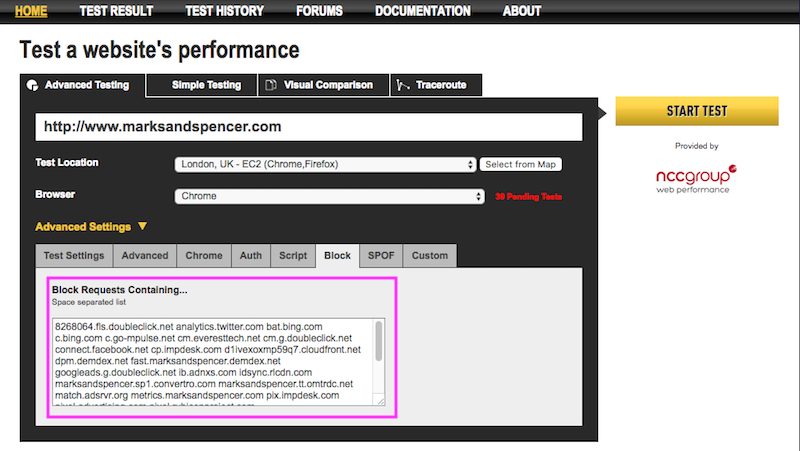
The block field takes a space separated list of values and like its name suggests blocks any requests containing one of the values.
As it's a substring match it's pretty generous with what it accepts – anything from a single letter to a full URL – so if you add
.comWebPageTest will block all requests with .com anywhere in the URL.I use the block field approach more often than the script based approaches below.
Using a Script
Alternatively there are three script commands that can be used to block requests - they're straightforward and self-explanatory.
block– followed by a space separated list of substrings
This works in the same way as the block field in the previous example.
  block    .com
  navigate    https://andydavies.me
Example of test using block command
Note: the script also needs the command to navigate to the page you want to test too.
blockDomains- followed by a space separated list of domains to block
Blocks all the domains specified.
blockDomains   fonts.googleapis.com
navigate  https://andydavies.me
Example of test using blockDomains command
blockDomainsExcept- followed by a space separated list of domains to block
Blocks all the domains except those specified.
blockDomainsExcept andydavies.me
navigate  https://andydavies.me
Example of test using blockDomainsExcept command
Steve Souders covers using blockDomainsExcept for testing Service Workers, and it's a great example of where it can be really useful.
Note: One thing to watch for when viewing waterfalls from scripts that used blockDomains and blockDomainsExcept is the requests are blocked at the network level so you'll see the request in the waterfall with a -1 result code.
Comparing Results
Once both tests have completed we can hop over to the Test History tab, select the tests we want to compare and view the filmstrip.
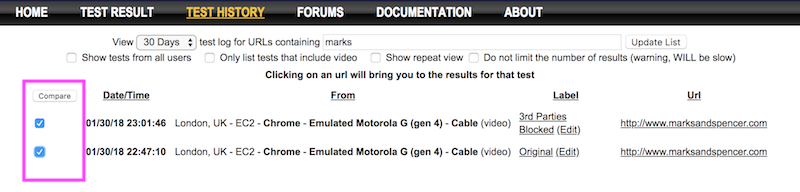
Choosing which Requests to Block
I generally use one of two strategies for determining which requests to block depending on whether I want to raise awareness that 3rd-parties tag are a problem in general, or whether I want to determine the cost of a single tag.
Block Everything
The option that requires the least thought is 'block all the things'.
One way to do this is to this is by copying the list domains from the domains view of a completed test and using this as a block list.
It's a bit of manual labour so I tend to use a shell command to create the list.
The domains view can also produce a JSON formatted response and one way I build the list of domains to block is to pipe the JSON output through
jqand then copy it to the clipboard usingpbcopy.curl 'http://www.webpagetest.org/domains.php?test=180130_NH_4c83de2dfe315f19e5367b91b6ac4a37&run=1&cached=0&f=json' | jq -rj '.domains.firstView[].domain + " "' | pbcopyThen I paste the list of domains into the block field and remove any that shouldn't be blocked – domain being tested, and any domains it relies on, for example, static or media assets domains.
Note: Of course
pbcopyis macOS only but there are alternatives such as xclip on Ubuntu etc.Block a Subset of Requests
Blocking all 3rd-parties is a dramatic way to show their combined cost, but it's slightly less useful when it comes to discussions about the impact or value of an single 3rd-party tag.
Blocking a single tag, perhaps one that delays the page from rendering, or slows other critical content from displaying, is a powerful way of understanding just its impact.
And if you have a Real User Monitoring product (such as NCC Group's RUM, or Soasta's mPulse) that models the impact of speed on conversions and other business metrics, you can use the time differences to get a real indication of what the 3rd-party is actually costing in lost conversions, for example.
Gotchas
Blocking 3rd-parties isn't a foolproof process and sometimes blocking a 3rd-party doesn't have the expected impact or introduces side effects that make the 'slimmer' page slower.
In this comparison of debenhams.com with and without 3rd-party tags the test with 3rd-party tags blocked is actually slower than the one with tags present (you might notice the base page gets re-requested as request #12 in the tests with the tags blocked)
So don't be surprised if occasionally blocking 3rd-parties doesn't have quite the effect you expect.
In these cases, I tend to reduce the list of 3rd-parties being blocked until I isolate the one that's causing the unexpected behaviour.
Closing Thoughts
Filmstrip comparisons are a great way to illustrate how 3rd-parties affect the visual experience and they're easy for everyone to understand too.
Although filmstrips only help a little in understanding whether a page is in a state where the visitor can interact with it (or not), WebPageTest has an estimation of when a page is interactive at the bottom of the waterfall.
Comparing the charts from two runs give us some indication of whether the page with 3rd-parties removed becomes usable sooner.
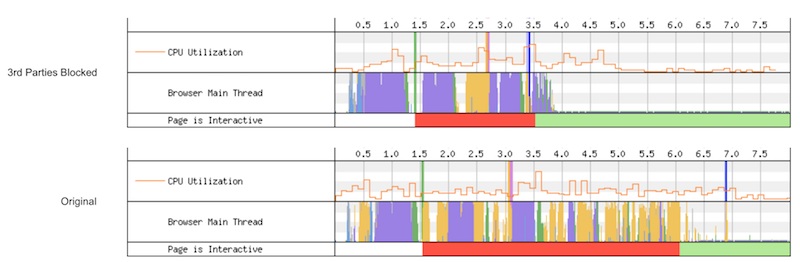
One of the performance challenges we face is helping people to understand the cost of 3rd-party tags in terms of user experience and WebPageTest's ability to block requests offers a great way to help with that.
Further Reading
WebPageTest Docs: Scripting commands for blocking requests
]]>Once configured your local WebPageTest instance submits tests and retrieves results via the API of the remote WebPageTest instance (aka Relay Server), and the pages are tested on the remote instance’s agents.
Using a Relay Server is also handy if you want to do local development on the server code without needing to setup Windows (or mobile) test agents.
Configuration
Assuming you’ve already got a WebPageTest server set up, then adding relay server agents just involves adding some extra entries to locations.ini.
A simple locations.ini that just has the public Singapore test agents as a location looks like this:
[locations]
1=Singapore
default=Singapore

[Singapore]
1=WPT_Singapore
label=Singapore
group=WebPageTest Public

[WPT_Singapore]
browser=Chrome, Firefox, IE 11
label=Singapore
relayServer=https://www.webpagetest.org/
relayKey=(API key for relay server)
relayLocation=ec2-ap-southeast-1
The section for each public agent (WPT_Singapore in this case) has a collection of key / value pairs.
So where do the values for each of these keys come from?
- relayServer
The URL of the WebPageTest instance hosting the agents you want to use.
In this example we’re using the public WebPageTest instance - https://www.webpagetest.org
- relayKey
The API key (if needed) for the WebPageTest instance with the agents.
If you want to use a public agent and don’t already have an API key, thanks to Akamai you can get a key that’s good for 200 tests per day - https://www.webpagetest.org/getkey.php
The Akamai keys only work with a subset of the public locations and a list of those locations is included when the key is emailed to you.
- relayLocation
Each WebPageTest server has a number of agents, you can see these, their browsers and work queues via /getLocations.php
For example on the public instance https://www.webpagetest.org/getLocations.php will show you a list of the locations and browsers at each location.
At the start of each line is a location and browser pair (followed by counts of the number of agents at the location, how many are busy, how many jobs are waiting in each priority queue etc.)
The relayLocation value should be set to the first part of the location:browser pair
For example, the entries for Singapore look something like:
ec2-ap-southeast-1:Chrome   2   0   0   0   0   0   0   0   0   0   0   0   0
ec2-ap-southeast-1:IE 11    2   0   0   0   0   0   0   0   0   0   0   0   0
ec2-ap-southeast-1:Firefox  2   0   0   0   0   0   0   0   0   0   0   0   0
ec2-ap-southeast-1:Safari   2   0   0   0   0   0   0   0   0   0   0   0   0
So to add Singapore, the relayLocation should be set to ec2-ap-southeast-1
- browser
The browser key is a comma separated list of the browsers that are available at your relay location.
So again using the Singapore location from above, the browser key value can be set to Chrome, IE 11, Firefox
(As the Windows version of Safari is so old I never configure it on my instances)
Limitations
There’s a few limitations you want to be aware of when using a relay server:
If you’re using the public agents then your tests will be run at a lower priority than pages submitted via the public web UI. Your tests are competing with all the other public tests and so are likely to queue.
If multiple locations use the same relay server then they’ll be duplication in your
locations.inias each location needs to configured separately.Requests to the local servers
/getLocations.phpandgetTesters.phpwon’t show any real detail for the remote test agents.
Further Reading
If you want to know more about WebPageTest Relay Servers there's some docs available - https://sites.google.com/a/webpagetest.org/docs/system-design/webpagetest-relay
And if you want to learn more on how to get the most out of WebPageTest, Rick Viscomi, Marcel Duran and myself wrote 'Using WebPageTest' just for you!
]]>AMP promotes the goal of a faster mobile web which is something I think we’d all like to see.
If you visit g.co/ampdemo on a mobile, and search for ‘Obama’ there’s no doubt the stories in the carousel come up fast, and moving between them is slick too. The demo isn’t available in all regions yet so Addy Osmani posted a demo to YouTube.
Similar to Google’s Instant Pages, AMP relies on pre-rendering and caching to make the pages load instantly.
Where AMP differs from Instant Pages is that it forces developers to use custom elements for images, audio and video, and limits some of the other web features a page can use (only AMP supplied JS, limited CSS features and with exception of button no form elements etc.).
There’s plenty in the documentation about what technologies are allowed or not allowed, but there’s less information on why these choices were made.
And I wonder how much this lack of information and the project’s relative immaturity, coupled with being backed by Google contributes to the unease we feel with it at the moment.
Tim Kadlec has already discussed whether the incentives publishers have to adopt AMP conflict with an open web and I’d really recommend reading his post.
After a few days of testing AMP based pages, reading the GitHub Repo and other docs it’s clear AMP aims to be a set of custom elements and rules to enable pages to be pre-rendered quickly and easily – a set of constraints to protect us from our own excesses.
Some of the AMP components such as img, audio and video, are replacements for their HTML equivalents but control asset loading more finely (and of course dispense with optimisations like the browser pre-loader).
Others provide new features such as carousels or wrap 3rd party services. Let’s face it there are plenty of poorly implemented carousels and 3rd party scripts out there so applying an external quality control over them is welcome.
But does AMP really deliver in performance terms?
Is it really faster?
The AMP Project reports speed improvements of 15-85% (using SpeedIndex as their measure), but as we don’t have their data or methodology it’s unclear how much these improvements rely on pre-rendering and caching.
Testing AMP pages (without the benefit of pre-rendering) vs their existing equivalents shows something of a mixed picture.
- The Guardian
(The top set of images is the current Guardian site, and the bottom the AMP equivalent)




- BuzzFeed
(The top set of images is the current Buzzfeed site, and the bottom the AMP equivalent)

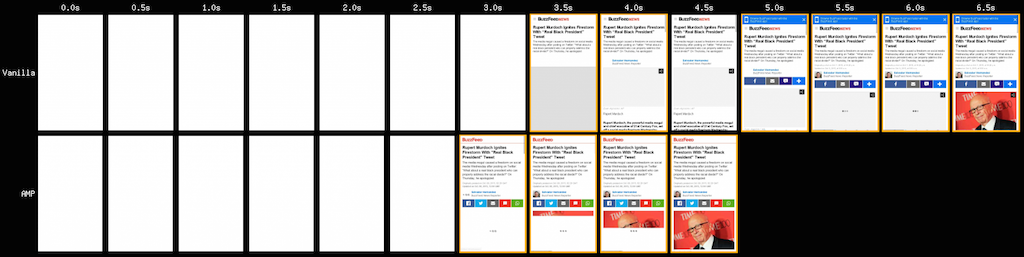


In the BuzzFeed examples the AMP version is generally faster with the exception of the test that involved no network shaping.
The picture for The Guardian is reversed, over slower networks the current site starts rendering sooner but generally always finishes after the AMP version. The exception is the test that involved no network shaping where the AMP version is noticeably faster.
The current Guardian site makes over 100 HTTP requests per page, and the AMP version only 9. The effort The Guardian's developers put into performance clearly is reflected in the results.
Note: The current Guardian site uses HTTP, whereas the AMP version uses HTTPS which will affect the result with some TLS overhead.
What about progressive enhancement?
From a browser support perspective the pages work in every browser I’ve tried - Chrome on Android, Safari on iOS and even Opera Mini (with a few minor quirks).
One thing you might notice from many of the AMP tests is that with the exception of media there’s little progressive rendering; the content just appears to pop onto the page, this is by design…
The head of each page contains a style block that sets the whole page to be transparent
<style>body {opacity: 0}</style><noscript><style>body {opacity: 1}</style></noscript>And the page contents don’t become visible until the AMP script has executed
<script async src=“https://cdn.ampproject.org/v0.js”></script>So although the pages use an asynchronous script, if it fails for any reason then the visitor sees a blank screen.
It’s not completely clear whether AMP is designed to just to be a format for content embedded in apps or whether it’s designed for more general use replacing the plain old HTML versions of publishers pages too.
If it is just for embedding in apps then there’s always the option of bundling the scripts with the viewer which guards against failure and will improve render speeds, but I still have a nervousness about pages being so dependent on JavaScript for rendering (even when the blocking 3rd party scripts we use now fail, the browser will eventually allow the page to render).
And do we really want to rely on JavaScript for ‘plain old’ document rendering as Jeff Attwood notes JavaScript performance on Android isn’t really improving.
The componentisation of the web
Web components have been talked about for several years and perhaps by providing a set of well defined, quality controlled and performant (maybe) components AMP represents the real start of the componentisation of the web.
There are of course questions about how the range of components gets extended, who decides what’s acceptable and how we innovate in a ecosystem of tightly controlled components.
Would BBC News or The Guardian have been able to experiment, learning how to create flexible and fast experiences in an AMP-like environment?
The current constraints still allow some performance issues to slip through - The Atlantic demo is a 447KB page of which 347KB is fonts!
I’d also like to understand more about why AMP bypasses the pre-loader for its images, and whether some of the AMP decisions to lazy-load images could be incorporated directly into browsers.
Wrap up
After a few days of exploring, experimenting with and testing AMP I do understand more, but I’m not sure if I’m more comfortable with it.
I see cases where it offers some performance improvements but then there are others where it appears slower.
Despite the launch partners, AMP is still a developer preview and as the GitHub Issues list shows it's still early days.
I wonder if what AMP really does is remind us how we’ve failed to build a performant web… we know how to, but all too often we just choose not to (or lose the argument) and fill our sites with cruft that kills performance, and with it our visitors’ experience.
Perhaps it is time to press the reset button.
Only time will tell if AMP is that reset button…
Further Reading
Get AMP’d: Here’s what publishers need to know about Google’s new plan to speed up your website
Accelerated Mobile Pages Project, Backed By Google, Promises Faster Pages
The State of JavaScript on Android in 2015 is… poor
Example AMP Based Pages and their ‘vanilla’ equivalents
New York Times
The Guardian
BuzzFeed
The Atlantic
]]>During their implementation Mozilla reported a 19% improvement in load times, and in a test against the Alexa top 2,000 sites Google found around a 20% improvement.
It’s not a new browser feature but some seem to believe it’s Chrome only and yet others suggest it’s “the most destructive ‘performance enhancement’ there’s ever been”!
So what is the pre-loader and how does it improve performance?
How browsers used to load web pages
Web pages are full of dependencies – a page can’t start rendering until the relevant CSS has downloaded, then when a script is encountered the HTML parser pauses until the script has executed (of course if the script is external it needs to be downloaded too).
Let’s consider how a browser might load a page:
First the HTML is downloaded and the browser starts parsing it. It finds a reference to an external CSS resource and fires off a request to download it.
The browser can carry on parsing the HTML while the CSS is downloading but then it finds a script tag with an external URL, now (unless the script has
asyncordeferattributes) it must wait until the script has downloaded and executed.Once the script has downloaded and executed, the browser can continue parsing the HTML, when it finds non-blocking resources such as images it will request them and carry on parsing, but when it finds a script it must stop and wait for the script to be retrieved and executed.
Although a browser is capable of making multiple requests in parallel, one that behaved like this often wouldn't be downloading any resources in parallel with a script.
This is how browsers used to behave and using Curzillion by Steve Sounders we can create a test page that demonstrates this in IE7.
The test page has two stylesheets followed by two scripts in the head, then in the body it has two images, a script and finally another image.
The waterfall makes it easy to see parallel downloads stop while a script is being downloaded.
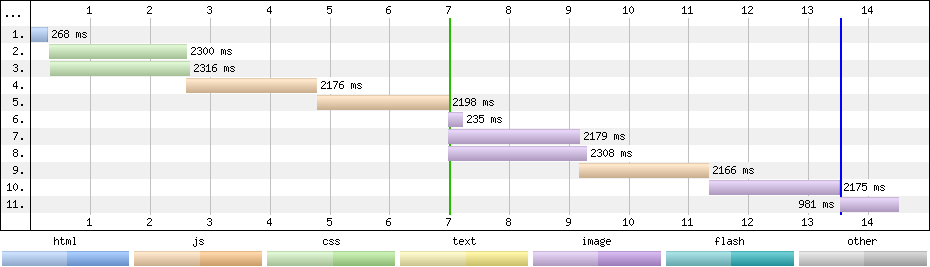
Waterfall of Cuzillion generated test page in IE7
If browsers still worked like this then pages would be slower to load as every time a script was encountered the browser would need to wait for the script to be downloaded and executed before it could discover more resources.
How the pre-loader improves network utilisation
Internet Explorer, WebKit and Mozilla all implemented pre-loaders in 2008 as a way of overcoming the low network utilisation while waiting for scripts to download and execute.
When the browser is blocked on a script, a second lightweight parser scans the rest of the markup looking for other resources e.g. stylesheets, scripts, images etc., that also need to be retrieved.
The pre-loader then starts retrieving these resources in the background with the aim that by the time the main HTML parser reaches them they may have already been downloaded and so reduce blocking later in the page.
(Of course if the resource is already in the cache then the browser won’t need download it)
Repeating the previous test with IE8 shows other resources are now downloaded in parallel with scripts, delivering a huge performance improvement for this test case: 7s vs 14s.
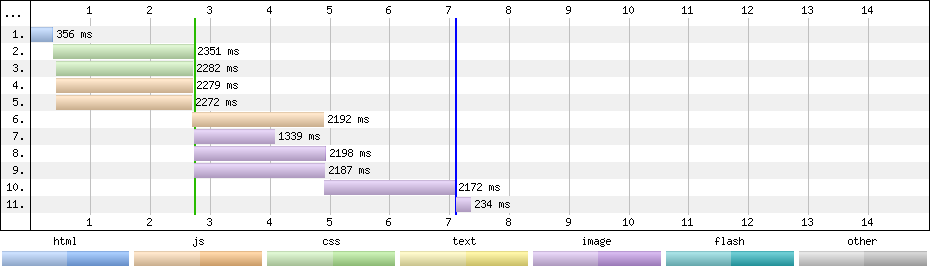
Waterfall of Cuzillion generated test page in IE8
Pre-loader behaviour varies between browsers and is still an area of experimentation, some browsers seem to have naive implementations where they download the resources in order of discovery but other browsers prioritise the downloads, for example Safari gives stylesheets that don’t apply to the current viewport a low priority, Chrome schedules scripts (even those at the foot of a page) with a higher priority than most of the images on the page.
The prioritisation mechanisms aren’t well documented (you can read the source for some browsers!) but if you want to get a better understanding of what they can do, James Simonsen wrote some excellent notes about the approaches they’re trying in Chrome.
Pre-Loader Gotchas
Pre-loaders extract URLs from markup and don’t / cannot execute javascript so any URLs inserted using javascript aren’t visible to it and the download of these resources will be delayed until the HTML parser discovers and executes the javascript that loads them.
There are cases where inserting resources using javascript can also trip up some pre-loaders.
I came across an answer on Stack Overflow suggesting javascript should be used to insert a link to either a mobile or desktop stylesheet depending on browser width:
<html>
<head>
  <script>
      var file = window.innerWidth < 1000 ? "mobile.css" : "desktop.css";
      document.write('<link rel="stylesheet" type="text/css" href="css/' + file + '"/>');
  </script>
</head>
<body>
<img src="img/gallery-img1.jpg" />
<img src="img/gallery-img2.jpg" />
<img src="img/gallery-img3.jpg" />
<img src="img/gallery-img4.jpg" />
<img src="img/gallery-img5.jpg" />
<img src="img/gallery-img6.jpg" />
</body>
</html>
There are several reasons why I wouldn’t use this approach but even this simple example is enough to trip up IE9’s pre-loader – notice how the images grab all the connections and the CSS is delayed until one of the images completes and a connection becomes available.
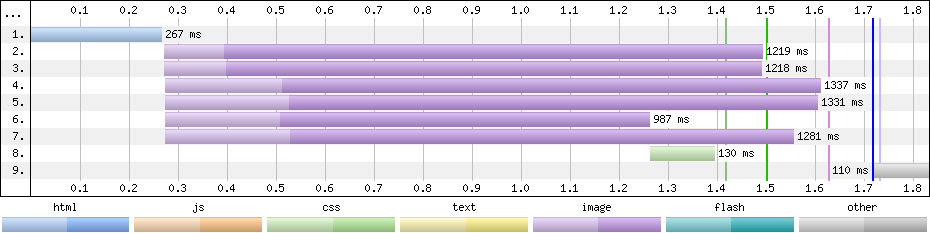
Test page loaded in IE9
Some of the responsive image approaches use a fallback image and the pre-loader will often initiate the fallback image download before the javascript to select the appropriate image has executed leading to extra downloads.
Influencing the pre-loader
Currently there are limited ways we can influence the pre-loader's priorities (hiding resources using javascript is one), but the W3C Resource Priorities spec proposes two attributes to help signal our intent.
lazyload : resource should not be downloaded until other resources that aren’t marked lazyload have started downloading
postpone : resource must not be downloaded until it’s visible to the user i.e. within the viewport and display is not none.
Although I’m not sure how easy it is to polyfill, perhaps postpone might enable a simple way of implementing responsive images?
Pre-loading vs Pre-fetching
Pre-fetching is a way of hinting to the browser about resources that are definitely going to or might be used in the future, some hints apply to the current page, others to possible future pages.
At the simplest level we can tell the browser to resolve the DNS for another hostname that we will access later on the page:
<link rel="dns-prefetch" href="other.hostname.com">
Chrome also allows us to hint that we’re going to use another resource later in the current page and so it should be downloaded as a high priority:
<link rel="subresource" href="/some_other_resource.js">
(Chromium’s source code suggests it’s actually downloaded as a lower priority than stylesheets/scripts and fonts but at an equal or higher priority than images)
There are two more link types that allow us to speculatively hint about what comes next and will be downloaded at a lower priority than the resources on the current page.
Prefetch an individual resource that might be on the next page:
<link rel="prefetch" href="/some_other_resource.jpeg">
Prefetch and render a whole page in a background tab:
<link rel="prerender" href="//domain.com/next_page.html">
Ilya Grigorik’s Preconnect, prefetch, prerender… talk from WebPerfDays New York is a good place to start if you want to learn more about pre-fetching.
Summary
The pre-loader isn’t new, it delivers a significant performance boost and as authors we don’t need to do anything special to take advantage of it.
It’s widely implemented - I tested the following browsers to confirm they had a pre-loader:
- IE8 / 9 / 10
- Firefox
- Chrome (inc Android)
- Safari (inc iOS)
- Android 2.2.2 / 2.3 (2.2.2 tested 18 May 2014)
Bruce Lawson also confirmed Opera Mini uses the Presto engine which has a pre-loader.
Resource Priorities (and perhaps <link rel=subresource...) will give us some ways to indicate our priorities to it.
If you spot any typos, or have and questions add them in the comments and I'll do my best to fix and answer.
References / Further Reading:
If you’re interested in digging further here’s some presentations, posts, bug reports etc. I read while writing this:
Speculatively load referenced files while "real" parsing is blocked on a <script src=> load
Implement speculative preloading
Best Practice: Get your HEAD in order
Bugs in IE8's Lookahead Downloader
Chrome PLT Improvements Q1 2013
Preconnect, prefetch, prerender
]]>There are a few tools that can crawl a site and produce performance reports, SiteSpeed.io from Peter Hedenskog and NCC Group’s (was Site Confidence) Performance Analyser are two I use regularly.
Sometimes I want more than these tools offer - I might want to test from the USA or Japan, or want some measurements they don’t provide - that’s when I use my own instance of the HTTP Archive.
HTTP Archive
I run a customised version of the HTTP Archive using my own instance of WebPageTest (WPT) using test agents at various locations.
Getting the HTTP Archive up and running is a bit fiddly but not too hard.
I didn’t make any notes when I got my own instance up and running but Barbara Bermes wrote a pretty good guide - Setup your own HTTP Archive to track and query your site trends
My own instance is slightly different from the ‘out of the box’ version:
The batch process that submits jobs to WebPageTest, monitors them and then collects the results is split into two separate processes:
- Submit the tests (I monitor the jobs via WebPageTest until they’ve completed)
- Collects the results for completed tests, parses the results and inserts into DB
I’ve also introduced some new tables, one which maps WPT locations to friendly names, and another which groups URLs to be tested so that I can test subsets of pages, a page across multiple locations, multiple browsers etc.
These changes will be open sourced at some point later this year (some of the changes were part of a client engagement and they’ve agreed they can be released - probably in the Autumn)
Exploring a site
To gather the URLs to be tested I often crawl a site with sitespeed.io or another crawler before inserting the URLs manually into the HTTP Archive DB (spot the automation opportunity).
Once the URLs are in the DB, I schedule the tests with WPT, and collect the data when the tests complete.
Although I use the HTTP Archive for data collection and storage, I don’t actually use the web interface to examine the data.
SQL
Small images that might be suitable for techniques like spriting, or larger images that should be optimised further are really easy to identify with simple SQL queries, such as:
select distinct url, respsize from requests where url like 'http://www.domain.com%' and mimetype like 'image/%' order by respsize desc;R
People are pattern matchers so I like to draw charts from the raw data using R (via R Studio) to extract and visualise it.
To start I typically plot the distribution of page size and requests per page, I also plot the load time of all pages split by the various loading phases.
Before plotting any charts we need to connect to the MySQL DB and extract the data we want as follows:
Install MySQL package (only once)
install.packages("RMySQL")Connect to the database, and create a data frame with the relevant data
library(RMySQL)

drv = dbDriver('MySQL')

con = dbConnect(drv, user='user’, password='password', dbname='httparchive', host='127.0.0.1')

results = dbGetQuery(con,statement='select url, wptid, ttfb, renderstart, visualcomplete, onload, fullyloaded, reqtotal, bytestotal, gzipsavings from pages where url like "http://www.domain.com%" order by bytestotal desc;')
R Studio now has data frame named results that contains the data extracted from the DB and charts can be plotted from this.
Requests / Page Histogram
hist(results$reqtotal, xlim=c(0,200), ylim=c(0,375),breaks=seq(0,200,by=5), main="", xlab="Number of Requests",col="steelblue", border="white", axes=FALSE)
axis(1, at = seq(0, 225, by = 25))
axis(2, at = seq(0, 400, by = 25))
Page Size Histogram
hist(results$bytestotal / 1000, col="steelblue", border="white", breaks=seq(0,1800,by=100), xlim=c(0,1800), axes=FALSE, plot=TRUE, main="", xlab="Page Size (KB)")
axis(1, at = seq(0, 1800, by = 250))
axis(2, at = seq(0, 600, by = 25))
Timing breakdown
Creating a chart to display the load time is a little more complicated, first we extract just the columns we're interested in, then sort them by the fully loaded time, then calculate the size of each bar segment before plotting it.
timings <- results[, c("ttfb", "renderstart", "visualcomplete", "fullyloaded")]
timings <-timings[order(-timings$fullyloaded),]

diff <- data.frame(ttfb=timings$ttfb, renderstart=timings$renderstart - timings$ttfb, visualcomplete=timings$visualcomplete - timings$renderstart, fullyloaded=timings$fullyloaded - timings$visualcomplete)

barplot(t(diff), legend=c("TTFB", "Start Render", "Visually Complete", "Fully Loaded"), col=c("yellow3", "darkorange", "chartreuse3", "steelblue"), border=NA, width=1, ylab="ms", bty="n", args.legend = list(border=NA, bty="n"))
In this chart there's a clear pattern for TTFB - the pages with low times are all product pages, and the pages with longer TTFBs are pages such as category pages a visitor would need to drill through to reach a product page.
Some of the charts don't display as clearly as I would like e.g. the timing breakdown has bands and the charts axes normally need some fiddling with. Brushing up my R so I can automate this process further and create better charts is on my todo list!
I know Steve didn't intend the HTTP Archive to be something everyone hosted for themselves but it makes a pretty handy tool for bulk testing, and tools like R make it easy to visualise the data to get an understanding of site performance.
]]>With tools like Mobitest, WebPageTest, remote debugging in Chrome and Safari I can get a good level of detail for modern mobile browsers but I often want to test on older devices where the dev tools support isn't as good or more commonly non-existent.
A proxy like Charles is one way of generating HARs from old devices but using a proxy can alter the waterfall so I prefer to generate waterwalls from a TCP packet capture.
There are a couple of ways to generate the waterfall but first we need to capture the traffic.
Capturing the traffic
I'm on OSX but you should be able to achieve a similar setup on other platforms. I've also been playing with a travel router running OpenWRT, as I want to see if I can get traffic shaping working on it.
- Connect to a wired network
I'm going to use the OSX to share the wired network via wireless so first we need an actual physical network connection.
- Create an adhoc wireless network
Click on the WiFi icon in the OSX menu bar and choose "Create Network"
In this example I've not secured the network but you may want to.
- Share the connection
Pick Sharing in System Preferences and share the internet over WiFi.
- Connect to mobile device the adhoc network
On the mobile device connect to the adhoc WiFi network you created above.
- Capture the traffic
From a terminal window, start the packet capture:
tcpdump -i en1 -w test.pcap(This command captures the traffic from the wireless interface - en1, and writes the capture to the file - test.pcap)
On the phone, load the pages you want a waterfall for and then hit Ctrl-C to stop the capture when you're done.
Then once we've got a capture we need something to convert it to a waterfall.
Viewing the Waterfall
Andrew Fleenor's pcap2har, or the hosted version http://pcapperf.appspot.com/ are two ways of converting the packet capture to a waterfall but lately I've been playing with AT&T's Application Resource Optimizer (ARO)
You'll need to signup to AT&T's developer program (it's free) to download ARO but once ARO is installed it's pretty easy to use - just open the pcap and view the waterfall (this one is for http://lynn.ru/examples/svg/en.html on an Android 2.3 phone).
ARO has other features that I've yet to explore such as diagnosing issues estimating 3G radio states and energy usage.
This approach isn't just limited to just old devices, if you want to study the behaviour of a UIWebView in an iOS app this works too.
If you want to try Charles then Jason Grigsby wrote a pretty thorough guide Using Charles Proxy to examine iOS apps
]]>The new platform has New Relic running but unfortunately it only provides an average for response times. Averages can hide all manner of sins so I prefer to look at the distribution of response times, I also wanted a way to compare against the existing platform which has no monitoring on it.
The method I chose was to add time taken to the IIS logfiles and plot histograms using R.
(Time taken includes network time which may be an issue in some scenarios)
R is a tool for statistical computing that makes crunching numbers and turning them into graphs relatively easy. When I first started using R I found it had a bit of a learning curve and I still have to work had to do anything that's not trivial but that's probably a mixture of all the statistical knowledge I've forgotten and the language / libraries.
IIS logfiles start with a multi-line header (sometimes they can have one part way through too!) that looks like this
#Software: Microsoft Internet Information Services 7.5
#Version: 1.0
#Date: 2013-05-31 00:00:02
#Fields: date time s-sitename s-computername s-ip cs-method cs-uri-stem cs-uri-query s-port cs-username c-ip cs-version cs(User-Agent) cs(Referer) cs-host sc-status sc-substatus sc-win32-status sc-bytes cs-bytes time-taken
2013-05-31 00:00:13 W3SVC1 WEB1 171.12.3.100 GET / - 80 - 172.16.3.254 HTTP/1.0 - - 171.12.3.100 200 0 0 81455 56 545
2013-05-31 00:00:18 W3SVC1 WEB1 171.12.3.100 GET / - 80 - 172.16.3.254 HTTP/1.0 - - 171.12.3.100 200 0 0 81455 56 592
2013-05-31 00:00:23 W3SVC1 WEB1 171.12.3.100 GET / - 80 - 172.16.3.254 HTTP/1.0 - - 171.12.3.100 200 0 0 81455 56 561
2013-05-31 00:00:28 W3SVC1 WEB1 171.12.3.100 GET / - 80 - 172.16.3.254 HTTP/1.0 - - 171.12.3.100 200 0 0 81455 56 577
   .
   .
Most of the header needs stripping off so we're just left with a tab separated set of field headers
date time s-sitename s-computername s-ip cs-method cs-uri-stem cs-uri-query s-port cs-username c-ip cs-version cs(User-Agent) cs(Referer) cs-host sc-status sc-substatus sc-win32-status sc-bytes cs-bytes time-taken
2013-05-31 00:00:13 W3SVC1 WEB1 171.12.3.100 GET / - 80 - 172.16.3.254 HTTP/1.0 - - 171.12.3.100 200 0 0 81455 56 545
2013-05-31 00:00:18 W3SVC1 WEB1 171.12.3.100 GET / - 80 - 172.16.3.254 HTTP/1.0 - - 171.12.3.100 200 0 0 81455 56 592
2013-05-31 00:00:23 W3SVC1 WEB1 171.12.3.100 GET / - 80 - 172.16.3.254 HTTP/1.0 - - 171.12.3.100 200 0 0 81455 56 561
2013-05-31 00:00:28 W3SVC1 WEB1 171.12.3.100 GET / - 80 - 172.16.3.254 HTTP/1.0 - - 171.12.3.100 200 0 0 81455 56 577
   .
   .
Once the data is in a format we can use, it needs to be imported into R, filtered and plotted as a histogram.
R has a command shell but I prefer to use R Studio when I'm exploring data.
- Import logfile
data = read.table("path.to.logfile/logfile.name", header=T, sep="")- Filter data
Here I'm only including GET requests for the root that took less than a second (there are a few over a second that skewed the chart, of course the outliers may be interesting in their own right so be careful about removing them)
subset <- subset(data, cs.method=="GET" & cs.uri.stem=="/" & time.taken < 1000)- Plot Histogram
hist(subset$time.taken, xlab="time.taken (ms)", col="lightblue", main="Web 1")
This may be a very simple example but hopefully it goes some way to showing the power of R.
If you need any convincing that you'd benefit from learning some statistics, @zedshaw's Programmers Need To Learn Statistics Or I Will Kill Them All might help you.
]]>Recently I needed to add some iOS agents, after a bit of trial and error this is the approach I used.
I've added the mobile agents to my existing 'all-in-one' WebPageTest instance so if you've not read the original post it's worth having a quick scan first: Configuring an ‘all-in-one’ WebPageTest Private Instance
At a minimum you'll need access to a Mac with Xcode and iOS Simulator installed. If you want to use a real device as a test agent you will need an iPhone or iPad and an iOS developer account.
Building the Mobitest Agent
Confusingly there's some source code for a mobile agent in the WebPageTest SVN respository but as I discovered that's not the source we want!
We want the code for the Mobiletest agent that Guy Podjarny & Co created at Blaze (now part of Akamai).
- Download the Mobitest source
https://code.google.com/p/mobitest-agent/source/checkoutand build it using Xcode.
Install and Configure the Agent
- Using Xcode launch the Mobitest App on the iOS Simulator or a physical device.
Mobitest has a set of default settings that need updating to match the WebPageTest instance, for example:
Default settings on left, settings for my install on right.
Update Jobs URL 1 to match the URL of your WebPageTest instance, and set the Unique Agent Name and Location (location must match the location you configure in WebPageTest).
Unless you are using using keys you'll need to remove the default Location Key too.
I also enable Restart After Each Job and Auto-Poll (scroll down for these settings)
Go back to the iOS home screen, launch Mobitest, press Poll Now and the agent should now poll the server for jobs.
Add the agent to WebPageTest
Once the test agent is up and running we need to update WebPageTest's configuration so jobs can be scheduled for the new agent.
- Edit
settings\locations.ini
Add the new agent under the relevant location section ([Local] and 3=Local-iPhone in the example below)
[Local]
1=Local-URLBlast
2=Local-WPTDriver
3=Local-iPhone
label=Local- Add a section for the agent itself.
[Local-iPhone]
browser=iPhone
connectivity=3G
label="Local"
N.B. Section name must match the name set in [Local] and the Location field of Mobitest Agent settings
- Save
locations.ini
Check it's working
I find getLocations.php to be the easiest way of checking agents are configured correctly and requesting jobs.
- Go to
http://192.168.0.12/getLocations.php(replace IP address with your WebPageTest URL) in your browser and you should see a list of all the current test agents, their status, and the number of jobs in their queues e.g.

List of test agents and their current status (priorities 2-8 omitted from table)
If either Idle Testers or Being Tested columns are greater than zero then the test agent is successfully communicating with the WebPageTest instance.
You should now be able to use the normal WebPageTest interface to run tests on the device you've just configured.
Shaping the Connection
On https://webpagetest.org, the mobile agents connect via WiFi to a Linux bridge that shapes the network connection.
For my testing I use the Network Link Conditioner that's available on iOS devices registered for development (Settings > Developer > Network Link Conditioner).
If you're using the iOS Simulator for testing then unfortunately the Network Link Conditioner isn't installed. You can use the OSX version of the Network Link Condition instead but that will shape the connection for the whole of OSX.
In either situation you can force the WebPageTest connection dropdown to only show a single label by adding a connectivity entry to the location in settings.ini
In the example below I've added a label that matches the Network Link Conditioner settings for 3G.
[Local-iPhone]
browser=iPhone
connectivity=3G (780/330 Kbps 100ms RTT)
label="Local"
Unlike the PC based agents this setting doesn't have any influence over the actual connection settings used and they will always need to be configured separately.
Some other things to note
The Mobitest Agent uses a UIWebView rather than Safari, so any JavaScript on the page won't use the JIT and this may be an issue on Javascript heavy pages. This blog gets roughly the same number of visitors inApp on iOS i.e. UIWebView, as it does from iOS Safari so the UIWebView experience matters.
The Mobitest Agent ignores the physical orientation of the device and works in portrait only.
Pat Meenan reports that an Airport Express seems to be the most reliable base station for iOS devices. He also has a monitor reboots the Mobitest App via SSH when it stops responding.
Questions or Comments?
If you’ve got any questions or spot any mistakes feel free to leave a comment or drop me an email.
If you want to discuss private instances further or need help WebPageTest Forum for Private Instances is the place to go.
]]>