<?xml version="1.0" encoding="UTF-8" standalone="no"?><feed xmlns="http://www.w3.org/2005/Atom" xmlns:thr="http://purl.org/syndication/thread/1.0" xml:lang="en-US">
	<title type="text">CAT Food (for thought)</title>
	<subtitle type="text"/>

	<updated>2026-06-03T22:06:05Z</updated>

	<link href="https://cat.xula.edu/food" rel="alternate" type="text/html"/>
	<id>https://cat.xula.edu/food/feed/atom/</id>
	<link href="https://cat.xula.edu/food/feed/atom/" rel="self" type="application/atom+xml"/>

	<generator uri="https://wordpress.org/" version="6.9.4">WordPress</generator>
	<entry>
		<author>
			<name>Janice Florent</name>
					</author>

		<title type="html"><![CDATA[Brightspace Tip #587: Send Email in Brightspace]]></title>
		<link href="https://cat.xula.edu/food/brightspace-tip-587-send-email-in-brightspace/" rel="alternate" type="text/html"/>

		<id>https://cat.xula.edu/food/?p=22563</id>
		<updated>2026-06-03T22:06:05Z</updated>
		<published>2026-06-04T09:00:31Z</published>
		<category scheme="https://cat.xula.edu/food" term="Brightspace Small Plates"/><category scheme="https://cat.xula.edu/food" term="Brightspace"/><category scheme="https://cat.xula.edu/food" term="Email"/>
		<summary type="html"><![CDATA[Brightspace includes an email messaging tool that allows instructors to compose and send messages to individual students, groups, and to the entire Classlist. Brightspace does not receive email. Within Brightspace, you can email students in your classes from the Classlist or by using the Email Tool. The primary difference is that the Email tool is <a href="https://cat.xula.edu/food/brightspace-tip-587-send-email-in-brightspace/" class="more-link">...continue reading<span class="screen-reader-text"> "Brightspace Tip #587: Send Email in Brightspace"</span></a>]]></summary>

					<content type="html" xml:base="https://cat.xula.edu/food/brightspace-tip-587-send-email-in-brightspace/"><![CDATA[<p>Brightspace includes an email messaging tool that allows instructors to compose and send messages to individual students, groups, and to the entire Classlist. Brightspace does not receive email.</p>
<p>Within Brightspace, you can email students in your classes from the <strong>Classlist</strong> or by using the <strong>Email Tool</strong>. The primary difference is that the Email tool is a general composition interface, while emailing from the Classlist is a course-specific filtering tool. Clicking "Email" anywhere in Brightspace launches the Email tool. Sending email from the Classlist provides faster class roster population and has student privacy features.</p>
<h3>Email Settings</h3>
<p>You can update your <strong>Email Settings</strong> to automatically get a backup of your sent mail delivered to your personal email. From the <strong>Email Options</strong> you can:</p>
<ul>
<li>Automatically send a copy of all outgoing email messages to yourself</li>
<li>Add an email signature to all email messages</li>
</ul>
<figure id="attachment_22566" aria-describedby="caption-attachment-22566" style="width: 319px" class="wp-caption aligncenter"><a href="https://i0.wp.com/cat.xula.edu/food/wp-content/uploads/2026/06/account-settings.png"><img data-recalc-dims="1" fetchpriority="high" decoding="async" data-attachment-id="22566" data-permalink="https://cat.xula.edu/food/brightspace-tip-587-send-email-in-brightspace/account-settings-2/" data-orig-file="https://i0.wp.com/cat.xula.edu/food/wp-content/uploads/2026/06/account-settings.png?fit=531%2C558&amp;ssl=1" data-orig-size="531,558" data-comments-opened="1" data-image-meta="{&quot;aperture&quot;:&quot;0&quot;,&quot;credit&quot;:&quot;&quot;,&quot;camera&quot;:&quot;&quot;,&quot;caption&quot;:&quot;&quot;,&quot;created_timestamp&quot;:&quot;0&quot;,&quot;copyright&quot;:&quot;&quot;,&quot;focal_length&quot;:&quot;0&quot;,&quot;iso&quot;:&quot;0&quot;,&quot;shutter_speed&quot;:&quot;0&quot;,&quot;title&quot;:&quot;&quot;,&quot;orientation&quot;:&quot;0&quot;}" data-image-title="account-settings" data-image-description="" data-image-caption="&lt;p&gt;The Account Settings option.&lt;/p&gt;
" data-medium-file="https://i0.wp.com/cat.xula.edu/food/wp-content/uploads/2026/06/account-settings.png?fit=285%2C300&amp;ssl=1" data-large-file="https://i0.wp.com/cat.xula.edu/food/wp-content/uploads/2026/06/account-settings.png?fit=531%2C558&amp;ssl=1" src="https://i0.wp.com/cat.xula.edu/food/wp-content/uploads/2026/06/account-settings.png?resize=319%2C335" alt="Personal menu with the Account Settings option highlighted." width="319" height="335" class="size-full wp-image-22566" srcset="https://i0.wp.com/cat.xula.edu/food/wp-content/uploads/2026/06/account-settings.png?w=531&amp;ssl=1 531w, https://i0.wp.com/cat.xula.edu/food/wp-content/uploads/2026/06/account-settings.png?resize=285%2C300&amp;ssl=1 285w" sizes="(max-width: 319px) 100vw, 319px" /></a><figcaption id="caption-attachment-22566" class="wp-caption-text">The Account Settings option.</figcaption></figure>
<figure id="attachment_22565" aria-describedby="caption-attachment-22565" style="width: 1399px" class="wp-caption aligncenter"><a href="https://i0.wp.com/cat.xula.edu/food/wp-content/uploads/2026/06/email-settings-2.png"><img data-recalc-dims="1" decoding="async" data-attachment-id="22565" data-permalink="https://cat.xula.edu/food/brightspace-tip-587-send-email-in-brightspace/email-settings-2/" data-orig-file="https://i0.wp.com/cat.xula.edu/food/wp-content/uploads/2026/06/email-settings-2.png?fit=1399%2C887&amp;ssl=1" data-orig-size="1399,887" data-comments-opened="1" data-image-meta="{&quot;aperture&quot;:&quot;0&quot;,&quot;credit&quot;:&quot;&quot;,&quot;camera&quot;:&quot;&quot;,&quot;caption&quot;:&quot;&quot;,&quot;created_timestamp&quot;:&quot;0&quot;,&quot;copyright&quot;:&quot;&quot;,&quot;focal_length&quot;:&quot;0&quot;,&quot;iso&quot;:&quot;0&quot;,&quot;shutter_speed&quot;:&quot;0&quot;,&quot;title&quot;:&quot;&quot;,&quot;orientation&quot;:&quot;0&quot;}" data-image-title="email-settings-2" data-image-description="" data-image-caption="&lt;p&gt;Email Options on the Email Settings page.&lt;/p&gt;
" data-medium-file="https://i0.wp.com/cat.xula.edu/food/wp-content/uploads/2026/06/email-settings-2.png?fit=300%2C190&amp;ssl=1" data-large-file="https://i0.wp.com/cat.xula.edu/food/wp-content/uploads/2026/06/email-settings-2.png?fit=625%2C396&amp;ssl=1" src="https://i0.wp.com/cat.xula.edu/food/wp-content/uploads/2026/06/email-settings-2.png?resize=625%2C396" alt="Email options with the send a copy of outgoing message box checked and an email signature field." width="625" height="396" class="size-full wp-image-22565" srcset="https://i0.wp.com/cat.xula.edu/food/wp-content/uploads/2026/06/email-settings-2.png?w=1399&amp;ssl=1 1399w, https://i0.wp.com/cat.xula.edu/food/wp-content/uploads/2026/06/email-settings-2.png?resize=300%2C190&amp;ssl=1 300w, https://i0.wp.com/cat.xula.edu/food/wp-content/uploads/2026/06/email-settings-2.png?resize=1024%2C649&amp;ssl=1 1024w, https://i0.wp.com/cat.xula.edu/food/wp-content/uploads/2026/06/email-settings-2.png?resize=768%2C487&amp;ssl=1 768w, https://i0.wp.com/cat.xula.edu/food/wp-content/uploads/2026/06/email-settings-2.png?resize=960%2C609&amp;ssl=1 960w, https://i0.wp.com/cat.xula.edu/food/wp-content/uploads/2026/06/email-settings-2.png?w=1250 1250w" sizes="(max-width: 625px) 100vw, 625px" /></a><figcaption id="caption-attachment-22565" class="wp-caption-text">Email Options on the Email Settings page.</figcaption></figure>
<p><strong>NOTE:</strong> Our University Communications Department has an <a href="https://www.xula.edu/university-communications/email-signature.html">email signature template</a> you can use to create an email signature that has the University seal.</p>
<h3>Sent Mail</h3>
<p>Email you send within Brightspace goes to your <strong>Sent Mail</strong> folder. To view email you sent in Brightspace, simply click the <strong>Message Alerts</strong> (envelope) icon in the minibar, select <strong>Email</strong>, and click the <strong>Sent Mail</strong> button located above or to the right of the compose new message area.</p>
<figure id="attachment_22561" aria-describedby="caption-attachment-22561" style="width: 859px" class="wp-caption aligncenter"><a href="https://i0.wp.com/cat.xula.edu/food/wp-content/uploads/2026/06/message-alerts-email.png"><img data-recalc-dims="1" decoding="async" data-attachment-id="22561" data-permalink="https://cat.xula.edu/food/brightspace-tip-587-send-email-in-brightspace/message-alerts-email/" data-orig-file="https://i0.wp.com/cat.xula.edu/food/wp-content/uploads/2026/06/message-alerts-email.png?fit=859%2C305&amp;ssl=1" data-orig-size="859,305" data-comments-opened="1" data-image-meta="{&quot;aperture&quot;:&quot;0&quot;,&quot;credit&quot;:&quot;&quot;,&quot;camera&quot;:&quot;&quot;,&quot;caption&quot;:&quot;&quot;,&quot;created_timestamp&quot;:&quot;0&quot;,&quot;copyright&quot;:&quot;&quot;,&quot;focal_length&quot;:&quot;0&quot;,&quot;iso&quot;:&quot;0&quot;,&quot;shutter_speed&quot;:&quot;0&quot;,&quot;title&quot;:&quot;&quot;,&quot;orientation&quot;:&quot;0&quot;}" data-image-title="message-alerts-email" data-image-description="" data-image-caption="&lt;p&gt;The Email option of the Message Alerts icon.&lt;/p&gt;
" data-medium-file="https://i0.wp.com/cat.xula.edu/food/wp-content/uploads/2026/06/message-alerts-email.png?fit=300%2C107&amp;ssl=1" data-large-file="https://i0.wp.com/cat.xula.edu/food/wp-content/uploads/2026/06/message-alerts-email.png?fit=625%2C222&amp;ssl=1" src="https://i0.wp.com/cat.xula.edu/food/wp-content/uploads/2026/06/message-alerts-email.png?resize=625%2C222" alt="The Message Alerts (envelop) icon with the Email option highlighted." width="625" height="222" class="size-full wp-image-22561" srcset="https://i0.wp.com/cat.xula.edu/food/wp-content/uploads/2026/06/message-alerts-email.png?w=859&amp;ssl=1 859w, https://i0.wp.com/cat.xula.edu/food/wp-content/uploads/2026/06/message-alerts-email.png?resize=300%2C107&amp;ssl=1 300w, https://i0.wp.com/cat.xula.edu/food/wp-content/uploads/2026/06/message-alerts-email.png?resize=768%2C273&amp;ssl=1 768w" sizes="(max-width: 625px) 100vw, 625px" /></a><figcaption id="caption-attachment-22561" class="wp-caption-text">The Email option of the Message Alerts icon.</figcaption></figure>
<figure id="attachment_22560" aria-describedby="caption-attachment-22560" style="width: 1462px" class="wp-caption aligncenter"><a href="https://i0.wp.com/cat.xula.edu/food/wp-content/uploads/2026/06/sent-mail.png"><img data-recalc-dims="1" loading="lazy" decoding="async" data-attachment-id="22560" data-permalink="https://cat.xula.edu/food/brightspace-tip-587-send-email-in-brightspace/sent-mail/" data-orig-file="https://i0.wp.com/cat.xula.edu/food/wp-content/uploads/2026/06/sent-mail.png?fit=1462%2C403&amp;ssl=1" data-orig-size="1462,403" data-comments-opened="1" data-image-meta="{&quot;aperture&quot;:&quot;0&quot;,&quot;credit&quot;:&quot;&quot;,&quot;camera&quot;:&quot;&quot;,&quot;caption&quot;:&quot;&quot;,&quot;created_timestamp&quot;:&quot;0&quot;,&quot;copyright&quot;:&quot;&quot;,&quot;focal_length&quot;:&quot;0&quot;,&quot;iso&quot;:&quot;0&quot;,&quot;shutter_speed&quot;:&quot;0&quot;,&quot;title&quot;:&quot;&quot;,&quot;orientation&quot;:&quot;0&quot;}" data-image-title="sent-mail" data-image-description="" data-image-caption="&lt;p&gt;The Compose New Message page of the Email tool, with the Sent Mail button highlighted.&lt;/p&gt;
" data-medium-file="https://i0.wp.com/cat.xula.edu/food/wp-content/uploads/2026/06/sent-mail.png?fit=300%2C83&amp;ssl=1" data-large-file="https://i0.wp.com/cat.xula.edu/food/wp-content/uploads/2026/06/sent-mail.png?fit=625%2C172&amp;ssl=1" src="https://i0.wp.com/cat.xula.edu/food/wp-content/uploads/2026/06/sent-mail.png?resize=625%2C172" alt="The Compose New Message page of the Email tool, with the Sent Mail button (located above the To field) highlighted." width="625" height="172" class="size-full wp-image-22560" srcset="https://i0.wp.com/cat.xula.edu/food/wp-content/uploads/2026/06/sent-mail.png?w=1462&amp;ssl=1 1462w, https://i0.wp.com/cat.xula.edu/food/wp-content/uploads/2026/06/sent-mail.png?resize=300%2C83&amp;ssl=1 300w, https://i0.wp.com/cat.xula.edu/food/wp-content/uploads/2026/06/sent-mail.png?resize=1024%2C282&amp;ssl=1 1024w, https://i0.wp.com/cat.xula.edu/food/wp-content/uploads/2026/06/sent-mail.png?resize=768%2C212&amp;ssl=1 768w, https://i0.wp.com/cat.xula.edu/food/wp-content/uploads/2026/06/sent-mail.png?resize=960%2C265&amp;ssl=1 960w, https://i0.wp.com/cat.xula.edu/food/wp-content/uploads/2026/06/sent-mail.png?w=1250 1250w" sizes="auto, (max-width: 625px) 100vw, 625px" /></a><figcaption id="caption-attachment-22560" class="wp-caption-text">The Compose New Message page of the Email tool, with the Sent Mail button highlighted.</figcaption></figure>
<p><strong>NOTE:</strong> The Sent Mail folder allows you to confirm email was sent. Additionally, you can update your email settings and have Brightspace automatically send a copy of all outgoing email messages to you.</p>
<h2>Want more information?</h2>
<p><a href="https://www.vanderbilt.edu/brightspace/on-demand-resources/how-do-i-email-students-from-classlist/">Email the Entire Class or Individual Students in Brightspace</a><br />
<a href="https://community.d2l.com/brightspace/kb/articles/3445-email-others-using-the-email-tool">Email Others Using the Email Tool</a><br />
<a href="https://accessibility.huit.harvard.edu/creating-accessible-emails">Creating Accessible Emails</a><br />
<a href="https://cat.xula.edu/food/accessibility-tip-emails/">Accessibility Tip: Emails</a><br />
<a href="https://community.d2l.com/brightspace/kb/articles/3445-email-others-using-the-email-tool#faq">Email FAQs</a><br />
<a href="https://www.xula.edu/university-communications/email-signature.html">XULA Email Signature Template</a></p>
<p>View current, past, and preview upcoming <a href="https://community.d2l.com/brightspace/categories/release-notes-en">Continuous Delivery release notes</a><br />
<a href="https://catwiki.xula.edu/Brightspace:_Instructors_Quick_Start_Tutorial">Instructors Quick Start Tutorial</a><br />
<a href="http://catwiki.xula.edu/index.php/Brightspace_Known_Issues">Brightspace Known Issues</a><br />
<a href="http://cat.xula.edu/food/brightspace-tip-2-sandbox-courses/">Request a sandbox course</a><br />
Sign-up for <a href="https://cat.xula.edu/events/">Brightspace training sessions</a><br />
You can find <a href="https://community.d2l.com/brightspace/categories/higher-ed-postsecondary">Brightspace help</a> at D2L's website.<br />
Join the <a href="https://community.d2l.com/brightspace/categories/higher-ed-postsecondary">Brightspace Community</a>.<br />
Try these <a title="Brightspace How-to" href="http://cat.xula.edu/food/brightspace-documents/">Brightspace How-To documents</a>.<br />
Visit our <a title="Brightspace FAQs" href="http://cat.xula.edu/food/brightspace-faq/">Brightspace FAQs</a> for additional Brightspace information<br />
or <a title="Schedule 1-on-1" href="http://jflorent.youcanbook.me/">schedule a one-on-one session</a>, <a title="Send email" href="http://cat.xula.edu/mail/?to=31">email</a>, or<br />
call Janice Florent: (504) 520-7418.</p>
<p><strong>Note: Are you doing something innovative in Brightspace or perhaps you've discovered a handy tip? Share how you are using Brightspace in your teaching and learning in <a href="https://cat.xula.edu/food/brightspace-tip-189-educator-share-showcase/">The Orange Room</a>.</strong></p>
]]></content>
		
					<link href="https://cat.xula.edu/food/brightspace-tip-587-send-email-in-brightspace/#comments" rel="replies" thr:count="0" type="text/html"/>
			<link href="https://cat.xula.edu/food/brightspace-tip-587-send-email-in-brightspace/feed/atom/" rel="replies" thr:count="0" type="application/atom+xml"/>
			<thr:total>0</thr:total>
			</entry>
		<entry>
		<author>
			<name>Janice Florent</name>
					</author>

		<title type="html"><![CDATA[Brightspace Tip #586: May Continuous Delivery Updates]]></title>
		<link href="https://cat.xula.edu/food/brightspace-tip-586-may-continuous-delivery-updates/" rel="alternate" type="text/html"/>

		<id>https://cat.xula.edu/food/?p=22512</id>
		<updated>2026-05-28T19:35:11Z</updated>
		<published>2026-05-29T09:00:55Z</published>
		<category scheme="https://cat.xula.edu/food" term="Brightspace Small Plates"/><category scheme="https://cat.xula.edu/food" term="Brightspace"/><category scheme="https://cat.xula.edu/food" term="updates"/>
		<summary type="html"><![CDATA[D2L (the company that owns Brightspace) uses Continuous Delivery to update our Brightspace system. The Continuous Delivery model gives us regular monthly updates allowing for incremental and easily integrated changes with no downtime required for our Brightspace system. Our Continuous Delivery update occurs on the 4th Thursday of each month. D2L provides release notes to <a href="https://cat.xula.edu/food/brightspace-tip-586-may-continuous-delivery-updates/" class="more-link">...continue reading<span class="screen-reader-text"> "Brightspace Tip #586: May Continuous Delivery Updates"</span></a>]]></summary>

					<content type="html" xml:base="https://cat.xula.edu/food/brightspace-tip-586-may-continuous-delivery-updates/"><![CDATA[<p><div align="center"><a title="update" href="https://pixabay.com/illustrations/update-upgrade-renew-improve-1672363/"><img data-recalc-dims="1" loading="lazy" decoding="async" src="https://i0.wp.com/cat.xula.edu/food/wp-content/uploads/2018/06/update-1672363_640.jpg?resize=480%2C320" alt="the word update written on a chalk board" width="480" height="320" /></a></div>
</p>
<p>D2L (the company that owns Brightspace) uses Continuous Delivery to update our Brightspace system. The Continuous Delivery model gives us regular monthly updates allowing for incremental and easily integrated changes with no downtime required for our Brightspace system.</p>
<p>Our Continuous Delivery update occurs on the 4th Thursday of each month. D2L provides <a href="https://community.d2l.com/brightspace/categories/release-notes-en">release notes</a> to help users stay up-to-date with the changes.</p>
<p>Here are some of the updates in the May 2026/20.26.05 release that were added to our system this month:</p>
<div>
<h3>1) Assignments – Improved Assignments Submissions layout with accessibility enhancements</h3>
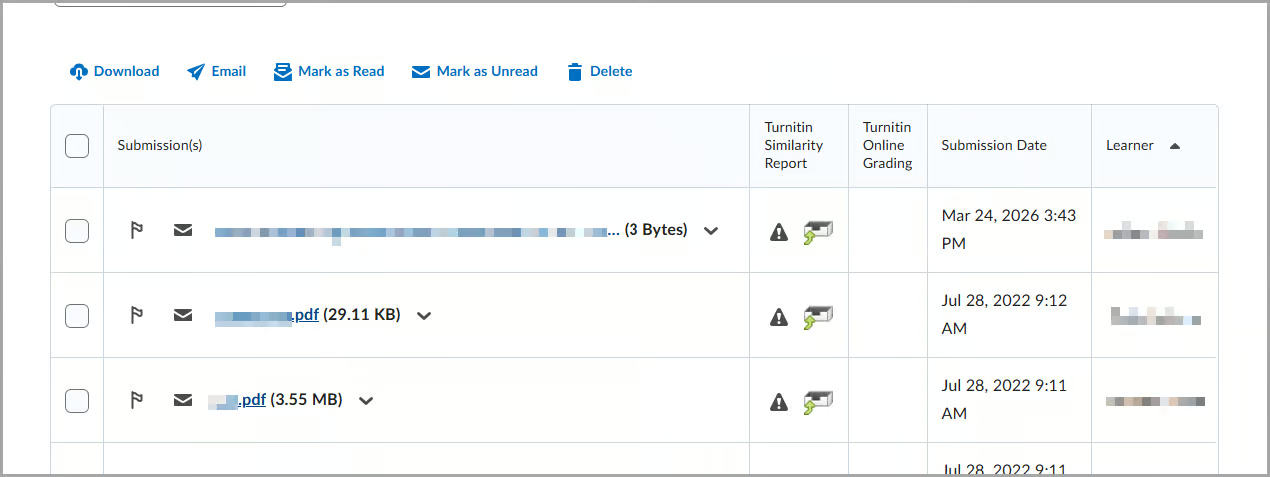
<p>D2L refined the Assignments Submissions page by improving the layout in both standard and wide views, reducing the need for horizontal scrolling, and creating a cleaner, more consistent experience. All recent accessibility improvements remain in place.</p>
<p>This change improves the visibility of key information, such as submission dates and learner names, making the page easier to review.</p>
<p>Previously, the page layout with a long file could make it difficult to view key information without scrolling, especially when additional columns, such as Turnitin Similarity Report, were enabled.</p>
<figure id="attachment_22513" aria-describedby="caption-attachment-22513" style="width: 1270px" class="wp-caption aligncenter"><a href="http://cat.xula.edu/food/wp-content/uploads/2026/05/assignments-submissions-after-en-us.avif"><img loading="lazy" decoding="async" data-attachment-id="22513" data-permalink="https://cat.xula.edu/food/brightspace-tip-586-may-continuous-delivery-updates/assignments-submissions-after-en-us/" data-orig-file="https://cat.xula.edu/food/wp-content/uploads/2026/05/assignments-submissions-after-en-us.avif" data-orig-size="1270,477" data-comments-opened="1" data-image-meta="{&quot;aperture&quot;:&quot;0&quot;,&quot;credit&quot;:&quot;&quot;,&quot;camera&quot;:&quot;&quot;,&quot;caption&quot;:&quot;&quot;,&quot;created_timestamp&quot;:&quot;0&quot;,&quot;copyright&quot;:&quot;&quot;,&quot;focal_length&quot;:&quot;0&quot;,&quot;iso&quot;:&quot;0&quot;,&quot;shutter_speed&quot;:&quot;0&quot;,&quot;title&quot;:&quot;&quot;,&quot;orientation&quot;:&quot;0&quot;}" data-image-title="assignments-submissions-after-en-us" data-image-description="" data-image-caption="&lt;p&gt;The assignment submission page after this update.&lt;/p&gt;
" data-medium-file="https://cat.xula.edu/food/wp-content/uploads/2026/05/assignments-submissions-after-en-us-300x113.jpg" data-large-file="https://cat.xula.edu/food/wp-content/uploads/2026/05/assignments-submissions-after-en-us-1024x385.jpg" src="http://cat.xula.edu/food/wp-content/uploads/2026/05/assignments-submissions-after-en-us.avif" alt="The submissions page after the update showing files, Turnitin report status, submission dates, and learner names, with download, email, and delete actions above." width="1270" height="477" class="size-full wp-image-22513" srcset="https://cat.xula.edu/food/wp-content/uploads/2026/05/assignments-submissions-after-en-us.avif 1270w, https://cat.xula.edu/food/wp-content/uploads/2026/05/assignments-submissions-after-en-us.avif 300w, https://cat.xula.edu/food/wp-content/uploads/2026/05/assignments-submissions-after-en-us.avif 1024w, https://cat.xula.edu/food/wp-content/uploads/2026/05/assignments-submissions-after-en-us.avif 768w, https://cat.xula.edu/food/wp-content/uploads/2026/05/assignments-submissions-after-en-us.avif 960w" sizes="auto, (max-width: 625px) 100vw, 625px" /></a><figcaption id="caption-attachment-22513" class="wp-caption-text">The assignment submission page after this update.</figcaption></figure>
<p>This feature implements the following PIE item:</p>
<ul>
<li>D13434 (Remove unnecessary scrolling from the Assignment submission page where Turnitin is enabled)</li>
</ul>
</div>
<div>
<h3>2) Quizzes – Improved Browse Question Library Import button styling and behavior</h3>
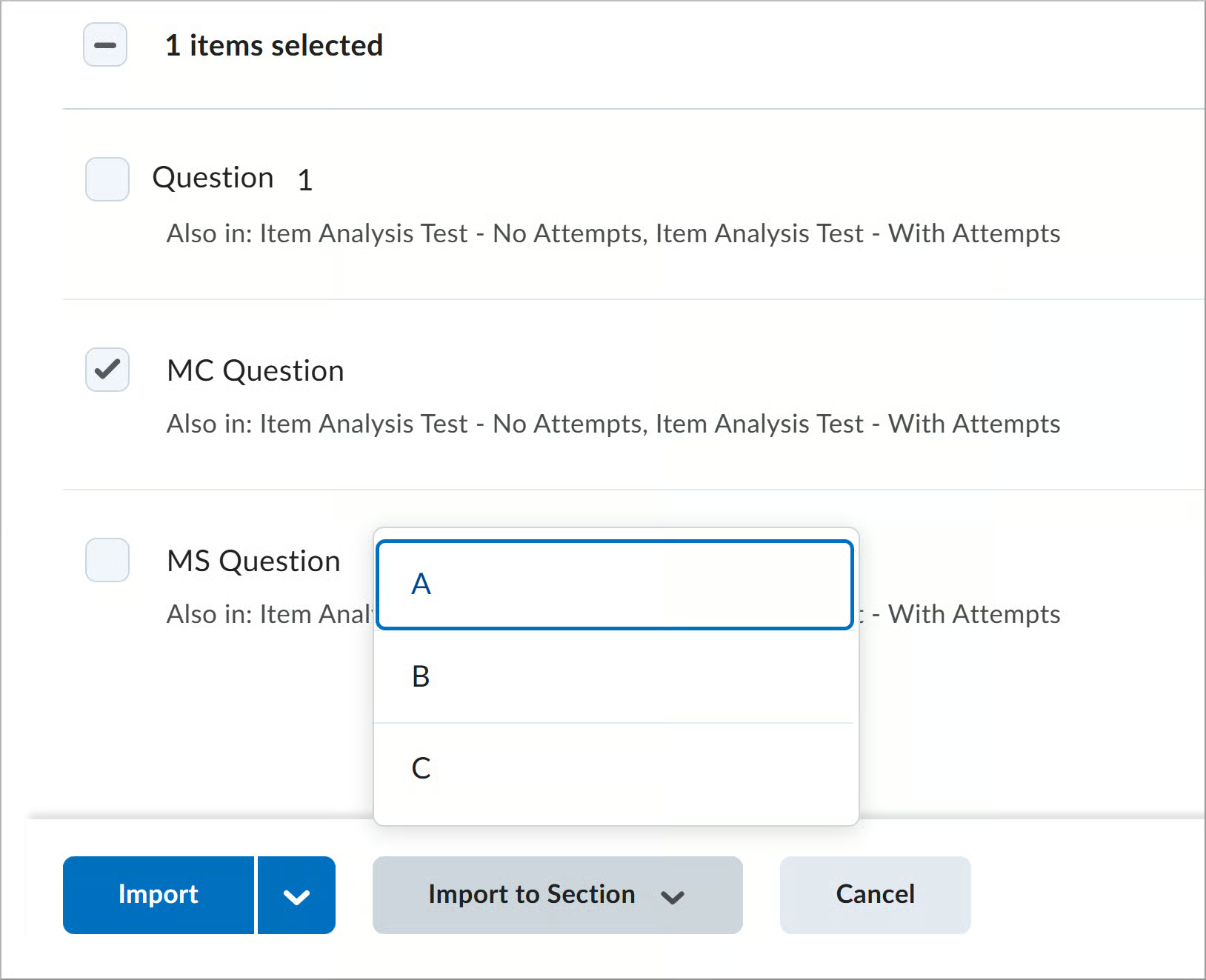
<p>This update improves the consistency and usability of the Import options in <strong>Browse Question Library</strong>.</p>
<p>Available import options vary depending on whether the quiz contains sections:</p>
<ul>
<li>The main <strong>Import</strong> action remains a button for quizzes with no sections.</li>
<li>The <strong>Import to Section</strong> option is now a separate button for quizzes with sections.</li>
</ul>
<p>This change makes actions more visible and easier to access. Previously, the <strong>Import</strong> option appeared as a split button with multiple actions in a dropdown.</p>
<figure id="attachment_22516" aria-describedby="caption-attachment-22516" style="width: 1155px" class="wp-caption aligncenter"><a href="https://i0.wp.com/cat.xula.edu/food/wp-content/uploads/2026/05/import-questions-question-library-before-en-us.png"><img data-recalc-dims="1" loading="lazy" decoding="async" data-attachment-id="22516" data-permalink="https://cat.xula.edu/food/brightspace-tip-586-may-continuous-delivery-updates/import-questions-question-library-before-en-us/" data-orig-file="https://i0.wp.com/cat.xula.edu/food/wp-content/uploads/2026/05/import-questions-question-library-before-en-us.png?fit=1155%2C834&amp;ssl=1" data-orig-size="1155,834" data-comments-opened="1" data-image-meta="{&quot;aperture&quot;:&quot;0&quot;,&quot;credit&quot;:&quot;&quot;,&quot;camera&quot;:&quot;&quot;,&quot;caption&quot;:&quot;&quot;,&quot;created_timestamp&quot;:&quot;0&quot;,&quot;copyright&quot;:&quot;&quot;,&quot;focal_length&quot;:&quot;0&quot;,&quot;iso&quot;:&quot;0&quot;,&quot;shutter_speed&quot;:&quot;0&quot;,&quot;title&quot;:&quot;&quot;,&quot;orientation&quot;:&quot;0&quot;}" data-image-title="import-questions-question-library-before-en-us" data-image-description="" data-image-caption="&lt;p&gt;Before state of the Browse Question Library Import dialog, where instructors select questions and use the Import to choose placement in the quiz (top, bottom, or a specific section) from the dropdown.&lt;/p&gt;
" data-medium-file="https://i0.wp.com/cat.xula.edu/food/wp-content/uploads/2026/05/import-questions-question-library-before-en-us.png?fit=300%2C217&amp;ssl=1" data-large-file="https://i0.wp.com/cat.xula.edu/food/wp-content/uploads/2026/05/import-questions-question-library-before-en-us.png?fit=625%2C451&amp;ssl=1" src="https://i0.wp.com/cat.xula.edu/food/wp-content/uploads/2026/05/import-questions-question-library-before-en-us.png?resize=625%2C451" alt="Browse Question Library dialog with one item selected and Import menu expanded showing placement options." width="625" height="451" class="size-full wp-image-22516" srcset="https://i0.wp.com/cat.xula.edu/food/wp-content/uploads/2026/05/import-questions-question-library-before-en-us.png?w=1155&amp;ssl=1 1155w, https://i0.wp.com/cat.xula.edu/food/wp-content/uploads/2026/05/import-questions-question-library-before-en-us.png?resize=300%2C217&amp;ssl=1 300w, https://i0.wp.com/cat.xula.edu/food/wp-content/uploads/2026/05/import-questions-question-library-before-en-us.png?resize=1024%2C739&amp;ssl=1 1024w, https://i0.wp.com/cat.xula.edu/food/wp-content/uploads/2026/05/import-questions-question-library-before-en-us.png?resize=768%2C555&amp;ssl=1 768w, https://i0.wp.com/cat.xula.edu/food/wp-content/uploads/2026/05/import-questions-question-library-before-en-us.png?resize=960%2C693&amp;ssl=1 960w" sizes="auto, (max-width: 625px) 100vw, 625px" /></a><figcaption id="caption-attachment-22516" class="wp-caption-text">Before state of the <strong>Browse Question Library Import</strong> dialog, where instructors select questions and use the <strong>Import</strong> to choose placement in the quiz (top, bottom, or a specific section) from the dropdown.</figcaption></figure>
<figure id="attachment_22514" aria-describedby="caption-attachment-22514" style="width: 1570px" class="wp-caption aligncenter"><a href="https://i0.wp.com/cat.xula.edu/food/wp-content/uploads/2026/05/import-button-no-section-gmt-en-us.png"><img data-recalc-dims="1" loading="lazy" decoding="async" data-attachment-id="22514" data-permalink="https://cat.xula.edu/food/brightspace-tip-586-may-continuous-delivery-updates/import-button-no-section-gmt-en-us/" data-orig-file="https://i0.wp.com/cat.xula.edu/food/wp-content/uploads/2026/05/import-button-no-section-gmt-en-us.png?fit=1570%2C1309&amp;ssl=1" data-orig-size="1570,1309" data-comments-opened="1" data-image-meta="{&quot;aperture&quot;:&quot;0&quot;,&quot;credit&quot;:&quot;&quot;,&quot;camera&quot;:&quot;&quot;,&quot;caption&quot;:&quot;&quot;,&quot;created_timestamp&quot;:&quot;0&quot;,&quot;copyright&quot;:&quot;&quot;,&quot;focal_length&quot;:&quot;0&quot;,&quot;iso&quot;:&quot;0&quot;,&quot;shutter_speed&quot;:&quot;0&quot;,&quot;title&quot;:&quot;&quot;,&quot;orientation&quot;:&quot;0&quot;}" data-image-title="import-button-no-section-gmt-en-us" data-image-description="" data-image-caption="&lt;p&gt;New state of the Browse Question Library Import dialog for a quiz with no sections, displaying the import placement options.&lt;/p&gt;
" data-medium-file="https://i0.wp.com/cat.xula.edu/food/wp-content/uploads/2026/05/import-button-no-section-gmt-en-us.png?fit=300%2C250&amp;ssl=1" data-large-file="https://i0.wp.com/cat.xula.edu/food/wp-content/uploads/2026/05/import-button-no-section-gmt-en-us.png?fit=625%2C521&amp;ssl=1" src="https://i0.wp.com/cat.xula.edu/food/wp-content/uploads/2026/05/import-button-no-section-gmt-en-us.png?resize=625%2C521" alt="Browse Question Library dialog shows Import option for placing items at top or bottom of quiz." width="625" height="521" class="size-full wp-image-22514" srcset="https://i0.wp.com/cat.xula.edu/food/wp-content/uploads/2026/05/import-button-no-section-gmt-en-us.png?w=1570&amp;ssl=1 1570w, https://i0.wp.com/cat.xula.edu/food/wp-content/uploads/2026/05/import-button-no-section-gmt-en-us.png?resize=300%2C250&amp;ssl=1 300w, https://i0.wp.com/cat.xula.edu/food/wp-content/uploads/2026/05/import-button-no-section-gmt-en-us.png?resize=1024%2C854&amp;ssl=1 1024w, https://i0.wp.com/cat.xula.edu/food/wp-content/uploads/2026/05/import-button-no-section-gmt-en-us.png?resize=768%2C640&amp;ssl=1 768w, https://i0.wp.com/cat.xula.edu/food/wp-content/uploads/2026/05/import-button-no-section-gmt-en-us.png?resize=1536%2C1281&amp;ssl=1 1536w, https://i0.wp.com/cat.xula.edu/food/wp-content/uploads/2026/05/import-button-no-section-gmt-en-us.png?resize=960%2C800&amp;ssl=1 960w, https://i0.wp.com/cat.xula.edu/food/wp-content/uploads/2026/05/import-button-no-section-gmt-en-us.png?w=1250 1250w" sizes="auto, (max-width: 625px) 100vw, 625px" /></a><figcaption id="caption-attachment-22514" class="wp-caption-text">New state of the <strong>Browse Question Library Import</strong> dialog for a quiz with no sections, displaying the import placement options.</figcaption></figure>
<figure id="attachment_22515" aria-describedby="caption-attachment-22515" style="width: 1628px" class="wp-caption aligncenter"><a href="http://cat.xula.edu/food/wp-content/uploads/2026/05/import-button-section-gmt-en-us.avif"><img loading="lazy" decoding="async" data-attachment-id="22515" data-permalink="https://cat.xula.edu/food/brightspace-tip-586-may-continuous-delivery-updates/import-button-section-gmt-en-us/" data-orig-file="https://cat.xula.edu/food/wp-content/uploads/2026/05/import-button-section-gmt-en-us.avif" data-orig-size="1628,1323" data-comments-opened="1" data-image-meta="{&quot;aperture&quot;:&quot;0&quot;,&quot;credit&quot;:&quot;&quot;,&quot;camera&quot;:&quot;&quot;,&quot;caption&quot;:&quot;&quot;,&quot;created_timestamp&quot;:&quot;0&quot;,&quot;copyright&quot;:&quot;&quot;,&quot;focal_length&quot;:&quot;0&quot;,&quot;iso&quot;:&quot;0&quot;,&quot;shutter_speed&quot;:&quot;0&quot;,&quot;title&quot;:&quot;&quot;,&quot;orientation&quot;:&quot;0&quot;}" data-image-title="import-button-section-gmt-en-us" data-image-description="" data-image-caption="&lt;p&gt;New state of the Browse Question Library Import dialog, where the Import to Section button allows placement into specific sections.&lt;/p&gt;
" data-medium-file="https://cat.xula.edu/food/wp-content/uploads/2026/05/import-button-section-gmt-en-us-300x244.jpg" data-large-file="https://cat.xula.edu/food/wp-content/uploads/2026/05/import-button-section-gmt-en-us-1024x832.jpg" src="http://cat.xula.edu/food/wp-content/uploads/2026/05/import-button-section-gmt-en-us.avif" alt="Browse Question Library dialog shows Import to Section option for placing items into specific sections." width="1628" height="1323" class="size-full wp-image-22515" srcset="https://cat.xula.edu/food/wp-content/uploads/2026/05/import-button-section-gmt-en-us.avif 1628w, https://cat.xula.edu/food/wp-content/uploads/2026/05/import-button-section-gmt-en-us.avif 300w, https://cat.xula.edu/food/wp-content/uploads/2026/05/import-button-section-gmt-en-us.avif 1024w, https://cat.xula.edu/food/wp-content/uploads/2026/05/import-button-section-gmt-en-us.avif 768w, https://cat.xula.edu/food/wp-content/uploads/2026/05/import-button-section-gmt-en-us.avif 1536w, https://cat.xula.edu/food/wp-content/uploads/2026/05/import-button-section-gmt-en-us.avif 960w, http://cat.xula.edu/food/wp-content/uploads/2026/05/import-button-section-gmt-en-us.avif 1250w" sizes="auto, (max-width: 625px) 100vw, 625px" /></a><figcaption id="caption-attachment-22515" class="wp-caption-text">New state of the <strong>Browse Question Library Import</strong> dialog, where the <strong>Import to Section</strong> button allows placement into specific sections.</figcaption></figure>
</div>
<p>If you are interested in getting more information about this and all the May Continuous Delivery updates, refer to the <a href="https://community.d2l.com/brightspace/kb/articles/34588-may-2026-20-26-05">Brightspace Platform May 2026/20.26.05 Release Notes</a>.</p>
<p>Additionally, refer to the <a href="https://community.d2l.com/brightspace/categories/release-notes-en">Brightspace Release Notes for Continuous Delivery Releases</a>, for details about current, past, and to preview upcoming continuous delivery updates.</p>
<h2>Want more information?</h2>
<p>View current, past, and preview upcoming <a href="https://community.d2l.com/brightspace/categories/release-notes-en">Continuous Delivery release notes</a><br />
<a href="https://catwiki.xula.edu/Brightspace:_Instructors_Quick_Start_Tutorial">Instructors Quick Start Tutorial</a><br />
<a href="http://catwiki.xula.edu/index.php/Brightspace_Known_Issues">Brightspace Known Issues</a><br />
<a href="http://cat.xula.edu/food/brightspace-tip-2-sandbox-courses/">Request a sandbox course</a><br />
Sign-up for <a href="https://cat.xula.edu/events/">Brightspace training sessions</a><br />
You can find <a href="https://community.d2l.com/brightspace/categories/higher-ed-postsecondary">Brightspace help</a> at D2L's website.<br />
Join the <a href="https://community.d2l.com/brightspace/categories/higher-ed-postsecondary">Brightspace Community</a>.<br />
Try these <a title="Brightspace How-to" href="http://cat.xula.edu/food/brightspace-documents/">Brightspace How-To documents</a>.<br />
Visit our <a title="Brightspace FAQs" href="http://cat.xula.edu/food/brightspace-faq/">Brightspace FAQs</a> for additional Brightspace information<br />
or <a title="Schedule 1-on-1" href="http://jflorent.youcanbook.me/">schedule a one-on-one session</a>, <a title="Send email" href="http://cat.xula.edu/mail/?to=31">email</a>, or<br />
call Janice Florent: (504) 520-7418.</p>
<p><strong>Note: Are you doing something innovative in Brightspace or perhaps you've discovered a handy tip? Share how you are using Brightspace in your teaching and learning in <a href="https://cat.xula.edu/food/brightspace-tip-189-educator-share-showcase/">The Orange Room</a>.</strong></p>
<p><small>Image credit: <a href="https://pixabay.com/illustrations/update-upgrade-renew-improve-1672363/">image</a> by geralt from <a href="https://pixabay.com/service/license/">Pixabay</a></small></p>
]]></content>
		
					<link href="https://cat.xula.edu/food/brightspace-tip-586-may-continuous-delivery-updates/#comments" rel="replies" thr:count="0" type="text/html"/>
			<link href="https://cat.xula.edu/food/brightspace-tip-586-may-continuous-delivery-updates/feed/atom/" rel="replies" thr:count="0" type="application/atom+xml"/>
			<thr:total>0</thr:total>
			</entry>
		<entry>
		<author>
			<name>Jason S. Todd</name>
							<uri>https://jasonstodd.com</uri>
						</author>

		<title type="html"><![CDATA[You Are the Hero of This Adventure]]></title>
		<link href="https://cat.xula.edu/food/you-are-the-hero-of-this-adventure/" rel="alternate" type="text/html"/>

		<id>https://cat.xula.edu/food/?p=22543</id>
		<updated>2026-05-28T01:00:22Z</updated>
		<published>2026-05-28T13:00:00Z</published>
		<category scheme="https://cat.xula.edu/food" term="Director's Corner"/><category scheme="https://cat.xula.edu/food" term="Faculty Development"/><category scheme="https://cat.xula.edu/food" term="Faculty-in-Residence"/><category scheme="https://cat.xula.edu/food" term="Hiring"/>
		<summary type="html"><![CDATA[If you grew up reading Choose Your Own Adventure books like I did, you remember the opening line. Every single book started the same way: You are the hero of this adventure. Not a character the author invented. Not someone you were following from a safe distance. You. The book handed you the story and <a href="https://cat.xula.edu/food/you-are-the-hero-of-this-adventure/" class="more-link">...continue reading<span class="screen-reader-text"> "You Are the Hero of This Adventure"</span></a>]]></summary>

					<content type="html" xml:base="https://cat.xula.edu/food/you-are-the-hero-of-this-adventure/"><![CDATA[<div class="wp-block-image">
<figure class="alignright size-full is-resized"><img data-recalc-dims="1" loading="lazy" decoding="async" width="273" height="450" data-attachment-id="22544" data-permalink="https://cat.xula.edu/food/you-are-the-hero-of-this-adventure/theundergroundkingdom/" data-orig-file="https://i0.wp.com/cat.xula.edu/food/wp-content/uploads/2026/05/TheUndergroundKingdom.jpg?fit=273%2C450&amp;ssl=1" data-orig-size="273,450" data-comments-opened="1" data-image-meta="{&quot;aperture&quot;:&quot;0&quot;,&quot;credit&quot;:&quot;&quot;,&quot;camera&quot;:&quot;&quot;,&quot;caption&quot;:&quot;&quot;,&quot;created_timestamp&quot;:&quot;0&quot;,&quot;copyright&quot;:&quot;&quot;,&quot;focal_length&quot;:&quot;0&quot;,&quot;iso&quot;:&quot;0&quot;,&quot;shutter_speed&quot;:&quot;0&quot;,&quot;title&quot;:&quot;&quot;,&quot;orientation&quot;:&quot;0&quot;}" data-image-title="TheUndergroundKingdom" data-image-description="" data-image-caption="" data-medium-file="https://i0.wp.com/cat.xula.edu/food/wp-content/uploads/2026/05/TheUndergroundKingdom.jpg?fit=182%2C300&amp;ssl=1" data-large-file="https://i0.wp.com/cat.xula.edu/food/wp-content/uploads/2026/05/TheUndergroundKingdom.jpg?fit=273%2C450&amp;ssl=1" src="https://i0.wp.com/cat.xula.edu/food/wp-content/uploads/2026/05/TheUndergroundKingdom.jpg?resize=273%2C450&#038;ssl=1" alt="" class="wp-image-22544" style="aspect-ratio:0.6066730696955778;width:227px;height:auto" srcset="https://i0.wp.com/cat.xula.edu/food/wp-content/uploads/2026/05/TheUndergroundKingdom.jpg?w=273&amp;ssl=1 273w, https://i0.wp.com/cat.xula.edu/food/wp-content/uploads/2026/05/TheUndergroundKingdom.jpg?resize=182%2C300&amp;ssl=1 182w" sizes="auto, (max-width: 273px) 100vw, 273px" /><figcaption class="wp-element-caption"><em>Underground Kingdom (Choose Your Own Adventure #18)</em> by Edward Packard, published by Bantam Books, 1983.</figcaption></figure>
</div>


<p>If you grew up reading Choose Your Own Adventure books like I did, you remember the opening line. Every single book started the same way: <em>You</em> are the hero of this adventure. Not a character the author invented. Not someone you were following from a safe distance. You. The book handed you the story and told you to drive.</p>


<p>Most job postings don't work that way. They're written like traditional novels: the plot is already determined, the role is already defined, and the search process is really just casting — finding the right person to play a part that someone else wrote. There's nothing wrong with that model. It works. It's how CAT+FD has always structured our Faculty-in-Residence positions, but this time around, we decided to try something different.</p>


<p>This time, <em>you</em> write the next chapter.</p>


<h2 class="wp-block-heading">What's Different</h2>


<p>The new Faculty-in-Residence position does not have a predetermined area of focus. That's a significant departure from how this position has worked in the past. Previous FIRs were appointed to support a specific programmatic need that CAT+FD had already identified — New Faculty Support, Service-Learning, Part-time Faculty Support — a focus area we chose in advance and then found the right person to lead.</p>


<p>This appointment inverts that. We are inviting applicants to propose an area of faculty development they are already passionate about, already engaged with, and genuinely well-positioned to support. CAT+FD will then shape the responsibilities of the appointment around the successful candidate's proposal.</p>


<h2 class="wp-block-heading">What We're Hoping to Hear About</h2>


<div class="wp-block-image">
<figure class="alignleft size-full is-resized"><img data-recalc-dims="1" loading="lazy" decoding="async" width="614" height="1018" data-attachment-id="22545" data-permalink="https://cat.xula.edu/food/you-are-the-hero-of-this-adventure/journeyunderthesea/" data-orig-file="https://i0.wp.com/cat.xula.edu/food/wp-content/uploads/2026/05/JourneyUnderTheSea.jpg?fit=614%2C1018&amp;ssl=1" data-orig-size="614,1018" data-comments-opened="1" data-image-meta="{&quot;aperture&quot;:&quot;0&quot;,&quot;credit&quot;:&quot;&quot;,&quot;camera&quot;:&quot;&quot;,&quot;caption&quot;:&quot;&quot;,&quot;created_timestamp&quot;:&quot;0&quot;,&quot;copyright&quot;:&quot;&quot;,&quot;focal_length&quot;:&quot;0&quot;,&quot;iso&quot;:&quot;0&quot;,&quot;shutter_speed&quot;:&quot;0&quot;,&quot;title&quot;:&quot;&quot;,&quot;orientation&quot;:&quot;0&quot;}" data-image-title="JourneyUnderTheSea" data-image-description="" data-image-caption="" data-medium-file="https://i0.wp.com/cat.xula.edu/food/wp-content/uploads/2026/05/JourneyUnderTheSea.jpg?fit=181%2C300&amp;ssl=1" data-large-file="https://i0.wp.com/cat.xula.edu/food/wp-content/uploads/2026/05/JourneyUnderTheSea.jpg?fit=614%2C1018&amp;ssl=1" src="https://i0.wp.com/cat.xula.edu/food/wp-content/uploads/2026/05/JourneyUnderTheSea.jpg?resize=614%2C1018&#038;ssl=1" alt="" class="wp-image-22545" style="aspect-ratio:0.6031547178406697;width:249px;height:auto" srcset="https://i0.wp.com/cat.xula.edu/food/wp-content/uploads/2026/05/JourneyUnderTheSea.jpg?w=614&amp;ssl=1 614w, https://i0.wp.com/cat.xula.edu/food/wp-content/uploads/2026/05/JourneyUnderTheSea.jpg?resize=181%2C300&amp;ssl=1 181w" sizes="auto, (max-width: 614px) 100vw, 614px" /><figcaption class="wp-element-caption"><em>Journey Under the Sea (Choose Your Own Adventure #2)</em> by R.A. Montgomery, published by Bantam Books, 1976.</figcaption></figure>
</div>


<p>We're genuinely open on this. The call for applications names a few possible directions — artificial intelligence in teaching and learning, faculty mentoring and peer support, student mentoring and advising as pedagogy, grant writing and management — but those are merely examples. They're areas that have come up in our recent conversations, not a ceiling on what we're willing to consider.</p>


<p>What we're actually looking for is <strong>a proposal that identifies a real need in the Xavier faculty community and makes a credible case for why you are the right person to address it</strong>. That means thinking seriously about what knowledge or experience you're bringing, what programming might realistically look like given the scope of the position, and who across campus would benefit.</p>


<p>The position is a 12.5% appointment with one course release per year, for a three-year term with the option to renew. It's designed to bring a  faculty colleague into the work of CAT+FD in a meaningful, sustained way. The person we appoint will spend a few hours a week in the Center, attend staff meetings and our summer planning retreat, and take the lead on developing and running programming in their proposed area.</p>


<h2 class="wp-block-heading">Who Should Apply</h2>


<div class="wp-block-image">
<figure class="alignright size-full is-resized"><img data-recalc-dims="1" loading="lazy" decoding="async" width="345" height="530" data-attachment-id="22547" data-permalink="https://cat.xula.edu/food/you-are-the-hero-of-this-adventure/theabominablesnowman/" data-orig-file="https://i0.wp.com/cat.xula.edu/food/wp-content/uploads/2026/05/TheAbominableSnowman.jpg?fit=345%2C530&amp;ssl=1" data-orig-size="345,530" data-comments-opened="1" data-image-meta="{&quot;aperture&quot;:&quot;0&quot;,&quot;credit&quot;:&quot;&quot;,&quot;camera&quot;:&quot;&quot;,&quot;caption&quot;:&quot;&quot;,&quot;created_timestamp&quot;:&quot;0&quot;,&quot;copyright&quot;:&quot;&quot;,&quot;focal_length&quot;:&quot;0&quot;,&quot;iso&quot;:&quot;0&quot;,&quot;shutter_speed&quot;:&quot;0&quot;,&quot;title&quot;:&quot;&quot;,&quot;orientation&quot;:&quot;0&quot;}" data-image-title="TheAbominableSnowman" data-image-description="" data-image-caption="" data-medium-file="https://i0.wp.com/cat.xula.edu/food/wp-content/uploads/2026/05/TheAbominableSnowman.jpg?fit=195%2C300&amp;ssl=1" data-large-file="https://i0.wp.com/cat.xula.edu/food/wp-content/uploads/2026/05/TheAbominableSnowman.jpg?fit=345%2C530&amp;ssl=1" src="https://i0.wp.com/cat.xula.edu/food/wp-content/uploads/2026/05/TheAbominableSnowman.jpg?resize=345%2C530&#038;ssl=1" alt="" class="wp-image-22547" style="aspect-ratio:0.6509557073769863;width:250px;height:auto" srcset="https://i0.wp.com/cat.xula.edu/food/wp-content/uploads/2026/05/TheAbominableSnowman.jpg?w=345&amp;ssl=1 345w, https://i0.wp.com/cat.xula.edu/food/wp-content/uploads/2026/05/TheAbominableSnowman.jpg?resize=195%2C300&amp;ssl=1 195w" sizes="auto, (max-width: 345px) 100vw, 345px" /><figcaption class="wp-element-caption"><em>The Abominable Snowman (Choose Your Own Adventure #13)</em> by R.A. Montgomery, published by Bantam Books, 1982.</figcaption></figure>
</div>


<p>The formal requirements are what you'd expect:</p>


<ul class="wp-block-list">
<li>at least three years of full-time teaching at Xavier;</li>


<li>a record of engagement with CAT+FD;</li>


<li>evidence of scholarly activity; and</li>


<li>a collegial reputation that makes cross-disciplinary collaboration natural rather than forced.</li>
</ul>


<p>Tenure is preferred, but not required.</p>


<p>But I want to speak past the formal requirements for a moment, because I think the person we're looking for might not immediately see themselves in a list of qualifications.</p>


<p>In Choose Your Own Adventure, the books were always careful to remind you that you weren't just <em>in</em> the story — you were <em>driving</em> it. That required a specific kind of reader: someone curious enough to explore, confident enough to make a choice, and self-aware enough to know something about what kind of adventure they wanted to go on.</p>


<p>That's who I'm hoping applies for this position. Not necessarily the person who has always wanted a faculty development role, but the person who has been quietly doing faculty development work for years without anyone giving it that name; the colleague other people come to when they're trying to figure out how AI is changing their classroom; the one who's been running an informal reading group; the person who thinks deeply about how we mentor graduate students or advise undergraduates through hard moments; the grant writer everyone asks for help and who's never had the support or the platform to do that work at scale.</p>


<p>If any of that sounds like you, we'd like to hear from you.</p>


<h2 class="wp-block-heading">How You Can Apply</h2>


<p>To apply, submit <strong>a letter of application that includes a detailed proposal describing your proposed area of focus</strong>, along with <strong>letters of support from your Department Head or Division Chair and your College Dean</strong>. We're accepting applications on a rolling basis throughout the summer, with a final decision before the start of the Fall 2026 semester.</p>


<p>If you have questions before applying, or if you want to talk through an idea before you've fully committed to a direction, reach out. That kind of conversation is part of what this process is supposed to feel like.</p>


<p>There are a lot of possible endings to this story. We're hoping you'll help us write a good one.</p>
]]></content>
		
					<link href="https://cat.xula.edu/food/you-are-the-hero-of-this-adventure/#comments" rel="replies" thr:count="0" type="text/html"/>
			<link href="https://cat.xula.edu/food/you-are-the-hero-of-this-adventure/feed/atom/" rel="replies" thr:count="0" type="application/atom+xml"/>
			<thr:total>0</thr:total>
			</entry>
		<entry>
		<author>
			<name>Janice Florent</name>
					</author>

		<title type="html"><![CDATA[Brightspace Tip #585: Quizzes &#8211; Set Accommodations by Learner for All Quizzes]]></title>
		<link href="https://cat.xula.edu/food/brightspace-tip-585-quizzes-set-accommodations-by-learner-for-all-quizzes/" rel="alternate" type="text/html"/>

		<id>https://cat.xula.edu/food/?p=22522</id>
		<updated>2026-05-26T12:04:17Z</updated>
		<published>2026-05-27T09:00:54Z</published>
		<category scheme="https://cat.xula.edu/food" term="Brightspace Small Plates"/><category scheme="https://cat.xula.edu/food" term="accommodations"/><category scheme="https://cat.xula.edu/food" term="Brightspace"/><category scheme="https://cat.xula.edu/food" term="quiz"/>
		<summary type="html"><![CDATA[Instructors can grant quiz accommodations to learners through the Classlist tool. Instructors can assign accommodations to specific learners that apply across ALL quizzes instead of applying them on a quiz-by-quiz basis. The accommodations option allows the instructor to give the learner more time to complete quizzes at the course level. Once granted, the accommodations apply <a href="https://cat.xula.edu/food/brightspace-tip-585-quizzes-set-accommodations-by-learner-for-all-quizzes/" class="more-link">...continue reading<span class="screen-reader-text"> "Brightspace Tip #585: Quizzes &#8211; Set Accommodations by Learner for All Quizzes"</span></a>]]></summary>

					<content type="html" xml:base="https://cat.xula.edu/food/brightspace-tip-585-quizzes-set-accommodations-by-learner-for-all-quizzes/"><![CDATA[<p>Instructors can grant quiz accommodations to learners through the <a href="https://youtu.be/4lh69B9Qsbo">Classlist tool</a>. Instructors can <strong>assign accommodations to specific learners that apply across ALL quizzes</strong> instead of applying them on a quiz-by-quiz basis. The accommodations option allows the instructor to give the learner more time to complete quizzes at the course level.</p>
<p><figure id="attachment_17513" aria-describedby="caption-attachment-17513" style="width: 876px" class="wp-caption aligncenter"><a href="https://i0.wp.com/cat.xula.edu/food/wp-content/uploads/2021/10/edit-accommocations-1.png"><img data-recalc-dims="1" loading="lazy" decoding="async" data-attachment-id="17513" data-permalink="https://cat.xula.edu/food/brightspace-tip-265-quizzes-set-accommodations-by-learner-for-all-quizzes/edit-accommocations-1/" data-orig-file="https://i0.wp.com/cat.xula.edu/food/wp-content/uploads/2021/10/edit-accommocations-1.png?fit=876%2C929&amp;ssl=1" data-orig-size="876,929" data-comments-opened="1" data-image-meta="{&quot;aperture&quot;:&quot;0&quot;,&quot;credit&quot;:&quot;&quot;,&quot;camera&quot;:&quot;&quot;,&quot;caption&quot;:&quot;&quot;,&quot;created_timestamp&quot;:&quot;0&quot;,&quot;copyright&quot;:&quot;&quot;,&quot;focal_length&quot;:&quot;0&quot;,&quot;iso&quot;:&quot;0&quot;,&quot;shutter_speed&quot;:&quot;0&quot;,&quot;title&quot;:&quot;&quot;,&quot;orientation&quot;:&quot;0&quot;}" data-image-title="edit-accommocations-1" data-image-description="" data-image-caption="&lt;p&gt;The Edit Accommodations option in the Classlist&lt;/p&gt;
" data-medium-file="https://i0.wp.com/cat.xula.edu/food/wp-content/uploads/2021/10/edit-accommocations-1.png?fit=283%2C300&amp;ssl=1" data-large-file="https://i0.wp.com/cat.xula.edu/food/wp-content/uploads/2021/10/edit-accommocations-1.png?fit=625%2C663&amp;ssl=1" src="https://i0.wp.com/cat.xula.edu/food/wp-content/uploads/2021/10/edit-accommocations-1.png?resize=625%2C663" alt="A view of the Classlist with the Edit Accommodations option highlighted for a student" width="625" height="663" class="size-full wp-image-17513" /></a><figcaption id="caption-attachment-17513" class="wp-caption-text">The Edit Accommodations option in the Classlist</figcaption></figure></p>
<p><figure id="attachment_18721" aria-describedby="caption-attachment-18721" style="width: 553px" class="wp-caption aligncenter"><a href="https://i0.wp.com/cat.xula.edu/food/wp-content/uploads/2022/09/edit-accommodations-example-2.png"><img data-recalc-dims="1" loading="lazy" decoding="async" data-attachment-id="18721" data-permalink="https://cat.xula.edu/food/brightspace-tip-348-quizzes-set-accommodations-by-learner-for-all-quizzes/edit-accommodations-example-2/" data-orig-file="https://i0.wp.com/cat.xula.edu/food/wp-content/uploads/2022/09/edit-accommodations-example-2.png?fit=553%2C685&amp;ssl=1" data-orig-size="553,685" data-comments-opened="1" data-image-meta="{&quot;aperture&quot;:&quot;0&quot;,&quot;credit&quot;:&quot;&quot;,&quot;camera&quot;:&quot;&quot;,&quot;caption&quot;:&quot;&quot;,&quot;created_timestamp&quot;:&quot;0&quot;,&quot;copyright&quot;:&quot;&quot;,&quot;focal_length&quot;:&quot;0&quot;,&quot;iso&quot;:&quot;0&quot;,&quot;shutter_speed&quot;:&quot;0&quot;,&quot;title&quot;:&quot;&quot;,&quot;orientation&quot;:&quot;0&quot;}" data-image-title="edit-accommodations-example-2" data-image-description="" data-image-caption="&lt;p&gt;The Edit Accommodations dialog box&lt;/p&gt;
" data-medium-file="https://i0.wp.com/cat.xula.edu/food/wp-content/uploads/2022/09/edit-accommodations-example-2.png?fit=242%2C300&amp;ssl=1" data-large-file="https://i0.wp.com/cat.xula.edu/food/wp-content/uploads/2022/09/edit-accommodations-example-2.png?fit=553%2C685&amp;ssl=1" src="https://i0.wp.com/cat.xula.edu/food/wp-content/uploads/2022/09/edit-accommodations-example-2.png?resize=553%2C685" alt="The Edit Accommodations dialog box with the Modify Time Limit and 1.5 times option selected for a student" width="553" height="685" class="size-full wp-image-18721" /></a><figcaption id="caption-attachment-18721" class="wp-caption-text">The Edit Accommodations dialog box</figcaption></figure></p>
<p>Once granted, the accommodations apply to all quiz activities in a course for that learner. The additional time can be applied in terms of quiz time multipliers (for example, 1.5 x quiz time) or +minutes (for example, an additional 30 minutes) on every quiz in a course.</p>
<p>Accommodations for Instructors:</p>
<ul>
<li>An icon appears next to the learner’s name in the Classlist to indicate that the learner has an accommodation.</li>
<li>Instructors can filter the Classlist by Accommodations.</li>
<li>Instructors can also Print or Email a list of users with accommodations by adding the filter to those pages.</li>
</ul>
<p>Accommodations for learners:</p>
<ul>
<li>An icon appears next to learners’ own names in the Classlist to indicate they have an accommodation. To view accommodation details, learners can click My Accommodations from their learner context menu.</li>
<li>When commencing a quiz, the accommodation icon appears next to a learner’s quiz time to indicate that their accommodation has been applied. If a learner’s time accommodation has been overridden by a quiz-specific special access, this icon does not appear.</li>
</ul>
<p><figure id="attachment_17504" aria-describedby="caption-attachment-17504" style="width: 686px" class="wp-caption aligncenter"><a href="https://i0.wp.com/cat.xula.edu/food/wp-content/uploads/2021/10/learner-accommodations-icon-in-Classlist.png"><img data-recalc-dims="1" loading="lazy" decoding="async" data-attachment-id="17504" data-permalink="https://cat.xula.edu/food/brightspace-tip-265-quizzes-set-accommodations-by-learner-for-all-quizzes/learner-accommodations-icon-in-classlist/" data-orig-file="https://i0.wp.com/cat.xula.edu/food/wp-content/uploads/2021/10/learner-accommodations-icon-in-Classlist.png?fit=686%2C709&amp;ssl=1" data-orig-size="686,709" data-comments-opened="1" data-image-meta="{&quot;aperture&quot;:&quot;0&quot;,&quot;credit&quot;:&quot;&quot;,&quot;camera&quot;:&quot;&quot;,&quot;caption&quot;:&quot;&quot;,&quot;created_timestamp&quot;:&quot;0&quot;,&quot;copyright&quot;:&quot;&quot;,&quot;focal_length&quot;:&quot;0&quot;,&quot;iso&quot;:&quot;0&quot;,&quot;shutter_speed&quot;:&quot;0&quot;,&quot;title&quot;:&quot;&quot;,&quot;orientation&quot;:&quot;0&quot;}" data-image-title="learner-accommodations-icon-in-Classlist" data-image-description="" data-image-caption="&lt;p&gt;Classlist page highlighting the Learner has Accommodations icon&lt;/p&gt;
" data-medium-file="https://i0.wp.com/cat.xula.edu/food/wp-content/uploads/2021/10/learner-accommodations-icon-in-Classlist.png?fit=290%2C300&amp;ssl=1" data-large-file="https://i0.wp.com/cat.xula.edu/food/wp-content/uploads/2021/10/learner-accommodations-icon-in-Classlist.png?fit=625%2C646&amp;ssl=1" src="https://i0.wp.com/cat.xula.edu/food/wp-content/uploads/2021/10/learner-accommodations-icon-in-Classlist.png?resize=625%2C646" alt="Example of a Classlist page highlighting the Learner has Accommodations icon" width="625" height="646" class="size-full wp-image-17504" /></a><figcaption id="caption-attachment-17504" class="wp-caption-text">Classlist page highlighting the Learner has Accommodations icon</figcaption></figure></p>
<p><figure id="attachment_17532" aria-describedby="caption-attachment-17532" style="width: 814px" class="wp-caption aligncenter"><a href="https://i0.wp.com/cat.xula.edu/food/wp-content/uploads/2021/10/quiz-accommodations-1.png"><img data-recalc-dims="1" loading="lazy" decoding="async" data-attachment-id="17532" data-permalink="https://cat.xula.edu/food/brightspace-tip-265-quizzes-set-accommodations-by-learner-for-all-quizzes/quiz-accommodations-1/" data-orig-file="https://i0.wp.com/cat.xula.edu/food/wp-content/uploads/2021/10/quiz-accommodations-1.png?fit=814%2C902&amp;ssl=1" data-orig-size="814,902" data-comments-opened="1" data-image-meta="{&quot;aperture&quot;:&quot;0&quot;,&quot;credit&quot;:&quot;&quot;,&quot;camera&quot;:&quot;&quot;,&quot;caption&quot;:&quot;&quot;,&quot;created_timestamp&quot;:&quot;0&quot;,&quot;copyright&quot;:&quot;&quot;,&quot;focal_length&quot;:&quot;0&quot;,&quot;iso&quot;:&quot;0&quot;,&quot;shutter_speed&quot;:&quot;0&quot;,&quot;title&quot;:&quot;&quot;,&quot;orientation&quot;:&quot;0&quot;}" data-image-title="quiz-accommodations-1" data-image-description="" data-image-caption="&lt;p&gt;Learners can see accommodations reflected in the time allowed when taking quiz&lt;/p&gt;
" data-medium-file="https://i0.wp.com/cat.xula.edu/food/wp-content/uploads/2021/10/quiz-accommodations-1.png?fit=271%2C300&amp;ssl=1" data-large-file="https://i0.wp.com/cat.xula.edu/food/wp-content/uploads/2021/10/quiz-accommodations-1.png?fit=625%2C693&amp;ssl=1" src="https://i0.wp.com/cat.xula.edu/food/wp-content/uploads/2021/10/quiz-accommodations-1.png?resize=625%2C693" alt="Example of accommodations reflected in the quiz&#039;s time allowed." width="625" height="693" class="size-full wp-image-17532" /></a><figcaption id="caption-attachment-17532" class="wp-caption-text">Learners can see accommodations reflected in the time allowed when taking quiz</figcaption></figure></p>
<p><a href="https://cat.xula.edu/food/brightspace-tip-584-quizzes-special-access/">Quiz-specific special access</a> can overwrite an accommodation for any user on a quiz-by-quiz basis. When you overwrite an accommodation and then click <strong>Save</strong>, a warning describing the impact of overwriting the accommodation appears. Accommodations set for learners in Classlist are displayed in the Special Access for the quiz.</p>
<p><figure id="attachment_16410" aria-describedby="caption-attachment-16410" style="width: 1281px" class="wp-caption aligncenter"><a href="https://i0.wp.com/cat.xula.edu/food/wp-content/uploads/2021/02/accommodations-indicator-in-special-access.png"><img data-recalc-dims="1" loading="lazy" decoding="async" data-attachment-id="16410" data-permalink="https://cat.xula.edu/food/brightspace-tip-214-quizzes-set-accommodations-by-learner-for-all-quizzes/accommodations-indicator-in-special-access/" data-orig-file="https://i0.wp.com/cat.xula.edu/food/wp-content/uploads/2021/02/accommodations-indicator-in-special-access.png?fit=1281%2C561&amp;ssl=1" data-orig-size="1281,561" data-comments-opened="1" data-image-meta="{&quot;aperture&quot;:&quot;0&quot;,&quot;credit&quot;:&quot;&quot;,&quot;camera&quot;:&quot;&quot;,&quot;caption&quot;:&quot;&quot;,&quot;created_timestamp&quot;:&quot;0&quot;,&quot;copyright&quot;:&quot;&quot;,&quot;focal_length&quot;:&quot;0&quot;,&quot;iso&quot;:&quot;0&quot;,&quot;shutter_speed&quot;:&quot;0&quot;,&quot;title&quot;:&quot;&quot;,&quot;orientation&quot;:&quot;0&quot;}" data-image-title="accommodations-indicator-in-special-access" data-image-description="" data-image-caption="&lt;p&gt;An example of how Accommodations set for a learner in Classlist will show up in the Special Access for a quiz&lt;/p&gt;
" data-medium-file="https://i0.wp.com/cat.xula.edu/food/wp-content/uploads/2021/02/accommodations-indicator-in-special-access.png?fit=300%2C131&amp;ssl=1" data-large-file="https://i0.wp.com/cat.xula.edu/food/wp-content/uploads/2021/02/accommodations-indicator-in-special-access.png?fit=625%2C274&amp;ssl=1" src="https://i0.wp.com/cat.xula.edu/food/wp-content/uploads/2021/02/accommodations-indicator-in-special-access.png?resize=625%2C274" alt="Accommodations indicator in Special Access" width="625" height="274" class="size-full wp-image-16410" /></a><figcaption id="caption-attachment-16410" class="wp-caption-text">An example of how Accommodations set for a learner in Classlist will show up in the <a href="http://cat.xula.edu/food/brightspace-tip-584-quizzes-special-access/">Special Access</a> for a quiz</figcaption></figure></p>
<h2>Want more information?</h2>
<p><a href="https://instructionaldesignthatworks.com/2021/02/22/set-up-brightspace-accommodations-by-student-for-all-quizzes/">Set Up Brightspace Accommodations by Learner for All Quizzes</a><br />
<a href="http://cat.xula.edu/food/brightspace-tip-584-quizzes-special-access/">Brightspace Tip #584: Quizzes – Special Access</a><br />
<a href="https://community.d2l.com/brightspace/kb/articles/19018-quizzes-faq-hot-tips-and-workarounds">Quizzes FAQ: Hot tips and workarounds</a><br />
<a href="https://cat.xula.edu/food/brightspace-tip-254-tests-and-quizzes/">Brightspace Tip #254: Tests and Quizzes</a><br />
<a href="https://cat.xula.edu/food/brightspace-documents/#quizzes">Resources for the Quizzes Tool</a></p>
<p>View current, past, and preview upcoming <a href="https://community.d2l.com/brightspace/categories/release-notes-en">Continuous Delivery release notes</a><br />
<a href="https://catwiki.xula.edu/Brightspace:_Instructors_Quick_Start_Tutorial">Instructors Quick Start Tutorial</a><br />
<a href="http://catwiki.xula.edu/index.php/Brightspace_Known_Issues">Brightspace Known Issues</a><br />
<a href="http://cat.xula.edu/food/brightspace-tip-2-sandbox-courses/">Request a sandbox course</a><br />
Sign-up for <a href="https://cat.xula.edu/events/">Brightspace training sessions</a><br />
You can find <a href="https://community.d2l.com/brightspace/categories/higher-ed-postsecondary">Brightspace help</a> at D2L's website.<br />
Join the <a href="https://community.d2l.com/brightspace/categories/higher-ed-postsecondary">Brightspace Community</a>.<br />
Try these <a title="Brightspace How-to" href="http://cat.xula.edu/food/brightspace-documents/">Brightspace How-To documents</a>.<br />
Visit our <a title="Brightspace FAQs" href="http://cat.xula.edu/food/brightspace-faq/">Brightspace FAQs</a> for additional Brightspace information<br />
or <a title="Schedule 1-on-1" href="http://jflorent.youcanbook.me/">schedule a one-on-one session</a>, <a title="Send email" href="http://cat.xula.edu/mail/?to=31">email</a>, or<br />
call Janice Florent: (504) 520-7418.</p>
<p><strong>Note: Are you doing something innovative in Brightspace or perhaps you've discovered a handy tip? Share how you are using Brightspace in your teaching and learning in <a href="https://cat.xula.edu/food/brightspace-tip-189-educator-share-showcase/">The Orange Room</a>.</strong></p>
]]></content>
		
					<link href="https://cat.xula.edu/food/brightspace-tip-585-quizzes-set-accommodations-by-learner-for-all-quizzes/#comments" rel="replies" thr:count="0" type="text/html"/>
			<link href="https://cat.xula.edu/food/brightspace-tip-585-quizzes-set-accommodations-by-learner-for-all-quizzes/feed/atom/" rel="replies" thr:count="0" type="application/atom+xml"/>
			<thr:total>0</thr:total>
			</entry>
		<entry>
		<author>
			<name>Janice Florent</name>
					</author>

		<title type="html"><![CDATA[Brightspace Tip #584: Quizzes &#8211; Special Access]]></title>
		<link href="https://cat.xula.edu/food/brightspace-tip-584-quizzes-special-access/" rel="alternate" type="text/html"/>

		<id>https://cat.xula.edu/food/?p=22523</id>
		<updated>2026-05-26T12:05:46Z</updated>
		<published>2026-05-26T09:00:42Z</published>
		<category scheme="https://cat.xula.edu/food" term="Brightspace Small Plates"/><category scheme="https://cat.xula.edu/food" term="accommodations"/><category scheme="https://cat.xula.edu/food" term="Brightspace"/><category scheme="https://cat.xula.edu/food" term="quiz"/>
		<summary type="html"><![CDATA[Did you know Special Access is an option available in the Quizzes tool that allows the instructor to grant learners special accommodations? Special Access allows the instructor to assign specific learners a different set of quiz availability dates, late submission properties, and/or time limits. The instructor can change Start, End, and Due dates; the "Recommended <a href="https://cat.xula.edu/food/brightspace-tip-584-quizzes-special-access/" class="more-link">...continue reading<span class="screen-reader-text"> "Brightspace Tip #584: Quizzes &#8211; Special Access"</span></a>]]></summary>

					<content type="html" xml:base="https://cat.xula.edu/food/brightspace-tip-584-quizzes-special-access/"><![CDATA[<p>Did you know <strong>Special Access</strong> is an option available in the Quizzes tool that allows the instructor to grant learners special accommodations? </p>
<p>Special Access allows the instructor to assign specific learners a different set of quiz availability dates, late submission properties, and/or time limits. The instructor can change Start, End, and Due dates; the "Recommended Time Limit" and "Enforced Time Limit" timing settings; and the number of attempts allowed for a quiz to provide allowances for different needs of learners.</p>
<p><div><figure id="attachment_21709" aria-describedby="caption-attachment-21709" style="width: 1577px" class="wp-caption aligncenter"><a href="https://i0.wp.com/cat.xula.edu/food/wp-content/uploads/2025/09/quizzes-special-access.png"><img data-recalc-dims="1" loading="lazy" decoding="async" data-attachment-id="21709" data-permalink="https://cat.xula.edu/food/brightspace-tip-540-quizzes-special-access/quizzes-special-access-2/" data-orig-file="https://i0.wp.com/cat.xula.edu/food/wp-content/uploads/2025/09/quizzes-special-access.png?fit=1577%2C1308&amp;ssl=1" data-orig-size="1577,1308" data-comments-opened="1" data-image-meta="{&quot;aperture&quot;:&quot;0&quot;,&quot;credit&quot;:&quot;&quot;,&quot;camera&quot;:&quot;&quot;,&quot;caption&quot;:&quot;&quot;,&quot;created_timestamp&quot;:&quot;0&quot;,&quot;copyright&quot;:&quot;&quot;,&quot;focal_length&quot;:&quot;0&quot;,&quot;iso&quot;:&quot;0&quot;,&quot;shutter_speed&quot;:&quot;0&quot;,&quot;title&quot;:&quot;&quot;,&quot;orientation&quot;:&quot;0&quot;}" data-image-title="quizzes-special-access" data-image-description="" data-image-caption="&lt;p&gt;Add Special Access in the Quiz Creation Experience&lt;/p&gt;
" data-medium-file="https://i0.wp.com/cat.xula.edu/food/wp-content/uploads/2025/09/quizzes-special-access.png?fit=300%2C249&amp;ssl=1" data-large-file="https://i0.wp.com/cat.xula.edu/food/wp-content/uploads/2025/09/quizzes-special-access.png?fit=625%2C518&amp;ssl=1" src="https://i0.wp.com/cat.xula.edu/food/wp-content/uploads/2025/09/quizzes-special-access.png?resize=625%2C518" alt="Add Special Access in the Quiz Creation Experience" width="625" height="518" class="size-full wp-image-21709" srcset="https://i0.wp.com/cat.xula.edu/food/wp-content/uploads/2025/09/quizzes-special-access.png?w=1577&amp;ssl=1 1577w, https://i0.wp.com/cat.xula.edu/food/wp-content/uploads/2025/09/quizzes-special-access.png?resize=300%2C249&amp;ssl=1 300w, https://i0.wp.com/cat.xula.edu/food/wp-content/uploads/2025/09/quizzes-special-access.png?resize=1024%2C849&amp;ssl=1 1024w, https://i0.wp.com/cat.xula.edu/food/wp-content/uploads/2025/09/quizzes-special-access.png?resize=768%2C637&amp;ssl=1 768w, https://i0.wp.com/cat.xula.edu/food/wp-content/uploads/2025/09/quizzes-special-access.png?resize=1536%2C1274&amp;ssl=1 1536w, https://i0.wp.com/cat.xula.edu/food/wp-content/uploads/2025/09/quizzes-special-access.png?resize=960%2C796&amp;ssl=1 960w, https://i0.wp.com/cat.xula.edu/food/wp-content/uploads/2025/09/quizzes-special-access.png?w=1250 1250w" sizes="auto, (max-width: 625px) 100vw, 625px" /></a><figcaption id="caption-attachment-21709" class="wp-caption-text">Add Special Access in the Quiz Creation Experience</figcaption></figure></div>
</p>
<p><div><figure id="attachment_16315" aria-describedby="caption-attachment-16315" style="width: 512px" class="wp-caption aligncenter"><a href="https://i0.wp.com/cat.xula.edu/food/wp-content/uploads/2021/02/quizzes-special-access.png"><img data-recalc-dims="1" loading="lazy" decoding="async" data-attachment-id="16315" data-permalink="https://cat.xula.edu/food/brightspace-tip-207-quizzes-special-access/quizzes-special-access/" data-orig-file="https://i0.wp.com/cat.xula.edu/food/wp-content/uploads/2021/02/quizzes-special-access.png?fit=732%2C521&amp;ssl=1" data-orig-size="732,521" data-comments-opened="1" data-image-meta="{&quot;aperture&quot;:&quot;0&quot;,&quot;credit&quot;:&quot;&quot;,&quot;camera&quot;:&quot;&quot;,&quot;caption&quot;:&quot;&quot;,&quot;created_timestamp&quot;:&quot;0&quot;,&quot;copyright&quot;:&quot;&quot;,&quot;focal_length&quot;:&quot;0&quot;,&quot;iso&quot;:&quot;0&quot;,&quot;shutter_speed&quot;:&quot;0&quot;,&quot;title&quot;:&quot;&quot;,&quot;orientation&quot;:&quot;0&quot;}" data-image-title="quizzes-special-access" data-image-description="" data-image-caption="&lt;p&gt;Special Access options in Quizzes&lt;/p&gt;
" data-medium-file="https://i0.wp.com/cat.xula.edu/food/wp-content/uploads/2021/02/quizzes-special-access.png?fit=300%2C214&amp;ssl=1" data-large-file="https://i0.wp.com/cat.xula.edu/food/wp-content/uploads/2021/02/quizzes-special-access.png?fit=625%2C445&amp;ssl=1" src="https://i0.wp.com/cat.xula.edu/food/wp-content/uploads/2021/02/quizzes-special-access.png?resize=512%2C365" alt="special access options in quizzes" width="512" height="365" class="size-full wp-image-16315" /></a><figcaption id="caption-attachment-16315" class="wp-caption-text">Special Access options in Quizzes</figcaption></figure></div>
</p>
<ol style="list-style: upper-alpha;">
<li>Select <strong>Allow selected users special access to this quiz</strong> if you want to give certain students different submission options from the rest of the class.</li>
<li>Select <strong>Allow only users with special access to see this quiz</strong> if only certain students are allowed to see this quiz.</li>
<li>Click <strong>Add Users to Special Access</strong> to select students who will get the special access.</li>
</ol>
<p><strong>NOTE:</strong> Instructors can exempt individual learners from the requirement to use the Respondus LockDown Browser when taking a quiz. Follow these instructions to <a href="https://community.d2l.com/brightspace/kb/articles/3413-create-and-configure-a-quiz#add-special-access-to-a-quiz-that-requires-respondus-lockdown-browser">add Special Access to quizzes that require Respondus LockDown Browser (RLDB)</a>.</p>
<h2>Want more information?</h2>
<p><a href="https://www.youtube.com/watch?v=jpPQMqCsr54">Grant Special Access to Users for a Quiz (video)</a><br />
<a href="https://community.d2l.com/brightspace/kb/articles/3413-create-and-configure-a-quiz#set-up-availability-dates-conditions">Set up Availability Dates & Conditions</a><br />
<a href="https://community.d2l.com/brightspace/kb/articles/3413-create-and-configure-a-quiz#add-special-access-to-a-quiz-that-requires-respondus-lockdown-browser">Add Special Access to quizzes that require Respondus LockDown Browser</a><br />
<a href="http://cat.xula.edu/food/brightspace-tip-585-quizzes-set-accommodations-by-learner-for-all-quizzes/">Brightspace Tip #585: Quizzes – Set Accommodations by Learner for All Quizzes</a><br />
<a href="https://community.d2l.com/brightspace/kb/articles/19018-quizzes-faq-hot-tips-and-workarounds">Quizzes FAQ: Hot tips and workarounds</a><br />
<a href="https://cat.xula.edu/food/brightspace-tip-254-tests-and-quizzes/">Brightspace Tip #254: Tests and Quizzes</a><br />
<a href="https://cat.xula.edu/food/brightspace-documents/#quizzes">Resources for the Quizzes Tool</a></p>
<p>View current, past, and preview upcoming <a href="https://community.d2l.com/brightspace/categories/release-notes-en">Continuous Delivery release notes</a><br />
<a href="https://catwiki.xula.edu/Brightspace:_Instructors_Quick_Start_Tutorial">Instructors Quick Start Tutorial</a><br />
<a href="http://catwiki.xula.edu/index.php/Brightspace_Known_Issues">Brightspace Known Issues</a><br />
<a href="http://cat.xula.edu/food/brightspace-tip-2-sandbox-courses/">Request a sandbox course</a><br />
Sign-up for <a href="https://cat.xula.edu/events/">Brightspace training sessions</a><br />
You can find <a href="https://community.d2l.com/brightspace/categories/higher-ed-postsecondary">Brightspace help</a> at D2L's website.<br />
Join the <a href="https://community.d2l.com/brightspace/categories/higher-ed-postsecondary">Brightspace Community</a>.<br />
Try these <a title="Brightspace How-to" href="http://cat.xula.edu/food/brightspace-documents/">Brightspace How-To documents</a>.<br />
Visit our <a title="Brightspace FAQs" href="http://cat.xula.edu/food/brightspace-faq/">Brightspace FAQs</a> for additional Brightspace information<br />
or <a title="Schedule 1-on-1" href="http://jflorent.youcanbook.me/">schedule a one-on-one session</a>, <a title="Send email" href="http://cat.xula.edu/mail/?to=31">email</a>, or<br />
call Janice Florent: (504) 520-7418.</p>
<p><strong>Note: Are you doing something innovative in Brightspace or perhaps you've discovered a handy tip? Share how you are using Brightspace in your teaching and learning in <a href="https://cat.xula.edu/food/brightspace-tip-189-educator-share-showcase/">The Orange Room</a>.</strong></p>
]]></content>
		
					<link href="https://cat.xula.edu/food/brightspace-tip-584-quizzes-special-access/#comments" rel="replies" thr:count="0" type="text/html"/>
			<link href="https://cat.xula.edu/food/brightspace-tip-584-quizzes-special-access/feed/atom/" rel="replies" thr:count="0" type="application/atom+xml"/>
			<thr:total>0</thr:total>
			</entry>
		<entry>
		<author>
			<name>Janice Florent</name>
					</author>

		<title type="html"><![CDATA[ICYMI: Accessibility is for Everyone]]></title>
		<link href="https://cat.xula.edu/food/icymi-accessibility-is-for-everyone-2/" rel="alternate" type="text/html"/>

		<id>https://cat.xula.edu/food/?p=22508</id>
		<updated>2026-05-25T11:05:18Z</updated>
		<published>2026-05-25T11:05:18Z</published>
		<category scheme="https://cat.xula.edu/food" term="Accessibility Kneads"/><category scheme="https://cat.xula.edu/food" term="CAT &amp; Mouse: E-Learning"/><category scheme="https://cat.xula.edu/food" term="Pedagogical Tidbits"/><category scheme="https://cat.xula.edu/food" term="a11y"/><category scheme="https://cat.xula.edu/food" term="Accessibility"/>
		<summary type="html"><![CDATA[Although there are legal mandates requiring institutions of higher education to make educational materials accessible (e.g., the Americans with Disabilities Act and Section 504 of the Rehabilitation Act), accessibility is fundamentally just good design. Content that is accessible is better organized and therefore more usable by all. Accessible content renders properly on a wide variety <a href="https://cat.xula.edu/food/icymi-accessibility-is-for-everyone-2/" class="more-link">...continue reading<span class="screen-reader-text"> "ICYMI: Accessibility is for Everyone"</span></a>]]></summary>

					<content type="html" xml:base="https://cat.xula.edu/food/icymi-accessibility-is-for-everyone-2/"><![CDATA[<p style="text-align: center;"><a title="accessibility" href="https://i0.wp.com/cat.xula.edu/food/wp-content/uploads/2025/12/keyboard-accessibility-key.png"><img data-recalc-dims="1" loading="lazy" decoding="async" class="aligncenter" src="https://i0.wp.com/cat.xula.edu/food/wp-content/uploads/2025/12/keyboard-accessibility-key.png?resize=523%2C330" alt="A keyboard with an accessibility key, representing accessibility as essential for successful digital transformation." width="523" height="330" /></a></p>
<p>Although there are legal mandates requiring institutions of higher education to make educational materials accessible (e.g., the Americans with Disabilities Act and Section 504 of the Rehabilitation Act), accessibility is fundamentally just good design. Content that is accessible is better organized and therefore more usable by all. Accessible content renders properly on a wide variety of devices, it is easier to navigate, and it conveys information in a consistent, logical manner. Moreover, changes in how we view the content are occurring. More and more content is being displayed on mobile devices. For content to appear properly on all devices, it must be well designed. </p>
<p>In my recent series of accessibility tips, I identified some things you can do now to design with accessibility in mind as you are creating content and setting up your courses. Designing with accessibility in mind will save you some time in the event you do have a student with a disability. Remember accessible content is not only for the impaired. </p>
<p>Just in case you missed my accessibility series of blog posts, I provided links to them here:</p>
<ul>
<li><a href="https://cat.xula.edu/food/why-accessibility-is-important/">Why Accessibility is Important</a></li>
<li>Accessibility Tips:
<ul>
<li><a href="https://cat.xula.edu/food/brightspace-accessibility-tip-headings-2/">Headings</a></li>
<li><a href="https://cat.xula.edu/food/brightspace-accessibility-tip-text-formatting-2/">Text Formatting</a></li>
<li><a href="https://cat.xula.edu/food/brightspace-accessibility-tip-descriptive-links-2/">Descriptive Links</a></li>
<li><a href="https://cat.xula.edu/food/brightspace-accessibility-tip-alt-text-2/">Alt Text</a></li>
<li><a href="https://cat.xula.edu/food/brightspace-accessibility-tip-when-alt-text-is-not-enough-2/">When “Alt Text” is not Enough</a></li>
<li><a href="https://cat.xula.edu/food/brightspace-accessibility-tip-lists-2/">Lists</a></li>
<li><a href="https://cat.xula.edu/food/brightspace-accessibility-tip-tables-2/">Tables</a></li>
<li><a href="https://cat.xula.edu/food/accessibility-tip-emails/">Emails</a></li>
</ul>
</li>
</ul>
<p><small>Image credit: "<a href="http://cat.xula.edu/food/wp-content/uploads/2025/12/keyboard-accessibility-key.png">accessibility key</a>" by jflorent is licensed under <a href="https://creativecommons.org/licenses/by/4.0/">CC BY 4.0</a> and is a derivative of "<a href="https://commons.wikimedia.org/wiki/File:Education_key_keyboard.jpg">Education Keyboard Button</a>" by GotCredit used under <a href="https://creativecommons.org/licenses/by/2.0/">CC BY 2.0</a></small></p>
]]></content>
		
					<link href="https://cat.xula.edu/food/icymi-accessibility-is-for-everyone-2/#comments" rel="replies" thr:count="0" type="text/html"/>
			<link href="https://cat.xula.edu/food/icymi-accessibility-is-for-everyone-2/feed/atom/" rel="replies" thr:count="0" type="application/atom+xml"/>
			<thr:total>0</thr:total>
			</entry>
		<entry>
		<author>
			<name>Janice Florent</name>
					</author>

		<title type="html"><![CDATA[Brightspace Tip #583: Video Notes &#8211; Closed Captions]]></title>
		<link href="https://cat.xula.edu/food/brightspace-tip-583-video-notes-closed-captions/" rel="alternate" type="text/html"/>

		<id>https://cat.xula.edu/food/?p=22503</id>
		<updated>2026-05-21T12:06:06Z</updated>
		<published>2026-05-21T12:06:06Z</published>
		<category scheme="https://cat.xula.edu/food" term="Accessibility Kneads"/><category scheme="https://cat.xula.edu/food" term="Brightspace Small Plates"/><category scheme="https://cat.xula.edu/food" term="a11y"/><category scheme="https://cat.xula.edu/food" term="Accessibility"/><category scheme="https://cat.xula.edu/food" term="Brightspace"/><category scheme="https://cat.xula.edu/food" term="video notes"/>
		<summary type="html"><![CDATA[Thursday, May 21st, is Global Accessibility Awareness Day (GAAD). GAAD aims to get you talking, thinking, and learning about digital access/inclusion and people with different abilities and talents. Accessibility is about everyone. It is extremely important for students with disabilities to have access to accessible course content. Video Notes is a built-in media recording tool <a href="https://cat.xula.edu/food/brightspace-tip-583-video-notes-closed-captions/" class="more-link">...continue reading<span class="screen-reader-text"> "Brightspace Tip #583: Video Notes &#8211; Closed Captions"</span></a>]]></summary>

					<content type="html" xml:base="https://cat.xula.edu/food/brightspace-tip-583-video-notes-closed-captions/"><![CDATA[<p><div align="center"><a href="https://i0.wp.com/cat.xula.edu/food/wp-content/uploads/2020/05/celebrate-GAAD.png"><img data-recalc-dims="1" loading="lazy" decoding="async" data-attachment-id="15371" data-permalink="https://cat.xula.edu/food/brightspace-tip-156-accessibility-checker/celebrate-gaad/" data-orig-file="https://i0.wp.com/cat.xula.edu/food/wp-content/uploads/2020/05/celebrate-GAAD.png?fit=860%2C1108&amp;ssl=1" data-orig-size="860,1108" data-comments-opened="1" data-image-meta="{&quot;aperture&quot;:&quot;0&quot;,&quot;credit&quot;:&quot;&quot;,&quot;camera&quot;:&quot;&quot;,&quot;caption&quot;:&quot;&quot;,&quot;created_timestamp&quot;:&quot;0&quot;,&quot;copyright&quot;:&quot;&quot;,&quot;focal_length&quot;:&quot;0&quot;,&quot;iso&quot;:&quot;0&quot;,&quot;shutter_speed&quot;:&quot;0&quot;,&quot;title&quot;:&quot;&quot;,&quot;orientation&quot;:&quot;0&quot;}" data-image-title="celebrate-GAAD" data-image-description="" data-image-caption="" data-medium-file="https://i0.wp.com/cat.xula.edu/food/wp-content/uploads/2020/05/celebrate-GAAD.png?fit=233%2C300&amp;ssl=1" data-large-file="https://i0.wp.com/cat.xula.edu/food/wp-content/uploads/2020/05/celebrate-GAAD.png?fit=625%2C805&amp;ssl=1" src="https://i0.wp.com/cat.xula.edu/food/wp-content/uploads/2020/05/celebrate-GAAD.png?resize=344%2C443" alt="celebrate GAAD heading with disability icons" width="344" height="443" class="aligncenter size-full wp-image-15371" /></a>
</div>
</p>
<p>Thursday, May 21st, is <a href="https://accessibility.day/">Global Accessibility Awareness Day (GAAD)</a>. GAAD aims to get you talking, thinking, and learning about digital access/inclusion and people with different abilities and talents.</p>
<p>Accessibility is about everyone. It is extremely important for students with disabilities to have access to accessible course content.</p>
<p><a href="http://cat.xula.edu/food/brightspace-tip-565-video-notes/">Video Notes</a> is a built-in media recording tool in Brightspace that allows instructors and learners to record short videos with a webcam. This makes it easy to personalize the learning experience with short, video-based feedback, comments, or instructions. Video Notes can be added where video attachments are supported and when the <a href="https://cat.xula.edu/food/brightspace-tip-260-insert-stuff/">Brightspace Editor’s Insert Stuff</a> option is available.</p>
<p>People who are deaf or hard of hearing rely on captions and subtitles to understand video content. But there are a lot of other great reasons for using captions. For example, you may have some learners who choose not to use the sound or they cannot use it without disturbing those around them. You may have some learners who are not native in your language or who have trouble understanding you. Closed captions and subtitles will allow these individuals to receive your message and understand it.</p>
<p>Did you know you can generate <strong>automatic closed captions</strong> for newly created Video Notes <strong>AND</strong> you have the ability to manually add or edit closed captions for all previously recorded Video Notes?</p>
<p><strong>Always verify your automatic captions.</strong> Automatically generated text often lacks punctuation and struggles with technical jargon, resulting in a "wall of text" that is difficult to follow. Inaccurate captions don't just hinder accessibility; they create a confusing experience for all viewers. Before you share your video, do a quick pass to correct misspellings and add basic sentence structure—it makes a world of difference for viewer comprehension.</p>
<h2>Follow these steps to do it.</h2>
<h3>To generate automatic captions:</h3>
<ol>
<li>Select <strong>Add Video Note</strong> from the <a href="http://cat.xula.edu/food/brightspace-tip-260-insert-stuff/">Insert Stuff</a> option in the <a href="https://cat.xula.edu/food/brightspace-tip-530-brightspace-editor/">Brightspace Editor</a>.</li>
<li>Click on <strong>New Recording</strong>, click <strong>Stop Recording</strong> when done recording.</li>
<li>Click on <strong>Next</strong></li>
<li>Enter a title and description for the Video Note.</li>
<li>Choose the audio language.</li>
<li>Check the "<strong>Automatically generate captions from audio</strong>" box.</li>
<li>Click <strong>Next</strong> and follow the prompts.</li>
<li>After video processing, you can view the closed captions using video player controls.</li>
</ol>
<p><figure id="attachment_15379" aria-describedby="caption-attachment-15379" style="width: 821px" class="wp-caption aligncenter"><a href="https://i0.wp.com/cat.xula.edu/food/wp-content/uploads/2020/05/video-notes-auto-generate-captions.png"><img data-recalc-dims="1" loading="lazy" decoding="async" data-attachment-id="15379" data-permalink="https://cat.xula.edu/food/brightspace-tip-157-video-notes-closed-captions/video-notes-auto-generate-captions/" data-orig-file="https://i0.wp.com/cat.xula.edu/food/wp-content/uploads/2020/05/video-notes-auto-generate-captions.png?fit=821%2C772&amp;ssl=1" data-orig-size="821,772" data-comments-opened="1" data-image-meta="{&quot;aperture&quot;:&quot;0&quot;,&quot;credit&quot;:&quot;&quot;,&quot;camera&quot;:&quot;&quot;,&quot;caption&quot;:&quot;&quot;,&quot;created_timestamp&quot;:&quot;0&quot;,&quot;copyright&quot;:&quot;&quot;,&quot;focal_length&quot;:&quot;0&quot;,&quot;iso&quot;:&quot;0&quot;,&quot;shutter_speed&quot;:&quot;0&quot;,&quot;title&quot;:&quot;&quot;,&quot;orientation&quot;:&quot;0&quot;}" data-image-title="video-notes-auto-generate-captions" data-image-description="" data-image-caption="&lt;p&gt;Video Notes &amp;#8211; automatically generate captions from audio&lt;/p&gt;
" data-medium-file="https://i0.wp.com/cat.xula.edu/food/wp-content/uploads/2020/05/video-notes-auto-generate-captions.png?fit=300%2C282&amp;ssl=1" data-large-file="https://i0.wp.com/cat.xula.edu/food/wp-content/uploads/2020/05/video-notes-auto-generate-captions.png?fit=625%2C588&amp;ssl=1" src="https://i0.wp.com/cat.xula.edu/food/wp-content/uploads/2020/05/video-notes-auto-generate-captions.png?resize=625%2C588" alt="example of automatically generate captions from audio checkbox" width="625" height="588" class="size-full wp-image-15379" /></a><figcaption id="caption-attachment-15379" class="wp-caption-text">Video Notes - automatically generate captions from audio</figcaption></figure></p>
<p><strong>Note:</strong> As with any automatically generated captions, you should verify the accuracy of the automatically generated captions.</p>
<h3>To edit/update Video Note captions:</h3>
<ol>
<li>Select <strong>Audio/Video Note Editor</strong> from the <strong>Admin Tools</strong>. Admin Tools are accessed from the cog icon in the top right corner of the page.</li>
<li>Locate the Video Note you would like to review the captions for.</li>
<li>Select the Video Note from the list.</li>
<li>Edit the captions in the Captions Editor.</li>
<li>Click on <strong>Save Captions</strong>.</li>
</ol>
<p><figure id="attachment_18004" aria-describedby="caption-attachment-18004" style="width: 490px" class="wp-caption aligncenter"><a href="https://i0.wp.com/cat.xula.edu/food/wp-content/uploads/2022/01/audio-video-note-editor.png"><img data-recalc-dims="1" loading="lazy" decoding="async" data-attachment-id="18004" data-permalink="https://cat.xula.edu/food/brightspace-tip-300-video-notes-closed-captions/audio-video-note-editor/" data-orig-file="https://i0.wp.com/cat.xula.edu/food/wp-content/uploads/2022/01/audio-video-note-editor.png?fit=490%2C554&amp;ssl=1" data-orig-size="490,554" data-comments-opened="1" data-image-meta="{&quot;aperture&quot;:&quot;0&quot;,&quot;credit&quot;:&quot;&quot;,&quot;camera&quot;:&quot;&quot;,&quot;caption&quot;:&quot;&quot;,&quot;created_timestamp&quot;:&quot;0&quot;,&quot;copyright&quot;:&quot;&quot;,&quot;focal_length&quot;:&quot;0&quot;,&quot;iso&quot;:&quot;0&quot;,&quot;shutter_speed&quot;:&quot;0&quot;,&quot;title&quot;:&quot;&quot;,&quot;orientation&quot;:&quot;0&quot;}" data-image-title="audio-video-note-editor" data-image-description="" data-image-caption="&lt;p&gt;From Admin Tools select Audio/Video Note Editor&lt;/p&gt;
" data-medium-file="https://i0.wp.com/cat.xula.edu/food/wp-content/uploads/2022/01/audio-video-note-editor.png?fit=265%2C300&amp;ssl=1" data-large-file="https://i0.wp.com/cat.xula.edu/food/wp-content/uploads/2022/01/audio-video-note-editor.png?fit=490%2C554&amp;ssl=1" src="https://i0.wp.com/cat.xula.edu/food/wp-content/uploads/2022/01/audio-video-note-editor.png?resize=490%2C554" alt="Admin Tools with Audio/Video Note Editor highlighted" width="490" height="554" class="size-full wp-image-18004" /></a><figcaption id="caption-attachment-18004" class="wp-caption-text">Audio/Video Note Editor</figcaption></figure></p>
<p><figure id="attachment_18281" aria-describedby="caption-attachment-18281" style="width: 1245px" class="wp-caption aligncenter"><a href="https://i0.wp.com/cat.xula.edu/food/wp-content/uploads/2022/05/video_notes_update_captions.png"><img data-recalc-dims="1" loading="lazy" decoding="async" data-attachment-id="18281" data-permalink="https://cat.xula.edu/food/brightspace-tip-320-video-notes-closed-captions/video_notes_update_captions/" data-orig-file="https://i0.wp.com/cat.xula.edu/food/wp-content/uploads/2022/05/video_notes_update_captions.png?fit=1245%2C1027&amp;ssl=1" data-orig-size="1245,1027" data-comments-opened="1" data-image-meta="{&quot;aperture&quot;:&quot;0&quot;,&quot;credit&quot;:&quot;&quot;,&quot;camera&quot;:&quot;&quot;,&quot;caption&quot;:&quot;&quot;,&quot;created_timestamp&quot;:&quot;0&quot;,&quot;copyright&quot;:&quot;&quot;,&quot;focal_length&quot;:&quot;0&quot;,&quot;iso&quot;:&quot;0&quot;,&quot;shutter_speed&quot;:&quot;0&quot;,&quot;title&quot;:&quot;&quot;,&quot;orientation&quot;:&quot;0&quot;}" data-image-title="video_notes_update_captions" data-image-description="" data-image-caption="&lt;p&gt;Video Notes &amp;#8211; update automatic captions&lt;/p&gt;
" data-medium-file="https://i0.wp.com/cat.xula.edu/food/wp-content/uploads/2022/05/video_notes_update_captions.png?fit=300%2C247&amp;ssl=1" data-large-file="https://i0.wp.com/cat.xula.edu/food/wp-content/uploads/2022/05/video_notes_update_captions.png?fit=625%2C516&amp;ssl=1" src="https://i0.wp.com/cat.xula.edu/food/wp-content/uploads/2022/05/video_notes_update_captions.png?resize=625%2C516" alt="example showing update to automatic captions" width="625" height="516" class="size-full wp-image-18281" /></a><figcaption id="caption-attachment-18281" class="wp-caption-text">Video Notes - update automatic captions</figcaption></figure></p>
<h3>To add Video Note captions:</h3>
<ol>
<li>Select <strong>Audio/Video Note Editor</strong> from the <strong>Admin Tools</strong>. Admin Tools are accessed from the cog icon in the top right corner of the page.</li>
<li>Locate the Video Note you would like to add captions to.</li>
<li>Select the Video Note from the list.</li>
<li>Click on the <strong>Closed Captions</strong> tab.</li>
<li>For automatic captions, select the audio language and then click <strong>Auto-Generate</strong> OR select Upload to add a captions file.</li>
<li>After video processing, you can view the closed captions using audio/video player controls.</li>
</ol>
<p><figure id="attachment_18284" aria-describedby="caption-attachment-18284" style="width: 1262px" class="wp-caption aligncenter"><a href="https://i0.wp.com/cat.xula.edu/food/wp-content/uploads/2022/05/video_notes_add_captions.png"><img data-recalc-dims="1" loading="lazy" decoding="async" data-attachment-id="18284" data-permalink="https://cat.xula.edu/food/brightspace-tip-320-video-notes-closed-captions/video_notes_add_captions/" data-orig-file="https://i0.wp.com/cat.xula.edu/food/wp-content/uploads/2022/05/video_notes_add_captions.png?fit=1262%2C958&amp;ssl=1" data-orig-size="1262,958" data-comments-opened="1" data-image-meta="{&quot;aperture&quot;:&quot;0&quot;,&quot;credit&quot;:&quot;&quot;,&quot;camera&quot;:&quot;&quot;,&quot;caption&quot;:&quot;&quot;,&quot;created_timestamp&quot;:&quot;0&quot;,&quot;copyright&quot;:&quot;&quot;,&quot;focal_length&quot;:&quot;0&quot;,&quot;iso&quot;:&quot;0&quot;,&quot;shutter_speed&quot;:&quot;0&quot;,&quot;title&quot;:&quot;&quot;,&quot;orientation&quot;:&quot;0&quot;}" data-image-title="video_notes_add_captions" data-image-description="" data-image-caption="&lt;p&gt;Video Notes &amp;#8211; add captions&lt;/p&gt;
" data-medium-file="https://i0.wp.com/cat.xula.edu/food/wp-content/uploads/2022/05/video_notes_add_captions.png?fit=300%2C228&amp;ssl=1" data-large-file="https://i0.wp.com/cat.xula.edu/food/wp-content/uploads/2022/05/video_notes_add_captions.png?fit=625%2C474&amp;ssl=1" src="https://i0.wp.com/cat.xula.edu/food/wp-content/uploads/2022/05/video_notes_add_captions.png?resize=625%2C474" alt="example showing how to generate automatic captions" width="625" height="474" class="size-full wp-image-18284" /></a><figcaption id="caption-attachment-18284" class="wp-caption-text">Video Notes - add captions</figcaption></figure></p>
<p><strong>Reminder:</strong> As with any automatically generated captions, you should verify the accuracy of the automatically generated captions.</p>
<h2>Want more information?</h2>
<p><a href="https://cat.xula.edu/food/brightspace-tip-565-video-notes/">Brightspace Tip #565: Video Notes</a><br />
<a href="https://kb.indwes.edu/Web/Academic/Brightspace/Faculty_Guides/Tools/How_to_Create_a_Video_Note">Create Video Notes</a><br />
<a href="https://community.d2l.com/brightspace/kb/articles/1724-create-and-insert-a-video-note-in-brightspace-editor">Create and insert a Video Note in Brightspace Editor</a><br />
<a href="https://community.d2l.com/brightspace/kb/articles/3387-create-and-insert-a-video-note-in-brightspace-editor#search-for-and-add-existing-video-notes">Reuse Video Notes</a><br />
<a href="https://cat.xula.edu/food/brightspace-tip-530-brightspace-editor/">Understanding the Brightspace Editor</a><br />
<a href="http://cat.xula.edu/food/wp-content/uploads/2022/01/audio-video-note-editor.png">Edit Video Notes closed captions</a></p>
<p>View current, past, and preview upcoming <a href="https://community.d2l.com/brightspace/categories/release-notes-en">Continuous Delivery release notes</a><br />
<a href="https://catwiki.xula.edu/Brightspace:_Instructors_Quick_Start_Tutorial">Instructors Quick Start Tutorial</a><br />
<a href="http://catwiki.xula.edu/index.php/Brightspace_Known_Issues">Brightspace Known Issues</a><br />
<a href="http://cat.xula.edu/food/brightspace-tip-2-sandbox-courses/">Request a sandbox course</a><br />
Sign-up for <a href="https://cat.xula.edu/events/">Brightspace training sessions</a><br />
You can find <a href="https://community.d2l.com/brightspace/categories/higher-ed-postsecondary">Brightspace help</a> at D2L's website.<br />
Join the <a href="https://community.d2l.com/brightspace/categories/higher-ed-postsecondary">Brightspace Community</a>.<br />
Try these <a title="Brightspace How-to" href="http://cat.xula.edu/food/brightspace-documents/">Brightspace How-To documents</a>.<br />
Visit our <a title="Brightspace FAQs" href="http://cat.xula.edu/food/brightspace-faq/">Brightspace FAQs</a> for additional Brightspace information<br />
or <a title="Schedule 1-on-1" href="http://jflorent.youcanbook.me/">schedule a one-on-one session</a>, <a title="Send email" href="http://cat.xula.edu/mail/?to=31">email</a>, or<br />
call Janice Florent: (504) 520-7418.</p>
<p><strong>Note: Are you doing something innovative in Brightspace or perhaps you've discovered a handy tip? Share how you are using Brightspace in your teaching and learning in <a href="https://cat.xula.edu/food/brightspace-tip-189-educator-share-showcase/">The Orange Room</a>.</strong></p>
<p><small>Image credit: "<a href="https://cat.xula.edu/food/?attachment_id=15371">celebrate GAAD</a>" by jflorent is dedicated to the public domain under <a href="https://creativecommons.org/publicdomain/zero/1.0/">CC0</a> and is adaption of "<a href="https://commons.wikimedia.org/wiki/File:Disability_symbols.svg">disability symbols</a>" by <a href="https://en.wikipedia.org/wiki/National_Park_Service">National Park Service</a> in the <a href="https://en.wikipedia.org/wiki/public_domain">public domain</a></small></p>
]]></content>
		
					<link href="https://cat.xula.edu/food/brightspace-tip-583-video-notes-closed-captions/#comments" rel="replies" thr:count="0" type="text/html"/>
			<link href="https://cat.xula.edu/food/brightspace-tip-583-video-notes-closed-captions/feed/atom/" rel="replies" thr:count="0" type="application/atom+xml"/>
			<thr:total>0</thr:total>
			</entry>
		<entry>
		<author>
			<name>Janice Florent</name>
					</author>

		<title type="html"><![CDATA[Accessibility Tip: Emails]]></title>
		<link href="https://cat.xula.edu/food/accessibility-tip-emails/" rel="alternate" type="text/html"/>

		<id>https://cat.xula.edu/food/?p=22475</id>
		<updated>2026-05-28T19:26:16Z</updated>
		<published>2026-05-20T09:00:38Z</published>
		<category scheme="https://cat.xula.edu/food" term="Accessibility Kneads"/><category scheme="https://cat.xula.edu/food" term="Brightspace Small Plates"/><category scheme="https://cat.xula.edu/food" term="Tech Tips à la carte"/><category scheme="https://cat.xula.edu/food" term="a11y"/><category scheme="https://cat.xula.edu/food" term="Accessibility"/>
		<summary type="html"><![CDATA[Thursday, May 21st, is Global Accessibility Awareness Day (GAAD). GAAD aims to get you talking, thinking, and learning about digital access/inclusion and people with different abilities and talents. Accessibility is about everyone. It is extremely important for students with disabilities to have access to accessible course content. This includes having access to accessible email. In <a href="https://cat.xula.edu/food/accessibility-tip-emails/" class="more-link">...continue reading<span class="screen-reader-text"> "Accessibility Tip: Emails"</span></a>]]></summary>

					<content type="html" xml:base="https://cat.xula.edu/food/accessibility-tip-emails/"><![CDATA[<p><div align="center"><a href="https://i0.wp.com/cat.xula.edu/food/wp-content/uploads/2020/05/celebrate-GAAD.png"><img data-recalc-dims="1" loading="lazy" decoding="async" data-attachment-id="15371" data-permalink="https://cat.xula.edu/food/brightspace-tip-156-accessibility-checker/celebrate-gaad/" data-orig-file="https://i0.wp.com/cat.xula.edu/food/wp-content/uploads/2020/05/celebrate-GAAD.png?fit=860%2C1108&amp;ssl=1" data-orig-size="860,1108" data-comments-opened="1" data-image-meta="{&quot;aperture&quot;:&quot;0&quot;,&quot;credit&quot;:&quot;&quot;,&quot;camera&quot;:&quot;&quot;,&quot;caption&quot;:&quot;&quot;,&quot;created_timestamp&quot;:&quot;0&quot;,&quot;copyright&quot;:&quot;&quot;,&quot;focal_length&quot;:&quot;0&quot;,&quot;iso&quot;:&quot;0&quot;,&quot;shutter_speed&quot;:&quot;0&quot;,&quot;title&quot;:&quot;&quot;,&quot;orientation&quot;:&quot;0&quot;}" data-image-title="celebrate-GAAD" data-image-description="" data-image-caption="" data-medium-file="https://i0.wp.com/cat.xula.edu/food/wp-content/uploads/2020/05/celebrate-GAAD.png?fit=233%2C300&amp;ssl=1" data-large-file="https://i0.wp.com/cat.xula.edu/food/wp-content/uploads/2020/05/celebrate-GAAD.png?fit=625%2C805&amp;ssl=1" src="https://i0.wp.com/cat.xula.edu/food/wp-content/uploads/2020/05/celebrate-GAAD.png?resize=344%2C443" alt="celebrate GAAD heading with disability icons" width="344" height="443" class="aligncenter size-full wp-image-15371" /></a>
</div>
</p>
<p>Thursday, May 21st, is <a href="http://globalaccessibilityawarenessday.org/">Global Accessibility Awareness Day (GAAD)</a>. GAAD aims to get you talking, thinking, and learning about digital access/inclusion and people with different abilities and talents.</p>
<p>Accessibility is about everyone. It is extremely important for students with disabilities to have access to accessible course content. This includes having access to accessible email.</p>
<p>In a series of accessibility related blog posts, I provide suggestions on how you can make small changes to make your materials accessible. This is the eighth tip in my series of <a href="https://cat.xula.edu/food/topic/accessibility-kneads/">accessibility related blog posts</a> and it focuses on email.</p>
<p>Accessible emails ensure that everyone, including people using assistive technologies like screen readers or visual aids, can read and interact with your messages. Many of the same accessibility principles for content creation also apply to email.</p>
<h2>Key Accessibility Best Practices</h2>
<p>To make sure your emails are fully inclusive, follow these design and formatting rules:</p>
<ul>
<li><strong>Formatting:</strong> Break content into short paragraphs and use built-in heading styles (Heading 1, Heading 2) to help users scan your email.</li>
<li><strong>Font and Size:</strong> Use legible, sans-serif fonts (like Arial, Calibri, or Helvetica) at 12pt or larger. Avoid using italics or complex decorative fonts.</li>
<li><strong>Use Color Mindfully:</strong> Ensure there is high contrast between your text color and background. Never rely solely on color to convey information.</li>
<li><strong>Hyperlinks:</strong> Write descriptive link text (e.g., use "Read the Accessible Email Guide" instead of "Click Here").</li>
<li><strong>Avoid Tables for Layout:</strong> Tables should be avoided when you want to simply format other content (i.e., just to line things up neatly.)</li>
<li><strong>Alt Text for Images:</strong> Always add descriptive alternative text for any images so screen readers can describe the visuals. Avoid sending "image-only" attachments, as they are unreadable to assistive software.</li>
</ul>
<h2>Send Email Within Brightspace</h2>
<p>Email sent within Brightspace is sent using the Email tool. Within the Brightspace Email tool, you will use the Brightspace Editor to compose the body of your email. The Brightspace Editor has a built-in accessibility checker that makes it easy to check for issues or offer suggestions to fix identified accessibility issues.</p>
<p><figure id="attachment_22489" aria-describedby="caption-attachment-22489" style="width: 1380px" class="wp-caption aligncenter"><a href="https://i0.wp.com/cat.xula.edu/food/wp-content/uploads/2026/05/email-accessibility-check.png"><img data-recalc-dims="1" loading="lazy" decoding="async" data-attachment-id="22489" data-permalink="https://cat.xula.edu/food/accessibility-tip-emails/email-accessibility-check/" data-orig-file="https://i0.wp.com/cat.xula.edu/food/wp-content/uploads/2026/05/email-accessibility-check.png?fit=1380%2C1120&amp;ssl=1" data-orig-size="1380,1120" data-comments-opened="1" data-image-meta="{&quot;aperture&quot;:&quot;0&quot;,&quot;credit&quot;:&quot;&quot;,&quot;camera&quot;:&quot;&quot;,&quot;caption&quot;:&quot;&quot;,&quot;created_timestamp&quot;:&quot;0&quot;,&quot;copyright&quot;:&quot;&quot;,&quot;focal_length&quot;:&quot;0&quot;,&quot;iso&quot;:&quot;0&quot;,&quot;shutter_speed&quot;:&quot;0&quot;,&quot;title&quot;:&quot;&quot;,&quot;orientation&quot;:&quot;0&quot;}" data-image-title="email-accessibility-check" data-image-description="" data-image-caption="&lt;p&gt;Email with the Brightspace Editor&amp;#8217;s accessibility checker icon highlighted.&lt;/p&gt;
" data-medium-file="https://i0.wp.com/cat.xula.edu/food/wp-content/uploads/2026/05/email-accessibility-check.png?fit=300%2C243&amp;ssl=1" data-large-file="https://i0.wp.com/cat.xula.edu/food/wp-content/uploads/2026/05/email-accessibility-check.png?fit=625%2C507&amp;ssl=1" src="https://i0.wp.com/cat.xula.edu/food/wp-content/uploads/2026/05/email-accessibility-check.png?resize=625%2C507" alt="Email with the Brightspace Editor&#039;s accessibility checker icon highlighted." width="625" height="507" class="size-full wp-image-22489" srcset="https://i0.wp.com/cat.xula.edu/food/wp-content/uploads/2026/05/email-accessibility-check.png?w=1380&amp;ssl=1 1380w, https://i0.wp.com/cat.xula.edu/food/wp-content/uploads/2026/05/email-accessibility-check.png?resize=300%2C243&amp;ssl=1 300w, https://i0.wp.com/cat.xula.edu/food/wp-content/uploads/2026/05/email-accessibility-check.png?resize=1024%2C831&amp;ssl=1 1024w, https://i0.wp.com/cat.xula.edu/food/wp-content/uploads/2026/05/email-accessibility-check.png?resize=768%2C623&amp;ssl=1 768w, https://i0.wp.com/cat.xula.edu/food/wp-content/uploads/2026/05/email-accessibility-check.png?resize=960%2C779&amp;ssl=1 960w, https://i0.wp.com/cat.xula.edu/food/wp-content/uploads/2026/05/email-accessibility-check.png?w=1250 1250w" sizes="auto, (max-width: 625px) 100vw, 625px" /></a><figcaption id="caption-attachment-22489" class="wp-caption-text">Email with the Brightspace Editor's <strong>Accessibility Checker</strong> icon highlighted.</figcaption></figure></p>
<p><figure id="attachment_22491" aria-describedby="caption-attachment-22491" style="width: 1194px" class="wp-caption aligncenter"><a href="https://i0.wp.com/cat.xula.edu/food/wp-content/uploads/2026/05/email-accessibility-check-3.png"><img data-recalc-dims="1" loading="lazy" decoding="async" data-attachment-id="22491" data-permalink="https://cat.xula.edu/food/accessibility-tip-emails/email-accessibility-check-3/" data-orig-file="https://i0.wp.com/cat.xula.edu/food/wp-content/uploads/2026/05/email-accessibility-check-3.png?fit=1194%2C1263&amp;ssl=1" data-orig-size="1194,1263" data-comments-opened="1" data-image-meta="{&quot;aperture&quot;:&quot;0&quot;,&quot;credit&quot;:&quot;&quot;,&quot;camera&quot;:&quot;&quot;,&quot;caption&quot;:&quot;&quot;,&quot;created_timestamp&quot;:&quot;0&quot;,&quot;copyright&quot;:&quot;&quot;,&quot;focal_length&quot;:&quot;0&quot;,&quot;iso&quot;:&quot;0&quot;,&quot;shutter_speed&quot;:&quot;0&quot;,&quot;title&quot;:&quot;&quot;,&quot;orientation&quot;:&quot;0&quot;}" data-image-title="email-accessibility-check-3" data-image-description="" data-image-caption="&lt;p&gt;The Brightspace Editor&amp;#8217;s accessibility checker icon is highlighted in this screenshot of an email message within an Intelligent Agent with a pop up window showing no accessibility issues detected.&lt;/p&gt;
" data-medium-file="https://i0.wp.com/cat.xula.edu/food/wp-content/uploads/2026/05/email-accessibility-check-3.png?fit=284%2C300&amp;ssl=1" data-large-file="https://i0.wp.com/cat.xula.edu/food/wp-content/uploads/2026/05/email-accessibility-check-3.png?fit=625%2C661&amp;ssl=1" src="https://i0.wp.com/cat.xula.edu/food/wp-content/uploads/2026/05/email-accessibility-check-3.png?resize=625%2C661" alt="Intelligent Agent email with the Brightspace Editor&#039;s accessibility checker icon highlighted with a pop up window showing no accessibility issues detected." width="625" height="661" class="size-full wp-image-22491" srcset="https://i0.wp.com/cat.xula.edu/food/wp-content/uploads/2026/05/email-accessibility-check-3.png?w=1194&amp;ssl=1 1194w, https://i0.wp.com/cat.xula.edu/food/wp-content/uploads/2026/05/email-accessibility-check-3.png?resize=284%2C300&amp;ssl=1 284w, https://i0.wp.com/cat.xula.edu/food/wp-content/uploads/2026/05/email-accessibility-check-3.png?resize=968%2C1024&amp;ssl=1 968w, https://i0.wp.com/cat.xula.edu/food/wp-content/uploads/2026/05/email-accessibility-check-3.png?resize=768%2C812&amp;ssl=1 768w, https://i0.wp.com/cat.xula.edu/food/wp-content/uploads/2026/05/email-accessibility-check-3.png?resize=960%2C1015&amp;ssl=1 960w" sizes="auto, (max-width: 625px) 100vw, 625px" /></a><figcaption id="caption-attachment-22491" class="wp-caption-text">The Brightspace Editor's <strong>Accessibility Checker</strong> icon is highlighted in this Intelligent Agent's email message with a pop up window showing no accessibility issues detected.</figcaption></figure></p>
<p>You will remove significant barriers for users of assistive technology if you take these suggestions into consideration when creating email. An added bonus is that if you create your emails with accessibility in mind you will be ahead of the game in the event you do have a student who requires the use of assistive technology.</p>
<h3>Want More Information</h3>
<p><a href="https://www.vanderbilt.edu/brightspace/on-demand-resources/how-do-i-email-students-from-classlist/">Email the Entire Class or Individual Students in Brightspace</a><br />
<a href="https://accessibility.huit.harvard.edu/creating-accessible-emails">Creating Accessible Emails</a><br />
<a href="https://cat.xula.edu/food/brightspace-tip-582-accessibility-checker/">Brightspace Tip #582: Accessibility Checker</a><br />
<a href="https://community.d2l.com/brightspace/kb/articles/3445-email-others-using-the-email-tool#faq">Email FAQs</a></p>
<p><small>Image credit: "<a href="https://cat.xula.edu/food/?attachment_id=15371">celebrate GAAD</a>" by jflorent is dedicated to the public domain under <a href="https://creativecommons.org/publicdomain/zero/1.0/">CC0</a> and is adaption of "<a href="https://commons.wikimedia.org/wiki/File:Disability_symbols.svg">disability symbols</a>" by <a href="https://en.wikipedia.org/wiki/National_Park_Service">National Park Service</a> in the <a href="https://en.wikipedia.org/wiki/public_domain">public domain</a></small></p>
]]></content>
		
					<link href="https://cat.xula.edu/food/accessibility-tip-emails/#comments" rel="replies" thr:count="0" type="text/html"/>
			<link href="https://cat.xula.edu/food/accessibility-tip-emails/feed/atom/" rel="replies" thr:count="0" type="application/atom+xml"/>
			<thr:total>0</thr:total>
			</entry>
		<entry>
		<author>
			<name>Janice Florent</name>
					</author>

		<title type="html"><![CDATA[Brightspace Tip #582: Accessibility Checker]]></title>
		<link href="https://cat.xula.edu/food/brightspace-tip-582-accessibility-checker/" rel="alternate" type="text/html"/>

		<id>https://cat.xula.edu/food/?p=22456</id>
		<updated>2026-05-18T21:05:49Z</updated>
		<published>2026-05-19T09:00:51Z</published>
		<category scheme="https://cat.xula.edu/food" term="Accessibility Kneads"/><category scheme="https://cat.xula.edu/food" term="Brightspace Small Plates"/><category scheme="https://cat.xula.edu/food" term="a11y"/><category scheme="https://cat.xula.edu/food" term="Accessibility"/><category scheme="https://cat.xula.edu/food" term="Brightspace"/>
		<summary type="html"><![CDATA[Thursday, May 21st, is Global Accessibility Awareness Day (GAAD). GAAD aims to get you talking, thinking, and learning about digital access/inclusion and people with different abilities and talents. Accessibility is about everyone. It is extremely important for students with disabilities to have access to accessible course content. The Brightspace Editor has a built-in accessibility checker <a href="https://cat.xula.edu/food/brightspace-tip-582-accessibility-checker/" class="more-link">...continue reading<span class="screen-reader-text"> "Brightspace Tip #582: Accessibility Checker"</span></a>]]></summary>

					<content type="html" xml:base="https://cat.xula.edu/food/brightspace-tip-582-accessibility-checker/"><![CDATA[<p><div align="center"><a href="https://i0.wp.com/cat.xula.edu/food/wp-content/uploads/2020/05/celebrate-GAAD.png"><img data-recalc-dims="1" loading="lazy" decoding="async" data-attachment-id="15371" data-permalink="https://cat.xula.edu/food/brightspace-tip-156-accessibility-checker/celebrate-gaad/" data-orig-file="https://i0.wp.com/cat.xula.edu/food/wp-content/uploads/2020/05/celebrate-GAAD.png?fit=860%2C1108&amp;ssl=1" data-orig-size="860,1108" data-comments-opened="1" data-image-meta="{&quot;aperture&quot;:&quot;0&quot;,&quot;credit&quot;:&quot;&quot;,&quot;camera&quot;:&quot;&quot;,&quot;caption&quot;:&quot;&quot;,&quot;created_timestamp&quot;:&quot;0&quot;,&quot;copyright&quot;:&quot;&quot;,&quot;focal_length&quot;:&quot;0&quot;,&quot;iso&quot;:&quot;0&quot;,&quot;shutter_speed&quot;:&quot;0&quot;,&quot;title&quot;:&quot;&quot;,&quot;orientation&quot;:&quot;0&quot;}" data-image-title="celebrate-GAAD" data-image-description="" data-image-caption="" data-medium-file="https://i0.wp.com/cat.xula.edu/food/wp-content/uploads/2020/05/celebrate-GAAD.png?fit=233%2C300&amp;ssl=1" data-large-file="https://i0.wp.com/cat.xula.edu/food/wp-content/uploads/2020/05/celebrate-GAAD.png?fit=625%2C805&amp;ssl=1" src="https://i0.wp.com/cat.xula.edu/food/wp-content/uploads/2020/05/celebrate-GAAD.png?resize=344%2C443" alt="celebrate GAAD heading with disability icons" width="344" height="443" class="aligncenter size-full wp-image-15371" /></a>
</div>
</p>
<p>Thursday, May 21st, is <a href="http://globalaccessibilityawarenessday.org/">Global Accessibility Awareness Day (GAAD)</a>. GAAD aims to get you talking, thinking, and learning about digital access/inclusion and people with different abilities and talents.</p>
<p>Accessibility is about everyone. It is extremely important for students with disabilities to have access to accessible course content.</p>
<p>The <a href="https://cat.xula.edu/food/brightspace-tip-530-brightspace-editor/">Brightspace Editor</a> has a built-in accessibility checker that makes it easy to check for issues or offer suggestions to fix identified accessibility issues.</p>
<h2>Follow these steps to do it.</h2>
<p>To check for accessibility issues:</p>
<ol>
<li>After you add content to the <a href="https://cat.xula.edu/food/brightspace-tip-530-brightspace-editor/">Brightspace Editor</a>, click the accessibility checker icon.</li>
<p><div align="center">
<a href="https://i0.wp.com/cat.xula.edu/food/wp-content/uploads/2025/05/accessibility-checker.png" title="accessibility checker"><img data-recalc-dims="1" loading="lazy" decoding="async" src="https://i0.wp.com/cat.xula.edu/food/wp-content/uploads/2025/05/accessibility-checker.png?resize=509%2C286" alt="Brightspace Editor accessibility checker icon" height="286" width="509"></a>
</div>
</p>
<li>The checker indicates if the content is free of accessibility issues, or offers suggestions to fix them.</li>
<p><div align="center">
<a href="https://i0.wp.com/cat.xula.edu/food/wp-content/uploads/2022/05/accessibility_issues_detected.png" title="accessibility issues detected"><img data-recalc-dims="1" loading="lazy" decoding="async" src="https://i0.wp.com/cat.xula.edu/food/wp-content/uploads/2022/05/accessibility_issues_detected.png?resize=454%2C385" alt="accessibility issues detected" height="385" width="454"></a>
</div>
</p>
</ol>
<h2>Want more information?</h2>
<p><a href="https://community.d2l.com/brightspace/kb/articles/1382-improve-your-course-with-brightspace-accessibility-checker">Improve Your Course with Brightspace Accessibility Checker</a><br />
<a href="https://community.d2l.com/brightspace/categories/accessibility">Brightspace Accessibility</a></p>
<p>View current, past, and preview upcoming <a href="https://community.d2l.com/brightspace/categories/release-notes-en">Continuous Delivery release notes</a><br />
<a href="https://catwiki.xula.edu/Brightspace:_Instructors_Quick_Start_Tutorial">Instructors Quick Start Tutorial</a><br />
<a href="http://catwiki.xula.edu/index.php/Brightspace_Known_Issues">Brightspace Known Issues</a><br />
<a href="http://cat.xula.edu/food/brightspace-tip-2-sandbox-courses/">Request a sandbox course</a><br />
Sign-up for <a href="https://cat.xula.edu/events/">Brightspace training sessions</a><br />
You can find <a href="https://community.d2l.com/brightspace/categories/higher-ed-postsecondary">Brightspace help</a> at D2L's website.<br />
Join the <a href="https://community.d2l.com/brightspace/categories/higher-ed-postsecondary">Brightspace Community</a>.<br />
Try these <a title="Brightspace How-to" href="http://cat.xula.edu/food/brightspace-documents/">Brightspace How-To documents</a>.<br />
Visit our <a title="Brightspace FAQs" href="http://cat.xula.edu/food/brightspace-faq/">Brightspace FAQs</a> for additional Brightspace information<br />
or <a title="Schedule 1-on-1" href="http://jflorent.youcanbook.me/">schedule a one-on-one session</a>, <a title="Send email" href="http://cat.xula.edu/mail/?to=31">email</a>, or<br />
call Janice Florent: (504) 520-7418.</p>
<p><strong>Note: Are you doing something innovative in Brightspace or perhaps you've discovered a handy tip? Share how you are using Brightspace in your teaching and learning in <a href="https://cat.xula.edu/food/brightspace-tip-189-educator-share-showcase/">The Orange Room</a>.</strong></p>
<p><small>Image credit: "<a href="https://cat.xula.edu/food/?attachment_id=15371">celebrate GAAD</a>" by jflorent is dedicated to the public domain under <a href="https://creativecommons.org/publicdomain/zero/1.0/">CC0</a> and is adaption of "<a href="https://commons.wikimedia.org/wiki/File:Disability_symbols.svg">disability symbols</a>" by <a href="https://en.wikipedia.org/wiki/National_Park_Service">National Park Service</a> in the <a href="https://en.wikipedia.org/wiki/public_domain">public domain</a></small></p>
]]></content>
		
					<link href="https://cat.xula.edu/food/brightspace-tip-582-accessibility-checker/#comments" rel="replies" thr:count="0" type="text/html"/>
			<link href="https://cat.xula.edu/food/brightspace-tip-582-accessibility-checker/feed/atom/" rel="replies" thr:count="0" type="application/atom+xml"/>
			<thr:total>0</thr:total>
			</entry>
		<entry>
		<author>
			<name>Janice Florent</name>
					</author>

		<title type="html"><![CDATA[Global Accessibility Awareness Day 2026]]></title>
		<link href="https://cat.xula.edu/food/global-accessibility-awareness-day-2026/" rel="alternate" type="text/html"/>

		<id>https://cat.xula.edu/food/?p=22407</id>
		<updated>2026-05-15T17:15:07Z</updated>
		<published>2026-05-17T14:30:18Z</published>
		<category scheme="https://cat.xula.edu/food" term="Accessibility Kneads"/><category scheme="https://cat.xula.edu/food" term="a11y"/><category scheme="https://cat.xula.edu/food" term="Accessibility"/>
		<summary type="html"><![CDATA[Thursday, May 21st, is Global Accessibility Awareness Day (GAAD). The purpose of GAAD is to get everyone talking, thinking and learning about digital (web, software, mobile, etc.) access/inclusion and people with different disabilities. While people may be interested in the topic of making technology accessible and usable by persons with disabilities, the reality is that <a href="https://cat.xula.edu/food/global-accessibility-awareness-day-2026/" class="more-link">...continue reading<span class="screen-reader-text"> "Global Accessibility Awareness Day 2026"</span></a>]]></summary>

					<content type="html" xml:base="https://cat.xula.edu/food/global-accessibility-awareness-day-2026/"><![CDATA[<p><div align="center">
<a href="https://en.wikipedia.org/wiki/Global_Accessibility_Awareness_Day" title="GAAD"><img loading="lazy" decoding="async" src="https://upload.wikimedia.org/wikipedia/commons/a/af/Gaad-keyboardlogo.jpg" alt="GAAD logo" height="360" width="362"></a>
</div>
</p>
<p>Thursday, May 21st, is <a href="http://globalaccessibilityawarenessday.org/">Global Accessibility Awareness Day (GAAD)</a>. The purpose of GAAD is to get everyone talking, thinking and learning about digital (web, software, mobile, etc.) access/inclusion and people with different disabilities. </p>
<p>While people may be interested in the topic of making technology accessible and usable by persons with disabilities, the reality is that they often do not know how or where to start. Awareness comes first. </p>
<p>The key to embracing accessibility – whether online, in the classroom, or on campus is realizing that taking the time to address an issue doesn’t just help a handful of individuals; in the end, everyone benefits.</p>
<p>Participants in global accessibility awareness day are encouraged to attempt to go an hour without using a technology most people take for granted – such as not using a computer mouse, attempting to navigate a website using a screen reader, or enlarging all of the fonts in a web browser to 200 percent, to see how functionality may be lost when accessibility isn’t taken into consideration in the design.</p>
<p>Whether you <a href="http://globalaccessibilityawarenessday.org/">participate in an organized activity</a> with others or not, join in and take an hour out of your day to <a href="https://globalaccessibilityawarenessday.org/participate-directly/">experience digital accessibility first-hand</a>.</p>
<p><small>Image credit: "<a href="https://commons.wikimedia.org/wiki/File:Gaad-keyboardlogo.jpg">Global Accessibility Awareness Day logo</a>" by Mindymorgan licensed under <a href="https://creativecommons.org/licenses/by-sa/4.0/deed.en">CC BY-SA 4.0</a></small></p>
]]></content>
		
					<link href="https://cat.xula.edu/food/global-accessibility-awareness-day-2026/#comments" rel="replies" thr:count="0" type="text/html"/>
			<link href="https://cat.xula.edu/food/global-accessibility-awareness-day-2026/feed/atom/" rel="replies" thr:count="0" type="application/atom+xml"/>
			<thr:total>0</thr:total>
			</entry>
	</feed>