<?xml version="1.0" encoding="UTF-8"?><feed
	xmlns="http://www.w3.org/2005/Atom"
	xmlns:thr="http://purl.org/syndication/thread/1.0"
	xml:lang="en-US"
	
	xmlns:georss="http://www.georss.org/georss"
	xmlns:geo="http://www.w3.org/2003/01/geo/wgs84_pos#"
	>
	<title type="text">devPlant</title>
	<subtitle type="text">Plant for developers or development plant</subtitle>

	<updated>2017-09-29T08:44:23Z</updated>

	<link rel="alternate" type="text/html" href="https://devplant.net" />
	<id>https://devplant.net/feed/atom/</id>
	<link rel="self" type="application/atom+xml" href="https://devplant.net/feed/atom/" />

	<generator uri="https://wordpress.org/" version="6.8.5">WordPress</generator>
	<entry>
		<author>
			<name>leafnode</name>
							<uri>http://devplant.net/</uri>
						</author>

		<title type="html"><![CDATA[Unmounting Samba shares after network disconnect]]></title>
		<link rel="alternate" type="text/html" href="https://devplant.net/2016/02/29/unmounting-samba-shares-after-network-disconnect/?utm_source=rss&#038;utm_medium=rss&#038;utm_campaign=unmounting-samba-shares-after-network-disconnect" />

		<id>http://devplant.net/?p=464</id>
		<updated>2017-02-07T13:32:20Z</updated>
		<published>2016-02-29T14:31:29Z</published>
		<category scheme="https://devplant.net" term="Linux" />
		<summary type="html"><![CDATA[Recently I had some issues with my network switch, and because of that my home server which has some shares from NAS mounted started to work funky. I could not use the mounted shares, the load skyrocketed because of the IO wait, and I couldn&#8217;t unmount the share. After a moment of tinkering it appeared &#8230; <a href="https://devplant.net/2016/02/29/unmounting-samba-shares-after-network-disconnect/" class="more-link">Continue reading <span class="screen-reader-text">Unmounting Samba shares after network disconnect</span></a>]]></summary>

					<content type="html" xml:base="https://devplant.net/2016/02/29/unmounting-samba-shares-after-network-disconnect/?utm_source=rss&#038;utm_medium=rss&#038;utm_campaign=unmounting-samba-shares-after-network-disconnect"><![CDATA[<p>Recently I had some issues with my network switch, and because of that my home server which has some shares from NAS mounted started to work funky. I could not use the mounted shares, the load skyrocketed because of the IO wait, and I couldn&#8217;t unmount the share. After a moment of tinkering it appeared that I needed to add <code>-l</code> flag to <code>mount</code> command. So, to unmount the network share when it&#8217;s not accessible you can use this command:</p>
<pre class="brush: plain; title: ; notranslate">
umount -l /path/to/share
</pre>
<p>This flag means that umount will work in lazy mode, when the filesystem is detached immediately, but all the cleanup will be done when possible.</p>
<p>You can also use the following command to unmount all CIFS/Samba shares.</p>
<pre class="brush: plain; title: ; notranslate">
umount -a -t cifs -l
</pre>
]]></content>
		
					<link rel="replies" type="text/html" href="https://devplant.net/2016/02/29/unmounting-samba-shares-after-network-disconnect/?utm_source=rss&#038;utm_medium=rss&#038;utm_campaign=unmounting-samba-shares-after-network-disconnect#comments" thr:count="0" />
			<link rel="replies" type="application/atom+xml" href="https://devplant.net/2016/02/29/unmounting-samba-shares-after-network-disconnect/feed/atom/" thr:count="0" />
			<thr:total>0</thr:total>
			</entry>
		<entry>
		<author>
			<name>leafnode</name>
							<uri>http://devplant.net/</uri>
						</author>

		<title type="html"><![CDATA[&#8220;Unknown job&#8221; errors when installing vmware tools in Ubuntu]]></title>
		<link rel="alternate" type="text/html" href="https://devplant.net/2014/08/27/unknown-job-errors-when-installing-vmware-tools-in-ubuntu/?utm_source=rss&#038;utm_medium=rss&#038;utm_campaign=unknown-job-errors-when-installing-vmware-tools-in-ubuntu" />

		<id>http://devplant.net/?p=436</id>
		<updated>2017-09-29T08:44:23Z</updated>
		<published>2014-08-27T10:18:49Z</published>
		<category scheme="https://devplant.net" term="Linux" /><category scheme="https://devplant.net" term="ubuntu" /><category scheme="https://devplant.net" term="upstart" /><category scheme="https://devplant.net" term="vmware" /><category scheme="https://devplant.net" term="vmware tools" />
		<summary type="html"><![CDATA[Recently I&#8217;ve tried to install new vmware tools in Ubuntu 14.04.1 after upgrading VMware Workstation to version 10, and the build process crashed with errors like Unknown job: vmware-tools or Unknown job: vmware-tools-thinprint After some debugging, I&#8217;ve found out that the problem was due to the fact that I was running the build process using &#8230; <a href="https://devplant.net/2014/08/27/unknown-job-errors-when-installing-vmware-tools-in-ubuntu/" class="more-link">Continue reading <span class="screen-reader-text">&#8220;Unknown job&#8221; errors when installing vmware tools in Ubuntu</span></a>]]></summary>

					<content type="html" xml:base="https://devplant.net/2014/08/27/unknown-job-errors-when-installing-vmware-tools-in-ubuntu/?utm_source=rss&#038;utm_medium=rss&#038;utm_campaign=unknown-job-errors-when-installing-vmware-tools-in-ubuntu"><![CDATA[<p>Recently I&#8217;ve tried to install new vmware tools in Ubuntu 14.04.1 after upgrading VMware Workstation to version 10, and the build process crashed with errors like <code>Unknown job: vmware-tools</code> or <code>Unknown job: vmware-tools-thinprint</code></p>
<p>After some debugging, I&#8217;ve found out that the problem was due to the fact that I was running the build process using <tt>sudo -s -E</tt> command, which gave me administrator rights, but kept some environment variables that messed initscripts-related commands (<tt>service</tt>, <tt>status</tt> and other from <strong>upstart</strong> package), on which build process relies. The solution is to build vmware-tools under clean environment for root user. To do that, gain superuser rights with <tt>sudo su -</tt> command, and then build vmware-tools as usual.</p>
<p>The tip above applies to general &#8220;unknown job&#8221; problem with starting/restarting services, not only to the vmware-tools build process.</p>
]]></content>
		
					<link rel="replies" type="text/html" href="https://devplant.net/2014/08/27/unknown-job-errors-when-installing-vmware-tools-in-ubuntu/?utm_source=rss&#038;utm_medium=rss&#038;utm_campaign=unknown-job-errors-when-installing-vmware-tools-in-ubuntu#comments" thr:count="1" />
			<link rel="replies" type="application/atom+xml" href="https://devplant.net/2014/08/27/unknown-job-errors-when-installing-vmware-tools-in-ubuntu/feed/atom/" thr:count="1" />
			<thr:total>1</thr:total>
			</entry>
		<entry>
		<author>
			<name>leafnode</name>
							<uri>http://devplant.net/</uri>
						</author>

		<title type="html"><![CDATA[Optimizing PHP code]]></title>
		<link rel="alternate" type="text/html" href="https://devplant.net/2014/08/11/optimizing-php-code/?utm_source=rss&#038;utm_medium=rss&#038;utm_campaign=optimizing-php-code" />

		<id>http://devplant.net/?p=415</id>
		<updated>2014-08-11T10:46:47Z</updated>
		<published>2014-08-11T10:41:41Z</published>
		<category scheme="https://devplant.net" term="Programming" /><category scheme="https://devplant.net" term="cachegrind" /><category scheme="https://devplant.net" term="hhvm" /><category scheme="https://devplant.net" term="php" /><category scheme="https://devplant.net" term="php-ng" /><category scheme="https://devplant.net" term="xdebug" />
		<summary type="html"><![CDATA[Yesterday Frédéric Bisson posted on Twitter an image with comparison of execution time of the same algorithm (Scrabble helper) implemented in Haskell, Python and PHP. The indicated time was respectively 0.6s, 0.3s and 5s. I know that PHP can be slow, but 5s was sluggish even for PHP. I had to do something about it, &#8230; <a href="https://devplant.net/2014/08/11/optimizing-php-code/" class="more-link">Continue reading <span class="screen-reader-text">Optimizing PHP code</span></a>]]></summary>

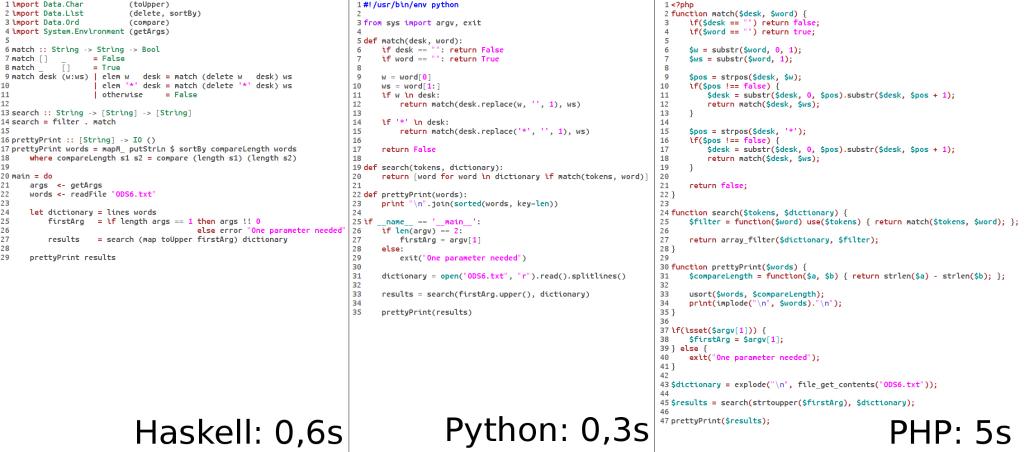
					<content type="html" xml:base="https://devplant.net/2014/08/11/optimizing-php-code/?utm_source=rss&#038;utm_medium=rss&#038;utm_campaign=optimizing-php-code"><![CDATA[<figure id="attachment_416" aria-describedby="caption-attachment-416" style="width: 1024px" class="wp-caption aligncenter"><a href="http://devplant.net/wp-content/uploads/2014/08/BuakpdYIMAAnIIv.jpg-large.jpg" rel="lightbox[415]"><img fetchpriority="high" decoding="async" class="wp-image-416 size-full" src="http://devplant.net/wp-content/uploads/2014/08/BuakpdYIMAAnIIv.jpg-large.jpg" alt="Source codes" width="1024" height="452" srcset="https://devplant.net/wp-content/uploads/2014/08/BuakpdYIMAAnIIv.jpg-large.jpg 1024w, https://devplant.net/wp-content/uploads/2014/08/BuakpdYIMAAnIIv.jpg-large-300x132.jpg 300w" sizes="(max-width: 1024px) 100vw, 1024px" /></a><figcaption id="caption-attachment-416" class="wp-caption-text">Original image with source codes and execution times</figcaption></figure>
<p>Yesterday Frédéric Bisson <a href="https://twitter.com/zigazou/status/497265842103799808">posted on Twitter an image </a>with comparison of execution time of the same algorithm (Scrabble helper) implemented in Haskell, Python and PHP. The indicated time was respectively 0.6s, 0.3s and 5s. I know that PHP can be slow, but 5s was sluggish even for PHP. I had to do something about it, so I spent some time optimizing the code and checking possible solutions.</p>
<!-- Missing Gist ID -->
<p>I&#8217;ve contacted the author of the image, and apart from receiving <a href="http://zyzzyva.net/lexicons/ODS6.txt">input data file for the script</a>, I got some information: first of all, he was using PHP 5.3, with XDebug enabled. Those two things alone showed that the initial time measurement is off scale. The author disabled XDebug, and the number went down to 1.7s. Still quite high. I&#8217;ve tested it on a stock installation of Ubuntu&#8217;s PHP 5.5 (all extensions disabled), and it was about 0.86s. Slowest of those three in comparison, but it was not that &#8220;off chart&#8221; initial number.</p>
<p>But I wanted to know if maybe there was something terribly slow in the code. I used XDebug in profiling mode to generate cachegrind output. Yes, there were many function calls, but no individual call was exceptionally slow.</p>
<p><a href="http://devplant.net/wp-content/uploads/2014/08/2014-08-08_15-18-26.png" rel="lightbox[415]"><img decoding="async" class="aligncenter size-full wp-image-420" src="http://devplant.net/wp-content/uploads/2014/08/2014-08-08_15-18-26.png" alt="2014-08-08_15-18-26" width="562" height="324" srcset="https://devplant.net/wp-content/uploads/2014/08/2014-08-08_15-18-26.png 562w, https://devplant.net/wp-content/uploads/2014/08/2014-08-08_15-18-26-300x172.png 300w" sizes="(max-width: 562px) 100vw, 562px" /></a></p>
<p>As you can see above, most called function was <b>substr</b>. The function itself is not slow, but it was called over 1.5M times. I knew that function calls are generally quite expensive in PHP, so I wanted to reduce it however I can. First fix was very simple. I&#8217;ve replaced</p>
<pre class="brush: php; title: ; notranslate">substr($word, 0, 1)</pre>
<p>with array access:</p>
<pre class="brush: php; title: ; notranslate">$word[0]</pre>
<p>That itself reduced substr function call count to less than 1M, and gave about 20% speed boost (current execution time: <strong>~0.69s</strong>). I also removed temporary variables used only once, but that gave almost unnoticeable gain. (<a href="https://gist.github.com/leafnode/33c344a5e9bfb168fa93">code of the current version</a>)</p>
<p><a href="http://devplant.net/wp-content/uploads/2014/08/2014-08-08_15-19-03.png" rel="lightbox[415]"><img decoding="async" class="aligncenter size-full wp-image-421" src="http://devplant.net/wp-content/uploads/2014/08/2014-08-08_15-19-03.png" alt="2014-08-08_15-19-03" width="569" height="322" srcset="https://devplant.net/wp-content/uploads/2014/08/2014-08-08_15-19-03.png 569w, https://devplant.net/wp-content/uploads/2014/08/2014-08-08_15-19-03-300x169.png 300w" sizes="(max-width: 569px) 100vw, 569px" /></a></p>
<p>But that was still not enough. Knowing that function calls are expensive, you might thing about rewriting recursive algorithm to an iterative version. That might not be fair while using other algorithm in other languages, but hey, you have to know your language&#8217;s strengths and weaknesses. That change was done by the author of the initial code.</p>
<!-- Missing Gist ID -->
<p>This change lowered execution time to <strong>~0.55s</strong>, which is 19% gain from the previous iteration, and 36% total gain.</p>
<p>Also, it was possible to rewrite closure to a form of a generator. That part was provided by Filip Górny on PHPers group on Facebook (PHPers is a network of Polish PHP meetups).</p>
<!-- Missing Gist ID -->
<p>This code allowed me to go below 0.5s &#8211; lowest run time that I achieved was about <strong>0.49s</strong>. Not a big difference from previous version, but nevertheless noticeable. At this point I&#8217;ve concluded by toying with the code. I was thinking about looking at opcode level, but I decided that it was too much.</p>
<p>I finished modifying the code, but I was curious if the newest achievements in PHP core could be of any help. I downloaded and compiled the so-called <a href="https://wiki.php.net/phpng">php-ng</a>, a branch of PHP with experimental core modifications focused on performance improvements. As it was to be expected, I didn&#8217;t disappoint. The last version of the code under php-ng was running in about <strong>0.235s</strong>. Now that was the number that satisfied me.</p>
<p>But I also wanted to be fair and check also the other new player in PHP world &#8211; <a href="http://hhvm.com/">HHVM</a> from Facebook. HHVM has a different paradigm than php-ng &#8211; it is a virtual machine with Just-In-Time compiler. But whatever it is, it&#8217;s also known to work faster than the vanilla PHP interpreter, and after tests it proved worthy of its opinion. The code was running even faster than php-ng, with some run times even below 0.2s</p>
<p>And that concluded my tests. Below you can find a table with run times for all executors, with 20 consecutive runs for each one.</p>
<table width="261">
<tbody>
<tr>
<td width="64"></td>
<td width="64">php-5.5</td>
<td width="64">php-ng</td>
<td width="69">hhvm</td>
</tr>
<tr>
<td>t1</td>
<td>0.633</td>
<td>0.248</td>
<td>0.262</td>
</tr>
<tr>
<td>t2</td>
<td>0.621</td>
<td>0.241</td>
<td>0.249</td>
</tr>
<tr>
<td>t3</td>
<td>0.530</td>
<td>0.233</td>
<td>0.203</td>
</tr>
<tr>
<td>t4</td>
<td>0.592</td>
<td>0.324</td>
<td>0.204</td>
</tr>
<tr>
<td>t5</td>
<td>0.557</td>
<td>0.240</td>
<td>0.202</td>
</tr>
<tr>
<td>t6</td>
<td>0.612</td>
<td>0.229</td>
<td>0.294</td>
</tr>
<tr>
<td>t7</td>
<td>0.539</td>
<td>0.219</td>
<td>0.202</td>
</tr>
<tr>
<td>t8</td>
<td>0.611</td>
<td>0.337</td>
<td>0.203</td>
</tr>
<tr>
<td>t9</td>
<td>0.558</td>
<td>0.220</td>
<td>0.204</td>
</tr>
<tr>
<td>t10</td>
<td>0.538</td>
<td>0.218</td>
<td>0.235</td>
</tr>
<tr>
<td>t11</td>
<td>0.531</td>
<td>0.220</td>
<td>0.228</td>
</tr>
<tr>
<td>t12</td>
<td>0.516</td>
<td>0.248</td>
<td>0.206</td>
</tr>
<tr>
<td>t13</td>
<td>0.540</td>
<td>0.217</td>
<td>0.202</td>
</tr>
<tr>
<td>t14</td>
<td>0.542</td>
<td>0.225</td>
<td>0.205</td>
</tr>
<tr>
<td>t15</td>
<td>0.564</td>
<td>0.219</td>
<td>0.237</td>
</tr>
<tr>
<td>t16</td>
<td>0.537</td>
<td>0.312</td>
<td>0.204</td>
</tr>
<tr>
<td>t17</td>
<td>0.553</td>
<td>0.218</td>
<td>0.207</td>
</tr>
<tr>
<td>t18</td>
<td>0.568</td>
<td>0.221</td>
<td>0.223</td>
</tr>
<tr>
<td>t19</td>
<td>0.548</td>
<td>0.221</td>
<td>0.258</td>
</tr>
<tr>
<td>t20</td>
<td>0.658</td>
<td>0.312</td>
<td>0.201</td>
</tr>
<tr>
<td>min</td>
<td>0.516</td>
<td>0.217</td>
<td>0.201</td>
</tr>
<tr>
<td>max</td>
<td>0.658</td>
<td>0.337</td>
<td>0.294</td>
</tr>
<tr>
<td>avg</td>
<td>0.567</td>
<td>0.246</td>
<td>0.221</td>
</tr>
<tr>
<td>median</td>
<td>0.555</td>
<td>0.227</td>
<td>0.206</td>
</tr>
</tbody>
</table>
<p>Now it&#8217;s time for some conclusions.</p>
<p>First one is obvious: PHP <em>can</em> be as fast as other languages (or, better, interpreters/virtual machines of the other languages).</p>
<p>Second, <em>know thy language</em>. I know that it might not be very ingenious, but languages differ. Syntax is most obvious difference, but also some languages excel in different fields than the others. Some languages prefer one structure over another. Here it was seen that it&#8217;s better to avoid too many function calls, so iterative algorithms are favored over recursive ones. Also, you have to know the ecosystem to know that there are alternative interpreters or virtual machines.</p>
<p>Third and last conclusion is that this kind of benchmark-type comparisons are pointless (only worse are synthetic tests). It&#8217;s very easy to omit some small issue and language intricacies, and the results will differ greatly. PHP is not a language that will be chosen for a large scale data analysis, and it won&#8217;t be chosen for a reason &#8211; there are better languages for that task. Is this a problem? Definitely not. There are no languages that excel in each and every application, and there&#8217;s no need for them to. We have a lot of different languages to choose, so let&#8217;s choose wisely appropriate language for a given application.</p>
]]></content>
		
					<link rel="replies" type="text/html" href="https://devplant.net/2014/08/11/optimizing-php-code/?utm_source=rss&#038;utm_medium=rss&#038;utm_campaign=optimizing-php-code#comments" thr:count="6" />
			<link rel="replies" type="application/atom+xml" href="https://devplant.net/2014/08/11/optimizing-php-code/feed/atom/" thr:count="6" />
			<thr:total>6</thr:total>
			</entry>
		<entry>
		<author>
			<name>leafnode</name>
							<uri>http://devplant.net/</uri>
						</author>

		<title type="html"><![CDATA[Apache sites not working after upgrade to Ubuntu 13.10]]></title>
		<link rel="alternate" type="text/html" href="https://devplant.net/2013/11/19/apache-sites-not-working-after-upgrade-to-ubuntu-13-10/?utm_source=rss&#038;utm_medium=rss&#038;utm_campaign=apache-sites-not-working-after-upgrade-to-ubuntu-13-10" />

		<id>http://devplant.net/?p=393</id>
		<updated>2013-11-19T07:52:07Z</updated>
		<published>2013-11-19T07:52:07Z</published>
		<category scheme="https://devplant.net" term="Linux" /><category scheme="https://devplant.net" term="a2ensite" /><category scheme="https://devplant.net" term="Apache" /><category scheme="https://devplant.net" term="site" /><category scheme="https://devplant.net" term="ubuntu 13.10" />
		<summary type="html"><![CDATA[With new Ubuntu 13.10 Apache has new naming scheme for sites configuration files. Because of this your virtual servers might stop working, showing default site, which is &#8220;It works!&#8221; page, or whatever you have configured for your web server. To fix the problem, you have to delete all old links in /etc/apache2/sites-enabled (maybe keeping 000-default.conf &#8230; <a href="https://devplant.net/2013/11/19/apache-sites-not-working-after-upgrade-to-ubuntu-13-10/" class="more-link">Continue reading <span class="screen-reader-text">Apache sites not working after upgrade to Ubuntu 13.10</span></a>]]></summary>

					<content type="html" xml:base="https://devplant.net/2013/11/19/apache-sites-not-working-after-upgrade-to-ubuntu-13-10/?utm_source=rss&#038;utm_medium=rss&#038;utm_campaign=apache-sites-not-working-after-upgrade-to-ubuntu-13-10"><![CDATA[<p>With new Ubuntu 13.10 Apache has new naming scheme for sites configuration files. Because of this your virtual servers might stop working, showing default site, which is &#8220;It works!&#8221; page, or whatever you have configured for your web server.</p>
<p>To fix the problem, you have to delete all old links in <code>/etc/apache2/sites-enabled</code> (maybe keeping 000-default.conf if you like), rename all site configuration files, residing in <code>/etc/apache2/sites-available</code>, to have <code>.conf</code> postfix, and then enable it again by manually creating a symbolic link to <code>sites-enabled</code>, or using <code>a2ensite</code> tool.</p>
<p>You can also use this simple shell script:</p>
<pre class="brush: plain; title: ; notranslate">
for i in `ls -1 /etc/apache2/sites-available | grep -v -e '.dpkg' -e '.conf$'`
do
   rm /etc/apache2/sites-enabled/$i
   mv /etc/apache2/sites-available/$i /etc/apache2/sites-available/$i.conf
   a2ensite $i
done
</pre>
<p>That should do the trick. Note that <code>a2ensite</code> accepts only the site name, without <code>.conf</code> postfix.</p>
]]></content>
		
					<link rel="replies" type="text/html" href="https://devplant.net/2013/11/19/apache-sites-not-working-after-upgrade-to-ubuntu-13-10/?utm_source=rss&#038;utm_medium=rss&#038;utm_campaign=apache-sites-not-working-after-upgrade-to-ubuntu-13-10#comments" thr:count="0" />
			<link rel="replies" type="application/atom+xml" href="https://devplant.net/2013/11/19/apache-sites-not-working-after-upgrade-to-ubuntu-13-10/feed/atom/" thr:count="0" />
			<thr:total>0</thr:total>
			</entry>
		<entry>
		<author>
			<name>leafnode</name>
							<uri>http://devplant.net/</uri>
						</author>

		<title type="html"><![CDATA[[ruby] &#8220;remove_entry_secure does not work&#8221; for /tmp]]></title>
		<link rel="alternate" type="text/html" href="https://devplant.net/2012/11/20/ruby-remove_entry_secure-does-not-work-for-tmp/?utm_source=rss&#038;utm_medium=rss&#038;utm_campaign=ruby-remove_entry_secure-does-not-work-for-tmp" />

		<id>http://devplant.net/?p=334</id>
		<updated>2012-11-20T14:10:41Z</updated>
		<published>2012-11-20T14:10:41Z</published>
		<category scheme="https://devplant.net" term="Programming" /><category scheme="https://devplant.net" term="error" /><category scheme="https://devplant.net" term="ruby" />
		<summary type="html"><![CDATA[If you get that kind of error: Check for permissions for /tmp directory. remove_entry_secure accepts world-writable directory in a path only if it&#8217;s /tmp, but only if that directory has 1777 permissions.]]></summary>

					<content type="html" xml:base="https://devplant.net/2012/11/20/ruby-remove_entry_secure-does-not-work-for-tmp/?utm_source=rss&#038;utm_medium=rss&#038;utm_campaign=ruby-remove_entry_secure-does-not-work-for-tmp"><![CDATA[<p>If you get that kind of error:</p>
<pre class="brush: plain; title: ; notranslate">
ArgumentError (parent directory is world writable, FileUtils#remove_entry_secure does not work; abort: &quot;/tmp/gitosis20121120-26282-1q9qa73&quot; (parent directory mode 40777)):
</pre>
<p>Check for permissions for <code>/tmp</code> directory. <code>remove_entry_secure</code> accepts world-writable directory in a path only if it&#8217;s <code>/tmp</code>, but only if that directory has <strong>1777</strong> permissions.</p>
]]></content>
		
					<link rel="replies" type="text/html" href="https://devplant.net/2012/11/20/ruby-remove_entry_secure-does-not-work-for-tmp/?utm_source=rss&#038;utm_medium=rss&#038;utm_campaign=ruby-remove_entry_secure-does-not-work-for-tmp#comments" thr:count="0" />
			<link rel="replies" type="application/atom+xml" href="https://devplant.net/2012/11/20/ruby-remove_entry_secure-does-not-work-for-tmp/feed/atom/" thr:count="0" />
			<thr:total>0</thr:total>
			</entry>
		<entry>
		<author>
			<name>leafnode</name>
							<uri>http://devplant.net/</uri>
						</author>

		<title type="html"><![CDATA[[PHP] Zend Server, PEAR, and PHAR error]]></title>
		<link rel="alternate" type="text/html" href="https://devplant.net/2012/07/20/php-zend-server-pear-and-phar-error/?utm_source=rss&#038;utm_medium=rss&#038;utm_campaign=php-zend-server-pear-and-phar-error" />

		<id>http://devplant.net/?p=305</id>
		<updated>2012-07-20T08:22:59Z</updated>
		<published>2012-07-20T08:11:39Z</published>
		<category scheme="https://devplant.net" term="Programming" /><category scheme="https://devplant.net" term="phar" /><category scheme="https://devplant.net" term="php" /><category scheme="https://devplant.net" term="require_hash" /><category scheme="https://devplant.net" term="windows" /><category scheme="https://devplant.net" term="zend" /><category scheme="https://devplant.net" term="zend server" />
		<summary type="html"><![CDATA[Some time ago I was trying to install PEAR with default installation of Zend Server. To do that, you have to run a following command: That resulted in a problem with PHAR archive: To solve that problem, you have to either modify php.ini file, adding following directive: Or, you can use it one-time only, setting &#8230; <a href="https://devplant.net/2012/07/20/php-zend-server-pear-and-phar-error/" class="more-link">Continue reading <span class="screen-reader-text">[PHP] Zend Server, PEAR, and PHAR error</span></a>]]></summary>

					<content type="html" xml:base="https://devplant.net/2012/07/20/php-zend-server-pear-and-phar-error/?utm_source=rss&#038;utm_medium=rss&#038;utm_campaign=php-zend-server-pear-and-phar-error"><![CDATA[<p>Some time ago I was trying to install PEAR with default installation of Zend Server. To do that, you have to run a following command:</p>
<pre class="brush: plain; title: ; notranslate">
C:\Program Files (x86)\Zend\ZendServer\bin\go-pear.bat
</pre>
<p>That resulted in a problem with PHAR archive:</p>
<pre class="brush: plain; title: ; notranslate">
phar &quot;C:\Program Files (x86)\Zend\ZendServer\bin\PEAR\go-pear.phar&quot; does not have a signature
PHP Warning:  require_once(phar://go-pear.phar/index.php): failed to open stream: phar error: invalid url or non-existent phar &quot;phar://go-pear.phar/index.php&quot; in C:\Program Files (x86)\Zend\ZendServer\bin\PEAR\go-pear.phar on line 1236
</pre>
<p>To solve that problem, you have to either modify <code>php.ini</code> file, adding following directive:</p>
<pre class="brush: plain; title: ; notranslate">
phar.require_hash=0
</pre>
<p>Or, you can use it one-time only, setting that configuration option in command line:</p>
<pre class="brush: plain; title: ; notranslate">
C:\Program Files (x86)\Zend\ZendServer\bin\PEAR&gt; php -d phar.require_hash=0 go-pear.phar
</pre>
<p>The latter form is preferred, as disabling checking signatures is considered a security flaw.</p>
]]></content>
		
					<link rel="replies" type="text/html" href="https://devplant.net/2012/07/20/php-zend-server-pear-and-phar-error/?utm_source=rss&#038;utm_medium=rss&#038;utm_campaign=php-zend-server-pear-and-phar-error#comments" thr:count="0" />
			<link rel="replies" type="application/atom+xml" href="https://devplant.net/2012/07/20/php-zend-server-pear-and-phar-error/feed/atom/" thr:count="0" />
			<thr:total>0</thr:total>
			</entry>
		<entry>
		<author>
			<name>leafnode</name>
							<uri>http://devplant.net/</uri>
						</author>

		<title type="html"><![CDATA[[Facebook] Obtaining your User ID]]></title>
		<link rel="alternate" type="text/html" href="https://devplant.net/2012/06/27/facebook-obtaining-your-user-id/?utm_source=rss&#038;utm_medium=rss&#038;utm_campaign=facebook-obtaining-your-user-id" />

		<id>http://devplant.net/?p=295</id>
		<updated>2012-06-27T09:17:43Z</updated>
		<published>2012-06-27T09:17:43Z</published>
		<category scheme="https://devplant.net" term="Webdev" /><category scheme="https://devplant.net" term="explorer" /><category scheme="https://devplant.net" term="facebook" /><category scheme="https://devplant.net" term="graph" /><category scheme="https://devplant.net" term="opengraph" /><category scheme="https://devplant.net" term="user id" />
		<summary type="html"><![CDATA[Your own Facebook User ID is required in many places, like setting admin ID on your page&#8217;s OpenGraph tags. Most of advice available on the web regarding getting your own Facebook ID suggest looking at links on your profile page, but that kind of advice is usually outdated and unusable if you have vanity URL &#8230; <a href="https://devplant.net/2012/06/27/facebook-obtaining-your-user-id/" class="more-link">Continue reading <span class="screen-reader-text">[Facebook] Obtaining your User ID</span></a>]]></summary>

					<content type="html" xml:base="https://devplant.net/2012/06/27/facebook-obtaining-your-user-id/?utm_source=rss&#038;utm_medium=rss&#038;utm_campaign=facebook-obtaining-your-user-id"><![CDATA[<p><a title="http://devplant.net/wp-content/uploads/2012/06/fb-source-code.png (http://devplant.net/wp-content/uploads/2012/06/fb-source-code.png) (http://devplant.net/wp-content/uploads/2012/06/fb-source-code.png) (http://devplant.net/wp-content/uploads/2012/06/fb-source-code.png)" href="http://devplant.net/wp-content/uploads/2012/06/fb-source-code.png" rel="lightbox[295]"><img loading="lazy" decoding="async" class="alignright size-thumbnail wp-image-297" title="Facebook Profile Page Source Code" src="http://devplant.net/wp-content/uploads/2012/06/fb-source-code-150x150.png" alt="" width="150" height="150" /></a>Your own Facebook User ID is required in many places, like setting admin ID on your page&#8217;s OpenGraph tags. Most of advice available on the web regarding getting your own Facebook ID suggest looking at links on your profile page, but that kind of advice is usually outdated and unusable if you have vanity URL (your username replaced user ID in URLs). You can look into the profile page source and bash through tons of code, and yes, you can find it looking for some strings inside the source code, like it&#8217;s pictured on a screenshot. But it&#8217;s a tedious job, and there are more elegant ways.</p>
<p>Specifically, you can use OpenGraph API Explorer, available <a title="https://developers.facebook.com/tools/explorer/?method=GET&amp;path=me (https://developers.facebook.com/tools/explorer/?method=GET&amp;path=me) (https://developers.facebook.com/tools/explorer/?method=GET&amp;path=me) (https://developers.facebook.com/tools/explorer/?method=GET&amp;path=me)" href="https://developers.facebook.com/tools/explorer/?method=GET&amp;path=me">here</a>. Input field is already prepopulated with <strong>me</strong> value, that obviously tells the Explorer to show data for currently logged in user. But before this could work, you have to authorize API Explorer to access your data by clicking <em>Get access token</em> button, choosing minimal permissions (<em>user_about_me</em> is definitely enough &#8211; see <a title="http://devplant.net/wp-content/uploads/2012/06/fb-permissions.png (http://devplant.net/wp-content/uploads/2012/06/fb-permissions.png) (http://devplant.net/wp-content/uploads/2012/06/fb-permissions.png) (http://devplant.net/wp-content/uploads/2012/06/fb-permissions.png)" href="http://devplant.net/wp-content/uploads/2012/06/fb-permissions.png" rel="lightbox[295]">this screenshot</a>), and authorizing the application in a standard way, like any other with Facebook.</p>
<p>After granting permissions, <em>Access Token</em> field is populated automatically, and you can clickSubmit button to get information about your user. User ID will be the first field.</p>
<p><a title="http://devplant.net/wp-content/uploads/2012/06/fb-api-explorer.png (http://devplant.net/wp-content/uploads/2012/06/fb-api-explorer.png) (http://devplant.net/wp-content/uploads/2012/06/fb-api-explorer.png) (http://devplant.net/wp-content/uploads/2012/06/fb-api-explorer.png)" href="http://devplant.net/wp-content/uploads/2012/06/fb-api-explorer.png" rel="lightbox[295]"><img loading="lazy" decoding="async" class="aligncenter size-medium wp-image-299" title="Facebook Graph API Explorer" src="http://devplant.net/wp-content/uploads/2012/06/fb-api-explorer-300x175.png" alt="" width="300" height="175" srcset="https://devplant.net/wp-content/uploads/2012/06/fb-api-explorer-300x175.png 300w, https://devplant.net/wp-content/uploads/2012/06/fb-api-explorer.png 976w" sizes="auto, (max-width: 300px) 100vw, 300px" /></a></p>
<p>When you have your user ID, you can check if it&#8217;s a proper one on the same page &#8211; just enter your ID instead of <em>me</em> and hit <em>Submit</em> &#8211; you should see your basic data.</p>
]]></content>
		
					<link rel="replies" type="text/html" href="https://devplant.net/2012/06/27/facebook-obtaining-your-user-id/?utm_source=rss&#038;utm_medium=rss&#038;utm_campaign=facebook-obtaining-your-user-id#comments" thr:count="0" />
			<link rel="replies" type="application/atom+xml" href="https://devplant.net/2012/06/27/facebook-obtaining-your-user-id/feed/atom/" thr:count="0" />
			<thr:total>0</thr:total>
			</entry>
		<entry>
		<author>
			<name>leafnode</name>
							<uri>http://devplant.net/</uri>
						</author>

		<title type="html"><![CDATA[ZendCon 2011 Slides]]></title>
		<link rel="alternate" type="text/html" href="https://devplant.net/2011/10/22/zendcon-2011-slides/?utm_source=rss&#038;utm_medium=rss&#038;utm_campaign=zendcon-2011-slides" />

		<id>http://devplant.net/?p=262</id>
		<updated>2015-12-30T01:09:39Z</updated>
		<published>2011-10-22T07:38:32Z</published>
		<category scheme="https://devplant.net" term="Misc" /><category scheme="https://devplant.net" term="conference" /><category scheme="https://devplant.net" term="php" /><category scheme="https://devplant.net" term="slides" /><category scheme="https://devplant.net" term="zendcon" /><category scheme="https://devplant.net" term="zendcon 2011" />
		<summary type="html"><![CDATA[Here are slides from ZendCon 2011 sessions. I&#8217;ll update the list as soon as I find missing slides or they are posted. I&#8217;ll try to add UnCon sessions too. Monday, October 17th PHP Extensions, Why and What? Derick Rethans Creating and Using Streams, Filters and Sockets Elizabeth Marie Smith Doctrine 2 Juozas Kaziukenas PHP Components &#8230; <a href="https://devplant.net/2011/10/22/zendcon-2011-slides/" class="more-link">Continue reading <span class="screen-reader-text">ZendCon 2011 Slides</span></a>]]></summary>

					<content type="html" xml:base="https://devplant.net/2011/10/22/zendcon-2011-slides/?utm_source=rss&#038;utm_medium=rss&#038;utm_campaign=zendcon-2011-slides"><![CDATA[<p>Here are slides from ZendCon 2011 sessions. I&#8217;ll update the list as soon as I find missing slides or they are posted. I&#8217;ll try to add UnCon sessions too.</p>
<h2>Monday, October 17th</h2>
<ul>
<li><a href="http://derickrethans.nl/talks/phpexts-zendcon11.pdf">PHP Extensions, Why and What?</a><br />
<em>Derick Rethans</em>[twitter]derickr[/twitter]</li>
<li><a href="http://elizabethmariesmith.com/slides/zendcon2011/Writing%20and%20Using%20PHP%20Streams%20and%20Sockets%20-%20Zendcon%202011.pdf">Creating and Using Streams, Filters and Sockets</a><br />
<em>Elizabeth Marie Smith</em>[twitter]auroraeosrose[/twitter]</li>
<li>Doctrine 2<br />
<em>Juozas Kaziukenas</em>[twitter]juokaz[/twitter]</li>
<li>PHP Components From Idea To Maturity<br />
<em>Stuart Herbert</em>[twitter]stuherbert[/twitter]</li>
<li>Zend PHP 5.3 Certification Boot Camp<br />
<em>Christian Wenz</em>[twitter]chwenz[/twitter]</li>
<li><a href="http://www.slideshare.net/bradley.holt/zendcon-2011-learning-couchdb">Learning CouchDB</a><br />
<em>Bradley Holt</em>[twitter]BradleyHolt[/twitter]</li>
<li>Design Patterns in Action<br />
<em>Stefan Priebsch</em>[twitter]spriebsch[/twitter]</li>
<li>Beware of the Dark Side, Luke!<br />
<em>Arne Blankerts</em>[twitter]arneblankerts[/twitter]</li>
</ul>
<h2>Tuesday, October 18th</h2>
<ul>
<li><a href="http://spoutserver.com/talks/websockets.html">HTML5 WebSockets</a><br />
<em>Scott Mattocks</em>[twitter]scottmattocks[/twitter]</li>
<li><a href="http://www.slideshare.net/pmjones88/benchmarking-applications-and-frameworks-9759357">Benchmarking Applications and Frameworks</a><br />
<em>Paul Jones</em></li>
<li><a href="http://www.slideshare.net/aseiden/php-batch-jobs-on-ibm-i">PHP Batch Jobs on IBM i</a><br />
<em>Alan Seiden</em>[twitter]alanseiden[/twitter]</li>
<li><a href="http://www.slideshare.net/skoop/git-for-subversion-users-zendcon-2011">Git for Subversion users</a><br />
<em>Stefan Koopmanschap</em>[twitter]skoop[/twitter]</li>
<li>Development in the 24th and a Half Century<br />
<em>Kevin Schroeder</em>[twitter]kpschrade[/twitter]</li>
<li>Cloud Based Application Performance Testing<br />
<em>Moris Chen</em></li>
<li><a href="http://derickrethans.nl/talks/xdebug-zendcon11.pdf">Xdebug</a><br />
<em>Derick Rethans</em>[twitter]derickr[/twitter]</li>
<li>PHP and IBM i Frequent Questions, FastCGI, DB2, etc.<br />
<em>Tony Cairns</em></li>
<li>Overview of Zend Framework 2<br />
<em>Matthew Weier O´Phinney</em>[twitter]weierophinney[/twitter]</li>
<li><a href="http://www.slideshare.net/jimbojsb/scaling-php-applications-with-redis">Scaling PHP Applications with Redis</a><br />
<em>Josh Butts</em>[twitter]jimbojsb[/twitter]</li>
<li><a href="http://www.slideshare.net/billkarwin/sql-injection-myths-and-fallacies">SQL Injection Myths and Fallacies</a><br />
<em>Bill Karwin</em>[twitter]billkarwin[/twitter]</li>
<li>The Future of PHP on IBM i<br />
<em>Tim Rowe</em></li>
<li><a href="http://derickrethans.nl/talks/profiling-zendcon11.pdf">Profiling PHP Applications</a><br />
<em>Derick Rethans</em>[twitter]derickr[/twitter]</li>
<li><a href="http://www.slideshare.net/spriebsch/change-is-inevitable-except-from-a-vending-machine">Change is Inevitable (Except from a Vending Machine)</a><br />
<em>Stefan Priebsch</em>[twitter]spriebsch[/twitter]</li>
<li><a href="http://emsmith.net/slides/zendcon2011/Event%20and%20Signal%20Driven%20Programming%20Techniques.pdf">Event and Signal Driven Programming Techniques</a><br />
<em>Elizabeth Marie Smith</em>[twitter]auroraeosrose[/twitter]</li>
<li>Open Source PHP Toolkit for IBM i<br />
<em>Mike Pavlak, Tony Cairns</em></li>
<li><a href="http://www.slideshare.net/skoop/a-practical-look-at-symfony2">A Practical Look At Symfony2</a><br />
<em>Stefan Koopmanschap</em>[twitter]skoop[/twitter]</li>
<li><a href="http://www.slideshare.net/ralphschindler/zend-code-in-zf-20">Skynet in ZF 2.0</a><br />
<em>Ralph Schindler</em>[twitter]ralphschindler[/twitter]</li>
<li><a href="http://ilia.ws/files/zendcon_2011_under_the_hood.pdf">Under the Hood</a><br />
<em>Ilia Alshanetsky</em>[twitter]iliaa[/twitter]</li>
<li>Zend Studio Tips and Tricks<br />
<em>Roy Ganor</em></li>
<li><a href="http://www.slideshare.net/aseiden/db2-and-php-best-practices-on-ibm-i">DB2 and PHP Best Practices on IBM i</a><br />
<em>Alan Seiden</em></li>
<li>Manage Cloud Infrastructures Using Zend Framework<br />
<em>Enrico Zimuel</em>[twitter]ezimuel[/twitter]</li>
<li>Deployment Without the Chaos<br />
<em>Eric Ritchie</em></li>
</ul>
<h2>Wednesday, October 19th</h2>
<ul>
<li>Scaling in the Cloud<br />
<em>Kent Mitchell, Uri Budnik</em></li>
<li>Introduction to Adobe Flash Builder for PHP<br />
<em>Roy Ganor</em></li>
<li>MySQL &#8212; Whats New<br />
<em>Dave Stokes</em></li>
<li><a href="http://www.slideshare.net/Wombert/largescale-data-processing-with-hadoop-and-php-zendcon-2011-20111019">Large-Scale Data Processing with Hadoop and PHP</a><br />
<em>David Zuelke</em>[twitter]dzuelke[/twitter]</li>
<li><a href="http://www.slideshare.net/ralphschindler/zend-di-in-zf-20">Dependency Injection; Containers and Frameworks In PHP</a><br />
<em>Ralph Schindler</em>[twitter]ralphschindler[/twitter]</li>
<li>Extending Open Source Solutions for Large Scale Federal Applications<br />
<em>Rakesh Kumar</em></li>
<li><a href="http://www.slideshare.net/jcarouth/the-contextual-experience-of-the-mobile-web">The Contextual Experience of the Mobile Web</a><br />
<em>Jeff Carouth</em>[twitter]jcarouth[/twitter]</li>
<li><a href="http://www.slideshare.net/mwillbanks/soa-with-zend-framework">SOA with Zend Framework</a><br />
<em>Mike Willbanks</em>[twitter]mwillbanks[/twitter]</li>
<li><a href="http://www.slideshare.net/afilina/zendcon-2011introtoflex">Intro to Flex</a><br />
<em>Anna Filina</em>[twitter]afilina[/twitter]</li>
<li>Triggered: Zend Framework 2&#8217;s EventManager<br />
<em>Matthew Weier O´Phinney</em>[twitter]weierophinney[/twitter]</li>
<li>Couchbase Mobile, The database that talks sync.<br />
<em>Matt Ingenthron</em>[twitter]ingenthr[/twitter]</li>
<li><a href="http://www.slideshare.net/SamHennessy/adding-dependency-injection-to-legacy-applications">Adding Dependency Injection To Legacy Applications</a><br />
<em>Sam Hennessy</em></li>
<li><a href="http://www.slideshare.net/mkherlakian/big-serveriswatchingyou">Big Server is Watching You</a><br />
<em>Maurice Kherlakian</em></li>
<li><a href="http://shawnstratton.info/slides/zendcon/">Optimizing Zend Framework for use on High Traffic Volume Web Sites</a><br />
<em>Shawn Stratton</em>[twitter]mfacenet[/twitter]</li>
<li>Character Sets Suck<br />
<em>Ligaya Turmelle, Raymond DeRoo</em></li>
<li><a href="http://emsmith.net/slides/zendcon2011/Using%20SPL%20Tools%20in%20Your%20Code.pdf">Using SPL Tools in Your Code.</a><br />
<em>Elizabeth Marie Smith</em>[twitter]auroraeosrose[/twitter]</li>
<li>API Security<br />
<em>Rob Richards</em></li>
<li>Injecting Domain Expertise into Varchars<br />
<em>Jeff Kibler</em></li>
<li><a href="http://www.slideshare.net/eljefe/jquery-mobile-for-fun-and-profit">jQuery Mobile: For Fun and Profit</a><br />
<em>Daniel Cousineau</em></li>
<li>Cryptography in PHP: Use Cases<br />
<em>Enrico Zimuel</em>[twitter]ezimuel[/twitter]</li>
<li>Getting to know Zend Studio 9<br />
<em>Gadi Goldbarg</em></li>
<li>&#8220;Cloudify&#8221; Your Application<br />
<em>Maurice Kherlakian</em></li>
<li><a href="http://www.slideshare.net/sebastian_bergmann/php-testers-toolbox-zend-con-2011">PHP Testing Tools</a><br />
<em>Sebastian Bergmann</em>[twitter]s_bergmann[/twitter]</li>
<li>Performing Security Audits<br />
<em>Arne Blankerts</em>[twitter]arneblankerts[/twitter]</li>
<li>PHP &amp; MongoDB<br />
<em>Steve Francia</em></li>
</ul>
<h2>Thursday, October 20th</h2>
<ul>
<li>Care and feeding of a MySQL Database<br />
<em>Dave Stokes</em></li>
<li>Optimizing Application Performance<br />
<em>Kevin Schroeder</em>[twitter]kpscharde[/twitter]</li>
<li><a href="http://www.slideshare.net/jaytaph/puppet-for-dummies-zendcon-2011-edition">Puppet for Dummies</a><br />
<em>Joshua Thijssen</em>[twitter]JayTaph[/twitter]</li>
<li>Introducing Assetic: Asset Management for PHP 5.3<br />
<em>Kris Wallsmith</em>[twitter]kriswallsmith[/twitter]</li>
<li>Unit Testing Zend Framework Apps<br />
<em>Michelangelo van Dam</em>[twitter]DragonBe[/twitter]</li>
<li>Mobile Development with Adobe AIR, Flash Builder, and Flex<br />
<em>Mihai Corlan</em></li>
<li><a href="http://www.slideshare.net/afilina/javascript-tools-and-framework-faves-zendcon-2011">Javascript Tools and Frameworks Faves</a><br />
<em>Anna Filina</em>[twitter]afilina[/twitter]</li>
<li>Taming the Cloud<br />
<em>Rob Richards</em></li>
<li>Implementing The Open/Closed Principle<br />
<em>Sam Hennessy</em></li>
<li><a href="http://www.slideshare.net/becoded/powering-your-website-with-realtime-data">Powering Your Website with Realtime Data</a><br />
<em>Bert Van Hauwaert</em>[twitter]tbotwit[/twitter]</li>
<li>Using GitHub<br />
<em>Scott Chacon</em></li>
<li><a href="http://www.slideshare.net/Wombert/designing-http-interfaces-and-restful-web-services-zendcon-2011-20111020">Designing HTTP Interfaces and RESTful Web Services</a><br />
<em>David Zuelke</em>[twitter]dzuelke[/twitter]</li>
<li><a href="http://www.slideshare.net/mwillbanks/mobile-push-notifications">Mobile: Push for Sync and Notifications</a><br />
<em>Mike Willbanks</em>[twitter]mwillbanks[/twitter]</li>
<li><a href="http://www.slideshare.net/billkarwin/mysql-55-guide-to-innodb-status">MySQL 5.5 InnoDB Tuning</a><br />
<em>Bill Karwin</em>[twitter]billkarwin[/twitter]</li>
</ul>
<h2>UnCon</h2>
<ul>
<li><a href="http://www.slideshare.net/jaytaph/15-protips-for-mysql-users-pfz">12/15 Pro Tips for MySQL Users</a><br />
<em> Joshua Thijssen</em></li>
<li><a href="http://www.slideshare.net/wimg/making-dynamic-sites-scale-like-static-sites">Making dynamic sites scale like static sites</a><br />
<em>Wim Godden</em></li>
<li><a href="http://www.slideshare.net/bradley.holt/zendcon-2011-uncon-domain-driven-design">Domain-Driven Design: A Collaboration Between Domain Experts and Software Practitioners</a><br />
<em>Bradley Holt</em></li>
<li><a href="http://www.slideshare.net/wimg/creating-fast-dynamic-acls-in-zend-framework">Creating Fast, dynamic ACL&#8217;s in Zend Framework</a><br />
<em>Wim Godden</em></li>
<li><a href="http://evan.pro/zf2-modules-talk.html">Introducing Modules in Zend Framework 2.0</a><br />
<em> Evan Coury</em>, <em>Ben Scholzen</em>, <em>Ralph Schindler</em></li>
<li><a href="http://ilia.ws/files/zend_uncon_optimization_2011.pdf">Optimization tricks &amp; mistakes to avoid</a><br />
<em> Ilia Alshanetsky</em> [twitter]iliaa[/twitter]</li>
<li><a href="http://www.slideshare.net/jkeppens/zendcon-2011-php-in-the-dark">PHP in the Dark</a><br />
<em>Jeroen Keppens</em>[twitter]jkeppens[/twitter]</li>
</ul>
<p><b>Last updated: 31 Oct</b></p>
]]></content>
		
					<link rel="replies" type="text/html" href="https://devplant.net/2011/10/22/zendcon-2011-slides/?utm_source=rss&#038;utm_medium=rss&#038;utm_campaign=zendcon-2011-slides#comments" thr:count="3" />
			<link rel="replies" type="application/atom+xml" href="https://devplant.net/2011/10/22/zendcon-2011-slides/feed/atom/" thr:count="3" />
			<thr:total>3</thr:total>
			</entry>
		<entry>
		<author>
			<name>leafnode</name>
							<uri>http://devplant.net/</uri>
						</author>

		<title type="html"><![CDATA[[VMWare] Device uses a controller that is not supported]]></title>
		<link rel="alternate" type="text/html" href="https://devplant.net/2011/07/19/vmware-device-uses-a-controller-that-is-not-supported/?utm_source=rss&#038;utm_medium=rss&#038;utm_campaign=vmware-device-uses-a-controller-that-is-not-supported" />

		<id>http://devplant.net/?p=254</id>
		<updated>2011-07-19T09:16:22Z</updated>
		<published>2011-07-19T08:59:30Z</published>
		<category scheme="https://devplant.net" term="Software" /><category scheme="https://devplant.net" term="ova" /><category scheme="https://devplant.net" term="virtual appliance" /><category scheme="https://devplant.net" term="virtual hardware" /><category scheme="https://devplant.net" term="vmware" /><category scheme="https://devplant.net" term="vmx" />
		<summary type="html"><![CDATA[Today I tried to deploy a Virtual Appliance from Bitnami on my ESXi server using ovftool: But each time I had an error: Device &#8216;VirtualDisk&#8217; uses a controller that is not supported. This is a general limitation of the virtual machine&#8217;s virtual hardware version on the selected host. What was funny, it was perfectly fine &#8230; <a href="https://devplant.net/2011/07/19/vmware-device-uses-a-controller-that-is-not-supported/" class="more-link">Continue reading <span class="screen-reader-text">[VMWare] Device uses a controller that is not supported</span></a>]]></summary>

					<content type="html" xml:base="https://devplant.net/2011/07/19/vmware-device-uses-a-controller-that-is-not-supported/?utm_source=rss&#038;utm_medium=rss&#038;utm_campaign=vmware-device-uses-a-controller-that-is-not-supported"><![CDATA[<p>Today I tried to deploy a Virtual Appliance from Bitnami on my ESXi server using ovftool:</p>
<pre class="brush: plain; title: ; notranslate">
ovftool.exe bitnami-xxx.vmx vi://192.168.0.100
</pre>
<p>But each time I had an error:</p>
<blockquote><p>
Device &#8216;VirtualDisk&#8217; uses a controller that is not supported. This is a general limitation of the virtual machine&#8217;s virtual hardware version on the selected host.
</p></blockquote>
<p>What was funny, it was perfectly fine if I converted the virtual machine to OVA format and started it using&#8230; VirtualBox.</p>
<p>I googled a bit and found out that some people had that similar problems and what they did was to upgrade virtual hardware from version 4 to 7. It wasn&#8217;t a solution for me because I already had version 7 &#8211; so maybe the problem was that I had &#8220;too new&#8221; virtual hardware? I opened <tt>bitnami-xxx.vmx</tt> file with a text editor and there I had:</p>
<pre class="brush: plain; title: ; notranslate">
virtualHW.version = &quot;4&quot;
</pre>
<p>I changed it to &#8220;7&#8221; and voila &#8211; it worked!</p>
]]></content>
		
					<link rel="replies" type="text/html" href="https://devplant.net/2011/07/19/vmware-device-uses-a-controller-that-is-not-supported/?utm_source=rss&#038;utm_medium=rss&#038;utm_campaign=vmware-device-uses-a-controller-that-is-not-supported#comments" thr:count="2" />
			<link rel="replies" type="application/atom+xml" href="https://devplant.net/2011/07/19/vmware-device-uses-a-controller-that-is-not-supported/feed/atom/" thr:count="2" />
			<thr:total>2</thr:total>
			</entry>
		<entry>
		<author>
			<name>leafnode</name>
							<uri>http://devplant.net/</uri>
						</author>

		<title type="html"><![CDATA[[python] libxml2 xpath on child node]]></title>
		<link rel="alternate" type="text/html" href="https://devplant.net/2011/06/14/python-libxml2-xpath-on-child-node/?utm_source=rss&#038;utm_medium=rss&#038;utm_campaign=python-libxml2-xpath-on-child-node" />

		<id>http://devplant.net/?p=247</id>
		<updated>2011-06-14T10:24:30Z</updated>
		<published>2011-06-14T10:24:30Z</published>
		<category scheme="https://devplant.net" term="Programming" /><category scheme="https://devplant.net" term="libxml2" /><category scheme="https://devplant.net" term="python" /><category scheme="https://devplant.net" term="xml" /><category scheme="https://devplant.net" term="xpath" />
		<summary type="html"><![CDATA[Let&#8217;s say you have XML like: And now you&#8217;d like to get pairs order_id-client_name. And you&#8217;d like to make it in an elegant way, using xPath, not using DOM navigation, or worse, SAX parser. Getting all &#8220;client&#8221; nodes is easy: But now, how to run an xPath query on every node you found to get &#8230; <a href="https://devplant.net/2011/06/14/python-libxml2-xpath-on-child-node/" class="more-link">Continue reading <span class="screen-reader-text">[python] libxml2 xpath on child node</span></a>]]></summary>

					<content type="html" xml:base="https://devplant.net/2011/06/14/python-libxml2-xpath-on-child-node/?utm_source=rss&#038;utm_medium=rss&#038;utm_campaign=python-libxml2-xpath-on-child-node"><![CDATA[<p>Let&#8217;s say you have XML like:</p>
<pre class="brush: xml; title: ; notranslate">
&lt;clients&gt;
   &lt;client&gt;
     &lt;name&gt;foo&lt;/name&gt;
     &lt;address&gt;...&lt;/address&gt;
     &lt;email&gt;...&lt;/email&gt;
     &lt;orders&gt;
       &lt;order&gt;
          &lt;id&gt;id1&lt;/id&gt;
          &lt;items&gt;...&lt;/items&gt;
       &lt;/order&gt;
       &lt;order&gt;
          &lt;id&gt;id2&lt;/id&gt;
          &lt;items&gt;...&lt;/items&gt;
       &lt;/order&gt;
   &lt;/client&gt;
   &lt;client&gt;
   ...
   &lt;/client&gt;
&lt;/clients&gt;
</pre>
<p>And now you&#8217;d like to get pairs order_id-client_name. And you&#8217;d like to make it in an elegant way, using xPath, not using DOM navigation, or worse, SAX parser. Getting all &#8220;client&#8221; nodes is easy:</p>
<pre class="brush: python; title: ; notranslate">
import libxml2

doc = libxml2.parseFile('clients.xml')
ctxt = doc.xpathNewContext()
clients = ctxt.xpathEval('/clients/client')

# clean up nicely
doc.freeDoc()
ctxt.xpathFreeContext()
</pre>
<p>But now, how to run an xPath query on every node you found to get client name and orders? You have to tell the context object to change the scope of context, so the next query would be relative to the node you chose:</p>
<pre class="brush: python; title: ; notranslate">
for client in clients:
    ctxt.setContextNode(client)
    client_name = ctxt.xpathEval('name')[0].getContent()
	
    orders = ctxt.xpathEval('orders/order')
    for order in orders:
        ctxt.setContextNode(order)
        orderId = ctxt.xpathEval('id')[0].getContent()
        print orderId+&quot; &quot;+client_name
</pre>
<p>And that&#8217;s it. I&#8217;m writing it because documentation for libxml2&#8217;s python bindings is scarce, and it took me a while to get to know about setContextNode method.</p>
<p>Complete script:</p>
<pre class="brush: python; title: ; notranslate">
import libxml2

doc = libxml2.parseFile('clients.xml')
ctxt = doc.xpathNewContext()
clients = ctxt.xpathEval('//client')

for client in clients:
    ctxt.setContextNode(client)
    client_name = ctxt.xpathEval('name')[0].getContent()
	
    orders = ctxt.xpathEval('orders/order')
    for order in orders:
        ctxt.setContextNode(order)
        orderId = ctxt.xpathEval('id')[0].getContent()
        print orderId+&quot; &quot;+client_name

# clean up nicely
doc.freeDoc()
ctxt.xpathFreeContext()
</pre>
]]></content>
		
					<link rel="replies" type="text/html" href="https://devplant.net/2011/06/14/python-libxml2-xpath-on-child-node/?utm_source=rss&#038;utm_medium=rss&#038;utm_campaign=python-libxml2-xpath-on-child-node#comments" thr:count="3" />
			<link rel="replies" type="application/atom+xml" href="https://devplant.net/2011/06/14/python-libxml2-xpath-on-child-node/feed/atom/" thr:count="3" />
			<thr:total>3</thr:total>
			</entry>
	</feed>
