<?xml version="1.0" encoding="utf-8"?>
<feed xmlns="http://www.w3.org/2005/Atom">

  <title><![CDATA[Code Engineered]]></title>
  <link href="https://codeengineered.comatom.xml" rel="self"/>
  <link href="https://codeengineered.com"/>
  <updated>2020-02-03T14:59:18-05:00</updated>
  <id>https://codeengineered.com</id>
  <author>
    <name><![CDATA[Matt Farina]]></name>
    <email><![CDATA[matt@mattfarina.com]]></email>
  </author>

  
  <entry>
    <title type="html"><![CDATA[Do I Need An Operator?]]></title>
    <link href="https://codeengineered.com/blog/2020/do-i-need-operator"/>
    <updated>2020-02-03T13:00:00-05:00</updated>
    <id>https://codeengineered.com/blog/2020/do-i-need-operator</id>
    <content type="html"><![CDATA[<p>Operators have become a hot new pattern in use among cloud native organizations. There are libraries, frameworks, talks at conferences, and so much more talking about them.</p>

<p>There is good reason for this. Operators can be incredibly useful. Operators enable the codification of operations business logic into an application that can oversee an application. What is often in a <a href="https://en.wikipedia.org/wiki/Runbook">Runbook</a> for an operations person to perform when an incident or event occurs can now happen automatically.</p>

<p>Then there are tools like <a href="https://crossplane.io/">Crossplane</a> that make it possible to use services, <a href="https://crossplane.io/docs/v0.7/services/azure-services-guide.html#provision-mysql">like MySQL</a>, in a cross cloud compatible manner as a SaaS. In fact, operators have made it much easier to run a SaaS within a Kubernetes cluster in general.</p>

<p>There are some who tell me that everything needs an operator. That it's a requirement for every application running in a cluster, a panacea, or a <a href="https://en.wikipedia.org/wiki/No_Silver_Bullet">silver bullet</a>. <em>This isn't the case either.</em> I've seen cases where focus and work on an operator has lead to an application and overall experiences that failed to meet any form of user needs.</p>

<p>If operators are useful but should not be applied to every situation it's worth asking, when should we use operators?<!--break--></p>

<h2>Usefulness</h2>

<p>A test I like to apply is to look for usefulness. There are lots of shiny things we can chase. How are they useful and to what degree?</p>

<p>For example, a common type of application to deploy is a stateless service. These are often in the form of a <a href="https://12factor.net/">twelve-factor application</a>. Historically, they may have been easily deployed to Heroku or Cloud Foundry where they would run for long periods without any issue. In Kubernetes they would typically be deployed as a deployment.</p>

<p>Should you create an operator that manages this application?</p>

<p>To make it a little practical you might ask:</p>

<ol>
<li>Are there Runbook tasks that can be automated?</li>
<li>Is there some task that needs to be performed based on an event? Can that be easily codified in an operator? Is there an easier method to codify this task than an operator?</li>
</ol>


<p>For this second question I find it's really important to ask if there is a low-fi way to implement the feature. For example, if you want regular backups of data it can be fairly easy to implement that as a CronJob. Does the low-fi solution work well enough to meet the need?</p>

<p>Another way to look at this is to have an engineering problem. One that is well defined. Then look for the simplest way to solve that. Sometimes an operator will be the right choice. Other times something else will be simpler.</p>

<h2>Common Operator Situations</h2>

<p>Operators do have a place where they are currently the best choice for solving problems. The following are a couple of the places I have personally seen their usefulness. It's not all inclusive. I'm sharing more as inspiration.</p>

<h3>A SaaS In Your Cluster</h3>

<p>There are times where you or your organization may want to offer something up as a SaaS. A common example is a database like MySQL or PostgreSQL. There are a few ways to handle bringing a common technology like a database to a cluster.</p>

<p>First, everyone who needs it can manage the database themselves. This isn't really the case for a SaaS. Suggesting an operator here may be putting the cart before the horse. A decision needs to be made based on the merits of the problem that a SaaS is needed. Once a SaaS is decided on based on it's own merits then we can look at an operator. For example, if one team is going to run PostgreSQL it may be much simpler for them to manage it using a Helm chart or collection of Kubernetes manifests.</p>

<p>Second, if you have decided on a SaaS then there are options. For example, there is the <a href="https://kubernetes.io/docs/concepts/extend-kubernetes/service-catalog/">Kubernetes service catalog</a> which uses the <a href="https://www.openservicebrokerapi.org/">Open Service Broker API</a>. This is an option and it's been designed to be similar to what works in Cloud Foundry. Cloud Foundry has successfully used this for years.</p>

<p>But, the Kubernetes service catalog still does not have a stable release while it has been in development for more than three years. Since the start of 2019 the level of development has shrunk and numerous people moved to other methods and projects. This may be unpopular and I do not mean to hurt anyone's feelings but the service catalog does not appear to be the path forward for this.</p>

<p>Operators using CRDs and custom resources appear to be the path forward. A cluster scoped operator can be installed that enables people to use CRs to request a service. That service can be something running in a public cloud, like RDS, or it can be something running in the cluster.</p>

<h3>Complex Applications</h3>

<p>There are some very complex applications running in Kubernetes. For example, there are people who run <a href="https://www.openstack.org/">OpenStack</a> within Kubernetes. Dealing with the complexity (e.g., ordering of installed services) has led to the development <a href="https://github.com/roboll/helmfile">of</a> <a href="https://opendev.org/airship/armada">new</a> <a href="https://www.airshipit.org/">tools</a>.</p>

<p>There is no one way to manage complex applications and determining the best method is something for your organization.</p>

<p>One way to manage complex applications is to use an operator. Essentially, this is a piece of software to manage other software. This makes it possible to use CRDs and CRs to declare the applications details and then the controller can handle the actual management and imperative elements within the system.</p>

<h3>Automating Runbooks</h3>

<p><a href="https://en.wikipedia.org/wiki/Runbook">Runbooks</a> are an essential part of the process to operate things you care about. Many organizations successfully use them. They also provide an opportunity for automation.</p>

<p>Runbooks are documented tasks of what to do when an event happens. These are ideal for automation. After all, if you can describe to a person how to handle an event we can, often, describe how to do that to a machine via code. What is the thing called that looks for events in Kubernetes and acts on them? And, it's got application specific business logic? An operator would be a fit.</p>

<p>An operator is only one type of application that can handle events on another application. An operator is a <a href="https://kubernetes.io/docs/concepts/architecture/controller/">controller</a> with application specific business logic. The <a href="https://coreos.com/blog/introducing-operators.html">original post announcing operators</a> says,</p>

<blockquote><p>An Operator is an application-specific controller that extends the Kubernetes API to create, configure, and manage instances of complex stateful applications on behalf of a Kubernetes user.</p></blockquote>

<p>You may run into a situation where you are building runbook automation that does not need to extend the Kubernetes API. Maybe it just needs to leverage the API and not extend it. There are cases for non-operator applications to manage applications. There are also times to use operators for this and they fit quite well.</p>

<h2>Should You Use Operators?</h2>

<p>If they fit your business or technical need then yes. They are like any pattern. There are places they are a good fit and other places where there are other patterns that are a better fit.</p>

<p>Just don't give into the hype that you always need them. Look for a problem to present itself that they are a good solution for.</p>
]]></content>
  </entry>
  
  <entry>
    <title type="html"><![CDATA[2020 CNCF TOC Election Guide]]></title>
    <link href="https://codeengineered.com/blog/2020/cncf-toc-election-guide"/>
    <updated>2020-01-27T12:00:00-05:00</updated>
    <id>https://codeengineered.com/blog/2020/cncf-toc-election-guide</id>
    <content type="html"><![CDATA[<p>The <a href="https://cncf.io">Cloud Native Computing Foundation (CNCF)</a> is having its annual <a href="https://github.com/cncf/toc">Technical Oversight Committee (TOC)</a> elections. With an existing member up for re-election and new people running it can be useful to know who the people are and what they have done.</p>

<p>If you're not familiar with these elections, there are 3 different bodies who elect members to the TOC. The Governing Board, the End User group, and the project maintainers. If you want to know which group appointed a member, it is <a href="https://github.com/cncf/toc">listed on the TOC GitHub page</a>.<!--break--></p>

<p><em>Disclaimer: In full disclosure, I am running for the TOC. I was curious about the information and am providing references for you to look for yourself. Hopefully the information and references is useful. Any bias is unintentional.</em></p>

<h2>Candidates</h2>

<p>The candidates are broken down into two groups. One for those being elected by the Governing Board and End Users and one for those being elected by the graduated and incubating projects. From there they are in alphabetical order by last name. They are broken into groups like this because of the information I have directly available.</p>

<p>Liz Rice, the incumbant running, has more information available due to the work she has performed on the TOC. This can be found in <a href="https://docs.google.com/document/d/1jpoKT12jf2jTf-2EJSAl4iTdA7Aoj_uiI19qIaECNFc/edit#">public meetings</a> (though details on all of them may not have been captured) and participation in votes who details is available on the TOC <a href="https://lists.cncf.io/g/cncf-toc/topics">mailing list</a>.</p>

<p>The TOC is expanding from 9 to 11 members. The two additional people are being selected by the <a href="https://www.cncf.io/people/end-user-community/">End User members</a> and the non-sandbox project maintainers.</p>

<p>In each section the number of people nominated and the number of people deemed qualified are listed. This is because the <a href="https://github.com/cncf/foundation/blob/efdbea42273f921f7fb707e65cdfe008418de9dc/charter.md">CNCF charter</a> provides for a qualification process in 6(e)ii.</p>

<p>The location where the nominees is based is listed to help us consider geographic diversity. The members of the TOC who are not up for election and will continue on the TOC are in <a href="https://en.wikipedia.org/wiki/Silicon_Valley">Silicon Valley</a> (3 members), <a href="https://en.wikipedia.org/wiki/Seattle_metropolitan_area">Greater Seattle Area</a> (2 members), and <a href="https://en.wikipedia.org/wiki/Atlanta">Atlanta Georgia</a> (1 member).</p>

<p><strong>Interesting Tidbit: 9 of those who are running are in Silicon Valley.</strong> London has 3 people running and Seattle has 2.</p>

<p><em>Note, if there are any errors in the candidate information please let me know and I'll correct it. Also, if there is additional information for a candidate I'm happy to add it.</em></p>

<p><em>Update: upon request the company people work for has been added to their section.</em></p>

<h3>Governing Board and End User Members</h3>

<p>In this election the Governing Board is electing 3 people and the End User community is electing 1 person.. The Governing Board initially nominated 17 people and the End Users 4 people for a total of 21. Of these 19 were deemed qualified by the Governing Board and TOC.</p>

<h4>Saad Ali</h4>

<p>You can find him online at: <a href="https://twitter.com/the_saad_ali">Twitter</a>
| <a href="https://github.com/saad-ali">GitHub</a>
| <a href="https://www.linkedin.com/in/saadali/">LinkedIn</a>
<br />Location: San Francisco Bay Area (Silicon Valley)
<br />Works at: Google</p>

<h4>Erin Boyd</h4>

<p>You can find her online at: <a href="https://twitter.com/erinaboyd">Twitter</a>
| <a href="https://github.com/erinboyd">GitHub</a>
| <a href="https://www.linkedin.com/in/erin-a-boyd-16871a12/">LinkedIn</a>
<br />Location: Montana
<br />Works at: Red Hat</p>

<h4>Lee Calcote</h4>

<p>You can find him online at: <a href="https://calcotestudios.com/talks/">Talks</a>
| <a href="https://blog.gingergeek.com/">Blog</a>
| <a href="https://twitter.com/lcalcote">Twitter</a>
| <a href="https://github.com/leecalcote">GitHub</a>
| <a href="https://www.linkedin.com/in/leecalcote/">LinkedIn</a>
<br />Location: Austin, Texas
<br />Works at: SolarWinds</p>

<h4>Alex Chircop</h4>

<p>You can find him online at: <a href="https://twitter.com/chira001">Twitter</a>
| <a href="https://github.com/chira001">GitHub</a>
| <a href="https://www.linkedin.com/in/alexchircop/">LinkedIn</a>
<br />Location: London, United Kingdom
<br />Works at: StorageOS</p>

<h4>Katie Gamanji</h4>

<p>You can find her online at: <a href="https://twitter.com/k_gamanji">Twitter</a>
| <a href="https://github.com/katiegamanji">GitHub</a>
| <a href="https://www.linkedin.com/in/katie-gamanji/">LinkedIn</a>
<br />Location: London, United Kingdom
<br />Works at: Condé Nast International</p>

<h4>Michael Hausenblas</h4>

<p>You can find him online at: <a href="https://mhausenblas.info/">Website</a>
| <a href="https://twitter.com/mhausenblas">Twitter</a>
| <a href="https://github.com/mhausenblas">GitHub</a>
| <a href="https://www.linkedin.com/in/mhausenblas/">LinkedIn</a>
<br />Location: Ireland
<br />Works at: Amazon Web Services</p>

<h4>Zhengyu He</h4>

<p>You can find him online at: <a href="https://www.linkedin.com/in/zhengyu-he-15a60920/">LinkedIn</a>
<br />Location: Hangzhou, China
<br />Works at: Ant Financial</p>

<h4>Quinton Hoole</h4>

<p>Quinton is a former member of the TOC. The TOC elects two of their own members and Quinton previously served in one of those positions.</p>

<p>You can find him online at: <a href="https://twitter.com/quintonhoole">Twitter</a>
| <a href="https://github.com/quinton-hoole">GitHub</a>
| <a href="https://www.linkedin.com/in/quintonhoole/">LinkedIn</a>
<br />Location: San Francisco Bay Area (Silicon Valley)
<br />Works at: Facebook</p>

<p>Metrics of his time on the TOC:</p>

<ul>
<li>Elected: March 2018 (1 year term)</li>
<li>Meetings attended in term: 9 (of 9 with records) times</li>
<li>TOC mailing list history: <a href="https://lists.cncf.io/g/cncf-toc/search?ev=false&amp;q=Quinton+Hoole">here</a></li>
</ul>


<h4>Frederick Kautz</h4>

<p>You can find him online at: <a href="https://twitter.com/ffkiv">Twitter</a>
| <a href="https://github.com/fkautz">GitHub</a>
| <a href="https://www.linkedin.com/in/fkautz/">LinkedIn</a>
<br />Location: Palo Alto, California (Silicon Valley)
<br />Works at: doc.ai</p>

<h4>Wei Lai</h4>

<p>You can find him online at: <a href="http://http://laiwei.org/">Website</a>
| <a href="https://github.com/laiwei">GitHub</a>
| <a href="https://www.linkedin.com/in/laiweii/">LinkedIn</a>
<br />Location: Beijing, China
<br />Works at: DiDi</p>

<h4>Vallery Lancey</h4>

<p>You can find her online at: <a href="https://timewitch.net/">Website</a>
| <a href="https://twitter.com/vllry">Twitter</a>
| <a href="https://github.com/vllry">GitHub</a>
| <a href="https://www.linkedin.com/in/vallery/">LinkedIn</a>
<br />Location: San Francisco Bay Area (Silicon Valley)
<br />Works at: Lyft</p>

<h4>Sheng Liang</h4>

<p>You can find him online at: <a href="https://en.wikipedia.org/wiki/Sheng_Liang">Wikipedia</a>
| <a href="https://twitter.com/shengliang">Twitter</a>
| <a href="https://www.linkedin.com/in/shengliang/">LinkedIn</a>
<br />Location: San Francisco Bay Area (Silicon Valley)
<br />Works at: Rancher Labs</p>

<h4>Bryan Liles</h4>

<p>You can find him online at: <a href="https://blil.es/">Website</a>
| <a href="https://twitter.com/bryanl">Twitter</a>
| <a href="https://github.com/bryanl">GitHub</a>
| <a href="https://www.linkedin.com/in/bryanliles/">LinkedIn</a>
<br />Location: Baltimore, Maryland
<br />Works at: VMware</p>

<h4>Haifeng Liu</h4>

<p>You can find him online at: <a href="https://www.linkedin.com/in/bladehliu/">LinkedIn</a>
<br />Location: Beijing, China
<br />Works at: JD.com</p>

<h4>Kris Nova</h4>

<p><em>Update: Kris shared a writeup (found <a href="https://www.nivenly.com/cloud-native-computing-foundation-cncf-technical-oversight-committee-toc-nomination/">here</a>) with the Governing Board.</em></p>

<p>You can find her online at: <a href="https://www.nivenly.com/">Website</a>
| <a href="https://twitter.com/krisnova">Twitter</a>
| <a href="https://github.com/kris-nova/">GitHub</a>
| <a href="https://www.linkedin.com/in/kris-nova/">LinkedIn</a>
<br />Location: San Francisco Bay Area (Silicon Valley)
<br />Works at: Sysdig</p>

<h4>Alena Prokharchyk</h4>

<p>You can find her online at: <a href="https://twitter.com/Lemonjet">Twitter</a>
| <a href="https://github.com/alena1108">GitHub</a>
| <a href="https://www.linkedin.com/in/alena-prokharchyk-a7b28213/">LinkedIn</a>
<br />Location: Mountain View, California (Silicon Valley)
<br />Works at: Apple</p>

<h4>Liz Rice</h4>

<p>Liz is the current chair of the TOC and did not join the TOC until last March. She currently works at Aqua Security. She has had a shorter set of meetings, by 2 months, from the other incumbents. Prior to her time on the TOC she served as a co-chair of KubeCon &amp; CloudNativeCon. She was selected by the Governing Board.</p>

<p>You can find her online at: <a href="https://www.lizrice.com/">Website</a>
| <a href="https://twitter.com/lizrice">Twitter</a>
| <a href="https://github.com/lizrice">GitHub</a>
| <a href="https://www.linkedin.com/in/lizrice/">LinkedIn</a>
<br />Location: Enfield, Greater London, United Kingdom
<br />Works at: Aqua Security</p>

<p>Metrics of her past year on the TOC:</p>

<ul>
<li>Elected: March 2019</li>
<li>Meetings attended in past year: 13 (of 15 with records) times / 3 times in the past quarter</li>
<li>TOC mailing list history: <a href="https://lists.cncf.io/g/cncf-toc/search?q=posterid:557332">here</a></li>
<li>Votes participated in past year: 16 (only missed 1 vote during her time on the TOC and gave a non-binding vote for the one more opportunity the others had in the term)</li>
<li>Sandbox projects sponsored in past year: 4</li>
</ul>


<h4>Brian Scott</h4>

<p>You can find him online at: <a href="https://twitter.com/brainscott">Twitter</a>
| <a href="https://github.com/bscott">GitHub</a>
| <a href="https://www.linkedin.com/in/brianlscott/">LinkedIn</a>
<br />Location: Los Angeles, California
<br />Works at: The Walt Disney Company</p>

<h4>Ed Warnicke</h4>

<p>You can find him online at: <a href="https://twitter.com/edwarnicke">Twitter</a>
| <a href="https://github.com/edwarnicke">GitHub</a>
| <a href="https://www.linkedin.com/in/edwarnicke/">LinkedIn</a>
<br />Location: Austin, Texas
<br />Works at: Cisco Systems</p>

<h3>Project Maintainers</h3>

<p>This is the first election where the project maintainers can elect one of their own as a TOC member. This is limited to the stable and incubating projects and the process is documented in the <a href="https://github.com/cncf/foundation/blob/efdbea42273f921f7fb707e65cdfe008418de9dc/maintainers-election-policy.md">CNCF Foundation GitHub repository</a>. The maintainers are electing 1 person. The maintainers initially nominated 8 people of which all 8 were voted as qualified.</p>

<h4>John Belamaric</h4>

<p>He is a maintainer of the CoreDNS project.</p>

<p>You can find him online at: <a href="https://twitter.com/johnbelamaric">Twitter</a>
| <a href="https://github.com/johnbelamaric">GitHub</a>
| <a href="https://www.linkedin.com/in/johnbelamaric/">LinkedIn</a>
<br />Location: Sunnyvale (Silicon Valley)
<br />Works at: Google</p>

<h4>Justin Cormack</h4>

<p>He is a maintainer of the Notary project.</p>

<p>You can find him online at: <a href="https://www.cloudatomiclab.com/">Website</a>
| <a href="https://twitter.com/justincormack">Twitter</a>
| <a href="https://github.com/justincormack">GitHub</a>
| <a href="https://www.linkedin.com/in/justincormack/">LinkedIn</a>
<br />Location: Cambridge, United Kingdom
<br />Works at: Docker</p>

<h4>Matt Farina</h4>

<p>He is a maintainer of the Helm project.</p>

<p>You can find him online at: <a href="https://mattfarina.com">Website</a>
| <a href="https://twitter.com/mattfarina">Twitter</a>
| <a href="https://github.com/mattfarina">GitHub</a>
| <a href="https://www.linkedin.com/in/matthewfarina/">LinkedIn</a>
<br />Location: Metro Detroit, Michigan
<br />Works at: Samsung SDS</p>

<h4>Richard Hartmann</h4>

<p>He is a maintainer of the Prometheus project.</p>

<p>You can find him online at: <a href="https://twitter.com/TwitchiH">Twitter</a>
| <a href="https://github.com/RichiH">GitHub</a>
| <a href="https://www.linkedin.com/in/richard-hartmann-b71800107/?originalSubdomain=de">LinkedIn</a>
<br />Location: Munich, Bavaria, Germany
<br />Works at: Grafana</p>

<h4>Torin Sandall</h4>

<p>He is a maintainer of the Open Policy Agent (OPA) project.</p>

<p>You can find him online at: <a href="https://twitter.com/sometorin">Twitter</a>
| <a href="https://github.com/tsandall">GitHub</a>
| <a href="https://www.linkedin.com/in/torin-sandall-1967387/">LinkedIn</a>
<br />Location: New York
<br />Works at: Styra</p>

<h4>Eduardo Silva</h4>

<p>He is a maintainer of the Fluentd project.</p>

<p>You can find him online at: <a href="https://edsiper.linuxchile.cl/blog/">Website</a>
| <a href="https://twitter.com/edsiper">Twitter</a>
| <a href="https://github.com/edsiper">GitHub</a>
| <a href="https://www.linkedin.com/in/edsiper/">LinkedIn</a>
<br />Location: Costa Rica
<br />Works at: Arm</p>

<h4>Sugu Sougoumarane</h4>

<p>He is a maintainer of the Vitess project.</p>

<p>You can find him online at: <a href="https://ssougou.blogspot.com/">Website</a>
| <a href="https://twitter.com/ssougou">Twitter</a>
| <a href="https://github.com/sougou">GitHub</a>
| <a href="https://www.linkedin.com/in/sugu-sougoumarane-b9bb25/">LinkedIn</a>
<br />Location: San Francisco Bay Area (Silicon Valley)
<br />Works at: PlanetScale</p>

<h4>Liu Tang</h4>

<p>He is a maintainer of the TiKV project. In the election listing he's listed as Liu Tang while <a href="https://github.com/tikv/tikv/blob/master/MAINTAINERS.md">on the TiKV website he's listed with the name Siddon Tang</a>.</p>

<p>You can find him online at: <a href="https://github.com/siddontang">GitHub</a>
<br />Works at: PingCAP</p>

<p><em>Note, I was not able to locate more references. If there is more information I can add please let me know.</em></p>
]]></content>
  </entry>
  
  <entry>
    <title type="html"><![CDATA[Please Make Your Websites Archivable]]></title>
    <link href="https://codeengineered.com/blog/2020/archivable-websites"/>
    <updated>2020-01-14T13:00:00-05:00</updated>
    <id>https://codeengineered.com/blog/2020/archivable-websites</id>
    <content type="html"><![CDATA[<p>The <a href="https://web.archive.org/">Way Back Machine</a>, part of the <a href="https://archive.org/">Internet Archive</a>, backs up the web for us. As websites come, change, and go it provides access to that rich history. But, many sites are built in a manner that doesn't backup the information well or at all. This leads to lost history.</p>

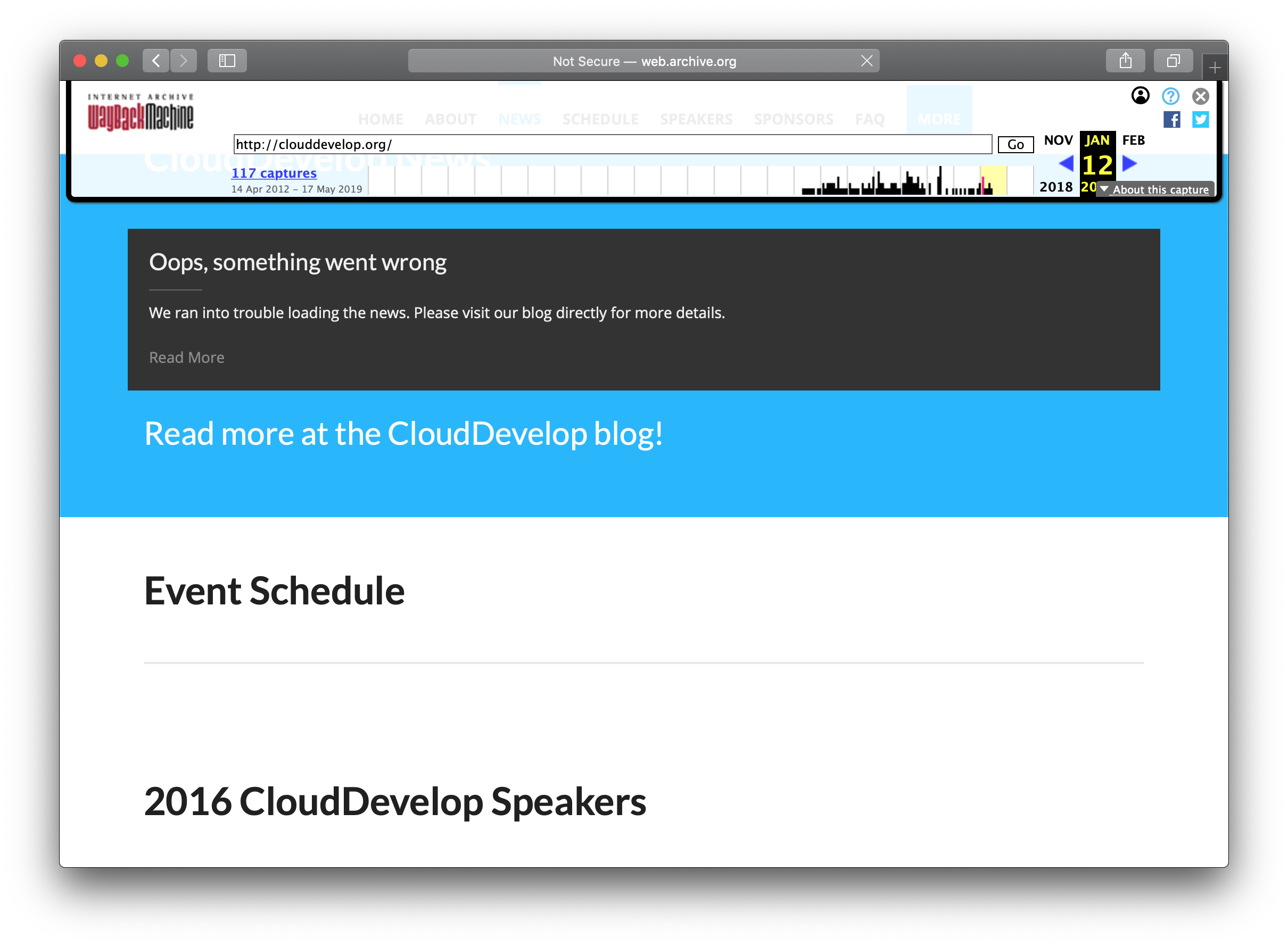
<p>Below is a screenshot of the CloudDevelop conference. The domain recently lapsed as the conference is no longer around. The site as captured by the Internet Archive doesn't have details on speakers or sessions.</p>

<p><img src="https://codeengineered.com/media/images/screen-shots/way-back-machine-clouddevelop.png" alt="CloudDevelop conference as seen by Internet Archive" /><!--break--></p>

<p>CloudDevelop isn't the only website with this type of problem. Another conference example is <a href="http://web.archive.org/web/20200104112529/https://events19.linuxfoundation.org/events/kubecon-cloudnativecon-north-america-2019/schedule/">the schedule for KubeCon + CloudNativeCon North America 2019</a>. There are numerous non-conference sites suffering from the same problem. For example, <a href="http://web.archive.org/web/20191215074751/https://dzone.com/users/1229847/mattfarina.html">my profile page on DZone</a> does not list any of my content.</p>

<p>This all has to do with the way the sites are being built. It's a <em>how</em> problem. It's baked into the patterns and technologies we are using.</p>

<h2>Please Make Them Archivable</h2>

<p>Building sites that aren't being archived isn't good for us in the future. So often we need to refer back to data from the past. To find something we don't clearly remember. To search through the history of something. For nostalgia. For news reporting. For research. And much much more.</p>

<p>With that in mind... <strong>when you're building sites, please do so in a manner that's archivable.</strong></p>
]]></content>
  </entry>
  
  <entry>
    <title type="html"><![CDATA[Lessons Learned From The Stall of Drupal]]></title>
    <link href="https://codeengineered.com/blog/2020/lessons-learned-stall-drupal"/>
    <updated>2020-01-08T12:00:00-05:00</updated>
    <id>https://codeengineered.com/blog/2020/lessons-from-drupal</id>
    <content type="html"><![CDATA[<p><a href="https://drupal.org">Drupal</a> is a web platform, for lack of a better term, that I previously used a lot. I was a paid professional, like so many others. Drupal enabled people to build semi-complex websites quickly. This has lead me to keep an eye on it over the years.</p>

<p>When I was reading the <a href="https://insights.stackoverflow.com/survey/2019#technology-_-most-loved-dreaded-and-wanted-web-frameworks">2019 editon of the Stack Overflow survey</a> I noticed that Drupal is now the least loved and most dreaded of the "web frameworks". Yikes!</p>

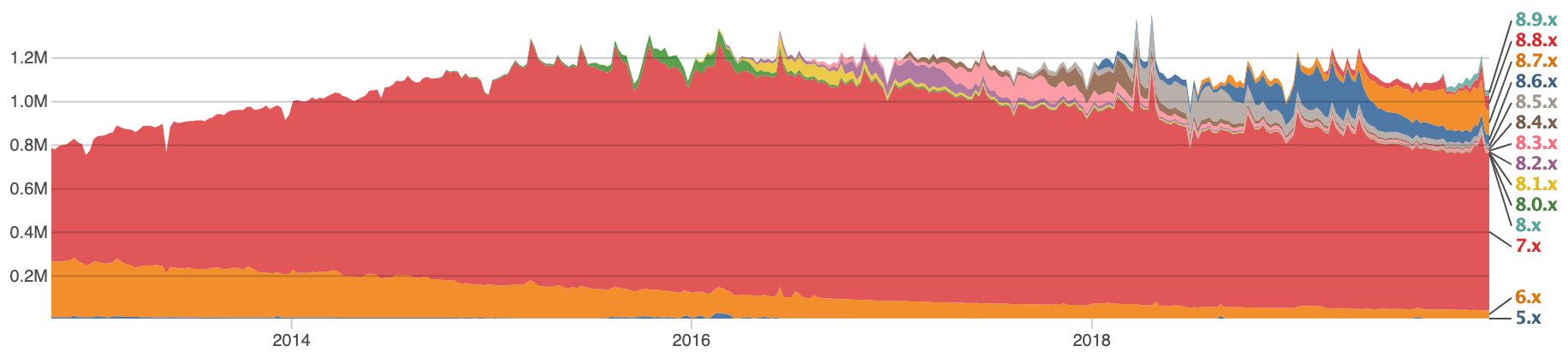
<p>Drupal sites can, also, report their version usage back to the Drupal project. The image below is a snapshot in time from the usage.</p>

<p><a href="https://www.drupal.org/project/usage/drupal"><img src="https://codeengineered.com/media/images/screen-shots/drupal-usage-2020.png" alt="Drupal usage up to January 2020" /></a></p>

<p>Drupal 7, which was superseded by Drupal 8 more than 4 years ago, still has 2.5 times the number of sites reporting in. And, Drupal usage has hit a plateau. Double Yikes!</p>

<p>As someone who works on other open source projects these days (ones that are currently fairly popular), I wanted to take some time to see what had changed with Drupal over time. What lead so many people to dislike it.<!--break--></p>

<h2>The Massive Rewrite</h2>

<p>Drupal 8 was a massive re-write. Some projects do this, from time to time, and this is one of those cases. The programming language didn't change and many of the terms, especially user facing ones were the same. The patterns used within the codebase changed massively.</p>

<p>This is important for a few reasons:</p>

<ol>
<li>Those who developed modules (Drupal extensions) had to learn a whole new way to do things. This was different from the past where the patterns were usually the same but there were new features, new APIs, and some API changes.</li>
<li>Instead of upgrading modules for the new version of Drupal they needed to be re-written to fit within the new system.</li>
<li>The way Drupal sites were styled was changed. "Themers" was a group of people who styled Drupal sites. Someone could learn the basics in a weekend and there are professionals who do this full time. This group had to learn a whole new way to style Drupal sites.</li>
</ol>


<p>This is a lot of change for the groups that dealt with Drupal sites day in and day out.</p>

<p>On the flip side there were benefits. For example:</p>

<ul>
<li>Drupal 8 follows modern PHP and software conventions. Drupal had long used many of its own design patterns. While some were still there, more typical computer science patterns are now used.</li>
<li>Instead of re-inventing the wheel with Drupal modules, people could more easily use existing PHP libraries. There are a lot of open source PHP libraries.</li>
</ul>


<p>The re-write highlights more than the style of PHP code. It gets into <em>who</em> is writing the code. Is it those who are used to low-code setups or is it professional programmers? What was it for Drupal 7 and earlier compared to Drupal 8 and beyond?</p>

<p>Despite the hurdles, I was left wondering why people didn't transition to Drupal 8. In <a href="https://amzn.to/35ywabL"><em>Badass: Making Users Awesome</em> by Kathy Sierra</a> there's a whole chapter on removing blocks. It comes from the idea that people are motivated, even a little bit. And, there are benefits to Drupal sites and Drupal professionals to switch. Kathy noted that,</p>

<blockquote><p>Working on what stops people matters more than working on what entices them.</p></blockquote>

<p>After working a little with Drupal 8 and talking with others who tried to make the leap I found that Kathy made a great general observation that applies to people making the Drupal 8 jump,</p>

<blockquote><p>A gap between what they wanted and what's actually happening</p></blockquote>

<p>People making the jump were having a hard time. For example, Drupal is known for doing a fair amount of magic. This is usually documented well. It's designed to help people. When I worked on a Drupal 8 module I found it difficult to figure out the <strong>new</strong> magic which wasn't documented. In my case I used a debugged to walk through Drupal to figure it out. Not something everyone is going to do.</p>

<p>Badass highlights two big derailers:</p>

<ul>
<li><strong>The Gap of Stuck</strong> - where users are motivated but get stuck learning the new thing</li>
<li><strong>The Gap of Disconnect</strong> - where the focus before you pickup the thing is context but after you pick it up it's tool</li>
</ul>


<p>Both of these are things, I think, affected Drupal. For example, people who try to learn Drupal 8 can easily get stuck as I did. I have talked to numerous people who fell into this bucket. It was difficult to learn. Or, there is the context of Drupal. Drupal was useful to quickly build websites. Even for those who wanted a low-code environment. This is the context. But, Drupal 8 was all about the tooling before the context of achieving the "quickly build websites" goal or people.</p>

<p>I don't mean to pick on the decision making here. Only in retrospect did I see some of these problems or understand them. <strong>The lessons on users that can be seen in Drupal are ones that can be applied to any project.</strong></p>

<h2>VC Money</h2>

<p>In 2007 when Dries (the founder and <a href="https://en.wikipedia.org/wiki/Benevolent_dictator_for_life">BDFL</a> of Drupal) graduated with his PhD he co-founded <a href="https://en.wikipedia.org/wiki/Acquia">Acquia</a> around Drupal. Acquia was a Venture Capital funded startup. This provided a shift that many of us didn't see coming at the time.</p>

<p>Prior to Acquia Drupal was lead by the needs of the people using it and contributing to it. This could have been small non-profits, hobbyists, and processionals building sites for the Fortune 500. Dries appeared to be focusing on the growth and usefulness of Drupal.</p>

<p>Once Acquia was founded the goals of venture capitalists were also in the mix. That included Drupal enabling Acquia to have a great return on its investment. To get a return on the investment, Drupal needed to be the kind of platform high paying customers would want to use and pay Acquia for some service.</p>

<p>What do those users want and how does it compare with the existing users of Drupal? For one, many of the developers at enterprise companies have computer science degrees. This is different from hobbyists who might right a small local web shop. The types of users are, in many ways, different.</p>

<p>Now, I don't mean to say that VC funding is bad. Just that it had an influence on direction. One that had a massive, even cultural, directional impact.</p>

<p>To counter this, we can take a look at projects run by a foundation. For example, we can take a look at Linux. Linus, the founder and BDFL, of Linux doesn't work for a single company with a single interest. Nor do the people who work closely with him. They work for a foundation and many companies - including large enterprises, bootstrapped small companies, and VC funded ones - belong to the foundation. No single company has an outsized influence which brings a certain amount of stability and knowledge of expectations to everyone.</p>

<p>This can lead to an interesting thought exercise and choice for our projects? What would Drupal have looked like if all the little companies had invested in a foundation where Dries was employed and he was looking out for all their interests? And, should your next big open source project be coupled to a single company or to some vendor-neutral home?</p>

<p>This is one of the reasons I appreciate the <a href="https://cncf.io">CNCF</a> being around for the cloud native projects I use and why I'm more interested in those with a truly vendor-neutral home than one of a company whose whims can change.</p>

<p>For me, when I evaluate my use of projects and what I do with my own projects I'm going to keep these lessons in mind.</p>
]]></content>
  </entry>
  
  <entry>
    <title type="html"><![CDATA[Usefulness of Security Audits]]></title>
    <link href="https://codeengineered.com/blog/2019/security-audits"/>
    <updated>2019-10-05T07:00:00-05:00</updated>
    <id>https://codeengineered.com/blog/2019/security-audits</id>
    <content type="html"><![CDATA[<blockquote><p>Today, the Helm Maintainers are proud to announce that we have successfully completed a 3rd party security audit for Helm 3. Helm has been recommended for public deployment.</p></blockquote>

<p><a href="https://helm.sh">Helm</a>, the package manager for Kubernetes, <a href="https://helm.sh/blog/2019-11-04-helm-security-audit-results/">just completed its first security audit</a>. This is one of the benefits of being a CNCF project.</p>

<p>As with every security audit I've been involved with, I learned something new. I was also reminded of some things I've forgotten. <strong>Reading the results of the security audit were a benefit to me, personally.</strong> They helped with my growth.<!--break--></p>

<p>While many security audits are kept private within organizations, audits by organizations like the <a href="https://cncf.io">CNCF</a> are made publicly available.</p>

<p>Cure53 performed the Helm security audit, has performed audits for other CNCF projects, and has performed audits for others. When they can, the audits are made <a href="https://cure53.de/#publications">publicly available</a>. If you enjoy reading white papers or long articles to learn something, these papers are a great place to start.</p>
]]></content>
  </entry>
  
  <entry>
    <title type="html"><![CDATA[Go Modules and Major Versions]]></title>
    <link href="https://codeengineered.com/blog/2019/go-mod-major-versions"/>
    <updated>2019-09-13T12:00:00-04:00</updated>
    <id>https://codeengineered.com/blog/2019/go-mod-major-version</id>
    <content type="html"><![CDATA[<p>Working with Go modules whose major version is 2 or greater is different than working version 0 or 1 and is different than doing so with the tools that came before it like dep and glide. There are changes that need to be made to both the module and the way it's consumed. Having had to work through this with <a href="https://github.com/Masterminds/semver">semver</a>, here are some practical things I've learned along the way.<!--break--></p>

<h2>go.mod Module Name</h2>

<p>Once you hit v2 of a module, which is often the code in a repository, the <code>go.mod</code> file needs some changes. For example, the first line of the semver package for v1 would have been:</p>

<pre><code>module github.com/Masterminds/semver
</code></pre>

<p>When it moved beyond v1 it had to change. For example, here is the change for v3:</p>

<pre><code>module github.com/Masterminds/semver/v3
</code></pre>

<p>The version is in the module path.</p>

<h2>Changes Using <code>go get</code></h2>

<p>Using <code>go get</code> to retrieve a version changes as well. With version 1 the command could look like:</p>

<pre><code>$ go get github.com/Masterminds/semver@v1.5.0
</code></pre>

<p>But, if you tried to change the version to v3.0.1, the latest v3 release at the time of this writing, you'd get an error. The major version needs to be part of the path. You would need to use:</p>

<pre><code>$ go get github.com/Masterminds/semver/v3@v3.0.1
</code></pre>

<h2>Requiring modules</h2>

<p>Requiring modules follows this same paradigm. This is for both the require statements within the <code>.go</code> files and the <code>go.mod</code> require statement.</p>

<p>For example, to require v3 the <code>go.mod</code> file pulling in semver would need to have a line like:</p>

<pre><code>require github.com/Masterminds/semver/v3@v3.0.1
</code></pre>

<p>and the <code>require</code> statements in the code would need to import <code>github.com/Masterminds/semver/v3</code>. The calls to functions in the package don't need to change unless you're working with multiple versions of the same package. For example, when importing v3 a call to <code>semver.NewVersion</code> would still work as expected.</p>

<p><strong>If the changes to the <code>import</code> statements aren't made Go will try get the latest v1 release, update the <code>go.mod</code> file to include the v1 release, and use that.</strong> This happens when running commands like <code>go build</code>. If you didn't know, <code>go build</code> can modify your <code>go.mod</code> file.</p>

<p>This is just a quick primer. There are more details in the Go wiki and docs if you need more details.</p>
]]></content>
  </entry>
  
  <entry>
    <title type="html"><![CDATA[SemVer v3 Released]]></title>
    <link href="https://codeengineered.com/blog/2019/semver-v3-released"/>
    <updated>2019-09-12T13:00:00-04:00</updated>
    <id>https://codeengineered.com/blog/2019/semver-v3</id>
    <content type="html"><![CDATA[<p>I'm happy to share that a new major release of github.com/Masterminds/semver, a semantic version package for Go, is here. This is version <a href="https://github.com/Masterminds/semver/releases/tag/v3.0.0">3.0.0</a>. This release was the result of following up on feedback, requests, and watching how semver was used in many real world situations. The v1 series is still in wide use and will be supported for some time. The work for that major version now happens on the <code>release-1</code> branch.</p>

<p>Let's take a look at what's new in v3.<!--break--></p>

<h2>What Happened To v2?</h2>

<p>You might be wondering, what happened to v2? Why jump from v1 to v3? When work on what would become <a href="https://github.com/golang/dep">dep</a> started there was a desire to make changes to the way semver worked. On a 2.x branch, Sam Boyer began work on a major overhaul and we'd hoped this would be the future of semver. But, a couple things happened that changed course.</p>

<p>First, dep is now being replaced by Go modules. The semver package isn't needed by it long term as dep is going to be archived, according to the Go team. The primary driver for it is gone and development stalled.</p>

<p>Second, many tools still use <code>go get</code> in their installation instructions and many people aren't using Go modules. That means changing the API can cause breakages in tools that depend on semver. This happens even when those tools use a dependency manager to set versions because some people are routing around that. This problem even came up in the development of v3 where a breaking change caused people to come to issue queues, file issues, and create PRs to route around the problem. This is extra support work.</p>

<p>Until the Go community is generally using tools that support versions as a group it is a bit of extra support work to break public APIs.</p>

<p>v2 is not ready for any tagged releases even though it has some use. For example, the documentation needs some large updates.</p>

<p>So, we skipped a version to avoid confusion. It's kind of like PHP 6 that way.</p>

<h2>Upgrade Path From v1</h2>

<p>Since the Go API didn't change the upgrade path is fairly simple. In your dependency management tool request v3. If you want to opt into the one change you can opt into see below. Before using the new version see the changes in the <a href="https://github.com/Masterminds/semver/releases/tag/v3.0.0">v3 announcement</a>.</p>

<h2>Changes</h2>

<p>If the API didn't have breaking changes then what did? Let's take a look.</p>

<h3>A Change To ^</h3>

<p>One of the biggest changes is to the <code>^</code> operator in comparisons. The way it evaluates ranges is different when the major version is 0. In that case it treats the minor version as the compatibility point unless the patch is specified. The docs share examples:</p>

<blockquote><ul>
<li>^1.2.3 is equivalent to >= 1.2.3, &lt; 2.0.0</li>
<li>^1.2.x is equivalent to >= 1.2.0, &lt; 2.0.0</li>
<li>^2.3 is equivalent to >= 2.3, &lt; 3</li>
<li>^2.x is equivalent to >= 2.0.0, &lt; 3</li>
<li>^0.2.3 is equivalent to >=0.2.3 &lt;0.3.0</li>
<li>^0.2 is equivalent to >=0.2.0 &lt;0.3.0</li>
<li>^0.0.3 is equivalent to >=0.0.3 &lt;0.0.4</li>
<li>^0.0 is equivalent to >=0.0.0 &lt;0.1.0</li>
<li>^0 is equivalent to >=0.0.0 &lt;1.0.0</li>
</ul>
</blockquote>

<p>This change is similar to the pattern in npm/js and Rust/Cargo. The difference from npm/js is the way prereleases are handled which you can read about in the semver documentation.</p>

<h3>Spaces and Commas</h3>

<p>And comparisons used to require a command between them (e.g., <code>&gt;=1.2.3, &lt;2</code>). The comma is now optional. It is still supported but not required. Like other tools <code>&gt;=1.2.3 &lt;2</code> is now supported for ANDing conditions.</p>

<h3>StrictNewVersion</h3>

<p>One feature that can be opted into for creating <code>Version</code> instances is the <code>StrictNewVersion</code> function. While parsing it will validate the version passed in was strictly speaking a semantic version. The <code>NewVersion</code> function in v1 and v3 has performed coercion to try and turn a version into a semantic version. For example, <code>v1.2</code> is not a valid semantic version. <code>StrictNewVersion</code> will return an error while <code>NewVersion</code> will return an object whose version is <code>1.2.0</code>.</p>

<h2>Take It For A Spin and Provide Feedback</h2>

<p>The release is out the door. There are more tests, including fuzzing. Please try it out and let us know how this works for you.</p>
]]></content>
  </entry>
  
  <entry>
    <title type="html"><![CDATA[PSA: Go 1.13 Default Module Proxy Privacy]]></title>
    <link href="https://codeengineered.com/blog/2019/go-mod-proxy-psa"/>
    <updated>2019-09-03T14:00:00-04:00</updated>
    <id>https://codeengineered.com/blog/2019/go-mod-proxy-psa</id>
    <content type="html"><![CDATA[<p>Go 1.13 was just released and by default is using a Google operated proxy to fetch module dependencies.</p>

<p>With Go modules came the inclusion of the ability to use a proxy when fetching dependencies in the form of modules. jFrog quickly launched <a href="https://gocenter.io/">GoCenter</a> to provide a high performance cache. Typically, pulling modules from GoCenter was much faster than getting them from someplace like GitHub. GoCenter was optimized for performance for this use case.<!--break--></p>

<h2>Google By Default</h2>

<p>With the release of Go 1.13 the <code>GOPROXY</code> defaults to <code>https://proxy.golang.org,direct</code>. This means that commands like <code>go get</code> and <code>go build</code> will attempt fetch modules from the Go Proxy, which is operated by Google and governed by the Google Privacy Policy. If the module is not present there, Go will try to fetch it from the source.</p>

<p>To Google's credit, the very first link you'll find when you visit https://proxy.golang.org/ is to the <a href="https://proxy.golang.org/privacy">privacy policy</a> where the information captured and the privacy policy is documented. I am happy they are sharing this information and being up front about it.</p>

<h2>Potential Leakage</h2>

<p>This could provide problems for proprietary software. Especially those developing competitive solutions to Google and aren't paying attention.</p>

<p>Consider the case where packages are private to a company. Maybe they are hosted on an internal Gitlab or GitHub Enterprise. These are for internal applications or proprietary software. Details about these packages will be sent to a proxy, by default the one operated by Google.</p>

<p>Just imagine the details one could piece together with this sort of information. You know one or a set of IPs is pulling a certain set of modules. Some public where you have the details and some private but the names leak a little about them. What could one surmise from this information? Especially if they have other data from other data sources to merge with this.</p>

<p>Being mindful of this sort of leakage is the kind of thing management at companies often try to pay attention to.</p>

<h2>Changing Your Configuration</h2>

<p>The Go team realized this problem which is why there are environment variables such as <code>GOPRIVATE</code> and <code>GONOPROXY</code> that can be used alongside <code>GOPROXY</code> to control the proxy configuration and information leakage.</p>

<p><em><strong>If you work on a proprietary piece of code in Go you should learn about these environment variables.</strong></em></p>

<p>These variables will let you control what is sent to the proxy and even have glob patterns matching. This is useful to have more fine grained control.</p>

<h2>Defaults Are A Big Deal</h2>

<p>A big concern is defaults. Most people operate using default settings most of the time. Many people aren't even aware of the settings that can be changed or their options. In the case of Go, I wouldn't be surprised if most developers using Go aren't aware this change is happening and it will silently take effect for them.</p>

<p>The impact of default settings isn't a new idea. Back in 2005 Jakob Nielsen wrote about <a href="https://www.nngroup.com/articles/the-power-of-defaults/">the power of defaults</a>. While the article starts out talking about search engines it does get into other interfaces. At that point it notes:</p>

<blockquote><p>Users rely on defaults in many other areas of user interface design. For example, they rarely utilize fancy customization features, making it important to optimize the default user experience, since that's what most users stick to.</p></blockquote>

<p>In this case, Google optimized the default user experience to send dependency information to them.</p>
]]></content>
  </entry>
  
  <entry>
    <title type="html"><![CDATA[Go Needs A Package Interoperability Group]]></title>
    <link href="https://codeengineered.com/blog/2019/go-package-interop"/>
    <updated>2019-07-17T11:00:00-04:00</updated>
    <id>https://codeengineered.com/blog/2019/golang-pig</id>
    <content type="html"><![CDATA[<p>Have you ever needed to pick a log package for a Go project? Should you use <a href="https://github.com/Sirupsen/logrus">logrus</a>, <a href="https://github.com/golang/glog">glog</a>/<a href="https://github.com/kubernetes/klog">klog</a>, the package in the standard library, or something else? The packages have different APIs making changes later a fair amount of work.</p>

<p>This is all made more complex when packages that aren't applications could or should leverage logging. These packages are essentially libraries. Sometimes they do a lot. I find need to be especially true when packages could benefit from debug level logging. As someone pulling packages in that depend on different logging packages it can be a bit of an inelegant mess. Next thing you know, applications have multiple dependencies on packages that do the same thing. Like Kubernetes which depends on 5 logging packages.</p>

<p>Logging is just one example of this problem. There are many others. Most recently I was looking at metrics.</p>

<p>We can do better.<!--break--></p>

<h2>Going Where Others Have Gone Before</h2>

<p>PHP, the <a href="https://w3techs.com/technologies/overview/programming_language/all">extremely popular</a> and often decried language, used to have a similar problem. There were frameworks and "platforms" that were mostly separate from each other. Zend, Symphony, and Drupal are just a few examples. If you wanted a package that did something you needed to look for a package in that ecosystem to make sure there was API compatibility. Functionality wasn't portable due to API differences.</p>

<p>To try and solve this problem the <a href="https://www.php-fig.org/">PHP Framework Interoperability Group (FIG)</a> was created. <a href="https://www.php-fig.org/personnel/">People with a vested interest from different projects</a> came together and created a set of <a href="https://www.php-fig.org/psr/">PHP Standards Recommendations (PSR)</a>.</p>

<p>Often the PSRs are interfaces, like <a href="https://www.php-fig.org/psr/psr-3/">the Logging Interface</a>. When this happens there is a package that can be imported with the interface (<a href="https://github.com/php-fig/log">like the log one</a>).</p>

<p>Their message is pretty clear:</p>

<blockquote><p>Welcome to the PHP Framework Interop Group! We're a group of established PHP projects whose goal is to talk about commonalities between our projects and find ways we can work better together.</p></blockquote>

<h2>Go Could Use The Same Thing</h2>

<p>Go could use something similar. What would working in Go look like if there was a set of Go Standards Recommendations (GSR) for Go APIs to functionality like logging, metrics, tracing, and other things? There are some obvious benefits:</p>

<ul>
<li>You could have one package implementing a piece of functionality and inject to other packages that need it</li>
<li>If a package is no longer maintained it's straight forward to swap it out for another package</li>
<li>When someone wants to start a new project in a common area it can be easily used</li>
<li>Smaller dependency trees in applications and less repeating</li>
<li>Testing and mocking becomes less work and easier</li>
</ul>


<p>Is it time for a Go Package Interoperability Group? I believe it would be a benefit to those building packages and applications in Go.</p>
]]></content>
  </entry>
  
  <entry>
    <title type="html"><![CDATA[Glide, Go Modules, and Go Dependency Handling]]></title>
    <link href="https://codeengineered.com/blog/2019/glide-go-modules"/>
    <updated>2019-07-10T16:00:00-04:00</updated>
    <id>https://codeengineered.com/blog/2019/glide-go-modules</id>
    <content type="html"><![CDATA[<p>Before <a href="https://github.com/golang/go/wiki/Modules">Go Modules</a> and <a href="https://github.com/golang/dep">Dep</a> there were numerous dependency managers including <a href="https://github.com/Masterminds/glide">Glide</a>. Glide had a lot of users and a growing following. But, when <a href="https://docs.google.com/document/d/18tNd8r5DV0yluCR7tPvkMTsWD_lYcRO7NhpNSDymRr8/edit">a committee of gophers decided to go in the direction that lead to Dep</a> I was happy to have a single tool. Then when Go Modules came along I expected the single tool to continue as alternatives would be almost impossible.</p>

<p>By this time I expected people to be migrating from Dep to Go Modules. What I didn't expect was the number of people still using Glide.<!--break--></p>

<h2>Glide Usage</h2>

<p>There were some blocking bugs in Glide that pushed me to release <a href="https://github.com/Masterminds/glide/releases/tag/v0.13.3">v0.13.3</a> with bug fixes. When I did that I took some time to look at Glide usage. I was surprised at the amount of usage.</p>

<p>Here are a couple data points:</p>

<ul>
<li>Via <a href="https://brew.sh">brew</a>, the macOS package manager, there were over 70,000 downloads in the past year. In that time period there was only one release. Over that time the downloads were at a consistent rate and did not go down.</li>
<li>On weekdays there are more than 900 unique clones on average.</li>
</ul>


<p>While data points like these don't provide a comprehensive picture, they provide some insight into continued use.</p>

<p><em>Note, I do wish GitHub provided download numbers for attachments to releases.</em></p>

<h2>The Future of Glide</h2>

<p>Go Modules are planning on exiting being an experiment (a.k.a. going generally available) with Go 1.13 and <a href="https://github.com/golang/go/issues/29639#issuecomment-454509924">Dep will be archived shortly after</a>.</p>

<p>Glide hasn't been actively worked on since Deps early days. The Glide maintainers are busy on other things.</p>

<p>You can see where this is going.</p>

<p>Unless major issues arise in modules that necessitate more tooling I would expect Glide to stay in the same state it's in.</p>

<h2>Thanks For All The Use</h2>

<p>I want to take a moment to thank everyone who used Glide. It had more use than I imagined it would. It delights me that it was useful enough so many used it and continue to use it. Thanks for picking up Glide and putting it to good use.</p>
]]></content>
  </entry>
  
  <entry>
    <title type="html"><![CDATA[Multicloud: Why It Matters]]></title>
    <link href="https://codeengineered.com/blog/2019/why-multicloud"/>
    <updated>2019-06-10T10:55:00-04:00</updated>
    <id>https://codeengineered.com/blog/2019/why-multicloud</id>
    <content type="html"><![CDATA[<p>No vendor, service provider, or thing supplying your organization is impervious to problems. This is why many large companies have corporate policies requiring the use of multiple suppliers. Just in case.</p>

<p>When it comes to cloud providers with multiple regions and availability zones in each region it can be easy to think that leveraging those with distributed applications is enough. But, as recent events have highlighted this is often not enough. To illustrate this let's look at two examples.<!--break--></p>

<h2>Digital Ocean Locks Service</h2>

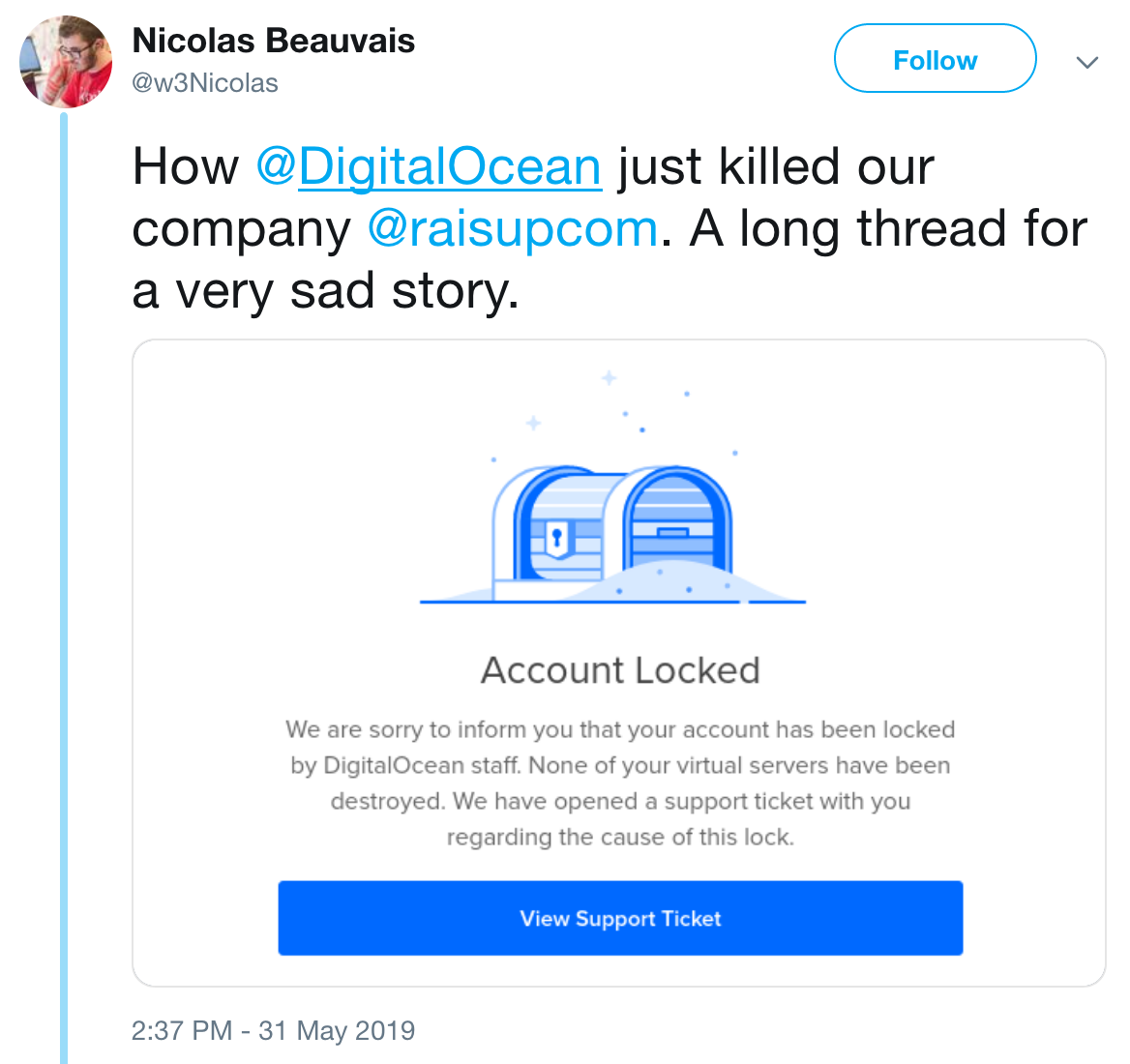
<p><a href="https://twitter.com/w3Nicolas/status/1134529316904153089"><img src="https://codeengineered.com/media/images/screen-shots/digitalocean-raisupcom.png" alt="" /></a></p>

<p>To improve performance in their service, Raisup has a script that ran every 2-3 months. It was a sudden increase in resource usage. Digital Ocean (DO) has automation in place to try and catch malicious actions (e.g., someone hacking an account and using it to mine crypto currency with someone else paying). DO locked the Raisup account. It took their service down.</p>

<p>I've seen numerous reasons for cloud provider accounts to be locked. Sometimes it's accidental, sometimes it's a hack, and it can hurt an organization every time.</p>

<p><strong>In a good multicloud setup the system can detect when the service in one cloud goes offline and direct traffic to the service in the other provider.</strong> The customers still have the service.</p>

<h2>Google Cloud Outage</h2>

<p>Google is known for their reliability. They tend to do an amazing job with keeping their services online. But, <a href="https://status.cloud.google.com/incident/compute/19003">on June 6, 2019 there was a major network outage</a>. This took down Google services and those running in Google Cloud in a variety of regions. Yikes.</p>

<p>This didn't just impact watching cat videos on YouTube. There were examples of IoT locks on homes not working because they relied on a web service. That may be inconvenient for adults but can be a real problem when kids or the elderly are involved.</p>

<p>This is just an example. Amazon Web Services and Microsoft Azure have had outages, too.</p>

<p>No service provider, no matter how large they are, is impervious to outages.</p>

<h2>Multicloud Is More Fault Tolerant</h2>

<p>There is some added complexity with setting up a multicloud environment and there may be some additional costs. But, a good multicloud setup can avoid these outages. Multi-AZ applications are resilient to AZ failures. Multi-region apps are resilient to region failures. Multicloud applications are resilient to whole cloud provider problems.</p>

<p><em>They don't have to be that hard, either. For example, you can install Kubernetes in each location and run your application there. The install into Kubernetes is portable from one Kubernetes instance to another.</em></p>
]]></content>
  </entry>
  
  <entry>
    <title type="html"><![CDATA[Kubernetes: Long Label Names and UX]]></title>
    <link href="https://codeengineered.com/blog/2018/k8s-long-label-names"/>
    <updated>2019-06-03T04:00:00-04:00</updated>
    <id>https://codeengineered.com/blog/2018/k8s-long-labels</id>
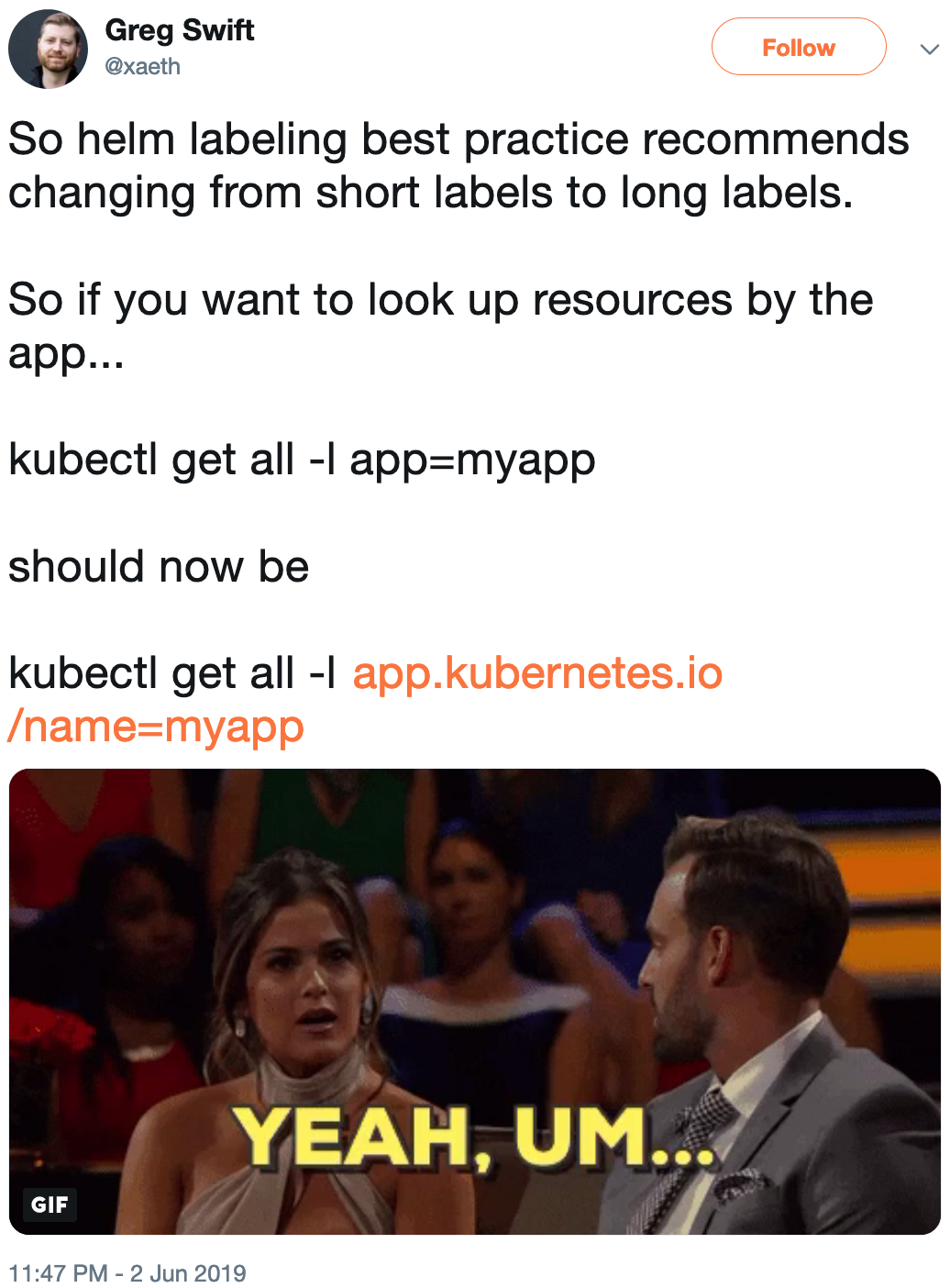
    <content type="html"><![CDATA[<p>Over on Twitter, <a href="https://twitter.com/xaeth/status/1135392611903180800">Greg Swift brought up an issue of the long Kubnerntes label names</a>.</p>

<p><img src="https://codeengineered.com/media/images/screen-shots/greg-swift-k8s-long-labels.png" alt="" /></p>

<p>These labels names are <strong><em>not</em></strong> a Helm-ism. Rather <a href="https://kubernetes.io/docs/concepts/overview/working-with-objects/common-labels/">they are called out in the Kubernetes documentation</a>. <strong>This is a Kubernetes-ism.</strong> One that has a lot of valuable information in the context and reasoning.<!--break--></p>

<h2>Where Did They Come From</h2>

<p>For a long time there was no documentation or standard practice on these sorts of labels. That meant that different people used different conventions. This was terrible for interoperability between tools.</p>

<p>One of the goals of the now completed <a href="https://github.com/kubernetes/community/tree/3eee635887790cda85fef4986c104f20f37aeb5e/archive/wg-app-def">Application Definition Working Group</a> (App Def WG) was to make interoperability better. This would help people who wanted to deploy with Helm and view the app in a dashboard. Or, it would help people if they wanted to migrate between tools. Or any number of other actions. If multiple tools speak the same labels it's good for interoperability and end-users.</p>

<p>We'll come back to end-users in a moment because they are really important.</p>

<p>In the labels the <code>app.kubernetes.io</code> is a prefix. The prefixes need to follow DNS rules and the long standing pattern is to spell out Kubernetes rather than use the shorter k8s.</p>

<p><a href="https://kubernetes.io/docs/concepts/overview/working-with-objects/labels/">In the documentation on labels it also says</a>:</p>

<blockquote><p>If the prefix is omitted, the label Key is presumed to be private to the user. Automated system components (e.g. kube-scheduler, kube-controller-manager, kube-apiserver, kubectl, or other third-party automation) which add labels to end-user objects must specify a prefix.</p></blockquote>

<p>Whether to prefix or not was heavily discussed. It wasn't just a matter of policy. It was about actions that cannot be undone and UX.</p>

<p>When something takes over an item in the global space, without using a prefix, it cannot be easily changed later. That name is in use, has meaning, needs to follow a deprecation policy, and users have expectations on it staying around. This was noticed and talked about.</p>

<p>After performing some research which looked at what metadata tool developers used or wanted to use, a list of names was created and discussed. The list was filtered down, discussed, analyzed, and picked at. Eventually, the final output was turned into the <a href="https://kubernetes.io/docs/concepts/overview/working-with-objects/common-labels/">Recommended Labels</a> documentation.</p>

<p>The recommended labels is what Helm moved to. It was a move designed to make Helm more interoperable with other tools.</p>

<h2>User Experience (UX)</h2>

<p>If you use these longer label names with <code>kubectl</code> you know the experience isn't great. It was a step back. The App Def WG knew that. So, why would they make some UX worse?</p>

<p><a href="https://twitter.com/kelseyhightower/status/1100071398402334721">Kelsey Hightower, over in a Twitter thread made an interesting comment</a>:</p>

<blockquote><p>most people can only relate to kubectl, which has its own way of doing things.</p></blockquote>

<p>A lot of people who have been around Kubernetes are <code>kubectl</code> users. I would argue for Kubernetes to really grow this is going to change. This is something I started to consider when members of the App Def WG brought it up (I wish I could remember who that was).</p>

<p>At the Kubernetes Contributor Summit in Seattle 2018, <a href="https://www.youtube.com/watch?v=WDZ6Igc5T7E">Brian Grant gave a talk on a Technical Vision for Kubernetes</a>.</p>

<p><img src="/media/images/screen-shots/brian-grant-k8s-summit-2018.png" alt="" /></p>

<p>In the talk he called out where he believed Kubernetes was in the <a href="https://en.wikipedia.org/wiki/Technology_adoption_life_cycle">technology adoption life cycle</a>. After reflecting on this, I think Brian is about right on the location of Kubernetes. We can debate about a little to the right or left but the general area is about right, in my opinion.</p>

<p>For people who use Kubernetes regularly this can be a hard location to consider. Especially for people who pour a lot of their weekly time or have been around the project a long time.</p>

<p>When Kubernetes is adopted by the majority, especially if it gets to the late majority phase, the interactions with the API and the metadata it stores will be different. The App Def WG was not designing for the tools we have today but for the tools that will come. The tools we need to come for the majority.</p>

<p>These tools may be other command line clients, more graphical user interface (GUIs), interactions with other systems, and much more.</p>

<p>This doesn't mean that <code>kubectl</code> will be used less. It should grow in use but be a smaller percentage of the overall API use.</p>

<p>If you're not sure why people would use other tools than those we have today, I would challenge you to learn about the needs of the majority.</p>

<p>As better tools show up for many of the people we hope will come join the Kubernetes party they will need to inter-operate. These labels will hopefully help them do that.</p>
]]></content>
  </entry>
  
  <entry>
    <title type="html"><![CDATA[An Analogy On Solution Building]]></title>
    <link href="https://codeengineered.com/blog/2018/analogy-on-solution-building"/>
    <updated>2019-02-22T10:20:00-04:00</updated>
    <id>https://codeengineered.com/blog/2018/analogy-on-solution-building</id>
    <content type="html"><![CDATA[<p>Over the years people have asked about breaking <a href="https://helm.sh">Helm</a> up into a set of smaller tools. For example, one for templating, one for application metadata, one for packaging bundles up, and so forth.</p>

<p>To understand why Helm doesn't break things up, which is a lesson for other projects as well, let's look at an analogy...<!--break--></p>

<h2>Crossing A River</h2>

<p>Imagine a group of people needing to cross a river. Some people will just want a bridge to go over the river. Others will want the wood, nails, saw, and hammer to build the bridge themselves. This second group will use the tools to build their own bridge. In addition to the bridge they may build buildings, art, or numerous other things.</p>

<p>Different groups of people will want different things. The first group, that just wants a bridge, may have other things they need to do and there can be many of these people. If they put in the time to each build their own bridge there will be a lot of different bridges. If they had something else to do, such as go to a neighboring village, their time to do that will be less because they put in a bunch of time to build a bridge.</p>

<p>The second group, that wants the parts, will be able to experiment, try new things, and build some amazing things. For them, having the tools to build different things is empowering and their primary effort can often be to create these new things.</p>

<h2>Relating To Software and Helm</h2>

<p>This analogy showcases different types of people whose goals and needs are different. When developing software it is important to know who the end users are. One thing can't be built to solve all problems for all people.</p>

<p>One of the lessons I've learned is that most organizations are focused on their particular problem space and want the supporting parts to just work. The rise of Software as a Service and Functions as a Service illustrate this. People want to spend more time on their particular problem and not on supporting elements to building a solution.</p>

<p>When it comes to Helm we have identified <a href="https://github.com/helm/community/blob/master/user-profiles.md">who our users are</a>. From the analogy, it is people who want to cross the river and not people who want to build things like bridges.</p>

<h2>Applying This To Your Projects</h2>

<p>If you are building a software project I would suggest figuring out who your users are and what their needs are. This may be very different from your own. I would suggest putting these in writing and taking some time to collect data on these folks.</p>

<p>Knowing what end users need is a great way to apply focus to what needs to be delivered and what would be useful.</p>
]]></content>
  </entry>
  
  <entry>
    <title type="html"><![CDATA[Business Case For Using Kubernetes]]></title>
    <link href="https://codeengineered.com/blog/2018/kubernetes-biz-case"/>
    <updated>2018-11-05T10:30:00-05:00</updated>
    <id>https://codeengineered.com/blog/2018/kubernetes-biz-case</id>
    <content type="html"><![CDATA[<p><a href="https://kubernetes.io">Kubernetes</a> is one of the hot technologies in cloud. But as many have learned, chasing after the hot technologies does not equate to more cost effect infrastructure, happier developers, or a better overall cost structure. I'm aware of numerous cases where making a change ended up costing more without seeing gains elsewhere leading to a worse total cost of ownership (TCO). This is exactly the kind of situation business decision makers want to avoid. Just because technology is hot doesn't mean it's useful.</p>

<p>With that in mind, let's take a look at the business case for Kubernetes including being a little honest on the rough spots that could have a negative impact.<!--break--></p>

<h2>The Benefits</h2>

<p>There are benefits to using Kubernetes that can shift the TCO in a businesses favor. These are guidelines and anyone considering the switch should look at how their workloads and case maps to these guides. Let's take a look at a few of these benefits.</p>

<h3>1. Higher Infrastructure Utilization</h3>

<p>The way Kubernetes schedules containers can end up with a higher infrastructure utilization than typical virtual machines packaged workloads running under virtualization in VMware or a public cloud.</p>

<p>This is not to say that public clouds or VMware are bad. It has to do with the model. Kubernetes treats a cluster of servers as a single computer where Kubernetes is the operating system. Google, with borg – the precursor to Kubernetes, runs warehouses as computers. The containers are a small unit of work that is intelligently scheduled. Virtual machines are a larger unit of work and the way they handle space and spare cycles is different.</p>

<p>The difference in the model opens the door for scheduling more work on infrastructure leading to greater density. This leads to lower infrastructure needs.</p>

<p>Now, this is a general rule. It's not perfect. There are exceptions due to how workloads run and their needs.</p>

<h3>2. Workload Portability</h3>

<p>Once you've started using a public cloud you quickly get locked in with the vendor APIs. Using AWS? You might be using cloud formation, AMIs, and scripts in your favorite automation system targeting their APIs. The same holds true if you're in Azure or Google Cloud.</p>

<p>We could look at this the way we looked at Platforms of the past like Windows and Linux. It was a decision to pick one. <strong>But, wouldn't it be great to be able to easily migrate workloads from one cloud to another? Wouldn't it be great to be able to negotiate price with a public cloud and run workloads where it's the most cost effective? And, to have a low cost to migrate from one place to another?</strong></p>

<p>If you spend millions per year on cloud hosting, which many do, there is an opportunity to save plenty of money here. Money to re-invest back into the business. Money for profits. Money to fund new ideas. Money for some employee benefits.</p>

<p>A workload in Kubernetes can be run in clusters from varying providers. It's not uncommon for me to run a workload in Kubernetes running in Google's Cloud and then run the exact same workload in Kubernetes running in Azure. I do this today.</p>

<p>Now, there are times where you may want to tweak things in the config per provider. Tools like <a href="https://helm.sh">Helm</a> and the logic it affords in templates let you do just that.</p>

<h3>3. Fault Tolerant By Default</h3>

<p>In traditional situations applications run on their set of hardware or virtual machines. If something happens to some hardware the workloads running on that infrastructure has issues. That's because application workloads are assigned to infrastructure.</p>

<p>Kubernetes treats infrastructure, including numerous servers, a computer with hot swappable parts. For example, if a virtual machine running some workloads as containers fails then Kubernetes will schedule the work elsewhere.</p>

<p>As long as you run a multi-node cluster you get this fault tolerance out of the box.</p>

<h2>The Risks</h2>

<p>As with any system there are risks everyone should be aware of. These are the state of Kubernetes as of the writing of this post and they are being actively worked on.</p>

<h3>1. Software Services</h3>

<p>When we run applications we often will use a Software as a Service for things we need but are not our core competency. A common example is using a database such as MySQL. Why operate it yourself when you can get it via an API request where someone else makes sure it's running?</p>

<p>There are many common services that all of the major public clouds offer. Yet, each of them does so with a different API. That means to get to that service you need to speak the API of the cloud provider before that common API, such as the MySQL one, is available.</p>

<p>This is a pain point for portability.</p>

<p>Kubernetes sought to solve that with the Service Catalog built on the Open Service Broker. This work does provide some portability. But, it lacks good support for all the major cloud providers, it's development pace has slowed, and there are some cross cloud issues still open.</p>

<p>It does provide a means for some portable services use between providers.</p>

<p>Unfortunately, the current path – driving largely by the cloud vendors who have focused on their APIs – has not moved quickly enough for the users. Due to that it's still an open risk and one we are working on new plans to mitigate. If you want to be involved please feel free to let me know.</p>

<h3>2. Developer Tools and Documentation</h3>

<p><strong>Kubernetes is hard.</strong> If you're used to Cloud Foundry, where you can have a few lines of YAML to describe an application, the hundreds you'll need in Kubernetes can seem hard to grasp.</p>

<p>The Kubernetes project is not trying to directly address these. Instead, this is a space for the ecosystem of projects around Kubernetes. Developers have their own styles. That's why we have Ansible, Chef, and Puppet. That's why there are famous debates on Vim vs Emacs. The Kubernetes project can provide a kernel but it cannot make everyone happy.</p>

<p>This is a space where there are many ecosystem projects such as <a href="https://helm.sh">Helm</a>, <a href="https://www.telepresence.io/">Telepresence</a>, <a href="https://draft.sh">Draft</a>, <a href="https://kubeless.io/">Kubeless</a>, and many many others. You can learn about many of them in <a href="https://landscape.cncf.io/">the CNCF Landscape</a>.</p>

<p>This is a risk because the space is not mature. Many of the technologies still have a long way to go and the documentation around them is not all that great.</p>

<p>To mitigate this risk we need more tools by application developers for application developers and more documentation and books teaching people and making it easier. This is going to take more time.</p>

<h2>Conclusion</h2>

<p>This is where you need to draw your own conclusions. Will it be cost effective and useful to adopt Kubernetes? If you want to change people's minds a good place to start is with a business case that highlights the value for your organization. Hopefully these points help you with that.</p>
]]></content>
  </entry>
  
  <entry>
    <title type="html"><![CDATA[Two Things I Want From Public Clouds]]></title>
    <link href="https://codeengineered.com/blog/2018/want-in-public-clouds"/>
    <updated>2018-10-17T12:15:00-04:00</updated>
    <id>https://codeengineered.com/blog/2018/i-want-in-public-clouds</id>
    <content type="html"><![CDATA[<p>Public clouds are growing at a tremendous rate and many are moving at least some of their workloads to the public clouds. As I use these clouds – the plural being intentional - I continue to see more and more I would like out of them. This post contains two from that list with some details. I hope I'm not the only one looking for the same things.<!--break--></p>

<h2>Support!</h2>

<p>When a company is spending millions – an all too common number – on a cloud service provider they typically want to have good support. If something breaks you might need to make a phone call. If you find a bug you might need a path to report it and find out the status on it. You may even want to have people to lobby for features.</p>

<p>Consider this, if a consumers cable Internet goes out they have someone to call. There they can find out status on things being resolved. They may even talk with a real person to help them with a problem. This is a consumer grade support.</p>

<p>Shouldn't a business grade service at least offer this level of support? It may come in different ways. For example, a status website with updates or someone online documentation explaining how things work. <em>This isn't enough for business grade.</em> There are still cases where someone has an issue with their account that's not common or they find a bug where they found an edge case. I've personally run into both of these situations across multiple major public clouds. For these cases there needs to be business grade support for those businesses.</p>

<p>This is a request because not every major public cloud does this well enough.</p>

<h2>Standard APIs</h2>

<p>Public clouds are more like operating systems than utilities in the way people interact with them. Consider this, in the US I get electricity at a standard voltage at a relatively standard frequency coming to my home. It doesn't matter who the electricity provider is. To work with that power I can buy appliances from many companies, switches and outlets from still others, and everything works interchangeably. I can even take pieces from one place and hook them up in another. The interfaces and interactions are all in common specs.</p>

<p><strong>This common spec scenario serves customers.</strong></p>

<p>Public clouds have their own APIs. Building applications for them can be as different as building a Windows and Mac application. They are different platforms. This helps enable vendor lock-in. It serves the vendors.</p>

<p>But, many companies have a policy of no single source providers. This isn't an IT policy but a company policy. Any major item in their logistics pipeline can't be sole sourced. That means many IT departments needs to work with more than one cloud provider.</p>

<p>This is, in many ways, a good thing for consumers. But, that's a story for another time.</p>

<p>Here's a common annoyance to prove my point. How annoying is it to write object storage integration for each major public cloud into apps? It's incredibly annoying. There are now at least 3 different APIs, and some would argue more, that need to be supported by numerous apps. Why can't we have standard APIs?</p>
]]></content>
  </entry>
  
  <entry>
    <title type="html"><![CDATA[DCO Signoff In GitHub UI]]></title>
    <link href="https://codeengineered.com/blog/2018/dco-signoff-github-ui"/>
    <updated>2018-09-21T12:45:00-04:00</updated>
    <id>https://codeengineered.com/blog/2018/dco-signoff-github-ui</id>
    <content type="html"><![CDATA[<p>On the Helm charts project the maintainers occasionally use the GitHub UI to make quick changes to a pull request. This is typically to fix something in a README file or to increment a version. We are trying to help contributors who make minor typos, are not native english speakers, or who run into version immutability collisions.</p>

<p>When Helm moved to a <a href="https://www.helm.sh/blog/helm-dco/index.html">Developers Certificate of Origin</a> it meant those little changes made in the GitHub UI now needed a DCO signoff to pass. Remembering to add that and what exactly to type is a bit of a pain.</p>

<p>So, Scott Rigby who is one of the charts maintainers went and made <a href="https://github.com/scottrigby/dco-gh-ui">a browser extension for that</a>. It runs in Chrome and Firefox. Once installed you go to the preference to add you name and email address. After that the GitHub UI commit screens will have the DCO signoff pre-filled for you.</p>

<p><img src="https://codeengineered.com/media/images/screen-shots/dco-signoff-chrome-web-store.png" alt="dco signoff Firefox extension page" /></p>

<p>If you deal with DCO signoffs and the GitHub UI there is now an extension for that. Thanks Scott.</p>
]]></content>
  </entry>
  
  <entry>
    <title type="html"><![CDATA[Git Signoff Shortcut]]></title>
    <link href="https://codeengineered.com/blog/2018/git-signoff-shortcut"/>
    <updated>2018-08-28T11:00:00-04:00</updated>
    <id>https://codeengineered.com/blog/2018/git-signoff-shortcut</id>
    <content type="html"><![CDATA[<p>When <a href="https://www.helm.sh/blog/helm-dco/index.html">Helm moved from a CLA to a DCO</a> it meant I needed to start adding a signoff to my commits on that project. While git makes this almost easy, by using the <code>--signoff</code> flag, it means I need to remember to use the flag when committing.</p>

<p>To make it easier I created an alias so I can use <code>git cs</code> and it will commit with signoff.</p>

<p>To create the alias I ran the command:</p>

<pre><code>$ git config --global alias.cs 'commit --signoff'
</code></pre>

<p>After that, I had an alias I could use when using a signoff.</p>
]]></content>
  </entry>
  
  <entry>
    <title type="html"><![CDATA[Reinhard Nägele: Chopping Wood and Carrying Water]]></title>
    <link href="https://codeengineered.com/blog/2018/helm-unguiculus"/>
    <updated>2018-08-21T10:55:00-04:00</updated>
    <id>https://codeengineered.com/blog/2018/helm-unguiculus</id>
    <content type="html"><![CDATA[<p>"Chop Wood Carry Water" is metaphor for doing the hard and non-glamorous work. Open source projects can have a lot of this work. Especially those that are popular and have a community.</p>

<p>On the <a href="https://helm.sh">Helm</a> project, especially on <a href="https://github.com/helm/charts">Charts</a>, we have a lot of this work. <a href="https://github.com/unguiculus">Reinhard Nägele (a.k.a. unguiculus)</a> is far and away the one who has done the most to chop wood and carry water.<!--break--></p>

<p>Contributions to open source can be seen in ways beyond those measured by GitHub. To help us see those contributions the <a href="https://www.cncf.io/">CNCF</a> has developed <a href="https://devstats.cncf.io/">DevStats</a>.</p>

<p>The image below is a snapshot from the DevStats developer contributions for Helm. Reinhard Nägele, seen here by his GitHub handle of unguiculus, is in the top spot by a wide margin. He got there by chopping a lot of wood and carrying a lot of water.</p>

<p><img src="https://codeengineered.com/media/images/devstats-unguiculus-2018-08.png" alt="Reinhard Nägele (unguiculus) on DevStats" /></p>

<p>Reinhard, if you're reading this, I hope you know how much we appreciate all that you've done and continue to do.</p>
]]></content>
  </entry>
  
  <entry>
    <title type="html"><![CDATA[What is serverless, anyway?]]></title>
    <link href="https://codeengineered.com/blog/2018/what-is-serverless"/>
    <updated>2018-07-16T15:50:00-04:00</updated>
    <id>https://codeengineered.com/blog/2018/what-is-serverless</id>
    <content type="html"><![CDATA[<p>When DigitalOcean polled developers on serverless, for their <a href="https://www.digitalocean.com/currents/june-2018/">June 2018 issue of currents</a>, one of their findings was that half of developers did not have a strong understanding of serverless. Since serverless provides benefits for developers and operators in some situations it's worth understanding well enough to know how to leverage.<!--break--></p>

<h2>The Short Answer</h2>

<p><a href="https://twitter.com/swardley/status/1017056726393278465">Simon Wardley recently posted a short explanation to Twitter.</a> He's an analyst who has been following and mapping these technology trends.</p>

<blockquote><p>X : Can you explain what is serverless?</p>

<p>Me : The definition I use? Serverless is an event driven, utility based, stateless, code execution environment.</p></blockquote>

<p>While this is the gist, there are still many more relevant questions.</p>

<h2>The Server In Serverless</h2>

<p>Software runs on a computer. When we use a cloud provider the code is running on a server. So, why is it called serverless?</p>

<p>The short answer is that the developer, the person who deals with the business logic, does not need to be concerned with the server. The service provider handles it. This is about a contract and defined communication (API) between <em>two parties who handle separate concerns</em>.</p>

<p>The developer working on the business logic can focus on their business logic. The provider, who has to operate serverless instances across many people and for many reasons, can focus on running the workloads.</p>

<p><strong>Does it run in a virtual machine, in a container, inside a custom V8 setup, or something else?</strong> That's an implementation detail the provider is concerned with. It could change over time. They could even run them in different ways in different environments. It's a detail the provider can choose, change, and iterate on.</p>

<p>This could cause concerns over stability. What if an environment change caused a bug? For example, moving a JavaScript function from a virtual machine running node.js to a worker in V8. This would be on providers to ensure any change was handled well or loose customers and business. This is where <a href="https://en.wikipedia.org/wiki/Service-level_agreement">service-level agreements (SLAs)</a> can provide some level of trust, enticement, and safety net.</p>

<p>There are known advantages. For example, <strong>when a system security issue is found the provider can patch it everywhere for everyone rather quickly</strong>. No need to wait on all the service users.</p>

<h2>Events</h2>

<p><em>Another aspect of serverless is that the application does not have a server.</em> For example, that means the application logic does not have a web server waiting for requests. Instead, a unit of work executes when an event occurs.</p>

<p>Many things can trigger an event. Here are some examples:</p>

<ul>
<li>A web request to an API gateway (e.g., the <a href="https://aws.amazon.com/api-gateway/">Amazon API Gateway</a>). They run this so everyone else does not have to</li>
<li>A time of day or regular interval (<a href="https://en.wikipedia.org/wiki/Cron">Cron</a>)</li>
<li>A cloud provider internal event (e.g., a file uploaded to object storage)</li>
<li>A log entry (e.g., <a href="https://12factor.net/logs">12 Factor treats logs as event streams</a>)</li>
</ul>


<p>With no application server it become the job of the provider to execute the code when the event comes in. The provides an opportunity for service providers to optimize how this happens and change it over time.</p>

<p>For example, if an event only happens once per day the code may sit in storage and not in memory except when it's needed. Here no RAM or CPU is used unnecessarily. The provider can optimize around how it's loaded and run.</p>

<p>If the event is triggering regularly the provider can optimize for that. For example, the machine running the code can keep it ready to execute. Or, if the application is seeing a lot of scale the provider can scale machines handling this function horizontally.</p>

<p>These forms of optimizations are something providers can focus on. They may even <a href="https://blog.cloudflare.com/serverless-performance-with-cpu-bound-tasks/">boast about their capabilities like Cloudflare recently did</a>.</p>

<h3>CloudEvents</h3>

<p>Because so many providers are jumping on the serverless bandwagon and they have been doing so with differences in their APIs, the <a href="https://cncf.io">Cloud Native Computing Foundation (CNCF)</a> has stepped in to come up with a common event specification knows as <a href="https://cloudevents.io">CloudEvents</a>. The idea is to have a common open specification rather than many different proprietary ones.</p>

<p>At KubeCon/CloudNativeCon EU 2018, <a href="https://www.youtube.com/watch?v=_1-5YFfJCqM">Kelsey Hightower gave a demo using CloudEvents</a> that had a file uploaded to AWS S3 cause an event that ran in Google Cloud that translated the text of a file and uploaded the translation to S3. All while handling authentication. The demo uses a fair amount of demo code but highlights the possibilities.</p>

<iframe width="560" height="315" src="https://www.youtube.com/embed/_1-5YFfJCqM" frameborder="0" allow="autoplay; encrypted-media" allowfullscreen></iframe>


<h2>FaaS and Containers</h2>

<p>The most common form of serverless is <a href="https://en.wikipedia.org/wiki/Function_as_a_service">Functions as a Service (FaaS)</a>. AWS, Azure, and Google Cloud offer these out of the box. AWS calls these functions lambda.</p>

<p>Functions can run in a variety of places. For example, hey can run in general computing environments and can run on edge nodes. It all depends on what the provider offers. Both AWS and Cloudflare provide a means of running functions at the edge.</p>

<p>One of the current drawbacks to FaaS is the functions need to be uniquely crafted for each provider. This creates a form of vendor lock-in.</p>

<p>As an alternative to pure functions, containers are starting to show up on the serverless scene. A container image can hold what is needed to execute on an event. When an event occurs, a container can be started, receive the event, and perform the action before being shot down when completed.</p>

<p>There are both advantages and disadvantages to using a container instead of a pure function. For example, a container image can more easily encapsulate dependencies but limits the providers ability to innovate around the running of the workload.</p>

<p><img src="https://codeengineered.com/media/images/screen-shots/brigade.png" alt="Brigade" /></p>

<p><a href="https://brigade.sh">Brigade</a>, especially when paired with <a href="https://azure.microsoft.com/en-us/services/container-instances/">Azure ACI</a> to handle billing per use, is one example of a platform that provides container based serverless.</p>

<h2>Why Not PaaS?</h2>

<p>This sounds similar to a <a href="https://en.wikipedia.org/wiki/Platform_as_a_service">Platform as a Service (PaaS)</a>. There are some definite similarities. For example, the application code is handed to a PaaS and it figures out how to run it. Does Heroku use Docker or LXC? It doesn't matter because that's an implementation detail. The interface is around the application code.</p>

<p>There is one important difference. Applications in a PaaS present a server and are expected to be running in a way to accept connections. In serverless there is no need to run that server. Things happen based on events. The system to accept the event (e.g., HTTP request) is outside the code the application needs to supply.</p>

<h2>Developer Benefit and Experience</h2>

<p>There are some practical elements to the developers experience worth highlighting.</p>

<ul>
<li>Applications are written in a way that can scale horizontally really well</li>
<li>When the service goes down it's the responsibility of the provider to handle getting it back up. There's less work DevOps folks handling the business logic are going to be paged for</li>
<li>Payment is often based around when business logic runs. That time where a server is sitting idle isn't billed for because it's being used for something else. This has lead to some services being able to drastically lower their recurring bill</li>
<li>Most of the serverless providers have their own APIs. This leads to vendor lock-in. The <a href="https://serverless.com">serverless</a> project is attempting to make the experience better but there is only so much they've been able to do</li>
<li>Some applications, like high performance databases, are not appropriate for serverless. It's not a silver bullet</li>
</ul>


<h2>Conclusion</h2>

<p>Serverless provides a different paradigm from the way many applications are written. This can, sometimes, be useful. It's worth having in any developers tool belt.</p>
]]></content>
  </entry>
  
  <entry>
    <title type="html"><![CDATA[Helm vs Kustomize: Managing Complexity]]></title>
    <link href="https://codeengineered.com/blog/2018/helm-kustomize-complexity"/>
    <updated>2018-07-12T13:00:00-04:00</updated>
    <id>https://codeengineered.com/blog/2018/helm-kustomize-complexity</id>
    <content type="html"><![CDATA[<p>When <a href="https://github.com/kubernetes-sigs/kustomize">Kustomize</a> came into the spotlight conversations quickly moved to compare it to <a href="https://helm.sh">Helm</a>. We have it in our nature to debate tools. Just look at the long standing Vim vs Emacs debates. While these tools are really tangential to each other, there are elements to this discussion worth bringing to the surface and thinking though. One such worthy area is to look at who has to handle which parts of the complexity.<!--break--></p>

<h2>Kubernetes Is Complex</h2>

<p>Before we talk about managing complexity we need to look at the complexity itself.</p>

<p>Earlier this year there were a number of posts and conversions on social media about Kubernetes complexity. There was <a href="https://thenewstack.io/has-kubernetes-already-become-too-unnecessarily-complex-for-enterprise-it/">an article in The New Stack that briefly covered it</a>. There is a nice section in the article that hits home with the situation:</p>

<blockquote><p>“Kubernetes was designed by systems engineers, for systems engineers,” stated Kate Kuchin, an engineer with Heptio, during the last KubeCon. “Which is great, if you’re a systems engineer. For the rest of us, Kubernetes is really, really intimidating.</p></blockquote>

<p>Not everyone is a systems engineer. Not everyone needs to think about systems engineering problems. Julia Evans, on the Stripe blog, did an excellent job highlighting this thinking in her blog post titled <a href="https://stripe.com/blog/operating-kubernetes">"Learning to operate Kubernetes reliably"</a>. In the section <em>Making cron jobs easy to use</em> she notes:</p>

<blockquote><p>Our original goal was to design a system for running cron jobs that our team was confident operating and maintaining. Once we had established our confidence in Kubernetes, we needed to make it easy for our fellow engineers to configure and add new cron jobs. We developed a simple YAML configuration format so that our users didn’t need to understand anything about Kubernetes’ internals to use the system.</p></blockquote>

<p>The engineers working on business logic who needed cron jobs didn't need to know anything about Kubernetes to run them. Their scope isn't systems engineering. Stripe came up with a solution that hid Kubernetes knowledge away to make it simpler for those engineers. They managed who had to deal with which parts of the complexity. <strong>Application engineers didn't have to deal with systems engineer tasks or the knowledge to do them.</strong></p>

<h2>Everyone Is Trying To Manage Complexity</h2>

<p><a href="http://david.heinemeierhansson.com/">DHH</a>, the creator of <a href="https://rubyonrails.org/">Ruby on Rails</a>, recently gave a keynote at RailsConf. <a href="https://twitter.com/dhh/status/996541891020640257">His tweet, with a link to the video on it, highlights what the talk was about</a>:</p>

<blockquote><p>My RailsConf 2018 keynote about conceptual compression, liberating the best ideas from the grasp of complexity, the beauty of leaky abstractions, how our industry is backsliding, and facing alienation from the product of our labor. – DHH</p></blockquote>

<p>The keynote directly targets managing complexity. Managing complexity is a common problem that's not unique to Kubernetes.</p>

<p>I like to think of it in terms of a separation of concerns. Who needs to be concerned with what? Chip designers aren't concerned with with app business logic and vice versa. There are different concerns that all apply to making the same thing work. Some concerns are far enough away we may not even think of them.</p>

<p>In the cloud space there are some more practical example separations that reduce complexity:</p>

<ol>
<li>If you use an IaaS to manage your infrastructure you don't have to be concerned with racking and stacking of hardware. There is no need to think about network cables, switches, cooling, or those other concerns. The complexity and knowledge to handle it has been cleanly separated into layers that communication over an API</li>
<li>Functions as a Services, a subset of serverless, also push on this separation. Serverless isn't really server less because the code has to run somewhere. But, for business logic developers it is a case of <em>I don't need to be concerned with servers</em>. A separation of concerns has been clearly defined and an API put in place to manage communication</li>
</ol>


<p>In both of these cases complexity is managed by separating concerns and defining channels of communication. <strong>Those on each side of the separation can focus on their part of the problem.</strong></p>

<h2>Application Complexity</h2>

<p>On the Helm website under the section <em>"What is Helm?"</em> we have our basis for the conversation on complexity.</p>

<blockquote><p>Helm helps you manage Kubernetes applications</p></blockquote>

<p>The basis for a discussion on complexity management with Helm and Kustomize needs to start with applications. Managing the complexity for operating Kubernetes itself is an entirely different issue.</p>

<p>When it comes to managing complexing we should look at who needs to manage it. Here are a few roles:</p>

<ul>
<li><em>Application developers</em> - the people who write the business logic for an application. The applications they write could be run in Kubernetes, on a VM, or somewhere else. Their focus is on the business logic</li>
<li><em>Application operators</em> - those who need to operate an application in an environment</li>
<li><em>Environment developers and operators</em> - the systems engineers who build and operate an environment like Kubernetes, Mesos, or even a public cloud</li>
</ul>


<p>How much complexity do different people need to know. Do application developers need to know much, if anything, about Kubernetes? Do systems engineering handling the environment need to know how to write a modern we app? If we manage the complexity well we can separate the concerns.</p>

<h3>MySQL Complexity Example</h3>

<p>Examples help this to hit home and a common example is the long standing MySQL. MySQL is a great example because it is in wide use, can run in a container, VM, or on bare metal, and fits nicely with our next example.</p>

<p>To operate MySQL in Kubernetes is the job of the <em>application operator</em> role. This person needs to know both business logic for the application and how the environment (Kubernetes) works.</p>

<p>When it comes to the business logic they don't need to know everything. But, they do need to know how to configure it including handling things like replication, backups, and performance tuning.</p>

<p>To operate MySQL in Kubernetes they don't need to know everything about Kubernetes. Rather, they need to know about a handful of features around running workloads, using storage, and exposing services. They may also need to know how to handle running the application in different types of environments. You can't easily run MySQL the exact same in minikube as you can in an HA environment.</p>

<p>Their expertise is where the two things come together. A bit of the layers above and below them in the stack.</p>

<h3>Complexity Of Operating WordPress</h3>

<p>WordPress is a common example people are familiar with. It also depends on a database allowing us to look at the next level of complexity.</p>

<p>Like MySQL, an <em>application operator</em> needs to know the business logic of WordPress and the workload features of Kubernetes to make it run. <strong>But, WordPress depends on a database.</strong> That means someone needs to know the business logic of running the database and how to run it in Kubernetes. Is that the same application operator that's handling WordPress? Is there a way to encapsulate the complexity for a database, like MySQL, so the WordPress application operator doesn't need to be a MySQL operator as well?</p>

<p>With something simple, like WordPress, it can be easy to put it all on one person. But, what if the system has 10, 20, or more moving parts? The explosion of microservices means this is not uncommon.</p>

<h2>Helm, Kustomize, and Complexity</h2>

<p>Managing knowledge and complexity are a bit different between Kustomize and Helm. With all of this background we can now talk a little about them.</p>

<h3>Helm</h3>

<p>Helm encapsulates the components needed to operate an application into a package called a chart. The interface to the chart is a set of properties that can be passed into the chart at the command line or in a file. Helm charts are <a href="https://semver.org">semantically versioned</a> based around the API change to this values file.</p>

<p>In a chart, the business logic for the application and operational knowledge for Kuberentes are bundled so that the consumer of the chart does not need to know those details.</p>

<p>Helm charts can have dependencies on other charts. For example, a WordPress chart can depend on a MySQL chart. It does so using version ranges. The parent can capture properties and pass them to the dependency. Dependency handling logic, such as a decision to use a SaaS database or a dependent chart, can be handled through this interface as well.</p>

<p>Helm charts provide a means of handling complexity by separating the concerns into packages with an API. The flexibility is there to handle situations such as running WordPress in a public cloud while using a SaaS in production and letting a developer in minikube use a locally run MySQL server via a dependent chart.</p>

<p>Helm intentionally focuses on application operation, separation of concerns, and managing complexity.</p>

<h3>Kustomize</h3>

<p>Kustomize takes an entirely different approach. Since Kustomize is not a direct competitor to Helm this isn't the case of one should win out over the other. It's a matter of knowing how a tool does things to know when to use it.</p>

<p>The tag like for kustomize on GitHub hints at the purpose:</p>

<blockquote><p>Customization of kubernetes YAML configurations</p></blockquote>

<p>The introduction to the Readme continues this idea where it says:</p>

<blockquote><p><code>kustomize</code> lets you customize raw, template-free YAML files for multiple purposes, leaving the original YAML untouched and usable as is.</p>

<p><code>kustomize</code> targets kubernetes; it understands and can patch kubernetes style API objects.</p></blockquote>

<p>With the focus on Kubernetes and Kubernetes style API objects it's worth asking who that is for? Helm noted it starts with application management while kustomize starts with an API object style. Not telling us who the user is means we have to try to work that out.</p>

<p>In our earlier list there are two obvious roles who are concerned with these types of file. They are the <em>application operators</em> and <em>Kubernetes operators</em>. Since we are focused on application operation here I'm going to focus on that.</p>

<p>If an application operator has to manage their application they have to work with Kubernetes API objects and kustomize is a powerful tool to do that. <strong>But, this is about managing complexity and not about the direct ability to work on YAML.</strong></p>

<p>To manage complexity we can look at a couple cases.</p>

<h4>Dependency Handling</h4>

<p>If we look at the WordPress example and have a dependency on a database how would that be handled? Kustomize works on Kubernetes API objects so you have those for the dependency in raw long form. That means a database dependency has one directly working with the raw configuration for a dependency.</p>

<p>To make changes to a dependency you need to understand the business logic for it and to change the YAML accordingly. Kustomize provides the tools to patch the YAML files and to patch them differently for different environments.</p>

<p><strong>The way kustomize works exposes you to all the raw complexity of the dependency tree.</strong> Instead of encapsulating the complexity it puts it all on display and enables you to make changes to any of it.</p>

<p>For some, this is an exciting capability. If we're looking to manage complexity it doesn't so much help us. For some people in some situations this is ok. That's an organizational decision.</p>

<h4>Handling Situational Logic</h4>

<p>We already noted the case of using a database as a service when running in production and running a local database for local development. Doing this requires different configuration. In one case your application needs a URI for a database and in other situation we need the Kubernetes API objects.</p>

<p>Handling these differences with kustomize is currently an exercise for the application operator to work out with other tools and processes. Encapsulating these situations is not handled.</p>

<p>This, again, highlights that kustomize isn't providing a means to encapsulate complexity but rather puts it all on display and looks for other elements to manage that.</p>

<p>This also highlights how Helm and Kustomize are not direct competitors. They do different things and do them in different ways.</p>

<h2>Summary</h2>

<p>I believe it's worth an organization looking at how it manages complexity. A goal should be to make things simpler both in terms of daily working complexity and in terms of how much complexity is being worked on at a given time.</p>

<p>There may come a time where we work out how to have kustomize and Helm work together. This is a possibility.</p>

<p>Personally, when it comes to managing application operation I would use Helm charts. It provides a nice way to encapsulate complexity and enable it to work with other parts with higher level applications. Though, I am biased as I am a Helm maintainer. So, take it with a grain of salt.</p>
]]></content>
  </entry>
  
</feed>