<?xml version="1.0" encoding="UTF-8"?><feed
	xmlns="http://www.w3.org/2005/Atom"
	xmlns:thr="http://purl.org/syndication/thread/1.0"
	xml:lang="en-US"
	>
	<title type="text">Geoff&#039;s Place</title>
	<subtitle type="text">My digital home on the internet.</subtitle>

	<updated>2014-01-18T01:15:04Z</updated>

	<link rel="alternate" type="text/html" href="https://geoffkerr.com" />
	<id>https://geoffkerr.com/feed/atom/</id>
	<link rel="self" type="application/atom+xml" href="https://geoffkerr.com/feed/atom/" />

	<generator uri="https://wordpress.org/" version="7.1.3">WordPress</generator>
	<entry>
		<author>
			<name>Geoff Kerr</name>
							<uri>http://geoffkerr.com</uri>
						</author>

		<title type="html"><![CDATA[OpenWRT update on an NSLU2 (and some minor OSX stuff mixed in as well)]]></title>
		<link rel="alternate" type="text/html" href="https://geoffkerr.com/2014/01/12/openwrt-update-on-an-nslu2-and-some-minor-osx-stuff-mixed-in-as-well/" />

		<id>http://geoffkerr.com/?p=622</id>
		<updated>2014-01-18T01:15:04Z</updated>
		<published>2014-01-12T21:20:54Z</published>
		<category scheme="https://geoffkerr.com" term="Apple OSX" /><category scheme="https://geoffkerr.com" term="Embedded Linux" />
		<summary type="html"><![CDATA[This is my first blog post in quite a number of years. I had to rescue my website from some unknown corruption that prevent it from being visible a few weeks ago, so I figured I should at least do something with it again. Not sure how regular I&#8217;ll be at posting, but I wanted [&#8230;]]]></summary>

					<content type="html" xml:base="https://geoffkerr.com/2014/01/12/openwrt-update-on-an-nslu2-and-some-minor-osx-stuff-mixed-in-as-well/"><![CDATA[<p>This is my first blog post in quite a number of years. I had to rescue my website from some unknown corruption that prevent it from being visible a few weeks ago, so I figured I should at least do something with it again. Not sure how regular I&#8217;ll be at posting, but I wanted to get this down so that I don&#8217;t forget how to do it again in a few years. Maybe it will be helpful to others as well.</p>
<h3></h3>
<h3>Background on the NSLU2</h3>
<p>The original use of the NSLU2 (or slugs people started calling them since the name is a few letters off and NSLU doesn&#8217;t exactly roll off the tongue) was to act as a very basic home NAS device before they became semi-mainstream (at least to tech people) and inexpensive compared to multi-drive raid configurations with full enclosures. It has two USB 2.0 slots on the back, a 10/100 Ethernet port, and had a basic linux build with SAMBA to share the drives and a simple web GUI to configure the shares and permissions. I&#8217;ve owned a pair of <a title="Wikipedia's Page on the NSLU2" href="http://en.wikipedia.org/wiki/NSLU2" target="_blank">slug&#8217;s</a> for a while; I picked up my first one at <a title="Bookmans" href="http://bookmans.com/" target="_blank">Bookmans, a cool, local used books and entertainment store</a> and another as a good deal off of an online auction site in case I bricked the first one.  I just dusted both off after they sat around for a doing not much after we packed up everything to move into our house a year and a half ago to try to put them to good use. <span style="text-decoration: underline;"><em>Side Note</em></span>: I don&#8217;t purport to having been the original source any of this software or directions, I&#8217;m just stringing together the works of many other people into a useful platform for myself to play with in the little spare time that I have now that we have a lil one to help take care of at home. <span id="more-622"></span></p>
<h3></h3>
<h3>A Sprinkling of OSX</h3>
<p><a title="NSLU2 Linux Website" href="http://www.nslu2-linux.org/" target="_blank">One of the primary websites</a> detailing the installation of alternate operating systems on a slug suggested either Macports or HomeBrew for running the scripts needed to reprogram the slug hardware in recovery mode <a href="http://www.nslu2-linux.org/wiki/Main/UpSlug2onOSX">from the OSX computer</a>.  I&#8217;ve toyed with <a title="MacPorts" href="http://www.macports.org/" target="_blank">Macports</a> in the past; it&#8217;s been a bit of trouble to get things working just right, so I went with <a href="http://brew.sh/" target="_blank">HomeBrew</a> this time around to allow the use of some linux scripting and tools on my mac laptop. Once Homebrew is installed and all issues with it have been wrung out by running <i>brew doctor</i>, download the slug updater software maintained <a href="https://github.com/carlesso/upslug2" target="_blank">here</a> by running the following command: <br /><code>brew install https://raw.github.com/carlesso/upslug2/master/brew_formula/upslug2.rb</code><br /> <em></em>Homebrew stores everything within the <em>/usr/local/Cellar</em> directory, so go there and then dig into the upslug2 directory structure to find the binaries needed to reprogram a slug.  To be able to run the script properly, however, you&#8217;ll have to make sure that your user has appropriate access to the sudo command. If you&#8217;re account on your machine is an administrator on that computer, you should be OK to proceed (though you should think strongly about revoking administrator rights from yourself in favor of having one account that you don&#8217;t use for anything other than installing and setting up the system for security&#8217;s sake).  If you do not have admin rights, you can make sure you can run the sudo command doing the following from the terminal:</p>
<p><code>su &lt;administrator user name&gt;</code></p>
<p><code>sudo visudo</code></p>
<p>Then make sure that your username is listed in there as having rights to use sudo.  One potential setting is as follows within the privilege specification section:</p>
<p><code>&lt;normal user name&gt; ALL=(ALL) ALL</code></p>
<h3></h3>
<h3>Preparing beforehand</h3>
<p>The next step after getting the software installed on your computer is to determine what the slug&#8217;s MAC address is; this is required by the upslug2 software to update the OS from the command line.  You may be able to get this from a web GUI for the slug, however there are other ways to determine the MAC.  <i>Note: </i>the most reliable way of communicating with the slug is to hard-code the address of your network card to something on the same subnet as the slug, physically connect to the slug directly that network card, and to turn off all other network connections. If you know the IP address, do a quick <em>ping &lt;ipaddress&gt;</em> from the command line followed by an <i>arp -a</i>, which will show you a result similar what I found:</p>
<blockquote><p>? (192.168.1.xx) at <strong>0:f:66:7b:ea:5</strong> on en0 ifscope [ethernet]</p></blockquote>
<p>If you don&#8217;t know the IP address you can run <em>nmap -v -sn 192.168.1.0/24</em> (or whatever your network subnet address is set to) to locate hosts denoted as being up on the network followed by a ping of that address and an arp.  As an FYI, the arp command truncates the hex values to shorten them to a single hex digit; when using it in the following steps, you&#8217;ll have to expand to the full MAC address to be <strong>0</strong>0:<strong>0</strong>F:66:7b:ea:<strong>0</strong>5.</p>
<h3></h3>
<h3>Download to the latest OpenWRT Build</h3>
<p>Prior to this update endeavor, I had older OpenWRT Kamikazi-based versions of the Embedded Linux OS installed on both devices.  Due to size restrictions of only having 8MB of FLASH to store everything, it wasn&#8217;t just a simple &#8220;go to website and select new firmware to update device&#8221; like a lot of routers support or even the normal command line update method within OpenWRT. After a little digging around the download site at OpenWRT, I found that the latest main-line build of OpenWRT still supports a minimal build tailored for the slug.  The <em>openwrt-nslu2-squashfs.bin</em> file within either the <a title="OpenWRT NSLU2 Download Page" href="http://downloads.openwrt.org/attitude_adjustment/12.09/ixp4xx/generic/" target="_blank">(Experimental) http://downloads.openwrt.org/snapshots/trunk/ixp4xx</a> or <a title="OpenWRT NSLU2 Download Page" href="http://downloads.openwrt.org/attitude_adjustment/12.09/ixp4xx/generic/" target="_blank">(Stable) http://downloads.openwrt.org/snapshots/trunk/ixp4xx</a> directories is the one you want to download to a convenient location on your computer.  As with all critical software downloads, it&#8217;s prudent to check the md5sum of the binary file with the reference one stored within the md5sums file within that same directory.</p>
<h3></h3>
<h3>Entering failsafe Mode on the a Slug</h3>
<p>For this next step, I find it easiest to use a small jeweler&#8217;s screwdriver or a paperclip.  While the slug is plugged in and turned off, hold the reset button on the back of the device, turing on the slug, and wait roughly 10 seconds for the red light to start blinking to denote failsafe mode is running.</p>
<h3></h3>
<h3>Updating the Firmware</h3>
<p>Just a quick warning, this next step is quite time consuming (I&#8217;m not sure how long exactly as I tended to kick this off prior to going to sleep at night).  The software has to fully erase almost all of the FLASH on the slug, transmit the new software in small blocks of code to the failsafe software running on the slug, write the chucks to memory, and then after writing all of the updated OS to the memory, it verifies the contents of the FLASH.  If you&#8217;re ready to go with doing this, return to the <em>/usr/local/Cellar/upslug2/&lt;version number&gt;/sbin</em> directory and run the following:</p>
<p><code>sudo ./upslug2 -d en0 -t &lt;MAC address located in prior step&gt; -i &lt;Full path to OS update binary file&gt;</code></p>
<blockquote><p><em>Upgrading LKG7BEA05 00:0f:66:7b:ea:05</em> <em> . original flash contents  * packet timed out</em> <em> ! being erased                  &#8211; erased</em> <em> u being upgraded            U upgraded</em> <em> v being verified                V verified</em> <em>Display:</em> <em>  &lt;status&gt; &lt;address completed&gt;+&lt;bytes transmitted but not completed&gt;</em> <em> Status:</em> <em>  * timeout occurred + sequence error detected</em> <em>  * d4cbf+0005c0 &#8230;UUU*&#8212;&#8212;&#8212;&#8212;&#8212;&#8212;&#8212;&#8212;&#8212;&#8212;&#8212;&#8212;&#8212;&#8212;&#8212;&#8212;&#8212;&#8212;&#8212;</em></p></blockquote>
<p>&nbsp;</p>
<h3>Configuring the Slug&#8217;s Network Settings</h3>
<p>After being reprogrammed, the slug comes up with a default IP address of 192.168.1.1 and has it&#8217;s SSH client disabled until a root password has been set.  Telnet into the box, run the <i>passwd</i> command to set the password, and then exit telnet and connect to the box with SSH. Interestingly, this version of the OS doesn&#8217;t include a web page to manage the NSLU2, so all of the rest of the settings have to be done old-scool, by hand from the command line until enough has been configured to allow the slug to see the world when you place it back on your network. The slug has VI installed as it&#8217;s basic file editor, so use that to modify the <em>/etc/config/network</em> file to update the IP address and add a few other mandatory settings to allow the slug to talk to the world (in bold):</p>
<p><code>vi /etc/config/network</code></p>
<blockquote><p>config interface &#8216;lan&#8217;</p>
<p style="padding-left: 30px;">option ifname &#8216;eth0&#8217; option type &#8216;bridge&#8217; option proto &#8216;static&#8217; option ipaddr &#8216;192.168.1.<strong>xx</strong>&#8216; <strong>option gateway &#8216;192.168.1.1&#8217;</strong> <strong>option dns &#8216;192.168.1.1&#8217;</strong> option netmask &#8216;255.255.255.0&#8217; option ip6assign &#8217;60&#8217;</p>
</blockquote>
<p>Following that change, you can unplug the slug&#8217;s direct ethernet from the computer and it should now play well with your network.  Once you&#8217;ve plugged it into the network and turned it back on again, ssh back in and run a ping of a major website to make sure the NSLU2 can get there.</p>
<blockquote><p>root@OpenWrt:~# <strong>ping google.com</strong> PING google.com (74.125.239.7): 56 data bytes 64 bytes from 74.125.239.7: seq=0 ttl=55 time=33.224 ms 64 bytes from 74.125.239.7: seq=1 ttl=55 time=33.210 ms ^C &#8212; google.com ping statistics &#8212; 2 packets transmitted, 2 packets received, 0% packet loss round-trip min/avg/max = 33.210/33.217/33.224 ms</p></blockquote>
<h3>Installing the LuCI Web Control Panel</h3>
<p>At this point, I noticed that the <i>/etc/init.d/</i> directory didn&#8217;t have a startup point to run a webserver and the LuCI web control panel wasn&#8217;t installed.  A little searching on OpenWRT&#8217;s website <a title="OpenWRT LuCI Installation Page" href="http://wiki.openwrt.org/doc/howto/luci.essentials" target="_blank">found this page with instructions on how to install and get everything running</a>. A few quick command line command and you&#8217;re up and running with a shiny new NSLU2 running OpenWRT that can be used to do just about anything you want. Run <i>opkg update</i> to update the installation tool with points to the latest versions of all software</p>
<blockquote><p>root@OpenWrt:~# <strong>opkg update</strong> Downloading http://downloads.openwrt.org/snapshots/trunk/ixp4xx/packages/Packages.gz. Updated list of available packages in /var/opkg-lists/barrier_breaker.</p></blockquote>
<p>Run <i>opkg install luci </i>to install the luci web control gui for OpenWRT and then <i>opkg install luci-ssl</i> to enable secure https web access to the server.  The first command automatically installs the uhttpd web server since it&#8217;s a dependency of the luci package, so the slug is just about ready to run at that point.  Just issue the following command to start and enable the webserver to start on power on and you can then easily manage the slug without ssh-ing into it to manager.</p>
<blockquote><p>root@OpenWrt:~# <strong>/etc/init.d/uhttpd start</strong> Generating RSA private key, 1024 bit long modulus Generating selfsigned certificate with subject &#8216;C=DE;ST=Berlin;L=Berlin;CN=OpenWrt;&#8217; and validity 2014-01-12 20:32:03-2016-01-12 20:32:03 root@OpenWrt:~# <strong>/etc/init.d/uhttpd enable</strong></p></blockquote>
<h3>What&#8217;s Next?</h3>
<p>The LuCI GUI allows you to install packages from the web and do a lot of other customizations to the hardware without touching a command line.  You can use that to install scripting languages or even small compilers to write your own software to run on the slug (or you can cross compile local to your computer and move the software onto the slug to run if there isn&#8217;t enough room for a compiler).  I&#8217;m thinking of installing the USB support drivers for serial ports and then connecting a simple serial LCD to the unit to display status information for a project I have in mind.</p>
<p>Here&#8217;s a helpful script that I <a href="https://sandalov.org/blog/1777/" target="_blank">found on this blog</a>; to update all installed packages run the following command from the command line:</p>
<p><code>eval $(opkg list_installed | sed 's/ - .*//' | sed 's/^/opkg upgrade /')</code></p>
]]></content>
		
			</entry>
		<entry>
		<author>
			<name>Geoff Kerr</name>
							<uri>http://geoffkerr.com</uri>
						</author>

		<title type="html"><![CDATA[Home-built Photography Light Tent &#8211; Part 1]]></title>
		<link rel="alternate" type="text/html" href="https://geoffkerr.com/2010/02/27/home-built-light-tent-part1/" />

		<id>http://geoffkerr.com/?p=493</id>
		<updated>2010-02-27T19:00:05Z</updated>
		<published>2010-02-27T19:00:05Z</published>
		<category scheme="https://geoffkerr.com" term="Photography" /><category scheme="https://geoffkerr.com" term="diy" /><category scheme="https://geoffkerr.com" term="light tent" /><category scheme="https://geoffkerr.com" term="photography" />
		<summary type="html"><![CDATA[Many of my friends know that I&#8217;m an aspiring amateur photographer. While I&#8217;m currently of the school of thought &#8220;accuracy by volume,&#8221; I am working to get good enough to always take quality pictures the first shot (I still have a ways to go&#8230;). Part of getting better is experimenting and getting more equipment to [&#8230;]]]></summary>

					<content type="html" xml:base="https://geoffkerr.com/2010/02/27/home-built-light-tent-part1/"><![CDATA[<p>Many of my friends know that I&#8217;m an aspiring amateur photographer.  While I&#8217;m currently of the school of thought &#8220;accuracy by volume,&#8221; I am working to get good enough to always take quality pictures the first shot (I still have a ways to go&#8230;).  Part of getting better is experimenting and getting more equipment to help in my pursuit.</p>
<p>The newest addition to my equipment inventory is a light tent (or light box) for taking cleanly lit close-up pictures of small to medium sized objects.  I&#8217;ve been toying with the idea of buying one for a few years, but have been on a DIY kick for a while and decided to just go out and build one for myself.</p>
<p>Part one of this post will cover the construction of the frame, while part 2 will cover the construction of the light diffusing fabric panels on the sides of the tent.<br />
<span id="more-493"></span><br />
As with many of my projects, the original idea is not new; you can easily Google <a href="http://www.google.com/search?hl=en&#038;q=DIY+light+tent">&#8220;DIY light tent&#8221;</a> or <a href="http://www.google.com/search?hl=en&#038;q=light+tent">&#8220;light tent&#8221;</a> to find a number of projects building similar devices.  A few of the websites that I follow (<a href="http://mightyohm.com/blog/2008/08/diy-light-tent/">MightyOhm</a> and <a href="http://www.strobist.blogspot.com/2006/07/how-to-diy-10-macro-photo-studio.html">Strobist</a>) have even gone the DIY route for their light tents.</p>
<p>My goal for this build was to keep it relatively simple, able to be broken down and stored easily, and to build something a little more customizable than ones I had seen elsewhere.</p>
<h2>Design</h2>
<div style="float: right;padding: 10px">
<a href="http://farm5.static.flickr.com/4040/4390864375_8c6e02667a_m.jpg" title="Light Box Mockup by Geoff Kerr, on Flickr"><img decoding="async" src="http://farm5.static.flickr.com/4040/4390864375_8c6e02667a_m.jpg" width="120" alt="Light Box Mockup" /></a></div>
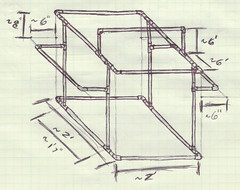
<p>The light box that I decided to build is roughly 2&#8242; by 2&#8242; by 2&#8242; without the added arms attached.  I wanted to add optional arm extensions to the box so that lights and flashes can be easy clamped to the structure.  With the arms attached, add roughly an extra 1&#8242; wide by 1/2&#8242; tall for a total of 3&#8242; wide by 2&#8242; deep by 2 1/2&#8242; tall.</p>
<h2>Parts List</h2>
<div style="float: right;padding: 10px">
<a href="http://farm5.static.flickr.com/4025/4391732918_043e2a5283.jpg" title="Light box raw parts by Geoff Kerr, on Flickr"><img decoding="async" src="http://farm5.static.flickr.com/4025/4391732918_043e2a5283.jpg" width="175" alt="Light box raw parts" /></a></div>
<ul>
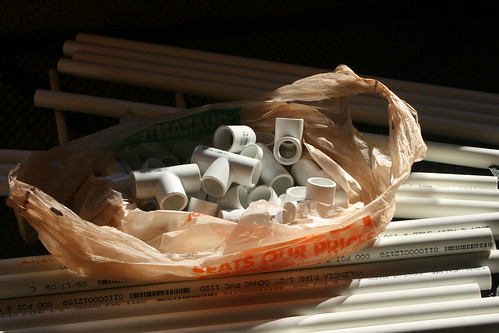
<li>(16) &#8211; 2&#8242; lengths of 1/2&#8243; PVC pipe &#8211; $0.75 each</li>
<li>(14) &#8211; Right angle 1/2&#8243; un-threaded fitting &#8211; $0.25 each</li>
<li>(14) &#8211; 3-way/ &#8216;T&#8217; 1/2&#8243; un-threaded fitting &#8211; $0.27 each</li>
<li>(2) &#8211; clamp-on utility lamp &#8211; $5.47 each</li>
</ul>
<p>All hardware parts for the frame should be able to be found in any of the major home-construction type stores and should cost about $30.</p>
<h2>Assembly</h2>
<h3>First &#8211;  cutting the pieces</h3>
<div style="float: right;padding: 10px">
<a href="http://farm5.static.flickr.com/4022/4391745810_5b007b7c3a.jpg" title="Cutting jig by Geoff Kerr, on Flickr"><img decoding="async" src="http://farm5.static.flickr.com/4022/4391745810_5b007b7c3a.jpg" width="175" alt="Cutting jig" /></a><br />
<a href="http://farm5.static.flickr.com/4037/4391735280_2b0a59c901.jpg" title="Small adaptor pipe by Geoff Kerr, on Flickr"><img decoding="async" src="http://farm5.static.flickr.com/4037/4391735280_2b0a59c901.jpg" width="175" alt="Small adaptor pipe" /></a>
</div>
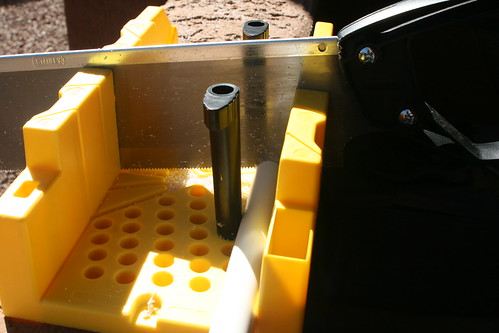
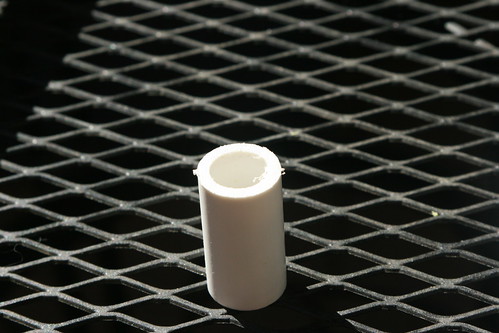
<p>Make all cuts to the PVC at the same time to save time.  Where I state to mark a pipe with a letter, it&#8217;ll work best if you place that marking in small text close to the ends of the pipe lengths.  Produce the following pieces:</p>
<ul>
<li>Keep 5 of the pieces the full 2&#8242; length and label them as part &#8216;A.&#8217;  A few of the ones that I bought were close enough to the 2&#8242; length, but most were almost 1/4&#8243; longer and were more ideal for cutting.</li>
<li>Cut four pipe lengths to be 19&#8243; long &#8211; mark these as &#8216;B&#8217;</li>
<li>Take two of the scraps from those cuts and trim them to 5&#8243; &#8211; mark these as &#8216;C&#8217;</li>
<li>Take the other two scraps and cut four 1 1/2&#8243; lengths out each of them &#8211; mark these as &#8216;D&#8217;</li>
<li>Cut four of the pipes into 14 7/8&#8243; long pieces &#8211; label them &#8216;E&#8217;</li>
<li>Cut four 8&#8243; pieces from the scrap of those last cuts &#8211; label them &#8216;F&#8217;</li>
<li>Cut two of the pipes down to 12 7/8&#8243; lengths &#8211; label them &#8216;G&#8217;</li>
<li>Cut two pieces from those scraps to be 6&#8243; long &#8211; label them &#8216;H&#8217;</li>
<li>Take one last pipe and cut it into four pieces that are 5 7/8&#8243; long &#8211; label them &#8216;I&#8217;</li>
</ul>
<p>Make sure you keep track of all of these lengths, or else you&#8217;ll find yourself taking another trip to the store.</p>
<h3>Second &#8211; assemble the base</h3>
<div style="float: right;padding: 10px">
<a href="http://farm5.static.flickr.com/4055/4390969499_67666cf71d.jpg" title="Right angle to &quot;T&quot; connection by Geoff Kerr, on Flickr"><img decoding="async" src="http://farm5.static.flickr.com/4055/4390969499_67666cf71d.jpg" width="175" alt="Right angle to &quot;T&quot; connection" /></a>
</div>
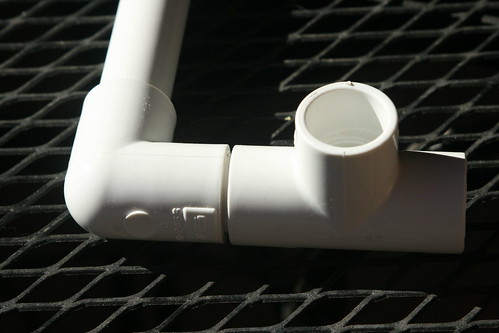
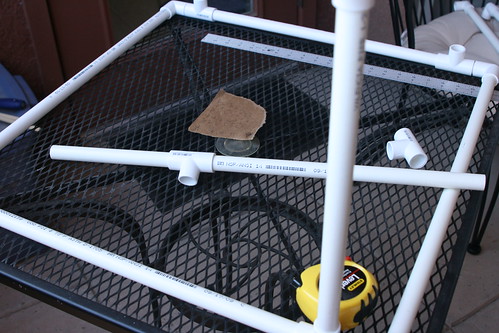
<p>The base consists of four right-angle fittings, four &#8220;T&#8221; fittings, four pipe length D&#8217;s, two pipe length A&#8217;s, and two pipe length B&#8217;s.</p>
<ul>
<li>Put the four right angle fittings on both ends of both pipe A&#8217;s</li>
<li>Put the four small part D pieces into each of the right angle fittings</li>
<li>Put the four &#8220;T&#8221; fittings onto the small D pieces</li>
<li>Complete the base by putting the B pieces into the the T&#8217;s to form a square with the A pieces</li>
</ul>
<h3>Third &#8211; assemble the vertical supports</h3>
<div style="float: right;padding: 10px">
<a href="http://farm3.static.flickr.com/2732/4391747232_a85c214f7e.jpg" title="Vertical supports by Geoff Kerr, on Flickr"><img decoding="async" src="http://farm3.static.flickr.com/2732/4391747232_a85c214f7e.jpg" width="175" alt="Vertical supports" /></a></div>
<p>In my design, I wanted the side light bars to be roughly 1/3 of the way from the top/bottom, which is where I got the measurement for pipe &#8216;F:&#8217; 1/3 of 24 inches is 8 inches.  You can make this piece either the lower portion of the vertical support or the upper portion to adjust the height of the side light bar.</p>
<ul>
<li>Place one &#8216;F&#8217; piece into each of 4 new &#8220;T&#8221; fittings </li>
<li>Put the four &#8216;E&#8217; pipes into the opposite end of the &#8220;T&#8221; fittings</li>
<li>Place either end into the &#8220;T&#8221; fittings in the base and you&#8217;ve got your vertical support bars</li>
</ul>
<p>If, when building your own, you decide you want a different height position for the side bars, consider that the only constraint I used in picking my lengths was to keep the entire vertical support to 24 inches long.</p>
<h3>Fourth &#8211; assemble the top</h3>
<div style="float: right;padding: 10px">
<a href="http://farm3.static.flickr.com/2739/4391743362_9b5b1476b6.jpg" title="Top light bar fitting by Geoff Kerr, on Flickr"><img decoding="async" src="http://farm3.static.flickr.com/2739/4391743362_9b5b1476b6.jpg" width="175" alt="Top light bar fitting" /></a>
</div>
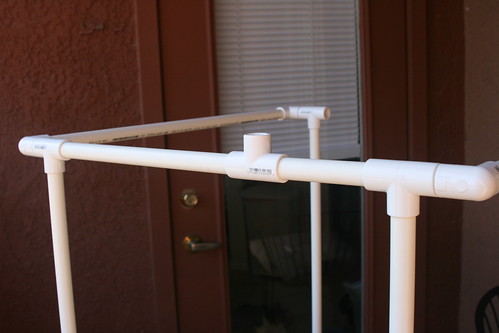
<p>The top is very similar to the base of the light box, with the exception of having an extra set of brackets for the top light bar.  I wanted to use as many of the left-over pieces from the project as I could, which is why the light bar has a pair of 5&#8243; pieces (part &#8216;C&#8217;): they were left over from cutting the 19&#8243; lengths.  For the top, you will also need two pipe &#8216;A&#8217; pieces, four right angle fittings, four &#8216;D&#8217; pipes, four &#8220;T&#8221; fittings, and two pipe &#8216;G&#8217; pieces.</p>
<ul>
<li>Build up two sides similar to the base: Put a 90 degree piece on each end of the two &#8220;A&#8221; pieces. Put the small &#8216;D&#8217; pipes in the other sides of the 90&#8217;s, and then put &#8220;T&#8221; fittings on the &#8216;D&#8217; pipes</li>
<li>Take both pipe &#8216;C&#8217; pieces and place the new &#8220;T&#8221; fittings on one end so that there is a connection 90 degrees off from the pipe and another 180 degrees off</li>
<li>Place the pipe &#8216;G&#8217; pieces into the &#8220;T&#8221; fittings in opposition of the &#8216;C&#8217; pieces</li>
<li>Connect the other sides of &#8216;C&#8217; pieces to the &#8220;Ts&#8221; attached to the &#8216;D&#8217;-&#8216;A&#8217; side pieces</li>
<li>Place the other &#8216;G&#8217; ends into the other ends of the side pieces to build the square</li>
<li>Orient the side piece &#8220;T&#8221; fittings down and connect them with the vertical supports</li>
</ul>
<p>As with the vertical supports, you can customize where you want the light bar to be in the top piece.  To customize the bars, the only real constraint (other than my self-imposed one to maximize use of already cut pieces) is that the overall length of the side bars be 19 inches (approximately from vertical &#8220;T&#8221; to vertical &#8220;T&#8221;).</p>
<h3>Fifth &#8211; assemble the light support structures</h3>
<div style="float: right;padding: 10px">
<a href="http://farm5.static.flickr.com/4031/4390981401_63c8e9a8fc.jpg" title="Top light bar by Geoff Kerr, on Flickr"><img decoding="async" src="http://farm5.static.flickr.com/4031/4390981401_63c8e9a8fc.jpg" width="175" alt="Top light bar" /></a><br />
<a href="http://farm5.static.flickr.com/4043/4390984379_85c654b79a.jpg" title="Completed by Geoff Kerr, on Flickr"><img decoding="async" src="http://farm5.static.flickr.com/4043/4390984379_85c654b79a.jpg" width="175" alt="Completed" /></a>
</div>
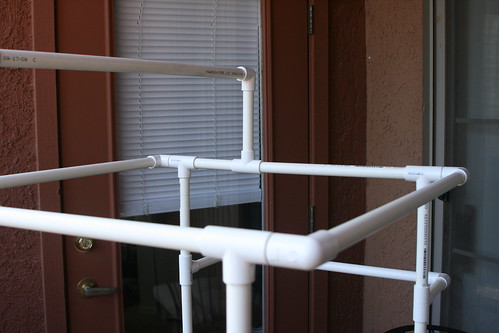
<p>I designed multiple structures on the light box to allow different combinations and positions of lamps.  The two side support pieces consist of two 90 degree fittings, one &#8216;B&#8217; pipes, and two &#8216;I&#8217; pipe lengths each.  The top support piece takes two 90 degree fittings, one &#8216;A&#8217; pipe, and the two &#8216;H&#8217; pipes.  For each of the supports do the following:</p>
<ul>
<li>Take the long pipe (either &#8216;A&#8217; or &#8216;B,&#8217; top or side pieces respectively) and place a 90 degree fitting on each end</li>
<li>Take the shorter pipe pairs (either &#8216;H&#8217; for the &#8216;A&#8217; pipe or &#8216;I&#8217; for the &#8216;B&#8217; pipe) and connect them to the 90 degree fittings</li>
<li>Connect the shorter support bars to the vertical pipe &#8220;T&#8221; fittings.</li>
<li>Connect the longer support bar to the top support &#8220;T&#8221; fittings</li>
</ul>
<h3>Done!</h3>
<div style="float: right;padding: 10px">
<a href="http://farm3.static.flickr.com/2779/4392991017_f60f481200.jpg" title="Size Reference by Geoff Kerr, on Flickr"><img decoding="async" src="http://farm3.static.flickr.com/2779/4392991017_f60f481200.jpg" width="175" alt="Size Reference" /></a></div>
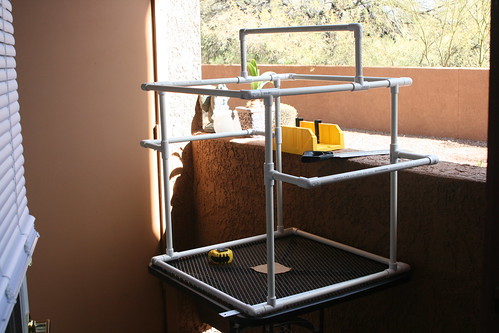
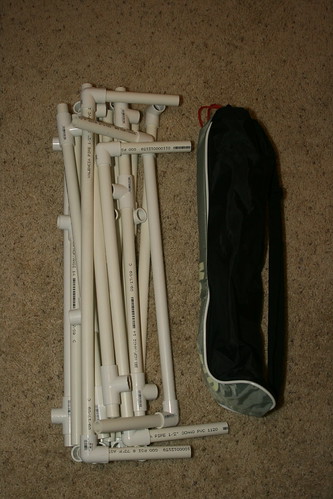
<p>And with that last step complete, you have a functional light box frame that you can attach lights to in just about any conceivable configuration needed.  When you are done taking pictures and want to break down the tent, it quickly comes apart and is a little larger than a tripod.</p>
<p>Read part 2 directions on creating the fabric diffusing panels.</p>
<p>To see more pictures from the build, <a href="http://www.flickr.com/photos/geoffkerr/sets/72157623517542170/">check out my flickr photo set for this project</a>.</p>
]]></content>
		
			</entry>
		<entry>
		<author>
			<name>Geoff Kerr</name>
							<uri>http://geoffkerr.com</uri>
						</author>

		<title type="html"><![CDATA[Weather Monitor Project Introduction]]></title>
		<link rel="alternate" type="text/html" href="https://geoffkerr.com/2010/01/15/weather-monitor-project-introduction/" />

		<id>http://geoffkerr.com/?p=440</id>
		<updated>2010-01-15T18:23:46Z</updated>
		<published>2010-01-15T18:23:46Z</published>
		<category scheme="https://geoffkerr.com" term="Weather Monitor" /><category scheme="https://geoffkerr.com" term="embedded" /><category scheme="https://geoffkerr.com" term="microcontroller" /><category scheme="https://geoffkerr.com" term="monitor" /><category scheme="https://geoffkerr.com" term="solar" /><category scheme="https://geoffkerr.com" term="weather" /><category scheme="https://geoffkerr.com" term="wind" />
		<summary type="html"><![CDATA[A few years ago, I got the crazy idea that I wanted to work on a weather monitoring embedded microcontroller project. While the basic idea is not new, it is something that&#8217;s sufficiently complicated to become a great learning tool in various engineering disciplines. Every project needs goals, so this is what I&#8217;m hoping to [&#8230;]]]></summary>

					<content type="html" xml:base="https://geoffkerr.com/2010/01/15/weather-monitor-project-introduction/"><![CDATA[<p>A few years ago, I got the crazy idea that I wanted to work on a weather monitoring embedded microcontroller project.  While the basic idea is <a href="http://www.weathertoys.net/weathertoys/main.html">not</a> <a href="http://www.sparkfun.com/commerce/product_info.php?products_id=8311">new</a>, it is something that&#8217;s sufficiently complicated to become a great learning tool in various engineering disciplines.<br />
<span id="more-440"></span><br />
Every project needs goals, so this is what I&#8217;m hoping to achieve:</p>
<blockquote>
<ul>
<li>Wireless data collection</li>
<li>Low-powered design</li>
<li>Run system off of solar and/or wind power</li>
<li>Monitor temperature</li>
<li>Monitor humidity</li>
<li>Monitor relative pressure</li>
<li>Monitor wind speed</li>
<li>Monitor wind direction</li>
<li>Upload data to the interwebs</li>
<li>Test designs on COTS boards</li>
<li>Learn how to layout and produce boards</li>
<li>Build solar and wind powered collection systems</li>
<li>Build anemometer and weather vane</li>
<li>Write all software and scripts</li>
<li>Learn some new script and programming languages</li>
<li>Have fun&#8230;</li>
</ul>
</blockquote>
<p>I&#8217;ve just finished acquiring most of the preliminary parts required to start this project, so I&#8217;m going to start documenting the project on this blog as I make progress building the weather monitor.</p>
]]></content>
		
			</entry>
		<entry>
		<author>
			<name>Geoff Kerr</name>
							<uri>http://geoffkerr.com</uri>
						</author>

		<title type="html"><![CDATA[Inspiring!]]></title>
		<link rel="alternate" type="text/html" href="https://geoffkerr.com/2009/11/22/inspiring/" />

		<id>http://geoffkerr.com/?p=437</id>
		<updated>2009-11-23T04:51:49Z</updated>
		<published>2009-11-23T04:51:49Z</published>
		<category scheme="https://geoffkerr.com" term="Internet" /><category scheme="https://geoffkerr.com" term="Miscellaneous" /><category scheme="https://geoffkerr.com" term="Videos" /><category scheme="https://geoffkerr.com" term="children" /><category scheme="https://geoffkerr.com" term="creativity" /><category scheme="https://geoffkerr.com" term="exploration" /><category scheme="https://geoffkerr.com" term="TED" /><category scheme="https://geoffkerr.com" term="video" />
		<summary type="html"><![CDATA[I caught wind of this TED talk while perusing the internet this evening. Very inspiring! I, one day, hope to allow my children (future tense, none expected or planned for the next few years) to have the unhindered freedom to think and do as their creativity inspires them as with this video about &#8220;Tinkering School&#8221; [&#8230;]]]></summary>

					<content type="html" xml:base="https://geoffkerr.com/2009/11/22/inspiring/"><![CDATA[<p>I caught wind of this TED talk while perusing the internet this evening.  Very inspiring!  I, one day, hope to allow my children (future tense, none expected or planned for the next few years) to have the unhindered freedom to think and do as their creativity inspires them as with this video about &#8220;Tinkering School&#8221; by Gever Tulley.</p>
<p><!--copy and paste--><object width="446" height="326"><param name="movie" value="http://video.ted.com/assets/player/swf/EmbedPlayer.swf"></param><param name="allowFullScreen" value="true" /><param name="wmode" value="transparent"></param><param name="bgColor" value="#ffffff"></param><param name="flashvars" value="vu=http://video.ted.com/talks/dynamic/GeverTulley_2009-medium.flv&#038;su=http://images.ted.com/images/ted/tedindex/embed-posters/GeverTulley-2009.embed_thumbnail.jpg&#038;vw=432&#038;vh=240&#038;ap=0&#038;ti=588&#038;introDuration=16500&#038;adDuration=4000&#038;postAdDuration=2000&#038;adKeys=talk=gever_tulley_s_tinkering_school_in_action;year=2009;theme=how_we_learn;theme=design_like_you_give_a_damn;theme=ted_in_3_minutes;theme=the_creative_spark;theme=art_unusual;theme=new_on_ted_com;theme=speaking_at_ted2009;theme=tales_of_invention;event=TED2009;&#038;preAdTag=tconf.ted/embed;tile=1;sz=512x288;" /><embed src="http://video.ted.com/assets/player/swf/EmbedPlayer.swf" pluginspace="http://www.macromedia.com/go/getflashplayer" type="application/x-shockwave-flash" wmode="transparent" bgColor="#ffffff" width="446" height="326" allowFullScreen="true" flashvars="vu=http://video.ted.com/talks/dynamic/GeverTulley_2009-medium.flv&#038;su=http://images.ted.com/images/ted/tedindex/embed-posters/GeverTulley-2009.embed_thumbnail.jpg&#038;vw=432&#038;vh=240&#038;ap=0&#038;ti=588&#038;introDuration=16500&#038;adDuration=4000&#038;postAdDuration=2000&#038;adKeys=talk=gever_tulley_s_tinkering_school_in_action;year=2009;theme=how_we_learn;theme=design_like_you_give_a_damn;theme=ted_in_3_minutes;theme=the_creative_spark;theme=art_unusual;theme=new_on_ted_com;theme=speaking_at_ted2009;theme=tales_of_invention;event=TED2009;"></embed></object></p>
]]></content>
		
					<link rel="replies" type="text/html" href="https://geoffkerr.com/2009/11/22/inspiring/#comments" thr:count="1" />
			<link rel="replies" type="application/atom+xml" href="https://geoffkerr.com/2009/11/22/inspiring/feed/atom/" thr:count="1" />
			<thr:total>1</thr:total>
			</entry>
		<entry>
		<author>
			<name>Geoff Kerr</name>
							<uri>http://geoffkerr.com</uri>
						</author>

		<title type="html"><![CDATA[Galileoscope]]></title>
		<link rel="alternate" type="text/html" href="https://geoffkerr.com/2009/10/25/galileoscope/" />

		<id>http://geoffkerr.com/?p=402</id>
		<updated>2009-10-25T20:09:34Z</updated>
		<published>2009-10-25T20:09:34Z</published>
		<category scheme="https://geoffkerr.com" term="Astronomy" /><category scheme="https://geoffkerr.com" term="astralphotography" /><category scheme="https://geoffkerr.com" term="galileoscope" /><category scheme="https://geoffkerr.com" term="telescope" />
		<summary type="html"><![CDATA[Last night Lauren and I got to hang out at Aaron and Jenny&#8217;s place with Lance, Erin, and Kelly and we got a chance to play with AJ&#8217;s Galileoscope. It&#8217;s a well-built plastic telescope with glass optics that was designed to be very similar (except for the plastic) to the one that Galileo designed and [&#8230;]]]></summary>

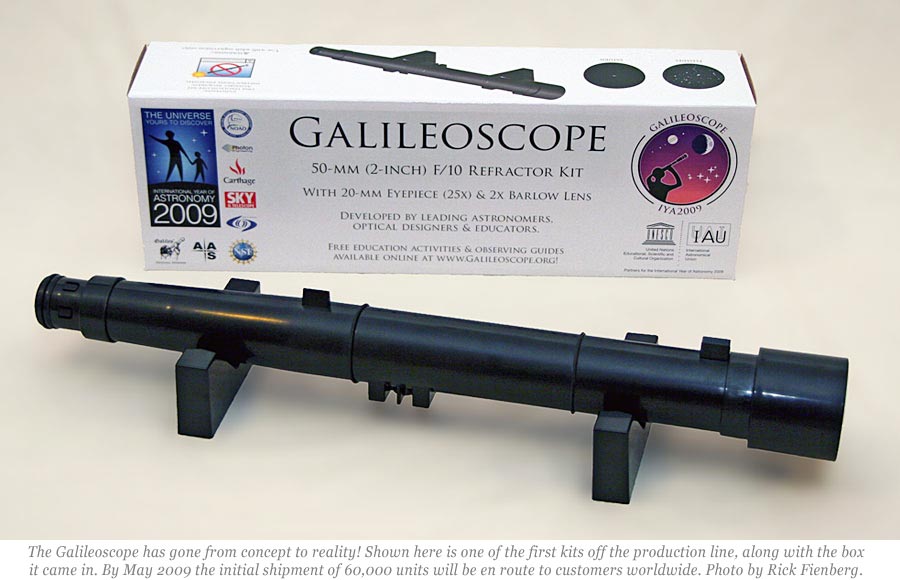
					<content type="html" xml:base="https://geoffkerr.com/2009/10/25/galileoscope/"><![CDATA[<p><a href="https://www.galileoscope.org/gs/"><img decoding="async" src="http://geoffkerr.com/wp-content/uploads/2009/10/GalileoscopeWithBox-Apr2009.jpg" alt="Galileoscope" width=400px /></a>  Last night Lauren and I got to hang out at <a href="http://twocentsworth.com">Aaron</a> and Jenny&#8217;s place with <a href="http://fautrever.com/">Lance, Erin</a>, and Kelly and we got a chance to play with AJ&#8217;s <a href="https://www.galileoscope.org/gs/">Galileoscope</a>.<br /> <br />
It&#8217;s a well-built plastic telescope with glass optics that was designed to be very similar (except for the plastic) to the one that Galileo designed and used for the first time 400 years ago this past August.  The telescope was also designed as a way of commemorating the <a href="http://www.astronomy2009.org/">International Year of Astronomy</a> which is a program to encourage people across the world to rediscover astronomy and the sciences.<br />  On top of being built to be quality and provide entry-level astronomers with an amazing view, it was also built to be very inexpensive and cost only $35 with shipping (to the USA, other locations cost more) and handling included.<br /> <br />
I&#8217;ve been toying with the idea of getting a scope of my own after seeing the <a href="http://nightcamera.blogspot.com/">amazing pictures that my co-worker Andy produces through his Newtonian reflector scopes</a>, so playing with AJ&#8217;s made me really want to get one of the Gallileoscopes as a good first scope to learn with.  Lauren was so taken with looking at the moon and trying to look at Jupiter (or was it Venus?&#8230; yes, I have lots of learning to do&#8230;) that she wanted to get a telescope as well.  After seeing the quality of the scope first hand, we decided to order one this morning and it should get here in a few short weeks.  We can&#8217;t wait!</p>
]]></content>
		
			</entry>
	</feed>