<?xml version="1.0" encoding="utf-8"?>
<feed xmlns="http://www.w3.org/2005/Atom">
  <title>Ira Mellor (dot) Com</title>
  
  <subtitle>Write code, do things, repeat</subtitle>
  <link href="https://iramellor.com/atom.xml" rel="self"/>
  
  <link href="https://iramellor.com/"/>
  <updated>2024-03-04T02:15:16.375Z</updated>
  <id>https://iramellor.com/</id>
  
  <author>
    <name>Ira Mellor</name>
    
  </author>
  
  <generator uri="https://hexo.io/">Hexo</generator>
  
  <entry>
    <title>Oracle Public Cloud Instance Information Collector</title>
    <link href="https://iramellor.com/2019/03/26/Oracle-Public-Cloud-Instance-Information-Collector/"/>
    <id>https://iramellor.com/2019/03/26/Oracle-Public-Cloud-Instance-Information-Collector/</id>
    <published>2019-03-26T13:00:00.000Z</published>
    <updated>2024-03-04T02:15:16.375Z</updated>
    
    <content type="html"><![CDATA[<h2 id="The-Preface"><a href="#The-Preface" class="headerlink" title="The Preface"></a>The Preface</h2><p>In my time with <a href="https://cloud.oracle.com/home">Oracle</a>, the company shifted it’s course from OCI-Classic to onboarding all new customers, and migrating current customers to OCI. This would provide some challenges for current customers as they would require an exercise in taking inventory of their current cloud resources. This would help in capacity planning for their future in Oracle’s cloud. Some customers kept up to date spreadsheets of all their current services in OCI-C, while others were seeking help with a more automated approach at mapping their current OCI-C resources.</p><h2 id="The-Situation"><a href="#The-Situation" class="headerlink" title="The Situation"></a>The Situation</h2><p>I was assigned to help a customer with their capacity planning for migration. They were in need of some information that Oracle couldn’t provide (as it was beyond a security boundary) and other information that could be provided programmatically using the <a href="https://docs.oracle.com/en/cloud/iaas/compute-iaas-cloud/stcsa/rest-endpoints.html">OPC API</a>. I was determined to give this customer the most information that could be provided in an automated fashion. They were specifically interested in their IaaS compute instances and collecting metadata information about them. I figured a simple CLI application could do the trick.</p><h2 id="The-Solution"><a href="#The-Solution" class="headerlink" title="The Solution"></a>The Solution</h2><p>I was able to cobble together a <a href="https://nodejs.org/">NodeJS</a> application that could be configured with endpoint information, check the user’s credentials and pull all the necessary information down from the API. Once that was done, we could introspect it for the specific information we were looking for and write it to a simple CSV file.</p><p>If you’re on OCI-C and need to collect your own IaaS instance information, hopefully this tool can help you too!</p><h3 id="Click-to-check-the-Repo-out-on-GitHub"><a href="#Click-to-check-the-Repo-out-on-GitHub" class="headerlink" title="Click to check the Repo out on GitHub"></a><a href="https://github.com/rollemira/opc-instance-data">Click to check the Repo out on GitHub</a></h3>]]></content>


    <summary type="html">&lt;h2 id=&quot;The-Preface&quot;&gt;&lt;a href=&quot;#The-Preface&quot; class=&quot;headerlink&quot; title=&quot;The Preface&quot;&gt;&lt;/a&gt;The Preface&lt;/h2&gt;&lt;p&gt;In my time with &lt;a href=&quot;https://c</summary>


    <category term="development" scheme="https://iramellor.com/tags/development/"/>
    
    <category term="nodejs" scheme="https://iramellor.com/tags/nodejs/"/>
    
  </entry>
  
  <entry>
    <title>Task Running Windows Service in .NET</title>
    <link href="https://iramellor.com/2017/08/09/Task-Running-Windows-Service-in-NET/"/>
    <id>https://iramellor.com/2017/08/09/Task-Running-Windows-Service-in-NET/</id>
    <published>2017-08-09T15:00:00.000Z</published>
    <updated>2024-02-17T04:20:45.874Z</updated>
    
    <content type="html"><![CDATA[<h2 id="The-Preface"><a href="#The-Preface" class="headerlink" title="The Preface"></a>The Preface</h2><p>I bought a new computer a while back. I do a lot of file moving&#x2F;manipulation&#x2F;cleanup on my home PC because <a href="https://www.plex.tv/">I’m an avid Plex user</a>. For these tasks I simply use .bat or .cmd files and the Windows task scheduler. It’s quite a simple solution and generally runs like clock work. <strong>Until it doesn’t and you can’t understand why</strong>. </p><h2 id="First-Attempt"><a href="#First-Attempt" class="headerlink" title="First Attempt"></a>First Attempt</h2><p>After some internet searches I stumbled across the <a href="http://www.tweaking.com/content/page/windows_repair_all_in_one.html">Tweaking.com windows repair program</a> that offered fixes and had quite a few recommendations. With my fingers crossed I installed the app and tried it out. <strong>It did not fix my Windows task scheduler problem</strong>. But I did end up buying a license for it because it’s an amazing piece of software that does a lot of optimizations.</p><h2 id="Coding-Your-Own"><a href="#Coding-Your-Own" class="headerlink" title="Coding Your Own"></a>Coding Your Own</h2><p>Time to think about rolling my own. What do I need this thing to do?</p><ol><li>Always be running</li><li>Run .bat or .cmd files on an interval</li></ol><p>So for #1 something always running, I immediately think Windows service. <a href="http://topshelf-project.com/">I’ve long used TopShelf for this sort of thing</a>. It’s highly configurable and easy to use. For #2 I considered <a href="https://www.quartz-scheduler.net/">using Quartz.NET</a>, but I thought it would be overkill. I just rolled my own interval and tracking code. I specifically needed to run .bat and .cmd files, for this I found a <a href="https://github.com/madelson/MedallionShell">project called MedallionShell</a>. It runs commands in threads within your application. You could use it for parallelism, but I decided not to introduce that complexity into my simple use case.</p><h2 id="Learning"><a href="#Learning" class="headerlink" title="Learning"></a>Learning</h2><p>This project brought some fun learning aspects. I was able to implement <a href="https://www.cakebuild.net/">builds using Cake builds</a> for C# and also <a href="https://www.appveyor.com/">automate my builds using AppVeyor</a>. With all of this in place it will build my code and put a release on GitHub for me. Pretty nifty! Even got some badges working on the project home page.</p><h2 id="Conclusion"><a href="#Conclusion" class="headerlink" title="Conclusion"></a>Conclusion</h2><p>I learned a lot doing this simple little project and had a lot of fun doing it. I wish I knew why the Windows task scheduler doesn’t run my tasks. I guess as long as it runs all of the other important ones, I can be good with that. </p><h3 id="Click-to-check-the-Repo-out-on-GitHub"><a href="#Click-to-check-the-Repo-out-on-GitHub" class="headerlink" title="Click to check the Repo out on GitHub"></a><a href="https://github.com/rollemira/Rollem.TaskRunnerService">Click to check the Repo out on GitHub</a></h3>]]></content>


    <summary type="html">&lt;h2 id=&quot;The-Preface&quot;&gt;&lt;a href=&quot;#The-Preface&quot; class=&quot;headerlink&quot; title=&quot;The Preface&quot;&gt;&lt;/a&gt;The Preface&lt;/h2&gt;&lt;p&gt;I bought a new computer a while ba</summary>


    <category term="development" scheme="https://iramellor.com/tags/development/"/>
    
    <category term=".net" scheme="https://iramellor.com/tags/net/"/>
    
  </entry>
  
  <entry>
    <title>Getting MEAN With TypeScript</title>
    <link href="https://iramellor.com/2017/03/09/Getting-MEAN-With-TypeScript/"/>
    <id>https://iramellor.com/2017/03/09/Getting-MEAN-With-TypeScript/</id>
    <published>2017-03-09T21:42:42.000Z</published>
    <updated>2024-02-17T04:20:45.874Z</updated>
    
    <content type="html"><![CDATA[<p>I have been doing a lot of research into the MEAN stack as of late in hopes of possibly using in on my next project. First I wanted to see if using TypeScript was viable, because I come from a .NET background and strong types help me find problems at compile time. Then I wanted to see if I could get some sort of debugging experience. I remember the good ol’ days of Classic ASP scripting and having to debug write everything so I could get a picture of what was happening. </p><h2 id="Editor-s"><a href="#Editor-s" class="headerlink" title="Editor(s)"></a>Editor(s)</h2><p>So many to choose from in this department. Personally I chose WebStorm because it afforded me that debugging experience I was looking for in the IDE. SublimeText and VS Code are excellent options as well, but like I said… Debugging.</p><h2 id="Getting-Lessons"><a href="#Getting-Lessons" class="headerlink" title="Getting Lessons"></a>Getting Lessons</h2><p>My first round of searches brought me to an excellent video tutorial by <a href="https://www.youtube.com/watch?v=uONz0lEWft0">Brad Traversy on MEAN Stack Front To Back</a>. It’s a series in which you’ll use ES6 to create a MEAN stack application that does some simple authentication. It’s a great series, I highly suggest watching it <a href="https://github.com/bradtraversy/meanauthapp">and checking out the code here</a>. It uses ES6 and like I said, I’m looking for TypeScript.</p><p>My next round of searching brought me to <a href="http://brianflove.com/">Brian Love’s blog</a> where he has an article <a href="http://brianflove.com/2016/11/11/typescript-2-express-mongoose-mocha-chai/">TypeScript2 + Express + Mongoose + Mocha + Chai</a>. Whew! That’s a mouth full, and a lot of tech to learn. It’s a fantastic article about combining all those technologies to get a running MEAN stack application with testing. <a href="http://brianflove.com/2016/11/11/typescript-2-express-mongoose-mocha-chai/">Check out his article here</a> and certainly <a href="https://github.com/blove/typescript-express-starter/tree/1-mongodb">check out the code here</a>. </p><h2 id="Combo"><a href="#Combo" class="headerlink" title="Combo"></a>Combo</h2><p>My mission was to combine the two projects to make one MEAN application with a TypeScript and test driven backend and an Angular2 front end. I was able to take the lessons learned about TypeScript, Grunt, Mocha and Chai and apply it to the meanauthapp created in Brad’s videos. It makes for very easy and type-safe development with NodeJS. Big thanks to both Brian and Brad for their work!</p><h3 id="Click-to-check-the-Repo-out-on-GitHub"><a href="#Click-to-check-the-Repo-out-on-GitHub" class="headerlink" title="Click to check the Repo out on GitHub"></a><a href="https://github.com/rollemira/typescript-express-starter/tree/2-angular">Click to check the Repo out on GitHub</a></h3>]]></content>


    <summary type="html">&lt;p&gt;I have been doing a lot of research into the MEAN stack as of late in hopes of possibly using in on my next project. First I wanted to se</summary>


    <category term="development" scheme="https://iramellor.com/tags/development/"/>
    
    <category term="nodejs" scheme="https://iramellor.com/tags/nodejs/"/>
    
    <category term="mongodb" scheme="https://iramellor.com/tags/mongodb/"/>
    
    <category term="angular" scheme="https://iramellor.com/tags/angular/"/>
    
  </entry>
  
  <entry>
    <title>Dead Letter Management With Azure Service Bus</title>
    <link href="https://iramellor.com/2017/02/21/Dead-Letter-Management-With-Azure-Service-Bus/"/>
    <id>https://iramellor.com/2017/02/21/Dead-Letter-Management-With-Azure-Service-Bus/</id>
    <published>2017-02-21T15:58:38.000Z</published>
    <updated>2024-02-17T04:20:45.874Z</updated>
    
    <content type="html"><![CDATA[<blockquote><p>Isn’t the whole point of durable, reliable messaging that we can re-queue a message for processing?<br>– <cite>Me</cite></p></blockquote><h2 id="The-Background"><a href="#The-Background" class="headerlink" title="The Background"></a>The Background</h2><p>I recently got involved in a project using <a href="https://azure.microsoft.com/en-us/services/service-bus/">Azure Service Bus</a>. The premise was simple, run service bus queue messages through a <a href="https://github.com/Azure/azure-webjobs-sdk">WebJob</a> durably and reliably. For this project I ended up using the <a href="https://docs.microsoft.com/en-us/azure/service-bus-messaging/service-bus-queues-topics-subscriptions">Topics</a> feature for a publish&#x2F;subscribe model. I got the project up and running fairly quickly thanks to the <a href="https://github.com/Azure/azure-webjobs-sdk">WebJobs SDK</a>. By default the message will be attempted 10 times and then automatically sent to the DeadLetter queue. So to test this, I throw an exception during message processing and sure enough it goes as expected. I now have a message in the DeadLetter queue. In the <a href="https://portal.azure.com/">Azure Management Portal</a> I can see the message exists where it’s supposed to. As of the writing of this article the <a href="https://portal.azure.com/">Azure Management Portal</a> only supports changing the properties of Topics and not managing the messages in them.</p><h2 id="Supplemental-Software"><a href="#Supplemental-Software" class="headerlink" title="Supplemental Software"></a>Supplemental Software</h2><p>What I need is a piece of software that will let me manage the messages in the queue. I could write it myself, but this seems like a task there would be a tool for.</p><p>My first round of searches dug up <a href="https://github.com/paolosalvatori/ServiceBusExplorer">Service Bus Explorer</a>. It’s a free Service Bus management tool. It looks like a great piece of well thought out management software, <del>but I was unable to get the DeadLetter Repair and Resubmit Message to work properly for me</del>.</p><p><strong>Update</strong>: After a bit of digging about BrokeredMessage serialization I was able to find <a href="http://stackoverflow.com/a/37798907/87734">this article on StackOverflow explaining how to dictate how Azure Service Bus handles my message content</a>. After implementing that <a href="https://github.com/paolosalvatori/ServiceBusExplorer">Service Bus Explorer</a> is working like a charm.</p><p>My next round of digging brought me to <a href="http://www.cerebrata.com/">Azure Management Studio</a>. This is a paid piece of management software that helps manage more than just your Service Bus. This tool was able to properly copy and re-submit the queue message back to it’s Topic of origin. Success!</p><h2 id="Side-Note"><a href="#Side-Note" class="headerlink" title="Side Note"></a>Side Note</h2><p>If Domain Driven Design and Message Queues are highly important to your system, you may want to check out <a href="https://particular.net/">NServiceBus</a>. I just needed some bolt-on queues for middleware which is why I decided to just tackle queueing on my own.</p><p>Happy coding!</p>]]></content>


    <summary type="html">&lt;blockquote&gt;
&lt;p&gt;Isn’t the whole point of durable, reliable messaging that we can re-queue a message for processing?&lt;br&gt;– &lt;cite&gt;Me&lt;/cite&gt;&lt;/p&gt;</summary>


    <category term="azure" scheme="https://iramellor.com/tags/azure/"/>
    
    <category term="development" scheme="https://iramellor.com/tags/development/"/>
    
  </entry>
  
  <entry>
    <title>WooCommerce API Using RestSharp Over HTTP With OAuth</title>
    <link href="https://iramellor.com/2016/11/18/WooCommerce-API-Using-RestSharp-over-HTTP-with-OAuth/"/>
    <id>https://iramellor.com/2016/11/18/WooCommerce-API-Using-RestSharp-over-HTTP-with-OAuth/</id>
    <published>2016-11-18T20:12:52.000Z</published>
    <updated>2024-02-17T04:20:45.875Z</updated>
    
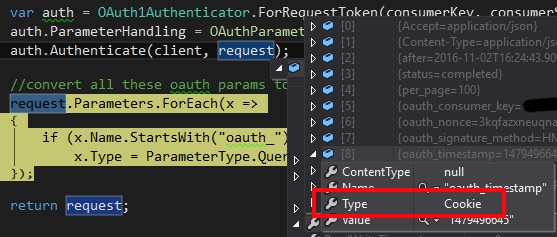
    <content type="html"><![CDATA[<p>Now after searching <a href="http://nuget.org/">NuGet</a> I saw that there is a C# WooCommerce library out there all ready written called <a href="https://github.com/XiaoFaye/WooCommerce.NET">WooCommerce.NET</a>. This isn’t going to work for me because I will need the ability to gain access to custom Order fields.</p><p>So I decided to just use my favorite REST client <a href="http://restsharp.org/">RestSharp</a> to contact a fairly simple REST API for <a href="https://woocommerce.com/">WooCommerce</a>. But I was running into a strange authentication issue and being denied authentication with a 401 status code. </p><p><strong>Now, first a disclaimer… DO NOT USE HTTP FOR WooCommerce IN A PRODUCTION ENVIRONMENT!</strong></p><p>Ok, but I need to do some testing in a local environmnet so I can see that my code is working properly. Reading the <a href="https://woocommerce.com/">WooCommerce</a> documentation for authentication, <a href="http://woocommerce.github.io/woocommerce-rest-api-docs/#authentication-over-http">which can be found here</a>, it clearly states:</p><blockquote><p>The OAuth parameters must be added as query string parameters and not included in the Authorization header. This is because there is no reliable cross-platform way to get the raw request headers in WordPress.</p></blockquote><p>So I do a bit of digging about <a href="http://restsharp.org/">RestSharp</a> and OAuth1.0 and come up <a href="https://github.com/restsharp/RestSharp/blob/master/RestSharp.IntegrationTests/oAuth1Tests.cs">with this suite of tests</a>. Here’s the important bit that I needed:</p><figure class="highlight csharp"><table><tr><td class="gutter"><pre><span class="line">1</span><br><span class="line">2</span><br><span class="line">3</span><br><span class="line">4</span><br><span class="line">5</span><br><span class="line">6</span><br><span class="line">7</span><br><span class="line">8</span><br><span class="line">9</span><br><span class="line">10</span><br><span class="line">11</span><br><span class="line">12</span><br><span class="line">13</span><br><span class="line">14</span><br><span class="line">15</span><br><span class="line">16</span><br><span class="line">17</span><br><span class="line">18</span><br><span class="line">19</span><br><span class="line">20</span><br><span class="line">21</span><br><span class="line">22</span><br><span class="line">23</span><br><span class="line">24</span><br><span class="line">25</span><br><span class="line">26</span><br><span class="line">27</span><br></pre></td><td class="code"><pre><span class="line">[<span class="meta">Test</span>]</span><br><span class="line"><span class="function"><span class="keyword">public</span> <span class="keyword">void</span> <span class="title">Can_Authenticate_OAuth1_With_Querystring_Parameters</span>()</span></span><br><span class="line">&#123;</span><br><span class="line">    <span class="keyword">const</span> <span class="built_in">string</span> consumerKey = <span class="string">&quot;enterConsumerKeyHere&quot;</span>;</span><br><span class="line">    <span class="keyword">const</span> <span class="built_in">string</span> consumerSecret = <span class="string">&quot;enterConsumerSecretHere&quot;</span>;</span><br><span class="line">    <span class="keyword">const</span> <span class="built_in">string</span> baseUrl = <span class="string">&quot;http://restsharp.org&quot;</span>;</span><br><span class="line">    <span class="keyword">var</span> expected = <span class="keyword">new</span> List&lt;<span class="built_in">string</span>&gt;</span><br><span class="line">    &#123;</span><br><span class="line">        <span class="string">&quot;oauth_consumer_key&quot;</span>,</span><br><span class="line">        <span class="string">&quot;oauth_nonce&quot;</span>,</span><br><span class="line">        <span class="string">&quot;oauth_signature_method&quot;</span>,</span><br><span class="line">        <span class="string">&quot;oauth_timestamp&quot;</span>,</span><br><span class="line">        <span class="string">&quot;oauth_version&quot;</span>,</span><br><span class="line">        <span class="string">&quot;oauth_signature&quot;</span></span><br><span class="line">    &#125;;</span><br><span class="line"></span><br><span class="line">    RestClient client = <span class="keyword">new</span> RestClient(baseUrl);</span><br><span class="line">    RestRequest request = <span class="keyword">new</span> RestRequest(Method.GET);</span><br><span class="line">    <span class="keyword">var</span> authenticator = OAuth1Authenticator.ForRequestToken(consumerKey, consumerSecret);</span><br><span class="line">    authenticator.ParameterHandling = OAuthParameterHandling.UrlOrPostParameters;</span><br><span class="line">    authenticator.Authenticate(client, request);</span><br><span class="line"></span><br><span class="line">    <span class="keyword">var</span> requestUri = client.BuildUri(request);</span><br><span class="line">    <span class="keyword">var</span> actual = HttpUtility.ParseQueryString(requestUri.Query).AllKeys.ToList();</span><br><span class="line"></span><br><span class="line">    Assert.IsTrue(actual.SequenceEqual(expected));</span><br><span class="line">&#125;</span><br></pre></td></tr></table></figure><p>The above Authenticate method will do all the work and add all the parameters I need.</p><p>But wait… Something’s not right here. In the debugger it shows me that the parameters on the request are being added as cookes:</p><img src="https://iramellor.com/images/20161110_OAuth.jpg" alt="Visual Studio Debugger" /><p>Strange, but ok. So I decided to make an extension method that does all the authentication, gets all the parameters added to the request, and then converts them to QueryString parameters.</p><figure class="highlight csharp"><table><tr><td class="gutter"><pre><span class="line">1</span><br><span class="line">2</span><br><span class="line">3</span><br><span class="line">4</span><br><span class="line">5</span><br><span class="line">6</span><br><span class="line">7</span><br><span class="line">8</span><br><span class="line">9</span><br><span class="line">10</span><br><span class="line">11</span><br><span class="line">12</span><br><span class="line">13</span><br><span class="line">14</span><br><span class="line">15</span><br><span class="line">16</span><br><span class="line">17</span><br><span class="line">18</span><br></pre></td><td class="code"><pre><span class="line"><span class="keyword">public</span> <span class="keyword">static</span> <span class="keyword">class</span> <span class="title">RestRequestExtensions</span></span><br><span class="line">&#123;</span><br><span class="line">    <span class="function"><span class="keyword">public</span> <span class="keyword">static</span> RestRequest <span class="title">BuildOAuth1QueryString</span>(<span class="params"><span class="keyword">this</span> RestRequest request, RestClient client, <span class="built_in">string</span> consumerKey, <span class="built_in">string</span> consumerSecret</span>)</span></span><br><span class="line">    &#123;</span><br><span class="line">        <span class="keyword">var</span> auth = OAuth1Authenticator.ForRequestToken(consumerKey, consumerSecret);</span><br><span class="line">        auth.ParameterHandling = OAuthParameterHandling.UrlOrPostParameters;</span><br><span class="line">        auth.Authenticate(client, request);</span><br><span class="line"></span><br><span class="line">        <span class="comment">//convert all these oauth params from cookie to querystring</span></span><br><span class="line">        request.Parameters.ForEach(x =&gt;</span><br><span class="line">        &#123;</span><br><span class="line">            <span class="keyword">if</span> (x.Name.StartsWith(<span class="string">&quot;oauth_&quot;</span>))</span><br><span class="line">                x.Type = ParameterType.QueryString;</span><br><span class="line">        &#125;);</span><br><span class="line"></span><br><span class="line">        <span class="keyword">return</span> request;</span><br><span class="line">    &#125;</span><br><span class="line">&#125;</span><br></pre></td></tr></table></figure><p>So the code to build a request now looks something like this.</p><figure class="highlight csharp"><table><tr><td class="gutter"><pre><span class="line">1</span><br><span class="line">2</span><br><span class="line">3</span><br><span class="line">4</span><br></pre></td><td class="code"><pre><span class="line"><span class="keyword">var</span> client = <span class="keyword">new</span> RestClient(<span class="string">&quot;http://example.com/api/v1&quot;</span>);</span><br><span class="line"><span class="keyword">var</span> request = <span class="keyword">new</span> RestRequest(<span class="string">&quot;/path/to/resource&quot;</span>);</span><br><span class="line">request.BuildOAuth1QueryString(client, <span class="string">&quot;&#123;consumer_key&#125;&quot;</span>, <span class="string">&quot;&#123;consumer_secret&#125;&quot;</span>);</span><br><span class="line"><span class="keyword">var</span> response = client.Execute(request);</span><br></pre></td></tr></table></figure><p>And there we have it. Talking to <a href="https://woocommerce.com/">WooCommerce</a> with <a href="http://restsharp.org/">RestSharp</a>.</p><h2 id="For-Production"><a href="#For-Production" class="headerlink" title="For Production"></a>For Production</h2><p><strong>I can not stress enough to not communicate over HTTP in production.</strong> In production, you should be using HTTPS. In that case <a href="http://woocommerce.github.io/woocommerce-rest-api-docs/#authentication-over-https">you can use HTTP Basic Authentication</a>. Then you will no longer need the BuildOAuth1QueryString extension method, you would simply add the Basic Authentication to the client like so:</p><figure class="highlight csharp"><table><tr><td class="gutter"><pre><span class="line">1</span><br><span class="line">2</span><br></pre></td><td class="code"><pre><span class="line"><span class="comment">//Basic over Https</span></span><br><span class="line">client.Authenticator = <span class="keyword">new</span> HttpBasicAuthenticator(<span class="string">&quot;&#123;consumer_key&#125;&quot;</span>, <span class="string">&quot;&#123;consumer_secret&#125;&quot;</span>);</span><br></pre></td></tr></table></figure><p>Hope this helps!</p>]]></content>


    <summary type="html">&lt;p&gt;Now after searching &lt;a href=&quot;http://nuget.org/&quot;&gt;NuGet&lt;/a&gt; I saw that there is a C# WooCommerce library out there all ready written called</summary>


    <category term="code" scheme="https://iramellor.com/tags/code/"/>
    
    <category term=".net" scheme="https://iramellor.com/tags/net/"/>
    
    <category term="c#" scheme="https://iramellor.com/tags/c/"/>
    
    <category term="rest" scheme="https://iramellor.com/tags/rest/"/>
    
  </entry>
  
  <entry>
    <title>The Developer&#39;s Feed</title>
    <link href="https://iramellor.com/2016/11/17/The-Developer-s-Feed/"/>
    <id>https://iramellor.com/2016/11/17/The-Developer-s-Feed/</id>
    <published>2016-11-18T00:28:43.000Z</published>
    <updated>2024-02-17T04:20:45.874Z</updated>
    
    <content type="html"><![CDATA[<p>Every day in the ever changing world of technology and development, I try to do some reading to keep up with the world around me. I have worked in places with small teams and big teams, but my current situation puts me as the only person with development skills in my current company. It’s really important in this situation, not to lose touch with the world of development around you. This feed has kept me up to date with new tech and also taught me even more about tech I all ready thought I knew.</p><p>I’ve been curating this list of blog feeds since I became a developer a long time ago, so many of them may be out-dated. Still, there are always great articles popping up for me to read and dabble in the tech if I have the time. Personally <a href="http://feedly.com/">I use Feedly</a> for my RSS reader, but the file should easily import into your favorite RSS reader.</p><p><a href="/assets/developer-feeds.opml">Developer Feed File</a> - You may need to Right Click -&gt; Save As</p><p>Anyhow, hope you enjoy!</p>]]></content>


    <summary type="html">&lt;p&gt;Every day in the ever changing world of technology and development, I try to do some reading to keep up with the world around me. I have </summary>


    <category term="general" scheme="https://iramellor.com/tags/general/"/>
    
    <category term="development" scheme="https://iramellor.com/tags/development/"/>
    
  </entry>
  
  <entry>
    <title>The Need to Knows of Developers</title>
    <link href="https://iramellor.com/2016/11/16/The-Need-to-Knows-of-Developers/"/>
    <id>https://iramellor.com/2016/11/16/The-Need-to-Knows-of-Developers/</id>
    <published>2016-11-16T22:40:23.000Z</published>
    <updated>2024-02-17T04:20:45.875Z</updated>
    
    <content type="html"><![CDATA[<p>I was talking to a friend the other day about what you need to know to be an effective developer. We touched on topics like source control, people skills, presentation skills and a ton of other skills that are inherent things that are need to know. Other things could include frameworks, good blog sites, or how to get what you’re asking for from your boss. After a while we got into the code aspect of being a developer. Where do you start? What is a waste of time to learn? When should I know what? Well, I certainly don’t know the <em>best</em> way but I’ll share the order that worked for me.</p><p>Let’s just start basic. The first thing you should know about developing for whatever it is you want to write code for is the <strong>syntax</strong> of the language you’ll be using. Start simple, think “Hello World”.</p><p>If you’re learning an Object Oriented language (like C#), your next stop should be <a href="http://www.codeproject.com/Articles/1059863/The-Four-Pillars-of-Object-Oriented-Design">The four pillars of Object Oriented Design</a> </p><ul><li>Abstraction</li><li>Polymorphism</li><li>Inheritance</li><li>Encapsulation</li></ul><p>Once you have an understanding of the 4 pillars in my opinion your next stop should be <a href="http://www.codeproject.com/Articles/703634/SOLID-Architecture-principles-using-simple-Csharp">learning the SOLID principles</a></p><ul><li>Single responsibility principle</li><li>Open&#x2F;closed principle</li><li>Liskov substitution principle</li><li>Interface substitution principle</li></ul><p><strong>Once you’ve gotten to principles you can start to make more maintainable code in larger projects.</strong> </p><p>Finally, once you’ve gotten those down it’d be best to look into <a href="http://www.dofactory.com/net/design-patterns">the Gang of Four Design Patterns</a>. These are proven patterns for enterprise scale production systems. If you have a good understanding of the problem you’re trying to solve, there’s a good chance a combination of these patterns will help you solve it.</p><p>All of this being said, there are problems you come across time and again as a developer. One of the biggest ones I face often is that of cross cutting concerns. I have this thing that does one thing, but now needs to do another. For example, you have data going into a database and you’d like to audit who put the record in with some sort of logging. In this case there are many solutions, and you could even write your own using all those spiffy patterns. Or in my case I found <a href="https://github.com/jbogard/MediatR">a great library called MediatR</a> that implements a nice architecture solving that problem for me. Sometimes with the right amount of digging you’ll find a good library that solves the recurring problems.</p><h3 id="Update"><a href="#Update" class="headerlink" title="Update"></a>Update</h3><p>It is almost imperative now to know about cloud architecture for hightly available and scalable applications. I had the pleasure of reconnecting with a former colleague of mine who so happens to be a cloud architect at Microsoft. He pointed me toward his GitHub for some guidance on Microsoft Azure cloud architecture. You can see the repository <a href="https://github.com/AdamPaternostro/Architecture-Azure">on his GitHub here</a>.</p><p>Happy coding!</p>]]></content>


    <summary type="html">&lt;p&gt;I was talking to a friend the other day about what you need to know to be an effective developer. We touched on topics like source contro</summary>


    <category term="general" scheme="https://iramellor.com/tags/general/"/>
    
    <category term="development" scheme="https://iramellor.com/tags/development/"/>
    
  </entry>
  
  <entry>
    <title>Blog Up and Running With Hexo!</title>
    <link href="https://iramellor.com/2016/11/15/Blog-up-and-running-with-Hexo/"/>
    <id>https://iramellor.com/2016/11/15/Blog-up-and-running-with-Hexo/</id>
    <published>2016-11-15T05:00:00.000Z</published>
    <updated>2024-02-17T04:20:45.873Z</updated>
    
    <content type="html"><![CDATA[<p>I’ve been working with a lot of NodeJS stuff lately in my off time using things like Bower, Grunt, Gulp, etc… It’s been a nice break from my usual .NET stuff. It’s been a long while since I had my site up, running and full functional with a blog and everything. I’m not sure how much I’ll use it, but I used to put a lot of time and energy into blog posts. Maybe I’ll see if I can recover those old posts somehow. But for now I’m up and running with GitHub Pages and Hexo.</p><p>You can find more about hexo at <a href="http://hexo.io/">http://hexo.io</a></p><h2 id="Update"><a href="#Update" class="headerlink" title="Update"></a>Update</h2><p>I was able to get some, but not all of my old posts back. It took a lot of digging and code re-formatting but it was worth it. Took some time learning EJS and Hexo template stuff, but the site is looking nice.</p>]]></content>


    <summary type="html">&lt;p&gt;I’ve been working with a lot of NodeJS stuff lately in my off time using things like Bower, Grunt, Gulp, etc… It’s been a nice break from</summary>


    <category term="general" scheme="https://iramellor.com/tags/general/"/>
    
  </entry>
  
  <entry>
    <title>From Coder to PM or Architect</title>
    <link href="https://iramellor.com/2011/09/19/From-Coder-to-PM-or-Architect/"/>
    <id>https://iramellor.com/2011/09/19/From-Coder-to-PM-or-Architect/</id>
    <published>2011-09-19T04:00:00.000Z</published>
    <updated>2024-02-17T04:20:45.874Z</updated>
    
    <content type="html"><![CDATA[<h2 id="The-Coder"><a href="#The-Coder" class="headerlink" title="The Coder"></a>The Coder</h2><p>Much like everyone else, I started my career as a coder. <a href="http://blog.wekeroad.com/">Rob Conery</a> from <a href="http://tekpub.com/">Tekpub</a> has a great series on going <a href="http://tekpub.com/view/coder/1">from coder to developer here</a>. Being the coder has it’s up sides, low responsibilities being one of them. If you just like to do what you do and go home, then there is no need to move up for you here. This usually consists of taking strict written or verbal requirements and turning them into a bit of code. This person is usually in charge of testing too. You usually are under at least one person who guides you a lot. But if you aspire to do more, you will most likely want to become a developer.</p><h2 id="The-Developer"><a href="#The-Developer" class="headerlink" title="The Developer"></a>The Developer</h2><p>The developer has a lot more decision making power when it comes to both requirements and system architecture. In most scenarios, a discovery phase of a project is done and then all of that is in turn made into functional requirements. The developer can be called upon to both try to make requirements from the discovery documents or review functional requirements for refinement. The developer also has a bit more reign when it comes to speaking to clients and making bigger decisions in system architecture and implementation.</p><h2 id="The-Architect"><a href="#The-Architect" class="headerlink" title="The Architect"></a>The Architect</h2><p>The architect has the ultimate power when it comes to the system architecture. This is the person called upon to solve the really complex problems. Usually the most talented person that codes for the hardest problems, but overall probably writes the least amount of code on the project. This sometimes isn’t by choice. A lot of the time it is due to the fact that this person is usually in charge of peer code reviews and other administrative duties. Especially duties of discovery and helping find all of the functional requirements. The architect also weighs the risks of implementing new technologies into the system. This person usually has the last call on what technologies go into the system, and what is left out.</p><h2 id="The-Project-Manager"><a href="#The-Project-Manager" class="headerlink" title="The Project Manager"></a>The Project Manager</h2><p>The PM is the person usually in charge of documentation and collaboration. Documenting the current processes through the discovery phase and then working with whom ever they need to to make a functional requirements document out of it. The PM does a lot of system testing to make sure everything passes to spec. The keep a constant watch over the project and budget to make sure that the client stays happy and the project comes in on budget.</p><h2 id="The-Decision"><a href="#The-Decision" class="headerlink" title="The Decision"></a>The Decision</h2><p>Starting out as a coder, you usually climb up the latter to a PM or an Architect. If you are in an unfortunate situation then sometimes you have to do it all. Depending on the type of person you are and your desires as a professional, you will choose different paths out of the coder role. I myself am finding that I’m having a hard time with the PM duties because I like to stay more on the technical side of things. I’m not sure if that may change in the future, but for now my next move up is most likely looking to be an Architect.</p><h2 id="Conclusion"><a href="#Conclusion" class="headerlink" title="Conclusion"></a>Conclusion</h2><p>There comes a point in time as a coder where you will need to make a decision on which way is up. This decision will be made not only for career advancement, but also for some extra padding in the salary department. When that time comes you may be asked to try some things out that you may or may not love. I suggest you give it a good shot because you never know, some things might grow on you.</p>]]></content>


    <summary type="html">&lt;h2 id=&quot;The-Coder&quot;&gt;&lt;a href=&quot;#The-Coder&quot; class=&quot;headerlink&quot; title=&quot;The Coder&quot;&gt;&lt;/a&gt;The Coder&lt;/h2&gt;&lt;p&gt;Much like everyone else, I started my care</summary>


    <category term="general" scheme="https://iramellor.com/tags/general/"/>
    
    <category term="career" scheme="https://iramellor.com/tags/career/"/>
    
  </entry>
  
  <entry>
    <title>Website Move and Software Change</title>
    <link href="https://iramellor.com/2011/09/18/Website-Move-and-Software-Change/"/>
    <id>https://iramellor.com/2011/09/18/Website-Move-and-Software-Change/</id>
    <published>2011-09-19T00:03:18.000Z</published>
    <updated>2024-02-17T04:20:45.875Z</updated>
    
    <content type="html"><![CDATA[<p>I recently canceled my account for a VPS in lieu of shared hosting. I was dropping a bunch of websites and didn’t really need a VPS anymore. So I figured I hadn’t touched my website in a while so I thought I’d kick it back up a notch. Aside from a domain name change (major SEO foul, I know), I also decided on a software change for managing my website.</p><h2 id="BlogEngine-NET"><a href="#BlogEngine-NET" class="headerlink" title="BlogEngine.NET"></a>BlogEngine.NET</h2><p>I was using <a href="http://www.dotnetblogengine.net/">BlogEngine.NET</a> as my blog software. It actually worked really well, I had no real complaints. The only thing for me was that it wasn’t easily customized. By easy I mean pure and simple customizations. I was on a previous version of it because I hadn’t touched the site in a while, so I’m not sure if this has change or how much in later releases.</p><h2 id="Orchard"><a href="#Orchard" class="headerlink" title="Orchard"></a>Orchard</h2><p>I chose to go with the <a href="http://www.orchardproject.net/">Orchard</a> software for my new site. It is full featured and is very easily customized with modules and theme. It’s taken some getting use to, but everything I need to learn is pretty much in the Dashboard of Orchard. There are quite a few articles out there on getting started with Orchard, but a series I found particularly helpful was written by John Papa. You can find it here: <a href="http://johnpapa.net/orchardpart1">http://johnpapa.net/orchardpart1</a></p><p>I’m thinking it will be a bit of an adventure still getting into this. The export and import of my blog worked out nicely. So from here on in, it’s Orchard or bust!</p><h2 id="Update"><a href="#Update" class="headerlink" title="Update"></a>Update</h2><p>Moved it again to <a href="https://hexo.io/">Hexo</a>, <a href="/2016/11/15/Blog-up-and-running-with-Hexo/" title="Blog up and running with Hexo!">see this post for more details</a>.</p>]]></content>


    <summary type="html">&lt;p&gt;I recently canceled my account for a VPS in lieu of shared hosting. I was dropping a bunch of websites and didn’t really need a VPS anymo</summary>


    <category term="general" scheme="https://iramellor.com/tags/general/"/>
    
  </entry>
  
  <entry>
    <title>Avoiding the Database Deployment Nightmare</title>
    <link href="https://iramellor.com/2009/06/18/Avoiding-The-Database-Deployment-Nightmare/"/>
    <id>https://iramellor.com/2009/06/18/Avoiding-The-Database-Deployment-Nightmare/</id>
    <published>2009-06-18T04:00:00.000Z</published>
    <updated>2024-02-17T04:20:45.873Z</updated>
    
    <content type="html"><![CDATA[<p>So, I have written before about how to put your database into version control using database projects in Visual Studio. Even while having the scripts in the solution, there can be times when you can’t exactly remember what you changed and needs to go out with your project deployment to the production database. Deploying files is easy because of tools like <a href="http://winmerge.org/">WinMerge</a>, however deploying things to a database can get quite complicated. You could script both schemas and use <a href="http://winmerge.org/">WinMerge</a> to see the differences between the development database and the production database. But even doing that, you will still have to write a custom script to get the production database schema up to date.</p><h3 id="Enter-xSql"><a href="#Enter-xSql" class="headerlink" title="Enter xSql"></a>Enter xSql</h3><p><a href="http://www.xsqlsoftware.com/">xSQLSoftware</a> This is where a tool such as <a href="http://www.xsqlsoftware.com/Product/Sql_Schema_Compare.aspx">xSQL Object</a> can be extremely helpful. All that need be done is set up the connections, run the comparison, and then you can visually see what has changed between your development and live databases! No need to remember what you changed or any of that, just run the comparison and execute the change script. It will even allow you to save database snapshots before running your change scripts. You can see an excellent <a href="http://www.xsqlsoftware.com/Tour.aspx?ProdId=xSQLObject&amp;idx=-1">walkthrough</a> <a href="http://www.xsqlsoftware.com/Tour.aspx?ProdId=xSQLObject&amp;idx=-1">here</a>. <a href="http://www.xsqlsoftware.com/Product/Sql_Schema_Compare.aspx">xSQL Object</a> also comes in a bundle with another one of their products, <a href="http://www.xsqlsoftware.com/Product/Sql_Data_Compare.aspx">xSQL Data</a> or by it’s self. <a href="http://www.xsqlsoftware.com/Product/Sql_Data_Compare.aspx">xSQL Data</a> allows you to compare data differences between two databases.</p><h3 id="The-Best-Part"><a href="#The-Best-Part" class="headerlink" title="The Best Part"></a>The Best Part</h3><p>All the goodness of the <a href="http://www.xsqlsoftware.com/LiteEdition.aspx">xSQL Bundle (xSQL Object and xSQL Data) Lite Edition</a> comes at a very affordable price <strong>FREE</strong>! If you only use SQL express edition then you can get the full bundle lite edition and it will work without any restrictions at all! However, if you need to use it against other versions of SQL Server it does have the following limitations:</p><ul><li>up to 25 tables</li><li>up to 40 views</li><li>up to 40 stored procedures</li><li>up to 40 functions</li></ul><p>If you are using it against a small database then you shouldn’t have any problems. Now if you have databases larger than this and are using SQL Server editions other than express, the product costs $399.00 for a single user license. BUT, after downloading it I was sent an email offering 30% off if I purchased the product within 7 days of the download. That brings the cost down to <strong>$280</strong>! Not too bad when you compare it with the prices of other comparable tools. So I ask you to go to the website and check it out if you haven’t already! <a href="http://www.xsqlsoftware.com/">http://www.xsqlsoftware.com</a></p><h3 id="Update"><a href="#Update" class="headerlink" title="Update"></a>Update</h3><p>After contacting the company about licensing, I was shown another one of their great tools. A little while back I wrote a post titled Finding Text in SQL Server Stored Procedures. They have a tool called <a href="http://www.xsqlsoftware.com/Product/Sql_Database_Object_Search.aspx">xSQL Object Search</a> that allows you to search for all object types, through the names and definitions, for strings. It will also do a search using regular expressions! Pretty powerful stuff for a **FREE **tool! Check it out here: <a href="http://www.xsqlsoftware.com/Product/Sql_Database_Object_Search.aspx">xSQL Object Search</a></p><p>Happy Deployments!</p>]]></content>


    <summary type="html">&lt;p&gt;So, I have written before about how to put your database into version control using database projects in Visual Studio. Even while having</summary>


    <category term="sql" scheme="https://iramellor.com/tags/sql/"/>
    
    <category term="deployment" scheme="https://iramellor.com/tags/deployment/"/>
    
  </entry>
  
  <entry>
    <title>The HttpWebRequest and Using Client Certificates</title>
    <link href="https://iramellor.com/2009/04/27/The-HttpWebRequest-and-Using-Client-Certificates/"/>
    <id>https://iramellor.com/2009/04/27/The-HttpWebRequest-and-Using-Client-Certificates/</id>
    <published>2009-04-27T04:00:00.000Z</published>
    <updated>2024-02-17T04:20:45.874Z</updated>
    
    <content type="html"><![CDATA[<p>So you may have found yourself in a similar situation, needing to make a TCP&#x2F;IP request to a 3rd party API possibly using SSL. Well, that is a quite simple task. It can however, be complicated if this 3rd party requires the use of certificates for communication to its API server. I found myself in some sort of certificate hell where I had the certificate, added it to the request and somehow it still wasn’t working. If you know what I’m talking about and had as many hurdles as I did, my condolences to you. I will try to explain in this article how I started, the problems I ran into and then the overall solution that ended up working for me. </p><p>To start with, you should have some kind of certificate. Most likely a *.pfx or *.p12 file. This can also come with a private key or password for the certificate’s encryption. This is what a standard WebRequest over SSL might look like:</p><figure class="highlight csharp"><table><tr><td class="gutter"><pre><span class="line">1</span><br><span class="line">2</span><br><span class="line">3</span><br><span class="line">4</span><br><span class="line">5</span><br><span class="line">6</span><br><span class="line">7</span><br><span class="line">8</span><br><span class="line">9</span><br><span class="line">10</span><br><span class="line">11</span><br><span class="line">12</span><br><span class="line">13</span><br><span class="line">14</span><br><span class="line">15</span><br><span class="line">16</span><br><span class="line">17</span><br><span class="line">18</span><br><span class="line">19</span><br><span class="line">20</span><br><span class="line">21</span><br><span class="line">22</span><br><span class="line">23</span><br><span class="line">24</span><br><span class="line">25</span><br><span class="line">26</span><br></pre></td><td class="code"><pre><span class="line"><span class="function"><span class="keyword">public</span> <span class="built_in">string</span> <span class="title">GetData</span>(<span class="params"><span class="built_in">string</span> inputData</span>)</span></span><br><span class="line">&#123;</span><br><span class="line">    <span class="comment">//will hold the result</span></span><br><span class="line">    <span class="built_in">string</span> result = <span class="built_in">string</span>.Empty;</span><br><span class="line">    <span class="comment">//build the request object</span></span><br><span class="line">    HttpWebRequest request = (HttpWebRequest)WebRequest.Create(<span class="string">&quot;https://someapi.com/&quot;</span>);</span><br><span class="line">    <span class="comment">//write the input data (aka post) to a byte array</span></span><br><span class="line">    <span class="built_in">byte</span>[] requestBytes = <span class="keyword">new</span> ASCIIEncoding().GetBytes(inputData);</span><br><span class="line">    <span class="comment">//get the request stream to write the post to</span></span><br><span class="line">    Stream requestStream = request.GetRequestStream();</span><br><span class="line">    <span class="comment">//write the post to the request stream</span></span><br><span class="line">    requestStream.Write(requestBytes, <span class="number">0</span>, requestBytes.Length);</span><br><span class="line">    <span class="comment">//build a response object to hold the response</span></span><br><span class="line">    <span class="comment">//submit the request by calling get response</span></span><br><span class="line">    HttpWebResponse response = (HttpWebResponse)request.GetResponse();</span><br><span class="line">    <span class="comment">//get the response stream to read the response from</span></span><br><span class="line">    Stream responseStream = response.GetResponseStream();</span><br><span class="line">    <span class="comment">//now read it out to our result</span></span><br><span class="line">    <span class="keyword">using</span> (StreamReader rdr = <span class="keyword">new</span> StreamReader(responseStream))</span><br><span class="line">    &#123;</span><br><span class="line">        <span class="comment">//set the result to the contents of the stream</span></span><br><span class="line">        result = rdr.ReadToEnd();</span><br><span class="line">    &#125;</span><br><span class="line">    <span class="comment">//return</span></span><br><span class="line">    <span class="keyword">return</span> result;</span><br><span class="line">&#125;</span><br></pre></td></tr></table></figure><p>The example above is missing the portion where you add the certificate to the request. You may receive a 403 Forbidden error from the server if a certificate is required to make the request to the API server. A simple way of adding a certificate to the request would be like so:</p><figure class="highlight csharp"><table><tr><td class="gutter"><pre><span class="line">1</span><br><span class="line">2</span><br></pre></td><td class="code"><pre><span class="line"><span class="comment">//add certificate to the request</span></span><br><span class="line">request.ClientCertificates.Add(<span class="keyword">new</span> X509Certificate(<span class="string">@&quot;C:\certs\Some Cert.p12&quot;</span>, <span class="string">@&quot;SecretP@$$w0rd&quot;</span>));</span><br></pre></td></tr></table></figure><p>The X509Certificate class is found in the System.Security.Cryptography.X509Certificates namespace. Simply add a new certificate to the client certificates before calling for the response, and it <strong>should</strong> be sent with the request. However, you may encounter an exception with the message “The system cannot find the file specified”. I encountered this error after I got the application off my local machine and onto the development server. After doing some research I stumbled upon this <a href="http://support.microsoft.com/kb/948154">kb article</a>. This article opened my eyes to how using certificates is a little more complicated than I initially thought. Turns out the problem was that the user trying to access the certificate does not have a profile loaded.</p><p>After stepping through the article, installing the certificate to the local machine’s personal certificate store, and then granting rights to the certificate using the <a href="http://www.microsoft.com/downloads/details.aspx?familyid=c42e27ac-3409-40e9-8667-c748e422833f&amp;displaylang=en">WinHttpCertCfg.exe</a> tool, and putting in a little more code found in the kb article, I was well on my way. The article describes how to use C# to open a certificate store and use the certificate directly out of the store. This presents a bit more elegant, and in my opinion more secure, way of getting to and using the certificate.</p><figure class="highlight csharp"><table><tr><td class="gutter"><pre><span class="line">1</span><br><span class="line">2</span><br><span class="line">3</span><br><span class="line">4</span><br><span class="line">5</span><br><span class="line">6</span><br></pre></td><td class="code"><pre><span class="line"><span class="comment">//add it in a better way</span></span><br><span class="line">X509Store certStore = <span class="keyword">new</span> X509Store(<span class="string">&quot;My&quot;</span>, StoreLocation.LocalMachine);</span><br><span class="line">certStore.Open(OpenFlags.ReadOnly | OpenFlags.OpenExistingOnly);</span><br><span class="line">X509Certificate2 cert = certStore.Certificates.Find(X509FindType.FindBySubjectName, <span class="string">&quot;My cert subject&quot;</span>, <span class="literal">false</span>)[<span class="number">0</span>];</span><br><span class="line">certStore.Close();</span><br><span class="line">request.ClientCertificates.Add(cert);</span><br></pre></td></tr></table></figure><p>This method will not only give access to the certificate regardless of having a loaded profile, but it also takes the certificate’s private key password out of the code and&#x2F;or configuration. This snippet above took me out of the certificate hell that was crushing my life for a couple days! </p><p>Putting it all together:</p><figure class="highlight csharp"><table><tr><td class="gutter"><pre><span class="line">1</span><br><span class="line">2</span><br><span class="line">3</span><br><span class="line">4</span><br><span class="line">5</span><br><span class="line">6</span><br><span class="line">7</span><br><span class="line">8</span><br><span class="line">9</span><br><span class="line">10</span><br><span class="line">11</span><br><span class="line">12</span><br><span class="line">13</span><br><span class="line">14</span><br><span class="line">15</span><br><span class="line">16</span><br><span class="line">17</span><br><span class="line">18</span><br><span class="line">19</span><br><span class="line">20</span><br><span class="line">21</span><br><span class="line">22</span><br><span class="line">23</span><br><span class="line">24</span><br><span class="line">25</span><br><span class="line">26</span><br><span class="line">27</span><br><span class="line">28</span><br><span class="line">29</span><br><span class="line">30</span><br><span class="line">31</span><br><span class="line">32</span><br><span class="line">33</span><br><span class="line">34</span><br></pre></td><td class="code"><pre><span class="line"><span class="function"><span class="keyword">public</span> <span class="built_in">string</span> <span class="title">GetData</span>(<span class="params"><span class="built_in">string</span> inputData</span>)</span></span><br><span class="line">&#123;</span><br><span class="line">    <span class="comment">//will hold the result</span></span><br><span class="line">    <span class="built_in">string</span> result = <span class="built_in">string</span>.Empty;</span><br><span class="line">    <span class="comment">//build the request object</span></span><br><span class="line">    HttpWebRequest request = (HttpWebRequest)WebRequest.Create(<span class="string">&quot;https://someapi.com/&quot;</span>);</span><br><span class="line">    <span class="comment">//add certificate to the request</span></span><br><span class="line">    <span class="comment">//request.ClientCertificates.Add(new X509Certificate(@&quot;C:\certs\Some Cert.p12&quot;, @&quot;SecretP@$$w0rd&quot;));</span></span><br><span class="line">    <span class="comment">//add it in a better way</span></span><br><span class="line">    X509Store certStore = <span class="keyword">new</span> X509Store(<span class="string">&quot;My&quot;</span>, StoreLocation.LocalMachine);</span><br><span class="line">    certStore.Open(OpenFlags.ReadOnly | OpenFlags.OpenExistingOnly);</span><br><span class="line">    X509Certificate2 cert = certStore.Certificates.Find(X509FindType.FindBySubjectName, <span class="string">&quot;My cert subject&quot;</span>, <span class="literal">false</span>)[<span class="number">0</span>];</span><br><span class="line">    certStore.Close();</span><br><span class="line">    request.ClientCertificates.Add(cert);</span><br><span class="line">    <span class="comment">//write the input data (aka post) to a byte array</span></span><br><span class="line">    <span class="built_in">byte</span>[] requestBytes = <span class="keyword">new</span> ASCIIEncoding().GetBytes(inputData);</span><br><span class="line">    <span class="comment">//get the request stream to write the post to</span></span><br><span class="line">    Stream requestStream = request.GetRequestStream();</span><br><span class="line">    <span class="comment">//write the post to the request stream</span></span><br><span class="line">    requestStream.Write(requestBytes, <span class="number">0</span>, requestBytes.Length);</span><br><span class="line">    <span class="comment">//build a response object to hold the response</span></span><br><span class="line">    <span class="comment">//submit the request by calling get response</span></span><br><span class="line">    HttpWebResponse response = (HttpWebResponse)request.GetResponse();</span><br><span class="line">    <span class="comment">//get the response stream to read the response from</span></span><br><span class="line">    Stream responseStream = response.GetResponseStream();</span><br><span class="line">    <span class="comment">//now read it out to our result</span></span><br><span class="line">    <span class="keyword">using</span> (StreamReader rdr = <span class="keyword">new</span> StreamReader(responseStream))</span><br><span class="line">    &#123;</span><br><span class="line">        <span class="comment">//set the result to the contents of the stream</span></span><br><span class="line">        result = rdr.ReadToEnd();</span><br><span class="line">    &#125;</span><br><span class="line">    <span class="comment">//return</span></span><br><span class="line">    <span class="keyword">return</span> result;</span><br><span class="line">&#125;</span><br></pre></td></tr></table></figure><p>Hope this helps!</p>]]></content>


    <summary type="html">&lt;p&gt;So you may have found yourself in a similar situation, needing to make a TCP&amp;#x2F;IP request to a 3rd party API possibly using SSL. Well,</summary>


    <category term="code" scheme="https://iramellor.com/tags/code/"/>
    
    <category term=".net" scheme="https://iramellor.com/tags/net/"/>
    
    <category term="c#" scheme="https://iramellor.com/tags/c/"/>
    
  </entry>
  
  <entry>
    <title>Finding Text in SQL Server Stored Procedures</title>
    <link href="https://iramellor.com/2009/04/12/Finding-Text-in-SQL-Server-Stored-Procedures/"/>
    <id>https://iramellor.com/2009/04/12/Finding-Text-in-SQL-Server-Stored-Procedures/</id>
    <published>2009-04-12T04:00:00.000Z</published>
    <updated>2024-02-17T04:20:45.874Z</updated>
    
    <content type="html"><![CDATA[<p>So, I’m sure you have been met with a similar scenario during development. You know the one that you have to rename a column or even drop a column in the database. This can be quite annoying if you are doing stored procedure based data access for your application. Once you change the column on the table, you have to figure out which stored procedures reference the column. They aren’t always tough to find most of the time, but sometimes you are dealing with a column that may be referenced in many stored procedures. Well thanks to my boss Cliff’s research and knowledge sharing, your search can be as easy as ours!</p><p>The query:</p><figure class="highlight sql"><table><tr><td class="gutter"><pre><span class="line">1</span><br><span class="line">2</span><br><span class="line">3</span><br><span class="line">4</span><br><span class="line">5</span><br><span class="line">6</span><br><span class="line">7</span><br><span class="line">8</span><br><span class="line">9</span><br><span class="line">10</span><br><span class="line">11</span><br></pre></td><td class="code"><pre><span class="line">USE Northwind</span><br><span class="line">GO </span><br><span class="line"><span class="keyword">DECLARE</span> <span class="variable">@SearchText</span> <span class="keyword">AS</span> <span class="type">VARCHAR</span>(<span class="number">50</span>)</span><br><span class="line"><span class="keyword">SET</span> <span class="variable">@SearchText</span> <span class="operator">=</span> <span class="string">&#x27;CustomerID&#x27;</span></span><br><span class="line"></span><br><span class="line"><span class="keyword">SELECT</span></span><br><span class="line">ROUTINE_NAME,</span><br><span class="line">ROUTINE_DEFINITION</span><br><span class="line"><span class="keyword">FROM</span> INFORMATION_SCHEMA.ROUTINES</span><br><span class="line"><span class="keyword">WHERE</span> ROUTINE_NAME <span class="keyword">LIKE</span> <span class="string">&#x27;%&#x27;</span> <span class="operator">+</span> <span class="variable">@SearchText</span> <span class="operator">+</span> <span class="string">&#x27;%&#x27;</span></span><br><span class="line"><span class="keyword">OR</span> ROUTINE_DEFINITION <span class="keyword">LIKE</span> <span class="string">&#x27;%&#x27;</span> <span class="operator">+</span> <span class="variable">@SearchText</span> <span class="operator">+</span> <span class="string">&#x27;%&#x27;</span></span><br></pre></td></tr></table></figure><p>This query will return all the names and routine definitions of stored procedures that contain certain text. It is not really bound by column names but I needed a true development scenario. Run the query with what you are looking for and presto! All the stored procedures you will need to modify.</p><p>Hope this helps!</p>]]></content>


    <summary type="html">&lt;p&gt;So, I’m sure you have been met with a similar scenario during development. You know the one that you have to rename a column or even drop</summary>


    <category term="code" scheme="https://iramellor.com/tags/code/"/>
    
    <category term="sql" scheme="https://iramellor.com/tags/sql/"/>
    
  </entry>
  
  <entry>
    <title>SQL Server Side Paging With a Validated Dynamic Order By</title>
    <link href="https://iramellor.com/2008/12/12/SQL-Server-Side-Paging-With-A-Validated-Dynamic-Order-By/"/>
    <id>https://iramellor.com/2008/12/12/SQL-Server-Side-Paging-With-A-Validated-Dynamic-Order-By/</id>
    <published>2008-12-12T05:00:00.000Z</published>
    <updated>2024-02-17T04:20:45.874Z</updated>
    
    <content type="html"><![CDATA[<p>So this is what it has come to anymore. Everyone is all about server side paging via SQL Server. As well they should be! It is so much faster and more efficient than having ADO or ADO.NET bring back a ton of records and then chop it to page it. However, there has always been some problems when trying to accomplish this task, especially using a SQL database that is pre 2005.</p><p>This task is easier to accomplish in SQL 2005 and 2008 using the ROW_NUMBER() function. The part that gets flaky is having a dynamic order by clause in your SQL statement. Unfortunately, the only way to accomplish this is to write some dynamic SQL. In doing so, It can be hard to tell if the order by parameter received by the stored procedure is a valid one for the table you are selecting from.</p><h3 id="Solution"><a href="#Solution" class="headerlink" title="Solution"></a>Solution</h3><p>Enter the &quot;IsValidOrderBy&quot; user-defined function. This is a little function that will tell you if the column and order in the dynamic order by parameter is a valid one for the select statement you are running.</p><figure class="highlight sql"><table><tr><td class="gutter"><pre><span class="line">1</span><br><span class="line">2</span><br><span class="line">3</span><br><span class="line">4</span><br><span class="line">5</span><br><span class="line">6</span><br><span class="line">7</span><br><span class="line">8</span><br><span class="line">9</span><br><span class="line">10</span><br><span class="line">11</span><br><span class="line">12</span><br><span class="line">13</span><br><span class="line">14</span><br><span class="line">15</span><br><span class="line">16</span><br><span class="line">17</span><br><span class="line">18</span><br><span class="line">19</span><br><span class="line">20</span><br><span class="line">21</span><br><span class="line">22</span><br><span class="line">23</span><br><span class="line">24</span><br><span class="line">25</span><br><span class="line">26</span><br><span class="line">27</span><br><span class="line">28</span><br><span class="line">29</span><br><span class="line">30</span><br><span class="line">31</span><br><span class="line">32</span><br><span class="line">33</span><br><span class="line">34</span><br><span class="line">35</span><br><span class="line">36</span><br><span class="line">37</span><br><span class="line">38</span><br><span class="line">39</span><br></pre></td><td class="code"><pre><span class="line"><span class="keyword">CREATE</span> <span class="keyword">FUNCTION</span> [dbo].[udf_OrderByExists] </span><br><span class="line">(</span><br><span class="line">    <span class="variable">@TableName</span> NVARCHAR(<span class="number">50</span>),</span><br><span class="line">    <span class="variable">@OrderBy</span> NVARCHAR(<span class="number">50</span>)</span><br><span class="line">)</span><br><span class="line"><span class="keyword">RETURNS</span> BIT</span><br><span class="line"><span class="keyword">AS</span></span><br><span class="line"><span class="keyword">BEGIN</span></span><br><span class="line"> </span><br><span class="line">    <span class="keyword">DECLARE</span> <span class="variable">@Result</span> BIT</span><br><span class="line">    <span class="keyword">SET</span> <span class="variable">@Result</span> <span class="operator">=</span> <span class="number">0</span></span><br><span class="line"> </span><br><span class="line">    <span class="keyword">DECLARE</span> <span class="variable">@TableColumns</span> <span class="keyword">TABLE</span></span><br><span class="line">    (</span><br><span class="line">        [ColumnNameAndSort] NVARCHAR(<span class="number">100</span>) <span class="keyword">NOT NULL</span></span><br><span class="line">    )</span><br><span class="line"> </span><br><span class="line">    <span class="keyword">INSERT INTO</span> <span class="variable">@TableColumns</span></span><br><span class="line">    <span class="keyword">SELECT</span> [Name] </span><br><span class="line">    <span class="keyword">FROM</span> syscolumns </span><br><span class="line">    <span class="keyword">WHERE</span> ID <span class="operator">=</span> OBJECT_ID(<span class="variable">@TableName</span>)</span><br><span class="line"> </span><br><span class="line">    <span class="keyword">INSERT INTO</span> <span class="variable">@TableColumns</span></span><br><span class="line">    <span class="keyword">SELECT</span> [Name] <span class="operator">+</span> <span class="string">&#x27; ASC&#x27;</span> </span><br><span class="line">    <span class="keyword">FROM</span> syscolumns </span><br><span class="line">    <span class="keyword">WHERE</span> ID <span class="operator">=</span> OBJECT_ID(<span class="variable">@TableName</span>)</span><br><span class="line"> </span><br><span class="line">    <span class="keyword">INSERT INTO</span> <span class="variable">@TableColumns</span></span><br><span class="line">    <span class="keyword">SELECT</span> [Name] <span class="operator">+</span> <span class="string">&#x27; DESC&#x27;</span> </span><br><span class="line">    <span class="keyword">FROM</span> syscolumns </span><br><span class="line">    <span class="keyword">WHERE</span> ID <span class="operator">=</span> OBJECT_ID(<span class="variable">@TableName</span>)</span><br><span class="line"> </span><br><span class="line">    IF <span class="keyword">EXISTS</span>(<span class="keyword">SELECT</span> [ColumnNameAndSort] <span class="keyword">FROM</span> </span><br><span class="line">        <span class="variable">@TableColumns</span> <span class="keyword">WHERE</span> [ColumnNameAndSort] <span class="operator">=</span> <span class="variable">@OrderBy</span>)</span><br><span class="line">        <span class="keyword">SET</span> <span class="variable">@Result</span> <span class="operator">=</span> <span class="number">1</span></span><br><span class="line"> </span><br><span class="line">    <span class="keyword">RETURN</span> <span class="variable">@Result</span>    </span><br><span class="line"> </span><br><span class="line"><span class="keyword">END</span></span><br></pre></td></tr></table></figure><p>Here you can see that we are taking 2 inputs. The first one being the table name you are selecting from, and the second being the order by clause received by the stored procedure. The function will then return a bit telling you if the column and order was found for the table you are selecting from.</p><h2 id="Example"><a href="#Example" class="headerlink" title="Example"></a>Example</h2><p>A simple example of using this user defined function would be selecting from a table of products. In that case, your stored procedure could look like so</p><figure class="highlight sql"><table><tr><td class="gutter"><pre><span class="line">1</span><br><span class="line">2</span><br><span class="line">3</span><br><span class="line">4</span><br><span class="line">5</span><br><span class="line">6</span><br><span class="line">7</span><br><span class="line">8</span><br><span class="line">9</span><br><span class="line">10</span><br><span class="line">11</span><br><span class="line">12</span><br><span class="line">13</span><br><span class="line">14</span><br><span class="line">15</span><br><span class="line">16</span><br><span class="line">17</span><br><span class="line">18</span><br><span class="line">19</span><br><span class="line">20</span><br><span class="line">21</span><br><span class="line">22</span><br><span class="line">23</span><br><span class="line">24</span><br><span class="line">25</span><br><span class="line">26</span><br><span class="line">27</span><br><span class="line">28</span><br><span class="line">29</span><br><span class="line">30</span><br><span class="line">31</span><br><span class="line">32</span><br><span class="line">33</span><br><span class="line">34</span><br><span class="line">35</span><br><span class="line">36</span><br><span class="line">37</span><br><span class="line">38</span><br><span class="line">39</span><br><span class="line">40</span><br><span class="line">41</span><br><span class="line">42</span><br><span class="line">43</span><br><span class="line">44</span><br><span class="line">45</span><br><span class="line">46</span><br><span class="line">47</span><br><span class="line">48</span><br><span class="line">49</span><br><span class="line">50</span><br><span class="line">51</span><br><span class="line">52</span><br><span class="line">53</span><br></pre></td><td class="code"><pre><span class="line"><span class="keyword">CREATE</span> <span class="keyword">PROCEDURE</span> [dbo].[usp_GetProductsPaged]</span><br><span class="line">    <span class="variable">@SortExpression</span> NVARCHAR(<span class="number">50</span>),</span><br><span class="line">    <span class="variable">@PageIndex</span> <span class="type">INT</span>,</span><br><span class="line">    <span class="variable">@PageSize</span> <span class="type">INT</span></span><br><span class="line"><span class="keyword">AS</span></span><br><span class="line"> </span><br><span class="line"><span class="comment">-- SET NOCOUNT ON added to prevent extra result sets from</span></span><br><span class="line"><span class="comment">-- interfering with SELECT statements.</span></span><br><span class="line"><span class="keyword">SET</span> NOCOUNT <span class="keyword">ON</span>;</span><br><span class="line"> </span><br><span class="line">IF ((<span class="keyword">SELECT</span> [dbo].[udf_OrderByExists](<span class="string">&#x27;dbo.Products&#x27;</span>, <span class="variable">@SortExpression</span>)) <span class="operator">=</span> <span class="number">0</span>)</span><br><span class="line">    <span class="keyword">SET</span> <span class="variable">@SortExpression</span> <span class="operator">=</span> <span class="string">&#x27;Name&#x27;</span></span><br><span class="line"> </span><br><span class="line"><span class="keyword">DECLARE</span> <span class="variable">@sql</span> <span class="keyword">AS</span> NVARCHAR(MAX),</span><br><span class="line">    <span class="variable">@ParamDefinition</span> <span class="keyword">AS</span> NVARCHAR(MAX),</span><br><span class="line">    <span class="variable">@StartRowIndex</span> <span class="type">INT</span>,</span><br><span class="line">    <span class="variable">@RecordCount</span> <span class="type">INT</span></span><br><span class="line"> </span><br><span class="line"><span class="keyword">SELECT</span> <span class="variable">@RecordCount</span> <span class="operator">=</span> <span class="built_in">COUNT</span>([ProductID]) <span class="keyword">FROM</span> [Products]</span><br><span class="line"> </span><br><span class="line">IF <span class="variable">@PageIndex</span> <span class="operator">=</span> <span class="number">0</span></span><br><span class="line">    <span class="keyword">SET</span> <span class="variable">@PageIndex</span> <span class="operator">=</span> <span class="number">1</span></span><br><span class="line">IF <span class="variable">@PageSize</span> <span class="operator">=</span> <span class="number">0</span></span><br><span class="line">    <span class="keyword">SET</span> <span class="variable">@PageSize</span> <span class="operator">=</span> <span class="variable">@RecordCount</span></span><br><span class="line"><span class="keyword">SET</span> <span class="variable">@StartRowIndex</span> <span class="operator">=</span> ((<span class="variable">@PageIndex</span> <span class="operator">*</span> <span class="variable">@PageSize</span>) <span class="operator">-</span> <span class="variable">@PageSize</span>) <span class="operator">+</span> <span class="number">1</span></span><br><span class="line"><span class="keyword">SET</span> <span class="variable">@ParamDefinition</span> <span class="operator">=</span> N<span class="string">&#x27;@paramStartRowIndex INT, </span></span><br><span class="line"><span class="string">    @paramPageSize INT&#x27;</span></span><br><span class="line"> </span><br><span class="line"><span class="keyword">SET</span> <span class="variable">@sql</span> <span class="operator">=</span> N<span class="string">&#x27;SELECT</span></span><br><span class="line"><span class="string">    [ProductID],</span></span><br><span class="line"><span class="string">    [Name],</span></span><br><span class="line"><span class="string">    [Description],</span></span><br><span class="line"><span class="string">    [Price]</span></span><br><span class="line"><span class="string">FROM (SELECT</span></span><br><span class="line"><span class="string">    [ProductID],</span></span><br><span class="line"><span class="string">    [Name],</span></span><br><span class="line"><span class="string">    [Description],</span></span><br><span class="line"><span class="string">    [Price],</span></span><br><span class="line"><span class="string">    ROW_NUMBER() OVER(ORDER BY &#x27;</span> <span class="operator">+</span> <span class="variable">@SortExpression</span> <span class="operator">+</span> <span class="string">&#x27;) AS [RowNumber]</span></span><br><span class="line"><span class="string">FROM [Products]) AS [Prods]</span></span><br><span class="line"><span class="string">WHERE [RowNumber] BETWEEN @paramStartRowIndex</span></span><br><span class="line"><span class="string">        AND (@paramStartRowIndex + @paramPageSize) - 1&#x27;</span></span><br><span class="line"> </span><br><span class="line"><span class="comment">-- For testing</span></span><br><span class="line"><span class="comment">--PRINT @sql</span></span><br><span class="line"><span class="comment">--PRINT @StartRowIndex</span></span><br><span class="line"> </span><br><span class="line"><span class="keyword">EXEC</span> sp_executesql <span class="variable">@sql</span>, </span><br><span class="line"><span class="variable">@ParamDefinition</span>, </span><br><span class="line"><span class="variable">@paramStartRowIndex</span> <span class="operator">=</span> <span class="variable">@StartRowIndex</span>, </span><br><span class="line"><span class="variable">@paramPageSize</span> <span class="operator">=</span> <span class="variable">@PageSize</span></span><br><span class="line"> </span><br><span class="line"><span class="keyword">SELECT</span> <span class="variable">@RecordCount</span> <span class="keyword">AS</span> [RecordCount]</span><br></pre></td></tr></table></figure><p>As you can see, by calling **udf_OrderByExists **and passing in the parameters, if the order by does not fit the table, we then change it to be something known and valid.</p><h2 id="Conclusion"><a href="#Conclusion" class="headerlink" title="Conclusion"></a>Conclusion</h2><p>With a simple and portable user defined function, we can ensure that the order by clauses going into our paging stored procedures are validated thus keeping integrity. It isn’t fun having to write and maintain dynamic SQL in stored procedures, but it can be done and also made a little bit safer. One last tip: Always use the sp_executesql, as this will tell the SQL server that the execution plan should be cached for re-use.</p><p>Hope this helps! </p>]]></content>


    <summary type="html">&lt;p&gt;So this is what it has come to anymore. Everyone is all about server side paging via SQL Server. As well they should be! It is so much fa</summary>


    <category term="code" scheme="https://iramellor.com/tags/code/"/>
    
    <category term="sql" scheme="https://iramellor.com/tags/sql/"/>
    
  </entry>
  
  <entry>
    <title>The Private Access Modifier Can Do That?</title>
    <link href="https://iramellor.com/2008/10/08/The-private-access-modifier-can-do-that/"/>
    <id>https://iramellor.com/2008/10/08/The-private-access-modifier-can-do-that/</id>
    <published>2008-10-08T20:33:32.000Z</published>
    <updated>2024-02-17T04:20:45.875Z</updated>
    
    <content type="html"><![CDATA[<p>If you look up accessibility levels on the <a href="http://msdn.microsoft.com/en-us/library/ba0a1yw2%28VS.80%29.aspx">MSDN web site, it will tell you that the accessibility of the private access modifier is limited to the containing type</a>. I ran into an instance that showed me the direct meaning of this statement. The scenario I had was this: I wanted to have the ability to make an object read only. That is the original object however, if a clone was made then the object could be modified again because it wasn’t the original object. Of course this is a simple task, we get to go back and visit my good friend ICloneable.</p><p>So we start off by making our data object, putting in the ability to mark it read only and giving it the ability to clone itself. </p><figure class="highlight csharp"><table><tr><td class="gutter"><pre><span class="line">1</span><br><span class="line">2</span><br><span class="line">3</span><br><span class="line">4</span><br><span class="line">5</span><br><span class="line">6</span><br><span class="line">7</span><br><span class="line">8</span><br><span class="line">9</span><br><span class="line">10</span><br><span class="line">11</span><br><span class="line">12</span><br><span class="line">13</span><br><span class="line">14</span><br><span class="line">15</span><br><span class="line">16</span><br><span class="line">17</span><br><span class="line">18</span><br><span class="line">19</span><br><span class="line">20</span><br><span class="line">21</span><br><span class="line">22</span><br><span class="line">23</span><br><span class="line">24</span><br><span class="line">25</span><br><span class="line">26</span><br><span class="line">27</span><br><span class="line">28</span><br><span class="line">29</span><br><span class="line">30</span><br><span class="line">31</span><br><span class="line">32</span><br><span class="line">33</span><br><span class="line">34</span><br><span class="line">35</span><br><span class="line">36</span><br><span class="line">37</span><br><span class="line">38</span><br><span class="line">39</span><br><span class="line">40</span><br><span class="line">41</span><br><span class="line">42</span><br><span class="line">43</span><br><span class="line">44</span><br><span class="line">45</span><br><span class="line">46</span><br><span class="line">47</span><br><span class="line">48</span><br><span class="line">49</span><br><span class="line">50</span><br><span class="line">51</span><br><span class="line">52</span><br><span class="line">53</span><br></pre></td><td class="code"><pre><span class="line"><span class="keyword">public</span> <span class="keyword">class</span> <span class="title">Lion</span> : <span class="title">ICloneable</span></span><br><span class="line">&#123;</span><br><span class="line">    <span class="function"><span class="keyword">public</span> <span class="title">Lion</span>()</span></span><br><span class="line">    &#123;</span><br><span class="line"></span><br><span class="line">    &#125;</span><br><span class="line"></span><br><span class="line">    <span class="function"><span class="keyword">public</span> <span class="title">Lion</span>(<span class="params"><span class="built_in">string</span> name</span>)</span></span><br><span class="line">    &#123;</span><br><span class="line">        <span class="keyword">this</span>.Name = name;</span><br><span class="line">    &#125;</span><br><span class="line"></span><br><span class="line">    <span class="keyword">private</span> <span class="built_in">bool</span> _isReadOnly;</span><br><span class="line"></span><br><span class="line">    <span class="keyword">public</span> <span class="built_in">bool</span> IsReadOnly</span><br><span class="line">    &#123;</span><br><span class="line">        <span class="keyword">get</span> &#123; <span class="keyword">return</span> _isReadOnly; &#125;</span><br><span class="line">    &#125;</span><br><span class="line"></span><br><span class="line">    <span class="keyword">private</span> <span class="built_in">string</span> _name;</span><br><span class="line"></span><br><span class="line">    <span class="keyword">public</span> <span class="built_in">string</span> Name</span><br><span class="line">    &#123;</span><br><span class="line">        <span class="keyword">get</span> &#123; <span class="keyword">return</span> _name; &#125;</span><br><span class="line">        <span class="keyword">set</span> </span><br><span class="line">        &#123;</span><br><span class="line">            <span class="keyword">if</span> (_isReadOnly)</span><br><span class="line">                <span class="keyword">throw</span> <span class="keyword">new</span> ReadOnlyException(<span class="string">&quot;This object is read only&quot;</span>);</span><br><span class="line">            _name = <span class="keyword">value</span>; </span><br><span class="line">        &#125;</span><br><span class="line">    &#125;</span><br><span class="line"></span><br><span class="line">    <span class="function"><span class="keyword">public</span> <span class="keyword">void</span> <span class="title">MakeReadOnly</span>()</span></span><br><span class="line">    &#123;</span><br><span class="line">        _isReadOnly = <span class="literal">true</span>;</span><br><span class="line">    &#125;</span><br><span class="line"></span><br><span class="line">    <span class="meta">#<span class="keyword">region</span> ICloneable Members</span></span><br><span class="line"></span><br><span class="line">    <span class="function"><span class="keyword">public</span> Lion <span class="title">Clone</span>()</span></span><br><span class="line">    &#123;</span><br><span class="line">        Lion result = (Lion)((ICloneable)<span class="keyword">this</span>).Clone();</span><br><span class="line">        result._isReadOnly = <span class="literal">false</span>;</span><br><span class="line">        <span class="keyword">return</span> result;</span><br><span class="line">    &#125;</span><br><span class="line"></span><br><span class="line">    <span class="built_in">object</span> ICloneable.Clone()</span><br><span class="line">    &#123;</span><br><span class="line">        <span class="keyword">return</span> <span class="keyword">this</span>.MemberwiseClone();</span><br><span class="line">    &#125;</span><br><span class="line"></span><br><span class="line">    <span class="meta">#<span class="keyword">endregion</span></span></span><br><span class="line">&#125;</span><br></pre></td></tr></table></figure><p>Take a look at line #43 above. During the cloning process, you can set the private variable _isReadOnly on the newly cloned object! </p><p>For some reason, I was under the impression that any and all private fields and methods were private to that instance of the object. This would mean that all private members of the cloned object would have to be called in the cloned object. To my surprise, this is not the case at all. After changing the _isReadOnly field of the cloned object, the object that was cloned will still remain read only. The cloned object will remain editable until the MakeReadOnly() method is called on it.</p><h2 id="Conclusion"><a href="#Conclusion" class="headerlink" title="Conclusion"></a>Conclusion</h2><p>All fields and methods with the private access modifier are exposed at any time as long as you are in the containing type. The implications of this are that if you clone an object you will have access to the private members of the newly created object. This can be extremely useful, especially if you want a specific action to be performed on a cloned object but you don’t want to explicitly call that action publicly.</p><p>Hope this helps!</p>]]></content>


    <summary type="html">&lt;p&gt;If you look up accessibility levels on the &lt;a href=&quot;http://msdn.microsoft.com/en-us/library/ba0a1yw2%28VS.80%29.aspx&quot;&gt;MSDN web site, it w</summary>


    <category term="code" scheme="https://iramellor.com/tags/code/"/>
    
    <category term=".net" scheme="https://iramellor.com/tags/net/"/>
    
    <category term="c#" scheme="https://iramellor.com/tags/c/"/>
    
  </entry>
  
  <entry>
    <title>ASP.NET Ajax, JQuery &amp; JSON Date Serialization</title>
    <link href="https://iramellor.com/2008/09/23/ASP-NET-Ajax-JQuery-JSON-Date-Serialization/"/>
    <id>https://iramellor.com/2008/09/23/ASP-NET-Ajax-JQuery-JSON-Date-Serialization/</id>
    <published>2008-09-23T18:36:00.000Z</published>
    <updated>2024-02-17T04:20:45.873Z</updated>
    
    <content type="html"><![CDATA[<p>A little while back I came across a great post on how to use <a href="http://www.jquery.com/">JQuery</a> to do <a href="http://encosia.com/2008/08/20/easily-build-powerful-client-side-ajax-paging-using-jquery/">more efficient client side paging by Dave Ward</a>. The sample shows you how to use <a href="http://www.jquery.com/">JQuery</a> to do Ajax callbacks for client side paging using a grid template. After downloading the demo and parsing through it all, I found a lot of things I really liked and even came across a little gotchya with the way ASP.NET serializes dates in JSON.</p><p>One part I really enjoyed about this sample is that your objects on the server are translated into client side objects. So Order.OrderID or Order.ShippingAddress.ShipName would work the same on the client and server side of the programming. The <a href="http://jtemplates.tpython.com/">jtemplates</a> add-in allows you to name your active object of the collection you are looping through a lot like .NET like so:</p><figure class="highlight html"><table><tr><td class="gutter"><pre><span class="line">1</span><br><span class="line">2</span><br><span class="line">3</span><br><span class="line">4</span><br><span class="line">5</span><br><span class="line">6</span><br><span class="line">7</span><br><span class="line">8</span><br><span class="line">9</span><br><span class="line">10</span><br><span class="line">11</span><br><span class="line">12</span><br><span class="line">13</span><br><span class="line">14</span><br><span class="line">15</span><br><span class="line">16</span><br><span class="line">17</span><br><span class="line">18</span><br><span class="line">19</span><br><span class="line">20</span><br><span class="line">21</span><br></pre></td><td class="code"><pre><span class="line"><span class="tag">&lt;<span class="name">tbody</span>&gt;</span></span><br><span class="line">    &#123;#foreach $T.d as order&#125;</span><br><span class="line">    <span class="tag">&lt;<span class="name">tr</span>&gt;</span></span><br><span class="line">        <span class="tag">&lt;<span class="name">td</span>&gt;</span></span><br><span class="line">            &#123;$T.order.OrderID&#125;</span><br><span class="line">        <span class="tag">&lt;/<span class="name">td</span>&gt;</span></span><br><span class="line">        <span class="tag">&lt;<span class="name">td</span>&gt;</span></span><br><span class="line">            &#123;$T.order.ShippingAddress.ShipName&#125;</span><br><span class="line">        <span class="tag">&lt;/<span class="name">td</span>&gt;</span></span><br><span class="line">        <span class="tag">&lt;<span class="name">td</span>&gt;</span></span><br><span class="line">            &#123;DateDeserialize($T.order.OrderDate).format(&#x27;MM/dd/yyyy&#x27;)&#125;</span><br><span class="line">        <span class="tag">&lt;/<span class="name">td</span>&gt;</span></span><br><span class="line">        <span class="tag">&lt;<span class="name">td</span>&gt;</span></span><br><span class="line">            &#123;DateDeserialize($T.order.RequiredDate).format(&#x27;MM/dd/yyyy&#x27;)&#125;</span><br><span class="line">        <span class="tag">&lt;/<span class="name">td</span>&gt;</span></span><br><span class="line">        <span class="tag">&lt;<span class="name">td</span>&gt;</span></span><br><span class="line">            &#123;$T.order.ShippingAddress.ShipCountry&#125;</span><br><span class="line">        <span class="tag">&lt;/<span class="name">td</span>&gt;</span></span><br><span class="line">    <span class="tag">&lt;/<span class="name">tr</span>&gt;</span></span><br><span class="line">    &#123;#/for&#125;</span><br><span class="line"><span class="tag">&lt;/<span class="name">tbody</span>&gt;</span></span><br></pre></td></tr></table></figure><p>As you can see the order object is used in the <a href="http://jtemplates.tpython.com/">jtemplates</a> code just like in .NET code.</p><p>You may have noticed the DateDeserialize() function followed by the extension method .format() in the snipped above. This is due to some date deserialization issues I ran into. The signature for the DateDeserialize method is as so:</p><figure class="highlight javascript"><table><tr><td class="gutter"><pre><span class="line">1</span><br><span class="line">2</span><br><span class="line">3</span><br></pre></td><td class="code"><pre><span class="line"><span class="keyword">function</span> <span class="title function_">DateDeserialize</span>(<span class="params">dateStr</span>) &#123;</span><br><span class="line">  <span class="keyword">return</span> <span class="built_in">eval</span>(<span class="string">&#x27;new&#x27;</span> + dateStr.<span class="title function_">replace</span>(<span class="regexp">/\//g</span>, <span class="string">&#x27; &#x27;</span>));</span><br><span class="line">&#125;</span><br></pre></td></tr></table></figure><p>This method is basically returning the evaluation of the date returned by the .NET framework (ex: &#x2F;Date(894427200000)&#x2F;), replacing the &#x2F; with a space with the keyword &quot;new&quot; in front of it. This will return us a JavaScript Date object. Then I&#39;m using the .format() extension method from the included MSAjax framework. It took me a little while to figure out, but once I did I fell in love. You can&#39;t put a price on full on object-oriented programming!</p><p>Special thanks to <a href="http://www.encosia.com/">Dave Ward</a> for opening my eyes to the power of <a href="http://www.jquery.com/">JQuery</a>!</p><p>Hope this helps!</p>]]></content>


    <summary type="html">&lt;p&gt;A little while back I came across a great post on how to use &lt;a href=&quot;http://www.jquery.com/&quot;&gt;JQuery&lt;/a&gt; to do &lt;a href=&quot;http://encosia.co</summary>


    <category term="code" scheme="https://iramellor.com/tags/code/"/>
    
    <category term="asp.net" scheme="https://iramellor.com/tags/asp-net/"/>
    
  </entry>
  
  <entry>
    <title>LINQ Distinct, a DataTable and the IEqualityComparer</title>
    <link href="https://iramellor.com/2008/08/26/LINQ-Distinct-a-DataTable-and-the-IEqualityComparer/"/>
    <id>https://iramellor.com/2008/08/26/LINQ-Distinct-a-DataTable-and-the-IEqualityComparer/</id>
    <published>2008-08-26T17:58:00.000Z</published>
    <updated>2024-02-17T04:20:45.874Z</updated>
    
    <content type="html"><![CDATA[<p>In a recent situation I was trying to pull some aggregates out of a DataTable using LINQ. I needed to get the rows of the DataTable with a Distinct clause, but my aggregates would be on other columns of the row. The problem is that when you call LINQ’s Distinct() extension method with no arguments, it uses the &quot;default IEqualityComparer&quot;. This means that it will work if you use the Select() extension method, only returning the column you want the distinct on. Well that works great, unless you need more columns from the DataTable.</p><p>The solution here is simple. Write a custom DataRow comparer that compares the DataRow against the column you are trying to put the distinct on. Here is an example:</p><figure class="highlight csharp"><table><tr><td class="gutter"><pre><span class="line">1</span><br><span class="line">2</span><br><span class="line">3</span><br><span class="line">4</span><br><span class="line">5</span><br><span class="line">6</span><br><span class="line">7</span><br><span class="line">8</span><br><span class="line">9</span><br><span class="line">10</span><br><span class="line">11</span><br><span class="line">12</span><br><span class="line">13</span><br><span class="line">14</span><br><span class="line">15</span><br><span class="line">16</span><br></pre></td><td class="code"><pre><span class="line"><span class="keyword">public</span> <span class="keyword">class</span> <span class="title">PersonDataRowComparer</span> : <span class="title">IEqualityComparer</span>&lt;<span class="title">DataRow</span>&gt;</span><br><span class="line">&#123;</span><br><span class="line">    <span class="meta">#<span class="keyword">region</span> IEqualityComparer&lt;DataRow&gt; Members</span></span><br><span class="line">    </span><br><span class="line">    <span class="function"><span class="keyword">public</span> <span class="built_in">bool</span> <span class="title">Equals</span>(<span class="params">DataRow x, DataRow y</span>)</span></span><br><span class="line">    &#123;</span><br><span class="line">        <span class="keyword">return</span> (x.Field&lt;<span class="built_in">int</span>&gt;(<span class="string">&quot;PersonID&quot;</span>) == y.Field&lt;<span class="built_in">int</span>&gt;(<span class="string">&quot;PersonID&quot;</span>));</span><br><span class="line">    &#125;</span><br><span class="line"> </span><br><span class="line">    <span class="function"><span class="keyword">public</span> <span class="built_in">int</span> <span class="title">GetHashCode</span>(<span class="params">DataRow obj</span>)</span></span><br><span class="line">    &#123;</span><br><span class="line">        <span class="keyword">return</span> obj.ToString().GetHashCode();</span><br><span class="line">    &#125;</span><br><span class="line"> </span><br><span class="line">    <span class="meta">#<span class="keyword">endregion</span></span></span><br><span class="line">&#125;</span><br></pre></td></tr></table></figure><p>Once we inherit IEqualityComparer&lt;T&gt; (T being the type we want to do the comparison on) all we do is fill in the Equals() and the GetHashCode() methods. In the Equals() method, we just tell the DataRows to compare the fields &quot;PersonID&quot; and return if they are equal. This will tell LINQ if the DataRow is distinct or not.</p><p>Hope this helps!</p>]]></content>


    <summary type="html">&lt;p&gt;In a recent situation I was trying to pull some aggregates out of a DataTable using LINQ. I needed to get the rows of the DataTable with </summary>


    <category term="code" scheme="https://iramellor.com/tags/code/"/>
    
    <category term=".net" scheme="https://iramellor.com/tags/net/"/>
    
    <category term="linq" scheme="https://iramellor.com/tags/linq/"/>
    
    <category term="c#" scheme="https://iramellor.com/tags/c/"/>
    
  </entry>
  
  <entry>
    <title>Strongly Typed Dynamic User Controls</title>
    <link href="https://iramellor.com/2008/06/03/Strongly-Typed-Dynamic-User-Controls/"/>
    <id>https://iramellor.com/2008/06/03/Strongly-Typed-Dynamic-User-Controls/</id>
    <published>2008-06-03T04:00:00.000Z</published>
    <updated>2024-02-17T04:20:45.874Z</updated>
    
    <content type="html"><![CDATA[<p>A short time ago I was confronted with a serious problem. What I needed to do was dynamically choose a UserControl as well as fire methods from that UserControl. The problem lies in the fact that a UserControl does not implement my custom methods that I needed for my controls. Each control was similar and would have the same methods but it would have different display characteristics.</p><p>That was when I had a small epiphany. Why can’t I just make an abstract base class? Well the answer is you can! Sometimes I am prone to forget how .NET allows me to customize pre-defined classes. What we can do is create an abstract base class that inherits the UserControl class, then have our UserControls inherit from our base class.</p><p>First we will create our abstract base class.</p><figure class="highlight csharp"><table><tr><td class="gutter"><pre><span class="line">1</span><br><span class="line">2</span><br><span class="line">3</span><br><span class="line">4</span><br><span class="line">5</span><br><span class="line">6</span><br><span class="line">7</span><br><span class="line">8</span><br><span class="line">9</span><br><span class="line">10</span><br><span class="line">11</span><br><span class="line">12</span><br><span class="line">13</span><br><span class="line">14</span><br><span class="line">15</span><br><span class="line">16</span><br><span class="line">17</span><br><span class="line">18</span><br><span class="line">19</span><br><span class="line">20</span><br><span class="line">21</span><br><span class="line">22</span><br></pre></td><td class="code"><pre><span class="line"><span class="keyword">using</span> System;</span><br><span class="line"><span class="keyword">using</span> System.Data;</span><br><span class="line"><span class="keyword">using</span> System.Configuration;</span><br><span class="line"><span class="keyword">using</span> System.Linq;</span><br><span class="line"><span class="keyword">using</span> System.Web;</span><br><span class="line"><span class="keyword">using</span> System.Web.Security;</span><br><span class="line"><span class="keyword">using</span> System.Web.UI;</span><br><span class="line"><span class="keyword">using</span> System.Web.UI.HtmlControls;</span><br><span class="line"><span class="keyword">using</span> System.Web.UI.WebControls;</span><br><span class="line"><span class="keyword">using</span> System.Web.UI.WebControls.WebParts;</span><br><span class="line"><span class="keyword">using</span> System.Xml.Linq;</span><br><span class="line"></span><br><span class="line"><span class="comment"><span class="doctag">///</span> <span class="doctag">&lt;summary&gt;</span></span></span><br><span class="line"><span class="comment"><span class="doctag">///</span> Base class to be inherited by a UserControl that displays the date</span></span><br><span class="line"><span class="comment"><span class="doctag">///</span> <span class="doctag">&lt;/summary&gt;</span></span></span><br><span class="line"><span class="keyword">public</span> <span class="keyword">abstract</span> <span class="keyword">class</span> <span class="title">DateTimeDisplayControl</span> : <span class="title">UserControl</span></span><br><span class="line">&#123;</span><br><span class="line">    <span class="comment"><span class="doctag">///</span> <span class="doctag">&lt;summary&gt;</span></span></span><br><span class="line">    <span class="comment"><span class="doctag">///</span> Updates the date time inside the user control.</span></span><br><span class="line">    <span class="comment"><span class="doctag">///</span> <span class="doctag">&lt;/summary&gt;</span></span></span><br><span class="line">    <span class="function"><span class="keyword">public</span> <span class="keyword">abstract</span> <span class="keyword">void</span> <span class="title">UpdateDateTime</span>()</span>;</span><br><span class="line">&#125;</span><br></pre></td></tr></table></figure><p>So in the snippet above, we have created a class called DateTimeDisplayControl. This inherits from UserControl and will have to override the abstract method UpdateDateTime().</p><p>Now we can create a couple of UserControls that inherit from our DisplayDateTimeControl class. The first control will be called &quot;ControlOne&quot;.</p><p>Here is the *.ascx code:</p><figure class="highlight html"><table><tr><td class="gutter"><pre><span class="line">1</span><br><span class="line">2</span><br><span class="line">3</span><br><span class="line">4</span><br><span class="line">5</span><br><span class="line">6</span><br><span class="line">7</span><br></pre></td><td class="code"><pre><span class="line">&lt;%@ Control Language=&quot;C#&quot; AutoEventWireup=&quot;true&quot; CodeFile=&quot;ControlOne.ascx.cs&quot; Inherits=&quot;UserControls_ControlOne&quot; %&gt;</span><br><span class="line"><span class="tag">&lt;<span class="name">p</span>&gt;</span>User control one<span class="tag">&lt;/<span class="name">p</span>&gt;</span></span><br><span class="line"><span class="tag">&lt;<span class="name">asp:UpdatePanel</span> <span class="attr">ID</span>=<span class="string">&quot;udp1&quot;</span>  <span class="attr">runat</span>=<span class="string">&quot;server&quot;</span> <span class="attr">UpdateMode</span>=<span class="string">&quot;Conditional&quot;</span>&gt;</span></span><br><span class="line">    <span class="tag">&lt;<span class="name">ContentTemplate</span>&gt;</span></span><br><span class="line">        <span class="tag">&lt;<span class="name">asp:Label</span> <span class="attr">ID</span>=<span class="string">&quot;lblDateTime&quot;</span> <span class="attr">runat</span>=<span class="string">&quot;server&quot;</span> /&gt;</span></span><br><span class="line">    <span class="tag">&lt;/<span class="name">ContentTemplate</span>&gt;</span></span><br><span class="line"><span class="tag">&lt;/<span class="name">asp:UpdatePanel</span>&gt;</span></span><br></pre></td></tr></table></figure><p>Here is the code behind:</p><figure class="highlight csharp"><table><tr><td class="gutter"><pre><span class="line">1</span><br><span class="line">2</span><br><span class="line">3</span><br><span class="line">4</span><br><span class="line">5</span><br><span class="line">6</span><br><span class="line">7</span><br><span class="line">8</span><br><span class="line">9</span><br><span class="line">10</span><br><span class="line">11</span><br><span class="line">12</span><br><span class="line">13</span><br><span class="line">14</span><br><span class="line">15</span><br><span class="line">16</span><br><span class="line">17</span><br><span class="line">18</span><br><span class="line">19</span><br><span class="line">20</span><br><span class="line">21</span><br><span class="line">22</span><br><span class="line">23</span><br><span class="line">24</span><br><span class="line">25</span><br><span class="line">26</span><br><span class="line">27</span><br></pre></td><td class="code"><pre><span class="line"><span class="keyword">using</span> System;</span><br><span class="line"><span class="keyword">using</span> System.Collections;</span><br><span class="line"><span class="keyword">using</span> System.Configuration;</span><br><span class="line"><span class="keyword">using</span> System.Data;</span><br><span class="line"><span class="keyword">using</span> System.Linq;</span><br><span class="line"><span class="keyword">using</span> System.Web;</span><br><span class="line"><span class="keyword">using</span> System.Web.Security;</span><br><span class="line"><span class="keyword">using</span> System.Web.UI;</span><br><span class="line"><span class="keyword">using</span> System.Web.UI.HtmlControls;</span><br><span class="line"><span class="keyword">using</span> System.Web.UI.WebControls;</span><br><span class="line"><span class="keyword">using</span> System.Web.UI.WebControls.WebParts;</span><br><span class="line"><span class="keyword">using</span> System.Xml.Linq;</span><br><span class="line"></span><br><span class="line"><span class="keyword">public</span> <span class="keyword">partial</span> <span class="keyword">class</span> <span class="title">UserControls_ControlOne</span> : <span class="title">DateTimeDisplayControl</span></span><br><span class="line">&#123;</span><br><span class="line">    <span class="function"><span class="keyword">protected</span> <span class="keyword">void</span> <span class="title">Page_Load</span>(<span class="params"><span class="built_in">object</span> sender, EventArgs e</span>)</span></span><br><span class="line">    &#123;</span><br><span class="line">        <span class="keyword">if</span> (!Page.IsPostBack)</span><br><span class="line">            UpdateDateTime();</span><br><span class="line">    &#125;</span><br><span class="line"></span><br><span class="line">    <span class="function"><span class="keyword">public</span> <span class="keyword">override</span> <span class="keyword">void</span> <span class="title">UpdateDateTime</span>()</span></span><br><span class="line">    &#123;</span><br><span class="line">        lblDateTime.Text = DateTime.Now.ToString();</span><br><span class="line">        udp1.Update();</span><br><span class="line">    &#125;</span><br><span class="line">&#125;</span><br></pre></td></tr></table></figure><p>As you can see, ControlOne contains an UpdatePanel with a Label inside of it. The Label will display the date and time. We will call our second control &quot;ControlTwo&quot; and it will look exactly like ControlOne, only it will say &quot;User control two&quot; inside of it.</p><p>Now we will create the actual *.aspx page to display the controls.</p><p>Here is the *.aspx code</p><figure class="highlight html"><table><tr><td class="gutter"><pre><span class="line">1</span><br><span class="line">2</span><br><span class="line">3</span><br><span class="line">4</span><br><span class="line">5</span><br><span class="line">6</span><br><span class="line">7</span><br><span class="line">8</span><br><span class="line">9</span><br><span class="line">10</span><br><span class="line">11</span><br><span class="line">12</span><br><span class="line">13</span><br><span class="line">14</span><br><span class="line">15</span><br><span class="line">16</span><br><span class="line">17</span><br><span class="line">18</span><br><span class="line">19</span><br><span class="line">20</span><br><span class="line">21</span><br><span class="line">22</span><br><span class="line">23</span><br><span class="line">24</span><br><span class="line">25</span><br><span class="line">26</span><br><span class="line">27</span><br><span class="line">28</span><br><span class="line">29</span><br><span class="line">30</span><br><span class="line">31</span><br><span class="line">32</span><br></pre></td><td class="code"><pre><span class="line">&lt;%@ Page Language=&quot;C#&quot; AutoEventWireup=&quot;true&quot;  CodeFile=&quot;Default.aspx.cs&quot; Inherits=&quot;_Default&quot; %&gt;</span><br><span class="line"></span><br><span class="line"><span class="meta">&lt;!DOCTYPE <span class="keyword">html</span> <span class="keyword">PUBLIC</span> <span class="string">&quot;-//W3C//DTD XHTML 1.0 Transitional//EN&quot;</span> <span class="string">&quot;http://www.w3.org/TR/xhtml1/DTD/xhtml1-transitional.dtd&quot;</span>&gt;</span></span><br><span class="line"></span><br><span class="line"><span class="tag">&lt;<span class="name">html</span> <span class="attr">xmlns</span>=<span class="string">&quot;http://www.w3.org/1999/xhtml<span class="symbol">&amp;quot;</span>&gt;</span></span></span><br><span class="line"><span class="string"><span class="tag">&lt;head runat=&quot;</span><span class="attr">server</span>&quot;&gt;</span></span><br><span class="line">    <span class="tag">&lt;<span class="name">title</span>&gt;</span>Strongly Typed Dynamic User Controls<span class="tag">&lt;/<span class="name">title</span>&gt;</span></span><br><span class="line"><span class="tag">&lt;/<span class="name">head</span>&gt;</span></span><br><span class="line"><span class="tag">&lt;<span class="name">body</span>&gt;</span></span><br><span class="line">    <span class="tag">&lt;<span class="name">form</span> <span class="attr">id</span>=<span class="string">&quot;form1&quot;</span> <span class="attr">runat</span>=<span class="string">&quot;server&quot;</span>&gt;</span></span><br><span class="line">        <span class="tag">&lt;<span class="name">asp:ScriptManager</span> <span class="attr">ID</span>=<span class="string">&quot;sm1&quot;</span> <span class="attr">runat</span>=<span class="string">&quot;server&quot;</span> /&gt;</span></span><br><span class="line">        <span class="tag">&lt;<span class="name">asp:UpdatePanel</span> <span class="attr">ID</span>=<span class="string">&quot;udp&quot;</span> <span class="attr">runat</span>=<span class="string">&quot;server&quot;</span> <span class="attr">UpdateMode</span>=<span class="string">&quot;Conditional&quot;</span>&gt;</span></span><br><span class="line">            <span class="tag">&lt;<span class="name">ContentTemplate</span>&gt;</span></span><br><span class="line">                <span class="tag">&lt;<span class="name">asp:Panel</span> <span class="attr">ID</span>=<span class="string">&quot;pnlContent&quot;</span> <span class="attr">runat</span>=<span class="string">&quot;server&quot;</span> /&gt;</span></span><br><span class="line">            <span class="tag">&lt;/<span class="name">ContentTemplate</span>&gt;</span></span><br><span class="line">            <span class="tag">&lt;<span class="name">Triggers</span>&gt;</span></span><br><span class="line">                <span class="tag">&lt;<span class="name">asp:AsyncPostBackTrigger</span> <span class="attr">ControlID</span>=<span class="string">&quot;btnUseControlOne&quot;</span> <span class="attr">EventName</span>=<span class="string">&quot;Click&quot;</span> /&gt;</span></span><br><span class="line">                <span class="tag">&lt;<span class="name">asp:AsyncPostBackTrigger</span> <span class="attr">ControlID</span>=<span class="string">&quot;btnUseControlTwo&quot;</span> <span class="attr">EventName</span>=<span class="string">&quot;Click&quot;</span> /&gt;</span></span><br><span class="line">                <span class="tag">&lt;<span class="name">asp:AsyncPostBackTrigger</span> <span class="attr">ControlID</span>=<span class="string">&quot;btnUpdateDateTime&quot;</span> <span class="attr">EventName</span>=<span class="string">&quot;Click&quot;</span> /&gt;</span></span><br><span class="line">            <span class="tag">&lt;/<span class="name">Triggers</span>&gt;</span></span><br><span class="line">        <span class="tag">&lt;/<span class="name">asp:UpdatePanel</span>&gt;</span></span><br><span class="line">        <span class="tag">&lt;<span class="name">p</span>&gt;</span></span><br><span class="line">            <span class="tag">&lt;<span class="name">asp:Button</span> <span class="attr">ID</span>=<span class="string">&quot;btnUseControlOne&quot;</span> <span class="attr">runat</span>=<span class="string">&quot;server&quot;</span> <span class="attr">Text</span>=<span class="string">&quot;Use Control One&quot;</span></span></span><br><span class="line"><span class="tag">                <span class="attr">onclick</span>=<span class="string">&quot;btnUseControlOne_Click&quot;</span> /&gt;</span><span class="symbol">&amp;nbsp;</span></span><br><span class="line">            <span class="tag">&lt;<span class="name">asp:Button</span> <span class="attr">ID</span>=<span class="string">&quot;btnUseControlTwo&quot;</span> <span class="attr">runat</span>=<span class="string">&quot;server&quot;</span> <span class="attr">Text</span>=<span class="string">&quot;Use Control Two&quot;</span></span></span><br><span class="line"><span class="tag">                <span class="attr">onclick</span>=<span class="string">&quot;btnUseControlTwo_Click&quot;</span> /&gt;</span><span class="symbol">&amp;nbsp;</span></span><br><span class="line">            <span class="tag">&lt;<span class="name">asp:Button</span> <span class="attr">ID</span>=<span class="string">&quot;btnUpdateDateTime&quot;</span> <span class="attr">runat</span>=<span class="string">&quot;server&quot;</span> <span class="attr">Text</span>=<span class="string">&quot;Update Content&quot;</span></span></span><br><span class="line"><span class="tag">                <span class="attr">onclick</span>=<span class="string">&quot;btnUpdateDateTime_Click&quot;</span> /&gt;</span></span><br><span class="line">        <span class="tag">&lt;/<span class="name">p</span>&gt;</span></span><br><span class="line">    <span class="tag">&lt;/<span class="name">form</span>&gt;</span></span><br><span class="line"><span class="tag">&lt;/<span class="name">body</span>&gt;</span></span><br><span class="line"><span class="tag">&lt;/<span class="name">html</span>&gt;</span></span><br></pre></td></tr></table></figure><p>Here is the code behind:</p><figure class="highlight csharp"><table><tr><td class="gutter"><pre><span class="line">1</span><br><span class="line">2</span><br><span class="line">3</span><br><span class="line">4</span><br><span class="line">5</span><br><span class="line">6</span><br><span class="line">7</span><br><span class="line">8</span><br><span class="line">9</span><br><span class="line">10</span><br><span class="line">11</span><br><span class="line">12</span><br><span class="line">13</span><br><span class="line">14</span><br><span class="line">15</span><br><span class="line">16</span><br><span class="line">17</span><br><span class="line">18</span><br><span class="line">19</span><br><span class="line">20</span><br><span class="line">21</span><br><span class="line">22</span><br><span class="line">23</span><br><span class="line">24</span><br><span class="line">25</span><br><span class="line">26</span><br><span class="line">27</span><br><span class="line">28</span><br><span class="line">29</span><br><span class="line">30</span><br><span class="line">31</span><br><span class="line">32</span><br><span class="line">33</span><br><span class="line">34</span><br><span class="line">35</span><br><span class="line">36</span><br><span class="line">37</span><br><span class="line">38</span><br><span class="line">39</span><br><span class="line">40</span><br><span class="line">41</span><br><span class="line">42</span><br><span class="line">43</span><br><span class="line">44</span><br><span class="line">45</span><br><span class="line">46</span><br><span class="line">47</span><br><span class="line">48</span><br><span class="line">49</span><br><span class="line">50</span><br><span class="line">51</span><br><span class="line">52</span><br><span class="line">53</span><br><span class="line">54</span><br><span class="line">55</span><br><span class="line">56</span><br><span class="line">57</span><br><span class="line">58</span><br><span class="line">59</span><br><span class="line">60</span><br><span class="line">61</span><br><span class="line">62</span><br><span class="line">63</span><br><span class="line">64</span><br><span class="line">65</span><br><span class="line">66</span><br><span class="line">67</span><br><span class="line">68</span><br><span class="line">69</span><br><span class="line">70</span><br><span class="line">71</span><br><span class="line">72</span><br><span class="line">73</span><br><span class="line">74</span><br><span class="line">75</span><br></pre></td><td class="code"><pre><span class="line"><span class="keyword">using</span> System;</span><br><span class="line"><span class="keyword">using</span> System.Configuration;</span><br><span class="line"><span class="keyword">using</span> System.Data;</span><br><span class="line"><span class="keyword">using</span> System.Linq;</span><br><span class="line"><span class="keyword">using</span> System.Web;</span><br><span class="line"><span class="keyword">using</span> System.Web.Security;</span><br><span class="line"><span class="keyword">using</span> System.Web.UI;</span><br><span class="line"><span class="keyword">using</span> System.Web.UI.HtmlControls;</span><br><span class="line"><span class="keyword">using</span> System.Web.UI.WebControls;</span><br><span class="line"><span class="keyword">using</span> System.Web.UI.WebControls.WebParts;</span><br><span class="line"><span class="keyword">using</span> System.Xml.Linq;</span><br><span class="line"></span><br><span class="line"><span class="keyword">public</span> <span class="keyword">partial</span> <span class="keyword">class</span> _<span class="title">Default</span> : <span class="title">System.Web.UI.Page</span></span><br><span class="line">&#123;</span><br><span class="line">    <span class="keyword">private</span> <span class="built_in">string</span> _controlVirtualPath = <span class="built_in">string</span>.Empty;</span><br><span class="line">    <span class="keyword">private</span> DateTimeDisplayControl _DateTimeDisplayControl = <span class="literal">null</span>;</span><br><span class="line"></span><br><span class="line">    <span class="keyword">private</span> <span class="built_in">string</span> ControlVirtualPath</span><br><span class="line">    &#123;</span><br><span class="line">        <span class="keyword">get</span></span><br><span class="line">        &#123;</span><br><span class="line">            <span class="keyword">if</span> (<span class="built_in">string</span>.IsNullOrEmpty(_controlVirtualPath))</span><br><span class="line">                _controlVirtualPath = ViewState[<span class="string">&quot;ControlVirtualPath&quot;</span>].ToString();</span><br><span class="line">            ViewState[<span class="string">&quot;ControlVirtualPath&quot;</span>] = _controlVirtualPath;</span><br><span class="line">            <span class="keyword">if</span> (<span class="built_in">string</span>.IsNullOrEmpty(_controlVirtualPath))</span><br><span class="line">                <span class="keyword">throw</span> <span class="keyword">new</span> ApplicationException(<span class="string">&quot;The control virtual path was not found&quot;</span>);</span><br><span class="line">            <span class="keyword">return</span> _controlVirtualPath;</span><br><span class="line">        &#125;</span><br><span class="line">    &#125;</span><br><span class="line"></span><br><span class="line">    <span class="keyword">private</span> DateTimeDisplayControl LoadedAjaxControl</span><br><span class="line">    &#123;</span><br><span class="line">        <span class="keyword">get</span></span><br><span class="line">        &#123;</span><br><span class="line">            <span class="keyword">if</span> (_DateTimeDisplayControl == <span class="literal">null</span>)</span><br><span class="line">            &#123;</span><br><span class="line">                _DateTimeDisplayControl = (DateTimeDisplayControl)Page.LoadControl(ControlVirtualPath);</span><br><span class="line">            &#125;</span><br><span class="line">            <span class="keyword">return</span> _DateTimeDisplayControl;</span><br><span class="line">        &#125;</span><br><span class="line">    &#125;</span><br><span class="line"></span><br><span class="line">    <span class="function"><span class="keyword">private</span> <span class="keyword">void</span> <span class="title">LoadAndDisplayUserControl</span>()</span></span><br><span class="line">    &#123;</span><br><span class="line">        pnlContent.Controls.Add(LoadedAjaxControl);</span><br><span class="line">    &#125;</span><br><span class="line"></span><br><span class="line">    <span class="function"><span class="keyword">private</span> <span class="keyword">void</span> <span class="title">LoadAndDisplayUserControl</span>(<span class="params"><span class="built_in">string</span> controlVirtualPath</span>)</span></span><br><span class="line">    &#123;</span><br><span class="line">        _controlVirtualPath = controlVirtualPath;</span><br><span class="line">        pnlContent.Controls.Add(LoadedAjaxControl);</span><br><span class="line">    &#125;</span><br><span class="line"></span><br><span class="line">    <span class="function"><span class="keyword">protected</span> <span class="keyword">void</span> <span class="title">Page_Load</span>(<span class="params"><span class="built_in">object</span> sender, EventArgs e</span>)</span></span><br><span class="line">    &#123;</span><br><span class="line">        <span class="keyword">if</span> (!Page.IsPostBack)</span><br><span class="line">            LoadAndDisplayUserControl(<span class="string">&quot;~/UserControls/ControlOne.ascx&quot;</span>);</span><br><span class="line">    &#125;</span><br><span class="line"></span><br><span class="line">    <span class="function"><span class="keyword">protected</span> <span class="keyword">void</span> <span class="title">btnUseControlOne_Click</span>(<span class="params"><span class="built_in">object</span> sender, EventArgs e</span>)</span></span><br><span class="line">    &#123;</span><br><span class="line">        LoadAndDisplayUserControl(<span class="string">&quot;~/UserControls/ControlOne.ascx&quot;</span>);</span><br><span class="line">    &#125;</span><br><span class="line"></span><br><span class="line">    <span class="function"><span class="keyword">protected</span> <span class="keyword">void</span> <span class="title">btnUseControlTwo_Click</span>(<span class="params"><span class="built_in">object</span> sender, EventArgs e</span>)</span></span><br><span class="line">    &#123;</span><br><span class="line">        LoadAndDisplayUserControl(<span class="string">&quot;~/UserControls/ControlTwo.ascx&quot;</span>);</span><br><span class="line">    &#125;</span><br><span class="line"></span><br><span class="line">    <span class="function"><span class="keyword">protected</span> <span class="keyword">void</span> <span class="title">btnUpdateDateTime_Click</span>(<span class="params"><span class="built_in">object</span> sender, EventArgs e</span>)</span></span><br><span class="line">    &#123;</span><br><span class="line">        LoadAndDisplayUserControl();</span><br><span class="line">        LoadedAjaxControl.UpdateDateTime();</span><br><span class="line">    &#125;</span><br><span class="line">&#125;</span><br></pre></td></tr></table></figure><p>As you may see, the *.aspx page will load up ControlOne by default. There are 3 buttons on the page that will allow you to swap out ControlOne and ControlTwo as well as call the UpdateDateTime() method of the controls.</p><p>That is all there is to it! One important note is that I am using a private property to get the loaded control, this is important to note because you will need to call that UpdateDateTime() method on the instance of the control that you rendered to the page. I don’t know why I didn’t think of this long ago, but I hope you will find it as useful as I did!</p><p>Happy coding!</p>]]></content>


    <summary type="html">&lt;p&gt;A short time ago I was confronted with a serious problem. What I needed to do was dynamically choose a UserControl as well as fire method</summary>


    <category term="code" scheme="https://iramellor.com/tags/code/"/>
    
    <category term="asp.net" scheme="https://iramellor.com/tags/asp-net/"/>
    
    <category term=".net" scheme="https://iramellor.com/tags/net/"/>
    
    <category term="c#" scheme="https://iramellor.com/tags/c/"/>
    
  </entry>
  
  <entry>
    <title>Using the Event Model: Throwing and Handling Custom Events</title>
    <link href="https://iramellor.com/2008/04/21/Using-The-Event-Model-Throwing-and-Handling-Custom-Events/"/>
    <id>https://iramellor.com/2008/04/21/Using-The-Event-Model-Throwing-and-Handling-Custom-Events/</id>
    <published>2008-04-21T04:00:00.000Z</published>
    <updated>2024-02-17T04:20:45.875Z</updated>
    
    <content type="html"><![CDATA[<p>If you haven’t tried using the event model in .NET you don’t know what you’re missing. If this is the case, then I’m glad you’re here. Events are a very nice way to add flexibility to your projects and eliminate cross cutting concerns. You can use them for a variety of things including validation and logging. You can think of an event as sort of an All Points Bulletin (APB) throughout your application. Once you declare and throw an event, every place in your code that has an event handler for that event will be executed. Events can be both static or per instance. You use events every time you build an ASP.NET website. The Page_Load event, Button_Click event, etc… It is like an application wide notification that something is happening. </p><p>An important note is that all event handlers that have been moved to the call stack will be fired. So when you call out to your custom event, all objects that are in the call stack with an event handler for that event will be fired. Another thing to keep in mind is that there is no guaranteed order in which the events will be fired. If you are in need of doing something that requires a specific order, you should use more events or take another approach entirely. </p><p>In this project, we will create some events and handle them in a logging system. The first thing we will need to do is set up an event delegate to strongly type our event. Along with doing that, I like to setup some custom event arguments that will take in the object(s) that I will be dealing with during the event. </p><figure class="highlight csharp"><table><tr><td class="gutter"><pre><span class="line">1</span><br><span class="line">2</span><br><span class="line">3</span><br><span class="line">4</span><br><span class="line">5</span><br><span class="line">6</span><br><span class="line">7</span><br><span class="line">8</span><br><span class="line">9</span><br><span class="line">10</span><br><span class="line">11</span><br><span class="line">12</span><br><span class="line">13</span><br><span class="line">14</span><br><span class="line">15</span><br><span class="line">16</span><br><span class="line">17</span><br><span class="line">18</span><br><span class="line">19</span><br><span class="line">20</span><br><span class="line">21</span><br><span class="line">22</span><br><span class="line">23</span><br><span class="line">24</span><br><span class="line">25</span><br><span class="line">26</span><br><span class="line">27</span><br><span class="line">28</span><br><span class="line">29</span><br><span class="line">30</span><br><span class="line">31</span><br></pre></td><td class="code"><pre><span class="line"><span class="keyword">using</span> System; <span class="keyword">using</span> System.Collections.Generic; </span><br><span class="line"> </span><br><span class="line"><span class="comment">//Delegate for a PersonEvent </span></span><br><span class="line"><span class="function"><span class="keyword">public</span> <span class="built_in">delegate</span> <span class="keyword">void</span> <span class="title">PersonEvent</span>(<span class="params">PersonEventArgs e</span>)</span>; </span><br><span class="line"> </span><br><span class="line"><span class="keyword">public</span> <span class="keyword">class</span> <span class="title">PersonEventArgs</span> : <span class="title">EventArgs</span> </span><br><span class="line">&#123;     </span><br><span class="line">    <span class="function"><span class="keyword">public</span> <span class="title">PersonEventArgs</span>()</span>     </span><br><span class="line">    &#123;              </span><br><span class="line">    </span><br><span class="line">    &#125;     </span><br><span class="line">    </span><br><span class="line">    <span class="function"><span class="keyword">public</span> <span class="title">PersonEventArgs</span>(<span class="params">Person person</span>)</span>     </span><br><span class="line">    &#123;         </span><br><span class="line">        <span class="keyword">this</span>.Person = person;     </span><br><span class="line">    &#125;     </span><br><span class="line">    </span><br><span class="line">    <span class="function"><span class="keyword">public</span> <span class="title">PersonEventArgs</span>(<span class="params">List&lt;Person&gt; personList</span>)</span>     </span><br><span class="line">    &#123;         </span><br><span class="line">        <span class="keyword">this</span>.PersonList = personList;     </span><br><span class="line">    &#125;     </span><br><span class="line">    </span><br><span class="line">    <span class="comment">//Person the action will be on     </span></span><br><span class="line">    <span class="keyword">public</span> Person Person &#123; <span class="keyword">get</span>; <span class="keyword">private</span> <span class="keyword">set</span>; &#125;     </span><br><span class="line">    </span><br><span class="line">    <span class="comment">//List of person the action will be on     </span></span><br><span class="line">    <span class="keyword">public</span> List&lt;Person&gt; PersonList &#123; <span class="keyword">get</span>; <span class="keyword">private</span> <span class="keyword">set</span>; &#125;     </span><br><span class="line">    </span><br><span class="line">    <span class="comment">//For canceling action     </span></span><br><span class="line">    <span class="keyword">public</span> <span class="built_in">bool</span> Cancel &#123; <span class="keyword">get</span>; <span class="keyword">set</span>; &#125; </span><br><span class="line">&#125;</span><br></pre></td></tr></table></figure><p>Ok, Now all we have to do is declare and throw our events. When declaring our events, they will be of the type PersonEvent. </p><figure class="highlight csharp"><table><tr><td class="gutter"><pre><span class="line">1</span><br><span class="line">2</span><br><span class="line">3</span><br><span class="line">4</span><br><span class="line">5</span><br><span class="line">6</span><br><span class="line">7</span><br><span class="line">8</span><br><span class="line">9</span><br><span class="line">10</span><br><span class="line">11</span><br><span class="line">12</span><br><span class="line">13</span><br><span class="line">14</span><br><span class="line">15</span><br><span class="line">16</span><br><span class="line">17</span><br><span class="line">18</span><br><span class="line">19</span><br><span class="line">20</span><br><span class="line">21</span><br><span class="line">22</span><br><span class="line">23</span><br><span class="line">24</span><br><span class="line">25</span><br><span class="line">26</span><br><span class="line">27</span><br><span class="line">28</span><br><span class="line">29</span><br><span class="line">30</span><br><span class="line">31</span><br><span class="line">32</span><br><span class="line">33</span><br><span class="line">34</span><br><span class="line">35</span><br><span class="line">36</span><br><span class="line">37</span><br><span class="line">38</span><br><span class="line">39</span><br><span class="line">40</span><br><span class="line">41</span><br><span class="line">42</span><br><span class="line">43</span><br><span class="line">44</span><br><span class="line">45</span><br><span class="line">46</span><br><span class="line">47</span><br><span class="line">48</span><br><span class="line">49</span><br><span class="line">50</span><br><span class="line">51</span><br><span class="line">52</span><br><span class="line">53</span><br><span class="line">54</span><br><span class="line">55</span><br><span class="line">56</span><br><span class="line">57</span><br><span class="line">58</span><br><span class="line">59</span><br><span class="line">60</span><br><span class="line">61</span><br><span class="line">62</span><br><span class="line">63</span><br><span class="line">64</span><br><span class="line">65</span><br><span class="line">66</span><br><span class="line">67</span><br><span class="line">68</span><br><span class="line">69</span><br><span class="line">70</span><br><span class="line">71</span><br><span class="line">72</span><br><span class="line">73</span><br><span class="line">74</span><br><span class="line">75</span><br><span class="line">76</span><br><span class="line">77</span><br><span class="line">78</span><br><span class="line">79</span><br><span class="line">80</span><br><span class="line">81</span><br><span class="line">82</span><br><span class="line">83</span><br><span class="line">84</span><br><span class="line">85</span><br><span class="line">86</span><br><span class="line">87</span><br><span class="line">88</span><br><span class="line">89</span><br><span class="line">90</span><br><span class="line">91</span><br><span class="line">92</span><br><span class="line">93</span><br><span class="line">94</span><br><span class="line">95</span><br><span class="line">96</span><br><span class="line">97</span><br><span class="line">98</span><br><span class="line">99</span><br><span class="line">100</span><br><span class="line">101</span><br><span class="line">102</span><br><span class="line">103</span><br><span class="line">104</span><br><span class="line">105</span><br><span class="line">106</span><br><span class="line">107</span><br><span class="line">108</span><br></pre></td><td class="code"><pre><span class="line"><span class="keyword">using</span> System.Collections.Generic; </span><br><span class="line"><span class="keyword">using</span> System.ComponentModel; </span><br><span class="line"> </span><br><span class="line">[<span class="meta">DataObject(true)</span>] </span><br><span class="line"><span class="keyword">public</span> <span class="keyword">class</span> <span class="title">PersonBLL</span> </span><br><span class="line">&#123;     </span><br><span class="line">    <span class="comment">//Declare events     </span></span><br><span class="line">    <span class="keyword">public</span> <span class="keyword">static</span> <span class="keyword">event</span> PersonEvent Pre_Get;     </span><br><span class="line">    <span class="keyword">public</span> <span class="keyword">static</span> <span class="keyword">event</span> PersonEvent Post_Get;     </span><br><span class="line">    <span class="keyword">public</span> <span class="keyword">static</span> <span class="keyword">event</span> PersonEvent Pre_Insert;     </span><br><span class="line">    <span class="keyword">public</span> <span class="keyword">static</span> <span class="keyword">event</span> PersonEvent Post_Insert;     </span><br><span class="line">    <span class="keyword">public</span> <span class="keyword">static</span> <span class="keyword">event</span> PersonEvent Pre_Update;     </span><br><span class="line">    <span class="keyword">public</span> <span class="keyword">static</span> <span class="keyword">event</span> PersonEvent Post_Update;     </span><br><span class="line">    <span class="keyword">public</span> <span class="keyword">static</span> <span class="keyword">event</span> PersonEvent Pre_Delete;     </span><br><span class="line">    <span class="keyword">public</span> <span class="keyword">static</span> <span class="keyword">event</span> PersonEvent Post_Delete;     </span><br><span class="line">    </span><br><span class="line">    [<span class="meta">DataObjectMethod(DataObjectMethodType.Select)</span>]     </span><br><span class="line">    <span class="function"><span class="keyword">public</span> List&lt;PersonPresentationShell&gt; <span class="title">GetPeople</span>()</span>     </span><br><span class="line">    &#123;         </span><br><span class="line">        <span class="comment">//Call out to event handler         </span></span><br><span class="line">        <span class="keyword">if</span> (Pre_Get != <span class="literal">null</span>)         </span><br><span class="line">        &#123;             </span><br><span class="line">            PersonEventArgs <span class="keyword">args</span> = <span class="keyword">new</span> PersonEventArgs();             </span><br><span class="line">            Pre_Get(<span class="keyword">args</span>);             </span><br><span class="line">            <span class="keyword">if</span> (<span class="keyword">args</span>.Cancel) <span class="keyword">return</span> <span class="literal">null</span>;         </span><br><span class="line">        &#125;         </span><br><span class="line">        </span><br><span class="line">        List&lt;PersonPresentationShell&gt; result = <span class="keyword">new</span> List&lt;PersonPresentationShell&gt;();         </span><br><span class="line">        List&lt;Person&gt; personList = DataAccessFactory.GetPeople();         </span><br><span class="line">        <span class="keyword">foreach</span> (Person item <span class="keyword">in</span> personList)         </span><br><span class="line">        &#123;             </span><br><span class="line">            result.Add(<span class="keyword">new</span> PersonPresentationShell(item));         </span><br><span class="line">        &#125;         </span><br><span class="line">        </span><br><span class="line">        <span class="comment">//Call out to event handler         </span></span><br><span class="line">        <span class="keyword">if</span> (Post_Get != <span class="literal">null</span>)         </span><br><span class="line">        &#123;           </span><br><span class="line">            PersonEventArgs <span class="keyword">args</span> = <span class="keyword">new</span> PersonEventArgs(personList);             </span><br><span class="line">            Post_Get(<span class="keyword">args</span>);             </span><br><span class="line">            <span class="keyword">if</span> (<span class="keyword">args</span>.Cancel) <span class="keyword">return</span> <span class="literal">null</span>;         </span><br><span class="line">        &#125;         </span><br><span class="line">        </span><br><span class="line">        <span class="keyword">return</span> result;     </span><br><span class="line">    &#125;     </span><br><span class="line">    </span><br><span class="line">    [<span class="meta">DataObjectMethod(DataObjectMethodType.Update)</span>]     </span><br><span class="line">    <span class="function"><span class="keyword">public</span> <span class="keyword">void</span> <span class="title">UpdatePerson</span>(<span class="params">PersonPresentationShell p</span>)</span>     </span><br><span class="line">    &#123;         </span><br><span class="line">        <span class="comment">//Call out to event handler         </span></span><br><span class="line">        <span class="keyword">if</span> (Pre_Update != <span class="literal">null</span>)         </span><br><span class="line">        &#123;             </span><br><span class="line">            PersonEventArgs <span class="keyword">args</span> = <span class="keyword">new</span> PersonEventArgs(p.Person);             </span><br><span class="line">            Pre_Update(<span class="keyword">args</span>);             </span><br><span class="line">            <span class="keyword">if</span> (<span class="keyword">args</span>.Cancel) <span class="keyword">return</span>;         </span><br><span class="line">        &#125;         </span><br><span class="line">        </span><br><span class="line">        DataAccessFactory.UpdatePerson(p.Person);         </span><br><span class="line">        </span><br><span class="line">        <span class="comment">//Call out to event handler         </span></span><br><span class="line">        <span class="keyword">if</span> (Post_Update != <span class="literal">null</span>)         </span><br><span class="line">        &#123;             </span><br><span class="line">            PersonEventArgs <span class="keyword">args</span> = <span class="keyword">new</span> PersonEventArgs(p.Person);             </span><br><span class="line">            Post_Update(<span class="keyword">args</span>);         </span><br><span class="line">        &#125;     </span><br><span class="line">    &#125;     </span><br><span class="line">    </span><br><span class="line">    [<span class="meta">DataObjectMethod(DataObjectMethodType.Delete)</span>]     </span><br><span class="line">    <span class="function"><span class="keyword">public</span> <span class="keyword">void</span> <span class="title">DeletePerson</span>(<span class="params">PersonPresentationShell p</span>)</span>     </span><br><span class="line">    &#123;         </span><br><span class="line">        <span class="comment">//Call out to event handler         </span></span><br><span class="line">        <span class="keyword">if</span> (Pre_Delete != <span class="literal">null</span>)         </span><br><span class="line">        &#123;             </span><br><span class="line">            PersonEventArgs <span class="keyword">args</span> = <span class="keyword">new</span> PersonEventArgs(p.Person);             </span><br><span class="line">            Pre_Delete(<span class="keyword">args</span>);             </span><br><span class="line">            <span class="keyword">if</span> (<span class="keyword">args</span>.Cancel) <span class="keyword">return</span>;         </span><br><span class="line">        &#125;         </span><br><span class="line">        </span><br><span class="line">        DataAccessFactory.DeletePerson(p.Person);         </span><br><span class="line">        </span><br><span class="line">        <span class="comment">//Call out to event handler         </span></span><br><span class="line">        <span class="keyword">if</span> (Post_Delete != <span class="literal">null</span>)         </span><br><span class="line">        &#123;             </span><br><span class="line">            PersonEventArgs <span class="keyword">args</span> = <span class="keyword">new</span> PersonEventArgs(p.Person);             </span><br><span class="line">            Post_Delete(<span class="keyword">args</span>);         </span><br><span class="line">        &#125;     </span><br><span class="line">    &#125;     </span><br><span class="line">    </span><br><span class="line">    [<span class="meta">DataObjectMethod(DataObjectMethodType.Insert)</span>]     </span><br><span class="line">    <span class="function"><span class="keyword">public</span> <span class="keyword">void</span> <span class="title">InsertPerson</span>(<span class="params">PersonPresentationShell p</span>)</span>     </span><br><span class="line">    &#123;         </span><br><span class="line">        <span class="comment">//Call out to event handler         </span></span><br><span class="line">        <span class="keyword">if</span> (Pre_Insert != <span class="literal">null</span>)         </span><br><span class="line">        &#123;             </span><br><span class="line">            PersonEventArgs <span class="keyword">args</span> = <span class="keyword">new</span> PersonEventArgs(p.Person);             </span><br><span class="line">            Pre_Insert(<span class="keyword">args</span>);             </span><br><span class="line">            <span class="keyword">if</span> (<span class="keyword">args</span>.Cancel) <span class="keyword">return</span>;         </span><br><span class="line">        &#125;         </span><br><span class="line">        </span><br><span class="line">        DataAccessFactory.InsertPerson(p.Person);         </span><br><span class="line">        </span><br><span class="line">        <span class="comment">//Call out to event handler         </span></span><br><span class="line">        <span class="keyword">if</span> (Post_Insert != <span class="literal">null</span>)         </span><br><span class="line">        &#123;             </span><br><span class="line">            PersonEventArgs <span class="keyword">args</span> = <span class="keyword">new</span> PersonEventArgs(p.Person);             </span><br><span class="line">            Post_Insert(<span class="keyword">args</span>);         </span><br><span class="line">        &#125;     </span><br><span class="line">    &#125; </span><br><span class="line">&#125;</span><br></pre></td></tr></table></figure><p>There we have it! An event will now be thrown before and after every get, insert, update and delete. Now we have to set up some event handlers in our logging object. </p><figure class="highlight csharp"><table><tr><td class="gutter"><pre><span class="line">1</span><br><span class="line">2</span><br><span class="line">3</span><br><span class="line">4</span><br><span class="line">5</span><br><span class="line">6</span><br><span class="line">7</span><br><span class="line">8</span><br><span class="line">9</span><br><span class="line">10</span><br><span class="line">11</span><br><span class="line">12</span><br><span class="line">13</span><br><span class="line">14</span><br><span class="line">15</span><br><span class="line">16</span><br><span class="line">17</span><br><span class="line">18</span><br><span class="line">19</span><br><span class="line">20</span><br><span class="line">21</span><br><span class="line">22</span><br><span class="line">23</span><br><span class="line">24</span><br><span class="line">25</span><br><span class="line">26</span><br><span class="line">27</span><br><span class="line">28</span><br><span class="line">29</span><br><span class="line">30</span><br><span class="line">31</span><br><span class="line">32</span><br><span class="line">33</span><br><span class="line">34</span><br><span class="line">35</span><br><span class="line">36</span><br><span class="line">37</span><br><span class="line">38</span><br><span class="line">39</span><br><span class="line">40</span><br><span class="line">41</span><br><span class="line">42</span><br><span class="line">43</span><br><span class="line">44</span><br><span class="line">45</span><br><span class="line">46</span><br><span class="line">47</span><br><span class="line">48</span><br><span class="line">49</span><br><span class="line">50</span><br><span class="line">51</span><br><span class="line">52</span><br><span class="line">53</span><br><span class="line">54</span><br><span class="line">55</span><br><span class="line">56</span><br><span class="line">57</span><br><span class="line">58</span><br><span class="line">59</span><br><span class="line">60</span><br><span class="line">61</span><br><span class="line">62</span><br><span class="line">63</span><br><span class="line">64</span><br><span class="line">65</span><br><span class="line">66</span><br><span class="line">67</span><br><span class="line">68</span><br><span class="line">69</span><br><span class="line">70</span><br><span class="line">71</span><br><span class="line">72</span><br><span class="line">73</span><br><span class="line">74</span><br><span class="line">75</span><br><span class="line">76</span><br><span class="line">77</span><br></pre></td><td class="code"><pre><span class="line"><span class="keyword">using</span> System; </span><br><span class="line"><span class="keyword">using</span> System.IO; </span><br><span class="line"><span class="keyword">using</span> System.Web; </span><br><span class="line"> </span><br><span class="line"><span class="keyword">public</span> <span class="keyword">class</span> <span class="title">Logger</span> </span><br><span class="line">&#123;     </span><br><span class="line">    <span class="comment">//Set the log file location     </span></span><br><span class="line">    <span class="keyword">private</span> <span class="keyword">static</span> <span class="built_in">string</span> _logFileLocation = HttpContext.Current.Server.MapPath(<span class="string">&quot;~/App_Data/logfile.log&quot;</span>);     </span><br><span class="line">    </span><br><span class="line">    <span class="function"><span class="keyword">static</span> <span class="title">Logger</span>()</span>     </span><br><span class="line">    &#123;         </span><br><span class="line">        <span class="comment">//Attach event handlers         </span></span><br><span class="line">        PersonBLL.Pre_Delete += <span class="keyword">new</span> PersonEvent(PersonBLL_Pre_Delete);         </span><br><span class="line">        PersonBLL.Post_Delete += <span class="keyword">new</span> PersonEvent(PersonBLL_Post_Delete);         </span><br><span class="line">        PersonBLL.Pre_Get += <span class="keyword">new</span> PersonEvent(PersonBLL_Pre_Get);         </span><br><span class="line">        PersonBLL.Post_Get += <span class="keyword">new</span> PersonEvent(PersonBLL_Post_Get);         </span><br><span class="line">        PersonBLL.Pre_Insert += <span class="keyword">new</span> PersonEvent(PersonBLL_Pre_Insert);         </span><br><span class="line">        PersonBLL.Post_Insert += <span class="keyword">new</span> PersonEvent(PersonBLL_Post_Insert);         </span><br><span class="line">        PersonBLL.Pre_Update += <span class="keyword">new</span> PersonEvent(PersonBLL_Pre_Update);         </span><br><span class="line">        PersonBLL.Post_Update += <span class="keyword">new</span> PersonEvent(PersonBLL_Post_Update);     </span><br><span class="line">    &#125;     </span><br><span class="line">    </span><br><span class="line">    <span class="function"><span class="keyword">static</span> <span class="keyword">void</span> <span class="title">PersonBLL_Post_Update</span>(<span class="params">PersonEventArgs e</span>)</span>     </span><br><span class="line">    &#123;         </span><br><span class="line">        WriteToLogFile(<span class="string">&quot;PersonId: &quot;</span> + e.Person.PersonId.ToString() + <span class="string">&quot; - &quot;</span> + e.Person.FirstName + <span class="string">&quot; &quot;</span> + e.Person.LastName </span><br><span class="line">            + <span class="string">&quot; was updated”);     </span></span><br><span class="line"><span class="string">    &#125;     </span></span><br><span class="line"><span class="string">    </span></span><br><span class="line"><span class="string">    static void PersonBLL_Pre_Update(PersonEventArgs e)     </span></span><br><span class="line"><span class="string">    &#123;         </span></span><br><span class="line"><span class="string">        WriteToLogFile(&quot;</span>PersonId: <span class="string">&quot; + e.Person.PersonId.ToString() + &quot;</span> - <span class="string">&quot; + e.Person.FirstName + &quot;</span> <span class="string">&quot; + e.Person.LastName </span></span><br><span class="line"><span class="string">            + &quot;</span> <span class="keyword">is</span> about to be updated”);     </span><br><span class="line">    &#125;     </span><br><span class="line">    </span><br><span class="line">    <span class="function"><span class="keyword">static</span> <span class="keyword">void</span> <span class="title">PersonBLL_Post_Insert</span>(<span class="params">PersonEventArgs e</span>)</span>     </span><br><span class="line">    &#123;         </span><br><span class="line">        WriteToLogFile(<span class="string">&quot;PersonId: &quot;</span> + e.Person.PersonId.ToString() + <span class="string">&quot; - &quot;</span> + e.Person.FirstName + <span class="string">&quot; &quot;</span> + e.Person.LastName </span><br><span class="line">            + <span class="string">&quot; was inserted”);     </span></span><br><span class="line"><span class="string">    &#125;     </span></span><br><span class="line"><span class="string">    </span></span><br><span class="line"><span class="string">    static void PersonBLL_Pre_Insert(PersonEventArgs e)     </span></span><br><span class="line"><span class="string">    &#123;         </span></span><br><span class="line"><span class="string">        WriteToLogFile(&quot;</span>PersonId: <span class="string">&quot; + e.Person.PersonId.ToString() + &quot;</span> - <span class="string">&quot; + e.Person.FirstName + &quot;</span> <span class="string">&quot; + e.Person.LastName </span></span><br><span class="line"><span class="string">            + &quot;</span> <span class="keyword">is</span> about to be inserted”);     </span><br><span class="line">    &#125;     </span><br><span class="line">    </span><br><span class="line">    <span class="function"><span class="keyword">static</span> <span class="keyword">void</span> <span class="title">PersonBLL_Post_Get</span>(<span class="params">PersonEventArgs e</span>)</span>     </span><br><span class="line">    &#123;         </span><br><span class="line">        WriteToLogFile(<span class="string">&quot;The people were gotten”);     </span></span><br><span class="line"><span class="string">    &#125;     </span></span><br><span class="line"><span class="string">    </span></span><br><span class="line"><span class="string">    static void PersonBLL_Pre_Get(PersonEventArgs e)     </span></span><br><span class="line"><span class="string">    &#123;         </span></span><br><span class="line"><span class="string">        WriteToLogFile(&quot;</span>The people are about to be gotten”);     </span><br><span class="line">    &#125;     </span><br><span class="line">    </span><br><span class="line">    <span class="function"><span class="keyword">static</span> <span class="keyword">void</span> <span class="title">PersonBLL_Post_Delete</span>(<span class="params">PersonEventArgs e</span>)</span>     </span><br><span class="line">    &#123;         </span><br><span class="line">        WriteToLogFile(<span class="string">&quot;PersonId: &quot;</span> + e.Person.PersonId.ToString() + <span class="string">&quot; - &quot;</span> + e.Person.FirstName + <span class="string">&quot; &quot;</span> + e.Person.LastName </span><br><span class="line">            + <span class="string">&quot; was deleted”);     </span></span><br><span class="line"><span class="string">    &#125;     </span></span><br><span class="line"><span class="string">    </span></span><br><span class="line"><span class="string">    static void PersonBLL_Pre_Delete(PersonEventArgs e)     </span></span><br><span class="line"><span class="string">    &#123;         </span></span><br><span class="line"><span class="string">        WriteToLogFile(&quot;</span>PersonId: <span class="string">&quot; + e.Person.PersonId.ToString() + &quot;</span> - <span class="string">&quot; + e.Person.FirstName + &quot;</span> <span class="string">&quot; + e.Person.LastName </span></span><br><span class="line"><span class="string">            + &quot;</span> <span class="keyword">is</span> about to be deleted”);     </span><br><span class="line">    &#125;     </span><br><span class="line">    </span><br><span class="line">    <span class="function"><span class="keyword">public</span> <span class="keyword">static</span> <span class="keyword">void</span> <span class="title">WriteToLogFile</span>(<span class="params"><span class="built_in">string</span> message</span>)</span>     </span><br><span class="line">    &#123;         </span><br><span class="line">        DateTime now = DateTime.Now;         </span><br><span class="line">        <span class="keyword">using</span>(StreamWriter sw = File.AppendText(_logFileLocation))         </span><br><span class="line">        &#123;             </span><br><span class="line">            sw.WriteLine(now.ToString() + <span class="string">&quot; - &quot;</span> + message);         </span><br><span class="line">        &#125;     </span><br><span class="line">    &#125; </span><br><span class="line">&#125;</span><br></pre></td></tr></table></figure><p>Finally, we have to create an instance of our logger class in the Global.asax file to attach our event handlers to our events when the application starts. </p><figure class="highlight csharp"><table><tr><td class="gutter"><pre><span class="line">1</span><br><span class="line">2</span><br><span class="line">3</span><br><span class="line">4</span><br><span class="line">5</span><br><span class="line">6</span><br></pre></td><td class="code"><pre><span class="line"><span class="function"><span class="keyword">void</span> <span class="title">Application_Start</span>(<span class="params"><span class="built_in">object</span> sender, EventArgs e</span>)</span>  </span><br><span class="line">&#123;     </span><br><span class="line">    <span class="comment">//Create an instance of the logger     </span></span><br><span class="line">    <span class="comment">//To attach event handlers     </span></span><br><span class="line">    Logger logger = <span class="keyword">new</span> Logger(); </span><br><span class="line">&#125;</span><br></pre></td></tr></table></figure><p>There we have it. Now on every CRUD operation in our application, a log entry will be written with some data about that action. Once you get the hang of it events become extremely useful. One big instance I like to use it for is authorization of performing an action in a membership and roles scenario. </p><p>Hope this helps! </p>]]></content>


    <summary type="html">&lt;p&gt;If you haven’t tried using the event model in .NET you don’t know what you’re missing. If this is the case, then I’m glad you’re here. Ev</summary>


    <category term="code" scheme="https://iramellor.com/tags/code/"/>
    
    <category term=".net" scheme="https://iramellor.com/tags/net/"/>
    
    <category term="c#" scheme="https://iramellor.com/tags/c/"/>
    
  </entry>
  
  <entry>
    <title>Clean Up ASP.NETs Head Tag With ControlAdapters</title>
    <link href="https://iramellor.com/2008/04/14/Clean-Up-ASP-NETs-Head-Tag-With-ControlAdapters/"/>
    <id>https://iramellor.com/2008/04/14/Clean-Up-ASP-NETs-Head-Tag-With-ControlAdapters/</id>
    <published>2008-04-14T18:39:00.000Z</published>
    <updated>2024-02-17T04:20:45.873Z</updated>
    
    <content type="html"><![CDATA[<p>Ok, if you’re anything like me you absolutely gag when you see the rendered content of the ASP.NET head tag. It is all rendered out inline for some reason. I’m not 100% sure about the affects of it on web marketing, but I know one thing is for sure… It certainly doesn’t help your rankings any. At the very least it looks gross and it can be easily fixed with some portable c# files that you can include in any project. I found a reference <a href="http://blogs.x2line.com/al/archive/2007/01/31/2816.aspx">here</a> about it, so I picked it up and ran with it. </p><p>A couple of good things to note is the placement of some key pieces for control adapters in the .NET framework. The ControlAdapter class should be inherited for every control adapter you create, it can be found in the System.Web.UI.Adapters namespace. All of the tags we will be overriding belong to the System.Web.UI.HtmlControls namespace. </p><p>The first tag we will override is the head tag itself. </p><figure class="highlight csharp"><table><tr><td class="gutter"><pre><span class="line">1</span><br><span class="line">2</span><br><span class="line">3</span><br><span class="line">4</span><br><span class="line">5</span><br><span class="line">6</span><br><span class="line">7</span><br><span class="line">8</span><br><span class="line">9</span><br><span class="line">10</span><br><span class="line">11</span><br><span class="line">12</span><br><span class="line">13</span><br><span class="line">14</span><br><span class="line">15</span><br><span class="line">16</span><br><span class="line">17</span><br><span class="line">18</span><br><span class="line">19</span><br><span class="line">20</span><br></pre></td><td class="code"><pre><span class="line"><span class="keyword">using</span> System.Web.UI; </span><br><span class="line"><span class="keyword">using</span> System.Web.UI.Adapters; </span><br><span class="line"><span class="keyword">using</span> System.Web.UI.HtmlControls; </span><br><span class="line"><span class="keyword">namespace</span> <span class="title">Rollem.ControlAdapters</span> </span><br><span class="line">&#123;     </span><br><span class="line">    <span class="keyword">public</span> <span class="keyword">class</span> <span class="title">HtmlHeadAdapter</span> : <span class="title">ControlAdapter</span>     </span><br><span class="line">    &#123;         </span><br><span class="line">        <span class="function"><span class="keyword">protected</span> <span class="keyword">override</span> <span class="keyword">void</span> <span class="title">Render</span>(<span class="params">HtmlTextWriter writer</span>)</span>         </span><br><span class="line">        &#123;             </span><br><span class="line">            HtmlHead headTag = (HtmlHead)<span class="keyword">this</span>.Control;             </span><br><span class="line">            writer.WriteBeginTag(<span class="string">&quot;head&quot;</span>);             </span><br><span class="line">            <span class="keyword">if</span> (!<span class="built_in">string</span>.IsNullOrEmpty(headTag.ID))                 </span><br><span class="line">                writer.WriteAttribute(<span class="string">&quot;id&quot;</span>, headTag.ClientID);             </span><br><span class="line">            writer.Write(HtmlTextWriter.TagRightChar);             </span><br><span class="line">            <span class="keyword">foreach</span> (Control item <span class="keyword">in</span> headTag.Controls)                 </span><br><span class="line">                item.RenderControl(writer);             </span><br><span class="line">            writer.WriteLine(<span class="string">&quot;&quot;</span>);         </span><br><span class="line">        &#125;     </span><br><span class="line">    &#125;  </span><br><span class="line">&#125;</span><br></pre></td></tr></table></figure><p>Next we are on to the title tag. </p><figure class="highlight csharp"><table><tr><td class="gutter"><pre><span class="line">1</span><br><span class="line">2</span><br><span class="line">3</span><br><span class="line">4</span><br><span class="line">5</span><br><span class="line">6</span><br><span class="line">7</span><br><span class="line">8</span><br><span class="line">9</span><br><span class="line">10</span><br><span class="line">11</span><br><span class="line">12</span><br><span class="line">13</span><br><span class="line">14</span><br><span class="line">15</span><br><span class="line">16</span><br></pre></td><td class="code"><pre><span class="line"><span class="keyword">using</span> System.Web.UI; </span><br><span class="line"><span class="keyword">using</span> System.Web.UI.Adapters; </span><br><span class="line"><span class="keyword">namespace</span> <span class="title">Rollem.ControlAdapters</span> </span><br><span class="line">&#123;     </span><br><span class="line">    <span class="keyword">public</span> <span class="keyword">class</span> <span class="title">HtmlTitleAdapter</span> : <span class="title">ControlAdapter</span>     </span><br><span class="line">    &#123;         </span><br><span class="line">        <span class="function"><span class="keyword">protected</span> <span class="keyword">override</span> <span class="keyword">void</span> <span class="title">Render</span>(<span class="params">HtmlTextWriter writer</span>)</span>         </span><br><span class="line">        &#123;             </span><br><span class="line">            writer.WriteLine();             </span><br><span class="line">            writer.WriteFullBeginTag(<span class="string">&quot;title&quot;</span>);             </span><br><span class="line">            writer.Write(Page.Title);             </span><br><span class="line">            writer.WriteEndTag(<span class="string">&quot;title&quot;</span>);             </span><br><span class="line">            writer.WriteLine();         </span><br><span class="line">        &#125;     </span><br><span class="line">    &#125;  </span><br><span class="line">&#125;</span><br></pre></td></tr></table></figure><p>Now the link tags. </p><figure class="highlight csharp"><table><tr><td class="gutter"><pre><span class="line">1</span><br><span class="line">2</span><br><span class="line">3</span><br><span class="line">4</span><br><span class="line">5</span><br><span class="line">6</span><br><span class="line">7</span><br><span class="line">8</span><br><span class="line">9</span><br><span class="line">10</span><br><span class="line">11</span><br><span class="line">12</span><br><span class="line">13</span><br><span class="line">14</span><br><span class="line">15</span><br><span class="line">16</span><br><span class="line">17</span><br><span class="line">18</span><br><span class="line">19</span><br><span class="line">20</span><br><span class="line">21</span><br><span class="line">22</span><br><span class="line">23</span><br><span class="line">24</span><br><span class="line">25</span><br><span class="line">26</span><br></pre></td><td class="code"><pre><span class="line"><span class="keyword">using</span> System.Collections; </span><br><span class="line"><span class="keyword">using</span> System.Web.UI; </span><br><span class="line"><span class="keyword">using</span> System.Web.UI.Adapters; </span><br><span class="line"><span class="keyword">using</span> System.Web.UI.HtmlControls; </span><br><span class="line"><span class="keyword">namespace</span> <span class="title">Rollem.ControlAdapters</span> </span><br><span class="line">&#123;     </span><br><span class="line">    <span class="keyword">public</span> <span class="keyword">class</span> <span class="title">HtmlLinkAdapter</span> : <span class="title">ControlAdapter</span>     </span><br><span class="line">    &#123;         </span><br><span class="line">        <span class="function"><span class="keyword">protected</span> <span class="keyword">override</span> <span class="keyword">void</span> <span class="title">Render</span>(<span class="params">HtmlTextWriter writer</span>)</span>         </span><br><span class="line">        &#123;             </span><br><span class="line">            HtmlLink linkTag = (HtmlLink)<span class="keyword">this</span>.Control;             </span><br><span class="line">            writer.Write(<span class="string">&quot;&lt;link&quot;</span>);             </span><br><span class="line">            AttributeCollection attributes = linkTag.Attributes;             </span><br><span class="line">            IEnumerator keys = linkTag.Attributes.Keys.GetEnumerator();             </span><br><span class="line">            <span class="keyword">while</span> (keys.MoveNext())             </span><br><span class="line">            &#123;                 </span><br><span class="line">                <span class="built_in">string</span> key = (<span class="built_in">string</span>)keys.Current;                 </span><br><span class="line">                <span class="keyword">if</span> (key.ToLower() == <span class="string">&quot;href&quot;</span> &amp;&amp; attributes[key].Contains(<span class="string">&quot;~&quot;</span>))                     </span><br><span class="line">                    writer.WriteAttribute(key, linkTag.ResolveClientUrl(attributes[key]));                 </span><br><span class="line">                <span class="keyword">else</span>                     </span><br><span class="line">                    writer.WriteAttribute(key, attributes[key]);             </span><br><span class="line">                writer.WriteLine(<span class="string">&quot; /&gt;&quot;</span>);         </span><br><span class="line">            &#125;     </span><br><span class="line">        &#125; </span><br><span class="line">    &#125;</span><br><span class="line">&#125;</span><br></pre></td></tr></table></figure><p>Last but not least, the meta tags. </p><figure class="highlight csharp"><table><tr><td class="gutter"><pre><span class="line">1</span><br><span class="line">2</span><br><span class="line">3</span><br><span class="line">4</span><br><span class="line">5</span><br><span class="line">6</span><br><span class="line">7</span><br><span class="line">8</span><br><span class="line">9</span><br><span class="line">10</span><br><span class="line">11</span><br><span class="line">12</span><br><span class="line">13</span><br><span class="line">14</span><br><span class="line">15</span><br><span class="line">16</span><br><span class="line">17</span><br><span class="line">18</span><br><span class="line">19</span><br><span class="line">20</span><br></pre></td><td class="code"><pre><span class="line"><span class="keyword">using</span> System.Web.UI; </span><br><span class="line"><span class="keyword">using</span> System.Web.UI.Adapters; </span><br><span class="line"><span class="keyword">using</span> System.Web.UI.HtmlControls; </span><br><span class="line"><span class="keyword">namespace</span> <span class="title">Rollem.ControlAdapters</span> </span><br><span class="line">&#123;     </span><br><span class="line">    <span class="keyword">public</span> <span class="keyword">class</span> <span class="title">HtmlMetaAdapter</span> : <span class="title">ControlAdapter</span>     </span><br><span class="line">    &#123;         </span><br><span class="line">        <span class="function"><span class="keyword">protected</span> <span class="keyword">override</span> <span class="keyword">void</span> <span class="title">Render</span>(<span class="params">HtmlTextWriter writer</span>)</span>         </span><br><span class="line">        &#123;             </span><br><span class="line">            HtmlMeta metaTag = (HtmlMeta)<span class="keyword">this</span>.Control;             </span><br><span class="line">            writer.WriteBeginTag(<span class="string">&quot;meta&quot;</span>);             </span><br><span class="line">            <span class="keyword">if</span> (!<span class="built_in">string</span>.IsNullOrEmpty(metaTag.HttpEquiv))                 </span><br><span class="line">                writer.WriteAttribute(<span class="string">&quot;http-equiv&quot;</span>, metaTag.HttpEquiv);             </span><br><span class="line">            <span class="keyword">if</span> (!<span class="built_in">string</span>.IsNullOrEmpty(metaTag.Name))                 </span><br><span class="line">                writer.WriteAttribute(<span class="string">&quot;name&quot;</span>, metaTag.Name);             </span><br><span class="line">            writer.WriteAttribute(<span class="string">&quot;content&quot;</span>, metaTag.Content);             </span><br><span class="line">            writer.WriteLine(HtmlTextWriter.SelfClosingTagEnd);         </span><br><span class="line">        &#125;     </span><br><span class="line">    &#125;  </span><br><span class="line">&#125;</span><br></pre></td></tr></table></figure><p>Now all we have to do is setup a *.browser file in the App_Browsers folder to map the control adapter overrides. </p><figure class="highlight xml"><table><tr><td class="gutter"><pre><span class="line">1</span><br><span class="line">2</span><br><span class="line">3</span><br><span class="line">4</span><br><span class="line">5</span><br><span class="line">6</span><br><span class="line">7</span><br><span class="line">8</span><br><span class="line">9</span><br><span class="line">10</span><br><span class="line">11</span><br><span class="line">12</span><br><span class="line">13</span><br><span class="line">14</span><br></pre></td><td class="code"><pre><span class="line"><span class="tag">&lt;<span class="name">browsers</span>&gt;</span>     </span><br><span class="line">    <span class="tag">&lt;<span class="name">browser</span> <span class="attr">refID</span>=<span class="string">&quot;Default&quot;</span>&gt;</span>         </span><br><span class="line">        <span class="tag">&lt;<span class="name">controlAdapters</span>&gt;</span>             </span><br><span class="line">            <span class="tag">&lt;<span class="name">adapter</span> <span class="attr">controlType</span>=<span class="string">&quot;System.Web.UI.HtmlControls.HtmlHead&quot;</span>                 </span></span><br><span class="line"><span class="tag">                    <span class="attr">adapterType</span>=<span class="string">&quot;Rollem.ControlAdapters.HtmlHeadAdapter&quot;</span> /&gt;</span>             </span><br><span class="line">            <span class="tag">&lt;<span class="name">adapter</span> <span class="attr">controlType</span>=<span class="string">&quot;System.Web.UI.HtmlControls.HtmlTitle&quot;</span>                 </span></span><br><span class="line"><span class="tag">                    <span class="attr">adapterType</span>=<span class="string">&quot;Rollem.ControlAdapters.HtmlTitleAdapter&quot;</span> /&gt;</span>             </span><br><span class="line">            <span class="tag">&lt;<span class="name">adapter</span> <span class="attr">controlType</span>=<span class="string">&quot;System.Web.UI.HtmlControls.HtmlMeta&quot;</span>                 </span></span><br><span class="line"><span class="tag">                    <span class="attr">adapterType</span>=<span class="string">&quot;Rollem.ControlAdapters.HtmlMetaAdapter&quot;</span> /&gt;</span>             </span><br><span class="line">            <span class="tag">&lt;<span class="name">adapter</span> <span class="attr">controlType</span>=<span class="string">&quot;System.Web.UI.HtmlControls.HtmlLink&quot;</span>                 </span></span><br><span class="line"><span class="tag">                    <span class="attr">adapterType</span>=<span class="string">&quot;Rollem.ControlAdapters.HtmlLinkAdapter&quot;</span> /&gt;</span>         </span><br><span class="line">        <span class="tag">&lt;/<span class="name">controlAdapters</span>&gt;</span>     </span><br><span class="line">    <span class="tag">&lt;/<span class="name">browser</span>&gt;</span> </span><br><span class="line"><span class="tag">&lt;/<span class="name">browsers</span>&gt;</span></span><br></pre></td></tr></table></figure><p>Now if we right click and view source we will see a nice clean head tag. </p><p>Don’t live a moment longer with that ugly ASP.NET rendered head tag!&nbsp; </p><p>Hope this helps!</p>]]></content>


    <summary type="html">&lt;p&gt;Ok, if you’re anything like me you absolutely gag when you see the rendered content of the ASP.NET head tag. It is all rendered out inlin</summary>


    <category term="code" scheme="https://iramellor.com/tags/code/"/>
    
    <category term="asp.net" scheme="https://iramellor.com/tags/asp-net/"/>
    
  </entry>
  
</feed>