<?xml version="1.0" encoding="utf-8"?>
<feed xmlns="http://www.w3.org/2005/Atom">

  <title><![CDATA[Jerome's Adventures in Software]]></title>
  <link href="http://jeromedalbert.com/atom.xml" rel="self"/>
  <link href="http://jeromedalbert.com/"/>
  <updated>2021-03-21T16:32:05-07:00</updated>
  <id>http://jeromedalbert.com/</id>
  <author>
    <name><![CDATA[Jerome Dalbert]]></name>
    
  </author>
  <generator uri="http://octopress.org/">Octopress</generator>

  
  <entry>
    <title type="html"><![CDATA[JSONB + Rails to store glorified strings in your DB]]></title>
    <link href="http://jeromedalbert.com/jsonb-plus-rails-to-store-glorified-strings-in-your-db"/>
    <updated>2016-06-27T08:48:00-07:00</updated>
    <id>http://jeromedalbert.com/jsonb-plus-rails-to-store-glorified-strings-in-your-db</id>
    <content type="html"><![CDATA[<p><img class="header" src="https://c2.staticflickr.com/8/7364/27257296733_bc2c0d0de2_m.jpg" title="MacGyver would be proud of this." /></p>

<p>Everyone likes a good old quick and dirty hack every once in a while.
For example, who hasn&rsquo;t stored — or at least hasn&rsquo;t been tempted by storing — a list of values as a simple string in the database?</p>

<p>Let&rsquo;s see when this could be a good choice, and how to use Postgres JSONB to make our lazy decision nicer<!--more--> to implement!</p>

<h2>The case for storing strings in DB</h2>

<p>Say we are working on a simplified app where products have predefined available sizes.
When buying a product, users can choose between these available sizes.
For example a T-shirt could come in S, M, L and XL sizes.
A pack of cookies could have &ldquo;tiny&rdquo;, &ldquo;reasonable&rdquo; and &ldquo;super-size-me&rdquo; editions. Etc.
When trying to implement this, we are faced with a choice.</p>

<ol>
<li><p>We could &ldquo;just wing it™&rdquo; and store a comma-separated string.
Our T-shirt would have the <code>"S,M,L,XL"</code> string in an <code>available_sizes</code> field.
When editing this product, the front-end would send this string and the back-end would store it as is.
When displaying these sizes to our users in a select box, our code would <code>split(',')</code> to be able to iterate on them.</p></li>
<li><p>Another possibly cleaner solution would be to have a separate <code>sizes</code> table.
A product has many sizes and a size can belong to many products.
This is what they usually teach you in traditional Computer Science classes.</p></li>
</ol>


<p>Which solution is best?
As usual it&rsquo;s all about trade-off and it depends on your context.
Solution 2 has no data duplication and is possibly easier to query for stats and whatnot,
but it involves two additional tables:
<code>sizes</code> + a table to store our many-to-many relationship.
For a simple feature like this, especially if the future is uncertain, I would argue that solution 1 is often good enough.
It is the quickest to implement with minimal effort, and easily modifiable in the future if needed.
If one day people need to do aggregate queries for stats purposes (inefficient/cumbersome and sometimes impossible with strings),
one can always improve later with a migration.
Either by implementing the second solution with additional tables, or by using some form of noSQL storage, depending on the needs.</p>

<h2>A nicer way with JSONB</h2>

<p>So you&rsquo;ve decided to store good ol&#8217; comma-separated strings in your app.
You probably didn&rsquo;t need to read a blog post for that!
But some of you may not know that the Postgres JSONB format could fit the bill quite nicely as a glorified string.</p>

<p>JSONB allows you to store JSON as is, and Rails has very good support for it.
How good? Well, it means that your back-end can literally store the <code>["S", "M", "L", "XL"]</code> array, which is valid JSON.
When retrieving the value from the database, Rails presents it to you as a Ruby array, so you can directly iterate on it without doing any <code>split</code>!
It&rsquo;s arrays all the way down, no strings attached (bad pun intended).</p>

<p>All you need is Postgres 9.4+ and a migration like this:</p>

<figure class='code'><figcaption><span></span></figcaption><div class="highlight"><table><tr><td class="gutter"><pre class="line-numbers"><span class='line-number'>1</span>
<span class='line-number'>2</span>
<span class='line-number'>3</span>
<span class='line-number'>4</span>
<span class='line-number'>5</span>
</pre></td><td class='code'><pre><code class='ruby'><span class='line'><span class="k">class</span> <span class="nc">AddSizesToProducts</span> <span class="o">&lt;</span> <span class="ss">ActiveRecord</span><span class="p">:</span><span class="ss">:Migration</span>
</span><span class='line'>  <span class="k">def</span> <span class="nf">change</span>
</span><span class='line'>    <span class="n">add_column</span> <span class="ss">:products</span><span class="p">,</span> <span class="ss">:sizes</span><span class="p">,</span> <span class="ss">:jsonb</span><span class="p">,</span> <span class="ss">default</span><span class="p">:</span> <span class="o">[]</span>
</span><span class='line'>  <span class="k">end</span>
</span><span class='line'><span class="k">end</span>
</span></code></pre></td></tr></table></div></figure>


<p>And you&rsquo;re good to go.</p>

<p><em>EDIT: As Hauleth has pointed out in the comments, Postgres has an <a
href="https://www.postgresql.org/docs/current/static/arrays.html"
target="_blank">array</a> data type exactly for this use case. The
corresponding migration would then be:</em></p>

<figure class='code'><figcaption><span></span></figcaption><div class="highlight"><table><tr><td class="gutter"><pre class="line-numbers"><span class='line-number'>1</span>
<span class='line-number'>2</span>
<span class='line-number'>3</span>
<span class='line-number'>4</span>
<span class='line-number'>5</span>
</pre></td><td class='code'><pre><code class='ruby'><span class='line'><span class="k">class</span> <span class="nc">AddSizesToProducts</span> <span class="o">&lt;</span> <span class="ss">ActiveRecord</span><span class="p">:</span><span class="ss">:Migration</span>
</span><span class='line'>  <span class="k">def</span> <span class="nf">change</span>
</span><span class='line'>    <span class="n">add_column</span> <span class="ss">:products</span><span class="p">,</span> <span class="ss">:sizes</span><span class="p">,</span> <span class="ss">:text</span><span class="p">,</span> <span class="ss">array</span><span class="p">:</span> <span class="kp">true</span><span class="p">,</span> <span class="ss">default</span><span class="p">:</span> <span class="o">[]</span>
</span><span class='line'>  <span class="k">end</span>
</span><span class='line'><span class="k">end</span>
</span></code></pre></td></tr></table></div></figure>


<h2>Conclusion</h2>

<p>With this technique you get the advantages of a quick and easy implementation without the uneasy feeling of handling dirty strings.
If you want to drink more of this JSONB kool-aid, I recommend reading
<a href="https://blog.codeship.com/unleash-the-power-of-storing-json-in-postgres" target="_blank">this post from the Codeship blog</a>,
especially if you are planning to store javascript objects (pro-tip: you can use <code>default: {}</code> in your migrations if needed).
In the meantime, happy hacking!</p>
]]></content>
  </entry>
  
  <entry>
    <title type="html"><![CDATA[How DHH organizes his Rails controllers]]></title>
    <link href="http://jeromedalbert.com/how-dhh-organizes-his-rails-controllers"/>
    <updated>2016-02-28T00:42:00-08:00</updated>
    <id>http://jeromedalbert.com/how-dhh-organizes-his-rails-controllers</id>
    <content type="html"><![CDATA[<p><img class="header" src="https://c2.staticflickr.com/2/1491/24693945943_9d42fc3a3a_o.png" title="Wow. Such RESTful. Very web. Amaze." /></p>

<p><span class="article-only">
<em>EDIT: This article is also available in <a href="http://postd.cc/how-dhh-organizes-his-rails-controllers/" target="_blank">Japanese</a>. すごい!</em>
</span></p>

<p>In a recent <a href="http://www.fullstackradio.com/32" target="_blank">interview with Full Stack Radio</a>
our Lord and Savior DHH™ explains how he organizes Rails controllers in the latest version of
<a href="https://basecamp.com" target="_blank">Basecamp</a>.
Here is an enhanced transcript of his holy words:</p>

<blockquote class="preview-only">
What I&#8217;ve come to embrace is that being almost fundamentalistic about when I create a new controller to stay adherent to REST has served me better every single time.
</blockquote>


<!--more-->


<p><div class="longquote"></p>

<blockquote><p>What I&rsquo;ve come to embrace is that being almost fundamentalistic about
when I create a new controller to stay adherent to REST
has served me better every single time.
Every single time I&rsquo;ve regretted the state of my controllers, it&rsquo;s been because I&rsquo;ve had too few of them.
I&rsquo;ve been trying to overload things too heavily.</p>

<p>So, in Basecamp 3 we spin off controllers every single time there&rsquo;s even sort of a subresource that makes sense.
Which can be things like filters.
Like, say, you have this screen and it looks in a certain state.
Well, if you apply a couple of filters and dropdowns to it, it&rsquo;s in a different state.
Sometimes we just take those states and we make a brand new controller for it.</p>

<p>The heuristics I use to drive that is:
whenever I have the inclination that I want to add a method on a controller
that&rsquo;s not part of the default five or whatever REST actions that we have by default,
make a new controller!
And just call it that.</p>

<p>So let&rsquo;s say you have an <code>InboxController</code> and you have an <code>index</code> that shows everything that&rsquo;s in the inbox;
and you might have another action where you go like
&ldquo;Oh I wanna see like the pending. Just show me the pending emails in that or something like that&rdquo;.
So you add an action called <code>pendings</code>:</p>

<p><figure class='code'><figcaption><span></span></figcaption><div class="highlight"><table><tr><td class="gutter"><pre class="line-numbers"><span class='line-number'>1</span>
<span class='line-number'>2</span>
<span class='line-number'>3</span>
<span class='line-number'>4</span>
<span class='line-number'>5</span>
<span class='line-number'>6</span>
<span class='line-number'>7</span>
</pre></td><td class='code'><pre><code class='ruby'><span class='line'><span class="k">class</span> <span class="nc">InboxesController</span> <span class="o">&lt;</span> <span class="no">ApplicationController</span>
</span><span class='line'>  <span class="k">def</span> <span class="nf">index</span>
</span><span class='line'>  <span class="k">end</span>
</span><span class='line'>
</span><span class='line'>  <span class="k">def</span> <span class="nf">pendings</span>
</span><span class='line'>  <span class="k">end</span>
</span><span class='line'><span class="k">end</span>
</span></code></pre></td></tr></table></div></figure></p>

<p>That&rsquo;s a very common pattern right? And a pattern that I used to follow more.</p>

<p>Now I just go like &ldquo;no no no&rdquo;.
Have a new controller that&rsquo;s called <code>Inboxes::PendingsController</code> that just has a single method called <code>index</code>:</p>

<p><figure class='code'><figcaption><span></span></figcaption><div class="highlight"><table><tr><td class="gutter"><pre class="line-numbers"><span class='line-number'>1</span>
<span class='line-number'>2</span>
<span class='line-number'>3</span>
<span class='line-number'>4</span>
</pre></td><td class='code'><pre><code class='ruby'><span class='line'><span class="k">class</span> <span class="nc">InboxesController</span> <span class="o">&lt;</span> <span class="no">ApplicationController</span>
</span><span class='line'>  <span class="k">def</span> <span class="nf">index</span>
</span><span class='line'>  <span class="k">end</span>
</span><span class='line'><span class="k">end</span>
</span></code></pre></td></tr></table></div></figure>
<figure class='code'><figcaption><span></span></figcaption><div class="highlight"><table><tr><td class="gutter"><pre class="line-numbers"><span class='line-number'>1</span>
<span class='line-number'>2</span>
<span class='line-number'>3</span>
<span class='line-number'>4</span>
</pre></td><td class='code'><pre><code class='ruby'><span class='line'><span class="k">class</span> <span class="nc">Inboxes</span><span class="o">::</span><span class="no">PendingsController</span> <span class="o">&lt;</span> <span class="no">ApplicationController</span>
</span><span class='line'>  <span class="k">def</span> <span class="nf">index</span>
</span><span class='line'>  <span class="k">end</span>
</span><span class='line'><span class="k">end</span>
</span></code></pre></td></tr></table></div></figure></p>

<p>And what I found is that the freedom that gives you is that
each controller now has its own scope with its own sets of filters that apply [&hellip;].</p>

<p>So we&rsquo;ve had great controller proliferation and especially controller proliferation within namespaces.
So let&rsquo;s say we have a <code>MessagesController</code> and below that controller we might have a <code>Messages::DraftsController</code>
and we might have a <code>Messages::TrashesController</code> and we might have all these other subcontrollers or subresources within the same thing.
That&rsquo;s been a huge success.
<div></p></blockquote>

<p>Amen.</p>

<p>So basically he says that controllers should only use the default CRUD actions
<code>index</code>, <code>show</code>, <code>new</code>, <code>edit</code>, <code>create</code>, <code>update</code>, <code>destroy</code>.
Any other action would lead to the creation of a dedicated controller (which itself only has default CRUD actions).</p>

<h2>What I think about it</h2>

<p>From now on the following opinions are my own. Different opinions are totally OK.
Just saying, before you call me a pontificating zealot. Calm down guys!</p>

<p>Anyways, I was happy to learn that I have been using &ldquo;the DHH way&rdquo; to organize controllers for more than a year now #DHHFanboy.
The examples he mentions are only about filtering though, and are probably overkill for simple controller logic.
A common way to filter in REST is by using query parameters (e.g. <code>GET /inboxes?state=pending</code>),
so I would stick to that when the code is short and simple
(once it gets long or complicated or there are too many mixed actions/concerns, I would do the same as him).</p>

<p>But I totally agree with the general idea of splitting controllers. I like it for several reasons.</p>

<h3>It encourages you to produce simpler code</h3>

<p>With this technique you can create as many controllers as you want.<br/>
Use your judgment though: If the controller only has default CRUD actions
and is relatively short/simple (like the ones scaffolded by Rails),
there is probably no need to prematurely extract each <code>index</code>/<code>show</code>/etc into their own controller.</p>

<p>Where the controller splitting technique becomes very cool is when the controller is getting heavier,
even when it has only default CRUD actions. What to do then?
Well, just put the heavy code in its own dedicated controller!</p>

<p>For example, here is what our most complicated controller looks like at my current company
(we are using &ldquo;relatively skinny models and fat controllers&rdquo; so YMMV).
It allows you to purchase a product in the API part of our app:</p>

<p><figure class='code'><figcaption><span></span></figcaption><div class="highlight"><table><tr><td class="gutter"><pre class="line-numbers"><span class='line-number'>1</span>
<span class='line-number'>2</span>
<span class='line-number'>3</span>
<span class='line-number'>4</span>
<span class='line-number'>5</span>
<span class='line-number'>6</span>
<span class='line-number'>7</span>
<span class='line-number'>8</span>
<span class='line-number'>9</span>
<span class='line-number'>10</span>
<span class='line-number'>11</span>
<span class='line-number'>12</span>
<span class='line-number'>13</span>
<span class='line-number'>14</span>
<span class='line-number'>15</span>
<span class='line-number'>16</span>
<span class='line-number'>17</span>
<span class='line-number'>18</span>
<span class='line-number'>19</span>
<span class='line-number'>20</span>
<span class='line-number'>21</span>
<span class='line-number'>22</span>
<span class='line-number'>23</span>
<span class='line-number'>24</span>
<span class='line-number'>25</span>
<span class='line-number'>26</span>
</pre></td><td class='code'><pre><code class='ruby'><span class='line'><span class="k">class</span> <span class="nc">Api</span><span class="o">::</span><span class="ss">V1</span><span class="p">:</span><span class="ss">:PurchasesController</span> <span class="o">&lt;</span> <span class="ss">Api</span><span class="p">:</span><span class="ss">:V1</span><span class="o">::</span><span class="no">ApplicationController</span>
</span><span class='line'>
</span><span class='line'>  <span class="n">rescue_from</span> <span class="ss">Stripe</span><span class="p">:</span><span class="ss">:StripeError</span><span class="p">,</span> <span class="ss">with</span><span class="p">:</span> <span class="ss">:log_payment_error</span>
</span><span class='line'>
</span><span class='line'>  <span class="k">def</span> <span class="nf">create</span>
</span><span class='line'>    <span class="n">load_product</span>
</span><span class='line'>    <span class="n">load_device</span>
</span><span class='line'>    <span class="n">load_or_create_user</span>
</span><span class='line'>
</span><span class='line'>    <span class="n">create_order</span>
</span><span class='line'>    <span class="n">create_payment</span>
</span><span class='line'>    <span class="n">authorize_payment</span>
</span><span class='line'>    <span class="n">confirm_address</span>
</span><span class='line'>
</span><span class='line'>    <span class="n">render</span> <span class="ss">json</span><span class="p">:</span> <span class="vi">@order</span><span class="p">,</span> <span class="ss">status</span><span class="p">:</span> <span class="ss">:created</span>
</span><span class='line'>  <span class="k">end</span>
</span><span class='line'>
</span><span class='line'>  <span class="kp">private</span>
</span><span class='line'>
</span><span class='line'>  <span class="k">def</span> <span class="nf">load_product</span>
</span><span class='line'>    <span class="vi">@product</span> <span class="o">=</span> <span class="no">Product</span><span class="o">.</span><span class="n">find_by!</span><span class="p">(</span><span class="ss">uuid</span><span class="p">:</span> <span class="n">params</span><span class="o">[</span><span class="ss">:product_id</span><span class="o">]</span><span class="p">)</span>
</span><span class='line'>  <span class="k">end</span>
</span><span class='line'>
</span><span class='line'>  <span class="c1"># &hellip;</span>
</span><span class='line'>
</span><span class='line'><span class="k">end</span>
</span></code></pre></td></tr></table></div></figure></p>

<p>There is only one public method (the default CRUD <code>create</code> action).
No premature abstractions into fat models, no &ldquo;service classes&rdquo;, no observers, no nothing, no bullshit.
Everything is here, nicely contained in the controller.
No need to jump between a dozen files to understand what is going on;
you just need to open this one file in your code editor.
And since controllers are the entry point for any web application code,
you would open that file anyway when coding. #ObviousCode</p>

<p>But you may ask &ldquo;Jeez, how long is that class since you dump everything in it?
Surely it is very long, like a gazillion lines, right?&rdquo; Nope. 144 lines.</p>

<p>And that&rsquo;s our most complicated controller. Like, the worst of the worst.
We could arguably split its code into smaller chunks but it looks good enough to us (YMMV).
The rest of our other &ldquo;fat&rdquo; controllers are much simpler:
between 6 and 103 lines long, with an average of <strong>15 lines of code</strong> per controller (we have about 150 controllers for now).</p>

<p>Remember the projects you worked on where controllers were 200+ lines long
AND this was only a small portion of the code related to the request
— the rest of it being scattered between a gazillion of service objects, observers, and models?
This kind of shit doesn&rsquo;t happen here, mostly thanks to this controller splitting technique, among other easy things like the
<a href="https://en.wikipedia.org/wiki/Rule_of_three_(computer_programming)" target="_blank">rule of 3</a>.
Indeed,
<a href="http://www.sandimetz.com/blog/2016/1/20/the-wrong-abstraction"
target="_blank">duplication is far cheaper than the wrong abstraction</a>,
and it&rsquo;s one of the reasons why I think (like DHH) that
<a href="https://en.wikipedia.org/wiki/Don%27t_repeat_yourself" target="_blank">DRY</a>
and
<a href="https://en.wikipedia.org/wiki/Single_responsibility_principle" target="_blank">SRP</a>
are crap and they are overrated and they shouldn&rsquo;t be an end in themselves and they suck balls and and and&hellip;
Anywaaays, back to our topic!</p>

<h3>It makes your code more uniform</h3>

<p>Knowing that there can only be so many CRUD actions in a controller is quite cool.
No more guessing/spelunking/endlessly scrolling in long controllers to find that one weird action.
No more wondering how/if a custom controller method maps to a route.</p>

<p>I don&rsquo;t like to be
<a href="https://en.wikipedia.org/wiki/Principle_of_least_astonishment" target="_blank">surprised</a>
when doing mundane organization. I like uniform code, and heavy
<a href="http://rubyonrails.org/doctrine/#convention-over-configuration" target="_blank">convention over configuration</a>
is one of the many reasons why I still prefer Rails compared to other Ruby frameworks.
Everything is organized the same, so you spend less time making mundane decisions,
and make faster progress in areas that really matter for the business.</p>

<p>In theory, it also means that you can move from one codebase to another and be 100% productive in a very short time.
In practice people seem to encounter many &ldquo;horrible Rails apps&rdquo; in the wild.
One company may use architectural patterns such as
<a href="https://github.com/rails/rails-observers" target="_blank">observers</a>
(not my cup of tea), another might use a whole additional architecture layer such as
<a href="https://github.com/apotonick/trailblazer" target="_blank">Trailblazer</a>
(not my cup of tea either but it has some interesting ideas),
another company will use yet another tool, another one will use its own custom sauce, etc.</p>

<p>All of this because people seem uneasy and unhappy with the so-called &ldquo;lack of structure&rdquo; in vanilla Rails apps.
So they look for additional structure elsewhere. Guys! The solution is right under your nose!
Split your controllers, and only use the default CRUD actions.
Simple as pie, and junior developer friendly.</p>

<p>Rails could possibly do a better job of promoting this controller splitting heuristics.
Their
<a href="http://guides.rubyonrails.org/routing.html#non-resourceful-routes" target="_blank">doc</a>
only briefly says &ldquo;[&hellip;] you should usually use resourceful routing [&hellip;]&rdquo;.
But the idea of CRUD actions and RESTful routes has
<a href="http://guides.rubyonrails.org/routing.html#resource-routing-the-rails-default" target="_blank">prominently been featured</a>
in their doc for ages.
If you RTFM&#8217;ed, it has probably crossed your mind at least once that
adding custom actions (apart from the CRUD ones) is not very &ldquo;Rails way&rdquo;.
Splitting controllers is a good answer to that uneasy feeling.</p>

<h3>It makes you think in terms of REST</h3>

<p>A lot of people like REST because it is uniform and simple.
Once you understand a (truly) RESTful API, it is easier to understand another one.
In theory at least: authentication anyone? ;-).
The business logic obviously differs between applications so you have to understand it, but how you consume that logic is the same:
you
<a href="https://stripe.com/docs/api#create_charge" target="_blank">create a charge</a>
in Stripe (i.e. you take someone&rsquo;s money), you
<a href="https://www.twilio.com/docs/api/rest/message" target="_blank">create an SMS</a>
in Twilio (i.e. you send it), you
<a href="https://developer.github.com/v3/repos/#get" target="_blank">get a repository</a>
in Github, etc.</p>

<p>You have to bend your mind a little at first to use REST nouns instead of actions:
you don&rsquo;t &ldquo;pay&rdquo;, you &ldquo;create a payment&rdquo;. You don&rsquo;t &ldquo;add funds to your balance&rdquo;, you &ldquo;create a fund in a balance&rdquo;. Et cetera.
Maybe a bit weird at first, but I would pay this small price any day of the week
rather than going back to SOAP, WSDL and all that jazz (ex-Java/JEE developers will know what I&rsquo;m talking about).</p>

<p>As a bonus, I think that having your whole business logic interface
(not necessarily implementation) dictated by REST makes for a cleaner and simpler business logic.
You can only have objects with so many actions: no more, no less.
Yet you know you can express anything with REST, and it will be sound and dependable.
It is a liberating constraint.</p>

<p>Here are some example RESTful Rails routes that map to splitted controllers that only use CRUD actions.</p>

<p><figure class='code'><figcaption><span></span></figcaption><div class="highlight"><table><tr><td class="gutter"><pre class="line-numbers"><span class='line-number'>1</span>
<span class='line-number'>2</span>
<span class='line-number'>3</span>
<span class='line-number'>4</span>
<span class='line-number'>5</span>
<span class='line-number'>6</span>
<span class='line-number'>7</span>
<span class='line-number'>8</span>
<span class='line-number'>9</span>
<span class='line-number'>10</span>
<span class='line-number'>11</span>
<span class='line-number'>12</span>
<span class='line-number'>13</span>
<span class='line-number'>14</span>
<span class='line-number'>15</span>
</pre></td><td class='code'><pre><code class='ruby'><span class='line'><span class="n">resources</span> <span class="ss">:purchases</span><span class="p">,</span> <span class="ss">only</span><span class="p">:</span> <span class="ss">:create</span>
</span><span class='line'>
</span><span class='line'><span class="n">resources</span> <span class="ss">:costs_calculations</span><span class="p">,</span> <span class="ss">only</span><span class="p">:</span> <span class="ss">:create</span>
</span><span class='line'>
</span><span class='line'><span class="n">namespace</span> <span class="ss">:company</span> <span class="k">do</span>
</span><span class='line'>  <span class="n">resource</span> <span class="ss">:account_details</span><span class="p">,</span> <span class="ss">only</span><span class="p">:</span> <span class="ss">:update</span>
</span><span class='line'>  <span class="n">resource</span> <span class="ss">:website_details</span><span class="p">,</span> <span class="ss">only</span><span class="p">:</span> <span class="ss">:update</span>
</span><span class='line'>  <span class="n">resource</span> <span class="ss">:contact_details</span><span class="p">,</span> <span class="ss">only</span><span class="p">:</span> <span class="ss">:update</span>
</span><span class='line'><span class="k">end</span>
</span><span class='line'>
</span><span class='line'><span class="n">namespace</span> <span class="ss">:balance</span> <span class="k">do</span>
</span><span class='line'>  <span class="n">resources</span> <span class="ss">:funds</span><span class="p">,</span> <span class="ss">only</span><span class="p">:</span> <span class="ss">:create</span>
</span><span class='line'><span class="k">end</span>
</span><span class='line'>
</span><span class='line'><span class="n">resource</span> <span class="ss">:bank_account</span><span class="p">,</span> <span class="ss">only</span><span class="p">:</span> <span class="ss">:update</span>
</span></code></pre></td></tr></table></div></figure></p>

<p>For best REST design (especially when subresources are involved),
I usually write down the REST action+resource first on a temporary note
(example: <code>POST /balance/funds</code>) without worrying about the implementation.
Then when I am happy with the naming, I translate it to a Rails route,
which is trivial since Rails has very good REST support.</p>

<h2>Wrapping up</h2>

<p>Splitting your Rails controllers when they have
a very specific scope, too much logic, or too many mixed concerns
can have a lot of good side effects in your code.</p>

<p>It doesn&rsquo;t mean that you never abstract. It just comes later down the road.
At some point some logic needs to be shared by several controllers.
Sometimes even a splitted controller with only one public method gets too big. Et cetera.
This is where concerns, model methods, possibly background jobs,
and even sometimes service objects (hopefully not too many) come into play.</p>

<p>The more your app grows, the more time you will need to spend to understand it, no matter how clean the code is.
But splitting your controllers makes things easier.</p>
]]></content>
  </entry>
  
  <entry>
    <title type="html"><![CDATA[Leveraging Rails' custom configuration]]></title>
    <link href="http://jeromedalbert.com/leveraging-rails-custom-configuration"/>
    <updated>2015-10-17T16:52:00-07:00</updated>
    <id>http://jeromedalbert.com/leveraging-rails-custom-configuration</id>
    <content type="html"><![CDATA[<p><img class="header" src="https://c2.staticflickr.com/6/5641/22236919056_b4cd72cd09_m.jpg" title="Pimp my Rails" /></p>

<p>These days, I use environment variables for credentials and other sensitive data
(<code>secrets.yml</code> could do the job but is too boilerplate-y for my taste).
Dummy environment values are stored in my project
<a href="https://github.com/bkeepers/dotenv" target="_blank">dotenv</a> file
and production values are deployed to the PaaS server of my choice with a simple
<code>heroku config:set</code> / <code>eb setenv</code> / etc.</p>

<p>But what about non-sensitive configuration values such as emails or your company address?<!--more--></p>

<p>Storing them in environment variables both in your project and in your server is overkill and not really compliant with
<a href="http://12factor.net/config" target="_blank">12 factor apps</a>.
Those values are best stored in your project source code, in some sort of configuration file.</p>

<p>Rails 4.2 introduced a
<a href="http://guides.rubyonrails.org/configuring.html#custom-configuration" target="_blank">custom configuration object</a>
that can be accessed with <code>Rails.configuration.x</code>, and
<a href="http://edgeguides.rubyonrails.org/4_2_release_notes.html#railties-notable-changes" target="_blank">Rails.application.config_for</a>
loads YAML file values depending on the environment.
By combining those two features, you can have all your custom configuration in a handy all-in-one YAML file!</p>

<p>Say your project is called MyApp:</p>

<ul>
<li>Create a <code>my_app.yml</code> file in the <code>config</code> directory. It would look something like this:</li>
</ul>


<figure class='code'><figcaption><span></span></figcaption><div class="highlight"><table><tr><td class="gutter"><pre class="line-numbers"><span class='line-number'>1</span>
<span class='line-number'>2</span>
<span class='line-number'>3</span>
<span class='line-number'>4</span>
<span class='line-number'>5</span>
<span class='line-number'>6</span>
<span class='line-number'>7</span>
<span class='line-number'>8</span>
<span class='line-number'>9</span>
<span class='line-number'>10</span>
<span class='line-number'>11</span>
<span class='line-number'>12</span>
<span class='line-number'>13</span>
<span class='line-number'>14</span>
<span class='line-number'>15</span>
<span class='line-number'>16</span>
<span class='line-number'>17</span>
<span class='line-number'>18</span>
<span class='line-number'>19</span>
</pre></td><td class='code'><pre><code class='yaml'><span class='line'><span class="c1"># MyApp custom configuration.</span>
</span><span class='line'><span class="c1"># Do not put sensitive data in this file (use environment variables instead).</span>
</span><span class='line'>
</span><span class='line'><span class="l-Scalar-Plain">default</span><span class="p-Indicator">:</span> <span class="nl">&amp;default</span>
</span><span class='line'>  <span class="l-Scalar-Plain">emails</span><span class="p-Indicator">:</span>
</span><span class='line'>    <span class="l-Scalar-Plain">support</span><span class="p-Indicator">:</span> <span class="l-Scalar-Plain">support@my-app.com</span>
</span><span class='line'>    <span class="l-Scalar-Plain">marketing</span><span class="p-Indicator">:</span> <span class="l-Scalar-Plain">marketing@my-app.com</span>
</span><span class='line'>  <span class="l-Scalar-Plain">company_address</span><span class="p-Indicator">:</span> <span class="l-Scalar-Plain">221B Baker Street</span>
</span><span class='line'>
</span><span class='line'><span class="l-Scalar-Plain">production</span><span class="p-Indicator">:</span>
</span><span class='line'>  <span class="l-Scalar-Plain">&lt;&lt;</span><span class="p-Indicator">:</span> <span class="nv">*default</span>
</span><span class='line'>
</span><span class='line'><span class="l-Scalar-Plain">development</span><span class="p-Indicator">:</span>
</span><span class='line'>  <span class="l-Scalar-Plain">&lt;&lt;</span><span class="p-Indicator">:</span> <span class="nv">*default</span>
</span><span class='line'>  <span class="l-Scalar-Plain">emails</span><span class="p-Indicator">:</span>
</span><span class='line'>    <span class="l-Scalar-Plain">support</span><span class="p-Indicator">:</span> <span class="l-Scalar-Plain">support+dev@my-app.com</span>
</span><span class='line'>
</span><span class='line'><span class="l-Scalar-Plain">test</span><span class="p-Indicator">:</span>
</span><span class='line'>  <span class="l-Scalar-Plain">&lt;&lt;</span><span class="p-Indicator">:</span> <span class="nv">*default</span>
</span></code></pre></td></tr></table></div></figure>


<ul>
<li>Add this line in your <code>config/application.rb</code> file:</li>
</ul>


<figure class='code'><figcaption><span></span></figcaption><div class="highlight"><table><tr><td class="gutter"><pre class="line-numbers"><span class='line-number'>1</span>
<span class='line-number'>2</span>
<span class='line-number'>3</span>
<span class='line-number'>4</span>
<span class='line-number'>5</span>
<span class='line-number'>6</span>
<span class='line-number'>7</span>
<span class='line-number'>8</span>
<span class='line-number'>9</span>
<span class='line-number'>10</span>
</pre></td><td class='code'><pre><code class='ruby'><span class='line'><span class="c1"># ...</span>
</span><span class='line'>
</span><span class='line'><span class="k">module</span> <span class="nn">MyApp</span>
</span><span class='line'>  <span class="k">class</span> <span class="nc">Application</span> <span class="o">&lt;</span> <span class="ss">Rails</span><span class="p">:</span><span class="ss">:Application</span>
</span><span class='line'>    <span class="c1"># ...</span>
</span><span class='line'>
</span><span class='line'>    <span class="c1"># Custom configuration</span>
</span><span class='line'>    <span class="n">config</span><span class="o">.</span><span class="n">x</span> <span class="o">=</span> <span class="ss">Hashie</span><span class="p">:</span><span class="ss">:Mash</span><span class="o">.</span><span class="n">new</span><span class="p">(</span><span class="no">Rails</span><span class="o">.</span><span class="n">application</span><span class="o">.</span><span class="n">config_for</span><span class="p">(</span><span class="ss">:my_app</span><span class="p">))</span>
</span><span class='line'>  <span class="k">end</span>
</span><span class='line'><span class="k">end</span>
</span></code></pre></td></tr></table></div></figure>


<p>You can see that I wrap the loaded configuration hash in a
<a href="https://github.com/intridea/hashie#mash" target="_blank">hashie Mash</a> object.
I just use it for convenience so that I can access configuration variables with dots rather than brackets
(it&rsquo;s like <code>OpenStruct</code> with nested hash support).
To use it, add <code>gem 'hashie'</code> to your <code>Gemfile</code>.</p>

<ul>
<li>You can now access your configuration variables anywhere in your app like so:</li>
</ul>


<figure class='code'><figcaption><span></span></figcaption><div class="highlight"><table><tr><td class="gutter"><pre class="line-numbers"><span class='line-number'>1</span>
</pre></td><td class='code'><pre><code class='ruby'><span class='line'><span class="no">Rails</span><span class="o">.</span><span class="n">configuration</span><span class="o">.</span><span class="n">x</span><span class="o">.</span><span class="n">emails</span><span class="o">.</span><span class="n">support</span>
</span></code></pre></td></tr></table></div></figure>


<p></p>

<p>I hope that in future releases, Rails will improve its secret and configuration handling
so that they can be even easier to use out of the box.
But for now, this will do!</p>
]]></content>
  </entry>
  
  <entry>
    <title type="html"><![CDATA[Migrate from Oh-my-zsh to Prezto]]></title>
    <link href="http://jeromedalbert.com/migrate-from-oh-my-zsh-to-prezto"/>
    <updated>2014-05-06T22:44:00-07:00</updated>
    <id>http://jeromedalbert.com/migrate-from-oh-my-zsh-to-prezto</id>
    <content type="html"><![CDATA[<p><img class="header" src="https://farm6.staticflickr.com/5553/14847770315_4dc2f5c4ef_m.jpg" title= "Pipe the whole result to the &quot;lolcat&quot; Ruby gem for better effect." /></p>

<p><span class="article-only">
<em>
EDIT: This article is outdated. I have moved away from Prezto and now use my own
<a href="https://github.com/jeromedalbert/dotfiles/blob/3e91c7bf8b44b4d989eaab49cc4ca412f7ecbb73/.zshrc">minimal ZSH settings</a>.
</em>
</span></p>

<p>Zsh is an amazing shell, and
<a href="https://github.com/robbyrussell/oh-my-zsh" target="_blank">Oh-my-zsh</a>
is very good at showcasing its power without having to dive into too much configuration.
I recommend it to Zsh first-timers: within minutes they can enjoy autocompletion on steroids,
crazy prompt tweaking, git integration as well as many other plugins.</p>

<p>BUT. It&rsquo;s God. Damn. Slow!<!--more--></p>

<p>Wanna spend the night happily coding and hacking in the &ldquo;zone&rdquo;?
Here, wait for 1 long second (or more) whenever you open up a new terminal window/tab.
Are you triggering tab autocompletion? Oh boy. Come back tomorrow.</p>

<p>Enter
<a href="https://github.com/sorin-ionescu/prezto" target="_blank">Prezto</a>,
a.k.a the &ldquo;Instantly Awesome Zsh&rdquo;.
It began as a fork of Oh-my-zsh, but was later completely rewritten with optimization in mind, and moved to its own repo.</p>

<p>Here&rsquo;s how I migrated in order to have the exact same behavior as before, while still having a fast shell.
Yes, I like to have my cake and eat it too.</p>

<h2>Installation</h2>

<p>Very straightforward:</p>

<ul>
<li>Backup your existing configuration: <code>~/.oh-my-zsh</code>, <code>~/.zshrc</code> and your possible other dotfiles</li>
<li>Uninstall Oh-my-zsh by running <code>uninstall_oh_my_zsh</code></li>
<li>Install Prezto by following the quick instructions on the
<a href="https://github.com/sorin-ionescu/prezto" target="_blank">github repo</a></li>
</ul>


<p>Done. You now have a bunch of symlinked <code>.z&lt;something&gt;</code> dotfiles in your home folder.</p>

<h2>Fiddling with the dotfiles</h2>

<ul>
<li>If it annoys you, remove the possible example instructions in <code>~/.zlogin</code> and
<code>~/.zlogout</code> (such as displaying a fortune every time you login)</li>
<li>Put back all your aliases and other customizations into <code>~/.zshrc</code>:</li>
</ul>


<figure class='code'><figcaption><span></span></figcaption><div class="highlight"><table><tr><td class="gutter"><pre class="line-numbers"><span class='line-number'>1</span>
<span class='line-number'>2</span>
<span class='line-number'>3</span>
<span class='line-number'>4</span>
<span class='line-number'>5</span>
<span class='line-number'>6</span>
<span class='line-number'>7</span>
<span class='line-number'>8</span>
<span class='line-number'>9</span>
<span class='line-number'>10</span>
<span class='line-number'>11</span>
<span class='line-number'>12</span>
</pre></td><td class='code'><pre><code class='sh'><span class='line'><span class="nb">source</span> ~/.zprezto/init.zsh
</span><span class='line'>
</span><span class='line'><span class="nb">export </span><span class="nv">SUBLIME</span><span class="o">=</span>subl
</span><span class='line'><span class="nb">export </span><span class="nv">EDITOR</span><span class="o">=</span><span class="s2">&quot;$SUBLIME --wait&quot;</span>
</span><span class='line'><span class="nb">export </span><span class="nv">VISUAL</span><span class="o">=</span><span class="nv">$EDITOR</span>
</span><span class='line'><span class="nb">export </span><span class="nv">LSCOLORS</span><span class="o">=</span><span class="s2">&quot;exfxcxdxbxegedabagacad&quot;</span>
</span><span class='line'>...
</span><span class='line'>
</span><span class='line'><span class="nb">alias </span><span class="nv">ll</span><span class="o">=</span><span class="s2">&quot;ls -lh&quot;</span>
</span><span class='line'><span class="nb">alias </span><span class="nv">la</span><span class="o">=</span><span class="s2">&quot;ls -A&quot;</span>
</span><span class='line'><span class="nb">alias </span><span class="nv">gl</span><span class="o">=</span><span class="s2">&quot;git pull --rebase&quot;</span>
</span><span class='line'>...
</span></code></pre></td></tr></table></div></figure>


<ul>
<li>If you like to organize your exports/aliases/etc into separate files,
have a look at the other dotfiles. I personally don&rsquo;t do that and just have one massive <code>~/.zshrc</code>.</li>
</ul>


<h2>Customizing the prompt</h2>

<p>Now to the fun part!<br/>
Prezto contains half a dozen
<a href="https://github.com/sorin-ionescu/prezto#themes" target="_blank">example themes</a>
compared to the 140 (!) ones of Oh-my-zsh.
If you have a custom prompt like me, you will need to tinker a bit.</p>

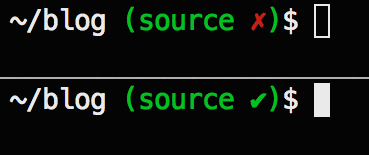
<p>My theme is quite minimalist: just display the current path followed by <code>$</code> and a space.
When in a Git repo, I like to display the branch name followed by a dirty/clean indicator like so:</p>

<p><img src="https://farm6.staticflickr.com/5562/14685304517_58427bb488_o.png"
title="Dirty vs Clean" /></p>

<p>At the time of writing, most Prezto themes use <code>vcs_info</code> which can detect staged and unstaged changes (i.e. a dirty state).
But there&rsquo;s no hook for a clean state, so when there are no changes, the prompt will just display nothing.
I would much rather have a satisfying green little tick that means
&ldquo;Nothing else to do! Well done mate, you can have a beer* now&rdquo;.</p>

<p>For this, we need to use <code>git-info</code> from the Prezto <code>git</code> plugin. I ended up with this:</p>

<figure class='code'><figcaption><span></span></figcaption><div class="highlight"><table><tr><td class="gutter"><pre class="line-numbers"><span class='line-number'>1</span>
<span class='line-number'>2</span>
<span class='line-number'>3</span>
<span class='line-number'>4</span>
<span class='line-number'>5</span>
<span class='line-number'>6</span>
<span class='line-number'>7</span>
<span class='line-number'>8</span>
<span class='line-number'>9</span>
<span class='line-number'>10</span>
<span class='line-number'>11</span>
<span class='line-number'>12</span>
<span class='line-number'>13</span>
<span class='line-number'>14</span>
<span class='line-number'>15</span>
<span class='line-number'>16</span>
<span class='line-number'>17</span>
<span class='line-number'>18</span>
<span class='line-number'>19</span>
<span class='line-number'>20</span>
<span class='line-number'>21</span>
<span class='line-number'>22</span>
<span class='line-number'>23</span>
<span class='line-number'>24</span>
<span class='line-number'>25</span>
<span class='line-number'>26</span>
<span class='line-number'>27</span>
<span class='line-number'>28</span>
<span class='line-number'>29</span>
<span class='line-number'>30</span>
</pre></td><td class='code'><pre><code class='sh'><span class='line'><span class="k">function </span>prompt_jerome_precmd <span class="o">{</span>
</span><span class='line'>  git-info
</span><span class='line'><span class="o">}</span>
</span><span class='line'>
</span><span class='line'><span class="k">function </span>prompt_jerome_setup <span class="o">{</span>
</span><span class='line'>  setopt LOCAL_OPTIONS
</span><span class='line'>  unsetopt XTRACE KSH_ARRAYS
</span><span class='line'>  <span class="nv">prompt_opts</span><span class="o">=(</span>cr percent subst<span class="o">)</span>
</span><span class='line'>
</span><span class='line'>  <span class="c"># Load required functions.</span>
</span><span class='line'>  autoload -Uz add-zsh-hook
</span><span class='line'>
</span><span class='line'>  <span class="c"># Add hook for calling git-info before each command.</span>
</span><span class='line'>  add-zsh-hook precmd prompt_jerome_precmd
</span><span class='line'>
</span><span class='line'>  <span class="c"># Set git-info parameters.</span>
</span><span class='line'>  zstyle <span class="s1">&#39;:prezto:module:git:info&#39;</span> verbose <span class="s1">&#39;yes&#39;</span>
</span><span class='line'>  zstyle <span class="s1">&#39;:prezto:module:git:info:branch&#39;</span> format <span class="s1">&#39;%F{green}%b%f&#39;</span>
</span><span class='line'>  zstyle <span class="s1">&#39;:prezto:module:git:info:clean&#39;</span> format <span class="s1">&#39; %F{green}✔%f&#39;</span>
</span><span class='line'>  zstyle <span class="s1">&#39;:prezto:module:git:info:dirty&#39;</span> format <span class="s1">&#39; %F{red}✗%f&#39;</span>
</span><span class='line'>  zstyle <span class="s1">&#39;:prezto:module:git:info:keys&#39;</span> format <span class="se">\</span>
</span><span class='line'>    <span class="s1">&#39;prompt&#39;</span> <span class="s1">&#39; %F{green}(%f$(coalesce &quot;%b&quot; &quot;%p&quot; &quot;%c&quot;)${git_info[rprompt]}%s%F{green})%f&#39;</span> <span class="se">\</span>
</span><span class='line'>    <span class="s1">&#39;rprompt&#39;</span> <span class="s1">&#39;%C%D&#39;</span>
</span><span class='line'>
</span><span class='line'>  <span class="c"># Define prompts.</span>
</span><span class='line'>  <span class="nv">PROMPT</span><span class="o">=</span><span class="s1">&#39;%~${(e)git_info[prompt]}$ &#39;</span>
</span><span class='line'>  <span class="nv">RPROMPT</span><span class="o">=</span><span class="s1">&#39;&#39;</span>
</span><span class='line'><span class="o">}</span>
</span><span class='line'>
</span><span class='line'>prompt_jerome_setup <span class="s2">&quot;$@&quot;</span>
</span></code></pre></td></tr></table></div></figure>


<p>I then saved the theme in
<code>~/.zprezto/modules/prompt/functions/prompt_jerome_setup</code>
and made Prezto use it by having this line in <code>~/.zpreztorc</code>:</p>

<figure class='code'><figcaption><span></span></figcaption><div class="highlight"><table><tr><td class="gutter"><pre class="line-numbers"><span class='line-number'>1</span>
</pre></td><td class='code'><pre><code class='sh'><span class='line'>zstyle <span class="s1">&#39;:prezto:module:prompt&#39;</span> theme <span class="s1">&#39;jerome&#39;</span>
</span></code></pre></td></tr></table></div></figure>


<p>Done.</p>

<h2>Last bits and pieces</h2>

<ul>
<li>I added <code>history-substring-search</code> and <code>git</code> to the <code>~/.zpreztorc</code> plugin list:</li>
</ul>


<figure class='code'><figcaption><span></span></figcaption><div class="highlight"><table><tr><td class="gutter"><pre class="line-numbers"><span class='line-number'>1</span>
<span class='line-number'>2</span>
<span class='line-number'>3</span>
<span class='line-number'>4</span>
<span class='line-number'>5</span>
<span class='line-number'>6</span>
<span class='line-number'>7</span>
<span class='line-number'>8</span>
<span class='line-number'>9</span>
<span class='line-number'>10</span>
<span class='line-number'>11</span>
<span class='line-number'>12</span>
<span class='line-number'>13</span>
<span class='line-number'>14</span>
</pre></td><td class='code'><pre><code class='sh'><span class='line'>...
</span><span class='line'>zstyle <span class="s1">&#39;:prezto:load&#39;</span> pmodule <span class="se">\</span>
</span><span class='line'>  <span class="s1">&#39;environment&#39;</span> <span class="se">\</span>
</span><span class='line'>  <span class="s1">&#39;terminal&#39;</span> <span class="se">\</span>
</span><span class='line'>  <span class="s1">&#39;editor&#39;</span> <span class="se">\</span>
</span><span class='line'>  <span class="s1">&#39;history&#39;</span> <span class="se">\</span>
</span><span class='line'>  <span class="s1">&#39;directory&#39;</span> <span class="se">\</span>
</span><span class='line'>  <span class="s1">&#39;spectrum&#39;</span> <span class="se">\</span>
</span><span class='line'>  <span class="s1">&#39;utility&#39;</span> <span class="se">\</span>
</span><span class='line'>  <span class="s1">&#39;completion&#39;</span> <span class="se">\</span>
</span><span class='line'>  <span class="s1">&#39;prompt&#39;</span> <span class="se">\</span>
</span><span class='line'>  <span class="s1">&#39;history-substring-search&#39;</span> <span class="se">\</span>
</span><span class='line'>  <span class="s1">&#39;git&#39;</span>
</span><span class='line'>...
</span></code></pre></td></tr></table></div></figure>


<p><code>history-substring-search</code>: when pressing up/down arrows, completes the beginning of a command by searching in the history.<br/>
<code>git</code>: adds useful aliases and functions like the <code>git-info</code> one that we discussed above.</p>

<ul>
<li>When pressing tab to complete a command, I didn&rsquo;t like the category menus,
so I commented these lines out in <code>~/.zprezto/modules/completion/init.zsh</code>:</li>
</ul>


<figure class='code'><figcaption><span></span></figcaption><div class="highlight"><table><tr><td class="gutter"><pre class="line-numbers"><span class='line-number'>1</span>
<span class='line-number'>2</span>
<span class='line-number'>3</span>
<span class='line-number'>4</span>
<span class='line-number'>5</span>
<span class='line-number'>6</span>
<span class='line-number'>7</span>
<span class='line-number'>8</span>
<span class='line-number'>9</span>
<span class='line-number'>10</span>
<span class='line-number'>11</span>
<span class='line-number'>12</span>
<span class='line-number'>13</span>
<span class='line-number'>14</span>
<span class='line-number'>15</span>
</pre></td><td class='code'><pre><code class='sh'><span class='line'>...
</span><span class='line'><span class="c"># Group matches and describe.</span>
</span><span class='line'>zstyle <span class="s1">&#39;:completion:*:*:*:*:*&#39;</span> menu <span class="k">select</span>
</span><span class='line'><span class="c"># zstyle &#39;:completion:*:matches&#39; group &#39;yes&#39;</span>
</span><span class='line'><span class="c"># zstyle &#39;:completion:*:options&#39; description &#39;yes&#39;</span>
</span><span class='line'><span class="c"># zstyle &#39;:completion:*:options&#39; auto-description &#39;%d&#39;</span>
</span><span class='line'><span class="c"># zstyle &#39;:completion:*:corrections&#39; format &#39; %F{green}-- %d (errors: %e) --%f&#39;</span>
</span><span class='line'><span class="c"># zstyle &#39;:completion:*:descriptions&#39; format &#39; %F{yellow}-- %d --%f&#39;</span>
</span><span class='line'><span class="c"># zstyle &#39;:completion:*:messages&#39; format &#39; %F{purple} -- %d --%f&#39;</span>
</span><span class='line'><span class="c"># zstyle &#39;:completion:*:warnings&#39; format &#39; %F{red}-- no matches found --%f&#39;</span>
</span><span class='line'><span class="c"># zstyle &#39;:completion:*:default&#39; list-prompt &#39;%S%M matches%s&#39;</span>
</span><span class='line'><span class="c"># zstyle &#39;:completion:*&#39; format &#39; %F{yellow}-- %d --%f&#39;</span>
</span><span class='line'><span class="c"># zstyle &#39;:completion:*&#39; group-name &#39;&#39;</span>
</span><span class='line'><span class="c"># zstyle &#39;:completion:*&#39; verbose yes</span>
</span><span class='line'>...
</span></code></pre></td></tr></table></div></figure>


<p>I also modified this line in order to have red diretories when autocompleting the <code>cd</code> command:</p>

<figure class='code'><figcaption><span></span></figcaption><div class="highlight"><table><tr><td class="gutter"><pre class="line-numbers"><span class='line-number'>1</span>
<span class='line-number'>2</span>
</pre></td><td class='code'><pre><code class='sh'><span class='line'><span class="c"># Directories</span>
</span><span class='line'>zstyle <span class="s1">&#39;:completion:*:default&#39;</span> list-colors <span class="s1">&#39;&#39;</span>
</span></code></pre></td></tr></table></div></figure>


<ul>
<li>In my <code>~/.zshrc</code>, I added these zsh options:</li>
</ul>


<figure class='code'><figcaption><span></span></figcaption><div class="highlight"><table><tr><td class="gutter"><pre class="line-numbers"><span class='line-number'>1</span>
<span class='line-number'>2</span>
<span class='line-number'>3</span>
<span class='line-number'>4</span>
<span class='line-number'>5</span>
<span class='line-number'>6</span>
<span class='line-number'>7</span>
<span class='line-number'>8</span>
<span class='line-number'>9</span>
<span class='line-number'>10</span>
</pre></td><td class='code'><pre><code class='sh'><span class='line'>unsetopt CORRECT                      <span class="c"># Disable autocorrect guesses. Happens when typing a wrong</span>
</span><span class='line'>                                      <span class="c"># command that may look like an existing one.</span>
</span><span class='line'>
</span><span class='line'>expand-or-complete-with-dots<span class="o">()</span> <span class="o">{</span>      <span class="c"># This bunch of code displays red dots when autocompleting</span>
</span><span class='line'>  <span class="nb">echo</span> -n <span class="s2">&quot;\e[31m......\e[0m&quot;</span>         <span class="c"># a command with the tab key, &quot;Oh-my-zsh&quot;-style.</span>
</span><span class='line'>  zle expand-or-complete
</span><span class='line'>  zle redisplay
</span><span class='line'><span class="o">}</span>
</span><span class='line'>zle -N expand-or-complete-with-dots
</span><span class='line'>bindkey <span class="s2">&quot;^I&quot;</span> expand-or-complete-with-dots
</span></code></pre></td></tr></table></div></figure>


<h2>Wrapping up</h2>

<p>That&rsquo;s it, you now have a fast zsh that behaves like before!</p>

<p>I skipped some very minor configurations in this article,
so if you want to review exactly what I&rsquo;ve done (or if you want to know what kind of crazy stuff I put in my <code>~/.zshrc</code>),
have a look at the commits in my
<a href="https://github.com/jeromedalbert/prezto/commits/master" target="_blank">Prezto fork</a>.</p>

<p>Enjoy!</p>

<p><em>EDIT: <a href="https://news.ycombinator.com/item?id=8158707" target="_blank">Hacker News thread</a></em></p>

<div class="references"> *I prefer cider. </div>

]]></content>
  </entry>
  
  <entry>
    <title type="html"><![CDATA[Ruby: How to iterate "the right way"]]></title>
    <link href="http://jeromedalbert.com/ruby-how-to-iterate-the-right-way"/>
    <updated>2014-01-05T14:12:00-08:00</updated>
    <id>http://jeromedalbert.com/ruby-how-to-iterate-the-right-way</id>
    <content type="html"><![CDATA[<p><img class="header" src="http://farm8.staticflickr.com/7377/11753946913_0bbf38c9bf_m.jpg" title= "Froot loops. Loop, iteration... Got it? Hahaha. So hilarious. We're having a ball here." /></p>

<div class="left-header">
<blockquote><p>If any of you have written code in the last year that had an explicit loop [&#8230;], you don&#8217;t understand collections.</p><footer><strong>Professor David West</strong> <cite><a href="http://vimeo.com/77415896#t=48m04s" target="_blank">OOP Is Dead! Long Live OODD!</a></cite></footer></blockquote>
</div>


<p>You may be baffled by this quote if you come from a C-flavored language such as C++ and Java<!--more-->,
where explicit loops like <code>for</code> and <code>foreach</code> are part of your everyday life.</p>

<p>Luckily, collection methods come built-in with Ruby.
Once you realize how powerful they are compared to explicit loops, there is no going back!</p>

<h2>each</h2>

<p>Let&rsquo;s begin with the collection method that has the least added value.<br/>
<code>each</code> is the equivalent of a <code>for</code> loop. Use it when you need to iterate on a collection with side effects.</p>

<figure class='code'><figcaption><span></span></figcaption><div class="highlight"><table><tr><td class="gutter"><pre class="line-numbers"><span class='line-number'>1</span>
<span class='line-number'>2</span>
<span class='line-number'>3</span>
</pre></td><td class='code'><pre><code class='ruby'><span class='line'><span class="o">[</span><span class="s1">&#39;a&#39;</span><span class="p">,</span> <span class="s1">&#39;b&#39;</span><span class="p">,</span> <span class="s1">&#39;c&#39;</span><span class="o">].</span><span class="n">each</span> <span class="k">do</span> <span class="o">|</span><span class="n">e</span><span class="o">|</span>
</span><span class='line'>  <span class="c1"># do side effects, such as printing to the console, writing to a file, persisting in database, etc.</span>
</span><span class='line'><span class="k">end</span>
</span></code></pre></td></tr></table></div></figure>


<p>For your information, Ruby also has a <code>for</code> statement (nobody uses it though).</p>

<h2>map</h2>

<p><em>(alias to avoid: collect)</em><br/>
Whenever you need to transform some values into some other values, <code>map</code> is your friend.</p>

<figure class='code'><figcaption><span></span></figcaption><div class="highlight"><table><tr><td class="gutter"><pre class="line-numbers"><span class='line-number'>1</span>
<span class='line-number'>2</span>
<span class='line-number'>3</span>
<span class='line-number'>4</span>
<span class='line-number'>5</span>
</pre></td><td class='code'><pre><code class='ruby'><span class='line'><span class="o">[</span><span class="mi">1</span><span class="p">,</span> <span class="mi">2</span><span class="p">,</span> <span class="mi">3</span><span class="o">].</span><span class="n">map</span> <span class="p">{</span> <span class="o">|</span><span class="n">e</span><span class="o">|</span> <span class="n">e</span> <span class="o">*</span> <span class="mi">2</span> <span class="p">}</span> <span class="c1"># returns [2, 4, 6]</span>
</span><span class='line'>
</span><span class='line'><span class="o">[</span><span class="s1">&#39;a&#39;</span><span class="p">,</span> <span class="s1">&#39;b&#39;</span><span class="p">,</span> <span class="s1">&#39;c&#39;</span><span class="o">].</span><span class="n">map</span> <span class="p">{</span> <span class="o">|</span><span class="n">e</span><span class="o">|</span> <span class="n">e</span><span class="o">.</span><span class="n">upcase</span> <span class="p">}</span> <span class="c1"># returns [&#39;A&#39;, &#39;B&#39;, &#39;C&#39;]</span>
</span><span class='line'>
</span><span class='line'><span class="o">[</span><span class="s1">&#39;a&#39;</span><span class="p">,</span> <span class="s1">&#39;b&#39;</span><span class="p">,</span> <span class="s1">&#39;c&#39;</span><span class="o">].</span><span class="n">map</span><span class="p">(</span><span class="o">&amp;</span><span class="ss">:upcase</span><span class="p">)</span> <span class="c1"># same result as before, for experienced lazy Ruby programmers</span>
</span></code></pre></td></tr></table></div></figure>


<p><code>map</code> is your bread and butter. I probably use it more than <code>each</code>.</p>

<h2>select</h2>

<p><em>(alias to avoid: find_all)</em><br/>
Very useful when you need to filter (i.e. &ldquo;select&rdquo;) multiple values.</p>

<figure class='code'><figcaption><span></span></figcaption><div class="highlight"><table><tr><td class="gutter"><pre class="line-numbers"><span class='line-number'>1</span>
</pre></td><td class='code'><pre><code class='ruby'><span class='line'><span class="o">[</span><span class="mi">1</span><span class="p">,</span> <span class="mi">2</span><span class="p">,</span> <span class="mi">3</span><span class="p">,</span> <span class="mi">4</span><span class="o">].</span><span class="n">select</span> <span class="p">{</span> <span class="o">|</span><span class="n">e</span><span class="o">|</span> <span class="n">e</span> <span class="o">%</span> <span class="mi">2</span> <span class="o">==</span> <span class="mi">0</span> <span class="p">}</span> <span class="c1"># returns [2, 4]</span>
</span></code></pre></td></tr></table></div></figure>


<h2>reject</h2>

<p>The contrary of <code>select</code></p>

<figure class='code'><figcaption><span></span></figcaption><div class="highlight"><table><tr><td class="gutter"><pre class="line-numbers"><span class='line-number'>1</span>
</pre></td><td class='code'><pre><code class='ruby'><span class='line'><span class="o">[</span><span class="mi">1</span><span class="p">,</span> <span class="mi">2</span><span class="p">,</span> <span class="mi">3</span><span class="p">,</span> <span class="mi">4</span><span class="o">].</span><span class="n">reject</span> <span class="p">{</span> <span class="o">|</span><span class="n">e</span><span class="o">|</span> <span class="n">e</span> <span class="o">%</span> <span class="mi">2</span> <span class="o">==</span> <span class="mi">0</span> <span class="p">}</span> <span class="c1"># returns [1, 3]</span>
</span></code></pre></td></tr></table></div></figure>


<h2>partition</h2>

<p><code>select</code> + <code>reject</code></p>

<figure class='code'><figcaption><span></span></figcaption><div class="highlight"><table><tr><td class="gutter"><pre class="line-numbers"><span class='line-number'>1</span>
</pre></td><td class='code'><pre><code class='ruby'><span class='line'><span class="o">[</span><span class="mi">2</span><span class="p">,</span> <span class="mi">3</span><span class="p">,</span> <span class="mi">4</span><span class="p">,</span> <span class="mi">5</span><span class="o">].</span><span class="n">partition</span> <span class="p">{</span> <span class="o">|</span><span class="n">e</span><span class="o">|</span> <span class="n">e</span><span class="o">.</span><span class="n">even?</span> <span class="p">}</span> <span class="c1"># returns [[2, 4], [3, 5]]</span>
</span></code></pre></td></tr></table></div></figure>


<h2>find</h2>

<p><em>(alias to avoid: detect)</em><br/>
Very useful when you need to find a single value.</p>

<figure class='code'><figcaption><span></span></figcaption><div class="highlight"><table><tr><td class="gutter"><pre class="line-numbers"><span class='line-number'>1</span>
</pre></td><td class='code'><pre><code class='ruby'><span class='line'><span class="o">[</span><span class="mi">4</span><span class="p">,</span> <span class="mi">6</span><span class="p">,</span> <span class="mi">8</span><span class="p">,</span> <span class="mi">13</span><span class="o">].</span><span class="n">find</span> <span class="p">{</span> <span class="o">|</span><span class="n">e</span><span class="o">|</span> <span class="n">e</span> <span class="o">&gt;</span> <span class="mi">7</span> <span class="p">}</span> <span class="c1"># Returns 8 (the first found element)</span>
</span></code></pre></td></tr></table></div></figure>


<h2>reduce</h2>

<p><em>(alias to avoid: inject)</em><br/>
<code>reduce</code> is very important in functionnal programming, where it is also known as <code>fold</code>.
Indeed, it can be used to build everything else: <code>map</code>, <code>select</code>, <code>find</code>, <code>min</code>, <code>max</code>, sums, etc.<br/>
The idea is to use an accumulator that will contain the final result.
This accumulator can be anything: a number, an array, a hash, etc.</p>

<figure class='code'><figcaption><span></span></figcaption><div class="highlight"><table><tr><td class="gutter"><pre class="line-numbers"><span class='line-number'>1</span>
<span class='line-number'>2</span>
<span class='line-number'>3</span>
<span class='line-number'>4</span>
<span class='line-number'>5</span>
<span class='line-number'>6</span>
<span class='line-number'>7</span>
<span class='line-number'>8</span>
<span class='line-number'>9</span>
<span class='line-number'>10</span>
<span class='line-number'>11</span>
<span class='line-number'>12</span>
<span class='line-number'>13</span>
<span class='line-number'>14</span>
</pre></td><td class='code'><pre><code class='ruby'><span class='line'><span class="o">[</span><span class="mi">1</span><span class="p">,</span> <span class="mi">2</span><span class="p">,</span> <span class="mi">3</span><span class="o">].</span><span class="n">reduce</span><span class="p">(</span><span class="mi">0</span><span class="p">)</span> <span class="p">{</span> <span class="o">|</span><span class="n">acc</span><span class="p">,</span> <span class="n">e</span><span class="o">|</span> <span class="n">acc</span> <span class="o">+</span> <span class="n">e</span> <span class="p">}</span> <span class="c1"># returns 6 (0 + 1 + 2 + 3).</span>
</span><span class='line'>                                         <span class="c1"># 0 is the initial value of the accumulator.</span>
</span><span class='line'>
</span><span class='line'><span class="o">[</span><span class="mi">1</span><span class="p">,</span> <span class="mi">2</span><span class="p">,</span> <span class="mi">3</span><span class="o">].</span><span class="n">reduce</span> <span class="p">{</span> <span class="o">|</span><span class="n">acc</span><span class="p">,</span> <span class="n">e</span><span class="o">|</span> <span class="n">acc</span> <span class="o">+</span> <span class="n">e</span> <span class="p">}</span> <span class="c1"># same result as before. When we omit the accumulator initial</span>
</span><span class='line'>                                      <span class="c1"># value, the first element of the array is chosen.</span>
</span><span class='line'>                                      <span class="c1"># So in our case, 1 is the initial value of the accumulator.</span>
</span><span class='line'>                                      <span class="c1"># What is computed is 1 + 2 + 3.</span>
</span><span class='line'>
</span><span class='line'><span class="o">[</span><span class="mi">1</span><span class="p">,</span> <span class="mi">2</span><span class="p">,</span> <span class="mi">3</span><span class="o">].</span><span class="n">reduce</span><span class="p">(</span><span class="ss">:+</span><span class="p">)</span> <span class="c1"># same result as before, for experienced lazy Ruby programmers.</span>
</span><span class='line'>                     <span class="c1"># Reduce accepts :+, but you can also use &amp;:+</span>
</span><span class='line'>
</span><span class='line'><span class="o">[</span><span class="mi">2</span><span class="p">,</span> <span class="mi">3</span><span class="p">,</span> <span class="mi">4</span><span class="o">].</span><span class="n">reduce</span> <span class="p">{</span> <span class="o">|</span><span class="n">acc</span><span class="p">,</span> <span class="n">e</span><span class="o">|</span> <span class="n">acc</span> <span class="o">*</span> <span class="n">e</span> <span class="p">}</span> <span class="c1"># returns 24 (2 * 3 * 4)</span>
</span><span class='line'>
</span><span class='line'><span class="o">[</span><span class="mi">0</span><span class="p">,</span> <span class="mi">2</span><span class="p">,</span> <span class="mi">3</span><span class="p">,</span> <span class="mi">4</span><span class="o">].</span><span class="n">reduce</span> <span class="p">{</span> <span class="o">|</span><span class="n">acc</span><span class="p">,</span> <span class="n">e</span><span class="o">|</span> <span class="n">acc</span> <span class="o">*</span> <span class="n">e</span> <span class="p">}</span> <span class="c1"># returns 0 (0 * 2 * 3 * 4)</span>
</span></code></pre></td></tr></table></div></figure>


<p>I rarely use <code>reduce</code> in practice, but it is fun and good to know for your computer science culture.</p>

<h2>all?</h2>

<figure class='code'><figcaption><span></span></figcaption><div class="highlight"><table><tr><td class="gutter"><pre class="line-numbers"><span class='line-number'>1</span>
</pre></td><td class='code'><pre><code class='ruby'><span class='line'><span class="o">[</span><span class="mi">2</span><span class="p">,</span> <span class="mi">4</span><span class="p">,</span> <span class="mi">6</span><span class="o">].</span><span class="n">all?</span> <span class="p">{</span> <span class="o">|</span><span class="n">e</span><span class="o">|</span> <span class="n">e</span><span class="o">.</span><span class="n">even?</span> <span class="p">}</span> <span class="c1"># returns true</span>
</span></code></pre></td></tr></table></div></figure>


<p>Self-explanatory.</p>

<h2>any?</h2>

<figure class='code'><figcaption><span></span></figcaption><div class="highlight"><table><tr><td class="gutter"><pre class="line-numbers"><span class='line-number'>1</span>
</pre></td><td class='code'><pre><code class='ruby'><span class='line'><span class="o">[</span><span class="mi">3</span><span class="p">,</span> <span class="mi">8</span><span class="p">,</span> <span class="mi">42</span><span class="o">].</span><span class="n">any?</span> <span class="p">{</span> <span class="o">|</span><span class="n">e</span><span class="o">|</span> <span class="n">e</span> <span class="o">&gt;</span> <span class="mi">10</span> <span class="p">}</span> <span class="c1"># returns true</span>
</span></code></pre></td></tr></table></div></figure>


<p>Self-explanatory.</p>

<p>By the way, I like using the &ldquo;no block&rdquo; form of <code>any?</code> to ask if something &ldquo;has any&rdquo; significant element:</p>

<figure class='code'><figcaption><span></span></figcaption><div class="highlight"><table><tr><td class="gutter"><pre class="line-numbers"><span class='line-number'>1</span>
<span class='line-number'>2</span>
<span class='line-number'>3</span>
<span class='line-number'>4</span>
</pre></td><td class='code'><pre><code class='ruby'><span class='line'><span class="o">[</span><span class="mi">3</span><span class="p">,</span> <span class="mi">4</span><span class="o">].</span><span class="n">any?</span> <span class="c1"># returns true</span>
</span><span class='line'><span class="o">[].</span><span class="n">any?</span> <span class="c1"># returns false</span>
</span><span class='line'><span class="o">[</span><span class="kp">nil</span><span class="o">].</span><span class="n">any?</span> <span class="c1"># returns false</span>
</span><span class='line'><span class="o">[</span><span class="kp">false</span><span class="o">].</span><span class="n">any?</span> <span class="c1"># returns false</span>
</span></code></pre></td></tr></table></div></figure>


<p>I find it more expressive than <code>!some_array.empty?</code>.</p>

<h2>times</h2>

<p>This is a funny one!</p>

<figure class='code'><figcaption><span></span></figcaption><div class="highlight"><table><tr><td class="gutter"><pre class="line-numbers"><span class='line-number'>1</span>
<span class='line-number'>2</span>
<span class='line-number'>3</span>
</pre></td><td class='code'><pre><code class='ruby'><span class='line'><span class="mi">3</span><span class="o">.</span><span class="n">times</span> <span class="p">{</span> <span class="nb">puts</span> <span class="s1">&#39;Hello world!&#39;</span> <span class="p">}</span> <span class="c1"># prints &#39;Hello world!&#39; 3 times</span>
</span><span class='line'>
</span><span class='line'><span class="mi">3</span><span class="o">.</span><span class="n">times</span> <span class="p">{</span> <span class="o">|</span><span class="n">i</span><span class="o">|</span> <span class="nb">puts</span> <span class="n">i</span> <span class="p">}</span> <span class="c1"># prints &#39;0&#39;, &#39;1&#39; and &#39;2&#39;</span>
</span></code></pre></td></tr></table></div></figure>


<p>In practice I don&rsquo;t use it very often though.</p>

<h2>Sorting methods</h2>

<figure class='code'><figcaption><span></span></figcaption><div class="highlight"><table><tr><td class="gutter"><pre class="line-numbers"><span class='line-number'>1</span>
<span class='line-number'>2</span>
<span class='line-number'>3</span>
<span class='line-number'>4</span>
</pre></td><td class='code'><pre><code class='ruby'><span class='line'><span class="o">[</span><span class="mi">7</span><span class="p">,</span> <span class="mi">2</span><span class="p">,</span> <span class="mi">5</span><span class="o">].</span><span class="n">sort</span> <span class="c1"># returns [2, 5, 7]</span>
</span><span class='line'><span class="o">[</span><span class="s1">&#39;c&#39;</span><span class="p">,</span> <span class="s1">&#39;b&#39;</span><span class="p">,</span> <span class="s1">&#39;a&#39;</span><span class="o">].</span><span class="n">sort</span> <span class="c1"># returns [&#39;a&#39;, &#39;b&#39;, &#39;c&#39;]</span>
</span><span class='line'>
</span><span class='line'><span class="n">employees</span><span class="o">.</span><span class="n">sort_by</span> <span class="p">{</span><span class="o">|</span><span class="n">e</span><span class="o">|</span> <span class="n">e</span><span class="o">.</span><span class="n">last_name</span><span class="p">}</span> <span class="c1"># sort your employees by last name</span>
</span></code></pre></td></tr></table></div></figure>


<h2>But&hellip; I want indexes!</h2>

<p>On top of the current element, you also need the current index?
Worry not, fellow citizen. Ruby has it all.</p>

<figure class='code'><figcaption><span></span></figcaption><div class="highlight"><table><tr><td class="gutter"><pre class="line-numbers"><span class='line-number'>1</span>
<span class='line-number'>2</span>
<span class='line-number'>3</span>
<span class='line-number'>4</span>
<span class='line-number'>5</span>
<span class='line-number'>6</span>
<span class='line-number'>7</span>
</pre></td><td class='code'><pre><code class='ruby'><span class='line'><span class="o">[</span><span class="s1">&#39;a&#39;</span><span class="p">,</span> <span class="s1">&#39;b&#39;</span><span class="p">,</span> <span class="s1">&#39;c&#39;</span><span class="o">].</span><span class="n">each_with_index</span> <span class="k">do</span> <span class="o">|</span><span class="n">e</span><span class="p">,</span> <span class="n">i</span><span class="o">|</span>
</span><span class='line'>  <span class="c1"># do stuff</span>
</span><span class='line'><span class="k">end</span>
</span><span class='line'>
</span><span class='line'><span class="o">[</span><span class="s1">&#39;a&#39;</span><span class="p">,</span> <span class="s1">&#39;b&#39;</span><span class="p">,</span> <span class="s1">&#39;c&#39;</span><span class="o">].</span><span class="n">map</span><span class="o">.</span><span class="n">with_index</span> <span class="k">do</span> <span class="o">|</span><span class="n">e</span><span class="p">,</span> <span class="n">i</span><span class="o">|</span>
</span><span class='line'>  <span class="c1"># do stuff</span>
</span><span class='line'><span class="k">end</span>
</span></code></pre></td></tr></table></div></figure>


<p>In practice I don&rsquo;t use <code>each_with_index</code> very often.
I never had to use <code>map.with_index</code>, but I put it for the sake of being comprehensive.</p>

<h2>Explicit loops</h2>

<p>Collection methods will probably cover 90% of your needs.
What is certain is that you won&rsquo;t need to use a <code>for</code> loop ever again.</p>

<p>However, there are cases when the number of iterations in not known in advance:
if you work on an algorithm or low-level code, for example.
This is a typical job for <code>while</code> and <code>until</code>.
In this case, these explicit loops are ok to use.</p>

<figure class='code'><figcaption><span></span></figcaption><div class="highlight"><table><tr><td class="gutter"><pre class="line-numbers"><span class='line-number'>1</span>
<span class='line-number'>2</span>
<span class='line-number'>3</span>
<span class='line-number'>4</span>
<span class='line-number'>5</span>
<span class='line-number'>6</span>
<span class='line-number'>7</span>
<span class='line-number'>8</span>
<span class='line-number'>9</span>
</pre></td><td class='code'><pre><code class='ruby'><span class='line'><span class="n">finished</span> <span class="o">=</span> <span class="kp">false</span>
</span><span class='line'><span class="k">until</span> <span class="n">finished</span>
</span><span class='line'>  <span class="c1"># do stuff</span>
</span><span class='line'><span class="k">end</span>
</span><span class='line'>
</span><span class='line'><span class="n">x</span> <span class="o">=</span> <span class="mi">100</span>
</span><span class='line'><span class="k">while</span> <span class="n">x</span> <span class="o">&gt;</span> <span class="mi">0</span>
</span><span class='line'>  <span class="c1"># do stuff</span>
</span><span class='line'><span class="k">end</span>
</span></code></pre></td></tr></table></div></figure>


<p>You may want to use an infinite loop: for example the main infinite loop of a video game.
Here is the syntax:</p>

<figure class='code'><figcaption><span></span></figcaption><div class="highlight"><table><tr><td class="gutter"><pre class="line-numbers"><span class='line-number'>1</span>
<span class='line-number'>2</span>
<span class='line-number'>3</span>
<span class='line-number'>4</span>
</pre></td><td class='code'><pre><code class='ruby'><span class='line'><span class="kp">loop</span> <span class="k">do</span>
</span><span class='line'> <span class="c1"># do stuff.</span>
</span><span class='line'> <span class="c1"># You can still exit the loop with break.</span>
</span><span class='line'><span class="k">end</span>
</span></code></pre></td></tr></table></div></figure>


<p>Same as <code>while true</code>, but terser.</p>

<h2>Going further</h2>

<p>Ruby collection methods become even more powerful if you combine them:</p>

<figure class='code'><figcaption><span></span></figcaption><div class="highlight"><table><tr><td class="gutter"><pre class="line-numbers"><span class='line-number'>1</span>
<span class='line-number'>2</span>
<span class='line-number'>3</span>
<span class='line-number'>4</span>
<span class='line-number'>5</span>
</pre></td><td class='code'><pre><code class='ruby'><span class='line'><span class="o">[</span><span class="s1">&#39;coconut&#39;</span><span class="p">,</span> <span class="s1">&#39;lemon&#39;</span><span class="p">,</span> <span class="s1">&#39;banana&#39;</span><span class="p">,</span> <span class="s1">&#39;apple&#39;</span><span class="o">].</span><span class="n">select</span> <span class="p">{</span> <span class="o">|</span><span class="n">e</span><span class="o">|</span> <span class="n">e</span><span class="o">.</span><span class="n">size</span> <span class="o">&gt;</span> <span class="mi">5</span> <span class="p">}</span>
</span><span class='line'>                                       <span class="o">.</span><span class="n">map</span>    <span class="p">{</span> <span class="o">|</span><span class="n">e</span><span class="o">|</span> <span class="n">e</span><span class="o">.</span><span class="n">upcase</span> <span class="p">}</span>
</span><span class='line'>                                       <span class="o">.</span><span class="n">sort</span>
</span><span class='line'>
</span><span class='line'><span class="c1"># returns [&#39;BANANA&#39;, &#39;COCONUT&#39;]</span>
</span></code></pre></td></tr></table></div></figure>


<p>Don&rsquo;t do this to excess though!</p>

<p>This article covers the main collection methods: feel free to dive into the
<a href="http://ruby-doc.org/core" target="_blank">Ruby Core documentation</a> for more.<br/>
Finally, if you are wondering why I avoid aliases such as <em>collect</em> and <em>inject</em>, you can read this community-driven
<a href="https://github.com/bbatsov/ruby-style-guide#naming" target="_blank">Ruby style guide</a>.</p>
]]></content>
  </entry>
  
  <entry>
    <title type="html"><![CDATA[Dead simple file handling in Ruby]]></title>
    <link href="http://jeromedalbert.com/dead-simple-file-handling-in-ruby"/>
    <updated>2013-11-10T18:52:00-08:00</updated>
    <id>http://jeromedalbert.com/dead-simple-file-handling-in-ruby</id>
    <content type="html"><![CDATA[<p><img class="header margintop" src="http://farm4.staticflickr.com/3753/11699963024_bda6a4c9b8_m.jpg" title="The first hipsters. These guys developed the C programming language." /></p>

<p><strong>Common scenario</strong><br/>
You are writing a basic Ruby script that needs to read or write in some text files.<br/>
So you search &ldquo;ruby write file&rdquo; and &ldquo;ruby read file&rdquo; on Google.<br/>
You end up on the usual tutorials and Stack Overflow answers that tell you to open files with <code>r</code> or <code>w</code> mode, &ldquo;1970 C style&rdquo;<!--more-->.</p>

<p>It&rsquo;s OK, it works. But you may think:<br/>
&ldquo;I&rsquo;m in the 21<sup>st</sup> century goddammit. I just want to read/write in a file, spare me the details!&rdquo;</p>

<p>Worry not, fellow citizen. Have a look at the code below.<br/>
In all of these examples, Ruby automatically opens and closes the file. No need to think about it.</p>

<h2>Read a whole file</h2>

<figure class='code'><figcaption><span></span></figcaption><div class="highlight"><table><tr><td class="gutter"><pre class="line-numbers"><span class='line-number'>1</span>
</pre></td><td class='code'><pre><code class='ruby'><span class='line'><span class="n">content</span> <span class="o">=</span> <span class="no">File</span><span class="o">.</span><span class="n">read</span><span class="p">(</span><span class="s1">&#39;input.txt&#39;</span><span class="p">)</span>
</span></code></pre></td></tr></table></div></figure>


<p>Done.</p>

<h2>Write to a file</h2>

<figure class='code'><figcaption><span></span></figcaption><div class="highlight"><table><tr><td class="gutter"><pre class="line-numbers"><span class='line-number'>1</span>
</pre></td><td class='code'><pre><code class='ruby'><span class='line'><span class="no">File</span><span class="o">.</span><span class="n">write</span><span class="p">(</span><span class="s1">&#39;output.txt&#39;</span><span class="p">,</span> <span class="s1">&#39;Hello world&#39;</span><span class="p">)</span>
</span></code></pre></td></tr></table></div></figure>


<p>&lsquo;Nuff said.</p>

<h2>What if I want to &hellip;?</h2>

<p>The above code covers 80%* of the needs for quick Ruby scripts. Feel free to skip the rest of this post.<br/>
Just for the sake of being comprehensive, here are the other 20%*, slightly more complex because used less often.</p>

<h4>Read a file line by line (useful if you don&rsquo;t want to load a big file entirely in memory):</h4>

<figure class='code'><figcaption><span></span></figcaption><div class="highlight"><table><tr><td class="gutter"><pre class="line-numbers"><span class='line-number'>1</span>
</pre></td><td class='code'><pre><code class='ruby'><span class='line'><span class="no">File</span><span class="o">.</span><span class="n">open</span><span class="p">(</span><span class="s1">&#39;input.txt&#39;</span><span class="p">,</span> <span class="s1">&#39;r&#39;</span><span class="p">)</span><span class="o">.</span><span class="n">each_line</span> <span class="p">{</span> <span class="o">|</span><span class="n">line</span><span class="o">|</span> <span class="nb">puts</span> <span class="n">line</span> <span class="p">}</span>
</span></code></pre></td></tr></table></div></figure>


<p>Another way to do it is <code>File.foreach('input.txt') { |line| puts line }</code>, though
I don&rsquo;t find <code>foreach</code> very Ruby idiomatic.</p>

<h4>Put the lines of a file in an array of lines (I&rsquo;ve never needed to do it, but this is for reference):</h4>

<figure class='code'><figcaption><span></span></figcaption><div class="highlight"><table><tr><td class="gutter"><pre class="line-numbers"><span class='line-number'>1</span>
</pre></td><td class='code'><pre><code class='ruby'><span class='line'><span class="n">lines</span> <span class="o">=</span> <span class="no">File</span><span class="o">.</span><span class="n">readlines</span><span class="p">(</span><span class="s1">&#39;input.txt&#39;</span><span class="p">)</span>
</span></code></pre></td></tr></table></div></figure>


<h4>Append some text at the end of a file:</h4>

<figure class='code'><figcaption><span></span></figcaption><div class="highlight"><table><tr><td class="gutter"><pre class="line-numbers"><span class='line-number'>1</span>
</pre></td><td class='code'><pre><code class='ruby'><span class='line'><span class="no">File</span><span class="o">.</span><span class="n">open</span><span class="p">(</span><span class="s1">&#39;file.txt&#39;</span><span class="p">,</span> <span class="s1">&#39;a&#39;</span><span class="p">)</span> <span class="p">{</span> <span class="o">|</span><span class="n">file</span><span class="o">|</span> <span class="n">file</span><span class="o">.</span><span class="n">write</span><span class="p">(</span><span class="s1">&#39;some text&#39;</span><span class="p">)</span> <span class="p">}</span>
</span></code></pre></td></tr></table></div></figure>


<p>You can also do <code>file &lt;&lt; 'some text'</code>.
Or <code>file.puts('some text')</code> if you want to insert the text with a <code>\n</code> in the end.</p>

<div class="references">
*These numbers are completely made up. Do not trust the Internet.
</div>

]]></content>
  </entry>
  
  <entry>
    <title type="html"><![CDATA[What traffic do you get when mentioned by several Ruby authorities?]]></title>
    <link href="http://jeromedalbert.com/what-traffic-do-you-get-when-mentioned-by-several-ruby-authorities"/>
    <updated>2013-11-10T16:50:00-08:00</updated>
    <id>http://jeromedalbert.com/what-traffic-do-you-get-when-mentioned-by-several-ruby-authorities</id>
    <content type="html"><![CDATA[<p><img class="header noarticle" src="http://farm8.staticflickr.com/7384/11699976083_9d70d5cb25_m.jpg" title="Jam. Yummy" /></p>

<p><span class="article-only">
<em>EDIT: Some of my latest articles have had traffic orders of magnitude larger than the one mentioned below,
making the figures completely obsolete.</em>
</span></p>

<p>It looks like my latest blog post,
<a href="http://jeromedalbert.com/a-diagram-of-the-ruby-core-object-model">A Diagram of the Ruby Core Object Model</a>,
has had quite a bit of a success in the Ruby community.
Mostly in the educational sphere, that is, <!--more-->Ruby beginners (the targeted audience) but also&hellip; trainers!<br/>
Well, as long as you guys cite your sources, it&rsquo;s fine by me!</p>

<p>It casually begins with a decent score on Reddit:<br/>
<img src="http://farm4.staticflickr.com/3737/10778987893_4d056d9a9b.jpg" title="Reddit is not only about lolcats and rage comics." /></p>

<p>Then, the unexpected happens: I get retweeted by Matz, the creator of Ruby!
I can die in peace now. Minaswan.
<img src="http://farm8.staticflickr.com/7433/10778840974_4a80fee452.jpg" title="A retweet from god." /></p>

<p>Finally, two weeks later, my post
<a href="http://rubyweekly.com/archive/167.html" target="_blank">gets mentioned</a>
in the famous Ruby Weekly newsletter!
Definitely a lot of traffic coming from there.</p>

<p>In terms of metrics, in two weeks, I had 5000 hits, 70 related tweets, and a couple of new followers and e-mail messages.<br/>
<img src="http://farm6.staticflickr.com/5477/10781634074_0c64336424_c.jpg" title="Show me the money!" /></p>

<p>Overall, I am surprised and humbled by the attention this post had.
It looks like people want more of this kind of visual explanations:
I admit it lacks a bit on the Internet.</p>
]]></content>
  </entry>
  
  <entry>
    <title type="html"><![CDATA[A diagram of the Ruby Core object model]]></title>
    <link href="http://jeromedalbert.com/a-diagram-of-the-ruby-core-object-model"/>
    <updated>2013-10-05T20:26:00-07:00</updated>
    <id>http://jeromedalbert.com/a-diagram-of-the-ruby-core-object-model</id>
    <content type="html"><![CDATA[<p><img class="header noarticle" src="http://farm6.staticflickr.com/5443/10075536704_b78362422d_m.jpg" title= "Yep, this is a diagram. What an acute sense of observation. I'm proud of you." /></p>

<p>I am a visual learner. A picture is worth a thousand words.</p>

<p>When I started learning Ruby, I could not find a decent diagram that would just sum up the Ruby classes, modules, and their hierarchy.</p>

<p>So I made mine.<!--more--><br/>
By hand.<br/>
On an A4 sheet.</p>

<p>Here is the result (click for a full size view):</p>

<p><a href="http://farm6.staticflickr.com/5443/10075536704_84aa13676a_o.jpg"
target="_blank"><img
src="http://farm6.staticflickr.com/5443/10075536704_b78362422d_b.jpg" /></a></p>

<p>Most of Ruby&rsquo;s guts at one glance: pretty neat, huh ?</p>

<ul>
<li>Modules are on the top left.</li>
<li>The usual types are here: strings, arrays, hashes, numbers, &ldquo;booleans&rdquo;
(actually <code>TrueClass</code> and <code>FalseClass</code>).</li>
<li>The error hierarchy is on the right.</li>
<li>Other classes are in the middle.</li>
</ul>


<p>Note: To have a decent layout, I only drew 70% of the
<a href="http://ruby-doc.org/core-2.0" target="_blank">Ruby 2 Core classes</a>.
All of the important ones are there, except <code>Random</code>, <code>Time</code>, <code>GC</code> and <code>ObjectSpace</code>:
when I noticed, it was too late. :-)</p>

<h2>What can we &ldquo;draw&rdquo; from this ?</h2>

<p>Well, this model is pretty much what we would have expected:</p>

<ul>
<li>Arrays are enumerable, numbers are comparable.</li>
<li>&ldquo;Everything is an object&rdquo;, or more precisely, every box is this diagram is a BasicObject.</li>
<li>Object includes the Kernel module, so Object has all the instance methods of Kernel, like <code>puts</code>, <code>gets</code>, <code>exit</code>.
When you write Ruby code, you are inside a <code>main</code> object,
that&rsquo;s why you can just write <code>puts 'Hello world'</code> instead of <code>Kernel.puts 'Hello world'</code>.</li>
</ul>


<p>So, everything makes sense and is quite simple actually!
Except maybe the fact that a module is a class, and class inherits from module.
Don&rsquo;t worry, you will eventually wrap your head around it.</p>

<h2>Going further</h2>

<p>In addition to Ruby Core, the
<a href="http://www.ruby-doc.org/stdlib-2.0.0/" target="_blank">Ruby Standard Library</a>
contains many other very useful classes and modules,
such as <code>Date</code>, <code>Forwardable</code>, <code>SimpleDelegator</code>, <code>Net::HTTP</code>, <code>OpenStruct</code>, etc.</p>

<p>This diagram does not explain the Ruby method lookup path,
which takes eigenclasses, included modules and superclasses into account.
I recommend reading this
<a href="https://github.com/elm-city-craftworks/practicing-ruby-manuscripts/blob/master/articles/v1/001-method-lookup.md" target="_blank">enlightening article</a>
from Practicing Ruby.</p>
]]></content>
  </entry>
  
  <entry>
    <title type="html"><![CDATA[First post]]></title>
    <link href="http://jeromedalbert.com/first-post"/>
    <updated>2013-10-02T20:53:00-07:00</updated>
    <id>http://jeromedalbert.com/first-post</id>
    <content type="html"><![CDATA[<p><img class="header" src="http://farm4.staticflickr.com/3684/11411728145_48e776258e_m.jpg" title="First!" /></p>

<p>Hi everyone, welcome to my blog!</p>

<p>Let me tell you an inspiring story of honor and glory.</p>

<p><strong>June:</strong> the idea of creating a blog springs in my little head.<!--more--><br/>
<strong>Early July:</strong> I start talking about it to a couple of people.</p>

<p><strong>July, August, September:</strong> ???</p>

<p><strong>End of September:</strong> a fellow coworker asks me how far I am into this blog project.<br/>
I realize I was vegetating the whole time, watching all of the Doctor Who series.</p>

<p><strong>One day later:</strong> I frenetically spend my whole Saturday + half of the night creating and customizing this blog&hellip;<br/>
Motivation comes in mysterious ways !</p>

<h2>So, what is this blog going to talk about ?</h2>

<p>Contrary to what it may seem, this is not a Ruby only blog: I just found the logo cool.
This is a tech blog at the moment.
I will post some day-to-day discoveries and tips and tricks, share my thoughts about software craftsmanship
(or whatever this pontificating word means) and maybe talk about life as an IT professional in general.</p>

<h2>What can I do to help ?</h2>

<p>How thoughtful of you to ask this question.
I doubt having any reader at all, but if so, do not hesitate to contribute with a comment.</p>
]]></content>
  </entry>
  
</feed>