<?xml version="1.0" encoding="utf-8"?>
<feed xmlns="http://www.w3.org/2005/Atom">

  <title><![CDATA[@jnjosh's internet weblog.]]></title>
  <link href="http://jnjosh.com/atom.xml" rel="self"/>
  <link href="http://jnjosh.com/"/>
  <updated>2015-12-17T11:07:06-05:00</updated>
  <id>http://jnjosh.com/</id>
  <author>
    <name><![CDATA[Josh Johnson]]></name>
    
  </author>
  <generator uri="http://octopress.org/">Octopress</generator>

  
  <entry>
    <title type="html"><![CDATA[Just Say It]]></title>
    
    <link href="http://jnjosh.com/posts/just-say-it/"/>
    
    <updated>2015-09-07T23:32:00-04:00</updated>
    <id>http://jnjosh.com/posts/just-say-it</id>
    <content type="html"><![CDATA[<p>During a recent interview with <a href="http://cocoaconf.com/podcast/13">Marcus Zarra on the CocoaConf Podcast</a>,
Marcus made a quick little comment that really resonated with me.</p>

<!-- more -->


<p>To paraphrase, Marcus said something like <span class="yellow-highlight">“If you
ask for opinions about something to a room of developers, you don&#8217;t get much of
a response. If you just say something wrong they&#8217;ll tell you about it.”</span>
It&#8217;s an interesting point. People do love to correct you when you say something
wrong or even something not 100% correct. Maybe it&#8217;s a good way to think about
speaking in public or blogging here. I&#8217;m not saying I&#8217;d want to blog without
actually researching what I write, but if I miss something maybe that&#8217;s okay.</p>

<p>Maybe this means my decision not to have comments here was a bad idea. So, I
think I&#8217;ll try having comments again. I think Marcus is right here. What do you
think?</p>
]]></content>
  </entry>
  
  <entry>
    <title type="html"><![CDATA[360|iDev 2015]]></title>
    
    <link href="http://jnjosh.com/posts/360idev-2015/"/>
    
    <updated>2015-08-22T13:49:00-04:00</updated>
    <id>http://jnjosh.com/posts/360idev-2015</id>
    <content type="html"><![CDATA[<p>This week I was a speaker and attendee at 360|iDev in Denver. It was my third
time at a 360|iDev (fourth if you count last year&#8217;s Mini in Greenville, SC) and
I think this was probably the best one I&#8217;ve been to yet. Now, I&#8217;m not saying the
previous visits to this conference were bad or anything, I just enjoyed it a lot
this year. Here I&#8217;ll review the week and my session.</p>

<!-- more -->


<h2>The Conference</h2>

<p>I still have a hard time talking to people in these types of environments, but I
still feel it was a great time. John has done a great job keeping things
different and the same. Lunches were actually really great this year too,
especially Tuesday&#8217;s Food Truck Rodeo. The keynote presentations this year were
also really great from <a href="https://twitter.com/joshjet">Josh Michael&#8217;s</a> talk on
being Indie to <a href="https://twitter.com/bmf">Mike Lee&#8217;s</a> talk on “Planetary
Engineering”. I&#8217;ve actually seen many of Mike&#8217;s talks all the way back to 2010&#8217;s
NSConference in Atlanta. This year&#8217;s was so good I had to spend time in my
hotel room just thinking about it. “Don&#8217;t be Evil by Accident” was just one of the
great lines in this talk.</p>

<p>Here are the regular sessions I went to with a brief thought on each.</p>

<h3>Sunday</h3>

<p><strong><a href="http://360idev.com/sessions/universal-layout-workshop/">Universal Layout Workshop</a></strong></p>

<p>This was a hands-on session about universal layout (of course) and covered a lot
of the basics. What was really great was getting the time to really play with
UIStackView. He&#8217;s provided the <a href="https://github.com/sammyd/360UniversalLayoutWorkshop">workshop materials on
Github</a>.</p>

<p><strong><a href="http://360idev.com/sessions/prototyping-with-facebooks-origami/">Prototyping with Facebook&#8217;s Origami</a></strong></p>

<p>Another hands-on session, also with <a href="https://github.com/jonfriskics/360iDev2015">workshop materials on
Github</a>, where I could work with
something I hadn&#8217;t had the time to play with yet. This one gave me the chance to
spend some time with Quartz Composer and Facebook&#8217;s Origami. We are doing a lot
of prototyping at work now so this was actually pretty fun to play with. I&#8217;ve
done a few things with Quartz Composer but had not yet played with Origami. The
session provided a lot of examples to work with and it&#8217;s worth looking at the
Github repo.</p>

<h3>Monday</h3>

<p><strong><a href="http://360idev.com/sessions/300-stop-saying-no-how-i-went-from-fired-to-indie-to-over-1m-in-revenue-in-under-a-year/">Stop Saying No: How I went from Fired to Indie to over 1 Million in Revenue in Under a Year</a></strong></p>

<p>In this talk, Brandon Trebitowski talked about how he went from, as the title
says, being fired to having a successful client services company,
http://www.pixegon.com. It was pretty fun to hear a lot of the similar revelations we had
at Two Toasters. I guess it&#8217;s good to hear that these experiences are common!</p>

<p><strong><a href="http://360idev.com/sessions/jedi-management-from-far-far-away/">Jedi Management from Far Far Away</a></strong></p>

<p>This talk about managing remote teams was really good and also really relevant for managing any team. I really wish I had seen this
talk a couple years ago, it would have saved me some time in learning things the hard way. <a href="https://www.icloud.com/keynote/AwBUCAESEK8yafsGgeISXNTPQLMKVcEaKaV0QSudXkMU8ISlidyxcwriWN_GiCIYVd61dBFL969oQHLPn93ja5hTMCUCAQEEIAYQ_rOqWOU4sxi2ziT-fz4qE3LOxBczMBNuoyqXrosf#Pappas_8_16_2">Slides are available here.</a></p>

<p><strong><a href="http://360idev.com/sessions/100-build-a-business-not-an-app/">Build a Business, not an App</a></strong></p>

<p>One of the common themes this week was that the idea of being an Indie developer
isn&#8217;t as dead as it seems. The real problem is that it was too easy to look at
the successes and assume that we&#8217;d all be that lucky. The real problem was that
developers looked at it as building an app, not building a successful business.</p>

<p><strong><a href="http://360idev.com/sessions/100-making-a-living-in-and-out-of-the-app-store/">Making a living in and out of the App Store</a></strong></p>

<p>Just like the last session, this was another that really pushed home the idea of
running an independent business. You just have to work at it. It was cool to
also see one half of the <a href="http://releasenotes.tv">Release Notes</a> podcast give a
talk. It was almost like listening to the show.</p>

<p><strong><a href="http://360idev.com/sessions/200-developer-horror-stories-what-to-do-when-a-product-fails/">Developer Horror Stories: What to do when a Product Fails</a></strong></p>

<p>This ended up being a panel with several of the other speakers talking about
their experiences in failing. Hearing other people talk about their horror
stories is always interesting. I thought a lot about my own stories.</p>

<h3>Tuesday</h3>

<p><strong><a href="http://360idev.com/sessions/200-why-being-a-best-seller-can-matter-more-than-being-a-best-developer/">Why Being a Best Seller Can Matter More than Being a Best Developer</a></strong></p>

<p>This was a great talk by Jonathan Rhyne. He went into a lot of his experiences
working with PSPDFKit and how he&#8217;s worked to improve their sales. A lot of
really interesting information.</p>

<p><strong><a href="http://360idev.com/sessions/welcome-to-the-team/">Welcome to the Team!</a></strong></p>

<p>Adam talked about a lot of the things that help teams work quickly with each
other. He covered a lot of agile methodologies and other things that make teams,
especially those that work in an open office, better and faster.</p>

<p><strong><a href="http://360idev.com/sessions/300-the-challenges-of-building-a-database-api-in-swift/">The Challenges of Building a Database API (with Swift)</a></strong></p>

<p>Oddly this was the only technical talk I ended up attending during the
conference. It was actually pretty interesting hearing how
<a href="https://realm.io">Realm</a> built their Swift API wrapper around the Objective-C.
It was pretty fascinating to hear the difficulties they experienced but also the
how clean they made the API given these difficulties.</p>

<h3>Wednesday</h3>

<p><strong><a href="http://360idev.com/sessions/300-succeeding-slowly-a-practical-guide-to-going-indie/">Succeeding Slowly: A Practical Guide to Going Indie</a></strong></p>

<p>This might have been my favorite regular session of the whole conference. On the
one hand it was cool to hear a talk by the other half of <a href="http://releasenotes.tv">Release
Notes</a>. On the other, it was great to see practical
steps to someday going indie. As I said above the entire conference had an, I
assume, unofficial theme about how indie business aren&#8217;t dead. Charles had a
great guide on how to attempt to go indie. I&#8217;ve already read mostly through the
book he recommended, <em><a href="http://www.amazon.com/Start-Small-Stay-Developers-Launching/dp/0615373968">Start Small, Stay
Small</a></em>. The <a href="https://www.dropbox.com/s/2maqo00l58on7b9/Succeeding%20Slowly%20360iDev.pdf?dl=0">slides are available here</a>.</p>

<h2>My Talk</h2>

<p>I decided, at the last minute, to propose a talk on my experiences leading a team of
developers at Two Toasters (and continuing at Ticketmaster). Only about 20 people were there
but I had some really good questions and a few people seemed to enjoy it. It&#8217;s actually
the first time I&#8217;ve given a talk that was not about a technical topic (except for one talk
about Bad Movies) and I was a bit nervous. Anyway, you can see the slides below for my
session titled, “How to Lose an iOS Developer in 10 Days”.</p>

<script async class="speakerdeck-embed" data-id="da5a0ab995a44d4f9cb782a2cb845490" data-ratio="1.77777777777778" src="http://jnjosh.com//speakerdeck.com/assets/embed.js"></script>


]]></content>
  </entry>
  
  <entry>
    <title type="html"><![CDATA[May the Force Touch be with You]]></title>
    
    <link href="http://jnjosh.com/posts/may-the-forcetouch-be-with-you/"/>
    
    <updated>2015-04-19T00:11:00-04:00</updated>
    <id>http://jnjosh.com/posts/may-the-forcetouch-be-with-you</id>
    <content type="html"><![CDATA[<p>Last week I bought a newly updated 13&#8221; MacBook Pro with an amazing new Force
Touch trackpad. I love it and it&#8217;s hard to go back to the older trackpad on my
MacBook Pro at work. I&#8217;ve already caught myself trying to press on the top
corners of the older version and have tried to press harder a few times. At this
week&#8217;s <a href="http://www.meetup.com/nscoderrtp">NSCoder Night</a> I decided to play
around with the new Force Touch API to see how it works.</p>

<!-- more -->


<p>Apple&#8217;s <a href="https://developer.apple.com/osx/force-touch/">site describing the APIs</a>
don&#8217;t really go into much detail about how to use them. However it&#8217;s pretty
straightforward save a few oddities. Maybe they would be more expected had I
been spending more time with AppKit.</p>

<p>I experimented with three different methods for detecting pressure with the new
APIs. Responding to events on the responder chain and two different types of
buttons added in 10.10.3. There are also new methods using NSGestureRecognizer
and with Drag and Drop. The gesture recognizer seemed pretty easy and close to
the events I was testing. I haven&#8217;t figured out the drag and drop capabilities
yet.</p>

<h3>Pressure in the Responder Chain</h3>

<p>The easiest method seems to be to simply respond to the correct method</p>

<p><code>- (void)pressureChangeWithEvent:(NSEvent *)event;</code></p>

<p>in your application. Inspecting the <code>NSEventTypePressure</code> type event&#8217;s
<code>pressure</code>, <code>stage</code>, and <code>stageTransition</code> allow you to determine the pressure
across three stages (0, 1, 2). Looking at the <code>pressure</code> property to see the
amount of pressure between 0.0 and 1.0.  The <code>stage</code> property is aligned with
the clicks you feel when pressing on the trackpad. 0 is the stage before the
first click. 1 is the stage between the first and second click and, of course, 2
is the stage after the second click you feel. The <code>stageTransition</code> property
describes the progress towards the next stage. When positive it is approaching
the next stage, when negative it is approaching the previous stage.</p>

<h3>Accelerator Buttons</h3>

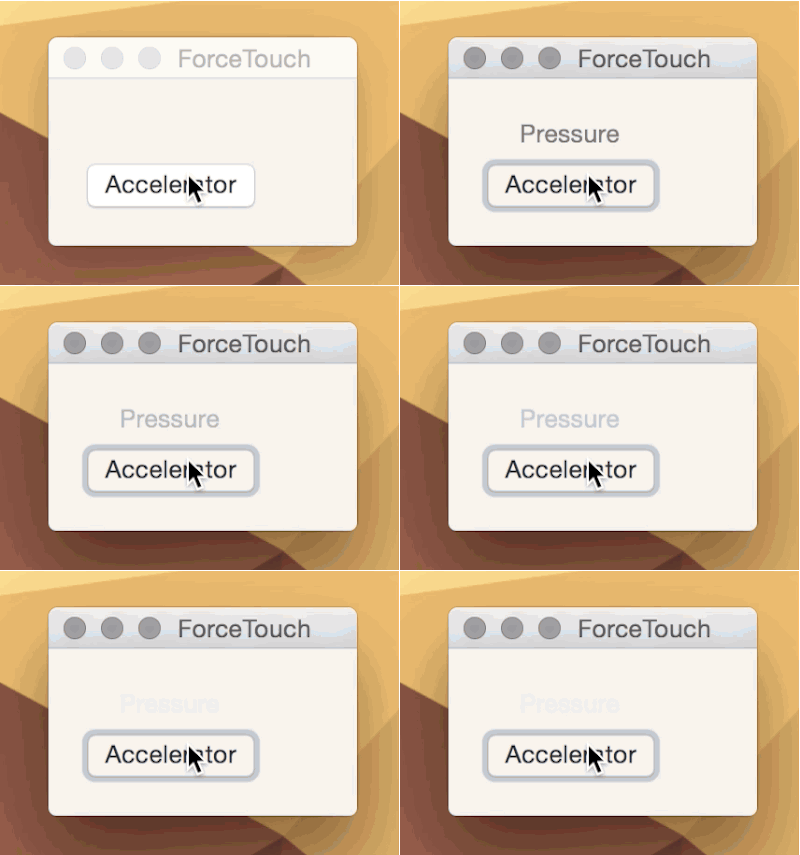
<p>Another way to detect pressure is using a normal NSButton with the new type
<em>Accelerator</em> applied. These buttons will simply invoke their action repeatedly
as pressure increases. For example, if you send the action from a button to</p>

<p><code>- (void)buttonPressed:(id)sender;</code></p>

<p>inspecting the <code>doubleValue</code> of the sender will tell you the pressure between
1.0 and 1.99. The action is called repeatedly until it reaches the end. It does
not have any further clicks beyond the first click you feel. Here I bind the
alpha value of a label to this value normalized to 0.0 and 1.0.</p>

<p><img src="http://jnjosh.com/assets/images/forcetouch/forcetouch2.gif" alt="Accelerator Button" /></p>

<h3>Multi-level Accelerator Buttons</h3>

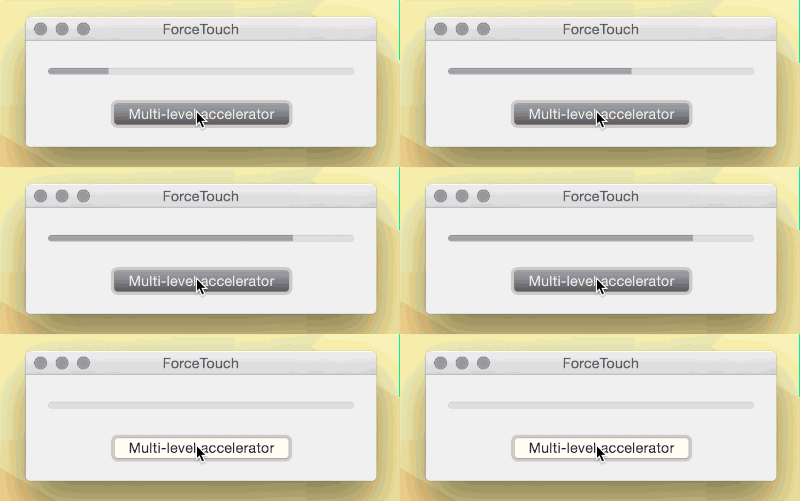
<p>The multi-level button is similar to the regular accelerator button above except
you can specify how many levels, up to 5, the user feels when pressing the
trackpad. With this type you are notified of the level the user has reached, not
the actual pressure value. Inspecting <code>doubleValue</code> on this type of button
responds with 1.0 to <em>n</em> where <em>n</em> is the value you set for the button&#8217;s
<code>maxAcceleratorLevel</code> property. The really fun thing here is you feel an extra
click in the track pad at each level here. This is likely how Apple implemented
the fast forward feature in Quicktime Player. Pressing harder speeds up the fast
forward feature across five levels. Here I bind a button to a progress indicator
with a max of 5.</p>

<p><img src="http://jnjosh.com/assets/images/forcetouch/forcetouch.gif" alt="Multi-level Accelerator Button" /></p>

<p>There are some other ways to take advantage of this new trackpad. Xcode will
actually produce extra clicks when you are dragging UI elements around in
Interface Builder. When the item you are dragging reaches a recommended
constraint, you feel it. I haven&#8217;t quite figured out how to do this yet.</p>

<p>There is also this new concept for <code>springLoaded</code> that allows you to do specific
pressure-sensitive behavior when dragging over a button.</p>

<p>It&#8217;s been a long time since I worked with AppKit, but I&#8217;ve been really wanting
to get back into it and do something cool. These new gestures have me extremely
excited about what I could build to support it.</p>
]]></content>
  </entry>
  
  <entry>
    <title type="html"><![CDATA[Swift, you've changed so much]]></title>
    
    <link href="http://jnjosh.com/posts/swift-you-slash-ve-changed-so-much/"/>
    
    <updated>2015-03-23T23:31:00-04:00</updated>
    <id>http://jnjosh.com/posts/swift-you-slash-ve-changed-so-much</id>
    <content type="html"><![CDATA[<p>During the crazy week of WWDC 2014—right after the announcement of Swift—I decided to spend a little
time trying to implement a quick weather app using the new language. I managed to wrap it up in a
few hours (and spent way too much time trying to figure out how to parse JSON with a
generically-typed dictionary) and open sourced it. There it sat for all these months while several
versions of Swift were released. I&#8217;ve started my latest project with Swift and decided I should
upgrade this project just to see how much has changed. I&#8217;m a professional procrastinator, do not try
this at home.</p>

<p>I kept all the changes required to get it working again in a <a href="https://github.com/jnjosh/WeatherApp-Swift/commit/663c81c94ea57348298a4fceeebd5b18798aede5">single
commit</a>.
This gives a pretty good look at how much has already changed. I originally wrote this with an
Objective-C mindset, so the patterns here are quite ugly. Still, I find it pretty fascinating.</p>

<p>As I mentioned above, I had a hard time last summer getting my JSON parsed and resulted in taking
two different approaches—one with NSDictionary and one with Dictionary&lt;K, V>. This time around I
decided to test out <a href="https://github.com/thoughtbot/Argo">Argo</a>, a library for parsing JSON objects.</p>

<!-- more -->


<p>Check it out if you&#8217;d like to see some the differences between Swift then and now:</p>

<p><a href="https://github.com/jnjosh/WeatherApp-Swift/commit/663c81c94ea57348298a4fceeebd5b18798aede5">https://github.com/jnjosh/WeatherApp-Swift/commit/663c81c94ea57348298a4fceeebd5b18798aede5</a></p>
]]></content>
  </entry>
  
  <entry>
    <title type="html"><![CDATA[Videos for iOS and Mac Developers]]></title>
    
    <link href="http://jnjosh.com/posts/videos-for-ios-and-mac-developers/"/>
    
    <updated>2014-11-30T23:13:00-05:00</updated>
    <id>http://jnjosh.com/posts/videos-for-ios-and-mac-developers</id>
    <content type="html"><![CDATA[<p>I haven’t been very disciplined in updating <a href="http://cocoaheads.tv">CocoaHeads.tv</a> this year. One of
my goals for CocoaHeads in 2015 is to improve the quality of videos I record and find ways to
improve CocoaHeads.tv. I&#8217;ve been really inspired by some of the videos out there in the community.</p>

<!-- more -->


<h3>360|iDev and 360|iDev Min</h3>

<p>The folks at 360 have been pretty good about providing the videos from sessions at their conference.
Currently there are videos from the last two years of 360|iDev and this years 360|iDev Min.</p>

<p><a href="http://360idev.com/session-videos/"><strong>Session Videos from Denver and Greenville, SC</strong></a></p>

<h3>CocoaLove</h3>

<p><a href="http://cocoalove.org">CocoaLove</a> is a new conference in Philadelphia that is “about people, not
tech”. They’ve started to post videos from this year’s event and they are pretty great.</p>

<p><a href="http://cocoalove.org"><strong>Session Videos from Philadelphia</strong></a></p>

<h3>Çingleton</h3>

<p>This is one of those conferences, like the C4 conferences, that I always say that I’ll attend “next
year” but miss out. Then feel really bad that they aren’t continuing. Apparently that is happening
to me again, Çingleton is apparently ending. Luckily they&#8217;ve provided videos for each year and I
expect 2014’s videos are coming soon.</p>

<p><a href="https://vimeo.com/cingleton"><strong>Session Videos from Montreal</strong></a></p>

<h3>Seattle Xcoders</h3>

<p>This seems to be Seattle’s version of CocoaHeads. They&#8217;ve been posting videos from their sessions to
vimeo and they are pretty great. If I’m ever in Seattle, I’d really like to make it to these
meetings.</p>

<p><a href="https://vimeo.com/seattlexcoders"><strong>Session Videos from Seattle</strong></a></p>

<h3>NSScotland</h3>

<p><a href="http://nsscotland.com">NSScotland</a> is a conference in… Scotland. I’d love to go to this sometime,
but until then there are some great videos from their events.</p>

<p><a href="https://vimeo.com/album/3132071"><strong>Session Videos from Scotland</strong></a></p>

<h3>CocoaHeads Melbourne</h3>

<p>I know this should fit under the CocoaHeads.tv banner but the people organizing CocoaHeads in
Melbourne have consistently had really great videos. They inspire what I would like the
Raleigh-Durham CocoaHeads videos to be like.</p>

<p><a href="https://vimeo.com/melbournecocoa/videos"><strong>Session Videos from Melbourne</strong></a></p>
]]></content>
  </entry>
  
  <entry>
    <title type="html"><![CDATA[My Developer Tools and Utilities List (2014 Edition)]]></title>
    
    <link href="http://jnjosh.com/posts/my-developer-tools-and-utilities-list-2014-edition/"/>
    
    <updated>2014-11-30T01:20:00-05:00</updated>
    <id>http://jnjosh.com/posts/my-developer-tools-and-utilities-list-2014-edition</id>
    <content type="html"><![CDATA[<p>I&#8217;ve often wanted to do a yearly roundup of the tools and utilities I use; if only as a log of
things I use over time. I <a href="http://jnjosh.com/posts/my-developer-tools-for-mac-and-ios-development-2012-edition/">did this two years ago in
2012</a> and when I was thinking
about getting back to blogging I wanted to update the list. The funny thing is not much has changed.
I&#8217;m actually surprised that I don&#8217;t use that many tools.</p>

<!-- more -->


<h3>Hardware</h3>

<ul>
<li><a href="http://store.apple.com"><strong>Retina MacBook Pro</strong></a> - Still working with my 2012 Retina MacBook Pro with 2.3 GHz i7, 16 GB RAM, and 256gb SSD running OS X 10.10 Yosemite.</li>
<li><a href="http://store.apple.com"><strong>27&#8221; Thunderbolt Display</strong></a> - Still love this monitor. After a lot of time using the MacBook Pro in clamshell mode, I&#8217;ve been using it as a second screen. It makes it much easier to disconnect.</li>
<li><a href="http://www.newegg.com/Product/Product.aspx?Item=9SIA2C512M7560"><strong>KBC Poker 2 Mechanical Keyboard</strong></a> - Last year I made the switch to using a mechanical keyboard. I love this little thing. Mine has <a href="http://jsh.in/XQ2j">Cherry MX Blue Switches and custom Dvorak keys</a>.</li>
<li><a href="http://store.apple.com/"><strong>Apple Magic Mouse</strong></a> - I&#8217;ve tried many mice. This is not my favorite, but it allows for some of OS X&#8217;s gestures. I think I&#8217;m going to attempt switching to tha trackpad this year.</li>
<li><a href="http://store.apple.com/"><strong>iPhone 6 and iPad mini Retina</strong></a> - These are quite obvious, but I use them every day for daily use and development.</li>
<li><a href="http://www.amazon.com/dp/B00E1O4LFQ"><strong>Timbuk2 D-Lux Laptop Messenger</strong></a> - I&#8217;ve switched to the messenger version of the backpack I used two years ago. I really like this bag but still love the backpack too. I&#8217;ll probably switch again in the future.</li>
</ul>


<h3>Software</h3>

<h4>Developer Tools</h4>

<ul>
<li><a href="http://developer.apple.com"><strong>Xcode 6</strong></a> - I write software for iOS and Mac, this is the tool I use every day. Instruments is another app, but I&#8217;ll consider it part of Xcode.</li>
<li><a href="http://www.barebones.com/products/bbedit/"><strong>BBEdit</strong></a> - I switched to using BBEdit. I&#8217;ve tried it several times in the past, but was convinced to try it again. Now it&#8217;s part of my daily tools.</li>
<li><a href="http://www.kaleidoscopeapp.com/"><strong>Kaleidoscope 2</strong></a> - Whenever I push new commits to Github, I check them out first in Kaleidoscope first.</li>
<li><a href="http://panic.com/transmit/"><strong>Transmit</strong></a> - Still the best tool for uploading via FTP or to S3.</li>
<li><a href="http://kapeli.com/dash"><strong>Dash</strong></a> - <em>Update: Can&#8217;t believe I forgot this!</em> Dash is the best tool for reading documentation. I use it so much it was really easy to forget. It feels like it is a part of the system.</li>
</ul>


<h4>Other Software and Utilities</h4>

<ul>
<li><a href="http://www.alfredapp.com/"><strong>Alfred</strong></a> - Even though Spotlight in Yosemite replaces most of what I use Alfred for, I still like using Alfred more.</li>
<li><a href="http://mizage.com/divvy/"><strong>Divvy</strong></a> - I still use divvy every day. It&#8217;s a great tool and allows me to organize my screen really quickly.</li>
<li><a href="http://getcloudapp.com"><strong>CloudApp</strong></a> - I&#8217;m often sharing links, photos or files with people on the internet. Transmitting these files used to be a huge problem. Now it is easy with CloudApp. I simply hit my keyboard shortcut on a file or URL and it gets uploaded and a short link is created. I have &#8216;jsh.in&#8217; mapped to it so all my links look like mine.</li>
<li><a href="http://reederapp.com/"><strong>Reeder</strong></a> - I have a huge RSS feed of many Mac and iOS development blogs and reeder has fit as my favorite reeder. I actually stopped using it for a little while but then switched back.</li>
<li><a href="https://github.com/zachwaugh/Clock.app"><strong>Clock.app</strong></a> - <a href="http://jnjosh.com/posts/back-to-blogging-and-working-without-a-clock/">I still keep the clock off my menu bar and use the open source Clock.app</a>.</li>
</ul>

]]></content>
  </entry>
  
  <entry>
    <title type="html"><![CDATA[Where I change my mind about CocoaPods]]></title>
    
    <link href="http://jnjosh.com/posts/changing-my-mind-about-cocoapods/"/>
    
    <updated>2014-01-10T01:17:00-05:00</updated>
    <id>http://jnjosh.com/posts/changing-my-mind-about-cocoapods</id>
    <content type="html"><![CDATA[<p>It has almost become a joke at our local <a href="http://meetup.com/nscoderrtp">NSCoder Night</a>. Bring up <a href="http://coocapods.org">CocoaPods</a> and a long and heated discussion about whether it is a good idea will begin. I&#8217;ve always been on the “I don’t like it” side of the argument. Then today during our weekly “CocoaBrains” tech talk at <a href="http://twotoasters.com">Two Toasters</a> we re-review this dependency management solution. <span class="yellow-highlight">Spoiler: I am changing my mind about CocoaPods</span>.</p>

<!-- more -->


<h3>Reasons I didn&#8217;t like it</h3>

<p>I tried CocoaPods when it was pretty new. Things were rough in the early days. Occasionally header files were missing, debugging through to the libraries wouldn’t work right, and many other frustrating problems were frequent for me. Fighting these issues actually helped me further understand how Xcode’s build settings work. At that point, it seemed like it wasn’t worth it.</p>

<p>Since fighting these issues and also working on a project that uses one of those crazy fake frameworks helped me understand things better, I didn&#8217;t see the benefit. I was doing all the work and already had a solution: Git Submodules.</p>

<p>For a long time I also argued that forcing the user to require a good ruby environment to use CocoaPods was odd when they had all they needed to manage depnendencies. However, I&#8217;ve also promoted using Rakefiles for a long time. My own preferences destroy my arguments.</p>

<p>CocoaPods are designed similar to RubyGems. RubyGems are a solution to a problem that exist when multiple servers don&#8217;t have the same configuration to deploy software. As Cocoa developers, we aren&#8217;t normally in this scenario of deploying to multiple servers. We compile and deploy our software. Being a close replica of RubyGems just seemed clumsy to me in this scenario.</p>

<h3>Why I changed my mind</h3>

<p>Things change. Things improve. Some of the issues I experienced 2 years ago may have also been related to Xcode 4. Back then Xcode Workspaces were new too. Maybe my problems were mistakenly blamed on CocoaPods. <span class="yellow-highlight">All the problems I had then seem to be resolved</a>.</p>

<p>At Two Toasters we work on new projects often. As we work with new clients that first stage of setting up the project is directly affected by having CocoaPods help with managing dependencies. We also deliver these projects to our clients who way not have worked out how git submodules work. They may not have worked out how Xcode works. This helps them too.</p>

<p><strong>All you who have already bought in to CocoaPods may think it&#8217;s crazy that this post is from 2014. I changed my mind. Until something better comes out, I&#8217;m going to use CocoaPods.</strong></p>
]]></content>
  </entry>
  
  <entry>
    <title type="html"><![CDATA[Xcode Build Settings Script]]></title>
    
    <link href="http://jnjosh.com/posts/xcode-derived-data-path/"/>
    
    <updated>2014-01-03T13:33:00-05:00</updated>
    <id>http://jnjosh.com/posts/xcode-derived-data-path</id>
    <content type="html"><![CDATA[<p>The current project I&#8217;m working on is a static library. Part of the application includes a set of <a href="http://calaba.sh">Calabash</a> acceptance tests and a rake script to launch them. This means my build and test script needs to know the location of the built product to launch.</p>

<!-- more -->


<p>When I first started this project back in the early days of Xcode 4, I decided to stick with the legacy build settings and use a build directory in the same location as the project. As part of updating this to Xcode 5, I decided to remove this legacy requirement and fully support the “new” derived data build location.</p>

<p>Our build scripts usually use Rake so the below sample is built with Ruby.</p>

<div><script src='https://gist.github.com/7837207.js?file='></script>
<noscript><pre><code></code></pre></noscript></div>


]]></content>
  </entry>
  
  <entry>
    <title type="html"><![CDATA[Fall 2013 Conferences]]></title>
    
    <link href="http://jnjosh.com/posts/fall-2013-conferences/"/>
    
    <updated>2014-01-02T22:31:00-05:00</updated>
    <id>http://jnjosh.com/posts/fall-2013-conferences</id>
    <content type="html"><![CDATA[<p>2013 went by really quick. It seems like I just made my resolution to blog more (that didn&#8217;t turn out well). One easy blog post I normally like to do is a recap of any conference I attend. This fall I attended <a href="http://iosdevcampdc.com">iOSDevCampDC</a>, <a href="http://www.360idev.com">360iDev</a>, and <a href="http://www.cocoaconf.com/atlanta-2013/home">CocoaConf Atlanta</a>. Here is a quick review of each.</p>

<!-- more -->


<h2>iOSDevCampDC 2013</h2>

<p>This was my second time going to <a href="http://iosdevcampdc.com">iOSDevCampDC</a>. This time the event was a little smaller but no less fun. iOSDevCampDC is almost like a day-long CocoaHeads which I really enjoy. This time I was a speaker and did my talk on Building Playlists with AV Foundation.</p>

<figure><img src="http://jnjosh.com/assets/images/iosdevcamphoff.jpeg" /><figcaption>As usual, my talks involve the Hoff.<figcaption></figure>


<p>There were some great talks including one by Mark Dalrymple and another on command line tools by Matthew Burke.</p>

<p>As a speaker, I was also a part of a panel for the first time. This was pretty exciting but I felt like a kid on stage with the likes of Mark Dalrymple and Dave Mark.</p>

<p>I&#8217;ll definitely be going back next time.</p>

<h2>360iDev</h2>

<p>This was my first time at <a href="http://www.360idev.com">360iDev</a> and I&#8217;m really glad I went. There were a lot of great sessions and I got to meet a lot of other developers I&#8217;ve only spoken with online.</p>

<p>One of my favorite sessions was a general session with Carl Brown. The session, <a href="http://vimeopro.com/360conferences/360idev-2013/video/74733562">“Take the Red Pill”</a>, was about going beyond yet another social network and building things for the real world.</p>

<p>Another great talk was about building apps around APIs by Michele Titolo, <a href="http://vimeopro.com/360conferences/360idev-2013/video/75312770">“API Jones and the wireframes of Doom”</a>.</p>

<p>Videos for this year are <a href="http://vimeopro.com/360conferences/360idev-2013">available on vimeo</a>. If you haven&#8217;t been, be sure to sign up for 360iDev in 2014.</p>

<p>This year, I&#8217;m going to attempt to be a speaker.</p>

<h2>CocoaConf Atlanta</h2>

<p>Finally I attended my third <a href="http://www.cocoaconf.com">CocoaConf</a>, this time in Atlanta. CocoaConf is always a great time. The Klein family creates a really fun environment with some great sessions.</p>

<p>My favorite session was Mikey Ward&#8217;s session “Privileged work on the Mac”. The session was really a story about a 72 hour hackathon that the Big Nerd Ranch does and how he figured out how to run tasks as root in a privileged environment. The storytelling made this really entertaining while still being full of great information.</p>

<p>I was also finally able to see James Dempsey and the Breakpoints perform their Cocoa-inspired songs. This alone might have been worth going to the event. I even bought the band&#8217;s shirt.</p>

<p>CocoaConf travels around the country and it is really worth attending.</p>
]]></content>
  </entry>
  
  <entry>
    <title type="html"><![CDATA[Objective-C Hackathon and JNJProgressButton]]></title>
    
    <link href="http://jnjosh.com/posts/objective-c-hackathon-and-jnjprogressbutton/"/>
    
    <updated>2013-07-01T01:37:00-04:00</updated>
    <id>http://jnjosh.com/posts/objective-c-hackathon-and-jnjprogressbutton</id>
    <content type="html"><![CDATA[<p><em>A few weeks ago I saw a tweet talking about how Objective-C lost it&#8217;s 10th place on the GitHub top language list. A bunch of developers thought this was a shame and started <a href="https://objectivechackathon.appspot.com">“Back on the Map” as a hackathon</a> to get a bunch of developers committing some Objective-C to GitHub. I thought is was a cool idea and it is always fun to hack on an open source project, so I played along and made <a href="https://github.com/jnjosh/JNJProgressButton">JNJProgressButton</a>.</em></p>

<!-- more -->


<p>I&#8217;ve been really inspired by some new stuff I&#8217;ve been seeing (vagueness completely intentional). Due to this, I&#8217;ve been wanting to try to make a progress button. A button that not only started the action, but displayed the progress, is cancelable, and when complete shows the action the user needs to perform. This is completely inspired by something from a certain new mobile operating system.</p>

<p>I&#8217;m pretty sure it isn&#8217;t ready for production yet and may not be the best idea to use in an app (since it is inspired by something else). I think it is a cool little example at least and quite fun to play with. <a href="https://github.com/jnjosh/JNJProgressButton">Check it out on GitHub now</a>.</p>
]]></content>
  </entry>
  
  <entry>
    <title type="html"><![CDATA[Fun with CGGeometry]]></title>
    
    <link href="http://jnjosh.com/posts/fun-with-cggeometry/"/>
    
    <updated>2013-02-07T00:15:00-05:00</updated>
    <id>http://jnjosh.com/posts/fun-with-cggeometry</id>
    <content type="html"><![CDATA[<p><em>Deep inside of the Core Graphics framework, there is a treasure trove of awesome known as <strong>CGGeometry.h</strong>. It isn&#8217;t as obscure as a lot of the corners of the Cocoa frameworks; last Decemeber <a href="http://nshipster.com/cggeometry/"><strong>NSHipster covered many of the details</strong></a> behind this collection of geometry tools. However, I still see a lot of code that does geometry the hard way. It often helps for me to visually see how things work together, so I put together the following samples for your geometry needs.</em></p>

<!-- more -->


<p>How many times have you seen or written code like this:</p>

<pre><code>CGRect myFrame = CGRectMake(self.view.frame.origin.x + self.otherView.frame.origin.x / 2, 0, self.view.frame.size.width, self.view.frame.size.height - self.otherView.frame.size.height);
</code></pre>

<p>Sure, if you actually look at the frame I&#8217;ve built there it makes no sense, but you&#8217;d have to really study what is going on and visualize the frame being created. CGGeometry provides a lot of great tools to deal with situations like these.</p>

<h3>CGRectInset</h3>

<p><code>CGRectInset</code> provides a way to get a smaller CGRect by moving inside an existing rect:</p>

<pre><code>CGRect originRect = (CGRect){ 10.0f, 10.0f, 80.0f, 80.0f };
CGRect insetRect = CGRectInset(originRect, 10.0f, 10.0f);

UIView *outerView = [[UIView alloc] initWithFrame:originRect];
[outerView setBackgroundColor:pinkishColor];
[self.view addSubview:outerView];

UIView *innerView = [[UIView alloc] initWithFrame:insetRect];
[innerView setBackgroundColor:greenishColor];
[self.view addSubview:innerView];
</code></pre>

<p><img src="http://jnjosh.com/assets/images/cggeometry/cgrect-inset.png" alt="CGRectInset" /></p>

<h3>CGRectOffset</h3>

<p><code>CGRectOffset</code> provides a way to create a new CGRect by offsetting an existing CGRect:</p>

<pre><code>CGRect originRect = (CGRect){ 10.0f, 10.0f, 80.0f, 80.0f };
CGRect outsetRect = CGRectOffset(originRect, 10.0f, 10.0f);

UIView *firstView = [[UIView alloc] initWithFrame:originRect];
[firstView setBackgroundColor:purplishColor];
[self.view addSubview:firstView];

UIView *secondView = [[UIView alloc] initWithFrame:outsetRect];
[secondView setBackgroundColor:tealishColor];
[self.view addSubview:secondView];
</code></pre>

<p><img src="http://jnjosh.com/assets/images/cggeometry/cgrect-offset.png" alt="CGRectOffset" /></p>

<h3>CGRectUnion</h3>

<p><code>CGRectUnion</code> provides a way to get a new CGRect by combining the bounds of the two provided CGRect values:</p>

<pre><code>CGRect originRect = (CGRect){ 10.0f, 10.0f, 80.0f, 80.0f };
CGRect otherRect = CGRectOffset(originRect, 20.0f, 14.0f);
CGRect unionRect = CGRectUnion(originRect, otherRect);

UIView *nonunionView = [[UIView alloc] initWithFrame:originRect];
[nonunionView setBackgroundColor:purplishColor];
[self.view addSubview:nonunionView];

UIView *nonunionView2 = [[UIView alloc] initWithFrame:otherRect];
[nonunionView2 setBackgroundColor:pinkishColor];
[self.view addSubview:nonunionView2];

UIView *unionView = [[UIView alloc] initWithFrame:unionRect];
[unionView setBackgroundColor:grayishColor];
[unionView setAlpha:0.5f];
[self.view addSubview:unionView];
</code></pre>

<p><img src="http://jnjosh.com/assets/images/cggeometry/cgrect-union.png" alt="CGRectUnion" /></p>

<h3>CGRectIntersection</h3>

<p><code>CGRectIntersection</code> provides a method for taking overlapping area of two CGRects and creating an intersection CGRect of that intersection:</p>

<pre><code>CGRect originRect = (CGRect){ 10.0f, 10.0f, 80.0f, 80.0f };
CGRect intRect1 = (CGRect){ originRect.origin, { 80.0f, 80.0f } ;
UIView *rect1View = [[UIView alloc] initWithFrame:intRect1];
[rect1View setBackgroundColor:purplishColor];
[self.view addSubview:rect1View];

CGRect intRect2 = CGRectOffset(originRect, 40.0f, 40.0f);
UIView *rect2View = [[UIView alloc] initWithFrame:intRect2];
[rect2View setBackgroundColor:tealishColor];
[self.view addSubview:rect2View];

CGRect intersectRect = CGRectIntersection(intRect1, intRect2);
UIView *intersectView = [[UIView alloc] initWithFrame:intersectRect];
[intersectView setBackgroundColor:pinkishColor];
[self.view addSubview:intersectView];    
</code></pre>

<p><img src="http://jnjosh.com/assets/images/cggeometry/cgrect-intersect.png" alt="CGRectIntersect" /></p>

<h3>CGRectDivide</h3>

<p><code>CGRectDivide</code> is a fascinating function. It will take a CGRect and divide it into two CGRects with a specified offset from a specified edge:</p>

<pre><code>CGRect bigFrame = (CGRect){ CGPointZero, { 160.0f, 260.0f } };

UIView *bigView = [[UIView alloc] initWithFrame:bigFrame];
[bigView setBackgroundColor:[UIColor yellowColor]];
[self.view addSubview:bigView];

CGRect split1;
CGRect remainder;
CGRectDivide(bigFrame, &amp;split1, &amp;remainder, 130.0f, CGRectMinYEdge);

// Now we have two CGRects:
//     split1 = { { 0, 0 }, { 160, 130 } }
//     remainder = { { 0, 130 }, { 160, 130 } }

UIView *split1View = [[UIView alloc] initWithFrame:split1];
[split1View setBackgroundColor:blueishGreyColor];
[self.view addSubview:split1View];

CGRect split2;
CGRect remainder2;
CGRectDivide(remainder, &amp;split2, &amp;remainder2, 80.0f, CGRectMinXEdge);

UIView *split2View = [[UIView alloc] initWithFrame:split2];
[split2View setBackgroundColor:greenishColor];
[self.view addSubview:split2View];

CGRect split3;
CGRect remainder3;
CGRectDivide(remainder2, &amp;split3, &amp;remainder3, 65.0f, CGRectMinYEdge);

UIView *split3View = [[UIView alloc] initWithFrame:split3];
[split3View setBackgroundColor:pinkishColor];
[self.view addSubview:split3View];
</code></pre>

<p><img src="http://jnjosh.com/assets/images/cggeometry/cgrect-divide.png" alt="CGRectDivide" /></p>

<h3>Summary</h3>

<p>There are many more great tools available in <strong>CGGeometry.h</strong> that will help you avoid writing code like that horrible sample above. If you haven&#8217;t already, head over to <a href="http://nshipster.com/cggeometry/">NSHipster and read more about it</a>. Learn these tools and use them, you won&#8217;t regret it.</p>
]]></content>
  </entry>
  
  <entry>
    <title type="html"><![CDATA[Implementing a language with LLVM]]></title>
    
    <link href="http://llvm.org/docs/tutorial/LangImpl1.html"/>
    
    <updated>2013-02-01T20:42:00-05:00</updated>
    <id>http://jnjosh.com/posts/implementing-a-language-with-llvm</id>
    <content type="html"><![CDATA[<p>Writing a programming language is not something I&#8217;d ever attempt to accomplish. However, the idea of getting a better understanding of LLVM is very interesting. This tutorial isn&#8217;t a complete lesson in the compiler, but I think it will at least help you learn a little more about it..</p>

<blockquote><p><em>&#8220;This tutorial runs through the implementation of a simple language, showing how fun and easy it can be.&#8221;</em></p></blockquote>

<p>Sounds fun. I&#8217;m in.</p>
]]></content>
  </entry>
  
  <entry>
    <title type="html"><![CDATA[Controlling Xcode warnings via pragmas]]></title>
    
    <link href="http://jnjosh.com/posts/controlling-warnings-via-pragmas/"/>
    
    <updated>2013-01-30T23:44:00-05:00</updated>
    <id>http://jnjosh.com/posts/controlling-warnings-via-pragmas</id>
    <content type="html"><![CDATA[<p>I hate warnings in Xcode. Originally, they didn’t bug me too much and I’d even use the <code>#warning</code> preprocessor directive to note TODO items. I want problems to be the only thing that shows up in the build log so I <strong>notice</strong> it right away. Then, one day Xcode updates and I get a lot of new warnings. <em>This is a good thing</em> and you should choose to turn the <a href="http://boredzo.org/blog/archives/2009-11-07/warnings"><strong>stricter warnings</strong></a> on.</p>

<p>How do you leave in code that generates a warning but not see said warning? How do you keep your build log clean with stricter warnings? You <a href="http://clang.llvm.org/docs/UsersManual.html#controlling-diagnostics-via-pragmas"><strong>control the diagnostics that are enabled via #pragma</strong></a> on a case by case basis.</p>

<!-- more -->


<p>Here&#8217;s an example. My current project uses <strong>AVFoundation</strong> to play audio files. One of AVPlayer’s properties, <code>allowsAirPlayVideo</code>, is deprecated in iOS 6 in favor of <code>allowsExternalPlayback</code>; a property that is available in iOS 6. But my project also requires support for iOS 5. I check the player to see if it supports the new property and sets the right one depending on where the app runs.</p>

<pre><code>    if ([_audioPlayer respondsToSelector:@selector(setAllowsExternalPlayback:)]) {
        [_audioPlayer setAllowsExternalPlayback:NO];
    } else {
        [_audioPlayer setAllowsAirPlayVideo:NO];
    }
</code></pre>

<p>Due to the more strict warnings, I get a warning that the property is deprecated:</p>

<pre><code>'setAllowsAirPlayVideo:' is deprecated: first deprecated in iOS 6.0
</code></pre>

<p>With a normally clean build log, I see this right away. Then I can decide whether I need to do this or not, and since I am supporting iOS 5, I do. In this case, I tell the compiler to suppress this deprecation warning with <code>-Wdeprecated-declarations</code>:</p>

<pre><code>    if ([_audioPlayer respondsToSelector:@selector(setAllowsExternalPlayback:)]) {
        [_audioPlayer setAllowsExternalPlayback:NO];
    } else {
        #pragma clang diagnostic push
        #pragma clang diagnostic ignored "-Wdeprecated-declarations"
        [_audioPlayer setAllowsAirPlayVideo:NO];
        #pragma clang diagnastic pop
    }
</code></pre>

<p>Now my build log is clean and this piece of code is identified as requiring special handling but without lowering my global build setting’s warning level.</p>

<p>This is not something to be taken lightly as it can lead to ugly and unreadable code. Note the decision to see if I even needed the warning-causing code before dropping in a <code>#pragma</code>. This is a tool worth knowing when you want to keep a clean build log without changing your Xcode project&#8217;s build settings.</p>
]]></content>
  </entry>
  
  <entry>
    <title type="html"><![CDATA[UIAppearance for fun and profit]]></title>
    
    <link href="http://toastmo.com/blog/2013/01/17/uiappearance/"/>
    
    <updated>2013-01-24T14:14:00-05:00</updated>
    <id>http://jnjosh.com/posts/uiappearance-for-fun-and-profit</id>
    <content type="html"><![CDATA[<p><em>Over at <a href="http://twotoasters.com">Two Toasters</a> we&#8217;ve started a blog to discuss technical topics around iOS (and Android) development called <a href="http://toastmo.com"><strong>Toastmo</strong></a>.</em></p>

<p>Lately I&#8217;ve been pushing everyone to use UIAppearance in their work and custom views. Today we posted an article I wrote about it that covers all the basics and gives a few examples of implementing the protocol to help your own views. <a href="http://toastmo.com/blog/2013/01/17/uiappearance/">Check it out!</a></p>
]]></content>
  </entry>
  
  <entry>
    <title type="html"><![CDATA[Automate your environment with Xcoder]]></title>
    
    <link href="http://rayh.github.com/xcoder/"/>
    
    <updated>2013-01-22T22:17:00-05:00</updated>
    <id>http://jnjosh.com/posts/automating-your-builds-with-xcoder</id>
    <content type="html"><![CDATA[<p>I&#8217;ve been using <strong>Rakefiles</strong> with my Xcode projects for over a year now. I really love that all the tasks I perform can be easily automated via a small Ruby method. For example, you can setup a rake task for running <a href="https://github.com/rentzsch/mogenerator"><strong>mogenerator</strong></a>: <code>rake mogen</code></p>

<p>The biggest problem I&#8217;ve had is getting the <code>xcodebuild</code> command to work properly all the time. A few weeks ago, a <a href="http://twitter.com/scottpenrose">coworker</a> found this RubyGem that provides a nice interface to working with Xcode projects from the command line or Rakefile. It even allows you to run unit tests, manipulate the project, publish to <a href="http://testflightapp.com"><strong>TestFlight</strong></a>, and more.</p>
]]></content>
  </entry>
  
  <entry>
    <title type="html"><![CDATA[JJAFAcceleratedDownloadRequestOperation]]></title>
    
    <link href="https://github.com/jnjosh/JJAFAcceleratedDownloadRequestOperation"/>
    
    <updated>2013-01-11T22:30:00-05:00</updated>
    <id>http://jnjosh.com/posts/jjafaccelerateddownloadrequestoperation</id>
    <content type="html"><![CDATA[<p>Late last year I started working on a little experiment. I wondered if it was possible to speed up a download of a large file by splitting up a request and making multiple concurrent requests using HTTP Byte range requests.</p>

<p>So I put together a subclass of <a href="http://afnetworking.com">AFNetworking&#8217;s</a> <code>AFHTTPRequestOperation</code> that can do just that. I found that it works best with about 3 concurrent requests. Any more than that and the overhead of the different operations and combining them seems to take longer than one request. Overall, when running on WiFi it seems to work faster than one operation.</p>

<p>I also created a custom progress bar that can show different parts of the download being finished. It is a pretty cool little project in itself! Even though it is slower with more than 3 requests, the progress bar looks really cool when you tell it to split into 100 requests and it shows them all completing.</p>

<p>Check out the source and send me any comments ideas you have or contribute, if you like. There are a lot of things I&#8217;d like to experiment with this idea and try to do some testing to see if it really is faster.</p>
]]></content>
  </entry>
  
  <entry>
    <title type="html"><![CDATA[My Developer Tools and Utilities List (2012 Edition)]]></title>
    
    <link href="http://jnjosh.com/posts/my-developer-tools-for-mac-and-ios-development-2012-edition/"/>
    
    <updated>2012-12-22T21:11:00-05:00</updated>
    <id>http://jnjosh.com/posts/my-developer-tools-for-mac-and-ios-development-2012-edition</id>
    <content type="html"><![CDATA[<p><em>I&#8217;ve often wanted to do a yearly roundup of the tools and utilities I use; if only as a log of things I use over time. I&#8217;ve seen this idea come up often on <a href="http://carpeaqua.com/2012/10/15/my-ultimate-developer-and-power-users-tool-list-for-mac-os-x-2012-edition-/">other</a> <a href="http://www.hanselman.com/blog/ScottHanselmans2011UltimateDeveloperAndPowerUsersToolListForWindows.aspx">blogs</a>, so this is an idea borrowed from other developers on the internet. Anyway, the following is a list of hardware and software I use on a regular basis.</em></p>

<!-- more -->


<h3>Hardware</h3>

<ul>
<li><a href="http://store.apple.com"><strong>Retina MacBook Pro</strong></a> - with a 2.3 GHz i7, 16 GB RAM, and 256gb SSD. It is probably the best computer I&#8217;ve ever used. Often, I&#8217;d rather work on this display than use the thunderbolt display.</li>
<li><a href="http://store.apple.com"><strong>27&#8221; Thunderbolt Display</strong></a> - Really great monitor that I use when at the office. Before going to the Retina MacBook, I used the laptop as a second monitor, but the difference between the display and the retina screen is too annoying. So now when at work, I run in clamshell mode and only work off the thunderbolt display.</li>
<li><a href="http://www.twelvesouth.com/products/bookarc/"><strong>BookArc Pro</strong></a> - Since I run in closed mode at work, I like to set the MacBook up on this nice stand. It keeps my desk clean and looks really cool.</li>
<li><a href="http://store.apple.com"><strong>Apple Wireless Keyboard</strong></a> - I&#8217;m not sure if this is the best keyboard in the world, but I like it a lot. Aside from being small and wireless, It more closely matches the keyboard on the laptop so I don&#8217;t have to fight to remember where the control keys are. Also, this year I switched to the <a href="http://en.wikipedia.org/wiki/Dvorak_Simplified_Keyboard">Dvorak keyboard</a> and the low height of the keys made it easy to learn rapidly.</li>
<li><a href="http://store.apple.com/"><strong>Apple Magic Mouse</strong></a> - I&#8217;ve tried many mice. This is not my favorite, but it allows for some of OS X&#8217;s gestures.</li>
<li><a href="http://store.apple.com/"><strong>iPhone 5 and 3rd Generation iPad</strong></a> - These are quite obvious, but I use them every day for daily use and development.</li>
<li><a href="http://www.timbuk2.com/tb2/products/q-backpack/1876417"><strong>Timbuk2 Q Backpack</strong></a> - Not really hardware, but important for carrying around that Retina MacBook. I&#8217;m very picky on the bag I use. I often change bags on a whim. This bag has been a great one though, I haven&#8217;t had that feeling to change bags yet!</li>
</ul>


<h3>Software</h3>

<h4>Developer Tools</h4>

<ul>
<li><a href="http://developer.apple.com"><strong>Xcode</strong></a> - I write software for iOS and Mac, this is the tool I use every day. It can be frustrating, but I think it is improving greatly. Instruments is another app, but I&#8217;ll consider it part of Xcode.</li>
<li><a href="http://www.sublimetext.com/"><strong>Sublime Text 2</strong></a> - I&#8217;ve been jumping around with text editors a lot. Finally, I stopped on Sublime Text. It is a great editor that hasn&#8217;t seemed to explode on me yet. It crashes less than Xcode.</li>
<li><a href="http://www.adobe.com"><strong>Photoshop CS6</strong></a> - I occasionally try to design <a href="http://log.jsh.in/posts/bad-movie-podcast-app/">things</a> and often need to cut some assets. I&#8217;ve been using Photoshop since the late 90s and it is just my comfort zone for design.</li>
<li><a href="http://www.ideaswarm.com/AppViz2.html"><strong>AppViz 2</strong></a> - I finally have returned to the app store and have an app of my own on the store. This is a great tool to see how your app is performing on the store. If you care about reviews, it also gives you a great way to view them.</li>
<li><a href="http://www.charlesproxy.com/"><strong>Charles</strong></a> - Occasionally, I like to verify that my network requests are doing what I expect, or like to snoop on other apps network use. Charles is the app for this, even with it&#8217;s non-native interface.</li>
<li><a href="http://krillapps.com/coderunner/"><strong>CodeRunner</strong></a> - Sometimes when learning a new language or verifying something I want to do in an app, I&#8217;ll pop into CodeRunner to test the snippet of code out. Probably the most common thing is testing KVC collection operations.</li>
<li><a href="http://www.kaleidoscopeapp.com/"><strong>Kaleidoscope 2</strong></a> - I&#8217;ve been using this app since version 1 as a git difftool. Version 2 adds merge support. Great tool.</li>
<li><a href="http://www.helloresolven.com/portfolio/rested/"><strong>RESTed</strong></a> - When working with a remote API it is great to be able to create and store requests without having to fumble with cURL. Don&#8217;t get me wrong, I&#8217;m a terminal guy but I can&#8217;t ever seem to remember all the different options in cURL. RESTed solves this for me and you can save the requests for later.</li>
<li><a href="http://panic.com/transmit/"><strong>Transmit</strong></a> - Hands down the best tool for uploading via FTP or to S3.</li>
<li><a href="http://iconfactory.com/software/xscope"><strong>xScope</strong></a> - Great tool for being a pixel perfect snob. xScope has a lot of tools, I probably use the horizontal guides to make sure things are lined up as I expect.</li>
<li><a href="http://markedapp.com/"><strong>Marked</strong></a> - We use markdown a lot at <a href="http://twotoasters.com">Two Toasters</a> for functional specs to blogging. I blog here in markdown. Marked is a great tool I use all the time to view these files.</li>
<li><strong>Terminal</strong> - I can&#8217;t have this list without including the terminal. It is the first application I open when starting to work. I use <a href="https://github.com/robbyrussell/oh-my-zsh">oh-my-zsh</a> to customize the shell and do all my git versioning from the shell. It is the only way! :-)</li>
</ul>


<h4>Other Software and Utilities</h4>

<ul>
<li><a href="http://www.alfredapp.com/"><strong>Alfred</strong></a> - My favorite of all the quick launch style tools out there. I love it for it&#8217;s speed and simplicity. Most of the time I live on the keyboard so quick launching an app with Command+Space is really important. I realize I can do this with spotlight but I enjoy the way Alfred works. Also, it is my quick calculator.</li>
<li><a href="http://mizage.com/divvy/"><strong>Divvy</strong></a> - I use divvy every day to position windows from the keyboard.</li>
<li><a href="http://getcloudapp.com"><strong>CloudApp</strong></a> - I&#8217;m often sharing links, photos or files with people on the internet. Transmitting these files used to be a huge problem. Now it is easy with CloudApp. I simply hit my keyboard shortcut on a file or URL and it gets uploaded and a short link is created. I have &#8216;jsh.in&#8217; mapped to it so all my links look like mine.</li>
<li><a href="http://sparrowmailapp.com/"><strong>Sparrow</strong></a> - I worry about this app. For some time it has been a great replacement for Mail.app. I still use it as I like the way it feels over the Apple supplied application. This could change though as Sparrow was bought by Google and there doesn&#8217;t appear to be a plan to continue development. For now, I use it.</li>
<li><a href="http://tapbots.com/software/tweetbot/mac/"><strong>Tweetbot for Mac</strong></a> - I&#8217;m often on Twitter reading what others are chatting about and occasionally responding. Tweetbot has been the best interface since the old Tweetie for me.</li>
<li><a href="http://evernote.com/"><strong>Evernote</strong></a> - I&#8217;ve recently started noting things much more. I used to believe I could remember everything, but it isn&#8217;t true. Often I remember that I knew something about a topic, but can&#8217;t remember the actual answer. This is what I&#8217;m using evernote for. I like to think of it as a hash table, my memory has the key and the value is in evernote. I&#8217;ve also started going back to WWDC videos and making notes of each session.</li>
<li><a href="http://reederapp.com/"><strong>Reeder</strong></a> - I have a huge RSS feed of many Mac and iOS development blogs and reeder has fit as my favorite reeder.</li>
<li><a href="https://github.com/zachwaugh/Clock.app"><strong>Clock.app</strong></a> - This is an open source project that shows the date and time in a nice HUD window. I don&#8217;t like to keep my clock on the screen at all times so this provides a nice quick way to see the time if I need to. With alfred I can hit Cmd+Space -> &#8216;C&#8217; -> enter and see the time really fast.</li>
</ul>

]]></content>
  </entry>
  
  <entry>
    <title type="html"><![CDATA[JNJGoogleMapsActivity: UIActivity for Google Maps App]]></title>
    
    <link href="https://github.com/jnjosh/JNJGoogleMapsActivity"/>
    
    <updated>2012-12-13T01:39:00-05:00</updated>
    <id>http://jnjosh.com/posts/uiactivity-for-google-maps-app</id>
    <content type="html"><![CDATA[<p>At our October <a href="http://meetup.trianglecocoa.com">CocoaHeads</a> I gave a small talk on using UIActivity to create nice little wrappers around your application&#8217;s URL Schemes. I wanted to look for an app to implement a quick version of this on, but got busy and forgot.</p>

<p>Tonight, Google released the <a href="https://itunes.apple.com/app/id585027354?mt=8">Google Maps App for iOS</a> and <a href="https://developers.google.com/maps/documentation/ios/urlscheme">matching documentation for their URL Scheme</a>. I thought it was worth trying to wrap it in a UIActivity. It is far from tested or complete, but it was a fun little project to hack on.</p>

<p>Check it out <a href="https://github.com/jnjosh/JNJGoogleMapsActivity">on Github</a>.</p>
]]></content>
  </entry>
  
  <entry>
    <title type="html"><![CDATA[CocoaConf Raleigh 2012]]></title>
    
    <link href="http://jnjosh.com/posts/cocoaconf-raleigh-2012/"/>
    
    <updated>2012-12-02T18:37:00-05:00</updated>
    <id>http://jnjosh.com/posts/cocoaconf-raleigh-2012</id>
    <content type="html"><![CDATA[<p><em>This weekend I was a speaker and attendee at <a href="http://www.cocoaconf.com">CocoaConf</a> Raleigh. Now in it&#8217;s second year in Raleigh the conference has matured into a great traveling conference (This year they were in Chicago, DC, Columbus, and Portland) with a lot of great sessions. I&#8217;ll review my session, discuss the sessions I attended, and talk about the conference overall.</em></p>

<!-- more -->


<h2>The Conference</h2>

<p>Last year my biggest complaint about the conference was the location. This year the conference was hosted at the Hilton RTP right in the center of the Triangle. Aside from better location in the area, the hotel seemed to be much better allowing for the occasional network connection (hotel WiFi is rarely good) and a pretty good cell connection. As far as I know the biggest complaint of the hotel was their decision to turn off water on those staying the nights there. This led to many references to #waterpocalypse (or my personal favorite #waterlessgate).</p>

<p>I continue to be highly impressed with the conference that Dave Klein and his family put together and great speakers he finds to come out and take time to build and deliver great sessions.</p>

<p>Aside from the sessions there were some great keynotes by Daniel Steinberg and Aaron Hillegass, a steady supply of Diet Mt. Dew, and plenty of time to talk with old friends and make new friends.</p>

<h2>CocoaHeads</h2>

<p><a href="https://s3.amazonaws.com/com-jnjosh-assets/cocoaheads-november.jpg"><img src="https://s3.amazonaws.com/com-jnjosh-assets/cocoaheads-november.jpg"></a></p>

<p>Thursday night we put together a special edition of our <a href="http://meetup.trianglecocoa.com">local CocoaHeads group</a> with many of our normal members and many of the visiting attendees for CocoaConf. It was really great to have so many Cocoa developers (and a few non-Cocoa developers) in the same area. I really enjoy talking with everyone about this stuff. Videos from two of the talks are now available on <a href="http://cocoaheads.tv">CocoaHeads TV</a>.</p>

<h2>The Workshop</h2>

<p>Thursday started off the conference with three day-long workshops. One an iOS Tutorial, a iOS Graphics Workshop and a Core Audio Workshop. I attended the Core Audio workshop by <a href="http://twitter.com/invalidname">Chris Adamson</a> and had a great tour through some of the different capabilities of the framework. I highly recommend his book on the same topic, <a href="http://www.amazon.com/Learning-Core-Audio-Hands--Programming/dp/0321636848/">&#8220;Learning Core Audio&#8221;</a>.</p>

<h2>The Sessions</h2>

<p>The worst part of a multi-track conference is choosing between several sessions you&#8217;d like to attend. Maybe this is a good thing? Anyway, all the sessions I attended were above what I expected.</p>

<p>I started the conference with <strong><a href="@bdudney">Bill Dudney&#8217;s</a> iOS Performance Tuning with Instruments</strong>. Bill, who has a <a href="https://itunes.apple.com/us/book/all-the-c-you-need-to-know/id581989356?mt=11">great new iBook available about knowing C</a>, gave a really good overview of Instruments.</p>

<p>Next was <strong><a href="http://twitter.com/cocoaphony">Rob Napier&#8217;s</a> Rich Text, Core Text</strong>. Aside from diving deep into Core Text, he gave a great overview of how fonts work. Rob also gave another talk, likely my favorite of the whole conference, on <strong>Avoiding Security Blunders</strong>. <a href="http://robnapier.net/blog/cocoaconf2012">More information about his talks can be found on his blog</a>.</p>

<p>The next day, I attended <strong><a href="http://twitter.com/jblocksom">Jonathan Blocksom&#8217;s</a> OpenGL ES, GLKit, SceneKit and more: Making Sense of Mac and iOS 3D Graphics</strong>. This session made me really want to play around with SceneKit, it is such a nice looking API.</p>

<p>I also attended Jack Cox&#8217;s <strong>Gamekit for more than games</strong>. He reviewed GameKit and gave some ideas about using GameKit in more enterprisey apps. Really something to think about. Later, I attended <strong><a href="http://twitter.com/dimsumthinking">Daniel Steinberg&#8217;s</a> Less Code, More fullfilling</strong>. I really enjoy his talks and his humor. This session didn&#8217;t dissapoint. Daniel also has some iBooks available on <strong><a href="https://itunes.apple.com/us/book/ipad-iphone-app-development/id571023793?mt=13">app development</a></strong> and <strong><a href="https://itunes.apple.com/us/book/test-driving-ios-development/id502345143?mt=11">test driven development with Kiwi</a></strong>.</p>

<p>Rounding out the weekend were a couple great sessions by <a href="http://twitter.com/borkware">Mark Dalrymple</a>, <strong>Performance Tuning</strong> and <strong>The Humble Header</strong>. Both these sessions left me with a lot of ideas, including &#8220;Optimization Parties&#8221;.</p>

<h2>My Session</h2>

<p>My session on Automated Acceptance Testing with Calabash seemed to go really well and most of the reviews. There were some great questions, and some laughs. David Hasselhoff made an appearance too! Since it was an extended version of <a href="http://cocoaheads.tv/automated-acceptance-testing-by-josh-johnson/">my talk form CocoaHeads</a>, you can check it out now.</p>

<h2>Summary</h2>

<p>This is a great conference. Small, yet packed with great people and great sessions. I am really looking forward to the next time and I really hope they make it back to Raleigh next year. If you are near a CocoaConf, near Raleigh for the next one, or willing to travel to one &#8211; you should plan on it.</p>
]]></content>
  </entry>
  
  <entry>
    <title type="html"><![CDATA[Introducing CocoaHeads TV]]></title>
    
    <link href="http://cocoaheads.tv"/>
    
    <updated>2012-10-28T12:18:00-04:00</updated>
    <id>http://jnjosh.com/posts/introducing-cocoaheads-tv</id>
    <content type="html"><![CDATA[<p><a href="http://cocoaheads.org">CocoaHeads</a> is a great thing. Once a month our <a href="http://meetup.trianglecocoa.com">local community</a> gathers together to talk about Apple Development, be geeks, and even talk about the latest movies. I like to imagine it as mini-WWDCs happening once a month, all over the world. That was the one flaw though, I&#8217;d like to visit all the CocoaHeads and see what they are talking about too. I noticed a few other groups had recorded their meetings, so <a href="https://vimeo.com/channels/trianglecocoa">I started recording our sessions</a> hoping that more groups would do the same.</p>

<p>It hasn&#8217;t happened yet &#8211; most groups don&#8217;t record their sessions. What if there was a site that aggregated videos from all CocoaHeads groups? Would creating a place specifically for CocoaHeads videos help?</p>

<p>I think it&#8217;s worth exploring, so a couple weeks ago I launched <a href="http://cocoaheads.tv"><strong>CocoaHeads TV</strong></a>. Right now we have videos from <a href="http://cocoaheads.tv/videos/world/australia/">Australia</a>, <a href="http://cocoaheads.tv/videos/world/china/">China</a>, <a href="http://cocoaheads.tv/videos/world/france/">France</a>, and the <a href="http://cocoaheads.tv/videos/world/us/">United States</a>.</p>
]]></content>
  </entry>
  
  <entry>
    <title type="html"><![CDATA[Bad Movie Podcast: The App]]></title>
    
    <link href="http://jnjosh.com/posts/bad-movie-podcast-app/"/>
    
    <updated>2012-09-13T20:20:00-04:00</updated>
    <id>http://jnjosh.com/posts/bad-movie-podcast-app</id>
    <content type="html"><![CDATA[<p><em>A few months ago I spent a weekend and built a small app for the show my friend and I do every week, <a href="http://badmoviepodcast.com">The Bad Movie Podcast</a>. Then I sat on it for several months, only tweaking it occasionally. Deep down I thought there was no way Apple would approve it due to the nature of the show. Thankfully, a few people informed me that I was silly and should &#8220;Roll the Dice&#8221;.</em></p>

<!-- more -->


<p>So I rolled the dice and I&#8217;m glad I did. The app is now approved and will be live on the store tomorrow morning. It is a really simple app which allows you to listen to the show easily.</p>

<p><img src="http://jnjosh.com/assets/images/badmovie-1.png" alt="bad movies" /></p>

<p>I&#8217;m really excited, because this will be the first time since 2008 that I&#8217;ve released an app for myself.</p>

<p>I also made a small video showing the app work with AirPlay.</p>

<iframe src="http://player.vimeo.com/video/43224636?byline=0&amp;portrait=0&amp;color=ff9933" width="500" height="281" frameborder="0" webkitAllowFullScreen mozallowfullscreen allowFullScreen></iframe>

]]></content>
  </entry>
  
  <entry>
    <title type="html"><![CDATA[Interviewed by ObjectiveSee.com]]></title>
    
    <link href="http://www.objectivesee.com/josh.johnson.html"/>
    
    <updated>2012-08-20T20:58:00-04:00</updated>
    <id>http://jnjosh.com/posts/objsee-interview</id>
    <content type="html"><![CDATA[<p>I had the honor of being interviewed by <a href="http://objectivesee.com">ObjectiveSee</a> which is a great site featuring Interviews with Apple iOS and Mac developers.</p>

<p>I really like what <a href="https://twitter.com/wattjustin">Justin Watt</a> is doing with that site and it really is cool to be listed with the other developers there.</p>

<p>Some of the other cool interviews to check out are (to name just a few, because they are all good): <a href="http://www.objectivesee.com/josh.abernathy.html">Josh Abernathy</a>, <a href="http://www.objectivesee.com/loren.brichter.html">Loren Brichter</a>, <a href="http://www.objectivesee.com/mike.rundle.html">Mike Rundle</a>, and <a href="http://www.objectivesee.com/sam.soffes.html">Sam Soffes</a>.</p>
]]></content>
  </entry>
  
  <entry>
    <title type="html"><![CDATA[iOSDevCampDC 2012]]></title>
    
    <link href="http://jnjosh.com/posts/iosdevcampdc/"/>
    
    <updated>2012-08-12T20:58:00-04:00</updated>
    <id>http://jnjosh.com/posts/iosdevcampdc</id>
    <content type="html"><![CDATA[<p><em>This weekend I traveled up to Washington D.C. to attend <a href="http://iosdevcampdc.com">iOSDevCampDC</a> - a one day, single track, conference for iOS developers. I was also able to meet a few people in the D.C. Cocoa community. I had a great time and came away with a few notes to highlight.</em></p>

<!-- more -->


<h1>The Conference</h1>

<p>The organizers did a great job putting the conference together, supplying food, and even swag. The conference shirt might even be one of my new favorite shirts. The talks and the chance to meet other developers makes it feel like a day long CocoaHeads event. Even though our CocoaHeads in Raleigh is almost a mini-conference, I&#8217;d really like to create something like this here in Raleigh once a year.</p>

<p><img src="http://jnjosh.com/assets/images/iosdevcampswag.png" alt="swag" /></p>

<h1>The Sessions</h1>

<p>Since it was a single track conference, I got to see all the sessions which was definitely a plus. No stress about choosing between multiple sessions. I don&#8217;t want to spell out all of the talks, but here is a brief note of what I highlighted for each session.</p>

<p><strong>Stop Pinching Me: Getting Gestures Right in Your Application</strong> <em>by <a href="http://twitter.com/kenyarmosh">Ken Yarmosh (@kenyarmosh)</a></em></p>

<p>Overall a great talk about the how, the when, and the <em>why</em> to use gestures in your app. Ken showed a bunch of the work done by his company, <a href="http://www.savvyapps.com">Savvy Apps</a>, and discussed the gestures used in these apps. He also went on to discuss the use of gestures in other apps.</p>

<p>One point he made that made me think a lot was to pay attention to the dominant gesture in any given scenario. When your user is doing something, what is the most important gesture at the time. Think swipe to delete vs scroll in Mail.app. Competing gestures is definitely a problem to watch out for.</p>

<p><strong>iOS Concurrency: NSOperationQueue and Grand Central Dispatch</strong> <em>by <a href="http://twitter.com/jblocksom">Jon Blocksom (@jblocksom)</a></em></p>

<p>Jon discussed some of the differences between GCD and NSOperationQueue, when and why to use either one, and delivered a few examples of working with these tools from Apple. He discussed what he called the &#8220;There and Back again&#8221; pattern, but I think Apple has been calling it the &#8220;Call Callback&#8221; pattern or something like that. He also covered <a href="https://developer.apple.com/library/mac/#documentation/Performance/Reference/GCD_libdispatch_Ref/Reference/reference.html">Target Queues</a>, one thing I&#8217;d like to look more into and maybe use if the need ever arises.</p>

<p><strong>Recipe for Dynamic Content</strong> <em>by <a href="http://twitter.com/mgerl">Mark Gerl (@mgerl)</a></em></p>

<p>Mark discussed building and working with his content system for the <a href="http://www.politico.com">Politico</a> mobile apps. I really enjoyed seeing the process between each version of the content and how he dealt with versions and changed content. He also discussed how he uses a config endpoint to route to the specific content endpoints. This is great for versioning, but also allows you to test with production data since endpoints can be tied to specific versions of the app.</p>

<p><strong>Enter the Matrix</strong> <em>by <a href="http://twitter.com/mpospesel">Mark Pospesel (@mpospesel)</a></em></p>

<p>First of all, <em>The Matrix</em> is hands down my favorite movie. Mark tying matrix transforms to <em>The Matrix</em> just makes it even more cool. I&#8217;d seen Mark&#8217;s <a href="https://github.com/mpospese/EnterTheMatrix">code on github for this session</a> before and even used it to show others how to work with transforms. It is a really great sample.</p>

<p>A couple things I walked away from that I hadn&#8217;t noticed before was using <code>CGContextTranslateCTM</code> when capturing an image from a view&#8217;s layer. I&#8217;ve done this before and recalculated the frame needed when I could have just translated the image to the needed position and captured it. <strong>Duh</strong>. He also discussed creating a transparent border around an image to force UIImage to properly anti-alias during a transformations.</p>

<p><strong>Improving App Monetization Through Data</strong> <em>by <a href="http://twitter.com/chriskbrown">Chris Brown (@chriskbrown)</a></em></p>

<p>Chris discussed his company, <a href="http://www.millennialmedia.com">Millenial Media</a>, and their background in mobile advertising. I haven&#8217;t put advertising in any app I&#8217;ve worked on in years. His company provides an SDK to help target the right user at the right time. Definitely something interesting to think about in the future. I didn&#8217;t realize they were second to Google in mobile advertising.</p>

<p><strong>Embedded Lua Scripting for iOS</strong> <em>by <a href="http://twitter.com/jnorton">James Norton (@jnorton)</a></em></p>

<p>This session was a surprise to me. I initially read it on the schedule and didn&#8217;t think much of it. Aside from showing how to build Lua into your app, James discussed his new framework, <a href="http://github.com/indiejames/Gemini.git">Gemini</a>. It is mostly targeted for game development, but it does provide a way to build out some sort of extensibility in an app. Not sure how or if I&#8217;ll ever use it, but it is nice to know it is possible.</p>

<h1>Summary</h1>

<p>iOSDevCamp was a great success. I&#8217;d go again in a heartbeat. Also, my family loves spending time in Washington so I get to turn it into a mini-vacation too. Thanks to the organizers for putting together a great conference. From Raleigh, the conference is pretty close (only a 5-hour drive) and doesn&#8217;t require a lot of travel planning to attend. Just plan for traffic.</p>

<p>It was also cool to meet some other developers. I met the <a href="http://twitter.com/josevazquez">organizer</a> of <a href="http://nscodernightdc.com">NSCoder Night DC</a> and learned that they too spend a lot of time discussing movies when not talking code/. We do this at the <a href="http://trianglecocoa.com">Raleigh NSCoder Night</a> as well. I hope I can get up there for one of their NSCoder Nights or CocoaHeads meetups. It would be so cool to travel to other groups and see how others do it.</p>
]]></content>
  </entry>
  
  <entry>
    <title type="html"><![CDATA[I'm still working without a clock]]></title>
    
    <link href="http://jnjosh.com/posts/clockless-environment/"/>
    
    <updated>2012-08-08T23:38:00-04:00</updated>
    <id>http://jnjosh.com/posts/clockless-environment</id>
    <content type="html"><![CDATA[<p>Last year I <a href="http://log.jsh.in/posts/back-to-blogging-and-working-without-a-clock/">wrote a post about how I was going to work without a clock</a>. This was completely inspired by <a href="http://blog.zachwaugh.com/post/6290996753/working-without-a-clock">Cocoa developer Zach Waugh who wrote about the same topic</a>. As part of this post, he also talked about his small <a href="http://zachwaugh.com/clock">Mac app called Clock.app</a> which is an open source project. Since you sometimes need to know the time, the app provides a quick way to get the time using Alfred or Quicksilver to launch this simple app. For example, you can type <code>cmd+space cl [enter]</code> and I the time.</p>

<p>I actually stopped doing this for awhile. I&#8217;m not sure why. I love working this way and recently went back to the clock-free environment. It works so well for me that when I&#8217;m working on an app on my phone and see the time, I get a little upset.</p>

<!-- more -->


<p>One small problem I had was I often used the clock to identify the date. Since it was open source, I forked it and updated Clock.app to have the date.</p>

<p><strong>If you&#8217;d like to try it out, you can <a href="https://github.com/jnjosh/Clock.app/downloads">download the built version from Github</a> or <a href="https://github.com/jnjosh/Clock.app">checkout the source</a>.</strong></p>

<p><img src="http://jnjosh.com/assets/images/clock.app.png" alt="Clock.app customized" /></p>
]]></content>
  </entry>
  
  <entry>
    <title type="html"><![CDATA[The Github Way on iDeveloper TV Podcast]]></title>
    
    <link href="http://ideveloper.tv/blog/2012/07/ideveloperlive-episode-61"/>
    
    <updated>2012-08-06T13:19:00-04:00</updated>
    <id>http://jnjosh.com/posts/github-workstyle</id>
    <content type="html"><![CDATA[<p><a href="http://ideveloper.tv/podcast/ideveloperlive.html">Episode 61 of iDeveloper podcast</a> has guest star <a href="http://twitter.com/dannygreg">Danny Greg</a> from <a href="http://github.com">Github</a>. Aside from reavealing he didn&#8217;t know who <a href="http://www.imdb.com/name/nm0000469/">James Earl Jones</a> was, he discussed how Github gets work done.</p>

<p>He mentioned that their whole environment is built on being asynchronous. Meaning that everything is driven off of web-based communications and no meetings. They also have no deadlines, and focus on shipping. They ship like crazy. The Mac app is shipped several times a week and the web app is deployed much much more.</p>

<p>My take away was that I really want to get our continuous integration server up and running. Maybe even attempt to use <a href="http://hubot.github.com">hubot</a> like Github does. Being able to say <code>hubot deploy [project]</code> seems pretty awesome. I don&#8217;t know how to implement an async environment when doing client work, so I think focusing on automating as much as possible is a good start.</p>
]]></content>
  </entry>
  
  <entry>
    <title type="html"><![CDATA[Automated Acceptance Testing or: How I stopped worrying and trusted the tests]]></title>
    
    <link href="http://jnjosh.com/posts/cocoaheads-talk-calabash/"/>
    
    <updated>2012-08-05T15:51:00-04:00</updated>
    <id>http://jnjosh.com/posts/cocoaheads-talk-calabash</id>
    <content type="html"><![CDATA[<p><em>This month at <a href="http://trianglecocoa.com">Triangle CocoaHeads</a> in Durham, I stepped away from being just the organizer and did a talk on automated acceptance testing with <a href="http://calaba.sh">Calabash</a>. This is a topic I&#8217;m really excited to learn more about and am constantly trying to become a better tester.</em></p>

<!-- more -->


<p>I first learned about Calabash when seeing a video of one of the blitz talks from <a href="http://ideveloper.tv/nsconference/">NSConference</a> about it. I started using it on one project and it seemed to do a nice job.</p>

<p>I think the talk went over pretty well, and since I record the presentations from CocoaHeads you can see for yourself:</p>

<iframe src="http://player.vimeo.com/video/46555160?byline=0&amp;portrait=0&amp;color=ff9933" width="500" height="375" frameborder="0" webkitAllowFullScreen mozallowfullscreen allowFullScreen></iframe>


<p>You can also <a href="http://jsh.in/IOHx">download the presentation as a keynote file</a>.</p>
]]></content>
  </entry>
  
  <entry>
    <title type="html"><![CDATA[S Filter - A reusable coffee filter for Aeropress]]></title>
    
    <link href="http://www.kickstarter.com/projects/kaffeologie/s-filter-a-reusable-coffee-filter-for-aeropress/posts"/>
    
    <updated>2012-08-05T12:13:00-04:00</updated>
    <id>http://jnjosh.com/posts/new-coffee-filter</id>
    <content type="html"><![CDATA[<p>This is a new reusable metal filter. Supposedly lets more of the tasty coffee oils through. Looks really cool, I&#8217;ve already backed it.</p>

<p>I&#8217;m really excited about getting this filter. I don&#8217;t think I can taste the paper, but I really do like the aspect of not having to keep replacing paper filters.</p>

<p>I&#8217;m still really happy with the Aeropress. If you haven&#8217;t gotten one yet, one of the kickstarter backing plans will send you a new Aeropress with the metal filter.</p>
]]></content>
  </entry>
  
  <entry>
    <title type="html"><![CDATA[Static Linking with C++ Project in Xcode]]></title>
    
    <link href="http://jnjosh.com/posts/static-linking-with-c-plus-plus-project-in-xcode/"/>
    
    <updated>2011-12-07T02:15:00-05:00</updated>
    <id>http://jnjosh.com/posts/static-linking-with-c-plus-plus-project-in-xcode</id>
    <content type="html"><![CDATA[<p><em>This week at NSCoder Night, another developer was trying to statically link the MySQL library. He had initially linked it as a dynamic library and couldn&#8217;t seem to get it working with Xcode. After working with it for a little while I figured out what needed to happen; and it wasn&#8217;t clear. Here I&#8217;ll discuss what process I went through to track down the problem and what tools I used.</em></p>

<!-- more -->


<p>Thinking this must be a settings issue, I dived into his project settings looking for that one linker flag that must be wrong. I saw nothing. He had his path set up properly to find the static library under /usr/local/mysql and the static library was added to the Build Phases area properly. Strange. So I started digging around with the output file. Using <strong>otool</strong> I inspected the file:</p>

<p><code>$ otool -L StaticLink</code></p>

<p><img src="http://jnjosh.com/assets/images/otool.png" alt="otool is a small tool that ships with Xcode. It gives you the ability to display specified parts of object files or libraries. Using the -L switch, I'm asking the object file to show me the shared libraries this object file uses." /></p>

<p>In his case, however, otool showed me that the library was still dynamically linking against the dylib version of the library. The interesting part is that both the static library and the dynamic library lived in the same location on disk. Xcode seems to prefer linking against dynamic libraries over static libraries so it just loaded the dylib.</p>

<p>To get this working as expected I had to remove the static library from his project and add a line in OTHER_LINKER_FLAGS that is a direct link to the static library (/usr/local/mysql/libmysql.a). This way the linker is forced to load the static library over the dynamic library. Pretty straight forward but it was pretty frustrating for a while there.</p>
]]></content>
  </entry>
  
  <entry>
    <title type="html"><![CDATA[CocoaConf Raleigh 2011]]></title>
    
    <link href="http://jnjosh.com/posts/cocoaconf-raleigh-2011/"/>
    
    <updated>2011-12-06T02:05:00-05:00</updated>
    <id>http://jnjosh.com/posts/cocoaconf-raleigh-2011</id>
    <content type="html"><![CDATA[<p><em>This weekend I was a speaker and attendee at <a href="http://cocoaconf.com">CocoaConf</a>; a 2-day conference series for Mac and iOS developers. It was a small conference that left time for people to actually meet each other and had many great sessions from great developers. Here I&#8217;ll review the conference, a selection of my favorite sessions, and a post-mortem of my sessions.</em></p>

<!-- more -->


<h2>The Conference</h2>

<p>After having been to Autodesk University a couple years and then WWDC this year, it is refreshing to go to a conference where you can actually talk to every attendee. This conference shines in that arena. I think there were around 60 people there from all over the country and while I didn&#8217;t talk to everyone - I could have. I&#8217;m really impressed with how many good speakers and topics where put together. I really have to hand it to the Klein family for running this conference. They drove from St. Louis and still had enough energy to run a 3-day conference. I really hope they continue bringing these conferences around the country (and back to Raleigh).</p>

<p>For 2011, CocoaConf Raleigh was hosted in the <strike>Holiday Inn Brownstone</strike> Doubletree by Hilton near NC State University. While I&#8217;m happy the conference came here to Raleigh, I was underwhelmed by the hotel. I can&#8217;t tell if it was years of believing that the Brownstone was a high class hotel or if they were just undergoing major renovations. The constant musty smell, the lack of cell service, and the odd layout of the conference weren&#8217;t the biggest problem though. You just can&#8217;t have a technical conference without Wifi. I&#8217;ve hosted a few CocoaHeads events without Wifi and people start getting twitchy after an hour. Now imagine 2 days. The hotel failed horribly here. Next time the conference comes to Raleigh, I hope to help find a better conference facility.</p>

<h2>The Sessions</h2>

<p>I was able to attend 8 sessions and most of them were great. I&#8217;ll cover a few that stood out in my memory but that doesn&#8217;t lessen the others in any way:</p>

<h4>NSPredicates For Fun and Profit by Josh Smith (<a href="http://twitter.com/kognate">@kognate</a>)</h4>

<p>NSPredicates are a big part of fetching data from a Core Data context. It is really easy forget that it is not a part of Core Data but rather another great part of Foundation. This session reminded me of a lot of great things about NSPredicates and showed me a few things I hadn&#8217;t seen before.</p>

<h4>MacRuby by Jonathan Penn (<a href="http://twitter.com/jonathanpenn">@jonathanpenn</a>)</h4>

<p>I&#8217;ve long been interested in finding more out about MacRuby. We had a speaker lined up to discuss it at our local CocoaHeads but it fell through. Jonathan&#8217;s excitement about MacRuby and his presentation style made the session fun and exciting. It had me downloading and playing with MacRuby over the weekend.</p>

<h4>Storyboards by Daniel Steinberg (<a href="http://twitter.com/dimsumthinking">@dimsumthinking</a>)</h4>

<p>This year at WWDC, Apple announced many new features of the iOS SDK. Storyboards was one of the biggest news items that week and I missed it. In fact, I missed the talks on ARC and Storyboards. Daniel&#8217;s presentation reminded me what all the hype was about. Storyboards look like a great addition to the framework and I&#8217;m excited to start a project using them. That coming from a guy who likes to build things with code.</p>

<h4>Documents by Bill Dudney (<a href="http://twitter.com/bdudney">@bdudney</a>)</h4>

<p>For yet another iOS 5 topic at this conference, Bill Dudney talked about using UIDocument with iCloud. I had only seen a little information about Documents and iCloud and seeing just how easy it is to set up was great. It is just another thing that I want to use in a project now.</p>

<h2>My Sessions</h2>

<p>I had two sessions on the schedule and they ended up with mixed results. One of my goals is to become a better speaker, not only for these types of things but also for the challenge. In school, I was the kid who trembled during public speaking assignments. It is a fear I have overcome, but now drive to be better at communicating ideas. The biggest thing that helps me is visualizing the whole talk and practice.</p>

<h4>Background Saving with Core Data</h4>

<p>My first idea for a session was to cover something more specific than other sessions. Instead of a complete rush through a whole framework, what about focusing on one area. I was working on a project that used Core Data at the time, and with the current drive for concurrency in apps I thought it would be a great session for people. I think I was right, this session seemed to go well. I had practiced a lot with what I wanted to say and I think I kept the pace going well. Looking at the evaluation forms, most people agree with that. I feel like this is a session I could do again and improve upon it.</p>

<blockquote><p>You can <a href="http://jsh.in/CNUa">download the Keynote file from this presentation here</a></p></blockquote>

<h4>Introduction to Core Location</h4>

<p>To contrast the more advanced level of the previous session, I thought I&#8217;d do a beginner session on Core Location. It was a good thought, there were more people in that session than the Core Data one. I wanted to cover the basics of receiving location data on the iPhone and review what is new in iOS 5. I think it ended well, people seemed really excited about the geocoding that is possible with iOS 5. The beginning was a bit more painful. Since the internet was an issue, I decided late Friday night to retool my presentation to not have live demos in it. I foolishly did this with out practicing the new flow. I struggled getting going and had forgotten to move some slides in the right place. The evaluation forms seemed to agree with this. Lessons learned: never change your talk at the last minute.</p>

<blockquote><p>You can <a href="http://jsh.in/CNAC">download the Keynote file from this presentation here</a></p></blockquote>

<h2>Summary</h2>

<p>Overall, I had a great time. I would recommend the conference to anyone looking to learn more about Cocoa development on the Mac or iPhone. I&#8217;m looking forward to next year and <a href="http://www.cocoaconf.com/next">will be voting for it to come back to Raleigh</a>.</p>
]]></content>
  </entry>
  
  <entry>
    <title type="html"><![CDATA[Back to blogging and working without a clock]]></title>
    
    <link href="http://jnjosh.com/posts/back-to-blogging-and-working-without-a-clock/"/>
    
    <updated>2011-09-05T02:02:00-04:00</updated>
    <id>http://jnjosh.com/posts/back-to-blogging-and-working-without-a-clock</id>
    <content type="html"><![CDATA[<p>It&#8217;s that time of year again. That time, late in the year, where I start wishing I blogged more often. It actually started earlier this year when I rewrote this whole blog1 back in March. So what got me back here in a text editor writing a blog post? Really it came down to that weekly feeling at the end of the weekend that I&#8217;ve finished very little. I guess if I can finish at least one small blog post, I can start feeling like I&#8217;ve finished something.</p>

<!-- more -->


<p>Last night, I stumbled upon a <a href="" title="http://blog.zachwaugh.com/post/6290996753/working-without-a-clock">post about working without a clock by developer Zach Waugh</a>. It got me thinking a lot about how I spend the whole weekend looking at the clock, fretting about how little time I have left before the week begins. The idea is to remove the clock from your mind and just work. You may work late or have to take a really late lunch, but removing this one more thing from your mind frees you up. This isn&#8217;t new either, this famous quote leads to the same conclusion:</p>

<blockquote><p>&#8220;I owe my success to the fact I never had a clock in my workroom&#8221;</p>

<p>– Thomas Edison</p></blockquote>

<p>I&#8217;ll be trying this now. Most days, I don&#8217;t need to know the time. I rarely have meetings. Mornings at work become a countdown to lunchtime. My laptops now have no time displaying, and I&#8217;ll be making this change on my work machine as well. I guess if it helps me get more done by focusing on the work and not the clock, my posts will be more frequent than once a year.</p>
]]></content>
  </entry>
  
  <entry>
    <title type="html"><![CDATA[Things I wish I knew yesterday]]></title>
    
    <link href="http://jnjosh.com/posts/things-i-wish-i-knew-yesterday/"/>
    
    <updated>2010-11-24T01:56:00-05:00</updated>
    <id>http://jnjosh.com/posts/things-i-wish-i-knew-yesterday</id>
    <content type="html"><![CDATA[<p>Even when you’ve been working in an environment for years, you still find things you never knew. I liken it to learning about a famous actor you had never heard of, but has starred in all your favorite movies.</p>

<p>I found two things that I wish I had known or seen, but for whatever reason, I missed.</p>

<p>First up, convenience functions for converting a CGRect to a NSString or a NSString to a CGRect.</p>

<p>I’ve often needed to log the frame I am working on and have either created this as a macro or just quickly typed out the string format. Never again! Not sure how much I’ll use the CGRectFromString function, I much prefer the C-style:</p>

<p>Next up, SPLIT SCREEN VIEW in Xcode. I work on a 30” monitor and sometime having so many open windows gets to be a mess. I’ve often seen the little button for a horizontal split view in the upper right of the editor window, but didn’t know how to do a vertical split.</p>

<p>The icon even looks like a horizontal split (icon right below the lock in the image). Fortunately, holding OPTION (⌥) while clicking it will create a vertical split window.</p>
]]></content>
  </entry>
  
  <entry>
    <title type="html"><![CDATA[Over the Air Beta Testing for iOS Apps]]></title>
    
    <link href="http://jnjosh.com/posts/over-the-air-beta-testing-for-ios-apps/"/>
    
    <updated>2010-11-03T01:54:00-04:00</updated>
    <id>http://jnjosh.com/posts/over-the-air-beta-testing-for-ios-apps</id>
    <content type="html"><![CDATA[<p>As an enterprise iOS developer, I’ve had the wonders of over-the-air installation for my apps since iOS 4 dropped. I’ve enjoyed it so much so that I’ve pushed to make sure all our users have moved to iOS 4 (not the only reason, of course). So instead of sending a user an IPA file, they simply browse to your site from the device itself.</p>

<p>A few months ago, Hockey was announced that brought a similar workflow to beta testers of non-enterprise apps. Today, I learned about what could be the coolest start-up for iOS developers: TestFlightApp.</p>

<p>TestFlight App seems to wrap this process in a web application that makes the whole process even less of a hassle. I haven’t received a beta invitation yet so I can’t talk about it any more than that. Here’s hoping for a fast beta release!</p>

<p><a href="" title="http://www.testflightapp.com/">TestFlightApp</a> <br/>
<a href="" title="http://twitter.com/testflightapp">TestFlightApp on Twitter.</a></p>
]]></content>
  </entry>
  
  <entry>
    <title type="html"><![CDATA[My talk on bad movies from PechaKucha Raleigh]]></title>
    
    <link href="http://jnjosh.com/posts/my-talk-on-bad-movies-from-pechakucha-raleigh/"/>
    
    <updated>2010-10-14T01:51:00-04:00</updated>
    <id>http://jnjosh.com/posts/my-talk-on-bad-movies-from-pechakucha-raleigh</id>
    <content type="html"><![CDATA[<p>My talk on Bad Movies from September’s PechaKucha. I think it went over pretty well. The event was well run and many of the other talks were also great. I especially enjoyed a talk about Physicist Richard Feynman and his decade-long attempt to visit Tannu Tuva.</p>

<iframe width="853" height="480" src="http://jnjosh.com//www.youtube.com/embed/ZT1sbvVBVgQ?rel=0" frameborder="0" allowfullscreen></iframe>

]]></content>
  </entry>
  
  <entry>
    <title type="html"><![CDATA[Global hotkeys in Cocoa on Snow Leopard]]></title>
    
    <link href="http://jnjosh.com/posts/global-hotkeys-in-cocoa-on-snow-leopard/"/>
    
    <updated>2010-07-23T01:45:00-04:00</updated>
    <id>http://jnjosh.com/posts/global-hotkeys-in-cocoa-on-snow-leopard</id>
    <content type="html"><![CDATA[<p>I am working on a small app at the office for all our mac users to help locate files on the network (more on this later), I decided to go with a spotlight style NSStatusItem based app. I’ve been really inspired by these apps lately (when done right). Mostly thanks to Notify.</p>

<p>To make this more handy I decided to include a global hotkey. For Leopard and earlier, one problem is you have to use the old Carbon-based events. Most likely due to my Carbon-naivety, I had troubles with this.</p>

<p>Luckily, I found that starting with OS X Snow Leopard, Apple added a new method to NSEvent:</p>

<p><code>addGlobalMonitorForEventsMatchingMask:maskhandler:</code></p>
]]></content>
  </entry>
  
  <entry>
    <title type="html"><![CDATA[Toasters and Trucks]]></title>
    
    <link href="http://jnjosh.com/posts/toasters-and-trucks/"/>
    
    <updated>2010-07-03T01:34:00-04:00</updated>
    <id>http://jnjosh.com/posts/toasters-and-trucks</id>
    <content type="html"><![CDATA[<p>A great lunch-time conversation occurred yesterday about what the iPad means and the future of the desktop. There have been a lot of questions floating around; moreso before and during WWDC and it’s lack of Mac-based content. So, what is the future of the Mac? Is the iPhone and iOS the future of the Desktop?﻿</p>

<p><em>&#8220;I think PCs are going to be like trucks, &#8230;&#8221; Steve Jobs said at D8</em></p>

<!-- more -->


<p>While that answer is simple, I think it is spot on. Here’s why – PCs are from the 80s. Sure, they’ve made vast improvements, but the Macintosh Classic I had in the early 90s is much closer to my Macbook Pro than it is to my iPad.</p>

<p>What I think is interesting here is the change of the average computer user. Some time ago, a coworker said under the stress of helping a relative, “Windows or Mac OS X is way too complicated and complex for most people”. I didn’t think much of it then, but the iPad and iOS are the direct result of this thinking. Most people (Mom?) don’t need a full on computer operating system. They need, and WANT, a toaster. <strong>The iPad is a toaster.</strong></p>

<p>In the 80s when PCs were booming, a larger percentage of them were computer geeks. People who were interested in how it worked, or how they can tear it apart and make it better. The shift that has occurred is most computer users today could care less about how it works. They just want a pipeline to facebook and farmville.</p>

<p>Does this replace the need for the personal computer? I don’t think so. I believe what Steve Jobs said above. It will be a truck; A tool for doing specific things. For example, I love my iPad, but nothing beats my 30” monitor for writing code (except two 30” monitors). Xcode for the iPad would be dreadful.</p>
]]></content>
  </entry>
  
  <entry>
    <title type="html"><![CDATA[Getting kids excited about coding.]]></title>
    
    <link href="http://jnjosh.com/posts/getting-kids-excited-about-coding/"/>
    
    <updated>2010-07-03T01:31:00-04:00</updated>
    <id>http://jnjosh.com/posts/getting-kids-excited-about-coding</id>
    <content type="html"><![CDATA[<p>Want to get your kids excited about coding? Think about looking into arduino. My fashion design and meteorology loving daughter was having a great time and even said “coding is fun!”.</p>

<iframe src="http://jnjosh.com//player.vimeo.com/video/13026657?byline=0&amp;portrait=0&amp;color=ff9933" width="800" height="450" frameborder="0" webkitallowfullscreen mozallowfullscreen allowfullscreen></iframe>

]]></content>
  </entry>
  
  <entry>
    <title type="html"><![CDATA[Moleskine for iPad = Dodocase]]></title>
    
    <link href="http://jnjosh.com/posts/moleskine-for-ipad-equals-dodocase/"/>
    
    <updated>2010-04-23T01:39:00-04:00</updated>
    <id>http://jnjosh.com/posts/moleskine-for-ipad-equals-dodocase</id>
    <content type="html"><![CDATA[<p>I’m generally not a <em>case type</em> person. I try to find the smallest case possible for my iPhone. Still, I wanted something that protected my iPad when tossed in my bag. Generally a fan of the Moleskine, the <a href="" title="http://www.dodocase.com/">Dodocase</a> was the top of my list. So how is it? I like it, and it actually makes me want to carry the iPad around more.</p>

<h2>The Good</h2>

<p><img src="http://jnjosh.com/assets/images/dodo-1.jpg" alt="" /></p>

<p>The overall feel is wonderful. It really does lead me to carry it more. It just feels good. I haven’t had the issue I’ve seen on youtube where the iPad easily falls out. I can see how it is possible as the corner foam really is all that is holding it in.</p>

<p>Opening the front cover shows the Ex Libris label.﻿ Can’t quite decide if I want to put my name in there or not. Maybe this is a spot for one of my many Apple stickers.</p>

<p><img src="http://jnjosh.com/assets/images/dodo-2.jpg" alt="" /></p>

<h2>The not-so-good</h2>

<p>While I don’t regret the dodocase, there are a few things that bug me. First up, the promo photos seem to show a different fabric on the outside of the case. The fabric on my case seem much more smooth and less of the texture that sold me on the case.﻿﻿</p>

<p><img src="http://jnjosh.com/assets/images/dodo-3.jpg" alt="" /></p>

<p>Second, the binding feels week. I am a little fearful that it will wear down over time.﻿</p>

<p><img src="http://jnjosh.com/assets/images/dodo-4.jpg" alt="" /></p>

<p>If you want one, you’ll be waiting. We ordered this one in early June and it just now arrived. Now priced $59, it is a bit more than other cases. Knowing it is handmade helps make it feel worth it. Overall, I’m happy with it.﻿﻿</p>
]]></content>
  </entry>
  
  <entry>
    <title type="html"><![CDATA[My iPhone App's Icon in the Apple Storefront Display]]></title>
    
    <link href="http://jnjosh.com/posts/my-iphone-apps-icon-in-the-apple-storefront-display/"/>
    
    <updated>2009-11-25T01:23:00-05:00</updated>
    <id>http://jnjosh.com/posts/my-iphone-apps-icon-in-the-apple-storefront-display</id>
    <content type="html"><![CDATA[<p>With over 100,000 apps available on the iTunes App Store, developers are striving to be seen. If your iPhone App is on the front page of the App Store, sales tend to rise. What if your App is in the actual Apple Store? Will it help sales? I guess it could, but most users won&#8217;t make the leap from an image in the store to the app in iTunes. That said, at least you can say &#8220;My app was featured in the Apple Store&#8221;.</p>

<!-- more -->


<p><img src="http://jnjosh.com/assets/images/christmas-photo-1.jpg" alt="My App icon in the Apple Store" /></p>

<p><strong>My app was featured in the Apple Store.</strong></p>

<p>This morning I received an email from another <a href="" title="http://lawpower.net/">iPhone developer</a> in the Raleigh-Durham area (<a href="" title="http://tantrumapps.com/">Tantrum Apps, if you have small kids these apps are a great find</a>). He shared an image he had taken from one of two local Apple Stores showing the icon for my app, iAdvent (no longer available). Checking out the other local store, I found the icon hanging up as well.</p>

<p>So how does this happen? I can only speculate. I wasn&#8217;t contacted by Apple or anything. I assume a store planner designed an in-store &#8220;App-Christmas&#8221; tree, and searched the store for matching themes. The design was approved, printed and sent to the stores. I have learned that this design is likely in most of the US stores, so my App is hanging up with other Christmas apps all over the US. (If you see this as true or not, let me know, it would be interesting to know if these displays are standard)</p>

<p>Still quite exciting to walk into your local Apple Store and see the icon you created hanging up for all to see.</p>

<p><img src="http://jnjosh.com/assets/images/christmas-photo-2.jpg" alt="My App icon in the Apple Store" /></p>
]]></content>
  </entry>
  
  <entry>
    <title type="html"><![CDATA[iPhone App UI Tricks - Drag from outside the Screen]]></title>
    
    <link href="http://jnjosh.com/posts/iphone-app-ui-tricks-drag-from-outside-the-screen/"/>
    
    <updated>2009-11-05T01:19:00-05:00</updated>
    <id>http://jnjosh.com/posts/iphone-app-ui-tricks-drag-from-outside-the-screen</id>
    <content type="html"><![CDATA[<p>This really isn&#8217;t a trick, or even a tip. In fact, no additional code was written to get this behavior. However, it is too cool not to show some how and the small pictures on the App Store don&#8217;t do it justice. By placing a <code>UIView</code> (or subclassed view) on the bottom of my main view, messages to <code>touchesMoved:withEvent:</code> are made as soon as your finger crosses into the iPhone&#8217;s screen. Voila!, the illusion of dragging from the outside of the screen.</p>

<!-- more -->


<p>My last app, or rather, <a href="" title="http://tripleddesign.com/iphone-apps.html">Triple D Design&#8217;s latest app</a> &#8220;100 Percent&#8221; (<a href="" title="http://www.itunes.com/apps/100percent">which is now available on iTunes</a>) has this little trick. See the video below.</p>

<iframe src="http://jnjosh.com//player.vimeo.com/video/7447347?byline=0&amp;portrait=0&amp;color=ff9933" width="800" height="451" frameborder="0" webkitallowfullscreen mozallowfullscreen allowfullscreen></iframe>


<p>I know this is insanely simple, but sometimes, the simplest things are the neat too.</p>
]]></content>
  </entry>
  
  <entry>
    <title type="html"><![CDATA[Are we in the Wild Wild West of iPhone App Marketing?]]></title>
    
    <link href="http://jnjosh.com/posts/wild-wild-west/"/>
    
    <updated>2009-11-04T01:10:00-05:00</updated>
    <id>http://jnjosh.com/posts/wild-wild-west</id>
    <content type="html"><![CDATA[<p>I don&#8217;t remember where, or when; but I heard someone recently say &#8220;we are in the wild west of iPhone Apps&#8221;. Is this really true?</p>

<!-- more -->


<p>Yesterday, I attended the local iPhone Developer meetup (maybe that is where I heard it). The topic was iPhone App Marketing and featured some great presentations on where to go to spread the word, and what to say. It all goes back to one principle: Start with a great App, then communicate it well.</p>

<p>There is this feeling though, not just locally, that the app store is in the wild west and people are taking advantage of that to be the next big thing. Well, of course they are. I think the build a business overnight success of the App Store is even more few and far between than we like to think (or hope), but there are still a lot of devices out there.</p>

<p>You might not make it to the scale some have, but you can still succeed. In our area, there are dozens or hundreds, I can only think of <a href="" title="http://www.ethannicholas.com/iShoot/">one who made the big jump in leaving a day job</a>. So, are we in the Wild Wild West? I don&#8217;t believe so.</p>

<p>(Disclaimer: I&#8217;m a coder, not a marketer, not a salesman, not even a businessman.)</p>

<p>Sure, there are <a href="" title="http://recombu.com/news/app-friday-iphone-app-store-is-a-squatters-delight_M11134.html">people squatting on app names</a>, <a href="" title="http://gizmodo.com/5329756/third-largest-app-store-developer-gets-banned-for-sucking">pushing out so many junk iPhone apps they are banned from the store</a>, and several other crazy stories. In those areas, sure, wildness can roam. But how is this different from other industry?</p>

<p>An example: My other passion is filmmaking. What are the chances that I make a movie that will be the next <a href="" title="http://www.imdb.com/title/tt1179904/">Paranormal Activity</a>? About the same as writing the next iShoot. Is this really a problem with the app store or is it sheer numbers. People pump out movies at an unbelievable rate just to make small audiences.</p>

<p>Thanks to YouTube, everyone is a filmmaker. Thanks to the iPhone, everyone is an app developer. In other words, every industry has trash.</p>

<p>I don&#8217;t believe that taking advantage of what Apple provides is bad. You do what you can to make your product sell. If you find your niche, you have to work it or it won&#8217;t be with you long. That is not the Wild West, that is business. I wish for people to stop buying fart apps, but their existence is not a reflection of the app store. It is a reflection of society.</p>

<p>For what it&#8217;s worth, I really like how <a href="" title="http://tantrumapps.com/">Tantrum Apps</a> has found a niche and has worked on it. This really goes well with a <a href="" title="http://37signals.com/svn/posts/981-the-secret-to-making-money-online">presentation from David Heinemeier</a> on making money online (by not trying to be the next Twitter); find your niche and work it.</p>
]]></content>
  </entry>
  
</feed>