<?xml version="1.0" encoding="utf-8"?>
<feed xmlns="http://www.w3.org/2005/Atom">

  <title><![CDATA[Mira Javora Blog]]></title>
  <link href="http://blog.mirajavora.com/atom.xml" rel="self"/>
  <link href="http://blog.mirajavora.com/"/>
  <updated>2016-05-21T17:46:09+01:00</updated>
  <id>http://blog.mirajavora.com/</id>
  <author>
    <name><![CDATA[Mira Javora]]></name>
    
  </author>
  <generator uri="http://octopress.org/">Octopress</generator>

  
  <entry>
    <title type="html"><![CDATA[Open Sourcing Sendgrid Webhooks Library]]></title>
    <link href="http://blog.mirajavora.com/sendgrid-webhooks-csharp-library/"/>
    <updated>2016-05-21T14:12:30+01:00</updated>
    <id>http://blog.mirajavora.com/sendgrid-webhooks-csharp-library</id>
    <content type="html"><![CDATA[<p>It&rsquo;s been a while since I wrote an open-source contribution. A while back, a mini-project as I was involved required parsing of Sendgrid Webhooks in C#.
As it turned out, there wasn&rsquo;t much around and Sendgrid didn&rsquo;t have an official library.  Although at the time I pretty much stopped writing any C#, it was a good opportunity for an open source project.</p>

<p>Since then, it was included on Sengrid&rsquo;s <a href="https://sendgrid.com/docs/Integrate/libraries.html#-C-sharp-webhooks">library list</a> and so it means we&rsquo;re famous right ..? Also, people wrote about it on <a href="http://stackoverflow.com/questions/31218563/can-my-asp-net-code-get-confirmation-from-sendgrid-that-an-email-has-been-sent/31248116">stack overflow</a> so we&rsquo;re def famous!</p>

<!--more-->


<h2>Sendgrid Webhooks</h2>

<p>Sendgrid is a 3rd party service that provides email delivery on your behalf, providing you with an API.
On top of that it can give you a functionality, where every user action can result in a callback to your endpoint.
This effectively means that every time an email is processed, send, open, clicked, spam reported, unsubscribed or bounced - it will call your servers with additional details. I blogged about creating <a href="http://blog.mirajavora.com/sendgrid-webhooks-reporting/">reporting from the sendgrid webhooks earlier on</a>.</p>

<p>If you&rsquo;re serious about your channel this is super important, because you get info such as <em>clicked url, IP address or the user-agent of the client</em>.
Plus, you can pass custom arguments along with the API calls as email meta-data that make it to the callbacks as well.</p>

<h2>Parse the Webhook Callbacks</h2>

<p>I wanted to provide a library that would take the JSON in the callback and turned that into a polymorphic list of Sendgrid Webhook Events.
Sendgrid tends to aggregate the callbacks into batches so you usually receive more than 1 event in a single callback.</p>

<div class="highlight"><pre><code class="language-json" data-lang="json"><span class="p">[</span>
      <span class="p">{</span>
        <span class="nt">&quot;email&quot;</span><span class="p">:</span> <span class="s2">&quot;john.doe@sendgrid.com&quot;</span><span class="p">,</span>
        <span class="nt">&quot;timestamp&quot;</span><span class="p">:</span> <span class="mi">1337197600</span><span class="p">,</span>
        <span class="nt">&quot;smtp-id&quot;</span><span class="p">:</span> <span class="s2">&quot;&lt;4FB4041F.6080505@sendgrid.com&gt;&quot;</span><span class="p">,</span>
        <span class="nt">&quot;event&quot;</span><span class="p">:</span> <span class="s2">&quot;processed&quot;</span>
      <span class="p">},</span>
      <span class="p">{</span>
        <span class="nt">&quot;email&quot;</span><span class="p">:</span> <span class="s2">&quot;john.doe@sendgrid.com&quot;</span><span class="p">,</span>
        <span class="nt">&quot;timestamp&quot;</span><span class="p">:</span> <span class="mi">1337966815</span><span class="p">,</span>
        <span class="nt">&quot;category&quot;</span><span class="p">:</span> <span class="s2">&quot;newuser&quot;</span><span class="p">,</span>
        <span class="nt">&quot;event&quot;</span><span class="p">:</span> <span class="s2">&quot;click&quot;</span><span class="p">,</span>
        <span class="nt">&quot;url&quot;</span><span class="p">:</span> <span class="s2">&quot;https://sendgrid.com&quot;</span>
      <span class="p">}</span>
    <span class="p">]</span></code></pre></div>


<h3>Using the library</h3>

<p>The library allows you to easily deseralise the callbacks and create a list of typed events of a common base. All custom fields, date and list conversions are handled for you.</p>

<div class="highlight"><pre><code class="language-csharp" data-lang="csharp"><span class="kt">var</span> <span class="n">parser</span> <span class="p">=</span> <span class="k">new</span> <span class="n">WebhookParser</span><span class="p">();</span>
    <span class="kt">var</span> <span class="n">events</span> <span class="p">=</span> <span class="n">parser</span><span class="p">.</span><span class="n">ParseEvents</span><span class="p">(</span><span class="n">json</span><span class="p">);</span>

    <span class="kt">var</span> <span class="n">webhookEvent</span> <span class="p">=</span> <span class="n">events</span><span class="p">[</span><span class="m">0</span><span class="p">];</span>

    <span class="c1">// Shared base properties</span>
    <span class="n">webhookEvent</span><span class="p">.</span><span class="n">EventType</span><span class="p">;</span> <span class="c1">// Enum - type of the event as enum</span>
    <span class="n">webhookEvent</span><span class="p">.</span><span class="n">Categories</span><span class="p">;</span> <span class="c1">// IList&lt;string&gt; - list of categories assigned ot the event</span>
    <span class="n">webhookEvent</span><span class="p">.</span><span class="n">TimeStamp</span><span class="p">;</span> <span class="c1">// DateTime - datetime of the event converted from Unix time</span>
    <span class="n">webhookEvent</span><span class="p">.</span><span class="n">UniqueParameters</span><span class="p">;</span> <span class="c1">// IDictionary&lt;string, string&gt; - map of key-value unique parameters</span>

    <span class="c1">// Event-specific properties</span>
    <span class="kt">var</span> <span class="n">clickEvent</span> <span class="p">=</span> <span class="n">webhookEvent</span> <span class="k">as</span> <span class="n">ClickEvent</span><span class="p">;</span> <span class="c1">// Cast to the parent based on EventType</span>
    <span class="n">clickEvent</span><span class="p">.</span><span class="n">Url</span><span class="p">;</span> <span class="c1">// string - URL on what the user has clicked</span></code></pre></div>


<h2>Serialisation</h2>

<p>Since we&rsquo;re dealing with JSON - I pulled in a single dependency on the project. It is the Newtonsoft.JSON library.
<code>ServiceStack.Text</code> is my preferred option with a lower footprint and marginally higher performance, however, in this instance Newtonsoft.JSON is the one that is used more widely.</p>

<p>The custom serialisation used the type attribute of each event to determine the underlying event type.
Each event was based of the same base <code>WebhookEventBase</code>.</p>

<div class="highlight"><pre><code class="language-csharp" data-lang="csharp"><span class="k">namespace</span> <span class="nn">Sendgrid.Webhooks.Events</span>
  <span class="p">{</span>
      <span class="k">public</span> <span class="k">abstract</span> <span class="k">class</span> <span class="nc">WebhookEventBase</span>
      <span class="p">{</span>
          <span class="k">public</span> <span class="nf">WebhookEventBase</span><span class="p">()</span>
          <span class="p">{</span>
              <span class="n">UniqueParameters</span> <span class="p">=</span> <span class="k">new</span> <span class="n">Dictionary</span><span class="p">&lt;</span><span class="kt">string</span><span class="p">,</span> <span class="kt">string</span><span class="p">&gt;();</span>
          <span class="p">}</span>

<span class="na">          [JsonProperty(&quot;event&quot;), JsonConverter(typeof(StringEnumConverter))]</span>
          <span class="k">public</span> <span class="n">WebhookEventType</span> <span class="n">EventType</span> <span class="p">{</span> <span class="k">get</span><span class="p">;</span> <span class="k">set</span><span class="p">;</span> <span class="p">}</span>

<span class="na">          [JsonProperty(&quot;email&quot;)]</span>
          <span class="k">public</span> <span class="kt">string</span> <span class="n">Email</span> <span class="p">{</span> <span class="k">get</span><span class="p">;</span> <span class="k">set</span><span class="p">;</span> <span class="p">}</span>

<span class="na">          [JsonProperty(&quot;category&quot;), JsonConverter(typeof(WebhookCategoryConverter))]</span>
          <span class="k">public</span> <span class="n">IList</span><span class="p">&lt;</span><span class="kt">string</span><span class="p">&gt;</span> <span class="n">Category</span> <span class="p">{</span> <span class="k">get</span><span class="p">;</span> <span class="k">set</span><span class="p">;</span> <span class="p">}</span>

<span class="na">          [JsonProperty(&quot;timestamp&quot;), JsonConverter(typeof(EpochToDateTimeConverter))]</span>
          <span class="k">public</span> <span class="n">DateTime</span> <span class="n">Timestamp</span> <span class="p">{</span> <span class="k">get</span><span class="p">;</span> <span class="k">set</span><span class="p">;</span> <span class="p">}</span>

          <span class="k">public</span> <span class="n">IDictionary</span><span class="p">&lt;</span><span class="kt">string</span><span class="p">,</span> <span class="kt">string</span><span class="p">&gt;</span> <span class="n">UniqueParameters</span> <span class="p">{</span> <span class="k">get</span><span class="p">;</span> <span class="k">set</span><span class="p">;</span> <span class="p">}</span>
      <span class="p">}</span>
  <span class="p">}</span></code></pre></div>


<p>I have also added couple of custom serialisers that deal with custom date conversion or csv to array. That way you have access to a proper DateTime date and List<String> of categories. You can also delcare the <code>WebhookParser</code> with your own version of the <code>JsonConverter</code>, allowing for virtually any changes possible.</p>

<p>The custom converters are the <code>WebhookCategoryConverter</code></p>

<div class="highlight"><pre><code class="language-csharp" data-lang="csharp"><span class="k">namespace</span> <span class="nn">Sendgrid.Webhooks.Converters</span>
    <span class="p">{</span>
        <span class="k">public</span> <span class="k">abstract</span> <span class="k">class</span> <span class="nc">GenericListCreationJsonConverter</span><span class="p">&lt;</span><span class="n">T</span><span class="p">&gt;</span> <span class="p">:</span> <span class="n">JsonConverter</span>
        <span class="p">{</span>

            <span class="k">public</span> <span class="k">override</span> <span class="kt">bool</span> <span class="nf">CanConvert</span><span class="p">(</span><span class="n">Type</span> <span class="n">objectType</span><span class="p">)</span>
            <span class="p">{</span>
                <span class="k">return</span> <span class="k">true</span><span class="p">;</span>
            <span class="p">}</span>

            <span class="k">public</span> <span class="k">override</span> <span class="kt">bool</span> <span class="n">CanRead</span>
            <span class="p">{</span>
                <span class="k">get</span> <span class="p">{</span> <span class="k">return</span> <span class="k">true</span><span class="p">;</span> <span class="p">}</span>
            <span class="p">}</span>

            <span class="k">public</span> <span class="k">override</span> <span class="kt">bool</span> <span class="n">CanWrite</span>
            <span class="p">{</span>
                <span class="k">get</span> <span class="p">{</span> <span class="k">return</span> <span class="k">false</span><span class="p">;</span> <span class="p">}</span>
            <span class="p">}</span>

            <span class="k">public</span> <span class="k">override</span> <span class="kt">object</span> <span class="nf">ReadJson</span><span class="p">(</span><span class="n">JsonReader</span> <span class="n">reader</span><span class="p">,</span> <span class="n">Type</span> <span class="n">objectType</span><span class="p">,</span> <span class="kt">object</span> <span class="n">existingValue</span><span class="p">,</span>
                <span class="n">JsonSerializer</span> <span class="n">serializer</span><span class="p">)</span>
            <span class="p">{</span>
                <span class="k">if</span> <span class="p">(</span><span class="n">reader</span><span class="p">.</span><span class="n">TokenType</span> <span class="p">==</span> <span class="n">JsonToken</span><span class="p">.</span><span class="n">StartArray</span><span class="p">)</span>
                <span class="p">{</span>
                    <span class="k">return</span> <span class="n">serializer</span><span class="p">.</span><span class="n">Deserialize</span><span class="p">&lt;</span><span class="n">List</span><span class="p">&lt;</span><span class="n">T</span><span class="p">&gt;&gt;(</span><span class="n">reader</span><span class="p">);</span>
                <span class="p">}</span>
                <span class="k">else</span>
                <span class="p">{</span>
                    <span class="n">T</span> <span class="n">t</span> <span class="p">=</span> <span class="n">serializer</span><span class="p">.</span><span class="n">Deserialize</span><span class="p">&lt;</span><span class="n">T</span><span class="p">&gt;(</span><span class="n">reader</span><span class="p">);</span>
                    <span class="k">return</span> <span class="k">new</span> <span class="n">List</span><span class="p">&lt;</span><span class="n">T</span><span class="p">&gt;(</span><span class="k">new</span><span class="p">[]</span> <span class="p">{</span><span class="n">t</span><span class="p">});</span>
                <span class="p">}</span>
            <span class="p">}</span>

            <span class="k">public</span> <span class="k">override</span> <span class="k">void</span> <span class="nf">WriteJson</span><span class="p">(</span><span class="n">JsonWriter</span> <span class="n">writer</span><span class="p">,</span> <span class="kt">object</span> <span class="k">value</span><span class="p">,</span> <span class="n">JsonSerializer</span> <span class="n">serializer</span><span class="p">)</span>
            <span class="p">{</span>
                <span class="k">throw</span> <span class="k">new</span> <span class="nf">NotImplementedException</span><span class="p">();</span>
            <span class="p">}</span>
        <span class="p">}</span>
    <span class="p">}</span></code></pre></div>


<p>and <code>EpochToDateTimeConverter</code></p>

<div class="highlight"><pre><code class="language-csharp" data-lang="csharp"><span class="k">namespace</span> <span class="nn">Sendgrid.Webhooks.Converters</span>
    <span class="p">{</span>
        <span class="k">public</span> <span class="k">class</span> <span class="nc">EpochToDateTimeConverter</span> <span class="p">:</span> <span class="n">JsonConverter</span>
        <span class="p">{</span>
            <span class="k">private</span> <span class="k">static</span> <span class="k">readonly</span> <span class="n">DateTime</span> <span class="n">EpochDate</span> <span class="p">=</span> <span class="k">new</span> <span class="n">DateTime</span><span class="p">(</span><span class="m">1970</span><span class="p">,</span> <span class="m">1</span><span class="p">,</span> <span class="m">1</span><span class="p">,</span> <span class="m">0</span><span class="p">,</span> <span class="m">0</span><span class="p">,</span> <span class="m">0</span><span class="p">,</span> <span class="n">DateTimeKind</span><span class="p">.</span><span class="n">Utc</span><span class="p">);</span>

            <span class="k">public</span> <span class="k">override</span> <span class="kt">bool</span> <span class="nf">CanConvert</span><span class="p">(</span><span class="n">Type</span> <span class="n">objectType</span><span class="p">)</span>
            <span class="p">{</span>
                <span class="k">return</span> <span class="n">objectType</span> <span class="p">==</span> <span class="k">typeof</span><span class="p">(</span><span class="n">DateTime</span><span class="p">);</span>
            <span class="p">}</span>

            <span class="k">public</span> <span class="k">override</span> <span class="k">void</span> <span class="nf">WriteJson</span><span class="p">(</span><span class="n">JsonWriter</span> <span class="n">writer</span><span class="p">,</span> <span class="kt">object</span> <span class="k">value</span><span class="p">,</span> <span class="n">JsonSerializer</span> <span class="n">serializer</span><span class="p">)</span>
            <span class="p">{</span>
                <span class="k">if</span> <span class="p">(</span><span class="k">value</span> <span class="p">==</span> <span class="k">null</span><span class="p">)</span>
                    <span class="k">return</span><span class="p">;</span>

                <span class="kt">var</span> <span class="n">date</span> <span class="p">=</span> <span class="p">(</span><span class="n">DateTime</span><span class="p">)</span> <span class="k">value</span><span class="p">;</span>
                <span class="kt">var</span> <span class="n">diff</span> <span class="p">=</span> <span class="n">date</span> <span class="p">-</span> <span class="n">EpochDate</span><span class="p">;</span>

                <span class="kt">var</span> <span class="n">secondsSinceEpoch</span> <span class="p">=</span> <span class="p">(</span><span class="kt">int</span><span class="p">)</span> <span class="n">diff</span><span class="p">.</span><span class="n">TotalSeconds</span><span class="p">;</span>
                <span class="n">serializer</span><span class="p">.</span><span class="n">Serialize</span><span class="p">(</span><span class="n">writer</span><span class="p">,</span> <span class="n">secondsSinceEpoch</span><span class="p">);</span>
            <span class="p">}</span>

            <span class="k">public</span> <span class="k">override</span> <span class="kt">object</span> <span class="nf">ReadJson</span><span class="p">(</span><span class="n">JsonReader</span> <span class="n">reader</span><span class="p">,</span> <span class="n">Type</span> <span class="n">objectType</span><span class="p">,</span> <span class="kt">object</span> <span class="n">existingValue</span><span class="p">,</span> <span class="n">JsonSerializer</span> <span class="n">serializer</span><span class="p">)</span>
            <span class="p">{</span>
                <span class="kt">var</span> <span class="n">timestamp</span> <span class="p">=</span> <span class="p">(</span><span class="kt">long</span><span class="p">)</span> <span class="n">reader</span><span class="p">.</span><span class="n">Value</span><span class="p">;</span>

                <span class="k">return</span> <span class="n">EpochDate</span><span class="p">.</span><span class="n">AddSeconds</span><span class="p">(</span><span class="n">timestamp</span><span class="p">);</span>
            <span class="p">}</span>
        <span class="p">}</span>
    <span class="p">}</span></code></pre></div>


<h2>Code</h2>

<p>Check out the code at <a href="https://github.com/mirajavora/sendgrid-webhooks">https://github.com/mirajavora/sendgrid-webhooks</a> or pull down from nuget using</p>

<div class="highlight"><pre><code class="language-bash" data-lang="bash">Install-Package Sendgrid.Webhooks</code></pre></div>


<h2>Contributions</h2>

<p>A surprising number of people started using the code and we&rsquo;ve had few contributions already, which is great! Thanks to <a href="https://github.com/andymccready">Andy McCready</a>, <a href="https://github.com/vanillajonathan">vanillajonathan</a>, <a href="https://github.com/brianp101">brianp101</a> and <a href="https://github.com/Petteroe">Petteroe</a>.</p>
]]></content>
  </entry>
  
  <entry>
    <title type="html"><![CDATA[Monitor System Metrics Using Diamond Collector]]></title>
    <link href="http://blog.mirajavora.com/monitor-system-metrics-using-diamond-collector/"/>
    <updated>2016-02-02T22:12:30+00:00</updated>
    <id>http://blog.mirajavora.com/monitor-system-metrics-using-diamond-collector</id>
    <content type="html"><![CDATA[<p>I while back I blogged about how to approach <a href="http://blog.mirajavora.com/scaling-logging-logstash-and-graylog2/">error logging in production multi-node environments</a> so that you stay sane.
Later on, I looked at a way to <a href="http://blog.mirajavora.com/logging-custom-metrics-with-statsd/">deal with application level metrics using statsd</a>.</p>

<p>One last piece of the puzzle is monitoring of the health of the nodes themselves. This typically includes CPU and Memory usage, disk space monitoring and application health monitoring.
Diamond collectors are great exactly for that.</p>

<!--more-->


<h2>Monitoring your server health</h2>

<p>I&rsquo;ve seen instances where a server has gone down purely because it ran out of disk-space. It&rsquo;s also not uncommon to have a rogue process that suddenly takes up all the CPU in spikes that are easy to miss if you don&rsquo;t have the right visibility.
It&rsquo;s also a good idea to measure the available memory on your servers - in case you hit a slow memory leak that manifests itself over-time.</p>

<p>All these metrics should be part of your business metrics that you verify when doing releases. A common approach is <a href="http://martinfowler.com/bliki/CanaryRelease.html">to have a canary node(s) that you deploy the latest version</a>. Once deployed, you can verify these metrics compared to the rest of the cluster before deploying on all nodes.
In an ideal world, these checks should be automated and be part of promoting your builds.</p>

<h2>Diamond collectors</h2>

<p>There&rsquo;s a variety of ways to get these metrics from unix boxes to something like graphite.
My choice has always been Diamond - mainly for it&rsquo;s simplicity to set up.</p>

<h3>Diamond</h3>

<p>Diamond is a python daemon that collects system metrics and publishes them to Graphite or other supported handlers.
It is capable of collecting cpu, memory, network, i/o, load and disk metrics.
Additionally, it features an API for implementing custom collectors for gathering metrics from almost any source.</p>

<p>It was originally made by BrightCove, but now it&rsquo;s maintained mainly by devs from python-diamond.</p>

<p>You <a href="https://github.com/python-diamond/Diamond">can find it on Github</a>.</p>

<h3>Collectors</h3>

<p>Diamond contains a <a href="https://github.com/python-diamond/Diamond/wiki/Collectors">ton of different collectors</a>.
While you have a ton to choose from, you are unlikely to need them all. The active collectors are defined via config. Here are some that I would like to highlight</p>

<ul>
<li><a href="https://github.com/python-diamond/Diamond/wiki/collectors-MemoryCollector">Memory collector</a></li>
<li><a href="https://github.com/python-diamond/Diamond/wiki/collectors-CPUCollector">CPU collector</a></li>
<li><a href="https://github.com/python-diamond/Diamond/wiki/collectors-DiskSpaceCollector">Available disk space collector</a></li>
</ul>


<h3>Setting up diamond</h3>

<p>There are multiple ways to get diamond set-up. The repo illustrates <a href="https://github.com/python-diamond/Diamond#getting-started">few manual steps to get it running on a box</a>.
However, I prefer to have them running as part of my <a href="http://docs.ansible.com/ansible/intro_getting_started.html">ansible scripts</a> so that it can be repeated and automated effortlessly.</p>

<h4>Install Diamond via ansible</h4>

<p>Depening on how your code is structured, I tend to add a diamond role that takes care of installing all the dependencies, adding the configuration and any custom collectors I may have.</p>

<div><script src='https://gist.github.com/b85b0606591bbc8ad90e.js?file=diamond.yml'></script>
<noscript><pre><code>---

- name : Install packages
  apt : name={{item}} state=present
  with_items :
    - python-pip
    - gcc
    - python-dev
  tags:
    - diamond


- name : Install Diamond with Pip
  pip : name={{item}}
  with_items:
    - diamond
  tags:
    - diamond


- name : Create Diamond log directory
  file : path={{ item }}  state=directory owner={{ diamond_user }} group={{ diamond_user }}
  with_items:
    - /var/log/diamond/
    - /etc/diamond/
  tags:
    - diamond

- name : Create diamond.conf file
  template : src=diamond.conf dest=/etc/diamond/diamond.conf
  tags:
    - diamond

- name : Add custom collectors
  copy : src={{ item }} dest=/usr/local/share/diamond/collectors/ owner={{ diamond_user }} group={{ diamond_user }}
  with_fileglob:
    - collectors/*.py
  tags:
    - diamond

- name : Stop Diamond
  shell : killall diamond
  ignore_errors: yes
  tags:
    - diamond

- name : Start Diamond
  shell : diamond -p /var/run/diamond.pid -c /etc/diamond/diamond.conf
  tags:
    - diamond</code></pre></noscript></div>


<p>Your dir structure of the role should also look something along these lines</p>

<div class="highlight"><pre><code class="language-bash" data-lang="bash">- tasks
  - main.yml
- files
  - collectors
    - SomeCustomCollector1.py
    - SomeCustomCollector2.py
- templates
   - diamond.conf</code></pre></div>


<h4>Configuration</h4>

<p>The role relies on a diamond configuration file. This effectively specifies what handler we&rsquo;re going to use (in this instance graphite), what collectors are enabled and their settings and the intervals in which they are collected.
The entire file can be found <a href="https://gist.github.com/mirajavora/9f6b5cd402c5c6f27df5">here</a>, but I can pick out few key properties to watch out for.</p>

<div class="highlight"><pre><code class="language-bash" data-lang="bash"><span class="c"># Specify that metrics are sent via graphite handler</span>
<span class="nv">handlers</span> <span class="o">=</span> diamond.handler.graphite.GraphiteHandler

....

<span class="c"># Interval when the metrics are collected and sent off</span>
<span class="nv">collectors_reload_interval</span> <span class="o">=</span> 3600

....

<span class="c"># Graphite server host</span>
<span class="nv">host</span> <span class="o">=</span> 

<span class="c"># Port to send metrics to</span>
<span class="nv">port</span> <span class="o">=</span> 2003

...
<span class="c"># Specify path prefix or suffix</span>
<span class="nv">path_prefix</span> <span class="o">=</span> your-metrics
<span class="nv">path_suffix</span> <span class="o">=</span> suff</code></pre></div>


<h2>Building custom collectors</h2>

<p>While Diamond comes with a long list of in-built collectors, it also allows you to build your custom collectors. We&rsquo;ve done this recently as we needed to monitor an endpoint on localhost and push that as a metric intro graphite.
Rather than building a cron job, custom collector was perfect for that use-case. I conviniently lifted this from the original repo.</p>

<p>Your collector needs to inherit from the <strong>diamond.collector.Collector</strong> and implement the <strong>collect</strong> method. You can <a href="https://github.com/python-diamond/Diamond/blob/master/src/diamond/collector.py">check out the base class here</a> for more info on what&rsquo;s exposed to you while writing the collector.</p>

<div><script src='https://gist.github.com/af8a2298542b8a23d694.js?file=HealthCheckCollector.py'></script>
<noscript><pre><code>import urllib2

import diamond.collector


AVAILABLE_METRIC = &#39;available&#39;


class HealthCheckCollector(diamond.collector.Collector):

    &quot;&quot;&quot;
    Publish 0 or 1 depending on status code of healthcheck endpoint.
    Lifted from https://github.com/BrightcoveOS/Diamond/tree/master/src/collectors/websitemonitor.
    &quot;&quot;&quot;

    def collect(self):
        req = urllib2.Request(self.config[&#39;url&#39;])
        try:
            resp = urllib2.urlopen(req)
            available = 1 if resp.code == 200 else 0
            # Publish metrics 20X code
            self.publish_gauge(AVAILABLE_METRIC, available)
        # urllib2 will puke on non HTTP 200/OK URLs
        except urllib2.URLError as e:
            # Publish metrics non 200 code
            self.publish_gauge(AVAILABLE_METRIC, 0)
        except IOError, e:
            self.log.error(&#39;Unable to open %s&#39; % (self.config[&#39;url&#39;]))
        except Exception, e:
            self.log.error(&quot;Unknown error opening url: %s&quot;, e)</code></pre></noscript></div>


<p>There is also an <a href="https://github.com/python-diamond/Diamond/blob/master/src/collectors/example/example.py">example collector on the github page of the project</a>.</p>
]]></content>
  </entry>
  
  <entry>
    <title type="html"><![CDATA[Reporting on Sendgrid Events Using Webhooks]]></title>
    <link href="http://blog.mirajavora.com/sendgrid-webhooks-reporting/"/>
    <updated>2015-10-19T22:12:30+01:00</updated>
    <id>http://blog.mirajavora.com/sendgrid-webhooks-reporting</id>
    <content type="html"><![CDATA[<p>Over the years, I&rsquo;ve used several providers and techniques to send out email. I used IIS, AWS and few key email providers.
And out of them all, I&rsquo;ve been most happy with Sendgrid - and no, they are not paying me to say that.</p>

<p>The bottom line is, the more email you send, the more you want to rely on a 3rd party to take that burden from your hands.</p>

<!--more-->


<h2>Sendgrid Reporting</h2>

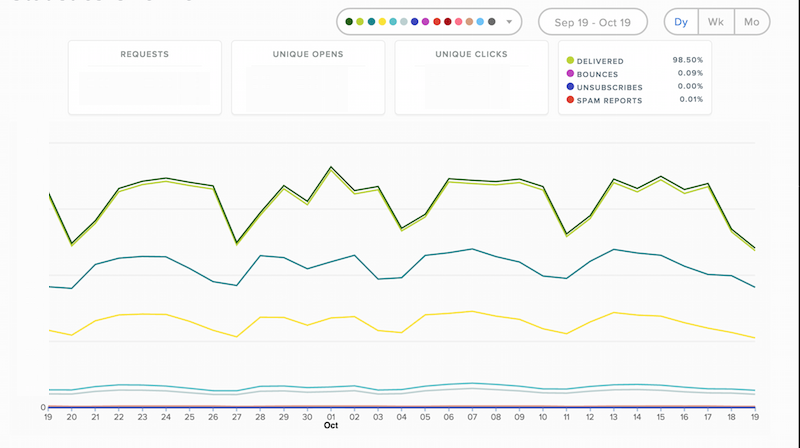
<p>Sendgrid comes with pretty comprehensive reporting, where you can drill down on your email performance in detail over time.
It has a concept of email categories where you can group your communication types and report on those.</p>

<p><img alt="Sendgrid Stats" src="http://blog.mirajavora.com/images/posts/sendgrid/sendgrid-stats.png" class="" /></p>

<p>It builds reports based on geo location of the users, email ISP and device type. However, what if you want a little bit more?</p>

<h2>Building more detailed reporting</h2>

<p>One of the things we always missed was URL click reports - looking at what each user has clicked. We also pass specific meta-data along with the message that we would need to report on - things such as user country for the user or their specific id.</p>

<h3>Sendgrid webhooks</h3>

<p>Sendgrid is more than ready for this scenario, providing their customers with webhooks functionality. This is triggered on every action (processed, send, open, click, spam report etc).
There are a few libraries that will help you along when developing in the <a href="https://sendgrid.com/docs/Integrate/libraries.html#-Webhook-Libraries">Sendgrid library index</a>.
Our endpoint was for various reasons in C# so we ended up <a href="https://github.com/mirajavora/sendgrid-webhooks">adding to the library index</a> :-)</p>

<h3>Data flows</h3>

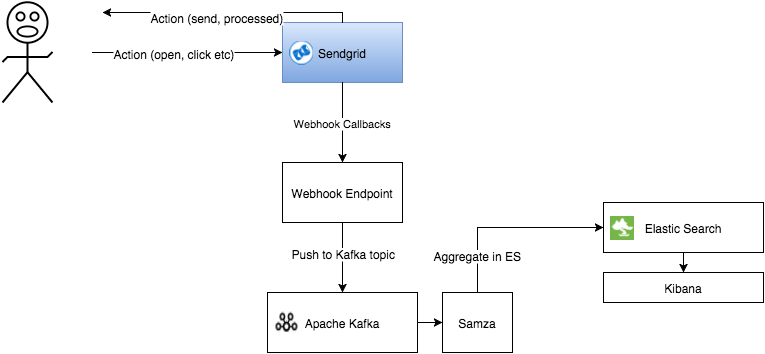
<p>The quick diagram shows the data flows when dealing with webhooks.</p>

<p><img alt="Sendgrid Stats" src="http://blog.mirajavora.com/images/posts/sendgrid/sendgrid-callbacks-architecture.png" class="" /></p>

<p>Elastic Search with Kibana seemed like an ideal candidate for storage for the use-case - time-series data that does not change over time and that we need to visualise and query easily.
It also gives us advantage when curating the data - we can index based on months and remove indexes as they become obsolete. On top of it, utilising existing tools and parts of infx,
it let us deliver this end-to-end with less than 2k lines of code including tests and cloudformation scripts for AWS.</p>

<p>If you don&rsquo;t need to expose the callback data within the organisation as a stream, you can simplify the architecture by going directly from the endpoint to Elastic Search. However, you would
miss the opportunity for your entire organisation to benefit from the data-set!</p>

<h2>Aggregate your callbacks in Elastic Search</h2>

<p>If you haven&rsquo;t used Elastic Search or Lucene before, find more about it <a href="https://www.elastic.co/guide/en/elasticsearch/guide/current/getting-started.html">here</a>.</p>

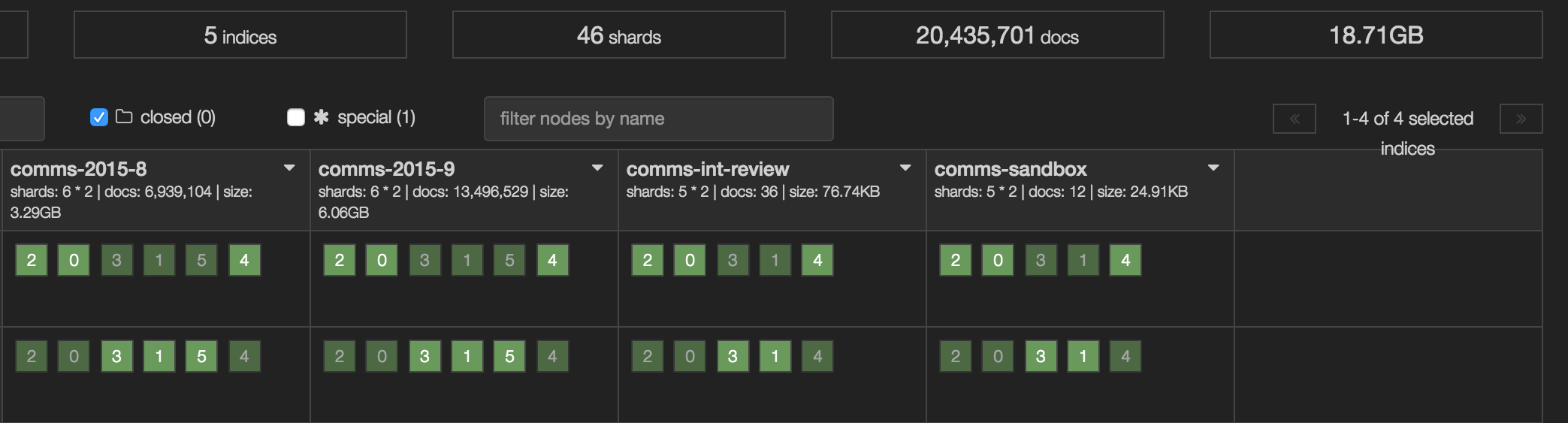
<p>Effectively, it&rsquo;s a real-time distributed search and analytics engine based on Lucene. I&rsquo;ve talked more around what ES is and how you can deploy it on AWS using cloudformation and ansible.</p>

<p><img alt="Sendgrid Stats" src="http://blog.mirajavora.com/images/posts/sendgrid/elastic-search-kopf.png" class="" /></p>

<h2>Visualise using Kibana</h2>

<p><a href="https://www.elastic.co/products/kibana">Kibana</a> is a great way of visualising your data and the release of v4 earlier this year has brought a whole bunch of new features.</p>

<p>If you need to visualise your Elastic Search data, Kibana is what you use. Let&rsquo;s you create visualisations, searches and dashboards.
You can use bar charts, line charts, pie charts, tables - everything that you&rsquo;d expect from a grown up visualisation framework.
It has filters that you can pin and ad-hoc queries that you can then filter your messages by.</p>

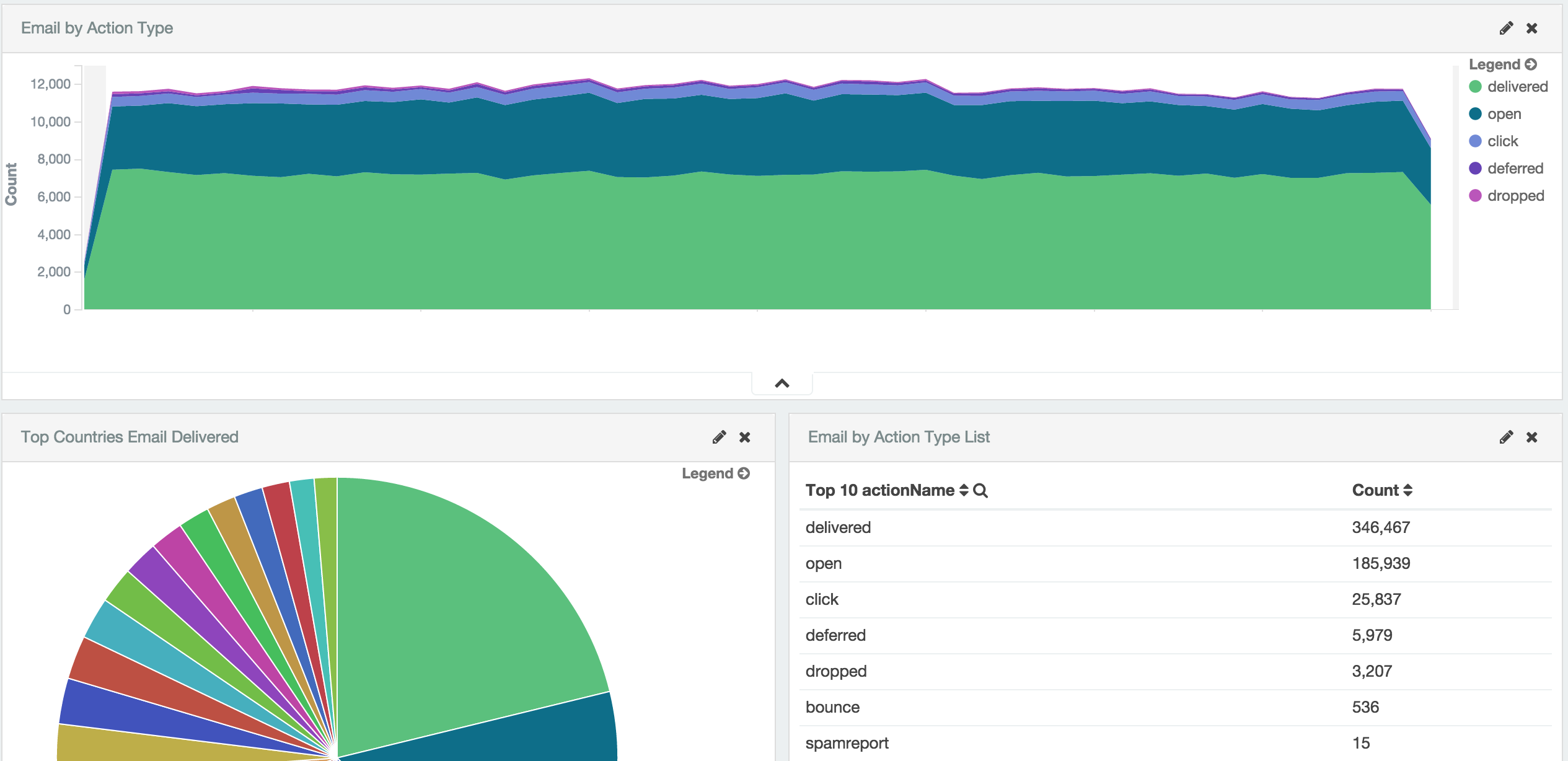
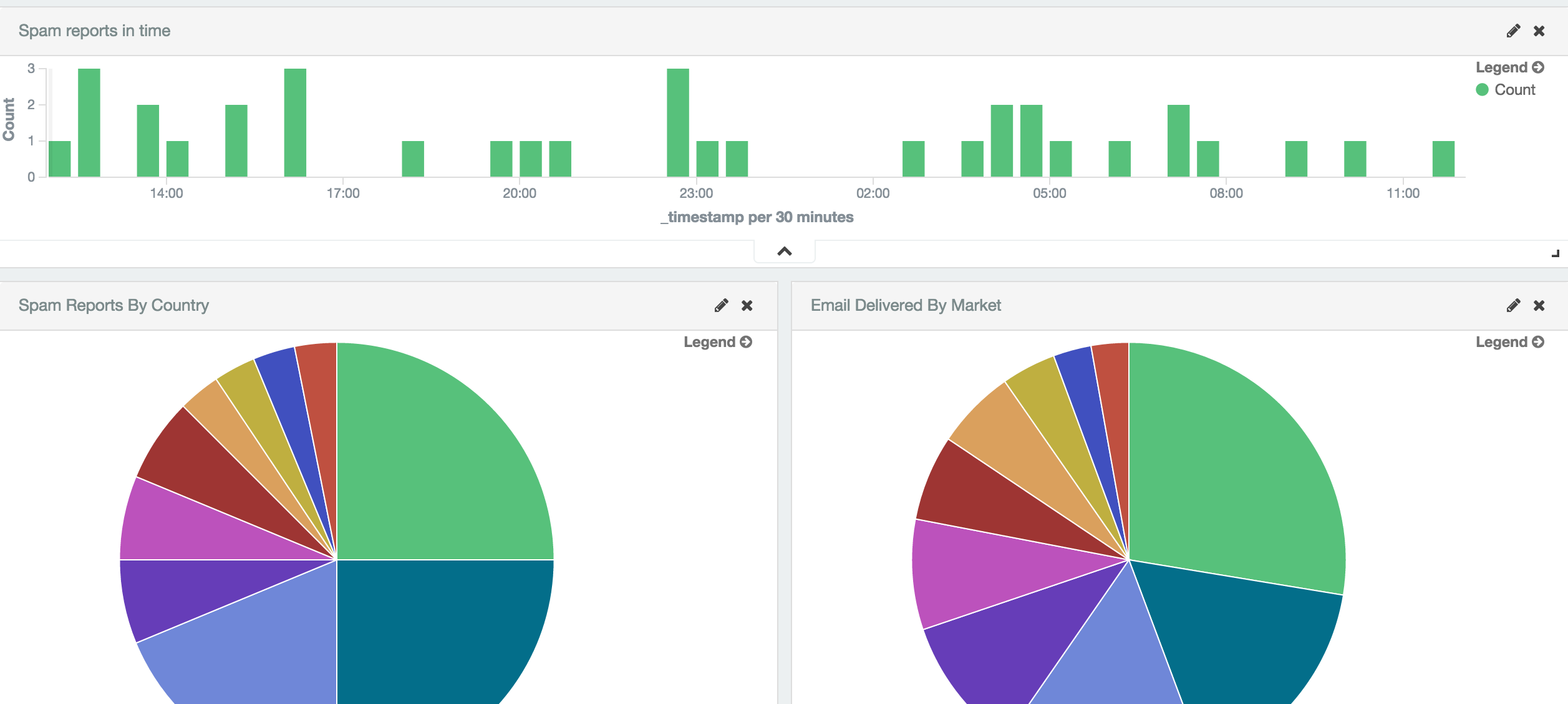
<p>Using the data, you can build out dashboards for your email volumes</p>

<p><img alt="Sendgrid Stats" src="http://blog.mirajavora.com/images/posts/sendgrid/kibana-report.png" class="" /></p>

<p>Your spam reports, split by country</p>

<p><img alt="Sendgrid Stats" src="http://blog.mirajavora.com/images/posts/sendgrid/kibana-spam.png" class="" /></p>

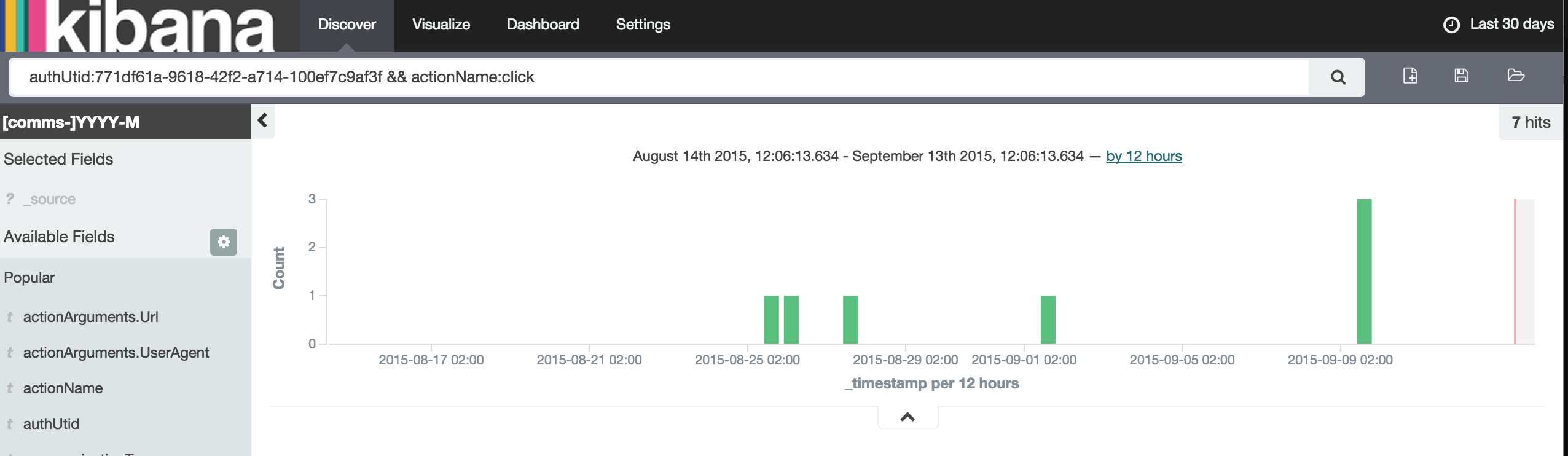
<p>User timeline based on action</p>

<p><img alt="Sendgrid Stats" src="http://blog.mirajavora.com/images/posts/sendgrid/kibana-timeline.png" class="" /></p>

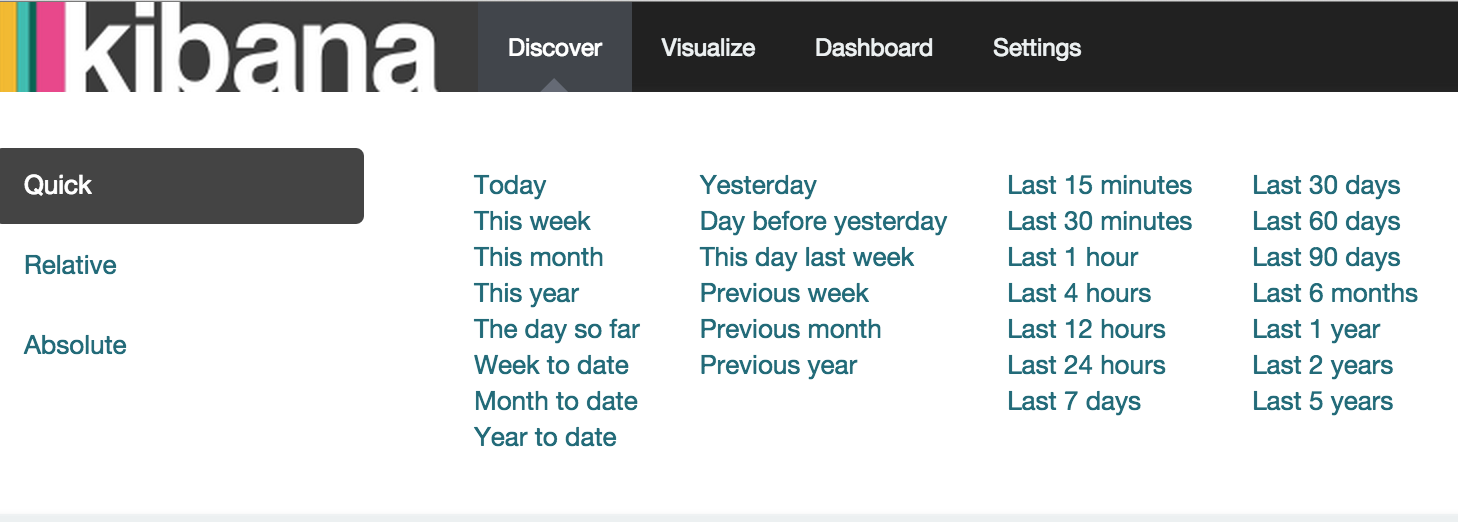
<p>And of course, pick a choice of your time-frame</p>

<p><img alt="Sendgrid Stats" src="http://blog.mirajavora.com/images/posts/sendgrid/kibana-time.png" class="" /></p>
]]></content>
  </entry>
  
  <entry>
    <title type="html"><![CDATA[Automating Elastic Search Deployments With Ansible on AWS]]></title>
    <link href="http://blog.mirajavora.com/automating-elasticsearch-with-ansible-on-aws/"/>
    <updated>2015-09-18T10:12:30+01:00</updated>
    <id>http://blog.mirajavora.com/automating-elasticsearch-with-ansible-on-aws</id>
    <content type="html"><![CDATA[<p>There is so much to love about Elastic Search. If you, like me, end up creating more than one cluster, you start to think about automating the task whole task including infrastructure.</p>

<p>Cloudformation and ansible scripts can make this tedious job super simple.</p>

<!--more-->


<h2>Elastic Search</h2>

<p>I&rsquo;ve used Lucene several times in the past do to free-text search, but it was tough to built it with scalability and resilience in mind (possible, but tougher than it needed to be).
Elastic Search abstracts all that work away, giving you a beautiful API with great tools on top of it.</p>

<p>If you haven&rsquo;t used it yet, check it out <a href="https://www.elastic.co/products/elasticsearch">@elastic</a>.</p>

<p>It is essentially a distributed lucene index over multiple nodes. Each index that you create within the elastic search consists of multiple shards that you define at index creation (default is 5).
Each shard can then have a specific number of replicas - these are copies of the data and should not live on the same node as the primary shard.</p>

<p>A shard is basically a single lucene index. When a request is made to an elastic search index, ES delegates this to each shard and aggregates the results.</p>

<h3>Plugins</h3>

<p>There are also numerous plugins that make running and administering Elastic Search cluster easy. There are so many so I wanted to call out only couple that I use always.</p>

<h4>Kopf</h4>

<p>I&rsquo;m not quite sure what I would do without the <a href="https://github.com/lmenezes/elasticsearch-kopf">Kopf plugin</a>. It that handles everything from visibility of overall indexes, performance of the nodes and doc size to changing various cluster settings.
It can also run backups, snapshots, ad-hoc index queries or queries to change aliases. Did I mention it&rsquo;s awesome?</p>

<p><img alt="Sendgrid Stats" src="http://blog.mirajavora.com/images/posts/sendgrid/elastic-search-kopf.png" class="" /></p>

<h4>AWS Plugin</h4>

<p>You cannot run Elastic Search on AWS without this plugin. It&rsquo;s as simple as that. It enabled unicast discovery and S3 storage (for backups and recovery).</p>

<p><a href="https://github.com/elastic/elasticsearch-cloud-aws">Check it out at the Github repo</a></p>

<h2>Building the cluster using Cloudformation on AWS</h2>

<p>If you don&rsquo;t use AWS, feel free to skip this. However, if you do, this may decrease the time you spend creating the cluster - <a href="https://aws.amazon.com/cloudformation/">using Cloudformation</a>.
Cloudformation essentially automates the creation of all your AWS resources starting from roles, EC2 instances, security groups and much more.</p>

<p>By using CF, you can be up and running within seconds and recreating the cluster repeatedly isn&rsquo;t a tedious job. Some may argue how hard
is it to build a two-three node cluster, but there&rsquo;s always scope for human error and it&rsquo;s not exactly time well spent - especially if it can be automated.</p>

<h3>Cloudformation script for auto-scaling group</h3>

<p>I created a fairly simple Cloudformation script that I&rsquo;ve been re-using. It creates a multi-node auto-scaling group of ubuntu machines, security groups and ES role for the instances.</p>

<div><script src='https://gist.github.com/65db44bf44507e74f6fe.js?file=cloudformation-aws-elasticsearch.json'></script>
<noscript><pre><code>{
  &quot;AWSTemplateFormatVersion&quot; : &quot;2010-09-09&quot;,

  &quot;Description&quot; : &quot;Creates auto scaling Elastic Search Cluster&quot;,

  &quot;Parameters&quot; : {
    &quot;InstanceType&quot; : {
      &quot;Description&quot; : &quot;Elastic Search node instance type&quot;,
      &quot;Type&quot; : &quot;String&quot;,
      &quot;Default&quot; : &quot;t2.small&quot;,
      &quot;AllowedValues&quot; : [ &quot;t1.micro&quot;, &quot;t2.micro&quot;, &quot;t2.small&quot;, &quot;t2.medium&quot;, &quot;m1.small&quot;, &quot;m1.medium&quot;, &quot;m1.large&quot;,
        &quot;m1.xlarge&quot;, &quot;m2.xlarge&quot;, &quot;m2.2xlarge&quot;, &quot;m2.4xlarge&quot;, &quot;m3.medium&quot;, &quot;m3.large&quot;, &quot;m3.xlarge&quot;, &quot;m3.2xlarge&quot;, &quot;c1.medium&quot;, &quot;c1.xlarge&quot;, &quot;c3.large&quot;, &quot;c3.xlarge&quot;, &quot;c3.2xlarge&quot;,
        &quot;c3.4xlarge&quot;, &quot;c3.8xlarge&quot;, &quot;g2.2xlarge&quot;, &quot;r3.large&quot;, &quot;r3.xlarge&quot;, &quot;r3.2xlarge&quot;, &quot;r3.4xlarge&quot;, &quot;r3.8xlarge&quot;, &quot;i2.xlarge&quot;, &quot;i2.2xlarge&quot;, &quot;i2.4xlarge&quot;, &quot;i2.8xlarge&quot;,
        &quot;hi1.4xlarge&quot;, &quot;hs1.8xlarge&quot;, &quot;cr1.8xlarge&quot;, &quot;cc2.8xlarge&quot;, &quot;cg1.4xlarge&quot;],
      &quot;ConstraintDescription&quot; : &quot;must be a valid EC2 instance type.&quot;
    },
    &quot;InstanceCount&quot; : {
      &quot;Description&quot; : &quot;Number of instances to start&quot;,
      &quot;Default&quot;: &quot;3&quot;,
      &quot;MinValue&quot;: &quot;2&quot;,
      &quot;MaxValue&quot;: &quot;12&quot;,
      &quot;Type&quot; : &quot;Number&quot;
    },
    &quot;KeyName&quot; : {
      &quot;Description&quot; : &quot;Name of an existing EC2 KeyPair to enable SSH access to the instances&quot;,
      &quot;Type&quot; : &quot;AWS::EC2::KeyPair::KeyName&quot;,
      &quot;ConstraintDescription&quot; : &quot;Must be the name of an existing EC2 KeyPair.&quot;
    },
    &quot;VPCId&quot; : {
      &quot;Description&quot; : &quot;VPC you are trying launch the instances in&quot;,
      &quot;Type&quot; : &quot;AWS::EC2::VPC::Id&quot;,
      &quot;ConstraintDescription&quot; : &quot;Must be a valid vpc ID&quot;
    },
    &quot;SubnetIds&quot; : {
      &quot;Description&quot; : &quot;Specify subnets where to launch the instances&quot;,
      &quot;Type&quot; : &quot;List&lt;AWS::EC2::Subnet::Id&gt;&quot;,
      &quot;ConstraintDescription&quot; : &quot;Must be a subnet&quot;
    },
    &quot;SubnetAZ&quot;: {
      &quot;Description&quot;: &quot;Availability Zones of the Subnet&quot;,
      &quot;Type&quot;: &quot;List&lt;AWS::EC2::AvailabilityZone::Name&gt;&quot;
    },
    &quot;Environment&quot;: {
      &quot;AllowedValues&quot;: [
        &quot;local&quot;,
        &quot;dev&quot;,
        &quot;staging&quot;,
        &quot;prod&quot;
      ],
      &quot;ConstraintDescription&quot;: &quot;must be a valid environment&quot;,
      &quot;Default&quot;: &quot;dev&quot;,
      &quot;Description&quot;: &quot;Environment&quot;,
      &quot;Type&quot;: &quot;String&quot;
    },
    &quot;ServiceName&quot;: {
          &quot;Default&quot;: &quot;&quot;,
          &quot;Description&quot;: &quot;Service Name&quot;,
          &quot;Type&quot;: &quot;String&quot;
        }
  },

  &quot;Mappings&quot; : {
    &quot;AWSInstanceType2Arch&quot;: {
      &quot;t1.micro&quot;: {&quot;Arch&quot;: &quot;PV64&quot;},
      &quot;t2.micro&quot;: {&quot;Arch&quot;: &quot;HVM64&quot;},
      &quot;t2.small&quot;: {&quot;Arch&quot;: &quot;HVM64&quot;},
      &quot;t2.medium&quot;: {&quot;Arch&quot;: &quot;HVM64&quot;},
      &quot;m1.small&quot;: {&quot;Arch&quot;: &quot;PV64&quot;},
      &quot;m1.medium&quot;: {&quot;Arch&quot;: &quot;PV64&quot;},
      &quot;m1.large&quot;: {&quot;Arch&quot;: &quot;PV64&quot;},
      &quot;m1.xlarge&quot;: {&quot;Arch&quot;: &quot;PV64&quot;},
      &quot;m2.xlarge&quot;: {&quot;Arch&quot;: &quot;PV64&quot;},
      &quot;m2.2xlarge&quot;: {&quot;Arch&quot;: &quot;PV64&quot;},
      &quot;m2.4xlarge&quot;: {&quot;Arch&quot;: &quot;PV64&quot;},
      &quot;m3.medium&quot;: {&quot;Arch&quot;: &quot;HVM64&quot;},
      &quot;m3.large&quot;: {&quot;Arch&quot;: &quot;HVM64&quot;},
      &quot;m3.xlarge&quot;: {&quot;Arch&quot;: &quot;HVM64&quot;},
      &quot;m3.2xlarge&quot;: {&quot;Arch&quot;: &quot;HVM64&quot;},
      &quot;c1.medium&quot;: {&quot;Arch&quot;: &quot;PV64&quot;},
      &quot;c1.xlarge&quot;: {&quot;Arch&quot;: &quot;PV64&quot;},
      &quot;c3.large&quot;: {&quot;Arch&quot;: &quot;HVM64&quot;},
      &quot;c3.xlarge&quot;: {&quot;Arch&quot;: &quot;HVM64&quot;},
      &quot;c3.2xlarge&quot;: {&quot;Arch&quot;: &quot;HVM64&quot;},
      &quot;c3.4xlarge&quot;: {&quot;Arch&quot;: &quot;HVM64&quot;},
      &quot;c3.8xlarge&quot;: {&quot;Arch&quot;: &quot;HVM64&quot;},
      &quot;g2.2xlarge&quot;: {&quot;Arch&quot;: &quot;HVMG2&quot;},
      &quot;r3.large&quot;: {&quot;Arch&quot;: &quot;HVM64&quot;},
      &quot;r3.xlarge&quot;: {&quot;Arch&quot;: &quot;HVM64&quot;},
      &quot;r3.2xlarge&quot;: {&quot;Arch&quot;: &quot;HVM64&quot;},
      &quot;r3.4xlarge&quot;: {&quot;Arch&quot;: &quot;HVM64&quot;},
      &quot;r3.8xlarge&quot;: {&quot;Arch&quot;: &quot;HVM64&quot;},
      &quot;i2.xlarge&quot;: {&quot;Arch&quot;: &quot;HVM64&quot;},
      &quot;i2.2xlarge&quot;: {&quot;Arch&quot;: &quot;HVM64&quot;},
      &quot;i2.4xlarge&quot;: {&quot;Arch&quot;: &quot;HVM64&quot;},
      &quot;i2.8xlarge&quot;: {&quot;Arch&quot;: &quot;HVM64&quot;},
      &quot;hi1.4xlarge&quot;: {&quot;Arch&quot;: &quot;HVM64&quot;},
      &quot;hs1.8xlarge&quot;: {&quot;Arch&quot;: &quot;HVM64&quot;},
      &quot;cr1.8xlarge&quot;: {&quot;Arch&quot;: &quot;HVM64&quot;},
      &quot;cc2.8xlarge&quot;: {&quot;Arch&quot;: &quot;HVM64&quot;}
    },
    &quot;AWSRegionArch2AMI&quot;: {
      &quot;us-east-1&quot;: {
        &quot;HVM64&quot;: &quot;ami-21630d44&quot;
      },
      &quot;us-west-2&quot;: {
        &quot;HVM64&quot;: &quot;ami-cf3c21ff&quot;
      },
      &quot;us-west-1&quot;: {
        &quot;HVM64&quot;: &quot;ami-c52dd781&quot;
      },
      &quot;eu-west-1&quot;: {
        &quot;HVM64&quot;: &quot;ami-9d2f0fea&quot;
      },
      &quot;ap-southeast-1&quot;: {
        &quot;HVM64&quot;: &quot;ami-96c2c8c4&quot;
      },
      &quot;ap-northeast-1&quot;: {
        &quot;HVM64&quot;: &quot;ami-0841ca08&quot;
      },
      &quot;ap-southeast-2&quot;: {
        &quot;HVM64&quot;: &quot;ami-f32b64c9&quot;
      },
      &quot;sa-east-1&quot;: {
        &quot;HVM64&quot;: &quot;ami-4ddb4e50&quot;
      },
      &quot;cn-north-1&quot;: {
        &quot;HVM64&quot;: &quot;ami-18980421&quot;
      },
      &quot;eu-central-1&quot;: {
        &quot;HVM64&quot;: &quot;ami-6265657f&quot;
      }
    }
  },

  &quot;Resources&quot; : {
    &quot;RootRole&quot;: {
      &quot;Type&quot;: &quot;AWS::IAM::Role&quot;,
      &quot;Properties&quot;: {
        &quot;AssumeRolePolicyDocument&quot;: {
          &quot;Version&quot; : &quot;2012-10-17&quot;,
          &quot;Statement&quot;: [ {
            &quot;Effect&quot;: &quot;Allow&quot;,
            &quot;Principal&quot;: {
              &quot;Service&quot;: [ &quot;ec2.amazonaws.com&quot; ]
            },
            &quot;Action&quot;: [ &quot;sts:AssumeRole&quot; ]
          } ]
        },
        &quot;Path&quot;: &quot;/&quot;,
        &quot;Policies&quot;: [
          {
            &quot;PolicyDocument&quot;: {
              &quot;Version&quot;: &quot;2012-10-17&quot;,
              &quot;Statement&quot;: [{
                &quot;Effect&quot;:&quot;Allow&quot;,
                &quot;Action&quot;:&quot;iam:PassRole&quot;,
                &quot;Resource&quot;:&quot;*&quot;
              },
                {
                  &quot;Effect&quot;:&quot;Allow&quot;,
                  &quot;Action&quot;:&quot;iam:ListInstanceProfiles&quot;,
                  &quot;Resource&quot;:&quot;*&quot;
                },
                {
                  &quot;Effect&quot;:&quot;Allow&quot;,
                  &quot;Action&quot;:&quot;ec2:*&quot;,
                  &quot;Resource&quot;:&quot;*&quot;
                }]
            },
            &quot;PolicyName&quot;: &quot;allowEC2&quot;
          }
        ]
      }
    },
    &quot;ElasticSearchProfile&quot;: {
      &quot;Properties&quot;: {
        &quot;Path&quot;: &quot;/&quot;,
        &quot;Roles&quot;: [
          {
            &quot;Ref&quot;: &quot;RootRole&quot;
          }
        ]
      },
      &quot;Type&quot;: &quot;AWS::IAM::InstanceProfile&quot;
    },
    &quot;ElasticSearchSecurityGroup&quot;: {
      &quot;Metadata&quot; : { &quot;Note&quot; : &quot;Replace with your own IP address/range&quot; },
      &quot;Properties&quot;: {
        &quot;GroupDescription&quot;: &quot;Security group allows access to ES from specific IP range&quot;,
        &quot;SecurityGroupIngress&quot;: [
          {
            &quot;CidrIp&quot;: &quot;0.0.0.0/0&quot;,
            &quot;FromPort&quot;: &quot;22&quot;,
            &quot;IpProtocol&quot;: &quot;tcp&quot;,
            &quot;ToPort&quot;: &quot;22&quot;
          },
          {
            &quot;CidrIp&quot;: &quot;0.0.0.0/0&quot;,
            &quot;FromPort&quot;: &quot;9200&quot;,
            &quot;IpProtocol&quot;: &quot;tcp&quot;,
            &quot;ToPort&quot;: &quot;9200&quot;
          },
          {
            &quot;CidrIp&quot;: &quot;0.0.0.0/0&quot;,
            &quot;FromPort&quot;: &quot;9300&quot;,
            &quot;IpProtocol&quot;: &quot;tcp&quot;,
            &quot;ToPort&quot;: &quot;9300&quot;
          }
        ],
        &quot;VpcId&quot;: { &quot;Ref&quot;: &quot;VPCId&quot;}
      },
      &quot;Type&quot;: &quot;AWS::EC2::SecurityGroup&quot;
    },
    &quot;ServerGroup&quot;: {
      &quot;Type&quot;: &quot;AWS::AutoScaling::AutoScalingGroup&quot;,
      &quot;Properties&quot;: {
        &quot;AvailabilityZones&quot;: { &quot;Ref&quot; : &quot;SubnetAZ&quot; },
        &quot;VPCZoneIdentifier&quot; : { &quot;Ref&quot;: &quot;SubnetIds&quot;},
        &quot;LaunchConfigurationName&quot;: {
          &quot;Ref&quot;: &quot;ESLaunchConfig&quot;
        },
        &quot;MinSize&quot;: &quot;2&quot;,
        &quot;MaxSize&quot;: &quot;12&quot;,
        &quot;DesiredCapacity&quot;: {
          &quot;Ref&quot;: &quot;InstanceCount&quot;
        },
        &quot;Tags&quot;: [
          { &quot;Key&quot;: &quot;Name&quot;, &quot;Value&quot;: { &quot;Ref&quot;: &quot;AWS::StackName&quot; }, &quot;PropagateAtLaunch&quot;: true },
          { &quot;Key&quot;: &quot;Environment&quot;, &quot;Value&quot;: { &quot;Ref&quot;: &quot;Environment&quot; }, &quot;PropagateAtLaunch&quot;: true },
          { &quot;Key&quot;: &quot;Owner&quot;,  &quot;Value&quot;: &quot;Owner&quot;, &quot;PropagateAtLaunch&quot;: true },
          { &quot;Key&quot;: &quot;Service&quot;, &quot;Value&quot;: { &quot;Ref&quot;: &quot;ServiceName&quot; }, &quot;PropagateAtLaunch&quot;: true }
        ]
      }
    },
    &quot;ESLaunchConfig&quot;: {
      &quot;Type&quot;: &quot;AWS::AutoScaling::LaunchConfiguration&quot;,
      &quot;Properties&quot;: {
        &quot;InstanceType&quot;: {&quot;Ref&quot;: &quot;InstanceType&quot;},
        &quot;IamInstanceProfile&quot;: {
          &quot;Ref&quot;: &quot;ElasticSearchProfile&quot;
        },
        &quot;SecurityGroups&quot;: [
          { &quot;Ref&quot;: &quot;ElasticSearchSecurityGroup&quot; }
        ],
        &quot;KeyName&quot;: {&quot;Ref&quot;: &quot;KeyName&quot;},
        &quot;ImageId&quot; : { &quot;Fn::FindInMap&quot; : [ &quot;AWSRegionArch2AMI&quot;, { &quot;Ref&quot; : &quot;AWS::Region&quot; },
          { &quot;Fn::FindInMap&quot; : [ &quot;AWSInstanceType2Arch&quot;, { &quot;Ref&quot; : &quot;InstanceType&quot; }, &quot;Arch&quot; ] } ] },
        &quot;BlockDeviceMappings&quot;: [
          {
            &quot;DeviceName&quot;: &quot;/dev/sda1&quot;,
            &quot;Ebs&quot;: {
              &quot;VolumeSize&quot;: &quot;100&quot;,
              &quot;VolumeType&quot; : &quot;gp2&quot;
            }
          }
        ]
      }
    }
  },

  &quot;Outputs&quot; : {

  }
}</code></pre></noscript></div>


<p>Please change the security groups based on what you need - at the moment they allow access from any IP. You may also need to tweak to rules so that instances have visibility of each other depending on your setup.</p>

<h3>Creating the stack</h3>

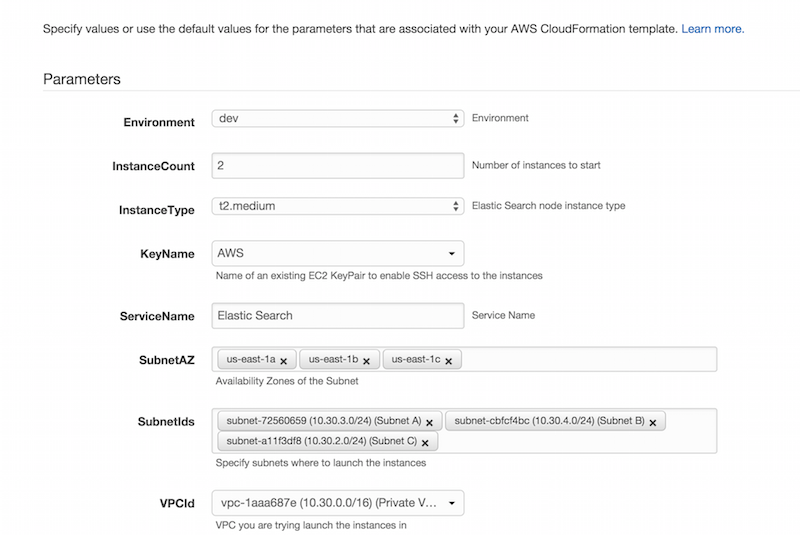
<p>Using the provided script, you can upload it to AWS Cloudformation. Based on your script, you will need to fill in the parameters defined in the script.</p>

<p><img alt="Cloudformation Parameters" src="http://blog.mirajavora.com/images/posts/ansible/cloudformation-options.png" class="" /></p>

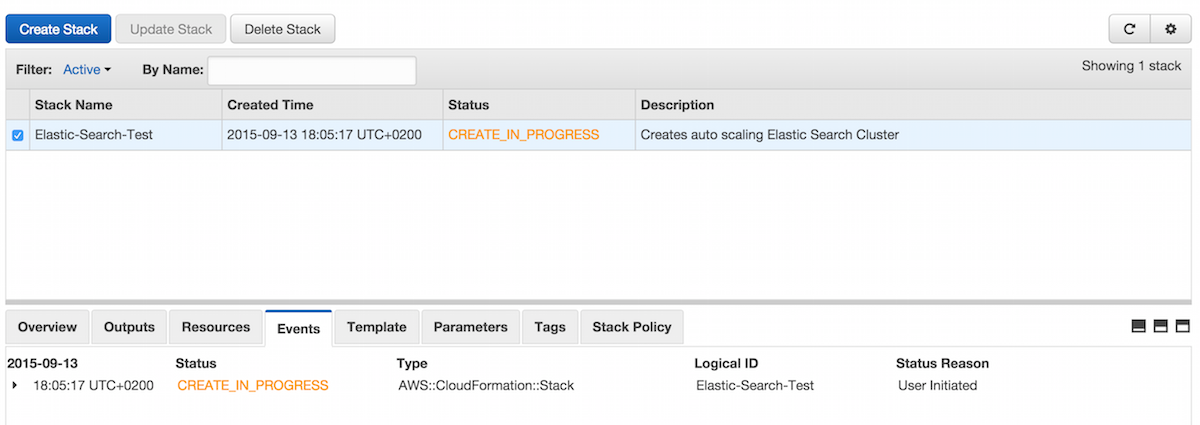
<p>After that, AWS will go through each resources within the CF script and create it.</p>

<p><img alt="Cloudformation Parameters" src="http://blog.mirajavora.com/images/posts/ansible/cloudformation-running.png" class="" /></p>

<h2>Deploying Elastic Search</h2>

<p>Once your infrastructure is setup, you&rsquo;re going to need to actually deploy elastic search and all the plugins to the nodes. That&rsquo;s where ansible can help you out massively.
If you&rsquo;ve never used ansible, it&rsquo;s a neat way to run scripts on remote machines. <a href="http://docs.ansible.com/ansible/intro_getting_started.html">Check it out here</a></p>

<p>There is ton of open source scripts that help you run different ansible roles.
The one I&rsquo;ve been using is under <a href="https://github.com/Traackr/ansible-elasticsearch">Traackr repo - ansible-elasticsearch</a>. George Stathis, if you&rsquo;re ever in town, I owe you a beer!</p>

<p>It has support for pretty much all config you will need, will install plugins and will install the required java dependency.</p>

<p>Pull it down &amp; get going git@github.com:Traackr/ansible-elasticsearch.git and add it as a role in your ansible scripts.</p>

<h3>Your Ansible script</h3>

<p>Your mainl.yml script should look something alo the lines.</p>

<div class="highlight"><pre><code class="language-json" data-lang="json"><span class="err">-</span> <span class="err">name:</span> <span class="s2">&quot;Setup the Elastic Search on nodes.&quot;</span>
  <span class="err">hosts:</span> <span class="err">elasticsearchnodes</span>
  <span class="err">remote_user:</span> <span class="err">ubuntu</span>
  <span class="err">roles:</span>
    <span class="err">-</span> <span class="p">{</span> <span class="err">role:</span> <span class="err">ansible-elasticsearch,</span> <span class="err">sudo:</span> <span class="err">yes</span> <span class="p">}</span>
  <span class="err">vars_files:</span>
    <span class="err">-</span> <span class="err">roles/ansible-elasticsearch/defaults/main.yml</span></code></pre></div>


<p>When you have added the ansible-elasticsearch as a folder in your roles, you should update your machines based on the boxes you created.</p>

<p>I also added cluster name and security group to the inventory vars below. You can also define specific node-names per instance.</p>

<div class="highlight"><pre><code class="language-text" data-lang="text">[aws-es-01]
ec2-54-88-217-187.compute-1.amazonaws.com

[aws-es-01:vars]
elasticsearch_node_name=clever-node-name1

[aws-es-02]
ec2-54-164-77-248.compute-1.amazonaws.com

[elasticsearchnodes:children]
aws-es-01
aws-es-02

[elasticsearchnodes:vars]
elasticsearch_cluster_name=elasticsearch.cluster
elasticsearch_plugin_aws_ec2_groups=Elastic-Search-ElasticSearchSecurityGroup-1E0LR18NU18JG</code></pre></div>


<p>Of course, if you are running deployments on multiple machines this can be cumbersome. There are scripts that auto-generate inventories based on specific AWS tags - so you can deploy to all instances that have a tag that you&rsquo;ve defined at creation time.</p>

<h3>Changing variables</h3>

<p>You should then open <em>roles\ansible-elasticsearch\vars\main.yml</em> and edit variables accordingly.</p>

<p>Make sure you give ES enough HEAP_SIZE - the default 1GB is almost never enough for any use-case and pick your versions.
You can also specify any plugins you want to install along the way. The sample below includes both the kopf and AWS plugins mentioned above.</p>

<div class="highlight"><pre><code class="language-json" data-lang="json"><span class="err">elasticsearch_user:</span> <span class="s2">&quot;ubuntu&quot;</span>
<span class="err">elasticsearch_group:</span> <span class="s2">&quot;ubuntu&quot;</span>
<span class="err">elasticsearch_version:</span> <span class="mf">1.7</span><span class="err">.</span><span class="mi">2</span>
<span class="err">elasticsearch_heap_size:</span> <span class="mi">2</span><span class="err">g</span>
<span class="err">elasticsearch_max_open_files:</span> <span class="mi">65535</span>
<span class="err">elasticsearch_timezone:</span> <span class="s2">&quot;Europe/London&quot;</span>
<span class="err">elasticsearch_install_java:</span> <span class="err">yes</span>

<span class="err">elasticsearch_plugin_aws_version:</span> <span class="mf">2.7</span><span class="err">.</span><span class="mi">1</span>
<span class="err">elasticsearch_plugins:</span>
  <span class="err">-</span> <span class="p">{</span> <span class="err">name:</span> <span class="err">&#39;lmenezes/elasticsearch-kopf/1.5.7&#39;</span> <span class="p">}</span>

<span class="err">elasticsearch_service_startonboot:</span> <span class="err">yes</span></code></pre></div>


<h3>Running the script</h3>

<p>Finally, once you have your vars in place, run the main.yml ansible script (sample above)</p>

<div class="highlight"><pre><code class="language-bash" data-lang="bash">ansible-playbook --private-key<span class="o">=[</span>path-to-your-private-key<span class="o">]</span> -i aws main.yml</code></pre></div>


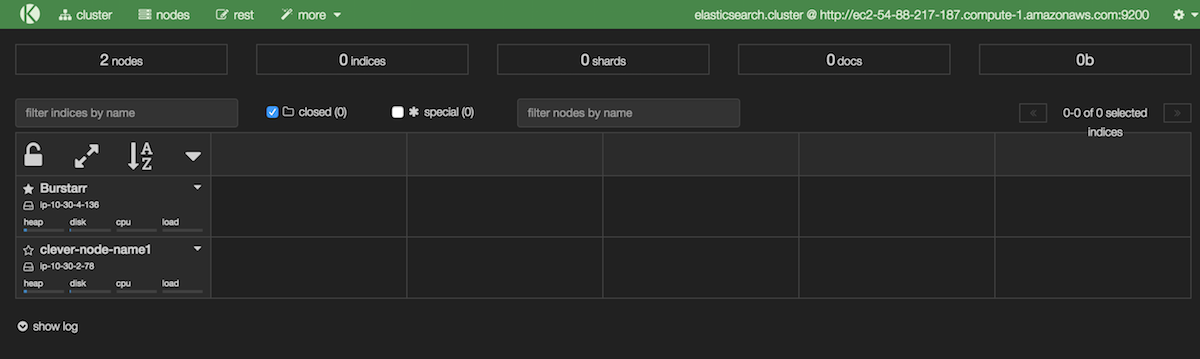
<p>This will run the deployment on the machines specified in your inventory. At the end your cluster will be setup!</p>

<p><img alt="Cloudformation Parameters" src="http://blog.mirajavora.com/images/posts/ansible/kopf-cluster.png" class="" /></p>
]]></content>
  </entry>
  
  <entry>
    <title type="html"><![CDATA[Logging Application Metrics With StatsD]]></title>
    <link href="http://blog.mirajavora.com/logging-custom-metrics-with-statsd/"/>
    <updated>2015-03-10T19:12:30+00:00</updated>
    <id>http://blog.mirajavora.com/logging-custom-metrics-with-statsd</id>
    <content type="html"><![CDATA[<h2>Application monitoring and service metrics</h2>

<p><em>If you don&rsquo;t track it, you can&rsquo;t measure it</em>. Realtime service and business metrics should be part of any production application.
Knowing how is the app performing is as important as measuring whether the product impact of your changes.</p>

<p>A good set of service metrics lets you effectively monitor the impact of your changes on the app performance.
Has your change to multi-threading really achieved the times x throughput? Has the last dependency injection change caused a slow memory leak?
Are there levels of response codes you&rsquo;re not expecting in your app?</p>

<!--more-->


<p>There are a variety of ways to deal with application level metrics. The world of .NET offers you perf counters while unix has a variety of possibilities.
Usuaully, I would go for the <strong>simplest, most friction-less option</strong>. That&rsquo;s why StatsD with Graphite is so appealing.</p>

<h2>StatsD</h2>

<p>Etsy talks about <strong><a href="https://codeascraft.com/2011/02/15/measure-anything-measure-everything/">measuring everything and anaything</a></strong>.
Their real obsession with metrics made them release an awesome library that took great traction - because it&rsquo;s simple and effective.</p>

<p>In essence, <a href="https://github.com/etsy/statsd/">StatsD</a> server listens on a UDP/TCP port and collects metrics.
These are then aggregated and in intervals passed to a back-end of your choice - most likely graphite.</p>

<p>The advantage of the community is that there is a massive list of client implementations so integrating StatsD into your app is super-straightforward.
There are multiple clients for node, python, java, ruby, php, .net, go &hellip;. and more. <a href="https://github.com/etsy/statsd/wiki">Check out the entire list</a>.
Also, you will find a bunch of server implementations beyond the original Node.js. If you fancy StatsD on windows machines, check out <a href="https://github.com/lukevenediger/statsd.net">statsD.net</a>.</p>

<h2>Integrate StatsD client into your JVM app</h2>

<p>If you&rsquo;re looking to add statsD into your JVM application, the <a href="https://github.com/tim-group/java-statsd-client">java client by tim group</a> seemed like the best choice.
It has zero dependencies and it&rsquo;s pretty straight-forward.</p>

<p>Add your dependency to mvn or gradle</p>

<div class="highlight"><pre><code class="language-xml" data-lang="xml">MVN

    <span class="nt">&lt;dependency&gt;</span>
        <span class="nt">&lt;groupId&gt;</span>com.timgroup<span class="nt">&lt;/groupId&gt;</span>
        <span class="nt">&lt;artifactId&gt;</span>java-statsd-client<span class="nt">&lt;/artifactId&gt;</span>
        <span class="nt">&lt;version&gt;</span>3.0.1<span class="nt">&lt;/version&gt;</span>
    <span class="nt">&lt;/dependency&gt;</span>

Gradle
    &#39;com.timgroup:java-statsd-client:3.1.0&#39;</code></pre></div>


<p>And init the statsd client with the prefix, host of the statD server and the port.
StatsD has a concept of namespaces, where you can group your metrics - that allows for better visualisation and keeps them neat. The choice of the namespace is yours, depending on what suits you.
In bigger deployments you might go for something like &ldquo;application-name.data-centre.box-name.counter-name&rdquo;.</p>

<div class="highlight"><pre><code class="language-java" data-lang="java"><span class="kn">import</span> <span class="nn">com.timgroup.statsd.StatsDClient</span><span class="o">;</span>
    <span class="kn">import</span> <span class="nn">com.timgroup.statsd.NonBlockingStatsDClient</span><span class="o">;</span>
    
    <span class="kd">public</span> <span class="kd">class</span> <span class="nc">DiagnosticsService</span> <span class="o">{</span>
        <span class="kd">private</span> <span class="kd">static</span> <span class="kd">final</span> <span class="n">StatsDClient</span> <span class="n">statsd</span><span class="o">;</span>
    
        <span class="kd">public</span> <span class="nf">DiagnosticsService</span><span class="o">(</span><span class="n">String</span> <span class="n">host</span><span class="o">,</span> <span class="kt">int</span> <span class="n">portNumber</span><span class="o">)</span> <span class="o">{</span>
            <span class="n">statsd</span> <span class="o">=</span> <span class="o">=</span> <span class="k">new</span> <span class="nf">NonBlockingStatsDClient</span><span class="o">(</span><span class="s">&quot;your.custom.prefix&quot;</span><span class="o">,</span> <span class="n">host</span><span class="o">,</span> <span class="n">portNumber</span><span class="o">);</span>
        <span class="o">}</span>
        
        <span class="o">.....</span>
    <span class="o">}</span></code></pre></div>


<p>I tend to have a single statsD client within the app as a singleton wrapped by a diagnostics service.</p>

<h2>StatsD Metric Types</h2>

<p>StatsD supports a range of metric types. These you fit 99% of your metric logging scenarios.
It also has a concept of a flush interval, where the data is sent off to back-ends.</p>

<h3>Counters</h3>

<p>Basic counters that are incremented each time you log against the counter. These are reset to 0 at flush.
You can also set a sampling interval to tell StatsD you&rsquo;re only sending part of the data-set.</p>

<div class="highlight"><pre><code class="language-bash" data-lang="bash">your.namespace.counter:1<span class="p">|</span>c</code></pre></div>


<h3>Timers</h3>

<p>These are great for monitoring response times of any kind. You tell statsD how long an action took.
It then automatically works out percentiles, average (mean), standard deviation, sum, and min/max. Really awesome.</p>

<div class="highlight"><pre><code class="language-bash" data-lang="bash">your.namespace.response_time:300<span class="p">|</span>ms</code></pre></div>


<h3>Gauges</h3>

<p>Gauges are single values that can be incremented or decremented or set to a specific value. Unlike counters, gauges aren&rsquo;t reset to zero at flush time</p>

<h3>Sets</h3>

<p>These count unique set of occurrences between flushes.</p>

<h2>Logging metrics using the JVM client</h2>

<p>Using the  <a href="https://github.com/tim-group/java-statsd-client">JAVA implementation of the StatsD client</a> is then pretty straight-forward.</p>

<div class="highlight"><pre><code class="language-java" data-lang="java"><span class="kn">import</span> <span class="nn">com.timgroup.statsd.NonBlockingStatsDClient</span><span class="o">;</span>
    <span class="kn">import</span> <span class="nn">com.timgroup.statsd.StatsDClient</span><span class="o">;</span>


    <span class="kd">public</span> <span class="kd">final</span> <span class="kd">class</span> <span class="nc">StatsDPerformanceService</span> <span class="kd">implements</span> <span class="n">DiagnosticsService</span> <span class="o">{</span>

        <span class="kd">private</span> <span class="kd">static</span> <span class="n">StatsDClient</span> <span class="n">statsd</span> <span class="o">=</span> <span class="kc">null</span><span class="o">;</span>
        <span class="kd">private</span> <span class="kd">static</span> <span class="n">DiagnosticsConfig</span> <span class="n">config</span><span class="o">;</span>

        <span class="kd">public</span> <span class="nf">StatsDPerformanceService</span><span class="o">(</span><span class="n">DiagnosticsConfig</span> <span class="n">configuration</span><span class="o">)</span> <span class="o">{</span>
            <span class="n">config</span> <span class="o">=</span> <span class="n">configuration</span><span class="o">;</span>
            <span class="n">statsd</span> <span class="o">=</span> <span class="k">new</span> <span class="nf">NonBlockingStatsDClient</span><span class="o">(</span>
                    <span class="n">getPrefix</span><span class="o">(),</span> <span class="n">config</span><span class="o">.</span><span class="na">getHost</span><span class="o">(),</span> <span class="n">config</span><span class="o">.</span><span class="na">getPort</span><span class="o">());</span>
        <span class="o">}</span>

        <span class="kd">private</span> <span class="n">String</span> <span class="nf">getPrefix</span><span class="o">()</span> <span class="o">{</span>
            <span class="k">return</span> <span class="n">String</span><span class="o">.</span><span class="na">format</span><span class="o">(</span><span class="s">&quot;yourprefix.%s&quot;</span><span class="o">,</span> <span class="n">config</span><span class="o">.</span><span class="na">getBoxName</span><span class="o">()).</span><span class="na">toLowerCase</span><span class="o">();</span>
        <span class="o">}</span>

        <span class="nd">@Override</span>
        <span class="kd">public</span> <span class="kt">void</span> <span class="nf">incrementCounter</span><span class="o">(</span><span class="n">String</span> <span class="n">counterName</span><span class="o">)</span> <span class="o">{</span>
            <span class="k">if</span><span class="o">(</span><span class="n">config</span><span class="o">.</span><span class="na">getEnableMetrics</span><span class="o">())</span>
                <span class="n">statsd</span><span class="o">.</span><span class="na">incrementCounter</span><span class="o">(</span><span class="n">counterName</span><span class="o">);</span>
        <span class="o">}</span>

        <span class="nd">@Override</span>
        <span class="kd">public</span> <span class="kt">void</span> <span class="nf">decrementCounter</span><span class="o">(</span><span class="n">String</span> <span class="n">counterName</span><span class="o">)</span> <span class="o">{</span>
            <span class="k">if</span><span class="o">(</span><span class="n">config</span><span class="o">.</span><span class="na">getEnableMetrics</span><span class="o">())</span>
                <span class="n">statsd</span><span class="o">.</span><span class="na">decrementCounter</span><span class="o">(</span><span class="n">counterName</span><span class="o">);</span>
        <span class="o">}</span>

        <span class="nd">@Override</span>
        <span class="kd">public</span> <span class="kt">void</span> <span class="nf">gauge</span><span class="o">(</span><span class="n">String</span> <span class="n">gaugeName</span><span class="o">,</span> <span class="kt">long</span> <span class="n">value</span><span class="o">)</span> <span class="o">{</span>
            <span class="k">if</span><span class="o">(</span><span class="n">config</span><span class="o">.</span><span class="na">getEnableMetrics</span><span class="o">())</span>
                <span class="n">statsd</span><span class="o">.</span><span class="na">gauge</span><span class="o">(</span><span class="n">gaugeName</span><span class="o">,</span> <span class="n">value</span><span class="o">);</span>
        <span class="o">}</span>

        <span class="nd">@Override</span>
        <span class="kd">public</span> <span class="kt">void</span> <span class="nf">recordExecutionTime</span><span class="o">(</span><span class="n">String</span> <span class="n">timerName</span><span class="o">,</span> <span class="kt">long</span> <span class="n">value</span><span class="o">)</span> <span class="o">{</span>
            <span class="k">if</span><span class="o">(</span><span class="n">config</span><span class="o">.</span><span class="na">getEnableMetrics</span><span class="o">())</span>
                <span class="n">statsd</span><span class="o">.</span><span class="na">recordExecutionTime</span><span class="o">(</span><span class="n">timerName</span><span class="o">,</span> <span class="n">value</span><span class="o">);</span>
        <span class="o">}</span>
    <span class="o">}</span></code></pre></div>


<p>you can then also consider helper methods using runnable and callable to wrap timings around the methods</p>

<div class="highlight"><pre><code class="language-java" data-lang="java"><span class="nd">@Override</span>
        <span class="kd">public</span> <span class="o">&lt;</span><span class="n">T</span><span class="o">&gt;</span> <span class="n">T</span> <span class="nf">executeWithTimer</span><span class="o">(</span><span class="n">Callable</span><span class="o">&lt;</span><span class="n">T</span><span class="o">&gt;</span> <span class="n">callable</span><span class="o">,</span> <span class="n">String</span> <span class="n">counterName</span><span class="o">)</span> <span class="o">{</span>
            <span class="k">if</span><span class="o">(</span><span class="n">callable</span> <span class="o">==</span> <span class="kc">null</span> <span class="o">||</span> <span class="n">counterName</span> <span class="o">==</span> <span class="kc">null</span><span class="o">)</span>
                <span class="k">return</span> <span class="kc">null</span><span class="o">;</span>

            <span class="n">T</span> <span class="n">result</span> <span class="o">=</span> <span class="kc">null</span><span class="o">;</span>
            <span class="kt">long</span> <span class="n">startTime</span> <span class="o">=</span> <span class="n">System</span><span class="o">.</span><span class="na">nanoTime</span><span class="o">();</span>
            <span class="k">try</span> <span class="o">{</span>
                <span class="n">result</span> <span class="o">=</span> <span class="n">callable</span><span class="o">.</span><span class="na">call</span><span class="o">();</span>
            <span class="o">}</span> <span class="k">catch</span> <span class="o">(</span><span class="n">Exception</span> <span class="n">e</span><span class="o">)</span> <span class="o">{</span>
                <span class="n">e</span><span class="o">.</span><span class="na">printStackTrace</span><span class="o">();</span>
            <span class="o">}</span>
            <span class="kt">long</span> <span class="n">endTime</span> <span class="o">=</span> <span class="n">System</span><span class="o">.</span><span class="na">nanoTime</span><span class="o">();</span>

            <span class="kt">long</span> <span class="n">duration</span> <span class="o">=</span> <span class="o">(</span><span class="n">endTime</span> <span class="o">-</span> <span class="n">startTime</span><span class="o">)/</span><span class="mi">1000000</span><span class="o">;</span>

            <span class="n">recordExecutionTime</span><span class="o">(</span><span class="n">counterName</span><span class="o">,</span> <span class="n">duration</span><span class="o">);</span>
            <span class="k">return</span> <span class="n">result</span><span class="o">;</span>
        <span class="o">}</span>

    <span class="o">...</span> <span class="n">and</span> <span class="n">execute</span> <span class="n">like</span>

    <span class="n">String</span> <span class="n">result</span> <span class="o">=</span> <span class="n">diagnosticsService</span><span class="o">.</span><span class="na">executeWithTimer</span><span class="o">(</span>
    <span class="o">()</span> <span class="o">-&gt;</span> <span class="n">randomService</span><span class="o">.</span><span class="na">getResult</span><span class="o">(</span><span class="n">someVar</span><span class="o">),</span> <span class="s">&quot;SuperAwesomeNameOfTheCounter&quot;</span><span class="o">);</span></code></pre></div>


<p>Enjoy! StatsD is great - I&rsquo;ll look at configuring StatD and graphite in my next post.</p>
]]></content>
  </entry>
  
  <entry>
    <title type="html"><![CDATA[Logstash and GrayLog2 - Scaling Your Logging]]></title>
    <link href="http://blog.mirajavora.com/scaling-logging-logstash-and-graylog2/"/>
    <updated>2015-02-21T21:52:30+00:00</updated>
    <id>http://blog.mirajavora.com/scaling-logging-logstash-and-graylog2</id>
    <content type="html"><![CDATA[<h2>Logging visibility when scaling</h2>

<p>Every decent app produces some kind of logging. Traditionally, this has been achieved by wrapper such as <a href="http://logging.apache.org/log4net/">log4net</a>, <a href="http://www.slf4j.org/">slf4j</a> <a href="http://logging.apache.org/log4j/2.x/">log4j</a> and many others.
The information it produces is invaluable as it&rsquo;s usually the only source of information when troubleshooting issues.</p>

<!--more-->


<p>As you scale and increase the amount of boxes and systems that you manage, this all becomes a lot more challenging and it&rsquo;s easy to lose visibility.
If you manage 30 boxes, you&rsquo;re not going to check every single one of them for logs - it&rsquo;s cumbersome and too painful.
The chance of missing a defect or a misbehaving service also grows.</p>

<h2>Logstash</h2>

<p>This is where <a href="http://logstash.net/">Logstash</a> comes in, it&rsquo;s an open-source framework to manage events and logs.
In a nutshell, Logstash can take a variety of inputs, apply filters and transformations on the data that comes in and then push them forward to another store.</p>

<p>As an open source project, it contains a massive amount of plugins. Just to name a few</p>

<ul>
<li>Inputs - collectd, raw files, elasticsearch, gelf, unix, s3, redis, rabbitmq</li>
<li>Outputs - cloudwatch, boundary, elasticsearch, gelf, graphite, sdout</li>
<li>Codecs - JSON, dots, multiline, fluent, graphite and many more</li>
</ul>


<p>To check out a full list, <a href="http://logstash.net/docs/1.4.2/">go to the logstash documentation</a>.</p>

<h2>Configuring Logstash</h2>

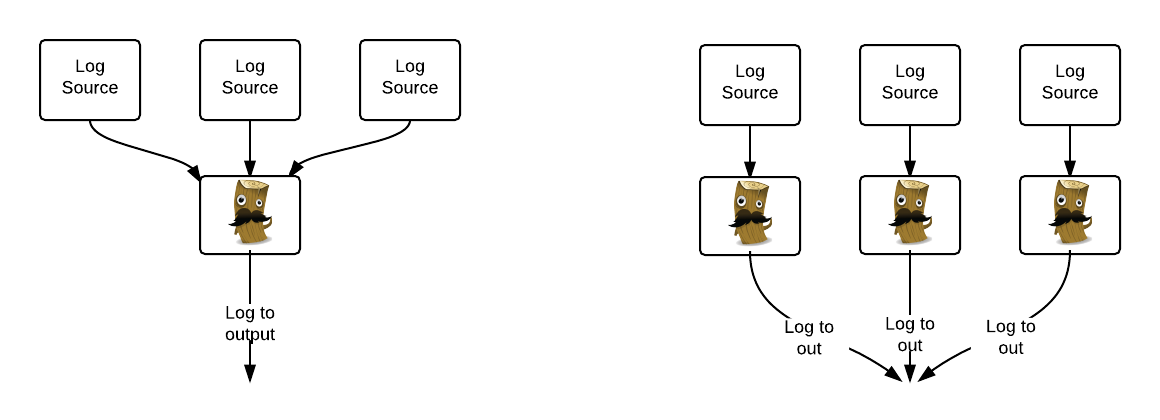
<p>Each Logstash instance can be configured with multiple inputs and outputs and the topology very much depends on your use cases.
For example, you may chose to run a single centralised instance of logstash with configs pointing to each separate box or on the contrary, run logstash on every instance.</p>

<p><img src="http://blog.mirajavora.com/images/posts/logstash/logstash-diagram.png" alt="Different approaches to deploying Logstash" /></p>

<p>Did I meantion Logstash has the best logo in the universe?</p>

<h2>Log4net/Log4j and Logstash</h2>

<p>In my scenario, I was looking to collect multiple logs from multiple apps on a large number of boxes across multiple data-centres.
Each of the apps already had logging, which was mostly based on log4net.</p>

<p>Rather than having a separate configuration for each logstash instance, it was much simpler to use the <em>UDP plugin</em> from logstash.
This means the existing apps just added a new appender that would log to an UDP port and logstash would just pick that up.</p>

<p>This made the whole logstash config really simple</p>

<div class="highlight"><pre><code class="language-json" data-lang="json"><span class="err">input</span> <span class="p">{</span> 
        <span class="err">udp</span> <span class="err">{</span> 
          <span class="err">port</span> <span class="err">=&gt;</span> <span class="err">5960</span> 
          <span class="err">codec</span> <span class="err">=&gt;</span> <span class="err">plain</span> <span class="err">{</span> 
            <span class="err">charset</span> <span class="err">=&gt;</span> <span class="nt">&quot;UTF-8&quot;</span> 
          <span class="p">}</span> 
          <span class="err">type</span> <span class="err">=&gt;</span> <span class="s2">&quot;log4net&quot;</span> 
        <span class="err">}</span>
    <span class="err">}</span></code></pre></div>


<p>Changes to the Log4net appender were straight-forward too.</p>

<div class="highlight"><pre><code class="language-xml" data-lang="xml">... 
        <span class="nt">&lt;appender</span> <span class="na">name=</span><span class="s">&quot;UdpAppender&quot;</span> <span class="na">type=</span><span class="s">&quot;log4net.Appender.UdpAppender&quot;</span><span class="nt">&gt;</span>
            <span class="nt">&lt;RemoteAddress</span> <span class="na">value=</span><span class="s">&quot;127.0.0.1&quot;</span> <span class="nt">/&gt;</span> <span class="c">&lt;!-- set to 127.0.0.1 and host name mapped to this on my machine (port 80) --&gt;</span>
            <span class="nt">&lt;RemotePort</span> <span class="na">value=</span><span class="s">&quot;5960&quot;</span> <span class="nt">/&gt;</span>
            <span class="nt">&lt;layout</span> <span class="na">type=</span><span class="s">&quot;log4net.Layout.PatternLayout&quot;</span><span class="nt">&gt;</span>
                <span class="nt">&lt;conversionPattern</span> <span class="na">value=</span><span class="s">&quot;%date [%thread] %-5level - %property{log4net:HostName} - MyApplication - %message%newline&quot;</span> <span class="nt">/&gt;</span>
            <span class="nt">&lt;/layout&gt;</span>
        <span class="nt">&lt;/appender&gt;</span>
....
add the appender to the root loggers
....
        <span class="nt">&lt;root&gt;</span>
            <span class="nt">&lt;level</span> <span class="na">value=</span><span class="s">&quot;ERROR&quot;</span> <span class="nt">/&gt;</span>
            <span class="nt">&lt;appender-ref</span> <span class="na">ref=</span><span class="s">&quot;OutputDebugStringAppender&quot;</span> <span class="nt">/&gt;</span>
            <span class="nt">&lt;appender-ref</span> <span class="na">ref=</span><span class="s">&quot;TraceAppender&quot;</span> <span class="nt">/&gt;</span>
            <span class="nt">&lt;appender-ref</span> <span class="na">ref=</span><span class="s">&quot;ErrorFileAppender&quot;</span> <span class="nt">/&gt;</span>
            <span class="nt">&lt;appender-ref</span> <span class="na">ref=</span><span class="s">&quot;UdpAppender&quot;</span> <span class="nt">/&gt;</span>
        <span class="nt">&lt;/root&gt;</span></code></pre></div>


<h2>Adding Graylog2 into the mix</h2>

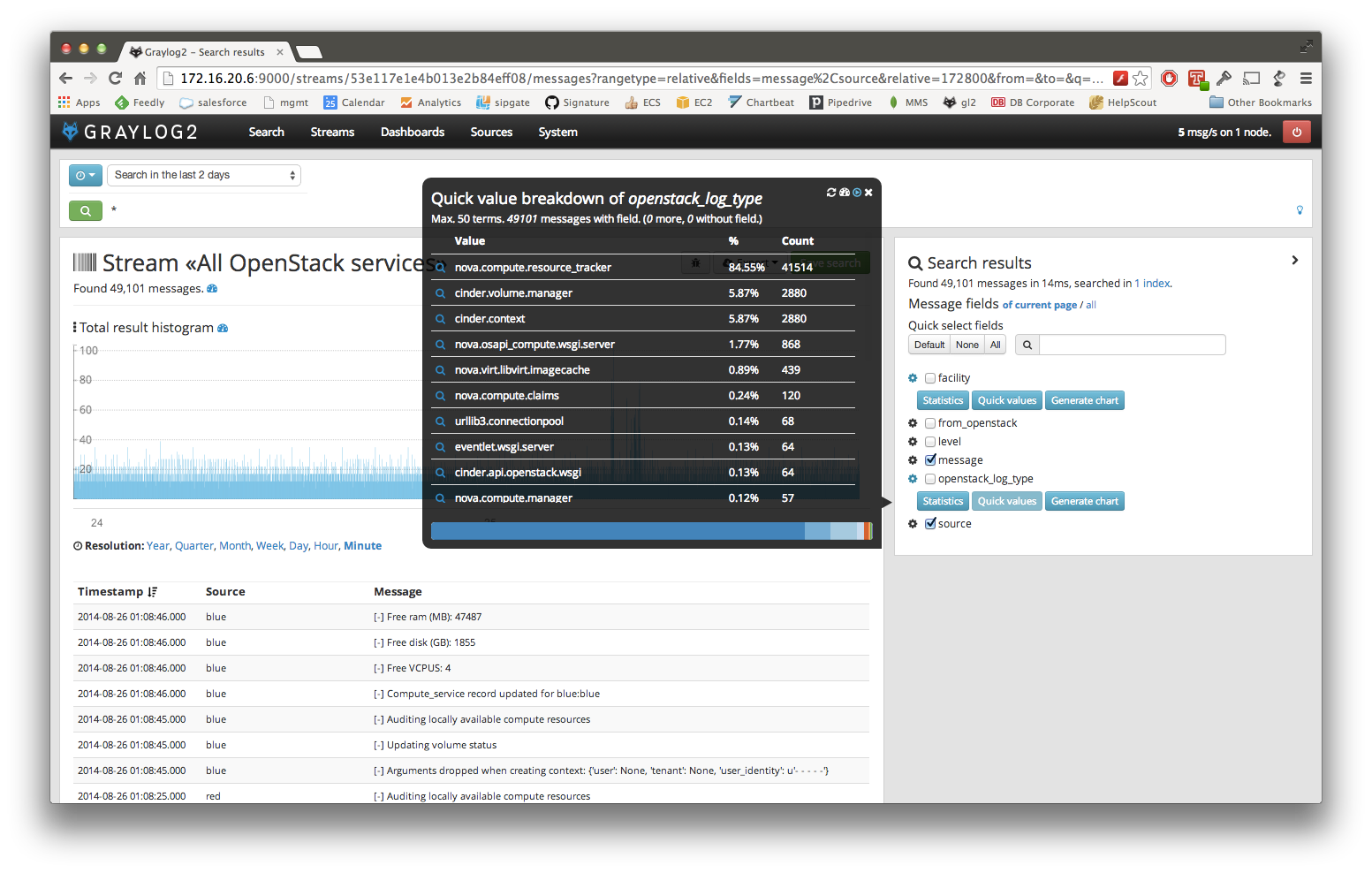
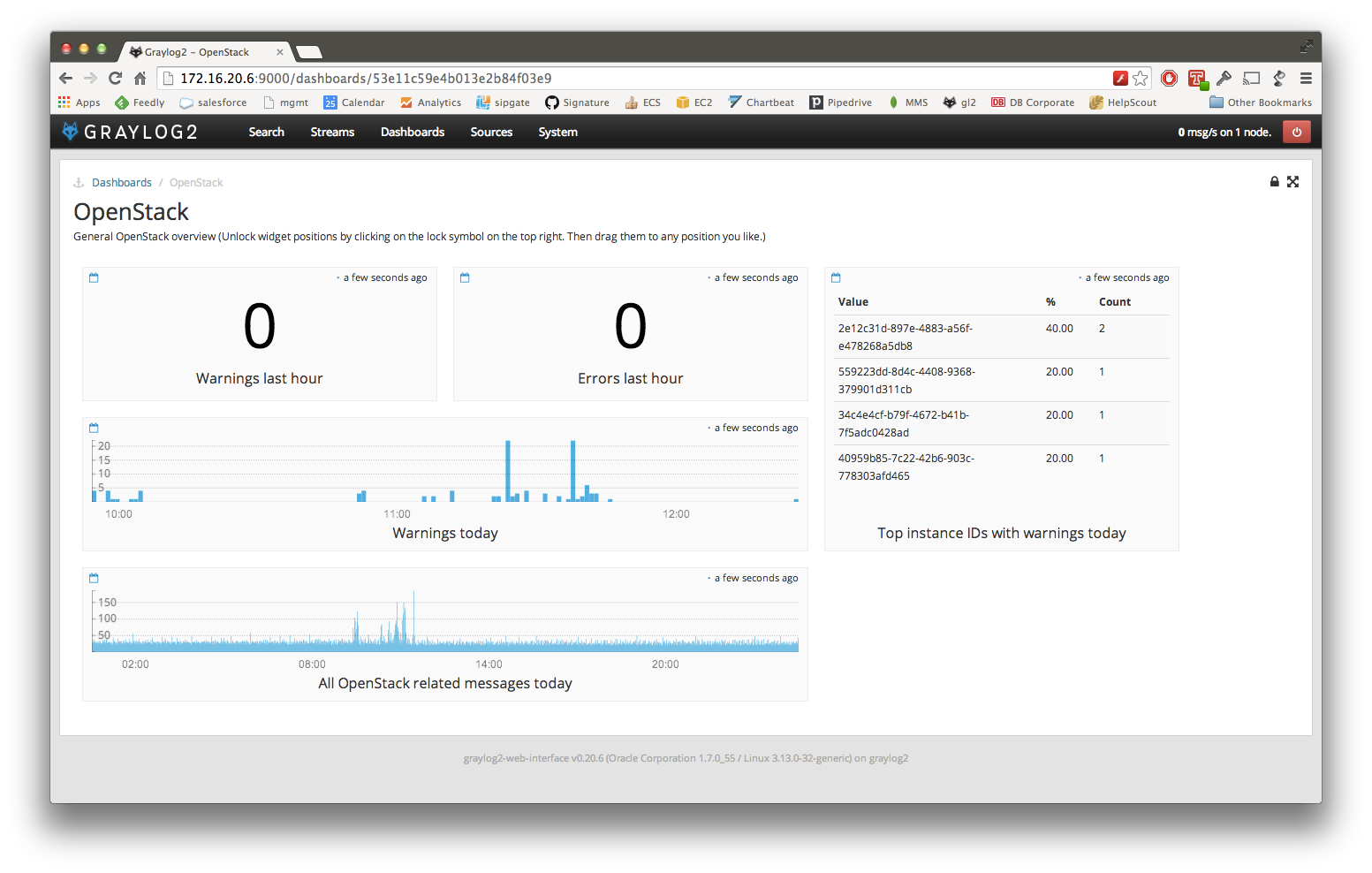
<p><a href="https://www.graylog2.org/">Graylog2</a> is one of my favourite tools. The sole purpose is to aggregate and analyse logs in real time. With elastic search sitting underneath,
it let&rsquo;s you do complex queries on the data and create custom dashboards.</p>

<p><a href='http://blog.mirajavora.com/images/posts/logstash/screen2_full.png'><img src='http://blog.mirajavora.com/images/posts/logstash/screen2.png' alt='Graylog2' /></a>
<a href='http://blog.mirajavora.com/images/posts/logstash/screen3_full.png'><img src='http://blog.mirajavora.com/images/posts/logstash/screen3.png' alt='Graylog2' /></a></p>

<p>If you have an instance of Graylog2 running somewhere, it&rsquo;s easy to use the gelf output to channel all the incoming logs into Logstash into Graylog2.
The full logstash config could then look something like this:</p>

<div class="highlight"><pre><code class="language-json" data-lang="json"><span class="err">input</span> <span class="p">{</span> 
    <span class="err">udp</span> <span class="err">{</span> 
      <span class="err">port</span> <span class="err">=&gt;</span> <span class="err">5960</span> 
      <span class="err">codec</span> <span class="err">=&gt;</span> <span class="err">plain</span> <span class="err">{</span> 
        <span class="err">charset</span> <span class="err">=&gt;</span> <span class="nt">&quot;UTF-8&quot;</span> 
      <span class="p">}</span> 
      <span class="err">type</span> <span class="err">=&gt;</span> <span class="s2">&quot;log4net&quot;</span> 
    <span class="err">}</span>
<span class="err">}</span>


<span class="err">filter</span> <span class="p">{</span>
  <span class="err">if</span> <span class="err">[type]</span> <span class="err">==</span> <span class="nt">&quot;log4net&quot;</span> <span class="p">{</span>
    <span class="err">grok</span> <span class="err">{</span>
      <span class="err">remove_field</span> <span class="err">=&gt;</span> <span class="err">message</span>
      <span class="err">match</span> <span class="err">=&gt;</span> <span class="err">{</span> <span class="err">message</span> <span class="err">=&gt;</span> <span class="nt">&quot;%{TIMESTAMP_ISO8601:sourceTimestamp} \[%{NUMBER:threadid}\] %{LOGLEVEL:loglevel} +- %{IPORHOST:tempHost} - %{GREEDYDATA:tempMessage}&quot;</span> <span class="p">}</span>
    <span class="p">}</span>
    <span class="err">if</span> <span class="err">!(</span><span class="s2">&quot;_grokparsefailure&quot;</span> <span class="err">in</span> <span class="p">[</span><span class="err">tags</span><span class="p">]</span><span class="err">)</span> <span class="p">{</span>
      <span class="err">mutate</span> <span class="err">{</span>
        <span class="err">replace</span> <span class="err">=&gt;</span> <span class="err">[</span> <span class="nt">&quot;message&quot;</span> <span class="p">,</span> <span class="nt">&quot;%{tempMessage}&quot;</span> <span class="err">]</span>
        <span class="err">replace</span> <span class="err">=&gt;</span> <span class="p">[</span> <span class="s2">&quot;host&quot;</span> <span class="p">,</span> <span class="s2">&quot;%{tempHost}&quot;</span> <span class="p">]</span>
      <span class="p">}</span>
    <span class="err">}</span>
    <span class="err">mutate</span> <span class="p">{</span>
      <span class="err">remove_field</span> <span class="err">=&gt;</span> <span class="err">[</span> <span class="nt">&quot;tempMessage&quot;</span> <span class="err">]</span>
      <span class="err">remove_field</span> <span class="err">=&gt;</span> <span class="p">[</span> <span class="s2">&quot;tempHost&quot;</span> <span class="p">]</span>
    <span class="p">}</span>
  <span class="err">}</span>
<span class="err">}</span>

<span class="err">output</span> <span class="p">{</span>
  <span class="err">gelf</span> <span class="err">{</span>
     <span class="err">host</span> <span class="err">=&gt;</span> <span class="nt">&quot;your-host-name&quot;</span>
     <span class="err">custom_fields</span> <span class="err">=&gt;</span> <span class="p">[</span><span class="s2">&quot;environment&quot;</span><span class="p">,</span> <span class="s2">&quot;PROD&quot;</span><span class="p">,</span> <span class="s2">&quot;service&quot;</span><span class="p">,</span> <span class="s2">&quot;BestServiceInTheWorld&quot;</span><span class="p">]</span>
     <span class="p">}</span>
  <span class="err">stdout</span> <span class="p">{</span> <span class="p">}</span>
<span class="err">}</span></code></pre></div>


<p>A result will be a centralised stream of logs that you can easily analyse and create dashboards from.
The beauty of logstash is that you can easily add further outputs (eg graphite).</p>
]]></content>
  </entry>
  
  <entry>
    <title type="html"><![CDATA[Octopress - an Awesome Blogging Framework]]></title>
    <link href="http://blog.mirajavora.com/octopress-as-blog-engine/"/>
    <updated>2014-11-23T17:52:30+00:00</updated>
    <id>http://blog.mirajavora.com/octopress-as-blog-engine</id>
    <content type="html"><![CDATA[<p>I&rsquo;ve been looking to re-launch my blog recently and be a bit more active in contributing to the community. While doing so, I wanted to change my existing blogging platform as well as hosting.</p>

<!--more-->


<h2>Looking For a Light-Weight Blogging Platform</h2>

<p>When I fist started blogging, I went for the <a href="http://www.orchardproject.net/"><strong>Orchard Project</strong></a> as the blogging platform. I was hoping that it would be light, MVC-based platform that would be easy to manage and maintain. I was a bit dissapointed with <a href="http://www.orchardproject.net/">Orchard</a> - it was pretty heavy, development was cumbersome, the performance was low and overall felt like a bit of an overkill.</p>

<p>Looking at a new framework, I had several requirements. It had to be fast, simple and be able to handle</p>

<ul>
<li>posts</li>
<li>archive &amp; monthly archive</li>
<li>widgets to load latest &amp; custom</li>
<li>ability to generate custom content pages</li>
</ul>


<p>I also wanted move away from an IIS based hosting over to <a href="http://nginx.org/"><strong>Nginx</strong></a>. That meant I had few open-source CMS options to look at.
There is <a href="https://www.django-cms.org/">Django CMS</a>, <a href="http://www.joomla.org/">Joomla</a> and of course <a href="https://www.drupal.org/">Drupal</a>.</p>

<p>And then I stumbled upon <a href="http://octopress.org/">Octopress</a></p>

<h2>Octopress</h2>

<p>Unlike the traditional CMS projects, octopress is a blog-aware static content site generator. It runs on top of <a href="https://github.com/jekyll/jekyll">Jekyll</a> which is the engine behind GitHub pages.</p>

<p>The content is generated from the markdown files you create. Jekyll alone does not have a great deal of html templates and css/js - that&rsquo;s where Octopress comes in.
It gives you an awesome framework that you can take forward and tweak to your liking, directly in the code.</p>

<p>The fact that all the <strong>content is static makes your site super-fast</strong> - as demonstrated in the graph below.</p>

<p><img src="http://blog.mirajavora.com/images/posts/octopress/download-time.png" alt="Time to download the pages" /></p>

<h2>Living with Octopress</h2>

<p>Having used Octopress for few weeks now, the experience has been great. The ability to change html/css directly is great as well as no need to have data-store in place. The deployment is simple and straightforwards as well as backups. In short, exactly what I a was after.</p>

<h3>Installation</h3>

<p>Installing Octopress is super-easy. The two main dependencies are Ruby and Git, which most devs will have anyway.</p>

<div class="highlight"><pre><code class="language-bash" data-lang="bash">git clone git://github.com/imathis/octopress.git octopress
<span class="nb">cd </span>octopress</code></pre></div>


<p>You will then need to install couple of other gem dependencies and install octopress - to setup dirs and structure</p>

<div class="highlight"><pre><code class="language-bash" data-lang="bash">gem install bundler
rbenv rehash    <span class="c"># If you use rbenv, rehash to be able to run the bundle command</span>
bundle install

rake install</code></pre></div>


<p>Octopress has a concept of templates/layouts and includes which you can include to avoid repetition. You can find them in <em>/source/_layouts</em> and <em>/source/_includes</em></p>

<h3>Writing Posts</h3>

<p>Once you have Octopress up and running, you can start creating posts. There are rake methods to do that as a shortcut.</p>

<p>To create a new post, run</p>

<div class="highlight"><pre><code class="language-bash" data-lang="bash">rake new_post<span class="o">[</span><span class="s2">&quot;A new post Title&quot;</span><span class="o">]</span></code></pre></div>


<p>This will create a new markdown file in <em>/source/_posts</em>. Each post contains a set of variables and the actual content.
You can also add your own on top of the pre-defined.</p>

<div class="highlight"><pre><code class="language-html" data-lang="html">---
layout: post
title: &quot;SASS with Visual Studio Part 1 Introduction&quot;
date: 2011-09-11 15:01:30 +0000
comments: true
categories: [SASS, CSS, Visual Studio]
customVariable: &quot;Custom content&quot;
image: /images/posts/sass/sass_thumb.jpg
---

This is a start of the content ...</code></pre></div>


<p>Once you&rsquo;re happy with the content, you can run another rake task to produce the content.</p>

<div class="highlight"><pre><code class="language-bash" data-lang="bash">rake generate</code></pre></div>


<p>The generated files will end up in <em>/public</em></p>

<h3>Hacking Octopress</h3>

<p>Octopress is an ideal choice for any developer. In fact, there was very little that it couldn&rsquo;t do out of the box or I couldn&rsquo;t change right away.</p>

<p>It was super easy to change any html and tweak any shared components. There are lots of <a href="https://github.com/imathis/octopress/wiki/3rd-party-plugins">plugins available</a>, the only additional bit that I was interested was a monthly archive which I borrowed from <a href="https://github.com/rcmdnk/monthly-archive">here</a>.</p>

<h3>Back ups</h3>

<p>One of the nicest things about Octopress is the ease of back-ups. With no dependencies on DBs or any other storage, I tend to simply push the entire blog onto a <a href="https://github.com/mirajavora/blog.mirajavora.com">public github account</a>.</p>

<p>That means I have a permanent backup and I can clone and start updating the content anywhere. Changing hosting providers is a matter of minutes rather than hours.</p>

<h3>Deployment</h3>

<p>All that octopress needs is an http server in front. It supports a simple push to something like GitHub pages or Rsync to your own server. You can also easily write your own rake tasks to push the content anywhere.</p>

<p>Any questions, give me a shout <a href="http://twitter.com/mirajavora">@mirajavora</a></p>
]]></content>
  </entry>
  
  <entry>
    <title type="html"><![CDATA[NDC Oslo 2013 Top Picks]]></title>
    <link href="http://blog.mirajavora.com/ndc-oslo-2013-top-picks/"/>
    <updated>2013-06-16T14:52:04+01:00</updated>
    <id>http://blog.mirajavora.com/ndc-oslo-2013-top-picks</id>
    <content type="html"><![CDATA[<p><a href="http://blog.mirajavora.com/images/posts/ndc/IMG_1104_thumb.jpg"><img src="http://blog.mirajavora.com/images/posts/ndc/IMG_1104_thumb.jpg" class="post-image-right" alt="Clean Architecture" /></a>
I just got back from <a href="https://twitter.com/search?q=%23ndcoslo&amp;src=hash">NDC Oslo</a>. It was a great week filled with some quality speakers and content. It’s very hard to pick what I enjoyed the most, because the overall quality was just so high. Nevertheless, I’m going to attempt it :-) Bear in mind it’s my subjective view and I’m happy if you disagree with me. I will update the post once the videos are up.</p>

<!--more-->


<h2>Real World Polyglot Persistence</h2>

<p><strong>by <a href="https://twitter.com/jbogard">Jimmy Board</a></strong></p>

<p>A man behind the AutoMapper is not only a great speaker, but unlike so many other talks, he brought along a real-world example. I could really identify myself with his main view of – use the right tool for the job, rather than try to basterdise something that was not build for the purpose. That means, be prepared to use lots of different storage mechanisms in a large app and lots of different ways to put the systems together.</p>

<p>He showed off fake e-commerce app that would</p>

<ul>
<li>Store the main catalogue in relational DB (changes little, mostly read, caching)</li>
<li>Store the cart info in Key-Value Store instead of Session (auto-expiry, transient data)</li>
<li>Store order information in Document DB (typically a different system, when catalogue changes, order does not)</li>
<li>Use Graph DB for suggestion engine</li>
</ul>


<p>Each component worked together in a way that was also closer to the real-world scenario – HTTP post between components, Messaging Bus and AJAX on front-end to different systems. You can check out the slides and the code here.</p>

<h2>Clean Architecture and Design</h2>

<p><strong>by <a href="https://twitter.com/unclebobmartin">Robert C. Martin</a></strong></p>

<p><a href="http://blog.mirajavora.com/images/posts/ndc/IMG_1079_thumb.jpg"><img src="http://blog.mirajavora.com/images/posts/ndc/IMG_1079_thumb.jpg" class="post-image-right" alt="Clean Architecture" /></a>
I enjoyed Uncle Bob talking about clean architecture. The abstract was a bit vague so I feared the talk will be a bit too generic. I was wrong. I really enjoyed it, in particular, because he was describing an architectural anti-pattern that I’ve seen so many times in MVC.</p>

<p>He stressed the importance of Web being a presentation logic and that your presentation logic (or framework) should not dictate the core business model. I’ve seen so many times where the ViewModel logic has grown beyond manageable (calling services or data access layer) or view logic grown out of proportion. He stressed the importance of keeping ViewModels and Models separate.</p>

<p>A good talk, great speaker.</p>

<h2>Under the Covers with ASP.NET SignalR</h2>

<p><strong>by <a href="https://twitter.com/DavianFowlwards">Davian Fowlwards</a></strong></p>

<p>The authors of SignalR <a href="https://twitter.com/davidfowl">David Fowler</a> and <a href="https://twitter.com/DamianEdwards">Damian Edwards</a> came in and stole the show. The most entertaining and enjoyable talk by a long mile. After a quick demo of what is SignalR they went on to and wrote a simpler version of SignalR  - on stage – live – re-using only one helper class and a message bus class.</p>

<p>This was both very ballsy and impressive but also gave a great inside to what SignalR does and how. Starting with the negotiation to the different transport types. It also wasn’t all about the code – whenever something needed to be explained, they would go in a bit of detail.</p>

<p>It was a great session – fun, full of content and great QA at the end. Awesome guys!</p>

<h2>C# 5</h2>

<p><strong>by <a href="https://twitter.com/jonskeet">Jon Skeet</a></strong></p>

<p>I went to couple of talks by Jon at NDC. This session could have also been called async – await :-) I would recommend the session if you never used the async-await before. Jon gives a great explanation of the async-await pattern using an example of a cardboard box that contains something the result inside.</p>

<p>He also went on to cover the intricacies of unit-testing the awaitable functions – really worth checking it out.</p>

<h2>Backbone</h2>

<p><strong>by <a href="https://twitter.com/kimjoar">Kim Bekkelund</a> and <a href="https://twitter.com/hinderberg">Hans Inderberg</a></strong></p>

<p>I was glad to see Backbone on the list of topics – especially now that I work with it day-to-day. The guys  showed off some good tips and patterns to use when using backbone such as</p>

<ul>
<li>using subviews and pushing the logic from view to model</li>
<li>avoid adding too much logic in initialize</li>
<li>create base-classes for each component to share logic (baseviews, basemodels), 1 level of inheritance is usually enough</li>
<li>don’t be shy to use vanilla JS</li>
</ul>


<p>Overall, good tips and issues we’ve come across as well. They also suggested grouping Backbone components (view, model) together in feature folders. I guess that was the only suggestion I would have a problem with, given you would want to re-use some of the models.</p>

<p>There were plenty of other talks that I enjoyed, but I won’t bore you with details. In particular both sessions by Dominick Baier who gave good overview of Web API security and OAuth2. I also enjoyed Dan North talking about Effective Teams &amp; Jon Skeet on Abusing C#. All in all, great conference.</p>
]]></content>
  </entry>
  
  <entry>
    <title type="html"><![CDATA[Authenticate Web API Using Access Tokens]]></title>
    <link href="http://blog.mirajavora.com/authenticate-web-api-using-access-tokens/"/>
    <updated>2013-04-15T23:52:30+01:00</updated>
    <id>http://blog.mirajavora.com/authenticate-web-api-using-access-tokens</id>
    <content type="html"><![CDATA[<p>In a common Web API scenario, you may want to secure your endpoints so that certain actions can only be executed by authenticated users who posses the correct permissions and are authorised to access the endpoints. For example, you would not want expose your DELETE endpoint of a resource to the general public.</p>

<!--more-->


<p>This problem is traditionally solved by Authentication and Authorization and your credentials are passed along with the request to the server. An alternative is <strong>to exchange the username and password for a short-lived access token</strong> and use this access token to perform the protected actions. This solution does not fit every scenario,  however, it means that <strong>if the access token gets exposed, the user credentials are not revealed</strong>.</p>

<h2>Authentication and Authorisation</h2>

<p>There is a key difference between authentication and authorisation. Authentication is regarded as <strong>identifying the user</strong> – confirming that you are, who you say you are. Authorisation is a secondary step that happens once the authenticity was established. Authentication is all about <strong>does this person have access to access this resource or perform certain action</strong>.</p>

<h2>Creating an Access Token</h2>

<p>The first thing the user needs to do is exchange the user credentials for an access token. This token is stored on the client side and verified every time by the service API.</p>

<p>In the action below, username and password is captured by the login model and passed down to the authentication service. If the auth service returns a valid user, we can create a short-lived auth token for the user to use. The token is then set in a cookie and returned as part of the response to the user.</p>

<div class="highlight"><pre><code class="language-c#" data-lang="c#"><span class="na">[HttpPost]</span>
<span class="k">public</span> <span class="n">ActionResult</span> <span class="nf">Index</span><span class="p">(</span><span class="n">LoginModel</span> <span class="n">model</span><span class="p">)</span>
<span class="p">{</span>
    <span class="k">if</span><span class="p">(!</span><span class="n">ModelState</span><span class="p">.</span><span class="n">IsValid</span><span class="p">)</span>
        <span class="k">return</span> <span class="nf">View</span><span class="p">(</span><span class="n">model</span><span class="p">);</span>
 
    <span class="kt">var</span> <span class="n">result</span> <span class="p">=</span> <span class="n">_authenticationService</span><span class="p">.</span><span class="n">Authenticate</span><span class="p">(</span><span class="n">model</span><span class="p">);</span>
    <span class="k">if</span> <span class="p">(!</span><span class="n">result</span><span class="p">.</span><span class="n">IsAuthenticated</span><span class="p">)</span>
        <span class="k">return</span> <span class="nf">View</span><span class="p">(</span><span class="n">model</span><span class="p">);</span>
 
    <span class="kt">var</span> <span class="n">token</span> <span class="p">=</span> <span class="k">new</span> <span class="n">AccessToken</span><span class="p">(</span><span class="n">result</span><span class="p">.</span><span class="n">User</span><span class="p">.</span><span class="n">Id</span><span class="p">);</span>
    <span class="n">_accessTokenRepository</span><span class="p">.</span><span class="n">Save</span><span class="p">(</span><span class="n">token</span><span class="p">);</span>
    <span class="n">Response</span><span class="p">.</span><span class="n">Cookies</span><span class="p">.</span><span class="n">Add</span><span class="p">(</span><span class="k">new</span> <span class="n">HttpCookie</span><span class="p">(</span><span class="s">&quot;token&quot;</span><span class="p">,</span> <span class="n">token</span><span class="p">.</span><span class="n">Id</span><span class="p">)</span> <span class="p">{</span> <span class="n">Expires</span> <span class="p">=</span> <span class="n">token</span><span class="p">.</span><span class="n">Expires</span><span class="p">,</span> <span class="n">Path</span> <span class="p">=</span> <span class="s">&quot;/&quot;</span> <span class="p">});</span>
 
    <span class="k">return</span> <span class="nf">RedirectToAction</span><span class="p">(</span><span class="s">&quot;Index&quot;</span><span class="p">,</span> <span class="s">&quot;Security&quot;</span><span class="p">);</span>
<span class="p">}</span></code></pre></div>


<h2>Authentication Handler to check the Access Token</h2>

<p>Once you have created your access token, it will be sent to the server every time as part of the cookie collection. The server should then check the access token cookie on every request create an appropriate <a href="http://msdn.microsoft.com/en-us/library/system.security.principal.iprincipal.aspx">IPrincipal</a> based on the access token.</p>

<p>The best way to ensure access token is processed on every request, you can create a custom handler for authentication by inheriting from <a href="http://msdn.microsoft.com/en-gb/library/system.net.http.delegatinghandler.aspx">DelegatingHandler</a> class.</p>

<div class="highlight"><pre><code class="language-c#" data-lang="c#"><span class="k">protected</span> <span class="k">override</span> <span class="n">Task</span><span class="p">&lt;</span><span class="n">HttpResponseMessage</span><span class="p">&gt;</span> <span class="n">SendAsync</span><span class="p">(</span><span class="n">HttpRequestMessage</span> <span class="n">request</span><span class="p">,</span> <span class="n">CancellationToken</span> <span class="n">cancellationToken</span><span class="p">)</span>
<span class="p">{</span>
    <span class="kt">var</span> <span class="n">accessToken</span> <span class="p">=</span> <span class="n">request</span><span class="p">.</span><span class="n">Headers</span><span class="p">.</span><span class="n">GetCookies</span><span class="p">(</span><span class="s">&quot;token&quot;</span><span class="p">);</span>
    <span class="k">if</span> <span class="p">(</span><span class="n">accessToken</span><span class="p">.</span><span class="n">Count</span> <span class="p">==</span> <span class="m">0</span><span class="p">)</span>
        <span class="k">return</span> <span class="k">base</span><span class="p">.</span><span class="n">SendAsync</span><span class="p">(</span><span class="n">request</span><span class="p">,</span> <span class="n">cancellationToken</span><span class="p">);</span>
 
    <span class="kt">var</span> <span class="n">tokenValue</span> <span class="p">=</span> <span class="n">accessToken</span><span class="p">[</span><span class="m">0</span><span class="p">][</span><span class="s">&quot;token&quot;</span><span class="p">].</span><span class="n">Value</span><span class="p">;</span>
    <span class="kt">var</span> <span class="n">token</span> <span class="p">=</span> <span class="n">_accessTokenRepository</span><span class="p">.</span><span class="n">FindById</span><span class="p">(</span><span class="n">tokenValue</span><span class="p">);</span>
    <span class="k">if</span><span class="p">(</span><span class="n">token</span> <span class="p">==</span> <span class="k">null</span><span class="p">)</span>
        <span class="k">return</span> <span class="k">base</span><span class="p">.</span><span class="n">SendAsync</span><span class="p">(</span><span class="n">request</span><span class="p">,</span> <span class="n">cancellationToken</span><span class="p">);</span>
 
    <span class="kt">var</span> <span class="n">user</span> <span class="p">=</span> <span class="n">_userRepository</span><span class="p">.</span><span class="n">FindById</span><span class="p">(</span><span class="n">token</span><span class="p">.</span><span class="n">UserId</span><span class="p">);</span>
 
    <span class="kt">var</span> <span class="n">identity</span> <span class="p">=</span> <span class="k">new</span> <span class="n">GenericIdentity</span><span class="p">(</span><span class="n">user</span><span class="p">.</span><span class="n">Username</span><span class="p">,</span> <span class="s">&quot;Basic&quot;</span><span class="p">);</span>
    <span class="kt">var</span> <span class="n">principal</span> <span class="p">=</span> <span class="k">new</span> <span class="n">GenericPrincipal</span><span class="p">(</span><span class="n">identity</span><span class="p">,</span> <span class="n">user</span><span class="p">.</span><span class="n">Roles</span><span class="p">.</span><span class="n">ToArray</span><span class="p">());</span>
    <span class="n">Thread</span><span class="p">.</span><span class="n">CurrentPrincipal</span> <span class="p">=</span> <span class="n">principal</span><span class="p">;</span>
 
    <span class="k">return</span> <span class="k">base</span><span class="p">.</span><span class="n">SendAsync</span><span class="p">(</span><span class="n">request</span><span class="p">,</span> <span class="n">cancellationToken</span><span class="p">);</span>
<span class="p">}</span></code></pre></div>


<p>The handler gets the access token from the cookie and attempts to find the user based on the access token. If the user is found, new <a href="http://msdn.microsoft.com/en-us/library/system.security.principal.genericidentity.aspx">GenericIdentity</a> and <a href="http://msdn.microsoft.com/en-us/library/system.security.principal.genericprincipal.aspx">GenericPrincipal</a> are created based on the user and user’s roles. You can then assign the <a href="http://msdn.microsoft.com/en-us/library/system.security.principal.genericprincipal.aspx">GenericPrincipal</a> to the current thread.</p>

<p>Remember to add your AuthenticationHandler to the MessageHandlers in the Web API  GlobalConfiguration</p>

<div class="highlight"><pre><code class="language-c#" data-lang="c#"><span class="p">....</span>
<span class="n">GlobalConfiguration</span><span class="p">.</span><span class="n">Configuration</span><span class="p">.</span><span class="n">MessageHandlers</span><span class="p">.</span><span class="n">Add</span><span class="p">(</span>
    <span class="k">new</span> <span class="nf">AuthenticationHandler</span><span class="p">(</span><span class="n">Container</span><span class="p">.</span><span class="n">Resolve</span><span class="p">&lt;</span><span class="n">IAccessTokenRepository</span><span class="p">&gt;(),</span>
                              <span class="n">Container</span><span class="p">.</span><span class="n">Resolve</span><span class="p">&lt;</span><span class="n">IUserRepository</span><span class="p">&gt;()));</span>
<span class="p">...</span></code></pre></div>


<h2>Protect API Actions with Authorize Attribute</h2>

<p>Once the user gets authenticated and the user roles are stored on the thread’s IPrincipal, you can you use the in-built <a href="http://msdn.microsoft.com/en-us/library/system.web.http.authorizeattribute.aspx">Web API Authorize attribute</a> to check whether the user is authenticated. You can even specify roles that user needs to be in to perform a specific action.</p>

<div class="highlight"><pre><code class="language-c#" data-lang="c#"><span class="na">[Authorize]</span>
<span class="k">public</span> <span class="k">override</span> <span class="n">IEnumerable</span><span class="p">&lt;</span><span class="n">Contact</span><span class="p">&gt;</span> <span class="n">Get</span><span class="p">()</span>
<span class="p">{</span>
    <span class="k">return</span> <span class="k">base</span><span class="p">.</span><span class="n">Get</span><span class="p">();</span>
<span class="p">}</span>
<span class="na"> </span>
<span class="na">[Authorize(Roles = &quot;Administrator&quot;)]</span>
<span class="k">public</span> <span class="k">override</span> <span class="n">System</span><span class="p">.</span><span class="n">Net</span><span class="p">.</span><span class="n">Http</span><span class="p">.</span><span class="n">HttpResponseMessage</span> <span class="n">Delete</span><span class="p">(</span><span class="n">Guid</span> <span class="n">id</span><span class="p">)</span>
<span class="p">{</span>
    <span class="k">return</span> <span class="k">base</span><span class="p">.</span><span class="n">Delete</span><span class="p">(</span><span class="n">id</span><span class="p">);</span>
<span class="p">}</span></code></pre></div>


<p>If the user is not authenticated or does not have the correct permissions, the server will return 401 HTTP status code.</p>

<h2>Code Sample</h2>

<p>You can check out all the the above in the <strong><a href="https://github.com/mirajavora/WebAPISample">code sample on GitHub</a></strong>. Run the solution and navigate to /security - have a look on the SecurityController, SecureContactController and AuthenticationHandler controller. If you have any questions <strong>give me a shout <a href="http://twitter.com/mirajavora">@mirajavora</a></strong></p>
]]></content>
  </entry>
  
  <entry>
    <title type="html"><![CDATA[Content Negotiation With ASP.NET Web API]]></title>
    <link href="http://blog.mirajavora.com/content-negotiation-with-asp.net-web-api/"/>
    <updated>2013-02-02T18:25:00+00:00</updated>
    <id>http://blog.mirajavora.com/content-negotiation-with-asp.net-web-api</id>
    <content type="html"><![CDATA[<p><em>This is a second post in the series all about ASP.NET Web API. The first post looked at <a href="http://blog.mirajavora.com/getting-started-with-asp.net-web-api">getting started with the Web API</a>. You can find the <a href="https://github.com/mirajavora/WebAPISample">source code on Github</a>.</em></p>

<p><a href="http://blog.mirajavora.com/images/posts/webapi/FiddleQR.png"><img alt="Fiddler QR" src="http://blog.mirajavora.com/images/posts/webapi/FiddleQR_thumb.png" class="post-image-right" /></a>
An important part of Web API is resource content negotiation. The HTTP protocol RFC defines content negotiation as <strong>the process of selecting the best representation for a given response when there are multiple representations available</strong>. In practise the same resource can be represented in a variety of different ways – lets say a contact information resource can be shown in JSON representation, but also in XML or even as a PNG QR code containing the same content.</p>

<p>The content negotiation can be either server or client driven. In the first instance, the server decides what content to send down based on the various headers sent from the client. The latter requires an additional call to the server to get the list of available representations. Web API provides you with an easy way to send different representations of the same content.</p>

<h2>Creating new MediaTypeFormatter to Deliver QR Code</h2>

<p>The Web API comes with <a href="http://msdn.microsoft.com/en-us/library/system.net.http.formatting.mediatypeformatter.aspx">MediaTypeFormatter</a> base class. If you want to create your own formatter, simply inherit from MediaTypeFormatter. If we take the <a href="http://blog.mirajavora.com/getting-started-with-asp.net-web-api/">existing scenario of contact management</a>, lets say we want to create a QR code that contains the contact information of each contact stored in the database.</p>

<p>Our QrMediaFormatter can only be used for writing the type of Contact. Therefore we add logic to the CanWriteType and override the WriteToStreamAsync member.</p>

<div class="highlight"><pre><code class="language-c#" data-lang="c#"><span class="k">public</span> <span class="k">class</span> <span class="nc">QrMediaFormatter</span> <span class="p">:</span> <span class="n">MediaTypeFormatter</span>
<span class="p">{</span>
    <span class="k">private</span> <span class="k">const</span> <span class="kt">string</span> <span class="n">ApiEndpoint</span> <span class="p">=</span> <span class="s">&quot;http://chart.apis.google.com/chart&quot;</span><span class="p">;</span>
 
    <span class="k">public</span> <span class="k">override</span> <span class="kt">bool</span> <span class="nf">CanReadType</span><span class="p">(</span><span class="n">Type</span> <span class="n">type</span><span class="p">)</span>
    <span class="p">{</span>
        <span class="k">return</span> <span class="k">false</span><span class="p">;</span>
    <span class="p">}</span>
 
    <span class="k">public</span> <span class="k">override</span> <span class="kt">bool</span> <span class="nf">CanWriteType</span><span class="p">(</span><span class="n">Type</span> <span class="n">type</span><span class="p">)</span>
    <span class="p">{</span>
        <span class="k">if</span><span class="p">(</span><span class="n">type</span> <span class="p">==</span> <span class="k">null</span><span class="p">)</span>
        <span class="p">{</span>
            <span class="k">throw</span> <span class="k">new</span> <span class="nf">ArgumentNullException</span><span class="p">(</span><span class="s">&quot;type&quot;</span><span class="p">);</span>
        <span class="p">}</span>
 
        <span class="k">return</span> <span class="n">type</span> <span class="p">==</span> <span class="k">typeof</span><span class="p">(</span><span class="n">Contact</span><span class="p">);</span>
    <span class="p">}</span>
 
    <span class="k">public</span> <span class="k">override</span> <span class="n">Task</span> <span class="nf">WriteToStreamAsync</span><span class="p">(</span><span class="n">Type</span> <span class="n">type</span><span class="p">,</span> <span class="kt">object</span> <span class="k">value</span><span class="p">,</span> <span class="n">Stream</span> <span class="n">stream</span><span class="p">,</span> <span class="n">System</span><span class="p">.</span><span class="n">Net</span><span class="p">.</span><span class="n">Http</span><span class="p">.</span><span class="n">HttpContent</span> <span class="n">content</span><span class="p">,</span> <span class="n">System</span><span class="p">.</span><span class="n">Net</span><span class="p">.</span><span class="n">TransportContext</span> <span class="n">transportContext</span><span class="p">)</span>
    <span class="p">{</span>
        <span class="k">return</span> <span class="n">Task</span><span class="p">.</span><span class="n">Factory</span><span class="p">.</span><span class="n">StartNew</span><span class="p">(()</span> <span class="p">=&gt;</span> <span class="n">WriteQrStream</span><span class="p">(</span><span class="n">type</span><span class="p">,</span> <span class="k">value</span><span class="p">,</span> <span class="n">stream</span><span class="p">,</span> <span class="n">content</span><span class="p">.</span><span class="n">Headers</span><span class="p">));</span>
    <span class="p">}</span>
 
    <span class="k">private</span> <span class="k">void</span> <span class="nf">WriteQrStream</span><span class="p">(</span><span class="n">Type</span> <span class="n">type</span><span class="p">,</span> <span class="kt">object</span> <span class="k">value</span><span class="p">,</span> <span class="n">Stream</span> <span class="n">stream</span><span class="p">,</span> <span class="n">HttpContentHeaders</span> <span class="n">contentHeaders</span><span class="p">)</span>
    <span class="p">{</span>
        <span class="kt">var</span> <span class="n">contact</span> <span class="p">=</span> <span class="k">value</span> <span class="k">as</span> <span class="n">Contact</span><span class="p">;</span>
        <span class="kt">var</span> <span class="n">values</span> <span class="p">=</span> <span class="k">new</span> <span class="n">Dictionary</span><span class="p">&lt;</span><span class="kt">string</span><span class="p">,</span> <span class="kt">string</span><span class="p">&gt;()</span>
                         <span class="p">{</span>
                             <span class="p">{</span><span class="s">&quot;cht&quot;</span><span class="p">,</span> <span class="s">&quot;qr&quot;</span><span class="p">},</span>
                             <span class="p">{</span><span class="s">&quot;chs&quot;</span><span class="p">,</span> <span class="s">&quot;300x300&quot;</span><span class="p">},</span>
                             <span class="p">{</span><span class="s">&quot;chld&quot;</span><span class="p">,</span> <span class="s">&quot;H|0&quot;</span><span class="p">},</span>
                         <span class="p">};</span>
        <span class="n">values</span><span class="p">.</span><span class="n">Add</span><span class="p">(</span><span class="s">&quot;chl&quot;</span><span class="p">,</span> <span class="n">String</span><span class="p">.</span><span class="n">Format</span><span class="p">(</span><span class="s">&quot;{0}%0D%0A{1}&quot;</span><span class="p">,</span> <span class="n">HttpUtility</span><span class="p">.</span><span class="n">UrlEncode</span><span class="p">(</span><span class="n">contact</span><span class="p">.</span><span class="n">Name</span><span class="p">),</span> <span class="n">HttpUtility</span><span class="p">.</span><span class="n">UrlEncode</span><span class="p">(</span><span class="n">contact</span><span class="p">.</span><span class="n">Email</span><span class="p">)));</span>
        <span class="kt">var</span> <span class="n">endPointUrl</span> <span class="p">=</span> <span class="n">BuildUrl</span><span class="p">(</span><span class="n">values</span><span class="p">);</span>
 
        <span class="n">using</span><span class="p">(</span><span class="kt">var</span> <span class="n">client</span> <span class="p">=</span> <span class="k">new</span> <span class="n">WebClient</span><span class="p">())</span>
        <span class="p">{</span>
            <span class="kt">var</span> <span class="n">data</span> <span class="p">=</span> <span class="n">client</span><span class="p">.</span><span class="n">DownloadData</span><span class="p">(</span><span class="n">endPointUrl</span><span class="p">);</span>
            <span class="n">stream</span><span class="p">.</span><span class="n">Write</span><span class="p">(</span><span class="n">data</span><span class="p">,</span> <span class="m">0</span><span class="p">,</span> <span class="n">data</span><span class="p">.</span><span class="n">Length</span><span class="p">);</span>
        <span class="p">}</span>
    <span class="p">}</span>
 
    <span class="k">private</span> <span class="kt">string</span> <span class="nf">BuildUrl</span><span class="p">(</span><span class="n">IDictionary</span><span class="p">&lt;</span><span class="kt">string</span><span class="p">,</span> <span class="kt">string</span><span class="p">&gt;</span> <span class="n">values</span><span class="p">)</span>
    <span class="p">{</span>
        <span class="k">return</span> <span class="kt">string</span><span class="p">.</span><span class="n">Concat</span><span class="p">(</span><span class="n">ApiEndpoint</span><span class="p">,</span> <span class="n">QueryString</span><span class="p">(</span><span class="n">values</span><span class="p">));</span>
    <span class="p">}</span>
 
    <span class="k">private</span> <span class="kt">string</span> <span class="nf">QueryString</span><span class="p">(</span><span class="n">IDictionary</span><span class="p">&lt;</span><span class="kt">string</span><span class="p">,</span> <span class="kt">string</span><span class="p">&gt;</span> <span class="n">queryStringItems</span><span class="p">)</span>
    <span class="p">{</span>
        <span class="kt">var</span> <span class="n">stringBuilder</span> <span class="p">=</span> <span class="k">new</span> <span class="n">StringBuilder</span><span class="p">();</span>
        <span class="kt">var</span> <span class="n">joinCharacter</span> <span class="p">=</span> <span class="s">&quot;?&quot;</span><span class="p">;</span>
        <span class="k">foreach</span> <span class="p">(</span><span class="kt">var</span> <span class="n">key</span> <span class="k">in</span> <span class="n">queryStringItems</span><span class="p">.</span><span class="n">Keys</span><span class="p">)</span>
        <span class="p">{</span>
            <span class="n">stringBuilder</span><span class="p">.</span><span class="n">AppendFormat</span><span class="p">(</span><span class="s">&quot;{0}{1}={2}&quot;</span><span class="p">,</span> <span class="n">joinCharacter</span><span class="p">,</span> <span class="n">key</span><span class="p">,</span> <span class="n">queryStringItems</span><span class="p">[</span><span class="n">key</span><span class="p">]);</span>
            <span class="n">joinCharacter</span> <span class="p">=</span> <span class="s">&quot;&amp;&quot;</span><span class="p">;</span>
        <span class="p">}</span>
 
        <span class="k">return</span> <span class="n">stringBuilder</span><span class="p">.</span><span class="n">ToString</span><span class="p">();</span>
    <span class="p">}</span>
<span class="p">}</span></code></pre></div>


<p>The WriteQrStream method simply takes the Contact, builds up a simple string of the contact name and email and sends the string to the Google QR chart generation API. The stream coming from the API is then directly written to the response stream.</p>

<h2>Wire Up Your Custom Media Type Formatter</h2>

<p>The <strong>SupportedMediaTypes</strong> property contains a collection of <strong>MediaTypeHeaderValues</strong>. These define which media types the formatter can handle. In our case we are happy just to map the QR formatter to a single type –> image/png. However, it is possible to have the same media formatter handle a variety of MediaTypeHeaderValues. For example image/png and image/jpeg.</p>

<div class="highlight"><pre><code class="language-c#" data-lang="c#"><span class="k">public</span> <span class="nf">QrMediaFormatter</span><span class="p">()</span>
<span class="p">{</span>
    <span class="n">SupportedMediaTypes</span><span class="p">.</span><span class="n">Add</span><span class="p">(</span><span class="k">new</span> <span class="n">MediaTypeHeaderValue</span><span class="p">(</span><span class="s">&quot;image/png&quot;</span><span class="p">));</span>   
<span class="p">}</span></code></pre></div>


<p>Once we have the media type in the SupportedMediaTypes, the client can use the Content-Type request header to request the image representation of the resource. You can try it out in fiddler, accessing the contact resource with <strong>&ldquo;Content-Type: image/png&rdquo;</strong> header.</p>

<h2>Map Extension to the Media Type Formatter</h2>

<p>The idea is that the <strong>same resource should not change URI based on representation</strong>. However, it is difficult when some clients are unable to make requests for specific content type. For example, even if you use your contact resource as a path to an image /api/contact/a85ad33c-b61f-4503-8d75-861f3701efe3, the browser client does not send a content-type request for image and the service will the return a default representation of the resource, which in our case isn’t an image.</p>

<p>The way around it is to map a particular extension to the Media Type Formatter. It means adding an extension and therefore changing the URI, but it means it can be used by clients without specifying the requested content-type. First, you need to make sure your routes support extensions.</p>

<div class="highlight"><pre><code class="language-c#" data-lang="c#"><span class="n">config</span><span class="p">.</span><span class="n">Routes</span><span class="p">.</span><span class="n">MapHttpRoute</span><span class="p">(</span>
    <span class="n">name</span><span class="p">:</span> <span class="s">&quot;IdWithExt&quot;</span><span class="p">,</span>
    <span class="n">routeTemplate</span><span class="p">:</span> <span class="s">&quot;api/{controller}/{id}.{ext}&quot;</span><span class="p">);</span></code></pre></div>


<p>Then you need to add UriPathExtensionMapping to the MediaTypeMappings.</p>

<div class="highlight"><pre><code class="language-c#" data-lang="c#"><span class="k">public</span> <span class="nf">QrMediaFormatter</span><span class="p">()</span>
<span class="p">{</span>
    <span class="n">MediaTypeMappings</span><span class="p">.</span><span class="n">Add</span><span class="p">(</span><span class="k">new</span> <span class="n">UriPathExtensionMapping</span><span class="p">(</span><span class="s">&quot;png&quot;</span><span class="p">,</span> <span class="s">&quot;image/png&quot;</span><span class="p">));</span>
    <span class="n">SupportedMediaTypes</span><span class="p">.</span><span class="n">Add</span><span class="p">(</span><span class="k">new</span> <span class="n">MediaTypeHeaderValue</span><span class="p">(</span><span class="s">&quot;image/png&quot;</span><span class="p">));</span>   
<span class="p">}</span></code></pre></div>


<p>Once you have both in place, you should be able to request the resource on /api/contact/a85ad33c-b61f-4503-8d75-861f3701efe3.png URI.</p>

<h2>Change the Configuration to Add the QR Formatter</h2>

<p>Finally, it is important to wire up all custom media formatters on app startup.</p>

<div class="highlight"><pre><code class="language-c#" data-lang="c#"><span class="n">GlobalConfiguration</span><span class="p">.</span><span class="n">Configuration</span><span class="p">.</span><span class="n">Formatters</span><span class="p">.</span><span class="n">Add</span><span class="p">(</span><span class="k">new</span> <span class="n">QrMediaFormatter</span><span class="p">());</span></code></pre></div>


<h2>Code Sample</h2>

<p>You can check out all the the above in the <a href="https://github.com/mirajavora/WebAPISample"><strong>code sample on GitHub</strong></a>. If you have any questions <strong>give me a shout <a href="http://twitter.com/mirajavora">@mirajavora</a></strong></p>
]]></content>
  </entry>
  
  <entry>
    <title type="html"><![CDATA[Getting Started With ASP.NET Web API]]></title>
    <link href="http://blog.mirajavora.com/getting-started-with-asp.net-web-api/"/>
    <updated>2013-01-10T21:56:00+00:00</updated>
    <id>http://blog.mirajavora.com/getting-started-with-asp.net-web-api</id>
    <content type="html"><![CDATA[<p><img src="http://blog.mirajavora.com/images/posts/webapi/blog-webapi_thumb.png" class="post-image-right" />
A significant part of ASP.NET MVC4 release was the Web API. In a nutshell, it’s a <strong>powerful framework that makes creation of HTTP services easy and straight-forward</strong>. In many ways, it’s something we’ve all been waiting for.</p>

<p><em>The code sample for the article can be found on <a href="https://github.com/mirajavora/WebAPISample"><strong>GitHub</strong></a>. You can find more details at the end of the article.</em></p>

<h2>Creating a RESTful API with ASP.NET</h2>

<p>There are several options you can go for when deciding what technology you adopt for your RESTful API. In fact, you’ve got lots to chose from. If you’re old-school (and enjoy living in the past), you might want to go for <a href="http://msdn.microsoft.com/en-us/library/ms731082.aspx"><strong>WCF</strong></a>. Another popular open source framework for creating RESTful APIs with C# is <a href="http://openrasta.org/"><strong>OpenRasta</strong></a>. A creation of Sebastien Lambda has been around for a while, however, it hasn’t had that much traction in the last 18 months.</p>

<p>Smaller frameworks such as <a href="http://nancyfx.org/"><strong>NancyFx</strong></a> or <a href="https://github.com/markrendle/Simple.Web"><strong>Simple.Web</strong></a> are also an option.</p>

<h2>Why Should You Chose Web API Over Anything Else</h2>

<p>Obviously, ASP.NET Web API isn’t going to be fit for all. However, here are few reasons why you should consider Web API</p>

<h3>Simplicity, Convention Based, Designed with Rest in mind</h3>

<p>Gives you a direct access to manipulate HTTP requests and responses and uses conventions to map HTTP methods to actions. It is simple and easy to get up and running, no XML-based setup required.</p>

<h3>Content Negotiation And Filters</h3>

<p>It supports JSON and XML out of the box and lets you create your own formatters for whatever media type you specify through the content-type headers. It also provides filters that can be applied to each state of the action. It also comes with lots of goodies such as Model State validation.</p>

<h3>Routing</h3>

<p>Web API uses the same mechanism to deliver resources as the rest of the ASP.NET stack – <a href="http://msdn.microsoft.com/en-GB/library/cc668201.aspx">routing</a>. It keeps the API endpoint implementations separated from the Uris. It also lets you use add constraints in the urls.</p>

<h3>IOC Support and Dependency Resolver</h3>

<p>Comes with support for IOC out of the box. In fact, has been written so that almost every part (including the default content formatters) can be replaced.</p>

<h2>Create a New Web API Endpoint</h2>

<p>In order to get started, you can either select <strong>Web API Project</strong> from Visual Studio create project dialog or you can install the <a href="https://nuget.org/packages/Microsoft.AspNet.WebApi/"><strong>Web API Nuget Package package</strong></a>. This will pull down further dependencies such as (Microsoft.AspNet.WebApi.WebHost, Microsoft.AspNet.WebApi.Core, Microsoft.AspNet.WebApi.Client and Newtonsoft.Json).</p>

<p>Create your API endpoint by inheriting from <a href="http://msdn.microsoft.com/en-us/library/system.web.http.apicontroller(v=vs.108"><strong>ApiController</strong></a>.aspx).</p>

<div class="highlight"><pre><code class="language-c#" data-lang="c#"><span class="k">public</span> <span class="k">class</span> <span class="nc">ContactController</span> <span class="p">:</span> <span class="n">ApiController</span>
<span class="p">{</span>
        <span class="k">public</span> <span class="n">IEnumerable</span><span class="p">&lt;</span><span class="n">Contact</span><span class="p">&gt;</span> <span class="n">Get</span><span class="p">()</span>
        <span class="p">{</span>
            <span class="p">...</span>
        <span class="p">}</span>
 
        <span class="k">public</span> <span class="n">Contact</span> <span class="nf">Get</span><span class="p">(</span><span class="n">Guid</span> <span class="n">id</span><span class="p">)</span>
        <span class="p">{</span>
            <span class="p">...</span>
        <span class="p">}</span>
 
        <span class="k">public</span> <span class="n">HttpResponseMessage</span> <span class="nf">Post</span><span class="p">(</span><span class="n">Contact</span> <span class="n">entity</span><span class="p">)</span>
        <span class="p">{</span>
            <span class="p">...</span>
        <span class="p">}</span>
 
        <span class="k">public</span> <span class="n">HttpResponseMessage</span> <span class="nf">Put</span><span class="p">(</span><span class="n">Guid</span> <span class="n">id</span><span class="p">,</span> <span class="n">Contact</span> <span class="n">entity</span><span class="p">)</span>
        <span class="p">{</span>
            <span class="p">...</span>
        <span class="p">}</span>
 
        <span class="k">public</span> <span class="n">HttpResponseMessage</span> <span class="nf">Delete</span><span class="p">(</span><span class="n">Guid</span> <span class="n">id</span><span class="p">)</span>
        <span class="p">{</span>
            <span class="p">...</span>
        <span class="p">}</span>
<span class="p">}</span></code></pre></div>


<p>The ApiController class uses conventions to map HTTP methods to actions. As long as the <strong>action name starts with the HTTP method name</strong>, it will be mapped correctly. For example, for HTTP DELETE method to remove Contact resource you should name the action DeleteContact or just Delete. However, if you don’t want to follow the pattern, you can also decorate each method with <strong>HttpGet, HttpPut, HttpPost, or HttpDelete</strong>.</p>

<p>The automatic content negotiation will then work out which formatter to use and present the same resource using the requested format. One thing to note is that <strong>Web API uses Newtonsoft.Json as a default JSON serializer!</strong></p>

<h2>HttpResponseMessage and HttpResponseException</h2>

<p>Web API gives you access to the raw HTTP response via the <a href="http://msdn.microsoft.com/en-us/library/system.net.http.httpresponsemessage.aspx">HttpResponseMessage</a> and the <a href="http://msdn.microsoft.com/en-us/library/system.net.http.httprequestmessageextensions.aspx">HttpRequestMessageExtensions</a>. The extension class contains methods for creating responses beyond the simple 200 with a resource. You can access the extensions by calling <strong>Request.ExtensionMethod</strong>.</p>

<p>For example, when a PUT method is called, HTTP standard dictates that on a successful creation of the resource, the server should respond with 201 Created and Uri of the created resource in the Location header.</p>

<div class="highlight"><pre><code class="language-c#" data-lang="c#"><span class="p">...</span> <span class="n">validation</span> <span class="n">and</span> <span class="n">creation</span> <span class="n">of</span> <span class="n">the</span> <span class="n">resource</span>
 
<span class="n">HttpResponseMessage</span> <span class="n">response</span> <span class="p">=</span> <span class="n">Request</span><span class="p">.</span><span class="n">CreateResponse</span><span class="p">&lt;</span><span class="n">Contact</span><span class="p">&gt;(</span><span class="n">HttpStatusCode</span><span class="p">.</span><span class="n">Created</span><span class="p">,</span> <span class="n">resource</span><span class="p">);</span>
<span class="n">response</span><span class="p">.</span><span class="n">Headers</span><span class="p">.</span><span class="n">Location</span> <span class="p">=</span> <span class="n">GetLocation</span><span class="p">(</span><span class="n">resource</span><span class="p">.</span><span class="n">Id</span><span class="p">);</span>
<span class="k">return</span> <span class="n">response</span><span class="p">;</span></code></pre></div>


<p>In a similar fashion, at any point you can call the <a href="http://msdn.microsoft.com/en-us/library/system.web.http.httpresponseexception.aspx">HttpResponseException</a> and encapsulate the HttpResponseMessage within it.</p>

<div class="highlight"><pre><code class="language-c#" data-lang="c#"><span class="k">public</span> <span class="n">Contact</span> <span class="nf">Get</span><span class="p">(</span><span class="n">Guid</span> <span class="n">id</span><span class="p">)</span>
<span class="p">{</span>
    <span class="kt">var</span> <span class="n">entity</span> <span class="p">=</span> <span class="n">_repository</span><span class="p">.</span><span class="n">FindById</span><span class="p">(</span><span class="n">id</span><span class="p">);</span>
    <span class="k">if</span> <span class="p">(</span><span class="n">entity</span> <span class="p">==</span> <span class="k">null</span><span class="p">)</span>
    <span class="p">{</span>
        <span class="k">throw</span> <span class="k">new</span> <span class="nf">HttpResponseException</span><span class="p">(</span><span class="k">new</span> <span class="n">HttpResponseMessage</span><span class="p">(</span><span class="n">HttpStatusCode</span><span class="p">.</span><span class="n">NotFound</span><span class="p">));</span>
    <span class="p">}</span>
 
    <span class="k">return</span> <span class="n">entity</span><span class="p">;</span>
<span class="p">}</span></code></pre></div>


<h2>Model Validation and ModelState</h2>

<p>One of the awesome features of MVC is the model validation. Web API follows the same pattern and you can use the same annotation to use model validation in Web API. You can use the in-built validators or create your own custom validators. Calling <strong>ModelState.IsValid</strong> in your method will then evaluate the model.</p>

<div class="highlight"><pre><code class="language-c#" data-lang="c#"><span class="k">public</span> <span class="k">class</span> <span class="nc">Contact</span>
<span class="p">{</span>
    <span class="c1">//...other fields</span>
<span class="na"> </span>
<span class="na">    [Required]</span>
    <span class="k">public</span> <span class="kt">string</span> <span class="n">Name</span> <span class="p">{</span> <span class="k">get</span><span class="p">;</span> <span class="k">set</span><span class="p">;</span> <span class="p">}</span>
 
<span class="p">}</span>
 
<span class="k">public</span> <span class="n">HttpResponseMessage</span> <span class="nf">Post</span><span class="p">(</span><span class="n">Contact</span> <span class="n">contact</span><span class="p">)</span>
<span class="p">{</span>
    <span class="k">if</span> <span class="p">(</span><span class="n">ModelState</span><span class="p">.</span><span class="n">IsValid</span><span class="p">)</span>
    <span class="p">{</span>
        <span class="c1">//.. handle successful creation of the contact resource</span>
    <span class="p">}</span>
    <span class="k">return</span> <span class="n">Request</span><span class="p">.</span><span class="n">CreateResponse</span><span class="p">(</span><span class="n">HttpStatusCode</span><span class="p">.</span><span class="n">BadRequest</span><span class="p">);</span>
<span class="p">}</span></code></pre></div>


<h2>Set Up Route To The API Endpoint</h2>

<p>Although the routing in Web API follows the same pattern as routing in MVC, it is important to understand they are not the same. You are calling MappHttpRoute on HttpRouteCollection with a routeTemplate.</p>

<div class="highlight"><pre><code class="language-c#" data-lang="c#"><span class="k">public</span> <span class="k">static</span> <span class="k">void</span> <span class="nf">Register</span><span class="p">(</span><span class="n">HttpConfiguration</span> <span class="n">config</span><span class="p">)</span>
<span class="p">{</span>
    <span class="n">config</span><span class="p">.</span><span class="n">Routes</span><span class="p">.</span><span class="n">MapHttpRoute</span><span class="p">(</span>
        <span class="n">name</span><span class="p">:</span> <span class="s">&quot;DefaultApi&quot;</span><span class="p">,</span>
        <span class="n">routeTemplate</span><span class="p">:</span> <span class="s">&quot;api/{controller}/{id}&quot;</span><span class="p">,</span>
        <span class="n">defaults</span><span class="p">:</span> <span class="k">new</span> <span class="p">{</span> <span class="n">id</span> <span class="p">=</span> <span class="n">RouteParameter</span><span class="p">.</span><span class="n">Optional</span> <span class="p">}</span>
    <span class="p">);</span>
<span class="p">}</span></code></pre></div>


<p>If you want to read more on Web API routing, this article by <a href="http://www.asp.net/web-api/overview/web-api-routing-and-actions/routing-in-aspnet-web-api">Mike Wasson</a> is a good start.</p>

<h2>Dependency Injection</h2>

<p>You can inject your Web API controllers with your own services using your own IDependencyResolver implementation. For more details, you can check out the code sample (Castle Windsor implementation). The only thing you need to do is set your own DependencyResolver implementation on App Start.</p>

<div class="highlight"><pre><code class="language-c#" data-lang="c#"><span class="n">GlobalConfiguration</span><span class="p">.</span><span class="n">Configuration</span><span class="p">.</span><span class="n">DependencyResolver</span> <span class="p">=</span>
                     <span class="k">new</span> <span class="nf">WindsorDependencyResolver</span><span class="p">(</span><span class="n">Container</span><span class="p">);</span></code></pre></div>


<h2>Code Example</h2>

<p>You can check out all the the above in the <a href="https://github.com/mirajavora/WebAPISample"><strong>code sample on GitHub</strong></a>. It covers a basic Contat Management API, Dependency Injection with Castle Windsor, Model Validation, Basic Routing setup and front-end based on Twitter Bootstrap and JQuery.</p>
]]></content>
  </entry>
  
  <entry>
    <title type="html"><![CDATA[SignalR Book: Real-Time App Development]]></title>
    <link href="http://blog.mirajavora.com/signalr-book-real-time-app-development/"/>
    <updated>2012-12-10T21:56:00+00:00</updated>
    <id>http://blog.mirajavora.com/signalr-book-real-time-app-development</id>
    <content type="html"><![CDATA[<p>About a month ago, I was approached by <a href="http://www.packtpub.com/">Packt Publishing</a> to write a book on SignalR. The idea was to write a book that would guide you through various SignalR components using some sort of real-world example. I was up for it and the publisher seemed very keen.</p>

<h2>How It Went Downhill</h2>

<p>All was going well. We agreed on the terms, I put together a detailed outline, which got reviewed and then eventually approved and then … then things went sour. It started with the schedule. It was based on the outline a consisted of a simple formula between days and pages. No questions asked about holidays, week ends apparently weren’t a thing anymore and nobody celebrates Christmas these days. At this point the alarm bells were ringing but after a bit of back-and-forward they were happy to accept my schedule.</p>

<p>The final straw was the contract. A complete one-sided, you cover all indemnity kind of style which I expected. However, I had a lawyer look at it and we decided to ask for few changes mainly around revisions, payment terms and the ability to terminate contract from my side. The answer was no, not even let’s talk about it – straight up take it or leave it. My advice is if you get approached by Packt … run!</p>

<h2>Why Have I Decided To Self-Publish</h2>

<p>Never before it was this easy to self-publish a book. The traditional publishers must be pooping themselves as we speak. I still have a lot of material, outline and lot of examples. Creating a book out of it has to be easy right? Here are just a few reasons why I chose to self-publish over going traditional.</p>

<h3>Royalties</h3>

<p>Writing a book isn’t about the big bucks (unless you sell thousands) but still, 16% royalties is just taking the piss. When you self publish you know that the biggest piece of cake is going to the person who’s done most of the work. That works both ways, for authors and people who buy the book.</p>

<h3>Schedule</h3>

<p>Having a complete control over your own schedule is a big win. You don’t have to worry about touch deadlines – missing them usually has an effect on your money.</p>

<h3>Content and Revisions</h3>

<p>The publisher usually has the right to change anything and in some cases let you iterate the content as many time as they see fit. When you self-publish, you can publish when you think it’s right.</p>

<h2>Self-Publishing With Leanpub</h2>

<p>I’ve heard about Leanpub a while back from Scott Hanselman. It lets you write a book using markdown and publish it in a agile way. It generates .epub, .mobi and .pdf formats for you and your readers have access to the latest iteration as soon as it’s published. You can get feedback as you go along and improve the content.</p>

<p>It seemed like a perfect fit for what I was trying to do. You can check out the book page by clicking on the link below. You can check out the content and the progress. Also, you can sign up to be notified once the book gets released.</p>

<p><a href="https://leanpub.com/signalr" target="_blank"><img title="small" style="border-left-width: 0px; border-right-width: 0px; border-bottom-width: 0px; display: inline; border-top-width: 0px" border="0" alt="small" src="http://blog.mirajavora.com/Media/Default/WindowsLiveWriter/SignalRBookRealTimeAppDevelopment_CE5E/small_3.jpg" width="124" height="170"></a></p>
]]></content>
  </entry>
  
  <entry>
    <title type="html"><![CDATA[Scaling SignalR With Redis]]></title>
    <link href="http://blog.mirajavora.com/scaling-signalr-with-redis/"/>
    <updated>2012-12-10T21:56:00+00:00</updated>
    <id>http://blog.mirajavora.com/scaling-signalr-with-redis</id>
    <content type="html"><![CDATA[<p><em>This is a fifth contribution in a series dedicated to SignalR. The previous article looked at <a href="http://blog.mirajavora.com/signalr-dependency-injection/">dependency injection</a>.</em></p>

<p>SignalR was built with scalability in mind. Even though you will be able to run a fair number of concurrent connections on a single server instance, there will come a point where a single node will not be able to handle the load. The maximum threshold of concurrent connections per node depends on quite a few factors such as server spec, client transport type or the amount of work alongside message processing.</p>

<p>The solution is to increase the number of server nodes and run SignalR over load balancer or in web-garden. However, these separate instances will need to pass data between each other to ensure every client gets the same data. This is done through a backplane.</p>

<p><img src="http://blog.mirajavora.com/images/posts/signalr/scaleout_thumb.png" alt="Redis Scaleout" /></p>

<p>SignalR will support one of the following backplanes to pass messages between the web nodes: <strong>Service Bus, Redis and SQL Serve</strong>r.  This article will look at <strong>implementing Redis as the backplane</strong>. However, you can also use the <a href="http://msdn.microsoft.com/en-us/library/jj193022.aspx">Service Bus for Windows Server</a> that just went 1.0 and the SignalR team are also promising an SQL backplane implementation soon.</p>

<h2>Running Redis on Windows</h2>

<p>Redis is an in-memory key-value store that persists the data to the disc from time-to-time. It is the in-memory element that gives Redis the amazing performance. It was written in ANSI C and therefore works well on Linux or OSX. However, <strong>you can now run it on Windows using the MSOpenTech redis port</strong>. I’m not 100% sure if it is fit for production, but for local dev with Redis it is more than good.</p>

<h3>Getting up and running with Redis from MS OpenTech</h3>

<p>You can start by cloning the repository from <a href="https://github.com/MSOpenTech/redis"><strong>https://github.com/MSOpenTech/redis</strong></a> and building the solution from /msvs/RedisServer.sln. It is written in C++ so you should be able to build it in Visual Studio in Release mode and pick up resulting files from /msvs/Release/.</p>

<p>You can then copy the Release files to your desired directory, for example C:\Redis\bin\ and <strong>copy the redis.conf configuration file</strong> to the same directory (from the root of the repository).</p>

<h3>Run the Redis Server locally</h3>

<p>Once you have your redis server built and the config file in place, you can open up C:\Redis\bin\ folder in command prompt and run:</p>

<div class="highlight"><pre><code class="language-bash" data-lang="bash">redis-server.exe C:<span class="se">\r</span>edis<span class="se">\b</span>in<span class="se">\r</span>edis.conf</code></pre></div>


<p>The server will start up and give you a heart-beat ever five seconds with the number of connected clients. It’s very important that you specify the config file. If you don’t redis will use the default config and SignalR will not be able use the queues.</p>

<p><a href="http://blog.mirajavora.com/images/posts/signalr/redis-console.png"><img alt="Redis Console" src="http://blog.mirajavora.com/images/posts/signalr/redis-console_thumb.png" /></a></p>

<p>Now that you’ve got the redis server running, you can connect with your clients. To test your redis server, you can connect with a console client. Open up another command prompt, navigate to C:\Redis\bin\ and type in</p>

<div class="highlight"><pre><code class="language-bash" data-lang="bash">redis-cli -h localhost -p 6379</code></pre></div>


<p>You should get a successful connect message redis localhost:6379></p>

<p>If you are not after a local Redis server on Windows, you can get a free instance from <a href="http://redistogo.com/">http://redistogo.com/</a> to test things out.</p>

<h2>Wire Up SignalR and Redis</h2>

<p>Wiring up SignalR and Redis is really, really simple and takes only two steps. First of all you should pull down the <strong>Microsoft Asp.Net SignalR Redis</strong> package. It will pull down various dependencies, including BookSleeve library that looks after the communication with Redis.</p>

<p><img src="http://blog.mirajavora.com/images/posts/signalr/redis-package_thumb.png" alt="Redis Package" /></p>

<p>Then, you could call <strong>UseRedis</strong> extension method on SignalR DependencyResolver to register Redis as your backplane in your global.asax.</p>

<div class="highlight"><pre><code class="language-c#" data-lang="c#"><span class="c1">//... your existing code</span>
 
<span class="n">RouteTable</span><span class="p">.</span><span class="n">Routes</span><span class="p">.</span><span class="n">MapConnection</span><span class="p">&lt;</span><span class="n">DistributedConnection</span><span class="p">&gt;(</span><span class="s">&quot;echo&quot;</span><span class="p">,</span> <span class="s">&quot;echo/{*operation}&quot;</span><span class="p">);</span>
<span class="n">GlobalHost</span><span class="p">.</span><span class="n">DependencyResolver</span><span class="p">.</span><span class="n">UseRedis</span><span class="p">(</span><span class="s">&quot;localhost&quot;</span><span class="p">,</span> <span class="m">6379</span><span class="p">,</span> <span class="s">&quot;&quot;</span><span class="p">,</span> <span class="k">new</span> <span class="p">[]</span> <span class="p">{</span><span class="s">&quot;signalr.key&quot;</span><span class="p">});</span></code></pre></div>


<p>You can push the setting to your web.config and use a settings class instead of hard-coding them. Since I’m running the server locally, I use “localhost” as my host, the default 6379 port and I pass in an empty string as my authentication pass.  Also, you have to specify event key name. You change the port number and password by editing the <strong>redis.conf</strong> file.</p>

<h2>Testing it all locally</h2>

<p>Testing it all locally can be a bit tricky. The best thing to do is to test it in full IIS with web-garden. You should set up your local app as you normally would and then increase the number of web-processes. You will find the setting in your App Pools –> Select your app pool and Click on Advanced Settings –> Set the <strong>Maximum Number Of Worker Processes</strong> to higher than 1. (I’ve set it up to 10 just to be sure).</p>

<p><img src="http://blog.mirajavora.com/images/posts/signalr/redis-worker-processes_thumb.png" alt="Redis Package" /></p>

<p>When you spin up few web-clients, you should see the number of worker processes rising for your app pool. You should also see the number of clients rising on your local Redis server. When you broadcast the message over SignalR, it should get delivered to all worker processes. Simple!</p>

<p>If you have any questions, give me a shout <a href="http://twitter.com/mirajavora">@mirajavora</a></p>

<h2>Related Links</h2>

<p>Redis Documentation <a href="http://redis.io/documentation">http://redis.io/documentation</a><br/>
Free Redis Instance <a href="http://redistogo.com/">http://redistogo.com/</a><br/>
MS Open Tech Windows Redis Port <a href="https://github.com/MSOpenTech/redis">https://github.com/MSOpenTech/redis</a></p>

<h2>Related Articles</h2>

<p><a href="http://blog.mirajavora.com/signalr-introduction-to-signalr-quick-chat-app/">SignalR – Introduction To SignalR</a><br/>
<a href="http://blog.mirajavora.com/signalr-push-data-to-clients-using-ihubcontext/">SignalR – Publish Data Using IHubContext</a><br/>
<a href="http://blog.mirajavora.com/signalr-publish-data-from-win-forms-using-hub-proxies/">SignalR – Publish Data Using Proxies</a><br/>
<a href="http://blog.mirajavora.com/signalr-dependency-injection/">SignalR – Dependency Injection</a><br/></p>
]]></content>
  </entry>
  
  <entry>
    <title type="html"><![CDATA[Re-Use MVC Views Across Projects With Razor Generator]]></title>
    <link href="http://blog.mirajavora.com/re-use-mvc-views-across-projects-with-razor-generator/"/>
    <updated>2012-11-21T21:56:00+00:00</updated>
    <id>http://blog.mirajavora.com/re-use-mvc-views-across-projects-with-razor-generator</id>
    <content type="html"><![CDATA[<p>A typical MVC site would consist of a folder containing all the views and partials that are then rendered using a view engine. However, it can get a little tricky when you want to <strong>re-use the same view template across multiple projects without content duplication</strong>. Perhaps you want to re-use a small partial with tracking code or even entire views for common actions such as login / reporting.</p>

<p>You may consider storing the content in a resource file and embed it in a class library. Or perhaps do a clever virtual directory mapping in your IIS setup. However, the best solution is simply to <strong>compile the views into a class library using Razor Generator</strong>. Razor Generator is  tool that allows processing Razor files at design time instead of runtime, allowing them to be built into an assembly.</p>

<h2>Install Razor Generator Extension</h2>

<p><img alt="Razor-Generator-Extension" src="http://blog.mirajavora.com/images/posts/razor/Razor-Generator-Extension_thumb.png" class="post-image-right" /></p>

<p>In order to get your views compiled, you will need to install a tiny extension. The latest version can be found in the <a href="http://visualstudiogallery.msdn.microsoft.com/1f6ec6ff-e89b-4c47-8e79-d2d68df894ec">Visual Studio Extensions Gallery</a>. Once installed, you will need to re-start Visual Studio.</p>

<p>The extension will enable RazorGenerator Custom Tool. Custom tools in Visual Studio can be attached to various files to generate automatic classes. For example, the <em>ResXFileCodeGenerator</em> tool looks after auto-generating classes for resource files. Visual Studio comes with several tools built in, however, <a href="http://aviadezra.blogspot.co.uk/2008/11/developing-custom-tool-for-visual.html">you can also build your own</a>.</p>

<h2>Create Your Shared Project</h2>

<p><img alt="Razor-Generator-Common-Project" src="http://blog.mirajavora.com/images/posts/razor/Razor-Generator-Common-Project_thumb.png" class="post-image-right" />
First, you will need to <strong>create you shared class library project</strong>. You can use the standard class library.</p>
<p><br /><br /><br /><br /></p>

<p><img alt="Razor-Generator-Common-Project-Nuget " src="http://blog.mirajavora.com/images/posts/razor/Razor-Generator-Common-Project-Nuget_thumb.png" class="post-image-right" />
Next thing you need to need to do is include the <strong>RazorGenerator.MVC</strong> package via Nuget. This is going to bring down couple of dependencies and will enable serving of the auto-generated views once they are compiled in the dll.</p>
<h2>Add Re-Usable Views</h2>

<p>Once you have your common project setup, you can create the same directory structure as you would in a normal MVC project. For example, if you wanted your re-usable partial view to be in shared, you would place it in <em>~/Views/Shared/YourPartial.cshtml</em> or even <em>~/Views/Shared/DisplayTemplates/YourPartial.cshtml</em>.</p>

<p><img alt="Razor-Generator-Common-Project-View-Properties" src="http://blog.mirajavora.com/images/posts/razor/Razor-Generator-Common-Project-View-Properties_thumb.png" class="post-image-right" />
Finally, you need to make sure you specify RazorGenerator as a custom tool for the Views. Simply right-click on the views and select properties. You will a field for the Custom Tool which you <strong>should set to RazorGenerator</strong>.</p>

<p><br /><br /><br /></p>

<p><img alt="Razor-Generator-Common-Project-View-Properties2" src="http://blog.mirajavora.com/images/posts/razor/Razor-Generator-Common-Project-View-Properties2_thumb.png" class="post-image-right" />
Once you re-build the project, you should see an arrow below your views, indicating there is a linked .cs file.</p>
<h2>Include a Reference to Your Shared Project</h2>

<p>Finally, you should reference the class library into your projects. All you need is a reference to the dll produced when the class library is built. You can then call up any views as if they were present in the solution. The example below assumes you have SharedPartial.cshtml in your ~/View/Shared/ folder in the Example.Common.</p>

<div class="highlight"><pre><code class="language-html" data-lang="html">... your view content
<span class="nt">&lt;div</span> <span class="na">class=</span><span class="s">&quot;container&quot;</span><span class="nt">&gt;</span>
    @Html.Partial(&quot;SharedPartial&quot;)
<span class="nt">&lt;/div&gt;</span>
... your view content</code></pre></div>


<p>Have fun! If you have any questions, give me a shout <a href="http://twitter.com/mirajavora">@mirajavora</a>.</p>

<h2>Related Links</h2>

<p><a href="http://visualstudiogallery.msdn.microsoft.com/1f6ec6ff-e89b-4c47-8e79-d2d68df894ec">Razor Generator Extension for Visual Studio</a><br />
<a href="http://razorgenerator.codeplex.com/">Razor Generator Project On Codeplex</a></p>
]]></content>
  </entry>
  
  <entry>
    <title type="html"><![CDATA[Use 51Degrees.mobi to Improve Mobile Traffic Detection]]></title>
    <link href="http://blog.mirajavora.com/use-51degrees.mobi-to-improve-mobile-traffic-detection/"/>
    <updated>2012-10-29T21:56:00+00:00</updated>
    <id>http://blog.mirajavora.com/use-51degrees.mobi-to-improve-mobile-traffic-detection</id>
    <content type="html"><![CDATA[<p>The default browser compatibilities mobile detection in ASP.NET in <em>System.Web.HttpBrowserCapabilitiesBase</em> is pretty poor. It ignores majority of the mobile devices and since it does not update on regular basis, it will ignore any new devices as well. Simply put, if you are using <a href="http://msdn.microsoft.com/en-us/magazine/hh975347.aspx">mobile-specific views</a> then most mobile devices will get only the desktop views, because the device will be not recognised as a mobile device.</p>

<p>You can <a href="http://forums.asp.net/t/955969.aspx/1">add browser definition files to your solution</a> and specify capabilities for the latest devices. It is however a quick road to hell.</p>

<p>Instead, there are several open source libraries that help you improve the device detection and override the BrowserCapabilities. <a href="http://51degrees.codeplex.com/">51Degrees.mobi</a> is widely recognised and I had very good experience using it in the past. It contains an amazing <a href="http://51degrees.mobi/Products/DeviceData/DeviceExplorer.aspx">list of the devices</a> which gets updated on regular basis. It is a freemium product, however, in most cases <strong>you will only need the functionality that is in the free version</strong>.</p>

<h2>Add 51Degrees to your solution</h2>

<p>blog-51Degrees-Nuget</p>

<p>The easiest way to integrate 51Degrees is by adding a nuget package. The package name is <strong>51Degrees.mobi</strong> and it brings down the FiftyOne.Foundation.dll, 51Degrees.mobi.config config file and /Mobile/Default.aspx page.</p>

<p>If you run .NET 4, the dll automatically registers its own <strong>MobileCapabilitiesProvider</strong> (HttpCapabilitiesBase.BrowserCapabilitiesProvider) using <a href="http://msdn.microsoft.com/en-us/library/system.web.preapplicationstartmethodattribute.aspx">PreApplicationStartMethod</a> attribute and registers the RedirectModule. If you are on 2.0 or 3.5, you will need to register the detection module yourself in your web.config.</p>

<div class="highlight"><pre><code class="language-xml" data-lang="xml"><span class="nt">&lt;httpModules&gt;</span>
    <span class="nt">&lt;add</span> <span class="na">name=</span><span class="s">&quot;Detector&quot;</span> <span class="na">type=</span><span class="s">&quot;FiftyOne.Foundation.Mobile.Detection.DetectorModule, FiftyOne.Foundation&quot;</span><span class="nt">/&gt;</span>
<span class="nt">&lt;/httpModules&gt;</span></code></pre></div>


<p>OR</p>

<div class="highlight"><pre><code class="language-xml" data-lang="xml"><span class="nt">&lt;system.webServer&gt;</span>
    <span class="nt">&lt;modules&gt;</span>
    <span class="nt">&lt;remove</span> <span class="na">name=</span><span class="s">&quot;Detector&quot;</span><span class="nt">/&gt;</span>
    <span class="nt">&lt;add</span> <span class="na">name=</span><span class="s">&quot;Detector&quot;</span> <span class="na">type=</span><span class="s">&quot;FiftyOne.Foundation.Mobile.Detection.DetectorModule, FiftyOne.Foundation&quot;</span><span class="nt">/&gt;</span>
    <span class="nt">&lt;/modules&gt;</span>
<span class="nt">&lt;/system.webServer&gt;</span></code></pre></div>


<h2>Use Detector To Improve Mobile Detection</h2>

<p>If all you want is improvement of your mobile detection, then you can safely delete the 51Degrees.mobi.config and the Default.aspx page. The 51Degrees MobileCapabilitiesProvider will still run and override your IsMobileDevice property. If you use mobile views, you will notice a significant improvement in which devices get the mobile view.</p>

<p>You should not forget that 51Degrees <strong>will regard all tablets as mobile devices</strong>. This will result in IPad getting served the mobile views.  If that’s something that you don’t want, you will need to write extra  filter that will reset the IsMobileDevice to false for all tablet devices.</p>

<h2>Redirect Your Mobile Traffic</h2>

<p>51Degrees can also be configured to redirect your mobile traffic using the <strong>51Degrees.mobi.config</strong> file in the root of your app. It lets you define either page-by-page redirects or redirects based on patterns or regular expressions.</p>

<p>An example of the redirect setting</p>

<div class="highlight"><pre><code class="language-xml" data-lang="xml"><span class="nt">&lt;redirect</span> <span class="na">firstRequestOnly=</span><span class="s">&quot;true&quot;</span> <span class="na">timeout=</span><span class="s">&quot;20&quot;</span> <span class="na">devicesFile=</span><span class="s">&quot;~/App_Data/Devices.dat&quot;</span> <span class="na">mobilePagesRegex=</span><span class="s">&quot;/(Mobile|Tablet)/&quot;</span><span class="nt">&gt;</span>
    <span class="nt">&lt;locations&gt;</span>
        <span class="nt">&lt;location</span> <span class="na">name=</span><span class="s">&quot;tablet&quot;</span> <span class="na">url=</span><span class="s">&quot;~/Tablet/Default.aspx&quot;</span><span class="nt">&gt;</span>
        <span class="nt">&lt;add</span> <span class="na">property=</span><span class="s">&quot;IsTablet&quot;</span> <span class="na">matchExpression=</span><span class="s">&quot;true&quot;</span><span class="nt">/&gt;</span>
        <span class="nt">&lt;add</span> <span class="na">property=</span><span class="s">&quot;IsMobile&quot;</span> <span class="na">matchExpression=</span><span class="s">&quot;true&quot;</span><span class="nt">/&gt;</span>
        <span class="nt">&lt;/location&gt;</span>
        <span class="nt">&lt;location</span> <span class="na">name=</span><span class="s">&quot;mobile&quot;</span> <span class="na">url=</span><span class="s">&quot;~/Mobile/Default.aspx&quot;</span><span class="nt">&gt;</span>
        <span class="nt">&lt;add</span> <span class="na">property=</span><span class="s">&quot;IsMobile&quot;</span> <span class="na">matchExpression=</span><span class="s">&quot;true&quot;</span><span class="nt">/&gt;</span>
        <span class="nt">&lt;/location&gt;</span>
    <span class="nt">&lt;/locations&gt;</span>
<span class="nt">&lt;/redirect&gt;</span></code></pre></div>


<p>The sample above will catch the first request of the device and redirect it to either /Mobile/Default.aspx or /Tablet/Default.aspx based on the device features. If you are on premium, you can optionally specify your devices file. You can find out more about the redirect settings in the <a href="http://51degrees.mobi/Support/Documentation/Foundation/UserGuide.aspx">51Degrees user guide.</a></p>

<h2>What You Get For Your Money</h2>

<p>If you decide to buy 51Degrees.mobi, it works out around $1 per day per site instance. You pay a subscription for a year, which gives you fully featured detection and regular updates. And what else do you get? Lots of detail – and I mean lots of it.</p>

<p><a href="http://51degrees.mobi/Products/DeviceData/PropertyDictionary.aspx">Here’s a list of all the capabilities that 51Degrees offers</a> – the premium only features are in red.</p>

<h2>Related Links</h2>

<p><a href="http://51degrees.codeplex.com/">51Degrees on Codeplex</a><br />
<a href="http://msdn.microsoft.com/en-us/magazine/hh975347.aspx">What’s New In Asp.NET MVC 4 Mobile Development</a><br /></p>
]]></content>
  </entry>
  
  <entry>
    <title type="html"><![CDATA[Render Email Templates Using Razor Engine]]></title>
    <link href="http://blog.mirajavora.com/render-email-templates-using-razor-engine/"/>
    <updated>2012-10-08T09:22:00+01:00</updated>
    <id>http://blog.mirajavora.com/render-email-templates-using-razor-engine</id>
    <content type="html"><![CDATA[<p>Sooner of later, there comes a point you will be asked to implement email templates. Tools such as Campaign Monitor are useful, but they are not cost-effective when you reach a larger number of users and you have in-house skills to create an email system.</p>

<h2>The Old School – XML And XSLT or Token Replacement</h2>

<p>A common way to implement email templates was to use XML in combination with XSLT. It used to make sense: you separate the data from the markup, are able to create multiple XSLT tranforms based on HTML vs PlainText using the same data, you could use complex logic and loops and you could re-use the templates cross-systems. However, editing and maintaining the templates was never easy. Simpler systems may even use token replacement techniques.</p>

<h2>Razor Engine To Generate Your Email Templates</h2>

<p>Razor engine became the new default view engine for ASP.NET MVC projects. In fact, there are at least <a href="http://stackoverflow.com/questions/1451319/asp-net-mvc-view-engine-comparison">4 major view engines</a> and lots of others to choose from. A view engine takes a model and generates HTML. However, a view engine is also a perfect tool for creating email templates.</p>

<p><a href="http://razorengine.codeplex.com/">RazorEngine project</a> is built on Microsoft’s Razor parsing technology. The key thing is that you <strong>don’t need web-context dependencies to parse the templates</strong> or any other related razor dependencies.</p>

<h3>Why You Should Consider Razor Engine For Your Email Templates</h3>

<p>Out of the box you get:EmailTemplate</p>

<ul>
<li>Ability to use strongly typed or anonymous models</li>
<li>Conditional statements</li>
<li>Loops</li>
<li>Clean Razor syntax and IntelliSense</li>
</ul>


<p>On top of that, if you use Razor as your view engine in MVC, it gives your front-end devs similar environment to create the templates, rather than learning a new system/syntax (you can always write a bit of code to enable in-browser preview). Plus you get intellisense.</p>

<h2>Parsing Your Templates</h2>

<p>First of all, create a model for your template</p>

<div class="highlight"><pre><code class="language-c#" data-lang="c#"><span class="k">public</span> <span class="k">class</span> <span class="nc">EmailModelBase</span>
<span class="p">{</span>
    <span class="k">public</span> <span class="kt">string</span> <span class="n">Name</span> <span class="p">{</span> <span class="k">get</span><span class="p">;</span> <span class="k">set</span><span class="p">;</span> <span class="p">}</span>
    <span class="k">public</span> <span class="kt">string</span> <span class="n">UnsubscribeUrl</span> <span class="p">{</span> <span class="k">get</span><span class="p">;</span> <span class="k">set</span><span class="p">;</span> <span class="p">}</span>
<span class="p">}</span></code></pre></div>


<p>You can then read the content of your template and use your model to parse the resulting HTML by calling <strong>Razor.Parse()</strong></p>

<div class="highlight"><pre><code class="language-c#" data-lang="c#"><span class="k">public</span> <span class="k">static</span> <span class="k">class</span> <span class="nc">EmailFactory</span>
<span class="p">{</span>
     <span class="k">public</span> <span class="k">static</span> <span class="kt">string</span> <span class="n">ParseTemplate</span><span class="p">&lt;</span><span class="n">T</span><span class="p">&gt;(</span><span class="n">T</span> <span class="n">model</span><span class="p">,</span> <span class="kt">string</span> <span class="n">pathToTemplates</span><span class="p">,</span> <span class="n">EmailType</span> <span class="n">emailType</span><span class="p">)</span>
     <span class="p">{</span>
         <span class="kt">var</span> <span class="n">templatePath</span> <span class="p">=</span> <span class="n">Path</span><span class="p">.</span><span class="n">Combine</span><span class="p">(</span><span class="n">pathToTemplates</span><span class="p">,</span> <span class="kt">string</span><span class="p">.</span><span class="n">Format</span><span class="p">(</span><span class="s">&quot;{0}.cshtml&quot;</span><span class="p">,</span> <span class="n">emailType</span><span class="p">));</span>
         <span class="kt">var</span> <span class="n">content</span> <span class="p">=</span> <span class="n">templatePath</span><span class="p">.</span><span class="n">ReadTemplateContent</span><span class="p">();</span>
 
         <span class="k">return</span> <span class="n">Razor</span><span class="p">.</span><span class="n">Parse</span><span class="p">(</span><span class="n">content</span><span class="p">,</span> <span class="n">model</span><span class="p">);</span>
     <span class="p">}</span>
<span class="p">}</span></code></pre></div>


<p>Editing your HTML Templates becomes a doddle – just use the @Model syntax</p>

<div class="highlight"><pre><code class="language-c#" data-lang="c#"><span class="p">...</span> <span class="n">more</span> <span class="n">HTML</span>
<span class="p">&lt;</span><span class="n">p</span> <span class="n">align</span><span class="p">=</span><span class="s">&quot;left&quot;</span> <span class="n">class</span><span class="p">=</span><span class="s">&quot;article-title&quot;</span><span class="p">&gt;</span><span class="n">Dear</span> <span class="n">@Model</span><span class="p">.</span><span class="n">Name</span><span class="p">&lt;/</span><span class="n">p</span><span class="p">&gt;</span>
<span class="p">...</span> <span class="n">more</span> <span class="n">HTML</span></code></pre></div>


<p>If you need to, you can use loops or conditional statements</p>

<div class="highlight"><pre><code class="language-c#" data-lang="c#"><span class="n">@foreach</span><span class="p">(</span><span class="kt">var</span> <span class="n">image</span> <span class="k">in</span> <span class="n">Model</span><span class="p">.</span><span class="n">Images</span><span class="p">)</span>
<span class="p">{</span>
   <span class="p">&lt;</span><span class="n">td</span> <span class="n">class</span><span class="p">=</span><span class="s">&quot;w130&quot;</span> <span class="n">width</span><span class="p">=</span><span class="s">&quot;130&quot;</span> <span class="n">valign</span><span class="p">=</span><span class="s">&quot;top&quot;</span><span class="p">&gt;</span>
       <span class="p">&lt;</span><span class="n">table</span> <span class="n">class</span><span class="p">=</span><span class="s">&quot;w130&quot;</span> <span class="n">width</span><span class="p">=</span><span class="s">&quot;130&quot;</span> <span class="n">cellpadding</span><span class="p">=</span><span class="s">&quot;0&quot;</span> <span class="n">cellspacing</span><span class="p">=</span><span class="s">&quot;0&quot;</span> <span class="n">border</span><span class="p">=</span><span class="s">&quot;0&quot;</span><span class="p">&gt;</span>
           <span class="p">&lt;</span><span class="n">tbody</span><span class="p">&gt;&lt;</span><span class="n">tr</span><span class="p">&gt;</span>
                      <span class="p">&lt;</span><span class="n">td</span> <span class="n">class</span><span class="p">=</span><span class="s">&quot;w130&quot;</span> <span class="n">width</span><span class="p">=</span><span class="s">&quot;130&quot;</span><span class="p">&gt;&lt;</span><span class="n">img</span> <span class="n">src</span><span class="p">=</span><span class="s">&quot;@image&quot;</span> <span class="n">editable</span><span class="p">=</span><span class="s">&quot;true&quot;</span> <span class="n">label</span><span class="p">=</span><span class="s">&quot;Image&quot;</span> <span class="n">class</span><span class="p">=</span><span class="s">&quot;w130&quot;</span> <span class="n">width</span><span class="p">=</span><span class="s">&quot;130&quot;</span> <span class="n">border</span><span class="p">=</span><span class="s">&quot;0&quot;</span><span class="p">&gt;&lt;/</span><span class="n">td</span><span class="p">&gt;</span>
                  <span class="p">&lt;/</span><span class="n">tr</span><span class="p">&gt;</span>
           <span class="p">&lt;/</span><span class="n">tbody</span><span class="p">&gt;&lt;/</span><span class="n">table</span><span class="p">&gt;</span>
   <span class="p">&lt;/</span><span class="n">td</span><span class="p">&gt;</span> 
<span class="p">}</span></code></pre></div>


<h2>Building New Email Templates</h2>

<p>Building new html email templates can be very tedious. All the style needs to be inline and getting things working well cross device can be a pain. Campaign monitor has a simple email builder that you can base your emails on -  <a href="https://templates.campaignmonitor.com/build/">Campaign Monitor Email Builder</a>. If you want test cross-device, <a href="http://litmus.com/">Litmus is a place to go</a>. You can send a test email to litmus and it gives you a preview on huge variety of devices.</p>

<h2>Testing Your Email Templates Locally</h2>

<p>Rather than setting up SMTP on your local machine, I suggest you use something like <a href="http://smtp4dev.codeplex.com/">SMTP 4 Dev</a>. It runs in the tray, listens to the port 25 and catches all your outgoing emails. It also lets you preview each email. This means your local system can send out emails without you worrying they will be delivered and you can preview them easily (providing you use System.Net.Mail and your Smtp client or web.config host is set to localhost).</p>

<h2>Sample App</h2>

<p>The sample app illustrates couple of examples, gives you the ability to generate, preview and send Razor Email templates via SMTP client.  You can download the app from the link below.</p>

<iframe height="120" src="https://skydrive.live.com/embed?cid=84E23A97F665C5F2&amp;resid=84E23A97F665C5F2%21240&amp;authkey=AAj4uKGWd7hLe08" frameborder="0" width="98" scrolling="no"></iframe>


<p>Any questions, give me a shout <a href="http://twitter.com/mirajavora">@mirajavora</a></p>
]]></content>
  </entry>
  
  <entry>
    <title type="html"><![CDATA[SignalR-Dependency Injection]]></title>
    <link href="http://blog.mirajavora.com/signalr-dependency-injection/"/>
    <updated>2012-10-03T22:10:00+01:00</updated>
    <id>http://blog.mirajavora.com/signalr-dependency-injection</id>
    <content type="html"><![CDATA[<p><em>This is a fourth contribution in a series dedicated to SignalR. The previous post focused on publishing data from .net services using hub proxies.</em></p>

<p>Setting up dependency injection with SignalR is pretty straightforward. SignalR uses DefaultDependencyResolver to resolve its own services (IConnectionManager, IConfigurationManager, IJsonSerializer, ITransportManager and many more) and hub extensions (IHubManager, IJavaScriptProxyGenerator and many more). Using GlobalHost, you can set your own dependency resolver.</p>

<h2>Extending the DefaultDependencyResolver</h2>

<p>When it comes to writing your own dependency resolver for SignalR, you have two options:
- You can implement IDependencyResolver  and write the entire logic yourself (for the brave with lots of time)
- You can extend the DefaultDependencyResolver and override members with your own logic (the suggested route)</p>

<p>The DefaultDependencyResolver Members</p>

<div class="highlight"><pre><code class="language-c#" data-lang="c#"><span class="k">public</span> <span class="k">virtual</span> <span class="kt">object</span> <span class="nf">GetService</span><span class="p">(</span><span class="n">Type</span> <span class="n">serviceType</span><span class="p">);</span>
<span class="k">public</span> <span class="k">virtual</span> <span class="n">IEnumerable</span><span class="p">&lt;</span><span class="kt">object</span><span class="p">&gt;</span> <span class="n">GetServices</span><span class="p">(</span><span class="n">Type</span> <span class="n">serviceType</span><span class="p">);</span>
<span class="k">public</span> <span class="k">virtual</span> <span class="k">void</span> <span class="nf">Register</span><span class="p">(</span><span class="n">Type</span> <span class="n">serviceType</span><span class="p">,</span> <span class="n">Func</span><span class="p">&lt;</span><span class="kt">object</span><span class="p">&gt;</span> <span class="n">activator</span><span class="p">);</span>
<span class="k">public</span> <span class="k">virtual</span> <span class="k">void</span> <span class="nf">Register</span><span class="p">(</span><span class="n">Type</span> <span class="n">serviceType</span><span class="p">,</span> <span class="n">IEnumerable</span><span class="p">&lt;</span><span class="n">Func</span><span class="p">&lt;</span><span class="kt">object</span><span class="p">&gt;&gt;</span> <span class="n">activators</span><span class="p">);</span></code></pre></div>


<p>All you need to do when extending the DefaultDependencyResolver is to override the GetService and GetServices methods. In the example below, I’m using Castle.Windsor container, but similar pattern can be used with any other DI containers. You can find few existing implementations below.</p>

<div class="highlight"><pre><code class="language-c#" data-lang="c#"><span class="k">public</span> <span class="k">class</span> <span class="nc">SignalrDependencyResolver</span> <span class="p">:</span> <span class="n">DefaultDependencyResolver</span>
<span class="p">{</span>
    <span class="k">private</span> <span class="k">readonly</span> <span class="n">IKernel</span> <span class="n">_kernel</span><span class="p">;</span>
 
    <span class="k">public</span> <span class="nf">SignalrDependencyResolver</span><span class="p">(</span><span class="n">IKernel</span> <span class="n">kernel</span><span class="p">)</span>
    <span class="p">{</span>
        <span class="n">_kernel</span> <span class="p">=</span> <span class="n">kernel</span><span class="p">;</span>
    <span class="p">}</span>
 
    <span class="k">public</span> <span class="k">override</span> <span class="kt">object</span> <span class="nf">GetService</span><span class="p">(</span><span class="n">System</span><span class="p">.</span><span class="n">Type</span> <span class="n">serviceType</span><span class="p">)</span>
    <span class="p">{</span>
        <span class="c1">//check if component exists in your container, if not use base to resolve</span>
        <span class="k">return</span> <span class="n">_kernel</span><span class="p">.</span><span class="n">HasComponent</span><span class="p">(</span><span class="n">serviceType</span><span class="p">)</span> <span class="p">?</span> <span class="n">_kernel</span><span class="p">.</span><span class="n">Resolve</span><span class="p">(</span><span class="n">serviceType</span><span class="p">)</span> <span class="p">:</span> <span class="k">base</span><span class="p">.</span><span class="n">GetService</span><span class="p">(</span><span class="n">serviceType</span><span class="p">);</span>
    <span class="p">}</span>
 
    <span class="k">public</span> <span class="k">override</span> <span class="n">IEnumerable</span><span class="p">&lt;</span><span class="kt">object</span><span class="p">&gt;</span> <span class="n">GetServices</span><span class="p">(</span><span class="n">Type</span> <span class="n">serviceType</span><span class="p">)</span>
    <span class="p">{</span>
        <span class="kt">var</span> <span class="n">objects</span> <span class="p">=</span> <span class="n">_kernel</span><span class="p">.</span><span class="n">HasComponent</span><span class="p">(</span><span class="n">serviceType</span><span class="p">)</span> <span class="p">?</span> <span class="n">_kernel</span><span class="p">.</span><span class="n">ResolveAll</span><span class="p">(</span><span class="n">serviceType</span><span class="p">).</span><span class="n">Cast</span><span class="p">&lt;</span><span class="kt">object</span><span class="p">&gt;()</span> <span class="p">:</span> <span class="k">new</span> <span class="kt">object</span><span class="p">[]</span> <span class="p">{</span> <span class="p">};</span>
        <span class="k">return</span> <span class="n">objects</span><span class="p">.</span><span class="n">Concat</span><span class="p">(</span><span class="k">base</span><span class="p">.</span><span class="n">GetServices</span><span class="p">(</span><span class="n">serviceType</span><span class="p">));</span>
    <span class="p">}</span>
<span class="p">}</span></code></pre></div>


<p>In order to wire up your custom DependencyResolver, you need to set the DependencyResolver via GlobalHost.</p>

<div class="highlight"><pre><code class="language-c#" data-lang="c#"><span class="k">protected</span> <span class="k">void</span> <span class="nf">Application_Start</span><span class="p">()</span>
<span class="p">{</span>
    <span class="kt">var</span> <span class="n">container</span> <span class="p">=</span> <span class="n">CreateContainer</span><span class="p">();</span>    
    <span class="c1">//container init code ...</span>
 
    <span class="c1">//create dependency resolver</span>
    <span class="kt">var</span> <span class="n">signalrDependency</span> <span class="p">=</span> <span class="k">new</span> <span class="n">SignalrDependencyResolver</span><span class="p">(</span><span class="n">container</span><span class="p">.</span><span class="n">Kernel</span><span class="p">);</span>
    <span class="n">GlobalHost</span><span class="p">.</span><span class="n">DependencyResolver</span> <span class="p">=</span> <span class="n">signalrDependency</span><span class="p">;</span>
    <span class="n">RouteTable</span><span class="p">.</span><span class="n">Routes</span><span class="p">.</span><span class="n">MapHubs</span><span class="p">(</span><span class="n">signalrDependency</span><span class="p">);</span>
 
    <span class="c1">//further startup code</span>
    <span class="c1">//...</span>
<span class="p">}</span></code></pre></div>


<p>With the setup above, you can register all your hubs in your container.</p>

<div class="highlight"><pre><code class="language-c#" data-lang="c#"><span class="k">public</span> <span class="k">class</span> <span class="nc">HubsInstaller</span> <span class="p">:</span> <span class="n">IWindsorInstaller</span>
<span class="p">{</span>
    <span class="k">public</span> <span class="k">void</span> <span class="nf">Install</span><span class="p">(</span><span class="n">IWindsorContainer</span> <span class="n">container</span><span class="p">,</span> <span class="n">IConfigurationStore</span> <span class="n">store</span><span class="p">)</span>
    <span class="p">{</span>
        <span class="n">container</span><span class="p">.</span><span class="n">Register</span><span class="p">(</span>
            <span class="n">AllTypes</span><span class="p">.</span><span class="n">FromAssembly</span><span class="p">(</span><span class="k">typeof</span><span class="p">(</span><span class="n">MvcApplication</span><span class="p">).</span><span class="n">Assembly</span><span class="p">)</span>
                <span class="p">.</span><span class="n">BasedOn</span><span class="p">&lt;</span><span class="n">Hub</span><span class="p">&gt;().</span><span class="n">Configure</span><span class="p">(</span>
                    <span class="n">x</span> <span class="p">=&gt;</span> <span class="n">x</span><span class="p">.</span><span class="n">Named</span><span class="p">(</span><span class="n">x</span><span class="p">.</span><span class="n">Implementation</span><span class="p">.</span><span class="n">FullName</span><span class="p">.</span><span class="n">ToLower</span><span class="p">()).</span><span class="n">LifeStyle</span><span class="p">.</span><span class="n">Transient</span><span class="p">));</span>
    <span class="p">}</span>
<span class="p">}</span></code></pre></div>


<p>Your container will then auto-resolve any services that are already registered.</p>

<div class="highlight"><pre><code class="language-c#" data-lang="c#"><span class="k">public</span> <span class="k">class</span> <span class="nc">ChatHub</span> <span class="p">:</span> <span class="n">Hub</span>
<span class="p">{</span>
    <span class="k">private</span> <span class="k">readonly</span> <span class="n">IRepository</span> <span class="n">_repository</span><span class="p">;</span>
 
    <span class="k">public</span> <span class="nf">ChatHub</span><span class="p">(</span><span class="n">IRepository</span> <span class="n">repository</span><span class="p">)</span>
    <span class="p">{</span>
        <span class="n">_repository</span> <span class="p">=</span> <span class="n">repository</span><span class="p">;</span>
    <span class="p">}</span>
 
    <span class="c1">//methods ...</span>
<span class="p">}</span></code></pre></div>


<h2>Under The Hood Of DefaultDependecyResolver</h2>

<p>You can check out the default dependency resolver at GitHub.  You can find all the services that are registered – the resolver keeps then in a private readonly dictionary Dictionary&lt;Type, IList&lt;Func<object>>>. If you fancy replacing an internal part of SignalR with your own implementation, you can locate the correct interface and register your own implementation in your container. The custom dependency resolver will then resolve your implementation.</p>

<h2>Existing SignalR Dependency Injection Projects</h2>

<p><a href="https://github.com/bradygaster/SignalR.Unity/">SignalR Unity</a><br/>
<a href="https://github.com/SignalR/SignalR.Ninject/">SignalR Ninject</a><br/>
<a href="https://github.com/pszmyd/SignalR.Autofac">SignalR Autofac</a><br/></p>

<h2>Related Articles</h2>

<p><a href="http://blog.mirajavora.com/signalr-introduction-to-signalr-quick-chat-app/">SignalR – Introduction To SignalR</a><br/>
<a href="http://blog.mirajavora.com/signalr-push-data-to-clients-using-ihubcontext/">SignalR – Publish Data Using IHubContext</a><br/>
<a href="http://blog.mirajavora.com/signalr-publish-data-from-win-forms-using-hub-proxies/">SignalR – Publish Data Using Proxies</a><br/>
<a href="http://blog.mirajavora.com/signalr-dependency-injection/">SignalR – Dependency Injection</a><br/></p>

<p>Any questions or comments, give me a shout <a href="http://twitter.com/mirajavora">@mirajavora</a></p>
]]></content>
  </entry>
  
  <entry>
    <title type="html"><![CDATA[SignalR - Publish Data From Win Forms Using Hub Proxies]]></title>
    <link href="http://blog.mirajavora.com/signalr-publish-data-from-win-forms-using-hub-proxies/"/>
    <updated>2012-09-25T23:31:00+01:00</updated>
    <id>http://blog.mirajavora.com/signalr-publish-data-from-win-forms-using-hub-proxies</id>
    <content type="html"><![CDATA[<p><em>This article is a third in a series dedicated to SignalR. My previous article looked at pushing data using IHubContext.</em></p>

<p>A larger web projects would typically consist not only of front end web project, but would include additional class libraries and offload some of the heavy processing work to service or console apps. The common problem is then <strong>how do you update the front-end and signal the site that some work has been completed</strong>.</p>

<p>A crude way around this is to store a flag in your persistence and continuously poll the data whether the job has finished. This is grossly inefficient. SignalR offers a straightforward solution to exactly that problem. Using Hub proxies, you are able to push data all the way to the connected clients on the front-end.</p>

<h2>Image Hub</h2>

<p>In my example, I will use Win Forms app to poll Instagram for latest images based on a specific tag and push the latest images to the web clients using a hub proxy.</p>

<p>First of all, I need a Hub in the web project to which my clients will connect to.</p>

<div class="highlight"><pre><code class="language-c#" data-lang="c#"><span class="k">public</span> <span class="k">class</span> <span class="nc">ImagesHub</span> <span class="p">:</span> <span class="n">Hub</span>
<span class="p">{</span>
    <span class="k">public</span> <span class="k">void</span> <span class="nf">PublishPhoto</span><span class="p">(</span><span class="kt">string</span> <span class="n">url</span><span class="p">)</span>
    <span class="p">{</span>
        <span class="n">Clients</span><span class="p">.</span><span class="n">receive</span><span class="p">(</span><span class="n">url</span><span class="p">);</span>
    <span class="p">}</span>
<span class="p">}</span></code></pre></div>


<p>The hub will receive the url of the latest image and pass it to the clients using the <strong>Clients dynamic property</strong>. We can add a bit of JavaScript to let the client connect to the hub and listen to the receive callback. Once the data is received on the client, I use jsrender to take the value and render the image in the div container.</p>

<div class="highlight"><pre><code class="language-javascript" data-lang="javascript"><span class="kd">var</span> <span class="nx">imagesHub</span> <span class="o">=</span> <span class="kc">undefined</span><span class="p">;</span>

<span class="kd">var</span> <span class="nx">init</span> <span class="o">=</span> <span class="kd">function</span><span class="p">()</span> <span class="p">{</span>
    <span class="nx">imagesHub</span> <span class="o">=</span> <span class="nx">$</span><span class="p">.</span><span class="nx">connection</span><span class="p">.</span><span class="nx">imagesHub</span><span class="p">;</span>

    <span class="nx">imagesHub</span><span class="p">.</span><span class="nx">receive</span> <span class="o">=</span> <span class="kd">function</span> <span class="p">(</span><span class="nx">value</span><span class="p">)</span> <span class="p">{</span>
        <span class="nx">$</span><span class="p">(</span><span class="s2">&quot;.images&quot;</span><span class="p">).</span><span class="nx">html</span><span class="p">(</span><span class="nx">$</span><span class="p">(</span><span class="s2">&quot;.image-template&quot;</span><span class="p">).</span><span class="nx">render</span><span class="p">({</span> <span class="nx">Image</span><span class="o">:</span> <span class="nx">value</span> <span class="p">}));</span>
    <span class="p">};</span>
<span class="p">};</span>

<span class="nx">init</span><span class="p">();</span></code></pre></div>


<h2>Creating a Connection and a Proxy</h2>

<p>On the win forms side, we can then establish a hub connection. The HubConnection class takes url as its parameter. This is the url of your web project that contains the hubs. You can then create a proxy for the hub using the hub name and start the connection afterwards.</p>

<div class="highlight"><pre><code class="language-c#" data-lang="c#"><span class="k">private</span> <span class="n">HubConnection</span> <span class="n">_connection</span><span class="p">;</span>
<span class="k">private</span> <span class="n">IHubProxy</span> <span class="n">_imageHub</span><span class="p">;</span>
 
<span class="k">private</span> <span class="k">void</span> <span class="nf">Init</span><span class="p">()</span>
<span class="p">{</span>
    <span class="c1">//...your init code  </span>
 
    <span class="c1">//create connection</span>
    <span class="n">_connection</span> <span class="p">=</span> <span class="k">new</span> <span class="n">HubConnection</span><span class="p">(</span><span class="n">EndPointUrl</span><span class="p">.</span><span class="n">Text</span><span class="p">);</span>
    <span class="c1">//create proxy to the ImagesHub</span>
    <span class="n">_imageHub</span> <span class="p">=</span> <span class="n">_connection</span><span class="p">.</span><span class="n">CreateProxy</span><span class="p">(</span><span class="s">&quot;ImagesHub&quot;</span><span class="p">);</span>
    <span class="c1">//start the connection</span>
    <span class="n">_connection</span><span class="p">.</span><span class="n">Start</span><span class="p">();</span>
 <span class="p">}</span></code></pre></div>


<h2>Invoke a method on the Hub using a Proxy</h2>

<p>Once you establish the connection, you will be able to use the hub proxies to invoke the PublishPhoto method on the ImagesHub. Calling Invoke method will execute the IHub method asynchronously and return the Task.</p>

<div class="highlight"><pre><code class="language-c#" data-lang="c#"><span class="kt">var</span> <span class="n">image</span> <span class="p">=</span> <span class="n">GetImageToPublish</span><span class="p">(...);</span>
 
<span class="n">_imageHub</span><span class="p">.</span><span class="n">Invoke</span><span class="p">(</span><span class="s">&quot;PublishPhoto&quot;</span><span class="p">,</span> <span class="n">image</span><span class="p">).</span><span class="n">ContinueWith</span><span class="p">(</span><span class="n">task</span> <span class="p">=&gt;</span>
<span class="p">{</span>
    <span class="k">if</span> <span class="p">(</span><span class="n">task</span><span class="p">.</span><span class="n">IsFaulted</span><span class="p">)</span>
    <span class="p">{</span>
         <span class="c1">//your failure logic</span>
    <span class="p">}</span>
    <span class="k">else</span>
    <span class="p">{</span>
         <span class="c1">//your success logic</span>
    <span class="p">}</span>
<span class="p">});</span></code></pre></div>


<h2>Download the Sample</h2>

<p>The code is <a href="https://github.com/mirajavora/signalr-f1live">available at GitHub</a>, if you have any questions or comments give me a shout <a href="http://twitter.com/mirajavora">@mirajavora</a></p>

<h2>Related Articles</h2>

<p><a href="http://blog.mirajavora.com/signalr-introduction-to-signalr-quick-chat-app/">SignalR – Introduction To SignalR</a><br/>
<a href="http://blog.mirajavora.com/signalr-push-data-to-clients-using-ihubcontext/">SignalR – Publish Data Using IHubContext</a><br/>
<a href="http://blog.mirajavora.com/signalr-publish-data-from-win-forms-using-hub-proxies/">SignalR – Publish Data Using Proxies</a><br/>
<a href="http://blog.mirajavora.com/signalr-dependency-injection/">SignalR – Dependency Injection</a><br/></p>
]]></content>
  </entry>
  
  <entry>
    <title type="html"><![CDATA[SignalR – Push Data to Clients Using IHubContext]]></title>
    <link href="http://blog.mirajavora.com/signalr-push-data-to-clients-using-ihubcontext/"/>
    <updated>2012-09-16T13:37:00+01:00</updated>
    <id>http://blog.mirajavora.com/signalr-push-data-to-clients-using-ihubcontext</id>
    <content type="html"><![CDATA[<p><em>This article is a second contribution to the series dedicated to SignalR. My previous article focused on introduction and basics of SignalR.</em></p>

<h2>Access to the Hubs from outside of the Hub class</h2>

<p>The Clients dynamic property of the Hub gives you access to all clients connected to the hub within the hub class. However, what if you would like to push data to the clients from outside of the Hub class. One of the most common scenarios is when you want to <strong>push data to the clients from an admin</strong> system in your back-end.</p>

<p>This is where the static <strong>GlobalHost</strong> SignalR class comes to rescue. It gives you access to the HubContext through the IConnectionManager interface.</p>

<div class="highlight"><pre><code class="language-c#" data-lang="c#"><span class="kt">var</span> <span class="n">myHub</span> <span class="p">=</span> <span class="n">GlobalHost</span><span class="p">.</span><span class="n">ConnectionManager</span><span class="p">.</span><span class="n">GetHubContext</span><span class="p">&lt;</span><span class="n">FeedHub</span><span class="p">&gt;();</span>
<span class="kt">var</span> <span class="n">result</span> <span class="p">=</span> <span class="n">myHub</span><span class="p">.</span><span class="n">Clients</span><span class="p">.</span><span class="n">receiveData</span><span class="p">(</span><span class="n">yourData</span><span class="p">);</span></code></pre></div>


<p>The IHubContext, which is returned from the GetHubContext<T> exposes the <strong>dynamic Clients and IGroupManager Groups</strong>. This means that you can get access to the clients connected to the hubs from anywhere in your app. Pretty cool.</p>

<h2>Extend our example to publish from controllers</h2>

<p>Lets assume, we want to add functionality to our <a href="http://blog.mirajavora.com/signalr-introduction-to-signalr-quick-chat-app">existing example</a> to publish data from some sort of mangement/admin controller. All we need is a new hub (FeedHub), the management controller and a bit of Javascript to wire it all together.</p>

<p>Lets create the hub first. It is actually just a proxy between the JS client and the controller so it could be empty since all methods are called via the Clients dynamic variable.</p>

<div class="highlight"><pre><code class="language-c#" data-lang="c#"><span class="k">public</span> <span class="k">class</span> <span class="nc">FeedHub</span> <span class="p">:</span> <span class="n">Hub</span>
<span class="p">{</span>
 
<span class="p">}</span></code></pre></div>


<p>Then, we need a controller that will create and publish the items to the clients via the FeedHub.</p>

<div class="highlight"><pre><code class="language-c#" data-lang="c#"><span class="k">public</span> <span class="k">class</span> <span class="nc">ManageController</span> <span class="p">:</span> <span class="n">Controller</span>
<span class="p">{</span>
    <span class="k">private</span> <span class="k">readonly</span> <span class="n">IRepository</span> <span class="n">_repository</span><span class="p">;</span>
 
    <span class="k">public</span> <span class="nf">ManageController</span><span class="p">(</span><span class="n">IRepository</span> <span class="n">repository</span><span class="p">)</span>
    <span class="p">{</span>
        <span class="n">_repository</span> <span class="p">=</span> <span class="n">repository</span><span class="p">;</span>
    <span class="p">}</span>
 
    <span class="k">public</span> <span class="n">ActionResult</span> <span class="nf">Index</span><span class="p">()</span>
    <span class="p">{</span>
        <span class="kt">var</span> <span class="n">model</span> <span class="p">=</span> <span class="k">new</span> <span class="n">ManageModel</span><span class="p">()</span> <span class="p">{</span><span class="n">Items</span> <span class="p">=</span> <span class="n">_repository</span><span class="p">.</span><span class="n">FindAll</span><span class="p">&lt;</span><span class="n">FeedItem</span><span class="p">&gt;()};</span>
        <span class="k">return</span> <span class="nf">View</span><span class="p">(</span><span class="n">model</span><span class="p">);</span>
    <span class="p">}</span>
 
    <span class="k">public</span> <span class="n">ActionResult</span> <span class="nf">Add</span><span class="p">()</span>
    <span class="p">{</span>
        <span class="kt">var</span> <span class="n">model</span> <span class="p">=</span> <span class="k">new</span> <span class="n">AddFeedItemModel</span><span class="p">();</span>
        <span class="k">return</span> <span class="nf">View</span><span class="p">(</span><span class="n">model</span><span class="p">);</span>
    <span class="p">}</span>
<span class="na"> </span>
<span class="na">    [HttpPost]</span>
    <span class="k">public</span> <span class="n">ActionResult</span> <span class="nf">Add</span><span class="p">(</span><span class="n">AddFeedItemModel</span> <span class="n">model</span><span class="p">)</span>
    <span class="p">{</span>
        <span class="kt">var</span> <span class="n">update</span> <span class="p">=</span> <span class="k">new</span> <span class="n">FeedItem</span><span class="p">()</span> <span class="p">{</span><span class="n">Message</span> <span class="p">=</span> <span class="n">model</span><span class="p">.</span><span class="n">Content</span><span class="p">};</span>
        <span class="n">_repository</span><span class="p">.</span><span class="n">Save</span><span class="p">(</span><span class="n">update</span><span class="p">);</span>
 
        <span class="k">return</span> <span class="nf">RedirectToAction</span><span class="p">(</span><span class="s">&quot;Index&quot;</span><span class="p">);</span>
    <span class="p">}</span>
 
    <span class="k">public</span> <span class="n">ActionResult</span> <span class="nf">Publish</span><span class="p">(</span><span class="kt">long</span> <span class="n">feedItemId</span><span class="p">)</span>
    <span class="p">{</span>
        <span class="kt">var</span> <span class="n">myHub</span> <span class="p">=</span> <span class="n">GlobalHost</span><span class="p">.</span><span class="n">ConnectionManager</span><span class="p">.</span><span class="n">GetHubContext</span><span class="p">&lt;</span><span class="n">FeedHub</span><span class="p">&gt;();</span>
 
        <span class="kt">var</span> <span class="n">item</span> <span class="p">=</span> <span class="n">_repository</span><span class="p">.</span><span class="n">FindById</span><span class="p">&lt;</span><span class="n">FeedItem</span><span class="p">&gt;(</span><span class="n">feedItemId</span><span class="p">);</span>
        <span class="n">item</span><span class="p">.</span><span class="n">IsPublished</span> <span class="p">=</span> <span class="k">true</span><span class="p">;</span>
        <span class="n">_repository</span><span class="p">.</span><span class="n">Save</span><span class="p">(</span><span class="n">item</span><span class="p">);</span>
 
        <span class="kt">var</span> <span class="n">result</span> <span class="p">=</span> <span class="n">myHub</span><span class="p">.</span><span class="n">Clients</span><span class="p">.</span><span class="n">receive</span><span class="p">(</span><span class="n">item</span><span class="p">);</span>
        <span class="k">return</span> <span class="nf">RedirectToAction</span><span class="p">(</span><span class="s">&quot;Index&quot;</span><span class="p">);</span>
    <span class="p">}</span>
<span class="p">}</span></code></pre></div>


<p>Finally, we need to wire-up the front-end with Javascript and template file to render the data coming from the server</p>

<div class="highlight"><pre><code class="language-javascript" data-lang="javascript"><span class="kd">function</span> <span class="nx">Feed</span><span class="p">()</span> <span class="p">{</span>
    <span class="kd">var</span> <span class="nx">feedHub</span> <span class="o">=</span> <span class="kc">undefined</span><span class="p">;</span>
 
    <span class="kd">var</span> <span class="nx">init</span> <span class="o">=</span> <span class="kd">function</span> <span class="p">()</span> <span class="p">{</span>
        <span class="nx">feedHub</span> <span class="o">=</span> <span class="nx">$</span><span class="p">.</span><span class="nx">connection</span><span class="p">.</span><span class="nx">feedHub</span><span class="p">;</span>
 
        <span class="nx">feedHub</span><span class="p">.</span><span class="nx">receive</span> <span class="o">=</span> <span class="kd">function</span> <span class="p">(</span><span class="nx">item</span><span class="p">)</span> <span class="p">{</span>
            <span class="kd">var</span> <span class="nx">selector</span> <span class="o">=</span> <span class="s2">&quot;ul.feed-list li[data-id=&quot;</span> <span class="o">+</span> <span class="nx">item</span><span class="p">.</span><span class="nx">Id</span> <span class="o">+</span> <span class="s2">&quot;]&quot;</span><span class="p">;</span>
            <span class="k">if</span> <span class="p">(</span><span class="o">!</span><span class="p">(</span><span class="nx">$</span><span class="p">(</span><span class="nx">selector</span><span class="p">).</span><span class="nx">length</span> <span class="o">&gt;</span> <span class="mi">0</span><span class="p">))</span> <span class="p">{</span>
                <span class="nx">$</span><span class="p">(</span><span class="s2">&quot;ul.feed-list&quot;</span><span class="p">).</span><span class="nx">prepend</span><span class="p">(</span><span class="nx">$</span><span class="p">(</span><span class="s2">&quot;.feed-template&quot;</span><span class="p">).</span><span class="nx">render</span><span class="p">(</span><span class="nx">item</span><span class="p">));</span>
                <span class="nx">$</span><span class="p">(</span><span class="s2">&quot;ul.feed-list li:gt(3)&quot;</span><span class="p">).</span><span class="nx">remove</span><span class="p">();</span>
            <span class="p">}</span>
        <span class="p">};</span>
    <span class="p">};</span>
 
    <span class="nx">init</span><span class="p">();</span>
<span class="p">};</span>
 

<span class="o">&lt;</span><span class="nx">script</span> <span class="kr">class</span><span class="o">=</span><span class="s2">&quot;feed-template&quot;</span> <span class="nx">type</span><span class="o">=</span><span class="s2">&quot;text/x-jquery-tmpl&quot;</span><span class="o">&gt;</span>
    <span class="o">&lt;</span><span class="nx">li</span> <span class="nx">data</span><span class="o">-</span><span class="nx">id</span><span class="o">=</span><span class="s2">&quot;&quot;</span><span class="o">&gt;</span>
        <span class="o">&lt;</span><span class="nx">div</span> <span class="kr">class</span><span class="o">=</span><span class="s2">&quot;row-fluid&quot;</span><span class="o">&gt;</span>
            <span class="o">&lt;</span><span class="nx">div</span> <span class="kr">class</span><span class="o">=</span><span class="s2">&quot;span8&quot;</span><span class="o">&gt;</span>
                <span class="o">&lt;</span><span class="nx">h3</span><span class="o">&gt;&lt;</span><span class="err">/h3&gt;</span>
            <span class="o">&lt;</span><span class="err">/div&gt;</span>
        <span class="o">&lt;</span><span class="err">/div&gt;</span>
    <span class="o">&lt;</span><span class="err">/li&gt;</span>
<span class="o">&lt;</span><span class="err">/script&gt;</span></code></pre></div>


<p>Simple as that – the static GlobalHost class gives you the full power to push data to clients via any existing hub. Any questions, ping me <a href="http://twitter.com/mirajavora">@mirajavora</a></p>

<p>You can download the entire sample using the link below. You should change the connection string in web.config and run /boot to generate the DB schema. Remember that the sample is intended as a showcase of what SignalR can do and deliberately breaks several patterns for simplicity.</p>

<iframe height="120" src="https://skydrive.live.com/embed?cid=84E23A97F665C5F2&amp;resid=84E23A97F665C5F2%21236&amp;authkey=AOXwZT1sff9A0Cg" frameborder="0" width="98" scrolling="no"></iframe>


<h2>Related Articles</h2>

<p><a href="http://blog.mirajavora.com/signalr-introduction-to-signalr-quick-chat-app/">SignalR – Introduction To SignalR</a><br/>
<a href="http://blog.mirajavora.com/signalr-push-data-to-clients-using-ihubcontext/">SignalR – Publish Data Using IHubContext</a><br/>
<a href="http://blog.mirajavora.com/signalr-publish-data-from-win-forms-using-hub-proxies/">SignalR – Publish Data Using Proxies</a><br/>
<a href="http://blog.mirajavora.com/signalr-dependency-injection/">SignalR – Dependency Injection</a><br/></p>
]]></content>
  </entry>
  
  <entry>
    <title type="html"><![CDATA[SignalR – Introduction to SignalR – Quick Chat App]]></title>
    <link href="http://blog.mirajavora.com/signalr-introduction-to-signalr-quick-chat-app/"/>
    <updated>2012-09-05T17:04:00+01:00</updated>
    <id>http://blog.mirajavora.com/signalr-introduction-to-signalr-quick-chat-app</id>
    <content type="html"><![CDATA[<p><em>This article is an introduction to a series I will be publishing over the next few weeks. All based on SignalR and common scenarios when utilising this awesome library in web development.</em></p>

<h2>What is SignalR</h2>

<p>SignalR is an <a href="https://github.com/SignalR/SignalR">open source</a> async signalling library. It was made by <a href="http://twitter.com/davidfowl">David Fowler</a> and <a href="http://twitter.com/DamianEdwards">Damian Edwards</a>.</p>

<p>In a nutshell, it allows you to pass data between client and server in realtime. It’s <strong>not only for web</strong>, it has JS, .Net, WP7 and Silverlight clients and supports self-hosting so you can run the SignalR server in win service or web context. It will run on .Net 4.0 or 4.5 and to get websockets running, you will need IIS8 or IIS8 Express. That said, it will run on older versions of IIS and will switch to different transport modes.</p>

<h2>Hubs and Persistent Connections</h2>

<p>SignalR talks about two concepts – <strong>persistent connections</strong> and <strong>hubs</strong>. Persistent Connection is a lower level API which is exposed over http. Hubs expose public methods to the clients and raise callbacks on the clients. In most web-based scenarios, you will be utilising hubs, which follow the publish-subscribe pattern.</p>

<h2>Transport Modes Available</h2>

<p>When a connection between a web client and a server is made, SignalR will determine a suitable transport type based on your client capabilities. It will gracefully degrade so older browsers might get long-polling instead of the fancy websockets. The transport mode can have a significant impact on the performance of the app.</p>

<ul>
<li><strong>WebSockets</strong> (bidirectional stream)</li>
<li><strong>Server Sent Events</strong> (push notifications from server to browser using DOM events)</li>
<li><strong>Forever Frame</strong> (uses HTTP 1.1 chunked encoding to establish a single long-lived HTTP connection in a hidden iframe)</li>
<li><strong>Long polling</strong> (hit the server hit the server hit the server hit the server hit server and hope something comes back with data)</li>
</ul>


<h2>Creating your first hub</h2>

<p>First, you will need to include SignalR in your project. The quickest way is to use NuGet. You will notice, there are various packages available. In this example, we are using both client and server parts of SignalR –> therefore you should choose the very first “SignalR” option. This will bring down all the dependencies.</p>

<p><img src="http://blog.mirajavora.com/images/posts/signalr/NuGet_thumb.png" alt="Nuget Feed Signalr" /></p>

<p>Creating a new hub then becomes very easy. Simply create a class and inherit from an abstract Hub class.</p>

<div class="highlight"><pre><code class="language-c#" data-lang="c#"><span class="k">public</span> <span class="k">class</span> <span class="nc">ChatHub</span> <span class="p">:</span> <span class="n">Hub</span>
<span class="p">{</span>
    <span class="c1">//your code here ...</span>
<span class="p">}</span></code></pre></div>


<p>Connecting to the Hub from a web client</p>

<p>In order to connect to the hub, you will need to add couple of Javascript references. Please note that SignalR uses JQuery. Therefore if it’s not included already, you should include it before initialising signalR.</p>

<div class="highlight"><pre><code class="language-html" data-lang="html">....
    <span class="nt">&lt;script </span><span class="na">type=</span><span class="s">&quot;text/javascript&quot;</span> <span class="na">src=</span><span class="s">&quot;~/Scripts/jquery.signalR-0.5.3.js&quot;</span><span class="nt">&gt;&lt;/script&gt;</span>
    <span class="nt">&lt;script </span><span class="na">type=</span><span class="s">&quot;text/javascript&quot;</span> <span class="na">src=</span><span class="s">&quot;~/signalr/hubs&quot;</span><span class="nt">&gt;&lt;/script&gt;</span>
....</code></pre></div>


<p>The ~/signalr/hubs endpoint exposes all the available hubs in the solution and lets you access their public methods. You will first need to initiate connection.</p>

<div class="highlight"><pre><code class="language-javascript" data-lang="javascript"><span class="nx">$</span><span class="p">.</span><span class="nx">connection</span><span class="p">.</span><span class="nx">hub</span><span class="p">.</span><span class="nx">start</span><span class="p">()</span>
    <span class="p">.</span><span class="nx">done</span><span class="p">(</span><span class="kd">function</span><span class="p">()</span> <span class="p">{</span>
        <span class="nx">console</span><span class="p">.</span><span class="nx">log</span><span class="p">(</span><span class="s2">&quot;Connected!&quot;</span><span class="p">);</span>
    <span class="p">})</span>
    <span class="p">.</span><span class="nx">fail</span><span class="p">(</span><span class="kd">function</span><span class="p">()</span> <span class="p">{</span> 
        <span class="nx">console</span><span class="p">.</span><span class="nx">log</span><span class="p">(</span><span class="s2">&quot;Could not Connect!&quot;</span><span class="p">);</span> 
    <span class="p">});</span></code></pre></div>


<h2>Distributing your messages to the clients</h2>

<p>Once you have made a connection to the hub, your client can then call the public methods on the hub and subscribe to the callbacks received from the hub.</p>

<div class="highlight"><pre><code class="language-c#" data-lang="c#"><span class="k">public</span> <span class="k">class</span> <span class="nc">ChatHub</span> <span class="p">:</span> <span class="n">Hub</span>
<span class="p">{</span>
    <span class="k">private</span> <span class="k">readonly</span> <span class="n">IRepository</span> <span class="n">_repository</span><span class="p">;</span>
 
    <span class="k">public</span> <span class="nf">ChatHub</span><span class="p">(</span><span class="n">IRepository</span> <span class="n">repository</span><span class="p">)</span>
    <span class="p">{</span>
        <span class="n">_repository</span> <span class="p">=</span> <span class="n">repository</span><span class="p">;</span>
    <span class="p">}</span>
 
    <span class="k">public</span> <span class="k">void</span> <span class="nf">Send</span><span class="p">(</span><span class="kt">string</span> <span class="n">message</span><span class="p">)</span>
    <span class="p">{</span>
        <span class="kt">var</span> <span class="n">msg</span> <span class="p">=</span> <span class="k">new</span> <span class="n">ChatMessage</span><span class="p">()</span> <span class="p">{</span><span class="n">Message</span> <span class="p">=</span> <span class="n">message</span><span class="p">};</span>
        <span class="n">_repository</span><span class="p">.</span><span class="n">Save</span><span class="p">(</span><span class="n">msg</span><span class="p">);</span>
 
        <span class="n">Clients</span><span class="p">.</span><span class="n">receiveChat</span><span class="p">(</span><span class="n">msg</span><span class="p">);</span>
    <span class="p">}</span>
<span class="p">}</span></code></pre></div>


<p>When you want to distribute messages to your clients, you can do so using the <strong>Clients dynamic object</strong>. Any method that you call on Clients will raise a callback on the client. Furthermore, you can get access to the current client call id using <strong>Context.ConnectionId</strong> or Groups dynamic object which looks after groups management. To publish on a specific connection you can you Clients[“gropuName”].method(params) or Clients[Context.ConnectionId].method(params).</p>

<p>Finally, you should register your client callbacks in JS and wire-up the buttons, fields and your preferred rendering template</p>

<div class="highlight"><pre><code class="language-javascript" data-lang="javascript"><span class="kd">var</span> <span class="nx">chatHub</span> <span class="o">=</span> <span class="kc">undefined</span><span class="p">;</span>

<span class="kd">var</span> <span class="nx">init</span> <span class="o">=</span> <span class="kd">function</span> <span class="p">()</span> <span class="p">{</span>
    <span class="nx">$</span><span class="p">(</span><span class="s2">&quot;.chat-submit&quot;</span><span class="p">).</span><span class="nx">on</span><span class="p">(</span><span class="s2">&quot;click&quot;</span><span class="p">,</span> <span class="nx">sendMessage</span><span class="p">);</span>

    <span class="nx">chatHub</span> <span class="o">=</span> <span class="nx">$</span><span class="p">.</span><span class="nx">connection</span><span class="p">.</span><span class="nx">chatHub</span><span class="p">;</span>

    <span class="nx">chatHub</span><span class="p">.</span><span class="nx">receiveChat</span> <span class="o">=</span> <span class="kd">function</span> <span class="p">(</span><span class="nx">value</span><span class="p">)</span> <span class="p">{</span>
        <span class="nx">console</span><span class="p">.</span><span class="nx">log</span><span class="p">(</span><span class="s1">&#39;Server called addMessage(&#39;</span> <span class="o">+</span> <span class="nx">value</span> <span class="o">+</span> <span class="s1">&#39;)&#39;</span><span class="p">);</span>
        <span class="nx">$</span><span class="p">(</span><span class="s2">&quot;ul.chat-list&quot;</span><span class="p">).</span><span class="nx">prepend</span><span class="p">(</span><span class="nx">$</span><span class="p">(</span><span class="s2">&quot;.chat-template&quot;</span><span class="p">).</span><span class="nx">render</span><span class="p">(</span><span class="nx">value</span><span class="p">));</span>
        <span class="nx">$</span><span class="p">(</span><span class="s2">&quot;ul.chat-list li:gt(2)&quot;</span><span class="p">).</span><span class="nx">remove</span><span class="p">();</span>
    <span class="p">};</span>
<span class="p">};</span>

<span class="kd">var</span> <span class="nx">sendMessage</span> <span class="o">=</span> <span class="kd">function</span><span class="p">()</span> <span class="p">{</span>
    <span class="nx">chatHub</span><span class="p">.</span><span class="nx">send</span><span class="p">(</span><span class="nx">$</span><span class="p">(</span><span class="s2">&quot;.chat-message&quot;</span><span class="p">).</span><span class="nx">val</span><span class="p">());</span>
<span class="p">};</span></code></pre></div>


<p>And that’s it, simple as that. You can check out the code sample below (it is a part of a bigger project and there is much more to come). Any questions, give me a shout @mirajavora</p>

<h2>Related Links</h2>

<p><a href="https://github.com/SignalR/SignalR">SignalR on GitHub</a></p>

<h2>Download the code</h2>

<iframe height="120" src="https://skydrive.live.com/embed?cid=84E23A97F665C5F2&amp;resid=84E23A97F665C5F2%21233&amp;authkey=AG12GlBD-u_3NBI" frameborder="0" width="98" scrolling="no"></iframe>


<p>The sample app is based on MVC4 with Castle Windsor DI and FluentNhibernate. You can edit the connection string in web.config and run /boot to get the schema created.</p>

<h2>Related Articles</h2>

<p><a href="http://blog.mirajavora.com/signalr-introduction-to-signalr-quick-chat-app/">SignalR – Introduction To SignalR</a><br/>
<a href="http://blog.mirajavora.com/signalr-push-data-to-clients-using-ihubcontext/">SignalR – Publish Data Using IHubContext</a><br/>
<a href="http://blog.mirajavora.com/signalr-publish-data-from-win-forms-using-hub-proxies/">SignalR – Publish Data Using Proxies</a><br/>
<a href="http://blog.mirajavora.com/signalr-dependency-injection/">SignalR – Dependency Injection</a><br/></p>
]]></content>
  </entry>
  
</feed>