<?xml version="1.0" encoding="UTF-8"?><feed
	xmlns="http://www.w3.org/2005/Atom"
	xmlns:thr="http://purl.org/syndication/thread/1.0"
	xml:lang="en-US"
	xml:base="https://mobilemancer.com/wp-atom.php"
	>
	<title type="text">mobilemancer</title>
	<subtitle type="text"></subtitle>

	<updated>2020-10-15T07:55:00Z</updated>

	<link rel="alternate" type="text/html" href="https://mobilemancer.com" />
	<id>https://mobilemancer.com/feed/atom/</id>
	<link rel="self" type="application/atom+xml" href="https://mobilemancer.com/feed/atom/" />

	<generator uri="https://wordpress.org/" version="5.5.3">WordPress</generator>
<icon>https://mobilemancerblog.blob.core.windows.net/blog/2016/08/cropped-mobilemancer-32x32.png</icon>
	<entry>
		<author>
			<name>Andreas</name>
					</author>

		<title type="html"><![CDATA[Write Your Own File Uploader in Aurelia 2]]></title>
		<link rel="alternate" type="text/html" href="https://mobilemancer.com/2020/10/10/write-your-own-file-uploader-in-aurelia-2/" />

		<id>http://mobilemancer.com/?p=11541</id>
		<updated>2020-10-11T16:09:22Z</updated>
		<published>2020-10-10T11:17:35Z</published>
		<category scheme="https://mobilemancer.com" term="Coding" /><category scheme="https://mobilemancer.com" term="Aurelia 2" /><category scheme="https://mobilemancer.com" term="CSS" /><category scheme="https://mobilemancer.com" term="HTML" /><category scheme="https://mobilemancer.com" term="TypeScript" /><category scheme="https://mobilemancer.com" term="Web Development" />
		<summary type="html"><![CDATA[<p>Writing your own file uploader is great! It means you have full control over your user scenario. You own the UX, and you don&#8217;t have to pull in large clunky third party packages that slow down your site and might</p>
<p>The post <a rel="nofollow" href="https://mobilemancer.com/2020/10/10/write-your-own-file-uploader-in-aurelia-2/">Write Your Own File Uploader in Aurelia 2</a> appeared first on <a rel="nofollow" href="https://mobilemancer.com">mobilemancer</a>.</p>
]]></summary>

					<content type="html" xml:base="https://mobilemancer.com/2020/10/10/write-your-own-file-uploader-in-aurelia-2/"><![CDATA[
<p>Writing your own file uploader is great! It means you have full control over your user scenario. You own the UX, and you don&#8217;t have to pull in large clunky third party packages that slow down your site and might introduce security issues down the road!</p>


<p>I was looking at some code for some pure JS implementations and thought that it&#8217;s so much smoother in Aurelia <img src="https://s.w.org/images/core/emoji/13.0.0/72x72/1f496.png" alt="💖" class="wp-smiley" style="height: 1em; max-height: 1em;" /></p>


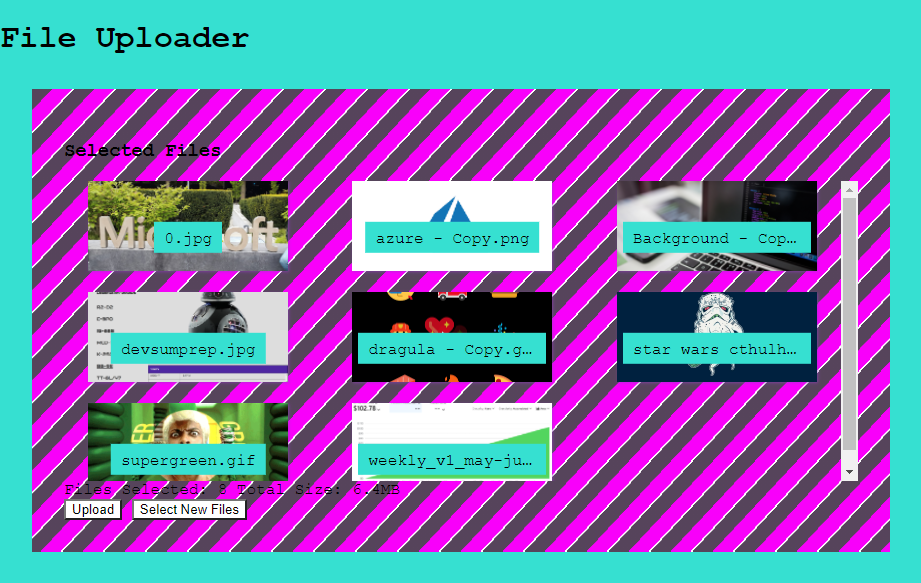
<figure class="wp-block-image"><img loading="lazy" width="921" height="583" src="https://mobilemancerblog.blob.core.windows.net/blog/2020/10/typescript-file-uploader.png" alt="A File Uploader written in TypeScript and Aurelia" class="wp-image-11543" srcset="https://mobilemancerblog.blob.core.windows.net/blog/2020/10/typescript-file-uploader.png 921w, https://mobilemancerblog.blob.core.windows.net/blog/2020/10/typescript-file-uploader-300x190.png 300w, https://mobilemancerblog.blob.core.windows.net/blog/2020/10/typescript-file-uploader-768x486.png 768w" sizes="(max-width: 921px) 100vw, 921px" /><figcaption>Let&#8217;s make a file upload component!</figcaption></figure>


<h2><img src="https://s.w.org/images/core/emoji/13.0.0/72x72/1f9f1.png" alt="🧱" class="wp-smiley" style="height: 1em; max-height: 1em;" /> Create the Project</h2>


<p>Create the project using <code>npx au2 new</code>, then select to use TypeScript and plain CSS. For a more detailed description of setting up new Aurelia 2 projects check the post <a href="https://mobilemancer.com/2020/08/09/a-productive-aurelia-2-build-setup/">A Productive Aurelia 2 Build Setup</a>.</p>


<h3><img src="https://s.w.org/images/core/emoji/13.0.0/72x72/2699.png" alt="⚙" class="wp-smiley" style="height: 1em; max-height: 1em;" /> Create the Component</h3>


<p>First off we need to create the component. With Aurelia&#8217;s conventions it&#8217;s as easy as creating a template file (html), a view model file (typescript) and a file for the styling (css). Let&#8217;s name the component file-uploader and create</p>


<ul><li><code>file-uploader.ts</code></li><li><code>file-uploader.html</code></li><li><code>file-uploader.css</code></li></ul>


<p>To enable global access to my components, I gather them all in a component registry file and then import that into the DI container when the app starts upp. so I create a <code>conponentRegistry.ts</code> file as well, and import that in <code>main.ts</code>.</p>


<p class="has-medium-font-size"><img src="https://s.w.org/images/core/emoji/13.0.0/72x72/1f4c1.png" alt="📁" class="wp-smiley" style="height: 1em; max-height: 1em;" /> <code>componentRegistry.ts</code></p>


<div class="wp-block-syntaxhighlighter-code "><pre class="brush: jscript; title: ; notranslate">
export * from &quot;./image-uploader/image-uploader&quot;;
</pre></div>


<p class="has-medium-font-size"><img src="https://s.w.org/images/core/emoji/13.0.0/72x72/1f4c1.png" alt="📁" class="wp-smiley" style="height: 1em; max-height: 1em;" /> <code>main.ts</code></p>


<div class="wp-block-syntaxhighlighter-code "><pre class="brush: jscript; title: ; notranslate">
import Aurelia from &quot;aurelia&quot;;

import { MyApp } from &quot;./my-app&quot;;
import * as componentRegistry from &quot;./componentRegistry&quot;;

Aurelia.register(componentRegistry).app(MyApp).start();
</pre></div>


<p style="text-align:center" class="has-text-color has-background has-medium-font-size has-very-light-gray-color has-vivid-cyan-blue-background-color">If you use <a href="https://code.visualstudio.com/download">VS Code</a> and would like to automate component creation (TypeScript, HTML and CSS-files), check out the post<br><img src="https://s.w.org/images/core/emoji/13.0.0/72x72/1f449.png" alt="👉" class="wp-smiley" style="height: 1em; max-height: 1em;" /> <em><a href="https://mobilemancer.com/2020/08/03/using-vs-code-tasks-to-create-template-files/">Using VS Code Tasks to Create Template Files</a></em> <img src="https://s.w.org/images/core/emoji/13.0.0/72x72/1f448.png" alt="👈" class="wp-smiley" style="height: 1em; max-height: 1em;" /></p>


<h3><img src="https://s.w.org/images/core/emoji/13.0.0/72x72/1f4a0.png" alt="💠" class="wp-smiley" style="height: 1em; max-height: 1em;" /> Creating the Template</h3>


<p>The workhorse of the component is the <code>&lt;input></code> element. You can configure this to accept a variety of file types, we&#8217;ll select images for this example. </p>


<p>Then we create a part that will show the thumbnails for any selected files, together with some stats about the files.</p>


<p>The full template looks like follows, <code>image-uploader.html</code> <img src="https://s.w.org/images/core/emoji/13.0.0/72x72/1f447.png" alt="👇" class="wp-smiley" style="height: 1em; max-height: 1em;" /></p>


<div class="wp-block-syntaxhighlighter-code "><pre class="brush: xml; title: ; notranslate">
&lt;div class=&quot;image-uploader&quot;&gt;
  &lt;input
    ref=&quot;fileInput&quot;
    class=&quot;fileInput&quot;
    type=&quot;file&quot;
    name=&quot;file&quot;
    multiple
    accept=&quot;image/*&quot;
    style=&quot;display: none&quot;
  /&gt;

  &lt;div class=&quot;upload&quot;&gt;
    &lt;div if.bind=&quot;selectedFiles.length&gt;0&quot;&gt;
      &lt;h3&gt;Selected Files&lt;/h3&gt;

      &lt;div class=&quot;thumbnail-grid&quot;&gt;
        &lt;div class=&quot;img-container&quot; repeat.for=&quot;file of selectedFiles&quot;&gt;
          &lt;img src.bind=&quot;file.url&quot; title.bind=&quot;file.size&quot; /&gt;
          &lt;div class=&quot;label&quot;&gt;
            &lt;span class=&quot;file-name&quot;&gt;${file.name}&lt;/span&gt;
          &lt;/div&gt;
        &lt;/div&gt;
      &lt;/div&gt;

      &lt;div&gt;
        Files Selected: &lt;span&gt;${fileCount}&lt;/span&gt; Total Size: &lt;span&gt;${returnFileSize(totalSize)}&lt;/span&gt;
      &lt;/div&gt;
    &lt;/div&gt;

    &lt;div&gt;
      &lt;span if.bind=&quot;fileCount === 0&quot;&gt;
        &lt;button click.delegate=&quot;openFilePicker()&quot;&gt;Select Files&lt;/button&gt;
      &lt;/span&gt;
      &lt;span if.bind=&quot;fileCount &gt; 0&quot;&gt;
        &lt;button click.delegate=&quot;upload()&quot;&gt;Upload&lt;/button&gt;
      &lt;/span&gt;
      &lt;span if.bind=&quot;fileCount &gt; 0&quot;&gt;
        &lt;button click.delegate=&quot;openFilePicker()&quot;&gt;Select New Files&lt;/button&gt;
      &lt;/span&gt;
    &lt;/div&gt;
  &lt;/div&gt;
&lt;/div&gt;
</pre></div>


<p>As for the <code>&lt;input></code> element we are allowing several files to be selected bu adding the multiple argument. For allowing us easy access from the view model we&#8217;re using a ref tag. The ref tag will help bind the element to the view-model, as we&#8217;ll see later in the TypeScript file.</p>


<p>The thumbnail grid has a div with a <code>repeat.for</code> construct. This is the Aurelia of repeating template code for all elements of a collection. In our case we are repeating over all selected images and displaying a &#8220;thumbnail&#8221; for each.</p>


<p>At the end we are setting up the controlling buttons using some conditional templates with the <code>if.bind="expression"</code> construct. This will remove the block from the DOM if the expression is false.</p>


<h3><img src="https://s.w.org/images/core/emoji/13.0.0/72x72/1f469-200d-1f4bb.png" alt="👩‍💻" class="wp-smiley" style="height: 1em; max-height: 1em;" /> Creating the View-Model</h3>


<p> The full view-model looks like follows, <code>image-uploader.ts</code> <img src="https://s.w.org/images/core/emoji/13.0.0/72x72/1f447.png" alt="👇" class="wp-smiley" style="height: 1em; max-height: 1em;" /> </p>


<div class="wp-block-syntaxhighlighter-code "><pre class="brush: jscript; title: ; notranslate">
export class ImageUploader {
  public fileInput: HTMLInputElement;
  public fileCount = 0;
  public totalSize = 0;
  public selectedFiles: Array&lt;Record&lt;string, unknown&gt;&gt; = &#91;];

  public afterBind(): void {
    // bind to change event on the file input
    this.fileInput.addEventListener(&quot;change&quot;, () =&gt; this.fileSelectionChanged());
  }

  public openFilePicker(): void {
    this.clearSelection();

    // file input is hidden because of styling, open it with click()
    this.fileInput.click();
  }

  public async upload(): Promise&lt;void&gt; {
    // put the selected files in FormData
    const formData = new FormData();
    for (let i = 0; i &lt; this.fileInput.files.length; i++) {
      const element = this.fileInput.files&#91;i];
      formData.append(&quot;file&quot;, element);
    }

    // send formData <img src="https://s.w.org/images/core/emoji/13.0.0/72x72/1f447.png" alt="👇" class="wp-smiley" style="height: 1em; max-height: 1em;" /> over the wire here
    console.log(&quot;data to send:&quot;);
    console.log(formData);
  }

  public fileSelectionChanged(): void {
    this.populateUI(this.fileInput);
  }

  public returnFileSize(number: number): string {
    // shamelessly borrowed from MDN <img src="https://s.w.org/images/core/emoji/13.0.0/72x72/1f496.png" alt="💖" class="wp-smiley" style="height: 1em; max-height: 1em;" /><img src="https://s.w.org/images/core/emoji/13.0.0/72x72/1f647-200d-2642-fe0f.png" alt="🙇‍♂️" class="wp-smiley" style="height: 1em; max-height: 1em;" />
    if (number &lt; 1024) {
      return number + &quot;bytes&quot;;
    } else if (number &gt;= 1024 &amp;&amp; number &lt; 1048576) {
      return (number / 1024).toFixed(1) + &quot;KB&quot;;
    } else if (number &gt;= 1048576) {
      return (number / 1048576).toFixed(1) + &quot;MB&quot;;
    }
  }

  private populateUI(fileInput: HTMLInputElement): void {
    for (let i = 0; i &lt; fileInput.files.length; i++) {
      this.fileCount += 1;
      this.totalSize += fileInput.files&#91;i].size;

      this.selectedFiles.push({
        file: fileInput.files&#91;i],
        name: fileInput.files&#91;i].name,
        size: this.returnFileSize(fileInput.files&#91;i].size),
        url: URL.createObjectURL(fileInput.files&#91;i]),
      });
    }
  }

  private clearSelection(): void {
    this.fileInput.value = &quot;&quot;;
    // clear any previously selected files
    this.fileCount = 0;
    this.totalSize = 0;
    this.selectedFiles = &#91;];
  }
}
</pre></div>


<p>In the <code>afterBind </code>method we add an eventhandler to the input element. The <code>"change"</code> this is what will be triggered when files are selected and what we will need to react too. There you can also see how easy Aurelia makes it to get a handle to the <code>input </code>element, since we added a ref attribute on it we just declare the element in the property on the view-model and can then access it as sound as the element is bound to the DOM.</p>


<p>Since the <code>input</code> element for file selection is notoriously hard to style, I&#8217;ve opted to hide it using <code>style="display: none"</code>, and opening by calling click on it from a regular <code>button</code>. As can be seen in the <code>openFilePicker </code>method.</p>


<figure class="wp-block-image"><img loading="lazy" width="925" height="598" src="https://mobilemancerblog.blob.core.windows.net/blog/2020/10/file-uploader.gif" alt="The Aurelia file uploader in action" class="wp-image-11561"/><figcaption>The File Uploader in Action</figcaption></figure>


<p>To actually upload the file and save it, you need a server and actually implementing the send part. I left that out in the post as I wanted to focus on the front end bits. <br>However, in one of my projects I used Azure Functions to receive files and then saved them in Blob Storage, which is really clean (and super cheap) cloud solution. </p>


<p>If there is interest, I can make a part two of this article and implement a server project too? Let me know in the comments below if you are interested in seeing a post about the Azure Functions server part!</p>


<h2><img src="https://s.w.org/images/core/emoji/13.0.0/72x72/1f52e.png" alt="🔮" class="wp-smiley" style="height: 1em; max-height: 1em;" /> Conclusion</h2>


<p>The strong templating features of Aurelia makes it so easy to control your custom element layouts. With the ability to conditionally toggle parts of the template, we save large amounts of TypeScript/JavaScript code from ever being written!</p>


<p>Aurelia 2 is stepping up the templating game further compared to v1, I&#8217;ll be sure to write a post about the new features as soon as alpha is released <img src="https://s.w.org/images/core/emoji/13.0.0/72x72/1f601.png" alt="😁" class="wp-smiley" style="height: 1em; max-height: 1em;" /></p>


<h2><img src="https://s.w.org/images/core/emoji/13.0.0/72x72/1f517.png" alt="🔗" class="wp-smiley" style="height: 1em; max-height: 1em;" /> Resources</h2>


<p>The <a href="https://github.com/mobilemancer/au2-file-uploader">code for this small project</a> can be found on my GitHub page<br><a href="https://mobilemancer.com/2020/08/09/a-productive-aurelia-2-build-setup/">Setting up an Aurelia 2 project</a><br>Read more about Aurelia 2 on the <a href="https://docs.aurelia.io/">docs</a> site<br>Running <a href="https://mobilemancer.com/2020/06/29/faster-better-cheaper-aureliaweekly-2/">Aurelia 2 apps in Azure</a> like a boss</p>


<p><em>Happy Coding!</em>&nbsp;<img src="https://s.w.org/images/core/emoji/13.0.0/72x72/1f60a.png" alt="😊" class="wp-smiley" style="height: 1em; max-height: 1em;" /></p>
<p>The post <a rel="nofollow" href="https://mobilemancer.com/2020/10/10/write-your-own-file-uploader-in-aurelia-2/">Write Your Own File Uploader in Aurelia 2</a> appeared first on <a rel="nofollow" href="https://mobilemancer.com">mobilemancer</a>.</p>
]]></content>
		
					<link rel="replies" type="text/html" href="https://mobilemancer.com/2020/10/10/write-your-own-file-uploader-in-aurelia-2/#comments" thr:count="2"/>
			<link rel="replies" type="application/atom+xml" href="https://mobilemancer.com/2020/10/10/write-your-own-file-uploader-in-aurelia-2/feed/atom/" thr:count="2"/>
			<thr:total>2</thr:total>
			</entry>
		<entry>
		<author>
			<name>Andreas</name>
					</author>

		<title type="html"><![CDATA[Using Dragula with Aurelia 2 and TypeScript]]></title>
		<link rel="alternate" type="text/html" href="https://mobilemancer.com/2020/09/21/using-dragula-with-aurelia-2-and-typescript/" />

		<id>http://mobilemancer.com/?p=11518</id>
		<updated>2020-10-11T16:08:11Z</updated>
		<published>2020-09-20T22:22:00Z</published>
		<category scheme="https://mobilemancer.com" term="Coding" /><category scheme="https://mobilemancer.com" term="Aurelia 2" /><category scheme="https://mobilemancer.com" term="CSS" /><category scheme="https://mobilemancer.com" term="HTML" /><category scheme="https://mobilemancer.com" term="TypeScript" /><category scheme="https://mobilemancer.com" term="Web Development" />
		<summary type="html"><![CDATA[<p>Learn how to implement Drag and Drop easily in Aurelia 2 with Dragula!</p>
<p>The post <a rel="nofollow" href="https://mobilemancer.com/2020/09/21/using-dragula-with-aurelia-2-and-typescript/">Using Dragula with Aurelia 2 and TypeScript</a> appeared first on <a rel="nofollow" href="https://mobilemancer.com">mobilemancer</a>.</p>
]]></summary>

					<content type="html" xml:base="https://mobilemancer.com/2020/09/21/using-dragula-with-aurelia-2-and-typescript/"><![CDATA[
<p> I needed drag and drop functionality in one of my projects, and instead of implementing it myself I choose to try out Dragula. Using third party plugins is a breeze with Aurelia 2!</p>


<p><a href="https://bevacqua.github.io/dragula/">Dragula</a> has been around for a while and is a great plugin for adding some drag and drop action to your components! Apparently Dragula have <a href="https://github.com/bevacqua/dragula">bridges</a> for <a href="https://reactjs.org/">React</a> and <a href="https://angular.io/">Angular</a>, but as using third party modules in Aurelia is so simple, we don&#8217;t need a special implementation <img src="https://s.w.org/images/core/emoji/13.0.0/72x72/1f601.png" alt="😁" class="wp-smiley" style="height: 1em; max-height: 1em;" /></p>


<p>If you want to create a new Aurelia 2 project from scratch, check out the post &#8220;<a href="https://mobilemancer.com/2020/08/09/a-productive-aurelia-2-build-setup/">A Productive Aurelia 2 Build Setup</a>&#8220;.</p>


<h2><img src="https://s.w.org/images/core/emoji/13.0.0/72x72/1f6e0.png" alt="🛠" class="wp-smiley" style="height: 1em; max-height: 1em;" /> Installing Dragula in Your Aurelia 2 Project</h2>


<p>Install Dragula and it&#8217;s type definitions in your Aurelia 2 project using your preferred package manager, I used npm:</p>


<div class="wp-block-syntaxhighlighter-code "><pre class="brush: powershell; gutter: false; title: ; notranslate">
npm i dragula @types/dragula
</pre></div>


<p>Dragula uses a few classes for <a href="https://github.com/bevacqua/dragula#including-the-css">styling</a>. These are shipped in the npm package and can be accessed in from <code>dragula/dist/dragula.css</code> The easiest way to get those into the project is to import the CSS in a template:</p>


<div class="wp-block-syntaxhighlighter-code "><pre class="brush: xml; gutter: false; title: ; notranslate">
&lt;import from=&quot;dragula/dist/dragula.css&quot;&gt;&lt;/import&gt; 
</pre></div>


<p>Or if you prefer, you can import it from a ts file:</p>


<div class="wp-block-syntaxhighlighter-code "><pre class="brush: jscript; gutter: false; title: ; notranslate">
import &quot;dragula/dist/dragula.css&quot;;
</pre></div>


<h2><img src="https://s.w.org/images/core/emoji/13.0.0/72x72/1f9db-200d-2642-fe0f.png" alt="🧛‍♂️" class="wp-smiley" style="height: 1em; max-height: 1em;" /> Using Dragula with Aurelia 2</h2>


<p>To do it&#8217;s magic, Dragula needs a container (or several) containing the elements that will be dragable.</p>


<p>Creatign a container is easily done in Aurelia with the <code>ref</code> binding. Put the ref binding on an HTML element and give it a name. Then you can access it from the view model after it&#8217;s bound. See below.</p>


<div class="wp-block-syntaxhighlighter-code "><pre class="brush: xml; gutter: false; title: ; notranslate">
&lt;div class=&quot;container&quot; ref=&quot;container&quot;&gt;
</pre></div>


<p>And create a property with the same namn in the view-model:</p>


<div class="wp-block-syntaxhighlighter-code "><pre class="brush: jscript; gutter: false; title: ; notranslate">
public container: Element;
</pre></div>


<p>For using Dragula on the container element, we need to make sure Dragula is accessible and then just hand over our container to Dragula, like this:</p>


<div class="wp-block-syntaxhighlighter-code "><pre class="brush: jscript; gutter: false; title: ; notranslate">
dragula(&#91;this.container], {});
</pre></div>


<p>Do note the first parameter needs to be an array even if you just got one container. The second parameter is an options object, you can <a href="https://github.com/bevacqua/dragula#optionscontainers">read more</a> in the docs about how you can configure it.</p>


<h2><img src="https://s.w.org/images/core/emoji/13.0.0/72x72/1f469-200d-1f4bb.png" alt="👩‍💻" class="wp-smiley" style="height: 1em; max-height: 1em;" /> The Code</h2>


<p>The view <img src="https://s.w.org/images/core/emoji/13.0.0/72x72/1f447.png" alt="👇" class="wp-smiley" style="height: 1em; max-height: 1em;" /></p>


<div class="wp-block-syntaxhighlighter-code "><pre class="brush: xml; title: ; notranslate">
&lt;import from=&quot;dragula/dist/dragula.css&quot;&gt;&lt;/import&gt;

&lt;div class=&quot;page&quot;&gt;
  &lt;div class=&quot;container&quot; ref=&quot;container&quot;&gt;
    &lt;div&gt;<img src="https://s.w.org/images/core/emoji/13.0.0/72x72/1f973.png" alt="🥳" class="wp-smiley" style="height: 1em; max-height: 1em;" />&lt;/div&gt;
    &lt;div&gt;<img src="https://s.w.org/images/core/emoji/13.0.0/72x72/1f692.png" alt="🚒" class="wp-smiley" style="height: 1em; max-height: 1em;" />&lt;/div&gt;
    &lt;div&gt;<img src="https://s.w.org/images/core/emoji/13.0.0/72x72/1f354.png" alt="🍔" class="wp-smiley" style="height: 1em; max-height: 1em;" />&lt;/div&gt;
    &lt;div&gt;<img src="https://s.w.org/images/core/emoji/13.0.0/72x72/1f468-200d-1f692.png" alt="👨‍🚒" class="wp-smiley" style="height: 1em; max-height: 1em;" />&lt;/div&gt;
    &lt;div&gt;<img src="https://s.w.org/images/core/emoji/13.0.0/72x72/1f389.png" alt="🎉" class="wp-smiley" style="height: 1em; max-height: 1em;" />&lt;/div&gt;
    &lt;div&gt;<img src="https://s.w.org/images/core/emoji/13.0.0/72x72/1f363.png" alt="🍣" class="wp-smiley" style="height: 1em; max-height: 1em;" />&lt;/div&gt;
    &lt;div&gt;<img src="https://s.w.org/images/core/emoji/13.0.0/72x72/1f525.png" alt="🔥" class="wp-smiley" style="height: 1em; max-height: 1em;" />&lt;/div&gt;
    &lt;div&gt;<img src="https://s.w.org/images/core/emoji/13.0.0/72x72/1f355.png" alt="🍕" class="wp-smiley" style="height: 1em; max-height: 1em;" />&lt;/div&gt;
    &lt;div&gt;<img src="https://s.w.org/images/core/emoji/13.0.0/72x72/1f496.png" alt="💖" class="wp-smiley" style="height: 1em; max-height: 1em;" />&lt;/div&gt;
  &lt;/div&gt;
&lt;/div&gt;
</pre></div>


<p>The view-model <img src="https://s.w.org/images/core/emoji/13.0.0/72x72/1f447.png" alt="👇" class="wp-smiley" style="height: 1em; max-height: 1em;" /></p>


<div class="wp-block-syntaxhighlighter-code "><pre class="brush: jscript; title: ; notranslate">
// import &quot;dragula/dist/dragula.css&quot;;
import dragula from &quot;dragula&quot;;

export class MyApp {
  public container: Element;

  constructor() {}

  public afterBind(): void {
    dragula(&#91;this.container], {});
  }
}
</pre></div>


<p>The result <img src="https://s.w.org/images/core/emoji/13.0.0/72x72/1f447.png" alt="👇" class="wp-smiley" style="height: 1em; max-height: 1em;" /></p>


<figure class="wp-block-image"><img loading="lazy" width="803" height="620" src="https://mobilemancerblog.blob.core.windows.net/blog/2020/09/dragula.gif" alt="Drag and drop in Aurelia 2 with Dragula" class="wp-image-11530"/><figcaption>Some drag and drop fun with Aurelia 2 and Dragula!</figcaption></figure>


<h2><img src="https://s.w.org/images/core/emoji/13.0.0/72x72/1f517.png" alt="🔗" class="wp-smiley" style="height: 1em; max-height: 1em;" /> Resources</h2>


<p>Example code can be found on&nbsp;<a href="https://github.com/mobilemancer/au2-dragula">GitHub</a><br>Dragula <a href="https://bevacqua.github.io/dragula/">demo</a><br>Read more about Aurelia 2 on the&nbsp;<a href="https://docs.aurelia.io/">docs</a>&nbsp;site<br>Dumber&nbsp;<a href="https://dumber.js.org/">docs</a> </p>


<p><em>Happy Coding!</em>&nbsp;<img src="https://s.w.org/images/core/emoji/13.0.0/72x72/1f60a.png" alt="😊" class="wp-smiley" style="height: 1em; max-height: 1em;" />

</p>
<p>The post <a rel="nofollow" href="https://mobilemancer.com/2020/09/21/using-dragula-with-aurelia-2-and-typescript/">Using Dragula with Aurelia 2 and TypeScript</a> appeared first on <a rel="nofollow" href="https://mobilemancer.com">mobilemancer</a>.</p>
]]></content>
		
					<link rel="replies" type="text/html" href="https://mobilemancer.com/2020/09/21/using-dragula-with-aurelia-2-and-typescript/#comments" thr:count="0"/>
			<link rel="replies" type="application/atom+xml" href="https://mobilemancer.com/2020/09/21/using-dragula-with-aurelia-2-and-typescript/feed/atom/" thr:count="0"/>
			<thr:total>0</thr:total>
			</entry>
		<entry>
		<author>
			<name>Andreas</name>
					</author>

		<title type="html"><![CDATA[A Productive Aurelia 2 Build Setup]]></title>
		<link rel="alternate" type="text/html" href="https://mobilemancer.com/2020/08/09/a-productive-aurelia-2-build-setup/" />

		<id>http://mobilemancer.com/?p=11471</id>
		<updated>2020-10-11T16:08:46Z</updated>
		<published>2020-08-09T09:23:30Z</published>
		<category scheme="https://mobilemancer.com" term="Coding" /><category scheme="https://mobilemancer.com" term="Aurelia 2" /><category scheme="https://mobilemancer.com" term="CSS" /><category scheme="https://mobilemancer.com" term="Gulp" /><category scheme="https://mobilemancer.com" term="HTML" /><category scheme="https://mobilemancer.com" term="TypeScript" /><category scheme="https://mobilemancer.com" term="Web Development" />
		<summary type="html"><![CDATA[<p>Configuring the ultimate build setup for your new Aurelia 2 projects, making you even more productive!</p>
<p>The post <a rel="nofollow" href="https://mobilemancer.com/2020/08/09/a-productive-aurelia-2-build-setup/">A Productive Aurelia 2 Build Setup</a> appeared first on <a rel="nofollow" href="https://mobilemancer.com">mobilemancer</a>.</p>
]]></summary>

					<content type="html" xml:base="https://mobilemancer.com/2020/08/09/a-productive-aurelia-2-build-setup/"><![CDATA[
<p>When starting a new Aurelia 2 project I have a few &#8220;musts&#8221; that I always setup. These Build Setup tweaks are adding functionality as well as quality of life things. <img src="https://s.w.org/images/core/emoji/13.0.0/72x72/1f468-200d-1f3ed.png" alt="👨‍🏭" class="wp-smiley" style="height: 1em; max-height: 1em;" /></p>


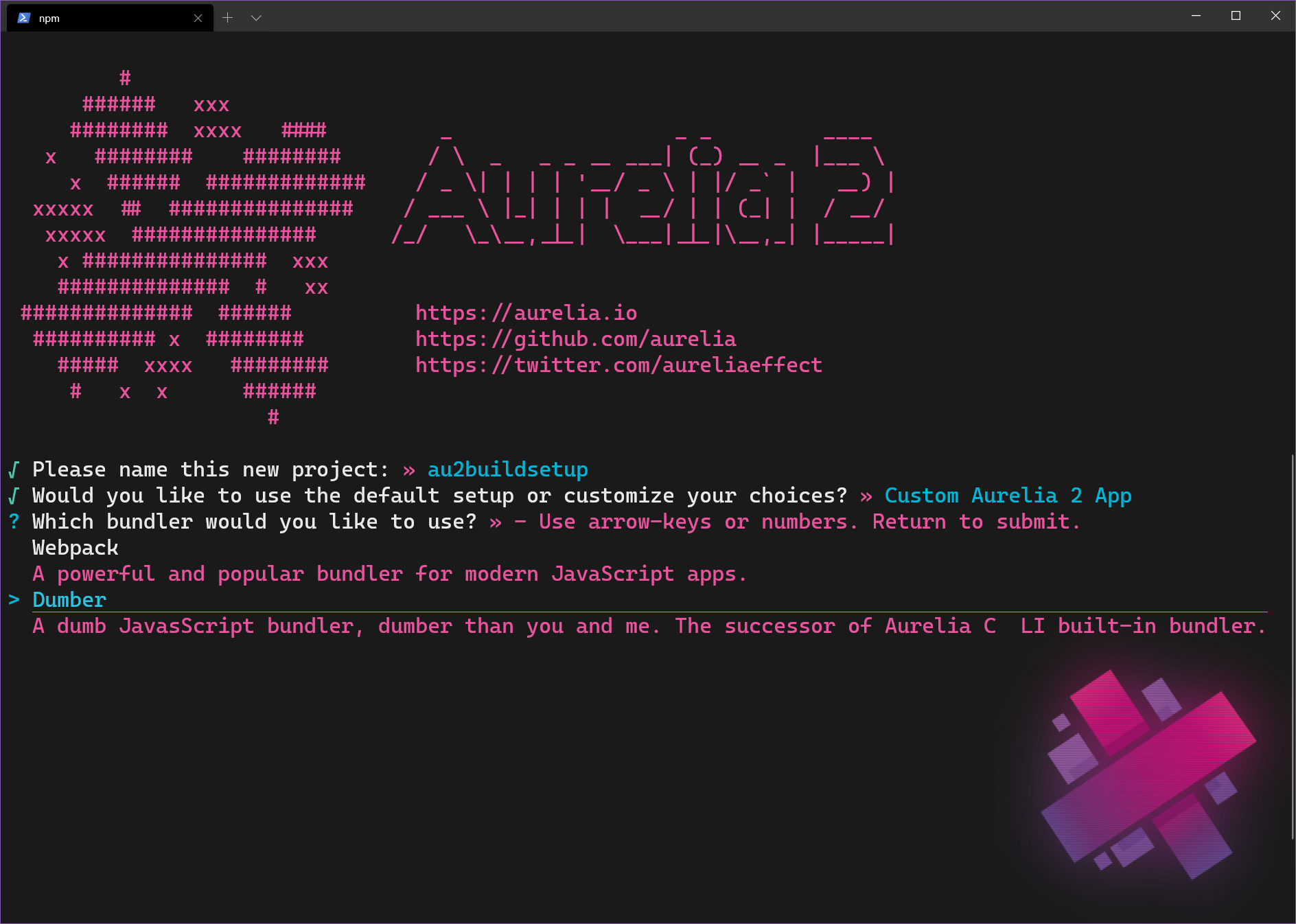
<p>My preferred setup for my Aurelia 2 projects are based on the <a href="https://dumber.js.org/">Dumber</a> bundler. The build config is setup in gulp, and easily configurable without proprietary tool knowledge. Ok &#8211; I admit, some <a href="https://gulpjs.com/">gulp</a> knowledge helps <img src="https://s.w.org/images/core/emoji/13.0.0/72x72/1f602.png" alt="😂" class="wp-smiley" style="height: 1em; max-height: 1em;" /></p>


<figure class="wp-block-image"><a href="https://mobilemancerblog.blob.core.windows.net/blog/2020/08/au2-makes-dumber.png"><img loading="lazy" width="1024" height="730" src="https://mobilemancerblog.blob.core.windows.net/blog/2020/08/au2-makes-dumber-1024x730.png" alt="An Aurelia 2 project build setup using dumber as bundler" class="wp-image-11472" srcset="https://mobilemancerblog.blob.core.windows.net/blog/2020/08/au2-makes-dumber-1024x730.png 1024w, https://mobilemancerblog.blob.core.windows.net/blog/2020/08/au2-makes-dumber-300x214.png 300w, https://mobilemancerblog.blob.core.windows.net/blog/2020/08/au2-makes-dumber-768x548.png 768w, https://mobilemancerblog.blob.core.windows.net/blog/2020/08/au2-makes-dumber.png 1888w" sizes="(max-width: 1024px) 100vw, 1024px" /></a><figcaption>Dumber FTW<img src="https://s.w.org/images/core/emoji/13.0.0/72x72/1f947.png" alt="🥇" class="wp-smiley" style="height: 1em; max-height: 1em;" /></figcaption></figure>


<p>My standard project setup options look like follows:</p>


<ul><li>Bundler &#8211; Dumber</li><li>Transpiler &#8211; TypeScript</li><li>Shadow DOM or CSS Modules &#8211; No (varies depending on app)</li><li>CSS Processor &#8211; Plain CSS</li><li>Unit Testing Framework &#8211; Jest</li><li>E2E Tests &#8211; Cypress</li><li>Sample Project &#8211; With Direct Routing (varies depending on app)</li></ul>


<p style="color:#ffffff;text-align:center" class="has-text-color has-background has-medium-font-size has-vivid-green-cyan-background-color">If preferred, this exact same project setup can be created in silent mode like this:<br><code>npx makes aurelia new-project-name -s dumber,typescript,cypress,app-with-router</code></p>


<h2><img src="https://s.w.org/images/core/emoji/13.0.0/72x72/1f381.png" alt="🎁" class="wp-smiley" style="height: 1em; max-height: 1em;" /> Additions</h2>


<p>After setting up a new project, my tweaks and additions are: </p>


<ol><li>Add a <em>resources</em> folder to hold images, json files etc</li><li>Tweak glob pattern for other files that trigger rebuilds in watch mode</li><li>Add <strong>PurgeCSS</strong> and add it to the gulp <code>buildCSS</code> function</li></ol>


<h3><img src="https://s.w.org/images/core/emoji/13.0.0/72x72/1f4c2.png" alt="📂" class="wp-smiley" style="height: 1em; max-height: 1em;" /> A Folder for Images, Config Files Etc.</h3>


<p>I add a folder in the root next to src named <em>resources</em>. In this folder I store pretty much everything that is not code or markup.</p>


<p>Since I store config files and such in here that changes how the app behaves, I also add this folder to the gulp <a href="https://gulpjs.com/docs/en/api/watch/">watch glob</a>. This enables changes to files in the folder to trigger new builds when developing in watch-mode.</p>


<p>Modify <code>gulpfile.js</code> and add a glob pattern, se below.</p>


<div class="wp-block-syntaxhighlighter-code "><pre class="brush: jscript; gutter: false; title: ; notranslate">
function watch() {
  return gulp.watch(&#91;&quot;src/**/*&quot;, &quot;resources/**/*&quot;], gulp.series(build, reload));
}
</pre></div>


<h3><img src="https://s.w.org/images/core/emoji/13.0.0/72x72/1f440.png" alt="👀" class="wp-smiley" style="height: 1em; max-height: 1em;" /> Another File to Add to the Watch Glob</h3>


<p>Another file I end up modifying, at least in the beginning of every project, is the <code>_index.html</code> template. Might as well add it to the watch glob! <img src="https://s.w.org/images/core/emoji/13.0.0/72x72/1f601.png" alt="😁" class="wp-smiley" style="height: 1em; max-height: 1em;" /></p>


<div class="wp-block-syntaxhighlighter-code "><pre class="brush: jscript; gutter: false; title: ; notranslate">
function watch() {
  return gulp.watch(&#91;&quot;src/**/*&quot;, &quot;resources/**/*&quot;, &quot;_index.html&quot;], gulp.series(build, reload));
}

</pre></div>


<h2><img src="https://s.w.org/images/core/emoji/13.0.0/72x72/1f9f9.png" alt="🧹" class="wp-smiley" style="height: 1em; max-height: 1em;" /> Add PurgeCSS to the Build Setup</h2>


<p>A great tool for removing obsolete CSS is <a href="https://purgecss.com/">PurgeCSS</a>. If you are using any third party styling frameworks like <a href="https://getbootstrap.com/">Bootstrap</a>,  <a href="https://tailwindcss.com/">TailwindCSS</a> or something else, you are shipping loads of unused styles to your app visitors. PurgeCSS will help you remove all those unused styles <img src="https://s.w.org/images/core/emoji/13.0.0/72x72/1f973.png" alt="🥳" class="wp-smiley" style="height: 1em; max-height: 1em;" /></p>


<p>Even if it&#8217;s a small project and you write all your CSS yourself, it&#8217;s easy to miss something and let some dead CSS slip through the cracks every now and then <img src="https://s.w.org/images/core/emoji/13.0.0/72x72/1f635.png" alt="😵" class="wp-smiley" style="height: 1em; max-height: 1em;" /></p>


<p style="color:#ffffff;text-align:center" class="has-text-color has-background has-medium-font-size has-vivid-cyan-blue-background-color">Install <a href="https://purgecss.com/">PurgeCSS</a> using npm<br><code>npm i -D gulp-purgecss</code></p>


<p>Then modify the <code>buildCSS()</code> function in the <em>gulpfile.js</em> like this<img src="https://s.w.org/images/core/emoji/13.0.0/72x72/1f447.png" alt="👇" class="wp-smiley" style="height: 1em; max-height: 1em;" /></p>


<div class="wp-block-syntaxhighlighter-code "><pre class="brush: jscript; highlight: [8,9,10,11,12,13,14]; title: ; notranslate">
// add this at the top of the file
const purgecss = require(&quot;gulp-purgecss&quot;);

// then we add PurgeCSS to the CSS build
function buildCss(src) {
  return gulp
    .src(src, { sourcemaps: !isProduction })
    .pipe(
      // add PurgeCSS to remove unused CSS
      purgecss({
        content: &#91;&quot;src/**/*.html&quot;, &quot;_index.html&quot;],
        whitelist: &#91;&quot;goto-active&quot;],
      })
    )
    .pipe(
      postcss(&#91;
        autoprefixer(),
        // use postcss-url to inline any image/font/svg.
        // postcss-url by default use base64 for images, but
        // encodeURIComponent for svg which does NOT work on
        // some browsers.
        // Here we enforce base64 encoding for all assets to
        // improve compatibility on svg.
        postcssUrl({ url: &quot;inline&quot;, encodeType: &quot;base64&quot; }),
      ])
    );
}
</pre></div>


<p>Notice we need to add <code>goto-active</code> to the <em>whitelist</em>, as it&#8217;s a dynamic class put on navigation elements by the router, and otherwise that class will be removed.</p>


<h2><img src="https://s.w.org/images/core/emoji/13.0.0/72x72/1f52e.png" alt="🔮" class="wp-smiley" style="height: 1em; max-height: 1em;" /> Conclusion</h2>


<p>Having a good DEV environment setup is key for a good flow and productivity. Make sure to think about the build setup as a part of that too! Don&#8217;t stay complacent when you feel pain points &#8211; modify, tweak and improve! <img src="https://s.w.org/images/core/emoji/13.0.0/72x72/1f97d.png" alt="🥽" class="wp-smiley" style="height: 1em; max-height: 1em;" /></p>


<p style="background-color:#6513ad;color:#ffffff;text-align:center" class="has-text-color has-background has-medium-font-size">Do you have any great productivity or functionality adding tweaks? <br>Comment below and share your best tips! <img src="https://s.w.org/images/core/emoji/13.0.0/72x72/1f917.png" alt="🤗" class="wp-smiley" style="height: 1em; max-height: 1em;" /></p>


<h2><img src="https://s.w.org/images/core/emoji/13.0.0/72x72/1f517.png" alt="🔗" class="wp-smiley" style="height: 1em; max-height: 1em;" /> Resources</h2>


<p>Example code can be found on <a href="https://github.com/mobilemancer/au2-build-setup">GitHub</a><br>Dumber <a href="https://dumber.js.org/">docs</a><br>PurgeCSS <a href="https://purgecss.com/">home</a><br>Using VS Code to stamp out <a href="https://mobilemancer.com/2020/08/03/using-vs-code-tasks-to-create-template-files/">Aurelia components</a><br>Read more about Aurelia 2 on the&nbsp;<a href="https://docs.aurelia.io/">docs</a>&nbsp;site </p>


<p><em>Happy Coding!</em>&nbsp;<img src="https://s.w.org/images/core/emoji/13.0.0/72x72/1f60a.png" alt="😊" class="wp-smiley" style="height: 1em; max-height: 1em;" />

</p>
<p>The post <a rel="nofollow" href="https://mobilemancer.com/2020/08/09/a-productive-aurelia-2-build-setup/">A Productive Aurelia 2 Build Setup</a> appeared first on <a rel="nofollow" href="https://mobilemancer.com">mobilemancer</a>.</p>
]]></content>
		
					<link rel="replies" type="text/html" href="https://mobilemancer.com/2020/08/09/a-productive-aurelia-2-build-setup/#comments" thr:count="2"/>
			<link rel="replies" type="application/atom+xml" href="https://mobilemancer.com/2020/08/09/a-productive-aurelia-2-build-setup/feed/atom/" thr:count="2"/>
			<thr:total>2</thr:total>
			</entry>
		<entry>
		<author>
			<name>Andreas</name>
					</author>

		<title type="html"><![CDATA[Using VS Code Tasks to Create Template Files]]></title>
		<link rel="alternate" type="text/html" href="https://mobilemancer.com/2020/08/03/using-vs-code-tasks-to-create-template-files/" />

		<id>http://mobilemancer.com/?p=11438</id>
		<updated>2020-10-11T16:07:52Z</updated>
		<published>2020-08-03T12:15:37Z</published>
		<category scheme="https://mobilemancer.com" term="Coding" /><category scheme="https://mobilemancer.com" term="Aurelia 2" /><category scheme="https://mobilemancer.com" term="CSS" /><category scheme="https://mobilemancer.com" term="HTML" /><category scheme="https://mobilemancer.com" term="TypeScript" /><category scheme="https://mobilemancer.com" term="VS Code" /><category scheme="https://mobilemancer.com" term="Web Development" />
		<summary type="html"><![CDATA[<p>As I was starting a new Aurelia 2 project, I realized I wanted a quick way to produce files for a new component. On top of creating files, I also want some editing to happen. 🤔 VS Code Tasks to</p>
<p>The post <a rel="nofollow" href="https://mobilemancer.com/2020/08/03/using-vs-code-tasks-to-create-template-files/">Using VS Code Tasks to Create Template Files</a> appeared first on <a rel="nofollow" href="https://mobilemancer.com">mobilemancer</a>.</p>
]]></summary>

					<content type="html" xml:base="https://mobilemancer.com/2020/08/03/using-vs-code-tasks-to-create-template-files/"><![CDATA[
<p>As I was starting a new Aurelia 2 project, I realized I wanted a quick way to produce files for a new component. On top of creating files, I also want some editing to happen. <img src="https://s.w.org/images/core/emoji/13.0.0/72x72/1f914.png" alt="🤔" class="wp-smiley" style="height: 1em; max-height: 1em;" /> VS Code Tasks to the rescue!</p>


<p>Even though this article shows examples for Aurelia 2, it&#8217;s applicable when working with other frameworks too, be it <strong>React</strong>, <strong>Vue</strong>, <strong>Angular</strong>, <strong>Svelte </strong>or whatever you prefer <img src="https://s.w.org/images/core/emoji/13.0.0/72x72/1f496.png" alt="💖" class="wp-smiley" style="height: 1em; max-height: 1em;" /></p>


<p style="background-color:#012456;color:#ffffff;text-align:center" class="has-text-color has-background"><strong>Disclaimer</strong><br>This task needs PowerShell as the default VS Code terminal</p>


<h2><img src="https://s.w.org/images/core/emoji/13.0.0/72x72/1f6a7.png" alt="🚧" class="wp-smiley" style="height: 1em; max-height: 1em;" /> Aurelia Project Structure</h2>


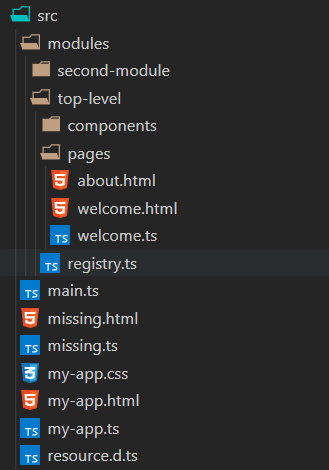
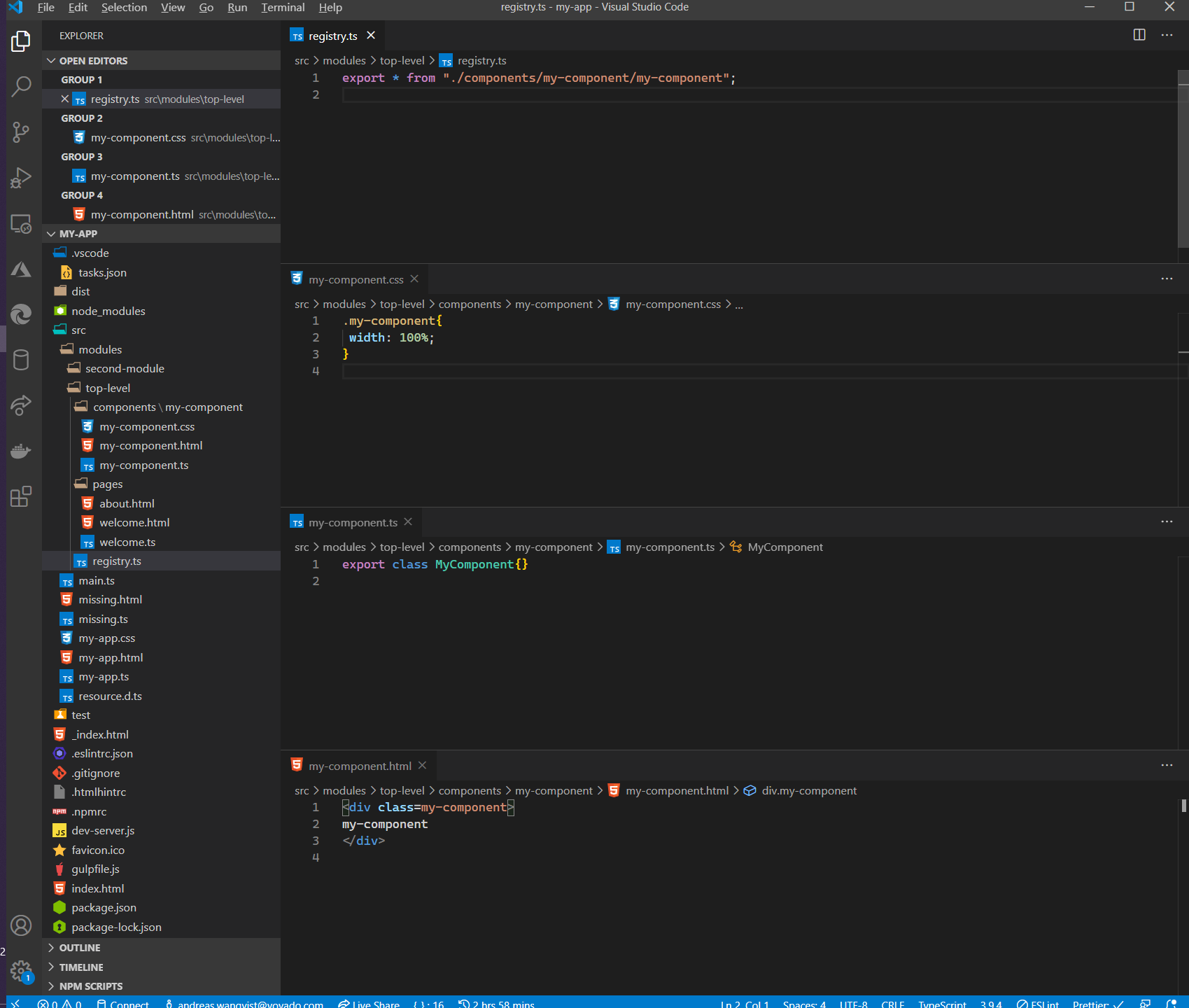
<p>The way I prefer to setup the components in my <a href="https://docs.aurelia.io/">Aurelia 2</a> projects is to have</p>


<ol><li>Code and markup separated by modules</li><li>Every component in a separate folder</li><li> Every component always has a TypeScript, HTML- and CSS file</li><li>The module containing a component has a &#8220;registry&#8221; file that exports all the components</li><li>That registry file is then injected into the DI container, at startup or dynamically, and makes all those components seamless to use with the router and other components</li></ol>


<div class="wp-block-image"><figure class="aligncenter"><img loading="lazy" width="329" height="470" src="https://mobilemancerblog.blob.core.windows.net/blog/2020/08/Base-Folder-Structure.png" alt="Aurelia 2 project structure" class="wp-image-11439" srcset="https://mobilemancerblog.blob.core.windows.net/blog/2020/08/Base-Folder-Structure.png 329w, https://mobilemancerblog.blob.core.windows.net/blog/2020/08/Base-Folder-Structure-210x300.png 210w" sizes="(max-width: 329px) 100vw, 329px" /><figcaption>My preferred Aurelia project base structure</figcaption></figure></div>


<h2><img src="https://s.w.org/images/core/emoji/13.0.0/72x72/1f9f1.png" alt="🧱" class="wp-smiley" style="height: 1em; max-height: 1em;" /> Creating a New Aurelia 2 Component</h2>


<p>For creating a new component named <code>my-component</code>, according to the list above, I would create and do the following:</p>


<ul><li>The folder modules/top-level/components/my-component</li><li>The files <code>my-component.ts/html/css</code> in the above folder</li><li>Add <code>export * from "./components/my-component";</code> to <code>registry.ts</code></li></ul>


<h3><img src="https://s.w.org/images/core/emoji/13.0.0/72x72/1f6e0.png" alt="🛠" class="wp-smiley" style="height: 1em; max-height: 1em;" /> Could This All Be Solved with a Task?</h3>


<p>Why yes it most definitely can! Or at least with a series of tasks <img src="https://s.w.org/images/core/emoji/13.0.0/72x72/1f601.png" alt="😁" class="wp-smiley" style="height: 1em; max-height: 1em;" /></p>


<p>The important thing about the task is to, before executing it, position in the <code>registry.ts</code> file. This is very important because the last step will edit the current opened file, so don&#8217;t miss that!</p>


<p>The main task consists of running 5 different tasks. From creating the folder, to the files and finally adding a reference to the newly created component in the <strong><em>current</em></strong> file.</p>


<p>The steps, and their order, are defined by using the <code>dependsOn </code>property. It&#8217;s important that <code>dependsOrder </code>is set to sequence so that the steps don&#8217;t execute in parallel.</p>


<p>The name of the component is prompted for in the <code>componentName </code>input, and that&#8217;s used in the rest of the script.</p>


<p>To prevent any mishaps, there&#8217;s a check if the directory exists before creating it. We&#8217;re also using <code>-NoClobber</code> on the file creation. This will fail the task if any file already exists.</p>


<h3><img src="https://s.w.org/images/core/emoji/13.0.0/72x72/1f41a.png" alt="🐚" class="wp-smiley" style="height: 1em; max-height: 1em;" /> PowerShell to the Rescue</h3>


<p>For the actual work I use PowerShell commands. Most of it is straight forward, creating a string then pipe-ing it into a file.</p>


<p>The most non-straightforward part of the script is when I need to create a class name from the component name:</p>


<div class="wp-block-syntaxhighlighter-code "><pre class="brush: powershell; gutter: false; title: ; notranslate">
((Get-Culture).TextInfo.ToTitleCase(('${input:componentName}'.ToLower() -replace '-', ' ')) -replace ' ', '')
</pre></div>


<h2><img src="https://s.w.org/images/core/emoji/13.0.0/72x72/1f469-200d-1f4bb.png" alt="👩‍💻" class="wp-smiley" style="height: 1em; max-height: 1em;" /> The Code</h2>


<p>The entire task looks like below.</p>


<div class="wp-block-syntaxhighlighter-code "><pre class="brush: powershell; gutter: false; title: ; notranslate">
{
  // See https://go.microsoft.com/fwlink/?LinkId=733558
  // for the documentation about the tasks.json format
  &quot;version&quot;: &quot;2.0.0&quot;,
  &quot;tasks&quot;: &#91;
    {
      // Create a registry.ts file in the root of your modules folder
      // Position in the registry.ts file before running the task
      &quot;detail&quot;: &quot;Create the TS, HTML and CSS files for a component&quot;,
      &quot;label&quot;: &quot;au2 create component&quot;,
      &quot;type&quot;: &quot;shell&quot;,
      &quot;dependsOrder&quot;: &quot;sequence&quot;,
      &quot;dependsOn&quot;: &#91;
        &quot;create folder&quot;,
        &quot;create ts file&quot;,
        &quot;create html file&quot;,
        &quot;create css file&quot;,
        &quot;append to registry&quot;
      ],
      &quot;presentation&quot;: {
        &quot;reveal&quot;: &quot;silent&quot;,
        &quot;panel&quot;: &quot;shared&quot;
      },
      &quot;args&quot;: &#91;&quot;${input:componentName}&quot;]
    },
    {
      &quot;label&quot;: &quot;create folder&quot;,
      &quot;type&quot;: &quot;shell&quot;,
      &quot;command&quot;: &quot;If (!(Test-Path ${fileDirname}\\components\\${input:componentName})){md ${fileDirname}\\components\\${input:componentName}}&quot;
    },
    {
      &quot;label&quot;: &quot;create ts file&quot;,
      &quot;type&quot;: &quot;shell&quot;,
      &quot;command&quot;: &quot;'export class ' + ((Get-Culture).TextInfo.ToTitleCase(('${input:componentName}'.ToLower() -replace '-', ' ')) -replace ' ', '') + '{}' | Out-File -FilePath ${fileDirname}\\components\\${input:componentName}\\${input:componentName}.ts -NoClobber&quot;
    },
    {
      &quot;label&quot;: &quot;create html file&quot;,
      &quot;type&quot;: &quot;shell&quot;,
      &quot;command&quot;: &quot;'&lt;div class=\&quot;' + '${input:componentName}'.ToLower() + '\&quot;&gt;\r\n${input:componentName}\r\n&lt;/div&gt;' | Out-File -FilePath ${fileDirname}\\components\\${input:componentName}\\${input:componentName}.html -NoClobber&quot;
    },
    {
      &quot;label&quot;: &quot;create css file&quot;,
      &quot;type&quot;: &quot;shell&quot;,
      &quot;command&quot;: &quot;'.' + '${input:componentName}'.ToLower() + '{\r\n    width: 100%; \r\n}' | Out-File -FilePath ${fileDirname}\\components\\${input:componentName}\\${input:componentName}.css -NoClobber&quot;
    },
    {
      &quot;label&quot;: &quot;append to registry&quot;,
      &quot;type&quot;: &quot;shell&quot;,
      &quot;command&quot;: &quot;'export * from \\\&quot;./components/' + '${input:componentName}/${input:componentName}\\\&quot;;' | Out-File -FilePath ${file} -Append -NoClobber&quot;
    }
  ],
  &quot;inputs&quot;: &#91;
    {
      &quot;id&quot;: &quot;componentName&quot;,
      &quot;description&quot;: &quot;Name your component&quot;,
      &quot;default&quot;: &quot;new-component&quot;,
      &quot;type&quot;: &quot;promptString&quot;
    }
  ]
}
</pre></div>


<p>To use it, copy the task and input into your existing tasks.json file.</p>


<h2><img src="https://s.w.org/images/core/emoji/13.0.0/72x72/1f579.png" alt="🕹" class="wp-smiley" style="height: 1em; max-height: 1em;" /> Running the Task</h2>


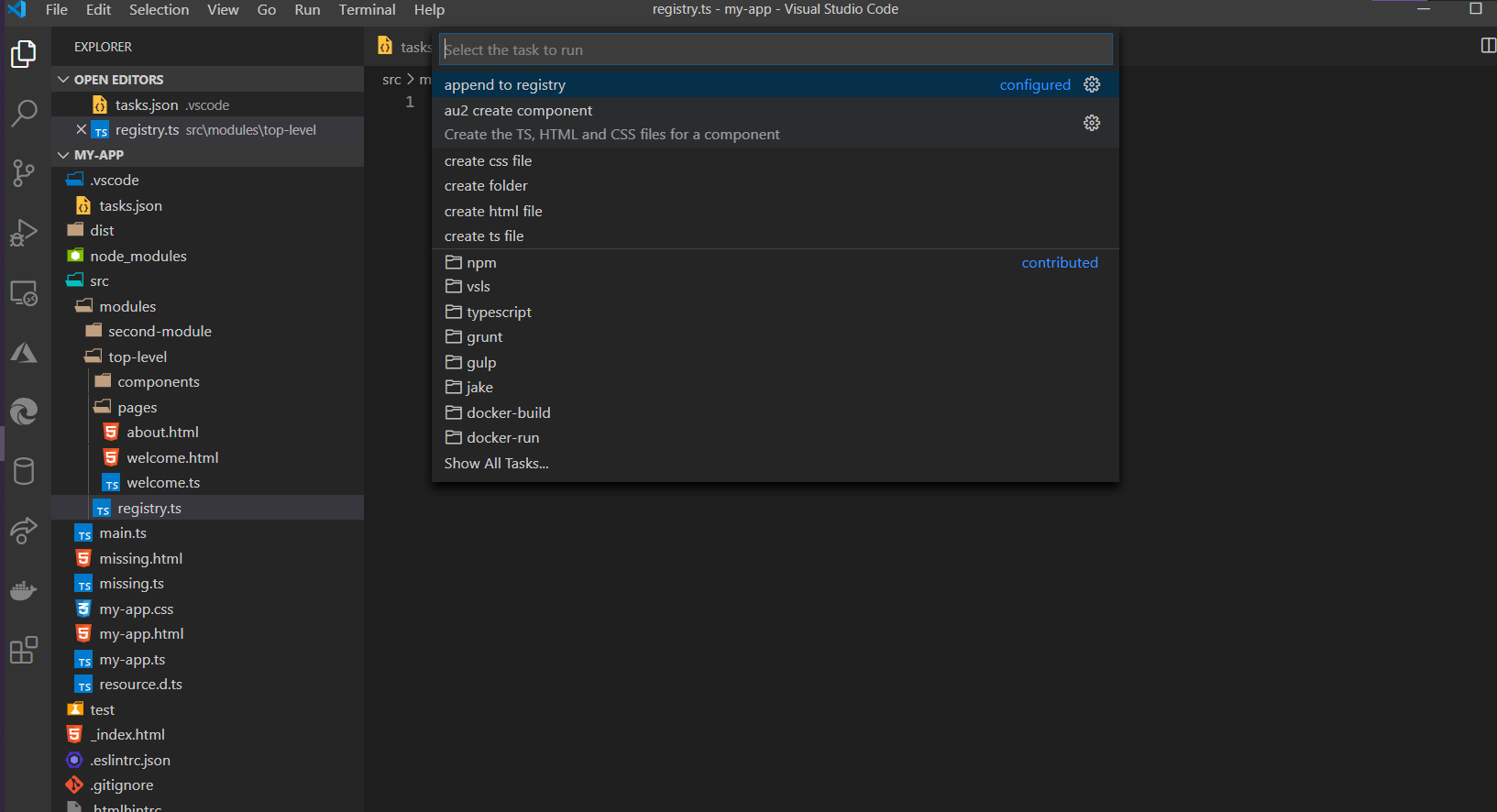
<p>To run the task, open the <strong>Command Palette</strong> -&gt; <code>Run Task</code> -&gt; <code>au2&nbsp;create&nbsp;component </code></p>


<div class="wp-block-image"><figure class="aligncenter"><a href="https://mobilemancerblog.blob.core.windows.net/blog/2020/08/Run-au2-create-component-Task.png"><img loading="lazy" width="1024" height="556" src="https://mobilemancerblog.blob.core.windows.net/blog/2020/08/Run-au2-create-component-Task-1024x556.png" alt="Selecting the main task from vs code" class="wp-image-11447" srcset="https://mobilemancerblog.blob.core.windows.net/blog/2020/08/Run-au2-create-component-Task-1024x556.png 1024w, https://mobilemancerblog.blob.core.windows.net/blog/2020/08/Run-au2-create-component-Task-300x163.png 300w, https://mobilemancerblog.blob.core.windows.net/blog/2020/08/Run-au2-create-component-Task-768x417.png 768w, https://mobilemancerblog.blob.core.windows.net/blog/2020/08/Run-au2-create-component-Task.png 1633w" sizes="(max-width: 1024px) 100vw, 1024px" /></a><figcaption><img src="https://s.w.org/images/core/emoji/13.0.0/72x72/1f9e9.png" alt="🧩" class="wp-smiley" style="height: 1em; max-height: 1em;" /> Make sure to select the &#8220;main&#8221; task!</figcaption></figure></div>


<p>When prompted, give the new component the required name!</p>


<p>When executed, VS Code will open a Terminal window and output the result there. If the task isn&#8217;t producing the expected result, check the output in that terminal window to make sure everything worked as expected.</p>


<p>The end result is a folder with the files created and an entry in the registry file. See below.</p>


<figure class="wp-block-image"><a href="https://mobilemancerblog.blob.core.windows.net/blog/2020/08/All-component-files-created.png"><img loading="lazy" width="1024" height="868" src="https://mobilemancerblog.blob.core.windows.net/blog/2020/08/All-component-files-created-1024x868.png" alt="An Aurelia 2 component created by the vs code task" class="wp-image-11451" srcset="https://mobilemancerblog.blob.core.windows.net/blog/2020/08/All-component-files-created-1024x868.png 1024w, https://mobilemancerblog.blob.core.windows.net/blog/2020/08/All-component-files-created-300x254.png 300w, https://mobilemancerblog.blob.core.windows.net/blog/2020/08/All-component-files-created-768x651.png 768w, https://mobilemancerblog.blob.core.windows.net/blog/2020/08/All-component-files-created.png 1699w" sizes="(max-width: 1024px) 100vw, 1024px" /></a><figcaption><img src="https://s.w.org/images/core/emoji/13.0.0/72x72/1f3ba.png" alt="🎺" class="wp-smiley" style="height: 1em; max-height: 1em;" /> Ta-da! <img src="https://s.w.org/images/core/emoji/13.0.0/72x72/1f389.png" alt="🎉" class="wp-smiley" style="height: 1em; max-height: 1em;" /></figcaption></figure>


<h3><img src="https://s.w.org/images/core/emoji/13.0.0/72x72/2328.png" alt="⌨" class="wp-smiley" style="height: 1em; max-height: 1em;" /> Key Bind the Task!</h3>


<p>As we are developers and need to move quick <img src="https://s.w.org/images/core/emoji/13.0.0/72x72/1f602.png" alt="😂" class="wp-smiley" style="height: 1em; max-height: 1em;" />, a key binding is of the essence! You can key bind this task in VS Code by opening the command palette, choosing <code><strong>Open Keyboard Shortcuts (JSON)</strong></code>, then add the snippet below <img src="https://s.w.org/images/core/emoji/13.0.0/72x72/1f447.png" alt="👇" class="wp-smiley" style="height: 1em; max-height: 1em;" /></p>


<div class="wp-block-syntaxhighlighter-code "><pre class="brush: jscript; gutter: false; title: ; notranslate">
 {
    &quot;key&quot;: &quot;ctrl+shift+c&quot;,
    &quot;command&quot;: &quot;workbench.action.tasks.runTask&quot;,
    &quot;args&quot;: &quot;au2 create component&quot;
 },
</pre></div>


<p style="color:#ffffff;text-align:center" class="has-text-color has-background has-medium-font-size has-vivid-green-cyan-background-color">This will bind the task to <code><strong>ctrl+shift+c</strong></code><br>You might prefer to bind it to something else <img src="https://s.w.org/images/core/emoji/13.0.0/72x72/1f642.png" alt="🙂" class="wp-smiley" style="height: 1em; max-height: 1em;" /></p>


<h2><img src="https://s.w.org/images/core/emoji/13.0.0/72x72/1f52e.png" alt="🔮" class="wp-smiley" style="height: 1em; max-height: 1em;" /> Conclusion</h2>


<p>VS Code tasks in combination PowerShell with are powerful! <img src="https://s.w.org/images/core/emoji/13.0.0/72x72/1f4aa.png" alt="💪" class="wp-smiley" style="height: 1em; max-height: 1em;" /></p>


<p>This article might have shown how to create what I want for an Aurelia component, but you can easily modify it to fit whatever needs the framework you are using has, be it <a href="https://vuejs.org/">Vue</a>, <a href="https://angular.io/">Angular</a>, <a href="https://reactjs.org/">React</a> or whatever.</p>


<h2><img src="https://s.w.org/images/core/emoji/13.0.0/72x72/1f517.png" alt="🔗" class="wp-smiley" style="height: 1em; max-height: 1em;" /> Resources</h2>


<p>A <a href="https://gist.github.com/mobilemancer/1238cb2d31c882e8561f351a3775ccfa">Gist</a> with the code for the task on my GitHub page<br>Download and install <a href="https://github.com/powershell/powershell">PowerShell</a> (it works for Linux and macOS  too! <img src="https://s.w.org/images/core/emoji/13.0.0/72x72/1f427.png" alt="🐧" class="wp-smiley" style="height: 1em; max-height: 1em;" />)<br>Read more about Aurelia 2 on the&nbsp;<a href="https://docs.aurelia.io/">docs</a> site<br>Running <a href="https://mobilemancer.com/2020/06/29/faster-better-cheaper-aureliaweekly-2/">Aurelia 2 apps in Azure</a> like a boss</p>


<p><em> Happy Coding!</em> <img src="https://s.w.org/images/core/emoji/13.0.0/72x72/1f60a.png" alt="😊" class="wp-smiley" style="height: 1em; max-height: 1em;" /> </p>
<p>The post <a rel="nofollow" href="https://mobilemancer.com/2020/08/03/using-vs-code-tasks-to-create-template-files/">Using VS Code Tasks to Create Template Files</a> appeared first on <a rel="nofollow" href="https://mobilemancer.com">mobilemancer</a>.</p>
]]></content>
		
					<link rel="replies" type="text/html" href="https://mobilemancer.com/2020/08/03/using-vs-code-tasks-to-create-template-files/#comments" thr:count="2"/>
			<link rel="replies" type="application/atom+xml" href="https://mobilemancer.com/2020/08/03/using-vs-code-tasks-to-create-template-files/feed/atom/" thr:count="2"/>
			<thr:total>2</thr:total>
			</entry>
		<entry>
		<author>
			<name>Andreas</name>
					</author>

		<title type="html"><![CDATA[Dynamic Module Imports in Aurelia 2]]></title>
		<link rel="alternate" type="text/html" href="https://mobilemancer.com/2020/07/23/dynamic-module-imports-in-aurelia-2/" />

		<id>http://mobilemancer.com/?p=11385</id>
		<updated>2020-10-11T16:09:53Z</updated>
		<published>2020-07-23T08:34:30Z</published>
		<category scheme="https://mobilemancer.com" term="Coding" /><category scheme="https://mobilemancer.com" term="Aurelia 2" /><category scheme="https://mobilemancer.com" term="CSS" /><category scheme="https://mobilemancer.com" term="TypeScript" /><category scheme="https://mobilemancer.com" term="Web Development" />
		<summary type="html"><![CDATA[<p>In this article we&#8217;ll have a look at working with dynamic module loading in Aurelia2. I&#8217;ll be using dumber.js as module bundler, but the concepts are applicable to other bundlers as well. Disclaimer! This code was written when Aurelia 2</p>
<p>The post <a rel="nofollow" href="https://mobilemancer.com/2020/07/23/dynamic-module-imports-in-aurelia-2/">Dynamic Module Imports in Aurelia 2</a> appeared first on <a rel="nofollow" href="https://mobilemancer.com">mobilemancer</a>.</p>
]]></summary>

					<content type="html" xml:base="https://mobilemancer.com/2020/07/23/dynamic-module-imports-in-aurelia-2/"><![CDATA[
<p>In this article we&#8217;ll have a look at working with dynamic module loading in Aurelia2. I&#8217;ll be using <a href="https://dumber.js.org/">dumber.js</a> as module bundler, but the concepts are applicable to other bundlers as well.</p>


<p class="has-text-color has-background has-medium-font-size has-very-light-gray-color has-vivid-red-background-color">Disclaimer! This code was written when Aurelia 2 was in pre-alpha, some API&#8217;s will probably change!</p>


<h2><img src="https://s.w.org/images/core/emoji/13.0.0/72x72/1f469-200d-1f52c.png" alt="👩‍🔬" class="wp-smiley" style="height: 1em; max-height: 1em;" />Setting Up the Test</h2>


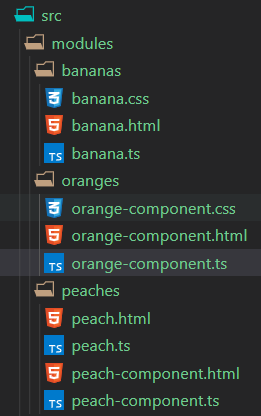
<p>First off, I create a couple of new components. Under <code>src</code>, a modules folder containing sub-folders named <code>bananas</code>, <code>oranges </code>and <code>peaches</code>. </p>


<p>Like this <img src="https://s.w.org/images/core/emoji/13.0.0/72x72/1f447.png" alt="👇" class="wp-smiley" style="height: 1em; max-height: 1em;" /></p>


<div class="wp-block-image"><figure class="aligncenter"><a href="https://mobilemancerblog.blob.core.windows.net/blog/2020/07/fruit-modules.png"><img loading="lazy" width="261" height="416" src="https://mobilemancerblog.blob.core.windows.net/blog/2020/07/fruit-modules.png" alt="Modules prepared for dynamic laoding" class="wp-image-11393" srcset="https://mobilemancerblog.blob.core.windows.net/blog/2020/07/fruit-modules.png 261w, https://mobilemancerblog.blob.core.windows.net/blog/2020/07/fruit-modules-188x300.png 188w" sizes="(max-width: 261px) 100vw, 261px" /></a><figcaption>Some fruity components</figcaption></figure></div>


<h2><img src="https://s.w.org/images/core/emoji/13.0.0/72x72/1f3e0.png" alt="🏠" class="wp-smiley" style="height: 1em; max-height: 1em;" />The Base Bundle/Module Structure</h2>


<p>You can find the logic for the bundling build logic in the <code>gulpfile.js</code> file in the root.</p>


<p>The code split is handled for us by the bundler. In our case, <a href="https://dumber.js.org/">dumber.js</a> is handling it for us. The logic for the bundling is located in the <code>gulpfile.js</code> file in the app root. The code looks like follows:</p>


<div class="wp-block-syntaxhighlighter-code "><pre class="brush: jscript; title: ; notranslate">
  codeSplit: isTest ? undefined : function(moduleId, packageName) {
    // Here for any local src, put into app-bundle
    if (!packageName) return 'app-bundle';
    // The codeSplit func does not need to return a valid bundle name.
    // For any undefined return, dumber put the module into entry bundle,
    // this means no module can skip bundling.
  },
</pre></div>


<p>This will put all the modules with a package name, basically the node modules, into <code>app-bundle.js</code>. Everything else, ie our code, will be placed the bundle named <code>entry-bundle.js</code>.</p>


<p>If we run a build using <code>npm run build</code> we can see the files for <code>entry-bundle.js</code> and <code>app-bundle.js</code> being written (by default a hash will be added to the end of the files) .</p>


<div class="wp-block-image"><figure class="aligncenter"><a href="https://mobilemancerblog.blob.core.windows.net/blog/2020/07/image.png"><img loading="lazy" width="1024" height="907" src="https://mobilemancerblog.blob.core.windows.net/blog/2020/07/two-bundles-1024x907.png" alt="" class="wp-image-11417" srcset="https://mobilemancerblog.blob.core.windows.net/blog/2020/07/two-bundles-1024x907.png 1024w, https://mobilemancerblog.blob.core.windows.net/blog/2020/07/two-bundles-300x266.png 300w, https://mobilemancerblog.blob.core.windows.net/blog/2020/07/two-bundles-768x681.png 768w, https://mobilemancerblog.blob.core.windows.net/blog/2020/07/two-bundles.png 1185w" sizes="(max-width: 1024px) 100vw, 1024px" /></a><figcaption>Initially, there&#8217;s only two bundles.</figcaption></figure></div>


<h2><img src="https://s.w.org/images/core/emoji/13.0.0/72x72/1f3e8.png" alt="🏨" class="wp-smiley" style="height: 1em; max-height: 1em;" />Breaking Up Code in Different Bundles</h2>


<p>Let&#8217;s break up our test code by using the modules folder as the root structure for bundles.</p>


<div class="wp-block-syntaxhighlighter-code "><pre class="brush: plain; title: ; notranslate">
  codeSplit: isTest
    ? undefined
    : function (moduleId, packageName) {
        if (!packageName) {
          const nameParts = moduleId.split(&quot;/&quot;);
          if (nameParts.length &gt; 1) return nameParts&#91;1] + &quot;-bundle&quot;;
          return &quot;app-bundle&quot;;
        }
      },
</pre></div>


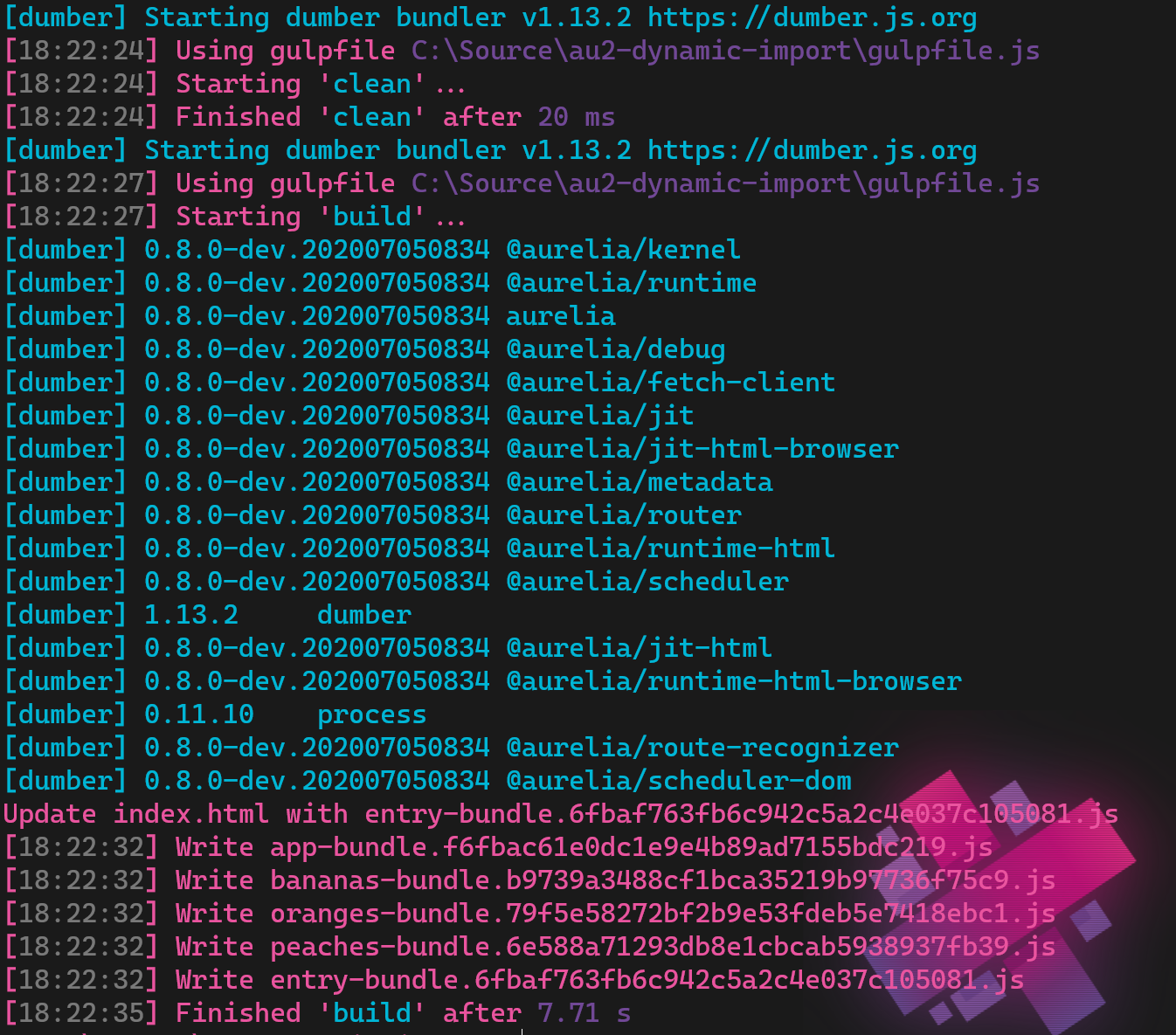
<p>This code will create a bundle for any directory more than one level down, in our case that&#8217;s just the bananas, oranges and peaches. The name will be the second level folder name + &#8220;-bundle&#8221;. Building again will show our new bundles:</p>


<figure class="wp-block-image"><a href="https://mobilemancerblog.blob.core.windows.net/blog/2020/07/image.png"><img loading="lazy" width="1024" height="907" src="https://mobilemancerblog.blob.core.windows.net/blog/2020/07/fruity-bundles-1024x907.png" alt="" class="wp-image-11416" srcset="https://mobilemancerblog.blob.core.windows.net/blog/2020/07/fruity-bundles-1024x907.png 1024w, https://mobilemancerblog.blob.core.windows.net/blog/2020/07/fruity-bundles-300x266.png 300w, https://mobilemancerblog.blob.core.windows.net/blog/2020/07/fruity-bundles-768x681.png 768w, https://mobilemancerblog.blob.core.windows.net/blog/2020/07/fruity-bundles.png 1185w" sizes="(max-width: 1024px) 100vw, 1024px" /></a><figcaption> Our new bundles, <img src="https://s.w.org/images/core/emoji/13.0.0/72x72/1f34a.png" alt="🍊" class="wp-smiley" style="height: 1em; max-height: 1em;" />, <img src="https://s.w.org/images/core/emoji/13.0.0/72x72/1f34c.png" alt="🍌" class="wp-smiley" style="height: 1em; max-height: 1em;" /> &amp; <img src="https://s.w.org/images/core/emoji/13.0.0/72x72/1f351.png" alt="🍑" class="wp-smiley" style="height: 1em; max-height: 1em;" />! </figcaption></figure>


<h3><img src="https://s.w.org/images/core/emoji/13.0.0/72x72/1f4a8.png" alt="💨" class="wp-smiley" style="height: 1em; max-height: 1em;" />Running the Application With the New Bundles</h3>


<p>In the main app template I am importing all the components to enable navigating to them.</p>


<div class="wp-block-syntaxhighlighter-code "><pre class="brush: xml; gutter: false; title: ; notranslate">
&lt;import from=&quot;./welcome&quot;&gt;&lt;/import&gt;
&lt;import from=&quot;./about.html&quot;&gt;&lt;/import&gt;
&lt;import from=&quot;./missing&quot;&gt;&lt;/import&gt;
&lt;import from=&quot;./modules/peaches/peach&quot;&gt;&lt;/import&gt;
&lt;import from=&quot;./modules/bananas/banana&quot;&gt;&lt;/import&gt;

&lt;nav&gt;
  &lt;a goto=&quot;welcome&quot;&gt;Welcome&lt;/a&gt;
  &lt;a goto=&quot;about&quot;&gt;About&lt;/a&gt;
  &lt;a goto=&quot;banana&quot;&gt;<img src="https://s.w.org/images/core/emoji/13.0.0/72x72/1f34c.png" alt="🍌" class="wp-smiley" style="height: 1em; max-height: 1em;" />&lt;/a&gt;
  &lt;a goto=&quot;peach&quot;&gt;<img src="https://s.w.org/images/core/emoji/13.0.0/72x72/1f351.png" alt="🍑" class="wp-smiley" style="height: 1em; max-height: 1em;" />&lt;/a&gt;
&lt;/nav&gt;

&lt;au-viewport default=&quot;welcome&quot; fallback=&quot;missing&quot;&gt;&lt;/au-viewport&gt;
</pre></div>


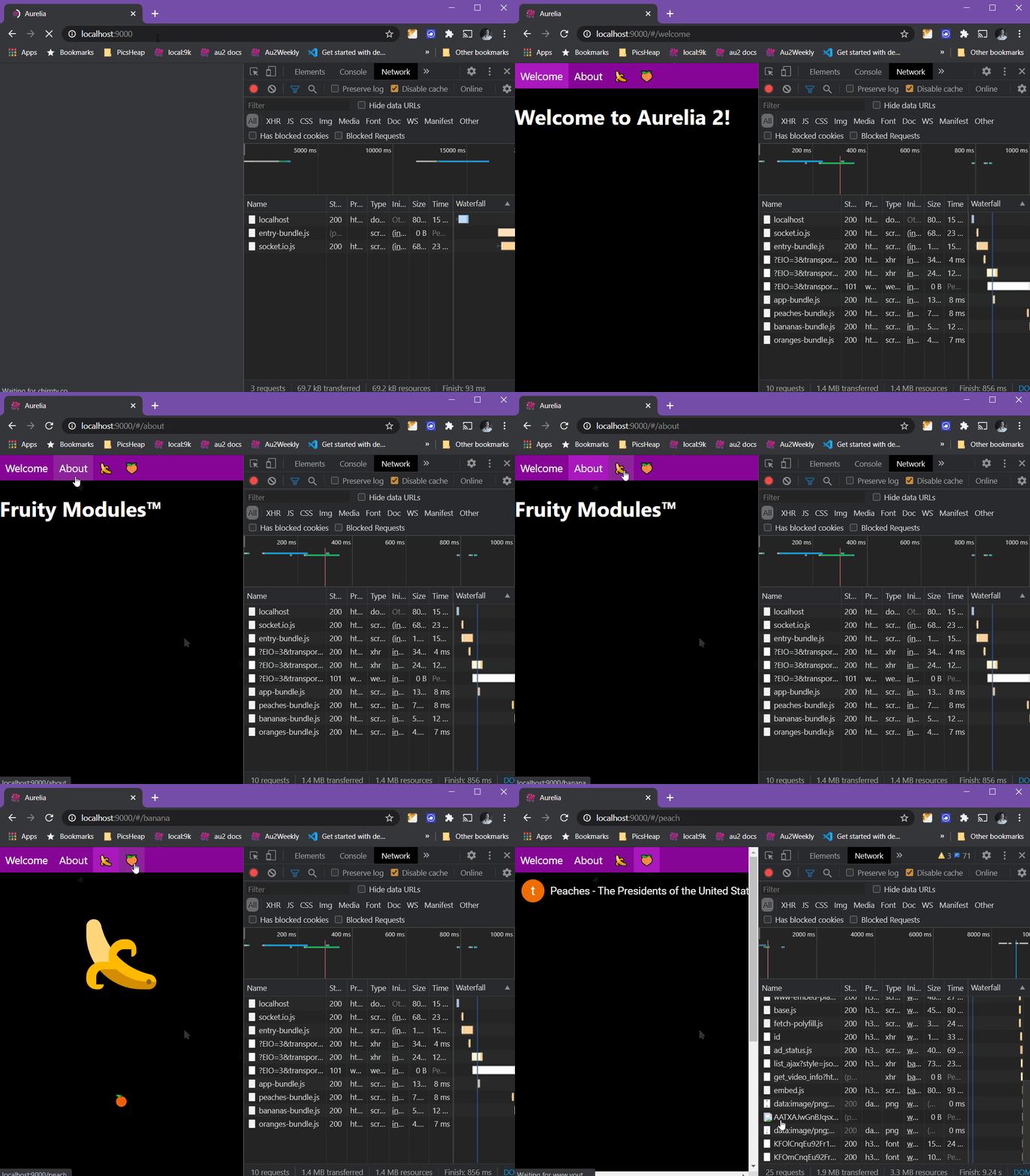
<p>This will thus load the components from our newly created modules, opening the network tab we can see the modules loading and the functionality work just as before splitting up the code in bundles.</p>


<div class="wp-block-image"><figure class="aligncenter is-resized"><a href="https://mobilemancerblog.blob.core.windows.net/blog/2020/07/split-into-modules.gif"><img loading="lazy" src="https://mobilemancerblog.blob.core.windows.net/blog/2020/07/split-into-modules-1024x779.gif" alt="Bundling, but not yet dynamic" class="wp-image-11401" width="256" height="195" srcset="https://mobilemancerblog.blob.core.windows.net/blog/2020/07/split-into-modules-1024x779.gif 1024w, https://mobilemancerblog.blob.core.windows.net/blog/2020/07/split-into-modules-300x228.gif 300w, https://mobilemancerblog.blob.core.windows.net/blog/2020/07/split-into-modules-768x585.gif 768w" sizes="(max-width: 256px) 100vw, 256px" /></a><figcaption>Components loading from the bundles, click for gif action! <img src="https://s.w.org/images/core/emoji/13.0.0/72x72/1f446.png" alt="👆" class="wp-smiley" style="height: 1em; max-height: 1em;" /></figcaption></figure></div>


<h2><img src="https://s.w.org/images/core/emoji/13.0.0/72x72/1f9f1.png" alt="🧱" class="wp-smiley" style="height: 1em; max-height: 1em;" />Dynamic Module Loading</h2>


<p>Bundles? That&#8217;s all cool, but where&#8217;s that dynamic loading we were promised?</p>


<p>Well, we need to modify some code first, starting with removing the component imports from the main template.</p>


<div class="wp-block-syntaxhighlighter-code "><pre class="brush: xml; gutter: false; title: ; notranslate">
&lt;import from=&quot;./welcome&quot;&gt;&lt;/import&gt;
&lt;import from=&quot;./about.html&quot;&gt;&lt;/import&gt;
&lt;import from=&quot;./missing&quot;&gt;&lt;/import&gt;

&lt;nav&gt;
  &lt;a goto=&quot;welcome&quot;&gt;Welcome&lt;/a&gt;
  &lt;a goto=&quot;about&quot;&gt;About&lt;/a&gt;
  &lt;a goto=&quot;banana&quot;&gt;<img src="https://s.w.org/images/core/emoji/13.0.0/72x72/1f34c.png" alt="🍌" class="wp-smiley" style="height: 1em; max-height: 1em;" />&lt;/a&gt;
  &lt;a goto=&quot;peach&quot;&gt;<img src="https://s.w.org/images/core/emoji/13.0.0/72x72/1f351.png" alt="🍑" class="wp-smiley" style="height: 1em; max-height: 1em;" />&lt;/a&gt;
&lt;/nav&gt;

&lt;au-viewport default=&quot;welcome&quot; fallback=&quot;missing&quot;&gt;&lt;/au-viewport&gt;
</pre></div>


<p>With the modified <code>my-app.html</code> template the new component bundles won&#8217;t load. This also means we can&#8217;t navigate to them since the components does not exist in context.</p>


<figure class="wp-block-image"><a href="https://mobilemancerblog.blob.core.windows.net/blog/2020/07/no-more-bananas.png"><img loading="lazy" width="1024" height="787" src="https://mobilemancerblog.blob.core.windows.net/blog/2020/07/no-more-bananas-1024x787.png" alt="Module not yet loaded dynamically" class="wp-image-11403" srcset="https://mobilemancerblog.blob.core.windows.net/blog/2020/07/no-more-bananas-1024x787.png 1024w, https://mobilemancerblog.blob.core.windows.net/blog/2020/07/no-more-bananas-300x231.png 300w, https://mobilemancerblog.blob.core.windows.net/blog/2020/07/no-more-bananas-768x591.png 768w, https://mobilemancerblog.blob.core.windows.net/blog/2020/07/no-more-bananas.png 1125w" sizes="(max-width: 1024px) 100vw, 1024px" /></a><figcaption>No more bananas <img src="https://s.w.org/images/core/emoji/13.0.0/72x72/1f622.png" alt="😢" class="wp-smiley" style="height: 1em; max-height: 1em;" /></figcaption></figure>


<p>Note in the Network tab that the component modules haven&#8217;t loaded.</p>


<p class="has-text-color has-background has-medium-font-size has-very-dark-gray-color has-vivid-green-cyan-background-color"><strong>What is the Best way to load modules dynamically?</strong><br>Well, this will depend on your app and your use cases. I&#8217;m just showing how it can be done, this is not a primer on how to build efficient apps <img src="https://s.w.org/images/core/emoji/13.0.0/72x72/1f601.png" alt="😁" class="wp-smiley" style="height: 1em; max-height: 1em;" /></p>


<h3><img src="https://s.w.org/images/core/emoji/13.0.0/72x72/1f4c2.png" alt="📂" class="wp-smiley" style="height: 1em; max-height: 1em;" />Loading Modules From Code</h3>


<p>We can modifying the code for <code>my-app.ts</code>, adding a function that loads and navigates to a module.</p>


<div class="wp-block-syntaxhighlighter-code "><pre class="brush: jscript; title: ; notranslate">
import { IRouter, IContainer } from &quot;aurelia&quot;;

export class MyApp {
  constructor(
    @IRouter private readonly router: IRouter,
    @IContainer private readonly diContainer: IContainer
  ) {}

  public async navigateTo(compName: string): Promise&lt;void&gt; {
    if (compName === &quot;banana&quot;) {
      const comp = await import(&quot;./modules/bananas/banana&quot;);
      this.diContainer.register(comp);
      this.router.goto(&quot;banana&quot;);
    }
  }
}
</pre></div>


<p>Unpacking the above code slightly for those unfamiliar with some Aurelia concepts:<br>First we require in references to the <em>router</em> and the <em>global DI container</em> by use of DI in the constructor. <br>We need the router if we want to use it to navigate. For the router to be able to find our dynamic module we need to register it in the DI container.</p>


<p>To dynamically load our modules, we use the <code>import()</code> statement. It&#8217;s async and returns a promise, so it&#8217;s possible to use <code>await</code> for those who prefer that over the <code>promise</code> syntax. Read more about the <code>import</code> statement over att <a href="https://developer.mozilla.org/en-US/docs/Web/JavaScript/Reference/Statements/import">MDN</a>!</p>


<p>Then use our new method by modifying the link in <code>my-app.html</code>. Using our new method from the template like this:</p>


<div class="wp-block-syntaxhighlighter-code "><pre class="brush: xml; title: ; notranslate">
  &lt;a click.delegate=&quot;navigateTo('banana')&quot;&gt;<img src="https://s.w.org/images/core/emoji/13.0.0/72x72/1f34c.png" alt="🍌" class="wp-smiley" style="height: 1em; max-height: 1em;" />&lt;/a&gt;
</pre></div>


<p style="text-align:center" class="has-text-color has-background has-very-light-gray-color has-vivid-red-background-color"><strong>OBSERVE! </strong><br>To enable the code to compile, we have to modify the <code>tsconfig.json</code> file and set the <code>--module</code> flag.<br>Just add  <code>"module":&nbsp;"ESNext"</code> to the <code>compilerOptions</code>.</p>


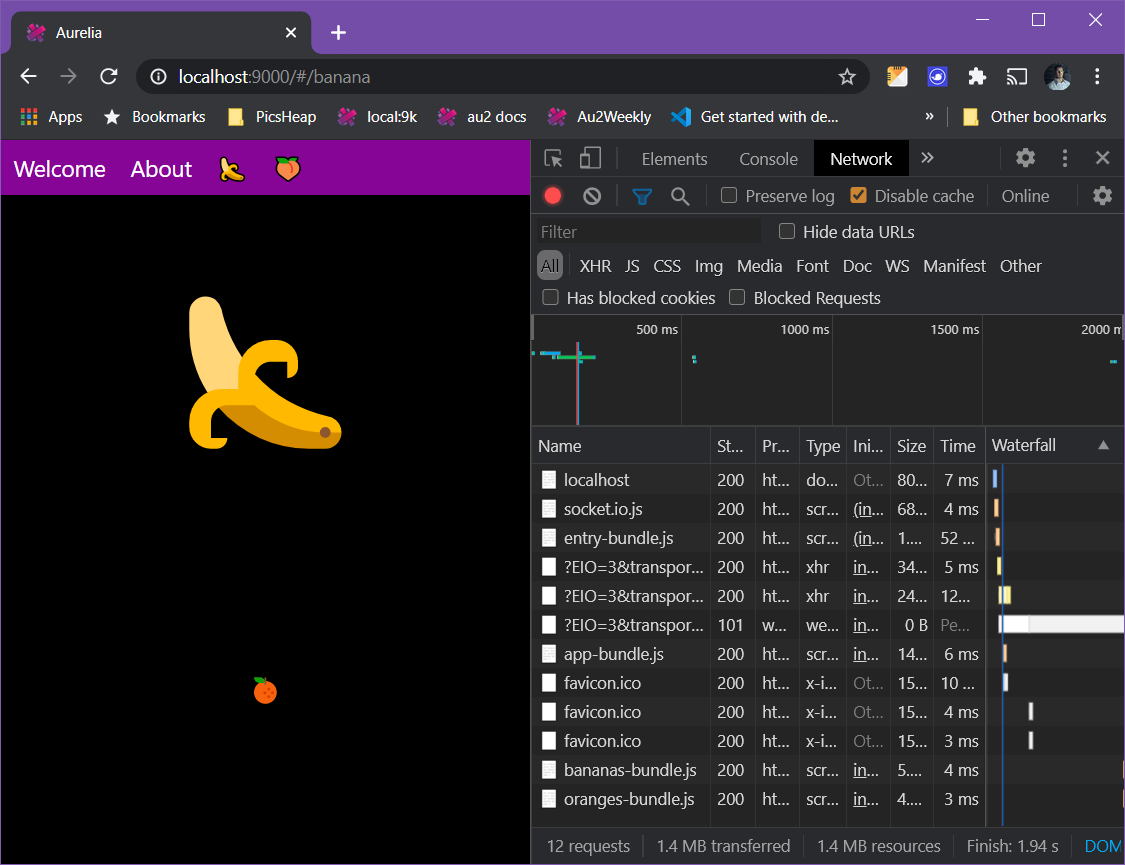
<p>After clicking the <img src="https://s.w.org/images/core/emoji/13.0.0/72x72/1f34c.png" alt="🍌" class="wp-smiley" style="height: 1em; max-height: 1em;" /> link we can now see the <code>bananas-bundle.js</code> and <code>oranges-bundle.js</code> files being loaded in the Network tab. And the router successfully routed to the <img src="https://s.w.org/images/core/emoji/13.0.0/72x72/1f34c.png" alt="🍌" class="wp-smiley" style="height: 1em; max-height: 1em;" /> page!</p>


<figure class="wp-block-image"><a href="https://mobilemancerblog.blob.core.windows.net/blog/2020/07/dynamic-banana.png"><img loading="lazy" width="1024" height="787" src="https://mobilemancerblog.blob.core.windows.net/blog/2020/07/dynamic-banana-1024x787.png" alt="Dynamic module loading after pressing link" class="wp-image-11407" srcset="https://mobilemancerblog.blob.core.windows.net/blog/2020/07/dynamic-banana-1024x787.png 1024w, https://mobilemancerblog.blob.core.windows.net/blog/2020/07/dynamic-banana-300x231.png 300w, https://mobilemancerblog.blob.core.windows.net/blog/2020/07/dynamic-banana-768x591.png 768w, https://mobilemancerblog.blob.core.windows.net/blog/2020/07/dynamic-banana.png 1125w" sizes="(max-width: 1024px) 100vw, 1024px" /></a><figcaption><img src="https://s.w.org/images/core/emoji/13.0.0/72x72/1f34c.png" alt="🍌" class="wp-smiley" style="height: 1em; max-height: 1em;" /> Dynamic Banana! <img src="https://s.w.org/images/core/emoji/13.0.0/72x72/1f34c.png" alt="🍌" class="wp-smiley" style="height: 1em; max-height: 1em;" /></figcaption></figure>


<p>Why did the <code>oranges-bundle.js</code> get loaded as well, we only loaded the bananas component from our code?! The bundler is clever enough to load it as the banana component is using it as a dependency. The orange-component is imported in the <code>banana.html</code> template. <img src="https://s.w.org/images/core/emoji/13.0.0/72x72/1f447.png" alt="👇" class="wp-smiley" style="height: 1em; max-height: 1em;" /></p>


<div class="wp-block-syntaxhighlighter-code "><pre class="brush: plain; gutter: false; highlight: [1]; title: ; notranslate">
&lt;import from=&quot;./../oranges/orange-component&quot;&gt;&lt;/import&gt;

&lt;div class=&quot;page center-center&quot;&gt;
  &lt;div class=&quot;big-banana&quot;&gt;<img src="https://s.w.org/images/core/emoji/13.0.0/72x72/1f34c.png" alt="🍌" class="wp-smiley" style="height: 1em; max-height: 1em;" />&lt;/div&gt;
  &lt;orange-component&gt;&lt;/orange-component&gt;
&lt;/div&gt;
</pre></div>


<h4><img src="https://s.w.org/images/core/emoji/13.0.0/72x72/1f534.png" alt="🔴" class="wp-smiley" style="height: 1em; max-height: 1em;" />Routing Drawback</h4>


<p>If the user bookmarks the banana page and comes back to it, the page will respond with: &#8220;<strong>Ouch! Couldn&#8217;t find &#8216;banana&#8217;!</strong>&#8220;. What gives?</p>


<p>Since we removed the import statements in the template file, there is no banana component loaded when the app starts upp. And if the component isn&#8217;t loaded into the DI container, the router can&#8217;t navigate to it.</p>


<h4><img src="https://s.w.org/images/core/emoji/13.0.0/72x72/2705.png" alt="✅" class="wp-smiley" style="height: 1em; max-height: 1em;" />Fixing the Routing Drawback Using the Router</h4>


<p>If this still is the way you want to solve dynamic module loading, the way forward is to take care of this issue in another component. As we have set the router to use the <code>missing</code> component as a fallback, we can fix it there.<br>Modify missing.ts and moving our dynamic module load code there gives:</p>


<div class="wp-block-syntaxhighlighter-code "><pre class="brush: jscript; gutter: false; title: ; notranslate">
import { IRouter, IContainer } from &quot;aurelia&quot;;

export class Missing {
  public static parameters = &#91;&quot;id&quot;];
  public missingComponent: string;

  constructor(
    @IRouter private readonly router: IRouter,
    @IContainer private readonly diContainer: IContainer
  ) {}

  public async enter(parameters): Promise&lt;void&gt; {
    if (parameters.id === &quot;banana&quot;) {
      const comp = await import(&quot;./modules/bananas/banana&quot;);
      this.diContainer.register(comp);
      this.router.goto(&quot;banana&quot;);
    }

    this.missingComponent = parameters.id;
  }
}
</pre></div>


<p>A new Aurelia 2 concept in the code above is the <code>enter()</code> method. That is one of the router life cycle methods, and is activated by the router when navigating to the page. Like the router hook <code>activate()</code> in Aurelia 1.</p>


<p>If a user now bookmarks the banana page and goes back to the link, the missing page will dynamically load the banana module and re-route to that page. The user will once again see the lovely <img src="https://s.w.org/images/core/emoji/13.0.0/72x72/1f34c.png" alt="🍌" class="wp-smiley" style="height: 1em; max-height: 1em;" />!</p>


<h3><img src="https://s.w.org/images/core/emoji/13.0.0/72x72/1f6b5-200d-2640-fe0f.png" alt="🚵‍♀️" class="wp-smiley" style="height: 1em; max-height: 1em;" />A Better Way</h3>


<p>Perhaps a less convoluted and architecturally more solid way to solve the linking issues is to make a top-level page for all modules, and let them always be accessible from the entry-bundle? Then having logic in those pages load modules/ bundles as needed.</p>


<h4>Moving <img src="https://s.w.org/images/core/emoji/13.0.0/72x72/1f351.png" alt="🍑" class="wp-smiley" style="height: 1em; max-height: 1em;" /> Topside</h4>


<p>The best alternative would be to move the <code>peaches</code> component to the root level along side <code>about</code>, <code>welcome</code> etc. Then early in the life cycle load the component in the peaches-bundle and render them. However, as Aurelia 2 is in <em>pre-alpha</em>, that&#8217;s not implemented yet. So we&#8217;ll create a new page, named <code>peach-top</code>, and re-route to the <code>peach</code> component inside the <code>peach-bundle</code>.</p>


<p>To make this work we need to fix a few things</p>


<ul><li>Create <code>peach-top.html</code> and <code>peach-top.ts</code> in the <em><code>src</code></em> root, along side <code>my-app.html</code></li><li>Create a <code>componentRegistry.ts</code> file in the peaches folder and export everything in the peaches module from there</li><li>Add dynamic module load of the components in the <code>peach-bundle</code> to the enter method in <code>peach-top.ts</code> and do a re-route to the <code>peach</code> page</li><li>Add an entry to <code>missing.ts</code> to handle any eventual deep links to the <code>peach</code> page</li></ul>


<h5><img src="https://s.w.org/images/core/emoji/13.0.0/72x72/1f469-200d-1f4bb.png" alt="👩‍💻" class="wp-smiley" style="height: 1em; max-height: 1em;" />All the Codez</h5>


<p>Create <code>peach-top.html</code>, and let it be empty. There&#8217;s a small chance any content will flash before the user while loading the peach module, but it will be very brief. If you have very large modules to load dynamically, then putting a spinner in this page would be good for the user experience.</p>


<p> Create <code>peach-top.ts</code> <img src="https://s.w.org/images/core/emoji/13.0.0/72x72/1f447.png" alt="👇" class="wp-smiley" style="height: 1em; max-height: 1em;" /></p>


<div class="wp-block-syntaxhighlighter-code "><pre class="brush: jscript; gutter: false; title: ; notranslate">
import { IContainer, IRouter } from &quot;aurelia&quot;;

export class PeachTop {
  constructor(
    @IContainer private readonly diContainer: IContainer,
    @IRouter private readonly router: IRouter
  ) {
    console.log(&quot;<img src="https://s.w.org/images/core/emoji/13.0.0/72x72/1f351.png" alt="🍑" class="wp-smiley" style="height: 1em; max-height: 1em;" />-<img src="https://s.w.org/images/core/emoji/13.0.0/72x72/1f51d.png" alt="🔝" class="wp-smiley" style="height: 1em; max-height: 1em;" />&quot;);
  }

  public async enter(): Promise&lt;void&gt; {
    const comp = await import(&quot;./modules/peaches/componentRegistry&quot;);
    this.diContainer.register(comp);
    this.router.goto(&quot;peach&quot;);
  }
}
</pre></div>


<p>Create <code>componentRegistry.ts</code> in the peach modules folder <img src="https://s.w.org/images/core/emoji/13.0.0/72x72/1f447.png" alt="👇" class="wp-smiley" style="height: 1em; max-height: 1em;" /></p>


<div class="wp-block-syntaxhighlighter-code "><pre class="brush: jscript; gutter: false; title: ; notranslate">
export * from &quot;./peach-component&quot;;
export * from &quot;./peach&quot;;
</pre></div>


<p>Modify <code>missing.ts</code> <img src="https://s.w.org/images/core/emoji/13.0.0/72x72/1f447.png" alt="👇" class="wp-smiley" style="height: 1em; max-height: 1em;" /></p>


<div class="wp-block-syntaxhighlighter-code "><pre class="brush: jscript; gutter: false; title: ; notranslate">
import { IRouter, IContainer } from &quot;aurelia&quot;;

export class Missing {
  public static parameters = &#91;&quot;id&quot;];
  public missingComponent: string;

  constructor(
    @IRouter private readonly router: IRouter,
    @IContainer private readonly diContainer: IContainer
  ) {}

  public async enter(parameters): Promise&lt;void&gt; {
    if (parameters.id === &quot;banana&quot;) {
      const comp = await import(&quot;./modules/bananas/banana&quot;);
      this.diContainer.register(comp);
      this.router.goto(&quot;banana&quot;);
    }

    if (parameters.id === &quot;peach&quot; || parameters.id === &quot;%F0%9F%8D%91&quot;) {
      this.router.goto(&quot;peach-top&quot;);
    }

    this.missingComponent = parameters.id;
  }
}
</pre></div>


<p style="color:#ffffff" class="has-text-color has-background has-vivid-cyan-blue-background-color">Note: Adding &#8220;%F0%9F%8D%91&#8221; as a valid parameter for routing to peach top is just shenanigans to enable the route &#8220;http://localhost:9000/#/<img src="https://s.w.org/images/core/emoji/13.0.0/72x72/1f351.png" alt="🍑" class="wp-smiley" style="height: 1em; max-height: 1em;" />&#8221; <img src="https://s.w.org/images/core/emoji/13.0.0/72x72/1f601.png" alt="😁" class="wp-smiley" style="height: 1em; max-height: 1em;" /></p>


<p>Modify <code>my-app.html</code> to load <code>peach-top</code> instead of <code>peach</code> <img src="https://s.w.org/images/core/emoji/13.0.0/72x72/1f447.png" alt="👇" class="wp-smiley" style="height: 1em; max-height: 1em;" /></p>


<div class="wp-block-syntaxhighlighter-code "><pre class="brush: xml; gutter: false; title: ; notranslate">
&lt;import from=&quot;./welcome&quot;&gt;&lt;/import&gt;
&lt;import from=&quot;./about&quot;&gt;&lt;/import&gt;
&lt;import from=&quot;./missing&quot;&gt;&lt;/import&gt;

&lt;import from=&quot;./peach-top&quot;&gt;&lt;/import&gt;

&lt;nav&gt;
  &lt;a goto=&quot;welcome&quot;&gt;Welcome&lt;/a&gt;
  &lt;a goto=&quot;about&quot;&gt;About&lt;/a&gt;
  &lt;a click.trigger=&quot;navigateTo('banana')&quot;&gt;<img src="https://s.w.org/images/core/emoji/13.0.0/72x72/1f34c.png" alt="🍌" class="wp-smiley" style="height: 1em; max-height: 1em;" />&lt;/a&gt;
  &lt;a goto=&quot;peach-top&quot;&gt;<img src="https://s.w.org/images/core/emoji/13.0.0/72x72/1f351.png" alt="🍑" class="wp-smiley" style="height: 1em; max-height: 1em;" />&lt;/a&gt;
&lt;/nav&gt;

&lt;au-viewport default=&quot;welcome&quot; fallback=&quot;missing&quot;&gt;&lt;/au-viewport&gt;
</pre></div>


<h2><img src="https://s.w.org/images/core/emoji/13.0.0/72x72/1f52e.png" alt="🔮" class="wp-smiley" style="height: 1em; max-height: 1em;" />Conclusion</h2>


<p>Hope this helps with bundle splitting of your large Aurelia applications! I will re-visit this article again as Aurelia 2 get&#8217;s ready for prime time. <img src="https://s.w.org/images/core/emoji/13.0.0/72x72/1f496.png" alt="💖" class="wp-smiley" style="height: 1em; max-height: 1em;" /></p>


<h2><img src="https://s.w.org/images/core/emoji/13.0.0/72x72/1f517.png" alt="🔗" class="wp-smiley" style="height: 1em; max-height: 1em;" />Resources</h2>


<p> Find the code on my <a href="https://github.com/mobilemancer/au2-dynamic-import">github</a><br>Read more about <a href="https://dumber.js.org/options/code-split">dumber.js code splitting</a><br>Aurelia 2 <a href="https://docs.aurelia.io/">documentation</a></p>


<p><em>Happy Coding!</em> <img src="https://s.w.org/images/core/emoji/13.0.0/72x72/1f601.png" alt="😁" class="wp-smiley" style="height: 1em; max-height: 1em;" /></p>
<p>The post <a rel="nofollow" href="https://mobilemancer.com/2020/07/23/dynamic-module-imports-in-aurelia-2/">Dynamic Module Imports in Aurelia 2</a> appeared first on <a rel="nofollow" href="https://mobilemancer.com">mobilemancer</a>.</p>
]]></content>
		
					<link rel="replies" type="text/html" href="https://mobilemancer.com/2020/07/23/dynamic-module-imports-in-aurelia-2/#comments" thr:count="0"/>
			<link rel="replies" type="application/atom+xml" href="https://mobilemancer.com/2020/07/23/dynamic-module-imports-in-aurelia-2/feed/atom/" thr:count="0"/>
			<thr:total>0</thr:total>
			</entry>
		<entry>
		<author>
			<name>Andreas</name>
					</author>

		<title type="html"><![CDATA[Using gRPC in Aurelia 2]]></title>
		<link rel="alternate" type="text/html" href="https://mobilemancer.com/2020/07/09/using-grpc-in-aurelia-2/" />

		<id>http://mobilemancer.com/?p=11317</id>
		<updated>2020-10-11T16:10:16Z</updated>
		<published>2020-07-09T10:04:04Z</published>
		<category scheme="https://mobilemancer.com" term="Coding" /><category scheme="https://mobilemancer.com" term=".NET" /><category scheme="https://mobilemancer.com" term="Aurelia 2" /><category scheme="https://mobilemancer.com" term="Web Development" />
		<summary type="html"><![CDATA[<p>If you have been reading about gRPC for a while, but haven’t gotten around to check it out, this is your guide to using gRPC in Aurelia 2!</p>
<p>The post <a rel="nofollow" href="https://mobilemancer.com/2020/07/09/using-grpc-in-aurelia-2/">Using gRPC in Aurelia 2</a> appeared first on <a rel="nofollow" href="https://mobilemancer.com">mobilemancer</a>.</p>
]]></summary>

					<content type="html" xml:base="https://mobilemancer.com/2020/07/09/using-grpc-in-aurelia-2/"><![CDATA[
<p>If you have been reading about <strong>gRPC</strong> for a while, but haven&#8217;t gotten around to check it out, this is your <s>short cut</s> <em>guide </em>to using <strong>gRPC</strong> in <strong>Aurelia 2</strong>!</p>


<p>I think gRPC is looking promising on paper. It&#8217;s still early days and both browsers, as well as  Azure services I use, doesn&#8217;t support all features of it yet. However, knowledge is an easy burden, so I thought I&#8217;d at least check it out and see how to use it from the web in a Aurelia 2 SPA <img src="https://s.w.org/images/core/emoji/13.0.0/72x72/1f601.png" alt="😁" class="wp-smiley" style="height: 1em; max-height: 1em;" /></p>


<h2><img src="https://s.w.org/images/core/emoji/13.0.0/72x72/1f95e.png" alt="🥞" class="wp-smiley" style="height: 1em; max-height: 1em;" />Aurelia2 Web Client &#8211; .NET Back-end</h2>


<p>The Project consists of a web client using au2. As for server I decided to try gRPC support of .NET, so the back-end is a .NET 5 project.</p>


<p>There is a gRPC Service template available in Visual Studio. I use VS2019 Community Preview Edition, this allowed me to select .NET 5 as a framework.</p>


<p>As for the Web Client project, that&#8217;s just a regular Aurelia 2 project created from a CLI.</p>


<p>The data used is slightly more complex than all starter scenarios I&#8217;ve seen, where the reply is just a string. I wanted to try it with more complex objects and see if it was still as easy. Spoiler alert: it wasn&#8217;t <img src="https://s.w.org/images/core/emoji/13.0.0/72x72/1f629.png" alt="😩" class="wp-smiley" style="height: 1em; max-height: 1em;" /></p>


<h2><img src="https://s.w.org/images/core/emoji/13.0.0/72x72/1f916.png" alt="🤖" class="wp-smiley" style="height: 1em; max-height: 1em;" />gRPC protobuf</h2>


<p>If you are new to gRPC: the word protobuf is short for <em>protocol buffer language</em> and is a way to describe services and types. To work with these files, there is a compiler available with multiple plugins. The compiler and the plugins are used to generate data access classes from your <code><strong>.proto</strong></code> files.</p>


<p>The <strong><code>.proto</code></strong> file used in this demo can be seen below.</p>


<div class="wp-block-syntaxhighlighter-code "><pre class="brush: csharp; gutter: false; title: ; notranslate">
syntax = &quot;proto3&quot;;

option csharp_namespace = &quot;GrpcNETService.Generated&quot;;

service DroidService {
  rpc GetAll (DroidsRequest) returns (DroidsReply);
}

message DroidsRequest { }

message DroidsReply {
  repeated Droid droids = 1;
}

message Droid {
  repeated string armament = 1;
  string class = 2;
  repeated string equipment = 3;
  int32 height = 4;
  string manufacturer = 5;
  string model = 6;
  repeated string plating_color = 7;
  int32 price = 8;
  repeated string sensor_color = 9;
}
</pre></div>


<p>This <strong><code>.proto</code></strong> file defines a service, an rpc call named <em>GetAll</em>. It also defines the the <em>request </em>and <em>response </em>types used to call that service. <br>Last but not least, the definitions of our <strong><code>Droid</code></strong> type, that we will try to work with in the front-end project.</p>


<h2><img src="https://s.w.org/images/core/emoji/13.0.0/72x72/1f9fe.png" alt="🧾" class="wp-smiley" style="height: 1em; max-height: 1em;" />Back-end .NET 5 gRPC c# Project Setup</h2>


<p>First off create a new project from the gRPC project template in Visual Studio. I use Visual Studio 2019 Community Edition.</p>


<h3><img src="https://s.w.org/images/core/emoji/13.0.0/72x72/2705.png" alt="✅" class="wp-smiley" style="height: 1em; max-height: 1em;" />Installing prerequisites</h3>


<p>There&#8217;s one dependency we need to install to get gRPC for Web working, just run the following from the Package Manager Console: </p>


<div class="wp-block-syntaxhighlighter-code "><pre class="brush: powershell; gutter: false; title: ; notranslate">
Install-Package Grpc.AspNetCore.Web
</pre></div>


<h3><img src="https://s.w.org/images/core/emoji/13.0.0/72x72/1f469-200d-1f527.png" alt="👩‍🔧" class="wp-smiley" style="height: 1em; max-height: 1em;" />Compiling .proto files with Visual Studio</h3>
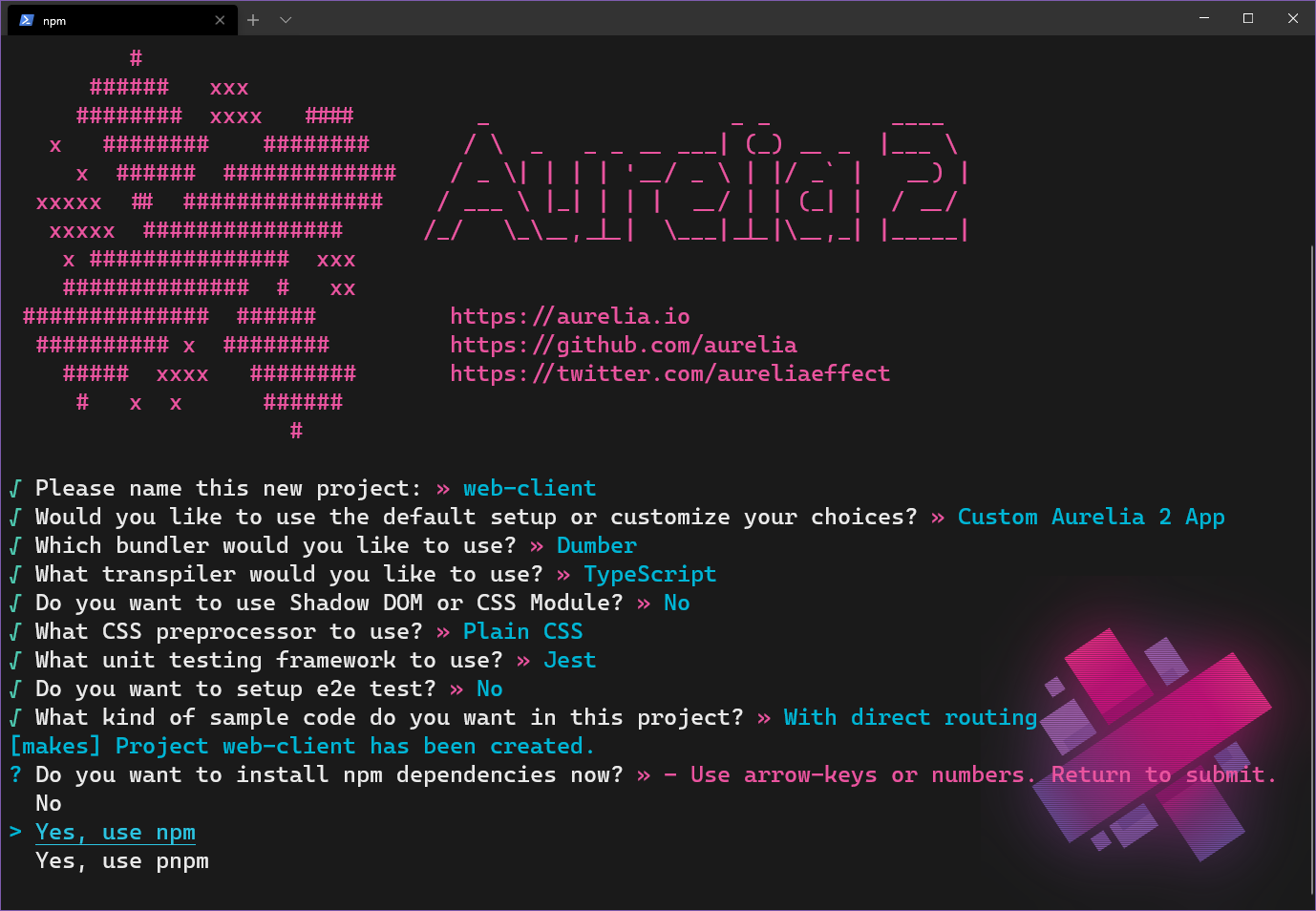


<p>Luckily the gRPC project in .NET is setup to compile <code>.proto</code> files for you! I tried doing this from the command line at first. Reason was I wanted to run one command to compile all <code>.proto</code> files for both projects at the same time. Turned out the c# experience was not as smooth as I hoped for with a command line solution.</p>


<p>However, the Visual Studio gRPC project template re-compiles the <code>.proto</code> files on every build. That solution is good enough and avoids the generated code becoming out of sync for the .NET project!</p>


<p>I solved sharing the <code>.proto</code> files between the back-end and front-end projects by putting a &#8220;protos&#8221; folder in the root of the directory, holding all <code>.proto</code> files. But for VS2019 to find the files, we need to modify the <code>csproj</code>-file and add a new <code>ItemGroup</code><img src="https://s.w.org/images/core/emoji/13.0.0/72x72/1f447.png" alt="👇" class="wp-smiley" style="height: 1em; max-height: 1em;" />.</p>


<div class="wp-block-syntaxhighlighter-code "><pre class="brush: xml; gutter: false; title: ; notranslate">
&lt;ItemGroup&gt;
	&lt;Protobuf Include=&quot;../protos/*.proto&quot; GrpcServices=&quot;Server&quot; OutputDir=&quot;%(RelativePath)Services&quot; CompileOutputs=&quot;false&quot; /&gt;
&lt;/ItemGroup&gt;
</pre></div>


<p>This will help Visual Studio to find the <code>protos</code> directory in the root and it will output the compiled files into the <code>Services</code> folder inside the project. The option <code>GrpcServices="Server"</code> tells the compiler we are only needed in compiling protobuf files needed to host a gRPC server.</p>


<h3><img src="https://s.w.org/images/core/emoji/13.0.0/72x72/1f468-200d-1f3ed.png" alt="👨‍🏭" class="wp-smiley" style="height: 1em; max-height: 1em;" />Making it work</h3>


<p>There&#8217;s a few steps needed to <code>startup.cs</code> to make the c# project work.</p>


<ol><li>Nuget &#8211; reference gRPC  and gRPC Web</li><li>Setup and use CORS</li><li>Add the gRPC endpoint for our service</li></ol>


<div class="wp-block-syntaxhighlighter-code "><pre class="brush: csharp; gutter: false; highlight: [7,8,23,24,27]; title: ; notranslate">
public class Startup
    {
        const string ERROR_REPLY = &quot;Communication with gRPC endpoints must be made through a gRPC client. To learn how to create a client, visit: https://go.microsoft.com/fwlink/?linkid=2086909&quot;;

        public void ConfigureServices(IServiceCollection services)
        {
            services.AddGrpc();
            services.AddCors(o =&gt; o.AddPolicy(&quot;AllowAll&quot;, builder =&gt;
            {
                builder.AllowAnyOrigin()
                       .AllowAnyMethod()
                       .AllowAnyHeader()
                       .WithExposedHeaders(&quot;Grpc-Status&quot;, &quot;Grpc-Message&quot;, &quot;Grpc-Encoding&quot;, &quot;Grpc-Accept-Encoding&quot;);
            }));

            List&lt;Droid&gt; droids = FakeDroidStore.GetAllDroids();
            services.AddSingleton(droids);
        }

        public void Configure(IApplicationBuilder app, IWebHostEnvironment env)
        {
            app.UseRouting();
            app.UseGrpcWeb();
            app.UseCors();
            app.UseEndpoints(endpoints =&gt;
            {
                endpoints.MapGrpcService&lt;DroidService&gt;().EnableGrpcWeb().RequireCors(&quot;AllowAll&quot;);
                endpoints.MapGet(&quot;/&quot;, async context =&gt;
                {
                    await context.Response.WriteAsync(ERROR_REPLY);
                });
            });
        }
    }
</pre></div>


<p>I also added a collection of items from a fake store to the DI container. This is just a test &#8211; don&#8217;t do that in production code! <img src="https://s.w.org/images/core/emoji/13.0.0/72x72/1f601.png" alt="😁" class="wp-smiley" style="height: 1em; max-height: 1em;" /></p>


<h2><img src="https://s.w.org/images/core/emoji/13.0.0/72x72/1f9fe.png" alt="🧾" class="wp-smiley" style="height: 1em; max-height: 1em;" />Front-end Aurelia 2 Project Setup </h2>


<p>The Aurelia 2 project was setup by running (Node is needed to be able to use <code><strong>npx</strong></code>):</p>


<div class="wp-block-syntaxhighlighter-code "><pre class="brush: plain; gutter: false; title: ; notranslate">
npx au2 new
</pre></div>


<p>Then I choose the following settings:</p>


<figure class="wp-block-image"><a href="https://mobilemancerblog.blob.core.windows.net/blog/2020/08/au2-project-setup.png"><img loading="lazy" width="1024" height="709" src="https://mobilemancerblog.blob.core.windows.net/blog/2020/08/au2-project-setup-1024x709.png" alt="au2 project setup" class="wp-image-11497" srcset="https://mobilemancerblog.blob.core.windows.net/blog/2020/08/au2-project-setup-1024x709.png 1024w, https://mobilemancerblog.blob.core.windows.net/blog/2020/08/au2-project-setup-300x208.png 300w, https://mobilemancerblog.blob.core.windows.net/blog/2020/08/au2-project-setup-768x532.png 768w, https://mobilemancerblog.blob.core.windows.net/blog/2020/08/au2-project-setup.png 1378w" sizes="(max-width: 1024px) 100vw, 1024px" /></a><figcaption>Aurelia 2 Project Setup</figcaption></figure>


<h3><img src="https://s.w.org/images/core/emoji/13.0.0/72x72/2705.png" alt="✅" class="wp-smiley" style="height: 1em; max-height: 1em;" />Installing prerequisites</h3>


<p>To work with protobuf files and compile the web-shims you need to install some files. Get the following  and make sure they are accessible in your path (on Windows):</p>


<ol><li><a rel="noreferrer noopener" aria-label="protoc (opens in a new tab)" href="https://github.com/protocolbuffers/protobuf/releases" target="_blank">protoc</a></li><li><a href="https://github.com/grpc/grpc-web/releases" target="_blank" rel="noreferrer noopener" aria-label=" (opens in a new tab)">grpc-web</a></li></ol>


<h3><img src="https://s.w.org/images/core/emoji/13.0.0/72x72/1f469-200d-1f527.png" alt="👩‍🔧" class="wp-smiley" style="height: 1em; max-height: 1em;" />Compiling .proto files from the command line</h3>


<p>Compiling the proto files for the web project was made with the protoc compiler from the command line. </p>


<p style="text-align:center" class="has-text-color has-background has-medium-font-size has-very-light-gray-color has-vivid-red-background-color">For ease of use in or project the grpc-web output is in TypeScript. <br><img src="https://s.w.org/images/core/emoji/13.0.0/72x72/26a0.png" alt="⚠" class="wp-smiley" style="height: 1em; max-height: 1em;" /> this is still a beta feature and might have issues.</p>


<p>Position in the root/protos directory and run the following. (It should be on the same line!)</p>


<div class="wp-block-syntaxhighlighter-code "><pre class="brush: powershell; gutter: false; title: ; notranslate">
protoc droids.proto --js_out=import_style=commonjs:../web-client/src/proto/gen --grpc-web_out=import_style=typescript,mode=grpcwebtext:../web-client/src/proto/gen
</pre></div>


<p>This will compile the protobuf and put the generated files inside the web project in the folder <code>web-client/src/proto/gen</code>.</p>


<h3><img src="https://s.w.org/images/core/emoji/13.0.0/72x72/1f468-200d-1f3ed.png" alt="👨‍🏭" class="wp-smiley" style="height: 1em; max-height: 1em;" />Making it work </h3>


<p>Calling the gRPC Service is quite forward. First instantiate a <code>ServiceClient</code>, then a service <code>Request</code>. Then call the service using the request.</p>


<div class="wp-block-syntaxhighlighter-code "><pre class="brush: jscript; gutter: false; title: ; notranslate">
    const client = new DroidServiceClient(&quot;https://localhost:5001&quot;);
    const request = new DroidsRequest();
</pre></div>


<p>Note, in the proto file, the name of the service is GetAll. This is converted to getAll following JS standards. The return type however looks like follows:</p>


<div class="wp-block-syntaxhighlighter-code "><pre class="brush: csharp; gutter: false; title: ; notranslate">
message DroidsReply {
  repeated Droid droids = 1;
}
</pre></div>


<p>The repeated keyword indicates that the field is a collection of values. This will lead to the the type being suffixed with <strong><code>List</code></strong> and accessible as droidsList.</p>


<p>There&#8217;s two ways to work with the reply type. One is getting the <code>droidsList</code> type from the response. Then when binding to that in the view, we use getters created on the type, for ex (and here we see another repeated property getting the <strong><code>List</code></strong> suffix):</p>


<div class="wp-block-syntaxhighlighter-code "><pre class="brush: xml; gutter: false; title: ; notranslate">
  &lt;div&gt;Plating colors available is ${droid.getPlatingColorList()}&lt;/div&gt;
</pre></div>


<p>Another way is to use the <strong><code>toObject</code></strong> method on the response and get the &#8220;raw&#8221; <strong><code>droidsList</code></strong> from that.</p>


<div class="wp-block-syntaxhighlighter-code "><pre class="brush: plain; title: ; notranslate">
  this.droids = response.toObject().droidsList;
</pre></div>


<p> This enables us to bind to the view without referring to methods, which perhaps feels more &#8220;Aurelia native&#8221;.  Do note below that the reserved word <code><strong>class</strong></code> is changed to <strong><code>pb_class</code></strong> <img src="https://s.w.org/images/core/emoji/13.0.0/72x72/1f44d.png" alt="👍" class="wp-smiley" style="height: 1em; max-height: 1em;" /></p>


<div class="wp-block-syntaxhighlighter-code "><pre class="brush: plain; title: ; notranslate">
 &lt;div&gt;Class: ${droid.pb_class}&lt;/div&gt;
</pre></div>


<h4><img src="https://s.w.org/images/core/emoji/13.0.0/72x72/1f9f1.png" alt="🧱" class="wp-smiley" style="height: 1em; max-height: 1em;" />Using JavaScript Files in our TypeScript Project</h4>


<p>Since one of the files from the generated protobuf code is a <strong><code>.js</code></strong> file, we need to tell the ts compiler to allow <strong><code>.js</code></strong> files as well. Modify the tsconfig and add the compiler option:</p>


<div class="wp-block-syntaxhighlighter-code "><pre class="brush: plain; title: ; notranslate">
&quot;allowJs&quot;: true
</pre></div>


<p>If using dumber to build and bundle the project, then modify <code><strong>gulpfile.js</strong></code> and add a step to include <code><strong>js</strong></code> files in the build, see line 137 <img src="https://s.w.org/images/core/emoji/13.0.0/72x72/1f447.png" alt="👇" class="wp-smiley" style="height: 1em; max-height: 1em;" /></p>


<div class="wp-block-syntaxhighlighter-code "><pre class="brush: plain; first-line: 128; highlight: [137]; title: ; notranslate">
function build() {
  // Merge all js/css/html file streams to feed dumber.
  // dumber knows nothing about .ts/.less/.scss/.md files,
  // gulp-* plugins transpiled them into js/css/html before
  // sending to dumber.
  return (
    merge2(
      gulp.src(&quot;src/**/*.json&quot;),
      buildJs(&quot;src/**/*.ts&quot;),
      buildJs(&quot;src/**/*.js&quot;),
      buildHtml(&quot;src/**/*.html&quot;),
      buildCss(&quot;src/**/*.css&quot;)
    )
</pre></div>


<h2><img src="https://s.w.org/images/core/emoji/13.0.0/72x72/1f3a2.png" alt="🎢" class="wp-smiley" style="height: 1em; max-height: 1em;" />Running the Project</h2>


<p>Build and start the back-end project from Visual Studio 2019. Install npm dependencies and run the front-end project with <code><strong>npm start</strong></code>. The web-client should open in a new browser. After pressing the &#8220;Get All Droids&#8221; button, if everything works, two lists of droid info will be displayed.</p>


<figure class="wp-block-image"><img loading="lazy" width="786" height="1024" src="https://mobilemancerblog.blob.core.windows.net/blog/2020/07/image-786x1024.png" alt="Screenshot showing browser displaying Aurelia SPA with a list of droids from the gRPC web call" class="wp-image-11354" srcset="https://mobilemancerblog.blob.core.windows.net/blog/2020/07/image-786x1024.png 786w, https://mobilemancerblog.blob.core.windows.net/blog/2020/07/image-230x300.png 230w, https://mobilemancerblog.blob.core.windows.net/blog/2020/07/image-768x1001.png 768w, https://mobilemancerblog.blob.core.windows.net/blog/2020/07/image.png 821w" sizes="(max-width: 786px) 100vw, 786px" /><figcaption>Data fetched successfully from the Aurelia SPA via gRPC</figcaption></figure>


<h2><img src="https://s.w.org/images/core/emoji/13.0.0/72x72/1f52e.png" alt="🔮" class="wp-smiley" style="height: 1em; max-height: 1em;" />Conclusion</h2>


<p>The size of the gRPC payload sent to the client is about half the size of the json payload (approx 2kb vs 4kb). So that&#8217;s pretty cool! If you are having having huge payloads in your projects, it means there&#8217;s lot&#8217;s to gain form gRPC.</p>


<p>The developer experience I&#8217;d say feels slightly off. Maybe it&#8217;s just a case of &#8220;who moved my <img src="https://s.w.org/images/core/emoji/13.0.0/72x72/1f9c0.png" alt="🧀" class="wp-smiley" style="height: 1em; max-height: 1em;" />&#8221;? Automating the protobuf compilation in the front-end project as well, making it a build step, would probably help a bit. Using the getters on the reply object also feels slightly off when binding to views in the front-end, but since it&#8217;s not necessary to use them I guess that&#8217;s ok.</p>


<p>Using the protobuf defined types directly in the back-end project also feels slightly &#8220;off&#8221;. Would be great to get some feedback from developers actually using gRPC in production if they are using the protobuf defined types, or other abstractions for them?!</p>


<p>Then there is still the issue of native support in browsers and hosting services. In my opinion, the coolest part of gRPC is streaming, and this needs to be sorted to fully enjoy gRPC. However, in some near future, I suspect a lot of web apps will transition to gRPC from using json based API&#8217;s.</p>


<p>As for service to service communication, I&#8217;d be willing to try out gRPC. Especially if the setup enables streaming, that&#8217;d be great for some applications <img src="https://s.w.org/images/core/emoji/13.0.0/72x72/1f603.png" alt="😃" class="wp-smiley" style="height: 1em; max-height: 1em;" /></p>


<h2><img src="https://s.w.org/images/core/emoji/13.0.0/72x72/1f517.png" alt="🔗" class="wp-smiley" style="height: 1em; max-height: 1em;" />Resources</h2>


<p>Find the code on my <a href="https://github.com/mobilemancer/au2-grpc">github</a><br>Read more about gRPC at <a href="https://grpc.io/">grpc.io</a><br>Aurelia 2 <a href="https://docs.aurelia.io/">documentation</a></p>


<p></p>
<p>The post <a rel="nofollow" href="https://mobilemancer.com/2020/07/09/using-grpc-in-aurelia-2/">Using gRPC in Aurelia 2</a> appeared first on <a rel="nofollow" href="https://mobilemancer.com">mobilemancer</a>.</p>
]]></content>
		
					<link rel="replies" type="text/html" href="https://mobilemancer.com/2020/07/09/using-grpc-in-aurelia-2/#comments" thr:count="1"/>
			<link rel="replies" type="application/atom+xml" href="https://mobilemancer.com/2020/07/09/using-grpc-in-aurelia-2/feed/atom/" thr:count="1"/>
			<thr:total>1</thr:total>
			</entry>
		<entry>
		<author>
			<name>Andreas</name>
					</author>

		<title type="html"><![CDATA[Faster, Better, Cheaper, Greener &#8211; AureliaWeekly v2]]></title>
		<link rel="alternate" type="text/html" href="https://mobilemancer.com/2020/06/29/faster-better-cheaper-aureliaweekly-2/" />

		<id>http://mobilemancer.com/?p=11275</id>
		<updated>2020-10-15T07:55:00Z</updated>
		<published>2020-06-29T10:00:27Z</published>
		<category scheme="https://mobilemancer.com" term="Coding" /><category scheme="https://mobilemancer.com" term="Aurelia 2" /><category scheme="https://mobilemancer.com" term="Azure" /><category scheme="https://mobilemancer.com" term="Web Development" />
		<summary type="html"><![CDATA[<p>During the Easter I made a push to finish up a project I&#8217;ve had running for a long while now (spare time is nothing I got an abundance of 🤣). A total remake of AureliaWeekly.com! It&#8217;s what I&#8217;ve been spending</p>
<p>The post <a rel="nofollow" href="https://mobilemancer.com/2020/06/29/faster-better-cheaper-aureliaweekly-2/">Faster, Better, Cheaper, Greener &#8211; AureliaWeekly v2</a> appeared first on <a rel="nofollow" href="https://mobilemancer.com">mobilemancer</a>.</p>
]]></summary>

					<content type="html" xml:base="https://mobilemancer.com/2020/06/29/faster-better-cheaper-aureliaweekly-2/"><![CDATA[
<p>During the Easter I made a push to finish up a project I&#8217;ve had running for a long while now (spare time is nothing I got an abundance of <img src="https://s.w.org/images/core/emoji/13.0.0/72x72/1f923.png" alt="🤣" class="wp-smiley" style="height: 1em; max-height: 1em;" />). A total remake of <a rel="noreferrer noopener" aria-label=" (opens in a new tab)" href="https://www.aureliaweekly.com" target="_blank">AureliaWeekly.com</a>! It&#8217;s what I&#8217;ve been spending most of my spare time on since early fall <img src="https://s.w.org/images/core/emoji/13.0.0/72x72/1f635.png" alt="😵" class="wp-smiley" style="height: 1em; max-height: 1em;" /> It&#8217;s been worth it though! Not only is it faster, more cost effective and environmentally friendly, it&#8217;s also using the brand new <strong>Aurelia 2</strong>! </p>


<h2>Short and sweet!</h2>


<p>My (current) philosophy regarding side projects is: Keep them short and sweet! We all know feature creep and scope is a big problem for software projects. Even more for side projects I think. Sure, it&#8217;s fun to ideate all the bells and whistles. Then we start making small POCs, testing if they are feasible. And all off a sudden, six months have passed and all that&#8217;s done is 40% of the main feature and a whole slew of unfinished POCs of small features <img src="https://s.w.org/images/core/emoji/13.0.0/72x72/1f643.png" alt="🙃" class="wp-smiley" style="height: 1em; max-height: 1em;" /></p>


<p>Well, this project took ages. A lot of flip-flopping was done over technology choices, and a whole lot of  Yak-shaving later, it&#8217;s finally finished about a year after the first datamigration I made. <img src="https://s.w.org/images/core/emoji/13.0.0/72x72/1f602.png" alt="😂" class="wp-smiley" style="height: 1em; max-height: 1em;" /></p>


<h2>The Goal?</h2>


<p>So, why did I want to rewrite <em>&#8220;The Weekly&#8221;</em>?</p>


<p>I wanted to make the solution slightly faster and most of all I wanted to change the architecture. The first version was actually hosted as an Azure Web App and it was actually a .NET Core project that was delivering the static web pages.</p>


<p>Also, the data layer needed an adjustment. Cosmos DB was the database I choose for v1, and although I love Cosmos, it&#8217;s just to expensive for such a small project as <em>&#8220;The Weekly&#8221;</em>.</p>


<p>The first port I made was just using the same front end code, but moved to being delivered as static web pages from an Azure Storage Account. Then halfway through the project, Aurelia 2 (still in pre-beta) was so stable I decided to rewrite the entire front-end using au2 just for kicks. Just between you and me, it made the project take a bit longer but made it so much more fun! <img src="https://s.w.org/images/core/emoji/13.0.0/72x72/1f601.png" alt="😁" class="wp-smiley" style="height: 1em; max-height: 1em;" /></p>


<h2>Tl;dr;</h2>


<p> <img src="https://s.w.org/images/core/emoji/13.0.0/72x72/2705.png" alt="✅" class="wp-smiley" style="height: 1em; max-height: 1em;" /> Everything I set out to do is achieved! Speed and performance improved by leaps and bounds, and the cost got totally slashed and is now less than a 100th of the operational cost of running v1! </p>


<h2><img src="https://s.w.org/images/core/emoji/13.0.0/72x72/1f578.png" alt="🕸" class="wp-smiley" style="height: 1em; max-height: 1em;" />Front end written in au2</h2>


<p>This part was an absolute pleasure! It&#8217;s still early days and during the rewrite au2 was still in pre-beta stage. Oddly enough this hardly cost me any extra time. I think I found one or two things that did not work as expected, and the positive thing is that after reporting my findings they were patched and the fix was released within hours! Huge thanks to all the people in the Aurelia Core Team who helped out with fixes, answering questions, discussing architecture and giving me feedback on the site during development <img src="https://s.w.org/images/core/emoji/13.0.0/72x72/1f647-200d-2642-fe0f.png" alt="🙇‍♂️" class="wp-smiley" style="height: 1em; max-height: 1em;" /></p>


<p>I find au2 a real pleasure to work with. I think my favorites so far is the new start-up system and how powerful a tool DI have become. The new router is also spectacularly fun to work with and I hope you try it out soon and see for yourselves!</p>


<h2><img src="https://s.w.org/images/core/emoji/13.0.0/72x72/26a1.png" alt="⚡" class="wp-smiley" style="height: 1em; max-height: 1em;" />Moving API to Azure Functions</h2>


<p>The API for v1 was a .NET Core Web API that was in the same project as the front end. Convenient to host both Front end and API from the same web server because of CORS etc. But as I wanted to cut cost, I decided to move the API to an Azure Function App. Since the project took so long time for me  there was a new version released of Azure Functions during my rewrite. And as I love new shiny things I of course decided to upgrade straight away <img src="https://s.w.org/images/core/emoji/13.0.0/72x72/1f606.png" alt="😆" class="wp-smiley" style="height: 1em; max-height: 1em;" /> This was pretty straightforward as it was just upgrading the version of .NET Core used and some additional tweaks to use a <code>Startup</code> class.</p>


<p>The Yak-shaving really began when I had finished most of the API and decided to get cracking on the endpoints that needs authentication. How does one handle that the best way in Azure Functions?</p>


<p>The option to use, what at the time was known as Easy Auth, seemed to be a nice and smooth way to handle authentication. It turned out that it was inflexible, requiring auth for all endpoints. This was not what I wanted, as almost all the functionality is public and don&#8217;t need authorization at all.</p>


<p>After some searching, I found <a href="https://github.com/vitalybibikov/AzureExtensions.FunctionToken">AzureExtensions.FunctionToken</a> which turned out to be a real gem <img src="https://s.w.org/images/core/emoji/13.0.0/72x72/1f48e.png" alt="💎" class="wp-smiley" style="height: 1em; max-height: 1em;" /> This extension enables a per-endpoint authorization behavior, as well as handling claims etc. Big thanks to Vitaly Bibikov for this project <img src="https://s.w.org/images/core/emoji/13.0.0/72x72/1f917.png" alt="🤗" class="wp-smiley" style="height: 1em; max-height: 1em;" /></p>


<h2><img src="https://s.w.org/images/core/emoji/13.0.0/72x72/1f4be.png" alt="💾" class="wp-smiley" style="height: 1em; max-height: 1em;" />Rewriting the data layer</h2>


<p>I really like Cosmos DB! So that was my pick for data layer for the first version. However, I don&#8217;t like the pricing model&#8230; And as this project started well before Cosmos DB came out with their <a href="https://docs.microsoft.com/en-gb/azure/cosmos-db/optimize-dev-test#azure-cosmos-db-free-tier" target="_blank" rel="noreferrer noopener" aria-label="free tier (opens in a new tab)">free tier</a>. <img src="https://s.w.org/images/core/emoji/13.0.0/72x72/1f61e.png" alt="😞" class="wp-smiley" style="height: 1em; max-height: 1em;" /></p>


<p>Taking cost into consideration, there is no better alternative then Azure Storage Tables. So I started migrating my data over to Azure Storage and with just some small changes to the data structure, from the Cosmos version, it was easily accomplished.</p>


<p>My main concern was performance. And as much as I wanted a really cost efficient system, it also had to be snappy and responsive. On paper, Cosmos promises awesome performance and Azure Storage have other selling points except performance.</p>


<h3><img src="https://s.w.org/images/core/emoji/13.0.0/72x72/1f684.png" alt="🚄" class="wp-smiley" style="height: 1em; max-height: 1em;" />Adding an Index with Azure Cognitive Search</h3>


<p>To enhance response time when asking for all submissions I created a search  index with Azure Cognitive Search. My Function API then asked the index for Submissions instead of talking directly to Azure Table Storage.</p>


<p>Azure Search used to be one of these things that cost an arm and a leg before, but they have a free tier now so that was totally doable with my cost constraints in mind!</p>


<h4><img src="https://s.w.org/images/core/emoji/13.0.0/72x72/1f9ea.png" alt="🧪" class="wp-smiley" style="height: 1em; max-height: 1em;" /><strong>Time to perf test!</strong></h4>


<p>Fun thing happened! It turned out that the difference in response time for using Search, compared to querying the Azure Storage Table directly, was totally negligible! So I removed the search index solution, as it just added technical complexity.</p>


<p>However, keep in mind that this is a result of my data model and my usage patterns! If I had a more complex model or more advanced queries, then Azure Cognitive Search would be the better solution.</p>


<h2><img src="https://s.w.org/images/core/emoji/13.0.0/72x72/1f30d.png" alt="🌍" class="wp-smiley" style="height: 1em; max-height: 1em;" />Hosting</h2>


<p>As v1 was served through a .NET Core app there was no other real solution than hosting it on an Azure Web App. For a static spa like <em>&#8220;The Weekly&#8221;</em>, this is just a bad move. To be able to use a certificate, the minimum required tier at the time of deploying v1 was the <strong>S1</strong> App Service Plan. While this is not unreasonably expensive, it&#8217;s still a cost. Especially considering the site is a hobby project.</p>


<p>The more performant and cost effective solution was to use <a href="https://mobilemancer.com/2018/12/17/aurelia-app-azure-storage-static-website/" target="_blank" rel="noreferrer noopener" aria-label="static web page hosting in Azure Storage (opens in a new tab)">static web page hosting in Azure Storage</a>. I&#8217;ve played around with it before and quite liked it. But what about equal speed for all users?</p>


<p>There is the option of setting up a secondary endpoint in a different regions. But then there&#8217;s need to have a load balancer in front of the Storage Accounts to route traffic to the correct endpoint. This could be solved using Azure API Management. This would also solve the HTTPS issue. Since a custom domain can be mapped to a static website, but it can&#8217;t use HTTPS (and this is after all 2020&#8230;)!</p>


<blockquote class="wp-block-quote"><p> You can make your static website available via a custom domain.<br>It&#8217;s easier to enable HTTP access for your custom domain, because Azure Storage natively supports it. To enable HTTPS, you&#8217;ll have to use Azure CDN because Azure Storage does not yet natively support HTTPS with custom domains. see&nbsp;<a href="https://docs.microsoft.com/en-us/azure/storage/blobs/storage-custom-domain-name">Map a custom domain to an Azure Blob Storage endpoint</a>&nbsp;for step-by-step guidance.<br>If the storage account is configured to&nbsp;<a href="https://docs.microsoft.com/en-us/azure/storage/common/storage-require-secure-transfer">require secure transfer</a>&nbsp;over HTTPS, then users must use the HTTPS endpoint. </p><cite>&#8211; <a href="https://docs.microsoft.com/en-us/azure/storage/blobs/storage-blob-static-website#mapping-a-custom-domain-to-a-static-website-url" target="_blank" rel="noreferrer noopener" aria-label="From the Azure Static websites documentation (opens in a new tab)">From the Azure Static websites documentation</a></cite></blockquote>


<h3><img src="https://s.w.org/images/core/emoji/13.0.0/72x72/1f680.png" alt="🚀" class="wp-smiley" style="height: 1em; max-height: 1em;" />Next move &#8211; Azure CDN</h3>


<p>As the section in the documentation states <img src="https://s.w.org/images/core/emoji/13.0.0/72x72/1f446.png" alt="👆" class="wp-smiley" style="height: 1em; max-height: 1em;" /> I decided to try CDN hosting. Turns out hosting on CDN is no problem on a budget either <img src="https://s.w.org/images/core/emoji/13.0.0/72x72/1f601.png" alt="😁" class="wp-smiley" style="height: 1em; max-height: 1em;" /> There are a few CDN solutions accessible from Azure as well, so you got options. I choose between Standard Microsoft and Standard Verizon. As it doesn&#8217;t cost anything to create the services I created both versions. I did a couple of tests looking at the download times in the network tab in my browser. My perception was that the Verizon CDN was more performant and I was about to remove the Miscrosoft version, when I tested the site with <a href="https://www.fastorslow.com/">fastorslow.com</a>. Turns out I was wrong. The Microsoft Standard CDN had a more even performance on a global scale! <img src="https://s.w.org/images/core/emoji/13.0.0/72x72/1f30e.png" alt="🌎" class="wp-smiley" style="height: 1em; max-height: 1em;" /></p>


<h4>Speed difference comparing v1 to v2</h4>


<p>As a fun comparison, below is the  <a href="https://www.fastorslow.com/">fastorslow</a> score difference between v1 and v2 <img src="https://s.w.org/images/core/emoji/13.0.0/72x72/1f604.png" alt="😄" class="wp-smiley" style="height: 1em; max-height: 1em;" /> That&#8217;s a substantial increase in performance right there! Total blocking time is the only offender, and that drop in later Aurelia 2 versions as this is only the pre-beta release of au2 <img src="https://s.w.org/images/core/emoji/13.0.0/72x72/1f973.png" alt="🥳" class="wp-smiley" style="height: 1em; max-height: 1em;" /></p>



<figure class="wp-block-image"><a href="https://mobilemancerblog.blob.core.windows.net/blog/2020/06/aureliaweekly_perf.png" target="_blank" rel="noreferrer noopener"><img loading="lazy" width="1024" height="191" src="https://mobilemancerblog.blob.core.windows.net/blog/2020/06/aureliaweekly_perf-1024x191.png" alt="comparison numbers from v1 to v2" class="wp-image-11289" srcset="https://mobilemancerblog.blob.core.windows.net/blog/2020/06/aureliaweekly_perf-1024x191.png 1024w, https://mobilemancerblog.blob.core.windows.net/blog/2020/06/aureliaweekly_perf-300x56.png 300w, https://mobilemancerblog.blob.core.windows.net/blog/2020/06/aureliaweekly_perf-768x143.png 768w" sizes="(max-width: 1024px) 100vw, 1024px" /></a><figcaption>v1 on the left, v2 on the right</figcaption></figure>


<h4>The one drawback</h4>


<p>The one problem with Azure CDN is that it doesnt support naked domains. Hence only <a href="https://www.aureliaweekly.com">www.aureliaweekly.com</a> works right now and aureliaweekly.com reports a privacy issue. There&#8217;s a trick based solution to this via CloudFlare, and it&#8217;s actually free, I will see if I can get around to set that up during vacation. However it feels totally like yak-shaving, and shouldn&#8217;t be needed. There&#8217;s also a <a href="https://feedback.azure.com/forums/217313-networking/suggestions/31221439-cdn-allow-root-domain-for-custom-domains">user voice item</a> for this task but has no response since 2018?! Rumors has it some one is actually working on this over in Redmond, but if or when we&#8217;ll see a good solution to this&#8230; ¯\_(ツ)_/¯ </p>


<h2><img src="https://s.w.org/images/core/emoji/13.0.0/72x72/1f4b0.png" alt="💰" class="wp-smiley" style="height: 1em; max-height: 1em;" />Cost</h2>


<p>One of the major drivers of this project was to cut operational cost. So, did I manage to cut cost?</p>


<p>The cost was significantly reduced when the largest culprits from the previous architecture were replaced. When I started the project I suspected I&#8217;d cut cost to a tenth or even more if I was lucky. I must admit I hadn&#8217;t done any napkin math then, it was just a (bad) guesstimate.</p>


<p>The cost for v1 of <em>&#8220;The Weekly&#8221;</em> for the May &#8211; June billing period can be seen below. The cost is mostly due to Cosmos DB (~60$) and the App Service (~38$).</p>


<figure class="wp-block-image"><img loading="lazy" width="1024" height="505" src="https://mobilemancerblog.blob.core.windows.net/blog/2020/06/weekly_v1_may-june-1024x505.png" alt="" class="wp-image-11293" srcset="https://mobilemancerblog.blob.core.windows.net/blog/2020/06/weekly_v1_may-june-1024x505.png 1024w, https://mobilemancerblog.blob.core.windows.net/blog/2020/06/weekly_v1_may-june-300x148.png 300w, https://mobilemancerblog.blob.core.windows.net/blog/2020/06/weekly_v1_may-june-768x378.png 768w, https://mobilemancerblog.blob.core.windows.net/blog/2020/06/weekly_v1_may-june.png 1242w" sizes="(max-width: 1024px) 100vw, 1024px" /><figcaption>Cost for v1 in the billing period May &#8211; June 2020</figcaption></figure>


<p>I&#8217;ve yet to run a full months worth of &#8220;real&#8221; usage for v2, but the below graph shows the June &#8211; July billing period, with estimated cost for the last few days. Even if the estimate of the last few days in June now doubles, I&#8217;d still say it&#8217;s an epic win <img src="https://s.w.org/images/core/emoji/13.0.0/72x72/1f606.png" alt="😆" class="wp-smiley" style="height: 1em; max-height: 1em;" /></p>


<figure class="wp-block-image"><img loading="lazy" width="1024" height="448" src="https://mobilemancerblog.blob.core.windows.net/blog/2020/06/weekly_v2_june-jul-1024x448.png" alt="" class="wp-image-11294" srcset="https://mobilemancerblog.blob.core.windows.net/blog/2020/06/weekly_v2_june-jul-1024x448.png 1024w, https://mobilemancerblog.blob.core.windows.net/blog/2020/06/weekly_v2_june-jul-300x131.png 300w, https://mobilemancerblog.blob.core.windows.net/blog/2020/06/weekly_v2_june-jul-768x336.png 768w, https://mobilemancerblog.blob.core.windows.net/blog/2020/06/weekly_v2_june-jul.png 1243w" sizes="(max-width: 1024px) 100vw, 1024px" /><figcaption>Cost for v2 in the billing period June &#8211; July 2020</figcaption></figure>


<p>The operational cost of v2 is thus less than a 200th of that of v1! If we want to be real picky and use the numbers from the graphs above, a 277th of v1 <img src="https://s.w.org/images/core/emoji/13.0.0/72x72/1f601.png" alt="😁" class="wp-smiley" style="height: 1em; max-height: 1em;" /> </p>


<p>To be fully transparent, the cost for the Active Directory isn&#8217;t included in the graph for v2 above, but that cost is about two pennies a month so that won&#8217;t really change anything.</p>


<h2><img src="https://s.w.org/images/core/emoji/13.0.0/72x72/1f343.png" alt="🍃" class="wp-smiley" style="height: 1em; max-height: 1em;" />Environmental aspect</h2>


<p>Measuring environmental impact isn&#8217;t easy and there is no hard figures to get from Azure afaik. But there&#8217;s little doubt v2 outshines v1 when it comes to sustainable software engineering.</p>


<div class="wp-block-image"><figure class="aligncenter"><img loading="lazy" width="500" height="206" src="https://mobilemancerblog.blob.core.windows.net/blog/2020/06/supergreen.gif" alt="" class="wp-image-11311"/></figure></div>


<h3>Energy Proportionality</h3>


<p>A measure of power consumed per work unit. Less is better <img src="https://s.w.org/images/core/emoji/13.0.0/72x72/1f642.png" alt="🙂" class="wp-smiley" style="height: 1em; max-height: 1em;" /></p>


<ul><li>Power consumed by v2 Azure Storage &lt; power consumed by v1 Cosmos DB.</li><li>Power consumed by v2 CDN &lt; power consumed by Web App Shared Instance.</li></ul>


<h3>Networking</h3>


<p>Reducing the amount of data and distance data must travel to reach consumer leads to a smaller carbon footprint.</p>


<p>Using Aurelia 2 helped reducing the payload significantly. As well as skipping some third party dependencies and writing that code myself. Payload of v1 was <strong>~625kb</strong> vs the payload of v2 that clocks in super low at <strong><em>~141kb</em></strong>! <img src="https://s.w.org/images/core/emoji/13.0.0/72x72/1fa81.png" alt="🪁" class="wp-smiley" style="height: 1em; max-height: 1em;" /></p>


<p>With v2 using CDN&#8217;s there&#8217;s more endpoints hosting the application compared to the one Web App. However the nodes are have a higher utilization grade. An added benefit is that the CDN compression is really good. A benefit is also the reduction of distance between consumer and data!</p>


<p style="background-color:#009b62;text-align:center" class="has-text-color has-background has-medium-font-size has-very-light-gray-color">For more a more in depth take on <em>Green Software Engineering</em>,<br>check out  <strong><a rel="noreferrer noopener" aria-label=" (opens in a new tab)" href="https://principles.green/" target="_blank"><img src="https://s.w.org/images/core/emoji/13.0.0/72x72/1f331.png" alt="🌱" class="wp-smiley" style="height: 1em; max-height: 1em;" /> Principles.Green</a></strong> </p>


<h2><img src="https://s.w.org/images/core/emoji/13.0.0/72x72/1f511.png" alt="🔑" class="wp-smiley" style="height: 1em; max-height: 1em;" />Key takeaways</h2>


<ol><li>Aurelia 2 is super fun to code in! I look forward to the beta-release that will be out soon<img src="https://s.w.org/images/core/emoji/13.0.0/72x72/2122.png" alt="™" class="wp-smiley" style="height: 1em; max-height: 1em;" /> and hope you will enjoy it as much as I do <img src="https://s.w.org/images/core/emoji/13.0.0/72x72/1f92f.png" alt="🤯" class="wp-smiley" style="height: 1em; max-height: 1em;" /></li><li>Side projects take a long time if you pivot technologies multiple times <img src="https://s.w.org/images/core/emoji/13.0.0/72x72/1f629.png" alt="😩" class="wp-smiley" style="height: 1em; max-height: 1em;" /></li><li>Authentication is still not easy for a lot of MSFT technologies. It totally should be by now <img src="https://s.w.org/images/core/emoji/13.0.0/72x72/1f510.png" alt="🔐" class="wp-smiley" style="height: 1em; max-height: 1em;" /></li><li>Azure Functions is a lot of fun <img src="https://s.w.org/images/core/emoji/13.0.0/72x72/26a1.png" alt="⚡" class="wp-smiley" style="height: 1em; max-height: 1em;" /><img src="https://s.w.org/images/core/emoji/13.0.0/72x72/1f60d.png" alt="😍" class="wp-smiley" style="height: 1em; max-height: 1em;" /></li><li>Azure Storage Tables can be a great part of your data layer, given requirements of the data <img src="https://s.w.org/images/core/emoji/13.0.0/72x72/1f4be.png" alt="💾" class="wp-smiley" style="height: 1em; max-height: 1em;" /></li><li>Cloud costing is not easy. Even if you act according to best practice and recommendations, there is most certainly other ways to go about things that will be more cost effective (and probably almost as performant) <img src="https://s.w.org/images/core/emoji/13.0.0/72x72/1f4b8.png" alt="💸" class="wp-smiley" style="height: 1em; max-height: 1em;" /></li></ol>


<p>Happy Coding! <img src="https://s.w.org/images/core/emoji/13.0.0/72x72/1f60a.png" alt="😊" class="wp-smiley" style="height: 1em; max-height: 1em;" /></p>
<p>The post <a rel="nofollow" href="https://mobilemancer.com/2020/06/29/faster-better-cheaper-aureliaweekly-2/">Faster, Better, Cheaper, Greener &#8211; AureliaWeekly v2</a> appeared first on <a rel="nofollow" href="https://mobilemancer.com">mobilemancer</a>.</p>
]]></content>
		
					<link rel="replies" type="text/html" href="https://mobilemancer.com/2020/06/29/faster-better-cheaper-aureliaweekly-2/#comments" thr:count="8"/>
			<link rel="replies" type="application/atom+xml" href="https://mobilemancer.com/2020/06/29/faster-better-cheaper-aureliaweekly-2/feed/atom/" thr:count="8"/>
			<thr:total>8</thr:total>
			</entry>
		<entry>
		<author>
			<name>Andreas</name>
					</author>

		<title type="html"><![CDATA[Azure DevOps Pipeline for Static Aurelia Apps]]></title>
		<link rel="alternate" type="text/html" href="https://mobilemancer.com/2019/02/11/azure-devops-pipeline-static-aurelia-apps/" />

		<id>http://mobilemancer.com/?p=11242</id>
		<updated>2019-02-18T17:36:52Z</updated>
		<published>2019-02-11T18:14:44Z</published>
		<category scheme="https://mobilemancer.com" term="Coding" /><category scheme="https://mobilemancer.com" term="Aurelia" /><category scheme="https://mobilemancer.com" term="Azure" /><category scheme="https://mobilemancer.com" term="DevOps" /><category scheme="https://mobilemancer.com" term="Web Development" />
		<summary type="html"><![CDATA[<p>For those who tried out hosting their Aurelia apps as a static website on Azure Storage, and liked it. Here&#8217;s a yaml pipeline description that will make it super easy to deploy it in a proper CI/CD fashion with Azure</p>
<p>The post <a rel="nofollow" href="https://mobilemancer.com/2019/02/11/azure-devops-pipeline-static-aurelia-apps/">Azure DevOps Pipeline for Static Aurelia Apps</a> appeared first on <a rel="nofollow" href="https://mobilemancer.com">mobilemancer</a>.</p>
]]></summary>

					<content type="html" xml:base="https://mobilemancer.com/2019/02/11/azure-devops-pipeline-static-aurelia-apps/"><![CDATA[
<p>For those who tried out hosting their Aurelia apps as a <a href="https://docs.microsoft.com/en-us/azure/storage/blobs/storage-blob-static-website" target="_blank" rel="noreferrer noopener" aria-label="static website (opens in a new tab)">static website</a> on Azure Storage, and liked it. Here&#8217;s a yaml pipeline description that will make it super easy to deploy it in a proper CI/CD fashion with Azure DevOps!</p>


<p>For those who haven&#8217;t tested but want to try static web hosting in Azure Storage, check out my previous post: <a href="http://mobilemancer.com/2018/12/17/aurelia-app-azure-storage-static-website/">Hosting an Aurelia App on Azure Storage Static Websites</a></p>


<p>TLDR; <a href="#yaml">Show me the yaml!</a></p>


<h2>The Pipeline</h2>


<p>Here&#8217;s a short description of what the pipeline does:</p>


<div class="wp-block-image"><figure class="aligncenter"><img src="https://mobilemancerblog.blob.core.windows.net/blog/2019/02/MoreYaml.png" alt="" class="wp-image-11246"/></figure></div>


<ol><li>Trigger the pipeline when any change is committed to master.</li><li>Select a machine type from the build pool.</li><li>Position in the app root (mine being <code>src/web-app</code>), and install npm packages</li><li>Run a npm command called &#8220;build&#8221;. <em>This is where you setup how you want your app to be built.</em></li><li>Use the <code>CopyFiles</code> task to copy the build artifacts to the <code>ArtifactStagingDirectory.</code></li><li>Use the <code>AzureFileCopy</code> task to deploy the artifacts to Azure Blob Storage.</li></ol>


<h2 id="yaml">The yaml Pipeline Definition</h2>


<p>If you don&#8217;t have a pipeline description already, create a file in the root of your project and name it <strong>azure-pipelines.yml</strong>, then copy the yaml content below in to it.</p>


<p><strong>Beware!</strong> You need to replace the following variables, in the yaml file, with your proper Azure account values:</p>


<ul><li> NAME_OF_SUBSCRIPTION = Name of your subscription.</li><li> NAME_OF_STORAGE_ACCOUNT = The name of your storage account.</li><li> NAME_OF_RESOURCE_GROUP = The name of your resource group.</li></ul>


<div class="wp-block-syntaxhighlighter-code "><pre class="brush: plain; gutter: false; title: ; notranslate">
trigger:
- master

pool:
  vmImage: 'vs2017-win2016'

steps:
- task: NodeTool@0
  inputs:
    versionSpec: '8.x'
  displayName: 'Install Node.js'

- script: |
    cd src/web-app # The root of your Aurelia app
    npm install
  displayName: 'npm install'

- script: |
    cd src/web-app
    npm run build
  displayName: 'npm build'

# Copy Files
- task: CopyFiles@2
  displayName: 'Copy Files to: $(Build.ArtifactStagingDirectory)' 
  inputs:
    contents: |
      src\web-app\index.html
      src\web-app\scripts\*.*
      src\web-app\icons\*.* 
      # Add your applications folders here
    targetFolder: '$(Build.ArtifactStagingDirectory)'

# Azure File Copy
- task: AzureFileCopy@2
  inputs:
    sourcePath: $(Build.ArtifactStagingDirectory)\src\web-app # This will be the root of your Aurelia project i the staging directory
    azureConnectionType: 'ConnectedServiceNameARM' 
    # Options: connectedServiceName, connectedServiceNameARM
    #azureClassicSubscription: # Required when azureConnectionType == ConnectedServiceName
    azureSubscription: NAME_OF_SUBSCRIPTION
    # Required when azureConnectionType == ConnectedServiceNameARM
    destination: azureBlob 
    #classicStorage: # Required when azureConnectionType == ConnectedServiceName
    storage: NAME_OF_STORAGE_ACCOUNT # Required when azureConnectionType == ConnectedServiceNameARM
    containerName: $web # Required when destination == AzureBlob
    #blobPrefix: # Optional
    #cloudService: # Required when azureConnectionType == ConnectedServiceName &amp;&amp; Destination == AzureVMs
    resourceGroup: NAME_OF_RESOURCE_GROUP # Required when azureConnectionType == ConnectedServiceNameARM &amp;&amp; Destination == AzureVMs
    #resourceFilteringMethod: 'machineNames' # Optional. Options: machineNames, tags
    #machineNames: # Optional
    #vmsAdminUserName: # Required when destination == AzureVMs
    #vmsAdminPassword: # Required when destination == AzureVMs
    #targetPath: # Required when destination == AzureVMs
    #additionalArgumentsForBlobCopy: # Optional
    #additionalArgumentsForVMCopy: # Optional
    #enableCopyPrerequisites: false # Optional
    copyFilesInParallel: true # Optional
    #cleanTargetBeforeCopy: false # Optional
    #skipCACheck: true # Optional
    #outputStorageUri: # Optional
    #outputStorageContainerSasToken: # Optional
</pre></div>


<p>As can be seen in the yaml files comments, there are some if&#8217;s and but&#8217;s with a few options to choose from. I elected to use the parameters suitable for a new Storage Account. But as you can see, you can make this work for the classic accounts as well.</p>


<p><em>Happy Coding!</em> <img src="https://s.w.org/images/core/emoji/13.0.0/72x72/1f600.png" alt="😀" class="wp-smiley" style="height: 1em; max-height: 1em;" /></p>
<p>The post <a rel="nofollow" href="https://mobilemancer.com/2019/02/11/azure-devops-pipeline-static-aurelia-apps/">Azure DevOps Pipeline for Static Aurelia Apps</a> appeared first on <a rel="nofollow" href="https://mobilemancer.com">mobilemancer</a>.</p>
]]></content>
		
					<link rel="replies" type="text/html" href="https://mobilemancer.com/2019/02/11/azure-devops-pipeline-static-aurelia-apps/#comments" thr:count="0"/>
			<link rel="replies" type="application/atom+xml" href="https://mobilemancer.com/2019/02/11/azure-devops-pipeline-static-aurelia-apps/feed/atom/" thr:count="0"/>
			<thr:total>0</thr:total>
			</entry>
		<entry>
		<author>
			<name>Andreas</name>
					</author>

		<title type="html"><![CDATA[Hosting an Aurelia App on Azure Storage Static Websites]]></title>
		<link rel="alternate" type="text/html" href="https://mobilemancer.com/2018/12/17/aurelia-app-azure-storage-static-website/" />

		<id>http://mobilemancer.com/?p=11178</id>
		<updated>2019-02-18T17:37:14Z</updated>
		<published>2018-12-17T08:30:49Z</published>
		<category scheme="https://mobilemancer.com" term="Coding" /><category scheme="https://mobilemancer.com" term="Aurelia" /><category scheme="https://mobilemancer.com" term="Azure" /><category scheme="https://mobilemancer.com" term="Web Development" />
		<summary type="html"><![CDATA[<p>I always use ASP.NET Core to host my Aurelia apps, just in case I should need any server side functionality. In reality I often end up separating any serious API&#8217;s or back-end functionality in to other Web Apps or other</p>
<p>The post <a rel="nofollow" href="https://mobilemancer.com/2018/12/17/aurelia-app-azure-storage-static-website/">Hosting an Aurelia App on Azure Storage Static Websites</a> appeared first on <a rel="nofollow" href="https://mobilemancer.com">mobilemancer</a>.</p>
]]></summary>

					<content type="html" xml:base="https://mobilemancer.com/2018/12/17/aurelia-app-azure-storage-static-website/"><![CDATA[
<p>I always use ASP.NET Core to host my Aurelia apps, just in case I should need any server side functionality. In reality I often end up separating any serious API&#8217;s or back-end functionality in to other Web Apps or other Function Apps.</p>


<p>But what if there&#8217;s no need for any kind of back-end functionality and you still want to host your site on Azure? Then you have the option to host your site as a static site in an Azure Storage Account. And compared to hosting a site in Web Apps, it&#8217;s pretty cheap!</p>


<p></p>


<h2>Creating a Storage Account</h2>


<p>There&#8217;s several ways to create an Azure Storage account. Here&#8217;s how to can do it from the Azure portal.</p>


<p>Select &#8220;Create a resource&#8221; click &#8220;Storage&#8221; and select &#8220;Storage account&#8221;.</p>


<figure class="wp-block-image"><a href="https://mobilemancerblog.blob.core.windows.net/blog/2018/12/Select-Storage-Acc.png"><img loading="lazy" width="961" height="1024" src="https://mobilemancerblog.blob.core.windows.net/blog/2018/12/Select-Storage-Acc-961x1024.png" alt="Creating a Storage account" class="wp-image-11179" srcset="https://mobilemancerblog.blob.core.windows.net/blog/2018/12/Select-Storage-Acc-961x1024.png 961w, https://mobilemancerblog.blob.core.windows.net/blog/2018/12/Select-Storage-Acc-281x300.png 281w, https://mobilemancerblog.blob.core.windows.net/blog/2018/12/Select-Storage-Acc-768x818.png 768w, https://mobilemancerblog.blob.core.windows.net/blog/2018/12/Select-Storage-Acc.png 1004w" sizes="(max-width: 961px) 100vw, 961px" /></a></figure>


<p>Select the subscription and Resource group (or create a new one).</p>


<ul><li>Make sure to set Account kind as <strong>StorageV2</strong>!</li><li>For testing it&#8217;s good to set Replication to <strong>LRS</strong>, as that&#8217;s the cheapest option.</li></ul>


<figure class="wp-block-image"><a href="https://mobilemancerblog.blob.core.windows.net/blog/2018/12/Storage-Settings.png"><img loading="lazy" width="1024" height="866" src="https://mobilemancerblog.blob.core.windows.net/blog/2018/12/Storage-Settings-1024x866.png" alt="Storage account info" class="wp-image-11180" srcset="https://mobilemancerblog.blob.core.windows.net/blog/2018/12/Storage-Settings-1024x866.png 1024w, https://mobilemancerblog.blob.core.windows.net/blog/2018/12/Storage-Settings-300x254.png 300w, https://mobilemancerblog.blob.core.windows.net/blog/2018/12/Storage-Settings-768x649.png 768w, https://mobilemancerblog.blob.core.windows.net/blog/2018/12/Storage-Settings.png 1283w" sizes="(max-width: 1024px) 100vw, 1024px" /></a></figure>


<p>Click the &#8220;Review + create&#8221; button at the button, then press the &#8220;Create&#8221; button on the final page.</p>


<p>Depending on load, the new Storage account will be created in about 30 seconds or so. After the deployment is finished, press &#8220;Go to resource&#8221; to open the newly created Storage account.</p>


<figure class="wp-block-image"><a href="https://mobilemancerblog.blob.core.windows.net/blog/2018/12/go-to-resource.png"><img loading="lazy" width="1024" height="546" src="https://mobilemancerblog.blob.core.windows.net/blog/2018/12/go-to-resource-1024x546.png" alt="Deployment info" class="wp-image-11181" srcset="https://mobilemancerblog.blob.core.windows.net/blog/2018/12/go-to-resource-1024x546.png 1024w, https://mobilemancerblog.blob.core.windows.net/blog/2018/12/go-to-resource-300x160.png 300w, https://mobilemancerblog.blob.core.windows.net/blog/2018/12/go-to-resource-768x409.png 768w, https://mobilemancerblog.blob.core.windows.net/blog/2018/12/go-to-resource.png 1071w" sizes="(max-width: 1024px) 100vw, 1024px" /></a></figure>


<h2>Enable Static Website Hosting</h2>


<p>Click &#8220;Static website&#8221; and choose &#8220;Enable&#8221;.</p>


<figure class="wp-block-image"><a href="https://mobilemancerblog.blob.core.windows.net/blog/2018/12/enable-static-hosting.png"><img src="https://mobilemancerblog.blob.core.windows.net/blog/2018/12/enable-static-hosting-1024x681.png" alt="Enable static website under Settings > Static Website &#8221; class=&#8221;wp-image-11182&#8243;/></a></figure>


<p>After enabling static websites, enter <em><strong>Index.html</strong></em> as <em>Index document</em> name. <em>Error document path</em> you can skip for now.</p>


<figure class="wp-block-image"><a href="https://mobilemancerblog.blob.core.windows.net/blog/2018/12/index-document-name.png"><img loading="lazy" width="1024" height="302" src="https://mobilemancerblog.blob.core.windows.net/blog/2018/12/index-document-name-1024x302.png" alt="Enter the Index document name" class="wp-image-11183" srcset="https://mobilemancerblog.blob.core.windows.net/blog/2018/12/index-document-name-1024x302.png 1024w, https://mobilemancerblog.blob.core.windows.net/blog/2018/12/index-document-name-300x89.png 300w, https://mobilemancerblog.blob.core.windows.net/blog/2018/12/index-document-name-768x227.png 768w, https://mobilemancerblog.blob.core.windows.net/blog/2018/12/index-document-name.png 1395w" sizes="(max-width: 1024px) 100vw, 1024px" /></a></figure>


<h2>A Small Aurelia App</h2>


<p>For testing I just made a new app with the Aurelia CLI. I then modified the app.html file slightly and added a image as well.</p>


<p>The files and folders needed to move to the Storage account for my app:&nbsp;</p>


<ul><li>index.html</li><li>favicon.ico</li><li>scripts/<ul><li>app-bundle.js</li><li>app-bundle.js.map</li><li>vendor-bundle.js</li></ul></li><li>img/<ul><li>aurelia-icon-512&#215;512.png</li></ul></li></ul>


<h2>Deploying the Aurelia App</h2>


<p>There are quite a few ways to deploy an Aurelia app to the Storage account. One way is through the portal, another via the Azure CLI or maybe using the Visual Studio Code plugin or the Azure Storage Explorer app. Preferable for any kind of production code is to setup a CI/CD pipeline with Azure DevOps. But for this example, let&#8217;s use the Azure portal since we already have it open.</p>


<p>Open the Storage Explorer in the portal and expand the Blob Containers. Here we can see a new container created for our app, called $web.</p>


<figure class="wp-block-image"><a href="https://mobilemancerblog.blob.core.windows.net/blog/2018/12/web-container.png"><img loading="lazy" width="1024" height="435" src="https://mobilemancerblog.blob.core.windows.net/blog/2018/12/web-container-1024x435.png" alt="Find the $web folder in the Storage Explorer" class="wp-image-11184" srcset="https://mobilemancerblog.blob.core.windows.net/blog/2018/12/web-container-1024x435.png 1024w, https://mobilemancerblog.blob.core.windows.net/blog/2018/12/web-container-300x127.png 300w, https://mobilemancerblog.blob.core.windows.net/blog/2018/12/web-container-768x326.png 768w, https://mobilemancerblog.blob.core.windows.net/blog/2018/12/web-container.png 1396w" sizes="(max-width: 1024px) 100vw, 1024px" /></a><figcaption>The <em><strong>$web</strong></em> container<br></figcaption></figure>


<p>Press the Upload button in the upper toolbar and select the files belonging to the Aurelia app. For those files belonging to folders, click Advanced and enter the directory name before selecting the files that needs to be uploaded.</p>


<figure class="wp-block-image"><a href="https://mobilemancerblog.blob.core.windows.net/blog/2018/12/save-to-folder.png"><img loading="lazy" width="1024" height="525" src="https://mobilemancerblog.blob.core.windows.net/blog/2018/12/save-to-folder-1024x525.png" alt="Upload the required files" class="wp-image-11186" srcset="https://mobilemancerblog.blob.core.windows.net/blog/2018/12/save-to-folder-1024x525.png 1024w, https://mobilemancerblog.blob.core.windows.net/blog/2018/12/save-to-folder-300x154.png 300w, https://mobilemancerblog.blob.core.windows.net/blog/2018/12/save-to-folder-768x394.png 768w, https://mobilemancerblog.blob.core.windows.net/blog/2018/12/save-to-folder.png 1395w" sizes="(max-width: 1024px) 100vw, 1024px" /></a><figcaption>Uploading files from the Azure portal</figcaption></figure>


<p class="has-background has-very-light-gray-background-color">OBS! If you get a validation error saying &#8220;Failed to validate filenames&#8221;, you can check the checkbox for <em><strong>Overwrite if files already exist</strong></em>.</p>


<h2>Testing Our New Website</h2>


<p>The endpoint address to our blob hosted web page is then found under&nbsp; Settings &gt;&nbsp;<strong>Static website</strong>.</p>


<figure class="wp-block-image"><a href="https://mobilemancerblog.blob.core.windows.net/blog/2018/12/web-site-address.png"><img loading="lazy" width="1024" height="676" src="https://mobilemancerblog.blob.core.windows.net/blog/2018/12/web-site-address-1024x676.png" alt="Find the endpoint url under Settings - Static website" class="wp-image-11187" srcset="https://mobilemancerblog.blob.core.windows.net/blog/2018/12/web-site-address-1024x676.png 1024w, https://mobilemancerblog.blob.core.windows.net/blog/2018/12/web-site-address-300x198.png 300w, https://mobilemancerblog.blob.core.windows.net/blog/2018/12/web-site-address-768x507.png 768w, https://mobilemancerblog.blob.core.windows.net/blog/2018/12/web-site-address.png 1396w" sizes="(max-width: 1024px) 100vw, 1024px" /></a><figcaption>The endpoint for our web site<br></figcaption></figure>


<p>And testing it in a browser renders the finished result <img src="https://s.w.org/images/core/emoji/13.0.0/72x72/1f603.png" alt="😃" class="wp-smiley" style="height: 1em; max-height: 1em;" /></p>


<figure class="wp-block-image"><a href="https://mobilemancerblog.blob.core.windows.net/blog/2018/12/end-result.png"><img loading="lazy" width="1024" height="831" src="https://mobilemancerblog.blob.core.windows.net/blog/2018/12/end-result-1024x831.png" alt="The end result in a browser, our Aurelia app as a static website hosted in a Azure Storage Account" class="wp-image-11188" srcset="https://mobilemancerblog.blob.core.windows.net/blog/2018/12/end-result-1024x831.png 1024w, https://mobilemancerblog.blob.core.windows.net/blog/2018/12/end-result-300x244.png 300w, https://mobilemancerblog.blob.core.windows.net/blog/2018/12/end-result-768x623.png 768w, https://mobilemancerblog.blob.core.windows.net/blog/2018/12/end-result.png 1339w" sizes="(max-width: 1024px) 100vw, 1024px" /></a><figcaption>The finished app</figcaption></figure>


<h2>More</h2>


<p>For a production site you would of course want to use a custom domain name, use a cert etc. Read more about using a custom domain name <a href="https://docs.microsoft.com/en-gb/azure/storage/blobs/storage-custom-domain-name">here</a>.&nbsp; Azure Storage is not currently supporting HTTPS to custom domains, but it&#8217;s possible to use Azure CDN for that, read about how to set that up <a href="https://docs.microsoft.com/en-gb/azure/storage/blobs/storage-https-custom-domain-cdn">here</a>.</p>


<p><em>Happy coding!</em> <img src="https://s.w.org/images/core/emoji/13.0.0/72x72/1f601.png" alt="😁" class="wp-smiley" style="height: 1em; max-height: 1em;" /></p>
<p>The post <a rel="nofollow" href="https://mobilemancer.com/2018/12/17/aurelia-app-azure-storage-static-website/">Hosting an Aurelia App on Azure Storage Static Websites</a> appeared first on <a rel="nofollow" href="https://mobilemancer.com">mobilemancer</a>.</p>
]]></content>
		
					<link rel="replies" type="text/html" href="https://mobilemancer.com/2018/12/17/aurelia-app-azure-storage-static-website/#comments" thr:count="6"/>
			<link rel="replies" type="application/atom+xml" href="https://mobilemancer.com/2018/12/17/aurelia-app-azure-storage-static-website/feed/atom/" thr:count="6"/>
			<thr:total>6</thr:total>
			</entry>
		<entry>
		<author>
			<name>Andreas</name>
					</author>

		<title type="html"><![CDATA[Responsive Masterpages with Aurelia-UX]]></title>
		<link rel="alternate" type="text/html" href="https://mobilemancer.com/2018/12/05/responsive-masterpages-aurelia-ux/" />

		<id>http://mobilemancer.com/?p=11139</id>
		<updated>2018-12-05T10:51:33Z</updated>
		<published>2018-12-05T10:51:33Z</published>
		<category scheme="https://mobilemancer.com" term="Coding" /><category scheme="https://mobilemancer.com" term="Aurelia" /><category scheme="https://mobilemancer.com" term="HTML" />
		<summary type="html"><![CDATA[<p>Responsive Master-Pages with Aurelia-UX I had so much fun constructing AureliaWeekly.com using Aurelia-UX that I felt I should write one (or several) blogs about it. I had a hard time deciding what to start with, but lately I&#8217;ve seen so</p>
<p>The post <a rel="nofollow" href="https://mobilemancer.com/2018/12/05/responsive-masterpages-aurelia-ux/">Responsive Masterpages with Aurelia-UX</a> appeared first on <a rel="nofollow" href="https://mobilemancer.com">mobilemancer</a>.</p>
]]></summary>

					<content type="html" xml:base="https://mobilemancer.com/2018/12/05/responsive-masterpages-aurelia-ux/"><![CDATA[<h1>Responsive Master-Pages with Aurelia-UX</h1>
<p>I had so much fun constructing <a href="https://aureliaweekly.com">AureliaWeekly.com</a> using Aurelia-UX that I felt I should write one (or several) blogs about it. I had a hard time deciding what to start with, but lately I&#8217;ve seen so many web pages that are horrible on smaller form factors that I decided that I wanted to show how I constructed responsive pages with the help of Aurelia-UX.</p>
<h2>Responsive Pages is the Goal</h2>
<p>The goal of this article is to show how to create responsive Master pages (or layout&#8217;s) with the help of Aurelia-UX. The end result is shown in the animation below.</p>
<p><figure id="attachment_11155" aria-describedby="caption-attachment-11155" style="width: 1120px" class="wp-caption aligncenter"><a href="https://mobilemancerblog.blob.core.windows.net/blog/2018/12/responsive_animation.gif"><img loading="lazy" class="wp-image-11155 size-full" src="https://mobilemancerblog.blob.core.windows.net/blog/2018/12/responsive_animation.gif" alt="Showing an animated Responsive Layout" width="1120" height="647" /></a><figcaption id="caption-attachment-11155" class="wp-caption-text">Responsive Layout using Aurelia-UX</figcaption></figure></p>
<p>&nbsp;</p>
<p>&nbsp;</p>
<h2>Creating Master-Pages</h2>
<p>For those unfamiliar to the concept, a master page is a template that you put content in. This way you can keep your content pages free from a lot of layout markup. Now, doesn&#8217;t that sound good? <img src="https://s.w.org/images/core/emoji/13.0.0/72x72/1f642.png" alt="🙂" class="wp-smiley" style="height: 1em; max-height: 1em;" /><br />
How to work with layouts/master pages is described in the <a href="https://aurelia.io/docs/routing/configuration#layouts" target="_blank" rel="noopener">Aurelia documentation</a>.</p>
<p>In the demo app there are two different layout pages.</p>
<p>The first layout has just one big main column with side columns that expands as the screen size expands.</p>
<p><figure id="attachment_11141" aria-describedby="caption-attachment-11141" style="width: 750px" class="wp-caption aligncenter"><a href="https://mobilemancerblog.blob.core.windows.net/blog/2018/12/main_layout_1500x900.png"><img loading="lazy" class="size-large wp-image-11141" src="https://mobilemancerblog.blob.core.windows.net/blog/2018/12/main_layout_1500x900-1024x608.png" alt="Image of single column layout" width="750" height="445" srcset="https://mobilemancerblog.blob.core.windows.net/blog/2018/12/main_layout_1500x900-1024x608.png 1024w, https://mobilemancerblog.blob.core.windows.net/blog/2018/12/main_layout_1500x900-300x178.png 300w, https://mobilemancerblog.blob.core.windows.net/blog/2018/12/main_layout_1500x900-768x456.png 768w, https://mobilemancerblog.blob.core.windows.net/blog/2018/12/main_layout_1500x900.png 1141w" sizes="(max-width: 750px) 100vw, 750px" /></a><figcaption id="caption-attachment-11141" class="wp-caption-text">Single content column layout at 1500 x 900</figcaption></figure></p>
<p>The second layout is a two column layout, it also has side columns that expand as the screen size expands.</p>
<p><figure id="attachment_11151" aria-describedby="caption-attachment-11151" style="width: 750px" class="wp-caption aligncenter"><a href="https://mobilemancerblog.blob.core.windows.net/blog/2018/12/two_column_layout_1550x900.png"><img loading="lazy" class="wp-image-11151 size-large" src="https://mobilemancerblog.blob.core.windows.net/blog/2018/12/two_column_layout_1550x900-1024x594.png" alt="Image of a Two column layout" width="750" height="435" srcset="https://mobilemancerblog.blob.core.windows.net/blog/2018/12/two_column_layout_1550x900-1024x594.png 1024w, https://mobilemancerblog.blob.core.windows.net/blog/2018/12/two_column_layout_1550x900-300x174.png 300w, https://mobilemancerblog.blob.core.windows.net/blog/2018/12/two_column_layout_1550x900-768x446.png 768w, https://mobilemancerblog.blob.core.windows.net/blog/2018/12/two_column_layout_1550x900.png 1125w" sizes="(max-width: 750px) 100vw, 750px" /></a><figcaption id="caption-attachment-11151" class="wp-caption-text">Two column layout at 1550 x 900</figcaption></figure></p>
<h2>Responsive Sidebars</h2>
<p>Handling responsive layouts with Aurelia-UX is easy. The base of the layout is a Grid. So for different screen widths, just define a new column-size for the sidebars containing white space. For smaller screen sizes I opt to hide the columns completely. Using the properties of the <code>UxResponsiveUtilities</code> class of the Grid component, we can show the sidebar only when the width passes the break point for medium screens and up.</p>
<p>A side bar, with breakpoints, is defined as follows:</p>
<pre class="brush: xml; title: Sidebar; notranslate">
&lt;div class=&quot;side-bar ux-grid-cell ux-grid-cell--md-1 ux-grid-cell--lg-2 ux-grid-cell--xl-3&quot; if.bind=&quot;uxResponsive.md || uxResponsive.lg || uxResponsive.xl&quot;&gt;
&lt;/div&gt;
</pre>
<p>Note that the <code>if.bind</code> statement will hide the sidebar when the page width is below 960px. Also, to access <code>UxResponsiveUtilities</code> it needs to be defined in the view model of the page. As I&#8217;m using <a href="https://www.typescriptlang.org/" rel="noopener" target="_blank">TypeScript</a>, the view model looks as follows for the two column layout:</p>
<pre class="brush: typescript; title: two-column.ts; notranslate">
import { autoinject } from &quot;aurelia-framework&quot;;
import { UxResponsiveUtilities } from '@aurelia-ux/grid';

@autoinject
export class TwoColumn {
  constructor(public uxResponsive: UxResponsiveUtilities) { }
}
</pre>
<h2>Working with the UX-Grid Component v0.13.0 And Beyond</h2>
<p>The ux-grid component has been reworked a little in v.0.13.0, making <ux-cell> into it&#8217;s own component. As the component have a slot, rendering into it from a layout slot is a no go. This is because slots can not be rendered into slots. Hence we use the css classes to define our grid structure, instead of using the actual grid components.</p>
<h2>The Full Setup</h2>
<p>Let&#8217;s start with the looking at how the Router is configured:</p>
<pre class="brush: typescript; title: app.ts; notranslate">
import { PLATFORM } from 'aurelia-framework';
import { RouterConfiguration } from 'aurelia-router';

export class App {
  configureRouter(config: RouterConfiguration): void {
    config.map([
      // Home
      {
        route: [&quot;&quot;, &quot;home&quot;],
        name: &quot;home&quot;,
        moduleId: PLATFORM.moduleName(&quot;modules/home/home&quot;),
        layoutViewModel: PLATFORM.moduleName(&quot;resources/layouts/one-column&quot;),
        nav: true,
        title: &quot;Home&quot;,
        settings: { auth: false }
      },
      // User info
      {
        route: &quot;user-info&quot;,
        name: &quot;user-info&quot;,
        moduleId: PLATFORM.moduleName(&quot;modules/user/info&quot;),
        layoutViewModel: PLATFORM.moduleName(&quot;resources/layouts/two-column&quot;),
        nav: true,
        title: &quot;User Info&quot;,
        settings: { auth: false }
      }
    ]);
  }
}
</pre>
<p>The only thing to notice here is that we are using <code>layoutViewModel</code> as we need the view model of the layout pages for the <code>UxResponsiveUtilities</code> binding to work.</p>
<p>The master-page layout for the two column view is defined like this:</p>
<pre class="brush: xml; title: two-column.html; notranslate">
&lt;template&gt;
  
&lt;div class=&quot;au-animate&quot; anim-enter=&quot;transition.bounceLeftIn&quot; anim-leave=&quot;transition.bounceRightOut&quot;&gt;

  &lt;div class=&quot;ux-grid ux-grid--remove-padding&quot;&gt;

      &lt;!-- padding --&gt;
      &lt;div class=&quot;side-bar ux-grid-cell ux-grid-cell--md-1 
                  ux-grid-cell--lg-2 ux-grid-cell--xl-3&quot; 
           if.bind=&quot;uxResponsive.md || uxResponsive.lg || uxResponsive.xl&quot;&gt;
      &lt;/div&gt;
      &lt;!-- padding --&gt;

      &lt;!-- main window --&gt;
      &lt;div class=&quot;ux-grid-cell ux-grid-cell--sm-8 ux-grid-cell--md-7
                  ux-grid-cell--lg-6 ux-grid-cell--xl-4&quot;&gt;

        &lt;!-- main content --&gt;
        &lt;slot name=&quot;mainblock&quot;&gt;
          Fallback content of slot named &quot;mainblock&quot;
        &lt;/slot&gt;
        &lt;!-- main content --&gt;

      &lt;/div&gt;
      &lt;!-- main window --&gt;

      &lt;!-- side-bar --&gt;
      &lt;div class=&quot;side-bar-content ux-grid-cell ux-grid-cell--sm-4 
                  ux-grid-cell--md-3 ux-grid-cell--lg-2 ux-grid-cell--xl-2&quot;
           show.bind=&quot;uxResponsive.sm || uxResponsive.md 
                      || uxResponsive.lg || uxResponsive.xl&quot;&gt;

        &lt;!-- sidebar content --&gt;
        &lt;slot name=&quot;sideblock&quot;&gt;
          Fallback content of slot named &quot;sideblock&quot;
        &lt;/slot&gt;
        &lt;!-- sidebar content --&gt;

      &lt;/div&gt;
      &lt;!-- side-bar --&gt;

      &lt;!-- padding --&gt;
      &lt;div class=&quot;side-bar ux-grid-cell ux-grid-cell--md-1
                  ux-grid-cell--lg-2 ux-grid-cell--xl-3&quot; 
           if.bind=&quot;uxResponsive.md || uxResponsive.lg || uxResponsive.xl&quot;&gt;
      &lt;/div&gt;
      &lt;!-- padding --&gt;

    &lt;/div&gt;

  &lt;/div&gt;

&lt;/template&gt;
</pre>
<p>Worth noting here is that the sidebar with content is also being hidden when the screen size drops enough. Unlike the empty sidebars, the sidebar conditional display is managed with <code>show.bind</code> as <a href="https://aurelia.io/docs/templating/content-projection#slot-implementation-limitations" target="_blank" rel="noopener">slot&#8217;s don&#8217;t render dynamically</a> in component view.<br />
As we saw before <img src="https://s.w.org/images/core/emoji/13.0.0/72x72/261d.png" alt="☝" class="wp-smiley" style="height: 1em; max-height: 1em;" />, the backing view model of the layout&#8217;s is very simple and just contains an exposure of the <code>UxResponsiveUtilities</code> as a property.</p>
<p>The module user-info that we render inside the two-column view looks like this:</p>
<pre class="brush: xml; title: user/info.html; notranslate">
&lt;template&gt;
  &lt;div slot=&quot;mainblock&quot;&gt;
    &lt;div class=&quot;info-container&quot;&gt;
      &lt;div class=&quot;info-text&quot;&gt;
        User Info <img src="https://s.w.org/images/core/emoji/13.0.0/72x72/1f984.png" alt="🦄" class="wp-smiley" style="height: 1em; max-height: 1em;" />
      &lt;/div&gt;
    &lt;/div&gt;
  &lt;/div&gt;

  &lt;div slot=&quot;sideblock&quot;&gt;
    &lt;div class=&quot;info-container&quot;&gt;
      &lt;div class=&quot;info-text text-vert&quot;&gt;
        Side Block <img src="https://s.w.org/images/core/emoji/13.0.0/72x72/1f9db.png" alt="🧛" class="wp-smiley" style="height: 1em; max-height: 1em;" />&#x200d;
      &lt;/div&gt;
    &lt;/div&gt;
  &lt;/div&gt;

&lt;/template&gt;
</pre>
<h2>Wrap Up</h2>
<p>I hope you enjoy playing around with <a href="https://github.com/aurelia/ux" target="_blank" rel="noopener">Aurelia-UX</a> as much as I do! <img src="https://s.w.org/images/core/emoji/13.0.0/72x72/1f601.png" alt="😁" class="wp-smiley" style="height: 1em; max-height: 1em;" /> As it&#8217;s still early in development, please remember to give feedback and if you feel up to it please contribute with a pull request.</p>
<h2>Get the code</h2>
<p>The code is published in my GitHub repository under <a href="https://github.com/mobilemancer/aurelia-ux-responsive-masterpages">aurelia-ux-responsive-masterpages</a>.</p>
<p><em>Happy Coding!</em> <img src="https://s.w.org/images/core/emoji/13.0.0/72x72/1f642.png" alt="🙂" class="wp-smiley" style="height: 1em; max-height: 1em;" /></p>
<p>The post <a rel="nofollow" href="https://mobilemancer.com/2018/12/05/responsive-masterpages-aurelia-ux/">Responsive Masterpages with Aurelia-UX</a> appeared first on <a rel="nofollow" href="https://mobilemancer.com">mobilemancer</a>.</p>
]]></content>
		
					<link rel="replies" type="text/html" href="https://mobilemancer.com/2018/12/05/responsive-masterpages-aurelia-ux/#comments" thr:count="4"/>
			<link rel="replies" type="application/atom+xml" href="https://mobilemancer.com/2018/12/05/responsive-masterpages-aurelia-ux/feed/atom/" thr:count="4"/>
			<thr:total>4</thr:total>
			</entry>
	</feed>