<?xml version="1.0" encoding="utf-8"?>
<feed xmlns="http://www.w3.org/2005/Atom">

  <title><![CDATA[Just another Nodetraveller]]></title>
  <link href="http://blog.nodetraveller.com/atom.xml" rel="self"/>
  <link href="http://blog.nodetraveller.com/"/>
  <updated>2014-01-04T16:12:32+00:00</updated>
  <id>http://blog.nodetraveller.com/</id>
  <author>
    <name><![CDATA[Lawrence Carvalho]]></name>
    
  </author>
  <generator uri="http://octopress.org/">Octopress</generator>

  
  <entry>
    <title type="html"><![CDATA[My javascript testing toolchain]]></title>
    <link href="http://blog.nodetraveller.com/Javascript/My-javascript-testing-toolchain.html"/>
    <updated>2012-10-07T15:42:00+01:00</updated>
    <id>http://blog.nodetraveller.com/Javascript/My-javascript-testing-toolchain</id>
    <content type="html"><![CDATA[<p><strong>Update (Jan 4th 2014)</strong>: Since I wrote this post, I&rsquo;ve switched to using <a href="http://karma-runner.github.io/">Karma</a> instead of testem. Karma is written and supported by the Angular guys and in the year or so since this post was originally written has matured more than testem. I have a <a href="https://github.com/lawrencec/karma-test-skeleton">karma skeleton project</a> that I use to setup my frontend testing environment. The readme for that project is pretty extensive and outlines how to set up a karma project.</p>

<p>I&rsquo;ve gotten very satisfied with the set of tools I&rsquo;m currently using when
writing JS tests, so much so that I&rsquo;d thought I&rsquo;d write a blog post about it.</p>

<p>I write my tests either using <a href="http://chaijs.com/">Chai</a> and <a href="http://sinonjs.org/">Sinon</a>
or <a href="http://pivotal.github.com/jasmine/">Jasmine</a>. I also use a forked
version of <a href="https://github.com/lawrencec/JSCovReporter">JSCovReporter</a> to show me code coverage information.
Whilst writing and
developing the tests I&rsquo;d either run them in a browser (and manually refresh) or via phantomjs.
This means that most of the time my tests are being tested in either firefox or
a webkit-based browser. Of course before committing, the tests are checked manually in all browsers in case of cross browser issues.</p>

<p>This last step though is now replaced with a tool called <a href="https://github.com/airportyh/testem">testem</a>.
Testem is a command line tool that automates the running of your tests in any specified
useragents and displays the results in the terminal. It&rsquo;ll detect changes in the
test files and automatically reruns the tests. It can also run the tests in CI
mode which means the results are output in TAP format from which Jenkins can parse and
generate reports.</p>

<p>So now, instead of having a browser open whilst writing tests, I run a command like
this:</p>

<figure class='code'><figcaption><span>[testem simple usage]</span></figcaption><div class="highlight"><table><tr><td class="gutter"><pre class="line-numbers"><span class='line-number'>1</span>
</pre></td><td class='code'><pre><code class='bash'><span class='line'><span class="nv">$ </span>testem -f testem.json
</span></code></pre></td></tr></table></div></figure>


<p>and windows for Chrome, Safari and Firefox are opened, the tests are run and results
are displayed (The browsers and tests page(s) are specifed in the testem.json
file). Alternatively you can also run it headlessly using phantomjs if you don&rsquo;t need a browser.</p>

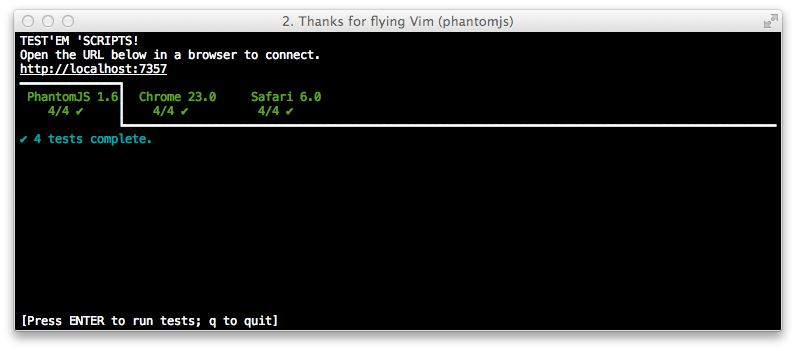
<p>The results looks like this:</p>

<p><img src="http://blog.nodetraveller.com/images/testem-example.png" title="testem example" ></p>

<p>The browser windows are kept open so subsequent changes will trigger the re-run
of the tests. Though, in this example, only the above browsers were specified, I
can add other browsers manually just by opening the same url in a different browser.
At work for instance, where I work on an iMac with 8gigs of memory and have
access to multiple mobile test devices, I would also have tabs for all the IE&rsquo;s running via
a vm, iOS simulator and a couple of android phones. So now, rather than wait for Jenkins
or perform a quick manual check of the tests in each browser before committing,
I know pretty much straight away if a test fails because of a cross-browser issue.</p>

<p>The icing on the cake is that only a small change to your spec runner files
is required:</p>

<figure class='code'><figcaption><span>[Add testem support to your test runner page]</span></figcaption><div class="highlight"><table><tr><td class="gutter"><pre class="line-numbers"><span class='line-number'>1</span>
<span class='line-number'>2</span>
<span class='line-number'>3</span>
<span class='line-number'>4</span>
<span class='line-number'>5</span>
<span class='line-number'>6</span>
</pre></td><td class='code'><pre><code class='html'><span class='line'><span class="c">&lt;!-- Testem support --&gt;</span>
</span><span class='line'><span class="nt">&lt;script </span><span class="na">type=</span><span class="s">&quot;text/javascript&quot;</span><span class="nt">&gt;</span>
</span><span class='line'>    <span class="k">if</span> <span class="p">(</span><span class="nx">location</span><span class="p">.</span><span class="nx">hash</span><span class="p">.</span><span class="nx">indexOf</span><span class="p">(</span><span class="s1">&#39;#testem&#39;</span><span class="p">)</span> <span class="o">!==</span> <span class="o">-</span><span class="mi">1</span><span class="p">)</span> <span class="p">{</span>
</span><span class='line'>        <span class="nb">document</span><span class="p">.</span><span class="nx">write</span><span class="p">(</span><span class="s1">&#39;&lt;script src=&quot;/testem.js&quot;&gt;&lt;/&#39;</span><span class="o">+</span><span class="s1">&#39;script&gt;&#39;</span><span class="p">);</span>
</span><span class='line'>    <span class="p">}</span>
</span><span class='line'><span class="nt">&lt;/script&gt;</span>
</span></code></pre></td></tr></table></div></figure>


<p>It&rsquo;s a bit ugly but the conditional is there so there the test page can be
run manually without testem.</p>

<h2>CI mode</h2>

<p>Running testem in CI mode is done using the &ldquo;ci&rdquo; parameter:</p>

<figure class='code'><figcaption><span>[testem simple usage]</span></figcaption><div class="highlight"><table><tr><td class="gutter"><pre class="line-numbers"><span class='line-number'>1</span>
</pre></td><td class='code'><pre><code class='bash'><span class='line'><span class="nv">$ </span>testem -f testem.json ci -b Chrome
</span></code></pre></td></tr></table></div></figure>


<p>The results are displayed in TAP format which can be piped to a file which Jenkins
can be configured to read from. Full configuration of Jenkins can be found on the
testem <a href="https://github.com/airportyh/testem/blob/master/docs/use_with_jenkins.md">use with jenkins</a>
documentation page.</p>

<h2>Code Coverage</h2>

<p>I use a forked version of JSCovReporter to generate the coverage report. It&rsquo;s forked
to remove the dependency on backbone.</p>

<p>In order for JSCovReporter to render the report the tests need to be run against
pre-instrumented code so when each statement in the files are run they can be counted.
This is done using <a href="https://github.com/arian/CoverJS">CoverJS</a> like so:</p>

<figure class='code'><figcaption><span>[testem simple usage]</span></figcaption><div class="highlight"><table><tr><td class="gutter"><pre class="line-numbers"><span class='line-number'>1</span>
</pre></td><td class='code'><pre><code class='bash'><span class='line'><span class="nv">$ </span>coverjs ./*.js -o ./instrumented
</span></code></pre></td></tr></table></div></figure>


<p>The above command instruments the specified files and outputs them into an directory
called instrumented. These files should then be included in the test page in order
for the code coverage report to be generated correctly.</p>

<h2>Integrated usage</h2>

<p>The test page for my very small micro lib preposterous uses both testem and JSCovReporter
so should serve as a simple integrated example.</p>

<p>The preposterous <a href="http://preposterous.nodetraveller.com/">project page</a> is a autogenerated composite
page of the latest version of the project Readme and chaijs test report. There is also a <a href="http://preposterous.nodetraveller.com/index-coverage.html">coverage page</a>
that includes the code coverage report (click on the file name on the right or scroll down to see the full report).</p>

<p>The source code for both the tests reports (minus the project Readme) can be found in the <a href="https://github.com/lawrencec/preposterous/tree/master/src/tests">test directory</a>
and shows how to integrate both testem and JSCovReporter into a test runner page.</p>
]]></content>
  </entry>
  
  <entry>
    <title type="html"><![CDATA[Creating js files with Rhino (from JSON)]]></title>
    <link href="http://blog.nodetraveller.com/Javascript/creating-js-files-with-rhino-from-json.html"/>
    <updated>2007-11-13T23:41:59+00:00</updated>
    <id>http://blog.nodetraveller.com/Javascript/creating-js-files-with-rhino-from-json</id>
    <content type="html"><![CDATA[<p>(This is primarily a note to myself)</p>

<p>I&rsquo;ve been playing with Rhino. Specifically, reading in json objects, turning that into normal, runnable objects and saving that to a file so browsers can run it. More specifically, the code that transforms the JSON to an object in the browser should be exactly the same as the one that runs in Rhino. That way I don&rsquo;t have to maintain two different versions.</p>

<p>I&rsquo;m working on an idea that requires reading in JSON objects and creating objects with methods and properties based on that JSON and could be normally done per request of the page. Obviously, if the JSON is pretty much static, it would be best if we could save the resulting object to a file and reference that file in our pages instead. It would save 1) the request for the JSON file and 2) processing to create the final object. There are two steps to do this.</p>

<ol>
<li><p> Transform the JSON</p></li>
<li><p> Saving the object</p></li>
</ol>


<h2>Transform the JSON</h2>

<p>Easy, enough. Iterate through the JSON object, create new object and add methods and properties to it as you see fit. To save it though you need a String representation of the object. Gecko&rsquo;s toSource() method helps there.</p>

<h2>Saving the object</h2>

<p>In Rhino, make use of Java&rsquo;s FileWriter object and save it to the filesystem. If your object is really simple then that&rsquo;s probably it and you&rsquo;ll be able to run the object in your browser. If your final object makes use of closures then you&rsquo;ll get errors, obviously, as the variables the closures have reference to, aren&rsquo;t being created at all when the code is run in the browser. Solution (when run in Rhino) is to turn those methods that use closures into strings and add the variables in via regexp or whatever and then eval it!! Remember, it&rsquo;s only done in Rhino, so it&rsquo;s only done once. One thing to note, you don&rsquo;t have to replace every occurence of that variable name, only the first one (or add a initialisation statement for that variable to the function). Now when the code is written out to file (and read back in by the browser) the variables will have a valid value.</p>

<p>For simple types, like String or numbers, this will work fine. For objects or arrays, you could use toSource() but that just dumps out a object literal of the object at that time and not a reference which is what you really need. The other thing is you&rsquo;ll have a large object dump in the final code which makes the final code much much larger than you need. The solution then is store these objects in an Array or manager object (outside this system) and retrieve them as needed within your final code.</p>

<p>Here&rsquo;s an example:</p>

<figure class='code'><figcaption><span>[persistJsForRhinoAndBrowsers.js]</span></figcaption><div class="highlight"><table><tr><td class="gutter"><pre class="line-numbers"><span class='line-number'>1</span>
<span class='line-number'>2</span>
<span class='line-number'>3</span>
<span class='line-number'>4</span>
<span class='line-number'>5</span>
<span class='line-number'>6</span>
<span class='line-number'>7</span>
<span class='line-number'>8</span>
<span class='line-number'>9</span>
<span class='line-number'>10</span>
<span class='line-number'>11</span>
<span class='line-number'>12</span>
<span class='line-number'>13</span>
<span class='line-number'>14</span>
<span class='line-number'>15</span>
<span class='line-number'>16</span>
<span class='line-number'>17</span>
<span class='line-number'>18</span>
<span class='line-number'>19</span>
<span class='line-number'>20</span>
<span class='line-number'>21</span>
<span class='line-number'>22</span>
<span class='line-number'>23</span>
<span class='line-number'>24</span>
</pre></td><td class='code'><pre><code class='js'><span class='line'><span class="p">.</span>
</span><span class='line'><span class="p">.</span>
</span><span class='line'><span class="nx">o</span><span class="p">[</span><span class="nx">sMethodName</span><span class="p">]</span> <span class="o">=</span> <span class="kd">function</span><span class="p">(</span><span class="nx">varA</span><span class="p">,</span><span class="nx">varB</span><span class="p">){</span>
</span><span class='line'><span class="kd">var</span> <span class="nx">f</span> <span class="o">=</span> <span class="kd">function</span><span class="p">(</span><span class="nx">var1</span><span class="p">){</span>
</span><span class='line'><span class="c1">//Use of an objManager to retrieve object we need</span>
</span><span class='line'><span class="c1">//varA and varB have no value in Rhino</span>
</span><span class='line'><span class="nx">objManager</span><span class="p">.</span><span class="nx">getObj</span><span class="p">(</span><span class="nx">var1</span><span class="p">).</span><span class="nx">method</span><span class="p">(</span><span class="nx">varA</span><span class="p">,</span><span class="nx">varB</span><span class="p">);</span>
</span><span class='line'><span class="p">};</span>
</span><span class='line'><span class="c1">//so for rhino</span>
</span><span class='line'><span class="k">if</span> <span class="p">((</span><span class="k">typeof</span> <span class="k">this</span><span class="p">[</span><span class="s2">&quot;load&quot;</span><span class="p">]</span> <span class="o">==</span> <span class="s2">&quot;function&quot;</span><span class="p">)</span> <span class="o">&amp;&amp;</span> <span class="p">(</span><span class="k">typeof</span> <span class="k">this</span><span class="p">[</span><span class="s2">&quot;Packages&quot;</span><span class="p">]</span> <span class="o">==</span> <span class="s2">&quot;function&quot;</span><span class="p">))</span> <span class="p">{</span>
</span><span class='line'><span class="c1">//so get string version of function</span>
</span><span class='line'><span class="kd">var</span> <span class="nx">fString</span> <span class="o">=</span> <span class="nx">f</span><span class="p">.</span><span class="nx">toString</span><span class="p">();</span>
</span><span class='line'><span class="c1">//replace variable names with actual variable value.          </span>
</span><span class='line'><span class="nx">fString</span> <span class="o">=</span> <span class="nx">fString</span><span class="p">.</span><span class="nx">replace</span><span class="p">(</span><span class="s1">&#39;varA&#39;</span><span class="p">,</span> <span class="s1">&#39;&quot;&#39;</span> <span class="o">+</span> <span class="nx">varA</span> <span class="o">+</span> <span class="s1">&#39;&quot;&#39;</span><span class="p">);</span>
</span><span class='line'><span class="nx">fString</span> <span class="o">=</span> <span class="nx">fString</span><span class="p">.</span><span class="nx">replace</span><span class="p">(</span><span class="s1">&#39;varB&#39;</span><span class="p">,</span> <span class="s1">&#39;&quot;&#39;</span> <span class="o">+</span> <span class="nx">varB</span> <span class="o">+</span> <span class="s1">&#39;&quot;&#39;</span><span class="p">);</span>
</span><span class='line'><span class="k">return</span> <span class="nb">eval</span><span class="p">(</span><span class="nx">fString</span><span class="p">);</span>
</span><span class='line'><span class="p">}</span>
</span><span class='line'>
</span><span class='line'><span class="k">return</span> <span class="nx">f</span><span class="p">;</span>
</span><span class='line'>
</span><span class='line'><span class="p">}(</span><span class="nx">a</span><span class="p">,</span><span class="nx">b</span><span class="p">);</span>
</span><span class='line'><span class="p">.</span>
</span></code></pre></td></tr></table></div></figure>


<p>There you go. Ugly, more than probably not robust but it&rsquo;s the only way I&rsquo;ve found to do what I need to do for my use case; admittedly probably not a common usage scenario.</p>

<p>Is there a better way?</p>
]]></content>
  </entry>
  
  <entry>
    <title type="html"><![CDATA[ActsAsUndoable]]></title>
    <link href="http://blog.nodetraveller.com/Javascript/actasundo.html"/>
    <updated>2007-07-18T09:04:36+01:00</updated>
    <id>http://blog.nodetraveller.com/Javascript/actasundo</id>
    <content type="html"><![CDATA[<p>With web apps becoming more and more like Desktop apps, it seems like user interfaces need be more like desktop user interfaces too. Some of these web apps can have a complex UI and their users need to be able to feel comfortable with it. Of course, making the UI as simple as possible is key, but if a task is relatively complex then the UI will also be relatively complex. With more complex tasks, users can make mistakes or want to change things and if they do, they&rsquo;d appreciate a way of doing so. One way to do that is to provide the user a way of undoing their actions; a way to retreat over their history. Just to make clear, this is something along the lines of a user interaction history, not a browser navigation history. Hence ActsAsUndoable, one way of adding undo functionality to your interactive widgets. (Incidentally while I was writing this post, Aza Raskin posted an <a href="http://www.alistapart.com/articles/neveruseawarning">article</a> on <a href="http://www.alistapart.com">A List Apart</a> about using undo functionality in interaction design, which seems to dovetail well with this post.)</p>

<h2>Design Patterns</h2>

<p>Whenever I code a widget, there&rsquo;s two resources I look to. One is Yahoo!&rsquo;s <a href="http://developer.yahoo.com/ypatterns/">Design Pattern library</a> and the other is Jennifer Tidwell&rsquo;s <a href="http://designinginterfaces.com/">Designing Interfaces</a> book. It&rsquo;s from this book and more specifically the explanation of the <a href="http://designinginterfaces.com/Multi-Level_Undo">Multi-Level Undo pattern</a> that ActsAsUndo is based on.</p>

<p>Basically the Multi-Level Undo pattern says that if users can navigate through their action history and undo their actions, then they can explore their own work paths quickly and safely. The most obvious desktop example of a navigable history is Photoshop&rsquo;s history panel.</p>

<p>The pattern states that these kind of actions should be undoable:</p>

<ul>
<li><p>Text entry for documents or spreadsheets</p></li>
<li><p>Database transactions</p></li>
<li><p>Modifications to images or painting canvases</p></li>
<li><p>Layout changes &mdash; position, size, stacking order, or grouping in graphic applications</p></li>
<li><p>File operations, such as deleting or modifying files</p></li>
<li><p>Creation, deletion or rearrangement of objects such as email messages or spreadsheet columns</p></li>
<li><p>Any cut, copy, or paste operation</p></li>
</ul>


<p>There are apps like these available on the web and some do have some simple undo/history functionality. These do tend to be only a single step undo and then, only for actions that change and save a new state eg move to trash. But also other actions that users make but perhaps don&rsquo;t yet want (or need) to save should also be undoable and at a multiple level too. So, how do we as implement something like the Multi Level Undo <strong>interaction pattern</strong>? We use the <a href="http://en.wikipedia.org/wiki/Memento_pattern">Memento</a> <strong>software design pattern</strong>.</p>

<h2>Demos</h2>

<p>Two of Jennifer&rsquo;s examples are text entry and stacking order changes. I thought these would be relatively simple examples to use for demo purposes. Here&rsquo;s the <a href="http://blog.nodetraveller.com/sandbox/actsasundoable/memento.html">text entry</a> demo and also the <a href="http://blog.nodetraveller.com/sandbox/actsasundoable/undo-list.html">stacking order</a> demo. I used the demo of the YUI&rsquo;s sortable list which I hope they don&rsquo;t mind. If you want, take a look at these to see whats going on before reading on.</p>

<h2>Text entry</h2>

<p>The first example I&rsquo;ll cover is the text entry one. It&rsquo;s a simple example of a textarea in which users can enter text and save snaphots. The original class has two properties <strong>el</strong> and <strong>sValue</strong>. <strong>el</strong> represents the textarea and <strong>sValue</strong>, the textarea&rsquo;s value. It has a method called <strong>setText()</strong> whichs sets <strong>sValue</strong> to the value of the textarea.</p>

<p>Finally we have a <strong>snapshotText()</strong> method which calls <strong>setText()</strong>. We wire a button element to this method.</p>

<figure class='code'><figcaption><span>[ActAsUndoable#1.js]</span></figcaption><div class="highlight"><table><tr><td class="gutter"><pre class="line-numbers"><span class='line-number'>1</span>
<span class='line-number'>2</span>
<span class='line-number'>3</span>
<span class='line-number'>4</span>
<span class='line-number'>5</span>
<span class='line-number'>6</span>
<span class='line-number'>7</span>
<span class='line-number'>8</span>
<span class='line-number'>9</span>
<span class='line-number'>10</span>
<span class='line-number'>11</span>
<span class='line-number'>12</span>
</pre></td><td class='code'><pre><code class='js'><span class='line'><span class="nx">YAHOO</span><span class="p">.</span><span class="nx">NT</span><span class="p">.</span><span class="nx">UI</span><span class="p">.</span><span class="nx">TextUpdate</span> <span class="o">=</span> <span class="kd">function</span><span class="p">(</span><span class="nx">elId</span><span class="p">,</span><span class="nx">sGroup</span><span class="p">,</span><span class="nx">sPreviewId</span><span class="p">)</span> <span class="p">{</span>
</span><span class='line'>  <span class="k">this</span><span class="p">.</span><span class="nx">el</span> <span class="o">=</span> <span class="nb">document</span><span class="p">.</span><span class="nx">getElementById</span><span class="p">(</span><span class="nx">elId</span><span class="p">);</span>
</span><span class='line'>  <span class="k">this</span><span class="p">.</span><span class="nx">sValue</span> <span class="o">=</span> <span class="k">this</span><span class="p">.</span><span class="nx">el</span><span class="p">.</span><span class="nx">value</span><span class="p">;</span>
</span><span class='line'><span class="p">}</span>
</span><span class='line'><span class="nx">YAHOO</span><span class="p">.</span><span class="nx">NT</span><span class="p">.</span><span class="nx">UI</span><span class="p">.</span><span class="nx">TextUpdate</span><span class="p">.</span><span class="nx">prototype</span><span class="p">.</span><span class="nx">setText</span> <span class="o">=</span> <span class="kd">function</span><span class="p">(</span><span class="nx">sValue</span><span class="p">)</span> <span class="p">{</span>
</span><span class='line'>  <span class="k">this</span><span class="p">.</span><span class="nx">sValue</span> <span class="o">=</span> <span class="k">this</span><span class="p">.</span><span class="nx">el</span><span class="p">.</span><span class="nx">value</span> <span class="o">=</span> <span class="nx">sValue</span><span class="p">;</span>
</span><span class='line'><span class="p">}</span>
</span><span class='line'><span class="nx">YAHOO</span><span class="p">.</span><span class="nx">NT</span><span class="p">.</span><span class="nx">UI</span><span class="p">.</span><span class="nx">TextUpdate</span><span class="p">.</span><span class="nx">prototype</span><span class="p">.</span><span class="nx">snapshotText</span> <span class="o">=</span> <span class="kd">function</span><span class="p">()</span> <span class="p">{</span>
</span><span class='line'>  <span class="k">if</span> <span class="p">(</span><span class="k">this</span><span class="p">.</span><span class="nx">sValue</span> <span class="o">!=</span> <span class="k">this</span><span class="p">.</span><span class="nx">el</span><span class="p">.</span><span class="nx">value</span><span class="p">)</span> <span class="p">{</span>
</span><span class='line'>    <span class="k">this</span><span class="p">.</span><span class="nx">setText</span><span class="p">(</span><span class="k">this</span><span class="p">.</span><span class="nx">el</span><span class="p">.</span><span class="nx">value</span><span class="p">);</span>
</span><span class='line'>  <span class="p">}</span>
</span><span class='line'><span class="p">}</span>
</span></code></pre></td></tr></table></div></figure>


<p>We can add undoable functionality by augmenting it with <strong>YAHOO.Acts.as.Undoable</strong>. This adds a <strong>sCaretakerGroup</strong> property and <strong>undo()</strong>,<strong>redo()</strong>,<strong>revert()</strong> and <strong>restore()</strong> methods. All we need to do is subscribe to the &lsquo;stateLoaded&rsquo; event and make a call to <strong>saveState()</strong> of the Caretaker to record the initial state. We can do this in the constructor of out TextUpdate object or a <strong>init()</strong> method if we choose to use one.</p>

<figure class='code'><figcaption><span>[ActsAsUndoable#2b.js]</span></figcaption><div class="highlight"><table><tr><td class="gutter"><pre class="line-numbers"><span class='line-number'>1</span>
<span class='line-number'>2</span>
<span class='line-number'>3</span>
</pre></td><td class='code'><pre><code class='js'><span class='line'><span class="k">this</span><span class="p">.</span><span class="nx">sCareTakerGroup</span> <span class="o">=</span> <span class="nx">sGroup</span><span class="p">;</span>
</span><span class='line'><span class="nx">YAHOO</span><span class="p">.</span><span class="nx">NT</span><span class="p">.</span><span class="nx">CaretakerRegistry</span><span class="p">.</span><span class="nx">subscribe</span><span class="p">(</span><span class="k">this</span><span class="p">.</span><span class="nx">sCareTakerGroup</span><span class="p">,</span><span class="s1">&#39;stateLoaded&#39;</span><span class="p">,</span><span class="k">this</span><span class="p">.</span><span class="nx">restore</span><span class="p">,</span><span class="k">this</span><span class="p">,</span><span class="kc">true</span><span class="p">);</span>
</span><span class='line'><span class="nx">YAHOO</span><span class="p">.</span><span class="nx">NT</span><span class="p">.</span><span class="nx">CaretakerRegistry</span><span class="p">.</span><span class="nx">saveState</span><span class="p">(</span><span class="k">this</span><span class="p">.</span><span class="nx">sCareTakerGroup</span><span class="p">,</span><span class="s1">&#39;New&#39;</span><span class="p">,{</span><span class="s1">&#39;args&#39;</span><span class="o">:</span><span class="p">[</span><span class="k">this</span><span class="p">.</span><span class="nx">sValue</span><span class="p">],</span><span class="s1">&#39;execute&#39;</span><span class="o">:</span><span class="k">this</span><span class="p">.</span><span class="nx">setText</span><span class="p">,</span><span class="s1">&#39;oScope&#39;</span><span class="o">:</span><span class="k">this</span><span class="p">});</span>
</span></code></pre></td></tr></table></div></figure>


<p>The first line just sets up a property that allows us to identify a caretaker to manage our states (more on this later).</p>

<p>The second line subscribes to an event called &lsquo;stateLoaded&rsquo; and sets the callback to our <strong>restore()</strong> method.</p>

<p>Then, the third line saves our initial state. We need to do this so the <strong>revert()</strong> method can revert to the initial state. The callback we specify here   depends on your object</p>

<p>So now our TextUpdate class looks like this :</p>

<figure class='code'><figcaption><span>[ActsAsUndoable#3.js]</span></figcaption><div class="highlight"><table><tr><td class="gutter"><pre class="line-numbers"><span class='line-number'>1</span>
<span class='line-number'>2</span>
<span class='line-number'>3</span>
<span class='line-number'>4</span>
<span class='line-number'>5</span>
<span class='line-number'>6</span>
<span class='line-number'>7</span>
<span class='line-number'>8</span>
<span class='line-number'>9</span>
<span class='line-number'>10</span>
<span class='line-number'>11</span>
<span class='line-number'>12</span>
<span class='line-number'>13</span>
<span class='line-number'>14</span>
<span class='line-number'>15</span>
<span class='line-number'>16</span>
<span class='line-number'>17</span>
<span class='line-number'>18</span>
<span class='line-number'>19</span>
<span class='line-number'>20</span>
<span class='line-number'>21</span>
<span class='line-number'>22</span>
<span class='line-number'>23</span>
</pre></td><td class='code'><pre><code class='js'><span class='line'><span class="nx">YAHOO</span><span class="p">.</span><span class="nx">NT</span><span class="p">.</span><span class="nx">UI</span><span class="p">.</span><span class="nx">TextUpdate</span>  <span class="o">=</span> <span class="kd">function</span><span class="p">(</span><span class="nx">elId</span><span class="p">,</span><span class="nx">sGroup</span><span class="p">,</span><span class="nx">sPreviewId</span><span class="p">)</span> <span class="p">{</span>
</span><span class='line'>  <span class="k">this</span><span class="p">.</span><span class="nx">el</span> <span class="o">=</span> <span class="nb">document</span><span class="p">.</span><span class="nx">getElementById</span><span class="p">(</span><span class="nx">elId</span><span class="p">);</span>
</span><span class='line'>  <span class="k">this</span><span class="p">.</span><span class="nx">sValue</span> <span class="o">=</span> <span class="k">this</span><span class="p">.</span><span class="nx">el</span><span class="p">.</span><span class="nx">value</span><span class="p">;</span>
</span><span class='line'>
</span><span class='line'>  <span class="c1">//Interact with caretaker </span>
</span><span class='line'>  <span class="k">this</span><span class="p">.</span><span class="nx">sCareTakerGroup</span> <span class="o">=</span> <span class="nx">sGroup</span><span class="p">;</span>
</span><span class='line'>  <span class="nx">YAHOO</span><span class="p">.</span><span class="nx">NT</span><span class="p">.</span><span class="nx">CaretakerRegistry</span><span class="p">.</span><span class="nx">subscribe</span><span class="p">(</span><span class="k">this</span><span class="p">.</span><span class="nx">sCareTakerGroup</span><span class="p">,</span><span class="s1">&#39;stateLoaded&#39;</span><span class="p">,</span><span class="k">this</span><span class="p">.</span><span class="nx">restore</span><span class="p">,</span><span class="k">this</span><span class="p">,</span><span class="kc">true</span><span class="p">);</span>
</span><span class='line'>  <span class="nx">YAHOO</span><span class="p">.</span><span class="nx">NT</span><span class="p">.</span><span class="nx">CaretakerRegistry</span><span class="p">.</span><span class="nx">saveState</span><span class="p">(</span><span class="k">this</span><span class="p">.</span><span class="nx">sCareTakerGroup</span><span class="p">,</span><span class="s1">&#39;New&#39;</span><span class="p">,{</span><span class="s1">&#39;args&#39;</span><span class="o">:</span><span class="p">[</span><span class="k">this</span><span class="p">.</span><span class="nx">sValue</span><span class="p">],</span><span class="s1">&#39;execute&#39;</span><span class="o">:</span><span class="k">this</span><span class="p">.</span><span class="nx">setText</span><span class="p">,</span><span class="s1">&#39;oScope&#39;</span><span class="o">:</span><span class="k">this</span><span class="p">});</span>
</span><span class='line'><span class="p">}</span>
</span><span class='line'>
</span><span class='line'><span class="nx">YAHOO</span><span class="p">.</span><span class="nx">NT</span><span class="p">.</span><span class="nx">UI</span><span class="p">.</span><span class="nx">TextUpdate</span><span class="p">.</span><span class="nx">prototype</span><span class="p">.</span><span class="nx">setText</span> <span class="o">=</span> <span class="kd">function</span><span class="p">(</span><span class="nx">sValue</span><span class="p">)</span> <span class="p">{</span>
</span><span class='line'>  <span class="k">this</span><span class="p">.</span><span class="nx">sValue</span> <span class="o">=</span> <span class="k">this</span><span class="p">.</span><span class="nx">el</span><span class="p">.</span><span class="nx">value</span> <span class="o">=</span> <span class="nx">sValue</span><span class="p">;</span>
</span><span class='line'><span class="p">}</span>
</span><span class='line'>
</span><span class='line'><span class="nx">YAHOO</span><span class="p">.</span><span class="nx">NT</span><span class="p">.</span><span class="nx">UI</span><span class="p">.</span><span class="nx">TextUpdate</span><span class="p">.</span><span class="nx">prototype</span><span class="p">.</span><span class="nx">snapshotText</span> <span class="o">=</span> <span class="kd">function</span><span class="p">()</span> <span class="p">{</span>
</span><span class='line'>  <span class="k">if</span> <span class="p">(</span><span class="k">this</span><span class="p">.</span><span class="nx">sValue</span> <span class="o">!=</span> <span class="k">this</span><span class="p">.</span><span class="nx">el</span><span class="p">.</span><span class="nx">value</span><span class="p">)</span> <span class="p">{</span>
</span><span class='line'>     <span class="k">this</span><span class="p">.</span><span class="nx">setText</span><span class="p">(</span><span class="k">this</span><span class="p">.</span><span class="nx">el</span><span class="p">.</span><span class="nx">value</span><span class="p">);</span>
</span><span class='line'>    <span class="c1">//saves value to caretaker </span>
</span><span class='line'>    <span class="nx">YAHOO</span><span class="p">.</span><span class="nx">NT</span><span class="p">.</span><span class="nx">CaretakerRegistry</span><span class="p">.</span><span class="nx">saveState</span><span class="p">(</span><span class="k">this</span><span class="p">.</span><span class="nx">sCareTakerGroup</span><span class="p">,</span><span class="kc">null</span><span class="p">,{</span><span class="s1">&#39;args&#39;</span><span class="o">:</span><span class="p">[</span><span class="k">this</span><span class="p">.</span><span class="nx">sValue</span><span class="p">],</span><span class="s1">&#39;execute&#39;</span><span class="o">:</span><span class="k">this</span><span class="p">.</span><span class="nx">setText</span><span class="p">,</span><span class="s1">&#39;oScope&#39;</span><span class="o">:</span><span class="k">this</span><span class="p">});</span>
</span><span class='line'>  <span class="p">}</span>
</span><span class='line'><span class="p">}</span>
</span><span class='line'><span class="c1">//make undoable</span>
</span><span class='line'><span class="nx">YAHOO</span><span class="p">.</span><span class="nx">augment</span><span class="p">(</span><span class="nx">YAHOO</span><span class="p">.</span><span class="nx">NT</span><span class="p">.</span><span class="nx">UI</span><span class="p">.</span><span class="nx">TextUpdate</span><span class="p">,</span><span class="nx">YAHOO</span><span class="p">.</span><span class="nx">Acts</span><span class="p">.</span><span class="nx">as</span><span class="p">.</span><span class="nx">Undoable</span><span class="p">);</span>
</span></code></pre></td></tr></table></div></figure>


<p>The last line adds the undoable functionality to the TextUpdate object. (see next code snippet)</p>

<p>But what&rsquo;s all this caretaker stuff? Well, the Memento software design pattern is an established pattern that helps to implement undo functionality. I touched on the Memento pattern in an <a href="http://blog.nodetraveller.com/Flash/design-patterns-in-flash.html">earlier post</a> about object-oriented Actionscript.</p>

<p>The Memento pattern has three classes; Originator, Caretaker and Memento. Basically using these three classes, the Memento pattern works likes this:</p>

<p>If an Originator wants its state or some of its state to be undoable or redoable, then it must save its state to a Caretaker. This Caretaker will manage the various states (Mementos) of our Originator. (isn&rsquo;t it lovely terminology?)</p>

<p>Using this as a premise, we can devise a simple &lsquo;framework&rsquo; for adding multi level undo functionality to our apps. We don&rsquo;t need (or want) to create lots of class hierarchy for our apps but the only classes we need to create revolve around the Caretaker object. Each object that we need undo functionality for, we have a corresponding caretaker. To manage multiple Caretaker objects (since perhaps multiple objects need a separate history), we use a CaretakerRegistry singleton object to do so. This allows Caretaker objects to be registered and created, if not done so already. It also acts as proxy to caretaker objects as all calls to Caretakers are made via the CaretakerRegistry. A registry also allows multiple objects to monitor state changes of an Originator. See the HistoryList section for an example of such an object</p>

<p>Interaction is achieved using CustomEvents. Caretaker objects fire &lsquo;stateLoaded&rsquo; and &lsquo;stateSaved&rsquo; events. Originator objects subscribe to the &lsquo;stateLoaded event. Any other object that is interested in the state of our Originator will subscribe to both &#8216;stateLoaded&rsquo; and &lsquo;stateSaved&rsquo; events. Each event passes the Memento object to each listening object.</p>

<p>Everytime the state of our object has changed and needs to be saved, we call the <strong>saveState</strong> method (see line 19) of our object&rsquo;s Caretaker which makes a note of the new state and fires off a &lsquo;stateSaved&rsquo; event.</p>

<p>Here are the methods that ActsAsUndoable adds.</p>

<figure class='code'><figcaption><span>[ActsAsUndoable#4.js]</span></figcaption><div class="highlight"><table><tr><td class="gutter"><pre class="line-numbers"><span class='line-number'>1</span>
<span class='line-number'>2</span>
<span class='line-number'>3</span>
<span class='line-number'>4</span>
<span class='line-number'>5</span>
<span class='line-number'>6</span>
<span class='line-number'>7</span>
<span class='line-number'>8</span>
<span class='line-number'>9</span>
<span class='line-number'>10</span>
<span class='line-number'>11</span>
<span class='line-number'>12</span>
<span class='line-number'>13</span>
<span class='line-number'>14</span>
<span class='line-number'>15</span>
<span class='line-number'>16</span>
<span class='line-number'>17</span>
<span class='line-number'>18</span>
<span class='line-number'>19</span>
<span class='line-number'>20</span>
<span class='line-number'>21</span>
<span class='line-number'>22</span>
<span class='line-number'>23</span>
<span class='line-number'>24</span>
<span class='line-number'>25</span>
<span class='line-number'>26</span>
<span class='line-number'>27</span>
<span class='line-number'>28</span>
<span class='line-number'>29</span>
<span class='line-number'>30</span>
<span class='line-number'>31</span>
<span class='line-number'>32</span>
<span class='line-number'>33</span>
<span class='line-number'>34</span>
<span class='line-number'>35</span>
<span class='line-number'>36</span>
<span class='line-number'>37</span>
</pre></td><td class='code'><pre><code class='js'><span class='line'><span class="cm">/**</span>
</span><span class='line'><span class="cm"> * redo changes</span>
</span><span class='line'><span class="cm"> */</span>
</span><span class='line'> <span class="nx">undo</span> <span class="o">:</span> <span class="kd">function</span><span class="p">()</span> <span class="p">{</span>
</span><span class='line'>  <span class="nx">YAHOO</span><span class="p">.</span><span class="nx">NT</span><span class="p">.</span><span class="nx">CaretakerRegistry</span><span class="p">.</span><span class="nx">loadState</span><span class="p">(</span><span class="k">this</span><span class="p">.</span><span class="nx">sCareTakerGroup</span><span class="p">);</span>
</span><span class='line'> <span class="p">},</span>
</span><span class='line'>
</span><span class='line'><span class="cm">/**</span>
</span><span class='line'><span class="cm"> * Redo changes</span>
</span><span class='line'><span class="cm"> */</span>
</span><span class='line'> <span class="nx">redo</span> <span class="o">:</span> <span class="kd">function</span><span class="p">()</span> <span class="p">{</span>
</span><span class='line'>  <span class="nx">YAHOO</span><span class="p">.</span><span class="nx">NT</span><span class="p">.</span><span class="nx">CaretakerRegistry</span><span class="p">.</span><span class="nx">loadState</span><span class="p">(</span><span class="k">this</span><span class="p">.</span><span class="nx">sCareTakerGroup</span><span class="p">,</span><span class="o">-</span><span class="mi">1</span><span class="p">);</span>
</span><span class='line'> <span class="p">},</span>
</span><span class='line'>  
</span><span class='line'><span class="cm">/**</span>
</span><span class='line'><span class="cm"> * Revert to initial text value</span>
</span><span class='line'><span class="cm"> * </span>
</span><span class='line'><span class="cm"> */</span>
</span><span class='line'><span class="nx">revert</span> <span class="o">:</span> <span class="kd">function</span><span class="p">()</span> <span class="p">{</span>
</span><span class='line'>  <span class="nx">YAHOO</span><span class="p">.</span><span class="nx">NT</span><span class="p">.</span><span class="nx">CaretakerRegistry</span><span class="p">.</span><span class="nx">loadState</span><span class="p">(</span><span class="k">this</span><span class="p">.</span><span class="nx">sCareTakerGroup</span><span class="p">,</span><span class="mi">0</span><span class="p">);</span>
</span><span class='line'><span class="p">},</span>
</span><span class='line'>  
</span><span class='line'><span class="cm">/**</span>
</span><span class='line'><span class="cm"> * </span>
</span><span class='line'><span class="cm"> * @param {Object} oState Object containing callback to call with specified </span>
</span><span class='line'><span class="cm"> * arguments and scope. Fields are :</span>
</span><span class='line'><span class="cm"> * </span>
</span><span class='line'><span class="cm"> * {Array}   oState.args Array of arguments to call callback with</span>
</span><span class='line'><span class="cm"> * {fn}          oState.execute Calblack function</span>
</span><span class='line'><span class="cm"> * {Object}  oState.oScope Object to use as scope for callback</span>
</span><span class='line'><span class="cm"> */</span>
</span><span class='line'><span class="nx">restore</span> <span class="o">:</span> <span class="kd">function</span><span class="p">(</span><span class="nx">oState</span><span class="p">)</span> <span class="p">{</span>
</span><span class='line'>  <span class="k">if</span> <span class="p">(</span><span class="nx">oState</span><span class="p">.</span><span class="nx">execute</span><span class="p">)</span> <span class="p">{</span>
</span><span class='line'>  <span class="nx">oState</span><span class="p">.</span><span class="nx">execute</span><span class="p">.</span><span class="nx">apply</span><span class="p">(</span><span class="nx">oState</span><span class="p">.</span><span class="nx">oScope</span><span class="p">,</span><span class="nx">oState</span><span class="p">.</span><span class="nx">args</span><span class="p">);</span>   
</span><span class='line'>  <span class="p">}</span>
</span><span class='line'><span class="p">}</span>
</span></code></pre></td></tr></table></div></figure>


<p>Our object also has <strong>undo()</strong>,<strong>redo()</strong>,<strong>revert()</strong> methods, all of which call the <strong>loadState()</strong> method of the Caretaker. This, in turn, fires off a &lsquo;stateLoaded&rsquo; event. Because our originating object subscribes to the &lsquo;stateLoaded&rsquo; event it is passed the Memento object, which represents the state of the object that it needs to be undone, redone or reverted to. The listening method of our object that the custom event fires to is called <strong>restore()</strong>. This is the method that sets the state of our object. The <strong>restore()</strong> method is passed an object with three properties. These are <strong>args</strong>,<strong>execute</strong>, and <strong>oScope</strong> and are defined when we save the state via the <strong>saveState()</strong> method. Our <strong>restore()</strong> simply calls the method specified in <strong>execute</strong> passing as args those specified in <strong>args</strong> using <strong>oScope</strong> as the scope for the method.. I restore the state of the object like this (via a method call) rather than simply overwriting some properties with older properties as often some logic needs to be run as well; just resetting the properties probably won&rsquo;t suffice in anything other than a very simple widget). The best way to do that is via existing methods on our originating object. For the pattern heads out there, this way is similar to the <a href="http://en.wikipedia.org/wiki/Command_pattern">command pattern</a> without actually creating Command objects &ndash; the existing methods are the Commands.</p>

<h2>Stacking Order</h2>

<p>The <a href="http://blog.nodetraveller.com/sandbox/actsasundoable/undo-list.html">stacking order demo</a> is similar. I rewrote the example to reflect the changes needed to make the reordering done by single method (orderLi). Also I haven&rsquo;t augmented it with ActsAsUndoable as I don&rsquo;t use the undo, redo or revert functionality in the UI. The source for YAHOO.example.DDApp is probably a good example to view if you want to see how to add undoable functionality without using augmentation.</p>

<h2>History List</h2>

<p>The History List object is one that listens to state changes of a given object and renders them in a list. It shows how other objects besides the Originator can monitor changes of state. Clicking on each item in the list, rolls back the state of that object to the state. You just initialise it with the id of the container and the CaretakerGroup that the object you&rsquo;re providing a history for is using.</p>

<p>Each link in the history list is a named anchor. However in the update() method, we stop the Event so the browser doesn&rsquo;t actually add it to its own history. We don&rsquo;t want the act of navigating through the history of our own actions within our task to interfere with the history of our browser.</p>

<p>We can create a new HistoryList object that monitors changes to our object by this :</p>

<figure class='code'><figcaption><span>[ActAsUndoable#5.js]</span></figcaption><div class="highlight"><table><tr><td class="gutter"><pre class="line-numbers"><span class='line-number'>1</span>
</pre></td><td class='code'><pre><code class='js'><span class='line'><span class="nx">hl</span> <span class="o">=</span> <span class="k">new</span> <span class="nx">YAHOO</span><span class="p">.</span><span class="nx">NT</span><span class="p">.</span><span class="nx">UI</span><span class="p">.</span><span class="nx">HistoryList</span><span class="p">(</span><span class="s1">&#39;hlistCont&#39;</span><span class="p">,</span><span class="s1">&#39;textArea&#39;</span><span class="p">);</span>
</span></code></pre></td></tr></table></div></figure>


<p>The first is the id of an element in which to render the history list. The second is the name of the caretaker group to monitor. The list is rendered to the document and any saves, reverts, undo etc are shown in this list.</p>

<h2>Resources and notes :</h2>

<ul>
<li><p>The ActsAsUndoable was an interim tongue-in-cheek working name but I kinda like it. The Acts.as namespace is a bit overkill but it fits pretty well and will work out nicely in future things I want to post about.</p></li>
<li><p>Accessibility &ndash; we should set the tabindex of our textarea or list to -1 and focus() them when a history list item is clicked or pressed. See this <a href="http://juicystudio.com/article/making-ajax-work-with-screen-readers.php">making ajax work with screen readers article</a> from <a href="http://juicystudio.com/">Juicystudio</a>
*</p></li>
<li><p>For the textUpdate example I&rsquo;ve used the word &lsquo;snapshot&rsquo; rather than &lsquo;save&rsquo; as &lsquo;save&rsquo; would probably mean save permanently to most people. Another button called save could easily be added that would do a true save via normal form functionality. It could even be done using AJAX and the <a href="http://developer.yahoo.com/yui/history/">Browser History manager</a> from the YUI library, which would add an item to the history list. Having said that, we don&rsquo;t want to confuse user with two histories; browser history and what I call User Interaction History.</p></li>
<li><p>I used the terms as specified as in the Memento Design Pattern. These aren&rsquo;t the clearest names and I was in two minds of calling Caretaker and CaretakerRegistry, UserActionManager and UserActionManagerRegistry. But I suppose these objects can be used for things other than user actions so I kept the design pattern language.</p></li>
</ul>


<p>You can download the <a href="http://www.nodetraveller.com/downloads/ActsAsUndoable.zip">examples and js files.</a> One of these days I&rsquo;ll make my subversion repo public but for now old fashioned zip files will have to do.</p>

<p>Finally, thanks to Tony Kabalan for being a sound board and inputting some useful ideas.</p>
]]></content>
  </entry>
  
  <entry>
    <title type="html"><![CDATA[AjaxEvent]]></title>
    <link href="http://blog.nodetraveller.com/Javascript/ajaxevent.html"/>
    <updated>2007-07-16T21:25:57+01:00</updated>
    <id>http://blog.nodetraveller.com/Javascript/ajaxevent</id>
    <content type="html"><![CDATA[<p>Tim Huegdon has a great post about a really rather sweet piece of code called <a href="http://nefariousdesigns.co.uk/archive/2007/07/ajaxevent-using-yui-custom-events-with-ajax/">AjaxEvent</a> over at his site, <a href="http://nefariousdesigns.co.uk">nefariousdesigns</a>. Developed with Mark Aidan Thomas, AjaxEvent is an object that wraps around the <a href="http://developer.yahoo.com/yui/connection/">YUI Connection</a> and <a href="http://developer.yahoo.com/yui/event/#customevent">CustomEvents</a> that makes managing multiple, distinct ajax calls really easy.</p>
]]></content>
  </entry>
  
  <entry>
    <title type="html"><![CDATA[Another Tabbed Interface]]></title>
    <link href="http://blog.nodetraveller.com/Javascript/another-tabbed-interface.html"/>
    <updated>2007-05-15T21:15:27+01:00</updated>
    <id>http://blog.nodetraveller.com/Javascript/another-tabbed-interface</id>
    <content type="html"><![CDATA[<p>This is a rather belated post and is sort of a continuation of my last post about <a href="http://blog.nodetraveller.com/Javascript/js-fun/">Aspect Oriented Programming</a>. I&rsquo;ve made yet another tabbed interface widgety thing (like the &lsquo;tubes needs another one) that uses AOP to add additonal features. A tabbed interface widget provided a nice problem for me to experiment with AOP. You can see the <a href="http://blog.nodetraveller.com/sandbox/moduletabs/standard.html">results</a> which allows tabs in a widget to be draggable and closeable too. Built with a dash YUI goodness of course.</p>

<p>The actual &lsquo;problem&rsquo; wasn&rsquo;t actually anything to do with the core behaviour of a tabbed interface. After all, the mechanics of such a problem is pretty simple; hide one element, show another. No, I wanted to make the tabs draggable and closeable, much like an OS tab that can be seen in Firefox or Eclipse. Using the <a href="http://developer.yahoo.com/yui/">YUI</a> library, making the tab draggable is relatively straight forward but it did result in some duplicated code which I didn&rsquo;t like. That was the &lsquo;problem&rsquo;.</p>

<p>Essentially, it was like this: My original code had two objects, the YAHOO.NT.TabsModule and YAHOO.NT.Tab. The TabsModule was the managing object for each of the Tab objects. If I wanted to make it draggable I need Tab to extend YAHOO.util.DDProxy. No problem there except of course there has to be additonal logic in the Tab object to do so and also manage the dragging &lsquo;n&rsquo; dropping. Subclassing Tab would have worked but again code would be duplicated in those methods that needed the changes. But then you get into the trouble of class trees.  For instance, DraggableTab subclasses Tab and so does Closeable Tab. But what if I wanted a Draggable and Closeable Tab? That&rsquo;d be a little trickier to do while still maintaining some sense of clean code.</p>

<p>The rather clean solution turns out to be AOP. Quickly, AOP allows us to easily add new code to existing code without editing it. It does this by essentially wrapping the original code so that the new code runs &lsquo;before&rsquo;,&lsquo;after&rsquo; or &lsquo;around the original code. These are the so called &#8216;aspects&rsquo;. So it turns out that to make a Tab draggable I&rsquo;d need to add new methods (my own as well as YAHOO.util.DDProxy) as well as fiddle with a few existing Tabs methods:</p>

<p>Here I&rsquo;ve outlined which methods have been aspected (is that the right term?) and what the new code adds to the original.</p>

<ul>
<li><p>YAHOO.NT.TabsModule.init is after aspected by both YAHOO.NT.DraggableTabs and YAHOO.NT.CloseableTabs &ndash; both adds a new CustomEvent which listens to all existing Tab instances</p></li>
<li><p>YAHOO.NT.TabsModule.selectTab is before aspected by YAHOO.NT.CloseableTabs &ndash; adds logic to detect to close tab.</p></li>
<li><p>YAHOO.NT.Tabs.initTab is after aspected by both YAHOO.NT.DraggableTabs and YAHOO.NT.CloseableTabs &ndash; adds new configuration logic, custom event creation</p></li>
<li><p>YAHOO.NT.Tabs.activateTab and YAHOO.NT.Tabs.deactivateTab are both after aspected by YAHOO.NT.CloseableTabs &ndash; adds logic to show/hide close icon.</p></li>
</ul>


<p>Though, AOP in Javascript certainly isn&rsquo;t new, I really like the relatively clean way its allowed me to separate behaviours without duplicating any code.</p>
]]></content>
  </entry>
  
  <entry>
    <title type="html"><![CDATA[JS Fun]]></title>
    <link href="http://blog.nodetraveller.com/Javascript/js-fun.html"/>
    <updated>2007-03-25T20:01:17+01:00</updated>
    <id>http://blog.nodetraveller.com/Javascript/js-fun</id>
    <content type="html"><![CDATA[<p>For the last few months I&rsquo;ve been playing around with different design patterns and methodologies in Javascript. I&rsquo;ve been looking at the Composite pattern and also <a href="http://en.wikipedia.org/wiki/Aspect-oriented_programming">Aspects Oriented Programming</a> (AOP).</p>

<p>AOP is a way of changing the behaviour of existing code without modifying it. It does this by providing, what AOP calls, <strong>advice</strong> at certain <strong>join points</strong>. In plain english, it provides a way of adding additional behaviour (advice) at certain points in your program (join points). For example, adding logging functionality to your code is a standard example. Generally, you don&rsquo;t want every method in your code to contain logging code. It&rsquo;s not really part of the core base code. AOP provides an easy way of doing without modifying your code. But because of the way AOP works, you can add as many behaviours as you want to, to any object.</p>

<h3>What and how?</h3>

<p>AOP provides three aspects called before, after and around. This means that you can add additonal behaviour before, after or around certain points in your code of your own choosing. I&rsquo;ve created a static class called YAHOO.Abstract.Aspect that I use to add advices to other objects. It&rsquo;s a very simple one and just adds the three advices to an method.</p>

<figure class='code'><figcaption><span></span></figcaption><div class="highlight"><table><tr><td class="gutter"><pre class="line-numbers"><span class='line-number'>1</span>
<span class='line-number'>2</span>
<span class='line-number'>3</span>
<span class='line-number'>4</span>
<span class='line-number'>5</span>
<span class='line-number'>6</span>
<span class='line-number'>7</span>
<span class='line-number'>8</span>
<span class='line-number'>9</span>
<span class='line-number'>10</span>
<span class='line-number'>11</span>
<span class='line-number'>12</span>
<span class='line-number'>13</span>
<span class='line-number'>14</span>
<span class='line-number'>15</span>
<span class='line-number'>16</span>
<span class='line-number'>17</span>
<span class='line-number'>18</span>
<span class='line-number'>19</span>
<span class='line-number'>20</span>
<span class='line-number'>21</span>
<span class='line-number'>22</span>
<span class='line-number'>23</span>
<span class='line-number'>24</span>
<span class='line-number'>25</span>
<span class='line-number'>26</span>
<span class='line-number'>27</span>
<span class='line-number'>28</span>
<span class='line-number'>29</span>
<span class='line-number'>30</span>
<span class='line-number'>31</span>
<span class='line-number'>32</span>
<span class='line-number'>33</span>
<span class='line-number'>34</span>
<span class='line-number'>35</span>
<span class='line-number'>36</span>
<span class='line-number'>37</span>
<span class='line-number'>38</span>
<span class='line-number'>39</span>
<span class='line-number'>40</span>
<span class='line-number'>41</span>
<span class='line-number'>42</span>
<span class='line-number'>43</span>
</pre></td><td class='code'><pre><code class='js'><span class='line'><span class="nx">YAHOO</span><span class="p">.</span><span class="nx">Abstract</span><span class="p">.</span><span class="nx">Aspect</span> <span class="o">=</span> <span class="kd">function</span><span class="p">()</span> <span class="p">{</span>
</span><span class='line'>  <span class="nx">aAspects</span> <span class="o">=</span> <span class="p">[];</span>
</span><span class='line'>  <span class="nx">aAspects</span><span class="p">[</span><span class="s2">&quot;before&quot;</span><span class="p">]</span><span class="o">=</span><span class="kd">function</span><span class="p">(</span><span class="nx">oTarget</span><span class="p">,</span><span class="nx">sMethodName</span><span class="p">,</span><span class="nx">fn</span><span class="p">)</span> <span class="p">{</span>
</span><span class='line'>      <span class="kd">var</span> <span class="nx">fOrigMethod</span> <span class="o">=</span> <span class="nx">oTarget</span><span class="p">[</span><span class="nx">sMethodName</span><span class="p">];</span>
</span><span class='line'>  
</span><span class='line'>      <span class="nx">oTarget</span><span class="p">[</span><span class="nx">sMethodName</span><span class="p">]</span> <span class="o">=</span> <span class="kd">function</span><span class="p">()</span> <span class="p">{</span>
</span><span class='line'>        <span class="nx">fn</span><span class="p">.</span><span class="nx">apply</span><span class="p">(</span><span class="nx">oTarget</span><span class="p">,</span> <span class="nx">arguments</span><span class="p">);</span>
</span><span class='line'>        <span class="k">return</span> <span class="nx">fOrigMethod</span><span class="p">.</span><span class="nx">apply</span><span class="p">(</span><span class="nx">oTarget</span><span class="p">,</span> <span class="nx">arguments</span><span class="p">);</span>
</span><span class='line'>      <span class="p">};</span>
</span><span class='line'>  <span class="p">};</span>   
</span><span class='line'>  <span class="c1">//after</span>
</span><span class='line'>  <span class="nx">aAspects</span><span class="p">[</span><span class="s2">&quot;after&quot;</span><span class="p">]</span><span class="o">=</span><span class="kd">function</span><span class="p">(</span><span class="nx">oTarget</span><span class="p">,</span><span class="nx">sMethodName</span><span class="p">,</span><span class="nx">fn</span><span class="p">){</span>
</span><span class='line'>      <span class="kd">var</span> <span class="nx">fOrigMethod</span> <span class="o">=</span> <span class="nx">oTarget</span><span class="p">[</span><span class="nx">sMethodName</span><span class="p">];</span>
</span><span class='line'>      <span class="nx">oTarget</span><span class="p">[</span><span class="nx">sMethodName</span><span class="p">]</span> <span class="o">=</span> <span class="kd">function</span><span class="p">()</span> <span class="p">{</span>
</span><span class='line'>          <span class="kd">var</span> <span class="nx">rv</span> <span class="o">=</span> <span class="nx">fOrigMethod</span><span class="p">.</span><span class="nx">apply</span><span class="p">(</span><span class="nx">oTarget</span><span class="p">,</span> <span class="nx">arguments</span><span class="p">);</span>
</span><span class='line'>          <span class="k">return</span> <span class="nx">fn</span><span class="p">.</span><span class="nx">apply</span><span class="p">(</span><span class="nx">oTarget</span><span class="p">,</span> <span class="p">[</span><span class="nx">rv</span><span class="p">]);</span>
</span><span class='line'>      <span class="p">};</span>
</span><span class='line'>  <span class="p">};</span>   
</span><span class='line'>  <span class="c1">//around</span>
</span><span class='line'>  <span class="nx">aAspects</span><span class="p">[</span><span class="s2">&quot;around&quot;</span><span class="p">]</span><span class="o">=</span><span class="kd">function</span><span class="p">(</span><span class="nx">oTarget</span><span class="p">,</span><span class="nx">sMethodName</span><span class="p">,</span><span class="nx">aFn</span><span class="p">){</span>
</span><span class='line'>      <span class="kd">var</span> <span class="nx">fOrigMethod</span> <span class="o">=</span> <span class="nx">oTarget</span><span class="p">[</span><span class="nx">sMethodName</span><span class="p">];</span>
</span><span class='line'>      <span class="nx">oTarget</span><span class="p">[</span><span class="nx">sMethodName</span><span class="p">]</span> <span class="o">=</span> <span class="kd">function</span><span class="p">()</span> <span class="p">{</span>
</span><span class='line'>            <span class="k">if</span> <span class="p">(</span><span class="nx">aFn</span> <span class="o">&amp;&amp;</span> <span class="nx">aFn</span><span class="p">.</span><span class="nx">length</span><span class="o">==</span><span class="mi">2</span><span class="p">)</span> <span class="p">{</span>
</span><span class='line'>              <span class="nx">aFn</span><span class="p">[</span><span class="mi">0</span><span class="p">].</span><span class="nx">apply</span><span class="p">(</span><span class="nx">oTarget</span><span class="p">,</span> <span class="nx">arguments</span><span class="p">);</span>
</span><span class='line'>              <span class="kd">var</span> <span class="nx">rv</span> <span class="o">=</span> <span class="nx">fOrigMethod</span><span class="p">.</span><span class="nx">apply</span><span class="p">(</span><span class="nx">oTarget</span><span class="p">,</span> <span class="nx">arguments</span><span class="p">);</span>
</span><span class='line'>              <span class="k">return</span> <span class="nx">aFn</span><span class="p">[</span><span class="mi">1</span><span class="p">].</span><span class="nx">apply</span><span class="p">(</span><span class="nx">oTarget</span><span class="p">,</span> <span class="p">[</span><span class="nx">rv</span><span class="p">]);</span>
</span><span class='line'>            <span class="p">}</span>
</span><span class='line'>            <span class="k">else</span> <span class="p">{</span>
</span><span class='line'>              <span class="k">return</span> <span class="nx">fOrigMethod</span><span class="p">.</span><span class="nx">apply</span><span class="p">(</span><span class="nx">oTarget</span><span class="p">,</span> <span class="nx">arguments</span><span class="p">);</span>
</span><span class='line'>            <span class="p">}</span>
</span><span class='line'>          
</span><span class='line'>          <span class="p">};</span>
</span><span class='line'>    <span class="p">};</span>
</span><span class='line'>  <span class="k">return</span> <span class="p">{</span>      
</span><span class='line'>      <span class="nx">advise</span> <span class="o">:</span> <span class="kd">function</span><span class="p">(</span><span class="nx">oTarget</span><span class="p">,</span><span class="nx">sAspect</span><span class="p">,</span><span class="nx">sMethod</span><span class="p">,</span><span class="nx">fAdvice</span><span class="p">)</span> <span class="p">{</span>
</span><span class='line'>          <span class="k">if</span> <span class="p">(</span><span class="nx">oTarget</span> <span class="o">&amp;&amp;</span> <span class="nx">sAspect</span> <span class="o">&amp;&amp;</span> <span class="nx">sMethod</span> <span class="o">&amp;&amp;</span> <span class="nx">fAdvice</span> <span class="o">&amp;&amp;</span> <span class="nx">aAspects</span><span class="p">[</span><span class="nx">sAspect</span><span class="p">])</span> <span class="p">{</span>
</span><span class='line'>              <span class="c1">//decorate specified method</span>
</span><span class='line'>              <span class="nx">aAspects</span><span class="p">[</span><span class="nx">sAspect</span><span class="p">](</span><span class="nx">oTarget</span><span class="p">,</span><span class="nx">sMethod</span><span class="p">,</span><span class="nx">fAdvice</span><span class="p">);</span>
</span><span class='line'>          <span class="p">}</span>
</span><span class='line'>          <span class="k">return</span> <span class="nx">oTarget</span><span class="p">;</span>
</span><span class='line'>      <span class="p">}</span>
</span><span class='line'>  <span class="p">}</span>
</span><span class='line'><span class="p">}();</span>
</span></code></pre></td></tr></table></div></figure>


<p>For instance, if I wanted to add a before advice, I&rsquo;d do something like the following :</p>

<figure class='code'><figcaption><span></span></figcaption><div class="highlight"><table><tr><td class="gutter"><pre class="line-numbers"><span class='line-number'>1</span>
</pre></td><td class='code'><pre><code class='js'><span class='line'><span class="nx">YAHOO</span><span class="p">.</span><span class="nx">Abstract</span><span class="p">.</span><span class="nx">Aspect</span><span class="p">.</span><span class="nx">advise</span><span class="p">(</span><span class="nx">obj</span><span class="p">,</span><span class="s1">&#39;before&#39;</span><span class="p">,</span><span class="s1">&#39;method&#39;</span><span class="p">,</span><span class="kd">function</span><span class="p">()</span> <span class="p">{</span> <span class="nx">alert</span><span class="p">(</span><span class="s1">&#39;before&#39;</span><span class="p">)});</span>
</span></code></pre></td></tr></table></div></figure>


<p>After advice is similar:</p>

<figure class='code'><figcaption><span></span></figcaption><div class="highlight"><table><tr><td class="gutter"><pre class="line-numbers"><span class='line-number'>1</span>
</pre></td><td class='code'><pre><code class='js'><span class='line'><span class="nx">YAHOO</span><span class="p">.</span><span class="nx">Abstract</span><span class="p">.</span><span class="nx">Aspect</span><span class="p">.</span><span class="nx">advise</span><span class="p">(</span><span class="nx">obj</span><span class="p">,</span><span class="s1">&#39;after&#39;</span><span class="p">,</span><span class="s1">&#39;method&#39;</span><span class="p">,</span><span class="kd">function</span><span class="p">()</span> <span class="p">{</span> <span class="nx">alert</span><span class="p">(</span><span class="s1">&#39;after&#39;</span><span class="p">)});</span>
</span></code></pre></td></tr></table></div></figure>


<p>Adding around advice is slightly different as you have to provide two methods, one for before and one for after:</p>

<figure class='code'><figcaption><span></span></figcaption><div class="highlight"><table><tr><td class="gutter"><pre class="line-numbers"><span class='line-number'>1</span>
<span class='line-number'>2</span>
<span class='line-number'>3</span>
<span class='line-number'>4</span>
<span class='line-number'>5</span>
<span class='line-number'>6</span>
<span class='line-number'>7</span>
</pre></td><td class='code'><pre><code class='js'><span class='line'><span class="nx">YAHOO</span><span class="p">.</span><span class="nx">Abstract</span><span class="p">.</span><span class="nx">Aspect</span><span class="p">.</span><span class="nx">advise</span><span class="p">(</span><span class="nx">obj</span><span class="p">,</span><span class="s1">&#39;around&#39;</span><span class="p">,</span><span class="s1">&#39;method&#39;</span><span class="p">,[</span><span class="kd">function</span><span class="p">()</span> <span class="p">{</span>
</span><span class='line'>              <span class="nx">alert</span><span class="p">(</span><span class="s1">&#39;before&#39;</span><span class="p">);</span>
</span><span class='line'>              <span class="p">},</span>
</span><span class='line'>              <span class="kd">function</span><span class="p">()</span> <span class="p">{</span>
</span><span class='line'>              <span class="nx">alert</span><span class="p">(</span><span class="s1">&#39;around&#39;</span><span class="p">);</span>
</span><span class='line'>              <span class="p">}]</span>
</span><span class='line'><span class="p">);</span>
</span></code></pre></td></tr></table></div></figure>


<p>All arguments are passed transparently to the original methods and for all after methods, the return value of the original method is passed in.</p>

<p>Let&rsquo;s see how easy it is using the standard logging example. Its an simple but probably unpractical example.</p>

<p>This example add a simple logging behaviour for every method of a specified object. When a method is called, it is logged and so are its arguments. It also displays the methods return value, if any. For this example, it makes use of <a href="http://www.getfirebug.com">Firebug</a> and some of its console functions, specificially <strong>group</strong> and <strong>groupEnd</strong>. These basically indent and outdent grouped console.log outputs. So how do we write the behaviour? Well, before a method is called, we want to start a new console group and also output which method was called and also any arguments if any were passed. Something like this:</p>

<figure class='code'><figcaption><span></span></figcaption><div class="highlight"><table><tr><td class="gutter"><pre class="line-numbers"><span class='line-number'>1</span>
<span class='line-number'>2</span>
<span class='line-number'>3</span>
<span class='line-number'>4</span>
</pre></td><td class='code'><pre><code class='js'><span class='line'><span class="kd">function</span><span class="p">()</span> <span class="p">{</span>
</span><span class='line'>  <span class="nb">window</span><span class="p">.</span><span class="nx">console</span><span class="p">.</span><span class="nx">group</span><span class="p">(</span><span class="s1">&#39;Entered method %s&#39;</span><span class="p">,</span><span class="nx">sMName</span><span class="p">);</span>
</span><span class='line'>  <span class="nb">window</span><span class="p">.</span><span class="nx">console</span><span class="p">.</span><span class="nx">log</span><span class="p">(</span><span class="s2">&quot;Received arguments: %o&quot;</span><span class="p">,</span><span class="nx">arguments</span><span class="p">);</span>
</span><span class='line'><span class="p">}</span>
</span></code></pre></td></tr></table></div></figure>


<p>Then when a method has returned we want to log that the method has returned and any return value it may returned.</p>

<figure class='code'><figcaption><span></span></figcaption><div class="highlight"><table><tr><td class="gutter"><pre class="line-numbers"><span class='line-number'>1</span>
<span class='line-number'>2</span>
<span class='line-number'>3</span>
<span class='line-number'>4</span>
<span class='line-number'>5</span>
</pre></td><td class='code'><pre><code class='js'><span class='line'><span class="kd">function</span><span class="p">()</span> <span class="p">{</span>
</span><span class='line'>  <span class="nb">window</span><span class="p">.</span><span class="nx">console</span><span class="p">.</span><span class="nx">log</span><span class="p">(</span><span class="s2">&quot;Returned : %o&quot;</span><span class="p">,</span><span class="nx">rv</span>  <span class="o">||</span> <span class="s1">&#39;zilch&#39;</span><span class="p">);</span>
</span><span class='line'>  <span class="nb">window</span><span class="p">.</span><span class="nx">console</span><span class="p">.</span><span class="nx">log</span><span class="p">(</span><span class="s1">&#39;Exited method %s&#39;</span><span class="p">,</span><span class="nx">sMName</span><span class="p">);</span>
</span><span class='line'>  <span class="nb">window</span><span class="p">.</span><span class="nx">console</span><span class="p">.</span><span class="nx">groupEnd</span><span class="p">();</span>
</span><span class='line'><span class="p">}</span>
</span></code></pre></td></tr></table></div></figure>


<p>In AOP terminology these would be termed &ldquo;before&rdquo; and &ldquo;after&rdquo; advice. But since there is also &ldquo;around&rdquo;, we can use that instead so we only modify each method once.</p>

<p>So, the full code to add this logging behaviour to any object would be like this:</p>

<figure class='code'><figcaption><span></span></figcaption><div class="highlight"><table><tr><td class="gutter"><pre class="line-numbers"><span class='line-number'>1</span>
<span class='line-number'>2</span>
<span class='line-number'>3</span>
<span class='line-number'>4</span>
<span class='line-number'>5</span>
<span class='line-number'>6</span>
<span class='line-number'>7</span>
<span class='line-number'>8</span>
<span class='line-number'>9</span>
<span class='line-number'>10</span>
<span class='line-number'>11</span>
<span class='line-number'>12</span>
<span class='line-number'>13</span>
<span class='line-number'>14</span>
<span class='line-number'>15</span>
<span class='line-number'>16</span>
<span class='line-number'>17</span>
<span class='line-number'>18</span>
<span class='line-number'>19</span>
<span class='line-number'>20</span>
<span class='line-number'>21</span>
<span class='line-number'>22</span>
</pre></td><td class='code'><pre><code class='js'><span class='line'><span class="nx">YAHOO</span><span class="p">.</span><span class="nx">namespace</span><span class="p">(</span><span class="s1">&#39;YAHOO.NT&#39;</span><span class="p">);</span>
</span><span class='line'>  <span class="nx">YAHOO</span><span class="p">.</span><span class="nx">NT</span><span class="p">.</span><span class="nx">trace</span> <span class="o">=</span> <span class="kd">function</span><span class="p">(</span><span class="nx">oTarget</span><span class="p">)</span> <span class="p">{</span>
</span><span class='line'>      <span class="k">for</span> <span class="p">(</span><span class="kd">var</span> <span class="nx">p</span> <span class="k">in</span> <span class="nx">oTarget</span><span class="p">)</span> <span class="p">{</span>
</span><span class='line'>          <span class="k">if</span> <span class="p">(</span><span class="k">typeof</span> <span class="nx">oTarget</span><span class="p">[</span><span class="nx">p</span><span class="p">]</span> <span class="o">==</span> <span class="s1">&#39;function&#39;</span><span class="p">)</span> <span class="p">{</span>
</span><span class='line'>              <span class="p">(</span><span class="kd">function</span> <span class="p">(){</span>
</span><span class='line'>              <span class="kd">var</span> <span class="nx">sMName</span> <span class="o">=</span> <span class="nx">p</span><span class="p">;</span>   
</span><span class='line'>              <span class="kd">var</span> <span class="nx">cnsl</span> <span class="o">=</span> <span class="nb">window</span><span class="p">.</span><span class="nx">console</span><span class="p">;</span>             
</span><span class='line'>                  <span class="nx">YAHOO</span><span class="p">.</span><span class="nx">Abstract</span><span class="p">.</span><span class="nx">Aspect</span><span class="p">.</span><span class="nx">advise</span><span class="p">(</span><span class="nx">oTarget</span><span class="p">,</span><span class="s1">&#39;around&#39;</span><span class="p">,</span><span class="nx">sMName</span><span class="p">,[</span><span class="kd">function</span><span class="p">()</span> <span class="p">{</span>
</span><span class='line'>                          <span class="nx">cnsl</span><span class="p">.</span><span class="nx">group</span><span class="p">(</span><span class="s1">&#39;Entered method %s&#39;</span><span class="p">,</span><span class="nx">sMName</span><span class="p">);</span>
</span><span class='line'>                          <span class="nx">cnsl</span><span class="p">.</span><span class="nx">log</span><span class="p">(</span><span class="s2">&quot;Received arguments: %o&quot;</span><span class="p">,</span><span class="nx">arguments</span><span class="p">);</span>
</span><span class='line'>                      <span class="p">},</span>
</span><span class='line'>                      <span class="kd">function</span><span class="p">(</span><span class="nx">rv</span><span class="p">)</span> <span class="p">{</span>
</span><span class='line'>                          <span class="nx">cnsl</span><span class="p">.</span><span class="nx">log</span><span class="p">(</span><span class="s2">&quot;Returned : %o&quot;</span><span class="p">,</span><span class="nx">rv</span>  <span class="o">||</span> <span class="s1">&#39;zilch&#39;</span><span class="p">);</span>
</span><span class='line'>                          <span class="nx">cnsl</span><span class="p">.</span><span class="nx">log</span><span class="p">(</span><span class="s1">&#39;Exited method %s&#39;</span><span class="p">,</span><span class="nx">sMName</span><span class="p">);</span>
</span><span class='line'>                          <span class="nx">cnsl</span><span class="p">.</span><span class="nx">groupEnd</span><span class="p">();</span>
</span><span class='line'>                      <span class="k">return</span> <span class="nx">rv</span><span class="p">;</span>
</span><span class='line'>                  <span class="p">}]);</span>
</span><span class='line'>              <span class="p">})()</span>
</span><span class='line'>          <span class="p">}</span>
</span><span class='line'>      <span class="p">}</span>
</span><span class='line'>  <span class="p">}</span>
</span><span class='line'><span class="p">}</span>
</span></code></pre></td></tr></table></div></figure>


<p>The above code creates a new namespace so we don&rsquo;t pollute the global namespace and a new method called trace. All it does it receive a target object and adds the around advice to each method that it finds. It&rsquo;s also possible to extend this so that it receives another parameter which would state a whitelist or blacklist of methods to advise (or not). The actual call to advise any object, let&rsquo;s say the Dom object of YUI :</p>

<figure class='code'><figcaption><span></span></figcaption><div class="highlight"><table><tr><td class="gutter"><pre class="line-numbers"><span class='line-number'>1</span>
</pre></td><td class='code'><pre><code class='js'><span class='line'><span class="nx">YAHOO</span><span class="p">.</span><span class="nx">NT</span><span class="p">.</span><span class="nx">trace</span><span class="p">(</span><span class="nx">YAHOO</span><span class="p">.</span><span class="nx">util</span><span class="p">.</span><span class="nx">Dom</span><span class="p">)</span>
</span></code></pre></td></tr></table></div></figure>


<p>You can see the output on the <a href="http://blog.nodetraveller.com/sandbox/aop/aspect-example.html">example</a> page.</p>

<h3>What else can AOP be used for?</h3>

<ul>
<li><p>Profiling &ndash; very similar to the trace, but instead maintains a timing of how long each method took.</p></li>
<li><p>Event firing on attribute changes &ndash; if you use getters and setters and when a set method has been called, automatically fire a valueChanged custom event. In practice, can really only be used when external entities change an objects property (Its not wise for an object to call its own setter method).</p></li>
<li><p>Validation of methods arguments &ndash; validate passed arguments to a method, specifically setter methods though any type of method can be used.</p></li>
<li><p>Convertors &ndash; bridge output from one object to another incompatible object</p></li>
<li><p>Provide an alternate to subclassing &ndash; use mixins instead of subclassing to add more and more behaviours while reducing amount of code duplication. I&rsquo;ve used this for a widget and its <em>really</em> useful. I hope to be posting about that in a few days.</p></li>
</ul>


<h3>Is it useful?</h3>

<p>I think it can be, in some cases. It means careful consideration about how you design your code, but I can envisage a small library using AOP or similar metaprogramming techniques. Often in larger javascript apps, there are many similar types of objects doing similar things. These are often utility objects which interact with different parts of your code but still have quite a lot of similarity within them. Why not use metaprogramming techniques to write these duplicated parts of your code <em>using</em> your own code as a base?</p>

<h3>Where else is it used?</h3>

<p>AOP in javascript isn&rsquo;t new to the Javascript world. Here&rsquo;s the <a href="http://www.dotvoid.com/view.php?id=43">post about aspects</a> I first read about using JS late last year (and I&rsquo;ve just noticed recently updated). It was <a href="http://encytemedia.com/blog/articles/2006/12/4/avoiding-bloat-in-widgets">Justin Palmer&rsquo;s</a> post though that got me thinking about AOP in widgets. The examples there uses Beppu&rsquo;s <a href="http://beppu.lbox.org/articles/2006/09/06/actsasaspect">ActsAsAspects</a> class. There&rsquo;s no difference between between that one and mine in terms of functionality except Beppu&rsquo;s version adds a couple of things to the target object which I didn&rsquo;t want to do.  Also <a href="http://dojotoolkit.org/node/91">Dojo</a> uses it in its event classes.</p>
]]></content>
  </entry>
  
  <entry>
    <title type="html"><![CDATA[Howdy..]]></title>
    <link href="http://blog.nodetraveller.com/News/howdy.html"/>
    <updated>2006-11-19T12:01:39+00:00</updated>
    <id>http://blog.nodetraveller.com/News/howdy</id>
    <content type="html"><![CDATA[<p>Hey.</p>

<p>It&rsquo;s been a while.</p>

<p>Been busy with <a href="http://uk.yahoo.com">work</a>, life and stuff.</p>

<p>But feel like posting again so I&rsquo;ve changed servers and got a temp design up, which will change soon.</p>

<p>So let&rsquo;s see what happens.</p>
]]></content>
  </entry>
  
  <entry>
    <title type="html"><![CDATA[Another LiveInfo fix ]]></title>
    <link href="http://blog.nodetraveller.com/Javascript/another-liveinfo-fix.html"/>
    <updated>2005-02-24T20:57:01+00:00</updated>
    <id>http://blog.nodetraveller.com/Javascript/another-liveinfo-fix</id>
    <content type="html"><![CDATA[<p><a href="http://www.scss.com.au/family/andrew/opera/">Andrew Gregory</a> reported some bugs in Opera 7.54u2. The bug in Opera 7.54u2 turned out to be rather strange. Any opera browser below 7.6 uses an iframe and I check the html within the frame to see if it is loaded. I use the text </liveInfo> as that is the root node. In 7.54u2, there is no </liveInfo>, only <liveInfo/>. Strange. Anyway I introduced a check for that and it works okay now.</p>

<p>Andrew also reported a bug in Opera 8.0 beta 1but I couldn&rsquo;t reproduce it. As usual, the updated zip is now available from the <a href="http://www.nodetraveller.com/blog/?page_id=24">downloads</a> section or you can download it <a href="http://www.nodetraveller.com/downloads/liveInfo1.03.zip">direct</a>.</p>

<p>I&rsquo;m still looking for reports on usage on mac and linux browsers.  Please take the time to comment below if you&rsquo;re using a mac or linux and say if it works or not.  Thanks&hellip;</p>
]]></content>
  </entry>
  
  <entry>
    <title type="html"><![CDATA[LiveInfo Update]]></title>
    <link href="http://blog.nodetraveller.com/Javascript/liveinfo-update.html"/>
    <updated>2005-02-21T18:48:55+00:00</updated>
    <id>http://blog.nodetraveller.com/Javascript/liveinfo-update</id>
    <content type="html"><![CDATA[<p>Just a minor update release on LiveInfo. <a href="http://www.nodetraveller.com/downloads/liveInfo1.01.zip">Version 1.01</a> just tidies up some Javascript warnings that sometimes occur.</p>
]]></content>
  </entry>
  
  <entry>
    <title type="html"><![CDATA[Semantic Web - right now]]></title>
    <link href="http://blog.nodetraveller.com/Web/semantic-web-right-now.html"/>
    <updated>2005-02-18T14:25:56+00:00</updated>
    <id>http://blog.nodetraveller.com/Web/semantic-web-right-now</id>
    <content type="html"><![CDATA[<p>A semantic interface means finding information online will be much easier as unrelated results won&rsquo;t appear. Here&rsquo;s a  <a href="http://infomesh.net/2001/swintro/">gentle intro to the semantic web</a>.</p>

<p>The semantic web won&rsquo;t be in wide use yet but the University of Southhampton has released an interface to a new semantic web interface called <a href="http://mspace.ecs.soton.ac.uk/">mSpace</a>. They have an example interface searching for classical music which currently is Mozilla only. It is javascript driven and uses xmlhttprequest to retrieve the data. The client source code is even available on <a href="http://mspace.sourceforge.net/">sourceforge</a>.</p>
]]></content>
  </entry>
  
  <entry>
    <title type="html"><![CDATA[Introducing LiveInfo..]]></title>
    <link href="http://blog.nodetraveller.com/Javascript/introducing-liveinfo.html"/>
    <updated>2005-02-14T15:46:41+00:00</updated>
    <id>http://blog.nodetraveller.com/Javascript/introducing-liveinfo</id>
    <content type="html"><![CDATA[<p>Directly evolved from <a href="http://blog.bitflux.ch/wiki/LiveSearch">liveSearch</a>, is a updated version which I&rsquo;m calling <strong>liveInfo</strong>. As can be seen at <a href="http://blog.bitflux.ch/">chregu&rsquo;s blog</a> LiveSearch displays live search results <em>while</em> a user enters the search text. You&rsquo;ve probably seen <a href="http://www.google.com/webhp?complete=1&amp;hl=en">Google Suggest</a> which uses the same technology (XMLHTTPRequest).</p>

<p>One of the coolest things about liveSearch is the keyboard navigation where users, when the input field has the focus, the user can navigate through the results using the up and down keys on the keyboard. Because of the <a href="http://www.nodetraveller.com/blog/?p=12">pageSet script</a> I&rsquo;ve done in the past I initally implemented paging functionality into the original liveSearch script including navigating through the pages with the left and right arrow keys.</p>

<p>I then thought about making it easier to implement something like this on various blogging and CMS systems. This led me to using XML to load config data. As a result, liveInfo has a skinnable, plug-in architecture and as its completely object oriented, more than one liveInfo element can be used on a page. The small PHP framework fully supports XMLRPC (using <a href="http://scripts.incutio.com/xmlrpc/">incutio&#8217; XMLRPC library</a>) and SOAP (using <a href="http://sourceforge.net/projects/nusoap/">nusoap</a> )webservices and should be easily portable to other languages for use in CMS or blogging systems written in that language.</p>

<p>I&rsquo;ve also enabled it to work with opera 7+ as well as IE 5+ and Gecko based browsers. It should also work on Safari and other browsers though I haven&rsquo;t been able to test this. Please report any problems and I&rsquo;ll try and fix it. For browsers that support it, it uses document.importNode to display the data so it should also work on those documents that are <em>true</em> XHTML documents.</p>

<p>You can see it running on this blog. The wordpress search liveInfo element is a simple database based system, while the SynTV Search Listings LiveInfo element is a XMLRPC based service which retrieves search result from <a href="http://www.syntv.com">SynTV</a>. The <a href="http://www.nodetraveller.com/downloads/liveInfo.zip">download </a>comes with a <a href="http://www.nodetraveller.com/liveInfo/liveInfoDemo.php">demo page</a> which also includes a Google the search element which uses Google SOAP API.</p>

<p>The complete feature set can be seen in the following list.</p>

<ul>
<li><p>Support for more browsers</p>

<ul>
<li><p>Internet Explorer 5+ (Win)</p></li>
<li><p>Gecko based browsers</p></li>
<li><p>Opera 7+</p></li>
<li><p>Should work with IE Mac, Konqueror etc. Needs testing</p></li>
</ul>
</li>
<li><p>Multiple LiveInfo elements on one page</p></li>
<li><p>Pageable results (Keyboard navigation via left, right, up and down keys)</p></li>
<li><p>Support for forms with multiple elements</p></li>
<li><p>Cacheable Results</p></li>
<li><p>Dynamic forms</p></li>
<li><p>Skinnable Results</p></li>
<li><p>Plugin support (services)</p></li>
<li><p>Webservices support (via plugins)</p></li>
</ul>


<p>I&rsquo;ve also put up a <a href="http://www.nodetraveller.com/blog/index.php?page_id=34">page describing how liveInfo works</a>  but in short all a plugin writer has to do is write a class extending the liveInfo class or subclass and implement two methods. Then write an XML file denoting config values, cache time, form HTML and results HTML . If needed, the writer can provide a css file too. All the user has to do is extract the plugin into the plugins directory and add a few lines in their page.</p>

<p>Technorati Tags: <a href="http://technorati.com/tag/xmlhttprequest">xmlhttprequest</a> | <a href="http://technorati.com/tag/liveInfo">liveInfo</a> |</p>
]]></content>
  </entry>
  
  <entry>
    <title type="html"><![CDATA[LiveInfo - How it works]]></title>
    <link href="http://blog.nodetraveller.com/liveinfo-how-it-works.html"/>
    <updated>2005-02-14T15:42:03+00:00</updated>
    <id>http://blog.nodetraveller.com/liveinfo-how-it-works</id>
    <content type="html"><![CDATA[<p>LiveInfo is directly evolved from <a href="http://blog.bitflux.ch/wiki/LiveSearch">Livesearch</a>. If you don’t know what liveSearch is, liveSearch allowed users to search a website while still viewing the current page. The original can be seen <a href="http://blog.bitflux.ch/wiki/LiveSearch">here</a>. Wanting to make use of liveSearch for one of my own projects, I proceeded to make some changes from which evolved LiveInfo. LiveInfo is a framework for multiple, real time, skinnable updatable elements within a web page. You can see LiveInfo in action on my blog where there are two LiveInfo elements. One is the blog search and the other is the UK TV listings (SynTV) search on the side.</p>

<p>From the client side, LiveInfo improves upon the original in the following areas:</p>

<ul>
<li>Support for more browsers

<ul>
<li>Internet Explorer 5+ (Win)</li>
<li>Gecko based browsers</li>
<li>Opera 7+</li>
</ul>
</li>
<li>Should work with IE Mac, Konqueror etc. Needs testing</li>
<li>Multiple LiveInfo elements on one page</li>
<li>Pageable results (Keyboard navigation via left, right, up and down keys)</li>
<li>Support for multiple element forms</li>
</ul>


<p>Utilising a small backend framework, LiveInfo also provides the following functionality</p>

<ul>
<li>Cacheable Results</li>
<li>Dynamic forms</li>
<li>Skinnable Results</li>
<li>Plugin support (services)</li>
<li>Webservices support (via plugins)</li>
</ul>


<p>LiveInfo comes with four services. These are as follows:</p>

<ul>
<li>Wordpress search &ndash; Searches a wordpress blog</li>
<li>Google Search &ndash; A simple Google search. Uses Googles SOAP API.</li>
<li>SynTV Search &ndash; Search UK TV listings using the syntv.com XMLRPC webservice</li>
<li>SynTV Listings &ndash; Displays UK TV listings using the syntv.com XMLRPC webservice</li>
</ul>


<p>The latest version of liveInfo can be found on my <a href="http://www.nodetraveller.com/blog/index.php?page_id=24">downloads</a> page.</p>

<h2>Installation</h2>

<p>Extract the zip and upload the liveInfo directory to your server. I recommend uploading it to the root directory. Wherever you upload it, edit the liveInfoDir node in the liveInfo/liveInfo.xml file to point to it. The value should be a relative path and must not have an ending /. Any new services should be copied into the services directory and any css files into the css directory. Lastly make sure the cache directory is writable. You’ll need to edit the xml file for each service to suit your install but instructions are given</p>

<h2>How it works</h2>

<p>When a user interacts with a form, using either the XMLHttpRequest object or an iframe depending on browser capability, a request is made to the server.
Whatever the results the server returns some XML from which the relevant elements are extracted and displayed.</p>

<p>The xml document that is returned by the server is actually an XML document with a html namespace. The reason for this is that the normal method of using innerHTML to rewrite elements won&#8217; work on some browsers that support true XHTML documents (xml files sent with the correct application/xhtml+xml header). The workaround for this is to use the document.importNode method to import nodes from one document into another. Note this compatibilty with true XHTML documents was one of the last features to be put in and hasn’t yet been tested fully on true XHTML documents. I will update when I test more fully.</p>

<h2>Javascript</h2>

<p>The javascript for LiveInfo is object-oriented. The liveInfo object is responsible for extracting the form details, showing and navigating through the results. The liveInfo object utilises the xmlClient object which is responsible for contacting the server and returning the results to the liveInfo object.</p>

<h2>The XMLClient object</h2>

<p>For browsers that can make use of the XMLHttpRequest object, the xmlClient simply instantiates the XMLHttpRequest object and sends the request through. For those browers that don&#8217; have have XMLHttpRequest capability, it uses iframes. Unfortunately, its not easy to detect when a page has finished loading within an iframe so we check for a close tag for a specifed tagName which we call a closureNode (also the root node). When we encounter this, we extract and return the results.</p>

<p>The LiveInfo Object
The LiveInfo object is really quite customisable. There a few other elements besides the actual results to display. There is a title element, a status element to display information, the page controls and other UI elements. The methods available to customise different aspects of the liveInfo page element.</p>

<p>The constructor for the object takes four parameters. The first is the url for the liveinfo.php. The second and third are the service name and operation name respectively. The last parameter is the name or id of the nominated form element that is to trigger the liveInfo display. There can be more than one element that triggers liveInfo but only one can be the nominated element. The nominated element is also checked for text input if it is an text field or that a choice is selected if a select element.</p>

<p>The status text that is displayed on various events (search, error, progress,result) is fully customisable and is based on using a token within a string which is replaced with the required value. This allows a degree of support for other languages. The default token is &ldquo;?&rdquo; but this can be changed with the <strong>setStatementToken</strong> method. There are four statements and these can be changed via the <strong>setSearchStatement</strong>, <strong>setErrorStatement</strong>, <strong>setProgressStatement</strong> and <strong>setResultStatement</strong> methods.</p>

<p>Like the original, the results are navigable via the keyboard but this can be turned of via the <strong>setActivateKeys</strong> method.</p>

<p>The amount of time (in secs) the results are shown before automatically disappearing can be changed from the default of 5 seconds using the <strong>setDisplayTimeout</strong> method.</p>

<p>Debugging can be turned on or off via the <strong>setDebug</strong> method</p>

<p>When a user hits the return key, the form defaults to submitting the form to the required page. This behaviour can be turned off with the <strong>setSubmit</strong> method.</p>

<p>We can also add a custom method that is called whenever the liveInfo is triggered but before the request is sent. An example of why we might want to do this is to sent the field of a hidden value to something depending on the value of others form elements. To add this custom method we use the <strong>addOnTriggerMethod</strong> which takes a function as a parameter.</p>

<p>The default validation method in liveInfo simply checks that text is entered in text field elements and that at least one option is selected for select elements. You can replace this with a custom validation method using the <strong>replaceValidateMethod</strong> method. Like addOnTriggerMethod, this takes a function as a parameter.</p>

<p>Examples of calling these methods can be seen below:</p>

<figure class='code'><figcaption><span></span></figcaption><div class="highlight"><table><tr><td class="gutter"><pre class="line-numbers"><span class='line-number'>1</span>
<span class='line-number'>2</span>
<span class='line-number'>3</span>
<span class='line-number'>4</span>
<span class='line-number'>5</span>
<span class='line-number'>6</span>
<span class='line-number'>7</span>
<span class='line-number'>8</span>
<span class='line-number'>9</span>
<span class='line-number'>10</span>
<span class='line-number'>11</span>
<span class='line-number'>12</span>
<span class='line-number'>13</span>
<span class='line-number'>14</span>
<span class='line-number'>15</span>
<span class='line-number'>16</span>
<span class='line-number'>17</span>
<span class='line-number'>18</span>
<span class='line-number'>19</span>
<span class='line-number'>20</span>
<span class='line-number'>21</span>
<span class='line-number'>22</span>
<span class='line-number'>23</span>
<span class='line-number'>24</span>
</pre></td><td class='code'><pre><code class='js'><span class='line'><span class="nx">setStatementToken</span><span class="p">(</span><span class="s2">&quot;|&quot;</span><span class="p">);</span>
</span><span class='line'><span class="nx">setSearchStatement</span><span class="p">(</span><span class="s2">&quot;custom searching for msg |&quot;</span><span class="p">);</span>
</span><span class='line'><span class="nx">setErrorStatement</span><span class="p">(</span><span class="s2">&quot;Custom error msg: |&quot;</span><span class="p">);</span>
</span><span class='line'><span class="nx">setProgressStatement</span><span class="p">(</span><span class="s2">&quot;Streaming data...|&quot;</span><span class="p">);</span>
</span><span class='line'><span class="nx">setResultStatement</span><span class="p">(</span><span class="s2">&quot;Displaying items | to | out of |&quot;</span><span class="p">);</span>
</span><span class='line'><span class="nx">setActivateKeys</span><span class="p">(</span><span class="kc">false</span><span class="p">);</span>
</span><span class='line'><span class="nx">setDisplayTimeout</span><span class="p">(</span><span class="mi">10</span><span class="p">);</span>
</span><span class='line'><span class="nx">setDebug</span><span class="p">(</span><span class="kc">true</span><span class="p">);</span>
</span><span class='line'><span class="nx">setSubmit</span><span class="p">(</span><span class="kc">false</span><span class="p">);</span>
</span><span class='line'><span class="nx">addOnTriggerMethod</span><span class="p">(</span><span class="kd">function</span><span class="p">()</span>  <span class="p">{</span>
</span><span class='line'>          <span class="k">if</span> <span class="p">(</span><span class="nb">document</span><span class="p">.</span><span class="nx">getElementById</span><span class="p">(</span><span class="s2">&quot;synTVgetSearch_timeslot&quot;</span><span class="p">).</span><span class="nx">value</span><span class="o">!=</span><span class="s2">&quot;WHATSONNOW&quot;</span><span class="p">)</span>
</span><span class='line'>              <span class="nb">document</span><span class="p">.</span><span class="nx">getElementById</span><span class="p">(</span><span class="s2">&quot;synTVgetSearch_time&quot;</span><span class="p">).</span><span class="nx">value</span><span class="o">=</span><span class="mi">0</span><span class="p">;</span>
</span><span class='line'>          <span class="k">else</span> <span class="p">{</span>
</span><span class='line'>              <span class="nx">date</span> <span class="o">=</span> <span class="k">new</span> <span class="nb">Date</span><span class="p">();</span>
</span><span class='line'>              <span class="kd">var</span> <span class="nx">hours</span> <span class="o">=</span> <span class="nx">date</span><span class="p">.</span><span class="nx">getHours</span><span class="p">();</span>
</span><span class='line'>              <span class="kd">var</span> <span class="nx">mins</span> <span class="o">=</span> <span class="nx">date</span><span class="p">.</span><span class="nx">getMinutes</span><span class="p">();</span>
</span><span class='line'>              <span class="nx">hours</span> <span class="o">=</span> <span class="p">(</span><span class="nx">hours</span> <span class="o">&lt;</span> <span class="mi">10</span><span class="p">)</span> <span class="o">?</span> <span class="s1">&#39;0&#39;</span> <span class="o">+</span> <span class="nx">hours</span> <span class="o">:</span> <span class="nx">hours</span><span class="p">;</span>
</span><span class='line'>              <span class="nx">mins</span> <span class="o">=</span> <span class="p">(</span><span class="nx">mins</span> <span class="o">&lt;</span> <span class="mi">10</span><span class="p">)</span> <span class="o">?</span> <span class="s1">&#39;0&#39;</span> <span class="o">+</span> <span class="nx">mins</span> <span class="o">:</span> <span class="nx">mins</span><span class="p">;</span>
</span><span class='line'>              <span class="nb">document</span><span class="p">.</span><span class="nx">getElementById</span><span class="p">(</span><span class="s2">&quot;synTVgetSearch_time&quot;</span><span class="p">).</span><span class="nx">value</span><span class="o">=</span><span class="nx">hours</span><span class="o">+</span><span class="s2">&quot;&quot;</span><span class="o">+</span><span class="nx">mins</span><span class="p">;</span>
</span><span class='line'>          <span class="p">}</span>
</span><span class='line'>      <span class="p">});</span>
</span><span class='line'><span class="nx">replaceValidateMethod</span><span class="p">(</span><span class="kd">function</span><span class="p">()</span> <span class="p">{</span>
</span><span class='line'>  <span class="c1">//validation js here</span>
</span><span class='line'><span class="p">});</span>
</span></code></pre></td></tr></table></div></figure>


<h2>Framework</h2>

<p>The framework is currently coded in PHP but it should be easily ported to other languages.</p>

<p>The plugin architecture is based on an abstract class called liveInfo. This class and all plugins (services) have an associated xml file which defines configuration values. The liveInfo.xml file contains default configuration values for the system. The xml files for services can override the values in the default xml file. For instance, the liveInfoContainer node contains the html (div container) that displays the results and pagecontrols. This can be used by all services or a service can have a liveInfoContainer node in its xml file which is used instead. This is what makes liveInfo skinnable. Every service also has an associated class which is a subclass of the liveInfo class.</p>

<p>The best way to describe how liveInfo is to use an example. The next two sections describe how to put a liveInfo element on a page and how to write a service.</p>

<h2>Putting liveInfo on your page</h2>

<p>We&rsquo;ll use the google service as an example. The google service displays results from <a href="http://www.google.com">Google</a>.</p>

<p>Inside the head section of your page or template, put the following bit of php</p>

<figure class='code'><figcaption><span></span></figcaption><div class="highlight"><table><tr><td class="gutter"><pre class="line-numbers"><span class='line-number'>1</span>
<span class='line-number'>2</span>
<span class='line-number'>3</span>
<span class='line-number'>4</span>
<span class='line-number'>5</span>
<span class='line-number'>6</span>
<span class='line-number'>7</span>
</pre></td><td class='code'><pre><code class='php'><span class='line'><span class="x">include_once(&#39;&lt;path&gt;liveInfo.php&#39;);</span>
</span><span class='line'><span class="x">$liveInfoMan = liveInfoManager::getLiveInfoManager();</span>
</span><span class='line'><span class="x">$liveInfoMan-&gt;addService(&#39;google&#39;,&#39;Search&#39;);</span>
</span><span class='line'><span class="x">//output a string of all the css link tags for all the services</span>
</span><span class='line'><span class="x">echo $liveInfoMan-&gt;getClientsCode(&quot;css&quot;);</span>
</span><span class='line'><span class="x">//output a string of all the js for all the services</span>
</span><span class='line'><span class="x">$jsCode  = $liveInfoMan-&gt;getClientsCode(&quot;js&quot;);</span>
</span></code></pre></td></tr></table></div></figure>


<p>Replace &lt;path&gt; with the install path of LiveInfo in line 2. Line 3 instantiates the LiveInfoManager object. This object is responsible for managing the liveInfo elements that are on the page. Remember, its possible to have more than one. We add the service that we want via the addService method in line 4. The addService method takes two parameters; serviceName and opName. In this case the serviceName is &ldquo;google&rdquo; and the opName is &ldquo;Search&rdquo;. If you have other services, you would add them here. Each service has a associated css file and line 6 outputs the css link tag for each service. Line 7 stores the javascript object creation code into the $jsCode variable.</p>

<p>Also in the head section we need to load the js files and create the function that is called when the document has loaded. This function creates all the liveInfo objects for each of the services on the page</p>

<figure class='code'><figcaption><span></span></figcaption><div class="highlight"><table><tr><td class="gutter"><pre class="line-numbers"><span class='line-number'>1</span>
<span class='line-number'>2</span>
<span class='line-number'>3</span>
<span class='line-number'>4</span>
<span class='line-number'>5</span>
<span class='line-number'>6</span>
<span class='line-number'>7</span>
<span class='line-number'>8</span>
<span class='line-number'>9</span>
</pre></td><td class='code'><pre><code class='html'><span class='line'><span class="nt">&lt;script </span><span class="na">type=</span><span class="s">&quot;text/javascript&quot;</span> <span class="na">src=</span><span class="s">&quot;[path]js/xmlclient.js&quot;</span><span class="nt">&gt;&lt;/script&gt;</span>
</span><span class='line'><span class="nt">&lt;script </span><span class="na">type=</span><span class="s">&quot;text/javascript&quot;</span> <span class="na">src=</span><span class="s">&quot;[path]js/liveinfo.js&quot;</span><span class="nt">&gt;&lt;/script&gt;</span>
</span><span class='line'><span class="nt">&lt;script </span><span class="na">type=</span><span class="s">&quot;text/javascript&quot;</span> <span class="na">src=</span><span class="s">&quot;[path]js/onload.js&quot;</span><span class="nt">&gt;&lt;/script&gt;</span>
</span><span class='line'><span class="nt">&lt;script </span><span class="na">type=</span><span class="s">&quot;text/javascript&quot;</span><span class="nt">&gt;</span><span class="c">&lt;!--</span><span class="c1">//--&gt;&lt; ![CDATA[//&gt;&lt;!--</span>
</span><span class='line'>  <span class="kd">function</span> <span class="nx">liveInfoServices</span><span class="p">()</span> <span class="p">{</span>
</span><span class='line'>       <span class="o">&lt;?</span><span class="nx">php</span> <span class="nx">echo</span> <span class="nx">$jsCode</span><span class="p">;</span>   <span class="o">?&gt;</span>
</span><span class='line'>  <span class="p">}</span>
</span><span class='line'><span class="c1">//--&gt;&lt; !]]&gt;</span>
</span><span class='line'><span class="nt">&lt;/script&gt;</span>
</span></code></pre></td></tr></table></div></figure>


<p>Replace [path] with the path of your liveinfo install. The $jsCode is the javascript that inits the liveInfo objects for each element on the page. It would look like this :</p>

<figure class='code'><figcaption><span></span></figcaption><div class="highlight"><table><tr><td class="gutter"><pre class="line-numbers"><span class='line-number'>1</span>
<span class='line-number'>2</span>
<span class='line-number'>3</span>
</pre></td><td class='code'><pre><code class='js'><span class='line'><span class="nx">wordpressSearch</span> <span class="o">=</span> <span class="k">new</span> <span class="nx">liveInfo</span><span class="p">(</span><span class="s2">&quot;http://www.nodetraveller.com/liveInfo/liveInfo.php&quot;</span><span class="p">,</span><span class="s2">&quot;wordpress&quot;</span><span class="p">,</span><span class="s2">&quot;Search&quot;</span><span class="p">,</span><span class="s2">&quot;s&quot;</span><span class="p">);</span>
</span><span class='line'><span class="nx">wordpressSearch</span><span class="p">.</span><span class="nx">init</span><span class="p">();</span>
</span><span class='line'><span class="nx">wordpressSearch</span><span class="p">.</span><span class="nx">setSubmit</span><span class="p">(</span><span class="kc">true</span><span class="p">);</span>
</span></code></pre></td></tr></table></div></figure>


<p>Now within your page or template, wherever you want, you can output the form and result HTML with the following:</p>

<figure class='code'><figcaption><span></span></figcaption><div class="highlight"><table><tr><td class="gutter"><pre class="line-numbers"><span class='line-number'>1</span>
<span class='line-number'>2</span>
</pre></td><td class='code'><pre><code class='php'><span class='line'><span class="x">echo $liveInfoMan-&gt;getClientCode(&quot;google&quot;,&quot;Search&quot;,&quot;form&quot;);</span>
</span><span class='line'><span class="x">echo $liveInfoMan-&gt;getClientCode(&quot;google&quot;,&quot;Search&quot;,&quot;resultsHTML&quot;);</span>
</span></code></pre></td></tr></table></div></figure>


<p>And that&rsquo;s it. The actual form and html is actually defined in the service xml, which is what we&rsquo;ll look at next.</p>

<h2>A Service</h2>

<p>Default values are stored in liveInfo.xml</p>

<figure class='code'><figcaption><span></span></figcaption><div class="highlight"><table><tr><td class="gutter"><pre class="line-numbers"><span class='line-number'>1</span>
<span class='line-number'>2</span>
<span class='line-number'>3</span>
<span class='line-number'>4</span>
<span class='line-number'>5</span>
<span class='line-number'>6</span>
<span class='line-number'>7</span>
<span class='line-number'>8</span>
<span class='line-number'>9</span>
<span class='line-number'>10</span>
<span class='line-number'>11</span>
<span class='line-number'>12</span>
<span class='line-number'>13</span>
<span class='line-number'>14</span>
<span class='line-number'>15</span>
<span class='line-number'>16</span>
<span class='line-number'>17</span>
<span class='line-number'>18</span>
<span class='line-number'>19</span>
</pre></td><td class='code'><pre><code class='xml'><span class='line'><span class="nt">&lt;liveInfo&gt;</span>
</span><span class='line'>        <span class="nt">&lt;liveInfoDir&gt;</span>/liveInfo<span class="nt">&lt;/liveInfoDir&gt;</span>
</span><span class='line'>  <span class="nt">&lt;cssLink&gt;</span>http://yourdomain.com/liveInfo/css/liveInfo.css<span class="nt">&lt;/cssLink&gt;</span>
</span><span class='line'>        <span class="nt">&lt;cacheTTL&gt;</span>3600<span class="nt">&lt;/cacheTTL&gt;</span>
</span><span class='line'>  <span class="nt">&lt;liveInfoContainer&gt;</span>
</span><span class='line'>  <span class="cp">&lt;![CDATA[</span>
</span><span class='line'><span class="cp"> &lt;div id=&quot;[&lt;infoName&gt;][&lt;opName&gt;]_liveInfo&quot; class=&quot;liveInfo&quot; &gt;</span>
</span><span class='line'><span class="cp"> &lt;div id=&quot;[&lt;infoName&gt;][&lt;opName&gt;]_liveInfoStatus&quot; class=&quot;liveInfoStatus&quot;&gt;</span>
</span><span class='line'><span class="cp">     &lt;a href=&quot;javascript:void(0)&quot; id=&quot;[&lt;infoName&gt;][&lt;opName&gt;]_liveInfoClose&quot; class=&quot;liveInfoClose&quot; onclick=&quot;[&lt;infoName&gt;][&lt;opName&gt;].hideLiveInfo();&quot; title=&quot;Close&quot;&gt;X&lt;/a&gt;     </span>
</span><span class='line'><span class="cp">     &lt;div id=&quot;[&lt;infoName&gt;][&lt;opName&gt;]_liveInfoPageControls&quot; class=&quot;liveInfoPageControls&quot;&gt;</span>
</span><span class='line'><span class="cp">         &lt;a id=&quot;[&lt;infoName&gt;][&lt;opName&gt;]_liveInfoNext&quot;  class=&quot;liveInfoNext&quot; onclick=&quot;[&lt;infoName&gt;][&lt;opName&gt;].next()&quot; title=&quot;Next results&quot; &gt;&amp;raquo;&lt;/a&gt;</span>
</span><span class='line'><span class="cp">         &lt;a id=&quot;[&lt;infoName&gt;][&lt;opName&gt;]_liveInfoPrev&quot; class=&quot;liveInfoPrev&quot; onclick=&quot;[&lt;infoName&gt;][&lt;opName&gt;].previous();&quot; title=&quot;Previous results&quot; &gt;&amp;laquo;&lt;/a&gt;</span>
</span><span class='line'><span class="cp">     &lt;/div&gt;</span>
</span><span class='line'><span class="cp">     &lt;div id=&quot;[&lt;infoName&gt;][&lt;opName&gt;]_liveInfoTitle&quot; class=&quot;liveInfoTitle&quot;&gt;[&lt;infoName&gt;]&lt;/div&gt;&lt;div id=&quot;[&lt;infoName&gt;][&lt;opName&gt;]_liveInfoStatusText&quot; class=&quot;liveInfoStatusText&quot;&gt;&lt;/div&gt;</span>
</span><span class='line'><span class="cp"> &lt;/div&gt;</span>
</span><span class='line'><span class="cp"> &lt;div id=&quot;[&lt;infoName&gt;][&lt;opName&gt;]_liveInfoResults&quot; class=&quot;liveInfoResults&quot;&gt;&lt;/div&gt;</span>
</span><span class='line'><span class="cp">&lt;/div&gt;]]&gt;</span>
</span><span class='line'>  <span class="nt">&lt;/liveInfoContainer&gt;</span>
</span><span class='line'><span class="nt">&lt;/liveInfo&gt;</span>
</span></code></pre></td></tr></table></div></figure>


<p>The liveInfoDir points to the install directory of liveInfo. This is used by the js liveInfo object. The cacheTTL node defines the default time in seconds to cache the service. This can be overridden by a service. The cssLink points to the location of the default css stylesheet. This can also be overridden by a service. Also overrideable by a service is the liveInfoContainer node. This defines the HTML that is displayed when results are shown. The [&lt;infoname&gt;][&lt;opname&gt;] is used as placeholders and is replaced by the serviceName and opName in the final output on a page eg googleSearch. The structure of this node can change but note that the event handlers, id and class names should be the same. You should be able to add new elements also.</p>

<p>The google service xml looks like this:</p>

<figure class='code'><figcaption><span></span></figcaption><div class="highlight"><table><tr><td class="gutter"><pre class="line-numbers"><span class='line-number'>1</span>
<span class='line-number'>2</span>
<span class='line-number'>3</span>
<span class='line-number'>4</span>
<span class='line-number'>5</span>
<span class='line-number'>6</span>
<span class='line-number'>7</span>
<span class='line-number'>8</span>
<span class='line-number'>9</span>
<span class='line-number'>10</span>
<span class='line-number'>11</span>
<span class='line-number'>12</span>
<span class='line-number'>13</span>
<span class='line-number'>14</span>
<span class='line-number'>15</span>
<span class='line-number'>16</span>
<span class='line-number'>17</span>
<span class='line-number'>18</span>
<span class='line-number'>19</span>
<span class='line-number'>20</span>
<span class='line-number'>21</span>
<span class='line-number'>22</span>
<span class='line-number'>23</span>
<span class='line-number'>24</span>
<span class='line-number'>25</span>
<span class='line-number'>26</span>
<span class='line-number'>27</span>
<span class='line-number'>28</span>
<span class='line-number'>29</span>
<span class='line-number'>30</span>
<span class='line-number'>31</span>
<span class='line-number'>32</span>
<span class='line-number'>33</span>
<span class='line-number'>34</span>
</pre></td><td class='code'><pre><code class='xml'><span class='line'><span class="nt">&lt;liveInfoProvider&gt;</span>
</span><span class='line'>  <span class="nt">&lt;name&gt;</span>Google<span class="nt">&lt;/name&gt;</span>
</span><span class='line'>  <span class="nt">&lt;description&gt;</span>you need a description?!<span class="nt">&lt;/description&gt;</span>
</span><span class='line'>  <span class="nt">&lt;link&gt;</span>http://www.google.com<span class="nt">&lt;/link&gt;</span>
</span><span class='line'>  <span class="nt">&lt;cacheTTL&gt;</span>3600<span class="nt">&lt;/cacheTTL&gt;</span>
</span><span class='line'>  <span class="nt">&lt;key&gt;</span>Use your own google key<span class="nt">&lt;/key&gt;</span>
</span><span class='line'>  <span class="nt">&lt;q&gt;&lt;/q&gt;</span>
</span><span class='line'>  <span class="nt">&lt;start&gt;&lt;/start&gt;</span>
</span><span class='line'>  <span class="nt">&lt;maxResults&gt;</span>10<span class="nt">&lt;/maxResults&gt;</span>
</span><span class='line'>  <span class="nt">&lt;filter&gt;</span>true<span class="nt">&lt;/filter&gt;</span>
</span><span class='line'>  <span class="nt">&lt;safeSearch&gt;</span>false<span class="nt">&lt;/safeSearch&gt;</span>
</span><span class='line'>  <span class="nt">&lt;restrict&gt;&lt;/restrict&gt;</span>
</span><span class='line'>  <span class="nt">&lt;lr&gt;&lt;/lr&gt;</span>
</span><span class='line'>  <span class="nt">&lt;liveInfoOperations&gt;</span>
</span><span class='line'>      <span class="nt">&lt;liveInfoOperation&gt;</span>
</span><span class='line'>          <span class="nt">&lt;liveInfoOperationName&gt;</span>Search<span class="nt">&lt;/liveInfoOperationName&gt;</span>
</span><span class='line'>          <span class="nt">&lt;liveInfoDescription&gt;</span>Get Search Results<span class="nt">&lt;/liveInfoDescription&gt;</span>
</span><span class='line'>          <span class="nt">&lt;client&gt;</span>
</span><span class='line'>              <span class="nt">&lt;liveInfoForm&gt;</span>
</span><span class='line'>                  <span class="cp">&lt;![CDATA[&lt;form onsubmit=&quot;return [&lt;infoName&gt;][&lt;opName&gt;].submit()&quot;  id=&quot;[&lt;infoName&gt;][&lt;opName&gt;]_liveInfoForm&quot; class=&quot;[&lt;infoName&gt;][&lt;opName&gt;]_liveInfoForm&quot; method=&quot;get&quot; action=&quot;./&quot;&gt;</span>
</span><span class='line'><span class="cp">&lt;input type=&quot;text&quot; id=&quot;googlesearch&quot; size=&quot;15&quot; onkeypress=&quot;[&lt;infoName&gt;][&lt;opName&gt;].execute()&quot; /&gt;</span>
</span><span class='line'><span class="cp">&lt;/form&gt;]]&gt;</span>
</span><span class='line'>              <span class="nt">&lt;/liveInfoForm&gt;</span>
</span><span class='line'>              <span class="nt">&lt;liveInfoJS&gt;</span>
</span><span class='line'>              <span class="cp">&lt;![CDATA[</span>
</span><span class='line'><span class="cp">     [&lt;infoName&gt;][&lt;opName&gt;]= new liveInfo(&quot;[&lt;liveInfoURL&gt;]&quot;,&quot;[&lt;infoName&gt;]&quot;,&quot;[&lt;opName&gt;]&quot;,&quot;googlesearch&quot;);</span>
</span><span class='line'><span class="cp">[&lt;infoName&gt;][&lt;opName&gt;].init();               </span>
</span><span class='line'><span class="cp">]]&gt;</span>
</span><span class='line'>              <span class="nt">&lt;/liveInfoJS&gt;</span>
</span><span class='line'>              <span class="nt">&lt;cssLink&gt;</span>http://yourdomain.com/css/googleLiveInfo.css<span class="nt">&lt;/cssLink&gt;</span>
</span><span class='line'>          <span class="nt">&lt;/client&gt;</span>
</span><span class='line'>      <span class="nt">&lt;/liveInfoOperation&gt;</span>
</span><span class='line'>  <span class="nt">&lt;/liveInfoOperations&gt;</span>
</span><span class='line'><span class="nt">&lt;/liveInfoProvider&gt;</span>
</span></code></pre></td></tr></table></div></figure>


<p>The name, description and link nodes are there for informational purposes about the service. On line 6 we can see that this service is set to cache for only 15 mins. The <strong>key</strong>, <strong>q</strong>, <strong>lr</strong>, <strong>start</strong>, <strong>maxresults</strong>, <strong>filter</strong>, <strong>safesearch</strong> and <strong>restrict</strong> nodes are google webservice parameters. If a service needs service specific config values, they can be defined here in the xml and the service will pick it up.</p>

<p>Now every service has at least one operation. Here we define one called search. Google&rsquo;s webservice also provides a spelling operation. If we wanted to, we would have another <strong>liveOperation</strong> node which defines the information needed for that operation. The important nodes here are the <strong>liveInfoOperationName</strong> and the <strong>client</strong> nodes. The <strong>liveInfoOperationName</strong> identifies the operation and is used by the <strong>liveInfoManager</strong> to load up the correct service operation. The <strong>client</strong> node has a <strong>liveInfoForm</strong> node which is where the form for the service is defined. To note here is the keypress event handler event for the element that is to trigger the liveInfo. This event can be used on other elements if the form has more than one element. The <strong>liveInfoJS</strong> node contains the javascript code to create the liveInfo js object. Any parameters or customisation is set here. See the Javascript section for more information. Finally the <strong>cssLink</strong> node defines the link to the stylesheet for this service.</p>

<p>It&rsquo;s possible that a form element is dynamic. For instance, a select element&rsquo;s options are loaded from the database. In this case, we can specify a method to call which will output the element. To do this we put the following in the relevant place. An example</p>

<figure class='code'><figcaption><span></span></figcaption><div class="highlight"><table><tr><td class="gutter"><pre class="line-numbers"><span class='line-number'>1</span>
</pre></td><td class='code'><pre><code class='xml'><span class='line'><span class="nt">&lt;opCall&gt;</span>getDays<span class="nt">&lt;/opCall&gt;</span>
</span></code></pre></td></tr></table></div></figure>


<p>When the service encounters the node, it calls the getDays method and inserts the return value in the form</p>

<h2>The PHP</h2>

<p>An abstract class called liveInfo defines the interface which any service must implement. It also provides some helper methods for outputting xml, debug info and caching methods. The constructor looks like this.</p>

<figure class='code'><figcaption><span></span></figcaption><div class="highlight"><table><tr><td class="gutter"><pre class="line-numbers"><span class='line-number'>1</span>
<span class='line-number'>2</span>
<span class='line-number'>3</span>
<span class='line-number'>4</span>
<span class='line-number'>5</span>
<span class='line-number'>6</span>
<span class='line-number'>7</span>
<span class='line-number'>8</span>
</pre></td><td class='code'><pre><code class='php'><span class='line'><span class="x">class googleLiveInfo extends soapLiveInfo {</span>
</span><span class='line'><span class="x">  var $serviceName = &quot;google&quot;;</span>
</span><span class='line'><span class="x"> </span>
</span><span class='line'><span class="x">  function googleLiveInfo($opName=null) {</span>
</span><span class='line'><span class="x">      parent::soapLiveInfo();</span>
</span><span class='line'><span class="x">      $this-&gt;opName = $opName;</span>
</span><span class='line'><span class="x">      parent::initialise();</span>
</span><span class='line'><span class="x">  }</span>
</span></code></pre></td></tr></table></div></figure>


<p>The Google webservice is a soap service. Besides the liveInfo abstract class, the liveInfo framework is supplied with two subclasses called rpcLiveInfo and soapLiveInfo. These subclasses include the required library for using XMLRPC or SOAP. So if your service uses XMLRPC or SOAP you should subclass one of these methods. If not, then you should just subclass the liveInfo class. Its important that you do this and call the parent constuctor (see line 5). Calling the parent constructor, loads the default liveInfo.xml then calling the initialise() method, loads the service&rsquo;s xml file initialising the object with the data in the xml file</p>

<figure class='code'><figcaption><span></span></figcaption><div class="highlight"><table><tr><td class="gutter"><pre class="line-numbers"><span class='line-number'>1</span>
<span class='line-number'>2</span>
<span class='line-number'>3</span>
<span class='line-number'>4</span>
<span class='line-number'>5</span>
<span class='line-number'>6</span>
<span class='line-number'>7</span>
<span class='line-number'>8</span>
<span class='line-number'>9</span>
<span class='line-number'>10</span>
<span class='line-number'>11</span>
<span class='line-number'>12</span>
<span class='line-number'>13</span>
<span class='line-number'>14</span>
<span class='line-number'>15</span>
<span class='line-number'>16</span>
<span class='line-number'>17</span>
<span class='line-number'>18</span>
<span class='line-number'>19</span>
<span class='line-number'>20</span>
<span class='line-number'>21</span>
<span class='line-number'>22</span>
<span class='line-number'>23</span>
<span class='line-number'>24</span>
<span class='line-number'>25</span>
<span class='line-number'>26</span>
<span class='line-number'>27</span>
<span class='line-number'>28</span>
<span class='line-number'>29</span>
<span class='line-number'>30</span>
</pre></td><td class='code'><pre><code class='php'><span class='line'><span class="x">function getLiveInfo($query) {</span>
</span><span class='line'><span class="x">      if ($this-&gt;debug) </span>
</span><span class='line'><span class="x">          $this-&gt;dumpVariable(&#39;RECEIVED QUERY PARAMS: &#39;,$query);</span>
</span><span class='line'><span class="x">      # Set google parameters</span>
</span><span class='line'><span class="x">      $parameters = array(</span>
</span><span class='line'><span class="x">        &#39;key&#39;=&gt;$this-&gt;key,</span>
</span><span class='line'><span class="x">        &#39;q&#39; =&gt; $query[&#39;googlesearch&#39;],</span>
</span><span class='line'><span class="x">        &#39;start&#39; =&gt; &#39;0&#39;,</span>
</span><span class='line'><span class="x">        &#39;maxResults&#39; =&gt; &#39;10&#39;,</span>
</span><span class='line'><span class="x">        &#39;filter&#39; =&gt; $this-&gt;filter,</span>
</span><span class='line'><span class="x"> </span>
</span><span class='line'><span class="x">        &#39;restrict&#39; =&gt; $this-&gt;restrict,</span>
</span><span class='line'><span class="x">        &#39;safeSearch&#39; =&gt; $this-&gt;safeSearch,</span>
</span><span class='line'><span class="x">        &#39;lr&#39; =&gt; $this-&gt;lr,</span>
</span><span class='line'><span class="x">      );</span>
</span><span class='line'><span class="x">      $cache = $this-&gt;getCache($this-&gt;serviceName.$this-&gt;opName);</span>
</span><span class='line'><span class="x">      switch($this-&gt;opName) {</span>
</span><span class='line'><span class="x">          case &quot;Search&quot;:</span>
</span><span class='line'><span class="x">              //if not using a cache use this line</span>
</span><span class='line'><span class="x">                                // $result = $this-&gt;getSearch($parameters);</span>
</span><span class='line'><span class="x">                                $result = $cache-&gt;call(array(&amp;$this,&#39;getSearch&#39;),$parameters);</span>
</span><span class='line'><span class="x">              break;</span>
</span><span class='line'><span class="x">      }</span>
</span><span class='line'><span class="x">      if ($this-&gt;debug) {</span>
</span><span class='line'><span class="x">          $this-&gt;dumpVariable(&#39;LIVEINFO RESULT (XML) : &#39;,$result);</span>
</span><span class='line'><span class="x">      }</span>
</span><span class='line'><span class="x">      if($this-&gt;debug)</span>
</span><span class='line'><span class="x">          return $this-&gt;packageResult($this-&gt;packageDebug($this-&gt;debugStr).$result);</span>
</span><span class='line'><span class="x">      else return $this-&gt;packageResult($result);</span>
</span><span class='line'><span class="x">}</span>
</span></code></pre></td></tr></table></div></figure>


<p>When a request from a liveInfo page element, its the getLiveInfo that is called. If cache is needed we get a cache object by calling the getCache method, then we call the getSearch method via the cache object&#8217; call method. If a cache is not needed, then we would just call the getSearch method directly. Then the results are packaged for return. Note also debug data is also added if debug mode is on. The getSearch method sets up the SOAP call, contacts the webservice and passes the results to the renderResults method which returns them nicely formated into an unordered list.</p>

<figure class='code'><figcaption><span></span></figcaption><div class="highlight"><table><tr><td class="gutter"><pre class="line-numbers"><span class='line-number'>1</span>
<span class='line-number'>2</span>
<span class='line-number'>3</span>
<span class='line-number'>4</span>
<span class='line-number'>5</span>
<span class='line-number'>6</span>
<span class='line-number'>7</span>
<span class='line-number'>8</span>
<span class='line-number'>9</span>
<span class='line-number'>10</span>
<span class='line-number'>11</span>
<span class='line-number'>12</span>
<span class='line-number'>13</span>
<span class='line-number'>14</span>
<span class='line-number'>15</span>
</pre></td><td class='code'><pre><code class='php'><span class='line'><span class="x">function renderResults($results) {</span>
</span><span class='line'><span class="x">      if ($this-&gt;debug)</span>
</span><span class='line'><span class="x">          $this-&gt;dumpVariable(&#39;LIVEINFO RESULTS (RAW) : &#39;,$results);</span>
</span><span class='line'><span class="x">      $channels = $results;</span>
</span><span class='line'><span class="x">      $html =&#39;&lt;ul class=&quot;liveResults&quot;&gt;&#39;;</span>
</span><span class='line'><span class="x">  foreach ( $results[&#39;resultElements&#39;] as $result ) {</span>
</span><span class='line'><span class="x">      $title = $result[&#39;title&#39;] ? $result[&#39;title&#39;] : &#39;no title&#39;;</span>
</span><span class='line'><span class="x">      //opera 7 has problems with brs in snippet field (??)</span>
</span><span class='line'><span class="x">      $snippet = str_replace(&quot;&lt;br&gt;&quot;,&quot;&quot;,$result[&#39;snippet&#39;]);</span>
</span><span class='line'><span class="x">      $url = str_replace(&#39;&amp;&#39;,&#39;&amp;amp;&#39;,$result[&#39;URL&#39;]);</span>
</span><span class='line'><span class="x">      $html .=&#39;&lt;li class=&quot;liveInfoItem&quot;&gt;&lt;a href=&quot;&#39;.$result[&quot;URL&quot;].&#39;&quot; target=&quot;_blank&quot; title=&quot;&#39;.$url.&#39;&quot;&gt;&lt;strong&gt;&#39;.$title.&#39;&lt;/strong&gt;&lt;br /&gt;&#39;.$snippet.&#39;&lt;/a&gt;&lt;/li&gt;&#39;;</span>
</span><span class='line'><span class="x">      }</span>
</span><span class='line'><span class="x">  $html.=&quot;&lt;/ul&gt;&quot;;</span>
</span><span class='line'><span class="x">  return $html;</span>
</span><span class='line'><span class="x">  }</span>
</span></code></pre></td></tr></table></div></figure>


<p>The resulting document for a search for &ldquo;news&rdquo; looks like this : (debug mode turned off)</p>

<figure class='code'><figcaption><span></span></figcaption><div class="highlight"><table><tr><td class="gutter"><pre class="line-numbers"><span class='line-number'>1</span>
<span class='line-number'>2</span>
<span class='line-number'>3</span>
<span class='line-number'>4</span>
<span class='line-number'>5</span>
<span class='line-number'>6</span>
<span class='line-number'>7</span>
<span class='line-number'>8</span>
<span class='line-number'>9</span>
<span class='line-number'>10</span>
<span class='line-number'>11</span>
<span class='line-number'>12</span>
<span class='line-number'>13</span>
<span class='line-number'>14</span>
<span class='line-number'>15</span>
<span class='line-number'>16</span>
<span class='line-number'>17</span>
</pre></td><td class='code'><pre><code class='xml'><span class='line'>html xmlns=&quot;http://www.w3.org/1999/xhtml&quot; xml:lang=&quot;en&quot;&gt;
</span><span class='line'><span class="nt">&lt;liveInfo&gt;</span>
</span><span class='line'>  <span class="nt">&lt;liveInfoResult</span> <span class="na">id=</span><span class="s">&quot;liveInfoResult&quot;</span><span class="nt">&gt;</span>
</span><span class='line'>      <span class="nt">&lt;ul</span> <span class="na">class=</span><span class="s">&quot;liveResults&quot;</span><span class="nt">&gt;&lt;li</span> <span class="na">class=</span><span class="s">&quot;liveInfoItem&quot;</span><span class="nt">&gt;&lt;a</span> <span class="na">href=</span><span class="s">&quot;http://www.cnn.com/&quot;</span> <span class="na">target=</span><span class="s">&quot;_blank&quot;</span> <span class="na">title=</span><span class="s">&quot;http://www.cnn.com/&quot;</span><span class="nt">&gt;&lt;strong&gt;</span>CNN.com<span class="nt">&lt;/strong&gt;&lt;br</span> <span class="nt">/&gt;&lt;b&gt;</span>...<span class="nt">&lt;/b&gt;</span> MORE <span class="nt">&lt;b&gt;</span>NEWS<span class="nt">&lt;/b&gt;</span>, Most Popular. <span class="nt">&lt;b&gt;</span>...<span class="nt">&lt;/b&gt;</span> BUSINESS at CNN/Money, Business <span class="nt">&lt;b&gt;</span>News<span class="nt">&lt;/b&gt;</span>. STOCK/FUND QUOTES: enter symbol. MARKETS: 5:16pm ET, 02/03. DJIA, -3.69, 10,593.10, -0.03. <span class="nt">&lt;b&gt;</span>...<span class="nt">&lt;/b&gt;</span>  <span class="nt">&lt;/a&gt;&lt;/li&gt;</span>
</span><span class='line'>          <span class="nt">&lt;li</span> <span class="na">class=</span><span class="s">&quot;liveInfoItem&quot;</span><span class="nt">&gt;&lt;a</span> <span class="na">href=</span><span class="s">&quot;http://news.bbc.co.uk/&quot;</span> <span class="na">target=</span><span class="s">&quot;_blank&quot;</span> <span class="na">title=</span><span class="s">&quot;http://news.bbc.co.uk/&quot;</span><span class="nt">&gt;&lt;strong&gt;</span>BBC <span class="nt">&lt;b&gt;</span>NEWS<span class="nt">&lt;/b&gt;</span> | <span class="nt">&lt;b&gt;</span>News<span class="nt">&lt;/b&gt;</span> Front Page<span class="nt">&lt;/strong&gt;&lt;br</span> <span class="nt">/&gt;</span>Visit BBC <span class="nt">&lt;b&gt;</span>News<span class="nt">&lt;/b&gt;</span> for up-to-the-minute <span class="nt">&lt;b&gt;</span>news<span class="nt">&lt;/b&gt;</span>, breaking <span class="nt">&lt;b&gt;</span>news<span class="nt">&lt;/b&gt;</span>, video, audio and feature stories. BBC <span class="nt">&lt;b&gt;</span>News<span class="nt">&lt;/b&gt;</span> provides trusted World and UK <span class="nt">&lt;b&gt;</span>...<span class="nt">&lt;/b&gt;</span>  <span class="nt">&lt;/a&gt;&lt;/li&gt;</span>
</span><span class='line'>          <span class="nt">&lt;li</span> <span class="na">class=</span><span class="s">&quot;liveInfoItem&quot;</span><span class="nt">&gt;&lt;a</span> <span class="na">href=</span><span class="s">&quot;http://www.foxnews.com/&quot;</span> <span class="na">target=</span><span class="s">&quot;_blank&quot;</span> <span class="na">title=</span><span class="s">&quot;http://www.foxnews.com/&quot;</span><span class="nt">&gt;&lt;strong&gt;</span>FOXNews.com<span class="nt">&lt;/strong&gt;&lt;br</span> <span class="nt">/&gt;&lt;b&gt;</span>...<span class="nt">&lt;/b&gt;</span> Jacko Talks Neverland. Michael Jackson tells FOX <span class="nt">&lt;b&gt;</span>News<span class="nt">&lt;/b&gt;</span> about the <span class="ni">&amp;#39;</span>bliss<span class="ni">&amp;#39;</span> of his home, says he<span class="ni">&amp;#39;</span>s a target. LATEST HEADLINES. ONLY ON FOX. <span class="nt">&lt;b&gt;</span>...<span class="nt">&lt;/b&gt;</span> FOX <span class="nt">&lt;b&gt;</span>NEWS<span class="nt">&lt;/b&gt;</span> 24/7. <span class="nt">&lt;b&gt;</span>...<span class="nt">&lt;/b&gt;</span>  <span class="nt">&lt;/a&gt;&lt;/li&gt;</span>
</span><span class='line'>          <span class="nt">&lt;li</span> <span class="na">class=</span><span class="s">&quot;liveInfoItem&quot;</span><span class="nt">&gt;&lt;a</span> <span class="na">href=</span><span class="s">&quot;http://abcnews.go.com/&quot;</span> <span class="na">target=</span><span class="s">&quot;_blank&quot;</span> <span class="na">title=</span><span class="s">&quot;http://abcnews.go.com/&quot;</span><span class="nt">&gt;&lt;strong&gt;</span>ABC <span class="nt">&lt;b&gt;</span>News<span class="nt">&lt;/b&gt;</span>: Online <span class="nt">&lt;b&gt;</span>news<span class="nt">&lt;/b&gt;</span>, breaking <span class="nt">&lt;b&gt;</span>news<span class="nt">&lt;/b&gt;</span>, feature stories and more<span class="nt">&lt;/strong&gt;&lt;br</span> <span class="nt">/&gt;</span>ABC <span class="nt">&lt;b&gt;</span>News<span class="nt">&lt;/b&gt;</span> HomeABC <span class="nt">&lt;b&gt;</span>News<span class="nt">&lt;/b&gt;</span> Home. February 3, 2005 | Get Your Local <span class="nt">&lt;b&gt;</span>News<span class="nt">&lt;/b&gt;</span> and Weather. Search ABC <span class="nt">&lt;b&gt;</span>News<span class="nt">&lt;/b&gt;</span> Search the Web. <span class="nt">&lt;b&gt;</span>...<span class="nt">&lt;/b&gt;</span> ABC <span class="nt">&lt;b&gt;</span>News<span class="nt">&lt;/b&gt;</span> Now. View Schedule. Subscribe Now <span class="nt">&lt;b&gt;</span>...<span class="nt">&lt;/b&gt;</span>  <span class="nt">&lt;/a&gt;&lt;/li&gt;</span>
</span><span class='line'>          <span class="nt">&lt;li</span> <span class="na">class=</span><span class="s">&quot;liveInfoItem&quot;</span><span class="nt">&gt;&lt;a</span> <span class="na">href=</span><span class="s">&quot;http://news.google.com/&quot;</span> <span class="na">target=</span><span class="s">&quot;_blank&quot;</span> <span class="na">title=</span><span class="s">&quot;http://news.google.com/&quot;</span><span class="nt">&gt;&lt;strong&gt;</span>Google <span class="nt">&lt;b&gt;</span>News<span class="nt">&lt;/b&gt;&lt;/strong&gt;&lt;br</span> <span class="nt">/&gt;</span>Google <span class="nt">&lt;b&gt;</span>News<span class="nt">&lt;/b&gt;</span>. <span class="nt">&lt;b&gt;</span>...<span class="nt">&lt;/b&gt;</span> Rudy T Runs Himself Out of LA WOAI Los Angeles Daily <span class="nt">&lt;b&gt;</span>News<span class="nt">&lt;/b&gt;</span> - Xinhua - WTNH - People<span class="ni">&amp;#39;</span>s Daily Online - all 1,228 related ? BBC Sport. <span class="nt">&lt;b&gt;</span>...<span class="nt">&lt;/b&gt;</span>  <span class="nt">&lt;/a&gt;&lt;/li&gt;</span>
</span><span class='line'>          <span class="nt">&lt;li</span> <span class="na">class=</span><span class="s">&quot;liveInfoItem&quot;</span><span class="nt">&gt;&lt;a</span> <span class="na">href=</span><span class="s">&quot;http://www.cbsnews.com/&quot;</span> <span class="na">target=</span><span class="s">&quot;_blank&quot;</span> <span class="na">title=</span><span class="s">&quot;http://www.cbsnews.com/&quot;</span><span class="nt">&gt;&lt;strong&gt;</span>CBSNews.com<span class="nt">&lt;/strong&gt;&lt;br</span> <span class="nt">/&gt;</span>Home US Iraq World Politics SciTech HealthWatch Entertainment New: Business Opinion FREE CBS <span class="nt">&lt;b&gt;</span>News<span class="nt">&lt;/b&gt;</span> Video. CBSNews.com, <span class="nt">&lt;b&gt;</span>...<span class="nt">&lt;/b&gt;</span> All Evening <span class="nt">&lt;b&gt;</span>News<span class="nt">&lt;/b&gt;</span>, All Early Show. <span class="nt">&lt;b&gt;</span>...<span class="nt">&lt;/b&gt;</span>  <span class="nt">&lt;/a&gt;&lt;/li&gt;</span>
</span><span class='line'>          <span class="nt">&lt;li</span> <span class="na">class=</span><span class="s">&quot;liveInfoItem&quot;</span><span class="nt">&gt;&lt;a</span> <span class="na">href=</span><span class="s">&quot;http://news.yahoo.com/&quot;</span> <span class="na">target=</span><span class="s">&quot;_blank&quot;</span> <span class="na">title=</span><span class="s">&quot;http://news.yahoo.com/&quot;</span><span class="nt">&gt;&lt;strong&gt;</span>Yahoo! <span class="nt">&lt;b&gt;</span>News<span class="nt">&lt;/b&gt;</span> - Front Page<span class="nt">&lt;/strong&gt;&lt;br</span> <span class="nt">/&gt;</span>Personalize <span class="nt">&lt;b&gt;</span>News<span class="nt">&lt;/b&gt;</span> Home Page. Yahoo! <span class="nt">&lt;b&gt;</span>News<span class="nt">&lt;/b&gt;</span> Thu, Feb 03, 2005, <span class="nt">&lt;b&gt;</span>...<span class="nt">&lt;/b&gt;</span> Reuters Video, Stocks Edge Lower; Amazon Weighs (Reuters Video). <span class="nt">&lt;b&gt;</span>News<span class="nt">&lt;/b&gt;</span> via RSS. Top <span class="nt">&lt;b&gt;</span>News<span class="nt">&lt;/b&gt;</span>. Top Stories. <span class="nt">&lt;b&gt;</span>...<span class="nt">&lt;/b&gt;</span>  <span class="nt">&lt;/a&gt;&lt;/li&gt;</span>
</span><span class='line'>          <span class="nt">&lt;li</span> <span class="na">class=</span><span class="s">&quot;liveInfoItem&quot;</span><span class="nt">&gt;&lt;a</span> <span class="na">href=</span><span class="s">&quot;http://www.wired.com/&quot;</span> <span class="na">target=</span><span class="s">&quot;_blank&quot;</span> <span class="na">title=</span><span class="s">&quot;http://www.wired.com/&quot;</span><span class="nt">&gt;&lt;strong&gt;</span>Wired <span class="nt">&lt;b&gt;</span>News<span class="nt">&lt;/b&gt;&lt;/strong&gt;&lt;br</span> <span class="nt">/&gt;</span>Read our design notes for details. Welcome to Wired <span class="nt">&lt;b&gt;</span>News<span class="nt">&lt;/b&gt;</span>. Skip <span class="nt">&lt;b&gt;</span>...<span class="nt">&lt;/b&gt;</span> Advertisement. updated 2:00 am Feb. 3, 2005 PT <span class="nt">&lt;b&gt;</span>News<span class="nt">&lt;/b&gt;</span> Archive. Peekaboo <span class="nt">&lt;b&gt;</span>...<span class="nt">&lt;/b&gt;</span>  <span class="nt">&lt;/a&gt;&lt;/li&gt;</span>
</span><span class='line'>          <span class="nt">&lt;li</span> <span class="na">class=</span><span class="s">&quot;liveInfoItem&quot;</span><span class="nt">&gt;&lt;a</span> <span class="na">href=</span><span class="s">&quot;http://www.msnbc.msn.com/&quot;</span> <span class="na">target=</span><span class="s">&quot;_blank&quot;</span> <span class="na">title=</span><span class="s">&quot;http://www.msnbc.msn.com/&quot;</span><span class="nt">&gt;&lt;strong&gt;</span>MSNBC - MSNBC Front Page<span class="nt">&lt;/strong&gt;&lt;br</span> <span class="nt">/&gt;&lt;b&gt;</span>...<span class="nt">&lt;/b&gt;</span> MSNBC <span class="nt">&lt;b&gt;</span>News<span class="nt">&lt;/b&gt;</span>, Alerts | Newsletters | RSS | Help, MSNBC Home. MSNBC TV. <span class="nt">&lt;b&gt;</span>News<span class="nt">&lt;/b&gt;</span>. Business. Sports. Entertainment. Tech / Science. Weather. Health. Travel. Blogs Etc. <span class="nt">&lt;b&gt;</span>...<span class="nt">&lt;/b&gt;</span>  <span class="nt">&lt;/a&gt;&lt;/li&gt;</span>
</span><span class='line'>          <span class="nt">&lt;li</span> <span class="na">class=</span><span class="s">&quot;liveInfoItem&quot;</span><span class="nt">&gt;&lt;a</span> <span class="na">href=</span><span class="s">&quot;http://www.usnews.com/usnews/home.htm&quot;</span> <span class="na">target=</span><span class="s">&quot;_blank&quot;</span> <span class="na">title=</span><span class="s">&quot;http://www.usnews.com/usnews/home.htm&quot;</span><span class="nt">&gt;&lt;strong&gt;</span>USNews.com: Home<span class="nt">&lt;/strong&gt;&lt;br</span> <span class="nt">/&gt;&lt;b&gt;</span>...<span class="nt">&lt;/b&gt;</span> dietary guidelines Best Hospitals: Top medical centers Honor Roll: 14 excellent hospitals Find a hospital: Comprehensive directory Heart Guide: <span class="nt">&lt;b&gt;</span>News<span class="nt">&lt;/b&gt;</span> and tools <span class="nt">&lt;b&gt;</span>...<span class="nt">&lt;/b&gt;</span>  <span class="nt">&lt;/a&gt;&lt;/li&gt;</span>
</span><span class='line'>      <span class="nt">&lt;/ul&gt;</span>
</span><span class='line'>  <span class="nt">&lt;/liveInfoResult&gt;</span>
</span><span class='line'><span class="nt">&lt;/liveInfo&gt;</span>
</span><span class='line'><span class="nt">&lt;/html&gt;</span>
</span></code></pre></td></tr></table></div></figure>


<p>If there were no results, the liveInfoResult would be replaced by a liveInfoNoResult node. If there was a fault of some sort, then the liveInfoResult node would be replaced by a liveInfoFault node.</p>

<h2>Debugging</h2>

<p>If debugging is turned on, then liveInfo outputs the debug output that is received form the server to an element that is identified by the id of serviceName+opName+_liveInfoDebug giving (for wordpress search) wordpressSearch_liveInfoDebug. You can also do some direct checking by inserting the liveInfo url into your browser with the required parameters. For example, for wordpress, the url would be [path to liveInfo]/liveInfo/liveInfo.php?liveInfo=wordpress&amp;opName=Search&amp;s=rpc</p>

<h2>Todo:</h2>

<p>Streamline debug</p>

<p>Make install easier with less or ideally no editing of xml files needed</p>
]]></content>
  </entry>
  
  <entry>
    <title type="html"><![CDATA[Unobstrusive Javascript]]></title>
    <link href="http://blog.nodetraveller.com/Javascript/unobstrusive-javascript.html"/>
    <updated>2005-02-13T16:30:44+00:00</updated>
    <id>http://blog.nodetraveller.com/Javascript/unobstrusive-javascript</id>
    <content type="html"><![CDATA[<p>An excellent <a href="http://www.onlinetools.org/articles/unobtrusivejavascript/index.html">article</a> with examples of the correct way to do javascript.</p>
]]></content>
  </entry>
  
  <entry>
    <title type="html"><![CDATA[A change...]]></title>
    <link href="http://blog.nodetraveller.com/Mambo/News/a-change.html"/>
    <updated>2005-02-01T21:44:40+00:00</updated>
    <id>http://blog.nodetraveller.com/Mambo/News/a-change</id>
    <content type="html"><![CDATA[<p>I&rsquo;ve moved my blog from <a href="http://www.mamboserver.com">Mambo</a> to <a href="http://www.wordpress.org">Wordpress</a>. Mambo is a great CMS but as a blogging tool, its not quite so mature. I wanted something simple and web standards friendly and wordpress seems to be it. The casualties in this move are the comments and the uk tv guide. I&rsquo;m no longer publishing the component as its a Mambo component. but head on over to <a href="http://www.syntv.com">SynTV</a> for the listings. Fortunately I haven&rsquo;t blogged too much over and I was able to transfer over by good old cut n paste.</p>

<p>Well, there you go&hellip; expect some weird stuff as I play around and hopefully I&rsquo;ll post new content soon&hellip;</p>
]]></content>
  </entry>
  
  <entry>
    <title type="html"><![CDATA[SynTV - Public Beta]]></title>
    <link href="http://blog.nodetraveller.com/News/syntv-public-beta.html"/>
    <updated>2004-10-05T16:20:01+01:00</updated>
    <id>http://blog.nodetraveller.com/News/syntv-public-beta</id>
    <content type="html"><![CDATA[<p>My latest project www.syntv.com is just about finished and is now out on a public beta.</p>

<p>SynTV provides UK TV listings in syndication formats (RSS 2.0 and ATOM) for use with desktop feed aggregators. Users can generate their own specific categories and searches and site developers are also provided for with support for HTML and Javascript.  In a couple of weeks, I&rsquo;ll also publish the XMLRPC web service.</p>

<p>If you&rsquo;re interested, please check it out and give me some feedback&hellip;</p>
]]></content>
  </entry>
  
  <entry>
    <title type="html"><![CDATA[UK TV Listings via XMLRPC]]></title>
    <link href="http://blog.nodetraveller.com/Webservices/uk-tv-listings-via-xmlrpc.html"/>
    <updated>2004-07-12T20:58:58+01:00</updated>
    <id>http://blog.nodetraveller.com/Webservices/uk-tv-listings-via-xmlrpc</id>
    <content type="html"><![CDATA[<p>The UK TV Guide for Mambo component is basically a XML RPC client thats talks to the XML RPC server here at nodetraveller.com and renders the data it gets back in a nice way. The component has been released for a few weeks now and I&rsquo;ve actually been using the service for a long time before that too so its probably a good time to let people know how to access it&hellip;.</p>

<p>Because the UK TV Listings webservice is implemented using <a href="http://www.xmlrpc.com/">XML RPC</a> it means anyone can access it via a XML RPC client. XMLRPC is the technology on which SOAP is based on. This <a href="http://www.xmlrpc.com/directory/1568/implementations">page</a> shows all the available implementations (servers and clients) using several different technologies so if you haven&rsquo;t dabbled with this kind of thing before, thats a good page to start..</p>

<p>Before we gone on, I&rsquo;d like to say thanks because service uses the wonderful data provided by Andrew Flegg over at <a href="http://www.bleb.org/">www.bleb.org</a>, without which I&rsquo;d have no fun working on this project and I&rsquo;d probably be working on something quite boring&hellip;</p>

<p>Anyway, if you want to use it, you&rsquo;re gonna need to know  what it takes and what it gives&hellip;</p>

<p>The URI is :** <a href="http://www.nodetraveller.com/webservices/tvGuide/tvGuideRPCService.php**">http://www.nodetraveller.com/webservices/tvGuide/tvGuideRPCService.php**</a></p>

<h4>Methods :</h4>

<p><strong>ukTvGuide.nodetraveller.com.getChannels(String date)</strong></p>

<ul>
<li>Returns an array of strings, each of which is a name of a channel, for the specified date. The date format is as always dd/MM/YYYY eg . Xmas day is 25/12/2004.</li>
</ul>


<p><strong>ukTvGuide.nodetraveller.com.getCategories() </strong>&ndash; Returns an array of strings, each of which is a name of a category</p>

<p><strong>ukTvGuide.nodetraveller.com.getChannelListingsByCategory(String category,String date, String timeslot, Int time)</strong> &ndash;  The category parameter should be a value returned by getCategories. Returns an array for each channel requested. Each element within the array represents a listing. The actual structure is shown below.</p>

<p><strong>ukTvGuide.nodetraveller.com.getChannelListings(Array channels,String date, String timeslot, Int time)</strong>  &ndash; The channels array that is passed  should be an array of Strings, each of which is a value returned by getChannels. Returns an array for
each channel requested. Each element within the array represents a listing. The actual structure is shown below.</p>

<p>The valid timeslot values are as follows: <strong>MORN</strong>, <strong>AFTER</strong>, <strong>EVEN</strong>, <strong>LATE </strong>AND <strong>WHATSONNOW. Each timeslot, except for </strong><strong>WHATSONNOW</strong>, represents a 6 hour timeslot; MORN &ndash; 6am &ndash; noon, AFTER &ndash; noon &ndash; 6pm, EVEN &ndash; 6pm &ndash; midnight and LATE &ndash; midnight &ndash; 6am.</p>

<p>The <strong>WHATSONNOW </strong>value specifies that only the programme that is currently showing should be returned.</p>

<p>The <strong>time </strong>parameter should pass the time in 24 hour format. If the WHATSONNOW value is not used, then the time parameter is ignored.</p>

<h4>TV Listing structure</h4>

<p>The service returns an array of channels and for each channel requested, there are an array of listings within.</p>

<p>The structure of each listing is as follows :</p>

<p>channel &ndash; String &ndash; channel name
date &ndash; String &ndash; date format dd/mm/YYYY
title &ndash; String the title of the programme
description &ndash; String &ndash; the description of the programme
subtitle &ndash; String &ndash; the subtitle, if any
type &ndash; String &ndash; some programmes are classified eg Film, Childrens
start &ndash; String &ndash; start time
end &ndash; String- end time
imgUrl &ndash; String &ndash; the url for the channel img</p>

<p>And that&rsquo;s it.  You can see the actual RPC messages <a href="http://www.nodetraveller.com/webservices/tvGuide/tvRPC_Msgs.php">here.</a></p>

<p>If you do make use of it, please let me know as I&rsquo;d like to know if its been used and how. Some of the projects that I&rsquo;d like to see would be a flash client to replace my <a href="http://www.nodetraveller.com/flash/tvGuide/tvGuide.html">soap version</a> and an XUL based client for Mozilla (please!).  A version for mobile phones would be great too. If I had the time I&rsquo;d start work on these myself because 1) I always like to try new tech and 2) I find experimenting with different UIs fun.</p>
]]></content>
  </entry>
  
  <entry>
    <title type="html"><![CDATA[RSS options in Mambo]]></title>
    <link href="http://blog.nodetraveller.com/Mambo/rss-options-in-mambo.html"/>
    <updated>2004-06-30T14:29:24+01:00</updated>
    <id>http://blog.nodetraveller.com/Mambo/rss-options-in-mambo</id>
    <content type="html"><![CDATA[<p>I was a bit disappointed with the standard rss feature in Mambo as it only supports rss 0.91. Suprisingly, there wasn&rsquo;t a component available that outputs the content in any of the other formats so I thought I&rsquo;d give it a go. No point in reinventing the wheel so I made use of an excellent class called <a href="http://www.bitfolge.de/rsscreator-en.html">FeedCreator</a>. It can output in RSS 0.91, 1.0 and 2.0 as well as <a href="http://www.opml.org/">OPML</a> and <a href="http://www.atomenabled.org/">ATOM 0.3</a>.</p>

<p>Also supplied is a module that will display the links. The actual links are configurable, in that you can specify what formats your feeds are in (Take a look on the right). Also you can add custom links and images with the module eg the mamboserver.com link is a custom one.</p>

<p>You can download it at <a href="http://mamboforge.net/projects/rssxt/">mamboforge</a> <del>or from the my downloads section</del></p>

<p>[Update]I&rsquo;ve released a beta version of RSSXT 2. New features include remote blogging and pinging of aggregator sites. You can download it at the <a href="http://mamboforge.net/projects/rssxt/">mamboforge</a> site</p>
]]></content>
  </entry>
  
  <entry>
    <title type="html"><![CDATA[ UK TV Guide Component ]]></title>
    <link href="http://blog.nodetraveller.com/Mambo/uk-tv-guide-component.html"/>
    <updated>2004-06-18T15:00:43+01:00</updated>
    <id>http://blog.nodetraveller.com/Mambo/uk-tv-guide-component</id>
    <content type="html"><![CDATA[<p>I&rsquo;ve just completed a component for <a href="http://www.mamboserver.com/">Mambo</a>. As you can probably guess by the name, it retreives and displays the TV and Radio listings for the UK. At the moment, there is a choice of over 60 channels and two ways of displaying the listings; columns and timeline.</p>

<p>I spent a bit more time on the UI than normal but finally I&rsquo;m pleased with it. It works using XML RPC, connecting to my service and then displaying the listings. I hope to post more about the XML RPC service soon but I need to finish off a project before I do&hellip;</p>

<p>Anyway, click the link in the  menu and take a look. You can also download the component <del>here from this site</del> or from <a href="http://mamboforge.net/projects/uktvguide/">mamboforge</a>.</p>
]]></content>
  </entry>
  
  <entry>
    <title type="html"><![CDATA[I'm back!]]></title>
    <link href="http://blog.nodetraveller.com/News/im-back.html"/>
    <updated>2004-04-17T16:24:25+01:00</updated>
    <id>http://blog.nodetraveller.com/News/im-back</id>
    <content type="html"><![CDATA[<p>I knew I hadn&rsquo;t posted in a while but I didn&rsquo;t realise it&rsquo;s been almost 3 months! What have I been up to?!</p>

<p>I&rsquo;ve been doing a lot of work with Mambo recently and I like the thing so much I think I&rsquo;m going to be moving the backend of this blog form Movable Type to Mambo. The main reason for this is that I&rsquo;ll need to put up a version of Mambo up anyway to demo the things I&rsquo;ve been working on, so I might as well use it to blog as well. Also any features that Mambo doesn&rsquo;t have or I don&rsquo;t like, I can add it myself, someting I couldn&rsquo;t do quickly with MT as I don&rsquo;t know much perl.</p>

<p>So quite soon, hopefully within two weeks, this site will change quite a bit. After that I should have more time to blog about what I&rsquo;m up to&hellip;.</p>
]]></content>
  </entry>
  
  <entry>
    <title type="html"><![CDATA[ Get your dancing shoes on..  ]]></title>
    <link href="http://blog.nodetraveller.com/Mambo/get-your-dancing-shoes-on.html"/>
    <updated>2004-01-24T15:06:35+00:00</updated>
    <id>http://blog.nodetraveller.com/Mambo/get-your-dancing-shoes-on</id>
    <content type="html"><![CDATA[<p>I&rsquo;ve been using an opensource CMS application recently called <a href="http://www.mamboserver.com/">Mambo</a>.</p>

<p>We needed some kind of CMS for our own site and after looking around, weren&rsquo;t really happy with what was out there..</p>

<p>The sites based on *nuke seem so chaotic. But not Mambo. The sites created with Mambo are nicely designed and user friendly. But the admin interface is absolutely brilliant! Its a well designed system with a great community. Theres quite a few templates around which quite nice to look at. Also there are some components and modules around which are actually useful for non-community sites.</p>

<p>If you need a nice CMS and more, take a look&hellip;and prepare to dance&hellip;</p>
]]></content>
  </entry>
  
</feed>