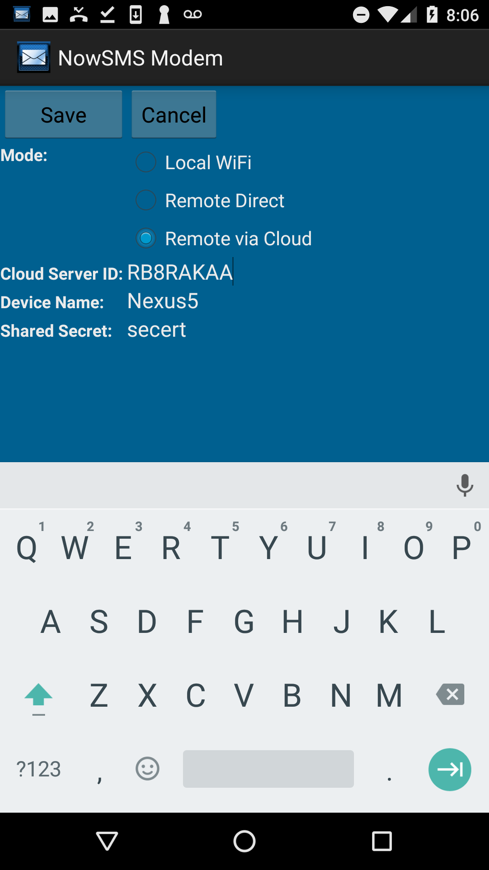
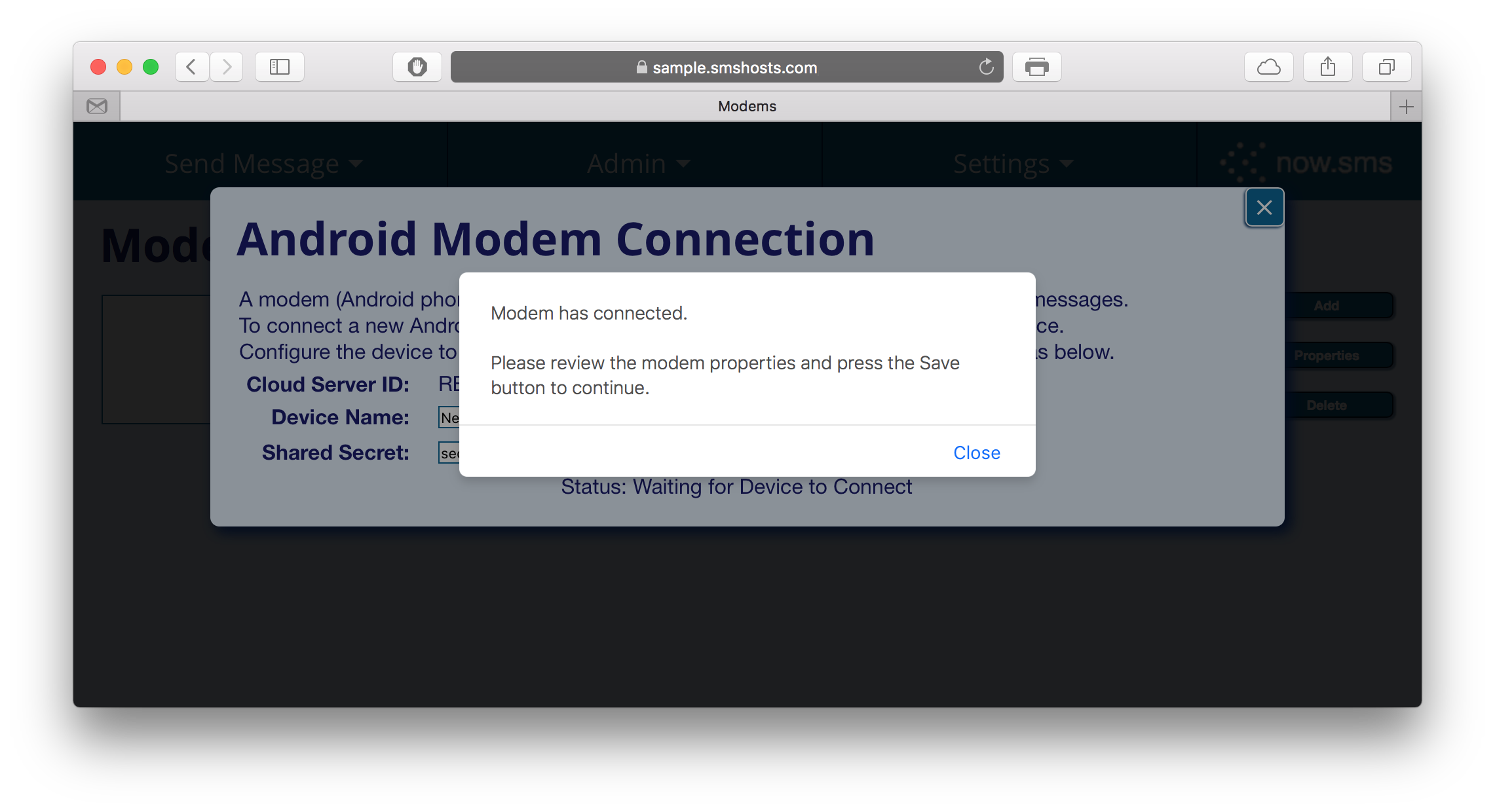
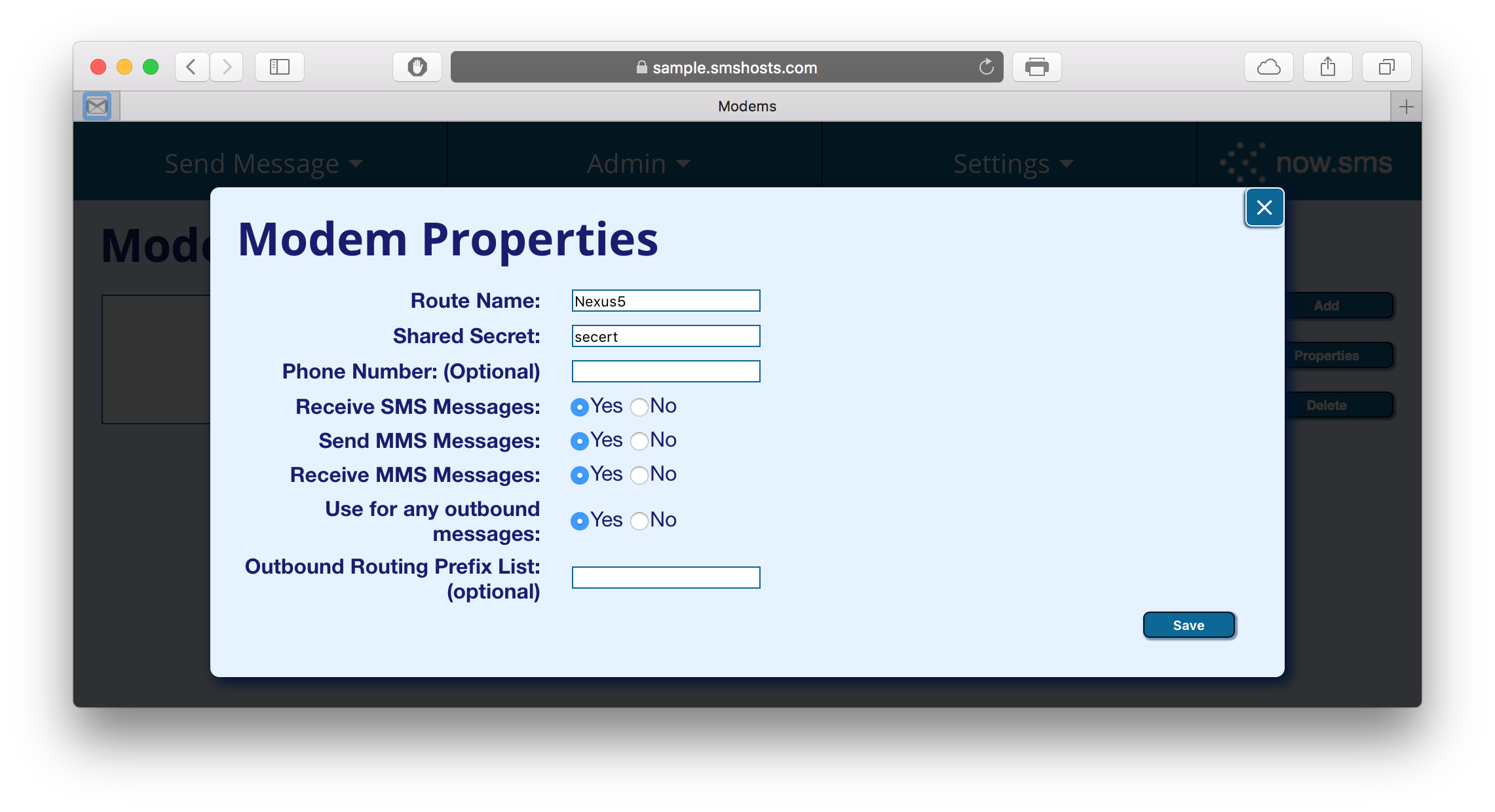
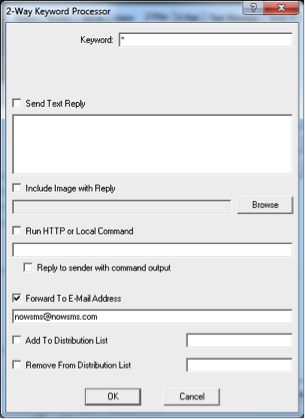
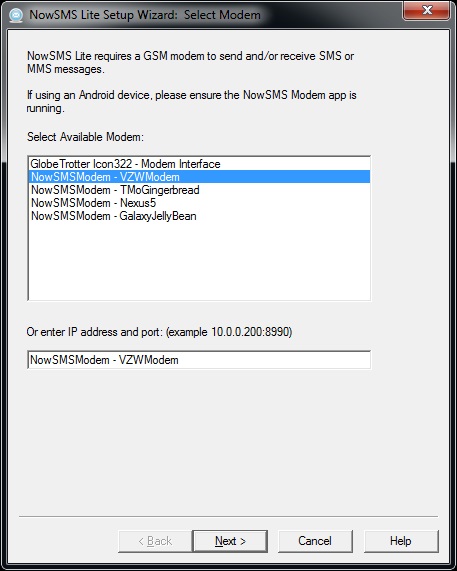
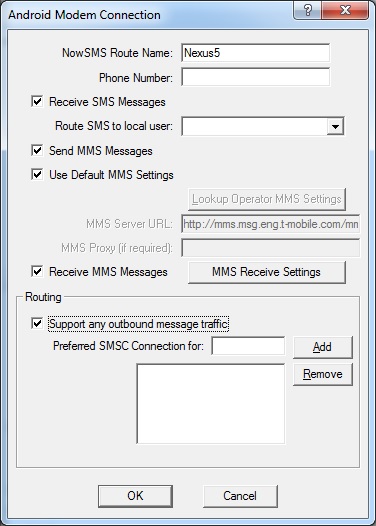
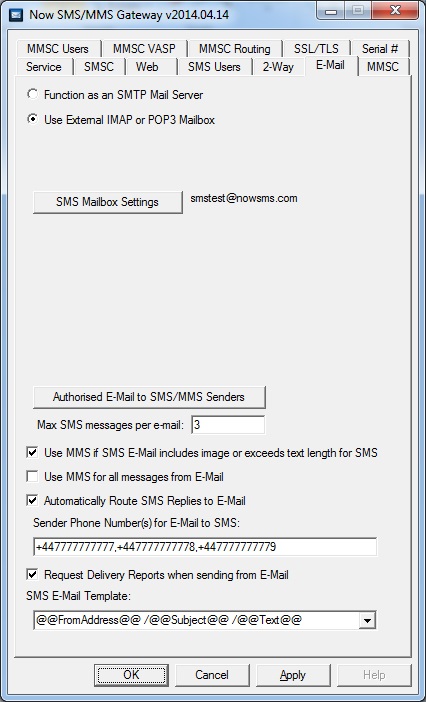
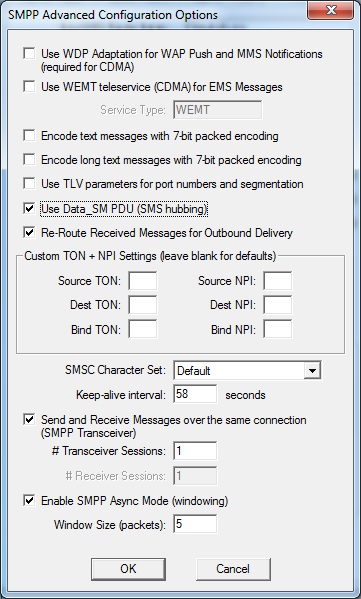
<?xml version="1.0" encoding="UTF-8"?>
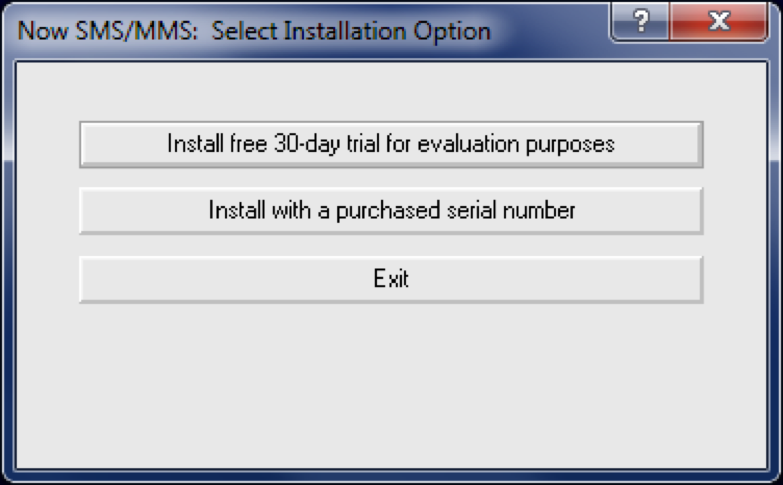
<?xml-stylesheet type="text/xsl" media="screen" href="/~d/styles/atom10full.xsl"?><?xml-stylesheet type="text/css" media="screen" href="http://feeds.feedburner.com/~d/styles/itemcontent.css"?><feed xmlns="http://www.w3.org/2005/Atom" xmlns:openSearch="http://a9.com/-/spec/opensearchrss/1.0/" xmlns:georss="http://www.georss.org/georss" xmlns:feedburner="http://rssnamespace.org/feedburner/ext/1.0"><id>tag:blogger.com,1999:blog-5228203547789870316</id><updated>2009-11-05T17:26:00.355Z</updated><title type="text">The NowSMS Tech Support Files</title><subtitle type="html" /><link rel="http://schemas.google.com/g/2005#feed" type="application/atom+xml" href="http://blog.nowsms.com/feeds/posts/default" /><link rel="alternate" type="text/html" href="http://blog.nowsms.com/" /><link rel="hub" href="http://pubsubhubbub.appspot.com/" /><link rel="next" type="application/atom+xml" href="http://www.blogger.com/feeds/5228203547789870316/posts/default?start-index=26&amp;max-results=25" /><author><name>Brett Warthen</name><uri>http://www.blogger.com/profile/15428404631060278711</uri><email>noreply@blogger.com</email></author><generator version="7.00" uri="http://www.blogger.com">Blogger</generator><openSearch:totalResults>79</openSearch:totalResults><openSearch:startIndex>1</openSearch:startIndex><openSearch:itemsPerPage>25</openSearch:itemsPerPage><link rel="self" href="http://feeds.feedburner.com/nowsms" type="application/atom+xml" /><feedburner:emailServiceId>nowsms</feedburner:emailServiceId><feedburner:feedburnerHostname>http://feedburner.google.com</feedburner:feedburnerHostname><atom10:link xmlns:atom10="http://www.w3.org/2005/Atom" rel="hub" href="http://pubsubhubbub.appspot.com" /><entry><id>tag:blogger.com,1999:blog-5228203547789870316.post-7598629458652067660</id><published>2009-11-05T16:48:00.004Z</published><updated>2009-11-05T17:26:00.368Z</updated><category scheme="http://www.blogger.com/atom/ns#" term="Java" /><category scheme="http://www.blogger.com/atom/ns#" term="JSR-205" /><category scheme="http://www.blogger.com/atom/ns#" term="Java MIDlet" /><title type="text">Bug Sending Long Binary SMS Messages to Java Apps on Motorola Devices</title><content type="html">One of the more interesting technical support incidents of the past week comes from Mohit Kumar Sethi at &lt;a href="http://www.3i-infotech.com/"&gt;3i Infotech Consumer Services Ltd.&lt;/a&gt;&lt;div&gt;&lt;br /&gt;&lt;/div&gt;&lt;div&gt;Mohit is using NowSMS Lite to send binary SMS messages to a Java application that his company is developing.&lt;/div&gt;&lt;div&gt;&lt;br /&gt;&lt;/div&gt;&lt;div&gt;He noticed that when sending SMS binary messages longer than 140 bytes, the messages were received correctly by Nokia and SonyEricsson devices, however many Motorola devices received corrupted messages.&lt;/div&gt;&lt;div&gt;&lt;br /&gt;&lt;/div&gt;&lt;div&gt;In GSM environments, a single SMS message can be no longer than 140 bytes.&lt;/div&gt;&lt;div&gt;&lt;br /&gt;&lt;/div&gt;&lt;div&gt;&lt;div&gt;When you send a text message, as long as the text only contains characters that are included in the GSM 7-bit character set , 160 7-bit characters are compressed into 140 8-bit bytes to produce the 160 character limit that we are so familiar with. (Note: 160 * 7 = 140 * 8)&lt;/div&gt;&lt;div&gt;&lt;br /&gt;&lt;/div&gt;&lt;div&gt;There's more general discussion of SMS message size limits in the article at &lt;a href="http://blog.nowsms.com/2007/06/long-sms-text-messages-and-160.html"&gt;http://blog.nowsms.com/2007/06/long-sms-text-messages-and-160.html&lt;/a&gt;.&lt;/div&gt;&lt;div&gt;&lt;br /&gt;&lt;/div&gt;&lt;div&gt;But back to Mohit's problem...&lt;/div&gt;&lt;div&gt;&lt;br /&gt;&lt;/div&gt;&lt;div&gt;When sending a binary SMS message longer than 140 bytes, it has to be segmented into multiple SMS messages.  A special header is added to each physical SMS message so that the receiving client knows that it is a multipart SMS message that must be reassembled by the client. These headers are known as segmentation or concatenation headers. 6 bytes (8-bits each) are required for these concatenation headers in each physical SMS message. These headers are placed in the User Data Header (UDH) field of the message, but they do count against the overall size limit of the message.&lt;/div&gt;&lt;div&gt;&lt;br /&gt;&lt;/div&gt;&lt;div&gt;As a result, a long binary SMS message will be divided into 134 byte segments.  Or 153 characters per segment for standard text messages.  Or 67 Unicode characters per segment for Unicode text messages.&lt;/div&gt;&lt;div&gt;&lt;br /&gt;&lt;/div&gt;&lt;div&gt;Mohit observed that with various Motorola RAZR and SLVR models, the received message would lose one byte for each of these segments.&lt;/div&gt;&lt;div&gt;&lt;br /&gt;&lt;/div&gt;&lt;div&gt;He had his applications on the phones send long binary SMS messages back in to NowSMS.&lt;/div&gt;&lt;div&gt;&lt;br /&gt;&lt;/div&gt;&lt;div&gt;When his application on a Nokia or SonyEricsson device sent a long binary SMS message, it generated a User Data Header like this:  &lt;b&gt;0B0504232923290003070301&lt;/b&gt;&lt;/div&gt;&lt;div&gt;&lt;br /&gt;&lt;/div&gt;&lt;div&gt;&lt;b&gt;0B&lt;/b&gt; is the length of the user data header.&lt;/div&gt;&lt;div&gt;&lt;br /&gt;&lt;/div&gt;&lt;div&gt;&lt;b&gt;05&lt;/b&gt; indicates that source and destination port information is present in the message.&lt;/div&gt;&lt;div&gt;&lt;br /&gt;&lt;/div&gt;&lt;div&gt;&lt;b&gt;04&lt;/b&gt; indicates the length of the source and destination port information.&lt;/div&gt;&lt;div&gt;&lt;br /&gt;&lt;/div&gt;&lt;div&gt;&lt;b&gt;2329 2329&lt;/b&gt; indicates source and destination ports of 2329.&lt;/div&gt;&lt;div&gt;&lt;br /&gt;&lt;/div&gt;&lt;div&gt;&lt;b&gt;00&lt;/b&gt; indicates that the message is segmented using an 8-bit reference number.&lt;/div&gt;&lt;div&gt;&lt;br /&gt;&lt;/div&gt;&lt;div&gt;&lt;b&gt;03&lt;/b&gt; indicates the length of the segmentation headers.&lt;/div&gt;&lt;div&gt;&lt;div&gt;&lt;br /&gt;&lt;/div&gt;&lt;div&gt;&lt;b&gt;07&lt;/b&gt; is the 8-bit reference number for the segmented message.&lt;/div&gt;&lt;div&gt;&lt;br /&gt;&lt;/div&gt;&lt;/div&gt;&lt;div&gt;&lt;b&gt;03&lt;/b&gt; is the number of segments in the overall message.&lt;/div&gt;&lt;div&gt;&lt;br /&gt;&lt;/div&gt;&lt;div&gt;&lt;b&gt;01&lt;/b&gt; is the number of the current segment &lt;i&gt;(i.e,. 1 of 3)&lt;/i&gt;.&lt;/div&gt;&lt;div&gt;&lt;br /&gt;&lt;/div&gt;&lt;div&gt;Long binary messages sent by the Motorola devices were different.  A typical user data header looked like this:  &lt;b&gt;0C080400460301050423292329&lt;/b&gt;&lt;/div&gt;&lt;div&gt;&lt;br /&gt;&lt;/div&gt;&lt;div&gt;&lt;div&gt;&lt;b&gt;0C&lt;/b&gt; is the length of the user data header.&lt;/div&gt;&lt;div&gt;&lt;div&gt;&lt;br /&gt;&lt;/div&gt;&lt;div&gt;&lt;b&gt;08&lt;/b&gt; indicates that the message is segmented using a 16-bit reference number.&lt;/div&gt;&lt;div&gt;&lt;br /&gt;&lt;/div&gt;&lt;div&gt;&lt;div&gt;&lt;b&gt;04&lt;/b&gt; indicates the length of the segmentation headers.&lt;/div&gt;&lt;div&gt;&lt;br /&gt;&lt;/div&gt;&lt;/div&gt;&lt;div&gt;&lt;b&gt;0046&lt;/b&gt; is the 16-bit reference number for the segmented message.&lt;/div&gt;&lt;div&gt;&lt;br /&gt;&lt;/div&gt;&lt;div&gt;&lt;b&gt;03&lt;/b&gt; is the number of segments in the overall message.&lt;/div&gt;&lt;div&gt;&lt;br /&gt;&lt;/div&gt;&lt;div&gt;&lt;b&gt;01&lt;/b&gt; is the number of the current segment &lt;i&gt;(i.e,. 1 of 3)&lt;/i&gt;.&lt;/div&gt;&lt;div&gt;&lt;br /&gt;&lt;/div&gt;&lt;/div&gt;&lt;div&gt;&lt;b&gt;05&lt;/b&gt; indicates that source and destination port information is present in the message.&lt;/div&gt;&lt;div&gt;&lt;br /&gt;&lt;/div&gt;&lt;div&gt;&lt;b&gt;04&lt;/b&gt; indicates the length of the source and destination port information.&lt;/div&gt;&lt;div&gt;&lt;br /&gt;&lt;/div&gt;&lt;div&gt;&lt;b&gt;2329 2329&lt;/b&gt; indicates source and destination ports of 2329.&lt;/div&gt;&lt;div&gt;&lt;br /&gt;&lt;/div&gt;&lt;div&gt;Whether the segmentation headers or port information headers was not significant.  But what was significant was that the Motorola device was generating messages that used 16-bit reference numbers.&lt;/div&gt;&lt;div&gt;&lt;br /&gt;&lt;/div&gt;&lt;div&gt;Mohit determined that when the Motorola device received a long binary message using an 8-bit reference number, it converted this to a 16-bit reference number.  If the overall message length including UDH was 140 before this conversion, the conversion would cause the last byte of data in that segment to be lost.&lt;/div&gt;&lt;div&gt;&lt;br /&gt;&lt;/div&gt;&lt;div&gt;The Motorola device didn't seem to have any problems with standard long text messages being sent to the SMS client on the device, or with long binary WAP push messages.  The bug seems to be in the part of the device code that routes messages to Java applications.&lt;/div&gt;&lt;div&gt;&lt;br /&gt;&lt;/div&gt;&lt;div&gt;To make a long story short, this is an annoying bug.  And if you're sending messages to Java applications, you may encounter it.&lt;/div&gt;&lt;div&gt;&lt;br /&gt;&lt;/div&gt;&lt;div&gt;To deal with this scenario, we added a configuration option to NowSMS and NowSMS Lite, which would cause NowSMS to use 16-bit reference numbers when generating concatenated multipart messages.  By default, NowSMS uses 8-bit reference numbers, which allows the most characters to be fit in a single SMS.&lt;/div&gt;&lt;div&gt;&lt;br /&gt;&lt;/div&gt;&lt;div&gt;When 16-bit reference numbers are used, message length per segment rules change.  For long text messages, instead of 153 characters per segment, only 152 characters per segment can be achieved.&lt;/div&gt;&lt;div&gt;&lt;br /&gt;&lt;/div&gt;&lt;div&gt;For Unicode messages, instead of 67 characters per segment, only 66 characters per segment can be achieved.&lt;/div&gt;&lt;div&gt;&lt;br /&gt;&lt;/div&gt;&lt;div&gt;For binary messages, 133 bytes of binary data can be included per segment, instead of 134 bytes.&lt;/div&gt;&lt;div&gt;&lt;br /&gt;&lt;/div&gt;&lt;div&gt;This 16-bit reference number support was added in the 2009.11.04 release of NowSMS.  This support will be carried through to future releases.  For now v2009.11.04 has been made available as a special release at &lt;a href="http://www.nowsms.com/download/nowsms20091104.zip"&gt;http://www.nowsms.com/download/nowsms20091104.zip&lt;/a&gt;&lt;i&gt; (standard version)&lt;/i&gt; and &lt;a href="http://www.nowsms.com/download/lite20091104.zip"&gt;http://www.nowsms.com/download/lite20091104.zip&lt;/a&gt; &lt;i&gt;(NowSMS Lite)&lt;/i&gt;.&lt;/div&gt;&lt;div&gt;&lt;br /&gt;&lt;/div&gt;&lt;div&gt;To enable 16-bit reference numbers, edit SMSGW.INI, and under the [SMSGW] section header, add ConcatRef16Bit=Yes.&lt;/div&gt;&lt;div&gt;&lt;br /&gt;&lt;/div&gt;&lt;div&gt;Note that when this setting is applied, 16-bit reference numbers are only used when NowSMS performs the segmentation &lt;i&gt;(message submitted either via HTTP, or via SMPP using a single message_payload submission)&lt;/i&gt; ... NowSMS does not resegment messages that have already been segmented by the submitting client.&lt;/div&gt;&lt;div&gt;&lt;br /&gt;&lt;/div&gt;&lt;div&gt;For more about sending SMS messages to J2ME apps, see &lt;a href="http://blog.nowsms.com/2007/06/send-sms-to-java-appmidlet.html"&gt;http://blog.nowsms.com/2007/06/send-sms-to-java-appmidlet.html&lt;/a&gt;.&lt;/div&gt;&lt;/div&gt;&lt;/div&gt;&lt;div class="blogger-post-footer"&gt;&lt;img width='1' height='1' src='https://blogger.googleusercontent.com/tracker/5228203547789870316-7598629458652067660?l=blog.nowsms.com'/&gt;&lt;/div&gt;</content><link rel="edit" type="application/atom+xml" href="http://www.blogger.com/feeds/5228203547789870316/posts/default/7598629458652067660" /><link rel="self" type="application/atom+xml" href="http://www.blogger.com/feeds/5228203547789870316/posts/default/7598629458652067660" /><link rel="alternate" type="text/html" href="http://feedproxy.google.com/~r/nowsms/~3/zr3srGHgt0g/bug-sending-long-binary-sms-messages-to.html" title="Bug Sending Long Binary SMS Messages to Java Apps on Motorola Devices" /><author><name>Brett Warthen</name><uri>http://www.blogger.com/profile/15428404631060278711</uri><email>noreply@blogger.com</email><gd:extendedProperty xmlns:gd="http://schemas.google.com/g/2005" name="OpenSocialUserId" value="10296996437248226574" /></author><feedburner:origLink>http://blog.nowsms.com/2009/11/bug-sending-long-binary-sms-messages-to.html</feedburner:origLink></entry><entry><id>tag:blogger.com,1999:blog-5228203547789870316.post-6816819348303142376</id><published>2009-11-02T13:00:00.000Z</published><updated>2009-11-02T13:00:01.047Z</updated><category scheme="http://www.blogger.com/atom/ns#" term="GSM modem" /><category scheme="http://www.blogger.com/atom/ns#" term="3G modem" /><category scheme="http://www.blogger.com/atom/ns#" term="ExpressCard modem" /><title type="text">SMS and MMS with the Novatel Merlin XU870 ExpressCard Modem</title><content type="html">&lt;a onblur="try {parent.deselectBloggerImageGracefully();} catch(e) {}" href="http://1.bp.blogspot.com/_YurG55Yaya0/SudkivFdQkI/AAAAAAAAA_0/XR0hJh_j0p4/s1600-h/NovatelXU870.png"&gt;&lt;img style="float:right; margin:0 0 10px 10px;cursor:pointer; cursor:hand;width: 371px; height: 201px;" src="http://1.bp.blogspot.com/_YurG55Yaya0/SudkivFdQkI/AAAAAAAAA_0/XR0hJh_j0p4/s400/NovatelXU870.png" border="0" alt="" id="BLOGGER_PHOTO_ID_5397393226344514114" /&gt;&lt;/a&gt;&lt;div&gt;If you are using NowSMS in a laptop with an available ExpressCard slot, the Novatel Wireless Merlin XU870 ExpressCard Modem is a good modem to use with NowSMS to send and receive SMS and MMS messages.&lt;/div&gt;&lt;div&gt;&lt;br /&gt;&lt;/div&gt;&lt;div&gt;This modem supports HSDPA up to 7.2 Mbps (although locating the appropriate firmware driver update seems to be a challenge, without it, it is limited to 3.6 Mbps).  That is good for receiving MMS.&lt;/div&gt;&lt;div&gt;&lt;br /&gt;&lt;/div&gt;&lt;div&gt;However, the modem does not support HSUPA, limiting it to 384 Kbps for uploads and sending MMS.&lt;/div&gt;&lt;div&gt;&lt;br /&gt;&lt;/div&gt;&lt;div&gt;Although we have yet to test it, the Merlin X950D would likely be a better choice for MMS, as it claims to support HSUPA up to 2.1 Mbps (Note: the X950D requires a firmware update to enable HSUPA and there may be some difficulty locating the firmware update).  SMS speeds should not be a difference between the two modems.&lt;/div&gt;&lt;div&gt;&lt;br /&gt;&lt;/div&gt;&lt;div&gt;Drivers for this modem can be found on the Novatel Wireless web site at &lt;a href="http://www.novatelwireless.com/index.php?option=com_content&amp;amp;view=article&amp;amp;id=220&amp;amp;Itemid=272"&gt;http://www.novatelwireless.com/index.php?option=com_content&amp;amp;view=article&amp;amp;id=220&amp;amp;Itemid=272&lt;/a&gt;.  (If this direct link is broken, navigate from &lt;a href="http://www.novatelwireless.com/support/"&gt;http://www.novatelwireless.com/support/&lt;/a&gt;.)&lt;/div&gt;&lt;div&gt;&lt;br /&gt;&lt;/div&gt;&lt;div&gt;There are no special considerations for using the Novatel XU870 modem with NowSMS.  However, it should be noted that this modem does NOT support delivery receipts.&lt;/div&gt;&lt;div&gt;&lt;br /&gt;&lt;/div&gt;&lt;div&gt;For general information on configuring NowSMS to send and receive SMS and MMS messages with a GSM modem, such as the Novatel Wireless Merlin XU870, please see the NowSMS Quick Start Guide at &lt;a href="http://www.nowsms.com/documentation/quickstartguide/"&gt;http://www.nowsms.com/documentation/quickstartguide/&lt;/a&gt;.&lt;/div&gt;&lt;div&gt;&lt;br /&gt;&lt;/div&gt;&lt;div&gt;Frequencies supported by the Novatel Merlin XU870:&lt;/div&gt;&lt;div&gt;&lt;br /&gt;&lt;/div&gt;&lt;div&gt;3G/UMTS/HSDPA/HSUPA - 850Mhz/1900Mhz/2100Mhz (Good for most of the world, plus AT&amp;amp;T USA)&lt;/div&gt;&lt;div&gt;EDGE/GPRS - 850Mhz/900Mhz/1800Mhz/1900Mhz (Global)&lt;/div&gt;&lt;div&gt;&lt;br /&gt;&lt;/div&gt;&lt;div&gt;HSDPA Max Performance: Download speed - 7.2 Mbps; Upload speed - 384 Kbps&lt;/div&gt;&lt;div class="blogger-post-footer"&gt;&lt;img width='1' height='1' src='https://blogger.googleusercontent.com/tracker/5228203547789870316-6816819348303142376?l=blog.nowsms.com'/&gt;&lt;/div&gt;</content><link rel="edit" type="application/atom+xml" href="http://www.blogger.com/feeds/5228203547789870316/posts/default/6816819348303142376" /><link rel="self" type="application/atom+xml" href="http://www.blogger.com/feeds/5228203547789870316/posts/default/6816819348303142376" /><link rel="alternate" type="text/html" href="http://feedproxy.google.com/~r/nowsms/~3/8n5dO3DmNss/sms-and-mms-with-novatel-merlin-xu870.html" title="SMS and MMS with the Novatel Merlin XU870 ExpressCard Modem" /><author><name>Brett Warthen</name><uri>http://www.blogger.com/profile/15428404631060278711</uri><email>noreply@blogger.com</email><gd:extendedProperty xmlns:gd="http://schemas.google.com/g/2005" name="OpenSocialUserId" value="10296996437248226574" /></author><media:thumbnail xmlns:media="http://search.yahoo.com/mrss/" url="http://1.bp.blogspot.com/_YurG55Yaya0/SudkivFdQkI/AAAAAAAAA_0/XR0hJh_j0p4/s72-c/NovatelXU870.png" height="72" width="72" /><feedburner:origLink>http://blog.nowsms.com/2009/11/sms-and-mms-with-novatel-merlin-xu870.html</feedburner:origLink></entry><entry><id>tag:blogger.com,1999:blog-5228203547789870316.post-7071404058755520236</id><published>2009-10-29T18:00:00.000Z</published><updated>2009-10-29T18:00:01.767Z</updated><category scheme="http://www.blogger.com/atom/ns#" term="WAP Proxy" /><category scheme="http://www.blogger.com/atom/ns#" term="WAP Push" /><category scheme="http://www.blogger.com/atom/ns#" term="WAP Push Proxy Gateway" /><title type="text">Using NowSMS as a WAP Push Proxy Gateway (PPG)</title><content type="html">NowSMS supports the Open Mobile Alliance (OMA) Push Access Protocol (PAP), which allows other applications to use NowSMS as a WAP Push Proxy Gateway (PPG).&lt;div&gt;&lt;br /&gt;&lt;/div&gt;&lt;div&gt;Even though NowSMS has its own MMSC capability, we do have customers who are using NowSMS as a push proxy gateway for another vendor's MMSC.&lt;/div&gt;&lt;div&gt;&lt;br /&gt;&lt;/div&gt;&lt;div&gt;In addition to providing PPG support for MMS, NowSMS can be used as a push proxy gateway for other types of push messages, including, but not limited to SyncML DM, SyncML DS, Wireless Village/IMPS, OMA Digital Rights Management, OMA E-Mail Notification (EMN), Service Indication and Service Load.&lt;/div&gt;&lt;div&gt;&lt;br /&gt;&lt;/div&gt;&lt;div&gt;&lt;div&gt;To post a push message via the PAP interface, perform an HTTP POST to the "web" port configured for the NowSMS web interface (not the MMSC), posting to a URL of "/pap".  If user authentication is enabled in NowSMS, user identification can be included as URL parameters (e.g., "/pap?user=username&amp;amp;password=password"), or via an HTTP Basic Authentication "Authorization:" header.&lt;/div&gt;&lt;div&gt;&lt;br /&gt;&lt;/div&gt;&lt;div&gt;A PAP post is a multipart MIME request, with the first MIME part being the PAP control document that specifies message recipient(s). The second MIME part is the data to be pushed.&lt;/div&gt;&lt;div&gt;&lt;br /&gt;&lt;/div&gt;&lt;div&gt;An example of a service indication push being sent via PAP is shown below:&lt;/div&gt;&lt;div&gt;&lt;br /&gt;&lt;/div&gt;&lt;div&gt;&lt;span class="Apple-style-span"  style="font-family:'courier new';"&gt;&lt;span class="Apple-style-span" style="font-size: small;"&gt;-----------------BEGIN EXAMPLE----------------- &lt;/span&gt;&lt;/span&gt;&lt;/div&gt;&lt;div&gt;&lt;span class="Apple-style-span"  style="font-family:'courier new';"&gt;&lt;span class="Apple-style-span" style="font-size: small;"&gt;POST /pap?user=username&amp;amp;password=password HTTP/1.0 &lt;/span&gt;&lt;/span&gt;&lt;/div&gt;&lt;div&gt;&lt;span class="Apple-style-span"  style="font-family:'courier new';"&gt;&lt;span class="Apple-style-span" style="font-size: small;"&gt;Content-Type: multipart/related; boundary=mime-boundary; type="application/xml" &lt;/span&gt;&lt;/span&gt;&lt;/div&gt;&lt;div&gt;&lt;span class="Apple-style-span"  style="font-family:'courier new';"&gt;&lt;span class="Apple-style-span" style="font-size: small;"&gt;Content-Length: xxxxx &lt;/span&gt;&lt;/span&gt;&lt;/div&gt;&lt;div&gt;&lt;span class="Apple-style-span"  style="font-family:'courier new';"&gt;&lt;span class="Apple-style-span" style="font-size: small;"&gt;&lt;br /&gt;&lt;/span&gt;&lt;/span&gt;&lt;/div&gt;&lt;div&gt;&lt;span class="Apple-style-span"  style="font-family:'courier new';"&gt;&lt;span class="Apple-style-span" style="font-size: small;"&gt;--mime-boundary &lt;/span&gt;&lt;/span&gt;&lt;/div&gt;&lt;div&gt;&lt;span class="Apple-style-span"  style="font-family:'courier new';"&gt;&lt;span class="Apple-style-span" style="font-size: small;"&gt;Content-Type: application/xml &lt;/span&gt;&lt;/span&gt;&lt;/div&gt;&lt;div&gt;&lt;span class="Apple-style-span"  style="font-family:'courier new';"&gt;&lt;span class="Apple-style-span" style="font-size: small;"&gt;&lt;br /&gt;&lt;/span&gt;&lt;/span&gt;&lt;/div&gt;&lt;div&gt;&lt;span class="Apple-style-span"  style="font-family:'courier new';"&gt;&lt;span class="Apple-style-span" style="font-size: small;"&gt;--mime-boundary &lt;/span&gt;&lt;/span&gt;&lt;/div&gt;&lt;div&gt;&lt;span class="Apple-style-span"  style="font-family:'courier new';"&gt;&lt;span class="Apple-style-span" style="font-size: small;"&gt;Content-Type: application/xml &lt;/span&gt;&lt;/span&gt;&lt;/div&gt;&lt;div&gt;&lt;span class="Apple-style-span"  style="font-family:'courier new';"&gt;&lt;span class="Apple-style-span" style="font-size: small;"&gt;&lt;br /&gt;&lt;/span&gt;&lt;/span&gt;&lt;/div&gt;&lt;div&gt;&lt;span class="Apple-style-span"  style="font-family:'courier new';"&gt;&lt;span class="Apple-style-span" style="font-size: small;"&gt;&amp;lt;?xml version="1.0"?&amp;gt; &lt;/span&gt;&lt;/span&gt;&lt;/div&gt;&lt;div&gt;&lt;span class="Apple-style-span"  style="font-family:'courier new';"&gt;&lt;span class="Apple-style-span" style="font-size: small;"&gt;&amp;lt;!DOCTYPE pap PUBLIC "-//WAPFORUM//DTD PAP 2.0//EN" "http://www.wapforum.org/DTD/pap_2.0.dtd" &lt;/span&gt;&lt;/span&gt;&lt;/div&gt;&lt;div&gt;&lt;span class="Apple-style-span"  style="font-family:'courier new';"&gt;&lt;span class="Apple-style-span" style="font-size: small;"&gt;[&amp;lt;?wap-pap-ver supported-versions="2.0,1.*"?&amp;gt;]&amp;gt; &lt;/span&gt;&lt;/span&gt;&lt;/div&gt;&lt;div&gt;&lt;span class="Apple-style-span"  style="font-family:'courier new';"&gt;&lt;span class="Apple-style-span" style="font-size: small;"&gt;&amp;lt;pap&amp;gt; &lt;/span&gt;&lt;/span&gt;&lt;/div&gt;&lt;div&gt;&lt;span class="Apple-style-span"  style="font-family:'courier new';"&gt;&lt;span class="Apple-style-span" style="font-size: small;"&gt;&amp;lt;push-message push-id="9fjeo39jf084@pi.com"&amp;gt; &lt;/span&gt;&lt;/span&gt;&lt;/div&gt;&lt;div&gt;&lt;span class="Apple-style-span"  style="font-family:'courier new';"&gt;&lt;span class="Apple-style-span" style="font-size: small;"&gt;&amp;lt;address address-value="wappush=xxxxxxxxx/type=user@ppg.operator.com"&amp;gt;&amp;lt;/address&amp;gt; &lt;/span&gt;&lt;/span&gt;&lt;/div&gt;&lt;div&gt;&lt;span class="Apple-style-span"  style="font-family:'courier new';"&gt;&lt;span class="Apple-style-span" style="font-size: small;"&gt;&amp;lt;/push-message&amp;gt; &lt;/span&gt;&lt;/span&gt;&lt;/div&gt;&lt;div&gt;&lt;span class="Apple-style-span"  style="font-family:'courier new';"&gt;&lt;span class="Apple-style-span" style="font-size: small;"&gt;&amp;lt;/pap&amp;gt; &lt;/span&gt;&lt;/span&gt;&lt;/div&gt;&lt;div&gt;&lt;span class="Apple-style-span"  style="font-family:'courier new';"&gt;&lt;span class="Apple-style-span" style="font-size: small;"&gt;--mime-boundary &lt;/span&gt;&lt;/span&gt;&lt;/div&gt;&lt;div&gt;&lt;span class="Apple-style-span"  style="font-family:'courier new';"&gt;&lt;span class="Apple-style-span" style="font-size: small;"&gt;X-Wap-Application-Id: x-wap-application:wml.ua &lt;/span&gt;&lt;/span&gt;&lt;/div&gt;&lt;div&gt;&lt;span class="Apple-style-span"  style="font-family:'courier new';"&gt;&lt;span class="Apple-style-span" style="font-size: small;"&gt;Content-Type: text/vnd.wap.si &lt;/span&gt;&lt;/span&gt;&lt;/div&gt;&lt;div&gt;&lt;span class="Apple-style-span"  style="font-family:'courier new';"&gt;&lt;span class="Apple-style-span" style="font-size: small;"&gt;&lt;br /&gt;&lt;/span&gt;&lt;/span&gt;&lt;/div&gt;&lt;div&gt;&lt;span class="Apple-style-span"  style="font-family:'courier new';"&gt;&lt;span class="Apple-style-span" style="font-size: small;"&gt;&amp;lt;?xml version="1.0"?&amp;gt; &lt;/span&gt;&lt;/span&gt;&lt;/div&gt;&lt;div&gt;&lt;span class="Apple-style-span"  style="font-family:'courier new';"&gt;&lt;span class="Apple-style-span" style="font-size: small;"&gt;&amp;lt;!DOCTYPE si PUBLIC "-//WAPFORUM//DTD SI 1.0//EN" &lt;/span&gt;&lt;/span&gt;&lt;/div&gt;&lt;div&gt;&lt;span class="Apple-style-span"  style="font-family:'courier new';"&gt;&lt;span class="Apple-style-span" style="font-size: small;"&gt;"http://www.wapforum.org/DTD/si.dtd"&amp;gt; &lt;/span&gt;&lt;/span&gt;&lt;/div&gt;&lt;div&gt;&lt;span class="Apple-style-span"  style="font-family:'courier new';"&gt;&lt;span class="Apple-style-span" style="font-size: small;"&gt;&amp;lt;si&amp;gt; &lt;/span&gt;&lt;/span&gt;&lt;/div&gt;&lt;div&gt;&lt;span class="Apple-style-span"  style="font-family:'courier new';"&gt;&lt;span class="Apple-style-span" style="font-size: small;"&gt;&amp;lt;indication href="http://www.xyz.com/email/123/abc.wml" created="2009-10-25T15:23:15Z" &lt;/span&gt;&lt;/span&gt;&lt;/div&gt;&lt;div&gt;&lt;span class="Apple-style-span"  style="font-family:'courier new';"&gt;&lt;span class="Apple-style-span" style="font-size: small;"&gt;si-expires="2009-11-03T00:00:00Z"&amp;gt;&lt;/span&gt;&lt;/span&gt;&lt;/div&gt;&lt;div&gt;&lt;span class="Apple-style-span"  style="font-family:'courier new';"&gt;&lt;span class="Apple-style-span" style="font-size: small;"&gt;You have 4 new emails&lt;/span&gt;&lt;/span&gt;&lt;/div&gt;&lt;div&gt;&lt;span class="Apple-style-span"  style="font-family:'courier new';"&gt;&lt;span class="Apple-style-span" style="font-size: small;"&gt;&amp;lt;/indication&amp;gt; &lt;/span&gt;&lt;/span&gt;&lt;/div&gt;&lt;div&gt;&lt;span class="Apple-style-span"  style="font-family:'courier new';"&gt;&lt;span class="Apple-style-span" style="font-size: small;"&gt;&amp;lt;/si&amp;gt; &lt;/span&gt;&lt;/span&gt;&lt;/div&gt;&lt;div&gt;&lt;span class="Apple-style-span"  style="font-family:'courier new';"&gt;&lt;span class="Apple-style-span" style="font-size: small;"&gt;--mime-boundary-- &lt;/span&gt;&lt;/span&gt;&lt;/div&gt;&lt;div&gt;&lt;span class="Apple-style-span" style="font-family: 'courier new'; font-size: small; "&gt;-----------------END EXAMPLE----------------- &lt;/span&gt;&lt;/div&gt;&lt;div&gt;&lt;br /&gt;&lt;/div&gt;&lt;div&gt;Note that the "/type=user@ppg.operator.com" included in the WAP Push address specification is optional for NowSMS, and will be ignored, as only the relevant destination phone number is parsed from the request.&lt;/div&gt;&lt;div&gt;&lt;br /&gt;&lt;/div&gt;&lt;div&gt;NowSMS will perform XML to WBXML conversions for WAP push of the following content types:&lt;/div&gt;&lt;div&gt;&lt;br /&gt;&lt;/div&gt;&lt;div&gt;&lt;ul&gt;&lt;li&gt;text/vnd.wap.si&lt;/li&gt;&lt;li&gt;text/vnd.wap.sl&lt;/li&gt;&lt;li&gt;application/vnd.oma.drm.rights+xml&lt;/li&gt;&lt;li&gt;text/vnd.wap.emn+xml (or application/vnd.wap.emn+xml)&lt;/li&gt;&lt;li&gt;text/vnd.wap.co&lt;/li&gt;&lt;li&gt;text/vnd.wap.connectivity-xml&lt;/li&gt;&lt;/ul&gt;&lt;/div&gt;&lt;div&gt;&lt;br /&gt;&lt;/div&gt;&lt;div&gt;Other types (including non WBXML based encodings such as "application/vnd.wap.mms-message" for MMS or "application/vnd.syncml.ds.notification" for SyncML SAN/DS) must be submitted via the appropriate binary encoding.&lt;/div&gt;&lt;div&gt;&lt;br /&gt;&lt;/div&gt;&lt;div&gt;NowSMS supports the following text values for "X-Wap-Application-id":&lt;/div&gt;&lt;div&gt;&lt;br /&gt;&lt;/div&gt;&lt;div&gt;&lt;ul&gt;&lt;li&gt;x-wap-application:push.sia&lt;/li&gt;&lt;li&gt;x-wap-application:wml.ua&lt;/li&gt;&lt;li&gt;x-wap-application:wta.ua&lt;/li&gt;&lt;li&gt;x-wap-application:mms.ua&lt;/li&gt;&lt;li&gt;x-wap-application:push.syncml&lt;/li&gt;&lt;li&gt;x-wap-application:loc.ua&lt;/li&gt;&lt;li&gt;x-wap-application:syncml.dm&lt;/li&gt;&lt;li&gt;x-wap-application:drm.ua&lt;/li&gt;&lt;li&gt;x-wap-application:enm.ua&lt;/li&gt;&lt;li&gt;x-wap-application:wv.ua&lt;/li&gt;&lt;/ul&gt;&lt;/div&gt;&lt;div&gt;&lt;br /&gt;&lt;/div&gt;&lt;div&gt;Other "X-Wap-Application-id" header values must be submitted to NowSMS using their assigned decimal or hexadecimal value rather than the text name.  (If using a hexadecimal value, preface the value with "0x" to indicate hexadecimal format.)&lt;/div&gt;&lt;div&gt;&lt;br /&gt;&lt;/div&gt;&lt;div&gt;Further information on the WAP Push Access Protocol can be found from by downloading the WAP-247-PAP specification from &lt;a href="http://www.openmobilealliance.org/tech/affiliates/wap/wapindex.html"&gt;http://www.openmobilealliance.org/tech/affiliates/wap/wapindex.html&lt;/a&gt;&lt;/div&gt;&lt;div&gt;&lt;br /&gt;&lt;/div&gt;&lt;div&gt;Note that NowSMS does not support guaranteed delivery or delivery notifications.&lt;/div&gt;&lt;div&gt;&lt;br /&gt;&lt;/div&gt;&lt;div&gt;NowSMS does not support base64 encoding for PAP content, binary content should be posted as 8-bit data using Content-transport-encoding: binary. We further recommend that the MIME part that includes the binary content have a "Content-Length:" header to avoid the potential of extra bytes (such as blank lines) being interpreted as part of the binary stream.&lt;/div&gt;&lt;div&gt;&lt;br /&gt;&lt;/div&gt;&lt;div&gt;NowSMS sends WAP Push messages using connection-less WDP (Wireless Datagram Protocol) over SMS. SMSC connection from the NowSMS Push Proxy Gateway can use either SMPP, UCP/EMI or CIMD2.  GSM modem connections can also be used as the SMSC connection for smaller test environments.&lt;/div&gt;&lt;div&gt;&lt;br /&gt;&lt;/div&gt;&lt;div&gt;Special considerations exist for WAP Push in CDMA and CDMA2000 environments, namely the SMSC needs to support WDP Adaptation for SMPP.  This is described in more detail at &lt;a href="http://www.nowsms.com/support/bulletins/tb-nowsms-010.htm"&gt;http://www.nowsms.com/support/bulletins/tb-nowsms-010.htm&lt;/a&gt;.&lt;/div&gt;&lt;/div&gt;&lt;div class="blogger-post-footer"&gt;&lt;img width='1' height='1' src='https://blogger.googleusercontent.com/tracker/5228203547789870316-7071404058755520236?l=blog.nowsms.com'/&gt;&lt;/div&gt;</content><link rel="edit" type="application/atom+xml" href="http://www.blogger.com/feeds/5228203547789870316/posts/default/7071404058755520236" /><link rel="self" type="application/atom+xml" href="http://www.blogger.com/feeds/5228203547789870316/posts/default/7071404058755520236" /><link rel="alternate" type="text/html" href="http://feedproxy.google.com/~r/nowsms/~3/qxMRyaf3KQw/using-nowsms-as-wap-push-proxy-gateway.html" title="Using NowSMS as a WAP Push Proxy Gateway (PPG)" /><author><name>Brett Warthen</name><uri>http://www.blogger.com/profile/15428404631060278711</uri><email>noreply@blogger.com</email><gd:extendedProperty xmlns:gd="http://schemas.google.com/g/2005" name="OpenSocialUserId" value="10296996437248226574" /></author><feedburner:origLink>http://blog.nowsms.com/2009/10/using-nowsms-as-wap-push-proxy-gateway.html</feedburner:origLink></entry><entry><id>tag:blogger.com,1999:blog-5228203547789870316.post-4504359242603975603</id><published>2009-10-26T20:26:00.002Z</published><updated>2009-10-26T20:36:42.399Z</updated><category scheme="http://www.blogger.com/atom/ns#" term="VBScript" /><category scheme="http://www.blogger.com/atom/ns#" term="Excel" /><title type="text">Sending SMS from Microsoft Excel</title><content type="html">A recent posting on the NowSMS Discussion Board has some interesting information on sending an SMS a link within an Excel spreadsheet.&lt;div&gt;&lt;br /&gt;&lt;/div&gt;&lt;div&gt;Read the full post here:  &lt;a href="http://www.nowsms.com/discus/messages/1/41882.html"&gt;http://www.nowsms.com/discus/messages/1/41882.html&lt;/a&gt;&lt;/div&gt;&lt;div&gt;&lt;br /&gt;&lt;/div&gt;&lt;div&gt;The gist of the posting is that you cannot use the Excel HYPERLINK command to do this.  It would be logical to build a NowSMS URL to send a message, but the HYPERLINK command connects to the URL twice, resulting in duplicate messages being sent.&lt;/div&gt;&lt;div&gt;&lt;br /&gt;&lt;/div&gt;&lt;div&gt;As an alternative, Des created a VBScript macro instead.  This macro initiates an HTTP connection to NowSMS to send a message, dynamically creating a message based upon cell values in the Excel spreadsheet.  I've quoted the details from Des below:&lt;/div&gt;&lt;div&gt;&lt;br /&gt;&lt;/div&gt;&lt;div&gt;&lt;span class="Apple-style-span" style="font-family: Verdana, Arial, Helvetica; font-size: small; -webkit-border-horizontal-spacing: 1px; -webkit-border-vertical-spacing: 1px; "&gt;&lt;/span&gt;&lt;/div&gt;&lt;blockquote&gt;&lt;div&gt;&lt;span class="Apple-style-span" style="font-family: Verdana, Arial, Helvetica; font-size: small; -webkit-border-horizontal-spacing: 1px; -webkit-border-vertical-spacing: 1px; "&gt;The alternative approach is to write a simple VBScript macro instead.&lt;br /&gt;&lt;br /&gt;Today was my first attempt at writing one ... but I did manage to create a button in a spreadsheet, where when you click on the button, it reads data from the spreadsheet to send out an SMS.&lt;br /&gt;&lt;br /&gt;Here's what I did ...&lt;br /&gt;&lt;br /&gt;From the Developer menu in Excel, I added an Active X Command Button.&lt;br /&gt;&lt;br /&gt;I then associated the following code with my command button:&lt;br /&gt;&lt;br /&gt;Private Sub CommandButton1_Click()&lt;br /&gt;Set objHTTP = CreateObject("MSXML2.ServerXMLHTTP")&lt;br /&gt;URL = "http://192.168.0.222:8800/"&lt;br /&gt;objHTTP.Open "POST", URL, False&lt;br /&gt;objHTTP.send ("&amp;amp;PhoneNumber=" + Range("a9").Text + "&amp;amp;text=" + Range("a10").Text)&lt;br /&gt;&lt;br /&gt;End Sub&lt;br /&gt;&lt;br /&gt;In this particular case, I am extracting the phone number from cell A9, and the text to send from A10.&lt;br /&gt;&lt;br /&gt;Once I exit design mode, I can click on the button, and it triggers this code, which makes the HTTP submission to NowSMS.&lt;br /&gt;&lt;br /&gt;I'm using HTTP POST instead of GET to avoid some URL encoding issues.&lt;br /&gt;&lt;br /&gt;It's not as easy as using HYPERLINK, but hopefully you can adapt this to your scenario.&lt;br /&gt;&lt;/span&gt;&lt;/div&gt;&lt;div&gt;&lt;/div&gt;&lt;/blockquote&gt;&lt;div&gt;&lt;span class="Apple-style-span"  style="font-family:Verdana, Arial, Helvetica;"&gt;&lt;span class="Apple-style-span" style="font-size: small; -webkit-border-horizontal-spacing: 1px; -webkit-border-vertical-spacing: 1px;"&gt;&lt;br /&gt;&lt;/span&gt;&lt;/span&gt;&lt;/div&gt;&lt;div&gt;&lt;span class="Apple-style-span"  style="font-family:Verdana, Arial, Helvetica;"&gt;&lt;span class="Apple-style-span" style="font-size: small; -webkit-border-horizontal-spacing: 1px; -webkit-border-vertical-spacing: 1px;"&gt;&lt;span class="Apple-style-span" style="font-family: Georgia, serif; font-size: 16px; -webkit-border-horizontal-spacing: 0px; -webkit-border-vertical-spacing: 0px; "&gt;&lt;div&gt;Post any questions or commands in the discussion board posting at &lt;a href="http://www.nowsms.com/discus/messages/1/41882.html"&gt;http://www.nowsms.com/discus/messages/1/41882.html&lt;/a&gt;.&lt;/div&gt;&lt;div&gt;&lt;div&gt;&lt;br /&gt;&lt;/div&gt;&lt;/div&gt;&lt;/span&gt;&lt;/span&gt;&lt;/span&gt;&lt;/div&gt;&lt;div class="blogger-post-footer"&gt;&lt;img width='1' height='1' src='https://blogger.googleusercontent.com/tracker/5228203547789870316-4504359242603975603?l=blog.nowsms.com'/&gt;&lt;/div&gt;</content><link rel="edit" type="application/atom+xml" href="http://www.blogger.com/feeds/5228203547789870316/posts/default/4504359242603975603" /><link rel="self" type="application/atom+xml" href="http://www.blogger.com/feeds/5228203547789870316/posts/default/4504359242603975603" /><link rel="alternate" type="text/html" href="http://feedproxy.google.com/~r/nowsms/~3/pamhFIblDsk/sending-sms-from-microsoft-excel.html" title="Sending SMS from Microsoft Excel" /><author><name>Brett Warthen</name><uri>http://www.blogger.com/profile/15428404631060278711</uri><email>noreply@blogger.com</email><gd:extendedProperty xmlns:gd="http://schemas.google.com/g/2005" name="OpenSocialUserId" value="10296996437248226574" /></author><feedburner:origLink>http://blog.nowsms.com/2009/10/sending-sms-from-microsoft-excel.html</feedburner:origLink></entry><entry><id>tag:blogger.com,1999:blog-5228203547789870316.post-2764686679722044670</id><published>2009-10-14T09:30:00.001Z</published><updated>2009-10-14T09:30:00.936Z</updated><category scheme="http://www.blogger.com/atom/ns#" term="GPRS modem" /><category scheme="http://www.blogger.com/atom/ns#" term="GSM modem" /><category scheme="http://www.blogger.com/atom/ns#" term="3G modem" /><category scheme="http://www.blogger.com/atom/ns#" term="USB modem" /><title type="text">SMS and MMS with the Alcatel One Touch X200 or X060 USB Modem</title><content type="html">&lt;div&gt;The Alcatel One Touch X200 and X060 USB Modems are good (but not great) modems to use with NowSMS to send and receive SMS and MMS messages.&lt;/div&gt;&lt;div&gt;&lt;br /&gt;&lt;/div&gt;&lt;div&gt;For alternative modems, please see our other reviews: &lt;a href="http://blog.nowsms.com/search/label/GSM%20modem"&gt;http://blog.nowsms.com/search/label/GSM%20modem&lt;/a&gt;&lt;/div&gt;&lt;div&gt;&lt;br /&gt;&lt;/div&gt;&lt;div&gt;For general information on configuring NowSMS to send and receive SMS and MMS messages with a GSM modem, such as the Alcatel One Touch X200 or X060, please see the NowSMS Quick Start Guide at &lt;a href="http://www.nowsms.com/documentation/quickstartguide/"&gt;http://www.nowsms.com/documentation/quickstartguide/&lt;/a&gt;.&lt;/div&gt;&lt;div&gt;&lt;br /&gt;&lt;/div&gt;&lt;img src="http://2.bp.blogspot.com/_YurG55Yaya0/SsUY2BFOkHI/AAAAAAAAA_U/rnQyuBcO3DQ/s320/AlcatelX200.jpg" style="float:left; margin:0 10px 10px 0;cursor:pointer; cursor:hand;width: 320px; height: 320px;" border="0" alt="" id="BLOGGER_PHOTO_ID_5387739845501030514" /&gt;&lt;div&gt;To point out one initial point of confusion when configuring NowSMS to work with the Alcatel One Touch modem, the modem driver installed for the modems is named "Modem Interface".  When adding the modem to NowSMS, you must select the modem named "Modem Interface" (which is a less than intuitive choice of name).&lt;/div&gt;&lt;div&gt;&lt;br /&gt;&lt;/div&gt;&lt;div&gt;The primary problem when using the Alcatel One Touch X200 or X060 modem with NowSMS is that each time your PC is rebooted, the modem will be inaccessible to NowSMS until the Alcatel "HSPA USB Modem" software that ships with the modem is loaded.  Until that software is run, the modem functions only as a USB disk drive, and there is no modem functionality.&lt;/div&gt;&lt;div&gt;&lt;br /&gt;&lt;/div&gt;&lt;div&gt;If you want to run NowSMS automatically each time your PC is restarted, after installing NowSMS and verifying that it works with the Alcatel One Touch modem, reboot your PC.  If NowSMS is unable to access the modem after a reboot, you will need to follow the following steps.&lt;/div&gt;&lt;div&gt;&lt;br /&gt;&lt;/div&gt;&lt;div&gt;We have been unable to identify a solution for this problem, other than configuring the Alcatel "HSPA USB Modem" software application to run at startup.&lt;/div&gt;&lt;div&gt;&lt;br /&gt;&lt;/div&gt;&lt;div&gt;For some reason, on Windows Vista and Windows Server 2008 systems, the Alcatel "HSPA USB Modem" software requires that it be run with administrative rights.&lt;/div&gt;&lt;div&gt;&lt;br /&gt;&lt;/div&gt;&lt;div&gt;Therefore, the best way to configure this software to be started automatically when the PC reboots is to configure the Windows Task Scheduler to run it at startup.&lt;/div&gt;&lt;div&gt;&lt;br /&gt;&lt;/div&gt;&lt;div&gt;The Windows Task Scheduler can be accessed via the "Schedule Tasks" option under "Administrative Tools" in the Windows Control Panel.&lt;/div&gt;&lt;div&gt;&lt;br /&gt;&lt;/div&gt;&lt;div&gt;Select "Create Task" to create a new task to load the Alcatel "HSPA USB Modem" software at startup.&lt;/div&gt;&lt;div&gt;&lt;br /&gt;&lt;/div&gt;&lt;div&gt;On the "General" page, give the task a name, such as "Alcatel HSPA USB Modem", so that you can easily identify the task later.  Under "Security Options", select "Run whether user is logged on or not", and "Run with highest priveleges".  The other settings on this page can be left at their defaults.&lt;/div&gt;&lt;div&gt;&lt;br /&gt;&lt;/div&gt;&lt;div&gt;On the "Triggers" page, select "New", and then specify to "Begin the Task" "At Startup".  Press "OK" to save the trigger.&lt;/div&gt;&lt;div&gt;&lt;br /&gt;&lt;/div&gt;&lt;div&gt;On the "Actions" page, select "New", and then specify the "Action" to be "Start a program".  In the "Program/Script" field, press "Browse" and locate "HSPA USB MODEM.EXE", which is usually located in the "Program Files\HSPA USB MODEM" or "Program Files (x86)\HSPA USB MODEM" directory.  Press "OK" to save the action.&lt;/div&gt;&lt;div&gt;&lt;br /&gt;&lt;/div&gt;&lt;div&gt;On the "Conditions" page, clear any of the checked conditions, so that the program is always run at startup.&lt;/div&gt;&lt;div&gt;&lt;br /&gt;&lt;/div&gt;&lt;div&gt;On the "Settings" page, check "Stop the task if it runs longer than", and specify "5 minutes".  Also check "If the running task does not end when requested, force it to stop".&lt;/div&gt;&lt;div&gt;&lt;br /&gt;&lt;/div&gt;&lt;div&gt;Press "OK" to save this task.  You will be prompted for your username and password.&lt;/div&gt;&lt;div&gt;&lt;br /&gt;&lt;/div&gt;&lt;div&gt;Reboot your PC to confirm that NowSMS can now access the modem properly when the PC is restarted.&lt;/div&gt;&lt;div&gt;&lt;br /&gt;&lt;/div&gt;&lt;div&gt;For general information on configuring NowSMS to send and receive SMS and MMS messages with a GSM modem, such as the Alcatel One Touch X200 or X060, please see the NowSMS Quick Start Guide at &lt;a href="http://www.nowsms.com/documentation/quickstartguide/"&gt;http://www.nowsms.com/documentation/quickstartguide/&lt;/a&gt;.&lt;/div&gt;&lt;div&gt;&lt;br /&gt;&lt;/div&gt;&lt;div&gt;For alternative modems, please see our other reviews: &lt;a href="http://blog.nowsms.com/search/label/GSM%20modem"&gt;http://blog.nowsms.com/search/label/GSM%20modem&lt;/a&gt;&lt;/div&gt;&lt;div&gt;&lt;br /&gt;&lt;/div&gt;&lt;div&gt;Frequencies supported by the Alcatel One Touch X200:&lt;/div&gt;&lt;div&gt;&lt;br /&gt;&lt;/div&gt;&lt;div&gt;3G/UMTS/HSDPA/HSUPA - 850Mhz/1900Mhz/2100Mhz (Good for most of the world, plus AT&amp;amp;T USA)&lt;/div&gt;&lt;div&gt;EDGE/GPRS - 850Mhz/900Mhz/1800Mhz/1900Mhz (Global)&lt;/div&gt;&lt;div&gt;&lt;br /&gt;&lt;/div&gt;&lt;div&gt;HSPA Max Performance: Download speed - 7.2 Mbps; Upload speed - 2 Mbps&lt;/div&gt;&lt;div&gt;UMTS Max Performance: Download speed - 384 Kbps; Upload speed - 384 Kbps&lt;/div&gt;&lt;div&gt;EDGE Max Performance: Download speed - 247.4 Kbps; Upload speed - 123.7 Kbps&lt;/div&gt;&lt;div&gt;GPRS Max Performance: Download speed - 85.6 Kbps; Upload speed - 42.8 Kbps&lt;/div&gt;&lt;div&gt;&lt;br /&gt;&lt;/div&gt;&lt;div&gt;The Alcatel One Touch X060 is similar to the X200, except that its HSDPA download speed peaks at 3.6 Mbps, and there is no HSUPA support, limiting HSPA upload support to 384 Kbps.&lt;/div&gt;&lt;div&gt;&lt;br /&gt;&lt;/div&gt;&lt;div&gt;NowSMS Support Summary: Supports sending and receiving both SMS and MMS messages. Does not support "Direct to Modem" ("Default" mode is ok).&lt;/div&gt;&lt;div&gt;&lt;br /&gt;&lt;/div&gt;&lt;div&gt;SMS Delivery Receipts are NOT supported.&lt;/div&gt;&lt;div&gt;&lt;br /&gt;&lt;/div&gt;&lt;div&gt;The Alcatel One Touch X200 and X060 modems do not support an external antenna (uses internal antenna only).&lt;/div&gt;&lt;div&gt;&lt;br /&gt;&lt;/div&gt;&lt;div class="blogger-post-footer"&gt;&lt;img width='1' height='1' src='https://blogger.googleusercontent.com/tracker/5228203547789870316-2764686679722044670?l=blog.nowsms.com'/&gt;&lt;/div&gt;</content><link rel="edit" type="application/atom+xml" href="http://www.blogger.com/feeds/5228203547789870316/posts/default/2764686679722044670" /><link rel="self" type="application/atom+xml" href="http://www.blogger.com/feeds/5228203547789870316/posts/default/2764686679722044670" /><link rel="alternate" type="text/html" href="http://feedproxy.google.com/~r/nowsms/~3/hqTLJzhsMzg/sms-and-mms-with-alcatel-one-touch-x200.html" title="SMS and MMS with the Alcatel One Touch X200 or X060 USB Modem" /><author><name>Brett Warthen</name><uri>http://www.blogger.com/profile/15428404631060278711</uri><email>noreply@blogger.com</email><gd:extendedProperty xmlns:gd="http://schemas.google.com/g/2005" name="OpenSocialUserId" value="10296996437248226574" /></author><media:thumbnail xmlns:media="http://search.yahoo.com/mrss/" url="http://2.bp.blogspot.com/_YurG55Yaya0/SsUY2BFOkHI/AAAAAAAAA_U/rnQyuBcO3DQ/s72-c/AlcatelX200.jpg" height="72" width="72" /><feedburner:origLink>http://blog.nowsms.com/2009/10/sms-and-mms-with-alcatel-one-touch-x200.html</feedburner:origLink></entry><entry><id>tag:blogger.com,1999:blog-5228203547789870316.post-5701648488582136824</id><published>2009-10-12T09:00:00.001Z</published><updated>2009-10-12T09:00:03.073Z</updated><category scheme="http://www.blogger.com/atom/ns#" term="GPRS modem" /><category scheme="http://www.blogger.com/atom/ns#" term="GSM modem" /><category scheme="http://www.blogger.com/atom/ns#" term="3G modem" /><category scheme="http://www.blogger.com/atom/ns#" term="USB modem" /><title type="text">T-Mobile (USA) 3G WebConnect USB Modem - Not for MMS</title><content type="html">&lt;a onblur="try {parent.deselectBloggerImageGracefully();} catch(e) {}" href="http://1.bp.blogspot.com/_YurG55Yaya0/SsQSPyLbkLI/AAAAAAAAA_M/9Xm01XkM2rA/s1600-h/UMG181.jpg"&gt;&lt;img style="float:left; margin:0 10px 10px 0;cursor:pointer; cursor:hand;width: 280px; height: 280px;" src="http://1.bp.blogspot.com/_YurG55Yaya0/SsQSPyLbkLI/AAAAAAAAA_M/9Xm01XkM2rA/s320/UMG181.jpg" border="0" alt="" id="BLOGGER_PHOTO_ID_5387451116619010226" /&gt;&lt;/a&gt;&lt;br /&gt;End-users of T-Mobile USA have been asking us for feedback on modems that can work on T-Mobile's 1700Mhz (AWS) US 3G network for sending and receiving SMS and MMS messages.  (Other tri-band 3G modems typically only support 850Mhz/1900Mhz/2100Mhz.)&lt;div&gt;&lt;div&gt;&lt;br /&gt;&lt;/div&gt;&lt;div&gt;Unfortunately, the only GSM/3G modem that is currently offered by T-Mobile is the WebConnect USB stick (Huawei UMG181).&lt;/div&gt;&lt;div&gt;&lt;br /&gt;&lt;/div&gt;&lt;div&gt;Like most mobile operators, T-Mobile assumes that you will be using the USB stick modem for internet access, not for sending and receiving SMS and MMS messages.  As such, T-Mobile is blocking this device from accessing the "wap.voicestream.com" APN which is used for both WAP and MMS connectivity, and only allowing it to connect to the full internet access APNs with an appropriate data plan &lt;i&gt;(with an inappropriate price)&lt;/i&gt;.&lt;br /&gt;&lt;/div&gt;&lt;div&gt;&lt;br /&gt;&lt;/div&gt;&lt;div&gt;Even if you take a SIM card from an existing mobile phone device with MMS support and put it into the USB stick, T-Mobile blocks the device from connecting to "wap.voicestream.com", which is a requirement for sending or receiving MMS message.&lt;/div&gt;&lt;div&gt;&lt;br /&gt;&lt;/div&gt;&lt;div&gt;&lt;b&gt;&lt;i&gt;As a result, it is not currently possible to use this modem to send or receive MMS messages on the T-Mobile USA network.&lt;/i&gt;&lt;/b&gt;&lt;/div&gt;&lt;div&gt;&lt;br /&gt;&lt;/div&gt;&lt;div&gt;This modem appears to do a decent job of sending and receiving SMS messages.  However, there is no real speed benefit compared to a decent EDGE modem like the &lt;a href="http://blog.nowsms.com/2009/09/send-and-receive-sms-and-mms-with_3102.html"&gt;Option ICON 322&lt;/a&gt;.  And the EDGE modems have the benefit of also being able to support sending and receiving MMS messages.&lt;/div&gt;&lt;div&gt;&lt;br /&gt;&lt;/div&gt;&lt;div&gt;For discussions of alternative GSM modems, see &lt;a href="http://blog.nowsms.com/search/label/GSM%20modem"&gt;http://blog.nowsms.com/search/label/GSM%20modem&lt;/a&gt;.&lt;/div&gt;&lt;div&gt;&lt;br /&gt;&lt;/div&gt;&lt;div&gt;Of course, a true 3G modem is desirable for sending and receiving MMS messages, because MMS messages are more bandwidth intensive.  We are investigating the Option ICON 452 as a possible alternative for T-Mobile USA users, as for 3G it supports 850Mhz/1700Mhz/1900Mhz/2100Mhz.  Based upon experience with other Option ICON modems, we expect that to be an excellent modem, as long as T-Mobile does not block it from the MMS Access Point!&lt;/div&gt;&lt;div&gt;&lt;br /&gt;&lt;/div&gt;&lt;div&gt;(Side note ... in some other parts of the world, the GSM 900Mhz spectrum is starting to be re-allocated for use as 3G.  The Option ICON 451 substitutes 900Mhz for 1700Mhz and looks like a good solution for parts of the world that are starting to see 900Mhz 3G coverage.)&lt;/div&gt;&lt;/div&gt;&lt;div class="blogger-post-footer"&gt;&lt;img width='1' height='1' src='https://blogger.googleusercontent.com/tracker/5228203547789870316-5701648488582136824?l=blog.nowsms.com'/&gt;&lt;/div&gt;</content><link rel="edit" type="application/atom+xml" href="http://www.blogger.com/feeds/5228203547789870316/posts/default/5701648488582136824" /><link rel="self" type="application/atom+xml" href="http://www.blogger.com/feeds/5228203547789870316/posts/default/5701648488582136824" /><link rel="alternate" type="text/html" href="http://feedproxy.google.com/~r/nowsms/~3/S5-c-cwwSTY/t-mobile-usa-3g-webconnect-usb-modem.html" title="T-Mobile (USA) 3G WebConnect USB Modem - Not for MMS" /><author><name>Brett Warthen</name><uri>http://www.blogger.com/profile/15428404631060278711</uri><email>noreply@blogger.com</email><gd:extendedProperty xmlns:gd="http://schemas.google.com/g/2005" name="OpenSocialUserId" value="10296996437248226574" /></author><media:thumbnail xmlns:media="http://search.yahoo.com/mrss/" url="http://1.bp.blogspot.com/_YurG55Yaya0/SsQSPyLbkLI/AAAAAAAAA_M/9Xm01XkM2rA/s72-c/UMG181.jpg" height="72" width="72" /><feedburner:origLink>http://blog.nowsms.com/2009/10/t-mobile-usa-3g-webconnect-usb-modem.html</feedburner:origLink></entry><entry><id>tag:blogger.com,1999:blog-5228203547789870316.post-4706157851710837609</id><published>2009-10-07T17:07:00.000Z</published><updated>2009-10-07T17:07:00.154Z</updated><category scheme="http://www.blogger.com/atom/ns#" term="Check Point Connectra" /><title type="text">Using NowSMS with Check Point Connectra</title><content type="html">&lt;b&gt;&lt;i&gt;Disclaimer: This information is neither validated nor endorsed by Check Point Software Technologies.&lt;/i&gt;&lt;/b&gt;&lt;div&gt;&lt;br /&gt;&lt;/div&gt;&lt;div&gt;&lt;div&gt;It has come to our attention that the Check Point Connectra unified remote access solution has a security option to send a token via SMS as part of the remote user authentication process.&lt;/div&gt;&lt;div&gt;&lt;br /&gt;&lt;/div&gt;&lt;div&gt;To facilitate this option, the Check Point Connectra Gateway would be configured to transmit the token via an SMS service provider.  While SSL/TLS is available to secure the transmission to the SMS service provider, some end users may not have full confidence in the security mechanisms at the SMS service provider.&lt;/div&gt;&lt;div&gt;&lt;br /&gt;&lt;/div&gt;&lt;div&gt;An alternative SMS solution is to use the Now SMS/MMS Gateway product &lt;i&gt;(or the entry level NowSMS Lite product)&lt;/i&gt; in conjunction with a GSM modem.&lt;/div&gt;&lt;div&gt;&lt;br /&gt;&lt;/div&gt;&lt;div&gt;The NowSMS server and GSM modem can be installed within the customer network, with appropriate firewall and access controls.&lt;/div&gt;&lt;div&gt;&lt;br /&gt;&lt;/div&gt;&lt;div&gt;For sending SMS messages, the Check Point Connectra Gateway is configured with an HTTP URL to connect over the local network to the NowSMS server.  This HTTP connection is performed each time an SMS message needs to be sent.&lt;/div&gt;&lt;div&gt;&lt;br /&gt;&lt;/div&gt;&lt;div&gt;The NowSMS server requires a GSM modem with an active SIM card subscription to a mobile operator.  To the mobile operator, the GSM modem looks like any other mobile phone.  The NowSMS server is able to exchange SMS messages with other mobile phones through the GSM modem.&lt;/div&gt;&lt;div&gt;&lt;br /&gt;&lt;/div&gt;&lt;div&gt;The configuration of the SMS service provider in the Check Point Connectra Gateway requires the following information:&lt;/div&gt;&lt;div&gt;&lt;br /&gt;&lt;/div&gt;&lt;div&gt;&lt;b&gt;SMS provider URL&lt;/b&gt; – For connecting to a NowSMS Server, we recommend the following setting:  http://ip.addr:port/?unused=$APIID&amp;amp;user=$USERNAME&amp;amp;password=$PASSWORD&amp;amp;PhoneNumber=$PHONE&amp;amp;text=$MESSAGE&lt;/div&gt;&lt;div&gt;&lt;br /&gt;&lt;/div&gt;&lt;div&gt;ip.addr would be the IP address of your NowSMS server installation.&lt;/div&gt;&lt;div&gt;&lt;br /&gt;&lt;/div&gt;&lt;div&gt;port is the "Port Number for the web interface" configured in NowSMS, which defaults to 8800.&lt;/div&gt;&lt;div&gt;&lt;br /&gt;&lt;/div&gt;&lt;div&gt;&lt;b&gt;Username&lt;/b&gt; – This refers to the "User Name" of a user account created on the NowSMS Server under the "SMS Users" page.&lt;/div&gt;&lt;div&gt;&lt;br /&gt;&lt;/div&gt;&lt;div&gt;&lt;b&gt;Password&lt;/b&gt; – This refers to the "Password" of a user account created on the NowSMS Server.&lt;/div&gt;&lt;div&gt;&lt;br /&gt;&lt;/div&gt;&lt;div&gt;&lt;b&gt;API ID&lt;/b&gt; – This parameter is not relevant to NowSMS can be set as blank, or with the text "unused".&lt;/div&gt;&lt;div&gt;&lt;br /&gt;&lt;/div&gt;&lt;div&gt;Once these parameters have been properly configured, whenever the Check Point Connectra Gateway needs to send an SMS message, it will connect to the NowSMS server using HTTP, and the SMS message will be transmitted using whatever type of SMSC connection has been configured in NowSMS.&lt;/div&gt;&lt;div&gt;&lt;br /&gt;&lt;/div&gt;&lt;div&gt;For more information on the Now SMS/MMS Gateway, or NowSMS Lite, please visit &lt;a href="http://www.nowsms.com/"&gt;http://www.nowsms.com&lt;/a&gt;.  For additional technical information, visit our discussion forum at &lt;a href="http://www.nowsms.com/messages"&gt;http://www.nowsms.com/messages&lt;/a&gt;.&lt;/div&gt;&lt;div&gt;&lt;br /&gt;&lt;/div&gt;&lt;/div&gt;&lt;div class="blogger-post-footer"&gt;&lt;img width='1' height='1' src='https://blogger.googleusercontent.com/tracker/5228203547789870316-4706157851710837609?l=blog.nowsms.com'/&gt;&lt;/div&gt;</content><link rel="edit" type="application/atom+xml" href="http://www.blogger.com/feeds/5228203547789870316/posts/default/4706157851710837609" /><link rel="self" type="application/atom+xml" href="http://www.blogger.com/feeds/5228203547789870316/posts/default/4706157851710837609" /><link rel="alternate" type="text/html" href="http://feedproxy.google.com/~r/nowsms/~3/SmBAzXVVX8k/using-nowsms-with-check-point-connectra.html" title="Using NowSMS with Check Point Connectra" /><author><name>Brett Warthen</name><uri>http://www.blogger.com/profile/15428404631060278711</uri><email>noreply@blogger.com</email><gd:extendedProperty xmlns:gd="http://schemas.google.com/g/2005" name="OpenSocialUserId" value="10296996437248226574" /></author><feedburner:origLink>http://blog.nowsms.com/2009/10/using-nowsms-with-check-point-connectra.html</feedburner:origLink></entry><entry><id>tag:blogger.com,1999:blog-5228203547789870316.post-3638162259184613902</id><published>2009-10-05T09:32:00.000Z</published><updated>2009-10-05T09:32:00.229Z</updated><category scheme="http://www.blogger.com/atom/ns#" term="GPRS modem" /><category scheme="http://www.blogger.com/atom/ns#" term="GSM modem" /><category scheme="http://www.blogger.com/atom/ns#" term="3G modem" /><category scheme="http://www.blogger.com/atom/ns#" term="USB modem" /><title type="text">SMS and MMS with the Huawei E160 USB Modem</title><content type="html">&lt;a onblur="try {parent.deselectBloggerImageGracefully();} catch(e) {}" href="http://1.bp.blogspot.com/_YurG55Yaya0/SsYvreArXqI/AAAAAAAAA_s/09uIM-V_Z78/s1600-h/huaweie160.jpg"&gt;&lt;img style="float:left; margin:0 10px 10px 0;cursor:pointer; cursor:hand;width: 200px; height: 200px;" src="http://1.bp.blogspot.com/_YurG55Yaya0/SsYvreArXqI/AAAAAAAAA_s/09uIM-V_Z78/s400/huaweie160.jpg" border="0" alt="" id="BLOGGER_PHOTO_ID_5388046428032163490" /&gt;&lt;/a&gt;&lt;br /&gt;&lt;div&gt;The Huawei E160 is an "ok" modem to use with NowSMS to send and receive SMS and MMS messages.&lt;/div&gt;&lt;div&gt;&lt;br /&gt;&lt;/div&gt;&lt;div&gt;This modem is readily available in many countries, as many mobile operators sell this modem as part of a mobile broadband package. (In the UK alone, we've seen this modem offered by 3, O2 and T-Mobile. Unlocked versions of this modem are avaialable from multiple web sites.)&lt;/div&gt;&lt;div&gt;&lt;br /&gt;&lt;/div&gt;&lt;div&gt;Unfortunately, this modem has been one of the most difficult and frustrating modems for us to test.  We tried two different E160 modems on at least four different computers, and were consistently frustrated with how unreliable this modem was.  The most frequent problem was that after a couple of hours, the modem would become unresponsive, and NowSMS would be unable to communicate with the modem.&lt;/div&gt;&lt;div&gt;&lt;br /&gt;&lt;/div&gt;&lt;div&gt;Because of this problem, we actually added a configuration option in the 2009.10.21 release of NowSMS to allow NowSMS to reboot the PC as a "last resort" effort to try to recover a non-responsive modem.&lt;/div&gt;&lt;div&gt;&lt;br /&gt;&lt;/div&gt;&lt;div&gt;However, just when we were about to give up on the E160, we stumbled upon a solution to its reliability problems.&lt;/div&gt;&lt;div&gt;&lt;br /&gt;&lt;/div&gt;&lt;div&gt;The E160 is bundled with some associated software called "Mobile Partner".  The modem lock-up problems do not seem to occur if the "Mobile Partner" software is active along with NowSMS.&lt;/div&gt;&lt;div&gt;&lt;br /&gt;&lt;/div&gt;&lt;div&gt;There is an important consideration that the Mobile Partner software, by default, will try to process received SMS messages, and may remove these messages from the modem before NowSMS is able to process them.  To correct this problem, it is very important that the Huawei Mobile Partner software be configured not to remove received SMS messages from the SIM card. &lt;b&gt;&lt;i&gt;From within Mobile Partner, select Tools/Options/Text Message and ensure that "New Message Save Mode" is set to "Save on SIM/USIM card or device".&lt;/i&gt;&lt;/b&gt;&lt;/div&gt;&lt;div&gt;&lt;br /&gt;&lt;/div&gt;&lt;div&gt;To address the reliability problems, it is also recommended that the Huawei Mobile Partner software be configured to automatically load on startup. &lt;b&gt;&lt;i&gt;From within Mobile Partner, select Tools/Options/General, and ensure that "Launch on Windows startup" and "Minimize window on startup" are checked.&lt;/i&gt;&lt;/b&gt;&lt;/div&gt;&lt;div&gt;&lt;br /&gt;&lt;/div&gt;&lt;div&gt;Note that if your system is restarted, NowSMS runs as a service and will automatically be started without requiring a user to be logged in.  However, the Mobile Partner software will not load until a user logs in to the PC.  The fact that NowSMS is running without Mobile Partner may cause some reliability problems.  One way to address this issue for a system that is to run unattended is to configure the PC to login to an account automatically when it is restarted.  This can be done by going to the Windows Start Menu, selecting the "Run" option, and typing "control userpasswords2".  Uncheck the option that says "Users must enter a user name and password to use this computer, and then when you press OK, you will specify the user name and password that should be used for an automatic login.&lt;/div&gt;&lt;div&gt;&lt;br /&gt;&lt;/div&gt;&lt;div&gt;The inconvenience of requiring the Mobile Partner software to be active when running NowSMS makes us hesitant to strongly recommend this modem.  It works ok, and it does have the benefit of supporting SMS delivery receipts.&lt;/div&gt;&lt;div&gt;&lt;br /&gt;&lt;/div&gt;&lt;div&gt;For alternative modems, please see our other reviews: &lt;a href="http://blog.nowsms.com/search/label/GSM%20modem"&gt;http://blog.nowsms.com/search/label/GSM%20modem&lt;/a&gt;&lt;/div&gt;&lt;div&gt;&lt;br /&gt;&lt;/div&gt;&lt;div&gt;For general information on configuring NowSMS to send and receive SMS and MMS messages with a GSM modem, such as the Huawei E160, please see the NowSMS Quick Start Guide at &lt;a href="http://www.nowsms.com/documentation/quickstartguide/"&gt;http://www.nowsms.com/documentation/quickstartguide/&lt;/a&gt;.&lt;/div&gt;&lt;div&gt;&lt;br /&gt;&lt;/div&gt;&lt;div&gt;One additional note of interest for users of Huawei modems ... updated firmware and drivers for Huawei modems can be found at the following page: &lt;a href="http://www.huawei.com/mobileweb/en/doc/list.do?type=-1&amp;amp;id=5286"&gt;http://www.huawei.com/mobileweb/en/doc/list.do?type=-1&amp;amp;id=5286&lt;/a&gt;&lt;/div&gt;&lt;div&gt;&lt;br /&gt;&lt;/div&gt;&lt;div&gt;A software update for the E160G is available via the E160 link on that page, or &lt;a href="http://www.huawei.com/mobileweb/en/doc/list.do?type=-1&amp;amp;id=5840"&gt;http://www.huawei.com/mobileweb/en/doc/list.do?type=-1&amp;amp;id=5840&lt;/a&gt;&lt;/div&gt;&lt;div&gt;&lt;br /&gt;&lt;/div&gt;&lt;div&gt;Note that if you update the modem firmware, this also updates the version of the Mobile Partner software accessible via the USB drive of the modem. After updating the firmware, you should remove Mobile Partner from your system, and then re-install the new version from the modem's USB drive.&lt;/div&gt;&lt;div&gt;&lt;br /&gt;&lt;/div&gt;&lt;div&gt;Frequencies supported by the Huawei E160:&lt;/div&gt;&lt;div&gt;&lt;br /&gt;&lt;/div&gt;&lt;div&gt;3G/UMTS/HSDPA - 850Mhz/1900Mhz/2100Mhz (Good for most of the world, plus AT&amp;amp;T USA)&lt;/div&gt;&lt;div&gt;EDGE/GPRS - 850Mhz/900Mhz/1800Mhz/1900Mhz (Global)&lt;/div&gt;&lt;div&gt;&lt;br /&gt;&lt;/div&gt;&lt;div&gt;HSDPA Max Performance: Download speed - 3.6 Mbps; Upload speed - 384 Kbps (no HSUPA support)&lt;/div&gt;&lt;div&gt;EDGE/GPRS Max Performance: Not specified&lt;/div&gt;&lt;div&gt;&lt;br /&gt;&lt;/div&gt;&lt;div&gt;NowSMS Support Summary: Supports sending and receiving both SMS and MMS messages. Does not supports "Direct to Modem" ("Default" mode can be used).&lt;/div&gt;&lt;div&gt;&lt;br /&gt;&lt;/div&gt;&lt;div&gt;SMS Delivery Receipts are supported.&lt;/div&gt;&lt;div&gt;&lt;br /&gt;&lt;/div&gt;&lt;div&gt;The Huawei E160 modem does have support for connecting an external antenna to enhance the strength of its internal antenna.&lt;/div&gt;&lt;div&gt;&lt;br /&gt;&lt;/div&gt;&lt;div class="blogger-post-footer"&gt;&lt;img width='1' height='1' src='https://blogger.googleusercontent.com/tracker/5228203547789870316-3638162259184613902?l=blog.nowsms.com'/&gt;&lt;/div&gt;</content><link rel="edit" type="application/atom+xml" href="http://www.blogger.com/feeds/5228203547789870316/posts/default/3638162259184613902" /><link rel="self" type="application/atom+xml" href="http://www.blogger.com/feeds/5228203547789870316/posts/default/3638162259184613902" /><link rel="alternate" type="text/html" href="http://feedproxy.google.com/~r/nowsms/~3/XmtiD3kh75E/sms-and-mms-with-huawei-e160-usb-modem.html" title="SMS and MMS with the Huawei E160 USB Modem" /><author><name>Brett Warthen</name><uri>http://www.blogger.com/profile/15428404631060278711</uri><email>noreply@blogger.com</email><gd:extendedProperty xmlns:gd="http://schemas.google.com/g/2005" name="OpenSocialUserId" value="10296996437248226574" /></author><media:thumbnail xmlns:media="http://search.yahoo.com/mrss/" url="http://1.bp.blogspot.com/_YurG55Yaya0/SsYvreArXqI/AAAAAAAAA_s/09uIM-V_Z78/s72-c/huaweie160.jpg" height="72" width="72" /><feedburner:origLink>http://blog.nowsms.com/2009/10/sms-and-mms-with-huawei-e160-usb-modem.html</feedburner:origLink></entry><entry><id>tag:blogger.com,1999:blog-5228203547789870316.post-7778625562056574771</id><published>2009-10-02T08:55:00.000Z</published><updated>2009-10-02T08:55:00.352Z</updated><category scheme="http://www.blogger.com/atom/ns#" term="SMPP" /><category scheme="http://www.blogger.com/atom/ns#" term="SMPP Server" /><title type="text">Using NowSMS as an SMPP Server for Another Application</title><content type="html">One of the more unusual features of NowSMS is its ability to operate as an SMPP server.  NowSMS can relay messages submitted to its SMPP server to any outbound SMSC connection, which could be one or more GSM modems and/or SMPP, UCP/EMI, CIMD2 or HTTP SMSC connections.&lt;div&gt;&lt;br /&gt;&lt;/div&gt;&lt;div&gt;There are a few different reasons why this feature would be used.  The simplest scenario is when an end user wants to use a software product that has an existing SMPP interface, but does not want to enter a commercial arrangement with an SMPP based SMS provider.  In this scenario, NowSMS acts as a protocol converter between SMPP and other types of SMSC connections.&lt;/div&gt;&lt;div&gt;&lt;br /&gt;&lt;/div&gt;&lt;div&gt;Another scenario is when it is desirable to have multiple applications share an existing SMPP connection.  Multiple SMPP applications can connect to a NowSMS server and share an upstream SMPP connection.&lt;/div&gt;&lt;div&gt;&lt;br /&gt;&lt;/div&gt;&lt;div&gt;We tend to get the most questions from end users who have an SMPP-based application that they want to interface with NowSMS where NowSMS is sending and receiving SMS messages via a GSM modem.&lt;/div&gt;&lt;div&gt;&lt;br /&gt;&lt;/div&gt;&lt;div&gt;To answer the most frequently asked question, yes, the SMPP application can both send &lt;i&gt;(MT, or mobile terminated)&lt;/i&gt; and receive &lt;i&gt;(MO, or mobile originated)&lt;/i&gt; messages.  This does require that the GSM modem being used supports sending and receiving SMS messages over the GSM modem interface &lt;i&gt;(this is normally not a problem, except when using a Nokia phone as a modem ... use a dedicated &lt;/i&gt;&lt;a href="http://blog.nowsms.com/search/label/GSM%20modem"&gt;&lt;span class="Apple-style-span" style="text-decoration: none;"&gt;&lt;i&gt;GSM modem&lt;/i&gt;&lt;/span&gt;&lt;/a&gt;&lt;i&gt; device instead)&lt;/i&gt;.&lt;br /&gt;&lt;div&gt;&lt;br /&gt;&lt;/div&gt;&lt;div&gt;In this posting, we'll give a quick overview of how to configure this type of setup.&lt;/div&gt;&lt;div&gt;&lt;br /&gt;&lt;/div&gt;&lt;div&gt;Before you configure any SMPP related settings, start by setting up NowSMS to work with your GSM modem.  The first two guides on the &lt;a href="http://www.nowsms.com/documentation/quickstartguide/"&gt;Quick Start Guide&lt;/a&gt; page of the NowSMS web site provide a good overview of this process.&lt;/div&gt;&lt;div&gt;&lt;br /&gt;&lt;/div&gt;&lt;div&gt;Before continuing to the next step, confirm that you are able to successfully send SMS messages from the NowSMS web interface.&lt;/div&gt;&lt;div&gt;&lt;br /&gt;&lt;/div&gt;&lt;img src="http://1.bp.blogspot.com/_YurG55Yaya0/SsUacLgt-wI/AAAAAAAAA_c/KFIuw9ZP4qg/s400/EnableSmpp.jpg" style="float:left; margin:0 10px 10px 0;cursor:pointer; cursor:hand;width: 243px; height: 400px;" border="0" alt="" id="BLOGGER_PHOTO_ID_5387741600647346946" /&gt;&lt;div&gt;To enable an SMPP client to connect to the NowSMS server, there are two configuration steps that are required.&lt;/div&gt;&lt;div&gt;&lt;br /&gt;&lt;/div&gt;&lt;div&gt;1.) The NowSMS SMPP server needs to be enabled.  To enable the SMPP server, go to the "Web" tab of the NowSMS configuration.  Check "Enable SMPP Server", and specify a port on which NowSMS should listen for SMPP connections.&lt;/div&gt;&lt;div&gt;&lt;br /&gt;&lt;/div&gt;&lt;div&gt;Any firewalls between your SMPP client and the NowSMS server will need to be configured to allow this connection.&lt;/div&gt;&lt;div&gt;&lt;br /&gt;&lt;/div&gt;&lt;div&gt;2.) A user account needs to be defined on the NowSMS server.  Your SMPP client will authenticate to NowSMS with this account information.&lt;/div&gt;&lt;div&gt;&lt;br /&gt;&lt;/div&gt;&lt;div&gt;To define a user account, go to the "SMS Users" tab of the NowSMS configuration.  Press "Add" to define a new user account.&lt;/div&gt;&lt;div&gt;&lt;br /&gt;&lt;/div&gt;&lt;div&gt;Specify a "User Name" and "Password" to be used for the account.&lt;/div&gt;&lt;div&gt;&lt;br /&gt;&lt;/div&gt;&lt;div&gt;&lt;img src="http://4.bp.blogspot.com/_YurG55Yaya0/SsUbzeHfT1I/AAAAAAAAA_k/mKn8NRNbtFQ/s400/SmppClient.jpg" style="float:right; margin:0 0 10px 10px;cursor:pointer; cursor:hand;width: 267px; height: 400px;" border="0" alt="" id="BLOGGER_PHOTO_ID_5387743100290420562" /&gt;&lt;/div&gt;&lt;div&gt;Ensure that "Enable SMPP  Login for this User" is enabled.&lt;/div&gt;&lt;div&gt;&lt;br /&gt;&lt;/div&gt;&lt;div&gt;We also recommend specifying IP address restrictions to limit the IP addresses from which this account is allowed to connect.  The "Restrict to IP Address(es)" field can contain a comma delimited list of allowed IP addresses.  A wildcard character of "*" can also be used to specify an entire subnet, such as 192.168.0.*.&lt;/div&gt;&lt;div&gt;&lt;br /&gt;&lt;/div&gt;&lt;div&gt;It is now possible to configure your SMPP client software to connect to NowSMS using the IP address or host name of the NowSMS server, and the port number that we configured in step 1.&lt;/div&gt;&lt;div&gt;&lt;br /&gt;&lt;/div&gt;&lt;div&gt;Your SMPP client might refer to the "User Name" as a "system_id", but it is just different terminology for the same parameter.&lt;/div&gt;&lt;div&gt;&lt;br /&gt;&lt;/div&gt;&lt;div&gt;An additional point of confusing in SMPP environments are the &lt;a href="http://blog.nowsms.com/2009/01/ton-and-npi-settings-for-smpp-and.html"&gt;TON and NPI&lt;/a&gt; values.  The NPI value is not important for this type of configuration.  The TON value should be set to "1" if you are sending messages where the recipient phone number is in international format &lt;i&gt;(includes a country code)&lt;/i&gt;.  If the recipient phone number is in local format, use a TON value of "0".&lt;/div&gt;&lt;div&gt;&lt;br /&gt;&lt;/div&gt;&lt;div&gt;So far we've only covered how an SMPP client can send messages through NowSMS.&lt;/div&gt;&lt;div&gt;&lt;br /&gt;&lt;/div&gt;&lt;div&gt;It is also possible for an SMPP client to receive messages from NowSMS.  There are two different ways to configure this:&lt;/div&gt;&lt;div&gt;&lt;br /&gt;&lt;/div&gt;&lt;div&gt;A.) If you are using a GSM modem and want all messages received via that modem to be routed to your SMPP client, select "Properties" for the modem in the NowSMS SMSC list.   Select the name of your SMPP user account in the "Route SMS to local user" field.  When this option is set, all SMS messages that NowSMS receives via this modem will be routed for delivery to your SMPP client.&lt;/div&gt;&lt;div&gt;&lt;br /&gt;&lt;/div&gt;&lt;div&gt;B.) An alternative solution is available for more complex systems.  One of the properties for the "SMS User" account is "Recipient address(es) to route to this user".  This property can contain a comma delimited list of phone numbers, which can include "?" (match 1 character) and "*" (match 0 or more characters) wildcards.&lt;/div&gt;&lt;div&gt;&lt;br /&gt;&lt;/div&gt;&lt;div&gt;Whenever NowSMS routes a message that is addressed to a phone number that matches this list, it will route the message to the SMPP client instead of sending it via an outbound SMSC connection.&lt;/div&gt;&lt;div&gt;&lt;br /&gt;&lt;/div&gt;&lt;div&gt;This property also applies to SMS messages that are received via an upstream SMSC connection.   For example, if you have an SMSC connection that receives messages for multiple short codes, NowSMS can route the received messages to different SMPP clients depending on the short code number for which the message is received on.&lt;/div&gt;&lt;div&gt;&lt;br /&gt;&lt;/div&gt;&lt;div&gt;That's a quick overview of this functionality.  If you have any questions, please visit us in the &lt;a href="http://www.nowsms.com/messages"&gt;NowSMS Support Forum&lt;/a&gt;.&lt;/div&gt;&lt;/div&gt;&lt;div class="blogger-post-footer"&gt;&lt;img width='1' height='1' src='https://blogger.googleusercontent.com/tracker/5228203547789870316-7778625562056574771?l=blog.nowsms.com'/&gt;&lt;/div&gt;</content><link rel="edit" type="application/atom+xml" href="http://www.blogger.com/feeds/5228203547789870316/posts/default/7778625562056574771" /><link rel="self" type="application/atom+xml" href="http://www.blogger.com/feeds/5228203547789870316/posts/default/7778625562056574771" /><link rel="alternate" type="text/html" href="http://feedproxy.google.com/~r/nowsms/~3/U2u2i60H8fA/using-nowsms-as-smpp-server-for-another.html" title="Using NowSMS as an SMPP Server for Another Application" /><author><name>Brett Warthen</name><uri>http://www.blogger.com/profile/15428404631060278711</uri><email>noreply@blogger.com</email><gd:extendedProperty xmlns:gd="http://schemas.google.com/g/2005" name="OpenSocialUserId" value="10296996437248226574" /></author><media:thumbnail xmlns:media="http://search.yahoo.com/mrss/" url="http://1.bp.blogspot.com/_YurG55Yaya0/SsUacLgt-wI/AAAAAAAAA_c/KFIuw9ZP4qg/s72-c/EnableSmpp.jpg" height="72" width="72" /><feedburner:origLink>http://blog.nowsms.com/2009/10/using-nowsms-as-smpp-server-for-another.html</feedburner:origLink></entry><entry><id>tag:blogger.com,1999:blog-5228203547789870316.post-3674252936770291810</id><published>2009-09-28T08:54:00.000Z</published><updated>2009-09-28T08:54:00.196Z</updated><category scheme="http://www.blogger.com/atom/ns#" term="SMPP" /><category scheme="http://www.blogger.com/atom/ns#" term="SMPP errors" /><title type="text">SMPP Error Code Reference</title><content type="html">&lt;div&gt;Information on how NowSMS handles different SMPP errors can be found at the following link:  &lt;a href="http://blog.nowsms.com/2007/06/smpp-error-code-handling-in-nowsms.html"&gt;http://blog.nowsms.com/2007/06/smpp-error-code-handling-in-nowsms.html&lt;/a&gt;&lt;/div&gt;&lt;div&gt;&lt;br /&gt;&lt;/div&gt;&lt;div&gt;This article is a reference for SMPP error codes.&lt;/div&gt;&lt;div&gt;&lt;br /&gt;&lt;/div&gt;&lt;div&gt;ESME_RINVMSGLEN - 1 - Invalid Message Length (sm_length parameter)&lt;/div&gt;&lt;div&gt;&lt;br /&gt;&lt;/div&gt;&lt;div&gt;ESME_RINVCMDLEN - 2 - Invalid Command Length (command_length in SMPP PDU)&lt;/div&gt;&lt;div&gt;&lt;br /&gt;&lt;/div&gt;&lt;div&gt;ESME_RINVCMDID - 3 - Invalid Command ID (command_id in SMPP PDU)&lt;/div&gt;&lt;div&gt;&lt;br /&gt;&lt;/div&gt;&lt;div&gt;ESME_RINVBNDSTS - 4 - Incorrect BIND status for given command (example: trying to submit a message when bound only as a receiver)&lt;/div&gt;&lt;div&gt;&lt;br /&gt;&lt;/div&gt;&lt;div&gt;ESME_RALYBND - 5 - ESME already in bound state (example: sending a second bind command during an existing SMPP session)&lt;/div&gt;&lt;div&gt;&lt;br /&gt;&lt;/div&gt;&lt;div&gt;ESME_RINVPRTFLG - 6 - Invalid Priority Flag (priority_flag parameter)&lt;/div&gt;&lt;div&gt;ESME_RINVREGDLVFLG - 7 - Invalid Regstered Delivery Flag (registered_delivery parameter)&lt;/div&gt;&lt;div&gt;&lt;br /&gt;&lt;/div&gt;&lt;div&gt;ESME_RSYSERR - 8 - System Error (indicates server problems on the SMPP host)&lt;/div&gt;&lt;div&gt;&lt;br /&gt;&lt;/div&gt;&lt;div&gt;ESME_RINVSRCADR - 0x0A - Invalid source address (sender/source address is not valid)&lt;/div&gt;&lt;div&gt;&lt;br /&gt;&lt;/div&gt;&lt;div&gt;ESME_RINVDSTADR - 0x0B - Invalid desintation address (recipient/destination phone number is not valid)&lt;/div&gt;&lt;div&gt;&lt;br /&gt;&lt;/div&gt;&lt;div&gt;ESME_RINVMSGID - 0x0C - Message ID is invalid (error only relevant to query_sm, replace_sm, cancel_sm commands)&lt;/div&gt;&lt;div&gt;&lt;br /&gt;&lt;/div&gt;&lt;div&gt;ESME_RBINDFAIL - 0x0D - Bind failed (login/bind failed - invalid login credentials or login restricted by IP address)&lt;/div&gt;&lt;div&gt;&lt;br /&gt;&lt;/div&gt;&lt;div&gt;ESME_RINVPASWD - 0x0E - Invalid password (login/bind failed)&lt;/div&gt;&lt;div&gt;&lt;br /&gt;&lt;/div&gt;&lt;div&gt;ESME_RINVSYSID - 0x0F - Invalid System ID (login/bind failed - invalid username / system id)&lt;/div&gt;&lt;div&gt;&lt;br /&gt;&lt;/div&gt;&lt;div&gt;ESME_RCANCELFAIL - 0x11 - cancel_sm request failed&lt;/div&gt;&lt;div&gt;&lt;br /&gt;&lt;/div&gt;&lt;div&gt;ESME_RREPLACEFAIL - 0x13 - replace_sm request failed&lt;/div&gt;&lt;div&gt;&lt;br /&gt;&lt;/div&gt;&lt;div&gt;ESME_RMSGQFUL - 0x14 - Message Queue Full (This can indicate that the SMPP server has too many queued messages and temporarily cannot accept any more messages.  It can also indicate that the SMPP server has too many messages pending for the specified recipient and will not accept any more messages for this recipient until it is able to deliver messages that are already in the queue to this recipient.)&lt;/div&gt;&lt;div&gt;&lt;br /&gt;&lt;/div&gt;&lt;div&gt;ESME_RINVSERTYP - 0x15 - Invalid service_type value&lt;/div&gt;&lt;div&gt;&lt;br /&gt;&lt;/div&gt;&lt;div&gt;ESME_RINVNUMDESTS - 0x33 - Invalid number_of_dests value in submit_multi request&lt;/div&gt;&lt;div&gt;&lt;br /&gt;&lt;/div&gt;&lt;div&gt;ESME_RINVDLNAME - 0x34 - Invalid distribution list name in submit_multi request&lt;/div&gt;&lt;div&gt;&lt;br /&gt;&lt;/div&gt;&lt;div&gt;ESME_RINVDESTFLAG - 0x40 - Invalid dest_flag in submit_multi request&lt;/div&gt;&lt;div&gt;&lt;br /&gt;&lt;/div&gt;&lt;div&gt;ESME_RINVSUBREP - 0x42 - Invalid 'submit with replace' request (replace_if_present flag set)&lt;/div&gt;&lt;div&gt;&lt;br /&gt;&lt;/div&gt;&lt;div&gt;ESME_RINVESMCLASS - 0x43 - Invalid esm_class field data&lt;/div&gt;&lt;div&gt;&lt;br /&gt;&lt;/div&gt;&lt;div&gt;ESME_RCNTSUBDL - 0x44 - Cannot submit to distribution list (submit_multi request)&lt;/div&gt;&lt;div&gt;&lt;br /&gt;&lt;/div&gt;&lt;div&gt;ESME_RSUBMITFAIL - 0x45 - Submit message failed&lt;/div&gt;&lt;div&gt;&lt;br /&gt;&lt;/div&gt;&lt;div&gt;ESME_RINVSRCTON - 0x48 - Invalid Source address TON&lt;/div&gt;&lt;div&gt;&lt;br /&gt;&lt;/div&gt;&lt;div&gt;ESME_RINVSRCNPI - 0x49 - Invalid Source address NPI&lt;/div&gt;&lt;div&gt;&lt;br /&gt;&lt;/div&gt;&lt;div&gt;ESME_RINVDSTTON - 0x50 - Invalid Destination address TON&lt;/div&gt;&lt;div&gt;&lt;br /&gt;&lt;/div&gt;&lt;div&gt;ESME_RINVDSTNPI - 0x51 - Invalid Destination address NPI&lt;/div&gt;&lt;div&gt;&lt;br /&gt;&lt;/div&gt;&lt;div&gt;ESME_RINVSYSTYP - 0x53 - Invalid system_type field&lt;/div&gt;&lt;div&gt;&lt;br /&gt;&lt;/div&gt;&lt;div&gt;ESME_RINVREPFLAG - 0x54 - Invalid replace_if_present flag&lt;/div&gt;&lt;div&gt;&lt;br /&gt;&lt;/div&gt;&lt;div&gt;ESME_RINVNUMMSGS - 0x55 - Invalid number_of_messages parameter&lt;/div&gt;&lt;div&gt;&lt;br /&gt;&lt;/div&gt;&lt;div&gt;ESME_RTHROTTLED - 0x58 - Throttling error  (This indicates that you are submitting messages at a rate that is faster than the provider allows)&lt;/div&gt;&lt;div&gt;&lt;br /&gt;&lt;/div&gt;&lt;div&gt;ESME_RINVSCHED - 0x61 - Invalid schedule_delivery_time parameter&lt;/div&gt;&lt;div&gt;&lt;br /&gt;&lt;/div&gt;&lt;div&gt;ESME_RINVEXPIRY - 0x62 - Invalid validity_period parameter / Expiry time&lt;/div&gt;&lt;div&gt;&lt;br /&gt;&lt;/div&gt;&lt;div&gt;ESME_RINVDFTMSGID - 0x63 - Invalid sm_default_msg_id parameter (this error can sometimes occur if the "Default Sender Address" field is blank in NowSMS)&lt;/div&gt;&lt;div&gt;&lt;br /&gt;&lt;/div&gt;&lt;div&gt;ESME_RX_T_APPN - 0x64 - ESME Receiver Temporary App Error Code&lt;/div&gt;&lt;div&gt;&lt;br /&gt;&lt;/div&gt;&lt;div&gt;ESME_RX_P_APPN - 0x65 - ESME Receiver Permanent App Error Code (the SMPP provider is rejecting the message due to a policy decision or message filter)&lt;/div&gt;&lt;div&gt;&lt;br /&gt;&lt;/div&gt;&lt;div&gt;ESME_RX_R_APPN - 0x66 - ESME Receiver Reject Message Error Code (the SMPP provider is rejecting the message due to a policy decision or message filter)&lt;/div&gt;&lt;div&gt;&lt;br /&gt;&lt;/div&gt;&lt;div&gt;ESME_RQUERYFAIL - 0x67 - query_sm request failed&lt;/div&gt;&lt;div&gt;&lt;br /&gt;&lt;/div&gt;&lt;div&gt;ESME_RINVOPTPARSTREAM - 0xC0 - Error in the optional TLV parameter encoding&lt;/div&gt;&lt;div&gt;&lt;br /&gt;&lt;/div&gt;&lt;div&gt;ESME_ROPTPARNOTALLWD - 0xC1 - An optional TLV parameter was specified which is not allowed&lt;/div&gt;&lt;div&gt;&lt;br /&gt;&lt;/div&gt;&lt;div&gt;ESME_RINVPARLEN - 0xC2 - An optional TLV parameter has an invalid parameter length&lt;/div&gt;&lt;div&gt;&lt;br /&gt;&lt;/div&gt;&lt;div&gt;ESME_RMISSINGOPTPARAM - 0xC3 - An expected optional TLV parameter is missing&lt;/div&gt;&lt;div&gt;&lt;br /&gt;&lt;/div&gt;&lt;div&gt;ESME_RINVOPTPARAMVAL - 0xC4 - An optional TLV parameter is encoded with an invalid value&lt;/div&gt;&lt;div&gt;&lt;br /&gt;&lt;/div&gt;&lt;div&gt;ESME_RDELIVERYFAILURE - 0xFE - Generice Message Delivery failure&lt;/div&gt;&lt;div&gt;&lt;br /&gt;&lt;/div&gt;&lt;div&gt;ESME_RUNKNOWNERR - 0xFF - An unknown error occurred (indicates server problems on the SMPP host)&lt;/div&gt;&lt;div&gt;&lt;br /&gt;&lt;/div&gt;&lt;div&gt;&lt;br /&gt;&lt;/div&gt;&lt;div&gt;Error codes between 0x400 and 0x4FF are SMPP provider specific, and it is necessary to consult system documentation for the provider for more details.&lt;/div&gt;&lt;div&gt;&lt;br /&gt;&lt;/div&gt;&lt;div&gt;For additional information, archived versions of the SMPP specification can be found at the following link:  &lt;a href="http://blog.nowsms.com/2009/03/smpp-34-protocol-specification-archive.html"&gt;http://blog.nowsms.com/2009/03/smpp-34-protocol-specification-archive.html&lt;/a&gt;&lt;/div&gt;&lt;div class="blogger-post-footer"&gt;&lt;img width='1' height='1' src='https://blogger.googleusercontent.com/tracker/5228203547789870316-3674252936770291810?l=blog.nowsms.com'/&gt;&lt;/div&gt;</content><link rel="edit" type="application/atom+xml" href="http://www.blogger.com/feeds/5228203547789870316/posts/default/3674252936770291810" /><link rel="self" type="application/atom+xml" href="http://www.blogger.com/feeds/5228203547789870316/posts/default/3674252936770291810" /><link rel="alternate" type="text/html" href="http://feedproxy.google.com/~r/nowsms/~3/9_Oa1Q61R9o/smpp-error-code-reference.html" title="SMPP Error Code Reference" /><author><name>Brett Warthen</name><uri>http://www.blogger.com/profile/15428404631060278711</uri><email>noreply@blogger.com</email><gd:extendedProperty xmlns:gd="http://schemas.google.com/g/2005" name="OpenSocialUserId" value="10296996437248226574" /></author><feedburner:origLink>http://blog.nowsms.com/2009/09/smpp-error-code-reference.html</feedburner:origLink></entry><entry><id>tag:blogger.com,1999:blog-5228203547789870316.post-2723277173438758124</id><published>2009-09-21T14:00:00.000Z</published><updated>2009-09-21T14:52:22.517Z</updated><category scheme="http://www.blogger.com/atom/ns#" term="API" /><title type="text">Now SMS/MMS API Information</title><content type="html">&lt;span class="Apple-style-span"   style="  ;font-family:'Times New Roman';font-size:medium;"&gt;&lt;p class="description" style="font-size: 12px; color: rgb(86, 86, 86); line-height: 1.8; font-family: arial, helvetica, verdana; text-align: justify; "&gt;The primary API for sending and receiving SMS and MMS messages with NowSMS is HTTP-based. Because the API is HTTP based, applications that wish to send or receive messages via NowSMS do not have to run on the same physical server, they can interface with NowSMS over a network.&lt;/p&gt;&lt;p class="description" style="font-size: 12px; color: rgb(86, 86, 86); line-height: 1.8; font-family: arial, helvetica, verdana; text-align: justify; "&gt;This page contains links to additional information that describes the raw HTTP interface, as well as links to example scripts for PHP, Java and command-line interfacing with NowSMS.&lt;/p&gt;&lt;table width="100%" border="0" cellpadding="1" cellspacing="0" bgcolor="#CCCCCC"&gt;&lt;tbody&gt;&lt;tr&gt;&lt;td height="1"&gt;&lt;/td&gt;&lt;/tr&gt;&lt;/tbody&gt;&lt;/table&gt;&lt;br /&gt;&lt;span class="MainText"    style="font-size: 11px; color: rgb(0, 0, 0);  text-decoration: none; font-family:verdana, arial;font-size:85%;color:#696969;"&gt;&lt;strong&gt;HTTP Protocol Information &lt;/strong&gt;&lt;/span&gt;&lt;br /&gt;&lt;ul&gt;&lt;li&gt;&lt;p class="description" style="font-size: 12px; color: rgb(86, 86, 86); line-height: 1.8; font-family: arial, helvetica, verdana; text-align: justify; "&gt;&lt;a href="http://www.nowsms.com/documentation/ProductDocumentation/sending_messages/sending_text_messages.htm" class="desciptionLink" style="font-size: 11px; color: rgb(0, 102, 153); line-height: 1.8; font-family: verdana, arial; font-weight: bold; text-decoration: underline; "&gt;Sending SMS Text Messages&lt;/a&gt;&lt;/p&gt;&lt;/li&gt;&lt;li&gt;&lt;p class="description" style="font-size: 12px; color: rgb(86, 86, 86); line-height: 1.8; font-family: arial, helvetica, verdana; text-align: justify; "&gt;&lt;a href="http://www.nowsms.com/documentation/ProductDocumentation/sending_messages/sending_wap_push_messages.htm" class="desciptionLink" style="font-size: 11px; color: rgb(0, 102, 153); line-height: 1.8; font-family: verdana, arial; font-weight: bold; text-decoration: underline; "&gt;Sending WAP Push Messages&lt;/a&gt;&lt;/p&gt;&lt;/li&gt;&lt;li&gt;&lt;p class="description" style="font-size: 12px; color: rgb(86, 86, 86); line-height: 1.8; font-family: arial, helvetica, verdana; text-align: justify; "&gt;&lt;a href="http://www.nowsms.com/discus/messages/485/3293.html" class="desciptionLink" style="font-size: 11px; color: rgb(0, 102, 153); line-height: 1.8; font-family: verdana, arial; font-weight: bold; text-decoration: underline; "&gt;Sending WAP Push Messages (PAP Interface)&lt;/a&gt;&lt;/p&gt;&lt;/li&gt;&lt;li&gt;&lt;p class="description" style="font-size: 12px; color: rgb(86, 86, 86); line-height: 1.8; font-family: arial, helvetica, verdana; text-align: justify; "&gt;&lt;a href="http://www.nowsms.com/documentation/ProductDocumentation/sending_messages/url_parameters_for_sending_messages.htm" class="desciptionLink" style="font-size: 11px; color: rgb(0, 102, 153); line-height: 1.8; font-family: verdana, arial; font-weight: bold; text-decoration: underline; "&gt;NowSMS URL Parameter Reference&lt;/a&gt;&lt;/p&gt;&lt;/li&gt;&lt;li&gt;&lt;p class="description" style="font-size: 12px; color: rgb(86, 86, 86); line-height: 1.8; font-family: arial, helvetica, verdana; text-align: justify; "&gt;&lt;a href="http://blog.nowsms.com/2009/02/sending-mms-messages-with-nowsms.html" class="desciptionLink" style="font-size: 11px; color: rgb(0, 102, 153); line-height: 1.8; font-family: verdana, arial; font-weight: bold; text-decoration: underline; "&gt;Sending MMS Messages&lt;/a&gt;&lt;/p&gt;&lt;/li&gt;&lt;li&gt;&lt;p class="description" style="font-size: 12px; color: rgb(86, 86, 86); line-height: 1.8; font-family: arial, helvetica, verdana; text-align: justify; "&gt;&lt;a href="http://www.nowsms.com/documentation/ProductDocumentation/2_way_sms_support.htm" class="desciptionLink" style="font-size: 11px; color: rgb(0, 102, 153); line-height: 1.8; font-family: verdana, arial; font-weight: bold; text-decoration: underline; "&gt;2-Way: Receiving SMS Messages&lt;/a&gt;&lt;/p&gt;&lt;/li&gt;&lt;li&gt;&lt;p class="description" style="font-size: 12px; color: rgb(86, 86, 86); line-height: 1.8; font-family: arial, helvetica, verdana; text-align: justify; "&gt;&lt;a href="http://www.nowsms.com/documentation/ProductDocumentation/2_way_mms_support.htm" class="desciptionLink" style="font-size: 11px; color: rgb(0, 102, 153); line-height: 1.8; font-family: verdana, arial; font-weight: bold; text-decoration: underline; "&gt;2-Way: Receiving MMS Messages&lt;/a&gt;&lt;/p&gt;&lt;/li&gt;&lt;li&gt;&lt;p class="description" style="font-size: 12px; color: rgb(86, 86, 86); line-height: 1.8; font-family: arial, helvetica, verdana; text-align: justify; "&gt;&lt;a href="http://www.nowsms.com/search.htm?q=2-way+SMS&amp;amp;sa=Search&amp;amp;cx=013875355595574434335:le6xjerdzna&amp;amp;cof=FORID:9" class="desciptionLink" style="font-size: 11px; color: rgb(0, 102, 153); line-height: 1.8; font-family: verdana, arial; font-weight: bold; text-decoration: underline; "&gt;Search the NowSMS Web Site for 2-Way SMS&lt;/a&gt;&lt;/p&gt;&lt;/li&gt;&lt;li&gt;&lt;p class="description" style="font-size: 12px; color: rgb(86, 86, 86); line-height: 1.8; font-family: arial, helvetica, verdana; text-align: justify; "&gt;&lt;a href="http://www.nowsms.com/search.htm?q=2-way+MMS&amp;amp;sa=Search&amp;amp;cx=013875355595574434335:le6xjerdzna&amp;amp;cof=FORID:9" class="desciptionLink" style="font-size: 11px; color: rgb(0, 102, 153); line-height: 1.8; font-family: verdana, arial; font-weight: bold; text-decoration: underline; "&gt;Search the NowSMS Web Site for 2-Way MMS&lt;/a&gt;&lt;/p&gt;&lt;/li&gt;&lt;/ul&gt;&lt;table width="100%" border="0" cellpadding="1" cellspacing="0" bgcolor="#CCCCCC"&gt;&lt;tbody&gt;&lt;tr&gt;&lt;td height="1"&gt;&lt;/td&gt;&lt;/tr&gt;&lt;/tbody&gt;&lt;/table&gt;&lt;br /&gt;&lt;span class="MainText"    style="font-size: 11px; color: rgb(0, 0, 0);  text-decoration: none; font-family:verdana, arial;font-size:85%;color:#696969;"&gt;&lt;strong&gt;PHP Scripts &lt;/strong&gt;&lt;/span&gt;&lt;br /&gt;&lt;ul&gt;&lt;li&gt;&lt;p class="description" style="font-size: 12px; color: rgb(86, 86, 86); line-height: 1.8; font-family: arial, helvetica, verdana; text-align: justify; "&gt;&lt;a href="http://blog.nowsms.com/2008/10/nowsms-php-example-send-sms-text.html" class="desciptionLink" style="font-size: 11px; color: rgb(0, 102, 153); line-height: 1.8; font-family: verdana, arial; font-weight: bold; text-decoration: underline; "&gt;Sending SMS Text Messages&lt;/a&gt;&lt;/p&gt;&lt;/li&gt;&lt;li&gt;&lt;p class="description" style="font-size: 12px; color: rgb(86, 86, 86); line-height: 1.8; font-family: arial, helvetica, verdana; text-align: justify; "&gt;&lt;a href="http://blog.nowsms.com/2008/11/nowsms-php-example-send-mms-message.html" class="desciptionLink" style="font-size: 11px; color: rgb(0, 102, 153); line-height: 1.8; font-family: verdana, arial; font-weight: bold; text-decoration: underline; "&gt;Sending MMS Messages&lt;/a&gt;&lt;/p&gt;&lt;/li&gt;&lt;li&gt;&lt;p class="description" style="font-size: 12px; color: rgb(86, 86, 86); line-height: 1.8; font-family: arial, helvetica, verdana; text-align: justify; "&gt;&lt;a href="http://blog.nowsms.com/2009/03/send-oma-client-provisioning-ota-xml.html" class="desciptionLink" style="font-size: 11px; color: rgb(0, 102, 153); line-height: 1.8; font-family: verdana, arial; font-weight: bold; text-decoration: underline; "&gt;Sending OMA Client Provisioning Messages&lt;/a&gt;&lt;/p&gt;&lt;/li&gt;&lt;li&gt;&lt;p class="description" style="font-size: 12px; color: rgb(86, 86, 86); line-height: 1.8; font-family: arial, helvetica, verdana; text-align: justify; "&gt;&lt;a href="http://www.nowsms.com/discus/messages/1/4520.html" class="desciptionLink" style="font-size: 11px; color: rgb(0, 102, 153); line-height: 1.8; font-family: verdana, arial; font-weight: bold; text-decoration: underline; "&gt;2-Way: PHP Examples for Receiving SMS&lt;/a&gt;&lt;/p&gt;&lt;/li&gt;&lt;li&gt;&lt;p class="description" style="font-size: 12px; color: rgb(86, 86, 86); line-height: 1.8; font-family: arial, helvetica, verdana; text-align: justify; "&gt;&lt;a href="http://www.nowsms.com/support/bulletins/tb-nowsms-016.htm" class="desciptionLink" style="font-size: 11px; color: rgb(0, 102, 153); line-height: 1.8; font-family: verdana, arial; font-weight: bold; text-decoration: underline; "&gt;2-Way: Receiving MMS with a PHP Script&lt;/a&gt;&lt;/p&gt;&lt;/li&gt;&lt;li&gt;&lt;p class="description" style="font-size: 12px; color: rgb(86, 86, 86); line-height: 1.8; font-family: arial, helvetica, verdana; text-align: justify; "&gt;&lt;a href="http://blog.nowsms.com/search/label/PHP" class="desciptionLink" style="font-size: 11px; color: rgb(0, 102, 153); line-height: 1.8; font-family: verdana, arial; font-weight: bold; text-decoration: underline; "&gt;PHP Related Postings on the Technical Blog&lt;/a&gt;&lt;/p&gt;&lt;/li&gt;&lt;li&gt;&lt;p class="description" style="font-size: 12px; color: rgb(86, 86, 86); line-height: 1.8; font-family: arial, helvetica, verdana; text-align: justify; "&gt;&lt;a href="http://www.nowsms.com/search.htm?q=PHP&amp;amp;sa=Search&amp;amp;cx=013875355595574434335:le6xjerdzna&amp;amp;cof=FORID:9" class="desciptionLink" style="font-size: 11px; color: rgb(0, 102, 153); line-height: 1.8; font-family: verdana, arial; font-weight: bold; text-decoration: underline; "&gt;Search the NowSMS Web Site for PHP&lt;/a&gt;&lt;/p&gt;&lt;/li&gt;&lt;/ul&gt;&lt;table width="100%" border="0" cellpadding="1" cellspacing="0" bgcolor="#CCCCCC"&gt;&lt;tbody&gt;&lt;tr&gt;&lt;td height="1"&gt;&lt;/td&gt;&lt;/tr&gt;&lt;/tbody&gt;&lt;/table&gt;&lt;br /&gt;&lt;span class="MainText"    style="font-size: 11px; color: rgb(0, 0, 0);  text-decoration: none; font-family:verdana, arial;font-size:85%;color:#696969;"&gt;&lt;strong&gt;Java Examples &lt;/strong&gt;&lt;/span&gt;&lt;br /&gt;&lt;ul&gt;&lt;li&gt;&lt;p class="description" style="font-size: 12px; color: rgb(86, 86, 86); line-height: 1.8; font-family: arial, helvetica, verdana; text-align: justify; "&gt;&lt;a href="http://blog.nowsms.com/2009/02/nowsms-java-example-send-sms-message.html" class="desciptionLink" style="font-size: 11px; color: rgb(0, 102, 153); line-height: 1.8; font-family: verdana, arial; font-weight: bold; text-decoration: underline; "&gt;Sending SMS Messages&lt;/a&gt;&lt;/p&gt;&lt;/li&gt;&lt;li&gt;&lt;p class="description" style="font-size: 12px; color: rgb(86, 86, 86); line-height: 1.8; font-family: arial, helvetica, verdana; text-align: justify; "&gt;&lt;a href="http://blog.nowsms.com/2009/03/nowsms-java-example-send-wap-push.html" class="desciptionLink" style="font-size: 11px; color: rgb(0, 102, 153); line-height: 1.8; font-family: verdana, arial; font-weight: bold; text-decoration: underline; "&gt;Sending WAP Push Messages&lt;/a&gt;&lt;/p&gt;&lt;/li&gt;&lt;li&gt;&lt;p class="description" style="font-size: 12px; color: rgb(86, 86, 86); line-height: 1.8; font-family: arial, helvetica, verdana; text-align: justify; "&gt;&lt;a href="http://blog.nowsms.com/2009/02/nowsms-java-example-send-mms-message.html" class="desciptionLink" style="font-size: 11px; color: rgb(0, 102, 153); line-height: 1.8; font-family: verdana, arial; font-weight: bold; text-decoration: underline; "&gt;Sending MMS Messages&lt;/a&gt;&lt;/p&gt;&lt;/li&gt;&lt;li&gt;&lt;p class="description" style="font-size: 12px; color: rgb(86, 86, 86); line-height: 1.8; font-family: arial, helvetica, verdana; text-align: justify; "&gt;&lt;a href="http://blog.nowsms.com/search/label/Java" class="desciptionLink" style="font-size: 11px; color: rgb(0, 102, 153); line-height: 1.8; font-family: verdana, arial; font-weight: bold; text-decoration: underline; "&gt;Java Related Postings on the Technical Blog&lt;/a&gt;&lt;/p&gt;&lt;/li&gt;&lt;li&gt;&lt;p class="description" style="font-size: 12px; color: rgb(86, 86, 86); line-height: 1.8; font-family: arial, helvetica, verdana; text-align: justify; "&gt;&lt;a href="http://www.nowsms.com/search.htm?q=Java&amp;amp;sa=Search&amp;amp;cx=013875355595574434335:le6xjerdzna&amp;amp;cof=FORID:9" class="desciptionLink" style="font-size: 11px; color: rgb(0, 102, 153); line-height: 1.8; font-family: verdana, arial; font-weight: bold; text-decoration: underline; "&gt;Search the NowSMS Web Site for Java&lt;/a&gt;&lt;/p&gt;&lt;/li&gt;&lt;/ul&gt;&lt;table width="100%" border="0" cellpadding="1" cellspacing="0" bgcolor="#CCCCCC"&gt;&lt;tbody&gt;&lt;tr&gt;&lt;td height="1"&gt;&lt;/td&gt;&lt;/tr&gt;&lt;/tbody&gt;&lt;/table&gt;&lt;br /&gt;&lt;span class="MainText"    style="font-size: 11px; color: rgb(0, 0, 0);  text-decoration: none; font-family:verdana, arial;font-size:85%;color:#696969;"&gt;&lt;strong&gt;Command Line Interface &lt;/strong&gt;&lt;/span&gt;&lt;br /&gt;&lt;p class="description" style="font-size: 12px; color: rgb(86, 86, 86); line-height: 1.8; font-family: arial, helvetica, verdana; text-align: justify; "&gt;&lt;b&gt;Note:&lt;/b&gt; The Command Line Interface is particularly useful because you can easily spawn a command line script to interface with NowSMS.&lt;/p&gt;&lt;ul&gt;&lt;li&gt;&lt;p class="description" style="font-size: 12px; color: rgb(86, 86, 86); line-height: 1.8; font-family: arial, helvetica, verdana; text-align: justify; "&gt;&lt;a href="http://www.nowsms.com/support/bulletins/tb-nowsms-008.htm" class="desciptionLink" style="font-size: 11px; color: rgb(0, 102, 153); line-height: 1.8; font-family: verdana, arial; font-weight: bold; text-decoration: underline; "&gt;Sending SMS Messages&lt;/a&gt;&lt;/p&gt;&lt;/li&gt;&lt;li&gt;&lt;p class="description" style="font-size: 12px; color: rgb(86, 86, 86); line-height: 1.8; font-family: arial, helvetica, verdana; text-align: justify; "&gt;&lt;a href="http://blog.nowsms.com/2009/01/sending-wap-push-and-binary-sms-from.html" class="desciptionLink" style="font-size: 11px; color: rgb(0, 102, 153); line-height: 1.8; font-family: verdana, arial; font-weight: bold; text-decoration: underline; "&gt;Sending WAP Push and Binary SMS Messages&lt;/a&gt;&lt;/p&gt;&lt;/li&gt;&lt;li&gt;&lt;p class="description" style="font-size: 12px; color: rgb(86, 86, 86); line-height: 1.8; font-family: arial, helvetica, verdana; text-align: justify; "&gt;&lt;a href="http://blog.nowsms.com/2007/07/sending-mms-from-command-line.html" class="desciptionLink" style="font-size: 11px; color: rgb(0, 102, 153); line-height: 1.8; font-family: verdana, arial; font-weight: bold; text-decoration: underline; "&gt;Sending MMS Messages&lt;/a&gt;&lt;/p&gt;&lt;/li&gt;&lt;li&gt;&lt;p class="description" style="font-size: 12px; color: rgb(86, 86, 86); line-height: 1.8; font-family: arial, helvetica, verdana; text-align: justify; "&gt;&lt;a href="http://blog.nowsms.com/2007/07/send-oma-client-provisioning-ota-xml.html" class="desciptionLink" style="font-size: 11px; color: rgb(0, 102, 153); line-height: 1.8; font-family: verdana, arial; font-weight: bold; text-decoration: underline; "&gt;Sending OMA Client Provisioning Messages&lt;/a&gt;&lt;/p&gt;&lt;/li&gt;&lt;li&gt;&lt;p class="description" style="font-size: 12px; color: rgb(86, 86, 86); line-height: 1.8; font-family: arial, helvetica, verdana; text-align: justify; "&gt;&lt;a href="http://blog.nowsms.com/search/label/command%20line%20interface" class="desciptionLink" style="font-size: 11px; color: rgb(0, 102, 153); line-height: 1.8; font-family: verdana, arial; font-weight: bold; text-decoration: underline; "&gt;Command Line Interface Related Postings on the Technical Blog&lt;/a&gt;&lt;/p&gt;&lt;/li&gt;&lt;li&gt;&lt;p class="description" style="font-size: 12px; color: rgb(86, 86, 86); line-height: 1.8; font-family: arial, helvetica, verdana; text-align: justify; "&gt;&lt;a href="http://www.nowsms.com/search.htm?q=%22command+line+interface%22&amp;amp;sa=Search&amp;amp;cx=013875355595574434335:le6xjerdzna&amp;amp;cof=FORID:9" class="desciptionLink" style="font-size: 11px; color: rgb(0, 102, 153); line-height: 1.8; font-family: verdana, arial; font-weight: bold; text-decoration: underline; "&gt;Search the NowSMS Web Site for Command Line Interface&lt;/a&gt;&lt;/p&gt;&lt;/li&gt;&lt;/ul&gt;&lt;table width="100%" border="0" cellpadding="1" cellspacing="0" bgcolor="#CCCCCC"&gt;&lt;tbody&gt;&lt;tr&gt;&lt;td height="1"&gt;&lt;/td&gt;&lt;/tr&gt;&lt;/tbody&gt;&lt;/table&gt;&lt;br /&gt;&lt;/span&gt;&lt;div&gt;&lt;span class="Apple-style-span"  style="font-family:'Times New Roman';"&gt;&lt;span class="Apple-style-span"  style="font-size:medium;"&gt;&lt;span class="Apple-style-span"   style="color: rgb(86, 86, 86);   line-height: 21px; font-family:arial, helvetica, verdana;font-size:12px;"&gt;In the future, additional API information may be available at the following link:  &lt;a href="http://www.nowsms.com/support/api.htm"&gt;http://www.nowsms.com/support/api.htm&lt;/a&gt;&lt;/span&gt;&lt;/span&gt;&lt;/span&gt;&lt;/div&gt;&lt;div&gt;&lt;span class="Apple-style-span"    style="font-family:arial, helvetica, verdana;font-size:100%;color:#565656;"&gt;&lt;span class="Apple-style-span"  style=" line-height: 21px;font-size:12px;"&gt;&lt;br /&gt;&lt;/span&gt;&lt;/span&gt;&lt;/div&gt;&lt;div class="blogger-post-footer"&gt;&lt;img width='1' height='1' src='https://blogger.googleusercontent.com/tracker/5228203547789870316-2723277173438758124?l=blog.nowsms.com'/&gt;&lt;/div&gt;</content><link rel="edit" type="application/atom+xml" href="http://www.blogger.com/feeds/5228203547789870316/posts/default/2723277173438758124" /><link rel="self" type="application/atom+xml" href="http://www.blogger.com/feeds/5228203547789870316/posts/default/2723277173438758124" /><link rel="alternate" type="text/html" href="http://feedproxy.google.com/~r/nowsms/~3/7UpCBD40_ao/now-smsmms-api-information.html" title="Now SMS/MMS API Information" /><author><name>Brett Warthen</name><uri>http://www.blogger.com/profile/15428404631060278711</uri><email>noreply@blogger.com</email><gd:extendedProperty xmlns:gd="http://schemas.google.com/g/2005" name="OpenSocialUserId" value="10296996437248226574" /></author><feedburner:origLink>http://blog.nowsms.com/2009/09/now-smsmms-api-information.html</feedburner:origLink></entry><entry><id>tag:blogger.com,1999:blog-5228203547789870316.post-2278194896813906174</id><published>2009-09-21T12:40:00.006Z</published><updated>2009-10-01T21:04:05.103Z</updated><category scheme="http://www.blogger.com/atom/ns#" term="GPRS modem" /><category scheme="http://www.blogger.com/atom/ns#" term="GSM modem" /><category scheme="http://www.blogger.com/atom/ns#" term="3G modem" /><category scheme="http://www.blogger.com/atom/ns#" term="USB modem" /><title type="text">SMS and MMS with the Option ICON 225 USB Modem</title><content type="html">&lt;a onblur="try {parent.deselectBloggerImageGracefully();} catch(e) {}" href="http://1.bp.blogspot.com/_YurG55Yaya0/Srd0VWbi5jI/AAAAAAAAA-8/MOzq09t7Xfo/s1600-h/OptionIcon225.jpg"&gt;&lt;img style="float:left; margin:0 10px 10px 0;cursor:pointer; cursor:hand;width: 320px; height: 159px;" src="http://1.bp.blogspot.com/_YurG55Yaya0/Srd0VWbi5jI/AAAAAAAAA-8/MOzq09t7Xfo/s320/OptionIcon225.jpg" border="0" alt="" id="BLOGGER_PHOTO_ID_5383899789691905586" /&gt;&lt;/a&gt;&lt;br /&gt;&lt;div&gt;The Option ICON 225 is an excellent modem to use with NowSMS to send and receive SMS and MMS messages.&lt;/div&gt;&lt;div&gt;&lt;br /&gt;&lt;/div&gt;&lt;div&gt;This modem is readily available in many countries, as many mobile operators sell this modem as part of a mobile broadband package.  (The modem that we tested was sold by Orange UK, but unlocked versions of this modem are avaialable from multiple web sites.)&lt;/div&gt;&lt;div&gt;&lt;br /&gt;&lt;/div&gt;&lt;div&gt;If you are using an unlocked version of this modem, do not install the software that is included on the USB drive of the modem, which may be branded for a specific carrier. Instead, download the modem driver software from &lt;a href="http://support.option.com/"&gt;http://support.option.com&lt;/a&gt;.&lt;/div&gt;&lt;div&gt;&lt;br /&gt;&lt;/div&gt;&lt;div&gt;You may encounter a problem where NowSMS complains that the modem is already in use. The GlobeTrotter software that installs with the modem drivers may try to automatically make a data connection each time Windows is restarted. If this happens, load the GlobeTrotter software by clicking on its icon in the Windows tray (right side of the Windows taskbar, near the date and time display). Open the GlobeTrotter software and press the "More" button, then uncheck "Auto Connect".&lt;/div&gt;&lt;div&gt;&lt;br /&gt;&lt;/div&gt;&lt;div&gt;For general information on configuring NowSMS to send and receive SMS and MMS messages with a GSM modem, such as the Option ICON 225, please see the NowSMS Quick Start Guide at &lt;a href="http://www.nowsms.com/documentation/quickstartguide/"&gt;http://www.nowsms.com/documentation/quickstartguide/&lt;/a&gt;.&lt;/div&gt;&lt;div&gt;&lt;br /&gt;&lt;/div&gt;&lt;div&gt;&lt;div&gt;Frequencies supported by the Option ICON 225:&lt;/div&gt;&lt;div&gt;&lt;br /&gt;&lt;/div&gt;&lt;div&gt;3G/UMTS/HSDPA - 2100Mhz (Most of world, not North America)&lt;/div&gt;&lt;div&gt;EDGE/GPRS - 850Mhz/900Mhz/1800Mhz/1900Mhz (Global)&lt;/div&gt;&lt;div&gt;&lt;br /&gt;&lt;/div&gt;&lt;div&gt;HSDPA Max Performance: Download speed - 3.6 Mbps; Upload speed - 384 kbps (no HSUPA)&lt;/div&gt;&lt;div&gt;UMTS Max Performance: Download speed - 384 Kbps; Upload speed - 384 Kbps&lt;/div&gt;&lt;div&gt;EDGE Max Performance: Download speed - 247 Kbps; Upload speed - 247 Kbps&lt;/div&gt;&lt;div&gt;&lt;br /&gt;&lt;/div&gt;&lt;div&gt;NowSMS Support Summary: Supports sending and receiving both SMS and MMS messages. Supports "Direct to Modem".&lt;/div&gt;&lt;div&gt;&lt;br /&gt;&lt;/div&gt;&lt;div&gt;SMS Delivery Receipts are supported.&lt;/div&gt;&lt;div&gt;&lt;br /&gt;&lt;/div&gt;&lt;div&gt;The Option ICON 225 modem does not support an external antenna (uses internal antenna only).&lt;/div&gt;&lt;div&gt;&lt;br /&gt;&lt;/div&gt;&lt;/div&gt;&lt;div&gt;&lt;br /&gt;&lt;/div&gt;&lt;div class="blogger-post-footer"&gt;&lt;img width='1' height='1' src='https://blogger.googleusercontent.com/tracker/5228203547789870316-2278194896813906174?l=blog.nowsms.com'/&gt;&lt;/div&gt;</content><link rel="edit" type="application/atom+xml" href="http://www.blogger.com/feeds/5228203547789870316/posts/default/2278194896813906174" /><link rel="self" type="application/atom+xml" href="http://www.blogger.com/feeds/5228203547789870316/posts/default/2278194896813906174" /><link rel="alternate" type="text/html" href="http://feedproxy.google.com/~r/nowsms/~3/nIWVjrSFqV4/send-and-receive-sms-and-mms-with_21.html" title="SMS and MMS with the Option ICON 225 USB Modem" /><author><name>Brett Warthen</name><uri>http://www.blogger.com/profile/15428404631060278711</uri><email>noreply@blogger.com</email><gd:extendedProperty xmlns:gd="http://schemas.google.com/g/2005" name="OpenSocialUserId" value="10296996437248226574" /></author><media:thumbnail xmlns:media="http://search.yahoo.com/mrss/" url="http://1.bp.blogspot.com/_YurG55Yaya0/Srd0VWbi5jI/AAAAAAAAA-8/MOzq09t7Xfo/s72-c/OptionIcon225.jpg" height="72" width="72" /><feedburner:origLink>http://blog.nowsms.com/2009/09/send-and-receive-sms-and-mms-with_21.html</feedburner:origLink></entry><entry><id>tag:blogger.com,1999:blog-5228203547789870316.post-1069076796152932130</id><published>2009-09-17T07:00:00.002Z</published><updated>2009-10-01T21:03:51.532Z</updated><category scheme="http://www.blogger.com/atom/ns#" term="GPRS modem" /><category scheme="http://www.blogger.com/atom/ns#" term="GSM modem" /><category scheme="http://www.blogger.com/atom/ns#" term="3G modem" /><category scheme="http://www.blogger.com/atom/ns#" term="USB modem" /><title type="text">SMS and MMS with the Sierra Wireless Compass 885 USB Modem</title><content type="html">&lt;a onblur="try {parent.deselectBloggerImageGracefully();} catch(e) {}" href="http://4.bp.blogspot.com/_YurG55Yaya0/SrEwMneaCGI/AAAAAAAAA-0/4P82BtlW47o/s1600-h/SierraWirelessCompass885.jpg"&gt;&lt;img style="float:left; margin:0 10px 10px 0;cursor:pointer; cursor:hand;width: 191px; height: 320px;" src="http://4.bp.blogspot.com/_YurG55Yaya0/SrEwMneaCGI/AAAAAAAAA-0/4P82BtlW47o/s320/SierraWirelessCompass885.jpg" border="0" alt="" id="BLOGGER_PHOTO_ID_5382136022997534818" /&gt;&lt;/a&gt;&lt;br /&gt;&lt;div&gt;The Sierra Wireless Compass 885 USB Modem is a very good modem to use with NowSMS to send and receive SMS and MMS messages.&lt;/div&gt;&lt;div&gt;&lt;br /&gt;&lt;/div&gt;&lt;div&gt;This modem is readily available in the United States, as AT&amp;amp;T sells it as the "AT&amp;amp;T USBConnect Mercury".&lt;/div&gt;&lt;div&gt;&lt;br /&gt;&lt;/div&gt;&lt;div&gt;While this modem works extremely well with NowSMS once it is installed, it can be very difficult modem to install.  The reason for this is because the primary market for this modem (and other USB modems) is to provide internet connectivity.&lt;/div&gt;&lt;div&gt;&lt;br /&gt;&lt;/div&gt;&lt;div&gt;If you're looking at using this modem (or a similar modem) with NowSMS, it's probably best not to purchase the modem from the mobile operator with a data plan.  When you do this, they are assuming that the primary use of the modem is internet connectivity, and NowSMS will not use the modem for that purpose.  Often these data plans don't even have SMS or MMS services enabled.&lt;/div&gt;&lt;div&gt;&lt;br /&gt;&lt;/div&gt;&lt;div&gt;If you purchase this modem unlocked, it is recommended that you do not use the AT&amp;amp;T branded drivers, but instead use the generic Sierra Wireless drivers.  These drivers can be downloaded from &lt;a href="http://www.sierrawireless.com/support"&gt;http://www.sierrawireless.com/support&lt;/a&gt;, specifying "Others" as the "Carrier".&lt;/div&gt;&lt;div&gt;&lt;br /&gt;&lt;/div&gt;&lt;div&gt;Install these drivers before installing the modem in your PC.  When installing the modem, tell Windows that it can find the drivers in the "Program Files\Sierra Wireless Inc\TRU-Install\Drivers" directory. &lt;/div&gt;&lt;div&gt;&lt;br /&gt;&lt;/div&gt;&lt;div&gt;Unfortunately, when you attempt to add the Sierra Wireless Compass 885 USB Modem to NowSMS, you will most likely encounter the error message "Modem does not properly support command for sending SMS (AT+CMGS)".&lt;/div&gt;&lt;div&gt;&lt;br /&gt;&lt;/div&gt;&lt;div&gt;Or, with older versions of NowSMS, the modem will add correctly, however any attempt at sending SMS messages will result in the error "ERROR -Modem Response (1): OK".&lt;/div&gt;&lt;div&gt;&lt;br /&gt;&lt;/div&gt;&lt;div&gt;These errors happen because the driver software for the Sierra Wireless modems actually installs several virtual COM ports for communicating with the modem.&lt;/div&gt;&lt;div&gt;&lt;br /&gt;&lt;/div&gt;&lt;div&gt;One of these COM ports can be used for sending/receiving SMS messages, while the other COM port can only support data/internet connectivity.&lt;/div&gt;&lt;div&gt;&lt;br /&gt;&lt;/div&gt;&lt;div&gt;With the 885 modem, multiple virtual COM ports are installed by the Sierra Wireless software.  However, a Windows modem driver is installed for only one of these COM ports, so when you select "Sierra Wireless HSPA Modem", you are connecting to a COM port that only supports data/internet connectivity, not SMS connectivity.&lt;/div&gt;&lt;div&gt;&lt;br /&gt;&lt;/div&gt;&lt;div&gt;To be able to send/receive SMS messages, it is necessary to identify the other COM port.&lt;/div&gt;&lt;div&gt;&lt;br /&gt;&lt;/div&gt;&lt;div&gt;To identify the COM port, go into the System applet in the Windows Control Panel, and access "Device Manager".  In the "Ports (COM &amp;amp; LPT)" section, you will find a port labeled "Sierra Wireless AT Command Port (UMTS)", followed by a COM port number such as COM24.&lt;/div&gt;&lt;div&gt;&lt;br /&gt;&lt;/div&gt;&lt;div&gt;Once you have identified the COM port number, it is possible to add the modem to NowSMS by referencing the COM port number directly.&lt;/div&gt;&lt;div&gt;&lt;br /&gt;&lt;/div&gt;&lt;div&gt;However, if you use the COM port directly in NowSMS, you won't be allowed to configure the modem for sending and receiving MMS.  It will support SMS only.&lt;/div&gt;&lt;div&gt;&lt;br /&gt;&lt;/div&gt;&lt;div&gt;The simple way to enable support for sending/receiving MMS is to manually install a Windows Modem driver for this COM port.  This can be done through the "Phone &amp;amp; Modem Options" applet in the Windows Control Panel.  We recommend that you manually select the modem driver, rather than having Windows detect the modem.  For best results, use the "Standard 33600 bps Modem" driver.&lt;/div&gt;&lt;div&gt;&lt;br /&gt;&lt;/div&gt;&lt;div&gt;After installing this Windows modem driver, configure NowSMS to use the "Standard 33600 bps Modem" to connect with the Sierra Wireless 885, instead of using the direct COM port reference.&lt;/div&gt;&lt;div&gt;&lt;br /&gt;&lt;/div&gt;&lt;div&gt;For general information on configuring NowSMS to send and receive SMS and MMS messages with a GSM modem, such as the Sierra Wireless Compass 885, please see the NowSMS Quick Start Guide at &lt;a href="http://www.nowsms.com/documentation/quickstartguide/"&gt;http://www.nowsms.com/documentation/quickstartguide/&lt;/a&gt;.&lt;/div&gt;&lt;div&gt;&lt;br /&gt;&lt;/div&gt;&lt;div&gt;&lt;div&gt;Frequencies supported by the Sierra Wireless Compass 885:&lt;/div&gt;&lt;div&gt;&lt;br /&gt;&lt;/div&gt;&lt;div&gt;3G/UMTS/HSDPA/HSUPA - 850Mhz/1900Mhz/2100Mhz (Good for most of the world, plus AT&amp;amp;T USA)&lt;/div&gt;&lt;div&gt;EDGE/GPRS - 850Mhz/900Mhz/1800Mhz/1900Mhz (Global)&lt;/div&gt;&lt;div&gt;&lt;br /&gt;&lt;/div&gt;&lt;div&gt;HSPA Max Performance: Download speed - 7.2 Mbps; Upload speed - 2.0 Mbps&lt;/div&gt;&lt;div&gt;EDGE/GPRS Max Performance: Not specified&lt;/div&gt;&lt;div&gt;&lt;br /&gt;&lt;/div&gt;&lt;div&gt;NowSMS Support Summary: Supports sending and receiving both SMS and MMS messages. Does not supports "Direct to Modem" ("Default" mode can be used).&lt;/div&gt;&lt;div&gt;&lt;br /&gt;&lt;/div&gt;&lt;div&gt;SMS Delivery Receipts are NOT supported.&lt;/div&gt;&lt;div&gt;&lt;br /&gt;&lt;/div&gt;&lt;div&gt;The Sierra Wireless Compass 885 modem does have support for connecting an external antenna to enhance the strength of its internal antenna.&lt;/div&gt;&lt;div&gt;&lt;br /&gt;&lt;/div&gt;&lt;/div&gt;&lt;div class="blogger-post-footer"&gt;&lt;img width='1' height='1' src='https://blogger.googleusercontent.com/tracker/5228203547789870316-1069076796152932130?l=blog.nowsms.com'/&gt;&lt;/div&gt;</content><link rel="edit" type="application/atom+xml" href="http://www.blogger.com/feeds/5228203547789870316/posts/default/1069076796152932130" /><link rel="self" type="application/atom+xml" href="http://www.blogger.com/feeds/5228203547789870316/posts/default/1069076796152932130" /><link rel="alternate" type="text/html" href="http://feedproxy.google.com/~r/nowsms/~3/4PF3rSjir-U/send-and-receive-sms-and-mms-with_225.html" title="SMS and MMS with the Sierra Wireless Compass 885 USB Modem" /><author><name>Brett Warthen</name><uri>http://www.blogger.com/profile/15428404631060278711</uri><email>noreply@blogger.com</email><gd:extendedProperty xmlns:gd="http://schemas.google.com/g/2005" name="OpenSocialUserId" value="10296996437248226574" /></author><media:thumbnail xmlns:media="http://search.yahoo.com/mrss/" url="http://4.bp.blogspot.com/_YurG55Yaya0/SrEwMneaCGI/AAAAAAAAA-0/4P82BtlW47o/s72-c/SierraWirelessCompass885.jpg" height="72" width="72" /><feedburner:origLink>http://blog.nowsms.com/2009/09/send-and-receive-sms-and-mms-with_225.html</feedburner:origLink></entry><entry><id>tag:blogger.com,1999:blog-5228203547789870316.post-8682914952375745875</id><published>2009-09-17T06:00:00.003Z</published><updated>2009-10-01T21:04:29.215Z</updated><category scheme="http://www.blogger.com/atom/ns#" term="GPRS modem" /><category scheme="http://www.blogger.com/atom/ns#" term="GSM modem" /><category scheme="http://www.blogger.com/atom/ns#" term="3G modem" /><category scheme="http://www.blogger.com/atom/ns#" term="USB modem" /><title type="text">SMS and MMS with the Option ICON 322 USB Modem</title><content type="html">&lt;a onblur="try {parent.deselectBloggerImageGracefully();} catch(e) {}" href="http://4.bp.blogspot.com/_YurG55Yaya0/SrEvu-M9dFI/AAAAAAAAA-s/CKZtkH2-c1I/s1600-h/OptionIcon322.jpg"&gt;&lt;img style="float:left; margin:0 10px 10px 0;cursor:pointer; cursor:hand;width: 320px; height: 213px;" src="http://4.bp.blogspot.com/_YurG55Yaya0/SrEvu-M9dFI/AAAAAAAAA-s/CKZtkH2-c1I/s320/OptionIcon322.jpg" border="0" alt="" id="BLOGGER_PHOTO_ID_5382135513702298706" /&gt;&lt;/a&gt;&lt;br /&gt;&lt;div&gt;The Option ICON 322 is an excellent modem to use with NowSMS to send and receive SMS and MMS messages.&lt;/div&gt;&lt;div&gt;&lt;br /&gt;&lt;/div&gt;&lt;div&gt;This modem is readily available in the United States, as AT&amp;amp;T sells it as the "AT&amp;amp;T USBConnect Quicksilver".&lt;/div&gt;&lt;div&gt;&lt;br /&gt;&lt;/div&gt;&lt;div&gt;If you are using an unlocked version of this modem, do not install the software that is included on the USB drive of the modem, which may be branded for a specific carrier.  Instead, download the modem driver software from &lt;a href="http://support.option.com/"&gt;http://support.option.com&lt;/a&gt;.&lt;/div&gt;&lt;div&gt;&lt;br /&gt;&lt;/div&gt;&lt;div&gt;You may encounter a problem where NowSMS complains that the modem is already in use.  The GlobeTrotter software that installs with the modem drivers may try to automatically make a data connection each time Windows is restarted.  If this happens, load the GlobeTrotter software by clicking on its icon in the Windows tray (right side of the Windows taskbar, near the date and time display).  Open the GlobeTrotter software and press the "More" button, then uncheck "Auto Connect".&lt;/div&gt;&lt;div&gt;&lt;br /&gt;&lt;/div&gt;&lt;div&gt;For general information on configuring NowSMS to send and receive SMS and MMS messages with a GSM modem, such as the Option ICON 322, please see the NowSMS Quick Start Guide at &lt;a href="http://www.nowsms.com/documentation/quickstartguide/"&gt;http://www.nowsms.com/documentation/quickstartguide/&lt;/a&gt;.&lt;/div&gt;&lt;div&gt;&lt;br /&gt;&lt;/div&gt;&lt;div&gt;&lt;div&gt;Frequencies supported by the Option ICON 322:&lt;/div&gt;&lt;div&gt;&lt;br /&gt;&lt;/div&gt;&lt;div&gt;3G/UMTS/HSDPA/HSUPA - 850Mhz/1900Mhz/2100Mhz (Good for most of the world, plus AT&amp;amp;T USA)&lt;/div&gt;&lt;div&gt;EDGE/GPRS - 850Mhz/900Mhz/1800Mhz/1900Mhz (Global)&lt;/div&gt;&lt;div&gt;&lt;br /&gt;&lt;/div&gt;&lt;div&gt;HSDPA Max Performance: Download speed - 3.6 Mbps; Upload speed - 1.46 Mbps&lt;/div&gt;&lt;div&gt;UMTS Max Performance: Download speed - 384 Kbps; Upload speed - 384 Kbps&lt;/div&gt;&lt;div&gt;EDGE Max Performance: Download speed - 247 Kbps; Upload speed - 247 Kbps&lt;/div&gt;&lt;div&gt;&lt;br /&gt;&lt;/div&gt;&lt;div&gt;NowSMS Support Summary: Supports sending and receiving both SMS and MMS messages. Supports "Direct to Modem".  This is one of the fastest modems that we have seen for sending SMS messages on circuit switched networks, even on 2G/2.5G networks, where speeds of 1 message every 2 to 3 seconds is typical.&lt;/div&gt;&lt;div&gt;&lt;br /&gt;&lt;/div&gt;&lt;div&gt;SMS Delivery Receipts are supported.&lt;/div&gt;&lt;div&gt;&lt;br /&gt;&lt;/div&gt;&lt;div&gt;The Option ICON 322 modem does not support an external antenna (uses internal antenna only).&lt;/div&gt;&lt;div&gt;&lt;br /&gt;&lt;/div&gt;&lt;/div&gt;&lt;div class="blogger-post-footer"&gt;&lt;img width='1' height='1' src='https://blogger.googleusercontent.com/tracker/5228203547789870316-8682914952375745875?l=blog.nowsms.com'/&gt;&lt;/div&gt;</content><link rel="edit" type="application/atom+xml" href="http://www.blogger.com/feeds/5228203547789870316/posts/default/8682914952375745875" /><link rel="self" type="application/atom+xml" href="http://www.blogger.com/feeds/5228203547789870316/posts/default/8682914952375745875" /><link rel="alternate" type="text/html" href="http://feedproxy.google.com/~r/nowsms/~3/pwzAaRZIKs4/send-and-receive-sms-and-mms-with_3102.html" title="SMS and MMS with the Option ICON 322 USB Modem" /><author><name>Brett Warthen</name><uri>http://www.blogger.com/profile/15428404631060278711</uri><email>noreply@blogger.com</email><gd:extendedProperty xmlns:gd="http://schemas.google.com/g/2005" name="OpenSocialUserId" value="10296996437248226574" /></author><media:thumbnail xmlns:media="http://search.yahoo.com/mrss/" url="http://4.bp.blogspot.com/_YurG55Yaya0/SrEvu-M9dFI/AAAAAAAAA-s/CKZtkH2-c1I/s72-c/OptionIcon322.jpg" height="72" width="72" /><feedburner:origLink>http://blog.nowsms.com/2009/09/send-and-receive-sms-and-mms-with_3102.html</feedburner:origLink></entry><entry><id>tag:blogger.com,1999:blog-5228203547789870316.post-2101840135907159808</id><published>2009-09-17T05:00:00.003Z</published><updated>2009-10-27T21:25:43.124Z</updated><category scheme="http://www.blogger.com/atom/ns#" term="GPRS modem" /><category scheme="http://www.blogger.com/atom/ns#" term="GSM modem" /><category scheme="http://www.blogger.com/atom/ns#" term="3G modem" /><category scheme="http://www.blogger.com/atom/ns#" term="USB modem" /><title type="text">SMS and MMS with the Novatel MC950D USB Modem</title><content type="html">&lt;a onblur="try {parent.deselectBloggerImageGracefully();} catch(e) {}" href="http://2.bp.blogspot.com/_YurG55Yaya0/SrEvLxdrLlI/AAAAAAAAA-k/uaxZ4UtpB64/s1600-h/NovatelMC950D.jpg"&gt;&lt;img style="float:left; margin:0 10px 10px 0;cursor:pointer; cursor:hand;width: 298px; height: 123px;" src="http://2.bp.blogspot.com/_YurG55Yaya0/SrEvLxdrLlI/AAAAAAAAA-k/uaxZ4UtpB64/s320/NovatelMC950D.jpg" border="0" alt="" id="BLOGGER_PHOTO_ID_5382134908987321938" /&gt;&lt;/a&gt;&lt;br /&gt;&lt;div&gt;The Novatel Wireless Ovation MC950D USB Modem is a very good modem to use with NowSMS to send and receive SMS and MMS messages.&lt;/div&gt;&lt;div&gt;&lt;br /&gt;&lt;/div&gt;&lt;div&gt;Drivers for this modem can be found on the Novatel Wireless web site at &lt;a href="http://www.novatelwireless.com/index.php?option=com_content&amp;amp;view=article&amp;amp;id=139&amp;amp;Itemid=305"&gt;http://www.novatelwireless.com/index.php?option=com_content&amp;amp;view=article&amp;amp;id=139&amp;amp;Itemid=305&lt;/a&gt;.  (If this direct link is broken, navigate from &lt;a href="http://www.novatelwireless.com/support/"&gt;http://www.novatelwireless.com/support/&lt;/a&gt;.)&lt;/div&gt;&lt;div&gt;&lt;br /&gt;&lt;/div&gt;&lt;div&gt;There are no special considerations for using the Novatel MC950D modem with NowSMS.&lt;/div&gt;&lt;div&gt;&lt;br /&gt;&lt;/div&gt;&lt;div&gt;For general information on configuring NowSMS to send and receive SMS and MMS messages with a GSM modem, such as the Novatel Wireless Ovation MC950D, please see the NowSMS Quick Start Guide at &lt;a href="http://www.nowsms.com/documentation/quickstartguide/"&gt;http://www.nowsms.com/documentation/quickstartguide/&lt;/a&gt;.&lt;/div&gt;&lt;div&gt;&lt;br /&gt;&lt;/div&gt;&lt;div&gt;&lt;div&gt;Frequencies supported by the Novatel Ovation MC950D&lt;/div&gt;&lt;div&gt;&lt;br /&gt;&lt;/div&gt;&lt;div&gt;3G/UMTS/HSDPA/HSUPA - 850Mhz/1900Mhz/2100Mhz (Good for most of the world, plus AT&amp;amp;T USA)&lt;/div&gt;&lt;div&gt;EDGE/GPRS - 850Mhz/900Mhz/1800Mhz/1900Mhz (Global)&lt;/div&gt;&lt;div&gt;&lt;br /&gt;&lt;/div&gt;&lt;div&gt;HSPA Max Performance: Download speed - 7.2 Mbps; Upload speed - 2.1 Mbps&lt;/div&gt;&lt;div&gt;&lt;br /&gt;&lt;/div&gt;&lt;/div&gt;&lt;div class="blogger-post-footer"&gt;&lt;img width='1' height='1' src='https://blogger.googleusercontent.com/tracker/5228203547789870316-2101840135907159808?l=blog.nowsms.com'/&gt;&lt;/div&gt;</content><link rel="edit" type="application/atom+xml" href="http://www.blogger.com/feeds/5228203547789870316/posts/default/2101840135907159808" /><link rel="self" type="application/atom+xml" href="http://www.blogger.com/feeds/5228203547789870316/posts/default/2101840135907159808" /><link rel="alternate" type="text/html" href="http://feedproxy.google.com/~r/nowsms/~3/QCPASTnzEEM/send-and-receive-sms-and-mms-with_17.html" title="SMS and MMS with the Novatel MC950D USB Modem" /><author><name>Brett Warthen</name><uri>http://www.blogger.com/profile/15428404631060278711</uri><email>noreply@blogger.com</email><gd:extendedProperty xmlns:gd="http://schemas.google.com/g/2005" name="OpenSocialUserId" value="10296996437248226574" /></author><media:thumbnail xmlns:media="http://search.yahoo.com/mrss/" url="http://2.bp.blogspot.com/_YurG55Yaya0/SrEvLxdrLlI/AAAAAAAAA-k/uaxZ4UtpB64/s72-c/NovatelMC950D.jpg" height="72" width="72" /><feedburner:origLink>http://blog.nowsms.com/2009/09/send-and-receive-sms-and-mms-with_17.html</feedburner:origLink></entry><entry><id>tag:blogger.com,1999:blog-5228203547789870316.post-8976261570042661662</id><published>2009-09-17T04:00:00.006Z</published><updated>2009-10-01T21:05:10.603Z</updated><category scheme="http://www.blogger.com/atom/ns#" term="GPRS modem" /><category scheme="http://www.blogger.com/atom/ns#" term="GSM modem" /><category scheme="http://www.blogger.com/atom/ns#" term="3G modem" /><category scheme="http://www.blogger.com/atom/ns#" term="USB modem" /><title type="text">SMS and MMS with the SonyEricsson MD300 or MD400 USB Modem</title><content type="html">&lt;a onblur="try {parent.deselectBloggerImageGracefully();} catch(e) {}" href="http://2.bp.blogspot.com/_YurG55Yaya0/SrEuio_cT0I/AAAAAAAAA-c/yKUfdGMr8-s/s1600-h/SonyEricssonMD300.jpg"&gt;&lt;img style="float:left; margin:0 10px 10px 0;cursor:pointer; cursor:hand;width: 320px; height: 224px;" src="http://2.bp.blogspot.com/_YurG55Yaya0/SrEuio_cT0I/AAAAAAAAA-c/yKUfdGMr8-s/s320/SonyEricssonMD300.jpg" border="0" alt="" id="BLOGGER_PHOTO_ID_5382134202338398018" /&gt;&lt;/a&gt;&lt;br /&gt;&lt;div&gt;The SonyEricsson MD300 USB Modem is a very good modem to use with NowSMS to send and receive SMS and MMS messages.&lt;/div&gt;&lt;div&gt;&lt;br /&gt;&lt;/div&gt;&lt;div&gt;When attempting to add the MD300 modem to NowSMS, you may encounter the error "Modem does not properly support command for sending SMS (AT+CMGS)".&lt;/div&gt;&lt;div&gt;&lt;br /&gt;&lt;/div&gt;&lt;div&gt;This is due to a power management feature of the modem.  You may notice that there when using the SonyEricsson Wireless Manager, there is a blinking light on the modem.  However, the light is not blinking when NowSMS reports this error.&lt;/div&gt;&lt;div&gt;&lt;br /&gt;&lt;/div&gt;&lt;div&gt;NowSMS versions after 2009.08.14 include support for automatically powering up SonyEricsson modems, which will resolve this problem.  If you are using an earlier version of NowSMS, an update can be downloaded at &lt;a href="http://www.nowsms.com/download/nowsmsupdate.zip"&gt;http://www.nowsms.com/download/nowsmsupdate.zip&lt;/a&gt;.&lt;/div&gt;&lt;div&gt;&lt;br /&gt;&lt;/div&gt;&lt;div&gt;For general information on configuring NowSMS to send and receive SMS and MMS messages with a GSM modem, such as the SonyEricsson MD300, please see the NowSMS Quick Start Guide at &lt;a href="http://www.nowsms.com/documentation/quickstartguide/"&gt;http://www.nowsms.com/documentation/quickstartguide/&lt;/a&gt;.&lt;/div&gt;&lt;div&gt;&lt;br /&gt;&lt;/div&gt;&lt;div&gt;Frequencies supported by the SonyEricsson MD300:&lt;/div&gt;&lt;div&gt;&lt;br /&gt;&lt;/div&gt;&lt;div&gt;3G/UMTS/HSDPA - 850Mhz/1900Mhz/2100Mhz (Good for most of the world, plus AT&amp;amp;T USA)&lt;/div&gt;&lt;div&gt;EDGE/GPRS - 850Mhz/900Mhz/1800Mhz/1900Mhz (Global)&lt;/div&gt;&lt;div&gt;&lt;br /&gt;&lt;/div&gt;&lt;div&gt;&lt;div&gt;HSDPA Max Performance:  Download speed - 3.6 Mbps; Upload speed - 384 Kbps (no HSUPA support)&lt;/div&gt;&lt;div&gt;UMTS Max Performance:  Download speed - 384 Kbps; Upload speed - 384 Kbps&lt;/div&gt;&lt;div&gt;EDGE Max Performance:  Download speed - 247.4 Kbps; Upload speed - 123.7 Kbps&lt;/div&gt;&lt;div&gt;GPRS Max Performance:  Download speed - 85.6 Kbps; Upload speed - 42.8 Kbps&lt;/div&gt;&lt;/div&gt;&lt;div&gt;&lt;br /&gt;&lt;/div&gt;&lt;div&gt;NowSMS Support Summary:  Supports sending and receiving both SMS and MMS messages. Supports "Direct to Modem" (does not support Phase 2+).&lt;/div&gt;&lt;div&gt;&lt;br /&gt;&lt;/div&gt;&lt;div&gt;SMS Delivery Receipts are supported, but  problems are noted.  If a delivery report is received while a message is being sent, the modem will neglect to acknowledge that the current message was sent, resulting in a delayed retry, and most likely a duplicate message.&lt;/div&gt;&lt;div&gt;&lt;br /&gt;&lt;/div&gt;&lt;div&gt;The SonyEricsson MD400 supports the same frequencies as the MD300, but adds higher speed HSDPA and HSUPA support:&lt;/div&gt;&lt;div&gt;&lt;br /&gt;&lt;/div&gt;&lt;div&gt;&lt;div&gt;HSPA Max Performance:  Download speed - 7.2 Mbps; Upload speed - 2 Mbps&lt;/div&gt;&lt;div&gt;&lt;br /&gt;&lt;/div&gt;&lt;div&gt;&lt;div&gt;The SonyEricsson MD300 and MD400 modems do not support an external antenna (uses internal antenna only).&lt;/div&gt;&lt;div&gt;&lt;br /&gt;&lt;/div&gt;&lt;/div&gt;&lt;/div&gt;&lt;div class="blogger-post-footer"&gt;&lt;img width='1' height='1' src='https://blogger.googleusercontent.com/tracker/5228203547789870316-8976261570042661662?l=blog.nowsms.com'/&gt;&lt;/div&gt;</content><link rel="edit" type="application/atom+xml" href="http://www.blogger.com/feeds/5228203547789870316/posts/default/8976261570042661662" /><link rel="self" type="application/atom+xml" href="http://www.blogger.com/feeds/5228203547789870316/posts/default/8976261570042661662" /><link rel="alternate" type="text/html" href="http://feedproxy.google.com/~r/nowsms/~3/lGrKjGrq6pI/send-and-receive-sms-and-mms-with.html" title="SMS and MMS with the SonyEricsson MD300 or MD400 USB Modem" /><author><name>Brett Warthen</name><uri>http://www.blogger.com/profile/15428404631060278711</uri><email>noreply@blogger.com</email><gd:extendedProperty xmlns:gd="http://schemas.google.com/g/2005" name="OpenSocialUserId" value="10296996437248226574" /></author><media:thumbnail xmlns:media="http://search.yahoo.com/mrss/" url="http://2.bp.blogspot.com/_YurG55Yaya0/SrEuio_cT0I/AAAAAAAAA-c/yKUfdGMr8-s/s72-c/SonyEricssonMD300.jpg" height="72" width="72" /><feedburner:origLink>http://blog.nowsms.com/2009/09/send-and-receive-sms-and-mms-with.html</feedburner:origLink></entry><entry><id>tag:blogger.com,1999:blog-5228203547789870316.post-2641176695306950147</id><published>2009-08-11T09:00:00.000+01:00</published><updated>2009-08-11T09:00:02.701+01:00</updated><category scheme="http://www.blogger.com/atom/ns#" term="operator MMSC" /><category scheme="http://www.blogger.com/atom/ns#" term="NowWAP" /><title type="text">Introducing NowWAP 2009</title><content type="html">NowMobile is proud to introduce the latest version of the NowWAP Proxy/Gateway, &lt;a href="http://www.nowwap.com/"&gt;NowWAP 2009&lt;/a&gt;.  We'd like to take this opportunity to let you know what is new in NowWAP 2009.&lt;br /&gt;&lt;br /&gt;And if you missed our recent announcements regarding NowSMS 2009, the NowSMS MMSC, and NowSMS Lite, you can learn more at &lt;a href="http://www.nowsms.com/nowsms2009"&gt;http://www.nowsms.com/nowsms2009&lt;/a&gt;.&lt;br /&gt;&lt;br /&gt;The most significant improvements in the NowWAP 2009 release are in the areas of &lt;b&gt;scalability&lt;/b&gt;, &lt;b&gt;performance&lt;/b&gt; and &lt;b&gt;reporting&lt;/b&gt;.&lt;br /&gt;&lt;br /&gt;For &lt;b&gt;scalability&lt;/b&gt; and &lt;b&gt;performance&lt;/b&gt;, NowWAP 2009 includes both 32-bit and 64-bit versions of the product.&lt;br /&gt;&lt;br /&gt;Porting the application to a 64-bit platform increases the amount of memory available to NowWAP, allowing it to support larger numbers of concurrent users, and scale to thousands of transactions per second.&lt;br /&gt;&lt;br /&gt;Performance analysis of NowWAP during this process also resulted in significant performance enhancements that could be applied to both 32-bit and 64-bit versions of the product.  Our internal benchmark tests show significant speed improvements of 33% to 50% in core transaction processing speed.&lt;br /&gt;&lt;br /&gt;Best of all, these performance enhancements required minimal changes to internal program logic, meaning that you'll enjoy the same rock solid reliability that you've expected from NowWAP over the years.&lt;br /&gt;&lt;br /&gt;&lt;b&gt;Reporting&lt;/b&gt; has historically been one of the weak pieces of NowWAP.  NowWAP 2009 introduces new activity reports that will help in managing network capacity.&lt;br /&gt;&lt;br /&gt;Additional details on these reports can be found in the PDF version of the &lt;a href="http://www.nowwap.com/NowWAP.pdf"&gt;NowWAP 2009 Manual&lt;/a&gt;.&lt;div class="blogger-post-footer"&gt;&lt;img width='1' height='1' src='https://blogger.googleusercontent.com/tracker/5228203547789870316-2641176695306950147?l=blog.nowsms.com'/&gt;&lt;/div&gt;</content><link rel="edit" type="application/atom+xml" href="http://www.blogger.com/feeds/5228203547789870316/posts/default/2641176695306950147" /><link rel="self" type="application/atom+xml" href="http://www.blogger.com/feeds/5228203547789870316/posts/default/2641176695306950147" /><link rel="alternate" type="text/html" href="http://feedproxy.google.com/~r/nowsms/~3/FjY24_1jEbw/introducing-nowwap-2009.html" title="Introducing NowWAP 2009" /><author><name>Brett Warthen</name><uri>http://www.blogger.com/profile/15428404631060278711</uri><email>noreply@blogger.com</email><gd:extendedProperty xmlns:gd="http://schemas.google.com/g/2005" name="OpenSocialUserId" value="10296996437248226574" /></author><feedburner:origLink>http://blog.nowsms.com/2009/08/introducing-nowwap-2009.html</feedburner:origLink></entry><entry><id>tag:blogger.com,1999:blog-5228203547789870316.post-10162058873616849</id><published>2009-07-31T18:54:00.005+01:00</published><updated>2009-07-31T19:19:47.424+01:00</updated><category scheme="http://www.blogger.com/atom/ns#" term="USSD" /><title type="text">USSD and NowSMS, revisited</title><content type="html">There seems to be a lot of renewed interest in  USSD applications these days.&lt;div&gt;&lt;br /&gt;&lt;div&gt;SMPP is very widely used as an interface into USSD systems, and because of the flexible implementation of SMPP in NowSMS, the 2-way command facility can be a convenient platform for deploying USSD services.&lt;/div&gt;&lt;div&gt;&lt;br /&gt;&lt;/div&gt;&lt;div&gt;All USSD codes are operator specific. So they are different from SMS short codes where, at least within country, there is interoperability support amongst the operators to allow cross operator short codes.&lt;/div&gt;&lt;div&gt;&lt;br /&gt;&lt;/div&gt;&lt;div&gt;If you want to deploy a USSD application, then you need to be a mobile operator, or you need to do it through a connection to a mobile operator's USSD gateway. You can't just use a GSM modem. You can't just go to a bulk SMS provider and get a connection.&lt;/div&gt;&lt;div&gt;&lt;br /&gt;&lt;/div&gt;&lt;div&gt;So, when we get asked questions about USSD support, sometimes it is a technical curiosity question ... people looking for potentially cheaper alternatives to SMS. In those cases, generally, it is not worth pursuing.&lt;/div&gt;&lt;div&gt;&lt;br /&gt;&lt;/div&gt;&lt;div&gt;When interfacing with USSD, it is important to realise that each vendor's USSD interface can be somewhat different.&lt;/div&gt;&lt;div&gt;&lt;br /&gt;&lt;/div&gt;&lt;div&gt;Having provided technical support for a number of NowSMS customers implementing USSD services, we've noticed a sort of "de facto" standard for how many USSD SMPP interfaces are implemented.&lt;/div&gt;&lt;div&gt;&lt;br /&gt;&lt;/div&gt;&lt;div&gt;In general, it is quite difficult to implement a USSD service using simple 2-way SMS commands. It is possible, but it depends on how the USSD system is implemented.&lt;/div&gt;&lt;div&gt;&lt;br /&gt;&lt;/div&gt;&lt;div&gt;Most USSD systems use an SMPP service_type of "USSD". To set this value in NowSMS, edit SMSGW.INI, and under the [SMPP - host:port] section for the SMPP connection, add ServiceType=USSD.&lt;/div&gt;&lt;div&gt;&lt;br /&gt;&lt;/div&gt;&lt;div&gt;Many USSD systems also use the ussd_service_op and its_session_info optional SMPP parameters.&lt;/div&gt;&lt;div&gt;&lt;br /&gt;&lt;/div&gt;&lt;div&gt;The ussd_service_op parameter is used as it is described in the SMPP documentation.&lt;/div&gt;&lt;div&gt;&lt;br /&gt;&lt;/div&gt;&lt;div&gt;The its_session_info parameter is used to contain a session/transaction id so that the USSD server can maintain the session state of an active USSD session.&lt;/div&gt;&lt;div&gt;&lt;br /&gt;&lt;/div&gt;&lt;div&gt;To enable NowSMS support for these parameters, edit SMSGW.INI, and create a new section like this:&lt;/div&gt;&lt;div&gt;&lt;br /&gt;&lt;/div&gt;&lt;div&gt;[SMPPOptions]&lt;/div&gt;&lt;div&gt;ussd_service_op=501,Integer,1&lt;/div&gt;&lt;div&gt;its_session_info=1383,Integer,2&lt;/div&gt;&lt;div&gt;&lt;br /&gt;&lt;/div&gt;&lt;div&gt;If an [SMPPOptions] section already exists in SMSGW.INI, add the above parameters to that section.&lt;/div&gt;&lt;div&gt;&lt;br /&gt;&lt;/div&gt;&lt;div&gt;Note that the SMPP specification defines both of these parameters as octet strings, but as they contain binary values, it is easier to work with them in NowSMS by defining them as integer types.&lt;/div&gt;&lt;div&gt;&lt;br /&gt;&lt;/div&gt;&lt;div&gt;When these parameters are used by a USSD system, the it is generally required that the its_session_info be returned back in any replies.&lt;/div&gt;&lt;div&gt;&lt;br /&gt;&lt;/div&gt;&lt;div&gt;When simple 2-way SMS is used (e.g., "command returns response text"), NowSMS can be configured to automatically include this parameter in the response by editing SMSGW.INI, and under the [SMSGW] header adding:&lt;/div&gt;&lt;div&gt;&lt;br /&gt;&lt;/div&gt;&lt;div&gt;2WayReplyCopySMPPOptions=its_session_info&lt;/div&gt;&lt;div&gt;&lt;br /&gt;&lt;/div&gt;&lt;div&gt;When the above parameter is present in SMSGW.INI, whenever NowSMS processes a 2-way SMS command of the "command returns response text" type, where the its_session_info parameter is set.  NowSMS automatically generates the its_session_info in the reply message that is generated.&lt;/div&gt;&lt;div&gt;&lt;br /&gt;&lt;/div&gt;&lt;div&gt;It is more difficult to work with the ussd_service_op parameter. The mobile originated message will use one ussd_service_op value, and you will be expected to use a different ussd_service_op value in the reply, depending on the type of response that you wish to send. (Some USSD systems may assume that if this is not present, the reply is a simple response that should be delivered and then the session closed.)&lt;/div&gt;&lt;div&gt;&lt;br /&gt;&lt;/div&gt;&lt;div&gt;For most applications, they will always reply back with the same ussd_service_op value for all messages. In that case, it is possible to edit SMSGW.INI, and under the [SMPP - host:port] section that defines the SMPP connection to the USSD gateway, add DefaultSMPPOptions=ussd_service_op=x ... where x is the value that you want to set for this parameter. NowSMS will then set that parameter value for all messages sent via this particular SMPP connection.&lt;/div&gt;&lt;div&gt;&lt;br /&gt;&lt;/div&gt;&lt;div&gt;If it is necessary to set different values for this parameter for different messages or message types, or you need to otherwise process either of these parameters in a 2-way command, HTTP based 2-way commands must be used.&lt;/div&gt;&lt;div&gt;&lt;br /&gt;&lt;/div&gt;&lt;div&gt;NowSMS will automatically append "&amp;amp;SMPPOption_ussd_service_op=x" to the 2-way command URL when the "ussd_service_op" parameter is defined in the [SMPPOptions] section of SMSGW.INI *and* the parameter is present in a received message.&lt;/div&gt;&lt;div&gt;&lt;br /&gt;&lt;/div&gt;&lt;div&gt;To specify any of these parameters in a reply, the 2-way command must use the "redirect response" technique described at &lt;a href="http://www.nowsms.com/support/bulletins/tb-nowsms-003.htm"&gt;http://www.nowsms.com/support/bulletins/tb-nowsms-003.htm&lt;/a&gt;. "&amp;amp;SMPPOption_ussd_service_op=x" can be appended to the URL built to submit the message to NowSMS to specify a value for this option.&lt;/div&gt;&lt;div&gt;&lt;br /&gt;&lt;/div&gt;&lt;div&gt;So far it has been our experience that a lot of USSD SMPP interfaces use the above techniques.  However the SMPP standard does not fully cover USSD.  In fact, the its_session_info parameter was actually defined for Korean PCS systems, not as a standard for USSD.  Because of this, different vendors have taken different approaches.&lt;/div&gt;&lt;div&gt;&lt;br /&gt;&lt;/div&gt;&lt;div&gt;We recently worked with a customer who was interfacing with the Halys UltraComp USSD Platform, which uses different techniques for encoding these parameters.  You can read about experiences integrating with that platform on the NowSMS Discussion Board at &lt;a href="http://www.nowsms.com/discus/messages/1/41585.html"&gt;http://www.nowsms.com/discus/messages/1/41585.html&lt;/a&gt;.&lt;/div&gt;&lt;div&gt;&lt;br /&gt;&lt;/div&gt;&lt;div&gt;If you have any questions about USSD, please join us on the &lt;a href="http://www.nowsms.com/messages"&gt;NowSMS Discussion Board&lt;/a&gt;.&lt;/div&gt;&lt;/div&gt;&lt;div class="blogger-post-footer"&gt;&lt;img width='1' height='1' src='https://blogger.googleusercontent.com/tracker/5228203547789870316-10162058873616849?l=blog.nowsms.com'/&gt;&lt;/div&gt;</content><link rel="edit" type="application/atom+xml" href="http://www.blogger.com/feeds/5228203547789870316/posts/default/10162058873616849" /><link rel="self" type="application/atom+xml" href="http://www.blogger.com/feeds/5228203547789870316/posts/default/10162058873616849" /><link rel="alternate" type="text/html" href="http://feedproxy.google.com/~r/nowsms/~3/iOK5sUI7JMg/ussd-and-nowsms-revisited.html" title="USSD and NowSMS, revisited" /><author><name>Brett Warthen</name><uri>http://www.blogger.com/profile/15428404631060278711</uri><email>noreply@blogger.com</email><gd:extendedProperty xmlns:gd="http://schemas.google.com/g/2005" name="OpenSocialUserId" value="10296996437248226574" /></author><feedburner:origLink>http://blog.nowsms.com/2009/07/ussd-and-nowsms-revisited.html</feedburner:origLink></entry><entry><id>tag:blogger.com,1999:blog-5228203547789870316.post-8222454003190508779</id><published>2009-07-10T08:33:00.000+01:00</published><updated>2009-07-10T08:33:00.305+01:00</updated><category scheme="http://www.blogger.com/atom/ns#" term="NowSMS 2009" /><title type="text">NowSMS 2009 Now Available</title><content type="html">&lt;span class="Apple-style-span" style="font-family: Verdana; font-size: 13px; -webkit-border-horizontal-spacing: 1px; -webkit-border-vertical-spacing: 1px; "&gt;NowSMS 2009 is the fastest performance release of NowSMS to date. While we've added considerable new functionality, we've successfully avoided the bloatware trap.&lt;br /&gt;&lt;br /&gt;Effective immediately, licenses supporting up to 400 messages per second are available.&lt;br /&gt;&lt;br /&gt;NowSMS 2009 is a free update for users with current upgrade and maintenance agreements. The status of your upgrade and maintenance agreement can be found on the "Serial #" page of your NowSMS installation.&lt;br /&gt;&lt;br /&gt;The NowSMS 2009 download can be found at the following link:&lt;br /&gt;&lt;br /&gt;&lt;a href="http://www.nowsms.com/downloads/" target="_blank"&gt;http://www.nowsms.com/downloads/&lt;/a&gt;&lt;br /&gt;&lt;br /&gt;The core performance enhancements are also of interest to other high speed, but not-quite-as-high-speed environments for a variety of reasons.&lt;br /&gt;&lt;br /&gt;&lt;ul&gt;&lt;li&gt;Requesting delivery receipts for all (or most) messages can put an increased strain on the system, with previous versions of NowSMS peaking at speeds of 150 to 200 messages per second, and sometimes with a queued backlog of receipt processing. Performance is easily doubled in this update, and the queue backlog is no more.&lt;br /&gt;&lt;br /&gt;&lt;/li&gt;&lt;li&gt;2-way SMS command performance has been optimised, particularly for HTTP based commands, allowing an HTTP based command to easily keep up with burst rates of hundreds of messages per second.&lt;br /&gt;&lt;br /&gt;&lt;/li&gt;&lt;li&gt;CPU load with large numbers of outbound messaging routes. Historically, the more outbound routes defined to NowSMS, the higher the CPU load, especially if there is a large volume of queued messages waiting for a small number of routes. The routing logic has been dramatically improved to reduce CPU load.&lt;br /&gt;&lt;br /&gt;&lt;/li&gt;&lt;li&gt;If you use HTTP-based accounting callbacks for billing or accounting, they may be significantly limiting your overall message throughput. The new release uses HTTP keep-alive sockets and optimised logic to improve throughput when accounting callbacks are enabled.&lt;/li&gt;&lt;/ul&gt;&lt;div&gt;&lt;br /&gt;&lt;/div&gt;Some of the new features include:&lt;br /&gt;&lt;br /&gt;&lt;ul&gt;&lt;li&gt;Multimedia Content Push - This is an enhancement to the Multimedia WAP Push functionality support in earlier versions of NowSMS. The new implementation supports dynamic HTML or WML content delivery packaging to support modern phone browsers that do not support WML, such as the iPhone. Sending the content links via standard text messages instead of WAP Push is also supported to make it easier to work with on North American networks, and to work with devices that don't support WAP Push, such as the aforementioned iPhone. More information can be found here:&lt;a href="http://blog.nowsms.com/2009/04/sending-multimedia-content-push.html" target="_blank"&gt;http://blog.nowsms.com/2009/04/sending-multimedia-content-push.html&lt;/a&gt;&lt;br /&gt;&lt;br /&gt;&lt;/li&gt;&lt;li&gt;Enhanced SMS Message Routing Logic - Recipient address masks can now specify addresses to exclude from the selected route, in addition to the existing inclusive logic. Additionally, the SMPP service_type value can be used as a basis for SMS message routing. Some additional preliminary information can be found in the following message thread: &lt;a href="http://www.nowsms.com/discus/messages/1/24460.html" target="_blank"&gt;http://www.nowsms.com/discus/messages/1/24460.html&lt;/a&gt;&lt;br /&gt;&lt;br /&gt;&lt;/li&gt;&lt;li&gt;Dynamic SMS Message Routing Callbacks - This capability is long overdue! It has been availalble for MMS message routing for some time. Essentially, the existing HTTP accounting callbacks have been extended to allow the callbacks to dynamically specify which outbound route should be used for SMS message routing. Some additional preliminary information can be found in the following mesasge thread:&lt;a href="http://www.nowsms.com/discus/messages/1/23919.html" target="_blank"&gt;http://www.nowsms.com/discus/messages/1/23919.html&lt;/a&gt;&lt;br /&gt;&lt;br /&gt;&lt;/li&gt;&lt;li&gt;Explicit SMSC Routing available to SMPP Clients - Perhaps not as signicant as the other enhancements, but it is now possible to give SMPP clients connecting to NowSMS as their SMPP server more control over outbound SMSC routing if desired. Some additional preliminary information can be found in the following message thread: &lt;a href="http://www.nowsms.com/discus/messages/1/24485.html" target="_blank"&gt;http://www.nowsms.com/discus/messages/1/24485.html&lt;/a&gt;&lt;br /&gt;&lt;br /&gt;&lt;/li&gt;&lt;li&gt;Throttling support for outbound MMS routing speed for external MM7, MM4 or EAIF connections.&lt;br /&gt;&lt;br /&gt;&lt;/li&gt;&lt;li&gt;Enhanced support for the "mailto:" command as used in 2-way commands for routing received SMS messages to e-mail. Additional preliminary information can be found in the following message thread:&lt;a href="http://www.nowsms.com/discus/messages/1/24428.html" target="_blank"&gt;http://www.nowsms.com/discus/messages/1/24428.html&lt;/a&gt;.&lt;br /&gt;&lt;br /&gt;&lt;/li&gt;&lt;li&gt;More flexibility in controlling message retry behaviour in UCP/EMI and CIMD environments, as described in the following post: &lt;a href="http://blog.nowsms.com/2008/10/sms-retry-error-handling-with-ucpemi.html" target="_blank"&gt;http://blog.nowsms.com/2008/10/sms-retry-error-handling-with-ucpemi.html&lt;/a&gt;&lt;br /&gt;&lt;br /&gt;&lt;/li&gt;&lt;li&gt;Delivery receipts are now supported for UCP/EMI and CIMD environments, with NowSMS automatically translating message receipts for those environments into SMPP format to simplify processing.&lt;br /&gt;&lt;br /&gt;&lt;/li&gt;&lt;li&gt;MMSC/MM4 Enhancements for improved real-world compatibility with more MMS interconnect services.&lt;br /&gt;&lt;br /&gt;&lt;/li&gt;&lt;li&gt;Improved Modem Handling - Especially recovery and prevention of "hung modem" scenarios.&lt;/li&gt;&lt;/ul&gt;&lt;br /&gt;The above list is just a sampling of a few of the features/capabilities that seemed significant to me as I typed this message. A more complete list of features and enhancements can be found in the readme file, which is posted at &lt;a href="http://www.nowsms.com/discus/messages/53/41528.html"&gt;http://www.nowsms.com/discus/messages/53/41528.html&lt;/a&gt;.&lt;/span&gt;&lt;div class="blogger-post-footer"&gt;&lt;img width='1' height='1' src='https://blogger.googleusercontent.com/tracker/5228203547789870316-8222454003190508779?l=blog.nowsms.com'/&gt;&lt;/div&gt;</content><link rel="edit" type="application/atom+xml" href="http://www.blogger.com/feeds/5228203547789870316/posts/default/8222454003190508779" /><link rel="self" type="application/atom+xml" href="http://www.blogger.com/feeds/5228203547789870316/posts/default/8222454003190508779" /><link rel="alternate" type="text/html" href="http://feedproxy.google.com/~r/nowsms/~3/thMIWoqNPj0/nowsms-2009-now-available.html" title="NowSMS 2009 Now Available" /><author><name>Brett Warthen</name><uri>http://www.blogger.com/profile/15428404631060278711</uri><email>noreply@blogger.com</email><gd:extendedProperty xmlns:gd="http://schemas.google.com/g/2005" name="OpenSocialUserId" value="10296996437248226574" /></author><feedburner:origLink>http://blog.nowsms.com/2009/07/nowsms-2009-now-available.html</feedburner:origLink></entry><entry><id>tag:blogger.com,1999:blog-5228203547789870316.post-6624486856768049918</id><published>2009-07-09T20:44:00.002+01:00</published><updated>2009-07-09T20:48:33.899+01:00</updated><category scheme="http://www.blogger.com/atom/ns#" term="GPRS modem" /><category scheme="http://www.blogger.com/atom/ns#" term="GSM modem" /><category scheme="http://www.blogger.com/atom/ns#" term="NowSMS Lite" /><title type="text">Introducing NowSMS Lite</title><content type="html">&lt;div&gt;The Now SMS/MMS Gateway is one of the most widely used middleware software solutions for SMS, MMS and WAP Push messaging needs. When asked to explain it, we often refer to it as a Swiss Army Knife of mobile messaging protocols. &lt;/div&gt;&lt;div&gt;&lt;br /&gt;&lt;/div&gt;&lt;div&gt;Since it's introduction in 2002, we've consistently updated NowSMS to support the widest variety of SMS and MMS protocols, following both the latest industry standards, and the real world variations that make you realise how incomplete the standards are. &lt;/div&gt;&lt;div&gt;&lt;br /&gt;&lt;/div&gt;&lt;div&gt;We're proud to talk about how well  the NowSMS product scales from entry level test-lab configurations to production mobile operator environments.&lt;/div&gt;&lt;div&gt;&lt;br /&gt;&lt;/div&gt;&lt;div&gt;However, with all of the flexibility of the NowSMS product comes a lot of complexity. That complexity is great for the core technical audience of NowSMS, but it is overwhelming for those that are newer to SMS and MMS messaging technologies, or that have less demanding messaging needs. &lt;/div&gt;&lt;div&gt;&lt;br /&gt;&lt;/div&gt;&lt;div&gt;The NowSMS Lite edition is designed to send and receive SMS and MMS messages using a single GSM (GRPS/EDGE/3G) modem.&lt;/div&gt;&lt;div&gt;&lt;br /&gt;&lt;/div&gt;&lt;div&gt;The NowSMS Lite Edition allows clients to submit SMS messages to NowSMS for delivery via the GSM modem, using either the HTTP or SMPP protocols. NowSMS Lite also provides examples for submitting SMS messages from Java, PHP and a command line interface. &lt;/div&gt;&lt;div&gt;&lt;br /&gt;&lt;/div&gt;&lt;div&gt;Received SMS messages can be routed to an application program using either HTTP, SMPP, or a command-line interface. &lt;/div&gt;&lt;div&gt;&lt;br /&gt;&lt;/div&gt;&lt;div&gt;The NowSMS Lite Edition allows clients to submit MMS messages for delivery via the GSM modem, using either a proprietary HTTP interface that supports both HTTP GET and POST operations, or using the MM7 protocol. MM7 is a SOAP/XML based protocol that operates over HTTP POST. Additionally, NowSMS Lite provides examples for submitting MMS messages from Java, PHP and a command line interface. &lt;/div&gt;&lt;div&gt;&lt;br /&gt;&lt;/div&gt;&lt;div&gt;Received MMS messages can be routed from NowSMS Lite to an application program using either MM7, an HTTP interface optimised for PHP, or via a file/directory based interface. &lt;/div&gt;&lt;div&gt;&lt;br /&gt;&lt;/div&gt;&lt;div&gt;A free 30-day trial version of NowSMS Lite is available for download at &lt;a href="http://www.nowsms.com/lite/download"&gt;http://www.nowsms.com/lite/download&lt;/a&gt;. &lt;/div&gt;&lt;div&gt;&lt;br /&gt;&lt;/div&gt;&lt;div&gt;The product manual for NowSMS Lite is available on-line at: &lt;/div&gt;&lt;div&gt;&lt;br /&gt;&lt;/div&gt;&lt;div&gt;&lt;a href="http://www.nowsms.com/lite/documentation"&gt;http://www.nowsms.com/lite/documentation&lt;/a&gt; &lt;/div&gt;&lt;div&gt;&lt;br /&gt;&lt;/div&gt;&lt;div&gt;Or to download a copy of the product manual, right click on &lt;a href="http://www.nowsms.com/download/nowsmslite.pdf"&gt;http://www.nowsms.com/download/nowsmslite.pdf&lt;/a&gt;. &lt;/div&gt;&lt;div&gt;&lt;br /&gt;&lt;/div&gt;&lt;img src="http://www.nowsms.com/lite/liteoffer.png" style="float:left; margin:0 10px 10px 0;cursor:pointer; cursor:hand;width: 360px; height: 102px;" border="0" alt="" /&gt;&lt;div&gt;As a special introductory offer, NowSMS Lite will be available for £195 (GBP) through September 30, 2009.&lt;/div&gt;&lt;div&gt;&lt;br /&gt;&lt;/div&gt;&lt;div&gt;&lt;br /&gt;&lt;/div&gt;&lt;div class="blogger-post-footer"&gt;&lt;img width='1' height='1' src='https://blogger.googleusercontent.com/tracker/5228203547789870316-6624486856768049918?l=blog.nowsms.com'/&gt;&lt;/div&gt;</content><link rel="edit" type="application/atom+xml" href="http://www.blogger.com/feeds/5228203547789870316/posts/default/6624486856768049918" /><link rel="self" type="application/atom+xml" href="http://www.blogger.com/feeds/5228203547789870316/posts/default/6624486856768049918" /><link rel="alternate" type="text/html" href="http://feedproxy.google.com/~r/nowsms/~3/wLPTJyVJeKQ/introducing-nowsms-lite.html" title="Introducing NowSMS Lite" /><author><name>Brett Warthen</name><uri>http://www.blogger.com/profile/15428404631060278711</uri><email>noreply@blogger.com</email><gd:extendedProperty xmlns:gd="http://schemas.google.com/g/2005" name="OpenSocialUserId" value="10296996437248226574" /></author><feedburner:origLink>http://blog.nowsms.com/2009/07/introducing-nowsms-lite.html</feedburner:origLink></entry><entry><id>tag:blogger.com,1999:blog-5228203547789870316.post-4106619773129881159</id><published>2009-06-30T21:51:00.002+01:00</published><updated>2009-06-30T21:53:31.218+01:00</updated><category scheme="http://www.blogger.com/atom/ns#" term="SMSGW.INI" /><category scheme="http://www.blogger.com/atom/ns#" term="MMSC.INI" /><title type="text">SMSGW.INI and MMSC.INI Advanced Parameters</title><content type="html">&lt;div&gt;Below is a link to a document that describes the latest advanced configuration parameters available for NowSMS in the SMSGW.INI and MMSC.INI files:&lt;/div&gt;&lt;div&gt;&lt;br /&gt;&lt;/div&gt;&lt;a href="http://www.nowsms.com/download/NowSMS2009Ini.pdf"&gt;http://www.nowsms.com/download/NowSMS2009Ini.pdf&lt;/a&gt;&lt;div&gt;&lt;br /&gt;&lt;/div&gt;&lt;div class="blogger-post-footer"&gt;&lt;img width='1' height='1' src='https://blogger.googleusercontent.com/tracker/5228203547789870316-4106619773129881159?l=blog.nowsms.com'/&gt;&lt;/div&gt;</content><link rel="edit" type="application/atom+xml" href="http://www.blogger.com/feeds/5228203547789870316/posts/default/4106619773129881159" /><link rel="self" type="application/atom+xml" href="http://www.blogger.com/feeds/5228203547789870316/posts/default/4106619773129881159" /><link rel="alternate" type="text/html" href="http://feedproxy.google.com/~r/nowsms/~3/yhCMuLUfsls/smsgwini-and-mmscini-advanced.html" title="SMSGW.INI and MMSC.INI Advanced Parameters" /><author><name>Brett Warthen</name><uri>http://www.blogger.com/profile/15428404631060278711</uri><email>noreply@blogger.com</email><gd:extendedProperty xmlns:gd="http://schemas.google.com/g/2005" name="OpenSocialUserId" value="10296996437248226574" /></author><feedburner:origLink>http://blog.nowsms.com/2009/06/smsgwini-and-mmscini-advanced.html</feedburner:origLink></entry><entry><id>tag:blogger.com,1999:blog-5228203547789870316.post-288984457201958147</id><published>2009-05-22T20:11:00.003Z</published><updated>2009-05-22T20:17:23.976Z</updated><category scheme="http://www.blogger.com/atom/ns#" term="MM7" /><title type="text">MM7 Schemas and MMS Version Number Confusion, revisited</title><content type="html">&lt;span class="Apple-style-span"   style="font-family:Verdana;font-size:100%;"&gt;&lt;span class="Apple-style-span" style="font-size: 13px; -webkit-border-horizontal-spacing: 1px; -webkit-border-vertical-spacing: 1px;"&gt;Receiving this e-mail about a recent post got me thinking that it might be worth sharing these thoughts here.   It's got a little more opinion than other posts, but I think it is interesting for many people who are working with, or trying to work with, MM7.&lt;br /&gt;&lt;br /&gt;&lt;blockquote&gt;&lt;hr  style="font-size:0;"&gt;&lt;span style="font-size:78%;"&gt;&lt;b&gt;quote:&lt;/b&gt;&lt;/span&gt;&lt;p style="font: normal normal normal 10pt/normal Verdana, Arial, Helvetica; "&gt;Hi,&lt;br /&gt;&lt;br /&gt;I read the article, &lt;a href="http://blog.nowsms.com/2009/03/mm7-schemas-and-mms-version-number.html"&gt;MM7 Schemas and MMS Version Number Confusion&lt;/a&gt;, and it answered the difference between mm7 verion and mms version, but I wonder do they have the mapping relationship?&lt;br /&gt;for example: REL-5-MM7-1-2 - 5.3.0 (version is actually 5.5.0, but schema requires 5.3.0) , which standard document define which mms version shall use which schema.&lt;br /&gt;&lt;br /&gt;Thanks!&lt;br /&gt;&lt;br /&gt;Br,&lt;br /&gt;Tommy&lt;/p&gt;&lt;hr size="0"&gt;&lt;/blockquote&gt;&lt;br /&gt;&lt;br /&gt;Hi Tommy,&lt;br /&gt;&lt;br /&gt;As I read back through it, that blog article is pretty good about defining that table ... defining which schema was introduced in which version of the specification.&lt;br /&gt;&lt;br /&gt;The relevant specifications are 3GPP TS 23.140, which defines the MMS protocols. Similarly, 3GPP TS 23.040 defines SMS.&lt;br /&gt;&lt;br /&gt;There is no table that is defined by the specifications themselves. You have to review the different versions of the specifications themselves and try to figure out what has changed.&lt;br /&gt;&lt;br /&gt;An archive of different versions of MMS can be found here:&lt;br /&gt;&lt;br /&gt;&lt;a href="http://www.3gpp.org/ftp/Specs/archive/23_series/23.140/" target="_blank"&gt;http://www.3gpp.org/ftp/Specs/archive/23_series/23.140/&lt;/a&gt;&lt;br /&gt;&lt;br /&gt;Note: MM1, the over-the-air MMS protocol is only defined in abstract in this specification. It's technical realisation is defined by the OMA (&lt;a href="http://www.openmobilealliance.org/" target="_blank"&gt;http://www.openmobilealliance.org&lt;/a&gt;).&lt;br /&gt;&lt;br /&gt;23140-520.zip (3GPP TS 23.140 V5.2.0) is the first version that defines a technical realisation of MM7. However, it's not a true technical realisation, as it only defines MM7 in an abstract fashion ... defining transactions and elements ... but not defining an XML schema or even mandating that the HTTP protocol be used for MM7. (To quote from Section 7.1.13.1, "For example, &lt;b&gt;if HTTP is used as an MM7 transport&lt;/b&gt;, many optional authentication mechanisms are available.")&lt;br /&gt;&lt;br /&gt;Some MMSC vendors decided to implement MM7 based upon this v5.2.0 specification. This led to MM7 implementations from Ericsson and LogicaCMG that are completely incompatible with the MM7 schema and protocol defined in v5.3.0 of the specification.&lt;br /&gt;&lt;br /&gt;23140-530.zip (3GPP TS 23.140 V5.3.0) is the first version that defines MM7 in a true technical realisation. It specifies that SOAP over HTTP POST is used as the transport protocol, and an XML schema is published at: &lt;a href="http://www.3gpp.org/ftp/Specs/archive/23_series/23.140/schema/REL-5-MM7-1-0" target="_blank"&gt;http://www.3gpp.org/ftp/Specs/archive/23_series/23.140/schema/REL-5-MM7-1-0&lt;/a&gt;&lt;br /&gt;&lt;br /&gt;In NowSMS, we refer to this as schema version REL-5-MM7-1-0.&lt;br /&gt;&lt;br /&gt;23140-540.zip (3GPP TS 23.140 V5.4.0) introduces a new schema, &lt;a href="http://www.3gpp.org/ftp/Specs/archive/23_series/23.140/schema/REL-5-MM7-1-1" target="_blank"&gt;http://www.3gpp.org/ftp/Specs/archive/23_series/23.140/schema/REL-5-MM7-1-1&lt;/a&gt;&lt;br /&gt;&lt;br /&gt;If you analyse this schema, the only allowed value for the &lt;mm7version&gt; element is 5.3.0, even though this specification is 5.4.0.&lt;br /&gt;&lt;br /&gt;23140-550.zip (3GPP TS 23.140 V5.5.0) introduces yet another new schema, &lt;a href="http://www.3gpp.org/ftp/Specs/archive/23_series/23.140/schema/REL-5-MM7-1-2" target="_blank"&gt;http://www.3gpp.org/ftp/Specs/archive/23_series/23.140/schema/REL-5-MM7-1-2&lt;/a&gt;&lt;br /&gt;&lt;br /&gt;And &lt;mm7version&gt; is still restricted to 5.3.0.&lt;br /&gt;&lt;br /&gt;Needless to say, it is maddening that there are so many different MM7 versions and schemas.&lt;br /&gt;&lt;br /&gt;Version number frustration is only part of it!&lt;br /&gt;&lt;br /&gt;There are significant changes to types and elements made between different versions of the schema.&lt;br /&gt;&lt;br /&gt;Sender address formats are different between different versions of the schema!&lt;br /&gt;&lt;br /&gt;"+" is not allowed in a phone number in some versions of the schema!&lt;br /&gt;&lt;br /&gt;I realise that it is a lot of work to produce such a large specification ... and it's easy to pick faults (in this case, easier than most).&lt;br /&gt;&lt;br /&gt;The reality is that different MMSC vendors have implemented support for different versions of the 3GPP MMS specification. A particular MMSC may only support 1 or 2 versions.&lt;br /&gt;&lt;br /&gt;In some cases, most things may work when using a schema that is not supported by a particular in MMSC ... but you encounter weird problems.&lt;br /&gt;&lt;br /&gt;For example, one of the issues we encountered recently was a missing/blank sender address when submitting messages via a Huawei MMSC (&lt;a href="http://www.nowsms.com/discus/messages/485/24992.html" target="_blank"&gt;http://www.nowsms.com/discus/messages/485/24992.html&lt;/a&gt;).&lt;br /&gt;&lt;br /&gt;The Huawei MMSC only truly understands the REL-5-MM7-1-0 schema from 5.3.0.&lt;br /&gt;&lt;br /&gt;Other MMSCs use REL-5-MM7-1-2 as a baseline spec. And they'll reject messages because of invalid sender if you try to use REL-5-MM7-1-0 formatting.&lt;br /&gt;&lt;br /&gt;In that case, you need to use the REL-5-MM7-1-2 schema, and specify &lt;mm7version&gt; 5.3.0 ... even though the schema was actually defined in version 5.5.0.&lt;br /&gt;&lt;br /&gt;Bottom line ...&lt;br /&gt;&lt;br /&gt;MM7 is more difficult than it should be.&lt;br /&gt;&lt;br /&gt;In NowSMS, we implement the proprietary MM7 protocols, as defined by Ericsson and LogicaCMG, which preceded 3GPP TS 23.140 v5.3.0.&lt;br /&gt;&lt;br /&gt;And we implement v5.3.0 through v6.13.0, and the relevant schemas.&lt;br /&gt;&lt;br /&gt;However, we used to allow the MM7 Version number and MM7 Schema values to be configured separately. In newer releases, we only allow the configuration of MM7 Version Numbers that are allowed in the selected MM7 Schema.&lt;br /&gt;&lt;br /&gt;That makes it a little less confusing when configuring an MM7 connection in NowSMS.&lt;br /&gt;&lt;br /&gt;However, you still really need to know which MMS Schema version is supported by your provider in order to avoid confusion. Sometimes they only tell you the version number, and you need to correlate that to the schema. As you can see, this is really confusing if they are using the REL-5-MM7-1-2 schema (which is a good baseline schema, because it finally stablised some confusing aspects of earlier schemas) ... because the schema requires a version specifier of 5.3.0, even though this schema didn't actually exist until 5.5.0.&lt;br /&gt;&lt;br /&gt;Sigh ...&lt;br /&gt;&lt;br /&gt;At least we can deal with the schema differences in NowSMS. But there's no way to do version discovery when initiating an MM7 connection ... and that would have simplified a lot of these problems!&lt;br /&gt;&lt;br /&gt;Protocol designers should always have a way of dealing with version discovery and/or specify ways of dealing with forward/backward compatibility.&lt;br /&gt;&lt;br /&gt;The OMA MMS specifications that define the technical realisation of MM1 (over the air MMS) are actually quite good, and well thought out in this regard.&lt;br /&gt;&lt;br /&gt;Needless to say, I've got some strong opinions on this subject ... &lt;/span&gt;&lt;/span&gt;&lt;div&gt;&lt;span class="Apple-style-span"   style="font-family:Verdana;font-size:100%;"&gt;&lt;span class="Apple-style-span" style="font-size: 13px; -webkit-border-horizontal-spacing: 1px; -webkit-border-vertical-spacing: 1px;"&gt;&lt;br /&gt;&lt;/span&gt;&lt;/span&gt;&lt;/div&gt;&lt;div&gt;&lt;span class="Apple-style-span"   style="font-family:Verdana;font-size:100%;"&gt;&lt;span class="Apple-style-span" style="font-size: 13px; -webkit-border-horizontal-spacing: 1px; -webkit-border-vertical-spacing: 1px;"&gt;Got a comment or question, here's the thread on our discussion board:  &lt;a href="http://www.nowsms.com/discus/messages/485/25210.html"&gt;http://www.nowsms.com/discus/messages/485/25210.html&lt;/a&gt;&lt;/span&gt;&lt;/span&gt;&lt;/div&gt;&lt;div&gt;&lt;span class="Apple-style-span"   style="font-family:Verdana;font-size:100%;"&gt;&lt;span class="Apple-style-span" style="font-size: 13px; -webkit-border-horizontal-spacing: 1px; -webkit-border-vertical-spacing: 1px;"&gt;&lt;br /&gt;&lt;br /&gt;-bn&lt;/span&gt;&lt;/span&gt;&lt;/div&gt;&lt;div class="blogger-post-footer"&gt;&lt;img width='1' height='1' src='https://blogger.googleusercontent.com/tracker/5228203547789870316-288984457201958147?l=blog.nowsms.com'/&gt;&lt;/div&gt;</content><link rel="edit" type="application/atom+xml" href="http://www.blogger.com/feeds/5228203547789870316/posts/default/288984457201958147" /><link rel="self" type="application/atom+xml" href="http://www.blogger.com/feeds/5228203547789870316/posts/default/288984457201958147" /><link rel="alternate" type="text/html" href="http://feedproxy.google.com/~r/nowsms/~3/_3DDfwBxFxk/mm7-schemas-and-mms-version-number.html" title="MM7 Schemas and MMS Version Number Confusion, revisited" /><author><name>Brett Warthen</name><uri>http://www.blogger.com/profile/15428404631060278711</uri><email>noreply@blogger.com</email><gd:extendedProperty xmlns:gd="http://schemas.google.com/g/2005" name="OpenSocialUserId" value="10296996437248226574" /></author><feedburner:origLink>http://blog.nowsms.com/2009/05/mm7-schemas-and-mms-version-number.html</feedburner:origLink></entry><entry><id>tag:blogger.com,1999:blog-5228203547789870316.post-4828119586372327348</id><published>2009-05-07T14:54:00.004Z</published><updated>2009-05-07T17:09:09.503Z</updated><category scheme="http://www.blogger.com/atom/ns#" term="operator MMSC" /><category scheme="http://www.blogger.com/atom/ns#" term="accounting callbacks" /><title type="text">MMSC Accounting Callbacks for Billing and Charging</title><content type="html">&lt;div&gt;MMSC accounting callbacks provide an interface between the NowSMS MMSC and external billing and charging systems.&lt;/div&gt;&lt;div&gt;&lt;br /&gt;&lt;/div&gt;&lt;div&gt;These MMSC accounting callbacks are HTTP-based.  When accounting callbacks are enabled, the MMSC will issue HTTP requests to a customer supplied URL in order to interface with the customer billing and charging systems.&lt;/div&gt;&lt;div&gt;&lt;br /&gt;&lt;/div&gt;&lt;div&gt;To enable MMSC accounting callbacks, it is necessary to manually edit the MMSC.INI configuration file, and define the callback URL under the [MMSC] section header, using the following configuration parameter:&lt;/div&gt;&lt;div&gt;&lt;br /&gt;&lt;/div&gt;&lt;div&gt;MMSAccountingURL=http://server/path&lt;/div&gt;&lt;div&gt;&lt;br /&gt;&lt;/div&gt;&lt;div&gt;Whenever the MMSC processes an MMS message, it issues an accounting callback by issuing an HTTP transaction to the callback URL.  Variables describing the MMS transaction are appended to the MMSAccoutingURL as HTTP GET CGI-style variables, with standard URL escaping applied for encoding reserved characters.&lt;/div&gt;&lt;div&gt;&lt;br /&gt;&lt;/div&gt;&lt;div&gt;For example:&lt;/div&gt;&lt;div&gt;&lt;br /&gt;&lt;/div&gt;&lt;div&gt;http://server/path?PreAuth=Yes&amp;amp;Type=MMSSend&amp;amp;From=%2B449999999999&amp;amp;To=%2B447777777777&amp;amp;MsgCount=1 &lt;/div&gt;&lt;div&gt;&lt;br /&gt;&lt;/div&gt;&lt;div&gt;(These variables and transaction types will be described later in this document.)&lt;/div&gt;&lt;div&gt;&lt;br /&gt;&lt;/div&gt;&lt;div&gt;Most of the accounting callbacks are informational only, and exist to record charging information after the MMSC has processed a transaction.&lt;/div&gt;&lt;div&gt;&lt;br /&gt;&lt;/div&gt;&lt;div&gt;However, there are also pre-authorisation callbacks which occur before the MMSC processes a transaction.  These pre-authorisation callbacks exist to allow the customer billing system to decide whether or not the transaction should be allowed.  In this scenario, the callback could check available credit and reject an MMS message transaction before it is accepted by the MMSC.&lt;/div&gt;&lt;div&gt;&lt;br /&gt;&lt;/div&gt;&lt;div&gt;The following accounting callbacks are supported by the MMSC:&lt;/div&gt;&lt;div&gt;&lt;br /&gt;&lt;/div&gt;&lt;div&gt;&lt;br /&gt;&lt;/div&gt;&lt;div&gt;&lt;br /&gt;&lt;/div&gt;&lt;div&gt;&lt;b&gt;&lt;span class="Apple-style-span"  style="font-size:large;"&gt;MMSSend PreAuth Callback&lt;/span&gt;&lt;/b&gt;&lt;/div&gt;&lt;div&gt;&lt;br /&gt;&lt;/div&gt;&lt;div&gt;This callback is executed when an MMS subscriber, Value Added Service Provider (VASP) or MMSC interconnect partner, is requesting to send a message.&lt;/div&gt;&lt;div&gt;&lt;br /&gt;&lt;/div&gt;&lt;div&gt;This is a “pre-authorisation” request, and does not mean that the message will actually be accepted by NowSMS for delivery. If NowSMS cannot successfully connect to the accounting URL, or the URL returns a response other than a standard “HTTP 200 OK” response, the user request to send a message will be blocked. A “PreAuth” request to send a message will also be blocked if the HTTP response content includes the text “PreAuth=Deny”.&lt;/div&gt;&lt;div&gt;&lt;br /&gt;&lt;/div&gt;&lt;div&gt;The following parameter variables may be set for the MMSSend pre-authorisation request:&lt;/div&gt;&lt;div&gt;&lt;br /&gt;&lt;/div&gt;&lt;div&gt;&lt;b&gt;PreAuth=&lt;/b&gt;Yes&lt;/div&gt;&lt;div&gt;&lt;br /&gt;&lt;/div&gt;&lt;div&gt;The presence of this parameter indicates that this callback is a pre-authorisation request.&lt;/div&gt;&lt;div&gt;&lt;br /&gt;&lt;/div&gt;&lt;div&gt;&lt;b&gt;Type=&lt;/b&gt;MMSSend&lt;/div&gt;&lt;div&gt;&lt;br /&gt;&lt;/div&gt;&lt;div&gt;The transaction type is MMSSend, indicating that a request is being made to send an MMS message.&lt;/div&gt;&lt;div&gt;&lt;br /&gt;&lt;/div&gt;&lt;div&gt;&lt;b&gt;From=&lt;/b&gt;SenderPhoneNumber&lt;/div&gt;&lt;div&gt;&lt;br /&gt;&lt;/div&gt;&lt;div&gt;This parameter contains the phone number of the subscriber that is sending the message.  Note that URL escaping rules require the "+" symbol to be encoded as "%2B".&lt;/div&gt;&lt;div&gt;&lt;br /&gt;&lt;/div&gt;&lt;div&gt;&lt;b&gt;To=&lt;/b&gt;RecipientPhoneNumber  (may be a comma delimited list with multiple recipients)&lt;/div&gt;&lt;div&gt;&lt;br /&gt;&lt;/div&gt;&lt;div&gt;This parameter contains one or more recipient phone numbers.  If more than one phone number is present, this will be a comma delimited list of recipient phone numbers.  (Note that URL escaping rules require the "," symbol to be encoded as "%2C".)&lt;/div&gt;&lt;div&gt;&lt;br /&gt;&lt;/div&gt;&lt;div&gt;&lt;b&gt;VASPIN=&lt;/b&gt;MmscVaspName&lt;/div&gt;&lt;div&gt;&lt;br /&gt;&lt;/div&gt;&lt;div&gt;This parameter is present if the message is arriving from a Value Added Service Provider or MMSC interconnect partner.  The value of this parameter refers to the account name as defined in the "MMSC VASP" list.&lt;/div&gt;&lt;div&gt;&lt;br /&gt;&lt;/div&gt;&lt;div&gt;Note that some versions of NowSMS may preface the MmscVaspName with the text "VASP:".&lt;/div&gt;&lt;div&gt;&lt;br /&gt;&lt;/div&gt;&lt;div&gt;&lt;b&gt;VASP=&lt;/b&gt;MmscOutboundRoute (may be a comma delimited list if multiple recipients)&lt;/div&gt;&lt;div&gt;&lt;br /&gt;&lt;/div&gt;&lt;div&gt;This parameter is present if the MMSC has determined that the message must be routed via an external route for delivery.  The value of this parameter refers to the account name as defined in the "MMSC Routing" list.&lt;/div&gt;&lt;div&gt;&lt;br /&gt;&lt;/div&gt;&lt;div&gt;If the message is being sent to multiple recipients, this field may contain a comma delimited list of routes with a route listed for each recipient.  If there is a mix of local and remote recipients, local recipients will have a blank entry within the comma delimited list of routes.&lt;/div&gt;&lt;div&gt;&lt;br /&gt;&lt;/div&gt;&lt;div&gt;&lt;b&gt;MsgCount=&lt;/b&gt;####&lt;/div&gt;&lt;div&gt;&lt;br /&gt;&lt;/div&gt;&lt;div&gt;This parameter specifies the number of recipients for this MMS message transaction.&lt;/div&gt;&lt;div&gt;&lt;br /&gt;&lt;/div&gt;&lt;div&gt;(Note that the MMSSend PreAuth callback is issued only once if an MMS message is being sent to multiple recipients.  The MMSSend Charging callback, which records billing and charging information after the MMSC has accepted the message, issues a separate callback for each recipient.)&lt;/div&gt;&lt;div&gt;&lt;br /&gt;&lt;/div&gt;&lt;div&gt;&lt;b&gt;Size=&lt;/b&gt;####&lt;/div&gt;&lt;div&gt;&lt;br /&gt;&lt;/div&gt;&lt;div&gt;This parameter specifies the size of the MMS message in bytes.&lt;/div&gt;&lt;div&gt;&lt;br /&gt;&lt;/div&gt;&lt;div&gt;Note that the MMS message size refers to the size of the data using the encoding of the protocol through which the message is being received (e.g., MM1, MM4, MM7).  The actual size of the delivered MMS message may be different because of conversion between these protocols, and/or MMS header manipulation.&lt;/div&gt;&lt;div&gt;&lt;br /&gt;&lt;/div&gt;&lt;div&gt;Also note that this parameter may not be present for all protocols.  In particular, this parameter is not present for messages received via the MM4 (MMSC interconnect) protocol.&lt;/div&gt;&lt;div&gt;&lt;br /&gt;&lt;/div&gt;&lt;div&gt;&lt;br /&gt;&lt;/div&gt;&lt;div&gt;&lt;br /&gt;&lt;/div&gt;&lt;div&gt;&lt;b&gt;&lt;span class="Apple-style-span"  style="font-size:large;"&gt;MMSSend Charging Callback&lt;/span&gt;&lt;/b&gt;&lt;/div&gt;&lt;div&gt;&lt;br /&gt;&lt;/div&gt;&lt;div&gt;&lt;div&gt;This callback is executed when an MMS subscriber, Value Added Service Provider (VASP) or MMSC interconnect partner, has submitted a message to the MMSC, and the MMSC has accepted the message for further processing.&lt;/div&gt;&lt;div&gt;&lt;br /&gt;&lt;/div&gt;&lt;div&gt;NowSMS will ignore any HTTP response returned by the callback, however we recommend returning an "HTTP 200 OK" response for future compatibility reasons.&lt;/div&gt;&lt;div&gt;&lt;br /&gt;&lt;/div&gt;&lt;div&gt;The following parameter variables may be set for the MMSSend Charging Callback:&lt;/div&gt;&lt;div&gt;&lt;br /&gt;&lt;/div&gt;&lt;div&gt;&lt;b&gt;Type=&lt;/b&gt;MMSSend&lt;/div&gt;&lt;div&gt;&lt;br /&gt;&lt;/div&gt;&lt;div&gt;The transaction type is MMSSend, indicating that an MMS message has been submitted.&lt;/div&gt;&lt;div&gt;&lt;br /&gt;&lt;/div&gt;&lt;div&gt;&lt;b&gt;From=&lt;/b&gt;SenderPhoneNumber&lt;/div&gt;&lt;div&gt;&lt;br /&gt;&lt;/div&gt;&lt;div&gt;This parameter contains the phone number of the subscriber that is sending the message.  Note that URL escaping rules require the "+" symbol to be encoded as "%2B".&lt;/div&gt;&lt;div&gt;&lt;br /&gt;&lt;/div&gt;&lt;div&gt;&lt;b&gt;To=&lt;/b&gt;RecipientPhoneNumber&lt;/div&gt;&lt;div&gt;&lt;br /&gt;&lt;/div&gt;&lt;div&gt;This parameter contains a single recipient phone number.  If the original message was submitted to more than one recipient, a separate charging callback will occur for each recipient.&lt;/div&gt;&lt;div&gt;&lt;br /&gt;&lt;/div&gt;&lt;div&gt;&lt;b&gt;VASPIN=&lt;/b&gt;MmscVaspName&lt;/div&gt;&lt;div&gt;&lt;br /&gt;&lt;/div&gt;&lt;div&gt;This parameter is present if the message arrived from a Value Added Service Provider or MMSC interconnect partner.  The value of this parameter refers to the account name as defined in the "MMSC VASP" list.&lt;/div&gt;&lt;div&gt;&lt;br /&gt;&lt;/div&gt;&lt;div&gt;Note that some versions of NowSMS may preface the MmscVaspName with the text "VASP:".&lt;/div&gt;&lt;div&gt;&lt;br /&gt;&lt;/div&gt;&lt;div&gt;&lt;b&gt;VASP=&lt;/b&gt;MmscOutboundRoute&lt;/div&gt;&lt;div&gt;&lt;br /&gt;&lt;/div&gt;&lt;div&gt;This parameter is present if the MMSC has determined that the message must be routed via an external route for delivery.  The value of this parameter refers to the account name as defined in the "MMSC Routing" list.&lt;/div&gt;&lt;div&gt;&lt;br /&gt;&lt;/div&gt;&lt;div&gt;&lt;div&gt;Note that some versions of NowSMS may preface the MmscOutboundRoute with the text "VASP:".&lt;/div&gt;&lt;div&gt;&lt;br /&gt;&lt;/div&gt;&lt;/div&gt;&lt;div&gt;&lt;b&gt;MessageID&lt;/b&gt;=assignedMessageID&lt;/div&gt;&lt;div&gt;&lt;br /&gt;&lt;/div&gt;&lt;div&gt;This parameter records the MMS message ID assigned by MMSC.  Note that if the message was sent to multiple recipients, each recipient instance shares the same message ID.&lt;/div&gt;&lt;div&gt;&lt;br /&gt;&lt;/div&gt;&lt;div&gt;&lt;b&gt;Size=&lt;/b&gt;####&lt;/div&gt;&lt;div&gt;&lt;br /&gt;&lt;/div&gt;&lt;div&gt;This parameter specifies the size of the MMS message in bytes.&lt;/div&gt;&lt;div&gt;&lt;br /&gt;&lt;/div&gt;&lt;div&gt;Note that MMS message size may differ based upon the encoding protocol (e.g., MM1, MM4, MM7).  The actual size of the delivered MMS message may be different because of conversion between these protocols, and/or MMS header manipulation.&lt;/div&gt;&lt;div&gt;&lt;br /&gt;&lt;/div&gt;&lt;div&gt;&lt;div&gt;&lt;b&gt;&lt;br /&gt;&lt;/b&gt;&lt;/div&gt;&lt;div&gt;&lt;b&gt;&lt;br /&gt;&lt;/b&gt;&lt;/div&gt;&lt;/div&gt;&lt;div&gt;&lt;div&gt;&lt;b&gt;&lt;span class="Apple-style-span"  style="font-size:large;"&gt;MMSRetrieve Accounting Callback&lt;/span&gt;&lt;/b&gt;&lt;/div&gt;&lt;div&gt;&lt;br /&gt;&lt;/div&gt;&lt;div&gt;&lt;div&gt;This callback is executed when an MMS subscriber connects to the MMSC to retrieve the content of an MMS message.&lt;/div&gt;&lt;div&gt;&lt;br /&gt;&lt;/div&gt;&lt;div&gt;NowSMS will ignore any HTTP response returned by the callback, however we recommend returning an "HTTP 200 OK" response for future compatibility reasons.&lt;/div&gt;&lt;div&gt;&lt;br /&gt;&lt;/div&gt;&lt;div&gt;The following parameter variables may be set for the MMSRetrieve Accounting Callback:&lt;/div&gt;&lt;div&gt;&lt;br /&gt;&lt;/div&gt;&lt;div&gt;&lt;b&gt;Type=&lt;/b&gt;MMSRetrieve&lt;/div&gt;&lt;div&gt;&lt;br /&gt;&lt;/div&gt;&lt;div&gt;The transaction type is MMSRetrieve, indicating that an MMS subscriber has connected to the MMSC to retrieve the content of an MMS message.&lt;/div&gt;&lt;div&gt;&lt;br /&gt;&lt;/div&gt;&lt;div&gt;&lt;b&gt;From=&lt;/b&gt;SenderPhoneNumber (or EMailAddress)&lt;/div&gt;&lt;div&gt;&lt;br /&gt;&lt;/div&gt;&lt;div&gt;This parameter contains the phone number or e-mail address of the message sender.  Note that URL escaping rules require the "+" symbol to be encoded as "%2B".&lt;/div&gt;&lt;div&gt;&lt;br /&gt;&lt;/div&gt;&lt;div&gt;&lt;b&gt;To=&lt;/b&gt;RecipientPhoneNumber&lt;/div&gt;&lt;div&gt;&lt;br /&gt;&lt;/div&gt;&lt;div&gt;This parameter contains the recipient phone number that is retrieving this MMS message.&lt;/div&gt;&lt;div&gt;&lt;b&gt;&lt;span class="Apple-style-span" style="font-weight: normal;"&gt;&lt;br /&gt;&lt;/span&gt;&lt;/b&gt;&lt;/div&gt;&lt;div&gt;&lt;b&gt;MessageID&lt;/b&gt;=assignedMessageID&lt;/div&gt;&lt;div&gt;&lt;br /&gt;&lt;/div&gt;&lt;div&gt;This parameter contains the MMS message ID assigned by MMSC.  Note that if the message was sent to multiple recipients, each recipient instance shares the same message ID.&lt;/div&gt;&lt;div&gt;&lt;br /&gt;&lt;/div&gt;&lt;div&gt;&lt;b&gt;Size=&lt;/b&gt;####&lt;/div&gt;&lt;div&gt;&lt;br /&gt;&lt;/div&gt;&lt;div&gt;This parameter specifies the size of the MMS message in bytes.&lt;/div&gt;&lt;div&gt;&lt;br /&gt;&lt;/div&gt;&lt;div&gt;Note that MMS message size may differ based upon the encoding protocol (e.g., MM1, MM4, MM7).  The actual size of the delivered MMS message may be different because of conversion between these protocols, and/or MMS header manipulation.&lt;/div&gt;&lt;div&gt;&lt;br /&gt;&lt;/div&gt;&lt;div&gt;&lt;br /&gt;&lt;/div&gt;&lt;div&gt;&lt;br /&gt;&lt;/div&gt;&lt;div&gt;&lt;b&gt;&lt;span class="Apple-style-span"  style="font-size:large;"&gt;MMSOut Accounting Callback&lt;/span&gt;&lt;/b&gt;&lt;/div&gt;&lt;div&gt;&lt;br /&gt;&lt;/div&gt;&lt;div&gt;&lt;div&gt;This callback is executed when an MMS message is routed to an external route (VASP or MMSC interconnect) defined in the "MMSC Routing" list.&lt;/div&gt;&lt;div&gt;&lt;br /&gt;&lt;/div&gt;&lt;div&gt;NowSMS will ignore any HTTP response returned by the callback, however we recommend returning an "HTTP 200 OK" response for future compatibility reasons.&lt;/div&gt;&lt;div&gt;&lt;br /&gt;&lt;/div&gt;&lt;div&gt;The following parameter variables may be set for the MMSOut Accounting Callback:&lt;/div&gt;&lt;div&gt;&lt;br /&gt;&lt;/div&gt;&lt;div&gt;&lt;b&gt;Type=&lt;/b&gt;MMSOut&lt;/div&gt;&lt;div&gt;&lt;br /&gt;&lt;/div&gt;&lt;div&gt;The transaction type is MMSOut, indicating that an MMS message has been routed to an external route.&lt;/div&gt;&lt;div&gt;&lt;br /&gt;&lt;/div&gt;&lt;div&gt;&lt;b&gt;From=&lt;/b&gt;SenderPhoneNumber (or EMailAddress)&lt;/div&gt;&lt;div&gt;&lt;div&gt;&lt;br /&gt;&lt;/div&gt;&lt;div&gt;This parameter contains the phone number or e-mail address of the message sender.  Note that URL escaping rules require the "+" symbol to be encoded as "%2B".&lt;/div&gt;&lt;div&gt;&lt;br /&gt;&lt;/div&gt;&lt;div&gt;&lt;b&gt;To=&lt;/b&gt;RecipientPhoneNumber&lt;/div&gt;&lt;div&gt;&lt;br /&gt;&lt;/div&gt;&lt;div&gt;This parameter contains the recipient phone number for the MMS message.&lt;/div&gt;&lt;div&gt;&lt;b&gt;&lt;span class="Apple-style-span" style="font-weight: normal; "&gt;&lt;br /&gt;&lt;/span&gt;&lt;/b&gt;&lt;/div&gt;&lt;div&gt;&lt;b&gt;MessageID&lt;/b&gt;=assignedMessageID&lt;/div&gt;&lt;div&gt;&lt;br /&gt;&lt;/div&gt;&lt;div&gt;This parameter contains the MMS message ID assigned by MMSC.  Note that if the message was sent to multiple recipients, each recipient instance shares the same message ID.&lt;/div&gt;&lt;div&gt;&lt;br /&gt;&lt;/div&gt;&lt;div&gt;&lt;b&gt;Size=&lt;/b&gt;####&lt;/div&gt;&lt;div&gt;&lt;br /&gt;&lt;/div&gt;&lt;div&gt;This parameter specifies the size of the MMS message in bytes.&lt;/div&gt;&lt;div&gt;&lt;br /&gt;&lt;/div&gt;&lt;div&gt;Note that MMS message size may differ based upon the encoding protocol (e.g., MM1, MM4, MM7).  The actual size of the delivered MMS message may be different because of conversion between these protocols, and/or MMS header manipulation.&lt;/div&gt;&lt;div&gt;&lt;br /&gt;&lt;/div&gt;&lt;div&gt;&lt;div&gt;&lt;b&gt;VASP=&lt;/b&gt;MmscOutboundRoute&lt;/div&gt;&lt;div&gt;&lt;br /&gt;&lt;/div&gt;&lt;div&gt;This parameter specifies the MMSC outbound route via which the MMS message was routed.&lt;/div&gt;&lt;div&gt;&lt;br /&gt;&lt;/div&gt;&lt;div&gt;&lt;div&gt;Note that some versions of NowSMS may preface the MmscOutboundRoute with the text "VASP:".&lt;/div&gt;&lt;div&gt;&lt;br /&gt;&lt;/div&gt;&lt;/div&gt;&lt;/div&gt;&lt;/div&gt;&lt;/div&gt;&lt;div&gt;&lt;br /&gt;&lt;/div&gt;&lt;div&gt;&lt;br /&gt;&lt;/div&gt;&lt;div&gt;&lt;br /&gt;&lt;/div&gt;&lt;div&gt;&lt;b&gt;&lt;span class="Apple-style-span"  style="font-size:large;"&gt;MMSOutFailed Accounting Callback&lt;/span&gt;&lt;/b&gt;&lt;/div&gt;&lt;div&gt;&lt;div&gt;&lt;br /&gt;&lt;/div&gt;&lt;div&gt;This callback is executed when an attempt is made to route an MMS message to an external route (VASP or MMSC interconnect) defined in the "MMSC Routing" list, but the attempt fails.&lt;/div&gt;&lt;div&gt;&lt;br /&gt;&lt;/div&gt;&lt;div&gt;Information about the failure is not currently provided by this callback, but can be found in the MMSC-yyyymmdd.LOG file.&lt;/div&gt;&lt;div&gt;&lt;br /&gt;&lt;/div&gt;&lt;div&gt;NowSMS will ignore any HTTP response returned by the callback, however we recommend returning an "HTTP 200 OK" response for future compatibility reasons.&lt;/div&gt;&lt;div&gt;&lt;br /&gt;&lt;/div&gt;&lt;div&gt;The following parameter variables may be set for the MMSOutFailed Accounting Callback:&lt;/div&gt;&lt;div&gt;&lt;br /&gt;&lt;/div&gt;&lt;div&gt;&lt;b&gt;Type=&lt;/b&gt;MMSOutFailed&lt;/div&gt;&lt;div&gt;&lt;br /&gt;&lt;/div&gt;&lt;div&gt;The transaction type is MMSOutFailed, indicating that an attempt was made to route an  MMS message to an external route, but the attempt failed.&lt;/div&gt;&lt;div&gt;&lt;br /&gt;&lt;/div&gt;&lt;div&gt;&lt;b&gt;From=&lt;/b&gt;SenderPhoneNumber (or EMailAddress)&lt;/div&gt;&lt;div&gt;&lt;div&gt;&lt;br /&gt;&lt;/div&gt;&lt;div&gt;This parameter contains the phone number or e-mail address of the message sender.  Note that URL escaping rules require the "+" symbol to be encoded as "%2B".&lt;/div&gt;&lt;div&gt;&lt;br /&gt;&lt;/div&gt;&lt;div&gt;&lt;b&gt;To=&lt;/b&gt;RecipientPhoneNumber&lt;/div&gt;&lt;div&gt;&lt;br /&gt;&lt;/div&gt;&lt;div&gt;This parameter contains the recipient phone number for the MMS message.&lt;/div&gt;&lt;div&gt;&lt;b&gt;&lt;span class="Apple-style-span" style="font-weight: normal; "&gt;&lt;br /&gt;&lt;/span&gt;&lt;/b&gt;&lt;/div&gt;&lt;div&gt;&lt;b&gt;MessageID&lt;/b&gt;=assignedMessageID&lt;/div&gt;&lt;div&gt;&lt;br /&gt;&lt;/div&gt;&lt;div&gt;This parameter contains the MMS message ID assigned by MMSC.  Note that if the message was sent to multiple recipients, each recipient instance shares the same message ID.&lt;/div&gt;&lt;div&gt;&lt;br /&gt;&lt;/div&gt;&lt;div&gt;&lt;b&gt;Size=&lt;/b&gt;####&lt;/div&gt;&lt;div&gt;&lt;br /&gt;&lt;/div&gt;&lt;div&gt;This parameter specifies the size of the MMS message in bytes.&lt;/div&gt;&lt;div&gt;&lt;br /&gt;&lt;/div&gt;&lt;div&gt;Note that MMS message size may differ based upon the encoding protocol (e.g., MM1, MM4, MM7).  The actual size of the delivered MMS message may be different because of conversion between these protocols, and/or MMS header manipulation.&lt;/div&gt;&lt;div&gt;&lt;br /&gt;&lt;/div&gt;&lt;div&gt;&lt;div&gt;&lt;b&gt;VASP=&lt;/b&gt;MmscOutboundRoute&lt;/div&gt;&lt;div&gt;&lt;br /&gt;&lt;/div&gt;&lt;div&gt;This parameter specifies the MMSC outbound route via which the MMS message was routed.&lt;/div&gt;&lt;div&gt;&lt;br /&gt;&lt;/div&gt;&lt;div&gt;&lt;div&gt;Note that some versions of NowSMS may preface the MmscOutboundRoute with the text "VASP:".&lt;/div&gt;&lt;div&gt;&lt;br /&gt;&lt;/div&gt;&lt;/div&gt;&lt;/div&gt;&lt;/div&gt;&lt;/div&gt;&lt;div&gt;&lt;br /&gt;&lt;/div&gt;&lt;div&gt;&lt;br /&gt;&lt;/div&gt;&lt;div&gt;&lt;b&gt;&lt;span class="Apple-style-span"  style="font-size:large;"&gt;MMSDeliveryReport PreAuth Callback&lt;/span&gt;&lt;/b&gt;&lt;/div&gt;&lt;div&gt;&lt;br /&gt;&lt;/div&gt;&lt;div&gt;&lt;div&gt;This callback is executed when a Value Added Service Provider (VASP) or MMSC interconnect partner is requesting to send a delivery report.  This callback is also generated when the MMSC wants to generate a delivery a report on behalf of a local subscriber.&lt;/div&gt;&lt;div&gt;&lt;br /&gt;&lt;/div&gt;&lt;div&gt;This is a “pre-authorisation” request, and does not mean that the delivery report will actually be accepted by NowSMS for delivery. If NowSMS cannot successfully connect to the accounting URL, or the URL returns a response other than a standard “HTTP 200 OK” response, the user request to send a message will be blocked. A “PreAuth” request to send a message will also be blocked if the HTTP response content includes the text “PreAuth=Deny”.&lt;/div&gt;&lt;div&gt;&lt;br /&gt;&lt;/div&gt;&lt;div&gt;The following parameter variables may be set for the MMSDeliveryReport pre-authorisation request:&lt;/div&gt;&lt;div&gt;&lt;br /&gt;&lt;/div&gt;&lt;div&gt;&lt;b&gt;PreAuth=&lt;/b&gt;Yes&lt;/div&gt;&lt;div&gt;&lt;br /&gt;&lt;/div&gt;&lt;div&gt;The presence of this parameter indicates that this callback is a pre-authorisation request.&lt;/div&gt;&lt;div&gt;&lt;br /&gt;&lt;/div&gt;&lt;div&gt;&lt;b&gt;Type=&lt;/b&gt;MMSDeliveryReport&lt;/div&gt;&lt;div&gt;&lt;br /&gt;&lt;/div&gt;&lt;div&gt;The transaction type is MMSDeliveryReport, indicating that a request is being made to send an MMS delivery report.&lt;/div&gt;&lt;div&gt;&lt;br /&gt;&lt;/div&gt;&lt;div&gt;&lt;b&gt;From=&lt;/b&gt;SenderPhoneNumber&lt;/div&gt;&lt;div&gt;&lt;br /&gt;&lt;/div&gt;&lt;div&gt;This parameter contains the phone number of the subscriber for which the delivery report is being generated (i.e., the original recipient of the message).&lt;/div&gt;&lt;div&gt;&lt;br /&gt;&lt;/div&gt;&lt;div&gt;&lt;b&gt;To=&lt;/b&gt;RecipientPhoneNumber&lt;/div&gt;&lt;div&gt;&lt;br /&gt;&lt;/div&gt;&lt;div&gt;This parameter contains the phone number to which this delivery report is being sent (i.e., the original sender of the message).&lt;/div&gt;&lt;div&gt;&lt;br /&gt;&lt;/div&gt;&lt;div&gt;&lt;b&gt;VASP=&lt;/b&gt;MmscOutboundRoute&lt;/div&gt;&lt;div&gt;&lt;br /&gt;&lt;/div&gt;&lt;div&gt;This parameter is present if the MMSC has determined that the delivery report must be routed via an external route for delivery.  The value of this parameter refers to the account name as defined in the "MMSC Routing" list.&lt;/div&gt;&lt;div&gt;&lt;br /&gt;&lt;/div&gt;&lt;div&gt;&lt;div&gt;Note that some versions of NowSMS may preface the MmscOutboundRoute with the text "VASP:".&lt;/div&gt;&lt;div&gt;&lt;br /&gt;&lt;/div&gt;&lt;div&gt;&lt;div&gt;&lt;br /&gt;&lt;/div&gt;&lt;div&gt;&lt;br /&gt;&lt;/div&gt;&lt;div&gt;&lt;b&gt;&lt;span class="Apple-style-span"  style="font-size:large;"&gt;MMSDeliveryReport Charging Callback&lt;/span&gt;&lt;/b&gt;&lt;/div&gt;&lt;div&gt;&lt;br /&gt;&lt;/div&gt;&lt;div&gt;&lt;div&gt;This callback is executed when a delivery report is being routed by the MMSC.&lt;/div&gt;&lt;div&gt;&lt;div&gt;&lt;br /&gt;&lt;/div&gt;&lt;div&gt;NowSMS will ignore any HTTP response returned by the callback, however we recommend returning an "HTTP 200 OK" response for future compatibility reasons.&lt;/div&gt;&lt;div&gt;&lt;br /&gt;&lt;/div&gt;&lt;/div&gt;&lt;div&gt;The following parameter variables may be set for the MMSDeliveryReport charging callback:&lt;/div&gt;&lt;div&gt;&lt;br /&gt;&lt;/div&gt;&lt;div&gt;&lt;b&gt;Type=&lt;/b&gt;MMSDeliveryReport&lt;/div&gt;&lt;div&gt;&lt;br /&gt;&lt;/div&gt;&lt;div&gt;The transaction type is MMSDeliveryReport, indicating that an MMS Delivery Report has been generated.&lt;/div&gt;&lt;div&gt;&lt;br /&gt;&lt;/div&gt;&lt;div&gt;&lt;b&gt;From=&lt;/b&gt;SenderPhoneNumber&lt;/div&gt;&lt;div&gt;&lt;br /&gt;&lt;/div&gt;&lt;div&gt;This parameter contains the phone number of the subscriber for which the delivery report has been generated (i.e., the original recipient of the message).&lt;/div&gt;&lt;div&gt;&lt;br /&gt;&lt;/div&gt;&lt;div&gt;&lt;b&gt;To=&lt;/b&gt;RecipientPhoneNumber&lt;/div&gt;&lt;div&gt;&lt;br /&gt;&lt;/div&gt;&lt;div&gt;This parameter contains the phone number to which this delivery report is being sent (i.e., the original sender of the message).&lt;/div&gt;&lt;div&gt;&lt;br /&gt;&lt;/div&gt;&lt;div&gt;&lt;b&gt;VASP=&lt;/b&gt;MmscOutboundRoute&lt;/div&gt;&lt;div&gt;&lt;br /&gt;&lt;/div&gt;&lt;div&gt;This parameter is present if the MMSC has determined that the delivery report must be routed via an external route for delivery.  The value of this parameter refers to the account name as defined in the "MMSC Routing" list.&lt;/div&gt;&lt;div&gt;&lt;br /&gt;&lt;/div&gt;&lt;div&gt;&lt;div&gt;Note that some versions of NowSMS may preface the MmscOutboundRoute with the text "VASP:".&lt;/div&gt;&lt;div&gt;&lt;br /&gt;&lt;/div&gt;&lt;div&gt;&lt;div&gt;&lt;br /&gt;&lt;/div&gt;&lt;div&gt;&lt;br /&gt;&lt;/div&gt;&lt;div&gt;&lt;b&gt;&lt;span class="Apple-style-span"  style="font-size:large;"&gt;MMSReadReport PreAuth Callback&lt;/span&gt;&lt;/b&gt;&lt;/div&gt;&lt;div&gt;&lt;br /&gt;&lt;/div&gt;&lt;div&gt;&lt;div&gt;This callback is executed when a MMS subscriber, Value Added Service Provider (VASP) or MMSC interconnect partner is requesting to send a read report (a.k.a., message read receipt).&lt;/div&gt;&lt;div&gt;&lt;br /&gt;&lt;/div&gt;&lt;div&gt;This is a “pre-authorisation” request, and does not mean that the read report will actually be accepted by NowSMS for delivery. If NowSMS cannot successfully connect to the accounting URL, or the URL returns a response other than a standard “HTTP 200 OK” response, the user request to send a message will be blocked. A “PreAuth” request to send a message will also be blocked if the HTTP response content includes the text “PreAuth=Deny”.&lt;/div&gt;&lt;div&gt;&lt;br /&gt;&lt;/div&gt;&lt;div&gt;The following parameter variables may be set for the MMSReadReport pre-authorisation request:&lt;/div&gt;&lt;div&gt;&lt;br /&gt;&lt;/div&gt;&lt;div&gt;&lt;b&gt;PreAuth=&lt;/b&gt;Yes&lt;/div&gt;&lt;div&gt;&lt;br /&gt;&lt;/div&gt;&lt;div&gt;The presence of this parameter indicates that this callback is a pre-authorisation request.&lt;/div&gt;&lt;div&gt;&lt;br /&gt;&lt;/div&gt;&lt;div&gt;&lt;b&gt;Type=&lt;/b&gt;MMSReadReport&lt;/div&gt;&lt;div&gt;&lt;br /&gt;&lt;/div&gt;&lt;div&gt;The transaction type is MMSReadReport, indicating that a request is being made to send an MMS read report.&lt;/div&gt;&lt;div&gt;&lt;br /&gt;&lt;/div&gt;&lt;div&gt;&lt;b&gt;From=&lt;/b&gt;SenderPhoneNumber&lt;/div&gt;&lt;div&gt;&lt;br /&gt;&lt;/div&gt;&lt;div&gt;This parameter contains the phone number of the subscriber for which the read report is being generated (i.e., the original recipient of the message).&lt;/div&gt;&lt;div&gt;&lt;br /&gt;&lt;/div&gt;&lt;div&gt;&lt;b&gt;To=&lt;/b&gt;RecipientPhoneNumber&lt;/div&gt;&lt;div&gt;&lt;br /&gt;&lt;/div&gt;&lt;div&gt;This parameter contains the phone number to which this read report is being sent (i.e., the original sender of the message).&lt;/div&gt;&lt;div&gt;&lt;br /&gt;&lt;/div&gt;&lt;div&gt;&lt;b&gt;VASP=&lt;/b&gt;MmscOutboundRoute&lt;/div&gt;&lt;div&gt;&lt;br /&gt;&lt;/div&gt;&lt;div&gt;This parameter is present if the MMSC has determined that the read report must be routed via an external route for delivery.  The value of this parameter refers to the account name as defined in the "MMSC Routing" list.&lt;/div&gt;&lt;div&gt;&lt;br /&gt;&lt;/div&gt;&lt;div&gt;&lt;div&gt;Note that some versions of NowSMS may preface the MmscOutboundRoute with the text "VASP:".&lt;/div&gt;&lt;div&gt;&lt;br /&gt;&lt;/div&gt;&lt;div&gt;&lt;div&gt;&lt;br /&gt;&lt;/div&gt;&lt;div&gt;&lt;br /&gt;&lt;/div&gt;&lt;div&gt;&lt;b&gt;&lt;span class="Apple-style-span"  style="font-size:large;"&gt;MMSReadReport Charging Callback&lt;/span&gt;&lt;/b&gt;&lt;/div&gt;&lt;div&gt;&lt;br /&gt;&lt;/div&gt;&lt;div&gt;&lt;div&gt;This callback is executed when a read report is being routed by the MMSC.&lt;/div&gt;&lt;div&gt;&lt;div&gt;&lt;br /&gt;&lt;/div&gt;&lt;div&gt;NowSMS will ignore any HTTP response returned by the callback, however we recommend returning an "HTTP 200 OK" response for future compatibility reasons.&lt;/div&gt;&lt;div&gt;&lt;br /&gt;&lt;/div&gt;&lt;/div&gt;&lt;div&gt;The following parameter variables may be set for the MMSReadReport charging callback:&lt;/div&gt;&lt;div&gt;&lt;br /&gt;&lt;/div&gt;&lt;div&gt;&lt;b&gt;Type=&lt;/b&gt;MMSReadReport&lt;/div&gt;&lt;div&gt;&lt;br /&gt;&lt;/div&gt;&lt;div&gt;The transaction type is MMSReadReport, indicating that an MMS Read Report has been generated.&lt;/div&gt;&lt;div&gt;&lt;br /&gt;&lt;/div&gt;&lt;div&gt;&lt;b&gt;From=&lt;/b&gt;SenderPhoneNumber&lt;/div&gt;&lt;div&gt;&lt;br /&gt;&lt;/div&gt;&lt;div&gt;This parameter contains the phone number of the subscriber for which the read report has been generated (i.e., the original recipient of the message).&lt;/div&gt;&lt;div&gt;&lt;br /&gt;&lt;/div&gt;&lt;div&gt;&lt;b&gt;To=&lt;/b&gt;RecipientPhoneNumber&lt;/div&gt;&lt;div&gt;&lt;br /&gt;&lt;/div&gt;&lt;div&gt;This parameter contains the phone number to which this read report is being sent (i.e., the original sender of the message).&lt;/div&gt;&lt;div&gt;&lt;br /&gt;&lt;/div&gt;&lt;div&gt;&lt;b&gt;VASP=&lt;/b&gt;MmscOutboundRoute&lt;/div&gt;&lt;div&gt;&lt;br /&gt;&lt;/div&gt;&lt;div&gt;This parameter is present if the MMSC has determined that the read report must be routed via an external route for delivery.  The value of this parameter refers to the account name as defined in the "MMSC Routing" list.&lt;/div&gt;&lt;div&gt;&lt;br /&gt;&lt;/div&gt;&lt;div&gt;&lt;div&gt;Note that some versions of NowSMS may preface the MmscOutboundRoute with the text "VASP:".&lt;/div&gt;&lt;div&gt;&lt;br /&gt;&lt;/div&gt;&lt;/div&gt;&lt;/div&gt;&lt;/div&gt;&lt;/div&gt;&lt;/div&gt;&lt;/div&gt;&lt;/div&gt;&lt;/div&gt;&lt;/div&gt;&lt;/div&gt;&lt;div&gt;&lt;b&gt;&lt;br /&gt;&lt;/b&gt;&lt;/div&gt;&lt;/div&gt;&lt;div&gt;&lt;br /&gt;&lt;/div&gt;&lt;div&gt;&lt;br /&gt;&lt;/div&gt;&lt;/div&gt;&lt;/div&gt;&lt;/div&gt;&lt;div&gt;&lt;span class="Apple-style-span" style="font-weight: bold; "&gt;&lt;span class="Apple-style-span"  style="font-size:large;"&gt;MMSEMail PreAuth Callback&lt;/span&gt;&lt;/span&gt;&lt;/div&gt;&lt;div&gt;&lt;div&gt;&lt;br /&gt;&lt;/div&gt;&lt;div&gt;This callback is executed when an e-mail message has arrived via SMTP, specifying an MMS recipient.&lt;/div&gt;&lt;div&gt;&lt;br /&gt;&lt;/div&gt;&lt;div&gt;This is a “pre-authorisation” request, and does not mean that the message will actually be accepted by NowSMS for delivery. If NowSMS cannot successfully connect to the accounting URL, or the URL returns a response other than a standard “HTTP 200 OK” response, the user request to send a message will be blocked. A “PreAuth” request to send a message will also be blocked if the HTTP response content includes the text “PreAuth=Deny”.&lt;/div&gt;&lt;div&gt;&lt;br /&gt;&lt;/div&gt;&lt;div&gt;The following parameter variables may be set for the MMSEMail pre-authorisation request:&lt;/div&gt;&lt;div&gt;&lt;br /&gt;&lt;/div&gt;&lt;div&gt;&lt;b&gt;PreAuth=&lt;/b&gt;Yes&lt;/div&gt;&lt;div&gt;&lt;br /&gt;&lt;/div&gt;&lt;div&gt;The presence of this parameter indicates that this callback is a pre-authorisation request.&lt;/div&gt;&lt;div&gt;&lt;br /&gt;&lt;/div&gt;&lt;div&gt;&lt;b&gt;Type=&lt;/b&gt;MMSEMail&lt;/div&gt;&lt;div&gt;&lt;br /&gt;&lt;/div&gt;&lt;div&gt;The transaction type is MMSEMail, indicating that an SMTP request is being made to deliver an MMS message to a subscriber.&lt;/div&gt;&lt;div&gt;&lt;br /&gt;&lt;/div&gt;&lt;div&gt;&lt;div&gt;&lt;b&gt;From=&lt;/b&gt;EMailAddress&lt;/div&gt;&lt;div&gt;&lt;br /&gt;&lt;/div&gt;&lt;div&gt;This parameter contains the e-mail address of the SMTP message sender.&lt;/div&gt;&lt;div&gt;&lt;br /&gt;&lt;/div&gt;&lt;div&gt;&lt;b&gt;To=&lt;/b&gt;RecipientPhoneNumber&lt;/div&gt;&lt;div&gt;&lt;br /&gt;&lt;/div&gt;&lt;div&gt;This parameter contains a single recipient phone number.&lt;/div&gt;&lt;div&gt;&lt;br /&gt;&lt;/div&gt;&lt;div&gt;&lt;b&gt;MsgCount=&lt;/b&gt;1&lt;/div&gt;&lt;div&gt;&lt;br /&gt;&lt;/div&gt;&lt;div&gt;This parameter is always 1 in current versions of NowSMS.&lt;/div&gt;&lt;div&gt;&lt;br /&gt;&lt;/div&gt;&lt;div&gt;&lt;br /&gt;&lt;/div&gt;&lt;div&gt;&lt;br /&gt;&lt;/div&gt;&lt;div&gt;&lt;span class="Apple-style-span" style="font-weight: bold; "&gt;&lt;span class="Apple-style-span"  style="font-size:large;"&gt;MMSEMail Charging Callback&lt;/span&gt;&lt;/span&gt;&lt;/div&gt;&lt;div&gt;&lt;div&gt;&lt;br /&gt;&lt;/div&gt;&lt;div&gt;&lt;div&gt;This callback is executed when an SMTP message has been accepted for routing to an MMS recipient.&lt;/div&gt;&lt;div&gt;&lt;br /&gt;&lt;/div&gt;&lt;div&gt;NowSMS will ignore any HTTP response returned by the callback, however we recommend returning an "HTTP 200 OK" response for future compatibility reasons.&lt;/div&gt;&lt;div&gt;&lt;br /&gt;&lt;/div&gt;&lt;div&gt;The following parameter variables may be set for the MMSEMail Charging Callback:&lt;/div&gt;&lt;div&gt;&lt;br /&gt;&lt;/div&gt;&lt;div&gt;&lt;b&gt;Type=&lt;/b&gt;MMSEMail&lt;/div&gt;&lt;div&gt;&lt;br /&gt;&lt;/div&gt;&lt;div&gt;The transaction type is MMSEMail, indicating that an SMTP message has been accepted for routing to an MMS recipient.&lt;/div&gt;&lt;div&gt;&lt;br /&gt;&lt;/div&gt;&lt;div&gt;&lt;b&gt;&lt;span class="Apple-style-span" style="font-weight: normal; "&gt;&lt;div&gt;&lt;b&gt;From=&lt;/b&gt;EMailAddress&lt;/div&gt;&lt;div&gt;&lt;br /&gt;&lt;/div&gt;&lt;div&gt;This parameter contains the e-mail address of the SMTP message sender.&lt;/div&gt;&lt;div&gt;&lt;br /&gt;&lt;/div&gt;&lt;div&gt;&lt;b&gt;To=&lt;/b&gt;RecipientPhoneNumber&lt;/div&gt;&lt;/span&gt;&lt;/b&gt;&lt;/div&gt;&lt;div&gt;&lt;br /&gt;&lt;/div&gt;&lt;div&gt;This parameter contains a single recipient phone number.  If the original message was submitted to more than one recipient, a separate charging callback will occur for each recipient.&lt;/div&gt;&lt;div&gt;&lt;b&gt;&lt;span class="Apple-style-span" style="font-weight: normal;"&gt;&lt;br /&gt;&lt;/span&gt;&lt;/b&gt;&lt;/div&gt;&lt;div&gt;&lt;b&gt;MessageID&lt;/b&gt;=assignedMessageID&lt;/div&gt;&lt;div&gt;&lt;br /&gt;&lt;/div&gt;&lt;div&gt;This parameter records the MMS message ID assigned by MMSC.  Note that if the message was sent to multiple recipients, each recipient instance shares the same message ID.&lt;/div&gt;&lt;div&gt;&lt;br /&gt;&lt;/div&gt;&lt;div&gt;&lt;b&gt;Size=&lt;/b&gt;####&lt;/div&gt;&lt;div&gt;&lt;br /&gt;&lt;/div&gt;&lt;div&gt;This parameter specifies the size of the MMS message in bytes.&lt;/div&gt;&lt;div&gt;&lt;br /&gt;&lt;/div&gt;&lt;div&gt;Note that MMS message size may differ based upon the encoding protocol (e.g., MM1, MM4, MM7).  The actual size of the delivered MMS message may be different because of conversion between these protocols, and/or MMS header manipulation.&lt;/div&gt;&lt;div&gt;&lt;br /&gt;&lt;/div&gt;&lt;div&gt;&lt;br /&gt;&lt;/div&gt;&lt;div&gt;&lt;br /&gt;&lt;/div&gt;&lt;/div&gt;&lt;/div&gt;&lt;/div&gt;&lt;/div&gt;&lt;div class="blogger-post-footer"&gt;&lt;img width='1' height='1' src='https://blogger.googleusercontent.com/tracker/5228203547789870316-4828119586372327348?l=blog.nowsms.com'/&gt;&lt;/div&gt;</content><link rel="edit" type="application/atom+xml" href="http://www.blogger.com/feeds/5228203547789870316/posts/default/4828119586372327348" /><link rel="self" type="application/atom+xml" href="http://www.blogger.com/feeds/5228203547789870316/posts/default/4828119586372327348" /><link rel="alternate" type="text/html" href="http://feedproxy.google.com/~r/nowsms/~3/NlZ1yngNNO4/mmsc-accounting-callbacks-for-billing.html" title="MMSC Accounting Callbacks for Billing and Charging" /><author><name>Brett Warthen</name><uri>http://www.blogger.com/profile/15428404631060278711</uri><email>noreply@blogger.com</email><gd:extendedProperty xmlns:gd="http://schemas.google.com/g/2005" name="OpenSocialUserId" value="10296996437248226574" /></author><feedburner:origLink>http://blog.nowsms.com/2009/05/mmsc-accounting-callbacks-for-billing.html</feedburner:origLink></entry><entry><id>tag:blogger.com,1999:blog-5228203547789870316.post-8343849371378983956</id><published>2009-04-07T08:26:00.000Z</published><updated>2009-04-07T08:26:01.470Z</updated><category scheme="http://www.blogger.com/atom/ns#" term="operator MMSC" /><category scheme="http://www.blogger.com/atom/ns#" term="content adaptation" /><title type="text">Missing Text Parts from MMS Messages</title><content type="html">A recent tech support incident where users were receiving MMS messages with missing text parts of the MMS content had us rather confused.&lt;div&gt;&lt;br /&gt;&lt;/div&gt;&lt;div&gt;The customer was using NowSMS as an MMSC, and encountered two devices, the Motorola RAZR V8 and ROKR Z6, which were unable to receive any text content within an MMS message.&lt;/div&gt;&lt;div&gt;&lt;br /&gt;&lt;/div&gt;&lt;div&gt;As a first step of troubleshooting, we recommended that the customer disable &lt;b&gt;&lt;i&gt;"content adaptation"&lt;/i&gt;&lt;/b&gt; by the MMSC to determine if the problem was related to content adaptation.  &lt;i&gt;(This setting is labeled "Enable Dynamic Image + Audio Conversion" in the MMSC configuration.)&lt;/i&gt;&lt;/div&gt;&lt;div&gt;&lt;br /&gt;&lt;/div&gt;&lt;div&gt;The problem did go away with content adaptation disabled.  However, disabling this support was not considered to be a permanent solution for the customer.&lt;/div&gt;&lt;div&gt;&lt;br /&gt;&lt;/div&gt;&lt;div&gt;Upon further investigation, it was determined that the content adaptation problem was caused by errors in the User Agent Profiles (UAProf files) published by Motorola for these devices.  The NowSMS MMSC consults these profiles to determine what content types are supported by the MMS client in the receiving handset.  The profiles for these devices included a list of content types supported by the MMS client, but did not include plain text (text/plain) as one of the supported content types.&lt;/div&gt;&lt;div&gt;&lt;br /&gt;&lt;/div&gt;&lt;div&gt;The NowSMS MMSC caches UAProf files in the UAPROF subdirectory of the NowSMS installation.  The user was able to manually edit the &lt;a href="http://motorola.handango.com/phoneconfig/motorazrV8/Profile/motorazrv8.rdf"&gt;motorazrv8.rdf&lt;/a&gt; and &lt;a href="http://motorola.handango.com/phoneconfig/motorokrz6/Profile/motorokrz6.rdf"&gt;motorokrz6.rdf&lt;/a&gt; files in this directory to add support for the content typle "text/plain".&lt;/div&gt;&lt;div&gt;&lt;br /&gt;&lt;/div&gt;&lt;div&gt;The supported MMS content types are listed in the "MmsCcppAccept" section of the UAProf file.   Simply adding &amp;lt;rdf:li&amp;gt;text/plain&amp;lt;/rdf:li&amp;gt; within this section of the file is all that is necessary to add support for the "text/plain" content type.&lt;/div&gt;&lt;div&gt;&lt;br /&gt;&lt;/div&gt;&lt;div&gt;Future versions of the NowSMS MMSC will always assume that "text/plain" is a supported content type within MMS messages, even if there is an error in the UAProf file published by the handset manufacturer.&lt;/div&gt;&lt;div&gt;&lt;br /&gt;&lt;/div&gt;&lt;div&gt;&lt;br /&gt;&lt;/div&gt;&lt;div class="blogger-post-footer"&gt;&lt;img width='1' height='1' src='https://blogger.googleusercontent.com/tracker/5228203547789870316-8343849371378983956?l=blog.nowsms.com'/&gt;&lt;/div&gt;</content><link rel="edit" type="application/atom+xml" href="http://www.blogger.com/feeds/5228203547789870316/posts/default/8343849371378983956" /><link rel="self" type="application/atom+xml" href="http://www.blogger.com/feeds/5228203547789870316/posts/default/8343849371378983956" /><link rel="alternate" type="text/html" href="http://feedproxy.google.com/~r/nowsms/~3/qAsZymxPTds/missing-text-parts-from-mms-messages.html" title="Missing Text Parts from MMS Messages" /><author><name>Brett Warthen</name><uri>http://www.blogger.com/profile/15428404631060278711</uri><email>noreply@blogger.com</email><gd:extendedProperty xmlns:gd="http://schemas.google.com/g/2005" name="OpenSocialUserId" value="10296996437248226574" /></author><feedburner:origLink>http://blog.nowsms.com/2009/04/missing-text-parts-from-mms-messages.html</feedburner:origLink></entry><entry><id>tag:blogger.com,1999:blog-5228203547789870316.post-4993946032407061886</id><published>2009-04-02T07:15:00.000Z</published><updated>2009-04-02T07:15:02.424Z</updated><category scheme="http://www.blogger.com/atom/ns#" term="API" /><category scheme="http://www.blogger.com/atom/ns#" term="WAP Push" /><category scheme="http://www.blogger.com/atom/ns#" term="multimedia push" /><title type="text">Sending Multimedia Content Push Messages with NowSMS</title><content type="html">&lt;div&gt;&lt;div&gt;One of the ways that NowSMS can be used for multimedia content delivery is a service that we refer to as Multimedia Content Push &lt;span class="Apple-style-span" style="font-style: italic;"&gt;(also referred to as Multimedia WAP Push)&lt;/span&gt;.&lt;/div&gt;&lt;div&gt;&lt;br /&gt;&lt;/div&gt;&lt;div&gt;When you send a Multimedia WAP Push message with NowSMS, you post all of the message content &lt;span class="Apple-style-span" style="font-style: italic;"&gt;(e.g., images, video, text, applet)&lt;/span&gt; to the NowSMS server.  NowSMS packages the content and dynamically generates a URL on the NowSMS server.  A WAP Push message is then sent which includes a link to the content.&lt;/div&gt;&lt;div&gt;&lt;br /&gt;&lt;/div&gt;&lt;div&gt;To send a Multimedia WAP Push message via NowSMS, the same APIs are used as for sending an MMS message, with a special flag set to indicate that the message should be sent out as a Multimedia WAP Push instead of as an MMS message.  The subject of the message is used as the text in the WAP Push, and the remainder of the content is packaged into the dynamically generated URL that accompanies the WAP Push message.&lt;/div&gt;&lt;div&gt;&lt;br /&gt;&lt;/div&gt;&lt;div&gt;&lt;div&gt;NowSMS 2009 also supports a concept of Multimedia Content Push where the push is sent via a text SMS instead of using WAP Push.   The concept is similar to Multimedia WAP Push, except that the message that is sent to the recipient is a standard text message.&lt;/div&gt;&lt;div&gt;&lt;br /&gt;&lt;/div&gt;&lt;div&gt;This alternative is useful in environments where WAP Push is not supported &lt;span class="Apple-style-span" style="font-style: italic;"&gt;(such as environments where there is a mix of GSM and CDMA technologies)&lt;/span&gt;, or where binary messaging required by WAP Push is more expensive than standard text messaging. It is also useful for delivering content to devices that do not support WAP Push, such as the Apple iPhone.&lt;/div&gt;&lt;div&gt;&lt;br /&gt;&lt;/div&gt;&lt;div&gt;The article will explain how the Send MMS APIs for NowSMS are adapted to support Multimedia Content Push.&lt;/div&gt;&lt;div&gt;&lt;br /&gt;&lt;/div&gt;&lt;div&gt;The APIs for sending MMS messages are described in the following link:&lt;/div&gt;&lt;div&gt;&lt;br /&gt;&lt;/div&gt;&lt;div&gt;&lt;a href="http://blog.nowsms.com/2009/02/sending-mms-messages-with-nowsms.html"&gt;http://blog.nowsms.com/2009/02/sending-mms-messages-with-nowsms.html&lt;/a&gt;&lt;br /&gt;&lt;/div&gt;&lt;div&gt;&lt;br /&gt;&lt;/div&gt;&lt;/div&gt;&lt;div&gt;&lt;span class="Apple-style-span" style="font-weight: bold;"&gt;PHP:&lt;/span&gt;&lt;/div&gt;&lt;div&gt;&lt;br /&gt;&lt;/div&gt;&lt;div&gt;Follow the example described at &lt;a href="http://blog.nowsms.com/2008/11/nowsms-php-example-send-mms-message.html"&gt;http://blog.nowsms.com/2008/11/nowsms-php-example-send-mms-message.html&lt;/a&gt;&lt;/div&gt;&lt;div&gt;&lt;br /&gt;&lt;/div&gt;&lt;div&gt;To send a Multimedia Content Message using WAP Push, add this line before calling MmsSend:&lt;/div&gt;&lt;div&gt;&lt;br /&gt;&lt;/div&gt;&lt;div&gt;&lt;span class="Apple-style-span" style="color: rgb(51, 51, 51); font-family: 'courier new'; font-size: 11px; line-height: 16px; "&gt;$mmsMessage = MmsAddField ($mmsMessage, "MMSWAPPush", "Yes");&lt;/span&gt;&lt;br /&gt;&lt;/div&gt;&lt;div&gt;&lt;div&gt;&lt;br /&gt;&lt;/div&gt;&lt;div&gt;To send a Multimedia Content Message using Text SMS, add this line before calling MmsSend:&lt;/div&gt;&lt;div&gt;&lt;br /&gt;&lt;/div&gt;&lt;div&gt;&lt;span class="Apple-style-span" style="color: rgb(51, 51, 51); font-family: 'courier new'; font-size: 11px; line-height: 16px; "&gt;$mmsMessage = MmsAddField ($mmsMessage, "SMSWAPPush", "Yes");&lt;/span&gt;&lt;br /&gt;&lt;/div&gt;&lt;div&gt;&lt;br /&gt;&lt;/div&gt;&lt;/div&gt;&lt;div&gt;&lt;span class="Apple-style-span" style="font-weight: bold;"&gt;Java:&lt;/span&gt;&lt;/div&gt;&lt;div&gt;&lt;br /&gt;&lt;/div&gt;&lt;div&gt;Follow the example described at &lt;a href="http://blog.nowsms.com/2009/02/nowsms-java-example-send-mms-message.html"&gt;http://blog.nowsms.com/2009/02/nowsms-java-example-send-mms-message.html&lt;/a&gt;, but include the following additional parameter setting when building the MMS message to send the message via WAP Push:&lt;/div&gt;&lt;div&gt;&lt;br /&gt;&lt;/div&gt;&lt;div&gt;&lt;div&gt;&lt;span class="Apple-style-span" style="font-size: small;"&gt;&lt;span class="Apple-style-span" style="font-family: 'courier new';"&gt;mms.addparameter ("MMSWAPPush", "Yes"); &lt;/span&gt;&lt;/span&gt;&lt;/div&gt;&lt;div&gt;&lt;br /&gt;&lt;/div&gt;&lt;div&gt;Or this parameter setting when building the MMS message to send the message via text SMS:&lt;/div&gt;&lt;div&gt;&lt;br /&gt;&lt;/div&gt;&lt;div&gt;&lt;span class="Apple-style-span" style="font-size: small;"&gt;&lt;span class="Apple-style-span" style="font-family: 'courier new';"&gt;mms.addparameter ("SMSWAPPush", "Yes");&lt;/span&gt;&lt;/span&gt;&lt;span class="Apple-style-span" style="font-size: small;"&gt; &lt;/span&gt;&lt;br /&gt;&lt;/div&gt;&lt;div&gt;&lt;br /&gt;&lt;/div&gt;&lt;div&gt;&lt;span class="Apple-style-span" style="font-weight: bold;"&gt;Command Line Interface:&lt;/span&gt;&lt;/div&gt;&lt;div&gt;&lt;br /&gt;&lt;/div&gt;&lt;div&gt;Follow the example described at &lt;a href="http://blog.nowsms.com/2007/07/sending-mms-from-command-line.html"&gt;http://blog.nowsms.com/2007/07/sending-mms-from-command-line.html&lt;/a&gt;, but include the following additional parameter in your command line to send the message via WAP Push:&lt;/div&gt;&lt;div&gt;&lt;div&gt;&lt;br /&gt;&lt;/div&gt;&lt;div&gt;&lt;div&gt;&lt;span class="Apple-style-span" style="font-size: 13px; "&gt;&lt;span class="Apple-style-span" style="font-family: 'courier new'; "&gt;MMSWAPPush=Yes &lt;/span&gt;&lt;/span&gt;&lt;/div&gt;&lt;div&gt;&lt;br /&gt;&lt;/div&gt;&lt;div&gt;Or include this additional parameter to send the message as a URL link via text SMS:&lt;/div&gt;&lt;div&gt;&lt;br /&gt;&lt;/div&gt;&lt;div&gt;&lt;span class="Apple-style-span" style="font-size: 13px; "&gt;&lt;span class="Apple-style-span" style="font-family: 'courier new';"&gt;SMSWAPPush=Yes&lt;/span&gt; &lt;/span&gt;&lt;br /&gt;&lt;/div&gt;&lt;div&gt;&lt;span class="Apple-style-span" style="font-size: 13px;"&gt;&lt;br /&gt;&lt;/span&gt;&lt;/div&gt;&lt;/div&gt;&lt;/div&gt;&lt;div&gt;&lt;span class="Apple-style-span" style="font-weight: bold;"&gt;NowSMS Proprietary URL Submission&lt;/span&gt;&lt;/div&gt;&lt;div&gt;&lt;br /&gt;&lt;/div&gt;&lt;div&gt;Follow the example described at &lt;a href="http://blog.nowsms.com/2009/02/sending-mms-messages-with-nowsms.html"&gt;http://blog.nowsms.com/2009/02/sending-mms-messages-with-nowsms.html&lt;/a&gt;.&lt;br /&gt;&lt;/div&gt;&lt;div&gt;&lt;br /&gt;&lt;/div&gt;&lt;div&gt;Include the following additional variable setting to send the message via WAP Push:&lt;/div&gt;&lt;div&gt;&lt;br /&gt;&lt;/div&gt;&lt;div&gt;&lt;div&gt;&lt;span class="Apple-style-span" style="font-size: 13px; "&gt;&lt;span class="Apple-style-span" style="font-family: 'courier new'; "&gt;MMSWAPPush=Yes &lt;/span&gt;&lt;/span&gt;&lt;/div&gt;&lt;div&gt;&lt;br /&gt;&lt;/div&gt;&lt;div&gt;Or include this additional variable setting to send the message as a URL link via text SMS:&lt;/div&gt;&lt;div&gt;&lt;br /&gt;&lt;/div&gt;&lt;div&gt;&lt;span class="Apple-style-span" style="font-size: 13px; "&gt;&lt;span class="Apple-style-span" style="font-family: 'courier new'; "&gt;SMSWAPPush=Yes&lt;/span&gt; &lt;/span&gt;&lt;br /&gt;&lt;/div&gt;&lt;div&gt;&lt;span class="Apple-style-span" style="font-size: 13px;"&gt;&lt;br /&gt;&lt;/span&gt;&lt;/div&gt;&lt;div&gt;&lt;span class="Apple-style-span" style="font-size: 13px;"&gt;&lt;span class="Apple-style-span" style="font-size: 16px; "&gt;&lt;div&gt;This additional variable setting can be included in the URL &lt;span class="Apple-style-span" style="font-style: italic;"&gt;(e.g., &amp;amp;MMSWAPPush=Yes)&lt;/span&gt;, or it can be included as a variable setting in part of the multipart/form-data.&lt;/div&gt;&lt;div&gt;&lt;br /&gt;&lt;/div&gt;&lt;div&gt;&lt;div&gt;&lt;span class="Apple-style-span" style="font-weight: bold; "&gt;MM7&lt;/span&gt;&lt;/div&gt;&lt;div&gt;&lt;br /&gt;&lt;/div&gt;&lt;div&gt;Follow the MM7 example described at &lt;a href="http://blog.nowsms.com/2009/02/sending-mms-messages-with-nowsms.html"&gt;http://blog.nowsms.com/2009/02/sending-mms-messages-with-nowsms.html&lt;/a&gt;.&lt;br /&gt;&lt;/div&gt;&lt;div&gt;&lt;br /&gt;&lt;/div&gt;&lt;div&gt;Append "/TYPE=WAPP" to the recipient phone number to send via WAP Push or "/TYPE=SMSP" to send as a URL link via text SMS.&lt;/div&gt;&lt;/div&gt;&lt;div&gt;&lt;br /&gt;&lt;/div&gt;&lt;div&gt;&lt;span class="Apple-style-span" style="font-weight: bold;"&gt;MM4/SMTP&lt;/span&gt;&lt;/div&gt;&lt;div&gt;&lt;br /&gt;&lt;/div&gt;&lt;div&gt;&lt;div&gt;&lt;div&gt;Follow the MM4 example described at &lt;a href="http://blog.nowsms.com/2009/02/sending-mms-messages-with-nowsms.html"&gt;http://blog.nowsms.com/2009/02/sending-mms-messages-with-nowsms.html&lt;/a&gt;.&lt;br /&gt;&lt;/div&gt;&lt;div&gt;&lt;br /&gt;&lt;/div&gt;&lt;div&gt;Append "/TYPE=WAPP" to the recipient phone number to send via WAP Push or "/TYPE=SMSP" to send as a URL link via text SMS.&lt;/div&gt;&lt;div&gt;&lt;br /&gt;&lt;/div&gt;&lt;/div&gt;&lt;/div&gt;&lt;div&gt;&lt;span class="Apple-style-span" style="font-weight: bold;"&gt;MM1&lt;/span&gt;&lt;/div&gt;&lt;div&gt;&lt;br /&gt;&lt;/div&gt;&lt;div&gt;Multimedia Content Push is not supported via the MM1 Interface, unless the default outbound route for MMS messages is to use "Multimedia WAP Push" ("WAP Push with Web Link") or "SMS with Web Link (Direct)".  In this case, MMS messages will be automatically converted to the format specified by the outbound route.&lt;/div&gt;&lt;div&gt;&lt;br /&gt;&lt;/div&gt;&lt;div&gt;&lt;span class="Apple-style-span" style="font-weight: bold;"&gt;EAIF&lt;/span&gt;&lt;/div&gt;&lt;div&gt;&lt;br /&gt;&lt;/div&gt;&lt;div&gt;&lt;div&gt;Multimedia Content Push is not supported via the EAIF Interface, unless the default outbound route for MMS messages is to use "Multimedia WAP Push" ("WAP Push with Web Link") or "SMS with Web Link (Direct)".  In this case, MMS messages will be automatically converted to the format specified by the outbound route.&lt;/div&gt;&lt;div&gt;&lt;br /&gt;&lt;/div&gt;&lt;/div&gt;&lt;div&gt;&lt;br /&gt;&lt;/div&gt;&lt;/span&gt;&lt;/span&gt;&lt;/div&gt;&lt;/div&gt;&lt;/div&gt;&lt;/div&gt;&lt;div class="blogger-post-footer"&gt;&lt;img width='1' height='1' src='https://blogger.googleusercontent.com/tracker/5228203547789870316-4993946032407061886?l=blog.nowsms.com'/&gt;&lt;/div&gt;</content><link rel="edit" type="application/atom+xml" href="http://www.blogger.com/feeds/5228203547789870316/posts/default/4993946032407061886" /><link rel="self" type="application/atom+xml" href="http://www.blogger.com/feeds/5228203547789870316/posts/default/4993946032407061886" /><link rel="alternate" type="text/html" href="http://feedproxy.google.com/~r/nowsms/~3/pg9_Via07KU/sending-multimedia-content-push.html" title="Sending Multimedia Content Push Messages with NowSMS" /><author><name>Brett Warthen</name><uri>http://www.blogger.com/profile/15428404631060278711</uri><email>noreply@blogger.com</email><gd:extendedProperty xmlns:gd="http://schemas.google.com/g/2005" name="OpenSocialUserId" value="10296996437248226574" /></author><feedburner:origLink>http://blog.nowsms.com/2009/04/sending-multimedia-content-push.html</feedburner:origLink></entry></feed>