<?xml version="1.0" encoding="utf-8"?>
<feed xmlns="http://www.w3.org/2005/Atom">
    <title>planetoid&apos;s blog</title>
    <link rel="alternate" type="text/html" href="http://planetoid.info/weblog/" />
    <link rel="self" type="application/atom+xml" href="http://planetoid.info/weblog/atom.xml" />
   <id>tag:planetoid.info,2010:/weblog//3</id>
    <link rel="service.post" type="application/atom+xml" href="http://planetoid.info/cgi-bin/mt/mt-atom.cgi/weblog/blog_id=3" title="planetoid's blog" />
    <updated>2010-06-13T05:20:13Z</updated>
    <subtitle>以命相許即是詩</subtitle>
    <generator uri="http://www.sixapart.com/movabletype/">Movable Type 4.12</generator>
 

<entry>
    <title>我的Wiki經驗 與 建立小型偕作的可能</title>
    <link rel="alternate" type="text/html" href="http://planetoid.info/weblog/2010/06/13/000670.html" />
    <link rel="service.edit" type="application/atom+xml" href="http://planetoid.info/cgi-bin/mt/mt-atom.cgi/weblog/blog_id=3/entry_id=670" title="我的Wiki經驗 與 建立小型偕作的可能" />
    <id>tag:planetoid.info,2010:/weblog//3.670</id>
    
    <published>2010-06-13T05:09:36Z</published>
    <updated>2010-06-13T05:20:13Z</updated>
    
    <summary>台灣維基人夏季聚會應mingwangx之邀，簡短地分享我的Wiki經驗與建立小型偕作的可能。 我的Wik經驗View more presentations from planetoid....</summary>
    <author>
        <name></name>
        
    </author>
    
        <category term="wiki" />
    
    <content type="html" xml:lang="zh-TW" xml:base="http://planetoid.info/weblog/">
        <![CDATA[<p><a href="http://zh.wikipedia.org/zh-tw/Wikipedia_talk:%E8%81%9A%E4%BC%9A/%E5%8F%B0%E7%81%A3%E7%B6%AD%E5%9F%BA%E4%BA%BA%E5%A4%8F%E5%AD%A3%E8%81%9A%E6%9C%83%E6%9A%A8Wikimedia_Taiwan%E6%9C%83%E5%93%A1%E6%9C%83%E8%AD%B0">台灣維基人夏季聚會</a>應mingwangx之邀，簡短地分享我的Wiki經驗與建立小型偕作的可能。</p>

<div style="width:425px" id="__ss_4486006"><strong style="display:block;margin:12px 0 4px"><a href="http://www.slideshare.net/planetoid/wik" title="我的Wik經驗">我的Wik經驗</a></strong><object id="__sse4486006" width="425" height="355"><param name="movie" value="http://static.slidesharecdn.com/swf/ssplayer2.swf?doc=wik2-100613000537-phpapp01&stripped_title=wik" /><param name="allowFullScreen" value="true"/><param name="allowScriptAccess" value="always"/><embed name="__sse4486006" src="http://static.slidesharecdn.com/swf/ssplayer2.swf?doc=wik2-100613000537-phpapp01&stripped_title=wik" type="application/x-shockwave-flash" allowscriptaccess="always" allowfullscreen="true" width="425" height="355"></embed></object><div style="padding:5px 0 12px">View more <a href="http://www.slideshare.net/">presentations</a> from <a href="http://www.slideshare.net/planetoid">planetoid</a>.</div></div>]]>
        
    </content>
</entry>

<entry>
    <title>回應: Wiki Myths, Wiki Reality</title>
    <link rel="alternate" type="text/html" href="http://planetoid.info/weblog/2009/01/31/000669.html" />
    <link rel="service.edit" type="application/atom+xml" href="http://planetoid.info/cgi-bin/mt/mt-atom.cgi/weblog/blog_id=3/entry_id=669" title="回應: Wiki Myths, Wiki Reality" />
    <id>tag:planetoid.info,2009:/weblog//3.669</id>
    
    <published>2009-01-31T09:26:08Z</published>
    <updated>2009-01-31T09:34:01Z</updated>
    
    <summary>CMW Watch的Wiki Myths, Wiki Reality (簡體中文翻譯：Wiki 的神話與現實_cnBeta 視點觀察)提到三點Wiki技術的迷失。Wiki技術將鼓勵員工貢獻內容 (A wiki will heighten motivation and spark contributions)員工們都知道如何使用 Wiki (Employees will know how to contribute)Wiki 會讓你隨時找到你需要的訊息 (Wikis will always surface the information you need)迷失2與迷失3在原作中均已經提到一些解決方案，此處就「迷失1: Wiki技術將鼓勵員工貢獻內容」進行回應。作者在文中建議Wiki需要「(1)明確目標、(2)訊息自由發佈的企業文化 與 內容品質議題、(3)可以幫助員工們的工作」。iThome重新思考知識管理系列文章中的「回到營運角度思考知識管理」提到「如何讓知識管理系統發揮效用，提高員工使用率和貢獻度，決定了的成敗」，Wiki作為知識管理的環節的前提下，回到Wiki強調「自由發佈、多人合作、建立資訊脈絡與關聯」的功能(修改自Jedi對於Wiki的詮釋)，什麼樣的內容主題可以觸發這樣的合作機會及內容分享，又能處理內容品質議題？內容協作的可能：(1)文件編寫：除了使用Word追蹤修訂，也可使用Wiki的版本管理功能，例如Google文件的共用、協同合作及發佈、(2)會議記錄確認：會議記錄的修改確認與再確認，除了Email往返外，經由Wiki集中編寫與共同檢視，減少溝通時間、(3)客戶服務支援：客戶服務的技術文件支援，經由Wiki讓不同部門或使用者社群方便共同編寫，例如國內社群書籤分享網站funP.com 使用手冊(使用DokuWiki)、國外Second Life Wiki(使用MediaWiki)等、甚至是奧客言論集與客服教戰手冊、(4)群組專案：將群組專案原本散落各處的資源進行連結彙整。(5)其他：例如日常所需的中午訂便當商家名冊與評論等等。內容品質議題：內容品質並非Wiki上才會發生的問題，不管使用哪一種資訊系統，均會面對該問題。在品質管理機制上，常見的是有專家或守門人審核文件後，才進行發佈，但相對地將會將低文件傳遞的速度，因此加註資料來源供其他使用者查證、或者將該議題結合企業的獎勵誘因方針，提升與鼓勵好的內容的分享。回到「Wiki作為知識管理的環節」的前提，是否Wiki技術該視作企業知識管理的部分 或者 企業根本不該使用Wiki，則留待讀者來回答。...</summary>
    <author>
        <name></name>
        
    </author>
    
        <category term="wiki" />
    
    <content type="html" xml:lang="zh-TW" xml:base="http://planetoid.info/weblog/">
        <![CDATA[<p>CMW Watch的<a href="http://www.cmswatch.com/Feature/190-Wiki-Myths" target="_blank" title="Wiki Myths, Wiki Reality -- CMS Watch" rel="nofollow">Wiki Myths, Wiki Reality</a> (簡體中文翻譯：<a href="http://www.cnbeta.com/articles/75140.htm" target="_blank" title="Wiki 的神話與現實_cnBeta 視點觀察_cnBeta.COM" rel="nofollow">Wiki 的神話與現實_cnBeta 視點觀察</a>)提到三點Wiki技術的迷失。<br><ol><li>Wiki技術將鼓勵員工貢獻內容 (A wiki will heighten motivation and spark contributions)</li><li>員工們都知道如何使用 Wiki (Employees will know how to contribute)</li><li>Wiki 會讓你隨時找到你需要的訊息 (Wikis will always surface the information you need)</li></ol><br>迷失2與迷失3在原作中均已經提到一些解決方案，此處就「迷失1: Wiki技術將鼓勵員工貢獻內容」進行回應。<br><br>作者在文中建議Wiki需要「(1)明確目標、(2)訊息自由發佈的企業文化 與 內容品質議題、(3)可以幫助員工們的工作」。iThome<a href="http://www.ithome.com.tw/itadm/article.php?c=52119" target="_blank" title="iThome online : : 重新思考知識管理" rel="nofollow">重新思考知識管理</a>系列文章中的「<a href="http://www.ithome.com.tw/itadm/article.php?c=52119&amp;s=2" target="_blank" title="回到營運角度思考知識管理" rel="nofollow">回到營運角度思考知識管理</a>」提到「如何讓知識管理系統發揮效用，提高員工使用率和貢獻度，決定了的成敗」，Wiki作為知識管理的環節的前提下，回到Wiki強調「自由發佈、多人合作、建立資訊脈絡與關聯」的功能(修改自<a href="http://wiki.planetoid.info/index.php/WikiWiki" target="_blank" title="WikiWiki | LemonWiki" rel="nofollow">Jedi對於Wiki的詮釋</a>)，什麼樣的內容主題可以觸發這樣的合作機會及內容分享，又能處理內容品質議題？<br><br><b>內容協作的可能：</b><br>(1)文件編寫：除了使用Word追蹤修訂，也可使用Wiki的版本管理功能，例如Google文件的<a href="support/bin/topic.py?topic=15128" target="_blank" title="共用、協同合作及發佈 - Google 文件 說明" rel="nofollow">共用、協同合作及發佈</a>、<br>(2)會議記錄確認：會議記錄的修改確認與再確認，除了Email往返外，經由Wiki集中編寫與共同檢視，減少溝通時間、<br>(3)客戶服務支援：客戶服務的技術文件支援，經由Wiki讓不同部門或使用者社群方便共同編寫，例如國內社群書籤分享網站<a href="http://help.funp.com/doku.php/funp" target="_blank" title="funP.com 使用手冊 · funP.com" rel="nofollow">funP.com 使用手冊</a>(使用<a href="http://www.dokuwiki.org/dokuwiki" target="_blank" title="DokuWiki" rel="nofollow">DokuWiki</a>)、國外<a href="http://wiki.secondlife.com/wiki/Main_Page" target="_blank" title="Main Page - Second Life Wiki" rel="nofollow">Second Life Wiki</a>(使用<a href="http://www.mediawiki.org/wiki/MediaWiki" target="_blank" title="MediaWiki" rel="nofollow">MediaWiki</a>)等、甚至是奧客言論集與客服教戰手冊、<br>(4)群組專案：將群組專案原本散落各處的資源進行連結彙整。<br>(5)其他：例如日常所需的中午訂便當商家名冊與評論等等。<br><br><b>內容品質議題：</b><br>內容品質並非Wiki上才會發生的問題，不管使用哪一種資訊系統，均會面對該問題。在品質管理機制上，常見的是有專家或守門人審核文件後，才進行發佈，但相對地將會將低文件傳遞的速度，因此加註資料來源供其他使用者查證、或者將該議題結合企業的獎勵誘因方針，提升與鼓勵好的內容的分享。<br><br><br>回到「Wiki作為知識管理的環節」的前提，是否Wiki技術該視作企業知識管理的部分 或者 企業根本不該使用Wiki，則留待讀者來回答。<br><br><br></p>]]>
        
    </content>
</entry>

<entry>
    <title>Firefox 作為網路資料引註的輔助工具(APA格式): QuoteURLText套件</title>
    <link rel="alternate" type="text/html" href="http://planetoid.info/weblog/2008/07/27/000668.html" />
    <link rel="service.edit" type="application/atom+xml" href="http://planetoid.info/cgi-bin/mt/mt-atom.cgi/weblog/blog_id=3/entry_id=668" title="Firefox 作為網路資料引註的輔助工具(APA格式): QuoteURLText套件" />
    <id>tag:planetoid.info,2008:/weblog//3.668</id>
    
    <published>2008-07-26T22:41:53Z</published>
    <updated>2008-07-27T05:50:35Z</updated>
    
    <summary>學術寫作有時需引用網路資料作為參考來源，由於Firefox的Copy URL+擴充套件官方久未更新，所以改為採用QuoteURLText。 1. 首先至Firefox 附加元件網頁安裝QuoteURLText。安裝完QuoteURLText，重新啟動Firefox。 2. 點選上方選單的「工具」 -&gt; 「附加元件」 -&gt; 「QuoteURLText」 -&gt; 選項 3. 「Basic」標籤: 勾選「Use Advanced Formatting」選項 (如下圖) 4. 切換到「Advanced Formatting」標籤，在文字方框輸入 Author (date). @title. Retrieved @date, from @url 然後按「確定」 5. 回到要引註的網頁資料，選取任意一小段文字後(如果不選取，將會出現錯誤)，點選滑鼠右鍵，選擇選單中的「Quote Text」(此時Firefox已經依照QuoteURLText擴充套件設定的格式，自動複製到剪貼簿) 6. 打開文書編輯軟體，按「貼上」，將格式化的文字貼上。 * 以網頁資料附註方式網頁為例，貼上的結果是： Author (date). apastyle-2....</summary>
    <author>
        <name></name>
        
    </author>
    
        <category term="firefox" />
    
    <content type="html" xml:lang="zh-TW" xml:base="http://planetoid.info/weblog/">
        <![CDATA[<p>學術寫作有時需引用網路資料作為參考來源，由於<a href="http://moztw.org/" target="_blank" title="MozTW，Mozilla Taiwan 正體中文" rel="nofollow">Firefox</a>的<a href="http://planetoid.info/weblog/2004/12/09/000503.html" title="Copy URL+">Copy URL+</a>擴充套件官方久未更新，所以改為採用<a href="https://addons.mozilla.org/zh-TW/firefox/addon/4292" target="_blank" title="QuoteURLText" rel="nofollow">QuoteURLText</a>。</p>

<p>1. 首先至Firefox 附加元件網頁安裝<a href="https://addons.mozilla.org/zh-TW/firefox/addon/4292" target="_blank" title="QuoteURLText :: Firefox 附加元件" rel="nofollow">QuoteURLText</a>。安裝完QuoteURLText，重新啟動Firefox。</p>

<p><br />
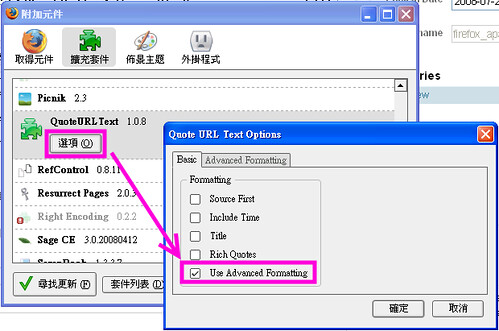
2. 點選上方選單的「工具」 -> 「附加元件」 -> 「QuoteURLText」 -> 選項</p>

<p><br />
3. 「Basic」標籤: 勾選「Use Advanced Formatting」選項 (如下圖)<br />
<a href="http://www.flickr.com/photos/planetoid/2704426027/" title="QuoteURLText  - Use Advanced Formatting0 by planetoid, on Flickr"><img src="http://farm4.static.flickr.com/3273/2704426027_77055d5e1c.jpg" width="500" height="331" alt="QuoteURLText  - Use Advanced Formatting0" /></a></p>

<p><br />
4. 切換到「Advanced Formatting」標籤，在文字方框輸入<br />
<blockquote>Author (date). @title. Retrieved @date, from @url</blockquote><br />
然後按「確定」</p>

<p><br />
5. 回到要引註的網頁資料，選取任意一小段文字後(如果不選取，將會出現<a href="http://flickr.com/photos/planetoid/2704306731/" target="_blank" title="QuoteURLText error on Flickr - Photo Sharing!" rel="nofollow">錯誤</a>)，點選滑鼠右鍵，選擇選單中的「Quote Text」(此時Firefox已經依照QuoteURLText擴充套件設定的格式，自動複製到剪貼簿)</p>

<p><br />
6. 打開文書編輯軟體，按「貼上」，將格式化的文字貼上。</p>

<p>* 以<a href="http://web.ed.ntnu.edu.tw/~minfei/apastyle-2.htm" target="_blank" title="網頁資料附註方式" rel="nofollow">網頁資料附註方式</a>網頁為例，貼上的結果是：<br />
<blockquote>Author (date). apastyle-2. Retrieved Sun Jul 27 2008 07:04:30 GMT+0800, from http://web.ed.ntnu.edu.tw/~minfei/apastyle-2.htm</blockquote></p>

<p>* 請記得手動加上作者、著作年代及調整時間格式，以符合正確的APA格式。</p>

<p><br />
如果你不想以「網頁標題」作為格式化文字的來源，而是使用「選取的文字」，請在文字方框輸入<br />
<blockquote>Author (date). @quote. Retrieved @date, from @url</blockquote></p>

<p></p>

<p>參考資料<br />
* <a href="http://web.ed.ntnu.edu.tw/~minfei/apastyle-2.htm" target="_blank" title="網頁資料附註方式" rel="nofollow">網頁資料附註方式</a></p>

<p></p>

<p>相關資料<br />
* <a href="http://wiki.planetoid.info/index.php/QuoteURLText" target="_blank" title="QuoteURLText" >QuoteURLText詳細設定</a><br />
</p>]]>
        
    </content>
</entry>

<entry>
    <title>Firefox 與 個人知識管理</title>
    <link rel="alternate" type="text/html" href="http://planetoid.info/weblog/2008/07/19/000667.html" />
    <link rel="service.edit" type="application/atom+xml" href="http://planetoid.info/cgi-bin/mt/mt-atom.cgi/weblog/blog_id=3/entry_id=667" title="Firefox 與 個人知識管理" />
    <id>tag:planetoid.info,2008:/weblog//3.667</id>
    
    <published>2008-07-19T00:06:44Z</published>
    <updated>2008-10-16T00:08:34Z</updated>
    
    <summary>毛遂自薦在「Firefox 3 Party 慶祝活動」分享「Firefox 與 個人知識管理」的個人心得。 講題簡報： (語音+ 簡報播放, 放大播放簡報 或 直接下載簡報, PDF檔 312KB) 參考資料： * XXC (2008). 由知識管理，到識知管理. Retrieved July 19, 2008, from http://www.xxc.idv.tw/blog/xxc/km/from-km-to-pkm.html * Paul A. Dorsey (2001). Personal knowledge management: educational framework for global business. Retrieved July...</summary>
    <author>
        <name></name>
        
    </author>
    
        <category term="firefox" />
    
    <content type="html" xml:lang="zh-TW" xml:base="http://planetoid.info/weblog/">
        <![CDATA[<p>毛遂自薦在「<a href="http://moztw.org/events/firefox3party/" target="_blank" title="Firefox 3 Party 慶祝活動 - Mozilla Taiwan" rel="nofollow">Firefox 3 Party 慶祝活動</a>」分享「Firefox 與 個人知識管理」的個人心得。</p>

<p><br />
講題簡報：</p>

<p><iframe src='http://docs.google.com/EmbedSlideshow?docid=acbkf7hrwbvc_549dx832hcz' frameborder='0' width='410' height='342'></iframe><br />
(<a href="http://www.slideshare.net/planetoid/firefox-and-pkm-20080719" target="_blank">語音+ 簡報播放</a>, <a href="https://docs.google.com/Present?docid=acbkf7hrwbvc_549dx832hcz&amp;pli=1" target="_blank" title="Firefox 與 個人知識管理 - Google Docs" rel="nofollow">放大播放簡報</a> 或 <a href="http://planetoid.info/rep/Firefox_and_PKM_20080719.pdf" target="_blank">直接下載簡報</a>, PDF檔 312KB)<br />
<br /><br /></p>

<p>參考資料：<br />
* XXC (2008). <a href="http://www.xxc.idv.tw/blog/xxc/km/from-km-to-pkm.html" target="_blank" title="由知識管理，到識知管理 - XXC@Blog" rel="nofollow">由知識管理，到識知管理</a>. Retrieved July 19, 2008, from <a href="http://www.xxc.idv.tw/blog/xxc/km/from-km-to-pkm.html" target="_blank">http://www.xxc.idv.tw/blog/xxc/km/from-km-to-pkm.html</a><br />
* Paul A. Dorsey (2001). Personal knowledge management: educational framework for global business. Retrieved July 19, 2008, from <a href="http://www.millikin.edu/pkm/pkm_istanbul.html" target="_blank">http://www.millikin.edu/pkm/pkm_istanbul.html</a></p>

<p><br />
</p>]]>
        
    </content>
</entry>

<entry>
    <title>Google Docs算不算是共筆(Wiki)？</title>
    <link rel="alternate" type="text/html" href="http://planetoid.info/weblog/2008/07/04/000666.html" />
    <link rel="service.edit" type="application/atom+xml" href="http://planetoid.info/cgi-bin/mt/mt-atom.cgi/weblog/blog_id=3/entry_id=666" title="Google Docs算不算是共筆(Wiki)？" />
    <id>tag:planetoid.info,2008:/weblog//3.666</id>
    
    <published>2008-07-03T23:25:43Z</published>
    <updated>2008-08-09T19:20:07Z</updated>
    
    <summary>最近英文教師虛擬社群論壇EVOnline，熱烈討論著「Google Docs算不算是Wiki？」(Are Google Docs Wikis?)。就Wiki的定義來看，「使用者可以透過瀏覽器自由地存取、貢獻或編輯的多個網頁(collection of web pages)」，Google Docs是wiki。跟其他wiki軟體相比較，Google Docs功能上令人讚賞的是，除了偕同編輯、MS Office風格的使用介面及文件格式的銜接外，並且可以有最多10人同時間在線上同步編輯。因此在另一個討論串中，被許多老師提到將Google Docs作為「小組合作進行寫作練習」的資訊工具。不過當文件數量多時，Google Docs不能看到小組其他同學如何組織分類文件，以及編輯時方便引用與連結其他文件，是Google Docs相較欠缺的地方。將Google Docs與其他wiki軟體比較，可能的問題是，Google Docs是以文件為單位的線上文件編輯及管理系統，而其他wiki通常是多個文件組合而成的網站，兩者的層次有所差異。Google的另一套產品Google Sites比較接近其他wiki軟體的層次，但是它擴充了文件編輯的認知，整體網站的元件均可以偕同編輯組成。參考資料evonline2002_webheads : Are Google Docs Wikis? 2008-06-30evonline2002_webheads : Google Docs 2007-12-19[ METAMUSE ]: Google Apps 全新功能： Google Sites 小組訊息共享網 - 羊男實驗の咖啡館 2008-02-28 附註：為何wiki是「偕同編輯」，而非「協作編輯」？因為「協」字代表一群人在一起，但是可能有人會扯後腿。而「偕」字則代表一群人心連心、手牽手地一起完成一件事。 (語出自Jedi,...</summary>
    <author>
        <name></name>
        
    </author>
    
        <category term="google" />
    
        <category term="wiki" />
    
    <content type="html" xml:lang="zh-TW" xml:base="http://planetoid.info/weblog/">
        <![CDATA[<p><img id="ryk21" alt="https://docs.google.com/images/doclist/logo_docs.gif" src="https://docs.google.com/images/doclist/logo_docs.gif"><br id="hm2o">最近英文教師虛擬社群論壇<a id="vjfl" href="http://groups.yahoo.com/group/evonline2002_webheads/" target="_blank" title="EVOnline" rel="nofollow">EVOnline</a>，熱烈討論著「<a title="Google Docs算不算是Wiki？" target="_blank" href="http://groups.yahoo.com/group/evonline2002_webheads/message/19351;_ylc=X3oDMTM2dW5pNWtwBF9TAzk3MzU5NzE0BGdycElkAzQ0MTI1OTkEZ3Jwc3BJZAMxNzA1MDgwNzA5BG1zZ0lkAzE5Mzk5BHNlYwNmdHIEc2xrA3Z0cGMEc3RpbWUDMTIxNTA0ODI0OAR0cGNJZAMxOTM1MQ--" id="y.n0">Google Docs算不算是Wiki？</a>」(Are Google Docs Wikis?)。就<a id="vpcg" href="http://en.wikipedia.org/wiki/Wiki" target="_blank" title="Wiki - Wikipedia, the free encyclopedia" rel="nofollow"></a><a title="Wiki的定義" target="_blank" href="http://en.wikipedia.org/wiki/Wiki" id="t1d0">Wiki的定義</a>來看，「使用者可以透過瀏覽器自由地存取、貢獻或編輯的多個網頁(collection of web pages)」，<a title="Google Docs" href="https://docs.google.com/" id="t5_3">Google Docs</a>是wiki。<br id="vsy5"><br id="vsy50">跟其他wiki軟體相比較，Google Docs功能上令人讚賞的是，除了偕同編輯、MS Office風格的使用介面及文件格式的銜接外，並且可以有<a title="Working with Collaborators : Simultaneous editing and viewing - Google Docs Help Center:" target="_blank" href="http://documents.google.com/support/bin/answer.py?hl=en&answer=44680" id="na3g">最多10人</a>同時間在線上同步編輯。因此在另一個<a title="討論串" target="_blank" href="http://groups.yahoo.com/group/evonline2002_webheads/messages/17373?threaded=1&amp;m=e&amp;var=1&amp;tidx=1" id="tfzy">討論串</a>中，被許多老師提到將Google Docs作為「<b id="afjn">小組合作進行寫作練習</b>」的資訊工具。不過當文件數量多時，Google Docs不能看到小組其他同學如何組織分類文件，以及編輯時方便引用與連結其他文件，是Google Docs相較欠缺的地方。<br id="hm2o1"><br id="cp03">將Google Docs與其他wiki軟體比較，可能的問題是，Google Docs是以文件為單位的線上文件編輯及管理系統，而其他wiki通常是多個文件組合而成的網站，兩者的層次有所差異。Google的另一套產品<a title="Google Sites" target="_blank" href="http://sites.google.com" id="vq8x">Google Sites</a>比較接近其他wiki軟體的層次，但是它擴充了文件編輯的認知，整體網站的元件均可以偕同編輯組成。<br id="cbbb"><br id="cbbb0"><br id="cbbb1">參考資料<br id="c.bi"><ul id="c.bi0"><li id="c.bi1"><a id="g:wt" href="http://groups.yahoo.com/group/evonline2002_webheads/message/19351" target="_blank" title="evonline2002_webheads : Message: Are Google Docs Wikis?" rel="nofollow">evonline2002_webheads : Are Google Docs Wikis?</a> 2008-06-30<br id="g:wt0"></li><li id="c.bi3"><a id="u63b" href="http://groups.yahoo.com/group/evonline2002_webheads/messages/17373?threaded=1&amp;m=e&amp;var=1&amp;tidx=1" target="_blank" title="evonline2002_webheads : Messages : 17373-17404 of 19406" rel="nofollow">evonline2002_webheads : Google Docs</a> 2007-12-19</li><li id="u63b0"><a id="c.bi4" href="http://metamuse.blogspot.com/2008/02/google-apps-google-sites.html" target="_blank" title="[ METAMUSE ]: Google Apps 全新功能： Google Sites 小組訊息共享網 - 羊男實驗の咖啡館" rel="nofollow">[ METAMUSE ]: Google Apps 全新功能： Google Sites 小組訊息共享網 - 羊男實驗の咖啡館</a> 2008-02-28</li></ul><br id="qv3y"><br id="vtrm0"></p>

<p><br />
附註：為何wiki是「偕同編輯」，而非「協作編輯」？因為「協」字代表一群人在一起，但是可能有人會扯後腿。而「偕」字則代表一群人心連心、手牽手地一起完成一件事。 (語出自<a href="http://jedi.org/blog/" target="_blank" title="Jedi's BLOG (中)" rel="nofollow">Jedi</a>, <a href="http://elearning.glis.ntnu.edu.tw/edshare/portal/2007/09/720-2.html" target="_blank" title="0720" rel="nofollow">2007-07-20 演講</a>)</p>]]>
        
    </content>
</entry>

<entry>
    <title>Google站內搜尋的瀏覽器按鈕 (for Firefox v3.0 &amp; IE v7)</title>
    <link rel="alternate" type="text/html" href="http://planetoid.info/weblog/2008/06/16/000665.html" />
    <link rel="service.edit" type="application/atom+xml" href="http://planetoid.info/cgi-bin/mt/mt-atom.cgi/weblog/blog_id=3/entry_id=665" title="Google站內搜尋的瀏覽器按鈕 (for Firefox v3.0 &amp; IE v7)" />
    <id>tag:planetoid.info,2008:/weblog//3.665</id>
    
    <published>2008-06-15T15:37:19Z</published>
    <updated>2008-07-26T05:49:02Z</updated>
    
    <summary>在瀏覽網站時，有時候會意猶未盡想看這個網站其他相關主題的文章，但是網站內建搜尋的功能又不佳，就可以考慮改用Google站內搜尋(site search)。 該瀏覽器按鈕(browser button, bookmarklet)可以在你目前瀏覽的網站內，把你在網頁上選取的文字當作關鍵詞，進行Google站內搜尋。如果沒有選取文字，則會跳出提示視窗讓你輸入關鍵詞。 請將站內搜的連結按住不放，拖曳到Firefox的書籤工具列。 Internet Explorer (IE) v.7瀏覽器的安裝方式：在上方「站內搜」的連結上，按右鍵「加到我的最愛」。 IE 7瀏覽器使用的時候，建議先選取好文字，再點選瀏覽器按鈕。如果手動輸入關鍵詞，則在每次點選瀏覽器按鈕後，會在網頁上方的資訊列，出現是否允許「指令視窗」的詢問訊息，反而變得不方便。 瀏覽器按鈕修改自Jesse Ruderman的Google站內搜尋的瀏覽器按鈕，主要是解決中文關鍵詞變成亂碼的問題。 相關討論:* Mozilla Taiwan 討論區: 如何增強內建搜尋列的功能？* PTT 看板《Browsers》: [書籤] 搜尋當前網域 (Thanks, shyangs!) 註：若要將瀏覽器按鈕的語法轉載或者修改後放到你的網頁上，請注意Ruderman的授權須知。...</summary>
    <author>
        <name></name>
        
    </author>
    
        <category term="firefox" />
    
        <category term="google" />
    
    <content type="html" xml:lang="zh-TW" xml:base="http://planetoid.info/weblog/">
        <![CDATA[<p>在瀏覽網站時，有時候會意猶未盡想看這個網站其他相關主題的文章，但是網站內建搜尋的功能又不佳，就可以考慮改用Google站內搜尋(site search)。</p>  

<p>該瀏覽器按鈕(browser button, bookmarklet)可以在你目前瀏覽的網站內，把你在網頁上選取的文字當作關鍵詞，進行Google站內搜尋。如果沒有選取文字，則會跳出提示視窗讓你輸入關鍵詞。 </p>

<div class="notes notetip"><br />
請將<a href="javascript:q%20=%20&quot;&quot;%20+%20(window.getSelection%20?%20window.getSelection()%20:%20document.getSelection%20?%20document.getSelection()%20:%20document.selection.createRange().text);%20if%20(!q)%20q%20=%20prompt('%E8%BC%B8%E5%85%A5%E8%A6%81%E6%90%9C%E5%B0%8B'+document.domain+'%E7%AB%99%E5%85%A7%E7%9A%84%E9%97%9C%E9%8D%B5%E8%A9%9E:',%20&quot;&quot;);%20if%20(q!=null)%20location=(&quot;http://www.google.com.tw/search?num=100&amp;q=site:&quot;%20+%20escape(location.hostname)%20+%20&quot;%20\&quot;&quot;%20+%20encodeURIComponent(q.replace(/\&quot;/g,&quot;&quot;))%20+%20&quot;\&quot;&quot;).replace(/%20/g,%20&quot;+&quot;);%20void%200">站內搜</a>的連結按住不放，拖曳到Firefox的書籤工具列。</div>


<p>Internet Explorer (IE) v.7瀏覽器的安裝方式：在上方「站內搜」的連結上，按右鍵「加到我的最愛」。</p>

<p>IE 7瀏覽器使用的時候，建議先選取好文字，再點選瀏覽器按鈕。如果手動輸入關鍵詞，則在每次點選瀏覽器按鈕後，會在網頁上方的資訊列，出現是否允許「指令視窗」的詢問訊息，反而變得不方便。</p>


<p>瀏覽器按鈕修改自<a href="https://www.squarefree.com/bookmarklets/search.html#google_site_search" target="_blank" title="Jesse Ruderman: google site search">Jesse Ruderman</a>的Google站內搜尋的瀏覽器按鈕，主要是解決中文關鍵詞變成亂碼的問題。</p>

<p><br /></p><p>相關討論:<br />* <a href="http://forum.moztw.org/viewtopic.php?t=22227" target="_blank" title="Mozilla Taiwan 討論區: 如何增強內建搜尋列的功能？" rel="nofollow">Mozilla Taiwan 討論區: 如何增強內建搜尋列的功能？</a><br />* <a href="http://www.ptt.cc/bbs/Browsers/M.1213608131.A.F41.html" target="_blank" title="[書籤] 搜尋當前網域" rel="nofollow">PTT 看板《Browsers》: [書籤] 搜尋當前網域</a> (Thanks, shyangs!)<br /></p>

<p><br />
註：若要將瀏覽器按鈕的語法轉載或者修改後放到你的網頁上，請注意Ruderman的<a href="http://www.squarefree.com/bookmarklets/copyright.html" target="_blank" title="Bookmarklets - Copyright">授權須知</a>。</p>

<br /><br /><br />]]>
        
    </content>
</entry>

<entry>
    <title>Google form -- 關於multiple-choice question的翻譯</title>
    <link rel="alternate" type="text/html" href="http://planetoid.info/weblog/2008/02/12/000663.html" />
    <link rel="service.edit" type="application/atom+xml" href="http://planetoid.info/cgi-bin/mt/mt-atom.cgi/weblog/blog_id=3/entry_id=663" title="Google form -- 關於multiple-choice question的翻譯" />
    <id>tag:planetoid.info,2008:/weblog//3.663</id>
    
    <published>2008-02-12T15:16:36Z</published>
    <updated>2008-07-26T23:46:41Z</updated>
    
    <summary><![CDATA[Google Docs &amp; Spreadsheet - Create a form的中英文翻譯對照圖: 題目類型multiple-choice question 可能是單選題或複選題(詳Hoong的說明)，不過在測試表單中，目前僅提供單選的選項，所以不應翻譯成「複選」，而應該翻成「單選」。 而題目類型「核取方塊」(checkboxes)，則建議改翻成「複選」。 相關資料 * hoong's space: 多重選擇題 Multiple-choice Question? * Multiple choice - Wikipedia, the free encyclopedia 在wikipedia上的解釋: "Multiple choice questions (MCQ) or items are a form of assessment item...]]></summary>
    <author>
        <name></name>
        
    </author>
    
        <category term="google" />
    
    <content type="html" xml:lang="zh-TW" xml:base="http://planetoid.info/weblog/">
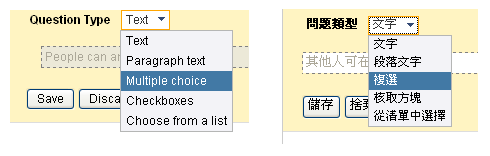
        <![CDATA[<p><a href="http://spreadsheets.google.com/newform" target="_blank" title="Google Docs &amp; Spreadsheet - Create a form" rel="nofollow">Google Docs &amp; Spreadsheet - Create a form</a>的中英文翻譯對照圖:</p>

<p><a href="http://www.flickr.com/photos/planetoid/2259963477/" title="translation of google form by planetoid, on Flickr"><img src="http://farm3.static.flickr.com/2388/2259963477_2f7929515d_o.png" width="490" height="156" alt="translation of google form" /></a></p>

<p><br />
題目類型multiple-choice question 可能是單選題或複選題(<a href="http://hoongbenny.spaces.live.com/blog/cns!E18E56875902D848!618.entry">詳Hoong的說明</a>)，不過在<a href="http://spreadsheets.google.com/viewform?key=p4EzYjyKmNIYaeaDlpkx3LQ">測試表單</a>中，目前僅提供單選的選項，所以不應翻譯成「複選」，而應該翻成「單選」。</p>

<p>而題目類型「核取方塊」(checkboxes)，則建議改翻成「複選」。</p>

<p><br />
相關資料<br />
* <a href="http://hoongbenny.spaces.live.com/blog/cns!E18E56875902D848!618.entry" target="_blank" title="hoong's space: 多重選擇題 Multiple-choice Question" rel="nofollow">hoong's space: 多重選擇題 Multiple-choice Question?</a><br />
* <a href="http://en.wikipedia.org/wiki/Multiple-choice_question" target="_blank" title="Multiple choice - Wikipedia, the free encyclopedia" rel="nofollow">Multiple choice - Wikipedia, the free encyclopedia</a> 在wikipedia上的解釋: "Multiple choice questions (MCQ) or items are a form of assessment item for which respondents are asked to select one or more of the choices from a list."<br />
* Google Spreadsheets: <a href="http://documents.google.com/support/spreadsheets/bin/answer.py?answer=87809&amp;hl=en" target="_blank" title="Features: Creating forms" rel="nofollow">Features: Creating forms</a></p>]]>
        
    </content>
</entry>

<entry>
    <title>校園共筆應用: MediaWiki建置與管理</title>
    <link rel="alternate" type="text/html" href="http://planetoid.info/weblog/2007/07/29/000662.html" />
    <link rel="service.edit" type="application/atom+xml" href="http://planetoid.info/cgi-bin/mt/mt-atom.cgi/weblog/blog_id=3/entry_id=662" title="校園共筆應用: MediaWiki建置與管理" />
    <id>tag:planetoid.info,2007:/weblog//3.662</id>
    
    <published>2007-07-29T14:59:43Z</published>
    <updated>2008-06-29T00:00:58Z</updated>
    
    <summary>應OSSACC之邀(謝謝KJ轉介)，講解MediaWiki建置與管理。 直接下載簡報檔(.PDF, 2008/6/23修復下載連結)或 點閱Wiki版的筆記。 簡報大綱 一、MediaWiki簡介與教學應用 二、Windows下安裝MediaWiki 三、MediaWiki本地化設置 四、MediaWiki介面修改 五、MediaWiki功能擴充 六、MediaWiki備份與管理 七、教學資源的交換與分享 註: 從簡報檔複製程式碼時，需留意將引號的全形改為半形。 相關資料 * Chieftain (2007). Reflection » Blog Archive » Wiki 的教學研究應用 (2007-09-14 更新連結) * Vicki A. Davis (2007). Wikis in the Classroom » SlideShare...</summary>
    <author>
        <name></name>
        
    </author>
    
        <category term="wiki" />
    
    <content type="html" xml:lang="zh-TW" xml:base="http://planetoid.info/weblog/">
        <![CDATA[<p>應<a href="http://www.ossacc.org/" target="_blank" title="OSSACC_OSS Application Consulting Centre - ☆~歡迎蒞臨OSSACC 校園自由軟體應用諮詢中心~☆" rel="nofollow">OSSACC</a>之邀(謝謝<a href="http://www.mw.net.tw/user/kaurjmeb/blog/" target="_blank" title="mawa/kaurjmeb/KJ在中文維基百科的日子" rel="nofollow">KJ轉介</a>)，講解MediaWiki建置與管理。</p>

<p><iframe src='http://docs.google.com/EmbedSlideshow?docid=acbkf7hrwbvc_537gp57p3fn' frameborder='0' width='410' height='342'></iframe></p>

<p>直接下載簡報檔(<a href="http://planetoid.info/rep/mediawiki_20070725.pdf">.PDF</a>, 2008/6/23修復下載連結)或 點閱<a href="http://wiki.planetoid.info/index.php/MediaWikiInstallRecord" target="_blank">Wiki版的筆記</a>。</p>

<p><br />
簡報大綱<br />
一、MediaWiki簡介與教學應用<br />
二、Windows下安裝MediaWiki<br />
三、MediaWiki本地化設置<br />
四、MediaWiki介面修改<br />
五、MediaWiki功能擴充<br />
六、MediaWiki備份與管理<br />
七、教學資源的交換與分享</p>

<p><br />
註: 從簡報檔複製程式碼時，需留意將引號的全形改為半形。</p>

<p><br />
相關資料<br />
* Chieftain (2007). <a href="http://www.chieftain.idv.tw/archives/2007/07/25/1261.html" target="_blank" title="Reflection » Blog Archive » Wiki 的教學研究應用" rel="nofollow">Reflection » Blog Archive » Wiki 的教學研究應用</a>  (2007-09-14 更新連結)<br />
* Vicki A. Davis (2007). <a href="http://www.slideshare.net/coolcatteacher/wikis-in-the-classroom" target="_blank" title="Wikis in the Classroom » SlideShare" rel="nofollow">Wikis in the Classroom » SlideShare</a></p>]]>
        
    </content>
</entry>

<entry>
    <title>簡報方式呈現wikipedia內容</title>
    <link rel="alternate" type="text/html" href="http://planetoid.info/weblog/2007/06/02/000661.html" />
    <link rel="service.edit" type="application/atom+xml" href="http://planetoid.info/cgi-bin/mt/mt-atom.cgi/weblog/blog_id=3/entry_id=661" title="簡報方式呈現wikipedia內容" />
    <id>tag:planetoid.info,2007:/weblog//3.661</id>
    
    <published>2007-06-01T16:19:08Z</published>
    <updated>2007-12-29T13:33:32Z</updated>
    
    <summary>安裝Wikipedia Presentation後(需事先安裝Firefox瀏覽器及GreaseMonkey套件)，重新整理維基百科(中文維基百科也適用)的網頁，將會在「條目」下面前會增加「Start presentation」的連結，點選後會進入簡報模式。 原條目的每一段落(section)，將會是一張簡報。數字列表或項目列表，則會有點擊滑鼠來逐項顯示的特效。需點選網頁最上方的輔助連結，才能切換上一張簡報、下一張簡報、或離開簡報模式。 由於wikipedia的書寫，原本未預期要是以簡報方式呈現，所以簡報會出現內文超過單一螢幕大小。另外跟dokuwiki+S5簡報系統結合的顯示效果相比較，還有改善空間。 如果有架設MediaWiki(v. 1.6.9)的系統，可自行將UserScript原始碼中前3個span改成div。 參考資料: D’Arcy Norman dot net » Blog Archive » MediaWiki as a presentation application...</summary>
    <author>
        <name></name>
        
    </author>
    
        <category term="wiki" />
    
    <content type="html" xml:lang="zh-TW" xml:base="http://planetoid.info/weblog/">
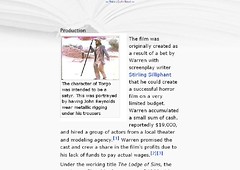
        <![CDATA[<p>安裝<a href="http://userscripts.org/scripts/show/6372" target="_blank" title="Wikipedia Presentation" rel="nofollow">Wikipedia Presentation</a>後(需事先安裝<a href="http://moztw.org/firefox/">Firefox瀏覽器</a>及<a href="http://greasemonkey.mozdev.org/">GreaseMonkey套件</a>)，重新整理<a href="http://en.wikipedia.org/wiki/Main_Page">維基百科</a>(<a href="http://zh.wikipedia.org/w/index.php?title=%E9%A6%96%E9%A1%B5&variant=zh-tw">中文維基百科</a>也適用)的網頁，將會在「條目」下面前會增加「Start presentation」的連結，點選後會進入簡報模式。<br />
<ol><li>原條目的每一段落(section)，將會是一張簡報。</li><li>數字列表或項目列表，則會有點擊滑鼠來逐項顯示的特效。</li><li>需點選網頁最上方的輔助連結，才能切換上一張簡報、下一張簡報、或離開簡報模式。</li></ol><a href="http://www.flickr.com/photos/planetoid/524948950/" title="Photo Sharing"><img src="http://farm1.static.flickr.com/223/524948950_dc77ee684b_m.jpg" alt="Manos The Hands of Fate 1st slide - Wikipedia, the free encyclopedia" style="float: left;" height="170" width="240" /></a><br />
由於wikipedia的書寫，原本未預期要是以簡報方式呈現，所以簡報會出現內文超過單一螢幕大小。另外跟dokuwiki+S5簡報系統<a href="http://wiki.splitbrain.org/plugin:s5:example">結合</a>的顯示效果相比較，還有改善空間。</p>

<p>如果有架設MediaWiki(v. 1.6.9)的系統，可自行將UserScript原始碼中前3個span改成div。</p>

<p><br /></p>

<p><br /></p>

<p>參考資料:<br />
<ul><li><a href="http://www.darcynorman.net/2007/05/02/mediawiki-as-a-presentation-application/" target="_blank" title="D’Arcy Norman dot net » Blog Archive » MediaWiki as a presentation application" rel="nofollow">D’Arcy Norman dot net » Blog Archive » MediaWiki as a presentation application</a></li></ul></p>]]>
        
    </content>
</entry>

<entry>
    <title>組合不同網站的瀏覽器按鈕 for Firefox</title>
    <link rel="alternate" type="text/html" href="http://planetoid.info/weblog/2007/03/19/000660.html" />
    <link rel="service.edit" type="application/atom+xml" href="http://planetoid.info/cgi-bin/mt/mt-atom.cgi/weblog/blog_id=3/entry_id=660" title="組合不同網站的瀏覽器按鈕 for Firefox" />
    <id>tag:planetoid.info,2007:/weblog//3.660</id>
    
    <published>2007-03-18T16:26:28Z</published>
    <updated>2007-12-29T13:34:09Z</updated>
    
    <summary>如果需要將同一網頁，點選不同網站個別的瀏覽器按鈕(bookmarklets)服務的話，可以考慮手動組裝。 例如瀏覽器按鈕語法「 javascript:__________________;」， 在分號後面接上他站的瀏覽器按鈕的javscript語法(若原本語法的結尾沒有分號，可選擇自行加入)，就完工了。 (1) [拼盤]美味+黑米瀏覽器按鈕 - 同時將網頁加入HEMiDEMi - 黑米共享書籤與del.icio.us社群書籤服務網站。 [拼盤]黑米+推推王瀏覽器按鈕 - (2007-12-18 新增) (2) [拼盤]Yahoo+Furl瀏覽器按鈕 - 同時將網頁加入Yahoo!奇摩 分享書籤 BETA與LookSmart&apos;s Furl兩個有提供網頁備份的書籤服務網站。 (3) 可將上面兩個拼盤一起組裝... 相關參考資料 * Bookmarklets FAQ * Rules for Bookmarklets * Reflection » Furl 和 Yahoo MyWeb 2.0...</summary>
    <author>
        <name></name>
        
    </author>
    
        <category term="firefox" />
    
    <content type="html" xml:lang="zh-TW" xml:base="http://planetoid.info/weblog/">
        <![CDATA[<p>如果需要將同一網頁，點選不同網站個別的瀏覽器按鈕(bookmarklets)服務的話，可以考慮手動組裝。</p>

<p>例如瀏覽器按鈕語法「 javascript:__________________;」， 在分號後面接上他站的瀏覽器按鈕的javscript語法(若原本語法的結尾沒有分號，可選擇自行加入)，就完工了。</p>

<p>(1) <a href="javascript:desc='';via='';if(document.referrer)via=document.referrer;if(typeof(_ref)!='undefined')via=_ref;if(window.getSelection)desc=window.getSelection();if(document.getSelection)desc=document.getSelection();if(document.selection)desc=document.selection.createRange().text;void(open('http://www.hemidemi.com/user_bookmark/new?title='+encodeURIComponent(document.title)+'&url='+encodeURIComponent(location.href)+'&description='+encodeURIComponent(desc)+'&via='+encodeURIComponent(via)));javascript:location.href='http://del.icio.us/post?v=4;url='+encodeURIComponent(location.href)+';title='+encodeURIComponent(document.title);">[拼盤]美味+黑米</a>瀏覽器按鈕 - 同時將網頁加入<a href="http://www.hemidemi.com/home" target="_blank" title="HEMiDEMi - 黑米共享書籤">HEMiDEMi - 黑米共享書籤</a>與<a href="http://del.icio.us/" target="_blank" title="del.icio.us">del.icio.us</a>社群書籤服務網站。</p>

<p><a href="javascript:desc='';via='';if(document.referrer)via=document.referrer;if(typeof(_ref)!='undefined')via=_ref;if(window.getSelection)desc=window.getSelection();if(document.getSelection)desc=document.getSelection();if(document.selection)desc=document.selection.createRange().text;void(open('http://www.hemidemi.com/user_bookmark/new?title='+encodeURIComponent(document.title)+'&url='+encodeURIComponent(location.href)+'&description='+encodeURIComponent(desc)+'&via='+encodeURIComponent(via)));javascript:(function(){t='';if(window.getSelection)t=window.getSelection();else if (document.getSelection)t=document.getSelection();else if(document.selection)t=document.selection.createRange().text;w=window.open('http://funp.com/push/submit/?popup&url='+encodeURIComponent(location.href)+'&t='+encodeURIComponent(t),'FunP.com','height=500,width=760,scrollbars,resizable');})();">[拼盤]黑米+推推王</a>瀏覽器按鈕 - (2007-12-18 新增)</p>

<p>(2) <a href="javascript:(function(){d=document;t=d.selection?(d.selection.type!='None'?d.selection.createRange().text:''):(d.getSelection?d.getSelection():'');var%20furlit=window.open('http://www.furl.net/savedialog.jsp?t='+encodeURIComponent(d.title)+'&v=1'+'&u='+escape(d.location.href)+'&r='+escape(d.referrer)+'&c='+encodeURIComponent(t),'furlit','width=530,height=540,left=75,top=20,resizable=yes,scrollbars=yes');furlit.focus();})();javascript:void%20window.open('http://tw.myweb2.search.yahoo.com/myresults/bookmarklet?t='+encodeURIComponent(document.title)+'&u='+encodeURIComponent(window.location.href)+'&ei=UTF-8','popup','width=520px,height=420px,status=0,location=0,resizable=1,scrollbars=1,left=100,top=50',0);">[拼盤]Yahoo+Furl</a>瀏覽器按鈕  - 同時將網頁加入<a href="http://tw.myweb2.search.yahoo.com/myweb" target="_blank" title="分享書籤 BETA - 我的書籤 - Yahoo!奇摩">Yahoo!奇摩 分享書籤 BETA</a>與<a href="http://www.furl.net/" target="_blank" title="LookSmart's Furl - Your Personal Web">LookSmart's Furl</a>兩個有提供<a href="http://planetoid.info/weblog/2005/11/07/000522.html" title="Social bookmarking for saving the copy of webpages or pdf files [planetoid's blog]">網頁備份</a>的書籤服務網站。</p>

<p>(3) 可將上面兩個拼盤一起組裝...</p>

<p><br />
相關參考資料<br />
* <a href="http://www.squarefree.com/bookmarklets/faq.html" target="_blank" title="Bookmarklets FAQ">Bookmarklets FAQ</a><br />
* <a href="http://subsimple.com/bookmarklets/rules.asp" target="_blank" title="Rules for Bookmarklets">Rules for Bookmarklets</a><br />
* <a href="http://www.chieftain.idv.tw/archives/2006/11/13/235606" target="_blank" title="Reflection » Blog Archive » Furl 和 Yahoo MyWeb 2.0">Reflection » Furl 和 Yahoo MyWeb 2.0</a></p>

<p><!-- ckey="148AD88B" --><br />
</p>]]>
        
    </content>
</entry>

<entry>
    <title>增加網頁易讀性的瀏覽器按鈕(bookmarklet) for Firefox</title>
    <link rel="alternate" type="text/html" href="http://planetoid.info/weblog/2007/03/15/000659.html" />
    <link rel="service.edit" type="application/atom+xml" href="http://planetoid.info/cgi-bin/mt/mt-atom.cgi/weblog/blog_id=3/entry_id=659" title="增加網頁易讀性的瀏覽器按鈕(bookmarklet) for Firefox" />
    <id>tag:planetoid.info,2007:/weblog//3.659</id>
    
    <published>2007-03-15T12:44:09Z</published>
    <updated>2008-06-15T16:20:44Z</updated>
    
    <summary><![CDATA[該瀏覽器按鈕(browser button, bookmarklet)可以將任何配色的網頁還原成白底黑字，並且增加行距與文字大小使得網頁變成易讀的版面。 瀏覽器按鈕修改自Jesse Ruderman的zap white backgrounds，並且參考老貓連結吸子與理念宣揚中對於中文行距的建議。 請將+易讀性的連結按住不放，拖曳到Firefox的書籤工具列。 IE與Opera瀏覽器的使用者可以使用Ruderman另一個zap style sheets瀏覽器按鈕。 遇到不易閱讀的網頁時，再點選書籤工具列上的「+易讀性」的瀏覽器按鈕。 變動資訊 * 2007-08-12 增加不調整網頁配色的版本(不強制改成白底黑字): =0) { r=n.splitText(u+45); n.parentNode.insertBefore(D.createElement(%22WBR%22),r); } }else if(n.tagName!=%22STYLE%22 && n.tagName!=%22SCRIPT%22){for (c=0;x=n.childNodes[c];++c){F(x);}} } })();">+易讀性[彩] (謝謝xyzzyx意見!) * 2007-03-29 上面方框內的瀏覽器按鈕，移除增加字距語法。 相關資料 * Information Architects Japan » iA Notebook...]]></summary>
    <author>
        <name></name>
        
    </author>
    
        <category term="firefox" />
    
    <content type="html" xml:lang="zh-TW" xml:base="http://planetoid.info/weblog/">
        <![CDATA[<p>該瀏覽器按鈕(browser button, bookmarklet)可以將任何配色的網頁還原成白底黑字，並且增加行距與文字大小使得網頁變成易讀的版面。</p>

<p>瀏覽器按鈕修改自<a href="http://www.squarefree.com/bookmarklets/zap.html" target="_blank" title="Jesse Ruderman: Bookmarklets for Zapping Annoyances">Jesse Ruderman</a>的zap white backgrounds，並且參考老貓<a href="http://b-oo-k.net/blog/blog.php/2007/187" target="_blank" title="連結吸子與理念宣揚 | 老貓學出版：圖書出版業, 編輯知識, 產業分析">連結吸子與理念宣揚</a>中對於中文行距的建議。</p>

<div class="notes notetip"><br />
請將<a href="javascript:(function(){var newSS, styles='* { background: white ! important; color: black !important; line-height: 160% !important; font-size: 12pt !important } :link, :link * { color: #0000EE !important } :visited, :visited * { color: #551A8B !important }'; if(document.createStyleSheet) { document.createStyleSheet(%22javascript:'%22+styles+%22'%22); } else { newSS=document.createElement('link'); newSS.rel='stylesheet'; newSS.href='data:text/css,'+escape(styles); document.getElementsByTagName(%22head%22)[0].appendChild(newSS); } })();">+易讀性</a>的連結按住不放，拖曳到Firefox的書籤工具列。</div>

<p>IE與Opera瀏覽器的使用者可以使用Ruderman另一個<a href="http://www.squarefree.com/bookmarklets/zap.html#zap_style_sheets" target="_blank" title="Bookmarklets for Zapping Annoyances">zap style sheets</a>瀏覽器按鈕。</p>

<p>遇到不易閱讀的網頁時，再點選書籤工具列上的「+易讀性」的瀏覽器按鈕。</p>

<p><br />
變動資訊<br />
* 2007-08-12 增加不調整網頁配色的版本(不強制改成白底黑字): <a href="javascript:(function(){var newSS, styles='* { line-height: 160% !important; font-size: 12pt !important } :link, :link * { color: #0000EE !important } :visited, :visited * { color: #551A8B !important }'; if(document.createStyleSheet) { document.createStyleSheet(%22javascript:'%22+styles+%22'%22); } else { newSS=document.createElement('link'); newSS.rel='stylesheet'; newSS.href='data:text/css,'+escape(styles); document.getElementsByTagName(%22head%22)[0].appendChild(newSS); } })();javascript:(function(){var D=document; F(D.body); function F(n){var u,r,c,x; if(n.nodeType==3){ u=n.data.search(/\S{45}/); if(u>=0) { r=n.splitText(u+45); n.parentNode.insertBefore(D.createElement(%22WBR%22),r); } }else if(n.tagName!=%22STYLE%22 && n.tagName!=%22SCRIPT%22){for (c=0;x=n.childNodes[c];++c){F(x);}} } })();">+易讀性[彩]</a> (謝謝<a href="http://forum.moztw.org/viewtopic.php?p=112482#112482" target="_blank" title="xyzzyx" rel="nofollow">xyzzyx</a>意見!)<br />
* 2007-03-29 上面方框內的瀏覽器按鈕，移除增加字距語法。</p>

<p><br />
相關資料<br />
* <a href="http://www.informationarchitects.jp/100e2r" target="_blank" title="Information Architects Japan » iA Notebook » The 100% Easy-2-Read Standard">Information Architects Japan » iA Notebook » The 100% Easy-2-Read Standard</a><br />
* <a href="http://wiki.planetoid.info/index.php/Enlarge_the_font_size_on_a_web_page" target="_blank" title="Enlarge the font size on a web page - LemonWiki">放大網頁上的字體大小</a> (Wiki版本)<br />
* <a href="http://forum.moztw.org/viewtopic.php?t=15356&amp;highlight=bookmarklet" target="_blank" title="Mozilla Taiwan 討論區: Firefox實用Bookmarklet推薦分享">Mozilla Taiwan 討論區: Firefox實用Bookmarklet推薦分享</a></p>

<p><br />
相關討論 (3/17新增)<br />
* <a href="http://forum.moztw.org/viewtopic.php?t=17995#101310" target="_blank" title="Mozilla Taiwan 討論區: [分享] 增加網頁易讀性的瀏覽器按鈕(bookmarklet) for Firefox">在Mozilla Taiwan 討論區的討論</a></p>

<p><br />
註：若要將程式語法轉載至你的網頁或者進行修改，請注意Ruderman的<a href="http://www.squarefree.com/bookmarklets/copyright.html" target="_blank" title="Bookmarklets - Copyright">授權須知</a>。</p>]]>
        
    </content>
</entry>

<entry>
    <title>BBS文章與網頁的結合</title>
    <link rel="alternate" type="text/html" href="http://planetoid.info/weblog/2007/03/11/000658.html" />
    <link rel="service.edit" type="application/atom+xml" href="http://planetoid.info/cgi-bin/mt/mt-atom.cgi/weblog/blog_id=3/entry_id=658" title="BBS文章與網頁的結合" />
    <id>tag:planetoid.info,2007:/weblog//3.658</id>
    
    <published>2007-03-11T08:29:21Z</published>
    <updated>2008-07-25T13:59:48Z</updated>
    
    <summary>引述xpsteven@夢大BBS(telnet://bbs.ccns.ncku.edu.tw) 看板《stcongress》(2007-03-01)：建議之後議會所有文書都能以word形式保存，並放置在校方提供的網路空間。可以以議會之名義申請一個空間。之後板上就只po連結。我的想法是1. 考慮現有使用者習慣以及如何更方便散播訊息：建議方式，倒不是去BBS化，而是兩者合而為一，保留同學閱讀BBS的方便，同時仍具備Web網頁連結的優點。同學閱讀BBS文章時，仍能獲得完整資訊，轉載散播時可保有相當的資訊密度，但是文章末有提供Web檔案/網頁連結參考。日後若有網頁維護人力，同學點選該網頁連結時，除了獲得文件檔案外，還有可能得到文件相關資訊的延伸連結。例如當同學閱讀BBS某例會的會議紀錄的文章，當他點選網頁，也許還可以進一步連往相關背景資訊或者是所有例會會議記錄的目錄，以善用Web連結特性。2. 網路服務穩定的不確定：儘管文件集中化，可以更方便管理，但是考量網路服務穩定的不確定，最好的備份方式是，讓文件可以更快地與完整地散播到不同地方。...</summary>
    <author>
        <name></name>
        
    </author>
    
        <category term="campus" />
    
    <content type="html" xml:lang="zh-TW" xml:base="http://planetoid.info/weblog/">
        <![CDATA[<p>引述xpsteven@夢大BBS(telnet://bbs.ccns.ncku.edu.tw) 看板《stcongress》(2007-03-01)：<br /><blockquote>建議之後議會所有文書都能以word形式保存，並放置在校方提供的網路空間。<br />可以以議會之名義申請一個空間。之後板上就只po連結。</blockquote>我的想法是<br />1. 考慮現有使用者習慣以及如何更方便散播訊息：<br /><br />建議方式，倒不是去BBS化，而是兩者合而為一，保留同學閱讀BBS的方便，同時仍具備Web網頁連結的優點。<br /><br />同學閱讀BBS文章時，仍能獲得完整資訊，轉載散播時可保有相當的資訊密度，但是文章末有提供Web檔案/網頁連結參考。日後若有網頁維護人力，同學點選該網頁連結時，除了獲得文件檔案外，還有可能得到文件相關資訊的延伸連結。例如當同學閱讀BBS某例會的會議紀錄的文章，當他點選網頁，也許還可以進一步連往相關背景資訊或者是所有例會會議記錄的目錄，以善用Web連結特性。<br /><br /><br />2. 網路服務穩定的不確定：<br /><br />儘管文件集中化，可以更方便管理，但是考量網路服務穩定的不確定，最好的備份方式是，讓文件可以更快地與完整地散播到不同地方。<br /></p>]]>
        
    </content>
</entry>

<entry>
    <title>Google關鍵字自動加上雙引號 for Firefox 2.0+</title>
    <link rel="alternate" type="text/html" href="http://planetoid.info/weblog/2007/02/21/000657.html" />
    <link rel="service.edit" type="application/atom+xml" href="http://planetoid.info/cgi-bin/mt/mt-atom.cgi/weblog/blog_id=3/entry_id=657" title="Google關鍵字自動加上雙引號 for Firefox 2.0+" />
    <id>tag:planetoid.info,2007:/weblog//3.657</id>
    
    <published>2007-02-21T02:25:59Z</published>
    <updated>2007-12-29T13:36:21Z</updated>
    
    <summary>Google關鍵字若輸入片語進行搜尋，會被自動拆解文字(例如：輸入「金牛角麵包店」，除了搜尋「金牛角麵包店」，還會被自動拆成「金牛角」、「麵包」、「麵包店」等。) 因為我常需要額外輸入雙引號(例如：&quot;金牛角麵包店&quot;)修正搜尋結果，所以修改Firefox的Google搜尋引擎外掛(searchplugin)，使關鍵字能自動加上雙引號。...</summary>
    <author>
        <name></name>
        
    </author>
    
        <category term="firefox" />
    
    <content type="html" xml:lang="zh-TW" xml:base="http://planetoid.info/weblog/">
        <![CDATA[<p>Google關鍵字若輸入片語進行搜尋，會被自動拆解文字(例如：輸入「金牛角麵包店」，除了搜尋「金牛角麵包店」，還會被自動拆成「金牛角」、「麵包」、「麵包店」等。) 因為我常需要額外輸入雙引號(例如："金牛角麵包店")修正搜尋結果，所以修改<a href="http://moztw.org/" title="Mozilla Firefox">Firefox</a>的Google搜尋引擎外掛(searchplugin)，使關鍵字能自動加上雙引號。</p>]]>
        <![CDATA[<p>1. 檔案路徑: C:\Documents and Settings\使用者帳號\Application Data\Mozilla\Firefox\Profiles\<span title="一連串文字與數字的組合" class="acronym">文數字</span>.default\searchplugins\</p>

<p>2. 將google.xml 複製成google-quote.xml </p>

<p>3. 主要修改處：<br />
<div class="quote">&lt;Param name=&quot;q&quot; value=&quot;{searchTerms}&quot;/&gt;<br />
修改為<br />
&lt;Param name=&quot;q&quot; value=&quot;%22{searchTerms}%22&quot;/&gt; <br />
</div></p>

<p><br />
可直接下載修改後的 <br />
<img src="http://planetoid.info/weblog/archives/google-quote.png" align="left" width="32" height="32" style="padding-right: 5px;">  <a href="/weblog/archives/google-quote.xml">google-quote.xml</a><br />
放置在google.xml 所在相同目錄</p>

<p></p>

<p>相關資料：<br />
* <a href="http://www.google.com.tw/intl/zh-TW/help/refinesearch.html" title="Google 完全手冊-修正您的搜尋" target="_blank">Google 完全手冊-修正您的搜尋</a><br />
* <a href="http://wiki.planetoid.info/index.php/Google_Search_Hints" title="Google Search Hints" target="_blank">Google Search Hints</a><br />
* <a href="https://addons.mozilla.org/search-engines.php" title="search engines" target="_blank">更多搜尋引擎外掛...</a></p>]]>
    </content>
</entry>

<entry>
    <title>新增Firefox的消息來源(RSS)訂閱服務: NewsGator Online</title>
    <link rel="alternate" type="text/html" href="http://planetoid.info/weblog/2006/12/14/000655.html" />
    <link rel="service.edit" type="application/atom+xml" href="http://planetoid.info/cgi-bin/mt/mt-atom.cgi/weblog/blog_id=3/entry_id=655" title="新增Firefox的消息來源(RSS)訂閱服務: NewsGator Online" />
    <id>tag:planetoid.info,2006:/weblog//3.655</id>
    
    <published>2006-12-14T15:51:28Z</published>
    <updated>2007-12-29T13:38:37Z</updated>
    
    <summary>參考Netvibes與Carletti的文章，新增消息來源(RSS)訂閱服務的語法。...</summary>
    <author>
        <name></name>
        
    </author>
    
        <category term="firefox" />
    
    <content type="html" xml:lang="zh-TW" xml:base="http://planetoid.info/weblog/">
        <![CDATA[<p>參考<a href="http://blog.netvibes.com/?2006/10/25/83-firefox-2-and-netvibes" title="Firefox 2 and Netvibes">Netvibes</a>與<a href="http://www.simonecarletti.com/blog/2006/11/firefox_new_feed_handler.php" title="Simone Carletti's Blog: How to add a new feed handler in Firefox 2.0" target="_blank">Carletti</a>的文章，新增消息來源(RSS)訂閱服務的語法。<br/></p>]]>
        <![CDATA[<p>建議先用<a href="http://inxtyle.com/mozbackup/" title="MozBackup 正體中文站" target="_blank">MozBackup</a>備份Mozilla Firefox的<a href="http://wiki.moztw.org/index.php/%E8%A8%AD%E5%AE%9A%E6%AA%94%E8%A9%B3%E8%A7%A3" title="設定檔詳解 - MoztwWiki" target="_blank">個人設定檔</a></p>

<blockquote><a href="javascript:window.navigator.registerContentHandler('application/vnd.mozilla.maybe.feed','http://www.newsgator.com/ngs/subscriber/subext.aspx?url=%s','NewsGator Online');" hreflang="js"><img src="http://www.newsgator.com/favicon.ico" alt="" align="left"></a> <a href="javascript:window.navigator.registerContentHandler('application/vnd.mozilla.maybe.feed','http://www.newsgator.com/ngs/subscriber/subext.aspx?url=%s','NewsGator Online');" hreflang="js">點選此處新增NewsGator Online的RSS訂閱服務</a>
(for Firefox)</blockquote>

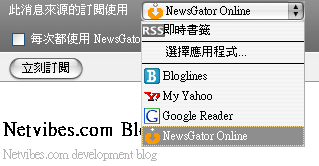
<p>Mozilla Firefox 除了Bloglines、My Yahoo、Google Reader 之外，將會新增<a href="http://www.newsgator.com/home.aspx" title="NewsGator Online">NewsGator Online</a>的RSS訂閱服務。<br />
<img src="http://planetoid.info/weblog/archives/newsgator.png" title="add NewsGator Online as a new feed handler in Firefox 2.0"></p>

<p><br />
相關連結:<br />
1. <a href="http://developer.mozilla.org/en/docs/DOM:window.navigator.registerContentHandler" title="DOM:window.navigator.registerContentHandler - MDC" target="_blank">DOM:window.navigator.registerContentHandler</a></p>

<p>2. <a href="http://blog.pixnet.net/Diarra/post/1288131" title="狹縫 - 改變Firefox 2的RSS訂閱服務 :: PIXNET BLOG ::" target="_blank">更多RSS訂閱服務</a> by Diarra (2007-01-14 新增) </p>

<p><br />
注意事項:<br />
與<a href="http://www.roboform.com/" title="RoboForm: Password Manager, Form Filler, Password Generator, Fill & Save Forms" target="_blank">AI RoboForm Toolbar for Firefox</a>6.8.3有相容問題。 (2006-12-28 新增)</p>]]>
    </content>
</entry>

<entry>
    <title>Wiki軟體或服務方案的選擇</title>
    <link rel="alternate" type="text/html" href="http://planetoid.info/weblog/2006/11/10/000654.html" />
    <link rel="service.edit" type="application/atom+xml" href="http://planetoid.info/cgi-bin/mt/mt-atom.cgi/weblog/blog_id=3/entry_id=654" title="Wiki軟體或服務方案的選擇" />
    <id>tag:planetoid.info,2006:/weblog//3.654</id>
    
    <published>2006-11-09T16:54:53Z</published>
    <updated>2008-02-16T13:05:32Z</updated>
    
    <summary>WikiMatrix網站收集了各種Wiki方案的詳細資料，並且可以方便地進行線上比較。但是初次使用Wiki方案選擇精靈(Wiki Choice Wizard)的使用者，對於洋洋灑灑的Wiki功能用語可能會感到疑惑，反而不清楚應該選擇何種方案。對於選擇精靈中的條件，補充說明如后： Step 1. 頁面的版本紀錄(Page History) 當你修改頁面在儲存時，將會儲存成為一個版本。頁面版本紀錄的功能對於協同編輯是不可或缺的，可以防制廣告留言與內容破壞的回復。 個人經驗上，開放匿名編輯很容易看到整面數十個的內容破壞版本，因此頁面的版本紀錄需要結合基本的權限控制(ACL)，編輯頁面需要經過身份驗證，才會有效避免廣告留言與內容破壞。不過如果Wiki僅供個人使用，版本紀錄是可有可無的。 Step 2. 所見即所得的線上編輯器(What you see is what you get, WYSIWYG) 多數Wiki使用簡單的語法(markup、或稱格式化規則)來格式化文字，但不少Wiki開始使用類似文字編輯軟體的所見即所得的線上編輯器。對於初次使用Wiki的使用者，所見即所得的線上編輯器會降低Wiki的使用門檻，但是原有簡單的語法，對於有經驗的使用者能提供快速與彈性的編輯。有些軟體雖然沒有所見即所得的線上編輯器，但提供了另一個快速產生簡單語法的編輯器，也可以加速內容編輯的速度。 不同Wiki的簡單語法卻不相同，導致內容轉換到不同Wiki時是一件苦差事(例如標題2在Oddmuse及MediaWiki是以==強調，而DokuWiki則是以=====表示)。儘管Wiki間無法與其他Wiki達成語法一致，但可以透過Ingy發展所見即所得(Wyswyg)的Wiki編輯介面Wikiwyg或語法轉換(Wiki Converter)來增加互通及編輯的彈性。 Step 3. 自行架設軟體或使用現有服務(Software or hosted?) 自行架設軟體，需要滿足軟體安裝的條件。相對於使用現有服務，自行架設軟體有更多的控制權。 不管使用何種方案，都應該留意是否有方便的備份方式。在這邊我們選擇自行架設軟體。 Step 4. 頁面的儲存系統(Storage System) 儲存系統有(1)關連性資料庫(例如MySQL)：適合大量頁面的處理與全文搜尋、(2)檔案系統：因為不需要資料庫，所以系統需求低也很容易備份、(3)修訂版控制系統 (Revision Control System, RCS例如Subversion) 。 關連性資料庫以MediaWiki為例，全文搜尋並不是運作良好，不過如果安裝在公開的網路上，可以改用Google的站內搜尋。如果安裝在個人電腦或硬體環境不佳(記憶體不多)時，方便備份的檔案系統Wiki是不錯的Wiki方案。...</summary>
    <author>
        <name></name>
        
    </author>
    
        <category term="wiki" />
    
    <content type="html" xml:lang="zh-TW" xml:base="http://planetoid.info/weblog/">
        <![CDATA[<p><A HREF=http://www.wikimatrix.org/ TARGET=blank_ TITLE=WikiMatrix>WikiMatrix</A>網站收集了各種Wiki方案的詳細資料，並且可以方便地進行線上比較。但是初次使用<A HREF=http://www.wikimatrix.org/wizard.php TARGET=blank_ TITLE="Wiki choice wizard">Wiki方案選擇精靈</A>(Wiki Choice Wizard)的使用者，對於洋洋灑灑的Wiki功能用語可能會感到疑惑，反而不清楚應該選擇何種方案。對於選擇精靈中的條件，補充說明如后：<BR> <BR> <SPAN STYLE=FONT-WEIGHT:bold> Step 1. 頁面的版本紀錄</SPAN>(Page History)<BR> <BLOCKQUOTE>當你修改頁面在儲存時，將會儲存成為一個版本。頁面版本紀錄的功能對於協同編輯是不可或缺的，可以防制廣告留言與內容破壞的回復。<BR> </BLOCKQUOTE>個人經驗上，開放匿名編輯很容易看到整面數十個的內容破壞版本，因此頁面的版本紀錄需要結合基本的權限控制(ACL)，編輯頁面需要經過身份驗證，才會有效避免廣告留言與內容破壞。不過如果Wiki僅供個人使用，版本紀錄是可有可無的。<BR> <BR> <BR> <SPAN STYLE=FONT-WEIGHT:bold> Step 2. 所見即所得的線上編輯器</SPAN>(What you see is what you get, WYSIWYG)<BR> <BLOCKQUOTE>多數Wiki使用簡單的語法(markup、或稱格式化規則)來格式化文字，但不少Wiki開始使用類似文字編輯軟體的所見即所得的線上編輯器。對於初次使用Wiki的使用者，所見即所得的線上編輯器會降低Wiki的使用門檻，但是原有簡單的語法，對於有經驗的使用者能提供快速與彈性的編輯。</BLOCKQUOTE>有些軟體雖然沒有所見即所得的線上編輯器，但提供了另一個快速產生簡單語法的編輯器，也可以加速內容編輯的速度。<BR> <BR> 不同Wiki的簡單語法卻不相同，導致內容轉換到不同Wiki時是一件苦差事(例如標題2在Oddmuse及MediaWiki是以==強調，而DokuWiki則是以=====表示)。儘管Wiki間無法與其他Wiki達成語法一致，但可以透過Ingy發展所見即所得(Wyswyg)的Wiki編輯介面<A HREF=http://wikiwyg.net/ TARGET=blank_ TITLE=Wikiwyg>Wikiwyg</A>或<A HREF=http://diberri.dyndns.org/wikipedia/html2wiki/index.html TARGET=blank_ TITLE="Wiki Converter">語法轉換</A>(Wiki Converter)來增加互通及編輯的彈性。<BR> <BR> <BR> <SPAN STYLE=FONT-WEIGHT:bold> Step 3. 自行架設軟體或使用現有服務</SPAN>(Software or hosted?)<BR> <BLOCKQUOTE>自行架設軟體，需要滿足軟體安裝的條件。相對於使用現有服務，自行架設軟體有更多的控制權。<BR> </BLOCKQUOTE>不管使用何種方案，都應該留意是否有方便的備份方式。在這邊我們選擇自行架設軟體。<BR> <BR> <BR> <SPAN STYLE=FONT-WEIGHT:bold> Step 4. 頁面的儲存系統</SPAN>(Storage System)<BR> <BLOCKQUOTE>儲存系統有(1)關連性資料庫(例如MySQL)：適合大量頁面的處理與全文搜尋、(2)檔案系統：因為不需要資料庫，所以系統需求低也很容易備份、(3)修訂版控制系統 (Revision Control System, RCS例如<A HREF=http://subversion.tigris.org/ TARGET=blank_ TITLE=Subversion>Subversion</A>) 。<BR> </BLOCKQUOTE>關連性資料庫以MediaWiki為例，全文搜尋並不是運作良好，不過如果安裝在公開的網路上，可以改用Google的<A HREF=http://wiki.planetoid.info/index.php/Site_Search TARGET=blank_ TITLE="Google site search">站內搜尋</A>。如果安裝在個人電腦或硬體環境不佳(記憶體不多)時，方便備份的檔案系統Wiki是不錯的Wiki方案。<BR> <BR> <BR> <SPAN STYLE=FONT-WEIGHT:bold>Step 5. 自由軟體或商業軟體</SPAN>(Free and Open Source?)<BR> <BLOCKQUOTE>採用自由軟體的方案，則能有強大的開發社群，協助Wiki軟體的功能調整與新增。但是Wiki程式碼的修改，不會獲得任何保固。<BR> </BLOCKQUOTE>如果你喜歡有更多的控制權，自由軟體是不錯的選擇，但程式碼在修改前，記得備份以免遭遇慘劇。<BR> <BR> <BR> <SPAN STYLE=FONT-WEIGHT:bold>Step 6. 採用的程式語言</SPAN>(Programming language)<BR> <BLOCKQUOTE>多數Wiki採用PHP、Python或Java，採用何種程式語言取決於你個人的偏好與公司政策。<BR> </BLOCKQUOTE><BR> 希望上述說明，能有助於<A HREF=http://www.wikimatrix.org/wizard.php TARGET=blank_ TITLE="WIki choice wizard">Wiki方案的選擇</A> 。<BR> <BR> <BR> 相關討論：<A HREF=http://www.hemidemi.com/group/wiki/comment/thread/17615 TARGET=blank_ TITLE=如果想自己建立wiki系統的話，大家有什麼建議？>如果想自己建立wiki系統的話，大家有什麼建議？</A> @HemiDemi<BR> <BR> <BR> 相關文章：<A HREF=http://wiki.planetoid.info/index.php/Wiki_hosting TARGET=blank_ TITLE=比較Wiki服務網站的中文支援程度與功能項目>比較Wiki服務網站的中文支援程度與功能項目</A> (2007-01-05新增)<BR> <BR></p>]]>
        
    </content>
</entry>

</feed>