<?xml version="1.0" encoding="utf-8"?>
<feed xmlns="http://www.w3.org/2005/Atom">

  <title><![CDATA[Paul Robertson's words, punctuated]]></title>
  <link href="http://probertson.com/atom.xml" rel="self"/>
  <link href="http://probertson.com/"/>
  <updated>2013-10-10T13:39:38-05:00</updated>
  <id>http://probertson.com/</id>
  <author>
    <name><![CDATA[Paul Robertson]]></name>
    
  </author>
  <generator uri="http://octopress.org/">Octopress</generator>

  
  <entry>
    <title type="html"><![CDATA[Leadership and communication for distributed software teams]]></title>
    <link href="http://probertson.com/articles/2013/10/10/leadership-and-communication-for-distributed-software-teams/"/>
    <updated>2013-10-10T13:20:00-05:00</updated>
    <id>http://probertson.com/articles/2013/10/10/leadership-and-communication-for-distributed-software-teams</id>
    <content type="html"><![CDATA[<p>Since I&#8217;m a remote employee, I&#8217;ve been interested in learning better ways to work in teams that are distributed geographically.</p>

<p>I recently read <a href="http://scottberkun.com/">Scott Berkun</a>&#8217;s latest book <a href="http://www.amazon.com/exec/obidos/ASIN/1118660633/scottberkunco-20/">The Year Without Pants: WordPress.com and the Future of Work</a>. (This one wasn&#8217;t even free from the publisher. =)</p>

<p>In the book Berkun (former program manager at Microsoft and now author and leadership consultant) describes how he took a break from consulting and joined Automattic (WordPress.com) as an employee for almost two years. He was brought in as part of their transition from a completely flat organizational structure to an organization of teams. Along with anecdotes about the company, he gives lots of great insights about management in software companies in general, and particularly about working in distributed teams (Automattic is a 100% remote employee company — hence the title of the book).</p>

<p>If you&#8217;re interested in those things, I highly recommend the book.</p>

<p>If you don&#8217;t have the time to read a book right now, this morning I found an interesting article by William Allen (of Behance): <a href="http://99u.com/articles/18710/never-stop-talking-how-teams-stay-great-when-they-grow">Never Stop Talking: How Small Teams Stay Great When They Grow</a>. Although Allen makes no mention of Berkun&#8217;s book and uses examples from his own experience, I found it to be a great cliff-notes summary of some of the most compelling ideas I picked up from the book.</p>
]]></content>
  </entry>
  
  <entry>
    <title type="html"><![CDATA[Book review: Microinteractions by Dan Saffer (O'Reilly)]]></title>
    <link href="http://probertson.com/articles/2013/09/04/book-review-microinteractions/"/>
    <updated>2013-09-04T22:07:00-05:00</updated>
    <id>http://probertson.com/articles/2013/09/04/book-review-microinteractions</id>
    <content type="html"><![CDATA[<p>I recently read the book <a href="http://shop.oreilly.com/product/0636920027676.do">Microinteractions</a> by <a href="http://twitter.com/odannyboy">Dan Saffer</a>. I thoroughly enjoyed it, and I think it&#8217;s a must-read for anyone involved in Interaction Design, creating user interfaces, or is interested in learning more about those fields.</p>

<p>My favorite part of this book is that it exists at all. That probably sounds weird, so let me explain. When I first started hearing about the book I wasn&#8217;t at all sure what it would be about. I wasn&#8217;t familiar with the term &#8220;Microinteractions&#8221; &#8211; in fact as far as I can tell Dan invented the term to describe the small-level details of a single interaction. Once I understood what it is about, and the philosophy of interaction design that it promotes, I was hooked.</p>

<p>This book perfectly describes my personal philosophy of what is most important in interaction design. I think the microinteraction level is the most interesting and also the most potentially powerful aspect of interaction design. At the same time, it&#8217;s the part of IxD that is unfortunately often ignored in a fast-paced software project schedule. In my experience, too often the budget for interaction design doesn&#8217;t allow for much more than working out the flow and layout of screens. Meanwhile, the details of how the interactions actually work is left to whatever UI component or framework is fastest to add to the project. However, I believe that, as Dan points out, the greatest value can be gained from focusing on those small details.</p>

<p>The book provides a thoughtful, grounded framework for how to think about these interactions and how to go about designing them. It also includes lots of great tips and guidelines to follow in the process. It&#8217;s full of numerous great (visual) examples to help clarify the ideas being discussed. Many of these, I was pleased to see, come from the excellent site <a href="http://littlebigdetails.com/">Little Big Details</a>.</p>

<p>My only complaint about the book, which is something I would love to see fixed in a revision or future edition, is related to the examples. (Yes, I did say they were something I liked. =) While the examples themselves are great, it sometimes took some mental effort to work out the connection between the specific examples and the points they were linked to in the book. To be clear, the examples were all valuable &#8211; it&#8217;s just that for a stretch of a couple of chapters, whenever the book makes a point and then says &#8220;see figure x,&#8221; the caption that goes with figure x doesn&#8217;t give enough detail to make it clear how what that figure shows correlates with the specific point in the text at the point where it says &#8220;see figure x.&#8221; Sometimes I was able to figure it out, though a number of times it took a fair amount of mental effort to figure out the connection, and sometimes I never did figure it out.</p>

<p>That problem annoyed me enough that I decided to deduct a star from the book rating. However, the book is still very much worth reading, and still very valuable. That&#8217;s just the little detail that kept it from being perfect. But you should definitely read it anyway!</p>

<p><section class="editornote"></p>

<p><strong>Update:</strong> Dan Saffer responded (via twitter) to my complaint about the connection between the examples and the text:</p>


<blockquote class="twitter-tweet" data-conversation="none" width="100%"><p><a href="https://twitter.com/probertson">@probertson</a> O’Reilly editors added a lot of those unclear/false connections from text to images, over my objections.</p>&mdash; Dan Saffer (@odannyboy) <a href="https://twitter.com/odannyboy/statuses/375717593652670464">September 5, 2013</a></blockquote>


<blockquote class="twitter-tweet" data-conversation="none"><p><a href="https://twitter.com/probertson">@probertson</a> ORA style stupidly doesn’t allow for images without a callout to a paragraph. Some of the images don’t fit neatly like that.</p>&mdash; Dan Saffer (@odannyboy) <a href="https://twitter.com/odannyboy/statuses/375718114039988224">September 5, 2013</a></blockquote>


<blockquote class="twitter-tweet" data-conversation="none"><p><a href="https://twitter.com/odannyboy">@odannyboy</a> I guess I&#39;ll just have to hope that they are willing to change their editorial rules for the next edition :/</p>&mdash; Paul Robertson (@probertson) <a href="https://twitter.com/probertson/statuses/375735573618507776">September 5, 2013</a></blockquote>


<blockquote class="twitter-tweet" data-conversation="none"><p><a href="https://twitter.com/probertson">@probertson</a> You and me both. I’m trying to slip some in as “errata” to fix. ;)</p>&mdash; Dan Saffer (@odannyboy) <a href="https://twitter.com/odannyboy/statuses/375736819872436224">September 5, 2013</a></blockquote>


<script async src="http://probertson.com//platform.twitter.com/widgets.js" charset="utf-8"></script>


<p></section></p>

<ul>
<li><strong>Title:</strong> <a href="http://shop.oreilly.com/product/0636920027676.do">Microinteractions: Desiging with Details</a> (<a href="http://microinteractions.com/">book site</a>)</li>
<li><strong>Author:</strong> Dan Saffer (<a href="http://twitter.com/odannyboy">@odannyboy</a>)</li>
<li><strong>Publisher:</strong> O&#8217;Reilly</li>
<li><strong>My rating:</strong> 4/5 stars (not perfect, but definitely a must-read)</li>
</ul>


<p class="editornote">Disclosure: I received my copy of this book for free as part of the O&#8217;Reilly Blogger Review program</p>

]]></content>
  </entry>
  
  <entry>
    <title type="html"><![CDATA[AS3 Concurrency/Workers use cases, best practices, and link roundup]]></title>
    <link href="http://probertson.com/articles/2012/11/07/as3-concurrency-workers-use-cases-best-practices-links/"/>
    <updated>2012-11-07T14:31:00-06:00</updated>
    <id>http://probertson.com/articles/2012/11/07/as3-concurrency-workers-use-cases-best-practices-links</id>
    <content type="html"><![CDATA[<p><a href="http://twitter.com/leifwells/">Leif Wells</a> responded to <a href="http://probertson.com/articles/2012/10/31/slides-and-code-concurrent-programming-with-actionscript-workers/">my presentation slides on ActionScript 3 Workers/Concurrency</a> with a great question:</p>

<blockquote>Is there a discussion somewhere on practical use cases for AS3 Workers? Best Practices? (<a href="http://twitter.com/leifwells/statuses/266274685971464192">Leif Wells on Twitter</a>)</blockquote>


<h2>Use cases</h2>


<p>I talked some about practical use cases in my presentation. The summary version is this: &#8220;any time you find yourself wishing you could make your code run asynchronously, consider putting it in a worker.&#8221; In other words, any time you&#8217;ve got code that&#8217;s doing some sort of work that takes so long that it causes pauses or stuttering in your user interface, that&#8217;s a good candidate for a Worker. In particular if the code is something you&#8217;d rather do &#8220;in the background.&#8221; Here are some concrete examples:</p>

<ul>
<li>text/data processing (e.g. the example I gave in the slides of loading an xml file and looping over all the nodes to create an object graph)</li>
<li>visual/image/audio data processing (e.g. any image processing algorithm that isn&#8217;t already using PixelBender) &#8211; some examples are in the links below</li>
<li>Physics engine running in the background</li>
</ul>


<h2>Best practices</h2>


<p>As for &#8220;best practices&#8221; that&#8217;s basically what I talked about in the section called &#8220;caveats&#8221; in <a href="http://www.slideshare.net/h_paul_robertson/concurrent-programming-with-actionscript-workers/69">slides 69-71</a>. (These are also suggested and/or explicitly called out in the documentation.) The main suggestions I would make are:</p>

<ul>
<li>Under normal circumstances, you shouldn&#8217;t use more than one or two background workers at most. Each worker is a full-blown instance of the ActionScript VM/runtime (without a visible stage). In essence you&#8217;re increasing memory use and (simultaneous, but distributed) processor use to trade off for not blocking your UI thread. Consider carefully if the cure is worse than the disease. (Remember that a single worker can do multiple operations &#8211; just not simultaneously.)</li>
<li>If you&#8217;re really done with a worker, terminate it to and the garbage collector will reclaim/free its memory.</li>
<li>Create a separate swf for your workers, rather than using the &#8220;same swf for main and worker&#8221; pattern. Many of the examples I link to below were created before Flash Builder 4.7 was released. Because of that, those examples tend to use the architecture of having a single swf file serve as both the main swf and the background worker SWF. Personally I strongly recommend against that just on general architectural principles. Before it was a matter of convenience &#8211; it&#8217;s a lot easier to test code if you only have to recompile one swf. In Flash Builder 4.7 they they added some nifty built-in features for creating and managing workers in projects, that&#8217;s no longer necessary because the IDE does the work for you =)</li>
</ul>


<h2>Links and resources</h2>


<p>Leif&#8217;s question also made me realize that I&#8217;ve shared some links on Twitter about Workers, but it would be nice to compile them into a single post. So here is my collection of recommended links related to AS3 Workers:</p>

<h3>Adobe documentation</h3>


<ul>
<li><a href="http://help.adobe.com/en_US/as3/dev/WS0191790375a6482943a72da3138ec8eec7e-8000.html">Using workers for concurrency</a> from the <a href="http://help.adobe.com/en_US/as3/dev/index.html">ActionScript 3.0 Developer&#8217;s Guide</a>. In some ways this is a long-form version of my presentation. (Not surprising since I wrote both of them. =) he section on Understanding workers and concurrency has some of the same background as my presentation, and talks about best practices a bit. The other sections are more practical/hands on.</li>
<li><a href="http://help.adobe.com/en_US/FlashPlatform/reference/actionscript/3/flash/system/Worker.html">Worker class</a> in the ActionScript Language Reference. I knew that most developers would go here first to learn about using workers, so I tried to give the class description enough content to help someone get started and find the important info they need.</li>
</ul>


<h3>Examples/Tutorials</h3>


<ul>
<li><a href="http://gotoandlearn.com/play.php?id=169">ActionScript workers video tutorial</a> by Lee Brimelow</li>
<li>Examples by <a href="http://twitter.com/flexmonkey">Simon Gladman a.k.a. FlexMonkey</a>:

<ul>
<li><a href="http://flexmonkey.blogspot.com/2012/09/multiple-actionscript-workers-for-image.html">Multiple ActionScript Workers for Image Handling</a> by FlexMonkey</li>
<li><a href="http://flexmonkey.blogspot.com/2012/09/multiple-actionscript-workers-for-image.html">Multi Threaded Sound Synthesis in Flex with AS Workers</a> by FlexMonkey</li>
<li><a href="http://flexmonkey.blogspot.com/2012/09/mutually-gravitationally-attractive.html">Mutually Gravitationally Attractive Particles in Flex with ActionScript Workers</a></li>
<li>And <a href="http://flexmonkey.blogspot.co.uk/search/label/Workers">more Worker examples</a> &#8211; it seems he can&#8217;t quit with these great experiments</li>
</ul>
</li>
<li>Tutorials by <a href="http://twitter.com/esdotstudio">Shawn Blais</a> (esDot Studio)

<ul>
<li><a href="http://esdot.ca/site/2012/intro-to-as3-workers-hello-world">Intro to AS3 Workers (Part 1): Hello World</a></li>
<li><a href="http://esdot.ca/site/2012/intro-to-as3-workers-part-2-image-processing">Intro to AS3 Workers (Part 2): Image Processing</a></li>
<li><a href="http://esdot.ca/site/2012/intro-to-as3-workers-part-3-nape-physics-starling">Intro to AS3 Workers (Part 3): NAPE Physics + Starling!</a></li>
</ul>
</li>
</ul>

]]></content>
  </entry>
  
  <entry>
    <title type="html"><![CDATA[Slides and code: Concurrent programming with ActionScript workers]]></title>
    <link href="http://probertson.com/articles/2012/10/31/slides-and-code-concurrent-programming-with-actionscript-workers/"/>
    <updated>2012-10-31T16:21:00-05:00</updated>
    <id>http://probertson.com/articles/2012/10/31/slides-and-code-concurrent-programming-with-actionscript-workers</id>
    <content type="html"><![CDATA[<p>Several weeks ago, I gave a presentation to the <a href="http://dflex.groups.adobe.com/">D-Flex</a> users&#8217; group about the new ActionScript workers features in Flash Player 11.4/AIR 3.4. Although I&#8217;m a few weeks behind on this, I wanted to share my slides and code.</p>

<iframe src="http://www.slideshare.net/slideshow/embed_code/14972452" width="476" height="400" frameborder="0" marginwidth="0" marginheight="0" scrolling="no"></iframe>


<p class="editornote"><strong>Update Nov. 7 2012</strong>: On <a href="http://twitter.com/leifwells/statuses/266274685971464192">recommendation from Leif Wells</a>, I realized it would be useful to share some <a href="http://probertson.com/articles/2012/11/07/as3-concurrency-workers-use-cases-best-practices-links/">links and tips on use cases and best practices for AS3 Workers</a>.</p>


<p>A lot of the presentation involved talking through examples in the slides, but I also showed a &#8220;full&#8221; code example at the end.</p>

<p>If you&#8217;re interested you can <a href="http://github.com/probertson/as3-workers-examples/tree/master/Counting_in_a_loop">view and download the example from GitHub</a>. It&#8217;s a simple app that just counts from 0 to 100,000,000 in a loop. The counting happens behind the scenes &#8211; it&#8217;s not rendered on the screen &#8211; but it does have a progress bar and progress status text field that are updated as the counting happens:</p>

<p><img src="http://probertson.com/resources/2012/10/31/worker_demo_screenshot.png" /></p>

<p>Near the start of the presentation I showed a version of the app that does things the &#8220;wrong&#8221; way (on GitHub this is called the &#8220;NonWorkerVersion&#8221;). Since the code just counts in a loop, the code blocks in the loop and the UI freezes. (Depending on how busy your machine is and how high the number is, it can trigger a script timeout error.) Of course, the progress bar and the progress status text field don&#8217;t update either since they run in the same thread as the loop that&#8217;s counting.</p>

<p>This is the loop code, from the main class:</p>

<figure class='code'><figcaption><span>Counting in a loop (non-worker version) </span><a href='http://github.com/probertson/as3-workers-examples/blob/master/Counting_in_a_loop/NonWorkerVersion/src/NonWorkerDemo.as#L76'>NonWorkerDemo.as on GitHub </a></figcaption> <div class="highlight"><table><tr><td class="gutter"><pre class="line-numbers"><span class='line-number'>1</span>
<span class='line-number'>2</span>
<span class='line-number'>3</span>
<span class='line-number'>4</span>
<span class='line-number'>5</span>
<span class='line-number'>6</span>
<span class='line-number'>7</span>
<span class='line-number'>8</span>
<span class='line-number'>9</span>
<span class='line-number'>10</span>
</pre></td><td class='code'><pre><code class='actionscript'><span class='line'><span class="k">while</span> <span class="p">(</span><span class="nx">i</span> <span class="o">&lt;</span> <span class="nx">targetValue</span><span class="p">)</span>
</span><span class='line'><span class="p">{</span>
</span><span class='line'>    <span class="nx">i</span><span class="o">++;</span>
</span><span class='line'>    <span class="c1">// only send progress messages every so often</span>
</span><span class='line'>    <span class="c1">// to avoid flooding the message channel</span>
</span><span class='line'>    <span class="k">if</span> <span class="p">(</span><span class="nx">i</span> <span class="o">%</span> <span class="nx">oneHalfPercent</span> <span class="o">==</span> <span class="mi">0</span><span class="p">)</span>
</span><span class='line'>    <span class="p">{</span>
</span><span class='line'>        <span class="nx">handleProgressMessage</span><span class="p">(</span><span class="nx">i</span> <span class="o">/</span> <span class="nx">onePercent</span><span class="p">);</span>
</span><span class='line'>    <span class="p">}</span>
</span><span class='line'><span class="p">}</span>
</span></code></pre></td></tr></table></div></figure>


<p>Toward the end of the presentation I showed the version that does things the right way.</p>

<p>First, the UI thread spawns a worker and sets up the main thread-to-worker communication, then it starts running:</p>

<figure class='code'><figcaption><span>Starting up the Worker </span><a href='http://github.com/probertson/as3-workers-examples/blob/master/Counting_in_a_loop/WorkerVersion/src/WorkerDemo.as#L52'>WorkerDemo.as on GitHub </a></figcaption> <div class="highlight"><table><tr><td class="gutter"><pre class="line-numbers"><span class='line-number'>1</span>
<span class='line-number'>2</span>
<span class='line-number'>3</span>
<span class='line-number'>4</span>
<span class='line-number'>5</span>
<span class='line-number'>6</span>
<span class='line-number'>7</span>
<span class='line-number'>8</span>
<span class='line-number'>9</span>
<span class='line-number'>10</span>
<span class='line-number'>11</span>
<span class='line-number'>12</span>
<span class='line-number'>13</span>
<span class='line-number'>14</span>
<span class='line-number'>15</span>
</pre></td><td class='code'><pre><code class='actionscript'><span class='line'><span class="nx">bgWorker</span> <span class="o">=</span> <span class="nx">WorkerDomain</span><span class="p">.</span><span class="nx">current</span><span class="p">.</span><span class="nx">createWorker</span><span class="p">(</span><span class="nx">Workers</span><span class="p">.</span><span class="nx">BackgroundWorker</span><span class="p">);</span>
</span><span class='line'>
</span><span class='line'><span class="nx">bgWorkerCommandChannel</span> <span class="o">=</span> <span class="nx">Worker</span><span class="p">.</span><span class="nx">current</span><span class="p">.</span><span class="nx">createMessageChannel</span><span class="p">(</span><span class="nx">bgWorker</span><span class="p">);</span>
</span><span class='line'><span class="nx">bgWorker</span><span class="p">.</span><span class="nx">setSharedProperty</span><span class="p">(</span><span class="s2">&quot;incomingCommandChannel&quot;</span><span class="o">,</span> <span class="nx">bgWorkerCommandChannel</span><span class="p">);</span>
</span><span class='line'>
</span><span class='line'><span class="nx">progressChannel</span> <span class="o">=</span> <span class="nx">bgWorker</span><span class="p">.</span><span class="nx">createMessageChannel</span><span class="p">(</span><span class="nx">Worker</span><span class="p">.</span><span class="nx">current</span><span class="p">);</span>
</span><span class='line'><span class="nx">progressChannel</span><span class="p">.</span><span class="nx">addEventListener</span><span class="p">(</span><span class="nb">Event</span><span class="p">.</span><span class="nx">CHANNEL_MESSAGE</span><span class="o">,</span> <span class="nx">handleProgressMessage</span><span class="p">)</span>
</span><span class='line'><span class="nx">bgWorker</span><span class="p">.</span><span class="nx">setSharedProperty</span><span class="p">(</span><span class="s2">&quot;progressChannel&quot;</span><span class="o">,</span> <span class="nx">progressChannel</span><span class="p">);</span>
</span><span class='line'>
</span><span class='line'><span class="nx">resultChannel</span> <span class="o">=</span> <span class="nx">bgWorker</span><span class="p">.</span><span class="nx">createMessageChannel</span><span class="p">(</span><span class="nx">Worker</span><span class="p">.</span><span class="nx">current</span><span class="p">);</span>
</span><span class='line'><span class="nx">resultChannel</span><span class="p">.</span><span class="nx">addEventListener</span><span class="p">(</span><span class="nb">Event</span><span class="p">.</span><span class="nx">CHANNEL_MESSAGE</span><span class="o">,</span> <span class="nx">handleResultMessage</span><span class="p">);</span>
</span><span class='line'><span class="nx">bgWorker</span><span class="p">.</span><span class="nx">setSharedProperty</span><span class="p">(</span><span class="s2">&quot;resultChannel&quot;</span><span class="o">,</span> <span class="nx">resultChannel</span><span class="p">);</span>
</span><span class='line'>
</span><span class='line'><span class="nx">bgWorker</span><span class="p">.</span><span class="nx">addEventListener</span><span class="p">(</span><span class="nb">Event</span><span class="p">.</span><span class="nx">WORKER_STATE</span><span class="o">,</span> <span class="nx">handleBGWorkerStateChange</span><span class="p">);</span>
</span><span class='line'><span class="nx">bgWorker</span><span class="p">.</span><span class="nx">start</span><span class="p">();</span>
</span></code></pre></td></tr></table></div></figure>


<p>The worker contains the loop that counts. The worker is still just using a loop (and hence is running in a continuous thread without stopping the entire time). However, it dispatches events to the main thread/worker and it updates the display. This is the code for the worker&#8217;s counting loop (from &#8220;BackgroundWorker.as&#8221;):</p>

<figure class='code'><figcaption><span>Counting in a loop (Worker version) </span><a href='https://github.com/probertson/as3-workers-examples/blob/master/Counting_in_a_loop/WorkerVersion/src/BackgroundWorker.as#L57'>BackgroundWorker.as on GitHub </a></figcaption> <div class="highlight"><table><tr><td class="gutter"><pre class="line-numbers"><span class='line-number'>1</span>
<span class='line-number'>2</span>
<span class='line-number'>3</span>
<span class='line-number'>4</span>
<span class='line-number'>5</span>
<span class='line-number'>6</span>
<span class='line-number'>7</span>
<span class='line-number'>8</span>
<span class='line-number'>9</span>
<span class='line-number'>10</span>
</pre></td><td class='code'><pre><code class='actionscript'><span class='line'><span class="k">while</span> <span class="p">(</span><span class="nx">i</span> <span class="o">&lt;</span> <span class="nx">targetValue</span><span class="p">)</span>
</span><span class='line'><span class="p">{</span>
</span><span class='line'>    <span class="nx">i</span><span class="o">++;</span>
</span><span class='line'>    <span class="c1">// only send progress messages every so often</span>
</span><span class='line'>    <span class="c1">// to avoid flooding the message channel</span>
</span><span class='line'>    <span class="k">if</span> <span class="p">(</span><span class="nx">i</span> <span class="o">%</span> <span class="nx">oneHalfPercent</span> <span class="o">==</span> <span class="mi">0</span><span class="p">)</span>
</span><span class='line'>    <span class="p">{</span>
</span><span class='line'>        <span class="nx">progressChannel</span><span class="p">.</span><span class="nx">send</span><span class="p">(</span><span class="nx">i</span> <span class="o">/</span> <span class="nx">onePercent</span><span class="p">);</span>
</span><span class='line'>    <span class="p">}</span>
</span><span class='line'><span class="p">}</span>
</span></code></pre></td></tr></table></div></figure>


<p>Even though this is just a simple example, it demonstrates how working with workers requires a bit of mind-bending and changing the way we think about coding in ActionScript. I realized as I started using workers that I&#8217;m so used to ActionScript&#8217;s single-threaded event-driven execution model that I make some assumptions sometimes about code execution. Once I started splitting my code into workers, I had to change my way of thinking.</p>

<p>On one hand, I realized that with the single-threaded model I subconciously made assumptions about certain things already having been processed or finished executing before other blocks of code were run. However, those assumptions aren&#8217;t necessarily true when the code is running in parallel, so I had to be more careful in planning my code to accomodate different states of completion at various milestones.</p>

<p>On the other hand, I was able to be more procedural and less event-driven (within my worker code) and just write all the code within a single method that was mostly a loop. This also requires a different way of thinking about the code. I&#8217;m so used to splitting code up into lots of event handlers that it&#8217;s weird to think that I can just run code in a loop and dispatch events, and know that they will actually be caught and run in the other thread even though the loop/method I&#8217;m in hasn&#8217;t returned yet.</p>

<p>Once the Worker apis are complete with the Mutex class and the Condition class, this will allow the potential for even more linear/procedural code. It will be possible to pause a thread&#8217;s execution, so you could conceivably write an entire worker within a single loop that never exits and just pauses execution until it&#8217;s needed. I know that&#8217;s normal in some other programming disciplines, but for an ActionScript programmer it&#8217;s a bit mind-bending.</p>
]]></content>
  </entry>
  
  <entry>
    <title type="html"><![CDATA[...and, I'm back!]]></title>
    <link href="http://probertson.com/articles/2012/06/05/and-im-back/"/>
    <updated>2012-06-05T08:40:00-05:00</updated>
    <id>http://probertson.com/articles/2012/06/05/and-im-back</id>
    <content type="html"><![CDATA[<p>I&#8217;ve been silent on this blog for a long time. There are several reasons for this:</p>

<ul>
    <li>Technical (the admin part of my Wordpress installation wasn&#8217;t working)</li>
    <li>Content (there weren&#8217;t any new Flash Builder releases so I didn&#8217;t have any more Flash Builder-related things to write)</li>
    <li>Career (I&#8217;ve been transitioning to doing a lot more Interaction Design work, so I&#8217;ve been doing more learning than having new thoughts to share)</li>
    <li>Time (I&#8217;ve been busy with work projects, and some of my outside-of-work volunteer activities have gotten much busier, and my kids are getting older and needing more time &#8211; so overall my available time for writing has been much more limited)</li>
</ul>


<p>In any case, I didn&#8217;t mean for this post to be an excuse for my silence. In fact, the title of the post isn&#8217;t actually meant to refer to me being &#8220;back&#8221; to writing on my blog. (Although I do plan to be doing more of that.)</p>

<p>Two years and a couple of weeks ago, I wrote a <a href="http://probertson.com/articles/2010/05/13/changes/" title="Changes">nostalgia-filled post</a> about leaving my job at Adobe, moving to Texas, and starting a new job as an AIR application developer. Working for <a href="http://www.dedoinc.com/">Dedo Interactive</a> has been a very rewarding experience. I&#8217;ve gotten to work with some great people, on some of <a href="http://www.dedoinc.com/">the most interesting projects being done right now</a> (in my opinion of course). My employers have been great about working with me to find opportunities to work on projects that match my interests.</p>

<p>In spite of all that, for a time I&#8217;ve been feeling that I&#8217;ve achieved the goals I had for myself when I joined Dedo Interactive, and so I&#8217;ve been looking for a chance to move in some different directions. Fortunately for me, an opportunity opened up at a company that I know is a great employer, and I was selected for that opportunity.</p>

<p>As of yesterday, I&#8217;m now officially an Adobe employee once again. My new job is in the developer relations group, specifically in the team that is in charge of developer-related content such as the <a href="http://www.adobe.com/devnet.html">Adobe Developer Connection</a>. (I&#8217;m in a sibling team to <a href="http://michelleyaiser.com/">Michelle Yaiser</a> and <a href="http://www.remotesynthesis.com/">Brian Rinaldi</a>&#8217;s team, and a close cousin to the evangelist&#8217;s teams.)</p>

<p>My specific area of focus is on the developer documentation and other instructional content (e.g. code samples, example apps, etc.) for ActionScript. Part of my job is to be one of the people who create that content (write documentation and create code examples). Another part (this is where the &#8220;developer relations&#8221; comes in) is to work with and in the ActionScript developer community to get and keep a deep understanding of how developers work, then use that understanding to design what content we present and how we present it. The end goal is for Adobe to provide the best and most useful instructional resources for developers.</p>

<p>In part this is similar to what I did with Adobe before. However, since this job is now part of Developer Relations, there is more freedom and flexibility to make significant improvements, and more support for working with real developers in the community, which are some of the things that I really wanted to do but were more difficult to do in the past.</p>

<p>I&#8217;m excited for the possibilities that this position offers. I&#8217;m excited to be working for Adobe again &#8211; they really are a great employer. Most of all I&#8217;m excited that I get to continue to work with ActionScript and the great ActionScript developer community, and that it&#8217;s an official part of my employment.</p>
]]></content>
  </entry>
  
  <entry>
    <title type="html"><![CDATA[Flash Builder 4.5's "Flash Builder" templates]]></title>
    <link href="http://probertson.com/articles/2011/06/27/flash-builder-4-5s-flash-builder-templates/"/>
    <updated>2011-06-27T00:00:00-05:00</updated>
    <id>http://probertson.com/articles/2011/06/27/flash-builder-4-5s-flash-builder-templates</id>
    <content type="html"><![CDATA[<p>I&#8217;ve written several articles about <a href="http://probertson.com/articles/category/flex-builder/code-templates/">Flash Builder 4.5&#8217;s code templates</a> feature. However, I got a question by email today that made me realize another aspect of templates that&#8217;s potentially confusing.</p>

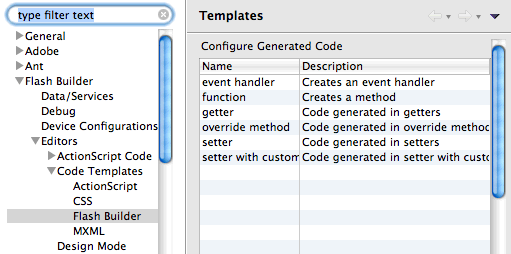
<p>Specifically, I was asked about the &#8220;Flash Builder&#8221; template category, and how to access those templates (since they don&#8217;t show up in the code hint list).</p>

<div><img src="http://probertson.com/resources/2011/06/27/flash_builder_templates.png" /></div>


<p>Unlike the other template types (ActionScript, MXML, and CSS), the Flash Builder templates aren&#8217;t templates you invoke directly via the code hint list. Instead, those templates give you a way to customize the code that Flash Builder generates when it creates methods, event handlers, and properties. Flash Builder uses these templates when you use <a href="http://probertson.com/articles/2011/05/06/flash-builder-4-5-tip-more-quick-fixes-for-external-classes-and-interfaces/">Quick Assist</a> to create a method or event handler, when you use the Generate Getter/Setter command (either from Quick Assist or from the menu), when you use the Override/Implement Methods menu item, or when you <a href="http://probertson.com/articles/2011/06/27/flash-builder-4-5-tip-easy-method-override/">create a method override using the override code hint</a>.</p>

<p>For example, by default several of these items have a comment in them that looks something like this:</p>

<pre>// TODO Auto-generated method stub</pre>


<p>I tolerated this for a while, but last week while preparing my Flash Builder coding productivity presentation I decided I was finally tired of deleting those comments every time, so I <a href="https://github.com/probertson/FlashBuilder-templates/tree/master/FlashBuilder">edited those templates to remove the comment</a>.</p>
]]></content>
  </entry>
  
  <entry>
    <title type="html"><![CDATA[Flash Builder 4.5 tip: easy method override]]></title>
    <link href="http://probertson.com/articles/2011/06/27/flash-builder-4-5-tip-easy-method-override/"/>
    <updated>2011-06-27T00:00:00-05:00</updated>
    <id>http://probertson.com/articles/2011/06/27/flash-builder-4-5-tip-easy-method-override</id>
    <content type="html"><![CDATA[<p>Here&#8217;s another trick I use quite often in Flash Builder 4.5. To be honest, this feature may have been in Flash Builder 4 and I just didn&#8217;t notice it, but I discovered it with Flash Builder 4.5 (and I&#8217;ve enhanced it with templates, which are definitely a FB 4.5 feature =).</p>

<p>If you want to override an inherited method (or get/set accessor):</p>

<ol>
    <li><p>Type </p>
        <pre>override public function&lt;space&gt;</pre>
        <p>or </p>
        <pre>override protected function&lt;space&gt;</pre></li>
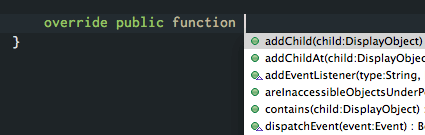
    <li><p>Flash Builder pops up a menu showing all the methods that can be overridden. This is also handy just to see what methods are available.</p>
        <div><img src="http://probertson.com/resources/2011/06/27/override_code_hints.png" /></div></li>
    <li>Choose a method name from the code hint list.</li>
    <li>Flash Builder creates the method signature complete with parameters and a <code>super.methodname()</code> call.</li>
</ol>


<p>However, being me, I like to save keystrokes as much as I can. I created a couple of templates to reduce the typing involved in this process:</p>

<ul>
    <li>&#8220;<a href="https://github.com/probertson/FlashBuilder-templates/blob/master/Common/opf.xml">opf</a>&#8221; contains just the text <code>override public function </code> (including a trailing space)</li>
    <li>&#8220;<a href="https://github.com/probertson/FlashBuilder-templates/blob/master/Common/oprf.xml">oprf</a>&#8221; contains just the text <code>override protected function </code> (including a trailing space)</li>
</ul>


<p>Using these templates I just type &#8220;opf&lt;space&gt;&#8221; (or &#8220;oprf&lt;space&gt;&#8221;) and the code hint list appears. Then I type the first few characters of the name I want and I&#8217;m in business.</p>

<p>As a side note, if you want to customize the code that Flash Builder inserts when it generates the override method, it&#8217;s the template named &#8220;override method&#8221; in the <a href="http://probertson.com/articles/2011/06/27/flash-builder-4-5s-flash-builder-templates/">Flash Builder templates category</a>.</p>
]]></content>
  </entry>
  
  <entry>
    <title type="html"><![CDATA[Coding Productivity Features in Flash Builder 4.5 recording, notes, etc.]]></title>
    <link href="http://probertson.com/articles/2011/06/23/coding-productivity-features-in-flash-builder-4-5-recording-notes-etc/"/>
    <updated>2011-06-23T00:00:00-05:00</updated>
    <id>http://probertson.com/articles/2011/06/23/coding-productivity-features-in-flash-builder-4-5-recording-notes-etc</id>
    <content type="html"><![CDATA[<p>Yesterday I had the privilege of giving a session as part of Adobe Developer Week 2011, on the topic of &#8220;Coding Productivity Features in Flash Builder 4.5.&#8221; It&#8217;s pretty obvious from my recent posts that this is a topic that is important to me =).</p>

<p>You can now view <a href="https://www.adobe.com/cfusion/event/index.cfm?event=register_no_session&id=1840142&loc=en_us">the session recording</a> (requires Adobe ID).</p>

<p>Many of the features I talked about are the same ones I&#8217;ve discussed in <a href="http://probertson.com/articles/category/flex-builder/">recent posts about Flash Builder 4.5</a>, so you&#8217;ll find more information in those articles, although the presentation takes a much more hands-on &#8220;watch how I really work in the real world&#8221; approach.</p>

<p>In addition to the posts, I talk about my Flash Builder templates several times in the presentation. I updated them a few times in the last week in preparation for the session, and the latest version is now available on my GitHub account:</p>

<p><a href="https://github.com/probertson/FlashBuilder-templates">Paul Robertson&#8217;s Flash Builder templates on GitHub</a></p>

<p>Finally, if you&#8217;re interested in Flash Builder productivity, you&#8217;ll want to check out these articles and links for additional information, especially useful keyboard shortcuts:</p>

<ul>
    <li><a href="http://www.adobe.com/devnet/flex/articles/flashbuilder_shortcuts_tips.html">Flash Builder 4.x shortcuts and debugging tips</a> by <a href="http://devgirl.org/">Holly Schinsky</a></li>
    <li><a href="http://www.adobe.com/devnet/flash-builder/articles/tips-tricks.html">Flash Builder tips and tricks</a></li>
    <li><a href="http://probertson.com/articles/2010/11/12/useful-flash-builder-burrito-keyboard-shortcuts/">Useful Flash Builder &#8220;Burrito&#8221; shortcuts</a> (by me)</li>
    <li><a href="http://www.adobe.com/devnet/flash-builder/articles/whatsnew-flashbuilder-45.html">What&#8217;s new in Flash Builder 4.5</a> by Andrew Shorten</li>
</ul>


]]></content>
  </entry>
  
  <entry>
    <title type="html"><![CDATA[Notes from D-Flex "AIR SQLite for the real world"]]></title>
    <link href="http://probertson.com/articles/2011/05/23/notes-from-d-flex-air-sqlite-for-the-real-world/"/>
    <updated>2011-05-23T00:00:00-05:00</updated>
    <id>http://probertson.com/articles/2011/05/23/notes-from-d-flex-air-sqlite-for-the-real-world</id>
    <content type="html"><![CDATA[<p>Last week I <a href="http://dflex.groups.adobe.com/index.cfm?event=post.display&postid=36307">presented to D-Flex</a> (the Dallas Flex Users&#8217; Group) on the topic of AIR SQLite for the real world. This is the description of the presentation:</p>

<blockquote>Almost any real application needs to store data, and usually that means using a relational database. In the real world, building an application that uses a database is a complicated, even messy business. Complicated and messy mean slow and inefficient. This presentation is about the libraries, tools, techniques and workflow for developing AIR SQLite applications (learned through lots of trial and error) that help me work faster and better.</blockquote>


<p>I won&#8217;t bother posting my slides because for the most part they were reused from my 360|Flex presentation &#8221;<a href="http://probertson.com/articles/2008/08/22/360flex-slides-for-air-sqlite-optimization-conversation/">AIR SQLite Optimization</a>&#8221; (with some updating&#8211;mostly trimming content out).</p>

<p>I actually really enjoyed the presentation&#8211;I was comfortable enough with the material that I was pretty relaxed. That means I ended up sharing a lot of tips and bits of experience that aren&#8217;t reflected in the slides. Hopefully the recording will be available soon; when it is I&#8217;ll add a link here and I do encourage you to take some time to watch it if you want to learn some of the lessons I&#8217;ve learned about working with SQLite in AIR.</p>

<p>A big part of my presentation was describing (and showing) various libraries and tools that I&#8217;ve found useful in my AIR SQLite development. Rather than make everyone write them down, I promised to post them here (I&#8217;ve also included a couple that I didn&#8217;t mention but that are useful):</p>

<ul>
    <li><a href="http://www.adobe.com/devnet/air/flex/quickstart/articles/simple_sql_database.html">Working asynchronously with a local SQL database</a></li>
    <li><a href="http://www.adobe.com/devnet/air/flex/quickstart/articles/sync_simple_sql_database.html">Working synchronously with a local SQL database</a></li>
    <li><a href="http://www.adobe.com/devnet/air/flex/quickstart/articles/encrypted_database.html">Working with the encrypted local SQLite database</a></li>
    <li><a href="http://help.adobe.com/en_US/as3/dev/WS5b3ccc516d4fbf351e63e3d118676a5497-7fb4.html">Working with local SQL databases in AIR</a></li>
    <li><a href="http://adobe.com/go/learn_as3_sqlsupportdb_en">SQL reference for AIR SQLite</a> (all the SQL commands that are supported)</li>
    <li><a href="http://help.adobe.com/en_US/as3/mobile/WS948100b6829bd5a623a79aca1274e8b2497-8000.html">SQL database performance</a> (from <a href="help.adobe.com/en_US/as3/mobile/index.html">Optimizing performance for the Flash Platform</a>)</li>
    <li><a href="http://www.dehats.com/drupal/?q=node/58">Lita SQLite administrator tool</a></li>
    <li><a href="http://probertson.com/projects/run-air-sqlite-query-testing-tool/">Run! SQL authoring and testing tool</a></li>
    <li><a href="http://probertson.com/projects/air-sqlite/">SQLRunner library</a></li>
    <li><a href="http://www.adobe.com/newsletters/edge/october2009/articles/article7/">Object-relational mapping for the Adobe AIR developer</a> (and <a href="http://www.adobe.com/newsletters/edge/december2009/articles/article7/">part 2</a>) - articles about FlexORM</li>
    <li><a href="http://www.peterelst.com/blog/2008/04/07/introduction-to-sqlite-in-adobe-air/">Peter Elst&#8217;s SQLite MXML wrapper classes</a> (and a recent article on <a href="http://www.peterelst.com/blog/2011/05/09/using-a-sqlite-database-in-flex-mobile-applications/">using them in mobile projects</a>)</li>
</ul>


]]></content>
  </entry>
  
  <entry>
    <title type="html"><![CDATA[Flash Builder 4.5 Tip: Using "selection" templates]]></title>
    <link href="http://probertson.com/articles/2011/05/17/flash-builder-4-5-tip-using-selection-templates/"/>
    <updated>2011-05-17T00:00:00-05:00</updated>
    <id>http://probertson.com/articles/2011/05/17/flash-builder-4-5-tip-using-selection-templates</id>
    <content type="html"><![CDATA[<p>I&#8217;ve already written about <a href="http://probertson.com/articles/2011/05/17/flash-builder-4-5-tip-use-code-templates/">how to use the code templates feature in Flash Builder 4.5</a>. One less-obvious aspect of templates is that some templates behave differently if you have some characters or lines selected.</p>

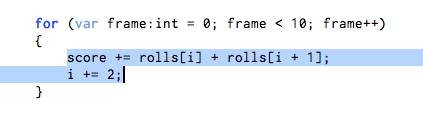
<p>For example, suppose you have one or more lines of code you&#8217;ve entered, and now you realize you want them to be wrapped in an <code>if</code> statement.</p>

<p>First select the line(s) you want to wrap:</p>

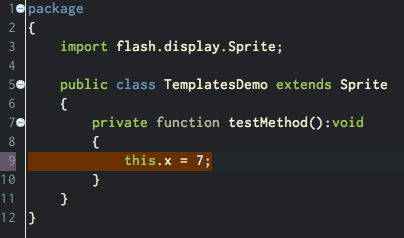
<p><img src="http://probertson.com/resources/2011/05/17/selection_templates_1.png" alt="A line of code selected in the editor."/></p>

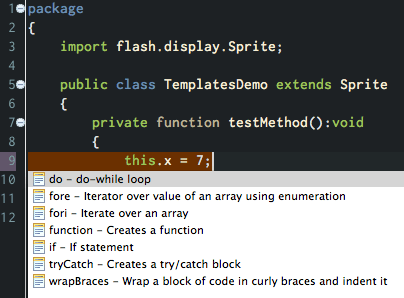
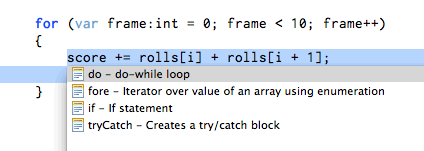
<p>Next hit Ctrl+Space to trigger the code hint menu, then again to switch to the template code hints:</p>

<p><img src="http://probertson.com/resources/2011/05/17/selection_templates_2.png" alt="Open the template code hints."/></p>

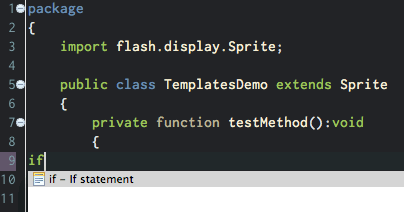
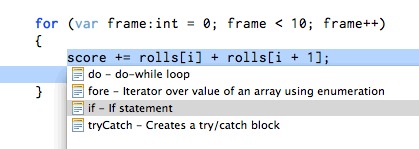
<p>Choose the template name with the mouse, by using the arrow keys, or by typing the name of the template. (Sometimes it looks like the characters you&#8217;re typing replace the selected code, but don&#8217;t worry&#8211;your selection will reappear once you choose the template.)</p>

<p><img src="http://probertson.com/resources/2011/05/17/selection_templates_3.png" alt="Type to choose the template."/></p>

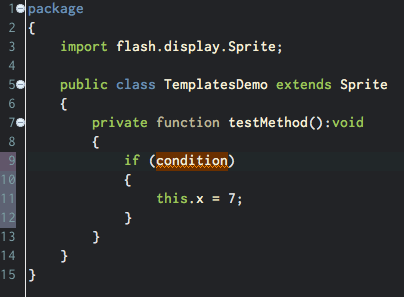
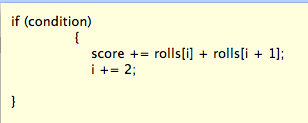
<p>Accept the code hint, and the template appears with your selection in its proper place:</p>

<p><img src="http://probertson.com/resources/2011/05/17/selection_templates_4.png" alt="The template is entered in the editor."/></p>

<p>If you want to <a href="http://probertson.com/articles/2011/05/17/flash-builder-4-5-tip-customize-templates-and-create-your-own/">create your own templates</a> that support selections, there are two template variables you can use. Use the <code>${line_selection}</code> variable for one or more lines of code. For example, I created this template to wrap any lines of code in curly braces:</p>

<pre>{
    ${line_selection}
}</pre>


<p>This also works with MXML. For example, here is a template I created to wrap a block selection in an MXML tag:</p>

<pre>&lt;${tag_name}&gt;
    ${line_selection}
&lt;/${tag_name}&gt;</pre>


<p>You can use the <code>${word_selection}</code> variable in the same way if you want a template for surround a selection that is only part of a line of code. However, the <code>${word_selection}</code> variable currently isn&#8217;t as useful as it could be, because<a href="https://bugs.adobe.com/jira/browse/FB-31052"> templates with the <code>${word_selection}</code> variable only show up in the code hints at the first character of a line</a>.</p>
]]></content>
  </entry>
  
  <entry>
    <title type="html"><![CDATA[Flash Builder 4.5 tip: Use code templates]]></title>
    <link href="http://probertson.com/articles/2011/05/17/flash-builder-4-5-tip-use-code-templates/"/>
    <updated>2011-05-17T00:00:00-05:00</updated>
    <id>http://probertson.com/articles/2011/05/17/flash-builder-4-5-tip-use-code-templates</id>
    <content type="html"><![CDATA[<p>One great feature in Flash Builder 4.5 is the Code Templates feature. I wrote about these a bit when the public beta came out last fall, but I wanted to share more about them.</p>

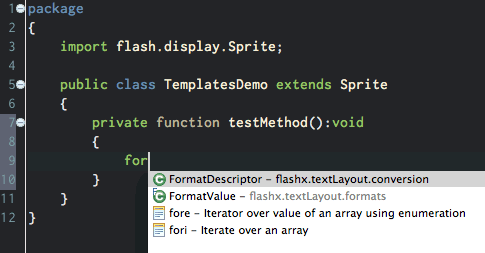
<p>The templates (also known as &#8220;snippets&#8221;) feature allows you to define chunks of code that you use repeatedly. The templates show up as code hints, so to access a template just hit Ctrl+Space (or <a href="http://probertson.com/articles/2011/05/17/flash-builder-4-5-tip-supercharge-your-code-hints-and-code-completion/">another key that you&#8217;ve defined to trigger code hints</a>) and you will see them in the list.</p>

<p><img src="http://probertson.com/resources/2011/05/17/template_insert_1.png" alt="Templates are listed in the code hint menu."/></p>

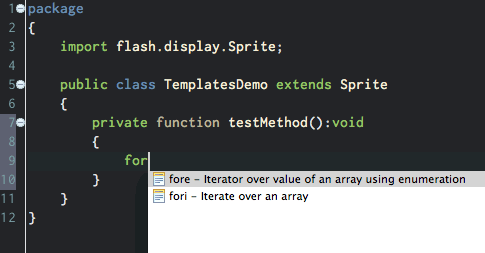
<p>Hit Ctrl+Space again to filter the code hints so that only template code hints show up.</p>

<p><img src="http://probertson.com/resources/2011/05/17/template_insert_2.png" alt="Templates are listed by themselves if you hit Ctrl+space again."/></p>

<p>Only the code hints that apply to the context where the cursor is positioned show up in the list&#8211;for example, if the cursor is inside a method, you won&#8217;t see the template for creating a function, but you will see the template for a for loop (&#8220;fori&#8221;).</p>

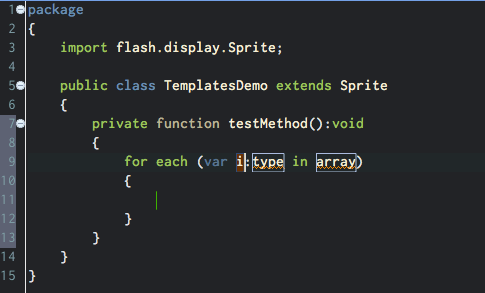
<p>Accept the code hint and the template is inserted:</p>

<p><img src="http://probertson.com/resources/2011/05/17/template_insert_3.png" alt="Select the template and it is inserted in the code."/></p>

<p>One of the best things about templates is they really are &#8220;templated&#8221; as their name suggests. You can define variables in templates, and they show up as outlined areas in the inserted code (as shown in the image above). (See my post on <a href="http://probertson.com/articles/2011/05/17/flash-builder-4-5-tip-customize-templates-and-create-your-own/">creating templates and using template variables</a> for more on template variables.)</p>

<p>You can hit TAB to jump through the different variable positions. Usually there is also a tab location at the end of the template (sometimes it&#8217;s specified as a location within the template) where you can go when you&#8217;ve finished building it out.</p>
]]></content>
  </entry>
  
  <entry>
    <title type="html"><![CDATA[Flash Builder 4.5 tip: Supercharge your code hints and code completion]]></title>
    <link href="http://probertson.com/articles/2011/05/17/flash-builder-4-5-tip-supercharge-your-code-hints-and-code-completion/"/>
    <updated>2011-05-17T00:00:00-05:00</updated>
    <id>http://probertson.com/articles/2011/05/17/flash-builder-4-5-tip-supercharge-your-code-hints-and-code-completion</id>
    <content type="html"><![CDATA[<p>I was a C# programmer for a while and I have to admit, I was spoiled by Visual Studio. Some people don&#8217;t like lots of code assistance. I&#8217;m not one of those people. Since I moved to mostly ActionScript coding I&#8217;ve been hunting for an editor that comes close to the features Visual Studio has, specifically with regards to code hints and code completion.</p>

<p>FlashDevelop is based (conceptually) on Visual Studio (it&#8217;s actually based on SharpDevelop, which is modeled after the .NET world) so not surprisingly FlashDevelop has great code hint features. Unfortunately, since I moved to a Mac I haven&#8217;t been able to use FlashDevelop. (I&#8217;ve tried, but it&#8217;s just way too slow to run it in a VM.)</p>

<p>With that in mind, for the Flash Builder 4.5 release I filed several feature requests to hopefully get code hinting and code completion on par with FlashDevelop. Sadly it&#8217;s not all the way there yet, but happily they accepted and implemented some of my feature requests (and others are in the &#8220;under consideration&#8221; bin).</p>

<p>Here&#8217;s what&#8217;s available today, and at the end I&#8217;ll talk about what I hope comes in the future.</p>

<h2>Accept code hints with space and other characters</h2>


<p>Problem 1: In Flash Builder 4, when you have a code hint and you get to the item you want, you have to hit Enter to accept it. When I&#8217;m trying to code quickly, I feel like I&#8217;m hitting Enter every third or fourth character. Ugh.</p>

<p>But not anymore! New in Flash Builder 4.5, you can specify a set of characters that serve as keys to &#8220;accept&#8221; code hints. When a code hint is showing and you hit one of those keys, the code hint is entered <strong>and</strong> the character is entered as well. So (for example) you can type a few characters from a variable name and hit &#8220;.&#8221; and the variable name (and the period) are added to the code:</p>

<iframe src="http://player.vimeo.com/video/23882973?portrait=0&amp;color=ff9933" width="450" height="298" frameborder="0"></iframe>


<p><a href="http://vimeo.com/23882973">Flash Builder 4.5 Code Completion with custom characters</a> from <a href="http://vimeo.com/probertson">Paul Robertson</a> on <a href="http://vimeo.com">Vimeo</a>.</p>


<p>However, this feature is turned off by default, so you have to turn it on to make it work.</p>

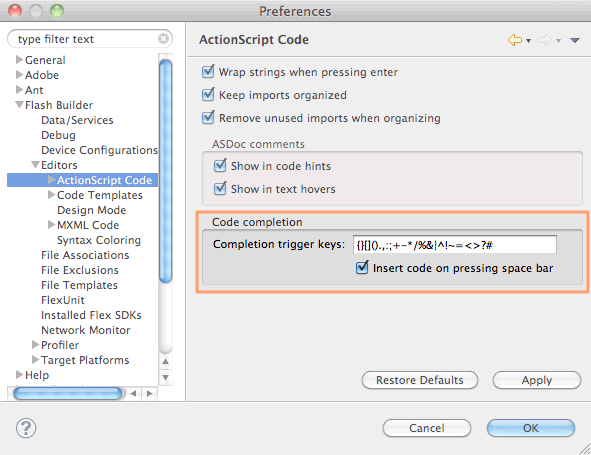
<p>Go to Flash Builder Preferences > Flash Builder > Editors > ActionScript Code. In the bottom of the preferences pane you&#8217;ll see a section titled &#8220;Code completion&#8221;:</p>

<p><img src="http://probertson.com/resources/2011/05/17/code_completion_preferences.png" alt="Code completion preferences pane"/></p>

<p>I believe the trigger keys are empty by default, but you can see the set of keys I specify in the screenshot. It&#8217;s pretty much every character that is legal in ActionScript but isn&#8217;t legal as part of an identifier name. If you want to copy and paste them, here they are:</p>

<pre>{}[]().,:;+-*/%&|^!~=<>?#</pre>


<p>Note that I also check the box to have the space bar accept a code hint.</p>

<p>I used to include the single and double quote characters but I found that they triggered more false positives than anything, and I couldn&#8217;t think of a situation where I&#8217;d be typing a variable or method name and the next character would be a quote character (without a space or operator in between). So I removed them, and I&#8217;m happy with that choice.</p>

<h2>Make code hints appear automatically</h2>


<p>Problem 2: You don&#8217;t have to hit Enter to <em>accept</em> code hints, but you still have to hit Ctrl+Space every fourth character to open the code hint menu in the first place.</p>

<p>Once again, this is now a problem of the past. Flash Builder 4.5 lets you specify a set of characters that automatically make the code hint menu appear when you type them.</p>

<iframe src="http://player.vimeo.com/video/23882864?portrait=0&amp;color=ff9933" width="450" height="298" frameborder="0"></iframe>


<p><a href="http://vimeo.com/23882864">Flash Builder 4.5 Code Assist triggers</a> from <a href="http://vimeo.com/probertson">Paul Robertson</a> on <a href="http://vimeo.com">Vimeo</a>.</p>


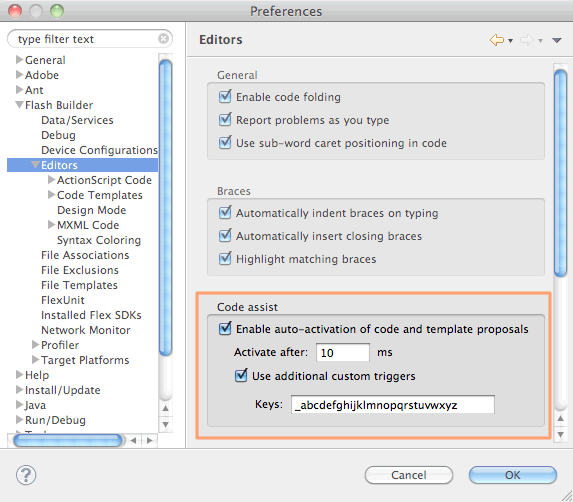
<p>In Flash Builder 4.5 Preferences, choose Flash Builder > Editors:</p>

<p><img src="http://probertson.com/resources/2011/05/17/code_assist_preferences.png" alt="Code assist preferences pane"/></p>

<p>In the middle of the panel there is a section titled &#8220;Code assist.&#8221; First of all, to enable this feature you need to check the box &#8220;Enable auto-activation of code and template proposals.&#8221;</p>

<p>I like my code hints to appear quickly, so as you can see I change the &#8220;activate after&#8221; time to 10 milliseconds.</p>

<p>Next you need to check the &#8220;Use additional custom triggers&#8221; checkbox. This is what turns on the magic. By default the set of lowercase letters is in the box. Because I prefix private members with an underscore (_) I add that character to the set as you can see in the screenshot.</p>

<p>As a side note, this set of characters is almost the exact opposite of the characters I specified to accept code hints&#8211;in this case it&#8217;s all the characters (except &#8220;$&#8221; and numbers) that are legal in identifiers.</p>

<h2>And now for the bad news</h2>


<p>Unfortunately, these two settings are great on their own but when you combine them you run into a bit of trouble.</p>

<p>Specifically, since ActionScript keywords like <code>var</code>, <code>new</code>, <code>const</code>, <code>function</code> etc. contain letters, any time you start typing them they will trigger the code hint menu. That&#8217;s okay in general, most of the keywords they are unique and once you type enough characters there is no matching code hint so the menu closes.</p>

<p>Unfortunately, some of the keywords <strong>do</strong> have matching items in code hints. For example, the keyword <code>function</code> is spelled the same as the <code>Function</code> class, so when you type the word &#8220;function&#8221; the &#8220;Function&#8221; entry in the code hint is selected. Then, when you get to the end of the word and hit &lt;space&gt;, it&#8217;s a trigger to accept the suggestion so &#8220;function&#8221; gets replaced with &#8220;Function.&#8221; Ugh.</p>

<p>Function/function is one I run into a lot. Another one I hit a lot is <code>new</code> triggering the NewObjectSampler class. NewObjectSampler? What&#8217;s that? Its a class in the flash.sampler package that I&#8217;ve never once used, but since it&#8217;s a built-in class it&#8217;s always available to code hints. (Maybe this is just Flash Builder&#8217;s way of telling me that I need to use more dependency injection and factory patterns instead of using <code>new</code>. =)</p>

<p>Depending on what libraries you have imported, other keywords can trigger code hints as well. This is especially troublesome when you&#8217;re using libraries that are built around reflection (since they tend to have classes that are named for language features). I run into problems when using FlexUnit and Mockolate, for example.</p>

<p>So, are these new code assist and code completion features useless? Not at all; they&#8217;re still very cool, and hopefully in the next release they&#8217;ll be perfected. In the mean time there are a few workarounds, although I admit that none of them are ideal for me:</p>

<ul>
    <li>Use auto-trigger or auto-accept but not both: If your code hints aren&#8217;t auto-triggered, keywords won&#8217;t trigger the code hint menu. But you&#8217;ll be back to typing Ctrl+Space a lot. If you only accept code hints with Enter, when you finish typing &#8220;function&#8221; and type space the code hint will be ignored instead of accepted. But then you&#8217;re back to typing Enter all the time.</li>
    <li>Only auto-trigger with underscore (_): If you are like me and you use the underscore (_) character as a prefix for member variables (or something like that) then you actually use underscore a lot. I&#8217;ve tried having the auto-trigger behavior turned on but only using underscore to trigger the behavior. This works pretty well, but I still end up having to use Ctrl+Enter more than I&#8217;d like.</li>
    <li>Use Esc to cancel code hints: This is part of the compromise I&#8217;ve settled on. Whenever I type &#8220;function&#8221; I hit Esc at the end of the word, which closes the code hint menu. I can then type space without auto-accepting the code hint.</li>
    <li><p>Use templates: I also do this, though it&#8217;s somewhat awkward because it requires you to change your typing habits. Here&#8217;s an example: create a template named &#8220;fn&#8221; (short for &#8220;function&#8221;). In the body of the template enter &#8220;function &#8221; (note the space after the word function). Now when you type &#8220;fn&lt;space&gt;&#8221; the word &#8220;function&#8221; (followed by a space) is entered into the editor, assuming you don&#8217;t have a class or something else that starts with &#8220;fn.&#8221;</p>
<p class="editornote">(Why do you need the space in the template? Unlike other code hints, when you accept a template code hint with a character, that character isn&#8217;t entered into the editor. That makes sense because most templates have variables, so if the character you typed to accept the code hint was entered (as it is with other code hints) you would end up with the character in a variable position or something weird like that.)</p>
<p>You can also create a set of templates with abbreviated codes for different types of functions, variables, etc. This is actually handy to do anyway. For example, I have templates named &#8220;prv&#8221; for <code>private var [name]:[Type]</code> and &#8220;pf&#8221; for <code>public function [name]([arguments]):[Type] {}</code>.
<p>However, overall this solution is hard to get used to because you have to remember to type &#8220;fn&#8221; or some other key combination instead of &#8220;function&#8221; (and &#8220;nw&#8221; instead of &#8220;new,&#8221; etc.) or &#8220;prv&#8221; and &#8220;prf&#8221; etc. Unfortunately I have too many years of muscle memory going against me to make this a completely workable solution.</p></li>
</ul>


<h2>Moving forward</h2>


<p>These are unfortunate issues, but the Flash Builder team is aware of them and they&#8217;ve told me that they&#8217;re anxious to improve things for the next version, which is a good thing.</p>

<p>If you&#8217;re interested in having great(er) code hints in Flash Builder, consider voting for these feature requests so we can &#8220;encourage&#8221; the Flash Builder team to move forward more quickly on these issues:</p>

<ul>
    <li><a href="https://bugs.adobe.com/jira/browse/FB-29435">Add code hints for keywords</a> (or in some other way prevent keywords from triggering code hints).</li>
    <li>in the &#8220;all hints&#8221; list sort alphabetically, not by type</li>
    <li><a href="https://bugs.adobe.com/jira/browse/FB-27860">Have the code complete list include partial matches</a> (so you still get code hints when you misspell something, for example)</li>
</ul>


]]></content>
  </entry>
  
  <entry>
    <title type="html"><![CDATA[Flash Builder 4.5 tip: Share code templates]]></title>
    <link href="http://probertson.com/articles/2011/05/17/flash-builder-4-5-tip-share-code-templates/"/>
    <updated>2011-05-17T00:00:00-05:00</updated>
    <id>http://probertson.com/articles/2011/05/17/flash-builder-4-5-tip-share-code-templates</id>
    <content type="html"><![CDATA[<p>Last fall when the Flash Builder &#8220;Burrito&#8221; beta was released at MAX, I shared several templates that I created.</p>

<p>It&#8217;s easy to share templates with others, which is great for teams or just for helping others so they don&#8217;t have to re-invent the wheel. Templates (like other settings) are not persisted between workspaces by default, so if you use multiple workspaces in Flash Builder, this is a way you can get your templates in your workspaces too.</p>

<h2>Importing templates</h2>


<p>To add a template to Flash Builder 4.5 (such as one of the ones I&#8217;ve shared):</p>

<ol>
    <li>open Flash Builder preferences</li>
    <li>expand the Flash Builder > Editors > Code Templates section</li>
    <li><p>choose the category for the templates you&#8217;re importing (ActionScript, CSS, Flash Builder, or MXML)</p></li>
    <li>Click the &#8220;Import&#8221; button and browse to the file containing the templates you want to import (an XML file).</li>
    <li>Choose &#8220;Open&#8221; and the templates are imported into Flash Builder.</li>
</ol>


<h2>Exporting templates</h2>


<p>To share your own templates with others:</p>

<ol>
    <li>open Flash Builder preferences</li>
    <li>expand the Flash Builder > Editors > Code Templates section</li>
    <li>choose the category for the templates you‚Äôre importing (ActionScript, CSS, Flash Builder, or MXML)</li>
    <li>select the template(s) you want to export. (If you select more than one, they are exported into a single XML file.)
    <li>Click the &#8220;Export&#8221; button and browse to the location where you want to save the template XML file.</li>
    <li>Choose &#8220;Save&#8221; and the template XML file is saved.</li>
</ol>

]]></content>
  </entry>
  
  <entry>
    <title type="html"><![CDATA[Flash Builder 4.5 Tip: Customize templates and create your own]]></title>
    <link href="http://probertson.com/articles/2011/05/17/flash-builder-4-5-tip-customize-templates-and-create-your-own/"/>
    <updated>2011-05-17T00:00:00-05:00</updated>
    <id>http://probertson.com/articles/2011/05/17/flash-builder-4-5-tip-customize-templates-and-create-your-own</id>
    <content type="html"><![CDATA[<p>I&#8217;ve written about <a href="http://probertson.com/articles/2011/05/17/flash-builder-4-5-tip-use-code-templates/">using templates in Flash Builder 4.5</a>. However, chances are you&#8217;re going to want to edit some of the templates that come with Flash Builder 4.5, and create your own. Admittedly I&#8217;ve become a bit addicted to templates, so I have a rule for myself that once I need a particular block of code more than a couple of times, I stop and turn it into a template.</p>

<p>Here&#8217;s an example of editing one of the pre-installed code templates. This is one of the first changes I made, editing the &#8220;fori&#8221; template (which creates a <code>for</code> loop) to use a variable for the array&#8217;s length instead of referencing the <code>Array.length</code> property:</p>

<ol>
    <li>open Flash Builder preferences</li>
    <li>expand the Flash Builder > Editors > Code Templates section</li>
    <li><p>choose the category for the template you want to edit (&#8220;ActionScript&#8221; in this case)</p>

</li>
    <li>Scroll the list and select the &#8220;fori&#8221; template. Click the &#8220;Edit&#8221; button.</li>
    <li><p>Replace the code block with the following code:</p>
<pre>for (var ${index}:int = 0, len:int = ${array}.length; ${index} < len; ${index}++)
{
    ${line_selection}${cursor}
}</pre>
</li>
    <li>Choose &#8220;OK&#8221; and the template is updated.</li>
</ol>


<h2>Adding a template variable</h2>


<p>In this case the code in the <code>for</code> loop just declares a variable named <code>len</code> that stores the array&#8217;s <code>length</code> value. If you want to customize the name of the variable that stores the <code>length</code> property, you can use a template variable in place of the hardcoded <code>len</code>.</p>

<p>Template variables are specified using the following syntax:</p>

<pre>${variable_name}</pre>


<p>In this example, if you use the same variable name in both places where <code>len</code> appears in the template then when you&#8217;re using the template you will only have to change it once to have it change everywhere in the template. For example, to make the <code>len</code> variable a template variable, use this code:</p>

<pre>for (var ${index}:int = 0, ${len}:int = ${array}.length; ${index} < ${len}; ${index}++)
{
    ${line_selection}${cursor}
}</pre>


<p>The name you give to the variable (the text between the curly braces) is the default text that&#8217;s inserted into the template.</p>

<h2>Special template variables</h2>


<p>In addition to your own custom template variables, there are also several built-in template variables that have special values. Some of these are &#8220;constant&#8221; values for a given file&#8211;for example, the ${enclosing_type} variable inserts the name of the current class. Others use the code model to populate a list of choices. For instance, the ${field} variable gives you a list of all the class-level variables and the ${local_var} variable gives you a list of all the variables that are in-scope in the current method.</p>

<p>To see the list of built-in template variables, click the &#8220;Insert Variable&#8230;&#8221; button or just type &#8220;$&#8221; and a code-hint menu will appear.</p>

<p>Once you&#8217;ve created your own templates, make sure to <a href="http://probertson.com/articles/2011/05/17/flash-builder-4-5-tip-share-code-templates/">share your templates with others</a> so we can <strike>steal</strike> benefit from your ideas.</p>
]]></content>
  </entry>
  
  <entry>
    <title type="html"><![CDATA[Flash Builder 4.5 tip: Use Block Selection mode]]></title>
    <link href="http://probertson.com/articles/2011/05/16/flash-builder-4-5-tip-use-block-selection-mode/"/>
    <updated>2011-05-16T00:00:00-05:00</updated>
    <id>http://probertson.com/articles/2011/05/16/flash-builder-4-5-tip-use-block-selection-mode</id>
    <content type="html"><![CDATA[<p>One new feature in Flash Builder 4.5 that&#8217;s small but incredibly useful is the new block selection mode. (Sometimes known as multi-line selection mode.)</p>

<p>This feature allows you to edit the same position in a block of lines at once. This is very useful when you&#8217;re copying and pasting a block of code and you only need to change one thing, like a variable name, in several lines of code. The video below demonstrates this much more clearly than I could explain it in text.</p>

<p>To toggle block selection mode, click this toolbar button (it&#8217;s close to the &#8220;Mark Occurrences&#8221; highlighter button):</p>

<p><img src="http://probertson.com/resources/2011/05/16/block_selection_mode_button.png" alt="Block Selection mode icon in Flash Builder 4.5"/></p>

<p>You can also use the keyboard shortcut Ctrl/Cmd+Alt+A.</p>

<p>As promised, here&#8217;s a video demo I put together showing a couple of my most common uses for Block Selection mode. (You&#8217;ll obviously want to watch it in full screen, or at least at a larger size on the <a href="http://vimeo.com/23840774">video&#8217;s Vimeo page</a>.)</p>

<iframe src="http://player.vimeo.com/video/23840774?portrait=0&amp;color=ff9933" width="450" height="253" frameborder="0"></iframe>


<p><a href="http://vimeo.com/23840774">Block Selection Mode in Flash Builder 4.5</a> from <a href="http://vimeo.com/probertson">Paul Robertson</a> on <a href="http://vimeo.com">Vimeo</a>.</p>

]]></content>
  </entry>
  
  <entry>
    <title type="html"><![CDATA[Flash Builder 4.5 tip: Quick fixes for external classes and interfaces]]></title>
    <link href="http://probertson.com/articles/2011/05/06/flash-builder-4-5-tip-more-quick-fixes-for-external-classes-and-interfaces/"/>
    <updated>2011-05-06T00:00:00-05:00</updated>
    <id>http://probertson.com/articles/2011/05/06/flash-builder-4-5-tip-more-quick-fixes-for-external-classes-and-interfaces</id>
    <content type="html"><![CDATA[<p>The public beta of Flash Builder &#8220;Burrito&#8221; that was released at MAX included several &#8220;quick fix&#8221; features. For example, if you typed the name of a property or method that didn&#8217;t exist in the current class, you could hit Ctrl/Cmd+1 and create the missing item.</p>

<p>The final release of Flash Builder takes this much farther. Here are some of the additional quick fixes that I like the best:</p>

<h2>Create class or interface</h2>


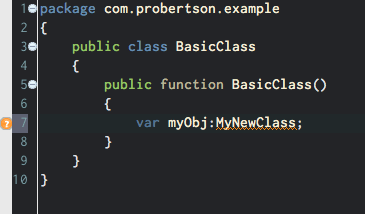
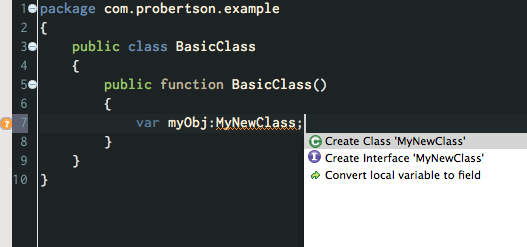
<p>If you want to use a class that you haven&#8217;t created yet, there&#8217;s no need to break your train of thought. Go ahead and type in the class name:</p>

<pre>var myObj:MyNewClass;</pre>


<p>Also new since the MAX build, you&#8217;ll see yellow squigglies show up warning you that something&#8217;s wrong:</p>

<div><img src="http://probertson.com/resources/2011/05/06/create-class-quick-fix-1.png" alt="Flash Builder 4.5 showing a warning about a possible syntax error (an unrecognized class)." /></div>


<p>Move the cursor to the warning and hit Ctrl/Cmd+1 to see the new quick fix options:</p>

<div><img src="http://probertson.com/resources/2011/05/06/create-class-quick-fix-2.png" alt="Flash Builder 4.5 shows a menu of available." /></div>


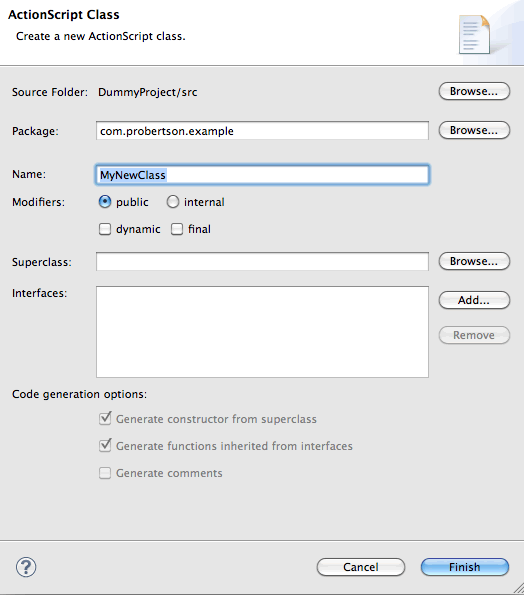
<p>If you choose &#8220;Create new Class&#8221; or &#8220;Create new Interface&#8221; the new class/new interface wizard appears, just as if you had chosen it from the menu.</p>

<h2>Create property or method in external class</h2>


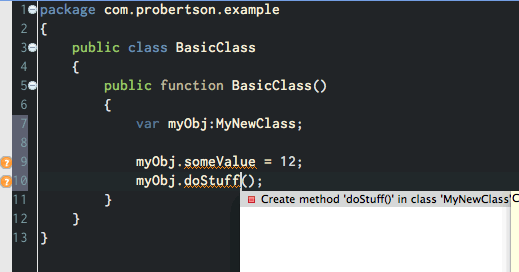
<p>You can also now create properties (instance variables) and methods in an external class the same way:</p>

<pre>myObj.someValue = 12;
myObj.doStuff();</pre>


<div><img src="http://probertson.com/resources/2011/05/06/create-class-quick-fix-3.png" alt="Flash Builder 4.5 Create Class dialog box." /></div>


<p>Just as with the class name, move the cursor to the relevant place and hit Ctrl/Cmd+1:</p>

<div><img src="http://probertson.com/resources/2011/05/06/create-class-quick-fix-4.png" alt="Flash Builder 4.5 quick fix for creating a method in an external class." /></div>


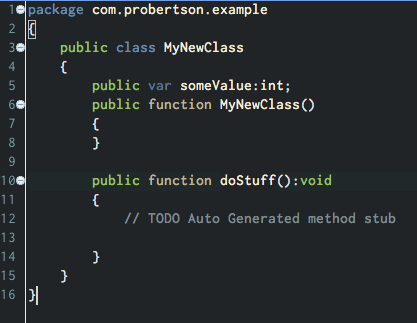
<p>Hit Enter (or double-click) to create the new method. You don&#8217;t jump to the class automatically, but you can navigate to it in the usual ways to see the new class with the generated code:</p>

<div><img src="http://probertson.com/resources/2011/05/06/create-class-quick-fix-5.png" alt="The generated class with its generated property and method." /></div>


<p>Unfortunately this doesn&#8217;t work for creating properties and methods in an interface. (The quick fix appears, but it just creates the method in the current class rather than in the interface.) Vote for the bug <a href="https://bugs.adobe.com/jira/browse/FB-30867">Generate from usage doesn&#8217;t generate interface methods</a> so we can get it in the next version.</p>
]]></content>
  </entry>
  
  <entry>
    <title type="html"><![CDATA[Flash Builder 4.5 tip: Use a custom FlexUnit framework]]></title>
    <link href="http://probertson.com/articles/2011/05/03/flash-builder-4-5-tip-use-a-custom-flexunit-sdk/"/>
    <updated>2011-05-03T00:00:00-05:00</updated>
    <id>http://probertson.com/articles/2011/05/03/flash-builder-4-5-tip-use-a-custom-flexunit-sdk</id>
    <content type="html"><![CDATA[<p>I&#8217;ve been getting into unit testing and test-driven development a lot lately. Flash Builder has pretty nice support for <a href="http://www.flexunit.org/">FlexUnit</a>, which I find to be the easiest way to include testing in my development workflow.</p>

<p>However, one problem is that Flash Builder ships on a different schedule than FlexUnit, so when a new FlexUnit version comes out Flash Builder doesn&#8217;t include it until at least the next major release. This has turned out to be a problem for me. Flash Builder 4.5 includes FlexUnit 4. However, FlexUnit 4 has a bug that makes it so you can&#8217;t run more than a certain number of tests. (I can&#8217;t remember how many exactly, and it probably varies a bit, but it&#8217;s something like 25 or 30.) If you&#8217;re doing TDD you&#8217;re going to hit that limit. This bug is fixed in FlexUnit 4.1&#8230;but of course since FlexUnit 4.1 is still a &#8220;release candidate&#8221; it isn&#8217;t included with Flash Builder 4.5.</p>

<p>Fortunately, the Flash Builder team realized that they can&#8217;t depend on being in sync with FlexUnit for every release. There&#8217;s a new feature in Flash Builder 4.5 that lets you specify an alternate FlexUnit framework to use instead of the one that&#8217;s bundled with Flash Builder.</p>

<p>To specify your alternative FlexUnit is easy:</p>

<ol>
    <li>Open Flash Builder Preferences > Flash Builder > FlexUnit</li>
    <li>In the &#8220;Alternative Framework Settings&#8221; section check the &#8220;Use alternative framework&#8221; box</li>
    <li>In the &#8220;Framework directory&#8221; field browse to the folder where you put your alternative FlexUnit sdk</li>
</ol>


<p>The trick is knowing how to set up your FlexUnit framework folder. Flash Builder expects certain SWCs to be in certain places. Unfortunately the names and setup of the built-in framework folder in Flash Builder don&#8217;t match the download from the FlexUnit site, so you have to do a little manual rearranging.</p>

<p>Here&#8217;s how to lay out your FlexUnit framework directory:</p>

<ol>
    <li>Create the top-level directory</li>
    <li><p>Inside that directory, create three subdirectories with the following names:</p>
        <ul>
            <li>ASProject</li>
            <li>FlexProject</li>
            <li>Common</li>
        </ul>
    </li>
    <li>Browse to the <a href="http://www.flexunit.org/?page_id=14">FlexUnit download page</a></li>
    <li>Download the &#8220;full project download&#8221; &#8220;4.1 SDK&#8221; version</li>
    <li>Unzip the download and open the folder</li>
    <li>Copy the FlexUnit AS3 SWC (currently &#8220;flexunit-4.1.0-8-as3_4.1.0.16076.swc&#8221;) into the &#8220;ASProject&#8221; folder in your FlexUnit framework directory.</li>
    <li>Copy the FlexUnit Flex SWC (currently &#8220;flexunit-4.1.0-8-flex_4.1.0.16076.swc&#8221;) into the &#8220;FlexProject&#8221; folder you created.</li>
    <li>Copy the &#8220;turnkey/libs/hamcrest-as3-flex-1.1.3.swc&#8221; file into the &#8220;Common&#8221; folder you created.</li>
    <li><p>If you use other extensions with FlexUnit, copy those SWCs into the &#8220;Common&#8221; folder also.</p>
        <p>For example, I use <a href="http://mockolate.org/">Mockolate</a> with some of my tests, so I downloaded Mockolate and put the SWC (currently &#8220;mockolate-0.10.0.swc&#8221;) in the &#8220;Common&#8221; folder.<p>
        <p class="editornote">Update: Mockolate has now been updated to version 0.11.0, and in the new download it has separate &#8220;as3&#8221; and &#8220;flex&#8221; SWCs. Since there are separate SWCs it&#8217;s probably best to put them in their respective folders instead of the &#8220;Common&#8221; folder, but I haven&#8217;t had a chance to test this and verify it.</p></li>
    <li>Tell Flash Builder to use your FlexUnit framework instead of the built-in one, as described above.</li>
</ol>


<p>I think it&#8217;s great that Flash Builder lets you specify your own FlexUnit framework now. The biggest problem I ran into was just confusion on how to set up the custom framework folder, especially the question of which SWCs go where. I&#8217;ve talked to Adobe and to Mike Labriola (representing FlexUnit) about this and they have said they definitely want to make things easier. Ideally (from my perspective at least) they&#8217;ll make a drop-in &#8220;Flash Builder&#8221; download bundle that&#8217;s all set up for use in Flash Builder.</p>
]]></content>
  </entry>
  
  <entry>
    <title type="html"><![CDATA[Sample and links from "PlayBook App Development Hands-on"]]></title>
    <link href="http://probertson.com/articles/2011/04/11/sample-and-links-from-playbook-app-development-hands-on/"/>
    <updated>2011-04-11T00:00:00-05:00</updated>
    <id>http://probertson.com/articles/2011/04/11/sample-and-links-from-playbook-app-development-hands-on</id>
    <content type="html"><![CDATA[<p>Yesterday I presented a hands-on training session at 360|Flex on developing AIR applications for the BlackBerry PlayBook. The session focused on two major areas: getting the tools set up for development, and using the QNX UI components and framework. (I hardly talked about Flex development for PlayBook at all, since that&#8217;s fairly similar to Flex for Android etc.)</p>

<p>As part of the session we walked through building a PlayBook application. The app was adapted from <a href="http://renaun.com/blog/2011/02/playbook-sample-actionscript-application-using-qnx-components/">an example created by Renaun Erickson</a> &#8211; big thanks to <a href="http://renaun.com/">Renaun</a> for sharing that.</p>

<p>Here are the application files:</p>

<ul>
    <li><a href="http://probertson.com/resources/2011/04/11/QNXDataExampleWalkthrough.pdf">PDF step-by-step instructions</a></li>
    <li><a href="http://probertson.com/resources/2011/04/11/QNXDataExample-Start.zip">Starting state project files</a> (includes the images and a couple of event classes pre-built so you don&#8217;t have to.</li>
    <li><a href="http://probertson.com/resources/2011/04/11/QNXDataExample-Finished.zip">Finished version of the application</a></li>
</ul>


<p>During the presentation I also showed and talked about a few other open-source examples and projects that are useful for developing with the QNX UI framework. Here are links to those resources:</p>

<ul>
    <li><a href="http://corlan.org/2011/02/17/working-with-playbook-qnx-ui-components/">All the PlayBook components (except lists)</a> by Mihai Corlan</li>
    <li><a href="http://corlan.org/2011/02/01/working-with-playbook-qnx-list-components/">QNX list components</a> by Mihai Corlan</li>
    <li><a href="http://renaun.com/blog/2010/12/using-mxml-with-qnx-ui-components-for-the-playbook/">QMXML: Using MXML with QNX components</a> by Renaun Erickson</li>
    <li><a href="http://renaun.com/blog/2011/02/qmxml-and-as3viewnavigator-for-the-playbook/">Using QMXML and the as3viewnavigator</a> by Renaun Erickson</li>
</ul>


]]></content>
  </entry>
  
  <entry>
    <title type="html"><![CDATA[360|Flex Denver ride sharing]]></title>
    <link href="http://probertson.com/articles/2011/03/24/360flex-denver-ride-sharing/"/>
    <updated>2011-03-24T00:00:00-05:00</updated>
    <id>http://probertson.com/articles/2011/03/24/360flex-denver-ride-sharing</id>
    <content type="html"><![CDATA[<p class="editornote">Update April 4, 2011: In response to this post, Super Shuttle contacted me directly and offered to set up a <a href="http://www.360flex.com/blog/2011/04/360flex-2011-super-shuttle-discount-for-attendees/">group discount rate for 360|Flex</a>. The biggest benefit of the group rate over doing a ride share is you don&#8217;t have to worry about coordinating with others (and waiting around, if you&#8217;re the first in your group to arrive). The discount price is about the same as what you&#8217;d get if you are able to get 3 people sharing a ride together both ways&#8211;so it&#8217;s not unbeatable but it&#8217;s pretty good. I&#8217;ll still leave the survey up but you&#8217;re probably just as well off by signing up for the discounted rate with Super Shuttle.</p>


<p>Last year I <a href="Permalink: http://probertson.com/articles/2010/08/06/360flex-airport-ride-sharing/">organized ride-sharing</a> between the airport and the 360|Flex DC conference. It worked out pretty well and I at least thought it was convenient, so I&#8217;ve decided to do the same thing again this year for the <a href="http://360flex.com/">360|Flex Denver conference</a> (April 10-13, 2011).</p>

<p>Here&#8217;s how it works:</p>

<ol>
    <li>Fill out the <a href="http://www.surveymonkey.com/s/2P3JH53">360|Flex Denver ride-sharing survey</a> to tell me when you&#8217;re flying into and leaving Denver</li>
    <li>I&#8217;ll find people who are arriving and leaving about the same time and I&#8217;ll send you an email so you can get together and coordinate a ride. (One email for your &#8220;arrival&#8221; group and one for your &#8220;departure&#8221; group.)</li>
    <li>You can arrange the ride however you want, but I generally recommend using Super Shuttle. I&#8217;ve used them before and had good success. A ride from the Denver airport to the conference should be about $33 for the first person plus $9 for each additional person. (So you can see there&#8217;s a big benefit in getting together with other people if you split the total cost evenly.)</li>
</ol>


<p>That&#8217;s it! I look forward to seeing you at the conference!</p>
]]></content>
  </entry>
  
  <entry>
    <title type="html"><![CDATA["Wrap selection" - more "Burrito" template goodness]]></title>
    <link href="http://probertson.com/articles/2010/11/12/wrap-selection-more-burrito-template-goodness/"/>
    <updated>2010-11-12T00:00:00-06:00</updated>
    <id>http://probertson.com/articles/2010/11/12/wrap-selection-more-burrito-template-goodness</id>
    <content type="html"><![CDATA[<p>I <a href="http://probertson.com/articles/2010/10/25/flashbuilder-burrito-templates-for-robotlegs-and-more/">already mentioned</a> that I really like the new templates feature in Flash Builder &#8220;Burrito.&#8221; Last night I discovered another nice feature in the templates.</p>

<p>I was looking through the template variables and noticed one called <code>${line_selection}</code>. This variable allows you to select some lines of code and then choose a template to &#8220;wrap&#8221; around the selected code. A couple of the pre-defined templates make use of this, and I quickly added it to others where it makes sense.</p>

<p>For example, one pretty common refactor is to have a line of code<sup><a href="#note1">*</a></sup> and decide that you need to wrap it in an <code>if</code> statement.</p>

<p>To wrap a line of code in an <code>if</code> statement:</p>

<ol>
    <li><p>Start by selecting the code you want to wrap:</p>
        <img src="http://probertson.com/resources/2010/11/12/wraptemplate1.png" /></li>
    <li><p><strong>Important</strong>: My instinct at this point is to type the name of the template (e.g. <code>if</code>) before hitting Ctrl+space. Don&#8217;t do it! You&#8217;ll just replace the selection with what you type. Unfortunately you can&#8217;t type the name of the template in this process. Instead do this:</p>
        <p>Hit Ctrl+space to open code hints. Tip: Hit Ctrl+space again to filter the code hints so only templates are shown. Flash Builder is smart enough to recognize that you have lines selected and only shows templates that include the ${line_selection} variable:</p>
        <img src="http://probertson.com/resources/2010/11/12/wraptemplate2.png" /></li>
    <li><p>Use the arrow keys or mouse to choose the template you want.</p>
        <img src="http://probertson.com/resources/2010/11/12/wraptemplate3.png" />
        <p>I love that Flash Builder shows the tooltip with the template output preview:</p>
        <img src="http://probertson.com/resources/2010/11/12/wraptemplate4.png" />
        <p>(Yes, the indentation in the preview is a bit wonky &#8211; hopefully that will be fixed for the final release.)</li>
    <li><p>Hit &lt;Enter&gt; to accept the template, and you&#8217;re ready to go. Just like with any template, you can tab between fields (just one in this case) to change other variable data:</p>
        <img src="http://probertson.com/resources/2010/11/12/wraptemplate5.png" /></li>
</ol>


<h2>Notes</h2>


<p id="note1">* The code example I&#8217;m using here comes from the &#8221;<a href="http://butunclebob.com/ArticleS.UncleBob.TheBowlingGameKata">Bowling Game Kata</a>&#8221; by &#8220;Uncle&#8221; Bob Martin</p>

]]></content>
  </entry>
  
</feed>