<?xml version="1.0" encoding="utf-8"?>
<feed xmlns="http://www.w3.org/2005/Atom">

  <title><![CDATA[Rails on Maui]]></title>
  <link href="http://www.railsonmaui.com//atom.xml" rel="self"/>
  <link href="http://www.railsonmaui.com//"/>
  <updated>2020-04-23T15:56:45-03:00</updated>
  <id>http://www.railsonmaui.com//</id>
  <author>
    <name><![CDATA[Justin Gordon]]></name>
    <email><![CDATA[justin@railsonmaui.com]]></email>
  </author>
  <generator uri="http://octopress.org/">Octopress</generator>

  
  <entry>
    <title type="html"><![CDATA[Success the ShakaCode Way!]]></title>
    <link href="http://www.railsonmaui.com//blog/2015/11/26/success-the-shakacode-way/"/>
    <updated>2015-11-26T20:41:38-02:00</updated>
    <id>http://www.railsonmaui.com//blog/2015/11/26/success-the-shakacode-way</id>
    <content type="html"><![CDATA[<p><em>Republished from <a href="http://www.shakacode.com/2015/11/26/success-the-shakacode-way.html">www.shakacode.com</a></em></p>

<p>It&rsquo;s Thanksgiving today! I&rsquo;m taking a few minutes to put down a few thoughts
that I hope will bring you, your family, and your friends &ldquo;success&rdquo; in the
coming year.</p>

<p>Success is ambiguous. Is it
<a href="https://medium.com/@dhh/the-day-i-became-a-millionaire-55d7dc4d8293#.80b2anf29">being a millionaire</a>?
Being famous?
<a href="https://medium.com/@dhh/i-don-t-want-to-be-a-winner-9858d0c32fa0#.7mwrh5asb">Winning competitions</a>?</p>

<p>I&rsquo;d say it&rsquo;s happiness! This image captures <em>part</em> of my definition of
success. <a href="https://www.facebook.com/jimmie.hepp2?fref=ts">Jimmie Hepp</a> took
this picture just a couple days before I wrote this article.</p>

<p><img src="http://www.railsonmaui.com//images/shakacode-blog/justin-surfing-offshore-winds-smiling.jpg"></p>

<p>Note, I said happiness is just a <em>part</em> of success. Balance in life is key to
success. While I have the means to spend all my time surfing, I&rsquo;d find greater
happiness in striking a balance with my other passion, which is creating great
software and an organization called &ldquo;ShakaCode&rdquo;. ShakaCode is more than just a
company; it&rsquo;s a community. A large part of what
<a href="http://www.shakacode.com">ShakaCode</a> does is giving away <strong>free</strong> code and
training to world&rsquo;s software community, as shown by our
<a href="http://www.shakacode.com/opensource/">open source projects</a>, our
<a href="http://forum.shakacode.com/">ShakaCode forum</a>, and my
<a href="http://www.railsonmaui.com">RailsOnMaui blog</a>.</p>

<p>A big part of the DNA of ShakaCode is that we&rsquo;re
<strong><a href="http://martinfowler.com/articles/remote-or-co-located.html">remote first</a></strong>.
This means that <em>you</em> can be involved with ShakaCode regardless of just about
any factor other than having a decent computer, good Internet, and a true
passion to learn and contribute. And if you have family duties, just hate time
wasted commuting, or want to live at a ski resort or a remote surf break &ndash;
that&rsquo;s all OK. Educational background, ethnicity, nationality, gender, age, etc.
all do not matter to us. All of our team members share this philosophy and this
is how we <a href="http://www.shakacode.com/about/#work-with-us">find new team members</a>.</p>

<!--more-->


<h2>An Inspiring Story</h2>

<p>One of my first hires, Dylan, exemplifies ShakaCode&rsquo;s values.</p>

<p>After coming out of high school on Maui, surfing was valued more than anything
academic. Rather than attending college, Dylan got a job and focused most of his
energies on fun outdoor activities in Maui such as surfing, kite surfing, and
mountain biking. Dylan soon discovered his job required a college degree for
promotion. At community college, Dylan quickly discovered he <strong>LOVED</strong>
computers! After college, Dylan pursued a successful career in support and
management of computer systems and networks.</p>

<p>However, this did not satisfy Dylan&rsquo;s insatiable thirst and passion for
technology. He told me that he could see that much of his job would be automated
by software, so he had better learn to code!</p>

<p>Over many years, I&rsquo;ve offered to share my love for computer programming with
friends, telling them that it&rsquo;s the best job ever for a surfer in that you can
be anywhere in the world and have a productive career. While I&rsquo;ve had a few
friends that showed interest, <strong>none</strong> of them had the <strong>passion</strong> and
<strong>desire</strong> of Dylan.</p>

<p>Dylan would show up every day at my office and just soak up everything I could
give him. When he wasn&rsquo;t in my office, he&rsquo;d have his iPhone set to technology
podcasts all day long. Eventually, I tell Dylan to quit his current job, and to
join me full-time! I can tell you with 100% certainty that this was one of the
best decisions I&rsquo;ve ever made!</p>

<p>Let&rsquo;s bounce back to the topic of &ldquo;success the ShakaCode way.&rdquo; If you can find
some passion of yours that you can contribute to the world, and you can balance
that with a healthy lifestyle, that is success. However, like replicating
startup company success, this might seem inaccessible, especially to those that
are not computer fanatics like the ShakaCode team.</p>

<h2>(Winning) Competition Is Not Success</h2>

<p>Americans love competition. It&rsquo;s everywhere: in sports, in business, and in
academics. We cherish the winners and berate the losers. And this mentality is
counterproductive to success in your career and overall happiness! In the last
few months, a couple heroes of mine, David Heinemeier Hanson and Laird Hamilton,
have shared their perspectives on competition. Their advice correlates with my
view that <em>collaboration and creativity</em> will do more for your success than a
stressful focus on competition.</p>

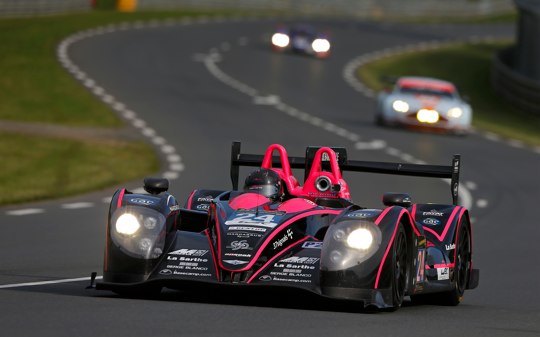
<p><img src="http://www.railsonmaui.com//images/shakacode-blog/lemans2013.jpg"></p>

<p>To quote <a href="http://david.heinemeierhansson.com/">David Heinemeier Hanson</a> in
<a href="https://signalvnoise.com/posts/3977-i-dont-want-to-be-a-winner">I don&rsquo;t want to be a winner</a>:</p>

<blockquote><p>Is there anything our society exalts more than The Winner? That fiery someone
who crushes all competition to stand alone and victorious at the end. A
genetic predisposition, I’m sure.</p>

<p>The paradigm of competition is so ingrained as the basic business narrative
that we usually don’t even recognize it, much less question it. Well, of
course there are winners and losers! What are you, a f****** communist?!</p></blockquote>

<p>Instead of focusing on &ldquo;winning,&rdquo; focus on creativity, collaboration, and
giving. If your definition of &ldquo;winning&rdquo; <em>is</em> &ldquo;happiness&rdquo; and possibly material
riches, then the path is not by <em>defeating</em> others, but, instead, by <em>helping</em>
others! While I cannot speak to every industry, in the world of open source
software, based on my experience, helping others is definitely the path to
success!</p>

<p>While this topic applies to individuals, as well as businesses, it&rsquo;s <strong>probably
most important for our youth</strong> and their hyper-competitive parents. The
importance of winning, sadly, starts off early for most youngsters. On the
playground, kids play sports to &ldquo;win&rdquo;. Have you ever seen hyper-competitive
little league parents? &ldquo;If you&rsquo;re not a winner, then you&rsquo;re a <strong>LOSER</strong>!</p>

<p>In high school, you have to beat your peers to get the best grades, and then
have to beat them on college entrance exams to get into the right university.
Winning jocks are idolized. This continues into college, where you have to
compete for grades, jobs, and seemingly just about anything.</p>

<p>This recent, detailed article,
<a href="http://www.theatlantic.com/magazine/archive/2015/12/the-silicon-valley-suicides/413140/">The Silicon Valley Suicides: Why are so many kids with bright prospects killing themselves in Palo Alto?</a>,
highlights dangers of hyper-competitive parenting. Here&rsquo;s a quote that describes
the pressure at these high achieving high schools:</p>

<blockquote><p>Heavy stress among “good kids” was the product of “a nasty competitive
atmosphere contrived by unethical Tiger Mothers,” one commenter wrote. At the
end of some of my conversations, a student, teacher, or counselor would look
around to make sure no one was listening and then whisper a story about an
Asian kid being punished or even kicked out of the house for a night after
getting a B or failing to get into Stanford.</p></blockquote>

<p>A Palo Alto student, Carolyn Walworth, gave the youth perspective:</p>

<blockquote><p>“A piece of you cringes when you hear that your friend has been preparing for
the SAT with classes since last summer, and that they’re already scoring a
2000, (And what about … the girl taking a summer immersion program to skip ahead and
get into AP French her sophomore year? And that internship your best friend
has with a Stanford professor?) You can’t help but slip into the system of
competitive insanity … We are not teenagers. We are lifeless bodies in a
system that breeds competition, hatred, and discourages teamwork and genuine
learning. We lack sincere passion. We are sick … Why is that not getting
through to this community? Why does this insanity that is our school district
continue?&#8221;</p></blockquote>

<p>The college grad may then go into corporate America and learn the meaning of
&ldquo;Stack Ranking&rdquo;, as portrayed
<a href="http://qz.com/320532/marissa-mayers-yahoo-is-a-case-study-in-the-toxic-nature-of-stack-ranking/">at Yahoo</a>.
I&rsquo;ve personally worked for a company where the managers of a division could only
award a single &ldquo;1&rdquo; performance ranking, regardless of how many excellent
achievers were in the group. At the same time, these managers were forced to
award &ldquo;3&rsquo;s&rdquo;. &ldquo;1&rdquo; means amazing, and &ldquo;3&rdquo; means you&rsquo;re being given a &ldquo;performance
plan&rdquo;, which really means &ldquo;we&rsquo;re firing you and we don&rsquo;t want you to sue us.&rdquo;
It&rsquo;s probably not surprising that this same stack-ranking company also deterred
open source contributions. At this company, contributing to any open source
project without 3 levels of management approval was grounds for firing! <em>Tip:
don&rsquo;t work for such companies.</em></p>

<h2>Compete Against Yourself Only</h2>

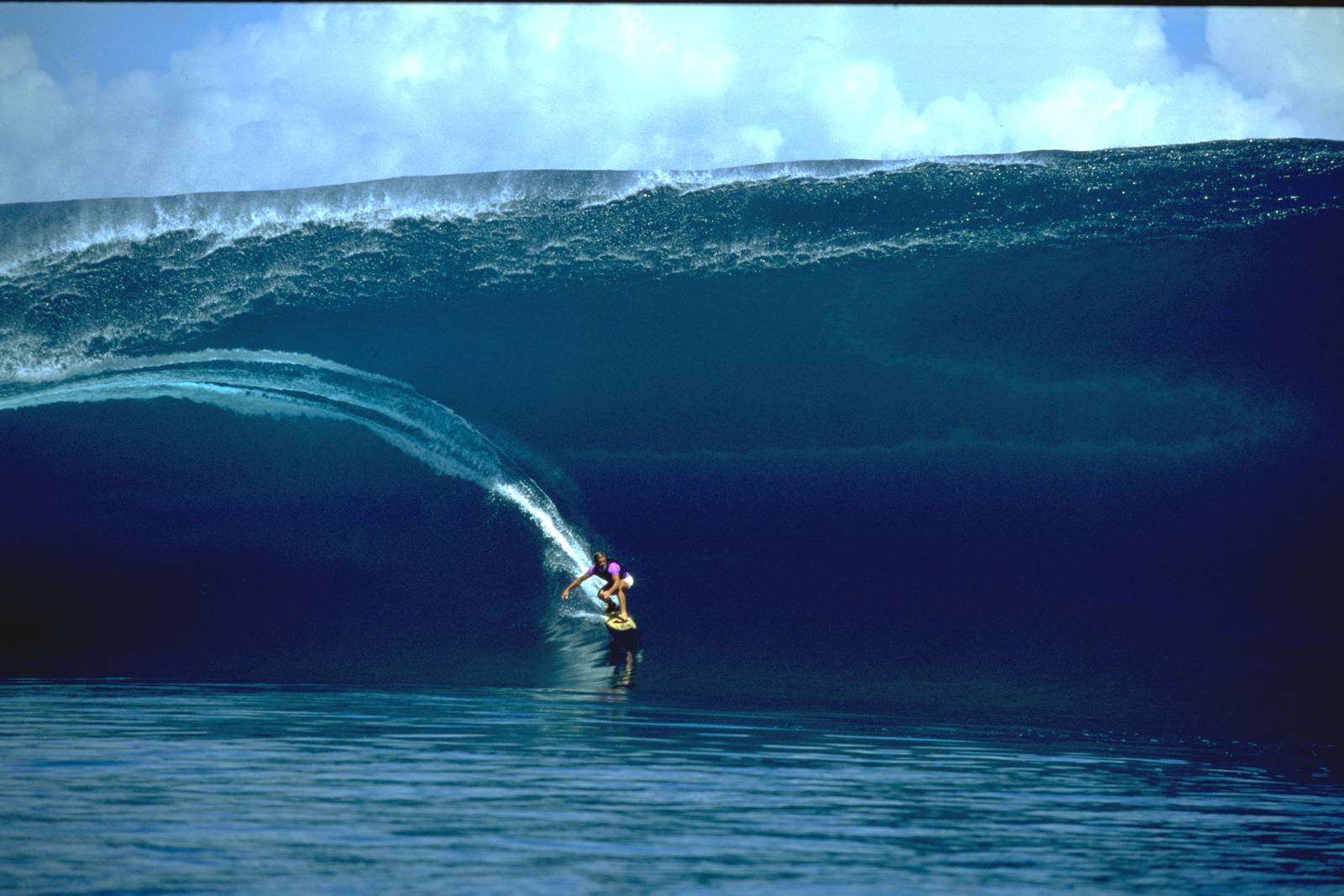
<p><img src="http://www.railsonmaui.com//images/shakacode-blog/Laird_Hamilton_Teahupoo_2000.jpg"></p>

<p><a href="https://en.wikipedia.org/wiki/Laird_Hamilton">Laird</a> is as much a legend in the
surfing world as David is in the programming and startup worlds. He could have
competed in professional surfing. Instead, he chose to forge his own path,
rather than being bound by the judging standards of competitive surfing. In a
recent interview in the
<a href="http://www.huffingtonpost.com/entry/laird-hamilton-competition_55d4fe27e4b055a6dab2d7b5">Huffington Post</a>,
he stated:</p>

<p>While Laird is all about surfing, his comments also apply to the world of <strong>open
source collaboration</strong>:</p>

<blockquote><p>“A creative man is fulfilled by accomplishments and a competitive man is
fulfilled by beating others,&ldquo; Hamilton said, paraphrasing an old saying. He
continued, &#8220;I’m all about accomplishments. Ride the biggest wave. It has to do
with me. I can always grow and keep accomplishing things.”</p>

<p>This insistence on competing only with himself is a survival mechanism of
sorts &ndash; or an almost spiritual life philosophy. “I wanted to be in control. I
wanted to be the one determining if I felt fulfilled or not,” Hamilton said.
<a href="http://www.huffingtonpost.com/entry/laird-hamilton-competition_55d4fe27e4b055a6dab2d7b5">Source: Huffington Post</a></p></blockquote>

<p>While Laird and Justin surf, David races cars:</p>

<blockquote><p>The only competition I’ve come to love is the one against myself, and that’s
not really a competition, now is it? The progress of betterment. Playing your
part to the best of your abilities in a beautiful whole.</p>

<p>That’s the joy I take away from racing cars for endurance. It’s not so much
being faster than the other cars, but striving to perfect your own
contribution as part of a team. Pushing against the limits of perfect
execution over the long term. 24 hours of testing your capability to avoid
mistake and fatigue. Winning is almost incidental to that.</p></blockquote>

<p>For me, the joy of surfing is to compete with myself. The primary goal is to
become <strong>connected to the energy of the ocean</strong>. It challenges you both at the
physical and mental levels, as you need strength and agility to ride waves. It
also challenges your judgment. Can you predict where the next wave will break?
Are you the surfer best positioned for the next wave? What I love the most about
surfing is the feeling that the learning process never ends. This combination of
applying strength and skill also applies to other outdoor action sports such as snow
boarding, mountain biking, kite-surfing, windsurfing, paddling, etc. For myself
and many others, healthy outdoor exercise fosters great creativity at work.</p>

<h2>Success the ShakaCode Way</h2>

<p>What works for Laird, David, and me, regarding happiness, is to focus on
<strong>creative expression</strong>, be it in the waves, in writing, in software, or
wherever your passion lies. Forget about competition and beating others.
Instead, focus on what you can do to help and inspire others! We have to
focus on making bigger pies, and not getting just larger slices of a fixed pie,
as in &ldquo;winners&rdquo; and &ldquo;losers.&rdquo; Open source is all about this &ldquo;grow the pie
collaboration,&rdquo; in sharp contrast to the litigation brought on by patents and
copyrights.</p>

<p>At ShakaCode, there&rsquo;s no good or bad or code. Through constant collaboration and
peer review, without fears of criticism or &ldquo;looking dumb,&rdquo; we as a team deliver
the best possible product, and we all improve our skills on a daily basis.
Everything we do is based on open source, and we&rsquo;re doing our best to make
meaningful contributions to the community, such as our new Ruby Gem,
<a href="https://github.com/shakacode/react_on_rails">react_on_rails</a>.</p>

<p>Our hiring reflects our philosophy. We don&rsquo;t torture job candidates with
programming stress tests. Instead, we try to work with them on open source just
as we would after they are hired. This fits into our <strong>remote first</strong>
philosophy. Basically, if you can contribute meaningfully to open source in the
Ruby and JavaScript worlds, then you&rsquo;ll fit right in with us, regardless of
where you&rsquo;re located or whether or not you can solve humiliating programming
puzzles in record time. We don&rsquo;t monitor our team members. Instead we trust them
to make the right decisions and to act with integrity.</p>

<p>By the way, at ShakaCode, we&rsquo;re thrilled our team members have hobbies like
surfing to complement the intellectual vigor of writing code. Our business is a
marathon, not a sprint, and a healthy, long-term perspective is best for our
team, our clients, and our products. And a flexible, remote-first work
environment is conducive to allowing our team members to live well balanced and
productive lives.</p>

<p>For a more detailed perspective on the <a href="http://www.shakacode.com/">ShakaCode&rsquo;s</a>
philosophy, see <a href="http://www.railsonmaui.com//2015/09/17/who-is-shaka-code.html">Who Is ShakaCode?</a></p>

<p>If this article resonates with you, please don&rsquo;t hesitate to
<a href="mailto:contact@shakacode.com">get in touch</a>! Or comment! We’re currently
looking for more ShakaCoders to join us!</p>

<div id="discourse-comments"></div>


<script type="text/javascript">
  var discourseUrl = "http://forum.shakacode.com/",
      discourseEmbedUrl = "http://www.railsonmaui.com//blog/2015/11/26/success-the-shakacode-way/";
  (function() {
    var d = document.createElement('script'); d.type = 'text/javascript'; d.async = true;
      d.src = discourseUrl + 'javascripts/embed.js';
    (document.getElementsByTagName('head')[0] || document.getElementsByTagName('body')[0]).appendChild(d);
  })();
</script>

]]></content>
  </entry>
  
  <entry>
    <title type="html"><![CDATA[Who Is ShakaCode?]]></title>
    <link href="http://www.railsonmaui.com//blog/2015/09/17/who-is-shaka-code/"/>
    <updated>2015-09-17T23:14:15-03:00</updated>
    <id>http://www.railsonmaui.com//blog/2015/09/17/who-is-shaka-code</id>
    <content type="html"><![CDATA[<p><em>Republished from <a href="http://www.shakacode.com/2015/09/17/who-is-shaka-code.html">www.shakacode.com</a></em></p>

<p><img src="http://www.railsonmaui.com//images/shakacode-blog/shaka-sign.png"></p>

<blockquote><p>This gesture is more than just a mere wave or thumbs up. The shaka is a symbol
of the “Aloha spirit,” which is the coordination of the mind and spirit to think
and exude good feelings to others. (by Megan Denny, www.padi.com)</p></blockquote>

<p>by Justin Gordon with help from the ShakaCode Team, September, 2015</p>

<h2><a class="offset-y-anchor" name="who-is-shaka-code"></a> Who is ShakaCode?</h2>

<p>It’s the global web development software consultancy and product company started by Justin Gordon, AKA “railsonmaui” in the Ruby on Rails world. We’re focused on what we believe to be the best technologies for web development. Today, those are Ruby on Rails and React. But it’s not just us, we like to think that it’s the larger WE in the open source community that loves collaborating on beautiful code.</p>

<!--more-->


<h2>Why Change the Name from &ldquo;Rails on Maui?&rdquo;</h2>

<p>We&rsquo;re <strong>polyglots</strong> and we&rsquo;re not just based in Maui. When Justin Gordon started out, he was focused on just Ruby on Rails, and &ldquo;Rails On Maui&rdquo; was the name he used for his Twitter handle and blog.</p>

<h2>Why &ldquo;ShakaCode&rdquo;?</h2>

<p>The &ldquo;shaka&rdquo; is really the embodiment of the philosophy, culture, and team behind ShakaCode as well as our community of open source collaborators. In order to fully explain this, we’ll need to tell you a bit about the meaning of the “shaka symbol” as well as a lot more about us. Let’s first summarize the key points:</p>

<p>We love open source collaboration (the friendliness of the Shaka meaning) and we love to code. These go hand in hand. We love code so much that we want to share it! And we only want team members that love it as much as us. With a team that loves to code, we don’t need to be handcuffed to an office. We need a good computer and a decent Internet connection anywhere in the world. The company was born in Hawaii, and all early company employees love surfing and tropical beach culture. Sunshine and surf perfectly balances intensely passionate coding!</p>

<p>Read more if you’d like the details. Or go surfing! Or skiing, mountain biking, etc.</p>

<h2>The ShakaCode Philosophy</h2>

<p>Here&rsquo;s a bit more about us:</p>

<ol>
<li><p>We&rsquo;re passionate about what we do and we all love to write and read code. Because we&rsquo;re 100% remote, we can only hire team members that love code. Jeff Atwood put this well in his article <a href="http://blog.codinghorror.com/on-working-remotely/">On Working Remotely</a>. “But the minimum bar to work remotely is “to find someone who loves code as much as you do”. It&rsquo;s … enough.”</p></li>
<li><p>We love open source and helping others. There&rsquo;s probably no movement that&rsquo;s changed software in the past 10 years like open source. Open source is not just about creating some well known project, like Linux or Ruby on Rails. It&rsquo;s about doing what you can in a system of freely sharing ideas and helping others. This might be writing blog articles, participating on Stack Overflow,or working on open source projects. We believe this open source philosophy complements the definition from Wikipedia of the shaka symbol: &ldquo;Aloha Spirit&rdquo;, a concept of friendship, understanding, compassion”</p></li>
<li><p>We almost all surf, and we all love to get outdoors and do fun, athletic things. In fact, Dylan met Justin from surfing in Maui, and Justin contacted Alex when he saw that his Facebook profile page featured a picture of him in Bali. Samnang does huge mountain bike rides around Cambodia. We want to structure our lives to pursue our passions, which is coding and doing fun sports like surfing. This is akin to how <a href="https://vimeo.com/76063825">37signals Works Remotely</a>.</p></li>
<li><p>Part of loving code is viewing it as an art. It&rsquo;s like creative writing. When you first see really beautiful code, what is it that you see that is special? It&rsquo;s a bit like looking at a random page of an Ernest Hemingway novel and seeing clear, short sentences. Great software is written such that it&rsquo;s simple and clear. It&rsquo;s easy to read.</p></li>
</ol>


<blockquote><p>“Beautiful code is similar to beautiful prose: Succinct, it has flow and rhythm, and it’s an expression of clear thinking that doesn’t jump around different layers of abstraction all the time.” from the article <a href="https://www.simple-talk.com/opinion/geek-of-the-week/david-heinemeier-hansson-geek-of-the-week/">David Heinemeier Hansson: Geek of the Week</a>.</p>

<p>DHH&rsquo;s <a href="https://www.youtube.com/watch?v=9LfmrkyP81M">RailsConf 2014 keynote on &ldquo;Writing Software&rdquo;</a> nicely summarizes this philosophy.</p></blockquote>

<p><a href="http://www.dish.com/dig/sports/why-one-of-the-best-athletes-in-the-world-refuses-to-compete/">Thus, Shaka + Code embodies who we are!</a></p>

<h2>Is ShakaCode a Service or Product Company?</h2>

<p>We&rsquo;re both, and we&rsquo;re open source contributors! Our company role model is 37Signals. They started off as a web development shop. Out of their work, they developed the program <a href="http://basecamp.com/">&ldquo;Base Camp&rdquo;</a> to address their own needs for more organized and effective client interaction. From that work, they extracted <a href="http://rubyonrails.org/">Ruby on Rails</a>, undoubtedly one of the most successful application frameworks ever created.</p>

<h2>Why is it important for us to have an internal project?</h2>

<p>Our ultimate mission is to maximize our creative contributions. This includes:</p>

<ol>
<li>Helping our clients achieve their goals through well-written software.</li>
<li>Building a useful product.</li>
<li>Contributing to open source, including source code and articles.</li>
</ol>


<p>Goal #2, building a product, is a critical component for several reasons:</p>

<ol>
<li><p>We can experiment with the latest technologies, such as <a href="http://facebook.github.io/react/">React</a>, projects of <a href="https://github.com/rackt">rackt</a>, including <a href="https://github.com/rackt/redux">redux</a> and <a href="https://github.com/rackt/react-router">react-router</a>. Our clients often don’t want experimentation with the latest technologies. An internal project allows us to gain the expertise needed in order to conservatively apply such new technologies for our clients.</p></li>
<li><p>We can work on the latest, often beta version of software. It&rsquo;s almost impossible to contribute meaningfully to open source when you&rsquo;re working on ancient versions of open source. Almost all the action and collaboration is happening on the leading edge, as it should be.</p></li>
<li><p>We have a training ground for introducing team members into the ShakaCode style of development. We can interview prospective team members by pairing with them on open source. We can hire junior level engineers who are not ready to be placed in front of clients, and groom them into senior engineers.</p></li>
<li><p>Our internal project epitomizes how want our client code to look. It&rsquo;s sparkly, shiny, and fresh. It&rsquo;s how we believe code should be written and how projects should be organized. It&rsquo;s a living example of what we intend to do for our clients. There&rsquo;s no better &ldquo;training&rdquo; or &ldquo;documentation&rdquo; than a living example of a real software project.</p></li>
<li><p><a name="fng-internal-project"></a> It&rsquo;s fun to have our own project! Coding is our passion!</p></li>
<li><p>We intend to give back TONS to the open source community. And that requires &ldquo;Extraction&rdquo; rather than &ldquo;Design&rdquo; by itself. <a href="http://rubyonrails.org/">Ruby on Rails</a> was an extraction of the 37Signals App, <a href="https://basecamp.com/">Basecamp</a>, and <a href="http://getbootstrap.com/">Twitter Bootstrap</a> was an extract of the UI framework used by Twitter. This article <a href="http://littlehart.net/atthekeyboard/2007/08/14/extraction-vs-design/">Extraction vs. Design</a> nicely sums this up:</p></li>
</ol>


<blockquote><p>David Heinemeier Hansson (the driving force behind Ruby on Rails) is a huge believer in using extractions as a method to add functionality to your projects, typically in the context of a framework. You need some particular functionality, you write it, and if it&rsquo;s good enough you extract it from it&rsquo;s original context and make it generic enough that it can be used by other people. You could also call this &ldquo;building stuff you need&rdquo; instead of &ldquo;building stuff you think you might need&rdquo;. It&rsquo;s part of the whole YAGNI philosophy of programming, I guess.</p></blockquote>

<h2>Our Internal Project: Friends and Guests</h2>

<p>This application solves the problem of &ldquo;I&rsquo;ve got a vacation home that I want to share with my friends, but not with the general public. What&rsquo;s the best way to do that?&rdquo; It&rsquo;s based on our experiences sharing <a href="https://www.flickr.com/photos/justingordon/sets/72157622506575437/show/?rb=1">Sugar Ranch Maui</a> with our friends and with long-term tenants. One such long-term tenant was Beau Hartshorne, a YC and Facebook alum, who also expressed a need to share his places with his friends, and not the general public. It turns out that many of our friends on Maui have a similar need, as Hawaiians typically have space for family and friends to visit. Thus, &ldquo;Friends and Guests&rdquo; is designed to scratch the itch of our friends. It&rsquo;s not about &ldquo;what we can build to make the most money&rdquo;. It&rsquo;s about, &ldquo;what we can build to enrich the lives of our friends&rdquo;.</p>

<p>We believe that the part of the enjoyment of a vacation home is to share it with your friends. To that ends, we&rsquo;ll be part of the means with the &ldquo;Friends and Guests&rdquo; application.</p>

<h2>Anti Discrimination Policy</h2>

<p>Part of ShakaCode is that we don&rsquo;t discriminate on:</p>

<ol>
<li><strong>Geography</strong> and <strong>Time Zone</strong></li>
<li>All the normal stuff, like gender, race, age, tattoos, piercings, sexual preference, etc.</li>
<li>Degrees and credentials. Justin has degrees from Harvard, UC Berkeley, as well as a <a href="https://www.cfainstitute.org/programs/cfaprogram/Pages/index.aspx?WPID=Programs&amp;PageName=Homepage">CFA credential</a>. However, based on his experience working with great software engineers, education is only one of many signals. In fact, education is less important than passion and great taste.</li>
<li>Working remotely (that&rsquo;s what we do!).</li>
</ol>


<p>We do discriminate against:</p>

<ol>
<li>People that discriminate on the above.</li>
<li>People that view writing software as a job, and not as an enjoyable creative endeavor. Passion is critical.</li>
</ol>


<h2>Influences</h2>

<p>Here&rsquo;s some of our favorite influences:</p>

<h3>37 Signals</h3>

<p>Definitely listen to this interview of <a href="http://5by5.tv/changelog/145">David Heinemeier Hanson on The Changelog</a> for some great thoughts on the influence of David and Ruby on Rails on the ShakaCode philosophy. Plus, see this article: <a href="https://www.simple-talk.com/opinion/geek-of-the-week/david-heinemeier-hansson-geek-of-the-week/">David Heinemeier Hansson: Geek of the Week</a></p>

<h3>Coding Horror</h3>

<p>Justin still remembers reading <a href="http://blog.codinghorror.com/about-me/">Jeff Atwood&rsquo;s</a> book where he describe how creating a programming blog was the best thing he ever did, and how it led to <a href="http://stackoverflow.com/">Stack Overflow</a> and now <a href="http://www.discourse.org/">discourse.org</a>.</p>

<h2>Aloha</h2>

<p>As Jeff Atwood said on <a href="http://blog.codinghorror.com/on-the-meaning-of-coding-horror/">&ldquo;On The Meaning of &#8220;Coding Horror&rdquo;</a> (why he blogs):</p>

<blockquote><p>But that&rsquo;s not the complete story. I&rsquo;d be lying if I didn&rsquo;t admit that there&rsquo;s an element of selfishness at work here. I love computers and programming. I love it so much it borders on obsession. When I saw the movie Into The Wild, I was transfixed by the final note written into the margins of Dr. Zhivago by a doomed Christopher McCandless: &ldquo;Happiness only real when shared.&rdquo;</p></blockquote>

<p><img src="http://www.railsonmaui.com//images/shakacode-blog/fanpage-header.jpg"></p>

<div id="discourse-comments"></div>


<script type="text/javascript">
  var discourseUrl = "http://forum.shakacode.com/",
      discourseEmbedUrl = "http://www.railsonmaui.com//blog/2015/09/17/who-is-shaka-code/";
  (function() {
    var d = document.createElement('script'); d.type = 'text/javascript'; d.async = true;
      d.src = discourseUrl + 'javascripts/embed.js';
    (document.getElementsByTagName('head')[0] || document.getElementsByTagName('body')[0]).appendChild(d);
  })();
</script>

]]></content>
  </entry>
  
  <entry>
    <title type="html"><![CDATA[Masking PII With Ruby Gsub With Regular Expression Named Match Groups, Non-Greedy]]></title>
    <link href="http://www.railsonmaui.com//blog/2015/01/25/masking-pii-with-ruby-gsub-with-regular-expression-named-match-groups/"/>
    <updated>2015-01-25T18:51:48-02:00</updated>
    <id>http://www.railsonmaui.com//blog/2015/01/25/masking-pii-with-ruby-gsub-with-regular-expression-named-match-groups</id>
    <content type="html"><![CDATA[<p>
In this article, you&#8217;ll learn:
</p>

<ol class="org-ol">
<li>How to effectively use <a href="http://rubular.com/">rubular.com</a> and the Ruby console to get the correct
regular expression syntax.
</li>
<li>What is the difference between <code>.*</code> and <code>.*?</code>, greedy and non-greedy.
</li>
<li>What are regular expression named capture groups and why you should use them.
</li>
<li>How to use String#gsub without and with the block syntax, and without or with
named capture groups.
</li>
</ol>

<p>
Suppose you have to filter out <a href="http://en.wikipedia.org/wiki/Personally_identifiable_information">PII (Personally Identifiable Information)</a> out of
log entries that look like this HTML. We don&#8217;t want the following PII fields to
show their values: <code>email</code>, <code>social_security_number</code>, <code>date_of_birth</code>
</p>

<p>
<b><i>Input Html</i></b>
</p>
<figure class='code'><div class="highlight"><table><tr><td class="gutter"><pre class="line-numbers"><span class='line-number'>1</span>
<span class='line-number'>2</span>
<span class='line-number'>3</span>
<span class='line-number'>4</span>
<span class='line-number'>5</span>
<span class='line-number'>6</span>
<span class='line-number'>7</span>
<span class='line-number'>8</span>
<span class='line-number'>9</span>
<span class='line-number'>10</span>
<span class='line-number'>11</span>
</pre></td><td class='code'><pre><code class='HTML'><span class='line'>Updated User (4)<span class="nt">&lt;br&gt;</span>
</span><span class='line'>     changed first_name to <span class="ni">&amp;quot;</span>Karina<span class="ni">&amp;quot;</span><span class="nt">&lt;br&gt;</span>
</span><span class='line'>     changed last_name to <span class="ni">&amp;quot;</span>Senger<span class="ni">&amp;quot;</span><span class="nt">&lt;br&gt;</span>
</span><span class='line'>     changed phone to <span class="ni">&amp;quot;</span>2133432154<span class="ni">&amp;quot;</span><span class="nt">&lt;br&gt;</span>
</span><span class='line'>     changed email to <span class="ni">&amp;quot;</span>brenna.treutel@runolfsdottirdonnelly.org<span class="ni">&amp;quot;</span><span class="nt">&lt;br&gt;</span>
</span><span class='line'>     changed street to <span class="ni">&amp;quot;</span>123 Main St<span class="ni">&amp;quot;</span><span class="nt">&lt;br&gt;</span>
</span><span class='line'>     changed city to <span class="ni">&amp;quot;</span>Paia<span class="ni">&amp;quot;</span><span class="nt">&lt;br&gt;</span>
</span><span class='line'>     changed state to <span class="ni">&amp;quot;</span>HI<span class="ni">&amp;quot;</span><span class="nt">&lt;br&gt;</span>
</span><span class='line'>     changed zip_code to <span class="ni">&amp;quot;</span>96677<span class="ni">&amp;quot;</span><span class="nt">&lt;br&gt;</span>
</span><span class='line'>     changed social_security_number to <span class="ni">&amp;quot;</span>555-33-4444<span class="ni">&amp;quot;</span><span class="nt">&lt;br&gt;</span>
</span><span class='line'>     changed date_of_birth to <span class="ni">&amp;quot;</span>2000-10-03<span class="ni">&amp;quot;</span>
</span></code></pre></td></tr></table></div></figure>

<p>
And the end result we want is:
</p>
<figure class='code'><div class="highlight"><table><tr><td class="gutter"><pre class="line-numbers"><span class='line-number'>1</span>
<span class='line-number'>2</span>
<span class='line-number'>3</span>
<span class='line-number'>4</span>
<span class='line-number'>5</span>
<span class='line-number'>6</span>
<span class='line-number'>7</span>
<span class='line-number'>8</span>
<span class='line-number'>9</span>
<span class='line-number'>10</span>
<span class='line-number'>11</span>
</pre></td><td class='code'><pre><code class='HTML'><span class='line'>Updated User (4)<span class="nt">&lt;br&gt;</span>
</span><span class='line'>     changed first_name to <span class="ni">&amp;quot;</span>Karina<span class="ni">&amp;quot;</span><span class="nt">&lt;br&gt;</span>
</span><span class='line'>     changed last_name to <span class="ni">&amp;quot;</span>Senger<span class="ni">&amp;quot;</span><span class="nt">&lt;br&gt;</span>
</span><span class='line'>     changed phone to <span class="ni">&amp;quot;</span>2133432154<span class="ni">&amp;quot;</span><span class="nt">&lt;br&gt;</span>
</span><span class='line'>     changed email to XXXXXX<span class="nt">&lt;br&gt;</span>
</span><span class='line'>     changed street to <span class="ni">&amp;quot;</span>123 Main St<span class="ni">&amp;quot;</span><span class="nt">&lt;br&gt;</span>
</span><span class='line'>     changed city to <span class="ni">&amp;quot;</span>Paia<span class="ni">&amp;quot;</span><span class="nt">&lt;br&gt;</span>
</span><span class='line'>     changed state to <span class="ni">&amp;quot;</span>HI<span class="ni">&amp;quot;</span><span class="nt">&lt;br&gt;</span>
</span><span class='line'>     changed zip_code to <span class="ni">&amp;quot;</span>96677<span class="ni">&amp;quot;</span><span class="nt">&lt;br&gt;</span>
</span><span class='line'>     changed social_security_number to XXXXXX<span class="nt">&lt;br&gt;</span>
</span><span class='line'>     changed date_of_birth to XXXXXX
</span></code></pre></td></tr></table></div></figure>

<!-- more -->

<div id="outline-container-sec-1" class="outline-2">
<h2 id="sec-1">Reference Web Pages</h2>
<div class="outline-text-2" id="text-1">
<p>
I suggest you open the following reference web pages:
</p>
<ol class="org-ol">
<li>Ruby doc for <a href="http://ruby-doc.org/core-2.1.5/Regexp.html">Class Regexp</a>
</li>
<li>Ruby doc for <a href="http://ruby-doc.org/core-2.1.5/String.html#method-i-replace">String#gsub</a>
</li>
<li>Interactive Ruby regular expression tester: <a href="http://rubular.com/">rubular.com</a>
</li>
</ol>
</div>
</div>
<div id="outline-container-sec-2" class="outline-2">
<h2 id="sec-2">Figure out the Regexp</h2>
<div class="outline-text-2" id="text-2">
<p>
First, let&#8217;s figure out the right regular expression using <a href="http://rubular.com/">rubular.com</a>.
</p>
</div>

<div id="outline-container-sec-2-1" class="outline-3">
<h3 id="sec-2-1">Basic Regexp</h3>
<div class="outline-text-3" id="text-2-1">
<p>
Copy the above string of input (gray box above labeled /Input HTML/into the &#8220;Your test string&#8221; box, and then let&#8217;s figure
out a simple regexp to match an individual line.
</p>

<pre class="example">
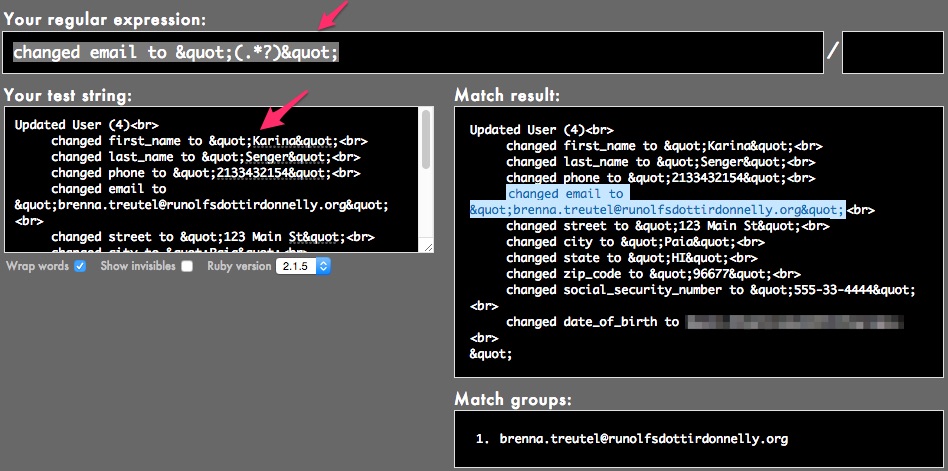
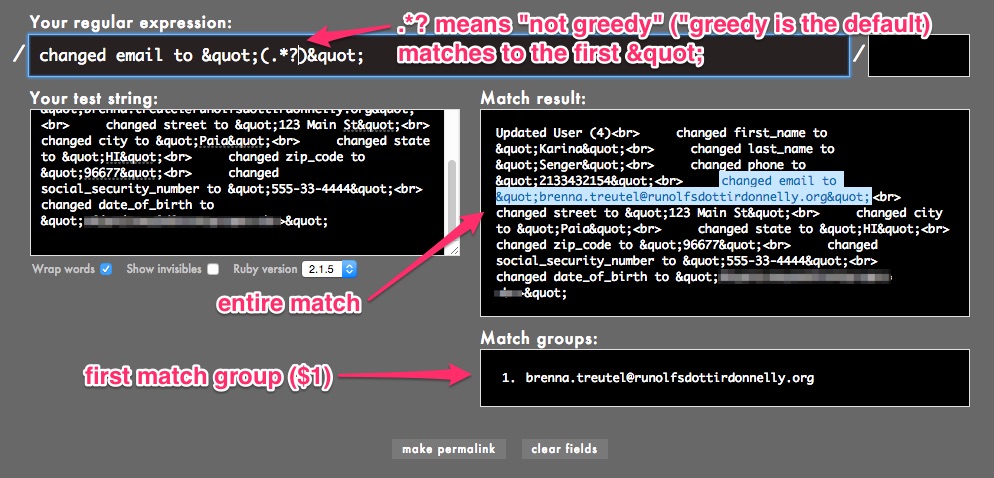
changed email to &amp;quot;(.*?)&amp;quot;
</pre>

<p>
<img src="http://www.railsonmaui.com//images/2015-01-25-masking-pii-with-ruby-gsub-with-regular-expression-named-match-groups/rubular-1.jpg">
</p>
</div>
</div>
<div id="outline-container-sec-2-2" class="outline-3">
<h3 id="sec-2-2">Why the (.*?) or Why Non-Greedy</h3>
<div class="outline-text-3" id="text-2-2">
<p>
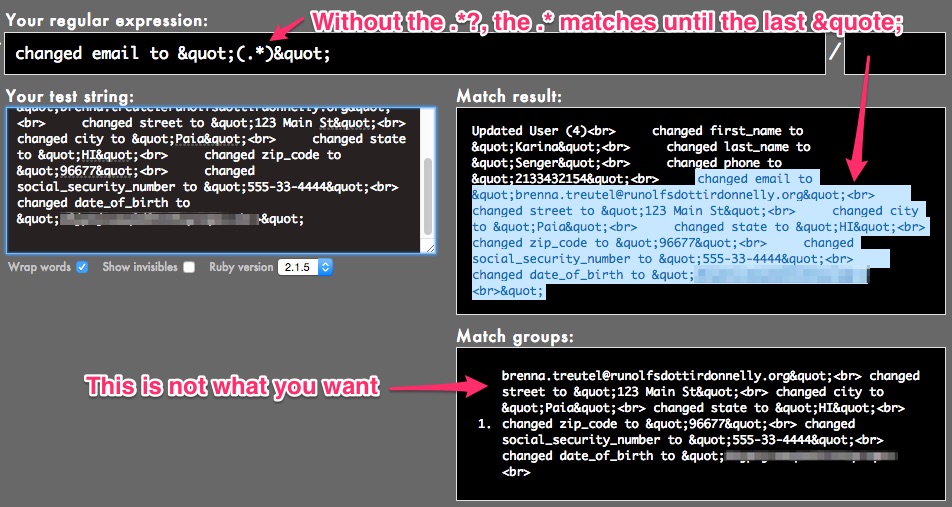
The <code>.*?</code> syntax means to get the non-greedy match. In order to see this, let&#8217;s
use this string below into the &#8220;Your test string&#8221; box (note, the text scrolls
way to the right):
</p>

<figure class='code'><div class="highlight"><table><tr><td class="gutter"><pre class="line-numbers"><span class='line-number'>1</span>
</pre></td><td class='code'><pre><code class='HTML'><span class='line'>Updated User (4)<span class="nt">&lt;br&gt;</span>     changed first_name to <span class="ni">&amp;quot;</span>Karina<span class="ni">&amp;quot;</span><span class="nt">&lt;br&gt;</span>     changed last_name to <span class="ni">&amp;quot;</span>Senger<span class="ni">&amp;quot;</span><span class="nt">&lt;br&gt;</span>     changed phone to <span class="ni">&amp;quot;</span>2133432154<span class="ni">&amp;quot;</span><span class="nt">&lt;br&gt;</span>     changed email to <span class="ni">&amp;quot;</span>brenna.treutel@runolfsdottirdonnelly.org<span class="ni">&amp;quot;</span><span class="nt">&lt;br&gt;</span>     changed street to <span class="ni">&amp;quot;</span>123 Main St<span class="ni">&amp;quot;</span><span class="nt">&lt;br&gt;</span>     changed city to <span class="ni">&amp;quot;</span>Paia<span class="ni">&amp;quot;</span><span class="nt">&lt;br&gt;</span>     changed state to <span class="ni">&amp;quot;</span>HI<span class="ni">&amp;quot;</span><span class="nt">&lt;br&gt;</span>     changed zip_code to <span class="ni">&amp;quot;</span>96677<span class="ni">&amp;quot;</span><span class="nt">&lt;br&gt;</span>     changed social_security_number to <span class="ni">&amp;quot;</span>555-33-4444<span class="ni">&amp;quot;</span><span class="nt">&lt;br&gt;</span>   changed date_of_birth to <span class="ni">&amp;quot;</span>2000-10-03<span class="ni">&amp;quot;</span>
</span></code></pre></td></tr></table></div></figure>

<p>
Notice that you see the correct result for the match.
</p>

<p>
Now, remove the <code>?</code> in the <code>.*?</code>, using this regexp:
</p>

<pre class="example">
changed email to &amp;quot;(.*)&amp;quot;
</pre>

<p>
And you&#8217;ll see this:
</p>

<p>
<img src="http://www.railsonmaui.com//images/2015-01-25-masking-pii-with-ruby-gsub-with-regular-expression-named-match-groups/rubular-2.jpg">
</p>

<p>
Now, add back the <code>?</code> after the <code>.*</code>, and you&#8217;ll see the right value.
</p>

<p>
<img src="http://www.railsonmaui.com//images/2015-01-25-masking-pii-with-ruby-gsub-with-regular-expression-named-match-groups/rubular-3.jpg">
</p>

<p>
The Ruby docs for <a href="http://ruby-doc.org/core-2.1.5/Regexp.html">Class Regexp</a> explain this:
</p>

<blockquote>
<p>
Repetition is greedy by default: as many occurrences as possible are matched while still allowing the overall match to succeed. By contrast, lazy matching makes the minimal amount of matches necessary for overall success. A greedy metacharacter can be made lazy by following it with ?.
</p>
</blockquote>
</div>
</div>
<div id="outline-container-sec-2-3" class="outline-3">
<h3 id="sec-2-3">Match any of the 3 fields</h3>
<div class="outline-text-3" id="text-2-3">
<p>
How do we match any of the PII fields of <code>email</code>, <code>social_security_number</code>,
<code>date_of_birth</code>?
</p>

<p>
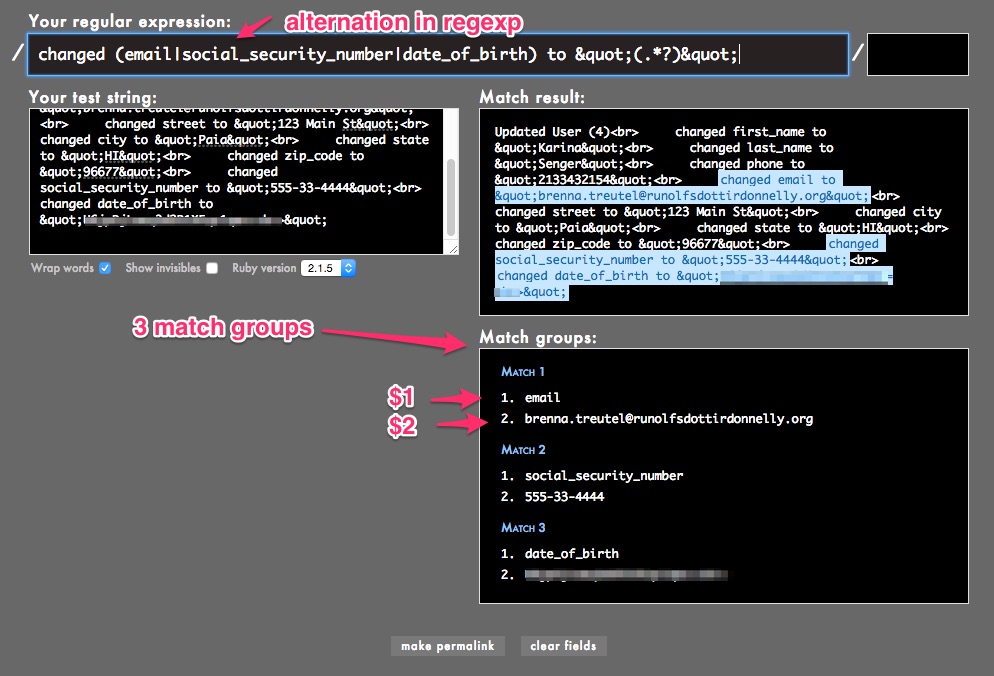
The answer is to use alternation.
</p>

<blockquote>
<p>
The vertical bar metacharacter (|) combines two expressions into a single one that matches either of the expressions. Each expression is an alternative.
</p>
</blockquote>


<pre class="example">
changed (email|social_security_number|date_of_birth) to &amp;quot;(.*?)&amp;quot;
</pre>

<p>
<img src="http://www.railsonmaui.com//images/2015-01-25-masking-pii-with-ruby-gsub-with-regular-expression-named-match-groups/rubular-4.jpg">
</p>
</div>
</div>
<div id="outline-container-sec-2-4" class="outline-3">
<h3 id="sec-2-4">Experiment in the Console (Pry)</h3>
<div class="outline-text-3" id="text-2-4">
<p>
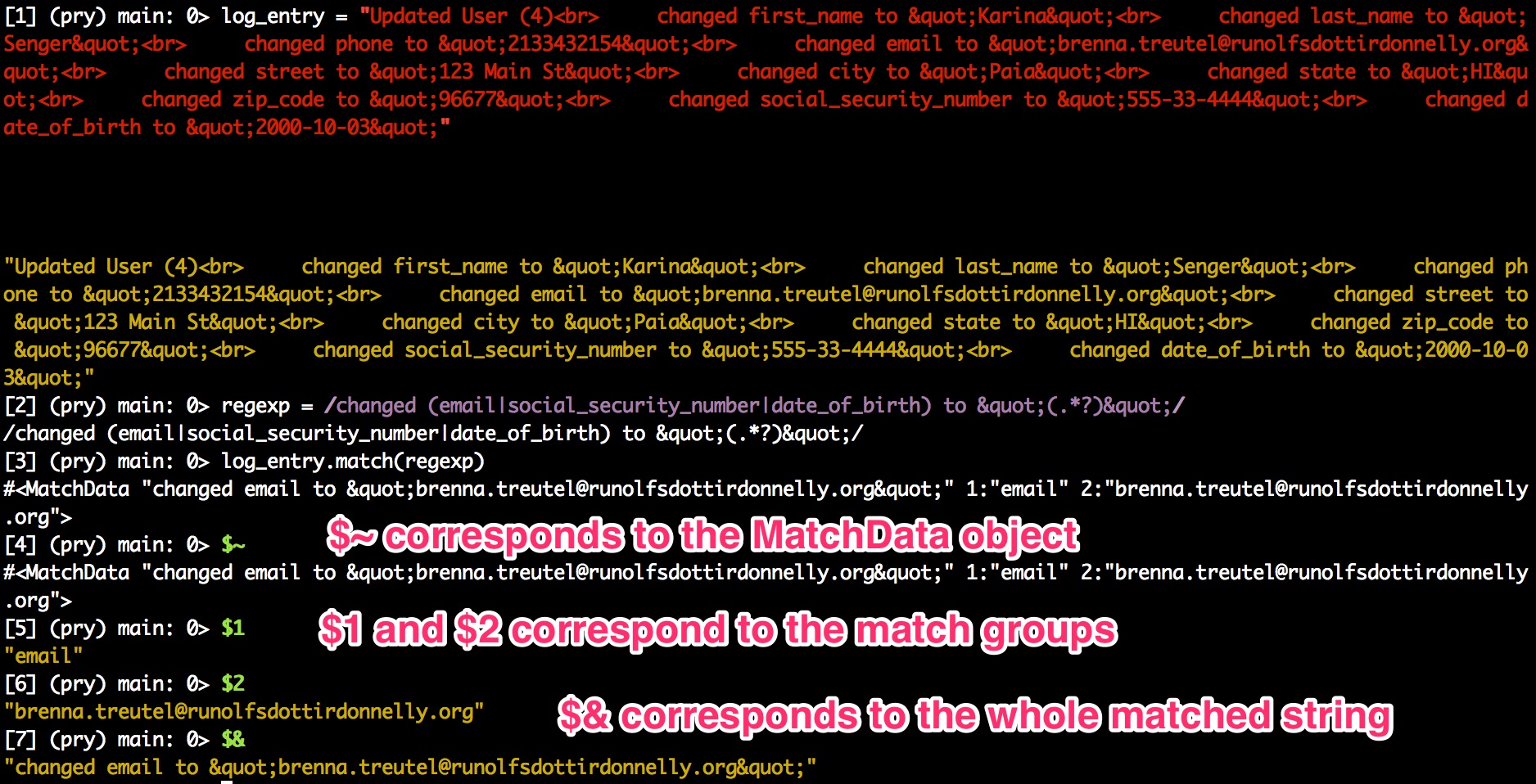
Open up your rails console (<code>rails c</code>) and paste the following 2 lines. This
will set you up with what we&#8217;ve been testing in Rubular.
</p>
<figure class='code'><div class="highlight"><table><tr><td class="gutter"><pre class="line-numbers"><span class='line-number'>1</span>
<span class='line-number'>2</span>
</pre></td><td class='code'><pre><code class='ruby'><span class='line'><span class="n">log_entry</span> <span class="o">=</span> <span class="s2">&quot;Updated User (4)&lt;br&gt;     changed first_name to &amp;quot;Karina&amp;quot;&lt;br&gt;     changed last_name to &amp;quot;Senger&amp;quot;&lt;br&gt;     changed phone to &amp;quot;2133432154&amp;quot;&lt;br&gt;     changed email to &amp;quot;brenna.treutel@runolfsdottirdonnelly.org&amp;quot;&lt;br&gt;     changed street to &amp;quot;123 Main St&amp;quot;&lt;br&gt;     changed city to &amp;quot;Paia&amp;quot;&lt;br&gt;     changed state to &amp;quot;HI&amp;quot;&lt;br&gt;     changed zip_code to &amp;quot;96677&amp;quot;&lt;br&gt;     changed social_security_number to &amp;quot;555-33-4444&amp;quot;&lt;br&gt;     changed date_of_birth to &amp;quot;2000-10-03&amp;quot;&quot;</span>
</span><span class='line'><span class="n">regexp</span> <span class="o">=</span> <span class="sr">/changed (email|social_security_number|date_of_birth) to &amp;quot;(.*?)&amp;quot;/</span>
</span></code></pre></td></tr></table></div></figure>

<p>
Then enter the following. Feel free to experiment!
</p>

<figure class='code'><div class="highlight"><table><tr><td class="gutter"><pre class="line-numbers"><span class='line-number'>1</span>
<span class='line-number'>2</span>
<span class='line-number'>3</span>
<span class='line-number'>4</span>
<span class='line-number'>5</span>
</pre></td><td class='code'><pre><code class='ruby'><span class='line'><span class="n">log_entry</span><span class="o">.</span><span class="n">match</span><span class="p">(</span><span class="n">regexp</span><span class="p">)</span>
</span><span class='line'><span class="vg">$~</span>
</span><span class='line'><span class="vg">$1</span>
</span><span class='line'><span class="vg">$2</span>
</span><span class='line'><span class="vg">$&amp;</span>
</span></code></pre></td></tr></table></div></figure>

<p>
Here&#8217;s the doc of the globals set by a regexp. These are thread-local and
method-local variables. So they are safe in a multi-threaded environment.
</p>

<pre class="example">
Pattern matching sets some global variables :

$~ is equivalent to ::last_match;
$&amp; contains the complete matched text;
$` contains string before match;
$' contains string after match;
$1, $2 and so on contain text matching first, second, etc capture group;
$+ contains last capture group.
</pre>

<p>
<img src="http://www.railsonmaui.com//images/2015-01-25-masking-pii-with-ruby-gsub-with-regular-expression-named-match-groups/pry-1.jpg">
</p>


<p>
The <code>$~</code> will come in particularly handy when we try to use <code>gsub</code>.
</p>
</div>
</div>
<div id="outline-container-sec-2-5" class="outline-3">
<h3 id="sec-2-5">How Do We Get All the Matches?</h3>
<div class="outline-text-3" id="text-2-5">
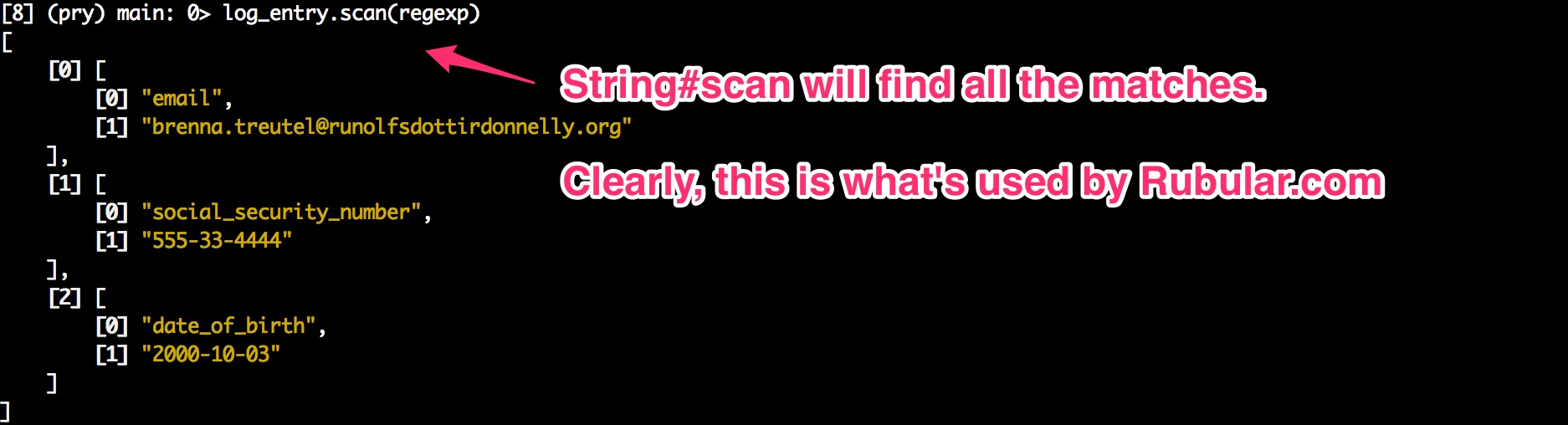
<p>
<a href="http://ruby-doc.org/core-2.1.5/String.html#method-i-scan">String#scan</a> does it!
</p>

<figure class='code'><div class="highlight"><table><tr><td class="gutter"><pre class="line-numbers"><span class='line-number'>1</span>
</pre></td><td class='code'><pre><code class='ruby'><span class='line'><span class="n">log_entry</span><span class="o">.</span><span class="n">scan</span><span class="p">(</span><span class="n">regexp</span><span class="p">)</span>
</span></code></pre></td></tr></table></div></figure>

<p>
<img src="http://www.railsonmaui.com//images/2015-01-25-masking-pii-with-ruby-gsub-with-regular-expression-named-match-groups/pry-2.jpg">
</p>
</div>
</div>
<div id="outline-container-sec-2-6" class="outline-3">
<h3 id="sec-2-6">Named Match Groups</h3>
<div class="outline-text-3" id="text-2-6">
<p>
<code>$1</code> and <code>$2</code> are not the most illuminating names for the capture group values. Ruby offers a way
to give them readable names. Quoting the Ruby doc for <a href="http://ruby-doc.org/core-2.1.5/Regexp.html">Class Regexp</a>:
</p>

<pre class="example">
Capture groups can be referred to by name when defined with the (?&lt;name&gt;) or (?'name') constructs.

/\$(?&lt;dollars&gt;\d+)\.(?&lt;cents&gt;\d+)/.match("$3.67")
    =&gt; #&lt;MatchData "$3.67" dollars:"3" cents:"67"&gt;
/\$(?&lt;dollars&gt;\d+)\.(?&lt;cents&gt;\d+)/.match("$3.67")[:dollars] #=&gt; "3"
Named groups can be backreferenced with \k&lt;name&gt;, where name is the group name.

/(?&lt;vowel&gt;[aeiou]).\k&lt;vowel&gt;.\k&lt;vowel&gt;/.match('ototomy')
    #=&gt; #&lt;MatchData "ototo" vowel:"o"&gt;
Note: A regexp can't use named backreferences and numbered backreferences simultaneously.

When named capture groups are used with a literal regexp on the left-hand side of an expression and the =~ operator, the captured text is also assigned to local variables with corresponding names.

/\$(?&lt;dollars&gt;\d+)\.(?&lt;cents&gt;\d+)/ =~ "$3.67" #=&gt; 0
dollars #=&gt; "3"
</pre>

<p>
Let&#8217;s try that in rubular first by copying this regexp into rubular:
</p>

<pre class="example">
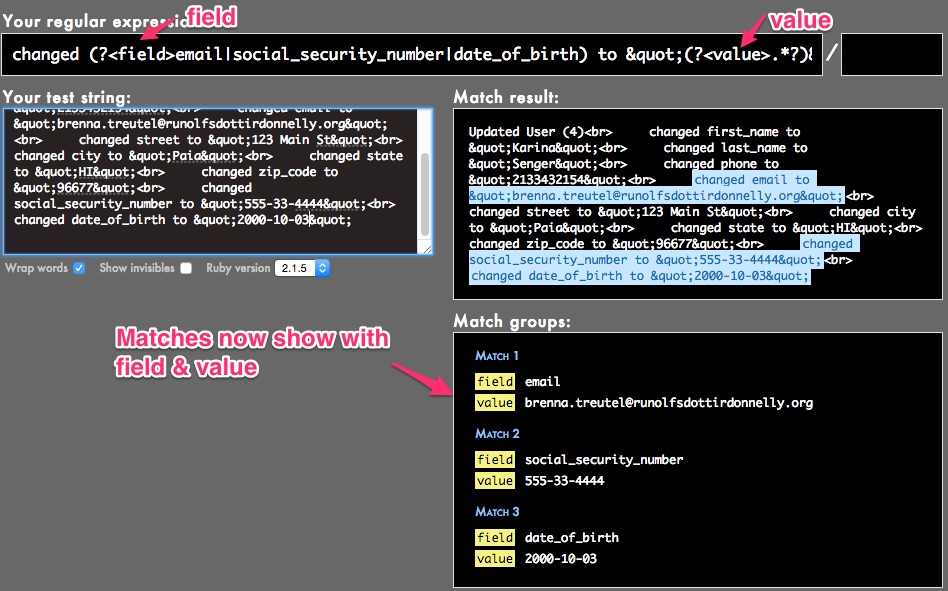
changed (?&lt;field&gt;email|social_security_number|date_of_birth) to &amp;quot;(?&lt;value&gt;.*?)&amp;quot;
</pre>

<p>
<img src="http://www.railsonmaui.com//images/2015-01-25-masking-pii-with-ruby-gsub-with-regular-expression-named-match-groups/rubular-5.jpg">
</p>

<p>
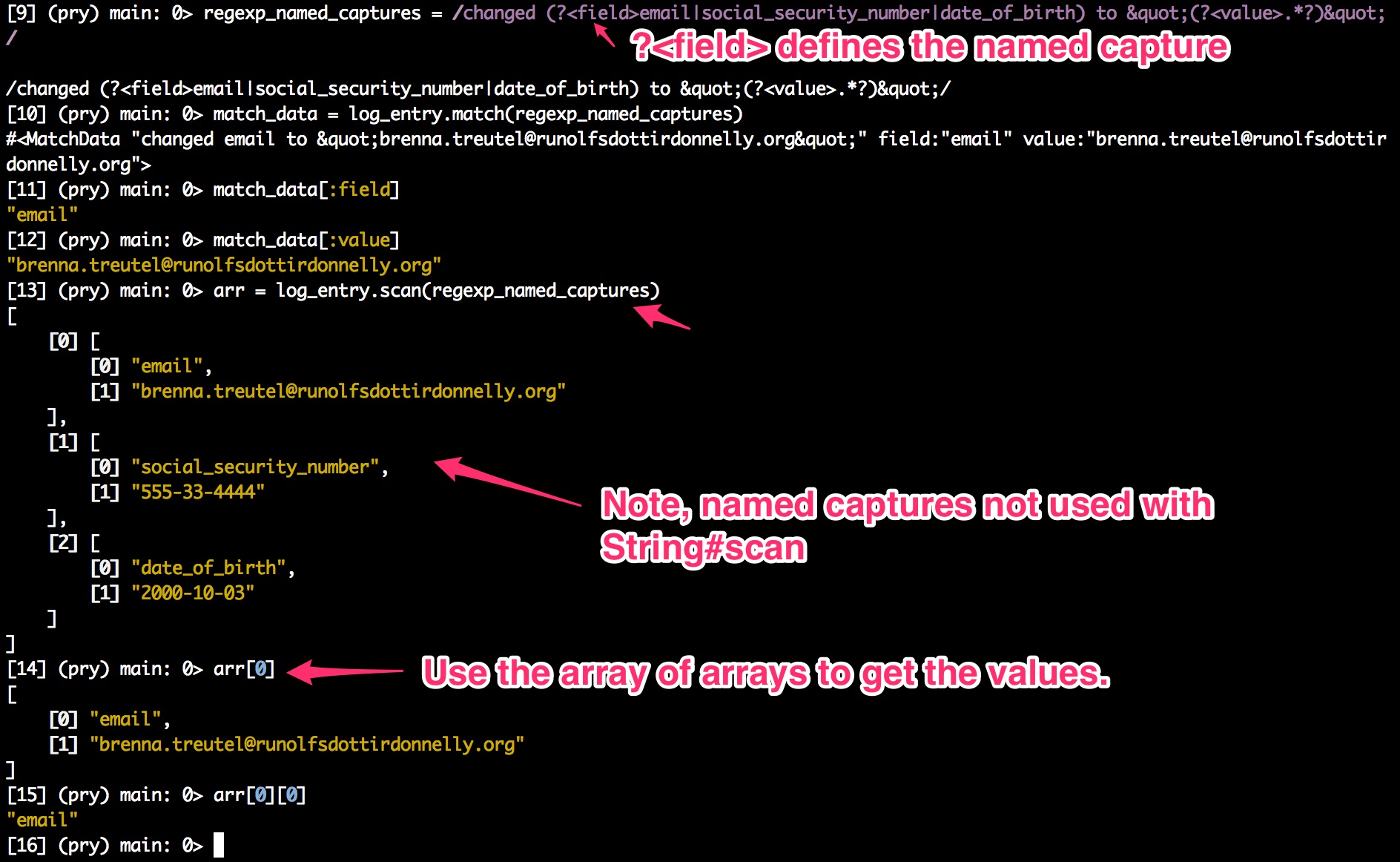
And then try this in the console:
</p>
<figure class='code'><div class="highlight"><table><tr><td class="gutter"><pre class="line-numbers"><span class='line-number'>1</span>
<span class='line-number'>2</span>
<span class='line-number'>3</span>
<span class='line-number'>4</span>
<span class='line-number'>5</span>
<span class='line-number'>6</span>
<span class='line-number'>7</span>
</pre></td><td class='code'><pre><code class='ruby'><span class='line'><span class="n">regexp_named_captures</span> <span class="o">=</span> <span class="sr">/changed (?&lt;field&gt;email|social_security_number|date_of_birth) to &amp;quot;(?&lt;value&gt;.*?)&amp;quot;/</span>
</span><span class='line'><span class="n">match_data</span> <span class="o">=</span> <span class="n">log_entry</span><span class="o">.</span><span class="n">match</span><span class="p">(</span><span class="n">regexp_named_captures</span><span class="p">)</span>
</span><span class='line'><span class="n">match_data</span><span class="o">[</span><span class="ss">:field</span><span class="o">]</span>
</span><span class='line'><span class="n">match_data</span><span class="o">[</span><span class="ss">:value</span><span class="o">]</span>
</span><span class='line'><span class="n">log_entry</span><span class="o">.</span><span class="n">scan</span><span class="p">(</span><span class="n">regexp_named_captures</span><span class="p">)</span>
</span><span class='line'><span class="n">arr</span><span class="o">[</span><span class="mi">0</span><span class="o">]</span>
</span><span class='line'><span class="n">arr</span><span class="o">[</span><span class="mi">0</span><span class="o">][</span><span class="mi">0</span><span class="o">]</span>
</span></code></pre></td></tr></table></div></figure>

<p>
<img src="http://www.railsonmaui.com//images/2015-01-25-masking-pii-with-ruby-gsub-with-regular-expression-named-match-groups/pry-3.jpg">
</p>
</div>
</div>
</div>
<div id="outline-container-sec-3" class="outline-2">
<h2 id="sec-3">Substitution with <code>String#gsub</code></h2>
<div class="outline-text-2" id="text-3">
</div><div id="outline-container-sec-3-1" class="outline-3">
<h3 id="sec-3-1">Simple (Non-block) <code>String#gsub</code> Syntax</h3>
<div class="outline-text-3" id="text-3-1">
<p>
Now, back to the task at hand, which was to convert the original log entry with
PII so that the PII is redacted. We&#8217;ll change the lines to something like this:
</p>

<pre class="example">
changed email to XXXXXX
</pre>

<p>
Let&#8217;s take a look at the documentation for <a href="http://ruby-doc.org/core-2.1.5/String.html#method-i-replace">String#gsub</a>
</p>

<blockquote>
<p>
If replacement is a String it will be substituted for the matched text. It may contain back-references to the pattern’s capture groups of the form &#92;d, where d is a group number, or &#92;k&lt;n&gt;, where n is a group name. If it is a double-quoted string, both back-references must be preceded by an additional backslash. However, within replacement the special match variables, such as $&amp;, will not refer to the current match.
</p>
</blockquote>

<figure class='code'><div class="highlight"><table><tr><td class="gutter"><pre class="line-numbers"><span class='line-number'>1</span>
</pre></td><td class='code'><pre><code class='ruby'><span class='line'><span class="n">log_entry</span><span class="o">.</span><span class="n">gsub</span><span class="p">(</span><span class="n">regexp_named_captures</span><span class="p">,</span> <span class="s2">&quot;changed </span><span class="se">\\</span><span class="s2">k&lt;field&gt; to XXXXXX&quot;</span><span class="p">)</span>
</span></code></pre></td></tr></table></div></figure>

<p>
And that results in mission accomplished!
<img src="http://www.railsonmaui.com//images/2015-01-25-masking-pii-with-ruby-gsub-with-regular-expression-named-match-groups/pry-4.jpg">
</p>
</div>
</div>
<div id="outline-container-sec-3-2" class="outline-3">
<h3 id="sec-3-2">Block <code>String#gsub</code> Syntax</h3>
<div class="outline-text-3" id="text-3-2">
<p>
Suppose you want to use the block syntax of <code>String#gsub</code>. Given the use case in
this example, there&#8217;s no particular reason to use it. However, you might come
across a use case where you&#8217;d like some logic in the bock to determine the
substitution value. Here&#8217;s how you do it.
</p>

<blockquote>
<p>
In the block form, the current match string is passed in as a parameter, and variables such as $1, $2, $`, $&amp;, and $&#8217; will be set appropriately. The value returned by the block will be substituted for the match on each call.
</p>
</blockquote>

<p>
To use the block syntax with named capture groups is not exactly obvious.
</p>

<p>
You might think that the value passed into the block is the match data. Instead,
it&#8217;s the full value of what was matched.
</p>

<p>
For example:
</p>

<figure class='code'><div class="highlight"><table><tr><td class="gutter"><pre class="line-numbers"><span class='line-number'>1</span>
</pre></td><td class='code'><pre><code class='ruby'><span class='line'><span class="n">log_entry</span><span class="o">.</span><span class="n">gsub</span><span class="p">(</span><span class="n">regexp_named_captures</span><span class="p">)</span> <span class="p">{</span> <span class="o">|</span><span class="n">match</span><span class="o">|</span> <span class="s2">&quot;XXXXXX&quot;</span> <span class="p">}</span>
</span></code></pre></td></tr></table></div></figure>

<p>
<img src="http://www.railsonmaui.com//images/2015-01-25-masking-pii-with-ruby-gsub-with-regular-expression-named-match-groups/pry-5.jpg">
</p>

<p>
That&#8217;s not what we want. We want to show the field that was redacted.
</p>

<p>
Maybe we can use the same syntax as the non-block form:
</p>

<figure class='code'><div class="highlight"><table><tr><td class="gutter"><pre class="line-numbers"><span class='line-number'>1</span>
</pre></td><td class='code'><pre><code class='ruby'><span class='line'><span class="n">log_entry</span><span class="o">.</span><span class="n">gsub</span><span class="p">(</span><span class="n">regexp_named_captures</span><span class="p">)</span> <span class="p">{</span> <span class="o">|</span><span class="n">match</span><span class="o">|</span> <span class="s2">&quot;changed </span><span class="se">\\</span><span class="s2">k&lt;field&gt; to XXXXXX&quot;</span> <span class="p">}</span>
</span></code></pre></td></tr></table></div></figure>

<p>
That doesn&#8217;t work!
</p>

<p>
<img src="http://www.railsonmaui.com//images/2015-01-25-masking-pii-with-ruby-gsub-with-regular-expression-named-match-groups/pry-6.jpg">
</p>

<p>
The solution is that you have to use the globals mentioned above, like <code>$1</code>.
</p>

<figure class='code'><div class="highlight"><table><tr><td class="gutter"><pre class="line-numbers"><span class='line-number'>1</span>
</pre></td><td class='code'><pre><code class='ruby'><span class='line'><span class="n">log_entry</span><span class="o">.</span><span class="n">gsub</span><span class="p">(</span><span class="n">regexp_named_captures</span><span class="p">)</span> <span class="p">{</span> <span class="o">|</span><span class="n">match</span><span class="o">|</span> <span class="s2">&quot;changed </span><span class="si">#{</span><span class="vg">$1</span><span class="si">}</span><span class="s2"> to XXXXXX&quot;</span> <span class="p">}</span>
</span></code></pre></td></tr></table></div></figure>

<p>
This works!
</p>

<p>
<img src="http://www.railsonmaui.com//images/2015-01-25-masking-pii-with-ruby-gsub-with-regular-expression-named-match-groups/pry-7.jpg">
</p>

<p>
But what if you want to use the named capture groups?
</p>

<p>
Then you have to use the <code>$~</code> which gives you the MatchData.
</p>

<figure class='code'><div class="highlight"><table><tr><td class="gutter"><pre class="line-numbers"><span class='line-number'>1</span>
</pre></td><td class='code'><pre><code class='ruby'><span class='line'><span class="n">log_entry</span><span class="o">.</span><span class="n">gsub</span><span class="p">(</span><span class="n">regexp_named_captures</span><span class="p">)</span> <span class="p">{</span> <span class="o">|</span><span class="n">match</span><span class="o">|</span> <span class="s2">&quot;changed </span><span class="si">#{</span><span class="vg">$~</span><span class="o">[</span><span class="ss">:field</span><span class="o">]</span><span class="si">}</span><span class="s2"> to XXXXXX&quot;</span> <span class="p">}</span>
</span></code></pre></td></tr></table></div></figure>

<p>
<b>Nice!</b> That works!
</p>

<p>
<img src="http://www.railsonmaui.com//images/2015-01-25-masking-pii-with-ruby-gsub-with-regular-expression-named-match-groups/pry-8.jpg">
</p>
</div>
</div>
</div>
<div id="outline-container-sec-4" class="outline-2">
<h2 id="sec-4">Summary of Key Lessons</h2>
<div class="outline-text-2" id="text-4">
<ol class="org-ol">
<li>The <a href="http://rubular.com/">rubular.com</a> site is super useful for testing regular expressions in Ruby.
</li>
<li>The Ruby console is awesome for testing the syntax using regular expressions
in Ruby, such as using the <code>String#match</code>, <code>String#scan</code>, and <code>String#gsub</code>
methods.
</li>
<li><code>String#match</code> only returns the first match, in the form of a <code>MatchData</code>
object. <code>String#scan</code> returns all matches, but the results come in the form
of Arrays of Arrays.   
</li>
<li><code>(.*)</code> matches greedily. <code>(.*?)</code> is non-greedy. Non-greedy stops at the first
possible place. Greedy goes to the last possible place. This is all within a
single line.
</li>
<li><code>(?&lt;some_name&gt;.*?)</code> is the syntax for a named capture group. Named capture groups
make your regular expressions easier to read.
</li>
<li>You can use a named capture group in your replacement value for a <code>String#gsub</code>
with the syntax <code>\\k&lt;some_name&gt;</code>. This is much more clear than <code>\\1</code>.
</li>
<li>If you use the block syntax for <code>String#gsub</code>, it does not work like the
non-block syntax in terms of substitution. You need to be aware of:
<ol class="org-ol">
<li>Value passed into the block is the full string matched, rather than a
MatchData object.
</li>
<li>The value returned from the block is what is substituted for the whole
string matched.
</li>
<li>The block is called once for each string matched.
</li>
<li>You have to use String interpolation within your code in the block, as
this is normal ruby code, unlike the String value in the non-block <code>gsub</code>
syntax. I.e., don&#8217;t just return a String with <code>$1</code> inside of it. You need
to put <code>#{$1}</code> in the String.
</li>
<li>You can use the regexp globals like <code>$1</code> to access a capture group.
</li>
<li>To use a named capture group inside the block you need to use the
<code>$~[:some_name]</code> syntax, where <code>some_name</code> is the your named capture. You
will probably ignore the passed in argument to the <code>gsub</code> block if using
this syntax.
</li>
</ol>
</li>
</ol>
</div>
</div>
<div id="discourse-comments"></div>
<script type="text/javascript">
  var discourseUrl = "http://forum.shakacode.com/",
      discourseEmbedUrl = "http://www.railsonmaui.com//blog/2015/01/25/masking-pii-with-ruby-gsub-with-regular-expression-named-match-groups/";
  (function() {
    var d = document.createElement('script'); d.type = 'text/javascript'; d.async = true;
      d.src = discourseUrl + 'javascripts/embed.js';
    (document.getElementsByTagName('head')[0] || document.getElementsByTagName('body')[0]).appendChild(d);
  })();
</script>
]]></content>
  </entry>
  
  <entry>
    <title type="html"><![CDATA[Enums and Queries in Rails 4.1, and Understanding Ruby]]></title>
    <link href="http://www.railsonmaui.com//blog/2014/10/23/enums-and-queries-in-rails-4-dot-1/"/>
    <updated>2014-10-23T03:23:02-02:00</updated>
    <id>http://www.railsonmaui.com//blog/2014/10/23/enums-and-queries-in-rails-4-dot-1</id>
    <content type="html"><![CDATA[<p>
Sometimes when you get puzzled by what Rails is doing, you really just need to
understand what Ruby is doing.
</p>

<p>
For example, given this simple code to get an attribute value:
</p>

<figure class='code'><div class="highlight"><table><tr><td class="gutter"><pre class="line-numbers"><span class='line-number'>1</span>
<span class='line-number'>2</span>
<span class='line-number'>3</span>
<span class='line-number'>4</span>
</pre></td><td class='code'><pre><code class='ruby'><span class='line'><span class="c1"># return value of some_attribute and foobar</span>
</span><span class='line'><span class="k">def</span> <span class="nf">some_attribute_foobar</span>
</span><span class='line'>  <span class="s2">&quot;</span><span class="si">#{</span><span class="n">some_attribute</span><span class="si">}</span><span class="s2"> and foobar&quot;</span>
</span><span class='line'><span class="k">end</span>
</span></code></pre></td></tr></table></div></figure>

<p>
Beginners are often stumped by why this code does not set an attribute value:
</p>
<figure class='code'><div class="highlight"><table><tr><td class="gutter"><pre class="line-numbers"><span class='line-number'>1</span>
<span class='line-number'>2</span>
<span class='line-number'>3</span>
<span class='line-number'>4</span>
<span class='line-number'>5</span>
<span class='line-number'>6</span>
</pre></td><td class='code'><pre><code class='ruby'><span class='line'><span class="c1"># change the value of some_attribute to foobar</span>
</span><span class='line'><span class="k">def</span> <span class="nf">change_some_attribute</span>
</span><span class='line'>  <span class="c1"># why doesn&#39;t the next line set the some_attribute value to &quot;foobar&quot;?</span>
</span><span class='line'>  <span class="n">some_attribute</span> <span class="o">=</span> <span class="s2">&quot;foobar&quot;</span>
</span><span class='line'>  <span class="n">save!</span>
</span><span class='line'><span class="k">end</span>
</span></code></pre></td></tr></table></div></figure>

<p>
What&#8217;s going on?
</p>

<p>
In the first method, <code>some_attribute</code> is actually a method call which gets the
attribute value of the record. This works in Rails ActiveRecord due to the Ruby
feature of <a href="http://www.ruby-doc.org/core-2.1.3/BasicObject.html">method_missing</a> which allows some code to run when a method is called
that does not exist.
</p>

<p>
In the second method, a local variable called some_attribute is getting
assigned. There is no call to method_missing, as this is a variable assignment!
</p>

<p>
The correct code should have been:
</p>
<figure class='code'><div class="highlight"><table><tr><td class="gutter"><pre class="line-numbers"><span class='line-number'>1</span>
<span class='line-number'>2</span>
<span class='line-number'>3</span>
<span class='line-number'>4</span>
<span class='line-number'>5</span>
</pre></td><td class='code'><pre><code class='ruby'><span class='line'><span class="c1"># change the value of some_attribute to foobar</span>
</span><span class='line'><span class="k">def</span> <span class="nf">change_some_attribute</span>
</span><span class='line'>  <span class="nb">self</span><span class="o">.</span><span class="n">some_attribute</span> <span class="o">=</span> <span class="s2">&quot;foobar&quot;</span>
</span><span class='line'>  <span class="n">save!</span>
</span><span class='line'><span class="k">end</span>
</span></code></pre></td></tr></table></div></figure>

<!-- more -->

<p>
In this case, we&#8217;re calling the method <code>some_attribute=</code> on the model instance,
and we get the expected result of assigning an attribute value.
</p>

<div id="outline-container-sec-1" class="outline-2">
<h2 id="sec-1">Enums</h2>
<div class="outline-text-2" id="text-1">
<p>
For those not familiar with enums:
</p>

<blockquote>
<p>
An enum type is a special data type that enables for a variable to be a set of
predefined constants. The variable must be equal to one of the values that have
been predefined for it.
</p>
</blockquote>

<p>
Enums, introduced in Rails 4.1, are a place a lot of Ruby magic happens! It&#8217;s
critical to understand Ruby well in order to understand how to use enums
effectively. Let&#8217;s suppose we have this simple example, copied over from the
<a href="http://edgeapi.rubyonrails.org/classes/ActiveRecord/Enum.html">Rails docs</a>:
</p>

<figure class='code'><div class="highlight"><table><tr><td class="gutter"><pre class="line-numbers"><span class='line-number'>1</span>
<span class='line-number'>2</span>
<span class='line-number'>3</span>
<span class='line-number'>4</span>
<span class='line-number'>5</span>
<span class='line-number'>6</span>
<span class='line-number'>7</span>
<span class='line-number'>8</span>
<span class='line-number'>9</span>
<span class='line-number'>10</span>
<span class='line-number'>11</span>
<span class='line-number'>12</span>
<span class='line-number'>13</span>
<span class='line-number'>14</span>
<span class='line-number'>15</span>
<span class='line-number'>16</span>
<span class='line-number'>17</span>
<span class='line-number'>18</span>
<span class='line-number'>19</span>
<span class='line-number'>20</span>
<span class='line-number'>21</span>
</pre></td><td class='code'><pre><code class='ruby'><span class='line'><span class="k">class</span> <span class="nc">Conversation</span> <span class="o">&lt;</span> <span class="no">ActiveRecord</span><span class="o">::</span><span class="no">Base</span>
</span><span class='line'>  <span class="n">enum</span> <span class="ss">status</span><span class="p">:</span> <span class="o">[</span> <span class="ss">:active</span><span class="p">,</span> <span class="ss">:archived</span> <span class="o">]</span>
</span><span class='line'><span class="k">end</span>
</span><span class='line'>
</span><span class='line'><span class="c1"># conversation.update! status: 0</span>
</span><span class='line'><span class="n">conversation</span><span class="o">.</span><span class="n">active!</span>
</span><span class='line'><span class="n">conversation</span><span class="o">.</span><span class="n">active?</span> <span class="c1"># =&gt; true</span>
</span><span class='line'><span class="n">conversation</span><span class="o">.</span><span class="n">status</span>  <span class="c1"># =&gt; &quot;active&quot;</span>
</span><span class='line'>
</span><span class='line'><span class="c1"># conversation.update! status: 1</span>
</span><span class='line'><span class="n">conversation</span><span class="o">.</span><span class="n">archived!</span>
</span><span class='line'><span class="n">conversation</span><span class="o">.</span><span class="n">archived?</span> <span class="c1"># =&gt; true</span>
</span><span class='line'><span class="n">conversation</span><span class="o">.</span><span class="n">status</span>    <span class="c1"># =&gt; &quot;archived&quot;</span>
</span><span class='line'>
</span><span class='line'><span class="c1"># conversation.update! status: 1</span>
</span><span class='line'><span class="n">conversation</span><span class="o">.</span><span class="n">status</span> <span class="o">=</span> <span class="s2">&quot;archived&quot;</span>
</span><span class='line'>
</span><span class='line'><span class="c1"># conversation.update! status: nil</span>
</span><span class='line'><span class="n">conversation</span><span class="o">.</span><span class="n">status</span> <span class="o">=</span> <span class="kp">nil</span>
</span><span class='line'><span class="n">conversation</span><span class="o">.</span><span class="n">status</span><span class="o">.</span><span class="n">nil?</span> <span class="c1"># =&gt; true</span>
</span><span class='line'><span class="n">conversation</span><span class="o">.</span><span class="n">status</span>      <span class="c1"># =&gt; nil</span>
</span></code></pre></td></tr></table></div></figure>
<p>
So what&#8217;s going on in terms of Ruby meta-programming?
</p>

<p>
For all the enum values declared for <code>Conversation</code>, methods are created in the
following forms. Let&#8217;s use the model Conversation, column &#8220;status&#8221;, and the enum &#8220;active&#8221; for this exampl:
</p>
<table border="2" cellspacing="0" cellpadding="6" rules="groups" frame="hsides">


<colgroup>
<col  class="left" />

<col  class="left" />
</colgroup>
<thead>
<tr>
<th scope="col" class="left">method</th>
<th scope="col" class="left">description</th>
</tr>
</thead>
<tbody>
<tr>
<td class="left"><code>self.status</code></td>
<td class="left">Returns enum <b>string</b> value (not symbol, and not <b>integer</b> db value)</td>
</tr>

<tr>
<td class="left"><code>self.status=&lt;enum_string_value or integer_value&gt;</code></td>
<td class="left">Set the status to corresponding enum integer value using either a string, symbol, or integer. If you use an invalid value, you get an ArgumentError. String/symbol is converted to corresponding integer value.</td>
</tr>

<tr>
<td class="left"><code>self.active!</code></td>
<td class="left">Sets the status enum to &#8220;active&#8221;. This syntax is a bit confusing in that you don&#8217;t see the attribute you&#8217;re assigning! ArgumentError if invalid enum.</td>
</tr>

<tr>
<td class="left"><code>self.active?</code></td>
<td class="left">equivalent to (<code>self.status =</code> &#8220;active&#8221;<code>), and *not* equivalent to (=self.status =</code> :active=) due to symbols not being equal to strings!</td>
</tr>

<tr>
<td class="left"><code>Conversation.active</code></td>
<td class="left">equivalent to <code>Conversation.where(status: "active")</code>. Again, it&#8217;s a bit confusing not to see the column being queried.</td>
</tr>

<tr>
<td class="left"><code>Conversation.statuses</code></td>
<td class="left">Mapping of symbols to ordinal values <code>{ "active" \=&gt; 0, "archived" \=&gt; 1 }</code>, of type <code>HashWithIndifferentAccess</code>, meaning you can use symbols or strings</td>
</tr>
</tbody>
</table>
</div>

<div id="outline-container-sec-1-1" class="outline-3">
<h3 id="sec-1-1">Default Values for Enums</h3>
<div class="outline-text-3" id="text-1-1">
<p>
As the docs say, it&#8217;s a good idea to use the default value from the database declaration,  like:
</p>
<figure class='code'><div class="highlight"><table><tr><td class="gutter"><pre class="line-numbers"><span class='line-number'>1</span>
<span class='line-number'>2</span>
<span class='line-number'>3</span>
</pre></td><td class='code'><pre><code class='ruby'><span class='line'><span class="n">create_table</span> <span class="ss">:conversations</span> <span class="k">do</span> <span class="o">|</span><span class="n">t</span><span class="o">|</span>
</span><span class='line'>  <span class="n">t</span><span class="o">.</span><span class="n">column</span> <span class="ss">:status</span><span class="p">,</span> <span class="ss">:integer</span><span class="p">,</span> <span class="ss">default</span><span class="p">:</span> <span class="mi">0</span><span class="p">,</span> <span class="ss">null</span><span class="p">:</span> <span class="kp">false</span>
</span><span class='line'><span class="k">end</span>
</span></code></pre></td></tr></table></div></figure>
<p>
More specifically, consider using the first declared status (enum db value zero)
be the default <i>and</i> to not allow null values. I&#8217;ve found that when I&#8217;ve allowed
null values in enums, it makes all my code more complicated. This is an example
of the <a href="http://robots.thoughtbot.com/rails-refactoring-example-introduce-null-object">Null Object Pattern</a>. Nulls in your data and checking for these in your
code will make your life more difficult! Instead, have an enum value for &#8220;I
don&#8217;t know&#8221; if that really is a possibility, and make that first value, which is
an index of zero, and you can set that as the database column default.
</p>
</div>
</div>
<div id="outline-container-sec-1-2" class="outline-3">
<h3 id="sec-1-2">Queries on Enums</h3>
<div class="outline-text-3" id="text-1-2">
<p>
The docs say:
</p>
<blockquote>
<p>
In rare circumstances you might need to access the mapping directly. The mappings are exposed through a class method with the pluralized attribute name
</p>
</blockquote>

<figure class='code'><div class="highlight"><table><tr><td class="gutter"><pre class="line-numbers"><span class='line-number'>1</span>
</pre></td><td class='code'><pre><code class='ruby'><span class='line'><span class="no">Conversation</span><span class="o">.</span><span class="n">statuses</span> <span class="c1"># =&gt; { &quot;active&quot; =&gt; 0, &quot;archived&quot; =&gt; 1 }</span>
</span></code></pre></td></tr></table></div></figure>

<p>
<b>This is not rare! This is critical!</b>
</p>

<p>
For example, suppose you want to query where the status is not &#8220;archived&#8221;:
</p>

<p>
You might be tempted to think that Rails will be smart enough to figure out that 
</p>
<figure class='code'><div class="highlight"><table><tr><td class="gutter"><pre class="line-numbers"><span class='line-number'>1</span>
</pre></td><td class='code'><pre><code class='ruby'><span class='line'><span class="no">Conversation</span><span class="o">.</span><span class="n">where</span><span class="p">(</span><span class="s2">&quot;status &lt;&gt; ?&quot;</span><span class="p">,</span> <span class="s2">&quot;archived&quot;</span><span class="p">)</span>
</span></code></pre></td></tr></table></div></figure>

<p>
Rails is not smart enough to know that the ? is for status and that is an enum.
So you have to use this syntax:
</p>
<figure class='code'><div class="highlight"><table><tr><td class="gutter"><pre class="line-numbers"><span class='line-number'>1</span>
</pre></td><td class='code'><pre><code class='ruby'><span class='line'><span class="no">Conversation</span><span class="o">.</span><span class="n">where</span><span class="p">(</span><span class="s2">&quot;status &lt;&gt; ?&quot;</span><span class="p">,</span> <span class="no">Conversation</span><span class="o">.</span><span class="n">statuses</span><span class="o">[</span><span class="ss">:archived</span><span class="o">]</span><span class="p">)</span>
</span></code></pre></td></tr></table></div></figure>

<p>
You might be tempted to think that this would work:
</p>
<figure class='code'><div class="highlight"><table><tr><td class="gutter"><pre class="line-numbers"><span class='line-number'>1</span>
</pre></td><td class='code'><pre><code class='ruby'><span class='line'><span class="no">Conversation</span><span class="o">.</span><span class="n">where</span><span class="o">.</span><span class="n">not</span><span class="p">(</span><span class="ss">status</span><span class="p">:</span> <span class="ss">:archived</span><span class="p">)</span>
</span></code></pre></td></tr></table></div></figure>
<p>
That throws an <code>ArgumentError</code>. Rails wants an integer and not a symbol, and symbol does
not define <code>to_i</code>.
</p>

<p>
What&#8217;s worse is this one:
</p>
<figure class='code'><div class="highlight"><table><tr><td class="gutter"><pre class="line-numbers"><span class='line-number'>1</span>
</pre></td><td class='code'><pre><code class='ruby'><span class='line'><span class="no">Conversation</span><span class="o">.</span><span class="n">where</span><span class="o">.</span><span class="n">not</span><span class="p">(</span><span class="ss">status</span><span class="p">:</span> <span class="s2">&quot;archived&quot;</span><span class="p">)</span>
</span></code></pre></td></tr></table></div></figure>

<p>
The problem is that ActiveRecord sees that the enum column is of type integer
and calls <code>#to_i</code> on the value, so <code>archived.to_i</code> <b>gets converted to zero</b>. In
fact, <b>all your enums will get converted to zero!</b> And if you use the value of
the enum attribute on an ActiveRecord instance (say a Conversation object),
then you&#8217;re using a string value!
</p>

<p>
If you&#8217;re curious what the Rails source is, then take a look here: <a href="https://github.com/rails/rails/blob/master/activerecord/lib/active_record/type/integer.rb">ActiveRecord::Type::Integer</a>.
</p>

<p>
Here&#8217;s a guaranteed broken bit of code:
</p>

<figure class='code'><div class="highlight"><table><tr><td class="gutter"><pre class="line-numbers"><span class='line-number'>1</span>
<span class='line-number'>2</span>
</pre></td><td class='code'><pre><code class='ruby'><span class='line'><span class="c1"># my_conversation.status is a String!</span>
</span><span class='line'><span class="no">Conversation</span><span class="o">.</span><span class="n">where</span><span class="o">.</span><span class="n">not</span><span class="p">(</span><span class="ss">status</span><span class="p">:</span> <span class="n">my_conversation</span><span class="o">.</span><span class="n">status</span><span class="p">)</span>
</span></code></pre></td></tr></table></div></figure>

<p>
You&#8217;d think that Rails would be clever enough to see that the key maps to an
enum and then check if the comparison value is a String, and then it would
<b>not</b> call <code>to_i</code> on the String! Instead, we are effectively running this code:
</p>

<figure class='code'><div class="highlight"><table><tr><td class="gutter"><pre class="line-numbers"><span class='line-number'>1</span>
</pre></td><td class='code'><pre><code class='ruby'><span class='line'><span class="no">Conversation</span><span class="o">.</span><span class="n">where</span><span class="o">.</span><span class="n">not</span><span class="p">(</span><span class="ss">status</span><span class="p">:</span> <span class="mi">0</span><span class="p">)</span>
</span></code></pre></td></tr></table></div></figure>

<p>
An acceptable alternative to the last code example would be:
</p>
<figure class='code'><div class="highlight"><table><tr><td class="gutter"><pre class="line-numbers"><span class='line-number'>1</span>
</pre></td><td class='code'><pre><code class='ruby'><span class='line'><span class="no">Conversation</span><span class="o">.</span><span class="n">where</span><span class="o">.</span><span class="n">not</span><span class="p">(</span><span class="no">Conersation</span><span class="o">.</span><span class="n">statuses</span><span class="o">[</span><span class="n">my_conversation</span><span class="o">.</span><span class="n">status</span><span class="o">]</span><span class="p">)</span>
</span></code></pre></td></tr></table></div></figure>

<p>
If you left out the <code>not</code>, you could also do:
</p>
<figure class='code'><div class="highlight"><table><tr><td class="gutter"><pre class="line-numbers"><span class='line-number'>1</span>
</pre></td><td class='code'><pre><code class='ruby'><span class='line'><span class="no">Conversation</span><span class="o">.</span><span class="n">send</span><span class="p">(</span><span class="n">my_conversation</span><span class="o">.</span><span class="n">status</span><span class="p">)</span>
</span></code></pre></td></tr></table></div></figure>

<p>
However, I really would like to simply do these, <i>all of which <b>DO NOT</b> work</i>.:
</p>
<figure class='code'><div class="highlight"><table><tr><td class="gutter"><pre class="line-numbers"><span class='line-number'>1</span>
<span class='line-number'>2</span>
<span class='line-number'>3</span>
</pre></td><td class='code'><pre><code class='ruby'><span class='line'><span class="no">Conversation</span><span class="o">.</span><span class="n">where</span><span class="p">(</span><span class="ss">status</span><span class="p">:</span> <span class="n">my_conversation</span><span class="o">.</span><span class="n">status</span><span class="p">)</span>
</span><span class='line'><span class="no">Conversation</span><span class="o">.</span><span class="n">where</span><span class="p">(</span><span class="ss">status</span><span class="p">:</span> <span class="ss">:archived</span><span class="p">)</span>
</span><span class='line'><span class="no">Conversation</span><span class="o">.</span><span class="n">where</span><span class="p">(</span><span class="ss">status</span><span class="p">:</span> <span class="s2">&quot;archived&quot;</span><span class="p">)</span>
</span></code></pre></td></tr></table></div></figure>
</div>
</div>
<div id="outline-container-sec-1-3" class="outline-3">
<h3 id="sec-1-3">Pluck vs Map with Enums</h3>
<div class="outline-text-3" id="text-1-3">
<p>
Here&#8217;s another subtle issue with enums.
</p>

<p>
Should these two lines of code give the same result or a different result:
</p>

<figure class='code'><div class="highlight"><table><tr><td class="gutter"><pre class="line-numbers"><span class='line-number'>1</span>
<span class='line-number'>2</span>
</pre></td><td class='code'><pre><code class='ruby'><span class='line'><span class="n">statuses_with_map</span> <span class="o">=</span> <span class="no">Conversation</span><span class="o">.</span><span class="n">select</span><span class="p">(</span><span class="ss">:status</span><span class="p">)</span><span class="o">.</span><span class="n">where</span><span class="o">.</span><span class="n">not</span><span class="p">(</span><span class="ss">status</span><span class="p">:</span> <span class="kp">nil</span><span class="p">)</span><span class="o">.</span><span class="n">distinct</span><span class="o">.</span><span class="n">map</span><span class="p">(</span><span class="o">&amp;</span><span class="ss">:status</span><span class="p">)</span>
</span><span class='line'><span class="n">statuses_with_pluck</span> <span class="o">=</span> <span class="no">Conversation</span><span class="o">.</span><span class="n">distinct</span><span class="o">.</span><span class="n">where</span><span class="o">.</span><span class="n">not</span><span class="p">(</span><span class="ss">status</span><span class="p">:</span> <span class="kp">nil</span><span class="p">)</span><span class="o">.</span><span class="n">pluck</span><span class="p">(</span><span class="ss">:status</span><span class="p">)</span>
</span></code></pre></td></tr></table></div></figure>

<p>
It&#8217;s worth experimenting with this in the <a href="http://www.railsonmaui.com/blog/2014/08/17/pry-ruby-and-fun-with-the-hash-constructor/">Pry console</a>!
</p>

<p>
In the first case, with <code>map</code>, you get back an Array with 2 strings: <code>["active",
"archived"]</code>. In the second case, with <code>pluck</code>, you get back an Array with 2
integers: <code>[0, 1]</code>.
</p>

<p>
What&#8217;s going on here?
</p>

<p>
In the code where <code>map</code> calls the <code>status</code> method on each <code>Conversation</code> record,
the <code>status</code> method converts the database integer value into the corresponding
String value!
</p>

<p>
In the other code that uses <code>:pluck</code>, you get back the raw database value. It&#8217;s
arguable whether or not Rails should intelligently transform this value into the
string equivalent, since that is what is done in other uses of ActiveRecord.
Changing this would be problematic, as there could be code that depends on
getting back the numerical value.
</p>
</div>
</div>
<div id="outline-container-sec-1-4" class="outline-3">
<h3 id="sec-1-4"><code>find_or_initialize_by</code>, oh my!!!</h3>
<div class="outline-text-3" id="text-1-4">
<p>
Let&#8217;s suppose we have this persisted in the database:
</p>

<pre class="example">
Conversation {
  :id =&gt; 18,
  :user =&gt; 25            
  :status =&gt; "archived" (1 in database)
}
</pre>

<p>
And then we do a <code>find_or_initialize_by</code>: 
</p>

<pre class="example">
[47] (pry) main: 0&gt; conversation = Conversation.find_or_initialize_by(user: 25, status: "archived")
  Conversation Load (4.6ms)  SELECT  "conversations".* FROM "conversations"
    WHERE "conversations"."user_id" = 25
       AND "conversations"."status" = 0 LIMIT 1
#&lt;Conversation:&gt; {
         :id =&gt; nil,
    :user_id =&gt; 25,
     :status =&gt; "archived"
}
</pre>

<p>
We got <code>nil</code> for <code>:id</code>, meaning that we&#8217;re creating a new record. Wouldn&#8217;t you
expect to find the existing record? Well, maybe not given the way that
<code>ActiveRecord.where</code> works, per the above discussion.
</p>

<p>
Next, the status on the new record is created with &#8220;archived&#8221;, which is value 1.
Hmmm&#x2026;.If you look closely above, the query uses
</p>
<pre class="example">
AND "conversations"."status" = 0
</pre>

<p>
Let&#8217;s look at another example:
</p>

<pre class="example">
Conversation {
  :id =&gt; 19,
  :user =&gt; 26            
  :status =&gt; "active" (0 in database)
}
</pre>

<p>
And then we do a <code>find_or_initialize_by</code>: 
</p>

<pre class="example">
[47] (pry) main: 0&gt; conversation = Conversation.find_or_initialize_by(user: 26, status: "active")
  Conversation Load (4.6ms)  SELECT  "conversations".* FROM "conversations"
    WHERE "conversations"."user_id" = 26
      AND "conversations"."status" = 0 LIMIT 1
#&lt;Conversation:&gt; {
         :id =&gt; 19,
    :user_id =&gt; 26,
     :status =&gt; "active"
}
</pre>

<p>
Wow! Is this a source of subtle bugs and some serious yak shaving?
</p>

<p>
Note, the above applies equally to <code>ActiveRecord.find_or_create_by</code>.
</p>

<p>
It turns out that the Rails methods that allow creation of a record via a Hash
of attributes will convert the enum strings to the proper integer values, but
this is not case when querying!
</p>
</div>
</div>
<div id="outline-container-sec-1-5" class="outline-3">
<h3 id="sec-1-5">Rails Default Accessors For Setting Attributes</h3>
<div class="outline-text-3" id="text-1-5">
<p>
You may find it useful to know which Rails methods call the &#8220;Default Accessor&#8221;
versus just going to the database directly. That makes all the difference in
terms of whether or not you can/should use the string values for enums.
</p>

<p>
The key thing is that that &#8220;Uses Default Accessor&#8221; means that <b>string enums get converted to the correct database integer values.</b>
</p>

<table border="2" cellspacing="0" cellpadding="6" rules="groups" frame="hsides">


<colgroup>
<col  class="left" />

<col  class="left" />
</colgroup>
<thead>
<tr>
<th scope="col" class="left">Method</th>
<th scope="col" class="left">Uses Default Accessor (converts string enums to integers!)</th>
</tr>
</thead>
<tbody>
<tr>
<td class="left"><code>attribute=</code></td>
<td class="left">Yes</td>
</tr>

<tr>
<td class="left"><code>write_attribute</code></td>
<td class="left">No</td>
</tr>

<tr>
<td class="left"><code>update_attribute</code></td>
<td class="left">Yes</td>
</tr>

<tr>
<td class="left"><code>attributes=</code></td>
<td class="left">Yes</td>
</tr>

<tr>
<td class="left"><code>update</code></td>
<td class="left">Yes</td>
</tr>

<tr>
<td class="left"><code>update_column</code></td>
<td class="left">No</td>
</tr>

<tr>
<td class="left"><code>update_columns</code></td>
<td class="left">No</td>
</tr>

<tr>
<td class="left"><code>Conversation::update</code></td>
<td class="left">Yes</td>
</tr>

<tr>
<td class="left"><code>Conversation::update_all</code></td>
<td class="left">No</td>
</tr>
</tbody>
</table>

<p>
For more information on this topic, see
</p>
<ol class="org-ol">
<li><a href="http://www.davidverhasselt.com/set-attributes-in-activerecord/">Different Ways to Set Attributes in ActiveRecord</a> by <a href="https://twitter.com/DavidVerhasselt">@DavidVerhasselt</a>.
</li>
<li><a href="http://api.rubyonrails.org/classes/ActiveRecord/Base.html">Official API of ActiveRecord::Base</a>
</li>
<li><a href="http://api.rubyonrails.org/files/activerecord/README_rdoc.html">Official Readme of Active Record – Object-relational mapping put on rails</a>.
</li>
</ol>

<p>
While these don&#8217;t mention Rails enums, it&#8217;s <b>critical</b> to understand that enums
create default accessors that do the mapping to and from Strings.
</p>

<p>
So when you call these methods, the <b>default accessors</b> are used:
</p>
<figure class='code'><div class="highlight"><table><tr><td class="gutter"><pre class="line-numbers"><span class='line-number'>1</span>
<span class='line-number'>2</span>
<span class='line-number'>3</span>
</pre></td><td class='code'><pre><code class='ruby'><span class='line'><span class="n">conversation</span><span class="o">.</span><span class="n">status</span> <span class="o">=</span> <span class="s2">&quot;archived&quot;</span>
</span><span class='line'><span class="n">conversation</span><span class="o">.</span><span class="n">status</span> <span class="o">=</span> <span class="mi">1</span>
</span><span class='line'><span class="nb">puts</span> <span class="n">conversation</span><span class="o">.</span><span class="n">status</span> <span class="c1"># prints &quot;archived&quot;</span>
</span></code></pre></td></tr></table></div></figure>

<p>
So keep in mind when those default accessors are used per the above table.
</p>
</div>
</div>
<div id="outline-container-sec-1-6" class="outline-3">
<h3 id="sec-1-6">Deep Dive: Enum Source</h3>
<div class="outline-text-3" id="text-1-6">
<p>
If you look at the Rails <a href="https://github.com/rails/rails/blob/877ea784e4cd0d539bdfbd15839ae3d28169b156/activerecord/lib/active_record/enum.rb#L82">source code for ActiveRecord::Enum</a>, you can see this at
line 91, for the setter of the enum (I added some comments):
</p>

<figure class='code'><div class="highlight"><table><tr><td class="gutter"><pre class="line-numbers"><span class='line-number'>1</span>
<span class='line-number'>2</span>
<span class='line-number'>3</span>
<span class='line-number'>4</span>
<span class='line-number'>5</span>
<span class='line-number'>6</span>
<span class='line-number'>7</span>
<span class='line-number'>8</span>
<span class='line-number'>9</span>
<span class='line-number'>10</span>
<span class='line-number'>11</span>
<span class='line-number'>12</span>
<span class='line-number'>13</span>
</pre></td><td class='code'><pre><code class='ruby'><span class='line'><span class="n">_enum_methods_module</span><span class="o">.</span><span class="n">module_eval</span> <span class="k">do</span>
</span><span class='line'>  <span class="c1"># def status=(value) self[:status] = statuses[value] end</span>
</span><span class='line'>  <span class="n">define_method</span><span class="p">(</span><span class="s2">&quot;</span><span class="si">#{</span><span class="nb">name</span><span class="si">}</span><span class="s2">=&quot;</span><span class="p">)</span> <span class="p">{</span> <span class="o">|</span><span class="n">value</span><span class="o">|</span>
</span><span class='line'>    <span class="k">if</span> <span class="n">enum_values</span><span class="o">.</span><span class="n">has_key?</span><span class="p">(</span><span class="n">value</span><span class="p">)</span> <span class="o">||</span> <span class="n">value</span><span class="o">.</span><span class="n">blank?</span>
</span><span class='line'>      <span class="c1"># set the db value to the integer value for the enum</span>
</span><span class='line'>      <span class="nb">self</span><span class="o">[</span><span class="nb">name</span><span class="o">]</span> <span class="o">=</span> <span class="n">enum_values</span><span class="o">[</span><span class="n">value</span><span class="o">]</span>
</span><span class='line'>    <span class="k">elsif</span> <span class="n">enum_values</span><span class="o">.</span><span class="n">has_value?</span><span class="p">(</span><span class="n">value</span><span class="p">)</span> <span class="c1"># values contains the integer</span>
</span><span class='line'>      <span class="nb">self</span><span class="o">[</span><span class="nb">name</span><span class="o">]</span> <span class="o">=</span> <span class="n">value</span>
</span><span class='line'>    <span class="k">else</span>
</span><span class='line'>      <span class="c1"># enum_values did not have the key or value passed</span>
</span><span class='line'>      <span class="k">raise</span> <span class="no">ArgumentError</span><span class="p">,</span> <span class="s2">&quot;&#39;</span><span class="si">#{</span><span class="n">value</span><span class="si">}</span><span class="s2">&#39; is not a valid </span><span class="si">#{</span><span class="nb">name</span><span class="si">}</span><span class="s2">&quot;</span>
</span><span class='line'>    <span class="k">end</span>
</span><span class='line'>  <span class="p">}</span>
</span></code></pre></td></tr></table></div></figure>

<p>
From this definition, you see that both of these work:
</p>
<figure class='code'><div class="highlight"><table><tr><td class="gutter"><pre class="line-numbers"><span class='line-number'>1</span>
<span class='line-number'>2</span>
</pre></td><td class='code'><pre><code class='ruby'><span class='line'><span class="n">conversation</span><span class="o">.</span><span class="n">status</span> <span class="o">=</span> <span class="s2">&quot;active&quot;</span>
</span><span class='line'><span class="n">conversation</span><span class="o">.</span><span class="n">status</span> <span class="o">=</span> <span class="mi">0</span>
</span></code></pre></td></tr></table></div></figure>


<p>
Here&#8217;s the definition for the getter, which I&#8217;ve edited a bit for illustrative
purposes:
</p>
<figure class='code'><div class="highlight"><table><tr><td class="gutter"><pre class="line-numbers"><span class='line-number'>1</span>
<span class='line-number'>2</span>
<span class='line-number'>3</span>
<span class='line-number'>4</span>
<span class='line-number'>5</span>
</pre></td><td class='code'><pre><code class='ruby'><span class='line'><span class="c1"># def status() statuses.key self[:status] end</span>
</span><span class='line'><span class="n">define_method</span><span class="p">(</span><span class="nb">name</span><span class="p">)</span> <span class="k">do</span>
</span><span class='line'>  <span class="n">db_value</span> <span class="o">=</span> <span class="nb">self</span><span class="o">[</span><span class="nb">name</span><span class="o">]</span> <span class="c1"># such as 0 or 1</span>
</span><span class='line'>  <span class="n">enum_values</span><span class="o">.</span><span class="n">key</span><span class="p">(</span><span class="n">db_value</span><span class="p">)</span> <span class="c1"># the key value, like &quot;archived&quot; for db_value 1</span>
</span><span class='line'><span class="k">end</span>
</span></code></pre></td></tr></table></div></figure>
</div>
</div>

<div id="outline-container-sec-1-7" class="outline-3">
<h3 id="sec-1-7">Recommendations to the Rails Core Team</h3>
<div class="outline-text-3" id="text-1-7">
<p>
In response to this issue, I submitted this github issue:
<a href="https://github.com/rails/rails/issues/17226">Rails where query should see value is an enum and convert a string #17226</a>
</p>
<ol class="org-ol">
<li>@Bounga and @rafaelfranca on Github suggest that we can&#8217;t automatically
convert enum string values in queries. I think that is true for converting
cases of a <code>?</code> or a named param, but I suspect that a quick map lookup to see
that the attribute is an enum, and a string is passed, and then converting
the string value to an integer is the right thing to do for 2 reasons:
<ol class="org-ol">
<li>This is the sort of &#8220;magic&#8221; that I expect from Rails.
</li>
<li>Existing methods <code>find_or_initialize_by</code> and <code>find_or_create_by</code> will
result in obscure bugs when string params are passed for enums.
</li>
</ol>
<p>
However, it&#8217;s worth considering if all default accessor methods (setters)
should be consistently be called for purposes of passing values in a map to
such methods. I would venture that Rails enums are some Rails provided magic,
and thus they should have a special case. If this shouldn&#8217;t go into Rails,
then possibly a gem extension could provide a method like
<code>Model.where_with_enum</code> which would convert a String into the proper
numerical value for the enum. I&#8217;m not a huge fan of the generated Model
scopes for enums, as <b>I like to see what database field is being queried
against.</b>
</p>
</li>
<li>Aside from putting automatic conversion of the enum hash attributes, I
recommend we change the automatic conversion of Strings to integers to use
the stricter <code>Integer(some_string)</code> rather than <code>some_string.to_i</code>. The
difference is considerable, <code>String#to_i</code> is extremely permissive. Try it in
a console. With the <code>to_i</code> method, any number characters at the beginning of
the String are converted to an Integer. If the first character is not a
number, <b>0 is returned</b>, which is almost certainly a default enum value.
Thus, this simple change would make it <b>extremely</b> clear when an enum string
is improperly used. I would guess that this would make some existing code
crash, but in all circumstances for a valid reason. As to whether this change
should be done for all integer attributes is a different discussion, as that
could have backwards compatibility ramifications. This change would require changing the tests in <a href="https://github.com/rails/rails/blob/master/activerecord/test/cases/types_test.rb">ActiveRecord::ConnectionAdapters::TypesTest</a>. For example, this test:
<figure class='code'><div class="highlight"><table><tr><td class="gutter"><pre class="line-numbers"><span class='line-number'>1</span>
</pre></td><td class='code'><pre><code class='ruby'><span class='line'><span class="n">assert_equal</span> <span class="mi">0</span><span class="p">,</span> <span class="n">type</span><span class="o">.</span><span class="n">type_cast_from_user</span><span class="p">(</span><span class="s1">&#39;bad&#39;</span><span class="p">)</span>
</span></code></pre></td></tr></table></div></figure>
<p>
would change to throw an exception, unless the cases are restricted to using
Integer.new() for enums. It is inconsistent that some type conversions throw
exceptions, such as converting a symbol to an integer. Whether or not they
should is much larger issue. In the case of enums, <b>I definitely believe that proper enum string value should not silently convert to zero every time.</b>
</p>
</li>
</ol>
</div>
</div>
</div>
<div id="outline-container-sec-2" class="outline-2">
<h2 id="sec-2">Conclusion</h2>
<div class="outline-text-2" id="text-2">
<p>
I hope this article has convinced you that it&#8217;s worth understanding Ruby as much
as it is to understand Rails. Additionally, the new Enum feature in 4.1 requires
some careful attention!
</p>

<p>
Thanks to Hack Hands for supporting the development of this content. You can
find <a href="https://hackhands.com/ruby-on-enums-queries-and-rails-4-1/">a copy of this article in their blog</a>. 
</p>
</div>
</div>
<div id="discourse-comments"></div>
<script type="text/javascript">
  var discourseUrl = "http://forum.shakacode.com/",
      discourseEmbedUrl = "http://www.railsonmaui.com//blog/2014/10/23/enums-and-queries-in-rails-4-dot-1/";
  (function() {
    var d = document.createElement('script'); d.type = 'text/javascript'; d.async = true;
      d.src = discourseUrl + 'javascripts/embed.js';
    (document.getElementsByTagName('head')[0] || document.getElementsByTagName('body')[0]).appendChild(d);
  })();
</script>
]]></content>
  </entry>
  
  <entry>
    <title type="html"><![CDATA[Adding a JS LIbrary to a Ruby on Rails Project When Using Webpack]]></title>
    <link href="http://www.railsonmaui.com//blog/2014/10/08/adding-a-js-library-when-using-webpack/"/>
    <updated>2014-10-08T18:49:26-03:00</updated>
    <id>http://www.railsonmaui.com//blog/2014/10/08/adding-a-js-library-when-using-webpack</id>
    <content type="html"><![CDATA[<p>
What&#8217;s it like to add a JavaScript library when Webpack is integrated into your
Ruby on Rails environment, per my article: <a href="http://www.railsonmaui.com/blog/2014/10/02/integrating-webpack-and-the-es6-transpiler-into-an-existing-rails-project/">Fast Rich Client Rails Development With Webpack and the ES6 Transpiler</a>?
</p>

<p>
It&#8217;s super easy! But what if you want some of your the legacy JavaScript or
CoffeeScript code in your Rails app to access the Webpack added library?
</p>

<p>
Here&#8217;s a real world example. Suppose you want your JavaScript code to round
numbers to decimal places. <a href="https://developer.mozilla.org/en-US/docs/Web/JavaScript/Reference/Global_Objects/Math/round">Math.round()</a> only rounds decimal numbers to the
nearest integer. A code sample on that page is provided to show you how round
numbers off to some number of decimal places.
</p>

<p>
A quick Google for JavaScript libraries finds <a href="https://www.npmjs.org/package/compute-roundn">npm package compute-roundn</a>. A look
at the <a href="https://github.com/compute-io/roundn">github repository for compute-io/roundn</a> reveals clean code and it has
some tests.
</p>

<!-- more -->

<p>
So should you copy some cribbed JavaScript code example or maybe copy-paste the
source of some code into your <code>/vendor/assets/javascripts</code> directory? What&#8217;s the
disadvantage of doing this?
</p>

<ol class="org-ol">
<li>It becomes your problem to maintain this code. Imagine if you had to maintain
all the code behind the Ruby Gems in your Rails project?
</li>
<li>If you copy the code, are you going to create some tests?
</li>
<li>What if this code depends on other JavaScript libraries? Or what if you later
want a library that depends on this library?
</li>
</ol>

<p>
There is a better way, by using npm packages. And yes, there are alternatives
for Rails using Bower, but many more packages are available via npm than Bower.
There is also the <a href="https://github.com/browserify-rails/browserify-rails">browserify-rails</a> gem, and the steps below mostly apply to this
gem. 
</p>

<p>
Assuming that you&#8217;ve got your Rails codebase set up per my article <a href="http://www.railsonmaui.com/blog/2014/10/02/integrating-webpack-and-the-es6-transpiler-into-an-existing-rails-project/">article on Webpack in Rails</a>,
as shown in this sample Github repo: <a href="https://github.com/justin808/react-webpack-rails-tutorial">justin808/react-webpack-rails-tutorial</a>,
you&#8217;ll need to follow these steps. 
</p>

<ol class="org-ol">
<li>Google for the <b>npm package</b> that you wish to use. I typically Google &#8220;npm
&lt;some keywords&gt;&#8221;. Then take a look at the code and see how popular it is.
You&#8217;ll want to more carefully examine the code of less popular node packages,
as with less popularity, there&#8217;s a great likelihood of unreported and unfixed
bugs.
</li>
<li>In my case, I found the package for &#8220;compute-roundn&#8221;, so I ran this command:
<figure class='code'><figcaption><span></span></figcaption><div class="highlight"><table><tr><td class="gutter"><pre class="line-numbers"><span class='line-number'>1</span>
</pre></td><td class='code'><pre><code class='bash'><span class='line'>npm install compute-roundn <span class="p">&amp;</span><span class="c">#x2013;save</span>
</span></code></pre></td></tr></table></div></figure>
That adds this entry to your <a href="https://github.com/justin808/react-webpack-rails-tutorial/blob/master/package.json">/package.json</a>
<figure class='code'><figcaption><span></span></figcaption><div class="highlight"><table><tr><td class="gutter"><pre class="line-numbers"><span class='line-number'>1</span>
<span class='line-number'>2</span>
</pre></td><td class='code'><pre><code class='json'><span class='line'><span class="p">{</span> <span class="nt">&quot;dependencies&quot;</span><span class="p">:</span> <span class="p">{</span>
</span><span class='line'>     <span class="nt">&quot;compute-roundn&quot;</span><span class="p">:</span> <span class="s2">&quot;^1.0.0&quot;</span><span class="p">,</span>
</span></code></pre></td></tr></table></div></figure>
</li>
<li>Run the command to create <code>/npm-shrinkwrap.json</code>
<figure class='code'><figcaption><span></span></figcaption><div class="highlight"><table><tr><td class="gutter"><pre class="line-numbers"><span class='line-number'>1</span>
</pre></td><td class='code'><pre><code class='bash'><span class='line'>npm-shrinkwrap
</span></code></pre></td></tr></table></div></figure>
It&#8217;s <b>critical that you don&#8217;t forget</b> to update this file, because if you
forget, your Heroku build will fail, as the Node buildpack will not install
your newly added package!
</li>
<li>If you needed this code for your module based Webpack code, then you just
need to add in the require line at the top of relevant JavaScript file, like
this (as show in the <a href="https://www.npmjs.org/package/compute-roundn">npm readme for roundn</a>):
<figure class='code'><figcaption><span></span></figcaption><div class="highlight"><table><tr><td class="gutter"><pre class="line-numbers"><span class='line-number'>1</span>
</pre></td><td class='code'><pre><code class='javascript'><span class='line'><span class="kd">var</span> <span class="nx">roundn</span> <span class="o">=</span> <span class="nx">require</span><span class="p">(</span> <span class="s1">&#39;compute-roundn&#39;</span> <span class="p">);</span>
</span></code></pre></td></tr></table></div></figure>
Yipee. That&#8217;s it!
</li>
<li>If you need this library for your existing Rails JavaScript or CoffeeScript
code, then you&#8217;ll need to globally export the library. Assuming that the
module code based code is not needing this library as well, then you&#8217;ll want
to edit your file called <a href="https://github.com/justin808/react-webpack-rails-tutorial/blob/master/webpack/scripts/rails_only.jsx">/webpack/scripts/rails_only.jsx</a> and add this
line:
<figure class='code'><figcaption><span></span></figcaption><div class="highlight"><table><tr><td class="gutter"><pre class="line-numbers"><span class='line-number'>1</span>
</pre></td><td class='code'><pre><code class='javascript'><span class='line'><span class="nb">window</span><span class="p">.</span><span class="nx">roundn</span> <span class="o">=</span> <span class="nx">require</span><span class="p">(</span><span class="s2">&quot;compute-roundn&quot;</span><span class="p">);</span>
</span></code></pre></td></tr></table></div></figure>
That file gets loaded by <a href="https://github.com/justin808/react-webpack-rails-tutorial/blob/master/webpack/webpack.rails.config.js">webpack.rails.config.js</a> and not by running the
Webpack Dev server.
</li>
<li>There is an alternative approach of modifying the webpack config file, if you
were also referencing this library for some other Webpack bundled code. This,
you would change <a href="https://github.com/justin808/react-webpack-rails-tutorial/blob/master/webpack/webpack.rails.config.js">webpack.rails.config.js</a> file with these lines:
<figure class='code'><figcaption><span>exports.module.loaders = [{ test:</span></figcaption><div class="highlight"><table><tr><td class="gutter"><pre class="line-numbers"><span class='line-number'>1</span>
</pre></td><td class='code'><pre><code class='javascript'><span class='line'><span class="nx">require</span><span class="p">.</span><span class="nx">resolve</span><span class="p">(</span><span class="s2">&quot;compute-roundn&quot;</span><span class="p">),</span> <span class="nx">loader</span><span class="o">:</span> <span class="s2">&quot;expose?roundn&quot;</span> <span class="p">}];</span>
</span></code></pre></td></tr></table></div></figure>
Note, that doesn&#8217;t work unless you have other code loaded by Webpack that
&#8220;requires&#8221; this package.
</li>
<li>When you deploy to Heroku, you see this:
<pre class="example">
-----&gt; Installing dependencies
       compute-roundn@1.0.0 node_modules/compute-roundn
</pre>
<p>
If you have problems with your Heroku deploy failing to install dependencies,
check out this article in my forum: <a href="http://forum.shakacode.com/t/notes-on-deploying-to-heroku-with-gsl-and-node/89">Notes on Deploying to Heroku with GSL and Node</a>.
</p>
</li>
</ol>

<p>
You maybe wondering, &#8220;why not just use the <a href="https://github.com/browserify-rails/browserify-rails">browserify-rails</a> gem, which is
slightly simpler in terms of setup. A good reason would be that you want to use
JSX and ES6 transpilers with your JavaScript code. That was my reason.
</p>

<p>
That&#8217;s it! I hope you agree is way better than copy-pasting dependencies.
</p>
<div id="discourse-comments"></div>
<script type="text/javascript">
  var discourseUrl = "http://forum.shakacode.com/",
      discourseEmbedUrl = "http://www.railsonmaui.com//blog/2014/10/08/adding-a-js-library-when-using-webpack/";
  (function() {
    var d = document.createElement('script'); d.type = 'text/javascript'; d.async = true;
      d.src = discourseUrl + 'javascripts/embed.js';
    (document.getElementsByTagName('head')[0] || document.getElementsByTagName('body')[0]).appendChild(d);
  })();
</script>
]]></content>
  </entry>
  
  <entry>
    <title type="html"><![CDATA[Fast Rich Client Rails Development With Webpack and the ES6 Transpiler]]></title>
    <link href="http://www.railsonmaui.com//blog/2014/10/03/integrating-webpack-and-the-es6-transpiler-into-an-existing-rails-project/"/>
    <updated>2014-10-03T00:00:00-03:00</updated>
    <id>http://www.railsonmaui.com//blog/2014/10/03/integrating-webpack-and-the-es6-transpiler-into-an-existing-rails-project</id>
    <content type="html"><![CDATA[<p>
<i>There has to be a better way to incorporate the JavaScript ecosystem into Rails.</i>
</p>

<p>
<a href="http://webpack.github.io/"><img src="http://www.railsonmaui.com//images/2014-09-react-webpack-rails-tutorial/baby-bottle-of-gemified-javascript.jpg"></a>
</p>

<p>
<b>Update October, 21 2015</b>: We&#8217;re about to release 1.0 of the <a href="https://rubygems.org/gems/react_on_rails">react_on_rails</a> gem!
It will include a generator which will make the setup of this process super
easy!
</p>

<p>
<b>Update September, 28 2015</b>: Be sure to see
<a href="https://github.com/shakacode/react_on_rails/">https://github.com/shakacode/react_on_rails/</a> and the <a href="https://rubygems.org/gems/react_on_rails">gem react_on_rails</a>. My team
is writing a gem to make the process of integrating react and webpack with Rails
much easier. This also supports server rendering of react components, as well as
advanced react techniques such as REDUX.
</p>

<p>
<b>Update August 19, 2015</b>: I&#8217;m working on revising this article to reflect much
progress in this area since the original publication of this article in 2014. I
highly recommend seeing the README at
<a href="https://github.com/justin808/react-webpack-rails-tutorial">https://github.com/justin808/react-webpack-rails-tutorial</a> and the pull requests
(both <a href="https://github.com/justin808/react-webpack-rails-tutorial/pulls">open</a> and <a href="https://github.com/shakacode/react-webpack-rails-tutorial/pulls?utf8=%E2%9C%93&amp;q=is%3Apr+is%3Aclosed+">closed</a>) of what&#8217;s been incorporated since this article was first published.
</p>

<p>
Have you:
</p>
<ol class="org-ol">
<li>Wondered if there&#8217;s a better way to utilize modern JavaScript client frameworks
the context of an existing Ruby on Rails project?</li>
<li>Gotten confused about how to integrate JavaScript libraries and examples that
are packaged up into proper &#8220;modules&#8221;?</li>
<li>Discovered the drawbacks of having all applications JavaScript littering the
global name-space.</li>
<li>Heard about <a href="http://www.slideshare.net/domenicdenicola/es6-the-awesome-parts">ES6 (aka Harmony)</a>, the next version of JavaScript and how the
cool kids in Silicon Valley (Facebook, Instagram, Square, etc.) are using ES6
syntax?</li>
</ol>

<p>
How would you like to achieve, within a Rails project:
</p>
<ol class="org-ol">
<li>The ability to prototype a rich UI, seeing changes in JS and CSS/Sass code
almost instantly after hitting save, <i>without the page reloading</i>.</li>
<li>First class citizenship for utilizing the <b>Node ecosystem</b>, by specifying
dependencies in <code>package.json</code>, running <code>npm install</code>, and then simply requiring
modules in JavaScript files.</li>
<li>Seamless integration of Node based JavaScript assets for the Rails Asset
Pipeline, thus <b>not circumventing</b> the asset pipeline, but co-existing with
it and leveraging it.</li>
<li>The ability to plug the node client side ecosystem into an existing Rails project seamlessly.</li>
<li>Utilization of many JavaScript tools, such as the <b>React JSX tranpiler</b> and <b>ES6 transpiler</b>.</li>
</ol>

<p>
This article will show you how you can utilize Webpack in your Rails development
process to achieve these goals!
</p>

<!-- more -->

<p>
First, I&#8217;m going to tell you a brief story of how I came to the realization that
<i>there had to be a better way to incorporate JavaScript ecosystem into Rails</i>.
</p>

<div id="outline-container-orgheadline1" class="outline-2">
<h2 id="orgheadline1">What&#8217;s Wrong with Copying and Pasting Tons of JavaScript into /vendor/assets/javascripts?</h2>
<div class="outline-text-2" id="text-orgheadline1">
<p>
Imagine doing Ruby on Rails projects without <a href="http://bundler.io/">Bundler</a>? Oh, the horror! Well
that&#8217;s what copying tidbits of JavaScript into <code>/vendor/assets/javascripts</code> is
like! It&#8217;s actually a bit worse than that, as many of these JavaScript libraries
depend on either <a href="http://requirejs.org/">AMD (aka require.js)</a> or <a href="http://wiki.commonjs.org/wiki/Modules/1.1">CommonJs module syntax</a> being available.
(For a great explanation of how these module systems work, see <a href="http://addyosmani.com/writing-modular-js/">Writing Modular JavaScript With AMD, CommonJS &amp; ES Harmony</a>.) This would be much more of a
problem in the Rails community were it not for the fact that many popular
JavaScript libraries are packaged into gems, such as the <a href="https://github.com/rails/jquery-rails">jquery-rails gem</a>. You
might think that works fine, until you start to encounter JavaScript modules
that lacked Gems. For example, you may want to start leveraging the many <a href="https://www.npmjs.org/">npm
packaged</a> react components, such as <a href="https://github.com/react-bootstrap/react-bootstrap">react-bootstrap</a>, or you may desire to
leverage the JavaScript toolchain, such as the <a href="http://facebook.github.io/react/jsx-compiler.html">JSX</a> and ES6 transpilers
(<a href="https://github.com/termi/es6-transpiler">es6-transpiler</a> and <a href="https://github.com/esnext/es6-module-transpiler">es6-module-transpiler</a>).
</p>

<p>
<i>Thankfully, this experience has broken me away from the JavaScript baby bottle of
gemified JavaScript! You can now become a 1st class JavaScript citizen!</i>
<a href="http://webpack.github.io/"><img src="http://www.railsonmaui.com//images/2014-09-react-webpack-rails-tutorial/javascript-tourists.jpg"></a>
</p>
</div>

<div id="outline-container-orgheadline2" class="outline-3">
<h3 id="orgheadline2">Motivation: React and ES6</h3>
<div class="outline-text-3" id="text-orgheadline2">
<p>
My foray down the Node rabbit hole began with a desire to use the React
framework, including its JSX transpiler. In a nutshell, the <a href="http://facebook.github.io/react/">React library</a> stands
out as <b>unique, innovative, and impressive</b>. You can simply think about the
client-side UI as a set of components that are recursively composed and which
render based on set of data that flows in one direction, from the top level
component to each of its children. For further details into the benefits of
React, see my article <a href="http://www.railsonmaui.com/blog/2014/09/29/react-on-rails-4-dot-2-simple-tutorial/">React on Rails Tutorial</a>. For purposes of this article, you
can imagine substituting my example of using React with your favorite rich
client JavaScript framework. <i>I&#8217;d be thrilled if somebody would fork my project
and create a version using <a href="http://emberjs.com/">EmberJs</a></i>.
</p>

<p>
At first this mission of integrating React seemed easy, as there is a Ruby Gem,
the <a href="https://github.com/reactjs/react-rails">react-rails gem</a>, that provided a relatively painless mechanism of
integrating react into a Rails project. This is definitely the simplest method.
I&#8217;ve created a tutorial, <a href="http://www.railsonmaui.com/blog/2014/09/29/react-on-rails-4-dot-2-simple-tutorial/">React on Rails Tutorial</a>, with a companion github
repository, <a href="https://github.com/justin808/react-rails-tutorial/commits/react">justin808/react-rails-tutorial</a>, that walks you through using the
<code>react-rails</code> gem with the <a href="http://guides.rubyonrails.org/command_line.html#rails-generate">Rails 4.2 scaffold generator</a>. Then I wanted to plug
in the <a href="https://github.com/react-bootstrap/react-bootstrap">react-bootstrap</a> library. With no gem available, I considered manually
copy-pasting the source to my <code>/vendor/assets/javascripts</code> directory, but that
just seemed to <i>smell</i> for the following reasons:
</p>
<ol class="org-ol">
<li>JavaScript has a mature system for managing dependencies (packages &amp; modules): <a href="https://www.npmjs.org/">npm</a> (and <a href="http://bower.io/">bower</a>).</li>
<li>Dependencies often depend on other dependencies, in both the Ruby and
JavaScript worlds. Imagine managing Ruby dependencies by hand.</li>
<li>JavaScript modules often depend on either CommonJs or RequireJs being
available.</li>
</ol>

<p>
(Side note: in terms of Node, a <code>module</code> is a special case of package that
JavaScript code can <code>require()</code>. For more info, see the <a href="https://www.npmjs.org/doc/misc/npm-faq.html">npm faq</a> and <a href="http://stackoverflow.com/questions/20008442/difference-between-a-module-and-a-package-in-node">Stack Overflow</a>).
</p>

<p>
Here&#8217;s a good summary of other ways to handle the assets in a Rails app: <a href="http://www.codefellows.org/blog/five-ways-to-manage-front-end-assets-in-rails">Five Ways to Manage Front-End Assets in Rails</a>. I briefly tried those techniques, plus
the <a href="https://github.com/hsume2/browserify-rails">browserify-rails</a> gem. However, they seemed to conflict with the
<code>react-rails</code> gem, and if I didn&#8217;t use that gem, I&#8217;d need a way to convert the
jsx into js files. This led me to try the webpack module bundler.
</p>

<p>
<a href="http://webpack.github.io/"><img src="http://www.railsonmaui.com//images/2014-09-react-webpack-rails-tutorial/what-is-webpack.jpg"></a>
</p>
</div>
</div>
</div>

<div id="outline-container-orgheadline3" class="outline-2">
<h2 id="orgheadline3">Webpack</h2>
<div class="outline-text-2" id="text-orgheadline3">
<p>
What&#8217;s <a href="http://webpack.github.io/docs/what-is-webpack.html">Webpack</a>?
</p>

<blockquote>
<p>
webpack takes modules with dependencies and generates static assets representing those modules.
</p>
</blockquote>

<p>
Why did I try Webpack? It was recommended to me by <a href="http://2013.jsconf.eu/speakers/pete-hunt-react-rethinking-best-practices.html">Pete Hunt of the React team</a>.
Here&#8217;s some solid reasons for &#8220;why Webpack&#8221;:
</p>
<ol class="org-ol">
<li>Leverages npm (and optionally bower) for package management.</li>
<li>Supports whatever module syntax you prefer.</li>
<li>Has loaders (think pipeline), including ES6 and JSX.</li>
<li>Its Webpack Dev Server rocks for quick prototypes (Hot Module Replacement) of JS and
CSS/Sass code.</li>
</ol>

<p>
A good place to get started with Webpack is Pete Hunt&#8217;s <a href="https://github.com/petehunt/webpack-howto">webpack-howto</a>.
</p>

<p>
I initially tried the <a href="http://webpack.github.io/">webpack module bundler</a> separate from Rails, as I wanted to
see the &#8220;hot reloading&#8221; of react code in action. You can try this sample code:
<a href="https://github.com/gaearon/react-tutorial-hot">react-tutorial-hot</a>. <a href="https://github.com/webpack/docs/wiki/hot-module-replacement-with-webpack">Hot module Replacement</a> changes the JS code (and possibly the
CSS) of the running code without any page refresh. Thus any data in the JS
objects sticks around! This is way cooler than <a href="http://livereload.com/">Live Reload</a>, which refreshes the
whole browser page.
</p>

<p>
Then I started using these features of Webpack:
</p>
<ol class="org-ol">
<li><a href="https://github.com/shama/es6-loader">es6-loader</a>, which incorporates both of the <a href="https://github.com/termi/es6-transpiler">es6-transpiler</a> and the
<a href="https://github.com/esnext/es6-module-transpiler">es6-module-transpiler</a>. For fun, try out the ES6 syntax with the <a href="http://www.es6fiddle.net/">ES6 Fiddle</a>.
Here&#8217;s a <a href="https://github.com/lukehoban/es6features">great references on ES6 features</a>.</li>
<li><a href="https://github.com/petehunt/jsx-loader">jsx-loader</a>, which handles jsx files using es6.</li>
<li>Trivial integration of any additional packages available via <b><a href="https://www.npmjs.org/">npm</a></b> and the
ability to use whichever module syntax is most convenient.</li>
</ol>

<p>
As Webpack generates a &#8220;bundle&#8221; that is not necessarily minified, it would seem
that this could be incorporated into the Rails asset pipeline, and sure enough,
it can be! This is well described in this article: <a href="https://medium.com/brigade-engineering/setting-up-webpack-with-rails-c62aea149679">Setting Up Webpack with Rails</a>
along with this example code to precompile with Webpack: <a href="http://www.tomdooner.com/2014/05/26/webpack.html">Webpack In The Rails Asset Pipeline</a>.
</p>

<p>
With the basic parts in place, I wanted achieve the following:
</p>
<ol class="org-ol">
<li>Be able to prototype client side JS using Webpack Dev Server (with hot module
replacement), while having this same code readily available in my Rails app.
This involves having JavaScript, Sass, and Image files commonly available to
both Rails and the Webpack Dev Server.</li>
<li>Be able to easily deploy to Heroku.</li>
</ol>

<p>
My solution to the problem is shown in this github repo:
<a href="https://github.com/justin808/react-webpack-rails-tutorial">justin808/react-webpack-rails-tutorial</a>. This is based on my tutorial using the
<code>react-rails</code> gem: <a href="https://github.com/justin808/react-rails-tutorial">Rails 4.2, React, completed tutorial</a>. I will now describe
this solution in detail. 
</p>
</div>
<div id="outline-container-orgheadline4" class="outline-3">
<h3 id="orgheadline4">Setup</h3>
<div class="outline-text-3" id="text-orgheadline4">
<p>
You&#8217;ll need to install Node.js following. I&#8217;m assuming you already have Ruby and
Rails installed.
</p>
<ol class="org-ol">
<li>Node.js: You can find the <a href="http://nodejs.org/download/">Node.js download file here</a>. Note, some friends of mine
recommended the Node.js installer rather than using Brew. I did not try Brew.</li>
<li><p>
Many articles recommend running the following command, so that you don&#8217;t need
to run node commands as sudo, thus changing the ownership of your /usr/local
directory to yourself.
</p>
<figure class='code'><div class="highlight"><table><tr><td class="gutter"><pre class="line-numbers"><span class='line-number'>1</span>
</pre></td><td class='code'><pre><code class='bash'><span class='line'>sudo chown -R <span class="nv">$USER</span> /usr/local
</span></code></pre></td></tr></table></div></figure></li>
<li>Your <code>/package.json</code> file describes all other other dependencies, and running
<code>npm install</code> will install everything required.</li>
</ol>

<p>
Once I got this working, it felt like Santa Clause came to my app with the whole
Node ecosystem!
</p>

<p>
<a href="http://webpack.github.io/"><img src="http://www.railsonmaui.com//images/2014-09-react-webpack-rails-tutorial/npm-webpack-presents.jpg"></a>
</p>
</div>
</div>

<div id="outline-container-orgheadline5" class="outline-3">
<h3 id="orgheadline5">Bundler and Node Package Manager</h3>
<div class="outline-text-3" id="text-orgheadline5">
<p>
All Rails developers are familiar with gems and <a href="http://bundler.io/">Bundler (bundle)</a>. The equivalent for
Javascript are package.json files with <a href="https://www.npmjs.org/">Node Package Manager (npm)</a> (see
discussion in next point on why not <a href="http://bower.io/">Bower</a>).
</p>

<p>
Both of these package manager systems take care of retreiving dependencies from
reputable online sources. Using a <code>package.json</code> file is far superior to
manually downloading dependencies and copying the <code>/vendor/assets/</code> directory!
</p>

<p>
<img src="http://www.railsonmaui.com//images/2014-09-react-webpack-rails-tutorial/bundle-npm.jpg">
</p>
</div>
</div>

<div id="outline-container-orgheadline6" class="outline-3">
<h3 id="orgheadline6">Why NPM and not Bower for JS Assets?</h3>
<div class="outline-text-3" id="text-orgheadline6">
<p>
The most popular equivalants for JavaScript are <a href="https://www.npmjs.org/">Node Package Manager (npm)</a> and
<a href="http://bower.io/">Bower</a>. For use with webpack, you&#8217;ll want to prefer npm, per the reasons in the
<a href="http://webpack.github.io/docs/usage-with-bower.html">documentation</a>:
</p>

<blockquote>
<p>
In many cases modules from npm are better than the same module from bower. Bower
mostly contain only concatenated/bundled files which are:
</p>

<ul class="org-ul">
<li>More difficult to handle for webpack</li>
<li>More difficult to optimize for webpack</li>
<li>Sometimes only useable without a module system</li>
</ul>

<p>
So prefer to use the CommonJs-style module and let webpack build it.
</p>
</blockquote>
</div>
</div>

<div id="outline-container-orgheadline7" class="outline-3">
<h3 id="orgheadline7">Webpack Plus Rails Solution Description</h3>
<div class="outline-text-3" id="text-orgheadline7">
<p>
To integrate webpack with Rails, webpack is used in 2 ways:
</p>
<ol class="org-ol">
<li>Webpack is used soley within the <code>/webpack</code> directory in conjunction with the
Webpack Dev Server to provide a rapid tool for prototyping the client side
Javascript. The file <code>webpack.hot.config.js</code> sets up the JS and CSS assets
for the Webpack Dev Server.</li>
<li>Webpack watches for changes and generates the <code>rails-bundle.js</code> file that
bundles all the JavaScript referenced in the <code>/webpack/assets/javascripts</code>
directory. The file <code>webpack.rails.config.js</code> converts the JSX files into JS
files throught the JSX and ES6 transpilers.</li>
</ol>

<p>
The following image describes the organization of integrating Webpack with Rails.
<img src="http://www.railsonmaui.com//images/2014-09-react-webpack-rails-tutorial/webpack-rails-organization.jpg">
</p>

<table border="2" cellspacing="0" cellpadding="6" rules="groups" frame="hsides">


<colgroup>
<col  class="org-left" />

<col  class="org-left" />
</colgroup>
<thead>
<tr>
<th scope="col" class="org-left">File</th>
<th scope="col" class="org-left">Notes and Description</th>
</tr>
</thead>
<tbody>
<tr>
<td class="org-left"><code>/app/assets/javascripts/rails-bundle.js</code></td>
<td class="org-left">Output of <code>webpack --config webpack.rails.config.js</code></td>
</tr>

<tr>
<td class="org-left"><code>/app/assets/javacripts/application.js</code></td>
<td class="org-left">Add <code>rails-bundle</code> so webpack output included in sprockets</td>
</tr>

<tr>
<td class="org-left"><code>/app/assets/javascripts</code></td>
<td class="org-left">Do not include any files used by Webpack. Place those files in <code>/webpack/assets/javascripts</code></td>
</tr>

<tr>
<td class="org-left"><code>/app/assets/stylesheets/application.css.scss</code></td>
<td class="org-left">Reference sass files in <code>/webpack/assets/stylesheets</code></td>
</tr>

<tr>
<td class="org-left"><code>/node_modules</code></td>
<td class="org-left">Where npm puts the loaded packages</td>
</tr>

<tr>
<td class="org-left"><code>/webpack</code></td>
<td class="org-left">All webpack files under this directory except for node_modules and package.json</td>
</tr>

<tr>
<td class="org-left"><code>/webpack/assets/images</code></td>
<td class="org-left"><code>Symlink to /app/assets/images</code>. Needed so that Webpack Dev Server can see same images referenced by Rails sprockets</td>
</tr>

<tr>
<td class="org-left"><code>/webpack/assets/javascripts</code></td>
<td class="org-left">javascripts are packaged into rails-bundle.js as well as used by the Webpack Dev Server</td>
</tr>

<tr>
<td class="org-left"><code>/webpack/assets/stylesheets</code></td>
<td class="org-left">stylesheets are used by the asset pipeline (referenced directly by <code>/app/assets/stylesheets/application.css.scss</code>) as well as used by the Webpack Dev Server</td>
</tr>

<tr>
<td class="org-left"><code>/webpack/index.html</code></td>
<td class="org-left">the default page loaded when testing the Webpack Dev Server</td>
</tr>

<tr>
<td class="org-left"><code>/webpack/scripts</code></td>
<td class="org-left">files used by only the Rails or Webpack Dev Server environments</td>
</tr>

<tr>
<td class="org-left"><code>/webpack/server.js</code></td>
<td class="org-left">server.js is the code to configure the Webpack Dev Server</td>
</tr>

<tr>
<td class="org-left"><code>/webpack/webpack.hot.config.js</code></td>
<td class="org-left">configures the webpack build for the Webpack Dev Server</td>
</tr>

<tr>
<td class="org-left"><code>/webpack/webpack.rails.config.js</code></td>
<td class="org-left">configures web pack to generate the rails-bundle.js file</td>
</tr>

<tr>
<td class="org-left"><code>/.buildpacks</code></td>
<td class="org-left">used to configure multiple node + ruby buildpacks for Heroku</td>
</tr>

<tr>
<td class="org-left"><code>/npm-shrinkwrap.json</code> and <code>/package.json</code></td>
<td class="org-left">define the packages loaded by running &#8216;npm install&#8217;</td>
</tr>
</tbody>
</table>
</div>
</div>

<div id="outline-container-orgheadline8" class="outline-3">
<h3 id="orgheadline8">webpack.config</h3>
<div class="outline-text-3" id="text-orgheadline8">
<p>
To reiterate, we needed Webpack for the following reasons:
</p>
<ol class="org-ol">
<li>To enable the use of JS &#8220;modules&#8221;, using either the either the <a href="http://requirejs.org/">AMD (aka require.js)</a> or <a href="http://wiki.commonjs.org/wiki/Modules/1.1">CommonJs module syntax</a>.</li>
<li>To convert JSX files (ES6 and JSX syntax) into JS files. Note, you probably
don&#8217;t want to blindly convert all JS files into ES6, as that may conflict
with some imported modules.</li>
</ol>

<p>
This setup with the <code>webpack.config</code> file. We need 2 versions of this file for
the two different needs, the Webpack Dev Sever and the Asset Pipeline.
</p>

<p>
<img src="http://www.railsonmaui.com//images/2014-09-react-webpack-rails-tutorial/webpack-files.jpg">
</p>
</div>

<div id="outline-container-orgheadline9" class="outline-4">
<h4 id="orgheadline9">Changing the webpack.config</h4>
<div class="outline-text-4" id="text-orgheadline9">
<p>
You maybe wondering if you&#8217;ll need to edit these webpack config files. Here&#8217;s
some things you&#8217;ll need to pay attention to.
</p>

<ol class="org-ol">
<li><p>
<b>module.exports.entry</b>: The entry points will determine what webpack places
in the bundle. While this may seem similar to the manifest file of
<code>/app/assets/javascripts/application.js</code>, it&#8217;s very different in that you
<i>only</i> need to specify the <b><i>entry</i></b> points. So if you specify
<code>./assets/javascripts/example</code> (you don&#8217;t need the file suffix) is the entry
point, then you do not and should not specify <code>./assets/javascripts/CommentBox</code>
as an entry point. Once again, dependencies are calculated for Webpack,
unlike Rails.
</p>
<figure class='code'><div class="highlight"><table><tr><td class="gutter"><pre class="line-numbers"><span class='line-number'>1</span>
<span class='line-number'>2</span>
<span class='line-number'>3</span>
<span class='line-number'>4</span>
<span class='line-number'>5</span>
</pre></td><td class='code'><pre><code class='javascript'><span class='line'><span class="nx">module</span><span class="p">.</span><span class="nx">exports</span> <span class="o">=</span> <span class="p">{</span>
</span><span class='line'> <span class="nx">context</span><span class="o">:</span> <span class="nx">__dirname</span><span class="p">,</span>
</span><span class='line'> <span class="nx">entry</span><span class="o">:</span> <span class="p">[</span>
</span><span class='line'>   <span class="s2">&quot;./assets/javascripts/example&quot;</span>
</span><span class='line'> <span class="p">],</span>
</span></code></pre></td></tr></table></div></figure></li>
<li><p>
<b>module.exports.externals</b>: If you want to load jQuery from a CDN or from the
Rails gem, you might specify:
</p>
<figure class='code'><div class="highlight"><table><tr><td class="gutter"><pre class="line-numbers"><span class='line-number'>1</span>
<span class='line-number'>2</span>
<span class='line-number'>3</span>
</pre></td><td class='code'><pre><code class='javascript'><span class='line'><span class="nx">module</span><span class="p">.</span><span class="nx">exports</span><span class="p">.</span><span class="nx">externals</span><span class="o">:</span> <span class="p">{</span>
</span><span class='line'>  <span class="nx">jquery</span><span class="o">:</span> <span class="s2">&quot;var jQuery&quot;</span>
</span><span class='line'><span class="p">},</span>
</span></code></pre></td></tr></table></div></figure></li>
<li><p>
<b>module.exports.module.loaders</b>: This is the place where you can expose
jQuery from your Webpack rails-bundle.js so that the rest of the non-module
using parts of Rails can use jQuery.
</p>
<figure class='code'><div class="highlight"><table><tr><td class="gutter"><pre class="line-numbers"><span class='line-number'>1</span>
<span class='line-number'>2</span>
<span class='line-number'>3</span>
<span class='line-number'>4</span>
<span class='line-number'>5</span>
<span class='line-number'>6</span>
<span class='line-number'>7</span>
<span class='line-number'>8</span>
</pre></td><td class='code'><pre><code class='javascript'><span class='line'><span class="nx">module</span><span class="p">.</span><span class="nx">exports</span><span class="p">.</span><span class="nx">module</span><span class="o">:</span> <span class="p">{</span>
</span><span class='line'>  <span class="nx">loaders</span><span class="o">:</span> <span class="p">[</span>
</span><span class='line'>    <span class="c1">// Next 2 lines expose jQuery and $ to any JavaScript files loaded after rails-bundle.js</span>
</span><span class='line'>    <span class="c1">//   in the Rails Asset Pipeline. Thus, load this one prior.</span>
</span><span class='line'>    <span class="p">{</span> <span class="nx">test</span><span class="o">:</span> <span class="nx">require</span><span class="p">.</span><span class="nx">resolve</span><span class="p">(</span><span class="s2">&quot;jquery&quot;</span><span class="p">),</span> <span class="nx">loader</span><span class="o">:</span> <span class="s2">&quot;expose?jQuery&quot;</span> <span class="p">},</span>
</span><span class='line'>    <span class="p">{</span> <span class="nx">test</span><span class="o">:</span> <span class="nx">require</span><span class="p">.</span><span class="nx">resolve</span><span class="p">(</span><span class="s2">&quot;jquery&quot;</span><span class="p">),</span> <span class="nx">loader</span><span class="o">:</span> <span class="s2">&quot;expose?$&quot;</span> <span class="p">}</span>
</span><span class='line'>  <span class="p">]</span>
</span><span class='line'><span class="p">}</span>
</span></code></pre></td></tr></table></div></figure></li>
</ol>

<p>
That being said, it&#8217;s well worth familiarizing yourself with the <a href="http://webpack.github.io/docs/">documentation for webpack</a>. 
The <a href="https://gitter.im/webpack/webpack">gitter room for webpack</a> is also helpful.
</p>
</div>
</div>
</div>

<div id="outline-container-orgheadline10" class="outline-3">
<h3 id="orgheadline10">Webpack Dev Server and Hot Module Replacement</h3>
<div class="outline-text-3" id="text-orgheadline10">
<p>
While waiting for webpack to create the rails-bundle.js file and then reloading
the Rails page is not terribly time consuming, there&#8217;s <b>no comparison</b> to using
the <a href="http://webpack.github.io/docs/webpack-dev-server.html">Webpack Dev Server</a> with <a href="https://github.com/webpack/docs/wiki/hot-module-replacement-with-webpack">Hot Module Replacement</a> which loads new JavaScript
and Sass code without modifying the existing client side data if possible. If
you thought Live Reload was cool, you&#8217;ll love this feature. To quote the
documentation:
</p>

<blockquote>
<p>
The webpack-dev-server is a little node.js express server, which uses the
webpack-dev-middleware to serve a webpack bundle. It also has a little runtime
which is connected to the server via socket.io. The server emit information
about the compilation state to the client, which reacts on that events.
</p>

<p>
It serves static assets from the current directory. If the file isn’t found a
empty HTML page is generated whichs references the corresponding javascript
file.
</p>
</blockquote>

<p>
In a nutshell, the file <code>/webpack/server.js</code> is the http server utilizing the
<a href="http://webpack.github.io/docs/webpack-dev-server.html">Webpack Dev Server API</a>:
</p>
<ol class="org-ol">
<li><code>/webpack/webpack.hot.config.js</code> configures the webpack assets.</li>
<li>Has a couple of json responses.</li>
<li>Configures &#8220;hot&#8221; to be true to enable hot module replacement.</li>
</ol>
</div>
</div>
<div id="outline-container-orgheadline11" class="outline-3">
<h3 id="orgheadline11">JavaScripts</h3>
<div class="outline-text-3" id="text-orgheadline11">
<p>
Webpack handles the following aspects of the <code>/webpack/assets/javascripts</code>
directory:
</p>
<ol class="org-ol">
<li><p>
Preparing a &#8220;bundle&#8221; of the JavaScript files needed by either Rails or the
Webpack Dev Server. This includes running the files through the jsx and es6
loaders which transpile the jsx and es6 syntax into standard javascripts.
Heres&#8217; the configuration that does the loading:
</p>
<figure class='code'><div class="highlight"><table><tr><td class="gutter"><pre class="line-numbers"><span class='line-number'>1</span>
</pre></td><td class='code'><pre><code class='javascript'><span class='line'><span class="nx">module</span><span class="p">.</span><span class="nx">loaders</span> <span class="o">=</span> <span class="p">[{</span> <span class="nx">test</span><span class="o">:</span> <span class="sr">/\.jsx$/</span><span class="p">,</span> <span class="nx">loaders</span><span class="o">:</span> <span class="p">[</span><span class="s2">&quot;react-hot&quot;</span><span class="p">,</span> <span class="s2">&quot;es6&quot;</span><span class="p">,</span> <span class="s2">&quot;jsx?harmony&quot;</span><span class="p">]</span> <span class="p">}]</span>
</span></code></pre></td></tr></table></div></figure></li>
<li>Webpack also normalizes whichever module loading syntax you choose
(RequireJs, CommonJs, or ES6).</li>
</ol>
</div>
</div>
<div id="outline-container-orgheadline12" class="outline-3">
<h3 id="orgheadline12">Sass and images</h3>
<div class="outline-text-3" id="text-orgheadline12">
<p>
For the Webpack Dev Server build (not the Rails build that creates
<code>rails-bundle.js</code>), Sass is loaded via webpack for 2 reasons:
</p>
<ol class="org-ol">
<li>Webpack takes care of running the sass compiler.</li>
<li>Any changes made to sass or css files are loaded by the hot module loader
into the browser.</li>
</ol>
<p>
The file <code>/webpack/scripts/webpack_only.jsx</code> contains this:
</p>
<figure class='code'><div class="highlight"><table><tr><td class="gutter"><pre class="line-numbers"><span class='line-number'>1</span>
<span class='line-number'>2</span>
</pre></td><td class='code'><pre><code class='javascript'><span class='line'><span class="nx">require</span><span class="p">(</span><span class="s2">&quot;test-stylesheet.css&quot;</span><span class="p">);</span>
</span><span class='line'><span class="nx">require</span><span class="p">(</span><span class="s2">&quot;test-sass-stylesheet.scss&quot;</span><span class="p">);</span>
</span></code></pre></td></tr></table></div></figure>
<p>
This &#8220;requires&#8221; stylesheet information just like a &#8220;require&#8221; of JavaScript.
Thus, <code>/webpack/index.html</code> does not reference any output from the Sass
generation. This file, <code>webpack_only.jsx</code> is referenced only in the
<code>webpack.hot.config.js</code> file as an &#8220;entry point&#8221;, which means that it gets
loaded explicitly in the created bundle file.
</p>

<p>
<b>Images</b> were a bit tricky, as during deployment, you want your images
fingerprinted for caching purposes. This is nearly invisible to users of newer
versions of the Rails, thanks to the <a href="http://guides.rubyonrails.org/asset_pipeline.html#what-is-fingerprinting-and-why-should-i-care-questionmark">fingerprinting feature of the Rails asset pipeline</a>. 
While webpack can also fingerprint images, that&#8217;s not needed as we&#8217;re not
depending on this feature of webpack for our Rails deployments. So we just need
the Webpack Dev Server to access the same image files. I.e., we need to be able
to use a syntax in the <code>scss</code> files to reference images that works for both the
Webpack Dev Server as well as the Rails asset pipeline.
</p>


<p>
For example, here&#8217;s a snippet of sass code to load the <code>twitter_64.png</code> image
from the top level of the <code>/app/assets/images</code> directory. This needs to work for
both the Asset Pipeline as well as the Webpack Dev Server.
</p>
<figure class='code'><div class="highlight"><table><tr><td class="gutter"><pre class="line-numbers"><span class='line-number'>1</span>
<span class='line-number'>2</span>
<span class='line-number'>3</span>
</pre></td><td class='code'><pre><code class='sass'><span class='line'><span class="nc">.twitter-image</span> <span class="err">{</span>
</span><span class='line'>  <span class="na">background-image</span><span class="o">:</span> <span class="nf">image-url</span><span class="p">(</span><span class="s1">&#39;</span><span class="s2">twitter_64.png&#39;</span><span class="p">)</span><span class="err">;</span>
</span><span class='line'><span class="err">}</span>
</span></code></pre></td></tr></table></div></figure>

<p>
The problem of how to get the same images into the stylesheets of both Rails and
Express server versions was solved by using a <b>symlink</b>, which git will
conveniently store.
</p>
<ol class="org-ol">
<li><code>/webpack/assets/images</code> is a symlink for the <code>/app/assets/images</code> directory.</li>
<li><p>
The <code>image-url</code> sass helper takes care of mapping the correct directories for
images. The image directory for the webpack server is configured by this
line:
</p>

<figure class='code'><div class="highlight"><table><tr><td class="gutter"><pre class="line-numbers"><span class='line-number'>1</span>
</pre></td><td class='code'><pre><code class='javascript'><span class='line'><span class="nx">module</span><span class="p">.</span><span class="nx">loaders</span> <span class="o">=</span> <span class="p">[{</span> <span class="nx">test</span><span class="o">:</span> <span class="sr">/.scss$/</span><span class="p">,</span> <span class="nx">loader</span><span class="o">:</span> <span class="err">“</span><span class="nx">style</span><span class="o">!</span><span class="nx">css</span><span class="o">!</span><span class="nx">sass</span><span class="o">?</span><span class="nx">outputStyle</span><span class="o">=</span><span class="nx">expanded</span><span class="o">&amp;</span><span class="nx">imagePath</span><span class="o">=</span><span class="err">/assets/images”}]</span>
</span></code></pre></td></tr></table></div></figure>
<p>
The sass gem for rails handles the mapping for the Asset Pipeline.
</p></li>
<li>The symlink was necessary, as the Webpack Dev Server could not reference files
above the root directory.</li>
</ol>

<p>
This way the images are signed correctly for production builds via the Rails
asset pipeline, and the images work fine for the Webpack Dev Server.
</p>
</div>
</div>

<div id="outline-container-orgheadline13" class="outline-3">
<h3 id="orgheadline13">Sourcemaps</h3>
<div class="outline-text-3" id="text-orgheadline13">
<p>
When debugging JavaScript using the Rails app, I did not want to have to scroll
through a giant <code>rails-bundle.js</code> of all js assets. Sourcemap support in Webpack
addressed that issue. At first I tried to use plain sourcemaps (separate file
rather than integrated), but that resulted in an off by one error. Furthermore,
I had to do <a href="https://github.com/justin808/react-webpack-rails-tutorial/blob/3aa3cd112453ce436b942c45bb3b906458532b89/webpack/webpack.rails.config.js">some fancy work to move the created file to the correct spot</a> of
<code>/public/assets</code>. Also note that building the sourcemap file when deploying to
Heroku breaks the Heroku build. Both of these cases are handled at the bottom of
the file <code>webpack.rails.config.js</code>.
</p>

<p>
This is what sourcemaps looks like in Chrome
<img src="http://www.railsonmaui.com//images/2014-09-react-webpack-rails-tutorial/React-Sourcemaps.jpg">
</p>
</div>
</div>

<div id="outline-container-orgheadline14" class="outline-3">
<h3 id="orgheadline14">Heroku Deployment</h3>
<div class="outline-text-3" id="text-orgheadline14">
<p>
There are several things needed to get builds working on Heroku.
</p>
<ol class="org-ol">
<li>It&#8217;s critical that <code>package.json</code> has all tools required by the Heroku build
in <code>dependencies</code> and <i>not</i> <code>devDependencies</code> as Heroku only installs those
modules in <code>dependencies</code>. You should use <code>devDependencies</code> for tools that
<b>only</b> your local Webpack Dev Server uses.</li>
<li><p>
Clean up your build cache:
</p>
<figure class='code'><div class="highlight"><table><tr><td class="gutter"><pre class="line-numbers"><span class='line-number'>1</span>
<span class='line-number'>2</span>
</pre></td><td class='code'><pre><code class='bash'><span class='line'>heroku plugins:install https://github.com/heroku/heroku-repo.git
</span><span class='line'>heroku repo:purge_cache -a &lt;my-app&gt;
</span></code></pre></td></tr></table></div></figure></li>
<li>Be sure to run npm-shrinkwrap after <b>ANY</b> changes to <code>dependencies</code> inside of
<code>package.json</code>.</li>
<li>I needed to configure the <code>compile_environment</code> task to create the <code>rails-bundle.js</code> via
Webpack using the file <code>/lib/tasks/assets.rake</code>.</li>
<li>Heroku needs both the node and ruby environments. In order to deploy to
heroku, you’ll need run this command once to set a custom buildpack:</li>
</ol>

<figure class='code'><div class="highlight"><table><tr><td class="gutter"><pre class="line-numbers"><span class='line-number'>1</span>
</pre></td><td class='code'><pre><code class='bash'><span class='line'>heroku config:add <span class="nv">BUILDPACK_URL</span><span class="o">=</span>https://github.com/ddollar/heroku-buildpack-multi.git
</span></code></pre></td></tr></table></div></figure>

<p>
This runs the two buildpacks in the <code>/.buildpacks</code> file courtesy of the
<a href="https://github.com/ddollar/heroku-buildpack-multi">ddollar/heroku-buildpack-multi</a> buildpack.
</p>
</div>
</div>

<div id="outline-container-orgheadline15" class="outline-3">
<h3 id="orgheadline15">Why node_modules and package.json are not in the webpack directory?</h3>
<div class="outline-text-3" id="text-orgheadline15">
<p>
While it would be tidier to put <code>node_modules</code> and <code>package.json</code> into the
<code>/webpack</code> directory, the problem is that this would require a custom buildpack
for installing the node_modules on Heroku.
</p>
</div>
</div>
<div id="outline-container-orgheadline16" class="outline-3">
<h3 id="orgheadline16">Why Have a Second Assets Directory Under Webpack?</h3>
<div class="outline-text-3" id="text-orgheadline16">
<p>
At first, I had Webpack reference the JSX files from the
<code>/app/assets/javascripts directory</code>. However, I wanted to be able to use a
<a href="http://www.jetbrains.com/webstorm/">WebStorm</a> project just based on the JavaScript code. I&#8217;d either have to put the
WebStorm project at the root level, thus including all the Ruby directories, or
I could use a sym link to the <code>javascripts</code> directory. You <b>NEVER</b> want run two
different JetBrains products simultaneously on the same directory, so that ruled
out using WebStorm at the top of my Rails app. The symlink approach seemed to
work, but that got confusing especially given I&#8217;d sometimes open the JSX files
in Emacs.
</p>

<p>
The approach of putting the webpack bundled assets under the <code>/webpack/assets</code>
directory worked out well for me. It seems natural that Webpack bundles those
assets and puts them into the <code>rails-bundle.js</code> file in the
<code>/app/assets/javascripts</code> directory.
</p>

<p>
For the same reasons, I&#8217;m keeping style sheets referenced by Webpack under the
<code>/webpack</code> directory. Note, I&#8217;m using Webpack to load stylesheets, as that
allows the style sheet changes to be hot loaded into the browser! If you edit any
of the files in the <code>/webpack/assets/stylesheets</code> directory, you&#8217;ll see the
browser update with the style changes almost immediately after you hit save. The
standard Rails file <code>/app/assets/stylesheets/application.css.scss</code> references
the file style sheets in <code>/webpack/assets/stylesheets</code>.
</p>
</div>
</div>

<div id="outline-container-orgheadline17" class="outline-3">
<h3 id="orgheadline17">How to Add a NPM (JavaScript) module dependency?</h3>
<div class="outline-text-3" id="text-orgheadline17">
<p>
This is a bit like modifying your Gemfile with a new gem dependency.
</p>
<ol class="org-ol">
<li><p>
Modify your <code>/package.json</code> file with the appropriate line for the desired
package inside the &#8220;dependencies&#8221; section. You&#8217;ll want to specify an exact
version, as that&#8217;s the recommendation in the Node community. Just google &#8220;npm
&lt;whatever module&gt;&#8221; and you&#8217;ll get a link to the npm page for that module
where you can see the version. For example, to add <code>marked</code> as a dependency,
I added this line to <code>package.json</code>.
</p>
<figure class='code'><div class="highlight"><table><tr><td class="gutter"><pre class="line-numbers"><span class='line-number'>1</span>
</pre></td><td class='code'><pre><code class='javascript'><span class='line'><span class="s2">&quot;marked&quot;</span><span class="o">:</span> <span class="s2">&quot;^0.3.2&quot;</span><span class="p">,</span>
</span></code></pre></td></tr></table></div></figure></li>
<li><p>
Include the appropriate line to require the module. For example, to include
the <code>marked</code> library:
</p>
<figure class='code'><div class="highlight"><table><tr><td class="gutter"><pre class="line-numbers"><span class='line-number'>1</span>
</pre></td><td class='code'><pre><code class='javascript'><span class='line'><span class="kd">var</span> <span class="nx">marked</span> <span class="o">=</span> <span class="nx">require</span><span class="p">(</span><span class="s2">&quot;marked&quot;</span><span class="p">);</span>
</span></code></pre></td></tr></table></div></figure></li>
</ol>
</div>
</div>

<div id="outline-container-orgheadline18" class="outline-3">
<h3 id="orgheadline18">How to update Node Dependencies</h3>
<div class="outline-text-3" id="text-orgheadline18">
<p>
When you&#8217;re ready to take the time to ensure that upgrading your packages will
not break your code, you&#8217;ll want to take the following steps. Refer to <a href="https://www.npmjs.org/package/npm-check-updates">npm-check-updates</a>
and <a href="https://www.npmjs.org/doc/cli/npm-shrinkwrap.html">npm-shrinkwrap</a>.
</p>
<figure class='code'><div class="highlight"><table><tr><td class="gutter"><pre class="line-numbers"><span class='line-number'>1</span>
<span class='line-number'>2</span>
<span class='line-number'>3</span>
<span class='line-number'>4</span>
<span class='line-number'>5</span>
<span class='line-number'>6</span>
</pre></td><td class='code'><pre><code class='bash'><span class='line'><span class="nb">cd</span> &lt;top level of your app&gt;
</span><span class='line'>rm -rf node_modules
</span><span class='line'>npm install -g npm-check-updates
</span><span class='line'>npm-check-updates -u
</span><span class='line'>npm install
</span><span class='line'>npm-shrinkwrap
</span></code></pre></td></tr></table></div></figure>
</div>
</div>
</div>

<div id="outline-container-orgheadline19" class="outline-2">
<h2 id="orgheadline19">Rapid Client Development</h2>
<div class="outline-text-2" id="text-orgheadline19">
<p>
Congratulations! You&#8217;ve gotten through what I believe is the secret sauce for
rapid client side JavaScript development. Once you get the setup, per the above
steps, the flow goes like this: 
</p>
<ol class="org-ol">
<li><p>
Run the Webpack Dev Server on port 3000 
</p>
<figure class='code'><div class="highlight"><table><tr><td class="gutter"><pre class="line-numbers"><span class='line-number'>1</span>
</pre></td><td class='code'><pre><code class='bash'><span class='line'><span class="nb">cd </span>webpack <span class="o">&amp;&amp;</span> node server.js
</span></code></pre></td></tr></table></div></figure></li>
<li>Point your browser at <a href="http://0.0.0.0:3000/">http://0.0.0.0:3000/</a>.</li>
<li><p>
Start another shell and run
</p>
<figure class='code'><div class="highlight"><table><tr><td class="gutter"><pre class="line-numbers"><span class='line-number'>1</span>
</pre></td><td class='code'><pre><code class='bash'><span class='line'>foreman start -f Procfile.dev
</span></code></pre></td></tr></table></div></figure></li>
<li>Point your browser at <a href="http://0.0.0.0:4000/">http://0.0.0.0:4000/</a> and verify you can see the usage of
the rails-bundle.js file.</li>
<li>Update the <code>jsx</code> and <code>scss</code> files under <code>/webpack/assets</code> and see the browser
at port 3000 update when files are saved.</li>
<li>Start with static data in the JSX creation, and then move to having the
<code>server.js</code> file vend JSON to the client.</li>
<li>Once that works, have the rails server create the JSON.</li>
<li>Deploy to Heroku!</li>
<li>Prosper!</li>
</ol>
</div>
</div>

<div id="outline-container-orgheadline20" class="outline-2">
<h2 id="orgheadline20">Links</h2>
<div class="outline-text-2" id="text-orgheadline20">
<ol class="org-ol">
<li>Github repo for this code: <a href="https://github.com/justin808/react-webpack-rails-tutorial">justin808/react-webpack-rails-tutorial</a></li>
<li>Live version of this code on Heroku: <a href="http://react-webpack-rails-tutorial.herokuapp.com/">http://react-webpack-rails-tutorial.herokuapp.com/</a></li>
<li><a href="http://www.railsonmaui.com/blog/2014/09/28/storing-or-excluding-node-modules-in-rails-git-repositories/">Storing or Excluding Node Modules in Rails Git Repositories</a>?</li>
<li>Pete Hunt&#8217;s <a href="https://github.com/petehunt/webpack-howto">introductory guide to getting started with Webpack</a>.</li>
</ol>
</div>
</div>

<div id="outline-container-orgheadline21" class="outline-2">
<h2 id="orgheadline21">Acknowledgments</h2>
<div class="outline-text-2" id="text-orgheadline21">
<p>
This work was inspired by a project for my client, <a href="http://madroneco.com/">Madrone Inc.</a>. The founder
clearly desired a UI that did not fit into the standard request/response HTML of
Rails. If you want to work with me on this project, or other related projects,
please <a href="mailto:justin@railsonmaui.com">email me</a>.
</p>

<p>
I&#8217;d like to thank the following reviewers: Ed Roman, <a href="https://twitter.com/ed_roman">@ed_roman</a>, Greg Lazarev,
<a href="https://twitter.com/gylaz">@gylaz</a>, Geoff Evason, <a href="https://twitter.com/gevason">@gevason</a>, Jose Luis Torres, <a href="https://twitter.com/joseluis_torres">@joseluis_torres</a>, Mike
Kazmier, <a href="https://twitter.com/Kaztopia">@Kaztopia</a>, John Lynch, <a href="https://twitter.com/johnrlynch">@johnrlynch</a>, Jonathan Soeder, <a href="https://twitter.com/soederpop">@soederpop</a>, and
Ben Ward, <a href="https://twitter.com/mauilabs">@mauilabs</a>.
</p>

<p>
Comments, suggestions, and corrections are appreciated! I hope to get a lively
discussion the use of WebPack and Rails in my new discussion forum at
<a href="http://forum.shakacode.com/">http://forum.shakacode.com/</a>.
</p>

<p>
Thanks to Hack Hands for supporting the development of this content. You can
find <a href="https://hackhands.com/fast-rich-client-rails-development-webpack-es6-transpiler/">a copy of this article in their blog</a>. 
</p>
</div>
</div>
<div id="outline-container-orgheadline22" class="outline-2">
<h2 id="orgheadline22">Updates</h2>
<div class="outline-text-2" id="text-orgheadline22">
<ol class="org-ol">
<li>2014-09-22: Updated the Heroku Deployment section, including how <code>dependencies</code>
   vs. <code>devDependencies</code> in <code>package.json</code>.</li>
</ol>
</div>
</div>
<div id="discourse-comments"></div>
<script type="text/javascript">
  var discourseUrl = "http://forum.shakacode.com/",
      discourseEmbedUrl = "http://www.railsonmaui.com//blog/2014/10/03/integrating-webpack-and-the-es6-transpiler-into-an-existing-rails-project/";
  (function() {
    var d = document.createElement('script'); d.type = 'text/javascript'; d.async = true;
      d.src = discourseUrl + 'javascripts/embed.js';
    (document.getElementsByTagName('head')[0] || document.getElementsByTagName('body')[0]).appendChild(d);
  })();
</script>
]]></content>
  </entry>
  
  <entry>
    <title type="html"><![CDATA[React on Rails Tutorial]]></title>
    <link href="http://www.railsonmaui.com//blog/2014/09/29/react-on-rails-4-dot-2-simple-tutorial/"/>
    <updated>2014-09-29T20:30:40-03:00</updated>
    <id>http://www.railsonmaui.com//blog/2014/09/29/react-on-rails-4-dot-2-simple-tutorial</id>
    <content type="html"><![CDATA[<p>
In response to a recent client request for a richer browser side UI experience,
I took a fresh look at all the recent advances in JavaScript rich client
frameworks. The <a href="http://facebook.github.io/react/">React library</a> stood out as unique, innovative, and impressive.
</p>

<p>
The main reasons that I like React are:
</p>
<ol class="org-ol">
<li>It&#8217;s a better abstraction than MVC!
</li>
<li>React keeps track of what needs to change in the DOM with its virtual DOM
model.
</li>
<li>All the view rendering code can assume that nothing changes during the
rendering process as components recursively call <code>render()</code>. This makes
reasoning about the rendering code much simpler.
</li>
<li>The simpler conceptual model of always rendering the entire UI from a given state is
akin to the server side rendering of HTML pages, that Rails programmers are
more familiar with.
</li>
<li>The documentation is very good, and it&#8217;s got significant traction.
</li>
</ol>

<p>
Given that React is just about the <b>View</b> part of the client UI, or more
specifically, view <b>components</b>, it seems especially suitable for integration
into the Rails ecosystem to help build better rich JavaScript UIs. The <a href="http://facebook.github.io/react/">React website</a> 
contains a <a href="http://facebook.github.io/react/docs/tutorial.html">simple tutorial</a> utilizing Node for the backend. Suppose you want to use Rails for the backend?
</p>

<p>
This following instructions walk you through the steps to build the original
simple tutorial with a Rails 4.2 backend utilizing the <a href="https://github.com/reactjs/react-rails">react-rails gem</a>. With the
Rails scaffold generator, very little Rails coding is required. You can try the
end result of the completed tutorial <a href="http://react-rails-tutorial.herokuapp.com/">on Heroku</a>, and the code <a href="https://github.com/justin808/react-rails-tutorial">on Github</a>.
</p>

<!-- more -->

<p>
Since the original React <a href="http://facebook.github.io/react/docs/tutorial.html">tutorial</a> is excellent, I will not be rehashing any of
it&#8217;s explanations of how React works. This tutorial purely focusing on
converting that tutorial to utilize Rails.
</p>

<p>
Besides carefully studying the original tutorial, I recommend:
</p>

<ol class="org-ol">
<li>Watching these 2 videos for an introduction to React&#8217;s virtual DOM model.
a. This video explains <a href="https://www.youtube.com/watch?v=x7cQ3mrcKaY">design philosophy of React and why MVC is not the right model for building UIs</a>.
b. This video <a href="https://www.youtube.com/watch?v=-DX3vJiqxm4">compares ReactJs vs. Key Value Observation(EmberJs) and Dirty Checking (AngularJS)</a>.
</li>
<li>Play with the examples on the <a href="http://facebook.github.io/react/">React overview page</a>. Don&#8217;t just read the
examples. You can play with the code right on that page!
</li>
<li>Read the <a href="http://facebook.github.io/react/docs/getting-started.html">docs</a>, which I found fairly interesting.
</li>
</ol>

<div id="outline-container-sec-1" class="outline-2">
<h2 id="sec-1">Useful React Links</h2>
<div class="outline-text-2" id="text-1">
<ol class="org-ol">
<li><a href="http://react-rails-tutorial.herokuapp.com/">Completed React-Rails tutorial Live on Heroku</a>: Tutorial Live on Heroku.
</li>
<li><a href="https://github.com/justin808/react-rails-tutorial">Rails 4.2, React, completed tutorial</a>: Github repo for completed tutorial.
</li>
<li><a href="http://facebook.github.io/react/">React: A Javascript Library For Building User Interfaces</a>: Main website for React.
</li>
<li><a href="http://facebook.github.io/react/docs/tutorial.html">React Tutorial</a>: The Node basis for this tutorial.
</li>
<li><a href="https://github.com/reactjs/react-tutorial">reactjs/react-tutorial</a>: Github repo for official Node based tutorial.
</li>
</ol>
</div>
</div>
<div id="outline-container-sec-2" class="outline-2">
<h2 id="sec-2">Tutorial Step by Step</h2>
<div class="outline-text-2" id="text-2">
</div><div id="outline-container-sec-2-1" class="outline-3">
<h3 id="sec-2-1">Create a brand new Rails 4.2 Application</h3>
<div class="outline-text-3" id="text-2-1">
<ol class="org-ol">
<li>Install Ruby 2.1.2 or whichever recent Ruby you prefer. I use <a href="http://rvm.io/rvm/install">rvm</a>.
</li>
<li>Install Rails gem
<figure class='code'><div class="highlight"><table><tr><td class="gutter"><pre class="line-numbers"><span class='line-number'>1</span>
</pre></td><td class='code'><pre><code class='bash'><span class='line'>gem install rails --pre
</span></code></pre></td></tr></table></div></figure>
<p>
NOTE: There is a bug if you RubyGems versions newer than 2.2.2. This detailed
in this <a href="http://stackoverflow.com/a/25438597/1009332">question on Stack Overflow</a>. 
</p>
</li>
<li>Create the Rails app
<figure class='code'><div class="highlight"><table><tr><td class="gutter"><pre class="line-numbers"><span class='line-number'>1</span>
</pre></td><td class='code'><pre><code class='bash'><span class='line'>rails new react-rails-tutorial
</span></code></pre></td></tr></table></div></figure>
</li>
<li><code>cd react-rails-tutorial</code>
</li>
<li>Create <code>.ruby-version</code> and <code>.ruby-gemset</code> per your preferences inside
   <code>react-rails-tutorial</code> directory.
</li>
<li>Run bundler
<figure class='code'><div class="highlight"><table><tr><td class="gutter"><pre class="line-numbers"><span class='line-number'>1</span>
</pre></td><td class='code'><pre><code class='bash'><span class='line'>bundle install
</span></code></pre></td></tr></table></div></figure>
</li>
<li>Create new git repository
<figure class='code'><div class="highlight"><table><tr><td class="gutter"><pre class="line-numbers"><span class='line-number'>1</span>
</pre></td><td class='code'><pre><code class='bash'><span class='line'>git init .
</span></code></pre></td></tr></table></div></figure>
</li>
<li>Add and commit all files: 
<figure class='code'><div class="highlight"><table><tr><td class="gutter"><pre class="line-numbers"><span class='line-number'>1</span>
</pre></td><td class='code'><pre><code class='bash'><span class='line'>git add . <span class="o">&amp;&amp;</span> git commit -m <span class="s2">&quot;rails new react-rails-tutorial&quot;</span>
</span></code></pre></td></tr></table></div></figure>
</li>
</ol>
</div>
</div>
<div id="outline-container-sec-2-2" class="outline-3">
<h3 id="sec-2-2">Create Base Rails App Scaffolding for Comment model</h3>
<div class="outline-text-3" id="text-2-2">
<ol class="org-ol">
<li>Run generator. Be sure to use the exact names below to match the React tutorial.
<figure class='code'><div class="highlight"><table><tr><td class="gutter"><pre class="line-numbers"><span class='line-number'>1</span>
</pre></td><td class='code'><pre><code class='bash'><span class='line'>rails generate scaffold Comment author:string text:text
</span></code></pre></td></tr></table></div></figure>
</li>
<li>Migrate the database
<figure class='code'><div class="highlight"><table><tr><td class="gutter"><pre class="line-numbers"><span class='line-number'>1</span>
</pre></td><td class='code'><pre><code class='bash'><span class='line'>rake db:migrate
</span></code></pre></td></tr></table></div></figure>
</li>
<li>Commit
<figure class='code'><div class="highlight"><table><tr><td class="gutter"><pre class="line-numbers"><span class='line-number'>1</span>
</pre></td><td class='code'><pre><code class='bash'><span class='line'>git add . <span class="o">&amp;&amp;</span> git commit -m <span class="s2">&quot;Ran rails generate scaffold Comment author:string text:text and rake db:migrate&quot;</span>
</span></code></pre></td></tr></table></div></figure>
</li>
</ol>
</div>
</div>
<div id="outline-container-sec-2-3" class="outline-3">
<h3 id="sec-2-3">Create Page for App</h3>
<div class="outline-text-3" id="text-2-3">
<ol class="org-ol">
<li>Run the controller generator
<figure class='code'><div class="highlight"><table><tr><td class="gutter"><pre class="line-numbers"><span class='line-number'>1</span>
</pre></td><td class='code'><pre><code class='bash'><span class='line'>rails generate controller Pages index
</span></code></pre></td></tr></table></div></figure>
</li>
<li>Fix your <code>config/routes.rb</code> to go to the home page, by changing
<figure class='code'><div class="highlight"><table><tr><td class="gutter"><pre class="line-numbers"><span class='line-number'>1</span>
</pre></td><td class='code'><pre><code class='ruby'><span class='line'><span class="n">get</span> <span class="s1">&#39;pages/index&#39;</span>
</span></code></pre></td></tr></table></div></figure>
<p>
to 
</p>
<figure class='code'><div class="highlight"><table><tr><td class="gutter"><pre class="line-numbers"><span class='line-number'>1</span>
</pre></td><td class='code'><pre><code class='ruby'><span class='line'><span class="n">root</span> <span class="s1">&#39;pages#index&#39;</span>
</span></code></pre></td></tr></table></div></figure>
</li>
</ol>
</div>
</div>
<div id="outline-container-sec-2-4" class="outline-3">
<h3 id="sec-2-4">Try Out the New Rails App</h3>
<div class="outline-text-3" id="text-2-4">
<ol class="org-ol">
<li>Start the server
<figure class='code'><div class="highlight"><table><tr><td class="gutter"><pre class="line-numbers"><span class='line-number'>1</span>
</pre></td><td class='code'><pre><code class='ruby'><span class='line'><span class="n">rails</span> <span class="n">server</span>
</span></code></pre></td></tr></table></div></figure>
</li>
<li>Open your browser to <a href="http://0.0.0.0:3000">http://0.0.0.0:3000</a> and see the your blank home page.
<img src="http://www.railsonmaui.com//images/2014-08-22-react-on-rails-4-dot-2-simple-tutorial/brand-new-root-page.jpg">
</li>
<li>Open your browser to <a href="http://0.0.0.0:3000/comments">http://0.0.0.0:3000/comments</a> and see the comments display.
<img src="http://www.railsonmaui.com//images/2014-08-22-react-on-rails-4-dot-2-simple-tutorial/rails-comments-index-action.jpg">
</li>
<li>Add a comment. Click around. Neat!
<img src="http://www.railsonmaui.com//images/2014-08-22-react-on-rails-4-dot-2-simple-tutorial/rails-comments-new-action.jpg">

<p>
<img src="http://www.railsonmaui.com//images/2014-08-22-react-on-rails-4-dot-2-simple-tutorial/rails-comments-show-action.jpg">
</p>
</li>

<li>Test out the json API, automatically created by Rails:
<figure class='code'><div class="highlight"><table><tr><td class="gutter"><pre class="line-numbers"><span class='line-number'>1</span>
</pre></td><td class='code'><pre><code class='bash'><span class='line'>curl 0.0.0.0:3000/comments.json
</span></code></pre></td></tr></table></div></figure>
<p>
and see
</p>
<pre class="example">
[{"id":1,"author":"Justin","text":"My first comment.","url":"http://0.0.0.0:3000/comments/1.json"}]%
</pre>
</li>
<li>View your routes
<pre class="example">
&gt; rake routes                                                                                                                                    ✹ ✭ [19:44:29]
         Prefix Verb   URI Pattern                  Controller#Action
           root GET    /                            pages#index
       comments GET    /comments(.:format)          comments#index
                POST   /comments(.:format)          comments#create
    new_comment GET    /comments/new(.:format)      comments#new
   edit_comment GET    /comments/:id/edit(.:format) comments#edit
        comment GET    /comments/:id(.:format)      comments#show
                PATCH  /comments/:id(.:format)      comments#update
                PUT    /comments/:id(.:format)      comments#update
                DELETE /comments/:id(.:format)      comments#destroy
</pre>
</li>
<li>If all that worked, then commit your changes
<figure class='code'><div class="highlight"><table><tr><td class="gutter"><pre class="line-numbers"><span class='line-number'>1</span>
</pre></td><td class='code'><pre><code class='bash'><span class='line'>git add . <span class="o">&amp;&amp;</span> git commit -m <span class="s2">&quot;Ran rails generate scaffold Comment author:string text:text and rake db:migrate&quot;</span>
</span></code></pre></td></tr></table></div></figure>
</li>
</ol>
</div>
</div>
<div id="outline-container-sec-2-5" class="outline-3">
<h3 id="sec-2-5">React Tutorial Using Node</h3>
<div class="outline-text-3" id="text-2-5">
<p>
This is what we&#8217;ll be converting to Rails 4.2.
</p>
<ol class="org-ol">
<li>Create a new branch, in case we want to test the same design with AngularJS
or EmberJS:
<figure class='code'><div class="highlight"><table><tr><td class="gutter"><pre class="line-numbers"><span class='line-number'>1</span>
</pre></td><td class='code'><pre><code class='bash'><span class='line'>git checkout -b <span class="s2">&quot;react&quot;</span>
</span></code></pre></td></tr></table></div></figure>
</li>
<li>Take a look at the <a href="http://facebook.github.io/react/docs/tutorial.html">React Tutorial</a> and the github repo: <a href="https://github.com/reactjs/react-tutorial">reactjs/react-tutorial</a>.
</li>
<li>Open up a new shell window. Pick a directory and then do
<figure class='code'><div class="highlight"><table><tr><td class="gutter"><pre class="line-numbers"><span class='line-number'>1</span>
</pre></td><td class='code'><pre><code class='bash'><span class='line'>git clone git@github.com:reactjs/react-tutorial.git
</span></code></pre></td></tr></table></div></figure>
</li>
<li>cd to the <code>react-tutorial.git</code> directory and open up the source code.
</li>
<li>Optionally run the tutorial example per the instructions on the <code>README.md</code>
</li>
</ol>
</div>
</div>
<div id="outline-container-sec-2-6" class="outline-3">
<h3 id="sec-2-6">Adding React to Rails</h3>
<div class="outline-text-3" id="text-2-6">
<ol class="org-ol">
<li>We&#8217;ll be using the <a href="https://github.com/reactjs/react-rails">reactjs/react-rails gem</a>. Plus we&#8217;ll need to include the
<code>showdown</code> markdown parser, using the <a href="https://github.com/joshmcarthur/showdown-rails">showdown-rails gem</a>. Add these lines to
your Gemfile and run <code>bundle</code>
<figure class='code'><div class="highlight"><table><tr><td class="gutter"><pre class="line-numbers"><span class='line-number'>1</span>
<span class='line-number'>2</span>
</pre></td><td class='code'><pre><code class='ruby'><span class='line'><span class="n">gem</span> <span class="s1">&#39;react-rails&#39;</span><span class="p">,</span> <span class="ss">github</span><span class="p">:</span> <span class="s1">&#39;reactjs/react-rails&#39;</span><span class="p">,</span> <span class="ss">branch</span><span class="p">:</span> <span class="s1">&#39;master&#39;</span>
</span><span class='line'><span class="n">gem</span> <span class="s1">&#39;showdown-rails&#39;</span>
</span></code></pre></td></tr></table></div></figure>
<p>
Note, I&#8217;m using the tip of react-rails. Depending on when you try this
tutorial, you may not wish to be using the tip, and don&#8217;t do that for a
production application!
</p>
</li>
<li>Per the gem instructions, let&#8217;s add the js assets below the <code>turbolinks</code>
reference in <code>app/assets/javascripts/application.js</code>
<figure class='code'><div class="highlight"><table><tr><td class="gutter"><pre class="line-numbers"><span class='line-number'>1</span>
<span class='line-number'>2</span>
<span class='line-number'>3</span>
<span class='line-number'>4</span>
<span class='line-number'>5</span>
<span class='line-number'>6</span>
</pre></td><td class='code'><pre><code class='javascript'><span class='line'><span class="c1">//= require jquery</span>
</span><span class='line'><span class="c1">//= require jquery_ujs</span>
</span><span class='line'><span class="c1">//= require turbolinks</span>
</span><span class='line'><span class="c1">//= require showdown</span>
</span><span class='line'><span class="c1">//= require react</span>
</span><span class='line'><span class="c1">//= require_tree .</span>
</span></code></pre></td></tr></table></div></figure>
</li>
<li>Once you verify that you can load <code>0.0.0.0:3000</code> in your browser, then commit
the files to git:
<figure class='code'><div class="highlight"><table><tr><td class="gutter"><pre class="line-numbers"><span class='line-number'>1</span>
</pre></td><td class='code'><pre><code class='bash'><span class='line'>git commit -am <span class="s2">&quot;Added react-rails and showdown-rails gems&quot;</span>
</span></code></pre></td></tr></table></div></figure>
</li>
</ol>
</div>
</div>
<div id="outline-container-sec-2-7" class="outline-3">
<h3 id="sec-2-7">Move Tutorial Parts to Rails Application</h3>
<div class="outline-text-3" id="text-2-7">
<p>
Now the fun starts. Let&#8217;s take the parts out of the node tutorial and put them
into the Rails app. 
</p>
<ol class="org-ol">
<li>Copy the necessary line from <code>react-tutorial/index.html</code> to replace the
contents of <code>app/views/pages/index.html.erb</code>. You&#8217;ll just have one line there:
<figure class='code'><div class="highlight"><table><tr><td class="gutter"><pre class="line-numbers"><span class='line-number'>1</span>
</pre></td><td class='code'><pre><code class='erb'><span class='line'><span class="x">&lt;div id=&quot;content&quot;&gt;&lt;/div&gt;</span>
</span></code></pre></td></tr></table></div></figure>
</li>
<li>Now, the meat of the tutorial, the JS code. Copy the entire contents of
   <code>react-tutorial/scripts/example.js</code> into
   <code>app/assets/javascripts/comments.js.jsx</code> (Renamed from comments.js.coffee).
</li>
<li>Commit the added files, so we can see what we change from the original versions.
<figure class='code'><div class="highlight"><table><tr><td class="gutter"><pre class="line-numbers"><span class='line-number'>1</span>
</pre></td><td class='code'><pre><code class='bash'><span class='line'>git commit -am <span class="s2">&quot;index.html.erb and comments.js.jsx added&quot;</span>
</span></code></pre></td></tr></table></div></figure>
</li>
<li>Start the rails server (<code>rails s</code>). Visit <code>0.0.0.0:3000</code>. Nothing shows up!
</li>
</ol>
</div>
</div>
<div id="outline-container-sec-2-8" class="outline-3">
<h3 id="sec-2-8">Tweak the Tutorial</h3>
<div class="outline-text-3" id="text-2-8">
<p>
In the example, the call to load <code>example.js</code> comes after the declaration of the
DOM element with id &#8220;content&#8221;. So let&#8217;s run the <code>renderComponent</code> after the DOM
loads. Wrap the <code>React.renderComponent</code> call at the bottom of <code>comments.js.jsx</code>
like this:
</p>
<figure class='code'><div class="highlight"><table><tr><td class="gutter"><pre class="line-numbers"><span class='line-number'>1</span>
<span class='line-number'>2</span>
<span class='line-number'>3</span>
<span class='line-number'>4</span>
<span class='line-number'>5</span>
<span class='line-number'>6</span>
</pre></td><td class='code'><pre><code class='javascript'><span class='line'><span class="nx">$</span><span class="p">(</span><span class="kd">function</span><span class="p">()</span> <span class="p">{</span>
</span><span class='line'>  <span class="nx">React</span><span class="p">.</span><span class="nx">renderComponent</span><span class="p">(</span>
</span><span class='line'>    <span class="o">&lt;</span><span class="nx">CommentBox</span> <span class="nx">url</span><span class="o">=</span><span class="s2">&quot;comments.json&quot;</span> <span class="nx">pollInterval</span><span class="o">=</span><span class="p">{</span><span class="mi">2000</span><span class="p">}</span> <span class="o">/&gt;</span><span class="p">,</span>
</span><span class='line'>    <span class="nb">document</span><span class="p">.</span><span class="nx">getElementById</span><span class="p">(</span><span class="s1">&#39;content&#39;</span><span class="p">)</span>
</span><span class='line'>  <span class="p">);</span>
</span><span class='line'><span class="p">})</span>
</span></code></pre></td></tr></table></div></figure>
<p>
Let&#8217;s commit that diff: =git commit -am &#8220;React component loads&#8221;=
</p>

<p>
Then copy the css from <code>react-tutorial/css/base.css</code> over to
<code>app/assets/stylesheets/comments.css.scsss</code>
</p>

<p>
The styling in is not quite right.
<img src="http://www.railsonmaui.com//images/2014-08-22-react-on-rails-4-dot-2-simple-tutorial/copying-tutorial-styling.jpg">
</p>
</div>
</div>

<div id="outline-container-sec-2-9" class="outline-3">
<h3 id="sec-2-9">Add bootstrap-sass Gem</h3>
<div class="outline-text-3" id="text-2-9">
<ol class="org-ol">
<li>Add the gems
<figure class='code'><div class="highlight"><table><tr><td class="gutter"><pre class="line-numbers"><span class='line-number'>1</span>
<span class='line-number'>2</span>
</pre></td><td class='code'><pre><code class='ruby'><span class='line'><span class="n">gem</span> <span class="s1">&#39;bootstrap-sass&#39;</span>
</span><span class='line'><span class="n">gem</span> <span class="s1">&#39;autoprefixer-rails&#39;</span>
</span></code></pre></td></tr></table></div></figure>
</li>
<li>Run <code>bundle install</code>   
</li>
<li>Rename <code>app/assets/stylesheets/application.css</code> to <code>application.css.scss</code> and
change it to the following:
<figure class='code'><div class="highlight"><table><tr><td class="gutter"><pre class="line-numbers"><span class='line-number'>1</span>
<span class='line-number'>2</span>
</pre></td><td class='code'><pre><code class='scss'><span class='line'><span class="k">@import</span> <span class="s2">&quot;bootstrap-sprockets&quot;</span><span class="p">;</span>
</span><span class='line'><span class="k">@import</span> <span class="s2">&quot;bootstrap&quot;</span><span class="p">;</span>
</span></code></pre></td></tr></table></div></figure>
</li>
<li>Optionally, add this line to <code>app/assets/javascripts/application.js</code>
<figure class='code'><div class="highlight"><table><tr><td class="gutter"><pre class="line-numbers"><span class='line-number'>1</span>
</pre></td><td class='code'><pre><code class='javascript'><span class='line'><span class="c1">//= require bootstrap-sprockets</span>
</span></code></pre></td></tr></table></div></figure>
</li>
<li>Restart the application. Notice that there is no padding to the left edge of
the browser window. That&#8217;s an easy fix. Let&#8217;s put the content div inside a
container, by changing <code>app/views/pages/index.html.erb</code> to this:
<figure class='code'><div class="highlight"><table><tr><td class="gutter"><pre class="line-numbers"><span class='line-number'>1</span>
<span class='line-number'>2</span>
<span class='line-number'>3</span>
</pre></td><td class='code'><pre><code class='erb'><span class='line'><span class="x">&lt;div class=&quot;container&quot;&gt;</span>
</span><span class='line'><span class="x">  &lt;div id=&quot;content&quot;&gt;&lt;/div&gt;</span>
</span><span class='line'><span class="x">&lt;/div&gt;</span>
</span></code></pre></td></tr></table></div></figure>
</li>
<li>Let&#8217;s spruce up the data entry part. Take a look at the <a href="http://getbootstrap.com/css/#forms">Boostrap docs for CSS
Forms</a>. You&#8217;ll have to refer to the diffs on github for this change. Or you
can take creative license here!
<img src="http://www.railsonmaui.com//images/2014-08-22-react-on-rails-4-dot-2-simple-tutorial/with-bootstrap-sass.jpg">
</li>
</ol>
</div>
</div>
<div id="outline-container-sec-2-10" class="outline-3">
<h3 id="sec-2-10">Adding Records Fails</h3>
<div class="outline-text-3" id="text-2-10">
<p>
The first issue is that we&#8217;re not submitting the JSON correctly to add new
records.
</p>

<pre class="example">
Started POST "/comments.json" for 127.0.0.1 at 2014-08-22 21:48:55 -1000
Processing by CommentsController#create as JSON
  Parameters: {"author"=&gt;"JG", "text"=&gt;"Another **comment**"}
Completed 400 Bad Request in 1ms

ActionController::ParameterMissing (param is missing or the value is empty: comment):
  app/controllers/comments_controller.rb:72:in `comment_params'
  app/controllers/comments_controller.rb:27:in `create'
</pre>

<p>
If you look at this method in <code>comments_controller.rb</code>, you can see the issue:
</p>
<figure class='code'><div class="highlight"><table><tr><td class="gutter"><pre class="line-numbers"><span class='line-number'>1</span>
<span class='line-number'>2</span>
<span class='line-number'>3</span>
</pre></td><td class='code'><pre><code class='ruby'><span class='line'><span class="k">def</span> <span class="nf">comment_params</span>
</span><span class='line'>  <span class="n">params</span><span class="o">.</span><span class="n">require</span><span class="p">(</span><span class="ss">:comment</span><span class="p">)</span><span class="o">.</span><span class="n">permit</span><span class="p">(</span><span class="ss">:author</span><span class="p">,</span> <span class="ss">:text</span><span class="p">)</span>
</span><span class='line'><span class="k">end</span>
</span></code></pre></td></tr></table></div></figure>

<p>
The fix to this is to wrap the params in &#8220;comment&#8221;, by changing this line in
<code>comments.jsx.js</code>, in function <code>handleCommentSubmit</code>.
</p>
<figure class='code'><div class="highlight"><table><tr><td class="gutter"><pre class="line-numbers"><span class='line-number'>1</span>
</pre></td><td class='code'><pre><code class='javascript'><span class='line'><span class="nx">data</span><span class="o">:</span> <span class="nx">comment</span><span class="p">,</span>
</span></code></pre></td></tr></table></div></figure>
<p>
to
</p>
<figure class='code'><div class="highlight"><table><tr><td class="gutter"><pre class="line-numbers"><span class='line-number'>1</span>
</pre></td><td class='code'><pre><code class='javascript'><span class='line'><span class="nx">data</span><span class="o">:</span> <span class="p">{</span> <span class="nx">comment</span><span class="o">:</span> <span class="nx">comment</span> <span class="p">},</span>
</span></code></pre></td></tr></table></div></figure>

<p>
Here&#8217;s a enlarged view of that diff from RubyMine.
<img src="http://www.railsonmaui.com//images/2014-08-22-react-on-rails-4-dot-2-simple-tutorial/wrap-comment-json.jpg">
</p>

<p>
After that change, we can observe this in the console when adding a new record:
</p>

<pre class="example">
Started POST "/comments.json" for 127.0.0.1 at 2014-08-22 21:55:18 -1000
Processing by CommentsController#create as JSON
  Parameters: {"comment"=&gt;{"author"=&gt;"JG", "text"=&gt;"Another **comment**"}}
   (0.1ms)  begin transaction
  SQL (0.7ms)  INSERT INTO "comments" ("author", "created_at", "text", "updated_at") VALUES (?, ?, ?, ?)  [["author", "JG"], ["created_at", "2014-08-23 07:55:18.234473"], ["text", "Another **comment**"], ["updated_at", "2014-08-23 07:55:18.234473"]]
   (3.0ms)  commit transaction
  Rendered comments/show.json.jbuilder (0.7ms)
Completed 201 Created in 22ms (Views: 5.0ms | ActiveRecord: 3.9ms)
</pre>
</div>
</div>
<div id="outline-container-sec-2-11" class="outline-3">
<h3 id="sec-2-11">When Visiting Other Pages in the App</h3>
<div class="outline-text-3" id="text-2-11">
<p>
If you go to the url <code>0.0.0.0:3000/comments</code> and look at browser console, you&#8217;ll
see an error due the page load script looking for a component of id <code>content</code>
that doesn&#8217;t exist. Let&#8217;s fix that by checking that the DIV with id <code>content</code>
exists before calling <code>React.renderComponent</code>.
</p>

<figure class='code'><div class="highlight"><table><tr><td class="gutter"><pre class="line-numbers"><span class='line-number'>1</span>
<span class='line-number'>2</span>
<span class='line-number'>3</span>
<span class='line-number'>4</span>
<span class='line-number'>5</span>
<span class='line-number'>6</span>
<span class='line-number'>7</span>
<span class='line-number'>8</span>
<span class='line-number'>9</span>
</pre></td><td class='code'><pre><code class='javascript'><span class='line'><span class="nx">$</span><span class="p">(</span><span class="kd">function</span><span class="p">()</span> <span class="p">{</span>
</span><span class='line'>  <span class="kd">var</span> <span class="nx">$content</span> <span class="o">=</span> <span class="nx">$</span><span class="p">(</span><span class="s2">&quot;#content&quot;</span><span class="p">);</span>
</span><span class='line'>  <span class="k">if</span> <span class="p">(</span><span class="nx">$content</span><span class="p">.</span><span class="nx">length</span> <span class="o">&gt;</span> <span class="mi">0</span><span class="p">)</span> <span class="p">{</span>
</span><span class='line'>    <span class="nx">React</span><span class="p">.</span><span class="nx">renderComponent</span><span class="p">(</span>
</span><span class='line'>      <span class="o">&lt;</span><span class="nx">CommentBox</span> <span class="nx">url</span><span class="o">=</span><span class="s2">&quot;comments.json&quot;</span> <span class="nx">pollInterval</span><span class="o">=</span><span class="p">{</span><span class="mi">2000</span><span class="p">}</span> <span class="o">/&gt;</span><span class="p">,</span>
</span><span class='line'>      <span class="nb">document</span><span class="p">.</span><span class="nx">getElementById</span><span class="p">(</span><span class="s1">&#39;content&#39;</span><span class="p">)</span>
</span><span class='line'>    <span class="p">);</span>
</span><span class='line'>  <span class="p">}</span>
</span><span class='line'><span class="p">})</span>
</span></code></pre></td></tr></table></div></figure>
</div>
</div>
<div id="outline-container-sec-2-12" class="outline-3">
<h3 id="sec-2-12">Deploying to Heroku</h3>
<div class="outline-text-3" id="text-2-12">
<p>
It&#8217;s necessary to make a couple changes to the Gemfile. Use <code>pg</code> in production
and add the <code>rails_12factor</code> gem.
</p>

<figure class='code'><div class="highlight"><table><tr><td class="gutter"><pre class="line-numbers"><span class='line-number'>1</span>
<span class='line-number'>2</span>
<span class='line-number'>3</span>
<span class='line-number'>4</span>
</pre></td><td class='code'><pre><code class='ruby'><span class='line'><span class="n">gem</span> <span class="s1">&#39;sqlite3&#39;</span><span class="p">,</span> <span class="ss">group</span><span class="p">:</span> <span class="ss">:development</span>
</span><span class='line'><span class="n">gem</span> <span class="s1">&#39;pg&#39;</span><span class="p">,</span> <span class="ss">group</span><span class="p">:</span> <span class="ss">:production</span>
</span><span class='line'>
</span><span class='line'><span class="n">gem</span> <span class="s1">&#39;rails_12factor&#39;</span>
</span></code></pre></td></tr></table></div></figure>
</div>
</div>
<div id="outline-container-sec-2-13" class="outline-3">
<h3 id="sec-2-13">Turbolinks</h3>
<div class="outline-text-3" id="text-2-13">
<p>
If you&#8217;re going to have other pages in the application, it&#8217;s necessary to change
when <code>React.renderComponent</code> is called, switching from document &#8220;ready&#8221; event to
to the document &#8220;page:change&#8221; event. You can find more details at
the <a href="https://github.com/rails/turbolinks">Turbolinks Gem repo</a>.
</p>

<figure class='code'><div class="highlight"><table><tr><td class="gutter"><pre class="line-numbers"><span class='line-number'>1</span>
<span class='line-number'>2</span>
<span class='line-number'>3</span>
<span class='line-number'>4</span>
<span class='line-number'>5</span>
<span class='line-number'>6</span>
<span class='line-number'>7</span>
<span class='line-number'>8</span>
<span class='line-number'>9</span>
</pre></td><td class='code'><pre><code class='javascript'><span class='line'><span class="nx">$</span><span class="p">(</span><span class="nb">document</span><span class="p">).</span><span class="nx">on</span><span class="p">(</span><span class="s2">&quot;page:change&quot;</span><span class="p">,</span> <span class="kd">function</span><span class="p">()</span> <span class="p">{</span>
</span><span class='line'>  <span class="kd">var</span> <span class="nx">$content</span> <span class="o">=</span> <span class="nx">$</span><span class="p">(</span><span class="s2">&quot;#content&quot;</span><span class="p">);</span>
</span><span class='line'>  <span class="k">if</span> <span class="p">(</span><span class="nx">$content</span><span class="p">.</span><span class="nx">length</span> <span class="o">&gt;</span> <span class="mi">0</span><span class="p">)</span> <span class="p">{</span>
</span><span class='line'>    <span class="nx">React</span><span class="p">.</span><span class="nx">renderComponent</span><span class="p">(</span>
</span><span class='line'>      <span class="o">&lt;</span><span class="nx">CommentBox</span> <span class="nx">url</span><span class="o">=</span><span class="s2">&quot;comments.json&quot;</span> <span class="nx">pollInterval</span><span class="o">=</span><span class="p">{</span><span class="mi">2000</span><span class="p">}</span> <span class="o">/&gt;</span><span class="p">,</span>
</span><span class='line'>      <span class="nb">document</span><span class="p">.</span><span class="nx">getElementById</span><span class="p">(</span><span class="s1">&#39;content&#39;</span><span class="p">)</span>
</span><span class='line'>    <span class="p">);</span>
</span><span class='line'>  <span class="p">}</span>
</span><span class='line'><span class="p">})</span>
</span></code></pre></td></tr></table></div></figure>
</div>
</div>
</div>
<div id="discourse-comments"></div>
<script type="text/javascript">
  var discourseUrl = "http://forum.shakacode.com/",
      discourseEmbedUrl = "http://www.railsonmaui.com//blog/2014/09/29/react-on-rails-4-dot-2-simple-tutorial/";
  (function() {
    var d = document.createElement('script'); d.type = 'text/javascript'; d.async = true;
      d.src = discourseUrl + 'javascripts/embed.js';
    (document.getElementsByTagName('head')[0] || document.getElementsByTagName('body')[0]).appendChild(d);
  })();
</script>
]]></content>
  </entry>
  
  <entry>
    <title type="html"><![CDATA[Golden Gate Ruby Conference (GoGaRuCo) Pictures 2014]]></title>
    <link href="http://www.railsonmaui.com//blog/2014/09/29/gogaruco-pictures-2014/"/>
    <updated>2014-09-29T03:47:46-03:00</updated>
    <id>http://www.railsonmaui.com//blog/2014/09/29/gogaruco-pictures-2014</id>
    <content type="html"><![CDATA[<p>
I took lots of great pictures at the <a href="http://gogaruco.com/">2014 Golden Gate Ruby Conference</a> this year.
</p>

<p>
Overall, the conference was awesome. All the speakers seemed incredibly well
prepared.
</p>

<p>
In case you haven&#8217;t heard, this was the last GoGaRuCo conference. Why? I heard
that the costs for the facility are going up, especially the costs for catering.
I also suspect that other new conferences, such as <a href="http://emberconf.com/">Ember Conf</a>, are competing for
attention. And certainly it&#8217;s been a huge undertaking for the conference
organizers.
</p>

<p>
I&#8217;ve been toying around with creating a Rails on Maui Conference, and I&#8217;ve just
created a <a href="http://forum.shakacode.com/t/about-the-maui-conference-category/71">forum for just this sort of discussion</a>.
</p>

<blockquote>
<p>
Should we have a Maui Rails Conference? Let&#8217;s discuss the possibility of such a
conference here. I&#8217;d need at least several committed co-organizers in order for
this to become a reality. A possible date would be next September, 2015, given
that GoGaRuCo will no longer take place.
</p>

<p>
I&#8217;d propose having a smaller, less formal conference for the first year. I&#8217;ve
got a very reasonably priced venue in mind that could take up to 100
participants.
</p>

<p>
Ideas? Want to help?
</p>
</blockquote>

<p>
I&#8217;ve broken the pictures up into smaller sets of the best pictures which I&#8217;ve
placed in Facebook albums. Then I&#8217;ve got the complete sets of images posted to
Flickr.
</p>

<p>
If you need any full resolution, non-watermarked images, please get in touch
with me.
</p>

<div id="outline-container-sec-1" class="outline-2">
<h2 id="sec-1">Facebook Images</h2>
<div class="outline-text-2" id="text-1">
<p>
About the better 1/3 of shots I took.
</p>
<ol class="org-ol">
<li><a href="https://www.facebook.com/media/set/?set=a.872787302733036.1073741849.484394724905631&type=3&uploaded=13">Day 0, Pre-Party</a>
</li>
<li><a href="https://www.facebook.com/media/set/?set=a.872789892732777.1073741850.484394724905631&type=3">Day 1, Conference</a>
</li>
<li><a href="https://www.facebook.com/media/set/?set=a.872785476066552.1073741848.484394724905631&type=3">Day 1, After-Party at Hired</a>
</li>
<li><a href="https://www.facebook.com/media/set/?set=a.872776112734155.1073741844.484394724905631&type=3&uploaded=111">Day 2, Conference</a>
</li>
<li><a href="https://www.facebook.com/media/set/?set=a.872777182734048.1073741845.484394724905631&type=3">Day 2, After Party</a>
</li>
</ol>
</div>
</div>
<div id="outline-container-sec-2" class="outline-2">
<h2 id="sec-2">Flickr All Images</h2>
<div class="outline-text-2" id="text-2">
<ol class="org-ol">
<li><a href="https://www.flickr.com/photos/justingordon/sets/72157648169297102/">Day 0, Pre-Party</a>
</li>
<li><a href="https://www.flickr.com/photos/justingordon/sets/72157648123422496/">Day 1, Conference</a>
</li>
<li><a href="https://www.flickr.com/photos/justingordon/sets/72157647773600368/">Day 1, After-Party at Hired</a>
</li>
<li><a href="https://www.flickr.com/photos/justingordon/sets/72157648177152432/">Day 2, Conference</a>
</li>
<li><a href="https://www.flickr.com/photos/justingordon/sets/72157648194362625/">Day 2, After Party</a>
</li>
</ol>

<!-- more -->
</div>
</div>
<div id="outline-container-sec-3" class="outline-2">
<h2 id="sec-3">Favorite Shots</h2>
<div class="outline-text-2" id="text-3">
<p>
<img src="http://www.railsonmaui.com//images/2014-09-28-gogaruco-pictures-2014/gogaruco-1.jpg">
</p>

<p>
<img src="http://www.railsonmaui.com//images/2014-09-28-gogaruco-pictures-2014/gogaruco-2.jpg">
</p>

<p>
<img src="http://www.railsonmaui.com//images/2014-09-28-gogaruco-pictures-2014/gogaruco-3.jpg">
</p>

<p>
<img src="http://www.railsonmaui.com//images/2014-09-28-gogaruco-pictures-2014/gogaruco-4.jpg">
</p>

<p>
<img src="http://www.railsonmaui.com//images/2014-09-28-gogaruco-pictures-2014/gogaruco-5.jpg">
</p>

<p>
<img src="http://www.railsonmaui.com//images/2014-09-28-gogaruco-pictures-2014/gogaruco-6.jpg">
</p>

<p>
<img src="http://www.railsonmaui.com//images/2014-09-28-gogaruco-pictures-2014/gogaruco-7.jpg">
</p>

<p>
<img src="http://www.railsonmaui.com//images/2014-09-28-gogaruco-pictures-2014/gogaruco-8.jpg">
</p>

<p>
<img src="http://www.railsonmaui.com//images/2014-09-28-gogaruco-pictures-2014/gogaruco-9.jpg">
</p>

<p>
<img src="http://www.railsonmaui.com//images/2014-09-28-gogaruco-pictures-2014/gogaruco-10.jpg">
</p>

<p>
<img src="http://www.railsonmaui.com//images/2014-09-28-gogaruco-pictures-2014/gogaruco-11.jpg">
</p>

<p>
<img src="http://www.railsonmaui.com//images/2014-09-28-gogaruco-pictures-2014/gogaruco-12.jpg">
</p>

<p>
<img src="http://www.railsonmaui.com//images/2014-09-28-gogaruco-pictures-2014/gogaruco-13.jpg">
</p>
</div>
</div>
<div id="discourse-comments"></div>
<script type="text/javascript">
  var discourseUrl = "http://forum.shakacode.com/",
      discourseEmbedUrl = "http://www.railsonmaui.com//blog/2014/09/29/gogaruco-pictures-2014/";
  (function() {
    var d = document.createElement('script'); d.type = 'text/javascript'; d.async = true;
      d.src = discourseUrl + 'javascripts/embed.js';
    (document.getElementsByTagName('head')[0] || document.getElementsByTagName('body')[0]).appendChild(d);
  })();
</script>
]]></content>
  </entry>
  
  <entry>
    <title type="html"><![CDATA[Storing or Excluding Node Modules in Rails Git Repositories]]></title>
    <link href="http://www.railsonmaui.com//blog/2014/09/28/storing-or-excluding-node-modules-in-rails-git-repositories/"/>
    <updated>2014-09-28T23:06:42-03:00</updated>
    <id>http://www.railsonmaui.com//blog/2014/09/28/storing-or-excluding-node-modules-in-rails-git-repositories</id>
    <content type="html"><![CDATA[<p>
It was and probably still is fashionable in the node community to check the
dependencies into one&#8217;s git repository, and it may still be the case, per the
following links. However, Rubyists use <code>bundler</code>, and I&#8217;ve never heard of
checking gem dependencies into a Ruby project. So what do we do when we have
Node dependencies in a Rails project?
</p>

<div id="outline-container-sec-1" class="outline-2">
<h2 id="sec-1">Reasons to include node_modules in git</h2>
<div class="outline-text-2" id="text-1">
<ol class="org-ol">
<li>Stack Overflow on <a href="http://stackoverflow.com/a/19416403/1009332">why you should check node_modules into git</a> and <b>not</b> have
node_modules in your <code>.gitignore</code>.
</li>
<li><a href="http://www.futurealoof.com/posts/nodemodules-in-git.html">Mikeal Rogers&#8217; post on this.</a> Note, this post was from 2011. He says:

<blockquote>
<p>
Why can’t I just use version locking to ensure that all deployments get the
same dependencies?
</p>

<p>
Version locking can only lock the version of a top level dependency. You lock
your version of express to a particular version and you deploy to a new machine
3 weeks later it’s going to resolve express’s dependencies again and it might
get a new version of Connect that introduces subtle differences that break your
app in super annoying and hard to debug ways because it only ever happens when
requests hit that machine. This is a nightmare, don’t do it.
</p>
</blockquote>

<p>
and concludes with:
</p>

<blockquote>
<p>
All you people who added node_modules
to your gitignore, remove that shit, today, it’s an artifact of an era we’re
all too happy to leave behind. The era of global modules is dead.&#8221;
</p>
</blockquote>

<p>
And so this was all true, but before node-shrinkwrap was released (see below)!
</p>
</li>
<li>The <a href="https://www.npmjs.org/doc/misc/npm-faq.html#Should-I-check-my-node_modules-folder-into-git">Node FAQ</a> clearly states:  
<ol class="org-ol">
<li>Check node_modules into git for things you deploy, such as websites and
apps.
</li>
<li>Use npm to manage dependencies in your dev environment, but not in your
deployment scripts.
</li>
</ol>
</li>
</ol>

<!-- more -->
</div>
</div>
<div id="outline-container-sec-2" class="outline-2">
<h2 id="sec-2">Reasons not to include node_modules in git</h2>
<div class="outline-text-2" id="text-2">
<p>
Including node_modules in your git repo greatly increases the potential file
churn for files that your team did not create, thus making pull requests on
github problematic due to large numbers of files with changes.
</p>

<p>
One problem with <code>npm install</code> is that while your package.json file may be
locking down your dependency versions, it does not lock down your dependencies&#8217;
dependencies!
</p>

<p>
Instead, one can use <a href="https://www.npmjs.org/doc/cli/npm-shrinkwrap.html">npm-shrinkwrap</a> to lock down all the dependencies, per
this answer for <a href="http://stackoverflow.com/questions/18128863/should-node-modules-folder-be-included-in-the-git-repository">Should “node-modules” folder be included in the git repository</a>.
It&#8217;s worth noting that supposedly Heroku will use npm-shrinkwrap.json, per <a href="http://stackoverflow.com/questions/11225809/heroku-does-not-respect-npm-shrinkwrap-json">this answer on Stack Overflow</a>. 
Probably the best documentation for this is in the <a href="https://www.npmjs.org/doc/cli/npm-install.html">npm-install man page</a>.
</p>
</div>
</div>
<div id="outline-container-sec-3" class="outline-2">
<h2 id="sec-3">Conclusion</h2>
<div class="outline-text-2" id="text-3">
<p>
Consequently, I&#8217;m going with the approach <i><b>not</b></i> including node_modules in my
git repository by:
</p>
<ol class="org-ol">
<li>Using  <a href="https://www.npmjs.org/doc/cli/npm-shrinkwrap.html">npm-shrinkwrap</a>.
</li>
<li>Placing <code>node_modules</code> in my project specific <code>.gitignore</code>.
</li>
</ol>

<p>
I&#8217;ll do this for my projects until I&#8217;m convinced of otherwise! 
</p>
</div>
</div>
<div id="discourse-comments"></div>
<script type="text/javascript">
  var discourseUrl = "http://forum.shakacode.com/",
      discourseEmbedUrl = "http://www.railsonmaui.com//blog/2014/09/28/storing-or-excluding-node-modules-in-rails-git-repositories/";
  (function() {
    var d = document.createElement('script'); d.type = 'text/javascript'; d.async = true;
      d.src = discourseUrl + 'javascripts/embed.js';
    (document.getElementsByTagName('head')[0] || document.getElementsByTagName('body')[0]).appendChild(d);
  })();
</script>
]]></content>
  </entry>
  
  <entry>
    <title type="html"><![CDATA[Updating My Blog to Octopress With Jekyll 2 and Discourse for Comments]]></title>
    <link href="http://www.railsonmaui.com//blog/2014/09/28/updating-to-jekyll-2-and-discourse-for-comments/"/>
    <updated>2014-09-28T03:24:49-03:00</updated>
    <id>http://www.railsonmaui.com//blog/2014/09/28/updating-to-jekyll-2-and-discourse-for-comments</id>
    <content type="html"><![CDATA[<p>
This weekend I made the ambitious move to using <a href="http://www.discourse.org/">Discourse.org</a> for my blog and
also upgrading <a href="http://octopress.org/">Octopress</a> to the latest version which supports Jekyll 2.0. Here&#8217;s
my notes, so that you can evaluate if you want to do either of these, as well as
how to do this efficiently.
</p>

<div id="outline-container-sec-1" class="outline-2">
<h2 id="sec-1">Motivation</h2>
<div class="outline-text-2" id="text-1">
<p>
What motivated me to update Octopress? The main reason was that <a href="http://octopress.org/">Octopress</a>
finally got upgraded from a beta version of <a href="http://jekyllrb.com/">Jekyll</a> to Jekyll 2.x.
</p>

<p>
What motivated me to migrate comments to Discourse?
</p>
<ol class="org-ol">
<li>I already wanted to create a forum for my website, so integrating blog
comments seemed worth pursuing. This is what <a href="http://boingboing.net/page/1/">BoingBoing uses for its blog articles</a>.
Click on the &#8220;Discuss&#8221; link below any BoingBoing article and get taken to the Discourse
topic for that article.
</li>
<li>I wanted to be able to have more engaging conversations with my programmer
friends on the topics which I&#8217;m blogging about.
</li>
</ol>

<p>
What&#8217;s super cool about doing the conversion?
</p>

<ol class="org-ol">
<li>Discourse will automatically create topics for each of your blog posts. You
can see that here: <a href="http://forum.shakacode.com/category/blog">http://forum.shakacode.com/category/blog</a>
<img src="http://www.railsonmaui.com//images/2014-09-octopress-discourse/railsonmaui-imported-articles.jpg">
</li>

<li>Discourse can import the Disqus comments from your blog!

<p>
What this looks like on the blog, <a href="http://www.railsonmaui.com">http://www.railsonmaui.com</a>
<img src="http://www.railsonmaui.com//images/2014-09-octopress-discourse/railsonmaui-comments-blog.jpg">
</p>

<p>
What this looks like on the forum, <a href="http://forum.shakacode.com">http://forum.shakacode.com</a>:
<img src="http://www.railsonmaui.com//images/2014-09-octopress-discourse/railsonmaui-comments-blog.jpg">
</p>
</li>
</ol>

<!-- more -->
</div>
</div>
<div id="outline-container-sec-2" class="outline-2">
<h2 id="sec-2">Updating Octopress</h2>
<div class="outline-text-2" id="text-2">
<p>
<a href="https://www.google.com/search?q=updgrading+octopress&gws_rd=ssl#newwindow=1&q=upgrading+octopress">Googling for upgrading octopress</a> gave me <a href="http://www.railsonmaui.com/blog/2013/09/15/upgrading-octopress/">my own article</a> as the second match.
It&#8217;s always a great reason to blog and have your notes indexed by Google!
</p>

<p>
I ran into one difficult issue with the upgrade. The issue was the very
frustrating:
</p>
<pre class="example">
bin/ruby_executable_hooks:15: stack level too deep (SystemStackError)
</pre>

<p>
How did I solve the problem?
</p>

<p>
Naturally the first thing to do is to <a href="https://www.google.com/search?q=bin%252Fruby_executabl&gws_rd=ssl#newwindow=1&q=bin%252Fruby_executable_hooks%253A15%253A+stack+level+too+deep+(SystemStackError)">google the error message</a>. That was not
particularly helpful.
</p>

<p>
Since I assumed that this problem would be pretty specific to my Octopress site,
I guessed that the issue was related to a rogue Jekyll plugin.
</p>

<p>
I moved all my plugins that were not part of standard Octopress into a
<code>/plugins_removed</code> directory, and then added back my plugins one at a time. That
helped me narrow down the issue to the <code>jekyll_alias_generator</code> plugin, which
sets up redirects when you change the URL of a published blog articles.
</p>

<p>
Then I clicked on the Issues icon for the <a href="https://github.com/tsmango/jekyll_alias_generator/issues">jekyll_alias_generator</a> and searched
for <a href="https://github.com/tsmango/jekyll_alias_generator/issues?q=is%253Aopen+is%253Aissue+stack+level+too+deep">stack level too deep</a> and <b>BINGO!</b> 
</p>

<p>
And here&#8217;s the solution: <a href="https://github.com/tsmango/jekyll_alias_generator/issues/14">Stack level too deep error #14</a>, which is to replace
lines 73-75 in <code>alias_generator.rb</code> with this code:
</p>
<figure class='code'><div class="highlight"><table><tr><td class="gutter"><pre class="line-numbers"><span class='line-number'>1</span>
<span class='line-number'>2</span>
<span class='line-number'>3</span>
</pre></td><td class='code'><pre><code class='ruby'><span class='line'><span class="p">(</span><span class="n">alias_index_path</span><span class="o">.</span><span class="n">split</span><span class="p">(</span><span class="s1">&#39;/&#39;</span><span class="p">)</span><span class="o">.</span><span class="n">size</span><span class="p">)</span><span class="o">.</span><span class="n">times</span> <span class="k">do</span> <span class="o">|</span><span class="n">sections</span><span class="o">|</span>
</span><span class='line'>    <span class="vi">@site</span><span class="o">.</span><span class="n">static_files</span> <span class="o">&lt;&lt;</span> <span class="no">Jekyll</span><span class="o">::</span><span class="no">AliasFile</span><span class="o">.</span><span class="n">new</span><span class="p">(</span><span class="vi">@site</span><span class="p">,</span> <span class="vi">@site</span><span class="o">.</span><span class="n">dest</span><span class="p">,</span> <span class="n">alias_index_path</span><span class="o">.</span><span class="n">split</span><span class="p">(</span><span class="s1">&#39;/&#39;</span><span class="p">)</span><span class="o">[</span><span class="mi">1</span><span class="p">,</span> <span class="n">sections</span> <span class="o">+</span> <span class="mi">1</span><span class="o">].</span><span class="n">join</span><span class="p">(</span><span class="s1">&#39;/&#39;</span><span class="p">),</span> <span class="s1">&#39;&#39;</span><span class="p">)</span>
</span><span class='line'><span class="k">end</span>
</span></code></pre></td></tr></table></div></figure>

<p>
<i>Update: rather than using the AliasGenerator plugin, use: <a href="https://github.com/jekyll/jekyll-redirect-from">jekyll/jekyll-redirect-from</a></i> 
</p>

<p>
Another issue I hit was that I had a few template files that were using
</p>
<pre class="example">
layout: nil
</pre>

<p>
This results in errors like:
</p>
<pre class="example">
Build Warning: Layout 'nil' requested in atom.xml does not exist.
</pre>

<p>
This got changed in the recent version of Jekyll to use <code>null</code>, like this:
</p>
<pre class="example">
layout: null
</pre>

<p>
So grep your files for <code>layout: nil</code> and change those to <code>layout: null</code>.
</p>
</div>
</div>
<div id="outline-container-sec-3" class="outline-2">
<h2 id="sec-3">Installing Discourse for Blog Comments</h2>
<div class="outline-text-2" id="text-3">
<p>
This is well described in the following articles. I&#8217;ll give you my specific
steps below.
</p>
<ol class="org-ol">
<li>Setting up discourse on Docker: <a href="https://github.com/discourse/discourse_docker">github: discourse/docker</a> and
<a href="https://github.com/discourse/discourse/blob/master/docs/INSTALL-digital-ocean.md">discourse/docs/INSTALL-digital-ocean.md</a>. You can probably do fine on a
$10/month plan. The trickiest parts is to be sure that you do every step very
carefully. It&#8217;s very easy to make one typo and to then slow the process down!
</li>
<li><a href="//eviltrout.com/2014/01/22/embedding-discourse.html">Embedding Discourse in Static Sites</a> is the primary source of information on
converting from Disqus to Discourse for your blog comments.
</li>
<li><a href="https://meta.discourse.org/t/discourse-plugin-for-static-site-generators-like-jekyll-or-octopress/7965/99">Discourse plugin for static site generators like Jekyll or Octopress</a>:
Specifics for Octopress and Jekyll. 
</li>
</ol>

<p>
Once you configure your Discourse site to import your blog articles, you&#8217;ll have
to wait a bit for the rake task to run. It&#8217;s great being able to kickstart the
content of the forum with one&#8217;s blog articles!
</p>
</div>

<div id="outline-container-sec-3-1" class="outline-3">
<h3 id="sec-3-1">Discourse Configuration</h3>
<div class="outline-text-3" id="text-3-1">
<p>
The configuration of Discourse for blogging is super easy.
</p>
<ol class="org-ol">
<li>Configure the following settings, taking note that:
<ol class="org-ol">
<li>The urls are to your blog and include the subdomain, like
      <code>www.railsonmaui.com</code>.
</li>
<li>The embeddable host <i>does not</i> include <code>http://</code>
</li>
<li>The feed polling URL <i>does</i> include <code>http://</code>
</li>
</ol>
<p>
<img src="http://www.railsonmaui.com//images/2014-09-octopress-discourse/discourse-setup.jpg">
</p>
</li>
<li>I added a category called &#8220;Blog&#8221;.
</li>
<li>I created a user called &#8220;disqus&#8221; for users not found in the Disqus comment
import.
</li>
</ol>
</div>
</div>
<div id="outline-container-sec-3-2" class="outline-3">
<h3 id="sec-3-2">Octopress Discourse Comments Setup</h3>
<div class="outline-text-3" id="text-3-2">
<ol class="org-ol">
<li>Remove or comment out your Disqus setup in your <code>/_config.yml</code> file:
<figure class='code'><div class="highlight"><table><tr><td class="gutter"><pre class="line-numbers"><span class='line-number'>1</span>
<span class='line-number'>2</span>
<span class='line-number'>3</span>
<span class='line-number'>4</span>
</pre></td><td class='code'><pre><code class='yaml'><span class='line'><span class="c1"># Disqus Comments</span>
</span><span class='line'><span class="c1"># Removed as support for Discourse comments added</span>
</span><span class='line'><span class="c1"># disqus_short_name: railsonmaui</span>
</span><span class='line'><span class="c1"># disqus_show_comment_count: true</span>
</span></code></pre></td></tr></table></div></figure>
<p>
Note, I first commented it out, because I toggled this on and off as I was
ensuring that the comment migration worked correctly, and none were missed.
</p>
</li>
<li>Add the plugin contained in <a href="https://github.com/justin808/jekyll_discourse_comments/blob/support_blank_baseurl/discourse_comments.rb">discourse_comments.rb</a> to your <code>/plugins</code>
directory. This plugin will append a DIV to your posts like this:
<figure class='code'><div class="highlight"><table><tr><td class="gutter"><pre class="line-numbers"><span class='line-number'>1</span>
<span class='line-number'>2</span>
<span class='line-number'>3</span>
<span class='line-number'>4</span>
<span class='line-number'>5</span>
<span class='line-number'>6</span>
<span class='line-number'>7</span>
<span class='line-number'>8</span>
<span class='line-number'>9</span>
<span class='line-number'>10</span>
<span class='line-number'>11</span>
</pre></td><td class='code'><pre><code class='HTML'><span class='line'><span class="nt">&lt;div</span> <span class="na">id=</span><span class="s">&quot;discourse-comments&quot;</span><span class="nt">&gt;&lt;/div&gt;</span>
</span><span class='line'><span class="nt">&lt;script </span><span class="na">type=</span><span class="s">&quot;text/javascript&quot;</span><span class="nt">&gt;</span>
</span><span class='line'>  <span class="kd">var</span> <span class="nx">discourseUrl</span> <span class="o">=</span> <span class="s2">&quot;#{@site.config[&#39;discourse_url&#39;]}&quot;</span><span class="p">,</span>
</span><span class='line'>      <span class="nx">discourseEmbedUrl</span> <span class="o">=</span> <span class="s2">&quot;#{@site.config[&#39;url&#39;]}#{@site.config[&#39;baseurl&#39;]}#{url}&quot;</span><span class="p">;</span>
</span><span class='line'>
</span><span class='line'>  <span class="p">(</span><span class="kd">function</span><span class="p">()</span> <span class="p">{</span>
</span><span class='line'>    <span class="kd">var</span> <span class="nx">d</span> <span class="o">=</span> <span class="nb">document</span><span class="p">.</span><span class="nx">createElement</span><span class="p">(</span><span class="s1">&#39;script&#39;</span><span class="p">);</span> <span class="nx">d</span><span class="p">.</span><span class="nx">type</span> <span class="o">=</span> <span class="s1">&#39;text/javascript&#39;</span><span class="p">;</span> <span class="nx">d</span><span class="p">.</span><span class="nx">async</span> <span class="o">=</span> <span class="kc">true</span><span class="p">;</span>
</span><span class='line'>    <span class="nx">d</span><span class="p">.</span><span class="nx">src</span> <span class="o">=</span> <span class="nx">discourseUrl</span> <span class="o">+</span> <span class="s1">&#39;javascripts/embed.js&#39;</span><span class="p">;</span>
</span><span class='line'>    <span class="p">(</span><span class="nb">document</span><span class="p">.</span><span class="nx">getElementsByTagName</span><span class="p">(</span><span class="s1">&#39;head&#39;</span><span class="p">)[</span><span class="mi">0</span><span class="p">]</span> <span class="o">||</span> <span class="nb">document</span><span class="p">.</span><span class="nx">getElementsByTagName</span><span class="p">(</span><span class="s1">&#39;body&#39;</span><span class="p">)[</span><span class="mi">0</span><span class="p">]).</span><span class="nx">appendChild</span><span class="p">(</span><span class="nx">d</span><span class="p">);</span>
</span><span class='line'>    <span class="p">})();</span>
</span><span class='line'><span class="nt">&lt;/script&gt;</span>
</span></code></pre></td></tr></table></div></figure>
</li>
<li>Note that the display of comments only works on your live website, due the
fact that the Discourse server checks the source of the request for the
comments (per the above image of the configuration).
</li>
</ol>
</div>
</div>
<div id="outline-container-sec-3-3" class="outline-3">
<h3 id="sec-3-3">Detailed instructions for importing your Disqus comments into Discourse</h3>
<div class="outline-text-3" id="text-3-3">
<p>
The following instructions will allow you to import the comments from Disqus,
along with creating associated users for those comments. This is a <b>GREAT</b> way
to kickstart the forum.
</p>
<ol class="org-ol">
<li>Download an XML backup of your Disqus comments by logging into your Disqus
dashboard. The URL is like <a href="https://youraccount.disqus.com/admin/discussions/">https://youraccount.disqus.com/admin/discussions/</a>.
</li>
<li>That should bring you to the Discussions tab. Then click the Export sub-tab.
It should look like this:
<img src="http://www.railsonmaui.com//images/2014-09-octopress-discourse/disqus-get-xml-backup.jpg">
You&#8217;ll have to wait a few minutes for the creation email. I then saved the
file to my <code>~/Downloads</code> directory.
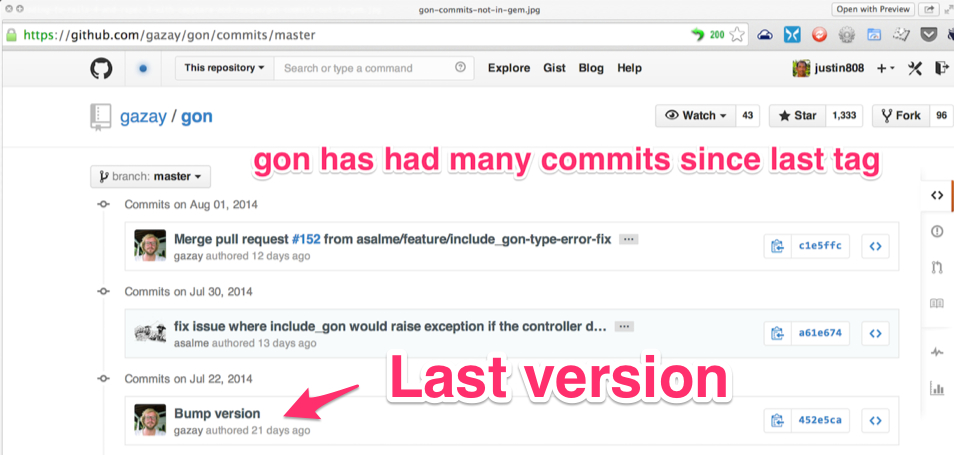
</li>
<li>Ssh to your docker instance
<figure class='code'><div class="highlight"><table><tr><td class="gutter"><pre class="line-numbers"><span class='line-number'>1</span>
</pre></td><td class='code'><pre><code class='bash'><span class='line'>ssh root@XXX.XXX.XXX.XXX
</span></code></pre></td></tr></table></div></figure>
</li>
<li>Get into your docker instance.
<pre class="example">
root@forum:~# cd /var/discourse/
root@forum:/var/discourse# ./launcher ssh app
</pre>

<p>
You&#8217;ll see this message:
</p>
<pre class="example">
Welcome to Discourse Docker
Use: rails, rake or discourse to execute commands in production
</pre>
</li>
<li>Sudo to discourse:
<pre class="example">
root@forum:~# sudo -iu discourse
discourse@forum:~$ cd /var/www/discourse
discourse@forum:/var/www/discourse$ bundle exec thor list
</pre>
</li>
<li>Then you need to copy the XML file you downloaded from Disqus that contains
an archive of your comments. The easiest way to do this is to <code>scp</code> the file
from some place accessible on the Internet. What I did was to <code>scp</code> the file
from my local machine to my Digital Ocean machine, and then from my Digital
Ocean machine to the Docker container. Here&#8217;s an example:

<p>
On your local machine, with the XML file (XXX.XXX.XXX.XXX is the ip of your
droplet):
</p>
<figure class='code'><div class="highlight"><table><tr><td class="gutter"><pre class="line-numbers"><span class='line-number'>1</span>
</pre></td><td class='code'><pre><code class='bash'><span class='line'>scp ~/Downloads/railsonmaui-disqus.xml root@XXX.XXX.XXX.XXX
</span></code></pre></td></tr></table></div></figure>

<p>
Then inside of your docker container:
</p>
<pre class="example">
discourse@forum:/var/www/discourse$ scp root@XXX.XXX.XXX.XXX:railsonmaui-disqus.xml .
</pre>

<p>
That puts the file <code>railsonmaui-disqus.xml</code> in the current directory.
</p>
</li>

<li>Run the thor command:
<pre class="example">
discourse@forum:/var/www/discourse$ bundle exec thor disqus:import --file=railsonmaui-disqus.xml --post-as=disqus --dry-run
/var/www/discourse/vendor/bundle/ruby/2.0.0/gems/activerecord-4.1.6/lib/active_record/connection_adapters/postgresql_adapter.rb:898:in `rescue in connect': FATAL:  database "discourse_development" does not exist (ActiveRecord::NoDatabaseError)
Run `$ bin/rake db:create db:migrate` to create your database
  from /var/www/discourse/vendor/bundle/ruby/2.0.0/gems/activerecord-4.1.6/lib/active_record/connection_adapters/postgresql_adapter.rb:888:in `connect'
</pre>

<p>
The problem is that we need to specify the environment, as is standard with
Rails apps:
</p>

<figure class='code'><div class="highlight"><table><tr><td class="gutter"><pre class="line-numbers"><span class='line-number'>1</span>
</pre></td><td class='code'><pre><code class='bash'><span class='line'><span class="nv">RAILS_ENV</span><span class="o">=</span>production bundle <span class="nb">exec </span>thor disqus:import --file<span class="o">=</span>railsonmaui-disqus.xml --post-as<span class="o">=</span>disqus --dry-run
</span></code></pre></td></tr></table></div></figure>

<p>
That command does the trick and gives you a nice message indicating what it
will do once you remove the <code>--dry-run</code> flag.
</p>
<pre class="example">
discourse@forum:/var/www/discourse$ RAILS_ENV=production bundle exec thor disqus:import --file=railsonmaui-disqus.xml --post-as=disqus --dry-run
Creating Favorite RubyMine Tips - Rails on Maui... (8 posts)
Creating Octopress Setup with Github, Org Mode, and LiveReload - Rails on Maui... (3 posts)
</pre>

<p>
Once you verify, run:
</p>
<figure class='code'><div class="highlight"><table><tr><td class="gutter"><pre class="line-numbers"><span class='line-number'>1</span>
</pre></td><td class='code'><pre><code class='bash'><span class='line'><span class="nv">RAILS_ENV</span><span class="o">=</span>production bundle <span class="nb">exec </span>thor disqus:import --file<span class="o">=</span>railsonmaui-disqus.xml --post-as<span class="o">=</span>disqus
</span></code></pre></td></tr></table></div></figure>

<p>
This creates the comments <i>and the users</i>. Creating the users surprised me
as I didn&#8217;t know that the Disqus export contained the users&#8217; email addresses.
<b>So this script ends up triggering activation emails to all those users!</b>
</p>
</li>
</ol>
</div>
</div>
</div>
<div id="outline-container-sec-4" class="outline-2">
<h2 id="sec-4">Conclusion</h2>
<div class="outline-text-2" id="text-4">
<p>
<b>This is all pretty neat!</b> Not only did I get my new forum populated with some
content, but I also created users who commented on my posts in the past. I&#8217;m
hoping I can engage in more meaningful discussions regarding the technologies
that I blog about with my own forum. Please do <a href="http://forum.shakacode.com">sign-up for the forum</a> so you can
comment and receive periodic updates of what gets posted! Or just sign up when
you want to post a comment. :-)
</p>
</div>
</div>
<div id="discourse-comments"></div>
<script type="text/javascript">
  var discourseUrl = "http://forum.shakacode.com/",
      discourseEmbedUrl = "http://www.railsonmaui.com//blog/2014/09/28/updating-to-jekyll-2-and-discourse-for-comments/";
  (function() {
    var d = document.createElement('script'); d.type = 'text/javascript'; d.async = true;
      d.src = discourseUrl + 'javascripts/embed.js';
    (document.getElementsByTagName('head')[0] || document.getElementsByTagName('body')[0]).appendChild(d);
  })();
</script>
]]></content>
  </entry>
  
  <entry>
    <title type="html"><![CDATA[Pry, Ruby, Array#zip, CSV, and the Hash[] Constructor]]></title>
    <link href="http://www.railsonmaui.com//blog/2014/09/15/pry-ruby-array-zip-csv-and-the-hash-constructor/"/>
    <updated>2014-09-15T18:06:17-03:00</updated>
    <id>http://www.railsonmaui.com//blog/2014/09/15/pry-ruby-array-zip-csv-and-the-hash-constructor</id>
    <content type="html"><![CDATA[<p>
A couple weeks ago, I wrote a popular article, <a href="http://www.railsonmaui.com/blog/2014/08/17/pry-ruby-and-fun-with-the-hash-constructor/">Pry, Ruby, and Fun With the Hash Constructor</a> demonstrating the usefulness of
<a href="https://github.com/pry/pry">pry</a> with the <a href="http://ruby-doc.org/core-2.1.2/Hash.html">Hash bracket constructor</a>. I just ran into a super fun test example of pry
that I couldn&#8217;t resist sharing!
</p>

<div id="outline-container-sec-1" class="outline-2">
<h2 id="sec-1">The Task: Convert CSV File without Headers to Array of Hashes</h2>
<div class="outline-text-2" id="text-1">
<p>
For example, you want to take a csv file like:
</p>

<pre class="example">
|---+--------+--------|
| 1 | Justin | Gordon |
| 2 | Tender | Love   |
|---+--------+--------|
</pre>

<p>
And create an array of hashes like this with column headers &#8220;id&#8221;, &#8220;first_name&#8221;, &#8220;last_name&#8221;:
</p>
<figure class='code'><div class="highlight"><table><tr><td class="gutter"><pre class="line-numbers"><span class='line-number'>1</span>
<span class='line-number'>2</span>
<span class='line-number'>3</span>
<span class='line-number'>4</span>
<span class='line-number'>5</span>
<span class='line-number'>6</span>
<span class='line-number'>7</span>
<span class='line-number'>8</span>
<span class='line-number'>9</span>
<span class='line-number'>10</span>
<span class='line-number'>11</span>
<span class='line-number'>12</span>
</pre></td><td class='code'><pre><code class='ruby'><span class='line'><span class="o">[</span>
</span><span class='line'>    <span class="o">[</span><span class="mi">0</span><span class="o">]</span> <span class="p">{</span>
</span><span class='line'>               <span class="s2">&quot;id,&quot;</span> <span class="o">=&gt;</span> <span class="s2">&quot;1&quot;</span><span class="p">,</span>
</span><span class='line'>        <span class="s2">&quot;first_name&quot;</span> <span class="o">=&gt;</span> <span class="s2">&quot;Justin&quot;</span><span class="p">,</span>
</span><span class='line'>         <span class="s2">&quot;last_name&quot;</span> <span class="o">=&gt;</span> <span class="s2">&quot;Gordon&quot;</span>
</span><span class='line'>    <span class="p">},</span>
</span><span class='line'>    <span class="o">[</span><span class="mi">1</span><span class="o">]</span> <span class="p">{</span>
</span><span class='line'>               <span class="s2">&quot;id,&quot;</span> <span class="o">=&gt;</span> <span class="s2">&quot;2&quot;</span><span class="p">,</span>
</span><span class='line'>        <span class="s2">&quot;first_name&quot;</span> <span class="o">=&gt;</span> <span class="s2">&quot;Tender&quot;</span><span class="p">,</span>
</span><span class='line'>         <span class="s2">&quot;last_name&quot;</span> <span class="o">=&gt;</span> <span class="s2">&quot;Love&quot;</span>
</span><span class='line'>    <span class="p">}</span>
</span><span class='line'><span class="o">]</span>
</span></code></pre></td></tr></table></div></figure>

<p>
You&#8217;d think that you could just pass the headers to the <code>CSV.parse</code>, but that
doesn&#8217;t work:
</p>

<figure class='code'><div class="highlight"><table><tr><td class="gutter"><pre class="line-numbers"><span class='line-number'>1</span>
<span class='line-number'>2</span>
<span class='line-number'>3</span>
<span class='line-number'>4</span>
<span class='line-number'>5</span>
<span class='line-number'>6</span>
<span class='line-number'>7</span>
<span class='line-number'>8</span>
</pre></td><td class='code'><pre><code class='ruby'><span class='line'><span class="o">[</span><span class="mi">11</span><span class="o">]</span> <span class="p">(</span><span class="n">pry</span><span class="p">)</span> <span class="ss">main</span><span class="p">:</span> <span class="mi">0</span><span class="o">&gt;</span> <span class="n">col_headers</span> <span class="o">=</span> <span class="sx">%w(id, first_name last_name)</span>
</span><span class='line'><span class="o">[</span>
</span><span class='line'>    <span class="o">[</span><span class="mi">0</span><span class="o">]</span> <span class="s2">&quot;id,&quot;</span><span class="p">,</span>
</span><span class='line'>    <span class="o">[</span><span class="mi">1</span><span class="o">]</span> <span class="s2">&quot;first_name&quot;</span><span class="p">,</span>
</span><span class='line'>    <span class="o">[</span><span class="mi">2</span><span class="o">]</span> <span class="s2">&quot;last_name&quot;</span>
</span><span class='line'><span class="o">]</span>
</span><span class='line'><span class="o">[</span><span class="mi">12</span><span class="o">]</span> <span class="p">(</span><span class="n">pry</span><span class="p">)</span> <span class="ss">main</span><span class="p">:</span> <span class="mi">0</span><span class="o">&gt;</span> <span class="n">csv</span> <span class="o">=</span> <span class="no">CSV</span><span class="o">.</span><span class="n">parse</span><span class="p">(</span><span class="n">csv_string</span><span class="p">,</span> <span class="ss">headers</span><span class="p">:</span> <span class="n">col_headers</span><span class="p">)</span>
</span><span class='line'><span class="p">(</span><span class="n">pry</span><span class="p">)</span> <span class="n">output</span> <span class="ss">error</span><span class="p">:</span> <span class="c1">#&lt;NoMethodError: undefined method `table&#39; for #&lt;Object:0x007fdbfc8d5588&gt;&gt;</span>
</span></code></pre></td></tr></table></div></figure>

<!-- more -->
</div>
</div>
<div id="outline-container-sec-2" class="outline-2">
<h2 id="sec-2">Using Array#zip</h2>
<div class="outline-text-2" id="text-2">
<p>
I stumbled upon a note about the CSV parser that suggested using <code>Array#zip</code> to
add keys to the results created by the CSV parser when headers don&#8217;t exist in
the file.
</p>

<p>
Using <code>Array#zip</code>? What the heck is the <code>zip</code> method? Compression?
</p>

<figure class='code'><div class="highlight"><table><tr><td class="gutter"><pre class="line-numbers"><span class='line-number'>1</span>
<span class='line-number'>2</span>
<span class='line-number'>3</span>
<span class='line-number'>4</span>
<span class='line-number'>5</span>
<span class='line-number'>6</span>
<span class='line-number'>7</span>
<span class='line-number'>8</span>
<span class='line-number'>9</span>
<span class='line-number'>10</span>
<span class='line-number'>11</span>
<span class='line-number'>12</span>
<span class='line-number'>13</span>
<span class='line-number'>14</span>
<span class='line-number'>15</span>
<span class='line-number'>16</span>
<span class='line-number'>17</span>
<span class='line-number'>18</span>
<span class='line-number'>19</span>
<span class='line-number'>20</span>
<span class='line-number'>21</span>
<span class='line-number'>22</span>
<span class='line-number'>23</span>
<span class='line-number'>24</span>
<span class='line-number'>25</span>
</pre></td><td class='code'><pre><code class='ruby'><span class='line'><span class="o">[</span><span class="mi">1</span><span class="o">]</span> <span class="p">(</span><span class="n">pry</span><span class="p">)</span> <span class="ss">main</span><span class="p">:</span> <span class="mi">0</span><span class="o">&gt;</span> <span class="p">?</span> <span class="n">a_array</span><span class="o">.</span><span class="n">zip</span>
</span><span class='line'>
</span><span class='line'><span class="ss">From</span><span class="p">:</span> <span class="n">array</span><span class="o">.</span><span class="n">c</span> <span class="p">(</span><span class="n">C</span> <span class="no">Method</span><span class="p">):</span>
</span><span class='line'><span class="ss">Owner</span><span class="p">:</span> <span class="nb">Array</span>
</span><span class='line'><span class="ss">Visibility</span><span class="p">:</span> <span class="kp">public</span>
</span><span class='line'><span class="ss">Signature</span><span class="p">:</span> <span class="n">zip</span><span class="p">(</span><span class="o">*</span><span class="n">arg1</span><span class="p">)</span>
</span><span class='line'><span class="no">Number</span> <span class="n">of</span> <span class="ss">lines</span><span class="p">:</span> <span class="mi">17</span>
</span><span class='line'>
</span><span class='line'><span class="no">Converts</span> <span class="n">any</span> <span class="n">arguments</span> <span class="n">to</span> <span class="n">arrays</span><span class="p">,</span> <span class="k">then</span> <span class="n">merges</span> <span class="n">elements</span> <span class="n">of</span> <span class="nb">self</span> <span class="n">with</span>
</span><span class='line'><span class="n">corresponding</span> <span class="n">elements</span> <span class="n">from</span> <span class="n">each</span> <span class="n">argument</span><span class="o">.</span>
</span><span class='line'>
</span><span class='line'><span class="no">This</span> <span class="n">generates</span> <span class="n">a</span> <span class="n">sequence</span> <span class="n">of</span> <span class="n">ary</span><span class="o">.</span><span class="n">size</span> <span class="n">_n_</span><span class="o">-</span><span class="n">element</span> <span class="n">arrays</span><span class="p">,</span>
</span><span class='line'><span class="n">where</span> <span class="n">_n_</span> <span class="n">is</span> <span class="n">one</span> <span class="n">more</span> <span class="n">than</span> <span class="n">the</span> <span class="n">count</span> <span class="n">of</span> <span class="n">arguments</span><span class="o">.</span>
</span><span class='line'>
</span><span class='line'><span class="no">If</span> <span class="n">the</span> <span class="n">size</span> <span class="n">of</span> <span class="n">any</span> <span class="n">argument</span> <span class="n">is</span> <span class="n">less</span> <span class="n">than</span> <span class="n">the</span> <span class="n">size</span> <span class="n">of</span> <span class="n">the</span> <span class="n">initial</span> <span class="n">array</span><span class="p">,</span>
</span><span class='line'><span class="kp">nil</span> <span class="n">values</span> <span class="n">are</span> <span class="n">supplied</span><span class="o">.</span>
</span><span class='line'>
</span><span class='line'><span class="no">If</span> <span class="n">a</span> <span class="n">block</span> <span class="n">is</span> <span class="n">given</span><span class="p">,</span> <span class="n">it</span> <span class="n">is</span> <span class="n">invoked</span> <span class="k">for</span> <span class="n">each</span> <span class="n">output</span> <span class="n">array</span><span class="p">,</span> <span class="n">otherwise</span> <span class="n">an</span>
</span><span class='line'><span class="n">array</span> <span class="n">of</span> <span class="n">arrays</span> <span class="n">is</span> <span class="n">returned</span><span class="o">.</span>
</span><span class='line'>
</span><span class='line'>   <span class="n">a</span> <span class="o">=</span> <span class="o">[</span> <span class="mi">4</span><span class="p">,</span> <span class="mi">5</span><span class="p">,</span> <span class="mi">6</span> <span class="o">]</span>
</span><span class='line'>   <span class="n">b</span> <span class="o">=</span> <span class="o">[</span> <span class="mi">7</span><span class="p">,</span> <span class="mi">8</span><span class="p">,</span> <span class="mi">9</span> <span class="o">]</span>
</span><span class='line'>   <span class="o">[</span><span class="mi">1</span><span class="p">,</span> <span class="mi">2</span><span class="p">,</span> <span class="mi">3</span><span class="o">].</span><span class="n">zip</span><span class="p">(</span><span class="n">a</span><span class="p">,</span> <span class="n">b</span><span class="p">)</span>   <span class="c1">#=&gt; [[1, 4, 7], [2, 5, 8], [3, 6, 9]]</span>
</span><span class='line'>   <span class="o">[</span><span class="mi">1</span><span class="p">,</span> <span class="mi">2</span><span class="o">].</span><span class="n">zip</span><span class="p">(</span><span class="n">a</span><span class="p">,</span> <span class="n">b</span><span class="p">)</span>      <span class="c1">#=&gt; [[1, 4, 7], [2, 5, 8]]</span>
</span><span class='line'>   <span class="n">a</span><span class="o">.</span><span class="n">zip</span><span class="p">(</span><span class="o">[</span><span class="mi">1</span><span class="p">,</span> <span class="mi">2</span><span class="o">]</span><span class="p">,</span> <span class="o">[</span><span class="mi">8</span><span class="o">]</span><span class="p">)</span>    <span class="c1">#=&gt; [[4, 1, 8], [5, 2, nil], [6, nil, nil]]</span>
</span></code></pre></td></tr></table></div></figure>

<p>
Hmmmm&#x2026;.Why would that be useful?
</p>

<p>
Here&#8217;s some pry command that demonstrate this. I encourage you to follow along
in pry!
</p>

<p>
I first created a CSV string from hand like this:
</p>

<figure class='code'><div class="highlight"><table><tr><td class="gutter"><pre class="line-numbers"><span class='line-number'>1</span>
<span class='line-number'>2</span>
<span class='line-number'>3</span>
<span class='line-number'>4</span>
<span class='line-number'>5</span>
<span class='line-number'>6</span>
<span class='line-number'>7</span>
<span class='line-number'>8</span>
<span class='line-number'>9</span>
<span class='line-number'>10</span>
<span class='line-number'>11</span>
<span class='line-number'>12</span>
<span class='line-number'>13</span>
<span class='line-number'>14</span>
<span class='line-number'>15</span>
</pre></td><td class='code'><pre><code class='ruby'><span class='line'><span class="o">[</span><span class="mi">2</span><span class="o">]</span> <span class="p">(</span><span class="n">pry</span><span class="p">)</span> <span class="ss">main</span><span class="p">:</span> <span class="mi">0</span><span class="o">&gt;</span> <span class="n">csv_file</span> <span class="o">=</span> <span class="o">&lt;&lt;-</span><span class="no">CSV</span>
</span><span class='line'><span class="err">[2] (pry) main: 0* 1, &quot;Justin&quot;, &quot;Gordon&quot;</span>
</span><span class='line'><span class="err">[2] (pry) main: 0* 2, &quot;Avdi&quot;, &quot;Grimm&quot;</span>
</span><span class='line'><span class="err">[2] (pry) main: 0* CSV</span>
</span><span class='line'><span class="err">&quot;1, \&quot;Justin\&quot;, \&quot;Gordon\&quot;\n2, \&quot;Avdi\&quot;, \&quot;Grimm\&quot;\n&quot;</span>
</span><span class='line'><span class="err">[3] (pry) main: 0&gt; CSV.parse(csv_file) { |csv_row| p csv_row }</span>
</span><span class='line'><span class="err">CSV::MalformedCSVError: Illegal quoting in line 1.</span>
</span><span class='line'><span class="err">from /Users/justin/.rvm/rubies/ruby-2.1.2/lib/ruby/2.1.0/csv.rb:1855:in `block (2 levels) in shift&#39;</span>
</span><span class='line'><span class="o">[</span><span class="mi">2</span><span class="o">]</span> <span class="p">(</span><span class="n">pry</span><span class="p">)</span> <span class="ss">main</span><span class="p">:</span> <span class="mi">0</span><span class="o">*</span> <span class="mi">1</span><span class="p">,</span> <span class="s2">&quot;Justin&quot;</span><span class="p">,</span> <span class="s2">&quot;Gordon&quot;</span>
</span><span class='line'><span class="o">[</span><span class="mi">2</span><span class="o">]</span> <span class="p">(</span><span class="n">pry</span><span class="p">)</span> <span class="ss">main</span><span class="p">:</span> <span class="mi">0</span><span class="o">*</span> <span class="mi">2</span><span class="p">,</span> <span class="s2">&quot;Avdi&quot;</span><span class="p">,</span> <span class="s2">&quot;Grimm&quot;</span>
</span><span class='line'><span class="o">[</span><span class="mi">2</span><span class="o">]</span> <span class="p">(</span><span class="n">pry</span><span class="p">)</span> <span class="ss">main</span><span class="p">:</span> <span class="mi">0</span><span class="o">*</span> <span class="no">CSV</span>
</span><span class='line'><span class="s2">&quot;1, </span><span class="se">\&quot;</span><span class="s2">Justin</span><span class="se">\&quot;</span><span class="s2">, </span><span class="se">\&quot;</span><span class="s2">Gordon</span><span class="se">\&quot;\n</span><span class="s2">2, </span><span class="se">\&quot;</span><span class="s2">Avdi</span><span class="se">\&quot;</span><span class="s2">, </span><span class="se">\&quot;</span><span class="s2">Grimm</span><span class="se">\&quot;\n</span><span class="s2">&quot;</span>
</span><span class='line'><span class="o">[</span><span class="mi">3</span><span class="o">]</span> <span class="p">(</span><span class="n">pry</span><span class="p">)</span> <span class="ss">main</span><span class="p">:</span> <span class="mi">0</span><span class="o">&gt;</span> <span class="no">CSV</span><span class="o">.</span><span class="n">parse</span><span class="p">(</span><span class="n">csv_file</span><span class="p">)</span> <span class="p">{</span> <span class="o">|</span><span class="n">csv_row</span><span class="o">|</span> <span class="nb">p</span> <span class="n">csv_row</span> <span class="p">}</span>
</span><span class='line'><span class="no">CSV</span><span class="o">::</span><span class="ss">MalformedCSVError</span><span class="p">:</span> <span class="no">Illegal</span> <span class="n">quoting</span> <span class="k">in</span> <span class="n">line</span> <span class="mi">1</span><span class="o">.</span>
</span><span class='line'><span class="n">from</span> <span class="sr">/Users/</span><span class="n">justin</span><span class="o">/.</span><span class="n">rvm</span><span class="o">/</span><span class="n">rubies</span><span class="o">/</span><span class="n">ruby</span><span class="o">-</span><span class="mi">2</span><span class="o">.</span><span class="mi">1</span><span class="o">.</span><span class="mi">2</span><span class="o">/</span><span class="n">lib</span><span class="o">/</span><span class="n">ruby</span><span class="o">/</span><span class="mi">2</span><span class="o">.</span><span class="mi">1</span><span class="o">.</span><span class="mi">0</span><span class="o">/</span><span class="n">csv</span><span class="o">.</span><span class="n">rb</span><span class="p">:</span><span class="mi">1855</span><span class="ss">:in</span> <span class="sb">`block (2 levels) in shift&#39;</span>
</span></code></pre></td></tr></table></div></figure>

<p>
Doooh!!!! That taught me that creating a legit CSV string is not as easy as it sounds.
</p>

<p>
Let&#8217;s create a legit csv string:
</p>

<figure class='code'><div class="highlight"><table><tr><td class="gutter"><pre class="line-numbers"><span class='line-number'>1</span>
<span class='line-number'>2</span>
<span class='line-number'>3</span>
<span class='line-number'>4</span>
<span class='line-number'>5</span>
</pre></td><td class='code'><pre><code class='ruby'><span class='line'><span class="o">[</span><span class="mi">4</span><span class="o">]</span> <span class="p">(</span><span class="n">pry</span><span class="p">)</span> <span class="ss">main</span><span class="p">:</span> <span class="mi">0</span><span class="o">&gt;</span> <span class="n">csv_string</span> <span class="o">=</span> <span class="no">CSV</span><span class="o">.</span><span class="n">generate</span> <span class="k">do</span> <span class="o">|</span><span class="n">csv</span><span class="o">|</span>
</span><span class='line'><span class="o">[</span><span class="mi">4</span><span class="o">]</span> <span class="p">(</span><span class="n">pry</span><span class="p">)</span> <span class="ss">main</span><span class="p">:</span> <span class="mi">0</span><span class="o">*</span>   <span class="n">csv</span> <span class="o">&lt;&lt;</span> <span class="o">[</span><span class="mi">1</span><span class="p">,</span> <span class="s2">&quot;Justin&quot;</span><span class="p">,</span> <span class="s2">&quot;Gordon&quot;</span><span class="o">]</span>
</span><span class='line'><span class="o">[</span><span class="mi">4</span><span class="o">]</span> <span class="p">(</span><span class="n">pry</span><span class="p">)</span> <span class="ss">main</span><span class="p">:</span> <span class="mi">0</span><span class="o">*</span>   <span class="n">csv</span> <span class="o">&lt;&lt;</span> <span class="o">[</span><span class="mi">2</span><span class="p">,</span> <span class="s2">&quot;Tender&quot;</span><span class="p">,</span> <span class="s2">&quot;Love&quot;</span><span class="o">]</span>
</span><span class='line'><span class="o">[</span><span class="mi">4</span><span class="o">]</span> <span class="p">(</span><span class="n">pry</span><span class="p">)</span> <span class="ss">main</span><span class="p">:</span> <span class="mi">0</span><span class="o">*</span> <span class="k">end</span>
</span><span class='line'><span class="s2">&quot;1,Justin,Gordon</span><span class="se">\n</span><span class="s2">2,Tender,Love</span><span class="se">\n</span><span class="s2">&quot;</span>
</span></code></pre></td></tr></table></div></figure>

<p>
Notice, there&#8217;s no quotes around the single word names!
</p>

<p>
If I use CSV to parse this, we get the reverse result, the array of arrays,
back:
</p>

<figure class='code'><div class="highlight"><table><tr><td class="gutter"><pre class="line-numbers"><span class='line-number'>1</span>
<span class='line-number'>2</span>
<span class='line-number'>3</span>
<span class='line-number'>4</span>
<span class='line-number'>5</span>
<span class='line-number'>6</span>
<span class='line-number'>7</span>
<span class='line-number'>8</span>
<span class='line-number'>9</span>
<span class='line-number'>10</span>
<span class='line-number'>11</span>
<span class='line-number'>12</span>
<span class='line-number'>13</span>
<span class='line-number'>14</span>
<span class='line-number'>15</span>
</pre></td><td class='code'><pre><code class='ruby'><span class='line'><span class="o">[</span><span class="mi">16</span><span class="o">]</span> <span class="p">(</span><span class="n">pry</span><span class="p">)</span> <span class="ss">main</span><span class="p">:</span> <span class="mi">0</span><span class="o">&gt;</span> <span class="no">CSV</span><span class="o">.</span><span class="n">parse</span><span class="p">(</span><span class="n">csv_string</span><span class="p">)</span>
</span><span class='line'><span class="o">[</span>
</span><span class='line'>    <span class="o">[</span><span class="mi">0</span><span class="o">]</span> <span class="o">[</span>
</span><span class='line'>        <span class="o">[</span><span class="mi">0</span><span class="o">]</span> <span class="s2">&quot;1&quot;</span><span class="p">,</span>
</span><span class='line'>        <span class="o">[</span><span class="mi">1</span><span class="o">]</span> <span class="s2">&quot;Justin&quot;</span><span class="p">,</span>
</span><span class='line'>        <span class="o">[</span><span class="mi">2</span><span class="o">]</span> <span class="s2">&quot;Gordon&quot;</span>
</span><span class='line'>    <span class="o">]</span><span class="p">,</span>
</span><span class='line'>    <span class="o">[</span><span class="mi">1</span><span class="o">]</span> <span class="o">[</span>
</span><span class='line'>        <span class="o">[</span><span class="mi">0</span><span class="o">]</span> <span class="s2">&quot;2&quot;</span><span class="p">,</span>
</span><span class='line'>        <span class="o">[</span><span class="mi">1</span><span class="o">]</span> <span class="s2">&quot;Tender&quot;</span><span class="p">,</span>
</span><span class='line'>        <span class="o">[</span><span class="mi">2</span><span class="o">]</span> <span class="s2">&quot;Love&quot;</span>
</span><span class='line'>    <span class="o">]</span>
</span><span class='line'><span class="o">]</span>
</span><span class='line'><span class="o">[</span><span class="mi">17</span><span class="o">]</span> <span class="p">(</span><span class="n">pry</span><span class="p">)</span> <span class="ss">main</span><span class="p">:</span> <span class="mi">0</span><span class="o">&gt;</span> <span class="no">CSV</span><span class="o">.</span><span class="n">parse</span><span class="p">(</span><span class="n">csv_string</span><span class="p">)</span><span class="o">.</span><span class="n">class</span>
</span><span class='line'><span class="nb">Array</span> <span class="o">&lt;</span> <span class="no">Object</span>
</span></code></pre></td></tr></table></div></figure>

<p>
Ahh&#x2026;Could we use the Hash[] constructor to convert these arrays into Hashes
that place the proper keys?
</p>

<figure class='code'><div class="highlight"><table><tr><td class="gutter"><pre class="line-numbers"><span class='line-number'>1</span>
<span class='line-number'>2</span>
<span class='line-number'>3</span>
<span class='line-number'>4</span>
<span class='line-number'>5</span>
<span class='line-number'>6</span>
<span class='line-number'>7</span>
<span class='line-number'>8</span>
<span class='line-number'>9</span>
<span class='line-number'>10</span>
<span class='line-number'>11</span>
<span class='line-number'>12</span>
<span class='line-number'>13</span>
<span class='line-number'>14</span>
<span class='line-number'>15</span>
<span class='line-number'>16</span>
<span class='line-number'>17</span>
<span class='line-number'>18</span>
<span class='line-number'>19</span>
<span class='line-number'>20</span>
<span class='line-number'>21</span>
<span class='line-number'>22</span>
<span class='line-number'>23</span>
<span class='line-number'>24</span>
<span class='line-number'>25</span>
<span class='line-number'>26</span>
<span class='line-number'>27</span>
<span class='line-number'>28</span>
<span class='line-number'>29</span>
<span class='line-number'>30</span>
<span class='line-number'>31</span>
<span class='line-number'>32</span>
<span class='line-number'>33</span>
</pre></td><td class='code'><pre><code class='ruby'><span class='line'><span class="o">[</span><span class="mi">18</span><span class="o">]</span> <span class="p">(</span><span class="n">pry</span><span class="p">)</span> <span class="ss">main</span><span class="p">:</span> <span class="mi">0</span><span class="o">&gt;</span> <span class="n">first_row</span> <span class="o">=</span> <span class="no">CSV</span><span class="o">.</span><span class="n">parse</span><span class="p">(</span><span class="n">csv_string</span><span class="p">)</span><span class="o">.</span><span class="n">first</span>
</span><span class='line'><span class="o">[</span>
</span><span class='line'>    <span class="o">[</span><span class="mi">0</span><span class="o">]</span> <span class="s2">&quot;1&quot;</span><span class="p">,</span>
</span><span class='line'>    <span class="o">[</span><span class="mi">1</span><span class="o">]</span> <span class="s2">&quot;Justin&quot;</span><span class="p">,</span>
</span><span class='line'>    <span class="o">[</span><span class="mi">2</span><span class="o">]</span> <span class="s2">&quot;Gordon&quot;</span>
</span><span class='line'><span class="o">]</span>
</span><span class='line'><span class="o">[</span><span class="mi">19</span><span class="o">]</span> <span class="p">(</span><span class="n">pry</span><span class="p">)</span> <span class="ss">main</span><span class="p">:</span> <span class="mi">0</span><span class="o">&gt;</span> <span class="n">col_headers</span> <span class="o">=</span> <span class="sx">%w(id, first_name last_name)</span>
</span><span class='line'><span class="o">[</span>
</span><span class='line'>    <span class="o">[</span><span class="mi">0</span><span class="o">]</span> <span class="s2">&quot;id,&quot;</span><span class="p">,</span>
</span><span class='line'>    <span class="o">[</span><span class="mi">1</span><span class="o">]</span> <span class="s2">&quot;first_name&quot;</span><span class="p">,</span>
</span><span class='line'>    <span class="o">[</span><span class="mi">2</span><span class="o">]</span> <span class="s2">&quot;last_name&quot;</span>
</span><span class='line'><span class="o">]</span>
</span><span class='line'><span class="o">[</span><span class="mi">20</span><span class="o">]</span> <span class="p">(</span><span class="n">pry</span><span class="p">)</span> <span class="ss">main</span><span class="p">:</span> <span class="mi">0</span><span class="o">&gt;</span> <span class="n">first_row</span><span class="o">.</span><span class="n">zip</span><span class="p">(</span><span class="n">col_headers</span><span class="p">)</span>
</span><span class='line'><span class="o">[</span>
</span><span class='line'>    <span class="o">[</span><span class="mi">0</span><span class="o">]</span> <span class="o">[</span>
</span><span class='line'>        <span class="o">[</span><span class="mi">0</span><span class="o">]</span> <span class="s2">&quot;1&quot;</span><span class="p">,</span>
</span><span class='line'>        <span class="o">[</span><span class="mi">1</span><span class="o">]</span> <span class="s2">&quot;id,&quot;</span>
</span><span class='line'>    <span class="o">]</span><span class="p">,</span>
</span><span class='line'>    <span class="o">[</span><span class="mi">1</span><span class="o">]</span> <span class="o">[</span>
</span><span class='line'>        <span class="o">[</span><span class="mi">0</span><span class="o">]</span> <span class="s2">&quot;Justin&quot;</span><span class="p">,</span>
</span><span class='line'>        <span class="o">[</span><span class="mi">1</span><span class="o">]</span> <span class="s2">&quot;first_name&quot;</span>
</span><span class='line'>    <span class="o">]</span><span class="p">,</span>
</span><span class='line'>    <span class="o">[</span><span class="mi">2</span><span class="o">]</span> <span class="o">[</span>
</span><span class='line'>        <span class="o">[</span><span class="mi">0</span><span class="o">]</span> <span class="s2">&quot;Gordon&quot;</span><span class="p">,</span>
</span><span class='line'>        <span class="o">[</span><span class="mi">1</span><span class="o">]</span> <span class="s2">&quot;last_name&quot;</span>
</span><span class='line'>    <span class="o">]</span>
</span><span class='line'><span class="o">]</span>
</span><span class='line'><span class="o">[</span><span class="mi">21</span><span class="o">]</span> <span class="p">(</span><span class="n">pry</span><span class="p">)</span> <span class="ss">main</span><span class="p">:</span> <span class="mi">0</span><span class="o">&gt;</span> <span class="no">Hash</span><span class="o">[</span> <span class="n">first_row</span><span class="o">.</span><span class="n">zip</span><span class="p">(</span><span class="n">col_headers</span><span class="p">)</span> <span class="o">]</span>
</span><span class='line'><span class="p">{</span>
</span><span class='line'>         <span class="s2">&quot;1&quot;</span> <span class="o">=&gt;</span> <span class="s2">&quot;id,&quot;</span><span class="p">,</span>
</span><span class='line'>    <span class="s2">&quot;Justin&quot;</span> <span class="o">=&gt;</span> <span class="s2">&quot;first_name&quot;</span><span class="p">,</span>
</span><span class='line'>    <span class="s2">&quot;Gordon&quot;</span> <span class="o">=&gt;</span> <span class="s2">&quot;last_name&quot;</span>
</span><span class='line'><span class="p">}</span>
</span></code></pre></td></tr></table></div></figure>

<p>
Bingo!
</p>

<p>
Now, let&#8217;s fix the array of arrays, creating an array called <code>rows</code> 
</p>

<figure class='code'><div class="highlight"><table><tr><td class="gutter"><pre class="line-numbers"><span class='line-number'>1</span>
<span class='line-number'>2</span>
<span class='line-number'>3</span>
<span class='line-number'>4</span>
<span class='line-number'>5</span>
<span class='line-number'>6</span>
<span class='line-number'>7</span>
<span class='line-number'>8</span>
<span class='line-number'>9</span>
<span class='line-number'>10</span>
<span class='line-number'>11</span>
<span class='line-number'>12</span>
<span class='line-number'>13</span>
</pre></td><td class='code'><pre><code class='ruby'><span class='line'><span class="o">[</span><span class="mi">22</span><span class="o">]</span> <span class="p">(</span><span class="n">pry</span><span class="p">)</span> <span class="ss">main</span><span class="p">:</span> <span class="mi">0</span><span class="o">&gt;</span> <span class="n">rows</span> <span class="o">=</span> <span class="no">CSV</span><span class="o">.</span><span class="n">parse</span><span class="p">(</span><span class="n">csv_string</span><span class="p">)</span>
</span><span class='line'><span class="o">[</span>
</span><span class='line'>    <span class="o">[</span><span class="mi">0</span><span class="o">]</span> <span class="o">[</span>
</span><span class='line'>        <span class="o">[</span><span class="mi">0</span><span class="o">]</span> <span class="s2">&quot;1&quot;</span><span class="p">,</span>
</span><span class='line'>        <span class="o">[</span><span class="mi">1</span><span class="o">]</span> <span class="s2">&quot;Justin&quot;</span><span class="p">,</span>
</span><span class='line'>        <span class="o">[</span><span class="mi">2</span><span class="o">]</span> <span class="s2">&quot;Gordon&quot;</span>
</span><span class='line'>    <span class="o">]</span><span class="p">,</span>
</span><span class='line'>    <span class="o">[</span><span class="mi">1</span><span class="o">]</span> <span class="o">[</span>
</span><span class='line'>        <span class="o">[</span><span class="mi">0</span><span class="o">]</span> <span class="s2">&quot;2&quot;</span><span class="p">,</span>
</span><span class='line'>        <span class="o">[</span><span class="mi">1</span><span class="o">]</span> <span class="s2">&quot;Tender&quot;</span><span class="p">,</span>
</span><span class='line'>        <span class="o">[</span><span class="mi">2</span><span class="o">]</span> <span class="s2">&quot;Love&quot;</span>
</span><span class='line'>    <span class="o">]</span>
</span><span class='line'><span class="o">]</span>
</span></code></pre></td></tr></table></div></figure>

<p>
Then the grand finale!
</p>
<figure class='code'><div class="highlight"><table><tr><td class="gutter"><pre class="line-numbers"><span class='line-number'>1</span>
<span class='line-number'>2</span>
<span class='line-number'>3</span>
<span class='line-number'>4</span>
<span class='line-number'>5</span>
<span class='line-number'>6</span>
<span class='line-number'>7</span>
<span class='line-number'>8</span>
<span class='line-number'>9</span>
<span class='line-number'>10</span>
<span class='line-number'>11</span>
<span class='line-number'>12</span>
<span class='line-number'>13</span>
</pre></td><td class='code'><pre><code class='ruby'><span class='line'><span class="o">[</span><span class="mi">24</span><span class="o">]</span> <span class="p">(</span><span class="n">pry</span><span class="p">)</span> <span class="ss">main</span><span class="p">:</span> <span class="mi">0</span><span class="o">&gt;</span> <span class="n">rows</span><span class="o">.</span><span class="n">map</span> <span class="p">{</span> <span class="o">|</span><span class="n">row</span><span class="o">|</span> <span class="no">Hash</span><span class="o">[</span> <span class="n">col_headers</span><span class="o">.</span><span class="n">zip</span><span class="p">(</span><span class="n">row</span><span class="p">)</span> <span class="o">]</span> <span class="p">}</span>
</span><span class='line'><span class="o">[</span>
</span><span class='line'>    <span class="o">[</span><span class="mi">0</span><span class="o">]</span> <span class="p">{</span>
</span><span class='line'>               <span class="s2">&quot;id,&quot;</span> <span class="o">=&gt;</span> <span class="s2">&quot;1&quot;</span><span class="p">,</span>
</span><span class='line'>        <span class="s2">&quot;first_name&quot;</span> <span class="o">=&gt;</span> <span class="s2">&quot;Justin&quot;</span><span class="p">,</span>
</span><span class='line'>         <span class="s2">&quot;last_name&quot;</span> <span class="o">=&gt;</span> <span class="s2">&quot;Gordon&quot;</span>
</span><span class='line'>    <span class="p">},</span>
</span><span class='line'>    <span class="o">[</span><span class="mi">1</span><span class="o">]</span> <span class="p">{</span>
</span><span class='line'>               <span class="s2">&quot;id,&quot;</span> <span class="o">=&gt;</span> <span class="s2">&quot;2&quot;</span><span class="p">,</span>
</span><span class='line'>        <span class="s2">&quot;first_name&quot;</span> <span class="o">=&gt;</span> <span class="s2">&quot;Tender&quot;</span><span class="p">,</span>
</span><span class='line'>         <span class="s2">&quot;last_name&quot;</span> <span class="o">=&gt;</span> <span class="s2">&quot;Love&quot;</span>
</span><span class='line'>    <span class="p">}</span>
</span><span class='line'><span class="o">]</span>
</span></code></pre></td></tr></table></div></figure>

<p>
And sure, you can do this all on one line by inlining the <code>rows</code> variable:
</p>

<figure class='code'><div class="highlight"><table><tr><td class="gutter"><pre class="line-numbers"><span class='line-number'>1</span>
</pre></td><td class='code'><pre><code class='ruby'><span class='line'><span class="no">CSV</span><span class="o">.</span><span class="n">parse</span><span class="p">(</span><span class="n">csv_string</span><span class="p">)</span><span class="o">.</span><span class="n">map</span> <span class="p">{</span> <span class="o">|</span><span class="n">row</span><span class="o">|</span> <span class="no">Hash</span><span class="o">[</span> <span class="n">col_headers</span><span class="o">.</span><span class="n">zip</span><span class="p">(</span><span class="n">row</span><span class="p">)</span> <span class="o">]</span> <span class="p">}</span>
</span></code></pre></td></tr></table></div></figure>
</div>
</div>
<div id="outline-container-sec-3" class="outline-2">
<h2 id="sec-3">Using headers option in CSV?</h2>
<div class="outline-text-2" id="text-3">
<p>
Well, you&#8217;d think that you could just pass the headers to the <code>CSV.parse</code>, but
that doesn&#8217;t work:
</p>

<figure class='code'><div class="highlight"><table><tr><td class="gutter"><pre class="line-numbers"><span class='line-number'>1</span>
<span class='line-number'>2</span>
</pre></td><td class='code'><pre><code class='ruby'><span class='line'><span class="o">[</span><span class="mi">12</span><span class="o">]</span> <span class="p">(</span><span class="n">pry</span><span class="p">)</span> <span class="ss">main</span><span class="p">:</span> <span class="mi">0</span><span class="o">&gt;</span> <span class="n">csv</span> <span class="o">=</span> <span class="no">CSV</span><span class="o">.</span><span class="n">parse</span><span class="p">(</span><span class="n">csv_string</span><span class="p">,</span> <span class="ss">headers</span><span class="p">:</span> <span class="n">col_headers</span><span class="p">)</span>
</span><span class='line'><span class="p">(</span><span class="n">pry</span><span class="p">)</span> <span class="n">output</span> <span class="ss">error</span><span class="p">:</span> <span class="c1">#&lt;NoMethodError: undefined method `table&#39; for #&lt;Object:0x007fdbfc8d5588&gt;&gt;</span>
</span></code></pre></td></tr></table></div></figure>

<p>
Well, what&#8217;s the doc?
</p>

<figure class='code'><div class="highlight"><table><tr><td class="gutter"><pre class="line-numbers"><span class='line-number'>1</span>
<span class='line-number'>2</span>
<span class='line-number'>3</span>
<span class='line-number'>4</span>
<span class='line-number'>5</span>
<span class='line-number'>6</span>
<span class='line-number'>7</span>
<span class='line-number'>8</span>
<span class='line-number'>9</span>
<span class='line-number'>10</span>
<span class='line-number'>11</span>
<span class='line-number'>12</span>
<span class='line-number'>13</span>
<span class='line-number'>14</span>
<span class='line-number'>15</span>
<span class='line-number'>16</span>
<span class='line-number'>17</span>
<span class='line-number'>18</span>
</pre></td><td class='code'><pre><code class='ruby'><span class='line'><span class="o">[</span><span class="mi">13</span><span class="o">]</span> <span class="p">(</span><span class="n">pry</span><span class="p">)</span> <span class="ss">main</span><span class="p">:</span> <span class="mi">0</span><span class="o">&gt;</span> <span class="p">?</span> <span class="no">CSV</span><span class="o">.</span><span class="n">parse</span>
</span><span class='line'>
</span><span class='line'><span class="ss">From</span><span class="p">:</span> <span class="sr">/Users/</span><span class="n">justin</span><span class="o">/.</span><span class="n">rvm</span><span class="o">/</span><span class="n">rubies</span><span class="o">/</span><span class="n">ruby</span><span class="o">-</span><span class="mi">2</span><span class="o">.</span><span class="mi">1</span><span class="o">.</span><span class="mi">2</span><span class="o">/</span><span class="n">lib</span><span class="o">/</span><span class="n">ruby</span><span class="o">/</span><span class="mi">2</span><span class="o">.</span><span class="mi">1</span><span class="o">.</span><span class="mi">0</span><span class="o">/</span><span class="n">csv</span><span class="o">.</span><span class="n">rb</span> <span class="err">@</span> <span class="n">line</span> <span class="mi">1278</span><span class="p">:</span>
</span><span class='line'><span class="ss">Owner</span><span class="p">:</span> <span class="c1">#&lt;Class:CSV&gt;</span>
</span><span class='line'><span class="ss">Visibility</span><span class="p">:</span> <span class="kp">public</span>
</span><span class='line'><span class="ss">Signature</span><span class="p">:</span> <span class="n">parse</span><span class="p">(</span><span class="o">*</span><span class="n">args</span><span class="p">,</span> <span class="o">&amp;</span><span class="n">block</span><span class="p">)</span>
</span><span class='line'><span class="no">Number</span> <span class="n">of</span> <span class="ss">lines</span><span class="p">:</span> <span class="mi">11</span>
</span><span class='line'>
</span><span class='line'><span class="ss">:call</span><span class="o">-</span><span class="ss">seq</span><span class="p">:</span>
</span><span class='line'>  <span class="n">parse</span><span class="p">(</span> <span class="n">str</span><span class="p">,</span> <span class="n">options</span> <span class="o">=</span> <span class="no">Hash</span><span class="o">.</span><span class="n">new</span> <span class="p">)</span> <span class="p">{</span> <span class="o">|</span><span class="n">row</span><span class="o">|</span> <span class="o">.</span><span class="n">.</span><span class="o">.</span> <span class="p">}</span>
</span><span class='line'>  <span class="n">parse</span><span class="p">(</span> <span class="n">str</span><span class="p">,</span> <span class="n">options</span> <span class="o">=</span> <span class="no">Hash</span><span class="o">.</span><span class="n">new</span> <span class="p">)</span>
</span><span class='line'>
</span><span class='line'><span class="no">This</span> <span class="nb">method</span> <span class="n">can</span> <span class="n">be</span> <span class="n">used</span> <span class="n">to</span> <span class="n">easily</span> <span class="n">parse</span> <span class="no">CSV</span> <span class="n">out</span> <span class="n">of</span> <span class="n">a</span> <span class="nb">String</span><span class="o">.</span>  <span class="no">You</span> <span class="n">may</span> <span class="n">either</span>
</span><span class='line'><span class="n">provide</span> <span class="n">a</span> <span class="n">block</span> <span class="n">which</span> <span class="n">will</span> <span class="n">be</span> <span class="n">called</span> <span class="n">with</span> <span class="n">each</span> <span class="n">row</span> <span class="n">of</span> <span class="n">the</span> <span class="nb">String</span> <span class="k">in</span> <span class="n">turn</span><span class="p">,</span>
</span><span class='line'><span class="ow">or</span> <span class="n">just</span> <span class="n">use</span> <span class="n">the</span> <span class="n">returned</span> <span class="nb">Array</span> <span class="n">of</span> <span class="no">Arrays</span> <span class="p">(</span><span class="k">when</span> <span class="n">no</span> <span class="n">block</span> <span class="n">is</span> <span class="n">given</span><span class="p">)</span><span class="o">.</span>
</span><span class='line'>
</span><span class='line'><span class="no">You</span> <span class="n">pass</span> <span class="n">your</span> <span class="n">str</span> <span class="n">to</span> <span class="n">read</span> <span class="n">from</span><span class="p">,</span> <span class="ow">and</span> <span class="n">an</span> <span class="n">optional</span> <span class="n">options</span> <span class="no">Hash</span> <span class="n">containing</span>
</span><span class='line'><span class="n">anything</span> <span class="no">CSV</span><span class="o">::</span><span class="kp">new</span><span class="p">()</span> <span class="n">understands</span><span class="o">.</span>
</span></code></pre></td></tr></table></div></figure>

<p>
Hmmm&#x2026;seems that passing the <code>headers</code> should have worked.
</p>

<p>
The <a href="http://ruby-doc.org/stdlib-2.1.2/libdoc/csv/rdoc/CSV.html#method-c-new">CSV docs clearly state</a> that the initialize method takes an option <code>:headers</code>
</p>

<blockquote>
<p>
:headers
If set to :first_row or true, the initial row of the CSV file will be treated as
a row of headers. If set to an Array, the contents will be used as the headers.
If set to a String, the String is run through a call of ::parse_line with the
same :col_sep, :row_sep, and :quote_char as this instance to produce an Array of
headers. This setting causes #shift to return rows as CSV::Row objects instead
of Arrays and #read to return CSV::Table objects instead of an Array of Arrays.
</p>
</blockquote>

<p>
So, what can we call on a new CSV object? Let&#8217;s list the methods.
</p>

<figure class='code'><div class="highlight"><table><tr><td class="gutter"><pre class="line-numbers"><span class='line-number'>1</span>
<span class='line-number'>2</span>
<span class='line-number'>3</span>
<span class='line-number'>4</span>
<span class='line-number'>5</span>
<span class='line-number'>6</span>
<span class='line-number'>7</span>
<span class='line-number'>8</span>
<span class='line-number'>9</span>
<span class='line-number'>10</span>
<span class='line-number'>11</span>
<span class='line-number'>12</span>
<span class='line-number'>13</span>
<span class='line-number'>14</span>
<span class='line-number'>15</span>
<span class='line-number'>16</span>
<span class='line-number'>17</span>
<span class='line-number'>18</span>
<span class='line-number'>19</span>
<span class='line-number'>20</span>
<span class='line-number'>21</span>
</pre></td><td class='code'><pre><code class='ruby'><span class='line'><span class="o">[</span><span class="mi">25</span><span class="o">]</span> <span class="p">(</span><span class="n">pry</span><span class="p">)</span> <span class="ss">main</span><span class="p">:</span> <span class="mi">0</span><span class="o">&gt;</span> <span class="n">ls</span> <span class="no">CSV</span><span class="o">.</span><span class="n">new</span><span class="p">(</span><span class="n">csv_string</span><span class="p">,</span> <span class="ss">headers</span><span class="p">:</span> <span class="n">col_headers</span><span class="p">)</span>
</span><span class='line'><span class="no">Enumerable</span><span class="c1">#methods:</span>
</span><span class='line'>  <span class="n">all?</span>            <span class="n">count</span>       <span class="n">each_entry</span>        <span class="n">find</span>        <span class="n">group_by</span>  <span class="n">map</span>      <span class="n">minmax</span>     <span class="n">reject</span>        <span class="n">sum</span>         <span class="n">to_table</span>
</span><span class='line'>  <span class="n">any?</span>            <span class="n">cycle</span>       <span class="n">each_slice</span>        <span class="n">find_all</span>    <span class="kp">include</span><span class="p">?</span>  <span class="n">max</span>      <span class="n">minmax_by</span>  <span class="n">reverse_each</span>  <span class="n">take</span>        <span class="n">to_text_table</span>
</span><span class='line'>  <span class="n">as_json</span>         <span class="n">detect</span>      <span class="n">each_with_index</span>   <span class="n">find_index</span>  <span class="n">index_by</span>  <span class="n">max_by</span>   <span class="n">none?</span>      <span class="nb">select</span>        <span class="n">take_while</span>  <span class="n">zip</span>
</span><span class='line'>  <span class="n">chunk</span>           <span class="n">drop</span>        <span class="n">each_with_object</span>  <span class="n">first</span>       <span class="n">inject</span>    <span class="n">member?</span>  <span class="n">one?</span>       <span class="n">slice_before</span>  <span class="nb">to_a</span>
</span><span class='line'>  <span class="n">collect</span>         <span class="n">drop_while</span>  <span class="n">entries</span>           <span class="n">flat_map</span>    <span class="n">lazy</span>      <span class="n">min</span>      <span class="n">partition</span>  <span class="n">sort</span>          <span class="n">to_h</span>
</span><span class='line'>  <span class="n">collect_concat</span>  <span class="n">each_cons</span>   <span class="n">exclude?</span>          <span class="n">grep</span>        <span class="n">many?</span>     <span class="n">min_by</span>   <span class="n">reduce</span>     <span class="n">sort_by</span>       <span class="n">to_set</span>
</span><span class='line'><span class="no">CSV</span><span class="c1">#methods:</span>
</span><span class='line'>  <span class="o">&lt;&lt;</span>           <span class="n">col_sep</span>            <span class="n">fcntl</span>             <span class="n">header_convert</span>     <span class="n">lineno</span>      <span class="nb">readline</span>         <span class="n">skip_blanks?</span>  <span class="n">to_io</span>
</span><span class='line'>  <span class="n">add_row</span>      <span class="n">convert</span>            <span class="n">field_size_limit</span>  <span class="n">header_converters</span>  <span class="n">path</span>        <span class="nb">readlines</span>        <span class="n">skip_lines</span>    <span class="n">truncate</span>
</span><span class='line'>  <span class="n">binmode</span>      <span class="n">converters</span>         <span class="n">fileno</span>            <span class="n">header_row?</span>        <span class="n">pid</span>         <span class="n">reopen</span>           <span class="n">stat</span>          <span class="n">tty?</span>
</span><span class='line'>  <span class="n">binmode?</span>     <span class="n">each</span>               <span class="n">flock</span>             <span class="n">headers</span>            <span class="n">pos</span>         <span class="n">return_headers?</span>  <span class="n">string</span>        <span class="n">unconverted_fields?</span>
</span><span class='line'>  <span class="n">close</span>        <span class="n">encoding</span>           <span class="n">flush</span>             <span class="nb">inspect</span>            <span class="n">pos</span><span class="o">=</span>        <span class="n">rewind</span>           <span class="n">sync</span>          <span class="n">write_headers?</span>
</span><span class='line'>  <span class="n">close_read</span>   <span class="n">eof</span>                <span class="n">force_quotes?</span>     <span class="n">internal_encoding</span>  <span class="nb">puts</span>        <span class="n">row_sep</span>          <span class="n">sync</span><span class="o">=</span>
</span><span class='line'>  <span class="n">close_write</span>  <span class="n">eof?</span>               <span class="n">fsync</span>             <span class="n">ioctl</span>              <span class="n">quote_char</span>  <span class="n">seek</span>             <span class="n">tell</span>
</span><span class='line'>  <span class="n">closed?</span>      <span class="n">external_encoding</span>  <span class="nb">gets</span>              <span class="n">isatty</span>             <span class="n">read</span>        <span class="n">shift</span>            <span class="n">to_i</span>
</span><span class='line'><span class="n">instance</span> <span class="ss">variables</span><span class="p">:</span>
</span><span class='line'>  <span class="vi">@col_sep</span>     <span class="vi">@field_size_limit</span>   <span class="vi">@headers</span>  <span class="vi">@parsers</span>     <span class="vi">@re_chars</span>        <span class="vi">@row_sep</span>      <span class="vi">@unconverted_fields</span>
</span><span class='line'>  <span class="vi">@converters</span>  <span class="vi">@force_quotes</span>       <span class="vi">@io</span>       <span class="vi">@quote</span>       <span class="vi">@re_esc</span>          <span class="vi">@skip_blanks</span>  <span class="vi">@use_headers</span>
</span><span class='line'>  <span class="vi">@encoding</span>    <span class="vi">@header_converters</span>  <span class="vi">@lineno</span>   <span class="vi">@quote_char</span>  <span class="vi">@return_headers</span>  <span class="vi">@skip_lines</span>   <span class="vi">@write_headers</span>
</span></code></pre></td></tr></table></div></figure>

<p>
How about this:
</p>

<figure class='code'><div class="highlight"><table><tr><td class="gutter"><pre class="line-numbers"><span class='line-number'>1</span>
<span class='line-number'>2</span>
<span class='line-number'>3</span>
<span class='line-number'>4</span>
<span class='line-number'>5</span>
</pre></td><td class='code'><pre><code class='ruby'><span class='line'><span class="o">[</span><span class="mi">14</span><span class="o">]</span> <span class="p">(</span><span class="n">pry</span><span class="p">)</span> <span class="ss">main</span><span class="p">:</span> <span class="mi">0</span><span class="o">&gt;</span> <span class="n">csv</span> <span class="o">=</span> <span class="no">CSV</span><span class="o">.</span><span class="n">new</span><span class="p">(</span><span class="n">csv_string</span><span class="p">,</span> <span class="ss">headers</span><span class="p">:</span> <span class="n">col_headers</span><span class="p">)</span><span class="o">.</span><span class="n">to_a</span>
</span><span class='line'><span class="o">[</span>
</span><span class='line'>    <span class="o">[</span><span class="mi">0</span><span class="o">]</span> <span class="c1">#&lt;CSV::Row &quot;id,&quot;:&quot;1&quot; &quot;first_name&quot;:&quot;Justin&quot; &quot;last_name&quot;:&quot;Gordon&quot;&gt;,</span>
</span><span class='line'>    <span class="o">[</span><span class="mi">1</span><span class="o">]</span> <span class="c1">#&lt;CSV::Row &quot;id,&quot;:&quot;2&quot; &quot;first_name&quot;:&quot;Tender&quot; &quot;last_name&quot;:&quot;Love&quot;&gt;</span>
</span><span class='line'><span class="o">]</span>
</span></code></pre></td></tr></table></div></figure>

<p>
Well, that&#8217;s getting closer.
</p>

<p>
How about if I just map those rows with a <code>to_hash</code>?
</p>
<figure class='code'><div class="highlight"><table><tr><td class="gutter"><pre class="line-numbers"><span class='line-number'>1</span>
<span class='line-number'>2</span>
<span class='line-number'>3</span>
<span class='line-number'>4</span>
<span class='line-number'>5</span>
<span class='line-number'>6</span>
<span class='line-number'>7</span>
<span class='line-number'>8</span>
<span class='line-number'>9</span>
<span class='line-number'>10</span>
<span class='line-number'>11</span>
<span class='line-number'>12</span>
<span class='line-number'>13</span>
</pre></td><td class='code'><pre><code class='ruby'><span class='line'><span class="o">[</span><span class="mi">16</span><span class="o">]</span> <span class="p">(</span><span class="n">pry</span><span class="p">)</span> <span class="ss">main</span><span class="p">:</span> <span class="mi">0</span><span class="o">&gt;</span> <span class="n">csv</span> <span class="o">=</span> <span class="no">CSV</span><span class="o">.</span><span class="n">new</span><span class="p">(</span><span class="n">csv_string</span><span class="p">,</span> <span class="ss">headers</span><span class="p">:</span> <span class="n">col_headers</span><span class="p">)</span><span class="o">.</span><span class="n">map</span><span class="p">(</span><span class="o">&amp;</span><span class="ss">:to_hash</span><span class="p">)</span>
</span><span class='line'><span class="o">[</span>
</span><span class='line'>    <span class="o">[</span><span class="mi">0</span><span class="o">]</span> <span class="p">{</span>
</span><span class='line'>               <span class="s2">&quot;id,&quot;</span> <span class="o">=&gt;</span> <span class="s2">&quot;1&quot;</span><span class="p">,</span>
</span><span class='line'>        <span class="s2">&quot;first_name&quot;</span> <span class="o">=&gt;</span> <span class="s2">&quot;Justin&quot;</span><span class="p">,</span>
</span><span class='line'>         <span class="s2">&quot;last_name&quot;</span> <span class="o">=&gt;</span> <span class="s2">&quot;Gordon&quot;</span>
</span><span class='line'>    <span class="p">},</span>
</span><span class='line'>    <span class="o">[</span><span class="mi">1</span><span class="o">]</span> <span class="p">{</span>
</span><span class='line'>               <span class="s2">&quot;id,&quot;</span> <span class="o">=&gt;</span> <span class="s2">&quot;2&quot;</span><span class="p">,</span>
</span><span class='line'>        <span class="s2">&quot;first_name&quot;</span> <span class="o">=&gt;</span> <span class="s2">&quot;Tender&quot;</span><span class="p">,</span>
</span><span class='line'>         <span class="s2">&quot;last_name&quot;</span> <span class="o">=&gt;</span> <span class="s2">&quot;Love&quot;</span>
</span><span class='line'>    <span class="p">}</span>
</span><span class='line'><span class="o">]</span>
</span></code></pre></td></tr></table></div></figure>

<p>
Bingo!
</p>

<p>
I hope you enjoyed this!
</p>
</div>
</div>
<div id="discourse-comments"></div>
<script type="text/javascript">
  var discourseUrl = "http://forum.shakacode.com/",
      discourseEmbedUrl = "http://www.railsonmaui.com//blog/2014/09/15/pry-ruby-array-zip-csv-and-the-hash-constructor/";
  (function() {
    var d = document.createElement('script'); d.type = 'text/javascript'; d.async = true;
      d.src = discourseUrl + 'javascripts/embed.js';
    (document.getElementsByTagName('head')[0] || document.getElementsByTagName('body')[0]).appendChild(d);
  })();
</script>
]]></content>
  </entry>
  
  <entry>
    <title type="html"><![CDATA[Rails Gem Upgrading Tips and Strategies]]></title>
    <link href="http://www.railsonmaui.com//blog/2014/09/14/upgrading-to-rails-4-and-rspec-3-with-capybara-and-resque/"/>
    <updated>2014-09-14T00:04:38-03:00</updated>
    <id>http://www.railsonmaui.com//blog/2014/09/14/upgrading-to-rails-4-and-rspec-3-with-capybara-and-resque</id>
    <content type="html"><![CDATA[<p>
What are the best-practices for upgrading gems to newer versions? What sort of
tips and techniques can save time and headaches? 
</p>

<p>
I built this guide based on my real-world experiences over years of gem
migrations, including a recent upgrade to Rails 4.1, RSpec 3.0, and Twitter
Bootstrap 3.2. There are some more specific examples of errors you might
encounter at this article on the Rails on Maui blog: <a href="http://railsonmaui-octopress.dev/blog/2014/09/12/specific-issues-upgrading-gems-to-rails-4-dot-1-and-rspec-3/">Specific Issues Upgrading Gems to Rails 4.1, RSpec 3, and Twitter Bootstrap 3.2</a>. 
</p>

<div id="outline-container-sec-1" class="outline-2">
<h2 id="sec-1">Why Update?</h2>
<div class="outline-text-2" id="text-1">
<p>
Here&#8217;s my favorite reasons for keeping gems relatively current:
</p>

<ol class="org-ol">
<li>If you work on several projects, keeping the gems and ruby version consistent
makes your coding more productive as you don&#8217;t have to keep adjusting for
which version is which. Web searches tend to find relatively recent versions
first. It&#8217;s relatively annoying to be yak shaving issues that turn out to be
&#8220;oh, that doesn&#8217;t work in that older version of Rails&#8221;.
</li>
<li>Recent versions of gems will have fixes for bugs and security issues, in
addition to new features. With popular open source projects, new bugs are
quickly discovered and fixed.
</li>
<li>Updates are much easier if you stay relatively current. I.e., it&#8217;s much
easier to update from Rails 4.0 to Rails 4.1 than to go from Rails 3.0 to
Rails 4.1.
</li>
</ol>

<p>
That being said, recent versions can have new bugs, so it&#8217;s best to avoid
versions that are unreleased or that haven&#8217;t aged at least a few weeks.
</p>

<!-- more -->
</div>

<div id="outline-container-sec-1-1" class="outline-3">
<h3 id="sec-1-1">Some Gems Will Be Way More Difficult to Update</h3>
<div class="outline-text-3" id="text-1-1">
<p>
Large libraries, like Rails, RSpec, Twitter Bootstrap, etc. are going to take
more elbow grease to update. Typically if a major version number is updating,
like Rails 3.x to 4.x and RSpec 2.x to 3.x, that&#8217;s going to require lots of code
changes. Semantic versioning also comes into play. Going from Rails 3.x to Rails
4.x is more difficult than Rails 4.0 to Rails 4.1. There&#8217;s a similar story with
RSpec 2.x to 2.99, compared to going to RSpec 3.0.
</p>
</div>
</div>
</div>
<div id="outline-container-sec-2" class="outline-2">
<h2 id="sec-2">Techniques for Smoother Gem Upgrades</h2>
<div class="outline-text-2" id="text-2">
</div><div id="outline-container-sec-2-1" class="outline-3">
<h3 id="sec-2-1">Locking Gem Versions</h3>
<div class="outline-text-3" id="text-2-1">
<p>
Unless you have a good reason, don&#8217;t lock a gem to a specific version as that
makes updating gems more difficult. In general, consider only locking the major
Rails gems, such as rails, RSpec, and bootstrap-sass, as these are the ones that
will likely have more involved upgrades.
</p>
</div>
</div>

<div id="outline-container-sec-2-2" class="outline-3">
<h3 id="sec-2-2">Don&#8217;t Upgrade Major Libraries Too Soon</h3>
<div class="outline-text-3" id="text-2-2">
</div><div id="outline-container-sec-2-2-1" class="outline-4">
<h4 id="sec-2-2-1">3 Reasons to wait a bit before gem updates:</h4>
<div class="outline-text-4" id="text-2-2-1">
<ol class="org-ol">
<li><b>Dependencies among gem libraries</b> are not yet resolved. I had tried
upgrading to RSpec 3 and Rails 4.1 a couple months ago, but it was
apparent that I had to fix to many other gems to get them to work with <code>RSpec
   3</code>. Thus, I retreated back to RSpec 2.99 for a while. Now, as of August, 2014,
the gem ecosystem was ripe to move to RSpec 3.0. So unless you have a good
reason, it&#8217;s best to wait maybe a couple of months after major upgrades are
released before migrating.
</li>
<li><b>Bugs</b> may be lurking in changed code. If you wait a bit, the early adopters
will find the bugs, saving you time and frustration. The more popular a gem,
the faster it will be put to rigorous use.
</li>
<li>*Security*/ problems may have been introduced. This is pretty much a special
case of bugs, except that this a possibility of a malicious security change.
If you wait a bit, hopefully somebody else will discover the issue first.
</li>
</ol>
</div>
</div>
</div>

<div id="outline-container-sec-2-3" class="outline-3">
<h3 id="sec-2-3">Don&#8217;t Use Guard, Zeus, Spring, Spork, Etc. When Upgrading</h3>
<div class="outline-text-3" id="text-2-3">
<p>
Tools that speed up Rails like Zeus and Spring are awesome productivity
enhancers, <b>except</b> when upgrading gems. I found that they <i>sometimes</i> correctly
reloaded new versions of gems. That means massive frustration when they are not
picking up the gems you actually have specified. The corollary to this is to run
your tests using plain <code>rspec</code> rather than the recommended ways for speeding up
testing, such as the <code>parallel_tests</code> gem..
</p>

<p>
It&#8217;s not necessary to introduce the added complexity of the test accelerators
when doing major library updates. Once you&#8217;ve updated your gems, then try out
your favorite techniques for speeding up running tests. I&#8217;ve learned the hard
way on this one. The <code>pgr</code> and <code>pgk</code> scripts below are awesome for ensuring that
pre-loaders are <i><b>NOT</b></i> running.
</p>

<figure class='code'><div class="highlight"><table><tr><td class="gutter"><pre class="line-numbers"><span class='line-number'>1</span>
<span class='line-number'>2</span>
<span class='line-number'>3</span>
<span class='line-number'>4</span>
<span class='line-number'>5</span>
<span class='line-number'>6</span>
<span class='line-number'>7</span>
<span class='line-number'>8</span>
<span class='line-number'>9</span>
<span class='line-number'>10</span>
<span class='line-number'>11</span>
</pre></td><td class='code'><pre><code class='bash'><span class='line'>pgr<span class="o">()</span> <span class="o">{</span>
</span><span class='line'>  <span class="k">for</span> x in spring rails phantomjs zeus<span class="p">;</span> <span class="k">do</span>
</span><span class='line'>    pgrep -fl <span class="nv">$x</span><span class="p">;</span>
</span><span class='line'>  <span class="k">done</span>
</span><span class='line'><span class="o">}</span>
</span><span class='line'>
</span><span class='line'>pgk<span class="o">()</span> <span class="o">{</span>
</span><span class='line'>  <span class="k">for</span> x in spring rails phantomjs zeus<span class="p">;</span> <span class="k">do</span>
</span><span class='line'>    pkill -fl <span class="nv">$x</span><span class="p">;</span>
</span><span class='line'>  <span class="k">done</span>
</span><span class='line'><span class="o">}</span>
</span></code></pre></td></tr></table></div></figure>
</div>
</div>
<div id="outline-container-sec-2-4" class="outline-3">
<h3 id="sec-2-4">Tests: Try to Keep and Immediately Get Tests Passing</h3>
<div class="outline-text-3" id="text-2-4">
<p>
There are a lot of discussions about the value or lack of for an emphasis on Test-Driven Development (TDD).
However, one thing that&#8217;s indisputable is that <i><b>having a large library of tests is absolutely helpful for upgrading your gems</b></i>.
</p>

<p>
Naturally, it&#8217;s an iterative process to get tests passing when updating gems.
First, make sure your tests suite is passing.
</p>

<p>
You can try updating the gems one by one until you get a test failure. Then the
issue becomes one of figuring out which related gems you might want to update to
fix the test failure.
</p>

<p>
If you don&#8217;t have good tests coverage, a great place to start is with
integration tests that do the basics of your app. At least you&#8217;ll be able to
quickly verify a good chunk of your app can at least navigate the &#8220;happy path&#8221;
as you iterate updating your gems.
</p>
</div>
</div>
<div id="outline-container-sec-2-5" class="outline-3">
<h3 id="sec-2-5">Alternate Big or Baby Steps</h3>
<div class="outline-text-3" id="text-2-5">
<p>
If you&#8217;ve updated gems recently, sometimes you can run <code>bundle update</code> and
everything works great. Recently, that strategy failed miserably when I tried
going from Rails 4.0 with RSpec 2.2 to Rails 4.1 and RSpec 3. An eariler attempt
shortly after the releases of Rails 4.1 and RSpec 3 clearly showed that many
dependent gems would have to get updated. A few months later, I still had many
issues with trying to update too much at once.
</p>

<p>
When this happens, take small steps and kept tests passing. I.e., don&#8217;t do a
<code>bundle update</code> without specifying which gems to update. You might update 60
gems at once! And then when tests fail, you won&#8217;t be able to easily decipher
which dependency is the problem. Specify which gems to update by running the
command:
</p>

<figure class='code'><div class="highlight"><table><tr><td class="gutter"><pre class="line-numbers"><span class='line-number'>1</span>
</pre></td><td class='code'><pre><code class='bash'><span class='line'>bundle update gem1 gem2 etc
</span></code></pre></td></tr></table></div></figure>

<p>
Then after updating a few gems, run <code>rspec</code> and verify your tests pass.
</p>

<p>
<b>Then commit your changes.</b> Consider putting a summary of how many tests pass
and how long it takes. The length of time is useful in case some change greatly
increases test run time. Or if you notice run time or the number of tests
dramatically decrease. Plus, this ensures you ran the test before committing!
</p>

<p>
On a related note, you can see which gems are outdated with this command:
<code>bundle outdated</code>.
</p>

<!-- more -->
</div>
</div>

<div id="outline-container-sec-2-6" class="outline-3">
<h3 id="sec-2-6">Try bundle update</h3>
<div class="outline-text-3" id="text-2-6">
<p>
Remember I told you not to do a <code>bundle update</code>? Once you&#8217;re getting closer to
finishing your gem updates, all big gems are updated, and all tests are passing,
and deprecation warnings are addressed, then it&#8217;s time to run <code>bundle update</code>
and then run <code>rspec</code> to see if your tests pass. If you don&#8217;t have adequate
tests, then be ready to do some adequate manual testing. Even if you have lots
of tests, you still need to do manual testing if you upgrade a UI library such
as <code>sass-bootstrap</code>. Besides testings, check the bundler output or the diff of
your <code>Gemfile.lock</code> to see what got updated.
</p>
</div>
</div>
</div>

<div id="outline-container-sec-3" class="outline-2">
<h2 id="sec-3">Troubleshooting Gem Upgrades</h2>
<div class="outline-text-2" id="text-3">
</div><div id="outline-container-sec-3-1" class="outline-3">
<h3 id="sec-3-1">Read Error Messages Carefully and then search Google and Github Issues</h3>
<div class="outline-text-3" id="text-3-1">
<p>
Too often Ruby developers will blindly copy-paste their error messages into a
Google search without really reading the console output carefully. This can
actually waste more time, since thinking about the problem for a moment can
often give you a solution without Google, or you&#8217;ll write a better search query.
If you don&#8217;t find what you need on Google and you have an idea what gem is
causing issues, the next place to search is the issues page for the gem&#8217;s Github
repository.
</p>

<p>
Remember to do these 2 types of searches rather than spending too much time
inserting print statements or launching the debugger! If you don&#8217;t get any
search hits, then typically you have some problem in app customizations (see
below).
</p>
</div>
</div>
<div id="outline-container-sec-3-2" class="outline-3">
<h3 id="sec-3-2">Visit the Gem Repository on Github</h3>
<div class="outline-text-3" id="text-3-2">
<p>
Some essential places to look at when upgrading gems are:
</p>
<ol class="org-ol">
<li>README.md file (shown on the main page of repository). Some projects might
have a NEWS.md or CHANGELOG.md file.
</li>
<li>The Github issues list for a gem (and search here)
</li>
<li>The Github commit history for a gem, sometimes switching branches.
</li>
</ol>

<p>
Errors or deprecation messages can come from compatibility issues among your
gems. The RSpec 3 upgrade had many such issues. If you&#8217;re having an upgrade
issue, then a concise, detailed post of a new issue typically results in a very
quick response.
</p>
</div>
</div>
<div id="outline-container-sec-3-3" class="outline-3">
<h3 id="sec-3-3">Try an RC Version on RubyGems</h3>
<div class="outline-text-3" id="text-3-3">
<p>
Sometimes the fix you need has already been released to RubyGems in an RC
version (RC means Release Candidate). <code>bundle update &lt;gem&gt;</code> seems to not pick RC
versions. You have to specify these manually. I search for gems on RubyGems so
often that I created a Chrome search shortcut. Here&#8217;s an example of an RC
version gem that I&#8217;m currently using:
</p>

<figure class='code'><div class="highlight"><table><tr><td class="gutter"><pre class="line-numbers"><span class='line-number'>1</span>
</pre></td><td class='code'><pre><code class='ruby'><span class='line'><span class="n">gem</span> <span class="s1">&#39;simple_form&#39;</span><span class="p">,</span> <span class="s1">&#39;&gt;= 3.1.0.rc2&#39;</span>
</span></code></pre></td></tr></table></div></figure>
</div>
</div>
<div id="outline-container-sec-3-4" class="outline-3">
<h3 id="sec-3-4">Try a Github Gem Version Rather Than a RubyGems Version</h3>
<div class="outline-text-3" id="text-3-4">
<p>
Sometimes what you need has not been shared with RubyGems, yet the issue has
received commits on Github. In that case, you can use the Github version of a gem.
This might be on a specific branch of a gem, or even another user&#8217;s fork of a
gem.
</p>

<p>
For example, this image shows that the last version bump of the <code>gon</code> gem is
behind several commits.
</p>

<p>
<img src="http://www.railsonmaui.com//images/2014-08-11-upgrading-to-rails-4-and-rspec-3-with-capybara-and-resque/gon-commits-not-in-gem.jpg">
</p>

<p>
If you needed those commits post gem release, here&#8217;s an example of the syntax to
specify the very-latest version of a gem (the tip of the master branch):
</p>

<figure class='code'><div class="highlight"><table><tr><td class="gutter"><pre class="line-numbers"><span class='line-number'>1</span>
</pre></td><td class='code'><pre><code class='ruby'><span class='line'><span class="n">gem</span> <span class="s1">&#39;gon&#39;</span><span class="p">,</span> <span class="ss">github</span><span class="p">:</span> <span class="s2">&quot;gazay/gon&quot;</span><span class="p">,</span> <span class="ss">branch</span><span class="p">:</span> <span class="s2">&quot;master&quot;</span>
</span></code></pre></td></tr></table></div></figure>

<p>
Sometimes what you need is something less than the most current version, or a
specific branch, or a fork of the gem.
</p>
</div>
</div>
<div id="outline-container-sec-3-5" class="outline-3">
<h3 id="sec-3-5">Consider Forking a Gem</h3>
<div class="outline-text-3" id="text-3-5">
<p>
Sometimes you need to fork a gem for some changes. If you&#8217;ve never done this,
it&#8217;s a <b>very worthwhile thing to try out</b>, and it&#8217;s easy! For example, if you
had wanted to update to rspec 3 sooner than later and didn&#8217;t want to see tons of
deprecation messages, then your only option was to fork the gems that had the
deprecated syntax. Once you&#8217;ve verified the validity of your changes, consider
submitting a pull request. Here&#8217;s an example of a <a href="https://github.com/justin808/zeus-parallel_tests/commit/ccd7367d4f33ae8940a4205a164df714ccfcb42c">fork and commit of the
zeus-parallel_tests gem that loosened a gem dependency</a>.
</p>

<p>
You should typically prefer a rubygems version of a gem rather than a github
version. Thus, after some months, you should try to remove any previously
necessary github references in your Gemfile.
</p>
</div>
</div>

<div id="outline-container-sec-3-6" class="outline-3">
<h3 id="sec-3-6">Order of Gems in your Gemfile Can Matter</h3>
<div class="outline-text-3" id="text-3-6">
<p>
I ran into a case where including rspec-instafail before rspec resulted in zeus
failing due to <code>rspec-instafail</code> failing to recognize that I was using rspec 3.
Simply placing <code>rspec-instafail</code> after loading <code>rspec</code> in the Gemfile fixed that
issue.
</p>

<p>
I had a clue that was the issue due to this stack dump. Note how the bundler is
loading rspec-instafail, and when I looked at the source code, I could see why
file <code>rspec_2.rb</code> was being loaded (2nd line of the below stack dump)
</p>

<pre class="example">
zeus test                                                                                                                                                                                                 ✹ ✚ ✭ [15:37:26]
/Users/justin/.rvm/gems/ruby-2.1.2@bpos/gems/rspec-core-3.0.3/lib/rspec/core/formatters/progress_formatter.rb:1:in `&lt;top (required)&gt;': uninitialized constant RSpec::Support (NameError)
	from /Users/justin/.rvm/gems/ruby-2.1.2@bpos/gems/rspec-instafail-0.2.5/lib/rspec/instafail/rspec_2.rb:1:in `&lt;top (required)&gt;'
	from /Users/justin/.rvm/gems/ruby-2.1.2@bpos/gems/rspec-instafail-0.2.5/lib/rspec/instafail.rb:11:in `&lt;module:RSpec&gt;'
	from /Users/justin/.rvm/gems/ruby-2.1.2@bpos/gems/rspec-instafail-0.2.5/lib/rspec/instafail.rb:1:in `&lt;top (required)&gt;'
	from /Users/justin/.rvm/gems/ruby-2.1.2@global/gems/bundler-1.6.2/lib/bundler/runtime.rb:85:in `require'
	from /Users/justin/.rvm/gems/ruby-2.1.2@global/gems/bundler-1.6.2/lib/bundler/runtime.rb:85:in `rescue in block in require'
	from /Users/justin/.rvm/gems/ruby-2.1.2@global/gems/bundler-1.6.2/lib/bundler/runtime.rb:68:in `block in require'
	from /Users/justin/.rvm/gems/ruby-2.1.2@global/gems/bundler-1.6.2/lib/bundler/runtime.rb:61:in `each'
	from /Users/justin/.rvm/gems/ruby-2.1.2@global/gems/bundler-1.6.2/lib/bundler/runtime.rb:61:in `require'
	from /Users/justin/.rvm/gems/ruby-2.1.2@global/gems/bundler-1.6.2/lib/bundler.rb:132:in `require'
	from /Users/justin/.rvm/gems/ruby-2.1.2@bpos/gems/zeus-0.13.3/lib/zeus/rails.rb:162:in `test_environment'
	from /Users/justin/.rvm/gems/ruby-2.1.2@bpos/gems/zeus-0.13.3/lib/zeus.rb:166:in `run_action'
  ...
	from -e:1:in `&lt;main&gt;'
</pre>
</div>
</div>

<div id="outline-container-sec-3-7" class="outline-3">
<h3 id="sec-3-7">Evaluate Customizations</h3>
<div class="outline-text-3" id="text-3-7">
<p>
In general, when doing relatively major gem upgrades, you really need to
evaluate customizations to these places. Typically, deprecation messages will
tell you which customizations to remove or alter. Sometimes, you&#8217;ve monkey
patched some gem to work around some issue, and this would be the place where
you&#8217;d do that (and forget that you did it!).
</p>
<ol class="org-ol">
<li>Any initializers in the <code>config/initializers</code> directory. Review each file
there.
</li>
<li>Any customizations in your environment files in the <code>config/environments</code>
directory, such as <code>test.rb</code>, <code>development.rb</code>.
</li>
<li>Any customizations for running specs:
a. <code>spec/spec_helper.rb</code>
b. Each file in the <code>spec/support</code> directory.
</li>
</ol>
</div>
</div>
</div>
<div id="outline-container-sec-4" class="outline-2">
<h2 id="sec-4">Example of Next Steps when Upgrading a Gem</h2>
<div class="outline-text-2" id="text-4">
<p>
Here&#8217;s an example of where updating related gems help.
</p>

<p>
<code>bundle update capybara</code> fixed the following error
</p>

<pre class="example">
--------------------------------------------------------------------------------
Capybara::RSpecMatchers::HaveText implements a legacy RSpec matcher
protocol. For the current protocol you should expose the failure messages
via the `failure_message` and `failure_message_when_negated` methods.
--------------------------------------------------------------------------------
</pre>

<p>
The final error I got was this one, from <code>cancan</code>.
</p>

<pre class="example">
Deprecation Warnings:

`failure_message_for_should_not` is deprecated. Use `failure_message_when_negated` instead. Called from /Users/justin/.rvm/gems/ruby-2.1.2@bpos/gems/cancan-1.6.10/lib/cancan/matchers.rb:11:in `block in &lt;top (required)&gt;'.

`failure_message_for_should` is deprecated. Use `failure_message` instead. Called from /Users/justin/.rvm/gems/ruby-2.1.2@bpos/gems/cancan-1.6.10/lib/cancan/matchers.rb:7:in `block in &lt;top (required)&gt;'.
</pre>

<p>
A quick google search reveals that <code>cancancan</code> fixes the issue:
<img src="http://www.railsonmaui.com//images/2014-08-11-upgrading-to-rails-4-and-rspec-3-with-capybara-and-resque/cancan.jpg">
</p>

<p>
Once I got all tests passing, I tried to update to Rails 4.1, but ran into this
issue:
</p>

<pre class="example">
bundle update rails                                                                                                                                                                                             ✹ ✭ [20:31:38]
Fetching source index from https://rubygems.org/
Resolving dependencies........................
Bundler could not find compatible versions for gem "activemodel":
  In Gemfile:
    simple_form (&gt;= 0) ruby depends on
      activemodel (&lt; 4.1, &gt;= 4.0.0) ruby

    rails (~&gt; 4.1) ruby depends on
      activemodel (4.1.0)
</pre>

<p>
I verify I&#8217;m on the current maximum GA version of simple_form, but I find that
there&#8217;s an RC version, so I specify that in the gemfile. It&#8217;s important to note
that &#8220;bundle update&#8221; will tend not to pull in RC versions of gems, which you
sometimes need after major libraries are upgraded.
</p>

<p>
In <code>Gemfile</code>
</p>
<figure class='code'><div class="highlight"><table><tr><td class="gutter"><pre class="line-numbers"><span class='line-number'>1</span>
<span class='line-number'>2</span>
</pre></td><td class='code'><pre><code class='ruby'><span class='line'><span class="n">gem</span> <span class="s1">&#39;rails&#39;</span><span class="p">,</span> <span class="s1">&#39;~&gt; 4.1&#39;</span>
</span><span class='line'><span class="n">gem</span> <span class="s1">&#39;simple_form&#39;</span><span class="p">,</span> <span class="s1">&#39;&gt;= 3.1.0.rc2&#39;</span>
</span></code></pre></td></tr></table></div></figure>

<pre class="example">
&gt; bundle update rails simple_form
Using rails 4.1.4 (was 4.0.8)
Installing simple_form 3.1.0.rc2 (was 3.0.1)
Your bundle is updated!
</pre>

<p>
After the 4.1 upgrade, I addressed a number of deprecation warnings.
</p>

<pre class="example">
DEPRECATION WARNING: Implicit join references were removed with Rails 4.1.Make sure to remove this configuration because it does nothing. (called from block in tsort_each at /Users/justin/.rvm/rubies/ruby-2.1.2/lib/ruby/2.1.0/tsort.rb:226)
</pre>

<figure class='code'><div class="highlight"><table><tr><td class="gutter"><pre class="line-numbers"><span class='line-number'>1</span>
</pre></td><td class='code'><pre><code class='ruby'><span class='line'><span class="n">config</span><span class="o">.</span><span class="n">active_record</span><span class="o">.</span><span class="n">disable_implicit_join_references</span> <span class="o">=</span> <span class="kp">true</span>
</span></code></pre></td></tr></table></div></figure>

<p>
Then I got this warning with a full stack dump.
</p>

<pre class="example">
Warning: you should require 'minitest/autorun' instead.
Warning: or add 'gem "minitest"' before 'require "minitest/autorun"'
From:
  /Users/justin/.rvm/gems/ruby-2.1.2@bpos/gems/activesupport-4.1.4/lib/active_support/dependencies.rb:247:in `require'
</pre>

<p>
The stack dump was useless, but the search for error message on Google found
<a href="https://github.com/thoughtbot/shoulda-matchers/issues/408">this</a> indicating that the issue had something to do with <code>shoulda-matchers</code>. A
check of my gem version revealed that my gem version was not current.
</p>

<pre class="example">
&gt; bundle update shoulda-matchers
Installing shoulda-matchers 2.6.2 (was 2.5.0)
</pre>

<p>
And that fixed that issue!
</p>

<p>
Thanks to Mike Perham, Ed Roman, Ben Ward, and Greg Lazarev for reviewing drafts of this article.
</p>

<p>
Please let me know if this article helped you or if I missed anything!
</p>

<p>
Aloha,
</p>

<p>
Justin
</p>
</div>
</div>
<div id="discourse-comments"></div>
<script type="text/javascript">
  var discourseUrl = "http://forum.shakacode.com/",
      discourseEmbedUrl = "http://www.railsonmaui.com//blog/2014/09/14/upgrading-to-rails-4-and-rspec-3-with-capybara-and-resque/";
  (function() {
    var d = document.createElement('script'); d.type = 'text/javascript'; d.async = true;
      d.src = discourseUrl + 'javascripts/embed.js';
    (document.getElementsByTagName('head')[0] || document.getElementsByTagName('body')[0]).appendChild(d);
  })();
</script>
]]></content>
  </entry>
  
  <entry>
    <title type="html"><![CDATA[Specific Issues Upgrading Gems to Rails 4.1, RSpec 3, and Twitter Bootstrap 3.2]]></title>
    <link href="http://www.railsonmaui.com//blog/2014/09/12/specific-issues-upgrading-gems-to-rails-4-dot-1-and-rspec-3/"/>
    <updated>2014-09-12T18:20:58-03:00</updated>
    <id>http://www.railsonmaui.com//blog/2014/09/12/specific-issues-upgrading-gems-to-rails-4-dot-1-and-rspec-3</id>
    <content type="html"><![CDATA[<p>
This article describes some tougher issues I faced when upgrading to Rails 4.1,
Twitter Bootstrap 3.2 and RSpec 3. This is a companion to my related article on <a href="https://hackhands.com/tips-strategies-upgrading-ruby-gems/">Rails Gem Upgrading Tips and Strategies</a>.
</p>

<div id="outline-container-sec-1" class="outline-2">
<h2 id="sec-1">Upgrade Links</h2>
<div class="outline-text-2" id="text-1">
<p>
If you&#8217;re upgrading these specific gems, here&#8217;s the must-see upgrade links.
</p>
<ol class="org-ol">
<li>Rails 4.1: <a href="http://edgeguides.rubyonrails.org/upgrading_ruby_on_rails.html">A Guide for Upgrading Ruby on Rails</a>.
</li>
<li><a href="https://relishapp.com/rspec/docs/upgrade">RSpec 2 to RSpec 3</a>.
</li>
<li>Twitter Bootstrap: <a href="http://getbootstrap.com/migration/">Migrating to v3.x</a> is essential if you&#8217;re going from 2.x to 3.x.
</li>
</ol>
</div>
</div>
<div id="outline-container-sec-2" class="outline-2">
<h2 id="sec-2">Troubleshooting with RubyMine &#8220;Find In Path&#8221; and the Debugger</h2>
<div class="outline-text-2" id="text-2">
<p>
After making the require code changes to address the deprecation errors going to
rspec 3, I ran into the below obscure error. This one really stumped me, due to
the fact that the stack trace did not give me a specific line causing the error,
and when I ran the tests individually, I didn&#8217;t see any errors.
</p>

<pre class="example">
Failure/Error: Unable to find matching line from backtrace
PG::ConnectionBad: connection is closed
</pre>

<p>
Here&#8217;s the stack trace:
</p>
<pre class="example">
Failure/Error: Unable to find matching line from backtrace
PG::ConnectionBad:
  connection is closed
# .rvm/gems/ruby-2.1.2@bpos/gems/activerecord-4.0.8/lib/active_record/connection_adapters/postgresql_adapter.rb:589:in `reset'
# .rvm/gems/ruby-2.1.2@bpos/gems/activerecord-4.0.8/lib/active_record/connection_adapters/postgresql_adapter.rb:589:in `reconnect!'
# .rvm/gems/ruby-2.1.2@bpos/gems/activerecord-4.0.8/lib/active_record/connection_adapters/abstract_adapter.rb:377:in `verify!'
# .rvm/gems/ruby-2.1.2@bpos/gems/activerecord-4.0.8/lib/active_record/connection_adapters/abstract/connection_pool.rb:458:in `block in checkout_and_verify'
# .rvm/gems/ruby-2.1.2@bpos/gems/activesupport-4.0.8/lib/active_support/callbacks.rb:373:in `_run__2436983933572130156__checkout__callbacks'
# .rvm/gems/ruby-2.1.2@bpos/gems/activesupport-4.0.8/lib/active_support/callbacks.rb:80:in `run_callbacks'
# .rvm/gems/ruby-2.1.2@bpos/gems/activerecord-4.0.8/lib/active_record/connection_adapters/abstract/connection_pool.rb:457:in `checkout_and_verify'
# .rvm/gems/ruby-2.1.2@bpos/gems/activerecord-4.0.8/lib/active_record/connection_adapters/abstract/connection_pool.rb:358:in `block in checkout'
# .rvm/rubies/ruby-2.1.2/lib/ruby/2.1.0/monitor.rb:211:in `mon_synchronize'
# .rvm/gems/ruby-2.1.2@bpos/gems/activerecord-4.0.8/lib/active_record/connection_adapters/abstract/connection_pool.rb:355:in `checkout'
# .rvm/gems/ruby-2.1.2@bpos/gems/activerecord-4.0.8/lib/active_record/connection_adapters/abstract/connection_pool.rb:265:in `block in connection'
# .rvm/rubies/ruby-2.1.2/lib/ruby/2.1.0/monitor.rb:211:in `mon_synchronize'
# .rvm/gems/ruby-2.1.2@bpos/gems/activerecord-4.0.8/lib/active_record/connection_adapters/abstract/connection_pool.rb:264:in `connection'
# .rvm/gems/ruby-2.1.2@bpos/gems/activerecord-4.0.8/lib/active_record/connection_adapters/abstract/connection_pool.rb:546:in `retrieve_connection'
# .rvm/gems/ruby-2.1.2@bpos/gems/activerecord-4.0.8/lib/active_record/connection_handling.rb:79:in `retrieve_connection'
# .rvm/gems/ruby-2.1.2@bpos/gems/activerecord-4.0.8/lib/active_record/connection_handling.rb:53:in `connection'
# .rvm/gems/ruby-2.1.2@bpos/gems/activerecord-4.0.8/lib/active_record/fixtures.rb:450:in `create_fixtures'
# .rvm/gems/ruby-2.1.2@bpos/gems/activerecord-4.0.8/lib/active_record/fixtures.rb:899:in `load_fixtures'
# .rvm/gems/ruby-2.1.2@bpos/gems/activerecord-4.0.8/lib/active_record/fixtures.rb:870:in `setup_fixtures'
# .rvm/gems/ruby-2.1.2@bpos/gems/activerecord-4.0.8/lib/active_record/fixtures.rb:712:in `before_setup'
# .rvm/gems/ruby-2.1.2@bpos/gems/rspec-rails-3.0.2/lib/rspec/rails/adapters.rb:71:in `block (2 levels) in &lt;module:MinitestLifecycleAdapter&gt;'
...
</pre>

<p>
The error was happening in a test that used <code>resque_spec</code>. After much searching,
I began to suspect that some customization or optimization caused the issue.
</p>

<!-- more -->
</div>

<div id="outline-container-sec-2-1" class="outline-3">
<h3 id="sec-2-1">RubyMine Find in Path</h3>
<div class="outline-text-3" id="text-2-1">
<p>
RubyMine&#8217;s Find in Path, searching Project and Libraries, is extremely useful to
getting more context around an error message. In this case, RubyMine found the
error message in a C file.
</p>

<p>
<img src="http://www.railsonmaui.com//images/2014-08-11-upgrading-to-rails-4-and-rspec-3-with-capybara-and-resque/find-error-1.jpg">
</p>

<p>
<img src="http://www.railsonmaui.com//images/2014-08-11-upgrading-to-rails-4-and-rspec-3-with-capybara-and-resque/find-error-2.jpg">
</p>

<p>
Here&#8217;s the C code containing the error message. The Ruby stack trace did not go
this far:
</p>
<figure class='code'><div class="highlight"><table><tr><td class="gutter"><pre class="line-numbers"><span class='line-number'>1</span>
<span class='line-number'>2</span>
<span class='line-number'>3</span>
<span class='line-number'>4</span>
<span class='line-number'>5</span>
<span class='line-number'>6</span>
<span class='line-number'>7</span>
<span class='line-number'>8</span>
<span class='line-number'>9</span>
<span class='line-number'>10</span>
<span class='line-number'>11</span>
<span class='line-number'>12</span>
<span class='line-number'>13</span>
</pre></td><td class='code'><pre><code class='c'><span class='line'><span class="cm">/*</span>
</span><span class='line'><span class="cm"> * Fetch the data pointer and check it for sanity.</span>
</span><span class='line'><span class="cm"> */</span>
</span><span class='line'><span class="n">PGconn</span> <span class="o">*</span>
</span><span class='line'><span class="nf">pg_get_pgconn</span><span class="p">(</span> <span class="n">VALUE</span> <span class="n">self</span> <span class="p">)</span>
</span><span class='line'><span class="p">{</span>
</span><span class='line'>  <span class="n">PGconn</span> <span class="o">*</span><span class="n">conn</span> <span class="o">=</span> <span class="n">pgconn_check</span><span class="p">(</span> <span class="n">self</span> <span class="p">);</span>
</span><span class='line'>
</span><span class='line'>  <span class="k">if</span> <span class="p">(</span> <span class="o">!</span><span class="n">conn</span> <span class="p">)</span>
</span><span class='line'>    <span class="n">rb_raise</span><span class="p">(</span> <span class="n">rb_eConnectionBad</span><span class="p">,</span> <span class="s">&quot;connection is closed&quot;</span> <span class="p">);</span>
</span><span class='line'>
</span><span class='line'>  <span class="k">return</span> <span class="n">conn</span><span class="p">;</span>
</span><span class='line'><span class="p">}</span>
</span></code></pre></td></tr></table></div></figure>

<p>
And this is where in the Ruby Code that came from the stack trace:
</p>
<figure class='code'><div class="highlight"><table><tr><td class="gutter"><pre class="line-numbers"><span class='line-number'>1</span>
<span class='line-number'>2</span>
<span class='line-number'>3</span>
<span class='line-number'>4</span>
<span class='line-number'>5</span>
<span class='line-number'>6</span>
<span class='line-number'>7</span>
</pre></td><td class='code'><pre><code class='ruby'><span class='line'><span class="c1"># Disconnects from the database if already connected, and establishes a</span>
</span><span class='line'><span class="c1"># new connection with the database. Implementors should call super if they</span>
</span><span class='line'><span class="c1"># override the default implementation.</span>
</span><span class='line'><span class="k">def</span> <span class="nf">reconnect!</span>
</span><span class='line'>  <span class="n">clear_cache!</span>
</span><span class='line'>  <span class="n">reset_transaction</span>
</span><span class='line'><span class="k">end</span>
</span></code></pre></td></tr></table></div></figure>
</div>
</div>
<div id="outline-container-sec-2-2" class="outline-3">
<h3 id="sec-2-2">RubyMine: Sometimes the Debugger Helps!</h3>
<div class="outline-text-3" id="text-2-2">
<p>
In the really troubling issue I saw below, I put in breakpoints in the
connection adapter gem. I correctly guessed the cause of the error was
<code>disconnect!</code> rather than the <code>reconnect!</code>
</p>

<p>
Here&#8217;s a few images that show how the debugger really helped me figure out the
obscure &#8220;connection is closed&#8221; error:
</p>

<p>
<img src="http://www.railsonmaui.com//images/2014-08-11-upgrading-to-rails-4-and-rspec-3-with-capybara-and-resque/debugger-1.jpg">
</p>

<p>
<img src="http://www.railsonmaui.com//images/2014-08-11-upgrading-to-rails-4-and-rspec-3-with-capybara-and-resque/debugger-2.jpg">
</p>

<p>
<img src="http://www.railsonmaui.com//images/2014-08-11-upgrading-to-rails-4-and-rspec-3-with-capybara-and-resque/debugger-3.jpg">
</p>

<p>
That is what led me to try out removing the <code>heroku-resque</code> gem, as I noticed
that was what was closing the connections in my test runs. Removing that gem
fixed my rspec errors with the upgrades.
</p>

<p>
Note, an alternative to using breakpoints in RubyMine would have been to put in
a <code>puts caller</code> in the suspect methods of the libraries. However, one would have
to remember to remove that later! I think the debugger was a good pick for this
issue. If you don&#8217;t use RubyMine, you might try the ruby debugger or the pry gem.
</p>
</div>
</div>
</div>
<div id="outline-container-sec-3" class="outline-2">
<h2 id="sec-3">Rails 4.1 Errors</h2>
<div class="outline-text-2" id="text-3">
</div><div id="outline-container-sec-3-1" class="outline-3">
<h3 id="sec-3-1">shuffle! removed from ActiveRecord::Relation</h3>
<div class="outline-text-3" id="text-3-1">
<pre class="example">
NoMethodError:
  undefined method `shuffle!' for #&lt;ActiveRecord::Relation []&gt;
</pre>

<p>
The fix for that is to convert the relation to an array before calling shuffle.
Naturally, you only want to do this with a limited set of data.
</p>
</div>
</div>
<div id="outline-container-sec-3-2" class="outline-3">
<h3 id="sec-3-2">Flash changes</h3>
<div class="outline-text-3" id="text-3-2">
<p>
This one bit me:
<a href="http://guides.rubyonrails.org/upgrading_ruby_on_rails.html#flash-structure-changes">http://guides.rubyonrails.org/upgrading_ruby_on_rails.html#flash-structure-changes</a>
</p>

<p>
I was comparing symbols when converting from the flash type to the bootstrap
class. Since the keys are always normalized to strings, I changed the code to
compare to strings.
</p>

<p>
<i><b>It&#8217;s a good idea to review all changes in that the <a href="http://guides.rubyonrails.org/upgrading_ruby_on_rails.html">Rails Upgrade Guide</a></b></i>
</p>

<p>
Here&#8217;s the method where I was previously comparing the flash type to symbols
rather than strings:
</p>

<figure class='code'><div class="highlight"><table><tr><td class="gutter"><pre class="line-numbers"><span class='line-number'>1</span>
<span class='line-number'>2</span>
<span class='line-number'>3</span>
<span class='line-number'>4</span>
<span class='line-number'>5</span>
<span class='line-number'>6</span>
<span class='line-number'>7</span>
<span class='line-number'>8</span>
<span class='line-number'>9</span>
<span class='line-number'>10</span>
<span class='line-number'>11</span>
<span class='line-number'>12</span>
<span class='line-number'>13</span>
<span class='line-number'>14</span>
<span class='line-number'>15</span>
</pre></td><td class='code'><pre><code class='ruby'><span class='line'><span class="k">def</span> <span class="nf">twitterized_type</span><span class="p">(</span><span class="n">type</span><span class="p">)</span>
</span><span class='line'>  <span class="c1"># http://ruby.zigzo.com/2011/10/02/flash-messages-twitters-bootstrap-css-framework/</span>
</span><span class='line'>  <span class="k">case</span> <span class="n">type</span>
</span><span class='line'>    <span class="k">when</span> <span class="s2">&quot;alert&quot;</span>
</span><span class='line'>      <span class="s2">&quot;warning&quot;</span>
</span><span class='line'>    <span class="k">when</span> <span class="s2">&quot;error&quot;</span>
</span><span class='line'>      <span class="s2">&quot;danger&quot;</span>
</span><span class='line'>    <span class="k">when</span> <span class="s2">&quot;notice&quot;</span>
</span><span class='line'>      <span class="s2">&quot;info&quot;</span>
</span><span class='line'>    <span class="k">when</span> <span class="s2">&quot;success&quot;</span>
</span><span class='line'>      <span class="s2">&quot;success&quot;</span>
</span><span class='line'>    <span class="k">else</span>
</span><span class='line'>      <span class="n">type</span><span class="o">.</span><span class="n">to_s</span>
</span><span class='line'>  <span class="k">end</span>
</span><span class='line'><span class="k">end</span>
</span></code></pre></td></tr></table></div></figure>
</div>
</div>
</div>

<div id="outline-container-sec-4" class="outline-2">
<h2 id="sec-4">Upgrading Twitter Bootstrap to 3.2 from 3.0</h2>
<div class="outline-text-2" id="text-4">
<p>
I had this bit of code in my scss files from the old Twitter Bootstrap.
</p>
<figure class='code'><div class="highlight"><table><tr><td class="gutter"><pre class="line-numbers"><span class='line-number'>1</span>
<span class='line-number'>2</span>
<span class='line-number'>3</span>
<span class='line-number'>4</span>
</pre></td><td class='code'><pre><code class='scss'><span class='line'><span class="c1">// Sprite icons path</span>
</span><span class='line'><span class="c1">// -------------------------</span>
</span><span class='line'><span class="nv">$iconSpritePath</span><span class="o">:</span> <span class="nf">asset-url</span><span class="p">(</span><span class="s2">&quot;glyphicons-halflings.png&quot;</span><span class="p">);</span>
</span><span class='line'><span class="nv">$iconWhiteSpritePath</span><span class="o">:</span> <span class="nf">asset-url</span><span class="p">(</span><span class="s2">&quot;glyphicons-halflings-white.png&quot;</span><span class="p">);</span>
</span></code></pre></td></tr></table></div></figure>

<p>
Since I&#8217;m using the new 3.2 version of <code>bootstrap-sass</code>, I needed to do the
following, per the details <a href="https://github.com/twbs/bootstrap-sass">here</a>:
</p>
<ol class="org-ol">
<li>Delete the <code>glyphicons-halflings.png</code> and <code>glyphicons-halflings-white.png</code> files.
</li>
<li>Remove the reference shown above to the $iconSpritePath
</li>
<li>Add this line to my <code>application.css.scss</code>
</li>
</ol>
<figure class='code'><div class="highlight"><table><tr><td class="gutter"><pre class="line-numbers"><span class='line-number'>1</span>
</pre></td><td class='code'><pre><code class='scss'><span class='line'><span class="k">@import</span> <span class="s2">&quot;bootstrap-sprockets&quot;</span><span class="p">;</span>
</span></code></pre></td></tr></table></div></figure>

<ol class="org-ol">
<li>Add this line to the Gemfile:
</li>
</ol>
<figure class='code'><div class="highlight"><table><tr><td class="gutter"><pre class="line-numbers"><span class='line-number'>1</span>
</pre></td><td class='code'><pre><code class='ruby'><span class='line'><span class="n">gem</span> <span class="s1">&#39;autoprefixer-rails&#39;</span>
</span></code></pre></td></tr></table></div></figure>

<p>
Please let me know if this article helped you or if I missed anything!
</p>

<p>
Aloha,
</p>

<p>
Justin
</p>
</div>
</div>
<div id="discourse-comments"></div>
<script type="text/javascript">
  var discourseUrl = "http://forum.shakacode.com/",
      discourseEmbedUrl = "http://www.railsonmaui.com//blog/2014/09/12/specific-issues-upgrading-gems-to-rails-4-dot-1-and-rspec-3/";
  (function() {
    var d = document.createElement('script'); d.type = 'text/javascript'; d.async = true;
      d.src = discourseUrl + 'javascripts/embed.js';
    (document.getElementsByTagName('head')[0] || document.getElementsByTagName('body')[0]).appendChild(d);
  })();
</script>
]]></content>
  </entry>
  
  <entry>
    <title type="html"><![CDATA[Fast Tests: Comparing Zeus With Spring on Rails 4.1 and RSpec 3]]></title>
    <link href="http://www.railsonmaui.com//blog/2014/09/10/fast-tests-comparing-zeus-with-spring-on-rails-4-dot-1/"/>
    <updated>2014-09-10T00:54:42-03:00</updated>
    <id>http://www.railsonmaui.com//blog/2014/09/10/fast-tests-comparing-zeus-with-spring-on-rails-4-dot-1</id>
    <content type="html"><![CDATA[<p>
What&#8217;s faster? <a href="https://github.com/burke/zeus">Zeus</a> with <a href="https://github.com/grosser/parallel_tests">Parallel Tests</a> or <a href="https://github.com/rails/spring">Spring</a>, in the context of Rails 4.1,
RSpec 3, Capybara 2.4, and PhantomJs?
</p>

<p>
<b>The bottom line is that both work almost equivalently as fast, and the biggest
difference for me concerned compatibility with the parallel_tests gem.</b> Zeus
works fine with Parallel Tests, although it makes little difference overall with
or without Zeus. Spring doesn&#8217;t work with Parallel Tests, but you can work
around this issue. So stick with Zeus if it works for you.
</p>

<p>
And regardless of using Spring or Zeus, the shell scripts provided below called
<code>pgr</code> and <code>pgk</code> are essential for quickly listing or killing Zeus, Spring,
Rails, or Phantomjs processes!
</p>

<p>
It&#8217;s also worth noting that biggest advantage of using the Zeus or Spring
pre-loaders is to save the Rails startup time. On my machine, this is about 3 to
5 seconds. That matters a lot if the test I&#8217;m focusing upon only takes a second or
two, such as when doing TDD. However, when running a whole test suite taking
minutes, 3-5 seconds can get swallowed up by other things, such as rspec-retry,
which retries failing capybara tests.
</p>

<!-- more -->

<div id="outline-container-sec-1" class="outline-2">
<h2 id="sec-1">Overview</h2>
<div class="outline-text-2" id="text-1">
<p>
I&#8217;ve written about my integration testing setup: <a href="http://www.railsonmaui.com/tips/rails/capybara-phantomjs-poltergeist-rspec-rails-tips.html">Capybara, PhantomJs, Poltergeist, and Rspec Tips</a>. For a while, I&#8217;ve been eager to upgrade to Rails
4.1 and RSpec 3. Finally, in August, 2014, the gem ecosystem allowed this to
happen! I&#8217;ve got a related article on my <a href="http://www.railsonmaui.com/blog/2014/08/11/upgrading-to-rails-4-and-rspec-3-with-capybara-and-resque/">tips for upgrading to Rails 4.1 and RSpec 3</a>.
</p>

<p>
Once I had upgraded nearly every gem in my client&#8217;s large Rails project to the
latest gem versions, I was pleasantly surprised that I could once again get
Zeus, Guard, RSpec, Capybara, Poltergeist, Parallel Tests, etc. to all play
nicely together.
</p>

<p>
Always curious as to the value of the latest defaults in Rails, I decided to try
out Spring. Both Spring and Zeus preload Rails so that you don&#8217;t have to pay the
same start up cost for evry test run. Here&#8217;s a RailsCast on the topic: <a href="http://railscasts.com/episodes/412-fast-rails-commands">#412 Fast Rails Commands</a>.
</p>

<p>
The end results is that both Zeus and Spring give great results and are very
similar in many ways. The biggest difference for me is that only Zeus (and not
Spring) works with Parallel Tests. Interestingly, I got very similar results
when using Parallel Tests with our without Zeus. It turns out that it is
possible to run Parallel Tests with Spring installed so long as you disable it
by setting the environment variable like this: <code>DISABLE_SPRING=TRUE parallel_rspec -n 6 spec</code>.
</p>

<p>
The bottom line for me is that I don&#8217;t have any good reason to move away from
Zeus to Spring, and the fact that Spring is part of stock Rails is not a
sufficient reason for me. That being said, on another project which is smaller,
I&#8217;m not motivated to switch from Spring to Zeus.
</p>
</div>
</div>
<div id="outline-container-sec-2" class="outline-2">
<h2 id="sec-2">Performance</h2>
<div class="outline-text-2" id="text-2">
<p>
Note in below commands, one must insert <code>zeus</code> in the command to be using zeus.
If using Spring, be sure that you&#8217;re using the Spring modifed binstub scripts in
your bin directory by having your path appropriately set or using <code>bin/rake</code> and
<code>bin/rspec</code> (install <a href="https://github.com/jonleighton/spring-commands-rspec">spring-commands-rspec</a>).
</p>

<p>
The times shown below are from both sample runs of a single directory of
non-integration specs and from the full test suite of 914 tests, many of which
are Capybara tests, on a 2012, Retina, SSD, 16 GB, MacBook Pro while running
Emacs, RubyMine, Chrome, etc. Times were gathered by running commands prefixed
with the <code>time</code> command. Running <code>zeus rspec</code> seems a bit slower than using
spring. However, when running the integration tests, my test execution time was
always variable depending on the number of Capybara timeouts and retries.
</p>

<table border="2" cellspacing="0" cellpadding="6" rules="groups" frame="hsides">


<colgroup>
<col  class="left" />

<col  class="right" />

<col  class="right" />

<col  class="right" />
</colgroup>
<thead>
<tr>
<th scope="col" class="left">command</th>
<th scope="col" class="right">zeus loader</th>
<th scope="col" class="right">spring loader</th>
<th scope="col" class="right">no loader</th>
</tr>
</thead>
<tbody>
<tr>
<td class="left">rspec spec/utils</td>
<td class="right">0:19.1</td>
<td class="right">0:17.7</td>
<td class="right">0:22.8</td>
</tr>

<tr>
<td class="left">rake spec:utils</td>
<td class="right">0:15.6</td>
<td class="right">0:17.9</td>
<td class="right">0:18.1</td>
</tr>

<tr>
<td class="left">rake spec</td>
<td class="right">6:11.9</td>
<td class="right">6:15.0</td>
<td class="right">8:02.5</td>
</tr>

<tr>
<td class="left">rspec spec</td>
<td class="right">5:51:7</td>
<td class="right">5:28.0</td>
<td class="right">5:37.2</td>
</tr>

<tr>
<td class="left">parallel_rspec -n 6 spec</td>
<td class="right">2:28.7</td>
<td class="right">n/a</td>
<td class="right">2:28.0</td>
</tr>
</tbody>
</table>
</div>
</div>
<div id="outline-container-sec-3" class="outline-2">
<h2 id="sec-3">Zeus and Spring vs. plain RSpec</h2>
<div class="outline-text-2" id="text-3">
<p>
Here&#8217;s some advantages and disadvantages of using either either Zeus or Spring
compared to plain RSpec.
</p>
</div>
<div id="outline-container-sec-3-1" class="outline-3">
<h3 id="sec-3-1">Advantages</h3>
<div class="outline-text-3" id="text-3-1">
<ol class="org-ol">
<li>Both save time for running basic commands like rspec, rake, rails, etc. The
performance of both is very similar.
</li>
</ol>
</div>
</div>
<div id="outline-container-sec-3-2" class="outline-3">
<h3 id="sec-3-2">Disadvantages</h3>
<div class="outline-text-3" id="text-3-2">
<ol class="org-ol">
<li><b>Both can be extremely confusing when they fail to update automatically.</b>
This tends to happen after updating gems or running database migrations. You
end up yak shaving when you don&#8217;t see your changes taking effect! I.e., put
in some print statements, and then you don&#8217;t see them shown when they should.
Arghhhh!
</li>
<li><a href="https://github.com/y310/rspec-retry">Rspec-retry</a> seems essential in dealing with random Capybabara failures with
either Zeus or Spring. I often see less of these errors when I don&#8217;t use
Zeus/Spring nor parallel_tests.
</li>
</ol>
</div>
</div>
</div>
<div id="outline-container-sec-4" class="outline-2">
<h2 id="sec-4">Zeus vs. Spring</h2>
<div class="outline-text-2" id="text-4">
</div><div id="outline-container-sec-4-1" class="outline-3">
<h3 id="sec-4-1">Advantages</h3>
<div class="outline-text-3" id="text-4-1">
<ol class="org-ol">
<li><a href="https://github.com/burke/zeus">Zeus</a> works with the <a href="https://github.com/grosser/parallel_tests">parallel_tests gem</a>. This more than halves my time for
running my entire test suite. However, when writing this article, I found
that it made little difference, at least when slowed down by sporadically
failing capybara tests that are retried. That being said, I&#8217;m certain that
Parallel Tests with Zeus is faster or at worse the same as without Zeus.
</li>
</ol>
</div>
</div>

<div id="outline-container-sec-4-2" class="outline-3">
<h3 id="sec-4-2">Disadvantages</h3>
<div class="outline-text-3" id="text-4-2">
<ol class="org-ol">
<li>You need to start up separate shell process, running <code>zeus start</code>. An
advantage of this is that if there&#8217;s a problem starting up, the output in the
Zeus console window is fairly clear.
</li>
<li>You run the command &#8220;zeus rake&#8221; rather than just &#8220;rake&#8221;. Consequently, I made
some shell aliases (see below).
</li>
<li>Zeus only uses the environment from when Zeus was started and ignores any
environment variables when commands are run.
</li>
</ol>
</div>
</div>
</div>
<div id="outline-container-sec-5" class="outline-2">
<h2 id="sec-5">Spring vs. Zeus</h2>
<div class="outline-text-2" id="text-5">
</div><div id="outline-container-sec-5-1" class="outline-3">
<h3 id="sec-5-1">Advantages</h3>
<div class="outline-text-3" id="text-5-1">
<ol class="org-ol">
<li><a href="https://github.com/rails/spring">Spring</a> is a default part of Rails, so you know it&#8217;s well supported, and bugs
will be fixed fast.
</li>
<li>Slightly simpler to install and use than Zeus.
</li>
</ol>
</div>
</div>

<div id="outline-container-sec-5-2" class="outline-3">
<h3 id="sec-5-2">Disadvantages</h3>
<div class="outline-text-3" id="text-5-2">
<ol class="org-ol">
<li>Spring lacks support for parallel_tests. See this Github issue: <a href="https://github.com/grosser/parallel_tests/issues/309#issuecomment-45056130">incompatible
with spring #309</a>. You can, however run parallel_tests so long as run the
command like this: <code>time DISABLE_SPRING=TRUE parallel_rspec -n 6 spec</code>. I.e.,
you need to set <code>DISABLE_SPRING</code> so that parallel_rspec does not use Spring.
</li>
<li>Spring is a bit opaque in terms of errors given there&#8217;s no console window.
See <a href="https://github.com/rails/spring">README</a> for how to see the Spring log.
</li>
</ol>
</div>
</div>
</div>

<div id="outline-container-sec-6" class="outline-2">
<h2 id="sec-6">Miscellaneous Tips</h2>
<div class="outline-text-2" id="text-6">
<p>
Be sure to disable either Zeus or Spring when updating gems. Consider restarting
Zeus or Spring after a database migration. See the below scripts called <code>pgr</code>
and <code>pgk</code> for seeing and killing Zeus/Spring related processes.
</p>
</div>

<div id="outline-container-sec-6-1" class="outline-3">
<h3 id="sec-6-1">Relevant Gems Working For Me</h3>
<div class="outline-text-3" id="text-6-1">
<p>
The right combination of gems seem pretty critical in getting all the parts to
play nicely together. As of August 15, 2014 the most recent compatible versions
of the following gems worked well together. This means running &#8220;bundle update&#8221;
without locking the gem versions.
</p>

<pre class="example">
capybara-screenshot (0.3.21)
capybara (2.4.1)
guard (2.6.1)
guard-bundler (2.0.0)
guard-livereload (2.3.0)
guard-rails (0.5.3)
guard-resque (0.0.5)
guard-rspec (4.3.1)
guard-unicorn (0.1.1)
parallel_tests (1.0.0)
poltergeist (1.5.1)
rails (4.1.4)
resque_spec (0.16.0)
rspec (3.0.0)
rspec-instafail (0.2.5)
rspec-its (1.0.1)
rspec-mocks (3.0.3)
rspec-rails (3.0.2)
rspec-retry (0.3.0)
vcr (2.9.2)
webmock (1.18.0)
zeus (0.13.3)
zeus-parallel_tests (0.2.4)
</pre>
</div>
</div>
</div>
<div id="outline-container-sec-7" class="outline-2">
<h2 id="sec-7">Zeus Shell Configuration (ZSH)</h2>
<div class="outline-text-2" id="text-7">
<figure class='code'><div class="highlight"><table><tr><td class="gutter"><pre class="line-numbers"><span class='line-number'>1</span>
<span class='line-number'>2</span>
<span class='line-number'>3</span>
<span class='line-number'>4</span>
<span class='line-number'>5</span>
<span class='line-number'>6</span>
<span class='line-number'>7</span>
<span class='line-number'>8</span>
<span class='line-number'>9</span>
<span class='line-number'>10</span>
<span class='line-number'>11</span>
<span class='line-number'>12</span>
<span class='line-number'>13</span>
<span class='line-number'>14</span>
<span class='line-number'>15</span>
<span class='line-number'>16</span>
<span class='line-number'>17</span>
<span class='line-number'>18</span>
<span class='line-number'>19</span>
<span class='line-number'>20</span>
<span class='line-number'>21</span>
<span class='line-number'>22</span>
<span class='line-number'>23</span>
<span class='line-number'>24</span>
<span class='line-number'>25</span>
<span class='line-number'>26</span>
<span class='line-number'>27</span>
<span class='line-number'>28</span>
<span class='line-number'>29</span>
<span class='line-number'>30</span>
<span class='line-number'>31</span>
<span class='line-number'>32</span>
<span class='line-number'>33</span>
<span class='line-number'>34</span>
<span class='line-number'>35</span>
<span class='line-number'>36</span>
<span class='line-number'>37</span>
</pre></td><td class='code'><pre><code class='bash'><span class='line'>echoRun<span class="o">()</span> <span class="o">{</span>
</span><span class='line'>  <span class="nv">START</span><span class="o">=</span><span class="k">$(</span>date +%s<span class="k">)</span>
</span><span class='line'>  <span class="nb">echo</span> <span class="s2">&quot;&gt; $1&quot;</span>
</span><span class='line'>  <span class="nb">eval time</span> <span class="nv">$1</span>
</span><span class='line'>  <span class="nv">END</span><span class="o">=</span><span class="k">$(</span>date +%s<span class="k">)</span>
</span><span class='line'>  <span class="nv">DIFF</span><span class="o">=</span><span class="k">$((</span> <span class="nv">$END</span> <span class="o">-</span> <span class="nv">$START</span> <span class="k">))</span>
</span><span class='line'>  <span class="nb">echo</span> <span class="s2">&quot;It took $DIFF seconds&quot;</span>
</span><span class='line'><span class="o">}</span>
</span><span class='line'>
</span><span class='line'><span class="nb">alias </span><span class="nv">zr</span><span class="o">=</span><span class="s1">&#39;zeus rake&#39;</span>
</span><span class='line'>
</span><span class='line'><span class="nb">alias </span><span class="nv">parallel_prepare</span><span class="o">=</span><span class="s1">&#39;rake parallel:prepare ; &quot;rake parallel:rake\[db:globals\]&quot; &#39;</span>
</span><span class='line'>
</span><span class='line'>zps<span class="o">()</span> <span class="o">{</span>
</span><span class='line'>  <span class="c"># Run parallel_rspec, using zeus, passing in number of threads, default is 6</span>
</span><span class='line'>
</span><span class='line'>  <span class="nv">p</span><span class="o">=</span><span class="k">${</span><span class="nv">1</span><span class="k">:-</span><span class="nv">6</span><span class="k">}</span>
</span><span class='line'>  <span class="c"># Skipping zeus b/c env vars don&#39;t work with zeus</span>
</span><span class='line'>
</span><span class='line'>  <span class="c"># start zeus log level fata </span>
</span><span class='line'>  <span class="c"># echoRun &quot;SKIP_RSPEC_FOCUS=YES RSPEC_RETRY_COUNT=7 RAILS_LOGGER_LEVEL=4 zeus parallel_rspec -n $p spec&quot;</span>
</span><span class='line'>  echoRun <span class="s2">&quot;zeus parallel_rspec -n $p spec&quot;</span>
</span><span class='line'><span class="o">}</span>
</span><span class='line'>
</span><span class='line'><span class="c"># List processes related to rails</span>
</span><span class='line'>pgr<span class="o">()</span> <span class="o">{</span>
</span><span class='line'>  <span class="k">for</span> x in spring rails phantomjs zeus<span class="p">;</span> <span class="k">do</span>
</span><span class='line'>    pgrep -fl <span class="nv">$x</span><span class="p">;</span>
</span><span class='line'>  <span class="k">done</span>
</span><span class='line'><span class="o">}</span>
</span><span class='line'>
</span><span class='line'><span class="c"># Kill processes related to rails</span>
</span><span class='line'>pgk<span class="o">()</span> <span class="o">{</span>
</span><span class='line'>  <span class="k">for</span> x in spring rails phantomjs zeus<span class="p">;</span> <span class="k">do</span>
</span><span class='line'>    pkill -fl <span class="nv">$x</span><span class="p">;</span>
</span><span class='line'>  <span class="k">done</span>
</span><span class='line'><span class="o">}</span>
</span></code></pre></td></tr></table></div></figure>

<p>
Please let me know if this article helped you or if I missed anything!
</p>

<p>
Aloha,
</p>

<p>
Justin
</p>
</div>
</div>
<div id="discourse-comments"></div>
<script type="text/javascript">
  var discourseUrl = "http://forum.shakacode.com/",
      discourseEmbedUrl = "http://www.railsonmaui.com//blog/2014/09/10/fast-tests-comparing-zeus-with-spring-on-rails-4-dot-1/";
  (function() {
    var d = document.createElement('script'); d.type = 'text/javascript'; d.async = true;
      d.src = discourseUrl + 'javascripts/embed.js';
    (document.getElementsByTagName('head')[0] || document.getElementsByTagName('body')[0]).appendChild(d);
  })();
</script>
]]></content>
  </entry>
  
  <entry>
    <title type="html"><![CDATA[Pry, Ruby, and Fun With the Hash Constructor]]></title>
    <link href="http://www.railsonmaui.com//blog/2014/08/17/pry-ruby-and-fun-with-the-hash-constructor/"/>
    <updated>2014-08-17T21:51:24-03:00</updated>
    <id>http://www.railsonmaui.com//blog/2014/08/17/pry-ruby-and-fun-with-the-hash-constructor</id>
    <content type="html"><![CDATA[<p>
I recently had a chance to pair with <a href="https://twitter.com/searls">Justin Searls</a> of <a href="http://testdouble.com/">TestDouble</a>, and we got
to chatting about <a href="https://github.com/pry/pry">pry</a> and the odd <code>Hash[]</code> constructor. Here&#8217;s a few tips that you
might find useful.
</p>

<p>
The main reason I use pry are:
</p>
<ol class="org-ol">
<li>Testing Ruby syntax.
</li>
<li>Documentation and source code browsing.
</li>
<li>History support.
</li>
<li><code>cd</code> into the an object to change the context, and <code>ls</code> to list methods of
that object.
</li>
</ol>

<div id="outline-container-sec-1" class="outline-2">
<h2 id="sec-1">Pry Configuration</h2>
<div class="outline-text-2" id="text-1">
<p>
To install pry with rails, place this in your <code>Gemfile</code>
</p>
<figure class='code'><div class="highlight"><table><tr><td class="gutter"><pre class="line-numbers"><span class='line-number'>1</span>
</pre></td><td class='code'><pre><code class='ruby'><span class='line'><span class="n">gem</span> <span class="s1">&#39;pry-rails&#39;</span><span class="p">,</span> <span class="ss">:group</span> <span class="o">=&gt;</span> <span class="ss">:development</span>
</span></code></pre></td></tr></table></div></figure>

<p>
Then run <code>bundle install</code>. Then run <code>rails console</code>. That gets you the default
pry configuration. At the bottom of this article is my <code>~/.pryrc</code> (<a href="https://gist.github.com/justin808/1fe1dfbecc00a18e7f2a">gist</a>). Create
that file and then run <code>rails c</code> (short for <code>rails console</code>).
</p>

<!-- more -->

<p>
You&#8217;ll see this useful reminder of the customizations:
</p>

<pre class="example">
Helpful shortcuts:
h  : hist -T 20       Last 20 commands
hg : hist -T 20 -G    Up to 20 commands matching expression
hG : hist -G          Commands matching expression ever used
hr : hist -r          hist -r &lt;command number&gt; to run a command
Samples variables
a_array: [1, 2, 3, 4, 5, 6]
a_hash: { hello: "world", free: "of charge" }
</pre>
</div>
</div>
<div id="outline-container-sec-2" class="outline-2">
<h2 id="sec-2">Testing syntax: Hash[]</h2>
<div class="outline-text-2" id="text-2">
<p>
The <code>Hash[]</code> method is one of the odder methods in Ruby, and oh-so-useful if
you&#8217;re doing map, reduce types of operations.
</p>

<p>
For example, how do you transform all the keys in a hash to be uppercase?
</p>

<p>
How about if we try this in pry (note, a_hash defined in my .pryrc).
</p>

<pre class="example">
[1] (pry) main: 0&gt; a_hash
{
    :hello =&gt; "world",
     :free =&gt; "of charge"
}
[2] (pry) main&gt; a_hash.map { |k,v| [k.to_s.upcase, v] }
[
    [0] [
        [0] "HELLO",
        [1] "world"
    ],
    [1] [
        [0] "FREE",
        [1] "of charge"
    ]
]
</pre>

<p>
OK, that gives us an Array of tuples.
</p>

<p>
Then run these two commands. <code>_</code> is the value of the last expression.
</p>

<pre class="example">
&gt; tmp = _
&gt; Hash[tmp]
{
    "HELLO" =&gt; "world",
     "FREE" =&gt; "of charge"
}
</pre>
<p>
Bingo! Now let&#8217;s dig into this a bit more.
</p>
</div>
</div>
<div id="outline-container-sec-3" class="outline-2">
<h2 id="sec-3">Memoization with Hash</h2>
<div class="outline-text-2" id="text-3">
<p>
Hash has another unusual constructor useful for memoizing a method&#8217;s return
value when parameters are involved. Justin Weiss wrote a good article explaining
it: <a href="http://www.justinweiss.com/blog/2014/07/28/4-simple-memoization-patterns-in-ruby-and-one-gem/">4 Simple Memoization Patterns in Ruby (and One Gem)</a>.
</p>

<p>
Here&#8217;s a quick sample in Pry:
</p>
<pre class="example">
[5] (pry) main: 0&gt; hh = Hash.new { |h, k| h[k] = k * 2 }
{}
[6] (pry) main: 0&gt; hh[2]
4
[7] (pry) main: 0&gt; hh[4]
8
</pre>

<p>
You can even use an array for the key values:
</p>
<pre class="example">
[8] (pry) main: 0&gt; hh = Hash.new { |h, k| h[k] = k[0] * k[1] }
{}
[9] (pry) main: 0&gt; hh[[2,3]]
6
[10] (pry) main: 0&gt; hh[[4,5]]
20
</pre>
</div>
</div>
<div id="outline-container-sec-4" class="outline-2">
<h2 id="sec-4">Browsing Documentation and Source</h2>
<div class="outline-text-2" id="text-4">
<p>
It&#8217;s super useful to be able to see the documentation for any method easily,
which you can do by the <code>?</code> command. Similarly, you can also see the source, by
using <code>$</code>.
</p>

<pre class="example">
[3] (pry) main&gt; ? Hash[]

From: hash.c (C Method):
Owner: #&lt;Class:Hash&gt;
Visibility: public
Signature: [](*arg1)
Number of lines: 12

Creates a new hash populated with the given objects.

Similar to the literal { _key_ =&gt; _value_, ... }. In the first
form, keys and values occur in pairs, so there must be an even number of
arguments.

The second and third form take a single argument which is either an array
of key-value pairs or an object convertible to a hash.

   Hash["a", 100, "b", 200]             #=&gt; {"a"=&gt;100, "b"=&gt;200}
   Hash[ [ ["a", 100], ["b", 200] ] ]   #=&gt; {"a"=&gt;100, "b"=&gt;200}
   Hash["a" =&gt; 100, "b" =&gt; 200]         #=&gt; {"a"=&gt;100, "b"=&gt;200}
</pre>

<p>
Hmmmm&#x2026;. <code>Hash[]</code> also takes a plain array. Let&#8217;s try that:
</p>

<pre class="example">
[16] (pry) main: 0&gt; a_array
[
    [0] 1,
    [1] 2,
    [2] 3,
    [3] 4,
    [4] 5,
    [5] 6
]
[17] (pry) main: 0&gt; Hash[*a_array]
{
    1 =&gt; 2,
    3 =&gt; 4,
    5 =&gt; 6
}
</pre>

<p>
Neat!
</p>

<p>
Also note that you can see instance methods by prefixing the method name with
<code>#</code> or using an actual instance, like this:
</p>
<pre class="example">
[19] (pry) main: 0&gt; ? Hash#keys

From: hash.c (C Method):
Owner: Hash
Visibility: public
Signature: keys()
Number of lines: 5

Returns a new array populated with the keys from this hash. See also
Hash#values.

   h = { "a" =&gt; 100, "b" =&gt; 200, "c" =&gt; 300, "d" =&gt; 400 }
   h.keys   #=&gt; ["a", "b", "c", "d"]
[20] (pry) main: 0&gt; ? a_hash.keys
</pre>
</div>
</div>
<div id="outline-container-sec-5" class="outline-2">
<h2 id="sec-5">Browsing History</h2>
<div class="outline-text-2" id="text-5">
<p>
History expansion in pry is also nice. As mentioned above, my <code>.pryrc</code> has 4
history aliases.
</p>

<pre class="example">
h  : hist -T 20       Last 20 commands
hg : hist -T 20 -G    Up to 20 commands matching expression
hG : hist -G          Commands matching expression ever used
hr : hist -r          hist -r &lt;command number&gt; to run a command
</pre>

<p>
Let&#8217;s try those out. It&#8217;s import to note that the <code>-T</code> tails results after doing
the grep of the whole history. I.e., the <code>-T 20</code> strips the results down to the
last 20 that matched.
</p>

<p>
Show last 20 commands.
</p>
<pre class="example">
[10] (pry) main: 0&gt; h
1: a_hash
2: a_hash.map { |k,v| [key.upcase, v] }
3: a_hash.map { |k,v| [key.to_s.upcase, v] }
4: a_hash.map { |k,v| [k.upcase, v] }
5: a_hash.map { |k,v| [k.to_s.upcase, v] }
6: tmp = _
7: Hash[tmp]
8: ? Hash[]
9: $ Hash[]
</pre>

<p>
Grep all commands for upcase and show last 20 matches.
</p>
<pre class="example">
[11] (pry) main: 0&gt; hg upcase
2: a_hash.map { |k,v| [key.upcase, v] }
3: a_hash.map { |k,v| [key.to_s.upcase, v] }
4: a_hash.map { |k,v| [k.upcase, v] }
5: a_hash.map { |k,v| [k.to_s.upcase, v] }
</pre>

<p>
Grep all commands for upcase and show all. The history of my example is short so
below is the same as above. If the history were longer, as it typically will be,
then you might get pages of results!
</p>

<pre class="example">
[12] (pry) main: 0&gt; hG upcase
 2: a_hash.map { |k,v| [key.upcase, v] }
 3: a_hash.map { |k,v| [key.to_s.upcase, v] }
 4: a_hash.map { |k,v| [k.upcase, v] }
 5: a_hash.map { |k,v| [k.to_s.upcase, v] }
11: hg upcase
</pre>
</div>
</div>
<div id="outline-container-sec-6" class="outline-2">
<h2 id="sec-6">cd and ls within Pry</h2>
<div class="outline-text-2" id="text-6">
<p>
I love to use <code>cd</code> and <code>ls</code> in <code>pry</code>.
</p>

<ol class="org-ol">
<li><code>cd</code> changes the context of pry, a bit like the current directory in the
shell, except for Ruby objects. And classes are objects too!
</li>
<li><code>ls</code> lists methods available on an object, a bit like listing files in the
shell.
</li>
</ol>

<pre class="example">
[22] (pry) main: 0&gt; cd a_hash.keys
[26] (pry) main / #&lt;Array&gt;: 1&gt; length
2
[27] (pry) main / #&lt;Array&gt;: 1&gt; first
:hello
[28] (pry) main / #&lt;Array&gt;: 1&gt; last
:free
[29] (pry) main / #&lt;Array&gt;: 1&gt; ls
Enumerable#methods:
  all?  chunk           detect     each_entry  each_with_index   entries   find      flat_map  index_by  lazy   max     member?  min_by  minmax_by  one?           partition  slice_before  sum     to_table
  any?  collect_concat  each_cons  each_slice  each_with_object  exclude?  find_all  group_by  inject    many?  max_by  min      minmax  none?      original_grep  reduce     sort_by       to_set  to_text_table
JSON::Ext::Generator::GeneratorMethods::Array#methods: to_json_without_active_support_encoder
Statsample::VectorShorthands#methods: to_scale  to_vector
SimpleCov::ArrayMergeHelper#methods: merge_resultset
Array#methods:
  &amp;    []=      clear        cycle       drop_while        fill        frozen?       inspect  permutation         push                  reverse       select     slice!      third                          to_gsl_integration_qaws_table        to_qaws_table  unshift
  *    abbrev   collect      dclone      each              find_index  grep          join     place               rassoc                reverse!      select!    sort        to                             to_gsl_vector                        to_query       values_at
  +    append   collect!     deep_dup    each_index        first       hash          keep_if  pop                 recode_repeated       reverse_each  shelljoin  sort!       to_a                           to_gslv                              to_s           zip
  -    as_json  combination  delete      empty?            flatten     in_groups     last     prefix              reject                rindex        shift      sort_by!    to_ary                         to_gv                                to_sentence    |
  &lt;&lt;   assoc    compact      delete_at   eql?              flatten!    in_groups_of  length   prepend             reject!               rotate        shuffle    split       to_csv                         to_h                                 to_xml
  &lt;=&gt;  at       compact!     delete_eql  extract_options!  forty_two   include?      map      pretty_print        repeated_combination  rotate!       shuffle!   suffix      to_default_s                   to_json                              transpose
  ==   blank?   concat       delete_if   fetch             fourth      index         map!     pretty_print_cycle  repeated_permutation  sample        size       take        to_formatted_s                 to_json_with_active_support_encoder  uniq
  []   bsearch  count        drop        fifth             from        insert        pack     product             replace               second        slice      take_while  to_gsl_integration_qawo_table  to_param                             uniq!
self.methods: __pry__
locals: _  __  _dir_  _ex_  _file_  _in_  _out_  _pry_
</pre>
<p>
It&#8217;s worth noting that you can see the modules declaring the methods of the object.
</p>

<p>
To see more of what pry can do for you, simply type <code>help</code> at the command line.
</p>
</div>
</div>
<div id="outline-container-sec-7" class="outline-2">
<h2 id="sec-7">My ~/.pryrc file</h2>
<div class="outline-text-2" id="text-7">
<p>
Create a file in your home directory called <code>~/.pryrc</code>.
<div><script src='https://gist.github.com/1fe1dfbecc00a18e7f2a.js'></script>
<noscript><pre><code># See https://github.com/justin808/justin808-dotfiles/blob/master/home/.pryrc

# Using these pry gems
# Essentials
# gem &quot;pry&quot;
# gem &quot;pry-rails&quot;
# gem &quot;pry-byebug&quot;
# gem &quot;pry-doc&quot;
# gem &quot;pry-rescue&quot;

# If you like this one:
# gem &quot;pry-state&quot;

# Probably not so necessary
# gem &quot;pry-toys&quot;

# Do not use pry-stack_explorer as it conflicts with pry-byebug

# Pry::Commands.block_command &quot;noconflict&quot;, &quot;Rename step to sstep and next to nnext&quot; do
#   Pry::Commands.rename_command(&quot;nnext&quot;, &quot;next&quot;)
#   Pry::Commands.rename_command(&quot;bbreak&quot;, &quot;break&quot;)
# end

# Pry::Commands.block_command &quot;unnoconflict&quot;, &quot;Revert to normal next and break&quot; do
#   Pry::Commands.rename_command(&quot;next&quot;, &quot;nnext&quot;)
#   Pry::Commands.rename_command(&quot;break&quot;, &quot;bbreak&quot;)
# end

## Useful Collections

def a_array
  (1..6).to_a
end

def a_hash
  {hello: &quot;world&quot;, free: &quot;of charge&quot;}
end

## Benchmarking
# Inspired by &lt;http://stackoverflow.com/questions/123494/whats-your-favourite-irb-trick/123834#123834&gt;.

def do_time(repetitions = 100, &amp;block)
  require &#39;benchmark&#39;
  Benchmark.bm{|b| b.report{repetitions.times(&amp;block)}}
end

Pry.config.color = true

# New version of pry uses Pry::Prompt[:nav]
unless defined?(Pry::Prompt)
  Pry.config.prompt =  Pry::NAV_PROMPT
end  

Pry.config.commands.alias_command &quot;h&quot;, &quot;hist -T 20&quot;, desc: &quot;Last 20 commands&quot;
Pry.config.commands.alias_command &quot;hg&quot;, &quot;hist -T 20 -G&quot;, desc: &quot;Up to 20 commands matching expression&quot;
Pry.config.commands.alias_command &quot;hG&quot;, &quot;hist -G&quot;, desc: &quot;Commands matching expression ever used&quot;
Pry.config.commands.alias_command &quot;hr&quot;, &quot;hist -r&quot;, desc: &quot;hist -r &lt;command number&gt; to run a command&quot;

if defined?(PryByebug)
   def pry_debug
     puts &quot;You can also call &#39;pd&#39; to save typing!&quot;
     pd
   end

   # Shortcut for calling pry_debug
   def pd
     Pry.commands.alias_command &#39;t&#39;, &#39;backtrace&#39;
     Pry.commands.alias_command &#39;s&#39;, &#39;step&#39;
     Pry.commands.alias_command &#39;n&#39;, &#39;next&#39;
     Pry.commands.alias_command &#39;c&#39;, &#39;continue&#39;
     Pry.commands.alias_command &#39;f&#39;, &#39;finish&#39;
     Pry.commands.alias_command &#39;u&#39;, &#39;up&#39;
     Pry.commands.alias_command &#39;d&#39;, &#39;down&#39;
     Pry.commands.alias_command &#39;b&#39;, &#39;break&#39;
     Pry.commands.alias_command &#39;w&#39;, &#39;whereami&#39;

     puts &quot;Installed debugging Shortcuts&quot;
     puts &#39;w  :  whereami&#39;
     puts &#39;s  :  step&#39;
     puts &#39;n  :  next&#39;
     puts &#39;c  :  continue&#39;
     puts &#39;f  :  finish&#39;
     puts &#39;Stack movement&#39;
     puts &#39;t  :  backtrace&#39;
     puts &#39;ff :  frame&#39;
     puts &#39;u  :  up&#39;
     puts &#39;d  :  down&#39;
     puts &#39;b  :  break&#39;
     &quot;&quot;
   end

   # def pry_rails
   #   puts &quot;You can also call &#39;pr&#39; to save typing!&quot;
   #   pr
   # end

   # # Shortcut for calling pry_debug
   # def pr
   #   # Seems these are now loaded automatically in newer Rails
   #   # require &#39;factory_bot&#39;;
   #   # FactoryBot.find_definitions
   #   puts &quot;Added factory support&quot;
   # end

   # Longer shortcuts that don&#39;t conflict
   Pry.commands.alias_command &#39;ff&#39;, &#39;frame&#39;
   Pry.commands.alias_command &#39;ss&#39;, &#39;step&#39;
   Pry.commands.alias_command &#39;nn&#39;, &#39;next&#39;
   Pry.commands.alias_command &#39;cc&#39;, &#39;continue&#39;
   Pry.commands.alias_command &#39;fin&#39;, &#39;finish&#39;
   Pry.commands.alias_command &#39;uu&#39;, &#39;up&#39;
   Pry.commands.alias_command &#39;dd&#39;, &#39;down&#39;
   Pry.commands.alias_command &#39;bb&#39;, &#39;break&#39;
   Pry.commands.alias_command &#39;ww&#39;, &#39;whereami&#39;
end

begin
  require &#39;awesome_print&#39;
  # Pry.config.print = proc { |output, value| output.puts value.ai }
  AwesomePrint.pry!
rescue LoadError =&gt; err
  puts &quot;no awesome_print :(&quot;
end

my_hook = Pry::Hooks.new.add_hook(:before_session, :add_dirs_to_load_path) do
  # adds the directories /spec and /test directories to the path if they exist and not already included
  dir = `pwd`.chomp
  dirs_added = []
  %w(spec test presenters lib).map{ |d| &quot;#{dir}/#{d}&quot; }.each do |p|
    if File.exist?(p) &amp;&amp; !$:.include?(p)
      $: &lt;&lt; p
      dirs_added &lt;&lt; p
    end
  end
  puts &quot;Added #{ dirs_added.join(&quot;, &quot;) } to load path in ~/.pryrc.&quot; if dirs_added.present?
end

# Hit Enter to repeat last command
Pry::Commands.command /^$/, &quot;repeat last command&quot; do
  _pry_.run_command Pry.history.to_a.last
end

my_hook.exec_hook(:before_session)


puts &quot;Loaded ~/.pryrc&quot;
puts
def more_help
  puts &quot;Helpful shortcuts:&quot;
  puts &quot;hh  : hist -T 20       Last 20 commands&quot;
  puts &quot;hg : hist -T 20 -G    Up to 20 commands matching expression&quot;
  puts &quot;hG : hist -G          Commands matching expression ever used&quot;
  puts &quot;hr : hist -r          hist -r &lt;command number&gt; to run a command&quot;
  puts

  puts &quot;Samples variables&quot;
  puts &quot;a_array  :  [1, 2, 3, 4, 5, 6]&quot;
  puts &quot;a_hash   :  { hello: \&quot;world\&quot;, free: \&quot;of charge\&quot; }&quot;
  puts
  puts &quot;helper   : Access Rails helpers&quot;
  puts &quot;app      : Access url_helpers&quot;
  puts
  puts &quot;require \&quot;rails_helper\&quot;              : To include Factory Girl Syntax&quot;
  puts &quot;include FactoryGirl::Syntax::Methods  : To include Factory Girl Syntax&quot;
  puts
  puts &quot;or if you defined one...&quot;
  puts &quot;require \&quot;pry_helper\&quot;&quot;
  puts
  puts &quot;Sidekiq::Queue.new.clear              : To clear sidekiq&quot;
  puts &quot;Sidekiq.redis { |r| puts r.flushall } : Another clear of sidekiq&quot;
  puts
  puts &quot;Debugging Shortcuts&quot;
  puts &#39;ss  :  step&#39;
  puts &#39;nn  :  next&#39;
  puts &#39;cc  :  continue&#39;
  puts &#39;fin :  finish&#39;
  puts &#39;uu  :  up&#39;
  puts &#39;dd  :  down&#39;
  puts &#39;bb  :  break&#39;
  puts &#39;w   :  whereami&#39;
  puts &#39;ff  :  frame&#39;
  puts &#39;t   :  backtrace&#39;
  puts &#39;$   :  show whole method of context&#39;
  puts
  puts &quot;Run &#39;pry_debug&#39; or &#39;pd&#39; to display shorter debug shortcuts&quot;
  # puts &quot;Run &#39;pry_rails&#39; or &#39;pr&#39; run rails helpers&quot;
  puts &quot;Run `require &#39;factory_girl&#39;; FactoryBot.find_definitions` for FactoryBot&quot;
  &quot;&quot;
end

puts &quot;Run &#39;more_help&#39; to see tips&quot;</code></pre></noscript></div>

</p>
</div>
</div>
<div id="discourse-comments"></div>
<script type="text/javascript">
  var discourseUrl = "http://forum.shakacode.com/",
      discourseEmbedUrl = "http://www.railsonmaui.com//blog/2014/08/17/pry-ruby-and-fun-with-the-hash-constructor/";
  (function() {
    var d = document.createElement('script'); d.type = 'text/javascript'; d.async = true;
      d.src = discourseUrl + 'javascripts/embed.js';
    (document.getElementsByTagName('head')[0] || document.getElementsByTagName('body')[0]).appendChild(d);
  })();
</script>
]]></content>
  </entry>
  
  <entry>
    <title type="html"><![CDATA[2014 Golden Gate Ruby Conference: Top 10 Reasons to Attend]]></title>
    <link href="http://www.railsonmaui.com//blog/2014/08/13/2014-golden-gate-ruby-conference/"/>
    <updated>2014-08-13T21:25:57-03:00</updated>
    <id>http://www.railsonmaui.com//blog/2014/08/13/2014-golden-gate-ruby-conference</id>
    <content type="html"><![CDATA[<p>
Woo hoo! I&#8217;m going to the <a href="http://gogaruco.com/">2014 Golden Gate Ruby Conference</a>. It&#8217;s at UCSF Mission
Bay, San Francisco, September 19-20, 2014. I wrote an article about my
experience last year, <a href="http://www.railsonmaui.com/blog/2013/09/22/gogaruco-2013/">GoGaRuCo 2013: Community &gt; Code</a>. If you&#8217;re on the fence
about attending, here&#8217;s my top reasons on why you should consider attending. I
recommend not delaying <a href="http://gogaruco.com/registration/">signing up</a>, as last year I saw folks begging for tickets
once the conference sold out. According to <a href="https://twitter.com/wifelette">Leah Silber</a>, one of the <a href="http://gogaruco.com/about/">conference
organizers</a>, GoGaRuCo has sold out every year, except for <i>maybe</i> year one.
</p>

<div id="outline-container-sec-1" class="outline-2">
<h2 id="sec-1">Top 10 Reasons To Attend GoGaRuCo</h2>
<div class="outline-text-2" id="text-1">
<ol class="org-ol">
<li>San Francisco is a great town to visit, and there&#8217;s no better month to visit
than September as dense fog is least likely!
</li>
<li>It&#8217;s relatively small conference, compared to Rails Conf, and I find that
<b>much more engaging and relaxing</b>. The attendees seem to be a mix of highly
passionate Rubyists, mostly locals, with a mix from around the world.
</li>
<li>A one track conference is nice in that you don&#8217;t have to worry about picking
which talks to attend.
</li>
<li>There&#8217;s a 15 minute break between each talk to socialize with fellow
attendees or speakers. Socializing is why you come to these talks!
</li>
<li>Yehuda will likely come up with some interesting talk!
</li>
<li>Ruby programming is really more of an art and passion than work, and the
people that attend GoGaRuCo reflect this!
</li>
<li>You&#8217;ll probably make a few new friends and leave inspired.
</li>
<li>The food is super, both at the conference and throughout the city. And the
evening events last year were great as well.
</li>
<li>There&#8217;s probably going to be a job board, just in case that interests you.
</li>
<li>You won&#8217;t need any more T-shirts for another year!
</li>
</ol>

<!-- more -->
</div>
</div>
<div id="outline-container-sec-2" class="outline-2">
<h2 id="sec-2">Photography</h2>
<div class="outline-text-2" id="text-2">
<p>
I&#8217;m volunteering as the official photographer of GoGaRuCo. My mission is to &#8220;get
2-3 good shots of each speaker, a couple of audience shots during each days
lunch and breaks, a shot or two of each exhibitor table, 2-3 team photos, and a
smattering of everything else.&#8221; So please don&#8217;t be shy and ask to have your
photograph taken.
</p>

<p>
Here&#8217;s a sample of shots I took at GoGaRuCo 2013. Tons more photos are linked
here: <a href="http://www.railsonmaui.com/blog/2013/09/22/gogaruco-2013/">GoGaRuCo 2013: Community &gt; Code</a>.
</p>

<p>
<img src="http://www.railsonmaui.com//images/2014-08-13-2014-golden-gate-ruby-conference/gogaruco-2013-1.jpg">
</p>

<p>
<img src="http://www.railsonmaui.com//images/2014-08-13-2014-golden-gate-ruby-conference/gogaruco-2013-2.jpg">
</p>

<p>
<img src="http://www.railsonmaui.com//images/2014-08-13-2014-golden-gate-ruby-conference/gogaruco-2013-3.jpg">
</p>

<p>
<img src="http://www.railsonmaui.com//images/2014-08-13-2014-golden-gate-ruby-conference/gogaruco-2013-4.jpg">
</p>

<p>
<img src="http://www.railsonmaui.com//images/2014-08-13-2014-golden-gate-ruby-conference/gogaruco-2013-5.jpg">
</p>
</div>
</div>
<div id="outline-container-sec-3" class="outline-2">
<h2 id="sec-3">Available for Consulting</h2>
<div class="outline-text-2" id="text-3">
<p>
If you&#8217;d like to meet me around the time of GoGaRuCo, don&#8217;t hesitate to email me
to try to meet up in person. Possibly you might have a project that could use my
help?
</p>

<p>
On a personal note, I spent the better part of my adulthood in San Francisco, so
I&#8217;ve got tons of friends there. All my consulting clients tend to be from the
Bay Area as well.
</p>
</div>
</div>
<div id="discourse-comments"></div>
<script type="text/javascript">
  var discourseUrl = "http://forum.shakacode.com/",
      discourseEmbedUrl = "http://www.railsonmaui.com//blog/2014/08/13/2014-golden-gate-ruby-conference/";
  (function() {
    var d = document.createElement('script'); d.type = 'text/javascript'; d.async = true;
      d.src = discourseUrl + 'javascripts/embed.js';
    (document.getElementsByTagName('head')[0] || document.getElementsByTagName('body')[0]).appendChild(d);
  })();
</script>
]]></content>
  </entry>
  
  <entry>
    <title type="html"><![CDATA[Remote Pair Programming Tips Using RubyMine and Screenhero]]></title>
    <link href="http://www.railsonmaui.com//blog/2014/05/07/remote-pair-programming-tips-using-screenhero/"/>
    <updated>2014-05-07T02:36:22-03:00</updated>
    <id>http://www.railsonmaui.com//blog/2014/05/07/remote-pair-programming-tips-using-screenhero</id>
    <content type="html"><![CDATA[<p>
I had the opportunity to spend the entire workday remote pair programming from
my office in Maui with a San Francisco client from <a href="http://www.cloudcity.io/">Cloud City Development</a>. We
used our normal tools of <a href="http://www.jetbrains.com/ruby/">RubyMine</a>, Chrome, and iTerm2 on a 27&#8221; Cinema Display
shared via <a href="http://screenhero.com/">Screenhero</a>. While remote will probably never be 100% as good as true
in-person pairing, it&#8217;s getting very close! Here&#8217;s some tips for effective
remote pair programming. Scroll down to the bottom for the TLDR if you&#8217;re short
on time. Overall, I would highly recommend remote pairing with RubyMine on a
full 27&#8221; Cinema Display, using an iPad with a Google Hangout for eye contact!
</p>

<p>
Here&#8217;s a very detailed video of how to do remote collaboration:
</p>

<p>
<div class="embed-video-container"><iframe src="http://www.youtube.com/embed/FkDhVrFgZAQ "></iframe></div>
</p>

<div id="outline-container-sec-1" class="outline-2">
<h2 id="sec-1">Telepresence Using Video Chat on iPad</h2>
<div class="outline-text-2" id="text-1">
<p>
Per the recommendation of <a href="https://twitter.com/timocratic">Tim Connor</a> of <a href="http://www.cloudcity.io/">Cloud City Development</a>, I started using
an iPad for <a href="http://en.wikipedia.org/wiki/Telepresence">telepresence</a> for <b>only the video</b>, using <b><a href="http://www.google.com/+/learnmore/hangouts/">Google Hangouts</a></b>, muting
the microphone on the Hangout, and using the audio on <a href="http://screenhero.com/">Screenhero</a>. While one can
run Google Hangouts on the laptop, it can really suck up the CPU. Note, an
iPhone or probably an Android phone or table would work equally as well. In
terms of the audio, the microphone and speakers are better on the computer. If
one is using the laptop for the telepresence video, and using multiple screens,
it&#8217;s key to use the camera on the screen where one will be looking at the
Hangout, and not at the Screenhero screen. As shown from the below pictures,
it&#8217;s key that it&#8217;s obvious when the pairing partners are looking at each other
versus at Screenhero. Incidentally, Screenhero did not suffer from any
degradation when combined with the Google Hangout, regardless of using the
Hangout on the laptop or mobile device.
</p>

<!-- more -->

<p>
In the below images, note where our eyes are focused.
</p>
</div>

<div id="outline-container-sec-1-1" class="outline-3">
<h3 id="sec-1-1">Talking to each other, making eye contact</h3>
<div class="outline-text-3" id="text-1-1">
<p>
<img src="http://www.railsonmaui.com//images/2014-05-06-remote-pair-programming-tips-using-screenhero/pair-programming-justin-steve-1.jpg">
</p>
</div>
</div>
<div id="outline-container-sec-1-2" class="outline-3">
<h3 id="sec-1-2">Both looking at screen</h3>
<div class="outline-text-3" id="text-1-2">
<p>
<img src="http://www.railsonmaui.com//images/2014-05-06-remote-pair-programming-tips-using-screenhero/pair-programming-justin-steve-2.jpg">
</p>
</div>
</div>
<div id="outline-container-sec-1-3" class="outline-3">
<h3 id="sec-1-3">Talking to each other, making eye contact</h3>
<div class="outline-text-3" id="text-1-3">
<p>
<img src="http://www.railsonmaui.com//images/2014-05-06-remote-pair-programming-tips-using-screenhero/pair-programming-justin-steve-3.jpg">
</p>
</div>
</div>
<div id="outline-container-sec-1-4" class="outline-3">
<h3 id="sec-1-4">Shaka from Steve and Justin</h3>
<div class="outline-text-3" id="text-1-4">
<p>
<img src="http://www.railsonmaui.com//images/2014-05-06-remote-pair-programming-tips-using-screenhero/pair-programming-justin-steve-4.jpg">
</p>
</div>
</div>
</div>
<div id="outline-container-sec-2" class="outline-2">
<h2 id="sec-2">Screenhero</h2>
<div class="outline-text-2" id="text-2">
<p>
We both used <a href="http://screenhero.com/">Screenhero</a> on Macs. I&#8217;ve done plenty of remote pair programming
using Google Hangouts, but typically only one person sharing the screen drives
the code. Screenhero allows true screen sharing such that both programmers can
do the typing and mousing. With the shared screen being a 27&#8221; Cinema display, I
set my Screenhero window to <i>full screen</i> and the resolution was nearly perfect.
Yes, when scrolling and switching apps, there is a slight delay, but it was
extremely manageable to the point that I almost would forget that I&#8217;m working on
a computer 3000 miles away. Although there&#8217;s a slight slowness in seeing keys
that you type, it&#8217;s minor enough that it&#8217;s not a nuisance. The dual cursor
support works great. Here&#8217;s a <a href="https://www.youtube.com/watch?v=_BojQaD64GU">video demo of the dual cursor support</a>.
</p>

<p>
<img src="http://www.railsonmaui.com//images/2014-05-06-remote-pair-programming-tips-using-screenhero/rubymine-screenhero-dual-cursors.jpg">
</p>
</div>
</div>
<div id="outline-container-sec-3" class="outline-2">
<h2 id="sec-3">RubyMine IDE</h2>
<div class="outline-text-2" id="text-3">
<p>
Both I and my pairing partners were already using <a href="http://www.jetbrains.com/ruby/">RubyMine</a>, so using RubyMine
was a natural choice over trying to pair with the conventional remote pairing
setup of tmux and Vim. RubyMine combined with Screenhero, the same size big
screens, fast computers, and very good broadband resulted in a productive
pairing setup. One thing I hear about Vim setups is that pair programmers tend
to not customize their Vim keymaps. With RubyMine, that&#8217;s not an issue thanks to
a feature called &#8220;Quick Switch Scheme&#8221; which allows very fast switching of
keyboard bindings. I&#8217;m a Vim user (IdeaVim), and I would have been crippled
without my favorite RubyMine Vim bindings. I like the &#8220;Quick Switch&#8221; feature so
much that I made <a href="https://www.youtube.com/watch?v=L57xOTXF78w&noredirect=1">a short screencast on this feature</a>, displayed below.
</p>
<!-- more -->
</div>
</div>
<div id="outline-container-sec-4" class="outline-2">
<h2 id="sec-4">Fast Broadband</h2>
<div class="outline-text-2" id="text-4">
<p>
I use a combination of the fastest cable and the fastest DSL I can buy in Maui,
served on a load-balancing <a href="http://www.amazon.com/ZyXEL-Internet-Security-Firewall-Dual-WAN/dp/B0042WCFI2">ZyXEL ZyWall USG 50 Router</a>. DSL is far slower than
the cable service, but I still keep it for the one day that cable is not working
right. As an additional backup, I have a Verizon LTE tethering plan for my
iPhone 5, so the chances that I&#8217;m totally out of Internet are low. Here&#8217;s a
screenshot from <a href="http://www.speedtest.net/">http://www.speedtest.net/</a>
</p>

<p>
<img src="http://www.railsonmaui.com//images/2014-05-06-remote-pair-programming-tips-using-screenhero/broadband-speed-maui.jpg">
</p>
</div>
</div>
<div id="outline-container-sec-5" class="outline-2">
<h2 id="sec-5">Same Big Monitors</h2>
<div class="outline-text-2" id="text-5">
<p>
We both used <a href="https://www.apple.com/displays/">Apple 27&#8221; Cinema Displays</a>. On the receiving side of the share, I&#8217;m
using a 2012 loaded Retina MacBook Pro with SSD.
</p>
</div>
</div>
<div id="outline-container-sec-6" class="outline-2">
<h2 id="sec-6">Audio Setup</h2>
<div class="outline-text-2" id="text-6">
<p>
I use a <a href="http://www.amazon.com/Blue-Microphones-Yeti-USB-Microphone/dp/B002VA464S/ref=sr_1_1?s=electronics&ie=UTF8&qid=1399442515&sr=1-1&keywords=blue+yeti+microphone">Blue Yeti USB Microphone Silver Edition</a> mounted on a <a href="http://www.amazon.com/Heil-Sound-PL-2T-Overhead-Broadcast/dp/B000SZVZ74/ref=sr_1_1?s=electronics&ie=UTF8&qid=1399442457&sr=1-1&keywords=heil+pl2t">Heil PL-2T Overhead
Broadcast Boom</a> with a <a href="http://www.amazon.com/Blue-Microphones-Pop-Universal-Filter/dp/B0002H0H4A/ref=sr_1_1?s=electronics&ie=UTF8&qid=1399442563&sr=1-1&keywords=blue+yeti+pop+filter">Blue Microphones The Pop Universal Pop Filter</a>. (At the
time of writing this article, the pop filter is only $25.22 on Amazon Prime,
regular price $79.00, totally worth it!). This is the setup I use for podcasting
so it&#8217;s more than adequate for pairing. I use the audio from the Display Monitor
(Cinema Screen), as that&#8217;s behind the mic, so as not to cause any echoing.
Naturally, this only works in a private office. In a shared office, it&#8217;s
critical to have a very good mic/headset combo or a good mic. The Blue Snowball
mic does a pretty good job of filtering out background noise.
</p>

<p>
I did a quick search on Amazon to see what&#8217;s available for headsets. If budget
allows (and if you&#8217;re spending a fair bit of time pairing), I&#8217;d consider the
<a href="http://www.amazon.com/V-MODA-Crossfade-Over-Ear-Noise-Isolating-Headphone/dp/B003BYRGKY/ref=sr_1_1?s=aht&ie=UTF8&qid=1399443063&sr=1-1&keywords=headset+with+microphone">V-MODA Crossfade LP Over-Ear Noise-Isolating Metal Headphone (Gunmetal Black)</a>
plus the <a href="http://www.amazon.com/V-MODA-BoomPro-Gaming-Headset-Headphone/dp/B00BJ17WKK/ref=pd_bxgy_e_img_y">V-MODA BoomPro Gaming, VoIP Headset Headphone with Mic, Black</a> as both
have a very high number of 4+ reviews. It&#8217;s suspect that with the right audio
setup, the avoidance of distractions for an in-office/remote pair combo might be
superior to that of the in-office pair combo. Please post into the comments if
you have advice on the best headset for pairing.
</p>
</div>
</div>
<div id="outline-container-sec-7" class="outline-2">
<h2 id="sec-7">TLDR Miscellaneous Tips</h2>
<div class="outline-text-2" id="text-7">
<ol class="org-ol">
<li>Use <a href="http://screenhero.com/">Screenhero</a> for screen sharing.
</li>
<li>Use <a href="http://www.google.com/+/learnmore/hangouts/">Google Hangouts</a> or Facetime on a mobile device to share video of each
other. Prefer that over using Google Hangouts on your computer due to CPU
usage of Google Hangouts. I really like the iPad mini with the Apple folding
cover. It fits right under the Cinema
</li>
<li>Use large screen for screen sharing, an tablet for Google Hangouts.
</li>
<li>Don&#8217;t be afraid to try your regular tools, such as <a href="http://www.jetbrains.com/ruby/">RubyMine</a>.
</li>
<li>Use fast broadband, fast Macs, same size monitors.
</li>
<li>A good audio setup is well worth it.
</li>
<li>If the computer sharing the desktop has multiple monitors enabled, then the
remote sharing viewer might not be able to use command-tab to switch
applications. This problem went away when there was only one monitor on the
computer doing the sharing. It might depend upon whether the cmd-tab is
showing on the shared screen.
</li>
<li>If using RubyMine, install your pair&#8217;s keybinding into your RubyMine
preferences. You can copy the keybinding xml file located in
<code>~/Library/Preferences/RubyMine60/keymaps</code> and then restart RubyMine.
</li>
<li>Consider putting Screenhero in Full Screen mode to avoid any compression of
the window pixels. This is especially important when trying to click or drag
on the remote machine, such as resizing the chrome inspector area.
</li>
<li>Don&#8217;t forget to take a break for water, stretch, etc. every so often!
</li>
</ol>

<p>
Finally, click here for <a href="http://theoatmeal.com/comics/working_home">OMG, LOL, on an alternative reality of working from home</a>.
</p>

<p>
<div class="embed-video-container"><iframe src="http://www.youtube.com/embed/_BojQaD64GU "></iframe></div>
</p>

<p>
<div class="embed-video-container"><iframe src="http://www.youtube.com/embed/L57xOTXF78w "></iframe></div>
</p>
</div>
</div>
<div id="discourse-comments"></div>
<script type="text/javascript">
  var discourseUrl = "http://forum.shakacode.com/",
      discourseEmbedUrl = "http://www.railsonmaui.com//blog/2014/05/07/remote-pair-programming-tips-using-screenhero/";
  (function() {
    var d = document.createElement('script'); d.type = 'text/javascript'; d.async = true;
      d.src = discourseUrl + 'javascripts/embed.js';
    (document.getElementsByTagName('head')[0] || document.getElementsByTagName('body')[0]).appendChild(d);
  })();
</script>
]]></content>
  </entry>
  
  <entry>
    <title type="html"><![CDATA[RailsConf 2014]]></title>
    <link href="http://www.railsonmaui.com//blog/2014/04/23/railsconf-2014/"/>
    <updated>2014-04-23T10:02:41-03:00</updated>
    <id>http://www.railsonmaui.com//blog/2014/04/23/railsconf-2014</id>
    <content type="html"><![CDATA[<div id="outline-container-sec-1" class="outline-2">
<h2 id="sec-1">My Talk: Concerns, Decorators, Presenters, Service Objects, Helpers, Help me Decide</h2>
<div class="outline-text-2" id="text-1">
<script async class="speakerdeck-embed" data-slide="2" data-id="3e567380b1ea013103f01263d01a0296" data-ratio="1.77777777777778" src="//speakerdeck.com/assets/embed.js"></script>

<p>
<img src="http://www.railsonmaui.com//images/2014-04-23-RailsConf/railsconf-fat-models-book-title.JPG">
</p>

<ul class="org-ul">
<li><a href="https://github.com/justin808/fat-code-refactoring-techniques">Fat Code Refactoring Techniques Code Samples on Github</a>
</li>
<li><a href="https://www.icloud.com/iw/#keynote/BALu9Dy-Dcbu1PvWluyB_G-jq5C6URGmij2F/RailsConf-2014-Concerns-Decorators-Presenters-Service-Objects-Helpers-Help-Me-Decide-April-22-2014">Keynote Slides with Animations</a>
</li>
<li><a href="http://www.confreaks.com/videos/3329-railsconf-concerns-decorators-presenters-service-objects-helpers-help-me-decide">Video of Presentation at Confreaks</a> embedded here:
</li>
</ul>
<p>
<div class="embed-video-container"><iframe src="http://www.youtube.com/embed/bHpVdOzrvkE "></iframe></div>
</p>
</div>
</div>
<div id="outline-container-sec-2" class="outline-2">
<h2 id="sec-2">(Lack of) Live Coding in my Talk</h2>
<div class="outline-text-2" id="text-2">
<p>
Due to time constraints, I chose to skip the live coding I had prepared to do in
my talk. <a href="mailto:justin@railsonmaui.com">Please let me know</a> if you&#8217;d be interested in a screencast walking
through the sample code. I will create one if there is sufficient demand.
</p>

<!-- more -->
</div>
</div>
<div id="outline-container-sec-3" class="outline-2">
<h2 id="sec-3">RailsConf 2014 Pictures</h2>
<div class="outline-text-2" id="text-3">
<ul class="org-ul">
<li>Please share, so long as you don&#8217;t remove the watermark.
</li>
<li><a href="mailto:justin@railsonmaui.com">Email me</a> if you&#8217;d like any full size, non-watermarked copies.
</li>
</ul>
</div>

<div id="outline-container-sec-3-1" class="outline-3">
<h3 id="sec-3-1">Photos on Flickr:</h3>
<div class="outline-text-3" id="text-3-1">
<ul class="org-ul">
<li><a href="https://www.flickr.com/photos/justingordon/sets/72157644405839722/">RailsConf 2014 All Photos in one Album</a>
</li>
<li><a href="https://www.flickr.com/photos/justingordon/sets/72157644406117431/">RailsConf 2014 Speaker Dinner</a>
</li>
<li><a href="https://www.flickr.com/photos/justingordon/sets/72157644419361535/">RailsConf 2014 Day 1</a>
</li>
<li><a href="https://www.flickr.com/photos/justingordon/sets/72157644406165341/">RailsConf 2014 Day 2</a>
</li>
<li><a href="https://www.flickr.com/photos/justingordon/sets/72157644419407845/">RailsConf 2014 Day 2 BaseCamp Party</a>
</li>
<li><a href="https://www.flickr.com/photos/justingordon/sets/72157644406193641/">RailsConf 2014 Day 3</a>
</li>
<li><a href="https://www.flickr.com/photos/justingordon/sets/72157644460514123/">RailsConf 2014 Day 3 Public House Party</a>
</li>
<li><a href="https://www.flickr.com/photos/justingordon/sets/72157644365234506/">RailsConf 2014 Day 4</a>
</li>
</ul>
</div>
</div>
<div id="outline-container-sec-3-2" class="outline-3">
<h3 id="sec-3-2">Photos on Facebook</h3>
<div class="outline-text-3" id="text-3-2">
<p>
The same photo albums on my <a href="https://www.facebook.com/railsonmaui">Rails on Maui Facebook Page</a>. Please tag yourself and
your friends.
</p>
<ul class="org-ul">
<li><a href="https://www.facebook.com/media/set/?set=a.788587014486399.1073741836.484394724905631&type=3">RailsConf 2014 Day 0, speaker dinner</a> 
</li>
<li><a href="https://www.facebook.com/media/set/?set=a.788590134486087.1073741837.484394724905631&type=3&uploaded=52">RailsConf 2014 Day 1, including after party at the Public House</a>
</li>
<li><a href="https://www.facebook.com/media/set/?set=a.791901107488323.1073741839.484394724905631">RailsConf 2014 Day 2</a>
</li>
<li><a href="https://www.facebook.com/media/set/?set=a.788967167781717.1073741838.484394724905631&type=3">RailsConf 2014 Day 2, Basecamp Party</a>
</li>
<li><a href="https://www.facebook.com/media/set/?set=a.791902674154833.1073741840.484394724905631&type=3">RailsConf 2014 Day 3</a>
</li>
<li><a href="https://www.facebook.com/media/set/?set=a.791912494153851.1073741841.484394724905631">RailsConf 2014 Day 3, Public House Party</a>
</li>
<li><a href="https://www.facebook.com/media/set/?set=a.791913407487093.1073741842.484394724905631">RailsConf 2014 Day 4</a>
</li>
</ul>

<p>
I hope you like the pictures.
</p>
</div>
</div>
</div>
<div id="discourse-comments"></div>
<script type="text/javascript">
  var discourseUrl = "http://forum.shakacode.com/",
      discourseEmbedUrl = "http://www.railsonmaui.com//blog/2014/04/23/railsconf-2014/";
  (function() {
    var d = document.createElement('script'); d.type = 'text/javascript'; d.async = true;
      d.src = discourseUrl + 'javascripts/embed.js';
    (document.getElementsByTagName('head')[0] || document.getElementsByTagName('body')[0]).appendChild(d);
  })();
</script>
]]></content>
  </entry>
  
  <entry>
    <title type="html"><![CDATA[Rocking With Tmux, Tmuxinator, Guard, Zeus, and iTerm2 for Rails Development]]></title>
    <link href="http://www.railsonmaui.com//blog/2014/03/12/rocking-with-tmux-tmuxinator-and-iterm2-for-rails-development/"/>
    <updated>2014-03-12T04:01:13-03:00</updated>
    <id>http://www.railsonmaui.com//blog/2014/03/12/rocking-with-tmux-tmuxinator-and-iterm2-for-rails-development</id>
    <content type="html"><![CDATA[<p>
What&#8217;s the most effective way to:
</p>
<ol class="org-ol">
<li>Start several different processes for Rails, such as Zeus, Rails server, rspec,
resque, and the scheduler.
</li>
<li>Have the output for each process in a separate tab.
</li>
<li>Not have the process pause when you scroll the output, as happens in tmux.
</li>
</ol>

<p>
Here&#8217;s a short demo of using tmuxinator to get a project running in several
iterm2 tabs:
</p>

<p>
<div class="embed-video-container"><iframe src="http://www.youtube.com/embed/15Bxhu6-Xjc "></iframe></div>
</p>

<div id="outline-container-sec-1" class="outline-2">
<h2 id="sec-1">Why Guard?</h2>
<div class="outline-text-2" id="text-1">
<p>
I use <a href="https://github.com/guard/guard">Guard</a> for:
</p>
<ol class="org-ol">
<li>Automatically running rspec tests based on changes in either tests or source
files. Together with <a href="https://github.com/burke/zeus">Zeus</a>, I haven&#8217;t found a faster way to get immediate
feedback from tests. <i>Pro tip: Learn how to use <code>:focus</code> with your specs to configure exactly what tests to have guard run.</i>
</li>
<li>Automatically restarting the server when needed. For example, if you change
gems or routes, you need to restart the server.
</li>
</ol>

<p>
While I love running Guard with Zeus, <a href="https://github.com/rails/spring">Spring</a> is the default in Rails 4.1, so
I&#8217;ll probably give that a try in the near future.
</p>

<!-- more -->
</div>
</div>
<div id="outline-container-sec-2" class="outline-2">
<h2 id="sec-2">Why Tmuxinator and Tmux?</h2>
<div class="outline-text-2" id="text-2">
<p>
<a href="https://github.com/tmuxinator/tmuxinator">Tmuxinator</a> is awesome for configuring the layout of several processes.
</p>

<p>
Here&#8217;s a sample tmuxinator file.
</p>

<p>
<div><script src='https://gist.github.com/9502375.js'></script>
<noscript><pre><code># First brew install tmux, gem install tmuxinator, and download item2
# Copy this file here: ~/.tmuxinator/my_project.yml
# Modify the paths (replace ~/my_project with your directory)
# Invoke with
#   mux project
# Then hit &#39;Ctrl-a d&#39; to detach
# Then run &#39;tmux -CC attach&#39;
# Make sure that option for iterm2 is General --&gt; tmux --&gt; When attaching, open unrecognized windows in Tabs
# Also, check option &quot;Automatically hide the tmux client session after connecting&quot;
# alias beg=&#39;bundle exec guard&#39;
# define guard groups for spec, server, worker
name: project
pre_window: cd ~/my_project
root: ~/my_project
windows:
  - zeus: zeus start
  - spec: beg -g spec
  - server: beg -g server
  - worker:
      layout: main-horizontal
      panes:
        - beg -g worker
        - scheduler</code></pre></noscript></div>

</p>

<p>
When I run the command
</p>

<figure class='code'><div class="highlight"><table><tr><td class="gutter"><pre class="line-numbers"><span class='line-number'>1</span>
</pre></td><td class='code'><pre><code class='bash'><span class='line'>mux my_project
</span></code></pre></td></tr></table></div></figure>

<p>
And then I see the following. This is way easier than opening up tabs in iTerm2
and running commands every time.
</p>

<p>
<img src="http://www.railsonmaui.com//images/2014-03-11-rocking-with-tmux-tmuxinator-and-iterm2-for-rails-development/tmuxinator-start.png">
</p>

<p>
The main problem with this setup is that if you scroll a window backwards (using
the tmux keyboard bindings), and you don&#8217;t un-scroll, then the process pauses,
such as the Rails server. <b>That&#8217;s super annoying</b>. Often I&#8217;m running specs, and
I want to scroll back to see a stack trace, but that prevents the continuation
of the test run! Here&#8217;s a <a href="http://stackoverflow.com/questions/13924365/rails-freezes-when-searching-through-tmux-output-buffer">short discussion of the issue</a>.
</p>

<!-- more -->
</div>
</div>
<div id="outline-container-sec-3" class="outline-2">
<h2 id="sec-3">iTerm2 with tmux to the Rescue!</h2>
<div class="outline-text-2" id="text-3">
<p>
iTerm2 has <a href="https://code.google.com/p/iterm2/wiki/TmuxIntegration">wonderful tmux integration</a>. Here&#8217;s the steps I take:
</p>
<ol class="org-ol">
<li>Be sure have the latest versions of tmux, tmuxinator and iTerm2. As of this
article, I&#8217;m using: tmux: 1.9a, tmuxinator: 0.6.7, iTerm2: Build
1.0.0.20140112.
</li>
<li>Configure your Tmux to open tabs rather than windows. This is key to getting
the iTerm2 version to look like your original tmux session.
</li>
</ol>

<p>
<img src="http://www.railsonmaui.com//images/2014-03-11-rocking-with-tmux-tmuxinator-and-iterm2-for-rails-development/tmuxinator-configuration.png">
</p>

<p>
Once you have the setup done, this is how I start my iTerm2-tmuxinator session:
</p>

<ol class="org-ol">
<li>Start tmuxinator with command <code>mux my_project</code>
</li>
<li>Hit <code>ctrl-a, d</code> to detach the tmux process.
</li>
<li>Run command =tmux -CC attach&#8221;
</li>
</ol>

<p>
Here&#8217;s how it will look:
</p>

<p>
<img src="http://www.railsonmaui.com//images/2014-03-11-rocking-with-tmux-tmuxinator-and-iterm2-for-rails-development/tmuxinator-iterm2-started.png">
</p>

<p>
If you want to kill the session, you can run this command:
</p>
<figure class='code'><div class="highlight"><table><tr><td class="gutter"><pre class="line-numbers"><span class='line-number'>1</span>
</pre></td><td class='code'><pre><code class='bash'><span class='line'>tmux <span class="nb">kill</span>-session -t my_project
</span></code></pre></td></tr></table></div></figure>

<p>
However, that sometimes does not kill all the processes. I often use these two
zsh scripts to ensure that everything is killed. It&#8217;s super important to kill
Zeus before running db migrations or gem updates.
</p>

<figure class='code'><div class="highlight"><table><tr><td class="gutter"><pre class="line-numbers"><span class='line-number'>1</span>
<span class='line-number'>2</span>
<span class='line-number'>3</span>
<span class='line-number'>4</span>
<span class='line-number'>5</span>
<span class='line-number'>6</span>
<span class='line-number'>7</span>
<span class='line-number'>8</span>
<span class='line-number'>9</span>
<span class='line-number'>10</span>
<span class='line-number'>11</span>
</pre></td><td class='code'><pre><code class='bash'><span class='line'>pgr<span class="o">()</span> <span class="o">{</span>
</span><span class='line'>  <span class="k">for</span> x in rails phantomjs zeus<span class="p">;</span> <span class="k">do</span>
</span><span class='line'>    pgrep -fl <span class="nv">$x</span><span class="p">;</span>
</span><span class='line'>  <span class="k">done</span>
</span><span class='line'><span class="o">}</span>
</span><span class='line'>
</span><span class='line'>pgk<span class="o">()</span> <span class="o">{</span>
</span><span class='line'>  <span class="k">for</span> x in rails phantomjs zeus<span class="p">;</span> <span class="k">do</span>
</span><span class='line'>    pkill -fl <span class="nv">$x</span><span class="p">;</span>
</span><span class='line'>  <span class="k">done</span>
</span><span class='line'><span class="o">}</span>
</span></code></pre></td></tr></table></div></figure>
</div>
</div>
<div id="outline-container-sec-4" class="outline-2">
<h2 id="sec-4">Why Tmuxinator/tmux and not Foreman?</h2>
<div class="outline-text-2" id="text-4">
<p>
I use <a href="https://github.com/ddollar/foreman">Foreman</a> with Heroku and for running my rails server in production mode.
However, I prefer having different tabs provide console output for each of the
processes, rather than having all the console output blended together as Foreman
does. I&#8217;m also not sure if Foreman integrates with Guard.
</p>
</div>
</div>
<div id="discourse-comments"></div>
<script type="text/javascript">
  var discourseUrl = "http://forum.shakacode.com/",
      discourseEmbedUrl = "http://www.railsonmaui.com//blog/2014/03/12/rocking-with-tmux-tmuxinator-and-iterm2-for-rails-development/";
  (function() {
    var d = document.createElement('script'); d.type = 'text/javascript'; d.async = true;
      d.src = discourseUrl + 'javascripts/embed.js';
    (document.getElementsByTagName('head')[0] || document.getElementsByTagName('body')[0]).appendChild(d);
  })();
</script>
]]></content>
  </entry>
  
  <entry>
    <title type="html"><![CDATA[Capybara PhantomJs Poltergeist Rspec Tips]]></title>
    <link href="http://www.railsonmaui.com//blog/2014/03/10/capybara-phantomjs-poltergeist-rspec-tips/"/>
    <updated>2014-03-10T01:50:19-03:00</updated>
    <id>http://www.railsonmaui.com//blog/2014/03/10/capybara-phantomjs-poltergeist-rspec-tips</id>
    <content type="html"><![CDATA[<p>
I&#8217;ve added a page of <a href="http://www.railsonmaui.com/tips/rails/capybara-phantomjs-poltergeist-rspec-rails-tips.html">tips on integration (aka feature spec) testing using Capybara, PhantomJs,
Poltergeist, and Rspec</a>.
</p>

<!-- more -->

<p>
Some of the tips include:
</p>
<ol class="org-ol">
<li>Favorite test configuration (gems, spec_helper, etc.) for feature specs.
</li>
<li>How to troubleshoot and debug feature specs
</li>
<li>My setup for using Zeus with parallel-tests, including a rake task for
setting up the databases.
</li>
<li>Tricky testing:
<ol class="org-ol">
<li>Auto-complete dropdowns (some handy utility methods).
</li>
<li>Hover effects (easy now!)
</li>
<li>AJAX
</li>
</ol>
</li>
</ol>

<p>
I&#8217;ll try to keep this page of tips updated as my test configuration evolves.
</p>
<div id="discourse-comments"></div>
<script type="text/javascript">
  var discourseUrl = "http://forum.shakacode.com/",
      discourseEmbedUrl = "http://www.railsonmaui.com//blog/2014/03/10/capybara-phantomjs-poltergeist-rspec-tips/";
  (function() {
    var d = document.createElement('script'); d.type = 'text/javascript'; d.async = true;
      d.src = discourseUrl + 'javascripts/embed.js';
    (document.getElementsByTagName('head')[0] || document.getElementsByTagName('body')[0]).appendChild(d);
  })();
</script>
]]></content>
  </entry>
  
</feed>