<?xml version="1.0" encoding="utf-8"?>
<feed xmlns="http://www.w3.org/2005/Atom">
    <id>http://sebastiancelis.com/</id>
    <title>SebastianCelis.com</title>
    <link href="http://sebastiancelis.com/feed.xml" rel="self"/>
    <link href="http://sebastiancelis.com/"/>
    
    <updated>2014-06-12T21:45:00+00:00</updated>
    <author>
        <name>Sebastian Celis</name>
        <email>sebastian@sebastiancelis.com</email>
    </author>
    
    <entry>
        <title>Using XIBs to Layout Custom Views</title>
        <link href="http://sebastiancelis.com/2014/06/12/using-xibs-layout-custom-views/"/>
        <updated>2014-06-12T21:45:00+00:00</updated>
        <id>http://sebastiancelis.com/2014/06/12/using-xibs-layout-custom-views</id>
        <content type="html"><![CDATA[<p>In recent years, Apple has been expending more and more effort allowing developers to easily create rich user interfaces using Xcode and Interface Builder. In iOS 5, Apple added <a href="https://developer.apple.com/library/ios/documentation/general/conceptual/Devpedia-CocoaApp/Storyboard.html">Storyboards</a>, giving developers the power to link their various screens together as well as define sets of view controllers in the same file. Some features in iOS (including <a href="https://developer.apple.com/library/ios/documentation/userexperience/conceptual/tableview_iphone/CreateConfigureTableView/CreateConfigureTableView.html#//apple_ref/doc/uid/TP40007451-CH6-SW31">static table views</a> and <a href="https://developer.apple.com/library/ios/documentation/iphone/conceptual/iphoneosprogrammingguide/StatePreservation/StatePreservation.html">state preservation and restoration</a>) are significantly easier to implement using Storyboards.</p>

<p>In iOS 6, Apple added support for <a href="https://developer.apple.com/library/ios/documentation/userexperience/conceptual/AutolayoutPG/Introduction/Introduction.html">Auto Layout</a>, a system for defining the layout of your views using a series of mathematical constraints. While it is possible to make use of Auto Layout completely from source code, there are many ways in which Interface Builder makes this task much easier. Xcode can automatically create constraints for you, as well as show you both missing and invalid constraints.</p>

<p>Since then, Apple has continued to significantly improve Xcode and Interface Builder. Auto Layout is now even easier to use in Xcode 5. And in Xcode 6 Apple has gone above and beyond by adding support for multiple size classes and live custom view rendering. It is obvious to me that Apple really wants you to use Interface Builder as much as possible.</p>

<p>That being said, I have had a difficult time fully embracing XIBs and Storyboards despite all of their glory. I have always known that I should probably be using them, but I kept running into certain situations that would cause me to go back to my trusty old source code. However, Xcode 6 has made enough advances that I have decided to give them another shot.</p>

<p>One of the first things I tried to do was to create a small, custom UIView subclass whose subviews and layout were defined in a XIB file. This should be easy, right? I quickly discovered that it was not at all intuitive. Let’s walk through the process of how we might do this.</p>

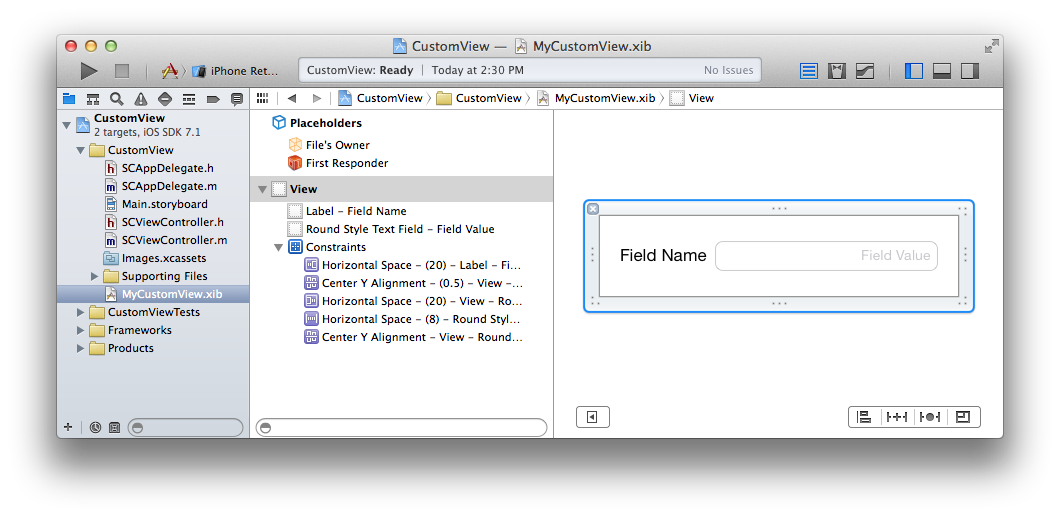
<p>First, let’s create a new Xcode project using the <em>Single View Application</em> template. Now, let’s create a new file. Select <em>View</em> from the iOS User Interface section and name your new view <code class="language-plaintext highlighter-rouge">MyCustomView</code>. It doesn’t really matter what we put in here. Let’s make it simple and add a label and a text field as follows:</p>

<p><img src="http://sebastiancelis.com/img/xib-custom-view/view.png" alt="XIB Custom View" /></p>

<p>Now let’s add a new Objective-C class file. Name it <code class="language-plaintext highlighter-rouge">SCCustomView</code> and make it subclass <code class="language-plaintext highlighter-rouge">UIView</code>. The first thing we should do is add the <code class="language-plaintext highlighter-rouge">IBOutlet</code> properties to the class header file.</p>

<figure class="highlight"><pre><code class="language-objc" data-lang="objc"><span class="cp">#import &lt;UIKit/UIKit.h&gt;
</span>
<span class="k">@interface</span> <span class="nc">SCCustomView</span> <span class="p">:</span> <span class="nc">UIView</span>

<span class="k">@property</span> <span class="p">(</span><span class="n">nonatomic</span><span class="p">,</span> <span class="n">strong</span><span class="p">)</span> <span class="n">IBOutlet</span> <span class="n">UILabel</span> <span class="o">*</span><span class="n">label</span><span class="p">;</span>
<span class="k">@property</span> <span class="p">(</span><span class="n">nonatomic</span><span class="p">,</span> <span class="n">strong</span><span class="p">)</span> <span class="n">IBOutlet</span> <span class="n">UITextField</span> <span class="o">*</span><span class="n">textField</span><span class="p">;</span>

<span class="k">@end</span></code></pre></figure>

<p>Set the <strong>File’s Owner</strong> of MyCustomView.xib to <em>SCCustomView</em>. Then, connect the label and text field outlets as you would for a view controller. Now, we have to worry about two ways that we might want to instantiate an instance of <code class="language-plaintext highlighter-rouge">SCCustomView</code>:</p>

<ol>
  <li>In code using <code class="language-plaintext highlighter-rouge">[[SCCustomView alloc] initWithFrame:CGRectZero]</code></li>
  <li>From another XIB file by adding a <code class="language-plaintext highlighter-rouge">UIView</code> object and then setting its class to <em>SCCustomView</em>. This will call <code class="language-plaintext highlighter-rouge">-initWithCoder:</code> on our view subclass.</li>
</ol>

<p>Given this, we now need to write some code to load the XIB whenever an <em>SCCustomView</em> is instantiated. We can do this in <em>SCCustomView.m</em>.</p>

<figure class="highlight"><pre><code class="language-objc" data-lang="objc"><span class="cp">#import "SCCustomView.h"
</span>
<span class="k">@interface</span> <span class="nc">SCCustomView</span> <span class="p">()</span>
<span class="k">@property</span> <span class="p">(</span><span class="n">nonatomic</span><span class="p">,</span> <span class="n">strong</span><span class="p">)</span> <span class="n">UIView</span> <span class="o">*</span><span class="n">containerView</span><span class="p">;</span>
<span class="k">@property</span> <span class="p">(</span><span class="n">nonatomic</span><span class="p">,</span> <span class="n">strong</span><span class="p">)</span> <span class="n">NSMutableArray</span> <span class="o">*</span><span class="n">customConstraints</span><span class="p">;</span>
<span class="k">@end</span>


<span class="k">@implementation</span> <span class="nc">SCCustomView</span>

<span class="k">-</span> <span class="p">(</span><span class="n">instancetype</span><span class="p">)</span><span class="nf">initWithCoder</span><span class="p">:(</span><span class="n">NSCoder</span> <span class="o">*</span><span class="p">)</span><span class="nv">aDecoder</span>
<span class="p">{</span>
    <span class="n">self</span> <span class="o">=</span> <span class="p">[</span><span class="n">super</span> <span class="nf">initWithCoder</span><span class="p">:</span><span class="n">aDecoder</span><span class="p">];</span>
    <span class="k">if</span> <span class="p">(</span><span class="n">self</span><span class="p">)</span> <span class="p">{</span>
        <span class="p">[</span><span class="n">self</span> <span class="nf">commonInit</span><span class="p">];</span>
    <span class="p">}</span>
    <span class="k">return</span> <span class="n">self</span><span class="p">;</span>
<span class="p">}</span>

<span class="k">-</span> <span class="p">(</span><span class="n">instancetype</span><span class="p">)</span><span class="nf">initWithFrame</span><span class="p">:(</span><span class="n">CGRect</span><span class="p">)</span><span class="nv">frame</span>
<span class="p">{</span>
    <span class="n">self</span> <span class="o">=</span> <span class="p">[</span><span class="n">super</span> <span class="nf">initWithFrame</span><span class="p">:</span><span class="n">frame</span><span class="p">];</span>
    <span class="k">if</span> <span class="p">(</span><span class="n">self</span><span class="p">)</span> <span class="p">{</span>
        <span class="p">[</span><span class="n">self</span> <span class="nf">commonInit</span><span class="p">];</span>
    <span class="p">}</span>
    <span class="k">return</span> <span class="n">self</span><span class="p">;</span>
<span class="p">}</span>

<span class="k">-</span> <span class="p">(</span><span class="kt">void</span><span class="p">)</span><span class="n">commonInit</span>
<span class="p">{</span>
    <span class="n">_customConstraints</span> <span class="o">=</span> <span class="p">[[</span><span class="n">NSMutableArray</span> <span class="nf">alloc</span><span class="p">]</span> <span class="nf">init</span><span class="p">];</span>

    <span class="n">UIView</span> <span class="o">*</span><span class="n">view</span> <span class="o">=</span> <span class="nb">nil</span><span class="p">;</span>
    <span class="n">NSArray</span> <span class="o">*</span><span class="n">objects</span> <span class="o">=</span> <span class="p">[[</span><span class="n">NSBundle</span> <span class="nf">mainBundle</span><span class="p">]</span> <span class="nf">loadNibNamed</span><span class="p">:</span><span class="s">@"MyCustomView"</span>
                                                     <span class="nl">owner:</span><span class="n">self</span>
                                                   <span class="nl">options:</span><span class="nb">nil</span><span class="p">];</span>
    <span class="k">for</span> <span class="p">(</span><span class="n">id</span> <span class="n">object</span> <span class="k">in</span> <span class="n">objects</span><span class="p">)</span> <span class="p">{</span>
        <span class="k">if</span> <span class="p">([</span><span class="n">object</span> <span class="nf">isKindOfClass</span><span class="p">:[</span><span class="n">UIView</span> <span class="nf">class</span><span class="p">]])</span> <span class="p">{</span>
            <span class="n">view</span> <span class="o">=</span> <span class="n">object</span><span class="p">;</span>
            <span class="k">break</span><span class="p">;</span>
        <span class="p">}</span>
    <span class="p">}</span>

    <span class="k">if</span> <span class="p">(</span><span class="n">view</span> <span class="o">!=</span> <span class="nb">nil</span><span class="p">)</span> <span class="p">{</span>
        <span class="n">_containerView</span> <span class="o">=</span> <span class="n">view</span><span class="p">;</span>
        <span class="n">view</span><span class="p">.</span><span class="n">translatesAutoresizingMaskIntoConstraints</span> <span class="o">=</span> <span class="nb">NO</span><span class="p">;</span>
        <span class="p">[</span><span class="n">self</span> <span class="nf">addSubview</span><span class="p">:</span><span class="n">view</span><span class="p">];</span>
        <span class="p">[</span><span class="n">self</span> <span class="nf">setNeedsUpdateConstraints</span><span class="p">];</span>
    <span class="p">}</span>
<span class="p">}</span>

<span class="k">-</span> <span class="p">(</span><span class="kt">void</span><span class="p">)</span><span class="n">updateConstraints</span>
<span class="p">{</span>
    <span class="p">[</span><span class="n">self</span> <span class="nf">removeConstraints</span><span class="p">:</span><span class="n">self</span><span class="p">.</span><span class="n">customConstraints</span><span class="p">];</span>
    <span class="p">[</span><span class="n">self</span><span class="p">.</span><span class="n">customConstraints</span> <span class="nf">removeAllObjects</span><span class="p">];</span>

    <span class="k">if</span> <span class="p">(</span><span class="n">self</span><span class="p">.</span><span class="n">containerView</span> <span class="o">!=</span> <span class="nb">nil</span><span class="p">)</span> <span class="p">{</span>
        <span class="n">UIView</span> <span class="o">*</span><span class="n">view</span> <span class="o">=</span> <span class="n">self</span><span class="p">.</span><span class="n">containerView</span><span class="p">;</span>
        <span class="n">NSDictionary</span> <span class="o">*</span><span class="n">views</span> <span class="o">=</span> <span class="n">NSDictionaryOfVariableBindings</span><span class="p">(</span><span class="n">view</span><span class="p">);</span>

        <span class="p">[</span><span class="n">self</span><span class="p">.</span><span class="n">customConstraints</span> <span class="nf">addObjectsFromArray</span><span class="p">:</span>
            <span class="p">[</span><span class="n">NSLayoutConstraint</span> <span class="nf">constraintsWithVisualFormat</span><span class="p">:</span>
                <span class="s">@"H:|[view]|"</span> <span class="nf">options</span><span class="p">:</span><span class="mi">0</span> <span class="nf">metrics</span><span class="p">:</span><span class="nb">nil</span> <span class="n">views</span><span class="o">:</span><span class="n">views</span><span class="p">]];</span>
        <span class="p">[</span><span class="n">self</span><span class="p">.</span><span class="n">customConstraints</span> <span class="nf">addObjectsFromArray</span><span class="p">:</span>
            <span class="p">[</span><span class="n">NSLayoutConstraint</span> <span class="nf">constraintsWithVisualFormat</span><span class="p">:</span>
                <span class="s">@"V:|[view]|"</span> <span class="nf">options</span><span class="p">:</span><span class="mi">0</span> <span class="nf">metrics</span><span class="p">:</span><span class="nb">nil</span> <span class="n">views</span><span class="o">:</span><span class="n">views</span><span class="p">]];</span>

        <span class="p">[</span><span class="n">self</span> <span class="nf">addConstraints</span><span class="p">:</span><span class="n">self</span><span class="p">.</span><span class="n">customConstraints</span><span class="p">];</span>
    <span class="p">}</span>
    
    <span class="p">[</span><span class="n">super</span> <span class="nf">updateConstraints</span><span class="p">];</span>
<span class="p">}</span>

<span class="k">@end</span></code></pre></figure>

<p>Let’s step through this code a little. First, note that we are overriding both <code class="language-plaintext highlighter-rouge">-initWithFrame:</code> and well as <code class="language-plaintext highlighter-rouge">-initWithCoder:</code>. This is very important to enable us to instantiate this view both from code as well as from a Storyboard or XIB. Then, we run some common initialization code that loads the top-level objects from our XIB file. We iterate over this array to find our view. The rest of the code in this class simply adds the view to our hierarchy and creates some constraints to ensure that this view fills our custom view class.</p>

<p>It’s a tad convoluted, but it makes sense and is the best way we currently have for creating a custom view subclass that is backed by a XIB file. If you were going to create multiple <code class="language-plaintext highlighter-rouge">UIView</code> subclasses this way in the same application, the above code could be shared in a common superclass.</p>

<p>If you would like to see Xcode support this and handle the heavy-lifting behind the scenes, feel free to duplicate <a href="rdar://17292752">radar 17292752</a> at the <a href="https://bugreport.apple.com/">Apple Bug Reporter</a>.</p>

]]></content>
    </entry>
    
    <entry>
        <title>One Way to Handle Dynamic Type in iOS 7</title>
        <link href="http://sebastiancelis.com/2014/06/11/one-way-handle-dynamic-type-ios-7/"/>
        <updated>2014-06-11T15:56:00+00:00</updated>
        <id>http://sebastiancelis.com/2014/06/11/one-way-handle-dynamic-type-ios-7</id>
        <content type="html"><![CDATA[<p>In iOS 7, Apple <a href="https://developer.apple.com/library/ios/releasenotes/General/WhatsNewIniOS/Articles/iOS7.html">introduced</a> a new feature called <a href="https://developer.apple.com/library/ios/documentation/userexperience/conceptual/transitionguide/AppearanceCustomization.html#//apple_ref/doc/uid/TP40013174-CH15-SW4">Dynamic Type</a>. This new set of APIs helped developers by allowing them to query the system for the best fonts to use in various situations. The effect was two-fold:</p>

<ol>
  <li>Developers could specify the style for pieces of text they wished to display. For example, a blog post title could use <code class="language-plaintext highlighter-rouge">UIFontTextStyleHeadline</code> while the content of that post could use <code class="language-plaintext highlighter-rouge">UIFontTextStyleBody</code>.</li>
  <li>Users could change their preferred text size setting in the iOS Settings app. Apps that supported this feature would then automatically scale their user interface appropriately.</li>
</ol>

<p>When I began developing <a href="http://patientio.com/">Patient IO</a>, I knew that it was going to be important to support Dynamic Type. We wanted the experience of our app to be great and accessible, even for individuals with poor eyesight. From Apple’s documentation, it became apparent to me that the recommended way to support Dynamic Type was to make full use of the various <code class="language-plaintext highlighter-rouge">UIFontTextStyle</code> values and to have the app listen for and respond to changes in the user’s text size preference. What wasn’t apparent was which pieces of text in my user interface should use which style. This was further complicated by my designer having his own opinion on how the various labels in the app should look.</p>

<p>I started down the painful path of trying out each text style at various text sizes and comparing them to the designs I was sent. I would then attempt to choose the style that was <em>most like</em> the one the designer had chosen. However, this was a time-consuming process that did not create a result that made either of us happy. In certain scenarios the choice of style seemed completely arbitrary or even contrary to the name of the style. I was using caption fonts in labels that shows subtitles and caption fonts in labels that showed body text. The more I used these styles the more I felt like they were created with certain types of apps in mind like blogging apps, twitter apps, and e-mail clients. So instead I decided to try and handle the text-sizing myself without using <code class="language-plaintext highlighter-rouge">UIFontTextStyle</code> at all.</p>

<p>iOS allows you to query for the user’s current text size directly using code like the following:</p>

<figure class="highlight"><pre><code class="language-objc" data-lang="objc"><span class="n">UIApplication</span> <span class="o">*</span><span class="n">app</span> <span class="o">=</span> <span class="p">[</span><span class="n">UIApplication</span> <span class="nf">sharedApplication</span><span class="p">];</span>
<span class="n">NSString</span> <span class="o">*</span><span class="n">category</span> <span class="o">=</span> <span class="p">[</span><span class="n">app</span> <span class="nf">preferredContentSizeCategory</span><span class="p">];</span>
<span class="cm">/**
 * category will be one of:
 * UIContentSizeCategoryExtraSmall
 * UIContentSizeCategorySmall
 * UIContentSizeCategoryMedium
 * UIContentSizeCategoryLarge
 * UIContentSizeCategoryExtraLarge
 * UIContentSizeCategoryExtraExtraLarge
 * UIContentSizeCategoryExtraExtraExtraLarge
 * UIContentSizeCategoryAccessibilityMedium
 * UIContentSizeCategoryAccessibilityLarge
 * UIContentSizeCategoryAccessibilityExtraLarge
 * UIContentSizeCategoryAccessibilityExtraExtraLarge
 * UIContentSizeCategoryAccessibilityExtraExtraExtraLarge
 **/</span></code></pre></figure>

<p>At this point, it becomes relatively trivial to create our own method for determining what font sizes our application should be using at any given time. I opted for a method that took four parameters:</p>

<ol>
  <li><code class="language-plaintext highlighter-rouge">smallestSize</code> — The smallest font size the text should be.</li>
  <li><code class="language-plaintext highlighter-rouge">normalSize</code> — The standard font size assuming the user has never changed their font size preference.</li>
  <li><code class="language-plaintext highlighter-rouge">maxNormalSize</code> — The largest the font size can be assuming the user has not turned on <strong>Larger Text</strong> in the iOS Accessibility settings.</li>
  <li><code class="language-plaintext highlighter-rouge">maxAccessibilitySize</code> — The absolute largest size this text can be if the user has enabled the <strong>Larger Text</strong> accessibility setting.</li>
</ol>

<p>The code ended up looking as follows:</p>

<div class="filename">UIFont+FILAdditions.h</div>

<figure class="highlight"><pre><code class="language-objc" data-lang="objc"><span class="cp">#import &lt;UIKit/UIKit.h&gt;
</span>
<span class="k">@interface</span> <span class="nc">UIFont</span> <span class="p">(</span><span class="nl">FILAdditions</span><span class="p">)</span>

<span class="k">+</span> <span class="p">(</span><span class="n">CGFloat</span><span class="p">)</span><span class="nf">fil_fontSizeGivenSmallestSize</span><span class="p">:(</span><span class="n">CGFloat</span><span class="p">)</span><span class="nv">smallestSize</span>
                              <span class="nf">normalSize</span><span class="p">:(</span><span class="n">CGFloat</span><span class="p">)</span><span class="nv">normalSize</span>
                           <span class="nf">maxNormalSize</span><span class="p">:(</span><span class="n">CGFloat</span><span class="p">)</span><span class="nv">maxNormalSize</span>
                    <span class="nf">maxAccessibilitySize</span><span class="p">:(</span><span class="n">CGFloat</span><span class="p">)</span><span class="nv">maxAccessibilitySize</span><span class="p">;</span>

<span class="k">@end</span></code></pre></figure>

<div class="filename">UIFont+FILAdditions.m</div>

<figure class="highlight"><pre><code class="language-objc" data-lang="objc"><span class="k">@implementation</span> <span class="nc">UIFont</span> <span class="p">(</span><span class="nl">FILAdditions</span><span class="p">)</span>

<span class="k">+</span> <span class="p">(</span><span class="n">CGFloat</span><span class="p">)</span><span class="nf">fil_fontSizeGivenSmallestSize</span><span class="p">:(</span><span class="n">CGFloat</span><span class="p">)</span><span class="nv">smallestSize</span>
                              <span class="nf">normalSize</span><span class="p">:(</span><span class="n">CGFloat</span><span class="p">)</span><span class="nv">normalSize</span>
                           <span class="nf">maxNormalSize</span><span class="p">:(</span><span class="n">CGFloat</span><span class="p">)</span><span class="nv">maxNormalSize</span>
                    <span class="nf">maxAccessibilitySize</span><span class="p">:(</span><span class="n">CGFloat</span><span class="p">)</span><span class="nv">maxAccessibilitySize</span>
<span class="p">{</span>
    <span class="k">static</span> <span class="n">NSDictionary</span> <span class="o">*</span><span class="n">categories</span><span class="p">;</span>
    <span class="k">static</span> <span class="n">dispatch_once_t</span> <span class="n">onceToken</span><span class="p">;</span>
    <span class="n">dispatch_once</span><span class="p">(</span><span class="o">&amp;</span><span class="n">onceToken</span><span class="p">,</span> <span class="o">^</span><span class="p">{</span>
        <span class="n">categories</span> <span class="o">=</span> <span class="p">@{</span><span class="n">UIContentSizeCategoryExtraSmall</span><span class="o">:</span> <span class="mi">@0</span><span class="p">,</span>
                       <span class="nl">UIContentSizeCategorySmall:</span> <span class="mi">@1</span><span class="p">,</span>
                       <span class="nl">UIContentSizeCategoryMedium:</span> <span class="mi">@2</span><span class="p">,</span>
                       <span class="nl">UIContentSizeCategoryLarge:</span> <span class="mi">@3</span><span class="p">,</span>
                       <span class="nl">UIContentSizeCategoryExtraLarge:</span> <span class="mi">@4</span><span class="p">,</span>
                       <span class="nl">UIContentSizeCategoryExtraExtraLarge:</span> <span class="mi">@5</span><span class="p">,</span>
                       <span class="nl">UIContentSizeCategoryExtraExtraExtraLarge:</span> <span class="mi">@6</span><span class="p">,</span>
                       <span class="nl">UIContentSizeCategoryAccessibilityMedium:</span> <span class="mi">@7</span><span class="p">,</span>
                       <span class="nl">UIContentSizeCategoryAccessibilityLarge:</span> <span class="mi">@8</span><span class="p">,</span>
                       <span class="nl">UIContentSizeCategoryAccessibilityExtraLarge:</span> <span class="mi">@9</span><span class="p">,</span>
                       <span class="nl">UIContentSizeCategoryAccessibilityExtraExtraLarge:</span> <span class="mi">@10</span><span class="p">,</span>
                       <span class="nl">UIContentSizeCategoryAccessibilityExtraExtraExtraLarge:</span> <span class="mi">@11</span><span class="p">};</span>
    <span class="p">});</span>

    <span class="n">UIApplication</span> <span class="o">*</span><span class="n">app</span> <span class="o">=</span> <span class="p">[</span><span class="n">UIApplication</span> <span class="nf">sharedApplication</span><span class="p">];</span>
    <span class="n">NSString</span> <span class="o">*</span><span class="n">category</span> <span class="o">=</span> <span class="p">[</span><span class="n">app</span> <span class="nf">preferredContentSizeCategory</span><span class="p">];</span>

    <span class="n">NSNumber</span> <span class="o">*</span><span class="n">number</span> <span class="o">=</span> <span class="p">[</span><span class="n">categories</span> <span class="nf">objectForKey</span><span class="p">:</span><span class="n">category</span><span class="p">];</span>
    <span class="k">if</span> <span class="p">(</span><span class="n">number</span> <span class="o">==</span> <span class="nb">nil</span><span class="p">)</span> <span class="n">number</span> <span class="o">=</span> <span class="p">[</span><span class="n">categories</span> <span class="nf">objectForKey</span><span class="p">:</span><span class="n">UIContentSizeCategoryLarge</span><span class="p">];</span>
    <span class="n">NSInteger</span> <span class="n">index</span> <span class="o">=</span> <span class="p">[</span><span class="n">number</span> <span class="nf">integerValue</span><span class="p">];</span>
    
    <span class="n">CGFloat</span> <span class="n">size</span><span class="p">;</span>
    <span class="k">switch</span> <span class="p">(</span><span class="n">index</span><span class="p">)</span>
    <span class="p">{</span>
        <span class="k">case</span> <span class="mi">0</span><span class="p">:</span>
            <span class="n">size</span> <span class="o">=</span> <span class="n">smallestSize</span><span class="p">;</span>
            <span class="k">break</span><span class="p">;</span>
        <span class="k">case</span> <span class="mi">1</span> <span class="p">...</span> <span class="mi">2</span><span class="p">:</span>
            <span class="n">size</span> <span class="o">=</span> <span class="n">smallestSize</span> <span class="o">+</span> <span class="p">(</span><span class="n">normalSize</span> <span class="o">-</span> <span class="n">smallestSize</span><span class="p">)</span> <span class="o">*</span> <span class="p">((</span><span class="n">CGFloat</span><span class="p">)</span><span class="n">index</span> <span class="o">/</span> <span class="mi">3</span><span class="p">.</span><span class="mi">0</span><span class="p">);</span>
            <span class="k">break</span><span class="p">;</span>
        <span class="k">case</span> <span class="mi">4</span> <span class="p">...</span> <span class="mi">5</span><span class="p">:</span>
            <span class="n">size</span> <span class="o">=</span> <span class="n">normalSize</span> <span class="o">+</span> <span class="p">(</span><span class="n">maxNormalSize</span> <span class="o">-</span> <span class="n">normalSize</span><span class="p">)</span> <span class="o">*</span> <span class="p">((</span><span class="n">CGFloat</span><span class="p">)(</span><span class="n">index</span> <span class="o">-</span> <span class="mi">3</span><span class="p">)</span> <span class="o">/</span> <span class="mi">3</span><span class="p">.</span><span class="mi">0</span><span class="p">);</span>
            <span class="k">break</span><span class="p">;</span>
        <span class="k">case</span> <span class="mi">6</span><span class="p">:</span>
            <span class="n">size</span> <span class="o">=</span> <span class="n">maxNormalSize</span><span class="p">;</span>
            <span class="k">break</span><span class="p">;</span>
        <span class="k">case</span> <span class="mi">7</span> <span class="p">...</span> <span class="mi">11</span><span class="p">:</span>
            <span class="n">size</span> <span class="o">=</span> <span class="n">maxNormalSize</span> <span class="o">+</span> <span class="p">(</span><span class="n">maxAccessibilitySize</span> <span class="o">-</span> <span class="n">maxNormalSize</span><span class="p">)</span> <span class="o">*</span> <span class="p">((</span><span class="n">CGFloat</span><span class="p">)</span> <span class="p">(</span><span class="n">index</span> <span class="o">-</span> <span class="mi">6</span><span class="p">)</span> <span class="o">/</span> <span class="mi">5</span><span class="p">.</span><span class="mi">0</span><span class="p">);</span>
            <span class="k">break</span><span class="p">;</span>
        <span class="k">case</span> <span class="mi">12</span><span class="p">:</span>
            <span class="n">size</span> <span class="o">=</span> <span class="n">maxAccessibilitySize</span><span class="p">;</span>
            <span class="k">break</span><span class="p">;</span>
        <span class="k">case</span> <span class="mi">3</span><span class="p">:</span>
        <span class="nl">default:</span>
            <span class="n">size</span> <span class="o">=</span> <span class="n">normalSize</span><span class="p">;</span>
            <span class="k">break</span><span class="p">;</span>
    <span class="p">}</span>
    
    <span class="k">return</span> <span class="n">round</span><span class="p">(</span><span class="n">size</span><span class="p">);</span>
<span class="p">}</span>

<span class="k">@end</span></code></pre></figure>

<p>To me, this method felt more flexible and powerful than trying to scale across all content sizes using just a smallest and largest text size. It allowed me to take certain labels and only scale them in a single direction. It let me make the maxNormalSize and maxAccessibility size the same in situations where the text didn’t need to scale to incredibly large sizes. It let me control and avoid situations where the max size of <code class="language-plaintext highlighter-rouge">UIFontTextStyleBody</code> was much larger than a particular screen could adequately handle. And maybe most importantly, this method gave me the ability to exactly match the mockups I had been given using any font I liked and still make the text in the app scale appropriately given the user’s text size preference.</p>

<p>If the iOS-defined text styles make sense for your particular application, you should certainly use them. However, if you find yourself struggling and trying to force the text styles into an app that wasn’t designed for them, consider using the fonts that work best for you and then scaling the font sizes as I did.</p>

]]></content>
    </entry>
    
    <entry>
        <title>A Fast, Accurate Way to Handle Dates from Servers</title>
        <link href="http://sebastiancelis.com/2012/09/17/fast-accurate-handle-dates-servers/"/>
        <updated>2012-09-17T15:00:00+00:00</updated>
        <id>http://sebastiancelis.com/2012/09/17/fast-accurate-handle-dates-servers</id>
        <content type="html"><![CDATA[<h3 id="the-importance-of-showing-accurate-dates-and-times">The Importance of Showing Accurate Dates and Times</h3>

<p>In <a href="http://itunes.apple.com/us/app/flighttrack-live-flight-status/id296240199?mt=8">FlightTrack</a>, it is critical that we show accurate dates and times to all of our users, no matter what the cost. If, for some reason, we told a user that their flight was going to take off at 10:00am when it was actually taking off at 9:00am, they could miss their flight and be charged a painful airline rebooking fee.</p>

<p>The importance of showing accurate dates and times extends beyond just flight tracking apps. Any application that needs to display dates and times to its users should consider the ramifications of possibly showing inaccurate information, especially those that download dates from a server.</p>

<h3 id="downloading-and-displaying-dates-and-times-from-servers">Downloading and Displaying Dates and Times from Servers</h3>

<p>Take the following <a href="http://json.org/">JSON</a> data that a server API could send to a mobile client:</p>

<figure class="highlight"><pre><code class="language-objc" data-lang="objc"><span class="s">"someDate"</span> <span class="o">:</span> <span class="s">"2012-11-17T16:00:00-06:00"</span></code></pre></figure>

<p>This is a perfectly valid <a href="http://en.wikipedia.org/wiki/ISO_8601">ISO 8601</a> date string that references an exact point in time. While at first glance it may look like it contains time zone information, don’t be fooled. <code class="language-plaintext highlighter-rouge">-06:00</code> refers to the <a href="http://en.wikipedia.org/wiki/Coordinated_Universal_Time">UTC</a> offset of that date string. It <strong>does not</strong> refer to an actual time zone. That date may be associated with an event in the <code class="language-plaintext highlighter-rouge">America/Chicago</code> or <code class="language-plaintext highlighter-rouge">America/Mexico_City</code> time zones (among others). What is the difference? For one, two similar time zones may have very different rules concerning <a href="http://en.wikipedia.org/wiki/Daylight_saving_time">daylight savings time (DST)</a>.</p>

<p>Daylight savings rules can change often. In 2007, the Unites States extended daylight savings time due to the <a href="http://en.wikipedia.org/wiki/Energy_Policy_Act_of_2005">Energy Policy Act of 2005</a>. And things can get even more complicated when daylight savings time is not involved. In 2011, for example, the Pacific island of Samoa <a href="http://www.bbc.co.uk/news/business-13330592">jumped forward in time by an entire day</a>.</p>

<p>All of this time zone information (both current and historical) is contained in the <a href="http://en.wikipedia.org/wiki/Tz_database">tz database</a>, which ships with most operating systems. So, if I wanted to display a time like “10:00am CDT” to a user using the <code class="language-plaintext highlighter-rouge">America/Chicago</code> timezone, I could do the following in Objective-C (which makes use of the system tz database):</p>

<figure class="highlight"><pre><code class="language-objc" data-lang="objc"><span class="n">NSDate</span> <span class="o">*</span><span class="n">date</span> <span class="o">=</span> <span class="p">[</span><span class="n">someData</span> <span class="nf">date</span><span class="p">];</span>
<span class="n">NSTimeZone</span> <span class="o">*</span><span class="n">tz</span> <span class="o">=</span> <span class="p">[</span><span class="n">NSTimeZone</span> <span class="nf">timeZoneWithName</span><span class="p">:</span><span class="s">@"America/Chicago"</span><span class="p">];</span>
<span class="n">NSDateFormatter</span> <span class="o">*</span><span class="n">formatter</span> <span class="o">=</span> <span class="p">[[</span><span class="n">NSDateFormatter</span> <span class="nf">alloc</span><span class="p">]</span> <span class="nf">init</span><span class="p">];</span>
<span class="p">[</span><span class="n">formatter</span> <span class="nf">setTimeZone</span><span class="p">:</span><span class="n">tz</span><span class="p">];</span>
<span class="p">[</span><span class="n">formatter</span> <span class="nf">setDateStyle</span><span class="p">:</span><span class="n">NSDateFormatterNoStyle</span><span class="p">];</span>
<span class="p">[</span><span class="n">formatter</span> <span class="nf">setTimeStyle</span><span class="p">:</span><span class="n">NSDateFormatterShortStyle</span><span class="p">];</span>
<span class="n">NSString</span> <span class="o">*</span><span class="n">dateString</span> <span class="o">=</span> <span class="p">[</span><span class="n">formatter</span> <span class="nf">stringFromDate</span><span class="p">:</span><span class="n">date</span><span class="p">];</span>
<span class="n">NSString</span> <span class="o">*</span><span class="n">tzAbbreviation</span> <span class="o">=</span> <span class="p">[</span><span class="n">tz</span> <span class="nf">abbreviationForDate</span><span class="p">:</span><span class="n">date</span><span class="p">];</span>
<span class="n">NSString</span> <span class="o">*</span><span class="n">output</span> <span class="o">=</span> <span class="p">[</span><span class="n">NSString</span> <span class="n">stringWithFormat</span> <span class="s">@"%@ %@"</span><span class="p">,</span> <span class="n">dateString</span><span class="p">,</span> <span class="nf">tzAbbreviation</span><span class="p">];</span></code></pre></figure>

<h3 id="clients-can-show-inaccurate-dates-and-times">Clients Can Show Inaccurate Dates and Times</h3>

<p>What happens if the system has an old version of the tz database? Well, your apps might start showing incorrect dates and times to your users. In addition, the time zone abbreviation strings might be incorrect. Thus, the above code could incorrectly show “11:00am CST” instead of “10:00am CDT”. In the world of mobile apps, having an outdated tz database might not be as uncommon as you think. The tz database is updated with the operating system. Some users don’t update their devices. Others can’t due to carrier lockdown or because they are using an older device model that can’t run the latest and greatest version of its operating system. Unfortunately, these devices can very possibly have outdated tz databases and thus display incorrect dates and times to your users.</p>

<p>So what can we do to fix this? Your gut reaction might be to have your app download the latest version of the tz database whenever it changes. This is certainly something you could do, but it has interesting quirks. As far as I can tell, there is no way in Java or Objective-C to take a downloaded tz database and tell the system frameworks to start using it. This means that you would have to write (or find) code to understand and parse the tz database and then use that information to create explicit <code class="language-plaintext highlighter-rouge">NSTimeZone</code> objects using offsets from UTC.</p>

<p>A slightly different approach (that we opted for) was to send time zone information along with each date from our server:</p>

<figure class="highlight"><pre><code class="language-objc" data-lang="objc"><span class="s">"someDate"</span> <span class="o">:</span> <span class="p">{</span>
    <span class="s">"iso8601"</span> <span class="o">:</span> <span class="s">"2012-09-17T10:00:00Z"</span><span class="p">,</span>
    <span class="s">"tzOffset"</span> <span class="o">:</span> <span class="o">-</span><span class="mi">21600</span><span class="p">,</span>
    <span class="s">"tzName"</span> <span class="o">:</span> <span class="s">"America/Chicago"</span><span class="p">,</span>
    <span class="s">"isDST"</span> <span class="o">:</span> <span class="nb">true</span>
<span class="p">}</span></code></pre></figure>

<p>While quite a bit more verbose than just the ISO 8601 date string, this extra data gives us the ability to display the proper date, time, and time zone strings no matter how old and inaccurate the tz database. This would then change our Objective-C code to the following:</p>

<figure class="highlight"><pre><code class="language-objc" data-lang="objc"><span class="n">NSDate</span> <span class="o">*</span><span class="n">date</span> <span class="o">=</span> <span class="p">[</span><span class="n">someData</span> <span class="nf">date</span><span class="p">];</span>
<span class="n">NSTimeInterval</span> <span class="n">tzOffset</span> <span class="o">=</span> <span class="p">[</span><span class="n">someData</span> <span class="nf">timeZoneOffset</span><span class="p">];</span>
<span class="n">NSString</span> <span class="o">*</span><span class="n">tzName</span> <span class="o">=</span> <span class="p">[</span><span class="n">someData</span> <span class="nf">timeZoneName</span><span class="p">];</span>
<span class="n">NSTimeZone</span> <span class="o">*</span><span class="n">tzAccurate</span> <span class="o">=</span> <span class="p">[</span><span class="n">NSTimeZone</span> <span class="nf">timeZoneForSecondsFromGMT</span><span class="p">:</span><span class="n">tzOffset</span><span class="p">];</span>
<span class="n">NSTimeZone</span> <span class="o">*</span><span class="n">tzDisplay</span> <span class="o">=</span> <span class="p">[</span><span class="n">NSTimeZone</span> <span class="nf">timeZoneWithName</span><span class="p">:</span><span class="n">tzName</span><span class="p">];</span>
<span class="n">NSDateFormatter</span> <span class="o">*</span><span class="n">formatter</span> <span class="o">=</span> <span class="p">[[</span><span class="n">NSDateFormatter</span> <span class="nf">alloc</span><span class="p">]</span> <span class="nf">init</span><span class="p">];</span>
<span class="p">[</span><span class="n">formatter</span> <span class="nf">setTimeZone</span><span class="p">:</span><span class="n">tzAccurate</span><span class="p">];</span>
<span class="p">[</span><span class="n">formatter</span> <span class="nf">setDateStyle</span><span class="p">:</span><span class="n">NSDateFormatterNoStyle</span><span class="p">];</span>
<span class="p">[</span><span class="n">formatter</span> <span class="nf">setTimeStyle</span><span class="p">:</span><span class="n">NSDateFormatterShortStyle</span><span class="p">];</span>
<span class="n">NSString</span> <span class="o">*</span><span class="n">dateString</span> <span class="o">=</span> <span class="p">[</span><span class="n">formatter</span> <span class="nf">stringFromDate</span><span class="p">:</span><span class="n">date</span><span class="p">];</span>
<span class="n">NSString</span> <span class="o">*</span><span class="n">tzAbbreviation</span> <span class="o">=</span> <span class="p">[</span><span class="n">tzDisplay</span> <span class="nf">abbreviationForDate</span><span class="p">:</span><span class="n">date</span><span class="p">];</span>
<span class="n">NSString</span> <span class="o">*</span><span class="n">output</span> <span class="o">=</span> <span class="p">[</span><span class="n">NSString</span> <span class="n">stringWithFormat</span> <span class="s">@"%@ %@"</span><span class="p">,</span> <span class="n">dateString</span><span class="p">,</span> <span class="nf">tzAbbreviation</span><span class="p">];</span></code></pre></figure>

<p>This code is not that much more complicated that the original code. The biggest change for our application was replacing many of our NSDate objects with a different object that stores the extra time zone information associated with each date. This works great when the dates and times are associated with a particular time zone (in our application, the take off and landing dates of flights are associated with the airport where that event takes place). This solution doesn’t work as well if you have to support arbitrary time zones with each and every date. In this scenario, you may be better off opting for the “parse an updated version of the tz database” solution.</p>

<h3 id="parsing-dates-can-be-slow">Parsing Dates Can Be Slow</h3>

<p>Unfortunately, <a href="http://developer.apple.com/library/mac/documentation/cocoa/reference/foundation/Classes/NSDateFormatter_Class/Reference/Reference.html"><code class="language-plaintext highlighter-rouge">NSDateFormatter</code></a> and <a href="http://docs.oracle.com/javase/7/docs/api/java/text/SimpleDateFormat.html"><code class="language-plaintext highlighter-rouge">SimpleDateFormat</code></a> are slow. Really slow. In <a href="http://itunes.apple.com/us/app/flighttrack-live-flight-status/id296240199?mt=8">FlightTrack</a>, we have to download many dates from our data providers. In fact, a single request to get data for 100 flights can result in the application downloading and parsing as many as 1,400 date strings. Parsing these ISO 8601 date strings using <code class="language-plaintext highlighter-rouge">NSDateFormatter</code> takes a non-trivial amount of time on a mobile device (approximately 350ms on my iPhone 4S).</p>

<p>Now we <em>could</em> use a faster date parser written in C (especially since we only have to support the ISO 8601 format). However, since we are already adding so much extra information to each date in the response, why not add a little bit more to make it absolutely trivial for apps to parse this date? We can do this by also sending integers representing the number of seconds since the <a href="http://en.wikipedia.org/wiki/Unix_time">unix epoch</a>.<sup id="fnref:1" role="doc-noteref"><a href="#fn:1" class="footnote" rel="footnote">1</a></sup></p>

<p>This gives us the following data structure:</p>

<figure class="highlight"><pre><code class="language-objc" data-lang="objc"><span class="s">"someDate"</span> <span class="o">:</span> <span class="p">{</span>
    <span class="s">"iso8601"</span> <span class="o">:</span> <span class="s">"2012-09-17T10:00:00Z"</span><span class="p">,</span>
    <span class="s">"unixTime"</span> <span class="o">:</span> <span class="mi">1347876000</span><span class="p">,</span>
    <span class="s">"tzOffset"</span> <span class="o">:</span> <span class="o">-</span><span class="mi">21600</span><span class="p">,</span>
    <span class="s">"tzName"</span> <span class="o">:</span> <span class="s">"America/Chicago"</span><span class="p">,</span>
    <span class="s">"isDST"</span> <span class="o">:</span> <span class="nb">true</span>
<span class="p">}</span></code></pre></figure>

<p>At this point, all you have to do to parse the date is call <code class="language-plaintext highlighter-rouge">[NSDate dateWithTimeIntervalSince1970:unixTime]</code>, which takes effectively no processor time. If all your clients start using the <code class="language-plaintext highlighter-rouge">unixTime</code> property to construct their date objects, the server doesn’t even need to send the ISO 8601 date string anymore. However, servers are free to send one data type, the other, or even both (this behavior could depend on a request parameter sent by the client). I try not to worry about the increase in response size since servers should all be sending their JSON strings <a href="http://en.wikipedia.org/wiki/Gzip">gzipped</a>, anyway.</p>

<div class="footnotes" role="doc-endnotes">
  <ol>
    <li id="fn:1" role="doc-endnote">
      <p>Depending on the range of dates your application supports this may or may not be an easy thing to do. For example, if you have dates ranging from 200 million BC to 200 million AD, this can be tricky and you have to make sure that you use types that can hold this range without overflowing. <a href="#fnref:1" class="reversefootnote" role="doc-backlink">&#8617;</a></p>
    </li>
  </ol>
</div>
]]></content>
    </entry>
    
    <entry>
        <title>Using Code Snippets in Xcode</title>
        <link href="http://sebastiancelis.com/2012/07/06/using-code-snippets-in-xcode/"/>
        <updated>2012-07-06T17:38:51+00:00</updated>
        <id>http://sebastiancelis.com/2012/07/06/using-code-snippets-in-xcode</id>
        <content type="html"><![CDATA[<p>I am really looking forward to the new <a href="http://clang.llvm.org/docs/ObjectiveCLiterals.html">Objective-C literal syntax</a> being added to Xcode 4.4. Sadly, I am stuck on Xcode 4.3 for at least a little while longer. So, I decided to look into using code snippets to try and mimic at least some of the new Objective-C literals.</p>

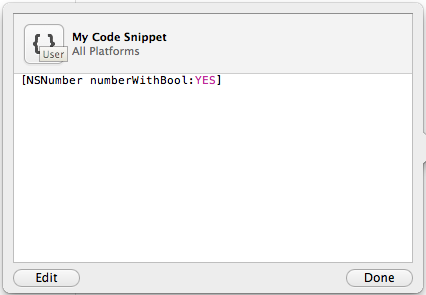
<p>The first thing we can do is add our own support for <code class="language-plaintext highlighter-rouge">@YES</code> and <code class="language-plaintext highlighter-rouge">@NO</code>. To do this, launch Xcode and ensure that the code snippet library is visible by selecting <code class="language-plaintext highlighter-rouge">View -&gt; Utilities -&gt; Show Code Snippet Library</code> and then filtering the list down to your user snippets by selecting “User” from the dropdown. Now, in your code editor, type <code class="language-plaintext highlighter-rouge">[NSNumber numberWithBool:YES]</code>, select the text, and drag it over to the code snippet library. This will create your first code snippet that should look like the following:</p>

<p><img src="http://sebastiancelis.com/img/using-code-snippets-in-xcode/xcode-code-snippet-1.png" height="295" width="426" alt="The new code snippet." /></p>

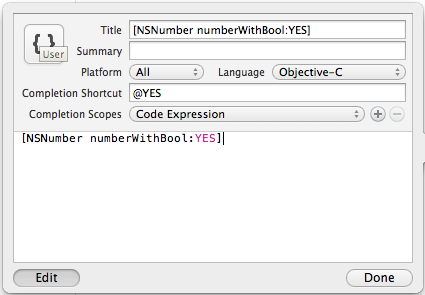
<p>As it stands, this snippet won’t really do anything. We need to assign a completion shortcut to it, and while we do that we might as well edit it and clean it up a little. Hit the edit button and set the title to <code class="language-plaintext highlighter-rouge">[NSNumber numberWithBool:YES]</code>, the completion shortcut to <code class="language-plaintext highlighter-rouge">@YES</code>, and the completion scope to “Code Expression”. Your snippet should now look like the following:</p>

<p><img src="http://sebastiancelis.com/img/using-code-snippets-in-xcode/xcode-code-snippet-2.png" height="295" width="425" alt="The edited code snippet." /></p>

<p>Now it is time to save your code snippet and try it out! All you have to do to type <code class="language-plaintext highlighter-rouge">[NSNumber numberWithBool:YES]</code> is to type <code class="language-plaintext highlighter-rouge">@YES</code> followed by <code class="language-plaintext highlighter-rouge">&lt;return&gt;</code> to accept the suggested completion. This is not quite as good as native support for Objective-C literals, but it saves about the same amount of typing.</p>

<p><img src="http://sebastiancelis.com/img/using-code-snippets-in-xcode/xcode-code-snippet-completing.png" height="39" width="307" alt="The snippet in action." /></p>

<p>You can repeat the above process for <code class="language-plaintext highlighter-rouge">@NO</code>, but I won’t go over that here. Instead, let’s try and make it easier to create NSNumbers that hold ints, doubles, and floats.</p>

<p>Getting this to work is going to require a more-complicated code snippet as the snippet will need to support a single parameter. First, let’s create a code snippet for NSNumber’s <code class="language-plaintext highlighter-rouge">numberWithInt:</code> method by typing <code class="language-plaintext highlighter-rouge">[NSNumber numberWithInt:&lt;#(int)#&gt;]</code> into our code editor and dragging that text to the code snippet library. The <code class="language-plaintext highlighter-rouge">&lt;#(int)#&gt;</code> construct tells Xcode that this snippet takes a single parameter and to display <code class="language-plaintext highlighter-rouge">(int)</code> as a hint to the user.</p>

<p>Change the new snippet’s title to <code class="language-plaintext highlighter-rouge">[NSNumber numberWithInt:]</code>, its completion shortcut to <code class="language-plaintext highlighter-rouge">@int</code>, and its completion scope to “Code Expression”. Now, type <code class="language-plaintext highlighter-rouge">@int</code> into your code editor and hit <code class="language-plaintext highlighter-rouge">&lt;return&gt;</code>. You should see <code class="language-plaintext highlighter-rouge">[NSNumber numberWithInt:(int)]</code> appear in your editor with <code class="language-plaintext highlighter-rouge">(int)</code> already selected so that you can immediately start typing the value of your integer. Now you can repeat the same process for <code class="language-plaintext highlighter-rouge">@double</code> and <code class="language-plaintext highlighter-rouge">@float</code>. It’s not quite the same as the Objective-C literals, but it should tide us over until Xcode 4.4 is released.</p>

<p>If you want to take these snippets one step further, you could complete <code class="language-plaintext highlighter-rouge">@array</code> to <code class="language-plaintext highlighter-rouge">[NSArray arrayWithObjects:&lt;#(id), ...#&gt;, nil]</code> and <code class="language-plaintext highlighter-rouge">@dict</code> to <code class="language-plaintext highlighter-rouge">[NSDictionary dictionaryWithObjectsAndKeys:&lt;#(id), ...#&gt;, nil]</code>. However, it’s a pain to create all of these code snippets one after the other. Wouldn’t it be nice to be able to just drag them all into Xcode from a library of useful code snippets? Well you can!</p>

<p>Xcode stores all user-defined code snippets in <code class="language-plaintext highlighter-rouge">~/Library/Developer/Xcode/UserData/CodeSnippets</code>. By default, each snippet is named using a <a href="http://en.wikipedia.org/wiki/Universally_unique_identifier">universally unique identifier</a>. However, it appears that you can rename the code snippet files to whatever you want and Xcode will still load them. This makes it much easier to manage your snippets by giving them descriptive names and storing them in a <a href="http://git-scm.com/">Git</a> repository somewhere.</p>

<p>All of my code snippets (including the ones in this post) can be <a href="https://github.com/scelis/Xcode-CodeSnippets">found on GitHub</a>. To clone the repository directly to the appropriate directory, run:</p>

<figure class="highlight"><pre><code class="language-bash" data-lang="bash"><span class="nv">$ </span>git clone git://github.com/scelis/Xcode-CodeSnippets.git ~/Library/Developer/Xcode/UserData/CodeSnippets</code></pre></figure>

<p>Or, if you’d rather, just copy all of the <code class="language-plaintext highlighter-rouge">.codesnippet</code> files inside the repository directly to your <code class="language-plaintext highlighter-rouge">~/Library/Developer/Xcode/UserData/CodeSnippets</code> folder.</p>

<figure class="highlight"><pre><code class="language-bash" data-lang="bash"><span class="nv">$ </span><span class="nb">mkdir</span> <span class="nt">-p</span> ~/Library/Developer/Xcode/UserData/CodeSnippets
<span class="nv">$ </span>git clone git://github.com/scelis/Xcode-CodeSnippets.git
<span class="nv">$ </span><span class="nb">cp </span>Xcode-CodeSnippets/<span class="k">*</span>.codesnippet ~/Library/Developer/Xcode/UserData/CodeSnippets</code></pre></figure>

<p>I hope these code snippets will make your lives a little easier until Xcode 4.4 comes out. If you have any other snippets you find invaluable, <a href="http://twitter.com/scelis">let me know on Twitter</a>!</p>

]]></content>
    </entry>
    
    <entry>
        <title>MBRequest — A simple networking library for iOS and OS X</title>
        <link href="http://sebastiancelis.com/2012/03/21/mbrequest-simple-networking-library-ios-mac-os-x/"/>
        <updated>2012-03-21T19:00:00+00:00</updated>
        <id>http://sebastiancelis.com/2012/03/21/mbrequest-simple-networking-library-ios-mac-os-x</id>
        <content type="html"><![CDATA[<p>Making network requests is one of the most common activities apps perform, especially on mobile devices that are always connected to the internet. While Apple gives us some classes and tools to help us perform these requests, it is left as an exercise to the developer to do so in a clean, reusable way.</p>

<p>Today, we at <a href="http://www.mobiata.com/">Mobiata</a> are <a href="http://www.mobiata.com/blog/2012/03/21/mbrequest-simple-networking-library-ios-os-x">announcing MBRequest</a>, a simple, open source networking library for iOS and Mac OS X. It uses a <a href="http://developer.apple.com/library/ios/documentation/cocoa/Conceptual/Blocks/Articles/00_Introduction.html">blocks-based</a> API built on top of <a href="http://developer.apple.com/documentation/Cocoa/Reference/Foundation/Classes/nsurlconnection_Class/Reference/Reference.html">NSURLConnection</a> and <a href="http://developer.apple.com/library/ios/documentation/Cocoa/Reference/NSOperation_class/Reference/Reference.html">NSOperation</a>. MBRequest follows the style of Apple’s <a href="http://developer.apple.com/library/ios/documentation/CoreLocation/Reference/CLGeocoder_class/Reference/Reference.html">CLGeocoder</a> class to create simple, easy-to-use classes that encapsulate the entire network request. The goals of MBRequest are as follows:</p>

<ul>
  <li>Create the simplest possible API for making network requests. With only a few lines of code, developers should be able to start a network request and pass along a single block of code for handling the results of that request.</li>
  <li>Give developers an extremely simple way to create their own CLGeocoder-like classes. These subclasses should only need to worry about setting up the request and parsing the response.</li>
</ul>

<p>We hope you like it! Be sure to check it out over on its <a href="https://github.com/mobiata/MBRequest">GitHub project page</a>.</p>

]]></content>
    </entry>
    
    <entry>
        <title>Subclassing Those Hard-to-Reach Classes</title>
        <link href="http://sebastiancelis.com/2012/03/05/subclassing-hard-to-reach-classes/"/>
        <updated>2012-03-05T16:00:00+00:00</updated>
        <id>http://sebastiancelis.com/2012/03/05/subclassing-hard-to-reach-classes</id>
        <content type="html"><![CDATA[<p>Ah, read-only properties. They are the bane of my existence when I find myself trying to think outside of the box as an iOS developer. Oh, UINavigationController, why must you taunt me with your read-only navigation bar and toolbar? And you, UIWebView. Is your scroll view really so dangerous that you won’t let me override it?</p>

<p>There have been many times when I have wanted to slightly customize the behavior of an object that is completely owned by its parent. This can be an incredibly difficult task to accomplish. For example, when I wanted to <a href="/2009/12/21/adding-background-image-uinavigationbar/">add a background image to a UINavigationController’s navigation bar</a>, I unfortunately found myself resorting to <a href="http://www.cocoadev.com/index.pl?MethodSwizzling">method swizzling</a> to accomplish my task. Now don’t get me wrong, I know method swizzling can be dangerous, and, if you utilize it, you need to be very careful to test your code before each and every release of iOS or OS X. However, if used sparingly and carefully, it can be a powerful, last-resort technique for altering a class that you can’t easily subclass.</p>

<p>Yet I recently found another way to modify objects that appear unmodifiable. There is a lesser-known feature of <a href="http://developer.apple.com/library/ios/documentation/Cocoa/Reference/Foundation/Classes/NSKeyedUnarchiver_Class/Reference/Reference.html">NSKeyedUnarchiver</a> that lets you change the class of an object that has already been allocated and initialized. <a href="http://developer.apple.com/library/ios/documentation/Cocoa/Reference/Foundation/Classes/NSKeyedArchiver_Class/Reference/Reference.html">NSKeyedArchiver</a> and <a href="http://developer.apple.com/library/ios/documentation/Cocoa/Reference/Foundation/Classes/NSKeyedUnarchiver_Class/Reference/Reference.html">NSKeyedUnarchiver</a> are generally used to <a href="http://developer.apple.com/library/ios/documentation/Cocoa/Conceptual/Archiving/Archiving.html">serialize</a> objects to disk; but they can also be used for other purposes.</p>

<p>Going back to the UINavigationBar background image problem, what I really wanted to do was subclass UINavigationBar and tell the UINavigationController to use that class for its navigation bar. However, since <code class="language-plaintext highlighter-rouge">navigationBar</code> is a read-only property of UINavigationController there appeared to be little I could do. NSKeyedUnarchiver can help!</p>

<figure class="highlight"><pre><code class="language-objc" data-lang="objc"><span class="c1">// Create a run-of-the-mill UINavigationController.</span>
<span class="n">UINavigationController</span> <span class="o">*</span><span class="n">nc</span> <span class="o">=</span> <span class="p">[[</span><span class="n">UINavigationController</span> <span class="nf">alloc</span><span class="p">]</span> <span class="nf">initWithNibName</span><span class="p">:</span><span class="nb">nil</span> <span class="nf">bundle</span><span class="p">:</span><span class="nb">nil</span><span class="p">];</span>
    
<span class="c1">// Ensure the UINavigationBar is created so that it can be properly archived.</span>
<span class="c1">// If we do not access the navigation bar then it will not be allocated, and</span>
<span class="c1">// thus, it will not be archived by the NSKeyedArchvier.</span>
<span class="p">[</span><span class="n">nc</span> <span class="nf">navigationBar</span><span class="p">];</span>
    
<span class="c1">// Archive the navigation controller.</span>
<span class="n">NSMutableData</span> <span class="o">*</span><span class="n">data</span> <span class="o">=</span> <span class="p">[</span><span class="n">NSMutableData</span> <span class="nf">data</span><span class="p">];</span>
<span class="n">NSKeyedArchiver</span> <span class="o">*</span><span class="n">archiver</span> <span class="o">=</span> <span class="p">[[</span><span class="n">NSKeyedArchiver</span> <span class="nf">alloc</span><span class="p">]</span> <span class="nf">initForWritingWithMutableData</span><span class="p">:</span><span class="n">data</span><span class="p">];</span>
<span class="p">[</span><span class="n">archiver</span> <span class="nf">encodeObject</span><span class="p">:</span><span class="n">nc</span> <span class="nf">forKey</span><span class="p">:</span><span class="s">@"root"</span><span class="p">];</span>
<span class="p">[</span><span class="n">archiver</span> <span class="nf">finishEncoding</span><span class="p">];</span>
<span class="p">[</span><span class="n">archiver</span> <span class="nf">release</span><span class="p">];</span>
<span class="p">[</span><span class="n">nc</span> <span class="nf">release</span><span class="p">];</span>
    
<span class="c1">// Unarchive the navigation controller and ensure that our UINavigationBar</span>
<span class="c1">// subclass is used.</span>
<span class="n">NSKeyedUnarchiver</span> <span class="o">*</span><span class="n">unarchiver</span> <span class="o">=</span> <span class="p">[[</span><span class="n">NSKeyedUnarchiver</span> <span class="nf">alloc</span><span class="p">]</span> <span class="nf">initForReadingWithData</span><span class="p">:</span><span class="n">data</span><span class="p">];</span>
<span class="p">[</span><span class="n">unarchiver</span> <span class="nf">setClass</span><span class="p">:[</span><span class="n">SCNavigationBar</span> <span class="nf">class</span><span class="p">]</span> <span class="nf">forClassName</span><span class="p">:</span><span class="s">@"UINavigationBar"</span><span class="p">];</span>
<span class="n">nc</span> <span class="o">=</span> <span class="p">[</span><span class="n">unarchiver</span> <span class="nf">decodeObjectForKey</span><span class="p">:</span><span class="s">@"root"</span><span class="p">];</span>
<span class="p">[</span><span class="n">unarchiver</span> <span class="nf">finishDecoding</span><span class="p">];</span>
<span class="p">[</span><span class="n">unarchiver</span> <span class="nf">release</span><span class="p">];</span></code></pre></figure>

<p>In the code above, <code class="language-plaintext highlighter-rouge">setClass:forClassName:</code> tells the NSKeyedUnarchiver to actually use the SCNavigationBar class whenever it tries to decode an object of class UINavigationBar. Since SCNavigationBar is just a subclass that I created of UINavigationBar, the unarchiving process works without a hitch.</p>

<p>So, by the end of that code block, <code class="language-plaintext highlighter-rouge">nc</code> points to a navigation controller with an instance of SCNavigationBar for its <code class="language-plaintext highlighter-rouge">navigationBar</code> property! This allows us to customize the behavior of the navigation bar to our heart’s content without having to resort to method swizzling. The one catch is that this technique will only work for container classes that conform to the <a href="http://developer.apple.com/library/ios/documentation/Cocoa/Reference/Foundation/Protocols/NSCoding_Protocol/Reference/Reference.html">NSCoding</a> protocol. Luckily for us, most of Apple’s classes do.</p>

<p>Because I find this technique to be much cleaner than method swizzling, I have updated my <a href="https://github.com/scelis/ExampleNavBarBackground">ExampleNavBarBackground</a> sample project to use NSKeyedUnarchiver, instead. Happy coding!</p>

]]></content>
    </entry>
    
    <entry>
        <title>Twine: String Management for iOS and Mac OS X</title>
        <link href="http://sebastiancelis.com/2012/02/08/twine-string-management-ios-mac-os-x/"/>
        <updated>2012-02-08T15:00:00+00:00</updated>
        <id>http://sebastiancelis.com/2012/02/08/twine-string-management-ios-mac-os-x</id>
        <content type="html"><![CDATA[<p>I recently discovered that about 50% of our total app downloads at Mobiata originate from countries other than the United States. This really demonstrates the importance of properly supporting your international customers as such a large percentage of your sales depend upon them. However, localizing and translating your apps can be a very involved process.</p>

<p>In this post I hope to show you just how bad the <a href="https://developer.apple.com/library/mac/documentation/MacOSX/Conceptual/BPInternational/Articles/StringsFiles.html">standard</a> <a href="https://developer.apple.com/library/mac/documentation/MacOSX/Conceptual/BPInternational/BPInternational.html">localization process</a> is for iOS and Mac OS X apps, and how we have found a way to make it much easier for developers to localize their apps and then maintain these localizations and translations over time. In addition, I’ll show you how you can easily share your translations across multiple apps and platforms. This will save your company money that would otherwise be spent duplicating your translation efforts, especially if you are developing for both iOS and Android.</p>

<h2 id="the-standard-ios-and-mac-os-x-localization-process">The Standard iOS and Mac OS X Localization Process</h2>

<p>The standard localization and translation process for strings in iOS and Mac OS X apps can be whittled down to the following key steps:</p>

<ol>
  <li>
    <p>Go through your source code and replace all strings that need to be translated with appropriate calls to the <a href="https://developer.apple.com/library/mac/documentation/Cocoa/Reference/Foundation/Miscellaneous/Foundation_Functions/Reference/reference.html#//apple_ref/c/macro/NSLocalizedString"><code class="language-plaintext highlighter-rouge">NSLocalizedString</code></a> macro. For example, you would replace <code class="language-plaintext highlighter-rouge">@"Hello World!"</code> with something like <code class="language-plaintext highlighter-rouge">NSLocalizedString(@"Hello World!", @"A comment for the translator about this particular string.")</code>.</p>
  </li>
  <li>
    <p>Run the <a href="https://developer.apple.com/library/mac/documentation/Darwin/Reference/ManPages/man1/genstrings.1.html"><code class="language-plaintext highlighter-rouge">genstrings</code></a> command line tool to extract all of the strings from your source code into one or more <code class="language-plaintext highlighter-rouge">.strings</code> files.</p>
  </li>
  <li>
    <p>Run the <a href="https://developer.apple.com/library/mac/documentation/Darwin/Reference/ManPages/man1/ibtool.1.html"><code class="language-plaintext highlighter-rouge">ibtool</code></a> command line tool to extract all of the strings found in your various XIB files.</p>
  </li>
  <li>
    <p>Send the files created in steps (2) and (3) to each of your translators. They will edit these files, replacing English strings with their appropriate translations. When they are done, the translators will send these files back to you.</p>
  </li>
  <li>
    <p>The translated <code class="language-plaintext highlighter-rouge">.strings</code> files from step (2) should be included directly in your project. The translated <code class="language-plaintext highlighter-rouge">.strings</code> files from step (3) should be used by <code class="language-plaintext highlighter-rouge">ibtool</code> to generate a bunch of additional XIB files which should also be included in your project.</p>
  </li>
  <li>
    <p>Manually go though all of your newly generated XIB files to make sure that your interface still looks good, especially in languages that tend to be a more verbose than English. Make adjustments to the layout of elements in these files as needed.</p>
  </li>
</ol>

<p>Yes, this is the standard process that Apple recommends for localizing and translating your apps. I, however, would not recommend this process to anyone, as I believe it to be fundamentally broken for a number of reasons.</p>

<h2 id="the-standard-localization-process-is-broken">The Standard Localization Process is Broken</h2>

<h3 id="genstrings-does-not-do-merging">genstrings does not do merging</h3>

<p><code class="language-plaintext highlighter-rouge">genstrings</code> is a very basic tool. It simply reads your source files and generates one or more <code class="language-plaintext highlighter-rouge">.strings</code> files. It does not account for any translated strings that you may already have. For example, say that you released version 1.0 of your app with support for 11 languages including English. This means that you have 10 translated <code class="language-plaintext highlighter-rouge">.strings</code> files that you shipped with your app. Now, let’s say that you want to release 1.1 which adds 12 additional strings that you need translated. What are you going to do?</p>

<p>You could run <code class="language-plaintext highlighter-rouge">genstrings</code> again to create a completely new <code class="language-plaintext highlighter-rouge">.strings</code> file for your translators, but there’s no easy way to communicate that they only need to pay attention to those 12 new strings. It’s possible one of your old strings changed slightly, too. Manually adding the 12 strings to your old, translated files is not especially productive. Some translation companies have systems that will help manage all of this for you, but many do not.</p>

<h3 id="xibs-are-not-a-good-place-for-one-off-modifications">XIBs are not a good place for one-off modifications</h3>

<p>After creating translated XIB files with <code class="language-plaintext highlighter-rouge">ibtool</code> (step 5 above), I have often seen it recommended that developers edit each of those new XIB files to make any necessary modifications due to differences in strings lengths. These modifications can be anything from changing font sizes to completely resizing or rearranging some of the views. Doing this places too much knowledge of minute layout differences in your XIB files, which can make your applications hard to understand later. This brings us to the golden rule of working with XIBs: <strong>Never manually edit the files generated by ibtool</strong>. If you need to make modifications to the layout of your XIBs due to differences in string lengths, do so in code (<a href="https://developer.apple.com/library/mac/documentation/Cocoa/Reference/ApplicationKit/Protocols/NSNibAwaking_Protocol/Reference/Reference.html#//apple_ref/occ/instm/NSObject/awakeFromNib"><code class="language-plaintext highlighter-rouge">awakeFromNib</code></a> is a great place for this). I think it is much easier to manage a single block of code that modifies layout than it is to manage 18 XIB files.</p>

<h3 id="the-english-text-is-the-string-key">The English text is the string key</h3>

<p><code class="language-plaintext highlighter-rouge">genstrings</code> assumes that the English text for your string is also the string key, which is a horrible convention. What if you need to fix a misspelling in your 1.0.1 release? The translated copies of this string are most likely fine, but if you modify the English text (which resides in your source file), you are also modifying the string’s <em>key</em>. So, to fix a simple typo, you literally have to edit your source code to fix the string, and then update the string key in each of your translated <code class="language-plaintext highlighter-rouge">.strings</code> files. If you support 12 languages this means editing 12 files to fix one typo!</p>

<p>There is another reason why using the English text as the string key is wrong. How do you handle words that mean completely different things in different situations? For example, take the word “list”. You could use it as a noun (the title above a <code class="language-plaintext highlighter-rouge">UITableView</code> displaying a list of items) or as a verb (a button title describing the action of listing items on an auction site). While these may be the same word in English, they will most certainly not be the same words in other languages.</p>

<p>However, there is one important thing to realize about switching up your string keys: <strong>Apple did not implement a fall-back system for .strings files.</strong> This means that if a string key can not be found in your French <code class="language-plaintext highlighter-rouge">Localized.strings</code> file, the system won’t use your English translation, even if it exists. Instead, your users will just see the string key. So, everything seems to work as you would expect if the English text and the string key are the same, but once you change it up and use an actual key for your string, you have to ensure that all of your <code class="language-plaintext highlighter-rouge">.strings</code> files always contain all of your strings, whether or not they are actually translated into the appropriate language.</p>

<h3 id="your-strings-comments-and-translations-are-duplicated-and-scattered-across-many-files">Your strings, comments, and translations are duplicated and scattered across many files</h3>

<p>If you’ve used <code class="language-plaintext highlighter-rouge">genstrings</code> before, you may have noticed how it handles finding the same string with two different comments. You are given the following nice warning message:</p>

<div class="language-plaintext highlighter-rouge"><div class="highlight"><pre class="highlight"><code>Warning: Key "Hello" used with multiple comments "First Comment" &amp; "Second Comment"
</code></pre></div></div>

<p>If I use the same string multiple times in my project, I have to worry about whether or not I am using the same comment each time? I understand the importance of the warning message here, especially if the two comments are giving contradictory information, but as a programmer it’s not something I should have to worry about.</p>

<p>This brings us to an unfortunate fact about the “standard” way of localizing your apps: all of your string data is spread out across countless source code and <code class="language-plaintext highlighter-rouge">.strings</code> files. Wouldn’t it be nice if they were all centralized in one location?</p>

<h2 id="enter-twine">Enter Twine</h2>

<p>We decided that we needed a better way to manage our strings. We looked into a few applications and scripts that claimed to help with this painful process, but couldn’t find anything that we liked. Instead, we decided to build our own. <a href="https://github.com/mobiata/twine">Twine</a> is an open-source command line tool written in <a href="http://www.ruby-lang.org/">Ruby</a> that manages all of your strings, comments, and translations in a single text file. Twine parses this file and then generates all of the <code class="language-plaintext highlighter-rouge">.strings</code> files for you. Or, if you’re building an Android app, Twine can generate Android <code class="language-plaintext highlighter-rouge">.xml</code> string files.</p>

<p>Not only does Twine generate <code class="language-plaintext highlighter-rouge">.strings</code> and <code class="language-plaintext highlighter-rouge">.xml</code> files, but it parses them, too. If your translation team is more comfortable editing Android files, just generate them and send them to your translator. When the translator is done, Twine can identify any strings that have changed and write them back to your master strings data file.</p>

<p>With Twine, we have complete control over the generation of these <code class="language-plaintext highlighter-rouge">.xml</code> and <code class="language-plaintext highlighter-rouge">.strings</code> files. We don’t have to worry about our developers or translators forgetting to escape a double quote or forgetting to put a semicolon at the end of each line. And, if we have a change we need to make to a number of strings across all of our languages, we have a single, easy place to do so.</p>

<p>For example:</p>

<div class="language-plaintext highlighter-rouge"><div class="highlight"><pre class="highlight"><code>[yes]
    en = Yes
    da = Ja
    de = Ja
    es = Sí
    fr = Oui
    ja = はい
    ko = 예
[no]
    en = No
    da = Nej
    de = Nein
    fr = Non
    ja = いいえ
    ko = 아니오
[path_not_found_error]
    en = The file '%@' could not be found.
    comment = An error describing when a path on the filesystem could not be found.
[network_unavailable_error]
    en = The network is currently unavailable.
    comment = An error describing when the device can not connect to the internet.
</code></pre></div></div>

<p>Twine also supports using only a subset of your strings when generating the output file. This way, you can have multiple apps across multiple platforms share the same strings data file. At Mobiata, we share the same data file across <a href="http://www.mobiata.com/apps/flighttrack-iphone">FlightTrack</a>, <a href="http://www.mobiata.com/apps/flightboard-iphone">FlightBoard</a>, and <a href="http://www.mobiata.com/apps/expediahotels-iphone">Expedia Hotels</a>. Sharing a string across apps and platforms is as easy as editing a single line in your master strings file.</p>

<p>We are very happy with Twine and hope that you like it and can find a use for it in your own projects. You can find more information about Twine (including a lengthy README) on its <a href="https://github.com/mobiata/twine">GitHub page</a>. Or, you can install it right away as a <a href="https://rubygems.org/gems/twine">Ruby gem</a>.</p>

]]></content>
    </entry>
    
    <entry>
        <title>Trending Toward Simplicity</title>
        <link href="http://sebastiancelis.com/2010/12/28/trending-toward-simplicity/"/>
        <updated>2010-12-28T20:42:31+00:00</updated>
        <id>http://sebastiancelis.com/2010/12/28/trending-toward-simplicity</id>
        <content type="html"><![CDATA[<p>I find it very interesting that as we enter 2011, and buzzwords like <span class="em">Web 2.0</span> and <span class="em">HTML5</span> are sounding like yesterday's news, both programming and design are trending more and more toward minimalism. In particular, I have noticed that many programmers and bloggers are now opting for static website generation in lieu of large, dynamic systems built on top of Ruby, Python, and PHP.</p>

<p>In the past, I have played around with <a href="http://wordpress.org/">Wordpress</a>, <a href="http://www.movabletype.org/">Movable Type</a>, <a href="http://drupal.org/">Drupal</a>, <a href="http://www.joomla.org/">Joomla</a>, <a href="http://byteflow.su/">Byteflow</a>, <a href="http://www.geeklog.net/">Geeklog</a>, <a href="https://github.com/montylounge/django-mingus">Django-Mingus</a>, and a handful of others, and the one aspect of all of these systems that kept coming back to haunt me was maintainability. I would invariably want to customize the system by adding some basic functionality I needed and hiding a ton of other features that I didn't need. This was easy enough to do at first, but maintaining these changes after each and every system update was truly an exercise in patience. Some software needed to be updated way too often due to security issues. Others stagnated while their dependencies changed and grew. And in addition to keeping the website software itself up-to-date, I had to keep my eye on Apache, MySQL, PostgreSQL, PHP, mod_wsgi, Python, Ruby, and countless small gems and modules.</p>

<p>Another aspect of these systems that always concerned me was scalability. I either had to find a complex system of intertwining caches to make my site even more convoluted, or I had to come to grips with the fact that being linked to by <a href="http://daringfireball.net/">Daring Fireball</a>, <a href="http://www.reddit.com/">Reddit</a>, <a href="http://news.ycombinator.com/">Hacker News</a>, or <a href="http://digg.com/">Digg</a> would probably bring my webserver to its knees.</p>

<p>So I recently began to ask myself if my website was really complex enough to warrant any of this hassle. I really only have a handful of blog posts and standalone pages, as well as a few files I want people to be able to download. With <a href="http://disqus.com/">DISQUS</a> handling comments, I couldn't think of any content I wanted to serve up that was truly dynamic. Even though static website generation has been around forever, it seems to be gaining more and more popularity, lately, probably due to some of the issues I have mentioned above. So that is when I decided to check out <a href="https://github.com/mojombo/jekyll">Jekyll</a>.</p>

<p>Now I know there are a ton of alternatives out there, but I largely decided to go with Jekyll because it is simple and yet does everything I currently need. And because so many of these static website generators seem to be founded on the same basic principles, it should be relatively easy to transfer my templates and content from one to another if I ever decide to switch. Well, at the very least it should be easier than any of my prior migration efforts.</p>

<p>Moving to Jekyll was relatively painless. I basically threw together a few templates, touched up my existing blog posts (which were all written in HTML or Markdown), and ran the <code>jekyll</code> command. There is something incredibly satisfying about knowing how each and every piece of HTML on your website was created, and knowing that you can tweak everything easily and painlessly without having to worry about upgrade issues. That's just the benefit you get with something as simple and easy to grok as Jekyll. And other than my webserver, there is nothing to keep up-to-date! No big upgrades looming around the corner that will force me to reimport my data or migrate my template changes or reapply my software tweaks. And there are a number of other benefits that immediately became apparent, as well:</p>

<p>1. Adding new pages is a snap. Doing something as basic as adding a sitemap.xml file or tweaking an RSS feed seems to be a difficult task in many of these pieces of blog and CMS software. They either do way too much and are difficult to modify or they do way too little and you end up writing a complicated plugin to do something very basic. Creating a site map and RSS feed for my new site took less than five minutes.</p>

<p>2. Defining custom metadata fields for things like HTML <code>keyword</code> and <code>description</code> tags is painless. I define the variable at the top of each blog post and then just reference it in a template file. So fast! So easy! And it should be for something so basic. I can now do something in minutes that used to take me much, much longer.</p>

<p>3. My content, templates, and everything else related to my website all reside together and are version controlled together in the same <a href="http://git-scm.com/">Git</a> repository. I find this to be a wonderful benefit. Before, my content was rarely version-controlled, and when it was, it used some custom, database solution implemented by the blog or CMS. Having these as just regular old files in a Git repository is a wonderful breath of fresh air. And maybe I'm just getting old and crotchety, but I kind of like editing these posts in a basic text editor instead of using a fancy, blinking administration page on my website (though I have seriously considered using <a href="http://www.red-sweater.com/marsedit/">MarsEdit</a>, and probably would have tried it recently if it worked with <a href="https://github.com/montylounge/django-mingus">Django-Mingus</a>).</p>

<p>In general, I find the simplicity of Jekyll extremely compelling. I guess the real question will be the test of time. Will it be more maintainable than anything else I have used before? My gut says it will.</p>
]]></content>
    </entry>
    
    <entry>
        <title>Adding a Background Image to UINavigationBar</title>
        <link href="http://sebastiancelis.com/2009/12/21/adding-background-image-uinavigationbar/"/>
        <updated>2009-12-21T18:44:00+00:00</updated>
        <id>http://sebastiancelis.com/2009/12/21/adding-background-image-uinavigationbar</id>
        <content type="html"><![CDATA[<div class="post-update">
<p><span style="font-weight:bold;">Updated 2012/03/05:</span> I have found a better way to solve this problem without method swizzling. Please take a look at my post titled <a href="/2012/03/05/subclassing-hard-to-reach-classes/">Subclassing Those Hard-to-Reach Classes</a> as well as my <a href="https://github.com/scelis/ExampleNavBarBackground">ExampleNavBarBackground</a> project which uses this new technique.</p>

<p><span style="font-weight:bold;">Updated 2011/10/18:</span> As of iOS 5, Apple has officially added support for setting background images in UINavigationBars. To do this, all you need to do is execute the <code>setBackgroundImage:forBarMetrics:</code> method of UINavigationBar.</p>

<figure class="highlight"><pre><code class="language-objc" data-lang="objc"><span class="n">UINavigationBar</span> <span class="o">*</span><span class="n">navBar</span> <span class="o">=</span> <span class="p">[[</span><span class="n">self</span> <span class="nf">navigationController</span><span class="p">]</span> <span class="nf">navigationBar</span><span class="p">];</span>
<span class="n">UIImage</span> <span class="o">*</span><span class="n">backgroundImage</span> <span class="o">=</span> <span class="p">[</span><span class="n">UIImage</span> <span class="nf">imageNamed</span><span class="p">:</span><span class="s">@"nav-bar-background-normal"</span><span class="p">];</span>
<span class="p">[</span><span class="n">navBar</span> <span class="nf">setBackgroundImage</span><span class="p">:</span><span class="n">backgroundImage</span> <span class="nf">forBarMetrics</span><span class="p">:</span><span class="n">UIBarMetricsDefault</span><span class="p">];</span></code></pre></figure>

<p>However, if you want to support both iOS 4 and iOS 5, you will need to conditionally call the code above on iOS 5 and the code I describe below in iOS 4. This is easy to do, and my <a href="https://github.com/scelis/ExampleNavBarBackground">sample project</a> has been updated to work on both versions of iOS.</p>
</div>

<p>Toward the end of the development phase for the first release of <a href="http://sebastiancelis.com/products/epicure/">Epicure</a>, <a href="http://www.artofadambetts.com/">Adam Betts</a> started sending me stellar design mockups. Many of his ideas were quite easy to implement. However, something as simple as adding a background image to a <a href="http://developer.apple.com/library/ios/#documentation/UIKit/Reference/UINavigationBar_Class/Reference/UINavigationBar.html">UINavigationBar</a> was much harder than it should have been. You'd hope that as a class integral to iPhone UI development, UINavigationBar would have a <code>setBackgroundImage:</code> method. Unfortunately, it does not (at least not as of iPhone OS 3.1).</p>

<p>In the rest of this post, I will describe how, with a little cleverness, we can in fact configure our UINavigationBar to have any background image we desire. And to whet your appetite a little, this is how the final product will look:</p>

<p><img src="http://sebastiancelis.com/img/background-image-nav-bar/epicure-nav-bar.png" alt="Epicure's Navigation Bar" width="320" height="64" /></p>

<p>Before we dive into the code, it is important to understand the techniques we will be using. When augmenting core Cocoa classes, there are a few different ways one can approach the situation. First (and most simple) is subclassing. It would be great if we could subclass UINavigationBar and then just configure our <a href="http://developer.apple.com/library/ios/#documentation/UIKit/Reference/UINavigationController_Class/Reference/Reference.html">UINavigationController</a> to use our custom image. Unfortunately, the <code>navigationBar</code> property of UINavigationController is read-only and there is no way to set it during initialization.</p>

<p>Another way we can modify core Cocoa classes is to use <a href="http://macdevelopertips.com/objective-c/objective-c-categories.html">Objective-C categories</a>. These allow us to quickly add new methods to existing classes. By using a category, we could easily add our own <code>setBackgroundImage:</code> method and call it whenever we create a UINavigationBar or UINavigationController. This method would just add a <a href="http://developer.apple.com/library/ios/#documentation/UIKit/Reference/UIImageView_Class/Reference/Reference.html">UIImageView</a>) as a subview to the navigation bar and then send that subview to the back of its superview.</p>

<p>However, if you try this you will quickly see that it only kind of works. The UIImageView is definitely visible and even initially at the correct z-index. However, once you push or pop a view controller onto the navigation controller's stack, you will see that the background image is no longer in the background. Instead, it blocks out the title and navigation bar buttons. This is definitely not what we want.</p>

<p>What we do want is a way to ensure that no matter what happens, the UIImageView we add is always in the background. To do this, we can inject our own code into the <code>sendSubviewToBack:</code> and <code>insertSubview:atIndex:</code> methods of <a href="http://developer.apple.com/library/ios/#documentation/UIKit/Reference/UIView_Class/UIView/UIView.html">UIView</a>. And in order to do this, we can use a technique called <a href="http://www.cocoadev.com/index.pl?MethodSwizzling">method swizzling</a>.</p>

<p>At its heart, method swizzling allows us to target particular methods of existing classes and then override or augment them. There are many existing implementations for swizzling out there, so I would definitely recommend <a href="http://www.cocoadev.com/index.pl?MethodSwizzling" title="Method Swizzling">reading about them</a> on the <a href="http://www.cocoadev.com/">CocoaDev wiki</a>. In the code that follows, I will use a very simple implementation that will work just fine in our situation.</p>

<p>So let's jump into the code. First, we create a single class called <code>SCAppUtils</code> with a single method:</p>

<div class="filename">SCAppUtils.h</div>
<figure class="highlight"><pre><code class="language-objc" data-lang="objc"><span class="cp">#import &lt;UIKit/UIKit.h&gt;
</span>
<span class="cp">#define kSCNavBarImageTag 6183746
#define kSCNavBarColor [UIColor colorWithRed:0.54 green:0.18 blue:0.03 alpha:1.0]
</span>
<span class="k">@interface</span> <span class="nc">SCAppUtils</span> <span class="p">:</span> <span class="nc">NSObject</span>
<span class="p">{</span>
<span class="p">}</span>

<span class="k">+</span> <span class="p">(</span><span class="kt">void</span><span class="p">)</span><span class="nf">customizeNavigationController</span><span class="p">:(</span><span class="n">UINavigationController</span> <span class="o">*</span><span class="p">)</span><span class="nv">navController</span><span class="p">;</span>

<span class="k">@end</span></code></pre></figure>

<div class="filename">SCAppUtils.m</div>
<figure class="highlight"><pre><code class="language-objc" data-lang="objc"><span class="cp">#import "SCAppUtils.h"
</span>
<span class="k">@implementation</span> <span class="nc">SCAppUtils</span>

<span class="k">+</span> <span class="p">(</span><span class="kt">void</span><span class="p">)</span><span class="nf">customizeNavigationController</span><span class="p">:(</span><span class="n">UINavigationController</span> <span class="o">*</span><span class="p">)</span><span class="nv">navController</span>
<span class="p">{</span>
    <span class="n">UINavigationBar</span> <span class="o">*</span><span class="n">navBar</span> <span class="o">=</span> <span class="p">[</span><span class="n">navController</span> <span class="nf">navigationBar</span><span class="p">];</span>
    <span class="p">[</span><span class="n">navBar</span> <span class="nf">setTintColor</span><span class="p">:</span><span class="n">kSCNavBarColor</span><span class="p">];</span>

    <span class="k">if</span> <span class="p">([</span><span class="n">navBar</span> <span class="nf">respondsToSelector</span><span class="p">:</span><span class="k">@selector</span><span class="p">(</span><span class="nf">setBackgroundImage</span><span class="p">:</span><span class="n">forBarMetrics</span><span class="o">:</span><span class="p">)])</span>
    <span class="p">{</span>
        <span class="p">[</span><span class="n">navBar</span> <span class="nf">setBackgroundImage</span><span class="p">:[</span><span class="n">UIImage</span> <span class="nf">imageNamed</span><span class="p">:</span><span class="s">@"navigation-bar-bg.png"</span><span class="p">]</span> <span class="nf">forBarMetrics</span><span class="p">:</span><span class="n">UIBarMetricsDefault</span><span class="p">];</span>
    <span class="p">}</span>
    <span class="k">else</span>
    <span class="p">{</span>
        <span class="n">UIImageView</span> <span class="o">*</span><span class="n">imageView</span> <span class="o">=</span> <span class="p">(</span><span class="n">UIImageView</span> <span class="o">*</span><span class="p">)[</span><span class="n">navBar</span> <span class="nf">viewWithTag</span><span class="p">:</span><span class="n">kSCNavBarImageTag</span><span class="p">];</span>
        <span class="k">if</span> <span class="p">(</span><span class="n">imageView</span> <span class="o">==</span> <span class="nb">nil</span><span class="p">)</span>
        <span class="p">{</span>
            <span class="n">imageView</span> <span class="o">=</span> <span class="p">[[</span><span class="n">UIImageView</span> <span class="nf">alloc</span><span class="p">]</span> <span class="nf">initWithImage</span><span class="p">:</span>
                        <span class="p">[</span><span class="n">UIImage</span> <span class="nf">imageNamed</span><span class="p">:</span><span class="s">@"navigation-bar-bg.png"</span><span class="p">]];</span>
            <span class="p">[</span><span class="n">imageView</span> <span class="nf">setTag</span><span class="p">:</span><span class="n">kSCNavBarImageTag</span><span class="p">];</span>
            <span class="p">[</span><span class="n">navBar</span> <span class="nf">insertSubview</span><span class="p">:</span><span class="n">imageView</span> <span class="nf">atIndex</span><span class="p">:</span><span class="mi">0</span><span class="p">];</span>
            <span class="p">[</span><span class="n">imageView</span> <span class="nf">release</span><span class="p">];</span>
        <span class="p">}</span>
    <span class="p">}</span>
<span class="p">}</span>

<span class="k">@end</span></code></pre></figure>

<p>Notice how we set the tint color to something that makes sense for our image. Then, we add our background image (only if it isn't already there) and ensure it has a z-index of 0 and a tag that no one else is likely using. This tag will be how we access the image view later. Also notice how we don't even need to use a category to do this. UINavigationBar is a subclass of UIView, so we can just add the background view directly.</p>

<p>The reason we create a utility method instead of overriding a core UINavigationBar method like <code>drawRect:</code> is because we really do not want to override every navigation bar in our app. We want to selectively determine which ones have the new background image. Otherwise, you get into nasty situations where the navigation bar of your <a href="http://developer.apple.com/library/ios/#documentation/UIKit/Reference/UIImagePickerController_Class/UIImagePickerController/UIImagePickerController.html">UIImagePickerController</a> also has your custom background image. iPhone apps have been rejected for less.</p>

<p>Next, we need to use a category combined with swizzling to augment UINavigationBar's <code>sendSubviewToBack:</code> and <code>insertSubview:atIndex:</code>.</p>

<div class="filename">UINavigationBar+SCBackgroundImage.h</div>
<figure class="highlight"><pre><code class="language-objc" data-lang="objc"><span class="cp">#import &lt;UIKit/UIKit.h&gt;
</span>
<span class="k">@interface</span> <span class="nc">UINavigationBar</span> <span class="p">(</span><span class="nl">SCBackgroundImage</span><span class="p">)</span>

<span class="k">-</span> <span class="p">(</span><span class="kt">void</span><span class="p">)</span><span class="nf">scInsertSubview</span><span class="p">:(</span><span class="n">UIView</span> <span class="o">*</span><span class="p">)</span><span class="nv">view</span> <span class="nf">atIndex</span><span class="p">:(</span><span class="n">NSInteger</span><span class="p">)</span><span class="nv">index</span><span class="p">;</span>
<span class="k">-</span> <span class="p">(</span><span class="kt">void</span><span class="p">)</span><span class="nf">scSendSubviewToBack</span><span class="p">:(</span><span class="n">UIView</span> <span class="o">*</span><span class="p">)</span><span class="nv">view</span><span class="p">;</span>

<span class="k">@end</span></code></pre></figure>

<div class="filename">UINavigationBar+SCBackgroundImage.m</div>
<figure class="highlight"><pre><code class="language-objc" data-lang="objc"><span class="cp">#import "UINavigationBar+SCBackgroundImage.h"
#import "SCAppUtils.h"
</span>
<span class="k">@implementation</span> <span class="nc">UINavigationBar</span> <span class="p">(</span><span class="nl">SCBackgroundImage</span><span class="p">)</span>

<span class="k">-</span> <span class="p">(</span><span class="kt">void</span><span class="p">)</span><span class="nf">scInsertSubview</span><span class="p">:(</span><span class="n">UIView</span> <span class="o">*</span><span class="p">)</span><span class="nv">view</span> <span class="nf">atIndex</span><span class="p">:(</span><span class="n">NSInteger</span><span class="p">)</span><span class="nv">index</span>
<span class="p">{</span>
    <span class="p">[</span><span class="n">self</span> <span class="nf">scInsertSubview</span><span class="p">:</span><span class="n">view</span> <span class="nf">atIndex</span><span class="p">:</span><span class="n">index</span><span class="p">];</span>

    <span class="n">UIView</span> <span class="o">*</span><span class="n">backgroundImageView</span> <span class="o">=</span> <span class="p">[</span><span class="n">self</span> <span class="nf">viewWithTag</span><span class="p">:</span><span class="n">kSCNavBarImageTag</span><span class="p">];</span>
    <span class="k">if</span> <span class="p">(</span><span class="n">backgroundImageView</span> <span class="o">!=</span> <span class="nb">nil</span><span class="p">)</span>
    <span class="p">{</span>
        <span class="p">[</span><span class="n">self</span> <span class="nf">scSendSubviewToBack</span><span class="p">:</span><span class="n">backgroundImageView</span><span class="p">];</span>
    <span class="p">}</span>
<span class="p">}</span>

<span class="k">-</span> <span class="p">(</span><span class="kt">void</span><span class="p">)</span><span class="nf">scSendSubviewToBack</span><span class="p">:(</span><span class="n">UIView</span> <span class="o">*</span><span class="p">)</span><span class="nv">view</span>
<span class="p">{</span>
    <span class="p">[</span><span class="n">self</span> <span class="nf">scSendSubviewToBack</span><span class="p">:</span><span class="n">view</span><span class="p">];</span>

    <span class="n">UIView</span> <span class="o">*</span><span class="n">backgroundImageView</span> <span class="o">=</span> <span class="p">[</span><span class="n">self</span> <span class="nf">viewWithTag</span><span class="p">:</span><span class="n">kSCNavBarImageTag</span><span class="p">];</span>
    <span class="k">if</span> <span class="p">(</span><span class="n">backgroundImageView</span> <span class="o">!=</span> <span class="nb">nil</span><span class="p">)</span>
    <span class="p">{</span>
        <span class="p">[</span><span class="n">self</span> <span class="nf">scSendSubviewToBack</span><span class="p">:</span><span class="n">backgroundImageView</span><span class="p">];</span>
    <span class="p">}</span>
<span class="p">}</span>

<span class="k">@end</span></code></pre></figure>

<p>This code is a little confusing, and most developers unfamiliar with swizzling will immediately point at it and declare "infinite loop"! However, with the way that swizzling works, we will swap the pointers to the original methods with our 'sc' counterparts. Thus, the methods you see above will actually become the real implementations for the <code>sendSubviewToBack:</code> and <code>insertSubview:atIndex:</code> selectors, and calling <code>scInsertSubview:index:</code> or <code>scSendSubviewToBack:</code> directly will actually invoke the original methods defined by Apple. So to say it one more time a slightly different way, if you call <code>[myNavBar sendSubviewToBack:otherView]</code>, you will actually be calling my method above, which will then call <code>[myNavBar scSendSubviewToBack:otherView]</code>, which is now Apple's implementation of the method.</p>

<p>Phew.</p>

<p>But let's not get ahead of ourselves. Until we actually perform the swizzling, none of the magical stuff I just described will happen. So let's define a utility method for swizzling:</p>

<div class="filename">SCAppUtils.h</div>
<figure class="highlight"><pre><code class="language-objc" data-lang="objc"><span class="cp">#import &lt;Foundation/Foundation.h&gt;
</span>
<span class="k">@interface</span> <span class="nc">SCClassUtils</span> <span class="p">:</span> <span class="nc">NSObject</span>
<span class="p">{</span>
<span class="p">}</span>

<span class="k">+</span> <span class="p">(</span><span class="kt">void</span><span class="p">)</span><span class="nf">swizzleSelector</span><span class="p">:(</span><span class="n">SEL</span><span class="p">)</span><span class="nv">orig</span> <span class="nf">ofClass</span><span class="p">:(</span><span class="n">Class</span><span class="p">)</span><span class="nv">c</span> <span class="nf">withSelector</span><span class="p">:(</span><span class="n">SEL</span><span class="p">)</span><span class="nv">new</span><span class="p">;</span>

<span class="k">@end</span></code></pre></figure>

<div class="filename">SCAppUtils.m</div>
<figure class="highlight"><pre><code class="language-objc" data-lang="objc"><span class="cp">#import "SCClassUtils.h"
</span>
<span class="cp">#if OBJC_API_VERSION &gt;= 2
#import &lt;objc/runtime.h&gt;
#else
#import &lt;objc/objc-class.h&gt;
#endif
</span>
<span class="k">@implementation</span> <span class="nc">SCClassUtils</span>

<span class="k">+</span> <span class="p">(</span><span class="kt">void</span><span class="p">)</span><span class="nf">swizzleSelector</span><span class="p">:(</span><span class="n">SEL</span><span class="p">)</span><span class="nv">orig</span> <span class="nf">ofClass</span><span class="p">:(</span><span class="n">Class</span><span class="p">)</span><span class="nv">c</span> <span class="nf">withSelector</span><span class="p">:(</span><span class="n">SEL</span><span class="p">)</span><span class="nv">new</span><span class="p">;</span>
<span class="p">{</span>
    <span class="n">Method</span> <span class="n">origMethod</span> <span class="o">=</span> <span class="n">class_getInstanceMethod</span><span class="p">(</span><span class="n">c</span><span class="p">,</span> <span class="n">orig</span><span class="p">);</span>
    <span class="n">Method</span> <span class="n">newMethod</span> <span class="o">=</span> <span class="n">class_getInstanceMethod</span><span class="p">(</span><span class="n">c</span><span class="p">,</span> <span class="n">new</span><span class="p">);</span>

    <span class="k">if</span> <span class="p">(</span><span class="n">class_addMethod</span><span class="p">(</span><span class="n">c</span><span class="p">,</span> <span class="n">orig</span><span class="p">,</span> <span class="n">method_getImplementation</span><span class="p">(</span><span class="n">newMethod</span><span class="p">),</span>
                        <span class="n">method_getTypeEncoding</span><span class="p">(</span><span class="n">newMethod</span><span class="p">)))</span>
    <span class="p">{</span>
        <span class="n">class_replaceMethod</span><span class="p">(</span><span class="n">c</span><span class="p">,</span> <span class="n">new</span><span class="p">,</span> <span class="n">method_getImplementation</span><span class="p">(</span><span class="n">origMethod</span><span class="p">),</span>
                            <span class="n">method_getTypeEncoding</span><span class="p">(</span><span class="n">origMethod</span><span class="p">));</span>
    <span class="p">}</span>
    <span class="k">else</span>
    <span class="p">{</span>
        <span class="n">method_exchangeImplementations</span><span class="p">(</span><span class="n">origMethod</span><span class="p">,</span> <span class="n">newMethod</span><span class="p">);</span>
    <span class="p">}</span>
<span class="p">}</span>

<span class="k">@end</span></code></pre></figure>

<p>This code is beyond the scope of this post. If you would like to understand how it works, I again refer you to <a href="http://www.cocoadev.com/index.pl?MethodSwizzling" title="Method Swizzling">this page on method swizzling</a>.</p>

<p>Finally, we need to call our <code>swizzleSelector:ofClass:withSelector:</code> method to actually perform the swizzling. We can do this by adding some code to our main.m file:</p>

<div class="filename">main.m</div>
<figure class="highlight"><pre><code class="language-objc" data-lang="objc"><span class="cp">#import &lt;UIKit/UIKit.h&gt;
#import "SCClassUtils.h"
</span>
<span class="kt">int</span> <span class="nf">main</span><span class="p">(</span><span class="kt">int</span> <span class="n">argc</span><span class="p">,</span> <span class="kt">char</span> <span class="o">*</span><span class="n">argv</span><span class="p">[])</span>
<span class="p">{</span>
    <span class="p">[</span><span class="n">SCClassUtils</span> <span class="nf">swizzleSelector</span><span class="p">:</span><span class="k">@selector</span><span class="p">(</span><span class="nf">insertSubview</span><span class="p">:</span><span class="n">atIndex</span><span class="o">:</span><span class="p">)</span>
                          <span class="nl">ofClass:</span><span class="p">[</span><span class="n">UINavigationBar</span> <span class="nf">class</span><span class="p">]</span>
                     <span class="nl">withSelector:</span><span class="k">@selector</span><span class="p">(</span><span class="n">scInsertSubview</span><span class="o">:</span><span class="n">atIndex</span><span class="o">:</span><span class="p">)];</span>
    <span class="p">[</span><span class="n">SCClassUtils</span> <span class="nf">swizzleSelector</span><span class="p">:</span><span class="k">@selector</span><span class="p">(</span><span class="nf">sendSubviewToBack</span><span class="p">:)</span>
                          <span class="nl">ofClass:</span><span class="p">[</span><span class="n">UINavigationBar</span> <span class="nf">class</span><span class="p">]</span>
                     <span class="nl">withSelector:</span><span class="k">@selector</span><span class="p">(</span><span class="n">scSendSubviewToBack</span><span class="o">:</span><span class="p">)];</span>

    <span class="n">NSAutoreleasePool</span> <span class="o">*</span><span class="n">pool</span> <span class="o">=</span> <span class="p">[[</span><span class="n">NSAutoreleasePool</span> <span class="nf">alloc</span><span class="p">]</span> <span class="nf">init</span><span class="p">];</span>
    <span class="kt">int</span> <span class="n">retVal</span> <span class="o">=</span> <span class="n">UIApplicationMain</span><span class="p">(</span><span class="n">argc</span><span class="p">,</span> <span class="n">argv</span><span class="p">,</span> <span class="nb">nil</span><span class="p">,</span> <span class="nb">nil</span><span class="p">);</span>
    <span class="p">[</span><span class="n">pool</span> <span class="nf">release</span><span class="p">];</span>
    <span class="k">return</span> <span class="n">retVal</span><span class="p">;</span>
<span class="p">}</span></code></pre></figure>

<p>And there you have it! That should be all you need to do to add a custom background image to your UINavigationBars. Just make sure that you call <code>[SCAppUtils customizeNavigationController:myNavController]</code> whenever you create a <a href="http://developer.apple.com/library/ios/#documentation/UIKit/Reference/UINavigationController_Class/Reference/Reference.html">UINavigationController</a> object. What this exercise originally helped me realize is that Objective-C is an incredibly powerful language; even if Apple does not give you the hooks you need, you can most likely do anything you want by being resourceful.</p>

<p class="aside">You can see all of this code in action by downloading <a href="https://github.com/scelis/ExampleNavBarBackground">this sample project on GitHub</a>.</p>
]]></content>
    </entry>
    
    <entry>
        <title>A zsh prompt for Git users</title>
        <link href="http://sebastiancelis.com/2009/11/16/zsh-prompt-git-users/"/>
        <updated>2009-11-16T15:00:00+00:00</updated>
        <id>http://sebastiancelis.com/2009/11/16/zsh-prompt-git-users</id>
        <content type="html"><![CDATA[<p>After starting to use <a href="http://git-scm.org/">Git</a> a few months ago, I thought it would be useful to show the branch of the current repository in my <a href="http://www.zsh.org/">zsh</a> prompt. I did some searching online, but I could not find an appealing solution. Everything I found was either too slow or just didn't show the correct information. So I figured I might as well just throw one together myself.</p>

<p>First and foremost, my prompt needed to be fast. In addition, I wanted to show as much information as possible using the fewest number of characters. As such, I decided that in addition to the current branch, I also wanted to know when the current working directory was dirty, as well as whether or not the current branch was ahead or behind of its associated remote tracking branch. This is how my prompt ended up looking:</p>

<p><img src="http://sebastiancelis.com/img/git-prompt/git-prompt.png" alt="Git prompt" /></p>

<p>In the rest of this post I will walk through exactly what needs to be done to replicate my Git prompt.</p>

<p>The first thing we need to do is create a <code>~/.zsh/functions/</code> directory to house any snippets of zsh code we will need. Inside that directory, create a file named <code>update_current_git_vars</code>. This function will be used to set a few environment variables which will make it easy to build up our prompt.</p>

<div class="filename">~/.zsh/functions/update_current_git_vars</div>
<figure class="highlight"><pre><code class="language-bash" data-lang="bash"><span class="nb">unset </span>__CURRENT_GIT_BRANCH
<span class="nb">unset </span>__CURRENT_GIT_BRANCH_STATUS
<span class="nb">unset </span>__CURRENT_GIT_BRANCH_IS_DIRTY

<span class="nb">local </span><span class="nv">st</span><span class="o">=</span><span class="s2">"</span><span class="si">$(</span>git status 2&gt;/dev/null<span class="si">)</span><span class="s2">"</span>
<span class="k">if</span> <span class="o">[[</span> <span class="nt">-n</span> <span class="s2">"</span><span class="nv">$st</span><span class="s2">"</span> <span class="o">]]</span><span class="p">;</span> <span class="k">then
    </span><span class="nb">local</span> <span class="nt">-a</span> arr
    <span class="nv">arr</span><span class="o">=(</span><span class="k">${</span><span class="p">(f)st</span><span class="k">}</span><span class="o">)</span>

    <span class="k">if</span> <span class="o">[[</span> <span class="nv">$arr</span><span class="o">[</span>1] <span class="o">=</span>~ <span class="s1">'Not currently on any branch.'</span> <span class="o">]]</span><span class="p">;</span> <span class="k">then
        </span><span class="nv">__CURRENT_GIT_BRANCH</span><span class="o">=</span><span class="s1">'no-branch'</span>
    <span class="k">else
        </span><span class="nv">__CURRENT_GIT_BRANCH</span><span class="o">=</span><span class="s2">"</span><span class="k">${</span><span class="nv">arr</span><span class="p">[1][(w)4]</span><span class="k">}</span><span class="s2">"</span><span class="p">;</span>
    <span class="k">fi

    if</span> <span class="o">[[</span> <span class="nv">$arr</span><span class="o">[</span>2] <span class="o">=</span>~ <span class="s1">'Your branch is'</span> <span class="o">]]</span><span class="p">;</span> <span class="k">then
        if</span> <span class="o">[[</span> <span class="nv">$arr</span><span class="o">[</span>2] <span class="o">=</span>~ <span class="s1">'ahead'</span> <span class="o">]]</span><span class="p">;</span> <span class="k">then
            </span><span class="nv">__CURRENT_GIT_BRANCH_STATUS</span><span class="o">=</span><span class="s1">'ahead'</span>
        <span class="k">elif</span> <span class="o">[[</span> <span class="nv">$arr</span><span class="o">[</span>2] <span class="o">=</span>~ <span class="s1">'diverged'</span> <span class="o">]]</span><span class="p">;</span> <span class="k">then
            </span><span class="nv">__CURRENT_GIT_BRANCH_STATUS</span><span class="o">=</span><span class="s1">'diverged'</span>
        <span class="k">else
            </span><span class="nv">__CURRENT_GIT_BRANCH_STATUS</span><span class="o">=</span><span class="s1">'behind'</span>
        <span class="k">fi
    fi

    if</span> <span class="o">[[</span> <span class="o">!</span> <span class="nv">$st</span> <span class="o">=</span>~ <span class="s1">'nothing to commit'</span> <span class="o">]]</span><span class="p">;</span> <span class="k">then
        </span><span class="nv">__CURRENT_GIT_BRANCH_IS_DIRTY</span><span class="o">=</span><span class="s1">'1'</span>
    <span class="k">fi
fi</span></code></pre></figure>

<p>After the execution of this script, up to three environment variables will be set:</p>

<ul>
    <li><code>$__CURRENT_GIT_BRANCH</code> &mdash; Set to the name of the current Git branch.</li>
    <li><code>$__CURRENT_GIT_BRANCH_STATUS</code> &mdash; Used to signify the status of the current Git branch. In short, it will tell us if the local branch is ahead, behind, or diverged when compared to the appropriate remote branch.</li>
    <li><code>$__CURRENT_GIT_BRANCH_IS_DIRTY</code> &mdash; Set to <code>1</code> if the working directory is dirty.</li>
</ul>

<p>We can now use these environment variables to put together the text for our prompt. Create a file named <code>prompt_git_info</code> inside of your <code>~/.zsh/functions/</code> directory and then save it with the following code:</p>

<div class="filename">~/.zsh/functions/prompt_git_info</div>
<figure class="highlight"><pre><code class="language-bash" data-lang="bash"><span class="k">if</span> <span class="o">[</span> <span class="nt">-n</span> <span class="s2">"</span><span class="nv">$__CURRENT_GIT_BRANCH</span><span class="s2">"</span> <span class="o">]</span><span class="p">;</span> <span class="k">then
    </span><span class="nb">local </span><span class="nv">s</span><span class="o">=</span><span class="s2">"("</span>
    s+<span class="o">=</span><span class="s2">"</span><span class="nv">$__CURRENT_GIT_BRANCH</span><span class="s2">"</span>
    <span class="k">case</span> <span class="s2">"</span><span class="nv">$__CURRENT_GIT_BRANCH_STATUS</span><span class="s2">"</span> <span class="k">in
        </span>ahead<span class="p">)</span>
        s+<span class="o">=</span><span class="s2">"↑"</span>
        <span class="p">;;</span>
        diverged<span class="p">)</span>
        s+<span class="o">=</span><span class="s2">"↕"</span>
        <span class="p">;;</span>
        behind<span class="p">)</span>
        s+<span class="o">=</span><span class="s2">"↓"</span>
        <span class="p">;;</span>
    <span class="k">esac</span>
    <span class="k">if</span> <span class="o">[</span> <span class="nt">-n</span> <span class="s2">"</span><span class="nv">$__CURRENT_GIT_BRANCH_IS_DIRTY</span><span class="s2">"</span> <span class="o">]</span><span class="p">;</span> <span class="k">then
        </span>s+<span class="o">=</span><span class="s2">"⚡"</span>
    <span class="k">fi
    </span>s+<span class="o">=</span><span class="s2">")"</span>
 
    <span class="nb">printf</span> <span class="s2">" %s%s"</span> <span class="s2">"%{</span><span class="k">${</span><span class="nv">fg</span><span class="p">[yellow]</span><span class="k">}</span><span class="s2">%}"</span> <span class="nv">$s</span>
<span class="k">fi</span></code></pre></figure>

<p>This will construct the portion of our prompt that shows the current Git repository information. It displays the name of the branch as well as a special character or two for extra information. Here are a few examples:</p>

<ol>
    <li><code>(master)</code> &mdash; Currently on branch <code>master</code>.</li>
    <li><code>(1.x↓)</code> &mdash; Currently on branch <code>1.x</code>, which is behind the associated remote tracking branch.</li>
    <li><code>(bug51↕)</code> &mdash; Currently on branch <code>bug51</code>, which has diverged from its remote tracking branch.</li>
    <li><code>(feature3↑⚡)</code> &mdash; Currently on branch <code>feature3</code>, which is ahead of its remote tracking branch. In addition, the working directory is dirty and thus has uncommitted changes.</li>
</ol>

<p>At this point, we need to ensure that these zsh functions are executed at the appropriate times. We really do not want to run <code>update_current_git_vars</code> before each and every prompt. Instead, we will try to limit the number of times this code is executed. At the very least, we will need to update the prompt after changing to a new directory. We do this by creating a file named <code>chpwd_update_git_vars</code> in the <code>~/.zsh/functions/</code> directory. Save it with the following line of code:</p>

<div class="filename">~/.zsh/functions/chpwd_update_git_vars</div>
<figure class="highlight"><pre><code class="language-bash" data-lang="bash">update_current_git_vars</code></pre></figure>

<p>Later, we will configure zsh to execute this particular function each and every time the current directory is changed.</p>

<p>We should also run <code>update_current_git_vars</code> whenever a git command is executed. This way, the prompt will update itself immediately after a fetch, commit, push, or pull. Unfortunately, there is no post-execution hook in zsh. However, we can simulate this by using both the pre-execution hook as well as the pre-cmd hook. The pre-execution hook will see that we are about to run a git command and set a temporary environment variable which the pre-cmd hook will see. This second hook can then run <code>update_current_git_vars</code> right before the prompt is displayed.</p>

<p>In our <code>~/.zsh/functions/</code> directory, create a file named <code>preexec_update_git_vars</code> and save it with the following contents:</p>

<div class="filename">~/.zsh/functions/preexec_update_git_vars</div>
<figure class="highlight"><pre><code class="language-bash" data-lang="bash"><span class="k">case</span> <span class="s2">"</span><span class="nv">$1</span><span class="s2">"</span> <span class="k">in 
    </span>git<span class="k">*</span><span class="p">)</span>
    <span class="nv">__EXECUTED_GIT_COMMAND</span><span class="o">=</span>1
    <span class="p">;;</span>
<span class="k">esac</span></code></pre></figure>

<p>Then, in the same directory, create a file named <code>precmd_update_git_vars</code> and save it with the following code:</p>

<div class="filename">~/.zsh/functions/precmd_update_git_vars</div>
<figure class="highlight"><pre><code class="language-bash" data-lang="bash"><span class="k">if</span> <span class="o">[</span> <span class="nt">-n</span> <span class="s2">"</span><span class="nv">$__EXECUTED_GIT_COMMAND</span><span class="s2">"</span> <span class="o">]</span><span class="p">;</span> <span class="k">then
    </span>update_current_git_vars
    <span class="nb">unset </span>__EXECUTED_GIT_COMMAND
<span class="k">fi</span></code></pre></figure>

<p>This should be sufficient for our needs. The main scenario that is not covered here is the dirtying of our working copy. If we edit a file with vim, TextMate, or any other editor, the prompt will not automatically update itself to display this dirty status. I think that this is acceptable, especially since it would be too difficult to determine when the working copy had been dirtied without resorting to calling <code>update_current_git_vars</code> before each and every prompt. That, and a simple <code>git status</code> or <code>git diff</code> will ensure that the prompt is back up-to-date again.</p>

<p>We are now done creating zsh functions and simply need to hook everything together. Ensure that all of the files created in <code>~/.zsh/functions/</code> are flagged as executable. Then, add the following to your <code>.zshrc</code> file:</p>

<div class="filename">~/.zshrc</div>
<figure class="highlight"><pre><code class="language-bash" data-lang="bash"><span class="c"># Initialize colors.</span>
autoload <span class="nt">-U</span> colors
colors
 
<span class="c"># Allow for functions in the prompt.</span>
setopt PROMPT_SUBST
 
<span class="c"># Autoload zsh functions.</span>
<span class="nv">fpath</span><span class="o">=(</span>~/.zsh/functions <span class="nv">$fpath</span><span class="o">)</span>
autoload <span class="nt">-U</span> ~/.zsh/functions/<span class="k">*</span><span class="o">(</span>:t<span class="o">)</span>
 
<span class="c"># Enable auto-execution of functions.</span>
<span class="nb">typeset</span> <span class="nt">-ga</span> preexec_functions
<span class="nb">typeset</span> <span class="nt">-ga</span> precmd_functions
<span class="nb">typeset</span> <span class="nt">-ga</span> chpwd_functions
 
<span class="c"># Append git functions needed for prompt.</span>
preexec_functions+<span class="o">=</span><span class="s1">'preexec_update_git_vars'</span>
precmd_functions+<span class="o">=</span><span class="s1">'precmd_update_git_vars'</span>
chpwd_functions+<span class="o">=</span><span class="s1">'chpwd_update_git_vars'</span>
 
<span class="c"># Set the prompt.</span>
<span class="nv">PROMPT</span><span class="o">=</span><span class="s1">$'%{${fg[cyan]}%}%B%~%b$(prompt_git_info)%{${fg[default]}%} '</span></code></pre></figure>

<p>A few notes about these <code>.zshrc</code> entries:</p>

<ul>
    <li>While it is not necessary to autoload the colors module, it makes things much easier. Who would ever want to use <code>\e[0;34m</code> to signify blue text when instead they could type <code>%{${fg[blue]}%}</code>? Yeah, it's still not the most readable piece of text in the world, but at least it's a little better.</li>
    <li>In my particular prompt, <code>%B%~%b</code> displays the current working directory in bold.</li>
    <li>The Git portion of the prompt is printed in yellow. This can be easily changed by editing the end of the <code>prompt_git_info</code> function we created earlier.</li>
    <li>Finally, we use the colors module again to set the text color back to normal with <code>%{${fg[default]}%}</code>. This is just a nice way to default the prompt back to however the user has configured their terminal.</li>
</ul>

<p>And that's all there is to it! It's quite a bit of code, but I am happy with the way it turned out. I would hardly consider myself an expert in shell scripting, so if you see any ways in which my scripts can be improved, please leave a comment!</p>

<p class="aside">You can view and download all of this code at once in <a href="https://gist.github.com/244215">this gist</a>.</p>
]]></content>
    </entry>
    
    <entry>
        <title>Welcome!</title>
        <link href="http://sebastiancelis.com/2009/10/28/welcome/"/>
        <updated>2009-10-28T17:13:00+00:00</updated>
        <id>http://sebastiancelis.com/2009/10/28/welcome</id>
        <content type="html"><![CDATA[<p>In programming, if you want to learn about something, use it.</p>

<p>And just like that I decided that I needed to put together a blog built on top of <a href="http://www.djangoproject.com/">Django</a>. I immediately considered <a href="ttp://byteflow.su/">Byteflow</a>, but quickly determined that I wanted something much simpler. I didn't need a ton of features; I just wanted a basic blog that I could hack at to help learn more about Django. That is when a friend pointed me at <a href="http://github.com/montylounge/django-mingus">Django-Mingus</a>.</p>

<p>Django-Mingus was <a href="http://blog.montylounge.com/2009/jul/1/welcome/">released</a> a few months ago by Kevin Fricovsky as a project he was presenting at Django-NYC. It has grown a little since then but at its heart it is still a collection of <a href="http://blog.montylounge.com/2009/sep/24/apps-that-power-django-mingus/">reusable Django applications</a> wrapped inside a pretty theme. Perfect! Exactly what I needed to dive into the world that is Django.</p>

<p>This will hopefully be a place where I can discuss my current products and projects, post snippets of interesting code, and occasionally write about whatever programming-related topic is currently on my mind. And with that I wrap up my obligatory first post.</p>
]]></content>
    </entry>
    
</feed>