<!doctype html>
<html lang="en" data-bs-theme="auto">
<head>
    <script src="https://sergiodelamo.com/javascripts/color-modes.js"></script>
    <meta charset="utf-8">
    <meta name="viewport" content="width=device-width, initial-scale=1">
    <title>Sergio del Amo Blog</title>
    <link rel="apple-touch-icon" sizes="64x64" href="https://images.sergiodelamo.com/favicon.jpg">
    <meta name="author" content="Sergio del Amo">
    <meta name="description" content="Personal blog of Sergio del Amo">
    <meta name="keywords" content="gradle,spock,geb,grails,groovy,java,wordpress,woocommerce,micronaut">
    <meta name="author" content="Sergio del Amo">
    <meta name="date" content="Mon, 6 Apr 2026 17:36:21 GMT" />
    <meta name="last-modified" content="Mon, 6 Apr 2026 17:36:21 GMT" />
    <meta name="robots" content="noindex, follow"/>
    <meta name="googlebot" content="noindex, follow"/>
    <link rel="canonical" href="https://sergiodelamo.com">
    <link href="https://sergiodelamo.com/stylesheets/bootstrap.min.css" rel="stylesheet">
    <link rel="alternate" type="application/rss+xml" title="RSS" href="https://sergiodelamo.com/rss.xml" />
    <link rel="alternate" type="application/json" title="sergiodelamo.com feed" href="https://sergiodelamo.com/feed.json" />

    <style>
        .bd-placeholder-img {
            font-size: 1.125rem;
            text-anchor: middle;
            -webkit-user-select: none;
            -moz-user-select: none;
            user-select: none;
        }

        @media (min-width: 768px) {
            .bd-placeholder-img-lg {
                font-size: 3.5rem;
            }
        }

        .bi {
            vertical-align: -.125em;
            fill: currentColor;
        }

        .nav-scroller {
            position: relative;
            z-index: 2;
            height: 2.75rem;
            overflow-y: hidden;
        }

        .nav-scroller .nav {
            display: flex;
            flex-wrap: nowrap;
            padding-bottom: 1rem;
            margin-top: -1px;
            overflow-x: auto;
            text-align: center;
            white-space: nowrap;
            -webkit-overflow-scrolling: touch;
        }

        .btn-bd-primary {
            --bd-violet-bg: #712cf9;
            --bd-violet-rgb: 112.520718, 44.062154, 249.437846;

            --bs-btn-font-weight: 600;
            --bs-btn-color: var(--bs-white);
            --bs-btn-bg: var(--bd-violet-bg);
            --bs-btn-border-color: var(--bd-violet-bg);
            --bs-btn-hover-color: var(--bs-white);
            --bs-btn-hover-bg: #6528e0;
            --bs-btn-hover-border-color: #6528e0;
            --bs-btn-focus-shadow-rgb: var(--bd-violet-rgb);
            --bs-btn-active-color: var(--bs-btn-hover-color);
            --bs-btn-active-bg: #5a23c8;
            --bs-btn-active-border-color: #5a23c8;
        }

        .bd-mode-toggle {
            z-index: 1500;
        }

        .bd-mode-toggle .dropdown-menu .active .bi {
            display: block !important;
        }
    </style>
    <link href="https://sergiodelamo.com/stylesheets/blog.css" rel="stylesheet">
    <meta name="twitter:creator" content="@sdelamo"><meta name="twitter:site" content="@sdelamo"><meta name='twitter:title' content='Sergio del Amo Blog'/><meta name='twitter:description' content='Personal blog of Sergio del Amo'/>
    
    <link rel='stylesheet' href='https://sergiodelamo.com/stylesheets/prism.css'/>
    <script src='https://sergiodelamo.com/javascripts/prism.js'></script>
</head>
<body>
<svg xmlns="http://www.w3.org/2000/svg" class="d-none">
    <symbol id="check2" viewBox="0 0 16 16">
        <path d="M13.854 3.646a.5.5 0 0 1 0 .708l-7 7a.5.5 0 0 1-.708 0l-3.5-3.5a.5.5 0 1 1 .708-.708L6.5 10.293l6.646-6.647a.5.5 0 0 1 .708 0z"/>
    </symbol>
    <symbol id="circle-half" viewBox="0 0 16 16">
        <path d="M8 15A7 7 0 1 0 8 1v14zm0 1A8 8 0 1 1 8 0a8 8 0 0 1 0 16z"/>
    </symbol>
    <symbol id="moon-stars-fill" viewBox="0 0 16 16">
        <path d="M6 .278a.768.768 0 0 1 .08.858 7.208 7.208 0 0 0-.878 3.46c0 4.021 3.278 7.277 7.318 7.277.527 0 1.04-.055 1.533-.16a.787.787 0 0 1 .81.316.733.733 0 0 1-.031.893A8.349 8.349 0 0 1 8.344 16C3.734 16 0 12.286 0 7.71 0 4.266 2.114 1.312 5.124.06A.752.752 0 0 1 6 .278z"/>
        <path d="M10.794 3.148a.217.217 0 0 1 .412 0l.387 1.162c.173.518.579.924 1.097 1.097l1.162.387a.217.217 0 0 1 0 .412l-1.162.387a1.734 1.734 0 0 0-1.097 1.097l-.387 1.162a.217.217 0 0 1-.412 0l-.387-1.162A1.734 1.734 0 0 0 9.31 6.593l-1.162-.387a.217.217 0 0 1 0-.412l1.162-.387a1.734 1.734 0 0 0 1.097-1.097l.387-1.162zM13.863.099a.145.145 0 0 1 .274 0l.258.774c.115.346.386.617.732.732l.774.258a.145.145 0 0 1 0 .274l-.774.258a1.156 1.156 0 0 0-.732.732l-.258.774a.145.145 0 0 1-.274 0l-.258-.774a1.156 1.156 0 0 0-.732-.732l-.774-.258a.145.145 0 0 1 0-.274l.774-.258c.346-.115.617-.386.732-.732L13.863.1z"/>
    </symbol>
    <symbol id="sun-fill" viewBox="0 0 16 16">
        <path d="M8 12a4 4 0 1 0 0-8 4 4 0 0 0 0 8zM8 0a.5.5 0 0 1 .5.5v2a.5.5 0 0 1-1 0v-2A.5.5 0 0 1 8 0zm0 13a.5.5 0 0 1 .5.5v2a.5.5 0 0 1-1 0v-2A.5.5 0 0 1 8 13zm8-5a.5.5 0 0 1-.5.5h-2a.5.5 0 0 1 0-1h2a.5.5 0 0 1 .5.5zM3 8a.5.5 0 0 1-.5.5h-2a.5.5 0 0 1 0-1h2A.5.5 0 0 1 3 8zm10.657-5.657a.5.5 0 0 1 0 .707l-1.414 1.415a.5.5 0 1 1-.707-.708l1.414-1.414a.5.5 0 0 1 .707 0zm-9.193 9.193a.5.5 0 0 1 0 .707L3.05 13.657a.5.5 0 0 1-.707-.707l1.414-1.414a.5.5 0 0 1 .707 0zm9.193 2.121a.5.5 0 0 1-.707 0l-1.414-1.414a.5.5 0 0 1 .707-.707l1.414 1.414a.5.5 0 0 1 0 .707zM4.464 4.465a.5.5 0 0 1-.707 0L2.343 3.05a.5.5 0 1 1 .707-.707l1.414 1.414a.5.5 0 0 1 0 .708z"/>
    </symbol>
</svg>

<div class="dropdown position-fixed bottom-0 end-0 mb-3 me-3 bd-mode-toggle">
    <button class="btn btn-bd-primary py-2 dropdown-toggle d-flex align-items-center"
            id="bd-theme"
            type="button"
            aria-expanded="false"
            data-bs-toggle="dropdown"
            aria-label="Toggle theme (auto)">
        <svg class="bi my-1 theme-icon-active" width="1em" height="1em"><use href="#circle-half"></use></svg>
        <span class="visually-hidden" id="bd-theme-text">Toggle theme</span>
    </button>
    <ul class="dropdown-menu dropdown-menu-end shadow" aria-labelledby="bd-theme-text">
        <li>
            <button type="button" class="dropdown-item d-flex align-items-center" data-bs-theme-value="light" aria-pressed="false">
                <svg class="bi me-2 opacity-50" width="1em" height="1em"><use href="#sun-fill"></use></svg>
                Light
                <svg class="bi ms-auto d-none" width="1em" height="1em"><use href="#check2"></use></svg>
            </button>
        </li>
        <li>
            <button type="button" class="dropdown-item d-flex align-items-center" data-bs-theme-value="dark" aria-pressed="false">
                <svg class="bi me-2 opacity-50" width="1em" height="1em"><use href="#moon-stars-fill"></use></svg>
                Dark
                <svg class="bi ms-auto d-none" width="1em" height="1em"><use href="#check2"></use></svg>
            </button>
        </li>
        <li>
            <button type="button" class="dropdown-item d-flex align-items-center active" data-bs-theme-value="auto" aria-pressed="true">
                <svg class="bi me-2 opacity-50" width="1em" height="1em"><use href="#circle-half"></use></svg>
                Auto
                <svg class="bi ms-auto d-none" width="1em" height="1em"><use href="#check2"></use></svg>
            </button>
        </li>
    </ul>
</div>


<svg xmlns="http://www.w3.org/2000/svg" class="d-none">
    <symbol id="aperture" fill="none" stroke="currentColor" stroke-linecap="round" stroke-linejoin="round" stroke-width="2" viewBox="0 0 24 24">
        <circle cx="12" cy="12" r="10"/>
        <path d="M14.31 8l5.74 9.94M9.69 8h11.48M7.38 12l5.74-9.94M9.69 16L3.95 6.06M14.31 16H2.83m13.79-4l-5.74 9.94"/>
    </symbol>
    <symbol id="cart" viewBox="0 0 16 16">
        <path d="M0 1.5A.5.5 0 0 1 .5 1H2a.5.5 0 0 1 .485.379L2.89 3H14.5a.5.5 0 0 1 .49.598l-1 5a.5.5 0 0 1-.465.401l-9.397.472L4.415 11H13a.5.5 0 0 1 0 1H4a.5.5 0 0 1-.491-.408L2.01 3.607 1.61 2H.5a.5.5 0 0 1-.5-.5zM3.102 4l.84 4.479 9.144-.459L13.89 4H3.102zM5 12a2 2 0 1 0 0 4 2 2 0 0 0 0-4zm7 0a2 2 0 1 0 0 4 2 2 0 0 0 0-4zm-7 1a1 1 0 1 1 0 2 1 1 0 0 1 0-2zm7 0a1 1 0 1 1 0 2 1 1 0 0 1 0-2z"/>
    </symbol>
    <symbol id="chevron-right" viewBox="0 0 16 16">
        <path fill-rule="evenodd" d="M4.646 1.646a.5.5 0 0 1 .708 0l6 6a.5.5 0 0 1 0 .708l-6 6a.5.5 0 0 1-.708-.708L10.293 8 4.646 2.354a.5.5 0 0 1 0-.708z"/>
    </symbol>
</svg>

<div class="container">
    <header class="border-bottom lh-1 py-3">
        <div class="row flex-nowrap justify-content-between align-items-center">
            <div class="col-4 pt-1 d-none d-lg-block">
                <a class="link-secondary" href="https://sergiodelamo.com/subscribe.html">Subscribe</a>
            </div>
            <div class="col-4 text-center d-none d-lg-block">
                <a class="blog-header-logo text-body-emphasis text-decoration-none" href="https://sergiodelamo.com/index.html">Sergio del Amo</a>
            </div>
            <div class="col-4 d-flex justify-content-end align-items-center  d-none d-lg-block">
            </div>
            <div class="col-12 text-center d-lg-none">
                <a class="blog-header-logo text-body-emphasis text-decoration-none" href="https://sergiodelamo.com/index.html">Sergio del Amo</a>
            </div>
        </div>
    </header>

    <div class="nav-scroller py-1 mb-3 border-bottom">
        <nav class="nav nav-underline justify-content-between">
            <a class="nav-item nav-link link-body-emphasis" href="https://sergiodelamo.com/index.html" accesskey="h">Latest</a>
            <a class="nav-item nav-link link-body-emphasis" href="https://sergiodelamo.com/me.html"accesskey="m" >Me</a>
            <a class="nav-item nav-link link-body-emphasis" href="https://sergiodelamo.com/projects.html" accesskey="p">Projects</a>
            <a class="nav-item nav-link link-body-emphasis" href="https://images.sergiodelamo.com/cv.pdf" accesskey="c">CV</a>
            <a class="nav-item nav-link link-body-emphasis" href="https://github.com/sponsors/sdelamo">Sponsor</a>
            <a class="nav-item nav-link link-body-emphasis" href="https://sergiodelamo.com/contact.html" accesskey="c">Contact</a>
            <a class="nav-item nav-link link-body-emphasis" href="https://sergiodelamo.com/blog/index.html" accesskey="b">Blog</a>
            <a class="nav-item nav-link link-body-emphasis" href="https://sergiodelamo.com/blog/tag/index.html" accesskey="t">Tags</a>
            <a class="nav-item nav-link link-body-emphasis" href="https://sergiodelamo.com/speaking-credentials.html" accesskey="s">Speaking</a>
            <a class="nav-item nav-link link-body-emphasis" href="https://sergiodelamo.com/blog/tag/presentation.html">Presentations</a>
            <a class="nav-item nav-link link-body-emphasis" href="https://sergiodelamo.com/certificates.html">Certifications</a>
        </nav>
    </div>
</div>

<main class="container">
    <article><article class='blog-post'>
  <h2 class='display-6 link-body-emphasis mb-1'>
    <a href='https://sergiodelamo.com/blog/2026-04-06-agents-skills.html'>Agents Skills</a>
  </h2>
  <p class='blog-post-meta'>Apr 2026, 06. by Sergio del Amo</p>
<blockquote>
<p>Agent Skills are folders of instructions, scripts, and resources that agents can discover and use to do things more accurately and efficiently.</p>
</blockquote>
<ul>
<li><a href="https://agentskills.io/home">Agent Skills</a></li>
<li><a href="https://platform.claude.com/docs/en/agents-and-tools/agent-skills/overview#skill-structure">Claude Skill Structure</a></li>
<li><a href="https://developers.openai.com/codex/skills">OpenAI Agent Skills</a></li>
<li><a href="https://geminicli.com/docs/cli/skills/">Gemini CLI Skills</a></li>
<li><a href="https://junie.jetbrains.com/docs/agent-skills.html">Junie Agent Skills</a></li>
</ul>
</article>
<article class='blog-post'>
  <h2 class='display-6 link-body-emphasis mb-1'>
    <a href='https://steve-yegge.medium.com/welcome-to-gas-town-4f25ee16dd04'>The 8 Stages of Dev Evolution To AI</a>
  </h2>
  <p class='blog-post-meta'>Apr 2026, 01. by Sergio del Amo
    <a href='https://sergiodelamo.com/blog/the-8-stages-of-dev-evolution-to-ai.html'>Permalink</a>
  </p>
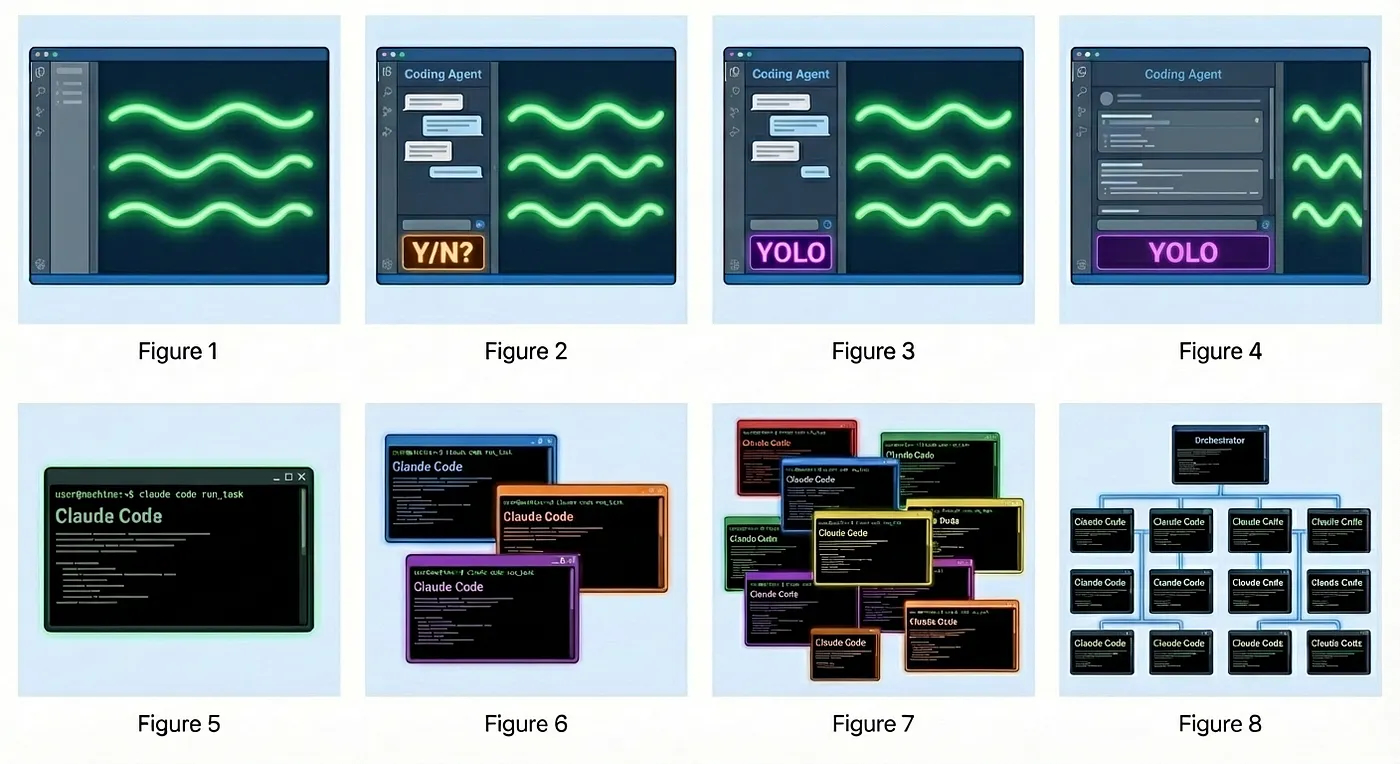
<p><a href="https://steve-yegge.medium.com/welcome-to-gas-town-4f25ee16dd04">What stage are you in your AI-assisted coding journey?</a></p>
<p><img class="img-fluid" src="https://images.sergiodelamo.com/ai-ide-journey.jpg" alt="The 8 Stages of Dev Evolution To AI" /></p>
<blockquote>
<p><strong>Stage 1</strong>: Zero or Near-Zero AI: maybe code completions, sometimes ask Chat questions<br />
<strong>Stage 2</strong>: Coding agent in IDE, permissions turned on. A narrow coding agent in a sidebar asks your permission to run tools.<br />
<strong>Stage 3</strong>: Agent in IDE, YOLO mode: Trust goes up. You turn off permissions, agent gets wider.<br />
<strong>Stage 4</strong>: In IDE, wide agent: Your agent gradually grows to fill the screen. Code is just for diffs.<br />
<strong>Stage 5</strong>: CLI, single agent. YOLO. Diffs scroll by. You may or may not look at them.<br />
<strong>Stage 6</strong>: CLI, multi-agent, YOLO. You regularly use 3 to 5 parallel instances. You are very fast.<br />
<strong>Stage 7</strong>: 10+ agents, hand-managed. You are starting to push the limits of hand-management.<br />
<strong>Stage 8</strong>: Building your own orchestrator. You are on the frontier, automating your workflow.</p>
</blockquote>

</article>
<article class='blog-post'>
  <h2 class='display-6 link-body-emphasis mb-1'>
    <a href='https://www.youtube.com/watch?v=Ne9CGoHwACY'>📼 Build an MCP Server with Java at Devoxx Belgium</a>
  </h2>
  <p class='blog-post-meta'>Jan 2026, 15. by Sergio del Amo
    <a href='https://sergiodelamo.com/blog/2026-01-15-video-of-my-devoxx-talk-about-mcp.html'>Permalink</a>
  </p>
<p>Video of my Devoxx deep dive session about how to build an MCP Server with Java.</p>

</article>
<article class='blog-post'>
  <h2 class='display-6 link-body-emphasis mb-1'>
    <a href='https://www.youtube.com/watch?v=93fbmBLhJB8'>📼 Build an MCP server with Java at Madrid JUG</a>
  </h2>
  <p class='blog-post-meta'>Jan 2026, 14. by Sergio del Amo
    <a href='https://sergiodelamo.com/blog/2026-01-13-madrid-jug-java-mcp.html'>Permalink</a>
  </p>
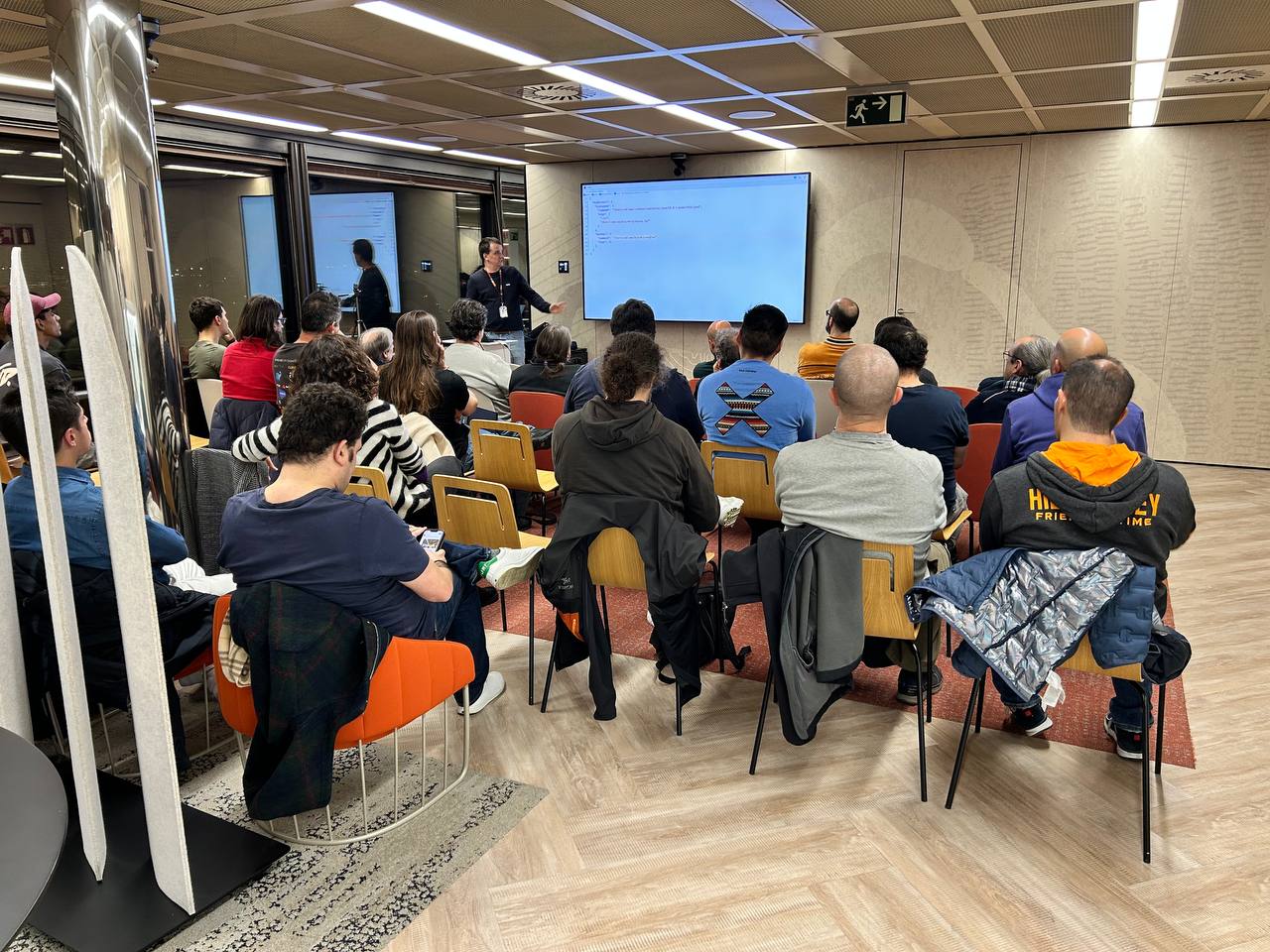
<p>I delivered a talk in Spanish about how to build an MCP server using Java frameworks like Micronaut, Spring Boot, and Quarkus at Madrid JUG.</p>
<p>I updated the MCP demos in my <a href="https://github.com/sdelamo/devoxxbe-2025-mcp-server">GitHub Repository</a>, and the <a href="https://www.youtube.com/watch?v=93fbmBLhJB8">video</a> is available on the Madrid JUG YouTube channel.</p>
<p><img class="img-fluid" src="https://images.sergiodelamo.com/2026-01-13-madrid-jug-mcp-server.jpg" alt="Madrid JUG Java MCP Server Meetup" /></p>
<p><a href="https://secure.meetupstatic.com/photos/event/8/0/1/7/highres_532052791.webp?w=1080"><img class="img-fluid" src="https://images.sergiodelamo.com/2026-01-13-madrid-jug-meetup.png" alt="" /></a></p>

</article>
<article class='blog-post'>
  <h2 class='display-6 link-body-emphasis mb-1'>
    <a href='https://www.stringtemplate.org'>StringTemplate</a>
  </h2>
  <p class='blog-post-meta'>Jan 2026, 09. by Sergio del Amo
    <a href='https://sergiodelamo.com/blog/2026-01-09-string-template.html'>Permalink</a>
  </p>
<p>While reading <a href="https://www.manning.com/books/spring-ai-in-action">Spring AI in Action</a>, I discovered <a href="https://www.stringtemplate.org">StringTemplate</a>.</p>
<blockquote>
<p>StringTemplate is a Java template engine for generating source code, web pages, emails, or any other formatted text output.
StringTemplate is particularly good at code generators, multiple site skins, and internationalization / localization. StringTemplate also powers ANTLR.</p>
</blockquote>
<ul>
<li><a href="https://es.wikipedia.org/wiki/Licencia_BSD">License BSD</a></li>
<li><a href="https://www.stringtemplate.org">Website</a></li>
<li><a href="https://central.sonatype.com/artifact/org.antlr/stringtemplate/">Maven Central Repository</a></li>
<li><a href="https://github.com/antlr/stringtemplate4">GitHub Repository</a></li>
<li><a href="https://plugins.jetbrains.com/plugin/8041-stringtemplate-v4">IntelliJ Plugin</a></li>
</ul>
<p>I am thinking of adding support for StringTemplate in <a href="https://micronaut-projects.github.io/micronaut-views/latest/guide/">Micronaut Views</a>.</p>
<pre><code class="language-java">String template = &quot;&quot;&quot;
        You are a helpful assistant, answering questions about tabletop games.
        If you don't know anything about the game or don't know the answer,
        say &quot;I don't know&quot;.
        
        The game is {game}.
        
        The question is: {question}.&quot;&quot;&quot;;
String prompt = new ST(template, '{', '}')
        .add(&quot;game&quot;, question.gameTitle())
        .add(&quot;question&quot;, question.question())
        .render();
</code></pre>

</article>
<article class='blog-post'>
  <h2 class='display-6 link-body-emphasis mb-1'>
    <a href='https://sergiodelamo.com/blog/2025-11-21-null-away.html'>Micronaut NullAway and JSPecify</a>
  </h2>
  <p class='blog-post-meta'>Nov 2025, 21. by Sergio del Amo</p>
<p>In this blog post, I show you how to configure a Micronaut 4 application to use JSpecify and NullAway to protect you from NPEs (Null Pointer Exceptions).</p>
<h2><a href="http://github.com/uber/NullAway">NullAway</a>:</h2>
<blockquote>
<p>NullAway is a tool to help eliminate NullPointerExceptions (NPEs) in your Java code. To use NullAway, first add @Nullable annotations in your code wherever a field, method parameter, or return value may be null. Given these annotations, NullAway performs a series of type-based, local checks to ensure that any pointer that gets dereferenced in your code cannot be null.</p>
</blockquote>
<h2>JSpecify Dependency</h2>
<p>Since Micronaut 4.10, Micronaut BOM contains the JSpecify dependency. Thus, you can add the following dependency to your project without specifying the version:</p>
<pre><code class="language-xml">&lt;dependency&gt;
   &lt;groupId&gt;org.jspecify&lt;/groupId&gt;
   &lt;artifactId&gt;jspecify&lt;/artifactId&gt;
&lt;/dependency&gt;
</code></pre>
<h2>NullAway with Gradle</h2>
<p><a href="https://github.com/sdelamo/micronaut-gradle-nullaway-demo/tree/main">GitHub Repository with a Gradle Micronaut Application which uses <code>NullAway</code></a></p>
<p>To use <a href="http://github.com/uber/NullAway">NullAway</a> in a Gradle Micronaut Application. You need to add the <a href="https://github.com/tbroyer/gradle-errorprone-plugin">Gradle error prone plugin</a> and such configuration:</p>
<pre><code class="language-kotlin">plugins {
...
..
.
    id(&quot;net.ltgt.errorprone&quot;) version &quot;4.3.0&quot;
}
dependencies {
...
..
.
    implementation(&quot;org.jspecify:jspecify&quot;)
    errorprone(&quot;com.uber.nullaway:nullaway:0.12.12&quot;)
    errorprone(&quot;com.google.errorprone:error_prone_core:2.44.0&quot;)
}
tasks.withType&lt;JavaCompile&gt;().configureEach {
    options.errorprone {
        check(&quot;NullAway&quot;, net.ltgt.gradle.errorprone.CheckSeverity.ERROR)
        option(&quot;NullAway:AnnotatedPackages&quot;, example.micronaut&quot;)
        if (name.lowercase().contains(&quot;test&quot;)) {
            disable(&quot;NullAway&quot;)
        }
    }
}
</code></pre>
<ul>
<li><code>check(&quot;NullAway&quot;, CheckSeverity.ERROR)</code> sets <code>NullAway</code> issues to the error level.</li>
<li><code>option(&quot;NullAway:AnnotatedPackages&quot;, “example.micronaut”)</code> tells <code>NullAway</code> that source code in packages under the <code>example.micronaut</code> namespace should be checked for null dereferences and proper usage of <code>@Nullable</code> annotations, and that class files in these packages should be assumed to have correct usage of <code>@Nullable</code>.</li>
<li>Then, it disables <code>NullAway</code> on test code.</li>
</ul>
<p><a href="https://github.com/uber/NullAway?tab=readme-ov-file#java-non-android">These instructions are described in the NullAway README.md file</a>.</p>
<h2>NullAway with Maven</h2>
<p><a href="https://github.com/sdelamo/micronaut-maven-nullaway-demo/tree/main">GitHub Repository with a Maven Micronaut Application which uses <code>NullAway</code></a></p>
<pre><code class="language-xml">
&lt;?xml version=&quot;1.0&quot; encoding=&quot;UTF-8&quot;?&gt;
&lt;project xmlns=&quot;http://maven.apache.org/POM/4.0.0&quot; xmlns:xsi=&quot;http://www.w3.org/2001/XMLSchema-instance&quot;
         xsi:schemaLocation=&quot;http://maven.apache.org/POM/4.0.0 http://maven.apache.org/xsd/maven-4.0.0.xsd&quot;&gt;
...
..
.
  &lt;properties&gt;
...
..
.
    &lt;error-prone.version&gt;2.29.2&lt;/error-prone.version&gt;
    &lt;nullaway.version&gt;0.12.12&lt;/nullaway.version&gt;
  &lt;/properties&gt;
...
..
.
  &lt;dependencies&gt;
      &lt;dependency&gt;
          &lt;groupId&gt;org.jspecify&lt;/groupId&gt;
          &lt;artifactId&gt;jspecify&lt;/artifactId&gt;
          &lt;version&gt;1.0.0&lt;/version&gt;
      &lt;/dependency&gt;
...
..
.
  &lt;/dependencies&gt;
  &lt;build&gt;
    &lt;plugins&gt;
...
..
.
      &lt;plugin&gt;
        &lt;groupId&gt;org.apache.maven.plugins&lt;/groupId&gt;
        &lt;artifactId&gt;maven-compiler-plugin&lt;/artifactId&gt;
        &lt;configuration&gt;
          &lt;compilerArgs&gt;
            &lt;arg&gt;-XDcompilePolicy=simple&lt;/arg&gt;
            &lt;arg&gt;--should-stop=ifError=FLOW&lt;/arg&gt;
            &lt;arg&gt;-Xplugin:ErrorProne -Xep:NullAway:ERROR -XepOpt:NullAway:AnnotatedPackages=example.micronaut&lt;/arg&gt;
            &lt;arg&gt;-Amicronaut.processing.group=mn.maven.jspecify&lt;/arg&gt;
            &lt;arg&gt;-Amicronaut.processing.module=mn-maven-jspecify&lt;/arg&gt;
          &lt;/compilerArgs&gt;
          &lt;annotationProcessorPaths combine.children=&quot;append&quot;&gt;
            &lt;path&gt;
              &lt;groupId&gt;com.google.errorprone&lt;/groupId&gt;
              &lt;artifactId&gt;error_prone_core&lt;/artifactId&gt;
              &lt;version&gt;${error-prone.version}&lt;/version&gt;
            &lt;/path&gt;
            &lt;path&gt;
              &lt;groupId&gt;com.uber.nullaway&lt;/groupId&gt;
              &lt;artifactId&gt;nullaway&lt;/artifactId&gt;
              &lt;version&gt;${nullaway.version}&lt;/version&gt;
            &lt;/path&gt;
            &lt;!-- Existing Micronaut processors --&gt;
...
..
.
          &lt;/annotationProcessorPaths&gt;
        &lt;/configuration&gt;
      &lt;/plugin&gt;
    &lt;/plugins&gt;
  &lt;/build&gt;
&lt;/project&gt;
</code></pre>
<p>The above example adds two annotation processors. <a href="https://errorprone.info/docs/flags#maven">Error Prone</a> and <a href="https://github.com/uber/NullAway/wiki/Configuration">NullAway</a>.</p>
<p>The previous code sample <a href="https://github.com/uber/NullAway/wiki/Configuration">configures <code>NullAway</code></a>:</p>
<ul>
<li><code>-XepOpt:NullAway:AnnotatedPackages</code> sets the list of packages that should be considered properly annotated according to the NullAway convention</li>
<li><code>-Xep:NullAway:ERROR</code> sets the NullAway check severity to ERROR, which should cause compilation to fail when <code>NullAway</code> violations are found.</li>
</ul>
<p>As <a href="https://errorprone.info/docs/installation#maven">described in the error prone Maven documentation</a>, I added a <code>.mvn/jvmconfig</code> file with the following content:</p>
<pre><code>--add-exports jdk.compiler/com.sun.tools.javac.api=ALL-UNNAMED
--add-exports jdk.compiler/com.sun.tools.javac.file=ALL-UNNAMED
--add-exports jdk.compiler/com.sun.tools.javac.main=ALL-UNNAMED
--add-exports jdk.compiler/com.sun.tools.javac.model=ALL-UNNAMED
--add-exports jdk.compiler/com.sun.tools.javac.parser=ALL-UNNAMED
--add-exports jdk.compiler/com.sun.tools.javac.processing=ALL-UNNAMED
--add-exports jdk.compiler/com.sun.tools.javac.tree=ALL-UNNAMED
--add-exports jdk.compiler/com.sun.tools.javac.util=ALL-UNNAMED
--add-opens jdk.compiler/com.sun.tools.javac.code=ALL-UNNAMED
--add-opens jdk.compiler/com.sun.tools.javac.comp=ALL-UNNAMED
</code></pre>
<p>A failure looks like:</p>
<pre><code>[INFO] ------------------------------------------------------------------------
[ERROR] Failed to execute goal org.apache.maven.plugins:maven-compiler-plugin:3.14.1:compile (default-compile) on project mn-maven-jspecify: Compilation failure
[ERROR] /Users/sdelamo/github/sdelamo/micronaut-maven-nullaway-demo/src/main/java/example/micronaut/GreetingController.java:[21,39] [NullAway] dereferenced expression greetingService.greet() is @Nullable
[ERROR]     (see http://t.uber.com/nullaway )
[ERROR] 
[ERROR] -&gt; [Help 1]
[ERROR] 
</code></pre>
</article>
<article class='blog-post'>
  <h2 class='display-6 link-body-emphasis mb-1'>
    <a href='https://mylearn.oracle.com/ou/course/micronaut-fundamentals/151938/'>Micronaut Fundamentals</a>
  </h2>
  <p class='blog-post-meta'>Oct 2025, 29. by Sergio del Amo
    <a href='https://sergiodelamo.com/blog/2025-10-29-micronaut-fundamentals.html'>Permalink</a>
  </p>
<p>During this year, I recorded Micronaut Fundamentals, a video course available for free on <a href="https://mylearn.oracle.com/ou/course/micronaut-fundamentals/151938/">Oracle MyLearn</a> with an OCI Free Learning Subscription.</p>
<p>It is a 7-hour and 37-minute course covering the following topics:</p>
<ul>
<li>Introduction to Micronaut</li>
<li>Micronaut Documentation</li>
<li>Creating your first Micronaut application</li>
<li>Using Micronaut in popular IDEs</li>
<li>Exploring a Micronaut application</li>
<li>Micronaut Build Plugins</li>
<li>Micronaut Test</li>
<li>Micronaut Core Concepts</li>
<li>Serialization</li>
<li>Application Events</li>
<li>Source Code Generation</li>
<li>Configuration</li>
<li>Dependency Injection</li>
<li>HTTP Client</li>
<li>HTTP Server</li>
<li>Filters</li>
<li>Management Endpoints</li>
<li>Logging</li>
<li>Validation</li>
<li>Error formats</li>
<li>Error handling</li>
<li>OpenAPI</li>
<li>Packaging and distribution</li>
<li>GraalVM Native Image</li>
<li>Graal Development Kit for Micronaut</li>
</ul>
<p>Announcement in <a href="https://blogs.oracle.com/java/post/micronaut-fundamentals">Oracle Blog</a>.</p>

</article>
<article class='blog-post'>
  <h2 class='display-6 link-body-emphasis mb-1'>
    <a href='https://github.com/casbin/jcasbin'>jCasbin</a>
  </h2>
  <p class='blog-post-meta'>Oct 2025, 23. by Sergio del Amo
    <a href='https://sergiodelamo.com/blog/2025-10-23-jcasbin.html'>Permalink</a>
  </p>
<blockquote>
<p>jCasbin is a powerful and efficient open-source access control library for Java projects. It provides support for enforcing authorization based on various access control models.</p>
</blockquote>

</article>
<article class='blog-post'>
  <h2 class='display-6 link-body-emphasis mb-1'>
    <a href='https://stefanbirkner.github.io/system-rules/'>System Rules</a>
  </h2>
  <p class='blog-post-meta'>Oct 2025, 21. by Sergio del Amo
    <a href='https://sergiodelamo.com/blog/2025-10-21-junit-system-rules.html'>Permalink</a>
  </p>
<blockquote>
<p>A collection of JUnit rules for testing code that uses java.lang.System.</p>
</blockquote>

</article>
<article class='blog-post'>
  <h2 class='display-6 link-body-emphasis mb-1'>
    <a href='https://sergiodelamo.com/blog/2025-10-06-vs-code-mcp-server.html'>Add an MCP Server to VS Code</a>
  </h2>
  <p class='blog-post-meta'>Oct 2025, 03. by Sergio del Amo</p>
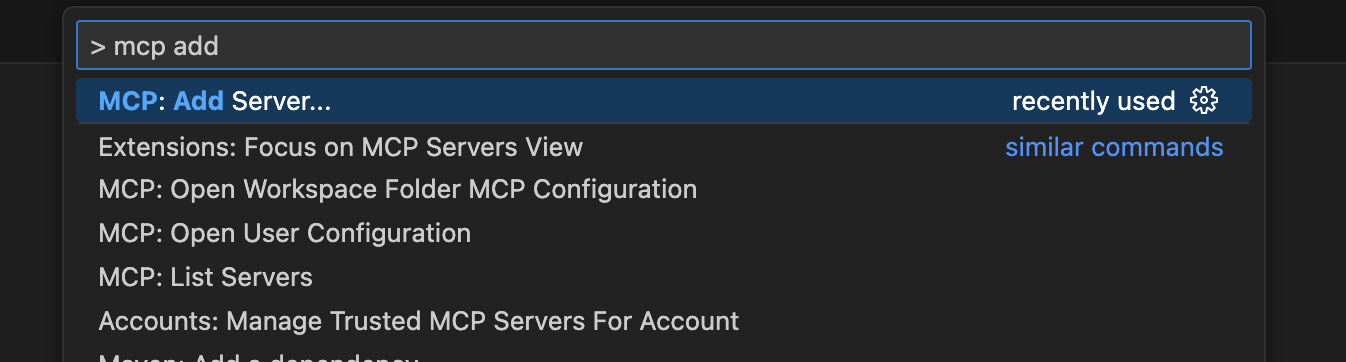
<p>To register a MCP Server in VS Code open the command palette with (CMD + Shift + P) and search for &quot;Add MCP&quot;</p>
<p><img class="img-fluid" src="https://images.sergiodelamo.com/vs-code-preference-add-mcp-server.png" alt="" /></p>
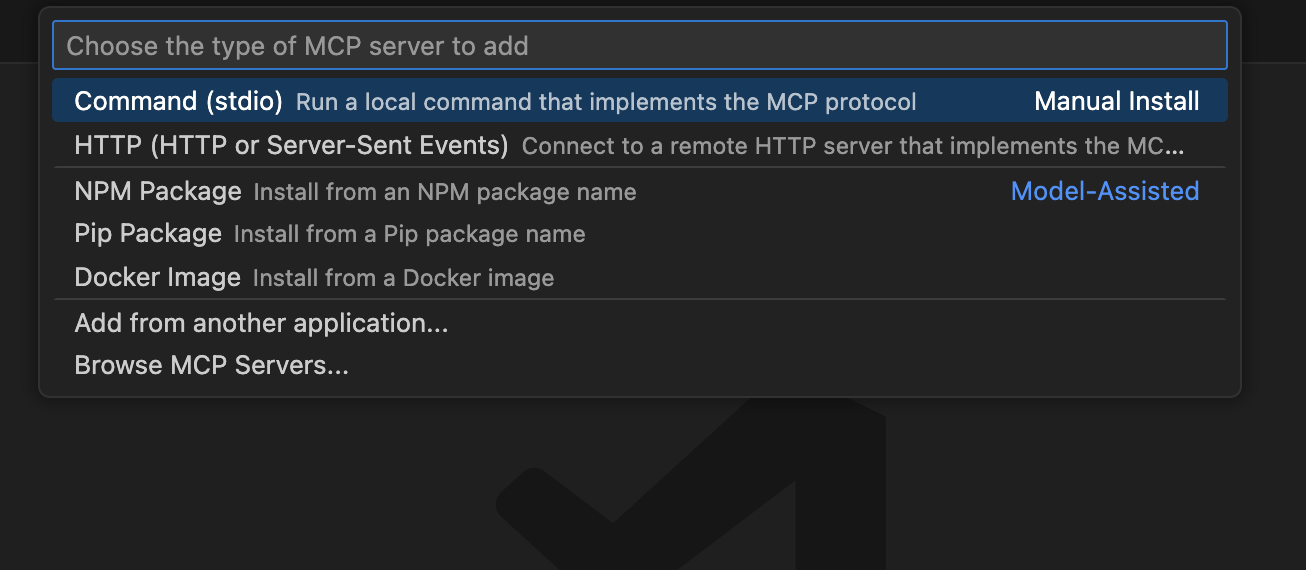
<p>Select your MCP Server transport (STDIO or HTTP)</p>
<p><img class="img-fluid" src="https://images.sergiodelamo.com/vs-code-mcp-server-transport-selection.png" alt="" /></p>
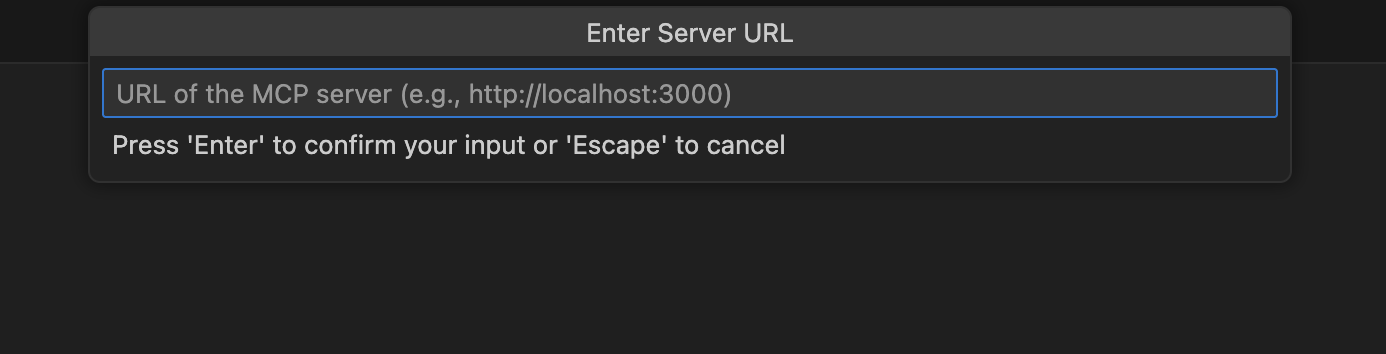
<p>If HTTP, enter your MCP Server URL.</p>
<p><img class="img-fluid" src="https://images.sergiodelamo.com/vs-code-mcp-server-enter-url.png" alt="" /></p>
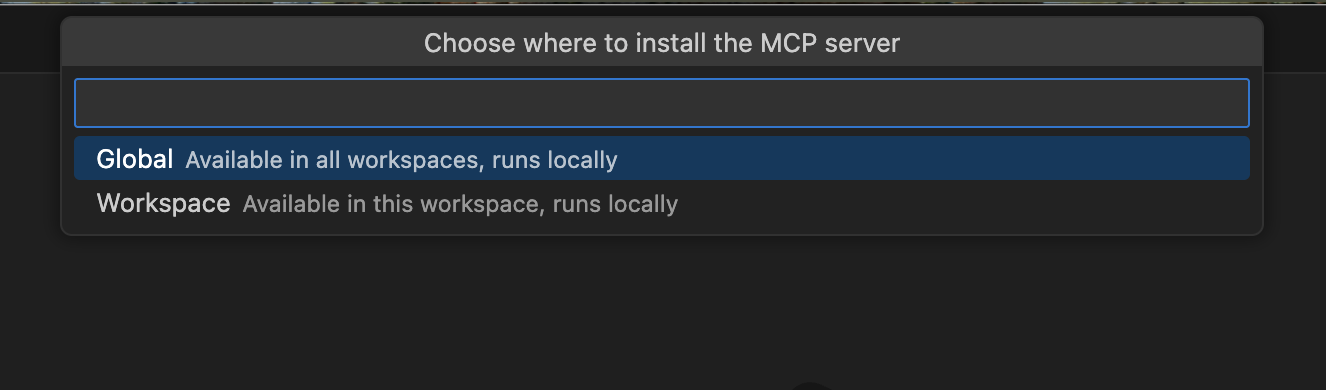
<p>Select whether you want to install the MCP Server globally or for the current workspace only.</p>
<p><img class="img-fluid" src="https://images.sergiodelamo.com/vs-code-select-global-or-workspace.png" alt="" /></p>
<p>Enter your MCP Server in the <code>mcp.json</code> configuration file.</p>
<p>The following example shows an MCP Server which uses Streamable HTTP transport.</p>
<pre><code class="language-json">{
  &quot;servers&quot;: {
    &quot;micronautfun&quot;: {
      &quot;url&quot;: &quot;https://micronaut.fun/mcp&quot;,
      &quot;type&quot;: &quot;http&quot;
    }
  },
  &quot;inputs&quot;: []
}
</code></pre>
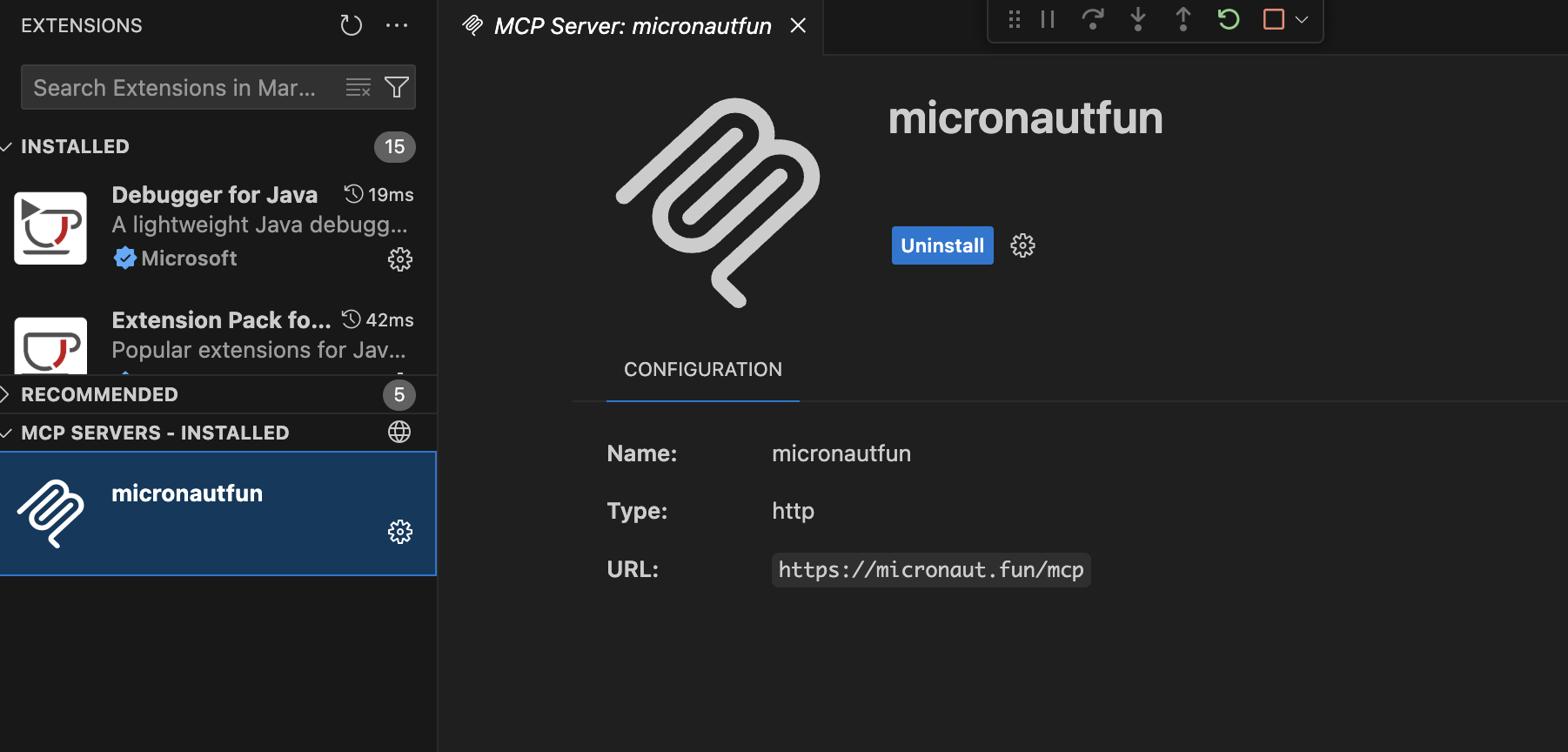
<p>You should see your MCP listed as installed.</p>
<p><img class="img-fluid" src="https://images.sergiodelamo.com/vs-code-mcp-servers-installed-micronaut-fun.png" alt="" /></p>
</article>
<article class='blog-post'>
  <h2 class='display-6 link-body-emphasis mb-1'>
    <a href='https://sergiodelamo.com/blog/2025-10-03-intellij-idea-github-copilot-mcp-server.html'>Add an MCP Server to GitHub Copilot in IntelliJ IDEA</a>
  </h2>
  <p class='blog-post-meta'>Oct 2025, 03. by Sergio del Amo</p>
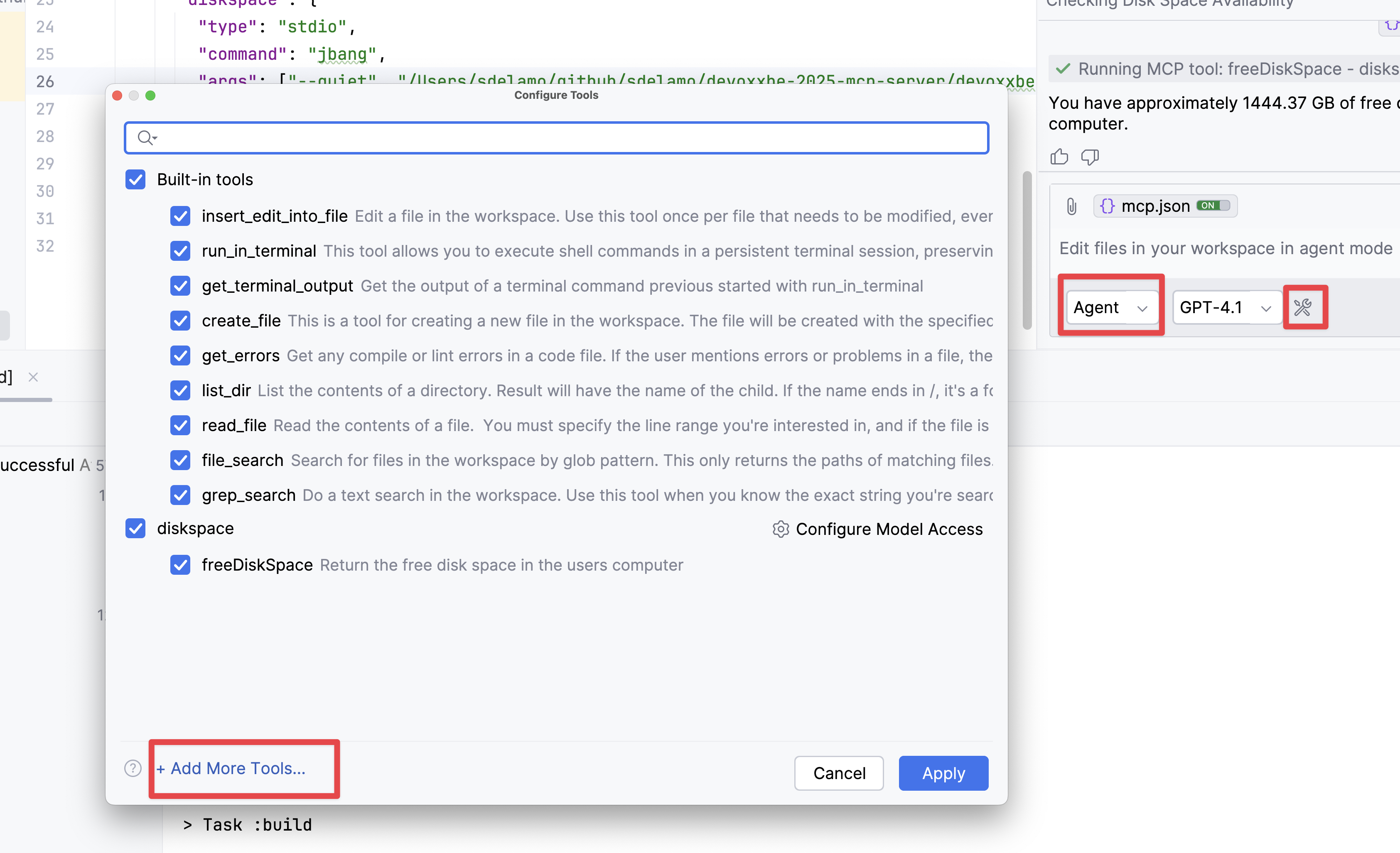
<p>To register a MCP Server in GitHub Copilot for IntelliJ IDEA, change to <code>Agent</code> model, click the <code>Tools</code> icon and click <code>Add More Tools...</code></p>
<p><img class="img-fluid" src="https://images.sergiodelamo.com/intellij-idea-copilot-mcp-server.png" alt="" /></p>
<p>Enter your MCP Server in the <code>mcp.json</code> configuration file. The following example shows an MCP Server packaged as a FAT jar which uses STDIO transport.</p>
<pre><code class="language-json">{
	&quot;servers&quot;: {
	  &quot;diskspace&quot;: {
		&quot;type&quot;: &quot;stdio&quot;,
		&quot;command&quot;: &quot;java&quot;,
		&quot;args&quot;: [&quot;-jar&quot;, &quot;/Users/sdelamo/bin/diskspace-0.1-all.jar&quot;]
	  }

	}
}
</code></pre>
</article>
<article class='blog-post'>
  <h2 class='display-6 link-body-emphasis mb-1'>
    <a href='https://docs.claude.com/en/docs/claude-code/mcp'>Add an MCP Server to Claude Code</a>
  </h2>
  <p class='blog-post-meta'>Oct 2025, 03. by Sergio del Amo
    <a href='https://sergiodelamo.com/blog/2025-10-03-claude-code-mcp-server.html'>Permalink</a>
  </p>
<p>You can connect <a href="https://docs.claude.com/en/docs/claude-code/mcp">Claude Code to tools via MCP</a>. You can use the <code>claude mcp add</code> command to add an MCP server.</p>
<pre><code>claude mcp add --transport http micronautfun https://micronaut.fun/mcp
</code></pre>
<p>The previous command adds an entry in the <code>mcpServers</code> of the project:</p>
<pre><code class="language-json">&quot;mcpServers&quot;: {
   &quot;micronautfun&quot;: {
     &quot;type&quot;: &quot;http&quot;,
     &quot;url&quot;: &quot;https://micronaut.fun/mcp&quot;
   }
},
</code></pre>
<p>These commands modify the <code>vi $HOME/.claude.json</code> configuration file.</p>
<p>You can list your project MCP servers with the <code>claude mcp list</code> command.</p>

</article>
<article class='blog-post'>
  <h2 class='display-6 link-body-emphasis mb-1'>
    <a href='https://sergiodelamo.com/blog/2025-10-03-claude-desktop-mcp-server.html'>Add an MCP Server to Claude Desktop</a>
  </h2>
  <p class='blog-post-meta'>Oct 2025, 03. by Sergio del Amo</p>
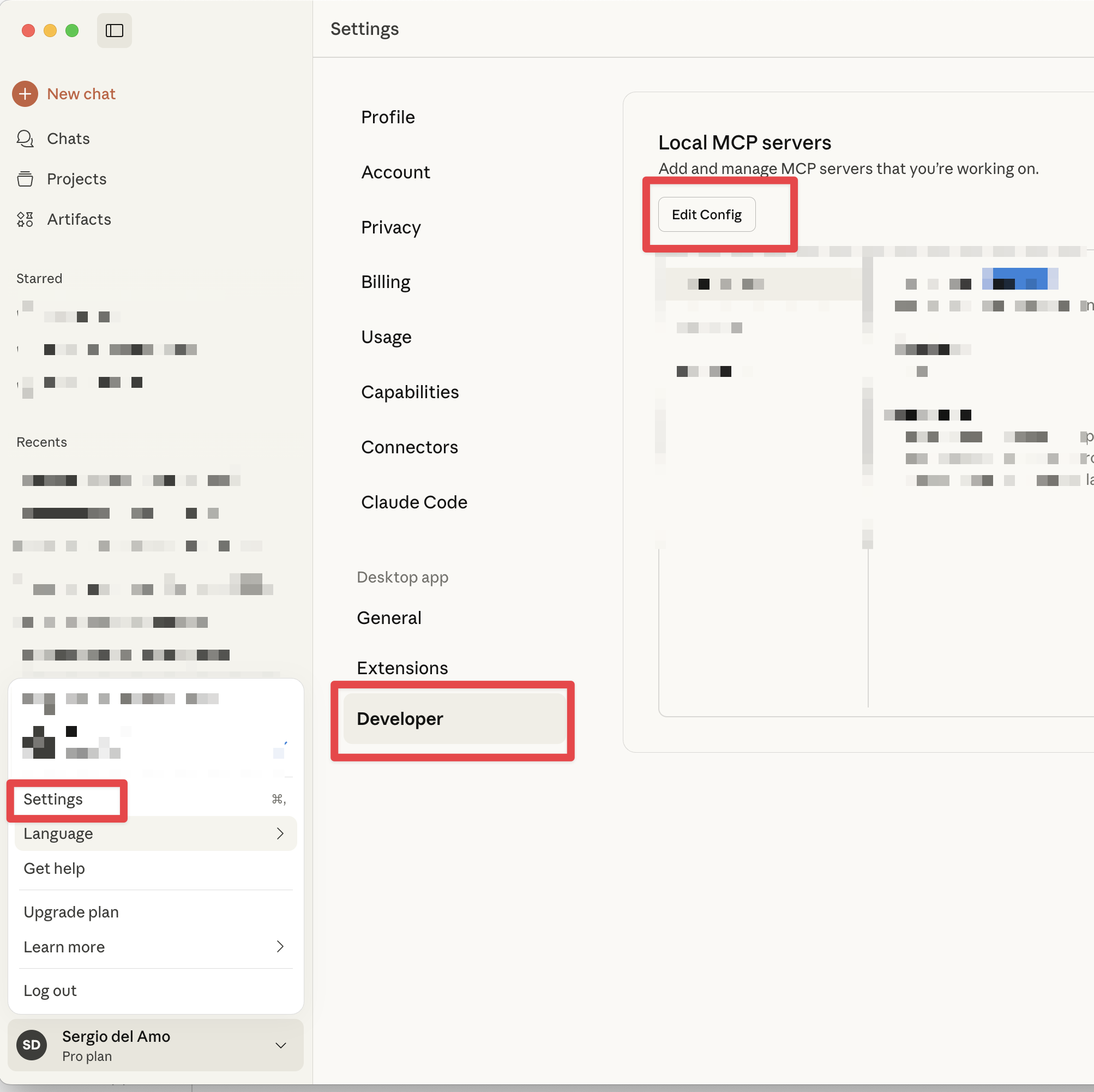
<p>To register a MCP Server in Claude Desktop, click on <code>Settings</code>, click the <code>Developer</code>, and click <code>Edit Config</code></p>
<p><img class="img-fluid" src="https://images.sergiodelamo.com/claude-desktop-mcp-server.png" alt="" /></p>
<p>Enter your MCP Server in the <code>claude_desktop_config.json</code> configuration file. The following example shows an MCP Server packaged as a FAT jar which uses STDIO transport.</p>
<pre><code class="language-json">{
  &quot;mcpServers&quot;: {
    &quot;diskspace&quot;: {
      &quot;command&quot;: &quot;java&quot;,
      &quot;args&quot;: [&quot;-jar&quot;, &quot;/Users/sdelamo/bin/diskspace-0.1-all.jar&quot;]
    }
  }
}
</code></pre>
</article>
<article class='blog-post'>
  <h2 class='display-6 link-body-emphasis mb-1'>
    <a href='https://sergiodelamo.com/blog/2025-10-01-use-claudecode-and-docker-desktop.html'>Use Claude Code and Docker Destkop</a>
  </h2>
  <p class='blog-post-meta'>Oct 2025, 01. by Sergio del Amo</p>
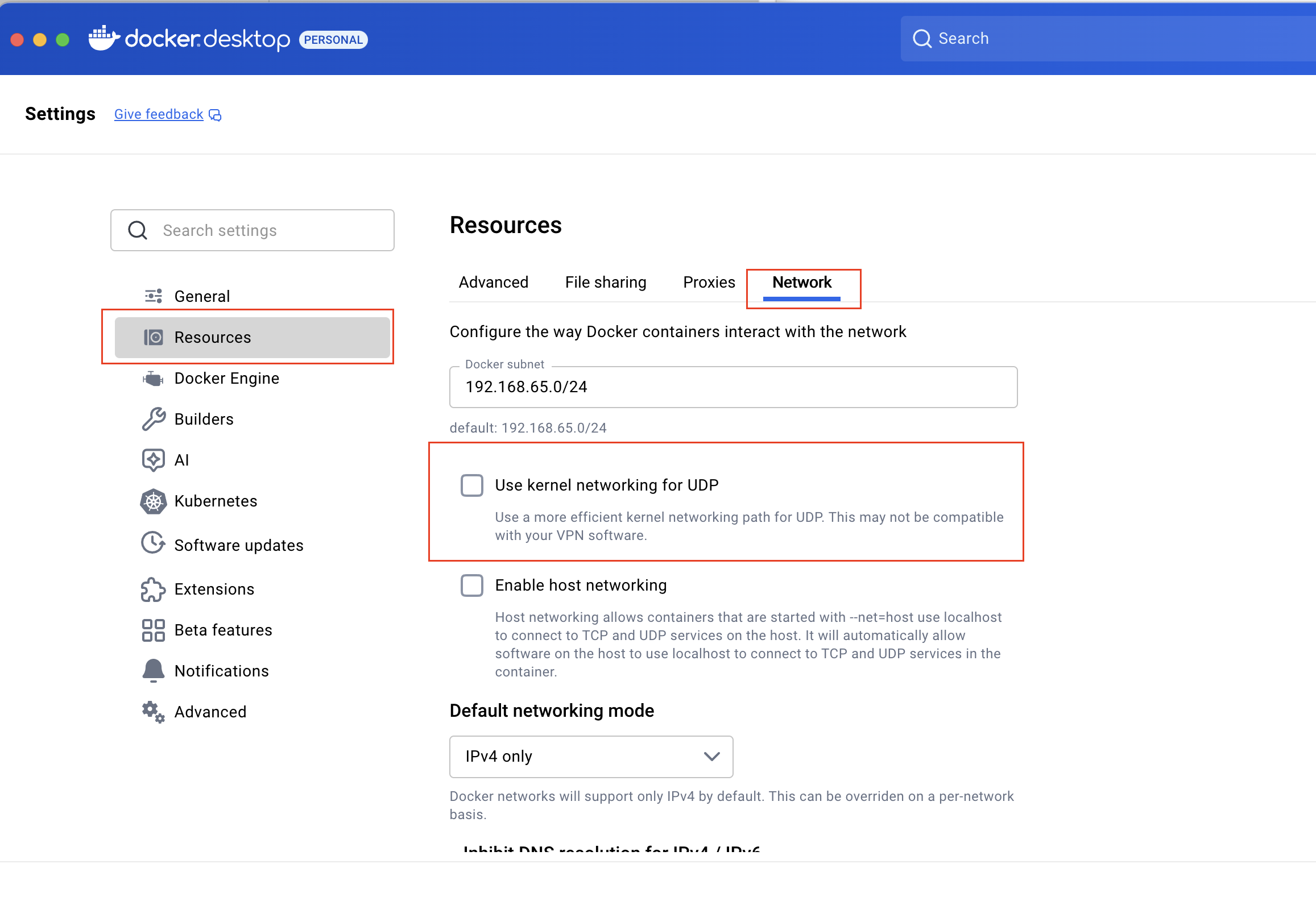
<p>If you see error messages such as <code>API Error: Connection error</code> while using <a href="https://www.claude.com/product/claude-code">Claude Code</a> and <a href="https://www.docker.com/products/docker-desktop/">Docker Desktop</a>, <a href="https://github.com/anthropics/claude-code/issues/653#issuecomment-3028733768">toggling off this setting</a> may help you.</p>
<p><img class="img-fluid" src="https://images.sergiodelamo.com/docker-desktop-resources-network-turn-off-use-kernel-networking-for-udp.png" alt="" /></p>
</article>
<article class='blog-post'>
  <h2 class='display-6 link-body-emphasis mb-1'>
    <a href='https://m.devoxx.com/events/dvbe25/talks/24552/build-an-mcp-server-with-java'>Devoxx Talk - Build an MCP Server with Java</a>
  </h2>
  <p class='blog-post-meta'>Aug 2025, 17. by Sergio del Amo
    <a href='https://sergiodelamo.com/blog/2025-08-17-devoxx-be-build-an-mcp-server-with-java.html'>Permalink</a>
  </p>
<p>I am excited to be talking at Devoxx Belgium, arguably the most important Java conference in Europe, about how to build an MCP Server with Java.</p>

</article>
<article class='blog-post'>
  <h2 class='display-6 link-body-emphasis mb-1'>
    <a href='https://sergiodelamo.com/blog/2025-08-04.html'>Moving my Mastodon account to foojay.social</a>
  </h2>
  <p class='blog-post-meta'>Aug 2025, 04. by Sergio del Amo</p>
<p>My new handle is <a href="https://foojay.social/@sdelamo">@sdelamo@foojay.social</a>.</p>
<p>I <a href="https://www.youtube.com/watch?v=XHK1iXdpvg8">followed this video</a> to migrate from <a href="https://jvm.social">jvm.social</a> to
<a href="https://foojay.social/@sdelamo">foojay.social</a>.</p>
</article>
<article class='blog-post'>
  <h2 class='display-6 link-body-emphasis mb-1'>
    <a href='https://www.youtube.com/watch?v=jJCObNiajtI'>📼 Micronaut Constraints Validation</a>
  </h2>
  <p class='blog-post-meta'>Aug 2025, 03. by Sergio del Amo
    <a href='https://sergiodelamo.com/blog/2025-08-03-micronaut-constraints_validation.html'>Permalink</a>
  </p>
<p>In this video, I show you how to set up Micronaut Validation to validate the constraints of a Java Record.</p>

</article>
<article class='blog-post'>
  <h2 class='display-6 link-body-emphasis mb-1'>
    <a href='https://www.youtube.com/watch?v=dEJCN9JDv1o'>📼 Micronaut Development environment</a>
  </h2>
  <p class='blog-post-meta'>Aug 2025, 03. by Sergio del Amo
    <a href='https://sergiodelamo.com/blog/2025-08-03-micronaut-development_mode.html'>Permalink</a>
  </p>
<p>In this video, I show you how to set up a Micronaut Development environment.</p>

</article>
<article class='blog-post'>
  <h2 class='display-6 link-body-emphasis mb-1'>
    <a href='https://www.youtube.com/watch?v=rP1-70MZ6HI'>📼 Micronaut @EachProperty</a>
  </h2>
  <p class='blog-post-meta'>Aug 2025, 03. by Sergio del Amo
    <a href='https://sergiodelamo.com/blog/2025-08-04-micronaut-each-property.html'>Permalink</a>
  </p>
<p>In this video, I show you how to use the <code>@EachProperty</code> to load configuration into your Micronaut application.</p>

</article>
<article class='blog-post'>
  <h2 class='display-6 link-body-emphasis mb-1'>
    <a href='https://google.github.io/oss-fuzz/'>OSS-Fuzz</a>
  </h2>
  <p class='blog-post-meta'>Aug 2025, 02. by Sergio del Amo
    <a href='https://sergiodelamo.com/blog/oss-fuzzing.html'>Permalink</a>
  </p>
<blockquote>
<p>OSS-Fuzz aims to make common open source software more secure and stable by combining modern fuzzing techniques with scalable, distributed execution.</p>
</blockquote>
<p>Micronaut is using this great initiative by Google.</p>

</article>&nbsp;</article>
</main>

<script src="https://sergiodelamo.com/javascripts/bootstrap.bundle.min.js"></script>

</body>
</html>