<?xml version="1.0" encoding="UTF-8"?>
<?xml-stylesheet type="text/xsl" media="screen" href="/~d/styles/rss2full.xsl"?><?xml-stylesheet type="text/css" media="screen" href="http://feeds.feedburner.com/~d/styles/itemcontent.css"?><rss xmlns:content="http://purl.org/rss/1.0/modules/content/" xmlns:wfw="http://wellformedweb.org/CommentAPI/" xmlns:dc="http://purl.org/dc/elements/1.1/" xmlns:atom="http://www.w3.org/2005/Atom" xmlns:sy="http://purl.org/rss/1.0/modules/syndication/" xmlns:slash="http://purl.org/rss/1.0/modules/slash/" xmlns:feedburner="http://rssnamespace.org/feedburner/ext/1.0" version="2.0">

<channel>
	<title>SocialCompare's blog</title>
	
	<link>http://blog.socialcompare.com</link>
	<description>Blog of SocialCompare, the community to create and share collaborative comparisons tables about everything.</description>
	<lastBuildDate>Thu, 13 Oct 2011 22:08:42 +0000</lastBuildDate>
	<language>en-US</language>
	<sy:updatePeriod>hourly</sy:updatePeriod>
	<sy:updateFrequency>1</sy:updateFrequency>
	<generator>http://wordpress.org/?v=3.5.1</generator>
		<atom10:link xmlns:atom10="http://www.w3.org/2005/Atom" rel="self" type="application/rss+xml" href="http://feeds.feedburner.com/socialcompare" /><feedburner:info uri="socialcompare" /><atom10:link xmlns:atom10="http://www.w3.org/2005/Atom" rel="hub" href="http://pubsubhubbub.appspot.com/" /><item>
		<title>New features for our turnkey comparison engine and our crowdsourced comparison platform</title>
		<link>http://feedproxy.google.com/~r/socialcompare/~3/6xZlpCEgG3s/</link>
		<comments>http://blog.socialcompare.com/2011/10/13/new-features-for-our-turnkey-comparison-engine-and-our-crowdsourced-comparison-platform/#comments</comments>
		<pubDate>Thu, 13 Oct 2011 22:08:04 +0000</pubDate>
		<dc:creator>Vanina</dc:creator>
				<category><![CDATA[Development]]></category>
		<category><![CDATA[collaborative comparison matrix]]></category>
		<category><![CDATA[comparison chart]]></category>
		<category><![CDATA[comparison table]]></category>
		<category><![CDATA[crowdsourced platform]]></category>
		<category><![CDATA[turnkey comparison engine]]></category>

		<guid isPermaLink="false">http://blog.socialcompare.com/?p=1695</guid>
		<description><![CDATA[Between developments of the pro version of SocialCompare that enable everyone (without any technical skills) to easily build their own products comparison website or features software comparison site or services reviews or any else and the consumer version of our crowdsourced comparison site, we have not taken too much time posting on this blog but [...]]]></description>
				<content:encoded><![CDATA[<p>Between developments of the pro version of SocialCompare that enable everyone (without any technical skills) to easily build their own <a href="http://socialcompare.biz/">products comparison website</a> or features software comparison site or services reviews or any else and the consumer version of our <a href="http://socialcompare.com/fr">crowdsourced comparison site</a>, we have not taken too much time posting on this blog but we really continue to improve both versions of our <strong>comparison engine</strong>.</p>
<p>Below are some new features we have implemented recently:</p>
<ul>
<li>We have added a new option to the <strong>yes/no criteria</strong>, now there&#8217;s a third one that allows to be more gradual:<br />
<center><img class="size-full wp-image-1497 aligncenter" title = "yes no criterion SocialCompare" src = "http://blog.socialcompare.com/fr/files/2011/10/criteria-yes-no.png "alt ="yes no criterion SocialCompare" width="263" height ="71"/></center><span id="more-1695"></span><br />
These three states have visually 3 default icons. When you embed a table on your blog or website, you can choose between <strong>3 different designs</strong> (more or less large):<br />
<center><img class = "aligncenter size-full wp-image-1540" title = "Comparison Criteria Yes No Big" src = "http://blog.socialcompare.com/fr/files/2011/10/big-criteria-yes-no.png "alt ="Big Comparison Criteria Yes No" width ="260" height ="59"/><br />
<Img class = "aligncenter size-full wp-image-1537" title = "Comparison Criteria Yes No Medium" src = "http://blog.socialcompare.com/fr/files/2011/10/medium-criteria-yes-no.png" alt ="Comparison Criteria Yes No Medium" width ="230" height ="49"/><br />
<Img class = "aligncenter size-full wp-image-1538" title = "Tiny Comparison Criteria Yes No" src = "http://blog.socialcompare.com/fr/files/2011/10/tiny-criteria-yes-no1.png" alt ="Tiny Comparison Criteria Yes No" width ="139" height ="31"/></Center></li>
<li>We have added a new page to see <a href="http://socialcompare.com/fr/latest-activity">recent activities of SocialCompare&#8217;s members</a> (the latest additions, modifications, votes, notes&#8230;). </li>
<li>The table design have been slightly improved, especially for <strong>editing and error and warning handling</strong>.<br />
<center><img class = "aligncenter size-full wp-image-1516" title = "Errors and Warnings Management" src = "http://blog.socialcompare.com/fr/files/2011/10/errors-management.png" alt ="Errors and Warnings Management" width ="356" height ="85"/> </center> </li>
<li>We added <strong>direct web links</strong> on the items in the header tables, which allow you to see the aggregation of all the votes, ratings, comments associated with this sheet item (product, software, service&#8230;):<br />
<center><img class = "aligncenter size-full wp-image-1525" title = "Great Comparison Chart" src = "http://blog.socialcompare.com/fr/files/2011/10/great-comparison-chart.png" alt ="Great Comparison Chart" width ="329" height ="277"/></center></li>
<li>We have improved the ergonomy when <strong>adding a new comparison criterion</strong> by moving the choice of criteria type (text, yes/no, image &#8230; etc.) to the right of the input field instead of underneath this data input field. So it is always visible, even when the criteria suggestions appear (which are important in order <strong>to reuse existing content</strong> and to continually improve the SocialCompare database):<br />
<center><img class = "aligncenter size-full wp-image-1519" title = "add comparison criterion" src = "http://blog.socialcompare.com/fr/files/2011/10/add-comparison-criteria.png "alt ="add comparison criterion" width="413" height="315"/></center></li>
<li>In the pro version, we added a <strong>button criterion</strong> that allows you to easily create an action button pointing to a web link. There is also a new <strong>geolocation criterion</strong> (not really visible yet).<br />
<center> <img src = "http://blog.socialcompare.com/fr/files/2011/10/price-action-button-criteria.png" alt = "Button Price Criteria" title = "Price Criteria Button" width = "79" height = "36" class = "aligncenter size-full wp-image-1550" /> </center><br />
</Li></p>
<li><strong>UK web site URLs</strong> that end with co.uk are now better handled showing the relevant part of the URL (since before it was truncated in the wrong place). </li>
<li>And finally for <strong>votes or ratings, you can change the value</strong> that was initially chosen &#8230; it enables you to change your mind or correct the value if you made a mistake. This will change the previous value and change the comment associated with the comparison table or item sheet. </Li></Ul><br />
Please feel free to send us your comments and <strong>suggestions to improve</strong> our service!</p>
<img src="http://feeds.feedburner.com/~r/socialcompare/~4/6xZlpCEgG3s" height="1" width="1"/>]]></content:encoded>
			<wfw:commentRss>http://blog.socialcompare.com/2011/10/13/new-features-for-our-turnkey-comparison-engine-and-our-crowdsourced-comparison-platform/feed/</wfw:commentRss>
		<slash:comments>0</slash:comments>
		<feedburner:origLink>http://blog.socialcompare.com/2011/10/13/new-features-for-our-turnkey-comparison-engine-and-our-crowdsourced-comparison-platform/</feedburner:origLink></item>
		<item>
		<title>A Comparison Engine ready to use, easy to create and a white label solution…</title>
		<link>http://feedproxy.google.com/~r/socialcompare/~3/0uV-F4rNIfs/</link>
		<comments>http://blog.socialcompare.com/2011/07/04/a-comparison-engine-ready-to-use-easy-to-create-and-a-white-label-solution/#comments</comments>
		<pubDate>Mon, 04 Jul 2011 21:47:25 +0000</pubDate>
		<dc:creator>Vanina</dc:creator>
				<category><![CDATA[News]]></category>
		<category><![CDATA[comparison engine]]></category>
		<category><![CDATA[comparison script]]></category>
		<category><![CDATA[private comparison]]></category>
		<category><![CDATA[shopping guide]]></category>
		<category><![CDATA[turnkey comparison]]></category>
		<category><![CDATA[white label comparison]]></category>

		<guid isPermaLink="false">http://blog.socialcompare.com/?p=1615</guid>
		<description><![CDATA[We are finalizing the Professional version of the community site SocialCompare.com. It will be now possible, without technical or programming skills, to build your own Comparison Engine about everything. Usage may be various, either online stores that want to add a comparison engine to compare in details features or specifications of their products, or webmasters [...]]]></description>
				<content:encoded><![CDATA[<p>We are finalizing the Professional version of the community site SocialCompare.com. It will be now possible, <strong>without technical or programming skills, to <a href="http://socialcompare.biz/">build your own Comparison Engine</a> about everything</strong>.</p>
<p style="text-align: center;"><a href="http://socialcompare.biz/"><img class="size-full wp-image-1643 aligncenter" title="Build Your Own Comparison Engine" src="http://blog.socialcompare.com/wp-content/uploads/2011/07/build-own-comparison-engine.jpg" alt="Build Your Own Comparison Engine" width="225" height="450" /></a></p>
<p><span id="more-1615"></span><br />
Usage may be various, either online stores that want to add a comparison engine to <strong>compare in details features or specifications of their products</strong>, or webmasters who want to quickly set up a <strong>comparison website on services or products&#8230;</strong> (including <strong>affiliate marketers</strong>), or even companies, universities .. who want for their private needs to have <strong>a highly flexible, collaborative</strong> (editable by many persons) comparison engine, so allowing them to store data associated to various comparison criteria, and easily customizable (for example to <strong>compare competitors, suppliers</strong>&#8230;).</p>
<p>The advantage of using the Pro solution of SocialCompare is firstly, that the solution is easy to implement, it is a turnkey <strong><a href="http://socialcompare.biz/"> comparison software</a></strong>, easy to use and flexible to suit various needs.<br />
Then if the comparison engine is integrated into an existing site, it is a way to <strong>boost your Internet traffic</strong> with a <strong>SEO Friendly solution, optimized for search engines</strong>. You can quickly create content by creating different views of the same comparative data set, according to the criteria or selection of products you are comparing.</p>
<p>All of this content can also be easily used on other websites, including a blog: this will allow you, for example, to <strong>create a comparison table and include it in your blog </strong> (as possible on the public collaborative comparison engine SocialCompare.com). The advantage is that all such data embedded on external sites will be <strong>automatically updated</strong> when you update the data in the comparison engine (ie if you update a product price).</p>
<p>Data may be added <strong>manually</strong> or <strong>imported in various formats (XML, CSV, HTML)</strong>.</p>
<p>The idea is to allow everyone to <strong>quickly set up a comparison engine on the web or for private usage</strong>.</p>
<p><a href="http://socialcompare.biz/">Join the private beta list</a> today, if you are interested, we will contact you soon, to let you test the solution.</p>
<img src="http://feeds.feedburner.com/~r/socialcompare/~4/0uV-F4rNIfs" height="1" width="1"/>]]></content:encoded>
			<wfw:commentRss>http://blog.socialcompare.com/2011/07/04/a-comparison-engine-ready-to-use-easy-to-create-and-a-white-label-solution/feed/</wfw:commentRss>
		<slash:comments>0</slash:comments>
		<feedburner:origLink>http://blog.socialcompare.com/2011/07/04/a-comparison-engine-ready-to-use-easy-to-create-and-a-white-label-solution/</feedburner:origLink></item>
		<item>
		<title>WordPress Table Plugin to easily embed a comparison on your blog</title>
		<link>http://feedproxy.google.com/~r/socialcompare/~3/twlIg6jbfS4/</link>
		<comments>http://blog.socialcompare.com/2011/04/29/wordpress-table-plugin-to-easily-embed-a-comparison-on-your-blog/#comments</comments>
		<pubDate>Fri, 29 Apr 2011 20:42:56 +0000</pubDate>
		<dc:creator>Vanina</dc:creator>
				<category><![CDATA[Development]]></category>
		<category><![CDATA[plugin]]></category>
		<category><![CDATA[wordpress]]></category>

		<guid isPermaLink="false">http://blog.socialcompare.com/?p=1568</guid>
		<description><![CDATA[For bloggers or webmasters using wordpress CMS, we have released few days ago a wordpress plugin to easily embed comparison table on your blog. I have already explained in a previous post how to embed a table on many blog platforms&#8230; but for wordpress blogger, it will be even easier now. For the moment the [...]]]></description>
				<content:encoded><![CDATA[<p>For bloggers or webmasters using wordpress CMS, we have released few days ago a <a href="http://wordpress.org/extend/plugins/socialcompare-embed/">wordpress plugin to easily embed comparison table on your blog</a>.<br />
I have already explained in a previous post <a href="http://blog.socialcompare.com/2011/01/15/how-to-create-and-publish-tables-in-blogger-overblog-canalblog-skyrock-wordpress%E2%80%A6/">how to embed a table on many blog platforms</a>&#8230; but for wordpress blogger, it will be even easier now.</p>
<p>For the moment the plugin is quite simple, there is not a lot of customization to do, but in the future we could integrate more custom fields. Meanwhile you can read the previous blog post explaining in details <a href="http://blog.socialcompare.com/2010/12/08/customize-the-embed-comparison-table/">how to customize easily the appareance of your table</a>.</p>
<p>One simple reason to use the plugin for example is that you can define once the design options of your table adapted to your blog design at one place (on the plugin page), and then embbeded different tables on you website without redefining this each time.<br />
<span id="more-1568"></span><br />
The different possible syntax to embed a table with this plugin are:</p>
<blockquote><p><strong>&#91;socialcompare&#93;</strong>http://socialcompare.com/en/comparison/apples-and-oranges<strong>&#91;/socialcompare&#93;</strong></p>
<p><strong>&#91;sc height=&#34;960&#34;&#93;</strong>http://socialcompare.com/en/w/apples-and-oranges<strong>&#91;/sc&#93;</strong></p>
<p>http://socialcompare.com/en/comparison/apples-and-oranges <strong>(URL only on a single line)</strong></p>
<p><strong>&#91;sc width=&#34;90%&#34; height=&#34;960&#34;&#93;</strong>http://socialcompare.com/en/w/apples-and-oranges#nofull;noflags<strong>&#91;/sc&#93;</strong></p></blockquote>
<p>Here is a screenshot of the current version of the plugin:</p>
<p><img src="http://blog.socialcompare.com/wp-content/uploads/2011/04/wordpress-table-plugin-socialcompare1.png" alt="" title="Wordpress Table Plugin" width="600" height="530" class="aligncenter size-full wp-image-1600" /></p>
<p>Download the <a href="http://wordpress.org/extend/plugins/socialcompare-embed/">WordPress Table Plugin</a>.</p>
<img src="http://feeds.feedburner.com/~r/socialcompare/~4/twlIg6jbfS4" height="1" width="1"/>]]></content:encoded>
			<wfw:commentRss>http://blog.socialcompare.com/2011/04/29/wordpress-table-plugin-to-easily-embed-a-comparison-on-your-blog/feed/</wfw:commentRss>
		<slash:comments>0</slash:comments>
		<feedburner:origLink>http://blog.socialcompare.com/2011/04/29/wordpress-table-plugin-to-easily-embed-a-comparison-on-your-blog/</feedburner:origLink></item>
		<item>
		<title>Manage backups, and static versions of a comparative table</title>
		<link>http://feedproxy.google.com/~r/socialcompare/~3/GtCIEPN-xZw/</link>
		<comments>http://blog.socialcompare.com/2011/03/10/manage-backups-and-static-versions-of-a-comparative-table/#comments</comments>
		<pubDate>Thu, 10 Mar 2011 21:45:36 +0000</pubDate>
		<dc:creator>Vanina</dc:creator>
				<category><![CDATA[Development]]></category>
		<category><![CDATA[backup]]></category>
		<category><![CDATA[save]]></category>
		<category><![CDATA[static table]]></category>

		<guid isPermaLink="false">http://blog.socialcompare.com/?p=1547</guid>
		<description><![CDATA[We did not take time to do a blog post so far, but actually in the previous &#8220;release&#8221; of SocialCompare, when we have deployed a new Visual dimensions comparison tool and an units converter, we have also deployed a new system to manage backups, static versions of a given table. Indeed we prefer that users [...]]]></description>
				<content:encoded><![CDATA[<p>We did not take time to do a blog post so far, but actually in the previous &#8220;release&#8221; of SocialCompare, when we have deployed a new <a href = "http://socialcompare.com/en/tools/compare-sizes ">Visual dimensions comparison tool</a> and an <a href="http://socialcompare.com/en/tools/units-converter">units converter</a>, we have also deployed a new <strong>system to manage backups, static versions</strong> of a given table.</p>
<p>Indeed we prefer that users publish their comparison table in a total public mode with the edition rights set opened to everyone, so everyone can improve the original table&#8230;. On the other side, we understand that some bloggers, webmasters for example, including a table on their website, prefer sometimes to keep their content version (to be sure to publish the table they want on their website).<br />
There is already a system that keep history to see all the changes that occured on a table, eventually we will probably do a feature to &#8220;restore a previous content&#8221; if an user changes something that should not be.<br />
<span id="more-1547"></span></p>
<p>Therefore, we thought it would be nice to <strong>save static versions of the same table (a kind of backups)</strong>. For example, you can save the first version of your table when it is published and decide to include it into your blog post. So it will be a static version of the table (backup at a given time) on your website&#8230; but you could leave the table editable by everyone, and thus the comparison can be improved freely on the SocialCompare&#8217;s platform.<br />
All backups are available on the same page.</p>
<p>Here&#8217;s how to proceed to manage backups, static versions of your table:</p>
<ol>
<li>Click &#8220;More details&#8221; below the title of the comparison.</li>
<p> <br/></p>
<li>Click &#8220;Manage snapshots, backups&#8221; on the bottom right of the details area:<br />
<br/><img src="http://blog.socialcompare.com/wp-content/uploads/2011/03/manage-snapshots-socialcompare.jpg" alt="" title="manage-snapshots-socialcompare" width="600" height="265" class="aligncenter size-full wp-image-1549" /></li>
<p><br/></p>
<li> Choose a title for the backup and click on &#8220;Create a snapshot&#8221;<br />
<br/><img src="http://blog.socialcompare.com/wp-content/uploads/2011/03/manage-snapshots2-socialcompare.jpg" alt="" title="manage-snapshots2-socialcompare" width="600" height="244" class="aligncenter size-full wp-image-1550" /></li>
<p><br/></p>
<li> Click on &#8220;embed&#8221; button beside the name of your backup, if you want to include this static version in your website.</li>
</ol>
<img src="http://feeds.feedburner.com/~r/socialcompare/~4/GtCIEPN-xZw" height="1" width="1"/>]]></content:encoded>
			<wfw:commentRss>http://blog.socialcompare.com/2011/03/10/manage-backups-and-static-versions-of-a-comparative-table/feed/</wfw:commentRss>
		<slash:comments>0</slash:comments>
		<feedburner:origLink>http://blog.socialcompare.com/2011/03/10/manage-backups-and-static-versions-of-a-comparative-table/</feedburner:origLink></item>
		<item>
		<title>Visualization comparison tool : visualize sizes, dimensions differences</title>
		<link>http://feedproxy.google.com/~r/socialcompare/~3/opGDZ6E2Yeo/</link>
		<comments>http://blog.socialcompare.com/2011/03/02/visualization-comparison-tool-visualize-sizes-dimensions-differences/#comments</comments>
		<pubDate>Wed, 02 Mar 2011 00:05:47 +0000</pubDate>
		<dc:creator>Vanina</dc:creator>
				<category><![CDATA[Development]]></category>
		<category><![CDATA[compare sizes]]></category>
		<category><![CDATA[dimensions]]></category>
		<category><![CDATA[innovation]]></category>
		<category><![CDATA[launch]]></category>
		<category><![CDATA[visualization]]></category>

		<guid isPermaLink="false">http://blog.socialcompare.com/?p=1497</guid>
		<description><![CDATA[Similarly to the units converter tool (see previous post), we have decided to provide the innovative feature to compare sizes, currently available on socialcompare tables, directly as an new independant tool. Now you do not need to create a comparison table to be able to compare everything: compare easily sizes of objects, animals, persons&#8230; visually. [...]]]></description>
				<content:encoded><![CDATA[<p>Similarly to the units converter tool (see previous post), we have decided to provide the innovative feature to <a href="http://blog.socialcompare.com/2011/03/01/new-visual-comparison-feature-compare-sizes-of-any-object-in-socialcompare/">compare sizes, currently available on socialcompare tables</a>, directly as an new independant tool.</p>
<p>Now you do not need to create a comparison table to be able to compare everything: <a href="http://socialcompare.com/en/tools/compare-sizes">compare easily sizes of objects, animals, persons&#8230; visually</a>. </p>
<p>For example you could compare products such as <a href="http://socialcompare.com/en/tools/compare-sizes/ipad-vs-galaxy-tab-vs-iphone4">iPad vs Galaxy Tab vs Iphone4</a>, or <a href="http://socialcompare.com/en/tools/compare-sizes/nokia-n8-vs-iphone4">Nokia N8 vs iPhone 4</a> :</p>
<p><a href="http://socialcompare.com/en/tools/compare-sizes/nokia-n8-vs-iphone4"><img src="http://blog.socialcompare.com/wp-content/uploads/2011/03/nokia-n8-iphone4.jpg" alt="" title="nokia-n8-iphone4" width="200" height="176" class="aligncenter size-full wp-image-1505" /></a><br />
<span id="more-1497"></span><br />
or <a href="http://socialcompare.com/en/tools/compare-sizes/galaxy-tab-10-1-vs-ipad-vs-galaxy-tab-vs-iphone4-l4zflll">Galaxy Tab 10.1 vs iPad vs Galaxy Tab vs iPhone4</a>:</p>
<p><a href="http://socialcompare.com/en/tools/compare-sizes/galaxy-tab-10-1-vs-ipad-vs-galaxy-tab-vs-iphone4-l4zflll"><img src="http://blog.socialcompare.com/wp-content/uploads/2011/03/galaxy-tab-10-1-vs-ipad-vs-galaxy-tab-vs-iphone41.jpg" alt="" title="galaxy-tab-10-1-vs-ipad-vs-galaxy-tab-vs-iphone4" width="600" height="274" class="aligncenter size-full wp-image-1504" /></a></p>
<p>or countries such as <a href="http://socialcompare.com/en/tools/compare-sizes/usa-vs-france">USA vs France</a> :<br />
<a href="http://socialcompare.com/en/tools/compare-sizes/usa-vs-france"><img src="http://blog.socialcompare.com/wp-content/uploads/2011/03/USA-vs-France.jpg" alt="" title="USA-vs-France" width="600" height="325" class="aligncenter size-full wp-image-1506" /></a></p>
<p>or persons such as <a href="http://socialcompare.com/en/tools/compare-sizes/obama-vs-sarkozy">Obama vs Sarkozy</a> :<br />
<a href="http://socialcompare.com/en/tools/compare-sizes/obama-vs-sarkozy"><img src="http://blog.socialcompare.com/wp-content/uploads/2011/03/obama-vs-sarkozy.jpg" alt="" title="obama-vs-sarkozy" width="200" height="218" class="aligncenter size-full wp-image-1507" /></a></p>
<p>or animals/persons such as <a href="http://socialcompare.com/en/tools/compare-sizes/diplodocus-vs-woman">Diplodocus vs Woman</a> :<br />
<a href="http://socialcompare.com/en/tools/compare-sizes/diplodocus-vs-woman"><img src="http://blog.socialcompare.com/wp-content/uploads/2011/03/diplodocus-vs-woman.jpg" alt="" title="diplodocus-vs-woman" width="600" height="123" class="aligncenter size-full wp-image-1508" /></a></p>
<p>or <a href="http://socialcompare.com/en/tools/compare-sizes/triceratops-vs-obama-l50541i">Triceratops vs Obama</a> :<br />
<a href="http://socialcompare.com/en/tools/compare-sizes/triceratops-vs-obama-l50541i"><img src="http://blog.socialcompare.com/wp-content/uploads/2011/03/triceratops-vs-obama.jpg" alt="" title="triceratops-vs-obama" width="600" height="329" class="aligncenter size-full wp-image-1512" /></a></p>
<p>Either comparisons use predefined shapes (rectangles..) or vectorial images (SVG) in advanced mode or normal images (PNG..).<br />
You need to know that vectorial images are not supported in some cases (i.e: Internet Explorer without SVG plugin).</p>
<p>Here is a quick video introducing the tool:<br />
<iframe title="YouTube video player" width="640" height="390" src="http://www.youtube.com/embed/4j4TCgiSdkc" frameborder="0" allowfullscreen></iframe></p>
<p>Of course these <a href="http://socialcompare.com/en/tools/compare-sizes">visual comparisons</a> can be saved to be <strong>shared on social networks</strong> or <strong>embed directly on blog post or website</strong>.</p>
<p>If you like this new innovative tool, please <strong>spread the word on twitter, facebook</strong>&#8230;</p>
<img src="http://feeds.feedburner.com/~r/socialcompare/~4/opGDZ6E2Yeo" height="1" width="1"/>]]></content:encoded>
			<wfw:commentRss>http://blog.socialcompare.com/2011/03/02/visualization-comparison-tool-visualize-sizes-dimensions-differences/feed/</wfw:commentRss>
		<slash:comments>0</slash:comments>
		<feedburner:origLink>http://blog.socialcompare.com/2011/03/02/visualization-comparison-tool-visualize-sizes-dimensions-differences/</feedburner:origLink></item>
		<item>
		<title>Units Converter Tool</title>
		<link>http://feedproxy.google.com/~r/socialcompare/~3/1s3OEpNKNXU/</link>
		<comments>http://blog.socialcompare.com/2011/03/02/units-converter-tool/#comments</comments>
		<pubDate>Wed, 02 Mar 2011 00:00:01 +0000</pubDate>
		<dc:creator>Vanina</dc:creator>
				<category><![CDATA[Development]]></category>
		<category><![CDATA[chrome application]]></category>
		<category><![CDATA[gadget]]></category>
		<category><![CDATA[tool]]></category>
		<category><![CDATA[unit converter]]></category>

		<guid isPermaLink="false">http://blog.socialcompare.com/?p=1415</guid>
		<description><![CDATA[To develop an innovative feature to compare sizes of any object in SocialCompare, we needed to convert units in all comparisons tables, so we have developed a small tool converting all main existing units. We use it in SocialCompare to automatically convert all US units into standard units, and then display both units, as explained [...]]]></description>
				<content:encoded><![CDATA[<p>To develop an <a href="http://blog.socialcompare.com/2011/03/01/new-visual-comparison-feature-compare-sizes-of-any-object-in-socialcompare/">innovative feature to compare sizes of any object</a> in SocialCompare, we needed to convert units in all comparisons tables, so we have developed a small tool converting all main existing units.</p>
<p>We use it in SocialCompare to <a href="http://blog.socialcompare.com/2011/02/16/units-are-automatically-converted-in-comparison-tables/">automatically convert all US units into standard units</a>, and then display both units, as explained in this previous post.</p>
<p>Now, this <a href="http://socialcompare.com/en/tools/units-converter">unit converter tool</a> is also available as an independant tool (if you want to convert units for other purposes) in our new page dedicated to <a href="http://socialcompare.com/en/tools/units-converter">tools, plugins and gadgets</a>.</p>
<p><a href="http://socialcompare.com/en/tools/units-converter"><img src="http://blog.socialcompare.com/wp-content/uploads/2011/03/units-converter.jpg" alt="" title="units-converter" width="600" height="490" class="aligncenter size-full wp-image-1493" /></a></p>
<p>If you see any issue or have some feedbacks to provide, please do not hesitate!</p>
<img src="http://feeds.feedburner.com/~r/socialcompare/~4/1s3OEpNKNXU" height="1" width="1"/>]]></content:encoded>
			<wfw:commentRss>http://blog.socialcompare.com/2011/03/02/units-converter-tool/feed/</wfw:commentRss>
		<slash:comments>0</slash:comments>
		<feedburner:origLink>http://blog.socialcompare.com/2011/03/02/units-converter-tool/</feedburner:origLink></item>
		<item>
		<title>New visual comparison feature: Compare sizes of any object in SocialCompare</title>
		<link>http://feedproxy.google.com/~r/socialcompare/~3/xd1i6DRy2FE/</link>
		<comments>http://blog.socialcompare.com/2011/03/01/new-visual-comparison-feature-compare-sizes-of-any-object-in-socialcompare/#comments</comments>
		<pubDate>Tue, 01 Mar 2011 10:12:39 +0000</pubDate>
		<dc:creator>Vanina</dc:creator>
				<category><![CDATA[Development]]></category>
		<category><![CDATA[compare sizes]]></category>
		<category><![CDATA[dimensions]]></category>
		<category><![CDATA[gadget]]></category>
		<category><![CDATA[innovation]]></category>
		<category><![CDATA[launch]]></category>
		<category><![CDATA[tool]]></category>
		<category><![CDATA[visualization]]></category>

		<guid isPermaLink="false">http://blog.socialcompare.com/?p=1423</guid>
		<description><![CDATA[We like innovation and to build some nice tools, that is the reason we are developping SocialCompare&#8230; today we release a new innovative part of the project: a way to compare visually sizes, dimensions of any object. Indeed, regularly you have dimensions (width, height, depth) criteria in comparison tables because it is usually interesting to [...]]]></description>
				<content:encoded><![CDATA[<p>We like innovation and to build some nice tools, that is the reason we are developping SocialCompare&#8230; today we release a new innovative part of the project: a way to <strong>compare visually sizes, dimensions of any object</strong>.</p>
<p>Indeed, regularly you have dimensions (width, height, depth) criteria in comparison tables because it is usually interesting to compare sizes between objects. So we have developed a <strong>visual tool that automatically generates the differents objects</strong> (in rectangles shapes) using different colors and with the adequate sizes proportions. Then you can drag and drop the visual rectangle to compare the dimensions of each object (animal, person&#8230;).</p>
<p>For example, it could be useful to <a href="http://socialcompare.com/en/comparison/popular-smartphones">compare latest smartphones</a>, <a href="http://socialcompare.com/en/comparison/jjw3u34-comparison-of-e-book-readers">ereaders</a> or also <a href="http://socialcompare.com/en/comparison/comparison-popular-tablets-ipad-cruz-streak-galaxy-tab-folio">compare tablets</a>. But it is not necessary for high-tech products only&#8230; just try with all the objects you want to compare sizes.</p>
<p>A new &#8220;Graph icon&#8221; appears on the top left corner of each table containing width,height,depth criteria :<br />
<img src="http://blog.socialcompare.com/wp-content/uploads/2011/03/compare-sizes-visually.jpg" alt="" title="compare-sizes-visually" width="600" height="422" class="aligncenter size-full wp-image-1463" /></p>
<p><span id="more-1423"></span><br />
You just need to click on the &#8220;graph icon&#8221; <img src="http://blog.socialcompare.com/wp-content/uploads/2011/03/graph-sizes-icon.jpg" alt="" title="graph-sizes-icon" width="34" height="31" class="aligncenter size-full wp-image-1471" />, to <strong>visualize the different sizes</strong> :</p>
<p><img src="http://blog.socialcompare.com/wp-content/uploads/2011/03/compare-tablets-sizes.jpg" alt="" title="compare-tablets-sizes" width="800" height="334" class="aligncenter size-full wp-image-1464" /></p>
<p>You just need to click on the &#8220;table icon&#8221; <img src="http://blog.socialcompare.com/wp-content/uploads/2011/03/table-data-icon.jpg" alt="" title="table-data-icon" width="35" height="31" class="aligncenter size-full wp-image-1472" /> on the top left corner to go back to the table data.</p>
<p>If you have any feedback to send us, please do not hesitate!</p>
<img src="http://feeds.feedburner.com/~r/socialcompare/~4/xd1i6DRy2FE" height="1" width="1"/>]]></content:encoded>
			<wfw:commentRss>http://blog.socialcompare.com/2011/03/01/new-visual-comparison-feature-compare-sizes-of-any-object-in-socialcompare/feed/</wfw:commentRss>
		<slash:comments>0</slash:comments>
		<feedburner:origLink>http://blog.socialcompare.com/2011/03/01/new-visual-comparison-feature-compare-sizes-of-any-object-in-socialcompare/</feedburner:origLink></item>
		<item>
		<title>Units are automatically converted in comparison tables</title>
		<link>http://feedproxy.google.com/~r/socialcompare/~3/-CO6VkXtbIA/</link>
		<comments>http://blog.socialcompare.com/2011/02/16/units-are-automatically-converted-in-comparison-tables/#comments</comments>
		<pubDate>Wed, 16 Feb 2011 00:30:36 +0000</pubDate>
		<dc:creator>Vanina</dc:creator>
				<category><![CDATA[Development]]></category>
		<category><![CDATA[dimension]]></category>
		<category><![CDATA[measurement]]></category>
		<category><![CDATA[tool]]></category>
		<category><![CDATA[units]]></category>
		<category><![CDATA[units converter]]></category>

		<guid isPermaLink="false">http://blog.socialcompare.com/?p=1437</guid>
		<description><![CDATA[Since SocialCompare is an international platform that contains multilingual comparisons tables, we have implemented a small feature to convert all main units from US system to International standard system and vice-versa. It will help everybody to read measurements, dimensions&#8230; more easily. Now both units systems can be available into tables, you just need to set [...]]]></description>
				<content:encoded><![CDATA[<p>Since SocialCompare is an <strong>international platform</strong> that contains <a href="http://socialcompare.com/">multilingual comparisons tables</a>, we have implemented a small feature to <strong>convert all main units from US system to International standard system</strong> and vice-versa. It will help everybody to read measurements, dimensions&#8230; more easily.</p>
<p>Now both units systems can be available into tables, you just need to set your favorite one into the &#8220;<strong>Preferences</strong>&#8221; window.</p>
<p style="text-align: center;"><img class="size-full wp-image-1440  aligncenter" title="preferences-units-converted" src="http://blog.socialcompare.com/wp-content/uploads/2011/02/preferences-units-converted.jpg" alt="" width="311" height="341" /></p>
<p>Then a comparison table, not using your favorite units sytem, will be <strong>automatically converted</strong> and will display <strong>both units</strong> (original units used by the creator of the table and the conversion for you as a reader).</p>
<p>Here is an example :</p>
<p style="text-align: center;"><img class="size-full wp-image-1439  aligncenter" title="dimensions-units-converter" src="http://blog.socialcompare.com/wp-content/uploads/2011/02/dimensions-units-converter.jpg" alt="" width="586" height="165" /></p>
<img src="http://feeds.feedburner.com/~r/socialcompare/~4/-CO6VkXtbIA" height="1" width="1"/>]]></content:encoded>
			<wfw:commentRss>http://blog.socialcompare.com/2011/02/16/units-are-automatically-converted-in-comparison-tables/feed/</wfw:commentRss>
		<slash:comments>0</slash:comments>
		<feedburner:origLink>http://blog.socialcompare.com/2011/02/16/units-are-automatically-converted-in-comparison-tables/</feedburner:origLink></item>
		<item>
		<title>How to promote your startup: get reviews in startups blogs and directories…</title>
		<link>http://feedproxy.google.com/~r/socialcompare/~3/bEC1KaESdzc/</link>
		<comments>http://blog.socialcompare.com/2011/01/17/how-to-promote-your-startup-get-reviews-in-startups-blogs-and-directories/#comments</comments>
		<pubDate>Mon, 17 Jan 2011 20:24:37 +0000</pubDate>
		<dc:creator>Vanina</dc:creator>
				<category><![CDATA[Comparisons]]></category>
		<category><![CDATA[directory]]></category>
		<category><![CDATA[list]]></category>
		<category><![CDATA[reviews]]></category>
		<category><![CDATA[startups]]></category>

		<guid isPermaLink="false">http://blog.socialcompare.com/?p=1387</guid>
		<description><![CDATA[As we can create collaborative comparisons, tables or lists about everything with SocialCompare, I have decided to create a list today, that could be usefull for all new startups. Indeed, I have compiled a list of blogs or directories that review startups, web applications, web 2.0 tools&#8230; If you know other interesting ressource, please feel [...]]]></description>
				<content:encoded><![CDATA[<p>As we can <a href="http://socialcompare.com/">create collaborative comparisons, tables or lists</a> about everything with SocialCompare, I have decided to create a list today, that could be usefull for all new startups.</p>
<p>Indeed, I have compiled a <a href="http://socialcompare.com/en/comparison/list-of-blogs-or-directories-that-review-startups-web-applications-web-2-igoeiia">list of blogs or directories that review startups, web applications, web 2.0 tools</a>&#8230;</p>
<p>If you know other interesting ressource, please feel free to complete the list and add it&#8230; thanks.<br />
<span id="more-1387"></span><br />
<iframe width="100%" height="1600" src="http://socialcompare.com/en/w/list-of-blogs-or-directories-that-review-startups-web-applications-web-2-igoeiia#nofoot;noround;noactions;noflags;header-font-size:12px;header-color:#555;header-border:none;header-padding:2px 5px;cell-font-size:12px;cell-border:none;cell-padding:2px;image-max-width:120px;image-max-height:90px" frameborder="0" scrolling="auto" marginheight="0" marginwidth="0"></iframe></p>
<img src="http://feeds.feedburner.com/~r/socialcompare/~4/bEC1KaESdzc" height="1" width="1"/>]]></content:encoded>
			<wfw:commentRss>http://blog.socialcompare.com/2011/01/17/how-to-promote-your-startup-get-reviews-in-startups-blogs-and-directories/feed/</wfw:commentRss>
		<slash:comments>0</slash:comments>
		<feedburner:origLink>http://blog.socialcompare.com/2011/01/17/how-to-promote-your-startup-get-reviews-in-startups-blogs-and-directories/</feedburner:origLink></item>
		<item>
		<title>How to create and publish tables in Blogger, Overblog, CanalBlog, Skyrock, WordPress…</title>
		<link>http://feedproxy.google.com/~r/socialcompare/~3/qf7auQoMAz4/</link>
		<comments>http://blog.socialcompare.com/2011/01/15/how-to-create-and-publish-tables-in-blogger-overblog-canalblog-skyrock-wordpress%e2%80%a6/#comments</comments>
		<pubDate>Sat, 15 Jan 2011 19:02:52 +0000</pubDate>
		<dc:creator>Vanina</dc:creator>
				<category><![CDATA[Tutorials]]></category>
		<category><![CDATA[build]]></category>
		<category><![CDATA[create]]></category>
		<category><![CDATA[creation]]></category>
		<category><![CDATA[table]]></category>

		<guid isPermaLink="false">http://blog.socialcompare.com/?p=1341</guid>
		<description><![CDATA[It is not easy to create nice tables on blogging platforms such as Blogger, Overblog, CanalBlog, Skyrock, Hautetfort&#8230; or even in WordPress or Dotclear. Indeed, we usually need to know a bit of HTML and CSS techniques to be able to publish nice tables. Now there is an easy solution: create a table on SocialCompare, [...]]]></description>
				<content:encoded><![CDATA[<p>It is not easy to create nice tables on blogging platforms such as Blogger, Overblog, CanalBlog, Skyrock, Hautetfort&#8230; or even in WordPress or Dotclear.<br />
Indeed, we usually need to know a bit of HTML and CSS techniques to be able to publish nice tables.</p>
<p>Now there is an easy solution: <a href="http://socialcompare.com/en">create a table</a> on SocialCompare, click on the <strong>&#8220;embed&#8221;</strong> button and <strong>copy and paste</strong> the code into your blog post.</p>
<p>Here is an example in images, step by step :</p>
<ol>
<li>Click on <strong>&#8220;create a table&#8221;</strong> in SocialCompare:<br />
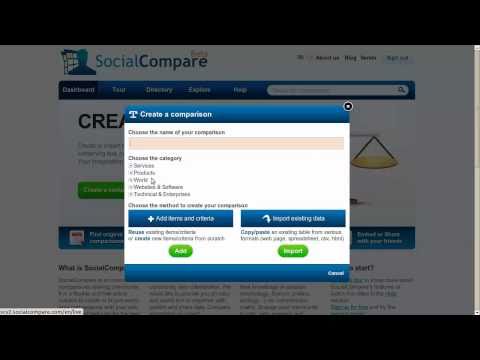
<blockquote><p>Choose the name of your table, a category/theme and click on <strong>&#8220;Add&#8221;</strong> (except if you already have the table as a spreadsheet, then you can click on &#8220;Import&#8221;):</p></blockquote>
<p style="text-align: center;"><img src="http://blog.socialcompare.com/wp-content/uploads/2011/01/create-table.jpg" alt="create comparison table" title="create-table" width="400" height="414" class="aligncenter size-full wp-image-1366" /></p>
</li>
<p><span id="more-1341"></span></p>
<li>Add columns headers (items to compare) :<br />
<blockquote><p>You need to know that the table can be rotated at any moment later (it is already possible now by clicking on &#8220;Rotate&#8221; link), so do not worry if you want your items in lines and criteria in columns, and vice and versa&#8230;</p></blockquote>
<p style="text-align: center;"><img src="http://blog.socialcompare.com/wp-content/uploads/2011/01/add-items-to-compare.jpg" alt="add items to compare" title="add-items-to-compare" width="386" height="275" class="aligncenter size-full wp-image-1367" /></p>
</li>
<li>Add lines headers (comparison criteria) :<br />
<blockquote><p>You need to choose the criteria type that you want to add, such as <strong>text, list, image, video, unit, vote</strong>&#8230; in our example, it is a criteria type: &#8220;<strong>rating on 5 stars</strong>&#8221; named &#8220;Ergonomy&#8221;. These various and advanced criteria enable you to create original and advanced tables. (see <a href="http://socialcompare.com/en/comparison/types">the complete list of criteria types here</a>).</p></blockquote>
<p style="text-align: center;"><img src="http://blog.socialcompare.com/wp-content/uploads/2011/01/add-criteria.jpg" alt="add criteria table" title="add-criteria" width="394" height="300" class="aligncenter size-full wp-image-1368" />
</p>
</li>
<li>Add existing content (i.e: existing criteria) :<br />
<blockquote><p>When starting to write a word, suggestions of existing content are made, it is recommanded to use them, by selecting the adequate data, in order to reuse the same data from one table to another one. It make data maintenance easier (updates of an item are propagated to all tables using it) and it enables comparison of different items coming from different tables.</p></blockquote>
<p style="text-align: center;"><img src="http://blog.socialcompare.com/wp-content/uploads/2011/01/add-existing-criteria.jpg" alt="add existing criteria" title="add-existing-criteria" width="396" height="300" class="aligncenter size-full wp-image-1369" /></p>
<blockquote><p>Now that we have added all the headers of our table using the <strong>green Add button</strong>, we can validate by <strong>clicking on &#8220;Ok&#8221;</strong>. We now have the structure of our table, we can start to fill in the values.</p></blockquote>
<p><img src="http://blog.socialcompare.com/wp-content/uploads/2011/01/empty-table.jpg" alt="empty comparison table" title="empty-table" width="600" height="317" class="aligncenter size-full wp-image-1370" />
</li>
<li>Fill in, edit the content of our table :<br />
<blockquote><p>You have to click on the cell you want to edit, on the &#8220;pencil&#8221; icon to start to fill the table. You can use the &#8220;Tab&#8221; key to go through the cell fields. When it is finished, you have to click on the <strong>green &#8220;Save&#8221; button</strong> or on the <strong>&#8220;Save&#8221; disk icon</strong> on the top left corner of the table, <strong>next to the + button</strong> (that enables you to add more lines and columns).</p></blockquote>
<p style="text-align: center;"><img src="http://blog.socialcompare.com/wp-content/uploads/2011/01/table-to-edit.jpg" alt="comparison table to edit" title="table-to-edit" width="600" height="312" class="aligncenter size-full wp-image-1372" /></p>
</li>
<li>Publish your table :<br />
<blockquote><p>Click on the green <strong>&#8220;Publish&#8221; button</strong>, located on the right of &#8220;Save&#8221;. Publishing the table makes it visible to SocialCompare&#8217;s community, that will be able to update the data (if you enable modifications by everyone) or be able to suggest changes/updates of your data (if you have blocked the modifications rights).</p></blockquote>
<p style="text-align: center;"><img src="http://blog.socialcompare.com/wp-content/uploads/2011/01/publish-table.jpg" alt="publish comparison table" title="publish-table" width="559" height="355" class="aligncenter size-full wp-image-1373" /></p>
</li>
<li>Copy the code to embed to your blog post:<br />
<blockquote><p>Finally to embed the table into your post, you need to click on the <strong>&#8220;embed&#8221; button</strong> and to choose the table dimensions depending of your blog size and choose the table style (look and feel: defaut, compact&#8230;). You can change completely the colors, design of your table if you want&#8230;, <a href="http://blog.socialcompare.com/2010/12/08/customize-the-embed-comparison-table/">following the guidelines and tutorial made in this previous blog post</a>. Then you copy the code displayed in this window, and paste it into your blogging platform.</p></blockquote>
<p style="text-align: center;"><img src="http://blog.socialcompare.com/wp-content/uploads/2011/01/embed-table-on-blog.jpg" alt="embed table on blog" title="embed-table-on-blog" width="600" height="536" class="aligncenter size-full wp-image-1375" /></p>
</li>
<li>Paste the code into your blog post:<br />
<blockquote><p>Use the &#8220;HTML&#8221; part of you blog editor to paste the code. For example in Blogger, you get this:</p></blockquote>
<p style="text-align: center;"><img src="http://blog.socialcompare.com/wp-content/uploads/2011/01/new-post-table-blogger.jpg" alt="new post table in blogger" title="new-post-table-blogger" width="600" height="398" class="aligncenter size-full wp-image-1376" /></p>
</li>
<li>Publish your blog post:<br />
<blockquote><p>Publish your blog post as you do usually and see the result:</p></blockquote>
<p style="text-align: center;"><img src="http://blog.socialcompare.com/wp-content/uploads/2011/01/blogger-post.jpg" alt="blogger post with table" title="blogger-post" width="600" height="376" class="aligncenter size-full wp-image-1380" /></p>
</li>
</ol>
<p>If you have any feedback or suggestion to improve our service, please do not hesitate to post your ideas on our dedicated discussions topics on our <a href="http://www.facebook.com/socialcompare">Facebook page</a>, as explained in this <a href="http://blog.socialcompare.com/2011/01/14/submit-your-development-ideas-and-tables-suggestions-in-our-discussions-topics-of-our-facebook-page/">previous post</a>. </p>
<p>If you do not have a facebook account, do not hesitate to use the comments part of this post or use our <a href="http://socialcompare.com/en/contact">contact form</a>.</p>
<img src="http://feeds.feedburner.com/~r/socialcompare/~4/qf7auQoMAz4" height="1" width="1"/>]]></content:encoded>
			<wfw:commentRss>http://blog.socialcompare.com/2011/01/15/how-to-create-and-publish-tables-in-blogger-overblog-canalblog-skyrock-wordpress%e2%80%a6/feed/</wfw:commentRss>
		<slash:comments>0</slash:comments>
		<feedburner:origLink>http://blog.socialcompare.com/2011/01/15/how-to-create-and-publish-tables-in-blogger-overblog-canalblog-skyrock-wordpress%e2%80%a6/</feedburner:origLink></item>
	</channel>
</rss>