<?xml version="1.0" encoding="UTF-8"?><rdf:RDF
	xmlns="http://purl.org/rss/1.0/"
	xmlns:rdf="http://www.w3.org/1999/02/22-rdf-syntax-ns#"
	xmlns:dc="http://purl.org/dc/elements/1.1/"
	xmlns:sy="http://purl.org/rss/1.0/modules/syndication/"
	xmlns:admin="http://webns.net/mvcb/"
	xmlns:content="http://purl.org/rss/1.0/modules/content/"
	>
<channel rdf:about="https://www.textmagic.com/blog/">
	<title>The Textmagic Blog</title>
	<link>https://www.textmagic.com/blog/</link>
	<description></description>
	<dc:date>2026-06-03T10:33:15Z	</dc:date>
	<sy:updatePeriod>
	hourly	</sy:updatePeriod>
	<sy:updateFrequency>
	1	</sy:updateFrequency>
	<sy:updateBase>2000-01-01T12:00+00:00</sy:updateBase>
	<admin:generatorAgent rdf:resource="https://wordpress.org/?v=6.9.4" />
	<items>
		<rdf:Seq>
					<rdf:li rdf:resource="https://www.textmagic.com/blog/email-to-text-service/"/>
					<rdf:li rdf:resource="https://www.textmagic.com/blog/automate-shopify-order-notifications/"/>
					<rdf:li rdf:resource="https://www.textmagic.com/blog/shopify-sms-compliance/"/>
					<rdf:li rdf:resource="https://www.textmagic.com/blog/email-sms-automation-flows/"/>
					<rdf:li rdf:resource="https://www.textmagic.com/blog/omnisend-vs-textmagic/"/>
					<rdf:li rdf:resource="https://www.textmagic.com/blog/o2o-commerce-for-retail/"/>
					<rdf:li rdf:resource="https://www.textmagic.com/blog/black-friday-guide-textmagic/"/>
					<rdf:li rdf:resource="https://www.textmagic.com/blog/textline-vs-textmagic/"/>
					<rdf:li rdf:resource="https://www.textmagic.com/blog/improve-customer-service-in-higher-education/"/>
					<rdf:li rdf:resource="https://www.textmagic.com/blog/black-friday-sms-marketing/"/>
				</rdf:Seq>
	</items>
</channel>
<item rdf:about="https://www.textmagic.com/blog/email-to-text-service/">
	<title>How to easily send a text message via your preferred email client</title>
	<link>https://www.textmagic.com/blog/email-to-text-service/</link>

	<dc:creator><![CDATA[Textmagic Team]]></dc:creator>
	<dc:date>2026-05-31T08:07:00Z</dc:date>
			<dc:subject><![CDATA[Business]]></dc:subject>
		<dc:subject><![CDATA[Email to SMS]]></dc:subject>
		<dc:subject><![CDATA[email to text]]></dc:subject>
		<dc:subject><![CDATA[SMS]]></dc:subject>
		<dc:subject><![CDATA[text message]]></dc:subject>

			<description><![CDATA[<p>SMS has a 90% open rate within the first three minutes of delivery. Email is where most business communication happens. Combining the two to sending texts directly from...</p>
<p>The post <a href="https://www.textmagic.com/blog/email-to-text-service/">How to easily send a text message via your preferred email client</a> appeared first on <a href="https://www.textmagic.com">Textmagic</a>.</p>
]]></description>
		<content:encoded><![CDATA[
<figure class="wp-block-image"><img fetchpriority="high" decoding="async" width="980" height="460" src="https://www.textmagic.com/wp-content/uploads/2021/07/A-businessman-typing-email-to-text-message.jpg" alt="A businessman typing email to text message" class="wp-image-15478" srcset="https://www.textmagic.com/wp-content/uploads/2021/07/A-businessman-typing-email-to-text-message.jpg 980w, https://www.textmagic.com/wp-content/uploads/2021/07/A-businessman-typing-email-to-text-message-300x141.jpg 300w, https://www.textmagic.com/wp-content/uploads/2021/07/A-businessman-typing-email-to-text-message-768x360.jpg 768w" sizes="(max-width: 980px) 100vw, 980px" /></figure>


<p>SMS has a 90% open rate within the first three minutes of delivery. Email is where most business communication happens. Combining the two to sending texts directly from your inbox is one of the simplest ways to reach people faster without changing the tools you already use.</p>


<p>Whether you need to urgently communicate something to your staff or maybe promote a flash sale, you can do so by using an email to text gateway.</p>


<p>In this article, we will show you how to send an email to text in two ways:</p>


<ul class="wp-block-list">
<li>By using your recipient’s phone carrier gateway address</li>


<li><a href="#textmagic-setup">By using the Textmagic Email to SMS gateway</a></li>
</ul>


<h2 class="wp-block-heading" id="how-to-send-a-text-message-via-email">How to send a text message via email</h2>


<p>Follow these steps to send a text message from your email client:</p>


<h3 class="wp-block-heading" id="1-compose-your-message-in-your-email-client">1. Compose your message in your email client</h3>


<p>This step is pretty straightforward. Open your email client and write your message as normal. Keep in mind that standard SMS length limits apply: 160 characters for SMS, or use the MMS gateway address for longer content. Run your message through our <a href="https://freetools.textmagic.com/sms-length-calculator">free SMS length calculator</a> to make sure it stays within the character limit.</p>


<h3 class="wp-block-heading" id="2-find-your-recipient-s-carrier-gateway-address">2. Find your recipient&#8217;s carrier gateway address</h3>


<p>Every phone carrier offers its own gateway address you can use to send email to SMS, and you need to know the exact carrier of your recipient’s phone number for it to work.</p>


<p>If you don’t know your recipient’s carrier, use our <a href="https://freetools.textmagic.com/carrier-lookup">free carrier lookup tool</a>.</p>


<p>Below are the gateway addresses of the most popular carriers in the US and Canada.</p>


<div class="alert__wrapper wp-elements-e129d207beef8b2cf30ce1bd25da0bca"><div class="alert has-red-50-background-color" style="color: var(--wp--preset--color--attention)"><p style="text-align: left;"><img src="https://s.w.org/images/core/emoji/17.0.2/72x72/26a0.png" alt="⚠" class="wp-smiley" style="height: 1em; max-height: 1em;" /> Most U.S. carrier email-to-text gateways have been shut down. As of 2026, Google Fi is the only major U.S. carrier gateway still officially active. All others have been discontinued, are unreliable, or are in the process of shutting down. The table below documents their status for reference. If your recipient is on any carrier other than Google Fi, skip to the Textmagic section below.</p>
</div></div>


<h4 class="wp-block-heading" id="sms-mms-gateway-domains-for-the-united-states">SMS/MMS gateway domains for the United States</h4>


<p><em>Table updated on June 02, 2026</em></p>


<figure class="wp-block-table">
<style>
.wp-block-table {max-width:100%;display:block}
.tools-table-wrap {
  border:1px solid #e5e7eb;
  border-radius:6px;
  overflow:hidden;
  display:inline-block;
  width:100%;
}
.tools-table {
  width:100%;
  box-sizing:border-box;
  border-collapse:collapse;
  table-layout:auto;
  font-family: Arial, Helvetica, sans-serif;
  font-size:16px;
  line-height:24px;
  font-weight:400;
  color:#4e4b66;
}
.tools-table th, .tools-table td {
  vertical-align:top;
  padding:.75em .9em;
  border-left:1px solid #e5e7eb;
  border-top:1px solid #e5e7eb;
  word-break:break-word;
  white-space:normal;
  hyphens:auto;
}
.tools-table th {
  background:#1d4ed8;
  color:#fff;
  font-weight:600;
  text-align:left;
}
.tools-table td:first-child, .tools-table th:first-child {border-left:0}
.tools-table tr:first-child th, .tools-table tr:first-child td {border-top:0}
.tools-table a {color:#1d4ed8;text-decoration:none;font-weight:500;}
.tools-table a:hover {text-decoration:underline}
@media(max-width:640px){
  .tools-table thead{display:none}
  .tools-table, .tools-table tbody, .tools-table tr, .tools-table td{display:block;width:100%;}
  .tools-table tr{border:1px solid #e5e7eb;border-radius:6px;margin:0 0 .75rem;overflow:hidden;}
  .tools-table td{display:flex;border:none !important;padding:.6em .9em;justify-content:flex-start;text-align:left;font-size:16px;line-height:24px;}
  .tools-table td::before{font-weight:600;min-width:140px;margin-right:6px;flex-shrink:0;padding:2px 6px;border-radius:4px;background:#f0f4f8;font-size:12px;color:#1d4ed8;}
  .tools-table td:nth-child(1)::before{content:"Mobile Carrier";}
  .tools-table td:nth-child(2)::before{content:"SMS Gateway Domain";}
  .tools-table td:nth-child(3)::before{content:"MMS Gateway Domain";}
  .tools-table td:nth-child(4)::before{content:"Status";}
}
</style>
<div class="tools-table-wrap">
<table class="tools-table">
  <thead>
    <tr>
      <th>Mobile Carrier</th>
      <th>SMS Gateway Domain</th>
      <th>MMS Gateway Domain</th>
      <th>Status</th>
    </tr>
  </thead>
  <tbody>
    <tr><td>Alltel</td><td>sms.alltelwireless.com</td><td>mms.alltelwireless.com</td><td><img src="https://s.w.org/images/core/emoji/17.0.2/72x72/274c.png" alt="❌" class="wp-smiley" style="height: 1em; max-height: 1em;" /> Shut down</td></tr>
    <tr><td>Boost Mobile</td><td>sms.myboostmobile.com</td><td>myboostmobile.com</td><td><img src="https://s.w.org/images/core/emoji/17.0.2/72x72/274c.png" alt="❌" class="wp-smiley" style="height: 1em; max-height: 1em;" /> Shut down</td></tr>
    <tr><td>Cricket Wireless</td><td>mms.cricketwireless.com</td><td>mms.cricketwireless.com</td><td><img src="https://s.w.org/images/core/emoji/17.0.2/72x72/274c.png" alt="❌" class="wp-smiley" style="height: 1em; max-height: 1em;" /> Shut down</td></tr>
    <tr><td>Google Fi</td><td>msg.fi.google.com</td><td>msg.fi.google.com</td><td><img src="https://s.w.org/images/core/emoji/17.0.2/72x72/2705.png" alt="✅" class="wp-smiley" style="height: 1em; max-height: 1em;" /> Active</td></tr>
    <tr><td>MetroPCS</td><td>mymetropcs.com</td><td>mymetropcs.com</td><td><img src="https://s.w.org/images/core/emoji/17.0.2/72x72/274c.png" alt="❌" class="wp-smiley" style="height: 1em; max-height: 1em;" /> Shut down</td></tr>
    <tr><td>Republic Wireless</td><td>text.republicwireless.com</td><td>MMS not available</td><td><img src="https://s.w.org/images/core/emoji/17.0.2/72x72/274c.png" alt="❌" class="wp-smiley" style="height: 1em; max-height: 1em;" /> Shut down</td></tr>
    <tr><td>Sprint</td><td>messaging.sprintpcs.com</td><td>pm.sprint.com</td><td><img src="https://s.w.org/images/core/emoji/17.0.2/72x72/274c.png" alt="❌" class="wp-smiley" style="height: 1em; max-height: 1em;" /> Defunct (T-Mobile, 2020)</td></tr>
    <tr><td>T-Mobile</td><td>tmomail.net</td><td>tmomail.net</td><td><img src="https://s.w.org/images/core/emoji/17.0.2/72x72/274c.png" alt="❌" class="wp-smiley" style="height: 1em; max-height: 1em;" /> Discontinued Dec 2024</td></tr>
    <tr><td>U.S. Cellular</td><td>email.uscc.net</td><td>mms.uscc.net</td><td><img src="https://s.w.org/images/core/emoji/17.0.2/72x72/26a0.png" alt="⚠" class="wp-smiley" style="height: 1em; max-height: 1em;" /> Unreliable</td></tr>
    <tr><td>Verizon Wireless</td><td>vtext.com</td><td>vzwpix.com</td><td><img src="https://s.w.org/images/core/emoji/17.0.2/72x72/26a0.png" alt="⚠" class="wp-smiley" style="height: 1em; max-height: 1em;" /> Phase-out, ends Mar 2027</td></tr>
    <tr><td>Virgin Mobile</td><td>vmobl.com</td><td>vmpix.com</td><td><img src="https://s.w.org/images/core/emoji/17.0.2/72x72/274c.png" alt="❌" class="wp-smiley" style="height: 1em; max-height: 1em;" /> Defunct (merged into Boost)</td></tr>
    <tr><td>AT&amp;T</td><td>txt.att.net / mms.att.net</td><td>mms.att.net</td><td><img src="https://s.w.org/images/core/emoji/17.0.2/72x72/274c.png" alt="❌" class="wp-smiley" style="height: 1em; max-height: 1em;" /> Shut down</td></tr>
  </tbody>
</table>
</div>
</figure>


<h4 class="wp-block-heading" id="sms-gateway-domains-for-canada">SMS gateway domains for Canada</h4>


<p><em>Table updated on June 02, 2026</em></p>


<figure class="wp-block-table">
<style>
figure.wp-block-table {border-left:none !important;padding-left:0 !important;}
.wp-block-table {max-width:100%;display:block}
.tools-table-wrap {
  border:1px solid #e5e7eb;
  border-radius:6px;
  overflow:hidden;
  display:inline-block;
  width:100%;
}
.tools-table {
  width:100%;
  box-sizing:border-box;
  border-collapse:collapse;
  table-layout:auto;
  font-family: Arial, Helvetica, sans-serif;
  font-size:16px;
  line-height:24px;
  font-weight:400;
  color:#4e4b66;
}
.tools-table th, .tools-table td {
  vertical-align:top;
  padding:.75em .9em;
  border-left:1px solid #e5e7eb;
  border-top:1px solid #e5e7eb;
  word-break:break-word;
  white-space:normal;
  hyphens:auto;
}
.tools-table th {
  background:#1d4ed8;
  color:#fff;
  font-weight:600;
  text-align:left;
}
.tools-table td:first-child, .tools-table th:first-child {border-left:0}
.tools-table tr:first-child th, .tools-table tr:first-child td {border-top:0}
.tools-table a {color:#1d4ed8;text-decoration:none;font-weight:500;}
.tools-table a:hover {text-decoration:underline}
@media(max-width:640px){
  .tools-table thead{display:none}
  .tools-table, .tools-table tbody, .tools-table tr, .tools-table td{display:block;width:100%;}
  .tools-table tr{border:1px solid #e5e7eb;border-radius:6px;margin:0 0 .75rem;overflow:hidden;}
  .tools-table td{display:flex;border:none !important;padding:.6em .9em;justify-content:flex-start;text-align:left;font-size:16px;line-height:24px;}
  .tools-table td::before{font-weight:600;min-width:140px;margin-right:6px;flex-shrink:0;padding:2px 6px;border-radius:4px;background:#f0f4f8;font-size:12px;color:#1d4ed8;}
  .tools-table td:nth-child(1)::before{content:"Mobile Carrier";}
  .tools-table td:nth-child(2)::before{content:"SMS Gateway Domain";}
  .tools-table td:nth-child(3)::before{content:"Status";}
}
</style>
<div class="tools-table-wrap">
<table class="tools-table">
  <thead>
    <tr>
      <th>Mobile Carrier</th>
      <th>SMS Gateway Domain</th>
      <th>Status</th>
    </tr>
  </thead>
  <tbody>
    <tr><td>Bell Canada</td><td>txt.bell.ca</td><td><img src="https://s.w.org/images/core/emoji/17.0.2/72x72/274c.png" alt="❌" class="wp-smiley" style="height: 1em; max-height: 1em;" /> Shut down</td></tr>
    <tr><td>Bell MTS</td><td>text.mts.net</td><td><img src="https://s.w.org/images/core/emoji/17.0.2/72x72/274c.png" alt="❌" class="wp-smiley" style="height: 1em; max-height: 1em;" /> Discontinued</td></tr>
    <tr><td>Fido Solutions</td><td>fido.ca</td><td><img src="https://s.w.org/images/core/emoji/17.0.2/72x72/274c.png" alt="❌" class="wp-smiley" style="height: 1em; max-height: 1em;" /> Discontinued</td></tr>
    <tr><td>Freedom Mobile</td><td>txt.freedommobile.ca</td><td><img src="https://s.w.org/images/core/emoji/17.0.2/72x72/2705.png" alt="✅" class="wp-smiley" style="height: 1em; max-height: 1em;" /> Active</td></tr>
    <tr><td>Koodo Mobile</td><td>msg.telus.com</td><td><img src="https://s.w.org/images/core/emoji/17.0.2/72x72/26a0.png" alt="⚠" class="wp-smiley" style="height: 1em; max-height: 1em;" /> Unreliable</td></tr>
    <tr><td>PC Mobile</td><td>mobiletxt.ca</td><td><img src="https://s.w.org/images/core/emoji/17.0.2/72x72/274c.png" alt="❌" class="wp-smiley" style="height: 1em; max-height: 1em;" /> Discontinued</td></tr>
    <tr><td>Rogers Communications</td><td>pcs.rogers.com</td><td><img src="https://s.w.org/images/core/emoji/17.0.2/72x72/274c.png" alt="❌" class="wp-smiley" style="height: 1em; max-height: 1em;" /> Discontinued</td></tr>
    <tr><td>SaskTel</td><td>sms.sasktel.com</td><td><img src="https://s.w.org/images/core/emoji/17.0.2/72x72/2705.png" alt="✅" class="wp-smiley" style="height: 1em; max-height: 1em;" /> Active</td></tr>
    <tr><td>Telus</td><td>msg.telus.com</td><td><img src="https://s.w.org/images/core/emoji/17.0.2/72x72/2705.png" alt="✅" class="wp-smiley" style="height: 1em; max-height: 1em;" /> Active</td></tr>
  </tbody>
</table>
</div>
</figure>


<h3 class="wp-block-heading" id="3-address-your-email-to-the-recepient">3. Address your email to the recepient</h3>


<p>In the To field, enter the recipient&#8217;s number in international format followed by the gateway domain — for example, <code>15551234567@msg.fi.google.com</code>. Type your message and send.</p>


<h3 class="wp-block-heading" id="4-check-and-send-your-email-to-sms">4. Check and send your email to SMS</h3>


<p>Double-check the phone number, gateway domain, and character count, then send. Your message will arrive as an SMS on the recipient&#8217;s phone. This method only works if your recipient is on a carrier that still supports email-to-text. For reliable delivery to any carrier, use Textmagic&#8217;s Email to SMS gateway instead.</p>


<h2 class="wp-block-heading" id="textmagic-setup">Set up Email to SMS with Textmagic</h2>


<p>Textmagic&#8217;s <a href="https://www.textmagic.com/email-to-sms/">Email to SMS service</a> works regardless of which carrier your recipient is on. You don&#8217;t need to know their carrier or manage gateway addresses. Just send an email to a phone number and Textmagic handles the rest.</p>


<h3 class="wp-block-heading" id="1-log-in-to-your-account-or-register-for-free">1. Log-in to your account or register for free</h3>


<p>Log in to Textmagic if you’re an existing user or register for a new account. The registration process is quick and easy, and we also offer a free trial. From your Textmagic dashboard, navigate to<strong> Settings</strong> and select <strong>Email to SMS</strong>.</p>


<h3 class="wp-block-heading" id="2-add-your-allowed-email-addresses">2. Add your allowed email addresses</h3>


<p>In the allowed email tab, click +Add allowed emails and enter the email address you want to send text messages from. If you want to send email to text from multiple addresses, feel free to add more. Type each email on a separate line.</p>


<p>Each address you add can send texts from its own inbox using your shared account credit. You can add teammates here too.</p>


<h3 class="wp-block-heading" id="3-configure-your-content-and-send-settings">3. Configure your content and send settings</h3>


<p>In the Send &amp; Receive Settings tab, choose whether to include the email subject, body, or both in the SMS. Set a maximum message length, trim signatures, and apply any custom cut-off phrases for cleaner texts.</p>


<h3 class="wp-block-heading" id="4-send-an-email-to-sms-from-your-inbox">4. Send an email to SMS from your inbox</h3>


<p>These email addresses can now send texts the same way you would send an email.</p>


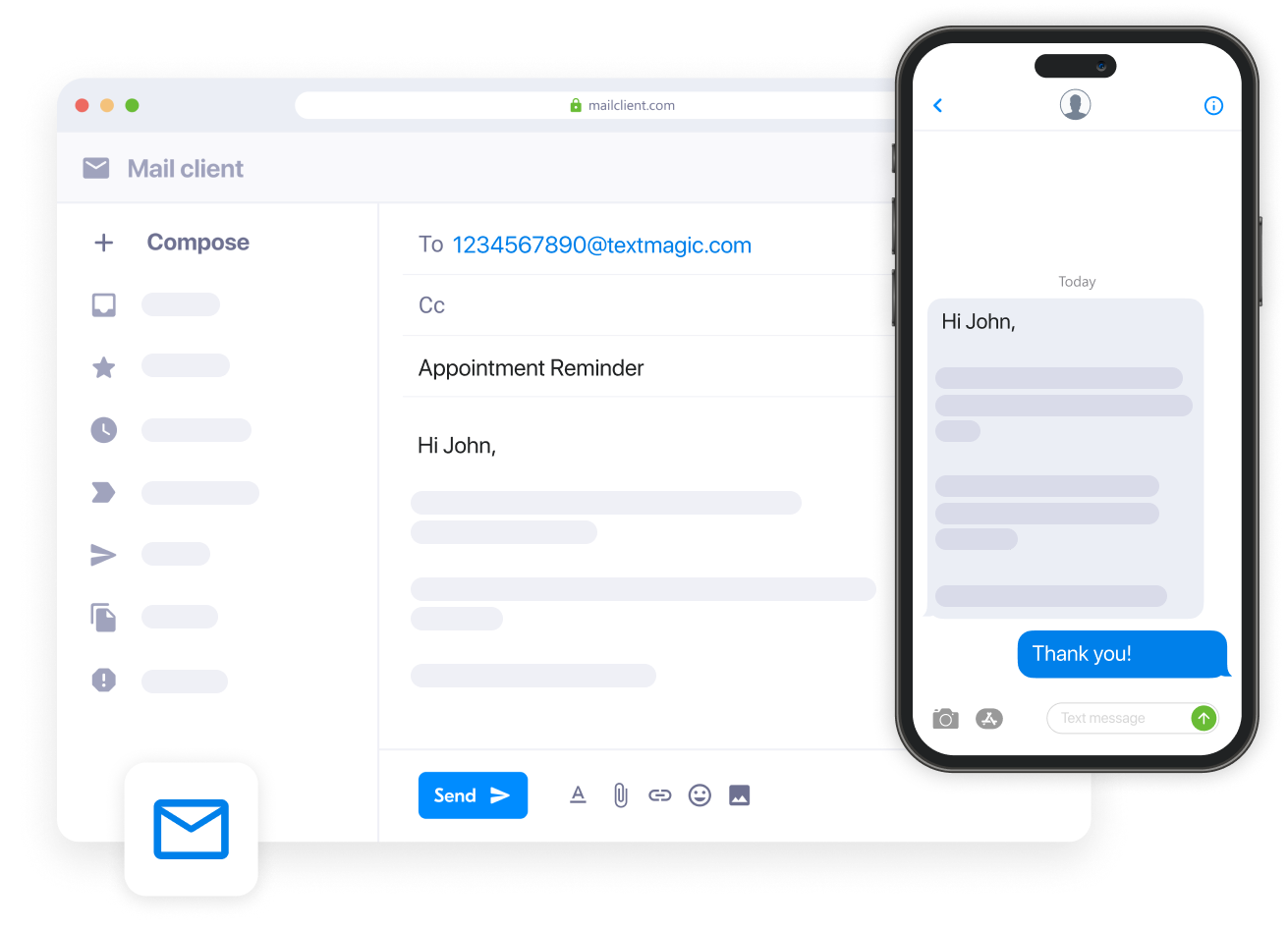
<p>Now you go to your usual email client and write in the recipient field the number you want to message in international format, followed by @textmagic.com. Your recipient should look like this: 14036911019@textmagic.com.</p>


  <div class="blog-cta-block" >

    <div class="cta-container">
      <div class="cta-text">
                  <h3>Connect email to SMS in minutes with Textmagic</h3>
        
                  <p>Start sending texts directly from your inbox and easily monitor delivery and responses.</p>
        
                  <button
            type="button"
            class="hregister btn btn--blue btn--1"
            onclick="window.location.href='https://www.textmagic.com/email-to-sms/?utm_source=blog&#038;utm_medium=blog&#038;utm_campaign=email_to_sms'">
            Learn about email to SMS          </button>
              </div>

              <div class="cta-image">
          <img decoding="async" src="https://www.textmagic.com/wp-content/uploads/2022/10/Illustration.png" alt="Connect email to SMS in minutes with Textmagic">
        </div>
          </div>
  </div>


<h3 class="wp-block-heading" id="send-text-via-email-to-multiple-contacts">Send text via email to multiple contacts</h3>


<p>When you want to send a text via email to multiple recipients, configure a distribution list. This is particularly useful for forwarding email alerts as text messages to as many mobile numbers as needed in one go:</p>


<ol class="wp-block-list">
<li>Go to <em>Settings > </em><a href="https://app.textmagic.com/settings/email-to-sms/distribution-lists" target="_blank" rel="noreferrer noopener"><em>Distribution lists</em></a></li>


<li>Click <em>New distribution list</em> and enter a name for your new distribution list</li>


<li>Add all the mobile numbers to the recipients&#8217; box. You can select from existing contacts and mailing lists or enter new numbers.</li>


<li>Choose whether the email subject line, contents, or both must be sent as SMS content, and select the maximum length of email to forward.</li>


<li>Click <em>Continue</em> and make a note of the distribution list email address. You can also check these at any time by returning to <em>Services Distribution lists.</em></li>
</ol>


<p>Whenever an email is sent to that Textmagic distribution address, it is converted to a text message and delivered to all the recipients you added in the third step. You can create an email forwarding rule to a distribution list if you need essential emails to be forwarded automatically as texts to distribution list members.</p>


<h3 class="wp-block-heading" id="benefits-of-using-textmagic-email-to-sms">Benefits of using Textmagic email to SMS</h3>


<ul class="wp-block-list">
<li><strong>Delivery tracking</strong>: Every message has a full delivery trail. See what was delivered, failed, or is pending, with timestamps and sender information. </li>


<li><strong>Two-way replies</strong>: Recipients reply by SMS and you receive it as an email. You can respond directly from your email inbox. </li>


<li><strong>Works with your sender settings</strong>: The number recipients see is determined by the sender settings configured in your account for their country. </li>


<li><strong>Shared team access</strong>: Add multiple allowed email addresses so teammates can send from their own inboxes using shared credit. </li>


<li><strong>No carrier dependency</strong>: Messages route through dedicated SMS infrastructure, not carrier bridges that can be shut off. </li>


<li><strong>No integrations needed</strong>: Works with Gmail, Outlook, or any email client out of the box.</li>
</ul>


  <div class="blog-cta-block" >

    <div class="cta-container">
      <div class="cta-text">
                  <h3>Send SMS from email, reply from your inbox</h3>
        
                  <p>Start sending texts directly from Gmail, Outlook, or any email client. No setup required</p>
        
                  <button
            type="button"
            class="hregister btn btn--blue btn--1"
            onclick="window.location.href='https://app.textmagic.com/register?source=blog&#038;utm_medium=blog&#038;utm_campaign=email_to_sms'">
            Try now for free          </button>
              </div>

              <div class="cta-image">
          <img decoding="async" src="https://www.textmagic.com/wp-content/uploads/2022/10/Illustration.png" alt="Send SMS from email, reply from your inbox">
        </div>
          </div>
  </div>


      <section class="faq faq-blog" >
      <div class="container">
                  <div class="heading-container">
                          <h2>Frequently Asked Questions (FAQs)</h2>
                                  </div>
        
                  <div id="faq-list" class="faq-list">
                                          <div class="faq-list__item">
                  <div class="faq-list__header">
                    <div class="faq-list__header__icon">
                      <span class="tmi-chevron-up"></span>
                    </div>
                    <div>Can you use Gmail or Outlook to send a text message?</div>
                  </div>
                  <div class="faq-list__body">
                    <div class="faq-list__body-wrapper">
                      <p>Yes. With Textmagic&#8217;s Email to SMS, you can send texts directly from Gmail, Outlook, or any other email client without needing to know the recipient&#8217;s carrier. Address your email to <code>phonenumber@textmagic.com</code>, send it as normal, and it arrives as an SMS. Replies come back to your inbox.</p>
                    </div>
                  </div>
                </div>
                                                        <div class="faq-list__item">
                  <div class="faq-list__header">
                    <div class="faq-list__header__icon">
                      <span class="tmi-chevron-up"></span>
                    </div>
                    <div>What do recipients see when I send an Email to SMS?</div>
                  </div>
                  <div class="faq-list__body">
                    <div class="faq-list__body-wrapper">
                      
<p>It depends on which method you use. With a carrier gateway, recipients typically see your email address as the sender ID (e.g., <code>yourname@domain.com</code>) or a generic system alias like <code>5000</code>. With Textmagic, the number recipients see is determined by the sender settings configured in your account for the recipient&#8217;s country. For US and Canada, a registered virtual number is required for compliance.</p>
                    </div>
                  </div>
                </div>
                                                        <div class="faq-list__item">
                  <div class="faq-list__header">
                    <div class="faq-list__header__icon">
                      <span class="tmi-chevron-up"></span>
                    </div>
                    <div>My carrier&#039;s email-to-text stopped working. What should I use instead?</div>
                  </div>
                  <div class="faq-list__body">
                    <div class="faq-list__body-wrapper">
                      <p>Between late 2024 and June 2025, all three major U.S. carriers shut down their public email-to-text gateways due to spam abuse and reliability issues. A dedicated Email to SMS service like Textmagic routes messages through its own SMS infrastructure instead, so delivery isn&#8217;t dependent on a free carrier bridge.</p>
                    </div>
                  </div>
                </div>
                                                        <div class="faq-list__item">
                  <div class="faq-list__header">
                    <div class="faq-list__header__icon">
                      <span class="tmi-chevron-up"></span>
                    </div>
                    <div> How much does Email to SMS cost?</div>
                  </div>
                  <div class="faq-list__body">
                    <div class="faq-list__body-wrapper">
                      <p>Textmagic charges per message sent, using a credit-based system. There are no monthly fees for the Email to SMS feature itself. You pay only for the messages you send. Pricing varies by destination country. You can check current rates on the Textmagic pricing page.</p>
                    </div>
                  </div>
                </div>
                                                        <div class="faq-list__item">
                  <div class="faq-list__header">
                    <div class="faq-list__header__icon">
                      <span class="tmi-chevron-up"></span>
                    </div>
                    <div>Does email to SMS work internationally?</div>
                  </div>
                  <div class="faq-list__body">
                    <div class="faq-list__body-wrapper">
                      <p>It depends on the service. Carrier gateways only worked within their own network and country. A dedicated email to SMS gateway like Textmagic supports international delivery, though the sender number, compliance requirements, and per-message rates vary by destination country. If you&#8217;re sending to recipients outside the US or Canada, check whether your provider supports that country and what registration may be required.</p>
                    </div>
                  </div>
                </div>
                                    </div>
      </div>
        </section>
  <p>The post <a href="https://www.textmagic.com/blog/email-to-text-service/">How to easily send a text message via your preferred email client</a> appeared first on <a href="https://www.textmagic.com">Textmagic</a>.</p>
]]></content:encoded>
	
	</item>
<item rdf:about="https://www.textmagic.com/blog/automate-shopify-order-notifications/">
	<title>How to automate SMS order notifications for your Shopify store</title>
	<link>https://www.textmagic.com/blog/automate-shopify-order-notifications/</link>

	<dc:creator><![CDATA[Textmagic Team]]></dc:creator>
	<dc:date>2026-05-15T12:11:00Z</dc:date>
			<dc:subject><![CDATA[Guides]]></dc:subject>
		<dc:subject><![CDATA[Product]]></dc:subject>

			<description><![CDATA[<p>Customers rarely contact support when they&#8217;re uncertain about an order. They simply lose trust in the store. While Shopify sends order confirmation emails, these messages are often overlooked...</p>
<p>The post <a href="https://www.textmagic.com/blog/automate-shopify-order-notifications/">How to automate SMS order notifications for your Shopify store</a> appeared first on <a href="https://www.textmagic.com">Textmagic</a>.</p>
]]></description>
		<content:encoded><![CDATA[
<figure class="wp-block-image size-full"><img decoding="async" width="1960" height="920" src="https://www.textmagic.com/wp-content/uploads/2026/05/How-to-send-automated-SMS-order-notifications-with-Textmagic-Shopify-featured-1.webp" alt="How to send automated SMS reminders with Shopify and Textmagic" class="wp-image-26740" srcset="https://www.textmagic.com/wp-content/uploads/2026/05/How-to-send-automated-SMS-order-notifications-with-Textmagic-Shopify-featured-1.webp 1960w, https://www.textmagic.com/wp-content/uploads/2026/05/How-to-send-automated-SMS-order-notifications-with-Textmagic-Shopify-featured-1-300x141.webp 300w, https://www.textmagic.com/wp-content/uploads/2026/05/How-to-send-automated-SMS-order-notifications-with-Textmagic-Shopify-featured-1-1024x481.webp 1024w, https://www.textmagic.com/wp-content/uploads/2026/05/How-to-send-automated-SMS-order-notifications-with-Textmagic-Shopify-featured-1-768x360.webp 768w, https://www.textmagic.com/wp-content/uploads/2026/05/How-to-send-automated-SMS-order-notifications-with-Textmagic-Shopify-featured-1-1536x721.webp 1536w, https://www.textmagic.com/wp-content/uploads/2026/05/How-to-send-automated-SMS-order-notifications-with-Textmagic-Shopify-featured-1-170x80.webp 170w" sizes="(max-width: 1960px) 100vw, 1960px" /></figure>


<p>Customers rarely contact support when they&#8217;re uncertain about an order. They simply lose trust in the store. </p>


<p>While Shopify sends order confirmation emails, these messages are often overlooked or difficult to locate. A timely SMS confirmation, shipping update, or tracking link reaches the customer before uncertainty sets in.</p>


<p>SMS complements email rather than replacing it. Messages are delivered instantly, remain easy to find, and allow customers to reply directly.</p>


<p>Shopify does not provide native SMS automation, so most merchants integrate a third-party application. Many available tools are designed primarily for marketing campaigns. </p>


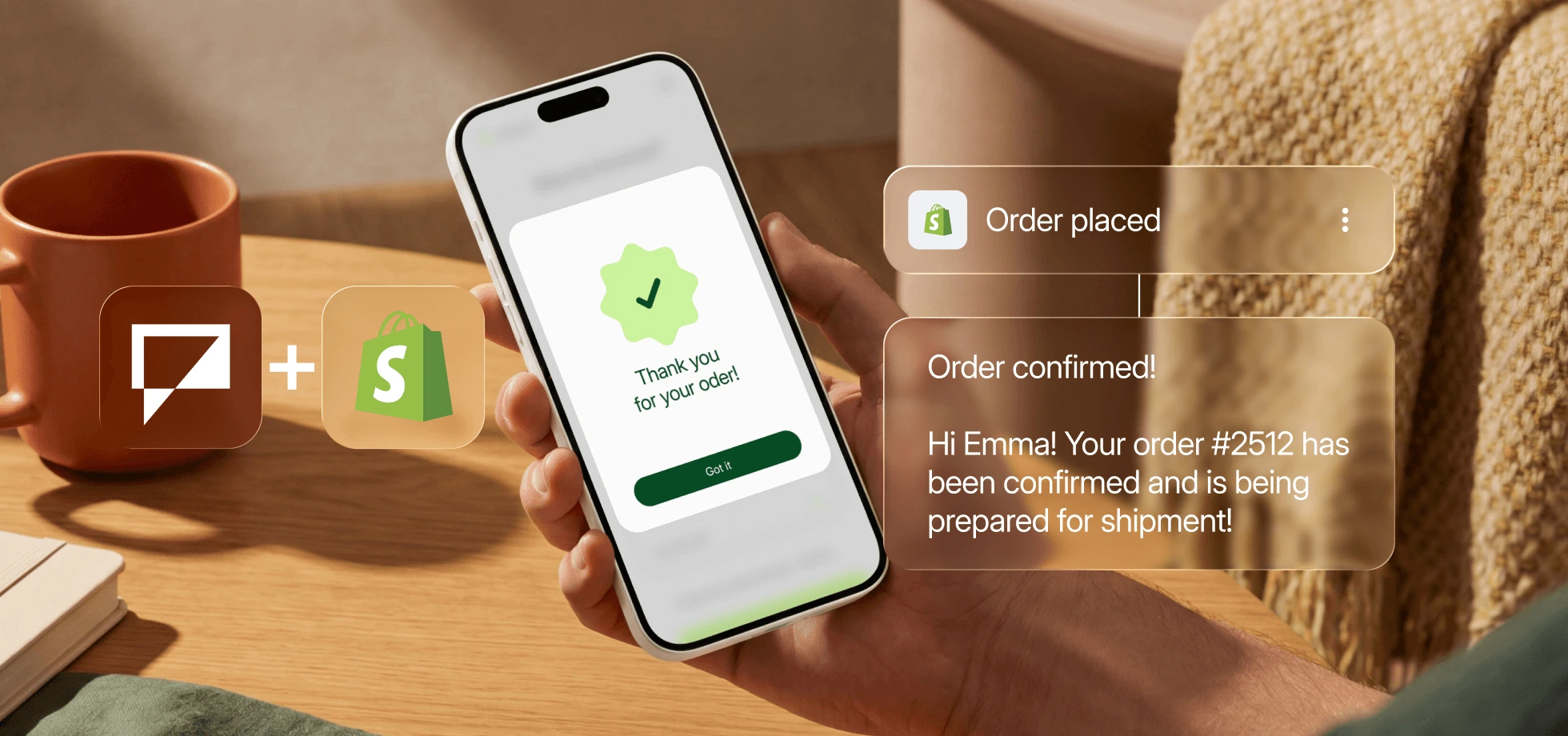
<p>This guide demonstrates how to configure <strong>SMS order notifications using Textmagic</strong>, a platform oriented toward operational messaging and two-way customer communication.</p>


<h2 class="wp-block-heading" id="shopify-s-sms-limitations">Shopify’s SMS limitations </h2>


<p><strong>(and what you need instead)</strong></p>


<p>Shopify <a href="https://help.shopify.com/en/manual/fulfillment/setup/notifications/sms-notifications">doesn&#8217;t meaningfully support SMS</a> for order notifications. At most, it can send a basic order confirmation when no email address is provided, which rarely applies. There’s no support for shipping updates, delivery notifications, or replies.&nbsp;</p>


<p><strong>Shopify Messaging</strong> adds broadcast campaigns, but not automation. You can’t trigger messages when an order ships or a cart is abandoned, and conversations are one-way only.&nbsp;</p>


<p>To use SMS in your post-purchase flow, you need an integration connected to your order events. Textmagic connects directly to your Shopify order events, so messages are triggered automatically with the right data:</p>


<ul class="wp-block-list">
<li>Send messages based on order events</li>


<li>Include order details automatically, such as order number or tracking link</li>


<li>Let customers reply and manage those conversations in one place</li>


<li>See delivery status for every message</li>


<li>Keep a full message history for each customer</li>
</ul>


<div class="alert__wrapper wp-elements-93512e946dd7960469cbc97234663da5"><div class="alert has-gray-1-background-color" style="color: var(--wp--preset--color--emphasize)"><p><img src="https://s.w.org/images/core/emoji/17.0.2/72x72/26a0.png" alt="⚠" class="wp-smiley" style="height: 1em; max-height: 1em;" /> Before you start, make sure you have SMS consent in place and a verified sending number for your market. Both are required to send messages legally. You can follow our guide on </span><a href="/blog/shopify-sms-compliance/"><b>SMS consent and compliance for Shopify</b></a> to set this up correctly. </p>
</div></div>


<h3 class="wp-block-heading">1. Connect your Shopify store to Textmagic</h3>


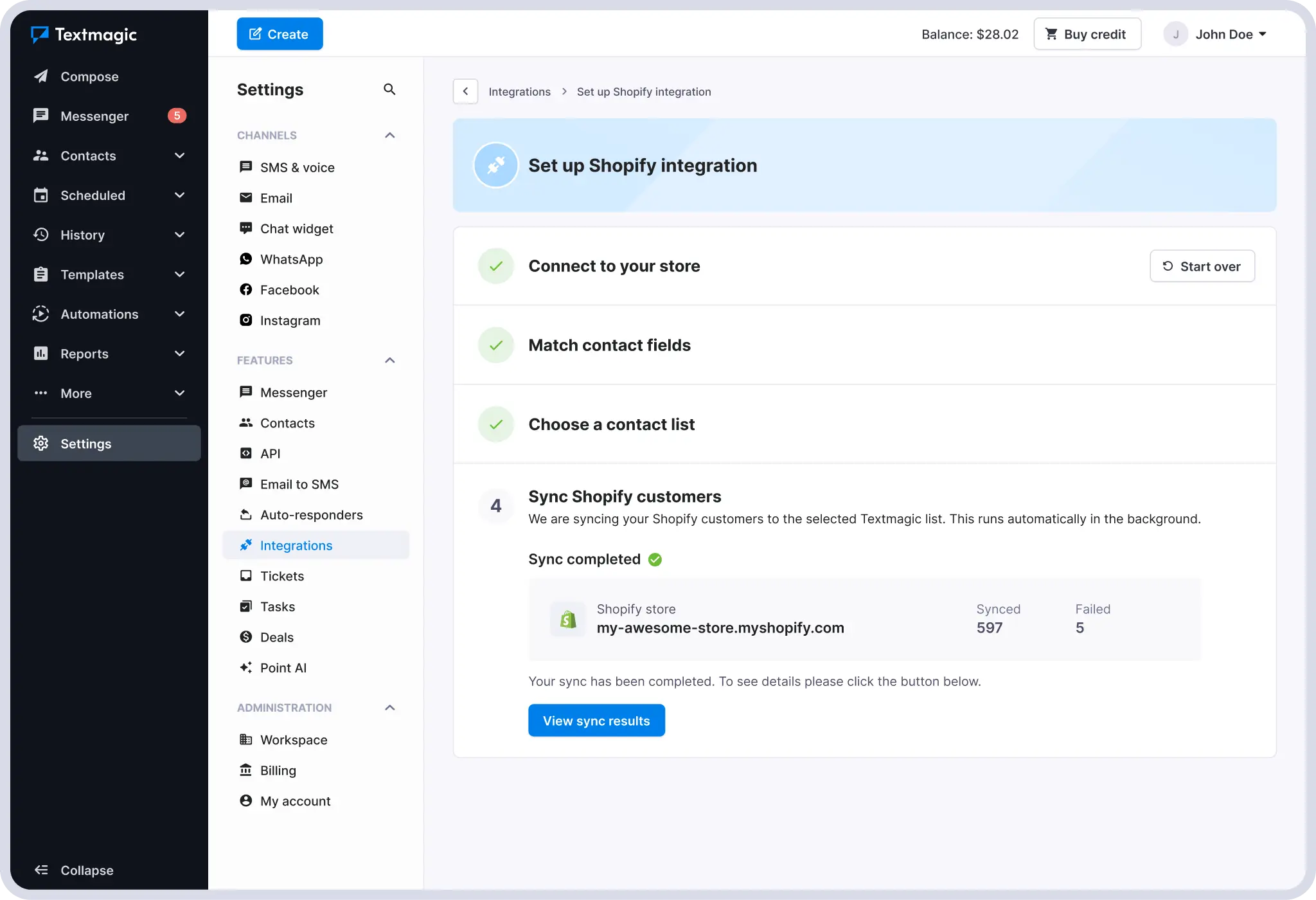
<p>Go to your Textmagic account, navigate to <strong>Integrations</strong>, and select <strong>Shopify</strong>. Enter your store URL and authorize the connection.&nbsp;</p>


<p>Once connected, your Shopify customer and order data becomes available in Textmagic for automation. Order events like payment, shipping, and fulfillment can now be used as triggers. Changes sync from Shopify to Textmagic automatically, but not the other way around.&nbsp;</p>


<figure class="wp-block-image size-full"><img decoding="async" width="2048" height="1400" src="https://www.textmagic.com/wp-content/uploads/2026/05/How-to-connect-Textmagic-to-Shopify-store.webp" alt="How to connect Textmagic to Shopify" class="wp-image-26741" srcset="https://www.textmagic.com/wp-content/uploads/2026/05/How-to-connect-Textmagic-to-Shopify-store.webp 2048w, https://www.textmagic.com/wp-content/uploads/2026/05/How-to-connect-Textmagic-to-Shopify-store-300x205.webp 300w, https://www.textmagic.com/wp-content/uploads/2026/05/How-to-connect-Textmagic-to-Shopify-store-1024x700.webp 1024w, https://www.textmagic.com/wp-content/uploads/2026/05/How-to-connect-Textmagic-to-Shopify-store-768x525.webp 768w, https://www.textmagic.com/wp-content/uploads/2026/05/How-to-connect-Textmagic-to-Shopify-store-1536x1050.webp 1536w" sizes="(max-width: 2048px) 100vw, 2048px" /></figure>


<div class="alert__wrapper wp-elements-d52faf8a99bc18975b8f990744377592"><div class="alert alert-success" style="color: var(--wp--preset--color--black)"><p><img src="https://s.w.org/images/core/emoji/17.0.2/72x72/1f4a1.png" alt="💡" class="wp-smiley" style="height: 1em; max-height: 1em;" /><strong> Already a Textmagic user?  </strong>Check your existing contact lists before syncing. If some Shopify customers already exist, their records will be updated instead of duplicated.</p>
</div></div>


<h3 class="wp-block-heading">2. Choose your triggers</h3>


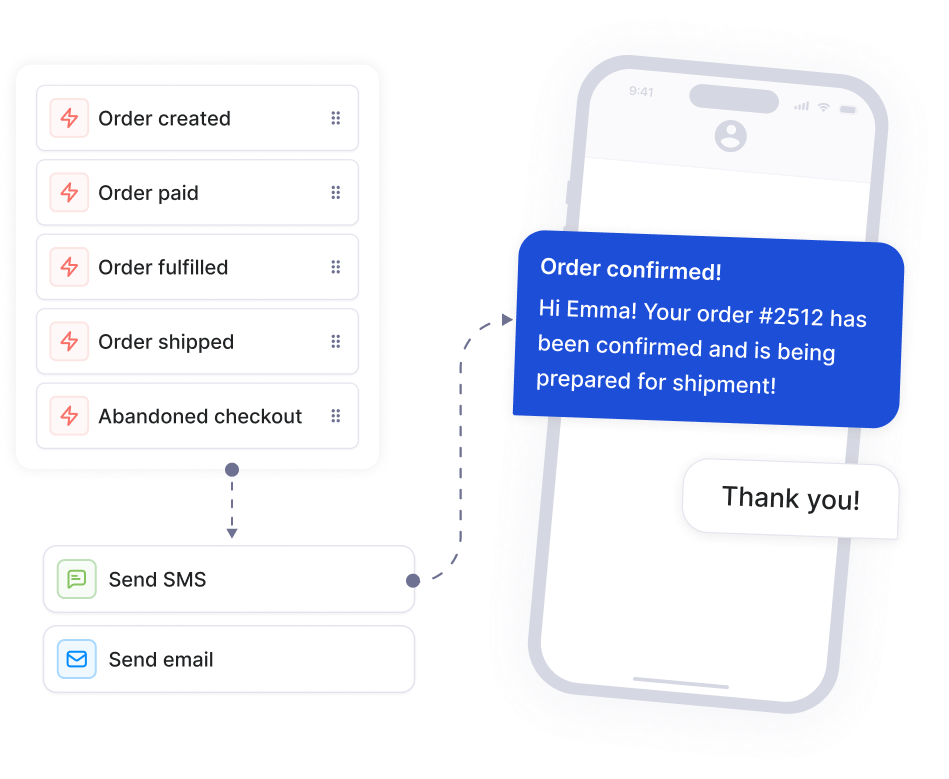
<p>Go to <strong>Automation flows</strong> and click <strong>New flow</strong>. In the trigger panel, select Shopify. You will see five events you can choose from:</p>


<ul class="wp-block-list">
<li><strong>Order created</strong></li>


<li><strong>Order paid</strong></li>


<li><strong>Order fulfilled</strong></li>


<li><strong>Order shipped</strong></li>


<li><strong>Abandoned checkout</strong></li>
</ul>


<p>Filter each trigger further by specific <strong>products</strong>, <strong>product categories</strong>,<strong> order value</strong>, or <strong>contact data fields</strong> to send a different message for high-value orders or target a specific product range.</p>


<p>For a basic setup, three triggers are enough:</p>


<ul class="wp-block-list">
<li><strong>Order paid</strong> for confirmation</li>


<li><strong>Order shipped</strong> for tracking</li>


<li><strong>Order fulfilled</strong> for delivery follow-up</li>
</ul>


<div class="alert__wrapper wp-elements-518351652b52daafbd248ef1faee0dff"><div class="alert has-green-100-background-color" style="color: var(--wp--preset--color--emphasize)"><p><img src="https://s.w.org/images/core/emoji/17.0.2/72x72/2699.png" alt="⚙" class="wp-smiley" style="height: 1em; max-height: 1em;" />For a full breakdown of how each trigger works and how to filter by product, category, or order value, see the <a class="underline underline underline-offset-2 decoration-1 decoration-current/40 hover:decoration-current focus:decoration-current" href="https://support.textmagic.com/article/textmagic-and-shopify-integration/">Textmagic and Shopify integration guide</a>.</p>
</div></div>


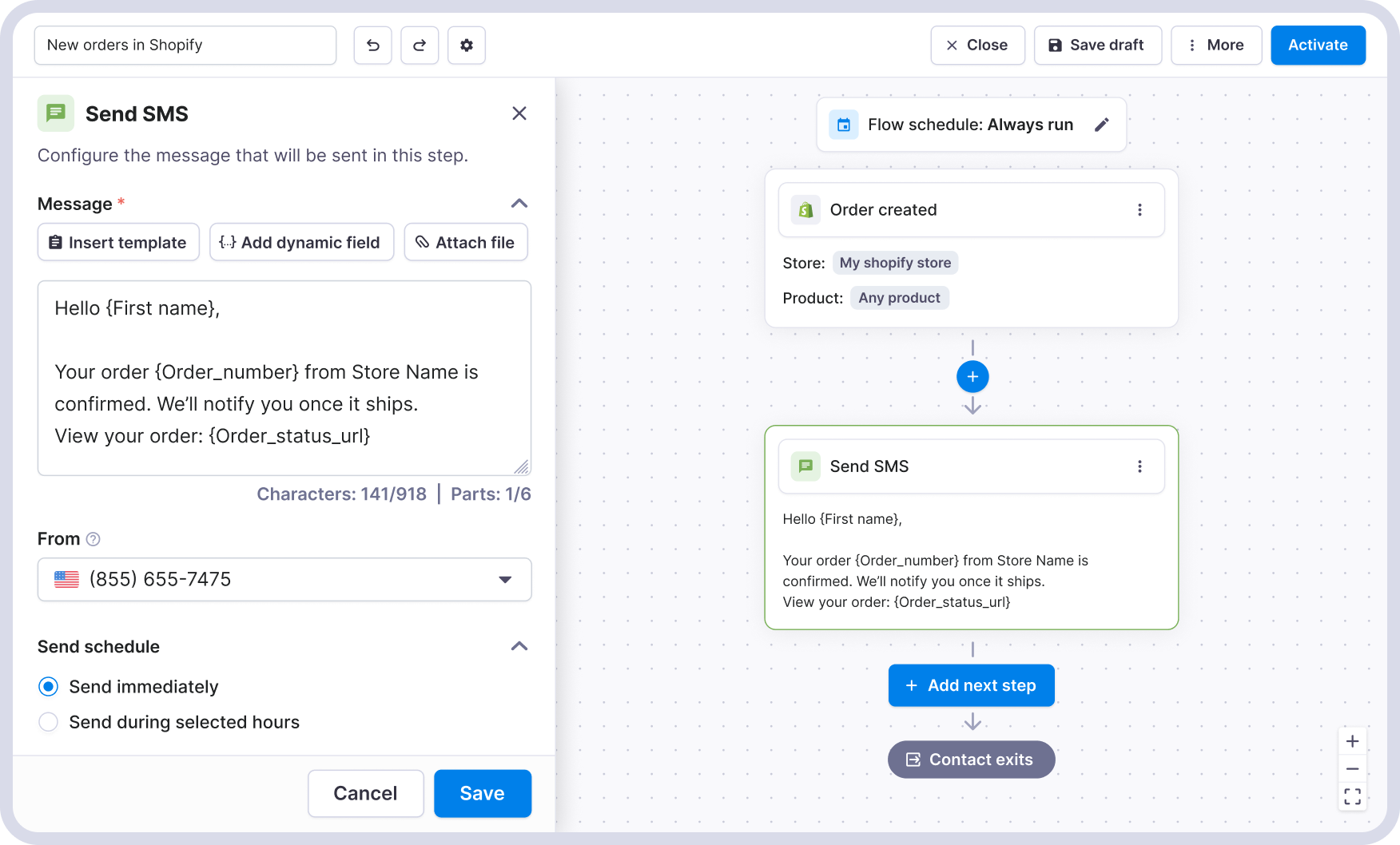
<p><strong>A simple SMS order confirmation flow looks like this:</strong></p>


<figure class="wp-block-image size-full"><img loading="lazy" decoding="async" width="1752" height="1058" src="https://www.textmagic.com/wp-content/uploads/2026/05/Textmagic-x-Shopify-SMS-order-placed-confirmation.png" alt="Textmagic x Shopify SMS order placed confirmation" class="wp-image-26750" srcset="https://www.textmagic.com/wp-content/uploads/2026/05/Textmagic-x-Shopify-SMS-order-placed-confirmation.png 1752w, https://www.textmagic.com/wp-content/uploads/2026/05/Textmagic-x-Shopify-SMS-order-placed-confirmation-300x181.png 300w, https://www.textmagic.com/wp-content/uploads/2026/05/Textmagic-x-Shopify-SMS-order-placed-confirmation-1024x618.png 1024w, https://www.textmagic.com/wp-content/uploads/2026/05/Textmagic-x-Shopify-SMS-order-placed-confirmation-768x464.png 768w, https://www.textmagic.com/wp-content/uploads/2026/05/Textmagic-x-Shopify-SMS-order-placed-confirmation-1536x928.png 1536w" sizes="auto, (max-width: 1752px) 100vw, 1752px" /></figure>


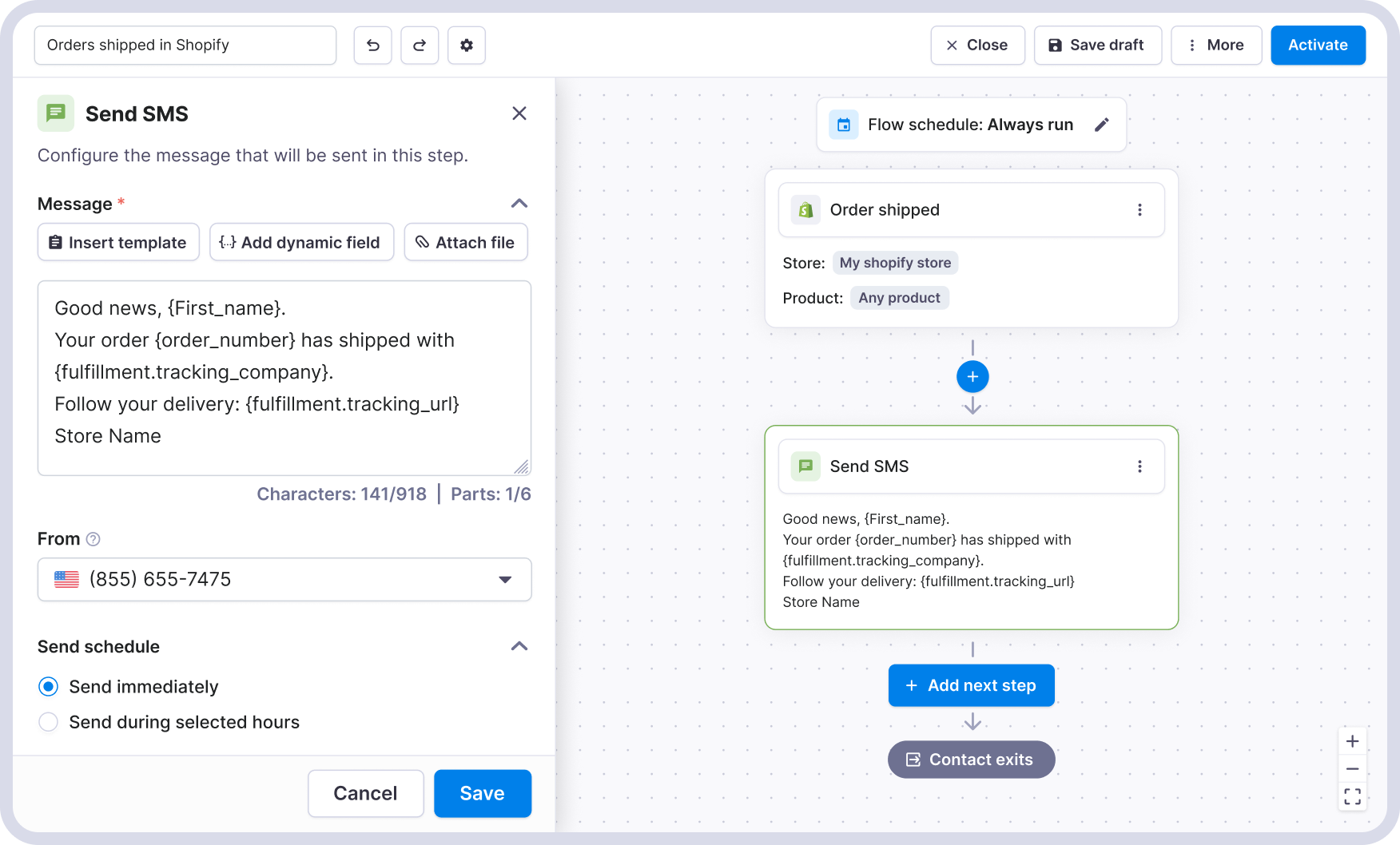
<p><strong>A shipping notification SMS looks like this:</strong></p>


<figure class="wp-block-image size-full"><img loading="lazy" decoding="async" width="1752" height="1058" src="https://www.textmagic.com/wp-content/uploads/2026/05/Textmagic-x-Shopify-SMS-order-shipped-notification.png" alt="Textmagic x Shopify SMS order shipped notification" class="wp-image-26749" srcset="https://www.textmagic.com/wp-content/uploads/2026/05/Textmagic-x-Shopify-SMS-order-shipped-notification.png 1752w, https://www.textmagic.com/wp-content/uploads/2026/05/Textmagic-x-Shopify-SMS-order-shipped-notification-300x181.png 300w, https://www.textmagic.com/wp-content/uploads/2026/05/Textmagic-x-Shopify-SMS-order-shipped-notification-1024x618.png 1024w, https://www.textmagic.com/wp-content/uploads/2026/05/Textmagic-x-Shopify-SMS-order-shipped-notification-768x464.png 768w, https://www.textmagic.com/wp-content/uploads/2026/05/Textmagic-x-Shopify-SMS-order-shipped-notification-1536x928.png 1536w" sizes="auto, (max-width: 1752px) 100vw, 1752px" /></figure>


<p><strong>A delivery follow-up looks like this:</strong></p>


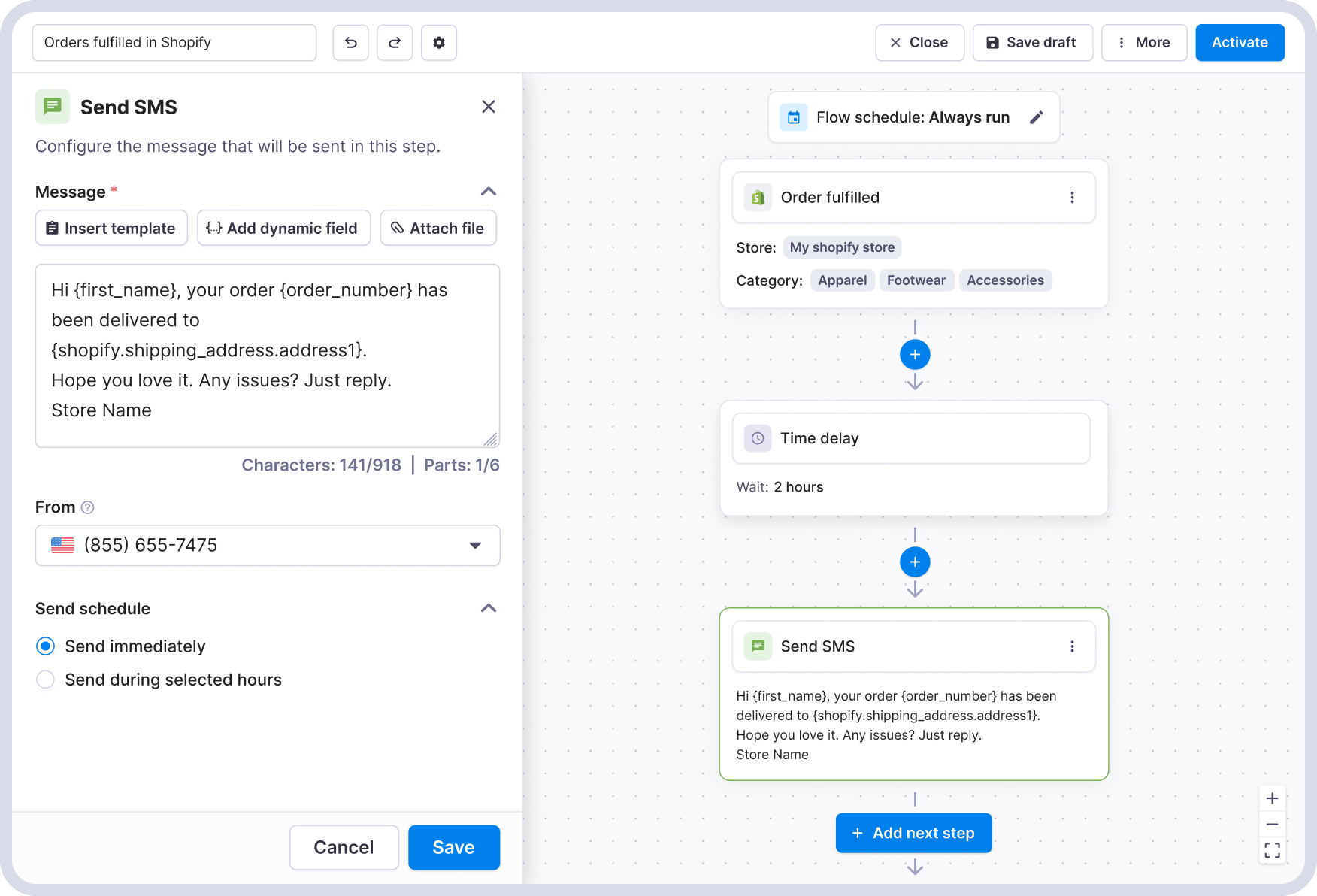
<figure class="wp-block-image size-full"><img loading="lazy" decoding="async" width="1752" height="1192" src="https://www.textmagic.com/wp-content/uploads/2026/05/Textmagic-Shopify-automation-flow-for-Shopify-order-fulfilled-1.png" alt="Shopify order fulfilled follow up text message via Textmagic" class="wp-image-26744" srcset="https://www.textmagic.com/wp-content/uploads/2026/05/Textmagic-Shopify-automation-flow-for-Shopify-order-fulfilled-1.png 1752w, https://www.textmagic.com/wp-content/uploads/2026/05/Textmagic-Shopify-automation-flow-for-Shopify-order-fulfilled-1-300x204.png 300w, https://www.textmagic.com/wp-content/uploads/2026/05/Textmagic-Shopify-automation-flow-for-Shopify-order-fulfilled-1-1024x697.png 1024w, https://www.textmagic.com/wp-content/uploads/2026/05/Textmagic-Shopify-automation-flow-for-Shopify-order-fulfilled-1-768x523.png 768w, https://www.textmagic.com/wp-content/uploads/2026/05/Textmagic-Shopify-automation-flow-for-Shopify-order-fulfilled-1-1536x1045.png 1536w" sizes="auto, (max-width: 1752px) 100vw, 1752px" /></figure>


<h3 class="wp-block-heading" id="3-write-messages-that-feel-like-real-updates-nbsp">3. Write messages that feel like real updates&nbsp;</h3>


<p>Use <a href="/dynamic-fields/" target="_blank" rel="noreferrer noopener">dynamic fields</a> to pull order data directly into your messages. This lets you include details like the customer’s name, order details, or tracking link without writing each message manually.&nbsp;</p>


<p>In Textmagic, you insert these fields from the message editor. They’re grouped by source, such as <strong>Contact</strong> or <strong>Shopify order data</strong>, and you can pick exactly what you want to include.&nbsp;</p>


<ul class="wp-block-list">
<li>Customer name</li>


<li>Order number</li>


<li>Tracking link</li>


<li>Store name</li>


<li>Shipping details</li>
</ul>


<p>Start with the essentials that help the customer understand what’s happening.&nbsp;</p>


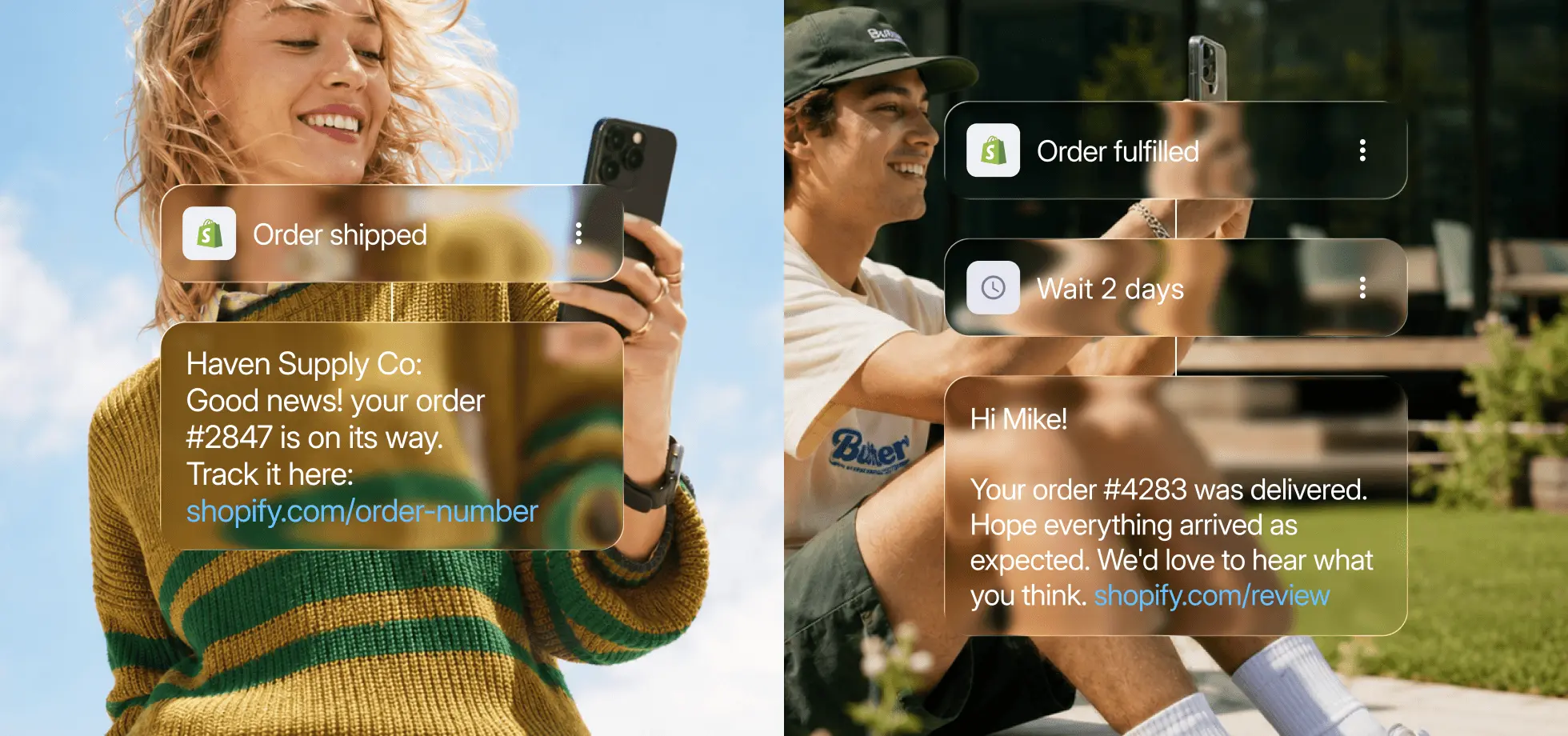
<h4 class="wp-block-heading"><strong>Example: basic vs personalised message&nbsp;</strong></h4>


<ul class="wp-block-list">
<li><strong>Generic: </strong>Your order has been confirmed. Thank you for your purchase.</li>


<li><strong>With dynamic fields: </strong>Haven Supply Co: Hi Emma, your order #2847 is confirmed and being packed. We&#8217;ll text you when it ships. Any questions? Just reply.</li>
</ul>


<figure class="wp-block-image size-full"><img loading="lazy" decoding="async" width="1960" height="920" src="https://www.textmagic.com/wp-content/uploads/2026/05/Examples-of-order-notifications-for-customers-Shopify-Textmagic-1.webp" alt="Examples of SMS order notifications in Shopify with Textmagic" class="wp-image-26745" srcset="https://www.textmagic.com/wp-content/uploads/2026/05/Examples-of-order-notifications-for-customers-Shopify-Textmagic-1.webp 1960w, https://www.textmagic.com/wp-content/uploads/2026/05/Examples-of-order-notifications-for-customers-Shopify-Textmagic-1-300x141.webp 300w, https://www.textmagic.com/wp-content/uploads/2026/05/Examples-of-order-notifications-for-customers-Shopify-Textmagic-1-1024x481.webp 1024w, https://www.textmagic.com/wp-content/uploads/2026/05/Examples-of-order-notifications-for-customers-Shopify-Textmagic-1-768x360.webp 768w, https://www.textmagic.com/wp-content/uploads/2026/05/Examples-of-order-notifications-for-customers-Shopify-Textmagic-1-1536x721.webp 1536w, https://www.textmagic.com/wp-content/uploads/2026/05/Examples-of-order-notifications-for-customers-Shopify-Textmagic-1-170x80.webp 170w" sizes="auto, (max-width: 1960px) 100vw, 1960px" /></figure>


<h3 class="wp-block-heading" id="4-schedule-your-order-notifications">4. Schedule your order notifications</h3>


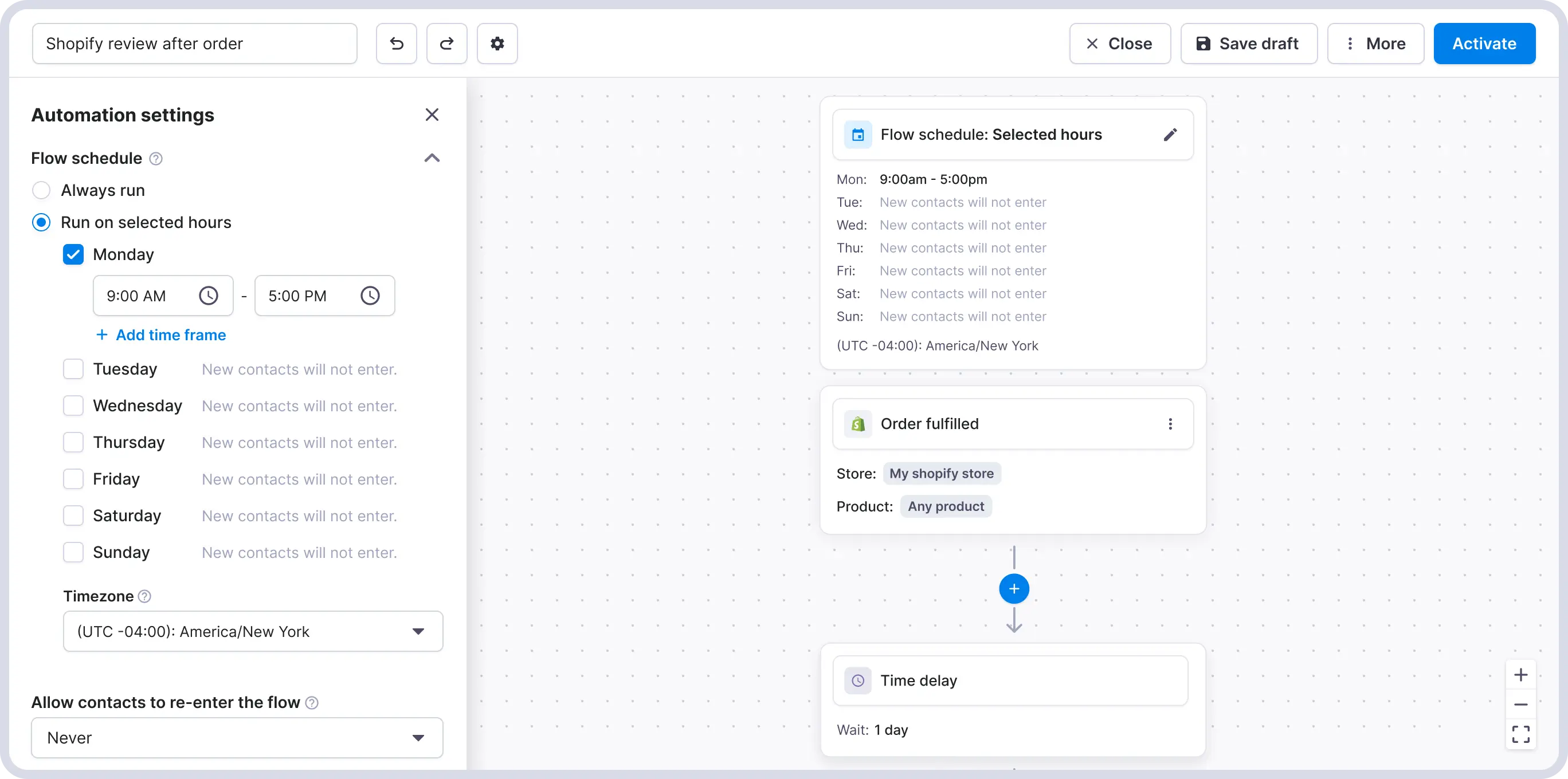
<p>Before activating your flow, set a sending window so messages don’t go out at inappropriate times. In the US, commercial SMS is limited to 8am–9pm in the customer’s local time zone (TCPA). Other countries have their own rules.</p>


<p>In Textmagic, you can set active hours in the <strong>Scheduling</strong> settings. If a trigger fires outside that window, texts will be queued and sent later.</p>


<figure class="wp-block-image size-full"><img loading="lazy" decoding="async" width="2736" height="1360" src="https://www.textmagic.com/wp-content/uploads/2026/05/Textmagic-SMS-schedule-for-automated-workflows-1.webp" alt="SMS scheduling for Shopify order notifications using Textmagic" class="wp-image-26746" srcset="https://www.textmagic.com/wp-content/uploads/2026/05/Textmagic-SMS-schedule-for-automated-workflows-1.webp 2736w, https://www.textmagic.com/wp-content/uploads/2026/05/Textmagic-SMS-schedule-for-automated-workflows-1-300x149.webp 300w, https://www.textmagic.com/wp-content/uploads/2026/05/Textmagic-SMS-schedule-for-automated-workflows-1-1024x509.webp 1024w, https://www.textmagic.com/wp-content/uploads/2026/05/Textmagic-SMS-schedule-for-automated-workflows-1-768x382.webp 768w, https://www.textmagic.com/wp-content/uploads/2026/05/Textmagic-SMS-schedule-for-automated-workflows-1-1536x764.webp 1536w, https://www.textmagic.com/wp-content/uploads/2026/05/Textmagic-SMS-schedule-for-automated-workflows-1-2048x1018.webp 2048w" sizes="auto, (max-width: 2736px) 100vw, 2736px" /></figure>


<h3 class="wp-block-heading" id="5-activate-and-monitor">5. Activate and monitor</h3>


<p>Once your messages are written and your sending window is set, activate the flow. From this point, every qualifying Shopify event will trigger the relevant message automatically.</p>


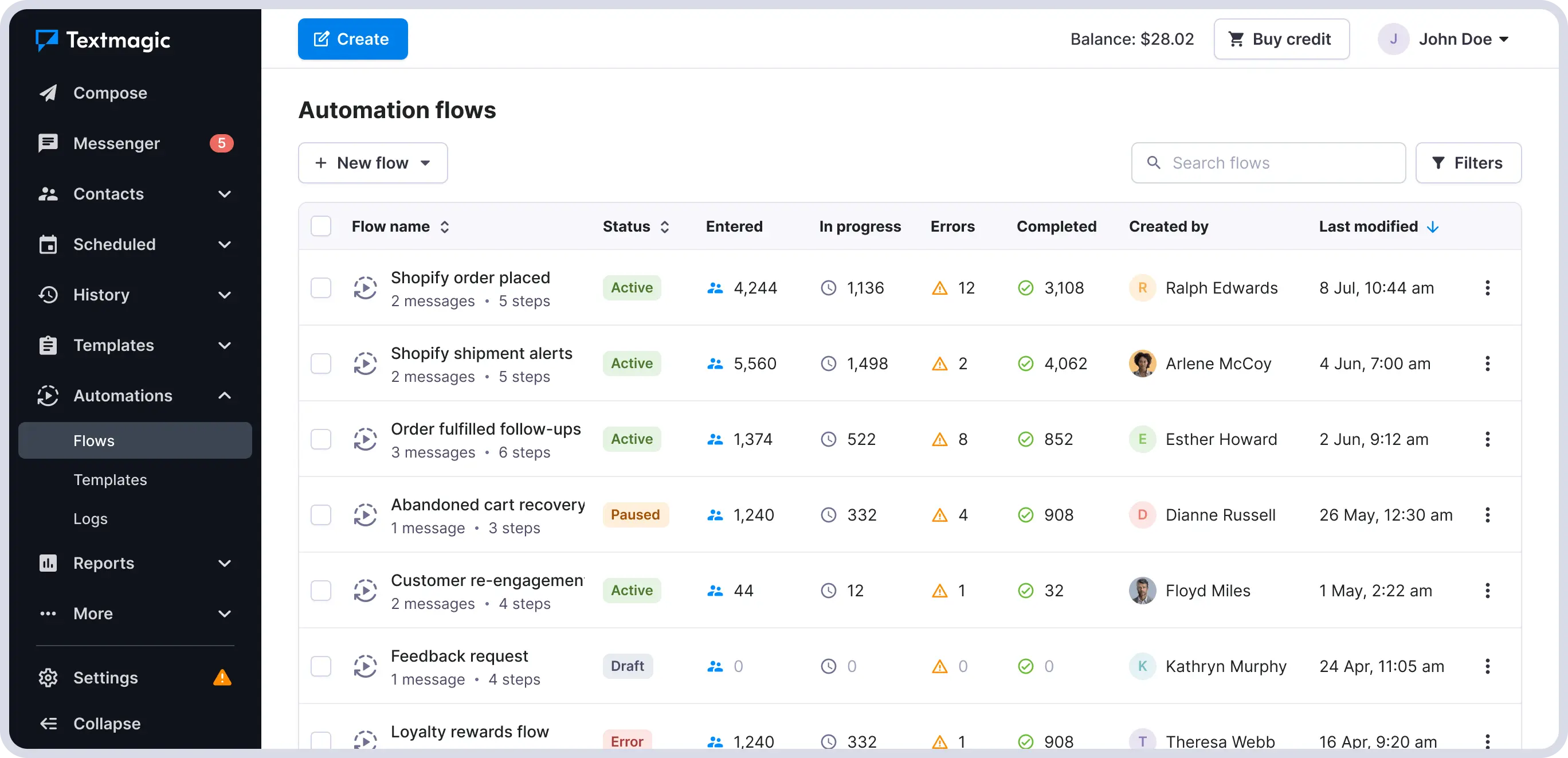
<p>Each message includes a delivery status (In progress, Errors, Completed), visible in your message or automation history. If something goes wrong, like an invalid number or carrier issue, you’ll see it.</p>


<figure class="wp-block-image size-full"><img loading="lazy" decoding="async" width="2736" height="1322" src="https://www.textmagic.com/wp-content/uploads/2026/05/Automation-flows-running-in-Textmagic.webp" alt="Reports of all automated SMS order notifications using Textmagic" class="wp-image-26747" srcset="https://www.textmagic.com/wp-content/uploads/2026/05/Automation-flows-running-in-Textmagic.webp 2736w, https://www.textmagic.com/wp-content/uploads/2026/05/Automation-flows-running-in-Textmagic-300x145.webp 300w, https://www.textmagic.com/wp-content/uploads/2026/05/Automation-flows-running-in-Textmagic-1024x495.webp 1024w, https://www.textmagic.com/wp-content/uploads/2026/05/Automation-flows-running-in-Textmagic-768x371.webp 768w, https://www.textmagic.com/wp-content/uploads/2026/05/Automation-flows-running-in-Textmagic-1536x742.webp 1536w, https://www.textmagic.com/wp-content/uploads/2026/05/Automation-flows-running-in-Textmagic-2048x990.webp 2048w" sizes="auto, (max-width: 2736px) 100vw, 2736px" /></figure>


<p>Once your core flows are in place, you can build more advanced automations.&nbsp;</p>


<p><strong>For example:</strong></p>


<ul class="wp-block-list">
<li>Send follow-ups only if a customer hasn’t replied or opened an email&nbsp;</li>


<li>Trigger different actions based on customer responses</li>


<li>Combine SMS and email in the same flow</li>


<li>Send internal alerts when a high-value order is placed&nbsp;</li>


<li>Notify warehouse or fulfillment staff when urgent orders come in&nbsp;</li>


<li>Trigger supplier notifications when low-stock products are sold&nbsp;</li>
</ul>


<p>Start simple, then expand based on how your contacts respond. If you use email in these flows, avoid duplicating Shopify’s default email notifications.</p>


  <div class="blog-cta-block" >

    <div class="cta-container">
      <div class="cta-text">
                  <h3>Get SMS running for your store, the right way</h3>
        
                  <p>The best time to reach a customer is right after they buy. SMS makes sure you do.</p>
        
                  <button
            type="button"
            class="hregister btn btn--blue btn--1"
            onclick="window.location.href='https://app.textmagic.com/register/?utm_source=blog&#038;utm_medium=blog&#038;utm_campaign=CM'">
            Try it for free          </button>
              </div>

              <div class="cta-image">
          <img decoding="async" src="https://www.textmagic.com/wp-content/uploads/2026/05/CTA-Shopify-and-textmagic.png" alt="Get SMS running for your store, the right way">
        </div>
          </div>
  </div>


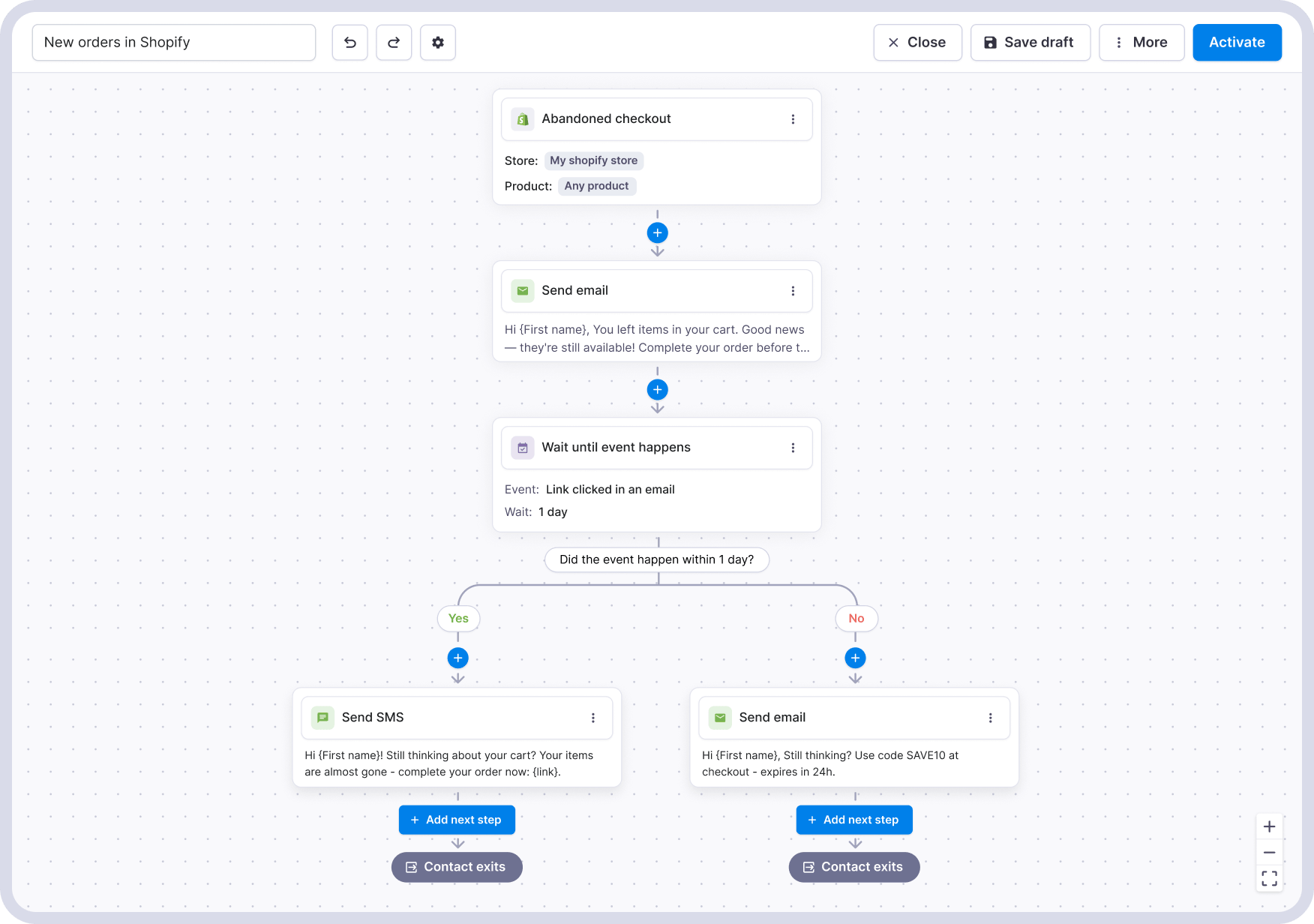
<h4 class="wp-block-heading" id="a-note-on-abandoned-checkout-notifications"><strong>A note on abandoned checkout notifications</strong></h4>


<p>Abandoned checkout is the highest-impact trigger, but it works differently from the others.</p>


<p>Order confirmations and shipping updates are transactional. They’re tied to a purchase, and customers expect them.&nbsp;</p>


<p><strong>Abandoned checkout messages are marketing</strong>. That means you can only send them to customers who have explicitly opted in to receive SMS at checkout. If you don&#8217;t have that in place yet, start with the order-related triggers and add abandoned checkout once consent is collected.&nbsp;&nbsp;&nbsp;</p>


<figure class="wp-block-image size-full"><img loading="lazy" decoding="async" width="1752" height="1232" src="https://www.textmagic.com/wp-content/uploads/2026/05/Textmagic-Shopify-automation-flow-for-Shopify-abandoned-cart.png" alt="" class="wp-image-26725" srcset="https://www.textmagic.com/wp-content/uploads/2026/05/Textmagic-Shopify-automation-flow-for-Shopify-abandoned-cart.png 1752w, https://www.textmagic.com/wp-content/uploads/2026/05/Textmagic-Shopify-automation-flow-for-Shopify-abandoned-cart-300x211.png 300w, https://www.textmagic.com/wp-content/uploads/2026/05/Textmagic-Shopify-automation-flow-for-Shopify-abandoned-cart-1024x720.png 1024w, https://www.textmagic.com/wp-content/uploads/2026/05/Textmagic-Shopify-automation-flow-for-Shopify-abandoned-cart-768x540.png 768w, https://www.textmagic.com/wp-content/uploads/2026/05/Textmagic-Shopify-automation-flow-for-Shopify-abandoned-cart-1536x1080.png 1536w" sizes="auto, (max-width: 1752px) 100vw, 1752px" /></figure>


<h3 class="wp-block-heading">What this looks like once it is running</h3>


<p>A customer places an order. Within seconds, they get a confirmation by SMS with their order number and your store name, alongside the usual Shopify email.</p>


<p>When the order ships, they receive a tracking link. When it’s delivered, they get a follow-up message. If they reply at any point, the conversation shows up in your Textmagic inbox.</p>
<p>The post <a href="https://www.textmagic.com/blog/automate-shopify-order-notifications/">How to automate SMS order notifications for your Shopify store</a> appeared first on <a href="https://www.textmagic.com">Textmagic</a>.</p>
]]></content:encoded>
	
	</item>
<item rdf:about="https://www.textmagic.com/blog/shopify-sms-compliance/">
	<title>How to text your Shopify customers (and stay compliant)</title>
	<link>https://www.textmagic.com/blog/shopify-sms-compliance/</link>

	<dc:creator><![CDATA[Textmagic Team]]></dc:creator>
	<dc:date>2026-05-14T12:00:00Z</dc:date>
			<dc:subject><![CDATA[Guides]]></dc:subject>

			<description><![CDATA[<p>A practical guide to SMS consent, number registration, and deliverability for Shopify store owners.</p>
<p>The post <a href="https://www.textmagic.com/blog/shopify-sms-compliance/">How to text your Shopify customers (and stay compliant)</a> appeared first on <a href="https://www.textmagic.com">Textmagic</a>.</p>
]]></description>
		<content:encoded><![CDATA[
<figure class="wp-block-image size-full"><img loading="lazy" decoding="async" width="980" height="460" src="https://www.textmagic.com/wp-content/uploads/2026/05/How-to-send-texts-compliantly-to-Shopify-customers-updated.png" alt="How to send texts compliantly to Shopify customers (updated)" class="wp-image-26825" srcset="https://www.textmagic.com/wp-content/uploads/2026/05/How-to-send-texts-compliantly-to-Shopify-customers-updated.png 980w, https://www.textmagic.com/wp-content/uploads/2026/05/How-to-send-texts-compliantly-to-Shopify-customers-updated-300x141.png 300w, https://www.textmagic.com/wp-content/uploads/2026/05/How-to-send-texts-compliantly-to-Shopify-customers-updated-768x360.png 768w, https://www.textmagic.com/wp-content/uploads/2026/05/How-to-send-texts-compliantly-to-Shopify-customers-updated-170x80.png 170w" sizes="auto, (max-width: 980px) 100vw, 980px" /></figure>


<p>Think about the last time a brand texted you and it felt useful rather than annoying. Probably an <strong>order confirmation</strong>, a <strong>shipping update</strong>, maybe a<strong> restock alert </strong>for something you actually wanted. You were glad they sent it.</p>


<p>That is the bar for Shopify SMS done right and it is exactly what Textmagic is built to deliver. Messages that feel expected, relevant, and well-timed. </p>


<p>The compliance side is just what makes sure those messages arrive and that you are allowed to send them.</p>


<h2 class="wp-block-heading" id="what-you-actually-need-to-get-it-right">What you actually need to get it right</h2>


<p>The compliance side of SMS has a reputation for being a headache. In practice, there are two core areas to focus on:</p>


<ul class="wp-block-list">
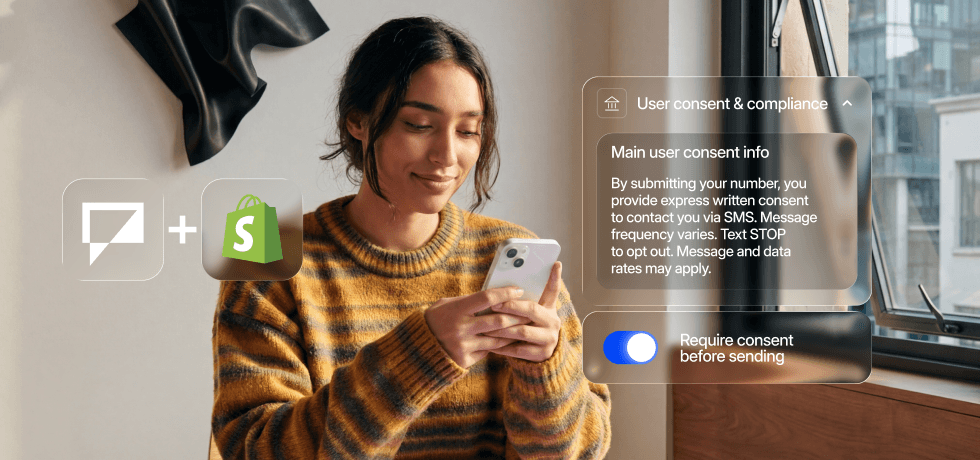
<li><strong>Who you can text.</strong> You need explicit consent from every person on your list. Not implied &#8220;<em>they gave us their email so probably their phone too</em>&#8221; consent. Explicit, documented, <a href="https://support.textmagic.com/article/acceptable-consent-methods-for-sms-messaging/" target="_blank" rel="noreferrer noopener">SMS-specific consent</a>.</li>


<li><strong>A valid, verified number.</strong> In major markets business SMS traffic has to come from a registered number or carriers will silently filter it.</li>
</ul>


<h3 class="wp-block-heading" id="1-collect-consent-the-right-way-at-checkout">1. Collect consent the right way at checkout</h3>


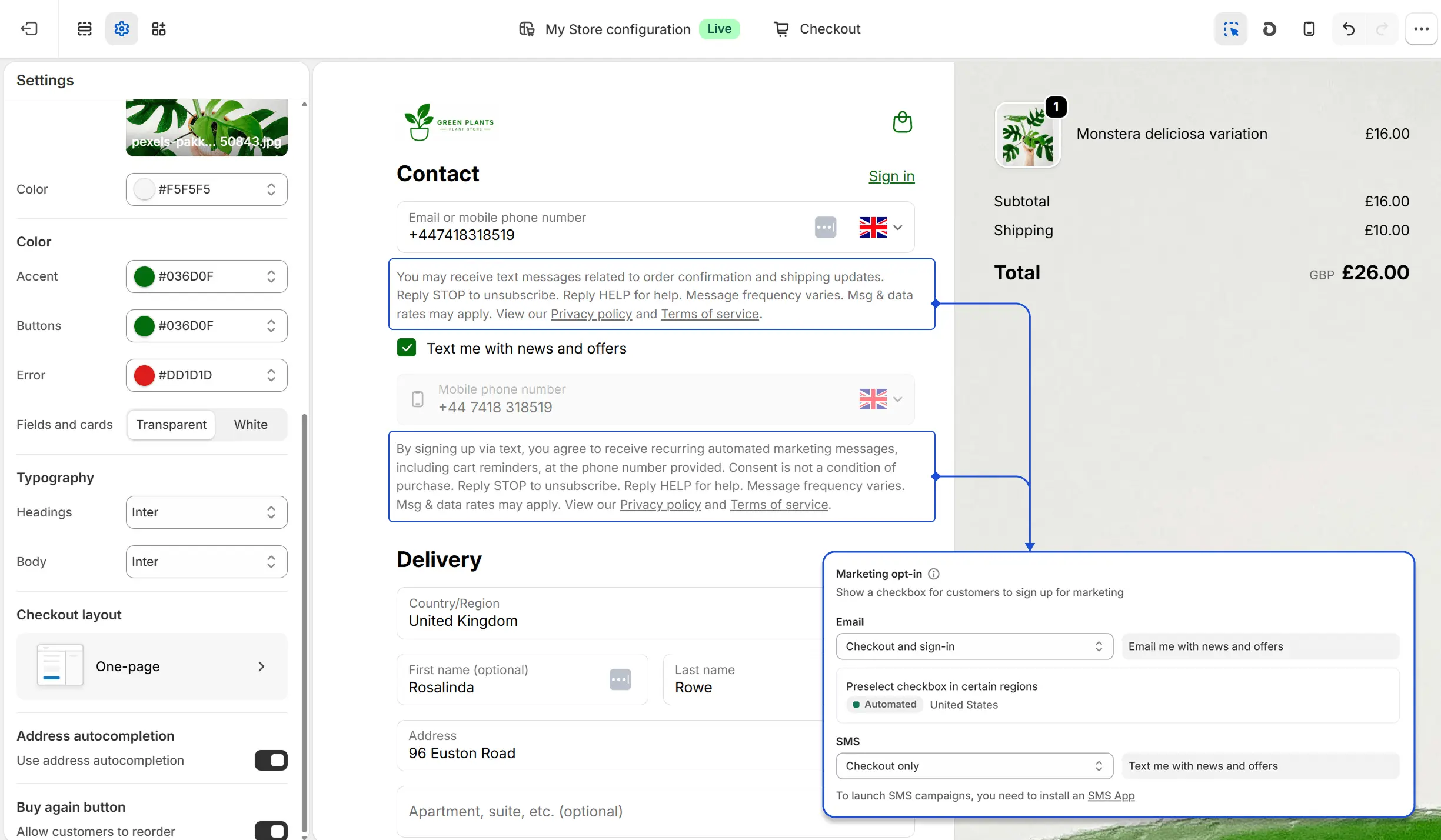
<p>The best place to collect SMS consent for a Shopify store is at checkout. You already have the customer&#8217;s attention, they are already entering their phone number, and a simple checkbox takes care of everything.</p>


<figure class="wp-block-image size-full"><img loading="lazy" decoding="async" width="2449" height="1428" src="https://www.textmagic.com/wp-content/uploads/2026/05/Example-of-opt-in-consent-collection-at-checkout-Shopify.webp" alt="Example of SMS consent in a Shopify checkout page" class="wp-image-26738" srcset="https://www.textmagic.com/wp-content/uploads/2026/05/Example-of-opt-in-consent-collection-at-checkout-Shopify.webp 2449w, https://www.textmagic.com/wp-content/uploads/2026/05/Example-of-opt-in-consent-collection-at-checkout-Shopify-300x175.webp 300w, https://www.textmagic.com/wp-content/uploads/2026/05/Example-of-opt-in-consent-collection-at-checkout-Shopify-1024x597.webp 1024w, https://www.textmagic.com/wp-content/uploads/2026/05/Example-of-opt-in-consent-collection-at-checkout-Shopify-768x448.webp 768w, https://www.textmagic.com/wp-content/uploads/2026/05/Example-of-opt-in-consent-collection-at-checkout-Shopify-1536x896.webp 1536w, https://www.textmagic.com/wp-content/uploads/2026/05/Example-of-opt-in-consent-collection-at-checkout-Shopify-2048x1194.webp 2048w" sizes="auto, (max-width: 2449px) 100vw, 2449px" /></figure>


<p><strong>Two important rules:</strong></p>


<ul class="wp-block-list">
<li>The checkbox must be <strong>unchecked by default</strong>. Pre-checked boxes are rejected during carrier verification in the US and are not compliant in the UK or Australia either.</li>


<li><strong>Transactional and marketing consent are separate.</strong> Use two checkboxes, one for each.&nbsp; 
<ul class="wp-block-list">
<li>Order confirmations, shipping updates, and delivery notifications are <strong>operational messaging</strong>. Customers expect them as part of the purchase. </li>


<li>Promotional offers, product launches, and sale announcements are <strong>permission-based messaging. </strong></li>
</ul>
</li>
</ul>


<div class="alert__wrapper wp-elements-02fff814a28bed1f96eb758bd2f7a1ff"><div class="alert alert-success" style="color: var(--wp--preset--color--emphasize)"><p style="text-align: left;"><img src="https://s.w.org/images/core/emoji/17.0.2/72x72/1f4a1.png" alt="💡" class="wp-smiley" style="height: 1em; max-height: 1em;" />When you sync your Shopify customers to Textmagic, you can map Shopify&#8217;s <em><strong>emailMarketingConsent</strong> </em>and <strong><em>smsMarketingConsent</em></strong> fields during the setup wizard.</p>
<p style="text-align: left;">Textmagic suggests mapping these to &#8220;<strong><em>Accepts Email Marketing</em></strong>&#8221; and &#8220;<strong><em>Accepts SMS Marketing</em></strong>&#8221; contact fields. Once mapped, you can use these fields to filter your automations.</p>
<p style="text-align: left;">For example, adding a conditional split before any marketing message to ensure it only reaches customers who have explicitly opted in.</p>
</div></div>


<p>Shopify provides default consent language but you can customise it from <strong>Checkout</strong> →<strong> Languages</strong> →<strong> Edit checkout language</strong>. Here are a few examples of what good consent copy looks like:</p>


<p><strong>Order updates and shipping notifications (transactional):</strong></p>


<p>☐ <em>Text me order confirmations and delivery updates from [Store Name]. Message frequency may vary. Message and data rates may apply. Text STOP to opt out or HELP for support. By checking, I accept [Terms of Service] &amp; [Privacy Policy]</em></p>


<p><strong>Promotions, offers, and product alerts (marketing):</strong></p>


<p>☐<em> Text me exclusive offers, new arrivals, and tips from [Store Name]. Message frequency may vary. Message and data rates may apply. Text STOP to opt out or HELP for support. By checking, I accept [Terms of Service] &amp; [Privacy Policy]</em></p>


<h3 class="wp-block-heading" id="2-build-a-subscribe-form-for-everyone-else">2. Build a subscribe form for everyone else</h3>


<p>Checkout captures customers at the point of purchase. But what about people browsing your store who have not bought yet, or previous customers you want to re-engage?</p>


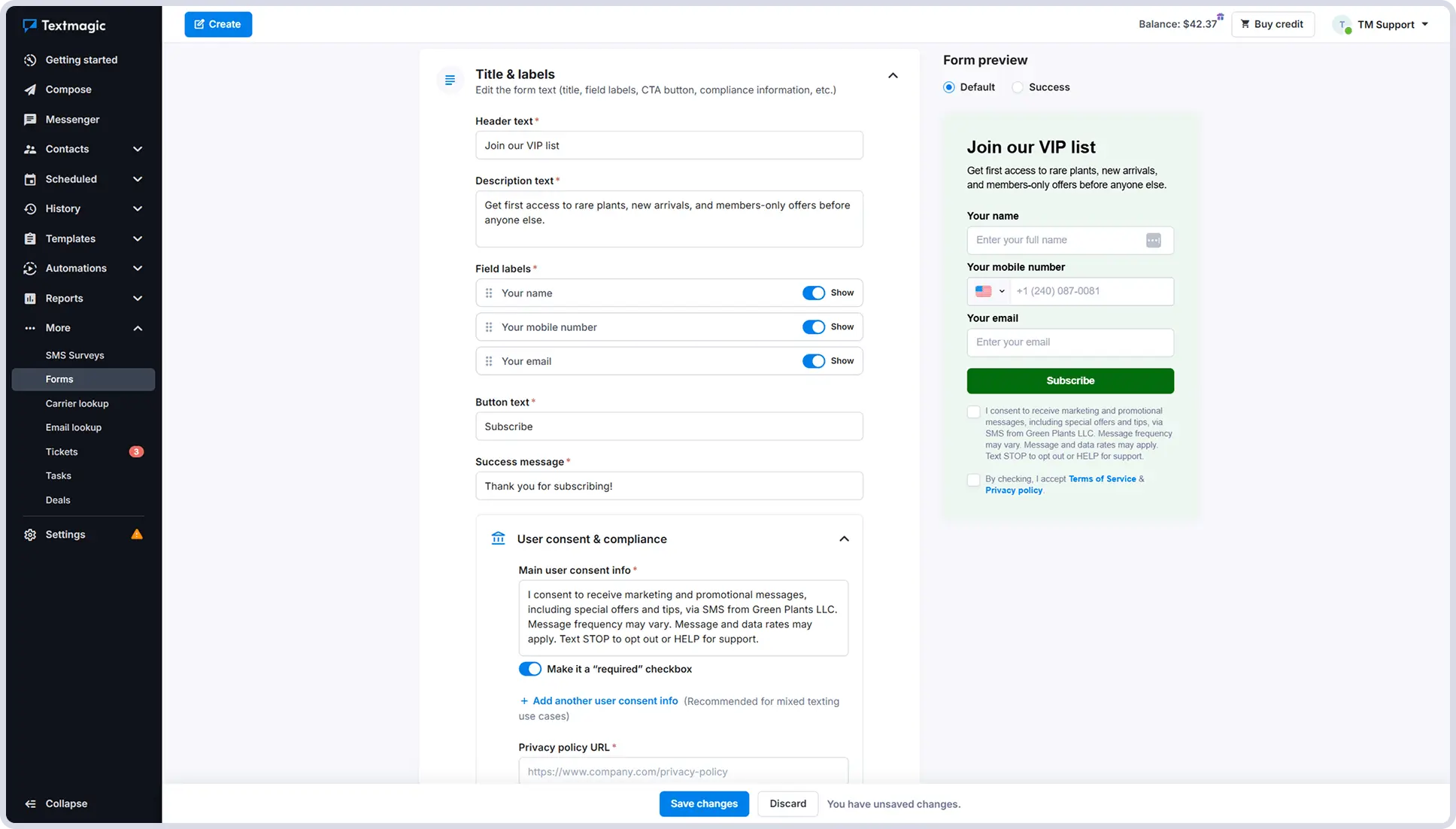
<p>Textmagic lets you create embedded <a href="https://www.textmagic.com/sms-subscribe-forms/" target="_blank" rel="noreferrer noopener">SMS subscribe forms</a> that you can add anywhere on your Shopify store: a product page, your sidebar, or a dedicated landing page.</p>


<figure class="wp-block-image size-full"><img loading="lazy" decoding="async" width="1936" height="1102" src="https://www.textmagic.com/wp-content/uploads/2026/05/VIP-list-subscribe-form-with-Textmagic-1.webp" alt="VIP list SMS subscribe for with Textmagic" class="wp-image-26739" srcset="https://www.textmagic.com/wp-content/uploads/2026/05/VIP-list-subscribe-form-with-Textmagic-1.webp 1936w, https://www.textmagic.com/wp-content/uploads/2026/05/VIP-list-subscribe-form-with-Textmagic-1-300x171.webp 300w, https://www.textmagic.com/wp-content/uploads/2026/05/VIP-list-subscribe-form-with-Textmagic-1-1024x583.webp 1024w, https://www.textmagic.com/wp-content/uploads/2026/05/VIP-list-subscribe-form-with-Textmagic-1-768x437.webp 768w, https://www.textmagic.com/wp-content/uploads/2026/05/VIP-list-subscribe-form-with-Textmagic-1-1536x874.webp 1536w" sizes="auto, (max-width: 1936px) 100vw, 1936px" /></figure>


<p>The form handles everything: it collects the phone number and adds the contact directly to the right list. When you go through carrier verification, you can use the Textmagic form as your consent proof.</p>


<p>Common use cases include<strong> back-in-stock </strong>or <strong>waitlist alerts</strong>. For example, you can add a<strong> </strong>form on a sold-out product page that lets customers opt in to be notified when it is available again. The consent language for this kind of form is simple:</p>


<p>☐ <em>Text me when this item is back in stock from [Store Name]. One message per restock. Msg &amp; data rates may apply. Text STOP to opt out or HELP for support. By checking this box, I accept the [Terms of Service] &amp; [Privacy Policy].</em></p>


<p>Because the customer is signing up for a specific, limited purpose communication, the language can be more focused than a general marketing opt-in and customers are more likely to tick it.</p>


<div class="alert__wrapper wp-elements-5724a4e25619b5c739c4462979f16222"><div class="alert alert-success" style="color: var(--wp--preset--color--emphasize)"><p style="text-align: left;"><img src="https://s.w.org/images/core/emoji/17.0.2/72x72/1f4a1.png" alt="💡" class="wp-smiley" style="height: 1em; max-height: 1em;" /> Contacts who subscribe via a Textmagic form are added to your Textmagic lists but are not synced back to Shopify automatically. You can either use the &#8220;<strong>Sync to Shopify</strong>&#8221; option in the contact view to push them across, or set up an automation that tags them in both systems the moment they subscribe.</p>
</div></div>


<h3 class="wp-block-heading" id="3-register-your-sending-number-nbsp">3. Register your sending number&nbsp;</h3>


<p>Once your consent collection is sorted, you need to make sure your messages are delivered. This depends on where your customers are.</p>


<h4 class="wp-block-heading">US &amp; CA customers</h4>


<p>Every business sending SMS in the United States needs a registered number. Unregistered messages are filtered by carriers before delivery. You have two options.&nbsp;</p>


<ul class="wp-block-list">
<li><a href="https://www.textmagic.com/toll-free-texting/" target="_blank" rel="noreferrer noopener"><strong>Toll-free numbers</strong></a> (800, 888, 877) are what Textmagic recommends for most Shopify stores. Registration is free, takes about 5 business days, and you will need your business name, a description of what you send, how you collect consent, and two or three sample messages.&nbsp;</li>


<li><a href="https://www.textmagic.com/10dlc-texting/" target="_blank" rel="noreferrer noopener"><strong>10DLC numbers</strong></a> use a local area code and are worth considering if local presence matters to your brand, but they require more paperwork and take up to 7 business days to be approved.</li>
</ul>


<div class="alert__wrapper wp-elements-9cd414faf2c884d11eee71d8d5da5098"><div class="alert alert-success" style="color: var(--wp--preset--color--emphasize)"><p><img src="https://s.w.org/images/core/emoji/17.0.2/72x72/1f4a1.png" alt="💡" class="wp-smiley" style="height: 1em; max-height: 1em;" /> Textmagic&#8217;s AI helps you complete either registration form and flags anything that could cause a delay or rejection before you submit.</p>
</div></div>


<p><strong>Selling to Canada?</strong> Verified toll-free numbers work there too, similar registration process as in the US. If you need a local Canadian number instead, contact Textmagic support and they will get one set up for you.</p>


<p>Check out our <a href="https://support.textmagic.com/video/getting-started-sms-us-ca/">video tutorial</a> to see how to get started with SMS in the United States &amp; Canada.&nbsp;</p>


<script src="https://fast.wistia.com/player.js" async></script><script src="https://fast.wistia.com/embed/ul1pxafi5y.js" async type="module"></script><style>wistia-player[media-id='ul1pxafi5y']:not(:defined) { background: center / contain no-repeat url('https://fast.wistia.com/embed/medias/ul1pxafi5y/swatch'); display: block; filter: blur(5px); padding-top:56.25%; }</style> <wistia-player media-id="ul1pxafi5y" seo="false" aspect="1.7777777777777777"></wistia-player>


<div style="height:6px" aria-hidden="true" class="wp-block-spacer"></div>


<p>Textmagic walks you through the registration inside your account. </p>


<h4 class="wp-block-heading">UK &amp; AU customers</h4>


<ul class="wp-block-list">
<li><strong><a href="https://support.textmagic.com/article/sending-text-messages-to-the-united-kingdom/">Sending texts to the United Kingdom</a></strong> requires either a <strong>dedicated UK virtual number</strong> (two-way, customers can reply) or a <strong><a href="https://support.textmagic.com/article/number-filtering-restrictions/">Sender ID</a></strong> (your store name as the sender, one-way only). Your Sender ID has to be your actual brand name. Generic words like &#8220;SHOP&#8221; or &#8220;ALERT&#8221; are blocked.</li>


<li><strong><a href="https://support.textmagic.com/article/sending-text-messages-to-australia/">Sending texts to Australia</a></strong> is also possible with dedicated numbers, but you need to describe your business use case when purchasing one. Sender IDs are available but can take up to 14 days to activate, so if you have a campaign coming up, start this early.</li>
</ul>


<div class="alert__wrapper wp-elements-2684f1e7b8ed7d6480dd38a388dd2c5b"><div class="alert alert-success" style="color: var(--wp--preset--color--emphasize)"><p><img src="https://s.w.org/images/core/emoji/17.0.2/72x72/1f4a1.png" alt="💡" class="wp-smiley" style="height: 1em; max-height: 1em;" />If you use a Sender ID and want customers to be able to reply or opt out via text, include your virtual number in the message body.</p>
</div></div>


<p>Check out our <a href="http://support.textmagic.com/video/getting-started-sms-uk-au/">video tutorial</a> to see how to get started with SMS in the United Kingdom &amp; Australia.&nbsp;</p>


<script src="https://fast.wistia.com/player.js" async></script><script src="https://fast.wistia.com/embed/lytcc377v2.js" async type="module"></script><style>wistia-player[media-id='lytcc377v2']:not(:defined) { background: center / contain no-repeat url('https://fast.wistia.com/embed/medias/lytcc377v2/swatch'); display: block; filter: blur(5px); padding-top:56.25%; }</style> <wistia-player media-id="lytcc377v2" seo="false" aspect="1.7777777777777777"></wistia-player>


<h4 class="wp-block-heading" id="other-countries-nbsp">Other countries&nbsp;</h4>


<p>Selling to <strong>Europe</strong> or <strong>other markets</strong>? Textmagic provides dedicated numbers for several European countries including Germany, Estonia, Italy, and more. </p>


<p>If your communication stack already includes a Twilio or Vonage number, you can connect it directly through the <a href="https://www.textmagic.com/bring-your-own-cpaas/">Textmagic BYOC integration</a> and keep everything in one place.&nbsp;</p>


<p>Once your consent and number are set up, you have everything you need to start sending. </p>


<div class="alert__wrapper wp-elements-126e643809f7ea22a51e0320a88b9fd4"><div class="alert alert-success" style="color: var(--wp--preset--color--emphasize)"><p style="text-align: left;">Our guide on automating <a href="/blog/automate-shopify-order-notifications/" target="_blank" rel="noopener">SMS order notifications to your Shopify store</a> walks you through building automation flows, writing message templates, and monitoring delivery.</p>
</div></div>


<h2 class="wp-block-heading">Sending habits that protect your deliverability</h2>


<p>Getting your setup right means nothing if your messages are easy to ignore or flag. A few habits make the difference between a healthy sender reputation and one that quietly degrades.</p>


<ul class="wp-block-list">
<li><strong>Send at sensible times.</strong> In the US, TCPA restricts commercial messages to 8am-9pm in the customer&#8217;s local time zone. Textmagic&#8217;s scheduler lets you set a sending window for your automations so they never fire outside it, regardless of when the Shopify trigger happens.&nbsp;</li>


<li><strong>Keep your lists clean.</strong> When someone replies STOP to a promotional message, they should stay on your transactional list. They still want their shipping updates. Textmagic handles opt-outs per list automatically.</li>


<li><strong>Identify your store in text messages.</strong> Customers who cannot tell who is texting them ignore the message or report it as spam, which hurts your sender reputation over time. You can identify your store using a relevant sender ID or by signing your text messages when the sender is not clear.</li>


<li><strong>Do not overdo frequency.</strong> Four to eight marketing messages per month is a reasonable ceiling. Transactional messages are different. Those fire on real events and customers expect them. But for promotional sends, more is rarely better.</li>
</ul>


<h3 class="wp-block-heading">What not to send</h3>


<p>Carriers and spam filters look at message content, not just sender registration. A registered number sending spammy-looking messages will still get flagged and once your sender reputation takes a hit, deliverability suffers across everything you send.</p>


<p>A few things that will get you in trouble:</p>


<ul class="wp-block-list">
<li><strong>All caps and excessive punctuation.</strong> &#8220;HUGE SALE ENDS TONIGHT!!!!&#8221;</li>


<li><strong>Fake urgency.</strong> &#8220;Only 2 left!&#8221; when you have 200 in stock, or &#8220;This offer expires in 1 hour&#8221; sent to everyone regardless of when they open it.</li>


<li><strong>Vague sender identity.</strong> Any message that does not immediately tell the customer who is texting them and why.&nbsp;</li>


<li><strong>Texting people who did not opt in.</strong> Uploading your full email list to your SMS tool and blasting them is the fastest way to get your number flagged with carriers.&nbsp;</li>


<li><strong>Links without context.</strong> A bare URL with no explanation of where it goes looks like a phishing attempt. &#8220;Track your order here: [link]&#8221; works. &#8220;[link]&#8221; on its own does not.</li>
</ul>


  <div class="blog-cta-block" >

    <div class="cta-container">
      <div class="cta-text">
                  <h3>Get SMS running for your store, the right way</h3>
        
                  <p>The best time to reach a customer is right after they buy. SMS makes sure you do.</p>
        
                  <button
            type="button"
            class="hregister btn btn--blue btn--1"
            onclick="window.location.href='https://app.textmagic.com/register/?utm_source=blog&#038;utm_medium=blog&#038;utm_campaign=CM'">
            Try it for free          </button>
              </div>

              <div class="cta-image">
          <img decoding="async" src="https://www.textmagic.com/wp-content/uploads/2026/05/CTA-Shopify-and-textmagic.png" alt="Get SMS running for your store, the right way">
        </div>
          </div>
  </div>


<p>Consent at checkout, a registered number, and a few automation flows. That is the full picture. Most stores that do this well set it up in an afternoon and never think about it again. </p>


<p>Connect your Shopify store to Textmagic and start with the basics. You can always expand from there.</p>


<div class="alert__wrapper wp-elements-53c348c4d7e975b1224011a46a0e8c07"><div class="alert has-green-100-background-color" style="color: var(--wp--preset--color--emphasize)"><p><img src="https://s.w.org/images/core/emoji/17.0.2/72x72/2699.png" alt="⚙" class="wp-smiley" style="height: 1em; max-height: 1em;" />For full technical setup details, including field mapping, contact sync behaviour, and automation capabilities, see the <a class="underline underline underline-offset-2 decoration-1 decoration-current/40 hover:decoration-current focus:decoration-current" href="https://support.textmagic.com/article/textmagic-and-shopify-integration/">Textmagic and Shopify integration guide</a>.</p>
</div></div><p>The post <a href="https://www.textmagic.com/blog/shopify-sms-compliance/">How to text your Shopify customers (and stay compliant)</a> appeared first on <a href="https://www.textmagic.com">Textmagic</a>.</p>
]]></content:encoded>
	
	</item>
<item rdf:about="https://www.textmagic.com/blog/email-sms-automation-flows/">
	<title>Automate Email &#038; SMS with Textmagic: 6 flows for busy teams</title>
	<link>https://www.textmagic.com/blog/email-sms-automation-flows/</link>

	<dc:creator><![CDATA[Ioana Sima]]></dc:creator>
	<dc:date>2026-01-29T22:23:00Z</dc:date>
			<dc:subject><![CDATA[Guides]]></dc:subject>

			<description><![CDATA[<p>Imagine replying to every customer within minutes, even while you sleep. Here are six message automation templates you can go live with today.</p>
<p>The post <a href="https://www.textmagic.com/blog/email-sms-automation-flows/">Automate Email &amp; SMS with Textmagic: 6 flows for busy teams</a> appeared first on <a href="https://www.textmagic.com">Textmagic</a>.</p>
]]></description>
		<content:encoded><![CDATA[
<figure class="wp-block-image size-full"><img loading="lazy" decoding="async" width="980" height="460" src="https://www.textmagic.com/wp-content/uploads/2026/02/Automation-workflows-featured-image.png" alt="Automation workflows featured image" class="wp-image-26087" srcset="https://www.textmagic.com/wp-content/uploads/2026/02/Automation-workflows-featured-image.png 980w, https://www.textmagic.com/wp-content/uploads/2026/02/Automation-workflows-featured-image-300x141.png 300w, https://www.textmagic.com/wp-content/uploads/2026/02/Automation-workflows-featured-image-768x360.png 768w, https://www.textmagic.com/wp-content/uploads/2026/02/Automation-workflows-featured-image-170x80.png 170w" sizes="auto, (max-width: 980px) 100vw, 980px" /></figure>


<p>You&#8217;re managing messages, sending follow-ups, answering the same questions. Every week, it eats hours you could spend actually growing your business.</p>


<ul class="wp-block-list">
<li>What if every lead got a fast follow-up?&nbsp;&nbsp;</li>


<li>What if after-hours messages got answered automatically?&nbsp;&nbsp;</li>


<li>What if every new customer felt welcomed without you doing a thing?</li>
</ul>


<p>Automation flows let you do all that. And more.</p>


<h2 class="wp-block-heading" id="how-automation-flows-save-you-time">How automation flows save you time</h2>


<p>Automation flows in Textmagic let you create simple communication sequences across SMS and email. </p>


<p>Here&#8217;s what changes when you automate:</p>


<ul class="wp-block-list">
<li><strong>Reply to people faster, even when you’re busy:</strong> Auto-replies make sure every message gets acknowledged, even when you&#8217;re offline. One business saw a 3x higher reply rate by responding within minutes.</li>


<li><strong>Stop manually sending the same message 50 times a week.</strong> One lead follow-up, one welcome sequence, one review request: set it up once and it runs forever.</li>


<li><strong>Every customer gets the same excellent experience, every time.</strong> No forgotten follow-ups. No missed reminders. No guessing what was sent and what wasn’t.</li>


<li><strong>Use email and SMS together in one place.</strong> Start with an email, follow up with a text, or mix them however you want.&nbsp;</li>


<li><strong>Spend less time on communication and more time on your business.</strong> Build an automation flow once, and let it run quietly in the background while you focus on sales, service, or whatever moves the needle.</li>
</ul>


<h2 class="wp-block-heading" id="how-to-use-automation-flows-in-textmagic">How to use automation flows in Textmagic</h2>


<p>If you can describe what should happen and when, you can automate it with Textmagic. Most flows take less than 5 minutes to create.</p>


<p>If you don’t have an account yet, <a href="https://app.textmagic.com/register">sign up for a free trial</a>. You can explore every feature and only pay when you start sending messages.</p>


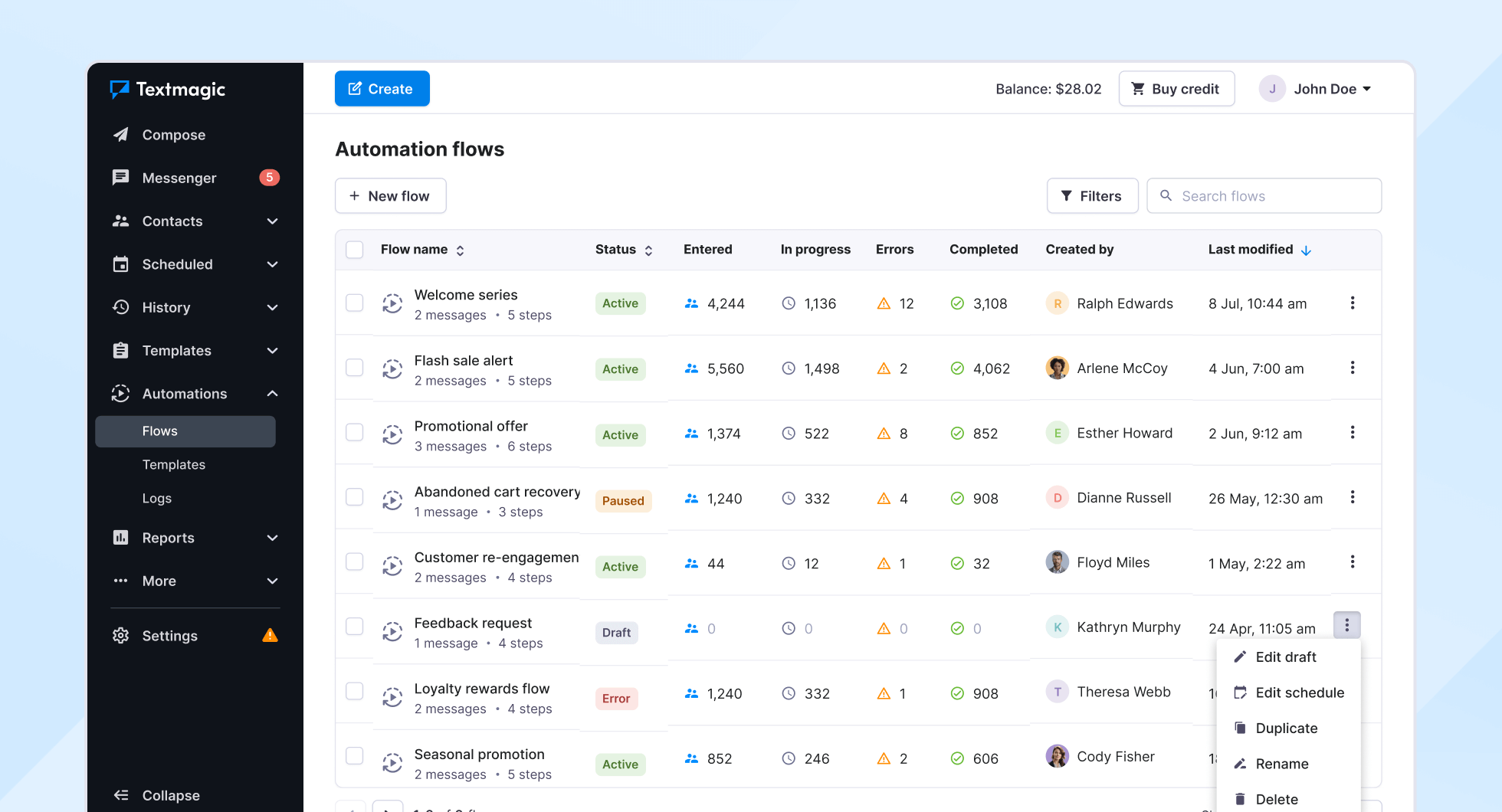
<figure class="wp-block-image size-full"><img loading="lazy" decoding="async" width="1960" height="1060" src="https://www.textmagic.com/wp-content/uploads/2026/02/3.-Examples-of-automations-live@2x.png" alt="Multiple automation workflows live in the dashboard" class="wp-image-26086" srcset="https://www.textmagic.com/wp-content/uploads/2026/02/3.-Examples-of-automations-live@2x.png 1960w, https://www.textmagic.com/wp-content/uploads/2026/02/3.-Examples-of-automations-live@2x-300x162.png 300w, https://www.textmagic.com/wp-content/uploads/2026/02/3.-Examples-of-automations-live@2x-1024x554.png 1024w, https://www.textmagic.com/wp-content/uploads/2026/02/3.-Examples-of-automations-live@2x-768x415.png 768w, https://www.textmagic.com/wp-content/uploads/2026/02/3.-Examples-of-automations-live@2x-1536x831.png 1536w" sizes="auto, (max-width: 1960px) 100vw, 1960px" /></figure>


<p>Here&#8217;s how every automation works in Textmagic:</p>


<ol class="wp-block-list">
<li><strong>Trigger</strong>: What starts it (new contact, inbound SMS, tag added, etc.)</li>


<li><strong>Actions</strong>: What happens next (send a message, update a contact, assign a task, etc.)</li>


<li><strong>Rules</strong>: Add control with delays or conditions (like waiting for a reply before continuing, taking an action based on Y/N logic)</li>


<li><strong>Scheduling</strong>: Choose when flows are active (24/7, business hours, or by time zone)</li>
</ol>


<p>For a full breakdown of <strong>triggers, actions, rules, </strong>and <strong>scheduling, </strong>check out <a href="https://support.textmagic.com/article/automation-flows-triggers-actions-and-rules/" target="_blank" rel="noreferrer noopener">our support article</a>. But don&#8217;t worry about the technical side. We&#8217;ve built templates for the most common use cases.&nbsp;</p>


<h2 class="wp-block-heading">Six automations you can start using today</h2>


<p>To make it simple, we have created a collection of <strong>automation templates </strong>that you can start from instead of building an automation from scratch.&nbsp; Just pick the one you need, tweak the messages directly from the automation flow, and turn it on.</p>


<h3 class="wp-block-heading" id="1-business-hours-and-after-hours-replies-nbsp">1. Business hours (and after hours) replies&nbsp;</h3>


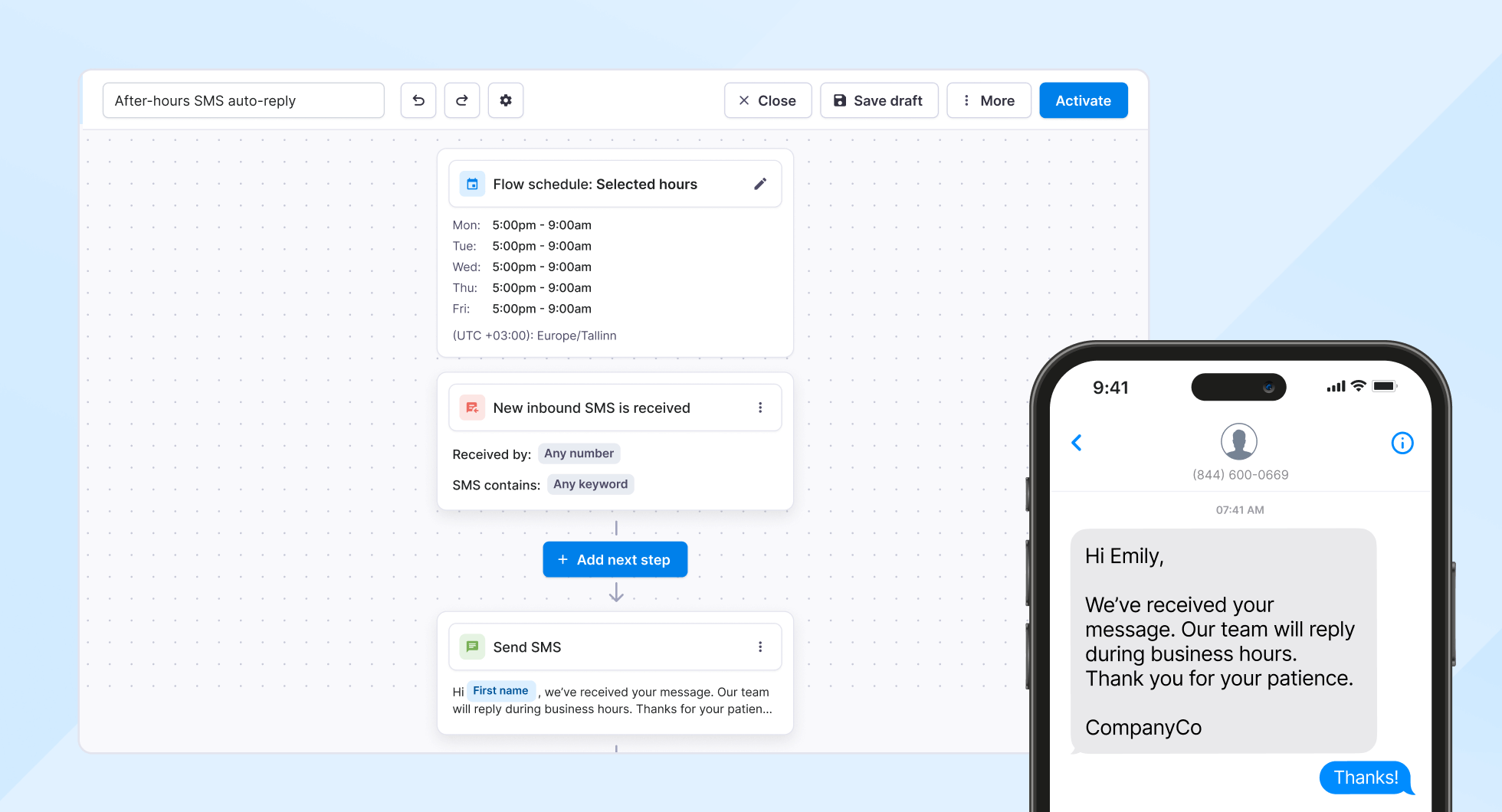
<figure class="wp-block-image size-full"><img loading="lazy" decoding="async" width="1960" height="1060" src="https://www.textmagic.com/wp-content/uploads/2026/02/1.-Business-hours-message-automation@2x.png" alt="Business hours automation workflow example" class="wp-image-26085" srcset="https://www.textmagic.com/wp-content/uploads/2026/02/1.-Business-hours-message-automation@2x.png 1960w, https://www.textmagic.com/wp-content/uploads/2026/02/1.-Business-hours-message-automation@2x-300x162.png 300w, https://www.textmagic.com/wp-content/uploads/2026/02/1.-Business-hours-message-automation@2x-1024x554.png 1024w, https://www.textmagic.com/wp-content/uploads/2026/02/1.-Business-hours-message-automation@2x-768x415.png 768w, https://www.textmagic.com/wp-content/uploads/2026/02/1.-Business-hours-message-automation@2x-1536x831.png 1536w" sizes="auto, (max-width: 1960px) 100vw, 1960px" /></figure>


<p><strong>Template:</strong> <em>Auto-reply based on business hours</em></p>


<ul class="wp-block-list">
<li><strong>What it does: </strong>Automatically replies to incoming messages based on the time of day, so customers know when they&#8217;ll hear back.</li>


<li><strong>Why it matters: </strong>You can&#8217;t be available 24/7, but customers still message you outside business hours. An instant auto-reply keeps the conversation warm and sets expectations. No more customers thinking you&#8217;re ignoring them.</li>


<li><strong>When to use it: </strong>You get messages at odd hours and want to acknowledge them immediately without staying &#8220;on call.&#8221;</li>
</ul>


<h3 class="wp-block-heading">2. Automatically follow-up with leads</h3>


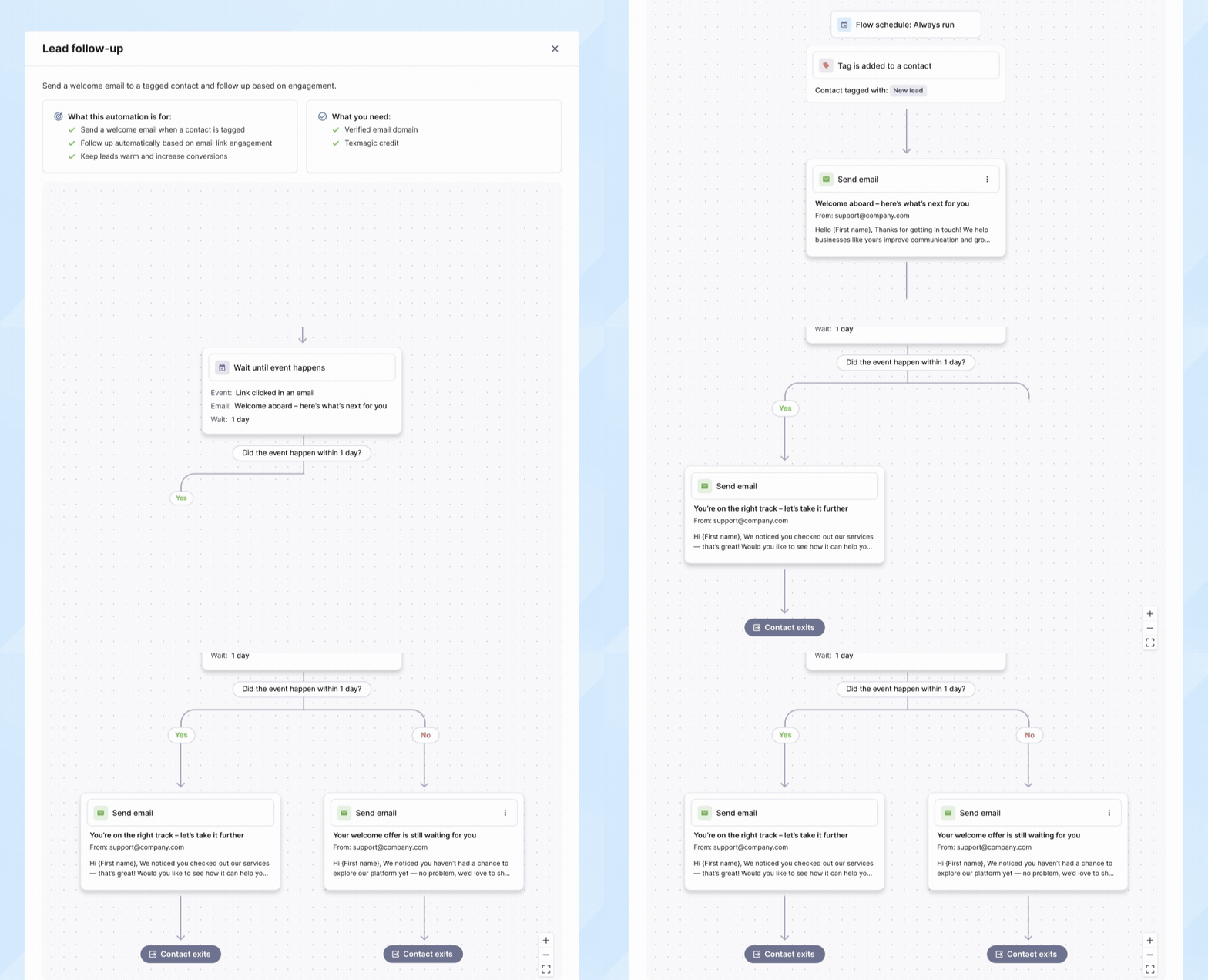
<figure class="wp-block-image size-full"><img loading="lazy" decoding="async" width="980" height="530" src="https://www.textmagic.com/wp-content/uploads/2026/02/1.-Automatic-lead-follow-up-automation.gif" alt="" class="wp-image-26088"/></figure>


<p><strong>Template:</strong> <em>Lead follow-up&nbsp;</em></p>


<ul class="wp-block-list">
<li><strong>What it does: </strong>Sends a timely first message to new leads, then checks in again based on whether they&#8217;ve responded.</li>


<li><strong>Why it matters: </strong>Most deals go to whoever responds fastest. This flow turns you into THE responsive company. You also stay top of mind without being annoying.</li>


<li><strong>When to use it: </strong>You want to close more deals but don&#8217;t have time to manually follow up with every new inquiry.</li>
</ul>


<h3 class="wp-block-heading">3. Onboard new contacts or employees</h3>


<figure class="wp-block-image size-full"><img loading="lazy" decoding="async" width="980" height="530" src="https://www.textmagic.com/wp-content/uploads/2026/02/3.-Onboard-new-contacts-or-employees.gif" alt="" class="wp-image-26089"/></figure>


<p><strong>Template:</strong> <em>Onboarding email sequence</em></p>


<ul class="wp-block-list">
<li><strong>What it does: </strong>Delivers a short welcome sequence that helps people get started, whether they&#8217;re new customers or new team members.&nbsp;</li>


<li><strong>Why it matters:</strong> A good first impression builds trust and reduces confusion. Automated onboarding also frees you from writing the same email over and over.</li>


<li><strong>When to use it: </strong>You want to make a strong first impression and get people up to speed fast, without creating a manual checklist every time.</li>
</ul>


<h3 class="wp-block-heading" id="4-request-reviews-for-your-business">4. Request reviews for your business</h3>


<figure class="wp-block-image size-full"><img loading="lazy" decoding="async" width="980" height="530" src="https://www.textmagic.com/wp-content/uploads/2026/02/4.-Automation-to-request-reviews-for-your-business.gif" alt="" class="wp-image-26090"/></figure>


<p><strong>Template:</strong> <em>Review request + email follow-up</em></p>


<ul class="wp-block-list">
<li><strong>What it does: </strong>Sends a polite follow-up asking for feedback a few days after a service or purchase ends. Automated timing means you catch customers while their experience is still fresh.</li>


<li><strong>Why it matters: </strong>Most businesses want more reviews, but few actually ask, because it’s awkward or easy to forget. This flow asks for you, at the right time.&nbsp;</li>


<li><strong>When to use it: </strong>You want to build credibility with future customers through social proof, but hate asking for reviews one-by-one.</li>
</ul>


<h3 class="wp-block-heading" id="5-send-welcome-messages-to-new-contacts">5. Send welcome messages to new contacts</h3>


<figure class="wp-block-image size-full"><img loading="lazy" decoding="async" width="980" height="530" src="https://www.textmagic.com/wp-content/uploads/2026/02/5.-Automation-to-send-welcome-SMS.gif" alt="" class="wp-image-26091"/></figure>


<p><strong>Template:</strong> <em>Send welcome SMS (or email) to new contacts</em></p>


<ul class="wp-block-list">
<li><strong>What it does:</strong> Sends a greeting and next steps message right after someone signs up or gets added to your list. Sets clear expectations from the start.</li>


<li><strong>Why it matters:</strong> People want to feel seen and informed. An immediate welcome message makes them confident they made the right choice and know what happens next. It also reduces anxiety and support questions.</li>



<li><strong>When to use it:</strong> You want new contacts to feel valued and know what to expect next.</li>
</ul>


<h3 class="wp-block-heading">6. Send flash sale or limited-time reminders</h3>


<figure class="wp-block-image size-full"><img loading="lazy" decoding="async" width="980" height="530" src="https://www.textmagic.com/wp-content/uploads/2026/02/6.-Send-flash-sale-or-limited-time-reminders-automation.gif" alt="" class="wp-image-26092"/></figure>


<p><strong>Template: </strong><em>Flash sale countdown</em></p>


<ul class="wp-block-list">
<li><strong>What it does:</strong> Sends short, timed reminders via SMS and email during a sale or promotion. Builds urgency without bombarding everyone at the last second.</li>
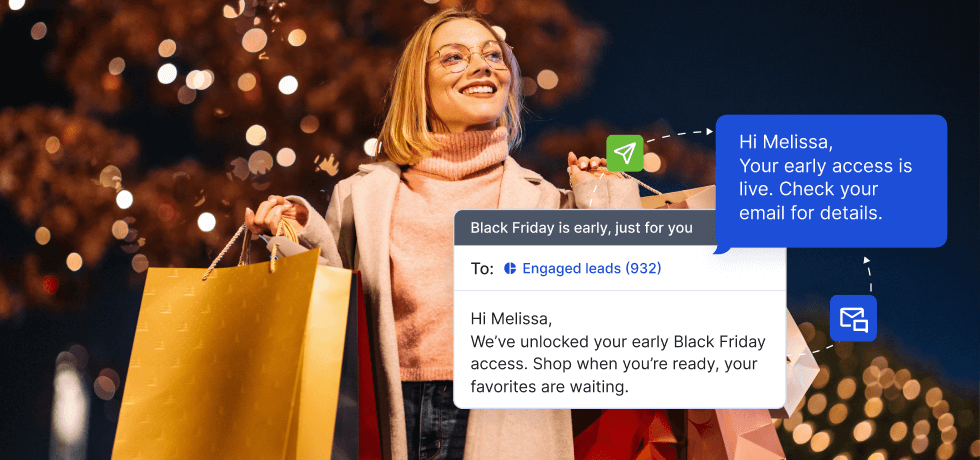


<li><strong>Why it matters:</strong> Limited-time offers work best when people get reminders before time runs out. Automation spreads the message across the sale period so more people see it and act on it. No last-minute all-caps blast required.</li>
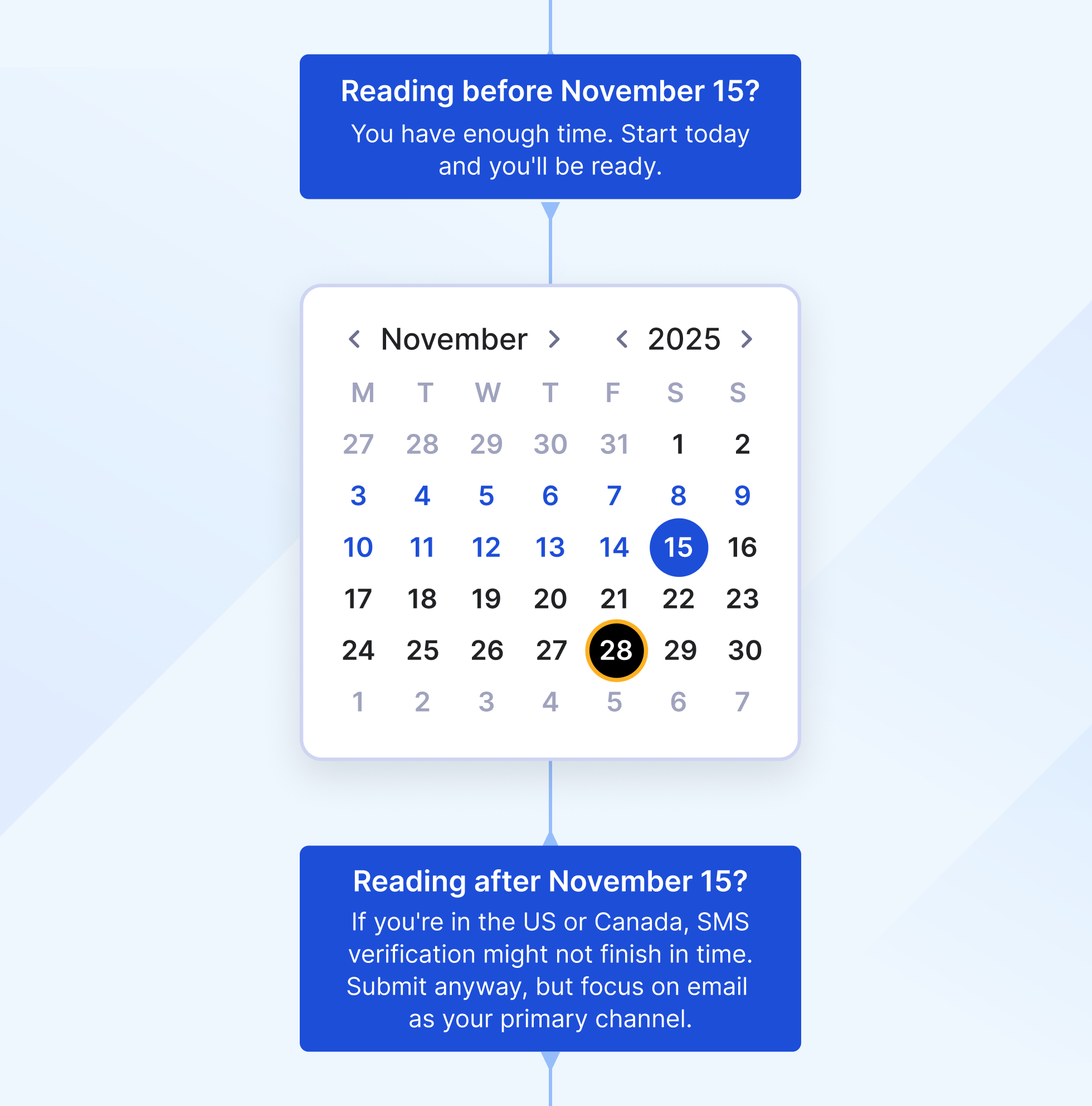
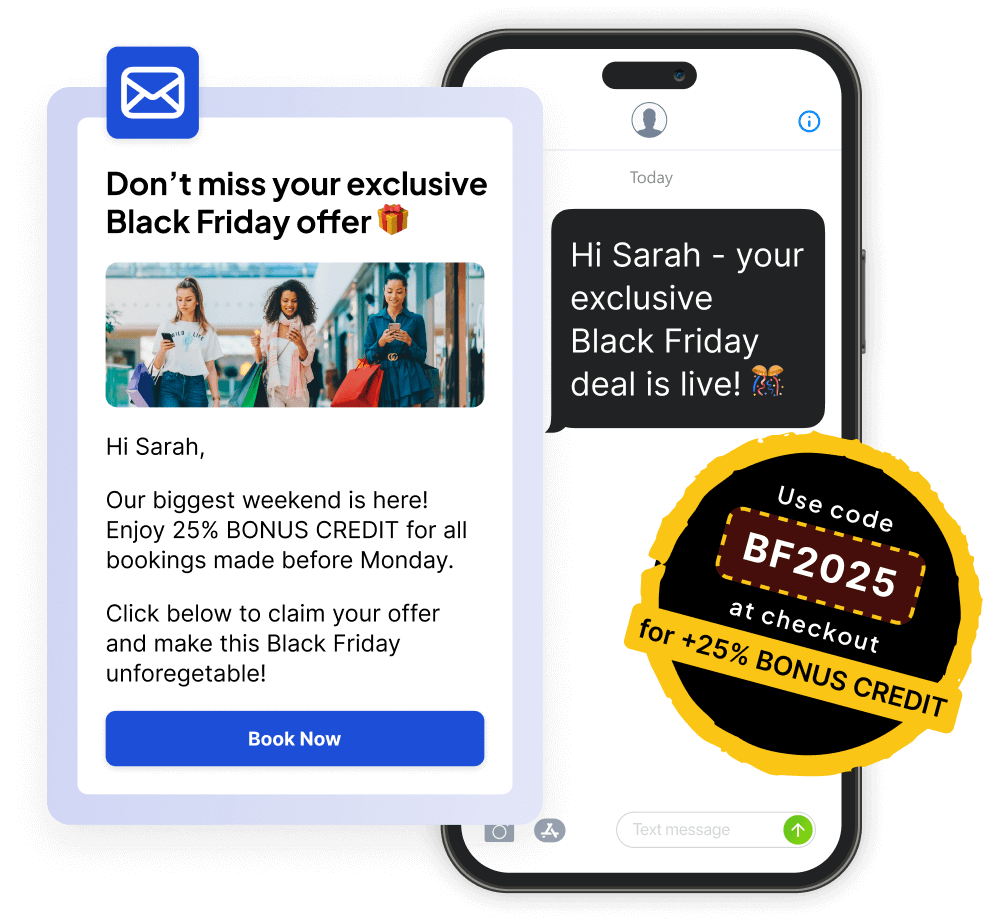


<li><strong>When to use it:</strong> You&#8217;re running a promotion and want to drive conversions without turning into spam.</li>
</ul>


<p>Ready to stop wasting time on repetitive messages? </p>


  <div class="blog-cta-block" >

    <div class="cta-container">
      <div class="cta-text">
                  <h3>Create your first automation in 5 minutes</h3>
        
                  <p>Kickstart your campaigns with prebuilt templates designed for real business goals.</p>
        
                  <button
            type="button"
            class="hregister btn btn--blue btn--1"
            onclick="window.location.href='https://app.textmagic.com/register'">
            Try for free          </button>
              </div>

              <div class="cta-image">
          <img decoding="async" src="https://www.textmagic.com/wp-content/uploads/2026/01/Final-automation-plane.png" alt="Create your first automation in 5 minutes">
        </div>
          </div>
  </div>


<p>Browse our collection of messaging templates and pick the one that solves your biggest problem right now. </p>


<p>New accounts get <strong>10,000 free emails</strong> to test drive automation and a complimentary dedicated phone number (available in US, CA, AU, UK), free for one month.</p>
<p>The post <a href="https://www.textmagic.com/blog/email-sms-automation-flows/">Automate Email &amp; SMS with Textmagic: 6 flows for busy teams</a> appeared first on <a href="https://www.textmagic.com">Textmagic</a>.</p>
]]></content:encoded>
	
	</item>
<item rdf:about="https://www.textmagic.com/blog/omnisend-vs-textmagic/">
	<title>Omnisend vs. Textmagic: Which platform is right for your business?</title>
	<link>https://www.textmagic.com/blog/omnisend-vs-textmagic/</link>

	<dc:creator><![CDATA[Alina Petcu]]></dc:creator>
	<dc:date>2025-11-10T10:40:05Z</dc:date>
			<dc:subject><![CDATA[Product]]></dc:subject>

			<description><![CDATA[<p>To build genuine customer relationships, businesses need reliable operational communication in addition to marketing. The challenge is finding a tool that can do both. Omnisend is built for...</p>
<p>The post <a href="https://www.textmagic.com/blog/omnisend-vs-textmagic/">Omnisend vs. Textmagic: Which platform is right for your business?</a> appeared first on <a href="https://www.textmagic.com">Textmagic</a>.</p>
]]></description>
		<content:encoded><![CDATA[
<figure class="wp-block-image size-full"><img loading="lazy" decoding="async" width="980" height="460" src="https://www.textmagic.com/wp-content/uploads/2025/11/Cover.png" alt="Omnisend vs Textmagic cover image" class="wp-image-25599" srcset="https://www.textmagic.com/wp-content/uploads/2025/11/Cover.png 980w, https://www.textmagic.com/wp-content/uploads/2025/11/Cover-300x141.png 300w, https://www.textmagic.com/wp-content/uploads/2025/11/Cover-768x360.png 768w, https://www.textmagic.com/wp-content/uploads/2025/11/Cover-170x80.png 170w" sizes="auto, (max-width: 980px) 100vw, 980px" /></figure>


<p>To build genuine customer relationships, businesses need reliable operational communication in addition to marketing. The challenge is finding a tool that can do both.</p>


<p><strong>Omnisend</strong> is built for e-commerce marketing automation, helping online retailers create personalized campaigns, automate sales funnels, and recover abandoned carts through email and SMS.</p>


<p><strong>Textmagic</strong> is an Omnisend alternative designed for business communication across industries. It unifies SMS, email, and social chat into one reliable platform for teams that need to stay connected with customers and staff in real time.</p>


<p>This article compares the two platforms side by side, examining their features, pricing, ease of use, and best-fit scenarios to help you choose the best option for your business. Let’s get started.</p>


<h2 class="wp-block-heading" id="omnisend-vs-textmagic-overview">Omnisend vs. Textmagic overview</h2>


<p>Both Omnisend and Textmagic are among the best SMS and email marketing platforms on the market that help businesses communicate with their audiences. However, their strengths differ significantly.</p>


<p><strong>Omnisend </strong>focuses on driving sales for online stores through email, SMS, and automation workflows that nurture leads and recover abandoned carts. It’s built for marketers managing multi-step promotional campaigns within platforms like Shopify or WooCommerce.</p>


<p><strong>Textmagic</strong> supports <a href="https://www.textmagic.com/sms-chat/">two-way SMS</a> and <a href="https://www.textmagic.com/email-campaigns/">email campaigns</a> across various industries, including healthcare, education, logistics, hospitality, and professional services. This makes it ideal for organizations that rely on real-time, reliable communication rather than complex marketing funnels.</p>


<p>In short, Omnisend helps sell products, while Textmagic helps run businesses. Below is a quick comparison to help you see how the two platforms differ at a glance.</p>


<figure class="wp-block-table is-style-stripes"><table class="has-fixed-layout"><tbody><tr><td><strong>Category</strong></td><td><strong>Textmagic</strong></td><td><strong>Omnisend</strong></td></tr><tr><td>SMS support</td><td><img src="https://s.w.org/images/core/emoji/17.0.2/72x72/2705.png" alt="✅" class="wp-smiley" style="height: 1em; max-height: 1em;" /> Yes</td><td><img src="https://s.w.org/images/core/emoji/17.0.2/72x72/2705.png" alt="✅" class="wp-smiley" style="height: 1em; max-height: 1em;" /> Yes</td></tr><tr><td>MMS support</td><td><img src="https://s.w.org/images/core/emoji/17.0.2/72x72/26a0.png" alt="⚠" class="wp-smiley" style="height: 1em; max-height: 1em;" /> Yes (regional limitations)</td><td><img src="https://s.w.org/images/core/emoji/17.0.2/72x72/26a0.png" alt="⚠" class="wp-smiley" style="height: 1em; max-height: 1em;" /> Yes (regional limitations)</td></tr><tr><td>Two-way texting</td><td><img src="https://s.w.org/images/core/emoji/17.0.2/72x72/2705.png" alt="✅" class="wp-smiley" style="height: 1em; max-height: 1em;" /> Yes</td><td><img src="https://s.w.org/images/core/emoji/17.0.2/72x72/26a0.png" alt="⚠" class="wp-smiley" style="height: 1em; max-height: 1em;" /> Yes (3rd party integration)</td></tr><tr><td>Mass texting</td><td><img src="https://s.w.org/images/core/emoji/17.0.2/72x72/2705.png" alt="✅" class="wp-smiley" style="height: 1em; max-height: 1em;" /> Yes</td><td><img src="https://s.w.org/images/core/emoji/17.0.2/72x72/2705.png" alt="✅" class="wp-smiley" style="height: 1em; max-height: 1em;" /> Yes</td></tr><tr><td>Email campaigns</td><td><img src="https://s.w.org/images/core/emoji/17.0.2/72x72/2705.png" alt="✅" class="wp-smiley" style="height: 1em; max-height: 1em;" /> Yes</td><td><img src="https://s.w.org/images/core/emoji/17.0.2/72x72/2705.png" alt="✅" class="wp-smiley" style="height: 1em; max-height: 1em;" /> Yes</td></tr><tr><td>SMS templates</td><td><img src="https://s.w.org/images/core/emoji/17.0.2/72x72/2705.png" alt="✅" class="wp-smiley" style="height: 1em; max-height: 1em;" /> Yes</td><td><img src="https://s.w.org/images/core/emoji/17.0.2/72x72/2705.png" alt="✅" class="wp-smiley" style="height: 1em; max-height: 1em;" /> Yes</td></tr><tr><td>Two-way email</td><td><img src="https://s.w.org/images/core/emoji/17.0.2/72x72/2705.png" alt="✅" class="wp-smiley" style="height: 1em; max-height: 1em;" /> Yes</td><td><img src="https://s.w.org/images/core/emoji/17.0.2/72x72/274c.png" alt="❌" class="wp-smiley" style="height: 1em; max-height: 1em;" /> No</td></tr><tr><td>Follow-up to non-openers</td><td><img src="https://s.w.org/images/core/emoji/17.0.2/72x72/2705.png" alt="✅" class="wp-smiley" style="height: 1em; max-height: 1em;" /> Yes</td><td><img src="https://s.w.org/images/core/emoji/17.0.2/72x72/2705.png" alt="✅" class="wp-smiley" style="height: 1em; max-height: 1em;" /> Yes</td></tr><tr><td>Email templates</td><td><img src="https://s.w.org/images/core/emoji/17.0.2/72x72/2705.png" alt="✅" class="wp-smiley" style="height: 1em; max-height: 1em;" /> Yes (1,600+)</td><td><img src="https://s.w.org/images/core/emoji/17.0.2/72x72/2705.png" alt="✅" class="wp-smiley" style="height: 1em; max-height: 1em;" /> Yes</td></tr><tr><td>WhatsApp integration</td><td><img src="https://s.w.org/images/core/emoji/17.0.2/72x72/2705.png" alt="✅" class="wp-smiley" style="height: 1em; max-height: 1em;" /> Yes</td><td><img src="https://s.w.org/images/core/emoji/17.0.2/72x72/274c.png" alt="❌" class="wp-smiley" style="height: 1em; max-height: 1em;" /> No</td></tr><tr><td>Messenger integration</td><td><img src="https://s.w.org/images/core/emoji/17.0.2/72x72/2705.png" alt="✅" class="wp-smiley" style="height: 1em; max-height: 1em;" /> Yes</td><td><img src="https://s.w.org/images/core/emoji/17.0.2/72x72/274c.png" alt="❌" class="wp-smiley" style="height: 1em; max-height: 1em;" /> No</td></tr><tr><td>Instagram DMs integration</td><td><img src="https://s.w.org/images/core/emoji/17.0.2/72x72/2705.png" alt="✅" class="wp-smiley" style="height: 1em; max-height: 1em;" /> Yes</td><td><img src="https://s.w.org/images/core/emoji/17.0.2/72x72/274c.png" alt="❌" class="wp-smiley" style="height: 1em; max-height: 1em;" /> No</td></tr><tr><td>Omnichannel chat widget</td><td><img src="https://s.w.org/images/core/emoji/17.0.2/72x72/2705.png" alt="✅" class="wp-smiley" style="height: 1em; max-height: 1em;" /> Yes</td><td><img src="https://s.w.org/images/core/emoji/17.0.2/72x72/274c.png" alt="❌" class="wp-smiley" style="height: 1em; max-height: 1em;" /> No</td></tr><tr><td>AI features</td><td><img src="https://s.w.org/images/core/emoji/17.0.2/72x72/2705.png" alt="✅" class="wp-smiley" style="height: 1em; max-height: 1em;" /> Yes (SMS &amp; email)</td><td><img src="https://s.w.org/images/core/emoji/17.0.2/72x72/2705.png" alt="✅" class="wp-smiley" style="height: 1em; max-height: 1em;" /> Yes (email)</td></tr><tr><td>Integrations</td><td><img src="https://s.w.org/images/core/emoji/17.0.2/72x72/2705.png" alt="✅" class="wp-smiley" style="height: 1em; max-height: 1em;" /> Zapier, API, BYOC</td><td><img src="https://s.w.org/images/core/emoji/17.0.2/72x72/2705.png" alt="✅" class="wp-smiley" style="height: 1em; max-height: 1em;" /> Zapier, Api, 160+ pre-built eCommerce integrations</td></tr><tr><td>Contact management</td><td><img src="https://s.w.org/images/core/emoji/17.0.2/72x72/2705.png" alt="✅" class="wp-smiley" style="height: 1em; max-height: 1em;" /> Simple &amp; easy to update lists, tags, and segments</td><td><img src="https://s.w.org/images/core/emoji/17.0.2/72x72/2705.png" alt="✅" class="wp-smiley" style="height: 1em; max-height: 1em;" /> Advanced segmentation based on eCommerce data</td></tr><tr><td>Reporting &amp; analytics</td><td><img src="https://s.w.org/images/core/emoji/17.0.2/72x72/2705.png" alt="✅" class="wp-smiley" style="height: 1em; max-height: 1em;" /> Yes (delivery, open, click &amp; bounce rates)</td><td><img src="https://s.w.org/images/core/emoji/17.0.2/72x72/2705.png" alt="✅" class="wp-smiley" style="height: 1em; max-height: 1em;" /> Yes (sales, automations, deliverability)</td></tr><tr><td>Compliance</td><td><img src="https://s.w.org/images/core/emoji/17.0.2/72x72/2705.png" alt="✅" class="wp-smiley" style="height: 1em; max-height: 1em;" /> GDPR, TCPA, SOC2</td><td><img src="https://s.w.org/images/core/emoji/17.0.2/72x72/2705.png" alt="✅" class="wp-smiley" style="height: 1em; max-height: 1em;" /> GDPR, TCPA</td></tr><tr><td>Customer support</td><td><img src="https://s.w.org/images/core/emoji/17.0.2/72x72/2705.png" alt="✅" class="wp-smiley" style="height: 1em; max-height: 1em;" /> Responsive human-first support for every customer</td><td><img src="https://s.w.org/images/core/emoji/17.0.2/72x72/2705.png" alt="✅" class="wp-smiley" style="height: 1em; max-height: 1em;" /> 24/7 live chat and email support</td></tr><tr><td>Price per SMS</td><td>Starts from ¢4.9/text, discounts applied with higher volumes</td><td>Starts at $16/month for $1 SMS credit</td></tr><tr><td>Price per email</td><td>Starts from ¢0.3/email, standard price</td><td>Starts at $16/month for 6K emails</td></tr><tr><td>Billing model</td><td>Transparent pay-as-you-go and monthly plans, no add-ons required, all features available on sign-up</td><td>Monthly plans, personalized content add-on, all features available in all plans</td></tr></tbody></table></figure>


  <div class="blog-cta-block" >

    <div class="cta-container">
      <div class="cta-text">
                  <h3>Start conversations with Textmagic.</h3>
        
                  <p>Instant two-way texting, no integrations needed.</p>
        
                  <button
            type="button"
            class="hregister btn btn--blue btn--1"
            onclick="window.location.href='https://app.textmagic.com/register'">
            Sign up          </button>
              </div>

              <div class="cta-image">
          <img decoding="async" src="https://www.textmagic.com/wp-content/uploads/2025/10/CTA-Two-way-texting.png" alt="Start conversations with Textmagic.">
        </div>
          </div>
  </div>


<h2 class="wp-block-heading">Messaging &amp; channels</h2>


<p><strong>Textmagic </strong>is one of the Omnisend alternatives<strong> </strong>facilitating real-time, two-way communication across multiple channels. In addition to SMS and email, it integrates <a href="https://www.textmagic.com/whatsapp-integration/">WhatsApp</a>, <a href="https://www.textmagic.com/facebook-integration/">Facebook Messenger</a>, and Instagram DMs into a single shared inbox.</p>


<p>This unified view enables teams to handle <a href="https://www.textmagic.com/mass-texting/">mass texting</a>, customer inquiries, confirmations, and internal updates without switching tools, which is perfectly suited for fast-moving operations where every message matters.</p>


<div class="alert__wrapper wp-elements-c8497d842b09cd13aa8970ae454cd0c8"><div class="alert alert-success" style="color: var(--wp--preset--color--black)"><p><strong>Disclaimer: </strong>For Meta channels (Facebook Messenger and Instagram DMs), Textmagic supports replies only. Responses must be sent within 24 hours of the customer’s last message.</p>
</div></div>


<p><strong>Omnisend</strong> is designed primarily for outbound email marketing campaigns. Its strength lies in email and SMS automation sequences, along with web push notifications and pop-up forms that drive sales and recover carts.</p>


<p>Its focus lies in nurturing prospects rather than maintaining ongoing discussions, as the provider doesn’t offer two-way email, and two-way texting is only available through a third-party integration with Gorgias. In a nutshell, Omnisend is campaign-driven, while Textmagic is conversation-driven.</p>


<h2 class="wp-block-heading">Ease of use &amp; onboarding</h2>


<p><strong>Textmagic</strong> is an SMS and email marketing platform that prioritizes simplicity and speed. You can sign up, import your contacts, and start sending messages within minutes, no complex setup or integrations required.&nbsp;</p>


<figure class="wp-block-image size-full"><img loading="lazy" decoding="async" width="1960" height="1024" src="https://www.textmagic.com/wp-content/uploads/2025/11/Textmagic-homepage.png" alt="Textmagic homepage" class="wp-image-25600" srcset="https://www.textmagic.com/wp-content/uploads/2025/11/Textmagic-homepage.png 1960w, https://www.textmagic.com/wp-content/uploads/2025/11/Textmagic-homepage-300x157.png 300w, https://www.textmagic.com/wp-content/uploads/2025/11/Textmagic-homepage-1024x535.png 1024w, https://www.textmagic.com/wp-content/uploads/2025/11/Textmagic-homepage-768x401.png 768w, https://www.textmagic.com/wp-content/uploads/2025/11/Textmagic-homepage-1536x802.png 1536w" sizes="auto, (max-width: 1960px) 100vw, 1960px" /></figure>


<p>The platform’s <a href="https://www.textmagic.com/shared-inbox/">unified inbox</a> for SMS, email, and social channels makes managing communication intuitive, even for teams without marketing experience. Zapier and API integrations are available but entirely optional, allowing users to scale at their own pace.</p>


<p><strong>Omnisend </strong>is built with marketers in mind. Getting started requires connecting an e-commerce store, syncing contacts, and configuring automation workflows. Its visual builder is powerful and flexible, but onboarding involves several setup steps, including audience segmentation and trigger mapping.&nbsp;</p>


<figure class="wp-block-image size-full"><img loading="lazy" decoding="async" width="1960" height="1024" src="https://www.textmagic.com/wp-content/uploads/2025/11/Omnisend-homepage.png" alt="Omnisend homepage" class="wp-image-25601" srcset="https://www.textmagic.com/wp-content/uploads/2025/11/Omnisend-homepage.png 1960w, https://www.textmagic.com/wp-content/uploads/2025/11/Omnisend-homepage-300x157.png 300w, https://www.textmagic.com/wp-content/uploads/2025/11/Omnisend-homepage-1024x535.png 1024w, https://www.textmagic.com/wp-content/uploads/2025/11/Omnisend-homepage-768x401.png 768w, https://www.textmagic.com/wp-content/uploads/2025/11/Omnisend-homepage-1536x802.png 1536w" sizes="auto, (max-width: 1960px) 100vw, 1960px" /></figure>


<p>While this structure suits marketing teams managing detailed sales journeys, it can feel time-consuming for those who simply need to communicate quickly.</p>


<h2 class="wp-block-heading">Contact management flexibility</h2>


<p><strong>Textmagic </strong>keeps <a href="https://www.textmagic.com/contact-management/">contact management </a>straightforward and efficient. Users can organize audiences using lists, tags, and <a href="https://www.textmagic.com/dynamic-fields/">custom fields</a> for quick segmentation, making it easy to personalize messages without dealing with unnecessary complexity.&nbsp;</p>


<p><strong>Omnisend </strong>is an SMS and email marketing software with advanced segmentation tied to e-commerce data, including purchase history, cart value, and browsing behavior. The platform focuses on sales-driven segmentation and campaign logic at the detriment of simplicity.</p>


<h2 class="wp-block-heading">Compliance &amp; security</h2>


<p><strong>Textmagic </strong>adheres to the GDPR, TCPA, and SOC 2 standards, ensuring data privacy and message integrity across all regions. With carrier-grade infrastructure and built-in opt-out automation, the platform helps businesses meet regional regulations while maintaining high delivery rates. This level of compliance makes it a trusted choice for regulated industries.</p>


<p><strong>Omnisend </strong>also maintains a robust compliance framework, adhering to GDPR and TCPA requirements to safeguard customer data and promote ethical marketing practices. Its safeguards are primarily designed around email and SMS marketing workflows.</p>


<p>While both platforms prioritize security, Textmagic goes beyond marketing compliance by delivering the dependability required for organizations that rely on secure, real-time communication every day.</p>


<h2 class="wp-block-heading">Customer support availability</h2>


<p><strong>Textmagic</strong> provides responsive, human-first support via phone, email, and live chat across all plans, ensuring every customer has direct access to real people, not bots or ticket loops.</p>


<p>Our team is known for fast response times and personalized assistance, whether you’re troubleshooting a campaign, verifying a number, or setting up an integration.&nbsp;</p>


<p><strong>Omnisend</strong> offers 24/7 customer support on all plans, through email and live chat only. Users on higher tiers can access additional onboarding help and guidance from dedicated success specialists, ensuring continuous coverage for marketing operations across time zones.</p>


<h2 class="wp-block-heading">Pricing structure &amp; billing</h2>


<p><strong>Textmagic</strong> is one of the Omnisend competitors that offers transparent <a href="https://www.textmagic.com/pricing/">SMS and email pricing</a>, allowing businesses to scale their communication effortlessly. You can choose between a convenient pay-as-you-go model or affordable monthly plans:</p>


<ul class="wp-block-list">
<li><strong>Pay-as-you-go SMS: </strong>starts from ¢4.9/text, cheaper with higher volumes</li>


<li><strong>Pay-as-you-go email: </strong>¢0.3/email, standard price regardless of volume</li>


<li><strong>Essential plan: </strong>$24.5/500 texts, texting number $10/month</li>


<li><strong>Professional 2K plan: </strong>starts from<strong> </strong>$80/2K texts/month, texting number included</li>


<li><strong>Connect 10K plan: </strong>starts from $20/2K texts/month, texting number from CPaaS</li>
</ul>


<figure class="wp-block-image size-full"><img loading="lazy" decoding="async" width="1960" height="1200" src="https://www.textmagic.com/wp-content/uploads/2025/11/Pricing-page.png" alt="Textmagic pricing" class="wp-image-25602" srcset="https://www.textmagic.com/wp-content/uploads/2025/11/Pricing-page.png 1960w, https://www.textmagic.com/wp-content/uploads/2025/11/Pricing-page-300x184.png 300w, https://www.textmagic.com/wp-content/uploads/2025/11/Pricing-page-1024x627.png 1024w, https://www.textmagic.com/wp-content/uploads/2025/11/Pricing-page-768x470.png 768w, https://www.textmagic.com/wp-content/uploads/2025/11/Pricing-page-1536x940.png 1536w" sizes="auto, (max-width: 1960px) 100vw, 1960px" /></figure>


<p><strong>Omnisend</strong> has a tiered pricing model based on contact list size, allowing you to scale marketing efforts according to your needs. However, costs can rise quickly as lists expand:&nbsp;</p>


<ul class="wp-block-list">
<li><strong>Standard plan: </strong>starts from $16/month for 500 contacts, 30% off for 3 months upfront</li>


<li><strong>Pro plan: </strong>starts from $59/month for 2,5K contacts, 30% off for 3 months upfront</li>


<li><strong>Custom pricing: </strong>available upon request, suitable for enterprise-level</li>


<li><strong>Personalized content: </strong>add-on<strong> </strong>$5/month for Standard plan, free on Pro &amp; Custom</li>
</ul>


<figure class="wp-block-image size-full"><img loading="lazy" decoding="async" width="1960" height="1024" src="https://www.textmagic.com/wp-content/uploads/2025/11/Pricing-1.png" alt="Omnisend pricing
" class="wp-image-25604" srcset="https://www.textmagic.com/wp-content/uploads/2025/11/Pricing-1.png 1960w, https://www.textmagic.com/wp-content/uploads/2025/11/Pricing-1-300x157.png 300w, https://www.textmagic.com/wp-content/uploads/2025/11/Pricing-1-1024x535.png 1024w, https://www.textmagic.com/wp-content/uploads/2025/11/Pricing-1-768x401.png 768w, https://www.textmagic.com/wp-content/uploads/2025/11/Pricing-1-1536x802.png 1536w" sizes="auto, (max-width: 1960px) 100vw, 1960px" /></figure>


<p>Ultimately, Textmagic pricing is accessible and scalable, while Omnisend costs are somewhat flexible but fragmented.</p>


<h2 class="wp-block-heading">Omnisend vs. Textmagic use cases</h2>


<p>Both Textmagic and Omnisend are highly recommended SMS and email marketing solutions. However, they can cater to different communication needs depending on how your organization communicates and what your daily priorities look like.</p>


<p><strong>Textmagic</strong> can be used for:</p>


<ul class="wp-block-list">
<li><strong>Two-way operational messaging,</strong> including alerts, confirmations, and reminders, to both staff and customers.</li>


<li><strong>Customer service and team coordination</strong>, enabling staff to manage SMS and email replies in one shared inbox.</li>


<li><strong>Multichannel communication</strong>, with built-in support for WhatsApp, Messenger, and Instagram DMs.</li>


<li><strong>International outreach</strong>, thanks to coverage in over 190 countries, enabling companies to connect with anyone anywhere.&nbsp;</li>
</ul>


<div class="alert__wrapper wp-elements-984af42fd5be5c3d00d5c6c0192dc82e"><div class="alert alert-success" style="color: var(--wp--preset--color--black)"></p>
<p>Textmagic powers large-scale operational communication across industries where reliability is essential. In the professional services sector, more than 6,200 companies have exchanged over <strong>1.3 billion messages</strong>, while the hospitality sector has sent around<strong> 212 million</strong> using our platform.</p>
</p>
<p>The technology industry relied on Textmagic for over<strong> 384 million communications</strong>, and insurance providers have delivered more than <strong>3.7 billion</strong> messages to clients and policyholders.</p>
</p>
<p>In education, over 1,800 institutions have sent <strong>4.5 billion </strong>updates to students and staff, and in healthcare, providers handle an average of <strong>2.2 million patient messages each month</strong>.</p>
</p>
<p>These numbers highlight how Textmagic facilitates reliable, high-volume communication across critical sectors, including patient care, policy updates, customer alerts, and internal coordination.</p>
</div></div>


<p><strong>Omnisend </strong>is best suited for:</p>


<ul class="wp-block-list">
<li><strong>Promotional email and SMS</strong> campaigns that drive conversions.</li>


<li><strong>Drip sequences</strong> that nurture leads through automated workflows.</li>


<li><strong>E-commerce lifecycle flows</strong>, including welcome emails, cart recovery, and product recommendations.</li>
</ul>


<h2 class="wp-block-heading">Omnisend vs. Textmagic: Which one is right for you?</h2>


<p>Both Omnisend and Textmagic offer powerful ways to connect with customers, but their core purposes aren’t the same. Omnisend is built for marketing automation and sales funnels, while Textmagic is designed for two-way communication and daily business operations.</p>


<h3 class="wp-block-heading">Choose Omnisend if you:</h3>


<ul class="wp-block-list">
<li>Run an e-commerce store and want to automate your sales and marketing.</li>


<li>Need drip campaigns, cart recovery flows, or product recommendation sequences.</li>


<li>Focus your strategy on promotional engagement and marketing ROI.</li>
</ul>


<h3 class="wp-block-heading">Choose Textmagic if you:</h3>


<ul class="wp-block-list">
<li>Need fast two-way SMS and email communication with customers or staff.</li>


<li>Require multichannel coverage that includes social and live chat.&nbsp;</li>


<li>Operate in a service-based or regulated industry where compliance is key.</li>


<li>Want predictable, transparent pricing and a platform that scales as you grow.</li>


<li>Value simplicity, reliability, and real-time communication over complexity.</li>
</ul>


  <div class="blog-cta-block" >

    <div class="cta-container">
      <div class="cta-text">
                  <h3>Communicate smarter with Textmagic.</h3>
        
                  <p>All your messages, in one powerful platform.</p>
        
                  <button
            type="button"
            class="hregister btn btn--blue btn--1"
            onclick="window.location.href='https://app.textmagic.com/register'">
            Free trial          </button>
              </div>

              <div class="cta-image">
          <img decoding="async" src="https://www.textmagic.com/wp-content/uploads/2025/10/Email-sms-1.png" alt="Communicate smarter with Textmagic.">
        </div>
          </div>
  </div>


<p>Whichever tool you choose, the key is aligning your platform with your communication goals. For most growing businesses, that starts with reliability.</p>
<p>The post <a href="https://www.textmagic.com/blog/omnisend-vs-textmagic/">Omnisend vs. Textmagic: Which platform is right for your business?</a> appeared first on <a href="https://www.textmagic.com">Textmagic</a>.</p>
]]></content:encoded>
	
	</item>
<item rdf:about="https://www.textmagic.com/blog/o2o-commerce-for-retail/">
	<title>O2O commerce for retail: Bridging online and offline experiences</title>
	<link>https://www.textmagic.com/blog/o2o-commerce-for-retail/</link>

	<dc:creator><![CDATA[Katie Nguyen]]></dc:creator>
	<dc:date>2025-11-05T10:40:24Z</dc:date>
			<dc:subject><![CDATA[Business]]></dc:subject>

			<description><![CDATA[<p>O2O (online-to-offline) commerce has become a defining trend in modern retail, reshaping how brands connect with customers. It bridges the gap between digital convenience and physical experiences, allowing...</p>
<p>The post <a href="https://www.textmagic.com/blog/o2o-commerce-for-retail/">O2O commerce for retail: Bridging online and offline experiences</a> appeared first on <a href="https://www.textmagic.com">Textmagic</a>.</p>
]]></description>
		<content:encoded><![CDATA[
<figure class="wp-block-image size-full"><img loading="lazy" decoding="async" width="1000" height="560" src="https://www.textmagic.com/wp-content/uploads/2025/11/O2O-Commerce-thumbnail.jpg" alt="O2O commerce cover image" class="wp-image-25572" srcset="https://www.textmagic.com/wp-content/uploads/2025/11/O2O-Commerce-thumbnail.jpg 1000w, https://www.textmagic.com/wp-content/uploads/2025/11/O2O-Commerce-thumbnail-300x168.jpg 300w, https://www.textmagic.com/wp-content/uploads/2025/11/O2O-Commerce-thumbnail-768x430.jpg 768w" sizes="auto, (max-width: 1000px) 100vw, 1000px" /></figure>


<p>O2O (online-to-offline) commerce has become a defining trend in modern retail, reshaping how brands connect with customers. It bridges the gap between digital convenience and physical experiences, allowing shoppers to discover, purchase, and interact seamlessly across channels.&nbsp;</p>


<p>This article explores what O2O commerce really means, how it drives revenue and brand value, and practical steps for building a successful O2O strategy.</p>


<h2 class="wp-block-heading" id="what-is-o2o-commerce-amp-how-it-works">What is O2O commerce &amp; how it works</h2>


<p>Online to offline (O2O) commerce is a strategy that connects digital interactions with in-person shopping to create a unified customer journey. While it may sound similar to omnichannel retail, the two are not identical. Omnichannel focuses on building a consistent presence across both online and offline channels, whereas O2O focuses specifically on driving conversions between these channels.</p>


<p>The core mechanism of an O2O strategy is simple: attract customers online, and convert them offline (or vice versa). Retailers use their websites, apps, social media, and digital ads to reach customers, then guide them toward physical locations where they can engage with products, receive services, or finalize transactions.</p>


<p>Traditionally, physical retailers struggled to compete with eCommerce in terms of price, product range, and convenience. Brick-and-mortar stores face higher operating costs and limited shelf space compared to online warehouses. O2O strategies tackle this challenge by using online channels to build awareness and demand, then fulfilling those needs through local store networks.&nbsp;</p>


<p>Behind the scenes, integrated systems synchronize customer data and inventory, ensuring that both digital and physical touchpoints work together seamlessly. As a result, retailers achieve a truly unified commerce approach.</p>


<figure class="wp-block-image size-full"><img loading="lazy" decoding="async" width="1000" height="667" src="https://www.textmagic.com/wp-content/uploads/2025/11/O2O-Commerce-1.jpg" alt="Image illustrating O2O commerce " class="wp-image-25573" srcset="https://www.textmagic.com/wp-content/uploads/2025/11/O2O-Commerce-1.jpg 1000w, https://www.textmagic.com/wp-content/uploads/2025/11/O2O-Commerce-1-300x200.jpg 300w, https://www.textmagic.com/wp-content/uploads/2025/11/O2O-Commerce-1-768x512.jpg 768w" sizes="auto, (max-width: 1000px) 100vw, 1000px" /></figure>


<h2 class="wp-block-heading" id="o2o-commerce-market-amp-trends-shaping-retail-in-2025">O2O commerce market &amp; trends shaping retail in 2025</h2>


<p>The online to offline retail landscape is expanding quickly as digital and physical channels become increasingly interconnected. According to <a href="https://www.forrester.com/blogs/global-retail-e-commerce-sales-will-reach-6-8-trillion-by-2028/" target="_blank" rel="noreferrer noopener">Forrester</a>, global retail eCommerce sales will grow to $6.8 trillion by 2028, accounting for 24% of total retail sales.&nbsp;</p>


<p>Yet, physical stores will remain essential, generating $21.9 trillion of the projected $28.7 trillion in global retail sales. The balance highlights a clear opportunity: businesses that can effectively bridge online and offline experiences will be well-positioned to capture future growth.</p>


<p>A strong example of this opportunity in action is <a href="https://blog.magestore.com/customer-success-stories-mr-pets/" target="_blank" rel="noreferrer noopener">Mr. Pet</a>, a Canadian pet retailer that successfully adopted an O2O model with <a href="https://www.magestore.com/products/magento-pos/" target="_blank" rel="noreferrer noopener">Magestore POS</a>. Magestore POS connects Magento websites with physical stores and pop-up shops, enabling real-time inventory visibility and a unified customer experience.&nbsp;</p>


<p>By integrating its Magento eCommerce backend with Magestore POS and PWA technology, Mr. Pet is able to synchronize inventory, improve fulfillment, and enhance customer service, boosting both efficiency and omnichannel sales performance.</p>


<p>Beyond market growth and successful retail examples, technology plays a critical role in powering online to offline (O2O) strategies. Below are four key tech trends shaping modern online to offline retail:</p>


<h3 class="wp-block-heading">BOPIS (buy online, pick up in-store)</h3>


<p>BOPIS stands out as a powerful way to turn online browsing into offline purchasing. Customers browse products on a retailer’s eCommerce site, place their orders, and receive a notification when their items are ready for pickup at a nearby store.&nbsp;</p>


<p>This model offers both convenience and speed. In a world where streaming and on-demand services have set a high bar for immediacy, shoppers now expect the same from retail experiences.</p>


<figure class="wp-block-image size-full"><img loading="lazy" decoding="async" width="1000" height="618" src="https://www.textmagic.com/wp-content/uploads/2025/11/O2O-Commerce-2.jpg" alt="Image illustrating O2O commerce " class="wp-image-25574" srcset="https://www.textmagic.com/wp-content/uploads/2025/11/O2O-Commerce-2.jpg 1000w, https://www.textmagic.com/wp-content/uploads/2025/11/O2O-Commerce-2-300x185.jpg 300w, https://www.textmagic.com/wp-content/uploads/2025/11/O2O-Commerce-2-768x475.jpg 768w" sizes="auto, (max-width: 1000px) 100vw, 1000px" /></figure>


<h3 class="wp-block-heading">Click-and-collect &amp; curbside pickup</h3>


<p>Initially adopted during the pandemic, click-and-collect and curbside pickup have since become staples of modern retail. With click-and-collect, customers place their orders online and pick them up at a designated point &#8211; either inside the store or from their cars. Curbside pickup, in particular, has gained popularity thanks to its speed, convenience, and minimal contact, which perfectly match shifting consumer expectations.</p>


<h3 class="wp-block-heading">In-store returns for online purchases</h3>


<p>Allowing customers to return online purchases in-store is a simple but powerful O2O strategy. It removes common friction points like repackaging, printing labels, or waiting for shipping, which are often major barriers to online returns. By making the process more convenient and immediate, retailers build trust and foster stronger customer relationships.</p>


<h3 class="wp-block-heading" id="qr-codes-and-mobile-engagement">QR codes and mobile engagement </h3>


<p>QR codes now serve as a vital link between digital touchpoints and in-store engagement. Research shows that <a href="https://www.emarketer.com/content/two-thirds-of-internet-users-check-phones-in-store-for-product-information-skipping-store-associates" target="_blank" rel="noreferrer noopener">two-thirds of shoppers</a> use their smartphones to check product details while visiting stores. By placing QR codes in high-traffic areas &#8211; such as checkout desks, fitting rooms, or product displays &#8211; retailers give customers quick access to information, promotions, or services.&nbsp;</p>


<p>QR codes also integrate well with Textmagic’s SMS solutions for retail, enabling brands to send real-time updates, personalized offers, or reminders directly to customers’ phones. This combination of mobile and in-store engagement helps retailers deepen customer relationships, drive conversions, and keep the shopping journey consistent across channels.</p>


<figure class="wp-block-image size-full"><img loading="lazy" decoding="async" width="1000" height="667" src="https://www.textmagic.com/wp-content/uploads/2025/11/O2O-Commerce-3.jpg" alt="Image illustrating O2O commerce " class="wp-image-25575" srcset="https://www.textmagic.com/wp-content/uploads/2025/11/O2O-Commerce-3.jpg 1000w, https://www.textmagic.com/wp-content/uploads/2025/11/O2O-Commerce-3-300x200.jpg 300w, https://www.textmagic.com/wp-content/uploads/2025/11/O2O-Commerce-3-768x512.jpg 768w" sizes="auto, (max-width: 1000px) 100vw, 1000px" /></figure>


<h2 class="wp-block-heading" id="top-benefits-of-o2o-commerce-for-modern-retailers">Top benefits of O2O commerce for modern retailers</h2>


<p>As shopping behavior continues to blur between digital discovery and in-store experiences, O2O commerce has become essential for retailers aiming to stay competitive and customer-centric.</p>


<h3 class="wp-block-heading">Reach more customers</h3>


<p>By using online channels to promote and initiate purchases, retailers can extend their reach well beyond the footprint of a single storefront. Online to offline (O2O) strategies allow brands to tap into broader digital audiences, and then draw them into physical stores for fulfilment or experiential engagement. Such a unified commerce model helps retailers expand their market and capture more potential customers than they could via offline alone.</p>


<h3 class="wp-block-heading">Drive loyalty and sales</h3>


<p>O2O strategies allow retailers to convert digital engagement into physical visits and higher-value transactions. For example, a customer who buys online and picks up in-store often browses additional items or interacts with sales staff, leading to upsells and increased basket size. At the same time, delivering convenience, personalization and choice strengthens loyalty &#8211; so the same strategy drives both repeat business and incremental revenue.</p>


<h3 class="wp-block-heading">Reduce logistics costs</h3>


<p>O2O models such as in-store pickup, curbside collection or local-store fulfillment, reduce reliance on long-haul shipping and central-warehouse dispatch. By fulfilling online orders from nearby stores, retailers cut delivery distances and costs, minimize last-mile complexities, and accelerate fulfilment times. These savings improve operational efficiency and help maintain competitive pricing.</p>


<figure class="wp-block-image size-full"><img loading="lazy" decoding="async" width="1000" height="563" src="https://www.textmagic.com/wp-content/uploads/2025/11/O2O-Commerce-4.jpg" alt="Image illustrating O2O commerce " class="wp-image-25576" srcset="https://www.textmagic.com/wp-content/uploads/2025/11/O2O-Commerce-4.jpg 1000w, https://www.textmagic.com/wp-content/uploads/2025/11/O2O-Commerce-4-300x169.jpg 300w, https://www.textmagic.com/wp-content/uploads/2025/11/O2O-Commerce-4-768x432.jpg 768w" sizes="auto, (max-width: 1000px) 100vw, 1000px" /></figure>


<h3 class="wp-block-heading" id="enhance-brand-re-p-utation"><strong>Enhance brand re</strong>p<strong>utation</strong></h3>


<p>Providing a seamless, integrated omnichannel customer experience across offline to online retail channels boosts customer perceptions of reliability and service quality. When customers experience consistent messaging, unified inventory availability and smooth fulfillment, whether they shop online or in-store, they are more likely to trust the brand. A strong O2O execution builds reputation, supports positive word-of-mouth, and differentiates a retailer from competitors stuck in siloed channels.</p>


<h3 class="wp-block-heading">Accelerate time to market</h3>


<p>With data gathered from online browsing and purchasing behaviour, retailers can rapidly adjust inventory, launch new assortments or optimize store layouts. O2O models shorten the time between identifying demand and delivering stock in stores. This agility enables faster response to market trends, avoids missed opportunities and keeps the brand ahead of more static competitors.</p>


<h2 class="wp-block-heading" id="key-o2o-strategies-to-build-seamless-retail-experiences">Key O2O strategies to build seamless retail experiences</h2>


<p>To successfully transition from traditional retail to a seamless O2O model, retailers need a clear, structured approach. These steps help ensure strong foundations and long-term success.</p>


<h3 class="wp-block-heading">Step 1: Assess your current retail tech stack and readiness</h3>


<p>Before launching any O2O initiative, retailers need a clear picture of their existing infrastructure. Start by auditing your data systems. Check whether customer profiles, order history, and inventory information are unified or scattered across platforms. The auditing process helps you understand how to integrate online and offline data effectively.</p>


<p>Next, review how well your POS, eCommerce platform, <a href="https://www.textmagic.com/blog/how-to-promote-your-mobile-app/">mobile app</a>, and CRM communicate with each other. Seamless data flow between these systems is critical. For example, can your POS instantly update online inventory after an in-store sale? Can your CRM track the full journey of a customer who browsed online but completed a purchase offline?</p>


<p>Finally, assess operational readiness. Evaluate how flexible your fulfillment process is, how accurate real-time inventory visibility can be, and whether your teams can support cross-channel experiences. Identifying gaps now sets a strong foundation for a smooth rollout later.</p>


<figure class="wp-block-image size-full"><img loading="lazy" decoding="async" width="1000" height="563" src="https://www.textmagic.com/wp-content/uploads/2025/11/O2O-Commerce-5.jpg" alt="Image illustrating O2O commerce " class="wp-image-25577" srcset="https://www.textmagic.com/wp-content/uploads/2025/11/O2O-Commerce-5.jpg 1000w, https://www.textmagic.com/wp-content/uploads/2025/11/O2O-Commerce-5-300x169.jpg 300w, https://www.textmagic.com/wp-content/uploads/2025/11/O2O-Commerce-5-768x432.jpg 768w" sizes="auto, (max-width: 1000px) 100vw, 1000px" /></figure>


<h3 class="wp-block-heading">Step 2: Define clear business goals</h3>


<p>Once your infrastructure assessment is complete, <a href="https://www.textmagic.com/blog/business-goals-examples/">clarify your business goals</a>. Your objectives should directly support your broader business strategy.</p>


<p>For many retailers, increasing in-store pickup rates is a top priority. Another common objective is reducing fulfillment time, which improves customer satisfaction and operational efficiency. You might also focus on boosting omnichannel sales, improving customer retention, or enhancing personalization capabilities.&nbsp;</p>


<p>Set measurable KPIs for each objective &#8211; for example, targeting a 20% reduction in fulfillment time within six months. Clear goals help guide decisions in the integration and scaling phases.</p>


<h3 class="wp-block-heading">Step 3: Integrate systems for seamless operations</h3>


<p>Integrating retail systems is at the heart of any successful O2O strategy. Start by connecting your POS with your eCommerce platform to ensure real-time synchronization of product availability, pricing, and promotions. This prevents overselling and maintains customer trust.</p>


<p>Next, unify your inventory system so that stock levels are visible and accurate across all locations. Customers should be able to check online if an item is available at their nearest store.</p>


<p>Finally, integrate your CRM to build a single view of the customer. A unified CRM system enables personalized recommendations, consistent loyalty programs, and targeted marketing across both online and offline touchpoints. You are effectively creating an offline to online strategy.</p>


<h3 class="wp-block-heading">Step 4: Launch a pilot program and gather feedback</h3>


<p>Before rolling out O2O at scale, run a pilot program in a select region or product category. A pilot launch allows you to validate integrations, test workflows, and collect valuable insights without risking your entire operation.</p>


<p>During the pilot, monitor key metrics such as pickup times, order accuracy, and customer satisfaction. Encourage employees to share their experiences &#8211; operational feedback often reveals issues that data alone can’t.</p>


<p>Collect feedback from customers as well. Ask about the ease of using BOPIS, checkout speed, and in-store interactions. Use these insights to fine-tune processes, fix integration bugs, and adjust staffing levels before a full launch.</p>


<figure class="wp-block-image size-full"><img loading="lazy" decoding="async" width="1000" height="667" src="https://www.textmagic.com/wp-content/uploads/2025/11/O2O-Commerce-6.jpg" alt="Image illustrating O2O commerce " class="wp-image-25578" srcset="https://www.textmagic.com/wp-content/uploads/2025/11/O2O-Commerce-6.jpg 1000w, https://www.textmagic.com/wp-content/uploads/2025/11/O2O-Commerce-6-300x200.jpg 300w, https://www.textmagic.com/wp-content/uploads/2025/11/O2O-Commerce-6-768x512.jpg 768w" sizes="auto, (max-width: 1000px) 100vw, 1000px" /></figure>


<h3 class="wp-block-heading" id="step-5-train-staff">Step 5: Train staff </h3>


<p>Your technology is only as strong as the people using it. Train employees to navigate both online and offline systems confidently. Store associates should be able to view customer profiles, access real-time inventory, and process cross-channel transactions smoothly.</p>


<p>Cross-training is especially valuable. Employees who can handle multiple functions &#8211; like fulfilling online orders, managing returns, and upselling in person &#8211; add flexibility and resilience to your O2O operations. Investing in cross-training prepares your teams for the shift from offline to online eCommerce.</p>


<h3 class="wp-block-heading">Step 6: Scale and optimize marketing and operations</h3>


<p>Once the pilot is successful, it’s time to scale up. Expand O2O programs to more stores, product lines, or regions. At the same time, <a href="https://www.textmagic.com/blog/tips-to-grow-your-business/">optimize your marketing strategies</a> to drive traffic between channels. Use customer data to deliver targeted omnichannel campaigns. For example, retarget online browsers with in-store promotions, or send location-based notifications when customers are near your stores.</p>


<p>Operationally, focus on automating routine tasks like inventory updates and order routing. Such automation enhances speed, accuracy, and consistency as your operations expand. Keep your KPIs in mind, and use them to guide decisions on staffing, logistics, and marketing investments during the scaling phase.</p>


<h3 class="wp-block-heading">Step 7: Get insights from reports</h3>


<p>Use analytics tools to track performance across online and offline channels. Look for trends that reveal what’s working and what needs adjustment. For example, you may find that one region outperforms others due to better staff training or localized campaigns. Use these insights to refine your strategy continuously.</p>


<figure class="wp-block-image size-full"><img loading="lazy" decoding="async" width="1000" height="667" src="https://www.textmagic.com/wp-content/uploads/2025/11/O2O-Commerce-7.jpg" alt="Image illustrating O2O commerce " class="wp-image-25579" srcset="https://www.textmagic.com/wp-content/uploads/2025/11/O2O-Commerce-7.jpg 1000w, https://www.textmagic.com/wp-content/uploads/2025/11/O2O-Commerce-7-300x200.jpg 300w, https://www.textmagic.com/wp-content/uploads/2025/11/O2O-Commerce-7-768x512.jpg 768w" sizes="auto, (max-width: 1000px) 100vw, 1000px" /></figure>


<h2 class="wp-block-heading">Conclusion</h2>


<p>O2O commerce represents the future of retail. By seamlessly connecting online and offline channels, businesses can reach wider audiences, boost brand loyalty, and unlock new revenue streams. Success requires more than just technology; it demands a clear O2O strategy, integrated systems, and a commitment to delivering exceptional omnichannel customer experiences at every touchpoint.&nbsp;</p>


<p>If you want to turn your O2O vision into reality, Textmagic can help. With targeted, automated SMS campaigns, you can engage customers at every step of their journey, seamlessly connecting online and in-store experiences.</p>
<p>The post <a href="https://www.textmagic.com/blog/o2o-commerce-for-retail/">O2O commerce for retail: Bridging online and offline experiences</a> appeared first on <a href="https://www.textmagic.com">Textmagic</a>.</p>
]]></content:encoded>
	
	</item>
<item rdf:about="https://www.textmagic.com/blog/black-friday-guide-textmagic/">
	<title>How to run your Black Friday Email &#038; SMS campaigns with Textmagic</title>
	<link>https://www.textmagic.com/blog/black-friday-guide-textmagic/</link>

	<dc:creator><![CDATA[Ioana Sima]]></dc:creator>
	<dc:date>2025-11-03T14:45:05Z</dc:date>
			<dc:subject><![CDATA[Guides]]></dc:subject>
		<dc:subject><![CDATA[Product]]></dc:subject>

			<description><![CDATA[<p>Black Friday doesn’t have to be chaos. This guide shows you how to plan and send your campaigns, one clear step at a time.</p>
<p>The post <a href="https://www.textmagic.com/blog/black-friday-guide-textmagic/">How to run your Black Friday Email &amp; SMS campaigns with Textmagic</a> appeared first on <a href="https://www.textmagic.com">Textmagic</a>.</p>
]]></description>
		<content:encoded><![CDATA[
<figure class="wp-block-image size-full"><img loading="lazy" decoding="async" width="980" height="460" src="https://www.textmagic.com/wp-content/uploads/2025/11/Featured-image-black-friday-1.png" alt="Black Friday Campaigns with Textmagic " class="wp-image-25503" srcset="https://www.textmagic.com/wp-content/uploads/2025/11/Featured-image-black-friday-1.png 980w, https://www.textmagic.com/wp-content/uploads/2025/11/Featured-image-black-friday-1-300x141.png 300w, https://www.textmagic.com/wp-content/uploads/2025/11/Featured-image-black-friday-1-768x360.png 768w, https://www.textmagic.com/wp-content/uploads/2025/11/Featured-image-black-friday-1-170x80.png 170w" sizes="auto, (max-width: 980px) 100vw, 980px" /></figure>


<p>Let&#8217;s be honest: Most businesses send the same generic &#8220;<strong>50% OFF!!!</strong>&#8221; message to everyone on Black Friday and wonder why nobody responds.</p>


<p>This guide shows you a better way. We&#8217;ll walk you through the 5-step process for setting up compliant email &amp; SMS campaigns that actually reach your customers and get opened.</p>


<p><strong>What you&#8217;ll learn: </strong></p>


<ul class="wp-block-list">
<li>How to verify your numbers and email domain</li>


<li>The compliance basics that keep you out of spam folders</li>


<li>How to segment contacts and make every message feel personal</li>


<li>When and how to schedule for maximum impact</li>


<li>How to do it all in Textmagic</li>
</ul>


<p><strong>Difficulty:</strong> Easier than you think</p>


<p><strong>When to start preparing:</strong> 2 weeks before Black Friday</p>


<figure class="wp-block-image size-full"><img loading="lazy" decoding="async" width="1960" height="1986" src="https://www.textmagic.com/wp-content/uploads/2025/11/Timeline-for-Black-Friday-updated-final.png" alt="When to start preparing for Black Friday" class="wp-image-25510" srcset="https://www.textmagic.com/wp-content/uploads/2025/11/Timeline-for-Black-Friday-updated-final.png 1960w, https://www.textmagic.com/wp-content/uploads/2025/11/Timeline-for-Black-Friday-updated-final-296x300.png 296w, https://www.textmagic.com/wp-content/uploads/2025/11/Timeline-for-Black-Friday-updated-final-1011x1024.png 1011w, https://www.textmagic.com/wp-content/uploads/2025/11/Timeline-for-Black-Friday-updated-final-768x778.png 768w, https://www.textmagic.com/wp-content/uploads/2025/11/Timeline-for-Black-Friday-updated-final-1516x1536.png 1516w" sizes="auto, (max-width: 1960px) 100vw, 1960px" /></figure>


<h2 class="wp-block-heading" id="1-verify-before-you-send">1. Verify before you send</h2>


<p>Before you send anything, make sure your numbers and email domain are verified. It’s the only way your messages actually reach customers.</p>


<h3 class="wp-block-heading" id="1-1-send-sms-in-the-united-states-amp-canada">1.1. Send SMS in the United States &amp; Canada</h3>


<p>We recommend using a verified toll-free number (TFN) for<strong> </strong>all <strong>mass texting campaigns</strong>. Sending messages from verified TFN numbers ensures message deliverability and helps combat spam.</p>


<p>You can get one directly in your Textmagic account. Registration is free, and your first number is also <strong>free for one month</strong> ($10/month after).</p>


  <div class="blog-cta-block aligncenter" >

    <div class="cta-container">
      <div class="cta-text">
                  <h3>Stay compliant with Textmagic</h3>
        
                  <p>From verified numbers to automatic opt-outs, we ensure your Black Friday campaigns meet all SMS regulations.</p>
        
                  <button
            type="button"
            class="hregister btn btn--blue btn--1"
            onclick="window.location.href='https://app.textmagic.com/register'">
            Explore Textmagic          </button>
              </div>

              <div class="cta-image">
          <img decoding="async" src="https://www.textmagic.com/wp-content/uploads/2025/11/Featured-for-Black-friday-1.png" alt="Stay compliant with Textmagic">
        </div>
          </div>
  </div>


<h4 class="wp-block-heading" id="how-to-verify-your-toll-free-number">How to verify your toll-free number:</h4>


<ol class="wp-block-list">
<li><strong>Choose your number:</strong> Go to<a href="https://app.textmagic.com/services/buy-number/number" target="_blank" rel="noreferrer noopener"> Buy number</a> in Textmagic and pick any available US or CA toll-free number.&nbsp;</li>


<li><strong>Complete the verification form</strong>: After purchasing, the <a href="https://app.textmagic.com/settings/sms-voice/toll-free-verification" target="_blank" rel="noreferrer noopener">toll-free verification</a> form will open automatically. It takes about 10 minutes to add your business info, message type, and opt-in example.</li>


<li><strong>Submit for approval. </strong>Our team will review your form, reach out if there are any issues, and forward it to the messaging aggregator for processing. </li>
</ol>


<p>Toll-free verification is simple and guided, with tutorials and support if you need help. Approval takes up to 5 business days. You’ll be notified once verified.</p>


<p><em><strong><img src="https://s.w.org/images/core/emoji/17.0.2/72x72/1f449.png" alt="👉" class="wp-smiley" style="height: 1em; max-height: 1em;" /> Full instructions:</strong> <a href="https://support.textmagic.com/article/toll-free-number-messaging/" target="_blank" rel="noreferrer noopener">Toll-free number messaging</a></em></p>


<figure class="wp-block-embed is-type-wp-embed is-provider-wistia-inc wp-block-embed-wistia-inc"><div class="wp-block-embed__wrapper">
<iframe loading="lazy" class="wp-embedded-content" sandbox="allow-scripts" security="restricted" title="Toll-free number verification guide Video" src="https://fast.wistia.net/embed/iframe/sn45frk75e?dnt=1#?secret=pq8IzF2bNP" data-secret="pq8IzF2bNP" frameborder="0" scrolling="no" width="500" height="281"></iframe>
</div></figure>


<h3 class="wp-block-heading" id="1-2-send-sms-in-the-united-kingdom-amp-australia">1.2. Send SMS in the United Kingdom &amp; Australia</h3>


<p>You have two options, depending on whether you need one-way broadcasts or two-way conversations:</p>


<ul class="wp-block-list">
<li><strong>A dedicated Sender ID</strong> (for one-way campaigns). Your business name shows up instead of a number.
<ul class="wp-block-list">
<li>Go to <a href="https://app.textmagic.com/settings/sms-voice/sender-ids" target="_blank" rel="noreferrer noopener">Sender IDs</a>, click &#8220;Apply for a Sender ID&#8221;, Type your business name (11 characters max), fill out the requested information, and wait for approval (usually instant).</li>
</ul>
</li>


<li><strong>A dedicated UK number</strong> (for two-way conversations). You can get a dedicated UK virtual number and activate it instantly in Textmagic.</li>
</ul>


<p><em><strong><img src="https://s.w.org/images/core/emoji/17.0.2/72x72/1f449.png" alt="👉" class="wp-smiley" style="height: 1em; max-height: 1em;" /> More info:</strong><a href="https://support.textmagic.com/article/understanding-the-sender-settings/" target="_blank" rel="noreferrer noopener"> Understanding sender settings</a></em></p>


<h3 class="wp-block-heading" id="1-3-verify-and-warm-up-your-email-domain">1.3. Verify and warm-up your email domain</h3>


<p>Before you can send any Black Friday emails, you need to <strong>connect </strong>and <strong>verify </strong>your email domain.&nbsp;</p>


<div class="alert__wrapper wp-elements-e46ac4f99bf6c44950c1720312c5c94d"><div class="alert alert-success" style="color: var(--wp--preset--color--emphasize)"><p style="text-align: left;"><strong><img src="https://s.w.org/images/core/emoji/17.0.2/72x72/26a0.png" alt="⚠" class="wp-smiley" style="height: 1em; max-height: 1em;" /></strong> Free providers like Gmail or Yahoo can&#8217;t be used for bulk emails. You need a business email domain (e.g. you@yourbusiness.com).</p>
</div></div>


<h4 class="wp-block-heading">How to verify your domain:</h4>


<ul class="wp-block-list">
<li><strong>Add your email domain: </strong>Go to <strong><a href="https://app.textmagic.com/messenger/settings/emails" target="_blank" rel="noreferrer noopener">Messaging settings → Emails</a></strong> and click &#8220;Connect new domain.&#8221; Enter your domain (yourcompany.com).&nbsp;</li>


<li><strong>Authenticate your email domain: </strong>There are two ways to authenticate your email domain in Textmagic.
<ul class="wp-block-list">
<li><strong>Automatic setup (recommended): </strong>Textmagic detects your email provider through Entri and adds the records for you. Just log in when prompted.</li>


<li><strong>Manual setup. </strong>Copy the DNS records from Textmagic, paste them into your domain provider (like GoDaddy or Namecheap), and click Verify once saved. <a href="https://support.textmagic.com/article/connect-your-email-domain/" target="_blank" rel="noreferrer noopener">Detailed email setup guide →</a></li>
</ul>
</li>


<li><strong>Add email senders: </strong>Once your domain is verified, you can create as many sender profiles as you want and choose your Reply-to email.&nbsp;</li>
</ul>


<figure class="wp-block-embed is-type-wp-embed is-provider-wistia-inc wp-block-embed-wistia-inc"><div class="wp-block-embed__wrapper">
<iframe loading="lazy" class="wp-embedded-content" sandbox="allow-scripts" security="restricted" title="Getting started with email campaigns Video" src="https://fast.wistia.net/embed/iframe/qbk65ehrcs?dnt=1#?secret=H3WecQzgAH" data-secret="H3WecQzgAH" frameborder="0" scrolling="no" width="500" height="281"></iframe>
</div></figure>


<div class="alert__wrapper wp-elements-34667baf750669725bedb700eb9e9033"><div class="alert alert-success" style="color: var(--wp--preset--color--emphasize)"><p style="text-align: left;"><strong>Pro tip:</strong> Use a subdomain, such as <strong><em>updates.yourcompany.com</em></strong>, instead of your main domain. This protects your main email reputation.</p>
</div></div>


<h4 class="wp-block-heading" id="warm-up-your-email-list">Warm up your email list:</h4>


<p>If your domain is new or hasn&#8217;t been used in a while, start warming it up right away. Jumping straight into big campaigns can harm your sender reputation and even lead to being flagged as spam.</p>


<p><strong>Start small: </strong>send to your most engaged contacts first, then gradually increase the volume. Textmagic will guide you through best practices for warm-ups the first time you create an email campaign.</p>


<div class="alert__wrapper wp-elements-5a5d92af1c9a6d64f6e63b4c53915ffe"><div class="alert has-red-100-background-color" style="color: var(--wp--preset--color--black)"><p style="text-align: left;"><span data-preserver-spaces="true"><img src="https://s.w.org/images/core/emoji/17.0.2/72x72/26a0.png" alt="⚠" class="wp-smiley" style="height: 1em; max-height: 1em;" /> </span><strong><span data-preserver-spaces="true">Black Friday is only a few weeks away</span></strong><span data-preserver-spaces="true">. Warming up now ensures your messages reach real inboxes when it matters most.</span></p>
</div></div>


<h2 class="wp-block-heading" id="2-confirm-don-t-blast">2. Confirm, don&#8217;t blast</h2>


<p>Every contact you message must have given <strong>explicit permission</strong> to hear from you. This isn&#8217;t just a rule; it&#8217;s what keeps your messages deliverable.</p>


<ul class="wp-block-list">
<li><strong>For SMS campaigns</strong>: Always include your company name and a straightforward opt-out method in every message (e.g., &#8220;Reply STOP to opt out&#8221;).&nbsp;</li>


<li><strong>For email campaigns:</strong> Include required footer content with your company info, unsubscribe link, and a reminder of why they&#8217;re receiving your emails (e.g., &#8220;You&#8217;re receiving this because you subscribed to updates from [Your Business Name]&#8221;).</li>
</ul>


<p>You can create <strong>compliant SMS opt-in forms </strong>directly in Textmagic. For emails campaigns, you only need to configure your footer content once and apply it automatically to all emails using a <strong>custom field</strong>.  </p>


<figure class="wp-block-image size-full"><img loading="lazy" decoding="async" width="2612" height="1434" src="https://www.textmagic.com/wp-content/uploads/2025/11/Textmagic-SMS-optin-form.png" alt="" class="wp-image-25508" srcset="https://www.textmagic.com/wp-content/uploads/2025/11/Textmagic-SMS-optin-form.png 2612w, https://www.textmagic.com/wp-content/uploads/2025/11/Textmagic-SMS-optin-form-300x165.png 300w, https://www.textmagic.com/wp-content/uploads/2025/11/Textmagic-SMS-optin-form-1024x562.png 1024w, https://www.textmagic.com/wp-content/uploads/2025/11/Textmagic-SMS-optin-form-768x422.png 768w, https://www.textmagic.com/wp-content/uploads/2025/11/Textmagic-SMS-optin-form-1536x843.png 1536w, https://www.textmagic.com/wp-content/uploads/2025/11/Textmagic-SMS-optin-form-2048x1124.png 2048w" sizes="auto, (max-width: 2612px) 100vw, 2612px" /></figure>


<p><strong><img src="https://s.w.org/images/core/emoji/17.0.2/72x72/2705.png" alt="✅" class="wp-smiley" style="height: 1em; max-height: 1em;" /> Acceptable consent methods:</strong></p>


<ul class="wp-block-list">
<li><strong>Web form</strong> (most common). The customer checks a box on your site, agreeing to receive messages. This must be <strong>unchecked by default</strong>, clearly state <strong>who is messaging and how often</strong>, and include <strong>opt-out instructions</strong>.&nbsp; <a href="https://app.textmagic.com/widget/subscribe/02c35c5f3f9d0f9" target="_blank" rel="noreferrer noopener">See an example of a compliant form →</a></li>


<li><strong>Text-to-join. </strong>The customer texts a keyword (such as &#8220;JOIN&#8221; or &#8220;DEALS&#8221;) to your number. You must auto-reply with: your <strong>business name</strong>, <strong>what they&#8217;ll receive &amp; how often</strong>, <strong>opt-out instructions</strong>, Msg &amp; data rates.&nbsp;</li>


<li><strong>In-store signup. </strong>The customer provides their phone number or email address at checkout or in person. This must be optional and separate from the purchase. You cannot require contact information to complete a transaction and then use it for marketing purposes.</li>
</ul>


<p><strong><img src="https://s.w.org/images/core/emoji/17.0.2/72x72/274c.png" alt="❌" class="wp-smiley" style="height: 1em; max-height: 1em;" /> Not allowed:</strong></p>


<ul class="wp-block-list">
<li>Purchased lists.</li>


<li>&#8220;Implied&#8221; consent from old records.</li>


<li>Scraped data from public sources</li>


<li>Contact info collected for one purpose and used for another</li>
</ul>


<p><strong><em><img src="https://s.w.org/images/core/emoji/17.0.2/72x72/1f449.png" alt="👉" class="wp-smiley" style="height: 1em; max-height: 1em;" /> Read more:<a href="https://support.textmagic.com/article/acceptable-consent-methods-for-sms-messaging/#consent-methods" target="_blank" rel="noreferrer noopener"> Acceptable consent methods</a></em></strong></p>


<div class="alert__wrapper wp-elements-15b2ec0a544ab6da7f6d2b9a0efacdeb"><div class="alert has-red-100-background-color" style="color: var(--wp--preset--color--black)"><p style="text-align: left;"><span data-preserver-spaces="true"><img src="https://s.w.org/images/core/emoji/17.0.2/72x72/26a0.png" alt="⚠" class="wp-smiley" style="height: 1em; max-height: 1em;" /> If your contacts haven&#8217;t explicitly opted in, don&#8217;t blast them. Send a re-permission campaign first: &#8220;<em>We&#8217;d</em></span><em><span data-preserver-spaces="true"> love to keep you updated. Reply YES to stay on our list.</span></em><span data-preserver-spaces="true">&#8221; Only message people who confirm.</span></p>
</div></div>


<h2 class="wp-block-heading" id="3-send-value-not-volume">3. Send value, not volume</h2>


<p>One personalized message beats 10 generic ones. Here&#8217;s how to make every message count:</p>


<h3 class="wp-block-heading">3.1. Clean your list first</h3>


<p>Five minutes of list hygiene = way better results. Sending to invalid contacts damages your reputation and wastes money.</p>


<p><strong>What to do:</strong></p>


<ul class="wp-block-list">
<li><strong>For email: </strong>Textmagic automatically offers to clean new contact uploads and remove invalid emails. A <strong><a href="https://app.textmagic.com/email-lookup/bulk-lookup" target="_blank" rel="noreferrer noopener">bulk email lookup</a> </strong>tool is also available to check the deliverability status.</li>


<li><strong>For SMS: </strong>Use our <strong><a href="https://app.textmagic.com/carrier-lookup/bulk-lookup" target="_blank" rel="noreferrer noopener">bulk carrier lookup tool</a></strong> to validate the <strong>Status, Type, Country, and Carrier </strong>of phone numbers before you start sending text campaigns.&nbsp;</li>
</ul>


<h3 class="wp-block-heading" id="3-2-segment-your-audience">3.2. Segment your audience</h3>


<p>Instead of sending one message to everyone, split your contacts into groups that make sense for your business:</p>


<ul class="wp-block-list">
<li><strong>VIPs:</strong> Customers who&#8217;ve bought 3+ times or spent &gt;$300</li>


<li><strong>Active subscribers:</strong> Opened your last few emails</li>


<li><strong>Newbies</strong>: First Black Friday with you&nbsp;</li>


<li><strong>Dormant customers:</strong> Haven&#8217;t engaged in 6+ months</li>
</ul>


<figure class="wp-block-image size-full"><img loading="lazy" decoding="async" width="1960" height="932" src="https://www.textmagic.com/wp-content/uploads/2025/11/Black-Friday-Loyalty-offer-2025.png" alt="" class="wp-image-25504" srcset="https://www.textmagic.com/wp-content/uploads/2025/11/Black-Friday-Loyalty-offer-2025.png 1960w, https://www.textmagic.com/wp-content/uploads/2025/11/Black-Friday-Loyalty-offer-2025-300x143.png 300w, https://www.textmagic.com/wp-content/uploads/2025/11/Black-Friday-Loyalty-offer-2025-1024x487.png 1024w, https://www.textmagic.com/wp-content/uploads/2025/11/Black-Friday-Loyalty-offer-2025-768x365.png 768w, https://www.textmagic.com/wp-content/uploads/2025/11/Black-Friday-Loyalty-offer-2025-1536x730.png 1536w, https://www.textmagic.com/wp-content/uploads/2025/11/Black-Friday-Loyalty-offer-2025-170x80.png 170w" sizes="auto, (max-width: 1960px) 100vw, 1960px" /></figure>


<p>To create Segments in Textmagic, go to <strong>Contacts </strong>→ <strong>Segments</strong> → <strong>New Segment.</strong> Set filters, such as &#8220;Tag = VIP&#8221; or &#8220;Date Added = Last 30 days&#8221;, to automatically group contacts based on their behavior.&nbsp;</p>


<p><strong>Need ideas?</strong> Check our guide with <a href="https://www.textmagic.com/blog/contact-segmentation-ideas/" target="_blank" rel="noreferrer noopener">20 useful contact segmentation strategies</a>.</p>


<h3 class="wp-block-heading">3.3. Personalize every message</h3>


<p>Once segmented, make each message feel like it was written just for them:</p>


<ul class="wp-block-list">
<li><strong>Use dynamic fields to personalize messages automatically. </strong>Textmagic gives you automatic fields like {first_name} and {last_name}, plus unlimited custom fields for purchase history, location, preferences, etc.</li>


<li><strong>Create unique discount codes for each person.</strong> Instead of a generic &#8220;BF25&#8221; code, use <strong>{first_name}25</strong> so everyone receives their own code. This makes offers feel exclusive and helps you track redemptions.</li>


<li><strong>Reference past purchases or behavior</strong>. &#8220;<em>You loved [product] last time, here&#8217;s 20% off similar items</em>&#8221; performs better. If you use a CRM, connect it to Textmagic via Zapier to automatically sync purchase data as custom fields. </li>


<li><strong>Tailor your message to each segment</strong>. What works for VIPs (early access, exclusive perks) won&#8217;t work for dormant customers (we miss you, come back). Match your tone and offer to the audience.</li>
</ul>


<h2 class="wp-block-heading" id="4-thank-your-regulars">4. Thank your regulars</h2>


<p>Most businesses overlook their most loyal customers and focus on acquiring new ones. Do the opposite. Your repeat customers are your most valuable asset. They:&nbsp;</p>


<ul class="wp-block-list">
<li>Spend 67% more than new customers&nbsp;</li>


<li>Cost 5x less to retain than to acquire new ones&nbsp;</li>


<li>Are more likely to refer others</li>
</ul>


<figure class="wp-block-image size-full"><img loading="lazy" decoding="async" width="1960" height="1368" src="https://www.textmagic.com/wp-content/uploads/2025/11/VIP-message-vs-generic-message.png" alt="Personalized message vs generic message" class="wp-image-25502" srcset="https://www.textmagic.com/wp-content/uploads/2025/11/VIP-message-vs-generic-message.png 1960w, https://www.textmagic.com/wp-content/uploads/2025/11/VIP-message-vs-generic-message-300x209.png 300w, https://www.textmagic.com/wp-content/uploads/2025/11/VIP-message-vs-generic-message-1024x715.png 1024w, https://www.textmagic.com/wp-content/uploads/2025/11/VIP-message-vs-generic-message-768x536.png 768w, https://www.textmagic.com/wp-content/uploads/2025/11/VIP-message-vs-generic-message-1536x1072.png 1536w" sizes="auto, (max-width: 1960px) 100vw, 1960px" /></figure>


<p>VIP treatment isn&#8217;t just about discounts. It&#8217;s about recognition and exclusivity. Here&#8217;s what works:</p>


<p><strong><img src="https://s.w.org/images/core/emoji/17.0.2/72x72/2705.png" alt="✅" class="wp-smiley" style="height: 1em; max-height: 1em;" /> Make it truly exclusive</strong></p>


<ul class="wp-block-list">
<li><strong>Shop 24 hours before everyone else</strong> </li>


<li><strong>Bigger discount </strong>(VIPs get 30%, others get 20%)</li>


<li><strong>Exclusive products</strong> (VIP-only items)</li>


<li><strong>Extended return windows </strong>(60 days vs. 30 days)</li>
</ul>


<p><strong><img src="https://s.w.org/images/core/emoji/17.0.2/72x72/2705.png" alt="✅" class="wp-smiley" style="height: 1em; max-height: 1em;" /> Make it personal</strong></p>


<ul class="wp-block-list">
<li><strong>Address them by name:</strong> &#8220;<em>Hi {First_name}, you&#8217;re one of our top customers</em>&#8220;</li>


<li><strong>Reference their history: </strong>&#8220;<em>Thanks for being with us for {Months_as_customer}</em>&#8220;</li>


<li><strong>Acknowledge their loyalty: </strong>&#8220;<em>As a thank you for your 5 purchases this year&#8230;</em>&#8220;</li>
</ul>


<p><strong><img src="https://s.w.org/images/core/emoji/17.0.2/72x72/2705.png" alt="✅" class="wp-smiley" style="height: 1em; max-height: 1em;" /> Make it feel genuine&nbsp;</strong></p>


<p>Don&#8217;t just say &#8220;valued customer.&#8221; Show them HOW they&#8217;re valued. Be specific:&nbsp;</p>


<ul class="wp-block-list">
<li>&#8220;<em>You&#8217;ve been with us since [Date]</em>&#8221;&nbsp;</li>


<li>&#8220;<em>You&#8217;re in our top 10% of customers</em>&#8221;&nbsp;&nbsp;</li>


<li>&#8220;<em>You bought [Product]—here&#8217;s something you&#8217;ll love&#8221;</em></li>
</ul>


<div class="alert__wrapper wp-elements-77264e587ffc9b445a88b28285504d38"><div class="alert alert-success" style="color: var(--wp--preset--color--emphasize)"><p style="text-align: left;"><strong><span data-preserver-spaces="true">Pro tip: </span></strong><span data-preserver-spaces="true">Here are a few ideas to filter by: </span><strong><span data-preserver-spaces="true">purchase frequency </span></strong><span data-preserver-spaces="true">(3+ purchases), </span><strong><span data-preserver-spaces="true">total spend </span></strong><span data-preserver-spaces="true">(top 20% of customers), </span><strong><span data-preserver-spaces="true">engagement </span></strong><span data-preserver-spaces="true">(opened 80% of your emails), </span><strong><span data-preserver-spaces="true">waitlist status </span></strong><span data-preserver-spaces="true">(submitted form), etc.</span></p>
</div></div>


<h2 class="wp-block-heading" id="5-time-it-right">5. Time it right</h2>


<p>Don&#8217;t text people at 2am. Don&#8217;t email during lunch rush.</p>


<p><strong>Best sending windows:&nbsp;</strong></p>


<ul class="wp-block-list">
<li><strong>SMS</strong>: 9am-8pm local time, weekdays preferred (people check phones during work breaks and evenings)</li>


<li><strong>Email</strong>: 8-10am or 1-3pm, Tuesday-Thursday (caught during morning inbox checks and post-lunch browsing)</li>
</ul>


<p><strong>Pro tip: </strong>Textmagic automatically sends based on each contact&#8217;s time zone.</p>


<p><strong>Here&#8217;s a timeline you could use for Black Friday:</strong></p>


<ul class="wp-block-list">
<li><img src="https://s.w.org/images/core/emoji/17.0.2/72x72/1f4c5.png" alt="📅" class="wp-smiley" style="height: 1em; max-height: 1em;" /> <strong>1 week before</strong> (November 22): Teaser email: <em>&#8220;Here&#8217;s what&#8217;s coming for Black Friday&#8221;</em></li>


<li><img src="https://s.w.org/images/core/emoji/17.0.2/72x72/1f4c5.png" alt="📅" class="wp-smiley" style="height: 1em; max-height: 1em;" /> <strong>Thursday before</strong> (November 27): VIP early access (email + SMS to VIP segment): <em>&#8220;Your 24-hour head start begins now&#8221;</em></li>


<li><img src="https://s.w.org/images/core/emoji/17.0.2/72x72/1f4c5.png" alt="📅" class="wp-smiley" style="height: 1em; max-height: 1em;" /> <strong>Friday morning</strong> (Nov 28, 9am): General launch: <em>Email + SMS to everyone: announce your deals</em></li>


<li><img src="https://s.w.org/images/core/emoji/17.0.2/72x72/1f4c5.png" alt="📅" class="wp-smiley" style="height: 1em; max-height: 1em;" /> <strong>Friday afternoon</strong> (Nov 28, 2pm): Automated follow-ups.</li>
</ul>


<p>If you have a large list (10K+ contacts), spread your sends over 2-3 hours instead of sending all at once. This improves deliverability and prevents spam flags.</p>


<h2 class="wp-block-heading">Building your campaign in Textmagic</h2>


<p>Now that you know <strong>WHAT</strong> to send and <strong>WHEN,</strong> here&#8217;s exactly <strong>HOW</strong> to build your Black Friday campaigns in Textmagic.</p>


<div class="alert__wrapper wp-elements-f052ea82cef4c4b653b5697ad6dc4a08"><div class="alert alert-success" style="color: var(--wp--preset--color--emphasize)"><p><strong><span data-preserver-spaces="true"><img src="https://s.w.org/images/core/emoji/17.0.2/72x72/1f4a1.png" alt="💡" class="wp-smiley" style="height: 1em; max-height: 1em;" /> Note: </span></strong><span data-preserver-spaces="true">This example shows a VIP-first approach, but you can use these same steps for any campaign, </span><span data-preserver-spaces="true">just</span><span data-preserver-spaces="true"> select your target audience in step 2.</span></p>
</div></div>


<h3 class="wp-block-heading" id="before-black-friday-vip-access-nov-27-5pm">Before Black Friday <strong>(VIP access &#8211; Nov 27, 5PM)</strong>:</h3>


<p><strong>Email:</strong></p>


<ol class="wp-block-list">
<li>Go to <strong>Compose → Email</strong>.&nbsp;</li>


<li><strong>Add recipients:</strong> Click &#8220;Add recipients&#8221; and choose your segment (VIP list or any segment you created).</li>


<li><strong>Set sender information:</strong> Choose your verified domain, add a subject line, and a preheader.</li>


<li><strong>Build your email:</strong> Use the Drag&#8217;n&#8217;drop editor (1,600+ templates, look for &#8220;Black Friday&#8221; or &#8220;Sale&#8221;) or write in rich text for complete control.</li>


<li><strong>Personalize and test: </strong>Add merge tags (e.g., {first_name}, {code}, etc.), then send a test email to yourself. Verify that fields populate correctly and links function properly. Pro tip: Use our AI tool to refine copy.</li>


<li><strong>Schedule </strong>for <strong>5PM local time </strong>and toggle the <strong>automatic follow-up</strong>.</li>
</ol>


<figure class="wp-block-video"><video height="1080" style="aspect-ratio: 1920 / 1080;" width="1920" controls src="https://www.textmagic.com/wp-content/uploads/2025/10/Email-Process-1-1.webm"></video></figure>


<p><strong>SMS:</strong></p>


<ol class="wp-block-list">
<li>Go to <strong>Compose →</strong> <strong>SMS. </strong>Select the same audience.</li>


<li>Choose your<strong> verified sender</strong> (toll-free number for US/Canada, sender ID, or dedicated number for UK/Australia)</li>


<li><strong>Write your message.</strong> Keep it under 160 characters to avoid splitting into multiple texts and avoid using link shorteners.</li>


<li>Preview your message and schedule it for <strong>5:15PM </strong>so the text  follows shortly after the email.  </li>
</ol>


<div class="alert__wrapper wp-elements-5cedc7747c30e5df2de7fff6bee53176"><div class="alert alert-success" style="color: var(--wp--preset--color--black)"><p style="text-align: left;"><strong>Tip:</strong> You can view all your upcoming campaigns under <strong><a href="https://app.textmagic.com/scheduled/upcoming" target="_blank" rel="noreferrer noopener">Scheduled</a></strong><a href="https://app.textmagic.com/scheduled/upcoming" target="_blank" rel="noreferrer noopener"> -&gt; </a><strong><a href="https://app.textmagic.com/scheduled/upcoming" target="_blank" rel="noreferrer noopener">Upcoming</a></strong>.</p>
</div></div>


<h3 class="wp-block-heading" id="on-black-friday-main-campaign-nov-28-9am">On Black Friday <strong>(Main campaign &#8211; Nov 28, 9AM)</strong></h3>


<p>Time to reach everyone else.</p>


<ul class="wp-block-list">
<li><strong>Email: </strong>Duplicate your VIP campaign, switch to &#8220;All subscribers,&#8221; and update the offer.</li>


<li><strong>SMS: </strong>Do the same, scheduling both for <strong>9AM </strong>with follow-ups at <strong>2PM</strong>. </li>
</ul>


<div class="alert__wrapper wp-elements-5b17ef996cc8e6307719eca4d69f2c80"><div class="alert alert-success" style="color: var(--wp--preset--color--black)"><p><strong>Tip:  </strong>To view all scheduled campaigns: Go to <strong>Scheduled → Upcoming.</strong> You can edit or cancel at any time before they send.</p>
</div></div>


<h3 class="wp-block-heading">Track what&#8217;s working</h3>


<p>After you send, check your <a href="https://app.textmagic.com/reporting/overview" target="_blank" rel="noreferrer noopener">Reports</a> in Textmagic to see:</p>


<ul class="wp-block-list">
<li><strong>For SMS: </strong>Outbound SMS, Delivery rates (should be 95%+), and Reply rates.</li>


<li><strong>For email: </strong>Open rates (20-30% is good), Click rates (3-5% is solid), Unsubscribes, and more.</li>
</ul>


<figure class="wp-block-image size-large"><img loading="lazy" decoding="async" width="1024" height="465" src="https://www.textmagic.com/wp-content/uploads/2025/11/Reporting-for-Black-Friday-campaign-1024x465.png" alt="Reporting for Black Friday campaign" class="wp-image-25507" srcset="https://www.textmagic.com/wp-content/uploads/2025/11/Reporting-for-Black-Friday-campaign-1024x465.png 1024w, https://www.textmagic.com/wp-content/uploads/2025/11/Reporting-for-Black-Friday-campaign-300x136.png 300w, https://www.textmagic.com/wp-content/uploads/2025/11/Reporting-for-Black-Friday-campaign-768x349.png 768w, https://www.textmagic.com/wp-content/uploads/2025/11/Reporting-for-Black-Friday-campaign-1536x698.png 1536w, https://www.textmagic.com/wp-content/uploads/2025/11/Reporting-for-Black-Friday-campaign-2048x931.png 2048w" sizes="auto, (max-width: 1024px) 100vw, 1024px" /></figure>


<p><strong>What to do with this data:&nbsp;</strong></p>


<ul class="wp-block-list">
<li><strong>Identify your best performers: </strong>Which segment had the highest conversion? Give them VIP treatment next year.&nbsp;</li>


<li><strong>Find engaged non-buyers:</strong> People who opened and clicked but didn&#8217;t buy? Send them a reminder with an extra incentive.&nbsp;</li>


<li><strong>Learn from timing:</strong> Did your Thursday VIP send outperform Friday morning? Or vice versa? Use this for next year.&nbsp;</li>


<li><strong>A/B test findings: </strong>If you tested different subject lines, see which won and use that style in the future.&nbsp;</li>
</ul>


<p>The data you collect this Black Friday becomes your playbook for next year and every campaign after.</p>


<h3 class="wp-block-heading">You&#8217;re ready</h3>


  <div class="blog-cta-block" >

    <div class="cta-container">
      <div class="cta-text">
                  <h3>Send compliant SMS &#038; Emails this Black Friday </h3>
        
                  <p>Sign up today and get 25% extra credit with code BF2025.</p>
        
                  <button
            type="button"
            class="hregister btn btn--blue btn--1"
            onclick="window.location.href='https://app.textmagic.com/register'">
            Claim discount          </button>
              </div>

              <div class="cta-image">
          <img decoding="async" src="https://www.textmagic.com/wp-content/uploads/2025/11/Featured-for-Black-friday-1.png" alt="Send compliant SMS &amp; Emails this Black Friday ">
        </div>
          </div>
  </div>


<p>Most businesses will panic and send generic discounts to everyone. With Textmagic, you&#8217;ll send thoughtful, personalized messages to people who actually want them.</p>


<p><strong>Need help?</strong> Our support team is here to help. <a href="https://support.textmagic.com/contact-us/" target="_blank" rel="noreferrer noopener">Contact us</a></p>
<p>The post <a href="https://www.textmagic.com/blog/black-friday-guide-textmagic/">How to run your Black Friday Email &amp; SMS campaigns with Textmagic</a> appeared first on <a href="https://www.textmagic.com">Textmagic</a>.</p>
]]></content:encoded>
	
	</item>
<item rdf:about="https://www.textmagic.com/blog/textline-vs-textmagic/">
	<title>Textline vs. Textmagic: Feature comparison and key differences</title>
	<link>https://www.textmagic.com/blog/textline-vs-textmagic/</link>

	<dc:creator><![CDATA[Alina Petcu]]></dc:creator>
	<dc:date>2025-10-30T08:57:32Z</dc:date>
			<dc:subject><![CDATA[Product]]></dc:subject>

			<description><![CDATA[<p>Choosing the right business messaging platform can significantly impact how you connect and engage with your audience. Textline and Textmagic are two strong contenders, each offering distinct advantages...</p>
<p>The post <a href="https://www.textmagic.com/blog/textline-vs-textmagic/">Textline vs. Textmagic: Feature comparison and key differences</a> appeared first on <a href="https://www.textmagic.com">Textmagic</a>.</p>
]]></description>
		<content:encoded><![CDATA[
<figure class="wp-block-image size-full"><img loading="lazy" decoding="async" width="980" height="460" src="https://www.textmagic.com/wp-content/uploads/2025/10/Textline-vs-Textmagic.png" alt="Textline vs Textmagic cover image" class="wp-image-25480" srcset="https://www.textmagic.com/wp-content/uploads/2025/10/Textline-vs-Textmagic.png 980w, https://www.textmagic.com/wp-content/uploads/2025/10/Textline-vs-Textmagic-300x141.png 300w, https://www.textmagic.com/wp-content/uploads/2025/10/Textline-vs-Textmagic-768x360.png 768w, https://www.textmagic.com/wp-content/uploads/2025/10/Textline-vs-Textmagic-170x80.png 170w" sizes="auto, (max-width: 980px) 100vw, 980px" /></figure>


<p>Choosing the right business messaging platform can significantly impact how you connect and engage with your audience. Textline and Textmagic are two strong contenders, each offering distinct advantages depending on your goals.</p>


<p>But which one is the better fit for your business? This comparison breaks down the key differences to help you determine which platform best aligns with your communication strategy.</p>


<h2 class="wp-block-heading" id="feature-comparison">Feature comparison</h2>


<div class="alert__wrapper wp-elements-999114ad596ef224ee455f3f0301bbf1"><div class="alert alert-success" style="color: var(--wp--preset--color--black)"></p>
<p><strong>Disclaimer: </strong>The comparisons and competitor ratings presented in this article are based on features available as of October 31st, 2025. We conduct thorough research and draw on first-hand experience and reputable sources to provide reliable insights.</p>
</p>
<p>However, as tools and technologies evolve, we recommend that readers verify details and consider additional research to ensure the information meets their needs.</p></p>
</div></div>


<p>Textline and Textmagic both enable businesses to connect with customers more effectively through messaging. However, the two platforms differ in focus and functionality.</p>


<ul class="wp-block-list">
<li><strong>Textline</strong> is a business texting solution designed for team communication and customer engagement. It supports mass texting, two-way conversations, a shared inbox, and Facebook and Instagram DMs.</li>


<li><strong>Textmagic </strong>is an omnichannel communication suite that offers SMS and email campaigns, as well as integration with social channels. It supports bulk and two‐way texting, plus email capabilities and WhatsApp support.</li>
</ul>


<p>In the table below, we’ve outlined a more detailed comparison between Textline and Textmagic to help you choose the platform that best fits your business needs.</p>


<figure class="wp-block-table is-style-stripes"><table class="has-fixed-layout"><tbody><tr><td><strong>Feature</strong></td><td><strong>Textmagic</strong></td><td><strong>Textline</strong></td></tr><tr><td>SMS &amp; MMS messaging</td><td><img src="https://s.w.org/images/core/emoji/17.0.2/72x72/2705.png" alt="✅" class="wp-smiley" style="height: 1em; max-height: 1em;" /> Yes</td><td><img src="https://s.w.org/images/core/emoji/17.0.2/72x72/2705.png" alt="✅" class="wp-smiley" style="height: 1em; max-height: 1em;" /> Yes</td></tr><tr><td>Email campaigns</td><td><img src="https://s.w.org/images/core/emoji/17.0.2/72x72/2705.png" alt="✅" class="wp-smiley" style="height: 1em; max-height: 1em;" /> Yes</td><td><img src="https://s.w.org/images/core/emoji/17.0.2/72x72/274c.png" alt="❌" class="wp-smiley" style="height: 1em; max-height: 1em;" /> No</td></tr><tr><td>Tickets</td><td><img src="https://s.w.org/images/core/emoji/17.0.2/72x72/2705.png" alt="✅" class="wp-smiley" style="height: 1em; max-height: 1em;" /> Yes</td><td><img src="https://s.w.org/images/core/emoji/17.0.2/72x72/274c.png" alt="❌" class="wp-smiley" style="height: 1em; max-height: 1em;" /> No</td></tr><tr><td>WhatsApp integration</td><td><img src="https://s.w.org/images/core/emoji/17.0.2/72x72/2705.png" alt="✅" class="wp-smiley" style="height: 1em; max-height: 1em;" /> Yes</td><td><img src="https://s.w.org/images/core/emoji/17.0.2/72x72/274c.png" alt="❌" class="wp-smiley" style="height: 1em; max-height: 1em;" /> No</td></tr><tr><td>Facebook chat</td><td><img src="https://s.w.org/images/core/emoji/17.0.2/72x72/2705.png" alt="✅" class="wp-smiley" style="height: 1em; max-height: 1em;" /> Yes</td><td><img src="https://s.w.org/images/core/emoji/17.0.2/72x72/2705.png" alt="✅" class="wp-smiley" style="height: 1em; max-height: 1em;" /> Yes</td></tr><tr><td>Instagram DMs</td><td><img src="https://s.w.org/images/core/emoji/17.0.2/72x72/2705.png" alt="✅" class="wp-smiley" style="height: 1em; max-height: 1em;" /> Yes</td><td><img src="https://s.w.org/images/core/emoji/17.0.2/72x72/2705.png" alt="✅" class="wp-smiley" style="height: 1em; max-height: 1em;" /> Yes</td></tr><tr><td>Omnichannel chat widget</td><td><img src="https://s.w.org/images/core/emoji/17.0.2/72x72/2705.png" alt="✅" class="wp-smiley" style="height: 1em; max-height: 1em;" /> Yes</td><td><img src="https://s.w.org/images/core/emoji/17.0.2/72x72/2705.png" alt="✅" class="wp-smiley" style="height: 1em; max-height: 1em;" /> Yes</td></tr><tr><td>SMS templates</td><td><img src="https://s.w.org/images/core/emoji/17.0.2/72x72/2705.png" alt="✅" class="wp-smiley" style="height: 1em; max-height: 1em;" /> Yes</td><td><img src="https://s.w.org/images/core/emoji/17.0.2/72x72/2705.png" alt="✅" class="wp-smiley" style="height: 1em; max-height: 1em;" /> Yes</td></tr><tr><td>Email templates</td><td><img src="https://s.w.org/images/core/emoji/17.0.2/72x72/2705.png" alt="✅" class="wp-smiley" style="height: 1em; max-height: 1em;" /> Yes</td><td><img src="https://s.w.org/images/core/emoji/17.0.2/72x72/274c.png" alt="❌" class="wp-smiley" style="height: 1em; max-height: 1em;" /> No</td></tr><tr><td>AI-Powered suggestions</td><td><img src="https://s.w.org/images/core/emoji/17.0.2/72x72/2705.png" alt="✅" class="wp-smiley" style="height: 1em; max-height: 1em;" /> Yes</td><td><img src="https://s.w.org/images/core/emoji/17.0.2/72x72/274c.png" alt="❌" class="wp-smiley" style="height: 1em; max-height: 1em;" /> No</td></tr><tr><td>Two-way texting</td><td><img src="https://s.w.org/images/core/emoji/17.0.2/72x72/2705.png" alt="✅" class="wp-smiley" style="height: 1em; max-height: 1em;" /> Yes</td><td><img src="https://s.w.org/images/core/emoji/17.0.2/72x72/2705.png" alt="✅" class="wp-smiley" style="height: 1em; max-height: 1em;" /> Yes</td></tr><tr><td>Bulk texting</td><td><img src="https://s.w.org/images/core/emoji/17.0.2/72x72/2705.png" alt="✅" class="wp-smiley" style="height: 1em; max-height: 1em;" /> Yes</td><td><img src="https://s.w.org/images/core/emoji/17.0.2/72x72/2705.png" alt="✅" class="wp-smiley" style="height: 1em; max-height: 1em;" /> Yes</td></tr><tr><td>Two-way email</td><td><img src="https://s.w.org/images/core/emoji/17.0.2/72x72/2705.png" alt="✅" class="wp-smiley" style="height: 1em; max-height: 1em;" /> Yes</td><td><img src="https://s.w.org/images/core/emoji/17.0.2/72x72/274c.png" alt="❌" class="wp-smiley" style="height: 1em; max-height: 1em;" /> No</td></tr><tr><td>Bulk email</td><td><img src="https://s.w.org/images/core/emoji/17.0.2/72x72/2705.png" alt="✅" class="wp-smiley" style="height: 1em; max-height: 1em;" /> Yes</td><td><img src="https://s.w.org/images/core/emoji/17.0.2/72x72/274c.png" alt="❌" class="wp-smiley" style="height: 1em; max-height: 1em;" /> No</td></tr><tr><td>Scheduled texts</td><td><img src="https://s.w.org/images/core/emoji/17.0.2/72x72/2705.png" alt="✅" class="wp-smiley" style="height: 1em; max-height: 1em;" /> Yes</td><td><img src="https://s.w.org/images/core/emoji/17.0.2/72x72/2705.png" alt="✅" class="wp-smiley" style="height: 1em; max-height: 1em;" /> Yes</td></tr><tr><td>Recurring texts</td><td><img src="https://s.w.org/images/core/emoji/17.0.2/72x72/2705.png" alt="✅" class="wp-smiley" style="height: 1em; max-height: 1em;" /> Yes</td><td><img src="https://s.w.org/images/core/emoji/17.0.2/72x72/2705.png" alt="✅" class="wp-smiley" style="height: 1em; max-height: 1em;" /> Yes</td></tr><tr><td>Drip campaigns</td><td><img src="https://s.w.org/images/core/emoji/17.0.2/72x72/2705.png" alt="✅" class="wp-smiley" style="height: 1em; max-height: 1em;" /> Zapier, Messaging API</td><td><img src="https://s.w.org/images/core/emoji/17.0.2/72x72/2705.png" alt="✅" class="wp-smiley" style="height: 1em; max-height: 1em;" /> Zapier, Messaging API</td></tr><tr><td>SMS opt-in tools</td><td><img src="https://s.w.org/images/core/emoji/17.0.2/72x72/2705.png" alt="✅" class="wp-smiley" style="height: 1em; max-height: 1em;" /> Yes</td><td><img src="https://s.w.org/images/core/emoji/17.0.2/72x72/2705.png" alt="✅" class="wp-smiley" style="height: 1em; max-height: 1em;" /> Yes</td></tr><tr><td>SMS opt-out management</td><td><img src="https://s.w.org/images/core/emoji/17.0.2/72x72/2705.png" alt="✅" class="wp-smiley" style="height: 1em; max-height: 1em;" /> Yes</td><td><img src="https://s.w.org/images/core/emoji/17.0.2/72x72/2705.png" alt="✅" class="wp-smiley" style="height: 1em; max-height: 1em;" /> Yes</td></tr><tr><td>Voice support</td><td><img src="https://s.w.org/images/core/emoji/17.0.2/72x72/2705.png" alt="✅" class="wp-smiley" style="height: 1em; max-height: 1em;" /> Yes</td><td><img src="https://s.w.org/images/core/emoji/17.0.2/72x72/274c.png" alt="❌" class="wp-smiley" style="height: 1em; max-height: 1em;" /> No</td></tr><tr><td>Bring Your Own Number</td><td><img src="https://s.w.org/images/core/emoji/17.0.2/72x72/2705.png" alt="✅" class="wp-smiley" style="height: 1em; max-height: 1em;" /> Yes</td><td><img src="https://s.w.org/images/core/emoji/17.0.2/72x72/274c.png" alt="❌" class="wp-smiley" style="height: 1em; max-height: 1em;" /> No</td></tr><tr><td>API &amp; integrations</td><td><img src="https://s.w.org/images/core/emoji/17.0.2/72x72/231b.png" alt="⌛" class="wp-smiley" style="height: 1em; max-height: 1em;" /> Coming soon</td><td><img src="https://s.w.org/images/core/emoji/17.0.2/72x72/2705.png" alt="✅" class="wp-smiley" style="height: 1em; max-height: 1em;" /> Yes</td></tr><tr><td>GDPR compliant</td><td><img src="https://s.w.org/images/core/emoji/17.0.2/72x72/2705.png" alt="✅" class="wp-smiley" style="height: 1em; max-height: 1em;" /> Yes</td><td><img src="https://s.w.org/images/core/emoji/17.0.2/72x72/2705.png" alt="✅" class="wp-smiley" style="height: 1em; max-height: 1em;" /> Yes</td></tr><tr><td>TCPA compliant</td><td><img src="https://s.w.org/images/core/emoji/17.0.2/72x72/2705.png" alt="✅" class="wp-smiley" style="height: 1em; max-height: 1em;" /> Yes</td><td><img src="https://s.w.org/images/core/emoji/17.0.2/72x72/2705.png" alt="✅" class="wp-smiley" style="height: 1em; max-height: 1em;" /> Yes</td></tr><tr><td>SOC 2 compliant</td><td><img src="https://s.w.org/images/core/emoji/17.0.2/72x72/2705.png" alt="✅" class="wp-smiley" style="height: 1em; max-height: 1em;" /> Yes</td><td><img src="https://s.w.org/images/core/emoji/17.0.2/72x72/2705.png" alt="✅" class="wp-smiley" style="height: 1em; max-height: 1em;" /> Yes</td></tr></tbody></table></figure>


  <div class="blog-cta-block" >

    <div class="cta-container">
      <div class="cta-text">
                  <h3>Go beyond basic texting tools.</h3>
        
                  <p>Experience Textmagic’s multichannel platform with SMS, email, and more.</p>
        
                  <button
            type="button"
            class="hregister btn btn--blue btn--1"
            onclick="window.location.href='https://app.textmagic.com/register'">
            Free trial          </button>
              </div>

              <div class="cta-image">
          <img decoding="async" src="https://www.textmagic.com/wp-content/uploads/2025/10/CTA-Two-way-texting.png" alt="Go beyond basic texting tools.">
        </div>
          </div>
  </div>


<h2 class="wp-block-heading">Key differences</h2>


<p>Let’s take a look at the key differences between Textline and Textmagic. These cover messaging capabilities, channel coverage, collaboration features, onboarding experience, and how each platform approaches pricing and scalability.</p>


<h3 class="wp-block-heading">1. Messaging &amp; email capabilities</h3>


<p>Textmagic offers multi-channel communication across SMS, email, WhatsApp, and Messenger, giving businesses more ways to reach and engage their audience.&nbsp;</p>


<p>Textline focuses on SMS, Facebook Messenger, and Instagram Direct within a shared inbox, but it does not support email campaigns or WhatsApp messaging, making <strong>Textmagic the more versatile choice for omnichannel outreach</strong>.</p>


<h3 class="wp-block-heading">2. Collaboration &amp; AI features</h3>


<p>Textmagic combines collaborative messaging tools with built-in AI assistance through Point AI, enabling teams to generate smart responses and manage customer interactions more efficiently. It also includes light CRM features, such as task management and deal pipelines, supporting seamless teamwork.</p>


<p>Textline offers collaboration through shared inboxes and internal notes. Still, its AI capabilities are only available via third-party integrations, which makes <strong>Textmagic the complete solution for native collaboration features and AI support</strong>.</p>


<h3 class="wp-block-heading">3. Customer support &amp; service</h3>


<p>Textmagic provides responsive, human-first customer support for all users, regardless of how much they pay. Businesses can count on timely assistance via phone, live chat, and email, ensuring they get help when they need it without a premium on priority service.</p>


<p>Textline, however, tiers its support availability based on subscription level, meaning priority assistance is reserved for higher-priced plans. For small or growing teams, <strong>Textmagic’s inclusive support model</strong> offers greater accessibility and reliability.</p>


<h3 class="wp-block-heading">4. Pricing &amp; scalability&nbsp;</h3>


<p>Textmagic offers <a href="https://www.textmagic.com/pricing/">transparent and flexible pricing</a>, empowering businesses to understand costs and scale as their messaging needs grow. Our platform provides clear visibility into usage and billing, helping teams manage budgets confidently.</p>


<p>Textline operates on a subscription-only model and does not publicly disclose pricing on its website. This can make it harder for businesses to estimate costs upfront or compare plans, whereas <strong>Textmagic’s pricing structure makes budgeting and scaling much simpler.</strong></p>


<figure class="wp-block-table is-style-stripes"><table class="has-fixed-layout"><tbody><tr><td><strong>Aspect</strong></td><td><strong>Textmagic</strong></td><td><strong>Textline</strong></td></tr><tr><td>Pricing model</td><td>Pay-as-you-go, Monthly subscription, CPaaS connection</td><td>Monthly subscription</td></tr><tr><td>Starting price</td><td>¢4.9/ text</td><td>Quote upon request</td></tr><tr><td>Bulk messaging cost</td><td>$24.5/ 500 texts</td><td>Quote upon request</td></tr><tr><td>Additional features</td><td>Email campaigns, Omnichannel chat widget, Voice calls &amp; forwarding, Point AI assistant, Custom contact fields</td><td>Webchat widget, Text-to-landline, HIPAA-compliant texting for an additional fee</td></tr><tr><td>Free trial available</td><td><img src="https://s.w.org/images/core/emoji/17.0.2/72x72/2705.png" alt="✅" class="wp-smiley" style="height: 1em; max-height: 1em;" /> Yes</td><td><img src="https://s.w.org/images/core/emoji/17.0.2/72x72/2705.png" alt="✅" class="wp-smiley" style="height: 1em; max-height: 1em;" /> Yes</td></tr><tr><td>Contracts required</td><td><img src="https://s.w.org/images/core/emoji/17.0.2/72x72/274c.png" alt="❌" class="wp-smiley" style="height: 1em; max-height: 1em;" /> No</td><td><img src="https://s.w.org/images/core/emoji/17.0.2/72x72/274c.png" alt="❌" class="wp-smiley" style="height: 1em; max-height: 1em;" /> No</td></tr></tbody></table></figure>


<h2 class="wp-block-heading">Which platform is right for you?</h2>


<p>While Textline and Textmagic share common ground in business messaging, they ultimately serve different communication goals. Here’s a quick overview to help you decide which platform best fits your needs.</p>


<h3 class="wp-block-heading">Choose Textline if you:</h3>


<ul class="wp-block-list">
<li>Focus mainly on SMS and social messaging through Facebook and Instagram DMs.</li>


<li>Value a clean and text-centric workflow without advanced automation or AI features.</li>


<li>Are comfortable with a pricing model where plan details are shared upon request.</li>
</ul>


<figure class="wp-block-image size-full"><img loading="lazy" decoding="async" width="1960" height="1024" src="https://www.textmagic.com/wp-content/uploads/2025/10/Textline-homepage.png" alt="Textline homepage" class="wp-image-25481" srcset="https://www.textmagic.com/wp-content/uploads/2025/10/Textline-homepage.png 1960w, https://www.textmagic.com/wp-content/uploads/2025/10/Textline-homepage-300x157.png 300w, https://www.textmagic.com/wp-content/uploads/2025/10/Textline-homepage-1024x535.png 1024w, https://www.textmagic.com/wp-content/uploads/2025/10/Textline-homepage-768x401.png 768w, https://www.textmagic.com/wp-content/uploads/2025/10/Textline-homepage-1536x802.png 1536w" sizes="auto, (max-width: 1960px) 100vw, 1960px" /></figure>


<h3 class="wp-block-heading">Choose Textmagic if you:</h3>


<ul class="wp-block-list">
<li>Want a multichannel platform that covers SMS, email, WhatsApp, and Messenger.</li>


<li>Value transparent pricing and the ability to scale as your messaging volume grows.</li>


<li>Need built-in AI assistance to boost response speed and customer engagement.</li>


<li>Prefer human-first responsive customer support that’s available on all plans.</li>


<li>Require a single hub to manage marketing, support, and internal communication.</li>
</ul>


<figure class="wp-block-image size-full"><img loading="lazy" decoding="async" width="1960" height="1024" src="https://www.textmagic.com/wp-content/uploads/2025/10/Textmagic-homepage.png" alt="Textmagic homepage" class="wp-image-25482" srcset="https://www.textmagic.com/wp-content/uploads/2025/10/Textmagic-homepage.png 1960w, https://www.textmagic.com/wp-content/uploads/2025/10/Textmagic-homepage-300x157.png 300w, https://www.textmagic.com/wp-content/uploads/2025/10/Textmagic-homepage-1024x535.png 1024w, https://www.textmagic.com/wp-content/uploads/2025/10/Textmagic-homepage-768x401.png 768w, https://www.textmagic.com/wp-content/uploads/2025/10/Textmagic-homepage-1536x802.png 1536w" sizes="auto, (max-width: 1960px) 100vw, 1960px" /></figure>


<h2 class="wp-block-heading">Your next steps…</h2>


<p>Start by identifying your core communication priorities, whether that’s managing SMS and social messaging efficiently or building a wider, multi-channel engagement strategy.</p>


<p>If your needs center on text-based communication through SMS and some social platforms, Textline may be a great fit. But if you’re looking for a scalable, all-in-one platform that supports SMS, email, WhatsApp, and more, Textmagic is likely the stronger long-term solution.</p>


  <div class="blog-cta-block" >

    <div class="cta-container">
      <div class="cta-text">
                  <h3>Scale your messaging with confidence.</h3>
        
                  <p>Textmagic offers flexible, transparent pricing that grows with your business.</p>
        
                  <button
            type="button"
            class="hregister btn btn--blue btn--1"
            onclick="window.location.href='https://app.textmagic.com/register'">
            Free trial          </button>
              </div>

              <div class="cta-image">
          <img decoding="async" src="https://www.textmagic.com/wp-content/uploads/2025/03/Pricing-1.png" alt="Scale your messaging with confidence.">
        </div>
          </div>
  </div>


<p>Take advantage of each platform’s free trial, explore its key features, and evaluate how its pricing models align with your business goals. The right choice will depend on your team’s communication workflow, budget, and plans for customer engagement and growth.</p>
<p>The post <a href="https://www.textmagic.com/blog/textline-vs-textmagic/">Textline vs. Textmagic: Feature comparison and key differences</a> appeared first on <a href="https://www.textmagic.com">Textmagic</a>.</p>
]]></content:encoded>
	
	</item>
<item rdf:about="https://www.textmagic.com/blog/improve-customer-service-in-higher-education/">
	<title>Customer service in higher education: How to adapt the corporate model</title>
	<link>https://www.textmagic.com/blog/improve-customer-service-in-higher-education/</link>

	<dc:creator><![CDATA[Alina Petcu]]></dc:creator>
	<dc:date>2025-10-29T07:59:05Z</dc:date>
			<dc:subject><![CDATA[Support]]></dc:subject>

			<description><![CDATA[<p>Colleges and universities are rethinking customer service in higher education as students increasingly expect the same level of responsiveness, personalization, and convenience they experience with leading brands. Borrowing...</p>
<p>The post <a href="https://www.textmagic.com/blog/improve-customer-service-in-higher-education/">Customer service in higher education: How to adapt the corporate model</a> appeared first on <a href="https://www.textmagic.com">Textmagic</a>.</p>
]]></description>
		<content:encoded><![CDATA[
<figure class="wp-block-image size-full"><img loading="lazy" decoding="async" width="980" height="460" src="https://www.textmagic.com/wp-content/uploads/2025/10/Higher-ed-cover-image.png" alt="Customer service in higher education cover image" class="wp-image-25459" srcset="https://www.textmagic.com/wp-content/uploads/2025/10/Higher-ed-cover-image.png 980w, https://www.textmagic.com/wp-content/uploads/2025/10/Higher-ed-cover-image-300x141.png 300w, https://www.textmagic.com/wp-content/uploads/2025/10/Higher-ed-cover-image-768x360.png 768w, https://www.textmagic.com/wp-content/uploads/2025/10/Higher-ed-cover-image-170x80.png 170w" sizes="auto, (max-width: 980px) 100vw, 980px" /></figure>


<p>Colleges and universities are rethinking customer service in higher education as students increasingly expect the same level of responsiveness, personalization, and convenience they experience with leading brands.</p>


<p>Borrowing strategies from the corporate world, such as data-driven insights, empathy-based communication, and streamlined support, can help higher education institutions meet modern expectations and deliver more consistent student experiences.&nbsp;</p>


<p>In this article, we’ll go over how you can successfully adopt the corporate higher education customer service model. Let’s get into it.&nbsp;</p>


<h2 class="wp-block-heading" id="unique-customer-service-challenges-in-higher-education">Unique customer service challenges in higher education</h2>


<p>Customer service in higher education faces obstacles that differ from those in corporate environments. Institutions often operate disconnectedly, where academic, financial, and administrative departments work independently from one another.</p>


<p>This can often lead to disjointed communication and inconsistent student experiences. Key challenges for customer service in higher education include:</p>


<ul class="wp-block-list">
<li><strong>Fragmented silos: </strong>Limited coordination between departments causes repetitive communication, delays, and confusion for students seeking help.</li>


<li><strong>Policy constraints:</strong> Privacy and data protection policies in the education sector restrict information sharing, which can slow response times and complicate service delivery.</li>


<li><strong>Emotional load: </strong>Students often experience high stress from academic and financial pressures. Administrative issues or slow responses can increase this emotional burden.</li>


<li><strong>Diversity of student needs: </strong>Institutions serve a broad population with different cultural, economic, and learning backgrounds that require inclusive support at scale.</li>
</ul>


<p>To provide effective service, colleges and universities must overcome these barriers by connecting teams and implementing processes that promote collaboration and empathy.</p>


<h2 class="wp-block-heading" id="what-corporate-customer-service-models-bring">What corporate customer service models bring</h2>


<p>Corporate customer service models have specific elements that higher education can incorporate to improve service delivery, strengthen case management, and promote staff empowerment.&nbsp;</p>


<p>While these components sometimes translate only partially from corporate to higher education, they can guide institutions in <a href="https://www.textmagic.com/blog/how-to-improve-customer-service/">improving their customer service</a> systems.</p>


<h3 class="wp-block-heading" id="1-omnichannel-support">1. Omnichannel support</h3>


<ul class="wp-block-list">
<li><strong>What if offers: </strong>A connected system for communication across email, chat, SMS, social media, and other platforms, where every interaction becomes part of a single record.</li>


<li><strong>Value: </strong>Reduces fragmentation between departments, ensures students don’t have to repeat information, and creates a unified view of every student interaction.</li>


<li><strong>Challenge:</strong> Privacy and policy constraints limit which channels can be used and may require extra authentication or supervision.</li>
</ul>


<h3 class="wp-block-heading" id="2-slas-and-metrics">2. SLAs and metrics</h3>


<ul class="wp-block-list">
<li><strong>What if offers: </strong>Clear performance expectations through Service Level Agreements (SLAs) that define response and resolution times.</li>


<li><strong>Value: </strong>Encourages accountability, enables prioritization, and builds confidence in support teams through measurable goals.</li>


<li><strong>Challenge: </strong>Some student cases, such as financial aid appeals or disciplinary reviews, require input or documentation that can’t fit neatly into strict response windows.</li>
</ul>


<h3 class="wp-block-heading" id="3-crm-systems">3. CRM systems</h3>


<ul class="wp-block-list">
<li><strong>What if offers: </strong>A single platform for tracking student communications, inquiries, and outcomes across all departments.</li>


<li><strong>Value: </strong>Improves transparency, reduces duplication, and enhances collaboration across academic, administrative, and support offices.</li>


<li><strong>Challenge: </strong>Integrating CRM tools with existing Student Information Systems (SIS) can be difficult, and strict data privacy policies may restrict what information can be shared.</li>
</ul>


<h3 class="wp-block-heading" id="4-personalization">4. Personalization</h3>


<ul class="wp-block-list">
<li><strong>What if offers: </strong>Data-driven insights that enable staff to tailor communication and solutions based on a student’s history or preferences.</li>


<li><strong>Value: </strong>Fosters more empathetic, student-centric interactions and helps institutions serve a diverse student population more effectively.</li>


<li><strong>Challenge: </strong>Personalization must be balanced with fairness and data ethics, especially when decisions could appear biased or overly dependent on automation.</li>
</ul>


<h3 class="wp-block-heading" id="5-feedback-loops">5. Feedback loops</h3>


<ul class="wp-block-list">
<li><strong>What if offers: </strong>Mechanisms such as surveys, sentiment analysis, or focus groups to evaluate and improve support quality.</li>


<li><strong>Value: </strong>Encourages reflection, ongoing training, and process improvements based on real student experiences.</li>


<li><strong>Challenge: </strong>Survey fatigue and slow institutional change can undermine feedback initiatives if results aren’t acted upon promptly.</li>
</ul>


<figure class="wp-block-image size-full"><img loading="lazy" decoding="async" width="1080" height="1596" src="https://www.textmagic.com/wp-content/uploads/2025/10/Corporate-models-in-higher-ed.png" alt="Corporate service models in higher education" class="wp-image-25463" srcset="https://www.textmagic.com/wp-content/uploads/2025/10/Corporate-models-in-higher-ed.png 1080w, https://www.textmagic.com/wp-content/uploads/2025/10/Corporate-models-in-higher-ed-203x300.png 203w, https://www.textmagic.com/wp-content/uploads/2025/10/Corporate-models-in-higher-ed-693x1024.png 693w, https://www.textmagic.com/wp-content/uploads/2025/10/Corporate-models-in-higher-ed-768x1135.png 768w, https://www.textmagic.com/wp-content/uploads/2025/10/Corporate-models-in-higher-ed-1039x1536.png 1039w" sizes="auto, (max-width: 1080px) 100vw, 1080px" /></figure>


<h2 class="wp-block-heading" id="solution-frameworks-adapting-to-higher-education-needs">Solution frameworks: Adapting to higher education needs</h2>


<p>To overcome service silos and meet rising expectations, higher education institutions can adapt excellent customer service frameworks and tailor them to their unique structures, policies, and student expectations.</p>


<h3 class="wp-block-heading" id="centering-inclusion-and-accessibility">Centering inclusion and accessibility</h3>


<p>Exceptional customer service in higher education starts with removing barriers to communication and assistance. Institutions must <strong>prioritize accessibility </strong>to ensure that communication and resources are intuitive and available to all.</p>


<p>Every student, regardless of ability, language, or background, should be able to easily access information, support, and resources across all campus systems.</p>


<h3 class="wp-block-heading" id="designing-the-student-journey">Designing the student journey</h3>


<p>Understanding the student success lifecycle means <strong>mapping every interaction</strong> from admission to graduation. By identifying <a href="https://www.textmagic.com/blog/customer-touchpoints/">key touchpoints</a>, institutions can refine communication and reduce friction in the academic journey. Regularly reviewing these moments through <a href="https://www.textmagic.com/blog/customer-satisfaction-survey-questions/">satisfaction surveys </a>and feedback ensures continuous improvement.</p>


<h3 class="wp-block-heading" id="implementing-customer-service-tools-nbsp">Implementing customer service tools&nbsp;</h3>


<p>Modernizing support for everyone&#8217;s educational journey requires <strong>the right technology stack</strong>. Tools like <a href="https://www.textmagic.com/blog/how-to-integrate-textmagic-tasks/">Textmagic Tasks</a> and <a href="https://www.textmagic.com/point-ai/">Point AI</a> add automation and AI assistance to streamline academic advising, ensure accountability, and accelerate routine responses.&nbsp;</p>


<h3 class="wp-block-heading" id="empowering-staff-through-culture-and-training">Empowering staff through culture and training</h3>


<p>A strong service culture begins with <strong>staff empowerment</strong>. Ongoing training and obtaining the proper <a href="https://www.textmagic.com/blog/top-customer-service-certifications/">customer service certifications</a> are great ways to improve service quality. Relying on existing <a href="https://www.textmagic.com/blog/change-management-models/">change management frameworks</a> helps teams align and smoothly adapt to new systems and expectations.</p>


<h3 class="wp-block-heading" id="building-proactive-and-predictive-support-models">Building proactive and predictive support models</h3>


<p>By <strong>leveraging predictive analytics</strong>, institutions can anticipate challenges before they escalate. Early alert systems identify at-risk individuals while personalized reminders or check-ins encourage student engagement and timely action.</p>


<h3 class="wp-block-heading" id="support-beyond-academics-with-the-whole-student-model">Support beyond academics with the Whole Student model</h3>


<p>The <a href="https://www.nea.org/professional-excellence/student-engagement/whole-student-education">Whole Student model</a> recognizes that<strong> true success extends beyond academics</strong>. Collaboration among student affairs, wellness, and career services ensures learners receive holistic support on mental health, personal growth, and future readiness. By nurturing every dimension of life, institutions cultivate student engagement, resilience, and long-term success.</p>


<figure class="wp-block-image size-full"><img loading="lazy" decoding="async" width="1272" height="1080" src="https://www.textmagic.com/wp-content/uploads/2025/10/Solution-frameworks-for-higher-ed.png" alt="Solution frameworks for customer service in higher education" class="wp-image-25462" srcset="https://www.textmagic.com/wp-content/uploads/2025/10/Solution-frameworks-for-higher-ed.png 1272w, https://www.textmagic.com/wp-content/uploads/2025/10/Solution-frameworks-for-higher-ed-300x255.png 300w, https://www.textmagic.com/wp-content/uploads/2025/10/Solution-frameworks-for-higher-ed-1024x869.png 1024w, https://www.textmagic.com/wp-content/uploads/2025/10/Solution-frameworks-for-higher-ed-768x652.png 768w" sizes="auto, (max-width: 1272px) 100vw, 1272px" /></figure>


<h2 class="wp-block-heading" id="higher-ed-customer-service-trends-to-watch">Higher ed customer service trends to watch</h2>


<p>As student expectations evolve, institutions embrace new technologies and service philosophies once reserved for the corporate world. Here are the main higher ed customer service trends to watch in the years to come.</p>


<p><img src="https://s.w.org/images/core/emoji/17.0.2/72x72/1f4ca.png" alt="📊" class="wp-smiley" style="height: 1em; max-height: 1em;" /> <strong>Data integration </strong>is essential in higher ed institutions because it connects academic, financial, and administrative systems to create a unified view of each student. This holistic perspective enables predictive outreach, more efficient case management, and reduced duplication across offices.</p>


<p><strong><img src="https://s.w.org/images/core/emoji/17.0.2/72x72/1f916.png" alt="🤖" class="wp-smiley" style="height: 1em; max-height: 1em;" /> AI and chatbots </strong>are transforming how institutions manage their networks and provide 24/7 support. According to a <a href="https://www.deloitte.com/us/en/insights/industry/articles-on-higher-education/2025-us-higher-education-trends.html" target="_blank" rel="noreferrer noopener nofollow">2025 Deloitte report</a>, artificial intelligence can help universities perform predictive maintenance, detect anomalies, and minimize risks by analyzing vast data streams when used securely.&nbsp;</p>


<p>Real-time support<strong> </strong>ensures fast response times and reduces anxiety around deadlines, billing, and registration. This has also been made possible in recent years by the <a href="https://ascode.osu.edu/news/rise-chatbots-higher-education-transforming-teaching-learning-and-student-support" target="_blank" rel="noreferrer noopener nofollow">growing adoption of chatbots </a>in educational institutions.&nbsp;</p>


<p><img src="https://s.w.org/images/core/emoji/17.0.2/72x72/2696.png" alt="⚖" class="wp-smiley" style="height: 1em; max-height: 1em;" /> <strong>Equity in service </strong>is becoming a cornerstone of higher education as the sector shifts from transactional to relationship-based service models. Institutions are examining how access, response times, and communication quality vary across different student groups.&nbsp;</p>


<p>The goal is to ensure that every student, regardless of background, language, or ability, receives the same level of support, as evidenced by <a href="https://www.unesco.org/en/articles/equity-inclusion-and-transformation-higher-education" target="_blank" rel="noreferrer noopener nofollow">UNESCO</a>.</p>


<h2 class="wp-block-heading" id="what-is-good-customer-service-in-higher-education">What is good customer service in higher education?</h2>


<p>In the context of higher education, <a href="https://www.textmagic.com/blog/examples-good-customer-service/">good customer service</a> means delivering support that enables students to focus on learning and growth, rather than navigating administrative friction. It’s more than just helping; it’s orchestrating a student experience that is:</p>


<ul class="wp-block-list">
<li><strong>Accessible. </strong>Students with diverse needs can engage with support via multiple channels and formats.</li>


<li><strong>Timely. </strong>Responses and resolutions happen quickly, so students aren’t left waiting or pushed into crisis.</li>


<li><strong>Accurate. </strong>Information and guidance are correct, consistent across units, and reflective of current policy and offerings.</li>


<li><strong>Empathetic.</strong> Staff understand and acknowledge the emotional pressures students face and respond with care and respect.</li>


<li><strong>Proactive. </strong>Support anticipates likely student challenges and intervenes before problems escalate.</li>


<li><strong>Seamless. </strong>Transitions between departments and touchpoints feel smooth, and students don’t “fall through the cracks”.</li>
</ul>


<p>To move from ideals to accountability, institutions need measurable standards. Below are key metrics commonly used in corporate service models adapted for the higher ed environment:</p>


<figure class="wp-block-table">
<style>
.wp-block-table {max-width:100%;display:block}
.tools-table {
  width:100%;
  box-sizing:border-box;
  border-collapse:collapse;
  border:1px solid #e5e7eb; /* softened border */
  border-radius:6px;
  table-layout:auto;
  font-family: Arial, Helvetica, sans-serif;
  font-size:16px;
  line-height:24px;
  font-weight:400;
  color:#4e4b66;
}
.tools-table thead th {
  font-size:16px;
  line-height:24px;
  font-weight:600;
  background:#1d4ed8;
  color:#fff;
  border-bottom:1px solid #e5e7eb;
  padding:.6em .8em;
}
.tools-table th, .tools-table td {
  vertical-align:top;
  padding:.55em .7em;
  border-left:1px solid #e5e7eb;
  white-space:normal;
  word-break:normal;
  hyphens:auto;
  font-size:16px;
  line-height:24px;
  font-weight:400;
}
.tools-table td:first-child, .tools-table th:first-child {border-left:0}
.tools-table tr+tr {border-top:1px solid #e5e7eb}

/* link styling */
.tools-table a {
  color:#1d4ed8;
  text-decoration:none;
  font-weight:500;
}
.tools-table a:hover {
  text-decoration:underline;
}

@media(max-width:640px){
  .tools-table thead {display:none}
  .tools-table, .tools-table tbody, .tools-table tr {display:block;width:100%}
  .tools-table tr {
    border:1px solid #e5e7eb;
    border-radius:6px;
    margin:0 0 .75rem;
    overflow:hidden;
  }
  .tools-table tr+tr {border-top:0}
  .tools-table td {
    display:flex;
    border:none !important;
    padding:.6em .9em;
    justify-content:flex-start;
    text-align:left;
    font-size:16px;
    line-height:24px;
    font-weight:400;
  }
  .tools-table td::before {
    font-weight:600;
    min-width:110px;
    margin-right:6px;
    flex-shrink:0;
    padding:2px 6px;
    border-radius:4px;
    background:#f0f4f8;
    font-size:12px;
  }
  .tools-table td:nth-child(1) {font-weight:700}
  .tools-table td:nth-child(1)::before {content:"Metric";background:transparent;padding:0}
  .tools-table td:nth-child(2)::before {content:"What it measures"}
  .tools-table td:nth-child(3)::before {content:"Why it matters"}
  .tools-table td:nth-child(4)::before {content:"Considerations"}
}
</style>

<table class="tools-table">
  <colgroup>
    <col><col><col><col>
  </colgroup>
  <thead>
    <tr>
      <th>Metric</th>
      <th>What it measures</th>
      <th>Why it matters</th>
      <th>Considerations</th>
    </tr>
  </thead>
  <tbody>
    <tr>
      <td><a href="https://www.textmagic.com/blog/customer-satisfaction-surveys/">CSAT (Customer Satisfaction Score)</a></td>
      <td>How satisfied students are with a particular interaction or service</td>
      <td>Provides granular feedback on specific touchpoints</td>
      <td>Doesn’t measure overall satisfaction or loyalty; may reflect momentary mood</td>
    </tr>
    <tr>
      <td><a href="https://www.textmagic.com/blog/csat-vs-nps/">NPS (Net Promoter Score)</a></td>
      <td>Likelihood of recommending the institution or service to others</td>
      <td>Gauges overall sentiment and loyalty across the student population</td>
      <td>Less actionable at the interaction level; benchmarks vary by sector</td>
    </tr>
    <tr>
      <td><a href="https://www.textmagic.com/blog/sla-response-time/">First Response Time</a></td>
      <td>Time elapsed until a student’s request is acknowledged</td>
      <td>Helps assess responsiveness and reduces anxiety</td>
      <td>Some cases require manual review; first response shouldn’t become superficial just to hit targets</td>
    </tr>
    <tr>
      <td>Escalation / Transfer Rate</td>
      <td>Percentage of tickets or requests that must be routed upward or across units</td>
      <td>Indicates if front-line staff or processes are insufficiently equipped</td>
      <td>High escalation might reflect training gaps, poor knowledge base, or siloed systems</td>
    </tr>
    <tr>
      <td>Service Equity / Disparity Index</td>
      <td>Differences in metrics across student segments</td>
      <td>Ensures that support is fair and inclusive, not just optimized for the average student</td>
      <td>Requires demographic data and careful interpretation</td>
    </tr>
  </tbody>
</table>
</figure>


<h2 class="wp-block-heading">Customer service stories in higher education&nbsp;</h2>


<p>The following stories are drawn from Allison Berger&#8217;s <a href="https://digitalcommons.fairfield.edu/cgi/viewcontent.cgi?article=1003&amp;context=etds" target="_blank" rel="noreferrer noopener">A Customer Service Model for H</a><a href="https://digitalcommons.fairfield.edu/cgi/viewcontent.cgi?article=1003&amp;context=etds" target="_blank" rel="noreferrer noopener nofollow">i</a><a href="https://digitalcommons.fairfield.edu/cgi/viewcontent.cgi?article=1003&amp;context=etds" target="_blank" rel="noreferrer noopener">gher Education</a>, a study conducted at a private university. The research centered on a student office seeking to strengthen quality assurance and customer service in higher education.</p>


<p>The study focused on a student service office with a diverse customer base after its new supervisor prioritized service improvement and staff training.&nbsp;</p>


<p>Acting as an informal information hub for students, families, and faculty, the office sought to build consistency across fragmented inquiries and foster inclusivity by aligning its goals with diversity and accessibility standards.</p>


<p>During an office retreat, staff discussed exceptional customer service examples. These comparisons helped the team recognize the importance of empathy, accountability, and autonomy in higher-ed settings.&nbsp;</p>


<p>Follow-up surveys confirmed that staff viewed improving customer service in higher education as central to their mission, not a peripheral task. Despite competing priorities, such as implementing a new student information system, participants expressed commitment to training in problem-solving, change management, and diversity.&nbsp;</p>


<p>Their feedback underscored the institution&#8217;s need for structured, role-specific, and high-quality customer service development.</p>


<h2 class="wp-block-heading">Implementation pitfalls to avoid</h2>


<p>Even the best-designed customer service initiatives can fall short if implementation isn’t thoughtful and phased. Below are key pitfalls to avoid and how to address them effectively:</p>


<ul class="wp-block-list">
<li><strong>Skipping the pilot phase:</strong> Test new systems on a small scale first to uncover technical or process issues before a full rollout.</li>


<li><strong>No leadership buy-in:</strong> Secure visible support from institutional leaders to ensure adequate funding, accountability, and long-term commitment.</li>


<li><strong>Ignoring compliance and privacy:</strong> Always align systems with <a href="https://studentprivacy.ed.gov/ferpa" target="_blank" rel="noreferrer noopener nofollow">FERPA</a> and institutional data policies to maintain student trust and protect sensitive information.</li>


<li><strong>Over-automating communication:</strong> Use automation to enhance efficiency, not replace human empathy, especially in emotionally charged or complex cases.</li>


<li><strong>Lack of change management:</strong> Prepare staff through customer service training, clear communication, and phased adoption.</li>


<li><strong>Neglecting quality assurance and feedback:</strong> Establish measurable benchmarks and student feedback loops to drive continuous improvement.</li>
</ul>


<p>Together, these practices help institutions balance innovation with stability, building a service model that’s scalable, compliant, and authentically student-centered.</p>


<h2 class="wp-block-heading">Improving customer service in higher education with Textmagic</h2>


<p>Modern universities serve diverse communities with high expectations for responsiveness and clarity. Textmagic combines tools that help institutions communicate faster, manage relationships efficiently, and deliver a more connected student experience, such as:</p>


<ul class="wp-block-list">
<li><a href="https://www.textmagic.com/shared-inbox/">Shared inbox</a> centralizes conversations from multiple departments.</li>


<li><a href="https://www.textmagic.com/mass-texting/">Mass texting</a> allows you to contact thousands of students in seconds.</li>


<li><a href="https://www.textmagic.com/email-to-sms/">Email-to-SMS</a> empowers staff to reply quickly without switching platforms.</li>


<li><a href="https://www.textmagic.com/schedule-text-messages/">Text scheduling</a> automates key reminders such as deadlines or payments.</li>


<li><a href="https://www.textmagic.com/omnichannel-chat-widget/">Omnichannel chat widget</a> enables real-time communication everywhere.</li>


<li><a href="https://www.textmagic.com/point-ai/">Point AI</a> uses intelligent automation and predictive insights for replies.</li>


<li><a href="https://www.textmagic.com/email-campaigns/">Email campaigns</a> help you send large-scale customized messages.</li>


<li><a href="https://www.textmagic.com/facebook-integration/">Facebook integration</a> lets you handle Messenger inquiries directly.</li>


<li><a href="https://www.textmagic.com/dynamic-fields/">Dynamic fields</a> personalize every message automatically with student info.</li>


<li><a href="https://www.textmagic.com/contact-management/">Contact management</a> organizes messy student and department information.</li>
</ul>


  <div class="blog-cta-block" >

    <div class="cta-container">
      <div class="cta-text">
                  <h3>Ready to start with Textmagic?</h3>
        
                  <p>Simplify student support and build campus relationships.</p>
        
                  <button
            type="button"
            class="hregister btn btn--blue btn--1"
            onclick="window.location.href='https://app.textmagic.com/register'">
            Free trial          </button>
              </div>

              <div class="cta-image">
          <img decoding="async" src="https://www.textmagic.com/wp-content/uploads/2025/10/Higher-ed-CTA.png" alt="Ready to start with Textmagic?">
        </div>
          </div>
  </div>


<p>With the right blend of automation, personalization, and unified communication, Textmagic joins institutions in providing excellent customer service in higher education that is on par with their educational mission.</p>


      <section class="faq faq-blog" >
      <div class="container">
                  <div class="heading-container">
                          <h2>Frequently Asked Questions (FAQs)</h2>
                                  </div>
        
                  <div id="faq-list" class="faq-list">
                                          <div class="faq-list__item">
                  <div class="faq-list__header">
                    <div class="faq-list__header__icon">
                      <span class="tmi-chevron-up"></span>
                    </div>
                    <div>Why is customer service important in higher education?</div>
                  </div>
                  <div class="faq-list__body">
                    <div class="faq-list__body-wrapper">
                      <p>Strong customer service in higher education improves student satisfaction, retention, and engagement by ensuring every interaction, from admissions to advising, is responsive, clear, and empathetic.</p>
                    </div>
                  </div>
                </div>
                                                        <div class="faq-list__item">
                  <div class="faq-list__header">
                    <div class="faq-list__header__icon">
                      <span class="tmi-chevron-up"></span>
                    </div>
                    <div>Why should universities adapt corporate customer service models?</div>
                  </div>
                  <div class="faq-list__body">
                    <div class="faq-list__body-wrapper">
                      <p>Corporate models offer proven methods such as omnichannel support, defined response metrics, and data-driven decision-making that help universities modernize their communication and streamline support across departments.</p>
                    </div>
                  </div>
                </div>
                                                        <div class="faq-list__item">
                  <div class="faq-list__header">
                    <div class="faq-list__header__icon">
                      <span class="tmi-chevron-up"></span>
                    </div>
                    <div>How can Textmagic improve customer service in higher education?</div>
                  </div>
                  <div class="faq-list__body">
                    <div class="faq-list__body-wrapper">
                      <p>Textmagic centralizes campus communication with tools like a shared inbox, omnichannel chat, and automated texting, helping universities respond faster and provide more consistent student support.</p>
                    </div>
                  </div>
                </div>
                                                        <div class="faq-list__item">
                  <div class="faq-list__header">
                    <div class="faq-list__header__icon">
                      <span class="tmi-chevron-up"></span>
                    </div>
                    <div>How does Textmagic support personalized communication with students?</div>
                  </div>
                  <div class="faq-list__body">
                    <div class="faq-list__body-wrapper">
                      <p>With features like dynamic fields and contact management, Textmagic allows staff to personalize every message, ensuring students receive relevant, human-centered updates that strengthen engagement and trust.</p>
                    </div>
                  </div>
                </div>
                                    </div>
      </div>
        </section>
  <p>The post <a href="https://www.textmagic.com/blog/improve-customer-service-in-higher-education/">Customer service in higher education: How to adapt the corporate model</a> appeared first on <a href="https://www.textmagic.com">Textmagic</a>.</p>
]]></content:encoded>
	
	</item>
<item rdf:about="https://www.textmagic.com/blog/black-friday-sms-marketing/">
	<title>13 Black Friday marketing ideas to boost sales using SMS</title>
	<link>https://www.textmagic.com/blog/black-friday-sms-marketing/</link>

	<dc:creator><![CDATA[Alina Petcu]]></dc:creator>
	<dc:date>2025-10-20T09:24:00Z</dc:date>
			<dc:subject><![CDATA[Marketing]]></dc:subject>

			<description><![CDATA[<p>Black Friday is one of the biggest shopping holidays in the world. Our latest article explores 10 SMS marketing ideas that will help you make the most of it. </p>
<p>The post <a href="https://www.textmagic.com/blog/black-friday-sms-marketing/">13 Black Friday marketing ideas to boost sales using SMS</a> appeared first on <a href="https://www.textmagic.com">Textmagic</a>.</p>
]]></description>
		<content:encoded><![CDATA[
<figure class="wp-block-image size-large"><img loading="lazy" decoding="async" width="1024" height="481" src="https://www.textmagic.com/wp-content/uploads/2024/10/Black-friday-cover-image-1024x481.png" alt="Black Friday marketing ideas cover image" class="wp-image-20682" srcset="https://www.textmagic.com/wp-content/uploads/2024/10/Black-friday-cover-image-1024x481.png 1024w, https://www.textmagic.com/wp-content/uploads/2024/10/Black-friday-cover-image-300x141.png 300w, https://www.textmagic.com/wp-content/uploads/2024/10/Black-friday-cover-image-768x360.png 768w, https://www.textmagic.com/wp-content/uploads/2024/10/Black-friday-cover-image-170x80.png 170w, https://www.textmagic.com/wp-content/uploads/2024/10/Black-friday-cover-image.png 1470w" sizes="auto, (max-width: 1024px) 100vw, 1024px" /></figure>


<p>During Black Friday, companies use discounts, perks, and freebies to drive purchases and inspire customer loyalty, and texting is a quick and easy way to deliver them.&nbsp;</p>


<p>If you’re looking for inspiration on creating an efficient campaign this year, we have you covered with ten Black Friday SMS marketing ideas that will <a href="https://www.textmagic.com/blog/boost-sales-sms/">boost your sales</a> and motivate buyers to keep coming back to your shop. Let’s get into it.&nbsp;</p>


<div class="alert__wrapper wp-elements-7fc33753d613d9f9c3d0c0441c12902a"><div class="alert alert-success" style="color: var(--wp--preset--color--black)"><p><img src="https://s.w.org/images/core/emoji/17.0.2/72x72/26a0.png" alt="⚠" class="wp-smiley" style="height: 1em; max-height: 1em;" /> DISCLAIMER: Before sending bulk SMS campaigns, <strong>ensure your number is verified</strong>. In the USA, all campaigns must be registered through <a href="https://www.textmagic.com/blog/what-is-a2p-10dlc/">10DLC</a> or <a href="https://www.textmagic.com/blog/what-is-a-toll-free-number/">toll-free verification</a>, and in Canada, this applies to toll-free numbers. Instant texting isn&#8217;t possible in these regions, but it is available in the UK and Australia.</p>
<p>Also, remember <a href="https://www.textmagic.com/blog/mms-marketing/#:~:text=Compress%20MMS%20image%20files"><strong>MMS</strong> <strong>limitations</strong></a>, including file size restrictions and varying carrier support.</p>
</div></div>


<h2 class="wp-block-heading" id="black-friday-sms-marketing-best-practices">Black Friday SMS marketing best practices</h2>


<p>To stand out during the busy shopping season, your Black Friday messaging needs to be strategic, personalized, and fully compliant. Follow these best practices to boost conversions and deliver a seamless customer experience.</p>


<h3 class="wp-block-heading">Segment and personalize</h3>


<p>Use contact segmentation to tailor your Black Friday texts for each audience. Send early-access offers, showcase trending items for younger audiences, and personalize discounts based on purchase history.</p>


<h3 class="wp-block-heading">Tap into FOMO</h3>


<p>Create urgency and scarcity to encourage faster purchases. Use time-sensitive phrases like “while supplies last,” “offer ends today,” “48-hour sale,” or “limited stock available.” This strategy triggers the fear of missing out (FOMO) and motivates customers to act quickly before deals disappear.</p>


<h3 class="wp-block-heading">Clear and concise messaging</h3>


<p>Craft short, compelling messages with a strong call-to-action (CTA), such as “Claim discount.” Avoid using abbreviations, too many emojis, or shortened URLs, as they can look unprofessional and reduce trust.</p>


<h3 class="wp-block-heading">Send strategic reminders</h3>


<p>Plan multiple touchpoints throughout your campaign. Send reminder texts during the final hours of your sale to capture last-minute buyers, and don&#8217;t forget to set up automated cart abandonment messages.</p>


<h3 class="wp-block-heading">Plan and automate&nbsp;</h3>


<p>Prepare campaigns in advance to handle peak shopping traffic. Review your customer journey to identify and fix friction points, such as broken links or confusing checkout steps.</p>


<h3 class="wp-block-heading">Track and analyze&nbsp;</h3>


<p>Black Friday is an ideal time to gather insights for future campaigns. Track key performance indicators (KPIs) such as conversion and click-through rate (CTR) to help you refine your future campaigns.</p>


<h3 class="wp-block-heading">Stay compliant</h3>


<p>Compliance is essential for protecting your brand reputation and maintaining customer trust. This is why you need to:</p>


<ul class="wp-block-list">
<li><strong>Use a recognizable sender ID: </strong>Let customers easily identify your business as the sender.</li>


<li><strong>Respect quiet hours: </strong>Only send texts between 8 AM and 9 PM in the customer’s local time zone.</li>


<li><strong>Provide clear opt-in disclosure:</strong> Only send promotional texts to customers who have explicitly agreed to receive them.</li>


<li><strong>Include opt-out instructions in every message: </strong>Make it easy for recipients to stop receiving texts.</li>
</ul>


<p>Please also note that, as of April 11, 2025, the <a href="https://docs.fcc.gov/public/attachments/DOC-400039A1.pdf" target="_blank" rel="noreferrer noopener nofollow">Federal Communications Commission (FCC)</a> enforced a Telephone Consumer Protection Act&nbsp;(TCPA) ruling requiring that when a consumer revokes consent through any channel (text, email, or phone), the opt-out must apply to all future communications across every platform, including both marketing and informational messages.</p>


<h2 class="wp-block-heading" id="black-friday-sms-marketing-templates">Black Friday SMS marketing templates</h2>


<p>Boost sales and engagement this season with these ready-to-use Black Friday SMS marketing templates, perfect for promoting deals, driving urgency, and connecting directly with your customers.</p>


<h3 class="wp-block-heading" id="1-exclusive-early-bird-sms-alert">1. Exclusive early bird SMS alert</h3>


<figure class="wp-block-image size-full"><img loading="lazy" decoding="async" width="1960" height="920" src="https://www.textmagic.com/wp-content/uploads/2025/10/Exclusive-early-bird-SMS-alert.png" alt="Exclusive early bird SMS alert" class="wp-image-25467" srcset="https://www.textmagic.com/wp-content/uploads/2025/10/Exclusive-early-bird-SMS-alert.png 1960w, https://www.textmagic.com/wp-content/uploads/2025/10/Exclusive-early-bird-SMS-alert-300x141.png 300w, https://www.textmagic.com/wp-content/uploads/2025/10/Exclusive-early-bird-SMS-alert-1024x481.png 1024w, https://www.textmagic.com/wp-content/uploads/2025/10/Exclusive-early-bird-SMS-alert-768x360.png 768w, https://www.textmagic.com/wp-content/uploads/2025/10/Exclusive-early-bird-SMS-alert-1536x721.png 1536w, https://www.textmagic.com/wp-content/uploads/2025/10/Exclusive-early-bird-SMS-alert-170x80.png 170w" sizes="auto, (max-width: 1960px) 100vw, 1960px" /></figure>


<p>Build excitement and anticipation for your sale by offering VIP customers early access to deals through text messages. This Black Friday marketing idea rewards <a href="https://www.textmagic.com/blog/customer-retention-tactics/">loyal customers</a> and creates a sense of exclusivity that encourages higher engagement.&nbsp;</p>


<p>By offering exclusive coupon codes or deals, you also drive sales ahead of the official rush, alleviating some of the pressure from your busiest shopping day. All in all, this Black Friday SMS marketing strategy is a great way to build excitement and encourage <a href="https://www.textmagic.com/blog/guide-sms-opt-in-out/">opt-ins</a> for future text messaging campaigns.</p>


<div class="alert__wrapper wp-elements-b579362cb8ffea7cf3400df31f85f98d"><div class="alert alert-success" style="color: var(--wp--preset--color--black)"><p><img src="https://s.w.org/images/core/emoji/17.0.2/72x72/1f389.png" alt="🎉" class="wp-smiley" style="height: 1em; max-height: 1em;" /> You’re in! Early access starts now. Enjoy [X]% off everything before the rush. Shop today in the [Company] app or online store. Reply STOP to opt out.</p>

</div><div class="text-buttons"><a href="https://app.textmagic.com/compose/text-message" class="btn btn-primary" target="_self">
                <i class="mditm mditm-send"></i>
                <span>Send now</span>
              </a></div></div>


<h3 class="wp-block-heading" id="2-campaign-launch-day-announcement">2. Campaign launch day announcement</h3>


<p>Launch day sets the tone for your entire Black Friday campaign. A well-timed text ensures your audience doesn’t miss out on early deals and encourages immediate engagement.</p>


<p>Your SMS should be clear, energetic, and focused on the main benefit, whether it’s the biggest discount, limited stock, or free gifts.</p>


<div class="alert__wrapper wp-elements-90c701ead603c78542fefdd31d71e0f5"><div class="alert alert-success" style="color: var(--wp--preset--color--black)"><p>Black Friday starts now! Enjoy [X]% off everything in our online store. Our biggest sale is live! Reply STOP to opt out.</p>
</div><div class="text-buttons"><a href="https://app.textmagic.com/compose/text-message" class="btn btn-primary" target="_self">
                <i class="mditm mditm-send"></i>
                <span>Send now</span>
              </a></div></div>


<h3 class="wp-block-heading" id="3-countdown-sms-reminder">3. Countdown SMS reminder</h3>


<figure class="wp-block-image size-full"><img loading="lazy" decoding="async" width="1960" height="920" src="https://www.textmagic.com/wp-content/uploads/2025/10/Countdown-SMS-reminder.png" alt="Countdown SMS reminder" class="wp-image-25468" srcset="https://www.textmagic.com/wp-content/uploads/2025/10/Countdown-SMS-reminder.png 1960w, https://www.textmagic.com/wp-content/uploads/2025/10/Countdown-SMS-reminder-300x141.png 300w, https://www.textmagic.com/wp-content/uploads/2025/10/Countdown-SMS-reminder-1024x481.png 1024w, https://www.textmagic.com/wp-content/uploads/2025/10/Countdown-SMS-reminder-768x360.png 768w, https://www.textmagic.com/wp-content/uploads/2025/10/Countdown-SMS-reminder-1536x721.png 1536w, https://www.textmagic.com/wp-content/uploads/2025/10/Countdown-SMS-reminder-170x80.png 170w" sizes="auto, (max-width: 1960px) 100vw, 1960px" /></figure>


<p>Create urgency and excitement by sending countdown reminders leading up to your Black Friday sale. SMS countdowns are a great way to build anticipation and keep your brand top of mind for customers as the big day approaches.&nbsp;</p>


<p>You can also use the countdown to tease special deals or limited-time offers, motivating customers to be ready to shop as soon as your sale goes live.</p>


<div class="alert__wrapper wp-elements-732eddc7ee839b713ee34124b8937c66"><div class="alert alert-success" style="color: var(--wp--preset--color--black)"><p><img src="https://s.w.org/images/core/emoji/17.0.2/72x72/23f0.png" alt="⏰" class="wp-smiley" style="height: 1em; max-height: 1em;" /> Time’s running out! Only [X] hours left to grab your Black Friday deals . Don’t miss out! Reply STOP to opt out.</p>
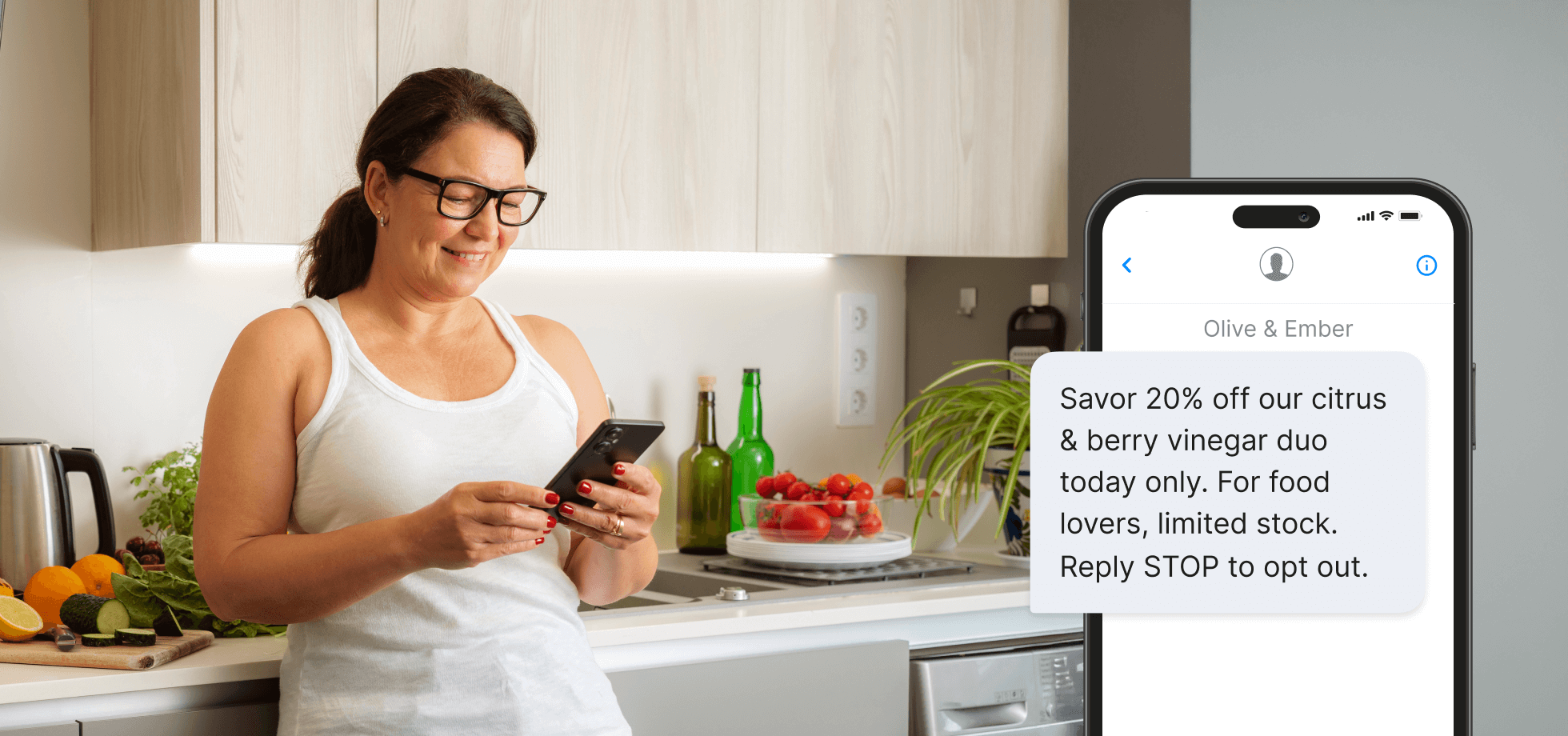
</div><div class="text-buttons"><a href="https://app.textmagic.com/compose/text-message" class="btn btn-primary" target="_self">
                <i class="mditm mditm-send"></i>
                <span>Send now</span>
              </a></div></div>


<h3 class="wp-block-heading" id="4-limited-time-flash-sales-via-sms">4. Limited-time flash sales via SMS</h3>


<p>Boost sales by offering limited-time flash deals exclusively during your Black Friday SMS marketing campaign. These short-lived offers create buzz around your product and encourage customers to act quickly to claim their discount.&nbsp;</p>


<p>Flash sales are a powerful tactic for moving inventory quickly, driving immediate traffic, and creating a sense of exclusivity. Since texting is a direct and fast communication channel, your customers will receive the deal in real time and be motivated to participate in the promotion.</p>


<div class="alert__wrapper wp-elements-1a3f8a253106ef44afa7d11e3aa84d4a"><div class="alert alert-success" style="color: var(--wp--preset--color--black)"><p>Flash Sale! Get [X]% off everything for the next [Y] hours only. Offer ends at [Time]. Reply STOP to opt out.</p>
</div><div class="text-buttons"><a href="https://app.textmagic.com/compose/text-message" class="btn btn-primary" target="_self">
                <i class="mditm mditm-send"></i>
                <span>Send now</span>
              </a></div></div>


<h3 class="wp-block-heading" id="5-purchase-history-personalized-sms-offer">5. Purchase history personalized SMS offer</h3>


<figure class="wp-block-image size-full"><img loading="lazy" decoding="async" width="1960" height="920" src="https://www.textmagic.com/wp-content/uploads/2025/10/Purchase-history-personalized-SMS-offer.png" alt="Purchase history personalized SMS offer" class="wp-image-25469" srcset="https://www.textmagic.com/wp-content/uploads/2025/10/Purchase-history-personalized-SMS-offer.png 1960w, https://www.textmagic.com/wp-content/uploads/2025/10/Purchase-history-personalized-SMS-offer-300x141.png 300w, https://www.textmagic.com/wp-content/uploads/2025/10/Purchase-history-personalized-SMS-offer-1024x481.png 1024w, https://www.textmagic.com/wp-content/uploads/2025/10/Purchase-history-personalized-SMS-offer-768x360.png 768w, https://www.textmagic.com/wp-content/uploads/2025/10/Purchase-history-personalized-SMS-offer-1536x721.png 1536w, https://www.textmagic.com/wp-content/uploads/2025/10/Purchase-history-personalized-SMS-offer-170x80.png 170w" sizes="auto, (max-width: 1960px) 100vw, 1960px" /></figure>


<p>Sending personalized Black Friday offers based on individual purchase history is a great way to encourage repeat business and drive targeted sales. By presenting customers with offers that are relevant to their preferences, you increase conversions and move stock at the same time.</p>


<p>This idea for Black Friday marketing creates a personalized shopping experience, making customers feel valued and understood. People are more likely to respond to offers that align with their past buying behavior, fostering loyalty in the long run.</p>


<div class="alert__wrapper wp-elements-62127b67c3eab5ab8df36688f074ac91"><div class="alert alert-success" style="color: var(--wp--preset--color--black)"><p>Hi [First Name], since you loved our [Product], enjoy exclusive Black Friday deals on similar picks today. Reply STOP to opt out.</p>
</div><div class="text-buttons"><a href="https://app.textmagic.com/compose/text-message" class="btn btn-primary" target="_self">
                <i class="mditm mditm-send"></i>
                <span>Send now</span>
              </a></div></div>


<h3 class="wp-block-heading" id="6-abandoned-cart-sms-reminder">6. Abandoned cart SMS reminder</h3>


<p>Recover lost sales by sending abandoned cart reminders during your Black Friday SMS marketing campaign. Shoppers often leave items in their carts, especially during busy shopping holidays, and there’s nothing like a timely text to prompt them to complete their purchase.&nbsp;</p>


<p>This Black Friday marketing strategy leverages urgency by reminding customers that stock is limited during this period, which encourages them to take immediate action. Offering a small discount or free shipping as an incentive to complete their order can also drive conversions.</p>


<div class="alert__wrapper wp-elements-9afcc81f5af6e6d63a0fd34d5940a0c6"><div class="alert alert-success" style="color: var(--wp--preset--color--black)"><p>Hi [First Name], your Black Friday cart is waiting! Complete your order today before items sell out. Reply STOP to opt out.</p>
</div><div class="text-buttons"><a href="https://app.textmagic.com/compose/text-message" class="btn btn-primary" target="_self">
                <i class="mditm mditm-send"></i>
                <span>Send now</span>
              </a></div></div>


<h3 class="wp-block-heading" id="7-post-purchase-upsell-for-cyber-monday">7. Post-purchase upsell for Cyber Monday</h3>


<figure class="wp-block-image size-full"><img loading="lazy" decoding="async" width="1960" height="920" src="https://www.textmagic.com/wp-content/uploads/2025/10/Post-purchase-upsell-for-Cyber-Monday.png" alt="Post-purchase upsell for Cyber Monday" class="wp-image-25470" srcset="https://www.textmagic.com/wp-content/uploads/2025/10/Post-purchase-upsell-for-Cyber-Monday.png 1960w, https://www.textmagic.com/wp-content/uploads/2025/10/Post-purchase-upsell-for-Cyber-Monday-300x141.png 300w, https://www.textmagic.com/wp-content/uploads/2025/10/Post-purchase-upsell-for-Cyber-Monday-1024x481.png 1024w, https://www.textmagic.com/wp-content/uploads/2025/10/Post-purchase-upsell-for-Cyber-Monday-768x360.png 768w, https://www.textmagic.com/wp-content/uploads/2025/10/Post-purchase-upsell-for-Cyber-Monday-1536x721.png 1536w, https://www.textmagic.com/wp-content/uploads/2025/10/Post-purchase-upsell-for-Cyber-Monday-170x80.png 170w" sizes="auto, (max-width: 1960px) 100vw, 1960px" /></figure>


<p>Capitalize on the momentum generated by Black Friday promotions and send post-purchase SMS to upsell Cyber Monday deals. After customers make a purchase on Friday, send them a discount code to use on Monday to <a href="/blog/business-goals-examples/">encourage repeat business</a>.</p>


<p>By targeting customers who are already in a buying mindset, you can maximize your revenue across both shopping holidays.</p>


<div class="alert__wrapper wp-elements-c7eaf08710a81e569dcd196284669b88"><div class="alert alert-success" style="color: var(--wp--preset--color--black)"><p>Thanks for your Black Friday purchase, [First Name]! Enjoy [X]% off our Cyber Monday deals. Keep the savings going! Reply STOP to opt out.a</p>
</div><div class="text-buttons"><a href="https://app.textmagic.com/compose/text-message" class="btn btn-primary" target="_self">
                <i class="mditm mditm-send"></i>
                <span>Send now</span>
              </a></div></div>


<h3 class="wp-block-heading" id="8-sms-driven-referral-program">8. SMS-driven referral program</h3>


<p>Launch an SMS-driven referral program to boost your Black Friday sales and encourage existing customers to refer friends and family to your sale in exchange for discounts or rewards.&nbsp;</p>


<p>By using text messages, you can quickly and easily share referral links or codes that customers can pass along to others. This approach not only drives new traffic to your sale but also rewards <a href="/blog/building-customer-loyalty/">loyal customers</a> for spreading the word, thus creating a win-win situation.</p>


<div class="alert__wrapper wp-elements-76b0778061465023c633ec8f090e7c15"><div class="alert alert-success" style="color: var(--wp--preset--color--black)"><p><img src="https://s.w.org/images/core/emoji/17.0.2/72x72/1f4b8.png" alt="💸" class="wp-smiley" style="height: 1em; max-height: 1em;" /> Share the savings! Refer a friend during Black Friday and you’ll both get [X]% off your next order. Reply STOP to opt out.</p>
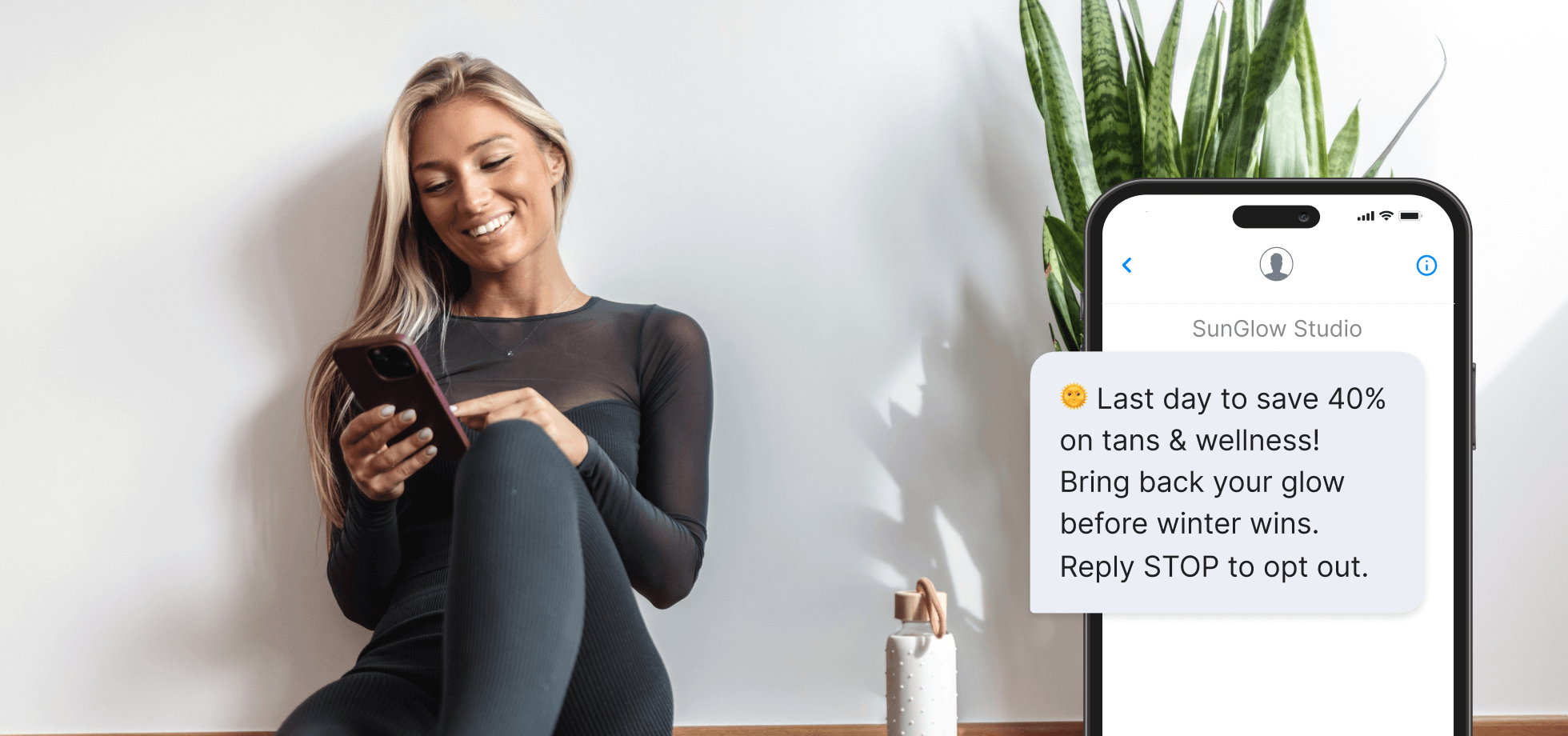
</div><div class="text-buttons"><a href="https://app.textmagic.com/compose/text-message" class="btn btn-primary" target="_self">
                <i class="mditm mditm-send"></i>
                <span>Send now</span>
              </a></div></div>


<h3 class="wp-block-heading" id="9-last-minute-sms-reminder-on-black-friday">9. Last-minute SMS reminder on Black Friday</h3>


<figure class="wp-block-image size-full"><img loading="lazy" decoding="async" width="1960" height="920" src="https://www.textmagic.com/wp-content/uploads/2025/10/Last-minute-SMS-reminder-on-Black-Friday.png" alt="Last-minute SMS reminder on Black Friday" class="wp-image-25471" srcset="https://www.textmagic.com/wp-content/uploads/2025/10/Last-minute-SMS-reminder-on-Black-Friday.png 1960w, https://www.textmagic.com/wp-content/uploads/2025/10/Last-minute-SMS-reminder-on-Black-Friday-300x141.png 300w, https://www.textmagic.com/wp-content/uploads/2025/10/Last-minute-SMS-reminder-on-Black-Friday-1024x481.png 1024w, https://www.textmagic.com/wp-content/uploads/2025/10/Last-minute-SMS-reminder-on-Black-Friday-768x360.png 768w, https://www.textmagic.com/wp-content/uploads/2025/10/Last-minute-SMS-reminder-on-Black-Friday-1536x721.png 1536w, https://www.textmagic.com/wp-content/uploads/2025/10/Last-minute-SMS-reminder-on-Black-Friday-170x80.png 170w" sizes="auto, (max-width: 1960px) 100vw, 1960px" /></figure>


<p>Capture those final Black Friday shoppers by sending last-minute <a href="https://www.textmagic.com/blog/sms-reminder-ideas/">text message reminders</a>. These messages create urgency, reminding customers that time is running out and your one-of-a-kind offers will be gone soon.&nbsp;</p>


<p>By reaching out close to the end of the sale, you can prompt indecisive customers to act before the discounts disappear. These reminders are a great way to drive a final surge of sales and clear out inventory before everyone’s favorite shopping holiday comes to an end.&nbsp;</p>


<div class="alert__wrapper wp-elements-7c7a01f9f0042dad593f8cf898f0468f"><div class="alert alert-success" style="color: var(--wp--preset--color--black)"><p>Final hours! Black Friday ends soon, so grab [X]% off your favorites before our deals are gone. Reply STOP to opt out.</p>
</div><div class="text-buttons"><a href="https://app.textmagic.com/compose/text-message" class="btn btn-primary" target="_self">
                <i class="mditm mditm-send"></i>
                <span>Send now</span>
              </a></div></div>


<h3 class="wp-block-heading" id="10-sms-amp-email-combo-campaign">10. SMS &amp; Email combo campaign</h3>


<p>Maximize the reach and effectiveness of your Black Friday marketing campaign by combining the powers of <a href="https://www.textmagic.com/blog/sms-and-email-marketing/">text messaging and email</a>. Use email for detailed information, such as full product lists and longer-form content, while leveraging texting to deliver concise and time-sensitive messages.</p>


<p>By pairing both channels, you will increase the chances of reaching customers at the right moment. Plus, this multi-channel approach reinforces your messaging, ensuring customers are aware of your special offers across multiple touchpoints.</p>


<div class="alert__wrapper wp-elements-7bfccd929b025f09d8acd56e7addbac6"><div class="alert alert-success" style="color: var(--wp--preset--color--black)"><p>Black Friday is here! Check your email inbox for your [X]% off code and shop your favorite deals before they’re gone. Reply STOP to opt out.</p>
</div><div class="text-buttons"><a href="https://app.textmagic.com/compose/text-message" class="btn btn-primary" target="_self">
                <i class="mditm mditm-send"></i>
                <span>Send now</span>
              </a></div></div>


<h3 class="wp-block-heading" id="11-exclusive-sms-only-deal">11. Exclusive SMS-only deal</h3>


<figure class="wp-block-image size-full"><img loading="lazy" decoding="async" width="1960" height="920" src="https://www.textmagic.com/wp-content/uploads/2025/10/Exclusive-SMS-only-deal.png" alt="Exclusive SMS-only deal" class="wp-image-25472" srcset="https://www.textmagic.com/wp-content/uploads/2025/10/Exclusive-SMS-only-deal.png 1960w, https://www.textmagic.com/wp-content/uploads/2025/10/Exclusive-SMS-only-deal-300x141.png 300w, https://www.textmagic.com/wp-content/uploads/2025/10/Exclusive-SMS-only-deal-1024x481.png 1024w, https://www.textmagic.com/wp-content/uploads/2025/10/Exclusive-SMS-only-deal-768x360.png 768w, https://www.textmagic.com/wp-content/uploads/2025/10/Exclusive-SMS-only-deal-1536x721.png 1536w, https://www.textmagic.com/wp-content/uploads/2025/10/Exclusive-SMS-only-deal-170x80.png 170w" sizes="auto, (max-width: 1960px) 100vw, 1960px" /></figure>


<p>Reward your SMS subscribers with exclusive SMS-only deals during Black Friday. Offering special discounts or products available on one channel only makes your subscribers feel valued and encourages more customers to opt in to receive <a href="https://www.textmagic.com/blog/what-is-sms-marketing-and-why-does-your-business-need-it/">marketing communications</a>.&nbsp;</p>


<p>This strategy also builds a sense of exclusivity and urgency, driving immediate sales. Text messaging is a direct, personal <a href="https://www.textmagic.com/blog/business-communication-channels/">communication channel</a>, so these exclusive offers feel more special, creating a stronger connection with your audience.</p>


<div class="alert__wrapper wp-elements-8d1e516f6d992561838c746997e3f8e6"><div class="alert alert-success" style="color: var(--wp--preset--color--black)"><p>Just for you, [First Name]! Enjoy [X]% off as an exclusive Black Friday offer for our SMS subscribers. Reply STOP to opt out.</p>
</div><div class="text-buttons"><a href="https://app.textmagic.com/compose/text-message" class="btn btn-primary" target="_self">
                <i class="mditm mditm-send"></i>
                <span>Send now</span>
              </a></div></div>


<h3 class="wp-block-heading" id="12-physical-store-event">12. Physical store event </h3>


<p>Drive in-store traffic by inviting customers to exclusive Black Friday events. Use SMS reminders to highlight limited-time offers, early access perks, or special experiences available only at your physical location. </p>


<p>Mention event details clearly, such as time, date, and location, and emphasize what makes it worth attending. Whether it’s an exclusive product demo, free gift, or VIP discount, use SMS to build excitement and urgency.</p>


<div class="alert__wrapper wp-elements-b2240fac950f686aa82a97260e3cb662"><div class="alert alert-success" style="color: var(--wp--preset--color--black)"><p data-start="40" data-end="366">Join us in-store today for exclusive Black Friday deals and gifts! Doors open at [Time]. Reply STOP to opt out.</p>
</div><div class="text-buttons"><a href="https://app.textmagic.com/compose/text-message" class="btn btn-primary" target="_self">
                <i class="mditm mditm-send"></i>
                <span>Send now</span>
              </a></div></div>


<h3 class="wp-block-heading has-black-color has-text-color has-link-color wp-elements-24ffea5e22a19b90f516c48260846085" id="13-win-back-disengaged-customers">13. Win back disengaged customers</h3>


<figure class="wp-block-image size-full"><img loading="lazy" decoding="async" width="1960" height="920" src="https://www.textmagic.com/wp-content/uploads/2025/10/Win-back-disengaged-customers.png" alt="Win back disengaged customers" class="wp-image-25473" srcset="https://www.textmagic.com/wp-content/uploads/2025/10/Win-back-disengaged-customers.png 1960w, https://www.textmagic.com/wp-content/uploads/2025/10/Win-back-disengaged-customers-300x141.png 300w, https://www.textmagic.com/wp-content/uploads/2025/10/Win-back-disengaged-customers-1024x481.png 1024w, https://www.textmagic.com/wp-content/uploads/2025/10/Win-back-disengaged-customers-768x360.png 768w, https://www.textmagic.com/wp-content/uploads/2025/10/Win-back-disengaged-customers-1536x721.png 1536w, https://www.textmagic.com/wp-content/uploads/2025/10/Win-back-disengaged-customers-170x80.png 170w" sizes="auto, (max-width: 1960px) 100vw, 1960px" /></figure>


<p>Reconnect with inactive customers by offering a compelling reason to re-engage during Black Friday. A personalized win-back message reminds them what they’re missing and creates an easy opportunity to return.</p>


<p>Use friendly, conversational language and a strong incentive, like an exclusive discount or a “we miss you” offer. This approach reignites interest while showing appreciation for past loyalty. </p>


<div class="alert__wrapper wp-elements-70b5227721f40f747d244181dec1c2d2"><div class="alert alert-success" style="color: var(--wp--preset--color--black)"><p>Hi [First Name], we’ve missed you! Come back this Black Friday and enjoy [X]% off your next order. Reply STOP to opt out.</p>
</div><div class="text-buttons"><a href="https://app.textmagic.com/compose/text-message" class="btn btn-primary" target="_self">
                <i class="mditm mditm-send"></i>
                <span>Send now</span>
              </a></div></div>


<h2 class="wp-block-heading" id="transform-your-strategy-with-textmagic">Transform your strategy with Textmagic</h2>


<p>Incorporating texting into your Black Friday marketing strategy can significantly boost engagement and drive sales. With its immediacy and personal touch, SMS allows you to connect with customers at the right moment, offering exclusive deals, personalized offers, and timely reminders.&nbsp;</p>


<p>With Textmagic, you can easily create and automate personalized campaigns, send timely reminders, and track real-time results, all from one platform.</p>


  <div class="blog-cta-block" >

    <div class="cta-container">
      <div class="cta-text">
                  <h3>Stay on top of the Black Friday rush.</h3>
        
                  <p>Reach customers instantly on both SMS and email with Textmagic.</p>
        
                  <button
            type="button"
            class="hregister btn btn--blue btn--1"
            onclick="window.location.href='https://app.textmagic.com/register'">
            Free trial          </button>
              </div>

              <div class="cta-image">
          <img decoding="async" src="https://www.textmagic.com/wp-content/uploads/2024/10/Black-Friday-CTA.png" alt="Stay on top of the Black Friday rush.">
        </div>
          </div>
  </div>


<p>With these Black Friday SMS marketing ideas under your belt and the right tool, you can create a sense of urgency around your offers, while rewarding loyal customers and even recovering abandoned sales at the same time. </p>


<p>As competition increases during this busy shopping season, running your SMS campaigns with Textmagic will give you the edge your brand needs to stand out and maximize the holiday&#8217;s potential.</p>


      <section class="faq faq-blog" >
      <div class="container">
                  <div class="heading-container">
                          <h2>Frequently Asked Questions (FAQs)</h2>
                                  </div>
        
                  <div id="faq-list" class="faq-list">
                                          <div class="faq-list__item">
                  <div class="faq-list__header">
                    <div class="faq-list__header__icon">
                      <span class="tmi-chevron-up"></span>
                    </div>
                    <div>When should I start my Black Friday SMS campaign?</div>
                  </div>
                  <div class="faq-list__body">
                    <div class="faq-list__body-wrapper">
                      <p>Start sending teaser messages one to two weeks before Black Friday to build anticipation. Schedule your main campaign launch on the day of the sale and follow up with limited-time reminders during the event.</p>
                    </div>
                  </div>
                </div>
                                                        <div class="faq-list__item">
                  <div class="faq-list__header">
                    <div class="faq-list__header__icon">
                      <span class="tmi-chevron-up"></span>
                    </div>
                    <div>How many promotional texts can I send to customers on Black Friday?</div>
                  </div>
                  <div class="faq-list__body">
                    <div class="faq-list__body-wrapper">
                      <p data-start="463" data-end="702">Limit messages to three over the course of the campaign at most: one for the announcement, one reminder, and one last call. Over-texting can reduce engagement and increase opt-outs.</p>
                    </div>
                  </div>
                </div>
                                                        <div class="faq-list__item">
                  <div class="faq-list__header">
                    <div class="faq-list__header__icon">
                      <span class="tmi-chevron-up"></span>
                    </div>
                    <div>Do I need to include opt-out instructions in every text message?</div>
                  </div>
                  <div class="faq-list__body">
                    <div class="faq-list__body-wrapper">
                      <p data-start="709" data-end="953">Yes. Every marketing SMS must include clear opt-out language such as “Reply STOP to opt out.” This ensures compliance with messaging regulations and builds customer trust.</p>
                    </div>
                  </div>
                </div>
                                                        <div class="faq-list__item">
                  <div class="faq-list__header">
                    <div class="faq-list__header__icon">
                      <span class="tmi-chevron-up"></span>
                    </div>
                    <div>What words trigger SMS carrier spam filters?</div>
                  </div>
                  <div class="faq-list__body">
                    <div class="faq-list__body-wrapper">
                      <p>Avoid excessive capitalization, multiple emojis, and overly promotional phrases like <em data-start="1096" data-end="1105">FREE!!!</em>, <em data-start="1107" data-end="1117">Act now!</em>, <em data-start="1119" data-end="1131">Guaranteed</em>, or <em data-start="1136" data-end="1148">Click here</em>. Keep messages natural, relevant, and professional to maintain deliverability.</p>
                    </div>
                  </div>
                </div>
                                    </div>
      </div>
        </section>
  <p>The post <a href="https://www.textmagic.com/blog/black-friday-sms-marketing/">13 Black Friday marketing ideas to boost sales using SMS</a> appeared first on <a href="https://www.textmagic.com">Textmagic</a>.</p>
]]></content:encoded>
	
	</item>
</rdf:RDF>