<?xml version="1.0" encoding="utf-8"?>
<feed xmlns="http://www.w3.org/2005/Atom">

  <title><![CDATA[UserVoice Developer]]></title>
  <link href="https://developer.uservoice.com/atom.xml" rel="self"/>
  <link href="https://developer.uservoice.com/"/>
  <updated>2025-05-29T16:51:21+00:00</updated>
  <id>https://developer.uservoice.com/</id>
  <author>
    <name><![CDATA[UserVoice]]></name>
    
  </author>
  <generator uri="http://octopress.org/">Octopress</generator>

  
  <entry>
    <title type="html"><![CDATA[Why I wrote gocraft/web]]></title>
    <link href="https://developer.uservoice.com/blog/2013/12/12/why-i-wrote-gocraft-web/"/>
    <updated>2013-12-12T10:00:00+00:00</updated>
    <id>https://developer.uservoice.com/blog/2013/12/12/why-i-wrote-gocraft-web</id>
    <content type="html"><![CDATA[<p>I looked at several Go web frameworks, gave some a try, and ended up writing my own: <a href="https://github.com/gocraft/web">gocraft/web</a>. Here&#8217;s why.</p>

<h2>First I tried Revel</h2>

<p>I started off with <a href="https://github.com/robfig/revel">Revel</a> because it was popular (in terms of stars on github). It&#8217;s not for everyone, but I think Revel is a solid piece of engineering and has some really nice aspects: Good way of representing middleware, awesome code reloading in development, and you&#8217;re up and running really quickly with defaults.</p>

<p>One thing about Revel is is that you have &#8220;controllers&#8221; that are structs. You add methods on these controllers - these are handlers. The first thing I tried to do here is add a field to my struct, and set it in a piece of middleware:</p>

<figure class='code'><figcaption><span></span></figcaption><div class="highlight"><table><tr><td class="gutter"><pre class="line-numbers"><span class='line-number'>1</span>
<span class='line-number'>2</span>
<span class='line-number'>3</span>
<span class='line-number'>4</span>
</pre></td><td class='code'><pre><code class='go'><span class='line'><span class="kd">type</span> <span class="nx">TicketsController</span> <span class="kd">struct</span> <span class="p">{</span>
</span><span class='line'>  <span class="o">*</span><span class="nx">revel</span><span class="p">.</span><span class="nx">Controller</span>
</span><span class='line'>  <span class="nx">User</span> <span class="o">*</span><span class="nx">User</span>
</span><span class='line'><span class="p">}</span>
</span></code></pre></td></tr></table></div></figure>


<p>Then I wanted to set this in a piece of middleware called &#8216;UserRequired&#8217;. This middleware would validate your session and find the appropriate user. If there was no session, it would redirect you to a login secreen. The great thing about this is that once I&#8217;m in my handler, I have the current user easily available!</p>

<figure class='code'><figcaption><span></span></figcaption><div class="highlight"><table><tr><td class="gutter"><pre class="line-numbers"><span class='line-number'>1</span>
<span class='line-number'>2</span>
<span class='line-number'>3</span>
</pre></td><td class='code'><pre><code class='go'><span class='line'><span class="kd">func</span> <span class="p">(</span><span class="nx">c</span> <span class="nx">TicketsController</span><span class="p">)</span> <span class="nx">Index</span><span class="p">()</span> <span class="nx">revel</span><span class="p">.</span><span class="nx">Result</span> <span class="p">{</span>
</span><span class='line'>  <span class="k">return</span> <span class="nx">c</span><span class="p">.</span><span class="nx">Render</span><span class="p">(</span><span class="s">&quot;Hello &quot;</span> <span class="o">+</span> <span class="nx">c</span><span class="p">.</span><span class="nx">User</span><span class="p">.</span><span class="nx">Name</span><span class="p">)</span>
</span><span class='line'><span class="p">}</span>
</span></code></pre></td></tr></table></div></figure>


<p>I actually implemented this in Revel. But to do so, I had to do ugly reflection in my middleware. Each time I wanted to have middleware interact with my structs in this way, I&#8217;d have to write more reflection. Given I wanted to do this for a bunch of stuff, I was bummed out.</p>

<h2>Then I tried Traffic</h2>

<p>Then I stumbled upon <a href="https://github.com/pilu/traffic">Traffic</a>. Traffic aims to be a lightweight framework &#8211; akin to Sinatra. I liked the API for building up a router, and how it&#8217;s not very intrusive.</p>

<p>Traffic also has middlware. You can communicate from middleware to handler via SetVar and GetVar:</p>

<figure class='code'><figcaption><span></span></figcaption><div class="highlight"><table><tr><td class="gutter"><pre class="line-numbers"><span class='line-number'>1</span>
<span class='line-number'>2</span>
<span class='line-number'>3</span>
<span class='line-number'>4</span>
<span class='line-number'>5</span>
<span class='line-number'>6</span>
<span class='line-number'>7</span>
<span class='line-number'>8</span>
<span class='line-number'>9</span>
<span class='line-number'>10</span>
<span class='line-number'>11</span>
<span class='line-number'>12</span>
<span class='line-number'>13</span>
<span class='line-number'>14</span>
<span class='line-number'>15</span>
<span class='line-number'>16</span>
</pre></td><td class='code'><pre><code class='go'><span class='line'><span class="c1">// Middleware:</span>
</span><span class='line'><span class="kd">func</span> <span class="p">(</span><span class="nx">c</span> <span class="o">*</span><span class="nx">PingMiddleware</span><span class="p">)</span> <span class="nx">UserRequired</span><span class="p">(</span><span class="nx">w</span> <span class="nx">traffic</span><span class="p">.</span><span class="nx">ResponseWriter</span><span class="p">,</span> <span class="nx">r</span> <span class="o">*</span><span class="nx">http</span><span class="p">.</span><span class="nx">Request</span><span class="p">,</span> <span class="nx">next</span> <span class="nx">traffic</span><span class="p">.</span><span class="nx">NextMiddlewareFunc</span><span class="p">)</span> <span class="p">(</span><span class="nx">traffic</span><span class="p">.</span><span class="nx">ResponseWriter</span><span class="p">,</span> <span class="o">*</span><span class="nx">http</span><span class="p">.</span><span class="nx">Request</span><span class="p">)</span> <span class="p">{</span>
</span><span class='line'>  <span class="k">if</span> <span class="nx">nextMiddleware</span> <span class="o">:=</span> <span class="nx">next</span><span class="p">();</span> <span class="nx">nextMiddleware</span> <span class="o">!=</span> <span class="kc">nil</span> <span class="p">{</span>
</span><span class='line'>     <span class="k">if</span> <span class="nx">user</span> <span class="o">:=</span> <span class="nx">getUserFromRequest</span><span class="p">(</span><span class="nx">r</span><span class="p">);</span> <span class="nx">user</span> <span class="o">!=</span> <span class="kc">nil</span> <span class="p">{</span>
</span><span class='line'>       <span class="nx">w</span><span class="p">.</span><span class="nx">SetVar</span><span class="p">(</span><span class="s">&quot;user&quot;</span><span class="p">,</span> <span class="nx">user</span><span class="p">)</span>
</span><span class='line'>       <span class="nx">w</span><span class="p">,</span> <span class="nx">r</span> <span class="p">=</span> <span class="nx">nextMiddleware</span><span class="p">.</span><span class="nx">ServeHTTP</span><span class="p">(</span><span class="nx">w</span><span class="p">,</span> <span class="nx">r</span><span class="p">,</span> <span class="nx">next</span><span class="p">)</span>
</span><span class='line'>     <span class="p">}</span>
</span><span class='line'>  <span class="p">}</span>
</span><span class='line'>  <span class="k">return</span> <span class="nx">w</span><span class="p">,</span> <span class="nx">r</span>
</span><span class='line'><span class="p">}</span>
</span><span class='line'>
</span><span class='line'><span class="c1">// Handler:</span>
</span><span class='line'><span class="kd">func</span> <span class="nx">root</span><span class="p">(</span><span class="nx">w</span> <span class="nx">traffic</span><span class="p">.</span><span class="nx">ResponseWriter</span><span class="p">,</span> <span class="nx">r</span> <span class="o">*</span><span class="nx">http</span><span class="p">.</span><span class="nx">Request</span><span class="p">)</span> <span class="p">{</span>
</span><span class='line'>  <span class="nx">user</span> <span class="o">:=</span> <span class="nx">w</span><span class="p">.</span><span class="nx">GetVar</span><span class="p">(</span><span class="s">&quot;user&quot;</span><span class="p">).(</span><span class="o">*</span><span class="nx">User</span><span class="p">)</span>
</span><span class='line'>  <span class="nx">fmt</span><span class="p">.</span><span class="nx">Fprintf</span><span class="p">(</span><span class="nx">w</span><span class="p">,</span> <span class="s">&quot;Hello, %s.\n&quot;</span><span class="p">,</span> <span class="nx">user</span><span class="p">.</span><span class="nx">Name</span><span class="p">)</span>
</span><span class='line'><span class="p">}</span>
</span></code></pre></td></tr></table></div></figure>


<p>This is not too bad. But, I was still bummed about the type assertions required.</p>

<h2>Web Frameworks: no thanks</h2>

<p>Both Revel and Traffic are good web frameworks, and I&#8217;d recommend them to anyone looking for a framework. But as I get more experience, I&#8217;m finding I don&#8217;t want a framework.</p>

<p>I want to add web handling capabilities to my application, not shoehorn my app into a web framework.</p>

<p>For instance:</p>

<ul>
<li><strong>Don&#8217;t tell me how to do app config.</strong> I don&#8217;t want to use your INI config file format. I want to use TOML, or I want to use environment variables ala 12-factor apps, or I want to use etcd.</li>
<li><strong>Don&#8217;t tell me where I put my controllers, models, and views.</strong> For instance, in Revel you need to put your controllers in a package called &#8216;controllers&#8217;, and models in a package named &#8216;models&#8217;. Nope!</li>
</ul>


<p>Another fallacy of many web frameworks is they assume you only want one application per executable. They assume this by using global state. This prevents you from binding different servers to different interfaces/ports to give you a public web experience and a protected health/monitoring API. Global state sucks.</p>

<h2>Enter gocraft/web</h2>

<p>So then I got the urge to write my own library. I had two strong goals:</p>

<ul>
<li>Goal 1: Not a framework.</li>
<li>Goal 2: Pass information from one layer of middleware to the next layer of middleware, and from middleware to action handlers without refection or type assertions <em>in my app code</em>.</li>
</ul>


<p>Here&#8217;s an example of what you can do with gocraft/web. I have some middleware which finds a user and sets it on the context. Later middlware and handlers can read the current user:</p>

<figure class='code'><figcaption><span></span></figcaption><div class="highlight"><table><tr><td class="gutter"><pre class="line-numbers"><span class='line-number'>1</span>
<span class='line-number'>2</span>
<span class='line-number'>3</span>
<span class='line-number'>4</span>
<span class='line-number'>5</span>
<span class='line-number'>6</span>
<span class='line-number'>7</span>
<span class='line-number'>8</span>
<span class='line-number'>9</span>
<span class='line-number'>10</span>
<span class='line-number'>11</span>
<span class='line-number'>12</span>
<span class='line-number'>13</span>
<span class='line-number'>14</span>
<span class='line-number'>15</span>
<span class='line-number'>16</span>
<span class='line-number'>17</span>
<span class='line-number'>18</span>
<span class='line-number'>19</span>
<span class='line-number'>20</span>
<span class='line-number'>21</span>
<span class='line-number'>22</span>
<span class='line-number'>23</span>
<span class='line-number'>24</span>
<span class='line-number'>25</span>
</pre></td><td class='code'><pre><code class='go'><span class='line'><span class="kd">type</span> <span class="nx">Context</span> <span class="kd">struct</span> <span class="p">{</span>
</span><span class='line'>  <span class="nx">User</span> <span class="o">*</span><span class="nx">User</span>
</span><span class='line'><span class="p">}</span>
</span><span class='line'>
</span><span class='line'><span class="kd">func</span> <span class="p">(</span><span class="nx">c</span> <span class="o">*</span><span class="nx">Context</span><span class="p">)</span> <span class="nx">FindUser</span><span class="p">(</span><span class="nx">rw</span> <span class="nx">web</span><span class="p">.</span><span class="nx">ResponseWriter</span><span class="p">,</span> <span class="nx">req</span> <span class="o">*</span><span class="nx">web</span><span class="p">.</span><span class="nx">Request</span><span class="p">,</span> <span class="nx">next</span> <span class="nx">web</span><span class="p">.</span><span class="nx">NextMiddlewareFunc</span><span class="p">)</span> <span class="p">{</span>
</span><span class='line'>  <span class="k">if</span> <span class="nx">user</span> <span class="o">:=</span> <span class="nx">getUserFromRequest</span><span class="p">(</span><span class="nx">req</span><span class="p">);</span> <span class="nx">user</span> <span class="o">!=</span> <span class="kc">nil</span> <span class="p">{</span>
</span><span class='line'>    <span class="nx">c</span><span class="p">.</span><span class="nx">User</span> <span class="p">=</span> <span class="nx">user</span>
</span><span class='line'>    <span class="nx">next</span><span class="p">(</span><span class="nx">rw</span><span class="p">,</span> <span class="nx">req</span><span class="p">)</span>
</span><span class='line'>  <span class="p">}</span> <span class="k">else</span> <span class="p">{</span>
</span><span class='line'>    <span class="nx">rw</span><span class="p">.</span><span class="nx">WriteHeader</span><span class="p">(</span><span class="nx">http</span><span class="p">.</span><span class="nx">StatusForbidden</span><span class="p">)</span>
</span><span class='line'>  <span class="p">}</span>
</span><span class='line'><span class="p">}</span>
</span><span class='line'>
</span><span class='line'><span class="kd">func</span> <span class="p">(</span><span class="nx">c</span> <span class="o">*</span><span class="nx">Context</span><span class="p">)</span> <span class="nx">SayHello</span><span class="p">(</span><span class="nx">rw</span> <span class="nx">web</span><span class="p">.</span><span class="nx">ResponseWriter</span><span class="p">,</span> <span class="nx">req</span> <span class="o">*</span><span class="nx">web</span><span class="p">.</span><span class="nx">Request</span><span class="p">)</span> <span class="p">{</span>
</span><span class='line'>    <span class="nx">fmt</span><span class="p">.</span><span class="nx">Fprint</span><span class="p">(</span><span class="nx">rw</span><span class="p">,</span> <span class="s">&quot;Hello, &quot;</span> <span class="o">+</span> <span class="nx">c</span><span class="p">.</span><span class="nx">User</span><span class="p">.</span><span class="nx">Name</span><span class="p">)</span>
</span><span class='line'><span class="p">}</span>
</span><span class='line'>
</span><span class='line'><span class="kd">func</span> <span class="nx">main</span><span class="p">()</span> <span class="p">{</span>
</span><span class='line'>  <span class="nx">router</span> <span class="o">:=</span> <span class="nx">web</span><span class="p">.</span><span class="nx">New</span><span class="p">(</span><span class="nx">Context</span><span class="p">{}).</span>                 <span class="c1">// Create your router</span>
</span><span class='line'>    <span class="nx">Middleware</span><span class="p">(</span><span class="nx">web</span><span class="p">.</span><span class="nx">LoggerMiddleware</span><span class="p">).</span>           <span class="c1">// Use some included middleware</span>
</span><span class='line'>    <span class="nx">Middleware</span><span class="p">(</span><span class="nx">web</span><span class="p">.</span><span class="nx">ShowErrorsMiddleware</span><span class="p">).</span>       <span class="c1">// ...</span>
</span><span class='line'>    <span class="nx">Middleware</span><span class="p">((</span><span class="o">*</span><span class="nx">Context</span><span class="p">).</span><span class="nx">FindUser</span><span class="p">).</span>            <span class="c1">// Your own middleware!</span>
</span><span class='line'>    <span class="nx">Get</span><span class="p">(</span><span class="s">&quot;/hello&quot;</span><span class="p">,</span> <span class="p">(</span><span class="o">*</span><span class="nx">Context</span><span class="p">).</span><span class="nx">SayHello</span><span class="p">)</span>          <span class="c1">// Add a route</span>
</span><span class='line'>  <span class="nx">http</span><span class="p">.</span><span class="nx">ListenAndServe</span><span class="p">(</span><span class="s">&quot;localhost:3000&quot;</span><span class="p">,</span> <span class="nx">router</span><span class="p">)</span> <span class="c1">// Start the server!</span>
</span><span class='line'><span class="p">}</span>
</span></code></pre></td></tr></table></div></figure>


<h3>Contexts</h3>

<p>When building up your router, you&#8217;ll see that many of the handlers have a signature like this: <code>(*Context).MyFunction</code>. If you&#8217;re new to Go, this is weird. This syntax is called a <em>method expression</em>. All it does is represent a function whose first parameter is, in this case, *Context. This lets us write our handlers like this:</p>

<figure class='code'><figcaption><span></span></figcaption><div class="highlight"><table><tr><td class="gutter"><pre class="line-numbers"><span class='line-number'>1</span>
<span class='line-number'>2</span>
<span class='line-number'>3</span>
<span class='line-number'>4</span>
<span class='line-number'>5</span>
<span class='line-number'>6</span>
<span class='line-number'>7</span>
<span class='line-number'>8</span>
<span class='line-number'>9</span>
<span class='line-number'>10</span>
<span class='line-number'>11</span>
<span class='line-number'>12</span>
</pre></td><td class='code'><pre><code class='go'><span class='line'><span class="kd">func</span> <span class="p">(</span><span class="nx">c</span> <span class="o">*</span><span class="nx">YourContext</span><span class="p">)</span> <span class="nx">Root</span><span class="p">(</span><span class="nx">rw</span> <span class="nx">web</span><span class="p">.</span><span class="nx">ResponseWriter</span><span class="p">,</span> <span class="nx">req</span> <span class="o">*</span><span class="nx">web</span><span class="p">.</span><span class="nx">Request</span><span class="p">)</span> <span class="p">{</span>
</span><span class='line'>  <span class="k">if</span> <span class="nx">c</span><span class="p">.</span><span class="nx">User</span> <span class="o">!=</span> <span class="kc">nil</span> <span class="p">{</span>
</span><span class='line'>    <span class="nx">fmt</span><span class="p">.</span><span class="nx">Fprint</span><span class="p">(</span><span class="nx">rw</span><span class="p">,</span> <span class="s">&quot;Hello,&quot;</span><span class="p">,</span> <span class="nx">c</span><span class="p">.</span><span class="nx">User</span><span class="p">.</span><span class="nx">Name</span><span class="p">)</span>
</span><span class='line'>  <span class="p">}</span> <span class="k">else</span> <span class="p">{</span>
</span><span class='line'>    <span class="nx">fmt</span><span class="p">.</span><span class="nx">Fprint</span><span class="p">(</span><span class="nx">rw</span><span class="p">,</span> <span class="s">&quot;Hello, anonymous person&quot;</span><span class="p">)</span>
</span><span class='line'>  <span class="p">}</span>
</span><span class='line'><span class="p">}</span>
</span><span class='line'>
</span><span class='line'><span class="c1">// Which is equivalent to this:</span>
</span><span class='line'><span class="kd">func</span> <span class="nx">Root</span><span class="p">(</span><span class="nx">c</span> <span class="o">*</span><span class="nx">YourContext</span><span class="p">,</span> <span class="nx">rw</span> <span class="nx">web</span><span class="p">.</span><span class="nx">ResponseWriter</span><span class="p">,</span> <span class="nx">req</span> <span class="o">*</span><span class="nx">web</span><span class="p">.</span><span class="nx">Request</span><span class="p">)</span> <span class="p">{</span>
</span><span class='line'>  <span class="c1">// ...</span>
</span><span class='line'><span class="p">}</span>
</span></code></pre></td></tr></table></div></figure>


<p><strong>They&#8217;re not controllers; they&#8217;re contexts.</strong> They don&#8217;t control anything. They&#8217;re simply a struct, a piece of data, that is created for you on each request, that lets you set request-specific fields on as it gets passed down your middleware.</p>

<p>They&#8217;re also a great place to embed your database connection and logging, since you can instrument them on a per-request basis:</p>

<figure class='code'><figcaption><span></span></figcaption><div class="highlight"><table><tr><td class="gutter"><pre class="line-numbers"><span class='line-number'>1</span>
<span class='line-number'>2</span>
<span class='line-number'>3</span>
<span class='line-number'>4</span>
<span class='line-number'>5</span>
</pre></td><td class='code'><pre><code class='go'><span class='line'><span class="kd">func</span> <span class="p">(</span><span class="nx">c</span> <span class="o">*</span><span class="nx">YourContext</span><span class="p">)</span> <span class="nx">Root</span><span class="p">(</span><span class="nx">rw</span> <span class="nx">web</span><span class="p">.</span><span class="nx">ResponseWriter</span><span class="p">,</span> <span class="nx">req</span> <span class="o">*</span><span class="nx">web</span><span class="p">.</span><span class="nx">Request</span><span class="p">)</span> <span class="p">{</span>
</span><span class='line'>  <span class="nx">c</span><span class="p">.</span><span class="nx">Log</span><span class="p">(</span><span class="s">&quot;Entering request...&quot;</span><span class="p">)</span>
</span><span class='line'>  <span class="nx">post</span> <span class="o">:=</span> <span class="nx">c</span><span class="p">.</span><span class="nx">Select</span><span class="p">(</span><span class="o">&amp;</span><span class="nx">Post</span><span class="p">{},</span> <span class="s">&quot;SELECT title, body FROM posts WHERE `id` = ?&quot;</span><span class="p">,</span> <span class="nx">id</span><span class="p">)</span>
</span><span class='line'>  <span class="c1">// ...</span>
</span><span class='line'><span class="p">}</span>
</span></code></pre></td></tr></table></div></figure>


<h3>Nested routers, contexts, and middleware</h3>

<p>I believe another innovative aspect of <a href="https://github.com/gocraft/web">gocraft/web</a> is that you can have a hierarchy of routers, contexts, and middleware. Imagine:</p>

<ul>
<li>You want to run an AdminRequired middleware on all your admin routes, but not on API routes. Your context needs a CurrentAdmin field.</li>
<li>You want to run an OAuth middleware on your API routes. Your context needs an AccessToken field.</li>
<li>You want to run session handling middleware on ALL your routes. Your context needs a Session field.</li>
</ul>


<p>Let&#8217;s see how this is represented:</p>

<figure class='code'><figcaption><span></span></figcaption><div class="highlight"><table><tr><td class="gutter"><pre class="line-numbers"><span class='line-number'>1</span>
<span class='line-number'>2</span>
<span class='line-number'>3</span>
<span class='line-number'>4</span>
<span class='line-number'>5</span>
<span class='line-number'>6</span>
<span class='line-number'>7</span>
<span class='line-number'>8</span>
<span class='line-number'>9</span>
<span class='line-number'>10</span>
<span class='line-number'>11</span>
<span class='line-number'>12</span>
<span class='line-number'>13</span>
<span class='line-number'>14</span>
<span class='line-number'>15</span>
<span class='line-number'>16</span>
<span class='line-number'>17</span>
<span class='line-number'>18</span>
<span class='line-number'>19</span>
<span class='line-number'>20</span>
<span class='line-number'>21</span>
<span class='line-number'>22</span>
<span class='line-number'>23</span>
<span class='line-number'>24</span>
<span class='line-number'>25</span>
<span class='line-number'>26</span>
</pre></td><td class='code'><pre><code class='go'><span class='line'><span class="kd">type</span> <span class="nx">Context</span> <span class="kd">struct</span> <span class="p">{</span>
</span><span class='line'>  <span class="nx">Session</span> <span class="kd">map</span><span class="p">[</span><span class="kt">string</span><span class="p">]</span><span class="kt">string</span>
</span><span class='line'><span class="p">}</span>
</span><span class='line'>
</span><span class='line'><span class="kd">type</span> <span class="nx">AdminContext</span> <span class="kd">struct</span> <span class="p">{</span>
</span><span class='line'>  <span class="o">*</span><span class="nx">Context</span>  <span class="c1">// When you nest contexts, you need to embed the parent context in the first slot.</span>
</span><span class='line'>  <span class="nx">CurrentAdmin</span> <span class="o">*</span><span class="nx">User</span>
</span><span class='line'><span class="p">}</span>
</span><span class='line'>
</span><span class='line'><span class="kd">type</span> <span class="nx">ApiContext</span> <span class="kd">struct</span> <span class="p">{</span>
</span><span class='line'>  <span class="o">*</span><span class="nx">Context</span>
</span><span class='line'>  <span class="nx">AccessToken</span> <span class="kt">string</span>
</span><span class='line'><span class="p">}</span>
</span><span class='line'>
</span><span class='line'><span class="nx">rootRouter</span> <span class="o">:=</span> <span class="nx">web</span><span class="p">.</span><span class="nx">New</span><span class="p">(</span><span class="nx">Context</span><span class="p">{})</span>
</span><span class='line'><span class="nx">rootRouter</span><span class="p">.</span><span class="nx">Middleware</span><span class="p">((</span><span class="o">*</span><span class="nx">Context</span><span class="p">).</span><span class="nx">LoadSession</span><span class="p">)</span>
</span><span class='line'>
</span><span class='line'><span class="nx">apiRouter</span> <span class="o">:=</span> <span class="nx">rootRouter</span><span class="p">.</span><span class="nx">Subrouter</span><span class="p">(</span><span class="nx">ApiContext</span><span class="p">{},</span> <span class="s">&quot;/api&quot;</span><span class="p">)</span>
</span><span class='line'><span class="nx">apiRouter</span><span class="p">.</span><span class="nx">Middleware</span><span class="p">((</span><span class="o">*</span><span class="nx">ApiContext</span><span class="p">).</span><span class="nx">OAuth</span><span class="p">)</span>
</span><span class='line'><span class="nx">apiRouter</span><span class="p">.</span><span class="nx">Get</span><span class="p">(</span><span class="s">&quot;/tickets&quot;</span><span class="p">,</span> <span class="p">(</span><span class="o">*</span><span class="nx">ApiContext</span><span class="p">).</span><span class="nx">TicketsIndex</span><span class="p">)</span>
</span><span class='line'>
</span><span class='line'><span class="nx">adminRouter</span> <span class="o">:=</span> <span class="nx">rootRouter</span><span class="p">.</span><span class="nx">Subrouter</span><span class="p">(</span><span class="nx">AdminContext</span><span class="p">{},</span> <span class="s">&quot;/admin&quot;</span><span class="p">)</span>
</span><span class='line'><span class="nx">adminRouter</span><span class="p">.</span><span class="nx">Middleware</span><span class="p">((</span><span class="o">*</span><span class="nx">AdminContext</span><span class="p">).</span><span class="nx">AdminRequired</span><span class="p">)</span>
</span><span class='line'>
</span><span class='line'><span class="c1">// Given the path namesapce for this router is &quot;/admin&quot;, the full path of this route is &quot;/admin/reports&quot;</span>
</span><span class='line'><span class="nx">adminRouter</span><span class="p">.</span><span class="nx">Get</span><span class="p">(</span><span class="s">&quot;/reports&quot;</span><span class="p">,</span> <span class="p">(</span><span class="o">*</span><span class="nx">AdminContext</span><span class="p">).</span><span class="nx">Reports</span><span class="p">)</span>
</span></code></pre></td></tr></table></div></figure>


<p>When a request comes in for <code>"/admin/reports"</code>:</p>

<ul>
<li>We&#8217;ll allocate a context for the rootRouter</li>
<li>Then we&#8217;ll run middleware on the root router, in this case LoadSession.</li>
<li>Do routing. We&#8217;ll find the route for <code>(*AdminContext).Reports</code> on the <code>adminRouter</code>.</li>
<li>Run middleware on the <code>adminRouter</code>, in this case AdminRequired.</li>
<li>Finally, invoke the action.</li>
</ul>


<h2>Cargo cult of Anti-Reflection</h2>

<p>I was able to implement this because of Go&#8217;s awesome refection capabilities. Yet when I talk to some people about this, they see it as an absolute downside. They refuse to consider using it; they get worried that their code isn&#8217;t statically verifiable by the compiler any more; they worry that it&#8217;s &#8220;too slow&#8221;.</p>

<p>This is utter nonesense.</p>

<p>I&#8217;ve started some initial benchmarking of web routers and frameworks at <a href="https://github.com/cypriss/golang-mux-benchmark/">golang-mux-benchmark</a> - gocraft/web shows some great performance numbers.</p>

<p>Second, I don&#8217;t see too much of a difference between reflection and type assertions. Strangely, type assertions have no stigma attached to them, yet result in run time panics if you type assert to the wrong type.</p>

<p>Finally, <a href="https://github.com/gocraft/web">gocraft/web</a> does manual type checks on your handlers. If you get it wrong, you&#8217;ll get a <em>panic at application boot with a helpful message</em>. This offers a significant chunk of the benefits of static type checking.</p>

<h2>go get github.com/gocraft/web</h2>

<p>There you have it. I believe I&#8217;ve created a compelling tool that helps you build web apps in Go.</p>

<p>There&#8217;s a bunch more documention and details about gocraft/web here: <a href="https://github.com/gocraft/web">https://github.com/gocraft/web</a>.</p>

<p>Give it a try, and tell me what you think!</p>
]]></content>
  </entry>
  
  <entry>
    <title type="html"><![CDATA[Introducing Mutations: Putting SOA on Rails for security and maintainability]]></title>
    <link href="https://developer.uservoice.com/blog/2013/02/27/introducing-mutations-putting-soa-on-rails-for-security-and-maintainability/"/>
    <updated>2013-02-27T10:00:00+00:00</updated>
    <id>https://developer.uservoice.com/blog/2013/02/27/introducing-mutations-putting-soa-on-rails-for-security-and-maintainability</id>
    <content type="html"><![CDATA[<p>I&#8217;d like to present the marrying of a few techniques that have transformed the way we write Rails apps at UserVoice, and the gem we extracted from it. But first, let me explain why we started looking into techniques that veered off the <a href="http://david.heinemeierhansson.com/2012/rails-is-omakase.html">Omakase</a> version of Rails.</p>

<h2>Problems</h2>

<p>We had three specific problems at UserVoice:</p>

<ol>
<li><p>We have different user interfaces to UserVoice: the front-end where folks come to look at ideas and vote, the admin console where admins moderate their ideas and respond to tickets, the API, widgets, a Facebook app, the iOS SDK, etc. All of these interfaces have their own controllers. We have the potential for duplicate logic: there could be an <code>ideas#create</code> endpoint in multiple controllers.</p></li>
<li><p>In the API especially, folks would pass in all kinds of invalid input. For instance, if an <code>ideas#create</code> endpoint took <code>params[:idea][:name]</code>, they&#8217;d just pass <code>params[:idea]</code> as the string <code>"Here's my idea"</code>. This would pollute our exception logs.</p></li>
<li><p>Some of our models became extremely fat, with a sequence of lifecycle callbacks that <em>feed into each other</em>. It became hard to reason about and modify these models, especially when you&#8217;re dealing with logic that has to work in multiple contexts (create vs update vs business action A vs business action B).</p></li>
</ol>


<h2>Solution</h2>

<p>We&#8217;ve done three things to solve this.</p>

<p>First, as is more and more common in the <a href="http://words.steveklabnik.com/rails-has-two-default-stacks">Prime Stack</a>, we&#8217;re been using the <a href="http://collectiveidea.com/blog/archives/2012/06/28/wheres-your-business-logic/">Service Layer pattern</a> more. Each service object is essentially a module of code that has one primary method and one responsibility. For instance: <code>TwitterPoster.post(tweet, user)</code>.</p>

<p>We&#8217;ve called these service objects &#8216;Mutations&#8217;, as quite often they represent a change of state in our database from state A to state B.</p>

<p>Second, we took a hard look at input validation and made some big changes. In particular, in Rails apps you&#8217;re presented with a params hash from the user, and you&#8217;re supposed to write a function against it. Rails validates the params hash in a few ways:</p>

<ol>
<li>ActionPack forces the hash to have a general structure by construction: the hash only has strings as keys, and values can be strings, more hashes, arrays, and files.</li>
<li><code>attr_accessible</code> or <code>strong_attributes</code> does attribute whitelisting.</li>
<li>ActiveModel does field validation.</li>
</ol>


<p>This trio is usually pretty effective. However, there are some problems:</p>

<ol>
<li>The structure of the hash is frequently assumed to be correct. For instance, it&#8217;s taken for granted that <code>params[:user]</code> is a hash, and <code>params[:user][:role_id]</code> is a string (<a href="https://groups.google.com/forum/?fromgroups=#!topic/rubyonrails-security/t1WFuuQyavI">and not, say, an array</a>)</li>
<li><code>attr_accessible</code> suffers from context blindness: you&#8217;re frequently going to have an end user UI and an admin UI. You want admins to have access to more fields.</li>
<li>It works best if you are mapping inputs directly to database fields.</li>
</ol>


<p>Lastly, on our more beastly AR models, we started removing lifecycle callbacks and putting them into the service objects. This makes the AR models quite anorexic. The focus is on context: each Mutation operates in a single context, so there&#8217;s very little conditional logic. Each Mutation is a clear, linear sequence of code.</p>

<h2>The Mutant Baby</h2>

<p>And so were born Mutations! Simply, it lets you validate and specify inputs on your service objects.</p>

<figure class='code'><figcaption><span></span></figcaption><div class="highlight"><table><tr><td class="gutter"><pre class="line-numbers"><span class='line-number'>1</span>
<span class='line-number'>2</span>
<span class='line-number'>3</span>
<span class='line-number'>4</span>
<span class='line-number'>5</span>
<span class='line-number'>6</span>
<span class='line-number'>7</span>
<span class='line-number'>8</span>
<span class='line-number'>9</span>
<span class='line-number'>10</span>
<span class='line-number'>11</span>
<span class='line-number'>12</span>
<span class='line-number'>13</span>
<span class='line-number'>14</span>
<span class='line-number'>15</span>
<span class='line-number'>16</span>
<span class='line-number'>17</span>
<span class='line-number'>18</span>
<span class='line-number'>19</span>
<span class='line-number'>20</span>
<span class='line-number'>21</span>
</pre></td><td class='code'><pre><code class='ruby'><span class='line'><span class="k">class</span> <span class="nc">UserSignup</span> <span class="o">&lt;</span> <span class="no">Mutations</span><span class="o">::</span><span class="no">Command</span>
</span><span class='line'>
</span><span class='line'>  <span class="c1"># These inputs are required</span>
</span><span class='line'>  <span class="n">required</span> <span class="k">do</span>
</span><span class='line'>    <span class="n">string</span> <span class="ss">:email</span><span class="p">,</span> <span class="ss">matches</span><span class="p">:</span> <span class="no">EMAIL_REGEX</span>
</span><span class='line'>    <span class="n">string</span> <span class="ss">:name</span>
</span><span class='line'>  <span class="k">end</span>
</span><span class='line'>
</span><span class='line'>  <span class="c1"># These inputs are optional</span>
</span><span class='line'>  <span class="n">optional</span> <span class="k">do</span>
</span><span class='line'>    <span class="n">boolean</span> <span class="ss">:newsletter_subscribe</span>
</span><span class='line'>  <span class="k">end</span>
</span><span class='line'>
</span><span class='line'>  <span class="c1"># The execute method is called only if the inputs validate. It does your business action.</span>
</span><span class='line'>  <span class="k">def</span> <span class="nf">execute</span>
</span><span class='line'>    <span class="n">user</span> <span class="o">=</span> <span class="no">User</span><span class="o">.</span><span class="n">create!</span><span class="p">(</span><span class="n">inputs</span><span class="p">)</span>
</span><span class='line'>    <span class="no">NewsletterSubscriptions</span><span class="o">.</span><span class="n">create</span><span class="p">(</span><span class="ss">email</span><span class="p">:</span> <span class="n">email</span><span class="p">,</span> <span class="ss">user_id</span><span class="p">:</span> <span class="n">user</span><span class="o">.</span><span class="n">id</span><span class="p">)</span> <span class="k">if</span> <span class="n">newsletter_subscribe</span>
</span><span class='line'>    <span class="no">UserMailer</span><span class="o">.</span><span class="n">async</span><span class="p">(</span><span class="ss">:deliver_welcome</span><span class="p">,</span> <span class="n">user</span><span class="o">.</span><span class="n">id</span><span class="p">)</span>
</span><span class='line'>    <span class="n">user</span>
</span><span class='line'>  <span class="k">end</span>
</span><span class='line'><span class="k">end</span>
</span></code></pre></td></tr></table></div></figure>


<p>and is callable like this:</p>

<figure class='code'><figcaption><span></span></figcaption><div class="highlight"><table><tr><td class="gutter"><pre class="line-numbers"><span class='line-number'>1</span>
<span class='line-number'>2</span>
</pre></td><td class='code'><pre><code class='ruby'><span class='line'><span class="n">outcome</span> <span class="o">=</span> <span class="no">UserSignup</span><span class="o">.</span><span class="n">run</span><span class="p">(</span><span class="n">params</span><span class="p">)</span> <span class="c1"># option A - get back an outcome that has outcome.success?, outcome.errors, and outcome.result</span>
</span><span class='line'><span class="n">user</span> <span class="o">=</span> <span class="no">UserSignup</span><span class="o">.</span><span class="n">run!</span><span class="p">(</span><span class="n">params</span><span class="p">)</span>   <span class="c1"># option B - return the result, and raise an exception if there&#39;s a problem.</span>
</span></code></pre></td></tr></table></div></figure>


<p>First, you specify the required and the optional inputs to the &#8220;function&#8221;. You also specify their type and constraints. If the inputs don&#8217;t match the constraints, and can&#8217;t be coerced to them, then the inputs are invalid and execute won&#8217;t be called. If everything checks out, then the execute method is called. Within execute, all of the inputs are safe, whitelisted values. You know all of the required values are present, and they&#8217;re the right types. This makes it a lot easier to write correct code against these inputs.</p>

<p>This looks pretty simple but it turns out to be pretty useful. There are a lot of synergies that arise and writing your application like this has a variety of benefits.</p>

<p>For complete documentation, see the <a href="https://github.com/cypriss/mutations">README</a>.</p>

<h2>Reduce Code Duplication</h2>

<p>By building an internal API (service layer) that your controllers can use, you&#8217;ll have less code duplication if you have multiple controllers that operate on the same types of data. This is straightforward and can be achieved by building any service layer, as I imagine many other folks using the Prime Stack have found.</p>

<h2>Security &amp; Correctness</h2>

<p>One of the core benefits is security. There have been several Rails exploits in the past year (<a href="https://groups.google.com/forum/?fromgroups=#!topic/rubyonrails-security/t1WFuuQyavI">CVE-2013-0155</a> and <a href="https://groups.google.com/forum/?fromgroups=#!topic/rubyonrails-security/DCNTNp_qjFM">CVE-2012-5664</a>) that are related to an &#8216;incorrect datatype&#8217; &#8211; you expected <code>params[:id]</code> to be a string, but in fact it was an array. These are cases where there was a bug in the code due to lack of robustness, and causing that bug also happened to reveal a security issue. There are plenty of other cases where bugs of the same type &#8211; &#8220;type checking bugs&#8221; &#8211; are simply non-exploitable bugs.</p>

<p>Using Mutations decreases the likelihood of issues like this popping up. If you specify that a parameter must be a string, then inside the execute method, it is guaranteed to be a string. If an ignorant or malicious user passes in an array, then an error will be raised. If the parameter can be safely coerced to a string (eg, an Integer or boolean is passed; 3 becomes &#8220;3&#8221; and false becomes &#8220;false&#8221;), then the coercion is done and you have string. This makes it much easier to write correct code, and correct code is much more likely to be secure.</p>

<h2>Reasoning About Logic</h2>

<p>The benefit I&#8217;m most excited about is that it&#8217;s really easy to reason about a Mutation, because it only does one thing. In contrast, it&#8217;s more difficult to reason about callback soup.</p>

<p>With a Mutation, you have a single business rule that you&#8217;re coding against. You&#8217;re likely to have a short, linear method.</p>

<p>With fat models, first of all you don&#8217;t know what the possible business operations are. But let&#8217;s say you&#8217;re thinking about creation. You have to look at the callbacks, and figure out which ones will be called in this context. In some cases, you have to look at model instance variables, which encode which context you&#8217;re in. Sometimes, information is passed from one callback to another callback. And when you&#8217;re writing callbacks, you have to make sure your piece of code works correctly in all contexts.</p>

<p>Callbacks are great for small apps and for simple things that are context-insensitive. For moderately complicated models, callbacks are a terrible way to encode your business rules.</p>

<h2>Documentation</h2>

<p>How often have you seen methods with signatures like this?</p>

<figure class='code'><figcaption><span></span></figcaption><div class="highlight"><table><tr><td class="gutter"><pre class="line-numbers"><span class='line-number'>1</span>
</pre></td><td class='code'><pre><code class='ruby'><span class='line'><span class="k">def</span> <span class="nf">do_task</span><span class="p">(</span><span class="n">user</span><span class="p">,</span> <span class="n">idea</span><span class="p">,</span> <span class="n">options</span> <span class="o">=</span> <span class="p">{});</span> <span class="k">end</span>
</span></code></pre></td></tr></table></div></figure>


<p>user and idea are clear, but what are valid options? If you&#8217;re lucky, do_task is a short function and you can see which keys and values can be in options. If you&#8217;re not, the method is implemented like this:</p>

<figure class='code'><figcaption><span></span></figcaption><div class="highlight"><table><tr><td class="gutter"><pre class="line-numbers"><span class='line-number'>1</span>
<span class='line-number'>2</span>
<span class='line-number'>3</span>
</pre></td><td class='code'><pre><code class='ruby'><span class='line'><span class="k">def</span> <span class="nf">do_task</span><span class="p">(</span><span class="n">user</span><span class="p">,</span> <span class="n">idea</span><span class="p">,</span> <span class="n">options</span> <span class="o">=</span> <span class="p">{})</span>
</span><span class='line'>  <span class="n">user</span><span class="o">.</span><span class="n">foo</span><span class="p">(</span><span class="n">task_helper</span><span class="p">(</span><span class="n">idea</span><span class="p">,</span> <span class="n">options</span><span class="p">))</span>
</span><span class='line'><span class="k">end</span>
</span></code></pre></td></tr></table></div></figure>


<p>And now you&#8217;re on a wild goose chase. The standard solution to this is a comment above the method. But as dogma goes, code shouldn&#8217;t need comments because code should be clear already.</p>

<p>Mutations solves this fairly nicely: all &#8220;options&#8221; are documented <em>as code</em>, not as comments. It&#8217;s extremely clear what options can be, including their types and constraints. Example:</p>

<figure class='code'><figcaption><span></span></figcaption><div class="highlight"><table><tr><td class="gutter"><pre class="line-numbers"><span class='line-number'>1</span>
<span class='line-number'>2</span>
<span class='line-number'>3</span>
<span class='line-number'>4</span>
<span class='line-number'>5</span>
<span class='line-number'>6</span>
<span class='line-number'>7</span>
<span class='line-number'>8</span>
<span class='line-number'>9</span>
<span class='line-number'>10</span>
<span class='line-number'>11</span>
<span class='line-number'>12</span>
<span class='line-number'>13</span>
</pre></td><td class='code'><pre><code class='ruby'><span class='line'><span class="k">class</span> <span class="nc">MyTask</span> <span class="o">&lt;</span> <span class="no">Mutations</span><span class="o">::</span><span class="no">Command</span>
</span><span class='line'>  <span class="n">required</span> <span class="k">do</span>
</span><span class='line'>    <span class="n">model</span> <span class="ss">:user</span>
</span><span class='line'>    <span class="n">model</span> <span class="ss">:idea</span>
</span><span class='line'>  <span class="k">end</span>
</span><span class='line'>
</span><span class='line'>  <span class="n">optional</span> <span class="k">do</span>
</span><span class='line'>    <span class="n">string</span> <span class="ss">:name_override</span>
</span><span class='line'>    <span class="n">integer</span> <span class="ss">:count</span><span class="p">,</span> <span class="ss">default</span><span class="p">:</span> <span class="mi">1</span>
</span><span class='line'>  <span class="k">end</span>
</span><span class='line'>
</span><span class='line'>  <span class="k">def</span> <span class="nf">execute</span><span class="p">;</span> <span class="o">.</span><span class="n">.</span><span class="o">.</span><span class="p">;</span> <span class="k">end</span>
</span><span class='line'><span class="k">end</span>
</span></code></pre></td></tr></table></div></figure>


<p>Notice that you know what is required, what is optional, what default values are, and what the data types of these fields are. This is more verbose than the original method, of course, but could be on-par with the original method plus a comment block.</p>

<h2>Forms</h2>

<p>Mutations help with form development in three ways:</p>

<ol>
<li><p>Multi-model forms are handled well. The standard solution is to use <code>accepts_nested_attributes_for</code>. Sometimes this works great, but other times you find yourself bending over backwards to do validations and other logic with callbacks. With Mutations, the structure of a nested hash can be well specified, and it&#8217;s easy to write logic against that instead of handing it over directly to ActiveRecord.</p></li>
<li><p>Forms where the input tags don&#8217;t map exactly to database fields are handled nicely. The standard solution is to add an <code>attr_accessor</code> to the model, whitelist it, and then operate on it in callbacks. This sucks. It&#8217;s much nicer to specify this parameter as an input and operate on it in a simple method.</p></li>
<li><p>Dual client-side/server-side errors are painless with Mutations. When you run a Mutation against a user&#8217;s profile, for instance, this is what you can get back:</p></li>
</ol>


<figure class='code'><figcaption><span></span></figcaption><div class="highlight"><table><tr><td class="gutter"><pre class="line-numbers"><span class='line-number'>1</span>
<span class='line-number'>2</span>
<span class='line-number'>3</span>
<span class='line-number'>4</span>
<span class='line-number'>5</span>
<span class='line-number'>6</span>
</pre></td><td class='code'><pre><code class='ruby'><span class='line'><span class="n">outcome</span> <span class="o">=</span> <span class="no">UpdateProfile</span><span class="o">.</span><span class="n">run</span><span class="p">(</span><span class="n">params</span><span class="p">)</span>
</span><span class='line'><span class="k">unless</span> <span class="n">outcome</span><span class="o">.</span><span class="n">success?</span>
</span><span class='line'>  <span class="n">outcome</span><span class="o">.</span><span class="n">errors</span><span class="o">.</span><span class="n">symbolic</span> <span class="c1"># =&gt; {name: :required, address: {street: :invalid, state: :not_state}}</span>
</span><span class='line'>  <span class="n">outcome</span><span class="o">.</span><span class="n">errors</span><span class="o">.</span><span class="n">message</span> <span class="c1"># =&gt; {name: &quot;Name is required&quot;, address: {street: &quot;Street is invalid&quot;, state: &quot;That&#39;s not a known state&quot;}}</span>
</span><span class='line'>  <span class="n">outcome</span><span class="o">.</span><span class="n">errors</span><span class="o">.</span><span class="n">message_list</span> <span class="c1"># =&gt; [&quot;Name is required&quot;, ...]</span>
</span><span class='line'><span class="k">end</span>
</span></code></pre></td></tr></table></div></figure>


<h2>Conclusion</h2>

<p>Mutations are great if you&#8217;re working on a bigger, long-lived application in a team setting. The service layer aspect gives you a scalable architecture. The input validation aspect makes it easy to pass user input directly into your service layer. You&#8217;ll have more robust and secure code.</p>

<p>To learn more, take a look at the <a href="https://github.com/cypriss/mutations">Mutations home page</a>.</p>

<p><a href="http://news.ycombinator.com/item?id=5293883">Comments on Hacker News</a></p>
]]></content>
  </entry>
  
  <entry>
    <title type="html"><![CDATA[Introducing Typeset.css for styling user-generated content]]></title>
    <link href="https://developer.uservoice.com/blog/2012/10/19/introducing-typeset-dot-css-for-styling-user-generated-content/"/>
    <updated>2012-10-19T12:41:00+00:00</updated>
    <id>https://developer.uservoice.com/blog/2012/10/19/introducing-typeset-dot-css-for-styling-user-generated-content</id>
    <content type="html"><![CDATA[<p>At UserVoice, we have a lot of places in our various web and app interfaces where user-generated content is displayed. This content includes ideas, comments, and tickets as well as admin-editable content areas, such as welcome messages and knowledgebase articles. Even our Admin Console UI is full of dynamic content, like help text and getting-started guides. Some of this content is a simple line of text. A lot of it is a block of content that may or may not include formatting.</p>

<p>One problem we started running into was content that included formatting we hadn’t anticipated. Early on, we didn’t allow any formatting other than line-breaks (converted to paragraphs). Later, we introduced textile support for different types of user-generated content. Once textile was added, we wrote styles for a lot of common markup, but it was easy to overlook certain elements like ordered lists or code blocks that weren’t part of our test content. It was also easy to be inconsistent in how the markup was styled from one part of an interface to another.</p>

<p>Later, when we prepared to launch our WYSIWYG editor and full HTML support for knowledge-base articles, we knew we would begin encountering all kinds of content that needed to be taken into account.</p>

<h2>Enter Typeset.css</h2>

<p>Because I’m tired of styling content over and over again, I wrote some basic CSS to solve ALL THE PROBLEMS once and for all. Here’s what Typeset.css does:</p>

<ul>
<li>It includes styles for HTML5 content-based semantic markup and resets layout-based styles (incorrectly) applied to user-generated content.</li>
<li>It inherits font styles, allowing it to be dropped in anywhere on a page where content markup needs styles.</li>
<li>It plays well with CSS resetters, normalizers bootstrappers, boilerplaters and other popular CSS frameworks.</li>
<li>And it renders styles consistently across browsers.</li>
</ul>


<p>Essentially, Typeset.css is a no-nonsense CSS typography reset for styling user-generated content like blog posts, comments, and forum content. Pop it in and BAM: content styled.</p>

<p>For examples of all the HTML elements styled with Typeset.css, go to <a href="http://joshuarudd.github.com/typeset.css/">http://joshuarudd.github.com/typeset.css/</a> or check out the <a href="https://github.com/joshuarudd/typeset.css">Typeset.css GitHub repository</a>.</p>

<h2>You, too, can use it!</h2>

<p>At UserVoice, we like to open source projects that support our core business but aren’t core to our business. Typeset.css is no exception, so please <a href="https://github.com/joshuarudd/typeset.css">check it out</a> and let me know what you think! I hope you find it useful!</p>

<p>You can also take a look at some of UserVoice’s other open source projects at <a href="http://developer.uservoice.com/opensource/">http://developer.uservoice.com/opensource/</a>.</p>
]]></content>
  </entry>
  
  <entry>
    <title type="html"><![CDATA[The Dark Passenger]]></title>
    <link href="https://developer.uservoice.com/blog/2012/08/08/the-dark-passenger/"/>
    <updated>2012-08-08T01:20:00+00:00</updated>
    <id>https://developer.uservoice.com/blog/2012/08/08/the-dark-passenger</id>
    <content type="html"><![CDATA[<p>Here at UserVoice, we’ve been using <a href="http://www.modrails.com/">Passenger</a> (aka. mod_rails) with <a href="http://nginx.org/">nginx</a> on our webservers since day 1. It’s a really neat piece of software that’s simple to install and configure, due to their wonderful <a href="http://www.modrails.com/documentation/Users%20guide%20Nginx.html">documentation</a>, and a really well tested install script that compiles the module into nginx for you (&#8211;auto). We’ve loved that it enabled our site to grow and keep up with increasing requests, but as our app grew in size, one of the problems we noticed was that even though Passenger could keep up with the requests, it came at a cost of very slow deploys, and it became impossible for us to quickly make changes to our application. So we looked for a faster way of deploying our code.</p>

<h2>Deploys</h2>

<p>Whenever we deployed our code using <a href="http://www.capify.org">capistrano</a> (more great software!), it would restart Passenger on every webserver to ensure our code changes were picked up. In Passenger&#8217;s design, the first request to come in after starting actually spawns and ‘runs’ the rails app. Subsequent requests are very fast if using the <code>smart</code> or <code>smart-lv2</code> spawn methods, but when it needed to be restarted, every request sent to the machine was backed up and waiting until the master Passenger process could fork workers to deal with them. Since our rails app is fairly large, it takes about 15-20 seconds for the app to fully load, and because of how Passenger does restarts we needed to wait for it before restarting Passenger on the next machine. This made our deploys really slow (and developers grumpy) since we needed to do rolling restarts with a large wait time between machines to account for the slow startup time, and to minimize impact to our users.</p>

<p>To keep the response times under control, we needed to wait 15 seconds on each machine for passenger to restart, before going on to the next webserver. With our 6 web machines, that took a minimum of 1.5 minutes just to restart the web processes, that time didn&#8217;t include all the other things that needed to happen while deploying (code checkout, asset packaging, etc). It took at least 5 minutes in total to deploy new code&#8230; Who&#8217;s keeping our deploy times under control? Passenger wasn&#8217;t. In came Unicorn to the rescue!</p>

<p>Passenger and Unicorn are very similar in that they both start a master process, and use <code>fork(2)</code> to spawn worker processes, drastically reducing time to spawn workers to handle requests. The difference between Unicorn and Passenger is that Unicorn is much simpler in design and uses a pre-fork model, it starts one instance of the rails app, and forks worker processes <strong>before</strong> accepting requests. This enables Unicorn to restart in the background while still accepting and responding to requests, the same way nginx works, allowing for <em>zero-downtime</em> deploys. Unicorn took us from 5 minute deploys, down to 1 minute. I&#8217;ll tell you how.</p>

<p>Unicorn uses <code>accept(2)</code> on a shared socket, which is the unix way of sharing a central queue. Now when we deploy, all we need to do is issue the master process a USR2 <a href="http://Unicorn.bogomips.org/SIGNALS.html">signal</a>. A little ruby in <code>before_fork</code>, automates the killing of the old process:</p>

<figure class='code'><div class="highlight"><table><tr><td class="gutter"><pre class="line-numbers"><span class='line-number'>1</span>
<span class='line-number'>2</span>
<span class='line-number'>3</span>
<span class='line-number'>4</span>
<span class='line-number'>5</span>
<span class='line-number'>6</span>
<span class='line-number'>7</span>
<span class='line-number'>8</span>
<span class='line-number'>9</span>
<span class='line-number'>10</span>
</pre></td><td class='code'><pre><code class=''><span class='line'>before_fork do |server,worker|
</span><span class='line'>  old_pid = '/var/www/current/tmp/pids/Unicorn.pid.oldbin'
</span><span class='line'>  if File.exists?(old_pid) && server.pid != old_pid
</span><span class='line'>    begin
</span><span class='line'>      Process.kill("QUIT", File.read(old_pid).to_i)
</span><span class='line'>    rescue Errno::ENOENT, Errno::ESRCH
</span><span class='line'>      # someone else did our job for us
</span><span class='line'>    end
</span><span class='line'>  end
</span><span class='line'>end</span></code></pre></td></tr></table></div></figure>


<p>What happens:</p>

<ul>
<li>When code is changed, a USR2 signal is issued to the current running master Unicorn process.</li>
<li>The running master Unicorn process with old code, tries to start the Unicorn binary again from scratch.</li>
<li>If the re-execution of the master process is successful, <code>before_fork</code> takes over and kills old master process.</li>
<li>If re-execution fails, the new master process won&#8217;t spawn, and will also not kill the old one running known good code.</li>
<li>All connections are still actively served by old workers, until new ones spawn, and take over by issuing <code>accept(2)</code> on the shared unix socket.</li>
</ul>


<h2>CPU Usage</h2>

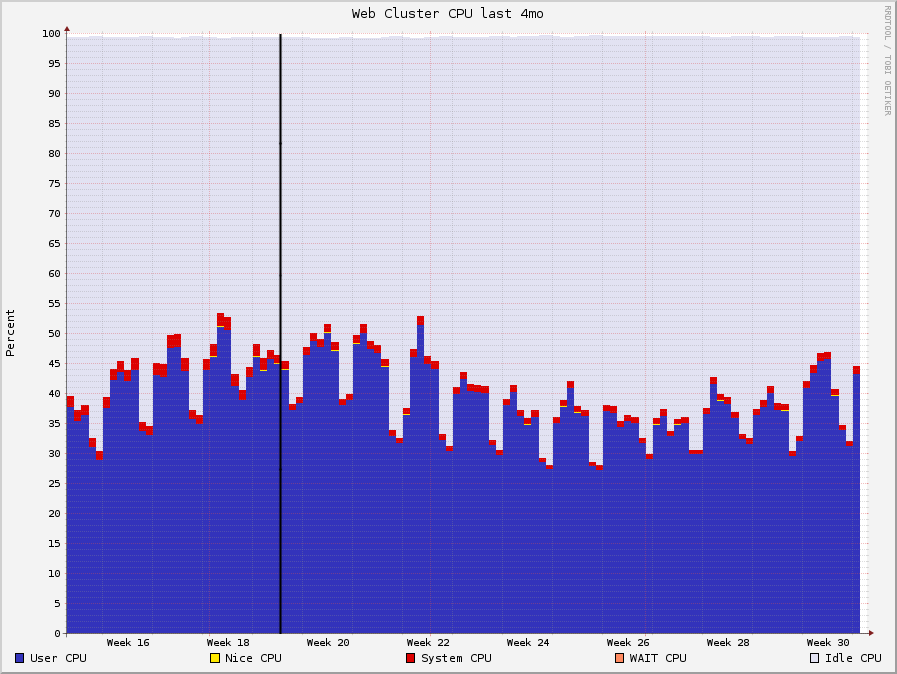
<p>The biggest difference was in CPU usage. With Passenger I used <code>passenger_max_pool_size 10</code> and <code>passenger_spawn_method smart-lv2</code>, and I used <code>worker_processes 10</code> for Unicorn. When I increased the load to both Unicorn and Passenger to 10 concurrent requests, Unicorn became the clear winner. Data colllected from <a href="http://ganglia.sourceforge.net/">Ganglia</a> showed our CPU usage drop with Unicorn. With Passenger, we were barely able to handle our current load without adding more machines to the cluster, when we tried Unicorn we noticed as much as a 10% decrease in CPU usage.</p>

<p><img src="https://developer.uservoice.com/images/blog/cpu-unicorn.png" height="250" width="365" alt="cpu data" /></p>

<p>The CPU usage was curbed (peaks aren&#8217;t as thick), allowing us to gain a little bit of CPU headroom in following weeks before having to add more hardware.</p>

<h2>Memory Usage</h2>

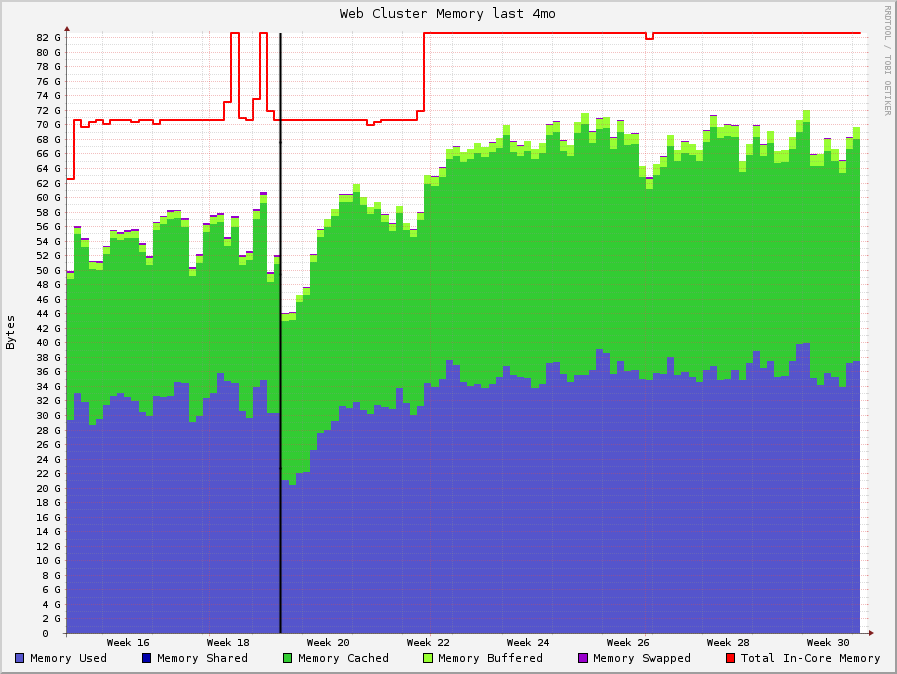
<p>After running Unicorn and Passenger side by side in production, we found that Passenger utilized marginally less memory than Unicorn did, likely because of the dynamic spawning/killing that takes place, also somewhat explained the increased CPU usage with Passenger.</p>

<p><img src="https://developer.uservoice.com/images/blog/memory-unicorn.png" height="250" width="365" alt="memory data" /></p>

<p>The graphs are drawn with <a href="http://oss.oetiker.ch/rrdtool/">rrdtool</a>, and are therefore averaged out to make the graph smoother. The black line represents when we rolled out Unicorn across our entire web cluster. You can see on that the memory usage stayed about the same, but slightly beter on the Passenger side.</p>

<h2>Response Times</h2>

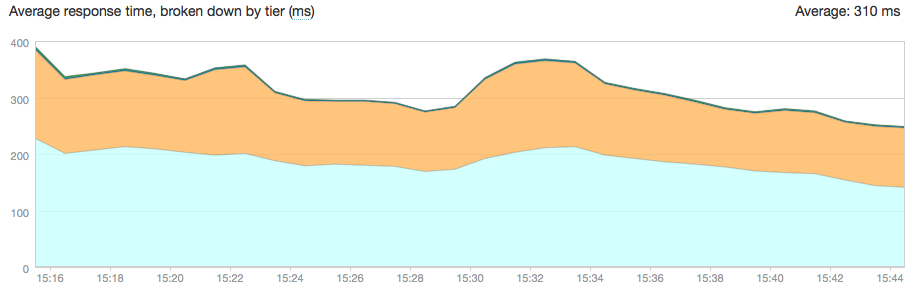
<p>Unicorn had an added bonus of slightly quicker response times, especially as # of concurrent requests increased</p>

<p><img src="https://developer.uservoice.com/images/blog/newrelic-unicorn.png" alt="newrelic data" /></p>

<p>Response time going down during the Unicorn rollout.</p>

<p>We also noticed that during periods of high concurrent requests, Unicorn would be more reponsive than Passenger.</p>

<h2>Conclusion</h2>

<p>It took us 5 minute or more to change code on in our application&#8230; not exactly what you want when you&#8217;re trying to stay agile. We chose Unicorn because it performed more consistently across load levels, and allowed us to drastically cut down the time it takes us to deploy code across our growing infrastructure. Passenger is a wonderful ruby webserver, and because of it we were able to spend more engineering time on our application, rather than tweaking and fiddling with our webserver.</p>
]]></content>
  </entry>
  
  <entry>
    <title type="html"><![CDATA[UserVoice is hiring an interaction designer!]]></title>
    <link href="https://developer.uservoice.com/blog/2012/07/16/come-design-with-us/"/>
    <updated>2012-07-16T13:13:00+00:00</updated>
    <id>https://developer.uservoice.com/blog/2012/07/16/come-design-with-us</id>
    <content type="html"><![CDATA[<p>UserVoice is looking for a solid interaction designer to help us tell our story and delight our customers. You should be comfortable driving ideas from concept to completion and working on a bunch of different projects, like our marketing website and web/mobile product workflows and interfaces.</p>

<!-- more -->


<p>Key qualities we are looking for in a designer are:</p>

<ul>
<li><strong>Craftsman.</strong> You care deeply about the quality of your work and are continually improving and challenging yourself.</li>
<li><strong>Communicator.</strong> You are able to communicate and share your ideas through written briefs, sketches and wireframes, prototypes, wild hand gestures, and high-fidelity mockups.</li>
<li><strong>Builder.</strong> You don’t just think of cool stuff. You make it. You understand that an idea is just an idea unless you bring it to life.</li>
<li><strong>Collaborator.</strong> You understand the importance of being a team member, leaning on and learning from the skills of others, and putting team before individual accomplishments.</li>
</ul>


<p>Moreover, you are someone who:</p>

<ul>
<li>knows what you’re doing (we’re not here to babysit you);</li>
<li>has a strong work ethic, is reliable, and delivers on time;</li>
<li>can design engaging experiences with typography, color, space and imagery;</li>
<li>understands that content and copy are just as much a part of design as visuals are;</li>
<li>utilizes best practices when designing across desktop and touch interfaces (and knows the differences between them);</li>
<li>can produce production-level semantic HTML and CSS, understands how to design and code the non-visual stuff (accessibility, etc.);</li>
<li>earns bonus points with print design experience (though not required), able to hand off assets to a printer and work with them to make sure your designs are reproduced as intended;</li>
<li>able to work directly with <a href="http://developer.uservoice.com/work-with-us/">our talented engineering team</a> to implement the hard stuff;</li>
<li>and…works well with others, because we want to work well with you.</li>
</ul>


<p>Most importantly, we’re looking for the right person, not someone who can just check off all the items on the lists we’ve made here. It’s quite possible you bring qualities we didn’t know we even needed. If so, tell us. We want to know you. Each person on our team is important to us, and we strive to create <a href="http://www.uservoice.com/about/values/">a strong company culture</a> that everyone contributes to and is proud of.</p>

<p>We believe that proven experience doesn’t come from the number of college degrees you may or may not have earned. We’re not interested in how many awards or honors you may or may not have received (although congrats to you if you have). We expect that you understand and are engaged in some of the latest tech and design goodness coming out of startups these days, but we aren’t looking for someone who is ruled by them.</p>

<p>Still interested? Here are some things you can expect working at UserVoice:</p>

<ul>
<li>We’re a highly collaborative team, and we do our best to limit process so that it doesn’t get in the way (but also streamlines getting things done). You can read more about <a href="http://www.uservoice.com/blog/founders/trello-google-docs-product-management/">how we use Trello and Google Docs to make UserVoice better every day</a>. And, who knows, that may change in a couple of months.</li>
<li>We have two offices: our headquarters in San Francisco, CA, and Raleigh, NC. We’re looking for someone to join us in San Francisco.</li>
<li>Our creative team is headed up by Joshua Rudd (Head of UX Design) and includes John Long (UX Designer), Brad Graham (Front-end Developer), Chad Bercea (Graphic Designer), Andy Parker (Copywriter), and quite possibly you (what do you want to be called?). Our team works directly with everyone else in the company to ensure that we create cohesive designs and experiences across product and marketing.</li>
<li>Our engineering team does some amazing work. And while we say we have a creative team and an engineering team, the truth is that we don’t throw designs over the fence and expect them to make it happen. We work together from the very beginning because design is not just how something looks but also how it works. And how something works influences how things look.</li>
<li>We work hard because we love what we do, and we play hard because we like each other. However, we don’t live at the office. We have lives. Many of us have families. Some of us are rock stars (but not the design-ninja-rock-star-shit kind many companies say they’re looking for).</li>
</ul>


<p>If you can see yourself working with us or have any questions, we want to get to know you better. Email us at <strong><a href="mailto:design-jobs@uservoice.com">design-jobs@uservoice.com</a></strong>, tell us about yourself, and include links (or attachments) to some of your work you are proud of, including which roles you played. We’d also like to know your favorite childhood cartoon (our job Turing test!).</p>

<p>Sincerely,</p>

<p>Joshua Rudd<br/>
Head of UX Design<br/>
UserVoice.com</p>
]]></content>
  </entry>
  
  <entry>
    <title type="html"><![CDATA[Updated Developer Site: Powered by Octopress]]></title>
    <link href="https://developer.uservoice.com/blog/2012/06/18/updated-developer-site-powered-by-octopress/"/>
    <updated>2012-06-18T00:00:00+00:00</updated>
    <id>https://developer.uservoice.com/blog/2012/06/18/updated-developer-site-powered-by-octopress</id>
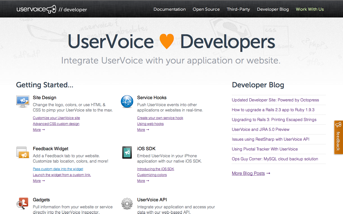
    <content type="html"><![CDATA[<p><a href="http://developer.uservoice.com"><figure class="right"><img  src="https://developer.uservoice.com/images/blog/new-developer-site.png"></figure></a></p>

<p>A couple of weeks ago we soft-launched an updated <a href="http://developer.uservoice.com">UserVoice developer site</a>. We are super excited about it for a variety of reasons.</p>

<p>You&#8217;ll notice a couple of things right away about the new site&#8230;</p>

<ul>
<li><strong>Easier Navigation</strong><br>The site is now its own mini-site and is much easier to navigate.</li>
<li><strong>Updated Documentation</strong><br>There is now a <a href="https://developer.uservoice.com/docs">comprehensive documentation index</a> which should makes it easy to browse through all technical documentation on a given subject (blog posts, UserVoice FAQs, and other articles).</li>
<li><strong>Open Source &amp; Third-Party Projects</strong><br>The <a href="https://developer.uservoice.com/opensource">open source</a> page shows off some of the amazing work of people on our development team and the <a href="https://developer.uservoice.com/third-party">third-party</a> page links up a number of integrations created by other developers.</li>
<li><strong>We&#8217;re Hiring!</strong><br>That&#8217;s right! Our new <a href="https://developer.uservoice.com/work-with-us">Work With Us</a> page highlights this much better, so if you&#8217;re a developer in the Raleigh or San Francisco area please reach out to us. We have a couple of open positions now and hopefully more in the future.</li>
</ul>


<p>And now for some of the technical things that may not be so obvious&#8230;</p>

<!-- more -->


<h2>Octopress</h2>

<p><a href="http://octopress.org"><img class="right" src="https://developer.uservoice.com/images/blog/octopress.png"></a></p>

<p>The new site is now powered by <a href="http://octopress.org">Octopress</a>. Our marketing site runs on <a href="http://expressionengine.com/">Expression Engine</a>. This makes a lot of sense for our marketing team. When we originally launched the developer site we thought it made sense to keep things simple and use the same platform. But through trial and error we&#8217;ve found that our developer needs are actually quite different from our marketing needs.</p>

<p>Octopress bills itself as a &#8220;blogging framework for hackers&#8221; (&#8220;hacker&#8221; in the generic sense describing all programmers).</p>

<p>Octopress generates HTML pages from simple text files which makes it a breeze for developers to use. Because the content is stored in the file system (rather than in a database) you can use tools like <a href="http://git-scm.com/">Git</a> to version and track changes to the entire web site. We are super excited about the transition because it should make it much easier for us to blog and keep this site up-to-date &#8211; which means better content for you.</p>

<h2>Code Samples</h2>

<p>One of great benifits of using Octopress is that it does a great job of presenting syntax highlighted source code like this JavaScript example:</p>

<div><script src='https://gist.github.com/2428561.js'></script>
<noscript><pre><code></code></pre></noscript></div>


<p>Octopress includes <a href="http://octopress.org/docs/blogging/code/">a number of helpful ways for marking up code</a> that should make it much easier for us to blog and share about some of the great stuff we are working on.</p>

<p><figure class="right"><img  src="https://developer.uservoice.com/images/blog/responsive-developer-site.png"></figure></p>

<h2>Responsive Design</h2>

<p>One other feature of the new developer site that we are really happy about is that we&#8217;ve taken the time to make the whole thing <em>responsive</em>. This means that you will get a more optimized view of the Web site if you are looking at it on an iPhone or in a smaller window. To see what I mean, just resize your browser&#8217;s window and you will see the layout magically transform to work better on smaller devices.</p>

<p>All of this is accomplished through the magic of <a href="http://mediaqueri.es/">media queries</a>. If you&#8217;re on the bleeding edge of the tech world responsive design is old news, but we like to celebrate the small things!</p>

<p>Cheers!</p>
]]></content>
  </entry>
  
  <entry>
    <title type="html"><![CDATA[How to upgrade a Rails 2.3 app to Ruby 1.9.3]]></title>
    <link href="https://developer.uservoice.com/blog/2012/03/04/how-to-upgrade-a-rails-2-3-app-to-ruby-1-9-3/"/>
    <updated>2012-03-04T00:00:00+00:00</updated>
    <id>https://developer.uservoice.com/blog/2012/03/04/how-to-upgrade-a-rails-2-3-app-to-ruby-1-9-3</id>
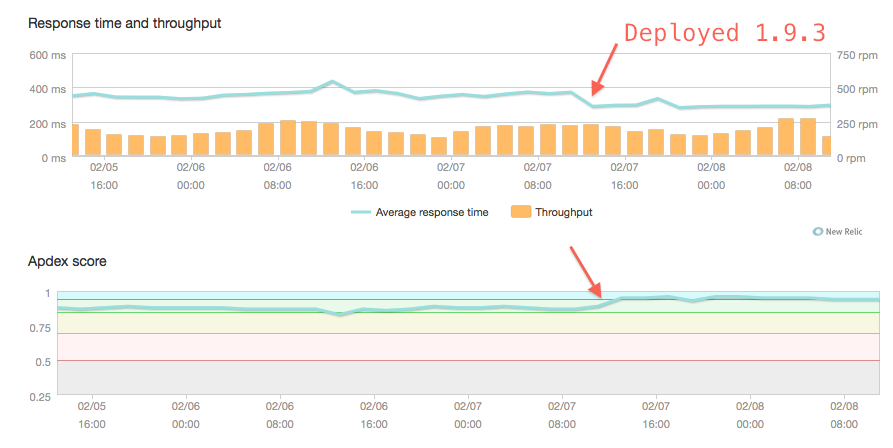
    <content type="html"><![CDATA[<p>We just upgraded UserVoice, a Rails 2.3.14 application, to Ruby 1.9.3. Why?</p>

<ul>
<li>Ruby 1.9.3 is faster (see response time difference at the end)</li>
<li>It has &#8216;correct&#8217; string encoding support</li>
<li>We want to stay current with the Ruby ecosystem.</li>
<li>First of all, let me state clearly: Rails 2.3.x does NOT SUPPORT Ruby 1.9.x
out of the box, unless you want to get your hands dirty with some monkey-patching.</li>
</ul>


<p>This guide will outline some of the things you&#8217;ll need to do in order to get
things working.</p>

<!-- more -->


<h2>Getting your script/server to run</h2>

<p>Ruby changed the way that files are loaded with requires. So in order to get
script/server and friends to work, you&#8217;ll need to tweak them from this:</p>

<figure class='code'><figcaption><span></span></figcaption><div class="highlight"><table><tr><td class="gutter"><pre class="line-numbers"><span class='line-number'>1</span>
<span class='line-number'>2</span>
<span class='line-number'>3</span>
</pre></td><td class='code'><pre><code class='ruby'><span class='line'><span class="c1">#!/usr/bin/env ruby</span>
</span><span class='line'><span class="nb">require</span> <span class="no">File</span><span class="o">.</span><span class="n">dirname</span><span class="p">(</span><span class="bp">__FILE__</span><span class="p">)</span> <span class="o">+</span> <span class="s1">&#39;/../config/boot&#39;</span>
</span><span class='line'><span class="nb">require</span> <span class="s1">&#39;commands/server&#39;</span>
</span></code></pre></td></tr></table></div></figure>


<p>To this:</p>

<figure class='code'><figcaption><span></span></figcaption><div class="highlight"><table><tr><td class="gutter"><pre class="line-numbers"><span class='line-number'>1</span>
<span class='line-number'>2</span>
<span class='line-number'>3</span>
</pre></td><td class='code'><pre><code class='ruby'><span class='line'><span class="c1">#!/usr/bin/env ruby</span>
</span><span class='line'><span class="n">require_relative</span> <span class="s1">&#39;../config/boot&#39;</span>
</span><span class='line'><span class="nb">require</span> <span class="s1">&#39;commands/server&#39;</span>
</span></code></pre></td></tr></table></div></figure>


<p>We also had to change our tests so that ruby test/unit/some_test.rb would work:</p>

<figure class='code'><figcaption><span></span></figcaption><div class="highlight"><table><tr><td class="gutter"><pre class="line-numbers"><span class='line-number'>1</span>
</pre></td><td class='code'><pre><code class='ruby'><span class='line'><span class="n">require_relative</span> <span class="s1">&#39;../test_helper&#39;</span>
</span></code></pre></td></tr></table></div></figure>


<p>Once you get your tests going, you&#8217;ll likely need to add lines like this to
various files if they contain UTF-8 characters.</p>

<figure class='code'><figcaption><span></span></figcaption><div class="highlight"><table><tr><td class="gutter"><pre class="line-numbers"><span class='line-number'>1</span>
</pre></td><td class='code'><pre><code class='ruby'><span class='line'><span class="c1"># encoding: utf-8</span>
</span></code></pre></td></tr></table></div></figure>


<p>Woot! Now some of your tests might run (but they&#8217;ll still likely fail).</p>

<h2>Upgrade your gems, use mysql2</h2>

<p>One of the first gems you&#8217;ll need to upgrade is mysql &#8211; it doesn&#8217;t support
encodings properly. You&#8217;ll want to use the mysql2 gem. Also, if your tests
indicate there&#8217;s problems in any of your other gems, upgrading the gem is
probably a good idea.</p>

<p>If you can, you should deploy all of these gem upgrades to your master branch
as soon as possible, so that you can minimize the changes you experience when
upgrading Ruby.</p>

<h2>Monkey patch, ahoy!</h2>

<p>If you weren&#8217;t properly scared yet, reading these monkey patches will surely do
it. If not, you are probably insane. Read on!</p>

<p>Patches to environment.rb:</p>

<div><script src='https://gist.github.com/1976864.js?file=environment.rb'></script>
<noscript><pre><code></code></pre></noscript></div>


<p>Patches to config/initializers/rails2314_ruby193_monkey_patches.rb:</p>

<div><script src='https://gist.github.com/1976864.js?file=rails2314_ruby193_monkey_patches.rb'></script>
<noscript><pre><code></code></pre></noscript></div>


<p>Patches to config/initializers/utf8_monkey_patches.rb:</p>

<div><script src='https://gist.github.com/1976864.js?file=utf8_monkey_patches.rb'></script>
<noscript><pre><code></code></pre></noscript></div>


<h2>Migrate any serialized columns</h2>

<p>We use some YAML-serialized ActiveRecord columns in our schema. Unfortunately,
if you have any UTF-8 characters in these serializations, you&#8217;ll need to
migrate them. Ruby 1.8 uses the syck YAML library, and Ruby 1.9.3 uses the
psych library. So you&#8217;ll need to manually use Syck::load on each record, and
re-save it with Psych::dump.</p>

<h2>Don&#8217;t use TMail</h2>

<p>TMail most certainly does not support Ruby 1.9.x. If you want to continue to
use TMail to send your mail (this is the default in Rails 2.3.14), you&#8217;ll need
to monkey patch the heck out of the gem. This was actually our first approach
at UserVoice, and it was 99% successful.</p>

<p>However, it felt a bit risky to run our ticketing system on this monkey patched
gem, so we just re-wrote a few methods in ActionMailer to use the new Mail gem
(included by default in Rails 3). If you send a lot of mail with more than just
ascii characters, you&#8217;ll likely want to do the same.</p>

<h2>Deployment</h2>

<p>First, make sure you backport anything possible into your application currently
running on 1.8.7 and iron out the kinks with that. For instance, any gems that
you upgraded are a great candidate for this. This ensures that when you upgrade
to 1.9.3, you&#8217;ll be minimizing risk.</p>

<p>We deployed 1.9.3 slowly. First, take 1 server out of your HAProxy rotation, so
no web requests are going to it. Then upgrade that machine with 1.9.3 and load
your git feature branch on that machine. Next, make sure it works by hitting
that machine yourself (don&#8217;t put your customers on it yet.) When that works,
squirt a small amount of traffic from real users. If at any point you start
seeing errors, take it out of rotation again and fix it.</p>

<p>Now, if you leave that server for a few days and it&#8217;s not producing errors, go
ahead and migrate the rest of your cluster.</p>

<h2>Final thoughts</h2>

<p>So there you have it! We decided to upgrade Ruby before Rails because it seemed
more tractable (which is probably true). But it&#8217;s certainly not as easy as I
thought &#8211; I might go to Rails 3 first if I had to do it again. But, UserVoice
is faster now! Here&#8217;s a graph of our performance increase for one of our
slower, more ruby-intensive pages: as you can see, it&#8217;s a roughly 50%
performance increase!</p>

<p><figure><img  src="https://developer.uservoice.com/images/blog/ruby_193_response_time_improvement.png"></figure></p>
]]></content>
  </entry>
  
  <entry>
    <title type="html"><![CDATA[Upgrading to Rails 3: Printing Escaped Strings]]></title>
    <link href="https://developer.uservoice.com/blog/2012/02/06/upgrading-to-rails-3-printing-escaped-strings/"/>
    <updated>2012-02-06T00:00:00+00:00</updated>
    <id>https://developer.uservoice.com/blog/2012/02/06/upgrading-to-rails-3-printing-escaped-strings</id>
    <content type="html"><![CDATA[<p>As the release of Rails 4 is <a href="http://weblog.rubyonrails.org/2011/12/20/rails-master-is-now-4-0-0-beta">coming closer</a>, many people are still
considering to upgrade from Rails 2 to 3. One the most challenging issues in
this upgrade is handling the issues arising from the XSS protection in Rails 3.
According to OWASP, <a href="https://www.owasp.org/index.php/Top_10_2010-A2">XSS was the second-largest security risk of web
applications in 2010</a>. Therefore Rails 3 defaulting to escape all custom
strings is a really useful pattern. However, if your application is large and
you have plenty of places you are printing HTML, you need to figure out a good
process for ensuring all the strings get printed as expected after the upgrade.</p>

<p>Installing rails_xss in Rails 2 is a very good method to see how the XSS
protection is going to change things after the upgrade to Rails 3. Depending
what kind of content management system solutions, asset packaging tools or
helper methods you are using, you can have problems in a plethora of different
places. As a developer solving these issues in UserVoice, I would like to share
my process for the XSS protected strings handling.</p>

<p>Typically problems that arise look like this. To solve them all, first step is
to identify the different types of problems. Reserve some time for this, as
there might be tens of different problem patterns, which all might not be easy
to find.</p>

<p><figure><img  src="https://developer.uservoice.com/images/blog/xss_votes.png"></figure></p>

<p>In this article, I&#8217;ll explain how I approached the problem and present some
lessons learned during the process. This is not a definitive guide on the
subject, but a rather a set of principles which I recommend to be applied
during and after the rails_xss installation.</p>

<!-- more -->


<h2>1. Install rails_xss</h2>

<p>Install <a href="http://rubygems.org/gems/erubis">rails_xss</a> and its dependency (<a href="http://rubygems.org/gems/rails_xss">erubis</a>). After this, your Rails
2 application escapes all your &#8220;unsafe&#8221; strings by default. Explore your
application and run tests to see on a general level how serious problems the
default HTML escaping causes.</p>

<h2>2. Identify the Problems</h2>

<p>You should identify all the different types of problems and address each
problem with a solution. While testing and reviewing the codebase of UserVoice,
I identified many different problem patterns. I have described some of the most
common ones:</p>

<h3>Custom Helpers</h3>

<p>For example, the return value of these kind of helpers can be marked safe by
calling <code>.html_safe</code>. In this case it&#8217;s even better to use the Rails helper
<code>link_to</code>, whose return value is safe by default. Additionally, you don&#8217;t have
to worry about escaping the name of the user separately using the <code>h</code> method.</p>

<figure class='code'><figcaption><span></span></figcaption><div class="highlight"><table><tr><td class="gutter"><pre class="line-numbers"><span class='line-number'>1</span>
<span class='line-number'>2</span>
<span class='line-number'>3</span>
<span class='line-number'>4</span>
<span class='line-number'>5</span>
<span class='line-number'>6</span>
<span class='line-number'>7</span>
<span class='line-number'>8</span>
</pre></td><td class='code'><pre><code class='ruby'><span class='line'><span class="k">def</span> <span class="nf">user_link</span><span class="p">(</span><span class="n">user</span><span class="p">)</span>
</span><span class='line'>  <span class="s2">&quot;&lt;a href=</span><span class="si">#{</span><span class="n">user</span><span class="o">.</span><span class="n">url</span><span class="si">}</span><span class="s2">&gt;</span><span class="si">#{</span><span class="n">h</span><span class="p">(</span><span class="n">user</span><span class="o">.</span><span class="n">name</span><span class="p">)</span><span class="si">}</span><span class="s2">&lt;/a&gt;&quot;</span><span class="o">.</span><span class="n">html_safe</span>
</span><span class='line'><span class="k">end</span>
</span><span class='line'>
</span><span class='line'><span class="c1"># better:</span>
</span><span class='line'><span class="k">def</span> <span class="nf">user_link</span><span class="p">(</span><span class="n">user</span><span class="p">)</span>
</span><span class='line'>  <span class="n">link_to</span><span class="p">(</span><span class="n">user</span><span class="o">.</span><span class="n">name</span><span class="p">,</span> <span class="n">user</span><span class="o">.</span><span class="n">url</span><span class="p">)</span>
</span><span class='line'><span class="k">end</span>
</span></code></pre></td></tr></table></div></figure>


<h3>Printing Conditional Strings in Views</h3>

<p>Often you want to print a certain string depending on some condition. In these
cases the resulting string must be marked safe. Possibly you also want to
extract a commonly occurring pattern in your codebase to its own helper.</p>

<figure class='code'><figcaption><span></span></figcaption><div class="highlight"><table><tr><td class="gutter"><pre class="line-numbers"><span class='line-number'>1</span>
<span class='line-number'>2</span>
<span class='line-number'>3</span>
</pre></td><td class='code'><pre><code class='erb'><span class='line'><span class="x">&lt;span </span><span class="cp">&lt;%=</span> <span class="s1">&#39;style=&quot;display: none&quot;&#39;</span><span class="o">.</span><span class="n">html_safe</span> <span class="k">unless</span> <span class="n">content</span><span class="o">.</span><span class="n">visible?</span> <span class="cp">%&gt;</span><span class="x"> &gt;</span>
</span><span class='line'><span class="x">  Content shown if content.visible?</span>
</span><span class='line'><span class="x">&lt;/span&gt;</span>
</span></code></pre></td></tr></table></div></figure>


<h3>Concatenating Strings in Views</h3>

<p>Your view files might include concatenation of unsafe and safe strings like
this.</p>

<figure class='code'><figcaption><span></span></figcaption><div class="highlight"><table><tr><td class="gutter"><pre class="line-numbers"><span class='line-number'>1</span>
</pre></td><td class='code'><pre><code class='erb'><span class='line'><span class="cp">&lt;%=</span> <span class="s1">&#39;&lt;hr /&gt;&#39;</span><span class="o">.</span><span class="n">html_safe</span> <span class="o">+</span> <span class="n">link_to</span><span class="p">(</span><span class="s1">&#39;User Information&#39;</span><span class="p">,</span> <span class="n">user_path</span><span class="p">(</span><span class="n">user</span><span class="p">))</span> <span class="cp">%&gt;</span><span class="x"></span>
</span></code></pre></td></tr></table></div></figure>


<p>By default, unsafe + safe results in an unsafe string, which means that the
link above gets unexpectedly escaped. To prevent this, <code>&lt;hr /&gt;</code> can be marked
safe or even better, just extract it out side the ERB interpolation tag.</p>

<h3>Printing Custom User-Defined HTML</h3>

<figure class='code'><figcaption><span></span></figcaption><div class="highlight"><table><tr><td class="gutter"><pre class="line-numbers"><span class='line-number'>1</span>
</pre></td><td class='code'><pre><code class='erb'><span class='line'><span class="cp">&lt;%=</span> <span class="n">user</span><span class="o">.</span><span class="n">custom_html</span><span class="o">.</span><span class="n">html_safe</span> <span class="cp">%&gt;</span><span class="x"></span>
</span></code></pre></td></tr></table></div></figure>


<p>In these cases you need to mark the user-defined HTML safe. At the same time,
you should also ensure that the user input is sanitized, because you do not
want to allow printing arbitrary HTML in your views. A good sanitizing includes
defining the set of allowed tags and denying any others. Using a good and
well-tested library for sanitizing HTML is also a good idea, unless you really
know what you are doing, which you most probably are not.</p>

<h2>3. Design a Strategy</h2>

<p>When identifying all the various cases of printing HTML, JSON and HTML
entities, you might start to wonder how to cover all the cases in all your
application&#8217;s views. The short is answer is that 100% coverage requires
probably too much effort. However, there are many ways how you can come close
to that. <a href="https://www.owasp.org/index.php/Top_10_2010-A2">OWASP</a> states about XSS vulnerability finding: &#8220;complete coverage
requires a combination of manual code review and manual penetration testing, in
addition to any automated approaches in use&#8221;.</p>

<h3>Custom Automated Tool</h3>

<p>Now that rails_xss had escaped all the output strings by default, I needed to find the places where HTML has been doubly-escaped. So I thought it wouldnâ€™t hurt to write a utility method for matching the doubly-escaped HTML strings:</p>

<figure class='code'><figcaption><span></span></figcaption><div class="highlight"><table><tr><td class="gutter"><pre class="line-numbers"><span class='line-number'>1</span>
<span class='line-number'>2</span>
<span class='line-number'>3</span>
<span class='line-number'>4</span>
<span class='line-number'>5</span>
<span class='line-number'>6</span>
<span class='line-number'>7</span>
<span class='line-number'>8</span>
<span class='line-number'>9</span>
</pre></td><td class='code'><pre><code class='ruby'><span class='line'><span class="k">class</span> <span class="nc">HtmlDoubleEscapeReporter</span>
</span><span class='line'>  <span class="k">def</span> <span class="nc">self</span><span class="o">.</span><span class="nf">assert_sane</span><span class="p">(</span><span class="n">str</span><span class="p">)</span>
</span><span class='line'>    <span class="k">if</span> <span class="p">(</span><span class="n">str</span><span class="o">.</span><span class="n">match</span><span class="p">(</span><span class="sr">/&amp;lt;[a-z]/</span><span class="p">)</span> <span class="o">||</span> <span class="n">str</span><span class="o">.</span><span class="n">match</span><span class="p">(</span><span class="sr">/&amp;amp;(quot|rarr|larr|amp|#)/</span><span class="p">))</span> <span class="o">&amp;&amp;</span>
</span><span class='line'>        <span class="o">!</span><span class="n">str</span><span class="o">.</span><span class="n">match</span><span class="p">(</span><span class="sr">/looks something you do not want to print/</span><span class="p">)</span>
</span><span class='line'>      <span class="n">send_problem_report</span><span class="p">(</span><span class="s1">&#39;#{str}&#39;</span> <span class="n">looks</span> <span class="n">something</span> <span class="n">you</span> <span class="k">do</span> <span class="ow">not</span> <span class="n">want</span> <span class="n">to</span> <span class="nb">print</span><span class="s2">&quot;)</span>
</span><span class='line'><span class="s2">    end</span>
</span><span class='line'><span class="s2">    return str</span>
</span><span class='line'><span class="s2">  end</span>
</span><span class='line'><span class="s2">end</span>
</span></code></pre></td></tr></table></div></figure>


<p>This basically recognizes some commonly occurring strings when HTML has been
accidentally escaped twice (as usually you don&#8217;t want to print this). Depending
on the application, the regular expressions might be much different but the
basic idea stays the same. The idea is not to have a fully-functional problem
analysis tool, but to just report about any suspicious strings which the team
can check and fix if necessary. The method <code>send_problem_report</code> represents
a method which reports the problem using e.g. Airbrake or ExceptionNotifier if
it happens on a deployed application instance. It could also open a debugger
using <a href="http://rubygems.org/gems/ruby-debug">ruby-debug</a> by calling <code>debugger</code>. When the debugger line is
reached when running tests, you are immediately able to see the backtrace to
determine if there is a problem or not. Another way is of course throwing an
exception, which would print nice error in your CI system and send an exception
report in testing environments. This is useful during manual testing, as
testers might not notice all the problems.</p>

<p>Notice also the <code>!str.match(/looks something you do not want to print/)</code> part
in the if condition. This prevents situations where the error message is used
in another sanity check causing an infine loop. Whether this is possible or
not, depends on your codebase, however, this occurred to me a couple of times.
This check prevents that from happening.</p>

<p>The tricky part is, when to call this method? One solution is to hook it in all
HTML printing code by alias method chaining <code>simple_format</code>,
<code>content_tag_string</code> and <code>link_to</code>, which are the ones rails_xss also chained.</p>

<figure class='code'><figcaption><span></span></figcaption><div class="highlight"><table><tr><td class="gutter"><pre class="line-numbers"><span class='line-number'>1</span>
<span class='line-number'>2</span>
<span class='line-number'>3</span>
<span class='line-number'>4</span>
<span class='line-number'>5</span>
<span class='line-number'>6</span>
<span class='line-number'>7</span>
<span class='line-number'>8</span>
<span class='line-number'>9</span>
<span class='line-number'>10</span>
<span class='line-number'>11</span>
<span class='line-number'>12</span>
<span class='line-number'>13</span>
<span class='line-number'>14</span>
<span class='line-number'>15</span>
<span class='line-number'>16</span>
<span class='line-number'>17</span>
<span class='line-number'>18</span>
<span class='line-number'>19</span>
<span class='line-number'>20</span>
<span class='line-number'>21</span>
<span class='line-number'>22</span>
<span class='line-number'>23</span>
<span class='line-number'>24</span>
<span class='line-number'>25</span>
</pre></td><td class='code'><pre><code class='ruby'><span class='line'><span class="k">module</span> <span class="nn">ActionView</span>
</span><span class='line'>  <span class="k">module</span> <span class="nn">Helpers</span>
</span><span class='line'>    <span class="k">module</span> <span class="nn">TextHelper</span>
</span><span class='line'>
</span><span class='line'>      <span class="k">def</span> <span class="nf">simple_format_with_double_escape_reporting</span><span class="p">(</span><span class="o">*</span><span class="n">args</span><span class="p">)</span>
</span><span class='line'>        <span class="no">HtmlDoubleEscapeReporter</span><span class="o">.</span><span class="n">assert_sane</span><span class="p">(</span><span class="n">simple_format_without_double_escape_reporting</span><span class="p">(</span><span class="o">*</span><span class="n">args</span><span class="p">))</span>
</span><span class='line'>      <span class="k">end</span>
</span><span class='line'>      <span class="n">alias_method_chain</span> <span class="ss">:simple_format</span><span class="p">,</span> <span class="ss">:double_escape_reporting</span>
</span><span class='line'>    <span class="k">end</span>
</span><span class='line'>
</span><span class='line'>    <span class="k">module</span> <span class="nn">TagHelper</span>
</span><span class='line'>      <span class="kp">private</span>
</span><span class='line'>      <span class="k">def</span> <span class="nf">content_tag_string_with_double_escape_reporting</span><span class="p">(</span><span class="o">*</span><span class="n">args</span><span class="p">)</span>
</span><span class='line'>        <span class="no">HtmlDoubleEscapeReporter</span><span class="o">.</span><span class="n">assert_sane</span><span class="p">(</span><span class="n">content_tag_string_without_double_escape_reporting</span><span class="p">(</span><span class="o">*</span><span class="n">args</span><span class="p">))</span>
</span><span class='line'>      <span class="k">end</span>
</span><span class='line'>      <span class="n">alias_method_chain</span> <span class="ss">:content_tag_string</span><span class="p">,</span> <span class="ss">:double_escape_reporting</span>
</span><span class='line'>    <span class="k">end</span>
</span><span class='line'>    <span class="k">module</span> <span class="nn">UrlHelper</span>
</span><span class='line'>      <span class="k">def</span> <span class="nf">link_to_with_double_escape_reporting</span><span class="p">(</span><span class="o">*</span><span class="n">args</span><span class="p">,</span> <span class="o">&amp;</span><span class="n">block</span><span class="p">)</span>
</span><span class='line'>        <span class="no">HtmlDoubleEscapeReporter</span><span class="o">.</span><span class="n">assert_sane</span><span class="p">(</span><span class="n">link_to_without_double_escape_reporting</span><span class="p">(</span><span class="o">*</span><span class="n">args</span><span class="p">,</span> <span class="o">&amp;</span><span class="n">block</span><span class="p">))</span>
</span><span class='line'>      <span class="k">end</span>
</span><span class='line'>      <span class="n">alias_method_chain</span> <span class="ss">:link_to</span><span class="p">,</span> <span class="ss">:double_escape_reporting</span>
</span><span class='line'>    <span class="k">end</span>
</span><span class='line'>  <span class="k">end</span>
</span><span class='line'><span class="k">end</span>
</span></code></pre></td></tr></table></div></figure>


<p>Remember, that this kind of hooking might not work for your application, so
plan and test carefully.</p>

<h3>Manual Testing</h3>

<p>In addition to this automated check, you most definitely want to run adequate
manual regression tests on your application and involve several people in
testing. Additionally, every time you find a problem, you want to grep the
whole application for similar cases, as usually these problems exist in many
places.</p>

<h3>Code Review</h3>

<p>Grepping all the code for suspicious patterns might not always be enough.
Therefore you should review the code as much as possible. After seeing various
problem situations, you have the best knowledge and &#8220;eye&#8221; for the problems that
might still be hidden in the code. Therefore reading as much code through as
possible is a highly recommendable practice in addition to automated and manual
testing. Just because testing everything is often impossible.</p>

<h2>4. Execute your Strategy</h2>

<p>Follow your strategy and make notes on the progress. After completing all the
planned steps, instruct your whole team on how to keep the application XSS safe
using the new tools which you installed. This helps to keep the application
both functional and secure in the future.</p>
]]></content>
  </entry>
  
  <entry>
    <title type="html"><![CDATA[UserVoice and JIRA 5.0 Preview]]></title>
    <link href="https://developer.uservoice.com/blog/2011/10/25/uservoice-and-jira-5-0-preview/"/>
    <updated>2011-10-25T14:27:00+00:00</updated>
    <id>https://developer.uservoice.com/blog/2011/10/25/uservoice-and-jira-5-0-preview</id>
    <content type="html"><![CDATA[<p>Thanks to the lovely people over at <a href="http://appfusions.com">AppFusions</a> we will soon have an awesome integration into Jira 5.0. To wet your appetite for that they have put together this video</p>

<!-- more -->


<iframe width="740" height="416" src="http://www.youtube.com/embed/2cuho9EvUwo" frameborder="0" allowfullscreen></iframe>

]]></content>
  </entry>
  
  <entry>
    <title type="html"><![CDATA[Issues using RestSharp with UserVoice API]]></title>
    <link href="https://developer.uservoice.com/blog/2011/09/21/issues-using-restsharp-with-uservoice-api/"/>
    <updated>2011-09-21T21:58:00+00:00</updated>
    <id>https://developer.uservoice.com/blog/2011/09/21/issues-using-restsharp-with-uservoice-api</id>
    <content type="html"><![CDATA[<p>I’ve recently had a few people having issues with the <a href="http://restsharp.org">RestSharp</a> library for DotNet. Digging into the code for RestSharp if found that during the encoding process the values of parameters are correctly encoded but the names where being left. You can solve this by change line 161 in OAuth1Authenticator.cs from:</p>

<!-- more -->


<figure class='code'><div class="highlight"><table><tr><td class="gutter"><pre class="line-numbers"><span class='line-number'>1</span>
</pre></td><td class='code'><pre><code class=''><span class='line'>parameters.Add(new WebPair(p.Name, p.Value.ToString()));</span></code></pre></td></tr></table></div></figure>


<p>to</p>

<figure class='code'><div class="highlight"><table><tr><td class="gutter"><pre class="line-numbers"><span class='line-number'>1</span>
<span class='line-number'>2</span>
</pre></td><td class='code'><pre><code class=''><span class='line'>var encodedName = OAuthTools.UrlEncodeStrict(p.Name.ToString());
</span><span class='line'>parameters.Add(new WebPair(encodedName, p.Value.ToString()));</span></code></pre></td></tr></table></div></figure>


<p>and recompiling RestSharp. The value is encoding later in the OAuth workflow in OAuthTools.cs. I suspect there is a neater solution, which I’ll have a think about before submitting a pull request. In the meantime this will get you going. The part of the <a href="http://tools.ietf.org/html/rfc5849#page-18">spec</a> that refers to this states:</p>

<blockquote><p>3.4.1.3.2.  Parameters Normalization</p><p>   The parameters collected in Section 3.4.1.3 are normalized into a<br/>   single string as follows:</p><p>   1.  First, the name and value of each parameter are encoded<br/>       (Section 3.6).</p><footer><strong>Hammer-Lahav</strong> <cite><a href='http://tools.ietf.org/html/rfc5849#section-3.4.1.3'>The OAuth 1.0 Protocol</a></cite></footer></blockquote>

]]></content>
  </entry>
  
  <entry>
    <title type="html"><![CDATA[Using Pivotal Tracker With UserVoice]]></title>
    <link href="https://developer.uservoice.com/blog/2011/09/20/using-pivotal-tracker-with-uservoice/"/>
    <updated>2011-09-20T15:14:00+00:00</updated>
    <id>https://developer.uservoice.com/blog/2011/09/20/using-pivotal-tracker-with-uservoice</id>
    <content type="html"><![CDATA[<p>Our friends over at <a href="http://blogpig.com">BlogPig</a> have created a great integration between <a href="http://www.uservoice.com">UserVoice</a> and <a href="http://pivotaltracker.com">Pivotal Tracker</a>. You can see the code and some docs over on their <a href="https://github.com/blogpig/uservoice-pivotal">GitHub page</a>. They also created this short video walk through showing the main features and how easy it is to setup:</p>

<!-- more -->


<iframe width="740" height="416" src="http://www.youtube.com/embed/no_xwntzmF8" frameborder="0" allowfullscreen></iframe>

]]></content>
  </entry>
  
  <entry>
    <title type="html"><![CDATA[Ops Guy Corner: MySQL cloud backup solution]]></title>
    <link href="https://developer.uservoice.com/blog/2011/06/03/mysql-cloud-backup-solution/"/>
    <updated>2011-06-03T16:46:00+00:00</updated>
    <id>https://developer.uservoice.com/blog/2011/06/03/mysql-cloud-backup-solution</id>
    <content type="html"><![CDATA[<p><figure class="right"><img  src="https://developer.uservoice.com/images/blog/kevin.jpg"></figure></p>

<p>I’m Kevin, and I wanted to take a couple minutes to introduce myself and talk a little about the state of operations when I first came to UserVoice. I was hired on as the sole Operations Engineer. It sounds like a fancy title, but it really means I wear many different hats. On top of handling the day-to-day operations of our systems, I’m the DBA (oh no!), the network guy, the office IT guy, and, of course, the resident geek. Whether it be the WiFi interference in our loft office, our MongoDB installation, or the water cooler that was oddly plugged into a battery-backed UPS, I’ve been fixing problems since I got here.</p>

<p>My first real task here at UserVoice was to come up with a backup solution for our MySQL database. To implement a quick hack, I wrote a bash script that would do the necessary work which would run from ‘cron’ once a day. As we already had a master/slave setup with our database, it was simple to take a ‘mysqldump’ of the slave database.</p>

<!-- more -->


<p>The basics of the script are:</p>

<figure class='code'><div class="highlight"><table><tr><td class="gutter"><pre class="line-numbers"><span class='line-number'>1</span>
</pre></td><td class='code'><pre><code class=''><span class='line'>mysqldump thisisourdbname | gzip -9 &gt; /backups/mysql_dump-`date +%m%d%y-%H%M`.sql.gz</span></code></pre></td></tr></table></div></figure>


<p>This ran successfully from ‘cron’ for a few days, until I noticed the disk was filling up too quickly. I needed to come up with something better and more robust. I also needed a more permanent storage solution, as well as a rotation plan, so I wouldn’t have to manually rotate the backups.</p>

<p>We already use <a href="http://aws.amazon.com/s3/">Amazon S3</a> for different things here at UserVoice, making it easy to create a new bucket in our existing account to dump our backups in. But, before I put our entire database in the cloud, I wanted to make sure it was encrypted with a password, split into multiple files for easy upload and retrieval, and compressed as much as possible. I chose the <a href="http://en.wikipedia.org/wiki/7z">7z archive file format</a>, which uses the <a href="http://en.wikipedia.org/wiki/Lempel%E2%80%93Ziv%E2%80%93Markov_chain_algorithm">LZMA compression algorithm</a>, because it met all these requirements and it’s free, open source, and cross-platform. I added the following to my existing bash script to include the needed compression/splitting/encrypting:</p>

<figure class='code'><div class="highlight"><table><tr><td class="gutter"><pre class="line-numbers"><span class='line-number'>1</span>
</pre></td><td class='code'><pre><code class=''><span class='line'>mysqldump thisisourdbname | 7z a -si -v250m -psillypass /backups/mysql_dump-`date +%m%d%y-%H%M`.sql.7z</span></code></pre></td></tr></table></div></figure>


<p>This further compressed our dumps, and split them into nice 250 meg volumes (except that it took about 4.5 hours to complete the dump, during which the slave wouldn’t replicate any data from the master). This was obviously not good, so I tweaked it a bit. I fixed that by running the dump and compressing it a little bit first with:</p>

<figure class='code'><div class="highlight"><table><tr><td class="gutter"><pre class="line-numbers"><span class='line-number'>1</span>
</pre></td><td class='code'><pre><code class=''><span class='line'>DATETIME=`date +%m%d%y-%H%M` mysqldump thisisourdbname | gzip -1 &gt; /backups/mysql_dump-$DATETIME.sql.gz</span></code></pre></td></tr></table></div></figure>


<p>…then uncompressing it while compressing it again into 7z format:</p>

<figure class='code'><div class="highlight"><table><tr><td class="gutter"><pre class="line-numbers"><span class='line-number'>1</span>
</pre></td><td class='code'><pre><code class=''><span class='line'>gzcat /backups/mysql_dump-$DATETIME.sql.gz | 7z -si -v250m -psillypass /backups/mysql_dump-$DATETIME.sql.7z && rm -f /backups/mysql_dump-$DATETIME.sql.gz</span></code></pre></td></tr></table></div></figure>


<p>This shortened the ‘mysqldump’ portion of the process to only 30-40 minutes. I was comfortable with these figures and ready to wrap it up, all the while including weekly uploads to Amazon S3.</p>

<p>I polished my Ruby skills and wrote a rudimentary script that uses the <a href="http://amazon.rubyforge.org/">‘aws-s3’ library</a> to read a list of files as arguments from the command line that uploads to a bucket on our Amazon account. To easily run this script once a week from ‘cron’:</p>

<figure class='code'><div class="highlight"><table><tr><td class="gutter"><pre class="line-numbers"><span class='line-number'>1</span>
</pre></td><td class='code'><pre><code class=''><span class='line'>find /backups -name \*.7z.\* -type f -mtime -1 | xargs s3_backup.rb</span></code></pre></td></tr></table></div></figure>


<p>This will find all the files modified in the last day, matching the 7z pattern used when creating volumes, then send it to my S3 script as command line arguments care of ‘xargs’. The S3 script handles the upload and notifies the rest of the team via a <a href="http://campfirenow.com/">Campfire</a> notification.</p>

<p>This isn’t a perfect solution yet, but works just fine if you monitor the disk usage. I have yet to implement the automatic rotation, but plan on using <a href="http://linuxcommand.org/man_pages/logrotate8.html">‘logrotate’</a> to rotate and manage backup files on the database server. I will also create another host with more space and daily <a href="http://en.wikipedia.org/wiki/Rsync">‘rsync’</a> the /backups folder for archiving and weekly backups to S3.</p>

<p>This is all part of the excitement that goes on here at UserVoice. I’ll continue to update you on my progress and all fun problems I get to work out. I’d love to hear your feedback about this subject, or if you have any suggestions for further discussion topics.</p>
]]></content>
  </entry>
  
  <entry>
    <title type="html"><![CDATA[How To Build An eCommerce Site in 10 Minutes!]]></title>
    <link href="https://developer.uservoice.com/blog/2011/04/20/how-to-build-an-ecommerce-site-in-10-minutes/"/>
    <updated>2011-04-20T15:58:00+00:00</updated>
    <id>https://developer.uservoice.com/blog/2011/04/20/how-to-build-an-ecommerce-site-in-10-minutes</id>
    <content type="html"><![CDATA[<p>As the videos are now available of the keynotes from the excellent MIX11 conference in Las Vegas, we thought it would be good to highlight <a href="http://www.microsoft.com/presspass/exec/hachamovitch/04-12-11mix11.mspx">this one (demo starts at around 1:16)</a> where Drew Robbins from Microsoft shows just how easy it is to use Orchard to build an online store (a flower store in fact) complete with a shopping cart from Amazon and a rather fantastic feedback and support tool from UserVoice&hellip; So, why a flower store? I&#8217;ll let Drew answer that:</p>

<!-- more -->


<blockquote><p>Well, it&#8217;s spring and people are planting flowers, and so it&#8217;s something we need to get online quickly so we can not miss the opportunity. Orchard CMS is going to let us focus on the business value rather than worrying about building all the infrastructure for our site.</p><footer><strong>Drew Robbins</strong> <cite><a href='http://www.microsoft.com/en-us/news/exec/hachamovitch/04-12-11mix11.aspx'>Dean Hachamovitch, Scott Guthrie and Steven Sinofsky: MIX11 Keynote - Day 1</a></cite></footer></blockquote>


<p>If you don&#8217;t have time to watch the whole video it is all transcribed lower on the page as well, pretty sure that&#8217;s the fastest I&#8217;ve seen something like that created&hellip; definitely worth a play!</p>
]]></content>
  </entry>
  
  <entry>
    <title type="html"><![CDATA[Microsoft Releases Orchard V1.1 Complete With UserVoice Widget]]></title>
    <link href="https://developer.uservoice.com/blog/2011/04/11/microsoft-releases-orchard-v1-1-complete-with-uservoice-plugin/"/>
    <updated>2011-04-11T12:37:00+00:00</updated>
    <id>https://developer.uservoice.com/blog/2011/04/11/microsoft-releases-orchard-v1-1-complete-with-uservoice-plugin</id>
    <content type="html"><![CDATA[<p>We are very excited today to be part of the launch of V1.1 of the Orchard web development platform taking place at <a href="http://live.visitmix.com/">Microsoft’s MIX Conference</a> at the Mandalay Bay in Las Vegas</p>

<p>Orchard is a free, open source project aimed at delivering a highly modular and extensible CMS (Content Management System) using the Razor syntax.</p>

<!-- more -->


<p>Orchard was originally shipped in January of this year by the <a href="http://www.outercurve.org/">OuterCurve Foundation</a> who simultaneously released an online gallery for Orchard modules and themes. This gallery is itself open source and is used to power other .NET community websites such as NuGet and Blogengine.net</p>

<p>The <a href="http://orchardproject.net/gallery/List/Modules/Orchard.Module.Uservoice.Widgets">UserVoice widget</a> builds on the existing UserVoice WebMatrix libraries and code but adds the ability to switch between the new range of UserVoice products <a href="http://www.uservoice.com/feedback/">Feedback</a>, <a href="http://www.uservoice.com/helpdesk/">Helpdesk</a> and <a href="http://uservoice.com/fullservice/">Full Service</a>. The widgets module contains two widgets that let you add UserVoice functionality to your website built on Orchard CMS.</p>

<ol>
<li>Feedback—the feedback widget adds the feedback tab to your site. This allows visitors to click the UserVoice feedback tab to share ideas, ask questions or contact you via the UserVoice interface.</li>
<li>Suggestions—the suggestions widget provides a list of recent/popular suggestions that you can display as content on a page.</li>
</ol>


<p>The gallery page for the UserVoice widget can be found <a href="http://orchardproject.net/gallery/List/Modules/Orchard.Module.Uservoice.Widgets">here</a></p>

<p>And the codeplex site can be found <a href="http://uservoicewidgets.codeplex.com/">here</a></p>
]]></content>
  </entry>
  
  <entry>
    <title type="html"><![CDATA[UserVoice Wordpress Plugin Updated - using our brand new API!]]></title>
    <link href="https://developer.uservoice.com/blog/2011/01/19/uservoice-wordpress-plugin-updated-using-our-brand-new-api/"/>
    <updated>2011-01-19T12:00:00+00:00</updated>
    <id>https://developer.uservoice.com/blog/2011/01/19/uservoice-wordpress-plugin-updated-using-our-brand-new-api</id>
    <content type="html"><![CDATA[<p>We had an API. It was ok. People built some things for it, including a Wordpress plugin. As time went on, Shane and Peter, the third-party developers of this plugin got busy (which is pretty reasonable) and the quality of the plugin declined. Nobody tackled it again because, well, our API was ok.</p>

<!-- more -->


<p>As you may have noticed, <a href="http://blog.uservoice.com/entries/3-more-flavors-facebook-iphone-or-api">we’ve launched a new API</a>. It’s awesome. We-built-our-whole-<a href="http://www.uservoice.com/facebook">Facebook-app</a>-with-it awesome. And we’re very excited to see third parties start to sink their teeth into it.</p>

<p><figure class="right"><img  src="https://developer.uservoice.com/images/blog/uservoice_wordpress_plugin.png"></figure></p>

<p>A company called <a href="http://mediaslurp.com/">Mediaslurp</a> has done just that, and we’re delighted that thanks to their hard work the <a href="http://wordpress.org/extend/plugins/uservoice-idea-list-widget/">UserVoice Wordpress Plugin</a> is updated and better than ever. MediaSlurp targets multimedia content such as real-time streams and audio and video podcasts, and brings them together in an interface for users to find content relative to them, and easily play that content. Getting customer feedback is key for them, and they decided to dive into the new API to see if they couldn’t get the Wordpress plugin working. Says Mediaslurp’s TJ Downes:</p>

<blockquote><p>Working with the UserVoice API is really straightforward. Anyone who has worked with REST APIs should be able to quickly and easily implement the UserVoice API. We’ve had no difficulty understanding the API and picking up where Shane and Peter left off. Given that the API is so simple to use, we expect to expand on the functionality included in the UserVoice Idea List Widget in the near future. Since the API also delivers the data in JSON format, we expect that it will be very simple to implement real-time updates of the UserVoice data via AJAX and Flash applications.</p></blockquote>


<p>Swing by <a href="http://wordpress.org/extend/plugins/uservoice-idea-list-widget/">the Wordpress plugin page</a> to pick up your very own <a href="http://www.uservoice.com/">UserVoice</a> Wordpress plugin. Interested in building your own UserVoice widget? Check out the documentation links right here on <a href="http://developer.uservoice.com/">developer.uservoice.com</a>, and drop us a line at <em>support[at]uservoice.com</em> if you have any questions, comments, or ideas. We want to help you do awesome stuff.</p>
]]></content>
  </entry>
  
  <entry>
    <title type="html"><![CDATA[Microsoft WebMatrix & UserVoice]]></title>
    <link href="https://developer.uservoice.com/blog/2011/01/13/microsoft-webmatrix/"/>
    <updated>2011-01-13T15:45:00+00:00</updated>
    <id>https://developer.uservoice.com/blog/2011/01/13/microsoft-webmatrix</id>
    <content type="html"><![CDATA[<p>Today Microsoft launched their new web development platform <a href="http://www.microsoft.com/web/webmatrix/">WebMatrix</a>. WebMatrix includes everything you need for website development (apart from creativity!). Start from open source web applications, built-in web templates or just start writing code yourself.</p>

<p>Along with the release of WebMatrix itself Microsoft have authored several helpers to even further reduce the effort involved in creating engaging websites. In their own words:</p>

<!-- more -->


<blockquote><p>They [WebMatrix Helpers] provide you a simple and consistent way of performing common web development tasks that otherwise would require a great deal of custom coding. With a few lines of code you should be able to secure your web site using membership, store information in Windows Azure Storage, integrate your site with Facebook, among others things.</p></blockquote>


<p>We are very excited that UserVoice was chosen as one of the helpers that Microsoft decided to create for the launch of WebMatrix. The helper makes it very easy to integrate UserVoice into your website and not just adding the widget, it also allows SSO and provides the ability to make some public api calls as well!</p>

<p>Check out the UserVoice <a href="http://uservoicehelper.codeplex.com/">WebMatrix Helper</a>.</p>

<p>For a great example of both WebMatrix and the UserVoice Helper you can also check out the &quot;Getting Started Screencast&quot; below</p>

<object data="data:application/x-silverlight-2," type="application/x-silverlight-2" width="512" height="288">
<param name="source" value="http://channel9.msdn.com/scripts/VideoPlayer.xap?v=3.2" />
<param name="initParams" value="deferredLoad=true,duration=0,m=http://ecn.channel9.msdn.com/o9/ch9/8a4b/f3d98797-0cd0-4c3b-8e7b-9e4800fd8a4b/UserVoiceHelper_2MB_ch9.wmv,autostart=false,autohide=true,showembed=true, thumbnail=http://ecn.channel9.msdn.com/o9/ch9/8a4b/f3d98797-0cd0-4c3b-8e7b-9e4800fd8a4b/UserVoiceHelper_512_ch9.jpg, postid=0" />
<param name="background" value="#00FFFFFF" />
<a href="http://go.microsoft.com/fwlink/?LinkID=124807" style="text-decoration: none;">
<img src="http://go.microsoft.com/fwlink/?LinkId=108181" alt="Get Microsoft Silverlight" style="border-style: none"/>
</a>
</object>

]]></content>
  </entry>
  
</feed>