<?xml version="1.0" encoding="UTF-8"?>
<feed xmlns="http://www.w3.org/2005/Atom">

<title>v2</title>
<link href="https://moundalexis.com/v2/" />
<link href="https://moundalexis.com/v2/index.atom.xml" rel="self"/>
<updated>2024-08-18T08:35:10-04:00</updated>
<id>https://moundalexis.com/v2/</id>

<entry>
  <author><name>Alex Moundalexis</name></author>
  <title>Shure MV7 - THE Home Office Microphone</title>
  <link href="https://moundalexis.com/v2/2021/12/18/shure-mv7.html"/>
  <id>https://moundalexis.com/v2/2021/12/18/shure-mv7.html</id>
  <updated>2021-12-18T17:30:00-05:00</updated>
  <content type="html">
    <![CDATA[<!-- title: Shure MV7 - THE Home Office Microphone -->
<!-- categories: howto -->
<!-- tags: work,home,kit,recommendations -->
<!-- published: 2021-12-18T17:30:00-05:00 -->
<!-- updated: 2021-12-18T17:30:00-05:00 -->
<!-- summary: For the home office mic, look no further than the Shure MV7. -->

<h1>Shure MV7 - THE Home Office Microphone</h1>

<p>ℹ️ As an Amazon Associate I earn from qualifying purchases. (<a href="https://moundalexis.com/v2/affiliates.html">details</a>)</p>

<p><strong>tl;dr</strong> -- If you read no further, know this: investing in a quality microphone for your home office will drastically improve the way you are perceived. The <a href="https://amzn.to/3p8fB3r">Shure MV7</a> provides phenomenal sound out of the box for a very reasonable price.</p>

<p>$219-250 <a href="https://amzn.to/3p8fB3r">via Amazon</a></p>

<h2>The Problem</h2>

<p>Whether you use Zoom, Google Meet, Webex, Skype, Facetime, or other video teleconferencing software, all of them depend on a critical piece of hardware: your computer's microphone.</p>

<p>If you've ever been on a video call, you've absolutely heard these:</p>

<ul>
<li>"tinny" or far away sound</li>
<li>room echo</li>
<li>keyboard and mouse noise</li>
<li>sounds from adjacent rooms</li>
</ul>

<p>Onboard laptops mics are small by necessity and designed to pick up sounds from all around the laptop. That's convenient for you as the speaker but often an awful experience for your audience as they get to listen in to the TV in the other room, kids playing, city street noises, and the clatter of your mechanical keyboard. To be fair, audio quality from these onboard mics has improved a lot in the past few years and combined with noise reduction software this setup is perfectly suitable for the occasional quick call.</p>

<p>If you attend a lot of meetings and it's important that your audience comprehends what you're saying, it's a worthwhile investment to ensure they can hear you clearly.</p>

<h2>The Solution</h2>

<p>Enter the <a href="https://amzn.to/3p8fB3r">Shure MV7</a>.</p>

<p><a href="https://www.amazon.com/Shure-Microphone-Podcasting-Voice-Isolating-Technology/dp/B08G7RG9ML?&amp;linkCode=li2&amp;tag=v2mdc-20&amp;linkId=a97d188172c07b0c327fa30a433d4d66&amp;language=en_US&amp;ref_=as_li_ss_il" target="_blank"><img border="0" src="//ws-na.amazon-adsystem.com/widgets/q?_encoding=UTF8&amp;ASIN=B08G7RG9ML&amp;Format=_SL160_&amp;ID=AsinImage&amp;MarketPlace=US&amp;ServiceVersion=20070822&amp;WS=1&amp;tag=v2mdc-20&amp;language=en_US" ></a><img src="https://ir-na.amazon-adsystem.com/e/ir?t=v2mdc-20&amp;language=en_US&amp;l=li2&amp;o=1&amp;a=B08G7RG9ML" width="1" height="1" border="0" alt="" style="border:none !important; margin:0px !important;" /></p>

<p>Shure has been building microphones <a href="https://www.shure.com/en-US/about-us/history">since 1925</a> and is one of THE names in professional audio. From their marketing material:</p>

<blockquote>
  <p>Inspired by the legendary SM7B, the MV7 is a dynamic microphone with both USB and XLR outputs for use with computers and professional interfaces alike.</p>
</blockquote>

<p>Let's break that statement down:</p>

<ul>
<li>the <strong>SM7B</strong> is a staple mic of broadcasting, recording, high-budget podcasts, and is a great place to look to for inspiration</li>
<li><strong>dynamic</strong> refers to the <a href="https://service.shure.com/s/article/difference-between-a-dynamic-and-condenser-microphone?language=en_US">operating mechanism</a> of a mic, specifically how it converts sound into an electrical signal; more on than in a bit</li>
<li><strong>USB output</strong> means you can connect the MV7 to your computer directly</li>
<li><strong>XLR output</strong> means you can use the MV7 with existing audio gear, i.e. audio interface or mixer</li>
</ul>

<p>Like most of Shure's product line, the build quality of the MV7 is solid. Aside from the top-mounted touch panel to control mic and headphone levels, it's all metal construction. There's a physical mute button in hardware, always a good thing. There's a handy headphone jack on the back so you can monitor yourself during recording, which will appear on Apple devices as new sound output. The foam windscreen can be removed for cleaning.</p>

<p>The MV7 is a dynamic mic with a <strong>cardioid</strong> <a href="https://en.wikipedia.org/wiki/Microphone#Polar_patterns">polar pattern</a>, meaning that it's going to pick up sound primarily from the front, a little from the sides, and reject most everything from behind. It also means that there's a sharp drop-off the further you move away from the mic.</p>

<p>Example mic placement and resulting effect on spoken words:</p>

<ul>
<li>straight ahead (1 inch away), ASMR-level in-your-head qualities</li>
<li>straight ahead (2-6 inches away), crisp and clear</li>
<li>straight ahead (further away), much quieter</li>
<li>90 degrees to the side, significantly quieter</li>
<li>more than a few feet away, you'd have to shout to be heard</li>
<li>behind, nothing</li>
</ul>

<p>I can play music through computer speakers from behind the MV7 and unless I crank up the volume, all my audience can hear is me. None of the music, let alone any echo from my voice bouncing off the monitor or wall.</p>

<p>The MV7 is designed to capture your voice, up close and personal, and reject everything else that's farther away or off-axis. Say goodbye to room echo, noisy neighbors, and keyboard clattering. And you're going to sound good, <em>real</em> good, in a full, natural range, rich, buttery, velvety way that's difficult to explain until you do a side-by-side comparison with friends over video chat.</p>

<p>Mic technique still matters, however. With dynamic cardioid mics, you've got to keep them in front of your face. And to make that easier you're going to want a stand.</p>

<h2>Stands</h2>

<p>If you move around a bunch or want to be able to swing the mic out of the way when not in use, I'd recommend the <a href="https://amzn.to/3q373Km">Gator Frameworks Deluxe (2000 Series) boom stand</a> ($100). In ideal circumstances, the boom will allow you to keep the mic a few inches from your face but out of frame -- or pull it into frame for the classic talk radio appearance.</p>

<p><a href="https://www.amazon.com/Gator-Frameworks-Desk-Mounted-Microphone-GFWBCBM3000/dp/B082YH2CZ5?&amp;linkCode=li2&amp;tag=v2mdc-20&amp;linkId=404709642a7546a90a198b1f005b2b46&amp;language=en_US&amp;ref_=as_li_ss_il" target="_blank"><img border="0" src="//ws-na.amazon-adsystem.com/widgets/q?_encoding=UTF8&amp;ASIN=B082YH2CZ5&amp;Format=_SL160_&amp;ID=AsinImage&amp;MarketPlace=US&amp;ServiceVersion=20070822&amp;WS=1&amp;tag=v2mdc-20&amp;language=en_US" ></a><img src="https://ir-na.amazon-adsystem.com/e/ir?t=v2mdc-20&amp;language=en_US&amp;l=li2&amp;o=1&amp;a=B082YH2CZ5" width="1" height="1" border="0" alt="" style="border:none !important; margin:0px !important;" /></p>

<p>There's a <a href="https://amzn.to/32iIj8Q">3000 Series model</a> for $10 more that includes a built-in mic cable, should you want to use the MV7 with an existing audio interface. Build quality is slightly better than the 2000 Series, mostly nicer adjustment knobs.</p>

<p>For my stand-up desk, I use a simple and inexpensive ($15) <a href="https://amzn.to/3mfWkLs">desktop mic stand</a>. I can pick it up and move around if I want to, but mostly it keeps me in frame so that my audience can see me.</p>

<p><a href="https://www.amazon.com/InnoGear-Upgraded-Adjustable-Microphone-Snowball/dp/B07F82BPLV?&amp;linkCode=li2&amp;tag=v2mdc-20&amp;linkId=53967e3aa6fe4252c01236c024bc24ef&amp;language=en_US&amp;ref_=as_li_ss_il" target="_blank"><img border="0" src="//ws-na.amazon-adsystem.com/widgets/q?_encoding=UTF8&amp;ASIN=B07F82BPLV&amp;Format=_SL160_&amp;ID=AsinImage&amp;MarketPlace=US&amp;ServiceVersion=20070822&amp;WS=1&amp;tag=v2mdc-20&amp;language=en_US" ></a><img src="https://ir-na.amazon-adsystem.com/e/ir?t=v2mdc-20&amp;language=en_US&amp;l=li2&amp;o=1&amp;a=B07F82BPLV" width="1" height="1" border="0" alt="" style="border:none !important; margin:0px !important;" /></p>

<p>Any stand or boom with a standard 5/8"-27 threaded connector should work.</p>

<h2>Wrapping Up</h2>

<p>Can you spend less on mics targeting the home and office market? Absolutely, but like most other things you get what you pay for.</p>

<p>Working from home has plenty of challenges. Being heard shouldn't be one of them. With solid build quality, a responsive manufacturer, rich and deep vocal tone, potential dual-use with both computer and pro audio connectivity, the MV7 has been a worthwhile investment.</p>

<h2>Loose Ends</h2>

<p>The MV7 ships with USB-A and USB-C cables, both a very generous 10 feet long. The mic receives a standard USB Micro-B plug, should you want to use your own cabling.</p>

<p>Shure does provide software to alter the tone of the MV7 and to further adjust gain levels, but I found it didn't have much of an impact for my voice and it added unnecessary bloat to my system. YMMV.</p>

<p>One common question, "if it's so great, why not just buy the <a href="https://amzn.to/3FcsMpo">SM7B</a>?" The SM7B is larger, heavier, and $200 <em>more</em> than the MV7. It also requires additional hardware (i.e. <a href="https://amzn.to/3GS3s8I">mixer</a>, <a href="https://amzn.to/3226OYc">cloud lifter</a>, or <a href="https://amzn.to/3mCDHSn">audio interface</a>) to bring volume levels up to working levels and to get the mic signal into your computer. After all that the improvements in audio quality probably won't be noticeable to audiences over a video teleconference. It's a great mic but overkill and too expensive for typical home office rigs.</p>

<h2>References</h2>

<p>Shure: <a href="https://www.shure.com/en-US/products/microphones/mv7">MV7 Podcast Microphone</a></p>

<p>Shure: <a href="https://service.shure.com/s/article/difference-between-a-dynamic-and-condenser-microphone?language=en_US">Difference between a dynamic and condenser microphone</a></p>

<p>Synaptic Sound: <a href="https://www.synapticsound.com/mic-pickup-patterns/">Mic Pickup Patterns</a></p>

<p>Wikipedia: <a href="https://en.wikipedia.org/wiki/Microphone#Dynamic">Microphone Varieties - Dynamic</a></p>

<p>Wikipedia: <a href="https://en.wikipedia.org/wiki/Microphone#Polar_patterns">Microphone Polar Patterns</a></p>
    ]]>
  </content>
</entry>

<entry>
  <author><name>Alex Moundalexis</name></author>
  <title>Callcentric on Cisco 7940</title>
  <link href="https://moundalexis.com/v2/2021/07/11/callcentric-cisco-7940.html"/>
  <id>https://moundalexis.com/v2/2021/07/11/callcentric-cisco-7940.html</id>
  <updated>2021-08-01T11:30:00-05:00</updated>
  <content type="html">
    <![CDATA[<!-- title: Callcentric on Cisco 7940 -->
<!-- categories: howto -->
<!-- tags: cisco,pbx,callcentric -->
<!-- published: 2021-07-11T09:30:00-05:00 -->
<!-- updated: 2021-08-01T11:30:00-05:00 -->
<!-- summary: Configuring a Cisco 7940 IP Phone to use Callcentric without an intermediate PBX. -->

<h1>Callcentric on Cisco 7940</h1>

<p>ℹ️ As an Amazon Associate I earn from qualifying purchases. (<a href="https://moundalexis.com/v2/affiliates.html">details</a>)</p>

<p>Callcentric <a href="https://www.callcentric.com/support/">supports many different devices</a> but the Cisco 7940 IP phone is not one of them.</p>

<p>The Cisco 7940 was an early contender in the enterprise market for use with Cisco CallManager and never intended for home use, however once <a href="https://www.cisco.com/c/en/us/support/docs/collaboration-endpoints/unified-ip-phone-7900-series/5455-handset-to-sip.html">converted to be a SIP phone</a> these devices continue to be workhorses long past their <a href="https://www.cisco.com/c/en/us/products/collateral/collaboration-endpoints/unified-ip-phone-7900-series/end_of_life_notice_c51-574072.html">end-of-life</a> and <a href="https://www.cisco.com/c/en/us/obsolete/collaboration-endpoints/cisco-unified-ip-phone-7940g.html">retirement</a> dates.</p>

<p>By adapting the <a href="https://www.callcentric.com/support/device/other">generic SIP configuration</a>, the Cisco 7940 can be configured to register with Callcentric directly without an intermediate PBX. </p>

<p>These instructions assume you’ll be placing configuration files on a TFTP server for the phone to pick up during initialization. There will be many other parameters defined in your configuration files, these are just the ones specific to Callcentric.</p>

<p>Phone-specific configuration:</p>

<pre>
# SIP Configuration Generic File - SIP&lt;MAC&gt;.cnf
# Platform : Cisco Systems, Inc. IP Phone CP-7940G

# Line 2 extension user ID
line2_name: "1777MYCCID" ; or 1777MYCCIDEXT

# Line 2 Registration Authentication
line2_authname: "1777MYCCID" ; or 1777MYCCIDEXT

# Line 2 Registration Password
line2_password: "*******"

# Line 2 Display Name (Display name to use for SIP messaging)
line2_displayname: "ACME Reception"

# Line 2 Short Name (Labels a line key with a name other than the directory number)
line2_shortname: "Callcentric"
</pre>

<p>Default (all phone) configuration:</p>

<pre>
# SIP Default Configuration File - SIPDefault.cnf

# Proxies
proxy2_address: "callcentric.com" ; Can be dotted IP or FQDN
proxy_register: 1

# NAT/Firewall Traversal (if needed for your install, not likely specific to Callcentric)
nat_enable: 1; 0-Disabled (default), 1-Enabled
nat_address: "WAN_ADDRESS"; WAN address of NAT box (dotted IP or DNS A record only)
nat_received_processing: 1; 0-Disabled (default), 1-Enabled
</pre>

<p>And that’s it!</p>

<h2>Tips</h2>

<p>Unless you’ve configured a dial-plan, setting a backup proxy (<code>proxy_backup</code>) or emergency proxy (<code>proxy_emergency</code>) is not recommended as these can prevent the handset from connecting to the line-specific proxies.</p>

<p>To debug SIP registration issues: telnet to the phone, enable debug of SIP messaging, show current registration state, force a registration (of line 2 in this example), and then disable debugging.</p>

<pre>
$ telnet phoneIP
SIP Phone> debug sip-messages
SIP Phone> show register
SIP Phone> register 1 2
SIP Phone> undebug sip-messages
</pre>

<p>SIP state and SIP registration state can also be debugged using the following flags:</p>

<pre>
SIP Phone> debug sip-state sip-reg-state
</pre>

<p>A word about the order of configuration processes, according to Cisco:</p>

<blockquote>
  <p>Parameters in the default configuration file override those stored in the phone's flash memory. Parameters in the phone-specific configuration file override those stored in the default configuration file. When a phone is rebooted, the manually set values of parameters are overridden by the values found in the configuration files (if the same parameters exist in at least one of the configuration files).</p>
</blockquote>

<p>Hope this helps!</p>

<p>🆕 <strong>Update 08/01/21</strong>: After making these changes I've noticed the lower softkeys (i.e. New Call, Forward, etc) disappear from the main screen after a day or two. The handset still functions properly otherwise, inbound and outbound calls still complete, and the softkeys always return after a reboot. The only changed values were <code>nat_enable</code>, <code>nat_address</code>, <code>nat_received_processing</code>, and the specification of a named SIP provider instead of an IP address; my theory is that some combination of additional DNS lookups or NAT processing are exposing some sort of bug. Given that the 7940 is EOL I've reverted to using an intermediate PBX without NAT. I've also been experimenting with a <a href="https://amzn.to/3xkX9oW">Grandstream GX1625</a> as a replacement; the build quality isn't anywhere near the Cisco handset but acceptable given the cost, but it's a supported platform and has per-account NAT settings.</p>

<h2>References</h2>

<p>Cisco SIP IP Administrator Guide, Version 8.0 (updated 2/14/2014)</p>

<ul>
<li>Chapter: <a href="https://www.cisco.com/c/en/us/td/docs/voice_ip_comm/cuipph/7960g_7940g/sip/8_0/english/administration/guide/8_0/sipins80.html">Initializing Cisco SIP IP Phones</a></li>
<li>Chapter: <a href="https://www.cisco.com/c/en/us/td/docs/voice_ip_comm/cuipph/7960g_7940g/sip/8_0/english/administration/guide/8_0/sipmn80.html">Managing Cisco SIP IP Phones</a></li>
<li>Chapter: <a href="https://www.cisco.com/c/en/us/td/docs/voice_ip_comm/cuipph/7960g_7940g/sip/8_0/english/administration/guide/8_0/siptrb80.html">Monitoring Cisco SIP IP Phones</a></li>
<li>Chapter: <a href="https://www.cisco.com/c/en/us/td/docs/voice_ip_comm/cuipph/7960g_7940g/sip/8_0/english/administration/guide/8_0/sipaxd80.html">Configurable Parameters for the SIP IP Phone</a></li>
</ul>

<p>FreePBX Community: <a href="https://community.freepbx.org/t/cisco-7940g/24399">Cisco 7940G</a></p>

<p>VOIPo: <a href="https://www.voipo.com/forums/showthread.php/1875-Cisco-7940-Help">Cisco 7940 Help</a></p>

<p>Cisco Product Support: <a href="https://www.cisco.com/c/en/us/support/docs/collaboration-endpoints/unified-ip-phone-7900-series/5455-handset-to-sip.html">Converting a Cisco 7940/7960 CallManager Phone to a SIP Phone and the Reverse Process</a> (updated 9/19/2014)</p>

<p>Cisco: <a href="https://www.cisco.com/c/en/us/products/collateral/collaboration-endpoints/unified-ip-phone-7900-series/end_of_life_notice_c51-574072.html">End-of-Life Milestones and Dates for the Cisco Unified IP Phones 7940G and 7960G</a> (updated 1/22/2010)</p>

<p>Cisco: <a href="https://www.cisco.com/c/en/us/obsolete/collaboration-endpoints/cisco-unified-ip-phone-7940g.html">Cisco Unified IP Phone 7940G - Retirement Notification</a></p>
    ]]>
  </content>
</entry>

<entry>
  <author><name>Alex Moundalexis</name></author>
  <title>Farewell and Reflections on My Time at Cloudera</title>
  <link href="https://moundalexis.com/v2/2021/04/01/farewell-cloudera.html"/>
  <id>https://moundalexis.com/v2/2021/04/01/farewell-cloudera.html</id>
  <updated>2022-04-03T10:00:00-05:00</updated>
  <content type="html">
    <![CDATA[<!-- title: Farewell and Reflections on My Time at Cloudera -->
<!-- categories: essay -->
<!-- tags: work,cloudera -->
<!-- published: 2021-04-01T10:00:00-05:00 -->
<!-- updated: 2022-04-03T10:00:00-05:00 -->
<!-- summary: Reflections on 8.5 years in the crucible of a startup. -->

<h1>Farewell and Reflections on My Time at Cloudera</h1>

<p>Yesterday was my last day at Cloudera. After a short break I'll be pursuing new opportunities, but in the meantime I'd like to reflect on the past 8 1/2 years.</p>

<p><a href="https://www.flickr.com/photos/techmsg/8376908224/" title="Cloudera SF Reception"><img src="https://live.staticflickr.com/8228/8376908224_1f4a560c05_z.jpg" width="640" height="480" alt="Cloudera SF Reception"></a> <br />
<em>Cloudera SF Reception. <a href="https://flic.kr/p/dLeQY9">https://flic.kr/p/dLeQY9</a>. CC BY-SA.</em></p>

<p>My introduction to Cloudera came about by chance. My employer had purchased a training course for twenty and there had been a few cancellations, so I volunteered to sit in and learn about Apache Hadoop administration from Sarah Sprohne. We didn't have a need for the technology on my current project, but it did get me thinking.</p>

<p>While being pitched a role at Cloudera over kebabs and naan a few months later, I expressed concerns that I didn't have any operational experience with Hadoop. "That's okay," Joey Echeverria said. "We can teach you Hadoop, it's the other things we can't teach you that are more important."</p>

<p>I had developed a reputation of balancing the needs of my customer and employer, collaborating with others, evaluating and fielding solutions, all while not losing sight of the bigger picture. Joey hadn't worked with me directly, but had heard of me due to my contributions to the growing movement that we'd now refer to as inner source, and that was enough.</p>

<p>I had a phone screen with Michael Katzenellenbogen where he asked me about bonded network interfaces. It wasn't a trivia question to which he had the answer, he legitimately wanted to know due to a problem he was working on with a customer. These are the best sort of interviews, the sort that just feel like a conversation between two nerds, as opposed to the "we have to get through this list of pre-selected technical questions that may or may not have anything to do with the role" vibe that's oh-so-common.</p>

<p>My conversations with hiring manager Don Brown and his supervisor Tait Kirkham were brief, essentially "look, Joey says you're good so we're good." In hindsight they were probably too busy trying to land/please an expanding customer base to be more thorough, but they entrusted and delegated the responsibility to someone on the hiring team -- which was reassuring. Managers who are comfortable delegating are a boon.</p>

<p>These were still the early days of Cloudera so I got to spend time with then-CEO Mike Olson before being offered a position. He was likely sizing me up for "culture fit" (whatever that meant), but I had the opportunity to ask him a bunch of questions about his personal plans and vision. That style of dialogue continued throughout our shared time at Cloudera; despite the broad gap in organizational hierarchy, he always wanted to know what was going on and it never felt weird sending him a brief email or text with concerns. That's the sort of comfort you want to have with your leadership.</p>

<p>A few short weeks later I found myself walking into the office at Portage Ave in Palo Alto, unicorn festooned wallpaper and all.</p>

<p><a href="https://www.flickr.com/photos/techmsg/17167399085/" title="Makeshift Desk @ Cloudera Austin"><img src="https://live.staticflickr.com/7594/17167399085_c0e85059f1_z.jpg" width="640" height="427" alt="Makeshift Desk @ Cloudera Austin"></a> <br />
<em>Makeshift Desk @ Cloudera Austin. <a href="https://flic.kr/p/sa2pDp">https://flic.kr/p/sa2pDp</a>. CC BY-NC.</em></p>

<p>It's been quite the journey.</p>

<p>Plucked from a steady desk job working with the same team for years at a time, I was propelled headfirst into the world of Professional Services (read: post-sales consulting), working largely independently and on my own for a different customer every couple weeks. From Denver to DC to Key West to Nottingham, I went wherever Kari Neidigh said to go, logging countless airline miles and hotel stays. In each new city I'd help customers get started with this newfangled technology and it was very cool to hear about their progress later on and know that I had been there at the beginning.</p>

<p>I made time during my non-travel weeks to attend local Meetups and this is how I met Paris Pittman, Kara Sowles, and Terra Field. I fought to recruit at colleges that weren't Stanford and along with Sean Busbey and Julien Eid we had some successes at RIT. I remember wandering the stacks of <a href="https://www.powells.com/">Powell's Books</a> in Portland with Justin Kestlyn during our first time exhibiting at OSCON (and coincidentally the same year I met Sarah Novotny, which would lead to me serving on the Program Committee). These seemingly ancillary relationships would continue to become intertwined over the coming years, providing the framework for friendship, mentorship, and career opportunities for myself and many others.</p>

<p>The life of a road warrior is exciting at first and always appears glamorous to those who don't travel often, but it loses its appeal over time. There would be mornings where I'd wake up, see the furniture and know I was in a Hampton Inn but not remember what city I was in. While it was rewarding helping our customers get started with the platform, I wanted to contribute in a more strategic way. I also wanted to spend more time at home. My next role at Cloudera would have me traveling further each trip, but for a few days instead of a week.</p>

<p><a href="https://www.flickr.com/photos/techmsg/16766313541/in/album-72157632513054502/" title="Desk at Cloudera Raleigh"><img src="https://live.staticflickr.com/8727/16766313541_d35d646a40_z.jpg" width="640" height="427" alt="Desk at Cloudera Raleigh"></a> <br />
<em>Desk at Cloudera Raleigh. <a href="https://flic.kr/p/rxzJTp">https://flic.kr/p/rxzJTp</a>. CC BY-NC.</em></p>

<p>My time in Partner Engineering was intoxicating. I traveled frequently to Seattle to collaborate with Amazon, Google, and Microsoft engineers on collective cloud offerings. I traveled to San Diego to work with Teradata on their Appliance for Hadoop and every time the staff there apologized profusely for the "cold" 72 degree weather. I started making bi-monthly trips to Palo Alto to meet with our Product teams, dovetailing visits to newfound friends in San Francisco. More importantly, I was working with a team again. And what a team it was: Calvin Goodrich, Dwai Lahiri, Jason Wang, Rick Hallihan, Tony Wu, among others. I'm still very proud of the <a href="https://docs.cloudera.com/documentation/other/reference-architecture.html">reference architecture work</a> that we did: the rigor we insisted on during the research phase, the formal technical review process we implemented, and the resulting documents that are still in distribution today providing guidance to prospects and customers alike.</p>

<p>I represented Cloudera at numerous trade shows, talking to attendees, hawking our swag t-shirts, exchanging war stories with our competitors across the expo floor aisle, giving technical talks, and spending a lot of time with some of the hardest-working women I've ever met: Aimee Schneider, Kate Tong, Marci Rosalez, Jessica Gass, and Miluska Berta.</p>

<p><a href="https://www.flickr.com/photos/techmsg/33367321043/" title="Cloudera Support Mug"><img src="https://live.staticflickr.com/2948/33367321043_e2a8a98a89_z.jpg" width="640" height="480" alt="Cloudera Support Mug"></a> <br />
<em>Cloudera Support Mug. <a href="https://flic.kr/p/SQyf3F">https://flic.kr/p/SQyf3F</a>. CC BY.</em></p>

<p>For the last year or so I've been a fixer of sorts within our Support organization: building out cloud infrastructure, working to reduce cloud spend, and enabling our supporters to handle customer issues with <a href="https://docs.cloudera.com/cdp/latest/overview/topics/cdp-public-cloud-overview.html">CDP Public Cloud</a>. It's been fun tackling organizational and systemic issues that no one else has had the time to address. After almost a decade I've got a deep bench of people I can consult with across the company when necessary, but often I've been working by myself (and been given the autonomy to do so). It's been a unique challenge, less so technical and more driving policy improvements and providing oversight and guidance.</p>

<p>It was time for a change.</p>

<p>Technologies and product strategies come and go. The people I met and the relationships forged in the crucible of a growing company will persist far longer than the software we produced. My intent isn't to name drop, rather to illustrate how my time with this one employer has provided a springboard for introductions to an ever-widening network of brilliant and inspiring individuals. I'm indebted to those mentioned above and many others.</p>

<p>I tried to do my part to leave Cloudera in better shape than when I joined.</p>

<p>Onward!</p>

<p><em>This post first appeared on LinkedIn on April 1, 2021: <a href="https://www.linkedin.com/pulse/farewell-reflections-my-time-cloudera-alex-moundalexis/">Farewell and reflections on my time at Cloudera 👋🏻</a></em></p>
    ]]>
  </content>
</entry>

<entry>
  <author><name>Alex Moundalexis</name></author>
  <title>Six Years with Solar</title>
  <link href="https://moundalexis.com/v2/2021/01/17/solar-six-years.html"/>
  <id>https://moundalexis.com/v2/2021/01/17/solar-six-years.html</id>
  <updated>2021-01-17T09:30:00-05:00</updated>
  <content type="html">
    <![CDATA[<!-- title: Six Years with Solar -->
<!-- categories: essay -->
<!-- tags: solar -->
<!-- published: 2021-01-17T09:30:00-05:00 -->
<!-- updated: 2021-01-17T09:30:00-05:00 -->
<!-- summary: In the first six years, solar panels provided 87% of my home's electicity. -->

<h1>Six Years with Solar</h1>

<p>It's been six years since I <a href="https://moundalexis.com/v2/solar/">installed solar panels on my roof</a> and things are still going great:</p>

<p>87% of my home's electricity needs have been provided by the sun.</p>

<p>75% of my installation costs have been recouped through incentives, reduced reliance on my utility's electric supply, SREC sales, and referral bonuses from my installer.</p>

<p>$0.18 per kilowatt-hour is my effective cost for electricity that the solar PV system has produced so far, including all taxes and fees. That rate is falling about one cent per quarter; if that trend continues the system could potentially pay itself off in another 4-5 years.</p>

<p>What else has happened?</p>

<p>Not much since <a href="https://moundalexis.com/v2/2017/02/07/solar-two-years.html">my year two update</a>. I'm still very hands off, the system just silently does it's thing.</p>

<p>There's far more installs in my neighborhood now: a few dozen within a three minute walk of my house, and easily one hundred in the surrounding area.</p>

<p>That's the good news, but there have been a few hiccups.</p>

<h2>SREC Market Recovering</h2>

<p>In August 2015 the price of a single SREC was $165 but a year later it had dropped to $28. The price fell even further in 2017.</p>

<p>With the <a href="https://www.srectrade.com/blog/srec-markets/maryland-clean-energy-jobs-act-ceja-passes-into-law">passage of the Maryland Clean Energy Jobs Act (CEJA) in May 2019</a>, the SREC market has been recovering nicely.</p>

<blockquote>
  <p>This legislation requires 50% of Maryland’s energy to come from renewable sources and 14.5% from in-state solar, by 2030.</p>
</blockquote>

<p>Since the passage of CEJA the price has jumped up to $65 and since the beginning of the COVID-19 pandemic has further increased to $80. SREC Trade <a href="https://www.srectrade.com/blog/srec-markets/maryland/maryland-srec-market-update-2">reports</a> a 23% drop in build-out rate over the previous twelve months. If I had to guess, there's a lot of installations on hold as consumers priorities shift toward their health and that of their families.</p>

<h2>Cost of Electricity</h2>

<p>The cost of electricity over the past couple years has been on the decline, ranging from $0.10 to $0.12 per kilowatt-hour from my utility (including supply, delivery, taxes, and fees).</p>

<p>My effective rate for electricity I produce is $0.18 per kilowatt-hour and falling. Within two years I could easily see my effective rate being less expensive than from my utility.</p>

<h2>Monitoring Discrepancies</h2>

<p>Over a six year period my production meter recorded 350 kWh more than SunPower's monitoring software (roughly 5 kWh/month on average). Occasionally the SunPower hardware needs a reset, has recording issues, or SunPower's data processing backend isn't working properly.</p>

<p>I've adjusted some of my tracking spreadsheets to account for this and allow trueing-up with the production meter periodically as it's a far more accurate instrument.</p>

<h2>Production Shortfalls</h2>

<p>It's possible that the discrepancies listed above could account for <em>some</em> of the production shortfalls I've seen. Even taking the shortfalls into consideration, the system is still only producing 92% of it's warranted output on a monthly basis.</p>

<p>I could submit for my installer to reimburse me for this shortfall. They've given me the runaround the last two years and frankly it isn't worth the hassle.</p>

<h2>Continuing On...</h2>

<p>Six years in, the sun is still shining. I'm still pleased with my decision to install solar PV panels on my home.</p>

<p>If I bought another property, I wouldn't hesitate to install solar PV there as well.</p>
    ]]>
  </content>
</entry>

<entry>
  <author><name>Alex Moundalexis</name></author>
  <title>NOCO GENIUS Repair Mode</title>
  <link href="https://moundalexis.com/v2/2020/08/10/noco-repair-mode.html"/>
  <id>https://moundalexis.com/v2/2020/08/10/noco-repair-mode.html</id>
  <updated>2020-08-10T09:30:00-05:00</updated>
  <content type="html">
    <![CDATA[<!-- title: NOCO GENIUS Repair Mode -->
<!-- categories: howto -->
<!-- tags: noco,genius,battery -->
<!-- published: 2020-08-10T09:30:00-05:00 -->
<!-- updated: 2020-08-10T09:30:00-05:00 -->
<!-- summary: Recovering a dead hybrid accessory battery using NOCO GENIUS 5 charger. -->

<h1>NOCO GENIUS Repair Mode</h1>

<p>ℹ️ As an Amazon Associate I earn from qualifying purchases. (<a href="https://moundalexis.com/v2/affiliates.html">details</a>)</p>

<p>Taking the Repair mode for a spin using a <a href="https://amzn.to/2BCVjce">NOCO GENIUS 5</a>, attempting to recover an old battery. This is a follow-up to my previous <a href="https://moundalexis.com/v2/2020/08/01/noco-genius.html">review of the NOCO GENIUS charger/tender series</a>.</p>

<p>The accessory battery from a friend's Toyota hybrid was dying as soon as the hybrid system was disabled. He had already replaced the battery, so it had already been disconnected and removed from the vehicle. Perfect candidate for experimenting with the NOCO GENIUS charging and repair modes.</p>

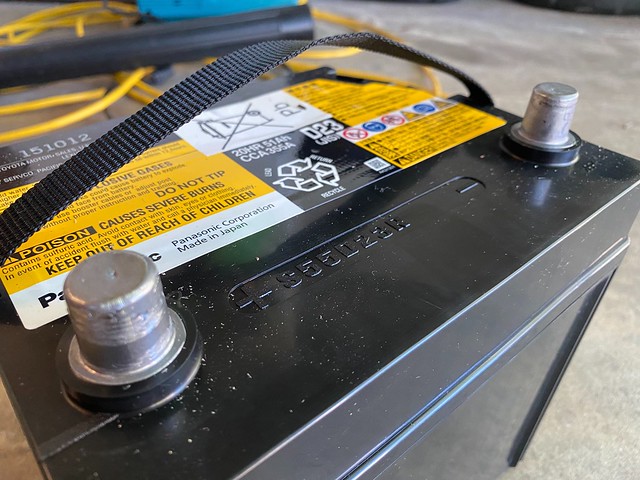
<p><a href="https://www.flickr.com/photos/techmsg/50198950116/in/dateposted/" title="Panasonic S5523R Hybrid Battery"><img src="https://live.staticflickr.com/65535/50198950116_29e70436e9_z.jpg" width="640" height="480" alt="Panasonic S5523R Hybrid Battery"></a></p>

<p>The battery was a Panasonic S55D23R, offering 335 CCA and 51 Ah. Not hugely capable, but its only responsibilities were starting the hybrid system and running 12V electronics when the hybrid system was disabled. It lived in a sheltered compartment in the trunk, so despite being old it was impeccably clean.</p>

<h2>Initial Measurements</h2>

<p>I used a multi-meter to measure battery voltage before starting.</p>

<p><a href="https://www.flickr.com/photos/techmsg/50189009628/" title="Dead 12 Volt Car Battery"><img src="https://live.staticflickr.com/65535/50189009628_c6bb801991_z.jpg" width="640" height="480" alt="Dead 12 Volt Car Battery"></a></p>

<p>The battery was producing 4.54 volts DC (VDC). That's pretty danged dead.</p>

<h2>Normal Charge</h2>

<p>NOCO recommends running a battery through a normal charging cycle before attempting to repair.</p>

<p>Connect the positive clamp, then the negative, then plug in the charger.</p>

<p>Note: I plugged the charger into an inexpensive <a href="https://www.amazon.com/gp/product/B00E945SJG/?tag=v2mdc-20">power meter</a> to observe the voltage, amperage, power, and total kWh used throughout the charging and subsequent repair process.</p>

<p><a href="https://www.flickr.com/photos/techmsg/50189009618/in/dateposted/" title="Measuring Battery Charging Current"><img src="https://live.staticflickr.com/65535/50189009618_d36701b6a4_z.jpg" width="640" height="480" alt="Measuring Battery Charging Current"></a></p>

<p>The battery in question was a standard lead-acid (read: non-AGM, non-lithium) variety so I pressed the Mode button once until the 12V indicator illuminated. Charging commenced shortly afterward.</p>

<p>I didn't shoot a video, but with power meter you can watch the current pulse. The battery will take 0.5A for a second or two, then 0.7A for another second or two, and then back to 0.5A. And as the charging process progresses the amperage levels increase gradually, but always pulsing.</p>

<p>The User Guide provides estimated charging times based on battery size (Ah) and a 50% depth of discharge (DOD):</p>

<ul>
<li>20 Ah in 3 hours</li>
<li>40 Ah in 6 hours</li>
<li>80 Ah in 12 hours</li>
<li>100 Ah in 15 hours</li>
<li>120 Ah in 18 hours</li>
</ul>

<p>Extrapolating, 60 Ah might have taken 9 hours. Temperature also impacts charging times. It was warm outside for the duration of the experiment. And this battery was significantly more discharged.</p>

<p>It took about two (2) days for the green Charge LED to be solid green, indicating charging complete. It's entirely possible it finished overnight, but I wasn't in a rush to gather exact timings. That's one of the perks of smart battery tenders, once they're done with the charge you can leave them connected indefinitely without worry or harm.</p>

<p>I unplugged the charger and took a reading with the multi-meter: the battery was producing 13.16 VDC. An hour later with the clamps still on, the 13.04 VDC.</p>

<p>The power meter reported a range in power between 2 and 93.6 watts during the charging period, consuming 0.946 kWh in total. From my utility company, that represents around $0.11 worth of electricity.</p>

<h2>Repair Mode</h2>

<p>With the battery charged, it was time for repair mode.</p>

<p>Press and hold the Mode button for 3 seconds until the 6V LED illuminates, then press the Mode button once more to switch to 12V Repair mode. A red LED will illuminate.</p>

<p>The repair mode lasted about four (4) hours, just as the User Guide suggested. Toward the end I could hear the <a href="https://homebatterybank.com/is-it-normal-for-my-battery-to-bubble-when-charging/">quiet bubbling sounds of electrolysis</a> emanating from the battery; no steaming, venting of gases, or warmth to the battery casing. The charger returned to Standby mode after completion.</p>

<p>The battery was producing 13.20 VDC.</p>

<p>The power meter reported a range in power between 2 and 18.3 watts during the charging period, consuming 0.046 kWh in total. From my utility company, that represents around $0.005 worth of electricity.</p>

<h2>Subsequent Measurement</h2>

<p>To see how the battery was holding the charge, I took measurements for a few days after completing the repair.</p>

<ul>
<li>0 hours: 13.20 VDC</li>
<li>24 hours: 12.94 VDC</li>
<li>48 hours: 12.84 VDC</li>
<li>72 hours: 12.77 VDC</li>
<li>96 hours: 12.73 VDC</li>
</ul>

<p>The battery appears to be losing 1-2% of its initial charge every day. If discharge continues at that rate, the vehicle would need to be driven (or battery otherwise recharged once per week) to stay in usable condition. I wouldn't use it as a primary battery in a vehicle, but left tended it could be put into "service" as a backup battery should my friend run into trouble with his new battery.</p>
    ]]>
  </content>
</entry>

<entry>
  <author><name>Alex Moundalexis</name></author>
  <title>Ford Battery Management System</title>
  <link href="https://moundalexis.com/v2/2020/08/06/ford-bms.html"/>
  <id>https://moundalexis.com/v2/2020/08/06/ford-bms.html</id>
  <updated>2021-08-20T21:30:00-05:00</updated>
  <content type="html">
    <![CDATA[<!-- title: Ford Battery Management System -->
<!-- categories: howto -->
<!-- tags: ford,battery,bms,bcm,troubleshooting -->
<!-- published: 2020-08-06T18:00:00-05:00 -->
<!-- updated: 2021-08-20T21:30:00-05:00 -->
<!-- summary: Non-functional Auto Start-Stop system on a 2017 F-150 led me to discover the Battery Management System. -->

<h1>Ford Battery Management System</h1>

<p>ℹ️ As an Amazon Associate I earn from qualifying purchases. (<a href="https://moundalexis.com/v2/affiliates.html">details</a>)</p>

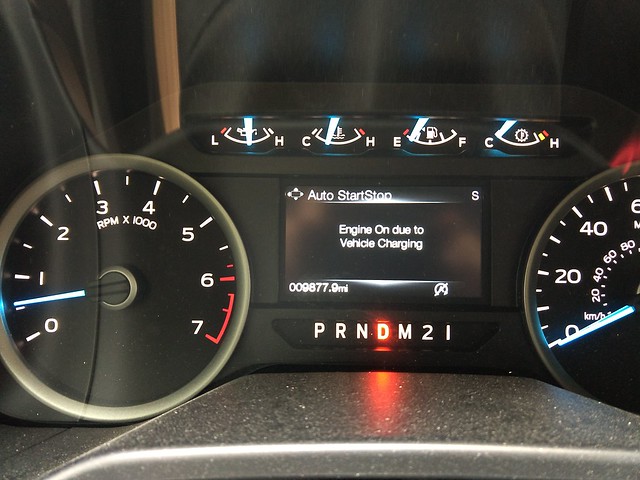
<p>The <a href="https://owner.ford.com/support/how-tos/vehicle-features/energy-efficiency-and-fueling/auto-start-stop-technology.html">Auto Start-Stop</a> system on my 2017 Ford F-150 hadn't been working for a couple months. At a full stop with foot firmly on the brake, I'd see an "Engine On due to Vehicle Charging" message on the dashboard display.</p>

<p>This nagging message, some driveway troubleshooting, and a few visits to my dealer's service department led me to discover Ford's Battery Management System (BMS).</p>

<p><a href="https://www.flickr.com/photos/techmsg/50148249566/in/dateposted/" title="Engine On due to Vehicle Charging"><img src="https://live.staticflickr.com/65535/50148249566_1cd3ccdbd5_z.jpg" width="640" height="480" alt="Engine On due to Vehicle Charging"></a></p>

<p>There are many conditions that can cause Auto Start-Stop to be disabled, listed on page 173 of the <a href="http://www.fordservicecontent.com/Ford_Content/Catalog/owner_information/2017-Ford-F-150-Owners-Manual-version-2_om_EN-US-EN-CA_12_2016.pdf">Owner's Manual</a> (PDF), and many of which with their own message that I've seen during the course of normal operation.</p>

<ul>
<li>Engine Off</li>
<li>Engine On Normal Operation</li>
<li>Engine On due to Engine Warming</li>
<li>Engine On due to Heating/Cooling</li>
<li>Engine On due to Low Temperature</li>
<li>Engine On due to Steering Wheel Maneuvering</li>
<li>Engine On due to Vehicle Charging</li>
<li>Engine On due to Vehicle Maneuvering</li>
<li>Engine On due to Accessory Usage</li>
<li>Engine On due to Outside Air Temp</li>
<li>Engine On due to Selected Gear</li>
<li>Engine On due to Steep Grade</li>
<li>Engine On due to Driver Door Opened</li>
<li>Engine On due to Driver Belt Unbuckled</li>
<li>Engine On due to Power Outlet in Use</li>
<li>Deactivated by Driver</li>
<li>Auto StartStop Not Available</li>
<li>Auto StartStop Manual Restart Required</li>
</ul>

<p>The <a href="http://www.fordservicecontent.com/Ford_Content/vdirsnet/OwnerManual/Home/Content?bookCode=O34125&amp;countryCode=USA&amp;languageCode=en&amp;marketCode=US&amp;viewTech=IE&amp;chapterTitleSelected=G1525715&amp;subTitleSelected=G1824543&amp;topicHRef=G1824544&amp;div=f&amp;variantid=4040&amp;vFilteringEnabled=False&amp;userMarket=USA">2017 Fusion Owner's Manual</a> has a thorough list with descriptions of each.</p>

<p>The three year old battery reported good voltage while the truck was running, indicating that the alternator was providing power.</p>

<p>Problem was, even after driving a few hours on the highway -- more than enough time for the alternator to charge the battery completely -- the condition would remain.</p>

<p>During a routine oil change while the vehicle was under warranty, I asked the techs to check the battery. If the battery was bad and not holding a charge, it could explain the message. They checked using a handheld tester and reported that the battery was healthy. They advised that Ford wouldn't replace a battery under warranty unless it failed "the Rotunda test" which would require 2-3 hours. They also advised that if I didn't drive the vehicle every couple days, I should put it on a battery tender. They started charging the battery using the Rotunda, but I wasn't able to wait for a complete charge. The "Engine On due to Vehicle Charging" message remained.</p>

<p>I drove home and put the battery on a <a href="https://amzn.to/2BCVjce">NOCO GENIUS5 tender</a> for a few days; for more information, read <a href="https://moundalexis.com/v2/2020/08/01/noco-genius.html">my practical review of the NOCO GENIUS line</a>. The NOCO was content with the state of the battery, reporting a full charge. SYNC was content with the state of the battery and stayed on, but Auto Start-Stop was still not happy. The message remained.</p>

<p>After a few trips to the Ford dealer, a couple overnights, here's what the service department came up with:</p>

<ul>
<li>healthy battery check using handheld tester</li>
<li>passing Rotunda test (full charge + test in ~28 minutes)</li>
<li>diagnosis that the electronic transmission fluid pump was bad (somehow not talking to the powertrain control module; this ended up being a red herring and nothing ended up being replaced)</li>
<li>another vehicle was found on the lot exhibiting the same behavior (which was not a reassuring assessment or solution)</li>
</ul>

<p>The condition still remained until the shop foreman was consulted and asked whether anyone had reset the BMS. The what? Turns out nobody had. Once they did everything functioned properly, no replacement parts required. The message went away. Auto Start-Stop functioned as if nothing had ever been wrong.</p>

<p>Why none of the techs assigned to my shop ticket know about BMS -- who presumably replace batteries and troubleshoot other issues with the electrical systems -- I'm not sure.</p>

<p>So what is BMS?</p>

<h2>Battery Management System (BMS)</h2>

<p>Ford Battery Management System (BMS) -- also referred to by Ford as the <a href="https://parts.ford.com/shop/en/us/electrical/battery-and-related-components/battery-management-system-6584925-1">Battery Control Module</a> (BCM) -- connects to the negative terminal of the battery and monitors current, voltage, and temperature.</p>

<p><a href="https://www.flickr.com/photos/techmsg/50195242911/in/dateposted/" title="Ford Battery Control Module"><img src="https://live.staticflickr.com/65535/50195242911_57997d0615.jpg" width="500" height="420" alt="Ford Battery Control Module"></a></p>

<p>On the 2017 Ford F-150 (pictured below), the BCM is clamped directly to the negative battery post. Both negative and negative (to chassis) ground cables are bolted to the BCM via ring terminals. The BCM has markings indicating hardware and software versions/dates. A small two-wire harness exits the BCM (red/grey wires), presumably providing power and data. The (positive) <a href="https://parts.ford.com/shop/en/us/cable-assy-battery-to-battery-6507185-1#sectionId:4180166">starter cable</a> runs through a <a href="https://parts.ford.com/shop/en/us/sensor-assy-6410197-1#sectionId:4180166">sensor assembly</a> (not visible) that appears to be similar to a magnetic induction clamp meter.</p>

<p><a href="https://www.flickr.com/photos/techmsg/50192280268/in/dateposted/" title="Negative Terminal of Battery in 2017 Ford F-150"><img src="https://live.staticflickr.com/65535/50192280268_f147bc5c6d_z.jpg" width="640" height="360" alt="Negative Terminal of Battery in 2017 Ford F-150"></a></p>

<p>When battery voltage is low, BMS may disable certain sub-systems like Auto Start-Stop, heated seats, or SYNC to conserve power. The BMS can also chat with the Powertrain Control Module (PCM) to adjust behavior; for example when the battery is fully charged, the alternator may be disabled to improve fuel mileage.</p>

<p>From page 333 of the Owner's Manual, <strong>emphasis</strong> mine:</p>

<blockquote>
  <p>Battery Management System (If Equipped)</p>

<p>The battery management system monitors battery conditions and takes actions to extend battery life. If excessive battery drain is detected, the system temporarily disables some electrical systems to protect the battery. Systems included are:</p>

<ul>
<li>Heated rear window.</li>
<li>Heated seats.</li>
<li>Climate control.</li>
<li>Heated steering wheel.</li>
<li>Audio unit.</li>
<li>Navigation system.</li>
</ul>

<p>A message may appear in the information displays to alert you that battery protection actions are active. These messages are only for notification that an action is taking place, and not intended to indicate an electrical problem or that the battery requires replacement.</p>

<p>After battery replacement, or in some cases <strong>after charging the battery with an external charger, the battery management system requires eight hours of vehicle sleep time to relearn the battery state of charge</strong>. During this time your vehicle must remain fully locked with the ignition switched off.</p>

<p>Note: Prior to relearning the battery state of charge, the battery management system may temporarily disable some electrical systems.</p>
</blockquote>

<p>So after tending the battery, you might not be able to disconnect the leads and go without seeing an error message, instead you might need to let the vehicle sleep for 8 hours.</p>

<p>When the manual says "in some cases" it's might be referring to batteries charged improperly by connecting to the battery negative post.</p>

<blockquote>
  <p>Electrical Accessory Installation</p>

<p>To make sure the battery management system works correctly, <strong>do not connect an electrical device ground connection directly to the battery negative post</strong>. This can cause inaccurate measurements of the battery condition and potential incorrect system operation.</p>
</blockquote>

<p>Further evidence on page 298 of the Owner's Manual (jump starting) solidifies this point:</p>

<blockquote>
  <p>Make the final connection of the negative (-) cable to an exposed metal part of the stalled vehicle's engine, away from the battery and the fuel injection system, or connect the negative (-) cable to a ground connection point if available.</p>
</blockquote>

<p>In short, NEVER ATTACH ANYTHING DIRECLY TO THE BATTERY NEGATIVE TERMINAL besides a multimeter. Not a jump starter pack, not a battery charger, nothing. While you probably won't <em>damage</em> anything with a modern battery charger/tender, you might cause the Battery Management Systems to complain to the point where it needs a hard reset.</p>

<p>The correct(ish) way to charge a Ford F-150 with BMS (<a href="https://www.youtube.com/watch?v=CFZRSaiS-0M">video</a>), although I'd prefer a different ground point.</p>

<iframe width="560" height="315" src="https://www.youtube.com/embed/CFZRSaiS-0M" frameborder="0" allow="accelerometer; autoplay; encrypted-media; gyroscope; picture-in-picture" allowfullscreen></iframe>

<h2>Symptoms</h2>

<p>With Auto Start-Stop not dis-engaged (via dash button) and foot on the brake, you will see the grey "A" Auto Start-Stop icon with a slash through it and an "Engine On due to Vehicle Charging" message on the dashboard console.</p>

<p>Phantom loads are a plague of modern vehicles. "Drive more," says my service writer, "we've got cars on the lot whose batteries are dead after a few days." I hope that's an exaggeration, but during the 2020 pandemic shutdowns it wasn't uncommon for vehicles to sit unused for longer periods; when vehicles <em>were</em> driven, they tended to be used for shorter trips to collect essential supplies during which the alternator wouldn't have had much time to recharge the battery.</p>

<p>If you've taken a reading using a multimeter and find the battery to have <a href="https://carbatteryworld.com/car-battery-voltage/">proper voltage</a> both at rest (>= 12.6 volts) and when being charged by the alternator (>= 13.5 volts) and you STILL see the "Engine On due to Vehicle Charging" message, BMS might need to be reset. Particularly after an improper charge, jump start, or particularly low battery state.</p>

<p>Seeing a "System Off to Save Battery" message on <a href="https://www.ford.com/technology/sync/sync-base/">SYNC</a> when unlocking the vehicle or opening the door is a clear indicator that your battery voltage is low. Once the battery is charged (verified by multimeter), the message should go away. But if the "Engine On due to Vehicle Charging" message remains, BMS might need a reset.</p>

<h2>Resetting Ford BMS</h2>

<p>According to a service writer at Ford, the Battery Management System was not designed to be user serviceable.</p>

<h3>Ford Service</h3>

<p>From the workshop manual on Battery Replacement, referenced by a kind Ford technician on the Internet:</p>

<blockquote>
  <p>If the vehicle battery is replaced, it is very important to perform the battery monitoring system reset using the scan tool. If the battery monitoring system reset is not carried out, it holds the old battery parameters and time in service counter in memory. Additionally it tells the system the battery is in an aged state and the (sic) may limit the Electrical Energy Management system functions.</p>
</blockquote>

<p>Under warranty, this should be a simple one. Assuming that your battery is holding a charge and you've verified this using a multimeter, ask that the battery be checked, alternator output be checked, and if both are good then to reset the BMS. It's useful to stress that the "engine on due to vehicle charging" message remains even after a full charge or driving for an extended period.</p>

<p>Out of warranty, I've read reports of Ford owners being charged 45 minutes labor to reset BMS; pricey for a reset procedure that takes less than one minute to perform with the scan tool. Your mileage may vary, depending on the shop.</p>

<h3>Independent Shop</h3>

<p><a href="https://www.snapon.com/Diagnostics/US/KB/DQT-AA-Ford-Battery-Monitor-System.htm">Snap-on diagnostic tools can be used</a> (<a href="https://www.youtube.com/watch?v=IAtOIFr7bXA">video</a>) to reset the Battery Monitor System.</p>

<p>After the vehicle is loaded:</p>

<ol>
<li>Scanner</li>
<li>Body Control Module</li>
<li>Functional Tests</li>
<li>Battery Monitor System (BMS) Reset</li>
</ol>

<p>Follow the instructions.</p>

<h3>Self (using diagnostics)</h3>

<p>FORScan can be <a href="https://forscan.org/download.html">downloaded</a> and used with an <a href="https://amzn.to/2PikOmp">OBDLinkEX USB</a> ($49) or <a href="https://amzn.to/315grAI">OBDLink MX+ Bluetooth</a> ($99) adapter to reset BMS (<a href="https://www.youtube.com/watch?v=iFdh5k4b6mo">video</a>), similar to Snap-on.</p>

<iframe width="560" height="315" src="https://www.youtube.com/embed/iFdh5k4b6mo" frameborder="0" allow="accelerometer; autoplay; encrypted-media; gyroscope; picture-in-picture" allowfullscreen></iframe>

<p>And a <a href="https://www.youtube.com/watch?v=045qebXe4Po">video of the results</a>.</p>

<p>The OBDLink adapters aren't <em>inexpensive</em>, but could quickly pay for themselves if you're doing any sort of routine diagnostics.</p>

<h3>Self (using Konami codes)</h3>

<p>Many vehicles have reset procedures that can be taken by consumers without diagnostic tools. These two methods have been mentioned on several Ford owner's forums and YouTube videos with reported success.</p>

<p><strong>Method #1</strong> involves the use of rear foglight button, which is not standard on US models. </p>

<ol>
<li>Turn on ignition (within 10 seconds)</li>
<li>Press rear fog lamp switch 5 times</li>
<li>Press hazard switch 3 times</li>
<li>Battery symbols on dashboard should flash 3 times</li>
</ol>

<p>According to <a href="https://www.youtube.com/watch?v=4-Uaf8lNcNo">YouTube comments</a> at time of writing, this process has been confirmed to work on 2010 Everest, 2012 Focus 1.6 TDI, 2013 Galaxy MK2, and 2016 Focus Diesel.</p>

<p><strong>Method #2</strong> is for those in US markets or without a rear fog lamp switch.</p>

<ol>
<li>Get in vehicle, close doors</li>
<li>Turn on ignition (but don't start)</li>
<li>Wait for battery light to come up</li>
<li>Flash brights 5 times</li>
<li>Press and release brake 3 times</li>
<li>Battery symbol on dashboard should flash after 5-10 seconds</li>
</ol>

<p>The same YouTube commenters confirm this process works for the 2011 Edge, 2013 Fusion, 2014 Escape, 2016 Ford F-150, 2016 Edge, and 2017 Explorer.</p>

<p>I haven't yet had the opportunity to test the efficacy of either method, but I'd consider trying them if the 8 hour sleep period after charging/tending weren't successful.</p>

<p><strong>Update 10/06/20</strong>: I've tested and confirmed that Method #2 works on my 2017 Ford F-150!</p>

<p>🆕 <strong>Update 08/20/21</strong>: A reader has confirmed that Method #2 works on his 2018 Ford F-150. Thanks, Philip!</p>

<h2>References</h2>

<p>There's a lot of information out there. While it's always best to start with the Owner's Manual, owner forums can often highlight passages that went unread.</p>

<ul>
<li><a href="http://www.fordservicecontent.com/Ford_Content/Catalog/owner_information/2017-Ford-F-150-Owners-Manual-version-2_om_EN-US-EN-CA_12_2016.pdf">2017 F-150 Owner’s Manual</a> (PDF)</li>
<li>Ford Escape Forum: <a href="https://www.fordescape.org/threads/diy-battery-monitor-system-reset.52369/">DIY Battery Monitor System Reset</a></li>
<li>Ford F150 Forum: <a href="https://www.f150forum.com/f38/replacing-battery-new-way-231938/">Replacing a battery - the new way</a></li>
<li>Ford F150 Forum: <a href="https://www.f150forum.com/f118/new-battery-reset-bms-no-460039/">New Battery - Reset the BMS or No</a></li>
<li>National Oil and Lube News: <a href="https://www.noln.net/articles/2122-battery-management-the-challenges-of-a-smart-system">Battery Management: The Challenges of a Smart System</a></li>
<li>Snap-on: <a href="https://www.snapon.com/Diagnostics/US/KB/DQT-AA-Ford-Battery-Monitor-System.htm">QUICK TIP: FORD® BATTERY MONITOR SYSTEM</a></li>
</ul>
    ]]>
  </content>
</entry>

<entry>
  <author><name>Alex Moundalexis</name></author>
  <title>NOCO GENIUS - A Practical Review</title>
  <link href="https://moundalexis.com/v2/2020/08/01/noco-genius.html"/>
  <id>https://moundalexis.com/v2/2020/08/01/noco-genius.html</id>
  <updated>2020-08-10T09:30:00-05:00</updated>
  <content type="html">
    <![CDATA[<!-- title: NOCO GENIUS - A Practical Review -->
<!-- categories: review -->
<!-- tags: noco,genius,battery,charger,tender -->
<!-- published: 2020-08-01T09:30:00-05:00 -->
<!-- updated: 2020-08-10T09:30:00-05:00 -->
<!-- summary: A practical review of the NOCO GENIUS line of battery chargers. Lots to like with a few caveats. -->

<h1>NOCO GENIUS - A Practical Review</h1>

<p>ℹ️ As an Amazon Associate I earn from qualifying purchases. (<a href="https://moundalexis.com/v2/affiliates.html">details</a>)</p>

<p>NOCO markets their GENIUS line as an "automatic charger, battery maintainer, and battery delsulfator."</p>

<p>A few words about my experience with the NOCO GENIUS line of chargers.</p>

<h2>Background</h2>

<p>I've used a <a href="https://amzn.to/2CYpStI">Battery Tender Junior</a> ($25) the past couple years to keep my motorcycle battery charged while winterized. It provides 750 mA and is only compatible with 12V batteries. For less than $1/month in electricity, the tender monitors the battery voltage and tops it off when needed. I don't have to worry about the bike starting or having to deal with the hassle or expense of replacing the battery had I left it untended.</p>

<p>I haven't been driving as much during the COVID-19 pandemic. I've seen phantom loads draw down the batteries and have had a few times where a vehicle just barely turned over, so after reading some positive reviews I decided to give a few NOCO chargers a try.</p>

<p>My intended usage isn't rapid charging or jump-starting, so I went with two of the smaller and less expensive models that aligned with the battery capacities. Overnight charging and continual tending are fine for me, but if you need faster charging you might want to consider one of the larger models.</p>

<h2>Specs</h2>

<p>The <a href="https://amzn.to/3fegkYy">NOCO GENIUS2</a> ($42) provides 2 A output and is designed for batteries up to 40 Ah, suitable for smaller car batteries.</p>

<p>The <a href="https://amzn.to/2BCVjce">NOCO GENIUS5</a> ($70) provides 5 A output and is designed for batteries up to 120 Ah, suitable for most car and light truck batteries. That's not to say you can't use a GENIUS2 to charge a larger capacity battery, it'll just take longer at lower current.</p>

<p>Both of these units have numerous modes to support different battery voltages and chemistry:</p>

<ul>
<li>12V - 12-volt wet cell, gel cell, enhanced flooded, maintenance-free and calcium batteries</li>
<li>12V AGM - 12-volt AGM batteries</li>
<li>12V LITHIUM - 12-volt lithium-ion and lithium iron phosphate batteries; only for use on batteries with a Battery Management System (BMS)</li>
<li>6V - 6-volt wet cell, gel cell, enhanced flooded, maintenance-free and calcium batteries</li>
<li>Force - charges batteries below 1 volt; this mode only runs for five minutes before switching into the standard charging mode</li>
</ul>

<p>The GENIUS5 also has a Repair mode to repair and recover old, idle, or sulfated batteries. The battery should be disconnected from the vehicle before using this mode, otherwise the higher voltage might damage connected electronics.</p>

<p>The GENIUS line is <a href="https://ramuk.intertekconnect.com/WebClients/ITS/DLP/products.nsf/4c8700f3b75987a08525777700583333/a1aa9af1b1b7f1968625856c0025a714?OpenDocument">ETL-listed</a> conforming to <a href="https://standardscatalog.ul.com/ProductDetail.aspx?productId=UL1236">UL STANDARD 1236</a> (Standard for Battery Chargers for Charging Engine-Starter Batteries).</p>

<h2>First impressions</h2>

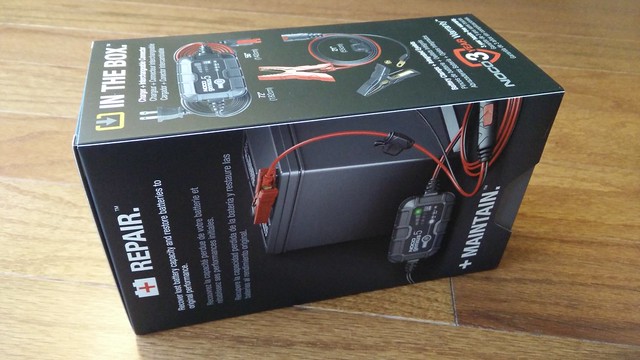
<p>Smart and sensible packaging. No blister pack to slice your hands open on.</p>

<p>The exterior shipping box was prominently labeled with the model number and had a sticker (not pictured) indicating serial number. The interior display-ready box arrived sealed in plastic wrap, also labeled with the serial number. The serial number on the device matches that on the packing labels.</p>

<p><a href="https://www.flickr.com/photos/techmsg/50170969516/in/dateposted/" title="NOCO GENIUS5 Unboxing (1/6)"><img src="https://live.staticflickr.com/65535/50170969516_1b981d5254_z.jpg" width="640" height="360" alt="NOCO GENIUS5 Unboxing (1/6)"></a></p>

<p><a href="https://www.flickr.com/photos/techmsg/50170969511/in/dateposted/" title="NOCO GENIUS5 Unboxing (2/6)"><img src="https://live.staticflickr.com/65535/50170969511_4ed9b52166_z.jpg" width="640" height="360" alt="NOCO GENIUS5 Unboxing (2/6)"></a></p>

<p>The cover slides to the side, revealing the charging unit. The unit was well supported between three pieces of foam, one atop to protect the face and two to the sides protecting the unit from shifting in transit.  </p>

<p><a href="https://www.flickr.com/photos/techmsg/50170969671/in/dateposted/" title="NOCO GENIUS5 Unboxing (3/6)"><img src="https://live.staticflickr.com/65535/50170969671_d1fa8a9caf_z.jpg" width="640" height="360" alt="NOCO GENIUS5 Unboxing (3/6)"></a></p>

<p><a href="https://www.flickr.com/photos/techmsg/50171227082/in/dateposted/" title="NOCO GENIUS5 Unboxing (4/6)"><img src="https://live.staticflickr.com/65535/50171227082_476509cb26_z.jpg" width="640" height="360" alt="NOCO GENIUS5 Unboxing (4/6)"></a></p>

<p>The two side pieces of foam lift out, revealing a cardboard platform. The charging unit sits atop and the cabling disappears beneath.</p>

<p><a href="https://www.flickr.com/photos/techmsg/50171227177/in/dateposted/" title="NOCO GENIUS5 Unboxing (5/6)"><img src="https://live.staticflickr.com/65535/50171227177_d8bdf17160_z.jpg" width="640" height="360" alt="NOCO GENIUS5 Unboxing (5/6)"></a></p>

<p>The NOCO GENUIUS5 charger unboxed, with clamp jaws. Not pictured, but there's also a mounting bracket, velcro strap, and a well-written model-specific owners manual.</p>

<p><a href="https://www.flickr.com/photos/techmsg/50170425903/in/dateposted/" title="NOCO GENIUS5 Unboxing (6/6)"><img src="https://live.staticflickr.com/65535/50170425903_148ccda672_z.jpg" width="640" height="360" alt="NOCO GENIUS5 Unboxing (6/6)"></a></p>

<p>Build quality is excellent: the units aren't large, but feel solid and hefty.</p>

<p>The Mode button is firm but has an audible and tactile click when depressed. The AC cord is about 4 1/2 feet long and the weather-resistant DC cord is about 5 1/2 feet long, which is good for most of my usage but <a href="https://amzn.to/2P5j93t">ten foot DC extension cables</a> ($11) are available.</p>

<p>There are a few anti-skid pads on the bottom of each unit. Model, input and output voltage, and polarity are prominently indicated.</p>

<pre><code>Model: GENIUS5
Input: 100-240VAC 50-60Hz 85W
Output: 6/12VDC 5000mA
Polarity: Red (+), Black (-)
</code></pre>

<p><a href="https://www.flickr.com/photos/techmsg/50171227367/in/dateposted/" title="NOCO GENIUS5 Back Plate"><img src="https://live.staticflickr.com/65535/50171227367_216501cbd2_z.jpg" width="640" height="360" alt="NOCO GENIUS5 Back Plate"></a></p>

<p>Both units have an <a href="http://www.dsmt.com/resources/ip-rating-chart/">IP65 rating</a>, which means dust and the occasional splash of water should pose no issues; you could leave the unit tucked underneath the hood in the rain and have few concerns. The DC cabling appears to be more weather-proof than the AC power cord.</p>

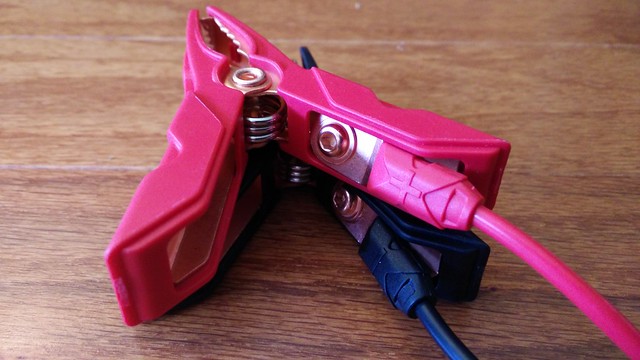
<p>The clamp jaws are wide, springs firm, and handles appear to be well insulated. The eyelets can be removed from the jaws using a hex key, should you want to use a different set of jaws or mount the eyelets directly to a battery. The jaws, eyelets, and wiring appears to be copper.</p>

<p><a href="https://www.flickr.com/photos/techmsg/50170434273/in/dateposted/" title="NOCO GENIUS Clamps"><img src="https://live.staticflickr.com/65535/50170434273_c5c56423ca_z.jpg" width="640" height="360" alt="NOCO GENIUS Clamps"></a></p>

<p>The included mounting bracket can be used for semi-permanent install within an engine bay or on a shop wall; the bracket is installed with self-tapping screws and a Velcro strap holds the unit in place, positioned in such a way that the mode button remains accessible and charge status display is still visible.</p>

<p><a href="https://www.flickr.com/photos/techmsg/50170426088/in/dateposted/" title="NOCO GENIUS5 Mounting Strap"><img src="https://live.staticflickr.com/65535/50170426088_d2ae6343cf_z.jpg" width="640" height="360" alt="NOCO GENIUS5 Mounting Strap"></a></p>

<p>There's no bulky transformer, just a polarized plug. To be fair all of the electronics for the Battery Tender Junior are located within the wall wart itself, but if outlet space is a concern the NOCO GENIUS is definitely more efficient.</p>

<h2>Usage</h2>

<p>Attach the positive (red) clamp to the positive battery terminal.</p>

<p>Attach the negative (black) clamp to a negative ground point. This assumes a negative ground system.</p>

<p>⚠️ Warning: For safety purposes most manufacturers advise against connecting directly to the negative battery terminal, particularly in modern vehicles. When in doubt, refer to the owner's manual for your vehicle. If accessory usage or charging isn't mentioned explicitly, check the section on jump starting; if those instructions say use a ground point, don't connect directly to the negative battery terminal.</p>

<p>For a more permanent install (and for quicker connect/disconnect), the eyelets can be removed from the included clamps and attach directly to the positive battery terminal and negative ground point; larger <a href="https://amzn.to/2PbTFkV">M10 eyelet terminals</a> ($12) and <a href="https://amzn.to/3hGj3eW">M8 eyelet terminals</a> ($10) are also available.</p>

<p>Plug in to AC power. Press the Mode button until the correct battery chemistry LED illuminates. And that's it, you can walk away and let the charger do its thing. To access the Force or Repair modes, you can press Mode for 3-5 seconds respectively before selecting the battery chemistry.</p>

<p>As the battery charges, there's a series of red and orange LEDs that pulse and illuminate to indicate 25%, 50%, and 75% charge, and a large green LED that indicates optimization (when pulsing) and full charge (when solid).</p>

<p>One blurb about the green LED: it can take a long time to change from pulsing to solid (from 75% to full), the bulk of the time spent charging batteries will be spent in this final stage. After the battery is fully charged and the green LED is solid it will flip back to pulsing periodically as needed to provide continuing maintenance.</p>

<p>The LEDs are aligned, sized, and bright enough that you can see the status from across the garage.</p>

<p>There are also a few status LEDs used to indicate various conditions: standby, excess temperature, polarity mismatch, and a defective/bad battery not holding charge.</p>

<p>When you're ready to drive: unplug from AC, disconnect the negative, disconnect the positive, and away you go.</p>

<h2>Support</h2>

<p>NOCO has been around since 1914 and offers a three year "hassle-free" warranty to the original owner. I haven't had to use the warranty, but three years seems more promising than 30/90/365 days.</p>

<p>Unlike a lot of vendors, NOCO actively answers questions posed by customers on Amazon product pages. It's nice to see official answers from verified manufacturers.</p>

<h2>Potential downsides</h2>

<p>NOCO units are more expensive than similarly sized units from other manufacturers, but this feels like one of those cases where you get what you pay for.</p>

<p>NOCO doesn't use SAE connectors on their products, instead a proprietary gendered connector called X-Connect. X-Connect is marketed as having "rugged and watertight connectors; solid copper wire and terminals, integrated in-line fuses" and significant strain relief.</p>

<p>I was pleasantly surprised to find the connectors as advertised: beefy, sealed with gaskets, locking connector tabs, actual copper instead of plated nickel or zinc. While SAE is near ubiquitous in the automotive industry, X-Connect doesn't feel like a downside... feels more like a step up.</p>

<p><a href="https://www.flickr.com/photos/techmsg/50170426093/in/dateposted/" title="NOCO X-Connect (1/2)"><img src="https://live.staticflickr.com/65535/50170426093_8fd977ee94_z.jpg" width="640" height="360" alt="NOCO X-Connect (1/2)"></a></p>

<p><a href="https://www.flickr.com/photos/techmsg/50171227267/in/dateposted/" title="NOCO X-Connect (2/2)"><img src="https://live.staticflickr.com/65535/50171227267_05cb77959a_z.jpg" width="640" height="360" alt="NOCO X-Connect (2/2)"></a></p>

<p>If you do have a bunch of existing SAE wiring or eyelet terminals on your batteries, an <a href="https://amzn.to/2X8D5qK">X-Connect to SAE adapter</a> will set you back $8.</p>

<h2>Closing thoughts</h2>

<p>I'm pleased.</p>

<p>The NOCO GENIUS units are sleek, purposefully designed, well built, provide tactile and visual feedback, support a variety of battery types, and do what they're supposed to do.</p>

<p>I've used the <a href="https://amzn.to/3fegkYy">GENIUS2</a> to charge and maintain the battery in a compact car.</p>

<p>I've used the <a href="https://amzn.to/2BCVjce">GENIUS5</a> to charge and maintain the battery in a pickup truck and to <a href="https://moundalexis.com/v2/2020/08/10/noco-repair-mode.html">revive a dead Toyota hybrid accessory battery</a>.</p>

<p>Definitely a worthwhile addition to the home garage!</p>
    ]]>
  </content>
</entry>

</feed>