<!DOCTYPE html>
<html dir="ltr" lang="en-US" prefix="og: https://ogp.me/ns#" class="no-js">
<head>
	<meta charset="UTF-8">
	<meta name="viewport" content="width=device-width, initial-scale=1.0">
	<link rel="profile" href="https://gmpg.org/xfn/11">
		<script>(function(html){html.className = html.className.replace(/\bno-js\b/,'js')})(document.documentElement);</script>
<title>psyphi.net blog - Another collection of braingunk and technolint</title>
	<style>img:is([sizes="auto" i], [sizes^="auto," i]) { contain-intrinsic-size: 3000px 1500px }</style>
	
		<!-- All in One SEO 4.8.1.1 - aioseo.com -->
	<meta name="description" content="Another collection of braingunk and technolint" />
	<meta name="robots" content="max-image-preview:large" />
	<link rel="canonical" href="https://psyphi.net/blog/" />
	<link rel="next" href="https://psyphi.net/blog/page/2/" />
	<meta name="generator" content="All in One SEO (AIOSEO) 4.8.1.1" />
		<meta property="og:locale" content="en_US" />
		<meta property="og:site_name" content="psyphi.net blog - Another collection of braingunk and technolint" />
		<meta property="og:type" content="website" />
		<meta property="og:title" content="psyphi.net blog - Another collection of braingunk and technolint" />
		<meta property="og:description" content="Another collection of braingunk and technolint" />
		<meta property="og:url" content="https://psyphi.net/blog/" />
		<meta name="twitter:card" content="summary" />
		<meta name="twitter:title" content="psyphi.net blog - Another collection of braingunk and technolint" />
		<meta name="twitter:description" content="Another collection of braingunk and technolint" />
		<script type="application/ld+json" class="aioseo-schema">
			{"@context":"https:\/\/schema.org","@graph":[{"@type":"BreadcrumbList","@id":"https:\/\/psyphi.net\/blog\/#breadcrumblist","itemListElement":[{"@type":"ListItem","@id":"https:\/\/psyphi.net\/blog\/#listItem","position":1,"name":"Home"}]},{"@type":"CollectionPage","@id":"https:\/\/psyphi.net\/blog\/#collectionpage","url":"https:\/\/psyphi.net\/blog\/","name":"psyphi.net blog - Another collection of braingunk and technolint","description":"Another collection of braingunk and technolint","inLanguage":"en-US","isPartOf":{"@id":"https:\/\/psyphi.net\/blog\/#website"},"breadcrumb":{"@id":"https:\/\/psyphi.net\/blog\/#breadcrumblist"},"about":{"@id":"https:\/\/psyphi.net\/blog\/#organization"}},{"@type":"Organization","@id":"https:\/\/psyphi.net\/blog\/#organization","name":"psyphi.net blog","description":"Another collection of braingunk and technolint","url":"https:\/\/psyphi.net\/blog\/"},{"@type":"WebSite","@id":"https:\/\/psyphi.net\/blog\/#website","url":"https:\/\/psyphi.net\/blog\/","name":"psyphi.net blog","description":"Another collection of braingunk and technolint","inLanguage":"en-US","publisher":{"@id":"https:\/\/psyphi.net\/blog\/#organization"}}]}
		</script>
		<!-- All in One SEO -->

<link rel="alternate" type="application/rss+xml" title="psyphi.net blog &raquo; Feed" href="https://psyphi.net/blog/feed/" />
<link rel="alternate" type="application/rss+xml" title="psyphi.net blog &raquo; Comments Feed" href="https://psyphi.net/blog/comments/feed/" />
		<!-- This site uses the Google Analytics by MonsterInsights plugin v9.5.3 - Using Analytics tracking - https://www.monsterinsights.com/ -->
							<script src="//www.googletagmanager.com/gtag/js?id=G-KP1EH4XZZF"  data-cfasync="false" data-wpfc-render="false" async></script>
			<script data-cfasync="false" data-wpfc-render="false">
				var mi_version = '9.5.3';
				var mi_track_user = true;
				var mi_no_track_reason = '';
								var MonsterInsightsDefaultLocations = {"page_location":"https:\/\/psyphi.net\/blog\/"};
				if ( typeof MonsterInsightsPrivacyGuardFilter === 'function' ) {
					var MonsterInsightsLocations = (typeof MonsterInsightsExcludeQuery === 'object') ? MonsterInsightsPrivacyGuardFilter( MonsterInsightsExcludeQuery ) : MonsterInsightsPrivacyGuardFilter( MonsterInsightsDefaultLocations );
				} else {
					var MonsterInsightsLocations = (typeof MonsterInsightsExcludeQuery === 'object') ? MonsterInsightsExcludeQuery : MonsterInsightsDefaultLocations;
				}

								var disableStrs = [
										'ga-disable-G-KP1EH4XZZF',
									];

				/* Function to detect opted out users */
				function __gtagTrackerIsOptedOut() {
					for (var index = 0; index < disableStrs.length; index++) {
						if (document.cookie.indexOf(disableStrs[index] + '=true') > -1) {
							return true;
						}
					}

					return false;
				}

				/* Disable tracking if the opt-out cookie exists. */
				if (__gtagTrackerIsOptedOut()) {
					for (var index = 0; index < disableStrs.length; index++) {
						window[disableStrs[index]] = true;
					}
				}

				/* Opt-out function */
				function __gtagTrackerOptout() {
					for (var index = 0; index < disableStrs.length; index++) {
						document.cookie = disableStrs[index] + '=true; expires=Thu, 31 Dec 2099 23:59:59 UTC; path=/';
						window[disableStrs[index]] = true;
					}
				}

				if ('undefined' === typeof gaOptout) {
					function gaOptout() {
						__gtagTrackerOptout();
					}
				}
								window.dataLayer = window.dataLayer || [];

				window.MonsterInsightsDualTracker = {
					helpers: {},
					trackers: {},
				};
				if (mi_track_user) {
					function __gtagDataLayer() {
						dataLayer.push(arguments);
					}

					function __gtagTracker(type, name, parameters) {
						if (!parameters) {
							parameters = {};
						}

						if (parameters.send_to) {
							__gtagDataLayer.apply(null, arguments);
							return;
						}

						if (type === 'event') {
														parameters.send_to = monsterinsights_frontend.v4_id;
							var hookName = name;
							if (typeof parameters['event_category'] !== 'undefined') {
								hookName = parameters['event_category'] + ':' + name;
							}

							if (typeof MonsterInsightsDualTracker.trackers[hookName] !== 'undefined') {
								MonsterInsightsDualTracker.trackers[hookName](parameters);
							} else {
								__gtagDataLayer('event', name, parameters);
							}
							
						} else {
							__gtagDataLayer.apply(null, arguments);
						}
					}

					__gtagTracker('js', new Date());
					__gtagTracker('set', {
						'developer_id.dZGIzZG': true,
											});
					if ( MonsterInsightsLocations.page_location ) {
						__gtagTracker('set', MonsterInsightsLocations);
					}
										__gtagTracker('config', 'G-KP1EH4XZZF', {"forceSSL":"true"} );
															window.gtag = __gtagTracker;										(function () {
						/* https://developers.google.com/analytics/devguides/collection/analyticsjs/ */
						/* ga and __gaTracker compatibility shim. */
						var noopfn = function () {
							return null;
						};
						var newtracker = function () {
							return new Tracker();
						};
						var Tracker = function () {
							return null;
						};
						var p = Tracker.prototype;
						p.get = noopfn;
						p.set = noopfn;
						p.send = function () {
							var args = Array.prototype.slice.call(arguments);
							args.unshift('send');
							__gaTracker.apply(null, args);
						};
						var __gaTracker = function () {
							var len = arguments.length;
							if (len === 0) {
								return;
							}
							var f = arguments[len - 1];
							if (typeof f !== 'object' || f === null || typeof f.hitCallback !== 'function') {
								if ('send' === arguments[0]) {
									var hitConverted, hitObject = false, action;
									if ('event' === arguments[1]) {
										if ('undefined' !== typeof arguments[3]) {
											hitObject = {
												'eventAction': arguments[3],
												'eventCategory': arguments[2],
												'eventLabel': arguments[4],
												'value': arguments[5] ? arguments[5] : 1,
											}
										}
									}
									if ('pageview' === arguments[1]) {
										if ('undefined' !== typeof arguments[2]) {
											hitObject = {
												'eventAction': 'page_view',
												'page_path': arguments[2],
											}
										}
									}
									if (typeof arguments[2] === 'object') {
										hitObject = arguments[2];
									}
									if (typeof arguments[5] === 'object') {
										Object.assign(hitObject, arguments[5]);
									}
									if ('undefined' !== typeof arguments[1].hitType) {
										hitObject = arguments[1];
										if ('pageview' === hitObject.hitType) {
											hitObject.eventAction = 'page_view';
										}
									}
									if (hitObject) {
										action = 'timing' === arguments[1].hitType ? 'timing_complete' : hitObject.eventAction;
										hitConverted = mapArgs(hitObject);
										__gtagTracker('event', action, hitConverted);
									}
								}
								return;
							}

							function mapArgs(args) {
								var arg, hit = {};
								var gaMap = {
									'eventCategory': 'event_category',
									'eventAction': 'event_action',
									'eventLabel': 'event_label',
									'eventValue': 'event_value',
									'nonInteraction': 'non_interaction',
									'timingCategory': 'event_category',
									'timingVar': 'name',
									'timingValue': 'value',
									'timingLabel': 'event_label',
									'page': 'page_path',
									'location': 'page_location',
									'title': 'page_title',
									'referrer' : 'page_referrer',
								};
								for (arg in args) {
																		if (!(!args.hasOwnProperty(arg) || !gaMap.hasOwnProperty(arg))) {
										hit[gaMap[arg]] = args[arg];
									} else {
										hit[arg] = args[arg];
									}
								}
								return hit;
							}

							try {
								f.hitCallback();
							} catch (ex) {
							}
						};
						__gaTracker.create = newtracker;
						__gaTracker.getByName = newtracker;
						__gaTracker.getAll = function () {
							return [];
						};
						__gaTracker.remove = noopfn;
						__gaTracker.loaded = true;
						window['__gaTracker'] = __gaTracker;
					})();
									} else {
										console.log("");
					(function () {
						function __gtagTracker() {
							return null;
						}

						window['__gtagTracker'] = __gtagTracker;
						window['gtag'] = __gtagTracker;
					})();
									}
			</script>
				<!-- / Google Analytics by MonsterInsights -->
		<script>
window._wpemojiSettings = {"baseUrl":"https:\/\/s.w.org\/images\/core\/emoji\/15.1.0\/72x72\/","ext":".png","svgUrl":"https:\/\/s.w.org\/images\/core\/emoji\/15.1.0\/svg\/","svgExt":".svg","source":{"concatemoji":"https:\/\/psyphi.net\/blog\/wp-includes\/js\/wp-emoji-release.min.js?ver=46ad558db86da4def2c89fa34a4309fb"}};
/*! This file is auto-generated */
!function(i,n){var o,s,e;function c(e){try{var t={supportTests:e,timestamp:(new Date).valueOf()};sessionStorage.setItem(o,JSON.stringify(t))}catch(e){}}function p(e,t,n){e.clearRect(0,0,e.canvas.width,e.canvas.height),e.fillText(t,0,0);var t=new Uint32Array(e.getImageData(0,0,e.canvas.width,e.canvas.height).data),r=(e.clearRect(0,0,e.canvas.width,e.canvas.height),e.fillText(n,0,0),new Uint32Array(e.getImageData(0,0,e.canvas.width,e.canvas.height).data));return t.every(function(e,t){return e===r[t]})}function u(e,t,n){switch(t){case"flag":return n(e,"\ud83c\udff3\ufe0f\u200d\u26a7\ufe0f","\ud83c\udff3\ufe0f\u200b\u26a7\ufe0f")?!1:!n(e,"\ud83c\uddfa\ud83c\uddf3","\ud83c\uddfa\u200b\ud83c\uddf3")&&!n(e,"\ud83c\udff4\udb40\udc67\udb40\udc62\udb40\udc65\udb40\udc6e\udb40\udc67\udb40\udc7f","\ud83c\udff4\u200b\udb40\udc67\u200b\udb40\udc62\u200b\udb40\udc65\u200b\udb40\udc6e\u200b\udb40\udc67\u200b\udb40\udc7f");case"emoji":return!n(e,"\ud83d\udc26\u200d\ud83d\udd25","\ud83d\udc26\u200b\ud83d\udd25")}return!1}function f(e,t,n){var r="undefined"!=typeof WorkerGlobalScope&&self instanceof WorkerGlobalScope?new OffscreenCanvas(300,150):i.createElement("canvas"),a=r.getContext("2d",{willReadFrequently:!0}),o=(a.textBaseline="top",a.font="600 32px Arial",{});return e.forEach(function(e){o[e]=t(a,e,n)}),o}function t(e){var t=i.createElement("script");t.src=e,t.defer=!0,i.head.appendChild(t)}"undefined"!=typeof Promise&&(o="wpEmojiSettingsSupports",s=["flag","emoji"],n.supports={everything:!0,everythingExceptFlag:!0},e=new Promise(function(e){i.addEventListener("DOMContentLoaded",e,{once:!0})}),new Promise(function(t){var n=function(){try{var e=JSON.parse(sessionStorage.getItem(o));if("object"==typeof e&&"number"==typeof e.timestamp&&(new Date).valueOf()<e.timestamp+604800&&"object"==typeof e.supportTests)return e.supportTests}catch(e){}return null}();if(!n){if("undefined"!=typeof Worker&&"undefined"!=typeof OffscreenCanvas&&"undefined"!=typeof URL&&URL.createObjectURL&&"undefined"!=typeof Blob)try{var e="postMessage("+f.toString()+"("+[JSON.stringify(s),u.toString(),p.toString()].join(",")+"));",r=new Blob([e],{type:"text/javascript"}),a=new Worker(URL.createObjectURL(r),{name:"wpTestEmojiSupports"});return void(a.onmessage=function(e){c(n=e.data),a.terminate(),t(n)})}catch(e){}c(n=f(s,u,p))}t(n)}).then(function(e){for(var t in e)n.supports[t]=e[t],n.supports.everything=n.supports.everything&&n.supports[t],"flag"!==t&&(n.supports.everythingExceptFlag=n.supports.everythingExceptFlag&&n.supports[t]);n.supports.everythingExceptFlag=n.supports.everythingExceptFlag&&!n.supports.flag,n.DOMReady=!1,n.readyCallback=function(){n.DOMReady=!0}}).then(function(){return e}).then(function(){var e;n.supports.everything||(n.readyCallback(),(e=n.source||{}).concatemoji?t(e.concatemoji):e.wpemoji&&e.twemoji&&(t(e.twemoji),t(e.wpemoji)))}))}((window,document),window._wpemojiSettings);
</script>
<!-- psyphi.net is managing ads with Advanced Ads 2.0.7 – https://wpadvancedads.com/ --><script id="psyph-ready">
			window.advanced_ads_ready=function(e,a){a=a||"complete";var d=function(e){return"interactive"===a?"loading"!==e:"complete"===e};d(document.readyState)?e():document.addEventListener("readystatechange",(function(a){d(a.target.readyState)&&e()}),{once:"interactive"===a})},window.advanced_ads_ready_queue=window.advanced_ads_ready_queue||[];		</script>
		<style id='wp-emoji-styles-inline-css'>

	img.wp-smiley, img.emoji {
		display: inline !important;
		border: none !important;
		box-shadow: none !important;
		height: 1em !important;
		width: 1em !important;
		margin: 0 0.07em !important;
		vertical-align: -0.1em !important;
		background: none !important;
		padding: 0 !important;
	}
</style>
<link rel='stylesheet' id='wp-block-library-css' href='https://psyphi.net/blog/wp-includes/css/dist/block-library/style.min.css?ver=46ad558db86da4def2c89fa34a4309fb' media='all' />
<style id='wp-block-library-theme-inline-css'>
.wp-block-audio :where(figcaption){color:#555;font-size:13px;text-align:center}.is-dark-theme .wp-block-audio :where(figcaption){color:#ffffffa6}.wp-block-audio{margin:0 0 1em}.wp-block-code{border:1px solid #ccc;border-radius:4px;font-family:Menlo,Consolas,monaco,monospace;padding:.8em 1em}.wp-block-embed :where(figcaption){color:#555;font-size:13px;text-align:center}.is-dark-theme .wp-block-embed :where(figcaption){color:#ffffffa6}.wp-block-embed{margin:0 0 1em}.blocks-gallery-caption{color:#555;font-size:13px;text-align:center}.is-dark-theme .blocks-gallery-caption{color:#ffffffa6}:root :where(.wp-block-image figcaption){color:#555;font-size:13px;text-align:center}.is-dark-theme :root :where(.wp-block-image figcaption){color:#ffffffa6}.wp-block-image{margin:0 0 1em}.wp-block-pullquote{border-bottom:4px solid;border-top:4px solid;color:currentColor;margin-bottom:1.75em}.wp-block-pullquote cite,.wp-block-pullquote footer,.wp-block-pullquote__citation{color:currentColor;font-size:.8125em;font-style:normal;text-transform:uppercase}.wp-block-quote{border-left:.25em solid;margin:0 0 1.75em;padding-left:1em}.wp-block-quote cite,.wp-block-quote footer{color:currentColor;font-size:.8125em;font-style:normal;position:relative}.wp-block-quote:where(.has-text-align-right){border-left:none;border-right:.25em solid;padding-left:0;padding-right:1em}.wp-block-quote:where(.has-text-align-center){border:none;padding-left:0}.wp-block-quote.is-large,.wp-block-quote.is-style-large,.wp-block-quote:where(.is-style-plain){border:none}.wp-block-search .wp-block-search__label{font-weight:700}.wp-block-search__button{border:1px solid #ccc;padding:.375em .625em}:where(.wp-block-group.has-background){padding:1.25em 2.375em}.wp-block-separator.has-css-opacity{opacity:.4}.wp-block-separator{border:none;border-bottom:2px solid;margin-left:auto;margin-right:auto}.wp-block-separator.has-alpha-channel-opacity{opacity:1}.wp-block-separator:not(.is-style-wide):not(.is-style-dots){width:100px}.wp-block-separator.has-background:not(.is-style-dots){border-bottom:none;height:1px}.wp-block-separator.has-background:not(.is-style-wide):not(.is-style-dots){height:2px}.wp-block-table{margin:0 0 1em}.wp-block-table td,.wp-block-table th{word-break:normal}.wp-block-table :where(figcaption){color:#555;font-size:13px;text-align:center}.is-dark-theme .wp-block-table :where(figcaption){color:#ffffffa6}.wp-block-video :where(figcaption){color:#555;font-size:13px;text-align:center}.is-dark-theme .wp-block-video :where(figcaption){color:#ffffffa6}.wp-block-video{margin:0 0 1em}:root :where(.wp-block-template-part.has-background){margin-bottom:0;margin-top:0;padding:1.25em 2.375em}
</style>
<style id='classic-theme-styles-inline-css'>
/*! This file is auto-generated */
.wp-block-button__link{color:#fff;background-color:#32373c;border-radius:9999px;box-shadow:none;text-decoration:none;padding:calc(.667em + 2px) calc(1.333em + 2px);font-size:1.125em}.wp-block-file__button{background:#32373c;color:#fff;text-decoration:none}
</style>
<style id='global-styles-inline-css'>
:root{--wp--preset--aspect-ratio--square: 1;--wp--preset--aspect-ratio--4-3: 4/3;--wp--preset--aspect-ratio--3-4: 3/4;--wp--preset--aspect-ratio--3-2: 3/2;--wp--preset--aspect-ratio--2-3: 2/3;--wp--preset--aspect-ratio--16-9: 16/9;--wp--preset--aspect-ratio--9-16: 9/16;--wp--preset--color--black: #000000;--wp--preset--color--cyan-bluish-gray: #abb8c3;--wp--preset--color--white: #fff;--wp--preset--color--pale-pink: #f78da7;--wp--preset--color--vivid-red: #cf2e2e;--wp--preset--color--luminous-vivid-orange: #ff6900;--wp--preset--color--luminous-vivid-amber: #fcb900;--wp--preset--color--light-green-cyan: #7bdcb5;--wp--preset--color--vivid-green-cyan: #00d084;--wp--preset--color--pale-cyan-blue: #8ed1fc;--wp--preset--color--vivid-cyan-blue: #0693e3;--wp--preset--color--vivid-purple: #9b51e0;--wp--preset--color--dark-gray: #1a1a1a;--wp--preset--color--medium-gray: #686868;--wp--preset--color--light-gray: #e5e5e5;--wp--preset--color--blue-gray: #4d545c;--wp--preset--color--bright-blue: #007acc;--wp--preset--color--light-blue: #9adffd;--wp--preset--color--dark-brown: #402b30;--wp--preset--color--medium-brown: #774e24;--wp--preset--color--dark-red: #640c1f;--wp--preset--color--bright-red: #ff675f;--wp--preset--color--yellow: #ffef8e;--wp--preset--gradient--vivid-cyan-blue-to-vivid-purple: linear-gradient(135deg,rgba(6,147,227,1) 0%,rgb(155,81,224) 100%);--wp--preset--gradient--light-green-cyan-to-vivid-green-cyan: linear-gradient(135deg,rgb(122,220,180) 0%,rgb(0,208,130) 100%);--wp--preset--gradient--luminous-vivid-amber-to-luminous-vivid-orange: linear-gradient(135deg,rgba(252,185,0,1) 0%,rgba(255,105,0,1) 100%);--wp--preset--gradient--luminous-vivid-orange-to-vivid-red: linear-gradient(135deg,rgba(255,105,0,1) 0%,rgb(207,46,46) 100%);--wp--preset--gradient--very-light-gray-to-cyan-bluish-gray: linear-gradient(135deg,rgb(238,238,238) 0%,rgb(169,184,195) 100%);--wp--preset--gradient--cool-to-warm-spectrum: linear-gradient(135deg,rgb(74,234,220) 0%,rgb(151,120,209) 20%,rgb(207,42,186) 40%,rgb(238,44,130) 60%,rgb(251,105,98) 80%,rgb(254,248,76) 100%);--wp--preset--gradient--blush-light-purple: linear-gradient(135deg,rgb(255,206,236) 0%,rgb(152,150,240) 100%);--wp--preset--gradient--blush-bordeaux: linear-gradient(135deg,rgb(254,205,165) 0%,rgb(254,45,45) 50%,rgb(107,0,62) 100%);--wp--preset--gradient--luminous-dusk: linear-gradient(135deg,rgb(255,203,112) 0%,rgb(199,81,192) 50%,rgb(65,88,208) 100%);--wp--preset--gradient--pale-ocean: linear-gradient(135deg,rgb(255,245,203) 0%,rgb(182,227,212) 50%,rgb(51,167,181) 100%);--wp--preset--gradient--electric-grass: linear-gradient(135deg,rgb(202,248,128) 0%,rgb(113,206,126) 100%);--wp--preset--gradient--midnight: linear-gradient(135deg,rgb(2,3,129) 0%,rgb(40,116,252) 100%);--wp--preset--font-size--small: 13px;--wp--preset--font-size--medium: 20px;--wp--preset--font-size--large: 36px;--wp--preset--font-size--x-large: 42px;--wp--preset--spacing--20: 0.44rem;--wp--preset--spacing--30: 0.67rem;--wp--preset--spacing--40: 1rem;--wp--preset--spacing--50: 1.5rem;--wp--preset--spacing--60: 2.25rem;--wp--preset--spacing--70: 3.38rem;--wp--preset--spacing--80: 5.06rem;--wp--preset--shadow--natural: 6px 6px 9px rgba(0, 0, 0, 0.2);--wp--preset--shadow--deep: 12px 12px 50px rgba(0, 0, 0, 0.4);--wp--preset--shadow--sharp: 6px 6px 0px rgba(0, 0, 0, 0.2);--wp--preset--shadow--outlined: 6px 6px 0px -3px rgba(255, 255, 255, 1), 6px 6px rgba(0, 0, 0, 1);--wp--preset--shadow--crisp: 6px 6px 0px rgba(0, 0, 0, 1);}:where(.is-layout-flex){gap: 0.5em;}:where(.is-layout-grid){gap: 0.5em;}body .is-layout-flex{display: flex;}.is-layout-flex{flex-wrap: wrap;align-items: center;}.is-layout-flex > :is(*, div){margin: 0;}body .is-layout-grid{display: grid;}.is-layout-grid > :is(*, div){margin: 0;}:where(.wp-block-columns.is-layout-flex){gap: 2em;}:where(.wp-block-columns.is-layout-grid){gap: 2em;}:where(.wp-block-post-template.is-layout-flex){gap: 1.25em;}:where(.wp-block-post-template.is-layout-grid){gap: 1.25em;}.has-black-color{color: var(--wp--preset--color--black) !important;}.has-cyan-bluish-gray-color{color: var(--wp--preset--color--cyan-bluish-gray) !important;}.has-white-color{color: var(--wp--preset--color--white) !important;}.has-pale-pink-color{color: var(--wp--preset--color--pale-pink) !important;}.has-vivid-red-color{color: var(--wp--preset--color--vivid-red) !important;}.has-luminous-vivid-orange-color{color: var(--wp--preset--color--luminous-vivid-orange) !important;}.has-luminous-vivid-amber-color{color: var(--wp--preset--color--luminous-vivid-amber) !important;}.has-light-green-cyan-color{color: var(--wp--preset--color--light-green-cyan) !important;}.has-vivid-green-cyan-color{color: var(--wp--preset--color--vivid-green-cyan) !important;}.has-pale-cyan-blue-color{color: var(--wp--preset--color--pale-cyan-blue) !important;}.has-vivid-cyan-blue-color{color: var(--wp--preset--color--vivid-cyan-blue) !important;}.has-vivid-purple-color{color: var(--wp--preset--color--vivid-purple) !important;}.has-black-background-color{background-color: var(--wp--preset--color--black) !important;}.has-cyan-bluish-gray-background-color{background-color: var(--wp--preset--color--cyan-bluish-gray) !important;}.has-white-background-color{background-color: var(--wp--preset--color--white) !important;}.has-pale-pink-background-color{background-color: var(--wp--preset--color--pale-pink) !important;}.has-vivid-red-background-color{background-color: var(--wp--preset--color--vivid-red) !important;}.has-luminous-vivid-orange-background-color{background-color: var(--wp--preset--color--luminous-vivid-orange) !important;}.has-luminous-vivid-amber-background-color{background-color: var(--wp--preset--color--luminous-vivid-amber) !important;}.has-light-green-cyan-background-color{background-color: var(--wp--preset--color--light-green-cyan) !important;}.has-vivid-green-cyan-background-color{background-color: var(--wp--preset--color--vivid-green-cyan) !important;}.has-pale-cyan-blue-background-color{background-color: var(--wp--preset--color--pale-cyan-blue) !important;}.has-vivid-cyan-blue-background-color{background-color: var(--wp--preset--color--vivid-cyan-blue) !important;}.has-vivid-purple-background-color{background-color: var(--wp--preset--color--vivid-purple) !important;}.has-black-border-color{border-color: var(--wp--preset--color--black) !important;}.has-cyan-bluish-gray-border-color{border-color: var(--wp--preset--color--cyan-bluish-gray) !important;}.has-white-border-color{border-color: var(--wp--preset--color--white) !important;}.has-pale-pink-border-color{border-color: var(--wp--preset--color--pale-pink) !important;}.has-vivid-red-border-color{border-color: var(--wp--preset--color--vivid-red) !important;}.has-luminous-vivid-orange-border-color{border-color: var(--wp--preset--color--luminous-vivid-orange) !important;}.has-luminous-vivid-amber-border-color{border-color: var(--wp--preset--color--luminous-vivid-amber) !important;}.has-light-green-cyan-border-color{border-color: var(--wp--preset--color--light-green-cyan) !important;}.has-vivid-green-cyan-border-color{border-color: var(--wp--preset--color--vivid-green-cyan) !important;}.has-pale-cyan-blue-border-color{border-color: var(--wp--preset--color--pale-cyan-blue) !important;}.has-vivid-cyan-blue-border-color{border-color: var(--wp--preset--color--vivid-cyan-blue) !important;}.has-vivid-purple-border-color{border-color: var(--wp--preset--color--vivid-purple) !important;}.has-vivid-cyan-blue-to-vivid-purple-gradient-background{background: var(--wp--preset--gradient--vivid-cyan-blue-to-vivid-purple) !important;}.has-light-green-cyan-to-vivid-green-cyan-gradient-background{background: var(--wp--preset--gradient--light-green-cyan-to-vivid-green-cyan) !important;}.has-luminous-vivid-amber-to-luminous-vivid-orange-gradient-background{background: var(--wp--preset--gradient--luminous-vivid-amber-to-luminous-vivid-orange) !important;}.has-luminous-vivid-orange-to-vivid-red-gradient-background{background: var(--wp--preset--gradient--luminous-vivid-orange-to-vivid-red) !important;}.has-very-light-gray-to-cyan-bluish-gray-gradient-background{background: var(--wp--preset--gradient--very-light-gray-to-cyan-bluish-gray) !important;}.has-cool-to-warm-spectrum-gradient-background{background: var(--wp--preset--gradient--cool-to-warm-spectrum) !important;}.has-blush-light-purple-gradient-background{background: var(--wp--preset--gradient--blush-light-purple) !important;}.has-blush-bordeaux-gradient-background{background: var(--wp--preset--gradient--blush-bordeaux) !important;}.has-luminous-dusk-gradient-background{background: var(--wp--preset--gradient--luminous-dusk) !important;}.has-pale-ocean-gradient-background{background: var(--wp--preset--gradient--pale-ocean) !important;}.has-electric-grass-gradient-background{background: var(--wp--preset--gradient--electric-grass) !important;}.has-midnight-gradient-background{background: var(--wp--preset--gradient--midnight) !important;}.has-small-font-size{font-size: var(--wp--preset--font-size--small) !important;}.has-medium-font-size{font-size: var(--wp--preset--font-size--medium) !important;}.has-large-font-size{font-size: var(--wp--preset--font-size--large) !important;}.has-x-large-font-size{font-size: var(--wp--preset--font-size--x-large) !important;}
:where(.wp-block-post-template.is-layout-flex){gap: 1.25em;}:where(.wp-block-post-template.is-layout-grid){gap: 1.25em;}
:where(.wp-block-columns.is-layout-flex){gap: 2em;}:where(.wp-block-columns.is-layout-grid){gap: 2em;}
:root :where(.wp-block-pullquote){font-size: 1.5em;line-height: 1.6;}
</style>
<link rel='stylesheet' id='twentysixteen-fonts-css' href='https://psyphi.net/blog/wp-content/themes/twentysixteen/fonts/merriweather-plus-montserrat-plus-inconsolata.css?ver=20230328' media='all' />
<link rel='stylesheet' id='genericons-css' href='https://psyphi.net/blog/wp-content/themes/twentysixteen/genericons/genericons.css?ver=20201208' media='all' />
<link rel='stylesheet' id='twentysixteen-style-css' href='https://psyphi.net/blog/wp-content/themes/twentysixteen/style.css?ver=20241112' media='all' />
<link rel='stylesheet' id='twentysixteen-block-style-css' href='https://psyphi.net/blog/wp-content/themes/twentysixteen/css/blocks.css?ver=20240817' media='all' />
<!--[if lt IE 10]>
<link rel='stylesheet' id='twentysixteen-ie-css' href='https://psyphi.net/blog/wp-content/themes/twentysixteen/css/ie.css?ver=20170530' media='all' />
<![endif]-->
<!--[if lt IE 9]>
<link rel='stylesheet' id='twentysixteen-ie8-css' href='https://psyphi.net/blog/wp-content/themes/twentysixteen/css/ie8.css?ver=20170530' media='all' />
<![endif]-->
<!--[if lt IE 8]>
<link rel='stylesheet' id='twentysixteen-ie7-css' href='https://psyphi.net/blog/wp-content/themes/twentysixteen/css/ie7.css?ver=20170530' media='all' />
<![endif]-->
<style id='akismet-widget-style-inline-css'>

			.a-stats {
				--akismet-color-mid-green: #357b49;
				--akismet-color-white: #fff;
				--akismet-color-light-grey: #f6f7f7;

				max-width: 350px;
				width: auto;
			}

			.a-stats * {
				all: unset;
				box-sizing: border-box;
			}

			.a-stats strong {
				font-weight: 600;
			}

			.a-stats a.a-stats__link,
			.a-stats a.a-stats__link:visited,
			.a-stats a.a-stats__link:active {
				background: var(--akismet-color-mid-green);
				border: none;
				box-shadow: none;
				border-radius: 8px;
				color: var(--akismet-color-white);
				cursor: pointer;
				display: block;
				font-family: -apple-system, BlinkMacSystemFont, 'Segoe UI', 'Roboto', 'Oxygen-Sans', 'Ubuntu', 'Cantarell', 'Helvetica Neue', sans-serif;
				font-weight: 500;
				padding: 12px;
				text-align: center;
				text-decoration: none;
				transition: all 0.2s ease;
			}

			/* Extra specificity to deal with TwentyTwentyOne focus style */
			.widget .a-stats a.a-stats__link:focus {
				background: var(--akismet-color-mid-green);
				color: var(--akismet-color-white);
				text-decoration: none;
			}

			.a-stats a.a-stats__link:hover {
				filter: brightness(110%);
				box-shadow: 0 4px 12px rgba(0, 0, 0, 0.06), 0 0 2px rgba(0, 0, 0, 0.16);
			}

			.a-stats .count {
				color: var(--akismet-color-white);
				display: block;
				font-size: 1.5em;
				line-height: 1.4;
				padding: 0 13px;
				white-space: nowrap;
			}
		
</style>
<script src="https://psyphi.net/blog/wp-content/plugins/google-analytics-for-wordpress/assets/js/frontend-gtag.min.js?ver=9.5.3" id="monsterinsights-frontend-script-js" async data-wp-strategy="async"></script>
<script data-cfasync="false" data-wpfc-render="false" id='monsterinsights-frontend-script-js-extra'>var monsterinsights_frontend = {"js_events_tracking":"true","download_extensions":"doc,pdf,ppt,zip,xls,docx,pptx,xlsx","inbound_paths":"[]","home_url":"https:\/\/psyphi.net\/blog","hash_tracking":"false","v4_id":"G-KP1EH4XZZF"};</script>
<!--[if lt IE 9]>
<script src="https://psyphi.net/blog/wp-content/themes/twentysixteen/js/html5.js?ver=3.7.3" id="twentysixteen-html5-js"></script>
<![endif]-->
<script src="https://psyphi.net/blog/wp-includes/js/jquery/jquery.min.js?ver=3.7.1" id="jquery-core-js"></script>
<script src="https://psyphi.net/blog/wp-includes/js/jquery/jquery-migrate.min.js?ver=3.4.1" id="jquery-migrate-js"></script>
<script id="twentysixteen-script-js-extra">
var screenReaderText = {"expand":"expand child menu","collapse":"collapse child menu"};
</script>
<script src="https://psyphi.net/blog/wp-content/themes/twentysixteen/js/functions.js?ver=20230629" id="twentysixteen-script-js" defer data-wp-strategy="defer"></script>
<link rel="https://api.w.org/" href="https://psyphi.net/blog/wp-json/" /><link rel="EditURI" type="application/rsd+xml" title="RSD" href="https://psyphi.net/blog/xmlrpc.php?rsd" />

<style>.addtoany_subscribe img{border:0;}</style>
	<link rel="preconnect" href="https://fonts.googleapis.com">
	<link rel="preconnect" href="https://fonts.gstatic.com">
	<script type="text/javascript">
(function(url){
	if(/(?:Chrome\/26\.0\.1410\.63 Safari\/537\.31|WordfenceTestMonBot)/.test(navigator.userAgent)){ return; }
	var addEvent = function(evt, handler) {
		if (window.addEventListener) {
			document.addEventListener(evt, handler, false);
		} else if (window.attachEvent) {
			document.attachEvent('on' + evt, handler);
		}
	};
	var removeEvent = function(evt, handler) {
		if (window.removeEventListener) {
			document.removeEventListener(evt, handler, false);
		} else if (window.detachEvent) {
			document.detachEvent('on' + evt, handler);
		}
	};
	var evts = 'contextmenu dblclick drag dragend dragenter dragleave dragover dragstart drop keydown keypress keyup mousedown mousemove mouseout mouseover mouseup mousewheel scroll'.split(' ');
	var logHuman = function() {
		if (window.wfLogHumanRan) { return; }
		window.wfLogHumanRan = true;
		var wfscr = document.createElement('script');
		wfscr.type = 'text/javascript';
		wfscr.async = true;
		wfscr.src = url + '&r=' + Math.random();
		(document.getElementsByTagName('head')[0]||document.getElementsByTagName('body')[0]).appendChild(wfscr);
		for (var i = 0; i < evts.length; i++) {
			removeEvent(evts[i], logHuman);
		}
	};
	for (var i = 0; i < evts.length; i++) {
		addEvent(evts[i], logHuman);
	}
})('//psyphi.net/blog/?wordfence_lh=1&hid=E5BA82B5AA0B47CE03A44A82C71906D4');
</script>	<style id="egf-frontend-styles" type="text/css">
		p {} h1 {} h2 {} h3 {} h4 {} h5 {} h6 {} 	</style>
	</head>

<body class="home blog wp-embed-responsive wp-theme-twentysixteen hfeed aa-prefix-psyph-">
<div id="page" class="site">
	<div class="site-inner">
		<a class="skip-link screen-reader-text" href="#content">
			Skip to content		</a>

		<header id="masthead" class="site-header">
			<div class="site-header-main">
				<div class="site-branding">
					
											<h1 class="site-title"><a href="https://psyphi.net/blog/" rel="home">psyphi.net blog</a></h1>
											<p class="site-description">Another collection of braingunk and technolint</p>
									</div><!-- .site-branding -->

							</div><!-- .site-header-main -->

					</header><!-- .site-header -->

		<div id="content" class="site-content">

	<div id="primary" class="content-area">
		<main id="main" class="site-main">


<article id="post-1023" class="post-1023 post type-post status-publish format-standard has-post-thumbnail hentry category-hardware category-retrocomputing tag-atari tag-atarist tag-ataristfm tag-hardware tag-retrocomputing">
	<header class="entry-header">
		
		<h2 class="entry-title"><a href="https://psyphi.net/blog/2024/05/fitting-the-gotek-flashfloppy/" rel="bookmark">Fitting the GOTEK FlashFloppy</a></h2>	</header><!-- .entry-header -->


	<a class="post-thumbnail" href="https://psyphi.net/blog/2024/05/fitting-the-gotek-flashfloppy/" aria-hidden="true">
		<img width="1200" height="900" src="https://psyphi.net/wp-uploads/2024/05/2024-05-25-16.23.21-1200x900.jpeg" class="attachment-post-thumbnail size-post-thumbnail wp-post-image" alt="Fitting the GOTEK FlashFloppy" decoding="async" fetchpriority="high" srcset="https://psyphi.net/wp-uploads/2024/05/2024-05-25-16.23.21-1200x900.jpeg 1200w, https://psyphi.net/wp-uploads/2024/05/2024-05-25-16.23.21-300x225.jpeg 300w, https://psyphi.net/wp-uploads/2024/05/2024-05-25-16.23.21-1024x768.jpeg 1024w, https://psyphi.net/wp-uploads/2024/05/2024-05-25-16.23.21-1536x1152.jpeg 1536w, https://psyphi.net/wp-uploads/2024/05/2024-05-25-16.23.21.jpeg 2016w" sizes="(max-width: 709px) 85vw, (max-width: 909px) 67vw, (max-width: 984px) 60vw, (max-width: 1362px) 62vw, 840px" />	</a>

		
	<div class="entry-content">
		
<p>In previous episodes of the Atari 520STFM refurbishment it was cleaned and recapped. This instalment sees installation of a replacement floppy drive. The GOTEK, sometimes known as FlashFloppy (really the name of the firmware it runs) is a drop-in replacement for a 3.5&#8243; floppy disk drive which has several benefits:</p>


<ul class="wp-block-list">
<li>It takes a FAT-formatted USB stick</li>


<li>The computer sees it as a normal floppy drive</li>


<li>It can serve a lot of 720K or 1.44MB disk images from a 16GB memory stick</li>


<li>A tiny OLED screen makes disk selection pretty easy</li>


<li>It&#8217;s much faster than a floppy drive</li>
</ul>


<p>The downsides are that you can no longer use your old floppy disks, and sadly it doesn&#8217;t make those nostalgia-inducing head-seek noises&#8230; at least my one doesn&#8217;t!</p>


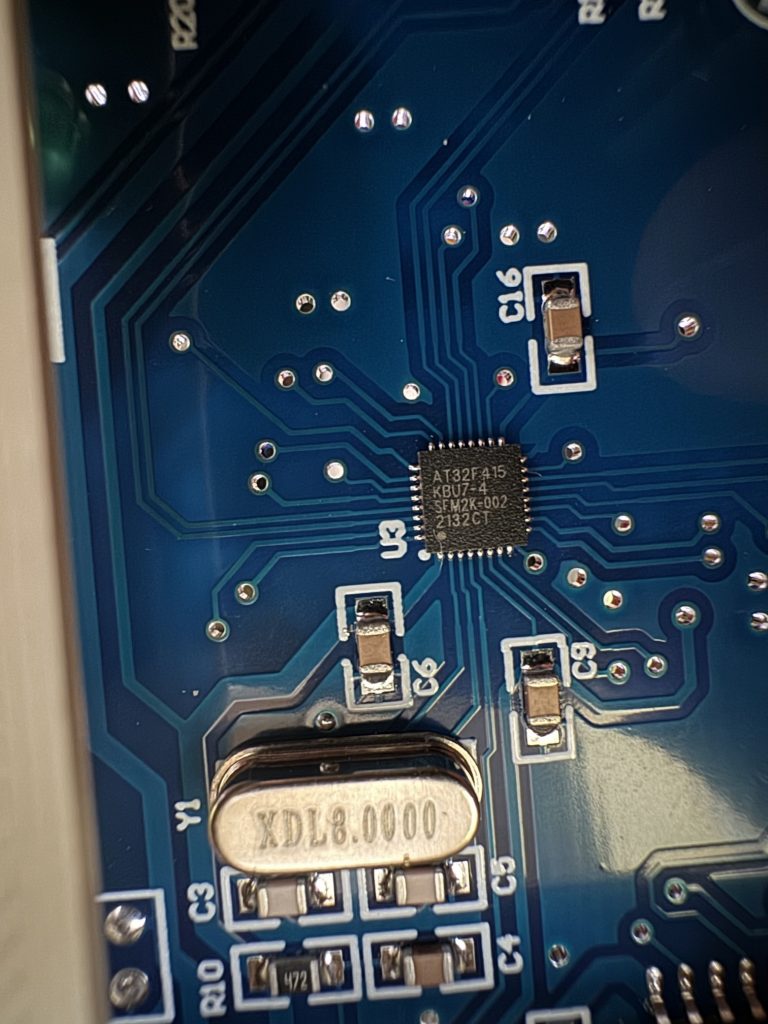
<p>There are a couple of different GOTEK models, one old and one newer. The story goes that the <a href="https://github.com/keirf/FlashFloppy/issues/454" target="_blank" rel="noopener" title="">price of the disk controller 10x&#8217;d</a> so the makers changed it and the firmware wasn&#8217;t immediately compatible. My one, bought on fleabay UK, May 2024 has the newer chip.</p>


<figure class="wp-block-image size-large"><img decoding="async" width="768" height="1024" src="https://psyphi.net/wp-uploads/2024/05/2024-05-24-17.35.57-768x1024.jpeg" alt="" class="wp-image-1024" srcset="https://psyphi.net/wp-uploads/2024/05/2024-05-24-17.35.57-768x1024.jpeg 768w, https://psyphi.net/wp-uploads/2024/05/2024-05-24-17.35.57-225x300.jpeg 225w, https://psyphi.net/wp-uploads/2024/05/2024-05-24-17.35.57-1152x1536.jpeg 1152w, https://psyphi.net/wp-uploads/2024/05/2024-05-24-17.35.57-1200x1600.jpeg 1200w, https://psyphi.net/wp-uploads/2024/05/2024-05-24-17.35.57.jpeg 1512w" sizes="(max-width: 709px) 85vw, (max-width: 909px) 67vw, (max-width: 984px) 61vw, (max-width: 1362px) 45vw, 600px" /><figcaption class="wp-element-caption">ARTERY AT32F415 GOTEK disk controller</figcaption></figure>


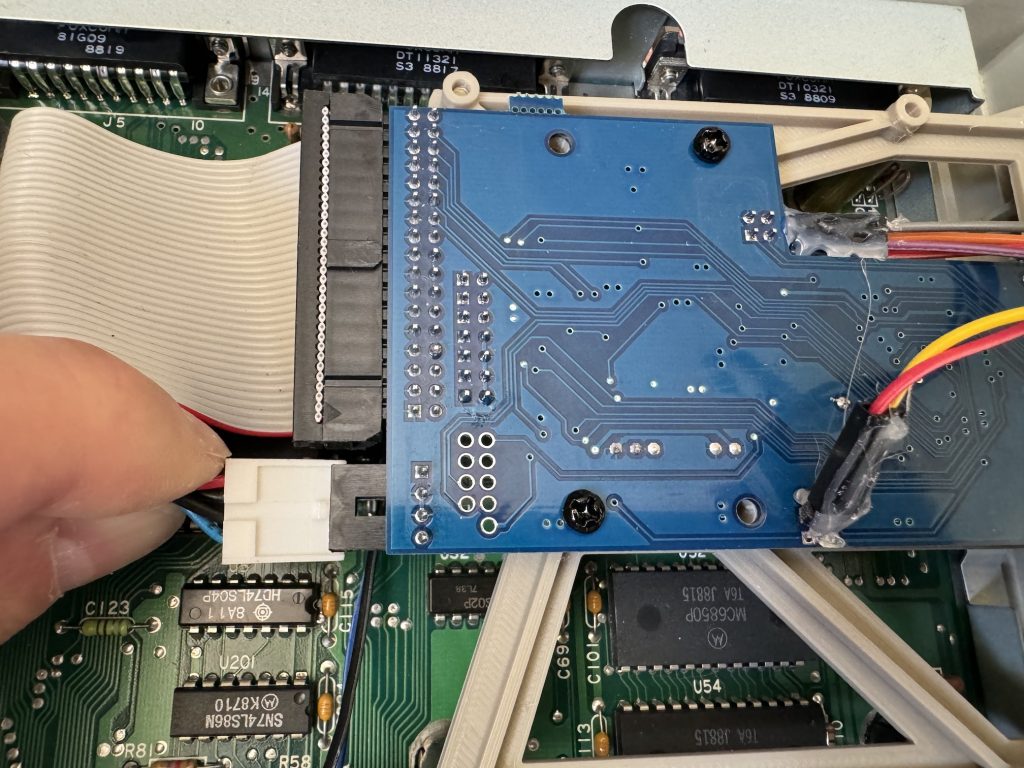
<p>The drive chassis is approximately the same size as the floppy drive being removed, but this one was found to be fractionally shorter (approx 1cm) so the power cable would not reach.</p>


<figure class="wp-block-image size-large"><img decoding="async" width="1024" height="768" src="https://psyphi.net/wp-uploads/2024/05/2024-05-25-15.39.07-1024x768.jpeg" alt="" class="wp-image-1025" srcset="https://psyphi.net/wp-uploads/2024/05/2024-05-25-15.39.07-1024x768.jpeg 1024w, https://psyphi.net/wp-uploads/2024/05/2024-05-25-15.39.07-300x225.jpeg 300w, https://psyphi.net/wp-uploads/2024/05/2024-05-25-15.39.07-1536x1152.jpeg 1536w, https://psyphi.net/wp-uploads/2024/05/2024-05-25-15.39.07-1200x900.jpeg 1200w, https://psyphi.net/wp-uploads/2024/05/2024-05-25-15.39.07.jpeg 2016w" sizes="(max-width: 709px) 85vw, (max-width: 909px) 67vw, (max-width: 1362px) 62vw, 840px" /><figcaption class="wp-element-caption">Power cable fails to reach even at full-stretch</figcaption></figure>


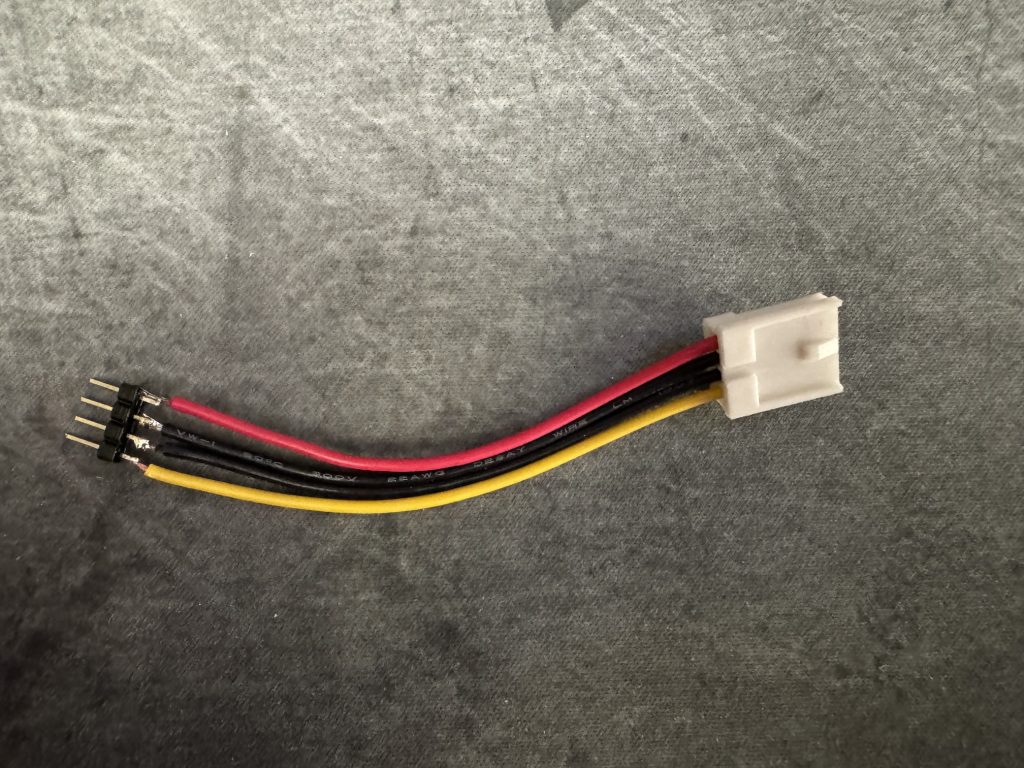
<p>This was resolved by cutting approxiamtely 6cm of floppy power cable from a dead ATX power supply, and soldering four spare header pins left over from an ESP32 project.</p>


<figure class="wp-block-image size-large"><img loading="lazy" decoding="async" width="1024" height="768" src="https://psyphi.net/wp-uploads/2024/05/2024-05-25-16.07.44-1024x768.jpeg" alt="" class="wp-image-1026" srcset="https://psyphi.net/wp-uploads/2024/05/2024-05-25-16.07.44-1024x768.jpeg 1024w, https://psyphi.net/wp-uploads/2024/05/2024-05-25-16.07.44-300x225.jpeg 300w, https://psyphi.net/wp-uploads/2024/05/2024-05-25-16.07.44-1536x1152.jpeg 1536w, https://psyphi.net/wp-uploads/2024/05/2024-05-25-16.07.44-1200x900.jpeg 1200w, https://psyphi.net/wp-uploads/2024/05/2024-05-25-16.07.44.jpeg 2016w" sizes="auto, (max-width: 709px) 85vw, (max-width: 909px) 67vw, (max-width: 1362px) 62vw, 840px" /><figcaption class="wp-element-caption">A salvaged floppy power connector extension</figcaption></figure>


<p></p>


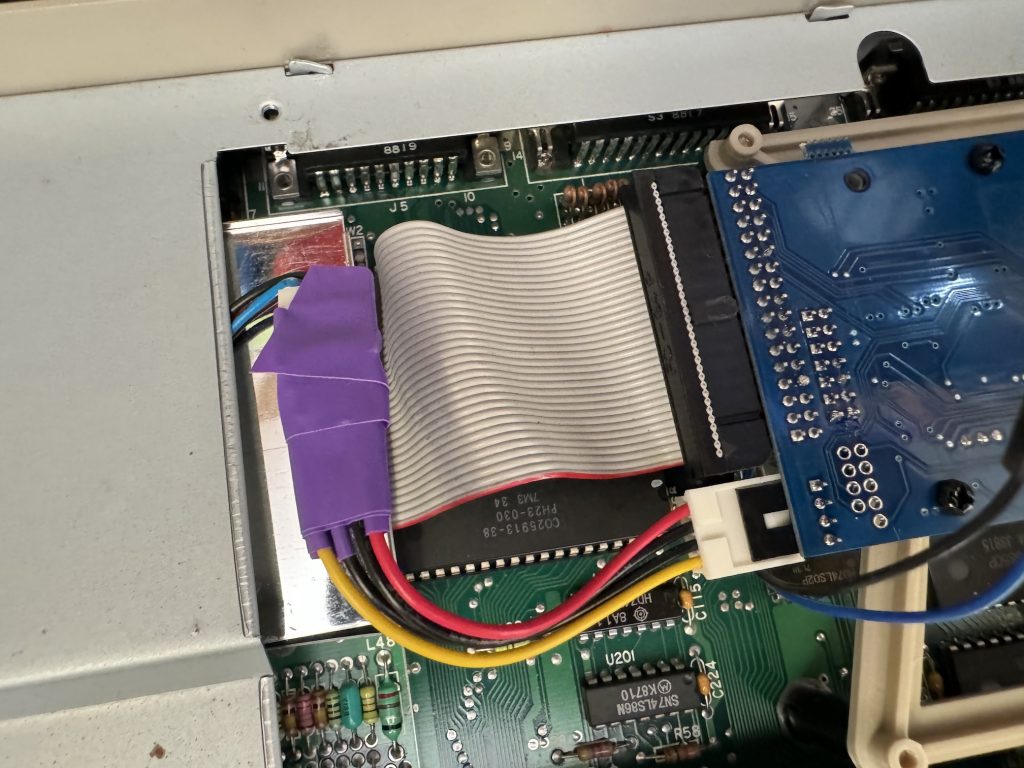
<p>Naturally shrink-wrap sleeving is never available to hand so some fine purple electrical tape had to do. Hot glue would probably work quite well to secure the header pins as well.</p>


<figure class="wp-block-image size-large"><img loading="lazy" decoding="async" width="1024" height="768" src="https://psyphi.net/wp-uploads/2024/05/2024-05-25-16.25.29-1024x768.jpeg" alt="" class="wp-image-1027" srcset="https://psyphi.net/wp-uploads/2024/05/2024-05-25-16.25.29-1024x768.jpeg 1024w, https://psyphi.net/wp-uploads/2024/05/2024-05-25-16.25.29-300x225.jpeg 300w, https://psyphi.net/wp-uploads/2024/05/2024-05-25-16.25.29-1536x1152.jpeg 1536w, https://psyphi.net/wp-uploads/2024/05/2024-05-25-16.25.29-1200x900.jpeg 1200w, https://psyphi.net/wp-uploads/2024/05/2024-05-25-16.25.29.jpeg 2016w" sizes="auto, (max-width: 709px) 85vw, (max-width: 909px) 67vw, (max-width: 1362px) 62vw, 840px" /></figure>


<p></p>


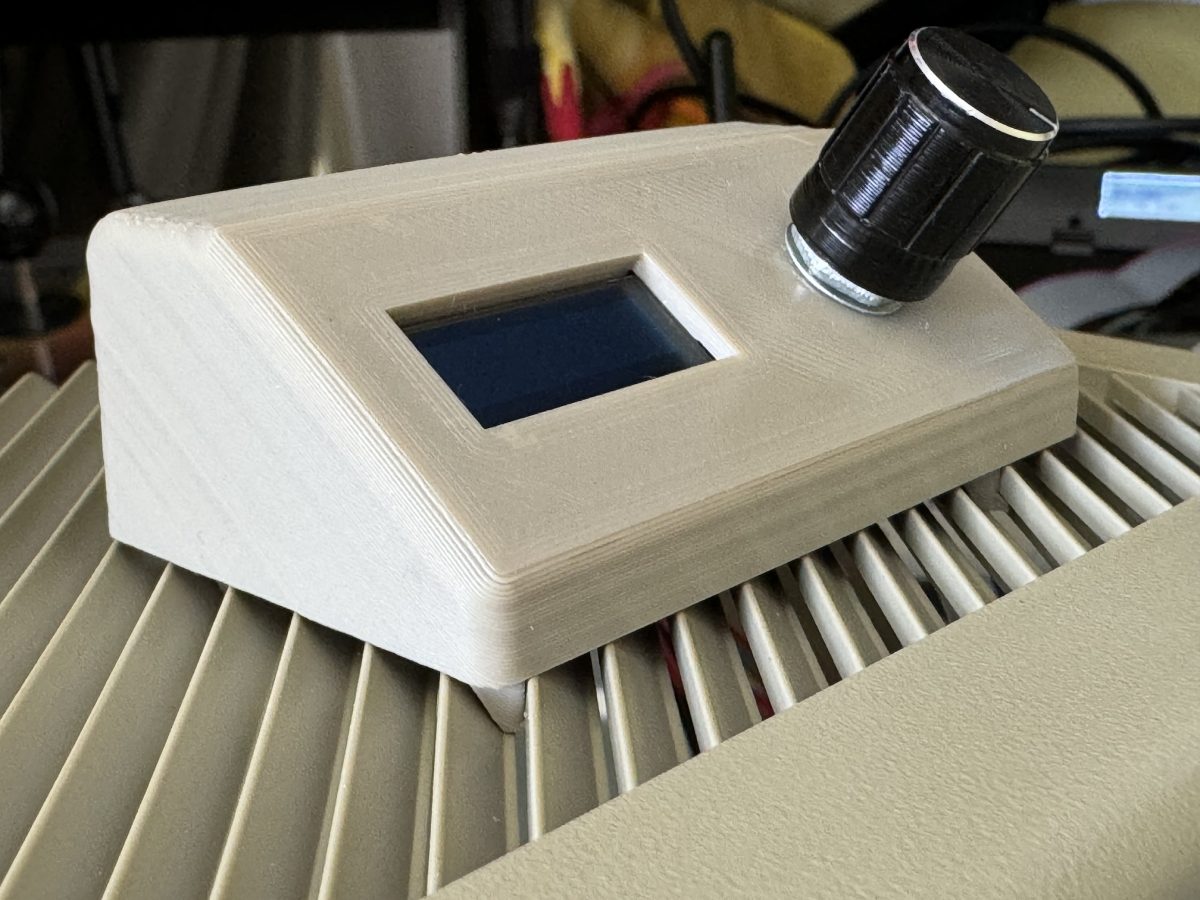
<p>Next come the flyleads for the GOTEK&#8217;s rotary controller and OLED display. Not all GOTEKs come with an external control/display &#8211; most seem to have the display built in and many only have up/down buttons, not a rotary control at all. Given the drive is on the side of the STFM, the standard display isn&#8217;t visible most of the time which isn&#8217;t very practical, so the external module seems much more useful. The display needs careful positioning as redoing it later is a PITA.</p>


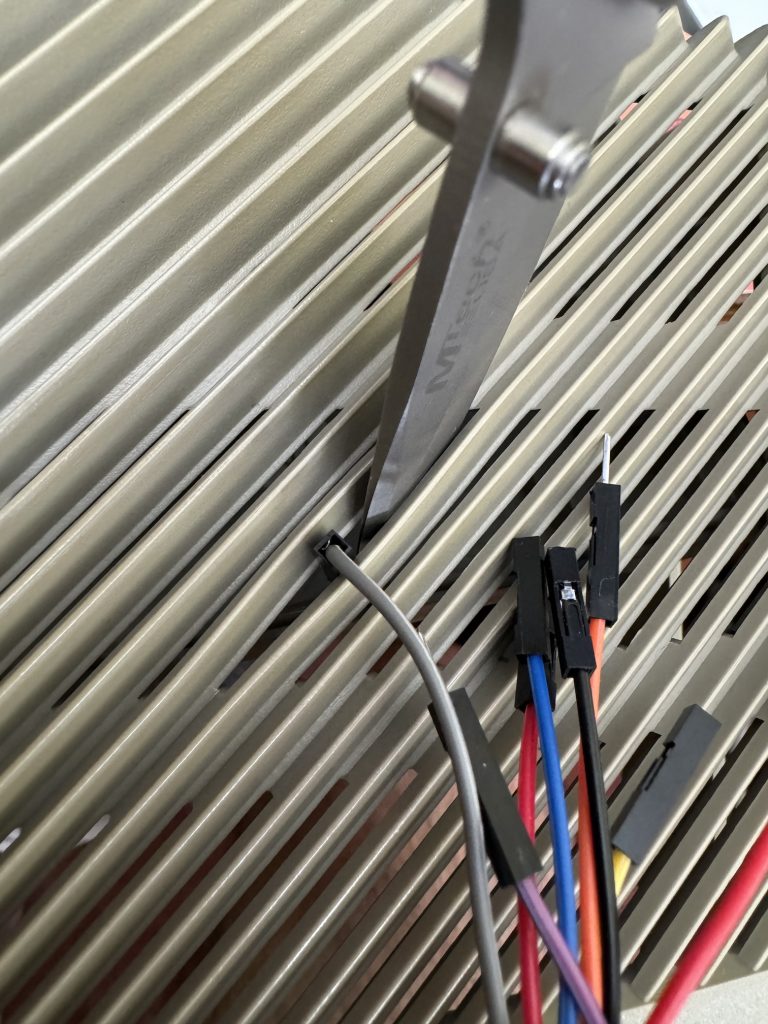
<p>A small knife was used to very gently pry open one of the slots in the top of the case in order to position the display properly when clipped in. This is necessary because the connector blocks don&#8217;t fit through the slot without a little extra encouragement.</p>


<figure class="wp-block-image size-large"><img loading="lazy" decoding="async" width="768" height="1024" src="https://psyphi.net/wp-uploads/2024/05/2024-05-25-16.18.11-768x1024.jpeg" alt="" class="wp-image-1029" srcset="https://psyphi.net/wp-uploads/2024/05/2024-05-25-16.18.11-768x1024.jpeg 768w, https://psyphi.net/wp-uploads/2024/05/2024-05-25-16.18.11-225x300.jpeg 225w, https://psyphi.net/wp-uploads/2024/05/2024-05-25-16.18.11-1152x1536.jpeg 1152w, https://psyphi.net/wp-uploads/2024/05/2024-05-25-16.18.11-1200x1600.jpeg 1200w, https://psyphi.net/wp-uploads/2024/05/2024-05-25-16.18.11.jpeg 1512w" sizes="auto, (max-width: 709px) 85vw, (max-width: 909px) 67vw, (max-width: 984px) 61vw, (max-width: 1362px) 45vw, 600px" /><figcaption class="wp-element-caption">Gentle encouragement. Don&#8217;t crack the case!</figcaption></figure>


<p></p>


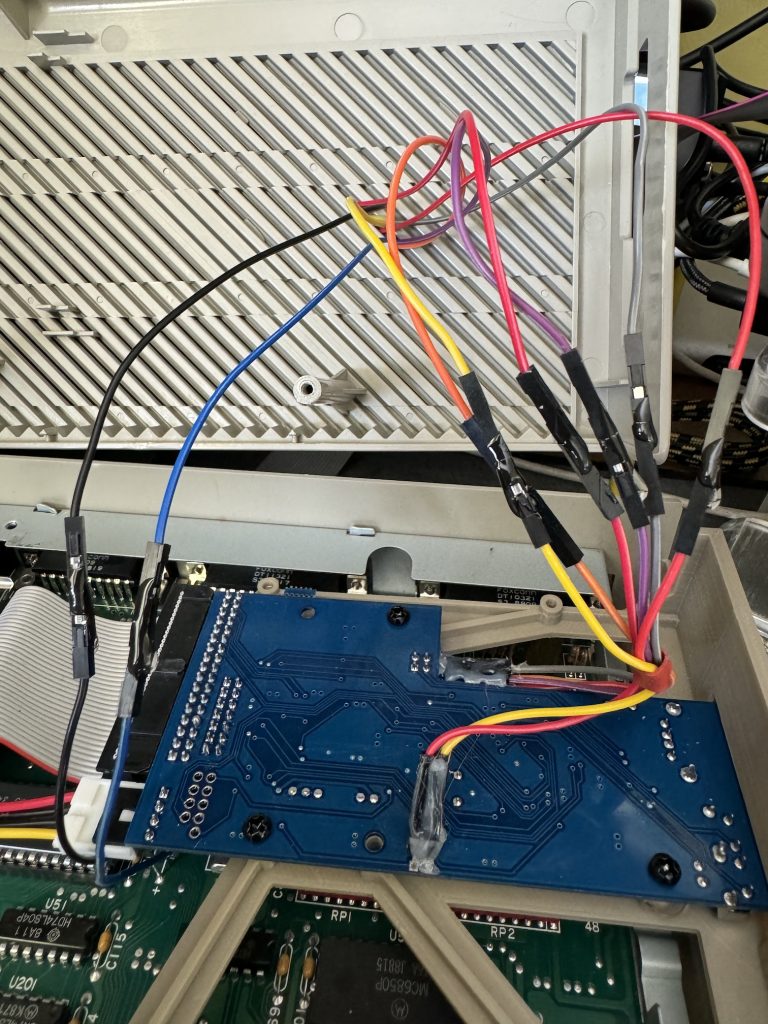
<p>I took a moment to appreciate the colour-coding on the wires and the fact that the connectors on duplicate colours are alternately polarised meaning they cannot be connected incorrectly. That&#8217;s super helpful, but countered by the fact these one-pin blocks don&#8217;t make very solid mechanical contact, tending to fall out if you look at them wrong. Securing them using small spots of superglue seems to help.</p>


<figure class="wp-block-image size-large"><img loading="lazy" decoding="async" width="768" height="1024" src="https://psyphi.net/wp-uploads/2024/05/2024-05-25-16.33.24-768x1024.jpeg" alt="" class="wp-image-1030" srcset="https://psyphi.net/wp-uploads/2024/05/2024-05-25-16.33.24-768x1024.jpeg 768w, https://psyphi.net/wp-uploads/2024/05/2024-05-25-16.33.24-225x300.jpeg 225w, https://psyphi.net/wp-uploads/2024/05/2024-05-25-16.33.24-1152x1536.jpeg 1152w, https://psyphi.net/wp-uploads/2024/05/2024-05-25-16.33.24-1200x1600.jpeg 1200w, https://psyphi.net/wp-uploads/2024/05/2024-05-25-16.33.24.jpeg 1512w" sizes="auto, (max-width: 709px) 85vw, (max-width: 909px) 67vw, (max-width: 984px) 61vw, (max-width: 1362px) 45vw, 600px" /><figcaption class="wp-element-caption">Flyleads superglued into place</figcaption></figure>


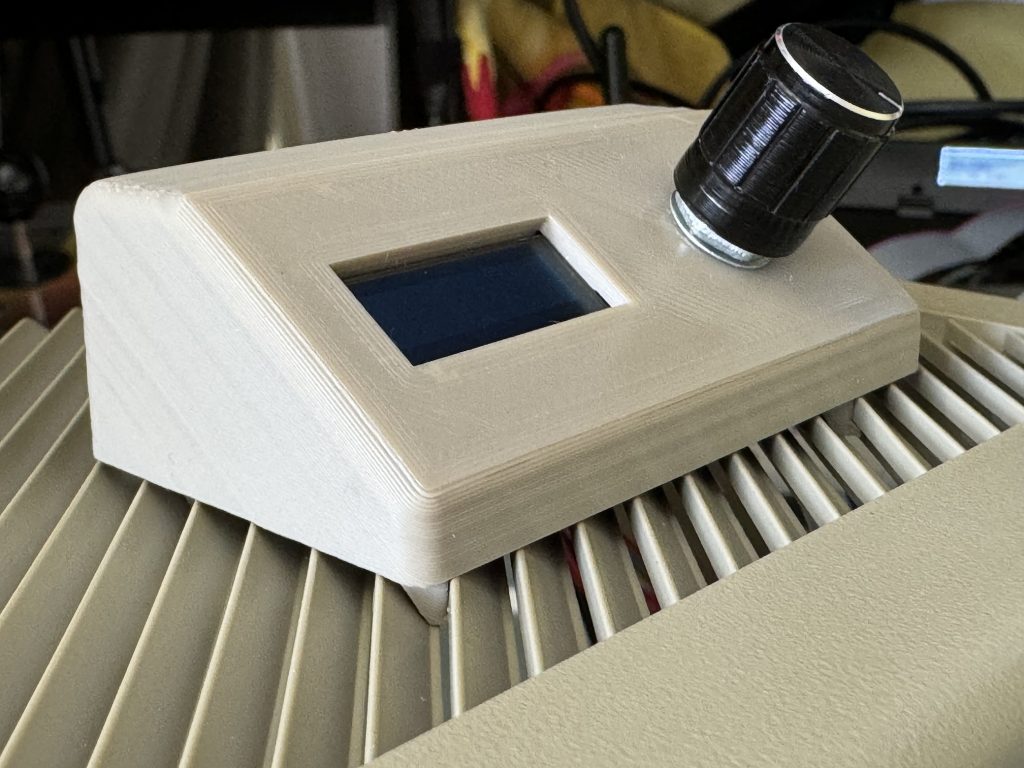
<p>The excess wires are pushed through from the above and the controller/display module is positioned and clipped onto the top of the ST case such that the wires can&#8217;t be seen.</p>


<figure class="wp-block-image size-large"><img loading="lazy" decoding="async" width="1024" height="768" src="https://psyphi.net/wp-uploads/2024/05/2024-05-25-16.23.21-1024x768.jpeg" alt="" class="wp-image-1032" srcset="https://psyphi.net/wp-uploads/2024/05/2024-05-25-16.23.21-1024x768.jpeg 1024w, https://psyphi.net/wp-uploads/2024/05/2024-05-25-16.23.21-300x225.jpeg 300w, https://psyphi.net/wp-uploads/2024/05/2024-05-25-16.23.21-1536x1152.jpeg 1536w, https://psyphi.net/wp-uploads/2024/05/2024-05-25-16.23.21-1200x900.jpeg 1200w, https://psyphi.net/wp-uploads/2024/05/2024-05-25-16.23.21.jpeg 2016w" sizes="auto, (max-width: 709px) 85vw, (max-width: 909px) 67vw, (max-width: 1362px) 62vw, 840px" /><figcaption class="wp-element-caption">Rotary Controller and OLED breakout module</figcaption></figure>


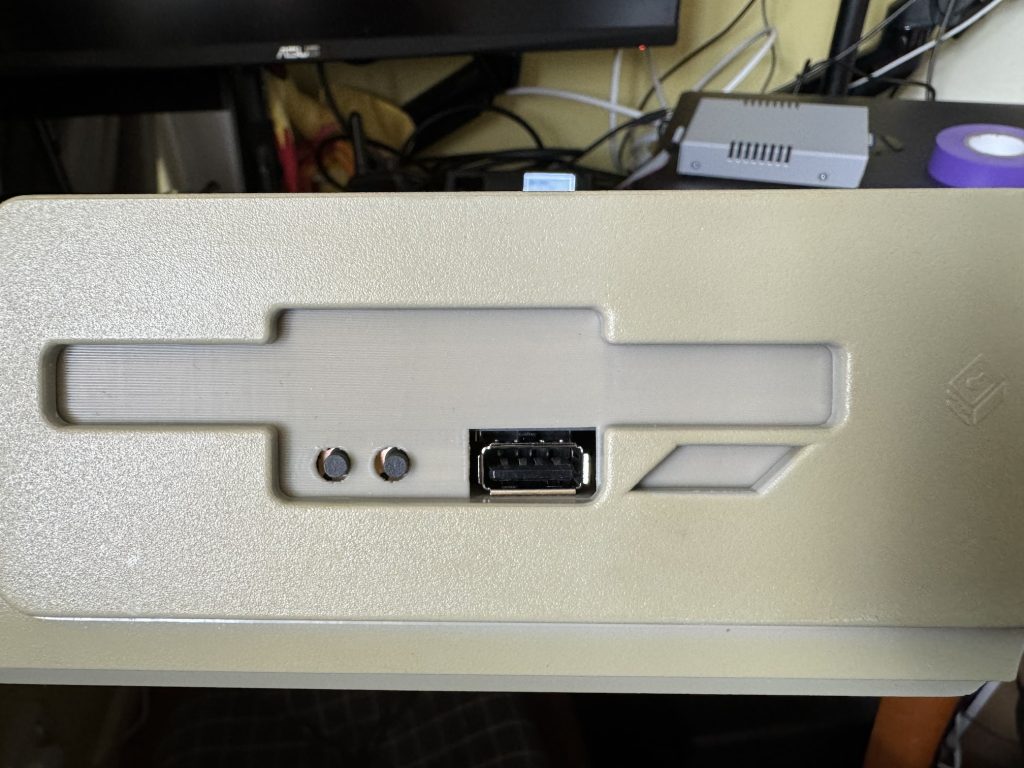
<p>The drive itself has the USB socket very close to the old eject button surround moulding which interferes very slightly but in practice it doesn&#8217;t seem to affect USB connectivity. Unfortunately in this configuration, in order to allow the ribbon cable to reach, the drive is technically mounted upside-down.</p>


<figure class="wp-block-image size-large"><img loading="lazy" decoding="async" width="1024" height="768" src="https://psyphi.net/wp-uploads/2024/05/2024-05-25-16.15.50-1024x768.jpeg" alt="" class="wp-image-1034" srcset="https://psyphi.net/wp-uploads/2024/05/2024-05-25-16.15.50-1024x768.jpeg 1024w, https://psyphi.net/wp-uploads/2024/05/2024-05-25-16.15.50-300x225.jpeg 300w, https://psyphi.net/wp-uploads/2024/05/2024-05-25-16.15.50-1536x1152.jpeg 1536w, https://psyphi.net/wp-uploads/2024/05/2024-05-25-16.15.50-1200x900.jpeg 1200w, https://psyphi.net/wp-uploads/2024/05/2024-05-25-16.15.50.jpeg 2016w" sizes="auto, (max-width: 709px) 85vw, (max-width: 909px) 67vw, (max-width: 1362px) 62vw, 840px" /><figcaption class="wp-element-caption">Mounted GOTEK drive</figcaption></figure>


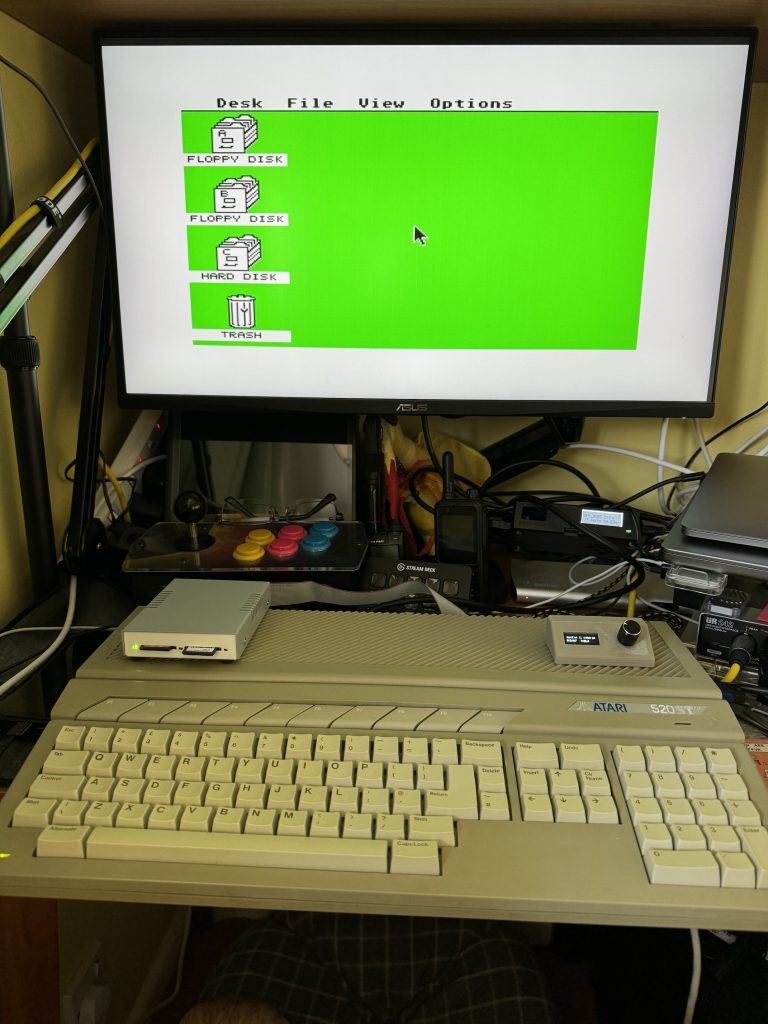
<p>With everything closed back up it&#8217;s quite a smart-looking solution. Pretending to be a floppy drive doesn&#8217;t remove the quirks of using floppy disks but it does make them easier to deal with.</p>


<figure class="wp-block-image size-large"><img loading="lazy" decoding="async" width="768" height="1024" src="https://psyphi.net/wp-uploads/2024/05/2024-05-25-17.00.58-768x1024.jpeg" alt="" class="wp-image-1035" srcset="https://psyphi.net/wp-uploads/2024/05/2024-05-25-17.00.58-768x1024.jpeg 768w, https://psyphi.net/wp-uploads/2024/05/2024-05-25-17.00.58-225x300.jpeg 225w, https://psyphi.net/wp-uploads/2024/05/2024-05-25-17.00.58-1152x1536.jpeg 1152w, https://psyphi.net/wp-uploads/2024/05/2024-05-25-17.00.58-1536x2048.jpeg 1536w, https://psyphi.net/wp-uploads/2024/05/2024-05-25-17.00.58-1200x1600.jpeg 1200w, https://psyphi.net/wp-uploads/2024/05/2024-05-25-17.00.58-scaled.jpeg 1920w" sizes="auto, (max-width: 709px) 85vw, (max-width: 909px) 67vw, (max-width: 984px) 61vw, (max-width: 1362px) 45vw, 600px" /><figcaption class="wp-element-caption">Atari 520STFM pictured with Ultrasatan SD virtual hard disk and GOTEK virtual floppy drive</figcaption></figure>


<p>The firmware version shipped on the drive seems fine but it&#8217;s possible to flash updates using the <a href="https://github.com/keirf/flashfloppy" target="_blank" rel="noopener" title="">FlashFloppy code and documentation here</a>. All in all the GOTEK is pretty easy to fit aside from the extra power extension. I will almost certainly be fitting more in the future.</p>
	</div><!-- .entry-content -->

	<footer class="entry-footer">
		<span class="byline"><img alt='' src='https://secure.gravatar.com/avatar/f715f8335258578c567eb8c22335f1cee22c971c2aff8be27c4d8d934c436503?s=49&#038;d=mm&#038;r=g' srcset='https://secure.gravatar.com/avatar/f715f8335258578c567eb8c22335f1cee22c971c2aff8be27c4d8d934c436503?s=98&#038;d=mm&#038;r=g 2x' class='avatar avatar-49 photo' height='49' width='49' loading='lazy' decoding='async'/><span class="screen-reader-text">Author </span><span class="author vcard"><a class="url fn n" href="https://psyphi.net/blog/author/rmp/">Roger Pettett</a></span></span><span class="posted-on"><span class="screen-reader-text">Posted on </span><a href="https://psyphi.net/blog/2024/05/fitting-the-gotek-flashfloppy/" rel="bookmark"><time class="entry-date published" datetime="2024-05-27T18:23:21+00:00">May 27, 2024</time><time class="updated" datetime="2024-05-27T18:29:04+00:00">May 27, 2024</time></a></span><span class="cat-links"><span class="screen-reader-text">Categories </span><a href="https://psyphi.net/blog/category/hardware/" rel="category tag">hardware</a>, <a href="https://psyphi.net/blog/category/retrocomputing/" rel="category tag">retrocomputing</a></span><span class="tags-links"><span class="screen-reader-text">Tags </span><a href="https://psyphi.net/blog/tag/atari/" rel="tag">atari</a>, <a href="https://psyphi.net/blog/tag/atarist/" rel="tag">atarist</a>, <a href="https://psyphi.net/blog/tag/ataristfm/" rel="tag">ataristfm</a>, <a href="https://psyphi.net/blog/tag/hardware/" rel="tag">hardware</a>, <a href="https://psyphi.net/blog/tag/retrocomputing/" rel="tag">retrocomputing</a></span>			</footer><!-- .entry-footer -->
</article><!-- #post-1023 -->

<article id="post-1010" class="post-1010 post type-post status-publish format-standard has-post-thumbnail hentry category-hardware category-retrocomputing tag-atari tag-atarist tag-ataristfm tag-hardware tag-retrocomputing">
	<header class="entry-header">
		
		<h2 class="entry-title"><a href="https://psyphi.net/blog/2024/05/atari-stfm520-keyboard-case-refurbishing/" rel="bookmark">Atari STFM520 keyboard &amp; case refurbishing</a></h2>	</header><!-- .entry-header -->


	<a class="post-thumbnail" href="https://psyphi.net/blog/2024/05/atari-stfm520-keyboard-case-refurbishing/" aria-hidden="true">
		<img width="1200" height="848" src="https://psyphi.net/wp-uploads/2024/05/2024-05-18-16.14.16-e1716834389537-1200x848.jpeg" class="attachment-post-thumbnail size-post-thumbnail wp-post-image" alt="Atari STFM520 keyboard &amp; case refurbishing" decoding="async" loading="lazy" srcset="https://psyphi.net/wp-uploads/2024/05/2024-05-18-16.14.16-e1716834389537-1200x848.jpeg 1200w, https://psyphi.net/wp-uploads/2024/05/2024-05-18-16.14.16-e1716834389537-300x212.jpeg 300w, https://psyphi.net/wp-uploads/2024/05/2024-05-18-16.14.16-e1716834389537-1024x723.jpeg 1024w, https://psyphi.net/wp-uploads/2024/05/2024-05-18-16.14.16-e1716834389537.jpeg 1512w" sizes="(max-width: 709px) 85vw, (max-width: 909px) 67vw, (max-width: 984px) 60vw, (max-width: 1362px) 62vw, 840px" />	</a>

		
	<div class="entry-content">
		
<p>In part three of my ongoing nostalgiathon refurbishing an Atari STFM it&#8217;s time to clean up the keyboard and case.</p>


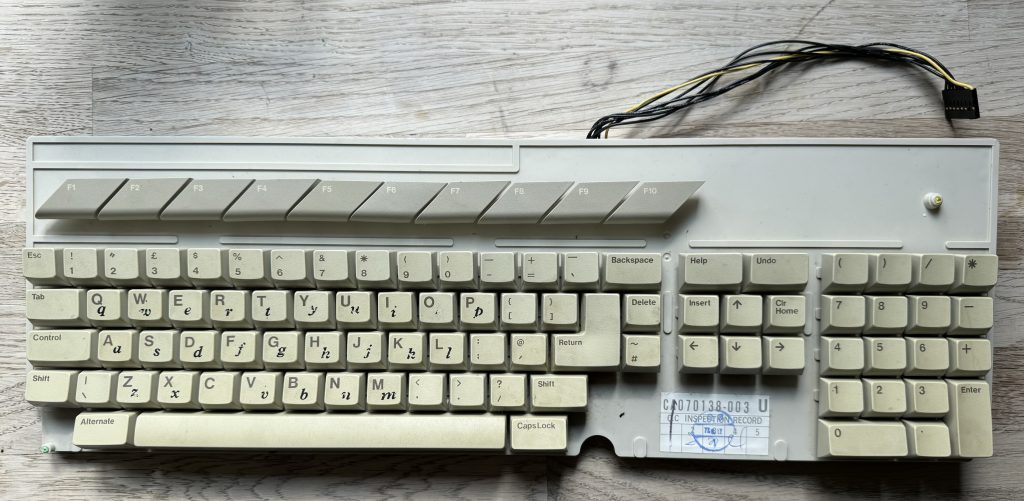
<figure class="wp-block-image size-large"><img loading="lazy" decoding="async" width="1024" height="501" src="https://psyphi.net/wp-uploads/2024/05/2024-05-18-16.13.02-1024x501.jpeg" alt="" class="wp-image-1011" srcset="https://psyphi.net/wp-uploads/2024/05/2024-05-18-16.13.02-1024x501.jpeg 1024w, https://psyphi.net/wp-uploads/2024/05/2024-05-18-16.13.02-300x147.jpeg 300w, https://psyphi.net/wp-uploads/2024/05/2024-05-18-16.13.02-1536x752.jpeg 1536w, https://psyphi.net/wp-uploads/2024/05/2024-05-18-16.13.02-2048x1002.jpeg 2048w, https://psyphi.net/wp-uploads/2024/05/2024-05-18-16.13.02-1200x587.jpeg 1200w" sizes="auto, (max-width: 709px) 85vw, (max-width: 909px) 67vw, (max-width: 1362px) 62vw, 840px" /><figcaption class="wp-element-caption">The keyboard assembly before cleaning</figcaption></figure>


<p>Step one is to remove the keyboard from the chassis &#8211; very simple to remove the seven short screws from underneath to release the top-side of the case. The keyboard floats on the shielding and is connected via a delicate 8 pin (7 wired and one polarising blank) header connector. This keyboard wasn&#8217;t very grubby &#8211; I&#8217;ve definitely seen much worse. A little grime and some letraset lower case, plus the usual dust, fluff and crumbs in-between the keys.</p>


<figure class="wp-block-image size-large"><img decoding="async" src="https://psyphi.net/wp-uploads/2024/05/2024-05-18-16.14.16-768x1024.jpeg" alt="" class="wp-image-1012"/><figcaption class="wp-element-caption">Detail of using a keycap puller</figcaption></figure>


<p>Using a keycap puller makes very quick work of removing all the key caps without damaging the switches or support pillars. The Enter and Space keys also have metal stabilisation bars which can be carefully unclipped from the keyboard chassis. Be gentle with these bars &#8211; they&#8217;re attached to the keycaps using small plastic clips which are easy to bend and break.</p>


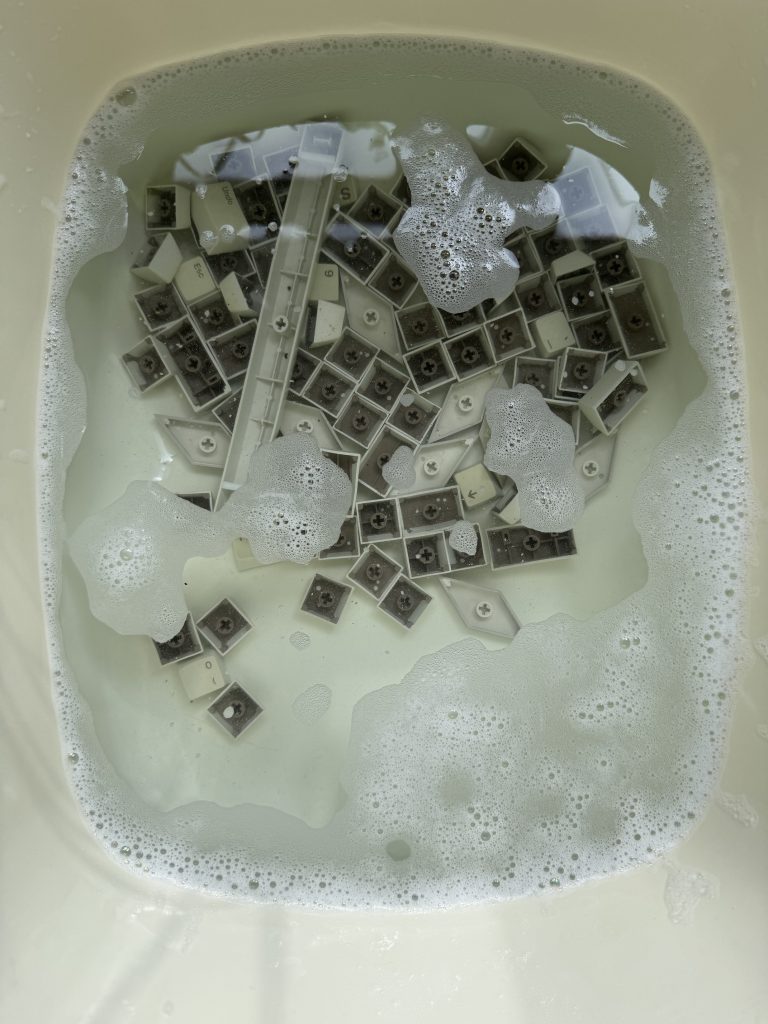
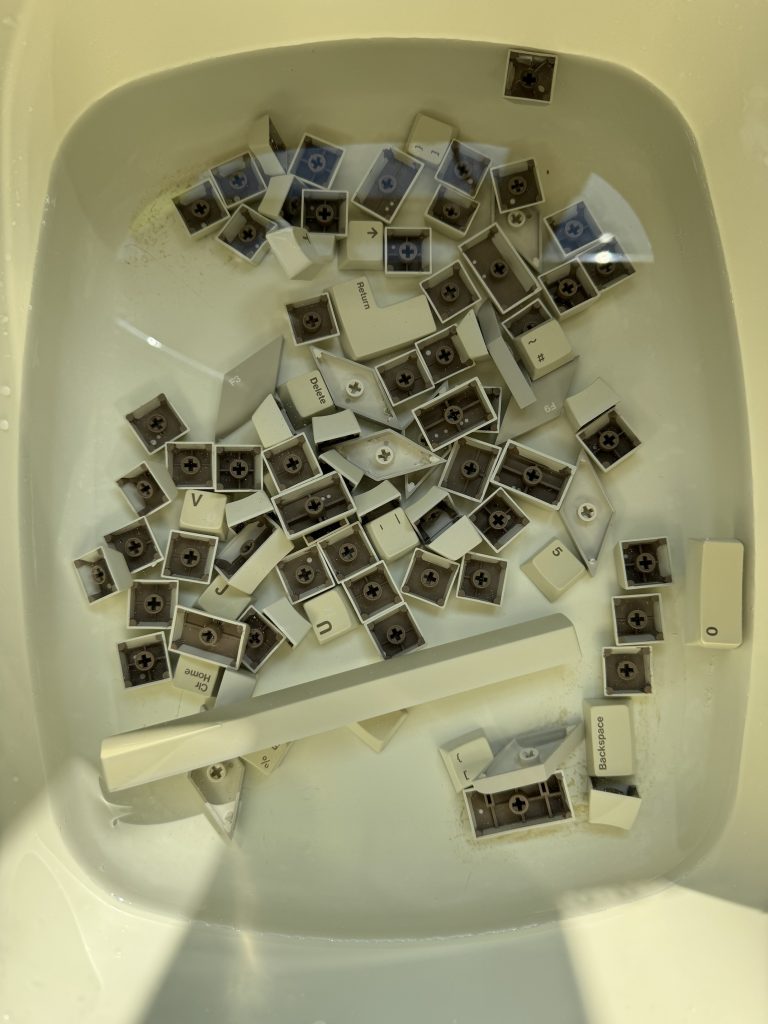
<figure class="wp-block-image size-large"><img loading="lazy" decoding="async" width="768" height="1024" src="https://psyphi.net/wp-uploads/2024/05/2024-05-18-16.28.24-768x1024.jpeg" alt="" class="wp-image-1013" srcset="https://psyphi.net/wp-uploads/2024/05/2024-05-18-16.28.24-768x1024.jpeg 768w, https://psyphi.net/wp-uploads/2024/05/2024-05-18-16.28.24-225x300.jpeg 225w, https://psyphi.net/wp-uploads/2024/05/2024-05-18-16.28.24-1152x1536.jpeg 1152w, https://psyphi.net/wp-uploads/2024/05/2024-05-18-16.28.24-1536x2048.jpeg 1536w, https://psyphi.net/wp-uploads/2024/05/2024-05-18-16.28.24-1200x1600.jpeg 1200w, https://psyphi.net/wp-uploads/2024/05/2024-05-18-16.28.24-scaled.jpeg 1920w" sizes="auto, (max-width: 709px) 85vw, (max-width: 909px) 67vw, (max-width: 984px) 61vw, (max-width: 1362px) 45vw, 600px" /><figcaption class="wp-element-caption">Alphabet soup: keycaps taking a bath</figcaption></figure>


<p>All the keycaps soaked in warm water and washing up liquid. These were individually scrubbed with a soft washing up pad, which was enough to remove the grime and the letraset.</p>


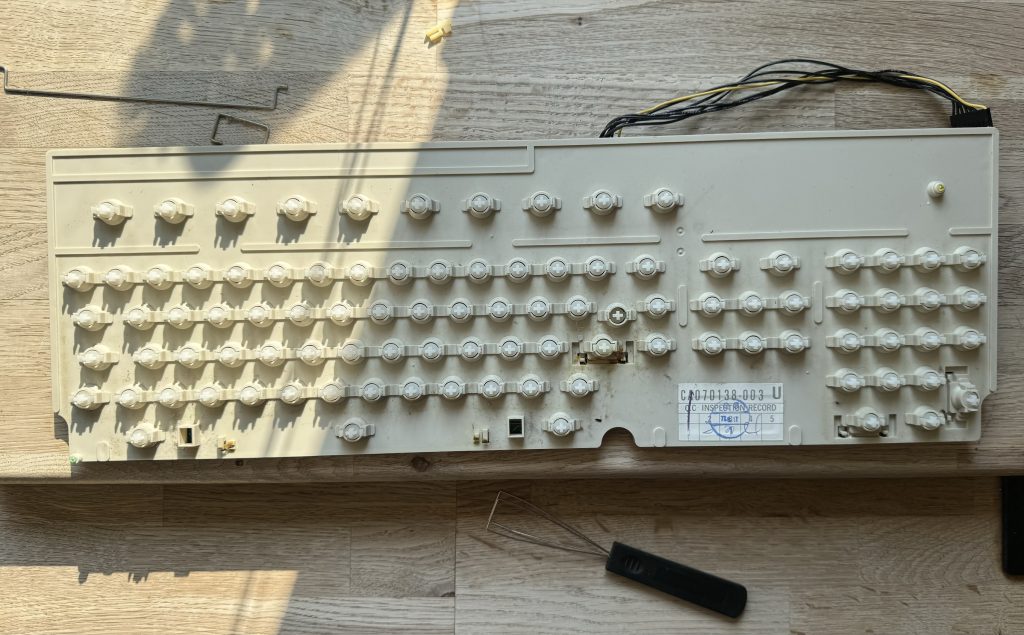
<figure class="wp-block-image size-large"><img loading="lazy" decoding="async" width="1024" height="635" src="https://psyphi.net/wp-uploads/2024/05/2024-05-18-16.56.42-1024x635.jpeg" alt="" class="wp-image-1014" srcset="https://psyphi.net/wp-uploads/2024/05/2024-05-18-16.56.42-1024x635.jpeg 1024w, https://psyphi.net/wp-uploads/2024/05/2024-05-18-16.56.42-300x186.jpeg 300w, https://psyphi.net/wp-uploads/2024/05/2024-05-18-16.56.42-1536x953.jpeg 1536w, https://psyphi.net/wp-uploads/2024/05/2024-05-18-16.56.42-2048x1271.jpeg 2048w, https://psyphi.net/wp-uploads/2024/05/2024-05-18-16.56.42-1200x744.jpeg 1200w" sizes="auto, (max-width: 709px) 85vw, (max-width: 909px) 67vw, (max-width: 1362px) 62vw, 840px" /><figcaption class="wp-element-caption">The keyboard assembly with all keycaps removed</figcaption></figure>


<p>The keyboard chassis with included light muck. This was wiped first with surface cleaning disinfectant wipes then with cotton-buds and isopropyl alcohol (IPA).</p>


<figure class="wp-block-image size-large"><img loading="lazy" decoding="async" width="768" height="1024" src="https://psyphi.net/wp-uploads/2024/05/2024-05-18-16.56.51-768x1024.jpeg" alt="" class="wp-image-1015" srcset="https://psyphi.net/wp-uploads/2024/05/2024-05-18-16.56.51-768x1024.jpeg 768w, https://psyphi.net/wp-uploads/2024/05/2024-05-18-16.56.51-225x300.jpeg 225w, https://psyphi.net/wp-uploads/2024/05/2024-05-18-16.56.51-1152x1536.jpeg 1152w, https://psyphi.net/wp-uploads/2024/05/2024-05-18-16.56.51-1536x2048.jpeg 1536w, https://psyphi.net/wp-uploads/2024/05/2024-05-18-16.56.51-1200x1600.jpeg 1200w, https://psyphi.net/wp-uploads/2024/05/2024-05-18-16.56.51-scaled.jpeg 1920w" sizes="auto, (max-width: 709px) 85vw, (max-width: 909px) 67vw, (max-width: 984px) 61vw, (max-width: 1362px) 45vw, 600px" /><figcaption class="wp-element-caption">Rinsing the keycaps</figcaption></figure>


<p>After scrubbing, the water was changed and the key caps were rinsed.</p>


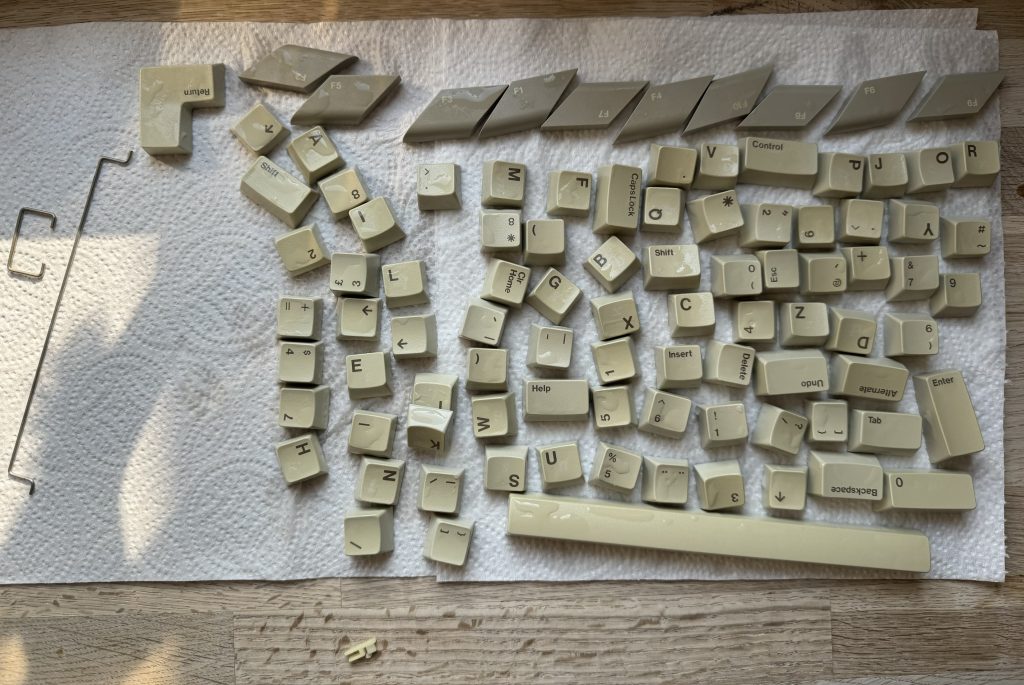
<figure class="wp-block-image size-large"><img loading="lazy" decoding="async" width="1024" height="685" src="https://psyphi.net/wp-uploads/2024/05/2024-05-18-17.17.30-1024x685.jpeg" alt="" class="wp-image-1016" srcset="https://psyphi.net/wp-uploads/2024/05/2024-05-18-17.17.30-1024x685.jpeg 1024w, https://psyphi.net/wp-uploads/2024/05/2024-05-18-17.17.30-300x201.jpeg 300w, https://psyphi.net/wp-uploads/2024/05/2024-05-18-17.17.30-1536x1027.jpeg 1536w, https://psyphi.net/wp-uploads/2024/05/2024-05-18-17.17.30-2048x1369.jpeg 2048w, https://psyphi.net/wp-uploads/2024/05/2024-05-18-17.17.30-1200x802.jpeg 1200w" sizes="auto, (max-width: 709px) 85vw, (max-width: 909px) 67vw, (max-width: 1362px) 62vw, 840px" /><figcaption class="wp-element-caption">Stabilisation bars and keycaps drying</figcaption></figure>


<p>Keycaps were left to dry on kitchen towel. Also visible are the stabilisation bars for Enter and Space on the left, and one of the stabilisation support clips on the bottom. </p>


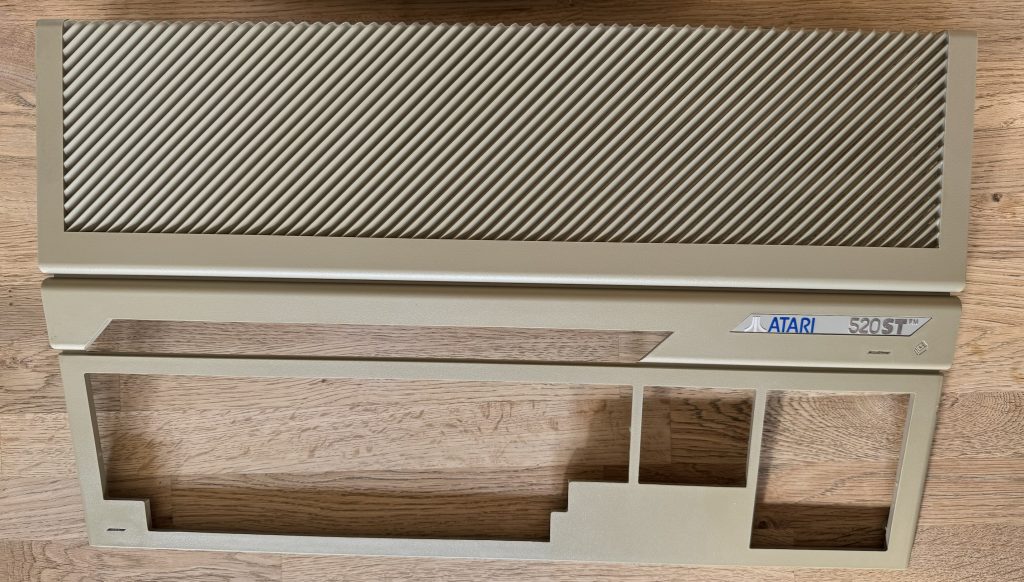
<figure class="wp-block-image size-large"><img loading="lazy" decoding="async" width="1024" height="582" src="https://psyphi.net/wp-uploads/2024/05/2024-05-18-17.49.04-1024x582.jpeg" alt="" class="wp-image-1017" srcset="https://psyphi.net/wp-uploads/2024/05/2024-05-18-17.49.04-1024x582.jpeg 1024w, https://psyphi.net/wp-uploads/2024/05/2024-05-18-17.49.04-300x170.jpeg 300w, https://psyphi.net/wp-uploads/2024/05/2024-05-18-17.49.04-1536x873.jpeg 1536w, https://psyphi.net/wp-uploads/2024/05/2024-05-18-17.49.04-2048x1164.jpeg 2048w, https://psyphi.net/wp-uploads/2024/05/2024-05-18-17.49.04-1200x682.jpeg 1200w" sizes="auto, (max-width: 709px) 85vw, (max-width: 909px) 67vw, (max-width: 1362px) 62vw, 840px" /><figcaption class="wp-element-caption">Oxicleaned top case</figcaption></figure>


<p>Whilst the key caps were being cleaned, advantage was taken of a pleasant sunny afternoon. The top case was liberally sprayed with oxyclean peroxide spray (similar to Retrobright) and left in the sun for several hours, respraying and rotating every half hour or so. This can also be wrapped in clingfilm to reduce or avoid respraying.</p>


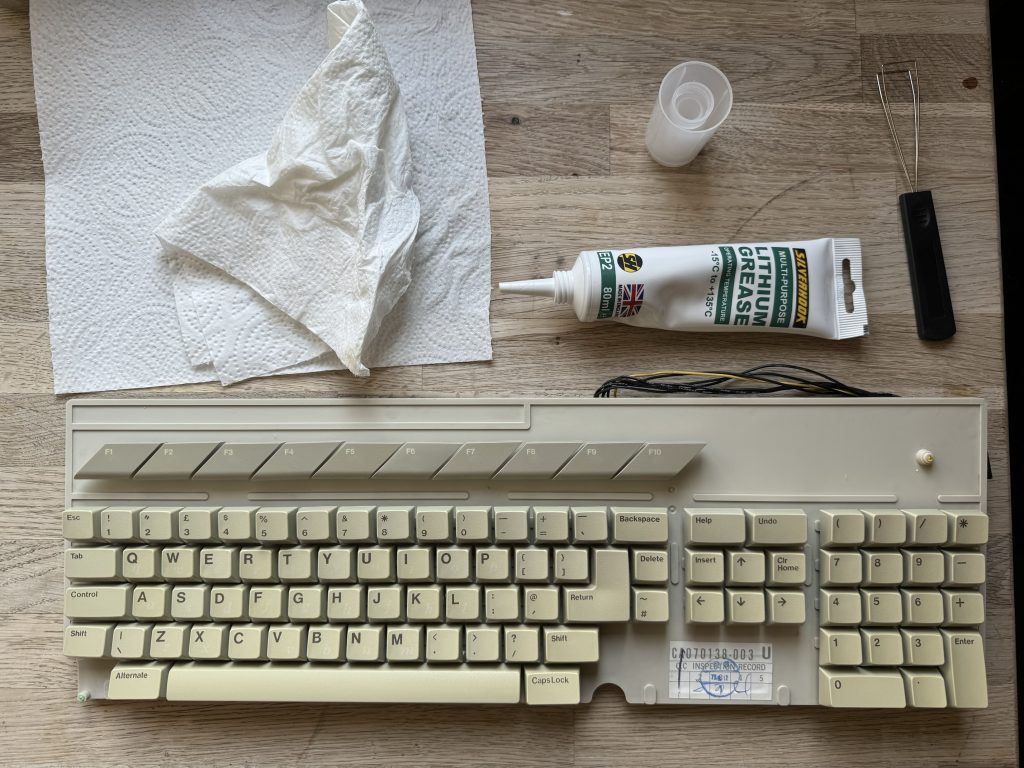
<figure class="wp-block-image size-large"><img loading="lazy" decoding="async" width="1024" height="768" src="https://psyphi.net/wp-uploads/2024/05/2024-05-18-17.43.21-1024x768.jpeg" alt="" class="wp-image-1018" srcset="https://psyphi.net/wp-uploads/2024/05/2024-05-18-17.43.21-1024x768.jpeg 1024w, https://psyphi.net/wp-uploads/2024/05/2024-05-18-17.43.21-300x225.jpeg 300w, https://psyphi.net/wp-uploads/2024/05/2024-05-18-17.43.21-1536x1152.jpeg 1536w, https://psyphi.net/wp-uploads/2024/05/2024-05-18-17.43.21-2048x1536.jpeg 2048w, https://psyphi.net/wp-uploads/2024/05/2024-05-18-17.43.21-1200x900.jpeg 1200w" sizes="auto, (max-width: 709px) 85vw, (max-width: 909px) 67vw, (max-width: 1362px) 62vw, 840px" /><figcaption class="wp-element-caption">Reassembled keyboard &#8211; looking clean!</figcaption></figure>


<p>All the keycaps were replaced using a reference photo taken before disassembly. The stabiliser pivots also had a pinhead of lithium grease applied. I imagine this is only really to reduce squeaking.</p>


<figure class="wp-block-image size-large"><img loading="lazy" decoding="async" width="1024" height="661" src="https://psyphi.net/wp-uploads/2024/05/2024-05-18-18.00.48-1024x661.jpeg" alt="" class="wp-image-1019" srcset="https://psyphi.net/wp-uploads/2024/05/2024-05-18-18.00.48-1024x661.jpeg 1024w, https://psyphi.net/wp-uploads/2024/05/2024-05-18-18.00.48-300x194.jpeg 300w, https://psyphi.net/wp-uploads/2024/05/2024-05-18-18.00.48-1536x991.jpeg 1536w, https://psyphi.net/wp-uploads/2024/05/2024-05-18-18.00.48-2048x1321.jpeg 2048w, https://psyphi.net/wp-uploads/2024/05/2024-05-18-18.00.48-1200x774.jpeg 1200w" sizes="auto, (max-width: 709px) 85vw, (max-width: 909px) 67vw, (max-width: 1362px) 62vw, 840px" /><figcaption class="wp-element-caption">Reassembled STFM</figcaption></figure>


<p>Seeing everything reassembled in the case is very satisfying. The top case only suffered slight yellowing which has mostly cleared up now. I&#8217;ll have to try it again soon with my other STFM which is much worse.</p>
	</div><!-- .entry-content -->

	<footer class="entry-footer">
		<span class="byline"><img alt='' src='https://secure.gravatar.com/avatar/f715f8335258578c567eb8c22335f1cee22c971c2aff8be27c4d8d934c436503?s=49&#038;d=mm&#038;r=g' srcset='https://secure.gravatar.com/avatar/f715f8335258578c567eb8c22335f1cee22c971c2aff8be27c4d8d934c436503?s=98&#038;d=mm&#038;r=g 2x' class='avatar avatar-49 photo' height='49' width='49' loading='lazy' decoding='async'/><span class="screen-reader-text">Author </span><span class="author vcard"><a class="url fn n" href="https://psyphi.net/blog/author/rmp/">Roger Pettett</a></span></span><span class="posted-on"><span class="screen-reader-text">Posted on </span><a href="https://psyphi.net/blog/2024/05/atari-stfm520-keyboard-case-refurbishing/" rel="bookmark"><time class="entry-date published" datetime="2024-05-21T18:17:00+00:00">May 21, 2024</time><time class="updated" datetime="2024-05-27T18:27:00+00:00">May 27, 2024</time></a></span><span class="cat-links"><span class="screen-reader-text">Categories </span><a href="https://psyphi.net/blog/category/hardware/" rel="category tag">hardware</a>, <a href="https://psyphi.net/blog/category/retrocomputing/" rel="category tag">retrocomputing</a></span><span class="tags-links"><span class="screen-reader-text">Tags </span><a href="https://psyphi.net/blog/tag/atari/" rel="tag">atari</a>, <a href="https://psyphi.net/blog/tag/atarist/" rel="tag">atarist</a>, <a href="https://psyphi.net/blog/tag/ataristfm/" rel="tag">ataristfm</a>, <a href="https://psyphi.net/blog/tag/hardware/" rel="tag">hardware</a>, <a href="https://psyphi.net/blog/tag/retrocomputing/" rel="tag">retrocomputing</a></span>			</footer><!-- .entry-footer -->
</article><!-- #post-1010 -->

<article id="post-999" class="post-999 post type-post status-publish format-standard hentry category-hardware category-retrocomputing tag-atari tag-atarist tag-ataristfm tag-hardware tag-retrocomputing">
	<header class="entry-header">
		
		<h2 class="entry-title"><a href="https://psyphi.net/blog/2024/05/installing-the-exxos-4mb-ram-atari-stfm-expansion/" rel="bookmark">Installing the Exxos 4MB RAM Atari STFM expansion</a></h2>	</header><!-- .entry-header -->


	<div class="entry-content">
		
<p>In the unlikely event you read my earlier post on recapping the Atari STFM power supply, you&#8217;ll know I recently acquired a good example of a mid-late revision Atari 520STFM. Now its PSU has been recapped and cleaned up, it&#8217;s time to have a crack at upgrading it from half a megabyte of RAM to 4MB, the most it can take in stock config.</p>


<p>There are several ways to perform this upgrade, from the difficult but reliable <em>desolder all the current RAM chips, source and buy new compatible ones and resolder them</em>, to piggybacking daughterboards of various types, heavily dependent on the motherboard revision in question. </p>


<figure class="wp-block-image size-large"><img loading="lazy" decoding="async" width="1024" height="634" src="https://psyphi.net/wp-uploads/2024/05/2024-05-08-14.17.03-1024x634.jpeg" alt="" class="wp-image-996" srcset="https://psyphi.net/wp-uploads/2024/05/2024-05-08-14.17.03-1024x634.jpeg 1024w, https://psyphi.net/wp-uploads/2024/05/2024-05-08-14.17.03-300x186.jpeg 300w, https://psyphi.net/wp-uploads/2024/05/2024-05-08-14.17.03-1536x951.jpeg 1536w, https://psyphi.net/wp-uploads/2024/05/2024-05-08-14.17.03-2048x1268.jpeg 2048w, https://psyphi.net/wp-uploads/2024/05/2024-05-08-14.17.03-1200x743.jpeg 1200w" sizes="auto, (max-width: 709px) 85vw, (max-width: 909px) 67vw, (max-width: 1362px) 62vw, 840px" /><figcaption class="wp-element-caption">C103253 rev.1 Atari STFM motherboard before expansion</figcaption></figure>


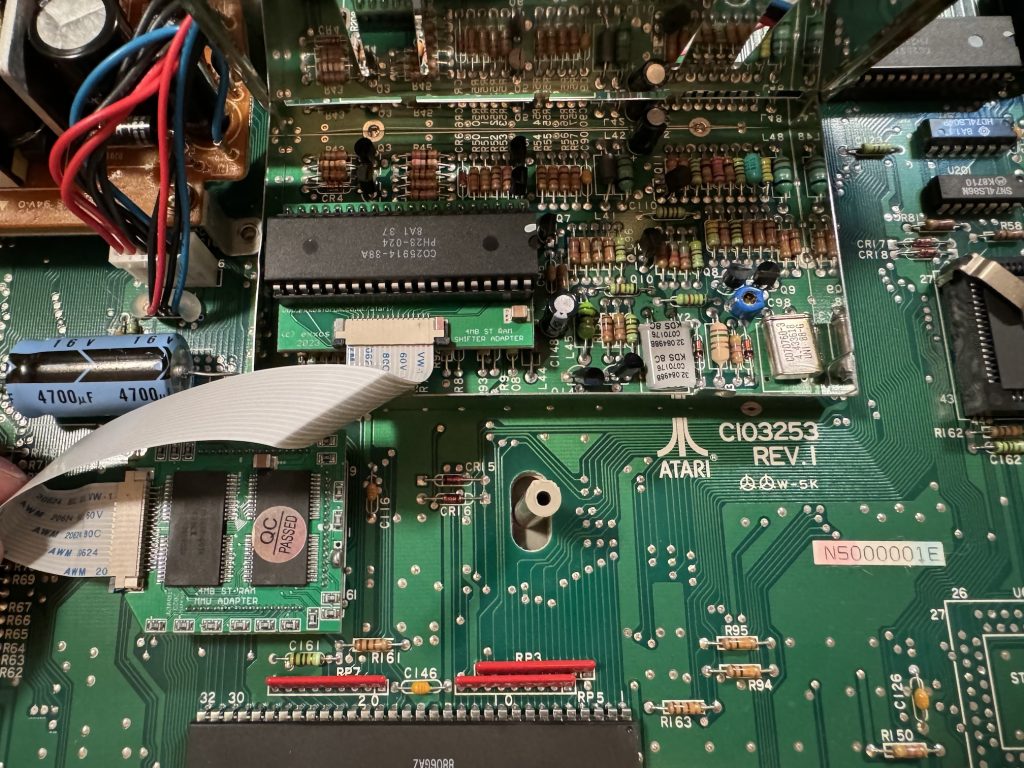
<p>My motherboard is a C103253 rev.1, as pictured so for this upgrade I opted for the Exxos <a href="https://exxosforum.co.uk/atari/last/4MBMMU/index.htm">&#8220;The LaST Upgrade&#8221;</a> MMU piggyback with a stacking board which sits on the shifter chip and connects with a ribbon cable.</p>


<p>Opening up the shielding (centre of image above) revealed a socketed shifter. Apparently this isn&#8217;t always the case but it&#8217;ll do for me. The shifter chip can be gently pried out of its socket with a thin blade, then inserted into the shifter daughterboard, which I bought fully assembled. This can then be inserted back into the shifter socket, and that part is complete. Next time I do this I&#8217;ll consider buying the kit to construct, as it&#8217;s not a very complicated assembly.</p>


<p>The shielding doesn&#8217;t fit back over the stacked shifter now, which is flagged as an outcome in the documentation. I didn&#8217;t want to completely remove the shielding so I opted to bend it over backwards over the video modulator. It <em>just</em> fits now under the main case shielding when it goes back on, which is great, but it does now interfere with the floppy ribbon cable in particular. This makes it awkward to put the original floppy drive back in but might be sufficient with a GoTek as they look a little shorter than the original drive. I don&#8217;t have one to test-fit yet so I might need to revisit this shield later.</p>


<p>Next on to the MMU piggyback. The pitch of these pins is smaller and they look very delicate compared to the pins on the shifter for example. This daughterboard sits directly on top of the MMU &#8211; its retaining clip needs to be removed &#8211; and requires a disconcerting amount of pressure to seat it fully in the socket, as its pins are jammed in next to the socket pins. I chose to pull the motherboard out of the bottom case, seat the daughterboard and carefully push down onto it, and a desk using the palm of my hand and my weight. It felt extremely uncomfortable as I&#8217;ve never had to use that much force to seat a chip.</p>


<figure class="wp-block-image size-large"><img loading="lazy" decoding="async" width="1024" height="768" src="https://psyphi.net/wp-uploads/2024/05/2024-05-14-20.07.16-1024x768.jpeg" alt="" class="wp-image-1007" srcset="https://psyphi.net/wp-uploads/2024/05/2024-05-14-20.07.16-1024x768.jpeg 1024w, https://psyphi.net/wp-uploads/2024/05/2024-05-14-20.07.16-300x225.jpeg 300w, https://psyphi.net/wp-uploads/2024/05/2024-05-14-20.07.16-1536x1152.jpeg 1536w, https://psyphi.net/wp-uploads/2024/05/2024-05-14-20.07.16-1200x900.jpeg 1200w, https://psyphi.net/wp-uploads/2024/05/2024-05-14-20.07.16.jpeg 2016w" sizes="auto, (max-width: 709px) 85vw, (max-width: 909px) 67vw, (max-width: 1362px) 62vw, 840px" /></figure>


<p></p>


<p>Lastly the old RAM still soldered onto the motherboard either needs to be removed, or disconnected. Doing the latter is much less work and can be reversed later if necessary. The 68ohm resistors R59, R60 and R61 need lifting to 5V. On this motherboard this means desoldering and pulling the right-hand-side legs, closest to the MMU then adding a jumper wire over to the +ve leg of the 4700µF capacitor adjacent on the motherboard.</p>


<figure class="wp-block-image size-large is-resized"><img loading="lazy" decoding="async" width="768" height="1024" src="https://psyphi.net/wp-uploads/2024/05/2024-05-15-16.42.10-768x1024.jpeg" alt="" class="wp-image-1001" style="width:630px;height:auto" srcset="https://psyphi.net/wp-uploads/2024/05/2024-05-15-16.42.10-768x1024.jpeg 768w, https://psyphi.net/wp-uploads/2024/05/2024-05-15-16.42.10-225x300.jpeg 225w, https://psyphi.net/wp-uploads/2024/05/2024-05-15-16.42.10-1152x1536.jpeg 1152w, https://psyphi.net/wp-uploads/2024/05/2024-05-15-16.42.10-1200x1600.jpeg 1200w, https://psyphi.net/wp-uploads/2024/05/2024-05-15-16.42.10.jpeg 1512w" sizes="auto, (max-width: 709px) 85vw, (max-width: 909px) 67vw, (max-width: 984px) 61vw, (max-width: 1362px) 45vw, 600px" /><figcaption class="wp-element-caption">Use solid core wire, not like I did here</figcaption></figure>


<p></p>


<figure class="wp-block-image size-large"><img loading="lazy" decoding="async" width="768" height="1024" src="https://psyphi.net/wp-uploads/2024/05/2024-05-14-20.15.59-768x1024.jpeg" alt="" class="wp-image-1000" srcset="https://psyphi.net/wp-uploads/2024/05/2024-05-14-20.15.59-768x1024.jpeg 768w, https://psyphi.net/wp-uploads/2024/05/2024-05-14-20.15.59-225x300.jpeg 225w, https://psyphi.net/wp-uploads/2024/05/2024-05-14-20.15.59-1152x1536.jpeg 1152w, https://psyphi.net/wp-uploads/2024/05/2024-05-14-20.15.59-1536x2048.jpeg 1536w, https://psyphi.net/wp-uploads/2024/05/2024-05-14-20.15.59-1200x1600.jpeg 1200w, https://psyphi.net/wp-uploads/2024/05/2024-05-14-20.15.59-scaled.jpeg 1920w" sizes="auto, (max-width: 709px) 85vw, (max-width: 909px) 67vw, (max-width: 984px) 61vw, (max-width: 1362px) 45vw, 600px" /><figcaption class="wp-element-caption">4MB Atari STFM booted to GEM desktop</figcaption></figure>


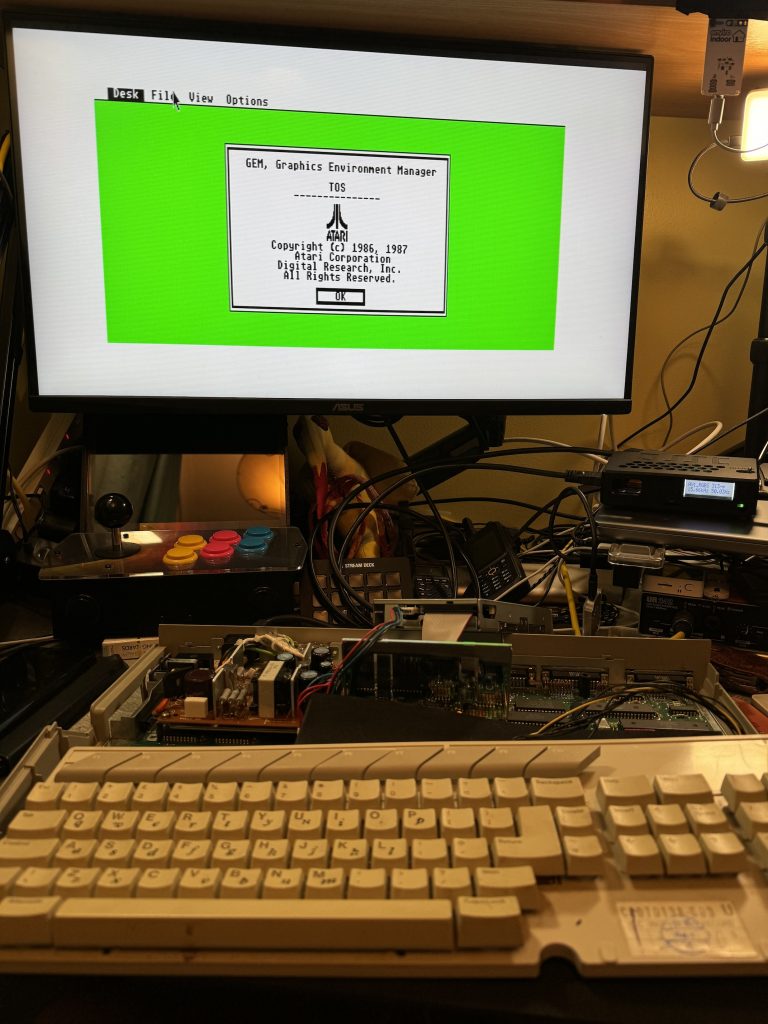
<p>The result is a 4MB STFM (woowoo!) which boots to desktop and as yet has no way to run software because the flopy drive is dead and I haven&#8217;t formatted any SD cards for the ultrasatan yet (and will that even work with TOS 1.02?). Haha.</p>


<p>All parts were sourced from <a href="https://exxosforum.co.uk/atari/last/4MBMMU/index.htm">Exxos</a>, with advice from the <a href="https://www.facebook.com/groups/133161394213/">Atari ST and STe users FB group</a>.</p>
	</div><!-- .entry-content -->

	<footer class="entry-footer">
		<span class="byline"><img alt='' src='https://secure.gravatar.com/avatar/f715f8335258578c567eb8c22335f1cee22c971c2aff8be27c4d8d934c436503?s=49&#038;d=mm&#038;r=g' srcset='https://secure.gravatar.com/avatar/f715f8335258578c567eb8c22335f1cee22c971c2aff8be27c4d8d934c436503?s=98&#038;d=mm&#038;r=g 2x' class='avatar avatar-49 photo' height='49' width='49' loading='lazy' decoding='async'/><span class="screen-reader-text">Author </span><span class="author vcard"><a class="url fn n" href="https://psyphi.net/blog/author/rmp/">Roger Pettett</a></span></span><span class="posted-on"><span class="screen-reader-text">Posted on </span><a href="https://psyphi.net/blog/2024/05/installing-the-exxos-4mb-ram-atari-stfm-expansion/" rel="bookmark"><time class="entry-date published" datetime="2024-05-16T11:32:31+00:00">May 16, 2024</time><time class="updated" datetime="2024-05-16T11:36:43+00:00">May 16, 2024</time></a></span><span class="cat-links"><span class="screen-reader-text">Categories </span><a href="https://psyphi.net/blog/category/hardware/" rel="category tag">hardware</a>, <a href="https://psyphi.net/blog/category/retrocomputing/" rel="category tag">retrocomputing</a></span><span class="tags-links"><span class="screen-reader-text">Tags </span><a href="https://psyphi.net/blog/tag/atari/" rel="tag">atari</a>, <a href="https://psyphi.net/blog/tag/atarist/" rel="tag">atarist</a>, <a href="https://psyphi.net/blog/tag/ataristfm/" rel="tag">ataristfm</a>, <a href="https://psyphi.net/blog/tag/hardware/" rel="tag">hardware</a>, <a href="https://psyphi.net/blog/tag/retrocomputing/" rel="tag">retrocomputing</a></span>			</footer><!-- .entry-footer -->
</article><!-- #post-999 -->

<article id="post-982" class="post-982 post type-post status-publish format-standard has-post-thumbnail hentry category-hardware category-retrocomputing tag-atari tag-atarist tag-ataristfm tag-electronics tag-hardware tag-refurbishment">
	<header class="entry-header">
		
		<h2 class="entry-title"><a href="https://psyphi.net/blog/2024/05/installing-the-exxos-atari-st-psu-recap-kit/" rel="bookmark">Installing the Exxos Atari ST PSU recap kit</a></h2>	</header><!-- .entry-header -->


	<a class="post-thumbnail" href="https://psyphi.net/blog/2024/05/installing-the-exxos-atari-st-psu-recap-kit/" aria-hidden="true">
		<img width="1200" height="900" src="https://psyphi.net/wp-uploads/2024/05/2024-05-14-17.34.38-1200x900.jpeg" class="attachment-post-thumbnail size-post-thumbnail wp-post-image" alt="Installing the Exxos Atari ST PSU recap kit" decoding="async" loading="lazy" srcset="https://psyphi.net/wp-uploads/2024/05/2024-05-14-17.34.38-1200x900.jpeg 1200w, https://psyphi.net/wp-uploads/2024/05/2024-05-14-17.34.38-300x225.jpeg 300w, https://psyphi.net/wp-uploads/2024/05/2024-05-14-17.34.38-1024x768.jpeg 1024w, https://psyphi.net/wp-uploads/2024/05/2024-05-14-17.34.38-1536x1152.jpeg 1536w, https://psyphi.net/wp-uploads/2024/05/2024-05-14-17.34.38.jpeg 2016w" sizes="(max-width: 709px) 85vw, (max-width: 909px) 67vw, (max-width: 984px) 60vw, (max-width: 1362px) 62vw, 840px" />	</a>

		
	<div class="entry-content">
		
<p>I recently acquired a classic 16bit machine from my childhood in the form of a Motorola 68000-powered Atari 520STFM. Whilst it&#8217;s a later motherboard revision &#8211; C103253 REV.1 &#8211; it&#8217;s still a low-spec model with only 512MB RAM. The &#8220;F&#8221; in STFM is for the included 3.5&#8243; floppy disk drive with the &#8220;M&#8221; being for the built-in TV modulator.</p>


<p>My hope is to upgrade this machine to the maximum of 4MB RAM and see which other add-ons (e.g. GoTek USB-stick floppy drive replacement; ultrasatan SD-card virtual hard drive; TOS upgrades; PiStorm accelerator) will best modernise the experience.</p>


<figure class="wp-block-image size-large"><img loading="lazy" decoding="async" width="1024" height="634" src="https://psyphi.net/wp-uploads/2024/05/2024-05-08-14.17.03-1024x634.jpeg" alt="" class="wp-image-996" srcset="https://psyphi.net/wp-uploads/2024/05/2024-05-08-14.17.03-1024x634.jpeg 1024w, https://psyphi.net/wp-uploads/2024/05/2024-05-08-14.17.03-300x186.jpeg 300w, https://psyphi.net/wp-uploads/2024/05/2024-05-08-14.17.03-1536x951.jpeg 1536w, https://psyphi.net/wp-uploads/2024/05/2024-05-08-14.17.03-2048x1268.jpeg 2048w, https://psyphi.net/wp-uploads/2024/05/2024-05-08-14.17.03-1200x743.jpeg 1200w" sizes="auto, (max-width: 709px) 85vw, (max-width: 909px) 67vw, (max-width: 1362px) 62vw, 840px" /><figcaption class="wp-element-caption">Atari 520STFM motherboard C103253 Rev.1</figcaption></figure>


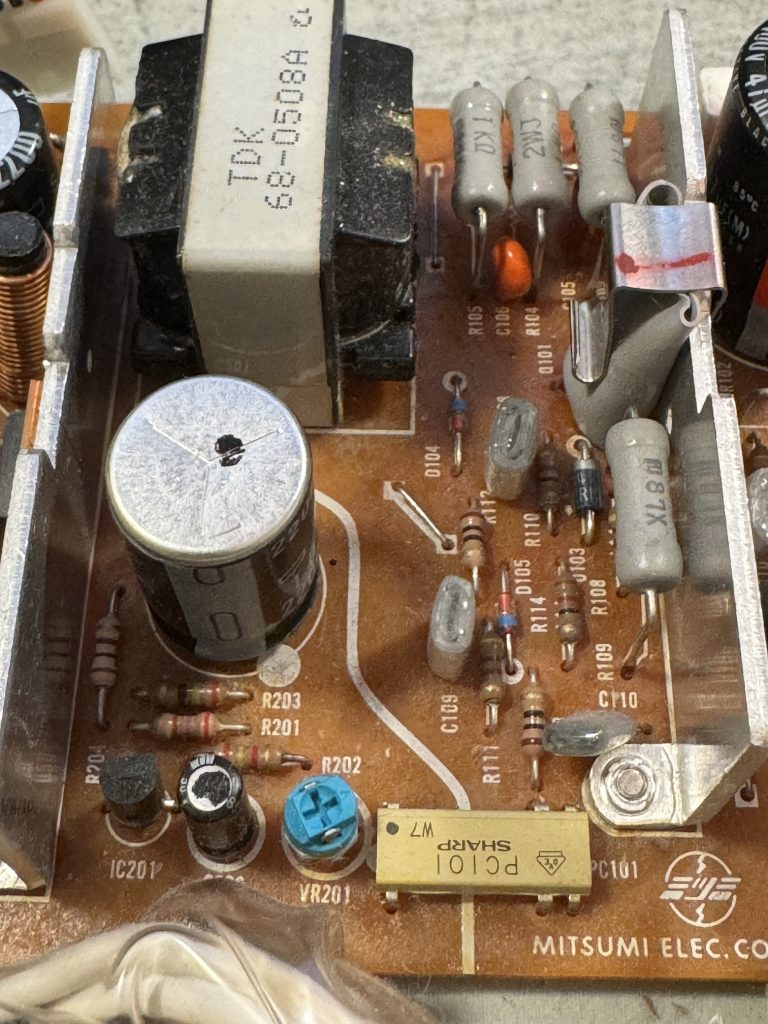
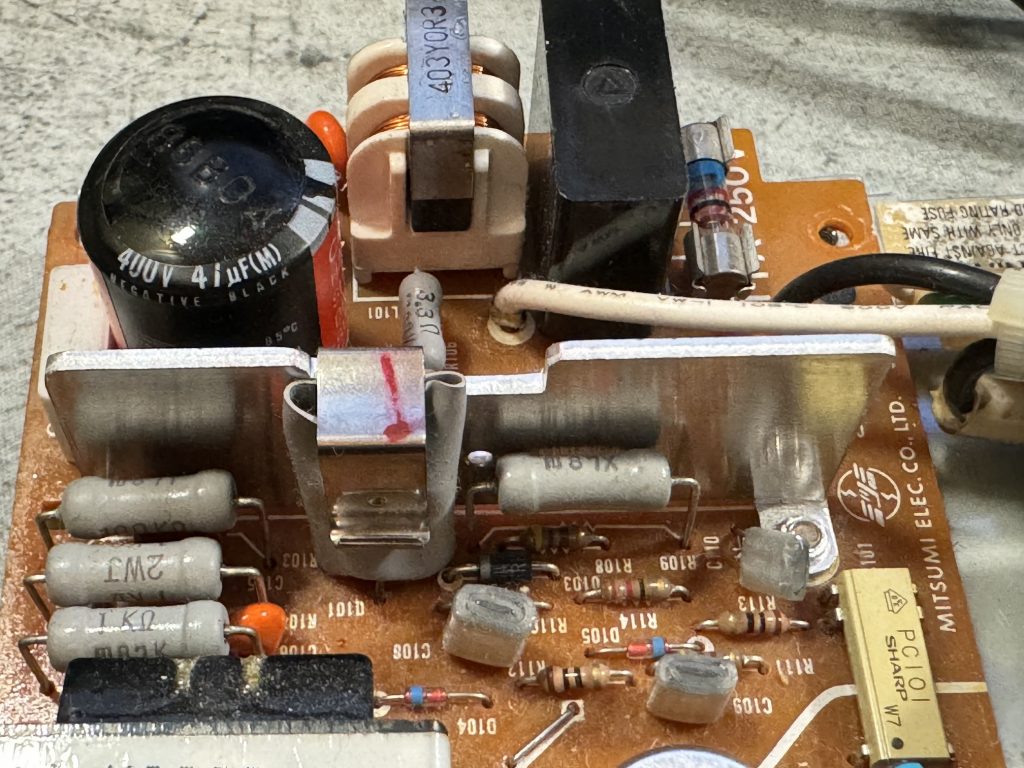
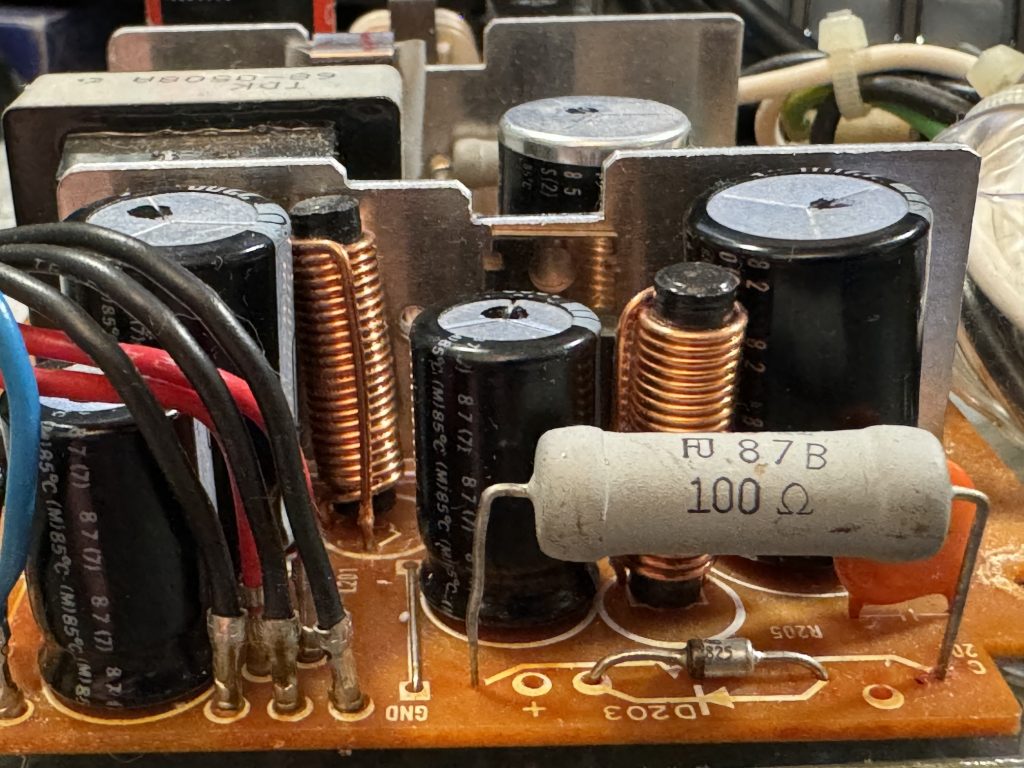
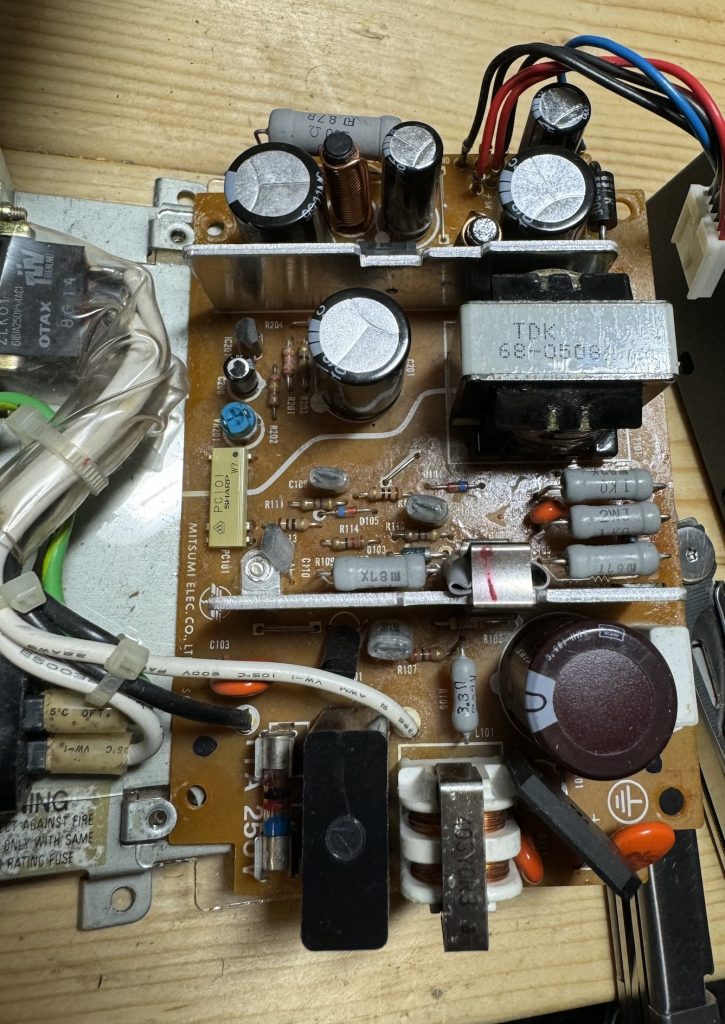
<p>But first things first, I know enough to not turn it on in excitement &#8211; the most common fault with these older machines is failing electrolytic capacitors as the paste in them dries out, particularly in hotter environments like power supplies, so let&#8217;s have a look at the PSU&#8230; This model is a common Mitsumi SR98. We&#8217;re looking for bulging capacitor packages like this one.</p>


<figure class="wp-block-image size-large is-style-default"><img loading="lazy" decoding="async" width="1024" height="768" src="https://psyphi.net/wp-uploads/2024/05/2024-05-01-17.43.26-1024x768.jpg" alt="" class="wp-image-983" srcset="https://psyphi.net/wp-uploads/2024/05/2024-05-01-17.43.26-1024x768.jpg 1024w, https://psyphi.net/wp-uploads/2024/05/2024-05-01-17.43.26-300x225.jpg 300w, https://psyphi.net/wp-uploads/2024/05/2024-05-01-17.43.26-1536x1152.jpg 1536w, https://psyphi.net/wp-uploads/2024/05/2024-05-01-17.43.26-1200x900.jpg 1200w, https://psyphi.net/wp-uploads/2024/05/2024-05-01-17.43.26.jpg 2016w" sizes="auto, (max-width: 709px) 85vw, (max-width: 909px) 67vw, (max-width: 1362px) 62vw, 840px" /><figcaption class="wp-element-caption">A bulging electrolytic capacitor</figcaption></figure>


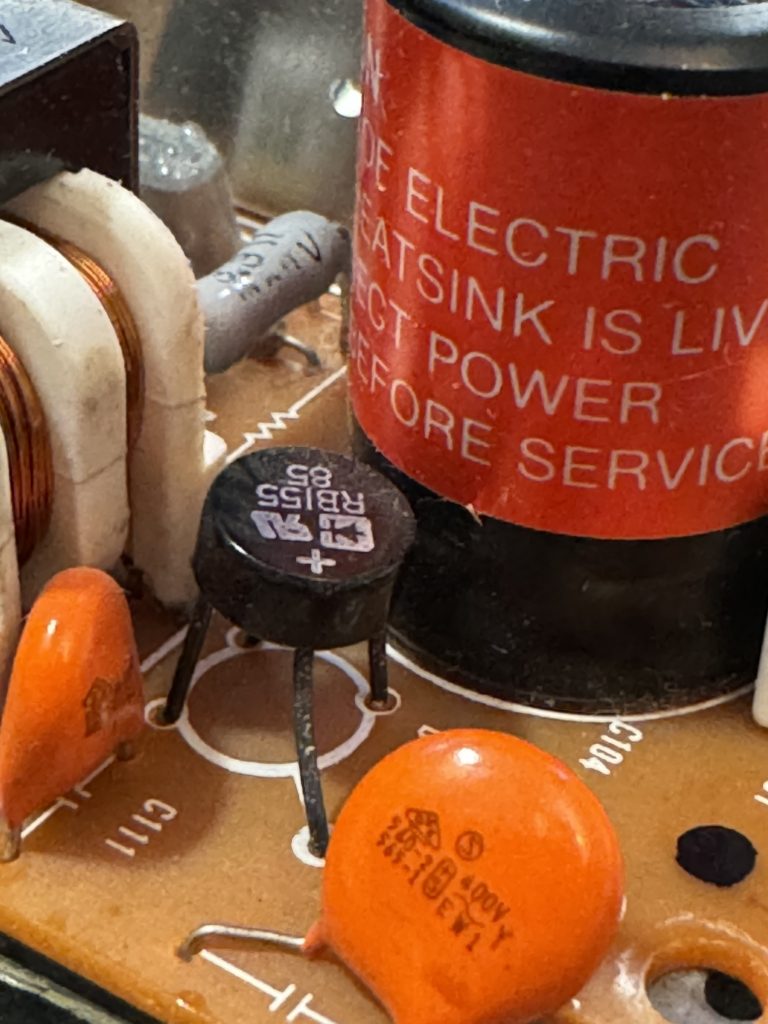
<p>The Exxos PSU refurbishment kit includes a replacement set of capacitors, a couple of replacement resistors and modern, more-efficient rectifier and low voltage schottky diode. This results in improved stability, improved ripple and lower temperatures. It&#8217;s also well within my soldering abilities!</p>


<figure class="wp-block-image size-large"><img loading="lazy" decoding="async" width="1024" height="684" src="https://psyphi.net/wp-uploads/2024/05/2024-05-13-09.25.37-1024x684.jpeg" alt="" class="wp-image-984" srcset="https://psyphi.net/wp-uploads/2024/05/2024-05-13-09.25.37-1024x684.jpeg 1024w, https://psyphi.net/wp-uploads/2024/05/2024-05-13-09.25.37-300x200.jpeg 300w, https://psyphi.net/wp-uploads/2024/05/2024-05-13-09.25.37-1536x1026.jpeg 1536w, https://psyphi.net/wp-uploads/2024/05/2024-05-13-09.25.37-2048x1368.jpeg 2048w, https://psyphi.net/wp-uploads/2024/05/2024-05-13-09.25.37-1200x801.jpeg 1200w" sizes="auto, (max-width: 709px) 85vw, (max-width: 909px) 67vw, (max-width: 1362px) 62vw, 840px" /><figcaption class="wp-element-caption">The Exxos refurbishment kit, as it comes</figcaption></figure>


<figure class="wp-block-image size-large"><img loading="lazy" decoding="async" width="921" height="1024" src="https://psyphi.net/wp-uploads/2024/05/2024-05-14-17.27.43-921x1024.jpeg" alt="" class="wp-image-985" srcset="https://psyphi.net/wp-uploads/2024/05/2024-05-14-17.27.43-921x1024.jpeg 921w, https://psyphi.net/wp-uploads/2024/05/2024-05-14-17.27.43-270x300.jpeg 270w, https://psyphi.net/wp-uploads/2024/05/2024-05-14-17.27.43-1381x1536.jpeg 1381w, https://psyphi.net/wp-uploads/2024/05/2024-05-14-17.27.43-1200x1335.jpeg 1200w, https://psyphi.net/wp-uploads/2024/05/2024-05-14-17.27.43.jpeg 1418w" sizes="auto, (max-width: 709px) 85vw, (max-width: 909px) 67vw, (max-width: 1362px) 62vw, 840px" /><figcaption class="wp-element-caption">Mitsumi SR98 PSU as it came, with replacement targets highlighted.</figcaption></figure>


<p></p>


<figure class="wp-block-gallery has-nested-images columns-default is-cropped wp-block-gallery-1 is-layout-flex wp-block-gallery-is-layout-flex">
<figure class="wp-block-image size-large"><img loading="lazy" decoding="async" width="768" height="1024" data-id="990" src="https://psyphi.net/wp-uploads/2024/05/2024-05-14-17.36.25-768x1024.jpeg" alt="" class="wp-image-990" srcset="https://psyphi.net/wp-uploads/2024/05/2024-05-14-17.36.25-768x1024.jpeg 768w, https://psyphi.net/wp-uploads/2024/05/2024-05-14-17.36.25-225x300.jpeg 225w, https://psyphi.net/wp-uploads/2024/05/2024-05-14-17.36.25-1152x1536.jpeg 1152w, https://psyphi.net/wp-uploads/2024/05/2024-05-14-17.36.25-1200x1600.jpeg 1200w, https://psyphi.net/wp-uploads/2024/05/2024-05-14-17.36.25.jpeg 1512w" sizes="auto, (max-width: 709px) 85vw, (max-width: 909px) 67vw, (max-width: 984px) 61vw, (max-width: 1362px) 45vw, 600px" /></figure>


<figure class="wp-block-image size-large"><img loading="lazy" decoding="async" width="1024" height="768" data-id="989" src="https://psyphi.net/wp-uploads/2024/05/2024-05-14-17.35.28-1024x768.jpeg" alt="" class="wp-image-989" srcset="https://psyphi.net/wp-uploads/2024/05/2024-05-14-17.35.28-1024x768.jpeg 1024w, https://psyphi.net/wp-uploads/2024/05/2024-05-14-17.35.28-300x225.jpeg 300w, https://psyphi.net/wp-uploads/2024/05/2024-05-14-17.35.28-1536x1152.jpeg 1536w, https://psyphi.net/wp-uploads/2024/05/2024-05-14-17.35.28-1200x900.jpeg 1200w, https://psyphi.net/wp-uploads/2024/05/2024-05-14-17.35.28.jpeg 2016w" sizes="auto, (max-width: 709px) 85vw, (max-width: 909px) 67vw, (max-width: 1362px) 62vw, 840px" /></figure>


<figure class="wp-block-image size-large"><img loading="lazy" decoding="async" width="1024" height="768" data-id="988" src="https://psyphi.net/wp-uploads/2024/05/2024-05-14-17.34.38-1024x768.jpeg" alt="" class="wp-image-988" srcset="https://psyphi.net/wp-uploads/2024/05/2024-05-14-17.34.38-1024x768.jpeg 1024w, https://psyphi.net/wp-uploads/2024/05/2024-05-14-17.34.38-300x225.jpeg 300w, https://psyphi.net/wp-uploads/2024/05/2024-05-14-17.34.38-1536x1152.jpeg 1536w, https://psyphi.net/wp-uploads/2024/05/2024-05-14-17.34.38-1200x900.jpeg 1200w, https://psyphi.net/wp-uploads/2024/05/2024-05-14-17.34.38.jpeg 2016w" sizes="auto, (max-width: 709px) 85vw, (max-width: 909px) 67vw, (max-width: 1362px) 62vw, 840px" /></figure>


<figure class="wp-block-image size-large"><img loading="lazy" decoding="async" width="768" height="1024" data-id="987" src="https://psyphi.net/wp-uploads/2024/05/2024-05-14-17.33.48-768x1024.jpeg" alt="" class="wp-image-987" srcset="https://psyphi.net/wp-uploads/2024/05/2024-05-14-17.33.48-768x1024.jpeg 768w, https://psyphi.net/wp-uploads/2024/05/2024-05-14-17.33.48-225x300.jpeg 225w, https://psyphi.net/wp-uploads/2024/05/2024-05-14-17.33.48-1152x1536.jpeg 1152w, https://psyphi.net/wp-uploads/2024/05/2024-05-14-17.33.48-1200x1600.jpeg 1200w, https://psyphi.net/wp-uploads/2024/05/2024-05-14-17.33.48.jpeg 1512w" sizes="auto, (max-width: 709px) 85vw, (max-width: 909px) 67vw, (max-width: 984px) 61vw, (max-width: 1362px) 45vw, 600px" /><figcaption class="wp-element-caption">Standard Rectifier</figcaption></figure>


<figure class="wp-block-image size-large"><img loading="lazy" decoding="async" width="768" height="1024" data-id="986" src="https://psyphi.net/wp-uploads/2024/05/2024-05-14-17.32.54-768x1024.jpeg" alt="" class="wp-image-986" srcset="https://psyphi.net/wp-uploads/2024/05/2024-05-14-17.32.54-768x1024.jpeg 768w, https://psyphi.net/wp-uploads/2024/05/2024-05-14-17.32.54-225x300.jpeg 225w, https://psyphi.net/wp-uploads/2024/05/2024-05-14-17.32.54-1152x1536.jpeg 1152w, https://psyphi.net/wp-uploads/2024/05/2024-05-14-17.32.54-1200x1600.jpeg 1200w, https://psyphi.net/wp-uploads/2024/05/2024-05-14-17.32.54.jpeg 1512w" sizes="auto, (max-width: 709px) 85vw, (max-width: 909px) 67vw, (max-width: 984px) 61vw, (max-width: 1362px) 45vw, 600px" /><figcaption class="wp-element-caption">Schottky Diode</figcaption></figure>
</figure>


<p></p>


<p>The fiddliest part is easily the rectifier as the new one is significantly larger and a different shape, but once it&#8217;s all done it looks something like the image below. A quick visual inspection underneath for bridged tracks and stray solder, maybe a quick clean with isopropanol and a toothbrush, and it&#8217;s ready to go.</p>


<figure class="wp-block-image size-large"><img loading="lazy" decoding="async" width="725" height="1024" src="https://psyphi.net/wp-uploads/2024/05/2024-05-14-18.40.29-1-725x1024.jpeg" alt="" class="wp-image-992" srcset="https://psyphi.net/wp-uploads/2024/05/2024-05-14-18.40.29-1-725x1024.jpeg 725w, https://psyphi.net/wp-uploads/2024/05/2024-05-14-18.40.29-1-212x300.jpeg 212w, https://psyphi.net/wp-uploads/2024/05/2024-05-14-18.40.29-1-1087x1536.jpeg 1087w, https://psyphi.net/wp-uploads/2024/05/2024-05-14-18.40.29-1-1200x1695.jpeg 1200w, https://psyphi.net/wp-uploads/2024/05/2024-05-14-18.40.29-1.jpeg 1337w" sizes="auto, (max-width: 709px) 85vw, (max-width: 909px) 67vw, (max-width: 984px) 61vw, (max-width: 1362px) 45vw, 600px" /><figcaption class="wp-element-caption">The refurbished SR98 PSU, top side</figcaption></figure>


<figure class="wp-block-image size-full"><img loading="lazy" decoding="async" width="756" height="1008" src="https://psyphi.net/wp-uploads/2024/05/2024-05-14-18.40.43.png" alt="" class="wp-image-994" srcset="https://psyphi.net/wp-uploads/2024/05/2024-05-14-18.40.43.png 756w, https://psyphi.net/wp-uploads/2024/05/2024-05-14-18.40.43-225x300.png 225w" sizes="auto, (max-width: 709px) 85vw, (max-width: 909px) 67vw, (max-width: 984px) 61vw, (max-width: 1362px) 45vw, 600px" /><figcaption class="wp-element-caption">Refurbished SR98 PSU, bottom side</figcaption></figure>


<p>The refurbished PSU is refitted carefully back into the case and reconnected to the low voltage header on the motherboard. Various parts of the PSU are mains live when turned on (danger of death!), so extreme care needs to be taken if the whole case isn&#8217;t reassembled. Also note that this PSU likes to be loaded &#8211; i.e. not to be run bare, so don&#8217;t turn it on without plugging something in (ideally a cheap bulb, rather than an expensive motherboard).</p>


<p>Using a multimeter I measured the voltage across the large 4700µF capacitor and trimmed VR201 down slightly to bring the voltage closer to 5.00V. </p>


<p>Now flipping the power switch results in a little green desktop and no magic smoke!</p>


<figure class="wp-block-image size-large"><img loading="lazy" decoding="async" width="861" height="1024" src="https://psyphi.net/wp-uploads/2024/05/2024-05-14-19.18.25-861x1024.jpg" alt="" class="wp-image-995" srcset="https://psyphi.net/wp-uploads/2024/05/2024-05-14-19.18.25-861x1024.jpg 861w, https://psyphi.net/wp-uploads/2024/05/2024-05-14-19.18.25-252x300.jpg 252w, https://psyphi.net/wp-uploads/2024/05/2024-05-14-19.18.25-1291x1536.jpg 1291w, https://psyphi.net/wp-uploads/2024/05/2024-05-14-19.18.25-1721x2048.jpg 1721w, https://psyphi.net/wp-uploads/2024/05/2024-05-14-19.18.25-1200x1428.jpg 1200w, https://psyphi.net/wp-uploads/2024/05/2024-05-14-19.18.25.jpg 2032w" sizes="auto, (max-width: 709px) 85vw, (max-width: 909px) 67vw, (max-width: 1362px) 62vw, 840px" /><figcaption class="wp-element-caption">Little Green Desktop</figcaption></figure>


<p>This booted without a keyboard, mouse or floppy drive. I used an RGB SCART cable to an OSSC scan doubler (middle right), then HDMI to a regular modern monitor. The image in both low and medium resolutions is crisp and clear with very little hint of instability.</p>


<p>Next steps: cleaning the keyboard, retrobrighting the case, upgrading the TOS ROMS, fitting the 4MB RAM upgrade, Gotek and ultrasatan drives.</p>


<p>All the information I used for this PSU refurbishment was from the <a href="https://exxosforum.co.uk/atari/last/psu/index.htm#SR98">Exxos Forum</a>.</p>
	</div><!-- .entry-content -->

	<footer class="entry-footer">
		<span class="byline"><img alt='' src='https://secure.gravatar.com/avatar/f715f8335258578c567eb8c22335f1cee22c971c2aff8be27c4d8d934c436503?s=49&#038;d=mm&#038;r=g' srcset='https://secure.gravatar.com/avatar/f715f8335258578c567eb8c22335f1cee22c971c2aff8be27c4d8d934c436503?s=98&#038;d=mm&#038;r=g 2x' class='avatar avatar-49 photo' height='49' width='49' loading='lazy' decoding='async'/><span class="screen-reader-text">Author </span><span class="author vcard"><a class="url fn n" href="https://psyphi.net/blog/author/rmp/">Roger Pettett</a></span></span><span class="posted-on"><span class="screen-reader-text">Posted on </span><a href="https://psyphi.net/blog/2024/05/installing-the-exxos-atari-st-psu-recap-kit/" rel="bookmark"><time class="entry-date published" datetime="2024-05-15T19:37:00+00:00">May 15, 2024</time><time class="updated" datetime="2024-05-27T18:28:21+00:00">May 27, 2024</time></a></span><span class="cat-links"><span class="screen-reader-text">Categories </span><a href="https://psyphi.net/blog/category/hardware/" rel="category tag">hardware</a>, <a href="https://psyphi.net/blog/category/retrocomputing/" rel="category tag">retrocomputing</a></span><span class="tags-links"><span class="screen-reader-text">Tags </span><a href="https://psyphi.net/blog/tag/atari/" rel="tag">atari</a>, <a href="https://psyphi.net/blog/tag/atarist/" rel="tag">atarist</a>, <a href="https://psyphi.net/blog/tag/ataristfm/" rel="tag">ataristfm</a>, <a href="https://psyphi.net/blog/tag/electronics/" rel="tag">electronics</a>, <a href="https://psyphi.net/blog/tag/hardware/" rel="tag">hardware</a>, <a href="https://psyphi.net/blog/tag/refurbishment/" rel="tag">refurbishment</a></span>			</footer><!-- .entry-footer -->
</article><!-- #post-982 -->

<article id="post-971" class="post-971 post type-post status-publish format-standard hentry category-radio tag-datalogging tag-jq tag-radio tag-raspberry-pi tag-raspberrypi tag-rtl-sdr tag-rtlsdr">
	<header class="entry-header">
		
		<h2 class="entry-title"><a href="https://psyphi.net/blog/2020/06/thats-not-my-weather-station-exploring-433mhz/" rel="bookmark">That&#8217;s not my weather station&#8230;! Exploring 433MHz</a></h2>	</header><!-- .entry-header -->


	<div class="entry-content">
		
<p>Since I first played around with my first ADC on the BBC Micro in the early &#8217;90s, I&#8217;ve always had a bit of a thing for data logging of one sort or another &#8211; when building data visualisations or just playing around with datasets it&#8217;s usually more fun working with data you&#8217;ve collected yourself.</p>


<p>So a few years ago I bought a little weather station to stick up in the garden, mostly for my wife, who&#8217;s the gardener, to keep an eye on the temperature, wind, humidity, etc. It has a remote sensor array in the garden running off a few AA batteries and transmitting wirelessly to a base station, with a display, which we keep in the kitchen. The base station also displays indoor temperature &amp; pressure.</p>


<p>I discovered, more recently, that the sensor array transmits its data on 433MHz which is a license-free band for use by low power devices. At around the same time, I also discovered the cheap RTL-SDR repurposed DVB-T USB stick and eventually found my way over to the very convenient <a href="https://github.com/merbanan/rtl_433">rtl_433 project</a>.</p>


<p>Eventually, I wanted to try and build a datalogger for the weather station, but rather than periodically plugging the base station into something to offload the data it already captures, or leave something ugly plugged into the base station in the kitchen, I figured I&#8217;d configure a spare raspberry pi with rtl_433 and run it somewhere out of the way, so I duly went ahead and did that. It works really well and I&#8217;ve added a basic web UI which mimics the original base station display and combines it with data from elsewhere (like moon phases) and my intention is eventually to combine all sorts of other stuff like APT weather satellite imagery and maybe even sunspot activity for my other radio-based interests.</p>


<p>Even though the capture has been running permanently for at least a year now I&#8217;ve never really gone back to look at the data being logged, which was one of my original plans (temperature trend plots). Having a poke around the data this morning reminded me that actually there are lots of other things which broadcast on the same frequency and I wanted to share them here.</p>


<p class="has-text-align-left">My logger logs to JSON format files by date, which makes it quite easy to munge the data with jq. The folder looks something like this:</p>


<figure class="wp-block-image"><img loading="lazy" decoding="async" width="1280" height="842" src="https://psyphi.net/wp-uploads/2020/06/Screenshot-2020-06-06-at-12.25.52.png" alt="Weather Station Datalogger folder listing" class="wp-image-973" srcset="https://psyphi.net/wp-uploads/2020/06/Screenshot-2020-06-06-at-12.25.52.png 1280w, https://psyphi.net/wp-uploads/2020/06/Screenshot-2020-06-06-at-12.25.52-300x197.png 300w, https://psyphi.net/wp-uploads/2020/06/Screenshot-2020-06-06-at-12.25.52-1024x674.png 1024w, https://psyphi.net/wp-uploads/2020/06/Screenshot-2020-06-06-at-12.25.52-1200x789.png 1200w" sizes="auto, (max-width: 709px) 85vw, (max-width: 909px) 67vw, (max-width: 1362px) 62vw, 840px" /></figure>


<p>The contents of the  files is nicely formatted and mostly looks like this</p>


<figure class="wp-block-image"><img loading="lazy" decoding="async" width="1346" height="918" src="https://psyphi.net/wp-uploads/2020/06/Screenshot-2020-06-06-at-12.38.41.png" alt="Weather Station logged data" class="wp-image-974" srcset="https://psyphi.net/wp-uploads/2020/06/Screenshot-2020-06-06-at-12.38.41.png 1346w, https://psyphi.net/wp-uploads/2020/06/Screenshot-2020-06-06-at-12.38.41-300x205.png 300w, https://psyphi.net/wp-uploads/2020/06/Screenshot-2020-06-06-at-12.38.41-1024x698.png 1024w, https://psyphi.net/wp-uploads/2020/06/Screenshot-2020-06-06-at-12.38.41-1200x818.png 1200w" sizes="auto, (max-width: 709px) 85vw, (max-width: 909px) 67vw, (max-width: 1362px) 62vw, 840px" /></figure>


<p>Meaning I can batter my little raspberry pi and run a bit of jq over all the files:</p>


<pre class="wp-block-preformatted">cat 2020*json | \
jq --slurp 'group_by(.model)|map({model:.[0].model,count:length})'</pre>


<p>That is to say: dump all of the 2020 JSON files, slurp them all into a big array in jq, group them into separate arrays by the &#8220;model&#8221; field, then transform those multiple arrays into just the name from the first element and a count of how many elements were in each array. Neat!</p>


<p>My poor little Pi didn&#8217;t like it very much. Each of those files has up to about 3000 records in and slurping the whole lot into memory leads to sad times.</p>


<p>Ok, so running one of the files alone ends up with a clean result</p>


<pre class="wp-block-preformatted">pi@wx:/data/wx $ jq --slurp 'group_by(.model)|map({model:.[0].model,count:length})' 2020-06-05.json
[
 {
  "model": "Ambient Weather F007TH Thermo-Hygrometer",
  "count": 1
 },
 {
  "model": "Citroen",
  "count": 1
 },
 {
  "model": "Elro-DB286A",
  "count": 2
 },
 {
  "model": "Fine Offset Electronics WH1080/WH3080 Weather Station",
  "count": 1956
 },
 {
  "model": "Ford",
  "count": 3
 },
 {
  "model": "Oregon Scientific SL109H",
  "count": 1
 },
 {
  "model": "Renault",
  "count": 3
 },
 {
  "model": "Schrader Electronics EG53MA4",
  "count": 1
 },
 {
  "model": "Smoke detector GS 558",
  "count": 2
 }
]</pre>


<p>So mostly weather station data from (presumably!) my WH1080/WH3080 sensor array. The Oregon Scientific SL109H also looks like a weather station &#8211; I didn&#8217;t think my base station transmitted indoor temps, but I could be mistaken &#8211; will have to have a look. Someone else is also running a F007TH Hygrometer doing something similar, too. Citroen, Ford, Renault and Schrader are all tyre pressure sensors of neighbours and/or passing traffic. The Elro-DB286A is a neighbours wireless doorbell&#8230; that could be fun spoofing, and the GS558 is obviously a smoke detector, a lot less fun spoofing.</p>


<p>So, I can build tallies for each dated file like so:</p>


<pre class="wp-block-preformatted">for i in 2020*json; do
  cat $i \
  | jq --slurp 'group_by(.model)|map({model:.[0].model,count:length})|.[]';
done &gt; /tmp/2020-tallies.json</pre>


<p>Then sum the tallies like so:</p>


<pre class="wp-block-preformatted">cat /tmp/2020-tallies.json | \
jq -s '.|group_by(.model)|map({model:.[0].model,sum:map(.count)|add})'</pre>


<p>The data includes a few more devices now, as one might expect. The frequency list looks like this (alphabetical rather than by frequency):</p>


<pre class="wp-block-preformatted">[
 {
  "model": "Acurite 609TXC Sensor",
  "sum": 1
 },
 {
  "model": "Acurite 986 Sensor",
  "sum": 4
 },
 {
  "model": "Akhan 100F14 remote keyless entry",
  "sum": 9
 },
 {
  "model": "Ambient Weather F007TH Thermo-Hygrometer",
  "sum": 13
 },
 {
  "model": "Cardin S466",
  "sum": 12
 },
 {
  "model": "Citroen",
  "sum": 1450
 },
 {
  "model": "Efergy e2 CT",
  "sum": 35
 },
 {
  "model": "Elro-DB286A",
  "sum": 134
 },
 {
  "model": "Fine Offset Electronics WH1080/WH3080 Weather Station",
  "sum": 375066
 },
 {
  "model": "Ford",
  "sum": 4979
 },
 {
  "model": "Ford Car Remote",
  "sum": 31
 },
 {
  "model": "Generic Remote",
  "sum": 28
 },
 {
  "model": "Honda Remote",
  "sum": 55
 },
 {
  "model": "Interlogix",
  "sum": 26
 },
 {
  "model": "LaCrosse TX141-Bv2 sensor",
  "sum": 47
 },
 {
  "model": "Oregon Scientific SL109H",
  "sum": 229
 },
 {
  "model": "Renault",
  "sum": 2334
 },
 {
  "model": "Schrader",
  "sum": 1566
 },
 {
  "model": "Schrader Electronics EG53MA4",
  "sum": 435
 },
 {
  "model": "Smoke detector GS 558",
  "sum": 155
 },
 {
  "model": "Springfield Temperature &amp; Moisture",
  "sum": 2
 },
 {
  "model": "Thermopro TP11 Thermometer",
  "sum": 1
 },
 {
  "model": "Toyota",
  "sum": 474
 },
 {
  "model": "Waveman Switch Transmitter",
  "sum": 2
 }
]</pre>


<p>Or like this as CSV:</p>


<pre class="wp-block-preformatted">pi@wx:/data/wx $ cat /tmp/2020-tallies.json | jq -rs '.|group_by(.model)|map({model:.[0].model,sum:map(.count)|add})|.[]|[.model,.sum]|@csv'<br />"Acurite 609TXC Sensor",1<br />"Acurite 986 Sensor",4<br />"Akhan 100F14 remote keyless entry",9<br />"Ambient Weather F007TH Thermo-Hygrometer",13<br />"Cardin S466",12<br />"Citroen",1450<br />"Efergy e2 CT",35<br />"Elro-DB286A",134<br />"Fine Offset Electronics WH1080/WH3080 Weather Station",375066<br />"Ford",4979<br />"Ford Car Remote",31<br />"Generic Remote",28<br />"Honda Remote",55<br />"Interlogix",26<br />"LaCrosse TX141-Bv2 sensor",47<br />"Oregon Scientific SL109H",229<br />"Renault",2334<br />"Schrader",1566<br />"Schrader Electronics EG53MA4",435<br />"Smoke detector GS 558",155<br />"Springfield Temperature &amp; Moisture",2<br />"Thermopro TP11 Thermometer",1<br />"Toyota",474<br />"Waveman Switch Transmitter",2</pre>


<p>Removing my weather station from the set, as it dwarfs everything else, the results look like this:</p>


<figure class="wp-block-image"><img loading="lazy" decoding="async" width="1958" height="1206" src="https://psyphi.net/wp-uploads/2020/06/Screenshot-2020-06-06-at-13.16.59.png" alt="" class="wp-image-976" srcset="https://psyphi.net/wp-uploads/2020/06/Screenshot-2020-06-06-at-13.16.59.png 1958w, https://psyphi.net/wp-uploads/2020/06/Screenshot-2020-06-06-at-13.16.59-300x185.png 300w, https://psyphi.net/wp-uploads/2020/06/Screenshot-2020-06-06-at-13.16.59-1024x631.png 1024w, https://psyphi.net/wp-uploads/2020/06/Screenshot-2020-06-06-at-13.16.59-1536x946.png 1536w, https://psyphi.net/wp-uploads/2020/06/Screenshot-2020-06-06-at-13.16.59-1200x739.png 1200w" sizes="auto, (max-width: 709px) 85vw, (max-width: 909px) 67vw, (max-width: 1362px) 62vw, 840px" /><figcaption>RTL433 Device type frequency in a rural neighbourhood</figcaption></figure>


<p>So aside from Ford having the most cars with tyre pressure monitors, it looks like there are a few other interesting devices to explore. Those car remotes don&#8217;t feel very secure to me, that&#8217;s for sure.</p>


<p>I&#8217;ve only just scratched the surface here, so if you&#8217;ve found anything interesting yourself with rtl_433, or want me to dig a bit deeper into some of the data I&#8217;ve captured here please let me know in the comments.</p>
	</div><!-- .entry-content -->

	<footer class="entry-footer">
		<span class="byline"><img alt='' src='https://secure.gravatar.com/avatar/f715f8335258578c567eb8c22335f1cee22c971c2aff8be27c4d8d934c436503?s=49&#038;d=mm&#038;r=g' srcset='https://secure.gravatar.com/avatar/f715f8335258578c567eb8c22335f1cee22c971c2aff8be27c4d8d934c436503?s=98&#038;d=mm&#038;r=g 2x' class='avatar avatar-49 photo' height='49' width='49' loading='lazy' decoding='async'/><span class="screen-reader-text">Author </span><span class="author vcard"><a class="url fn n" href="https://psyphi.net/blog/author/rmp/">Roger Pettett</a></span></span><span class="posted-on"><span class="screen-reader-text">Posted on </span><a href="https://psyphi.net/blog/2020/06/thats-not-my-weather-station-exploring-433mhz/" rel="bookmark"><time class="entry-date published" datetime="2020-06-06T12:25:32+00:00">June 6, 2020</time><time class="updated" datetime="2020-06-06T12:31:53+00:00">June 6, 2020</time></a></span><span class="cat-links"><span class="screen-reader-text">Categories </span><a href="https://psyphi.net/blog/category/radio/" rel="category tag">radio</a></span><span class="tags-links"><span class="screen-reader-text">Tags </span><a href="https://psyphi.net/blog/tag/datalogging/" rel="tag">datalogging</a>, <a href="https://psyphi.net/blog/tag/jq/" rel="tag">jq</a>, <a href="https://psyphi.net/blog/tag/radio/" rel="tag">radio</a>, <a href="https://psyphi.net/blog/tag/raspberry-pi/" rel="tag">raspberry pi</a>, <a href="https://psyphi.net/blog/tag/raspberrypi/" rel="tag">raspberrypi</a>, <a href="https://psyphi.net/blog/tag/rtl-sdr/" rel="tag">rtl-sdr</a>, <a href="https://psyphi.net/blog/tag/rtlsdr/" rel="tag">rtlsdr</a></span>			</footer><!-- .entry-footer -->
</article><!-- #post-971 -->

<article id="post-952" class="post-952 post type-post status-publish format-standard hentry category-programming category-sysadmin tag-ci-cd tag-codesigning tag-linux tag-mac tag-nwjs tag-osx tag-signing">
	<header class="entry-header">
		
		<h2 class="entry-title"><a href="https://psyphi.net/blog/2020/01/signing-macosx-apps-with-linux/" rel="bookmark">Signing MacOSX apps with Linux</a></h2>	</header><!-- .entry-header -->


	<div class="entry-content">
		
<p>Do you, like me, develop desktop applications for MacOSX? Do you, like me, do it on Linux because it makes for a much cheaper and easier to manage gitlab CI/CD build farm? Do you still sign your apps using a MacOSX machine, or worse (yes, like me), not sign them at all, leaving ugly popups like the one below?</p>


<figure class="wp-block-image size-large"><img loading="lazy" decoding="async" width="1024" height="454" src="https://psyphi.net/wp-uploads/2020/01/Screenshot-2020-01-15-at-19.42.19-1024x454.png" alt="" class="wp-image-953" srcset="https://psyphi.net/wp-uploads/2020/01/Screenshot-2020-01-15-at-19.42.19-1024x454.png 1024w, https://psyphi.net/wp-uploads/2020/01/Screenshot-2020-01-15-at-19.42.19-300x133.png 300w, https://psyphi.net/wp-uploads/2020/01/Screenshot-2020-01-15-at-19.42.19.png 1136w" sizes="auto, (max-width: 709px) 85vw, (max-width: 909px) 67vw, (max-width: 1362px) 62vw, 840px" /></figure>


<p>With the <a href="https://www.engadget.com/2019/12/24/apple-will-start-enforcing-its-mac-app-security-policy-in-februa">impending trustpocalypse</a> next month a lot of third-party (non-app-store) apps for MacOSX are going to start having deeper trust issues than they&#8217;ve had previously, no doubt meaning more, uglier popups than that one, or worse, not being able to run at all.</p>


<p>I suspect this trust-tightening issue, whilst arguably a relatively good thing to do to in the war against malware, will adversely affect a huge number of open-source Mac applications where the developer/s wish to provide Mac support for their users but may not wish to pay the annual Apple Developer tax even though it&#8217;s still relatively light, or may not even own any Apple hardware (though who knows how they do their integration testing?). In-particular this is likely to affect very many applications built with Electron or NWJS, into which group this post falls.</p>


<p>Well, this week I&#8217;ve been looking into this issue for one of the apps I look after, and I&#8217;m pleased to say it&#8217;s at a stage where I&#8217;m comfortable writing something about it. The limitation is that you don&#8217;t sidestep paying the Apple Developer tax, as you do still need valid certs with the Apple trust root. But you <em>can</em> sidestep paying for more Apple hardware than you need, i.e. nothing needed in the build farm.</p>


<p>First I should say all of the directions I used came from <a href="http://users.wfu.edu/cottrell/productsign/productsign_linux.html">a 2016 article, here</a>. Thanks very much to Allin Cottrell.</p>


<p>Below is the (slightly-edited)  script now forming part of the build pipeline for my app. Hopefully the comments make it fairly self-explanatory. Before you say so, yes I&#8217;ve been lazy and haven&#8217;t parameterised directory and package names yet.</p>


<pre class="wp-block-preformatted">#!/bin/bash

#########
# This is a nwjs (node) project so fish the version out of package.json
#
VERSION=$(jq -r .version package.json)

#########
# set up the private key for signing, if present
#
rm -f key.pem
if [ "$APPLE_PRIVATE_KEY" != "" ]; then
    echo "$APPLE_PRIVATE_KEY" &gt; key.pem
fi

#########
# temporary build folder/s for package construction
#
rm -rf build
mkdir build &amp;&amp; cd build
mkdir -p flat/base.pkg flat/Resources/en.lproj
mkdir -p root/Applications;

#########
# stage the unsigned applicatio into the build folder
#
cp -pR "../dist/EPI2MEAgent/osx64/EPI2MEAgent.app" root/Applications/

#########
# fix a permissions issue which only manifests after following cpio stage
# nw.app seems to be built with owner-read only. no good when packaging as root
#
chmod go+r "root/Applications/EPI2MEAgent.app/Contents/Resources/app.nw"

#########
# pack the application payload
#
( cd root &amp;&amp; find . | cpio -o --format odc --owner 0:80 | gzip -c ) &gt; flat/base.pkg/Payload

#########
# calculate a few attributes
#
files=$(find root | wc -l)
bytes=$(du -b -s root | awk '{print $1}')
kbytes=$(( $bytes / 1000 ))

#########
# template the Installer PackageInfo
#
cat &lt;&lt;EOT &gt; flat/base.pkg/PackageInfo
&lt;pkg-info format-version="2" identifier="com.metrichor.agent.base.pkg" version="$VERSION" install-location="/" auth="root"&gt;
  &lt;payload installKBytes="$kbytes" numberOfFiles="$files"/&gt;
  &lt;scripts&gt;
    &lt;postinstall file="./postinstall"/&gt;
  &lt;/scripts&gt;
  &lt;bundle-version&gt;
    &lt;bundle id="com.metrichor.agent" CFBundleIdentifier="com.nw-builder.epimeagent" path="./Applications/EPI2MEAgent.app" CFBundleVersion="$VERSION"/&gt;
  &lt;/bundle-version&gt;
&lt;/pkg-info&gt;
EOT

#########
# configure the optional post-install script with a popup dialog
#
mkdir -p scripts
cat &lt;&lt;EOT &gt; scripts/postinstall
#!/bin/bash

osascript -e 'tell app "Finder" to activate'
osascript -e 'tell app "Finder" to display dialog "To get the most of EPI2ME please also explore the Nanopore Community https://community.nanoporetech.com/ ."'
EOT

chmod +x scripts/postinstall

#########
# pack the postinstall payload
#
( cd scripts &amp;&amp; find . | cpio -o --format odc --owner 0:80 | gzip -c ) &gt; flat/base.pkg/Scripts
mkbom -u 0 -g 80 root flat/base.pkg/Bom

#########
# Template the flat-package Distribution file together with a MacOS version check
#
cat &lt;&lt;EOT &gt; flat/Distribution
&lt;?xml version="1.0" encoding="utf-8"?&gt;
&lt;installer-script minSpecVersion="1.000000" authoringTool="com.apple.PackageMaker" authoringToolVersion="3.0.3" authoringToolBuild="174"&gt;
    &lt;title&gt;EPI2MEAgent $VERSION&lt;/title&gt;
    &lt;options customize="never" allow-external-scripts="no"/&gt;
    &lt;domains enable_anywhere="true"/&gt;
    &lt;installation-check script="pm_install_check();"/&gt;
    &lt;script&gt;
function pm_install_check() {
  if(!(system.compareVersions(system.version.ProductVersion,'10.12') &gt;= 0)) {
    my.result.title = 'Failure';
    my.result.message = 'You need at least Mac OS X 10.12 to install EPI2MEAgent.';
    my.result.type = 'Fatal';
    return false;
  }
  return true;
}
    &lt;/script&gt;
    &lt;choices-outline&gt;
        &lt;line choice="choice1"/&gt;
    &lt;/choices-outline&gt;
    &lt;choice id="choice1" title="base"&gt;
        &lt;pkg-ref id="com.metrichor.agent.base.pkg"/&gt;
    &lt;/choice&gt;
    &lt;pkg-ref id="com.metrichor.agent.base.pkg" installKBytes="$kbytes" version="$VERSION" auth="Root"&gt;#base.pkg&lt;/pkg-ref&gt;
&lt;/installer-script&gt;
EOT

#########
# pack the Installer
#
( cd flat &amp;&amp; xar --compression none -cf "../EPI2MEAgent $VERSION Installer.pkg" * )

#########
# check if we have a key for signing
#
if [ ! -f ../key.pem ]; then
    echo "not signing"
    exit
fi

#########
# calculate attribute
: | openssl dgst -sign ../key.pem -binary | wc -c &gt; siglen.txt

#########
# xar the Installer package
#
xar --sign -f "EPI2MEAgent $VERSION Installer.pkg" \
    --digestinfo-to-sign digestinfo.dat --sig-size $(cat siglen.txt) \
    --cert-loc ../dist/tools/mac/certs/cert00 --cert-loc ../dist/tools/mac/certs/cert01 --cert-loc ../dist/tools/mac/certs/cert02

#########
# construct the signature
#
openssl rsautl -sign -inkey ../key.pem -in digestinfo.dat \
        -out signature.dat

#########
# add the signature to the installer
#
xar --inject-sig signature.dat -f "EPI2MEAgent $VERSION Installer.pkg"

#########
# clean up
#
rm -f signature.dat digestinfo.dat siglen.txt key.pem</pre>


<p>With all that you still need a few assets. I built and published (internally) corresponding debs for <a href="https://github.com/mackyle/xar/releases">xar v1.6.1</a> and <a href="https://github.com/hogliux/bomutils/releases">bomutils 0.2</a>. You might want to compile &amp; install those from source &#8211; they&#8217;re pretty straightforward builds.</p>


<p>Next, you need a signing identity. I used XCode (Preferences => Accounts => Apple ID => Manage Certificates) to add a new Mac Installer Distribution certificate. Then used that to sign my .app <strong>once</strong> on MacOS in order to fish out the Apple cert chain (there are probably better ways to do this)</p>


<pre class="wp-block-preformatted">productsign --sign LJXXXXXX58 \
        build/EPI2MEAgent\ 2020.1.14\ Installer.pkg \
        EPI2MEAgent\ 2020.1.14\ Installer.pkg</pre>


<p>Then fish out the certs</p>


<pre class="wp-block-preformatted">xar -f EPI2MEAgent\ 2020.1.14\ Installer.pkg \
        --extract-certs certs
mac:~/agent rmp$ ls -l certs/
total 24
-rw-r--r--  1 rmp  Users  1494 15 Jan 12:06 cert00
-rw-r--r--  1 rmp  Users  1062 15 Jan 12:06 cert01
-rw-r--r--  1 rmp  Users  1215 15 Jan 12:06 cert02</pre>


<p>Next use Keychain to export the .p12 private key for the &#8220;3rd Party Mac Developer Installer&#8221; key. Then openssl it a bit to convert to a pem.</p>


<pre class="wp-block-preformatted">openssl pkcs12 -in certs.p12 -nodes | openssl rsa -out key.pem</pre>


<p>I set this up the contents of key.pem as a gitlab CI/CD Environment Variable APPLE_PRIVATE_KEY so it&#8217;s never committed to the project source tree.</p>


<p>Once all that&#8217;s in place it should be possible to run the script (paths-permitting, obviously yours will be different) and end up with an installer looking something like this. Look for the closed padlock in the top-right, and the fully validated chain of certificate trust.</p>


<div class="wp-block-image"><figure class="aligncenter size-large is-resized"><img loading="lazy" decoding="async" src="https://psyphi.net/wp-uploads/2020/01/Screenshot-2020-01-15-at-20.41.02-1024x744.png" alt="" class="wp-image-956" width="512" height="372" srcset="https://psyphi.net/wp-uploads/2020/01/Screenshot-2020-01-15-at-20.41.02-1024x744.png 1024w, https://psyphi.net/wp-uploads/2020/01/Screenshot-2020-01-15-at-20.41.02-300x218.png 300w, https://psyphi.net/wp-uploads/2020/01/Screenshot-2020-01-15-at-20.41.02-1200x872.png 1200w, https://psyphi.net/wp-uploads/2020/01/Screenshot-2020-01-15-at-20.41.02.png 1346w" sizes="auto, (max-width: 512px) 85vw, 512px" /></figure></div>


<p>In conclusion, the cross-platform application nwjs builds (Mac, Windows, Linux) all run using <a href="https://www.npmjs.com/package/nw-builder">nw-builder</a> on ubuntu:18.04, and the Mac (and Windows, using <a href="https://github.com/develar/osslsigncode">osslsigncode</a>, maybe more on that later) also all run on ubuntu:18.04. Meaning one docker image for the Linux-based Gitlab CI/CD build farm. Nice!</p>
	</div><!-- .entry-content -->

	<footer class="entry-footer">
		<span class="byline"><img alt='' src='https://secure.gravatar.com/avatar/f715f8335258578c567eb8c22335f1cee22c971c2aff8be27c4d8d934c436503?s=49&#038;d=mm&#038;r=g' srcset='https://secure.gravatar.com/avatar/f715f8335258578c567eb8c22335f1cee22c971c2aff8be27c4d8d934c436503?s=98&#038;d=mm&#038;r=g 2x' class='avatar avatar-49 photo' height='49' width='49' loading='lazy' decoding='async'/><span class="screen-reader-text">Author </span><span class="author vcard"><a class="url fn n" href="https://psyphi.net/blog/author/rmp/">Roger Pettett</a></span></span><span class="posted-on"><span class="screen-reader-text">Posted on </span><a href="https://psyphi.net/blog/2020/01/signing-macosx-apps-with-linux/" rel="bookmark"><time class="entry-date published" datetime="2020-01-15T21:10:27+00:00">January 15, 2020</time><time class="updated" datetime="2020-01-15T21:16:02+00:00">January 15, 2020</time></a></span><span class="cat-links"><span class="screen-reader-text">Categories </span><a href="https://psyphi.net/blog/category/programming/" rel="category tag">programming</a>, <a href="https://psyphi.net/blog/category/sysadmin/" rel="category tag">sysadmin</a></span><span class="tags-links"><span class="screen-reader-text">Tags </span><a href="https://psyphi.net/blog/tag/ci-cd/" rel="tag">ci/cd</a>, <a href="https://psyphi.net/blog/tag/codesigning/" rel="tag">codesigning</a>, <a href="https://psyphi.net/blog/tag/linux/" rel="tag">linux</a>, <a href="https://psyphi.net/blog/tag/mac/" rel="tag">mac</a>, <a href="https://psyphi.net/blog/tag/nwjs/" rel="tag">nwjs</a>, <a href="https://psyphi.net/blog/tag/osx/" rel="tag">osx</a>, <a href="https://psyphi.net/blog/tag/signing/" rel="tag">signing</a></span>			</footer><!-- .entry-footer -->
</article><!-- #post-952 -->

<article id="post-945" class="post-945 post type-post status-publish format-standard hentry category-security category-sysadmin category-testing category-virtualisation category-webdev tag-ci-cd tag-gitlab tag-ip-net-ns tag-libvirt tag-linux tag-namespaces tag-networking tag-proxy tag-squid tag-testing">
	<header class="entry-header">
		
		<h2 class="entry-title"><a href="https://psyphi.net/blog/2019/03/proxy-testing-with-ip-namespaces-and-gitlab-ci-cd/" rel="bookmark">Proxy testing with IP Namespaces and GitLab CI/CD</a></h2>	</header><!-- .entry-header -->


	<div class="entry-content">
		
<figure class="wp-block-image"><img loading="lazy" decoding="async" width="1024" height="688" src="https://psyphi.net/wp-uploads/2019/03/106559730_30946688a9_b-1024x688.jpg" alt="" class="wp-image-947" srcset="https://psyphi.net/wp-uploads/2019/03/106559730_30946688a9_b.jpg 1024w, https://psyphi.net/wp-uploads/2019/03/106559730_30946688a9_b-300x202.jpg 300w" sizes="auto, (max-width: 709px) 85vw, (max-width: 909px) 67vw, (max-width: 1362px) 62vw, 840px" /><figcaption>CC-BY-NC https://www.flickr.com/photos/thomashawk/106559730</figcaption></figure>


<p>At work, I have a CLI tool I&#8217;ve been working on. It talks to the web and is used by customers all over the planet, some of them on networks with tighter restrictions than my own. Often those customers have an HTTP proxy of some sort and that means the CLI application needs to negotiate with it differently than it would directly with a web server.</p>


<p>So I need to test it somehow with a proxy environment. Installing a proxy service like <a href="http://www.squid-cache.org/">Squid</a> doesn&#8217;t sound like too big a deal but it needs to run in several configurations, at a very minimum these three:</p>


<ul class="wp-block-list"><li>no-proxy</li><li>authenticating HTTP proxy</li><li>non-authenticating HTTP proxy</li></ul>


<p>I&#8217;m going to ignore HTTPS proxy for now as it&#8217;s not actually a common configuration for customers but I reckon it&#8217;s possible to do with <g class="gr_ gr_4 gr-alert gr_spell gr_inline_cards gr_run_anim ContextualSpelling" id="4" data-gr-id="4"><a href="https://github.com/FiloSottile/mkcert">mkcert</a></g> or <a href="https://letsencrypt.org/">LetsEncrypt</a> without too much work.</p>


<p>There are two other useful pieces of information to cover, firstly I use <a href="https://about.gitlab.com/">GitLab-CI</a> to run the CI/CD test stages for the three proxy configurations in parallel. Secondly, and this is important, I must make sure that, once the test Squid proxy service is running, the web requests in the test only pass through the proxy and do not leak out of the GitLab runner. I can do this by using a really neat Linux feature called <a href="https://blog.scottlowe.org/2013/09/04/introducing-linux-network-namespaces/">IP namespaces</a>.</p>


<p>IP namespaces allow me to set up different network environments on the same machine, similar to <a href="https://en.wikipedia.org/wiki/Subnetwork">IP subnets</a> or <a href="https://docs.aws.amazon.com/vpc/latest/userguide/VPC_SecurityGroups.html#VPCSecurityGroups">AWS security groups</a>. Then I can launch specific processes in those namespaces and network access from those processes will be limited by the configuration of the network namespace. That is to say, the Squid proxy can have full access but the test process can <strong>only</strong> talk to the proxy. Cool, right?</p>


<p>The GitLab CI/CD YAML looks like this (edited to protect the innocent)</p>


<pre class="wp-block-preformatted">stages:<br /> - integration<br /> <br />.integration_common: &amp;integration_common |<br />   apt-get update<br />   apt-get install -y iproute2<br /><br />.network_ns: &amp;network_ns |<br />   ip netns add $namespace<br />   ip link add v-eth1 type veth peer name v-peer1<br />   ip link set v-peer1 netns $namespace<br />   ip addr add 192.168.254.1/30 dev v-eth1<br />   ip link set v-eth1 up<br />   ip netns exec $namespace ip addr add 192.168.254.2/30 dev v-peer1<br />   ip netns exec $namespace ip link set v-peer1 up<br />   ip netns exec $namespace ip link set lo up<br />   ip netns exec $namespace ip route add default via 192.168.254.1<br /><br />noproxynoauth-cli:<br />   image: ubuntu:18.04<br />   stage: integration<br />   script:<br />     - *integration_common<br />     - test/end2end/cli<br /><br />proxyauth-cli:<br />   image: ubuntu:18.04<br />   stage: integration<br />   script:<br />     - *integration_common<br />     - apt-get install -y squid apache2-utils<br />     - mkdir -p /etc/squid3<br />     - htpasswd -cb /etc/squid3/passwords testuser testpass<br />     - *network_ns<br />     - squid3 -f test/end2end/conf/squid.conf.auth &amp;&amp; sleep 1 || tail -20 /var/log/syslog | grep squid<br />     - http_proxy=http://testuser:testpass@192.168.254.1:3128/ https_proxy=http://testuser:testpass@192.168.254.1:3128/ ip netns exec $namespace test/end2end/cli<br />     - ip netns del $namespace || true<br />   variables:<br />     namespace: proxyauth<br /><br />proxynoauth-cli:<br />   image: ubuntu:18.04<br />   stage: integration<br />   script:<br />     - *integration_common<br />     - apt-get install -y squid<br />     - *network_ns<br />     - squid3 -f test/end2end/conf/squid.conf.noauth &amp;&amp; sleep 1 || tail -20 /var/log/syslog | grep squid<br />     - http_proxy=http://192.168.254.1:3128/ https_proxy=http://192.168.254.1:3128/ test/end2end/cli<br />     - ip netns del $namespace || true<br />   variables:<br />     namespace: proxynoauth </pre>


<p>So there are five blocks here, with three stages and two common script blocks. The first common script block installs iproute2 which gives us the <g class="gr_ gr_7 gr-alert gr_spell gr_inline_cards gr_run_anim ContextualSpelling ins-del multiReplace" id="7" data-gr-id="7"><em>ip</em></g> command.</p>


<p>The second script block is where the magic happens. It configures a virtual, routed subnet in the parameterised <em>$namespace</em>.</p>


<p>Following that we have the three test stages corresponding to the three proxy (or not) configurations I listed earlier. Two of them install Squid, one of those creates a test user for authenticating with the proxy. They all run the test script, which in this case is <em>test/end2end/</em><g class="gr_ gr_6 gr-alert gr_spell gr_inline_cards gr_run_anim ContextualSpelling" id="6" data-gr-id="6"><em>cli</em></g>. When those three configs are modularised and out like this with the common net namespace script as well it provides a good deal of clarity to the test maintainer. I like it a lot.</p>


<p>So then the last remaining things are the respective squid configurations: <g class="gr_ gr_4 gr-alert gr_spell gr_inline_cards gr_run_anim ContextualSpelling ins-del multiReplace" id="4" data-gr-id="4"><em>proxyauth</em></g> and <g class="gr_ gr_5 gr-alert gr_spell gr_inline_cards gr_run_anim ContextualSpelling ins-del multiReplace" id="5" data-gr-id="5"><em class="">proxynoauth</em></g>. There&#8217;s a little bit more junk in these than there needs to be as they&#8217;re taken from the stock examples, but they look something like this:</p>


<pre class="wp-block-preformatted"> visible_hostname proxynoauth<br /> acl localnet src 10.0.0.0/8 # RFC1918 possible internal network<br /> acl localnet src 172.16.0.0/12 # RFC1918 possible internal network<br /> acl localnet src 192.168.0.0/16 # RFC1918 possible internal network<br /> acl SSL_ports port 443<br /> acl Safe_ports port 80 # http<br /> acl Safe_ports port 443 # https<br /> acl CONNECT method CONNECT<br /> http_access deny !Safe_ports<br /> http_access deny CONNECT !SSL_ports<br /> http_access allow localhost manager<br /> http_access deny manager<br /> http_access allow localnet<br /> http_access allow localhost<br /> http_access deny all<br /> http_port 3128 </pre>


<p>and for authentication:</p>


<pre class="wp-block-preformatted"> visible_hostname proxyauth<br /> acl localnet src 10.0.0.0/8 # RFC1918 possible internal network<br /> acl localnet src 172.16.0.0/12 # RFC1918 possible internal network<br /> acl localnet src 192.168.0.0/16 # RFC1918 possible internal network<br /> acl SSL_ports port 443<br /> acl Safe_ports port 80 # http<br /> acl Safe_ports port 443 # https<br /> acl CONNECT method CONNECT<br /> http_access deny !Safe_ports<br /> http_access deny CONNECT !SSL_ports<br /> http_access allow localhost manager<br /> http_access deny manager<br /> <br /> auth_param basic program /usr/lib/squid3/basic_ncsa_auth /etc/squid3/passwords<br /> auth_param basic realm proxy<br /> acl authenticated proxy_auth REQUIRED<br /><br /> http_access allow authenticated<br /> http_access deny all<br /> http_port 3128 </pre>


<p>And there you have it &#8211; network-restricted proxy testing with different proxy configurations. It&#8217;s the first time I&#8217;ve used <em><g class="gr_ gr_3 gr-alert gr_spell gr_inline_cards gr_disable_anim_appear ContextualSpelling ins-del multiReplace" id="3" data-gr-id="3">ip</g> net ns</em> without being wrapped up in <a href="https://www.docker.com/">Docker</a>, <a href="https://linuxcontainers.org/">LXC</a>, <g class="gr_ gr_4 gr-alert gr_spell gr_inline_cards gr_disable_anim_appear ContextualSpelling ins-del multiReplace" id="4" data-gr-id="4"><a href="https://containerd.io/">containerd</a></g> or some other <g class="gr_ gr_5 gr-alert gr_spell gr_inline_cards gr_disable_anim_appear ContextualSpelling" id="5" data-gr-id="5"><a href="https://libvirt.org/">libvirt</a></g> thing, but the feeling of power from my new-found network-god skills is quite something :)</p>


<p>Be aware that you might need to choose different subnet ranges if your regular LAN conflicts. Please let me know in the comments if you find this useful or if you had to modify things to work in your environment.</p>
	</div><!-- .entry-content -->

	<footer class="entry-footer">
		<span class="byline"><img alt='' src='https://secure.gravatar.com/avatar/f715f8335258578c567eb8c22335f1cee22c971c2aff8be27c4d8d934c436503?s=49&#038;d=mm&#038;r=g' srcset='https://secure.gravatar.com/avatar/f715f8335258578c567eb8c22335f1cee22c971c2aff8be27c4d8d934c436503?s=98&#038;d=mm&#038;r=g 2x' class='avatar avatar-49 photo' height='49' width='49' loading='lazy' decoding='async'/><span class="screen-reader-text">Author </span><span class="author vcard"><a class="url fn n" href="https://psyphi.net/blog/author/rmp/">Roger Pettett</a></span></span><span class="posted-on"><span class="screen-reader-text">Posted on </span><a href="https://psyphi.net/blog/2019/03/proxy-testing-with-ip-namespaces-and-gitlab-ci-cd/" rel="bookmark"><time class="entry-date published" datetime="2019-03-05T21:32:36+00:00">March 5, 2019</time><time class="updated" datetime="2019-03-06T09:07:55+00:00">March 6, 2019</time></a></span><span class="cat-links"><span class="screen-reader-text">Categories </span><a href="https://psyphi.net/blog/category/security/" rel="category tag">security</a>, <a href="https://psyphi.net/blog/category/sysadmin/" rel="category tag">sysadmin</a>, <a href="https://psyphi.net/blog/category/testing/" rel="category tag">testing</a>, <a href="https://psyphi.net/blog/category/virtualisation/" rel="category tag">virtualisation</a>, <a href="https://psyphi.net/blog/category/webdev/" rel="category tag">webdev</a></span><span class="tags-links"><span class="screen-reader-text">Tags </span><a href="https://psyphi.net/blog/tag/ci-cd/" rel="tag">ci/cd</a>, <a href="https://psyphi.net/blog/tag/gitlab/" rel="tag">gitlab</a>, <a href="https://psyphi.net/blog/tag/ip-net-ns/" rel="tag">ip net ns</a>, <a href="https://psyphi.net/blog/tag/libvirt/" rel="tag">libvirt</a>, <a href="https://psyphi.net/blog/tag/linux/" rel="tag">linux</a>, <a href="https://psyphi.net/blog/tag/namespaces/" rel="tag">namespaces</a>, <a href="https://psyphi.net/blog/tag/networking/" rel="tag">networking</a>, <a href="https://psyphi.net/blog/tag/proxy/" rel="tag">proxy</a>, <a href="https://psyphi.net/blog/tag/squid/" rel="tag">squid</a>, <a href="https://psyphi.net/blog/tag/testing/" rel="tag">testing</a></span>			</footer><!-- .entry-footer -->
</article><!-- #post-945 -->

<article id="post-921" class="post-921 post type-post status-publish format-standard hentry category-hardware category-programming tag-amt tag-arduino tag-code tag-idrac tag-power tag-relay tag-remote tag-seeedstudio tag-serial tag-stonith">
	<header class="entry-header">
		
		<h2 class="entry-title"><a href="https://psyphi.net/blog/2016/03/remote-power-management-using-arduino/" rel="bookmark">Remote Power Management using Arduino</a></h2>	</header><!-- .entry-header -->


	<div class="entry-content">
		<p><a href="https://psyphi.net/blog/2016/03/remote-power-management-using-arduino/2016-03-04-21-20-07/" rel="attachment wp-att-923"><img loading="lazy" decoding="async" class="aligncenter wp-image-923 size-large" src="http://psyphi.net/wp-uploads/2016/03/2016-03-04-21.20.07-1024x768.jpg" alt="2016-03-04 21.20.07" width="840" height="630" srcset="https://psyphi.net/wp-uploads/2016/03/2016-03-04-21.20.07-1024x768.jpg 1024w, https://psyphi.net/wp-uploads/2016/03/2016-03-04-21.20.07-300x225.jpg 300w, https://psyphi.net/wp-uploads/2016/03/2016-03-04-21.20.07-1200x900.jpg 1200w" sizes="auto, (max-width: 709px) 85vw, (max-width: 909px) 67vw, (max-width: 1362px) 62vw, 840px" /></a></p>
<p>2016-03-07 Update: <a href="https://github.com/rmp/arduino-power-mgmt" target="_blank">Git Repo available</a></p>
<p>Recently I&#8217;ve been involved with building a hardware device consisting of a cluster of low-powerÂ PC servers. The boards chosen for this particular project aren&#8217;t enterprise or embedded -style boards with specialist features like out of band (power) management (like Dell&#8217;s <a href="https://www.dell.com/learn/us/en/555/solutions/integrated-dell-remote-access-controller-idrac" target="_blank">iDRAC</a> or Intel&#8217;s <a href="http://www.intel.com/content/www/us/en/architecture-and-technology/intel-active-management-technology.html" target="_blank">AMT</a>) so I started thinking about how toÂ approximate something similar.</p>
<p>It&#8217;s also a little reminiscent of <a href="http://www.linux-ha.org/wiki/STONITH" target="_blank">STONITH</a> (Shoot The Other Node In The Head), used for aspects of the <a href="http://www.linux-ha.org/" target="_blank">Linux-HA</a> (High Availability) services.</p>
<p>I dug around in a box of goodies and found a couple of handy parts:</p>
<ol>
<li><a href="http://www.amazon.co.uk/gp/product/B00PHY3HH2/ref=as_li_tl?ie=UTF8&amp;camp=1634&amp;creative=19450&amp;creativeASIN=B00PHY3HH2&amp;linkCode=as2&amp;tag=psynetwebsol-21" target="_blank">Arduino</a> Duemilanove</li>
<li><a href="http://www.amazon.co.uk/gp/product/B016CX3492/ref=as_li_tl?ie=UTF8&amp;camp=1634&amp;creative=19450&amp;creativeASIN=B016CX3492&amp;linkCode=as2&amp;tag=psynetwebsol-21" target="_blank">Seeedstudio Arduino Relay Shield v3</a></li>
</ol>
<p>The relays are rated for switching up to 35V at 8A &#8211; easily handling the 19V @ 2A for the mini server boards I&#8217;m remote managing.</p>
<p>The other handy thing to notice is that the Arduino by its nature is serial-enabled, meaning you can control itÂ very simply using a USB connection to the management system without needing any more shields or adapters.</p>
<p>Lastly it&#8217;s worth mentioning that the relays are effectively <a href="https://en.wikipedia.org/wiki/Switch#Contact_terminology" target="_blank">SPDT</a> switches so have connections for circuit open and closed.Â In my case this is useful as most of the time I don&#8217;t want the relays to be energised, saving power and prolonging the life of the relay.</p>
<p>The example <a href="https://www.arduino.cc/en/Main/Software" target="_blank">Arduino code</a> below opens a serial port and collects characters in a string variable until a carriage-return (0x0D) before acting, accepting commands &#8220;on&#8221;, &#8220;off&#8221; and &#8220;reset&#8221;. When a command is completed, the code clears the command buffer and flips voltages on the digital pins controlling the relays. Works a treat &#8211; all I need to do now is splice the power cables for the cluster compute units and run them through the right connectors on the relay boards. With the draw the cluster nodes pull being well within the specs of the relays it might even be possible to happily run two nodesÂ through each relay.</p>
<p>There&#8217;s no reason why this sort of thing couldn&#8217;t be used for many other purposes too &#8211; home automation or other types of remote management, and could obviously be activated over ethernet, wifi or bluetooth instead of serial &#8211; goes without saying for a relay board -duh!</p>
<blockquote>
<pre>int MotorControl1 = 4;
int MotorControl2 = 5;
int MotorControl3 = 6;
int MotorControl4 = 7;
int incomingByte = 0; // for incoming serial data
String input = ""; // for command message

void action (String cmd) {
  if(cmd == "off") {
    digitalWrite(MotorControl1, HIGH); // NO1 + COM1
    digitalWrite(MotorControl2, HIGH); // NO2 + COM2
    digitalWrite(MotorControl3, HIGH); // NO3 + COM3
    digitalWrite(MotorControl4, HIGH); // NO4 + COM4
    return;
  }

  if(cmd == "on") {
    digitalWrite(MotorControl1, LOW); // NC1 + COM1
    digitalWrite(MotorControl2, LOW); // NC2 + COM2
    digitalWrite(MotorControl3, LOW); // NC3 + COM3
    digitalWrite(MotorControl4, LOW); // NC4 + COM4
    return;
  }

  if(cmd == "reset") {
    action("off");
    delay(1000);
    action("on");
    return;
  }

  Serial.println("unknown action");
}

// the setup routine runs once when you press reset:
void setup() {
  pinMode(MotorControl1, OUTPUT);
  pinMode(MotorControl2, OUTPUT);
  pinMode(MotorControl3, OUTPUT);
  pinMode(MotorControl4, OUTPUT);
  Serial.begin(9600); // opens serial port, sets data rate to 9600 bps
  Serial.println("relay controller v0.1 rmp@psyphi.net actions are on|off|reset");
  input = "";
} 

// the loop routine runs over and over again forever:
void loop() {
  if (Serial.available() &gt; 0) {
    incomingByte = Serial.read();

    if(incomingByte == 0x0D) {
      Serial.println("action:" + input);
      action(input);
      input = "";
    } else {
      input.concat(char(incomingByte));
    }
  } else {
    delay(1000); // no need to go crazy
  }
}


</pre>
</blockquote>
	</div><!-- .entry-content -->

	<footer class="entry-footer">
		<span class="byline"><img alt='' src='https://secure.gravatar.com/avatar/f715f8335258578c567eb8c22335f1cee22c971c2aff8be27c4d8d934c436503?s=49&#038;d=mm&#038;r=g' srcset='https://secure.gravatar.com/avatar/f715f8335258578c567eb8c22335f1cee22c971c2aff8be27c4d8d934c436503?s=98&#038;d=mm&#038;r=g 2x' class='avatar avatar-49 photo' height='49' width='49' loading='lazy' decoding='async'/><span class="screen-reader-text">Author </span><span class="author vcard"><a class="url fn n" href="https://psyphi.net/blog/author/rmp/">Roger Pettett</a></span></span><span class="posted-on"><span class="screen-reader-text">Posted on </span><a href="https://psyphi.net/blog/2016/03/remote-power-management-using-arduino/" rel="bookmark"><time class="entry-date published" datetime="2016-03-05T22:33:02+00:00">March 5, 2016</time><time class="updated" datetime="2016-03-07T11:35:36+00:00">March 7, 2016</time></a></span><span class="cat-links"><span class="screen-reader-text">Categories </span><a href="https://psyphi.net/blog/category/hardware/" rel="category tag">hardware</a>, <a href="https://psyphi.net/blog/category/programming/" rel="category tag">programming</a></span><span class="tags-links"><span class="screen-reader-text">Tags </span><a href="https://psyphi.net/blog/tag/amt/" rel="tag">amt</a>, <a href="https://psyphi.net/blog/tag/arduino/" rel="tag">arduino</a>, <a href="https://psyphi.net/blog/tag/code/" rel="tag">code</a>, <a href="https://psyphi.net/blog/tag/idrac/" rel="tag">idrac</a>, <a href="https://psyphi.net/blog/tag/power/" rel="tag">power</a>, <a href="https://psyphi.net/blog/tag/relay/" rel="tag">relay</a>, <a href="https://psyphi.net/blog/tag/remote/" rel="tag">remote</a>, <a href="https://psyphi.net/blog/tag/seeedstudio/" rel="tag">seeedstudio</a>, <a href="https://psyphi.net/blog/tag/serial/" rel="tag">serial</a>, <a href="https://psyphi.net/blog/tag/stonith/" rel="tag">stonith</a></span>			</footer><!-- .entry-footer -->
</article><!-- #post-921 -->

<article id="post-910" class="post-910 post type-post status-publish format-standard hentry category-hardware category-multimedia tag-amazon-prime tag-instant-video tag-kodi tag-openelec tag-raspberry-pi tag-slice tag-streaming tag-video-on-demand">
	<header class="entry-header">
		
		<h2 class="entry-title"><a href="https://psyphi.net/blog/2015/09/amazon-prime-on-kodi-for-slice/" rel="bookmark">Amazon Prime on Kodi for Slice</a></h2>	</header><!-- .entry-header -->


	<div class="entry-content">
		<p><img loading="lazy" decoding="async" class="alignright wp-image-914 size-medium" src="http://psyphi.net/wp-uploads/2015/09/slice-box-e1442088180949-300x175.png" alt="slice-box" width="300" height="175" srcset="https://psyphi.net/wp-uploads/2015/09/slice-box-e1442088180949-300x175.png 300w, https://psyphi.net/wp-uploads/2015/09/slice-box-e1442088180949.png 529w" sizes="auto, (max-width: 300px) 85vw, 300px" />I&#8217;m lucky enough to have both a Raspberry Pi &#8220;Slice&#8221; media player and an Amazon Prime account but it&#8217;s not supported right out of the box. Here&#8217;s how I was able to set it up today.</p>
<p>Requirements:</p>
<ol>
<li>A <a href="http://shop.fiveninjas.com/" target="_blank">Slice</a></li>
<li>An <a href="https://www.amazon.co.uk/gp/prime/pipeline/landing/ref=as_li_ss_tl?ie=UTF8&amp;*Version*=1&amp;*entries*=0&amp;camp=1634&amp;creative=19450&amp;linkCode=ur2&amp;tag=psynetwebsol-21" target="_blank">Amazon Prime</a> account</li>
</ol>
<p>Firstl make sure your Slice is correctly networked. Configuration is under Setup =&gt; OpenElec Settings.</p>
<p>Next you need to downloadÂ a third-party add-on repository for Kodi. DownloadÂ <a href="https://github.com/XLordKX/kodi/raw/master/zip/repository.xlordkx/repository.xlordkx-1.0.0.zip" rel="nofollow">XLordKX Repo zip</a>Â into a folder onto the Slice. I did this from another computer and copied it into a network share served from the Slice.</p>
<p>Now we can install the add-on. Setup =&gt; Add-on manager =&gt; Install from zip file. Then navigate to the file you downloaded and install it. Now Setup =&gt; Get Add-ons =&gt; XLordKX Repo =&gt; Video Add-ons =&gt; Amazon Prime Instant Video =&gt; Install</p>
<p>Now to configure Amazon Prime. Setup =&gt; Add-ons =&gt; Video Add-ons =&gt; Amazon Prime Instant Video.</p>
<p>I set mine to Website Version: UK and left everything else as defaults. Feed it your Amazon username &amp; password and off you go.</p>
<p>The navigation is a little flakey which isÂ a common Kodi/XBMC problem but the streaming seems fully functional &#8211; no problems on anything I&#8217;ve tried so far. I also see no reason why this wouldn&#8217;t work on raspbmc or openelec on a plain old Raspberry Pi. Happy streaming!</p>
<p>&nbsp;</p>
<p>HTÂ https://seo-michael.co.uk/tutorial-how-to-install-amazon-prime-instant-video-xbmc-kodi/ where I foundÂ instructions for Kodi in general.</p>
	</div><!-- .entry-content -->

	<footer class="entry-footer">
		<span class="byline"><img alt='' src='https://secure.gravatar.com/avatar/f715f8335258578c567eb8c22335f1cee22c971c2aff8be27c4d8d934c436503?s=49&#038;d=mm&#038;r=g' srcset='https://secure.gravatar.com/avatar/f715f8335258578c567eb8c22335f1cee22c971c2aff8be27c4d8d934c436503?s=98&#038;d=mm&#038;r=g 2x' class='avatar avatar-49 photo' height='49' width='49' loading='lazy' decoding='async'/><span class="screen-reader-text">Author </span><span class="author vcard"><a class="url fn n" href="https://psyphi.net/blog/author/rmp/">Roger Pettett</a></span></span><span class="posted-on"><span class="screen-reader-text">Posted on </span><a href="https://psyphi.net/blog/2015/09/amazon-prime-on-kodi-for-slice/" rel="bookmark"><time class="entry-date published updated" datetime="2015-09-12T20:06:14+00:00">September 12, 2015</time></a></span><span class="cat-links"><span class="screen-reader-text">Categories </span><a href="https://psyphi.net/blog/category/hardware/" rel="category tag">hardware</a>, <a href="https://psyphi.net/blog/category/multimedia/" rel="category tag">multimedia</a></span><span class="tags-links"><span class="screen-reader-text">Tags </span><a href="https://psyphi.net/blog/tag/amazon-prime/" rel="tag">amazon prime</a>, <a href="https://psyphi.net/blog/tag/instant-video/" rel="tag">instant video</a>, <a href="https://psyphi.net/blog/tag/kodi/" rel="tag">kodi</a>, <a href="https://psyphi.net/blog/tag/openelec/" rel="tag">openelec</a>, <a href="https://psyphi.net/blog/tag/raspberry-pi/" rel="tag">raspberry pi</a>, <a href="https://psyphi.net/blog/tag/slice/" rel="tag">slice</a>, <a href="https://psyphi.net/blog/tag/streaming/" rel="tag">streaming</a>, <a href="https://psyphi.net/blog/tag/video-on-demand/" rel="tag">video on demand</a></span>			</footer><!-- .entry-footer -->
</article><!-- #post-910 -->

<article id="post-902" class="post-902 post type-post status-publish format-standard hentry category-uncategorized tag-apple tag-interaction-design tag-ux tag-watch">
	<header class="entry-header">
		
		<h2 class="entry-title"><a href="https://psyphi.net/blog/2015/06/apple-watch-adventures/" rel="bookmark">Apple Watch Adventures</a></h2>	</header><!-- .entry-header -->


	<div class="entry-content">
		<p><a href="http://psyphi.net/wp-uploads/2015/06/2015-06-25-20.38.48.jpg"><img loading="lazy" decoding="async" src="http://psyphi.net/wp-uploads/2015/06/2015-06-25-20.38.48-300x169.jpg" alt="2015-06-25 20.38.48" width="300" height="169" class="alignleft size-medium wp-image-904" srcset="https://psyphi.net/wp-uploads/2015/06/2015-06-25-20.38.48-300x169.jpg 300w, https://psyphi.net/wp-uploads/2015/06/2015-06-25-20.38.48-1024x576.jpg 1024w" sizes="auto, (max-width: 300px) 85vw, 300px" /></a>Recently we&#8217;ve been exploring our customers&#8217; user journeys, mapping out their touchpoints and reevaluating how we engage in the user experience of everything we do both digitally and in the physical world. Part of that requires the use of personas &#8211; model customers who in theory fulfil various different criteria in order to test the functionality and experiences of those digital touch points. I couldn&#8217;t help thinking about that and wondering which persona I might fit into in some nutjob&#8217;s head at Apple. Here are my first 12 hours&#8217; experience with the much talked about Apple Watch.</p>
<p>As a bit of background: I&#8217;ve used work-owned Mac Laptops with OSX for 11 of the last 13 years but once made the mistake of spending my own money on an iPhone 3G, my first smartphone, which I hated more than I liked and swore never to buy another Apple device.</p>
<p>0900 Arrive at the office, coffee, email.</p>
<p>1000 Done responding to email for now. Time to look at what&#8217;s in the new box on my desk this morning. Ooh an Apple Watch. Great!</p>
<p>It&#8217;s heavy. Really heavy. The box is heavy, the plastic case is heavy, the magnetic charger is heavy. I think someone told Apple Heavy = Quality or something. I requested the smaller 38mm watch as my wrists are pretty thin and I didn&#8217;t want it to look ridiculous. The watch is small in width and height but it&#8217;s heavy. And fat &#8211; looks like a toy of some sort. Heavy, clunky, ugly. The leather strap feels it&#8217;s made of the same foam as my childrens&#8217; play mats. The buckle is flabby and horrible. The face is already covered in fingerprints &#8211; I thought these things were oleophobic.</p>
<p>At least it came charged though, mostly because my IT Support team wanted a laugh and took it out of the box to play with earlier.</p>
<p>1030 meetings until 1200.</p>
<p>1200 Turn it on. It asks me to choose English (UK) as my preferred language fifteen times for some unknown reason.</p>
<p>1210 Meetings until 1400.</p>
<p>1400 I know it&#8217;s an Apple device and they&#8217;re very well known for being &#8220;open&#8221;. Not. Is there any way in the known universe to make it pair with my S6 Edge?<br />
Read some webpages.</p>
<p>1420 Anticipate pairing compatibility answer. Scrounge an iPhone 5S from my IT Support team.</p>
<p>1430 meetings until 1800</p>
<p>1800 IT Support team managed to locate previous iPhone owner to deactivate account locks &#038; device security so it can be reused.</p>
<p>1820 catch a lift home</p>
<p>2010 get home, cold dinner.</p>
<p>2030 No it doesn&#8217;t pair, but found a <a href="https://www.youtube.com/watch?v=R1xJxS_kr-M" target="_blank">video of a guy who managed to make it run OS 7</a>. Neat, I wonder if it could run Android. Read stupid Mashable articles for a bit.</p>
<p>2045 Try and set up the iPhone. Needs Wifi. Try to type in my long WPA code using the soft keyboard. Three attempts before typing it right &#8211; keyboard is noticeably less responsive than the S6 as well as being much smaller and non-Swype (yeah yeah, non-security-compromised, haha).</p>
<p>2050 Past the wifi setup screen. Yes!</p>
<p>Won&#8217;t proceed without a SIM. <a href="http://www.bbc.co.uk/news/uk-scotland-scotland-politics-33259257" target="_blank">Full Fiscal Shambles</a>! I can register a Galaxy without a SIM. Why must I have one for an iPhone? What happens if I use a SIM from something else? Is it locked somehow?</p>
<p>2055 No idea. Let&#8217;s try. Extract the SIM from my old S3. It&#8217;s a mini SIM. Too big. Don&#8217;t really want to cut it down as it&#8217;s already cut down from a fullsize one and I won&#8217;t be able to put it back in my S3.</p>
<p>2058 I wonder if I have something other than my S6 has a micro sim. Losing the will to live.</p>
<p>2100 Look for iPad everywhere in the house.</p>
<p>2110 Realise child has pinched iPad to play Clash of Clans and hidden it somewhere. Look for child.</p>
<p>2115 Location-aware child has left the house. Look for SIM extraction tool for S6. Find paperclip. Extract SIM.</p>
<p>2120 Insert SIM, complete iPhone setup.</p>
<p>2122 Complete watch setup. Manage to zoom in the app that tells the time. Can&#8217;t unzoom it. Didn&#8217;t read the instructions two seconds ago about how to unzoom. Can&#8217;t figure out what the magic pinch-press-zoom-standonhead combination is. I guess I need to hold Apple-Meta-Cmd or something.</p>
<p>2123 Press all the buttons at once and repeatedly in various combinations. Discover scrollwheel strafes across the display. Wow that&#8217;s a <em>really</em> horrible interaction.</p>
<p>2130 Have no content on iPhone to drive Watch applications.</p>
<p>2140 Get bored. Throw it in the bin. What a PoC.</p>
<p>2150 Realise we&#8217;re supposed to be writing <a href="https://metrichor.com/" target="_blank">Metrichor</a> apps for it. Fish it out of the bin ready to give to the developers. Should set the project back a couple of months.</p>
<p>Update 2015-06-26<br />
How could I forget? There is one thing I like &#8211; the UK plug with the retractable pins &#8211; finally! Sorry Samsung, only retracting one out of three pins doesn&#8217;t cut it.</p>
	</div><!-- .entry-content -->

	<footer class="entry-footer">
		<span class="byline"><img alt='' src='https://secure.gravatar.com/avatar/f715f8335258578c567eb8c22335f1cee22c971c2aff8be27c4d8d934c436503?s=49&#038;d=mm&#038;r=g' srcset='https://secure.gravatar.com/avatar/f715f8335258578c567eb8c22335f1cee22c971c2aff8be27c4d8d934c436503?s=98&#038;d=mm&#038;r=g 2x' class='avatar avatar-49 photo' height='49' width='49' loading='lazy' decoding='async'/><span class="screen-reader-text">Author </span><span class="author vcard"><a class="url fn n" href="https://psyphi.net/blog/author/rmp/">Roger Pettett</a></span></span><span class="posted-on"><span class="screen-reader-text">Posted on </span><a href="https://psyphi.net/blog/2015/06/apple-watch-adventures/" rel="bookmark"><time class="entry-date published" datetime="2015-06-25T21:10:00+00:00">June 25, 2015</time><time class="updated" datetime="2015-06-26T08:54:25+00:00">June 26, 2015</time></a></span><span class="cat-links"><span class="screen-reader-text">Categories </span><a href="https://psyphi.net/blog/category/uncategorized/" rel="category tag">Uncategorized</a></span><span class="tags-links"><span class="screen-reader-text">Tags </span><a href="https://psyphi.net/blog/tag/apple/" rel="tag">apple</a>, <a href="https://psyphi.net/blog/tag/interaction-design/" rel="tag">interaction design</a>, <a href="https://psyphi.net/blog/tag/ux/" rel="tag">ux</a>, <a href="https://psyphi.net/blog/tag/watch/" rel="tag">watch</a></span><span class="comments-link"><a href="https://psyphi.net/blog/2015/06/apple-watch-adventures/#comments">1 Comment<span class="screen-reader-text"> on Apple Watch Adventures</span></a></span>			</footer><!-- .entry-footer -->
</article><!-- #post-902 -->

	<nav class="navigation pagination" aria-label="Posts pagination">
		<h2 class="screen-reader-text">Posts pagination</h2>
		<div class="nav-links"><span aria-current="page" class="page-numbers current"><span class="meta-nav screen-reader-text">Page </span>1</span>
<a class="page-numbers" href="https://psyphi.net/blog/page/2/"><span class="meta-nav screen-reader-text">Page </span>2</a>
<span class="page-numbers dots">&hellip;</span>
<a class="page-numbers" href="https://psyphi.net/blog/page/14/"><span class="meta-nav screen-reader-text">Page </span>14</a>
<a class="next page-numbers" href="https://psyphi.net/blog/page/2/">Next page</a></div>
	</nav>
		</main><!-- .site-main -->
	</div><!-- .content-area -->


	<aside id="secondary" class="sidebar widget-area">
		<section id="search-3" class="widget widget_search">
<form role="search" method="get" class="search-form" action="https://psyphi.net/blog/">
	<label>
		<span class="screen-reader-text">
			Search for:		</span>
		<input type="search" class="search-field" placeholder="Search &hellip;" value="" name="s" />
	</label>
	<button type="submit" class="search-submit"><span class="screen-reader-text">
		Search	</span></button>
</form>
</section>
		<section id="recent-posts-2" class="widget widget_recent_entries">
		<h2 class="widget-title">Recent Posts</h2><nav aria-label="Recent Posts">
		<ul>
											<li>
					<a href="https://psyphi.net/blog/2024/05/fitting-the-gotek-flashfloppy/">Fitting the GOTEK FlashFloppy</a>
									</li>
											<li>
					<a href="https://psyphi.net/blog/2024/05/atari-stfm520-keyboard-case-refurbishing/">Atari STFM520 keyboard &amp; case refurbishing</a>
									</li>
											<li>
					<a href="https://psyphi.net/blog/2024/05/installing-the-exxos-4mb-ram-atari-stfm-expansion/">Installing the Exxos 4MB RAM Atari STFM expansion</a>
									</li>
											<li>
					<a href="https://psyphi.net/blog/2024/05/installing-the-exxos-atari-st-psu-recap-kit/">Installing the Exxos Atari ST PSU recap kit</a>
									</li>
											<li>
					<a href="https://psyphi.net/blog/2020/06/thats-not-my-weather-station-exploring-433mhz/">That&#8217;s not my weather station&#8230;! Exploring 433MHz</a>
									</li>
											<li>
					<a href="https://psyphi.net/blog/2020/01/signing-macosx-apps-with-linux/">Signing MacOSX apps with Linux</a>
									</li>
											<li>
					<a href="https://psyphi.net/blog/2019/03/proxy-testing-with-ip-namespaces-and-gitlab-ci-cd/">Proxy testing with IP Namespaces and GitLab CI/CD</a>
									</li>
											<li>
					<a href="https://psyphi.net/blog/2016/03/remote-power-management-using-arduino/">Remote Power Management using Arduino</a>
									</li>
											<li>
					<a href="https://psyphi.net/blog/2015/09/amazon-prime-on-kodi-for-slice/">Amazon Prime on Kodi for Slice</a>
									</li>
											<li>
					<a href="https://psyphi.net/blog/2015/06/apple-watch-adventures/">Apple Watch Adventures</a>
									</li>
					</ul>

		</nav></section><section id="categories-2" class="widget widget_categories"><h2 class="widget-title">Categories</h2><nav aria-label="Categories">
			<ul>
					<li class="cat-item cat-item-694"><a href="https://psyphi.net/blog/category/bigdata/">bigdata</a>
</li>
	<li class="cat-item cat-item-58"><a href="https://psyphi.net/blog/category/databases/">databases</a>
</li>
	<li class="cat-item cat-item-232"><a href="https://psyphi.net/blog/category/hamradio/">hamradio</a>
</li>
	<li class="cat-item cat-item-45"><a href="https://psyphi.net/blog/category/hardware/">hardware</a>
</li>
	<li class="cat-item cat-item-695"><a href="https://psyphi.net/blog/category/multimedia/">multimedia</a>
</li>
	<li class="cat-item cat-item-80"><a href="https://psyphi.net/blog/category/openness/">openness</a>
</li>
	<li class="cat-item cat-item-11"><a href="https://psyphi.net/blog/category/programming/">programming</a>
</li>
	<li class="cat-item cat-item-363"><a href="https://psyphi.net/blog/category/radio/">radio</a>
</li>
	<li class="cat-item cat-item-1126"><a href="https://psyphi.net/blog/category/retrocomputing/">retrocomputing</a>
</li>
	<li class="cat-item cat-item-54"><a href="https://psyphi.net/blog/category/scaling/">scaling</a>
</li>
	<li class="cat-item cat-item-366"><a href="https://psyphi.net/blog/category/security/">security</a>
</li>
	<li class="cat-item cat-item-17"><a href="https://psyphi.net/blog/category/sysadmin/">sysadmin</a>
</li>
	<li class="cat-item cat-item-1105"><a href="https://psyphi.net/blog/category/testing/">testing</a>
</li>
	<li class="cat-item cat-item-1"><a href="https://psyphi.net/blog/category/uncategorized/">Uncategorized</a>
</li>
	<li class="cat-item cat-item-18"><a href="https://psyphi.net/blog/category/virtualisation/">virtualisation</a>
</li>
	<li class="cat-item cat-item-9"><a href="https://psyphi.net/blog/category/webdev/">webdev</a>
</li>
			</ul>

			</nav></section><section id="archives-2" class="widget widget_archive"><h2 class="widget-title">Archives</h2><nav aria-label="Archives">
			<ul>
					<li><a href='https://psyphi.net/blog/2024/05/'>May 2024</a>&nbsp;(4)</li>
	<li><a href='https://psyphi.net/blog/2020/06/'>June 2020</a>&nbsp;(1)</li>
	<li><a href='https://psyphi.net/blog/2020/01/'>January 2020</a>&nbsp;(1)</li>
	<li><a href='https://psyphi.net/blog/2019/03/'>March 2019</a>&nbsp;(1)</li>
	<li><a href='https://psyphi.net/blog/2016/03/'>March 2016</a>&nbsp;(1)</li>
	<li><a href='https://psyphi.net/blog/2015/09/'>September 2015</a>&nbsp;(1)</li>
	<li><a href='https://psyphi.net/blog/2015/06/'>June 2015</a>&nbsp;(1)</li>
	<li><a href='https://psyphi.net/blog/2015/03/'>March 2015</a>&nbsp;(1)</li>
	<li><a href='https://psyphi.net/blog/2015/01/'>January 2015</a>&nbsp;(1)</li>
	<li><a href='https://psyphi.net/blog/2014/12/'>December 2014</a>&nbsp;(1)</li>
	<li><a href='https://psyphi.net/blog/2014/11/'>November 2014</a>&nbsp;(1)</li>
	<li><a href='https://psyphi.net/blog/2014/08/'>August 2014</a>&nbsp;(2)</li>
	<li><a href='https://psyphi.net/blog/2014/03/'>March 2014</a>&nbsp;(1)</li>
	<li><a href='https://psyphi.net/blog/2014/01/'>January 2014</a>&nbsp;(1)</li>
	<li><a href='https://psyphi.net/blog/2013/12/'>December 2013</a>&nbsp;(2)</li>
	<li><a href='https://psyphi.net/blog/2013/11/'>November 2013</a>&nbsp;(1)</li>
	<li><a href='https://psyphi.net/blog/2013/10/'>October 2013</a>&nbsp;(1)</li>
	<li><a href='https://psyphi.net/blog/2013/09/'>September 2013</a>&nbsp;(1)</li>
	<li><a href='https://psyphi.net/blog/2013/07/'>July 2013</a>&nbsp;(2)</li>
	<li><a href='https://psyphi.net/blog/2013/06/'>June 2013</a>&nbsp;(1)</li>
	<li><a href='https://psyphi.net/blog/2013/05/'>May 2013</a>&nbsp;(4)</li>
	<li><a href='https://psyphi.net/blog/2013/04/'>April 2013</a>&nbsp;(4)</li>
	<li><a href='https://psyphi.net/blog/2013/02/'>February 2013</a>&nbsp;(1)</li>
	<li><a href='https://psyphi.net/blog/2012/12/'>December 2012</a>&nbsp;(2)</li>
	<li><a href='https://psyphi.net/blog/2012/11/'>November 2012</a>&nbsp;(2)</li>
	<li><a href='https://psyphi.net/blog/2012/10/'>October 2012</a>&nbsp;(1)</li>
	<li><a href='https://psyphi.net/blog/2012/09/'>September 2012</a>&nbsp;(1)</li>
	<li><a href='https://psyphi.net/blog/2012/05/'>May 2012</a>&nbsp;(6)</li>
	<li><a href='https://psyphi.net/blog/2012/04/'>April 2012</a>&nbsp;(1)</li>
	<li><a href='https://psyphi.net/blog/2012/02/'>February 2012</a>&nbsp;(1)</li>
	<li><a href='https://psyphi.net/blog/2012/01/'>January 2012</a>&nbsp;(1)</li>
	<li><a href='https://psyphi.net/blog/2011/12/'>December 2011</a>&nbsp;(2)</li>
	<li><a href='https://psyphi.net/blog/2011/11/'>November 2011</a>&nbsp;(2)</li>
	<li><a href='https://psyphi.net/blog/2011/10/'>October 2011</a>&nbsp;(4)</li>
	<li><a href='https://psyphi.net/blog/2011/09/'>September 2011</a>&nbsp;(3)</li>
	<li><a href='https://psyphi.net/blog/2011/07/'>July 2011</a>&nbsp;(1)</li>
	<li><a href='https://psyphi.net/blog/2011/06/'>June 2011</a>&nbsp;(2)</li>
	<li><a href='https://psyphi.net/blog/2011/05/'>May 2011</a>&nbsp;(1)</li>
	<li><a href='https://psyphi.net/blog/2011/04/'>April 2011</a>&nbsp;(1)</li>
	<li><a href='https://psyphi.net/blog/2011/03/'>March 2011</a>&nbsp;(2)</li>
	<li><a href='https://psyphi.net/blog/2011/02/'>February 2011</a>&nbsp;(2)</li>
	<li><a href='https://psyphi.net/blog/2011/01/'>January 2011</a>&nbsp;(1)</li>
	<li><a href='https://psyphi.net/blog/2010/12/'>December 2010</a>&nbsp;(2)</li>
	<li><a href='https://psyphi.net/blog/2010/11/'>November 2010</a>&nbsp;(2)</li>
	<li><a href='https://psyphi.net/blog/2010/10/'>October 2010</a>&nbsp;(3)</li>
	<li><a href='https://psyphi.net/blog/2010/09/'>September 2010</a>&nbsp;(1)</li>
	<li><a href='https://psyphi.net/blog/2010/07/'>July 2010</a>&nbsp;(2)</li>
	<li><a href='https://psyphi.net/blog/2010/06/'>June 2010</a>&nbsp;(5)</li>
	<li><a href='https://psyphi.net/blog/2010/05/'>May 2010</a>&nbsp;(2)</li>
	<li><a href='https://psyphi.net/blog/2010/04/'>April 2010</a>&nbsp;(8)</li>
	<li><a href='https://psyphi.net/blog/2010/03/'>March 2010</a>&nbsp;(4)</li>
	<li><a href='https://psyphi.net/blog/2010/02/'>February 2010</a>&nbsp;(3)</li>
	<li><a href='https://psyphi.net/blog/2010/01/'>January 2010</a>&nbsp;(7)</li>
	<li><a href='https://psyphi.net/blog/2008/09/'>September 2008</a>&nbsp;(1)</li>
	<li><a href='https://psyphi.net/blog/2008/04/'>April 2008</a>&nbsp;(2)</li>
	<li><a href='https://psyphi.net/blog/2008/03/'>March 2008</a>&nbsp;(3)</li>
	<li><a href='https://psyphi.net/blog/2008/02/'>February 2008</a>&nbsp;(2)</li>
	<li><a href='https://psyphi.net/blog/2007/12/'>December 2007</a>&nbsp;(1)</li>
	<li><a href='https://psyphi.net/blog/2007/11/'>November 2007</a>&nbsp;(1)</li>
	<li><a href='https://psyphi.net/blog/2007/10/'>October 2007</a>&nbsp;(1)</li>
	<li><a href='https://psyphi.net/blog/2007/09/'>September 2007</a>&nbsp;(3)</li>
	<li><a href='https://psyphi.net/blog/2007/08/'>August 2007</a>&nbsp;(1)</li>
	<li><a href='https://psyphi.net/blog/2007/07/'>July 2007</a>&nbsp;(1)</li>
	<li><a href='https://psyphi.net/blog/2007/06/'>June 2007</a>&nbsp;(2)</li>
	<li><a href='https://psyphi.net/blog/2006/12/'>December 2006</a>&nbsp;(1)</li>
	<li><a href='https://psyphi.net/blog/2005/10/'>October 2005</a>&nbsp;(1)</li>
	<li><a href='https://psyphi.net/blog/2005/09/'>September 2005</a>&nbsp;(3)</li>
			</ul>

			</nav></section><section id="meta-3" class="widget widget_meta"><h2 class="widget-title">Meta</h2><nav aria-label="Meta">
		<ul>
						<li><a href="https://psyphi.net/blog/wp-login.php">Log in</a></li>
			<li><a href="https://psyphi.net/blog/feed/">Entries feed</a></li>
			<li><a href="https://psyphi.net/blog/comments/feed/">Comments feed</a></li>

			<li><a href="https://wordpress.org/">WordPress.org</a></li>
		</ul>

		</nav></section>	</aside><!-- .sidebar .widget-area -->

		</div><!-- .site-content -->

		<footer id="colophon" class="site-footer">
			
			
			<div class="site-info">
								<span class="site-title"><a href="https://psyphi.net/blog/" rel="home">psyphi.net blog</a></span>
								<a href="https://wordpress.org/" class="imprint">
					Proudly powered by WordPress				</a>
			</div><!-- .site-info -->
		</footer><!-- .site-footer -->
	</div><!-- .site-inner -->
</div><!-- .site -->

<script type="speculationrules">
{"prefetch":[{"source":"document","where":{"and":[{"href_matches":"\/blog\/*"},{"not":{"href_matches":["\/blog\/wp-*.php","\/blog\/wp-admin\/*","\/wp-uploads\/*","\/blog\/wp-content\/*","\/blog\/wp-content\/plugins\/*","\/blog\/wp-content\/themes\/twentysixteen\/*","\/blog\/*\\?(.+)"]}},{"not":{"selector_matches":"a[rel~=\"nofollow\"]"}},{"not":{"selector_matches":".no-prefetch, .no-prefetch a"}}]},"eagerness":"conservative"}]}
</script>
<style id='core-block-supports-inline-css'>
.wp-block-gallery.wp-block-gallery-1{--wp--style--unstable-gallery-gap:var( --wp--style--gallery-gap-default, var( --gallery-block--gutter-size, var( --wp--style--block-gap, 0.5em ) ) );gap:var( --wp--style--gallery-gap-default, var( --gallery-block--gutter-size, var( --wp--style--block-gap, 0.5em ) ) );}
</style>
<script>!function(){window.advanced_ads_ready_queue=window.advanced_ads_ready_queue||[],advanced_ads_ready_queue.push=window.advanced_ads_ready;for(var d=0,a=advanced_ads_ready_queue.length;d<a;d++)advanced_ads_ready(advanced_ads_ready_queue[d])}();</script></body>
</html>