<?xml version="1.0" encoding="UTF-8"?>
<feed version="0.3" xmlns="http://purl.org/atom/ns#" xmlns:dc="http://purl.org/dc/elements/1.1/" xml:lang="en">
<title>Absurd Singularity</title>
<link rel="alternate" type="text/html" href="https://www.hitokiri.com/blog/" />
<modified>2025-02-13T05:51:56Z</modified>
<tagline>Every time you read this blog a little piece of your soul dies inside. Or it could just be last night&apos;s dinner.</tagline>
<id>tag:www.hitokiri.com,2025:/blog//1</id>
<generator url="http://www.movabletype.org/" version="8.4.0">Movable Type</generator>
<copyright>Copyright (c) 2020, ronin</copyright>

<entry>
<title>4-Way Wireless Earbud Showdown</title>
<link rel="alternate" type="text/html" href="https://www.hitokiri.com/blog/archives/2020/08/4-way_wireless.php" />
<modified>2025-02-13T05:51:56Z</modified>
<issued>2020-08-04T23:05:37Z</issued>
<id>tag:www.hitokiri.com,2020:/blog//1.1992</id>
<created>2020-08-04T23:05:37Z</created>
<summary type="text/plain"> So it&apos;s been a couple of years since I last posted a review on wireless earbuds. Or posted about anything in general really. But I recently found some notes I had jotted down during my last round of earbud...</summary>
<author>
<name>ronin</name>

<email>ronin@hitokiri.com</email>
</author>
<dc:subject>Ramblings</dc:subject>
<content type="text/html" mode="escaped" xml:lang="en" xml:base="https://www.hitokiri.com/blog/">
<![CDATA[<p><a href="http://www.hitokiri.com/blog/archives/assets_c/2020/08/IMG_9074-532.php" onclick="window.open('http://www.hitokiri.com/blog/archives/assets_c/2020/08/IMG_9074-532.php','popup','width=4032,height=3024,scrollbars=no,resizable=no,toolbar=no,directories=no,location=no,menubar=no,status=no,left=0,top=0'); return false"><img src="http://www.hitokiri.com/blog/archives/assets_c/2020/08/IMG_9074-thumb-640x480-532.jpg" width="640" height="480" alt="The Final Trio" class="mt-image-center" style="text-align: center; display: block; margin: 0 auto 20px;" /></a></p>

<p>So it's been a couple of years since I last posted a review on wireless earbuds. Or posted about anything in general really. But I recently found some notes I had jotted down during my last round of earbud comparisons late last year so figured I'd get around to posting them now since well, if there's anything I have plenty of these days it's free time. But anyway, after I last <a href="http://www.hitokiri.com/blog/archives/2017/07/trying_out_the.php">reviewed the original Apple AirPods</a> back in 2017, the wireless earbuds that I eventually wound up using on a daily basis was the <a href="https://www.amazon.com/ERATO-Verse-True-Wireless-Earphones/dp/B077D3J45V/ref=hitokiri-20">ERATO Verse</a>. And they stayed my go-to buds until late 2019 when I decided to test out 3 other contenders: the <a href="https://www.amazon.com/Apple-MWP22AM-A-AirPods-Pro/dp/B07ZPC9QD4/ref=hitokiri-20">Apple AirPods Pro</a>, the <a href="https://www.amazon.com/Jabra-Elite-75t-Earbuds-Comfortable/dp/B07X9VG6ZJ/ref=hitokiri-20">Jabra Elite 75t</a>, and the <a href="https://www.amazon.com/Soundcore-Bluetooth-Architecture-Performance-Personalized/dp/B00E8BDS60/ref=hitokiri-20">Soundcore Liberty 2 Pro</a>. Did the ERATO retain its place as my daily earbuds or did one of the new usurpers take its place? First, my notes on the 4 contenders...</p>]]>
<![CDATA[<p><a href="http://www.hitokiri.com/blog/archives/assets_c/2020/08/IMG_8795-535.php" onclick="window.open('http://www.hitokiri.com/blog/archives/assets_c/2020/08/IMG_8795-535.php','popup','width=4032,height=3024,scrollbars=no,resizable=no,toolbar=no,directories=no,location=no,menubar=no,status=no,left=0,top=0'); return false"><img src="http://www.hitokiri.com/blog/archives/assets_c/2020/08/IMG_8795-thumb-640x480-535.jpg" width="640" height="480" alt="ERATO and AirPod Pro" class="mt-image-center" style="text-align: center; display: block; margin: 0 auto 20px;" /></a></p>

<big><b>ERATO Verse</b></big><br />
<b>Pros:</b><br />
<ul>
    <li>Very light, can wear a long time w/out issues.</li>
    <li>Audio quality is best I've heard. Superb all around. Excellent bass and wide soundstage. More mid prominent.</li>
    <li>Has on unit controls for navigating tracks and volume.</li>
    <li>Relatively easy to pair with devices. Remembers last paired device well.</li>
</ul>

<p><a href="http://www.hitokiri.com/blog/archives/assets_c/2020/08/IMG_8796-538.php" onclick="window.open('http://www.hitokiri.com/blog/archives/assets_c/2020/08/IMG_8796-538.php','popup','width=3940,height=2955,scrollbars=no,resizable=no,toolbar=no,directories=no,location=no,menubar=no,status=no,left=0,top=0'); return false"><img src="http://www.hitokiri.com/blog/archives/assets_c/2020/08/IMG_8796-thumb-640x479-538.jpg" width="640" height="479" alt="ERATO and AirPod Pro Open" class="mt-image-center" style="text-align: center; display: block; margin: 0 auto 20px;" /></a></p>

<b>Cons:</b><br />
<ul>
    <li>Drops connection too much. Busy street intersections in NYC is bad news for it. Sometimes re-connecting helps.</li>
    <li>Phone calls only use the main (left) earbud. Not the best microphone.</li>
    <li>Not confident that earbuds are paired to each other at times. Will often turn off and back on just to be sure.</li>
    <li>Fits really snugly in audio canal. Great to block out outside noise but some people may not like that earplug feeling.</li>
    <li>Need to disconnect with one device first before connecting with another.</li>
</ul>

<p><a href="http://www.hitokiri.com/blog/archives/assets_c/2020/08/IMG_8791-544.php" onclick="window.open('http://www.hitokiri.com/blog/archives/assets_c/2020/08/IMG_8791-544.php','popup','width=2605,height=3473,scrollbars=no,resizable=no,toolbar=no,directories=no,location=no,menubar=no,status=no,left=0,top=0'); return false"><img src="http://www.hitokiri.com/blog/archives/assets_c/2020/08/IMG_8791-thumb-640x853-544.jpg" width="640" height="853" alt="Apple AirPod Pro" class="mt-image-center" style="text-align: center; display: block; margin: 0 auto 20px;" /></a></p>

<big><b>Apple AirPod Pro</b></big><br />
<b>Pros:</b><br />
<ul>
    <li>Light weight, no issues with fit.</li>
    <li>Audio quality is pretty good overall. Clear mids and highs.</li>
    <li>Active Noise Cancellation works well. Good balance between sealing in your ears and letting enough outside noise in.</li>
    <li>Ease of use is superb. iOS devices detects it pretty much immediately. Can switch between devices w/out having to disconnect first.</li>
    <li>No random drops while walking around at all. Awesome.</li>
    <li>Better unit controls. Can now forward/back tracks by clicking on either earbud.</li>
    <li>Phone calls use both earbuds. Good sound quality overall.</li>
    <li>Automatic stop/continue when earbud is removed from ear works very well.</li>
    <li>Likes how it automatically reads incoming text messages to you.</li>
</ul>

<p><a href="http://www.hitokiri.com/blog/archives/assets_c/2020/08/IMG_8792-547.php" onclick="window.open('http://www.hitokiri.com/blog/archives/assets_c/2020/08/IMG_8792-547.php','popup','width=3024,height=4032,scrollbars=no,resizable=no,toolbar=no,directories=no,location=no,menubar=no,status=no,left=0,top=0'); return false"><img src="http://www.hitokiri.com/blog/archives/assets_c/2020/08/IMG_8792-thumb-640x853-547.jpg" width="640" height="853" alt="Apple AirPod Pros in Charging Case" class="mt-image-center" style="text-align: center; display: block; margin: 0 auto 20px;" /></a></p>

<b>Cons:</b><br />
<ul>
    <li>Bit of a congested soundstage. Recessed bass. Not for bassheads.</li>
    <li>Still can't change volume w/out using phone.</li>
    <li>Transparency is a little random. Sometimes accentuates sounds that don't really need to be.</li>
</ul>

<p><a href="http://www.hitokiri.com/blog/archives/assets_c/2020/08/IMG_8794-541.php" onclick="window.open('http://www.hitokiri.com/blog/archives/assets_c/2020/08/IMG_8794-541.php','popup','width=3024,height=4032,scrollbars=no,resizable=no,toolbar=no,directories=no,location=no,menubar=no,status=no,left=0,top=0'); return false"><img src="http://www.hitokiri.com/blog/archives/assets_c/2020/08/IMG_8794-thumb-640x853-541.jpg" width="640" height="853" alt="ERATO and AirPod Pro Slant View" class="mt-image-center" style="text-align: center; display: block; margin: 0 auto 20px;" /></a></p>

<big><b>Jabra Elite 75t</b></big><br />
<b>Pros:</b><br />
<ul>
    <li>Comes w/app, can update firmware (must be in case), play with equalizers</li>
    <li>Can connect to two devices at the same time. But sound won't come from both devices at the same time. Music/video apps take precedence over games.</li>
    <li>Good bass but low bass can be very recessed. Excellent mids. Overall good sound.</li>
    <li>Can use earbuds separately from each other.</li>
    <li>Full assortment of on-ear controls.</li>
    <li>Magnets in each earbud so they can stick together when not in ear.</li>
</ul>

<p><a href="http://www.hitokiri.com/blog/archives/assets_c/2020/08/IMG_9073-550.php" onclick="window.open('http://www.hitokiri.com/blog/archives/assets_c/2020/08/IMG_9073-550.php','popup','width=4032,height=3024,scrollbars=no,resizable=no,toolbar=no,directories=no,location=no,menubar=no,status=no,left=0,top=0'); return false"><img src="http://www.hitokiri.com/blog/archives/assets_c/2020/08/IMG_9073-thumb-640x480-550.jpg" width="640" height="480" alt="The Trio Charging Cases" class="mt-image-center" style="text-align: center; display: block; margin: 0 auto 20px;" /></a></p>

<b>Cons:</b><br />
<ul>
    <li>Big earbuds. Hurts my ears after awhile.</li>
    <li>Soundstage a bit narrow.</li>
    <li>Volume control keeps going up or down depending on how long you continuously press the button. Doesn't skip one level at a time. This could either be good or bad, depending on personal preference.</li>
</ul>

<p><a href="http://www.hitokiri.com/blog/archives/assets_c/2020/08/IMG_2618-553.php" onclick="window.open('http://www.hitokiri.com/blog/archives/assets_c/2020/08/IMG_2618-553.php','popup','width=3640,height=2730,scrollbars=no,resizable=no,toolbar=no,directories=no,location=no,menubar=no,status=no,left=0,top=0'); return false"><img src="http://www.hitokiri.com/blog/archives/assets_c/2020/08/IMG_2618-thumb-640x480-553.jpg" width="640" height="480" alt="Soundcore Liberty 2 Pro in Charging Case" class="mt-image-center" style="text-align: center; display: block; margin: 0 auto 20px;" /></a></p>

<big><b>Soundcore Liberty 2 Pro</b></big><br />
<b>Pros:</b><br />
<ul>
    <li>Can update firmware (while outside of case)</li>
    <li>Widest soundstage</li>
    <li>Pretty prominent bass, too forward at times, overshadowing the mids</li>
    <li>Surprisingly comfortable fit despite size</li>
    <li>Didn't cut out at all when walking around Manhattan</li>
    <li>Wireless charging</li>
</ul>

<p><a href="http://www.hitokiri.com/blog/archives/assets_c/2020/08/IMG_2621-556.php" onclick="window.open('http://www.hitokiri.com/blog/archives/assets_c/2020/08/IMG_2621-556.php','popup','width=3867,height=2899,scrollbars=no,resizable=no,toolbar=no,directories=no,location=no,menubar=no,status=no,left=0,top=0'); return false"><img src="http://www.hitokiri.com/blog/archives/assets_c/2020/08/IMG_2621-thumb-640x479-556.jpg" width="640" height="479" alt="Soundcore Liberty 2 Pro" class="mt-image-center" style="text-align: center; display: block; margin: 0 auto 20px;" /></a></p>

<b>Cons:</b><br />
<ul>
    <li>Biggest earbuds.</li>
    <li>Volume controls aren't mapped by default, but luckily can change them via app.</li>
    <li>Wider soundstage makes treble and mids sound a little thin.</li>
</ul>

<p><a href="http://www.hitokiri.com/blog/archives/assets_c/2020/08/IMG_2619-559.php" onclick="window.open('http://www.hitokiri.com/blog/archives/assets_c/2020/08/IMG_2619-559.php','popup','width=2268,height=3024,scrollbars=no,resizable=no,toolbar=no,directories=no,location=no,menubar=no,status=no,left=0,top=0'); return false"><img src="http://www.hitokiri.com/blog/archives/assets_c/2020/08/IMG_2619-thumb-640x853-559.jpg" width="640" height="853" alt="Soundcore Liberty 2 Pro" class="mt-image-center" style="text-align: center; display: block; margin: 0 auto 20px;" /></a></p>

<p>
When it came to the audio quality of the four, the AirPod Pro still lagged. And of the remaining three, the Verse has a tighter, less full/impactful bass. But beautiful mids. The Jabra has fuller mid-bass but recessed low bass. Its narrower soundstage makes it feel like the bass bleeds into the mids a bit too much. And the Soundcore has full, all-around bass but thinner sounding treble and mids. It's marketing that states, "Delivers an expansive soundstage with rich details" is pretty accurate. But realistically, when out and about, the sound quality of the three are all excellent. The differences I heard were only when sitting and paying close attention while in a quiet room. If you just randomly picked one of them, I don't think you'd be disappointed with their audio quality. Especially after burn in or when your ears get accustomed to their sound signature.<br />

</p>
So which set did I eventually choose as the winner?<br /><br />

<br />
<p>
<big><b>The Soundcore Liberty 2 Pro.</b></big><br />
</p>
<p>It was a really tough decision though. Really tough. While I thought the ERATO still held a slight edge in overall audio quality, I was getting tired of its easily broken Bluetooth connections. The AirPod Pros were really easy to use w/my iPhone but the audio quality simply wasn't up to par still. So it came down to the Jabra and the Soundcore. While I think the Jabra is tops in overall useful features, I couldn't wear it for over 20 minutes w/out my ears hurting. Which was a darn shame. So the Soundcore came out ahead of the rest. It has excellent sound, a comfortable fit, all the controls I normally use on the earbuds themselves, wireless charging, and it didn't cut out all the time when walking the busy streets of the city. But, as usual, YMMV since everyone hears things differently and places importance on different aspects of a product. Anyway, hope someone finds this useful and I guess I'll be back again in another 2 or 3 years to see how the wireless earbud landscape is like then.</p>]]>
</content>
</entry>

<entry>
<title>My Grand Oasis Palm Resort Review</title>
<link rel="alternate" type="text/html" href="https://www.hitokiri.com/blog/archives/2019/04/my_grand_oasis.php" />
<modified>2019-04-30T03:44:49Z</modified>
<issued>2019-04-28T03:41:05Z</issued>
<id>tag:www.hitokiri.com,2019:/blog//1.1991</id>
<created>2019-04-28T03:41:05Z</created>
<summary type="text/plain"> Apparently I&apos;m too wordy when it comes to writing reviews; none of the usual review sites (Yelp, TripAdvisor, Expedia) would accept the entire thing but I guess my blog would be the perfect place for it in its entirety....</summary>
<author>
<name>ronin</name>

<email>ronin@hitokiri.com</email>
</author>
<dc:subject>Ben</dc:subject>
<content type="text/html" mode="escaped" xml:lang="en" xml:base="https://www.hitokiri.com/blog/">
<![CDATA[<p><a href="http://www.hitokiri.com/blog/archives/assets_c/2019/04/roomview-520.php" onclick="window.open('http://www.hitokiri.com/blog/archives/assets_c/2019/04/roomview-520.php','popup','width=1536,height=2048,scrollbars=no,resizable=no,toolbar=no,directories=no,location=no,menubar=no,status=no,left=0,top=0'); return false"><img src="http://www.hitokiri.com/blog/archives/assets_c/2019/04/roomview-thumb-640x853-520.jpg" width="640" height="853" alt="View from Room" class="mt-image-center" style="text-align: center; display: block; margin: 0 auto 20px;" /></a></p>

<p>Apparently I'm too wordy when it comes to writing reviews; none of the usual review sites (Yelp, TripAdvisor, Expedia) would accept the entire thing but I guess my blog would be the perfect place for it in its entirety. ;-p</p>

<p>So without further ado...</p>]]>
<![CDATA[<p>We spent a week at the Grand Oasis Palm for our spring break this year and I think for us it really was a case of "you get what you pay for." This was only our second trip to the Cancun area, our first trip being last year when we were further south in Playa del Carmen and stayed at the Iberostar Paraiso Lindo. The price difference between the two all-inclusive resorts was ~$200/person, Grand Oasis Palm being the less expensive of the two. And frankly, it showed. We did pay the extra ~$20/night to upgrade our room to the Grand Ocean Room which had "partial" ocean view. Which was actually a pretty good view: full on view of the pool and the beach past it. Upgrading also had the added bonus of including free wifi (with limitations) and free minibar. The wifi was limited to only two devices however, and it was locked to those 2 devices your entire stay. If you needed to connect more devices, you'd be charged $30/week per device. This was more limiting than what we had at Lindo last year which, while also limited to two devices, allowed you to switch devices at will.</p>

<p><a href="http://www.hitokiri.com/blog/archives/assets_c/2019/04/beachview-523.php" onclick="window.open('http://www.hitokiri.com/blog/archives/assets_c/2019/04/beachview-523.php','popup','width=8192,height=2044,scrollbars=no,resizable=no,toolbar=no,directories=no,location=no,menubar=no,status=no,left=0,top=0'); return false"><img src="http://www.hitokiri.com/blog/archives/assets_c/2019/04/beachview-thumb-640x159-523.jpg" width="640" height="159" alt="Pano Beach View" class="mt-image-center" style="text-align: center; display: block; margin: 0 auto 20px;" /></a></p>

<p>Our first impression upon arrival was pretty good. The concierge was courteous and efficient and check-in was quick. However, their elevator situation was downright abysmal. They have one main set of double elevators, only one which was working when we checked in. The building is ten stories. One working elevator for a ten-story resort? Are you kidding me? Because we were in a rush to grab a bite to eat at one of their buffets before it closed for the day, we wound up hiking up 6 flights of stairs to our room to drop off our carryons, and then back down 6 flights to rush to the buffet. The one faulty elevator worked on and off for half the time that we were there. Fortunately, one of the staff told me about the separate larger & newer elevator that was tucked around the corner from the main ones. We used that one our entire time here. Even when the main ones were working, they were really showing their age. Which turned out to be true for the resort in general really. At first glance things look ok, but if you start paying more attention, you'll see that many things need to be updated.</p>

<p>Our room itself was also fine at first glance. The beds were comfy enough, I liked the lounge seat next to the window, the tv worked fine. But the thermostat didn't work. Thankfully, the a/c worked fine but it just didn't respond to any temperature that we set the thermostat to. For me it wasn't a big deal since the room didn't seem to get too warm with the a/c off, especially at night when we were in the room the most anyway. So I would leave it on during the day while we were out, turn it off at night when we were in, and then turn it on again in the morning. Oh and the built-in hair dryer in the bathroom didn't work either. But housekeeping brought by an extra one that did.</p>

<p>And then one day we had a tropical storm roll in for the afternoon. Heavy rain, high winds. The wall-to-wall windows that gave us such a nice view during good weather leaked. Not just from one place, or two, but from all sides. Luckily we were sheltering in the room so I noticed it immediately. Wound up using all of our resort-provided beach towels to staunch the flow. Also walked down to the front desk (cause the front desk doesn't seem to like to pick up calls) to let them know. They said they'd send someone to take a look, which sort of happened cause someone did come but he didn't even come in to look. Just asked if we had reported leaking and then scribbled on a clipboard when I said yes. I think he said they'd come back later but I never saw anyone afterwards. Possibly they came by when we were out in the early evening, don't know. But anyway, the beach towels were sufficient in keeping the rainwater at bay and since the following days were back to being sunny and bright again, I didn't bother to pursue the issue. Plus we exchange the beach towels for new ones daily anyway. But again, what seemed perfectly fine at first...</p>

<p><a href="http://www.hitokiri.com/blog/assets_c/2019/04/resortview-526.php" onclick="window.open('http://www.hitokiri.com/blog/assets_c/2019/04/resortview-526.php','popup','width=8192,height=2478,scrollbars=no,resizable=no,toolbar=no,directories=no,location=no,menubar=no,status=no,left=0,top=0'); return false"><img src="http://www.hitokiri.com/blog/assets_c/2019/04/resortview-thumb-640x193-526.jpg" width="640" height="193" alt="View of Resort from Beach" class="mt-image-center" style="text-align: center; display: block; margin: 0 auto 20px;" /></a></p>

<p>Next up, the pools and beach. If you stay at the Grand Oasis Palm, you also have access to the sister resort next door, the non-Grand "Oasis Palm." The pool next door is actually better for kids as it has slides and an inflated climbing structure and the like. The Grand Oasis Palm pool looks nice but is just a normal rectangular pool. So we spent most of our pool time next door. The highly-touted child-friendly beach really was exactly as described. Pretty much wave-less, and, thankfully, not seaweed-infested. Seaweed was a big problem last year when we were down at the Lindo resort. Pretty much made hanging out at the beach a no-go. Interestingly, while the beach here had no seaweed issue, I did notice that the beach for the resort next to us, The Royal Cancun, did have more than just some. But the beach here was super calm and shallow. Adults can pretty much walk all the way out to the beach perimeter. And I liked the row of hammocks that they hang up in the water. Oh, and if you did upgrade to the Grand Ocean room, you also have access to their beach club, which is where almost all the beachfront canopied beds are located. BUT, and this is a big but, no kids are allowed. I guess it's fine if your kids don't mind being sent to their kid's club (which is supposedly excellent) for the entire day while you and your spouse enjoy some alone time but our kids like sticking with us so that didn't work out for us. They do have 3 canopied beds next to the pool but those get claimed pretty quickly.</p>

<p>Now on to the food. Since this was an all-inclusive, and one on the lower price range to boot, I wasn't expecting too much from the food. Particularly at the no-reservation-needed buffets that we ate the most at. And for the most part I was correct, the food in general is nothing to write home about. Since it's a buffet you'll probably be able to find a couple of things to gorge yourself on but it's not going to be the best. One thing in particular that stood out in a not-so-good way was pretty much all the beef dishes, which was for the most part, unchewable and uncuttable. I think out of all the lunches and dinners we had, there was only one beef dish that our kids could actually eat; a shredded beef stew which was actually decent. Every other beef dish that came in larger than bite-sized pieces? Stay away. Also, their desserts. I'm not sure if it's because as Americans we're used to sweeter desserts but we found every dessert item offered to be pretty bland. Except for the brownies. Those actually tasted like brownies. And the fruits weren't too bad either. But anything else, bland.</p>

<p>So split between both the Oasis Palm resorts, there are 3 restaurants that you would need to make dinner reservations for. Two, really if you take out the one that's for 17 year olds and above only. To make a reservation, you need to show up at the restaurant the day of at 4pm. Or preferably before 4pm. Cause a line forms way before that. I think I sauntered over at 3:40 one day and the line was already 20 deep. This reservation format wasn't exactly the best for us since we were away from the resort a couple of days so there's no way we'd be back in time during those days. At Iberostar Lindo, they actually had you make reservations for their restaurants during check-in, with some restaurants already only having available time slots late in the evening. I don't think I prefer one method over another. It is what it is. But anyway, we did eat one night at Los Agaves, their Mexican restaurant. Which was pretty good. The steaks were actually edible. But again with the bland desserts.</p>

<p><a href="http://www.hitokiri.com/blog/archives/assets_c/2019/04/partialbeachview-529.php" onclick="window.open('http://www.hitokiri.com/blog/archives/assets_c/2019/04/partialbeachview-529.php','popup','width=1600,height=2048,scrollbars=no,resizable=no,toolbar=no,directories=no,location=no,menubar=no,status=no,left=0,top=0'); return false"><img src="http://www.hitokiri.com/blog/archives/assets_c/2019/04/partialbeachview-thumb-640x819-529.jpg" width="640" height="819" alt="Partial Beach View" class="mt-image-center" style="text-align: center; display: block; margin: 0 auto 20px;" /></a></p>

<p>As far as alcohol availability, I was severely disappointed here, not because I felt the drinks were too watered down or not using the best brands or what not. I'm actually not very picky when it comes to my cocktails. As long as it keeps me refreshed and doesn't upset my tummy, I'm good. But, for our entire stay here, I couldn't, for the life of me, get a mojito. What kind of Mexican vacation is it where you can't get a damn mojito? Last year at the Lindo, I could get a mojito anywhere: poolside bar, in-pool bar, beachside bar, buffet restaurants, a la carte restaurants, etc. Here, the buffet restaurants only serve white/red wine or beer for alcohol. That's it. Los Agaves had other cocktails available, but no mojito (their margarita was good though). I couldn't get one at the poolside bar or the inside the game room bar. When I asked the poolside bartender he said they were out of limes. I didn't see any mint leaves either actually. For the 2-3 days we spent pool/beachside there, no mojitos. Ugh. But this may have only been me being unlucky. Cause when I complained about it to a friend who had stayed here a few months ago, he said he was able to order them from the pool/beachside bars. Just my luck.</p>

<p>So to sum up, the Grand Oasis Palm is an ok place to stay considering the price. Yes, we had issues, but nothing that was worth making a big fuss over. If you have little kids who love the beach, there's no safer beach in the city around for them. Oh, and if your plans also include a visit to Isla Mujeres, particularly Dolphin Discovery and/or Garrafon Park, this resort is actually a pretty good location for it since it's just one resort down from Playa Langosta, the public beach/pier where the ferry to those places depart from. Just a 5-10 minute stroll away. As for us, if we do come back to Cancun again, we'll probably try a non all-inclusive instead just to see how big of a difference in food there would be.</p>]]>
</content>
</entry>

<entry>
<title>General Vamp&apos;s Quick Recipes #5 - Oyako-katsudon</title>
<link rel="alternate" type="text/html" href="https://www.hitokiri.com/blog/archives/2019/02/general_vamps_q_4.php" />
<modified>2025-02-14T04:38:45Z</modified>
<issued>2019-02-23T05:35:27Z</issued>
<id>tag:www.hitokiri.com,2019:/blog//1.1990</id>
<created>2019-02-23T05:35:27Z</created>
<summary type="text/plain">Wow, it&apos;s been 6 years since I last posted a General Vamp&apos;s recipe attempt. I actually tried this last May but didn&apos;t have a chance to post it. And then I forgot about it until now. Why such a long...</summary>
<author>
<name>ronin</name>

<email>ronin@hitokiri.com</email>
</author>
<dc:subject>Anime</dc:subject>
<content type="text/html" mode="escaped" xml:lang="en" xml:base="https://www.hitokiri.com/blog/">
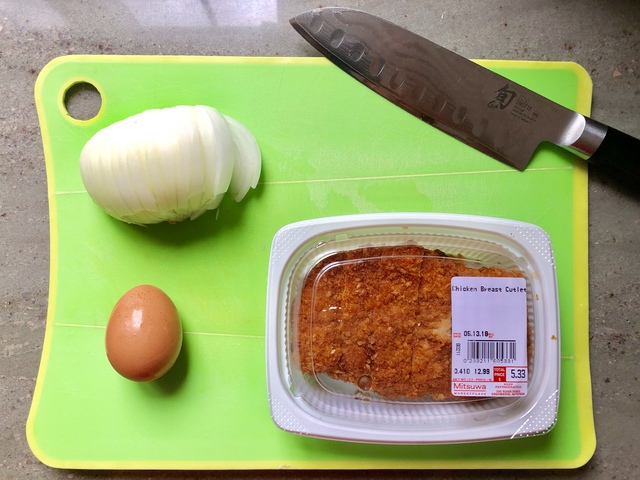
<![CDATA[<p>Wow, it's been 6 years since I last posted a General Vamp's recipe attempt. I actually tried this last May but didn't have a chance to post it. And then I forgot about it until now. Why such a long gap between attempts? Because I couldn't find anywhere local that carried chicken cutlets. For the longest time I could only find pork cutlets at Mitsuwa but I would always keep an eye out for chicken. So imagine my surprise when after so many years I finally saw chicken cutlets available.</p>

<div style="text-align: center;">
   <iframe width="560" height="315" src="https://www.youtube.com/embed/fzYQYzjkqMI?si=WUMRCPSE7YqtsJ9w" title="YouTube video player" frameborder="0" allow="accelerometer; autoplay; clipboard-write; encrypted-media; gyroscope; picture-in-picture; web-share" referrerpolicy="strict-origin-when-cross-origin" allowfullscreen></iframe><br />
</div>

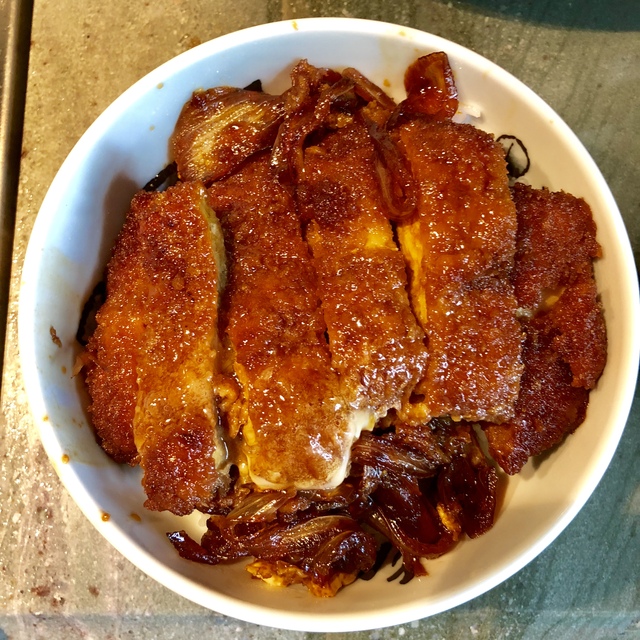
<p>Preparation as usual wasn't particularly hard. But unfortunately I wound up using too much sukiyaki sauce and not enough water so the completed dish wound up being too salty for my tastes.</p>

<p><a href="https://www.hitokiri.com/blog/archives/assets_c/2019/02/IMG_3314-514.php" onclick="window.open('https://www.hitokiri.com/blog/archives/assets_c/2019/02/IMG_3314-514.php','popup','width=1024,height=768,scrollbars=no,resizable=no,toolbar=no,directories=no,location=no,menubar=no,status=no,left=0,top=0'); return false"><img src="https://www.hitokiri.com/blog/archives/assets_c/2019/02/IMG_3314-thumb-640x480-514.jpg" width="640" height="480" alt="Ingredients" class="mt-image-center" style="text-align: center; display: block; margin: 0 auto 20px;" /></a></p>

<p>As you can tell from the photo below it just looks too salty. Next time I'll actually taste test it first before I dish it out onto the rice. And possibly throw on some chopped green onions on top.</p>

<p><a href="https://www.hitokiri.com/blog/archives/assets_c/2019/02/IMG_3316-517.php" onclick="window.open('https://www.hitokiri.com/blog/archives/assets_c/2019/02/IMG_3316-517.php','popup','width=1024,height=1024,scrollbars=no,resizable=no,toolbar=no,directories=no,location=no,menubar=no,status=no,left=0,top=0'); return false"><img src="https://www.hitokiri.com/blog/archives/assets_c/2019/02/IMG_3316-thumb-640x640-517.jpg" width="640" height="640" alt="Oyako-katsudon" class="mt-image-center" style="text-align: center; display: block; margin: 0 auto 20px;" /></a></p>

<p>But overall it's another yummy dish that's really quite easy to make. Hopefully it won't take me another 6 years to try out the next quick recipe. =)</p>]]>

</content>
</entry>

<entry>
<title>Trying Out the Apple Airpod</title>
<link rel="alternate" type="text/html" href="https://www.hitokiri.com/blog/archives/2017/07/trying_out_the.php" />
<modified>2017-07-15T06:08:46Z</modified>
<issued>2017-07-15T05:49:09Z</issued>
<id>tag:www.hitokiri.com,2017:/blog//1.1989</id>
<created>2017-07-15T05:49:09Z</created>
<summary type="text/plain"> So it&apos;s been about 7 months since Apple Airpods have been available in limited quantities and the online store still shows a wait time of at least 6 weeks if you order them now. Luckily, while visiting a retail...</summary>
<author>
<name>ronin</name>

<email>ronin@hitokiri.com</email>
</author>
<dc:subject>Ramblings</dc:subject>
<content type="text/html" mode="escaped" xml:lang="en" xml:base="https://www.hitokiri.com/blog/">
<![CDATA[<p><a href="http://www.hitokiri.com/blog/archives/assets_c/2017/07/IMG_1669-508.php" onclick="window.open('http://www.hitokiri.com/blog/archives/assets_c/2017/07/IMG_1669-508.php','popup','width=2048,height=2048,scrollbars=no,resizable=no,toolbar=no,directories=no,location=no,menubar=no,status=no,left=0,top=0'); return false"><img src="http://www.hitokiri.com/blog/archives/assets_c/2017/07/IMG_1669-thumb-640x640-508.jpg" width="640" height="640" alt="Apple Airpods" class="mt-image-center" style="text-align: center; display: block; margin: 0 auto 20px;" /></a></p>

<p>So it's been about 7 months since <a href="https://www.apple.com/airpods/">Apple Airpods</a> have been available in limited quantities and the <a href="https://www.apple.com/shop/product/MMEF2AM/A/airpods">online store</a> still shows a wait time of at least 6 weeks if you order them now. Luckily, while visiting a retail location a few weeks back with a cousin to pick up an iPod Shuffle, I figured I'd ask to see if they happened to have any available and lo and behold, they did! So I picked one up to see how well it works and if it'd be good enough to keep around.</p>]]>
<![CDATA[<p>Historically, I haven't been a fan of Apple's <a href="https://www.apple.com/shop/product/MNHF2AM/A/earpods-with-35-mm-headphone-plug">Earpods</a>, both in fit and performance. Physically, the Airpods are the exact same as the Earpods, just without the wire. The opening to my ear canals are a bit larger than average I guess so the Earpods always felt very loose-fitting to me. Compounded by the fact that I'm so accustomed to using well-sealing in-ear headphones for years now, the fit of the Airpods still felt strange to me. That being said, it didn't feel like the Airpods would fall out easily either once I had them nestled in as firmly as possible.</p>

<p>Initial setup was, true to typical Apple fashion, supremely easy. You unlock your iPhone, flip open the Airpod case lid, and a few seconds later a notification graphic appears on the phone that displays how much charge is left both on the headphones themselves as well as the charging case. Take the Airpods out of their slots, stick 'em in your ears and they're ready to go. If you remove one side while you happen to be listening to music or watching a video, the music/video automatically stops until you put the bud back in your ear.</p>

<p>Control-wise, there's simply nothing there besides tap-twice to bring up Siri. Which isn't surprising since there's no buttons on these buds. And me not being a regular Siri user, it completely didn't occur to me that I could use Siri to replicate some of the more common controls: previous/next tracks, adjust volume, etc. until I was perusing the Airpod webpage. However, relying on Siri to do those relatively simple tasks takes way too much time compared to just pushing a button or two. While it did work well, it pretty much quadrupled (at minimum) the amount of time I'd have to wait to actually accomplish a task. If you don't use Siri at all, you can actually change what double-tapping does from your iPhone's Bluetooth settings. Other options include stop/play or turning off the Airpods.</p>

<p>Sound quality wise, color me impressed. The Earpods suck due to the complete lack of bass. So I was actually pretty surprised at how good the Airpods sound. While the bass didn't seem to go as low or have the fullness that I'm used to with my <a href="https://www.amazon.com/1MORE-Triple-Headphones-In-line-Microphone/dp/B01A7G35S0/hitokiri-20?th=1">1More Triple Driver in-ears</a>, they have enough impact and presence to be perfectly acceptable for most non-basshead users. However... the Airpods can't isolate worth a damn. Which I guess may be good if you're a regular commuter in a big city and want to be able to hear everything going on around you so you don't accidentally get run over by an overzealous cyclist or motorist. But I'm much more used to well-sealed in-ear headphones so having to crank the volume up on my phone to almost max to be able to hear my music while walking around NYC was a bit of a pain.</p>

<p>Strangely enough, despite all the touting by Apple about the lengths they went to to make sure that the audio connection would never break, I actually got more audio hiccups while walking around Manhattan with these than with any of the prior true wireless headphones that I reviewed. Not that these hiccups bother me in any way cause they're like not even a second long.</p>

<p><a href="http://www.hitokiri.com/blog/archives/assets_c/2017/07/IMG_1670-511.php" onclick="window.open('http://www.hitokiri.com/blog/archives/assets_c/2017/07/IMG_1670-511.php','popup','width=2048,height=2048,scrollbars=no,resizable=no,toolbar=no,directories=no,location=no,menubar=no,status=no,left=0,top=0'); return false"><img src="http://www.hitokiri.com/blog/archives/assets_c/2017/07/IMG_1670-thumb-640x640-511.jpg" width="640" height="640" alt="Apple Airpods and Charging Case" class="mt-image-center" style="text-align: center; display: block; margin: 0 auto 20px;" /></a></p>

<p>The charging case is pretty slick and tiny compared to all the competition. The earbuds slide long-side first into their slots with a satisfying click and charging is pretty quick. I'll have to dock a point for how damn slippery the earbuds are though. I guess I have more oily fingers than most cause trying to pry the earbuds out of the case can be an endeavor at times.</p>

<p>So anyway, after all is said and done I still decided to return the Airpods. Mainly because of the lack of sound isolation and loose fit. But at least now I can understand why user ratings for these things are as high as they are. Cause despite how much the Earpods get panned by critics, I still see tons of people walking around with them. So obviously the average person isn't that anal about audio quality or picky about headphones in general. And compared to the Earpods, the sound quality on these are noticeably better. I think it's priced a bit too high though but it's an Apple product so that's to be expected. But if you can afford it, and don't mind the aesthetics, then the Airpods are a pretty good pickup.</p>]]>
</content>
</entry>

<entry>
<title>Testing Out True Wireless Earbuds Addendum</title>
<link rel="alternate" type="text/html" href="https://www.hitokiri.com/blog/archives/2017/03/testing_out_tru_1.php" />
<modified>2017-03-19T04:45:55Z</modified>
<issued>2017-03-19T04:05:53Z</issued>
<id>tag:www.hitokiri.com,2017:/blog//1.1988</id>
<created>2017-03-19T04:05:53Z</created>
<summary type="text/plain"> So a few months after my previous wireless earbud showdown, I came across the Bragi Headphone and just had to try it out. At $150, it was significantly cheaper than the previous three that I had tested. Unfortunately, you...</summary>
<author>
<name>ronin</name>

<email>ronin@hitokiri.com</email>
</author>
<dc:subject>Ben</dc:subject>
<content type="text/html" mode="escaped" xml:lang="en" xml:base="https://www.hitokiri.com/blog/">
<![CDATA[<p><a href="http://www.hitokiri.com/blog/archives/assets_c/2017/03/IMG_9108-499.php" onclick="window.open('http://www.hitokiri.com/blog/archives/assets_c/2017/03/IMG_9108-499.php','popup','width=1536,height=2048,scrollbars=no,resizable=no,toolbar=no,directories=no,location=no,menubar=no,status=no,left=0,top=0'); return false"><img src="http://www.hitokiri.com/blog/archives/assets_c/2017/03/IMG_9108-thumb-480x640-499.jpg" width="480" height="640" alt="Bragi The Headphone" class="mt-image-center" style="text-align: center; display: block; margin: 0 auto 20px;" /></a></p>

<p>So a few months after my previous <a href="http://www.hitokiri.com/blog/archives/2016/12/testing_out_tru.php">wireless earbud showdown</a>, I came across the <a href="https://www.bragi.com/theheadphone/">Bragi Headphone</a> and just had to try it out. At $150, it was significantly cheaper than the previous three that I had tested. Unfortunately, you do get what you pay for in this case.</p>]]>
<![CDATA[<p><a href="http://www.hitokiri.com/blog/archives/assets_c/2017/03/IMG_9105-502.php" onclick="window.open('http://www.hitokiri.com/blog/archives/assets_c/2017/03/IMG_9105-502.php','popup','width=1536,height=2048,scrollbars=no,resizable=no,toolbar=no,directories=no,location=no,menubar=no,status=no,left=0,top=0'); return false"><img src="http://www.hitokiri.com/blog/archives/assets_c/2017/03/IMG_9105-thumb-480x640-502.jpg" width="480" height="640" alt="Bragi the Headphone with Case" class="mt-image-center" style="text-align: center; display: block; margin: 0 auto 20px;" /></a></p>

<p>Physically they're not bad looking. Somewhat egg-shaped and a bit larger than the Skybuds and Amps Air but not as bulky looking as the Jabra. Smooth glossy black plastic all around except for the outward facing control face which is rubberized. The controls consist of three nubs on the right bud only which pretty much gave me all the controls I could ask for. It matches the Jabra in what functionality you could control (play/next/previous tracks + volume + Audio Transparency) but does it all on one earbud only. I had no issues controlling any of the features through the 3 nubs which was surprising, but nice. The Audio Transparency feature also seemed to work well, pretty much like the Jabra's HearThrough.</p>

<p>Unfortunately, sound quality for music playback was, like the Jabra, simply not there. With the stock medium size silicone FitTip, there was simply not enough tip available to get a good seal with my ears. So bass was simply non-existent. And for some reason, it only comes with small and medium sized FitTips. Fortunately, it also comes with one pair of foam Comply tips which for me at least, made a WORLD of difference. Finally, bass. But still, not enough to impress. Overall sound quality was just bland. So if you really need to use these for music, definitely go with the foam tips.</p>

<p><a href="http://www.hitokiri.com/blog/archives/assets_c/2017/03/IMG_9104-505.php" onclick="window.open('http://www.hitokiri.com/blog/archives/assets_c/2017/03/IMG_9104-505.php','popup','width=2048,height=1536,scrollbars=no,resizable=no,toolbar=no,directories=no,location=no,menubar=no,status=no,left=0,top=0'); return false"><img src="http://www.hitokiri.com/blog/archives/assets_c/2017/03/IMG_9104-thumb-640x480-505.jpg" width="640" height="480" alt="Bragi The Headphone with Lanyard Case" class="mt-image-center" style="text-align: center; display: block; margin: 0 auto 20px;" /></a></p>

<p>Another disappointment was with the carrying case that it comes with. With the three previous sets I had reviewed, all the carrying cases doubled as batteries. So when you were not using the earbuds, you could just pop them in their case and they would be charged up. I guess because this Bragi is relatively low cost, they didn't bother sticking a battery into the carrying case. In order to charge the earbuds while they're in the case, you need to plug in the USB cable. Kinda lame. But you do get a lanyard with the Bragi case in case you're the forgetful type and want to hang it around your neck.</p>

<p>So anyway, another earbud tried and tested and unfortunately still not up to snuff for me. Even more disappointing because I <i>really</i> wanted to like it. I think they did a good job cramming in all the controls that I could want into a relatively easy to use interface. It's just too bad that the sound quality was such a letdown. So still awaiting the <a href="https://www.indiegogo.com/projects/air-acoustically-stunning-wireless-headphones-audio--2#/">Air</a> to hopefully save the day. I also placed a pre-order for the <a href="https://www.kickstarter.com/projects/podolabs/make-any-headphones-wireless-jack-by-podo-labs">Jack</a> so we'll see how that goes with my existing <a href="http://www.hitokiri.com/blog/archives/2016/03/4-way_in-ear_he.php">wired earbuds</a>.</p>]]>
</content>
</entry>

<entry>
<title>Testing Out True Wireless Earbuds</title>
<link rel="alternate" type="text/html" href="https://www.hitokiri.com/blog/archives/2016/12/testing_out_tru.php" />
<modified>2016-12-22T23:53:01Z</modified>
<issued>2016-12-20T05:26:37Z</issued>
<id>tag:www.hitokiri.com,2016:/blog//1.1987</id>
<created>2016-12-20T05:26:37Z</created>
<summary type="text/plain"> After wandering around Best Buy during the current holiday season, I was surprised to see a burgeoning selection of true wireless earbuds actually available for sale in store. &quot;True wireless&quot; meaning that they&apos;re just two earbuds with nothing connecting...</summary>
<author>
<name>ronin</name>

<email>ronin@hitokiri.com</email>
</author>
<dc:subject>Ben</dc:subject>
<content type="text/html" mode="escaped" xml:lang="en" xml:base="https://www.hitokiri.com/blog/">
<![CDATA[<p><a href="http://www.hitokiri.com/blog/archives/assets_c/2016/12/_F8C5752-472.php" onclick="window.open('http://www.hitokiri.com/blog/archives/assets_c/2016/12/_F8C5752-472.php','popup','width=2048,height=1365,scrollbars=no,resizable=no,toolbar=no,directories=no,location=no,menubar=no,status=no,left=0,top=0'); return false"><img src="http://www.hitokiri.com/blog/archives/assets_c/2016/12/_F8C5752-thumb-640x426-472.jpg" width="640" height="426" alt="_F8C5752.jpg" class="mt-image-center" style="text-align: center; display: block; margin: 0 auto 20px;" /></a></p>

<p>After wandering around <a href="http://www.bestbuy.com">Best Buy</a> during the current holiday season, I was surprised to see a burgeoning selection of true wireless earbuds actually available for sale in store. "True wireless" meaning that they're just two earbuds with nothing connecting them. First to market contenders already existed since a year ago: the <a href="https://earin.com/">Earin</a> and <a href="https://www.bragi.com/">Bragi Dash</a> and the like but I figured the first ones of this product type would most likely not be very good and subsequent reviews pretty much affirmed that view. But the brightly packaged and slick-looking <a href="https://skybuds.com/">Skybuds</a> attracted my attention so I decided to give them a shot. I subsequently also tested out the <a href="https://www.solrepublic.com/amps-air.html">Sol Republic Amps Air</a> and <a href="http://www.jabra.com/sports-headphones/jabra-elite-sport">Jabra Elite Sport True Wireless Earbuds</a> as well to try to get a better idea on what the audio quality of these latest Bluetooth earbuds were like.</p>

<p>But before we get started, I just wanted to make clear that my primary use case for earbuds is to listen to music and watch videos during my commute. So sound quality and control set are the more important criteria for me. With that out of the way...</p>]]>
<![CDATA[<p><a href="http://www.hitokiri.com/blog/archives/assets_c/2016/12/_F8C5755-475.php" onclick="window.open('http://www.hitokiri.com/blog/archives/assets_c/2016/12/_F8C5755-475.php','popup','width=2048,height=1365,scrollbars=no,resizable=no,toolbar=no,directories=no,location=no,menubar=no,status=no,left=0,top=0'); return false"><img src="http://www.hitokiri.com/blog/archives/assets_c/2016/12/_F8C5755-thumb-640x426-475.jpg" width="640" height="426" alt="Skybuds.jpg" class="mt-image-center" style="text-align: center; display: block; margin: 0 auto 20px;" /></a></p>

<p>So first off, the <a href="https://skybuds.com/">Skybuds</a>. They come in Nimbus (grey), Charcoal (black) and Pearl (white) but I believe Best Buy only carries the former two. The store I was at only had the Nimbus in stock so that's what I wound up with. Made of a smooth, water-resistant plastic, these were the smallest and slickest-looking of the trio. Each earbud had one, light-rimmed button that glowed blue when giving feedback. To wear them you're supposed to stick them sort of at a 45 degree angle from the vertical into your ear and then swing the back end of the earbud down to a more horizontal position. I found this horizontal position to be uncomfortable after extended use though so left it sort of at an angle inbetween the starting 45 degree angle and horizontal. This worked better and didn't make the earbud any less secure in my ear.</p>

<p>Initial setup was flawless and just really well done. The female voice that guides you was clear and pleasant-sounding and I was connected to my <a href="http://www.apple.com/iphone">iPhone 7</a> and listening in a surprisingly short amount of time. The way the Skybud connection works is only one earbud connects to your output device, the second earbud connects to the primary one. In my case, the primary earbud was the right one so if I was listening to something and took out the right earbud and moved it farther than an inch or so from my head, you would lose the sound in the left earbud.</p>

<p>Audio control from the single button on either earbud was also skimpier than I'd like. One click to play/stop. Two clicks to jump to next song. Three clicks to put the earbud into Bluetooth pairing mode. Coming from a full-featured wired earphone with volume control and the ability to skip forward and back, this reduced feature set was a bit disappointing, but not something I wasn't expecting.</p>

<p>As for the sound quality... when I first started listening to it I thought that they were shooting for a wider soundstage with the Skybuds. Unfortunately, the  most noticeable aspect of the sound was the complete lack of mid-low to sub bass. I'm not a basshead by any means but I still like to "feel" something, anything in the low region. Without the low end it just sounds like you're missing a good chunk of the sonic range of the song. So that was rather disappointing. And then on top of that, after extended use, I started to notice that what I originally thought was an attempt at a wide soundstage effect was just a complete imbalance of the sound between the two earbuds. Normally with earbuds, you hear the vocals smack dab in the middle of your head. Not with these. The vocals here were noticeable primarily on the right side. It's not that there was no sound coming from the left, it just seemed like the sound from the left earbud was softer or they intentionally skewed most of the sound to come out from the right earbud. So instead of the vocals in the middle with the other instruments arraigned around it, the Skybuds picked up the entire sound and placed it two steps to the right.</p>

<p><a href="http://www.hitokiri.com/blog/archives/assets_c/2016/12/IMG_8658-478.php" onclick="window.open('http://www.hitokiri.com/blog/archives/assets_c/2016/12/IMG_8658-478.php','popup','width=750,height=1334,scrollbars=no,resizable=no,toolbar=no,directories=no,location=no,menubar=no,status=no,left=0,top=0'); return false"><img src="http://www.hitokiri.com/blog/archives/assets_c/2016/12/IMG_8658-thumb-426x757-478.png" width="426" height="757" alt="SkybudsApp.PNG" class="mt-image-center" style="text-align: center; display: block; margin: 0 auto 20px;" /></a></p>

<p>The Skybuds also has a slick-looking companion smartphone app (iOS & Android) that currently only shows you the amount of battery life you have on both earbuds and the charging case. And you can also use it to upgrade the firmware on the earbuds, which I promptly did the evening I got them. Now on the update part of the app, there was a section that noted that the <i>"Update could take up to 3 hrs to complete."</i> And I remember thinking, "Wow, 3 hours? Really?" And wouldn't you know it, it really took <b>3 HOURS</b> to complete. And the kicker to that is that you need to keep the app open while the update is happening so you can't do anything else with your phone while you're updating. But 3 hours aside, it's pretty cool that you can upgrade the firmware on your earbuds. Maybe the sound issues I noted above can be fixed with future updates.</p>

<p><a href="http://www.hitokiri.com/blog/archives/assets_c/2016/12/_F8C5757-481.php" onclick="window.open('http://www.hitokiri.com/blog/archives/assets_c/2016/12/_F8C5757-481.php','popup','width=1365,height=2048,scrollbars=no,resizable=no,toolbar=no,directories=no,location=no,menubar=no,status=no,left=0,top=0'); return false"><img src="http://www.hitokiri.com/blog/archives/assets_c/2016/12/_F8C5757-thumb-426x639-481.jpg" width="426" height="639" alt="SkybudsCharger.jpg" class="mt-image-center" style="text-align: center; display: block; margin: 0 auto 20px;" /></a></p>

<p>The charging case for the Skybuds is this flattened tubular case that slides out on one end so that you can slot the earbuds into each side. You can quickly tell how much charge is left in the case by pushing the large oval blue-ringed button on the end that slides out. Taking the earbuds out of the case was a little problematic at first. Because of the smooth, slippery plastic material that they're made of, trying to pull the earbuds directly out of their slot was tricky. Until I realized that you can just swivel the earbuds towards you first before pulling them out which was much easier.</p>

<p><a href="http://www.hitokiri.com/blog/archives/assets_c/2016/12/_F8C5758-484.php" onclick="window.open('http://www.hitokiri.com/blog/archives/assets_c/2016/12/_F8C5758-484.php','popup','width=1365,height=2048,scrollbars=no,resizable=no,toolbar=no,directories=no,location=no,menubar=no,status=no,left=0,top=0'); return false"><img src="http://www.hitokiri.com/blog/archives/assets_c/2016/12/_F8C5758-thumb-426x639-484.jpg" width="426" height="639" alt="AmpsAir.jpg" class="mt-image-center" style="text-align: center; display: block; margin: 0 auto 20px;" /></a></p>

<p>Next up, the <a href="https://www.solrepublic.com/amps-air.html">Amps Air by Sol Republic</a>. These share a similar shape with the Skybuds but were a bit larger, probably due to the rubberized coating around them that's meant to protect them from sweat and moisture. So I wore them pretty much the same way as the Skybuds but because of the larger size they were a bit more uncomfortable, even with, or maybe because of, the rubberized coating. Each earbud had one uncoated, smooth plastic button that took up pretty much the entire face that it's on so at least it was easy to access.</p>

<p>Initial setup was also relatively easy but the notification tones and voice that the earbuds emit when you're controlling them aren't as clear as on the Skybuds. They sound fuzzy even. Subsequent pairings though, were occasionally problematic as only one earbud would pair correctly. So I would wind up popping both back into the charging case, taking them back out, pressing the button once on each earbud and wait until the light on both came up as white, and then try to pair again manually. Not really hard to do or too time-consuming but can be a bit aggravating if you just wanted to pick up and go. The reason why this half-pairing issue appears to begin with is because unlike the Skybuds, each earbud for the Amps Air connects to your listening device by itself. So you do have the option of connecting only one earbud if you wish. I don't know why you'd want that but it's an option. One advantage of connecting this way is that if you remove one earbud from your ear, the other doesn't lose sound.</p>

<p>Audio control on these were just downright pathetic. Single click to play/stop. Two clicks to bring up Siri or Google (depending on what smartphone you're using). And that's it. Since I normally use headphones with my phone to listen to music during my commute and never use Siri/Google, this was completely useless.</p>

<p>Where the Amps Air redeems itself though is in the sound quality, but with a caveat. These earbuds pack the best bass out of the three. The low/sub bass actually has a kick to it and it's pretty good. I don't think it overshadows the mids too much but then again, for earbuds I'm going to use out and about, I'm not as picky as I would be for stay-at-home headphones. However, the one caveat is that I kept hearing a weird sizzling sound in a particular range of the mids. It's not very noticeable at times, especially when I'm walking around outside in an urban environment, but when a song comes up that's more vocal based and lower-pitched, like Adele's "Someone Like You," it gets rather distracting. And once I hear it I can't unhear it. I don't know if this was particular to this set of earbuds that I got or just something with my ears. But if you don't hear it, then these really have the best audio out of the 3 reviewed here.</p>

<p><a href="http://www.hitokiri.com/blog/archives/assets_c/2016/12/_F8C5760-487.php" onclick="window.open('http://www.hitokiri.com/blog/archives/assets_c/2016/12/_F8C5760-487.php','popup','width=1365,height=2048,scrollbars=no,resizable=no,toolbar=no,directories=no,location=no,menubar=no,status=no,left=0,top=0'); return false"><img src="http://www.hitokiri.com/blog/archives/assets_c/2016/12/_F8C5760-thumb-426x639-487.jpg" width="426" height="639" alt="AmpsAirCharger.jpg" class="mt-image-center" style="text-align: center; display: block; margin: 0 auto 20px;" /></a></p>

<p>The Amps Air comes with a pretty slick clamshell charging case that uses magnets to snap the earbuds into place when charging. Four tiny LEDs on the front show you much charge is left. And as an added bonus, the case also doubles as a portable device charger since it packs a 2200mAh battery and has an extra USB port that you can connect your device to. Pretty smart and handy in a pinch.</p>

<p><a href="http://www.hitokiri.com/blog/archives/assets_c/2016/12/_F8C5761-490.php" onclick="window.open('http://www.hitokiri.com/blog/archives/assets_c/2016/12/_F8C5761-490.php','popup','width=1365,height=2048,scrollbars=no,resizable=no,toolbar=no,directories=no,location=no,menubar=no,status=no,left=0,top=0'); return false"><img src="http://www.hitokiri.com/blog/archives/assets_c/2016/12/_F8C5761-thumb-426x639-490.jpg" width="426" height="639" alt="JabraElite.jpg" class="mt-image-center" style="text-align: center; display: block; margin: 0 auto 20px;" /></a></p>

<p>And lastly, we have the <a href="http://www.jabra.com/sports-headphones/jabra-elite-sport">Jabra Elite Sport True Wireless Earbuds</a>. These are the largest earbuds, but for good reason (which I'll get to momentarily). Even though they were large, I didn't have any issues with the fit. The medium sized silicone tips + the smallest EarWings (a rubberized piece that fits on the opposite end of the tips to help keep the entire thing in your ear) was sufficient to keep it immobile in my ear. Because of the size, it takes a bit of getting used to but it wasn't too much more uncomfortable compared to the Skybuds or Amp Airs. And these are actually dust & waterproof instead of just sweat/water-resistant. And instead of having just one button on each earbud, there are two. And they all do different things.</p>

<p>Initial setup was also rather simple but the notification sounds were also somewhat muted like with the Amps Air. These work similar to the Skybuds where only one of the earbuds pair to your device. So if you take off the main one and move it too far away, your other earbud loses sound. Also didn't have any further issues with pairing after the initial setup.</p>

<p>Audio control is where these earbuds shine. Because of the larger buds, Jabra was able to fit two buttons on each earbud and even better, have them all do different things. The controls on the left earbud handles volume and music control (next/previous) while the controls on the right does on/off, control of the smartphone app (if you use it), and turns the HearThrough functionality on/off. Coming off the limited control set of the Skybuds and Amps Air, the controls here was really fantastic, and worked well too. I would have been happy with just being able to skip tracks forward and back but to be able to control volume too was just icing. The HearThrough functionality, which allows you to hear street sounds around you so you're not completely sealed off from your surroundings, worked impressively well. It made it sound like I wasn't wearing in-ear headphones at all at times.</p>

<p>As for the sound quality, the best I can say is that it was pretty standard. Still missing low/sub bass but not as badly as the Skybuds. Everything else sounded as they should but just... boring. Not much else to say about the sound.</p>

<p>The Jabra also comes with a pretty nice companion smartphone app that's primarily fitness oriented. The earbuds themselves come with an in-ear heart rate monitor which was interesting to see. And with it the app can track and analyze your overall fitness, have personalized audio coaching plus a bunch of other fitness features that I would most likely never use.</p>

<p><a href="http://www.hitokiri.com/blog/archives/assets_c/2016/12/_F8C5762-493.php" onclick="window.open('http://www.hitokiri.com/blog/archives/assets_c/2016/12/_F8C5762-493.php','popup','width=1366,height=2048,scrollbars=no,resizable=no,toolbar=no,directories=no,location=no,menubar=no,status=no,left=0,top=0'); return false"><img src="http://www.hitokiri.com/blog/archives/assets_c/2016/12/_F8C5762-thumb-426x638-493.jpg" width="426" height="638" alt="JabraEliteCharger.jpg" class="mt-image-center" style="text-align: center; display: block; margin: 0 auto 20px;" /></a></p>

<p>The charging case that comes with these is the smallest of the three, just a bit larger than both earbuds. But it's got one powerful hinge that's used to keep it shut. I nipped my fingers on more than one occasion while closing it before I learned better.</p>

<p>And before I finish, I just wanted to remark on a few other issues that people may be interested in hearing about when it comes to wireless earbuds. One, audio lag. I did not encounter any noticeable audio lag while watching videos with any of these earbuds. I did feel like I encountered a little bit of lag while playing a game though. Like the sound that I usually hear while pushing on a game object seemed to come in a tiny bit later than usual but nothing too detrimental. Two, call quality. I only tried calling a few times with the Amps Air and Jabra Elite while out and about and didn't have any issues with hearing the other party or them hearing me. But I think the Jabra was a little better in this. I unfortunately didn't get to try it with the Skybuds so don't have anything to add there. And three, connection drops. I experienced occasional drops with all three sets and pretty much every time it was very slight, like a brief hiccup. And they seem to like occurring at major intersections here in NYC. Like 34th & Broadway or 42nd & 5th. But nothing major.</p>

<p><a href="http://www.hitokiri.com/blog/archives/assets_c/2016/12/_F8C5764-496.php" onclick="window.open('http://www.hitokiri.com/blog/archives/assets_c/2016/12/_F8C5764-496.php','popup','width=2048,height=1365,scrollbars=no,resizable=no,toolbar=no,directories=no,location=no,menubar=no,status=no,left=0,top=0'); return false"><img src="http://www.hitokiri.com/blog/archives/assets_c/2016/12/_F8C5764-thumb-640x426-496.jpg" width="640" height="426" alt="TrioEarbuds.jpg" class="mt-image-center" style="text-align: center; display: block; margin: 0 auto 20px;" /></a></p>

<p>So after trying out all three, I can pretty much safely conclude that none of them are really for me. Ideally, my perfect set of true wireless earbuds would be something that had the looks, notification sounds and firmware upgradability of the Skybuds with the sound quality of the Amps Air (minus the weird sizzle) and the controls and HearThrough feature of the Jabra Elite. Unfortunately, such a thing doesn't exist yet. But if I had to choose one set of the three now, it would have to be the Jabra Elite. It's comfortable enough and has great controls and feature set. It's just a little large and the sound quality is nothing special but those two negatives don't hold it back very much either. The lack of controls on the Amps Air makes it a no go for me even though I place more importance on sound quality. At least give me a next/previous song control on one of the buttons, that's all I ask. And if the Skybuds can fix the weird sound quality via firmware upgrades, they may be worth another look. For now though, I'm placing my hopes on a yet unreleased product, the simply-named <a href="https://www.indiegogo.com/projects/air-acoustically-stunning-wireless-headphones-audio--2#/">Air</a>. It's about the same size/form as the Skybuds and with just the minimum amount of controls that I need. If the sound quality can live up to what they're showing, then I'll be pretty happy. Plus the price is right as well. But I definitely will be looking forward to it because having gone wireless for awhile, it's pretty sweet. No longer have to worry about my headphone wires snagging on anything on or around me. Can take my iPhone out to take photos on the go w/out trailing that wire around. Can use earmuffs with them without the earbuds losing a bit of seal in my ear because the earmuff is pressing down on the trailing cable. We'll see, maybe it'll take another year or two before a true wireless earbud is released that will satisfy all of my requirements.</p>]]>
</content>
</entry>

<entry>
<title>4-Way In-Ear Headphone Showdown</title>
<link rel="alternate" type="text/html" href="https://www.hitokiri.com/blog/archives/2016/03/4-way_in-ear_he.php" />
<modified>2016-03-25T04:52:47Z</modified>
<issued>2016-03-25T03:51:13Z</issued>
<id>tag:www.hitokiri.com,2016:/blog//1.1986</id>
<created>2016-03-25T03:51:13Z</created>
<summary type="text/plain"> For the past couple of years, my workhorse commute in-ear headphone was the Sony XBA-3iP, packing 3 balanced armature drivers and a built-in, full-suite (playback &amp; volume controls) smartphone controller/mic. The reason I liked it was because it was...</summary>
<author>
<name>ronin</name>

<email>ronin@hitokiri.com</email>
</author>
<dc:subject>Ramblings</dc:subject>
<content type="text/html" mode="escaped" xml:lang="en" xml:base="https://www.hitokiri.com/blog/">
<![CDATA[<p><a href="http://www.hitokiri.com/blog/archives/assets_c/2016/03/earphones-454.php" onclick="window.open('http://www.hitokiri.com/blog/archives/assets_c/2016/03/earphones-454.php','popup','width=2048,height=1365,scrollbars=no,resizable=no,toolbar=no,directories=no,location=no,menubar=no,status=no,left=0,top=0'); return false"><img src="http://www.hitokiri.com/blog/archives/assets_c/2016/03/earphones-thumb-640x426-454.jpg" width="640" height="426" alt="The Contenders" class="mt-image-center" style="text-align: center; display: block; margin: 0 auto 20px;" /></a></p>

<p>For the past couple of years, my workhorse commute in-ear headphone was the <a href="http://www.amazon.com/Sony-XBA-3IP-Balanced-Armature-Headphones/dp/B006K556Y4/hitokiri-20">Sony XBA-3iP</a>, packing 3 balanced armature drivers and a built-in, full-suite (playback & volume controls) smartphone controller/mic. The reason I liked it was because it was one of the few, if possibly the only, 3-driver in-ear at the time that had a relatively small casing and didn't require being worn w/the cable looped up and around the ear. I absolutely <b>HATE</b> wearing headphones that way mainly cause the cables never stay in place for me. It was a pretty good pair of in-ears, not the absolute best reviews, but good enough for me. Unfortunately early last year the volume control broke. But since everything else about it was still good I continued to use them, until towards the end of the year when I finally started thinking about finding a replacement.</p>

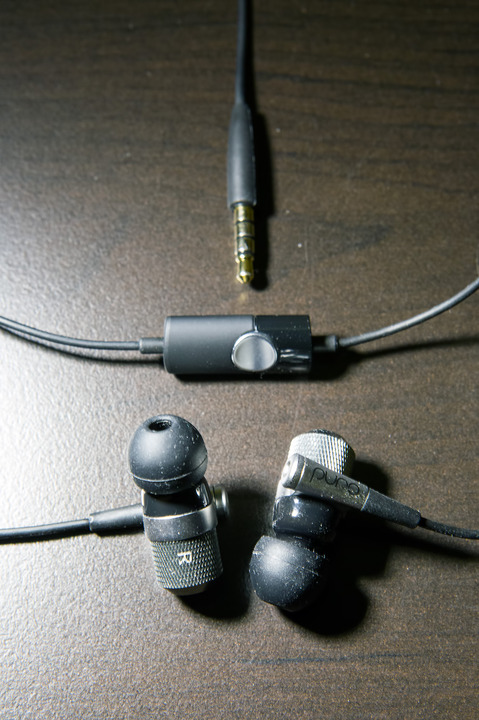
<p>Embarrassingly enough, by that time I had completely forgotten exactly what was broken with the Sony headphones. Just that it wasn't 100% functional thus, I should replace it. So I wound up picking up a pair of the dual-driver <a href="http://www.amazon.com/Puro-Sound-Labs-IEM500-Monitors/dp/B00XO47YKI/hitokiri-20">Puro Sound Labs IEM500</a>s for a dirty cheap price on eBay only to eventually realize much too late that the reason I wanted to replace the Sony was for the volume control, which the Puro had none to begin with. *facepalm*</p>

<p>But I liked the Puro well enough to switch to it as my main in-ears. After awhile though, GAS (Gear Acquisition Syndrome) started nipping at my heels so I started looking for yet another replacement, this time with volume controls. And so I ended up with the <a href="http://www.amazon.com/Sennheiser-Momentum-In-Ear-iOS-version/dp/B00N3RFFV6/hitokiri-20">Sennheiser Momentum In-Ear</a>. While this had all the functionality I wanted, I wasn't completely sold on the sound signature. So back to browsing on Amazon again for another pair that had a sound more in tune with what I like. And that's how I came across the <a href="http://www.amazon.com/1MORE-Triple-Headphones-In-line-Microphone/dp/B01A7G35S0/hitokiri-20">1MORE Triple Driver In-Ear Headphones with In-line Microphone and Remote</a>. I had never heard of 1MORE before but the reviews on Amazon were really good and the price was insane for a triple-driver. At about the same time, <a href="http://www.gradolabs.com/headphones/in-ear-series">Grado</a> apparently decided they needed some of my money as well and released their new <a href="http://www.4ourears.net/iGe_p/4e-ige.htm">iGe</a>. They were priced the same so I figured I'd do a comparison to see how they would fare against each other.</p>

<p>So that's what this post is ultimately about, a 4-way in-ear headphone comparison. Before I get started, I would just like to make clear that I am in no way a full-fledged audiophile. I don't inspect every detail of headphone specs or look at/compare measurement charts or whatnot. I don't even know what much of the specs even mean. I just plug in the headphones, crank up some tunes, close my eyes, and listen. I can distinguish between highs, mids and lows and possibly make out differences in soundstage if I concentrate hard enough. But I can't wax poetic about the quality of each sound range. As for how I tested, since I use these primarily during my work commute, I just plugged them straight into my <a href="http://www.apple.com/iphone/">iPhone 6S</a>. No amp. I'll also comment a little about the physical aspects of each pair of headphones. So, with that out of the way, here goes nothing.</p>]]>
<![CDATA[<h2>Sennheiser Momentum In-Ear</h2>
<a href="http://www.hitokiri.com/blog/archives/assets_c/2016/03/sennheiser-457.php" onclick="window.open('http://www.hitokiri.com/blog/archives/assets_c/2016/03/sennheiser-457.php','popup','width=2048,height=1365,scrollbars=no,resizable=no,toolbar=no,directories=no,location=no,menubar=no,status=no,left=0,top=0'); return false"><img src="http://www.hitokiri.com/blog/archives/assets_c/2016/03/sennheiser-thumb-640x426-457.jpg" width="640" height="426" alt="Sennheiser Momentum In-Ear" class="mt-image-center" style="text-align: center; display: block; margin: 0 auto 20px;" /></a>

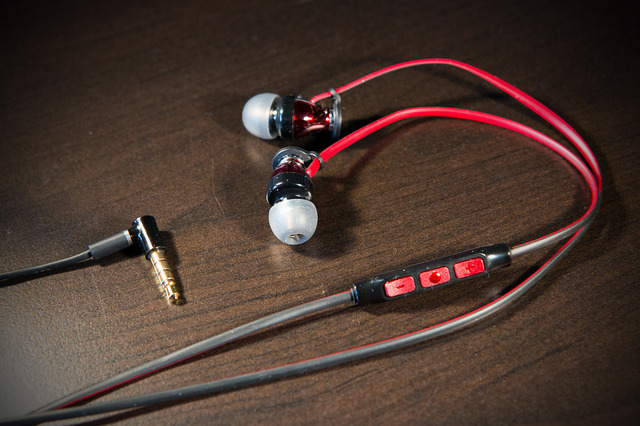
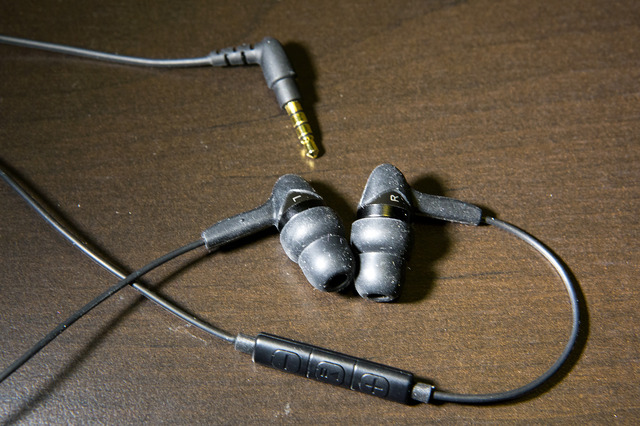
<p>First up, the Sennheiser. Build-wise, it's probably the sturdiest of the bunch. Thick, smooth, oval cables that feels like they should last. The 3 button controller has separate buttons but for some reason it didn't feel that way to me in use. I found myself hitting extraneous buttons more often than I'd like when using it. I also have to take points away on the ease of distinguishing between the right and left earbuds. The tiny, indented black "R" is located on the bottom of the casing in the black plastic piece right above where the cable enters the earbud. In lower light conditions, it's impossible to find. Obviously once you finally find it and note that the mic controller is situated on the right side, distinguishing between the sides is no longer an issue. But initial impression wasn't particularly favorable in this regard. At the other end, the Sennheiser packs a right-angle plug. Personally I don't have a preference between right angle, 45 degree angle, or straight plugs. I can live with any of them. Accessory-wise, it comes with a big hard case to store the headphones in and 4 sets of ear tips of varying sizes.</p>

<p>As for the sound, it really is a bass heavy set of headphones. Too much so to my ears. It's an overly full bass that veils the mids and highs. And on top of that the highs sounded a little thin as well. My personal preference leans more towards clear, forward mids which is why I ultimately decided to look for alternatives to the Sennheiser. The bass on these was too intrusive for my tastes.</p>

<h2>1MORE Triple Driver In-Ear Headphones with In-line Microphone and Remote</h2>
<a href="http://www.hitokiri.com/blog/archives/assets_c/2016/03/1more-460.php" onclick="window.open('http://www.hitokiri.com/blog/archives/assets_c/2016/03/1more-460.php','popup','width=2048,height=1365,scrollbars=no,resizable=no,toolbar=no,directories=no,location=no,menubar=no,status=no,left=0,top=0'); return false"><img src="http://www.hitokiri.com/blog/archives/assets_c/2016/03/1more-thumb-640x426-460.jpg" width="640" height="426" alt="1MORE Triple Driver Headphones" class="mt-image-center" style="text-align: center; display: block; margin: 0 auto 20px;" /></a>

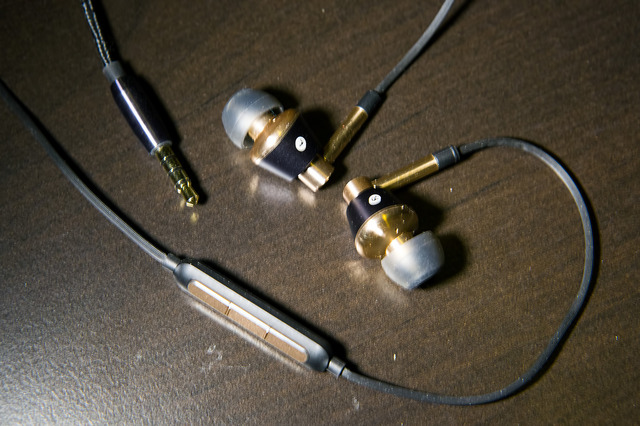
<p>Next up, the 1MORE. Interesting cabling on this one. From the straight plug up to where it splits into the right/left sides, the cable is thick nylon braided. Not as thick as the Sennheiser cable but good enough to instill confidence that it won't break anytime soon. From where the cable splits to the casings, the cable is just straight TPE (plastic/rubber polymer) with ridges that's thinner than the bottom half. The 3 button mic controller has separate buttons that rest right against each other but there's a noticeable (by touch) ridge between each that makes it pretty easy to tell which button my finger is currently on. The earbud casing itself is smooth aluminum which I actually quite like because when inserted in the ear, they feel cool to the touch. Also very easy to distinguish between right and left earbuds as the black R/L is stamped in a white circle on each casing. Accessory-wise, these guys make the rest look stingy by comparison. 9 sets of ear tips of varying sizes: 6 silicon, 3 memory foam. A nice, faux leather hard case with magnetic latch and a dual-prong airline adapter.</p>

<p>Sound-wise, this was much more my speed. Bass is present without being overly imposing on the mids and highs while still packing a good impact. The mids were nice and clear and the highs weren't shrill. Compared to the Sony's 3 balanced armature drivers, the 1MORE packs 2 balanced armatures and 1 dynamic driver. Not sure why they decided to go with that combination but it sounds very similar to the Sony. Compared to these, I thought the Sony still had a slightly sweeter, more lyrical sound that was also a bit more forward. The bass sounded tighter but wasn't as wide/deep as the 1MORE. But I'm quite pleased with the overall sound on these.</p>

<h2>Grado iGe</h2>
<a href="http://www.hitokiri.com/blog/archives/assets_c/2016/03/grado-463.php" onclick="window.open('http://www.hitokiri.com/blog/archives/assets_c/2016/03/grado-463.php','popup','width=2048,height=1365,scrollbars=no,resizable=no,toolbar=no,directories=no,location=no,menubar=no,status=no,left=0,top=0'); return false"><img src="http://www.hitokiri.com/blog/archives/assets_c/2016/03/grado-thumb-640x426-463.jpg" width="640" height="426" alt="Grado iGe" class="mt-image-center" style="text-align: center; display: block; margin: 0 auto 20px;" /></a>

<p>Physically, the iGe is the most non-descript out of the bunch. All black with a more rubbery-feeling cable that ends at an angled plug. I'm a little wary with this type of cable because it feels and looks like the type that <a href="http://www.etymotic.com/">etymotic</a> uses with their <a href="http://www.amazon.com/Etymotic-Research-ER23-HF3-BLACK-Headset-3-Button/dp/B003YTROIU/hitokiri-20">hf series</a> and I've had 3 pairs of them all come down with tears somewhere along the cable after over a year of use. The earbud casing itself is flat black plastic but the back where the cable connects into is also encapsulated by a thick rubbery sheath. Also nice and easy to tell R/L buds apart with the silvery-white lettering on one side of each earbud. The mic controller, which is also located on the right side, has separate buttons but it's hard to tell them apart by feel. Each button is rather small though so at least no accidental multi-button press issues like I had with the Sennheiser. These were also the most comfortable earbuds out of the 3 contenders due to it having a large, two-tier silicon tip. So when you stuff the tip into your ear, the only parts that come into contact with your ear is the soft silicon. All that rubber and silicon makes the earbuds pick up lint and dust like crazy though which makes things less aesthetically pleasing much sooner. Accessory-wise, you don't get much. Just two other pairs of different-sized silicon tips and one foam tip. That's it. Not even a case.</p>

<p>Historically, Grado headphones have been known for a more forward and "colored" sound that emphasizes the mids and highs. Some people find their highs too harsh. Fortunately, the iGe has no such problem with the highs, and it retains the characteristic mid-centric emphasis of its larger headphone brethren. Compared to the 1MORE, mids are a little more pronounced along with a little more impact with the upper bass. But the 1MORE's bass goes down lower. If you like music with the deep, low, stomach-rumbling sub-bass, you'll be missing out a little with these. But considering that the Grado is working with just one dynamic driver compared to the triple 1MORE and Sony and dual Puro, it compares quite well against them. They have the nice clear mids that I've always enjoyed on my etymotic in-ears but with a much beefier bass.</p>

<h2>Puro Sound Labs IEM500</h2>
<a href="http://www.hitokiri.com/blog/archives/assets_c/2016/03/puro-466.php" onclick="window.open('http://www.hitokiri.com/blog/archives/assets_c/2016/03/puro-466.php','popup','width=1365,height=2048,scrollbars=no,resizable=no,toolbar=no,directories=no,location=no,menubar=no,status=no,left=0,top=0'); return false"><img src="http://www.hitokiri.com/blog/archives/assets_c/2016/03/puro-thumb-480x720-466.jpg" width="480" height="720" alt="Puro Sound Labs IEM-500" class="mt-image-center" style="text-align: center; display: block; margin: 0 auto 20px;" /></a>

<p>And lastly, the Puro. This is probably the most distinctive looking out of these 4 headphones with its etched metal and glossy black plastic earbuds. These aren't the largest earbuds; the Grado just edges them out by a millimeter or two; but unfortunately they were the must uncomfortable earbuds for me. While the back half of the buds is where the rough, etched metal is, I find that they still do come in contact with parts of my ear periodically. Especially when I'm wiggling them around to get a good seal. Also not comfortable during the cold winter months when I break out the ear muffs. While the white-lettered R/L that's stamped onto the etched metal is a little harder to make out, it's still nowhere near as bad to find as on the Sennheiser. The TPE cable also starts with a straight plug and is the thinnest cable out of the lot. It turns even thinner where it breaks into the R/L sides. So I'm a little hesitant to take these out on my commutes too often since the cable seems rather fragile. The mic controller is smaller, but fatter, with just one big indented button since it has no volume control. It's also located a bit farther down the cable compared to the others and is also mounted on the left side instead of the right. This height placement is a little weird cause I always feel like I need to bring the mic up more towards my mouth when I'm talking into it. The mic controllers on the other headphones are all situated more towards the level of my mouth to begin with. As for accessories, it comes with 5 different sized tips and a soft cloth sock for storage.</p>

<p>Puro markets these headphones as neutral sounding. Which is pretty spot on. To me they sounded like a more recessed Grado. Clear mids and highs and a decent bass. But while clear, the highs and mids sounded thinner to me when compared to the others. On their own, the sound is very good. When I first got them I thought they sounded great. But when compared to the Grado and 1MORE, I find these just a little lacking.</p>

<p>Also, a note on the loudness of these headphones. While the Sennheiser, 1MORE and Sony all sound pretty much the same at the same volume level on my iPhone, the Grado is noticeably louder while the Puro is noticeably softer. I need to bring the Puro two or three clicks on the volume button up to match the same volume of the 1MORE and bring the 1MORE two clicks up to match the Grado. The Grado is a really easily driven set of headphones so if you like your music LOUD, the Grado's for you. On the opposite side of the spectrum, the Puro seems to need a lot of power. I typically had it at like 75-80% volume just to get to my usual listening volume. As a comparison the Grados could get away with a bit over 50%. Maybe 60. The Puros are probably better amped up.</p>

<p>And a brief note on the sound stage differences between these headphones. Frankly there wasn't anything noticeably different between any of them. And I wasn't about to waste more time trying to nitpick between them. They're IEMs. The sound stage won't be the best, but not terrible either.</p>

<p><a href="http://www.hitokiri.com/blog/archives/assets_c/2016/03/1more-tips-469.php" onclick="window.open('http://www.hitokiri.com/blog/archives/assets_c/2016/03/1more-tips-469.php','popup','width=1365,height=2048,scrollbars=no,resizable=no,toolbar=no,directories=no,location=no,menubar=no,status=no,left=0,top=0'); return false"><img src="http://www.hitokiri.com/blog/archives/assets_c/2016/03/1more-tips-thumb-480x720-469.jpg" width="480" height="720" alt="1MORE Ear Tips" class="mt-image-center" style="text-align: center; display: block; margin: 0 auto 20px;" /></a></p>

<p>So, final verdict? The 1MORE gets the overall nod here in my view. It's comfortable, easy to control, and sounds great with the clarity that I always look for in the mids and with an impressively wide bass range that doesn't skimp on impact either. My old Sony sounded a little better in the highs and mids and the bass was tighter but I enjoy the bass more on the 1MORE. Plus, the 1MORE is 1/3 of the price that I originally purchased the Sony for, which is just insane. Sony doesn't even make high-end IEMs for the US market anymore. There've been I think two more generations of the XBA line since the original series came out but they're not available here. The price/value ratio with the 1MORE is excellent. The only remaining issue I'm curious to see with the 1MORE is how well they hold up with age and use. But even if they break after a year or two, $99 for an excellent 3-driver IEM. $99. Prior to this I'd been paying $100-200 for single driver dynamics.</p>

<p>The new Grado iGe comes in at second place but it's really no slouch either. If you like the classic Grado sound, the iGe carries that banner very well. And it's just a very comfortable set of in-ears. Very basic and no frills though so you're getting more drivers, adaptability, and style with the 1MORE at the same price point.</p>

<p>The Puro comes in a respectable third with its more neutral sound. Like I mentioned previously, when I first got it, I was happy enough with its sound. But its lower comfort, thin cables and oddly poor mic placement are all negs against it. I think the IEM500 is also discontinued now as I <a href="http://purosound.com/collections/headphones/best-in-ear-headphones">no longer see it listed on Puro's website</a>. Although they're still being sold on <a href="http://www.amazon.com/Puro-Sound-Labs-IEM500-Monitors/dp/B00XO47YKI/hitokiri-20">Amazon for $199</a> which seems a little high to me. But I believe that's what its MSRP had always been. My first encounter with it was during the 2015 holiday season when Puro was having a pretty big sale on it. Plus I picked it up as a refurb direct from Puro which brought the price down even more.</p>

<p>And bringing up the rear is the Sennheiser. Truthfully I was rather surprised by the sound when I first got it because I didn't think Sennheiser headphones were particularly known for their heavy bass. My previous encounters with the HD600 and HD598 made it pretty obvious that they weren't going for the bass-head market. For awhile I thought I could live with it but the ears like what they like which led me to start the search for alternatives.</p>

<p>Anyway, if you've made it this far, thanks for reading and I hope this has been a little bit helpful to some of you. Obviously everyone hears things differently so what might sound great to me may wind up not being the case for you. But I think with the 1MORE and Grado, you really can't go wrong with either of them. </p>

<p>And finally, I thought I'd link to 3 of the songs I spent most of my time A/Bing with these headphones. They weren't the only ones but I actually jotted down notes while listening to these. Everything else I listened to afterwards pretty much confirmed my initial impressions.</p>

<h2>Flower - Akikaze no Answer</h2>
<iframe src="https://player.vimeo.com/video/115154867" width="640" height="361" frameborder="0" webkitallowfullscreen mozallowfullscreen allowfullscreen></iframe><br />
<p><a href="https://vimeo.com/115154867">Flower - Akikaze no Answer</a> from <a href="https://vimeo.com/user31414104">Yeru Jung Ji Jae</a> on <a href="https://vimeo.com">Vimeo</a>.</p>

<h2>Rodrigo y Gabriela - Hanuman</h2>
<iframe width="640" height="360" src="https://www.youtube.com/embed/ENBX_v1Po1Y" frameborder="0" allowfullscreen></iframe>

<h2>Pendulum - Witchcraft</h2>
<iframe width="640" height="360" src="https://www.youtube.com/embed/ogMNV33AhCY" frameborder="0" allowfullscreen></iframe>]]>
</content>
</entry>

<entry>
<title>The Long and Tedious Road to 4K</title>
<link rel="alternate" type="text/html" href="https://www.hitokiri.com/blog/archives/2015/07/the_long_and_te.php" />
<modified>2015-10-13T14:32:16Z</modified>
<issued>2015-07-15T02:43:12Z</issued>
<id>tag:www.hitokiri.com,2015:/blog//1.1985</id>
<created>2015-07-15T02:43:12Z</created>
<summary type="text/plain"> For the past year or so, I had been slowly becoming increasingly dissatisfied with the pixel density of computer monitors that I&apos;ve been using for the past few years. As can be seen from last year&apos;s desk photo, I&apos;ve...</summary>
<author>
<name>ronin</name>

<email>ronin@hitokiri.com</email>
</author>
<dc:subject>Ramblings</dc:subject>
<content type="text/html" mode="escaped" xml:lang="en" xml:base="https://www.hitokiri.com/blog/">
<![CDATA[<p><a href="" border="0"><img alt="My Desk 2015" width="640" height="427" src="https://farm1.staticflickr.com/483/19675357601_d74de9d5a8_z.jpg" /></a></p>

<p>For the past year or so, I had been slowly becoming increasingly dissatisfied with the pixel density of computer monitors that I've been using for the past few years. As can be seen from last year's <a href="https://www.flickr.com/photos/saeba/14088541632/">desk photo</a>, I've accumulated three 24" displays over the years: an Apple Cinema Display flanked by two Dells. But after being spoiled by the high PPI displays on the cell phones and tablets of today, the low pixel density of the displays from yesteryear were starting to grate on my eyes.</p>]]>
<![CDATA[<p>Being that I'm still running my beloved "old but reliable" Mac Pro (that I've had since 2009), my options were more limited to begin with. I've beefed the machine up throughout the years though so currently it's running as a v5,1 w/2x3.33Ghz 6-Core Westmere as opposed to its original v4,1 2x2.26Ghz Quad Core Nehalems. 64GB RAM and <a href="http://www.hitokiri.com/blog/archives/2011/02/never_enough_di.php">stuffed to the gills with 6 internal drives</a>. My original plan was to swap out the Apple display w/the updated, but still old, <a href="http://store.apple.com/us/product/FC007LL/A/refurbished-non-thunderbolt-apple-led-cinema-display-27-flat-panel">27" LED Cinema Display</a>. It's no longer manufactured, having been replaced in recent years by the updated Thunderbolt version, so I would have to wait until more refurb units hit Apple's store or pick up an used one via craigslist. The more I thought about it though, the less appealing this option became. As a refurb, the price was still more than I wanted to pay, especially for an outdated model. I figured it wouldn't have been a very cost-effective purchase.</p>

<p>So I started looking at some 4K displays. Since I've historically used, and have no issue with, Dell displays, that was the first place I looked. While I've never been a fan of their computers/laptops, their displays have always given good bang for the buck. And their current 4K offerings are no exception. I figured I'd up the overall size of the display a bit too while I was at it so that pointed me to their <a href="http://accessories.us.dell.com/sna/productdetail.aspx?c=us&cs=19&l=en&s=dhs&sku=210-ADOF">P2715q model</a>.</p>

<p>However, there was one major concern that I still had to face: whether or not my current video card could handle driving a display with such high resolution. I wasn't particularly optimistic, until I came across <a href="https://www.reddit.com/r/apple/comments/35u6az/my_2010_mac_pro_actually_works_with_my_new_4k/?sort=new">this reddit post</a> that gave me some hope. While the author in that post was using an <a href="http://www.amd.com/en-us/products/graphics/desktop/5000/5870">AMD Radeon HD 5870</a> and I was running the lower powered 5770 that had the same amount of RAM and clock speed, but fewer SPUs and smaller bus, I figured it would most likely work. Worst case I figured I'd have to shell out for a new vid card as well. Wasn't entirely enthused about that prospect since I had just added the 5770 four years ago but if it needed to be done, it'd get done.</p>

<p>After waffling for quite some time, I finally pulled the trigger after I discovered that Best Buy was selling them (yay for 12-month, no interest financing) and that they'd price match TigerDirect, who had a pretty darn good price for them at the time. The cost would be just a little over what I would have paid if I had stuck with an used 27" Apple LED display and significantly lower than a refurb unit direct from Apple.</p>

<p>So I was pretty psyched when I received it after about a week. Until of course, I hooked everything up (Mini DisplayPort from vid card to DisplayPort on display) and was greeted by a blank screen. F*CK... Out of the box, the display was receiving no signal from the video card even though for some reason, MacOS was detecting the display just fine. When I went into System Preferences > Displays, a configuration window for the P2715q display popped up. So why no signal. *sigh* Back to the drawing board, aka Google.</p>

<p>After perusing mainly Apple's discussion boards, I discovered a possible fix. Namely, a particular setting on the display itself had to be turned off. Unfortunately, for some reason, the majority of menu options on Dell's displays are not accessible unless it's receiving a signal from a video card. Without a signal, the only things you can do is switch input ports. Fortunately, the docking station for my HP work laptop had a DisplayPort port. So I just reversed the cable I had and connected my work laptop to the display first, which worked. Then I was able to access the display's full menu options and disable DDC/CI.</p>

<p>Once that was done, I plugged the display back to my Mac and <b>HALLELUJAH</b>, I finally saw the light. And what a glorious light it was. But, wasn't completely out of the woods yet. With the <a href="http://www.amd.com/en-us/products/graphics/desktop/5000/5770">Radeon 5770</a>, the max resolution achievable is full 3840x2160. But only at 30Hz. Normally you want to run a display at 60Hz. If you're a gamer, you don't want to run anything at 30Hz. I'm no longer much of a gamer on computers but still, I'd prefer to have it running at 60Hz. The limiting factor was the video card as I had originally feared, but at least I was getting something to display instead of nothing so I could at least continue to use my computer until a better vid card was acquired.</p>

<p>Another thing to note is that under Mac OS X (10.10.3 and .4), I couldn't actually choose the full 3840x2160 res from the Displays preferences. MacOS automatically shows only the high PPI resolutions available by default. Which in my case was 1920x1080, 1280x720 and 1152x648. The "Default for display" was 1920x1080. Which was absolutely fine with me cause coming from the old 24" Apple display that had the same max resolution, the new high PPI 1920x1080 looks absolutely fantastic. One of the major annoyances I had with my old displays was that I'd be post-processing photos and saving them at 264 PPI and they'd look like crap on my computer. They'd look damn great on an iPad but then I'd switch back to the computer and cry. No more, thank god, no more.</p>

<p>I downloaded <a href="http://www.madrau.com">SwitchResX</a> which lets you play around with more resolution settings and yeah, 1920x1080 still looks best. Everything was soooooo tiny at 3840x2160. Pretty much unusable unless you wear magnifying glasses. =p</p>

<p>But as usual, there were other issues that cropped up. The biggest one was that overall usage performance took a noticeable hit. Performance of EVERYTHING was very slow. Couldn't run videos at full screen without lost frames. Significant lag when moving & resizing windows (you'll see why this was an even bigger problem later). I hadn't even bothered trying to game yet. I figured the 5770 vid card was being taxed to its limit. After more web perusal, I tried a couple of things like deleting the existing windowserver.plist and zapping my NVRAM (PRAM for all you old-school Mac users). But the one thing that seemed to help the most was reducing transparency via the Accessibility preferences. Was like night and day. Response-wise, everything seemed pretty much back to normal when that transparency option was checked. I don't even miss the transparency.</p>

<p>The last quirk that has yet to be resolved is that my Safari windows, which I primarily place on the new display's screen, would lose their size and position after I wake the displays from sleep. Whenever I came back to use the computer after a long while, I'd find all my Safari windows down towards the bottom left of my primary display. So then I'd have to drag them all back into place and resize them. This turned out to be quite a chore, especially back when I hadn't resolved the aforementioned slowness issue yet. I think I discovered why it happens though. Basically the P2715q display wakes up later than the flanking displays so the computer switches the main display over to either of the flanking displays for a brief moment. And because my flanking displays are vertically oriented, any existing windows being moved gets resized to fit within the new resolution. But once the P2715q wakes up, MacOS switches main display back to it but doesn't resize the window again because they already fit within the horizontal resolution of the main display. But they unfortunately also don't get moved back to their original positions on the main display. Not entirely sure if there's a way to fix this but the quick workaround is just to hide Safari before I leave for an extended period of time. I just need to remember to do that every time. =\ Plus this workaround doesn't seem to work 100% either as I sometimes come back to the windows all messed up again.</p>

<p>So last week I picked up an used <a href="http://www.msi.com/product/vga/R79502PMD3GD5.html#hero-overview">MSI AMD Radeon HD 7950</a> from eBay as an upgrade for the 5770. After installing it and hooking everything up, I was happy to see that the available scaled resolutions via MacOS had doubled, with 2560x1440, the one I wanted, available. Oddly though, it was still running only at 30Hz. After further research I discovered I had to set the MST (Multi-Stream Transport) setting on the display to "Off" in order to get 60Hz. So it was exciting times... until the video card started randomly freaking out. Its fan would suddenly kick into high gear and the cursor would do the spinning beachball. Sometimes this would go on for a few minutes before I was inexplicably sent to the MacOS X login screen. Other times it went on for so long I was forced to shut down the machine. After determining that this was not expected behavior with this video card, I returned it for another one.</p>

<p><a href="http://www.hitokiri.com/blog/archives/assets_c/2015/07/IMG_4294-451.php" onclick="window.open('http://www.hitokiri.com/blog/archives/assets_c/2015/07/IMG_4294-451.php','popup','width=3264,height=2448,scrollbars=no,resizable=no,toolbar=no,directories=no,location=no,menubar=no,status=no,left=0,top=0'); return false"><img src="http://www.hitokiri.com/blog/archives/assets_c/2015/07/IMG_4294-thumb-640x480-451.jpg" width="640" height="480" alt="Pretty sure the screen shouldn't look like this. =p" class="mt-image-center" style="text-align: center; display: block; margin: 0 auto 20px;" /></a></p>

<p>Also around this time, my ancient <a href="http://www.trustedreviews.com/Dell-Ultrasharp-2407WFP-24in-Widescreen-review">Dell 2407WFP display</a> (the one running on the left) decided that it was a good time to act up even more. I've had ongoing issues with it for awhile now where it would decide to not wake from sleep. Usually a reboot of the computer or re-plugging of the DVI cable fixed things. Now neither fix was working. After much cussing and switching of connections from one video card to another, I finally got it to display via the DVI port again. Unfortunately it would no longer work from the DVI port on the even older <a href="http://www.geforce.com/hardware/desktop-gpus/geforce-gt-120">NVIDIA GeForce GT 120</a> card that I originally had both flanking monitors running off of. I had to move it over to the more powerful 5770 instead.</p>

<p>The second AMD Radeon HD 7950 card (this time a Sapphire version) came in over the weekend and after installation, it seemed <b>much</b> better. So far has been absolutely stable when running at the scaled 2560x1440 resolution which obviously is a huge plus. One final issue popped up where basically any HD Youtube vid was pretty much unwatchable. Not entirely sure what the cause was but it seemed like the computer couldn't download the video fast enough to keep from stopping every few seconds. Was very strange. Didn't matter if it was Safari or Chrome. After fiddling around with the recent usual suspects: resolution, MST/SST, rebooting router and Time Capsule, etc., the thing that seems to have fixed it was just reinstalling the latest version of Flash. Either that or Verizon finally decided to stop throttling my FiOS connection in the middle of the night. =p</p>

<p>So for now, my latest computer upgrade is finally complete. Some minor issues remain: computer won't boot while P2715q display is running in SST mode (which it has to in order to achieve 60Hz performance @ high resolutions), and browser windows losing their position when waking from sleep because the P2715q is the last display to power back up. The boot issue can be dealt with by just leaving the monitor off until the computer has finished its boot sequence. Or switching the display over to MST as secondary before rebooting. And the window issue can be mostly resolved by hiding the browser before I leave for lengthy periods of time.</p>

<p>As for the 4K display, I like it. A lot. I mean, c'mon, a 27" Retina Display? Who <i>wouldn't</i> like that? ;-p</p>

<p>And on a side note, while getting the 4K display to work under Windows 7 with a more modern (<1yr old) laptop was much more of a breeze (through a DisplayPort to Mini DisplayPort cable from a HP laptop dock), it's scaling support really sucks. As I mentioned previously, actually setting the screen to its native 3840x2160 resolution makes things pretty much unusable. On Windows, native resolution is where the screen will look the sharpest at though. So shifting the resolution down to 2560x1440 just makes everything look a little soft. It doesn't do the whole HiDPI thing that MacOS does. Another option is to use the "Make it easier to read what's on your screen" configuration and bump things up to 150% while keeping the screen resolution to the native 3840x2160. Which would be fine I guess if the 4K display is your only screen. But I like using the laptop screen in addition and using this option makes everything on the laptop screen bigger by 150% as well. It's a global setting across all displays so not a good option if you have more than one display.</p>

<p><b>UPDATE [10/13/2015]: </b>Thought I'd add a quick update now that I've been running under MacOS X 10.11 El Capitan for a few weeks. Basically, something happened w/the Nvidia drivers in El Capitan. At least for me. After upgrading, I noticed that every now and then screen refreshing would just slow down to a crawl. Sometimes it righted itself, sometimes it'd do a soft crash and send back to the login screen. After some console log diving I noticed that the Nvidia drivers were erroring when this happened. Not sure if this is just an issue w/my system or a more global issue. But I don't really feel like doing a fresh OS install to see if that fixes things. So I chose to take out the Nvidia GeForce GT 120 card completely. Now all 3 monitors are run off of the AMD which doesn't seem to mind one bit. At least this opened up the second 16x PCI-E slot for my <a href="http://www.amazon.com/gp/product/B00DW5QGLM/hitokiri-20">4-port USB 3.0 card</a>.</p>]]>
</content>
</entry>

<entry>
<title>Getting Wet With the iPhone 6</title>
<link rel="alternate" type="text/html" href="https://www.hitokiri.com/blog/archives/2015/02/getting_wet_wit.php" />
<modified>2015-02-07T04:06:26Z</modified>
<issued>2015-02-04T06:24:15Z</issued>
<id>tag:www.hitokiri.com,2015:/blog//1.1984</id>
<created>2015-02-04T06:24:15Z</created>
<summary type="text/plain"> In anticipation of a family outing to a Great Wolf indoor water park, I once again began pondering what to use for photos in an aquatic environment. In the past I had tried out waterproof compact cameras from Nikon...</summary>
<author>
<name>ronin</name>

<email>ronin@hitokiri.com</email>
</author>
<dc:subject>Ben</dc:subject>
<content type="text/html" mode="escaped" xml:lang="en" xml:base="https://www.hitokiri.com/blog/">
<![CDATA[<p><a href="http://www.hitokiri.com/blog/archives/assets_c/2015/02/frecase-431.php" onclick="window.open('http://www.hitokiri.com/blog/archives/assets_c/2015/02/frecase-431.php','popup','width=3072,height=2048,scrollbars=no,resizable=no,toolbar=no,directories=no,location=no,menubar=no,status=no,left=0,top=0'); return false"><img src="http://www.hitokiri.com/blog/archives/assets_c/2015/02/frecase-thumb-640x426-431.jpg" width="640" height="426" alt="frecase.jpg" class="mt-image-center" style="text-align: center; display: block; margin: 0 auto 20px;" /></a></p>

<p>In anticipation of a family outing to a <a href="http://www.greatwolf.com">Great Wolf indoor water park</a>, I once again began pondering what to use for photos in an aquatic environment. In the past I had tried out waterproof compact cameras from Nikon and Olympus and found them lacking. Furthermore, we don't visit water parks often enough to justify putting down the $$$ for a camera that would see use at most once every few years. And they would find little use in a non-aquatic environment too since my phone has pretty much picked up all the photo duties that a compact had at one point years ago. One time I tried to make do with my iPhone in a "waterproof" zip bag. Which turned out not to be so waterproof so you could imagine what happened then. I had also tried out a <a href="http://www.amazon.com/dp/B00H3T481I/hitokiri-20">LifeProof nÃ¼Ã¼d case</a> with my iPhone 5 and unfortunately I don't recall at all how useful it was in action. At least I didn't wind up with a drowned iPhone. That, I would have remembered. Again, not something we use too often.</p>]]>
<![CDATA[<p>So this time, I decided to kill two birds with one stone again and try to find a waterproof case for my current <a href="http://www.apple.com/iphone">iPhone 6</a>. That way I'd get to use the iPhone's excellent camera and also not worry about having it walk off on me if it was just stashed with the rest of our belongings on a lounge chair somewhere. Surprisingly, it was rather slim pickings when it came to waterproof cases for the 6. There are some relatively cheaper ones available on Amazon but the reviews for them weren't particularly good or consistent. So I decided to stick with LifeProof and pick up their <a href="http://www.amazon.com/dp/B00NCJ4A20/hitokiri-20">frÄ“ case</a>. Not cheap, but I had some reward certificates to use at <a href="http://www.bestbuy.com">Best Buy</a>.</p>

<p><a href="http://www.hitokiri.com/blog/archives/assets_c/2015/02/frecase-interior-434.php" onclick="window.open('http://www.hitokiri.com/blog/archives/assets_c/2015/02/frecase-interior-434.php','popup','width=1536,height=2048,scrollbars=no,resizable=no,toolbar=no,directories=no,location=no,menubar=no,status=no,left=0,top=0'); return false"><img src="http://www.hitokiri.com/blog/archives/assets_c/2015/02/frecase-interior-thumb-640x853-434.jpg" width="640" height="853" alt="frecase-interior.jpg" class="mt-image-center" style="text-align: center; display: block; margin: 0 auto 20px;" /></a></p>

<p>Now the frÄ“ case is surprisingly thin for the amount of protection it claims to provide: 2 meters drop and 2 meters underwater for an hour. It's basically plastic and rubber construction with a fluorescent green rubber seal sitting in a trench that runs along the perimeter of the bottom half of the case. Getting your iPhone into the case is pretty simple: place the phone face down into the top half first and then snap the back half down over it. Push down all along the edges to make sure both halves are sealed together nice and tight, snap close the bottom latch and you're pretty much ready to roll.</p>

<p><a href="http://www.hitokiri.com/blog/archives/assets_c/2015/02/frecase-greenseal-437.php" onclick="window.open('http://www.hitokiri.com/blog/archives/assets_c/2015/02/frecase-greenseal-437.php','popup','width=1536,height=2048,scrollbars=no,resizable=no,toolbar=no,directories=no,location=no,menubar=no,status=no,left=0,top=0'); return false"><img src="http://www.hitokiri.com/blog/archives/assets_c/2015/02/frecase-greenseal-thumb-480x640-437.jpg" width="480" height="640" alt="frecase-greenseal.jpg" class="mt-image-center" style="text-align: center; display: block; margin: 0 auto 20px;" /></a></p>

<p>The volume, lock and power controls are accessible via rubber nubs built into the top half of the case. The charge/sync port is covered by a hinged latch that also sports the green rubber seal and the headphone jack is protected by a sealed plastic screw. You don't need to buy any new charge/sync cable to work with the case (although the 30 pin to 8 pin adapter will not work) but you'll most likely need to use the headphone extension cable that comes with the case to use the headphone jack. The entire front face of the case is covered by a thin plastic scratch protector and surprisingly, TouchID worked fine across the screen as well. Prior to entering the park with it, I briefly tested the waterproof-ness of the case by just running it under a faucet for a few seconds. Seemed to be ok so off we went.</p>

<p><a href="http://www.hitokiri.com/blog/archives/assets_c/2015/02/frecase-bottom-440.php" onclick="window.open('http://www.hitokiri.com/blog/archives/assets_c/2015/02/frecase-bottom-440.php','popup','width=1536,height=2048,scrollbars=no,resizable=no,toolbar=no,directories=no,location=no,menubar=no,status=no,left=0,top=0'); return false"><img src="http://www.hitokiri.com/blog/archives/assets_c/2015/02/frecase-bottom-thumb-480x640-440.jpg" width="480" height="640" alt="frecase-bottom.jpg" class="mt-image-center" style="text-align: center; display: block; margin: 0 auto 20px;" /></a></p>

<p>So, how did things go? As a waterproof case, the frÄ“ worked very well. For the day and a half I used it, no water got into the case. I mostly had it in my swim trunk pocket and didn't have to think twice about it. The deepest water it ever faced though was probably ~4ft in the wave pool. So I think for the most part it can handle a water park just fine.</p>

<p><a href="http://www.hitokiri.com/blog/archives/assets_c/2015/02/frecase-buttons-443.php" onclick="window.open('http://www.hitokiri.com/blog/archives/assets_c/2015/02/frecase-buttons-443.php','popup','width=1536,height=2048,scrollbars=no,resizable=no,toolbar=no,directories=no,location=no,menubar=no,status=no,left=0,top=0'); return false"><img src="http://www.hitokiri.com/blog/archives/assets_c/2015/02/frecase-buttons-thumb-480x640-443.jpg" width="480" height="640" alt="frecase-buttons.jpg" class="mt-image-center" style="text-align: center; display: block; margin: 0 auto 20px;" /></a></p>

<p>However, usability of the phone was a different matter. The case and its built-in screen protector lets you utilize the touchscreen of your phone just fine... when it's dry. Once water gets into the picture though, things start getting flaky. Touchscreen gestures just aren't very reliable when the screen and/or your fingers are wet. Everything started working only part of the time. And when everything works only part of the time, what used to only take a few seconds to do, now takes much too long. First, TouchID stopped working reliably. So ok, I'll just swipe to pull up the keypad to punch in my PIN. Of course, swiping now doesn't work all the way. It'd recognize that I was swiping but stop halfway and bounce back to the lock screen. Only after multiple attempts (and probably as my fingers dried) did I finally get past the lock screen. Then once you're able to launch the Camera app, multiple screen presses are needed to make sure a photo is taken. At least you can hit the volume button to take the photo instead. But anyway, once your fingers get wet again (which isn't hard to do when you're surrounded by water), using that touchscreen becomes a chore again. So imagine having to go through that entire process every time you wanted to take some photos... Towards the end I was more inclined to just not bother.</p>

<p><a href="http://www.hitokiri.com/blog/archives/assets_c/2015/02/frecase-cam-446.php" onclick="window.open('http://www.hitokiri.com/blog/archives/assets_c/2015/02/frecase-cam-446.php','popup','width=1536,height=2048,scrollbars=no,resizable=no,toolbar=no,directories=no,location=no,menubar=no,status=no,left=0,top=0'); return false"><img src="http://www.hitokiri.com/blog/archives/assets_c/2015/02/frecase-cam-thumb-480x640-446.jpg" width="480" height="640" alt="frecase-cam.jpg" class="mt-image-center" style="text-align: center; display: block; margin: 0 auto 20px;" /></a></p>

<p>In addition to the touchscreen woes, the camera lens recess in the case can also collect a drop or two of water. And when that happens, focusing becomes an issue and image quality drops as well. Trying to get those droplets out w/wet fingers doesn't always work but blowing into the recess seems to work ok.</p>

<p>So, if you REALLY want to take lots of photos in a watery environment and want to do so in a responsive/reactionary fashion, stick with a dedicated waterproof camera. While the waterproof phone case works to keep your phone dry, functionality takes a big enough hit to start making things more trouble than its worth. But if you just want to take the occasional shot and have all the time in the world to do so, then you'll be fine with this setup. Keep in mind that all the issues I came across is probably no fault of the frÄ“ case that I used. I think it's more likely the cause of water being everywhere. But I'd be interested to see if touchscreen usability is any less of an issue with LifeProof's <a href="http://www.lifeproof.com/shop/us_en/iphone-6-cases/iphone-6-case-nuud/">nÃ¼Ã¼d case</a> (currently still not available for the iPhone 6 yet). That case is also waterproof but leaves the touchscreen open to the elements. No scratch protector. So it'd be interesting to see if the absence of the screen protector makes any difference.</p>

<p>As for me, while I was disappointed with the results, I can't really complain too much. I think at a water park I'm quite ok with just lazing about in the water with the kids. Maybe I'll try a <a href="http://www.amazon.com/dp/B00NIYNUXO/hitokiri-20">GoPro</a> next time. Saw a young woman carrying one around which seemed like a good idea.</p>]]>
</content>
</entry>

<entry>
<title>General Vamp&apos;s Quick Recipes #4 - Tomato Toast</title>
<link rel="alternate" type="text/html" href="https://www.hitokiri.com/blog/archives/2013/01/general_vamps_q_3.php" />
<modified>2013-01-02T21:16:04Z</modified>
<issued>2013-01-02T20:44:29Z</issued>
<id>tag:www.hitokiri.com,2013:/blog//1.1983</id>
<created>2013-01-02T20:44:29Z</created>
<summary type="text/plain">After last week&apos;s simple udon recipe, this week&apos;s recipe #4 is even easier, requiring just a toaster. Not too tough to toast a piece of bread, slather it with mayo and layer a couple of slices of tomato on top....</summary>
<author>
<name>ronin</name>

<email>ronin@hitokiri.com</email>
</author>
<dc:subject>Ben</dc:subject>
<content type="text/html" mode="escaped" xml:lang="en" xml:base="https://www.hitokiri.com/blog/">
<![CDATA[<p>After last week's <a href="http://www.hitokiri.com/blog/archives/2012/12/general_vamps_q_2.php">simple udon recipe</a>, this week's recipe #4 is even easier, requiring just a toaster.</p>

<div style="text-align: center;">
   <object width="640" height="360"><param name="movie" value="http://www.youtube.com/v/BmHCwjWw6ag?hl=en_US&amp;version=3"></param><param name="allowFullScreen" value="true"></param><param name="allowscriptaccess" value="always"></param><embed src="http://www.youtube.com/v/BmHCwjWw6ag?hl=en_US&amp;version=3" type="application/x-shockwave-flash" width="640" height="360" allowscriptaccess="always" allowfullscreen="true"></embed></object><br />
</div>

<p>Not too tough to toast a piece of bread, slather it with mayo and layer a couple of slices of tomato on top. I did it w/a slice of tofu bread and Kewpie lite. The mayo and tomato makes a nice combo and I like the taste but as with last week's recipe, not particularly filling.</p>

<p><a href="http://www.hitokiri.com/blog/archives/assets_c/2013/01/tomatotoast-424.php" onclick="window.open('http://www.hitokiri.com/blog/archives/assets_c/2013/01/tomatotoast-424.php','popup','width=768,height=1024,scrollbars=no,resizable=no,toolbar=no,directories=no,location=no,menubar=no,status=no,left=0,top=0'); return false"><img src="http://www.hitokiri.com/blog/archives/assets_c/2013/01/tomatotoast-thumb-480x640-424.jpg" width="480" height="640" alt="tomatotoast.JPG" class="mt-image-center" style="text-align: center; display: block; margin: 0 auto 20px;" /></a></p>

<p>So for my second slice I added a couple of slices of prosciutto that I had lying around in the fridge. Could also make do with ham (or any other sliced meat of choice). Prosciutto may be wasted on this particular recipe though since the mayo tends to dominate the distinctive prosciutto taste. Anyway, final score for the original recipe: 6 out of 10.</p>

<p><a href="http://www.hitokiri.com/blog/archives/assets_c/2013/01/tomatoprosciutto-427.php" onclick="window.open('http://www.hitokiri.com/blog/archives/assets_c/2013/01/tomatoprosciutto-427.php','popup','width=768,height=1024,scrollbars=no,resizable=no,toolbar=no,directories=no,location=no,menubar=no,status=no,left=0,top=0'); return false"><img src="http://www.hitokiri.com/blog/archives/assets_c/2013/01/tomatoprosciutto-thumb-480x640-427.jpg" width="480" height="640" alt="tomatoprosciutto.JPG" class="mt-image-center" style="text-align: center; display: block; margin: 0 auto 20px;" /></a></p>]]>

</content>
</entry>

<entry>
<title>General Vamp&apos;s Quick Recipes #3 - Simple Kamatama Udon</title>
<link rel="alternate" type="text/html" href="https://www.hitokiri.com/blog/archives/2012/12/general_vamps_q_2.php" />
<modified>2012-12-25T08:11:18Z</modified>
<issued>2012-12-25T07:50:28Z</issued>
<id>tag:www.hitokiri.com,2012:/blog//1.1982</id>
<created>2012-12-25T07:50:28Z</created>
<summary type="text/plain">Well this project is taking a lot longer than I originally was planning. Blame it on my well developed sense of procrastination. =p But anyway, after an almost 2 year hiatus, I&apos;m back with Vamp-sama&apos;s recipe #3. This particular recipe...</summary>
<author>
<name>ronin</name>

<email>ronin@hitokiri.com</email>
</author>
<dc:subject>Anime</dc:subject>
<content type="text/html" mode="escaped" xml:lang="en" xml:base="https://www.hitokiri.com/blog/">
<![CDATA[<p>Well this project is taking a lot longer than I originally was planning. Blame it on my well developed sense of procrastination. =p But anyway, after an almost <a href="http://www.hitokiri.com/blog/archives/2011/01/general_vamps_q_1.php">2 year hiatus</a>, I'm back with Vamp-sama's recipe #3.</p>

<div style="text-align: center;">
   <object width="640" height="360"><param name="movie" value="http://www.youtube.com/v/QzXyjqvtTeI?hl=en_US&amp;version=3"></param><param name="allowFullScreen" value="true"></param><param name="allowscriptaccess" value="always"></param><embed src="http://www.youtube.com/v/QzXyjqvtTeI?hl=en_US&amp;version=3" type="application/x-shockwave-flash" width="640" height="360" allowscriptaccess="always" allowfullscreen="true"></embed></object><br />
</div>

<p>This particular recipe is definitely super easy. Doesn't even need the use of fire, just a microwave. For awhile I was hesitant to try it because I'm not a fan of raw egg. I know the idea is that the egg gets "cooked" a little bit when it comes in contact with the noodle when you're mixing everything together but since you don't really need to heat the udon up all that much, you're still pretty much eating raw egg. The only other issue I had when throwing this together is that I didn't defrost the udon noodles enough before microwaving them. So the udon was still stuck together afterwards and broke apart into chunks instead of individual strands.</p>

<p><a href="http://www.hitokiri.com/blog/archives/assets_c/2012/12/kamatamaudon-412.php" onclick="window.open('http://www.hitokiri.com/blog/archives/assets_c/2012/12/kamatamaudon-412.php','popup','width=768,height=1024,scrollbars=no,resizable=no,toolbar=no,directories=no,location=no,menubar=no,status=no,left=0,top=0'); return false"><img src="http://www.hitokiri.com/blog/archives/assets_c/2012/12/kamatamaudon-thumb-480x640-412.jpg" width="480" height="640" alt="kamatamaudon.jpg" class="mt-image-center" style="text-align: center; display: block; margin: 0 auto 20px;" /></a></p>

<p>When everything's mixed up together, it's actually not that bad. I over-soy sauced it this time so it came out a little saltier than I like but otherwise it's pretty good. The only other problem with this particular dish is that one package of udon is pretty damn little, especially for an American-sized appetite. And with the lack of anything really of substance to it, it doesn't do very much to satiate hunger. But I guess you can't really beat it in terms of simplicity and low cost. Final score, 6 out of 10.</p>

<p><a href="http://www.hitokiri.com/blog/archives/assets_c/2012/12/kamatamaudon2-415.php" onclick="window.open('http://www.hitokiri.com/blog/archives/assets_c/2012/12/kamatamaudon2-415.php','popup','width=768,height=1024,scrollbars=no,resizable=no,toolbar=no,directories=no,location=no,menubar=no,status=no,left=0,top=0'); return false"><img src="http://www.hitokiri.com/blog/archives/assets_c/2012/12/kamatamaudon2-thumb-480x640-415.jpg" width="480" height="640" alt="kamatamaudon2.jpg" class="mt-image-center" style="text-align: center; display: block; margin: 0 auto 20px;" /></a></p>]]>

</content>
</entry>

<entry>
<title>My iPhone 5 Fiasco</title>
<link rel="alternate" type="text/html" href="https://www.hitokiri.com/blog/archives/2012/12/my_iphone_5_fiasco.php" />
<modified>2012-12-07T18:16:20Z</modified>
<issued>2012-12-07T18:02:45Z</issued>
<id>tag:www.hitokiri.com,2012:/blog//1.1981</id>
<created>2012-12-07T18:02:45Z</created>
<summary type="text/plain"> Long time readers (if there are any left ;-p) will know that I&apos;m a fairly extensive user of Apple products. So when the iPhone 5 officially opened up for preorder, I woke up at 3am just so I could...</summary>
<author>
<name>ronin</name>

<email>ronin@hitokiri.com</email>
</author>
<dc:subject>Ben</dc:subject>
<content type="text/html" mode="escaped" xml:lang="en" xml:base="https://www.hitokiri.com/blog/">
<![CDATA[<div style="text-align: center;">
    <img alt="iPhone 5" width="612" height="612" src="http://distilleryimage6.s3.amazonaws.com/1c4023fe0bd311e2a9531231380ff104_7.jpg" /><br />
</div>

<p>Long time readers (if there are any left ;-p) will know that I'm a fairly extensive user of <a href="http://www.apple.com/">Apple</a> products. So when the iPhone 5 officially opened up for preorder, I woke up at 3am just so I could place mine (64GB black AT&T).</p>

<p>Flash forward a week when the <a href="http://www.apple.com/iphone/">iPhone 5</a> is due to be delivered. I was home that day but <a href="http://www.ups.com">UPS</a> was tricky and showed up in the morning when I was out taking my kid to school instead of their usual afternoon time. So yeah, annoyed already. But, I do what I usually do when I miss an UPS shipment: call them up and tell them to hold it for me at the local distrib center (which is about a 15 min drive away). Their nightly pickup times are from 8:30 to 9:30pm. Figuring it'd be a busy evening for them, I show up at 8:00pm to an already lengthy line. It got to be my turn at a little after 9pm. Surprise, surprise, my package can't be found. Guy at counter says possibly the driver for my area hasn't come back yet and to just wait around. So that's what I do. About a half hour later, while I'm staring a hole into the counter guy's head, he updates me, "Well the driver did seem to have already been back but we still have no idea where your package is." Hrrrgghh.... But he does give my package info to their iPhone runner (just a guy who's sole purpose that night was to run around the center tracking down iPhone packages) and the wait continued. Another half hour goes by before the runner comes back and YAY, he has my package!</p>

<p>So I hightail it home since it's already been <b>TWO HOURS</b> that I've wasted on what should have been at most a half hour wait. At home, I open up the shipping box and pause for a bit when confronted with a white iPhone 5 box. Heart sinking, I flip the box around and yup, 16GB white iPhone 5. Frack. Double check the model and serial # on the shipping box with the ones on the iPhone 5 box. Didn't match. Double frack. WTF do I do now? Decided to give Apple customer service a call. "Sorry, due to extremely high call volume, blah blah blah. Try calling back later." *click* *dial tone*</p>

<p>So, iPhone 5 launch day <b>BIG FAIL!</b></p>]]>
<![CDATA[<p>The following day, I decided to take the phone, shipping box and all, over to the <a href="http://www.apple.com/retail/shorthills/">Apple Store in Short Hills</a>. I wasn't expecting much since the phone had just launched yesterday after all so it would be extremely unlikely to be able to get a replacement the day after. Chatted with the store manager who looked at everything and pretty much said what I was expecting. Nothing he could do since the serial #'s on the shipping box didn't match the phone inside. Said I should just call customer service to see what could be done.</p>

<p>I didn't even wait to get home to call customer service. Sat in the mall parking lot and called them up. Was on hold for around 45 minutes before I even got to talk to anyone. Then got transferred around in circles for a bit before reaching someone who knew how to proceed. After regaling her with my tale of woe, she said she'd never heard of anything like this happening before and to hold on cause she had to consult with her manager. And then, of course, my call gets dropped. !@#$&*(!@$!!!!!! To be fair to <a href="http://wireless.att.com">AT&amp;T</a>, it did drop after an hour of being on line. =p</p>

<p>I immediately called back, listened to really static-y elevator music for awhile longer before connecting with another service agent. This time I didn't bother going through everything again as I figured the original agent should have taken notes already. I just told this agent that I received a different phone than what I had ordered and he said, fine, send it back on us and we'll ship out a replacement when we can. Couldn't guarantee a date though. Said to expect return instructions via email in a day or so. And that was that.</p>

<p>So the weekend was pretty much shot with no new phone. =\ At this point I was pretty much resigned to not getting what I ordered for at least another month. After Monday late afternoon rolled around, I called up customer service again to check on the return instructions. Agent I spoke to said since I had called on a Saturday I might not get the info until Tuesday. Also let me know that I wouldn't have to wait for all the existing orders to be filled before getting mine. That they could definitely fit me in somewhere but still, unable to give an exact date. So at least a small bit of good news. Then that evening I got the awaited email.</p>

<p>Unexpectedly, I received an email the next day that my replacement phone was being shipped out. <b>YATTA!!!!</b> Was slated to be delivered the following Monday and I made sure to be around when it was delivered. I then shipped the white 16GB model that I had originally received back to Apple. BUT, we're not done yet. This new 64GB black iPhone that I had just received turned out to have a busted vibrate function. So I took it to the <a href="http://www.apple.com/retail/grandcentral/">Grand Central Apple Store</a> where they said they could replace it on the spot. Unfortunately I hadn't taken a backup of the phone yet so waited until the following Monday to do the replacement.</p>

<p>Thus order had been restored to my gadget world. Until...</p>

<p>Two days later, when I arrived home to a voice mail from Apple customer service notifying me that the white iPhone 5 that I had returned to them was actually purchased from an AT&amp;T store "in my area" and so I would be charged the full, no-contract amount for the replacement 64GB black iPhone 5 they had just sent me unless I sent it back. Incredulous, I called them back to try to figure out what was going on. The first-level service agent I spoke with looked up my case and said pretty much that unless I returned one of the two 64GB iPhones, they would be charging me for the second one. </p>

<div style="width: 99%; background-color: #99CCFF; text-align: left; padding: 8px;">"Uh, WHAT two 64GB iPhones? I only have one."</div>

<div style="width: 99%; background-color: #FFCC99; text-align: left; padding: 8px; font-style: italic;">"Well, we sent you the first one and then the 'replacement'."</div>

<div style="width: 99%; background-color: #99CCFF; text-align: left; padding: 8px; overflow: auto;">"And that's what I'm trying to tell you, I never received the first one. What I got was that 16GB white model."</div>

<div style="width: 99%; background-color: #FFCC99; text-align: left; padding: 8px; font-style: italic;">"Well we sent you a 64GB originally so you'll have to send one of those back."</div>

<p>I swear it was like talking to a brick wall. So of course, I asked to talk to a manager. Once the manager got on the line, I explained to her that I had never received the 64GB black phone that I had originally ordered and had instead received the 16GB white one. She at least agreed to look into it further. But she also said that the 16GB white iPhone was being sent <i>back</i> to me. That night I shot off an email to her basically recounting everything that had transpired up to this point and asked her to forward it to their "iPhone group" who would be the ones looking into this matter.</p>

<p>About half a week later, the final word came back. Sorry, but because the 16GB white iPhone you sent back to us was purchased from an AT&amp;T store in your area, we'll have to charge you for the replacement 64GB phone. When further pressed on if they could tell me <i>which</i> store it was purchased from, "Oh sorry, it wasn't purchased from a store in your area, it was an online order from the AT&amp;T site." Huh? So basically, nothing changed. I know they would most likely never come right out and say it but I suspect that they thought I was trying to pull a fast one on them. Who would ever bother trying to pull such an obvious, doomed to fail scam though?</p>

<p>I peppered her with a bunch of questions.</p>

<div style="width: 99%; background-color: #99CCFF; text-align: left; padding: 8px;">"Are you able to figure out what happened to the original 64GB iPhone I was supposed to have received? Do you know where it is?"</div>

<div style="width: 99%; background-color: #FFCC99; text-align: left; padding: 8px; font-style: italic;">"I can't tell you that."</div>

<div style="width: 99%; background-color: #99CCFF; text-align: left; padding: 8px;">"Can you tell me who ordered this 16GB white iPhone or where it was sent to?"</div>

<div style="width: 99%; background-color: #FFCC99; text-align: left; padding: 8px; font-style: italic;">"No."</div>

<div style="width: 99%; background-color: #99CCFF; text-align: left; padding: 8px;">"Could you give me the serial # and IMEI of the phone I was supposed to have received?"</div>

<div style="width: 99%; background-color: #FFCC99; text-align: left; padding: 8px;">That she could give me.</div>

<div style="width: 99%; background-color: #99CCFF; text-align: left; padding: 8px;">"So what am I supposed to do with this 16GB white phone? I didn't order it, I don't want it. I have no idea where it came from and why it came into my possession. What am I supposed to do with this phone?"</div>

<div style="width: 99%; background-color: #FFCC99; text-align: left; padding: 8px; font-style: italic;">"Well, you could sell it on craigslist or something."</div>

<p>Seriously? SERIOUSLY??? After asking multiple times if there was any other recourse from their side and getting "No" for an answer each time, she said I could probably contest the charge with my credit card company. Well yeah, I was already planning to do that but I was trying to avoid having to since that's just bringing another party into the mix. But at that point that seemed like it was the only (and final) step I could take.</p>

<p>So while waiting to hear back from <a href="http://www.americanexpress.com">AMEX</a> about the contested charge, I was left with trying to figure out what to do with the 16GB white iPhone. I decided to contact AT&amp;T (since it was theoretically their phone) to see if I could extract any information about the phone to help bolster my case. I contacted their customer service over <a href="https://twitter.com/ATTCustomerCare">Twitter</a> and got directed to a service manager. After emailing him about my situation, he also said it was a really strange case and that he'd look into it. Heard back from him about a week later. He was able to confirm that it was indeed their phone but he couldn't give any other information about who had originally ordered it, whether or not that party had complained about not receiving it, and if anything else had been done with that party. So the only thing I got out of this exchange was that he was more than willing to verify that I indeed, was NOT the one who originally ordered this phone. And he asked if I could send the phone back to them. Which I did.</p>

<p>Now right around this time, the <a href="http://www.apple.com/ipad-mini/overview/">iPad Mini</a> had just been announced so I tried preordering one online from the <a href="http://store.apple.com">Apple Store</a>. Only to have the order cancelled without notification the day after. Huh, ooookkk... let's try that again. Same result. Frak. So I contacted the Apple manager that I had dealt with prior and asked her to look into this. Two days later, "Um, yeah, because you had sent back a different iPhone AND because you're contesting the charge for the replacement iPhone, your account has been locked so you can't order anything from the online store... But you can still buy our products from any of the retail locations." Good grief. I eventually did get the wifi+LTE model that I wanted from the online store though. Apparently the account lock is only based on email address. So when I placed an order using the exact same name, address and even credit card #, but a different email address, <i>voila</i>, order ok. Utterly ridiculous.</p>

<p>But anyway, back to the original issue. After a few weeks, I called up <a href="http://www.americanexpress.com">AMEX</a> to see if they were actually doing anything about my contested charge since I hadn't heard any acknowledgement of them having received my request. Apparently they were just waiting to hear back from Apple and it may take awhile. Still annoyed that Apple customer service seemed utterly incapable and uninterested in trying to figure out what really happened here, I decided to send an email to the man at the top: good ol' <a href="http://en.wikipedia.org/wiki/Tim_Cook">Tim Cook</a>.</p>

<p>It's commonly known on the Intertubes that Cook was carrying on Jobs' tradition of occasionally responding to emails from any Joe Schmoe with something to say so I figured I'd take the chance if it'd help me get in touch with a sympathetic ear in Apple somewhere. I didn't think Cook actually reads every email that hits his inbox. I figured it was probably being filtered by lackeys first but maybe they could at least forward my email along to the appropriate channel. So I sent off a brief email, which was VERY hard to do considering everything that had transpired, asking to be simply forwarded to anyone that could help. I was very polite and even somewhat apologetic (for having the gall to email him directly ;-p). I really wasn't expecting much and after a couple of days had passed, figured nothing would come of it.</p>

<p>Until I got a voice mail on my cell from someone in Apple Online Store Executive Relations. Now, compared to their regular customer service, Executive Relations is on an entirely different level. In my email to Cook, I mentioned no details about what had been going on. But when I called this guy back, it was apparent that he had caller ID, and that he had done his homework. He knew what the issue was, everything that had already happened between Apple customer service and I, and had even looked at my order history stretching back years. He was apologetic AND sympathetic even though he stated up front that he couldn't guarantee that he could change the outcome. But at least it felt to me like I was finally talking to someone who gave a damn. And that's exactly what I wanted. He had me go over again exactly what had happened from the original delivery day to the present. He seemed taken aback when I said I had shipped the 16GB white iPhone back to AT&amp;T. Should have held on to it apparently. But I gave him the contact info for the AT&amp;T manager I had dealt with and he seemed fine with that. And seriously, these Executive Relations people are a cut above. He'd call me once at the start of the week and again at the end of the week, even if he had no new information for me. Just to assure me that he was still working on it and that I could always contact him if I had any questions. Now <i>this</i> is how customer service should be.</p>

<p>But anyway, the week of Thanksgiving, he called to give me the news I had been waiting 2 months to hear: they were going to waive the charge. Or rather, they would let my AMEX contest of their charge go through. And they'd be lifting the lock on my online store account. He still wouldn't (or couldn't) tell me exactly what the hell happened. But at least the entire thing was now over. Thankfully.</p>

<p>So, my takeaways from this entire ordeal?</p>

<ol>
    <li>If someone wanted to steal your phone from Apple's usual shipping box, it's really easy. There's only one piece of packing tape sealing the opening flap and it's stuck on perpendicular to the flap so doesn't seal that entire edge. You could easily slice the tape open, take the phone out, and reseal the box with another small piece of packing tape on top with no one the wiser unless they looked carefully at the tape and the sealed edge. I'm not saying this is what happened in my case but it doesn't appear to be particularly hard to pull off.</li>
    <li>For atypical situations, Apple's regular customer service is... not very helpful. In my case there was a lot of waiting around for information from their internal "iPhone group" and absolutely no way to communicate with them directly. Hence the feeling that no one really cares about your issue. Since the customer service person one typically deals with can't really make decisions for incidents like this, there's no way to plead your case.</li>
    <li>There's gotta either be another level of customer service in-between the front line and Executive Relations that handle special cases like mine. Or there should be a more obvious way of reaching Executive Relations besides having to email Tim Cook. Basic customer service never mentioned them despite my repeated attempts to get this thing elevated. It would be fantastic if customer service were all like Executive Relations but that's probably overkill.</li>
    <li>I find it amusing that no one would answer me in writing (via email). Either from Apple, or AT&amp;T. Any question I sent in got a call back. I'm assuming it's because they don't want to leave a paper trail in case situations go sour. Or held accountable. =p</li>
    <li>Emailing Tim Cook apparently works. Obviously I won't guarantee that it will for you but it did in my case. The key I suppose is to keep it short, simple and to the point. And maintain a civil tone. No point in raging no matter how aggrieved you may feel.</li>
</ol>

<p>So I suppose all's well that ends well. Every now and then during the entire ordeal I would think about boycotting Apple but who'm I kidding? I like their stuff too much. =p But it was definitely a pretty irritating situation to go through, with way too much time wasted. I still want to know what happened to the 64GB black iPhone I was supposed to have received originally. I periodically look up the serial # on Apple's <a href="https://selfsolve.apple.com/agreementWarrantyDynamic.do">Check Your Service &amp; Support page</a> but so far it keeps showing that the phone hasn't been activated yet. If Apple knows, they're not telling. I haven't had the chance to check if my online store account was indeed unlocked but I'll take their word for it. So Apple, you've managed to retain this long-time customer... but don't let this happen again. =p</p>

<p>Oh, and as for the iPhone 5? It's lovely. ;-)</p>]]>
</content>
</entry>

<entry>
<title>Journey to the Left Coast</title>
<link rel="alternate" type="text/html" href="https://www.hitokiri.com/blog/archives/2012/01/journey_to_the.php" />
<modified>2012-01-09T03:25:35Z</modified>
<issued>2012-01-08T05:41:10Z</issued>
<id>tag:www.hitokiri.com,2012:/blog//1.1979</id>
<created>2012-01-08T05:41:10Z</created>
<summary type="text/plain"> So, at pretty much the very last month of the year, my better half decided that a trip would be required to end the year with a bang! After a few days of frantic scouring of travel sites, an...</summary>
<author>
<name>ronin</name>

<email>ronin@hitokiri.com</email>
</author>
<dc:subject>Ben</dc:subject>
<content type="text/html" mode="escaped" xml:lang="en" xml:base="https://www.hitokiri.com/blog/">
<![CDATA[<p><a href="http://www.hitokiri.com/blog/archives/assets_c/2012/01/IMG_1145-393.php" onclick="window.open('http://www.hitokiri.com/blog/archives/assets_c/2012/01/IMG_1145-393.php','popup','width=1024,height=768,scrollbars=no,resizable=no,toolbar=no,directories=no,location=no,menubar=no,status=no,left=0,top=0'); return false"><img src="http://www.hitokiri.com/blog/archives/assets_c/2012/01/IMG_1145-thumb-640x480-393.jpg" width="640" height="480" alt="Enroute, Somewhere over the Midwest" class="mt-image-center" style="text-align: center; display: block; margin: 0 auto 20px;" /></a></p>

<p>So, at pretty much the very last month of the year, my better half decided that a trip would be required to end the year with a bang! After a few days of frantic scouring of travel sites, an itinerary was procured for the entire family, grandparents included. We would basically be flying out right after Christmas and spend 3 days in San Diego and 3 days in LA with an extra day capping both ends lost to travel time. This was not exactly the best laid of plans. To begin with, airfare is astronomical around that time of the year. Even more so when you're booking less than a month out. =p And it turned out to be pretty much the most annoyingly eventful "vacation" I've ever been on. What happened? I will proceed from the beginning and start with the bad stuff:</p>]]>
<![CDATA[<p>First off, this would be Cailyn's first plane ride ever. Taking a 6 month old on a plane is always a crap shoot. I think we were feeling particularly brave because Devon had been so good with flying. Then again, he was also twice Cailyn's age for his first flight. Unfortunately luck was not with us this time, mainly due to some of her current idiosyncrasies. At this point in her life she prefers being held (or carried). On top of that, she prefers the person holding her to be standing so she has a better view of everything. On top of that, she by far prefers her mother to be the one doing the holding. And on top of all that, she has literally no middle ground between happy and wailing banshee. Oh and she was suffering from a sinus infection caught during our trip to the <a href="http://www.greatwolf.com/">Great Wolf Lodge</a> water park right before Christmas so was still on a daily antibiotic regimen. And to add further drama, we caught her at a cranky period where she desperately wanted to nap but was unable to do so due to all the movement, new environment, illness, etc. Suffice to say, the first half of the departing flight was no picnic. Luckily the second half was more manageable and less mortifying.</p>

<p><a href="http://www.hitokiri.com/blog/archives/assets_c/2012/01/IMG_1164-396.php" onclick="window.open('http://www.hitokiri.com/blog/archives/assets_c/2012/01/IMG_1164-396.php','popup','width=1024,height=768,scrollbars=no,resizable=no,toolbar=no,directories=no,location=no,menubar=no,status=no,left=0,top=0'); return false"><img src="http://www.hitokiri.com/blog/archives/assets_c/2012/01/IMG_1164-thumb-640x480-396.jpg" width="640" height="480" alt="LA Night View" class="mt-image-center" style="text-align: center; display: block; margin: 0 auto 20px;" /></a></p>

<p>Now, due to the lack of sufficiently sized rental car inventory at San Diego airport, we flew in to LAX even though our first 3 days would be spent in San Diego. So after driving down to SD, we were all pretty beat and everyone pretty much hit the sack soon upon arrival at our hotel. Only to be woken up an hour or so later by Erin screaming about bed bugs. That's right,<b><i>bed bugs</i></b>. And she wasn't kidding either. I flipped over the pillows on her bed and then mine to find bugs of varying sizes on both. Plus the three Erin had squashed before waking me up. I called down to guest services and they told us we'd be moving to another room asap. Luckily Devon, Cailyn and I weren't bit and Erin only had a few bites. Unfortunately, we had to leave pretty much all our luggage in the infested room because they were going to lock it down immediately. So with pretty much just us in our jammies, the only thing I brought to the new room was my jeans, my computer/photo bag (no way in hell was I leaving that there), and the next day's clothes for the kids. Everything else we had to leave. So we were pretty much without our luggage and clothes for a bit over a day. I'll come back to the resolution of this particular episode later on.</p>

<p><a href="http://www.hitokiri.com/blog/archives/assets_c/2012/01/_MG_5795-405.php" onclick="window.open('http://www.hitokiri.com/blog/archives/assets_c/2012/01/_MG_5795-405.php','popup','width=1024,height=683,scrollbars=no,resizable=no,toolbar=no,directories=no,location=no,menubar=no,status=no,left=0,top=0'); return false"><img src="http://www.hitokiri.com/blog/archives/assets_c/2012/01/_MG_5795-thumb-640x426-405.jpg" width="640" height="426" alt="Margarita, Old Town, San Diego" class="mt-image-center" style="text-align: center; display: block; margin: 0 auto 20px;" /></a></p>

<p>Next, while we were in LA, we dropped by <a href="http://www.visitlittletokyo.com/">Little Tokyo</a> for what was supposed to be a brief "so this is Little Tokyo" sightseeing stop. We wound up parking in this small underground lot that was super busy because of ongoing New Year's festivities. It was half-self park, half-assisted parking. Because the lot was small and the owners wanted more business than they had parking spaces, people were allowed to park in front of the marked parking spaces as well. So basically if you actually found a space to park, you were fine. If you parked in front of one of the marked parking spaces, you had to leave your keys with the attendant in case they needed to move your car when the owner of the car in the marked space wanted to leave. Luckily, we parked in a marked space. Unluckily, the fool who parked in front of us gave the attendant his garage door opener instead of his key fob. Harvard Alumni (license plate frame) my ass. =p Which of course was not realized until we had come back and wanted to leave. After wasting an hour or so trying to figure out what to do and having a <i>"If you're the owner of a black BMW..."</i> announcement made at the New Year's festivities happening outside, I took it upon myself to rummage through the contents of the car's center storage console and interior door storage. Found the owner's checkbook and..... an one month old AT&amp;T wireless revised service receipt. From the receipt, we were able to figure out the owner's cell phone #. My cousin's husband managed to call the owner from the depths of the parking garage (I had no bars on my phone, stupid AT&amp;T. Cousin's hubby's phone was on T-Mobile. =p) and after arguing with him for a few minutes ("I left my keys w/the parking attendant." "No, you didn't." "Yes, I did." "No, you didn't." etc.), he finally realized his mistake and said it'd take him 20 minutes to get back to the lot. WTF, who parks that far away from wherever it is you're going? *sigh* So anyway, thanks to this bonehead we had to scratch our next stop at the planetarium for a nice view of the "Hollywood" sign. =p</p>

<p>And finally, to top things off, <a href="http://www.continental.com">Continental</a> lost a piece of our luggage on the flight back. To this day it still hasn't been found. And they only had ONE PERSON working the baggage service counter that night so I had to pay our car service extra for waiting around an hour and a half for us to get everything squared away.</p>

<p><a href="http://www.hitokiri.com/blog/archives/assets_c/2012/01/_MG_5685-408.php" onclick="window.open('http://www.hitokiri.com/blog/archives/assets_c/2012/01/_MG_5685-408.php','popup','width=1024,height=683,scrollbars=no,resizable=no,toolbar=no,directories=no,location=no,menubar=no,status=no,left=0,top=0'); return false"><img src="http://www.hitokiri.com/blog/archives/assets_c/2012/01/_MG_5685-thumb-640x426-408.jpg" width="640" height="426" alt="Panda!, San Diego Zoo" class="mt-image-center" style="text-align: center; display: block; margin: 0 auto 20px;" /></a></p>

<p>However, despite all the crap that happened, it wasn't all bad. Upon initial arrival in LA, I was able to upgrade our rental car from a 7-passenger SUV to a minivan at the counter which was much better as I was worried that we wouldn't be able to fit all our luggage in an SUV. Wasn't able to reserve a minivan online as it was "sold out" since forever. And we must've made the drive down to SD in record time: about an hour and 50 minutes. People were telling me closer to 3 hours was more the norm for that trip.</p>

<p>For the hotel fiasco, initially when I reported the bugs, they said they'd be moving us to a new room and oh, "here's some coupons for complimentary breakfast on us for tomorrow." Erin was having none of that so after calling for the manager the next morning and airing our grievances, we wound up staying there the 3 nights for free. So yeah, 2 rooms 3 nights for free. Plus they had given us 4 breakfast coupons which I gave to my parents so they had free breakfast for 2 days. And they let us have an in-room breakfast (spherical pancakes, yum!) for free as well. And they gave us free reign to buy new clothes and baby supplies for the one day when our luggage was quarantined, up to $500. We clocked in at almost $490. =p I was the loser of that deal as I just picked up a cheapo t-shirt and light jacket at Target while Erin went to town at Nordstrom and Macy's for herself and the kids. =p And we had all our clothes dry cleaned for free. And free valet parking during our stay. Plus we didn't let it screw up our plans too much as we spent a full afternoon at the San Diego Zoo after getting our shopping done. ;-p My parents said that the next day they saw two big, burly guys basically dismantling the room so I guess there really was an issue and not us just blowing things out of proportion. =p</p>

<p><a href="http://www.hitokiri.com/blog/archives/assets_c/2012/01/_MG_5546-399.php" onclick="window.open('http://www.hitokiri.com/blog/archives/assets_c/2012/01/_MG_5546-399.php','popup','width=1024,height=683,scrollbars=no,resizable=no,toolbar=no,directories=no,location=no,menubar=no,status=no,left=0,top=0'); return false"><img src="http://www.hitokiri.com/blog/archives/assets_c/2012/01/_MG_5546-thumb-640x426-399.jpg" width="640" height="426" alt="Spherical Pancakes" class="mt-image-center" style="text-align: center; display: block; margin: 0 auto 20px;" /></a></p>

<p>Was also finally able to try out <a href="http://www.innout.com/default.asp">In &amp; Out</a>. Verdict: not bad. Cheap and thinnest hamburger patties I've ever seen but fresh and good. Also, I was surprised at how they're pretty much <i>everywhere</i> in the LA/SD area. I think I saw more of them than I did McDonald's. Also stopped by a <a href="http://www.jackinthebox.com/">Jack in the Box</a> for my usual sourdough jack. ;-) And bubble tea almost every day while in the LA area. My cousin's house is within short driving distance from <b>FIVE</b> bubble tea places. So damn awesome. =) Oh, and lest I forget, <a href="http://www.dintaifungusa.com/">Din Tai Fung</a>!!! =) The wait for that was ridiculous but oh so worth it. =)</p>

<p>As for the parking incident, suffice to say, we didn't have to pay for parking. =p We were also nice enough not to key the offending car before leaving. ;-p</p>

<p>And the flight back with Cailyn was better. Not without her moments but still, better. Plus there were three other families with little ones on the same flight so if you weren't paying attention you couldn't really tell which baby was currently causing the ruckus. ;-p</p>

<p>And the luggage that Continental lost? It was just Cailyn's stroller so not a huge deal. Plus I assume we'll be compensated for it if they never find it.</p>

<p><a href="http://www.hitokiri.com/blog/archives/assets_c/2012/01/_MG_6056-402.php" onclick="window.open('http://www.hitokiri.com/blog/archives/assets_c/2012/01/_MG_6056-402.php','popup','width=683,height=1024,scrollbars=no,resizable=no,toolbar=no,directories=no,location=no,menubar=no,status=no,left=0,top=0'); return false"><img src="http://www.hitokiri.com/blog/archives/assets_c/2012/01/_MG_6056-thumb-426x638-402.jpg" width="426" height="638" alt="Best Buds, Sea World San Diego" class="mt-image-center" style="text-align: center; display: block; margin: 0 auto 20px;" /></a></p>

<p>But still, all in all I've never had more unlucky occurrences happen in one period of time than what happened during this trip. Luckily it didn't completely ruin our trip but it did make things more stressful than one would normally like for a vacation. =p I can't say I regret going on the trip as we did manage to see everything we originally wanted to see and it was great to stay with my cousin and finally meet her family and have Devon play with his cousins for a few days. Special thanks to them for being the best hosts that we could possibly hope for. =) Beats spending his winter vacation at home that's for sure. I just hope this doesn't happen every time though. ;-p Anyway, photos currently being sorted/processed so will be up in the usual places when I get around to 'em. =)</p>]]>
</content>
</entry>

<entry>
<title>Into the breach once more...</title>
<link rel="alternate" type="text/html" href="https://www.hitokiri.com/blog/archives/2011/06/into_the_breach.php" />
<modified>2011-07-01T15:21:21Z</modified>
<issued>2011-06-29T19:30:17Z</issued>
<id>tag:www.hitokiri.com,2011:/blog//1.1978</id>
<created>2011-06-29T19:30:17Z</created>
<summary type="text/plain"> Cailyn originally had a tentative birth date of June 13. June 15th if we went by her ultrasound checks. We were expecting her to be early since we kept hearing that later children often arrive earlier than the first....</summary>
<author>
<name>ronin</name>

<email>ronin@hitokiri.com</email>
</author>
<dc:subject>Ben</dc:subject>
<content type="text/html" mode="escaped" xml:lang="en" xml:base="https://www.hitokiri.com/blog/">
<![CDATA[<p><a href="http://www.hitokiri.com/blog/archives/assets_c/2011/06/feeding-387.php" onclick="window.open('http://www.hitokiri.com/blog/archives/assets_c/2011/06/feeding-387.php','popup','width=1024,height=683,scrollbars=no,resizable=no,toolbar=no,directories=no,location=no,menubar=no,status=no,left=0,top=0'); return false"><img src="http://www.hitokiri.com/blog/archives/assets_c/2011/06/feeding-thumb-640x426-387.jpg" width="640" height="426" alt="Feeding Cailyn" class="mt-image-center" style="text-align: center; display: block; margin: 0 auto 20px;" /></a></p>

<p>Cailyn originally had a tentative birth date of June 13. June 15th if we went by her ultrasound checks. We were expecting her to be early since we kept hearing that later children often arrive earlier than the first. But like her brother, she wasn't quite ready to make her d&eacute;but yet. ;-p Erin's doctor was all ready to send us to the hospital to be induced on the 13th because apparently Erin was already about 4cm dilated since the weekend. But Erin, having not exactly the most painless of births the first time around, wasn't exactly gung-ho about the idea. So we waited a couple of more days to see if Cailyn would be willing to come on her own.</p>

<p>Erin had another morning checkup with her doctor on the 16th and not much had changed. Erin had the odd contraction every now and then but nothing imminent. Tired of the waiting, we agreed to head over to the hospital for induction. Checked in at a bit after noon. Not much seems to have changed at <a href="http://www.humed.com/">Hackensack University Medical Center</a> which is good cause it was already pretty nice to begin with. Because Erin was already semi-dilated, they just started her off with oxytocin. Erin had a different doctor this time because the one that delivered Devon retired from obstetrics after Devon was born. So this new doctor was much more lenient in the use of Epidural and basically said Erin could get it whenever she wanted to. Which was music to her ears and she got it done a few hours into things when she felt she didn't want to have to deal with the pain anymore.</p>

<p>About 5 hours after we had checked in, the nurse checked the dilation, said it was about time and went to get the doctor. Once the doctor came, the entire birthing procedure was a lot more relaxed and quicker this time around. It was just the doctor, nurse and me. I had to help again with pushing her left leg out and keeping her head up during the pushing. But it seemed a little unusual because we would just make small talk while waiting for each wave of contractions to begin. And since there was no pain, there wasn't any screaming. =p So overall, very quiet and low key. I think it was on the 4th or 5th wave (3 pushes each wave) that Cailyn decided to show herself.</p>

<p>Despite the much quicker and easier procedure this time, birthing still remains a rather bloody and messy process. =p I think obstetricians get a kick out of getting the fathers to look at what's going on during the delivery. "Look, look, she's got a lot of hair!" "Good job, look! Her head is out!" As I noted in a <a href="https://twitter.com/#!/ronin/status/81524684503523328">tweet afterwards</a>:</p>

<div style="width: 100%; background-color: #99CCFF; text-align: center; padding: 8px;">My view of childbirth after second time around: Yup, still terrifying.</div>

<p>And it really is. The miracle of childbirth will never cease to amaze (and scare the hell outta) me. ;-p Come to think of it, I don't understand why anyone would want to film their kid's birth. Seriously, no one wants to watch that. =p</p>

<p><a href="http://www.hitokiri.com/blog/archives/assets_c/2011/06/smile-390.php" onclick="window.open('http://www.hitokiri.com/blog/archives/assets_c/2011/06/smile-390.php','popup','width=1024,height=683,scrollbars=no,resizable=no,toolbar=no,directories=no,location=no,menubar=no,status=no,left=0,top=0'); return false"><img src="http://www.hitokiri.com/blog/archives/assets_c/2011/06/smile-thumb-640x426-390.jpg" width="640" height="426" alt="Smile" class="mt-image-center" style="text-align: center; display: block; margin: 0 auto 20px;" /></a></p>

<p>Anyway, thankfully, everything has proceeded as well as can be so far since then. Devon looooves his little sister and if he shows any jealousy to the attention that she gets from us, he at least doesn't take it out on her. Grandpa's got a couple of new bruises though. ;-p The two siblings do look remarkably alike as babies though. I assume that will change when she grows. One difference that was very apparent though since Cailyn first emerged is that she has my bone structure while Devon is more like Erin's. She has really delicate and long limbs and fingers and just might wind up being taller than Devon in the future. She's relatively low maintenance for a baby right now, crying only when she's hungry or needs a change. Nothing has really upset her yet to the point where she would cry for longer than a few minutes. But we're all happy to finally have her in our family. =)</p>]]>

</content>
</entry>

<entry>
<title>Drives, Drives, and More Drives</title>
<link rel="alternate" type="text/html" href="https://www.hitokiri.com/blog/archives/2011/02/never_enough_di.php" />
<modified>2011-02-06T01:44:49Z</modified>
<issued>2011-02-05T06:43:14Z</issued>
<id>tag:www.hitokiri.com,2011:/blog//1.1977</id>
<created>2011-02-05T06:43:14Z</created>
<summary type="text/plain">For pretty much the last decade my main computer has been a laptop, starting from the gorgeous Powerbook G3 Wallstreet, through the titanium Powerbook G4s, and then the aluminum and unibody Macbook Pros. I pretty much figured that I was...</summary>
<author>
<name>ronin</name>

<email>ronin@hitokiri.com</email>
</author>
<dc:subject>Ben</dc:subject>
<content type="text/html" mode="escaped" xml:lang="en" xml:base="https://www.hitokiri.com/blog/">
<![CDATA[<p>For pretty much the last decade my main computer has been a laptop, starting from the gorgeous Powerbook G3 Wallstreet, through the titanium Powerbook G4s, and then the aluminum and unibody Macbook Pros. I pretty much figured that I was done with owning Mac desktops as the computing power of laptops seemed to be sufficient for my use and I placed more value in the portability of laptops. That is until I purchased a Nehalem <a href="http://www.apple.com/macpro">Mac Pro</a> in September of 2009. </p>

<p>Since the Mac Pro requires no small financial commitment, my initial hard drive configuration for it consisted of one <a href="http://www.amazon.com/dp/B001W3NM2C/hitokiri-20">Hitachi 7200RPM 1TB drive</a>. To that I added a <a href="http://www.amazon.com/dp/B001A1TPFE/hitokiri-20">Western Digital 10,000RPM 300GB Velociraptor</a> and a <a href="http://www.amazon.com/dp/B002U1N95K/hitokiri-20">Western Digital 5400RPM 1TB Caviar Green drive</a>. The Velociraptor was partitioned in two and served as my boot drive; half went to MacOS X, the other to a BootCamped Windows 7. The faster 1TB drive was my main data drive and the green drive served as my Time Machine backup.</p>

<p>My price trigger when it comes to purchasing backup hard drives is $100. At the time of the Mac Pro purchase, that price slot was taken up by 1TB drives. When 1.5TB drives slipped below the $100 line, I bought one to use as a new Time Machine backup drive. At that point, all four of the Mac Pro's internal 3.5" hard drive bays were filled. I then replaced the 1TB data drive with a <a href="http://www.amazon.com/dp/B002RWJHBM/hitokiri-20">Seagate 7200RPM 2TB drive</a> as I discovered 1TB wasn't quite enough to cover a year's worth photo &amp; video. This setup worked quite well and remained unchanged until recently when I decided that it was time to bring a SSD into the fold.</p>

<p>I've been using a <a href="http://www.amazon.com/dp/B002BH3UAW/hitokiri-20">128GB SSD</a> in my unibody <a href="http://www.apple.com/macbookpro">MacBook Pro</a> since early 2009 so I was well acquainted with the speed advantages. I was hoping that waiting another year+ would bring prices down but alas, that was not to be. The SSDs have gotten incrementally better but they're still locked in to the same price slots as before. The other issue was also where to install the SSD as all the internal bays were full. To that end I had been keeping an eye on the <a href="http://eshop.macsales.com/item/Other%20World%20Computing/MM352A52ST/">OWC Multi-Mount</a> solution which provides brackets that allows you install combinations of 2.5" or 3.5" drives in the usually free second 5.25" bay that's situated under the optical Superdrive. So my grandiose plan was to pick up a Multi-Mount along with their <a href="http://eshop.macsales.com/item/Other%20World%20Computing/SSDMX120/">120GB Mercury Extreme Pro SSD</a> and pair my existing Velociraptor to it. The SSD would become my sole MacOS X boot disc and the Velociraptor would be dedicated to Windows. I would also add a new <a href="http://www.amazon.com/dp/B002ZCXK0I/hitokiri-20">2TB Caviar Green drive</a> to use as my Time Machine backup since that had also recently slipped under the $100 mark.</p>

<p>However, I forgot about one thing: there was only one free SATA port internally. I needed two. The 2009 Mac Pro comes with 6 bays: 2x 5.25" and 4x 3.5", and it has one SATA connection for each bay only. I suppose I could have followed the same route that I had done with my MacBook Pro and removed the SuperDrive but I really didn't want to have to do that. And oddly enough, OWC doesn't have an existing solution to this issue. I chatted with their tech support and the only solution they could come up with was the rather expensive <a href="http://eshop.macsales.com/item/Sonnet%20Technology/TSATAIIE4I/">Sonnet Tempo SATA E4i PCI-e card</a> that adds four internal SATA ports. However, besides the price, another issue killed this option dead: namely that hard drives connected via this card are not bootable.</p>

<p>So, I dug around some more on the Interwebs and discovered <a href="http://www.maxupgrades.com">MaxUpgrades</a> and their <a href="http://www.maxupgrades.com/istore/index.cfm?fuseaction=Product.display&product_id=188">MaxConnect</a> system. The MaxConnect system allows you to install up to four 2.5" drives in one of the 5.25" bays. The bracket it comes with isn't as nice-looking or as flexible as the Multi-Mount solution as it only fits 2.5" drives while the Multi-Mount can take either 3.5" or 2.5". But if you're only looking to add two 2.5" drives, the MaxConnect system also comes with a 2-port "bootable" SATA PCI-e card along with the requisite cables to get everything attached and running. Plus the price was quite reasonable. I first contacted them to see if they by any chance were willing to sell just the PCI-e card and cables since I didn't need the bracket but the answer was "no." So I bit the bullet and bought the set.</p>]]>
<![CDATA[<p><a href="http://www.hitokiri.com/blog/archives/assets_c/2011/02/maxconnectkit-360.php" onclick="window.open('http://www.hitokiri.com/blog/archives/assets_c/2011/02/maxconnectkit-360.php','popup','width=1024,height=768,scrollbars=no,resizable=no,toolbar=no,directories=no,location=no,menubar=no,status=no,left=0,top=0'); return false"><img src="http://www.hitokiri.com/blog/archives/assets_c/2011/02/maxconnectkit-thumb-640x480-360.jpg" width="640" height="480" alt="MaxConnect Kit" class="mt-image-center" style="text-align: center; display: block; margin: 0 auto 20px;" /></a></p>

<p>As seen above, the MaxUpgrades MaxConnect SZ-MPRO2509-04 kit comes with (from l. to r.): two power cable extensions, a SATA cable, a small PCI-e card, and two SATA extensions. Oh, and the aluminum disk drive mount which is not shown here since I'm not using it. Plus a CD containing installation instructions. Which, in my case was cracked so I wound up emailing their support for a PDF version that they emailed to me. A bit confusing at first but it all makes sense once you start connecting things.</p>

<p><a href="http://www.hitokiri.com/blog/archives/assets_c/2011/02/satacableconnected-363.php" onclick="window.open('http://www.hitokiri.com/blog/archives/assets_c/2011/02/satacableconnected-363.php','popup','width=1024,height=768,scrollbars=no,resizable=no,toolbar=no,directories=no,location=no,menubar=no,status=no,left=0,top=0'); return false"><img src="http://www.hitokiri.com/blog/archives/assets_c/2011/02/satacableconnected-thumb-640x480-363.jpg" width="640" height="480" alt="Internal SATA PCI-e card" class="mt-image-center" style="text-align: center; display: block; margin: 0 auto 20px;" /></a></p>

<p>First step was to install the PCI-e card. While it does have two SATA ports as advertised, only one is internal. The other is external. Something to keep in mind. I installed mine in the top-most PCI-e slot. The included SATA cable then attaches to the rear of the card.</p>

<p><a href="http://www.hitokiri.com/blog/archives/assets_c/2011/02/pulledsatacable-366.php" onclick="window.open('http://www.hitokiri.com/blog/archives/assets_c/2011/02/pulledsatacable-366.php','popup','width=1024,height=683,scrollbars=no,resizable=no,toolbar=no,directories=no,location=no,menubar=no,status=no,left=0,top=0'); return false"><img src="http://www.hitokiri.com/blog/archives/assets_c/2011/02/pulledsatacable-thumb-640x426-366.jpg" width="640" height="426" alt="Routed SATA cable" class="mt-image-center" style="text-align: center; display: block; margin: 0 auto 20px;" /></a></p>

<p>In the photo above, you can see the route the SATA cable takes from the PCI-e card to the 5.25" bays. While doing this installation it's easier if you remove the 1 and 4 3.5" hard drive bays as well as the entire 5.25" frame. There's also a thin back panel that you have to remove first from the far side of the 5.25" bay compartment before you can thread the SATA cable through. If you were really a stickler for aesthetics you could probably try to figure out a way to hide the SATA cable running across beneath the row of 3.5" bays but I'm perfectly fine with it hanging about like that.</p>

<p><a href="http://www.hitokiri.com/blog/archives/assets_c/2011/02/owcmultimount-369.php" onclick="window.open('http://www.hitokiri.com/blog/archives/assets_c/2011/02/owcmultimount-369.php','popup','width=1024,height=768,scrollbars=no,resizable=no,toolbar=no,directories=no,location=no,menubar=no,status=no,left=0,top=0'); return false"><img src="http://www.hitokiri.com/blog/archives/assets_c/2011/02/owcmultimount-thumb-640x480-369.jpg" width="640" height="480" alt="OWC MultiBay" class="mt-image-center" style="text-align: center; display: block; margin: 0 auto 20px;" /></a></p>

<p>Here you see the OWC Multi-Mount with the SSD on top and the Velociraptor below it. The Multi-Mount at its most basic is just two metal pieces that screw onto a 3.5" drive so that you can then screw them into the 5.25" bay frame. If you want to install 2.5" drives instead, you buy another set of brackets that screw into the base pieces as you see on either side of the SSD above.</p>

<p><a href="http://www.hitokiri.com/blog/archives/assets_c/2011/02/525rackfront-372.php" onclick="window.open('http://www.hitokiri.com/blog/archives/assets_c/2011/02/525rackfront-372.php','popup','width=1024,height=768,scrollbars=no,resizable=no,toolbar=no,directories=no,location=no,menubar=no,status=no,left=0,top=0'); return false"><img src="http://www.hitokiri.com/blog/archives/assets_c/2011/02/525rackfront-thumb-640x480-372.jpg" width="640" height="480" alt="5.25 Frame - Front View" class="mt-image-center" style="text-align: center; display: block; margin: 0 auto 20px;" /></a><br />
<a href="http://www.hitokiri.com/blog/archives/assets_c/2011/02/525rackrear-375.php" onclick="window.open('http://www.hitokiri.com/blog/archives/assets_c/2011/02/525rackrear-375.php','popup','width=1024,height=768,scrollbars=no,resizable=no,toolbar=no,directories=no,location=no,menubar=no,status=no,left=0,top=0'); return false"><img src="http://www.hitokiri.com/blog/archives/assets_c/2011/02/525rackrear-thumb-640x480-375.jpg" width="640" height="480" alt="5.25 Frame - Rear View" class="mt-image-center" style="text-align: center; display: block; margin: 0 auto 20px;" /></a></p>

<p>Above two shots just shows you what the entire setup looks like after everything is mounted into the 5.25" frame.</p>

<p><a href="http://www.hitokiri.com/blog/archives/assets_c/2011/02/cablesconnected-378.php" onclick="window.open('http://www.hitokiri.com/blog/archives/assets_c/2011/02/cablesconnected-378.php','popup','width=1024,height=768,scrollbars=no,resizable=no,toolbar=no,directories=no,location=no,menubar=no,status=no,left=0,top=0'); return false"><img src="http://www.hitokiri.com/blog/archives/assets_c/2011/02/cablesconnected-thumb-640x480-378.jpg" width="640" height="480" alt="Cables Connected" class="mt-image-center" style="text-align: center; display: block; margin: 0 auto 20px;" /></a></p>

<p>Now, this is what it looks like when everything is hooked up. By default, Apple provides two merged SATA+power connectors for the 5.25" bay. That's what the black cables are. For MaxConnect, you then attach the provided extensions to those merged connectors. One of the two extensions actually splits the power cable into two so from the original 2 SATA + 2 power connectors you wind up with 2 SATA + 3 power. The way I have it hooked up, the Superdrive is connected to the PCI-e SATA card and shares its power with the SSD below it. The Velociraptor gets the unshared SATA + power connector.</p>

<p><a href="http://www.hitokiri.com/blog/archives/assets_c/2011/02/backpanel-381.php" onclick="window.open('http://www.hitokiri.com/blog/archives/assets_c/2011/02/backpanel-381.php','popup','width=1024,height=768,scrollbars=no,resizable=no,toolbar=no,directories=no,location=no,menubar=no,status=no,left=0,top=0'); return false"><img src="http://www.hitokiri.com/blog/archives/assets_c/2011/02/backpanel-thumb-640x480-381.jpg" width="640" height="480" alt="Back Panel" class="mt-image-center" style="text-align: center; display: block; margin: 0 auto 20px;" /></a></p>

<p>The above photo shows the back panel that I mentioned earlier that you have to remove first to be able to thread the SATA cable coming up from the PCI-e card into the 5.25" bay. Remember to put it back in before you finish up. I think it's primary purpose is just to keep the original cabling neat and hidden.</p>

<p><a href="http://www.hitokiri.com/blog/archives/assets_c/2011/02/525bayinstalled-384.php" onclick="window.open('http://www.hitokiri.com/blog/archives/assets_c/2011/02/525bayinstalled-384.php','popup','width=1024,height=576,scrollbars=no,resizable=no,toolbar=no,directories=no,location=no,menubar=no,status=no,left=0,top=0'); return false"><img src="http://www.hitokiri.com/blog/archives/assets_c/2011/02/525bayinstalled-thumb-640x360-384.jpg" width="640" height="360" alt="Installation Complete" class="mt-image-center" style="text-align: center; display: block; margin: 0 auto 20px;" /></a></p>

<p>And voila, you slide the 5.25" bay back into place. The one drawback to all this is all the extra cables that you have to cram into the small area within the back of the 5.25" bay. It's a <i>really</i> tight squeeze and I wasn't 100% successful since you can see that the top right corner of the bay now sticks out a little bit. Doesn't affect functionality but again, less aesthetically pleasing. However, as I was typing up this post, I just realized that I could most likely remove one complete set of extension cables (the set that doesn't split the power into two) and still have the entire thing work. The reason MaxConnect needs that extra cable length is because if you use the mount that it comes with, the drives are placed side by side instead of stacked so the existing cables can't connect with that layout. But since I'm using the Multi-Mount instead, I could most likely do without the extensions.</p>

<p>Anyway, so now I have 6 hard drives humming along happily within the Mac Pro. The SSD boots and runs MacOS X crazy fast. The Velociraptor I wound up not repartitioning and solely dedicating to Windows because I didn't want to have to reinstall Windows again. =p So I kept the existing Windows 7 partition as is and now I use the former MacOS X boot partition as a Photoshop scratch disk. Then there's the 7200RPM 2TB data drive and 5400RPM 2TB Time Machine drive and then a 7200RPM 1TB plus 5400RPM 1.5TB that are just sitting pretty much idle for now. I have the 1TB also set as a Photoshop scratch disk and I'm using the 1.5TB to store all my app installers. Eventually I may replace the 1TB with another 7200RPM 2TB and run the two 2TBs in a RAID0.</p>

<p>So there you have it, how to install 6 drives into a 2009 Mac Pro. Hope someone finds this somewhat useful as I didn't really find much info on this topic when I first started looking into it.</p>]]>
</content>
</entry>

</feed>