<?xml version="1.0" encoding="utf-8"?>
<feed xmlns="http://www.w3.org/2005/Atom">
    <title>Martin Woodward</title>
    <link rel="alternate" type="text/html" href="http://www.woodwardweb.com/" />
    <link rel="self" type="application/atom+xml" href="http://www.woodwardweb.com/index.xml" />
    <id>tag:www.woodwardweb.com,2008-08-15://4</id>
    <updated>2016-02-10T18:39:35Z</updated>
    
    <generator uri="http://www.sixapart.com/movabletype/">Movable Type 4.32-en</generator>

<entry>
    <title>Managing My Many Hats on GitHub</title>
    <link rel="alternate" type="text/html" href="http://www.woodwardweb.com/managing_my_man.html" />
    <id>tag:www.woodwardweb.com,2016://4.2277</id>

    <published>2016-02-10T10:53:11Z</published>
    <updated>2016-02-10T18:39:35Z</updated>

    <summary>Like many developers, I contribute to open source projects at home – usually to scratch an itch, learn something new or just to contribute to something I love using myself. However, I work for the open source .NET Foundation which...</summary>
    <author>
        <name>Martin Woodward</name>
        <uri>http://www.woodwardweb.com</uri>
    </author>
    
    
    <content type="html" xml:lang="en" xml:base="http://www.woodwardweb.com/">
        <![CDATA[<p>Like many developers, I contribute to open source projects at home – usually to scratch an itch, learn something new or just to contribute to something <a href="http://openlivewriter.org" target="_blank">I love using myself</a>. However, I work for the open source <a href="http://www.dotnetfoundation.org/">.NET Foundation</a> which means I have a dream job of getting paid to work on open source. Finally, I’m also still employed by Microsoft and get to make contributions to open source projects on their behalf which is also a pretty good gig.</p>  <p>When I commit to Git, I make sure my email address is set correctly based on what hat I’m wearing. On my work machines I have my work email configured by default and on my home machine I have my personal email configured by default.&#160; To configure your default email address for Git <a href="https://git-scm.com/book/en/v2/Getting-Started-First-Time-Git-Setup">remember</a> from the <a href="https://git-scm.com/book">excellent Git Book</a> that you do:</p>  <blockquote>   <pre>git config --global user.name <code>&quot;John Doe&quot;</code>
git config --global user.email johndoe@example.com</pre>
</blockquote>

<p>As I use my work machine for work and my personal machine for personal stuff, this usually works well. However sometimes I want to make a quick update to something at work from my personal machine. But that’s fine because Git also provides a way to specify any git config setting per repository.&#160; Once you have cloned down the Git repository, you <font face="Courier New">cd</font> into the repository and then simply type the same command without the <font face="Courier New">-–global</font> parameter, i.e:</p>

<blockquote>
  <pre>git config user.email johndoe@example.com</pre>
</blockquote>

<p>Which will override the default email address set on your machine but just for that one repository. The repository wide (local) settings are stored in a file called config with-in the <font face="Courier New">.git</font> folder in your repository, the global settings are stored in a file called <font face="Courier New">.gitconfig</font> in your users home directory.</p>

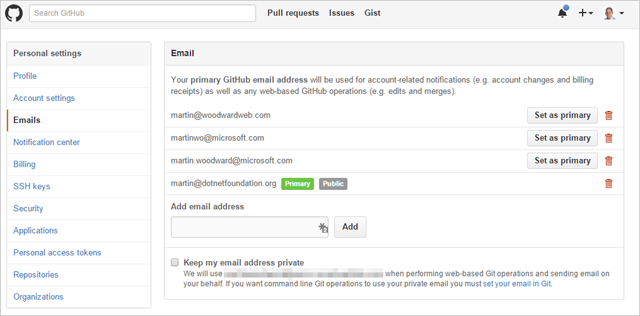
<p>Next, I like to make sure all my contributions come back to my GitHub identity. Luckily, GitHub have an easy mechanism to associate multiple email addresses with one GitHub account.&#160; Simply go to your profile, and make sure all the <a href="https://github.com/settings/emails">emails</a> you use to commit to Git are <a href="https://github.com/settings/emails">configured</a>.&#160; I have a few different ones listed in mine</p>

<p><a href="https://github.com/settings/emails" target="_blank"><img title="image" style="border-left-width: 0px; border-right-width: 0px; background-image: none; border-bottom-width: 0px; float: none; padding-top: 0px; padding-left: 0px; margin: 0px auto; display: block; padding-right: 0px; border-top-width: 0px" border="0" alt="image" src="http://www.woodwardweb.com/Open-Live-Writer/Managing-My-Multiple-identities-on-GitHu_8DCC/image_3.png" width="640" height="316" /></a></p>

<p>And that’s it – when commits are pushed to GitHub using either my home, work or .NET Foundation email addresses they all come back to my <a href="https://github.com/martinwoodward" target="_blank">GitHub profile</a> so people can see what I as an individual am <a href="https://github.com/martinwoodward" target="_blank">involved with</a>.</p>]]>
        
    </content>
</entry>

<entry>
    <title>New Gig</title>
    <link rel="alternate" type="text/html" href="http://www.woodwardweb.com/dotnet/new_gig.html" />
    <id>tag:www.woodwardweb.com,2015://4.2276</id>

    <published>2015-04-03T06:51:57Z</published>
    <updated>2015-04-03T14:23:38Z</updated>

    <summary>I&apos;m excited to say that today I started a new job as the Executive Director of the .NET Foundation. The .NET Foundation is an independent non-profit organization set up to foster open development, innovation and collaboration around the Microsoft .NET...</summary>
    <author>
        <name>Martin Woodward</name>
        <uri>http://www.woodwardweb.com</uri>
    </author>
    
        <category term="Dotnet" scheme="http://www.sixapart.com/ns/types#category" />
    
    
    <content type="html" xml:lang="en" xml:base="http://www.woodwardweb.com/">
        <![CDATA[<p>I'm excited to say that today I started a <a href="http://www.dotnetfoundation.org/blog/net-foundation-welcomes-executive-director-martin-woodward">new job as the Executive Director</a> of the <a href="http://dotnetfoundation.org">.NET Foundation</a>.  The .NET Foundation is an independent non-profit organization set up to foster open development, innovation and collaboration around the Microsoft .NET development framework. It's been going a year now and I've been involved with the team from the beginning, but it's fabulously exciting to be an active part of it now. Also quite scary - the team is fantastic with some of the smartest people on the planet, so my job initially is to figure out how to keep out their way as they do awesome stuff while figuring out what I can do to help unblock more openness and innovation by ensuring that the wider community is always involved along the way.</p>

<p>I'll still be an employee of Microsoft but my job is now to focus 100% of my time on the .NET Foundation helping co-ordinate lots of the day-to-day operations of the non-profit organization but also set the strategy and tone for the future. If folks have ideas then please head over to the <a href="http://forums.dotnetfoundation.org/">.NET Foundation Forums</a> and post your suggestions. You can always reach out to me on Twitter(<a href="http://twitter.com/martinwoodward">@martinwoodward</a>) or my new work email address (<a href="mailto:martin@dotnetfoundation.org">martin@dotnetfoundation.org</a>).</p>

<p>It's an incredibly exciting time to join the team as they are doing some amazing stuff. .NET as a platform is going through rapid innovation at the moment. But more importantly the project teams are working in the open and are focused heavily on responding to pull requests that come in and taking the platform forward with wider community participation which I see as a very good sign.</p>

<p>The .NET Community has always been a passionate one, and a place in which I have found many of my friends. But it is a friendly one as well. I was always the "Mac guy" or the "Eclipse guy" when it came to .NET User Group meetings yet I never felt an outsider - everyone has always been very welcoming and just keen to learn more from one and other.  The MVP and RD communities around .NET contain so many passionate, dedicated and smart people.</p>

<p>It's a fantastic time to be involved in .NET. We're at an inflection point in the platforms history and all signs are that things are heading to some very good places indeed.</p>

<p>Now I just need to not mess up and do what I can to help make sure the .NET Community continues to be a great place to be. Drop me a line if you have any ideas, suggestions or feedback as to what I can do to help.</p>]]>
        
    </content>
</entry>

<entry>
    <title>Setting up the Perfect Git Command Line Environment on Windows</title>
    <link rel="alternate" type="text/html" href="http://www.woodwardweb.com/git/setting_up_the.html" />
    <id>tag:www.woodwardweb.com,2014://4.2274</id>

    <published>2014-01-17T11:01:17Z</published>
    <updated>2014-01-17T11:02:53Z</updated>

    <summary>Over the past couple of weeks I’ve had several people ask me about my dev environment for working with Git on Windows so I decided to write it up here for me to point people to. Of course the first...</summary>
    <author>
        <name>Martin Woodward</name>
        <uri>http://www.woodwardweb.com</uri>
    </author>
    
        <category term="Git" scheme="http://www.sixapart.com/ns/types#category" />
    
    
    <content type="html" xml:lang="en" xml:base="http://www.woodwardweb.com/">
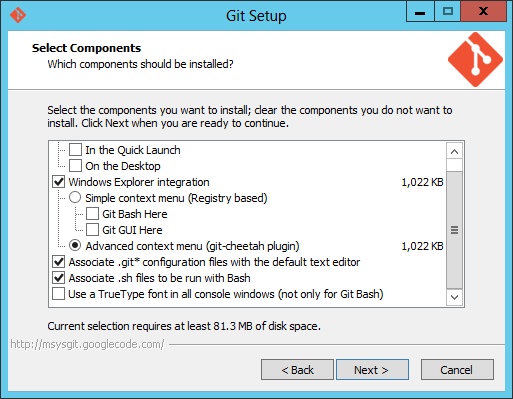
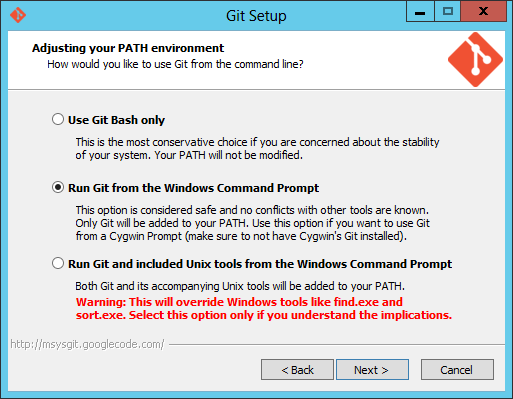
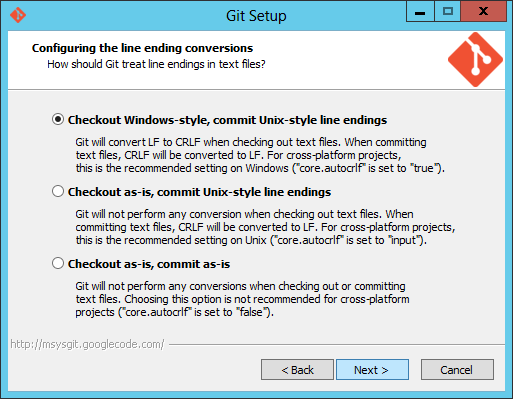
        <![CDATA[<p>Over the past couple of weeks I’ve had several people ask me about my dev environment for working with Git on Windows so I decided to write it up here for me to point people to. Of course the first thing that you want is Visual Studio 2013 with the built in Git tooling. While I’m obviously very biased in terms of the Visual Studio tools I’m actually more familiar with the command line workflow – especially coming from the Mac. However the team specifically designed the Visual Studio tools to work well with the command line and compliment them – I find myself swapping more and more between the command line and the UI depending on what’s quickest for me. I NEVER use the command line for merging any more, but I still use if for dealing with multiple remotes (very common in OSS workflows) squashing and rebasing my commits etc. There are some things I actually find myself using Visual Studio for that I never thought I would. For example I quite often find myself swapping my email address around when I’m doing commits for work or if I’m working on a demo or a side project and I’ve noticed I’ve been using the Git settings panel in Team Explorer more and more rather than going to “git config” which surprised me.</p>  <p><strong>So, how do I set up my command line Git experience?</strong></p>  <p>First of all you have to install <a href="http://msysgit.github.io/">Git for Windows</a> of course.&#160; I always use the .exe installer from <a href="http://code.google.com/p/msysgit/downloads/list?q=full+installer+official+git">here</a> (ignore the –preview moniker, they are good – at the time of writing the latest is Git-1.8.5.2-preview20131230.exe). Now one of the first mistakes I see people do is go for the default options in the installer which results is people using Git Bash. If you love yourself don’t do that, but make sure Git is added to your path. On the screens that I need to make decisions on, I always follow this path.</p>  <p>For component selection, I generally go for the defaults. I don’t use the shell extensions personally but they don’t hurt.</p>  <p><a href="http://www.woodwardweb.com/Windows-Live-Writer/Setting-up-the-perfect-Git-environment-o_906F/image_2.png"><img title="image" style="border-left-width: 0px; border-right-width: 0px; background-image: none; border-bottom-width: 0px; float: none; padding-top: 0px; padding-left: 0px; margin-left: auto; display: block; padding-right: 0px; border-top-width: 0px; margin-right: auto" border="0" alt="image" src="http://www.woodwardweb.com/Windows-Live-Writer/Setting-up-the-perfect-Git-environment-o_906F/image_thumb.png" width="300" height="233" /></a></p>  <p>This is the important one being the change to <strong>make sure Git is added to your Path</strong>. This makes sure that you can go to the command shell or PowerShell and run Git. The Git Bash shell is evil IMHO, I never find myself using it despite using Bash all the time when I’m on *nix.</p>  <p><a href="http://www.woodwardweb.com/Windows-Live-Writer/Setting-up-the-perfect-Git-environment-o_906F/image_4.png"><img title="image" style="border-left-width: 0px; border-right-width: 0px; background-image: none; border-bottom-width: 0px; float: none; padding-top: 0px; padding-left: 0px; margin-left: auto; display: block; padding-right: 0px; border-top-width: 0px; margin-right: auto" border="0" alt="image" src="http://www.woodwardweb.com/Windows-Live-Writer/Setting-up-the-perfect-Git-environment-o_906F/image_thumb_1.png" width="300" height="233" /></a></p>  <p>Then I go with the default of setting the CRLF behaviour to normalize as Unix style endings in the commits.&#160; Basically this makes sure a commit generated on Windows is the same as one done on the Mac or on Linux but also that you can still use notepad if you check out a file that was edited in Vim on Linux.</p>  <p><a href="http://www.woodwardweb.com/Windows-Live-Writer/Setting-up-the-perfect-Git-environment-o_906F/image_8.png"><img title="image" style="border-left-width: 0px; border-right-width: 0px; background-image: none; border-bottom-width: 0px; float: none; padding-top: 0px; padding-left: 0px; margin-left: auto; display: block; padding-right: 0px; border-top-width: 0px; margin-right: auto" border="0" alt="image" src="http://www.woodwardweb.com/Windows-Live-Writer/Setting-up-the-perfect-Git-environment-o_906F/image_thumb_3.png" width="300" height="233" /></a></p>  <p>&#160;</p>  <p>At this point you now have Git installed. Congratulations!&#160; However, you can do better than that…</p>  <p><strong>Enter PoshGit</strong></p>  <p>The next thing I install is <a href="http://dahlbyk.github.io/posh-git/">PoshGit</a>. I swear, PoshGit is the main reason to use the PowerShell console (that and also the fact it doesn’t shout at you when you accidentally type “ls” instead of “dir”) Installation of PoshGit can be a bit quirky but <a href="http://dahlbyk.github.io/posh-git/">Keith’s instructions</a> are pretty good. Basically, after he’s helped you make sure your PowerShell environment is set up correctly, you clone the repo (git clone <a href="https://github.com/dahlbyk/posh-git.git">https://github.com/dahlbyk/posh-git.git</a>), cd into it and then run the install script.</p>  <p>I always use Git over HTTPS rather than SSH so I often don’t have Putty installed with Paegent to handle my keys. Therefore I tend to just comment out the Start-SshAgent -Quiet line in \posh-git\profile.example.ps1. If you are seeing the error “WARNING: Could not find ssh-agent” when you start PowerShell and you don’t need SSH then just open up profile.example.ps1 in notepad, scroll down to the end of the file and make sure it looks like this:</p>  <pre>   ...

<p>   Enable-GitColors</p>

<p>   Pop-Location</p>

<p>   # Start-SshAgent -Quiet</pre></p>

<p>&#160;</p>

<p><strong>Remembering Passwords</strong></p>

<p>Next up I install Andrew Nurse’s credential helper, <a href="http://gitcredentialstore.codeplex.com/">git-credential-winstore</a>. If you are talking to a Git server that requires a username and password, rather than having to type your credentials all the time this nifty little helper will actually store them securely in the Windows Credential Manager.&#160; Note that when installing you’ll see an error if you’ve gone for the middle option when setting your path in Git for Windows because Git.exe isn’t on your path (Git.cmd is).&#160; Therefore you are going to want to:</p>

<ol>
  <li><a href="http://gitcredentialstore.codeplex.com/releases/">Download it from CodePlex</a> and save it to your disk </li>

<p>  <li>In a command / powershell window, cd into your Downloads folder </li></p>

<p>  <li>Install the credential helper by typing: </li><br />
</ol></p>

<pre>git-credential-winstore.exe -I &quot;C:\Program Files (x86)\Git\bin\git.exe&quot;</pre>

<p>Combined with with web interface in TFS, Visual Studio 2013 and Eclipse with egit, that’s all I need personally. However if you want a graphical view of your repository then a lot of people use gitk which is installed with Git for Windows (just type “gitk” inside your repo in the command shell / powershell windows).&#160; You can also type “git gui” for the git-gui tools.&#160; Other popular graphical tools you might want to install are GitHub’s free app <a href="http://windows.github.com/">GitHub for Windows</a> and Atlassian’s free app <a href="http://www.sourcetreeapp.com/">SourceTree</a>.&#160; GitHub for Windows is very pretty and great for managing your GitHub based repos. Atlassian’s SourceTree is very highly regarded as stand-alone UI for working with Git repos on Windows.</p>]]>
        
    </content>
</entry>

<entry>
    <title>Getting Started with LibGit2Sharp</title>
    <link rel="alternate" type="text/html" href="http://www.woodwardweb.com/git/getting_started_2.html" />
    <id>tag:www.woodwardweb.com,2013://4.2273</id>

    <published>2013-05-11T12:44:35Z</published>
    <updated>2013-05-13T13:27:09Z</updated>

    <summary>If you want to work with your local Git repositories in some .NET code then LibGit2Sharp is your friend.&#160; It’s the open source library used by the Visual Studio Tools for Git and gives you a very idiomatic way to...</summary>
    <author>
        <name>Martin Woodward</name>
        <uri>http://www.woodwardweb.com</uri>
    </author>
    
        <category term="Git" scheme="http://www.sixapart.com/ns/types#category" />
    
        <category term="LibGit2" scheme="http://www.sixapart.com/ns/types#category" />
    
    <category term="git" label="git" scheme="http://www.sixapart.com/ns/types#tag" />
    <category term="libgit2" label="libgit2" scheme="http://www.sixapart.com/ns/types#tag" />
    <category term="libgit2sharp" label="libgit2sharp" scheme="http://www.sixapart.com/ns/types#tag" />
    
    <content type="html" xml:lang="en" xml:base="http://www.woodwardweb.com/">
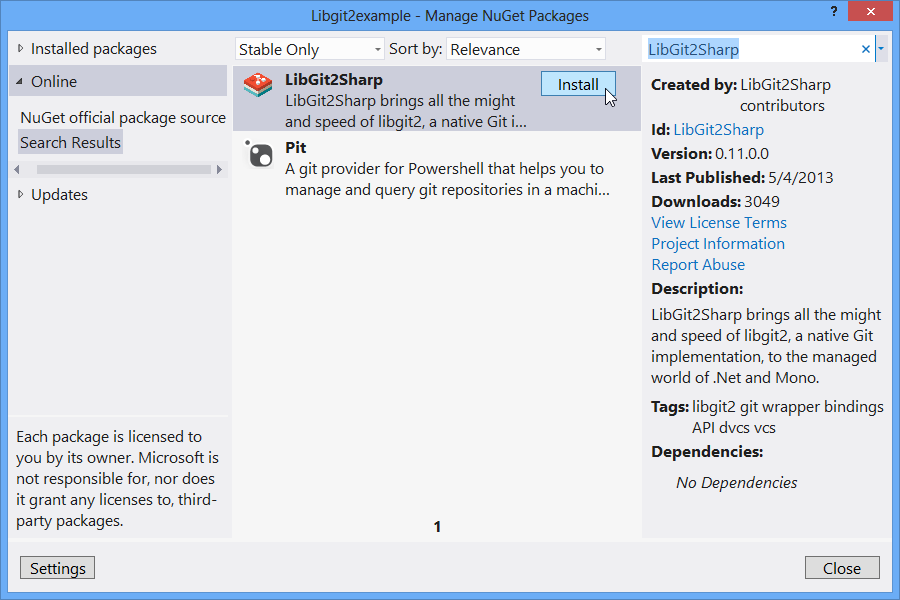
        <![CDATA[<p>If you want to work with your local Git repositories in some .NET code then <a href="https://github.com/libgit2/libgit2sharp">LibGit2Sharp</a> is your friend.&#160; It’s the open source library used by the <a href="http://aka.ms/Git4VS">Visual Studio Tools for Git</a> and gives you a very idiomatic way to talk to Git from C# or VB.NET.&#160; I thought it would be worth a quick tutorial post showing how easy it is to get started by querying a repository helping us learn a bit about the library but also learn more about Git itself. As LibGit2Sharp is open source in this example I’m going to point to cloned copy of the repository I have locally already by using the Git tooling in Visual Studio or by typing <font face="Courier New">git clone https://github.com/libgit2/libgit2sharp.git</font>. However you can obviously point to any Git repository you already have locally.</p>  <p>To begin, create a new console project in Visual Studio. We need to add a reference to the Lib2Sharp library and the quickest way to do that is to open the NuGet package manager by right-clicking on your project in Solution Explorer and select Manage NuGet Packages…&#160; Search online for “LibGit2Sharp” and Install.</p>  <p><a href="http://www.woodwardweb.com/Windows-Live-Writer/Getting-Started-with-LibGit2Sharp_1091B/nuget_2.png"><img title="NPM to install LibGit2Sharp" style="border-left-width: 0px; border-right-width: 0px; background-image: none; border-bottom-width: 0px; float: none; padding-top: 0px; padding-left: 0px; margin-left: auto; display: block; padding-right: 0px; border-top-width: 0px; margin-right: auto" border="0" alt="NPM to install LibGit2Sharp" src="http://www.woodwardweb.com/Windows-Live-Writer/Getting-Started-with-LibGit2Sharp_1091B/nuget_thumb.png" width="450" height="300" /></a></p>  <p>Then accessing an existing repo is trivial, simply use the LibGit2Sharp.Repository class. A handy way to get a particular commit is by its hash if you know it.</p>  <pre style="font-family: ; background: white; color: "><font face="Consolas"><font size="2"><font color="#000000">&#160;&#160;&#160;&#160;&#160; </font><span style="color: "><font color="#0000ff">public</font></span><font color="#000000">&#160;</font><span style="color: "><font color="#0000ff">static</font></span><font color="#000000">&#160;</font><span style="color: "><font color="#0000ff">void</font></span><font color="#000000"> Main(</font><span style="color: "><font color="#0000ff">string</font></span></font></font><font face="Consolas"><font size="2"><font color="#000000">[] args)<br />&#160;&#160;&#160;&#160;&#160; {<br />&#160;&#160;&#160;&#160;&#160;&#160;&#160;&#160;&#160; </font><span style="color: "><font color="#0000ff">using</font></span><font color="#000000"> (</font><span style="color: "><font color="#0000ff">var</font></span><font color="#000000"> repo = </font><span style="color: "><font color="#0000ff">new</font></span><font color="#000000">&#160;</font><span style="color: "><font color="#2b91af">Repository</font></span><font color="#000000">(</font><span style="color: "><font color="#a31515">@&quot;D:\source\LibGit2Sharp&quot;</font></span></font></font><font face="Consolas"><font size="2"><font color="#000000">))<br />&#160;&#160;&#160;&#160;&#160;&#160;&#160;&#160;&#160; {<br />&#160;&#160;&#160;&#160;&#160;&#160;&#160;&#160;&#160;&#160;&#160;&#160;&#160; </font><span style="color: "><font color="#2b91af">Commit</font></span><font color="#000000"> commit = repo.Lookup&lt;</font><span style="color: "><font color="#2b91af">Commit</font></span><font color="#000000">&gt;(</font><span style="color: "><font color="#a31515">&quot;73b48894238c3e9c37f9f3a696bbd4bffcf45ce5&quot;</font></span></font></font><font face="Consolas"><font size="2"><font color="#000000">);<br />&#160;&#160;&#160;&#160;&#160;&#160;&#160;&#160;&#160;&#160;&#160;&#160;&#160; </font><span style="color: "><font color="#2b91af">Console</font></span><font color="#000000">.WriteLine(</font><span style="color: "><font color="#a31515">&quot;Author: {0}&quot;</font></span></font></font><font face="Consolas"><font size="2"><font color="#000000">, commit.Author.Name);<br />&#160;&#160;&#160;&#160;&#160;&#160;&#160;&#160;&#160;&#160;&#160;&#160;&#160; </font><span style="color: "><font color="#2b91af">Console</font></span><font color="#000000">.WriteLine(</font><span style="color: "><font color="#a31515">&quot;Message: {0}&quot;</font></span></font><font color="#000000" size="2">, commit.MessageShort);<br />&#160;&#160;&#160;&#160;&#160;&#160;&#160;&#160;&#160; }<br />&#160;&#160;&#160;&#160;&#160; }</font></font></pre>

<p>But what if we just want the commit that’s the latest of the current branch, in Git-speak we want the “Tip” of “Head”. LibGit2Sharp gives you an easy way to get to the Head through the repository object. So we can do the following:</p>

<pre style="font-family: ; background: white; color: "><font face="Consolas"><font color="#000000"><font style="font-size: 13.5pt">&#160;&#160;&#160; </font></font><font size="2"><span style="color: "><font color="#0000ff">public</font></span><font color="#000000">&#160;</font><span style="color: "><font color="#0000ff">static</font></span><font color="#000000">&#160;</font><span style="color: "><font color="#0000ff">void</font></span><font color="#000000"> Main(</font><span style="color: "><font color="#0000ff">string</font></span></font></font><font face="Consolas"><font size="2"><font color="#000000">[] args)<br />&#160;&#160;&#160;&#160;&#160; {<br />&#160;&#160;&#160;&#160;&#160;&#160;&#160;&#160;&#160; </font><span style="color: "><font color="#0000ff">using</font></span><font color="#000000"> (</font><span style="color: "><font color="#0000ff">var</font></span><font color="#000000"> repo = </font><span style="color: "><font color="#0000ff">new</font></span><font color="#000000">&#160;</font><span style="color: "><font color="#2b91af">Repository</font></span><font color="#000000">(</font><span style="color: "><font color="#a31515">@&quot;D:\source\LibGit2Sharp&quot;</font></span></font></font><font face="Consolas"><font size="2"><font color="#000000">))<br />&#160;&#160;&#160;&#160;&#160;&#160;&#160;&#160;&#160; {<br />&#160;&#160;&#160;&#160;&#160;&#160;&#160;&#160;&#160;&#160;&#160;&#160;&#160; </font><span style="color: "><font color="#2b91af">Commit</font></span></font></font><font face="Consolas"><font size="2"><font color="#000000"> commit = repo.Head.Tip;<br />&#160;&#160;&#160;&#160;&#160;&#160;&#160;&#160;&#160;&#160;&#160;&#160;&#160; </font><span style="color: "><font color="#2b91af">Console</font></span><font color="#000000">.WriteLine(</font><span style="color: "><font color="#a31515">&quot;Author: {0}&quot;</font></span></font></font><font face="Consolas"><font size="2"><font color="#000000">, commit.Author.Name);<br />&#160;&#160;&#160;&#160;&#160;&#160;&#160;&#160;&#160;&#160;&#160;&#160;&#160; </font><span style="color: "><font color="#2b91af">Console</font></span><font color="#000000">.WriteLine(</font><span style="color: "><font color="#a31515">&quot;Message: {0}&quot;</font></span></font><font color="#000000" size="2">, commit.MessageShort);<br />&#160;&#160;&#160;&#160;&#160;&#160;&#160;&#160;&#160; }<br />&#160;&#160;&#160;&#160;&#160; }</font></font></pre>

<p>A point in time in the repository is represented by a Commit. Each Commit points to a Tree which you can think of as a directory/folder. A Tree can contain a Blob (i.e. the contents of a file) or another Tree (i.e. a sub-folder).</p>

<p>So if you want to list the contents at the root of the repository then you can do</p>

<pre style="font-family: ; background: white; color: "><font face="Consolas"><font size="2"><font color="#000000">&#160;&#160;&#160;&#160;&#160;&#160;&#160; </font><span style="color: "><font color="#0000ff">foreach</font></span><font color="#000000">(</font><span style="color: "><font color="#2b91af">TreeEntry</font></span><font color="#000000"> treeEntry </font><span style="color: "><font color="#0000ff">in</font></span></font></font><font face="Consolas"><font size="2"><font color="#000000"> commit.Tree)<br />&#160;&#160;&#160;&#160;&#160;&#160;&#160; {<br />&#160;&#160;&#160;&#160;&#160;&#160;&#160;&#160;&#160;&#160;&#160; </font><span style="color: "><font color="#2b91af">Console</font></span><font color="#000000">.WriteLine(</font><span style="color: "><font color="#a31515">&quot;Path:{0} - Type:{1}&quot;</font></span></font><font color="#000000" size="2">, treeEntry.Path, treeEntry.TargetType);<br />&#160;&#160;&#160;&#160;&#160;&#160;&#160; }</font></font><br /></pre>

<p>That will give you something like the following when against the LibGit2Sharp repository</p>

<pre style="font-family: courier, monospace !important; background: black; color: white; padding-bottom: 10px; padding-top: 10px; padding-left: 10px; padding-right: 10px">Path:.gitattributes - Type:Blob<br />Path:.gitignore - Type:Blob<br />Path:.gitmodules - Type:Blob<br />Path:.mailmap - Type:Blob<br />Path:.travis.yml - Type:Blob<br />Path:CHANGES.md - Type:Blob<br />Path:CI-build.msbuild - Type:Blob<br />Path:LICENSE.md - Type:Blob<br />Path:Lib - Type:Tree<br />Path:LibGit2Sharp.Tests - Type:Tree<br />Path:LibGit2Sharp.sln - Type:Blob<br />Path:LibGit2Sharp - Type:Tree<br />Path:README.md - Type:Blob<br />Path:ResharperSettings.xml - Type:Blob<br />Path:UpdateLibgit2ToSha.ps1 - Type:Blob<br />Path:build.libgit2sharp.cmd - Type:Blob<br />Path:build.libgit2sharp.sh - Type:Blob<br />Path:build.libgit2sharp.x64.cmd - Type:Blob<br />Path:libgit2 - Type:GitLink<br />Path:nuget.package - Type:Tree<br />Path:square-logo.png - Type:Blob<br /></pre>

<p>To see which files changed in a particular commit.&#160; To do that we need to find the diff between the commit and it’s parent. For now let’s just assume that we have a single parent (i.e. we’re not a merge commit). Therefore we can do this</p>

<pre style="font-family: ; background: white; color: "><font face="Consolas"><font size="2"><font color="#000000">&#160;&#160;&#160;&#160;&#160;&#160;&#160; </font><span style="color: "><font color="#2b91af">Tree</font></span></font></font><font face="Consolas"><font size="2"><font color="#000000"> commitTree = repo.Head.Tip.Tree;<br />&#160;&#160;&#160;&#160;&#160;&#160;&#160; </font><span style="color: "><font color="#2b91af">Tree</font></span></font></font><font face="Consolas"><font size="2"><font color="#000000"> parentCommitTree = repo.Head.Tip.Parents.Single().Tree;<br /> <br />&#160;&#160;&#160;&#160;&#160;&#160;&#160; </font><span style="color: "><font color="#2b91af">TreeChanges</font></span></font></font><font face="Consolas"><font size="2"><font color="#000000"> changes = repo.Diff.Compare(parentCommitTree, commitTree);<br /> <br />&#160;&#160;&#160;&#160;&#160;&#160;&#160; </font><span style="color: "><font color="#2b91af">Console</font></span><font color="#000000">.WriteLine(</font><span style="color: "><font color="#a31515">&quot;{0} files changed.&quot;</font></span><font color="#000000">,changes.Count());</font></font></font></pre>

<p>And finally to iterate over the changes to show what files changed in that commit</p>

<pre style="font-family: ; background: white; color: "><font face="Consolas"><font size="2"><font color="#000000">&#160;&#160;&#160;&#160;&#160;&#160;&#160; </font><span style="color: "><font color="#0000ff">foreach</font></span><font color="#000000">(</font><span style="color: "><font color="#2b91af">TreeEntryChanges</font></span><font color="#000000"> treeEntryChanges </font><span style="color: "><font color="#0000ff">in</font></span></font></font><font face="Consolas"><font size="2"><font color="#000000"> changes)<br />&#160;&#160;&#160;&#160;&#160;&#160;&#160; {<br />&#160;&#160;&#160;&#160;&#160;&#160;&#160;&#160;&#160;&#160;&#160; </font><span style="color: "><font color="#2b91af">Console</font></span><font color="#000000">.WriteLine(</font><span style="color: "><font color="#a31515">&quot;Path:{0} +{1} -{2} &quot;</font></span></font><font color="#000000" size="2">, <br />&#160;&#160;&#160;&#160;&#160;&#160;&#160;&#160;&#160;&#160;&#160;&#160;&#160;&#160;&#160;&#160;&#160;&#160;&#160; treeEntryChanges.Path, <br />&#160;&#160;&#160;&#160;&#160;&#160;&#160;&#160;&#160;&#160;&#160;&#160;&#160;&#160;&#160;&#160;&#160;&#160;&#160; treeEntryChanges.LinesAdded,<br />&#160;&#160;&#160;&#160;&#160;&#160;&#160;&#160;&#160;&#160;&#160;&#160;&#160;&#160;&#160;&#160;&#160;&#160;&#160; treeEntryChanges.LinesDeleted<br />&#160;&#160;&#160;&#160;&#160;&#160;&#160;&#160;&#160;&#160;&#160;&#160;&#160;&#160;&#160; );<br />&#160;&#160;&#160;&#160;&#160;&#160;&#160; }</font></font></pre>

<p>That then gives the following output</p>

<pre style="font-family: courier, monospace !important; background: black; color: white; padding-bottom: 10px; padding-top: 10px; padding-left: 10px; padding-right: 10px">Author: nulltoken<br />Message: Release LibGit2Sharp v0.11<br />3 files changed.<br />Path:LibGit2Sharp.Tests\DiffTreeToTreeFixture.cs +35 -11<br />Path:LibGit2Sharp.Tests\LibGit2Sharp.Tests.csproj +1 -0<br />Path:LibGit2Sharp.Tests\TestHelpers\OdbHelper.cs +17 -0<br /></pre>

<p>This post obviously just scratches at the surface of what is possible with LibGit2Sharp. We’re starting the process of trying to flesh out the documentation for the project from the current starting position of none, but it the meantime if you want to see some more examples of using LibGit2Sharp then take a look at the <a href="https://github.com/libgit2/libgit2sharp/tree/vNext/LibGit2Sharp.Tests">Unit Tests</a>.</p>
Source Code: <a href="http://www.woodwardweb.com/code/Commit1.cs">Commit1.cs</a>]]>
        
    </content>
</entry>

<entry>
    <title>Eclipse Juno Themes on Windows</title>
    <link rel="alternate" type="text/html" href="http://www.woodwardweb.com/java/eclipse_juno_th.html" />
    <id>tag:www.woodwardweb.com,2012://4.2272</id>

    <published>2012-06-22T02:59:38Z</published>
    <updated>2012-06-22T02:59:38Z</updated>

    <summary>I’ve been running Eclipse Juno regularly since the M5 milestone.&#160; One of the things I’ve really noticed is that the default theme for Eclipse Juno on Mac OS X blends in better with other Cocoa applications than Juno looks on...</summary>
    <author>
        <name>Martin Woodward</name>
        <uri>http://www.woodwardweb.com</uri>
    </author>
    
        <category term="Java" scheme="http://www.sixapart.com/ns/types#category" />
    
    <category term="eclipse" label="eclipse" scheme="http://www.sixapart.com/ns/types#tag" />
    <category term="juno" label="juno" scheme="http://www.sixapart.com/ns/types#tag" />
    <category term="win8" label="win8" scheme="http://www.sixapart.com/ns/types#tag" />
    
    <content type="html" xml:lang="en" xml:base="http://www.woodwardweb.com/">
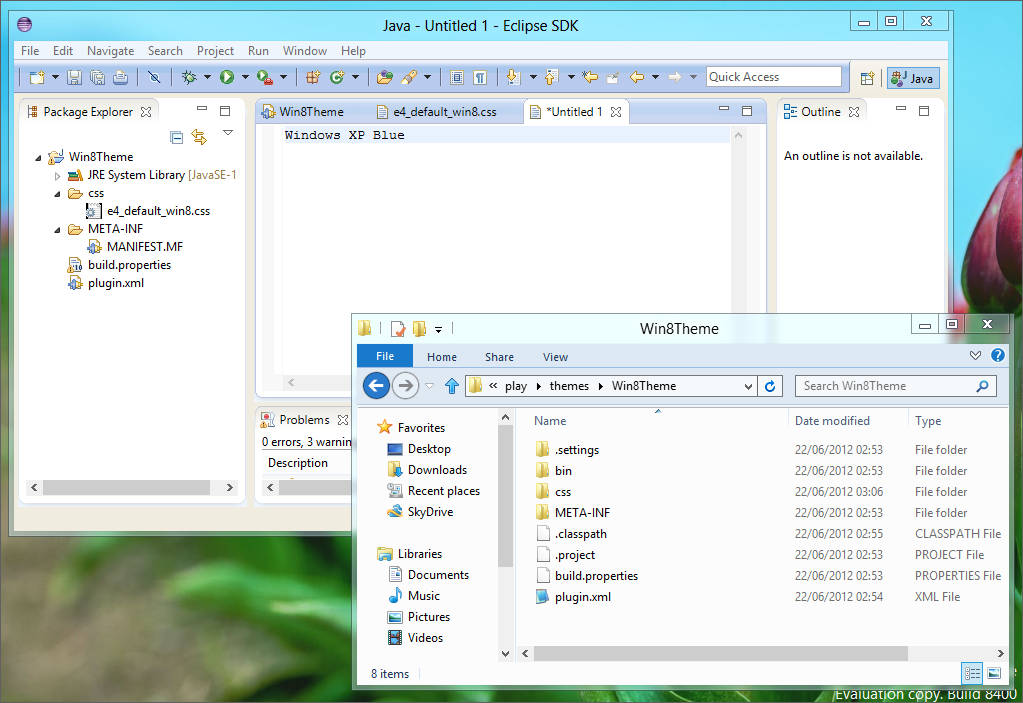
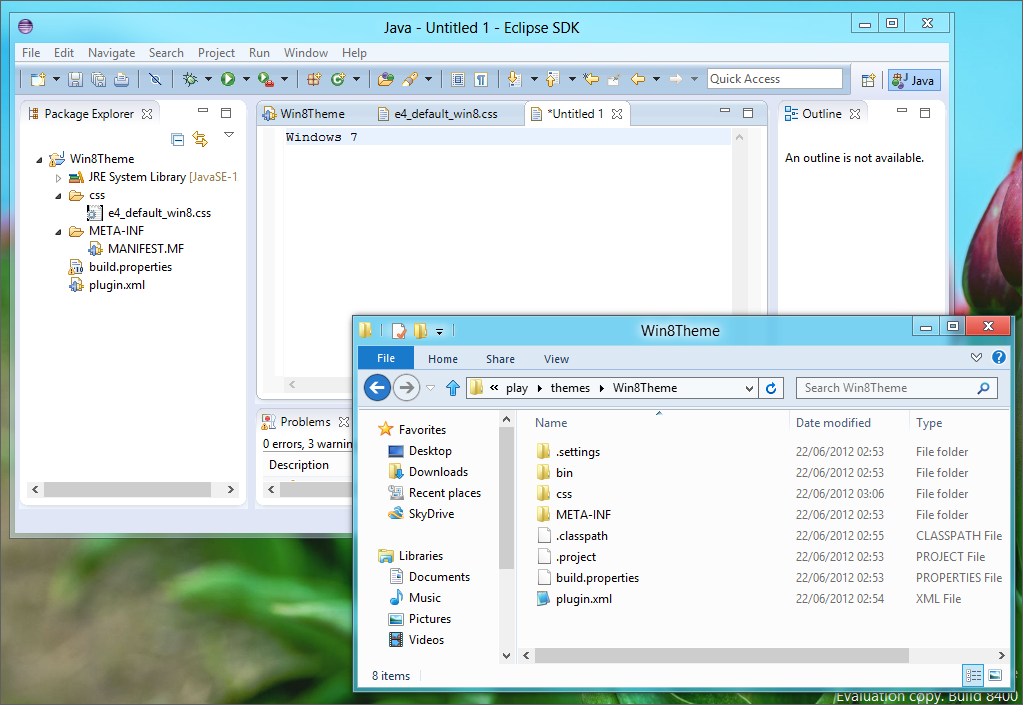
        <![CDATA[<p>I’ve been running Eclipse Juno regularly since the M5 milestone.&#160; One of the things I’ve really noticed is that the default theme for Eclipse Juno on Mac OS X blends in better with other Cocoa applications than Juno looks on my Windows machines. Today I just realised that this is because Eclipse is picking up the Eclipse “Windows XP Blue” theme by default. Below is a picture of Juno RC3 with a Windows Explorer window over it for comparison.</p>  <p><a href="http://www.woodwardweb.com/Windows-Live-Writer/Eclipse-Juno-Themes-on-Windows-8_2A06/e4_winxpblue_2.png"><img title="Eclipse Juno RC3 on Windows XP Release Preview" style="border-left-width: 0px; border-right-width: 0px; background-image: none; border-bottom-width: 0px; float: none; padding-top: 0px; padding-left: 0px; margin-left: auto; display: block; padding-right: 0px; border-top-width: 0px; margin-right: auto" border="0" alt="Eclipse Juno RC3 on Windows XP Release Preview" src="http://www.woodwardweb.com/Windows-Live-Writer/Eclipse-Juno-Themes-on-Windows-8_2A06/e4_winxpblue_thumb.png" width="640" height="440" /></a></p>  <p>To change the theme, go to Window, Preferences, General, Appearance and select Windows 7.&#160; This looks a lot better on my Windows 8 Release Preview machine as shown below.</p>  <p><a href="http://www.woodwardweb.com/Windows-Live-Writer/Eclipse-Juno-Themes-on-Windows-8_2A06/e4_win7_2.png"><img title="Eclipse Juno RC3 on Windows XP Release Preview with Windows 7 theme" style="border-left-width: 0px; border-right-width: 0px; background-image: none; border-bottom-width: 0px; float: none; padding-top: 0px; padding-left: 0px; margin-left: auto; display: block; padding-right: 0px; border-top-width: 0px; margin-right: auto" border="0" alt="Eclipse Juno RC3 on Windows XP Release Preview with Windows 7 theme" src="http://www.woodwardweb.com/Windows-Live-Writer/Eclipse-Juno-Themes-on-Windows-8_2A06/e4_win7_thumb.png" width="640" height="441" /></a></p>  <p>Now, one of the great things about e4 is that it is skinnable using CSS.&#160; I thought I’d knock up a quick stylesheet to get rid of the gradient in the toolbar and tidy up a few other little things.&#160; It’s also really easy to define a theme as part of the plugin.xml and only have it apply to people running Windows 8 – simply add the following (note the condition on OS version of 6.2):</p>  <blockquote>   <pre>&lt;extension<br />   point=&quot;org.eclipse.e4.ui.css.swt.theme&quot;&gt;
  <br />&#160;&#160; &lt;theme
<br />&#160;&#160;&#160;&#160;&#160;&#160;&#160;&#160; basestylesheeturi=&quot;css/e4_default_win8.css&quot;
<br />&#160;&#160;&#160;&#160;&#160;&#160;&#160;&#160; id=&quot;org.eclipse.e4.ui.css.theme.e4_default&quot;
<br />&#160;&#160;&#160;&#160;&#160;&#160;&#160;&#160; label=&quot;Windows 8 Desktop&quot;
<br /><strong>&#160;&#160;&#160;&#160;&#160;&#160;&#160;&#160; os=&quot;win32&quot;
<br />&#160;&#160;&#160;&#160;&#160;&#160;&#160;&#160; os_version=&quot;6.2&quot;</strong>&gt;
<br />&#160;&#160; &lt;/theme&gt;
<br />&lt;/extension&gt;</pre>
</blockquote>

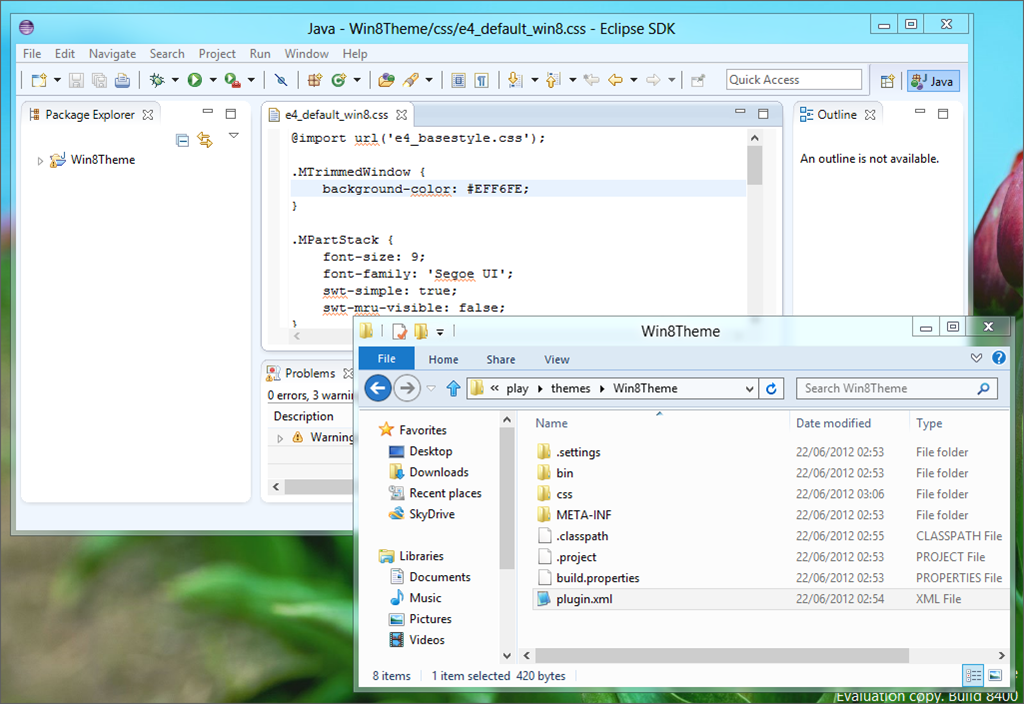
<p>This is what my Windows 8 theme for Juno currently looks like against explorer:</p>

<p><a href="http://www.woodwardweb.com/Windows-Live-Writer/Eclipse-Juno-Themes-on-Windows-8_2A06/image_2.png"><img title="Eclipse Juno RC3 on Windows XP Release Preview with custom theme" style="border-left-width: 0px; border-right-width: 0px; background-image: none; border-bottom-width: 0px; float: none; padding-top: 0px; padding-left: 0px; margin-left: auto; display: block; padding-right: 0px; border-top-width: 0px; margin-right: auto" border="0" alt="Eclipse Juno RC3 on Windows XP Release Preview with custom theme" src="http://www.woodwardweb.com/Windows-Live-Writer/Eclipse-Juno-Themes-on-Windows-8_2A06/image_thumb.png" width="640" height="440" /></a></p>

<p>Needs a bit of playing with (for example, I’ve noticed that swapping themes in Eclipse works a lot better if you explicitly override things like the background images that have been used previously in themes in that Eclipse session rather than just leaving them not set).&#160; What do you think?&#160; If you are interested the CSS is below but it’s just a subtly changed version of the default win7 theme.</p>

<blockquote>
  <pre>@import url('e4_basestyle.css');<br />
.MTrimmedWindow { 
<br />&#160;&#160;&#160; background-color: #EFF6FE; 
<br />}<br />
<p>.MPartStack {
<br />&#160;&#160;&#160; font-size: 9;
<br />&#160;&#160;&#160; font-family: 'Segoe UI';
<br />&#160;&#160;&#160; swt-simple: true;
<br />&#160;&#160;&#160; swt-mru-visible: false;
<br />}</p>
<p>.MTrimBar {
<br />&#160;&#160;&#160; background-color: #EFF6FE; 
<br />}</p>
<p>.MToolControl.TrimStack {
<br />&#160;&#160;&#160; frame-image:&#160; url(&quot;./win7TSFrame.png&quot;);
<br />&#160;&#160;&#160; handle-image:&#160; url(&quot;./win7Handle.png&quot;);
<br />}</p>
<p>.MPartStack.active {
<br />&#160;&#160;&#160; swt-unselected-tabs-color: #F3F9FF #D0DFEE #CEDDED #CEDDED #D2E1F0 #D2E1F0 #FFFFFF 20% 45% 60% 70% 100% 100%;
<br />&#160;&#160;&#160; swt-outer-keyline-color: #B6BCCC;
<br />}</p>
<p>#PerspectiveSwitcher&#160; {
<br />&#160;&#160;&#160; background-color: #E1E6F6 #EFF6FE 100%;
<br />}</p>
<p>#org-eclipse-ui-editorss {
<br />&#160;&#160; swt-tab-renderer: url('bundleclass://org.eclipse.e4.ui.workbench.renderers.swt/org.eclipse.e4.ui.workbench.renderers.swt.CTabRendering');
<br />&#160;&#160; swt-unselected-tabs-color: #F0F0F0 #F0F0F0 #F0F0F0 100% 100%;
<br />&#160;&#160; swt-outer-keyline-color: #B4B4B4;
<br />&#160;&#160; swt-inner-keyline-color: #F0F0F0;
<br />&#160;&#160; swt-tab-outline: #F0F0F0;
<br />&#160;&#160; color: #F0F0F0;
<br />&#160;&#160; swt-tab-height: 8px;
<br />&#160;&#160; padding: 0px 5px 7px;
<br />}</p>
<p>CTabFolder.MArea .MPartStack, CTabFolder.MArea .MPartStack.active {
<br />&#160;&#160; swt-shadow-visible: false;
<br />}</p>
<p>CTabFolder Canvas {
<br />&#160; background-color: #F8F8F8;
<br />}
</p></pre>
</blockquote>

<p>
  <br />Anyway, lesson from this is to at least change the theme in Juno on Windows 8 from Windows XP Blue to the Windows 7. The jury is still out on my customized stylesheet above – I’m sure someone with some actual design skills could do better.</p>]]>
        
    </content>
</entry>

<entry>
    <title>TFS from the Raspberry Pi</title>
    <link rel="alternate" type="text/html" href="http://www.woodwardweb.com/vsts/tfs/tfs_from_the_ra.html" />
    <id>tag:www.woodwardweb.com,2012://4.2271</id>

    <published>2012-06-19T17:53:42Z</published>
    <updated>2012-06-19T20:59:13Z</updated>

    <summary>I just got delivery of my shiny new Raspberry Pi.&#160; With-in a few minutes I had it all booted and running a stock Debian “squeeze” image, almost too easy and the performance of the diminutive Raspberry Pi was great. Previously...</summary>
    <author>
        <name>Martin Woodward</name>
        <uri>http://www.woodwardweb.com</uri>
    </author>
    
        <category term="tfs" scheme="http://www.sixapart.com/ns/types#category" />
    
    <category term="tee" label="tee" scheme="http://www.sixapart.com/ns/types#tag" />
    <category term="tfs" label="tfs" scheme="http://www.sixapart.com/ns/types#tag" />
    
    <content type="html" xml:lang="en" xml:base="http://www.woodwardweb.com/">
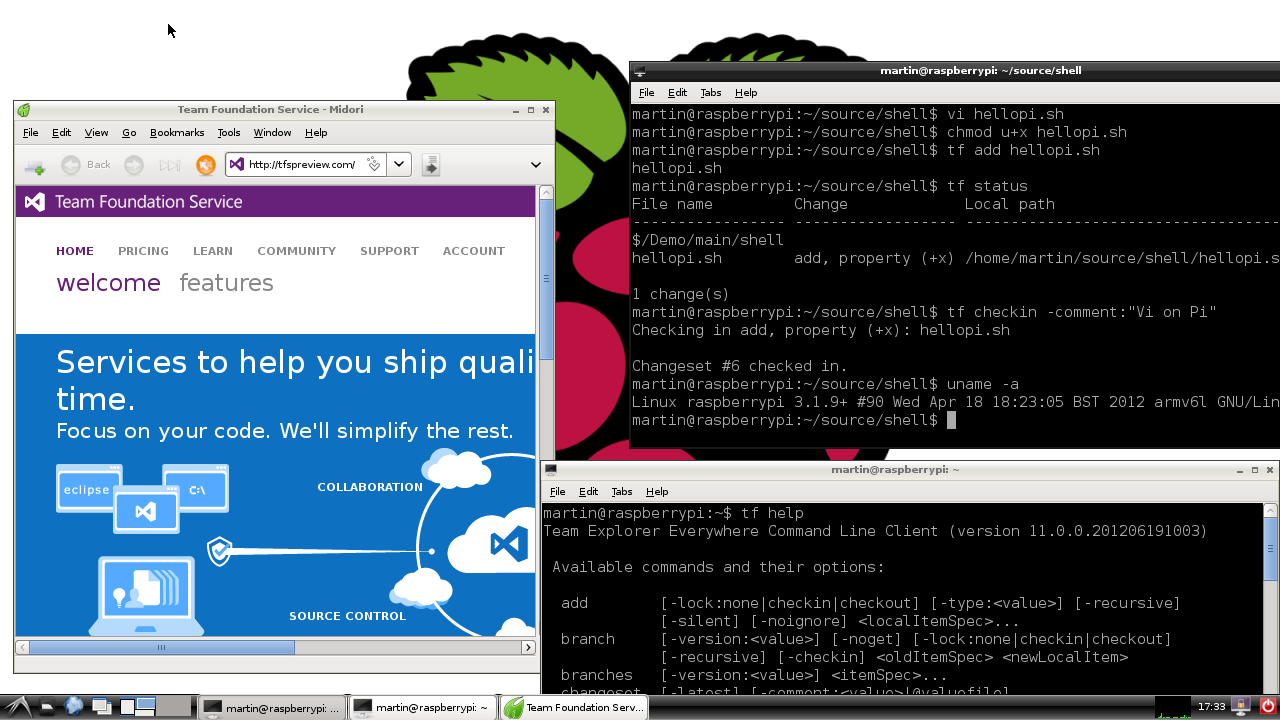
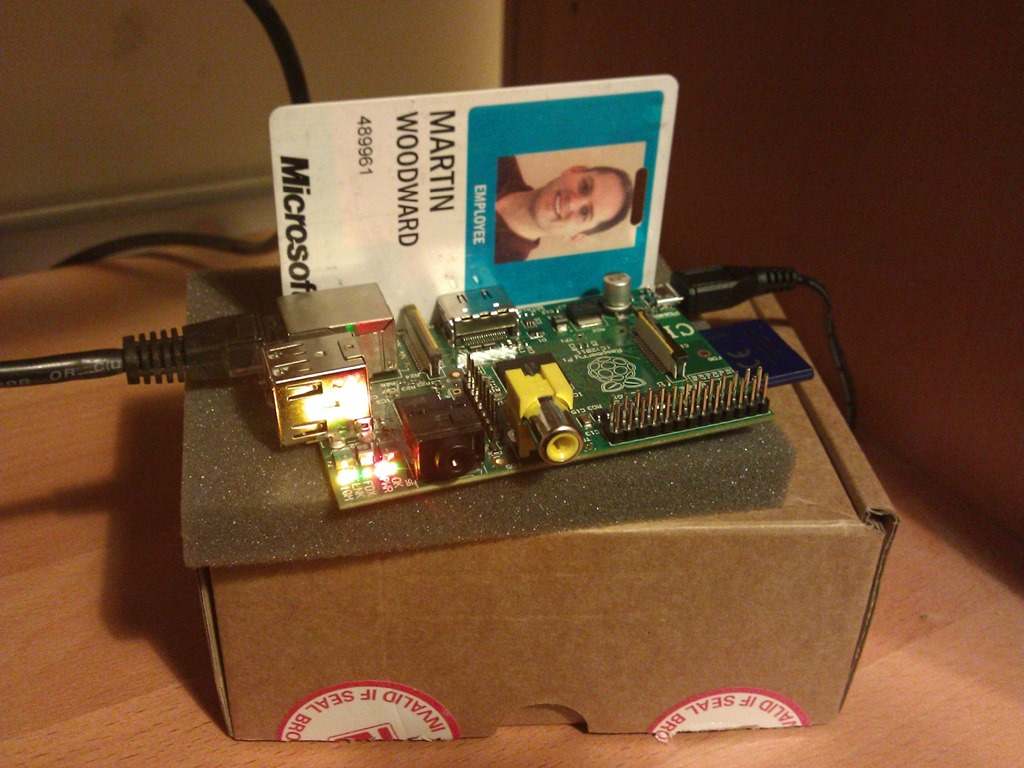
        <![CDATA[<p>I just got delivery of my shiny new <a href="http://www.raspberrypi.org/">Raspberry Pi</a>.&#160; With-in a few minutes I had it all booted and running a <a href="http://www.raspberrypi.org/downloads">stock Debian “squeeze” image</a>, almost too easy and the performance of the diminutive Raspberry Pi was great. Previously my experiences with Embedded Linux has mostly been when running on hacked router firmwares so running on a chip as powerful as the ARM v11 Broadcoam chip in the Raspberry Pi is a real pleasure.&#160; As getting it up and running was so easy, what should be my first project on my latest (and least expensive ever) computer?&#160; I thought I’d see what it took to talk to TFS from the device :-)</p>  <p><a href="http://www.woodwardweb.com/Windows-Live-Writer/TFS-from-the-Raspberry-Pi_FF5C/raspi_2.png" target="_blank"><img title="Accessing TFS from a Raspberry Pi" style="border-top: 0px; border-right: 0px; background-image: none; border-bottom: 0px; float: none; padding-top: 0px; padding-left: 0px; margin-left: auto; border-left: 0px; display: block; padding-right: 0px; margin-right: auto" border="0" alt="Accessing TFS from a Raspberry Pi" src="http://www.woodwardweb.com/Windows-Live-Writer/TFS-from-the-Raspberry-Pi_FF5C/raspi_thumb.png" width="642" height="362" /></a></p>  <p>First things first, I had to get Java installed.&#160; It sounds like <a href="https://blogs.oracle.com/speakjava/entry/javafx_on_the_raspberry_pi">Oracle are working on a version of Java with a proper Hotspot JVM</a> – but I just went with a vanilla OpenJDK build for the device that lacks important features like a JIT etc.&#160; It’s all fully functional, just the performance isn’t great but sticking to the TFS cross-platform command line client (tf) in Team Explorer Everywhere, performance is usable and will only get better as better JVM’s come available for the Raspberry Pi.</p>  <p>To install a JRE you would just do the usual:</p>  <blockquote>   <p><font face="Courier New">sudo apt-get install openjdk-6-jre</font></p> </blockquote>  <p>However, I needed to do some building on the Raspberry Pi and needed a full JDK so I went with:</p>  <blockquote>   <p><font face="Courier New">sudo apt-get install openjdk-6-jdk</font></p> </blockquote>  <p>And then set my <font face="Courier New">JAVA_HOME</font> by adding the following to my profile</p>  <blockquote>   <p><font face="Courier New">export JAVA_HOME=/usr/lib/jvm/java-6-openjdk/</font></p> </blockquote>  <p>Now, I like to say that <a href="http://go.microsoft.com/?linkid=9810483">Team Explorer Everywhere</a> is 99.99% Java.&#160; All the code to talk to the TFS webservices is all Java based, however there is a small but very important set of native code that we also ship with our <a href="http://go.microsoft.com/?linkid=9810483">Cross-platform command line client, the Eclipse plug-in and the TFS SDK for Java</a>.&#160; The native code does things that are hard to do otherwise such as see how many columns are available in the current console session, use Key Ring of Keychain for secure credential storage, interface with the platforms native Kerberos libraries if present to allow for single sign-on with TFS etc.&#160; My next step to get <font face="Courier New">tf</font> working on the Raspberry Pi was to compile our native code for the armv6l based chipset.&#160; As mentioned this native code includes Kerberos support so I first had to add the Kerberos libraries (<font face="Courier New">sudo apt-get install libkrb5-dev</font> - note you wouldn’t have to do this if you didn’t need Kerberos support as we also support NTLMv2 out the box without requiring any additional dependencies)</p>  <p>I ran the native build process, and amazingly all the unit tests passed!&#160; I then checked the Linux/Arm natives back into TFS, waiting for the CI build to finish and then downloaded a new TFS-CLC.zip from the build server.&#160; Unzipped the standard CLC into my users <font face="Courier New">~/Bin</font> directory and it just worked!</p>  <p>I can now happily talk to my local TFS server from my $25 Raspberry Pi.&#160; With local workspaces and transparent execute bit support in TFS 2012 it’s a really good experience. I just use vim to edit files, do a quick “<font face="Courier New">tf status</font>” to see what's changed and then a “<font face="Courier New">tf checkin</font>” to add the files to source control.</p>  <p>I’ve actually added the Linux on Arm natives into the main build of TEE so they might appear in the RTM version of Team Explorer Everywhere if I don’t find any major bugs.&#160; It definitely wouldn’t be classed as a supported platform or anything, but it certainly “works on my machine”.&#160; Possibly more useful is that if the Arm natives also ship in our TFS SDK for Java it would mean any Java applications coded on the Raspberry Pi in the future would have full access to the same TFS API that we use to create the command line client and the Eclipse plug-ins.</p>  <p><strong><a href="http://www.woodwardweb.com/Windows-Live-Writer/TFS-from-the-Raspberry-Pi_FF5C/WP_000861_2.jpg" target="_blank"><img title="Picture of the Raspberry Pi running TEE against my ID badge for scale" style="float: right; margin: 0px 0px 5px 5px; display: inline" alt="Picture of the Raspberry Pi running TEE against my ID badge for scale" align="right" src="http://www.woodwardweb.com/Windows-Live-Writer/TFS-from-the-Raspberry-Pi_FF5C/WP_000861_thumb.jpg" width="240" height="180" /></a>Update:</strong> I was getting some questions on Twitter, so just to explain how small this device is <a href="http://www.woodwardweb.com/Windows-Live-Writer/TFS-from-the-Raspberry-Pi_FF5C/WP_000861_2.jpg" target="_blank">here</a> is a picture of it against my Microsoft ID Card (which is credit card sized).&#160; The Raspberry PI is almost exactly the same size.&#160; The ARM CPU on it is about the size of a thumbnail – much smaller than the HDMI and Ethernet connection it is attached to.&#160; Really nice piece of kit for $25 if you can get hold of one.</p>        <p>All this was anti-climatically easy. I’m going to have to figure out what to do as my next Raspberry Pi project.&#160; Now that I have an API I can use for TFS, I’m thinking about doing a Wallboard display application to display stats from my TFS server (such as latest build status, latest check-ins and work item assignments etc) from the device onto a cheap HDMI TV set in my office – but if anyone has any other ideas let me know.</p>]]>
        
    </content>
</entry>

<entry>
    <title>Community TFS Build Extensions Released</title>
    <link rel="alternate" type="text/html" href="http://www.woodwardweb.com/vsts/tfs/community_tfs_b.html" />
    <id>tag:www.woodwardweb.com,2011://4.2270</id>

    <published>2011-07-05T12:36:51Z</published>
    <updated>2011-07-05T12:36:51Z</updated>

    <summary>If you are looking to extend Team Foundation Build using workflow activities, then the first thing you should do it take a look at the latest stable release of the Community TFS Build Extensions over on CodePlex.&#160; This is a...</summary>
    <author>
        <name>Martin Woodward</name>
        <uri>http://www.woodwardweb.com</uri>
    </author>
    
        <category term="Vsts" scheme="http://www.sixapart.com/ns/types#category" />
    
        <category term="tfs" scheme="http://www.sixapart.com/ns/types#category" />
    
    <category term="teambuild" label="teambuild" scheme="http://www.sixapart.com/ns/types#tag" />
    <category term="tfs" label="tfs" scheme="http://www.sixapart.com/ns/types#tag" />
    <category term="tfs2010" label="tfs2010" scheme="http://www.sixapart.com/ns/types#tag" />
    
    <content type="html" xml:lang="en" xml:base="http://www.woodwardweb.com/">
        <![CDATA[<p>If you are looking to extend Team Foundation Build using workflow activities, then the first thing you should do it take a look at the latest stable release of the <a href="http://tfsbuildextensions.codeplex.com/" target="_blank">Community TFS Build Extensions</a> over on CodePlex.&#160; This is a collection of around 100 activities that can provide many commonly requested functions incluing running CodeMetrics and NUnit tests, creating a Zip archive, wrapping RoboCopy for deployment, updating AssemblyInfo files, running StyleCop, merging assemblies with ILMerge etc etc.&#160; Basically most of the building blocks for major common customization already done for you.&#160; Also – as it’s an open source project ran by the MVP community you have access to a bunch of great code that shows you how to create your own activity should you want to do something that has yet to be done (don’t forget to contribute it back if you can)</p>  <p><a href="http://tfsbuildextensions.codeplex.com/"><img style="display: block; float: none; margin-left: auto; margin-right: auto" src="http://download.codeplex.com/Project/Download/FileDownload.aspx?ProjectName=tfsbuildextensions&amp;DownloadId=138951&amp;Build=17950" width="349" height="33" /></a></p>  <p>Great job to the <a href="http://tfsbuildextensions.codeplex.com/team/view" target="_blank">team of folks contributingg</a> to the <a href="http://tfsbuildextensions.codeplex.com/" target="_blank">community build extensions</a> (many of which I am proud to call my friends) – I’m looking forward to seeing the project go from strength to strength now that they have their first stable release out the door.</p>]]>
        
    </content>
</entry>

<entry>
    <title>Eclipse 3.7 (Indigo) with Team Explorer Everywhere 2010 SP1</title>
    <link rel="alternate" type="text/html" href="http://www.woodwardweb.com/vsts/tfs/eclipse_37_indi.html" />
    <id>tag:www.woodwardweb.com,2011://4.2269</id>

    <published>2011-06-22T20:14:50Z</published>
    <updated>2011-06-22T20:14:50Z</updated>

    <summary>As you have probably heard by now, Eclipse 3.7 shipped today.&#160; Congratulations to everyone involved.&#160; From a personal point of view I’m secretly pleased to see that one of my own bug reports manage to sneak it’s way in to...</summary>
    <author>
        <name>Martin Woodward</name>
        <uri>http://www.woodwardweb.com</uri>
    </author>
    
        <category term="Vsts" scheme="http://www.sixapart.com/ns/types#category" />
    
        <category term="tfs" scheme="http://www.sixapart.com/ns/types#category" />
    
    <category term="tee" label="tee" scheme="http://www.sixapart.com/ns/types#tag" />
    <category term="tfs" label="tfs" scheme="http://www.sixapart.com/ns/types#tag" />
    <category term="tfs2010" label="tfs2010" scheme="http://www.sixapart.com/ns/types#tag" />
    
    <content type="html" xml:lang="en" xml:base="http://www.woodwardweb.com/">
        <![CDATA[<p>As you have probably heard by now, <a href="http://www.eclipse.org">Eclipse 3.7 shipped today</a>.&#160; Congratulations to everyone involved.&#160; From a personal point of view I’m secretly pleased to see that one of my own bug reports manage to sneak it’s way in to this release as well which I think means I have managed to do my bit and contribute a little something to every Eclipse since 3.4</p>  <p>We’ve been tracking the Indigo release internally through the latter milestone builds and so far we’ve yet to discover any issues when using Eclipse 3.7 with Team Explorer Everywhere 2010 SP1 (as many of the team do every day).</p>  <p><a href="http://www.woodwardweb.com/Windows-Live-Writer/Ecl.7-Indigo-with-Team-Explorer-Everywhe_13517/indigo_2.png"><img style="background-image: none; border-bottom: 0px; border-left: 0px; padding-left: 0px; padding-right: 0px; display: block; float: none; margin-left: auto; border-top: 0px; margin-right: auto; border-right: 0px; padding-top: 0px" title="Eclipse 3.7 with Team Explorer Everywhere 2010 SP1" border="0" alt="Eclipse 3.7 with Team Explorer Everywhere 2010 SP1" src="http://www.woodwardweb.com/Windows-Live-Writer/Ecl.7-Indigo-with-Team-Explorer-Everywhe_13517/indigo_thumb.png" width="643" height="484" /></a></p>  <p>Let me know if you think you do find something but as we don’t use any internal Eclipse API’s, we stick to the standard Eclipse contributions and install via the standard update site model - Eclipse 3.7 is looking very good with TEE 2010 SP1.</p>  <p>I’ll be showing off Team Explorer Everywhere 2010 SP1 in Indigo at the following events over the next few days:</p>  <ul>   <li><a href="http://jazoon.com/Conference/Thursday-23-June/Martin-Woodward">Jazoon 2011</a> (Thursday, 23 June 2011, 10:30-11:20)</li>    <li><a href="http://wiki.eclipse.org/Eclipse_DemoCamps_Indigo_2011/Amsterdam">Eclipse DemoCamp Indigo 2011, Amsterdam</a> (Tuesday 28 June 2011, 17:15-18:00)</li> </ul>]]>
        
    </content>
</entry>

<entry>
    <title>Creating a HTTPHandler in WebMatrix</title>
    <link rel="alternate" type="text/html" href="http://www.woodwardweb.com/dotnet/creating_a_http.html" />
    <id>tag:www.woodwardweb.com,2011://4.2268</id>

    <published>2011-06-18T08:31:18Z</published>
    <updated>2011-06-18T08:31:18Z</updated>

    <summary>This weekend I thought I would get round to a project that I’ve been meaning to do for a long time – a new website for the Radio TFS podcast that I do with Mickey and Paul.&#160; I haven’t had...</summary>
    <author>
        <name>Martin Woodward</name>
        <uri>http://www.woodwardweb.com</uri>
    </author>
    
        <category term="Dotnet" scheme="http://www.sixapart.com/ns/types#category" />
    
        <category term="Programming" scheme="http://www.sixapart.com/ns/types#category" />
    
    <category term="webmatrix" label="webmatrix" scheme="http://www.sixapart.com/ns/types#tag" />
    
    <content type="html" xml:lang="en" xml:base="http://www.woodwardweb.com/">
        <![CDATA[<p>This weekend I thought I would get round to a project that I’ve been meaning to do for a long time – a new website for the Radio TFS podcast that I do with Mickey and Paul.&#160; I haven’t had the chance to play with WebMatrix before so thought that I would give it a try when building the new Radio TFS site.&#160; I’m also behind in my learning's around ASP.NET MVC, WebDeploy and IIS 7 so it’s going to be a good weekend!&#160; </p>  <p>One thing that I wanted to do was make sure that all the old episode links redirect to the new locations.&#160; To do this I’m building a HttpHandler that listens for all the requests ending in *.aspx (which is what the episode links did) and then look up that link in the database to redirect them to the new link.&#160; However it took me a while to figure out how to create a HttpHandler in Webmatrix.&#160; As with everything – once you know the answer it is easy but as it took me a while to figure out I’m documenting it here in case others try searching for the answer with the same keywords I was using.</p>  <p>The first step is to create your HttpHandler class.&#160; In the App_Code directory in your WebMatrix site create a new C# file (mine is called LegacyUrlHandler.cs).&#160; A very simple HttpHandler is below.</p>  <blockquote>   <p><font face="Courier New">using System;        <br />using System.Collections.Generic;         <br />using System.Web;</font></p>    <p><font face="Courier New">namespace RadioTFS        <br />{         <br />&#160;&#160;&#160; public class LegacyURLHttpHandler : IHttpHandler         <br />&#160;&#160;&#160; {         <br />&#160;&#160;&#160;&#160;&#160;&#160;&#160; public bool IsReusable         <br />&#160;&#160;&#160;&#160;&#160;&#160;&#160; {         <br />&#160;&#160;&#160;&#160;&#160;&#160;&#160;&#160;&#160;&#160;&#160; // The same instance of this class can be re-used so we return true.         <br />&#160;&#160;&#160;&#160;&#160;&#160;&#160;&#160;&#160;&#160;&#160; get {         <br />&#160;&#160;&#160;&#160;&#160;&#160;&#160;&#160;&#160;&#160;&#160;&#160;&#160;&#160;&#160; return true;         <br />&#160;&#160;&#160;&#160;&#160;&#160;&#160;&#160;&#160;&#160;&#160; }         <br />&#160;&#160;&#160;&#160;&#160;&#160;&#160; }</font></p>    <p><font face="Courier New">&#160;&#160;&#160;&#160;&#160;&#160;&#160; public void ProcessRequest(HttpContext context)        <br />&#160;&#160;&#160;&#160;&#160;&#160;&#160; {         <br />&#160;&#160;&#160;&#160;&#160;&#160;&#160;&#160;&#160;&#160;&#160; HttpResponse response = context.Response;         <br />&#160;&#160;&#160;&#160;&#160;&#160;&#160;&#160;&#160;&#160;&#160; response.Write(&quot;&lt;html&gt;&lt;body&gt;&lt;h1&gt;Hello World!&lt;/h1&gt;&lt;/body&gt;&lt;/html&gt;&quot;);         <br />&#160;&#160;&#160;&#160;&#160;&#160;&#160; }         <br />&#160;&#160;&#160; }         <br />}</font></p> </blockquote>  <p>You then have to register this HttpHandler in the web.config.&#160; Assuming this is being deployed to IIS7 you register it as follows:</p>  <blockquote>   <p><font face="Courier New">&lt;?xml version=&quot;1.0&quot; encoding=&quot;UTF-8&quot;?&gt;        <br />&lt;configuration&gt;         <br />&#160;&#160;&#160; &lt;system.webServer&gt;         <br />&#160;&#160;&#160;&#160;&#160;&#160;&#160; .....         <br />&#160;&#160;&#160;&#160;&#160;&#160;&#160; &lt;handlers&gt;         <br />&#160;&#160;&#160;&#160;&#160;&#160;&#160;&#160;&#160;&#160;&#160; &lt;add name=&quot;LegacyUrlHandler&quot; verb=&quot;*&quot;         <br />&#160;&#160;&#160;&#160;&#160;&#160;&#160;&#160;&#160;&#160;&#160;&#160;&#160;&#160;&#160; path=&quot;*.aspx&quot;         <br />&#160;&#160;&#160;&#160;&#160;&#160;&#160;&#160;&#160;&#160;&#160;&#160;&#160;&#160;&#160; type=&quot;RadioTFS.LegacyURLHttpHandler&quot;         <br />&#160;&#160;&#160;&#160;&#160;&#160;&#160;&#160;&#160;&#160;&#160;&#160;&#160;&#160;&#160; resourceType=&quot;Unspecified&quot; /&gt;         <br />&#160;&#160;&#160;&#160;&#160;&#160;&#160; &lt;/handlers&gt;&#160; <br />&#160;&#160;&#160; &lt;/system.webServer&gt;         <br />&#160;&#160;&#160; ....         <br />&lt;/configuration&gt;</font></p> </blockquote>  <p>Hope that helps you.&#160; I’ll probably be blogging again over the weekend as I discover more – and I’ll definitely let you know when the new site is live.</p>]]>
        
    </content>
</entry>

<entry>
    <title>Incremental Builds with TFS 2010</title>
    <link rel="alternate" type="text/html" href="http://www.woodwardweb.com/vsts/tfs/incremental_bui.html" />
    <id>tag:www.woodwardweb.com,2011://4.2267</id>

    <published>2011-06-14T04:53:23Z</published>
    <updated>2011-06-14T04:53:23Z</updated>

    <summary>When you create a new build definition with TFS 2010 by default it does a clean build for you every time.&#160; That is to say that between builds all the source from the previous build is deleted along with the...</summary>
    <author>
        <name>Martin Woodward</name>
        <uri>http://www.woodwardweb.com</uri>
    </author>
    
        <category term="Vsts" scheme="http://www.sixapart.com/ns/types#category" />
    
        <category term="tfs" scheme="http://www.sixapart.com/ns/types#category" />
    
    <category term="teambuild" label="teambuild" scheme="http://www.sixapart.com/ns/types#tag" />
    <category term="tfs" label="tfs" scheme="http://www.sixapart.com/ns/types#tag" />
    <category term="tfs2010" label="tfs2010" scheme="http://www.sixapart.com/ns/types#tag" />
    
    <content type="html" xml:lang="en" xml:base="http://www.woodwardweb.com/">
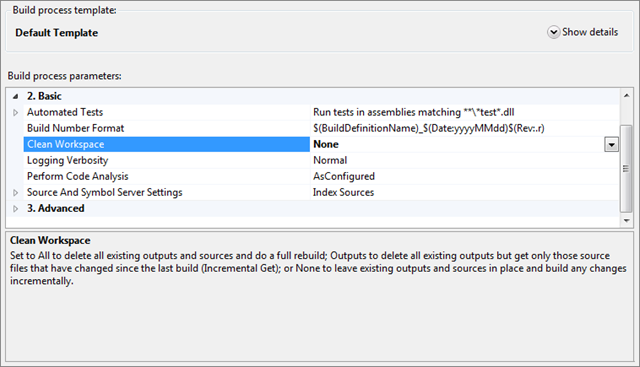
        <![CDATA[<p>When you create a new build definition with TFS 2010 by default it does a clean build for you every time.&#160; That is to say that between builds all the source from the previous build is deleted along with the compiled outputs and then the source is downloaded fresh, built and you are good to go.&#160; There is a good reason for this to be the default – it is the safest option.&#160; If your build script messes around with the files in your source directory at all (perhaps baking in a build number into the AssemblyInfo files etc) then you want to get a clean workspace to ensure that you are back to a known good state.</p>  <p>However, if you know what you are doing then there are couple of really good reasons why only building the things that changed between builds would be very useful:</p>  <ol>   <li><strong>Speed</strong> – if you are doing CI builds (which you should be doing if you are not BTW) then the only thing that will have changed between builds to the same build agent are the contents of a single check-in – a single changeset.&#160; If you are checking in regularly (which you should be doing BTW) then these changesets usually contain a small number of changes.&#160; Downloading only the files that have changed between builds speeds things up but also only compiling new versions of assemblies that have been affected saves even more time.</li>    <li><strong>Differential Deployment</strong> – For websites it makes a lot of sense to use something like robocopy to deploy the output of a build to a directory used by a test IIS instance.&#160; By using robocopy you can specify that only the files that have changed should be copied over.&#160; When TFS does a get into a clean workspace the files did not previously exist in that location on disk.&#160; Therefore the creation date and modification dates of the source files are taken as the time at which they are downloaded to the machine – i.e. the time of doing a get.&#160; By switching to incremental builds files which haven’t been touched are left alone so older files keep their timestamps.&#160; Only the changes files have a new timestamp.&#160; Utilities such as robocopy can therefore easily identify these and therefore only deploy the changes files over to IIS.&#160; IIS then sees that the file is new and so compiles it first time that page is accessed or a page references an assembly that has been updated.</li> </ol>  <p>Traditionally, in the world of build solutions, incremental builds were always treated with a bit of “<a href="http://en.wikipedia.org/wiki/Here_be_dragons" target="_blank">Here be dragons</a>”.&#160; Many version control systems can leave orphan files around in your local working copy when you update to the latest version from the server (for example in the case that a file was deleted, moved or renamed on the server).&#160; TFS however cleans up your workspace as you go along so that when you do a <em>get</em> deleted files are deleted from your local file system, as are the old versions when you do a rename/move etc.</p>  <h3><font style="font-weight: bold">Enabling Incremental Builds with TFS 2010</font></h3>  <p>To enable incremental builds, edit the build definition in Visual Studio 2010 and set the Clean Workspace property to “None”.</p>  <p><img style="background-image: none; border-bottom: 0px; border-left: 0px; margin: 0px auto; padding-left: 0px; padding-right: 0px; display: block; float: none; border-top: 0px; border-right: 0px; padding-top: 0px" title="Default Template build process properties shown when editing the build definition in Visual Studio 2010" border="0" alt="Default Template build process properties shown when editing the build definition in Visual Studio 2010" src="http://www.woodwardweb.com/Windows-Live-Writer/Incremental-Builds-with-TFS-2010_4A1E/incremental_builds_3.png" width="640" height="367" /></p>  <p>Note that there are a few options for Clean Workspace, All; Outputs; None – take a look at the handy property help text to learn more about what they mean. For example Outputs is useful if you want the benefit of not downloading all your source every time but are not able or do not trust the ability to incrementally compile your binaries.</p>  <p>Your mileage may vary depending on your build process and what you do during it.&#160; Depending on assumptions made during and build customization work you have done you may indeed need to re-engineer the way that you do your build to be able to reap the benefits of incremental builds.&#160; Also, you may want to do things like incremental builds to a dev test instance but a full clean build for your nightly drop to a QA test environment.&#160; Also remember that even with a CI build set for incremental builds, you can at any time Queue a manual build from Visual Studio by right clicking on the build definition in Team Explorer.&#160; From there you can (if you wanted) set the Clean Workspace property to All for your manual build if something funny was going on and you just wanted to reset everything – and if you are really fancy you might even do it so that a deployment of a clean build to IIS not only copies all the files over fresh but forces an IIS Reset for the true belt and braces approach.</p>]]>
        
    </content>
</entry>

<entry>
    <title>Getting Started with the TFS SDK for Java</title>
    <link rel="alternate" type="text/html" href="http://www.woodwardweb.com/programming/getting_started_1.html" />
    <id>tag:www.woodwardweb.com,2011://4.2266</id>

    <published>2011-05-26T17:19:03Z</published>
    <updated>2011-05-26T17:19:03Z</updated>

    <summary>As you may have read over on Brian Harry’s blog, we recently made available a TFS SDK for Java.&#160; This is the same core code that we use in Team Explorer Everywhere 2010 SP1 to talk to TFS from Eclipse...</summary>
    <author>
        <name>Martin Woodward</name>
        <uri>http://www.woodwardweb.com</uri>
    </author>
    
        <category term="Programming" scheme="http://www.sixapart.com/ns/types#category" />
    
        <category term="Vsts" scheme="http://www.sixapart.com/ns/types#category" />
    
        <category term="tfs" scheme="http://www.sixapart.com/ns/types#category" />
    
    <category term="java" label="java" scheme="http://www.sixapart.com/ns/types#tag" />
    <category term="tfs" label="tfs" scheme="http://www.sixapart.com/ns/types#tag" />
    <category term="tfs2010" label="tfs2010" scheme="http://www.sixapart.com/ns/types#tag" />
    <category term="tfssdk4j" label="tfssdk4j" scheme="http://www.sixapart.com/ns/types#tag" />
    
    <content type="html" xml:lang="en" xml:base="http://www.woodwardweb.com/">
        <![CDATA[<p>As you may have read over on <a href="http://blogs.msdn.com/b/bharry/archive/2011/05/16/announcing-a-java-sdk-for-tfs.aspx">Brian Harry’s blog</a>, we recently made available a TFS SDK for Java.&#160; This is the same core code that we use in Team Explorer Everywhere 2010 SP1 to talk to TFS from Eclipse and from our Cross-platform command line client – just packaged up into a single jar file to make it easier to consume and re-distribute in your own applications.</p>  <p>The TFS SDK for Java ships with a bunch of sample applications, check-in policies, custom work item controls and some handy snippets of code.&#160; It also includes an Ant build script to allow you to build the samples that we ship.&#160; However – I thought it would be interesting to walk through how you can consume the SDK in a simple Eclipse project and make use of some of the nice Eclipse features such as inline Javadoc.</p>  <p>To begin, download the TFS SDK for Java 10.1.0 from the download site and unzip it to a handy location. Next create a new blank Java project in Eclipse (File, New, Java Project).</p>  <p><img style="background-image: none; border-right-width: 0px; padding-left: 0px; padding-right: 0px; display: block; float: none; border-top-width: 0px; border-bottom-width: 0px; margin-left: auto; border-left-width: 0px; margin-right: auto; padding-top: 0px" title="New Java Project dialog" border="0" alt="New Java Project dialog in Eclipse" src="http://www.woodwardweb.com/Windows-Live-Writer/Getting-Started-with-the-TFS-SDK-for-Jav_8CCD/image_3.png" width="280" height="338" /></p>  <p>Give the project a name (i.e. com.contoso.tfsplay), then press Finish to create the empty project.&#160; The next thing that we are going to do is browse to the empty project in the file system to copy over the relevant files in the SDK.&#160; Having the SDK as part of your Java project makes it much easier to build and deploy it later.</p>  <p>First of all, browse to your Eclipse workspace folder in the file system (for example mine is at C:\play\tfssdk4j\com.contoso.tfsplay but you can find where yours is by right clicking on the project you just created and selecting properties).&#160; Inside the project folder, create a new folder to hold your TFS SDK bits.&#160; Mine is called tfssdk at the root at the folder.&#160; Inside this copy the redist folder from the TFS SDK ZIP archive.&#160; I also personally ZIP up the Javadoc folder from the TFS and also include it – however if you have a copy of the TFS SDK Javadoc installed on an intranet server somewhere you could just point to it later on.</p>  <p>Now that we have the SDK inside our project, if I press refresh back in Eclipse on the package explorer I get something that looks like the following:</p>  <p><a href="http://www.woodwardweb.com/Windows-Live-Writer/Getting-Started-with-the-TFS-SDK-for-Jav_8CCD/image_5.png"><img style="background-image: none; border-right-width: 0px; padding-left: 0px; padding-right: 0px; display: block; float: none; border-top-width: 0px; border-bottom-width: 0px; margin-left: auto; border-left-width: 0px; margin-right: auto; padding-top: 0px" title="Eclipse with the TFS SDK in a project" border="0" alt="Eclipse with the TFS SDK in a project" src="http://www.woodwardweb.com/Windows-Live-Writer/Getting-Started-with-the-TFS-SDK-for-Jav_8CCD/image_thumb_1.png" width="640" height="480" /></a></p>  <p>Now we want to configure the project to include the SDK in it’s build path. Right click on your project, select Properties, then Java Build Path.&#160; In the Libraries tab press Add JAR… Select the com.microsoft.tfs.sdk-10.1.0.jar file from your tfssdk/redist/lib folder.&#160; Now that the JAR file is included, we want to expand it to let Eclipse know about the Javadoc and the natives.&#160; Double click on the Javadoc location and point it to where the TFS SDK Javadoc is located.&#160; Do the same for the natives for your platform.</p>  <p><a href="http://www.woodwardweb.com/Windows-Live-Writer/Getting-Started-with-the-TFS-SDK-for-Jav_8CCD/image_11.png"><img style="background-image: none; border-right-width: 0px; padding-left: 0px; padding-right: 0px; display: block; float: none; border-top-width: 0px; border-bottom-width: 0px; margin-left: auto; border-left-width: 0px; margin-right: auto; padding-top: 0px" title="Configuring Java build path in Eclipse" border="0" alt="Configuring Java build path in Eclipse" src="http://www.woodwardweb.com/Windows-Live-Writer/Getting-Started-with-the-TFS-SDK-for-Jav_8CCD/image_thumb_4.png" width="640" height="345" /></a></p>  <p>Your JAR file definition should then look like the above and you are now up and ready to start talking to TFS via the SDK in your Java project.</p>  <p>For our example, let’s create a quick class with a main method. (Right click on the project, New, Class…)</p>  <p><a href="http://www.woodwardweb.com/Windows-Live-Writer/Getting-Started-with-the-TFS-SDK-for-Jav_8CCD/image_9.png"><img style="background-image: none; border-right-width: 0px; padding-left: 0px; padding-right: 0px; display: block; float: none; border-top-width: 0px; border-bottom-width: 0px; margin-left: auto; border-left-width: 0px; margin-right: auto; padding-top: 0px" title="New Class Dialog" border="0" alt="New Class Dialog" src="http://www.woodwardweb.com/Windows-Live-Writer/Getting-Started-with-the-TFS-SDK-for-Jav_8CCD/image_thumb_3.png" width="542" height="637" /></a></p>  <p>Then inside the main method, I’ll quickly steal the code that Brian used in his <a href="http://blogs.msdn.com/b/bharry/archive/2011/05/16/announcing-a-java-sdk-for-tfs.aspx">TFS SDK for Java announcement blog</a> post.&#160; </p>  <p><a href="http://www.woodwardweb.com/Windows-Live-Writer/Getting-Started-with-the-TFS-SDK-for-Jav_8CCD/image_15.png"><img style="background-image: none; border-right-width: 0px; padding-left: 0px; padding-right: 0px; display: block; float: none; border-top-width: 0px; border-bottom-width: 0px; margin-left: auto; border-left-width: 0px; margin-right: auto; padding-top: 0px" title="Example code in Eclipse" border="0" alt="Example code in Eclipse" src="http://www.woodwardweb.com/Windows-Live-Writer/Getting-Started-with-the-TFS-SDK-for-Jav_8CCD/image_thumb_6.png" width="640" height="371" /></a></p>  <p>Once the code is included and modified to point at my TFS project collection, I’ll quickly debug the code (Run, Debug As…, Java Application…)</p>  <p>I’ll be posting more samples shortly, but now the code is running let’s step through it.&#160; To begin with we first need to get hold of a project collection. In Brian’s example he uses:</p>  <p><font face="Courier New">TFSTeamProjectCollection tpc =      <br />&#160;&#160;&#160;&#160;&#160;&#160;&#160;&#160;&#160;&#160;&#160; new TFSTeamProjectCollection(&quot;http://tfs2010:8080/tfs/DefaultCollection&quot;);</font></p>  <p>The reason this works is that the native code libraries are configured correctly so the SDK can then get the credentials of the logged in user and use those to authenticate with TFS.&#160; However – what if you don’t want to use those credentials but want to pass them in via code?&#160; Well luckily the TFSTeamProjectCollection has lots of overloads including one that allows you to pass username, password and domain.</p>  <p><a href="http://www.woodwardweb.com/Windows-Live-Writer/Getting-Started-with-the-TFS-SDK-for-Jav_8CCD/image_17.png"><img style="background-image: none; border-right-width: 0px; padding-left: 0px; padding-right: 0px; display: block; float: none; border-top-width: 0px; border-bottom-width: 0px; margin-left: auto; border-left-width: 0px; margin-right: auto; padding-top: 0px" title="Javadoc for TFSTeamProjectCollection" border="0" alt="Javadoc for TFSTeamProjectCollection" src="http://www.woodwardweb.com/Windows-Live-Writer/Getting-Started-with-the-TFS-SDK-for-Jav_8CCD/image_thumb_7.png" width="640" height="324" /></a></p>  <p><font face="Courier New">TFSTeamProjectCollection tpc =      <br />&#160;&#160;&#160;&#160;&#160;&#160;&#160;&#160;&#160;&#160;&#160; new TFSTeamProjectCollection(&quot;http://tfs2010:8080/tfs/DefaultCollection&quot;,       <br />&#160;&#160;&#160;&#160;&#160;&#160;&#160;&#160;&#160;&#160;&#160;&#160;&#160;&#160;&#160;&#160;&#160;&#160;&#160; &quot;username&quot;,&quot;domain&quot;,&quot;password&quot;);</font></p>  <p>In our example, we now want to query work items – so we get hold of a work item client as follows:</p>  <p><font face="Courier New">WorkItemClient workItemClient = tpc.getWorkItemClient();</font></p>  <p>We then create the query that we want to run.&#160; In the example we’re going to execute an ad-hoc query in TFS’s Work Item Query Language (WIQL).</p>  <p><font face="Courier New">// Define the WIQL query.&#160;&#160;&#160;&#160;&#160;&#160;&#160;&#160;&#160; <br />String wiqlQuery =       <br />&#160;&#160;&#160; </font><font face="Courier New">&quot;Select ID, Title from WorkItems where (State = 'Active') order by Title&quot;;</font></p>  <p><font face="Courier New">// Run the query and get the results.&#160;&#160;&#160;&#160;&#160;&#160;&#160;&#160;&#160; <br />WorkItemCollection workItems = workItemClient.query(wiqlQuery);</font>     <br /></p>  <p>&#160;</p>  <p>Finally, we then need to loop over the collection of results and display them.&#160; The WorkItemCollection class contains logic to efficiently handle large result sets.&#160; It will page in a set of query results as needed rather than waiting for all the results to be returned before you can start iterating over them.&#160; This makes it much more efficient if you just need a page of data – i.e.</p>  <p><font face="Courier New">final int maxToPrint = 20;</font></p>  <p><font face="Courier New">for (int i = 0; i &lt; workItems.size(); i++)&#160;&#160;&#160;&#160;&#160;&#160;&#160;&#160;&#160; <br />{       <br />&#160;&#160;&#160; if (i &gt;= maxToPrint)&#160;&#160;&#160;&#160;&#160;&#160;&#160;&#160;&#160;&#160;&#160;&#160;&#160; <br />&#160;&#160;&#160; {       <br />&#160;&#160;&#160;&#160;&#160;&#160;&#160; System.out.println(&quot;[...]&quot;);&#160;&#160;&#160;&#160;&#160;&#160;&#160;&#160;&#160;&#160;&#160;&#160;&#160;&#160;&#160;&#160;&#160; <br />&#160;&#160;&#160;&#160;&#160;&#160;&#160; break;       <br />&#160;&#160;&#160; }       <br />&#160;&#160;&#160; WorkItem workItem = workItems.getWorkItem(i);       <br />&#160;&#160;&#160; <br />&#160;&#160;&#160; System.out.println(workItem.getID() + &quot;\t&quot; + workItem.getTitle());&#160; <br />}       <br /></font></p>  <p>&#160;</p>  <p>The full code for the QueryWorkItemExample is below.&#160; Hope that is makes a bit more sense now that we’ve walked through it.&#160;&#160; </p>  <p><font face="Courier New">package com.contso.tfsplay;</font></p>  <p><font face="Courier New">import com.microsoft.tfs.core.TFSTeamProjectCollection;      <br />import com.microsoft.tfs.core.clients.workitem.WorkItem;       <br />import com.microsoft.tfs.core.clients.workitem.WorkItemClient;       <br />import com.microsoft.tfs.core.clients.workitem.query.WorkItemCollection;</font></p>  <p><font face="Courier New">public class QueryWorkitemExample {</font></p>  <p><font face="Courier New">&#160;&#160;&#160; /**      <br />&#160;&#160;&#160;&#160; * @param args       <br />&#160;&#160;&#160;&#160; */       <br />&#160;&#160;&#160; public static void main(String[] args)       <br />&#160;&#160;&#160; {       <br />&#160;&#160;&#160;&#160;&#160;&#160;&#160; TFSTeamProjectCollection tpc =       <br />&#160;&#160;&#160;&#160;&#160;&#160;&#160;&#160;&#160;&#160;&#160; new TFSTeamProjectCollection(&quot;</font><font face="Courier New">http://tfs2010:8080/tfs/DefaultCollection&quot;</font><font face="Courier New">,      <br />&#160;&#160;&#160;&#160;&#160;&#160;&#160;&#160;&#160;&#160;&#160;&#160;&#160;&#160;&#160;&#160;&#160;&#160;&#160; &quot;username&quot;,&quot;password&quot;,&quot;domain&quot;);       <br />&#160;&#160;&#160;&#160;&#160;&#160;&#160; <br />&#160;&#160;&#160;&#160;&#160;&#160;&#160; WorkItemClient workItemClient = tpc.getWorkItemClient();       <br />&#160;&#160;&#160;&#160;&#160;&#160;&#160; <br />&#160;&#160;&#160;&#160;&#160;&#160;&#160; // Define the WIQL query.&#160;&#160;&#160;&#160;&#160;&#160;&#160;&#160;&#160; <br />&#160;&#160;&#160;&#160;&#160;&#160;&#160; String wiqlQuery =       <br />&#160;&#160;&#160;&#160;&#160;&#160;&#160;&#160;&#160;&#160;&#160; &quot;Select ID, Title from WorkItems where (State = 'Active') order by Title&quot;;       <br />&#160;&#160;&#160;&#160;&#160;&#160;&#160; <br />&#160;&#160;&#160;&#160;&#160;&#160;&#160; // Run the query and get the results.&#160;&#160;&#160;&#160;&#160;&#160;&#160;&#160;&#160; <br />&#160;&#160;&#160;&#160;&#160;&#160;&#160; WorkItemCollection workItems = workItemClient.query(wiqlQuery);</font></p>  <p><font face="Courier New">&#160;&#160;&#160;&#160;&#160;&#160;&#160; System.out.println(&quot;Found &quot; + workItems.size() + &quot; work items.&quot;);      <br />&#160;&#160;&#160;&#160;&#160;&#160;&#160; System.out.println();       <br />&#160;&#160;&#160;&#160;&#160;&#160;&#160; <br />&#160;&#160;&#160;&#160;&#160;&#160;&#160; // Write out the heading.&#160;&#160;&#160;&#160;&#160;&#160;&#160;&#160;&#160; <br />&#160;&#160;&#160;&#160;&#160;&#160;&#160; System.out.println(&quot;ID\tTitle&quot;);       <br />&#160;&#160;&#160;&#160;&#160;&#160;&#160; <br />&#160;&#160;&#160;&#160;&#160;&#160;&#160; // Output the first 20 results of the query       <br />&#160;&#160;&#160;&#160;&#160;&#160;&#160; final int maxToPrint = 20;       <br />&#160;&#160;&#160;&#160;&#160;&#160;&#160; <br />&#160;&#160;&#160;&#160;&#160;&#160;&#160; for (int i = 0; i &lt; workItems.size(); i++)&#160;&#160;&#160;&#160;&#160;&#160;&#160;&#160;&#160; <br />&#160;&#160;&#160;&#160;&#160;&#160;&#160; {       <br />&#160;&#160;&#160;&#160;&#160;&#160;&#160;&#160;&#160;&#160;&#160; if (i &gt;= maxToPrint)&#160;&#160;&#160;&#160;&#160;&#160;&#160;&#160;&#160;&#160;&#160;&#160;&#160; <br />&#160;&#160;&#160;&#160;&#160;&#160;&#160;&#160;&#160;&#160;&#160; {       <br />&#160;&#160;&#160;&#160;&#160;&#160;&#160;&#160;&#160;&#160;&#160;&#160;&#160;&#160;&#160; System.out.println(&quot;[...]&quot;);&#160;&#160;&#160;&#160;&#160;&#160;&#160;&#160;&#160;&#160;&#160;&#160;&#160;&#160;&#160;&#160;&#160; <br />&#160;&#160;&#160;&#160;&#160;&#160;&#160;&#160;&#160;&#160;&#160;&#160;&#160;&#160;&#160; break;       <br />&#160;&#160;&#160;&#160;&#160;&#160;&#160;&#160;&#160;&#160;&#160; }       <br />&#160;&#160;&#160;&#160;&#160;&#160;&#160;&#160;&#160;&#160;&#160; WorkItem workItem = workItems.getWorkItem(i);       <br />&#160;&#160;&#160;&#160;&#160;&#160;&#160;&#160;&#160;&#160;&#160; <br />&#160;&#160;&#160;&#160;&#160;&#160;&#160;&#160;&#160;&#160;&#160; System.out.println(workItem.getID() + &quot;\t&quot; + workItem.getTitle());&#160; <br />&#160;&#160;&#160;&#160;&#160;&#160;&#160; }       <br />&#160;&#160;&#160;&#160;&#160;&#160;&#160; <br />&#160;&#160;&#160;&#160;&#160;&#160;&#160; System.out.println(&quot;Done&quot;);       <br />&#160;&#160;&#160; }</font></p>  <p><font face="Courier New">}</font></p>  <p>In future posts I’ll talk about how to do more advanced things in Java against TFS.&#160; If you have any requests then please drop me a line, but for now take a look at the snippets that we ship in the SDK.&#160; I’ll also be posting walkthrough posts discussing custom check-in policies in Team Explorer Everywhere, custom Work Item Controls as well as other ways of extending Team Explorer Everywhere and using the SDK.&#160; Again – if you have anything in particular that you’d like me to use as an example then let me know.</p>]]>
        
    </content>
</entry>

<entry>
    <title>Excel Year Planner Re-visited</title>
    <link rel="alternate" type="text/html" href="http://www.woodwardweb.com/personal/excel_year_plan_1.html" />
    <id>tag:www.woodwardweb.com,2011://4.2265</id>

    <published>2011-05-18T01:49:28Z</published>
    <updated>2011-05-18T01:49:28Z</updated>

    <summary>A while ago I blogged about my surprising obsession for having a year planner by my desk.&#160; For people that know me this probably comes as a huge shock as I don’t come across as someone who is particularly well...</summary>
    <author>
        <name>Martin Woodward</name>
        <uri>http://www.woodwardweb.com</uri>
    </author>
    
        <category term="Personal" scheme="http://www.sixapart.com/ns/types#category" />
    
    <category term="excel" label="excel" scheme="http://www.sixapart.com/ns/types#tag" />
    <category term="planning" label="planning" scheme="http://www.sixapart.com/ns/types#tag" />
    
    <content type="html" xml:lang="en" xml:base="http://www.woodwardweb.com/">
        <![CDATA[<p><a href="http://cid-c7a08ae2600d197a.office.live.com/view.aspx/Public/YearPlanner/CurrentYearPlanner.xlsx"><img style="background-image: none; border-bottom: 0px; border-left: 0px; margin: 0px 0px 0px 5px; padding-left: 0px; padding-right: 0px; display: inline; float: right; border-top: 0px; border-right: 0px; padding-top: 0px" title="current_year_planner" border="0" alt="current_year_planner" align="right" src="http://www.woodwardweb.com/Windows-Live-Writer/Excel-Year-Planner-Re-visited_12D6E/current_year_planner_3.png" width="179" height="126" /></a>A <a href="http://www.woodwardweb.com/personal/excel_year_plan.html">while ago I blogged about my surprising obsession for having a year planner by my desk</a>.&#160; For people that know me this probably comes as a huge shock as I don’t come across as someone who is particularly well organized – but I just find it very useful.&#160; Today I had an email from Roz Aidie asking me if it was possible to make the calendar display the Academic year.&#160;&#160; As the spreadsheet is all based on conditional formatting formulas, the answer is happily yes.&#160; Just change the months at the top of the column and you get the days displayed for that month.</p>  <p>I posted a <a href="http://cid-c7a08ae2600d197a.office.live.com/view.aspx/Public/YearPlanner/CurrentYearPlanner.xlsx">new version of the year planner</a> that shows the current calendar year, alongside the Financial (April – March) and Academic (September – August) year.&#160; You can get a version that shows the current calendar year along with the previous and next year <a href="http://cid-c7a08ae2600d197a.office.live.com/view.aspx/Public/YearPlanner/YearPlanner.xlsx">here</a> (which is the version that I use).&#160; Judging by the feedback, other people find this spreadsheet year planner helpful too – do let me know if you find yourself using it.</p>]]>
        
    </content>
</entry>

<entry>
    <title>Professional Team Foundation Server 2010 Now Available</title>
    <link rel="alternate" type="text/html" href="http://www.woodwardweb.com/vsts/tfs/professional_te_1.html" />
    <id>tag:www.woodwardweb.com,2011://4.2264</id>

    <published>2011-03-25T16:18:14Z</published>
    <updated>2011-03-25T16:18:14Z</updated>

    <summary>I’ve always wanted to write a technical book and when I started getting involved in Team Foundation Server I thought that this technology area might be my chance.&#160; I was lucky enough to get involved with the Professional Application Lifecycle...</summary>
    <author>
        <name>Martin Woodward</name>
        <uri>http://www.woodwardweb.com</uri>
    </author>
    
        <category term="Vsts" scheme="http://www.sixapart.com/ns/types#category" />
    
        <category term="tfs" scheme="http://www.sixapart.com/ns/types#category" />
    
    <category term="book" label="book" scheme="http://www.sixapart.com/ns/types#tag" />
    <category term="tfs2010" label="tfs2010" scheme="http://www.sixapart.com/ns/types#tag" />
    <category term="vsts" label="vsts" scheme="http://www.sixapart.com/ns/types#tag" />
    
    <content type="html" xml:lang="en" xml:base="http://www.woodwardweb.com/">
        <![CDATA[<p><a href="http://www.amazon.com/gp/product/0470943327/ref=as_li_ss_tl?ie=UTF8&amp;tag=woodweb03-20&amp;linkCode=as2&amp;camp=1789&amp;creative=390957&amp;creativeASIN=0470943327" target="_blank"><img style="background-image: none; border-right-width: 0px; margin: 0px 0px 0px 5px; padding-left: 0px; padding-right: 0px; display: inline; float: right; border-top-width: 0px; border-bottom-width: 0px; border-left-width: 0px; padding-top: 0px" title="Professional Team Foundation Server 2010" border="0" alt="Professional Team Foundation Server 2010" align="right" src="http://www.woodwardweb.com/Windows-Live-Writer/Professional-Team-Foundation-Server-2010_D86E/tfs2010_book_3.jpg" width="204" height="256" /></a>I’ve always wanted to write a technical book and when I started getting involved in Team Foundation Server I thought that this technology area might be my chance.&#160; I was lucky enough to get involved with the <a href="http://www.amazon.com/gp/product/0470484268/ref=as_li_ss_tl?ie=UTF8&amp;tag=woodweb03-20&amp;linkCode=as2&amp;camp=1789&amp;creative=390957&amp;creativeASIN=0470484268" target="_blank">Professional Application Lifecycle Management with Visual Studio 2010</a> book and contributed to the TFS chapters in that one – but I knew I had one more book in me.</p>  <p>Luckily, the ALM book was so popular that the publishers came back for more and so I was able to get involved in the book I’ve been wanting to write for the past 6 years.&#160; Not only that, I got to work with <a href="http://blogs.msdn.com/b/granth/" target="_blank">Grant Holliday</a>, <a href="http://www.edsquared.com/" target="_blank">Ed Blankenship</a> and <a href="http://blogs.msdn.com/b/briankel/" target="_blank">Brian Keller</a> who are three of the people I regularly turn to for advice on TFS matters.&#160; Having those guys on board made it hard when looking for technical reviewers but luckily <a href="http://www.teamsystemrocks.com/" target="_blank">Mickey Gousset</a> and <a href="http://sstjean.blogspot.com/" target="_blank">Steve St Jean</a> agreed to help out and so the journey began in creating the <a href="http://www.amazon.com/gp/product/0470943327/ref=as_li_ss_tl?ie=UTF8&amp;tag=woodweb03-20&amp;linkCode=as2&amp;camp=1789&amp;creative=390957&amp;creativeASIN=0470943327" target="_blank">TFS 2010 book</a> which is now available on <a href="http://www.amazon.com/gp/product/0470943327/ref=as_li_ss_tl?ie=UTF8&amp;tag=woodweb03-20&amp;linkCode=as2&amp;camp=1789&amp;creative=390957&amp;creativeASIN=0470943327" target="_blank">Amazon.com</a> (both in <a href="http://www.amazon.com/gp/product/0470943327/ref=as_li_ss_tl?ie=UTF8&amp;tag=woodweb03-20&amp;linkCode=as2&amp;camp=1789&amp;creative=390957&amp;creativeASIN=0470943327" target="_blank">paperback</a> and <a href="http://www.amazon.com/gp/product/B004S82RRE/ref=as_li_ss_tl?ie=UTF8&amp;tag=woodweb03-20&amp;linkCode=as2&amp;camp=1789&amp;creative=390957&amp;creativeASIN=B004S82RRE" target="_blank">Kindle</a> versions) and available for pre-order on <a href="http://www.amazon.co.uk/gp/product/0470943327/ref=as_li_ss_tl?ie=UTF8&amp;tag=woodwardwebcom&amp;linkCode=as2&amp;camp=1634&amp;creative=19450&amp;creativeASIN=0470943327" target="_blank">Amazon.co.uk</a>.&#160; As with the <a href="http://www.amazon.com/gp/product/0470484268/ref=as_li_ss_tl?ie=UTF8&amp;tag=woodweb03-20&amp;linkCode=as2&amp;camp=1789&amp;creative=390957&amp;creativeASIN=0470484268" target="_blank">ALM book</a> there is a <a href="http://www.wrox.com/WileyCDA/WroxTitle/Professional-Team-Foundation-Server-2010.productCd-0470943327.html" target="_blank">DRM Free eBook available at the Wrox site</a> if you prefer but I’ll also expect electronic versions to be available in all the popular eBook stores in due time.&#160; One neat thing about buying the electronic version of the TFS Book for devices that have a color screen is that in many versions the diagrams and screenshots are in color (which helped me when talking about Branch Visualization or the build reports :-) )</p>  <p><a href="http://www.amazon.com/gp/product/0470484268/ref=as_li_ss_tl?ie=UTF8&amp;tag=woodweb03-20&amp;linkCode=as2&amp;camp=1789&amp;creative=390957&amp;creativeASIN=0470484268" target="_blank"><img style="background-image: none; border-right-width: 0px; margin: 0px 10px 0px 0px; padding-left: 0px; padding-right: 0px; display: inline; float: left; border-top-width: 0px; border-bottom-width: 0px; border-left-width: 0px; padding-top: 0px" title="vs2010alm_book" border="0" alt="vs2010alm_book" align="left" src="http://www.woodwardweb.com/Windows-Live-Writer/Professional-Team-Foundation-Server-2010_D86E/vs2010alm_book_3.jpg" width="212" height="266" /></a>People have asked us what’s the difference between the <a href="http://www.amazon.com/gp/product/0470484268/ref=as_li_ss_tl?ie=UTF8&amp;tag=woodweb03-20&amp;linkCode=as2&amp;camp=1789&amp;creative=390957&amp;creativeASIN=0470484268" target="_blank">ALM book</a> and the Pro TFS book.&#160; The ALM book was deliberately written as an overview to the huge amount of functionality available in the entire Visual Studio Application Lifecycle Management suite.&#160; Though there are a couple of chapters, the Team Build one in particular, that get pretty technical – the Pro ALM book tries to keep things approachable by everyone.</p>  <p>The Pro TFS 2010 book is a deep dive on TFS.&#160; We tried to make it so that you can pick up the book having never used TFS before any by the end of it not only know how to use TFS but how to administer a complex TFS instance and even use it to study for the <a href="http://www.microsoft.com/learning/en/us/exam.aspx?ID=70-512" target="_blank">TFS Administration exam</a>.&#160; I’ve learnt something from every single chapter in the Pro TFS book, but I would also hope that someone new to TFS could pick up the book and learn just enough to get going then come back for more over time.</p>  <p>Anyway – while I’ve seen the PDF version of the book and enjoyed reading the chapters contributed by my co-authors, I’m looking forward to getting my physical copy soon from the publisher.&#160; If you happen to get a copy then be sure to let me know what you think.&#160; If you wanted to splash out and get the complete reference set then my personal recommendation would be to get the <a href="http://www.amazon.com/gp/product/0470484268/ref=as_li_ss_tl?ie=UTF8&amp;tag=woodweb03-20&amp;linkCode=as2&amp;camp=1789&amp;creative=390957&amp;creativeASIN=0470484268" target="_blank">ALM book</a>, the <a href="http://www.amazon.com/gp/product/0470943327/ref=as_li_ss_tl?ie=UTF8&amp;tag=woodweb03-20&amp;linkCode=as2&amp;camp=1789&amp;creative=390957&amp;creativeASIN=0470943327" target="_blank">TFS Book</a> and the excellent <a href="http://www.amazon.com/gp/product/0735645248/ref=as_li_ss_tl?ie=UTF8&amp;tag=woodweb03-20&amp;linkCode=as2&amp;camp=1789&amp;creative=390957&amp;creativeASIN=0735645248">Inside the Microsoft Build Engine: Using MSBuild and Team Foundation Build (2nd Edition)</a>.</p>  <p>Hope you enjoy it anyway – I’m proud of this one so looking forward with nervousness to see what the reviews are when they start coming in.</p>]]>
        
    </content>
</entry>

<entry>
    <title>The Team Explorer Everywhere Tour 2011</title>
    <link rel="alternate" type="text/html" href="http://www.woodwardweb.com/teamprise/the_team_explor.html" />
    <id>tag:www.woodwardweb.com,2011://4.2263</id>

    <published>2011-03-23T22:18:00Z</published>
    <updated>2011-03-24T10:18:25Z</updated>

    <summary>Ed Thomson from the Team Explorer Everywhere team is going to be doing a tour of the mid-west and central United States in early April.&#160; For those of you who don’t know Ed, he is one of the original Teamprise...</summary>
    <author>
        <name>Martin Woodward</name>
        <uri>http://www.woodwardweb.com</uri>
    </author>
    
        <category term="Teamprise" scheme="http://www.sixapart.com/ns/types#category" />
    
        <category term="Vsts" scheme="http://www.sixapart.com/ns/types#category" />
    
        <category term="tfs" scheme="http://www.sixapart.com/ns/types#category" />
    
    <category term="tee" label="tee" scheme="http://www.sixapart.com/ns/types#tag" />
    <category term="tfs" label="tfs" scheme="http://www.sixapart.com/ns/types#tag" />
    <category term="tfs2010" label="tfs2010" scheme="http://www.sixapart.com/ns/types#tag" />
    <category term="vsts" label="vsts" scheme="http://www.sixapart.com/ns/types#tag" />
    
    <content type="html" xml:lang="en" xml:base="http://www.woodwardweb.com/">
        <![CDATA[<p><a href="http://www.woodwardweb.com/Windows-Live-Writer/f15622a5b7ac_8071/TEE_World_Tour_2.jpg" target="_blank"><img style="background-image: none; border-bottom: 0px; border-left: 0px; padding-left: 0px; padding-right: 0px; display: inline; float: right; border-top: 0px; border-right: 0px; padding-top: 0px" title="Team Explorer Everywhere World Tour" border="0" alt="Team Explorer Everywhere World Tour" align="right" src="http://www.woodwardweb.com/Windows-Live-Writer/f15622a5b7ac_8071/TEE_World_Tour_thumb.jpg" width="240" height="161" /></a><a href="http://www.edwardthomson.com/" target="_blank">Ed Thomson</a> from the Team Explorer Everywhere team is going to be doing a tour of the mid-west and central United States in early April.&#160; For those of you who don’t know Ed, he is one of the original Teamprise developers that came over to Microsoft after the acquisition and now one of the core developers on Team Explorer Everywhere.&#160; He knows more about the inner workings of our Eclipse integration than anyone else on the planet.</p>  <p>While he’ll be speaking at a lot of user groups and Microsoft events in various cities, places are filling up fast.&#160; However there is still some availability in a few cities.&#160; If you are nearby or know someone who is then I encourage you to register and come along.</p>  <p><strong>Austin TX</strong></p>  <ul>   <li>Monday April 4 (<a href="https://sites.google.com/site/tfsaustinusergroup/home">Information</a>)</li> </ul>  <p><strong>Minneapolis</strong></p>  <ul>   <li>Wednesday April 6 (Details soon)</li> </ul>  <p><strong>Chicago</strong></p>  <ul>   <li>Thursday April 7 2:00pm – 4.30pm (<a href="https://msevents.microsoft.com/cui/EventDetail.aspx?culture=en-US&amp;EventID=1032481095&amp;IO=FugavZ%2bXR1EgFiFq7swLOw%3d%3d">Register</a>)</li>    <li>Thursday April 7 6:30pm - 8:30pm (<a href="http://chicagoalmug.org/">Register</a>)</li> </ul>  <p><strong>Milwaukee</strong></p>  <ul>   <li>Friday April 8 9:00am – 11:30am (<a href="https://msevents.microsoft.com/cui/EventDetail.aspx?culture=en-US&amp;EventID=1032481099&amp;IO=FugavZ%2bXR1FKUHEf842Wzw%3d%3d">Register</a>)</li> </ul>]]>
        
    </content>
</entry>

<entry>
    <title>Only Running Impacted Tests in a CI Build.</title>
    <link rel="alternate" type="text/html" href="http://www.woodwardweb.com/vsts/tfs/only_running_im.html" />
    <id>tag:www.woodwardweb.com,2011://4.2262</id>

    <published>2011-03-14T09:34:32Z</published>
    <updated>2011-03-14T09:34:32Z</updated>

    <summary>One of the key things about your CI build is to ensure that is runs fast so that you have a very quick feedback loop to see if you have a good build or not.&#160; Rob Maher has an interesting...</summary>
    <author>
        <name>Martin Woodward</name>
        <uri>http://www.woodwardweb.com</uri>
    </author>
    
        <category term="Vsts" scheme="http://www.sixapart.com/ns/types#category" />
    
        <category term="tfs" scheme="http://www.sixapart.com/ns/types#category" />
    
    <category term="teambuild" label="teambuild" scheme="http://www.sixapart.com/ns/types#tag" />
    <category term="tfs" label="tfs" scheme="http://www.sixapart.com/ns/types#tag" />
    <category term="tfs2010" label="tfs2010" scheme="http://www.sixapart.com/ns/types#tag" />
    <category term="vsts" label="vsts" scheme="http://www.sixapart.com/ns/types#tag" />
    
    <content type="html" xml:lang="en" xml:base="http://www.woodwardweb.com/">
        <![CDATA[<p>One of the key things about your CI build is to ensure that is runs fast so that you have a very quick feedback loop to see if you have a good build or not.&#160; <a href="http://scrumdod.blogspot.com/">Rob Maher</a> has an <a href="http://scrumdod.blogspot.com/2011/03/tfs-2010-build-only-run-impacted-tests.html">interesting blog post up</a> describing how he customized the build process to make use of the test impact analysis feature so that only the impacted tests are run as part of the CI build and then the full test suite run later.&#160; </p>  <blockquote class="quote">   <p>If your tests take a long time to run, you may wish to only run the tests that have been impacted by code changes checked in with the build (and of course run a full nightly build that executes all tests :) Unfortunately there is no out of the box feature to do this, so we need to edit our build xaml to do it.</p>    <p align="right"><a href="http://scrumdod.blogspot.com/2011/03/tfs-2010-build-only-run-impacted-tests.html">TFS 2010 Build - Only run impacted tests</a> – <a href="http://scrumdod.blogspot.com/">Robert Maher</a></p> </blockquote>  <p>In Rob’s example he uses a nightly build process to baseline the test impact analysis – however this might be a good candidate for a Rolling Build set to run once an hour or so (I personally prefer builds to run when there is someone still at work able to fix a build process should it break).&#160; Anyway, it’s an interesting read not only for the idea but also as a good example of some of the key techniques when customizing a build in TFS 2010.</p>]]>
        
    </content>
</entry>

</feed>