<?xml version="1.0" encoding="utf-8"?>
<feed xmlns="http://www.w3.org/2005/Atom">

  <title><![CDATA[Travis Illig]]></title>
  <link href="https://www.paraesthesia.com/atom.xml" rel="self"/>
  <link href="https://www.paraesthesia.com/"/>
  <updated>2026-03-13T14:23:09+00:00</updated>
  <id>https://www.paraesthesia.com/</id>
  <author>
    <name><![CDATA[Travis Illig]]></name>
    
  </author>
  <generator uri="https://github.com/">GitHub Pages</generator>


  <entry>
    <title type="html"><![CDATA[Autofac 9.1.0]]></title>
    <link href="https://www.paraesthesia.com/archive/2026/03/13/autofac-9.1.0/"/>
    <updated>2026-03-13T00:00:00+00:00</updated>
    <id>https://www.paraesthesia.com/archive/2026/03/13/autofac-9.1.0</id>
    <content type="html"><![CDATA[<p>Yesterday I <a href="https://github.com/autofac/Autofac/releases/tag/v9.1.0">released Autofac 9.1.0</a>. It’s listed as a minor release - 0.X.0 semver increment - because it’s all new, backwards-compatible features, but it’s actually pretty big, I think.</p>

<h2 id="anykey-support">AnyKey Support</h2>

<p><strong>Autofac now <a href="https://github.com/autofac/Autofac/pull/1475">natively supports the concept of <code class="language-plaintext highlighter-rouge">AnyKey</code></a></strong>. It behaves the same way <code class="language-plaintext highlighter-rouge">AnyKey</code> works in Microsoft.Extensions.DependencyInjection, but it is native to Autofac directly. <a href="https://github.com/autofac/Autofac/blob/develop/test/Autofac.Specification.Test/Features/KeyedServiceTests.cs">The unit tests here</a> show some very detailed examples of usage, but on a high level:</p>

<div class="language-csharp highlighter-rouge"><div class="highlight"><pre class="highlight"><code><span class="kt">var</span> <span class="n">builder</span> <span class="p">=</span> <span class="k">new</span> <span class="nf">ContainerBuilder</span><span class="p">();</span>
<span class="n">builder</span><span class="p">.</span><span class="n">RegisterType</span><span class="p">&lt;</span><span class="n">Service</span><span class="p">&gt;().</span><span class="n">Keyed</span><span class="p">&lt;</span><span class="n">IService</span><span class="p">&gt;(</span><span class="n">KeyedService</span><span class="p">.</span><span class="n">AnyKey</span><span class="p">);</span>

<span class="kt">var</span> <span class="n">container</span> <span class="p">=</span> <span class="n">builder</span><span class="p">.</span><span class="nf">Build</span><span class="p">();</span>

<span class="c1">// Registering as AnyKey allows it to respond to... any key!</span>
<span class="kt">var</span> <span class="n">service</span> <span class="p">=</span> <span class="n">container</span><span class="p">.</span><span class="n">ResolveKeyed</span><span class="p">&lt;</span><span class="n">IService</span><span class="p">&gt;(</span><span class="s">"service1"</span><span class="p">);</span>
</code></pre></div></div>

<p>As noted, it behaves like <code class="language-plaintext highlighter-rouge">AnyKey</code> in Microsoft.Extensions.DependencyInjection, so there are some “rules” around when <code class="language-plaintext highlighter-rouge">AnyKey</code> will work and when it won’t.</p>

<ul>
  <li><strong>You can resolve a <em>single instance</em> and <code class="language-plaintext highlighter-rouge">AnyKey</code> will be a fallback.</strong> If you resolve a single instance of a service and use a key that you haven’t otherwise registered, an <code class="language-plaintext highlighter-rouge">AnyKey</code> service can provide that instance.</li>
  <li><strong>You can resolve a collection using <code class="language-plaintext highlighter-rouge">AnyKey</code>.</strong> This allows you to get all keyed services of a certain type, but it will <em>not</em> include the services registered with <code class="language-plaintext highlighter-rouge">AnyKey</code> - only services registered with a <em>specific</em> key.</li>
  <li><strong><code class="language-plaintext highlighter-rouge">AnyKey</code> works with singletons.</strong> When you register an <code class="language-plaintext highlighter-rouge">AnyKey</code> service as a singleton, a different instance of that service will be cached for each key under which it’s resolved. Beware of this - if you’re not paying attention, it could lead to a memory leak.</li>
  <li><strong>Registration order is important.</strong> As always, last-in-wins. If you register a lot of <code class="language-plaintext highlighter-rouge">AnyKey</code> services, the last one registered for the given type will be the one you get when you resolve.</li>
</ul>

<p>Here are some examples showing usage:</p>

<div class="language-csharp highlighter-rouge"><div class="highlight"><pre class="highlight"><code><span class="kt">var</span> <span class="n">builder</span> <span class="p">=</span> <span class="k">new</span> <span class="nf">ContainerBuilder</span><span class="p">();</span>
<span class="n">builder</span><span class="p">.</span><span class="n">RegisterType</span><span class="p">&lt;</span><span class="n">Service1</span><span class="p">&gt;().</span><span class="n">Keyed</span><span class="p">&lt;</span><span class="n">IService</span><span class="p">&gt;(</span><span class="n">KeyedService</span><span class="p">.</span><span class="n">AnyKey</span><span class="p">);</span>
<span class="n">builder</span><span class="p">.</span><span class="n">RegisterType</span><span class="p">&lt;</span><span class="n">Service2</span><span class="p">&gt;().</span><span class="n">Keyed</span><span class="p">&lt;</span><span class="n">IService</span><span class="p">&gt;(</span><span class="s">"a"</span><span class="p">);</span>
<span class="n">builder</span><span class="p">.</span><span class="n">RegisterType</span><span class="p">&lt;</span><span class="n">Service3</span><span class="p">&gt;().</span><span class="n">Keyed</span><span class="p">&lt;</span><span class="n">IService</span><span class="p">&gt;(</span><span class="s">"b"</span><span class="p">);</span>
<span class="kt">var</span> <span class="n">container</span> <span class="p">=</span> <span class="n">builder</span><span class="p">.</span><span class="nf">Build</span><span class="p">();</span>

<span class="c1">// This will ONLY get Service2 and Service3 - things registered with explicit</span>
<span class="c1">// keys. It will NOT return Service1, registered with AnyKey.</span>
<span class="kt">var</span> <span class="n">allServices</span> <span class="p">=</span> <span class="n">container</span><span class="p">.</span><span class="n">ResolveKeyed</span><span class="p">&lt;</span><span class="n">IEnumerable</span><span class="p">&lt;</span><span class="n">IService</span><span class="p">&gt;&gt;(</span><span class="n">KeyedService</span><span class="p">.</span><span class="n">AnyKey</span><span class="p">)</span>

<span class="c1">// THIS WILL THROW: You can't resolve a single instance using AnyKey.</span>
<span class="n">_</span> <span class="p">=</span> <span class="n">container</span><span class="p">.</span><span class="n">ResolveKeyed</span><span class="p">&lt;</span><span class="n">IService</span><span class="p">&gt;(</span><span class="n">KeyedService</span><span class="p">.</span><span class="n">AnyKey</span><span class="p">);</span>

<span class="c1">// This will get you the AnyKey service because no specific keyed service was</span>
<span class="c1">// registered with `other-key`.</span>
<span class="kt">var</span> <span class="n">noRegisteredKey</span> <span class="p">=</span> <span class="n">container</span><span class="p">.</span><span class="n">ResolveKeyed</span><span class="p">&lt;</span><span class="n">IService</span><span class="p">&gt;(</span><span class="s">"other-key"</span><span class="p">);</span>
</code></pre></div></div>

<p>Again, <a href="https://github.com/autofac/Autofac/blob/develop/test/Autofac.Specification.Test/Features/KeyedServiceTests.cs">check out the unit tests for some robust examples.</a></p>

<h2 id="inject-service-key-into-constructors">Inject Service Key Into Constructors</h2>

<p>The new <code class="language-plaintext highlighter-rouge">[ServiceKey]</code> attribute allows you to inject the service key provided during resolution. This is handy in conjunction with <code class="language-plaintext highlighter-rouge">AnyKey</code> and is also similar to the construct in Microsoft.Extensions.DependencyInjection, but with native Autofac.</p>

<p>First, mark up your class to take the constructor parameter.</p>

<div class="language-csharp highlighter-rouge"><div class="highlight"><pre class="highlight"><code><span class="k">public</span> <span class="k">class</span> <span class="nc">Service</span> <span class="p">:</span> <span class="n">IService</span>
<span class="p">{</span>
  <span class="k">private</span> <span class="k">readonly</span> <span class="kt">string</span> <span class="n">_id</span><span class="p">;</span>
  <span class="k">public</span> <span class="nf">Service</span><span class="p">([</span><span class="n">ServiceKey</span><span class="p">]</span> <span class="kt">string</span> <span class="n">id</span><span class="p">)</span> <span class="p">=&gt;</span> <span class="n">_id</span> <span class="p">=</span> <span class="n">id</span><span class="p">;</span>
<span class="p">}</span>
</code></pre></div></div>

<p>Then when you resolve the class, the service key will automatically be injected.</p>

<p>You can also make use of this in a lambda registration.</p>

<div class="language-csharp highlighter-rouge"><div class="highlight"><pre class="highlight"><code><span class="kt">var</span> <span class="n">builder</span> <span class="p">=</span> <span class="k">new</span> <span class="nf">ContainerBuilder</span><span class="p">();</span>
<span class="n">builder</span><span class="p">.</span><span class="n">Register</span><span class="p">&lt;</span><span class="n">Service</span><span class="p">&gt;((</span><span class="n">ctx</span><span class="p">,</span> <span class="n">p</span><span class="p">)</span> <span class="p">=&gt;</span> <span class="p">{</span>
  <span class="kt">var</span> <span class="n">key</span> <span class="p">=</span> <span class="n">p</span><span class="p">.</span><span class="nf">TryGetKeyedServiceKey</span><span class="p">(</span><span class="k">out</span> <span class="kt">string</span> <span class="k">value</span><span class="p">)</span> <span class="p">?</span> <span class="k">value</span> <span class="p">:</span> <span class="k">null</span><span class="p">;</span>
  <span class="k">return</span> <span class="k">new</span> <span class="nf">Service</span><span class="p">(</span><span class="n">key</span><span class="p">);</span>
<span class="p">}).</span><span class="n">Keyed</span><span class="p">&lt;</span><span class="n">Service</span><span class="p">&gt;(</span><span class="n">KeyedService</span><span class="p">.</span><span class="n">AnyKey</span><span class="p">);</span>
</code></pre></div></div>

<h2 id="metrics">Metrics</h2>

<p>Some metrics have <a href="https://github.com/autofac/Autofac/pull/1477">been introduced</a> that can allow you to capture counters on how long middleware is taking, how often lock contention occurs, and so on.</p>

<p>Set the <code class="language-plaintext highlighter-rouge">AUTOFAC_METRICS</code> environment variable in your process to <code class="language-plaintext highlighter-rouge">true</code> or <code class="language-plaintext highlighter-rouge">1</code> to enable this feature. You can <a href="https://github.com/autofac/Autofac/blob/3ad51ab98a6ecc19f3dfaca3dc27a16c462b397f/src/Autofac/Diagnostics/AutofacMetrics.cs#L17">see the set of counters that will become available here</a>.</p>

<blockquote>
  <p>⚠️ <strong>This is NOT FREE.</strong> Collecting counters and metrics will incur a performance hit, so it’s not something you want to leave on in production.</p>
</blockquote>

<h2 id="general-performance-improvements">General Performance Improvements</h2>

<p>A pass over the whole system <a href="https://github.com/autofac/Autofac/pull/1478">was made</a> with an eye to trying to claw back some performance. Some additional caching was introduced to help reduce lookups and calculations of reflection data; and a few hot-path optimizations were made for the common situations.</p>

<h2 id="a-personal-note">A Personal Note</h2>

<p>This is probably the biggest Autofac update made in quite some time - new features, some perf fixes, some metrics - and, with that, I really don’t have any active assisting project maintainers, so it was all just me. I’m pretty proud of this one. I have been suffering from maintainer burnout for a while, but I’ve got a little of my energy back lately and, honestly, it’s due to AI.</p>

<p>I used Codex and Claude Opus on this latest set of changes to help me out and do some of the heavy lifting. Don’t get me wrong, I reviewed all of what was output, but it was so energizing to be able to tell <em>something else</em> to go look for changes, dig for performance optimization opportunities, and validate them. I could create a robust set of tests (or, in some cases, adapt existing Microsoft container compatibility tests) to guide implementation and basically say, “Make it pass the tests.” I can safely say I would not have been able to deliver this new set of functionality in any near future without tools like that. Between time constraints and flagging motivation, it wouldn’t have happened.</p>

<p>I’m not at “just vibe code everything” level and <a href="https://steve-yegge.medium.com/welcome-to-gas-town-4f25ee16dd04">I’m definitely not ready for Gas Town</a>, but I see the value here and it counters some of the burnout.</p>
]]></content>
  </entry>


  <entry>
    <title type="html"><![CDATA[Last Comic Pickup]]></title>
    <link href="https://www.paraesthesia.com/archive/2025/11/20/last-comic-pickup/"/>
    <updated>2025-11-20T00:00:00+00:00</updated>
    <id>https://www.paraesthesia.com/archive/2025/11/20/last-comic-pickup</id>
    <content type="html"><![CDATA[<p>After about 31 years of being a customer of <a href="https://www.tfaw.com/">Things From Another World</a>, I closed my comic book subscription box last night.</p>

<p>It feels weird.</p>

<p>I’ve had a comic box there longer than most of the employees have been alive. I started out at the Milwaukie, OR, location, which is just across the street from <a href="https://www.darkhorse.com/">Dark Horse</a>. (Dark Horse Comics owns TFAW, so there’s a connection.) I moved to the Beaverton, OR, location when I moved to the west side of Portland for work. Through it all I’ve gone at least once a month to pick up <em>Daredevil</em>, <em>Strangers in Paradise</em>, <em>Sin City</em>… lots. I’ve seen TFAW go from just a couple of stores to something like six or seven, add a full online presence, and then cut all the way back to just a couple of locations again.</p>

<p>I have a closet full of long boxes. The storage aspect is not awesome. But they’re my comics, and I’ve had ‘em forever, and I love ‘em.</p>

<p>I’d started getting some notifications from TFAW that I wasn’t subscribed to enough comics, or at least not enough that came out regularly, and I needed to either subscribe to more or close my box. I’d seen it a couple of times before and usually found something new to pick up, but lately I just haven’t wanted something new on a regular basis.</p>

<p>When I told the clerk I wanted to close my box, they didn’t even blink. “OK.” No hard sell, no asking me why, no attempt to retain the customer. Just, “OK.” I was like, “I’ve had a box for over 30 years, I guess I’m not subscribed to enough, but it seems weird that I’ve been a customer this long - that you’ve been getting my money for this long - and there’s not some sort of provision for that.”</p>

<p>“Yup,” said the clerk.</p>

<p>And that was it. It was very anti-climactic and, honestly, disappointing.</p>

<p>I took the last comic left in the box - <em>Umbrella Academy - Plan B</em> #3 - and left the store.</p>
]]></content>
  </entry>


  <entry>
    <title type="html"><![CDATA[227 Trick-or-Treaters]]></title>
    <link href="https://www.paraesthesia.com/archive/2025/11/03/227-trick-or-treaters/"/>
    <updated>2025-11-03T00:00:00+00:00</updated>
    <id>https://www.paraesthesia.com/archive/2025/11/03/227-trick-or-treaters</id>
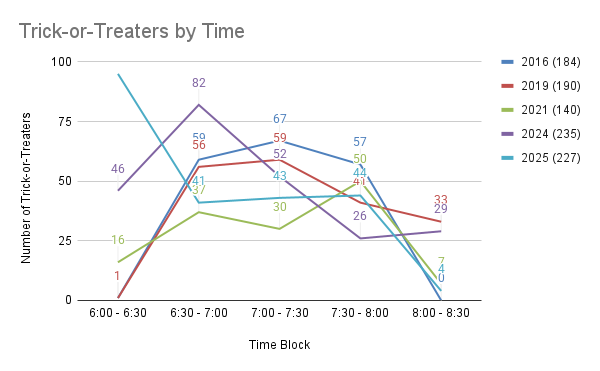
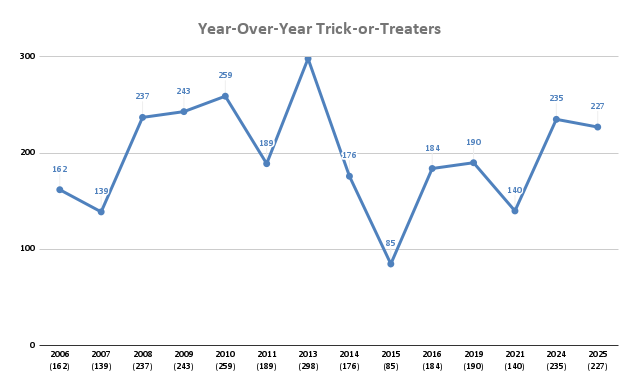
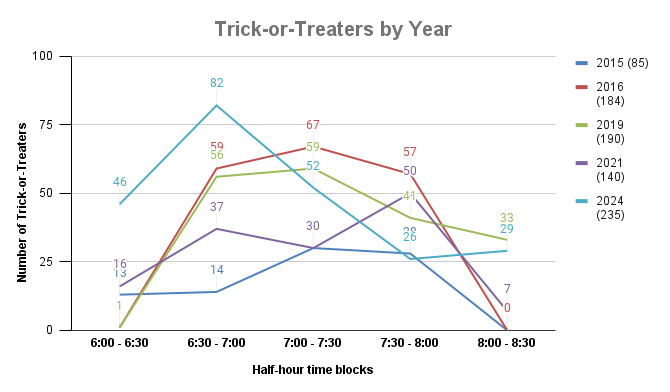
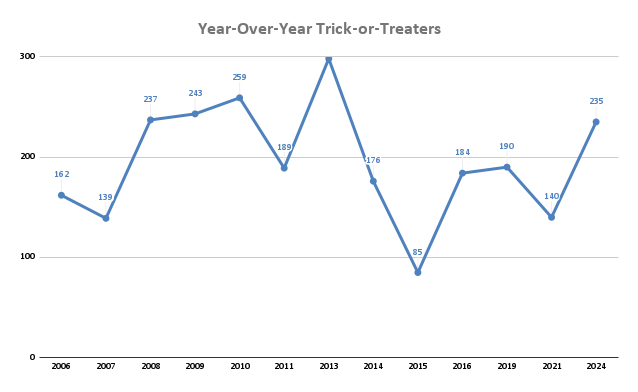
    <content type="html"><![CDATA[<p>This year we had 227 trick-or-treaters. That’s a bit on the higher end for us, but not quite as many as last year.</p>

<p><img src="https://www.paraesthesia.com/images/20251103_trickortreatcount.png" alt="2025: 227 trick-or-treaters." /></p>

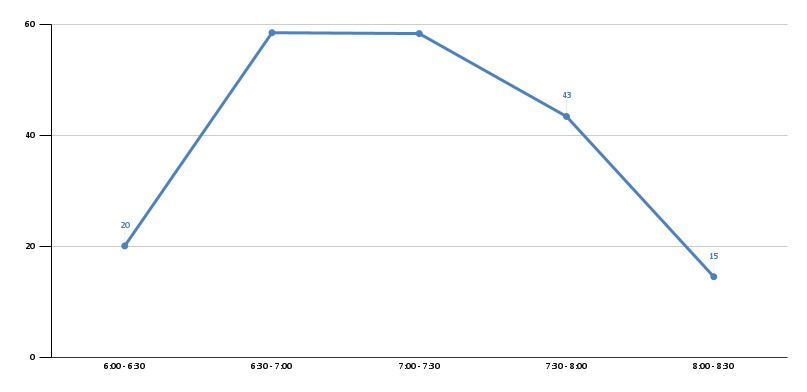
<p><img src="https://www.paraesthesia.com/images/20251103_trickortreateraverage.png" alt="Average Trick-or-Treaters by Time Block" /></p>

<p><img src="https://www.paraesthesia.com/images/20251103_yearoveryeartrickortreater.png" alt="Year-Over-Year Trick-or-Treaters" /></p>

<p>Halloween was on a Friday and it was raining pretty constantly.</p>

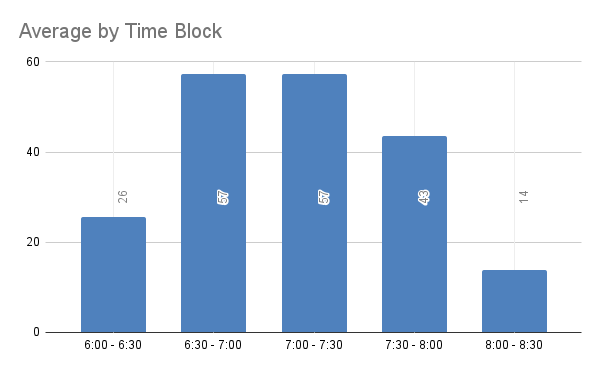
<p>As with 2024, we technically started handing out candy at 5:30 because the number of kids this year starting early was overwhelming. I’ve grouped the 5:30p to 6:00p kids (38) in with the 6:00p - 6:30p kids (57) to total 95 in the 6:00p - 6:30p time block. Given this is the second time we’ve had to start early, I wonder if I need to adjust the time capturing to start at 5:30 from here on out.</p>

<p>Missing/incongruous data:</p>

<ul>
  <li>2017 we were remodeling the house and didn’t hand out candy.</li>
  <li>2018 I walked with Phoenix and the tally got lost somewhere.</li>
  <li>2020 was COVID and no one handed out candy.</li>
  <li>2022 we were getting our floors redone due to a leak and the whole house was torn up so we didn’t hand out candy.</li>
  <li>2024 we bundled 5:30-6:00 (24) in with 6:00-6:30 (22) which affects the average for that block.</li>
  <li>2025 we bundled 5:30-6:00 (38) in with 6:00-6:30 (57) which affects the average for that block.</li>
</ul>

<p>Cumulative data:</p>

<!--markdownlint-disable MD033 -->
<table>
    <thead>
        <tr>
            <th>&nbsp;</th>
            <th colspan="6">Time Block</th>
        </tr>
        <tr>
            <th>Year</th>
            <td>6:00p - 6:30p</td>
            <td>6:30p - 7:00p</td>
            <td>7:00p - 7:30p</td>
            <td>7:30p - 8:00p</td>
            <td>8:00p - 8:30p</td>
            <td>Total</td>
        </tr>
    </thead>
    <tbody>
        <tr>
            <td><a href="http://www.paraesthesia.com/archive/2006/11/01/162-trick-or-treaters.aspx">2006</a></td>
            <td>52</td>
            <td>59</td>
            <td>35</td>
            <td>16</td>
            <td>0</td>
            <td>162</td>
        </tr>
        <tr>
            <td><a href="http://www.paraesthesia.com/archive/2007/11/01/139-trick-or-treaters.aspx">2007</a></td>
            <td>5</td>
            <td>45</td>
            <td>39</td>
            <td>25</td>
            <td>21</td>
            <td>139</td>
        </tr>
        <tr>
            <td><a href="http://www.paraesthesia.com/archive/2008/11/03/237-trick-or-treaters.aspx">2008</a></td>
            <td>14</td>
            <td>71</td>
            <td>82</td>
            <td>45</td>
            <td>25</td>
            <td>237</td>
        </tr>
        <tr>
            <td><a href="http://www.paraesthesia.com/archive/2009/11/03/243-trick-or-treaters.aspx">2009</a></td>
            <td>17</td>
            <td>51</td>
            <td>72</td>
            <td>82</td>
            <td>21</td>
            <td>243</td>
        </tr>
        <tr>
            <td><a href="http://www.paraesthesia.com/archive/2010/11/01/259-trick-or-treaters.aspx">2010</a></td>
            <td>19</td>
            <td>77</td>
            <td>76</td>
            <td>48</td>
            <td>39</td>
            <td>259</td>
        </tr>
        <tr>
            <td><a href="http://www.paraesthesia.com/archive/2011/11/01/189-trick-or-treaters.aspx">2011</a></td>
            <td>31</td>
            <td>80</td>
            <td>53</td>
            <td>25</td>
            <td>0</td>
            <td>189</td>
        </tr>
        <tr>
            <td><a href="http://www.paraesthesia.com/archive/2013/11/01/298-trick-or-treaters.aspx">2013</a></td>
            <td>28</td>
            <td>72</td>
            <td>113</td>
            <td>80</td>
            <td>5</td>
            <td>298</td>
        </tr>
        <tr>
            <td><a href="http://www.paraesthesia.com/archive/2014/11/03/176-trick-or-treaters/">2014</a></td>
            <td>19</td>
            <td>54</td>
            <td>51</td>
            <td>42</td>
            <td>10</td>
            <td>176</td>
        </tr>
        <tr>
            <td><a href="http://www.paraesthesia.com/archive/2015/11/02/85-trick-or-treaters/">2015</a></td>
            <td>13</td>
            <td>14</td>
            <td>30</td>
            <td>28</td>
            <td>0</td>
            <td>85</td>
        </tr>
        <tr>
            <td><a href="http://www.paraesthesia.com/archive/2016/11/01/184-trick-or-treaters/">2016</a></td>
            <td>1</td>
            <td>59</td>
            <td>67</td>
            <td>57</td>
            <td>0</td>
            <td>184</td>
        </tr>
        <tr>
            <td><a href="http://www.paraesthesia.com/archive/2019/11/01/190-trick-or-treaters/">2019</a></td>
            <td>1</td>
            <td>56</td>
            <td>59</td>
            <td>41</td>
            <td>33</td>
            <td>190</td>
        </tr>
        <tr>
            <td><a href="http://www.paraesthesia.com/archive/2021/11/02/140-trick-or-treaters/">2021</a></td>
            <td>16</td>
            <td>37</td>
            <td>30</td>
            <td>50</td>
            <td>7</td>
            <td>140</td>
        </tr>
        <tr>
            <td><a href="http://www.paraesthesia.com/archive/2024/11/04/235-trick-or-treaters/">2024</a></td>
            <td>46</td>
            <td>82</td>
            <td>52</td>
            <td>26</td>
            <td>29</td>
            <td>235</td>
        </tr>
        <tr>
            <td>2025</td>
            <td>95</td>
            <td>41</td>
            <td>43</td>
            <td>44</td>
            <td>4</td>
            <td>227</td>
        </tr>
    </tbody>
</table>
<!--markdownlint-enable MD033 -->

<p>Our costumes this year:</p>

<ul>
  <li>Me: <a href="https://www.flypdx.com/">PDX - the Portland International Airport</a></li>
  <li>Jenn: M3gan</li>
  <li>Phoenix: (Not pictured) Megara from <em>Hercules</em></li>
</ul>

<p><img src="https://www.paraesthesia.com/images/20251103_costumes.jpg" alt="Jenn as M3gan, me as PDX" /></p>

<p>2025 has been rough - we had a laundry room leak with repairs that spanned from January through September, we got a new roof… there was a lot of home project stuff going on. I was entirely out of inspiration and energy, so I went simple. I made the shirt using some custom printed PDX carpet fabric I found on Etsy. On my head is a small airplane stuffy I bought off Amazon and tacked down to a headband. The scarf is something I had already. I will hopefully be more on top of things next year.</p>
]]></content>
  </entry>


  <entry>
    <title type="html"><![CDATA[How to Reset OneDrive on Mac]]></title>
    <link href="https://www.paraesthesia.com/archive/2025/08/06/reset-onedrive-on-mac/"/>
    <updated>2025-08-06T00:00:00+00:00</updated>
    <id>https://www.paraesthesia.com/archive/2025/08/06/reset-onedrive-on-mac</id>
    <content type="html"><![CDATA[<p>I really hate that OneDrive for Business names your OneDrive folder like <code class="language-plaintext highlighter-rouge">OneDrive - Name of Your Business</code> with a bunch of spaces and things in there. It jacks up command line stuff because <code class="language-plaintext highlighter-rouge">~/OneDrive - Name of Your Business</code> doesn’t always evaluate <code class="language-plaintext highlighter-rouge">~</code> as your home drive and it cascades from there.</p>

<p>Instead of doing the <em>smart thing</em> and just creating a symbolic link to something nicer (<code class="language-plaintext highlighter-rouge">ln -s './OneDrive - Name of Your Business' ./OneDrive</code>) I thought I’d try to get it to sync to a different location. I really jacked it up. Uninstall/reinstall, several reboots, no luck. I had trouble formulating the right search or AI prompt to explain what I was trying to fix. I <em>finally</em> got the below out of a series of queries and prompts through Google Gemini, so I’m blogging it in case I need it again.</p>

<ol>
  <li><strong>Quit OneDrive</strong>: Select the cloud icon in the menu bar, then click Settings &gt; Quit OneDrive.</li>
  <li><strong>Locate OneDrive</strong>: Find the app in your Applications folder.</li>
  <li><strong>Show Package Contents</strong>: Right-click on OneDrive and select “Show Package Contents”.</li>
  <li><strong>Navigate to Resources</strong>: Go to Contents &gt; Resources.</li>
  <li><strong>Run the Reset Script</strong>: Double-click <code class="language-plaintext highlighter-rouge">ResetOneDriveAppStandalone.command</code>. A terminal window will pop up and clean a lot of things.</li>
  <li><strong>Restart and Setup</strong>: Start OneDrive and complete the setup process.</li>
</ol>
]]></content>
  </entry>


  <entry>
    <title type="html"><![CDATA[Minor Differences in JSON Serializers in .NET/C#]]></title>
    <link href="https://www.paraesthesia.com/archive/2025/04/28/minor-differences-in-json-serializers/"/>
    <updated>2025-04-28T00:00:00+00:00</updated>
    <id>https://www.paraesthesia.com/archive/2025/04/28/minor-differences-in-json-serializers</id>
    <content type="html"><![CDATA[<p>The move from Newtonsoft to System.Text.Json for JSON serialization in .NET is not a new thing, but there are two subtle differences that I always forget or get wrong so I figured I’d write them down so I can Google my own answer later.</p>

<p>This is based on <strong>.NET 8 and 9</strong>. If you come in looking at this later, they may have updated.</p>

<h2 id="dictionaries">Dictionaries</h2>

<p>There are Roslyn analyzers that want you to set dictionary-based properties to be <code class="language-plaintext highlighter-rouge">get</code>-only.</p>

<div class="language-csharp highlighter-rouge"><div class="highlight"><pre class="highlight"><code><span class="k">public</span> <span class="k">class</span> <span class="nc">Model</span>
<span class="p">{</span>
  <span class="k">public</span> <span class="n">IDictionary</span><span class="p">&lt;</span><span class="kt">string</span><span class="p">,</span> <span class="kt">string</span><span class="p">&gt;</span> <span class="n">WhatAnalyzersWant</span> <span class="p">{</span> <span class="k">get</span><span class="p">;</span> <span class="p">}</span> <span class="p">=</span> <span class="k">new</span> <span class="n">Dictionary</span><span class="p">&lt;</span><span class="kt">string</span><span class="p">,</span> <span class="kt">string</span><span class="p">&gt;()</span>
<span class="p">}</span>
</code></pre></div></div>

<ul>
  <li>Newtonsoft <strong>supports this</strong> and will add the items to the existing dictionary.</li>
  <li>System.Text.Json <strong>does not support this</strong> and the dictionary will remain empty after serialization.</li>
</ul>

<p>For greatest compatibility between the two frameworks, leave dictionary properties get/set and suppress the analyzer message.</p>

<h2 id="enums">Enums</h2>

<p>I work on a lot of services where we specify camelCase style naming, including on the <code class="language-plaintext highlighter-rouge">enum</code> members.</p>

<p>To set System.Text.Json up for camelCase enums, it looks like this:</p>

<div class="language-csharp highlighter-rouge"><div class="highlight"><pre class="highlight"><code><span class="kt">var</span> <span class="n">settings</span> <span class="p">=</span> <span class="k">new</span> <span class="n">JsonSerializerOptions</span>
<span class="p">{</span>
  <span class="n">Converters</span> <span class="p">=</span>
  <span class="p">{</span>
    <span class="k">new</span> <span class="nf">JsonStringEnumConverter</span><span class="p">(</span><span class="n">JsonNamingPolicy</span><span class="p">.</span><span class="n">CamelCase</span><span class="p">,</span> <span class="k">true</span><span class="p">),</span>
  <span class="p">},</span>
<span class="p">};</span>
</code></pre></div></div>

<p>For Newtonsoft, it looks like this:</p>

<div class="language-csharp highlighter-rouge"><div class="highlight"><pre class="highlight"><code><span class="kt">var</span> <span class="n">settings</span> <span class="p">=</span> <span class="k">new</span> <span class="n">JsonSerializerSettings</span>
<span class="p">{</span>
  <span class="n">Converters</span> <span class="p">=</span>
  <span class="p">{</span>
    <span class="k">new</span> <span class="nf">StringEnumConverter</span><span class="p">(</span><span class="k">new</span> <span class="nf">CamelCaseNamingStrategy</span><span class="p">()),</span>
  <span class="p">},</span>
<span class="p">};</span>
</code></pre></div></div>

<p>In addition, Newtonsoft supports using <code class="language-plaintext highlighter-rouge">System.Runtime.Serialization.EnumMemberAttribute</code> to specify an exact value, which will <em>override</em> the camelCase naming. System.Text.Json does <em>not</em> support this attribute.</p>

<div class="language-csharp highlighter-rouge"><div class="highlight"><pre class="highlight"><code><span class="k">public</span> <span class="k">enum</span> <span class="n">Policy</span>
<span class="p">{</span>
  <span class="c1">// Only Newtonsoft uses this attribute.</span>
  <span class="p">[</span><span class="nf">EnumMember</span><span class="p">(</span><span class="n">Value</span> <span class="p">=</span> <span class="s">"ALWAYS"</span><span class="p">)]</span>
  <span class="n">AlwaysHappens</span><span class="p">,</span>

  <span class="n">NeverHappens</span>
<span class="p">}</span>
</code></pre></div></div>

<p>In the above example…</p>

<ul>
  <li>Newtonsoft will render <code class="language-plaintext highlighter-rouge">ALWAYS</code> and <code class="language-plaintext highlighter-rouge">neverHappens</code>.</li>
  <li>System.Text.Json will render <code class="language-plaintext highlighter-rouge">alwaysHappens</code> and <code class="language-plaintext highlighter-rouge">neverHappens</code>.</li>
</ul>

<p>Further, both frameworks allow you to mark an <code class="language-plaintext highlighter-rouge">enum</code> with a specific converter, which can also dictate the casing/strategy.</p>

<p>For greatest compatibility between the two frameworks, use the appropriate serializer settings to handle casing on your <code class="language-plaintext highlighter-rouge">enum</code> and don’t mark things up with any attributes related to serialization.</p>
]]></content>
  </entry>


  <entry>
    <title type="html"><![CDATA[Goodbye, Kai]]></title>
    <link href="https://www.paraesthesia.com/archive/2025/04/25/goodbye-kai/"/>
    <updated>2025-04-25T00:00:00+00:00</updated>
    <id>https://www.paraesthesia.com/archive/2025/04/25/goodbye-kai</id>
    <content type="html"><![CDATA[<p><img src="http://www.paraesthesia.com/images/20250425_kai.jpg" alt="Kai, the most loyal of dog-cats" /></p>

<p>On Wednesday, April 23, 2025, we had to say our final goodbyes to Kai, who was such a good boy to the very end.</p>

<p>We <a href="https://www.paraesthesia.com/archive/2008/07/06/welcome-kai-and-stanley.aspx">brought Kai and Stanley home in July 2008</a> as kittens, brothers from the same litter. Kai was always super territorial, despite being an indoor cat, and would always make sure <em>that cat outside the window knew this was his house</em>.</p>

<p>He had the longest <del>forelegs</del> arms I’ve ever seen on a cat. He loved to stretch out and <em>just barely touch you</em>.</p>

<p>During COVID when we were all home all the time, he became extra dependent on the humans, turning into more of a dog than a cat. He’d patrol around, sit on the floor next to you, and always want to be with the humans.</p>

<p>When no humans were around, he’d balance his time between being in the sun; being in bed; or cuddling with his brother, Stanley. We ran a lot of experiments trying to figure out which was more important - sun, bed, or bro. If he could be in a bed in the sun with his brother, that was the best. I think sun was probably the top ranking thing, though. He really loved being a sunny buddy.</p>

<p>He really wanted to drink <em>your water</em> out of <em>your cup</em>. Didn’t matter how warm it was, it was <em>yours</em> and that made him want it. I 3D printed some drink covers to put on top of your cup if you got up and left. He never figured out you could just flip the top off and get to the cup - it was enough to stop him. He was also a total sweet tooth - if you got some dessert, he <em>really wanted it</em>. We never even gave him any (he couldn’t stomach people food) but something about sweets made him <em>immediately</em> show up.</p>

<p>He never really pooped in a litter box. He’d pee in there, but he just wouldn’t poop in there. That wasn’t <em>too horrible</em> except in the last couple of years it stopped being solid and really was… not good. He also started losing weight, like a <em>lot</em> of weight. He had been a pretty stout boy for a while and by the end of his life he was close to eight pounds, just skin hanging off bones. It was sad to see him change so much.</p>

<p>He turned 17 earlier this month and in the past couple of months his internal health kept deteriorating. On the outside, he’d still run around and play and was active, but inside… he was not doing well. We decided it was probably time to say goodbye.</p>

<p>He <em>loved</em> getting in his carrier, which is so weird because he only ever got taken to the vet in that thing. He wasn’t a traveling cat. But even on the last day, he <em>really</em> wanted in there to go, which just made the trip harder.</p>

<p>We said goodbye to him and we miss him. His brother misses him. Love you, buddy.</p>
]]></content>
  </entry>


  <entry>
    <title type="html"><![CDATA[Using RHEL subscription-manager in a Container Image]]></title>
    <link href="https://www.paraesthesia.com/archive/2025/02/21/using-rhel-subscription-manager-in-a-container-image/"/>
    <updated>2025-02-21T00:00:00+00:00</updated>
    <id>https://www.paraesthesia.com/archive/2025/02/21/using-rhel-subscription-manager-in-a-container-image</id>
    <content type="html"><![CDATA[<p>Scenario:</p>

<ul>
  <li>You have a Red Hat Enterprise Linux (RHEL) subscription.</li>
  <li>You are building a series of containers based on RHEL, like:
    <ul>
      <li>Base container with RHEL 8 and some small amount of packages.</li>
      <li>In a different repo, a container based on your RHEL 8 base image which adds some packages.</li>
      <li>Your application container, based on that second image, which adds yet other packages.</li>
    </ul>
  </li>
</ul>

<p>The problem: When you build these containers they all seem to be seen by the RHEL <code class="language-plaintext highlighter-rouge">subscription-manager</code> as the same logical machine, so you get a bunch of errors like <code class="language-plaintext highlighter-rouge">410 Gone</code> when you try to <a href="https://access.redhat.com/solutions/253273">register the container with the package management system</a>.</p>

<p>My experience is that this is because, by default, the hostname of every container image being built is <code class="language-plaintext highlighter-rouge">buildkitsandbox</code> by default. This is set up by the Docker build kit. When you run <code class="language-plaintext highlighter-rouge">subscription-manager register</code> to attach to the subscription, depending on a few things (whether you’re using the public customer portal or an internal subscription portal, etc.) you may see registrations get stomped because the same hostname is trying to register from different places at the same time.</p>

<p>The answer: Set the hostname by providing the build argument <code class="language-plaintext highlighter-rouge">BUILDKIT_SANDBOX_HOSTNAME</code> to your container.</p>

<p><code class="language-plaintext highlighter-rouge">docker build --build-arg BUILDKIT_SANDBOX_HOSTNAME=something-unique .</code></p>

<p>Then in your container, just make sure you do some cleanup before installing things.</p>

<div class="language-dockerfile highlighter-rouge"><div class="highlight"><pre class="highlight"><code><span class="k">RUN </span>subscription-manager clean <span class="se">\
</span>  <span class="o">&amp;&amp;</span> subscription-manager register <span class="nt">--org</span><span class="o">=</span><span class="s2">"XXX"</span> <span class="nt">--activationkey</span><span class="o">=</span><span class="s2">"YYY"</span> <span class="nt">--force</span> <span class="se">\
</span>  <span class="o">&amp;&amp;</span> yum update <span class="nt">-y</span> <span class="se">\
</span>  <span class="o">&amp;&amp;</span> yum <span class="nb">install</span> <span class="nt">-y</span> some-package <span class="se">\
</span>  <span class="o">&amp;&amp;</span> yum clean all <span class="se">\
</span>  <span class="o">&amp;&amp;</span> subscription-manager unregister <span class="se">\
</span>  <span class="o">&amp;&amp;</span> subscription-manager clean <span class="se">\
</span>  <span class="o">&amp;&amp;</span> <span class="nb">rm</span> <span class="nt">-rf</span> /var/cache/yum /var/cache/dnf
</code></pre></div></div>

<p>The combination of the unique hostname and proactive cleanup should get you past the issues.</p>
]]></content>
  </entry>


  <entry>
    <title type="html"><![CDATA[235 Trick-or-Treaters]]></title>
    <link href="https://www.paraesthesia.com/archive/2024/11/04/235-trick-or-treaters/"/>
    <updated>2024-11-04T00:00:00+00:00</updated>
    <id>https://www.paraesthesia.com/archive/2024/11/04/235-trick-or-treaters</id>
    <content type="html"><![CDATA[<p>This year we had 235 trick-or-treaters. That’s a big increase from previous years.</p>

<p><img src="https://www.paraesthesia.com/images/20241104_trickortreatcount.png" alt="2024: 235 trick-or-treaters." /></p>

<p><img src="https://www.paraesthesia.com/images/20241104_trickortreateraverage.png" alt="Average Trick-or-Treaters by Time Block" /></p>

<p><img src="https://www.paraesthesia.com/images/20241104_yearoveryeartrickortreater.png" alt="Year-Over-Year Trick-or-Treaters" /></p>

<p>Halloween was on a Thursday and it was raining on-and-off. However, there was no school on Friday, so kids were out and prepped for staying up late on a sugar high.</p>

<p>We technically started handing out candy at 5:30 because the number of kids this year starting early was overwhelming. I’ve grouped the 5:30p to 6:00p kids (24) in with the 6:00p - 6:30p kids (22) to total 46 in the 6:00p - 6:30p time block. It throws the curve off a little but we’ll have to live with it.</p>

<p>We didn’t hand out in 2022 (we were remodeling and not home) or 2023 (COVID). It was good to be back in the swing of things. I did throw out my back a few days before, so I tallied the kids while Jenn handed out candy, but we showed up!</p>

<p>Cumulative data:</p>

<!--markdownlint-disable MD033 -->
<table>
    <thead>
        <tr>
            <th>&nbsp;</th>
            <th colspan="6">Time Block</th>
        </tr>
        <tr>
            <th>Year</th>
            <td>6:00p - 6:30p</td>
            <td>6:30p - 7:00p</td>
            <td>7:00p - 7:30p</td>
            <td>7:30p - 8:00p</td>
            <td>8:00p - 8:30p</td>
            <td>Total</td>
        </tr>
    </thead>
    <tbody>
        <tr>
            <td><a href="http://www.paraesthesia.com/archive/2006/11/01/162-trick-or-treaters.aspx">2006</a></td>
            <td>52</td>
            <td>59</td>
            <td>35</td>
            <td>16</td>
            <td>0</td>
            <td>162</td>
        </tr>
        <tr>
            <td><a href="http://www.paraesthesia.com/archive/2007/11/01/139-trick-or-treaters.aspx">2007</a></td>
            <td>5</td>
            <td>45</td>
            <td>39</td>
            <td>25</td>
            <td>21</td>
            <td>139</td>
        </tr>
        <tr>
            <td><a href="http://www.paraesthesia.com/archive/2008/11/03/237-trick-or-treaters.aspx">2008</a></td>
            <td>14</td>
            <td>71</td>
            <td>82</td>
            <td>45</td>
            <td>25</td>
            <td>237</td>
        </tr>
        <tr>
            <td><a href="http://www.paraesthesia.com/archive/2009/11/03/243-trick-or-treaters.aspx">2009</a></td>
            <td>17</td>
            <td>51</td>
            <td>72</td>
            <td>82</td>
            <td>21</td>
            <td>243</td>
        </tr>
        <tr>
            <td><a href="http://www.paraesthesia.com/archive/2010/11/01/259-trick-or-treaters.aspx">2010</a></td>
            <td>19</td>
            <td>77</td>
            <td>76</td>
            <td>48</td>
            <td>39</td>
            <td>259</td>
        </tr>
        <tr>
            <td><a href="http://www.paraesthesia.com/archive/2011/11/01/189-trick-or-treaters.aspx">2011</a></td>
            <td>31</td>
            <td>80</td>
            <td>53</td>
            <td>25</td>
            <td>0</td>
            <td>189</td>
        </tr>
        <tr>
            <td><a href="http://www.paraesthesia.com/archive/2013/11/01/298-trick-or-treaters.aspx">2013</a></td>
            <td>28</td>
            <td>72</td>
            <td>113</td>
            <td>80</td>
            <td>5</td>
            <td>298</td>
        </tr>
        <tr>
            <td><a href="http://www.paraesthesia.com/archive/2014/11/03/176-trick-or-treaters/">2014</a></td>
            <td>19</td>
            <td>54</td>
            <td>51</td>
            <td>42</td>
            <td>10</td>
            <td>176</td>
        </tr>
        <tr>
            <td><a href="http://www.paraesthesia.com/archive/2015/11/02/85-trick-or-treaters/">2015</a></td>
            <td>13</td>
            <td>14</td>
            <td>30</td>
            <td>28</td>
            <td>0</td>
            <td>85</td>
        </tr>
        <tr>
            <td><a href="http://www.paraesthesia.com/archive/2016/11/01/184-trick-or-treaters/">2016</a></td>
            <td>1</td>
            <td>59</td>
            <td>67</td>
            <td>57</td>
            <td>0</td>
            <td>184</td>
        </tr>
        <tr>
            <td><a href="http://www.paraesthesia.com/archive/2019/11/01/190-trick-or-treaters/">2019</a></td>
            <td>1</td>
            <td>56</td>
            <td>59</td>
            <td>41</td>
            <td>33</td>
            <td>190</td>
        </tr>
        <tr>
            <td><a href="http://www.paraesthesia.com/archive/2021/11/02/140-trick-or-treaters/">2021</a></td>
            <td>16</td>
            <td>37</td>
            <td>30</td>
            <td>50</td>
            <td>7</td>
            <td>140</td>
        </tr>
        <tr>
            <td>2024</td>
            <td>46</td>
            <td>82</td>
            <td>52</td>
            <td>26</td>
            <td>29</td>
            <td>235</td>
        </tr>
    </tbody>
</table>
<!--markdownlint-enable MD033 -->

<p>Our costumes this year:</p>

<ul>
  <li>Me: Newt Scamander from <em>Fantastic Beasts and Where to Find Them</em></li>
  <li>Jenn: Sally Slater, the tightrope walker from the Disney Haunted Mansion</li>
  <li>Phoenix: Ursula from <em>The Little Mermaid</em></li>
</ul>

<p>I made the coat and the vest for this one. I bought the wand, pants, and shirt. I’m pretty pleased with how it turned out. The coat is really warm and is fully lined - it’s not a costume pattern, it’s a historic reproduction pattern. I wore it to our usual Halloween party but couldn’t wear it all night. It was just too hot.</p>

<p>About halfway through making the coat I tried to push too much fabric through the serger so I broke it. It’s at the shop now. I think I threw off the timing. I also recently acquired a cover stitch machine, but I didn’t see any good places to use it on this costume. I’m excited to try it for a future project.</p>

<p><img src="https://www.paraesthesia.com/images/20241104_newt1.jpg" alt="Me as Newt Scamander (1)" /></p>

<p><img src="https://www.paraesthesia.com/images/20241104_newt2.jpg" alt="Me as Newt Scamander (2)" /></p>
]]></content>
  </entry>


  <entry>
    <title type="html"><![CDATA[Using the az CLI Behind Zscaler]]></title>
    <link href="https://www.paraesthesia.com/archive/2024/06/06/az-cli-behind-zscaler/"/>
    <updated>2024-06-06T00:00:00+00:00</updated>
    <id>https://www.paraesthesia.com/archive/2024/06/06/az-cli-behind-zscaler</id>
    <content type="html"><![CDATA[<p>At work I use the <code class="language-plaintext highlighter-rouge">az</code> CLI behind a VPN/proxy package called Zscaler. I’m not a big fan of these TLS-intercepting-man-in-the-middle-attack sort of “security” products, but it is what it is.</p>

<p>The problem for me is that, if I move to a new machine, or if someone else is setting up a machine, I always forget how to make the <code class="language-plaintext highlighter-rouge">az</code> CLI trust Zscaler so it can function properly and not get a TLS certificate error. I’ve re-figured this out countless times, so this time I’m writing it down. It does seem to be slightly different on Mac and Windows and I’m not sure why. Perhaps it has to do with the different ways the network stack works or something.</p>

<p><strong>The <code class="language-plaintext highlighter-rouge">az</code> CLI is Python-based</strong> so this will ostensibly work to generally solve Python issues, but I always encounter it as part of <code class="language-plaintext highlighter-rouge">az</code>, so I’m blogging it as such.</p>

<blockquote>
  <p><a href="https://help.zscaler.com/zia/adding-custom-certificate-application-specific-trust-store">Zscaler does have some help for enabling trust</a> but you sometimes have to fudge the steps, like with this.</p>
</blockquote>

<h2 id="on-mac">On Mac</h2>

<ul>
  <li>Make sure you have the Zscaler certificate in your system keychain as a trusted CA. Likely if you have Zscaler running this is already set up.</li>
  <li><a href="https://formulae.brew.sh/formula/ca-certificates#default">Install the latest <code class="language-plaintext highlighter-rouge">ca-certificates</code> package</a> or get the content <a href="https://curl.se/docs/sslcerts.html">from here</a>.</li>
  <li>Set the <code class="language-plaintext highlighter-rouge">REQUESTS_CA_BUNDLE</code> environment variable to point at the <code class="language-plaintext highlighter-rouge">cert.pem</code> that has all the CA certs in it.</li>
</ul>

<p>This works because the Homebrew package for <code class="language-plaintext highlighter-rouge">ca-certificates</code> automatically <a href="https://github.com/Homebrew/homebrew-core/blob/d4e3c5c9a6d1744e4f5b714cac2897227daa4e60/Formula/c/ca-certificates.rb#L32">includes all the certificates from your system keychain</a> so you don’t have to manually append your custom/company CA info.</p>

<h2 id="on-windows">On Windows</h2>

<ul>
  <li>Go get <a href="https://curl.se/docs/sslcerts.html">the latest <code class="language-plaintext highlighter-rouge">ca-certificates</code> bundle from here</a>.</li>
  <li>Open that <code class="language-plaintext highlighter-rouge">cert.pem</code> file in your favorite text editor. Just make sure you keep the file with <code class="language-plaintext highlighter-rouge">LF</code> line endings.</li>
  <li>Get your Zscaler CA certificate in PEM format. Open that up in the text editor, too.</li>
  <li>At the bottom of the <code class="language-plaintext highlighter-rouge">cert.pem</code> main file, paste in the Zscaler CA certificate contents, thereby adding it to the list of CAs.</li>
  <li>Set the <code class="language-plaintext highlighter-rouge">REQUESTS_CA_BUNDLE</code> environment variable to point at the <code class="language-plaintext highlighter-rouge">cert.pem</code> that has all the CA certs in it.</li>
</ul>

<p>Again, not sure why on Windows you need to have the Zscaler cert added to the main cert bundle but on Mac you don’t. This also could just be something environmental - like there’s something on my work machines that somehow auto-trusts Zscaler but does so to the exclusion of all else.</p>

<p>Regardless, this is what worked for me.</p>
]]></content>
  </entry>


  <entry>
    <title type="html"><![CDATA[NDepend 2023.2 - This Time On Mac!]]></title>
    <link href="https://www.paraesthesia.com/archive/2023/12/18/ndepend-2023-2-this-time-on-mac/"/>
    <updated>2023-12-18T00:00:00+00:00</updated>
    <id>https://www.paraesthesia.com/archive/2023/12/18/ndepend-2023-2-this-time-on-mac</id>
    <content type="html"><![CDATA[<p>It’s been <a href="https://www.paraesthesia.com/2020-05-27-ndepend-2020-1-check-out-that-dependency-graph">a few years</a> since I’ve posted a look at NDepend and a lot has changed for me since then. I’ve switched my primary development machine to a Mac. I don’t use Visual Studio <em>at all</em> - I’m a VS Code person now because I do a lot of things in a lot of different languages and switching IDEs all day is painful (not to mention VS Code starts up far faster and feels far slimmer than full VS). Most of my day-to-day is in microservices now rather than larger monolith projects.</p>

<blockquote>
  <p>Full disclosure: Patrick at NDepend gave me the license for testing and showing off NDepend for free. I’m not compensated for the blog post in any way other than the license, but I figured it’d be fair to mention I was given the license.</p>
</blockquote>

<p>I’ve <em>loved</em> NDepend from the start. I’ve been using it <a href="https://www.paraesthesia.com/2008-03-28-ndepend-analyze-your-code">for years</a> and it’s never been anything but awesome. I still think if you haven’t dived into that, you should just stop here and go do that because it’s worth it.</p>

<h2 id="get-going-on-mac">Get Going on Mac</h2>

<p>The main NDepend GUI is Windows-only, so this time around, since I’m focusing solely on Mac support (that’s what I have to work with!) I’m going to wire this thing up and see how it goes.</p>

<p>First thing I need to do is register my license using the cross-platform console app. You’ll see that in the <code class="language-plaintext highlighter-rouge">net8.0</code> folder of the zip package you get when you <a href="https://www.ndepend.com/download">download NDepend</a>.</p>

<div class="language-powershell highlighter-rouge"><div class="highlight"><pre class="highlight"><code><span class="n">dotnet</span><span class="w"> </span><span class="o">.</span><span class="nx">/net8.0/NDepend.Console.MultiOS.dll</span><span class="w"> </span><span class="nt">--reglic</span><span class="w"> </span><span class="nx">XXXXXXXX</span><span class="w">
</span></code></pre></div></div>

<p>This gives me a message that tells me my computer is now registered to run NDepend console.</p>

<p>Running the command line now, I get a bunch of options.</p>

<div class="language-text highlighter-rouge"><div class="highlight"><pre class="highlight"><code> pwsh&gt; dotnet ./net8.0/NDepend.Console.MultiOS.dll
//
//  NDepend v2023.2.3.9706
//  https://www.NDepend.com
//  support@NDepend.com
//  Copyright (C) ZEN PROGRAM HLD 2004-2023
//  All Rights Reserved
//
_______________________________________________________________________________
To analyze code and build reports NDepend.Console.MultiOS.dll accepts these arguments.
NDepend.Console.MultiOS.dll can also be used to create projects (see how below after
the list of arguments).

  _____________________________________________________________________________
  The path to the input .ndproj (or .xml) NDepend project file.  MANDATORY

    It must be specified as the first argument. If you need to specify a path
    that contains a space character use double quotes ".. ..". The specified
    path must be either an absolute path (with drive letter C:\ or
    UNC \\Server\Share format on Windows or like /var/dir on Linux or OSX),
    or a path relative to the current directory (obtained with
    System.Environment.CurrentDirectory),
    or a file name in the current directory.


Following arguments are OPTIONAL and can be provided in any order. Any file or
directory path specified in optionals arguments can be:
  - Absolute : with drive letter C:\ or UNC \\Server\Share format on Windows
               or like /var/dir on Linux or OSX.
  - Relative : to the NDepend project file location.
  - Prefixed with an environment variable with the syntax  %ENVVAR%\Dir\
  - Prefixed with a path variable with the syntax   $(Variable)\Dir
  _____________________________________________________________________________
  /ViewReport                 to view the HTML report
  _____________________________________________________________________________
  /Silent                     to disable output on console
  _____________________________________________________________________________
  /HideConsole                to hide the console window
  _____________________________________________________________________________
  /Concurrent                 to parallelize analysis execution
  _____________________________________________________________________________
  /LogTrendMetrics            to force log trend metrics
  _____________________________________________________________________________
  /TrendStoreDir              to override the trend store directory specified
                              in the NDepend project file
  _____________________________________________________________________________
  /PersistHistoricAnalysisResult   to force persist historic analysis result
  _____________________________________________________________________________
  /DontPersistHistoricAnalysisResult   to force not persist historic analysis
                                       result
  _____________________________________________________________________________
  /ForceReturnZeroExitCode    to force return a zero exit code even when
                              one or many quality gate(s) fail
  _____________________________________________________________________________
  /HistoricAnalysisResultsDir to override the historic analysis results
                              directory specified in the NDepend project file.
  _____________________________________________________________________________
  /OutDir dir                 to override the output directory specified
                              in the NDepend project file.

     VisualNDepend.exe won't work on the machine where you used
     NDepend.Console.MultiOS.dll with the option /OutDir because VisualNDepend.exe is
     not aware of the output dir specified and will try to use the output dir
     specified in your NDepend project file.
  _____________________________________________________________________________
  /AnalysisResultId id        to assign an identifier to the analysis result
  _____________________________________________________________________________
  /GitHubPAT pat              to provide a GitHub PAT (Personal Access Token).

     Such PAT is used in case some artifacts (like a baseline analysis result) are
     required during analysis and must be loaded from GitHub.
     Such PAT overrides the PAT registered on the machine (if any).
  _____________________________________________________________________________
  /XslForReport xlsFilePath   to provide your own Xsl file used to build report
  _____________________________________________________________________________
  /KeepXmlFilesUsedToBuildReport  to keep xml files used to build report
  _____________________________________________________________________________
  /InDirs [/KeepProjectInDirs] dir1 [dir2 ...]
                              to override input directories specified in the
                              NDepend project file.

     This option is used to customize the location(s) where assemblies to
     analyze (application assemblies and third-party assemblies) can be found.
     Only assemblies resolved in dirs are concerned, not assemblies resolved
     from a Visual Studio solution.
     The search in dirs is not recursive, it doesn't look into child dirs.
     Directly after the option /InDirs, the option /KeepProjectInDirs can be
     used to avoid ignoring directories specified in the NDepend
     project file.
  _____________________________________________________________________________
  /CoverageFiles [/KeepProjectCoverageFiles] file1 [file2 ...]
                              to override input coverage files specified
                              in the NDepend project file.

     Directly after the option /CoverageFiles, the option
     /KeepProjectCoverageFiles can be used to avoid ignoring coverage files
     specified in the NDepend project file.

  _____________________________________________________________________________
  /CoverageDir dir            to override the directory that contains
                              coverage files specified in the project file.

  _____________________________________________________________________________
  /CoverageExclusionFile file to override the  .runsettings  file specified
                              in the project file. NDepend gathers coverage
                              exclusion data from such file.

  _____________________________________________________________________________
  /RuleFiles [/KeepProjectRuleFiles] file1 [file2 ...]
                              to override input rule files specified
                              in the NDepend project file.

     Directly after the option /RuleFiles, the option
     /KeepProjectRuleFiles can be used to avoid ignoring rule files
     specified in the NDepend project file.
  _____________________________________________________________________________
  /PathVariables Name1 Value1 [Name2 Value2 ...]
                              to override the values of one or several
                              NDepend project path variables, or
                              create new path variables.
  _____________________________________________________________________________
  /AnalysisResultToCompareWith to provide a previous analysis result to
                               compare with.

     Analysis results are stored in files with file name prefix
     {NDependAnalysisResult_} and with extension {.ndar}.
     These files can be found under the NDepend project output directory.
     The preferred option to provide a previous analysis result to
     compare with during an analysis is to use:
     NDepend &gt; Project Properties &gt; Analysis &gt; Baseline for Comparison
     You can use the option /AnalysisResultToCompareWith in special
     scenarios where using Project Properties doesn't work.

  _____________________________________________________________________________
  /Help   or   /h              to display the current help on console

  _____________________________________________________________________________
  Code queries execution time-out value used through NDepend.Console.MultiOS.dll
  execution.

     If you need to adjust this time-out value, just run VisualNDepend.exe once
     on the machine running NDepend.Console.exe and choose a time-out value in:
        VisualNDepend &gt; Tools &gt; Options &gt; Code Query &gt; Query Execution Time-Out

     This value is persisted in the file VisualNDependOptions.xml that can be
     found in the directory:
        VisualNDepend &gt; Tools &gt; Options &gt; Export / Import / Reset Options &gt;
        Open the folder containing the Options File

_______________________________________________________________________________
NDepend.Console.MultiOS.dll can be used to create an NDepend project file.
This is useful to create NDepend project(s) on-the-fly from a script.

To do so the first argument must be  /CreateProject  or  /cp  (case-insensitive)

The second argument must be the project file path to create. The file name must
have the extension .ndproj. If you need to specify a path that contains a space
character use double quotes "...". The specified path must be either an
absolute path (with drive letter C:\ or UNC \\Server\Share format on Windows
or like /var/dir on Linux or OSX), or a path relative to the current directory
(obtained with System.Environment.CurrentDirectory),
or a file name in the current directory.


Then at least one or several sources of code to analyze must be precised.
A source of code to analyze can be:

- A path to a Visual Studio solution file.
  The solution file extension must be .sln.
  The vertical line character '|' can follow the path to declare a filter on
  project names. If no filter is precised the default filter "-test"
  is defined. If you need to specify a path or a filter that contains a space
  character use double quotes "...".
  Example: "..\My File\MySolution.sln|filterIn -filterOut".

- A path to a Visual Studio project file. The project file extension must
  be within: .csproj .vbproj .proj

- A path to a compiled assembly file. The compiled assembly file extension must
  be within: .dll .exe .winmd

Notice that source of code paths can be absolute or relative to the project file
location. If you need to specify a path or a filter that contains a space
character use double quotes.

_______________________________________________________________________________
NDepend.Console.MultiOS.dll can be used to register a license on a machine,
or to start evaluation. Here are console arguments to use (case insensitive):

  /RegEval      Start the NDepend 14 days evaluation on the current machine.

  _____________________________________________________________________________
  /RegLic XYZ   Register a seat of the license key XYZ on the current machine.

  _____________________________________________________________________________
  /UnregLic     Unregister a seat of the license key already registered
                on the current machine.
  _____________________________________________________________________________
  /RefreshLic   Refresh the license data already registered on the current
                machine. This is useful when the license changes upon renewal.

Each of these operation requires internet access to do a roundtrip with the
NDepend server. If the current machine doesn't have internet access
a procedure is proposed to complete the operation by accessing manually the
NDepend server from a connected machine.

_______________________________________________________________________________
Register a GitHub PAT with NDepend.Console.MultiOS.dll

A GitHub PAT (Personal Access Token) can be registered on a machine.
This way when NDepend needs to access GitHub, it can use such PAT.
Here are console arguments to use (case insensitive):

  /RegGitHubPAT XYZ  Register the GitHub PAT XYZ on the current machine.

  _____________________________________________________________________________
  /UnregGitHubPAT    Unregister the GitHub PAT actually registered on the
                     current machine.

As explained above, when using NDepend.Console.MultiOS.dll to run an analysis,
a PAT can be provided with the switch GitHubPAT.
In such case, during analysis the PAT provided overrides the PAT
registered on the machine (if any).
</code></pre></div></div>

<p>As usual, <strong>a great amount of help and docs right there</strong> to help me get going.</p>

<h2 id="create-a-project">Create a Project</h2>

<p>I created the project for one of my microservices by pointing at the microservice solution file. (Despite not using Visual Studio myself, some of our devs do, so we maintain compatibility with both VS and VS Code. Plus, <a href="https://marketplace.visualstudio.com/items?itemName=ms-dotnettools.csdevkit">the C# Dev Kit</a> really likes it when you have a solution.)</p>

<div class="language-powershell highlighter-rouge"><div class="highlight"><pre class="highlight"><code><span class="n">dotnet</span><span class="w"> </span><span class="nx">~/ndepend/net8.0/NDepend.Console.MultiOS.dll</span><span class="w"> </span><span class="nt">--cp</span><span class="w"> </span><span class="o">.</span><span class="nx">/DemoProject.ndproj</span><span class="w"> </span><span class="nx">~/path/to/my/Microservice.sln</span><span class="w">
</span></code></pre></div></div>

<p>This created a default NDepend project for analysis of my microservice solution. This is a pretty big file (513 lines of XML) so I won’t paste it here.</p>

<p>As noted in the <a href="https://www.ndepend.com/docs/getting-started-with-ndepend-linux-macos">online docs</a>, right now if you want to modify this project, you can do so by hand; you can work with the NDepend API; or you can use the currently-Windows-only GUI. I’m not going to modify the project because I’m curious what I will get with the default. Obviously this won’t include various custom queries and metrics I may normally run for my specific projects, but that’s OK for this.</p>

<h2 id="run-the-analysis">Run the Analysis</h2>

<p>Let’s see this thing <em>go!</em></p>

<div class="language-powershell highlighter-rouge"><div class="highlight"><pre class="highlight"><code><span class="n">dotnet</span><span class="w"> </span><span class="nx">~/ndepend/net8.0/NDepend.Console.MultiOS.dll</span><span class="w"> </span><span class="o">.</span><span class="nx">/DemoProject.ndproj</span><span class="w">
</span></code></pre></div></div>

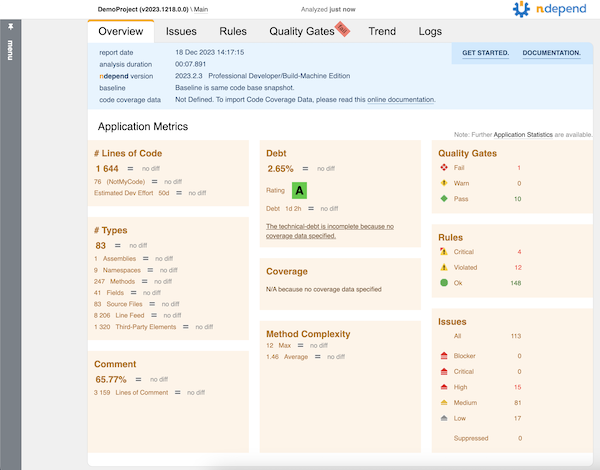
<p>This kicks off the analysis (like you might see on a build server) and generates a nice HTML report.</p>

<p><img src="https://www.paraesthesia.com/images/20231218_ndependreport.png" alt="NDepend report main page" /></p>

<p>I didn’t include coverage data in this particular run because I wanted to focus mostly on the code analysis side of things.</p>

<p><strong>Since my service code broke some rules, the command line exited non-zero.</strong> This is great for build integration where I want to fail if rules get violated.</p>

<h2 id="dig-deeper">Dig Deeper</h2>

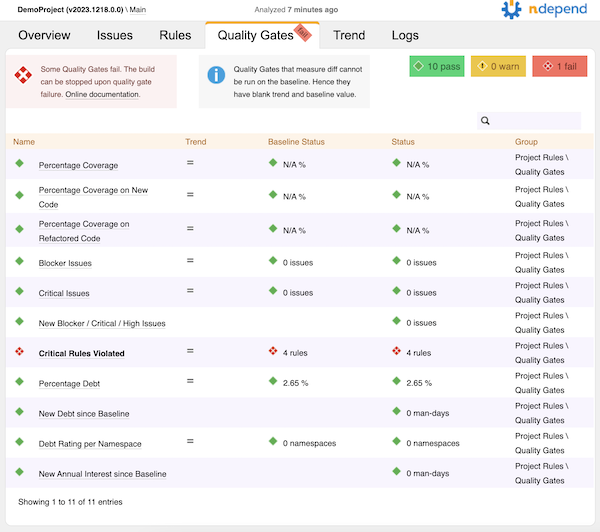
<p>From that main report page, it looks like the code in the service I analyzed failed some of the default quality gates. Let’s go to the Quality Gates tab to see what happened.</p>

<p><img src="https://www.paraesthesia.com/images/20231218_qualitygates.png" alt="NDepend report main page" /></p>

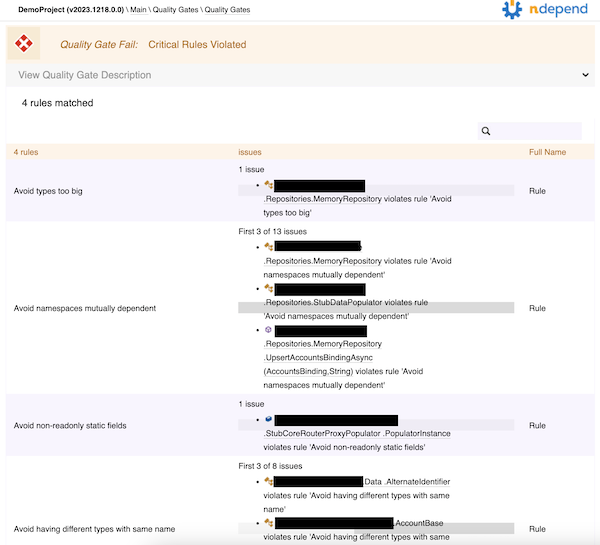
<p>Yow! Four critical rules violated. I’ll click on that to see what they were.</p>

<p><img src="https://www.paraesthesia.com/images/20231218_brokenrules.png" alt="Broken critical rules" /></p>

<p>Looks like there’s a type that’s too big, some mutually dependent namespaces, a non-readonly static field, and a couple of types that have the same name. Some of this is easy enough to fix; some of it might require some tweaks to the rules, since the microservice has some data transfer objects and API models that look different but have the same data (so the same name in different namespaces is appropriate).</p>

<p>All in all, not bad!</p>

<h2 id="i-still-love-it">I Still Love It</h2>

<p>NDepend is still a great tool, even on Mac, and I still totally recommend it. To get the most out of it right now, you really need to be on Windows so you can get the GUI support, but for folks like me that are primarily Mac right now, it still provides some great value. Honestly, if you haven’t tried it yet, <a href="https://www.ndepend.com/download">just go do that</a>.</p>

<h2 id="room-for-improvement">Room for Improvement</h2>

<p>I always like providing some ideas on ways to make a good product even better, and this is no exception. I love this thing, and I want to see some cool improvements to make it “more awesomer.”</p>

<h3 id="installation-mechanism">Installation Mechanism</h3>

<p>I’m very used to installing things through Homebrew on Mac, and on Windows as we look at things like Chocolatey, WinGet, and others - it seems like having an installation that would enable me to use these mechanisms instead of going to a download screen on a website would be a big help. I would love to be able to do <code class="language-plaintext highlighter-rouge">brew install ndepend</code> and have that just work.</p>

<h3 id="visual-studio-code-support-and-cross-platform-ui">Visual Studio Code Support and Cross-Platform UI</h3>

<p>There’s some integration in Visual Studio for setting up projects and running NDepend on the current project. It’d be awesome to see similar integration for VS Code.</p>

<blockquote>
  <p>At the time of this writing, the NDepend <a href="https://www.ndepend.com/docs/getting-started-with-ndepend-linux-macos">getting started on Mac documentation</a> says that <strong>this is coming</strong>. I’m looking forward to it.</p>
</blockquote>

<p>I’m hoping that whatever comes out, the great GUI experience to view the various graphs and charts will also be coming for cross-platform. That’s a <em>huge</em> job, but it would be awesome, especially since I’m not really on any Windows machines anymore.</p>

<h3 id="invoking-the-command-line">Invoking the Command Line</h3>

<p>The cross-platform executable is a <code class="language-plaintext highlighter-rouge">.dll</code> so running it is a somewhat long command line:</p>

<div class="language-powershell highlighter-rouge"><div class="highlight"><pre class="highlight"><code><span class="n">dotnet</span><span class="w"> </span><span class="nx">~/path/to/net8.0/NDepend.Console.MultiOS.dll</span><span class="w">
</span></code></pre></div></div>

<p>It’d be nice if this was more… <em>single-command</em>, like <code class="language-plaintext highlighter-rouge">ndepend-console</code> or something. Perhaps if it was a <a href="https://learn.microsoft.com/en-us/dotnet/core/tools/global-tools">dotnet global tool</a> it would be easier. That would also take care of the install mechanism - <code class="language-plaintext highlighter-rouge">dotnet tool install ndepend-console -g</code> seems like it’d be pretty nifty.</p>

<h3 id="commands-and-sub-commands">Commands and Sub-Commands</h3>

<p>The command line executable gets used to create projects, register licenses, and run analyses. I admit I’ve gotten used to commands taking command/sub-command hierarchies to help disambiguate the calls I’m making rather than having to mix-and-match command line arguments at the top. I think that’d be a nice improvement here.</p>

<p>For example, instead of…</p>

<div class="language-powershell highlighter-rouge"><div class="highlight"><pre class="highlight"><code><span class="n">dotnet</span><span class="w"> </span><span class="o">.</span><span class="nx">/net8.0/NDepend.Console.MultiOS.dll</span><span class="w"> </span><span class="nx">/reglic</span><span class="w"> </span><span class="nx">XXXXXXXX</span><span class="w">
</span><span class="n">dotnet</span><span class="w"> </span><span class="o">.</span><span class="nx">/net8.0/NDepend.Console.MultiOS.dll</span><span class="w"> </span><span class="nx">/unreglic</span><span class="w">
</span></code></pre></div></div>

<p>It could be…</p>

<div class="language-powershell highlighter-rouge"><div class="highlight"><pre class="highlight"><code><span class="n">dotnet</span><span class="w"> </span><span class="o">.</span><span class="nx">/net8.0/NDepend.Console.MultiOS.dll</span><span class="w"> </span><span class="nx">license</span><span class="w"> </span><span class="nx">register</span><span class="w"> </span><span class="nt">--code</span><span class="w"> </span><span class="nx">XXXXXXXX</span><span class="w">
</span><span class="n">dotnet</span><span class="w"> </span><span class="o">.</span><span class="nx">/net8.0/NDepend.Console.MultiOS.dll</span><span class="w"> </span><span class="nx">license</span><span class="w"> </span><span class="nx">unregister</span><span class="w">
</span></code></pre></div></div>

<p>That would mean when I need to create a project, maybe it’s under…</p>

<div class="language-powershell highlighter-rouge"><div class="highlight"><pre class="highlight"><code><span class="n">dotnet</span><span class="w"> </span><span class="o">.</span><span class="nx">/net8.0/NDepend.Console.MultiOS.dll</span><span class="w"> </span><span class="nx">project</span><span class="w"> </span><span class="nx">create</span><span class="w"> </span><span class="p">[</span><span class="n">args</span><span class="p">]</span><span class="w">
</span></code></pre></div></div>

<p>And executing analysis might be under…</p>

<div class="language-powershell highlighter-rouge"><div class="highlight"><pre class="highlight"><code><span class="n">dotnet</span><span class="w"> </span><span class="o">.</span><span class="nx">/net8.0/NDepend.Console.MultiOS.dll</span><span class="w"> </span><span class="nx">analyze</span><span class="w"> </span><span class="p">[</span><span class="n">args</span><span class="p">]</span><span class="w">
</span></code></pre></div></div>

<p>It’d make getting help a little easier, too, since the help could list the commands and sub-commands, with details being down at the sub-command level instead of right at the top.</p>

<h3 id="graphs-in-html-reports">Graphs in HTML Reports</h3>

<p>Without the full GUI you don’t get to see the graphs like the <a href="https://www.ndepend.com/docs/dependency-structure-matrix-dsm">dependency matrix</a> that I love so much. Granted, these are far more useful if you can click on them and interact with them, but still, I miss them in the HTML.</p>

<h3 id="support-for-roslyn-analyzers">Support for Roslyn Analyzers</h3>

<p>NDepend came out long before Roslyn analyzers were a thing, and some of what makes NDepend shine are the great rules based on CQLinq - a much easier way to query for things in your codebase than trying to write a Roslyn analyzer.</p>

<p>It would be <em>so sweet</em> if the rules that <em>could</em> be analyzed at develop/build time - when we see Roslyn analyzer output - could actually be executed as part of the build. Perhaps it’d require pointing at an <code class="language-plaintext highlighter-rouge">.ndproj</code> file to get the list of rules. Perhaps not all rules would be something that can be analyzed that early in the build. I’m just thinking about the ability to “shift left” a bit and catch the failing quality gates <em>before</em> running the analysis. That could potentially lead to a new/different licensing model where some developers, who are not authorized to run “full NDepend,” might have cheaper licenses that allow running of CQL-as-Roslyn-analyzer for build purposes.</p>

<p>Maybe an alternative to that would be to have a code generator that “creates a Roslyn analyzer package” based on CQL rules. Someone licensed for full NDepend could build that package and other devs could reference it.</p>

<p>I’m not sure exactly how it would work, I’m kinda brainstorming. But the “shift left” concept along with catching things early does appeal to me.</p>
]]></content>
  </entry>


  <entry>
    <title type="html"><![CDATA[Another COVID Halloween]]></title>
    <link href="https://www.paraesthesia.com/archive/2023/11/06/another-covid-halloween/"/>
    <updated>2023-11-06T00:00:00+00:00</updated>
    <id>https://www.paraesthesia.com/archive/2023/11/06/another-covid-halloween</id>
    <content type="html"><![CDATA[<p><a href="http://www.paraesthesia.com/archive/2021/11/02/140-trick-or-treaters/">Back in 2021</a> we didn’t get to go to the usual Halloween party we attend due to COVID. That meant I didn’t really get to wear my Loki time prisoner costume. I decided I’d bring that one back out for this year so I could actually wear it.</p>

<p><img src="https://www.paraesthesia.com/images/20211102_loki.jpg" alt="Me as Prisoner Loki" /></p>

<p>This year we got to go to the party (no symptoms, even tested negative for COVID before walking out the door!) but ended up getting COVID for Halloween. That meant we didn’t hand out candy again, making this the second year in a row.</p>

<p>We <em>did</em> try to put a bowl of candy out with a “take one” sign. That didn’t last very long. While adults with small children were very good about taking one piece of candy per person, tweens and teens got really greedy really fast. We kind of expected that, but I’m always disappointed that people can’t just do the right thing; it’s always a selfish desire for more <em>for me</em> with no regard <em>for you</em>. Maybe that speaks to larger issues in society today? I dunno.</p>

<p>I need to start gathering ideas for next year’s costume. Since I reused a costume this year I didn’t really gather a lot of ideas or make anything, and I definitely missed that. On the other hand, my motivation lately has been a little low so it was also nice to not <em>have</em> to do anything.</p>
]]></content>
  </entry>


  <entry>
    <title type="html"><![CDATA[Hosting Customized Homebrew Formulae]]></title>
    <link href="https://www.paraesthesia.com/archive/2023/09/28/hosting-customized-homebrew-formulae/"/>
    <updated>2023-09-28T00:00:00+00:00</updated>
    <id>https://www.paraesthesia.com/archive/2023/09/28/hosting-customized-homebrew-formulae</id>
    <content type="html"><![CDATA[<p><strong>Scenario</strong>: You’re installing something from Homebrew and, for whatever reason, that standard formula isn’t working for you. What do you do?</p>

<p>I used this opportunity to learn a little about how Homebrew formulae generally work. It wasn’t something where I had my own app to deploy, but it also wasn’t something I wanted to submit as a PR for an existing formula. For example, I wanted to have the <code class="language-plaintext highlighter-rouge">bash</code> and <code class="language-plaintext highlighter-rouge">wget</code> formulae use a different main URL (one of the mirrors). The current one works for 99% of folks, but for reasons I won’t get into, it wasn’t working for me.</p>

<p><strong>This process is called <a href="https://docs.brew.sh/How-to-Create-and-Maintain-a-Tap">“creating a tap”</a></strong> - it’s a repo you’ll own with your own stuff that won’t go into the core Homebrew repo.</p>

<p><strong>TL;DR</strong>:</p>

<ul>
  <li>Create a GitHub repo called <code class="language-plaintext highlighter-rouge">homebrew-XXXX</code> where <code class="language-plaintext highlighter-rouge">XXXX</code> is how Homebrew will see your repo name.</li>
  <li>Copy the original formulae into your repo. Anything with a <code class="language-plaintext highlighter-rouge">.rb</code> extension will work - the name of the file is the name of the formula.</li>
  <li>Install using <code class="language-plaintext highlighter-rouge">brew install your-username/XXXX/formula.rb</code></li>
</ul>

<p>Let’s get a little more specific and use an example.</p>

<p>First <a href="https://github.com/tillig/homebrew-mods">I created my GitHub repo, <code class="language-plaintext highlighter-rouge">homebrew-mods</code></a>. This is where I can store my customized formulae. In there, I created a <code class="language-plaintext highlighter-rouge">Formula</code> folder to put them in.</p>

<p>I went to <a href="https://github.com/Homebrew/homebrew-core">the <code class="language-plaintext highlighter-rouge">homebrew-core</code> repo</a> where all the main formulae are and found the ones I was interested in updating:</p>

<ul>
  <li><a href="https://github.com/Homebrew/homebrew-core/blob/master/Formula/g/gettext.rb"><code class="language-plaintext highlighter-rouge">gettext</code></a> - a dependency of <code class="language-plaintext highlighter-rouge">bash</code></li>
  <li><a href="https://github.com/Homebrew/homebrew-core/blob/master/Formula/b/bash.rb"><code class="language-plaintext highlighter-rouge">bash</code></a></li>
  <li><a href="https://github.com/Homebrew/homebrew-core/blob/master/Formula/lib/libidn2.rb"><code class="language-plaintext highlighter-rouge">libidn2</code></a> - a dependency of <code class="language-plaintext highlighter-rouge">wget</code></li>
  <li><a href="https://github.com/Homebrew/homebrew-core/blob/master/Formula/w/wget.rb"><code class="language-plaintext highlighter-rouge">wget</code></a></li>
</ul>

<p>I copied the formulae into my own repo and made some minor updates to switch the <code class="language-plaintext highlighter-rouge">url</code> and <code class="language-plaintext highlighter-rouge">mirror</code> values around a bit.</p>

<p>Finally, install time! It has to be installed in this order because otherwise the dependencies in the <code class="language-plaintext highlighter-rouge">bash</code> and <code class="language-plaintext highlighter-rouge">wget</code> modules will try to pull from <code class="language-plaintext highlighter-rouge">homebrew-core</code> instead of my mod repo.</p>

<div class="language-sh highlighter-rouge"><div class="highlight"><pre class="highlight"><code>brew <span class="nb">install </span>tillig/mods/gettext
brew <span class="nb">install </span>tillig/mods/bash
brew <span class="nb">install </span>tillig/mods/libidn2
brew <span class="nb">install </span>tillig/mods/wget
</code></pre></div></div>

<p>That’s it! If other packages have dependencies on <code class="language-plaintext highlighter-rouge">gettext</code> or <code class="language-plaintext highlighter-rouge">libidn2</code>, it’ll appear to be already installed since Homebrew just matches on name.</p>

<p>The downside of this approach is that <strong>you won’t get the upgrades for free</strong>. You have to maintain your tap and pull version updates as needed.</p>

<p>If you want to read more, check out the documentation from Homebrew on <a href="https://docs.brew.sh/How-to-Create-and-Maintain-a-Tap">creating and maintaining a tap</a> as well as <a href="https://docs.brew.sh/Formula-Cookbook">the formula cookbook</a>.</p>
]]></content>
  </entry>


  <entry>
    <title type="html"><![CDATA[Being Productive with Zero Admin on MacOS]]></title>
    <link href="https://www.paraesthesia.com/archive/2023/09/28/being-productive-with-zero-admin-on-macos/"/>
    <updated>2023-09-28T00:00:00+00:00</updated>
    <id>https://www.paraesthesia.com/archive/2023/09/28/being-productive-with-zero-admin-on-macos</id>
    <content type="html"><![CDATA[<p><strong>Here’s the proposition</strong>: You just got a new Mac and you need to set it up for development on Azure (or your favorite cloud provider) in multiple different languages and technologies but you <em>don’t have any admin permissions at all</em>. Not even a little bit. How do you get it done? We’re going to give it a shot.</p>

<blockquote>
  <p><strong>BIGGEST DISCLAIMER YOU HAVE EVER SEEN</strong>: THIS IS UNSUPPORTED. Not just “unsupported by me” but, in a lot of cases, unsupported <em>by the community</em>. For example, we’ll be installing Homebrew in a custom location, and they have no end of warnings about how unsupported that is. They won’t even take tickets or PRs to fix it if something isn’t working. When you take this on, you need to be ready to do some troubleshooting, potentially at a level you’ve not had to dig down to before. Don’t post questions, don’t file issues - <em>you are on your own, 100%, no exceptions</em>.</p>
</blockquote>

<p>OK, hopefully that was clear. Let’s begin.</p>

<p>The key difference in what I’m doing here is that <strong>everything goes into your user folder somewhere</strong>.</p>

<ul>
  <li>You don’t have admin, so you can’t install Homebrew in its default <code class="language-plaintext highlighter-rouge">/usr/local/bin</code> style location.</li>
  <li>You don’t have admin, so you can’t use most standard installers that want to put apps in central locations like <code class="language-plaintext highlighter-rouge">/Applications</code> or <code class="language-plaintext highlighter-rouge">/usr/share</code>.</li>
  <li>You don’t have admin, so you can’t modify <code class="language-plaintext highlighter-rouge">/etc/paths.d</code> or anything like that.</li>
</ul>

<p><strong>Contents</strong>:</p>

<ul>
  <li><a href="#strategies">Strategies</a></li>
  <li><a href="#start-with-git">Start with Git</a></li>
  <li><a href="#homebrew">Homebrew</a></li>
  <li><a href="#vs-code">VS Code</a></li>
  <li><a href="#homebrew-profile">Homebrew Profile</a></li>
  <li><a href="#homebrew-formulae">Homebrew Formulae</a></li>
  <li><a href="#powershell">PowerShell</a></li>
  <li><a href="#azure-cli-and-extensions">Azure CLI and Extensions</a></li>
  <li><a href="#nodejs-and-tools">Node.js and Tools</a></li>
  <li><a href="#rbenv">rbenv</a></li>
  <li><a href="#net-sdk-and-tools">.NET SDK and Tools</a></li>
  <li><a href="#java">Java</a></li>
  <li><a href="#azure-devops-artifacts-credential-provider">Azure DevOps Artifacts Credential Provider</a></li>
  <li><a href="#issue-gatekeeper">Issue: Gatekeeper</a></li>
  <li><a href="#issue-admin-only-installers">Issue: Admin-Only Installers</a></li>
  <li><a href="#issue-app-permissions">Issue: App Permissions</a></li>
  <li><a href="#issue-bash-completions">Issue: Bash Completions</a></li>
  <li><a href="#issue-path-and-environment-variable-propagation">Issue: Path and Environment Variable Propagation</a></li>
  <li><a href="#issue-python-config-during-updates">Issue: Python Config During Updates</a></li>
  <li><a href="#conclusion">Conclusion</a></li>
</ul>

<h2 id="strategies">Strategies</h2>

<p>The TL;DR here is a set of strategies:</p>

<ul>
  <li><strong>Install to your user folder.</strong>
    <ul>
      <li>Instead of <code class="language-plaintext highlighter-rouge">/usr/local/bin</code> or anything else under <code class="language-plaintext highlighter-rouge">/usr/local</code>, we’re going to create that whole structure under <code class="language-plaintext highlighter-rouge">~/local</code> - <code class="language-plaintext highlighter-rouge">~/local/bin</code> and so on.</li>
      <li>Applications will go in <code class="language-plaintext highlighter-rouge">~/Applications</code> instead of <code class="language-plaintext highlighter-rouge">/Applications</code>.</li>
    </ul>
  </li>
  <li><strong>Use your user <code class="language-plaintext highlighter-rouge">~/.profile</code> for paths and environment.</strong> No need for <code class="language-plaintext highlighter-rouge">/etc/paths.d</code>. Also, <code class="language-plaintext highlighter-rouge">~/.profile</code> is pretty cross-shell (e.g., both <code class="language-plaintext highlighter-rouge">bash</code> and <code class="language-plaintext highlighter-rouge">pwsh</code> obey it) so it’s a good central way to go.</li>
  <li><strong>Use SDK-based tools instead of global installers.</strong> Look for tools that you can install with, say, <code class="language-plaintext highlighter-rouge">npm install -g</code> or <code class="language-plaintext highlighter-rouge">dotnet tool install -g</code> if you can’t find something in Homebrew.</li>
</ul>

<h2 id="start-with-git">Start with Git</h2>

<p>First things first, <strong>you need Git</strong>. This is the only thing that you may have challenges with. Without admin I was able to install Xcode from the App Store and that got me <code class="language-plaintext highlighter-rouge">git</code>. I admit I forgot to even check to see if <code class="language-plaintext highlighter-rouge">git</code> <em>just ships</em> with MacOS now. Maybe it does. But you will need Xcode command line tools for some stuff with Homebrew anyway, so I’d say <strong>just install Xcode to start</strong>. If you can’t… hmmm. You might be stuck. You should at least see what you can do about getting <code class="language-plaintext highlighter-rouge">git</code>. You’ll only use this version temporarily until you can install the latest using Homebrew later.</p>

<h2 id="homebrew">Homebrew</h2>

<p>Got Git? Good. <a href="https://docs.brew.sh/Installation#untar-anywhere-unsupported"><strong>Let’s get Homebrew installed.</strong></a></p>

<div class="language-sh highlighter-rouge"><div class="highlight"><pre class="highlight"><code><span class="nb">mkdir</span> <span class="nt">-p</span> ~/local/bin
<span class="nb">cd</span> ~/local
git clone https://github.com/Homebrew/brew Homebrew
<span class="nb">ln</span> <span class="nt">-s</span> ~/local/Homebrew/bin/brew ~/local/bin/brew
</code></pre></div></div>

<p>I’ll reiterate - and you’ll see it if you ever run <code class="language-plaintext highlighter-rouge">brew doctor</code> - that this is <strong>wildly unsupported.</strong> It works, but you’re going to see some things here that you wouldn’t normally see with a standard Homebrew install. For example, things seem to compile a lot more often than I remember with regular Homebrew - and this is something they mention <a href="https://docs.brew.sh/Installation#untar-anywhere-unsupported">in the docs</a>, too.</p>

<p>Now we need to add some stuff to your <code class="language-plaintext highlighter-rouge">~/.profile</code> so we can get the shell finding your new <code class="language-plaintext highlighter-rouge">~/local</code> tools. We need to do that <em>before</em> we install more stuff via Homebrew. That means we need an editor. I know you could use <code class="language-plaintext highlighter-rouge">vi</code> or something, but I’m a VS Code guy, and I need that installed anyway.</p>

<h2 id="vs-code">VS Code</h2>

<p><strong>Let’s get VS Code.</strong> Go download it from <a href="https://code.visualstudio.com/download">the download page</a>, unzip it, and drop it in your <code class="language-plaintext highlighter-rouge">~/Applications</code> folder. At a command prompt, link it into your <code class="language-plaintext highlighter-rouge">~/local/bin</code> folder:</p>

<div class="language-sh highlighter-rouge"><div class="highlight"><pre class="highlight"><code><span class="nb">ln</span> <span class="nt">-s</span> <span class="s1">'~/Applications/Visual Studio Code.app/Contents/Resources/app/bin/code'</span> ~/local/bin/code
</code></pre></div></div>

<p>I was able to download this one with a browser without <a href="#issue-gatekeeper">running into Gatekeeper trouble</a>. If you get Gatekeeper arguing with you about it, use <code class="language-plaintext highlighter-rouge">curl</code> to download.</p>

<h2 id="homebrew-profile">Homebrew Profile</h2>

<p>You can now do <code class="language-plaintext highlighter-rouge">~/local/bin/code ~/.profile</code> to edit your base shell profile. Add this line so Homebrew can put itself into the path and set various environment variables:</p>

<div class="language-sh highlighter-rouge"><div class="highlight"><pre class="highlight"><code><span class="nb">eval</span> <span class="s2">"</span><span class="si">$(</span><span class="nv">$HOME</span>/local/bin/brew shellenv<span class="si">)</span><span class="s2">"</span>
</code></pre></div></div>

<p>Restart your shell so this will evaluate and you now should be able to do:</p>

<div class="language-sh highlighter-rouge"><div class="highlight"><pre class="highlight"><code>brew <span class="nt">--version</span>
</code></pre></div></div>

<p>Your custom Homebrew should be in the path and you should see the version of Homebrew installed. <em>We’re in business!</em></p>

<h2 id="homebrew-formulae">Homebrew Formulae</h2>

<p>We can install more Homebrew tools now that custom Homebrew is set up. Here are the tools I use and the rough order I set them up. Homebrew is really good about managing the dependencies so it doesn’t <em>have</em> to be in this order, but be aware that a long dependency chain can mean a lot of time spent doing some custom builds during the install and this general order keeps it relatively short.</p>

<div class="language-sh highlighter-rouge"><div class="highlight"><pre class="highlight"><code><span class="c"># Foundational utilities</span>
brew <span class="nb">install </span>ca-certificates
brew <span class="nb">install grep
</span>brew <span class="nb">install </span>jq

<span class="c"># Bash and wget updates</span>
brew <span class="nb">install </span>gettext
brew <span class="nb">install </span>bash
brew <span class="nb">install </span>libidn2
brew <span class="nb">install </span>wget

<span class="c"># Terraform - I use tfenv to manage installs/versions. This will</span>
<span class="c"># install the latest Terraform.</span>
brew <span class="nb">install </span>tfenv
tfenv <span class="nb">install</span>

<span class="c"># Terrragrunt - I use tgenv to manage installs/versions. After you do</span>
<span class="c"># `list-remote`, pick a version to install.</span>
brew <span class="nb">install </span>tgenv
tgenv list-remote

<span class="c"># Go</span>
brew <span class="nb">install </span>go

<span class="c"># Python</span>
brew <span class="nb">install </span>python@3.10

<span class="c"># Kubernetes</span>
brew <span class="nb">install </span>kubernetes-cli
brew <span class="nb">install </span>k9s
brew <span class="nb">install </span>krew
brew <span class="nb">install </span>Azure/kubelogin/kubelogin
brew <span class="nb">install </span>stern
brew <span class="nb">install </span>helm
brew <span class="nb">install </span>helmsman

<span class="c"># Additional utilities I like</span>
brew <span class="nb">install </span>marp-cli
brew <span class="nb">install </span>mkcert
brew <span class="nb">install </span>pre-commit
</code></pre></div></div>

<p>If you installed the <code class="language-plaintext highlighter-rouge">grep</code> update or <code class="language-plaintext highlighter-rouge">python</code>, you’ll need to add them to your path manually via the <code class="language-plaintext highlighter-rouge">~/.profile</code>. We’ll do that just before the Homebrew part, then restart the shell to pick up the changes.</p>

<div class="language-sh highlighter-rouge"><div class="highlight"><pre class="highlight"><code><span class="nb">export </span><span class="nv">PATH</span><span class="o">=</span><span class="s2">"</span><span class="nv">$HOME</span><span class="s2">/local/opt/grep/libexec/gnubin:</span><span class="nv">$HOME</span><span class="s2">/local/opt/python@3.10/libexec/bin:</span><span class="nv">$PATH</span><span class="s2">"</span>
<span class="nb">eval</span> <span class="s2">"</span><span class="si">$(</span><span class="nv">$HOME</span>/local/bin/brew shellenv<span class="si">)</span><span class="s2">"</span>
</code></pre></div></div>

<h2 id="powershell">PowerShell</h2>

<p>This one was more challenging because the default installer they provide requires admin permissions so you can’t just download and run it or install via Homebrew.</p>

<p>For this, you have one of two options:</p>

<p><strong>Option 1: Use the dotnet global tool.</strong></p>

<p>If you can get by on <code class="language-plaintext highlighter-rouge">bash</code> until the <code class="language-plaintext highlighter-rouge">dotnet</code> install later, you can install PowerShell as a dotnet global tool.</p>

<div class="language-sh highlighter-rouge"><div class="highlight"><pre class="highlight"><code>dotnet tool <span class="nb">install</span> <span class="nt">--global</span> PowerShell
</code></pre></div></div>

<p><strong>Option 2: Manual install.</strong></p>

<p>First, find the URL for the the <code class="language-plaintext highlighter-rouge">.tar.gz</code> <a href="https://github.com/PowerShell/PowerShell/releases">from the releases page</a> for your preferred PowerShell version and Mac architecture. I’m on an M1 so I’ll get the <code class="language-plaintext highlighter-rouge">arm64</code> version.</p>

<div class="language-sh highlighter-rouge"><div class="highlight"><pre class="highlight"><code><span class="nb">cd</span> ~/Downloads
curl <span class="nt">-fsSL</span> https://github.com/PowerShell/PowerShell/releases/download/v7.5.0/powershell-7.5.0-osx-arm64.tar.gz <span class="nt">-o</span> powershell.tar.gz
<span class="nb">mkdir</span> <span class="nt">-p</span> ~/local/microsoft/powershell/7
<span class="nb">tar</span> <span class="nt">-xvf</span> ./powershell.tar.gz <span class="nt">-C</span> ~/local/microsoft/powershell/7
<span class="nb">chmod</span> +x ~/local/microsoft/powershell/7/pwsh
<span class="nb">ln</span> <span class="nt">-s</span> <span class="s1">'~/local/microsoft/powershell/7/pwsh'</span> ~/local/bin/pwsh
</code></pre></div></div>

<p>Now you have a local copy of PowerShell and it’s linked into your path.</p>

<p>An important note here - I used <code class="language-plaintext highlighter-rouge">curl</code> instead of my browser to download the <code class="language-plaintext highlighter-rouge">.tar.gz</code> file. I did that to avoid <a href="#issue-gatekeeper">Gatekeeper</a>.</p>

<h2 id="azure-cli-and-extensions">Azure CLI and Extensions</h2>

<p>You use Homebrew to install the Azure CLI and then use <code class="language-plaintext highlighter-rouge">az</code> itself to add extensions. I separated this one out from the other Homebrew tools, though, because there’s a tiny catch: When you install <code class="language-plaintext highlighter-rouge">az</code> CLI, it’s going to build <code class="language-plaintext highlighter-rouge">openssl</code> <em>from scratch</em> because you’re in a non-standard location. During the tests for that build, it may try to start listening to network traffic. <strong>If you don’t have rights to allow that test to run, just hit cancel/deny.</strong> It’ll still work.</p>

<div class="language-sh highlighter-rouge"><div class="highlight"><pre class="highlight"><code>brew <span class="nb">install </span>azure-cli
az extension add <span class="nt">--name</span> azure-devops
az extension add <span class="nt">--name</span> azure-firewall
az extension add <span class="nt">--name</span> fleet
az extension add <span class="nt">--name</span> front-door
</code></pre></div></div>

<h2 id="nodejs-and-tools">Node.js and Tools</h2>

<p>I use <code class="language-plaintext highlighter-rouge">n</code> to manage my Node versions/installs. <code class="language-plaintext highlighter-rouge">n</code> requires us to set an environment variable <code class="language-plaintext highlighter-rouge">N_PREFIX</code> so it knows where to install things. First install <code class="language-plaintext highlighter-rouge">n</code> via Homebrew:</p>

<div class="language-sh highlighter-rouge"><div class="highlight"><pre class="highlight"><code>brew <span class="nb">install </span>n
</code></pre></div></div>

<p>Now edit your <code class="language-plaintext highlighter-rouge">~/.profile</code> and add the <code class="language-plaintext highlighter-rouge">N_PREFIX</code> variable, then restart your shell.</p>

<div class="language-sh highlighter-rouge"><div class="highlight"><pre class="highlight"><code><span class="nb">export </span><span class="nv">N_PREFIX</span><span class="o">=</span><span class="s2">"</span><span class="nv">$HOME</span><span class="s2">/local"</span>
<span class="nb">export </span><span class="nv">PATH</span><span class="o">=</span><span class="s2">"</span><span class="nv">$HOME</span><span class="s2">/local/opt/grep/libexec/gnubin:</span><span class="nv">$HOME</span><span class="s2">/local/opt/python@3.10/libexec/bin:</span><span class="nv">$PATH</span><span class="s2">"</span>
<span class="nb">eval</span> <span class="s2">"</span><span class="si">$(</span><span class="nv">$HOME</span>/local/bin/brew shellenv<span class="si">)</span><span class="s2">"</span>
</code></pre></div></div>

<p>After that shell restart, you can start installing Node versions. This will install the latest:</p>

<div class="language-sh highlighter-rouge"><div class="highlight"><pre class="highlight"><code>n latest
</code></pre></div></div>

<p>Once you have Node.js installed, you can install Node.js-based tooling.</p>

<div class="language-sh highlighter-rouge"><div class="highlight"><pre class="highlight"><code><span class="c"># These are just tools I use; install the ones you use.</span>
npm <span class="nb">install</span> <span class="nt">-g</span> @stoplight/spectral-cli <span class="sb">`</span>
               gulp-cli <span class="sb">`</span>
               tfx-cli <span class="sb">`</span>
               typescript
</code></pre></div></div>

<h2 id="rbenv">rbenv</h2>

<p>I use <code class="language-plaintext highlighter-rouge">rbenv</code> to manage my Ruby versions/installs. <code class="language-plaintext highlighter-rouge">rbenv</code> requires both an installation and a modification to your <code class="language-plaintext highlighter-rouge">~/.profile</code>. If you use <code class="language-plaintext highlighter-rouge">rbenv</code>…</p>

<div class="language-sh highlighter-rouge"><div class="highlight"><pre class="highlight"><code><span class="c"># Install it, and install a Ruby version.</span>
brew <span class="nb">install </span>rbenv
rbenv init
rbenv <span class="nb">install</span> <span class="nt">-l</span>
</code></pre></div></div>

<p>Update your <code class="language-plaintext highlighter-rouge">~/.profile</code> to include the <code class="language-plaintext highlighter-rouge">rbenv</code> shell initialization code. It’ll look like this, put just after the Homebrew bit. Note I have <code class="language-plaintext highlighter-rouge">pwsh</code> in there as <a href="#powershell">my shell of choice</a> - put your own shell in there (<code class="language-plaintext highlighter-rouge">bash</code>, <code class="language-plaintext highlighter-rouge">zsh</code>, etc.). Restart your shell when it’s done.</p>

<div class="language-sh highlighter-rouge"><div class="highlight"><pre class="highlight"><code><span class="nb">export </span><span class="nv">N_PREFIX</span><span class="o">=</span><span class="s2">"</span><span class="nv">$HOME</span><span class="s2">/local"</span>
<span class="nb">export </span><span class="nv">PATH</span><span class="o">=</span><span class="s2">"</span><span class="nv">$HOME</span><span class="s2">/local/opt/grep/libexec/gnubin:</span><span class="nv">$HOME</span><span class="s2">/local/opt/python@3.10/libexec/bin:</span><span class="nv">$PATH</span><span class="s2">"</span>
<span class="nb">eval</span> <span class="s2">"</span><span class="si">$(</span><span class="nv">$HOME</span>/local/bin/brew shellenv<span class="si">)</span><span class="s2">"</span>
<span class="nb">eval</span> <span class="s2">"</span><span class="si">$(</span><span class="nv">$HOME</span>/local/bin/rbenv init - pwsh<span class="si">)</span><span class="s2">"</span>
</code></pre></div></div>

<h2 id="net-sdk-and-tools">.NET SDK and Tools</h2>

<p>The standard installers for the .NET SDK require admin permissions because they want to go into <code class="language-plaintext highlighter-rouge">/usr/local/share/dotnet</code>.</p>

<p>Download the <code class="language-plaintext highlighter-rouge">dotnet-install.sh</code> shell script and stick that in your <code class="language-plaintext highlighter-rouge">~/local/bin</code> folder. What’s nice about this script is it will install things to <code class="language-plaintext highlighter-rouge">~/.dotnet</code> by default instead of the central share location.</p>

<div class="language-sh highlighter-rouge"><div class="highlight"><pre class="highlight"><code><span class="c"># Get the install script</span>
curl <span class="nt">-fsSL</span> https://dot.net/v1/dotnet-install.sh <span class="nt">-o</span> ~/local/bin/dotnet-install.sh
<span class="nb">chmod</span> +x ~/local/bin/dotnet-install.sh
</code></pre></div></div>

<p>We need to get the local .NET into the path and set up variables (<code class="language-plaintext highlighter-rouge">DOTNET_INSTALL_DIR</code> and <code class="language-plaintext highlighter-rouge">DOTNET_ROOT</code>) so .NET and the install/uninstall processes can find things. We’ll add that all to our <code class="language-plaintext highlighter-rouge">~/.profile</code> and restart the shell.</p>

<div class="language-sh highlighter-rouge"><div class="highlight"><pre class="highlight"><code><span class="nb">export </span><span class="nv">DOTNET_INSTALL_DIR</span><span class="o">=</span><span class="s2">"</span><span class="nv">$HOME</span><span class="s2">/.dotnet"</span>
<span class="nb">export </span><span class="nv">DOTNET_ROOT</span><span class="o">=</span><span class="s2">"</span><span class="nv">$HOME</span><span class="s2">/.dotnet"</span>
<span class="nb">export </span><span class="nv">N_PREFIX</span><span class="o">=</span><span class="s2">"</span><span class="nv">$HOME</span><span class="s2">/local"</span>
<span class="nb">export </span><span class="nv">PATH</span><span class="o">=</span><span class="s2">"</span><span class="nv">$HOME</span><span class="s2">/local/opt/grep/libexec/gnubin:</span><span class="nv">$DOTNET_ROOT</span><span class="s2">:</span><span class="nv">$DOTNET_ROOT</span><span class="s2">/tools:</span><span class="nv">$HOME</span><span class="s2">/local/opt/python@3.10/libexec/bin:</span><span class="nv">$PATH</span><span class="s2">"</span>
<span class="nb">eval</span> <span class="s2">"</span><span class="si">$(</span><span class="nv">$HOME</span>/local/bin/brew shellenv<span class="si">)</span><span class="s2">"</span>
<span class="nb">eval</span> <span class="s2">"</span><span class="si">$(</span><span class="nv">$HOME</span>/local/bin/rbenv init - pwsh<span class="si">)</span><span class="s2">"</span>
</code></pre></div></div>

<blockquote>
  <p>Note we did <em>not</em> grab the <a href="https://github.com/dotnet/cli-lab/releases">.NET uninstall tool</a>. <strong>It doesn’t work without admin permissions.</strong> When you try to run it doing anything but listing what’s installed, you get:</p>

  <p><code class="language-plaintext highlighter-rouge">The current user does not have adequate privileges. See https://aka.ms/dotnet-core-uninstall-docs.</code></p>

  <p>It’s unclear why uninstall would require admin privileges since install did not. <a href="https://github.com/dotnet/cli-lab/issues/267">I’ve filed an issue about that.</a></p>
</blockquote>

<p>After the shell restart, we can start installing .NET and .NET global tools. In particular, <a href="https://github.com/git-ecosystem/git-credential-manager/blob/release/docs/install.md#net-tool">this is how I get the Git Credential Manager plugin</a>.</p>

<div class="language-sh highlighter-rouge"><div class="highlight"><pre class="highlight"><code><span class="c"># Install latest .NET 8.0, 9.0</span>
dotnet-install.sh -?
dotnet-install.sh <span class="nt">-c</span> 8.0
dotnet-install.sh <span class="nt">-c</span> 9.0

<span class="c"># Get Git Credential Manager set up.</span>
dotnet tool <span class="nb">install</span> <span class="nt">-g</span> git-credential-manager
git-credential-manager configure

<span class="c"># Other .NET tools I use. You may or may not want these.</span>
dotnet tool <span class="nb">install</span> <span class="nt">-g</span> dotnet-counters
dotnet tool <span class="nb">install</span> <span class="nt">-g</span> dotnet-depends
dotnet tool <span class="nb">install</span> <span class="nt">-g</span> dotnet-dump
dotnet tool <span class="nb">install</span> <span class="nt">-g</span> dotnet-format
dotnet tool <span class="nb">install</span> <span class="nt">-g</span> dotnet-guid
dotnet tool <span class="nb">install</span> <span class="nt">-g</span> dotnet-outdated-tool
dotnet tool <span class="nb">install</span> <span class="nt">-g</span> dotnet-script
dotnet tool <span class="nb">install</span> <span class="nt">-g</span> dotnet-svcutil
dotnet tool <span class="nb">install</span> <span class="nt">-g</span> dotnet-symbol
dotnet tool <span class="nb">install</span> <span class="nt">-g</span> dotnet-trace
dotnet tool <span class="nb">install</span> <span class="nt">-g</span> gti
dotnet tool <span class="nb">install</span> <span class="nt">-g</span> microsoft.web.librarymanager.cli
</code></pre></div></div>

<h2 id="java">Java</h2>

<p>Without admin, you can’t get the system Java wrappers to be able to find any custom Java you install because you can’t run the required command like: <code class="language-plaintext highlighter-rouge">sudo ln -sfn ~/local/opt/openjdk/libexec/openjdk.jdk /Library/Java/JavaVirtualMachines/openjdk.jdk</code></p>

<p>If you use <code class="language-plaintext highlighter-rouge">bash</code> or <code class="language-plaintext highlighter-rouge">zsh</code> as your shell, you might be interested in <a href="https://sdkman.io/">SDKMAN!</a> as a way to manage Java. I use PowerShell so this won’t work because SDKMAN! relies on shell functions to do a lot of its job.</p>

<p>Instead, we’ll install the appropriate JDK and set symlinks/environment variables.</p>

<div class="language-sh highlighter-rouge"><div class="highlight"><pre class="highlight"><code>brew <span class="nb">install </span>openjdk
</code></pre></div></div>

<p>In <code class="language-plaintext highlighter-rouge">.profile</code>, we’ll need to set <code class="language-plaintext highlighter-rouge">JAVA_HOME</code> and add OpenJDK to the path. If we install a different JDK, we can update <code class="language-plaintext highlighter-rouge">JAVA_HOME</code> and restart the shell to switch.</p>

<div class="language-sh highlighter-rouge"><div class="highlight"><pre class="highlight"><code><span class="nb">export </span><span class="nv">DOTNET_INSTALL_DIR</span><span class="o">=</span><span class="s2">"</span><span class="nv">$HOME</span><span class="s2">/.dotnet"</span>
<span class="nb">export </span><span class="nv">DOTNET_ROOT</span><span class="o">=</span><span class="s2">"</span><span class="nv">$HOME</span><span class="s2">/.dotnet"</span>
<span class="nb">export </span><span class="nv">N_PREFIX</span><span class="o">=</span><span class="s2">"</span><span class="nv">$HOME</span><span class="s2">/local"</span>
<span class="nb">export </span><span class="nv">JAVA_HOME</span><span class="o">=</span><span class="s2">"</span><span class="nv">$HOME</span><span class="s2">/local/opt/openjdk"</span>
<span class="nb">export </span><span class="nv">PATH</span><span class="o">=</span><span class="s2">"</span><span class="nv">$JAVA_HOME</span><span class="s2">/bin:</span><span class="nv">$HOME</span><span class="s2">/local/opt/grep/libexec/gnubin:</span><span class="nv">$DOTNET_ROOT</span><span class="s2">:</span><span class="nv">$DOTNET_ROOT</span><span class="s2">/tools:</span><span class="nv">$HOME</span><span class="s2">/local/opt/python@3.10/libexec/bin:</span><span class="nv">$PATH</span><span class="s2">"</span>
<span class="nb">eval</span> <span class="s2">"</span><span class="si">$(</span><span class="nv">$HOME</span>/local/bin/brew shellenv<span class="si">)</span><span class="s2">"</span>
<span class="nb">eval</span> <span class="s2">"</span><span class="si">$(</span><span class="nv">$HOME</span>/local/bin/rbenv init - pwsh<span class="si">)</span><span class="s2">"</span>
</code></pre></div></div>

<h2 id="azure-devops-artifacts-credential-provider">Azure DevOps Artifacts Credential Provider</h2>

<p>If you use Azure DevOps Artifacts, the credential provider is required for NuGet to restore packages. There’s a script that will help you download and install it in the right spot, and it doesn’t require admin.</p>

<div class="language-sh highlighter-rouge"><div class="highlight"><pre class="highlight"><code>wget <span class="nt">-qO-</span> https://aka.ms/install-artifacts-credprovider.sh | bash
</code></pre></div></div>

<h2 id="issue-gatekeeper">Issue: Gatekeeper</h2>

<p>If you download things to install, be aware <a href="https://support.apple.com/guide/security/gatekeeper-and-runtime-protection-sec5599b66df/web">Gatekeeper</a> may get in the way.</p>

<p><img src="https://www.paraesthesia.com/images/20230928_gatekeeper.png" alt="Gatekeeper can't scan this package" /></p>

<p>You get messages like “XYZ can’t be opened because Apple cannot check it for malicious software.” This happened when I tried to install PowerShell by downloading the <code class="language-plaintext highlighter-rouge">.tar.gz</code> using my browser. The browser adds an attribute to the downloaded file and prompts you before running it. Normally you can just approve it and move on, but I don’t have permissions for that.</p>

<p>To fix it, you have to use the <code class="language-plaintext highlighter-rouge">xattr</code> tool to remove the <code class="language-plaintext highlighter-rouge">com.apple.quarantine</code> attribute from the affected file(s).</p>

<div class="language-sh highlighter-rouge"><div class="highlight"><pre class="highlight"><code>xattr <span class="nt">-d</span> com.apple.quarantine myfile.tar.gz
</code></pre></div></div>

<p>An easier way to deal with it is to just <strong>don’t download things with a browser</strong>. If you use <code class="language-plaintext highlighter-rouge">curl</code> to download, you don’t get the attribute added and you won’t get prompted.</p>

<h2 id="issue-admin-only-installers">Issue: Admin-Only Installers</h2>

<p>Some packages installed by Homebrew (like PowerShell) try to run an installer that requires admin permissions. In some cases you may be able to find a different way to install the tool <a href="#powershell">like I did with PowerShell</a>. In some cases, like Docker, you need the admin permissions to set that up. I don’t have workarounds for those sorts of things.</p>

<h2 id="issue-app-permissions">Issue: App Permissions</h2>

<p>There are some tools that may require additional permissions by nature, like <a href="https://rectangleapp.com/">Rectangle</a> needs to be allowed to control window placement and I don’t have permissions to grant that. I don’t have workarounds for those sorts of things.</p>

<h2 id="issue-bash-completions">Issue: Bash Completions</h2>

<p>Some Homebrew installs will dump completions into <code class="language-plaintext highlighter-rouge">~/local/etc/bash_completions.d</code>. I never really did figure out what to do about these since I don’t really use Bash. <a href="https://github.com/scop/bash-completion/blob/master/README.md">There’s some doc about options you have</a> but I’m not going to dig into it.</p>

<h2 id="issue-path-and-environment-variable-propagation">Issue: Path and Environment Variable Propagation</h2>

<p>Since you’ve only updated your path and environment from your shell profile (e.g., not <code class="language-plaintext highlighter-rouge">/etc/paths</code> or whatever), these changes won’t be available unless you’re running things <em>from your login shell</em>.</p>

<p>A great example is VS Code and build tools. Let’s say you have a build set up where the <code class="language-plaintext highlighter-rouge">command</code> is <code class="language-plaintext highlighter-rouge">npm</code>. If the path to <code class="language-plaintext highlighter-rouge">npm</code> is something you added in your <code class="language-plaintext highlighter-rouge">~/.profile</code>, VS Code may not be able to find it.</p>

<ul>
  <li>If you start VS Code by running <code class="language-plaintext highlighter-rouge">code</code> from your shell, it will inherit the environment and <code class="language-plaintext highlighter-rouge">npm</code> will be found.</li>
  <li>If you start VS Code by clicking on the icon in the Dock or Finder, it will <em>not</em> inherit the environment and <code class="language-plaintext highlighter-rouge">npm</code> will not be found.</li>
</ul>

<p>You can mitigate a little of this, at least in VS Code, by:</p>

<ul>
  <li>Set your <code class="language-plaintext highlighter-rouge">terminal.integrated.profiles.osx</code> profiles to pass <code class="language-plaintext highlighter-rouge">-l</code> as an argument (act as a login shell, process <code class="language-plaintext highlighter-rouge">~/.profile</code>) as shown <a href="https://stackoverflow.com/questions/51820921/vscode-integrated-terminal-doesnt-load-bashrc-or-bash-profile/67843008#67843008">in this Stack Overflow answer</a>.</li>
  <li>Set your <code class="language-plaintext highlighter-rouge">terminal.integrated.automationProfile.osx</code> profile to also pass <code class="language-plaintext highlighter-rouge">-l</code> as an argument to your shell. (You may or may not need to do this; I was able to get away without it.)</li>
  <li>Always use shell commands to launch builds (specify <code class="language-plaintext highlighter-rouge">"type": "shell"</code> in <code class="language-plaintext highlighter-rouge">tasks.json</code>) for things instead of letting it default to <code class="language-plaintext highlighter-rouge">"type": "process"</code>.</li>
</ul>

<p>Other tools will, of course, require other workarounds.</p>

<h2 id="issue-python-config-during-updates">Issue: Python Config During Updates</h2>

<p>Some packages like <code class="language-plaintext highlighter-rouge">glib</code> have a dependency on Python for installs. However, if you have configuration settings you may need to set (for example, <code class="language-plaintext highlighter-rouge">trusted-host</code>), with Python being in your user folder, you may not have the rights to write to <code class="language-plaintext highlighter-rouge">/Library/Application Support/pip</code> to set a global config. However, sometimes these installers ignore user-level config. In this case, you may need to <a href="https://pip.pypa.io/en/stable/topics/configuration/">put your <code class="language-plaintext highlighter-rouge">pip.conf</code></a> in the folder with Python, for example <code class="language-plaintext highlighter-rouge">~/local/opt/python@3.12/Frameworks/Python.framework/Versions/3.12/pip.conf</code>.</p>

<h2 id="conclusion">Conclusion</h2>

<p>Hopefully this gets you bootstrapped into a dev machine without requiring admin permissions. I didn’t cover every tool out there, but perhaps you can apply the <a href="#strategies">strategies</a> to solving any issues you run across. Good luck!</p>
]]></content>
  </entry>


  <entry>
    <title type="html"><![CDATA[JSON Sort CLI and Pre-Commit Hook]]></title>
    <link href="https://www.paraesthesia.com/archive/2023/08/21/json-sort-cli-pre-commit/"/>
    <updated>2023-08-21T00:00:00+00:00</updated>
    <id>https://www.paraesthesia.com/archive/2023/08/21/json-sort-cli-pre-commit</id>
    <content type="html"><![CDATA[<p>I was recently introduced to <a href="https://pre-commit.com/"><code class="language-plaintext highlighter-rouge">pre-commit</code></a>, and I really dig it. It’s a great way to double-check basic linting and validity in things without having to run a full build/test cycle.</p>

<p>Something I commonly do is sort JSON files using <code class="language-plaintext highlighter-rouge">json-stable-stringify</code>. I even <a href="https://github.com/tillig/vscode-json-stable-stringify">wrote a VS Code extension to do just that.</a> The problem with it being locked in the VS Code extension is that it’s not something I can use to verify formatting or invoke outside of the editor, so I set out to fix that. The result: <a href="https://github.com/tillig/json-sort-cli"><code class="language-plaintext highlighter-rouge">@tillig/json-sort-cli</code></a>.</p>

<p>This is a command-line wrapper around <code class="language-plaintext highlighter-rouge">json-stable-stringify</code> which adds a couple of features:</p>

<ul>
  <li>It obeys <code class="language-plaintext highlighter-rouge">.editorconfig</code> - which is also something the VS Code plugin does.</li>
  <li>It can warn when something isn’t formatted (the default behavior) or autofix it if you want.</li>
  <li>It supports JSON with comments (using <code class="language-plaintext highlighter-rouge">json5</code> for parsing) but it <em>will remove those comments on format</em>.</li>
</ul>

<p>I put all of that together and included configuration for <code class="language-plaintext highlighter-rouge">pre-commit</code> so you can either run it manually via CLI or have it automatically run at pre-commit time.</p>

<p>I do realize there is already <a href="https://github.com/pre-commit/pre-commit-hooks/blob/main/pre_commit_hooks/pretty_format_json.py">a <code class="language-plaintext highlighter-rouge">pretty-format-json</code> hook</a>, but the above features I mentioned are differentiators. Why not just submit PRs to enhance the existing hook? The existing hook is in Python (not a language I’m super familiar with) and I really wanted - explicitly - the <code class="language-plaintext highlighter-rouge">json-stable-stringify</code> algorithm here, which I didn’t want to have to re-create in Python. I also wanted to add <code class="language-plaintext highlighter-rouge">.editorconfig</code> support and ability to use <code class="language-plaintext highlighter-rouge">json5</code> to parse, which I suppose is all technically possible in Python but not a hill I really wanted to climb. Also, I wanted to offer a standalone CLI, which isn’t something I can do with that hook.</p>

<p>This is my first real npm package I’ve published, and I did it without TypeScript (I’m not really a JS guy, but to work with <code class="language-plaintext highlighter-rouge">pre-commit</code> you need to be able to install right from the repo), so I’m pretty pleased with it. I learned a lot about stuff I haven’t really dug into in the past - from some new things around npm packaging to how to get GitHub Actions to publish the package (with provenance) on release.</p>

<p>If this sounds like something you’re into, <strong><a href="https://github.com/tillig/json-sort-cli">go check out how you can install and start using it!</a></strong></p>
]]></content>
  </entry>


  <entry>
    <title type="html"><![CDATA[Open-GitRemote: PowerShell Cmdlet to Open Git Web View]]></title>
    <link href="https://www.paraesthesia.com/archive/2023/02/13/open-gitremote-powershell-cmdlet/"/>
    <updated>2023-02-13T00:00:00+00:00</updated>
    <id>https://www.paraesthesia.com/archive/2023/02/13/open-gitremote-powershell-cmdlet</id>
    <content type="html"><![CDATA[<p>The <a href="https://github.com/gitkraken/vscode-gitlens">GitLens plugin for VS Code</a> is pretty awesome, and I find I use the “Open Repository on Remote” function to open the web view in the system browser is something I use a lot.</p>

<p><img src="https://www.paraesthesia.com/images/20230213_open_on_remote.png" alt="Open Repository on Remote - GitLens" /></p>

<p>I also find that I do a lot of my work at the command line (<a href="https://github.com/PowerShell/PowerShell">in PowerShell!</a>) and I was missing a command that would do the same thing from there.</p>

<p>Luckily, <a href="https://github.com/gitkraken/vscode-gitlens/blob/d1a204aa1f/LICENSE">the code that does the work in the GitLens plugin is MIT License</a> so I dug in and <strong>converted the general logic into a PowerShell command</strong>.</p>

<pre><code class="language-pwsh"># Open the current clone's `origin` in web view.
Open-GitRemote

# Specify the location of the clone.
Open-GitRemote ~/dev/my-clone

# Pick a different remote.
Open-GitRemote -Remote upstream
</code></pre>

<p>If you’re interested, I’ve <a href="https://github.com/tillig/PowershellProfile/blob/master/Modules/Illig/Development/Open-GitRemote.ps1">added the cmdlet to my PowerShell profile repository</a> which is <a href="https://github.com/tillig/PowershellProfile/blob/master/LICENSE">also under MIT License</a>, so go get it!</p>

<blockquote>
  <p>Note: At the time of this writing I only have Windows and MacOS support - I didn’t get the Linux support in, but I think <code class="language-plaintext highlighter-rouge">xdg-open</code> is probably the way to go there. I just can’t test it. <a href="https://github.com/tillig/PowerShellProfile/pulls">PRs welcome!</a></p>
</blockquote>
]]></content>
  </entry>


  <entry>
    <title type="html"><![CDATA[Halloween Force]]></title>
    <link href="https://www.paraesthesia.com/archive/2022/11/04/halloween-force/"/>
    <updated>2022-11-04T00:00:00+00:00</updated>
    <id>https://www.paraesthesia.com/archive/2022/11/04/halloween-force</id>
    <content type="html"><![CDATA[<p>Due to some challenges with home remodeling issues we didn’t end up handing out candy this year.</p>

<p>We discovered a slow leak in one of the walls in our kitchen that caused some of our hardwood floor to warp, maybe a little more than a square meter. Since this was a very slow leak over time, insurance couldn’t say “here’s the event that caused it” and, thus, chalked it up to “normal wear and tear” which isn’t covered.</p>

<p>You can’t fix just a small section of a hardwood floor and we’ve got like 800 square feet of contiguous hardwood, so… all 800 square feet needed to be fully sanded and refinished. All out of pocket. We packed the entire first floor of the house into the garage and took a much-needed vacation to Universal Studios California and Disneyland for a week while the floor was getting refinished.</p>

<p>I had planned on putting the house back together, decorating, and getting right into Halloween when we came back. Unfortunately, when we got back we saw the floor was not done too well. Lots of flaws and issues in the work. It’s getting fixed, but it means we didn’t get to empty out the garage, which means I couldn’t get to the Halloween decorations. Between work and stress and everything else… candy just wasn’t in the cards. Sorry kids. Next year.</p>

<p>But we did make costumes - and we wore them in 90 degree heat in California for the Disney “Oogie Boogie Bash” party. So hot, but still very fun.</p>

<p>I used <a href="https://juliechantal.com/en/collections/patrons-de-couture/products/patron-costume-de-jedi">this Julie-Chantal pattern for a Jedi costume</a> and it is really good. I’m decent at working with and customizing patterns, I’m not so great with drafting things from scratch.</p>

<p>I used a cotton gauze for the tunic, tabard, and sash. The robe is a heavy-weave upholstery fabric that has a really nice feel to it.</p>

<p><img src="https://www.paraesthesia.com/images/20221104_texture.jpg" alt="Texture of the robe fabric up close" /></p>

<p>I added some magnet closures to it so it would stick together a bit nicer as well as some snaps to stick things in place. I definitely found while wearing it that it was required. All the belts and everything have a tendency to move a lot as you walk, sit, and stand. I think it turned out nicely, though.</p>

<p><img src="https://www.paraesthesia.com/images/20221104_dressform.jpg" alt="The Jedi costume on a dress form" /></p>

<p>The whole family went in Star Wars garb. I don’t have a picture of Phoenix, but here’s me and Jenn at a Halloween party. Phoenix and Jenn were both Rey, but from different movies. You can’t really tell, but Jenn’s vest is also upholstery fabric with an amazing, rich texture. She did a great job on her costume, too.</p>

<p><img src="https://www.paraesthesia.com/images/20221104_incostume.jpg" alt="Trav and Jenn in Star Wars costumes" /></p>
]]></content>
  </entry>


  <entry>
    <title type="html"><![CDATA[How to Manually Upgrade Rosetta]]></title>
    <link href="https://www.paraesthesia.com/archive/2022/11/03/how-to-manually-upgrade-rosetta/"/>
    <updated>2022-11-03T00:00:00+00:00</updated>
    <id>https://www.paraesthesia.com/archive/2022/11/03/how-to-manually-upgrade-rosetta</id>
    <content type="html"><![CDATA[<p>Rosetta is used to enable a Mac with Apple silicon to use apps built for Intel. Most of the time, <a href="https://support.apple.com/en-us/HT211861">you’ll get prompted to install it the first time you need it</a> and after that the automatic software update process will take over. However, in some environments the automatic mechanisms don’t work - maybe it’s incorrectly blocked or the update isn’t detecting things right. Here’s how to update Rosetta manually.</p>

<p>First, get your OS build number: 🍎 -&gt; About This Mac -&gt; More Info.</p>

<p><img src="https://www.paraesthesia.com/images/20221103_about.png" alt="The 'About This Mac' window - click the 'More Info' button" /></p>

<p>Click on the Version XX.X field and it should expand to show you the build number. It will be something like <code class="language-plaintext highlighter-rouge">22A380</code>.</p>

<p><img src="https://www.paraesthesia.com/images/20221103_moreinfo.png" alt="The 'More Info' window showing the build number" /></p>

<p>Go to <a href="https://swscan.apple.com/content/catalogs/others/index-rosettaupdateauto-1.sucatalog.gz">the software catalog for Rosetta</a> and search for your build number. You should see your build-specific package. The build number is in <code class="language-plaintext highlighter-rouge">ExtendedMetaInfo</code>:</p>

<div class="language-xml highlighter-rouge"><div class="highlight"><pre class="highlight"><code><span class="nt">&lt;dict&gt;</span>
  <span class="nt">&lt;key&gt;</span>ServerMetadataURL<span class="nt">&lt;/key&gt;</span>
  <span class="nt">&lt;string&gt;</span>https://swcdn.apple.com/content/downloads/38/00/012-92132-A_1NEH9AKCK9/k8s821iao7kplkdvqsovfzi49oi54ljrar/RosettaUpdateAuto.smd<span class="nt">&lt;/string&gt;</span>
  <span class="nt">&lt;key&gt;</span>Packages<span class="nt">&lt;/key&gt;</span>
  <span class="nt">&lt;array&gt;</span>
    <span class="nt">&lt;dict&gt;</span>
      <span class="nt">&lt;key&gt;</span>Digest<span class="nt">&lt;/key&gt;</span>
      <span class="nt">&lt;string&gt;</span>dac241ee3db55ea602540dac036fd1ddc096bc06<span class="nt">&lt;/string&gt;</span>
      <span class="nt">&lt;key&gt;</span>Size<span class="nt">&lt;/key&gt;</span>
      <span class="nt">&lt;integer&gt;</span>331046<span class="nt">&lt;/integer&gt;</span>
      <span class="nt">&lt;key&gt;</span>MetadataURL<span class="nt">&lt;/key&gt;</span>
      <span class="nt">&lt;string&gt;</span>https://swdist.apple.com/content/downloads/38/00/012-92132-A_1NEH9AKCK9/k8s821iao7kplkdvqsovfzi49oi54ljrar/RosettaUpdateAuto.pkm<span class="nt">&lt;/string&gt;</span>
      <span class="nt">&lt;key&gt;</span>URL<span class="nt">&lt;/key&gt;</span>
      <span class="nt">&lt;string&gt;</span>https://swcdn.apple.com/content/downloads/38/00/012-92132-A_1NEH9AKCK9/k8s821iao7kplkdvqsovfzi49oi54ljrar/RosettaUpdateAuto.pkg<span class="nt">&lt;/string&gt;</span>
    <span class="nt">&lt;/dict&gt;</span>
  <span class="nt">&lt;/array&gt;</span>
  <span class="nt">&lt;key&gt;</span>ExtendedMetaInfo<span class="nt">&lt;/key&gt;</span>
  <span class="nt">&lt;dict&gt;</span>
    <span class="nt">&lt;key&gt;</span>ProductType<span class="nt">&lt;/key&gt;</span>
    <span class="nt">&lt;string&gt;</span>otherArchitectureHandlerOS<span class="nt">&lt;/string&gt;</span>
    <span class="nt">&lt;key&gt;</span>BuildVersion<span class="nt">&lt;/key&gt;</span>
    <span class="nt">&lt;string&gt;</span>22A380<span class="nt">&lt;/string&gt;</span>
  <span class="nt">&lt;/dict&gt;</span>
<span class="nt">&lt;/dict&gt;</span>
</code></pre></div></div>

<p>Look for the URL value (the <code class="language-plaintext highlighter-rouge">.pkg</code> file). Download and install that. Rosetta will be updated.</p>
]]></content>
  </entry>


  <entry>
    <title type="html"><![CDATA[Generate Strongly-Typed Resources with .NET Core]]></title>
    <link href="https://www.paraesthesia.com/archive/2022/09/30/strongly-typed-resources-with-net-core/"/>
    <updated>2022-09-30T00:00:00+00:00</updated>
    <id>https://www.paraesthesia.com/archive/2022/09/30/strongly-typed-resources-with-net-core</id>
    <content type="html"><![CDATA[<p><strong>UPDATE OCT 25 2022</strong>: I filed <a href="https://github.com/dotnet/msbuild/issues/8086">an issue</a> about some of the challenges here and the weird <code class="language-plaintext highlighter-rouge">&lt;Compile Remove&gt;</code> solution I had to do to get around the <code class="language-plaintext highlighter-rouge">CS2002</code> warning. I got a <a href="https://github.com/dotnet/msbuild/issues/8086#issuecomment-1290568321">good comment</a> that explained some of the things I didn’t catch from <a href="https://github.com/dotnet/msbuild/issues/4751">the original issue about strongly-typed resource generation</a> (which is a very long issue). I’ve updated the code/article to include the fixes and have a complete example.</p>

<hr />

<p>In the not-too-distant past I switched from using Visual Studio for my full-time .NET IDE to using VS Code. No, it doesn’t give me quite as much fancy stuff, but it feels a lot faster and it’s nice to not have to switch to different editors for different languages.</p>

<p>Something I noticed, though, was that if I updated my <code class="language-plaintext highlighter-rouge">*.resx</code> files in VS Code, the associated <code class="language-plaintext highlighter-rouge">*.Designer.cs</code> was not getting auto-generated. There is <a href="https://github.com/dotnet/msbuild/issues/4751">a GitHub issue for this</a> and it includes some different solutions to the issue involving some <code class="language-plaintext highlighter-rouge">.csproj</code> hackery, but it’s sort of hard to parse through and find the thing that works.</p>

<p>Here’s how you can get this to work for both Visual Studio and VS Code.</p>

<div class="language-xml highlighter-rouge"><div class="highlight"><pre class="highlight"><code><span class="nt">&lt;Project</span> <span class="na">Sdk=</span><span class="s">"Microsoft.NET.Sdk"</span><span class="nt">&gt;</span>
  <span class="nt">&lt;PropertyGroup&gt;</span>
    <span class="c">&lt;!--
        Target framework doesn't matter, but this solution is tested with
        .NET 6 SDK and above.
    --&gt;</span>
    <span class="nt">&lt;TargetFrameworks&gt;</span>net6.0<span class="nt">&lt;/TargetFrameworks&gt;</span>

    <span class="c">&lt;!--
        This is required because OmniSharp (VSCode) calls the build in a way
        that will skip resource generation. Without this line, OmniSharp won't
        find the generated .cs files and analysis will fail.
    --&gt;</span>
    <span class="nt">&lt;CoreCompileDependsOn&gt;</span>PrepareResources;$(CompileDependsOn)<span class="nt">&lt;/CoreCompileDependsOn&gt;</span>
  <span class="nt">&lt;/PropertyGroup&gt;</span>

  <span class="nt">&lt;ItemGroup&gt;</span>
    <span class="c">&lt;!--
        Here's the magic. You need to specify everything for the generated
        designer file - the filename, the language, the namespace, and the
        class name.
    --&gt;</span>
    <span class="nt">&lt;EmbeddedResource</span> <span class="na">Update=</span><span class="s">"MyResources.resx"</span><span class="nt">&gt;</span>
      <span class="c">&lt;!-- Tell Visual Studio that MSBuild will do the generation. --&gt;</span>
      <span class="nt">&lt;Generator&gt;</span>MSBuild:Compile<span class="nt">&lt;/Generator&gt;</span>
      <span class="nt">&lt;LastGenOutput&gt;</span>MyResources.Designer.cs<span class="nt">&lt;/LastGenOutput&gt;</span>
      <span class="c">&lt;!-- Put generated files in the 'obj' folder. --&gt;</span>
      <span class="nt">&lt;StronglyTypedFileName&gt;</span>$(IntermediateOutputPath)\MyResources.Designer.cs<span class="nt">&lt;/StronglyTypedFileName&gt;</span>
      <span class="nt">&lt;StronglyTypedLanguage&gt;</span>CSharp<span class="nt">&lt;/StronglyTypedLanguage&gt;</span>
      <span class="nt">&lt;StronglyTypedNamespace&gt;</span>Your.Project.Namespace<span class="nt">&lt;/StronglyTypedNamespace&gt;</span>
      <span class="nt">&lt;StronglyTypedClassName&gt;</span>MyResources<span class="nt">&lt;/StronglyTypedClassName&gt;</span>
    <span class="nt">&lt;/EmbeddedResource&gt;</span>

    <span class="c">&lt;!--
        If you have resources in a child folder it still works, but you need to
        make sure you update the StronglyTypedFileName AND the
        StronglyTypedNamespace.
    --&gt;</span>
    <span class="nt">&lt;EmbeddedResource</span> <span class="na">Update=</span><span class="s">"Some\Sub\Folder\OtherResources.resx"</span><span class="nt">&gt;</span>
      <span class="nt">&lt;Generator&gt;</span>MSBuild:Compile<span class="nt">&lt;/Generator&gt;</span>
      <span class="nt">&lt;LastGenOutput&gt;</span>OtherResources.Designer.cs<span class="nt">&lt;/LastGenOutput&gt;</span>
      <span class="c">&lt;!-- Make sure this won't clash with other generated files! --&gt;</span>
      <span class="nt">&lt;StronglyTypedFileName&gt;</span>$(IntermediateOutputPath)\OtherResources.Designer.cs<span class="nt">&lt;/StronglyTypedFileName&gt;</span>
      <span class="nt">&lt;StronglyTypedLanguage&gt;</span>CSharp<span class="nt">&lt;/StronglyTypedLanguage&gt;</span>
      <span class="nt">&lt;StronglyTypedNamespace&gt;</span>Your.Project.Namespace.Some.Sub.Folder<span class="nt">&lt;/StronglyTypedNamespace&gt;</span>
      <span class="nt">&lt;StronglyTypedClassName&gt;</span>OtherResources<span class="nt">&lt;/StronglyTypedClassName&gt;</span>
    <span class="nt">&lt;/EmbeddedResource&gt;</span>
  <span class="nt">&lt;/ItemGroup&gt;</span>
<span class="nt">&lt;/Project&gt;</span>
</code></pre></div></div>

<p>Additional tips:</p>

<p>Once you have this in place, you can <code class="language-plaintext highlighter-rouge">.gitignore</code> any <code class="language-plaintext highlighter-rouge">*.Designer.cs</code> files and remove them from source. They’ll be regenerated by the build, but if you leave them checked in then the version of the generator that Visual Studio uses will fight with the version of the generator that the CLI build uses and you’ll get constant changes. The substance of the generated code is the same, but file headers may be different.</p>

<p>You can use <a href="https://code.visualstudio.com/updates/v1_67#_explorer-file-nesting">VS Code file nesting</a> to nest localized <code class="language-plaintext highlighter-rouge">*.resx</code> files under the main <code class="language-plaintext highlighter-rouge">*.resx</code> files with this config. Note you won’t see the <code class="language-plaintext highlighter-rouge">*.Designer.cs</code> files in there because they’re going into the <code class="language-plaintext highlighter-rouge">obj</code> folder.</p>

<div class="language-json highlighter-rouge"><div class="highlight"><pre class="highlight"><code><span class="p">{</span><span class="w">
  </span><span class="nl">"explorer.fileNesting.enabled"</span><span class="p">:</span><span class="w"> </span><span class="kc">true</span><span class="p">,</span><span class="w">
  </span><span class="nl">"explorer.fileNesting.patterns"</span><span class="p">:</span><span class="w"> </span><span class="p">{</span><span class="w">
    </span><span class="nl">"*.resx"</span><span class="p">:</span><span class="w"> </span><span class="s2">"$(capture).*.resx, $(capture).designer.cs, $(capture).designer.vb"</span><span class="w">
  </span><span class="p">}</span><span class="w">
</span><span class="p">}</span><span class="w">
</span></code></pre></div></div>
]]></content>
  </entry>


  <entry>
    <title type="html"><![CDATA[Sonatype Nexus IQ in Azure DevOps - Illegal Reflective Access Operation]]></title>
    <link href="https://www.paraesthesia.com/archive/2022/09/08/nexus-lifecycle-in-azdo-jdk/"/>
    <updated>2022-09-08T00:00:00+00:00</updated>
    <id>https://www.paraesthesia.com/archive/2022/09/08/nexus-lifecycle-in-azdo-jdk</id>
    <content type="html"><![CDATA[<p>Using the <a href="https://help.sonatype.com/integrations/nexus-and-continuous-integration/nexus-iq-for-azure-devops">Sonatype Nexus IQ for Azure DevOps task</a> in your build, you may see some warnings that look like this:</p>

<div class="language-text highlighter-rouge"><div class="highlight"><pre class="highlight"><code>WARNING: An illegal reflective access operation has occurred
WARNING: Illegal reflective access by com.google.inject.internal.cglib.core.$ReflectUtils$1 (file:/agent/_work/_tasks/NexusIqPipelineTask_4f40d1a2-83b0-4ddc-9a77-e7f279eb1802/1.4.0/resources/nexus-iq-cli-1.143.0-01.jar) to method java.lang.ClassLoader.defineClass(java.lang.String,byte[],int,int,java.security.ProtectionDomain)
WARNING: Please consider reporting this to the maintainers of com.google.inject.internal.cglib.core.$ReflectUtils$1
WARNING: Use --illegal-access=warn to enable warnings of further illegal reflective access operations
WARNING: All illegal access operations will be denied in a future release
</code></pre></div></div>

<p>The task, internally, just runs <code class="language-plaintext highlighter-rouge">java</code> to execute the Sonatype scanner JAR/CLI. The warnings here are because that JAR assumes JDK 8 and the default JDK on an Azure DevOps agent is later than that.</p>

<p><strong>The answer is to set JDK 8 before running the scan.</strong></p>

<div class="language-yaml highlighter-rouge"><div class="highlight"><pre class="highlight"><code><span class="c1"># Install JDK 8</span>
<span class="pi">-</span> <span class="na">task</span><span class="pi">:</span> <span class="s">JavaToolInstaller@0</span>
  <span class="na">inputs</span><span class="pi">:</span>
    <span class="na">versionSpec</span><span class="pi">:</span> <span class="s1">'</span><span class="s">8'</span>
    <span class="na">jdkArchitectureOption</span><span class="pi">:</span> <span class="s">x64</span>
    <span class="na">jdkSourceOption</span><span class="pi">:</span> <span class="s">PreInstalled</span>

<span class="c1"># Then run the scan</span>
<span class="pi">-</span> <span class="na">task</span><span class="pi">:</span> <span class="s">NexusIqPipelineTask@1</span>
  <span class="na">inputs</span><span class="pi">:</span>
    <span class="na">nexusIqService</span><span class="pi">:</span> <span class="s">my-service-connection</span>
    <span class="na">applicationId</span><span class="pi">:</span> <span class="s">my-application-id</span>
    <span class="na">stage</span><span class="pi">:</span> <span class="s2">"</span><span class="s">Release"</span>
    <span class="na">scanTargets</span><span class="pi">:</span> <span class="s">my-scan-targets</span>
</code></pre></div></div>
]]></content>
  </entry>


  <entry>
    <title type="html"><![CDATA[AutoMapper, Nullable DateTime, and Selecting the Right Constructor]]></title>
    <link href="https://www.paraesthesia.com/archive/2022/02/14/automapper-nullable-datetime-constructors/"/>
    <updated>2022-02-14T00:00:00+00:00</updated>
    <id>https://www.paraesthesia.com/archive/2022/02/14/automapper-nullable-datetime-constructors</id>
    <content type="html"><![CDATA[<p>I was doing some AutoMapper-ing the other day, converting my data object…</p>

<div class="language-c# highlighter-rouge"><div class="highlight"><pre class="highlight"><code><span class="k">public</span> <span class="k">class</span> <span class="nc">Source</span>
<span class="p">{</span>
  <span class="k">public</span> <span class="nf">Source</span><span class="p">();</span>
  <span class="k">public</span> <span class="kt">string</span> <span class="n">Description</span> <span class="p">{</span> <span class="k">get</span><span class="p">;</span> <span class="k">set</span><span class="p">;</span> <span class="p">}</span>
  <span class="k">public</span> <span class="n">DateTimeOffset</span><span class="p">?</span> <span class="n">ExpireDateTime</span> <span class="p">{</span> <span class="k">get</span><span class="p">;</span> <span class="k">set</span><span class="p">;</span> <span class="p">}</span>
  <span class="k">public</span> <span class="kt">string</span> <span class="n">Value</span> <span class="p">{</span> <span class="k">get</span><span class="p">;</span> <span class="k">set</span><span class="p">;</span> <span class="p">}</span>
<span class="p">}</span>
</code></pre></div></div>

<p>…into an object needed for a system we’re integrating with.</p>

<div class="language-c# highlighter-rouge"><div class="highlight"><pre class="highlight"><code><span class="k">public</span> <span class="k">class</span> <span class="nc">Destination</span>
<span class="p">{</span>
  <span class="k">public</span> <span class="nf">Destination</span><span class="p">();</span>
  <span class="k">public</span> <span class="nf">Destination</span><span class="p">(</span><span class="kt">string</span> <span class="k">value</span><span class="p">,</span> <span class="n">DateTime</span><span class="p">?</span> <span class="n">expiration</span> <span class="p">=</span> <span class="k">null</span><span class="p">);</span>
  <span class="k">public</span> <span class="nf">Destination</span><span class="p">(</span><span class="kt">string</span> <span class="k">value</span><span class="p">,</span> <span class="kt">string</span> <span class="n">description</span><span class="p">,</span> <span class="n">DateTime</span><span class="p">?</span> <span class="n">expiration</span> <span class="p">=</span> <span class="k">null</span><span class="p">);</span>
  <span class="k">public</span> <span class="kt">string</span> <span class="n">Description</span> <span class="p">{</span> <span class="k">get</span><span class="p">;</span> <span class="k">set</span><span class="p">;</span> <span class="p">}</span>
  <span class="k">public</span> <span class="n">DateTime</span><span class="p">?</span> <span class="n">Expiration</span> <span class="p">{</span> <span class="k">get</span><span class="p">;</span> <span class="k">set</span><span class="p">;</span> <span class="p">}</span>
  <span class="k">public</span> <span class="kt">string</span> <span class="n">Value</span> <span class="p">{</span> <span class="k">get</span><span class="p">;</span> <span class="k">set</span><span class="p">;</span> <span class="p">}</span>
<span class="p">}</span>
</code></pre></div></div>

<p>It appeared to me that the most difficult thing here was going to be mapping <code class="language-plaintext highlighter-rouge">ExpireDateTime</code> to <code class="language-plaintext highlighter-rouge">Expiration</code>. Unfortunately, this was more like <a href="https://en.wikipedia.org/wiki/Gilligan%27s_Island">a three-hour tour</a>.</p>

<p>I started out creating the mapping like this (in a mapping <code class="language-plaintext highlighter-rouge">Profile</code>):</p>

<div class="language-c# highlighter-rouge"><div class="highlight"><pre class="highlight"><code><span class="c1">// This is not the answer.</span>
<span class="k">this</span><span class="p">.</span><span class="n">CreateMap</span><span class="p">&lt;</span><span class="n">Source</span><span class="p">,</span> <span class="n">Destination</span><span class="p">&gt;()</span>
    <span class="p">.</span><span class="nf">ForMember</span><span class="p">(</span><span class="n">dest</span> <span class="p">=&gt;</span> <span class="n">dest</span><span class="p">.</span><span class="n">Expiration</span><span class="p">,</span> <span class="n">opt</span><span class="p">.</span><span class="nf">MapFrom</span><span class="p">(</span><span class="n">src</span> <span class="p">=&gt;</span> <span class="n">src</span><span class="p">.</span><span class="n">ExpireDateTime</span><span class="p">));</span>
</code></pre></div></div>

<p>This didn’t work because there’s no mapping from <code class="language-plaintext highlighter-rouge">DateTimeOffset?</code> to <code class="language-plaintext highlighter-rouge">DateTime?</code>. I next made a mistake that I think I make every time I run into this and have to relearn it, which is that I created that mapping, too.</p>

<div class="language-c# highlighter-rouge"><div class="highlight"><pre class="highlight"><code><span class="c1">// Still not right.</span>
<span class="k">this</span><span class="p">.</span><span class="n">CreateMap</span><span class="p">&lt;</span><span class="n">Source</span><span class="p">,</span> <span class="n">Destination</span><span class="p">&gt;()</span>
    <span class="p">.</span><span class="nf">ForMember</span><span class="p">(</span><span class="n">dest</span> <span class="p">=&gt;</span> <span class="n">dest</span><span class="p">.</span><span class="n">Expiration</span><span class="p">,</span> <span class="n">opt</span><span class="p">.</span><span class="nf">MapFrom</span><span class="p">(</span><span class="n">src</span> <span class="p">=&gt;</span> <span class="n">src</span><span class="p">.</span><span class="n">ExpireDateTime</span><span class="p">));</span>
<span class="k">this</span><span class="p">.</span><span class="n">CreateMap</span><span class="p">&lt;</span><span class="n">DateTimeOffset</span><span class="p">?,</span> <span class="n">DateTime</span><span class="p">?&gt;()</span>
    <span class="p">.</span><span class="nf">ConvertUsing</span><span class="p">(</span><span class="n">input</span> <span class="p">=&gt;</span> <span class="n">input</span><span class="p">.</span><span class="n">HasValue</span> <span class="p">?</span> <span class="n">input</span><span class="p">.</span><span class="n">Value</span><span class="p">.</span><span class="n">DateTime</span> <span class="p">:</span> <span class="k">null</span><span class="p">);</span>
</code></pre></div></div>

<p>It took a few tests to realize that <strong>AutoMapper handles nullable for you</strong>, so I was able to simplify a bit.</p>

<div class="language-c# highlighter-rouge"><div class="highlight"><pre class="highlight"><code><span class="c1">// Getting closer - don't map nullable, map the base type.</span>
<span class="k">this</span><span class="p">.</span><span class="n">CreateMap</span><span class="p">&lt;</span><span class="n">Source</span><span class="p">,</span> <span class="n">Destination</span><span class="p">&gt;()</span>
    <span class="p">.</span><span class="nf">ForMember</span><span class="p">(</span><span class="n">dest</span> <span class="p">=&gt;</span> <span class="n">dest</span><span class="p">.</span><span class="n">Expiration</span><span class="p">,</span> <span class="n">opt</span><span class="p">.</span><span class="nf">MapFrom</span><span class="p">(</span><span class="n">src</span> <span class="p">=&gt;</span> <span class="n">src</span><span class="p">.</span><span class="n">ExpireDateTime</span><span class="p">));</span>
<span class="k">this</span><span class="p">.</span><span class="n">CreateMap</span><span class="p">&lt;</span><span class="n">DateTimeOffset</span><span class="p">,</span> <span class="n">DateTime</span><span class="p">&gt;()</span>
    <span class="p">.</span><span class="nf">ConvertUsing</span><span class="p">(</span><span class="n">input</span> <span class="p">=&gt;</span> <span class="n">input</span><span class="p">.</span><span class="n">DateTime</span><span class="p">);</span>
</code></pre></div></div>

<p>However, it seemed that no matter what I did, the <code class="language-plaintext highlighter-rouge">Destination.Expiration</code> was <em>always null</em>. For the life of me, I couldn’t figure it out.</p>

<p>Then I had one of those “eureka” moments when I was thinking about <a href="https://autofac.readthedocs.io/en/latest/register/registration.html#specifying-a-constructor">how Autofac handles constructors</a>: It chooses the constructor with the most parameters that it can fulfill from the set of registered services.</p>

<p>I looked again at that <code class="language-plaintext highlighter-rouge">Destination</code> object and realized there were <em>three constructors</em>, two of which default the <code class="language-plaintext highlighter-rouge">Expiration</code> value to null. <a href="https://docs.automapper.org/en/latest/Queryable-Extensions.html#custom-destination-type-constructors">AutoMapper also handles constructors</a> in a way similar to Autofac. From the docs about <code class="language-plaintext highlighter-rouge">ConstructUsing</code>:</p>

<blockquote>
  <p>AutoMapper will automatically match up destination constructor parameters to source members based on matching names, so only use this method if AutoMapper can’t match up the destination constructor properly, or if you need extra customization during construction.</p>
</blockquote>

<p><strong>That’s it! The answer is to pick the zero-parameter constructor</strong> so the mapping isn’t skipped.</p>

<div class="language-c# highlighter-rouge"><div class="highlight"><pre class="highlight"><code><span class="c1">// This is the answer!</span>
<span class="k">this</span><span class="p">.</span><span class="n">CreateMap</span><span class="p">&lt;</span><span class="n">Source</span><span class="p">,</span> <span class="n">Destination</span><span class="p">&gt;()</span>
    <span class="p">.</span><span class="nf">ForMember</span><span class="p">(</span><span class="n">dest</span> <span class="p">=&gt;</span> <span class="n">dest</span><span class="p">.</span><span class="n">Expiration</span><span class="p">,</span> <span class="n">opt</span><span class="p">.</span><span class="nf">MapFrom</span><span class="p">(</span><span class="n">src</span> <span class="p">=&gt;</span> <span class="n">src</span><span class="p">.</span><span class="n">ExpireDateTime</span><span class="p">))</span>
    <span class="p">.</span><span class="nf">ConstructUsing</span><span class="p">((</span><span class="n">input</span><span class="p">,</span> <span class="n">context</span><span class="p">)</span> <span class="p">=&gt;</span> <span class="k">new</span> <span class="nf">Destination</span><span class="p">());</span>
<span class="k">this</span><span class="p">.</span><span class="n">CreateMap</span><span class="p">&lt;</span><span class="n">DateTimeOffset</span><span class="p">,</span> <span class="n">DateTime</span><span class="p">&gt;()</span>
    <span class="p">.</span><span class="nf">ConvertUsing</span><span class="p">(</span><span class="n">input</span> <span class="p">=&gt;</span> <span class="n">input</span><span class="p">.</span><span class="n">DateTime</span><span class="p">);</span>
</code></pre></div></div>

<p>Hopefully that will save you some time if you run into it. Also, hopefully it will save <em>me</em> some time next time I’m stumped because I can search and find my own blog… which happens more often than you might think.</p>
]]></content>
  </entry>
  
  
</feed>