<?xml version="1.0" encoding="UTF-8"?><feed
	xmlns="http://www.w3.org/2005/Atom"
	xmlns:thr="http://purl.org/syndication/thread/1.0"
	xml:lang="en-US"
	>
	<title type="text">Eli Grey</title>
	<subtitle type="text"></subtitle>

	<updated>2026-01-03T06:53:41Z</updated>

	<link rel="alternate" type="text/html" href="https://eligrey.com/blog" />
	<id>https://eligrey.com/blog/feed/atom/</id>
	<link rel="self" type="application/atom+xml" href="https://eligrey.com/blog/feed/atom/" />

	<generator uri="https://wordpress.org/" version="6.9.4">WordPress</generator>
	<entry>
		<author>
			<name>Eli Grey</name>
					</author>

		<title type="html"><![CDATA[Choosing a browser]]></title>
		<link rel="alternate" type="text/html" href="https://eligrey.com/blog/choosing-a-browser/" />

		<id>https://eligrey.com/blog/?p=810</id>
		<updated>2026-01-03T06:53:41Z</updated>
		<published>2025-02-17T18:00:00Z</published>
		<category scheme="https://eligrey.com/blog" term="Uncategorized" />
		<summary type="html"><![CDATA[Choosing the right browser is crucial for your security, privacy, and overall experience on the web. This is especially important now that Chrome is dropping support for the popular uBlock Origin adblocker browser extension. I have evaluated the security, privacy, extensibility, and ethical alignment of today&#8217;s most popular browsers in order to determine which is [&#8230;]]]></summary>

					<content type="html" xml:base="https://eligrey.com/blog/choosing-a-browser/"><![CDATA[<div class="flex-shrink-0 flex flex-col relative items-end">
<div class="pt-0">
<div class="gizmo-bot-avatar flex h-8 w-8 items-center justify-center overflow-hidden rounded-full">
<div class="relative p-1 rounded-sm flex items-center justify-center bg-token-main-surface-primary text-token-text-primary h-8 w-8">
<p>Choosing the right browser is crucial for your security, privacy, and overall experience on the web. This is especially important now that <a href="https://www.theverge.com/2024/10/15/24270981/google-chrome-ublock-origin-phaseout-manifest-v3-ad-blocker">Chrome is dropping support for the popular uBlock Origin adblocker browser extension</a>.</p>
<p>I have evaluated the security, privacy, extensibility, and ethical alignment of today&#8217;s most popular browsers in order to determine which is best, depending on your needs. Overall, I recommend Brave* for most people, as it has the best default settings favoring personal agency (i.e. minimal anti-features on by default) and meets my privacy and security expectations. If you need more extensibility, choose Firefox.</p>
<p><strong>The contenders:</strong></p>
<ul>
<li><strong><a href="https://www.google.com/chrome/">Chrome</a></strong></li>
<li><strong><a href="https://brave.com/">Brave</a></strong></li>
<li><a href="https://www.mozilla.org/firefox/"><strong>Firefox</strong></a></li>
<li><a href="https://www.apple.com/safari/"><strong>Safari</strong></a></li>
<li><a href="https://www.microsoft.com/edge"><strong>Edge</strong></a></li>
</ul>
<p>These browsers form the basis of our modern web infrastructure. However, none live up to an ideal standard of what browsers should be. I believe that we can do better.</p>
<p>* iOS users have no choice other than WebKit-based browser engines, such as Safari. Although Apple may technically allow third-party browser engines in the EU, this in not yet the case in practice due to Apple not allowing third-party browser engine <em>developers</em> to easily test their software outside of the EU.</p>
<h3>Privacy: Brave wins</h3>
<p>Brave and Safari block many trackers by default with their <a href="https://easylist.to/#:~:text=problem%20on%20GitHub-,EasyPrivacy,-EasyPrivacy%20is%20an">EasyPrivacy tracker blocklist</a> integrations, which can help protect people from personally targeted advertising and discriminatory pricing based on their personal information. Safari&#8217;s tracker blocklist integration is limited to Private Browsing mode.</p>
<p>Chrome, Firefox, Safari, and Edge use network and device resources in order to help with &#8216;privacy-preserving&#8217; measurement of ad effectiveness by default. This is unnecessary and only serves to further enrich advertisers at cost to the user.</p>
<p>Chrome and Edge turn it up a notch by <a href="https://developer.mozilla.org/en-US/docs/Web/API/Topics_API">tracking user behavior in-browser</a>, sharing inferred interest topics with advertisers, and enabling these advertisers to abusively share data cross-site using third-party cookies, a concept supported in their default configuration.</p>
<p>Safari has caused systemic damage to privacy across the web ecosystem on all browsers through its cookie-preferential storage partitioning model, amplified by its iOS market dominance. Safari&#8217;s partitioning model incentivizes site owners to use cookies to synchronize data cross-subdomain, which unnecessarily leaks user data over the network. All other browsers also support synchronizing state cross-subdomain locally on-device, but many site owners don&#8217;t do this as it&#8217;s often much easier to implement a single solution for the common denominator.</p>
<p>Firefox and Edge make a decent attempt at baseline privacy with some tracker blocking features, but lack an EasyPrivacy-based tracker blocker enabled by default.</p>
<p>For a technical comparison of browser privacy behaviors, check out <a href="https://privacytests.org/">PrivacyTests.org</a>.</p>
<h3>Security: Chrome wins</h3>
<p>In terms of technical competency and proclivity for security best practices, I believe that the teams behind Chrome, Safari, Firefox, Brave, and Edge all reach my minimum expectations.</p>
<p>Chrome was built around a multi-process architecture that was later adopted by other browsers, sandboxing each tab to prevent malicious code from affecting other tabs or the entire browser. Chrome also benefits from Google&#8217;s substantial resources dedicated to security research and frequent updates, ensuring that vulnerabilities are both promptly patched and proactively prevented. These measures make Chrome one of the most secure browsers available. Chrome beats Safari due to its faster release cycle, and both Brave and Edge by being closer to the source of fixes for most Chromium security issues.</p>
<div class="flex max-w-full flex-col flex-grow">
<div class="min-h-8 text-message flex w-full flex-col items-end gap-2 whitespace-normal break-words text-start [.text-message+&amp;]:mt-5" dir="auto" data-message-author-role="assistant" data-message-id="466e07fd-6fef-40c4-b9ee-6fbbc3031ff5" data-message-model-slug="o1">
<div class="flex w-full flex-col gap-1 empty:hidden first:pt-[3px]">
<div class="markdown prose w-full break-words dark:prose-invert light">
<p data-start="0" data-end="355" data-is-last-node="">Firefox&#8217;s integration into projects like the Tor Browser makes it a more enticing target for attackers looking to compromise the systems of individuals who may handle sensitive information. Their owner Mozilla has also <a href="https://news.ycombinator.com/item?id=41707418">faced criticism</a> for <a href="https://github.com/uBlockOrigin/uBOL-home/issues/197#issuecomment-2329365796">ineffective and incorrect reviews by gatekeepers to their add-on site</a>. If reviewers aren&#8217;t properly reviewing extensions, they might not catch a targeted security attack in an extension update. Fortunately, Mozilla&#8217;s security response for reported issues is top-notch. They have recently won an <a href="https://www.zerodayinitiative.com/blog/2024/8/1/introducing-the-vanguard-awards">award by Trend Micro&#8217;s Zero Day Initiative for being the fastest vendor to patch security issues</a> in August 2024.</p>
</div>
</div>
</div>
</div>
</div>
<div class="relative p-1 rounded-sm flex items-center justify-center bg-token-main-surface-primary text-token-text-primary h-8 w-8">
<h3>Extensibility: Firefox wins</h3>
<p>Chromium browsers such as Chrome, Edge, and Brave are transitioning to <strong>Manifest V3</strong>, and Google has decided to restrict certain APIs particularly impacting ad blockers and privacy tools. Google has deprecated the <code>webRequestBlocking</code> API supported by Manifest V2 and disallowed the upload of new Manifest V2 extensions to the Chrome Web Store. This reduces the capabilities of content-blocking extensions and has raised concerns among developers and privacy advocates, as it weakens users&#8217; ability to block unwanted content (e.g. ads and trackers).</p>
<p>Safari extensions have similar limitations to Chromium browsers, and developers need to pay Apple $99 per year in order to distribute their extensions.</p>
<p>Firefox supports Manifest V3 while retaining the <code>webRequestBlocking</code> API, meaning that extensions can continue to use runtime logic to arbitrarily block content such as trackers and ads. This sets Firefox apart from other browsers as the most extensible overall.</p>
<h3>Ethical alignment: Everyone loses</h3>
<p>Brave offers an optional, purportedly attention-based, monetization scheme and skims 30% of the value. Fortunately, Brave only has one anti-feature enabled by default: dismissible advertisements to enable this monetization scheme.</p>
<p>Chrome, Edge, and Safari offer browser-level features that unjustly enrich advertisers at cost to the user in their default configuration.</p>
<p>Mozilla has <a href="https://www.theregister.com/2024/06/18/mozilla_buys_anonym_betting_privacy/#:~:text=%22While%20there%20is%20no%20denying%20behavioral%20advertising%20is%20the%20underlying%20business%20model%20of%20the%20web%20today%2C%20it%20does%20not%20mean%20that%20it%20cannot%20be%20reformed%20to%20minimize%20its%20societal%20harms.%20With%20this%20acquisition%2C%20we%20have%20made%20a%20huge%20step%20forward%20in%20moving%20towards%20that%20vision.%22">acquired an adtech company that uses behaviorally targeted advertising</a> without stating a clear commitment to end behavioral targeting. I believe that this goes against <a href="https://www.mozilla.org/en-US/about/manifesto/#:~:text=Principle%204,treated%20as%20optional.">their own publicly-stated manifesto</a>. Unlike contextual targeting, behavioral targeting can be abused much more easily for personalized advertising and discriminatory pricing. Contextual targeting is the practice of customizing content (e.g. ads) to be relevant to the site being viewed as opposed to the determinable characteristics of the person viewing the site.</p>
<h3>What&#8217;s next</h3>
<p>We need browsers that truly put users in control, and that means building them in the open, without the conflicts of interest that plague ad-driven giants. This is a call to action for everyone, from grassroots communities to philanthropic individuals and forward-thinking developers: let&#8217;s fund, create, and sustain new high-quality open source browsers. A truly open web can&#8217;t be dominated by a handful of companies who profit from surveillance and lock users into limited ecosystems.</p>
<p data-start="16" data-end="413">One early in-development browser project is <a href="https://ladybird.org/">Ladybird</a>, initially created within the open-source SerenityOS community and now developed by the non-profit Ladybird Browser Initiative. Instead of relying on established engines like Chromium or WebKit, it aims to build a new browser engine entirely from scratch, free from for-profit interests. Although still in the early stages, Ladybird demonstrates a commitment to transparency and user control. This model seeks to avoid the conflicts of interest often found in browser development and marks a promising direction for the future of browsing.</p>
<p data-start="16" data-end="413">Another browser project worth mentioning is the <a href="https://servo.org/">Servo browser engine</a> and the <a href="https://github.com/versotile-org/verso">Verso browser</a> powered by Servo. Servo was initially developed by Mozilla, and is now developed by the Servo Project Developers. Servo is intended to be a lightweight, high-performance, and secure browser engine framework. Servo is written in the <a href="https://www.rust-lang.org/">Rust programming language</a> which has improved memory safety properties and concurrency features over many existing languages used to develop browser engines.</p>
</div>
</div>
</div>
</div>
<p><!--


<h3><strong>Google Chrome</strong></h3>


<h4><strong>Security</strong></h4>


Chrome is built around a multi-process architecture, sandboxing each tab to prevent malicious code from affecting other tabs or the entire browser. Chrome benefits from Google's substantial resources dedicated to security research and frequent updates, ensuring that vulnerabilities are promptly patched. These measures make Chrome one of the most secure browsers available.


<h4><strong>Privacy</strong></h4>


Chrome has faced criticism for its data collection practices and deep integration with Google's advertising ecosystem. The introduction of the <strong>Privacy Sandbox</strong> initiative which purported aimed to 'replace' third-party cookies with new self-tracking anti-features like the Topics API and Attribution Reporting API. Browser agents should not enable profiling or behavioral targeting at all by default. Google has claimed that Privacy Sandbox "enhances" browsing privacy while never following through with implementing Privacy Sandbox as a replacement for cookies.

Chrome continues to allow cross-site tracking through the use of <strong>third-party cookies</strong>, which can significantly detract from user privacy. While Google has announced plans to phase out third-party cookies, the timeline has been extended multiple times, prolonging the period during which user data is exposed.


<h4><strong>Ethical Considerations</strong></h4>


<ul>
 	

<li><strong>Data Collection</strong>: Chrome collects extensive user data to feed into Google's advertising services, potentially infringing on user privacy.</li>


<li><strong>User Consent</strong>: Many privacy-invasive features are enabled by default, requiring users to opt out actively.</li>


<li><strong>Profit Incentives</strong>: As Google is primarily an adtech company, there are concerns that the browser includes features that benefit advertisers and website owners at the expense of user privacy.</li>


</ul>


<h4><strong>Extensibility</strong></h4>


Chrome is transitioning to <strong>Manifest V3</strong>, and has decided to restrict certain APIs particularly impacting ad blockers and privacy tools. Chrome has deprecated the <code>webRequestBlocking</code> API supported by Manifest V2 and disallowed the upload of new Manifest V2 extensions to the Chrome Web Store. and has reducing the capabilities of content-blocking extensions. This change has raised concerns among developers and privacy advocates, as it could weaken users' ability to block unwanted content and trackers.

Firefox supports Manifest V3 while retaining the <code>webRequestBlocking</code> API, meaning that extensions can continue to use runtime logic to arbitrarily block content such as trackers and ads.</div>


</div>


====


<div class="gizmo-bot-avatar flex h-8 w-8 items-center justify-center overflow-hidden rounded-full">


<div class="relative p-1 rounded-sm flex items-center justify-center bg-token-main-surface-primary text-token-text-primary h-8 w-8">


<h4><strong>Anti-Features</strong></h4>


<ul>
 	

<li><strong>Privacy Sandbox</strong>: Introduces new tracking methods that could replace third-party cookies but still allow for user profiling.</li>


<li><strong>Default Settings</strong>: Privacy-invasive features are enabled by default.</li>


<li><strong>Persistent Cookies</strong>: Historically supported third-party cookies, enabling extensive cross-site tracking.</li>


</ul>


<h3><strong>Mozilla Firefox</strong></h3>


<h4><strong>Security</strong></h4>


While Firefox is a popular open-source browser, it has faced challenges related to security:


<ul>
 	

<li><strong>Prevalence of Vulnerabilities</strong>: Firefox has experienced a higher rate of reported vulnerabilities compared to some competitors. Its use in projects like the Tor Browser makes it a more enticing target for attackers aiming to exploit users who may handle sensitive information.</li>


<li><strong>Organizational Challenges</strong>: Mozilla has undergone layoffs and restructuring, which may impact its ability to address security vulnerabilities promptly. Reduced resources could lead to delays in updates and patches.</li>


</ul>


<h4><strong>Privacy</strong></h4>


Firefox markets itself as a privacy-conscious browser, offering <strong>Enhanced Tracking Protection</strong> that blocks known trackers and scripts collecting user data. However, Firefox has integrated features like <strong>Pocket</strong> and <strong>sponsored content</strong>, which have raised privacy concerns. These built-in ads and content recommendations can collect user interaction data, potentially conflicting with user privacy expectations.


<h4><strong>Ethical Considerations</strong></h4>


<ul>
 	

<li><strong>Built-in Ads</strong>: Inclusion of sponsored content by default may conflict with user expectations of a privacy-focused browser.</li>


<li><strong>Data Usage</strong>: Collecting data to personalize content recommendations may infringe on user privacy if not handled transparently.</li>


<li><strong>User Consent</strong>: Users may not be fully aware that these features are enabled by default.</li>


</ul>


<h4><strong>Extensibility</strong></h4>


Firefox primarily supports Manifest V3 extensions, but additionally offers developers the <code>webRequestBlocking</code> permission essential for creating highly effective ad blockers and privacy tools. This flexibility allows users to customize their browsing experience extensively and enhance privacy protections through extensions like <strong>uBlock Origin</strong> and <strong>Privacy Badger</strong>. Installing these extensions outside of their official add-on site is difficult, o.


<h4><strong>Anti-Features</strong></h4>


<ul>
 	

<li><strong>Telemetry</strong>: Collects usage data by default, although users can opt out.</li>


<li><strong>Sponsored Content</strong>: Includes built-in ads and content recommendations via Pocket integration.</li>


</ul>


<h3><strong>Apple Safari</strong></h3>


<h4><strong>Security</strong></h4>


Safari also uses a multi-process architecture similar to Chrome. Safari offers relatively strong security measures, including regular updates to address vulnerabilities. However, on iOS devices, Safari updates are linked to iOS versions, so older devices may miss out on important security updates. Safari's closed-source nature means that vulnerabilities might not be identified as quickly by the broader security community.


<h4><strong>Privacy</strong></h4>


Safari places a strong emphasis on user privacy:


<ul>
 	

<li><strong>Intelligent Tracking Prevention (ITP)</strong>: Reduces cross-site tracking by limiting the ability of websites to track users across the web.</li>


<li><strong>Third-Party Cookies</strong>: Blocks them by default and provides privacy reports to inform users about trackers on websites they visit.</li>


</ul>


However, features like <strong>Private Click Measurement</strong> are enabled by default to help advertisers measure campaign effectiveness without revealing individual user identities. Users concerned about maximum privacy may wish to disable this feature.

Safari's <strong>cookie-preferential web storage partitioning model</strong> can incentivize site owners to leak information over the network, potentially enabling passive network observers to uniquely track users. This model uses site-based partitioning for cookies and stricter origin-based partitioning for everything else, which can result in net privacy reductions when site owners code for the lowest common denominator.


<h4><strong>Ethical Considerations</strong></h4>


<ul>
 	

<li><strong>Closed Ecosystem</strong>: Apple's ecosystem encourages the use of native apps over web apps, potentially restricting web app capabilities and nudging users toward the App Store, where Apple retains more control and revenue.</li>


<li><strong>User Choice</strong>: This approach can limit user choice and foster a more closed environment.</li>


</ul>


<h4><strong>Extensibility</strong></h4>


Safari supports extensions but within a more controlled environment. Extensions are subject to Apple App Store guidelines. Safari applies similar privacy blocker and ad blocker restrictions as Chrome in Manifest V3.


<h4><strong>Anti-Features</strong></h4>


Private Click Measurement helps advertisers and site owners measure advertising campaign effectiveness in a more privacy respecting way than the status quo, at a net negative to baseline privacy. This feature also increases device and network resource usage.


<h3 id="brave"><strong>Brave</strong></h3>


<h4><strong>Security</strong></h4>


Brave is built on top of Chromium, inheriting many security features, including sandboxing and regular security updates. Its built-in on-by-default ad blocker can help reduce malware exposure risk.


<h4><strong>Privacy</strong></h4>


Privacy is a key focus for Brave:


<ul>
 	

<li><strong>Default privacy blockers</strong>: Blocks ads and trackers by default, preventing third-party cookies and fingerprinting attempts.</li>


<li>Anti-features are off by default</li>


</ul>


However, the inclusion of the <strong>Basic Attention Token (BAT)</strong> system introduces an advertising-based monetization model that can be abused for tracking, by <a href="https://github.com/brave/brave-browser/wiki/Security-and-privacy-model-for-ad-confirmations#:~:text=Brave%20collusion%20with%20CDN%20to%20track%20users%20based%20on%20IP">Brave's own admission</a>, through mere "collusion with CDN to track users based on IP," which can be easily compelled through a National Security Letter. This system is optional and disabled by default, although it is persistently advertised in the browser UI, requiring two widgets to be manually hidden.


<h4><strong>Ethical Considerations</strong></h4>


<ul>
 	

<li><strong>Rent seeking</strong>: Brave's ad system rewards users with BAT for viewing ads, and takes a 30% cut</li>


<li><strong>Leadership Effectiveness</strong>: Brave's CEO, Brendan Eich, faced criticism in 2014 due to a past political donation supporting California's Proposition 8, which opposed same-sex marriage. This sparked debates about inclusivity and how leadership values can influence company ethics.</li>


</ul>


<h4><strong>Extensibility</strong></h4>


Brave is also transitioning to <strong>Manifest V3</strong>, which may restrict the capabilities of content-blocking extensions. However, Brave maintains its own built-in ad and tracker blocking features, lessening reliance on extensions.


<h4><strong>Anti-Features</strong></h4>


<ul>
 	

<li><strong>Basic Attention Token (BAT)</strong>: Introduces complexity and potential privacy implications. Participation is optional, but this feature is advertised to .</li>


<li><strong>Default Settings</strong>: Privacy-focused features are enabled by default, but users need to be aware of the BAT system to make informed choices.</li>


</ul>


<h3><strong>ChatGPT browsing agent</strong></h3>


<h4><strong>Security</strong></h4>


As an AI language model with browsing capabilities, ChatGPT does not function like traditional browsers. Its browsing is limited to retrieving information and may not reflect real-time content due to caching. Security concerns revolve around data handling, especially the potential exposure of sensitive information during interactions.


<h4><strong>Privacy</strong></h4>


When using ChatGPT, user inputs are processed and stored to improve the model, which raises privacy considerations. OpenAI has policies to protect user data, but users should be cautious about sharing personal or sensitive information.


<h4><strong>Ethical Considerations</strong></h4>


<ul>
 	

<li><strong>Data Handling</strong>: Users may inadvertently share sensitive information, which is then stored and used for model training, raising privacy concerns.</li>


<li><strong>Transparency</strong>: Users may not be fully aware of how their data is used or the extent of data retention.</li>


<li><strong>Content Limitations</strong>: Employs safety controls to prevent the generation of inappropriate content, which can sometimes limit user queries and control over interactions.</li>


</ul>


<h4><strong>Extensibility</strong></h4>


Not applicable, as ChatGPT does not support traditional browser extensions.


<h4><strong>Anti-Features</strong></h4>


<ul>
 	

<li><strong>Data Retention</strong>: Limited control over how data is used and retained.</li>


<li><strong>Lack of Real-Time Browsing</strong>: May not reflect the most current information due to caching.</li>


</ul>


<hr />


<strong>Conclusion</strong>

Choosing a browser involves balancing security, privacy, extensibility, and ethical considerations. Here's a summary of each browser's strengths and weaknesses:


<hr />


<h4><strong>Brave</strong></h4>


<ul>
 	

<li><strong>Pros</strong>:


<ul>
 	

<li>Strong security inherited from Chromium.</li>


<li>Emphasizes privacy by blocking ads and trackers by default.</li>


<li>Offers private browsing with Tor integration.</li>


</ul>


</li>


<li><strong>Cons</strong>:


<ul>
 	

<li>Inclusion of BAT system may concern some users.</li>


<li>Ethical debates surrounding leadership history.</li>


</ul>


</li>


</ul>


<hr />


<h4><strong>Google Chrome</strong></h4>


<ul>
 	

<li><strong>Pros</strong>:


<ul>
 	

<li>Robust security features with frequent updates.</li>


<li>Wide compatibility and support for web technologies.</li>


</ul>


</li>


<li><strong>Cons</strong>:


<ul>
 	

<li>Significant privacy concerns due to data collection practices.</li>


<li>Privacy-invasive features enabled by default.</li>


<li>Transition to Manifest V3 may limit extension capabilities.</li>


</ul>


</li>


</ul>


<hr />


<h4><strong>Apple Safari</strong></h4>


<ul>
 	

<li><strong>Pros</strong>:


<ul>
 	

<li>Strong security within Apple's ecosystem.</li>


<li>Emphasizes privacy with features like ITP.</li>


<li>Minimal anti-features.</li>


</ul>


</li>


<li><strong>Cons</strong>:


<ul>
 	

<li>Limited extensibility restricts additional privacy enhancements.</li>


<li>Promotes native apps over web apps, limiting user choice.</li>


<li>Closed-source nature may delay vulnerability detection.</li>


</ul>


</li>


</ul>


<hr />


<h4><strong>Mozilla Firefox</strong></h4>


<ul>
 	

<li><strong>Pros</strong>:


<ul>
 	

<li>Good extensibility for privacy tools with support for Manifest V2 and V3.</li>


<li>Open-source nature allows for community involvement.</li>


</ul>


</li>


<li><strong>Cons</strong>:


<ul>
 	

<li>Organizational challenges may impact security responsiveness.</li>


<li>Built-in ads and sponsored content raise privacy concerns.</li>


<li>Collects usage data by default (telemetry).</li>


</ul>


</li>


</ul>


<hr />


<h4><strong>ChatGPT</strong></h4>


<ul>
 	

<li><strong>Pros</strong>:


<ul>
 	

<li>Useful for information retrieval and conversational assistance.</li>


</ul>


</li>


<li><strong>Cons</strong>:


<ul>
 	

<li>Not a traditional browser; limited browsing capabilities.</li>


<li>Concerns around data handling and privacy.</li>


<li>Lacks support for extensions and real-time content.</li>


</ul>


</li>


</ul>


<hr />


<strong>Final Thoughts</strong>

Selecting the right browser depends on individual priorities:


<ul>
 	

<li><strong>Privacy-Focused Users</strong>: May prefer Brave Browser or Mozilla Firefox with privacy extensions.</li>


<li><strong>Security-Conscious Users</strong>: Might opt for Google Chrome due to its robust security updates.</li>


<li><strong>Apple Ecosystem Users</strong>: Safari offers strong integration and privacy features within Apple's environment.</li>


<li><strong>Users Concerned About Ethics</strong>: Should consider how each browser's company aligns with their personal values.</li>


</ul>


It's essential to stay informed about each browser's features and adjust settings to align with personal preferences. Disabling anti-features often requires manual adjustments, and users should consider the trade-offs involved. Being proactive in managing privacy and security will enhance your overall browsing experience.</div>


</div>


</div>


</div>


--></p>
]]></content>
		
					<link rel="replies" type="text/html" href="https://eligrey.com/blog/choosing-a-browser/#comments" thr:count="2" />
			<link rel="replies" type="application/atom+xml" href="https://eligrey.com/blog/choosing-a-browser/feed/atom/" thr:count="2" />
			<thr:total>2</thr:total>
			</entry>
		<entry>
		<author>
			<name>Eli Grey</name>
					</author>

		<title type="html"><![CDATA[Big Tech&#8217;s role in enabling link fraud]]></title>
		<link rel="alternate" type="text/html" href="https://eligrey.com/blog/link-fraud/" />

		<id>https://eligrey.com/blog/?p=735</id>
		<updated>2025-03-04T22:53:58Z</updated>
		<published>2024-01-09T03:20:00Z</published>
		<category scheme="https://eligrey.com/blog" term="Uncategorized" />
		<summary type="html"><![CDATA[Link fraud is increasingly undermining trust in major online platforms, including Google, Bing, and X (Twitter). These platforms allow advertisers to spoof links with unverified &#8216;vanity URLs&#8217;, laundering trust in their systems, while simultaneously deflecting blame onto advertisers when these mechanisms are exploited for fraudulent purposes.  I believe that this status quo must be abolished. [&#8230;]]]></summary>

					<content type="html" xml:base="https://eligrey.com/blog/link-fraud/"><![CDATA[
<p>Link fraud is increasingly undermining trust in major online platforms, including Google, Bing, and X (Twitter).</p>
<p>These platforms allow advertisers to spoof links with unverified &#8216;vanity URLs&#8217;, laundering trust in their systems, while simultaneously deflecting blame onto advertisers when these mechanisms are exploited for fraudulent purposes. </p>
<p>I believe that this status quo must be abolished. Commercial entities that maintain advertising systems that systemically enable link fraud must contend with their net-negative impact on society.</p>
<h2>What are vanity URLs and what is link fraud?</h2>
<p>URL spoofing is the act of presenting an internet address that appears to lead to one destination but actually leads to another, unexpected, location. URL spoofing is commonly referred to as &#8220;vanity URLs&#8221; or &#8220;display URLs&#8221; by the adtech industry when provided as a first-class feature on adtech platforms.</p>
<p>Link fraud is the use of URL spoofing to achieve financial gain or other illicit objectives. It is a staple practice in spam emails and scam websites, where links may appear legitimate but lead to harmful content.</p>
<!--
<p>Misuse of vanity URLs is so prevalent across the web that professionals can find it difficult to be aware of links' corresponding destinations, even outside of vanity URL applications. For example, the current top Google search result for <q title="(searched from the San Francisco Bay Area)">ads vanity URL</q> <a href="https://neilpatel.com/blog/vanity-url/#:~:text=here%E2%80%99s%20the%20actual%20URL%20it%20redirects%20you%20to">confuses link attribution in its own content</a> due to the verbosity of the links, without even realizing it. The result is an article titled "How to Use Vanity URLs for Paid Ads" on neilpatel.com. In the first example of a vanity URL, the blog post presents a screenshot of a Kickstarter ad on Facebook. The post describes the ad and displays a link that does not correspond with the example, instead showing a link that is for the next vanity URL example. This shows just how difficult it can be to detect spoofed vanity URLs.</p>-->
<h2 id="examples" class="linkable-header-only">Examples of preventable link fraud</h2>
<p>Link fraud is commonly used on popular websites to hijack ecommerce and software downloads. People that don&#8217;t block ads can get convincing link fraud whenever they search for web browsers<sup><a href="/blog/link-fraud/#browser-download-hijacking-1">[1]</a><a href="/blog/link-fraud/#browser-download-hijacking-2">[2]</a></sup>, videoconferencing apps<sup><a href="/blog/link-fraud/#videoconferencing-app-hijacking-1">[3]</a></sup>, password managers<sup><a href="/blog/link-fraud/#password-manager-hijacking-1">[4]</a></sup>, task management apps<sup><a href="/blog/link-fraud/#task-management-app-hijacking-1">[5]</a></sup>, authenticators<sup><a href="/blog/link-fraud/#google-authenticator-hijacking-1">[6]</a></sup>, software development tools<sup><a href="/blog/link-fraud/#software-development-tools-hijacking-1">[7]</a></sup>, open source image editors<sup><a href="/blog/link-fraud/#open-source-image-editing-software-hijacking-1">[8]</a></sup>, and cryptocurrency wallet managers<sup><a href="/blog/link-fraud/#cryptocurrency-wallet-manager-hijacking-1">[9]</a></sup>. People are more likely to input their sensitive account information when they see valid links to trusted sites on &#8216;trustworthy&#8217; search engines.</p>
<p>An industry-wide lack of effective technical protections allows scam operations to scale up such that it becomes practical to farm low-value targets en-masse. There are instances where scammers use link fraud just to collect media streaming provider credentials<sup><a href="/blog/link-fraud/#media-provider-creds-hijacking-1">[10]</a></sup>, likely for resale.</p>
<p><a href="https://x.com/sephr/status/1797314605146116409">This compilation thread on X</a> includes <a href="/blog/link-fraud/#examples">all of the examples below</a>.</p><script>
const showAllExamples = () => {
  [...document.querySelectorAll('details')].forEach((details) => {
    details.open = true;
  })
}, examplesLink = document.querySelector('a[href$="#examples"]');
if (examplesLink) {
  examplesLink.addEventListener('click', showAllExamples);
}
document.addEventListener('DOMContentLoaded', () => {
  if (location.hash === '#examples') {
    showAllExamples()
  }
})
</script>
<style>
details>summary .expand-toggle {
    width: 1.5em;
    height: 1.5em;
    transition: all 0.2s;
    margin: 1.8em 0.5em auto 0;
    display: inline-block;
    text-align: center;
    font-size: 1.4em;
}
details[open] summary .expand-toggle {
  transform: rotate(45deg);
  transform-origin: center;
}
summary {
  display: flex;
  cursor: pointer;
}
summary::-webkit-details-marker {
  display: none;
}
li:target {
    background-color: rgba(255,224,0,0.11);
}
</style>
<details>
  <summary title="show examples">
    <p class="expand-toggle"><img src="https://s.w.org/images/core/emoji/17.0.2/72x72/2795.png" alt="➕" class="wp-smiley" style="height: 1em; max-height: 1em;" /></p>
    <h3>Google Search</h3>
  </summary>
<ul>
<li id="videoconferencing-app-hijacking-1">See <a href="https://x.com/1ZRR4H/status/1735798531921698853">this compilation of reports on X by Germán Fernández</a>.</li>
<li>See <a href="https://x.com/ericlaw/status/1712531148356661494">this post on X by Eric Lawrence about a spoofed YouTube ad</a>.</li>
<li id="password-manager-hijacking-1">See <a href="https://x.com/KarlEmilNikka/status/1792554054893072672">this post on X by Karl Emil Nikka about a spoofed Bitwarden ad</a>.</li>
<li id="task-management-app-hijacking-1">See <a href="https://x.com/chacon/status/1795711648348680233">this post on X by Scott Chacon about a spoofed Todoist ad</a>.</li>
<li id="open-source-image-editing-software-hijacking-1">See <a href="https://x.com/nixcraft/status/1586379926801784832">this post on X by nixCraft about a spoofed ad for GNU Image Manipulation Program</a>.</li>
<li id="media-provider-creds-hijacking-1">See <a href="https://x.com/samruddhi_mokal/status/1699646689244741733">this post on X by Samruddhi Mokal about a spoofed Disney+ ad</a>.</li>
<li id="google-authenticator-hijacking-1">See <a href="https://www.bleepingcomputer.com/news/security/google-ads-push-fake-google-authenticator-site-installing-malware/">this article on BleepingComputer by Bill Toulas about a spoofed Google Authenticator ad</a>.
</li><li id="software-development-tools-hijacking-1">See <a href="https://x.com/ryanchenkie/status/1880730173634699393">this post on X by Ryan Chenkie about a spoofed Homebrew package manager ad</a>.</li>
<li>See <a href="https://x.com/RadiantCS_/status/1691306788619259904">this post on X by Radiant</a>.</li>
<li>See <a href="https://x.com/robbyrussell/status/1796021680185471194">this post on X by Robby Russell</a>.</li>
<li>See <a href="https://x.com/DeRonin_/status/1797278064818151441">this post on X by Ronin</a>.</li>
<li>See <a href="https://x.com/phantom/status/1758174396735197408">this post on X by Phantom</a>.</li>
<li>See <a href="https://x.com/TraderJoe_xyz/status/1736427807712977233">this post on X by Trader Joe XYZ</a>.</li>
<li>See <a href="https://x.com/zhangwins/status/1694014255715045384">this post on X by winston</a>.</li>
<li>See <a href="https://x.com/vrypan/status/1776278635911041137">this post on X by vrypan.eth</a>.</li>
<li id="cryptocurrency-wallet-manager-hijacking-1">See <a href="https://x.com/Rabby_io/status/1744364065147719803">this post on X by Rabby Wallet</a>.</li>
<li>See <a href="https://x.com/CryptoGrills/status/1714981077310218440">this post on X by Grills</a>.</li>
<li>See <a href="https://x.com/jcdmacleod/status/1514715299890745347">this post on X by John Macleod</a>.</li>
<li>See <a href="https://x.com/IanCLim/status/1585337412363829249">this post on X by Ian Lim</a>.</li>
<li>See <a href="https://x.com/betapluxx/status/1798605760617951310">this post on X by betaplux</a>.</li>
<li>See <a href="https://x.com/macjshiggins/status/1724784801826361494">this post on X by MacCallister Higgins</a>.</li>
<li>See <a href="https://x.com/scott_redgate/status/1632437398507225088">this post on X by Scott Redgate</a>.</li>
<li>See <a href="https://x.com/hell0w0rd1/status/1877325560436703348">this post on X by (22)c</a>.</li>
</ul>
</details>
<details>
  <summary title="show examples">
    <p class="expand-toggle"><img src="https://s.w.org/images/core/emoji/17.0.2/72x72/2795.png" alt="➕" class="wp-smiley" style="height: 1em; max-height: 1em;" /></p>
    <h3>Microsoft Bing</h3>
  </summary>
<ul>
<li id="browser-download-hijacking-1">See <a href="https://www.forbes.com/sites/jasonevangelho/2018/10/27/stop-using-microsoft-edge-to-download-chrome-unless-you-want-malware/">this Forbes article by Jason Evangelho</a> and <a href="https://twitter.com/sephr/status/1055751684146655232">my analysis of the incident on X</a>. I reproduced the issue at the time and triaged the root cause to be uncontrolled use of vanity URLs.</li>
<li>See <a href="https://x.com/ti_am_i/status/1720918305211576334">this post on X by Ti Zhao</a>.</li>
<li>See <a href="https://x.com/esesci/status/1506383007300534277">this post on X by sedat kapanoğlu</a>.</li>
<li id="browser-download-hijacking-2">See <a href="https://x.com/strout/status/955941053953200130">this post on X by Steve <img src="https://s.w.org/images/core/emoji/17.0.2/72x72/1f916.png" alt="🤖" class="wp-smiley" style="height: 1em; max-height: 1em;" /> Trout</a>.</li>
<li>See <a href="https://x.com/0xngmi/status/1746224044167274780">this post on X by 0xngmi</a>. Note: DuckDuckGo uses Bing Ads and <a href="https://duckduckgo.com/duckduckgo-help-pages/results/sources/#:~:text=we%20largely%20source%20from%20Bing">largely sources results from Bing</a>.
</li>
</ul>
</details>
<details>
  <summary title="show examples">
    <p class="expand-toggle"><img src="https://s.w.org/images/core/emoji/17.0.2/72x72/2795.png" alt="➕" class="wp-smiley" style="height: 1em; max-height: 1em;" /></p>
    <h3>X (Twitter)</h3>
  </summary>
<ul>
<li>See <a href="https://x.com/pleasedontatme/status/1739907351979913290">this post on X by Justin</a>.</li>
<li>See <a href="https://x.com/colin_fraser/status/1766174102816227391">this post on X by Colin Fraser</a>.
<li>See <a href="https://x.com/obtusatum/status/1755182704809635980">this post on X by Logan Williams</a>.<li>See <a href="https://x.com/morleymouse/status/1663262192215441415">this post on X by Dan Morley</a>.</li>
</ul>
<p>I&#8217;ve also personally witnessed link fraud twice on X but didn&#8217;t screenshot it.</p>
</details>
<h2>Culprits</h2>
<p>Google, Microsoft, and X all appear to have similarly ineffective enforcement methods and policies for vanity URL control on their advertising platforms.</p>
<p>I suspect that Facebook and Reddit also have similar limitations as they also allow link spoofing for ads, although I haven&#8217;t sufficiently confirmed a lack of effective domain ownership verification.</p>
<h2>Implicit regulatory capture</h2>
<p>Adtech companies play the victim by claiming that fraudsters and scammers are &#8216;abusing&#8217; their unverified vanity URL systems. These companies should not be able to get away with creating systems that enable link fraud and then pretend to tie their hands behind their back when asked to combat the issue. They have created systems for trust-laundered URL spoofing, and then disclaimed ethical or legal responsibility for the fundamental technical failures of these systems.</p>
<p>It is not possible to automatically prevent link fraud in systems that allow for unverified URL spoofing to occur. If adtech providers do not perform domain ownership verification on vanity URLs, advertisers are technically free to commit fraud as they please.</p>
<h2>How did we get here?</h2>
<p>The adtech industry may excuse these practices as an unavoidable consequence of the complexity of online advertising. However, this overlooks the responsibility that these companies bear for prioritizing profit over user safety and the integrity of their platforms.</p>
<p>Corporate greed has gotten so out-of-control that companies such as Google, Microsoft, and Brave now all deeply integrate advertising technologies at the browser-level, with some effects ranging from battery drain to <a href="https://developers.google.com/privacy-sandbox/relevance/protected-audience">personal interest tracking</a>, and even <a href="https://brave.com/brave-rewards/#terms:~:text=70%25%20of%20the%20revenue%20Brave%20earns%20through%20these%20unobtrusive%2C%20privacy%2Dpreserving%20ads%20is%20shared%20directly%20back%20with%20users%20as%20Brave%20Rewards.">taking a cut of the value of your attention</a>.</p>
<h2>National security risks</h2>
<p>The risk of malvertising and fraud through adtech platforms has become so concerning and prevalent that <a href="https://www.ic3.gov/Media/Y2022/PSA221221#:~:text=Use%20an%20ad%20blocking%20extension%20when%20performing%20internet%20searches.">the FBI now recommends all citizens install ad blockers</a>. Interestingly, some of the FBI&#8217;s advice for checking ad authenticity is inadequate in practice. The FBI suggests &#8220;Before clicking on an advertisement, check the URL to make sure the site is authentic. A malicious domain name may be similar to the intended URL but with typos or a misplaced letter.&#8221; — this is useless advice in the face of unverified vanity URLs. Instead of asking private citizens to block an entire &#8216;legal&#8217; industry, the FBI should be investigating adtech platforms for systemically enabling link fraud.</p>
<p>Intelligence agencies such as <a href="https://www.vice.com/en/article/93ypke/the-nsa-and-cia-use-ad-blockers-because-online-advertising-is-so-dangerous">the NSA and CIA also use adblockers</a> in order to keep their personnel safe from malware threats. I anticipate that the US federal government may start requiring adblockers on all federal employee devices at some point in the future.</p>
<h2>What can be done? Verification &amp; enforcement</h2>
<p>Companies are generally mandated by law to provide true statements to consumers where technically possible. Unverified vanity URLs as a first-class feature flies in the face of these requirements.</p>
<p>Adtech providers should validate ownership of the domain names used within vanity URLs, or alternatively vanity URLs should be banned entirely. Validating domain ownership can easily be done through automated or manual processes where domain name owners place unique keys in their domain name&#8217;s DNS records.</p>
<p>A common, yet fundamentally flawed &#8216;verification&#8217; mechanism that adtech platforms such as Google Ads employ is the use of sampled URL resolution, which involves visiting a website at given points in time from one or more given computers. This technique can easily be bypassed with <a href="https://eligrey.com/blog/zerodrop/">dynamic redirection software</a> to hide fraud and malware from URL scanning servers.</p>
<p>Petition your elected government officials to let them know that big tech is willingly ignoring their role in the rise of effective link fraud, spurred by their support of unverified vanity URLs. The United States FTC should investigate companies that knowingly enable link fraud through unverified vanity URL systems that are fundamentally impossible to audit.</p>
<p>On a personal level, you can install an adblocker such as <a href="https://ublockorigin.com/">uBlock Origin</a> to block advertising, which has a nice added side effect of increasing web browsing privacy and performance.</p>
]]></content>
		
					<link rel="replies" type="text/html" href="https://eligrey.com/blog/link-fraud/#comments" thr:count="0" />
			<link rel="replies" type="application/atom+xml" href="https://eligrey.com/blog/link-fraud/feed/atom/" thr:count="0" />
			<thr:total>0</thr:total>
			</entry>
		<entry>
		<author>
			<name>Ben Pevsner</name>
							<uri>https://twitter.com/ivebencrazy</uri>
						</author>

		<title type="html"><![CDATA[Favioli]]></title>
		<link rel="alternate" type="text/html" href="https://eligrey.com/blog/favioli/" />

		<id>https://eligrey.com/blog/?p=542</id>
		<updated>2025-06-20T08:08:05Z</updated>
		<published>2018-08-18T01:00:02Z</published>
		<category scheme="https://eligrey.com/blog" term="Uncategorized" />
		<summary type="html"><![CDATA[🤯 Favioli is a productivity extension that makes it easier to recognize tabs within Chrome. Favioli was originally inspired by two things. The first thing that spurred the idea was Eli Grey&#8217;s personal site and its use of Emoji Favicon Toolkit to make randomized emoji favicons. The favicon of their site shows different emoji on-load [&#8230;]]]></summary>
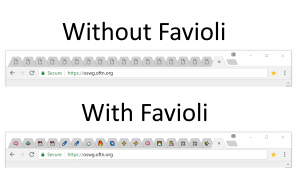
					<content type="html" xml:base="https://eligrey.com/blog/favioli/"><![CDATA[<p><a href="https://favioli.com"><img src="https://s.w.org/images/core/emoji/17.0.2/72x72/1f92f.png" alt="🤯" class="wp-smiley" style="height: 1em; max-height: 1em;" /> Favioli</a> is a productivity extension that makes it easier to recognize tabs within Chrome.</p>
<p>Favioli was originally inspired by two things. The first thing that spurred the idea was Eli Grey&#8217;s personal site and its use of <a href="https://github.com/eligrey/emoji-favicon-toolkit">Emoji Favicon Toolkit</a> to make randomized emoji favicons. The favicon of their site shows different emoji on-load that persist within a session. It&#8217;s pretty creative and fun! This was the creative inspiration for Favioli.</p>
<p>There is an <a href="https://eligrey.com/blog/wp-content/themes/eligrey.com/js/favicon.js">Emoji Favicon Toolkit usage example</a> here on eligrey.com.</p>
<p>The practical inspiration for Favioli came from my day job. We have a lot of internal tools and sites, and they tend to either not have favicons, or have the standard Sony logo. For me this was a bit of a pain, because I love to pin my tabs. I couldn&#8217;t tell these sites apart.</p>
<p>I could use a Chrome extension that lets me set custom favicons, but then I&#8217;d have to go through and specify each one. If I were to use emojis, I wouldn&#8217;t have to deal with finding art for each individual site, and I could make something that could automatically make all of these pages recognizable at a glance.</p>
<p><img fetchpriority="high" decoding="async" class="wp-image-600 aligncenter" src="https://eligrey.com/blog/wp-content/uploads/2018/08/comparison-300x188.png" alt="" width="673" height="422" srcset="https://eligrey.com/blog/wp-content/uploads/2018/08/comparison-300x188.png 300w, https://eligrey.com/blog/wp-content/uploads/2018/08/comparison-768x480.png 768w, https://eligrey.com/blog/wp-content/uploads/2018/08/comparison-1024x640.png 1024w" sizes="(max-width: 673px) 100vw, 673px" /></p>
<p>This project has been a fun exploration of javascript strings, chrome extensions, and browser/os string support.</p>
<p>As we look through everything, feel free to follow along by looking at Favioli&#8217;s <a href="https://github.com/ivebencrazy/favioli">source code</a>! All the Favioli code that is my own is licensed with the <a href="https://unlicense.org/">Unlicense</a>, so feel free to go crazy with it.</p>
<p><span id="more-542"></span></p>
<h2>Structure of a Browser Extension</h2>
<p>There are essentially 4 pieces of any fully-local web extension that modifies a web page:</p>
<ul>
<li>Options: The internal website that extensions use for full-screen setting updates</li>
<li>Popup: The mini-website that pops up when you click the extension icon</li>
<li>Background: The background extension process that does stuff&#8230; in the background&#8230;</li>
<li>ContentScript: The script that gets added to websites you visit in your web browser.</li>
</ul>
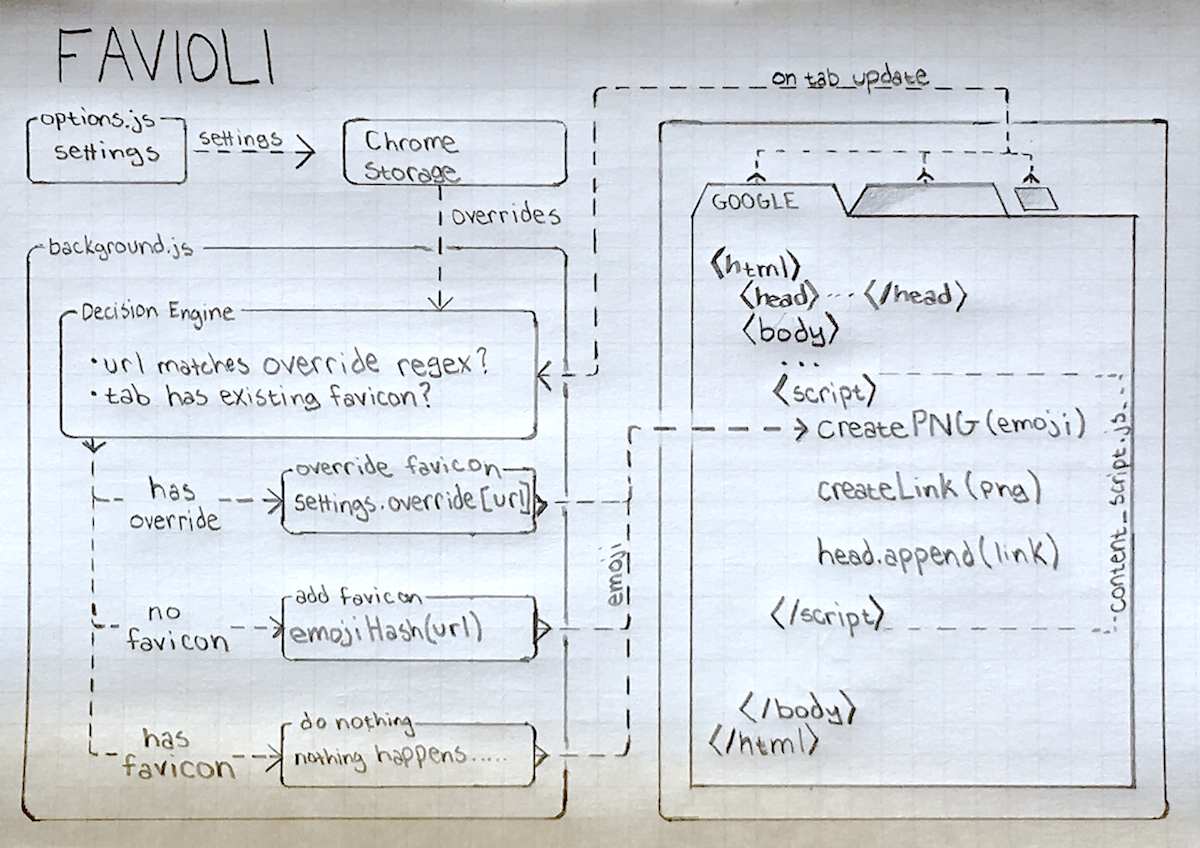
<p>We use all of these except popup for Favioli.&nbsp; The general structure of our extension looks like this:</p>
<p><img decoding="async" class=" aligncenter" src="https://eligrey.com/blog/wp-content/favioli/favioli-structure.png" width="649" height="458"></p>
<h3>Settings: Options and Popup Pages</h3>
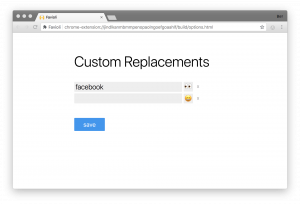
<p>This is the simplest piece of Favioli, and for a good reason; it doesn&#8217;t really do much. All we do here is run a basic website, &#8220;options.html&#8221;, which saves data to a browser-provided storage mechanism. Similar to using localStorage, key differences being that it can sync between different browsers on multiple computers, and is available to other areas of our Chrome Extension that don&#8217;t interact with a webpage. What this boils down to in Favioli is simply saving custom overrides and, in the future, things like icon packs and other settings.</p>
<p><img decoding="async" class=" wp-image-597 aligncenter" src="https://eligrey.com/blog/wp-content/uploads/2018/08/Options-300x204.png" alt="" width="643" height="437" srcset="https://eligrey.com/blog/wp-content/uploads/2018/08/Options-300x204.png 300w, https://eligrey.com/blog/wp-content/uploads/2018/08/Options-768x522.png 768w, https://eligrey.com/blog/wp-content/uploads/2018/08/Options-1024x696.png 1024w, https://eligrey.com/blog/wp-content/uploads/2018/08/Options.png 1980w" sizes="(max-width: 643px) 100vw, 643px" /></p>
<p>The most complicated piece of the options page is the emoji selector, adapted from Dominic Valenicana&#8217;s <a href="https://github.com/Kiricon/emoji-selector">Emoji Selector</a>. We use this to define a custom HTML element that we can use for the options page.</p>
<p>One thing we haven&#8217;t implemented in Favioli is a popup page. In Chrome Extension land, the &#8220;popup&#8221; is the mini-site that shows up when you click the extenstion icon. We currently don&#8217;t use this for Favioli, but it would be extremely useful for quick-pinning specific emojis to sites we are currently visiting. It would essentially follow the same formula as our Options page, though; featuring a user interface that simply feeds information to our background process.</p>
<h3>Background: The Decision Engine</h3>
<p>The Background process is Favioli&#8217;s primary decision engine. It takes information from our content script and background process, and spits the correct emoji to each page. Our decision is a simple priority list: we just check each item and use the first rule to apply:</p>
<table style="font-size: medium;">
<thead>
<tr>
<th>Priority</th>
<th>Rule</th>
</tr>
</thead>
<tbody>
<tr>
<td>1</td>
<td><strong>User-set Overrides</strong>: If a user has specified a favicon match via the options page, then the site will use that favicon.</td>
</tr>
<tr>
<td>2</td>
<td><strong>Site Default</strong>: If the site has a favicon, then use that.</td>
</tr>
<tr>
<td>3</td>
<td><strong>Random Emoji</strong>: If the site has not natural favicon, we generate a random one via a hashing algorithm.</td>
</tr>
</tbody>
</table>
<p>The user-set overrides and site defaults are pretty straightforward; we can match pieces of a url, or match a regex. If it doesn&#8217;t use those, then fall back to the site&#8217;s default favicon. The more interesting case is if a site doesn&#8217;t have a native Favicon.</p>
<h3>Random Emoji Hash</h3>
<p>The reasoning for using a non-cryptographic hash to determine emojis is based on one idea: there&#8217;s no way in hell we&#8217;re storing the settings of each site a person visits. THAT would be a pain in the ass. We use a hash of the website&#8217;s host to map to an emoji with a custom set of char codes (we don&#8217;t really want to randomly apply flag and symbol emojis to all the sites. It&#8217;s just not as fun). This creates a function that creates a random emoji that is always the same for an individual website host, without storing any data.</p>
<h3>Background: Applying the Favicon</h3>
<p>Our decision process is run in 3 cases, which are in the background.js:</p>
<pre lang="javascript">// After we fetch our settings, start listening for url updates
init().then(function() {
  // If a tab updates, check to see whether we should set a favicon
  chrome.tabs.onUpdated.addListener(function(tabId, opts, tab) {
    tryToSetFavicon(tabId, tab)
  })
})

// Manually sent Chrome messages
chrome.runtime.onMessage.addListener(function(message, details) {
  // If we manually say a tab has been updated, try to set favicon
  // This happens when contentScript loads before settings are ready
  if (message === "updated:tab") tryToSetFavicon(details.tab.id, details.tab)

  // If our settings change, re-run init to fetch new settings
  if (message === "updated:settings") init()
})</pre>
<p><code>tryToSetFavicon</code> decides what emoji we want to use and sends it to our content script as an emoji message string, to render our emoji as a favicon. Our content script has a few additional checks for whether we should show our favicon, because there are some checks that can only be done on each individual site.</p>
<p>We can think of our bakground process as determining <strong>WHEN</strong> to set a favicon, and <strong>WHAT</strong> to set it as. The content script will determine <strong>IF</strong> a favicon truly gets set.</p>
<h3>Content Script: Building Text Favicons</h3>
<p>Our content script is the script that runs on each website we visit, appending or replacing the favicon when our background process tells it to. This scripts could be quite a bit simpler than we made it. The reason? Essentially, this boils down to one thing:</p>
<blockquote><p>Favicons are images. Emojis are not images.</p></blockquote>
<p>Unfortunately, favicons still must be images, so we have to do a bit of hackery magic in order to show our native text emojis show up as favicons. This was the clever bit of code Eli wrote that I borrowed to make Favioli an image-less experience.</p>
<p>I should probably mention that there&#8217;s definitely some over-engineering in Favioli. Practically, using the same clever method as Eli for creating legitimate emoji text favicons is not reeeeally necessary, and makes for some complications when it comes to multi-platform support. So this script coooould be &#8220;use a pre-rendered emoji image and add it as a favicon.&#8221; That script would be easy, but WHAT FUN WOULD THAT BE?!?!</p>
<p>Let&#8217;s jump into a condensed version of <a href="https://github.com/ivebencrazy/favioli/blob/master/source/utilities/faviconHelpers.js#L60">the code we use</a>&nbsp;to create our favicons:</p>
<pre lang="javascript">// Initialize canvas and context to render emojis

const PIXEL_GRID = 16 // Standard favIcon size 16x16
const EMOJI_SIZE = 256 // 16 x 16

const canvas = document.createElement("canvas")
canvas.width = canvas.height = EMOJI_SIZE

const context = canvas.getContext("2d")
context.font = `normal normal normal ${EMOJI_SIZE}px/${EMOJI_SIZE}px sans-serif`
context.textAlign = "center"
context.textBaseline = "middle"

function createEmojiUrl(char) {
const { width } = context.measureText(char)

// Bottom and Left of the emoji (where we start drawing on canvas)
// Since favicons are a square, we can use the same number for both
const center = (EMOJI_SIZE + EMOJI_SIZE / PIXEL_GRID) / 2
const scale = Math.min(EMOJI_SIZE / width, 1) // Adjust canvas to fit
const center_scaled = center / scale

// Scale and resize the canvas to adjust for width of emoji
context.clearRect(0, 0, EMOJI_SIZE, EMOJI_SIZE)
context.save()
context.scale(scale, scale)

// context.fillText(char, bottom, left)
context.fillText(char, center_scaled, center_scaled)
context.restore()

// We need it to be an image
return canvas.toDataURL("image/png")</pre>
<p>We make a canvas, draw a centered piece of favicon text, then convert that canvas drawing into a png <a href="https://developer.mozilla.org/en-US/docs/Web/HTTP/Basics_of_HTTP/Data_URIs">data url</a>. We can set favicons with data urls, so at this point, we just need to add our favicon to the site!</p>
<h3>Content Script: Appending Favicons</h3>
<p>The last step of Favioli is appending a favicon to the site we visit. Appending a favicon to an existing site can have a few complications, mainly stemming from the fact that different sites apply their favicons in different ways. We have a few different cases that affect how Favioli adds favicons:</p>
<h4>1. Custom Favicon Path</h4>
<p>This is the easiest to deal with; when a site has a custom favicon path, we can be assured that it has a favicon, and we can either override it or leave it be, depending on our settings.</p>
<h4>2. Weird path changes</h4>
<p>Sometimes a site changes path and expects the favicon to persist through the site. To maintain consistency, and to avoid unnecessary work, favioli memoizes the decision of whether a site has a custom favicon within the context of a session.</p>
<h4>3. No Favicon in the HTML</h4>
<p>When there is no specified favicon, there are two things it could mean. It could mean that a website is either using the default <code>favicon.ico</code>, or it doesn&#8217;t have a favicon. It could be confusing if we try to determine which of these is happening, though. So instead, Favioli simply appends a <code>favicon.ico</code> link after it appends our emoji favicon in cases where we shouldn&#8217;t override the default emoji. This way, our emoji favicon gets overridden by the default one.</p>
<pre lang="javascript">const href = memoizedEmojiUrl(name);

if (existingFavicon) {
  existingFavicon.setAttribute("href", href);
} else {
  const link = createLink(href, EMOJI_SIZE, "image/png");
  existingFavicon = documentHead.appendChild(link);

  if (!shouldOverride) {
    const defaultLink = createLink("/favicon.ico");
    documentHead.appendChild(defaultLink);
  }
}</pre>
<h2>Now we have done it!</h2>
<p>At this point, we have appended a text emoji as a favicon, so we&#8217;ve successfully completed our mission to emoji-fy the universe! With Favioli, we no longer need to worry about the dreaded favicon-less existence that some people still somehow call life.</p>
<h2>Where do we go from here?</h2>
<p>There are a myriad of ways we can extend Favioli in the future. To give you an idea, here are some ideas we have been thinking about:</p>
<h3>Custom sets for Randomly Selected Emojis</h3>
<p>This would be the easiest way to deal with cross-platform compatibility; just change the set that we randomly select from. This will let people better customize their experience.</p>
<h3>Custom pngs as Favicons</h3>
<p>This would create more utility for Favioli. I feel our default offering is better than most favicon replacement extensions. But not being able to set custom pngs is a real killer from being the best one out there. Also, though&#8230; gif favicons. Imagine how hilarious (and technically dumb) that could be. Using pngs as a fallback could also be used for browsers, os that are insufficient for life and don&#8217;t have the new emojis.</p>
<h3>Custom Application Overrides</h3>
<p>It would be cool to be able to override some aspects of page load in a smarter and more fun way. Image <img src="https://s.w.org/images/core/emoji/17.0.2/72x72/1f62d.png" alt="😭" class="wp-smiley" style="height: 1em; max-height: 1em;" /> emojis for 404/500 page responses, <img src="https://s.w.org/images/core/emoji/17.0.2/72x72/1f440.png" alt="👀" class="wp-smiley" style="height: 1em; max-height: 1em;" /> for non-https sites or something like that. These would be configured in settings, but could be a fun way to interact with the web.</p>
<h3>Popup Page</h3>
<p>This is a pretty obvious one; A useful UI update</p>
<h3>Stats for nerds</h3>
<p>Being able to apply Favioli to browser history would be fun. We&#8217;d have to play with permission settings so that Favioli is only enabled on this page, but could be interesting&#8230;</p>
<p>Anywhoooooo</p>
<p><a href="https://favioli.com">This is Favioli</a>! Check it out! Edit the <a href="https://github.com/ivebencrazy/favioli">source code</a> and send a PR if you want to help, or just use it!</p>
<p><img src="https://s.w.org/images/core/emoji/17.0.2/72x72/1f618.png" alt="😘" class="wp-smiley" style="height: 1em; max-height: 1em;" /> <img src="https://s.w.org/images/core/emoji/17.0.2/72x72/2764.png" alt="❤" class="wp-smiley" style="height: 1em; max-height: 1em;" /><img src="https://s.w.org/images/core/emoji/17.0.2/72x72/1f92f.png" alt="🤯" class="wp-smiley" style="height: 1em; max-height: 1em;" />,<br />
<a href="https://bpev.me">Ben Pevsner</a><!--

<img loading="lazy" decoding="async" class=" wp-image-599 aligncenter" src="https://eligrey.com/blog/wp-content/uploads/2018/08/29526742_10215362185271619_136158773_o-300x225.png" alt="" width="563" height="422" srcset="https://eligrey.com/blog/wp-content/uploads/2018/08/29526742_10215362185271619_136158773_o-300x225.png 300w, https://eligrey.com/blog/wp-content/uploads/2018/08/29526742_10215362185271619_136158773_o-768x577.png 768w, https://eligrey.com/blog/wp-content/uploads/2018/08/29526742_10215362185271619_136158773_o-1024x769.png 1024w, https://eligrey.com/blog/wp-content/uploads/2018/08/29526742_10215362185271619_136158773_o.png 1065w" sizes="auto, (max-width: 563px) 100vw, 563px" />--></p>
]]></content>
		
					<link rel="replies" type="text/html" href="https://eligrey.com/blog/favioli/#comments" thr:count="4" />
			<link rel="replies" type="application/atom+xml" href="https://eligrey.com/blog/favioli/feed/atom/" thr:count="4" />
			<thr:total>4</thr:total>
			</entry>
		<entry>
		<author>
			<name>Devin Samarin</name>
							<uri>https://dsamar.in/</uri>
						</author>

		<title type="html"><![CDATA[Zerodrop]]></title>
		<link rel="alternate" type="text/html" href="https://eligrey.com/blog/zerodrop/" />

		<id>https://eligrey.com/blog/?p=572</id>
		<updated>2024-06-17T02:50:55Z</updated>
		<published>2018-05-23T12:00:35Z</published>
		<category scheme="https://eligrey.com/blog" term="Uncategorized" />
		<summary type="html"><![CDATA[We are announcing Zerodrop, an open-source stealth URL toolkit optimized for bypassing censorship filters and dropping malware. Zerodrop is written in Go and features a powerful web UI that supports geofencing, datacenter IP filtering, blocklist training, manual blocklisting/allowlisting, and advanced payload configuration! Zerodrop can help you elude the detection of the automatic URL scanners used on [&#8230;]]]></summary>

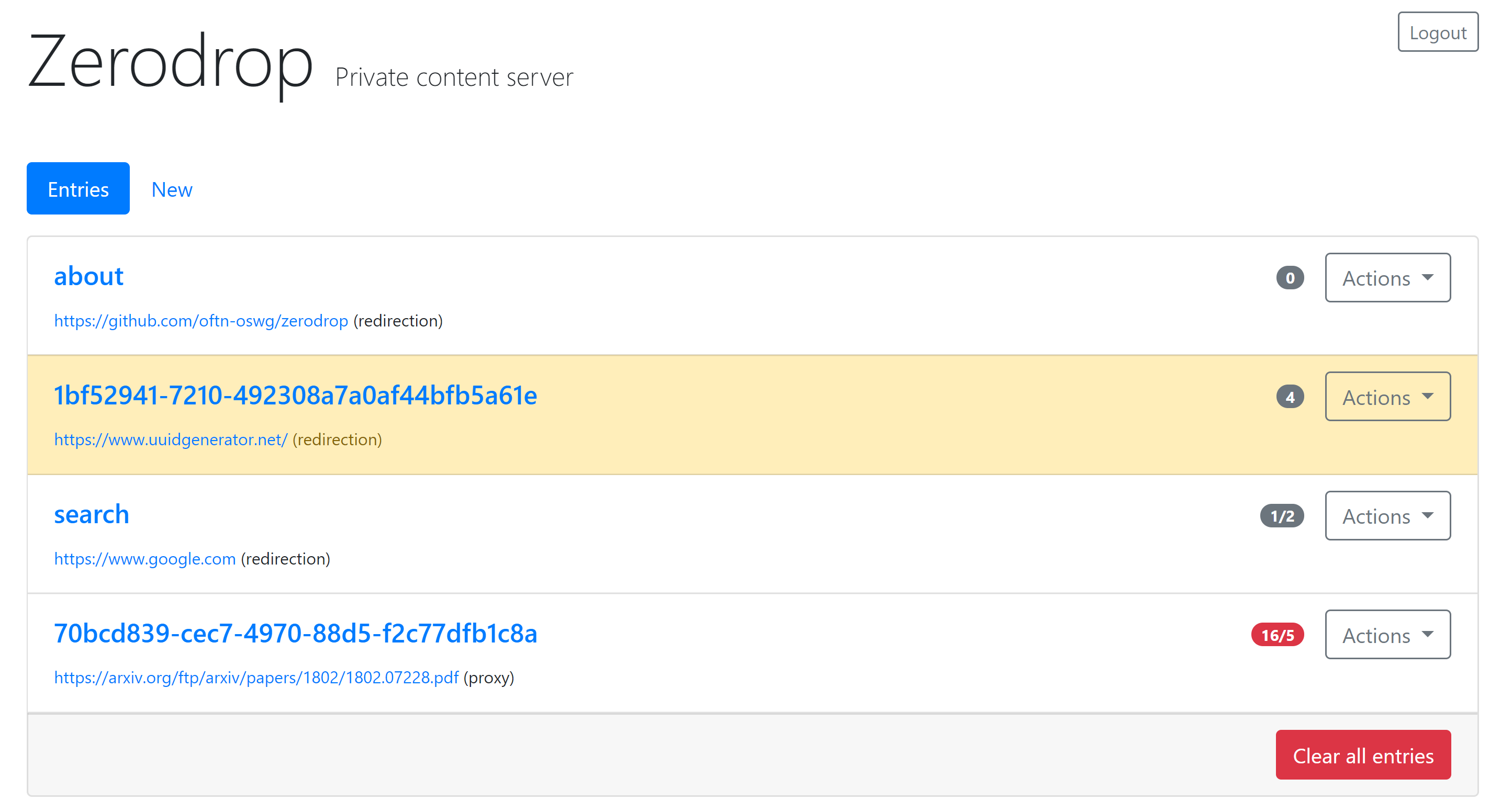
					<content type="html" xml:base="https://eligrey.com/blog/zerodrop/"><![CDATA[<p>We are announcing <a href="https://go.eligrey.com/zerodrop">Zerodrop</a>, an open-source stealth URL toolkit optimized for bypassing censorship filters and dropping malware. Zerodrop is written in <a href="https://golang.org/">Go</a> and features a powerful web UI that supports geofencing, datacenter IP filtering, blocklist training, manual blocklisting/allowlisting, and advanced payload configuration!</p>
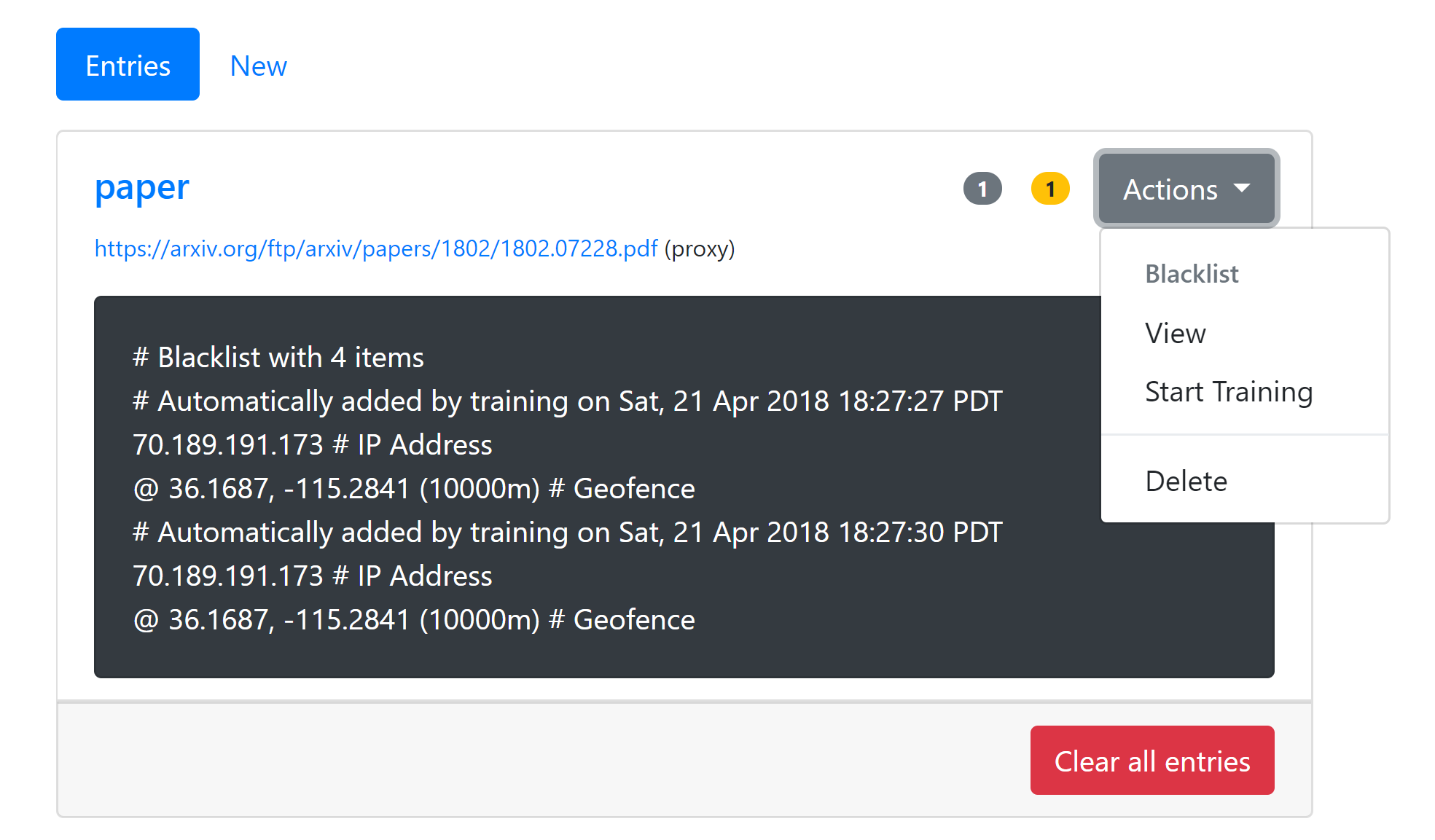
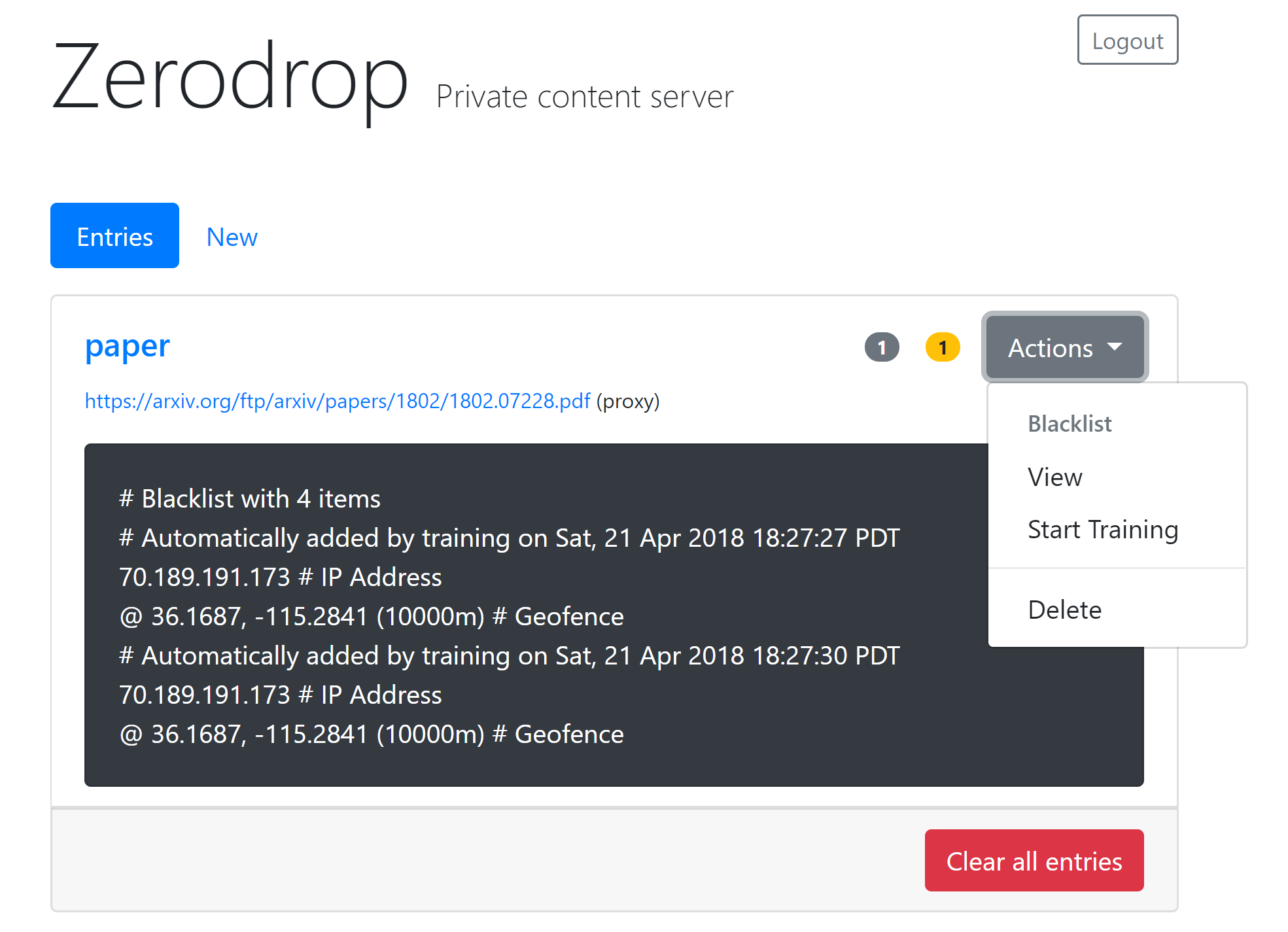
<p>Zerodrop can help you elude the detection of the automatic URL scanners used on popular social media platforms. You can easily blocklist traffic from the datacenters and public Tor exit nodes commonly used by URL scanners. For scanners not included in our default blocklists, you can activate blocklist training mode to automatically log the IP addresses of subsequent requests to a blocklist.</p>
<p>When used for anti-forensic malware distribution, Zerodrop is most effective paired with a server-side compromise of a popular trusted domain. This further complicates incident analysis and breach detection.</p>
<h2>Live demo</h2>
<p>A live demo is available at <a href="https://dangerous.link">dangerous.link</a>. Please keep your usage legal. Infrastructural self-destruct has been disabled for the demo. To prevent automated abuse, users may be required to complete CAPTCHA challenges in order to create new entries.</p>
<p>Update: We have decided to restrict access to the demo to prevent abuse.</p>
<p><div id="attachment_563" style="width: 797px" class="wp-caption aligncenter"><a class="wp-caption aligncenter" style="display: inline-block; max-width: 80vw; overflow: auto;" title="Try the Zerodrop public demo" href="https://dangerous.link"><img loading="lazy" decoding="async" aria-describedby="caption-attachment-563" class="size-full wp-image-563" src="https://eligrey.com/blog/wp-content/uploads/2018/05/zerodrop-training-actions-no-header.png" alt="" width="787" height="461" srcset="https://eligrey.com/blog/wp-content/uploads/2018/05/zerodrop-training-actions-no-header.png 1969w, https://eligrey.com/blog/wp-content/uploads/2018/05/zerodrop-training-actions-no-header-300x176.png 300w, https://eligrey.com/blog/wp-content/uploads/2018/05/zerodrop-training-actions-no-header-768x450.png 768w, https://eligrey.com/blog/wp-content/uploads/2018/05/zerodrop-training-actions-no-header-1024x600.png 1024w" sizes="auto, (max-width: 787px) 100vw, 787px" /></a><p id="caption-attachment-563" class="wp-caption-text">Zerodrop geofencing &amp; blocklist training</p></div></p>
<p>
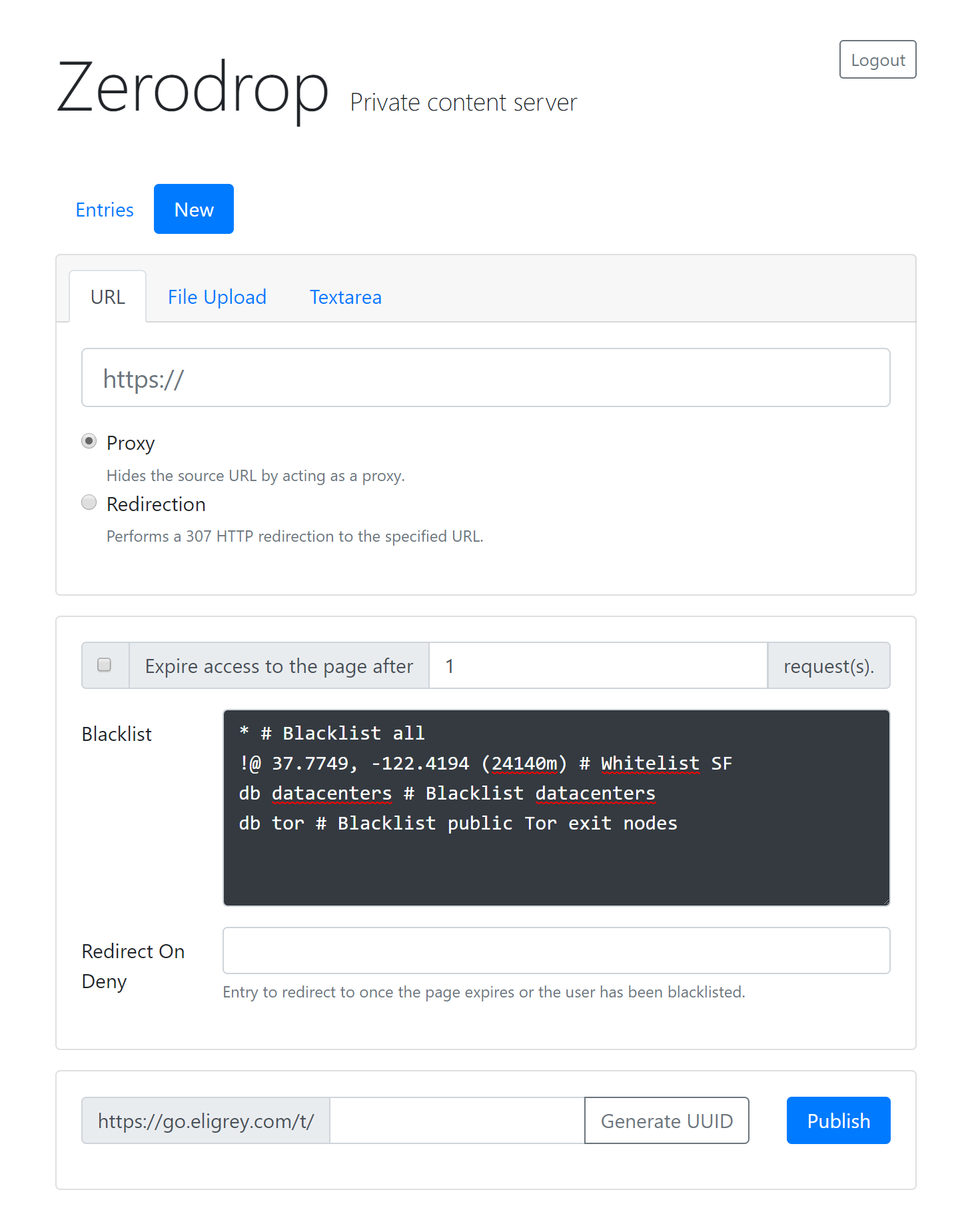
<a href='https://eligrey.com/blog/wp-content/uploads/2018/05/zerodrop-new-entry-page.png'><img loading="lazy" decoding="async" width="150" height="150" src="https://eligrey.com/blog/wp-content/uploads/2018/05/zerodrop-new-entry-page-150x150.png" class="attachment-thumbnail size-thumbnail" alt="Screenshot of Zerodrop&#039;s new entry page" /></a>
<a href='https://eligrey.com/blog/wp-content/uploads/2018/05/zerodrop-dash.png'><img loading="lazy" decoding="async" width="150" height="150" src="https://eligrey.com/blog/wp-content/uploads/2018/05/zerodrop-dash-150x150.png" class="attachment-thumbnail size-thumbnail" alt="" /></a>
<a href='https://eligrey.com/blog/wp-content/uploads/2018/05/zerodrop-training-actions.png'><img loading="lazy" decoding="async" width="150" height="150" src="https://eligrey.com/blog/wp-content/uploads/2018/05/zerodrop-training-actions-150x150.png" class="attachment-thumbnail size-thumbnail" alt="" /></a>
</p>
<p><span id="more-572"></span></p>
<h2>Auto-expiration</h2>
<p>Entries may expire after reaching an optional request limit. After an entry expires, all requests to the entry trigger the denial condition resulting in 404 or a redirect.</p>
<h2>Blocklisting, allowlisting, and geofencing</h2>
<p>We support gitignore-style blocklists processed line-by-line top to bottom. Blocklists consist of allowlist inversions, IP address ranges, geofences, and ipcat queries, interspersed with comments. We added IPv6 support to ipcat to make it datacenter traffic detection more reliable.</p>
<p>Geofencing is implemented using MaxMind&#8217;s GeoIP databases and configured inside an entry&#8217;s blocklist and allowlist. Geofencing entries are specified in the form <code>@ lat, long (radius)</code> for blocklisting and the inverted form <code>!@ lat, long (radius)</code> for allowlisting. Currently we only support radial geofences. A graphical geofencing UI is planned for a future release.</p>
<p>Traffic from datacenters and public Tor exit nodes is blocked using a new version of ipcat, <a href="https://github.com/client9/ipcat/pull/139">which now includes IPv6 support</a>. The syntax to block each is <code>db datacenters</code> and <code>db tor</code>.</p>
<p>Redirects to other Zerodrop payloads may optionally be specified in the &#8220;Redirect On Deny&#8221; field under the blocklist. Payloads can be redirects, proxies, uploaded files, or plain text with a MIME media type.</p>
<h3>Example blocklist</h3>
<p>The following example blocklist blocks datacenters, public tor exit nodes, and everyone outside of San Francisco.</p>
<pre><code># Block all
*
# Allow San Francisco
!@ 37.7749, -122.4194 (24140m)
# Block datacenters
db datacenters
# Block public Tor exit nodes
db tor</code></pre>
<h2>Anti-censorship</h2>
<p>This tool is useful for evading automatic censorship filters in use on popular social media websites. With blocklist training and ipcat, it&#8217;s very easy to build up a blocklist to block these filters and continue to share content that would otherwise be automatically censored on most sites. Zerodrop also includes CloudFlare integration to help hide the IP address of your server and avoid further blocklisting from censorship filters.</p>
<h2>Anti-forensics</h2>
<p>Complete infrastructure self-destruct can be triggered with blocklist redirects to the &#8220;<img src="https://s.w.org/images/core/emoji/17.0.2/72x72/1f4a3.png" alt="💣" class="wp-smiley" style="height: 1em; max-height: 1em;" />&#8221; internal identifier. When triggered, Zerodrop will attempt to delete all traces of itself from the host system. External navigation to &#8220;<code>/&#x1f4a3;</code>&#8221; will not trigger self-destruct.</p>
<p><div id="attachment_585" style="width: 729px" class="wp-caption aligncenter"><a style="display: inline-block; max-width: 80vw; overflow: auto;" href="https://eligrey.com/blog/wp-content/uploads/2018/05/zerodrop-self-destruct.png"><img loading="lazy" decoding="async" aria-describedby="caption-attachment-585" class="wp-image-585 size-full" src="https://eligrey.com/blog/wp-content/uploads/2018/05/zerodrop-self-destruct.png" alt="" width="719" height="375" srcset="https://eligrey.com/blog/wp-content/uploads/2018/05/zerodrop-self-destruct.png 1799w, https://eligrey.com/blog/wp-content/uploads/2018/05/zerodrop-self-destruct-300x156.png 300w, https://eligrey.com/blog/wp-content/uploads/2018/05/zerodrop-self-destruct-768x400.png 768w, https://eligrey.com/blog/wp-content/uploads/2018/05/zerodrop-self-destruct-1024x534.png 1024w" sizes="auto, (max-width: 719px) 100vw, 719px" /></a><p id="caption-attachment-585" class="wp-caption-text">Example usage of Zerodrop&#8217;s self-destruct functionality</p></div></p>
<h2>What&#8217;s next?</h2>
<p>There are many areas where the current release of Zerodrop can be improved. Over the coming months we hope to implement some of the following changes. This is an open source project, so feel free to contribute yourself by <a href="https://github.com/oftn-oswg/zerodrop/issues">reporting issues and submitting pull requests</a>.</p>
<h3>Blocklist groups &amp; machine learning</h3>
<p>Blocklists will get an improved UI and reusable blocklist groups. Currently you must copy and paste blocklists and allowlists to copy list information into new entries. We can also improve training mechanisms with paid IP address services and machine learning techniques.</p>
<h3>Geofencing improvements</h3>
<p>In addition to the currently-support radial geofences, we plan to implement polygonal geofencing and a graphical geofence creation widget for the new entry UI. It will probably be based off Google Maps and require an API key for deployment. For now, the text-based blocklist should be just as powerful albeit less visually accessible.</p>
]]></content>
		
					<link rel="replies" type="text/html" href="https://eligrey.com/blog/zerodrop/#comments" thr:count="0" />
			<link rel="replies" type="application/atom+xml" href="https://eligrey.com/blog/zerodrop/feed/atom/" thr:count="0" />
			<thr:total>0</thr:total>
			</entry>
		<entry>
		<author>
			<name>Eli Grey</name>
					</author>

		<title type="html"><![CDATA[Google Inbox spoofing vulnerability]]></title>
		<link rel="alternate" type="text/html" href="https://eligrey.com/blog/google-inbox-spoofing-vulnerability/" />

		<id>https://eligrey.com/blog/?p=541</id>
		<updated>2018-11-21T08:56:43Z</updated>
		<published>2018-04-27T22:55:32Z</published>
		<category scheme="https://eligrey.com/blog" term="Uncategorized" />
		<summary type="html"><![CDATA[On May 4th, 2017 I discovered and privately reported a recipient spoofing vulnerability in Google Inbox. I noticed that the composition box always hid the email addresses of named recipients without providing a way to inspect the actual email address, and figured out how to abuse this with mailto: links containing named recipients. The link [&#8230;]]]></summary>

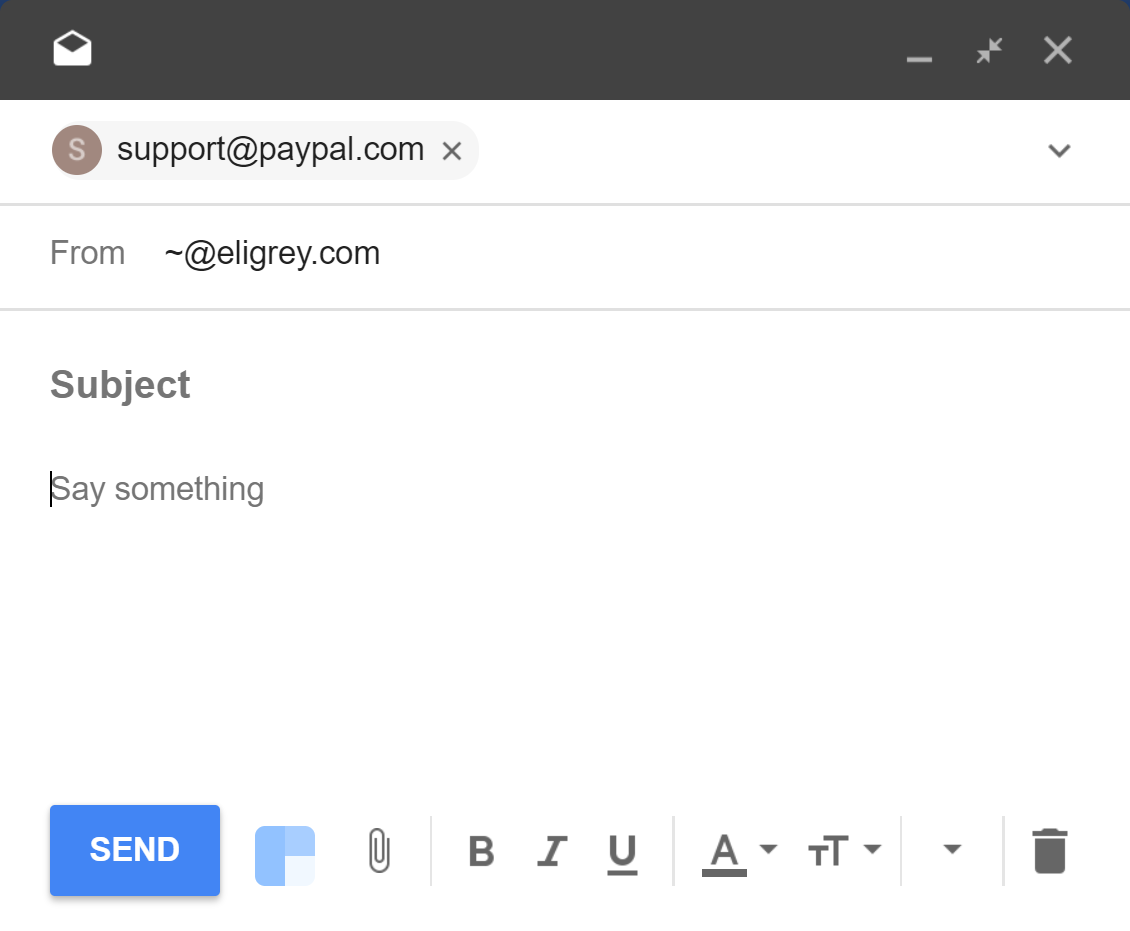
					<content type="html" xml:base="https://eligrey.com/blog/google-inbox-spoofing-vulnerability/"><![CDATA[<p>On May 4th, 2017 I discovered and privately reported a recipient spoofing vulnerability in Google Inbox. I noticed that the composition box always hid the email addresses of named recipients without providing a way to inspect the actual email address, and figured out how to abuse this with mailto: links containing named recipients.</p>
<p>The link <a href="https://go.eligrey.com/security/google-inbox-spoofing-vulnerability-exploit-direct.poc">mailto:​&#8221;support@paypal.com&#8221;​&lt;scam@phisher.example&gt;</a> shows up as &#8220;support@paypal.com&#8221; in the Google Inbox composition window, visually identical to any email actually sent to PayPal. </p>
<p>In order to exploit this vulnerability, the target user only needs to click on a malicious mailto: link. It can also be triggered by clicking on a direct link to Inbox&#8217;s mailto: handler page, as shown in <a href="https://go.eligrey.com/security/google-inbox-spoofing-vulnerability-exploit.poc" target="_blank" rel="nofollow noopener">this example exploit link</a>.</p>
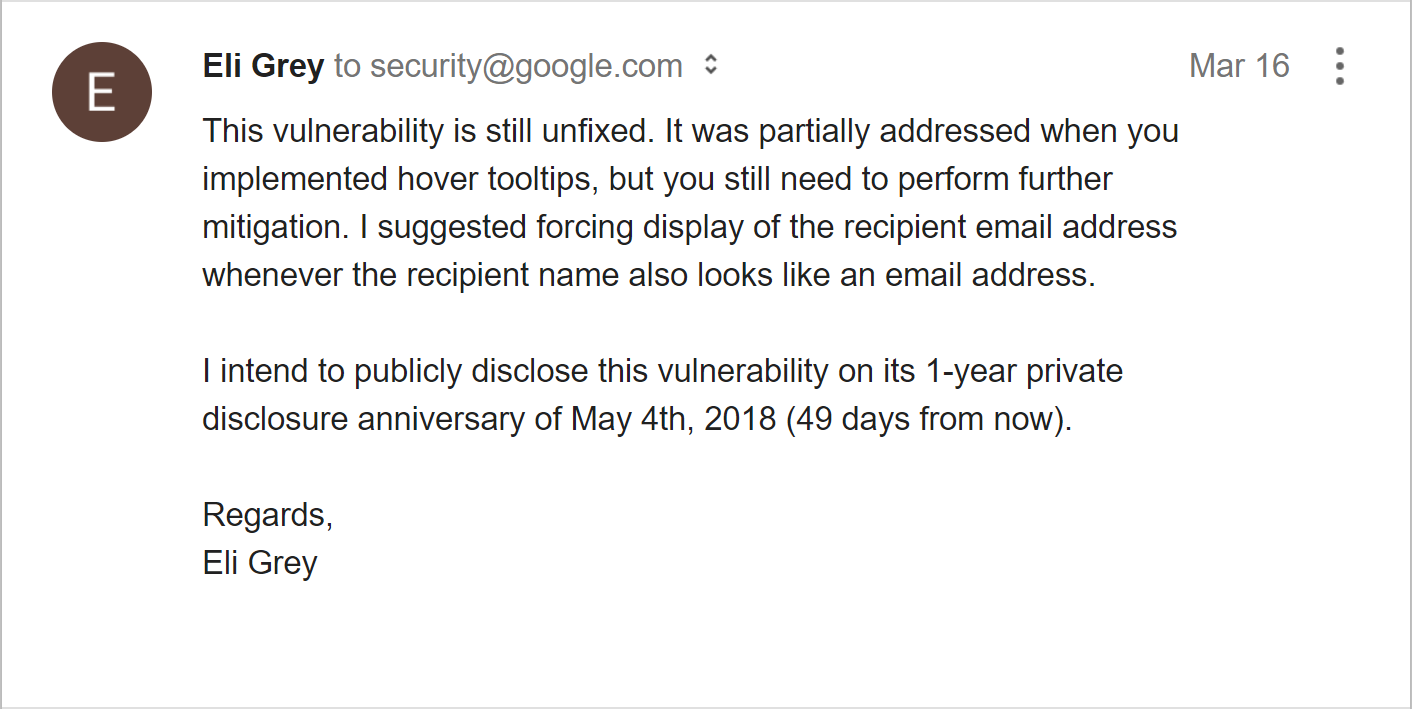
<p>This vulnerability was still unfixed in all Google Inbox apps as of May 4th, 2018, a year after private disclosure.</p>
<p><strong>Update</strong>: <a href="https://www.xda-developers.com/google-fixes-flaw-spoof-inbox-by-gmail/">This vulnerability has been fixed in the Google Inbox webapp</a> as of May 18, 2018. The Android app still remains vulnerable.</p>
<div id="attachment_549" class="wp-caption aligncenter" style="max-width: 575px; overflow: auto;">
<p><a href="https://eligrey.com/blog/wp-content/uploads/2018/04/google-inbox-vulnerability-poc.png"><img loading="lazy" decoding="async" class="wp-image-549 size-full" src="https://eligrey.com/blog/wp-content/uploads/2018/04/google-inbox-vulnerability-poc.png" sizes="auto, (max-width: 565px) 100vw, 565px" srcset="https://eligrey.com/blog/wp-content/uploads/2018/04/google-inbox-vulnerability-poc.png 1130w, https://eligrey.com/blog/wp-content/uploads/2018/04/google-inbox-vulnerability-poc-300x247.png 300w, https://eligrey.com/blog/wp-content/uploads/2018/04/google-inbox-vulnerability-poc-768x633.png 768w, https://eligrey.com/blog/wp-content/uploads/2018/04/google-inbox-vulnerability-poc-1024x844.png 1024w" alt="" width="565" height="466" /></a></p>
<p class="wp-caption-text">The recipient “support@paypal.com” being spoofed in the Google Inbox composition window. The actual recipient is “scam@phisher.example”.</p>
</div>
<p><span id="more-541"></span><br />
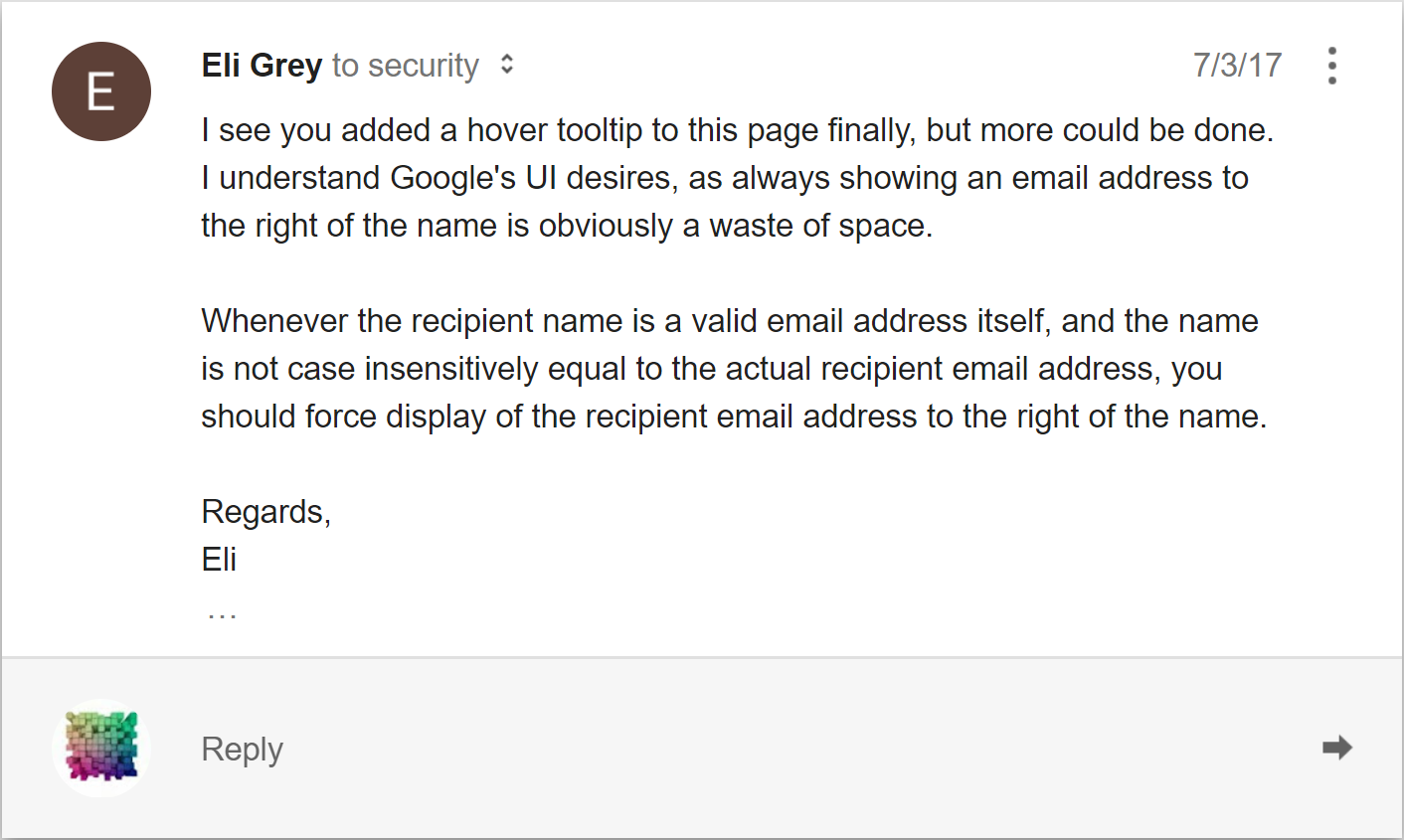
On July 3rd, 2017 I noticed that Google had added hover tooltips to this field in Inbox, which made it possible for users to manually confirm the recipient email address. The default presentation of the email address was still vulnerable to spoofing, so I sent another email to Google.</p>
<p><a href="https://eligrey.com/blog/wp-content/uploads/2018/04/google-inbox-vulnerability-update.png"><img loading="lazy" decoding="async" class="aligncenter size-full wp-image-546" src="https://eligrey.com/blog/wp-content/uploads/2018/04/google-inbox-vulnerability-update.png" alt="" width="706" height="423" srcset="https://eligrey.com/blog/wp-content/uploads/2018/04/google-inbox-vulnerability-update.png 1412w, https://eligrey.com/blog/wp-content/uploads/2018/04/google-inbox-vulnerability-update-300x180.png 300w, https://eligrey.com/blog/wp-content/uploads/2018/04/google-inbox-vulnerability-update-768x460.png 768w, https://eligrey.com/blog/wp-content/uploads/2018/04/google-inbox-vulnerability-update-1024x613.png 1024w" sizes="auto, (max-width: 706px) 100vw, 706px" /></a></p>
<p>I received no response for over 8 months, so I sent yet another email on March 16th, 2018.</p>
<p><a href="https://eligrey.com/blog/wp-content/uploads/2018/04/google-inbox-vulnerability-update-2.png"><img loading="lazy" decoding="async" class="aligncenter wp-image-547 size-full" title="I decided to disclose this 1 week early ¯\_(ツ)_/¯" src="https://eligrey.com/blog/wp-content/uploads/2018/04/google-inbox-vulnerability-update-2.png" alt="" width="706" height="354" srcset="https://eligrey.com/blog/wp-content/uploads/2018/04/google-inbox-vulnerability-update-2.png 1412w, https://eligrey.com/blog/wp-content/uploads/2018/04/google-inbox-vulnerability-update-2-300x151.png 300w, https://eligrey.com/blog/wp-content/uploads/2018/04/google-inbox-vulnerability-update-2-768x386.png 768w, https://eligrey.com/blog/wp-content/uploads/2018/04/google-inbox-vulnerability-update-2-1024x514.png 1024w" sizes="auto, (max-width: 706px) 100vw, 706px" /></a></p>
<p>Nine months after sending my emails I received this response, which doesn&#8217;t lead me to believe that Google is serious about fixing this vulnerability.</p>
<p><a href="https://eligrey.com/blog/wp-content/uploads/2018/04/google-inbox-vulnerability-update-3.png"><img loading="lazy" decoding="async" class="aligncenter size-full wp-image-548" src="https://eligrey.com/blog/wp-content/uploads/2018/04/google-inbox-vulnerability-update-3.png" alt="" width="706" height="245" srcset="https://eligrey.com/blog/wp-content/uploads/2018/04/google-inbox-vulnerability-update-3.png 1412w, https://eligrey.com/blog/wp-content/uploads/2018/04/google-inbox-vulnerability-update-3-300x104.png 300w, https://eligrey.com/blog/wp-content/uploads/2018/04/google-inbox-vulnerability-update-3-768x267.png 768w, https://eligrey.com/blog/wp-content/uploads/2018/04/google-inbox-vulnerability-update-3-1024x355.png 1024w" sizes="auto, (max-width: 706px) 100vw, 706px" /></a></p>
]]></content>
		
					<link rel="replies" type="text/html" href="https://eligrey.com/blog/google-inbox-spoofing-vulnerability/#comments" thr:count="1" />
			<link rel="replies" type="application/atom+xml" href="https://eligrey.com/blog/google-inbox-spoofing-vulnerability/feed/atom/" thr:count="1" />
			<thr:total>1</thr:total>
			</entry>
		<entry>
		<author>
			<name>Eli Grey</name>
					</author>

		<title type="html"><![CDATA[Opera UXSS vulnerability regression]]></title>
		<link rel="alternate" type="text/html" href="https://eligrey.com/blog/opera-uxss-vulnerability-regression/" />

		<id>https://eligrey.com/blog/?p=534</id>
		<updated>2019-02-12T02:52:25Z</updated>
		<published>2018-01-12T04:06:35Z</published>
		<category scheme="https://eligrey.com/blog" term="Uncategorized" />
		<summary type="html"><![CDATA[Opera users were vulnerable to a publicly-disclosed UXSS exploit for most of 2010-2012. I privately disclosed a UXSS vulnerability (complete SOP bypass) to Opera Software in April 2010, and recently discovered that Opera suffered a regression of this issue and continued to be vulnerable for over two years after disclosure. The vulnerability was that data: [&#8230;]]]></summary>

					<content type="html" xml:base="https://eligrey.com/blog/opera-uxss-vulnerability-regression/"><![CDATA[<p>Opera users were vulnerable to a publicly-disclosed UXSS exploit for most of 2010-2012.</p>
<p>I privately disclosed a <abbr title="universal cross-site scripting">UXSS</abbr> vulnerability (complete <abbr title="same-origin policy">SOP</abbr> bypass) to Opera Software in April 2010, and recently discovered that Opera suffered a regression of this issue and continued to be vulnerable for over two years after disclosure. The vulnerability was that data: URIs could attain&nbsp;same-origin privileges to non-opening origins across multiple redirects.</p>
<p>I asked for a status update 50 days after disclosing the vulnerability, as another Opera beta release was about to be published. Opera responded by saying that they were pushing back the fix.</p>
<p><a href="https://twitter.com/sephr/status/16445082479">I publicly disclosed the vulnerability with a <abbr title="proof-of-concept">PoC</abbr> exploit on Twitter</a> on June 15, 2010<!-- and reddit (https://www.reddit.com/r/netsec/comments/cgu93/opera_data_uri_xss_reddit_upvote_exploit/), but poor reading comprehension from people who don't understand the words "PoC exploit" resulted in a flurry of downvotes :/ -->. This was slightly irresponsible of me (at least I&nbsp;included a <a href="https://github.com/eligrey/code.eligrey.com-archive/blob/master/sec/opera/data-uri-xss/twitter-poc.js#L58">kill switch</a>), but please keep in mind that I was 16 at the time. The next week, Opera published new mainline releases (10.54 for Windows/Mac and 10.11 for Linux) and said that those releases should fix the vulnerability. I tested my PoC and it seemed to be fixed.</p>
<p>Shortly after, this vulnerability regressed back into Opera without me noticing. I suspect that this was due to the rush to fix their mainline branch, and lack of coordination between their security and release teams. The regression was caught two years later by&nbsp;<a href="https://twitter.com/M_script">M_script</a>&nbsp;on the <a href="https://rdot.org/forum/showthread.php?t=2444">RDot Forums</a>, and documented in English by <a href="https://labs.detectify.com/2012/10/05/universal-xss-in-opera/">Detectify Labs</a>.</p>
<p>Opera Software&#8217;s management should not have allowed this major flaw to regress for so long.</p>
<h2>Security advisories</h2>
<ul>
<li>Initial fix (June 22, 2010):&nbsp;<a href="https://web.archive.org/web/20130807105806/http://www.opera.com/security/advisory/955">http://www.opera.com/security/advisory/955/</a> (CVE-2010-2665)</li>
<li>Regression fix (November 11, 2012):&nbsp;<a href="https://web.archive.org/web/20121111095052/http://www.opera.com/support/kb/view/1031/">http://www.opera.com/support/kb/view/1031/</a> (CVE-2012-6463)</li>
</ul>
]]></content>
		
					<link rel="replies" type="text/html" href="https://eligrey.com/blog/opera-uxss-vulnerability-regression/#comments" thr:count="1" />
			<link rel="replies" type="application/atom+xml" href="https://eligrey.com/blog/opera-uxss-vulnerability-regression/feed/atom/" thr:count="1" />
			<thr:total>1</thr:total>
			</entry>
		<entry>
		<author>
			<name>Eli Grey</name>
					</author>

		<title type="html"><![CDATA[Bedford/St. Martin&#8217;s data breach]]></title>
		<link rel="alternate" type="text/html" href="https://eligrey.com/blog/bedford-st-martins-data-breach/" />

		<id>https://eligrey.com/blog/?p=515</id>
		<updated>2017-05-20T22:14:29Z</updated>
		<published>2017-05-19T12:01:56Z</published>
		<category scheme="https://eligrey.com/blog" term="Uncategorized" />
		<summary type="html"><![CDATA[Some time between Aug 27, 2012 and May 3, 2014, the Macmillan Publishers subsidiary Bedford/St. Martin&#8217;s suffered a data breach that leaked the unique email address that I provided to them. I have previously informed them of the breach and it appears that they do not care to investigate. I don&#8217;t appreciate large companies getting [&#8230;]]]></summary>

					<content type="html" xml:base="https://eligrey.com/blog/bedford-st-martins-data-breach/"><![CDATA[<p>Some time between Aug 27, 2012 and May 3, 2014, the <a href="https://us.macmillan.com/">Macmillan Publishers</a> subsidiary <a href="https://en.wikipedia.org/wiki/Bedford-St._Martin%27s">Bedford/St. Martin&#8217;s</a> suffered a data breach that leaked the unique email address that I provided to them. I have previously informed them of the breach and it appears that they do not care to investigate.</p>
<p>I don&#8217;t appreciate large companies getting away with not disclosing or investigating data breaches, so I&#8217;m disclosing it for them.</p>
]]></content>
		
					<link rel="replies" type="text/html" href="https://eligrey.com/blog/bedford-st-martins-data-breach/#comments" thr:count="0" />
			<link rel="replies" type="application/atom+xml" href="https://eligrey.com/blog/bedford-st-martins-data-breach/feed/atom/" thr:count="0" />
			<thr:total>0</thr:total>
			</entry>
		<entry>
		<author>
			<name>Eli Grey</name>
					</author>

		<title type="html"><![CDATA[CPU core estimation with JavaScript]]></title>
		<link rel="alternate" type="text/html" href="https://eligrey.com/blog/cpu-core-estimation-with-javascript/" />

		<id>http://eligrey.com/blog/?p=444</id>
		<updated>2017-07-11T08:44:52Z</updated>
		<published>2013-05-24T17:32:10Z</published>
		<category scheme="https://eligrey.com/blog" term="Uncategorized" />
		<summary type="html"><![CDATA[(Update) Standardization I have standardized navigator.cores as navigator.hardwareConcurrency, and it is now supported natively in Chrome, Safari, Firefox, and Opera. Our polyfill has renamed the APIs accordingly. Since the initial blog post, Core Estimator has been updated to estimate much faster and now has instant estimation in Chrome through PNaCl. navigator.cores So you just built some [&#8230;]]]></summary>

					<content type="html" xml:base="https://eligrey.com/blog/cpu-core-estimation-with-javascript/"><![CDATA[<h2>(Update) Standardization</h2>
<p>I have standardized navigator.cores as <a href="https://html.spec.whatwg.org/multipage/workers.html#navigator.hardwareconcurrency">navigator.hardwareConcurrency</a>, and it is now supported natively in Chrome, Safari, Firefox, and Opera. Our polyfill has renamed the APIs accordingly. Since the initial blog post, Core Estimator has been updated to estimate much faster and now has instant estimation in Chrome through PNaCl.</p>
<h2>navigator.cores</h2>
<p>So you just built some cool scalable multithreaded feature into your webapp with web workers. Maybe it&#8217;s machine learning-based webcam object recognition—or a compression algorithm like LZMA2 that runs faster with the more cores that you have. Now, all you have to do is simply set the number of worker threads to use the user&#8217;s CPU as efficiently as possible&#8230;</p>
<p>You might be thinking &#8220;Easy, there&#8217;s probably a <code>navigator.cores</code> API that will tell me how many cores the user&#8217;s CPU has.&#8221; That was our thought while porting xz to JavaScript (which will be released in the future as xz.js), and we were amazed there was no such API or any equivalent whatsoever in any browser! With all the new features of HTML5 which give more control over native resources, there must be a way to find out how many cores a user possesses.</p>
<p>I immediately envisioned a timing attack that could attempt to estimate a user&#8217;s CPU cores to provide the optimal number of workers to spawn in parallel. It would scale from one to thousands of cores. With the help of <a href="https://github.com/dsamarin">Devin Samarin</a>, <a href="http://jon-carlos.com/">Jon-Carlos Rivera</a>, and <a href="http://devyn.me/">Devyn Cairns</a>, we created the open source library, <a href="https://github.com/oftn/core-estimator">Core Estimator</a>. It implements a <code>navigator.cores</code> value that will only be computed once it is accessed. Hopefully in the future, this will be added to the HTML5 specification.</p>
<h3>Live demo</h3>
<p>Try out Core Estimator with the <a href="https://oswg.oftn.org/projects/core-estimator/demo/">live demo</a> on our website.</p>
<p><a title="Core Estimator demo run on an i7 3930k" href="https://oswg.oftn.org/projects/core-estimator/demo/"><img loading="lazy" decoding="async" class="alignnone wp-image-448 size-full" style="border: 1px solid rgba(0, 0, 0, 0.2);" src="https://eligrey.com/blog/wp-content/uploads/2016/02/core-estimator-demo.png" alt="screenshot of the demo being run on an i7 3930k" width="681" height="324" /></a></p>
<h3>How the timing attack works and scales</h3>
<p>The estimator works by performing a statistical test on running different numbers of simultaneous web workers. It measures the time it takes to run a single worker and compares this to the time it takes to run different numbers of workers simultaneously. As soon as this measurement starts to increase excessively, it has found the maximum number of web workers which can be run in parallel without degrading performance.</p>
<p><a href="https://eligrey.com/blog/wp-content/uploads/2016/02/core-estimator-graph.png"><img loading="lazy" decoding="async" class="alignnone wp-image-447 size-full" style="border: 1px solid rgba(0, 0, 0, 0.2);" src="https://eligrey.com/blog/wp-content/uploads/2016/02/core-estimator-graph.png" alt="" width="617" height="280" /></a></p>
<p>In the early stages of testing whether this would work, we did a few experiments on various desktops to visualize the data being produced. The graphs being produced clearly showed that it was feasible on the average machine. Pictured are the results of running an early version of Core Estimator on Google Chrome 26 on an Intel Core i5-3570K 3.4GHz Quad-Core Processor with 1,000 time samples taken for each core test. We used 1,000 samples just to really be able to see the spread of data but it took over 15 minutes to collect this data. For Core Estimator, 5 samples seem to be sufficient.</p>
<p>The astute observer will note that it doesn&#8217;t test each number of simultaneous workers by simply counting up. Instead, Core Estimator performs a binary search. This way the running time is logarithmic in the number of cores—O(log n) instead of O(n). At most, 2 * floor(log2(n)) + 1 tests will be done to find the number of cores.</p>
<h3>Benefits</h3>
<p>Previously, you had to either manually code in an amount of threads or ask the user how many cores they have, which can be pretty difficult for less tech savvy users. This can even be a problem with tech savvy users—few people know how many cores their phone has. Core Estimator helps you simplify your APIs so thread count parameters can be optional. The xz.js API will be as simple as <code>xz.compress(Blob data, callback(Blob compressed), optional int preset=6, optional int threads=navigator.cores)</code>, making it this easy to implement a &#8220;save .xz&#8221; button for your webapp (in conjunction with <a href="https://github.com/eligrey/FileSaver.js">FileSaver.js</a>):</p>
<pre lang="javascript">save_button.addEventListener("click", function() {
    xz.compress(serializeDB(), function(compressed) {
        saveAs(compressed, "db.xz");
    });
});</pre>
<h3>Supported browsers and platforms</h3>
<p>Early Core Estimator has been tested to support all current release versions of IE, Firefox, Chrome, and Safari on ARM and x86 (as of May 2013). The accuracy of Core Estimator on systems with Intel hyper-threading and Turbo Boost technology is somewhat lesser as the time to complete a workload is less predictable. In any case it will try to tend towards estimating a larger number of cores than actually available to provide a somewhat reasonable number.</p>
]]></content>
		
					<link rel="replies" type="text/html" href="https://eligrey.com/blog/cpu-core-estimation-with-javascript/#comments" thr:count="6" />
			<link rel="replies" type="application/atom+xml" href="https://eligrey.com/blog/cpu-core-estimation-with-javascript/feed/atom/" thr:count="6" />
			<thr:total>6</thr:total>
			</entry>
		<entry>
		<author>
			<name>Eli Grey</name>
					</author>

		<title type="html"><![CDATA[Saving generated files on the client-side]]></title>
		<link rel="alternate" type="text/html" href="https://eligrey.com/blog/saving-generated-files-on-the-client-side/" />

		<id>http://eligrey.com/blog/?p=440</id>
		<updated>2011-07-15T20:53:14Z</updated>
		<published>2011-07-15T20:53:14Z</published>
		<category scheme="https://eligrey.com/blog" term="Uncategorized" /><category scheme="https://eligrey.com/blog" term="File API" /><category scheme="https://eligrey.com/blog" term="HTML5" /><category scheme="https://eligrey.com/blog" term="JavaScript" />
		<summary type="html"><![CDATA[Have you ever wanted to add a Save as&#8230; button to a webapp? Whether you&#8217;re making an advanced WebGL-powered CAD webapp and want to save 3D object files or you just want to save plain text files in a simple Markdown text editor, saving files in the browser has always been a tricky business. Usually [&#8230;]]]></summary>

					<content type="html" xml:base="https://eligrey.com/blog/saving-generated-files-on-the-client-side/"><![CDATA[<p>Have you ever wanted to add a <q>Save as&hellip;</q> button to a webapp? Whether you&#8217;re making an advanced <a href="https://developer.mozilla.org/en/WebGL">WebGL</a>-powered <abbr title="computer-aided design">CAD</abbr> webapp and want to save 3D object files or you just want to save plain text files in a simple Markdown text editor, saving files in the browser has always been a tricky business.</p>
<p>Usually when you want to save a file generated with JavaScript, you have to send the data to your server and then return the data right back with a <code>Content-disposition: attachment</code> header. This is less than ideal for webapps that need to work offline. The W3C File API includes a <a href="http://www.w3.org/TR/file-writer-api/#the-filesaver-interface"><code>FileSaver</code> interface</a>, which makes saving generated data as easy as <code>saveAs(data, filename)</code>, though unfortunately it will eventually be removed from the spec.</p>
<p>I have written a JavaScript library called <a href="https://github.com/eligrey/FileSaver.js">FileSaver.js</a>, which implements <code>FileSaver</code> in all modern browsers. Now that it&#8217;s possible to generate any type of file you want right in the browser, document editors can have an instant save button that doesn&#8217;t rely on an online connection. When paired with the standard HTML5 <a href="http://www.w3.org/TR/html5/the-canvas-element.html"><code>canvas.toBlob()</code></a> method, FileSaver.js lets you save canvases instantly and give them filenames, which is very useful for HTML5 image editing webapps. For browsers that don&#8217;t yet support <code>canvas.toBlob()</code>, <a href="https://github.com/eboyjr">Devin Samarin</a> and I wrote <a href="https://github.com/eligrey/canvas-toBlob.js">canvas-toBlob.js</a>. Saving a canvas is as simple as running the following code:</p>
<pre lang="javascript">canvas.toBlob(function(blob) {
    saveAs(blob, filename);
});
</pre>
<p>I have created a <a href="http://eligrey.com/demos/FileSaver.js/">demo</a> of FileSaver.js in action that demonstrates saving a canvas doodle, plain text, and rich text. Please note that saving with custom filenames is only supported in browsers that either natively support <code>FileSaver</code> or browsers like <a href="http://www.chromium.org/getting-involved/dev-channel">Google Chrome 14 dev</a> and <a href="http://tools.google.com/dlpage/chromesxs">Google Chrome Canary</a>, that support <a href="http://developers.whatwg.org/links.html#downloading-resources">&lt;a&gt;.download</a> or web filesystems via <a href="http://www.w3.org/TR/file-system-api/#using-localfilesystem"><code>LocalFileSystem</code></a>.</p>
<h2>How to construct files for saving</h2>
<p>First off, you want to instantiate a <a href="https://developer.mozilla.org/en/DOM/Blob"><code>Blob</code></a>. The <code>Blob</code> API isn&#8217;t supported in all current browsers, so I made <a href="https://github.com/eligrey/Blob.js">Blob.js</a> which implements it. The following example illustrates how to save an XHTML document with <code>saveAs()</code>.</p>
<pre lang="javascript">saveAs(
      new Blob(
          [(new XMLSerializer).serializeToString(document)]
        , {type: "application/xhtml+xml;charset=" + document.characterSet}
    )
    , "document.xhtml"
);
</pre>
<p>Not saving textual data? You can save multiple binary <code>Blob</code>s and <a href="https://developer.mozilla.org/en/JavaScript_typed_arrays"><code>ArrayBuffer</code>s</a> to a <code>Blob</code> as well! The following is an example of setting generating some binary data and saving it.</p>
<pre lang="javascript" escaped="true">var
      buffer = new ArrayBuffer(8) // allocates 8 bytes
    , data = new DataView(buffer)
;
// You can write uint8/16/32s and float32/64s to dataviews
data.setUint8 (0, 0x01);
data.setUint16(1, 0x2345);
data.setUint32(3, 0x6789ABCD);
data.setUint8 (7, 0xEF);

saveAs(new Blob([buffer], {type: "example/binary"}), "data.dat");
// The contents of data.dat are &lt;01 23 45 67 89 AB CD EF&gt;</pre>
<p>If you&#8217;re generating large files, you can implement an abort button that aborts the <code>FileSaver</code>.</p>
<pre lang="javascript">var filesaver = saveAs(blob, "video.webm");
abort_button.addEventListener("click", function() {
    filesaver.abort();
}, false);</pre>
]]></content>
		
					<link rel="replies" type="text/html" href="https://eligrey.com/blog/saving-generated-files-on-the-client-side/#comments" thr:count="81" />
			<link rel="replies" type="application/atom+xml" href="https://eligrey.com/blog/saving-generated-files-on-the-client-side/feed/atom/" thr:count="81" />
			<thr:total>81</thr:total>
			</entry>
		<entry>
		<author>
			<name>Eli Grey</name>
					</author>

		<title type="html"><![CDATA[Title image files in Opera]]></title>
		<link rel="alternate" type="text/html" href="https://eligrey.com/blog/title-image-files-in-opera/" />

		<id>http://eligrey.com/blog/?p=438</id>
		<updated>2011-04-27T02:04:16Z</updated>
		<published>2011-04-27T02:04:16Z</published>
		<category scheme="https://eligrey.com/blog" term="Uncategorized" /><category scheme="https://eligrey.com/blog" term="CSS" /><category scheme="https://eligrey.com/blog" term="Hacks" /><category scheme="https://eligrey.com/blog" term="Opera" />
		<summary type="html"><![CDATA[I recently discovered a method to title image files in Opera. I was experimenting with CSS generated content in regards to the &#60;title&#62; element in various browsers, and discovered that as long as the &#60;head&#62; and &#60;title&#62; elements are not display: none, generated content applied before and after the &#60;title&#62; element is added to the [&#8230;]]]></summary>

					<content type="html" xml:base="https://eligrey.com/blog/title-image-files-in-opera/"><![CDATA[<p>I recently discovered a method to title image files in Opera. I was experimenting with CSS generated content in regards to the &lt;title&gt; element in various browsers, and discovered that as long as the &lt;head&gt; and &lt;title&gt; elements are not <code>display: none</code>, generated content applied before and after the &lt;title&gt; element is added to the page title itself in Opera. It was obvious to me that I should combine this with <a href="http://tools.ietf.org/html/rfc5988">HTTP Link: headers</a> containing stylesheets, as to make it possible to modify the title of usually non-titleable media, such as images, plain text, audio, and video.</p>
<p>In <a href="http://eligrey.com/demos/image-title/demo.png">this demo</a>, the following CSS rules are applied in Opera.</p>
<pre lang="css">head, title {
	display: block;
	width: 0;
	height: 0;
	visibility: hidden;
}

title::before {
	content: "Just an image — ";
}</pre>
]]></content>
		
					<link rel="replies" type="text/html" href="https://eligrey.com/blog/title-image-files-in-opera/#comments" thr:count="2" />
			<link rel="replies" type="application/atom+xml" href="https://eligrey.com/blog/title-image-files-in-opera/feed/atom/" thr:count="2" />
			<thr:total>2</thr:total>
			</entry>
	</feed>