<?xml version="1.0" encoding="utf-8"?>
<feed xmlns="http://www.w3.org/2005/Atom">

  <title><![CDATA[intarstudents.lv]]></title>
  <link href="http://intarstudents.lv/atom.xml" rel="self"/>
  <link href="http://intarstudents.lv/"/>
  <updated>2012-09-03T23:07:47+03:00</updated>
  <id>http://intarstudents.lv/</id>
  <author>
    <name><![CDATA[Intars Students]]></name>
    
  </author>
  <generator uri="http://octopress.org/">Octopress</generator>

  
  <entry>
    <title type="html"><![CDATA[Disable iOS Voice Control]]></title>
    <link href="http://intarstudents.lv/disable-ios-voice-control/"/>
    <updated>2012-09-03T22:40:00+03:00</updated>
    <id>http://intarstudents.lv/disable-ios-voice-control</id>
    <content type="html"><![CDATA[<p>Some days ago, I got annoyed with that, everyone couldn&#8217;t pick up my iPhone and start messing with <a href="http://support.apple.com/kb/HT3597">Voice Control</a>. And because I never use (or will use) this feature, I took journey to turn it off, ones and for all.</p>

<p>Google <a href="http://www.ifans.com/forums/threads/speed-up-your-iphone-ipod-by-removing-launch-daemons.224341/">gave me some hints</a> about <a href="http://en.wikipedia.org/wiki/Daemon_(computing)">daemons</a> running in background, responsible for Voice Control interactions. With that knowledge in my head, I started moving them into backup folder:</p>

<figure class='code'><figcaption><span>Disable iOS Voice Control</span></figcaption><div class="highlight"><table><tr><td class="gutter"><pre class="line-numbers"><span class='line-number'>1</span>
<span class='line-number'>2</span>
<span class='line-number'>3</span>
<span class='line-number'>4</span>
<span class='line-number'>5</span>
</pre></td><td class='code'><pre><code class='bash'><span class='line'>oolongtea:~ root# mkdir ~/backup/
</span><span class='line'>oolongtea:~ root# <span class="nb">cd</span> /System/Library/LaunchDaemons/
</span><span class='line'>oolongtea:/System/Library/LaunchDaemons root# mv com.apple.scrod.plist ~/backup/
</span><span class='line'>oolongtea:/System/Library/LaunchDaemons root# mv com.apple.VoiceOverTouch.plist ~/backup/
</span><span class='line'>oolongtea:/System/Library/LaunchDaemons root# mv com.apple.voiced.plist ~/backup/
</span></code></pre></td></tr></table></div></figure>


<p>And after quick restart, no one could open Voice Control, because it crashed before any harm could be done. <em>Excellent!</em></p>
]]></content>
  </entry>
  
  <entry>
    <title type="html"><![CDATA[Commentcloud]]></title>
    <link href="http://intarstudents.lv/commentcloud/"/>
    <updated>2012-01-03T01:54:14+02:00</updated>
    <id>http://intarstudents.lv/commentcloud</id>
    <content type="html"><![CDATA[<p>If you want something to work as it should, write it yourselft. <a href="http://userscripts.org/scripts/show/122055">Commentcloud</a> - Hides <a href="http://soundcloud.com/">Soundcloud.com</a> comments by default, after page is loaded (hate those things!). Should work on <em>Firefox</em>, <em>Google Chrome</em>, <em>Opera</em>.</p>
]]></content>
  </entry>
  
  <entry>
    <title type="html"><![CDATA[Bytingshark cross-browser support]]></title>
    <link href="http://intarstudents.lv/bytingshark-cross-browser-support/"/>
    <updated>2011-12-19T00:48:36+02:00</updated>
    <id>http://intarstudents.lv/bytingshark-cross-browser-support</id>
    <content type="html"><![CDATA[<p>If someone <a href="http://intarstudents.lv/bytingshark/#comment-514">asks for it</a>, I might as well fix it. Updated <a href="http://userscripts.org/scripts/show/119253">bytingshark.user.js</a> works (and is tested) with <a href="http://www.mozilla.org/en-US/firefox/">Firefox</a>, <a href="https://www.google.com/chrome?hl=en">Google Chrome</a> and <a href="http://www.opera.com/">Opera</a>. <a href="http://www.apple.com/safari/">Safari</a> is somehow experimental and I was lazy <a href="http://www.simplehelp.net/2007/11/14/how-to-run-greasemonkey-scripts-in-safari/">to do this</a>, but hopefully it works :)</p>

<h2>Installation</h2>

<h3>Firefox</h3>

<p>You will need to install <a href="https://addons.mozilla.org/en-US/firefox/addon/greasemonkey/">Greasemonkey</a> add-on. After that just open <em>bytingshark.user.js</em> and install it.</p>

<h3>Google Chrome</h3>

<p>Just open <em>bytingshark.user.js</em> and it should prompt install wizard.</p>

<h3>Opera</h3>

<p>Copy <em>bytingshark.user.js</em> script into User JavaScript folder. If you don&#8217;t know where yours located at (or haven&#8217;t added it yet):</p>

<ol>
<li>Goto Preferences > Advanced > Content > JavaScript Options &#8230;</li>
<li>There will be field named &#8220;User JavaScript folder&#8221;, set it where you putted <em>bytingshark.user.js</em> script.</li>
</ol>

]]></content>
  </entry>
  
  <entry>
    <title type="html"><![CDATA[Bytingshark]]></title>
    <link href="http://intarstudents.lv/bytingshark/"/>
    <updated>2011-11-27T13:20:14+02:00</updated>
    <id>http://intarstudents.lv/bytingshark</id>
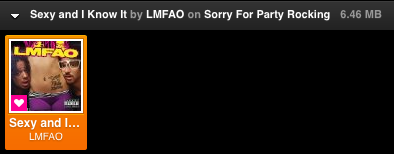
    <content type="html"><![CDATA[<p>This is my latest, handy weekend project for <a href="http://grooveshark.com/">Grooveshark</a> - <a href="https://github.com/intarstudents/Bytingshark">Bytingshark</a>. The main goal of it was to be able easily see playing songs mp3 file size. From that you can assume <a href="http://en.wikipedia.org/wiki/MP3">files sound quality</a> and that just what doctor prescribed.</p>

<p>What you will need for this to work:</p>

<ul>
<li><a href="http://www.mozilla.org/lv/firefox/new/">Firefox</a></li>
<li><a href="https://addons.mozilla.org/en-US/firefox/addon/greasemonkey/">Greasemonkey</a></li>
<li><a href="http://userscripts.org/scripts/show/119253">bytingshark.user.js</a></li>
</ul>


<p><img class="center" src="http://intarstudents.lv/static/2011/bytingshark.png"></p>

<p>Enjoy (but be aware, it might contain some bugs)!</p>
]]></content>
  </entry>
  
  <entry>
    <title type="html"><![CDATA[Hotfix 0.2 for keyMazony]]></title>
    <link href="http://intarstudents.lv/hotfix-0-2-for-keymazony/"/>
    <updated>2011-04-19T02:57:17+03:00</updated>
    <id>http://intarstudents.lv/hotfix-0-2-for-keymazony</id>
    <content type="html"><![CDATA[<p>Today I noticed that <a href="https://github.com/intarstudents/keyMazony">keyMazony</a> was broken, that because <a href="http://www.amazon.com/">Amazon</a> changed some JavaScript code inside <a href="https://www.amazon.com/gp/dmusic/mp3/player">Cloud Player</a>, so rewrite for toggles was needed. Most of them I managed to save, but &#8220;Mute&#8221; functionality was missing from Cloud Player. Amazon deleted it entirely? Because of that, I removed &#8220;Mute&#8221; functionality from <em>keyMazony</em> for now, but will see how things turn out. Grab extension for your browser <a href="http://keymazony.tldr.lv/">here</a> (if it isn&#8217;t already updated itself).</p>

<p>Goodnight!</p>
]]></content>
  </entry>
  
  <entry>
    <title type="html"><![CDATA[keyMazony]]></title>
    <link href="http://intarstudents.lv/keymazony/"/>
    <updated>2011-03-31T19:38:17+03:00</updated>
    <id>http://intarstudents.lv/keymazony</id>
    <content type="html"><![CDATA[<p>Love new <a href="https://www.amazon.com/gp/dmusic/mp3/player">Amazon Cloud Player</a>, but want better keyboard shortcut experience with it. Well, <a href="http://keymazony.tldr.lv/">keyMazony</a> is want you need. It adds customizable keyboard shortcut feature to <em>Amazon Cloud Player</em>. Forked from <a href="https://github.com/intarstudents/keySharky">keySharky</a> it works in <a href="http://www.mozilla.com/en-US/firefox/">Firefox</a>, <a href="http://prism.mozillalabs.com/">Prism</a>, <a href="http://www.google.com/chrome">Google Chrome</a> and <a href="http://www.apple.com/safari/">Safari</a>. It&#8217;s best tool for this kind of job :)</p>

<p>Grab one (or as many you would like) copy for:</p>

<ul>
<li><a href="https://addons.mozilla.org/en-US/firefox/addon/keymazony/">Firefox</a></li>
<li><a href="https://github.com/downloads/intarstudents/keyMazony/keyMazony-prism-latest.xpi">Prism</a></li>
<li><a href="https://chrome.google.com/extensions/detail/jipkejkgfobkihgelbphlpedkkpcodgo">Google Chrome</a></li>
<li><a href="http://keymazony.tldr.lv/grab/keymazony.safariextz">Safari</a></li>
</ul>


<p>And if you feel like poking around in source code, you will like this <a href="https://github.com/intarstudents/keyMazony">link</a>.</p>

<p><img class="center" src="http://intarstudents.lv/static/2011/keymazony-safari-options-location.png"></p>

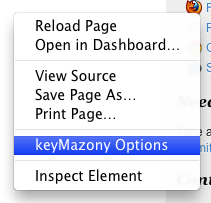
<p>P.S. You can find <em>keyMazony</em> Options page in Safari by doing right click in any web page and selecting &#8220;keyMazony Options&#8221; item.</p>
]]></content>
  </entry>
  
  <entry>
    <title type="html"><![CDATA[Groovesharks global keyboard shortcuts in Windows]]></title>
    <link href="http://intarstudents.lv/groovesharks-global-keyboard-shortcuts-in-windows/"/>
    <updated>2011-03-26T16:13:07+02:00</updated>
    <id>http://intarstudents.lv/groovesharks-global-keyboard-shortcuts-in-windows</id>
    <content type="html"><![CDATA[<p>While playing with <a href="http://www.microsoft.com/windows/windows-7/default.aspx">Windows 7</a>, I had no other choose as to put up solution for missing global keyboard shortcuts in <a href="http://listen.grooveshark.com/">Grooveshark player</a> (who sits inside <a href="http://www.mozilla.com/en-US/firefox/">Firefox</a> or <a href="http://prism.mozillalabs.com/">Prism</a>, because that&#8217;s a way I roll), similar to solution in <a href="http://www.ubuntu.com/">Ubuntu</a>. Luckily it&#8217;s (kinda) easy to achieve, so here we <strong>gooo</strong>!</p>

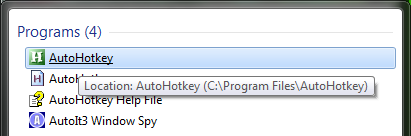
<p>First of all, we will need some software to begin with: <a href="http://gnuwin32.sourceforge.net/packages/wget.htm">Wget for Windows</a> (grab &#8220;Complete package, except sources&#8221; download or if you are lost, here is <a href="http://downloads.sourceforge.net/gnuwin32/wget-1.11.4-1-setup.exe">direct link to 1.11.4</a> version) and <a href="http://www.autohotkey.com/download/">AutoHotkey</a>. Install both of them.</p>

<p><img class="center" src="http://intarstudents.lv/static/2011/2011-03-26_1035.png"></p>

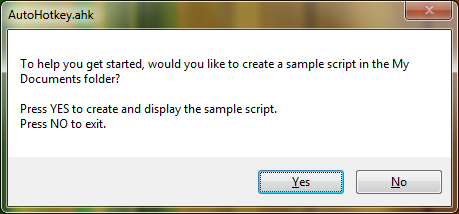
<p>Now open <em>AutoHotkey</em> (located in your <em>Program Files</em> or <em>where ever did you install it</em>). It should ask if you would like to create a sample script in <em>My Documents</em> folder (if that file doesn&#8217;t exist yet). What are you waiting for? Yes, of course! Great now when <em>AutoHotkey</em> sample script pop-up on screen wipe it clean.</p>

<p><img class="center" src="http://intarstudents.lv/static/2011/2011-03-26_1039.png"></p>

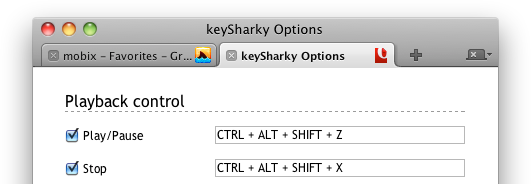
<p>Now some magic. To create new keyboard shortcut for <em>Grooveshark</em> player using <a href="https://github.com/intarstudents/keySharky/wiki/api-server">keySharky API</a>, just add a line that goes something like this:</p>

<figure class='code'><div class="highlight"><table><tr><td class="gutter"><pre class="line-numbers"><span class='line-number'>1</span>
</pre></td><td class='code'><pre><code class=''><span class='line'>HOTKEY::Run, WGET_EXE --spider --no-cache KEYSHARKY_API, , Hide</span></code></pre></td></tr></table></div></figure>


<p>In place of <strong>HOTKEY</strong> you could write <code>^H</code> which when translated into keyboard shortcut would assign <code>CTRL + H</code> combo. Other basic modifier keys are <code>#</code> <em>Windows key</em>, <code>!</code> <em>Alt</em> and <code>+</code> <em>Shift</em>. For more, check out <em>AutoHotkey </em><a href="http://www.autohotkey.com/docs/Hotkeys.htm">documentation on that subject</a>.</p>

<p>For this example, I will use <code>^!+Z</code> as <code>CTRL + ALT + SHIFT + Z</code>.</p>

<p><img class="center" src="http://intarstudents.lv/static/2011/2011-03-26_1147.png"></p>

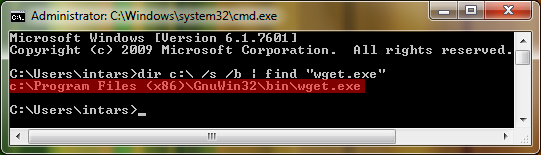
<p>Next in line: <strong>WGET_EXE</strong> you must replace with <em>wget.exe</em> binary location path. By default in Windows 7 (64-bit), <em>Wget </em>installs in &#8220;C:\Program Files (x86)\GnuWin32\bin\wget.exe&#8221;. But if you aren&#8217;t sure where did you install it in your machine, you can search for it by doing <em>Start (Orb) > Run > cmd</em> (or just search for <em>cmd</em>). When in command line execute this command. What it does is, tries to find <em>wget.exe</em> in your <code>C:\</code> drive and return its full path.</p>

<figure class='code'><div class="highlight"><table><tr><td class="gutter"><pre class="line-numbers"><span class='line-number'>1</span>
</pre></td><td class='code'><pre><code class=''><span class='line'>dir c:\ /s /b | find "wget.exe"</span></code></pre></td></tr></table></div></figure>


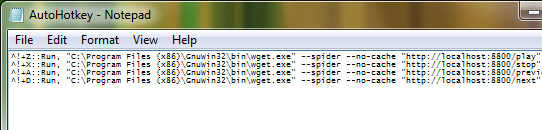
<p>Last on list is <strong>KEYSHARKY_API</strong>, but how to setup/use it you can (and should) read <a href="https://github.com/intarstudents/keySharky/wiki/api-server">here</a>. When done, it should look something like this:</p>

<figure class='code'><div class="highlight"><table><tr><td class="gutter"><pre class="line-numbers"><span class='line-number'>1</span>
</pre></td><td class='code'><pre><code class=''><span class='line'>^!+Z::Run, "C:\Program Files (x86)\GnuWin32\bin\wget.exe" --spider --no-cache "http://localhost:8800/play", , Hide</span></code></pre></td></tr></table></div></figure>


<p>This example will toggle play/pause in <em>Grooveshark</em> player when <code>CTRL + ALT + SHIFT + Z</code> combo is pressed.</p>

<p><img class="center" src="http://intarstudents.lv/static/2011/2011-03-26_1139.png"></p>
]]></content>
  </entry>
  
  <entry>
    <title type="html"><![CDATA[Say hello to newest member of keySharky family - Opera]]></title>
    <link href="http://intarstudents.lv/say-hello-to-newest-member-of-keysharky-family-opera/"/>
    <updated>2011-01-31T14:46:24+02:00</updated>
    <id>http://intarstudents.lv/say-hello-to-newest-member-of-keysharky-family-opera</id>
    <content type="html"><![CDATA[<p><img class="center" src="http://intarstudents.lv/static/2011/keysharky-opera.png"></p>

<p>Like always a picture is worth a thousand words. Grab a copy of <a href="https://addons.opera.com/addons/extensions/details/keysharky/">keySharky 1.5.3</a> for <a href="http://www.opera.com/">Opera</a> and test it out yourself. And don&#8217;t be shine to leave a review and help to improve it.</p>

<p>That&#8217;s all!</p>
]]></content>
  </entry>
  
  <entry>
    <title type="html"><![CDATA[keySharky for Google Chrome and Safari updated!]]></title>
    <link href="http://intarstudents.lv/keysharky-for-google-chrome-and-safari-updated/"/>
    <updated>2011-01-27T01:03:32+02:00</updated>
    <id>http://intarstudents.lv/keysharky-for-google-chrome-and-safari-updated</id>
    <content type="html"><![CDATA[<p>With this update users are now able to choose whenever to enable or disable (all shortcuts are enabled by default) keyboard shortcut, so there isn&#8217;t big clutter and more room to breath. You can wait for auto update to kick in or grab <strong>1.5.3</strong> version here:</p>

<ul>
<li><a href="https://chrome.google.com/extensions/detail/bmdbjbgbnoljfhkjiebkdphfikhkkopn">keySharky for Google Chrome</a></li>
<li><a href="http://keysharky.tldr.lv/grab/keysharky.safariextz">keyShakry for Safari</a></li>
</ul>


<p>That&#8217;s all for now folks!</p>
]]></content>
  </entry>
  
  <entry>
    <title type="html"><![CDATA[keySharky 1.5.2 - more control!]]></title>
    <link href="http://intarstudents.lv/keysharky-1-5-2-more-control/"/>
    <updated>2010-12-23T00:06:39+02:00</updated>
    <id>http://intarstudents.lv/keysharky-1-5-2-more-control</id>
    <content type="html"><![CDATA[<p>At least three people asked to add <em>mute</em> and <em>volume controls</em> to <a href="http://keysharky.tldr.lv/">keySharky</a>, so I was left without other choose then to add them. Like always <a href="http://www.mozilla.com/en-US/firefox/">Firefox</a> add-on will take time to receive review before it start to automatically update itself, but you can already <a href="https://addons.mozilla.org/en-US/firefox/addon/54954/versions/?page=1#version-1.5.2">install it</a>. <a href="http://www.google.com/chrome">Google Chrome</a> and <a href="http://www.apple.com/safari/">Safari</a> should already try to update it for you.</p>

<p>You can download <em>keySharky 1.5.2</em>, if you don&#8217;t have it already, to try it out:</p>

<ul>
<li><a href="https://addons.mozilla.org/en-US/firefox/addon/54954/versions/?page=1#version-1.5.2">keySharky for Firefox</a></li>
<li><a href="https://github.com/downloads/intarstudents/keySharky/keySharky-prism-latest.xpi">keySharky for Prism</a></li>
<li><a href="https://chrome.google.com/extensions/detail/bmdbjbgbnoljfhkjiebkdphfikhkkopn">keySharky for Google Chrome</a></li>
<li><a href="http://keysharky.tldr.lv/grab/keysharky.safariextz">keyShakry for Safari</a></li>
</ul>


<p>If you have issues, please leave them <a href="https://github.com/intarstudents/keySharky/issues">here</a> and I will try to figure out whats wrong.</p>

<p><strong>Happy Holidays!</strong></p>
]]></content>
  </entry>
  
  <entry>
    <title type="html"><![CDATA[keySharky for Safari]]></title>
    <link href="http://intarstudents.lv/keysharky-for-safari/"/>
    <updated>2010-12-11T21:10:01+02:00</updated>
    <id>http://intarstudents.lv/keysharky-for-safari</id>
    <content type="html"><![CDATA[<p>Yup, couple minutes ago <a href="https://github.com/intarstudents/keySharky/tree/master/safari.safariextension">pushed it</a> to <a href="https://github.com/intarstudents">Github</a> and now writing about it here. There might be some bugs, but time will show. So if you want to use <a href="http://keysharky.tldr.lv/">keySharky</a> inside <a href="http://www.apple.com/safari/">Safari</a>, <a href="http://keysharky.tldr.lv/grab/keysharky.safariextz">this link</a> is for you.</p>

<p><img class="center" src="http://intarstudents.lv/static/2010/keysharky-safari.png"></p>

<p>You can find this option page by doing right click in any page and selecting &#8220;keySharky Options&#8221; item. By default it has same keyboard shortcut combos as <a href="https://addons.mozilla.org/en-US/firefox/addon/54954">Firefox</a> and <a href="https://chrome.google.com/extensions/detail/bmdbjbgbnoljfhkjiebkdphfikhkkopn">Chrome</a> version has.</p>
]]></content>
  </entry>
  
  <entry>
    <title type="html"><![CDATA[Grooveshark broke keySharky - fix it ;)]]></title>
    <link href="http://intarstudents.lv/grooveshark-broke-keysharky-fix-it/"/>
    <updated>2010-12-05T11:38:51+02:00</updated>
    <id>http://intarstudents.lv/grooveshark-broke-keysharky-fix-it</id>
    <content type="html"><![CDATA[<p>With last update of Grooveshark, keySharky 1.5 is temporally broken, because new shiny HTML Grooveshark doesn&#8217;t yet ship with <a href="http://preview.grooveshark.com/GroovesharkAPI.html">GroovesharkAPI</a> (should be fixed in next week as I was told).</p>

<p>But if you can&#8217;t wait that long and still want to use Grooveshark that knows how to talk with keySharky you could upgrade to keySharky 1.5.1 for <a href="https://addons.mozilla.org/en-US/firefox/addon/54954/versions/?page=1#version-1.5.1">Firefox</a> (not yet reviewed so no automatic update available) or/and <a href="https://github.com/downloads/intarstudents/keySharky/keySharky-prism-latest.xpi">Prism</a>. After upgrade go to <a href="http://retro.grooveshark.com/">http://retro.grooveshark.com/</a> and you should be fine till <em>GroovesharkAPI</em> is added to new shiny version. That&#8217;s all :)</p>
]]></content>
  </entry>
  
  <entry>
    <title type="html"><![CDATA[Linux Mint 10 with Shiki-Wise theme]]></title>
    <link href="http://intarstudents.lv/linux-mint-10-with-shiki-wise-theme/"/>
    <updated>2010-11-14T13:08:15+02:00</updated>
    <id>http://intarstudents.lv/linux-mint-10-with-shiki-wise-theme</id>
    <content type="html"><![CDATA[<p>Some days ago <a href="http://blog.linuxmint.com/?p=1581">Linux Mint 10 was released</a>. I upgraded as soon as could, but didn&#8217;t like <a href="http://www.linuxmint.com/pictures/screenshots/julia/julia.png">new theme</a>. So after <em>Google&#8217;ing</em> around and wasn&#8217;t able to found solution, I was forced to write my own. And here it is.</p>

<p><strong>Update</strong>: as of now there is easier way to install Shiki-Wise theme, but I will leave second option anyway :) (thanks to <a href="http://mantas.malcius.lt/">Mantas</a> for pointing out it).</p>

<figure class='code'><figcaption><span></span></figcaption><div class="highlight"><table><tr><td class="gutter"><pre class="line-numbers"><span class='line-number'>1</span>
</pre></td><td class='code'><pre><code class='bash'><span class='line'>sudo aptitude install shiki-wise-theme
</span></code></pre></td></tr></table></div></figure>


<p>First, download <a href="https://github.com/downloads/intarstudents/Shiki-Wise-Minty/Shiki-Wise-Minty.tar.gz">Shiki-Wise theme</a> (not the one from <a href="http://gnome-look.org/content/show.php/Shiki-Colors?content=86717">Shiki-Colors</a>, but extracted from previous Mint version, because they are bit different) and extract it.</p>

<figure class='code'><figcaption><span></span></figcaption><div class="highlight"><table><tr><td class="gutter"><pre class="line-numbers"><span class='line-number'>1</span>
<span class='line-number'>2</span>
<span class='line-number'>3</span>
</pre></td><td class='code'><pre><code class='bash'><span class='line'><span class="nb">cd</span> ~
</span><span class='line'>wget https://github.com/downloads/intarstudents/Shiki-Wise-Minty/Shiki-Wise-Minty.tar.gz --no-check-certificate
</span><span class='line'>tar zxvf Shiki-Wise-Minty.tar.gz
</span></code></pre></td></tr></table></div></figure>


<p>Now copy theme folder over to <code>/usr/share/themes/</code> and install dependencies.</p>

<figure class='code'><figcaption><span></span></figcaption><div class="highlight"><table><tr><td class="gutter"><pre class="line-numbers"><span class='line-number'>1</span>
<span class='line-number'>2</span>
</pre></td><td class='code'><pre><code class='bash'><span class='line'>sudo mv Shiki-Wise /usr/share/themes/
</span><span class='line'>sudo aptitude install shiki-colors-metacity-theme gnome-wise-icon-theme
</span></code></pre></td></tr></table></div></figure>


<p>You are done. Navigate to Preferences > Appearance and select <em>Shiki-Wise</em> as your theme :)</p>
]]></content>
  </entry>
  
  <entry>
    <title type="html"><![CDATA[Toggle keyboard shortcuts from outside of Firefox!]]></title>
    <link href="http://intarstudents.lv/toggle-keyboard-shortcuts-from-outside-of-firefox/"/>
    <updated>2010-10-20T19:10:08+03:00</updated>
    <id>http://intarstudents.lv/toggle-keyboard-shortcuts-from-outside-of-firefox</id>
    <content type="html"><![CDATA[<p>First of all little background why I thought this was a good idea. For most of my time I&#8217;m working as web developer and have two monitor workstation. So easiest way is to write code in one monitor and &#8220;review&#8221; it as web page on other one (inside web browser). But that makes a lot of work to navigate between them. <em>Click there, click here</em>. And even if you use <code>Ctrl + Tab</code> it&#8217;s more than two keyboard shortcut away from reloading that page.</p>

<p>And I know that out there is <a href="http://xrefresh.binaryage.com/">XRefresh</a>, but not every time when code has been edited there is need for refresh, because it might just be a little change (like added comment, that will not appear in page anyways) or I just don&#8217;t feel like reloading.</p>

<p>So in scene comes <a href="http://github.com/intarstudents/httpK3y">httpK3y</a> - small server inside Firefox/Prism add-on, that you can control via <a href="http://en.wikipedia.org/wiki/Hypertext_Transfer_Protocol">HTTP</a>. It has simple <a href="http://github.com/intarstudents/httpK3y/blob/master/README.md">API</a> and is easy to configure. Works cross platform (Windows, Linux, Mac OS X) and only dependencies are <a href="http://www.mozilla.com/en-US/">Firefox</a> (3.6 and up) or <a href="http://prism.mozillalabs.com/">Prism</a> (1.0 and up).</p>

<p>You can read on about how to use <em>httpk3y</em> in <a href="http://github.com/intarstudents/httpK3y/blob/master/README.md">README</a>, but I will give you simple example how I use it in <a href="http://www.linuxmint.com/">Mint</a> (<a href="http://www.ubuntu.com/">Ubuntu</a>).</p>

<figure class='code'><figcaption><span></span></figcaption><div class="highlight"><table><tr><td class="gutter"><pre class="line-numbers"><span class='line-number'>1</span>
</pre></td><td class='code'><pre><code class='bash'><span class='line'><span class="nv">$ </span>wget http://localhost:7700/key_reload --spider --no-cache
</span></code></pre></td></tr></table></div></figure>


<p>Simple as that! And here you can grab package for <a href="https://addons.mozilla.org/en-US/firefox/addon/242725/">Firefox</a> or/and <a href="http://github.com/downloads/intarstudents/httpK3y/httpK3y-prism.xpi">Prism</a>. Have fun!</p>

<p><em>P.S. Questions?</em></p>
]]></content>
  </entry>
  
  <entry>
    <title type="html"><![CDATA[keySharky 1.5 (for Firefox and Prism) out in wild]]></title>
    <link href="http://intarstudents.lv/keysharky-1-5-for-firefox-and-prism-out-in-wild/"/>
    <updated>2010-10-14T00:43:50+03:00</updated>
    <id>http://intarstudents.lv/keysharky-1-5-for-firefox-and-prism-out-in-wild</id>
    <content type="html"><![CDATA[<p>It&#8217;s done, there is no way back. Yesterday I submitted <a href="https://addons.mozilla.org/en-US/firefox/addon/54954/">keySharky</a> for review in <a href="https://addons.mozilla.org/en-US/firefox/">Add-ons for Firefox</a>, and after less then hour it was approved! <em>Whoot</em>?! That was fastest approval yet and it warmed my heart.</p>

<p>So why I&#8217;m telling these news to you now? Well, I could find place where put <a href="http://keysharky.tldr.lv/grab/keysharky-prism-latest.xpi">Prism version on</a>. But luckily my fast hands build <a href="http://keysharky.tldr.lv/">landing page for keySharky</a> that&#8217;s hosted on same <em>VPS</em> as this blog and everything is back to normal.</p>

<p>So, you might ask what has been changed?</p>

<ul>
<li>New icon - bling, bling!</li>
<li>Now you can disable unwanted keyboard shortcuts that <em>keySharky</em> creates</li>
<li>More methods inside <a href="http://wiki.github.com/intarstudents/keySharky/api-server">gsAPI</a>, so more fun</li>
<li>And like always, some minor bug fixes</li>
</ul>

]]></content>
  </entry>
  
  <entry>
    <title type="html"><![CDATA[State of mind]]></title>
    <link href="http://intarstudents.lv/state-of-mind/"/>
    <updated>2010-09-28T23:36:22+03:00</updated>
    <id>http://intarstudents.lv/state-of-mind</id>
    <content type="html"><![CDATA[<p>Ok, time to rewind what happened. First of all, needed to move to another <em>VPS</em> provider, because previous was so good that it just went down without a sound. Luckily had backups laying around.</p>

<p>Second. My previous &#8220;work machine&#8221; <a href="http://www.laptopmag.com/review/laptops/acer-aspire-one-windows-xp.aspx">Aspire One 150</a> (yes, three years I worked on that with external monitor plugged in) was slowly dying, to fix that I bought new one - <a href="http://www.simplyacer.com/eMachines_E527_971094.html">Acer eMachine E527</a>. And with this upgrade <a href="http://linuxmint.com/">Linux Mint 9</a> is just flying! Old <em>Aspire One</em> now has a new life with <a href="http://www.hackintosh.com/">Hackintosh</a> on board, thanks to tools from <a href="http://code.google.com/p/netbook-installer/">NetbookInstaller</a>.</p>

<p>Third. <a href="https://addons.mozilla.org/en-US/firefox/addon/54954">keySharky</a> is <a href="http://github.com/intarstudents/keySharky">getting support</a> for <a href="http://www.mozilla.com/en-US/firefox/beta/">Firefox 4</a>, but it&#8217;s not yet stable. Without it, I&#8217;m trying to add something new to <em>keySharky</em>, but don&#8217;t know what will make into this release:</p>

<ul>
<li>Option to fully disable unneeded keyboard shortcuts?</li>
<li>More info from gsAPI?</li>
<li>Something else?</li>
</ul>

]]></content>
  </entry>
  
  <entry>
    <title type="html"><![CDATA[Self-made Arduino shield thingy]]></title>
    <link href="http://intarstudents.lv/self-made-arduino-shield-thingy/"/>
    <updated>2010-08-27T17:20:35+03:00</updated>
    <id>http://intarstudents.lv/self-made-arduino-shield-thingy</id>
    <content type="html"><![CDATA[<p>When I finished <a href="http://intarstudents.lv/fun-with-4x4-led-matrix/">my last</a> <a href="http://arduino.cc/">Arduino</a> based project, I found hard to show-off it to my friends (without using a <a href="http://www.youtube.com/">YouTube</a>). Even after <a href="http://intarstudents.lv/wp-content/uploads/2010/08/01.jpg">trying to pack it up</a>, it still was way to big for pocket and carrying around was pain in ass. So I sad to myself &#8220;Idiot, next time build something more pocket friendly and portable!&#8221;. And it looks like future me was listening to that.</p>

<p>So what do you think? I definitely like it :) For casing I used nice and shiny (maybe not so much) <em>iPod</em> selling case (or how it&#8217;s called), that fits in pockets less or more. Shield is attached to <em>Arduino</em> using pins found on <a href="http://en.wikipedia.org/wiki/Floppy_disk_drive">FDD</a>. It&#8217;s powered by two 3V <a href="http://en.wikipedia.org/wiki/List_of_battery_sizes">CR2032</a> batteries that are housed in holders for motherboards <a href="http://en.wikipedia.org/wiki/BIOS">BIOS</a> batteries. Lastly it has <em>SHARLIGHT CMF-0502200 F</em> seven-segment display (again, taken from old computers &#8221;<a href="http://en.wikipedia.org/wiki/Turbo_button">Turbo display</a>&#8221;) who is controlled by two <a href="http://en.wikipedia.org/wiki/7400_series">74HC595</a> shift registers.</p>

<p>On software side, it&#8217;s running reaction game where you need to press button when light comes up on display, as fast as you can. And pretty neat menu system controllable with two buttons.</p>

<p>I have made <a href="http://www.flickr.com/photos/themobix/sets/72157624692941053/">set of pictures</a> on <a href="http://www.flickr.com/">Flickr</a> too :)</p>
]]></content>
  </entry>
  
  <entry>
    <title type="html"><![CDATA[Fun with 4x4 LED matrix]]></title>
    <link href="http://intarstudents.lv/fun-with-4x4-led-matrix/"/>
    <updated>2010-08-15T16:24:45+03:00</updated>
    <id>http://intarstudents.lv/fun-with-4x4-led-matrix</id>
    <content type="html"><![CDATA[<p>Well, after buying <a href="http://www.arduino.cc/en/Tutorial/ShiftOut">74HC595</a> <a href="http://en.wikipedia.org/wiki/Shift_register">shift register</a>, you are left with only one option - build a <a href="http://www.futurlec.com/LEDMatrix.shtml">LED matrix</a>. And that&#8217;s what I have done in these hot days. To spice things up I added push button with whom you can control integrated LED matrix animations (algorithms? sprites?).</p>

<p>What can I say - it already was blast to solder my first <a href="http://en.wikipedia.org/wiki/Stripboard">stripboard</a>, but 4x4 LED grid made it even more fun and frustrating (stuffs doesn&#8217;t work always :)</p>
]]></content>
  </entry>
  
  <entry>
    <title type="html"><![CDATA[Checkboxes all the way]]></title>
    <link href="http://intarstudents.lv/checkboxes-all-the-way/"/>
    <updated>2010-08-06T15:07:24+03:00</updated>
    <id>http://intarstudents.lv/checkboxes-all-the-way</id>
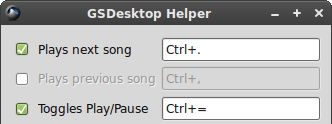
    <content type="html"><![CDATA[<p>Thanks to <a href="http://www-personal.umich.edu/~ppannuto/">ppannuto</a>, new version of <a href="http://github.com/intarstudents/GSDesktop-Helper">GSDesktop Helper for linux</a> comes with feature that allows you to disable unwanted keyboard shortcuts. Its great for those you doesn&#8217;t like to clutter their keyboard shortcuts with unwanted stuff.</p>

<p><img class="center" src="http://intarstudents.lv/static/2010/syhee1u.png"></p>

<p>If you want to install <em>GSDesktop Helper</em> in <a href="http://www.ubuntu.com/">Ubuntu</a>/<a href="http://www.debian.org/">Debian</a>, you can use already packed package:</p>

<figure class='code'><figcaption><span></span></figcaption><div class="highlight"><table><tr><td class="gutter"><pre class="line-numbers"><span class='line-number'>1</span>
<span class='line-number'>2</span>
<span class='line-number'>3</span>
</pre></td><td class='code'><pre><code class='bash'><span class='line'><span class="nb">cd</span> ~
</span><span class='line'>wget http://github.com/downloads/intarstudents/GSDesktop-Helper/gsd-helper-0.4.2_all.deb
</span><span class='line'>sudo dpkg -i gsd-helper-0.4.2_all.deb
</span></code></pre></td></tr></table></div></figure>


<p>Or if your distributive doesn&#8217;t support <a href="http://en.wikipedia.org/wiki/Deb_%28file_format%29">Debian packages</a>, you can always run it directly from command line (but before this you may be needed mess with <a href="http://github.com/intarstudents/GSDesktop-Helper/blob/master/README">dependencies</a>):</p>

<figure class='code'><figcaption><span></span></figcaption><div class="highlight"><table><tr><td class="gutter"><pre class="line-numbers"><span class='line-number'>1</span>
<span class='line-number'>2</span>
<span class='line-number'>3</span>
<span class='line-number'>4</span>
</pre></td><td class='code'><pre><code class='bash'><span class='line'><span class="nb">cd</span> ~
</span><span class='line'>git clone http://github.com/intarstudents/GSDesktop-Helper.git
</span><span class='line'><span class="nb">cd </span>GSDesktop-Helper/
</span><span class='line'>./helper.py
</span></code></pre></td></tr></table></div></figure>


<p>That&#8217;s it for this <a href="http://en.wikipedia.org/wiki/Shark_Week">shark week</a>, keep swimming with <a href="http://listen.grooveshark.com/">Grooveshark</a> and everything will be alright :)</p>
]]></content>
  </entry>
  
  <entry>
    <title type="html"><![CDATA[Control Grooveshark with Apple Remote]]></title>
    <link href="http://intarstudents.lv/control-grooveshark-with-apple-remote/"/>
    <updated>2010-07-19T14:49:50+03:00</updated>
    <id>http://intarstudents.lv/control-grooveshark-with-apple-remote</id>
    <content type="html"><![CDATA[<p>Tim Andrew has wrote neat blog post about &#8221;<a href="http://blog.timothyandrew.net/post/697171692/apple-remote-with-grooveshark">How to connect Apple Remote with Grooveshark</a>&#8221;. For that you will need <a href="http://www.iospirit.com/products/remotebuddy/ajaxremote/">Remote Buddy</a> and <a href="https://addons.mozilla.org/en-US/firefox/addon/54954/">keySharky</a>. It&#8217;s pretty neat, I would say. Sadly, can&#8217;t test it out, but go check it out :)</p>

<p><strong>P.S.</strong> If you too have build something with <em>keySharky</em>, definitely ping me.</p>
]]></content>
  </entry>
  
</feed>